#multiplayer
1 messages · Page 490 of 1
 thin stratus
but that's the most common usage (hence the static accessors)
If you need Name that you display to people in a serverlist, then you usually use the normal settings and add a ServerName to it
Also if you really need the SessionName on the other side, just label them
Add a settings "SESSIONNAME" to it
And just set it
 cosmic star
Yeah, wasn't going to use it as a displayed server name at all. I just thought it was more like a unique id and then wondered why I couldn't get it from a search result -- Which was important, as my player can't create new sessions from their side, only find sessions created by the backend.
But at the same time, there was also the session id string
thin stratus
The unique part is the uniqueID of the session usually
cosmic star
yeah, that got me confused. Especially since there were almost no methods taking that, but a bunch taking the session name.
thin stratus
Yus
cosmic star
So to recap:
a) SessionName is more a "SessionType" and broadly identifies the scope of the session
b) Sessions are uniquely identified by FOnlineSession::FOnlineSessionInfo::GetSessionId()
c) If I wanted I could use whatever I want as the SessionName
One last question then: What purpose does the PortTypein GetResolvedConnectString server. I had the impression that the ConnectInfo already contains everything I need to know how to connect. Is it just to differentiate between things like "Server", "Beacon", etc.?
 foggy idol
@winged badger thanks
 fierce haven
is this a bug or does the set child actor class just not work with replication?
when i change my child actor component's class it from the server then call on owning client the client is still printing the default class on the child actor component...
 still condor
so I noticed that when replicating an array, the "old" value in the repnotify is automatically resized to be the same as the new value, truncating or zero-padding as necessary. Is this how it's supposed to work?
 empty axle
@fierce haven most of the things is not working with replication from default. If you want to check if something replicates you should check the c++ source. In your case you should have the weapon to be a repnotify variable, set it on the server and on the client side when onrep gets called you should call set child actor class.
 red musk
Hello everyone, does anyone know when using Seamless Travel how to know on the client when the client has appropriately setup its new PlayerController that it got from the server? My understanding is that the Server will ServerTravel all clients to the new level with a new game mode. The game mode specifies the new PlayerController class to use, and creates ones for all of the players on the server (provided via PostLogin). Eventually this player controller must get replicated/set on the client to be the client's local player controller, but I cannot find any way to know when that has occurred successfully on the client
I have a character being spawned by the server which is trying to bind to events on the client, via getting the local controller and binding to it, but the character's begin play is occuring on the client before the client has received its new player controller from the server
 glad wharf
Iirc it's safe to do RPC after onpostlogin has been called
So you could do a server to client rpc there to trigger your initialization code on client with the certainty that it has a valid PC
red musk
Problem is the server is spawning the characters, so the characters aren't spawned on the client, they're replicated down
So they're not waiting for the client to say start running logic on them, they each begin doing it when they get replicated (since players can join at different times)
hmmmMMmmmm
basically I'm looking for some way for the client to be aware of when it gets a new player controller from when the server runs GameMode::SwapPlayerControllers
glad wharf
OnPossessed on server then rpc?
You mean you are looking for the client pawn to be aware of when it gets a new PC?
glad wharf
Even on client? I thought they were called only on server
 winged badger
talking blueprints or c++?
for example SetPawn is called from Possess and OnRep_Pawn in the controller
so it will run both server and client side right after you have a valid pawn
glad wharf
Oh ok thx, I thought about being aware on client that client has a valid PC
But yeah I got confused on the way
winged badger
there are some RPCs flying around under the hood already
like ClientInitializeHUD
where the GameMode sends a TSubclassOf<AHUD> to the client PCs
glad wharf
Ok so it means that the PC is already valid
winged badger
you literally can't do anything before it is
or even try to
there is no UI, no Camera, no Controls
when the PC is constructed client side
it will first set any replicated values to match those on server at the frame it was constructed at
then it will run PostNetInit
glad wharf
Aaah yes I see. But I believed a "fake" PC was created at startup? Do you have a way to check which one it is?
winged badger
then BeginPlay, unless you are delaying it
only if you start players as spectators
glad wharf
Okay, so if not, there is not a single one PC in client memory before server reached to it?
winged badger
it might still have the one from the previous, non-networked map, not sure when that is destroyed, but i think before
in case of seamless travel, there will be a PC on client
but that is not the PostLogin path
glad wharf
Ah that explains why I have one, the map menu is not networked indeed
Ok thanks for this very detailed answer
winged badger
you can change the class for MainMenuPC to make sure
you'll be able to see the type
 glad sedge
man I gotta get my head around ownership
 unreal pine
Standing on a moving platform that's replicating movement in multiplayer for me is jittery as hell. Anyone know how to solve?
 chrome bay
Don't replicate it's movement and make the platform move deterministically
Which bit is Jittery, the platform or the character?
chrome bay
Does the platform have "Can Be Character Base" set to true?
If not the characters movement will replicate as absolute rotation/location instead of relative to what it's stood on.
chrome bay
That's it IIRC
unreal pine
👍
I'm reading a thread on the issue atm
thanks 🙂
https://youtu.be/kZBZMHbAcTU someone captured a pretty sweet video of a similar issue
lol @chrome bay you're all up in this thread
I just noticed
chrome bay
Lol oh yeah...
Yeah so the issue is the character is predicting it's position - nothing else in the level does
unreal pine
yeah, that makes sense
glad sedge
@chrome bay Binding a Delegate on an AIController and then calling it from a pawn - I can't seem to get it to call from all AIControllers, just the AIController that owns the pawn. Hopefully that makes sense.
chrome bay
say wut
glad sedge
: (
I have a multicast delegate that I bind via my AIController to a function inside the AIController.
From the AIController pawn, I'm broadcasting that delegate.
one sec. lemme diagram it a little
chrome bay
I'm not sure what the issue is, but AI Controllers only exist on the Server IIRC
Unless you spawn them locally obvs
unreal pine
I haven't worked a lot with AI, but does the client create a local AIController?
makes sense to me 🙂 you probably need to call that function from a different spot rather than the controller
glad sedge
chrome bay
I don't know why you need that delegate but in general it feels like a bad design pattern
It'll only broadcast on the Server either way
Can't really make sense of it tbh
glad sedge
hmm okay
I suppose I want to communicate to all the AIControllers to update a variable.
Hence the delegate
 meager spade
you update playerstate
thats the idea of playerstate, to tell wheat team etc they are on
if a pawn has the ball, this should probably be handled in gamestate, of who actually has the ball
controllers can pull this information
or pawns
unreal pine
rofl my meshes that were animated were set to static, and not movable. So my guess is they weren't syncing or updating properly
glad sedge
oh shit, I forgot about playerstate
Poor architecture aside, this should work, no?
I mean a delegate on a AIController to the other AIControllers?
meager spade
server only
unreal pine
If it's multicast, the other clients won't see the function since the controller only exists on the owning client (server in this case)
meager spade
oh AIControllers
yeah they only exist server
so should be fine
PlayerControllers are a bit different
unreal pine
You should also be fine with a server only RPC, but you mentioned multicast
meager spade
they exist Server and owning client
i personally have an AIManager in the level
which handles intercommunication between AI
and has a bunch of delegates the ai pawn/controller can bind to
glad sedge
So other AIControllers don't know about each other? They both exist on the server though?
@meager spade I can kinda see how that'd be useful.
meager spade
AIControllers are fine and you can see them as long as that function is ran on the server
glad sedge
hrmm it is, which is puzzling.
glad sedge
But then again I'm not technically calling it on the AIController, I'm calling it as a reference on my pawn. Though it's running on server.
meager spade
have to also be careful, cause AI Pawns are replicated, meaning a copy (Simulated proxy) of the AI pawn is on a client
glad sedge
jesus christ
Okay, I think I suspect what's happening
I'm calling the AIController delegate from my pawn. That explains why it only switches / works on MY pawn since that pawn owns that AIController.
glad sedge
yeahhhh okay
My setup is rubbish anyway. I should've used GameState / PlayerState more.
That being said, a way I could get around this is I call a delegate on my pawn to other pawns, and then get them to access the AIController they own? That's an awful way to approach it IMO, but perhaps that'd work?
unreal pine
I'd still just throw whatever func you're calling in the playerstate
and just call it there
glad sedge
Yeah I agree @unreal pine
But I'm just wanting to make sure I get the concept of ownership a little more.
unreal pine
I see, yeah there's definitely a lot of ways to get a thing to work
but sometimes the path to that workaround ends up being more work in the end 😛
glad sedge
I'll rewrite it tomorrow. I feel I've got the concept of Server / Client downpat - but I'm iffy on ownership and the different Simulated Proxies et al
Anyway, off to bed. Thanks everyone.
unreal pine
Night!
 wise depot
does anyone have the linux steam files? SteamClient.so
thin stratus
@wise depot Do you mean the API library?
 rose egret
how UE4 send replicated properties? afaik for each properties it sends the index and value . am I right ?
 bitter oriole
It's a bit more involved, it should only send changed values, at a rate depending on the client, potentially using delta
rose egret
because currently I have lots of bit property. which I thought would be good to pack them in a uint16 property myself.
bitter oriole
If you have a lot of that, you could possibly use a state machine instead
rose egret
state machine? how is it relevant to replication?
if I somehow could now how UE4 deserialize the replicated packet it would be enough
bitter oriole
It is relevant for replacing multiple bits of information
Not that it's always possible
Anyway, you can dig through the code looking at NetSerialize code
And the NetDriver class
rose egret
thats lots of code 🙂
bitter oriole
It is, but if you're deep in minute optimization of every replicated bit...
red musk
Anyone know how to detect when the client gets a new PC from the server after changing levels with seamless travel? Previous level PC sticks around for a little bit and is causing problems
 random hazel
weird thing, i obviously did something...when i run in editor with 2 players, my player2 from player1 view doesn't fall (spawned in the air). from player 2 view everyone is on the ground. When i eject from player 1, both players are in the correct position. any ideas where to look? i commented out all of my code and disconnected all of my blueprints
red musk
What class is OnRep Controller on @meager spade ?
That feels like what I need but I don’t see where it lives
winged badger
APawn
random hazel
i figured out my problem, override possessedby but didn't call the super
red musk
I need to know when the local player controller changes due to level changing not when possession occurs so pawn won’t work for me 😦
red musk
Yeah it does, which is the source of the problem
It tries to persist the old one, and it takes a tiny bit for the new one to come in and stomp it
winged badger
when you travel from map A with PC a to B with PC B
red musk
The new one is being created immediately, but seemingly not set as the local player controller for awhile
Which I find odd
winged badger
the controller that loads the map B is PC A
it calls NotifyLoadedWorld locally
then ServerNotifyLoadedWorld (RPC)
server then calls HandleSeamlessTravelPlayer
which swaps the controllers if the classes don't match
red musk
Yeah with SwapPlayerControllers, was looking at that
winged badger
there is a callback for when the controllers swap (exposed to BP) OnSwapPlayerControllers (server only)
then a normal replication takes over
red musk
That’s where I ended up looking at the source, which then led me to trying to understand when that replication completed
Ala some controller on rep at the world level or something
winged badger
on clients you'll only have 1 controller
unless you're doing splitscreen MP
so it will construct the Actor, set all the replicated variables that come in the same bunch as instructions to spawn the Actor (anything set on same frame as HandleSeamlessTravelPlayer on server)
then it will call PostNetInit, then BeginPlay
red musk
I have another actor, replicated from the sever, that relies on info in the PC, so I was trying to bind to something that let it know when the new PC was setup
winged badger
unless you delayed telling the World to BeginPlay
red musk
So that it could do it’s init
winged badger
whats its relation to the PC on server?
red musk
But that all feels kinda wrong; I think here the real solution is not persisting the PC if I am just stomping it anyways
It’s a multiplayer actor, so not possessed by my PC, just being replicated
Server has it possessed by another players PC
winged badger
you can assuming no packages lost, force the order in which the Actors replicate over by setting NetPriority
i can't stress enough that it is not a fail-proof solution
red musk
Yeah doesn’t feel super great
red musk
Can I remove the PC from the persisted actor list somehow?
So seamless travel doesn’t try to persist it
And it immediately makes the new correct PC?
winged badger
you can probably override the GM not to persist them but
it will break seamless travel
and by "break" i mean completely
red musk
How come? I thought arbitrary objects could be persisted, does it require PC specifically?
Maybe in this circumstance I just shouldn’t be using seamless travel
winged badger
everything related to that client starts with its PC calling ServerNotifyWorldLoaded
after it has finished loading the level
without the PC, that is problematic
red musk
Does non seamless travel not go through that flow?
I assume it would still need to notify the server it has connected and loaded
winged badger
no, then its Login/PostLogin
red musk
Ah right, that makes sense
winged badger
just replicate a poitner to the other Actor on your PC
have it Notify that Actor its ready OnRep
LocalPlayerController or not, you don't even need that information in this scenario
red musk
Is there advantages to using seamless travel still in circumstances where I don’t need to persist any objects or information?
winged badger
yes, it doesn't disconnect and reconnect players
and steam doesn't even work with non seamless i think with sockets
 thorny saddle
hi zlo 👋
winged badger
hey
red musk
Thank you for all the help!
thorny saddle
do you know where i can buy dedicated server for my game?
and how can i install my server on that
?
winged badger
no, i don't use dedis
winged badger
probably, most competitive games do
red musk
When the sever swaps player controllers how does the new one get to the client, is the controller itself a replicated variable?
 waxen socket
Hello Slackers,
Does anyone out there know why GetParentActor (used to find owner of child actor) would return null only on the client?
red musk
What object are you calling it on?
winged badger
@red musk its a replicated Actor
waxen socket
It's being called in the construction script of an actor that is attached to a character.
waxen socket
Is a child actor.
waxen socket
It's caused some problems, but for the most part it's been the right path.
winged badger
i never saw the benefit, i can attach a normal Actor just fine
and unreal autocreating it from a template just takes away my ability to construct an object graph myself
are they both replicated?
waxen socket
The parent and the child? Yes, they're both replicated.
winged badger
and the component itself?
waxen socket
No, I could try that.
winged badger
UChildActorComponent has one replicated variable, ChildActor
void UChildActorComponent::PostRepNotifies()
{
    Super::PostRepNotifies();

    if (ChildActor)
    {
        FActorParentComponentSetter::Set(ChildActor, this);

        ChildActorClass = ChildActor->GetClass();
        ChildActorName = ChildActor->GetFName();
    }
    else
    {
        ChildActorClass = nullptr;
        ChildActorName = NAME_None;
    }
}
this does seem important tho
and it won't run unless the component itself is replicated
waxen socket
Unfortunately, even with Component Replicates checked it still reports that it can't find the parent on the client.
winged badger
the Set function there sets a ParentComponent weak pointer on the ChildActor
UChildActorComponent* AActor::GetParentComponent() const
{
    return ParentComponent.Get();
}

AActor* AActor::GetParentActor() const
{
    AActor* ParentActor = nullptr;
    if (UChildActorComponent* ParentComponentPtr = GetParentComponent())
    {
        ParentActor = ParentComponentPtr->GetOwner();
    }

    return ParentActor;
}
which is required to GetParentActor()
you using c++?
waxen socket
Blueprint, but I speak C++.
winged badger
try putting a breakpoint in that UChildActorComponent::PostRepNotifies()
DebugGameEditor build
see whats going on in Locals
waxen socket
Okay, I'll take a look. Thanks for the advice.
 spare glade
Is it normal for the log when i launch my game from the launch button at the top of the editor, to say
LogOnline: Display: STEAM: Loading Steam SDK 1.39
LogOnline: Warning: STEAM: Steam API disabled!
LogOnline: Display: STEAM: OnlineSubsystemSteam::Shutdown()
LogOnline: OSS: Unable to create OnlineSubsystem module Steam
I asked other chats days before but no response so was hoping to get one here
and i try to use advanced sessions to print string my steam name and it returns a unsuccessful
but the steam overlay still works and says im playing my game
spare glade
@meager spade thats what i was doing but that appeared in the logs of launch game
in standalone my steamusername print string returns dummyname
but launch it just disables steam api
rose egret
@spare glade thanks. are u familiar with rep graph?
spare glade
yeah i am a bit, mostly with the concept and all, i got another game im doing real quick before i finish my project with rep graph
which is how im getting stuck on this steam thing ;-;
 fossil sentinel
Hey guys - I have a weird issue that I'm having no luck googling.
When the client connects to the game (a top down shooter), and they move their character (rotation with mouse, movement with WASD) the character "jitters" back and forth as they move. They can still move around the game, they appear fine through the Host screen and the Host moves just fine.
The weird thing is this problem doesn't appear when I test in the editor - only when I package the game and test via 2 different computers over the internet.
Does anyone know how to fix this or does anyone know how I can replicate the problem in the editor itself so I don't have to export every single time I want to try a solution out?
Thanks guys - this channel has been so invaluable!
bitter oriole
@fossil sentinel there is a number of possible reasons, but basically, are you using the character class ?
As to testing in-editor, you can use the PktLag config file entry (google it)
fossil sentinel
@bitter oriole thank you I will check that out.
Both the host and the client use the same character class as the parent then select different children of that class to represent their in game characters.
bitter oriole
I was asking if it used ACharacter, specifically
With the CharacterMovementComponent
And without adding custom movement code
fossil sentinel
Yes they both use the Character Movement component, but the "mouse look" (the character rotating to face the cursor) is implemented in blueprints on the character class.
Does that kind of answer your question?
bitter oriole
Yeah
Basically, movement replication is horribly difficult
The character / CMC class is horribly complicated as a result
Make sure CMC is the only class affecting the rotation and location of your characters
winged badger
or, at very least, if you have client authoritative rotation, do not replicate it back to owning client
fossil sentinel
Ok thanks a lot guys - I will give those a try with PktLagConfig
rose egret
will ForceNetUpdate() act like an ClientRPC in terms of delay I mean
because Insted of Calling a ClienrRPC and SetOwner. I want to use SetOwner() + ForceNetUpdate() to remove the redundant RPC.
it happens when a player pick an item
winged badger
it will get sent on next NetUpdate
foggy idol
I have an issue
Whenever I do a line trace the clients can only see the horizontal direction of the trace replicated
But the vertical doese t replicate
 ivory portal
When changing maps, player state also loads "new" but does your PlayerID stay the same?
 fiery geyser
Hi guys, i need a bit of help on where to add a message on the screen whenever another player starts being replicated to the local client
foggy idol
Nope
The problem was that the start and end location weren't being replicated properly
So I calculated them and plugged them into a custom event
That replicates the line trace
But thanks for the answer tho
winged badger
i either replicate parts of the hit result im interested in, for auth cases
or simulate the entire thing
never had or needed to replicate start and end of a hit trace
 modern swift
hi all, may I know the way to replicate Tmap?
 fleet raven
manually
winged badger
you can make a struct with array of keys, and with array of values
replicate that
and reconstruct the TMap client side OnRep
fleet raven
I think placing both the key and value in a single struct would be better
then it can't be temporarily out of sync with what keys goes to which value
 calm dirge
hey, i'm having a problem with my movement. when my character is in a tight space or moves past a corner or gets launched by something like a forcefield, the server teleports it a bit which looks bad on the client (there are server corrections when this happens). i have tried everything to fix it, but i still can't get it to go away. can someone help? thanks
modern swift
thanks for you guys suggestions 😄
 hoary lark
@fossil sentinel have you edited your game's bandwidth settings yet? is your game running at extremely high framerates when packaged and lower more typical "finished game" framerates in editor?
something I ran into was that Unreal's default upload rate is capped to a paltry 10 KB/sec... if the client EXE is running at 1000 FPS, it is sending 1000 movement updates per second to the server which can easily saturate that limit. the client just bottlenecks. solution is to either limit framerate or lift the bandwidth cap
more info here if you think this might be for you https://www.reddit.com/r/unrealengine/comments/a0n455/listen_server_host_sees_clients_jittering_fix/
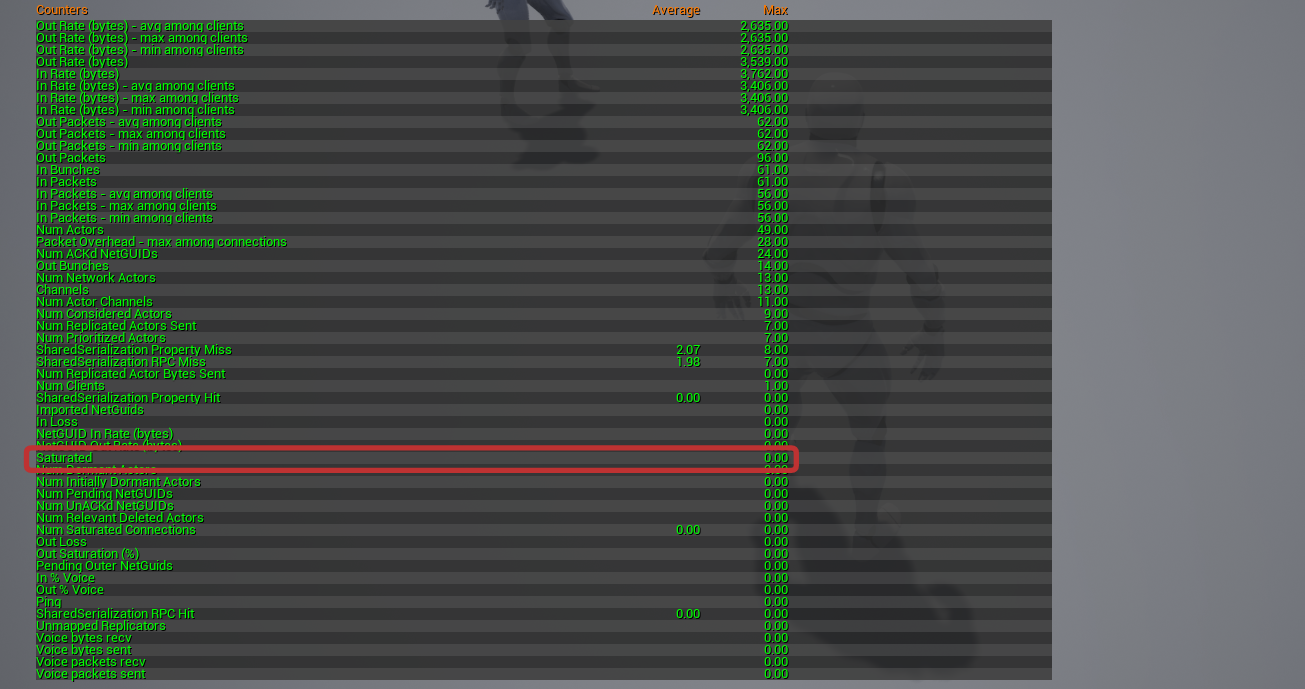
you can use Stat Net command to check on client - look for the "Saturated" entry to be non-zero https://i.gyazo.com/5eb5a1d5349af99eb8bd36eba6338829.png
fossil sentinel
Hey @hoary lark - this is my first time packaging a game so ... no... but I will check on how to do that. Thanks for the tip!
fiery geyser
Any idea of how to do something similar to this "add a message on the screen whenever another player starts being replicated to the local client"?
 twin juniper
so if i change owner of an actor to null and try to run RPC's on it, i get the "No owning connection for actor" error. When i set the owner back to the player, i can call rpcs again just fine.
however if i set the owner to a different player i get no error at all and RPC's dont even bother to fire off as checked threw breakpoints.
when i set owner back to original player it works again.
this means that its impossible to "reclaim" ownership of actors to call rpc's on them if you disconnect -> reconnect to server!!!
reconnecting causes it to never work again btw
winged badger
That assesment is incorrect
1 - you can retain your NetId when reconnecting
2 - trying to RPC from an Actor owned by different data channel is not the same as reconnecting and setting owner
Not even remotely
twin juniper
ok so how do i solve this
twin juniper
fixed it with an override of GetNetConnection()
my assessment was correct because of the original implementation of GetNetConnection()
cy@
 wintry dock
Can someone explain to me why this works on the client:
https://gyazo.com/de7faae2f1402ac46c59685d8da46d72
But this does not:


Both are being replicated from server to owning client?
 fringe matrix
what part of it doesn't work
wintry dock
In the bottom image, the event that is being called is not being called for the client, but is being called for the host.
Nevermind, I got it working 🙂 I just had to
https://gyazo.com/a043ff4dc282cb2b03e5c7799fb05300

 nocturne berry
hey guys, i have a grid actor that spawns tiles dynamically based on an input (how many tiles).
I want the server to spawn these tiles and replicate them to the clients, but the problem is that there are so many tiles (around 200) that it will take too long to replicate (+ i'm sure that it's a bad practice).
so what is the best way to achieve this?
winged badger
BP or c++?
nocturne berry
c++
winged badger
have it replicate an int32, and use that as a random seed
have the client spawn exact same tiles with exact same names on exact same locations
by running the same function server does from that seed
if tiles are changeable ingame, add a FFastArraySerializer to replicate the changes
(documentation for it lives in NetSerialization.h header)
(exact same names, along with override of IsNameSupportedForNetworking, makes them NetAddressable)
which means a pointer to a tile can be resolved over network, even if tiles themselves aren't replicated
then your FFastArraySerializerItem would have a weak pointer to the Tile, along with information about what changed
and a callback (it does it per item - postreplicatedadd/change + prereplicatedremove) should sync the clients
nocturne berry
wow that's kind of a lot to take in 1 shot 😂
let me see if i understood correctly
so the grid contains all the information of the tiles, and is replicated, while the tiles are not replicated.
when a tile changes its state (or whatever else changes), the grid should send these changes back to the client and update the status of that tile
is that correct?
winged badger
yeah, it does that by adding an item to FFastArraySerializer's Items array
nocturne berry
never used FFastArraySerializer, will have to see all about it
winged badger
the docs are in the header, there are few pages worth of comments there
along with an example of how to implement it
unlike TArray, when anything changes in it
the callback if fired on the struct Item that changed
makes figuring out what changed real easy
also, its great for situations where you replicate an array of freshly spawned replicated objects
because if TArray replicates before them, you're fucked
with FastArray, the PostReplicatedAdd would fire with a nullpointer to the object
but then PostReplciatedChange woudl fire as soon as its NetGUID is resolved
nocturne berry
i'm reading through the comments in NetSerialization.h right now, this FFastArraySerializer is looking great
never knew something like this existed
winged badger
exact same name is important, can't stress that enough
for the Tiles
you can assign a name in FActorSpawnParameters
do it manually
nocturne berry
i should add the name in the fast array then
so i spawn the tiles on the clients with the same name
winged badger
your spawning doesn't go over FFastArray
its just there for changes
but when you do spawn from a same seed
nocturne berry
i didn't get much of that, how can u spawn from a seed?
winged badger
for (int i = 0; i < TilesNum; i++)
{
    FActorSpawnParameters SpawnInfo;
    SpawnInfo.Name = TEXT(("MyTile_%d"), FString::FromInt(i)):
    <Spawn tile>
}
you pull all your random numbers from a stream
created by that seed
so the sequence will be exactly the same on clients and server
nocturne berry
well then no need for a random number
it can be based on the loop
like what u did above
right?
winged badger
if there is no random whatsoever
just TilesNum being dynamic
you can just replicate that
and spawn tiles OnRep
nocturne berry
exactly
awesome
well gotta start digging through how to do this
there seems not to be any example online x.x
nocturne berry
hopefully it's not a pain in the butt :p
winged badger
just in case the default replicates before you set your number for that game
nocturne berry
yea so that i can know if it got replicated or not yet
winged badger
if your names go out of sync, your clients will get kicked for NetGUID mismatch
thats why its important to keep them exactly the same
 unique kelp
slightly off-topic shot in the dark here, but anyone know if it is possible to get the reason for a fleet error in Amazon Gamelift?
none of the provided logs in the initialization process show any errors, and it fails during the validation process
nocturne berry
@winged badger in the history of this channel, i see you wrote this
void FMissionStatus::PreReplicatedRemove(const struct FMissionContainer& InArraySerializer)
{
    InArraySerializer.Owner->HandleMissionRemoved(*this);
}
owner is a variable u added in the struct that should be assigned when i spawn it? in my case it should be the tile?
@unique kelp did u try to use gamelift local to test if ur implementation is working?
unique kelp
It works fine on gamelift local, i can create a session and connect to it
I'm now trying a full rebuild and uploading that to see if that was an issue
nocturne berry
never got an error during validation
most of the times i get it in the activating state
so no idea about that
unique kelp
yeah, kind of annoying that all the info I get is "fleet state change to FLEET_STATE_ERROR"
winged badger
@nocturne berry its whatever objects the FFastArraySerializer is a member of
so TileManager, or w/e you call it
if you just need to change the Tile, and nothing else, you can get away without it
in my example, my DialogManger and few other things are listening to OnMissionRemoved broadcast from MissionManager, not individual missions
nocturne berry
yea well it's cuz i was getting error C2039: 'Owner': is not a member of 'FTiles', so i was wondering if it was a custom variable
winged badger
so i need the owner
nocturne berry
PostReplicatedChange doesn't tell u which item changed?
winged badger
for me, its a TWeakObjectPtr<AMissionManager>
on FFastArraySerializer
no, it does not
but there are few scenarios when it fires
one is NetGUID for a pointer in the Item resolved
and second is you marking an item in the array dirty
nocturne berry
yea im marking the array as dirty when i change/add/remove an item
that's how it's supposed to be right?
but then when these functions fire, i'll have to loop through the whole array and update all the actors based on the new data
 trim skiff
Does the level blueprint event (BeginPlay) fire for each client that joins the session or only once when the host starts it?
 shut gyro
@trim skiff fires for each client when joining the new level
 distant wave
hi there
anybody here who is able to help me with something
I have been struggling with this for three days now
basically
when i play on a dedicated server
Client 1 shoots a linetrace from the camera
client 1 sees if it hit the ground for example
but client 2 literally just sees the line trace parallel to the ground
like the linetrace cannot go up or down
for client 2
my setup is
Multicast: line trace code
Server: calls multicast
and Player calls server
thin stratus
Well you are most likely using Pitch wrong.
Cause by default, Pitch is based on the Controller Rotation
And you might remember that Controller as well as the Rotation are only available on Server and OwningClient
So your Client 2 never gets the Pitch Value.
The Yaw is only available cause the whole actor is rotated.
distant wave
how am I using it wrong?
looking up down need replication?
you mean this
PlayerInputComponent->BindAxis("LookUp", this, &ABASECharacter::AddControllerPitchInput);
@thin stratus
?
thin stratus
Yes, the ControllerPitch isn't available on other clients
I just explained that
I might be available through some weird "PawnView" or so variable
I can never remember that
distant wave
Get Pawn View Point
?
actually no
GetActorsViewPoint
ok
so
@thin stratus I need to RPC the control rotation? basically
Multicast: Set World rotation of camera to Multicast function FRotator param
and then on Event Tick
switch has auth: auth -> Call Multicast and set the multicast rotator param to get control rotation
i have made some progress
but it doesnt replicate the rotation properly
 grizzled stirrup
@distant wave I do this on tick in the character:
    // Replicate the view pitch of this player to everyone except himself
    FRotator CurrentRot = FRotator(CurrentViewPitch, 0.0f, 0.0f);
    FRotator TargetRot = (GetControlRotation() - GetActorRotation()).GetNormalized();
    FRotator FinalRot = FMath::RInterpTo(CurrentRot, TargetRot, DeltaTime, 5);
    CurrentViewPitch = FMath::ClampAngle(FinalRot.Pitch, -90.0f, 90.0f);
CurrentViewPitch is a COND_OwnerOnly replicated float
thin stratus
@grizzled stirrup OwnerOwnly?
Not SimulatedOnly?
The Owner knows the RotationPitch...
grizzled stirrup
Sorry it's COND_SkipOwner
grizzled stirrup
Thanks I'll switch it
That means only remote clients right? So other pawns you see that are simulated on your machine
thin stratus
Pawns have this already usually:
    /** Replicated so we can see where remote clients are looking. */
    UPROPERTY(replicated)
    uint8 RemoteViewPitch;
So if you aren't doing something crazy, this should be enough
The function to access this is GetBaseAimRotation
FRotator APawn::GetBaseAimRotation() const
{
    // If we have a controller, by default we aim at the player's 'eyes' direction
    // that is by default Controller.Rotation for AI, and camera (crosshair) rotation for human players.
    FVector POVLoc;
    FRotator POVRot;
    if( Controller != nullptr && !InFreeCam() )
    {
        Controller->GetPlayerViewPoint(POVLoc, POVRot);
        return POVRot;
    }

    // If we have no controller, we simply use our rotation
    POVRot = GetActorRotation();

    // If our Pitch is 0, then use a replicated view pitch
    if( FMath::IsNearlyZero(POVRot.Pitch) )
    {
        if (BlendedReplayViewPitch != 0.0f)
        {
            // If we are in a replay and have a blended value for playback, use that
            POVRot.Pitch = BlendedReplayViewPitch;
        }
        else
        {
            // Else use the RemoteViewPitch
            POVRot.Pitch = RemoteViewPitch; // <<<<<<<<<<<<<<<<<<---------------------------------
            POVRot.Pitch = POVRot.Pitch * 360.0f / 255.0f;
        }
    }

    return POVRot;
}
@distant wave @grizzled stirrup
grizzled stirrup
I remember trying to use it but there was some reason why I switched to a replicated float, can't remember why
Maybe I just didn't know how to unpack it at the time
distant wave
@grizzled stirrup I did what u said earlier
I am trying both ways
@grizzled stirrup now what I just set camera's world rotation's pitch to CurrentViewPitch? @grizzled stirrup
on event tick
grizzled stirrup
I just use it for updating the animation blueprint
So it feeds into an aim offset
distant wave
Ah
I did that
but in another way
@thin stratus So how do I make it replicate properly?
Do I need RPCs?
calm dirge
hey, i'm having issues with my movement. when my character is in a tight space or moves past a corner or gets launched by something like a forcefield, the server teleports it a bit which looks bad on the client itself, but even worse on other clients (there are server corrections when this happens). i have tried everything to fix it for weeks now, but i still can't get it to go away. and also, movement that other clients see appears laggy (on our 30 tick servers), but in PIE it's smooth can someone help? nothing that we tried fixes them...thanks
thin stratus
@distant wave We just explained that. Please reread
distant wave
I understood that
but now
Do I set the camera world rotation
pitch
to the base aim rotation
pitch
on event tick
with RPC?
@thin stratus
thin stratus
You just replace whatever you use for getting the direction of the trace with that baseaim rotation function
distant wave
oh
well I just feel kinda dumb now
:)))
@thin stratus your solution partially worked
but
it doesnt properly replicate
for example Client 1 shoots the line trace and the impact point is 10 ft away
Client 2 sees that impact point only 5 feet away
@thin stratus
as u can see
client one sees the impact point further than those mannequins in the distance
but client 2 sees it at half of the real distance
foggy idol
I had line trace problems yesterday
I fixed it by making the line trace an event run on the server
And the event had 2 pins
Start pic and end loc
*loc
So I calculated the start and end location then plugged them into the custom event
twin juniper
@distant wave their holding guns? shouldn't the trace go from gun -> cursor ? if so it would make things tons easier for you
distant wave
The system is a bit complicated
It does what u say
When u aim down sights
For a precise shooting
When aiming it starts from the muzzle to muzzle forward vector
@twin juniper
@foggy idol the line trace rpc is good
@thin stratus is right
The problem is the line trace direction
@twin juniper After I fix this issue I will make another line trace before the main one
And then set the start of the main line trace to muzzle and end to second line trace impact point which is the center of the screen
trim skiff
Is the "Join Session" node supposed to automatically load the map (the documentation says yes, but I am unsure) after "joining a session", because it doesn't load it for me.
Quick update: By adding the listen option to the Open Level node when creating the session (not shown in the picture above), it worked fine. Looks like I had forgotten to tell my session to listen for upcoming join requests.
foggy idol
@distant wave oh. My issue was the it was tracing but the line was always going in the horizontal direction
distant wave
Yeah that is my issue too but i cannot change the rpc method cuz it will mess other stuff up
So I gotta fix that direction
@foggy idol
calm dirge
hey, i'm having issues with my movement. when my character is in a tight space or moves past a corner or gets launched by something like a forcefield, the server teleports it a bit which looks bad on the client itself, but even worse on other clients (there are server corrections when this happens). i have tried everything to fix it for weeks now, but i still can't get it to go away. and also, movement that other clients see appears laggy (on our 30 tick servers), but in PIE it's smooth can someone help? nothing that we tried fixes them...thanks
foggy idol
Hey
I'm having ragdoll issues
The ragdoll falls and works on the server but they fall through to floor on the client
meager spade
seems your not enabling collisions client side
changing collisions on server will only change the server version
you need to tell clients to do the same
either through a onrep or multicast
 cedar finch
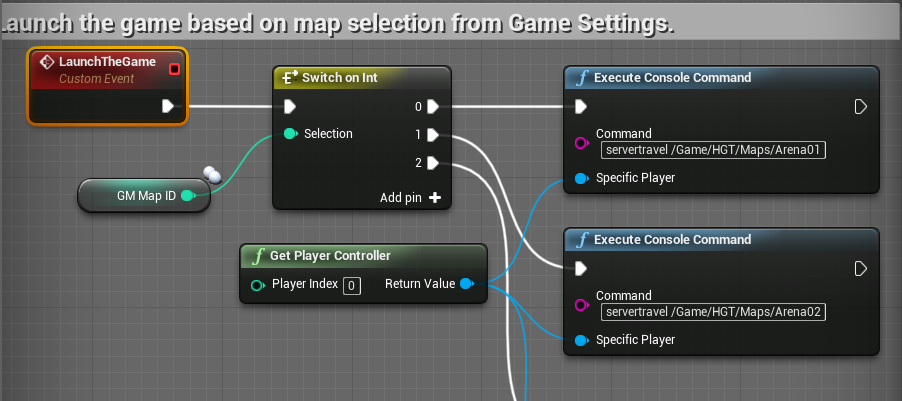
Should I create a session when I click "Singleplayer" in my game? I do it for Multiplayer. I ask because I'm using the same logic for both Singleplayer and Multiplayer. So that means I'm still using "server travel" for both. Does server travel not work correctly for singleplayer?

 worthy perch
New: Introduced MaxNetTickRate, which defaults to 120, to limit how often the net connection ticks. This helps very high framerate clients to replicate without overloading their connections or wasting excessive amounts of bandwidth.
foggy idol
So while I play my shoot montage my characters movement isn't replicated properly
After I let go it moved the character to the location of the one the other player can see
Is this a replication issue
Or a latency issue
winged badger
screenshots are rarely of any use for that
 tranquil steeple
Is there some way to make the stat startfile and stat stopfile commands run on the server?
worthy perch
I use an RPC that calls a function that executes those console commands.
I don't know if that's the best way, but if no one else answers...
tranquil steeple
Thx
 sterile plaza
I have some audio stuff I want to set depending on whether its your character or someone else's (AI or other client). I'm having trouble nailing down exactly where to check this and what to check for. I thought I'd do this in the EventPossess() on the character, but apparently that's not called on clients?
IsLocallyControlled() along with casting its controller to my player controller vs the ai controller was how I was planning on determining this.
glad wharf
If I understand correctly your problem, checking if SimulatedProxy seems to be what you are looking for @sterile plaza
The various aspects of replicating Actor objects.
sterile plaza
I resolved it by just checking LocallyControlled and has a PlayerController in BeginPlay.
For some reason I wasn't confident that the character dropped into the world would have a controller at that time, but that does appear to be the case for both PIE and standalone.
The problem with just checking the network authority is I need it to work with and without dedicated servers.
glad wharf
Ok. IsSimulated works with and without dedicated though, but your solution works also
winged badger
@sterile plaza using default spawning logic, Character will have controller on BeginPlay only on clients, due to how NetworkActors are constructed
same will not be true on the server
you can also distinguish between Players and Bots by calling IsPlayerControlled on a Pawn
it works client side, as it checks if there is a PlayerState and that that PlayerState is not a bot
sterile plaza
hmm, maybe I should be using IsLocallyControlled() and IsPlayerControlled()
 vestal thistle
Hello does anyone know if I can run the unreal dedicated server on my own personal computer?
like can i use it while it is hosting?
glad sedge
@vestal thistle yeah, you can do that
From what I recall, you can spin it up from your command line and then connect to it from the editor.
vestal thistle
ooo ok thank you @glad sedge
foggy idol
So I changed my game state and now when I start the match my player Doesn't move or animate it's just Frozen
winged badger
its either missing Super::GetlifetimeReplicatedProps, and it happens only on clients
or you didn't provide nearly enough information
foggy idol
I'm using blueprints
Ant Its completely empty
Am I supposed to put something inside
 silent creek
Hello everyone, I am trying to do seamless travel. I am able to see the transition map when other map loads but I can't possess the character in transition map. Is there anything I am doing wrong or its supposed to be like this?
glad sedge
Is it not a good idea to let AI have their own player state, do you think?
I've got a sports game, so I have a PC that controls one AI Controller at a time, but can select from like.. 6
winged badger
they can have it if they need it, no real drawbacks to it
glad sedge
I wonder if it's redundant if the AIC doesn't go anywhere.
I suppose separation of concerns.
winged badger
its still replicated, unlike the AIC by default
glad sedge
oh, yeah good point
winged badger
and even if you replicate AICs might want to go with relevant to owner only option
but its largely useful in cases where AIPawns and PlayerPawns possessed by the PC are very similar
think GAS also likes playerstates
glad sedge
Yeah I'm still rough on ownership
This may be a dumb question, but how do I know if an actor is owned by client / server / no-one?
winged badger
AActor* TopOwner;
for (TopOwner = ActorToQuery; TopOwner->GetOwner(); TopOwner = TopOwner-GetOwner()) {}
then you have the top one on the chain
glad sedge
Just to clarify. Ownership is when the request traverses up the chain until it hits the PC? And therefore that PC 'owns' that actor?
unique kelp
What exactly does the "-server" switch do when launching a server executable?
thin stratus
Has anyone dealt with ISteamUser::MicroTxnAuthorizationResponse_t?
Is that somehow available via the SubsystemInterface or do I have to manually set that up?
Basically the callback of a microtransaction purchase
bitter oriole
@thin stratus AFAIK it's not exposed
bitter oriole
Yeah
Even some of the invite stuff has that
The Steam support in UE4 has not been getting updates for years, unfortunately
thin stratus
Do I have to call SteamAPI_RunCallbacks() on tick somewhere to make this work?
chrome bay
If you're using steam OSS already it should be ok
distant wave
Hey
It is me again
@thin stratus i managed to solve that issue with remote view pitch
But I still have a problem
Remote view rotation
thin stratus
No time atm, :P working
distant wave
Sure mate
distant wave
Hey
So I have a weapon class attached to my player
And I am shooting a line trace from it
More specifically
From an arrow component attached at the muzzle
And the line trace direction is that arrows forward vector multiplied by 10000
Problem is
When playing in dedicated server
I am able to take damage from the player
But I am not able to headshot him
chrome bay
animations don't play on a dedicated server by default
And even if they did they wouldn't be in sync
distant wave
I am not talking about animations
chrome bay
So it's highly likely everything is in a different position
chrome bay
Well since the server isn't playing animations then most likely yes
That's why the client tells the server where they fired from usually
chrome bay
Well at the most basic level you can use a Server RPC to fire the weapon, and the client provides the muzzle location and direction
That's what the ShooterGame template does at least, there are other ways but they are considerably more advanced
distant wave
For example
chrome bay
But generally speaking you can't rely at all on things being in the same place on the server or even between clients
distant wave
Any other way
Maybe
Replicate arrow location and rotation
With Rpcs
@chrome bay
chrome bay
Just look at Shooter Game example, it has a full example of a first-person shooter
distant wave
Changing the fire rpc method would mess stuff up
Also
I should tell u how i replicate it
MULTICAST: weapon fire code
SERVER: calls multicast
Player calls server
Is this good?
chrome bay
NO because then you need like 3 RPCs for one shot
I can't really tell you anything else - just look at how shootergame works
It's a good starting point
distant wave
Ok
foggy idol
Ok
So I have another issue
If a player spawns on a server he is assigned a random color and that replicates well to players already on the server
But any players that join can't see the skin
*color
All they see is the default color not the replicated color change
meager spade
@distant wave the best way is to batch a single RPC
fire the shot on client, send the single rpc to server saying you fired a shot, with shot start/end loc, plus w/e details you like, server runs the same, determines if the hit was success, applies damage
boom one RPC per shot
and i know for a fact thats how epic did it in fortnite
all hitscan weapons are a rpc per shot
chrome bay
I actually read that thread of yours Kaos 😄
It's somewhat encouraging to know they go about stuff the same way
Especially when you see all the shortcuts and borderline crazy stuff they do in UT
meager spade
yeah
chrome bay
But I guess Fortnite isn't exactly a twitch shooter
meager spade
thing is i had the same system
chrome bay
That batching is interesting too
meager spade
using the same batching
but was kinda concerned about one rpc per shot
but he confirmed it
so i was happy
chrome bay
Yeah, we do it on HLL too. We have to send all the shots as well, even the ones that miss.. since we have suppression and stuff
meager spade
yeah same here
chrome bay
You'd think it'd be a huge bottleneck
meager spade
it was originally 3 rpc's
but when i found the batching 2 weeks ago
i kinda hooked it in but i was still curious
chrome bay
Batching looks interesting for sure, I'm gonna look into that
meager spade
spoke to Victor Lerp, and he suggested making the post, and he passed the link to Dave Ratti
hence i got the nice reply, so the UE4 team are quite good 😉
@chrome bay the batching is quite simple
you could easily grab it out
and use it independantly
might be useful if your sending 3 rpc's to batch them to a single one
chrome bay
Ah nice so it's not just a GAS-only thing they've done some hacky implementation for?
meager spade
1 rpc vs 3 is a no brainer 😄
chrome bay
yeah totally
meager spade
i originally was sending 3, activate fire ability, send the data, end the ability, but the batch does it in one
i need to make a cue batching system
for muzzle flashes etc
as i hit the rpc limit for them
chrome bay
Ah roger, we aren't using GAS since we're basically based on a 2015 version of shooter game.. I don't think we're grouping any RPC's now that I think about it, but if we are it might be useful
just using a rep'd counter for muzzle flashes basically
meager spade
yeah i want to kinda avoid that
and with GAS we can apply cues
at locations
so idea is the single rpc sends the firing location, etc
we can use them for the cues (flashes, tracers, etc)
chrome bay
yeah that's handy
meager spade
one issue i am kinda debating about is client verification of hit
chrome bay
I'm looking at doing a really basic rewind implementation atm
meager spade
do i send a client rpc back, or do i check to see if an effect got applied
for the "hit marker"
chrome bay
Ah I see, for hit markers and stuff?
meager spade
yeah
chrome bay
roger
yeah thankfully we don't have those either 😄
UT seems to send an RPC back for each validated hit
unreliably at least
meager spade
need to do some checks to see if applied gameplay effect gets sent back to client
if so i could hook into that
and i know the hit was success (as it wont apply and effect to a non hit)
but yeah, that's me still learning the full GAS system
kinda want to avoid as much rpc/replication as possible with firing
chrome bay
yeah, I'm running into it constantly with my vehicle project, since you can be firing loads of weapons at a time not just the one, so avoiding wherever possible is the key
I really want to see where this prediction plugin they're making goes
distant wave
@chrome bay @meager spade So I changed the RPC, I only have one now, I followed a video of Tom Looman s course and also the shooter game example as suggested by @chrome bay So basically, now I have the fire function which checks Role < ROLE_AUTHORITY. And if that is true it calls the server fire which calls the fire function. If that isnt true then go on with the fire code. Now, I still got that problem, but at least I can see that the muzzle location and direction arent replicated because the other client sees that I shoot straight forward even though I shoot up or down. How do I fix this?
 north swan
hi guys. does anyone know if ue4 can handle 50-100 actors in a multiplayer setting? most of them are not player controlled, but need a simple AI. I've heard UE4 doesn't do many units well in a multiplayer setting. and when I say this, I mean without rewriting the network code of the engine
distant wave
From where to where? Can u be more specific please? @meager spade
meager spade
in the server rpc you send to the server
 split gust
the network code should be OK since Fortnite and PUBG do it
meager spade
basically like this
void SomeClass::ServerStartFire_Implementation(const FVector& ShotStart)
{
    FireShot(ShotStart);
}

void SomeClass::FireWeapon()
{
    FireShot(GetMuzzleLocation());
}

void SomeClass::FireShot(ShotStart)
{

    //Whatever here

    if (Role < ROLE_Authority)
    {
        ServerFireShot(ShotStart);
    }
}```kinda thing
north swan
okay thanks @split gust
distant wave
@meager spade alright imma try
I am compiling
Thx for helping me
@meager spade IT WORKED! Thanks a lot for your help man! Great! :)
 inner iris
@chrome bay “I actually read that thread of yours Kaos 😄”
Would you be able to share a link to that mentioned thread? Always very interested to see how Epic does things 🙂
meager spade
Unreal Engine Forums
So i currently have GAS implemented, and currently working on the weapon firing.
Now i know a lot of games, the weapon is fired on both client and server at
inner iris
Thanks
Really interesting info in there! No rewinding like Unreal Tournament, seems the client is trusted within reason
I’m assuming their anticheat picks up any potential misuse there. Really encouraging to know they do it this way
 edgy dagger
Is there anyone experienced in multiplayer that can help me with some questions i want to clarify regarding multiplayer
 fluid flower
I think it's best to just ask your questions and hope someone here can answer 🙂
 young thunder
Hey, am I correct to assume that an actor (via spawn actor from class) doesn’t replicate?
So I have a weapon spawning on my player. I can’t replicate the animations or effects - I have to send those to the player and replicate them there, right?
chrome bay
It will replicate it you tell it to
But you have to spawn it on the Server only to do so
young thunder
Ah so the spawn graph itself needs to be replicated? Ok. Do I need to set the weapon blueprint to replicate even?
winged badger
the anim instance isn't replicated tho - or supported for networking
you need to replicate your variables relevant to animation inside your pawn (doesn't have to be pawn, but its the most convenient choice)
then use BlueprintUpdateAnimation to grab them for AnimGraph to use
young thunder
Ok. And for montages the same - do it in the pawn?
winged badger
for montages, they are usually triggered by something that should already be replicated
for example, your character gets hit in the head, and is now Stunned
and you replicate that state, so it doesn't act normally on clients
if you wanted to play a Stunned montage - stumbling instead of walking normally or w/e
you would do it from OnRep_CharacterState -> if (State == Stunned) { GetAnimInstance()->PlayMontage(StunnedMontage); }
(pseudocode)
you do not want to replicate the same thing twice, in addition to wasting bandwidth, its also pain in the arse because you have to keep it in sync
young thunder
Ok but that’s for the pawn right? What about the actor that is spawned on that pawn. If that actor (let’s say a car has a montage open doors)
winged badger
approach is the same
and you can't do montages without a skeletal mesh
it replicates variables same as Pawn does
its OnReps fire the same way
the only difference without custom skeletal meshes and such
is that car has a static mesh for chassis, another for the doors, and it opens doors by rotating its door component around the hinges
young thunder
Alright thanks. I’ll try to do it that way 🙂
No it’s a skeletal mesh with its own anim blueprint
winged badger
then it can play a montage just fine
but from a networking perspective
playing a montage or rotating the door manually
it doesn't make one bit of difference
young thunder
Sure
winged badger
montages are more convenient when you get into advanced networking
like network prediction
young thunder
Ok that’s over my head 😂😂
foggy idol
Does anyone else here use the advanced sessions plugin
foggy idol
Please can anyone guide me on how to properly replicate dynamic material instance paramete changes
My current setup doesn't replicate on clients
winged badger
add a variable on Actor for the parameters
RepNotify
OnRep set the params on the Material Instance
 fluid prawn
Question for you guys which Network Variable constant is responsible for setting the maximum number of player moves sent to the server?
ie. Max Moves sent per second
fluid prawn
Is it NetUpdateFrequency?
worthy perch
There's also MaxNetTickRate introduced in 4.23.
 gentle lion
In my multiplayer game, how do replicate the character skeletons of all of the proxy clients?
I tried replicating the skeletal mesh component but that didn't work
 fringe sigil
What I want to do is have a multiplayer campaign and a multiplayer arena, and if the additional players are not connected, have an AI control the characters that would be additional players.
 grand kestrel
This Zeus BAAS seems like they have decent pricing/services to replace gamesparks? https://zeuz.io/
That said, Gamesparks is a great example of why you should never use one of these providers 😐
 lost inlet
not really a fan of BaaS but the interesting bit is game server orchestration
thin stratus
Isn't that just another service? We currently use PlayFab instead of GameSparks. They are all the same. They all have their hickups and one documentation is worse than the other
 somber glade
game state persists across level change right?
thin stratus
No
At max from Current to Transition. But iirc it's cleared when moving from Transition to Next Map
somber glade
what if there is no transition? When doing a listen server
or do you mean transition as in just in between two maps
vs an actual "transition" map?
somber glade
What happens if you're only doing a listen server? Does it get wiped out then?
thin stratus
That has no change to how Server and Traveling works
Hard Travel -> Always Wiped Out
Seamless Travel -> Some Actors (defined in the "GetSeamlessTravelActorList" function of GameMode and PlayerController) survive.
Some of them only OldMap to Transition, others also Transition to NewMap.
SeamlessTravel -> Has to be marked in the GameMode (bSeamlessTravel) and can only happen if a SERVER calls ServerTravel.
Has anyone a starting point for Crossplatform Party Beacons?
I only really know how to handle them per Platform.
I basically have a shared Friendlist for PlatformXY and Steam and I can send invites to the Service via the e.g. SteamID.
That's probably all straight forward (the actual Party Invite), however I'm not sure how to join them together into one Party.
The Beacon usually registers as Party Session on Steam. Can't do that if I have another Platform in the mix.
I have the strong feeling that this would only work (again) if I would make a custom Subsystem, at least in the sense of Engine Classes, that handles all Platforms together and supplies a uniqueNetID for all.
The more I think about it, the more I realize that Crossplatform, with inviting, parties, sessions etc. is a pain if you aren't using your own Subsystem that manages the others (like EOS)
;-;
bitter oriole
Yes
thin stratus
Let's say I create a custom one, it still has to use the Steam and e.g. Xbox one.
So I would load all 3, and make a UniqueNetId that also saves the Steam and Xbox ID, and either is unique by itself (from backend) or can be generated out of either.
And the rest I can't use Steam or Xbox at all anymore i guess, despite player specific calls
So joining a Session and Session Lists all have to work with a custom backend
WHERE IS EOS ;-;
thin stratus
I guess most peeps are either sleeping or really don't want to deal with my issue (as it's not by far the easiest one), so I will just ask:
Has anyone implemented a custom Subsystem that sits on top of a the platform subsystem?
I know that I can mimic the subsystem implementation of NULL and I get the Interface stuff, just wondering if there is any docs despite people asking on the forums :D
@chrome bay You had a thread that outlined that creating your own subsystem is broken, is that still the case?
chrome bay
Hmm I'm actually not 100% certain, that was when they changed the subsystem keys/names or something... got a link?
I'm sure Vlad who did the Uworks plugin was looking into that, or possibly got around it
winged badger
iirc the UWorks no longer packs an OSS
thin stratus
Well I do have to make my own though if I want to merge all these Platforms.
So even if Vlad stopped looking into it, I kinda have to fight this.
The first problem came up with Epic now checking that UniqueIDs are the same, stopping us from having a headless DedicatedServer that everyone can join.
Next problem now comes up with having Parties for Crossplatform, where you can join Xbox and Steam together.
So it's kinda out of question by now to make our own that merges both.
Unreal Engine Forums
[Fix Incoming] Seriously damaging change to Online Subsystems in 4.20
Was about the names or so
Not sure if riley meant the actual problem with "fixed"
chrome bay
Hmm, it looks like they did "fix" it in more recent versions, but not code or commits linked
Not in 4.20 though it seems,
thin stratus
I got 4.22 anyway
winged badger
they did promise a hotfix the very next day after that post went up i think 😄
thin stratus
:D How reliable are these promises though
Welp, I guess my 2 day task "Add Party support" now went into a straight "Your weekend is gone" task.
Straight out of: "Why I should technically hate my job."
thin stratus
Na, just implemented Item Store and Microtransactions in 2 days. It's all doable if you've done it before
I could do the parties if it was steam alone
Just a few session calls and listening to the callback.
Some beacon classes with a few replicated vars
It's not that much work
Unless subsystems shit on your desk
 real yacht
Hi, i have strange problem, from time to time i recive this warning (from screenshot) and this happens every time when i change something in DataAsset
data asset is replicated
what can be a problem?
chrome bay
Ah i guess if you've done it before not so bad..
@real yacht you can't replicate data assets
winged badger
it means your object is not supported for networking
thin stratus
You have to substract time for UI, cause that is already available. It's just the code that's missing.
If I would have to create all the widgets, it would take longer
chrome bay
Data Assets are meant to be static, they're not supposed to be changed at runtime
real yacht
okay, my bad
winged badger
which means you can just have a pointer to the asset
and have sever and client load the same asset on their own
real yacht
im not chaning it runtime, i'm just using data asset to store informations about some objects
and data asset is variable in pickup
so when my player overlap with pickup
i'm using that dataAsset
to get some informations from pickuop
pickup
chrome bay
So long as the data asset is just a pointer to an object in the content browser you'll be fine
real yacht
okay, so my next question
i have pickup that holds some dataAsset, and pickup is owned by server
and my pawn collides with that pickup, and i want to use that data asset
should i use that data asset and grab data
chrome bay
Depends what the data is?
chrome bay
If it's static data that never changes, it's fine I guess - although why you wouldn't just put that in the pickup blueprint itself IDK
real yacht
because there is lot of data that designers want to change
and it's much easier for them
yes it's static data
chrome bay
So you have one pickup blueprint, and multiple data assets is that right?
You spawn the pickup server-side, and set a data asset variable?
real yacht
yes
chrome bay
All you need is UPROPERTY(Replicated) UDataAsset* Asset;
chrome bay
Yeh
real yacht
or i need to add in cpp?
chrome bay
you can do it in BP
chrome bay
But what you can't do is change properties of the data asset
real yacht
i change something in data asset
chrome bay
yeah, that won't work
real yacht
why that is happening?
chrome bay
the asset isn't replicated, the pointer to it is
your pointing to an asset not an instance
real yacht
i mean, i add some new variable in data asset
in editor
and when i run game, i recive that warning
that's the only problem
i never change data asset in runtime
chrome bay
How can you add something to a data asset in the editor? They are C++ only classes?
real yacht
primary data asset
chrome bay
So it's a subclass
real yacht
yes
chrome bay
In which case you need to replicate a data asset 'class'
not an object
This sounds horrendously complicated though
If you need loads of data assets anyway, why not just have loads of pickup BP's with the same data in them?
It'll be exactly the same process for a designer to modify them
real yacht
well, i'm thinking in that way also
chrome bay
Otherwise you're having to pay pointless cost to replicate a class pointer, which isn't cheap because it'll be replicated by FName
Until acked at least
I could understand properties being in a data table and replicating a table row name, but not a data asset
fluid prawn
Jamsh Question for you is the new added MaxNetTickRate parameter in UE4 4.23 does this set the Max Cap for client send moves to the server?
chrome bay
I have no idea
fluid prawn
is there a way currently in 4.22 to cap how many moves client send per second to the server
for example in other games based on quake engine it was acually set to 125 fps
chrome bay
You wont' be sending them at 125 fps anyway, that would kill bandwidth instantly
Plus you'd run out of saved moves in less than a frame
real yacht
One more question, if i have PrimaryDataAsset in my pickup (or DataAsset)
chrome bay
Moves are combined into batches where possible and sent in one go. Without that you just destroy bandwidth
real yacht
and when i overlap with that, i can use informations from asset, right
chrome bay
So there's no fixed rate, it depends what the client is doing
fluid prawn
is the bandwidth really that much to send a Net Quant Accel value
chrome bay
It's not just accel
chrome bay
You're sending input, the move result, delta time and a timestamp
And the client stores a buffer of those moves (96 max by default)
chrome bay
accel is the input, but you don't send just that
character movement isn't deterministic, and client and server are operating at different delta times anyway - hence the need to send timestamps, results and deltas
@tahirsle yeah you can
real yacht
thnx @chrome bay i will try with that and i will try with DataAsset
fluid prawn
@chrome bay yeah that's the problem I arrived at actually, the problem I was having is large net corrections for fast movement. Since I am calculating a different accel per frame depending on dot product value with direction. When the client sends the stored moves the amount of stored moves to be sent tied to the frame rate?
real yacht
thnx for informations
chrome bay
You only ever send one move, the "most recent" move is modified if it can be combined with a new one
Then when you hit the maximum move delta time or can't combine the move, you send it immediatelly
fluid prawn
for example if I cap my 50 fps and have a constant ping of 100 ms then 1/50 ~ 20ms so I would have 5 saved** moves buffered for client prediction on the next server tick
the combination logic I saw in the source code is tied to how close your MaxSpeed is from the previous move within a threshold too.
chrome bay
There are different ways yeah, if the max speed changes then the move can't be combined, or if the delta time is too great etc.
fluid prawn
Correct
chrome bay
The server doesn't do anything with the clients pawn until they get a new move, so in the interim period the client is doing nothing as far as the server is concerned
Hence why on listen servers movement can look so bad if the max move delta time is too high
fluid prawn
ya
chrome bay
Caveat is you use more bandwidth sending moves
fluid prawn
So when you say "You only ever send one move, the "most recent" you mean the Move with the smallest timp stamp from the last ack the server move right
?
chrome bay
You send whatever hasn't been acked yet
fluid prawn
right so what chunk of moves that are buffered till the next roundtrip
is that tied to fps?
chrome bay
it's more tied to ping
chrome bay
well you can change the cap, but if you need more than 96 buffered moves then something is going wrong or the player has a shitty connection and should be kicked anyway
Put it this way, I had kinematic vehicles with a far more complex simulation than character movement working flawlessly with less than 96 moves
And that's with spring-dampers and all kinds of shiz
fluid prawn
what was your Max Error Loc Dif threshold?
chrome bay
Same as character movement