#multiplayer
1 messages · Page 487 of 1
 brittle karma
 coral girder
You will get differences in clients because of those two reasons.
They just give you the basics.
 bitter oriole
If you want a racing game on flat surfaces without wheel simulation or drift or..., go for that tutorial. If you want to do an actual racing game, use client auth with real physics
Like you said yourself
Server auth in UE4 = need your own physics code everywhere
coral girder
I'm actually wanting to write plugins to help here.
A lockstep AABB physics engine would be ungoldy nice.
fps games often don't need good solutions for prototyping, or arena styled games at that.
That's what was expected of most people that work in indie, the good genres like rts, racing, open world, sandboxy to a degree, mmo's all require extensive work and either engine hacks, workarounds, or custom engines in some cases.
Eeeeespecially mmo's >.< Even without the networking issues you have to figure out ways to dynamically add mechanics for abilities/buffs, dynamic inventory systems that have very little band width that can reliably and easily replicate across the network (usually using id's and such that map to other things), it's a big mess. And the questing... Sorry I don't mean to discourage. Got off track. But i'd suggest doing what he mentioned and living with the limitations. Maybe doing a side project trying to get it done in different ways, in small doses to learn. This field is a really in depth one.
And it's all a tradeoff.
Here's an example, resident evil 4 while not a favorite game of mine, got around the limitation they had (probably intentional) where characters couldn't move and shoot at the same time, by tweaking the feel and messing with the animations of the zeds so that the experience was still interesting.
Maybe that same principle can be applied to networking designs.
 unreal pine
Can't remember the command to show the server corrections on a client. Anyone know off the top of your head?
thought it was netstat something or other 😬
coral girder
There's that at least.
Or maybe there's a command to use in the shell to directly check between your ip and the target.
unreal pine
it's a viewport visualization or something
shows a capsule when the server corrects the client's location
or maybe 2 capsules
(from->to)
coral girder
Oh cool i'd like to know to.
unreal pine
p.netshowcorrections 1
coral girder
Thaaank you!
 twin juniper
Need help with the dedicated profile: ERROR: Server target not found. Server target is required with -server and -cook or -cookonthefly
 humble comet
Guys correct me if Im wrong. Afaik, replication of variable happens when it changes, but it still uses cpu cycles,but what happens when i use COND_Custom and switch off when dont need rep, will it stop wasting cpu cycles then?
 eternal briar
[Question] Does Begin Play on PlayerController happen after the logic in OnPostLogin is executed?
 grizzled stirrup
Having many crashes regarding UI widgets in the PlayerController after seamless travel, am I correct in saying that the HUD class will be completely fresh after seamless travel (No old widget pointers being brought across from the previous level), therefore minimizing potential stale UI problems?
brittle karma
guys im using this code to see if my player has fell off the map
    if (GetActorLocation().Z < -500) {
        Respawn();
    }
``` player is on map but sometimes the condition of that if statement returns true and Respawn gets calledthis is happening since i unchecked Replicate Physics to Autonomous Proxy
and this only happens for client. server is fine totally
 high current
you wouldnt run that function on client anyway
twin juniper
@rare gyro Thanks alot, I've added a server.target file already, But not build with Development server, Shall i do it from my project file or from the source file, Or is it no matter?
 rare gyro
@twin juniper project
twin juniper
Ok, Thanks alot
coral girder
Persistance... Reminds me of login systems for websites.
I don't know how it's done properly.
But I'd often attach a key/password along with the id like your thinking. And so that no one else can pretend to be them... Unless they find a way to crack it.
Or packet sniff >.>
I suck at encryption so there's probably a better way >.<
brittle karma
i may find my problem with falling off from the map, when i depossess the vehicle i saw it felt through the floor
but why client itself can see that too? from client view its not falling and player moves around, but when i eject from client its obvious and recognizable
i checked floors collisions
its ok, but still it falls
 red musk
Hello everyone! I have a question about How to make AI movement smooth over the network
For a regular player, movement is done on the client through the MovementComponent which is replicated, so it effectively is doing client side prediction and looks great.
For an NPC though, the AIController lives on the server, moves the enemy, which appears choppy over the network on the client due to no prediction; anyone know how to smooth this out?
high current
🤔
movement usually appears choppy when your client is trying to do something else than what the server is doing and end up getting corrected
but for AI, that should not be the case, server issues the command and the AI has replicated movement, so the client will just receive the movement and that is it, there shouldn't be any choppiness, are you sure that you are not doing anything on the client?
twin juniper
@rare gyro Still same error 😦
rare gyro
twin juniper
When i build it as server, Is say's i selected win 64, When it selected 64, And saying invalid platform :/
@rare gyro
twin juniper
Would need help with this, Just posted it but is contains more information there, Than I can post here: https://answers.unrealengine.com/questions/916606/invalid-win32.html
 shut gyro
When I choose to do a seamless level transition with an actor that is kept across multiple levels, it doesn't choose my player starts even though I override the ChoosePlayerStart method, which worked for a OpenLevel transition method call, and ends up choosing something near the origin I believe
Also, persisting my vehicular actor throughout the levels' collisions becomes disabled all of a sudden and falls through the floor. Why would this be happening?
high current
it not so much that the collision of the vehicle is disabled, but more so that the colliders of the world actors have yet to be initialized
shut gyro
Ok, that makes more sense. Is there an event I can call that waits till the world is fully initialized or something like that?
@high current
high current
Hmm, not exactly sure as I havent done server travel myself
I would hazard a guess and say that HandleStartingNewPlayer
would be a good place do callback on the GM
An overview of how travelling works in multiplayer.
brittle karma
im trying to tell the client update yr location based on what server is telling u.
i used this code in Tick function of Player.
    //[Server]
    if (Role == ROLE_Authority)
    {
        //Get Server side Location for Client
        ReplicatedLocation = GetActorLocation();
        ReplicatedRotation = GetActorRotation();
    }
    //[Client]
    else
    {
        //Set Server side Location for Client
        SetActorLocation(ReplicatedLocation);
        SetActorRotation(ReplicatedRotation);
        UE_LOG(LogTemp, Warning, TEXT("Client Location : %s"), *ReplicatedLocation.ToString())
    }
it doesnt work
still its not synchronized.
any idea?
shut gyro
@high current I already call it from there and it still passes through.
However, I moved the entire level down, and you were right about collisions not generating fast enough. It was able to generate. Seems like I need a bigger delay which I can just hardcode, but I am scared in levels that take longer to load and more collisions, I need longer waits and shouldn't hardcode it so I really need an event for stream level loaded
 viscid veldt
Anyone know a way of doing multiplayer 100% in UE4 without LAN, VPN, Steam, or server? There's got to be a way to just have the players host and find players online without doing outside of the game client.
high current
yeah, the default ue4 subsystem
and listen servers
the host needs to have 7777 port opened
and configured NAT
Altho, I wouldn't recommend it, multiplayer subsystems exist for a reason...
viscid veldt
yeah thats what i mean, there's not a way for a regular player to just host and play games using just ue4 on any random pc
high current
well there is, I just described it
viscid veldt
can a player open their port through ue4 alone
high current
no
grizzled stirrup
I moved all of my Widget references and logic from the player controller to a HUD class but it seems even so, after seamless traveling, the old UI is still on the screen in a stale inactive state and new UI of the same type gets added on top of it
Is it best practice to remove any widgets from viewport and set any widget references to nullptr before seamless traveling to avoid this?
Or even better, can a fresh HUD be created on each map that is loaded after seamless travel?
 ember slate
So how good is the built in unreal networking
Is it good enough or do I have to use third party?
 worthy perch
When I travel, I clear all the widgets.
 tardy ivy
Question for all Back End Devs... What is the best way too store large item inventories on a cloud server? Or how do large Teams like Bungee store Destinies Player Inventories?
worthy perch
How different is running listen server + client in PIE vs the actual environment?
i.e. Is the listen server set up in PIE (Multiplayer Options: Number of Players 2+) fairly accurate?
twin juniper
https://issues.unrealengine.com/issue/UE-27444 this is joke? no fix?
twin juniper
@twin juniper you trying build dev server?
@twin juniper I'm trying build a dedicated server, I've runned development, And development editor, And those have worked out fine, But then I tryed launch my game profile on UnrealFrontend, And it give me error that it need to be -server or such, So when i tryed run it, It won't work
give me your sln file, i know how fix that
i had this too
From project?
yes
I've tryed build my project for 2 days, 14 hours in total, Cus my CPU, And when I'm soon on the end, Everything going down
@twin juniper
replace
Ok, Let me try, I'm very thankfull for you trying to help me
Should i generate, Then build development server, Or?
no, just replace sln and open it
Ok, I'll try
I still can't build development server or launch the profile :/


same thing?
Yes, I select all the stuff, Right clicking on Fusecry, Clicking build, And still saying invalid 32
try last time
worthy perch
You have the Server and Client target.cs's?
twin juniper
I have the server targetr
target
@twin juniper working now?
Trying, Will try let everything load
Is saying this
1>------ Build started: Project: Fusecry, Configuration: TVOS_Development Win32 ------
1>UnrealBuildTool : error : Remote compiling requires a server name. Use the editor (Project Settings > IOS) to set up your remote compilation settings.
1>C:\Program Files (x86)\Microsoft Visual Studio\2017\Community\Common7\IDE\VC\VCTargets\Microsoft.MakeFile.Targets(44,5): error MSB3075: The command "C:\Users\jesper\Downloads\UnrealEngine-4.22\Engine\Build\BatchFiles\Build.bat Fusecry TVOS Development -Project="C:\Users\jesper\Desktop\Fusecry\Fusecry.uproject" -WaitMutex -FromMsBuild" exited with code 5. Please verify that you have sufficient rights to run this command.
1>Done building project "Fusecry.vcxproj" -- FAILED.
========== Build: 0 succeeded, 1 failed, 2 up-to-date, 0 skipped ==========
I don't know why is saying TVOS and IOS :/
Let me try
Also wana say, That I'm very thackfull that you trying help me
Hmm is saying it can't open cus of some installation of VS, Let me check
I'm running a setup, I'll tell how it goed when is done
@twin juniper
weird, i had vs2017
@twin juniper
Ye, I'm running VS2017 too, But not latest update
@twin juniper I'm running it now, is coming far than is gone before, But is not in the game folder, But that should not matter`?
I mean in the solution, Not folder
it should be game folder, no idea why not working
sometimes i had invalid 32, sometimes not
Is building right now, but normaly is say's game in the VS2017 Games-Fusecry. But now it was outside that folder
maybe it will not work, but at least it compiles something
problem is you have bad cpu
I've setup dedicated one time before, On another game, So it weird is sometimes not working
I remember my engine compiled in 20 minutes, and the server in 6-7
For be to compile the development to my engine, Took me 9 hours, Then development editor took 5 hours, And is not even finished with the dedicated server
grizzled stirrup
@worthy perch Regarding your reply about clearing the widgets before you travel: do you simply remove from viewport and set any UWidget pointers to nullptr?
It does work but I was still getting a few crashes when the game was trying to access a pointer from before
Even when I did set it to null before traveling
worthy perch
I do not manually set them to nullptr, but I just keep as TWeakObjectPtr.
So they would either be valid or nullptr, anyway. But my UI master object (that holds all references to widgets) is destroyed on travel.
grizzled stirrup
Really interesting thanks!
By your UI master object, could you also destroy the HUD class as that's the class I'm storing widgets in at the moment?
worthy perch
Though, TWeakObjectPtr and widgets are kind of weird with removing them from parent and GC.
I currently don't use the AHUD class. My UI Master is actually a widget created from the PlayerController and I just add widgets on to that.
grizzled stirrup
Yeah I was getting crashes like this on spawning in after a seamless travel even after explicitly clearing UI references before travel and creating new ones on spawn
if (MyWidgetRef)
{
    WidgetRef->DoSomething(); // crashes here
}
Oh cool so you have one UUserWidget that has all necessary widgets contained within it?
So it's only one widget that you have to RemoveFromViewport before traveling?
worthy perch
I don't know why you would crash from that, though. Maybe IsValid()?
grizzled stirrup
I've had a few crashes like that in the past where it's been cleaned up but still technically exists, the only fix I've found is to explicitly set it to nullptr
I'll probably also set any widget references to nullptr after calling that RemoveAllWidgets() function
worthy perch
Why not just use TWeakObjectPtr?
grizzled stirrup
As my create new widget function checks if the reference is already valid before creating the widget, then sets it
Can you give an example of how that'd look in the header?
TWeakObjectPtr<UUserWidget> MyWidgetRef
?
worthy perch
Yeah.
grizzled stirrup
Ok thanks I'll try using those instead
Hopefully they won't persist across via seamless travel- seems to be the main issue
Old stale references persisting that aren't active anymore
 rose egret
how custom UStructs are serialized and replicated?
if one of its member changs will all the members get replicated?
 thin stratus
Any idea why APlayerState::BeginPlay isn't calling if "ReadyToStartMatch" returns too fast?
I think it's only PIE though >.>
rose egret
btw, I don't want to write CustomNetSerilize
grizzled stirrup
@thin stratus Was it returning too fast or something else?
thin stratus
Yop
grizzled stirrup
I've noticed that a few delays seem necessary in a few cases
Like the listen server host / client 1 initializing their UI just fine
But Client 2 has blank UI
Because the GameState didn't replicate its properties to it yet
I need to delay usually a full second for it to consistently work
twin juniper
@twin juniper Is fusecry propery is only showing Development, And development, And more, But not development server, i think that is the problem
When i will build it
@grizzled stirrup for widgets that have valid pointer but are waiting to get GC, you can do !widget->IsInViewport()
grizzled stirrup
@twin juniper Thank you very much! That'll be very useful
In the case where you check like so
 if (MyWidget)
{
    // The widget still exists from the previous level and is here via seamless travel in an inactive stale state
    if (!MyWidget->IsInViewport)
    {
        // We want a fresh new widget to be created
        MyWidget = CreateWidget()....
    }
}
else
{
    // It doesn't already exist in any capacity, create a fresh widget as usual
    MyWidget = CreateWidget()....
}
For example after seamless travel you might run this code over all widgets that have to be spawned when starting a match
In the case where MyWidget is still valid but waiting to get GC'd, what happens to it when MyWidget is assigned a new fresh widget of the same type as in that example?
Will the old MyWidget that was waiting to get GC'd get GC'd automatically in the background or something?
thin stratus
@grizzled stirrup Oooor, you use "PreClientTravel" to clean up the UI :P
Freaking wrong person tagged, sorry!
twin juniper
xD
thin stratus
@grizzled stirrup
twin juniper
No worries
grizzled stirrup
@thin stratus Thank you very much! I'll remove all UI from viewport and set any widget references to null there
Would you also recommend using TWeakObjectPtr<UUserWidget> MyWidget for widget references as Floss suggested?
thin stratus
Technically yes, at least if you reference them outside of the main class the live in
grizzled stirrup
They are only referenced in the HUD class I believe
thin stratus
WeakObjPtr should make sure that the UserWidget doesn't survive cause of them
grizzled stirrup
Ok great
thin stratus
Our UI sits all in the LocalPlayer iirc
grizzled stirrup
As I was manually calling a cleanup function on the PC before traveling but there were still some crashes after if checks on Seamless travel, might be fixed now with these tweaks
thin stratus
We have one Menu per GameMode Class and then a combination of Dialogs and Toasts
grizzled stirrup
Interesting! Do you split your gameplay UI up or have a master widget that contains multiple sub widgets?
Like time / score / killfeed / health etc.
At the moment I have separate widget refs for crosshair, in game menu, settings menu and gameplay state menu
the gameplay state menu holding healthbars and weapon info as well as time / match info
thin stratus
We have
Menu
- Dialog
-- Dialog
--- Dialog (Top most is active)
Toast (Queue)
And for Gameplay with have one W_HUD widget that creates the other elements on the fly
W_HUD has a CanvasPanel and our HUD Widgets basically have the CanvasPanel settings
And when they get created the HUD takes these to position them
Settings of e.g. the Health Bar at the bottom left
That way we can adjust this pretty quickly
And even expose these to a config file
To define what should be visible and what not
grizzled stirrup
That's really cool! And if you have to communicate events (such as notifying a player he was hit or that he hit something else), would you communicate that via the owning PlayerController?
// In the PC
if (W_HUD)
{
    if (W_HUD->W_KillerInfo)
    {
        W_HUD->W_KillerInfo->PlayKillerInfoAnim();
    }
}
Yeah, we keep track of a few of these classes by casting them
So it basically runs a generic event for spawning them and then we catch the ones we need, e.g. the crosshair
And the PC then gets the hud and the crosshair to notify it
Most of this is done with delegates though
grizzled stirrup
That's a really cool setup
Very modular
I find I'm doing stuff like this constantly in my PC but it feels a bit obtuse
// Called when this player does damage to another player on the server
void AMyPlayerController::ClientPlayHitmarker_Implementation()
{
    PlayHitmarker();
}

void AMyPlayerController::PlayHitmarker()
{
    AMyHUD* MyCustomHUD = Cast<AMyHUD>(GetHUD());
    if (MyCustomHUD)
    {
        MyCustomHUD->HitmarkerEvent();
    }
}
So then in the actual HUD class it access the widget itself and does whatever it needs to
But I guess it keeps things clean and clientside with the PC being the messenger
grizzled stirrup
What would the delegate subscribe to though since it could hit any number of things that'd trigger a hitmarker?
It's simplified for example but different things would trigger different types of hitmarkers depending on context
So the only way I was able to get it working for me was via direct client RPCs when whatever particular actor confirms damage dealt from the owning player
Glad to hear it's not terrible though, but having the widgets directly in the PC did eliminate that HUD step
Probably better to separate them like this in the long run though
thin stratus
@grizzled stirrup Well you usually design this less direct
As in, you make a "OnHit" event
With some data being passed
And that does some stuff in the PC and otherwise calls a Delegate
And whatever needs to know about this (your hitmarker) can bind to it
grizzled stirrup
Thanks that's a fair point!
I do have delegates for almost everything on the UI (Time / score ) etc
Will try and move the hitmarker to a delegate instead, it'd still have to call a client RPC though right? So it'd instead be something like:
void AMyPlayerController::ClientPlayHitmarker_Implementation()
{
    OnHitEnemy().Broadcast(EnemyType, DamageDone);
}
Yop
Kinda need to pass EnemyType and DamageDone via the RPC though
@grizzled stirrup
 solar stirrup
If I want gameplay abilities to be predictable and reconcilable (e.g. teleportation, projectile throw etc) should I set them up to be an input move in the character movement controller?
thin stratus
If you really need that you should check #gameplay-ability-system
Cause that does replication
@solar stirrup
solar stirrup
oh, it already does replication correctly?
thin stratus
It should afaik
solar stirrup
that's nice
thin stratus
With prediction and all that crap
It's pretty complex though
But still the go to thing if you need complex replicated ability systems
solar stirrup
I was wondering because another article about the cmc said otherwise
thin stratus
The CMC is movement related
solar stirrup
It talked about a "teleportation" ability
using the gameplay abilities plugin
The Teleport ability itself will be added in a similar way to the Jump ability in CharacterMovementComponent. We need to indicate when this ability has been triggered, and process it correctly on the server. We will still execute it locally so that the game feels responsive. Sending and receiving the data between client and server is automatically done as part of the existing networking, we just need to pack and unpack the data. Once we have made our child class from UCharacterMovementComponent, we can override AllocateNewMove to create our own version of FSavedMove_Character, which is what we'll store in the pending move list. Our version of FSavedMove_Character will have a few overridden methods. GetCompressedFlags will be overridden with a new flag to indicate triggering of the Teleport ability. UpdateFromCompressedFlags will also be updated to unpack our new Teleport flag and trigger the ability on the server side. This method will allow for robust movement abilities to be created in networked games.
Right, it would basically go hand in hand with the CMC
Cause the GAP should help with prediction
And the rollback stuff should work via CMC
Might be that you need to include that flag into the CMC
solar stirrup
alrighty, but I don't have to do it right? Just makes it a bit more robust that way?
ah yeah
thin stratus
You can also not use the GAP
And just do everything by hand (we did this)
But it's also a lot more work to get this properly synced
The Movement stuff stays teh same
If you need a new sort of movement
similar to jumping
Like speedboosting, dodging etc.
you will have to extend it
solar stirrup
So basically make my own ability system, and the replication for it?
thin stratus
The SaveMove stuff is for input related abilities
Jumping is an input
it's process on the client and then send to the server
In a flag
And saved in the move (like you quoted)
If you use an ability, it's not directly through the input anymore
solar stirrup
Wouldn't all abilities be input related unless "passive"?
thin stratus
It goes through the GAP
solar stirrup
ah yeah that I understand
thin stratus
So you should read up on the GAP
If it helps with that
Epic has this RPG game
where they showcase it a bit
I haven't used it, but a co-worker uses it for one of our clients
And it does a lot
solar stirrup
If I decide not to use the GAP, I could use the save move stuff to predict on the client, execute on the server and have it reconcile automatically right?
thin stratus
If the Ability is executed through a client input and you have nothing between the CMC and the player
then yes
You'd setup the flags and the savedmove
(i can't 100% say that the GAP removes that step though)
(so you should read about it and ask in that channel before jumping onto the task :P)
solar stirrup
will do, thanks ^^
twin juniper
When I launch the server exe, Start the builded game, Write in my ip and even have made a string, So when i press a button is should open. But it won't join the map, Just be stuck at entry, And show nothing in the logs
And I've tryed without the port too
Wait, is connection with the defauly 127.0.0.1, But not with my public IP, Why?
 bold latch
for projectiles, i am trying to use one time replication with bNetTemporary.
when the server's projectile impacts something and is destroyed, what is the right way to destroy the simulated proxies on clients? or do the clients have to rely on their own impacts (client impact could be incorrect though)?
basically i am looking to multicast one last time for destruction. is that possible?
twin juniper
i have no clue why but the hud from my server is showing up on the clients and vice versa
i thought widget were only on owning client
nvm now clients can only see theirs but server can see all
 jolly siren
The 1.5 second timeout is there because there is no point in flooding a client while it is too busy.
Epic says they may remove the LastReceiveTime < 1.5 check in the future, but no timeline
Some more public info on the topic can be found here https://answers.unrealengine.com/questions/97569/view.html
I'm assuming it gets set again once the saturation is resolved
Within ServerReplicateActors_PrepConnections
But Epic states that the LastReceiveTime < 1.5 is of questionable usefulness now. I would test without it and see if you run into any issues
yeah you will. And you don't necessarily have to use the source build for development. You can just build against it for something like this that would only affect packaged games.
np, good luck
worthy perch
Is there a good way to get the PlayerController associated with the PlayerState? I don't think my way is right.
 winged badger
@worthy perch GetOwner()
worthy perch
Hmm, did not consider that. Thanks.
twin juniper
As I can't use my public Ip to connect to the dedicated server, And so far only the 127.0.0.1 port worked, What IP and port (Probaly 777) should i port forward?
 west mason
7777, 7778 for base TCP
27015 for steam subsystem @twin juniper
UDP ports should punch without forwarding rules
twin juniper
Let's say I want people to be able to join worl wide, And my server only connecting with the IP 127.0.0.1, Then i would not be able to port forward`?
Because the IP is local, And when i enter my public in command, It won't connect
west mason
do you have a public ip?
twin juniper
How you mean?
west mason
localhost (127.0.0.1) or local-lan IPs (192.168..) clearly won't ever be available to anyone
Your IP Address plus Port Scanners, Traceroute, HTTP Compression Test, Ping, Whois, DNS, IP Geo Location, Password Generator and many more tools and how-to's
twin juniper
Yes, That's why i wana be able for people to enter my local IP.7777, And connect to my server
west mason
Not local, public ip
twin juniper
But instead, Myself can only connect to 127.0.0.1
twin juniper
So how will i be able to get player from diffrent places to join?
west mason
From your own server's perspective, your IP is 127.0.0.1
From your LAN, it is 192.168.1.1 (or similar)
From everyone else, it's another one
But all three, while writing different IPs, will still connect to the same server
would anyone know if i can put replication conditions on replicatedmovement?
twin juniper
But, If i want another player to join from another place, What IP would i give_
west mason
Your IP Address plus Port Scanners, Traceroute, HTTP Compression Test, Ping, Whois, DNS, IP Geo Location, Password Generator and many more tools and how-to's
the one you read here.
Proven the IP is public, that depends on your ISP, and that you've properly forwarded ports on your router
twin juniper
Was to no help, Cus that IP don't work
west mason
did you forward the ports on your router?
there's also the chance your IP just isn't public.
twin juniper
I haven't forwarded anything, Because i don't know what for forward
west mason
Port 7777 and 7778
twin juniper
TCP or ?
twin juniper
Wait, I'll send screenshot of the place to port forward, THen you can maybe point me to the right formats
Is it port mapping?
west mason
Yep
west mason
7777 in all the four fields
west mason
no, no need
twin juniper
Ok, Done, Shall i now add 7778?
twin juniper
Ok, Done added, So now what will this do?
I know it will allowed people join through my wifi, But how to make them join the dedicated, And I don't got server list
west mason
server list?
west mason
From the external world, your router IP is the same as your pc IP.
twin juniper
CUs i can acces with 127.0.0.1, But people would probaly not be able to?
My router don't got a 1 at the end :/
west mason
you should probably read up on some networking
start trawling wikipedia
https://en.wikipedia.org/wiki/Port_forwarding
https://en.wikipedia.org/wiki/Network_address_translation

In computer networking, port forwarding or port mapping is an application of network address translation (NAT) that redirects a communication request from one address and port number combination to another while the packets are traversing a network gateway, such as a router o...
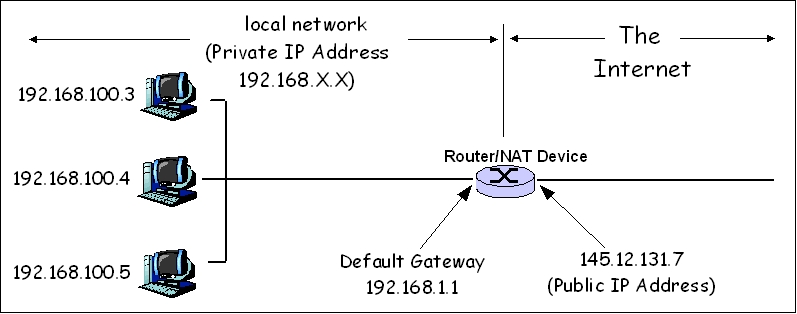
Network address translation (NAT) is a method of remapping one IP address space into another by modifying network address information in the IP header of packets while they are in transit across a traffic routing device. The technique was originally used as a shortcut to avo...
twin juniper
Yes, But my only question is, If a player start a game, And i got my server running, How would he be able to join
west mason
By entering your public ip that you port forwarded from your router to your pc
The issue is that without knowing what is a NAT, and the difference between private, lan and public IPs, you're getting confused
twin juniper
So public ip+the port that i just port forwarded
twin juniper
Ye, It took me 17 hours in total to even build a dedicated server, And 3 days, So that why I am soon gived up multiplayer
Why is it refering to a black screen when enter the ip with port 😭
west mason
connection issue.
it may be really anything, if you want to actually develop this, you should pick up a networking book
twin juniper
@wide spindle I got it working to connect to the server with my public IP, But i didn't had to enter port
high current
I'm at devcom, improbable is here showcasing spatialos
I have some questions, but I thought I would check in here, in case any of you guys have any questions about Spatial
west mason
It does really look interesting!
Does spatialos offer a plugin for easy UE4 plug-in?
Does it support UE4 replication or all network code has to be custom-written?
high current
So mostly basic stuff, but I asked around how much native support are they going for
And they pretty much want to require no extra knowledge from the developer on the front end, when dealing with single server instances
They have multi server and database structure, which they are rolling out soon, but that would require custom rpc logic n so on
They plan full native support of the cmc soon
But are not doing anything to help prediction or vehicle replication or physics for that matter anytime soo
Tho they are aware of it's issues
Oh and they provide matchmaking
That's all I gathered
Their stuff is open source under MIT
 hollow arrow
I have Spawned A replicated character And passed my player controller as owner, now the client RPCs on this character doesn't wanna call server RPCs at all though I'm the owner .. Note that i'm not possessing this character
 narrow prairie
so ur not actually controlling the character?
when u try possess it can u do rpcs like intended?
 opaque flicker
@narrow prairie I'm Mostafa1928 >> I don't want to possess the character cuz i'm already possessing another pawn, I just wanna be able call RPC events on this character here's the sequence
My possessed Pawn Does Input >> calls Client RPC on another character which I own too >> then This client RPC should call RPC to server on the same character
Last step doesn't work, Means client RPC doesnt wanna call Server RPC on the same character though I'm the owner of it !
Did i miss rules about ownership ? lol
 pearl pollen
Can AnimNotifyStates have server-only functions?
opaque flicker
@pearl pollen If the animation that has the notify runs on the server then yes, you can branch with (Is server)
pearl pollen
The animations are not replicated on the server but I heard anim notifies can fire anyways
The animation does nothing but the server still runs through the animation to fire any notifies that are there. Is that a false information?
What I'm having problems with is creating a function with UPROPERTY(Sever,WithValidation,Reliable)
It just doesn't compile at all
Inside the AnimNotifyState class
narrow prairie
@pearl pollen when there is a mc animation
server does the animation aswell
with a event notify
u can make a run on server event to handle the stuff u want
for example a line trace
pearl pollen
What is mc?
pearl pollen
Oh
Ok
What if I just called play montage on the server when animations are not replicated?
Will it still fire?
narrow prairie
should only be ran on server
u need a multicast for everyone to see the animation
narrow prairie
that shoudnt matter
opaque flicker
@pearl pollen Look, if the animation runs only on the owning client then yes you can call the server via the notify (Just put the server function in the character and call it from the notify event in the animation blueprint)
is this clear ?
narrow prairie
isnt multiplayer about to see both animations?
pearl pollen
Yeah it's clear, I know that
narrow prairie
im a bit lost why would u run on owning client
pearl pollen
I'm working on a system that would take the load off of the server when it comes to playing animations but would still enable responsive collision tracking
narrow prairie
that goes beyond my knowledge.
pearl pollen
So I don't want for the server to actually play any animations on it but still fire anim notifies
narrow prairie
im srry
pearl pollen
@opaque flicker The animations would be launched from the server, just not played on it
opaque flicker
it @pearl pollen It can't trigger notifies if it doesn't run animation >> so to bypass this since no animnation running on the server you will need this animation to run on the owning client and when the notify triggers on the owning client you will then call a server RPC in your character.
pearl pollen
Okay thank you for explaining
opaque flicker
@pearl pollen did this solve this issue or u meant another purpose ?
pearl pollen
In the meantime I managed to write a function that compiles. It all works but I don't know whether it works the way I need or not
I mean
For my game to work I need to have Run Dedicated Server checked
Otherwise it just crashes, that's just the way my server base is made
And I'm not sure how can I test what I just made
Because I get all of the apropriate messages and all seems to be working
But I don't know whether it's from the server or just the client
Wait, I have an idea
opaque flicker
@pearl pollen if you using C++ you can access the print string function through UKismetSystemLibrary ?
this will print and show weither it's called from server or client
pearl pollen
That's even better .-. Thank you
opaque flicker
yw bud
pearl pollen
Hmm... What I do runs only on the client when I multicast but it runs on server when I state for it to run only on server
On multicast it should basically run on both, right?
opaque flicker
@pearl pollen Multicast will run on both server and client if called from SERVER
and multicast will run only on client when called from owning client !
pearl pollen
Okay found it right at the moment you responded 😄
I've tested everything
I might have not been clear enough by what I mean not playing animations on the server. I meant not updating bone locations
It all works just fine 😄
Right now only my validation method is messed up because I only have return true;
xD
So yes, the anim notifies fire on the server even tho bones don't move at all 😄
twin juniper
What should i enter in Private IP address for my dedicated server, I know that the port should be 7777, But not what to put in the middle
narrow prairie
that removal of the last digit on local ip is strong though
twin juniper
😂
Is not my local, Cus that one have 2 more numbers on the end, And when i was gonna map forward it, It was there by itself
narrow prairie
but without joking, we have no clue how u configured ur network/server. and or router setup
i would suggest run a cmd prompt
ipconfig /all
twin juniper
Well what kind of IP should i use?
twin juniper
Public, Local, Private ?
narrow prairie
is it local dedicated server?
public
we have no clue man
did u rent a server?
do u have it at home
brittle karma
i have spawning issue, sometimes two players die at the same time and they have the same checkpoints to respawn to the map, so one can spawn but the other fails, is there any efficient way to handle the situation?
 royal isle
@brittle karma you can add these spawn parameters so that the engine will try to adjust the spawn location if the specified one is occupied.
FActorSpawnParameters SpawnInfo;
SpawnInfo.bNoFail = true;
SpawnInfo.SpawnCollisionHandlingOverride = ESpawnActorCollisionHandlingMethod::AdjustIfPossibleButDontSpawnIfColliding;
If this doesn't work then you can write your own collision test and adjustment logic before spawning the player.
You can also set the override to always spawn even if colliding but that might cause some weird bugs.
worthy perch
Hmm, didn't notice bNoFail, that's a pretty weird one.
brittle karma
@royal isle thanks
brittle karma
@royal isle one question, im using RestartPlayerAtTransform() in game mode, not SpawnActor<>() , can i still use that SpawnInfo?
 gleaming vector
argh
royal isle
No, not with this method
gleaming vector
why is the PlayerStart code so butts
royal isle
RestartPlayerAtTransform() calls the default spawn logic of the gamemode whereas SpawnActor<>() is more of a manual way of spawning
gleaming vector
dear epic: why doesnt the spawn point have a method for filtering spawns
royal isle
Ye spawning is nasty, I had a lot of cryptic collision errors when I made a spawn volume, they should do a navmesh styled spawn area thing imo
brittle karma
how can i handle this tho?
i was thinking of disable collision for some seconds, then enable again, but what if players collide together when enabling the collision, it will be messy i assume
but its like the same way cars respawn to map in most of the car racing games
 last depot
Hey guys
i am having an huge issue when trying to run a developer dedicated server
so i keep getting this error even when running test server or the shipping server
Warning: Unable to load package (E:/UnrealEngine/Engine/Content/Animation/DefaultAnimCurveCompressionSettings.uasset). Package contains EditorOnly data which is not supported by the current build.
I have the exe in with the cooked content and packaged game
but it still fails to load
even with shipping content
Any ideas
 teal sphinx
cant wait to get into ue4 multiplayer blueprints
 meager spade
..
 lucid plinth
Does anyone implemented "quality-of-service (QoS) beacons to measure player latency to Azure" in playfab multiplayer servers ?
 spiral saffron
Is there a way to handle a situation when you need to call RPC on owning client from server, but your client instance is not setup yet and the RPC runs on server locally?
brittle karma
im using GM's RestartPlayerAtTransform() function to re spawn the player into its latest checkpoint, sometimes there is a condition which two or more players want to spawn in that specific spot at the same time. only one of them spawn successfully. any idea how can i manage this situation? fyi. im using wheeled vehicle
i found this function findplayerstart is this gonna be useful in this case?
 upbeat hound
Has anyone faced the issue where visibility function binding (for a widget inside the HUD widget) works on clients, but not on the listen-server?
brittle karma
HUD is only available in local, nothing to do with server or client
check if u set the values on server and they should be replicated
upbeat hound
Yeah, in "owning client" I set a bool variable in this sub-widget that I check in the visibility binding
When I print the value, in the client, it's true, and the widget is correctly visible
When I use the client on the listen-server, it prints Server: true, but the widget is not visible
I tried printing this bool inside the binding function, I got something strange-ish, I got 3 Server prints in the log, two of them is true, the third is false
for every tick
 twin sable
does anyone know if array replication is efficient. will unreal send the whole array every time a change is made?
brittle karma
@twin sable i guess array is fully replicated, TMap is not
twin sable
what do you mean fully replicated? like only the changes are sent or the whole array is always sent?
worthy perch
I think general consensus is that only the change in the array is sent. i.e. not the whole array.
But you really should test and report your findings.
bitter oriole
I looked at the code in detail once and I'm pretty sure TArrays are replicated in an efficient manner
twin juniper
any idea why I am having difficulty changing material ?
events are on gamestate btw
it works fine on the server but clients cant see it
I also tried multicasting as well to execute it locally but still a no
twin juniper
well I tried going for it as well
no change
I executed the function via input as well
it doesnt change anything
narrow prairie
make the change be ran on server
and repnotify
change material what u want
isnide the notify
that should work man
i got it running here
twin juniper
nope I couldnt get it to work
ugh Im confused
I made the change in repnotify as well and yet It doesnt change the material on the clients
I change material on the Server side
should I try do it locally for everyone or smth
twin juniper
yeah I tried exploring on the net and its strange
I tried calling jump function, where the material change happens and everyone sees it just fine
but its not acting as expected when changing materials
ughh
narrow prairie
i have the same issue
event beeing called fine
texture not beeing changed
strange :S
1st i thought it had to do with material ids
twin juniper
yeah
I will try to make it all locally but executed from server
couldnt find anything useful online
narrow prairie
ok
got it
this input is beeing called from player controller
now i have to check notify btw
because that should work
ye
dont even need the multicast
just make the set material on rep notify
and then the change texture on mesh there
make sure u have the correct material id's
i just had this btw :S
same code
now it works
with the rep notify
rlly strange though. it was the same code i had earlier and it didnt work.. and then suddenly it works
solar stirrup
How bad of an idea would it be to put the shooting actions inside the movement component as a move?
 graceful cave
i think UT does something like that to keep the clientside firing timer synced with the serverside timer
but it wouldnt store the actual fire event
meager spade
@brittle karma http://www.interkaos.com/grabs/Discord_ni7OQPbYe0.png TMap's are not replicated at all.


he was asking if TArray was efficient 😄
solar stirrup
What about fully putting the shooting inside it? Since it's got prediction and replay, why shouldn't I just use the movement component's queue instead of making my own? @graceful cave
meager spade
@solar stirrup i think @chrome bay did that
or someone did, and said it worked well
brittle karma
@meager spade i know but once i was trying to use TMap and after like 3 hours i noticed its not replicated so basically it was a warning 😄
brittle karma
yeah i saw that, pretty wise
meager spade
two arrays in a struct, and use that as a TMap replacement
graceful cave
id think it would be a good idea just to reset the fire timer for clients but not for resending the input
solar stirrup
If I use the movement component for shooting, technically the client and the server will both get the same conditions when they start shooting
so it should be pretty good, coupled with rewinding for shots
Although I do have a question, how does one rewind for non-raycast shots, things like weighed projectiles, you can't really rewind can you? you just sync it with when the client shot right?
meager spade
you dont need to rewind projectiles
projectile collisions only happen on server
if the server says they missed, they missed
its one of those things
i see it in overwatch a lot when i lag and throw a mcree stun grenade
my screen i hit the guy but it never registered at all
yet hitscan shots seem to hit sometimes when i was sure i missed
 chrome bay
Shooting in the move comp is a pain, I never did it personally as it can't work for my project
UT's setup is very specific to UT
meager spade
someone here did it
solar stirrup
Why is it a pain?
chrome bay
Because it's a terrible system for flexibility
It only works in UT because they specify per-weapon where the shots come from in relation to the character
It also needs certain things to happen in the right order like equipping, the weapon firing state machine etc.
solar stirrup
yeah
chrome bay
It's horrendously convoluted so unless you need it don't bother IMO
I.e, if you're making a 120Hz twitch shooter that will be a garaunteed esport in 2 years
For projectile "prediction" you wind them forward in time
solar stirrup
forward to match the client's latency right?
well at least, when the client "thinks" he shot
on their view of things
chrome bay
On the client you fire a fake one immediately. When the server receives it they wind it forward because that's when the client fired
chrome bay
When the client gets the server-auth version, they wind it forward 2x that because that's roughly when the client fired
Also means you can't really use replicated movement
Hence UT also has it's own projectile movement replication
All of it's authoritive projectiles are net temporary
solar stirrup
So how would you do replicated shooting without using the movement component?
chrome bay
You can use a movement component
Just not the default actor movement replication
Because as soon as the client gets an update it'll override whatever it's simulated locally
I dunno, I rolled my own system for projectiles which is better IMO
meager spade
fire a shot, on the client, tell the server who you think you hit, server runs the same trace, checks if you have a hit client sent into the server, server then checks to see if you would have hit that client by re-winding its position, and having a bit of a extra box around the supposed hit
chrome bay
Yeah hitscan is much easier for sure
meager spade
if server agrees, tell the client the hit was success
client then shows hitmarker 😄
chrome bay
And awards MLG points
solar stirrup
Wait wait so I technically could put a second movement component on my character and use it for shooting?
meager spade
no
solar stirrup
oh guess I misunderstood
meager spade
you save the positions on the pawn
in an array
these are your "rewind" positions
then you need to get the rewind time, then you can get the position at that time
solar stirrup
how do I sync shooting on the client and server?
meager spade
client fires, server fires
solar stirrup
as in, how does the server know exactly when I start shooting, and exactly when I stop
chrome bay
it doesn't
solar stirrup
RPC?
meager spade
mine is controlled via states
chrome bay
Yeah mines the same
meager spade
i have states, and firing modes
state is just a enum of weapon state (Inactive, Equipping, Active, Unequipping, Reloading, Firing)
then FireMode is a UObject, which handles the actual weapon fire
weapon class actually has no firing implementation, apart from Start and Stop Fire
and that just forwards off to the FireMode
chrome bay
You're using GAS for that too right? Like the base weapon system?
meager spade
not really, per say, i use GAS to start/stop the weapon fire
chrome bay
Ah roger
meager spade
weapons are handled themselves
then i activate a ability on client when client thinks he hit something
chrome bay
I'd love to see what UT would do now they have GAS and all the fortnite stuff to lean back on
meager spade
which then tells the server i think i hit so and so, and i apply effects, if server disagrees, i roll back
meager spade
actual hit marker is not predicted
and only shows if server sends a clientrpc back
the hitmarker is true validation of a hit
solar stirrup
So the GAS is a good thing to use for shooting too? Is there anything it cannot do lol
meager spade
can't cook a decent meal
but its pretty powerful
if used properly
look at Fortnite
everything in PVP is using GAS
meager spade
from the mechs, to hoverboards, to ballons, to weapons. Anything destructable or buildable like walls/buildings etc
meager spade
🤷
walls can be healed
and destroyed
they might not have a ASC
but they respond to effects
chrome bay
You can apply GE's to stuff without an ASC?
meager spade
no you cant
my bad
the asc's are probably lazy loaded
as in they are only loaded when they need to be
chrome bay
I think that's what they do in fortnite yeah, create them on demand
god it sounds horrible though
meager spade
so if a wall never gets shot, it never has an asc
chrome bay
I mean it works for them so yolo.. but still
meager spade
tbh
there could be a lightweight ASC
ASC should be split
a basic ASC, and a heavier ASC
depending on what its being used for
chrome bay
The thing I don't like about GAS is the attribute stuff, but that's kind of essential to how it works so bleh
meager spade
attributes are pretty powerful
only downside is they are floats
so you have to do everything based on floats
chrome bay
yeah
meager spade
and "Effects" feels like a pretty bad name tbh
makes people think of Visual Effects
when its not really, thats what Cues are for
chrome bay
Yeah definitely
brittle karma
anything wrong here ? i have used this before and it worked fine, now editor crashes after compiling this
    FTimerDelegate CollisionDelay;
    CollisionDelay.BindUFunction(this, FName("Multicast_ChangeCollisonPreset"), GetMesh());
    GetWorldTimerManager().SetTimer(CollisionHandle, CollisionDelay, 3, false);
im curious if its something related to that multicast function
meager spade
still cant get my recoil system working
i prefer BindUObject over BindUFunction
and dont ever bind RPC's
bind it to a function, that calls the multicast
for safety reasons 😄
brittle karma
ok then.🙏
twin juniper
I’ll give 1$ for whoever download my game and test if my dedicated server work
twin juniper
I got no friends :/
 unique thunder
Any idea why a small-ish (grenade) physics object glitches in multiplayer but not in offline? When it hits the floor, it just disappears, or flies into the sky, sometimes it jumps around in mid-air. Other objects don't seem to do this
brittle karma
@meager spade i moved the timer from constructor to BeginPlay and it works fine now,
meager spade
yeah never do that either
 sharp zealot
anyone know how to make a auto adjust camera for two characters?
twin juniper
when i call servertravel to my maps i get this wierd thing where it spawns like 10 of my character floating in the air doing nothing and i don’t know why please help
pearl pollen
I have a question. Do I need to have a replicated function marked as const in order to compile it? I have this so far:
//MyClass.h
UFUNCTION(Server, Reliable, WithValidation)
void Function() const;

//MyClass.cpp
#include "UnrealNetwork.h"
void UMyClass::Function_Implementation() const{ //body}
bool UMyClass::Function_Validate(){ //body }```Of course that's simplified
solar stirrup
nope
pearl pollen
The function isn't even called anywhere
solar stirrup
still needs to compile it
so if you have an error in your code regardless of whether it's being called or not, it'll fail to compile
pearl pollen
Let me check something
pearl pollen
This is the .h file
#pragma once

#include "CoreMinimal.h"
#include "Animation/AnimNotifies/AnimNotifyState.h"
#include "MyClass.generated.h"

/**
 *
 */
UCLASS()
class MYPROJECT_API UMyClass : public UAnimNotifyState
{
    GENERATED_BODY()
protected:
    UFUNCTION(Server, Reliable, WithValidation)
    void Function();
};```I'll post .cpp and error list in a sec
 regal bone
Shouldn't it be bool UMyClass::Function_Validation ?
pearl pollen
This is .cpp
#include "UnrealNetwork.h"
#include "MyClass.h"
void UMyClass::Function_Implementation() {

}

bool UMyClass::Function_Validate() {
    return true;
}
 empty axle
Validate is the correct form
regal bone
ok then that means https://docs.unrealengine.com/en-US/Programming/UnrealArchitecture/Reference/Functions/Specifiers/index.html needs an update
pearl pollen
Severity    Code    Description    Project    File    Line    Suppression State
Error    C2511    'void UMyClass::Function() const': overloaded member function not found in 'UMyClass'    MyProject    Intermediate\Build\Win64\UE4Editor\Inc\MyProject\MyClass.gen.cpp
Error    C2671    'UMyClass::Function': static member functions do not have 'this' pointers    MyProject    Intermediate\Build\Win64\UE4Editor\Inc\MyProject\MyClass.gen.cpp
Error    C2352    'UObject::FindFunctionChecked': illegal call of non-static member function    MyProject    Intermediate\Build\Win64\UE4Editor\Inc\MyProject\MyClass.gen.cpp
Error    C2511    'void UMyClass::Function_Implementation()': overloaded member function not found in 'UMyClass'    MyProject    Source\MyProject\Private\MyClass.cpp
Error    MSB3075    The command ""C:\Program Files\Epic Games\UE_4.22\Engine\Build\BatchFiles\Build.bat" MyProjectEditor Win64 Development -Project="MyProject.uproject" -WaitMutex -FromMsBuild" exited with code 5. Please verify that you have sufficient rights to run this command.    MyProject    C:\Program Files (x86)\Microsoft Visual Studio\2019\Community\MSBuild\Microsoft\VC\v160\Microsoft.MakeFile.Targets
And here is the errors I get
Totally bonkers imho
Fixed the validate function
I mean the code snippet here 😛
No idea why it's asking me for a const function
Also the last error (the permission one) is irrelevant, just happening always when something is wrong with the code. Compilation doesn't pass - I get this error + something else so it can be ignored
empty axle
It looks totally fine for me, I can't see any error. Did you try to regenerate project files and rebuild project?
pearl pollen
I'll try
No effect. Doesn't even compile on a brand new C++ project. The same list of errors: https://media.discordapp.net/attachments/391192915063603211/613079123262308465/unknown.png


Changed the parent class to AActor for testing purposes... It went through
Could it be that UAnimNotifyState causes it to fail?
Argh crap yeah I got it... Replicated functions start from AActor... Can't create them in UObject subclasses :/
meager spade
you can replicate in UObjects
but they need an actor channel
also should post the output log not the error log
also AnimNotifies should not do RPC's/Replication, that should be handled by whatever actor is running the animation
pearl pollen
Okay gotta have to do some moving
So basically what I have to do is delegate my function to the actor, am I right?
 fleet raven
the reason it wants the function to be const is that UAnimNotifyState is UCLASS(const)
(ignoring that creating an RPC in it won't work anyway)
pearl pollen
Actually it did when I made this function a const 😛
It properly worked when called on multicast
fleet raven
it won't call it on the other side
pearl pollen
?
fleet raven
because this object doesn't have the remote function stuff set up
pearl pollen
Actually I need it to run on the server only
fleet raven
well, if you called it on a client, that wouldn't have worked either
pearl pollen
Can I just call it on the server then and will everything work properly?
If it's supposed to be only run on the server?
fleet raven
you can just make a non-rpc function and call it on the side you want it to run
pearl pollen
Pseudo-authority check then?
I want to prevent it from running on the clients. They have their own stuff responsible for handling my problem
I want to separate client-side and server-side logic
solar stirrup
MyClass.h should be the first header included btw @pearl pollen
at least, UHT expects that
pearl pollen
So I guess a simple
if(MeshComponent->GetOwner()->HasAuthority())
would remove the requirement of UFUNCTION(Server,WithValidation,Reliable) and just leave UFUNCTION(), right?
fleet raven
uh
pearl pollen
Thank you @solar stirrup by the way. It's worth knowing
fleet raven
you don't use rpc to "prevent it from running on clients"
that doesn't make any sense
the purpose of rpc is "magically invoke this function on the other side, from this side"
pearl pollen
The validation function was magically preventing the clients from running it 😛 But I get the point
So is what I wrote just now a correct option or should I approach it differently?
pearl pollen
Both the server and the client run the anim montage
And I want only the server to receive the notify
Or handle it
thin stratus
if(Role == ROLE_Authority)
fleet raven
then I guess you'd want to put this branch in the earliest place you can
thin stratus
Yus
pearl pollen
Does the UAnimNotifyState have the Role member?
I see it from the AActor up
So I guess I have to check if the actor that called it has authority 😛 I'll manage
thin stratus
AnimInstance should have GetOwner too?
pearl pollen
I don't get the AnimInstance straight away
And I get the mesh as a parameter in the function
thin stratus
Ah, right the "new" thingy
pearl pollen
Exactly 😄
I already did that with it so it should be a piece of cake
Thanks for help everyone :3
And @tropic falcon There is no point in server-only visual effects
Nobody will be able to see them
They need to be replicated to clients in order to be seen
Or of course you can do something that is invisible for you and you just get blinded randomly walking on an open field 😄
That would be how a server-only smoke grenade would work
No smoke cloud, no stuff at all, you just randomly get blinded since you walked into a spot on the server where the grenade exploded
grizzled stirrup
Do you need to include "Net/UnrealNetwork.h" in any class that uses GetLifetimeReplicatedProps() or only the parent class?
I ask because my derived class works fine without the include
But I'm not sure if it's some kind of silent error that could bite me in the ass later
twin sable
does tick get called on replicated actors?
meager spade
and then you can fix up your code and include the proper includes
@twin sable tick is called on actors that have tick enabled
grizzled stirrup
Oh that's great, so UE4 is including things for me at compile time?
I'd prefer to only have the correct includes
meager spade
why would replicated/non replicated make a difference
grizzled stirrup
And know if something is missing
meager spade
no your other files are being included into one big file (unity file)
and sometimes that contains what is needed already included
so another file of yours might have UnrealNetwork.h
and your satisfying the requirement with Unity build
grizzled stirrup
Ah I see, yeah lots of files do in that case
If the same file is included twice, I assume the compiler is clever enough not to duplicate the code?
grizzled stirrup
Thanks! I gotta learn what these mean
In general though it seems to be pretty fussy about the correct includes which is good, this is the first time I'm noticing a necessary include not being required
 hoary lark
@tropic falcon you need to ensure any particle generators are all using the same seeds somehow so they all generate the same random streams
 weary saffron
Hey guys!
How can I test the multiplayer build on my PC?
I want to run two copies of the game.
 agile basin
hey guys im wondering if i want to make offline splitscreen co-op do i need to do any of the replication stuff or can i just basically turn any single player project to local mp
bold latch
@agile basin with local multiplayer, you shouldnt need replication.
agile basin
@bold latch oki thx will then check later how to do the process
spiral saffron
What's the proper way to move player to spectating pawn using framework? My code makes it crush in PC::OnRep_Pawn() as controllable pawn is NULL
PC->ChangeState(NAME_Spectating);
if(PC->Role == ROLE_Authority && PC->PlayerState)
PC->PlayerState->bIsSpectator = true;
Setup: I've inherited AGameMode and used ReadyToStart/EndMatch methods to explicitly define my match rules. Before MatchStart players possess spectating pawns automatically, as well as playing pawns on MatchStart. However MatchEnd doesn't make them spectating (it shoudn't I suppose) and code above crushes everything.
 real yacht
how can i disconnect player controller when pawn is dead
i want to disconnect player controller, or destroy
grizzled stirrup
Ok I've wasted almost a full day on this issue and it's really escaping me: basically I made an overridden version of MatchState in one of my GameModes to add two simple extra states in. It all transitions fine and moves through the new states as expected (all it's really doing is adding another 3 second delay before actually respawning). However for some reason, human players can't respawn due to this check failing in the GameMode if (PlayerCanRestart(PC) == false)
The strange thing about this is that if I deconstruct AGameModeBase::PlayerCanRestart() and do ALL of the checks individually, it works fine and the player can respawn just like he did before
But for some very odd reason, simply adding that 3 second delay is causing this particular function to fail as on other modes without the delay, the check passes fine
Any ideas of why this might be? Going crazy trying to understand what could possibly cause it
        if (PC)
        {
            if (MustSpectate(PC))
            {
                return;
            }

            if (PC == nullptr || PC->IsPendingKillPending())
            {
                return;
            }

            if (!PC->CanRestartPlayer())
            {
                return;
            }

            if (PC->PlayerState)
            {
                if (PC->PlayerState->bOnlySpectator)
                {
                    return;
                }
                else if (!PC->HasClientLoadedCurrentWorld())
                {
                    return;
                }
                else if (PC->PendingSwapConnection)
                {
                    return;
                }
                else
                {
                    UE_LOG(LogTemp, Error, TEXT("PASSED ALL PS CHECKS!! :)"));
                }
            }

            // It gets all the way here but FAILS on this check even though the previous checks are doing exactly the same thing (as far as I can see), why??
            if (PlayerCanRestart(PC) == false)
            {
                return;
            }
        }
there is a slight difference between
if (!PC->CanRestartPlayer())
and
if (PlayerCanRestart(PC) == false)
grizzled stirrup
Ok thanks will try checking with == false
winged badger
the thing is surprisingly hard to read btw
grizzled stirrup
Yeah it's a nightmare of checks. I tried == false and same result
It passes
But the function that bundles it all up at the bottom doesn't
winged badger
            if (PC == nullptr || PC->IsPendingKillPending())
            {
                return;
            }
if you have this ontop
no need for if (PC)
grizzled stirrup
Yep I know was being extra sure
Just to make sure I wasn't somehow missing something
I tried to copy the checks in the function line for line
grizzled stirrup
I will delete most of this later I just want to know why their function is returning false and doing the checks manually is true
winged badger
its the engine function?
grizzled stirrup
Yes
PlayerCanRestart(PC)
In AGameMode
My checks are all the same things just done manually
Hence the unnecessary double PC check
Also keep in mind that without an extra 3 second delay before respawning happens PlayerCanRestart(PC) does return true
Just tested again with every manual check being extremely explicit (no ! and any bool being == true or false)
Same result
AGHHH found it!!
I had overridden PlayerCanRestart(PC) and it didn't take into account the new states added.....
I'm stupid
Sorry
winged badger
you do need to override IsMatchInProgress() i think
grizzled stirrup
Yep that was it
I didn't add my states
It's only Started (or ActuallyStarted) which is part of my base MatchStates
Didn't add the new RoundWaitingToStart and RoundStarted
Thanks for the help!
Just out of curiosity, should I avoid using ! when checking booleans?
winged badger
i don't
what you should definitely avoid however
is mixing if (!SomeCondition) and if (SomeCondition == false)
same goes for checking nullpointers
grizzled stirrup
Got it, that's inconsistent
winged badger
one or the other, and stuck with it
grizzled stirrup
Thanks will do
eternal briar
In Multiplayer game mode, OnPostLogin executes before BeginPlay for server. Is this expected behavior?
thin stratus
@eternal briar I would say so
eternal briar
Ty for reply, I am a bit confused here. I was thinking the game mode should only be able to accept connections after BeginPlay, even if it for the server.
grizzled stirrup
If you need different UI to be shown depending on the state of the match (like Match Starting In 5...4, Round Starting In 5... etc) would a good way to have the UI know about the state of the match be to have a delegate like so: DECLARE_DYNAMIC_MULTICAST_DELEGATE_OneParam(FMatchStateUpdated, FName, NewMatchState); in the GameState?
And have that UI subscribe to it on begin play?
winged badger
Syncing network clocks wouldnt suck either
So you dont have to bother replicating anything but the initial timestamp
fleet raven
apparently if a server has been running for a few hours, time on it passes slower than on clients
 worthy wasp
@fleet raven - damn black holes.....
thin stratus
@eternal briar Not really no. You can even delay BeginPlay :P
winged badger
BeginPlay of what object?
thin stratus
Person noticed a ListenServer calls PostLogin before BeginPlay in the GameMode.
winged badger
yeah, i delay my beginplay until all players are ready
but at least one will log in before BeginPlay (the host on listen server)
thing is @eternal briar the world dispatches BeginPlay to all Actors in it
thin stratus
I think I actually never did anything on BeginPlay that has to wait till everyone is ready
If I need that I usually use the MatchState
winged badger
and it won't do that until GameMode tells it to
which won't happen until at least one player is ready by default
on clients, the GameState replicated MatchState, and OnRep causes the client world to dispatch BeginPlay
thats why you get such interesting bugs when you forget Super::GetlifetimeReplicatedProps call in GameState
thin stratus
Yop But yeah if you need stuff to only happen if peeps are ready, override the IsReadyToStartMatch function and react to the MatchState going InProgress.
at least that's what I do and it works fine
And everything else, that should just run BeginPlay, should just do that to initialize itself
thin stratus
Yeah for SeamlessTravel
winged badger
but with hard traval, there is no real way to tell if player is just logging in or not, unless your match is full
thin stratus
I wonder, first connection, can you check if a Player is still loading the level?
Server-side
winged badger
on Login?
thin stratus
Idk, the ReadyToStartMatch currently works on NumPlayers
winged badger
there is a NotifyServerWorldLoaded function in the PC
but i don't know if its called with non-seamless
thin stratus
Does NumTravelingPlayers also count connecting clients?
winged badger
anyone that has a non-specatator PC on the server iirc
thin stratus
Well i'll see. Our ReadyToStartMatch fires to fast if we allow it to start instantly when a Player connects.
Which basicallyl eads to the countdown to be "3... (loadingscreen)..... (loading done, screen gone), 2, 1, GO!"
winged badger
there is one oddity in seamless there
thin stratus
So the matchstate replicates when the player still loads the map
winged badger
it makes sense when you think about it, but if you change the PC class during seamless
winged badger
NotifyServerWorldLoaded is called from old controller, before the swap
thin stratus
Right I will check if I can count connecting players
Or even traveling splitscreen
Cause I dislike the matchState updating when I'm still in the Loading Screen
winged badger
yeah, you might be able to "hack" the GS not to dispatch BeginPlay until you're done loading
client side
thin stratus
BeginPlay is not the issue
I just have the Countdown Widget listen the MatchState chagning
And the ReadyToStartMatch stuff is checking if "NumPlayers > 0"
Usually we have a ready check
You have to go into warmup to count into that NumPlayers number
But Splitscreen games should start instantly
And that "Instantly" is too instant :D
They count into ue4's Numplayers while they still open the level
winged badger
you can tell if its a splitscreen non-networked game