#multiplayer
1 messages · Page 486 of 1
 grizzled stirrup
I've recreated AGamemode and AGameState in the last few days
Just to learn how they work
Was very beneficial
It's doing way more useful stuff than I ever knew
 thin stratus
Yeah for me it's enough to read through them
grizzled stirrup
I was repeating so much work
I find I have to actually go line by line to fully get it
But I'm not very experienced in code
thin stratus
If you need more info, just check UT source code
A lot of what I'm sharing here is basically from there
grizzled stirrup
When you say "I cut away that function for my own"
Do you mean you don't use OnMatchStateSet() and use something custom?
grizzled stirrup
Cool yeah I made some minor changes when recreating, just slight different names
Like one big gotcha
They use an FName property MatchState but also name the namespace MatchState
Which means that if you define a new FName MatchState in a derived class, it will be confused and think you are talking about the FName and not the namespace when you type it out
Someone in cpp suggested to change MatchState to MatchStates and it's way clearer now
So MatchState will always refer to the FName and MatchStates will always refer to the namespace
 glass plaza
In the case of bandwith, is FTransform optimized enough to use it instead of a FVector and an FRotator if I don't intend to use the Scale?
(I only need Location/Rotation)
 brittle karma
any idea how to fix Advanced Vehicle's laggy Movement for client? its very laggy by default
thin stratus
@grizzled stirrup To get back to the RapidFireWeapons, you would use pooling for that and most likely use LineTraces + fake projectiles locally.
That's at least what we did in the end.
Only the actually big projectiles are visible
grizzled stirrup
I use hitscan only
I just mean for each impact
Needs an RPC
Usually at least one RPC per shot
Unless doing the started firing RPC and then stopped firing RPC
But I'm not for a few reasons (many semi auto weapons mainly)
The point was that there's usually a lot of general traffic going on (server verifying hits / movement being evaluated etc, so an int could probably sneak on one of those outgoing packets without too much disruption once a second)
Though I know this is avoiding the problem rather than fixing it as you are
But for the sake of simplicity, at least initially I might try it
thin stratus
We replicate a BurstInterger
grizzled stirrup
Can always upgrade to a more elegant and bandwidth effective method later if needed
thin stratus
That increments each shot
And resets to 0 when stopping
Local Client fires the weapon anyway
grizzled stirrup
The server has to replicate the impact to everyone though right?
thin stratus
And the rest simulates with an Onrep of that integer
No, everyone fires the weapon
Only the Server deals damage
grizzled stirrup
Oh right yeah sorry
So one RPC per shot
Updates the burst int
OnRep to everyone
thin stratus
It's a RepNotify variable
grizzled stirrup
Yeah I think I have it set up similarly
ShooterGame was the main ref on the setup
thin stratus
And yes, Client fires, Client tells Server to Fire. Server Fires and increments Int. Int replicates and the Simulated Clients fire.
And the random seed for spread gets reset every time the weapon stops firing
grizzled stirrup
I'm curious, how are you dealing with lag compensation?
Or are you allowing the clients view to count?
Or doing something like ShooterGame (checking a broad area around the shot)
thin stratus
No, we aren't doing any of that yet
grizzled stirrup
That's where it gets tricky and why I'm never making a competitive shooter 😄
thin stratus
Yeah but our shooter is pretty fast to begin with
 chrome bay
lag comp isn't too hard tbh
grizzled stirrup
Luckily with Co-op you can trust the client a lot more
Because who cares if he cheats
chrome bay
You just need to store a small buffer of transform history server-side, interpolate between it and check location roughly matches. So long as you know roughly when the client fired relative to the server time (which you can determine from ping) - you can verify that the clients target was roughly where they thought it was when they hit it
grizzled stirrup
It's the caching of the hitboxes that always truips me up
Going back and firing at timestamps isn't so bad
But caching, I always mess it up
chrome bay
If the hits never change size you don't really need to.
grizzled stirrup
I think the key that I should have thought of is what you said "roughly"
I should allow the shot if it's around where the player was
Instead of trying to be exact
chrome bay
Yeah, it has to be roughly. There's no other way to verify it otherwise - animations could be in wildly different states etc.
grizzled stirrup
But then I had problems like should I allow the client to say it was a headshot and the server just checks if it was roughly a headshot?
Even if the client might have hit the shoulder legit but told the server it was a headshot
And yeah anim states
That was the main thing to trip me up
thin stratus
What i never understood is, even if I have a timestamp, how do I role the server back?
grizzled stirrup
Not only hitboxes but anim position
I believe you literally set the transforms of the hitboxes within a function on the server, do the trace and move them back
chrome bay
It gets infinitely harder when your bullets are hit-scan
chrome bay
Then it's a royal nightmare
grizzled stirrup
Yeah all mine are
thin stratus
Yop
chrome bay
are NOT hitscan i mean.. oops
thin stratus
Ah
We only have explosions and slow moving stuff that are actually projectiles
So they can miss
fuck that
grizzled stirrup
Slow projectiles are great because the server handles them nicely
UT / SG style
chrome bay
If you have bullets which travel, you (might) need to roll the projectile back in time too... then it becomes pretty much impossible
thin stratus
So you'd keep list of recent timestamps + location
grizzled stirrup
Fast projectiles... ugh
thin stratus
But damn, that sounds like it should be part of UE4 already
grizzled stirrup
They have a generic lag compensation component planned
Really hope it gets added soon
I gave up because it was just too many headaches adding on top of one another
thin stratus
Do you move the actual actor back to where it was? Doesn't that replicate, how the f do you roll back the server by not actively rolling it back
grizzled stirrup
Tha anim states being the icing on teh cake
Because it's being moved back in the same function
So it never moves
chrome bay
Epic are doing a generic prediction system I think, but not lag comp
grizzled stirrup
Move -> test -> move back
chrome bay
But for hit-scan, lag comp is super easy
thin stratus
Well if it's so easy, then let me know how that works on the serverside?
I can send the timestamp to the server when I fire, what does the Server do then?
What is given by epic and what do I have to setup.
grizzled stirrup
There's a good implementation in UT code
grizzled stirrup
Basically constantly cache player positions and then roll back and iterp to the exact position at the time of the shot, then recreate the trace, then move everything back to the current time
chrome bay
IST_NetworkRewindInterface::SaveRewindSample(const bool bTeleported = false) = 0;```I gave up when I watched how COD does it- every bit of state is exactly the same, animation being so important since you could be prone, rolling / in widely different positions to default
chrome bay
The server is calling SaveRewindSample() after physics runs, and that just gets dumped into a circular buffer and saves WorldTimeSeconds along with it
There's a function for interpolating between samples back in time (and it stops at the last sample if there was a teleport)
thin stratus
WorldTimeSeconds is a TimeStamp though, so how do you know to what to rewind to?
chrome bay
Ping
As soon as you get the RPC, the time the client fired is approx CurrTimeSeconds - PingSeconds
So that gives you the world time they fired
thin stratus
And Ping is already avaiable from the CMC/Character shizzle i guess
chrome bay
Yeah and PlayerState (where I get it from)
thin stratus
Is PlayerState ping back and forth or only one direction?
thin stratus
Right, still not 100% sure how you actually do the Trace test then on teh Server side, cause you can't actively move the whole collision back in time or?
grizzled stirrup
    for (int32 i = SavedHitboxPositions.Num() - 1; i >= 0; i--)
        {

            TargetLocation = SavedHitboxPositions[i].Position;
            if (SavedHitboxPositions[i].Time < TargetTime)
            {
                if (i < SavedHitboxPositions.Num() - 1) // ??
                {
                    PrePosition = SavedHitboxPositions[i].Position;
                    PostPosition = SavedHitboxPositions[i + 1].Position;
                    if (SavedHitboxPositions[i + 1].Time == SavedHitboxPositions[i].Time)
                    {
                        Percent = 1.0f;
                        TargetLocation = SavedHitboxPositions[i + 1].Position;
                    }
                    else
                    {
                        Percent = (TargetTime - SavedHitboxPositions[i].Time) / (SavedHitboxPositions[i + 1].Time - SavedHitboxPositions[i].Time);
                        TargetLocation = SavedHitboxPositions[i].Position + Percent * (SavedHitboxPositions[i + 1].Position - SavedHitboxPositions[i].Position);
                    }
                }
                break;
            }
        }
So when you get the RPC from the client it usually has "ShotOrigin and "ShotDirection" - so you just redo the shot
grizzled stirrup
I remember I took most of this from UT which is how they rewind
thin stratus
Yeah I just send "Fire" and the Server takes the current Origin and Direction by tiself
grizzled stirrup
But remember even if you rewind perfectly, the anim state is stale which means if the player was prone or in some other position it still wouldn't be accurate
thin stratus
But that can be changed of course
chrome bay
Ah yeah in that case a bit harder, but yeah that's the idea anyway
thin stratus
We have no animations in that regard
So I don't have to care about that
Our drones have the same shap at all times
chrome bay
I honestly don't think it's worth doing individual hitboxes, I just trust them within a small tolerance
thin stratus
so you just redo the shot
Well yeah, but it won't hit ,cause the Server is a few ms furtehr now.
grizzled stirrup
I believe a solution there is actually store the state of every hitbox
But yeah it's a waste
And still hard to do
chrome bay
The main thing you're trying to prevent is the client blatantly cheating
grizzled stirrup
Honestly the ShooterGame approach almost does that well enough- almost
chrome bay
And you want to clamp the maximum time it rewinds too so that players with 500ms ping don't get some huge advantage
grizzled stirrup
It's such a big leap in terms of bandwidth and complexity otherwise
thin stratus
Do you check by hand if the shot hit? :P I really don't get how the Server LineTrace with the old location can hit something.
grizzled stirrup
You move the player and hit enemy back to where they were at the time of the shot (on the server)
Trace
See if it hit
Should line up roughly to what the client saw
thin stratus
I can't just move stuff back, that will replicated to clients(?)
grizzled stirrup
It won't because you move them back in the same function
Nothing has a chance to replicate
thin stratus
So you really just teleport the freaking actor back to where it was, perform the shot and teleport it to the actual location?
Mother of god
grizzled stirrup
Haha yep, it's a mindbending nightmare
chrome bay
Hell I don't even do that
grizzled stirrup
Check out the UT implementation I believe it does it
chrome bay
primitive components have a function where you can perform a line trace against them in any arbitrary location/rotation
So I just trace the root component at the rewound transform
thin stratus
THAT'S what I meant with "UE4 probably has something"
That function is bascially the missing thing I needed to understand how you rewind
chrome bay
yeah that's what I'm doing anyway
You could move the actor forward and backward I guess but meh.. fuq dat
thin stratus
Saving locations and stuff is easy enough, but actually testing against a location that no longer exists is what confused me
grizzled stirrup
I might be very wrong, it's been a while since I was doing it
Checking the UT code now
chrome bay
But yeah.. once travel time is introduced everything goes to shit since if the projectile is moving slowly enough there could have been loads of world-state changes since then
grizzled stirrup

Very useful guide though I think it's unfinished
Covers the per hitbox approach
chrome bay
See the massive problem with that is what happens when the animations don't match (which they never will)
You have to allow for some tolerance anyway then, at which point you may as well just trace the capsule anyway
We don't even play animations for characters on the server in HLL
too expensive to eval 100+ anim graphs
grizzled stirrup
Yeah honestly I gave up after a while and am now just doing simple client side approximations haha (as I can do it for a co-op game)
It's so much more complicated when you have to rewind for every shot and cache so much
chrome bay
This series is no longer being worked on for the foreseeable future Maybe they realised 😄
thin stratus
Tbh, the big studios cheat more than their gamers
In terms of allowing client hits etc.
 thick creek
If a USTRUCT has a custom NetSerialize function, are variables of the struct not used in the NetSerialize function still replicated or does defining a custom NetSerialize mean that only variables added to the FArchive are replicated instead?
grizzled stirrup
Yeah so many games allow SO much from clients
Very few seem to have full rewind implemented
chrome bay
@thick creek Only the data in the FArchive is serialized and sent
thick creek
@chrome bay Cool that's what I thought. Thanks 😃
grizzled stirrup
I doubt any BRs do due to the already huge bandwidth strain
chrome bay
@thick creek Bear in mind btw that the whole archive will be sent each update too, they don't support replicating individual properties within structs then (so when the struct changes, the whole struct replicates)
It's a bit of a balancing act
thin stratus
I do think a lot of those things come from Devs being pushed by Publishers
They just don't have the time to add it
grizzled stirrup
And simply put, the more clientside you are the better it feels (as the shooting player) unless the lag comp is implemented extremely well it can feel like you missed shots you should have hit
Or even worse, fully serverside
Which I don't think any game does
thick creek
@chrome bay So if a struct doesn't have a custom NetSerialize, then it would only replicate the individual properties that change?
chrome bay
Yeah that's right
thick creek
Neat, thanks for the information 😃
brittle karma
any idea how can i fix Advanced vehicle's Client Movement issue? its so laggy by default
chrome bay
@brittle karma use client-auth and hope for the best
brittle karma
what?
chrome bay
It's laggy because there's no prediction or smoothing for it - you have to either implement that (nigh on impossible) - or use client-authoritive physics
For a quick out-of-the-box solution anyway
brittle karma
so wheeled vehicle's Movement Component is sucky we assume
grizzled stirrup
If you were writing a RespawnAll() function which would ensure everyone gets freshly respawned even if they are currently possessing a pawn, is it acceptable to do something like this before respawning?:
        APawn* OwnedPawn = ControllerToRespawn->GetPawn();
        if (OwnedPawn)
        {
            ControllerToRespawn->UnPossess();  // Or maybe PawnPendingDestroy(); ?
            OwnedPawn->Destroy();
        }
@chrome bay What exactly do u mean by client-authoritive , cuz all in all server should tell everyone the client has moved or things like this
chrome bay
It just means that the controlling client tells the server where it is, and the server replicates that to other players
thin stratus
Yeah it should, but only the Simulated peeps
chrome bay
There's a checkbox in the Vehicle Skeletal Mesh
Replicate Physics To Autonomous Proxy or something - uncheck that
In 4.21 and above
thin stratus
Does the Vehicle do any Prediction?
chrome bay
negative 😦
thin stratus
I mean otherwise it's kinda laggy when you just send the Server where you are
chrome bay
All it really does is just ignores replication from the server when the pawn is an auto-proxy
So you can at least move instantly without being snapped around all the time
brittle karma
@chrome bay ok let me uncheck that that and ill tell u the result
@thin stratus well i just used the default advanced vehicle and i didnt change anything, they implemented it this way
@chrome bay thanks, now its so smooth, it made me crazy i was searching for hours
 worthy wasp
Question - COND_OwnerOnly conditions - I imagine that an RPC sends data to server - and the server back to the player in replication ... I was looking to use this condition as a means of Cheatproofing on a Dedicated server - is this a viable option?
client would RPC(Server) and the server sets the variable
thin stratus
OwnerOnly means that it only replicates down to the Owner
So simulated won't get the update
worthy wasp
i undesrtand that
"I was looking to use this condition as a means of Cheatproofing on a Dedicated server"
and wondering if this would suffice that ?
or if theres a better (authoritative) way to do this?
the variable does not need to replicate to others - but it does need to be authoritative
chrome bay
That's the way to do it yeah
If only the owner of the actors needs to get that var, using that flag will make that happen
worthy wasp
thanks
 plain lagoon
is it possible to have multiple "server levels" on a dedicated server? I currently have a level that acts as the login which connects to the server, when logged in it will send you to the "lobby level" with an openLevel node, but when I send two or more clients there it looks like they are both in their own level. does anyone know why this happens? (I'm fairly new to unreal multiplayer, so it might be something really dumb)
 winged badger
@thick creek if you're diving into custom serialization, i warmly recommend reading bool FHitResult::NetSerialize(FArchive& Ar, class UPackageMap* Map, bool& bOutSuccess)
its an excellent example
@plain lagoon use seamless travel
thin stratus
@plain lagoon
- Moving between Levels on a Server has to be done via "ServerTravel" and has to be issued by the Server.
- All Clients will move at once with the Server.
- You can't have more than one Level on a DedicatedServer (not counting Streaming Levels).
@winged badger That would still not give the person the ability to have one player in Lobby and one in Gameplay Level on the same Server, or?
winged badger
nope
plain lagoon
hmm, so I would need to have my login system in the same level as the level i let players play in. that's a weird one
winged badger
dedi can run multiple instances of the game
plain lagoon
you'd expect unreal to have a better system for that
thin stratus
So you need a Server for the Lobby and one for Gameplay. It could be in the same level if your lobby is just UI
Well, that's the same reason you always travel together in Borderlands
One Server, one Map
winged badger
you can however gimmick a lobby not using unreal's own networking
if thats easier for you
using steam lobbies for example
plain lagoon
how do all those mmorpg's made by unreal have so many different area's though, can't all be one huge level, right?
winged badger
could chat, and exchange some data, but not much else
plain lagoon
or do they use an external system/a bunch of separate dedicated servers
thin stratus
Either they don't use Dedicated Servers
Or they use a smart backend that manages them
winged badger
with Unreal, the way for those is middleware like SpatialOS
thin stratus
But in general, DedicatedServers by UE4 are more matchbased, than MMO
So 16-32 Players UT
Or by now 100 player BattleRoyal
So MMOs rather use what Zlo linked
winged badger
SpatialOS allows you to distribute the load between multiple dedicated servers
plain lagoon
ohhh that's really cool
winged badger
while still using unreal networking
thin stratus
Remember that most third party solutions cost money
So if you don't want to spend a lot, this isn't the right thing for you
SpatialOS is not for free, neither is hosting a large amoutn of Servers
Bigger Team and Funding are more or less needed for stuff like this
winged badger
and, since its no way mentioned enough in this channel: best not to try a MMORPG for your first game
thin stratus
Or just a bigger bank account :P
plain lagoon
nah im not gonna try an mmorpg
no worries
i just wanna try some prototyping for a small game similar to the fable legends 4 players vs 1 villain concept
- i wanted to practice unreal multiplayer stuff
winged badger
you are using c++?
plain lagoon
yah
winged badger
good
 meager spade
winged badger
meager spade
winged badger
GameMode will fight you tooth and nail if you want asynchronous gameplay
thin stratus
If it's just for practicing, stick with ListenServers
plain lagoon
blueprints for the simple prototyping tho
winged badger
you'll pretty much have to override the entire thing without calling Super 😄
winged badger
for starters, it insists, by default, that all PCs are of the same class
plain lagoon
aight time to switch to unity 
winged badger
while it can be persuaded to change its mind, it usually requires rewriting the whole thing
good news is that most of what you need is in the GameMode already, in one form or another, like swapping PCs in HandleSeamlessTravelPlayer
thick creek
@winged badger Thanks, I was extending a struct that used NetSerialize. I think I figured it out 😃
plain lagoon
in my head the game should be super easy
its just the network part i have to figure out
thin stratus
I have a simple issue that requires you to understand the networking stuff
Place a Door into the Scene
And make it so the client can open it for everyone visible
And at best, set the RelevancyDistance of that door low, and make sure players who come in from afar also see it being open
Cause this simple "Door" problem, requires you to use RPCs, understand Ownership, utilize RepNotify etc.
Once you have that working, it'll be easier
plain lagoon
ima try that after i manage to get 2 players in the same level
cause i couldnt even manage to do that
winged badger
btw
do not do exi's door excercise by making them open on overlap
because that would beat the purpose of it
winged badger
overlaps run on server and client
plain lagoon
ah
winged badger
so as long as the door is set to open on overlap
plain lagoon
yeah then it matters
winged badger
there is no networking required
it just... works
so not really a great excercise
thin stratus
Yop, and it's really tricky to get the E press to open the Door if you didn'T understand the Ownership RPC stuff
Note: I ran into that problem as a beginner and that's why I like it :D
plain lagoon
i'll try it after getting both players in the same level
and hope i dont fuck up
i understood the document pretty well
i think
thin stratus
Gnah, just had a bug where I used a function to pass "int32, bool, bool" and one call use "true, true" while another use "30, true, true"
And i was like "WHY IS THE INTEGER 1!?!?!"
(solution: You should not pass true for integer if you don't want it to be 1, but rather "0, true, true")
 high current
You guys had doors to RPC in the beginning
I had to replicate physics the first time I did MP...
plain lagoon
that's why im practicing rn
so that i wont suddenly have to do something like that without knowing anything
high current
Yeah, thats best
winged badger
My start was networking a non-networked game... ugh
grizzled stirrup
Aka rewriting it 😄
 timid moss
does ejecting while playing on a client keep you on the client? or does it put you on the server when you hit the eject button?
high current
What eject button
 soft relic
How could I set a dedicated servers name and max players so it would show up in my servers list as the player's sessions do?
high current
@fluid flower most recently fiddled with that. IIRC it had something to do with ?maxplayers= in the ini and some things in AGameSession
soft relic
Okay!
Are dedicated servers something that is differently setup for each game? I mean, could it be setup in a marketplace product or it would be useless and would have to be redone?
high current
dedi servers are compiled from source for each project
what do you mean by setup exactly, the setup to build a dedi server for your game, or some gameplay logic setup?
 fluid flower
yeah for me the command line way did not work consistently, but putting maxplayers in the ini file did work fine
brittle karma
is there any problem with calling timer like this in an RPC?
void AMyPawn::Respawn(SpawnTransform)
{
    if(Role < ROLE_AUTHORITY){
        Server_Respawn(SpawnTransform);
    }
    else{
        //codes for calling other classes for doing the job
        //...
        //code for calling this function after some seconds
                        FTimerDelegate TDelegate;
                        TDelegate.BindUFunction(this, FName("Respawn"), SpawmTransform);
                        GetWorldTimerManager().SetTimer(DieTimer, TDelegate, 1, false);
    }
}
it cuzes editor crash
well instead of FName("Respawn") i used FName("Server_Respawn") and it works fine now. [SOLVED]
but why is that? if i call Respawn itself it should work i guess🤔 cuz that code is already is called by Server_Respawn.
high current
pardon my complete innability to read C++ (yet), but isnt it running into stack overflow if you do FName("Respawn")
brittle karma
i dont think so, why?
basically its some sort of recursion
@high current as i mentioned in the code i didnt send the whole code. it definitely has a condition for itself ((:
 unborn spindle
I feel absolutely stupid right now. I am running this to spawn an actor, it runs on the server, everything in the actor, its parent, every component is set to replicate. But its only appearing on the client who I call the spawn from. However the torch still has collision with the client that cant see it. I thought this was straight forward, run on server and replicate it. The hell.
And it works now. I guess I had auto-active ticked. Dont know what that would effect.
No it was actually my cull distance. Okay. Werid
timid moss
hi. Right now i have if(Inventory.IsValidIndex(0)) { //Do stuff }is it necessary to instead doif (Inventory.IsValidIndex(0) && Inventory[0]) { //Do stuff }
 royal isle
@timid moss If your array is an array of pointers then yes. IsValidIndex() will check whether the number is a valid array index but that index could very well store a nullptr value so you need to check for that too.
 fluid prawn
Does anyone by any chance know what function call or CVar is used to display debug information about acceleration and velocity for the CMC? I've seen in game displayed over a 2D graphs but not sure how they are getting it.
high current
New cod game switches between hitscan and projectiles for their weapons
'if it were to reach a target within a frame [one 60th of a second], it would be hit-scanned, so up to a range that we feel is healthy [and accurate], you still retain that ‘my icon sights are on the guy, and that will hit him, and I’ll get the hit marker and everything’.” Or to put it another way, at close and mid-range, and depending on the weapon you’re firing, expect an instantaneous hit from your weapon’s ordnance.'
I wonder if it is 0.16 capped or if it will actually be delta time
Would be funny if it is delta time
If you play the game at 24 fps, you will be hitscanning everyone... :d
 worthy perch
When traveling from map to map (seamless, if that matters), I sometimes get this or a variation on this:
LogNet: Warning: UActorChannel::ProcessBunch: SerializeNewActor failed to find/spawn actor. Actor: None, Channel: 9
LogNet: Warning: UActorChannel::ProcessBunch: SerializeNewActor failed to find/spawn actor. Actor: None, Channel: 12
I don't think this results in any actual problems.
I'm not really sure how I should resolve this issue. If Actor: None, is the map dirty or something else?
winged badger
tried finding the line that prints the warning, putting a breakpoint
and seeing which Actor its trying to serialize?
 plush mist
Hi! Does anyone work with Crowd manager ? Its setup properly for avoiding each other and I'd like it. But some times AI has some jittering when avoid each other or waiting to some space will be free for further movement. Is it possible to tweak crowd manager to stop jittering ?
worthy perch
Alright, just wanted to check if this warning was common and ignorable.
plush mist
I have client side physics based movement for my drone(Derived from Pawn). How can I easy replicate this movement to server ? in my case I don't need to replicate drone movement to other clients, just for server only.
winged badger
@worthy perch i have never seen it before
grizzled stirrup
Would there be any reason that BeginPlay on a freshly spawned AActor only runs on the client and not the server?
 bitter oriole
Maybe you spawned it on the client
grizzled stirrup
It's spawned from the GameMode
Really odd since it's a bread and butter spawn, nothing different going on at all
If I make a function InitActor and directly call it after spawning, it runs fine on the server
But of course not the client then
BeginPlay should work just fine as it did in earlier tests with similar actors I did
winged badger
deferred spawn?
grizzled stirrup
Nope it's as simple as this: SpawnedActor = GetWorld()->SpawnActor<AActor>(ClassToSpawn, SpawnLoc, SpawnRot, SpawnParams);
It does spawn on both client and server it seems
But doesn't run BeginPlay() at all on the server
I have a log printing if it does
If I drag an instance of the class I'm trying to spawn into the world and press play- no begin play, if I hit simulate, it runs beginplay
winged badger
did any AActor function overrides on it?
grizzled stirrup
Ughhh
chrome bay
Clients call it on receiving the actor IIRC
grizzled stirrup
I'm calling the spawn after Start Play
Thank you so much
That makes sense now
grizzled stirrup
Wait might be calling it right before start play super
winged badger
not if the world didn't start play
winged badger
which goes via replicated variable in GS
winged badger
it is routed differently, on Server its called from PostSpawnInitialize
on client from PostNetInit
chrome bay
void AWorldSettings::NotifyBeginPlay() is what ultimately calls BeginPlay
winged badger
yeah
grizzled stirrup
And newly spawned actors don't run begin play after that?
winged badger
but they both use DispatchBeginPlay, which checks if the world did BeginPlay
chrome bay
Man.. I can't remember now
winged badger
and client can't have the world BeginPlay unless server's did too
if GM didn't call DispatchBeginPlay
any spawned or loaded Actors won't BeginPlay until it does
when it does, all of them call BeginPlay
and any Actors spawned after call BeginPlay as last step in their construction
grizzled stirrup
Ok thank you so much
I'll make sure the GM calls DispatchBeginPlay (I remade AGameMode and they have moved the calls around a bit)
winged badger
but
that is not your problem
because when it calls it
it also sets tells the GS that its time
then it replicates a variable
and OnRep starts BeginPlay on client worlds
so only way you could achieve that is by making an error overriding StartMatch() i think
and it would affect all Actors, not just those of one class
grizzled stirrup
Yes you are right I just noticed that other actors aren't calling BeginPlay() only on the server
Will look into the StartMatch() implementation
thank you very much!
winged badger
might not be the right function, but its in GM
grizzled stirrup
Yep I have the general flow of events quite fresh since recreating
winged badger
and it has to do with match start
winged badger
(it would have to tell GS to start match, but not call DispatchBeginPlay on world)
grizzled stirrup
That was it, thanks a lot Zlo!
``
// Calls begin play on actors, unless we're about to transition to match start
if (!ReadyToStartMatch())
{
    GetWorldSettings()->NotifyBeginPlay();
}
``
My implementation of ReadyToStartMatch() differed, so in my case, I WAS ready to start the match, so it didn't call NotifyBeginPlay on the server
I'm not entirely sure of the logic here as surely you'd always want NotifyBeginPlay to go out, especially if you are ready to start?
It works fine again for me if disable that if check and just call NotifyBeginPlay when HandleMatchIsWaitingToStart is called
thin stratus
@grizzled stirrup
    // In case we went into this so fast that the world isn't playing yet, notify it!
    if (!GetWorld()->bBegunPlay)
    {
        GetWorldSettings()->NotifyBeginPlay();
    }
We do this too, not sure what the topic is
:D
grizzled stirrup
Great bool check example thanks a lot
Yeah it seems like a bit of a weird check in AGameMode
thin stratus
I think we only did this when we instantly jumped into a matchstate that required this to be true
Which only happened in PIE
So I doubt we actively use that
grizzled stirrup
Yeah I think it's happening because of the check that sees if you can play at the instant PIE starts
In StartPlay
``
// Check to see if we should immediately transfer to match start
if (MatchState == MatchState::WaitingToStart && ReadyToStartMatch())
{
StartMatch();
}
``
I'll probably even disable this logic and always have a delayed start
Thanks for the solution though and glad I'm not the only one to have ran into it, was very confusing!
grizzled stirrup
You can do that with a timer that has a delay of 0.0f right?
thin stratus
well actually
bool AHLGameMode::ReadyToStartMatch_Implementation()
{
    checkf(HLGameState, TEXT("[%s] No valid GameState."), *GetName());

    if (!bDelayedStart)
    {
        // starting on first frame has side effects in PIE because of differences in ordering; components haven't been initialized/registered yet...
        if (GetWorld()->TimeSeconds == 0.0f)
        {
            GetWorldTimerManager().SetTimerForNextTick(this, &AHLGameMode::StartMatch);
            return false;
        }
        else
        {
            return true;
        }
    }
[...]
}
We do this too xD
grizzled stirrup
Oh I did not know about the SetTimerForNextTick() function
Really useful thank you
thin stratus
Yeah it's the Delay with time 0 :D
grizzled stirrup
One other timer related thing: in AGameState and also around the ShooterGame GM, they call a timer like this in PostInitComponents() GetWorldTimerManager().SetTimer(TimerHandle_DefaultTimer, this, &AGameState::DefaultTimer, GetWorldSettings()->GetEffectiveTimeDilation() / GetWorldSettings()->DemoPlayTimeDilation, true);
However they ALSO call that line within the DefaultTimer function itself
Since they are both set to loop, does this mean that when the second looping .SetTimer() call is made, it cancels the first?
I am simply not calling it a second time within the DefaultTimer function and so far am not noticing any side effects ,but maybe they are doing it for a reason
thin stratus
Calling the same timer with the same timerhandle again will reset the first one
grizzled stirrup
Ok cool thanks for the help!
grizzled stirrup
Is there any way to easily see more details for crashes on builds when testing with Steam? Getting a hard crash only when there are two Steam players in a game after seamless travel
[2019.08.14-16.13.10:015][379]LogWindows: Warning: CreateProc failed: The system cannot find the file specified. (0x00000002)
....

[2019.08.14-16.13.10:015][379]LogWindows: Error: === Critical error: ===
[2019.08.14-16.13.10:015][379]LogWindows: Error:
[2019.08.14-16.13.10:015][379]LogWindows: Error: Fatal error!
[2019.08.14-16.13.10:015][379]LogWindows: Error:
[2019.08.14-16.13.10:016][379]LogWindows: Error: Unhandled Exception: EXCEPTION_ACCESS_VIOLATION reading address 0x00000380

[2019.08.14-16.13.10:016][379]LogWindows: Error: [Callstack] 0x00007ff767717b9b MyGame.exe!UnknownFunction []
[2019.08.14-16.13.10:016][379]LogWindows: Error: [Callstack] 0x00007ff767bef3d9 MyGame.exe!UnknownFunction []
// A long list of UnknownFunction calls finally followed by
[2019.08.14-16.13.10:016][379]LogWindows: Error: [Callstack] 0x00007ffc75f17bd4 KERNEL32.DLL!UnknownFunction []
[2019.08.14-16.13.10:016][379]LogWindows: Error: [Callstack] 0x00007ffc77c4ce71 ntdll.dll!UnknownFunction []
Looks like something is just null somewhere but there are many things that it could be and it works fine when testing solo
Is there a way to reveal the function names in the callstack or even better, the name of the property that was null?
Oh just found the "IncludeDebugFiles" checkbox in project settings, will try that now. If there are any other suggestions please let me know, thanks!
bitter oriole
You can use the generated minidump
Open it in VS, click debug, show where pdb file is, done
grizzled stirrup
Oh thank you!!
I've opened it in VS now and it shows the summary
Will try to debug now
What is the pdb file? As in the solution file?
bitter oriole
No, PDB file
grizzled stirrup
Ah found it in the build!
bitter oriole
It's generated alongside your executable
unborn spindle
Good morning. I am looking for advice regarding Net Cull Distance Squared and actor relevancy not working as expected. I am spawning a simple light emitter actor with a Run On Server event from the player character. I leave the owner pin empty. I have the Net Cull Distance Squared set rather low for testing to see the torches pop in and out.
Two peculiar things are happening. First only some of the spawned actors ever appear at all for other clients. Secondly the actors spawned from a specific client always show, always seem relevant. The checkbox for owner relevancy is unchecked and there is no owner assigned to the torch actors, as far as a print string debug showed.
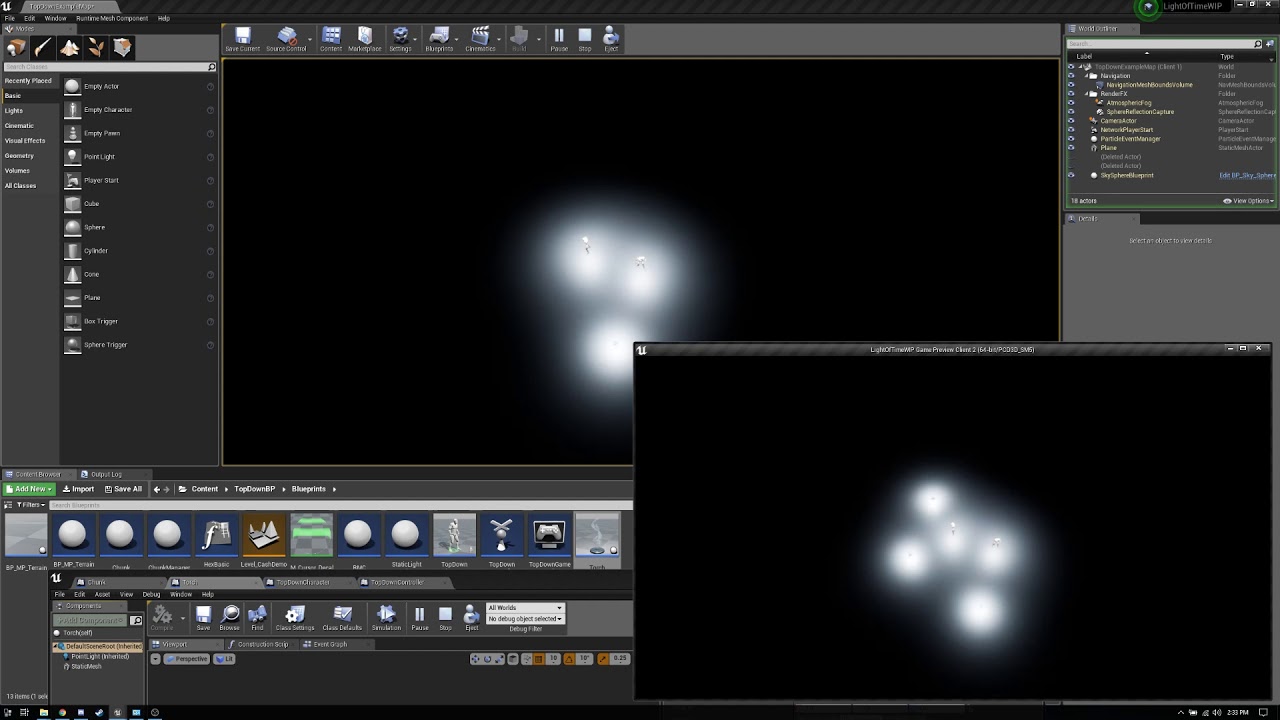 unborn spindle
Also want to add that I dont have any issues with the torch actor appearing when the Net Cull Distance Squared is set to the default values.
brittle karma
hey everyone. im having a weird issue here, i dont overlap an specific actor with the player, but it triggers the Overlapping Event and the OtherActor is the player which didnt overlap that object at all, client has this issue, server works fine
to be specific, that object which gets overlapped by the player, is Replicated actor, i checked if in the BP the Replicated check box is not set as it should, but its checked for replicated as well as cpp.
is it even possible? server player go the same path and its fine for him but client triggers the event
winged badger
option A - your client player left a primitive component where it should not be
option B - the other Actor participating in this is not on same location on server/client
brittle karma
actually it calls the Overlap Event in Specific location
rodes Z location is 0, and the OtherActor which is responsible to detect the Overlap's Z location is set to -1000
only client has this issue by the way
the whole road(which players are in) 's Z location is 0. so logically its not possible to Overlap the OtherActor, unless the player fall from the road(which i want to overlap the actor and it works fine )
winged badger
those screenshots don't look like client's world at runtime
brittle karma
no its only shows the the locations of road and the other actor
brittle karma
i didnt get A can u explain it a little bit?
winged badger
say one of your scene components on the car is set to replicate
and you have some locally spawned meshes
and it decides to replicate its attachments
result is that any meshes attached to it, or its children that are not NetAddressable will just... fall off
and if any of your cars primitive components ends up down there, it will cause the overlap
doesn't need to be the whole car
brittle karma
aha got it let me check
its this,
Rep...to Autono...
well when i check this, client's movement starts to be 100 percent rubish
winged badger
you either added primitive components locally at runtime or didn't
you should know that
high current
question tho, why don't you count only server overlaps and ignore client ones
I mean, if you need the overlap for a cosmetic effect
sure
but if your overlap is gameplay dependent I would trust the server, not the client
brittle karma
@high current well the overlap is gameplay, and server do the job for client, its like this::
overlap happens ->
RPC fucntion is being called for the Pawn ->
in that RPC another function is being called in PC->
in the PC a function is being called in the GameMode'-> GameMode Restart the player`
so im sure server do the job cuz GM is only available on server.
@winged badger yeah i added a Scene Component to the car, and its Component Replication is unchecked
@winged badger any way to detect if the components are falling off from the mesh? i used cmd -> show collisoin to see if anything falls but it wasnt helpful
high current
you can put a break point on the problematic overlap and investigate yourself whay/why/how
brittle karma
im thinking of move the whole code into character class instead of wheeled vehicle. the movement component of wheeled vehicle is not good for multiplayer at all
winged badger
well, CMC won't do you any favors
brittle karma
@winged badger any idea to keep Mesh's Replicate Physics to Autonomous Proxy unchecked(cuz it make movement of client so ridiculous) and keep components in their possession and protect em from falling?
worthy wasp
maybe this is false positive reactions inside of PIE testing - but i just tried setting a REpNotify variable to COND_OWNERONLY - and the RepNotify function played to other virtual players (Again - PIE TESTING).
Should I expect to see this as its a default nature of RepNotify funcitonality? Or should the COND_OWNERONLY flag condition throttle this to only the owner?
#Confused
winged badger
it should replicate to owner only
due to nature of how BP RepNotify works, if others set that variable locally
the RepNotify will still fire
it just won't get updated from the server
grizzled stirrup
Does it matter if your OnRep function doesn't match the property name that triggers it?
Example:
    UPROPERTY(Transient, ReplicatedUsing = OnRep_IsPickupAvailable)
    ACharacter* PickedUpByCharacter;
    UFUNCTION()
    void OnRep_IsPickupAvailable();
in c++ you basically bind the function by name with ReplicatedUsing specifier
so, no, it doesn't matter
or if it has OnRep
i have used same OnRep function for multiple related variables in the past
grizzled stirrup
Thanks! Not sure what you mean by the second last sentence
winged badger
it doesn't have to start with OnRep_
grizzled stirrup
Oh interesting I did not know you can have multiple variables trigger one OnRep
winged badger
its just a convention
grizzled stirrup
Ok cool so it can be completely unrelated like ReplicatedUsing = HelloUnrelated
winged badger
another thing you can do with c++ OnReps is
UFUNCTION() void OnRep_IsPickupAvailalable(ACharacter* OldCharacter);
grizzled stirrup
Yeah that's a super useful feature
Pass in the old value
I use it in a few places such as equipping weapons to have a reference to the old one
winged badger
DataChannel will use reflection to examine number of parameters in the OnRep
and call the appropriate overload
grizzled stirrup
Super clever stuff the engine does in that regard
winged badger
having to figure out the number of parameters and binding it by name in specifier
is why it has to be UFUNCTION
or UHT complains
brittle karma
@winged badger i did some tests, it seems child components are falling off cuz the overlapping event happens when i put hand break on in the sharp corners and turn. but the instigator of the event is still the Car itself as i printed it in Overlap event like
OtherActor->GetName()
winged badger
try printing the overlapped component instead
components falling off require a very specific setup
with an error in it
high current
Hmm, one more reason to switch to C++
BP gets mad as soon as you rename
had editor crashes cause of it
grizzled stirrup
I highly recommend using C++ for MP
winged badger
not being able to do anything with structs is the main reason to go c++
you can't use really useful things like FFastArraySerializer
you can't custom NetSerialize structs
you have to handle full UObject overhead if you want to call a function on the object
brittle karma
@high current well cpp is crazy in renaming, like 10 times more crazy than bp
winged badger
your OnReps in BP fire whenever variable is set, via replication or not
including on the machine that did the setting
which is just terrible
i also find the BP networked events really unreadable when you have 20 of them in the same class
grizzled stirrup
Not to mention you can't set COND_OwnerOnly or whatever for replicated properties in BP
Not sure if that's only for OnRep or not
But I believe it was a pretty big issue
brittle karma
@winged badger this is strange, i used OtherComp and it returned VehicleMesh
can we assume this as BUG?
brittle karma
but whenever i tick VehicleMesh's Replicate Physics Auto... it doesnt do strange behavior
well i dont want server side physics simulation
brittle karma
@high current do u know about component replication?
high current
whatcha need
brittle karma
i disabled server side physics simulation in the pawn
for the sake of making movement smoother
now it cuzes some weird behaviors,
Zlo said its about component replication but i couldnt understand much
now the root component 's replication situation is like this
and all child components of root component(which is vehicle mesh) are not replicated too
royal isle
The parent needs to replicate and then each component that you want to replicate needs to also be set to replicate
so tick ComponentReplicates
brittle karma
well i guess the problem im having is related to that Replicate Physics to autonomous
this is how it looks
high current
By default, the vehicle movement component does not have network prediticon
that is why disabling the rep phys to autonomous makes it smooth as you are kind of turning off replication and desyncing server/client
have you tried running server-auth physics actually
brittle karma
@high current server auth works fine but movement gets worse for client
high current
well so it doesnt work fine 😄
brittle karma
some sort of 😀
high current
Exi can tell you more about this, but to get stuff to work, you need some kind of prediction and correction from the server
I guess the other way is to go completely client-auth
and do overlaps on client and ignore the server completely
high current

Client corrections now working, but they're delayed by ping / 2, so need to work out how to get around that, and make sure the blending is smooth too... Simu...
not really what I was looking for lol
Anyway, the best stuff I have seen/ read was where instead of setting location of the actor on the client when correcting
you are essentially constantly pushing phys forces tryin to match what the server is sending as the coorect position
so you are doing corrections by phys forces instead of set actor location
and it is still server auth
Peeps here will probably have a better solution tho. I guess it depends on how accurate you want your cars to behave
what exi did for HoverLoop, IIRC was a spring based system completely with just vector math and set actor locations ( no physics what so ever) and ofc the prediciton from the CMC
but if you are not using physics, your prediction is easy(relatively)
brittle karma
ok then, helpful info thanks
high current

A rundown of the general principles used for arcade-style vehicle physics using Unreal Engine 4 for the upcoming party combat racer Space Dust Racing. Dev bl...
this is roughly what we use, but afaik exi replaced all physics with just vector math
Another thing which I am also curious is if the new net prediction plugin from Epic can work on the vehicle movement component easily. But TheJamsh is the person for that
I wish people from NewWorldInteractive kept an eye on this channel (and if they are, ty for the cool game 😉 )
I legit suspect the vehicles in Insurgency just have that Rep Phys to authonomous disabled and called it a day
But it was the same story with PUBG
brittle karma
😂
high current
when the vehicles first came out, they rubber banded like crazy
brittle karma
yeah right
 hollow bridge
What is the best practice for a chest content replication? Obviously, I don't want the item list to replicate to all clients, since it's just relevant for the players that are currently interacting with
high current
Then assign proper ownership and replicate Owner_Only?
hollow bridge
And change the ownership whenever a player interacts with the chest?
high current
y
winged badger
alternative is having the chest spawn an ActorComponent on the player when its interacted with
that Component replicates the copy of the contents and also contains all required networking logic
either way you don't clutter the pawn
the Component approach is preferable if multiple players can interact with the item in question
at the same time
 vestal thistle
Hello does anybody know a good way or the best way to create a dedicated server?
vestal thistle
or is there a website or resource that rents out dedicated servers for unreal?
 rich ridge
rich ridge
rich ridge
Yes it works for 4.22, I myself followed this for 4.22
 mighty rover
anybody ever get this error message running a dedicated server (v4.22.3)? Clearly you can see the files are there, and they are able to read them properly, it just won't load them. It's only happening on the physX dll's
 upper tendon
Hey, whenever I try to join a multiplayer session, it gives me this error. anyone knows why? thanks
high current
probably because your player state is invalid
Does this happen the first time you try to join, or you get this error after a few times of trying
high current
I am assuming you are using BP
make sure you connect your player controller
to the join session node
high current
and where do you run the Join Server node
upper tendon
high current
are you sure that the widget has it's proper ownership
widgets are local anyway, so you are allowed to just do player index 0
upper tendon
I'm pretty sure the ownership is proper
I'll try to un-link and and we'll see if its working
Okay, I think its working now, but just a quick question -
I didn't really set up the gamemode when a player join, doesn't it mean if the player joined, he can fly around, invisible? When the player join for me, he's invisible but can't move around.
high current
you need to have a playable default pawn and networked player starts
upper tendon
Alright, thank you!
 rose egret
that kinda makes my code dirty 😦
winged badger
basically, flatten the TMap into 2 TArrays, put those inside a struct, replicate that, and re-assemble TMap OnRep
or, just make a struct to hold your data instead:
USTRUCT(BlueprintType)
struct FMyData
{
    GENERATED_BODY()

public:
    UPROPERTY(BlueprintReadOnly) TArray<Type1> Keys;
    UPROPERTY(BlueprintReadOnly) TArray<Type2> Values;
    TMap<Type1, Type2> Map;

    Type2 operator[] (Type1 Key) const
    {
        return Map[Key];
    }
    void Add(TPair<Type1, Type2> Element)
    {
        Keys.Add(Type1);
        Values.Add(Type2);
        Map.Add(Type1, Type2);
    }
};
something like that @rose egret
high current
is there a specific reason a TMap isn't replicatable, I have seen this pop up quite frequently and I am curious
winged badger
it still needs more work there, mostly to populate the Map client side, solved by
say FFastArraySerializer
rose egret
@winged badger 👍
winged badger
NetSerialization.h header has the docs for FFastArraySerializer
@high current i have no idea, you could replicate writing a somewhat inelegant custom NetSerialization function
as well
basically,
high current
yeah I couldnt think of a reason other than it might not support some key/value pairs, but then it should do others...
 golden aurora
So... I have a dedicated server running Lobby Map but the session doesnt show up .. any ideia?
winged badger
what are you using for sessions?
golden aurora
The ideia was .. a player create a new map (session) to the others enjoy
but in here, this player is to be the dedicated server
winged badger
advanced sessions, uworks, manual implementation?
and player can't be the dedicated server
as there are no players on dedicated server
no LocalPlayer, no LocalPlayerController, no rendering...
golden aurora
I know
upper tendon
Turns out I forgot to set the Input Mode to Game Only haha
high current
oh yeah that is a common one
grizzled stirrup
For a simple co-op game with friends on Steam, are there any benefits to using Steam Beacons instead of a simple listen server host that creates a session and invites player directly to the menu map and then both seamless travel to whatever gamemode is chosen by the host?
From my limited understanding, it would seem that beacons allow you to join and communicate without actually creating a session or traveling
But I'm not sure if it's even worth setting it up if simple sessions can work similarly in my case
winged badger
you can also use steam lobby there
thin stratus
@grizzled stirrup Beacons are basically a connection without Level.
So you can do this in every level, and it's an extra layer of States (PlayerState/GameState).
It allows replication, but not sure to what degree.
They are mostly used for Partys, so if you invite someone you want to play with (friends), before actually searching for a server.
The Sessions are handled differently than Game sessions.
E.g. Party instead of Game (name). Steam doesn't allow more than one Session active at a time, so if you have a party, you'd need to tell everyone the gamesession to join to and then kill the party session before joining the actual agme.
You can later recreate the party if you save the Session info of the party
cause that's (with steam) a unique ID. So if the Host creates a Party again, they could rejoin based on the data.
For playing you always need the ListenServer GameSession
So beacons won't replace that
 strong sail
Anyone know how too hide something on the clients side but show it on the server side
thin stratus
For all Clients or a specific one?
And who "owns" the object in question? @strong sail
grizzled stirrup
Thank you very much for the detailed explanation!
I guess beacons are very beneficial then in that case as you can easily back out of a game and retain your party info
And separating the party and actual game sessions like you said
high current
@strong sail disable visibility by default and enable it only on is server = true on begin play
or if the server is the owner, toggling only owner see
can do the trick
grizzled stirrup
@thin stratus Thinking on it a little bit more, if you never were going to be matchmaking with your party and only playing with 1-3 friends that join (the game wouldn't start until they have joined), would you say in that case it's easier for the host to just create a session in the main menu, have friends join and then seamless travel to the gameplay map instead of implementing a beacon party system?
thin stratus
I would not use beacons for that i guess
But i also wouldn't make them join in the mainmenu
Just make a new Lobby level
@grizzled stirrup
grizzled stirrup
Makes sense! If the host can still send invites from within that lobby level then it should work great
For example he invites friend 1 which opens the lobby map, sends the invite and creates the session
but then friend 2 gets online so they invite him while they are waiting in the lobby level
 unborn nimbus
If you call a Server RPC from the server, does it skip the replication logic or is that overhead still there?
grizzled stirrup
AFAIK it's the same as calling a regular function, could be wrong though
 fleet raven
it will be the same overhead as calling a normal local function through reflection
it will determine the call space to be local, skipping the replication and running it locally
 slender yarrow
How do you handle important server variables that are floating around in UI's? I have a counter strike shop type UI that you buy kill streaks from. How would I safely alter variables that only the server should be handling? I feel like with my current setup the start of all these actions are in the UI and would be easily hackable.
I dont know how to word this 😕
high current
I do such things in the game state, (ofc with replicated vars)
if these changes are global and affect all players, if they are local only for a single player, either PC or Player State(in case other clients need to be aware that this actor has the altered variables)
that said you can have client specific altered vars in the GM and GS too, but you have to somehow index each player on login and so on
but this still has to go trough either GS,PC or PS for the UI to have access to their replicated version
slender yarrow
for the scoreboard i did do the game state with indexing. But for example in the UI for the Shop, I have a score variable that is changed based on what youve selected. Right now if you hit accept im sending that client sided variable into a server event on the player state which seems sketchy to me . I feel like it could just be changed/hacked in the UI and the server would get bad information
i cant figure a way around this with using a UI. Im having a total mind block
high current
yeah that way is sketchy, client should request stuff from the server, not set it
Also, only use player state if you want everyone to have access to the information at all times
As Player states are always relevant
slender yarrow
But i cant see how to do that with a UI. The UI is what needs to navigate everything. Unless youre not supposed to have ANY vars in the UI and always be making call sout to the GS or PS for information???
i guess that is how it has to be now that i think about it
high current
whatever info is gameplay dependent and part of the game mode and gameplay ruleset, should be calculated on GM and GS, and if clients need to have access to that, then it should be on replicated vars in the GS
Your UI can have variables to basically function, keep states, do animations and so on, but if it needs to fetch some important information that is gameplay related
it should cast to GS and be like `hey, is this information available for me, if yes ill get replicated variable, if no ill tell the server to get it for me and then get the replicated variable
or something like that
I don't know your specific case so I am making this up...
slender yarrow
Ok i think i get it. Ill poke around so more. Thanks for the help! ✌
 solar stirrup
Is there a way to get a component's network id or something of the sort?
found GetUniqueID()
close enough
timid moss
Im not sure. that function seams to be the correct one though
timid moss
Hi. I am a little confused on how replicated TArrays work and their OnRep functions. Currently I have a Replicated TArray of Weapons that has an OnRep function associated with it. The server fills the Inventory TArray with weapons on character spawn so that you get your default loadout. So correct me if I am wrong but in this case shouldn't the Inventory only replicate once? Using a PrintString in the OnRep_Inventory() function, I find that the Inventory does only replicate once. But where my confusion starts is that sometimes the inventory gets replicated twice. I did some more debugging with PrintStrings in the OnRep_Inventory() function so that every time the inventory gets replicated it prints the contents of the Inventory, and I found that sometimes the TArray contains a NULL value in one of the slots, and when it does, it replicates the inventory again and that fixes the NULL value in that slot. Is this normal behavior with TArrays?
timid moss
Oh interesting. If you don't mind me asking why does a slot become null sometimes? @fleet raven
fleet raven
the array replicated before the weapon, so it set up the size, but could not resolve the reference on the client yet
timid moss
OHhhhhh. thx so much. ive been stuck on why this is happening forever lol
also for fast array serializer, is that this?https://docs.unrealengine.com/en-US/API/Runtime/Engine/Engine/FFastArraySerializer/index.html
Base struct for wrapping the array used in Fast TArray Replication
kind of confused what fast array serializer does
worthy perch
Look in NetSerializer.h.
timid moss
Ok. Thx
grizzled stirrup
Since properties only replicate when they change, is there any overhead to having a property that replicates without condition but only gets set at the start of a match and doesn't otherwise change vs using COND_InitialOnly ?
fleet raven
yes, the property must be regularly compared to detect if it should replicate again
grizzled stirrup
Ok thanks will see if I can get away with InitialOnly
In the definition of InitialOnly This property will only attempt to send on the initial bunch if they mean the first time it gets set to a value other than default and replicates as initial bunch then it should be good
timid moss
@worthy perch how do I get to NetSerializer.h?
worthy perch
Sorry, I meant NetSerialization.h.
timid moss
Hi guys. If the current actor is owned by the player and I am trying to do an authority check, is this enough....if (Role == ROLE_Authority)or do I need to do thisif (GetOwner()->Role == ROLE_Authority)
The actor owned in this case is a weapon
 hollow breach
My Game is played via Lan for testing. Now hosted the game on mac-book(Mojave) but find session is not showing any results because of IPV6 sockets used by iOS i guess.
Is there any solution for this issue?
Warning: GetAddressInfo failed to resolve host with error SE_HOST_NOT_FOUND
Unreal editor 4.22.3 I'm using
chrome bay
@grizzled stirrup it means it will be sent with the opening of the connection and never again (i.e. when the actor is spawned or client joins), so if it's the default value it'll stay the default value. You need to set the property to what you need in PostInitComponents or somwhere early, possibly BeginPlay but I'm not sure if BeginPlay is early enough.
upper tendon
Hey, I have a problem, whenever I'm trying to cause damage to a player, I can only damage the client, but the client can't damage the host. Anyone know how to fix it? Thanks.
upper tendon
I use the "event Hit" in the projectile blueprint
bitter oriole
Okay, so where does the code doing hits runs ?
upper tendon
and I use "event anydamage" inside the character bp.
bitter oriole
The point is that most stuff should run on the server
If you call an event on your client, fine, but the server doesn't know
You need a RPC to also fire your weapon on server
upper tendon
you're right, let me have a look
you're right, the projectile doesn't even runs on the server and the other client
thanks.
bitter oriole
Deciding what runs on which is going to be a lot of your multiplayer code
Weapons in particular
upper tendon
Another question - does the function "Apply Damage" runs on the server? do I have to replicate it as well?
bitter oriole
It shouldn't run on other machines silently
If you call it from the server, it runs there and only there, etc
upper tendon
so, do I need to replicate it manually? I don't know about replicating manually in the projectile bp
bitter oriole
It's impossible to answer that easily. If you want the damage code to run on server, then you need the code calling Apply Damage to be on server
That can be your projectile doing this only in the server code, on hit
bitter oriole
It says it only runs there
upper tendon
which means it doesn't run on other clients?
bitter oriole
Yeah, though it doesn't mean calling it from a client will call it on the server
You might want to look more into multiplayer tutorials and examples
This stuff is highly subtle
upper tendon
yeah
I've managed to replicate the projectile itself, so I don't think there should be any problem replicating the damage at the same way
worthy perch
If I RPC this struct:
USTRUCT()
struct MyStruct {
    UPROPERTY()
    float MyUPropertyFloat;

    float MyFloat2, MyFloat3;
}
Would the byte size of the struct when sent over the network essentially be the size of 1 float, or of 3 even though only 1 is marked UPROPERTY?
thin stratus
Does anyone have some info on Struct and Array replication in UE4:
- Does a change of a Struct member replicate the whole struct or only the changed property?
- Does the same count for Arrays?
- Does changing the size of an array also replicate the whole array or does it only replicate the change?
@worthy perch The UPROPERTY should technically only be needed for UPROPERTY(Replicated) marked structs of that type.
So if you actively send this via an RPC, it might send all 3 values, but that's something you could check
worthy perch
Does a change of a Struct member replicated the whole struct or only the change?
I have heard both sides from credible people on this Discord, but I think most people agree that the only the change is sent. (which seems like magic to me).
I think the whole array gets sent on change, otherwise there wouldn't be much of a point for FFastArraySerializer.
thin stratus
I read both for Arrays too
But I would also assume the whole arrays is sent
For structs I read it was changed in UE4 to only replicate changed properties
But I have a hard time understanding what I'm looking at
worthy perch
If you can't find anyone to answer those questions, you can take a look back at this section An Overview of Net Serialization and how this all works of NetSerialization.h. It's slightly too vague for me, but still decently valuable.
Generic Delta Replication part talks specifically about Arrays and Structs, but I'm still not sure if that means the whole thing is sent or not...
thin stratus
It heavily sounds like they added the ability to only send the "delta" state to the client
So basically the whole thing produces Delta and Full States of Struct and Arrays.
And sends the DeltaState to the Clients and keeps the FullState for the next time it compares.
That's for "Dynamic"Properties, so Structs and Arrays
Sounds good, thanks @worthy perch

Tight call.
plush mist
Is it possible to tweak detour crowd to avoid jittering when AI Pawn wants tomake detour move around other AI? I used detour crowd controller and AI avoiding is nice , but jittering is so anoying...
grizzled stirrup
@thin stratus That's awesome! So if you had 10 properties in a replicated struct and only one got changed, only that property would replicate down?
thin stratus
That is what everyone hopes for
grizzled stirrup
Very nice!
 twin juniper
How to replicate spawnemitteratlocation for all ?
grizzled stirrup
Or potentially a RepNotify FVector_NetQuantize but I'm not sure if that's more expensive than a multicast and you have to also ensure it's cleared for clients that come into relevancy later
Or in the case where that emitter is always going to spawn at a known location such as at the muzzle of a gun, you can simply use a RepNotify int
chrome bay
USTRUCT() does delta/per-property replication by default (for a standard member variable of the type) - unless you override NetSerialize, in which case it sends whatever you serialize
Arrays I'm not so sure, also not sure what happens to structs when inside arrays
twin juniper
Will Try these methods ! Thanks a lot
chrome bay
The extended explanation for structs is they do build an FRepLayout for the property in the networking layer and compare struct properties individually
thin stratus
@chrome bay That's what I understood too
Despite Arrays in Structs and Structs in Arrays
That seems to always cause full replication
chrome bay
Yeah I think that's true
Arrays are just sent as a big long bitstream IIRC.. per-item serialization would be kinda hard to do I would think without some custom implementation like the fast serializer
thin stratus
But isn't that what was outlined in the netSerialize comment?
That they do NetDeltaSerialize for arrays?
That only sends the delta state to clients?
@chrome bay
chrome bay
Ah good Q, I'm not sure
It would be nice if they did that's for sure
I'll have a proper look at some point.. would be nice to know
 cinder quartz
How do you guys replicate hit effects when your weapon does multiple hits, like shotgun? I have random cone spread, so I guess I should just replicate starting location and seed for random and let clients roll their own calculation ?
grizzled stirrup
@cinder quartz I have an OnRep centralized ImpactLoc FVector that is used to determine the direction then the local clients do their own version of the shot but it is inaccurate
The seed idea is a good idea if you want the same spread response
You shouldn't need to replicate StartingLocation as it'd always be on the weapon right?
Otherwise the shots might come from somewhere else
cinder quartz
true, hmm, right now I'm replicating location and what I hit (enum to toggle blood or sparks etc) so even with lag client always knows what he hit, but I think this might be too traffic heavy for multihit weapons because it means for shotguns I actually need to replicate array of structs
grizzled stirrup
Yeah it gets way too expensive
Generally I find it's fine to do the what he hit FX locally and confirm damage on the server via a hitmarker or something
Many games take this approach and for almost all cases it looks correct
You can also spawn an additional blood FX on confirmed hit too
So 99% of the shots won't waste bandwidth figuring out if concrete was hit but when a player is hit, the blood effect will always play
It's a tricky mix of bandwidth and accuracy though
cinder quartz
yeah, will try the same random seed on everyone, it should be pretty good, or just take off the random spread and always do fixed spread
grizzled stirrup
Yeah honestly with even random spread, in any kind of fast paced game, once you see other clients shooting a shotgun, the illusion is good enough
Players generally won't be able to keep track of exactly where each shot went anyway
And as long as damage is clearly telegraphed, it should all make sense to them
Unless you are doing a much slower pace game where every shot counts, then it might be worth doing more specialized replicated hits
cinder quartz
yeah, gotta test some things and see whats best
another thing I'm thinking to reduce lag, would it be any sense to when client shoots, if he hits actor(enemy), to tell server the actor* and bone name, so server can check if it can hit that. That way even with high ping if you hit fast moving enemy on the head, it would most of the time count as headshot
grizzled stirrup
That's generally how it's done for most games to favor responsiveness
Client says he shot X
Server verifies
If it's within reasonable limits, the shot is allowed
cinder quartz
right now I'm just telling server the location as vector, so it can easily miss if enemy moves fast
grizzled stirrup
Generally you'd see if you hit the enemy clientside and if so tell the server about it, then do some kind of verification on the server
Otherwise it'll lead to clients missing shots they should have hit due to latency and being frustrated
cinder quartz
yeah im already seeing that
grizzled stirrup
More sophisticated approaches to verify can reduce cheating such as a full lag compensation rewind / retrace but start with a basic verification first
Reference ShooterGame
cinder quartz
but my "hit effects" come from server, so even now If i hit head client side, but server doesnt, I still see no blood, but theres a slight delay on hit effects
grizzled stirrup
Yeah that's why it can be a good idea to never spawn blood or damage effects clientside and always have them come from the server's confirmed hits
cinder quartz
I tried shooter game while simulating lag and it's bit funny, current clip ammo seems to work bit wonky, if you simulate high lag your current ammo will go to minus lol
grizzled stirrup
Might just be the UI being funky and missing an initial binding or something
Strange!
cinder quartz
yeah, not sure if it actually also shoots server side in that situation
do you have any idea whats accetable KB/s when profiling networked game lets say co-op game with 4 players, I'm having hard time figuring whats good data/per second
at least the regular limit seems to be 10 KB/s if you dont modify it
seems to be CMC doing most traffic anyway
grizzled stirrup
@cinder quartz 10 KB/s is definitely very low for todays standards
I've lifted the limit for my own co-op game as with several AI and lots of weapon fire it was quickly meeting the limit
cinder quartz
I lifted it to 20KB/s and its enough.. for now, guess I shouldn't worry about that now in prototype phase
grizzled stirrup
If passing in an options string that was previously only "listen", would it be formatted like so? "listen?MinPlayers=2?MaxPlayers=4" ?
grizzled stirrup
Thanks a lot!
solar stirrup
Does the engine give anything for lag compensation? Or do I have to write it myself
chrome bay
Yourself
Pretty much impossible to write a "generic" one size fits all lag comp system
chrome bay
Gameplay Abilities has some implementations for prediction and such, but it's a huge system and you pretty much have to adopt it for the entire project to use it properly
grizzled stirrup
Is StartPlay() the best place to parse option strings?
Or can I be doing it earlier like PostInitComponents?
brittle karma
guys any links or tips or codes about learning authoritative server client side prediction?
there is no tutorial at all for that, so how did u learn?
bitter oriole
There's one tutorial on Udemy

Udemy
Use Epic's Unreal Engine for online game development in C++. Covers LAN, VPN, Steam, and more.
Get it when it's at $10
brittle karma
well there is a problem with this tutorial i guess
it doesnt cover physics engine basically, he wrote the movement from scratch
bitter oriole
Yes
You need to do this
UE4 uses PhysX which isn't deterministic, so you can't have prediction based on it
Multiplayer physics is really hard even with a better physics engine, too
brittle karma
alright then
UE4 DevLog #1 | Client-Side-Prediction with Physx [Rewind&Replay]
@bitter oriole this says Client-Side-Prediction with Physx
bitter oriole
Yeah and you can see visual rollbacks every second on flat terrain without other players
chrome bay
I've seen enough "WIP" videos of PhysX prediction to last me a lifetime
None of these ever end up finished you notice 😄
brittle karma
is this problem only exist on none characters or CMC has this problem as well?
chrome bay
CMC doesn't have the problem, but it's not using PhysX
cinder quartz
"Networking is fully implemented, with server-client correction and prediction included." says in the CMC doc
chrome bay
CMC works fine on the network because it's completely kinematic and Epic have an insanely complex chunk of code making it happen.
But it's a very bespoke solution that works for characters and not much else.
Physics simulations massively increase the complexity of the problem. It's been an unsolvable problem in games since the 90's
bitter oriole
CMC simply does not use physics simulation at all
chrome bay
Don't feel bad about not solving it
grizzled stirrup
Didn't Rocket League have to make their own physics solution or something?
Seems like a very difficult problem to solve
chrome bay
Yeah, it's clever what they did but it's a very bespoke solution that is tailored for their game
Wouldn't scale past 8 players or to anything crazy complex
bitter oriole
Sea of Thieves also has a custom movement component for ships
grizzled stirrup
Rocket League is like the ideal game in so many ways- small limited map, few players and not much to render / replicate
bitter oriole
You can see how it behaves it a very un-physical way by crashing the ship into an island and watch it retrace its steps backwards
brittle karma
i couldnt recognize how hard can it be XD
bitter oriole
It's simple
Same data in, different result out
So you can't predict what the other player does on his machine
chrome bay
Yeah I used kinematic movement for my vehicles for ages, which worked really well until I wanted something with wheels or in constant contact with a surface, or remotely realistic collisions
Then it all went to pot
collision r hard
grizzled stirrup
They probably have a custom movement component for vehicles in Fortnite too right?
The quads are crazy
You can go very fast and go all over the place
chrome bay
They use client-auth physics in fortnite
grizzled stirrup
Ohh that's interesting
chrome bay
they just went hard on anti-cheat
grizzled stirrup
So technically you are telling the server where you are and it interpolates your position to everyone else?
Similar to using client side auth on the CMC?
chrome bay
Basically yeah, client tells server where it is, server accepts it (checking for obvious cheats I imagine) and pushes that out to clients
The simulation is running for all players constantly so physics naturally smooths out a lot of the motion
grizzled stirrup
That's great, I was really wondering how they managed to pull off some situations with no jitter or corrections
chrome bay
But they have some custom interp behaviour as well (See FPhysicsReplication)
grizzled stirrup
Since even launching character at high speeds in vanilla UE4 with CMC causes a lot of corrections with latency
brittle karma
i myself wanted to have client-auth and it cost me sooo many strange collision stuff
chrome bay
Clients that are collidiing with each other will constantly screw up
There's nothing you can really do about that
Each client thinks they are in charge of the simulation so they're always going to be fighting with each other
Add latency and variable frame-time to the mix and you're screwed
TLDR don't bother making destruction derby simulator 2019
Unless you wanna cry a lot
 unreal pine
Wreckfest?
brittle karma
even stranger, collision of components fall apart
 coral girder
Oooor do your own networking and avoid ue4's replication, maybe use lockstep, but not sure how that'd fair for more realtime games. Hmm that or a full authorative server.
He's correct though physics are messy with p2p networking.
brittle karma
@chrome bay but if fortnite is using client side simulation how its possible with the problems u mentioned?
coral girder
How often do people bump into eachother?
I'm willing to bet if they do they jitter a lot.
bitter oriole
Months of work by large teams of extremely experienced UE4 engineers
That helps, too
coral girder
Probably not using their own engine the same way most would either is my guess.
chrome bay
Even character movement has issues when two characters from different clients walk into each other
coral girder
If you have the goals understood ahead of time you can get around all of the problems with enough hackery 😛
Yup that ^
chrome bay
You'll notice constant jitter while the clients try to resolve collisions independently then get yeeted somewhere else by a server correction
coral girder
Oof those suck.
cinder quartz
Yeah that happens in Dead by Daylight all the time, walk behind another player and you rubberband constantly
chrome bay
Two clients determining collision outcome is an unsolvable problem unless you're using deterministic lockstep
But nobody in their right mind is using DL anymore unless they're making an RTS or something
chrome bay
Too much input latency for a shooter etc.
brittle karma
so for clarifications, wheeled vehicles are sucky and there is no way to solve the problem?
coral girder
Dude it's hard stuff >.< And there's like no tools for that anyway.
No there is.
How many racing games are p2p?
chrome bay
Multiplayer physics is always going to be a compromise in some area
cinder quartz
Path of Exile uses lockstep and it works kinda good, but its not fast paces shooter, it can be fast paced tho
it's not UE4 either
you also feel input lag all the time
coral girder
Yeah I've never seen a lockstep game in ue4, there's no plugin for it and it'd require that you deal with the packets yourself, something I don't expect indie devs to do, would probably use their own engines.
bitter oriole
It's possible to have wheeled vehicles in multiplayer that don't suck. Two methods : use another engine (not Unity either) with Bullet physics ; or use client-side auth with a log of additional logic and processing
brittle karma
@bitter oriole do u think that udemy tutorial is good enough to solve it?
bitter oriole
Well the tutorial does server auth
coral girder
Networking is a complex beast >.< I'm a newb in it myself and it's hard to find what i'm looking for.
Server auth is a good way to start learning though is my guess.
brittle karma
@bitter oriole but no physics engine is involved