#multiplayer
1 messages · Page 483 of 1
 narrow prairie
im not sure if u can reparent the game mode to another one btw
seems game mode base is for single player
the game mode without base is for multiplayer from my knowledge
hope thats helps u out man
 blazing haven
narrow prairie
blazing haven
narrow prairie
yw 😃 gl
 slender yarrow
So apparently i was asking the wrong question last time. How do you properly replicate SetActorLocation or AddActorWorldTransform? When using these the client movement is very choppy but the server movement is perfect. How do you smooth out client movement with these????
 bitter oriole
If you're using a character, all of this is done for you by the character movement component, which has like 3000 lines of C++ doing this
If not, then you're in for a bit of work
slender yarrow
yes its on a humanoid character with character movement
but its still really choppy onthe client
bitter oriole
Then it's very easy - don't use SetActorLocation or AddActorWorldTransform
slender yarrow
so AddMovementInput?
is that the only option
im basically trying to figure out how you would move a character without WASD on a dedicated server. Like bursts of movement and dashes
 royal isle
To smooth out the client movement you would need to write your own client prediction code
slender yarrow
oh great.
royal isle
@slender yarrow it is not as hard as it sounds, just check zlo's link xD, you can also look into unreal's movement component code
bitter oriole
The problem you face is that movement in a game needs to be updated smoothly, with finite acceleration, on every single video frame rendered by your game. In single player this is rather easy
In multiplayer, well, it's not that easy
slender yarrow
im getting a 404 on that link
bitter oriole
Need to be logged in with Github source in UE4
If you're not familiar with C++ this won't help
bitter oriole
I usually recommend the "Unreal multiplayer mastery" course on Udemy
Pretty good primer to MP movement
royal isle
Unreal's movement component that comes attached to Characters does exactly that. Looking at its source code is the best asset I can think of when trying to make something like this. The course stranger mentioned is pretty good too (the last section does a simple implementation of what you want) but that too is based on the component code.
slender yarrow
I appreciate the tips. Ill definitely start with the plug in. Im just shocked right now in 2019 that at least an extremely basic version of this is not integrated into the engine.
 cedar finch
I can't figure out how to restart the current level and keep all my player settings such as my selected character. PostLogin, OnSwapPlayerController, and BeginPlay are not executing when I servertravel to the same level or when I use the RestartLevel node.
 worthy perch
PlayerState has CopyProperties.
cedar finch
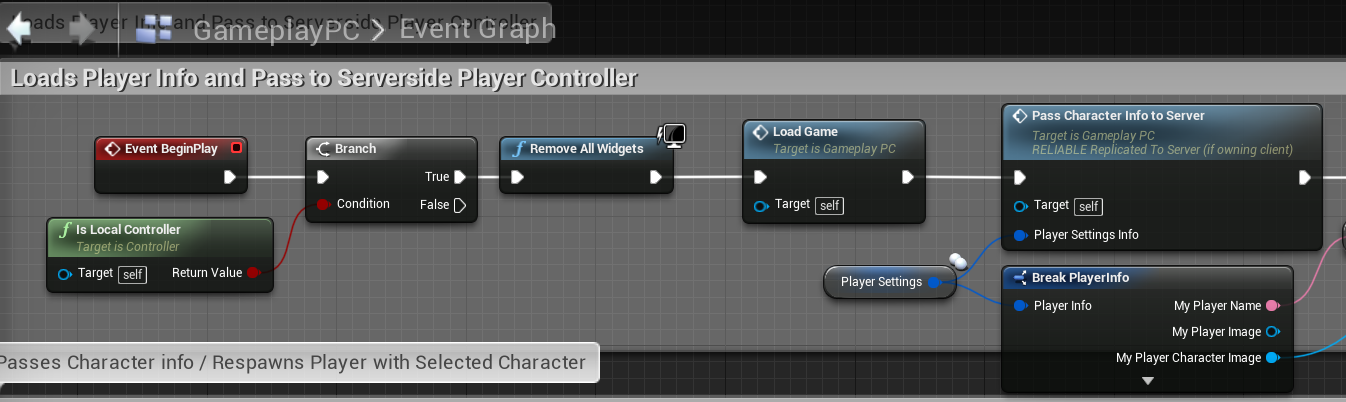
@worthy perch I have my information saved and it gets loaded inside my PlayerController's BeginPlay node but that node doesn't fire after I restart my level so I can't load my character.
It loads when I travel from another level such as Lobby but not when I travel to the same map. IDK maybe i'm missing somthing
https://i.gyazo.com/072e9f6903e471d45cc2192cf3a5e5ee.png https://i.gyazo.com/c9c83c355dbb66f70db65ae63d23cb86.png https://i.gyazo.com/0e4abf81a1021225abe5fbf2e4b34747.png

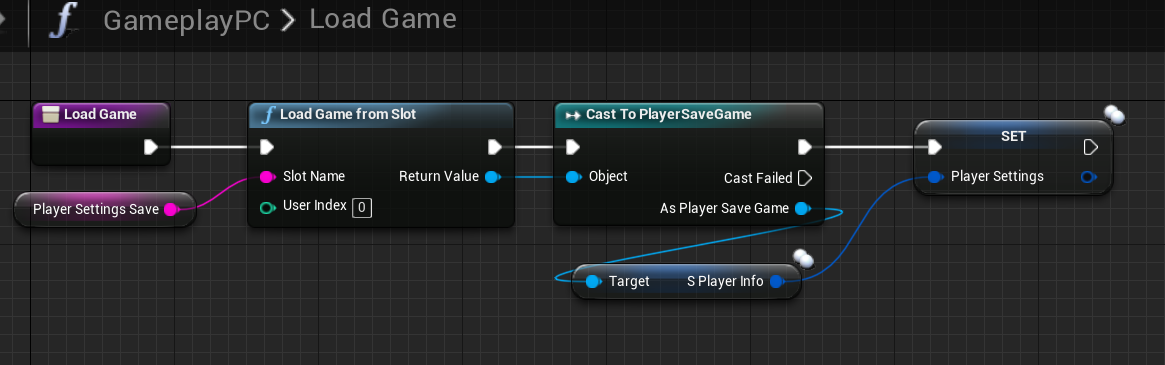
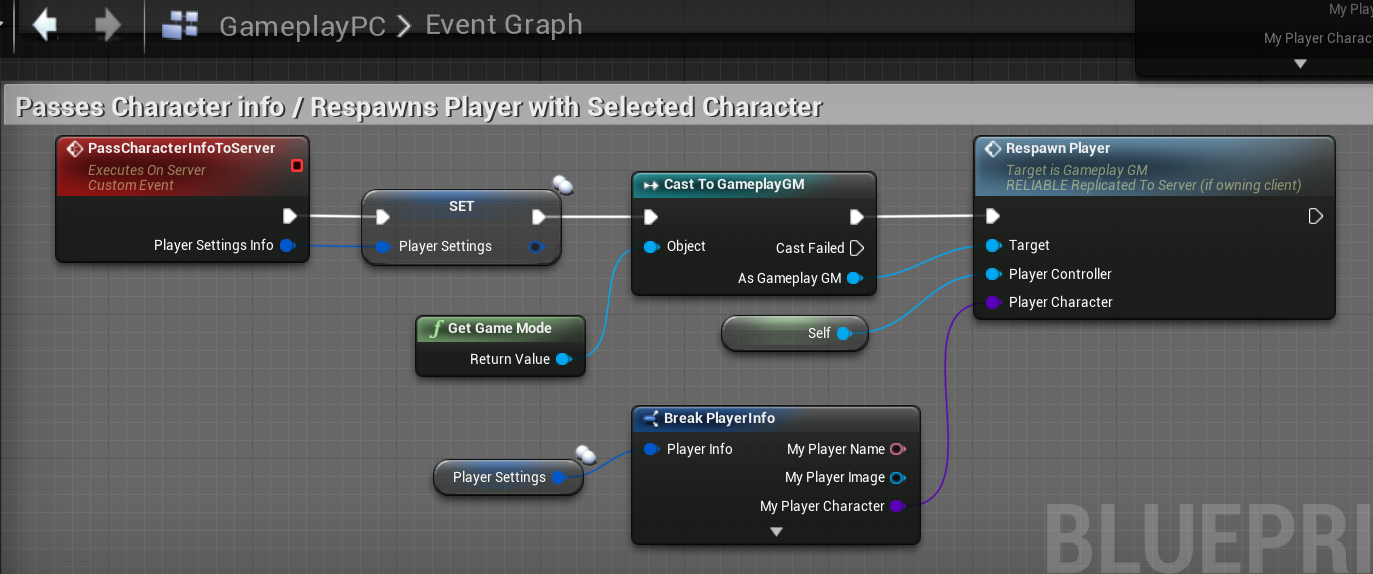
So my guess is that it gets wiped out during the level reset so I don't have a saved character info anymore.
 high current
If is a savegame
It doest get wiped out under any circumstances
Are you sure that you are actually saving it
Correctly
cedar finch
It saves it when going from the Lobby level to the Game level.
I choose my character and stuff in the lobby then servertravel to the game level and I still have my character. But when I restart the current level my event begin play doesn't execute so I can't load it
high current
Also are you sure that thr respawn player node gets executed
You can do a print string of the player character class
Right before the respawn node
To see if it carries the corret pawn
cedar finch
So in the player controller the begin play and the respawn player doesn't execute. It doesn't print.
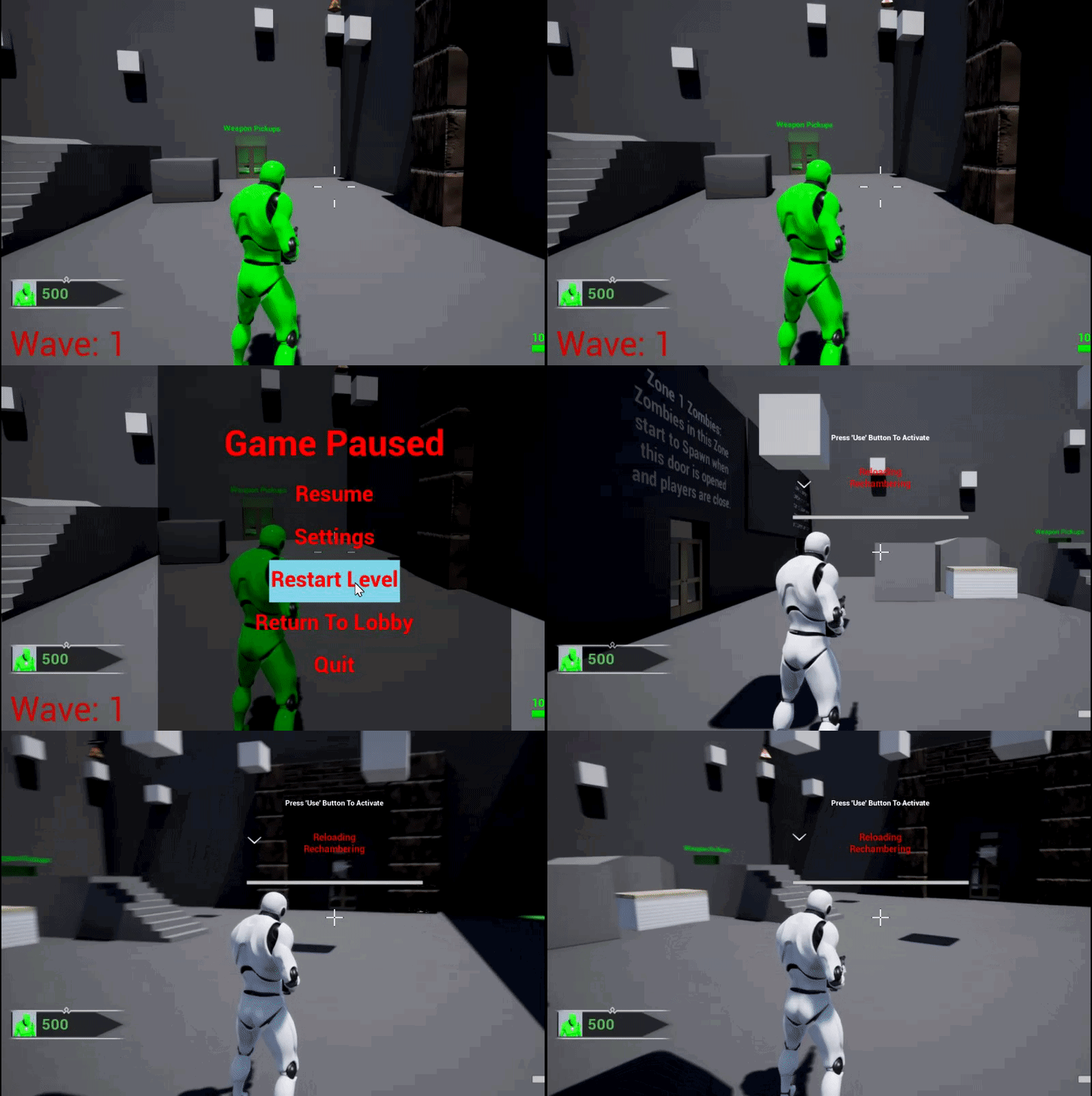
I'm getting spawned as the default character and nothing is executing in the controller. IDK what's going on
@high current Ok so i found this node and it seems to execute so i'm going to see if I can work some magic with it real quick https://i.gyazo.com/0114f6c69a07831ae73a475f611e6426.png

 meager spade
what would be the best way to sync a seed used for weapon randomness
have the server send a client rpc when the weapon is equipped and only allow fire once the seed had been received ?
 winged badger
it can have the seed long before then
no reason why it couldn't be lying on the ground with a valid replicated seed
high current
Yeah, wouldnt having the same seed per life of the weapon suit your needs.
If not then maybe instead of waiting to allow fire upon seed recieve, allow fire with a default seed, which both server and cliemt know about
Then switch to the new one on recieve
If your game is the spammy kind and people are likely to immediately shoot
 fathom aspen
So guys i have this code inside my UUserWidget class where i call a server rpc on the player state
So pretty much there are two RPCs... so the one is highlighted doesn't get called if omit _Implementation
while the first rpc i don't have to put that suffix at all and it works fine...
why this mystery happening?
also I noticed that when I use VAssistX to create the implementation for the header file functions, it just flips the order of the implementable functions in source, not as other classes, and it still work, why that?
maybe because PlayerState is fully replicated? 🤔
 ocean geyser
you shouldnt really be calling Server_Fnc_Implementation(), should just be Server_Fnc(), thats strange that its not being called that way. does the order of the Validate and Implementation have anything to do with it possibly?
fathom aspen
hmm
let me see
I have the implementation before the validation in source
that applies for other functions as well and they work well
i mean VAssistX implemented them in the first place, all i did is add some functionality 😅
cedar finch
Is there any event that executes in Gamemode when you servertravel or reload the same level? I ask because PostLogin and OnSwapPlayerController Don't execute.
 wary willow
@cedar finch You should use HandleStartingNewPlayer
cedar finch
@wary willow Ahh Thank you!
That works perfect! Man I've been looking all over the web for this lol. Thanks again. 😃
 somber glade
The bugs never end. This command is running on switch has authority. It should pop up a thick black square which has a widget puzzle on it. The host sees this, but the client only sees a thin black square. I have no idea why a client would see a thin black square. This is functionally the same as my avatar selector (actor with a widget) and the clients see that no problem. This actor is set to replicate, and I set all the components to replicate as well. The only difference is the avatar selector is called from the game mode, this is called from an object inside the game.
I solved it by making a custom event and running it as multicast. I'm not sure I understand exactly why I need to do that in this situation. It works though.
cedar finch
So I got a new issue. My stats are widgets are stored/created in my playercontroller which carries over when I restart the level. Lol For example say I get 10 kills and then pause the game and click Restart Level. When the level restarts I still have 10 kills. 😐 Sooo seeing as how this is being a pain in the butt, should I just make a small level with a different player controller and server travel to it then immediately travel back? That way it would swap out my player controller when I get back and reset everything?
somber glade
Just iterate through all your players and reset the kill variable to 0....
somber glade
So what should I do when there is a difference between playing as a client in PIE and playing as a client in a built version?
We have a widget puzzle with a bunch of numbers. As you point at the numbers, the ones you are pointing at change color. This works fine in PIE with a dedicated server. The client can see this effect. But in a built version of the game, the client cannot see the purple hovering effect
as far as I understand it, each client has their own copy of the widget so there shouldn't be any replication issue with that
the interaction otherwise does work.. if you click in the area where you should to solve the puzzle that happens, it's just not displaying the on hovered in a packaged version
high current
I am guessing the client connects manually after some time in a packaged version
Where as in pie, both client and server initiate at the same tine
Perhaps your issue is in the late initialization of the client
somber glade
The widget isn't created on begin play
it's spawned after the client takes an action
 chrome bay
You say the purple hovering effect isn't visible, what purple hovering effect?
chrome bay
If it's a material issue, it could be that the material doesn't have the correct usage flags checked - which will work in editor but not packaged
hmm kk
Couldn't tell you then
somber glade
we have a grid of 64 buttons with text on each one, numbers. THe player is looking for a certain sequence of random numbers. As they move their widget interaction component around it'll highlight groups of 4 numbers. The group of 4 will be turned purple. The host sees it, and the client sees it in pie, but the client doesn't see it in a packaged version
The code is obviously working, as you can complete it by blindly clicking around where you should be pointing, just the opacity. hmm.
What's really weird is that when the client is looking at the puzzle and the host points at the puzzle, the client can see what the host is highlighting.
which makes no sense since they should be seeing two different copies of the widget.
somber glade
no
somber glade
Yes, it's VR.
So there is an actor in the level when a player interacts it spawns the actor with the widget.
it's very difficult to trouble shoot because PIE is a lie.. it means I need to build it, send it, get into it and test it .
high current
The cake is a lie
Pies are nice
But yeah its shitty when you have a bug you cant reproduce
somber glade
I can reproduce, I can't just reproduce in a testing environment.
high current
Are you running dev or shipping on the packaged?
somber glade
Dev package
Nothing in the widget is replicated as it should be
on success of the puzzle it gets the owning player and uses their PC to make an RPC to process the result
high current
Are you sure ownership gets successfully transfered when in package
somber glade
Yeah, because the client can trigger the success.
so the widget obviously belongs to them.
As far as I understand it, nothing about widgets is inherently replicated, so when a widget is spawned, each client gets their own copy.
Which is what makes it bizarre that the client can see what numbers the host is highlighting.
that almost sounds like only that effect is being replicated.
high current
If the widget pointer is replicated and it is not checking for ownership
It would make sense that the client sees what the server points at
 thin stratus
@high current A 3D widget has most likely no proper owner
@somber glade
Ah wrong one tagged, sorry
You can toggle stuff just fine on it ,even if you aren't the owner iirc.
You would need to recursevly set the owner when interacting, cause it spawns on your actor in the level
There is no connection to a player at that point
We had the same issue with our 3D UI and went back to 2D (which isn't a choice for you in VR, I know)
Which is what makes it bizarre that the client can see what numbers the host is highlighting.
that almost sounds like only that effect is being replicated.
This should 100% not happen. If you aren't actively given the Server the new result or replicate it in any way, then the Client's Widget should never show what hte Server shows.
There needs to be a replicated actor in the background that provides the data
A 3D Widget with Actor placed in the level would most likely work like this:
- Only the Actor is replicate, not the Widget, not the Component.
- When starting to interact with the Actor, you would set the Owner of the Widget and Component.
- When changing something in the UI, you need to perform a ServerRPC inside of the Owner (or something that is owned by the Client (PC, Character, PS, etc.)).
-- Here you'd pass the ACTOR that the widget sits on, so you keep track of it. - On the Server side, after the RPC, you take the passed Actor reference and apply the changes that hte Client did.
-- This would be in form of one or more replicated variables/struct/array/etc.
That stuff then replicates back to the client/clients:
The Widget should be bound to these replicated variables
Then you'd have everything in sync
If the "getOwner" stuff in the widget doesn't work, then you can also just save the interacting Controller on the Actor, and access the Actor from the Widget.
winged badger
i prefer actors that have custom interaction of any complexity spawn a component on the player's something, with required network logic
especially if there are more of them with different interactions
thin stratus
Yeah my Inventory Systems have a ManagerComponent on the PlayerController and an Inventory on whatever Actor that should have an Inventory.
All replication logic goes through the manager then
winged badger
that way, i don't clutter the player or the pc
extreme example of this is a crafting bench
high current
I was only noting that if the conditions for the widget interaction are replicated, both server and client might see the same thing, despite the widgets obviously being client side
winged badger
if you are using RTS controls, its possible to fuck that up
like having a controller trace on tick both client and server side
high current
^
thin stratus
That would still need you to perform the Fake Click via WidgetInteractionComponent on the Widget
winged badger
then clients hovers would be visible on listen server host
thin stratus
Ah, right, "Highlighting" as in hovering. I thought they have to be clicked to highlight
nvm then
The Trace on Tick might actually be it then
high current
I think he is using the widget interaction thingie
Forgot the proper name
But if that is replicated by mistake
winged badger
thingie>>component and there you go 😄
and that one tends to be a part of the CDO
so replicated or not, it exists on both server and client
unless you specifically spawn it on local controller only
somber glade
Yes i'm using a widget interaction component
high current
And its not disabled on non owners then it can cause problems
somber glade
I had the actor replicated. When I removed the replication from that actor that holds the widget, then it actually started to work
Now in a greater mystery at the end of the game, the players are teleported to the game over lobby. THere are 4 target points with a tag "GameOverArea", when the game is over, the game mode gets those and tells each player to teleport to one of those. We've always tested with 2 players and it's been fine through several tests, when adding another client, one of the clients was teleported to the entry lobby not the game over lobby, but it's literally impossible. Nothing in the lobby has that tag.
and I've just confirmed that by ending the game and running a print on the function that calls it. It returns 4 target points as it should
but one of the clients reported being teleported to the lobby
@thin stratus The widget interaction component itself isn't replicated. However the clients are still seeing the host on hover for the widget. The actor holding the widget isn't even replicated. The actor holding the widget is spawned with a multicast. That's the only way I could get that to work.
The player has to attach a USB to ac omputer. When it attaches, the server has a do once to call a function that spawns the widget for all involved.
The stuff before the switch is regarding checking the USB to make sure it's valid and physically attaching it to the computer itself.
so I figured I'd let that part run on everyone.
Once it's attached it makes an interface call to the puzzle to start the timer on it. That seems to work fine. But even in this scenario with something completely unreplicated, the clients can see the hosts onhover event.
and when you mention setting the owner, something like this?
thin stratus
Yeah, just that you also should supply a PC as owner
The one that's interacting with the actor
But you didn't answer the question if your controller with the interaction component is working on everyone
Cause if you have it on everyone and the controller movement is replicate, then it will also trace on everyone
So if the Server or Client traces the widget, it also happens on the others
somber glade
Yes it's working on everyone. It works on every other puzzle and widget we have.
it's only acting strange on this one puzzle
and yes the character it is on is replicated of course..it's on the character.
it's attached to a motion controller
winged badger
if it works on every other puzzle
then the bug likely isn't in the 3D widget
but in the puzzle itself
(basically, if its the widget's fault you did a major fail by breaching encapsulation, doing code repetition - except you forgot to update one c/ped block, or something akin to that)
somber glade
We're not doing any hover on any other widget though.
So I mean..the widget interaction works to interact with every other widget we have.. and technically it works with this. If you blindly click you can hit the right spot and pass the puzzle.
it's only the on hover event that doesn't work and only outside the editor.
unfortunately on hover is crucial to how this puzzle works
so after testing this happens on all widgets
the on hover works only for the host and replicates to all clients
thin stratus
If this is only happening on this Widget
somber glade
nope all widgets
thin stratus
And only this one is using Hover
somber glade
one of my panels has a non-important hover event.
so we tested that. When the host hovered it lit up for the client
thin stratus
Well, let me rephrase: If it happens on every widget that has Hover Effects
somber glade
and it did not light up when the client tried to hover
thin stratus
Yeah, we already explained why that happens
it's most likely that the Controller that your WidgetInterfaction is sitting on is replicate, right?
Controller = VR Gamepad Controller
thin stratus
Yeah the freaking Interaction Component sits on that
And exists on everyone
if the Server aims at the widget
so does the client's version of the server
somber glade
That explains why it might show the host hover to everyone, but why doesn't the client hover?
thin stratus
And so does the Interaction that sits on that
somber glade
when the client points at it?
thin stratus
Maybe faulty replication code of the controller movement?
You can debug draw the trace that the interaction component performs
There should be a boolean
Turn it on and check what server and client show
somber glade
even without replication, shouldn't it show its own hover to itself?
thin stratus
The Client doen't show hover event at all?
somber glade
no
thin stratus
That could be the owner issue then
somber glade
the client doesn't see his own hover.
thin stratus
Cause the Widget isn't owned by the Player when it's on an actor in the scene
somber glade
Well I added something to tick for that
somber glade
my player on tick checks to see if he's hovering on a widget, if it is, it checks to see if the owner of the widget is his player controller, if it isn't, it sets it to himself.
I've just added that so I'll test to see if that helps
how can I add something to the widget before the player interacts with it? if hover isn't working, the widget won't trigger any event will it until the player clicks on it
thin stratus
Give the Actor an Overlap sphere
That is big enough to trigger BeginOverlap when the player gets close
Then you can set the owner before the player starts working with the widget
Make sure to limit that to LOCALLY CONTROLLER Pawn though
somber glade
okay
that's a good idea
the other brain buster i have is the teleport at end of game. I just tested this again and it makes no sense to me.
The game mode sees 4 target points gets the location and tells the pawn to move there.
the host moves to one of them, the client is teleported back to the lobby, but.. there is no way for it to be given the location of any point in the lobby.
(lobby, end game lobby and game play map are all on the same map right now)
I've set up a print for this test..but.. this is just bizarre.
and this is another one that won't replicate in pie. I started a game with 3 local FPS clients and they were all teleported to the end game room properly.. but in an actual build, the clients aren't
thin stratus
Is your packaged project a Steam Build that actively uses Steam?
somber glade
It's a dev build that uses steam yes.
thin stratus
If yes, are you properly using SeamlessTravel?
Idk if that has anything to do with it, but just making sure.
thin stratus
Only connection and that's it?
somber glade
Yup, just open a listen server and the clients join
thin stratus
You never move maps after connecting?
Okay then nvm
Cause that could be one confusing thing :P
somber glade
there was a fatal bug with seamless travel that i couldn't solve after 3 days so I had to abandon it until after the presentation tomorrow
no map move after joining.
there are only two maps. The gameplay map and the menu map
The only moving of the players is done at game start with a possess when they get a new avatar, and at the end the avatar they have is told to set location to one of the 4 target points in the game over room
the target points are there when the level is opened so all clients should have a reference to them, not that it matters, the game mode gets the location and passes it on to relocate
That's the function on the player controller. I know it's not right, the clients won't run those fades, but that'll be changed later, I want a fade when the game is over. That's not really the important part now
or maybe they will. I forgot that I actually made functions for those
high current
That function runs on server right?
somber glade
that function is called from the game mode and runs on the player controller
you can see the call to it in the previous screenshot
That's the "relocate pawn" function
high current
Rgr
somber glade
This is the check I'm putting in for the widget and the player to see if that solves hover or not
high current
Do you have a branch for 'is locally controlled=true
That would be easier, instead of checking widged ownership against get player controller
Which would get the local controller for both server and client
Assuming that the last screenshot is from your pawn
thin stratus
@somber glade Why are you teleporting the actor only locally?
Or wait you are not
Why would that not work though
somber glade
it did seem to work this time. But the last 2 times it didn't.
thin stratus
Can you check "Teleport"
somber glade
That widget check didn't work
somber glade
ah okay, I'll check that. That might be what's going on with that.
But those two checks didn't help client hover
@high current Yes that is on the pawn.
high current
Alright, then I would run that whole code on true after a brach with is locally controlled as its condition
Or maybe the widget interaction component can be set to 'only owner see'
No idea if that would work tho
somber glade
I just found out that this only happens with agent characters.
but they're the same base character
it's the same character BP,
high current
What is an agent character
somber glade
We have two characters agents and guards. This is a stealth game where one team tries to steal things.
My coworker just pointed out he noticed that this was only happening when playing as an agent.
the game must always have 1 guard, so when testing solo you're always a guard character.
we thought it was a host/client issue because as the host I'm usually testing as a guard character.
the only difference between them, outside of a couple bools is that the agent character have these inventory ball child actors around their waste.
to my knowledge there is no reason they should interfere with the widget interaction..but that's the only difference.
so I'm going to delete those and try again
the only real difference between the setup is that one character gets a gun on the waist, the other character (guard) gets a gun mounted on their forearm and there is a bool "isagent" set to true for agents.
maybe those child actors were somehow blocking the widget interaction..or something..
high current
Is the agent a child of the guard?
somber glade
no they're the same blueprint
just there is a guar dsetup and an agent setup that gives them the different gun
and on the guard the inventory balls are destroyed on setup
we're just about to test it now
somber glade
that wasn't it
 modern swift
hi all I tried to Actor->GetNetConnection on server, but it keep return null for thirdpersoncharacter
anyoneknow why?
somber glade
@high current @thin stratus Just did a little testing. As a client, the on-hover event is firing, the color of the button simply isn't updating. The on hover event prints as coming from "Client1" so it is detecting the hover, it's not pushing the visual change.
LogBlueprintUserMessages: [GuardControlPanel_Widget_C_0] Client 1: I'm Hovering
LogBlueprintUserMessages: [GuardControlPanel_Widget_C_0] Client 1: I'm Hovering
LogBlueprintUserMessages: [GuardControlPanel_Widget_C_0] Client 1: I'm Hovering
LogBlueprintUserMessages: [GuardControlPanel_Widget_C_0] Client 1: I'm Hovering
LogBlueprintUserMessages: [GuardControlPanel_Widget_C_0] Client 1: I'm Hovering``` got me a stream of thatok, then show use the visual change code
somber glade
Visual change doesn't even work for basic buttons though.
Like that's just a bog standard button
and it doesn't change color for the client.
When the host hovers that button, it lightens, like a standard button does. When the client does, nothing happens.
I'm going to make it an extreme color and see if I can see any change as a client
nothing in game. You can see I'm hovering that button. It should be bright red.
thin stratus
You are 10000% sure this is only one widget in your scene?
Not that it spawned one per player and they overlap or so
somber glade
This widget is in the game when it starts.
there is only one copy of it
the other ones are spawned in
I even created a custom trace channel default ignore for widgets, and changed the 3 widgets I have over to it. To make sure nothing was interferring.
I have 2 puzzles and this guard panel.
high current
I mean show us how you actually toggle a color via the hover(or button) doesnt matter, I was just curious if the fault isnt in the actual color change thingie
somber glade
Okay..let me.. break that down. It's fairly complicated. I didn't actually make this part (but it's my job to make sure it doesn't explode) the other guy who apparently knows math but nothing about unreal made it. I mostly tried to fix it up for network compatibility. It's.. well it should be on that blueprint nightmare website..
The long and short of it is after a bunch of math nodes, it calculates which ones should have their color changed, and uses this to change to purple
this is called from "on hovered"
there are like 64 different buttons, so a lot feeds in to this
after the presentation one thing I have to do is go through and show him how to clean this up
and build functions and macros, etc.
high current
"apparently knows math but nothing about unreal made it" lol
high current
and didnt just plug random stuff into the material editor till stuff works
somber glade
I mean it works..so good for him.
Just this hover stuff doesn't.
The event is clearly being called
and since the widget is just local anyway, replication shouldn't be an issue
I'm going to toss a print in there, but I feel confident that since it's working on the guard panel, the on hover event will work for this.
in PIE testing, even as a client, it works, but in a live game, it doesn't. So I have no idea how to even test this reliably.
it's nearly 1 am, so they've gone home
somber glade
Yeah I know, you're preaching to the choir.
thin stratus
You should really try to wrap this into a custom widget
That handles the Hover Event based on an integer or so
So that you don't have to add 100000 nodes
somber glade
That will happen after the presentation.
thin stratus
Good :D
high current
or at least use macros and functions
somber glade
he's basically just going to work on puzzles for like 2 months.
thin stratus
Na, if you find yourself copy pasting stuff like that, you should directly start to rethink the solution and try to combine this into one setup
E.g. You could make a custom widget, give it an integer (index) and on Hover call an EventDispatcher that passes the integer.
Then you add that widget instead of the one you have right now and assign it the IDs (can also do this via a For loop).
Then you bind to the EventDispatcher and it will give you the int of the widget.
somber glade
but in the meantime, I need to figure out a way for this color to reliably change tomorrow or there might not be a rest of the project.
thin stratus
So in total you need one node @high current for the OnHover event
high current
I said at least, I wasn't denying that having child widgets neatly executing functionality isn't better
😄
somber glade
on hover color changes on 3D widgets should work in multiplayer right?
high current
@somber glade could it be that somewhere troughout all that clean code do CTRL+F and search for get game mode
it is possible that your guy needed to get GM for something, and left cast failed to be empty
somber glade
Nah, he barely knows what the game mode is.
I also noticed that my avatar selector widget also has the same issue
the buttons do not change color for on hover.
that involves a similar but different character BP my menu avatar.
it's similar to my main character BP but some gameplay stuff stripped away, it still uses a widget interaction for the lobby menus
When I do "confirm" my avatar selection on that widget the buttons are disabled and they do turn color then.
So it's possible for them to turn color.
So while that print statement did run, this does nothing. This should change the color of the button when hovered and unhovered, but nothing happens.
and if I play as the host, that works perfectly fine. The button turns red on hover.
so it looks like visual color things are not being properly updated for clients.
That doesn't explain why that text color change works in PIE, and this doesn't work in PIE.
stuff is too inconsistent.
There is even a slightly different "on pressed" color.. that does change if you hold down the button and look at it..
somber glade
it's just a button that toggles 2 doors
high current
or an object that already exists in UMG
somber glade
and yeah it already exists when the game starts.
I just put in a "print get owning player" to test this
I noticed that this is inconsistent.
I start the game, I can get purple numbers in the widget, then I start again without changing anything and I can't.
it's not an owning player issue, both times it's reporting my PC as owning the widget.
okay..so.. I've just restarted this 4 times. I moved a copy of the computer and USB into my lobby to access it quickly.
50% of the time it worked
without any changes in between
fml.. 3/7 working. Pull out OBS to record it... 5 in a row working fine
after several more tests got a failure, 8/16 still around 50%
that sounds like some kind of.. race condition or something doesn't it?
excuse the bumpiness, OBS does weird things to VR recording: https://youtu.be/wXVGLu5lS20

that's it working
and this is it failing https://youtu.be/rUe50AyChDU

exactly the same conditions
no changes in code
I wonder if he has some bug in his code..
He has 3 branch statements before getting to the spots where he sets color. That don't have an alternative. I'll stick prints on those and see
high current
its not behaving a 100% as it should be, it is a bug
somber glade
Yes.. i think so
the second branch, which he only pulls of false, is spamming true when it's not working
I gotta run a test while it's working though to see if it still spams that print or not
high current
remember that breakpoints are also useful
somber glade
hmm.. a successful one still kind of spams that print statement too
breakpoints might be helpful if I understand this function at all 😉
I was a math guy..but it was a long time ago..
and breakpoints in VR are a headache
 twin juniper
hi , can you guys help me ? i trying to make my own "master server dedicated" something like minecraft one what i need to know in a way to make it ?
thin stratus
my own "master server dedicated"
First you got to get the terms correct, because this makes not so much sense.
twin juniper
dedicated server -> master server type
thin stratus
What is "Master Server Type" for you?
thin stratus
Right, then drop the "MasterServer" part, cause that comes from the given Subsystem you want to use (e.g. Steam)
somber glade
@high current Well i tried break points..this just makes it worse.. jfc.. it's going through the code, it's going right by the set color and opacity stuff in both situations.
thin stratus
To make your project DedicatedServer ready, you can find tons of tutorials, so just google for UE4 + Dedicated Server
somber glade
just in one situation the color is changing, in the other it isn't.
When I line up the point with where it would highlight the 4 correct numbers, this branch gets tripped. I put it there. It doesn't matter if it's "working" or not, that branch will still trip even if the numbers aren't highlight, but it has to go right through the set color node to get there.
So I'm back to square one.
The reason it isn't purple is because it hates me.
50% of the time
and I'm not getting any errors. If that get was coming up dry, it'd yell at me
I just tried printing out what's in that get, and it was printing various text object references as it should. And it wasn't working..so it has references to text objects and it's setting the color, and then it's just not changing
I give up.
it just makes no sense.
 calm dirge
hey guys, i have a problem. basically the more FPS a client has, the more packets it drops from the server. if a client has ~200 FPS, it's lagging real bad (it's teleporting all over where it is) and if it has 300-400 fps, the connection is lost completely. what could be causing this? it's pretty weird. thanks
ocean geyser
do you have something that is interacting with the server on each tick/frame?
high current
afaik sending and requesting data on tick?
calm dirge
i mean other than the player...i don't think so
like we don't have stuff plugged into the tick of the server that's going non-stop
worthy perch
It's APlayerCameraManager::bUseClientSideCameraUpdates bug.
Gotta set that to false.
calm dirge
(i should mention that when i said that the connection is lost completely, i mean that client's connection to the server; other clients are just fine)
hmm, interesting, okay
ocean geyser
let me know if that works please
calm dirge
sure!
calm dirge
@ocean geyser sorry, that took a while. unfortunately it's still the same
 lost inlet
ok i'm getting a server RPC not being called on an actor, no warnings in the console
the player is the netowner
breakpoint on the client call is hit, breakpoint on serverside function is not hit
high current
is it reliable?
lost inlet
yes but even if it wasn't, that's only relevant if the connection is saturated (which it isn't)
 jolly siren
That's not true. Unreliable rpcs are only replicated along with replicated variables
So if nothing else is replicating you won't receive the rpc
But anyways, are you following these rules?
It's likely getting dropped
This section specifically
lost inlet
it kind of is, unreliable RPCs get dropped on a saturated connection, and yes i know the rules of sending server RPCs
that's why i said it had a valid netowner
jolly siren
ah okay sorry missed that part. And yes they do get dropped on a saturated connection. I just meant that there are other rules for when they are or aren't sent as well. Pretty much 99% of the time someone asks that question here it's because of an ownership issue, so just a knee jerk reaction.
What is the actor you are calling it on?
lost inlet
a weapon that the player owns, and it only seems to do it when a certain sequence of actions is performed before it which at first seem unrelated
lost inlet
Get Player Controller node with a fixed indexed is pretty much a no-no in a multiplayer game
and you should probably simulate the result locally
high current
Oof how have I not seen that screenshot erebel
So neat
I have done ok without it but trough trail n error lol
Btw any progress on the spectator lag you were dealing with
 steel cove
@light fog you're running input functions on the server (they need to happen on the client only), and GetPlayerController(0) returns NULL on dedicaded servers (avoid using that at all in multiplayer games)
 light fog
@steel cove so would i rotate the player locally and then update the player mesh rotation on the sever?
lost inlet
yes
though you wouldn't really send relative inputs to the server
for something like rotation anyway
worthy perch
Did I structure this poorly?
Basically, I'm in a situation where the client needs to ask the Server for a value, which then the server RPCs the value back to the client.
This is for a value that frequently changes so replication is not reasonable.
lost inlet
how is replication not suitable for a value that frequently changes?
worthy perch
Wouldn't that flood the net?
somber glade
actually that wasn't it, and I fixed it... I'm an idiot
ocean geyser
@worthy perch since it seems like only the one client needs to know about the variable, replicate the variable and set the replication condition to owner only. that way the variable is being replicated, but only between the server and the owning client
worthy perch
Yes, but since it changes frequently it would still flood the net. It's basically a cooldown -- a float that changes every 0.05 seconds.
lost inlet
depending on how many there are, a float changing 20 times a second is barely going to "flood the net"
plus you can change the net update frequency per-actor
the client going "gimme the value" and the server sending it in the body of an RPC at the same frequency is probably going to take up significantly more bandwidth
fathom aspen
Hey guys, do you have an idea why in playerstate source file, the order of the implemented functions isn't important, and thus you can flip the order... i mean when i create an implementation of a header file function(using visual assist x) it just stacks on top of the previous one, and doesn't go under it, more like a stack lol
 fleet raven
it's a bug in va
and yeah the order of function implementations is irrelevant as they have all been declared already
worthy perch
I forgot to mention that those RPCs are called quite infrequently. And the actor with those properties has a high net update frequency.
Anyway, I decided to do the ServerRPC to ClientRPC setup. I had just wondered if there was something special for a call and return over the net.
I appreciate the suggestions.
Also, to put it shortly, I couldn't use OnReps.
fathom aspen
@fleet raven ohh i see, thanks you so much for pointing that out 👍
somber glade
@high current @thin stratus holy crap.. so I changed the virtual use and pointer index to some random variable on start up. this seemed to solve the issue in pie, but now in a live test, the host can see what the client highlights.. but the client can't see what they're hovering on.
somber glade
So this is truly bizarre. If my VR host starts a game on a listen server, and I hover on a widget, I get the "on hover" firing once. Then when he points at something else "unhover" fires once. as soon as a client joins, when my host points at a widget the hover and unhover start firing nonstop
somber glade
My issue seems related to this: https://answers.unrealengine.com/questions/598039/umg-hover-event-continuous-fire-in-vr.html It seems that after the client joins, this starts happening to me as the host. The client can see what I'm hovering, the client can see what it hovers, and I can see what the client hovers. But I can't see what i hover, and my prints change from 1 at a time to being spammed. This is both with random IDs and setting each one to a fixed number (like 2).
 pastel totem
@somber glade Are you testing this in single process multiplayer? If so, try in standalone.
somber glade
@pastel totem It's VR I can't test in standalone. I am testing packaged versions
pastel totem
Hmm I had the exact same issue you described... Though only in PIE.
As long as all of your Widget Interaction Components have different IDs it should work.
Do the components exist only for the owning Client? Or do they exist for both?
somber glade
They exist on both. I tried starting deactivated and activating only on the local client, but it that didn't work. I've got another fix I'm going to try, but I have to wait until I can test it live to figure out if its working. I'm going to destroy the widget on begin play for everyone but the local owning client.
and I did try with different IDs at one point and that didn't work. I assigned a random 4 digit ID to them and that didn't help
thin stratus
You can also try to not add the Interaction Component to the Actor
But spawn it only on the local client when they Possess the Pawn
in BP you'd need to ClientRPC onPossess
If you have c++ at hand ,you can use the "OnRep_Controller" event
high current
This issue doesnt sound VR 'induced' to say. Might be easier to test and debug if you switch to mouse and keyboard controls
somber glade
Does Onrep pawn/controller fire on the host of a non-dedicated server multiplayer match?
@high current that's what I'm doing now
@thin stratus I'm having issues with onrep_controller
        void K2_OnRep_Controller();

virtual void OnRep_Controller() override;``` this is in my parent C++ classand my cpp ```void AVRCharacter::OnRep_Controller()
{
Super::OnRep_Controller();
K2_OnRep_Controller();
}```
thin stratus
OnRep doesn't call on the Host via C++ at all
OnRep only calls on the Server/Host in BPs
Big diff between BP and C++
If you need it to call for the Server too, you usually just call the same crap on Possess
somber glade
so on possession runs on a server/host but you need onrep for all the clients?
how does that work for running stuff on the host's character for example? Like I know for a client, al the other clients and the server have a copy of the player character, and each one can run their copy. You can filter that with "is locally controlled" to only run it on the clients character
But the host's character returns "false" on that
so if you run something on the hosts character, does it run once? or does it run again for the "server"?
This is what I've setup for my FPS characters to test. @high current they've got a WIC attached to their camera. I changed my widget on hover to red so it's clear to see, and if I start with 1 player. it works fine. I go into the level point at the widget, it hovers red. If I start with 2 players, it doesn't hover. I go to the widget, point at it, no color change
I found a recommendation in one of the posts I made earlier, about destroying the WIC on any copy other than the one that should have it
so this should mean the server has it's own wic and the client has no copy of the sever's wic and same for the client.
high current
If the server fires that its isnt locally controlled
Then the server would delete its pointer no?
Not on pc atm but iirc when playing on a listen server
The server is locally controling its pawn
somber glade
Yeah I just changed it
To this. this gets called from on possession
so the server's character should get that called after he has a controller and can return is locally controlled
Actually it turns out onpossessed never gets called on the server..
This prints nothing
somber glade
I just realized there were a couple functions there. "on possessed" and "possessed" possessed provides a player controller. That one definitely fires
high current
I gotta test on the pc when I can
But cant this whole thing be achieved by setting the 'only owner see'
On the widget interaction component
somber glade
According to one of the links above, the issue isn't who can see it, it's that there are multiple copies of the WIC and somehow they're interfering with each other
I'll try that though
nvm, WIC can't have that set on it
winged badger
widget interaction component isn't a primitive, it doesn't have visibility iirc
@somber glade why is the WIC not on your PC?
somber glade
because its attached to my character so that I can point it at things?
winged badger
technically, you could attach the entire PC, along with WIC there
makes the crossfiring solution simpler, as its not part of a replicated actor then
as in, clients only have their own controller, that limits them to their own WIC as well automagically
not sure if it would be required, but that would leave only solving the listen server host - which should be doable with 1 or 2 IsLocallyControlled checks
possibly having to override the WIC functions in the process, can't say i took my time reading its source code
somber glade
I've never attached a PC to a pawn before. I wasn't aware that you could do such a thing
somber glade
I suppose so, I always thought of the PC as more of an abstract thing
calm dirge
hi, i'm back with my issue that i tried to fix last night, but it didn't work. this is my issue: the more FPS a client has, the more packets it drops from the server. if a client has ~200 FPS, it's lagging real bad (it's teleporting all over where it is) and if it has 300-400 fps, the connection is lost completely. a guy told me to try to set APlayerCameraManager::bUseClientSideCameraUpdates to false, but that didn't work. any help is appreciated. thanks
high current
There was and option in the PC to update its location according to the possessed pawn iirc
somber glade
so..just attach the PC to the motion controller and have the WIC be a child of that?
high current
I suppose that was the idea Zlo had
somber glade
I was just checking out a reference copy of the VR Expansion Plugin and noticed that it has the same issue I'm running into. It has the WIC on the teleport controller that's spawned when the game starts. That one is set up to start and stop on a button press, but when both the client and the host have theirs enabled, on hover stops working.
That one is fixed by setting a random int though
Let me try a random int now that I'm filtering and making sure there is just one copy of each WIC
the virtual user index needs to be different.
This properly fixes it on my reference project, so I need to work this kind of thing into mine.
high current
A friendly reminder about using random values in muktiplayer
If it is in a replicated actor
Make sure you save the random output server side and replicate it for clients
somber glade
that function only runs local
I tried to integrate this into my project..but it still fails
i hate this project so much.
high current
At this point you might want to try and replicate this onto a new clean project
If you replicate the issue as cleanly as possible
You can send us the files
somber glade
LogBlueprintUserMessages: [FPS_VivePawnCharacter_C_1] Server: I'm not locally controlled
LogBlueprintUserMessages: [FPS_VivePawnCharacter_C_0] Client 1: I'm locally controlled
LogBlueprintUserMessages: [FPS_VivePawnCharacter_C_0] Client 1: I'm locally controlled``` this is interesting..how is the client reporting true 2 times?
high current
From where are you running the server custom event
high current
Can you check if event possessed is called with remote authority
somber glade
if I put a switch has authority there and plug the following stuff into remote, nothing happens
the server doesn't do anything
the client still gets its two prints
LogBlueprintUserMessages: [FPS_VivePawnCharacter_C_0] Client 1: I'm locally controlled```The onrep runs twice then?
somber glade
LogBlueprintUserMessages: [FPS_VivePawnCharacter_C_0] Server: I'm locally controlledCGV
LogBlueprintUserMessages: [FPS_VivePawnCharacter_C_1] Server: HostPossessionCGV
LogBlueprintUserMessages: [FPS_VivePawnCharacter_C_1] Server: I'm not locally controlledCGV
LogBlueprintUserMessages: [FPS_VivePawnCharacter_C_0] Client 1: Onrep_ControllerCGV
LogBlueprintUserMessages: [FPS_VivePawnCharacter_C_0] Client 1: I'm locally controlledCGV
LogBlueprintUserMessages: [FPS_VivePawnCharacter_C_0] Client 1: Onrep_ControllerCGV
LogBlueprintUserMessages: [FPS_VivePawnCharacter_C_0] Client 1: I'm locally controlledCGV```the client seems to be running on rep for the server's copy of the character file and then saying it's locally controlled..that makes...no sense?
shouldn't the server process the onrep on its copy of the client's character?
or am I misreading that?
high current
It looks to me like it is just executing on rep twice
somber glade
I recall seeing something like this before. A few weeks back I noticed that some of my functions seemed to be running twice.
for no reason that I could see at all
at the time what was happenign was it was emptying an array and then attempting to go back through and empty that area again (by using each entry or something and removing it). The solution at that time was to stick an "is valid" on there, and when it returned empty it would just not run that stuff.
Yeah..there must be something broken in this. I've got it spawning a new widget item just like the reference. The widget is working...but.. hover still won't work with 2 players.
holy crap
but it does work if I start it auto activate = false
and then assign a key to activate it
only on "is locally controlled"
it's finally fixed..
after spawning the actor that contains the widget and attaching it to the head, run this and bam it works
it can't start activated.
and it must have a unique virtual user index.
unfortunately I didn't come up with this solution 8 hours ago before the presentation.
somber glade
My guess..
you can't change the virtual user index when it's active
so starting with it active and trying to set it, always failed.
I'd need to test it live, but it works in PIE, so I'm fairly sure it'll work live too.
winged badger
The posession system is a little bit of a mess
Mostly due to OnRep_Controller and ClientRestart racing who gets there first
SetPawn runs twice on clients whoever wins
fleet raven
even worse: there does not seem to be any default bp-exposed event/delegate/function that runs on the client when you possessed a pawn
calm dirge
hi, i'm back with my issue that i tried to fix last night, but it didn't work. this is my issue: the more FPS a client has, the more packets it drops from the server. if a client has ~200 FPS, it's lagging real bad (it's teleporting all over where it is) and if it has 300-400 fps, the connection is lost completely. a guy told me to try to set APlayerCameraManager::bUseClientSideCameraUpdates to false, but that didn't work. any help is appreciated. thanks
fathom aspen
Guys, if i create a UPROPERTY in PlayerState, is it replicated by default?
fleet raven
no
fathom aspen
ohh so i need to specify that it's Replicated, and implement GetLifetimeReplicatedProps()
right?
fleet raven
yes
fathom aspen
ok thank you so much 😃
winged badger
@fleet raven saw the result of vorixo's latest adventure? https://issues.unrealengine.com/issue/UE-78229
fleet raven
w🎩
winged badger
related to above
fleet raven
let's watch this magically get fixed for 4.23 due to udn powers
while a normal user reporting it would result in it being backlogged for 3 years
winged badger
vorixo got someone to try to replicate the issue in fortnite, if that works, fix my monday 😄
worthy perch
Give the steps to some Fortnite Youtuber to make a video of the glitch. Fix by the end of the day.
chrome bay
Hmm.. I've had vehicles with possession working fine with net culling for quite some time. Might take a look as well
chrome bay
SetPawn should do that IIRC
winged badger
all the owners were null
but just ejecting would completely break Pawn A in that scenario
as in it would be moving in one direction with no controls
until Pawn B leaves the relevancy sphere
high current
There were quite a few videos posted by vor
fleet raven
good thing I don't use the relevancy stuff at all 
 fleet raven
well, it doesn't make too much sense in a sandbox game
players can theoretically see everything in the map whenever they want
chrome bay
we use proxy actors to replicate map info in HLL. can't really rely on always relevant when you get up to 100 players 😦
give me an arena shooter any day
high current
I wonder if UT culls anything
fleet raven
what does HLL mean
high current
Hell let loose
winged badger
i am going to run an experiment next month, idea is to knock down all pickups spawned at runtime to a single replicated Actor
fleet raven
oh yeah I can see it being useful in that game
considering the map is ridiculous huge
high current
Zlo, what game are you making
winged badger
basically, replicated seed should let me spawn exact same items on exact same locations with exact same names
IsNameSupportedForNetworking override should let me reference them over network
and the rest of the work is up to a single FFastArraySerializer in PickupManager
chrome bay
i enjoy creative networking solutions 😄
winged badger
i do the same (but simpler, since all other interactables are loaded from a package)
and then i can let a single InteractionActor owned by the PC handle every interaction on the level
instead of having widget components on every interactable, just need to have a TSubclassOf<UInteractableWidget>
 maiden vine
How I make all clients travel to my main menu level? My main menu is a dedicated server.
Clients are in a match on different level
I want to send them back to main menu when match complete
I tried execute console various ways and even tried run on server event to execute no luck
thin stratus
You just have to disconnect them
Run a Multicast that lets the Open the MainMenu Level
Your Menu shouldn't be networked
And if it is, then well, ServerTravel
maiden vine
didnt think of that thank you much. the main menu is for a global chat I hope I designed it correctly
narrow prairie
Is there anyone that can guide me in the right direction;
i have a merchant
i want it to be so that the merchant has all the items
i have it settuped now that server works fine, buys item fine
it clears the merchant inventory
when the client buys
it deletes perfectly fine on the server
so that works aswell
but, its never beeing replicated towards the client
that the item is actually removed
ive been brainstorming for hours
ocean geyser
how do you have the inventory setup for the merchant? is the array of items replicated to all?
ocean geyser
how are you removing the item from the inventory
narrow prairie
its run on server
when i close and reopen the inventory
its shows correctly
its something with my update
on the client that s
so when its recreating the array locally
to display
i have a update function
but it only seems to fire on server
ocean geyser
so client asks server to get item from merchant, if server says yes, what exactly happens? does the element just get removed from the array? is the array an array of classes or ID's or what?
narrow prairie
on the button
i have a call isnide the player controller run on server
with input of merchant
so there i fire a run on server remove item from merchant array
i tried game state
and game mode
to get all player controllers
and update the associate widget that has to be updates
the widget has a custom even Owning client
for all player controllers that has same incomming merchant
update the widget with index
all works, besides the update towards client
its prolly cause i run game mode to tell everyone to update
but i also tried game state
but that didnt change much either
is this even the correct way of going?
or am i completly wrong?
ocean geyser
remember the game mode doesnt exist on the client btw, but as long as your component and the array of items is replicated (array of items set to replicated using), it should run down to the clients as well.
i would have my items have a unique ID based on their item type (such as a water bottle being ID 1, or a can of food being ID 2). have the component replicate along with the array of id's. i would make the array 2d, so the ID of the item as the first element, and the amount of that item as the second element. when the player clicks the button to get something from the merchant, the server removes the item from that array (obviously do checks on the server to make sure the client isnt trying to cheat), in the replicated using function, have it check if the clients UI is open, if so have it update the clients UI with the correct amount of items like a refresh, perhaps reopening the menu for simplicity, or if you can setup the widget in c++ (im not familiar with blueprint in this case, it probably carries over), create a function on the widget to update it and call it from the replicated using function. just a thought, im heading out to eat sowwy
narrow prairie
hmmm
do i need to get that array over the my player controller?"
and then set it to replicate
hmm
lemme test
ocean geyser
in the component, SetIsReplicated(true), and set the array of items to replicate as well such as
UPROPERTY(ReplicatedUsing = OnRep_RefreshItems)
TArray<class ItemsClass*> InventoryArray;

void InventoryClass::GetLifetimeReplicatedProps(TArray< FLifetimeProperty >& OutLifetimeProps) const
{
    Super::GetLifetimeReplicatedProps(OutLifetimeProps);

    DOREPLIFETIME(InventoryClass, InventoryArray);
}
inside the OnRep function, check if the client has their UI open, if so then refresh it
@narrow prairie
 ember needle
hey all, i’ve got players disappearing at distance (draw distance?). is that a net culling issue? what can i do to check/solve?
high current
You can draw debug spheres with the radius of the net cull distance
narrow prairie
@ocean geyser ive been battling for almost all day with this stuff, no matter what i do, i cant get the client to update; its way to late atm. thx for trying to guide me in the right direction. but i cannot think clear anymore. been at it from 9 in the morning dutch time
i need a break
thx!
ember needle
@high current yes but my point is: if outside the net cull distance i’d expect players not to replicate, not to disappear
ember needle
no
i was mistaken
on clients players get despawn apparently
so that’s fine i just need to up net cull distance
thanks
 long adder
Here's a "fun" problem I'm having. Im trying to rotate a character using "Set Actor Rotation" towards a decal that is painted under the mouse cursor. It works perfectly on the server. But when I do it on a client... it doesn't. BUT here's the kicker: It looks as if the clients character rotates on the server. I have the Set actor rotate under a custom event that is run on server
So only the client cant see themselves rotate, every1 else can
 onyx minnow
Are there segments of the UE4 engine's default game that are considered "RPC" for passing information from client to server and back or do I need to build a dedicated RPC class to handle all network talk?
winged badger
@onyx minnow go to the pinned messages on this channel, find Cedric's networking compendium and read it
@long adder you are very aware where your mouse cursor is on client, you can just rotate/interp locally
long adder
Yea, but I can send the rotation values to server. Everything looks good on server, only the owning client has the problem. But I fixed it now. I started using Control Rotation instead 😃
twin juniper
hi
im trying to follow this guide
https://wiki.unrealengine.com/Dedicated_Server_Guide_(Windows_%26_Linux)
but the link Unreal engine from source is dead are there other alternative guides ?
 void nest
Does anyone have a good tutorial (which is not outdated) about creating dedicated servers with Steam? I've found a few on youtube but they are all outdated as the comments say they do not work anymore..
Basically same question as the guy above me 😛
On a sidenote, is Epic working on optimising / simplifying the process of creating a dedicated server? Because right now it seems extremely hacky and very time consuming / complicated. I don't really understand why this has to be such a painful process when this is something that is so extremely important for multiplayer games.
There should literally be a setting "Include dedicated server files" in project build settings 🙃
Yes, I'm too spoiled. I know.
 fickle pond
Does anyone know where I could find a good tutorial on how to add joining and hostng servers with Blueprints?
high current
@fickle pond
Unreal engine themselves have a tutorial on this

Learn how to harness UE4’s capabilities to jump-start your UE4 game jam games! Tom Shannon, Technical Artist at Epic Games will be discussing developing game...
Iirc somewhere herecthey go over creating and joining a session via blueprints
fickle pond
Oh sweet
calm dirge
hey, i'm back with an issue that i've been trying to fix for two days now. basically the more FPS a client has, the more packets it drops from the server. if a client has ~200 FPS, it's lagging real bad (it's teleporting all over where it is) and if it has 300-400 fps, the connection is lost completely. a guy told me to try to set APlayerCameraManager::bUseClientSideCameraUpdates to false, but that didn't work. i really want to get this fixed asap... any help is appreciated. thanks
ember needle
All, how can you set the gamemode of a level before spawning it? I have 2 different gamemodes for the same level.
winged badger
World Settings
Server travel console command can take a GM as optional argument in the string
ember needle
So as simple as ?GameMode=?
winged badger
I dont remember of the top of my head, but yes it should be
ember needle
thank you Zlo
 limpid notch
hello , I have the same problem @calm dirge does and it's really annoying. I refuse to believe most of the people developing a multiplayer game didn't go through this. A suggestion would really be appreciated.
high current
Are you guys sending rpcs on tick?
worthy perch
Have you guys tried the netprofiler? It may be quite telling.
calm dirge
i don't think we still do, but i think we did in the past. let me check if that's still going
high current
Maybe the better question is WHAT are you guys sending and requesting every frame
winged badger
even if you don't, the CMC is probably updating the server 5+ times per server Tick
if not restrained
high current
It seems their issues might come from the client requesting info too frequently
As opposed to the server being flooded with updates
As ai remember dombi saying that only the client is affected and disconnects
calm dirge
i just checked, we don't seem to be sending rpcs on tick
yeah, if the client has hundreds of FPS, it gets disconnected. the more fps it has, the more packets it drops until it just drops the connection entirely
high current
You do use cmc though right?
calm dirge
yes
ember needle
@winged badger unfortunately his doesn't work: ServerTravel OSA_Level_Test?GameMode=/Game/Blueprints/GameFiles/BP_OSA_GameMode_Level_RecoverIntel, it still loads the default gameplay.
ember needle
I've tried a combination of Game and GameMode paramenters, and profiding full / short paths to the gamemode, including the name like OSA.BP_OSA_GameMode_Level_RecoverIntel
anyone can kindly point me to how to set a GameMode in a travel?
winged badger
might need a _C there
ember needle
so the full path?
?game=BP_OSA_GameMode_Level_RecoverIntel.BP_OSA_GameMode_Level_RecoverIntel_C like this?
I've been at it for 4 hours.
 karmic briar
anyone have play around with significance plugin before?
fleet raven
the full path is /Game/Blueprints/GameFiles/BP_OSA_GameMode_Level_RecoverIntel.BP_OSA_GameMode_Level_RecoverIntel_C
fleet raven
don't know never used it
fleet raven
the first BP_OSA_GameMode_Level_RecoverIntel is the package name, then a separator, then BP_OSA_GameMode_Level_RecoverIntel_C is the object name inside the package
blueprints generate a class object with the name Stuff_C
ember needle
trying
@fleet raven you are a savior. thank you.
the whole thing is use ?game= as param, and the full reference /Game/Blueprints/GameFiles/BP_OSA_GameMode_Level_RecoverIntel.BP_OSA_GameMode_Level_RecoverIntel_C
what a ride. lost an afternoon reading all forums & posts.
thank you.
calm dirge
any suggestions for my problem? i've done a network "benchmark" with the net profiler and i'm seeing some big values, but i don't really know what is bad and what isn't
winged badger
problem is likely due to client sending 400 updates a second to the server, and server processing them 60 times per second
calm dirge
the server's tickrate is 30
winged badger
worse
calm dirge
i had it set to 64 until a week ago, but i don't see why i would raise it if i don't need to
 solar stirrup
Hey @winged badger, we talked about your function to check if an actor is locally controlled, if I want to check that it's locally controlled AND the host (listen server), I can just check if
Actor->HasAuthority() right?
winged badger
yes
solar stirrup
aight 👌
high current
@calm dirge try limiting your net update frequency on the actors which have cmc
calm dirge
what would be a good limit? the server's tickrate?
karmic briar
anyone here know how to make daynight cycle that can sync between server?just like in this video really need a solution for this

In this video we create a multiplayer time of day system that is synchronized across UE4 server instances.
 brittle karma
im trying to get Player State from PlayerController. i used this code
    AMyPlayerState* PlayerState = GetPlayerState<AMyPlayerState>();
    if(PlayerState)
    {
        PlayerState->Scored(3);
    }
but it returns null, so whats the problem? (i know in the GameState there is an array of PlayerStates)
light fog
is there a good tutorial series to help understand how dedicated severs work (with blueprints). Ive got the sever working but not too sure how everything work. e.g replicating movement or do damage to other player on sever and so on....
onyx minnow
@light fog I'm currently reading about that from the Pinned posts, second one down: Network Compendium (has both BP and C++ examples) pages 84+ have overview and examples. Hope it helps.
light fog
thank you
high current
@karmic briar you might want to take a look at a plugin like this
Control the position of the sun by specifying the position of your Level on the globe, the date, and the time of day.
with a thing like that, then its just a matter of controlling these variables on the server and replicating them to clients
fathom aspen
Guys, is GameState a server owned actor?
fathom aspen
Ohh i see
thanks
so it means if i wanna send server rpc from client to server through GameState, it will be dropped, right?
high current
I think so, It did drop them in UT
But that stuff is broken so dont take my word for it
fathom aspen
alright, thanks man!
brittle karma
guys i want to implement the score system but im stuck in it. i searched about it and i couldn't find any helpful video or code, can someone please tell me what is the basic idea for scoring system? (i myself used PlayerState which already has Score variable so i assumed this is the best place for keeping scores but i couldnt find any way to use that class, it seems its not that kinda class that every other class can use)
 icy latch
My understanding is that the server's game mode should handle scoring logic, it updates the game state/player states which is then replicated to the clients.
fathom aspen
Guys, I have a variable in PlayerState, and it's replicated(the variable is only being changed by the server)...so the thing is that the server isn't replicating to the client... what could be wrong?
btw i tried the same thing with GameState and replication worked, but in PlayerState it didn't
lost inlet
show your work because that should all work just fine
fathom aspen


the first picture is in the PlayerState header file
the second is in the source file
so the Debug Text "Hey Guys" is being printed, but the integer properties are not getting replicated
I also included UnrealNetwork library in player state even though it works without including it, i guess it's included by default
lost inlet
that doesn't seem right to me, did you change anything in the constructor and have you tried calling ForceNetUpdate after updating those values?
onyx minnow
Do dedicated servers and the associated clients run the same map or is the server map the place where like the spawn manager and such would reside for the game?
karmic briar
@high current thanks man but how do i make it sync between server?
this is the solution i try to solve atm
high current
You control it on the server
karmic briar
if i can make it sync i can reuse the function for my season
not quite understand what u mean by on the server?
karmic briar
like if in editor when press play the sun might be in 12 pm but if i stop it i dont want it to reset back i want it after i press play again the sun is still where it is
the creator of the vid explained it very well in the vid
high current
Oh, apologies haven't watched the video(on the phone)
But, do you want this to synchronise across many different servers
Or the same server
karmic briar
many server i guess or both maybe because rn im using ue4 normal server but in the future im gonna go distributed server solution so same server for now is okay but if u know a solution for many server wil be cool too
high current
If it is the same server
I guess simple save games would do
The server saves the position of the sun when it is being closed
And when it starts
It reads the save game and starts the sun cycle from there
If you want multiple servers to be synced
That kinda means that if you close of one server
And you open it some time later
The position wouldn't be the same because all the other servers are still running
So then its more like one persistent sun cycle across all your game
Then I would use the sun geoposition plugin i showed you
In combination with the 'NOW' node
And script something that would sync the current irl time with the sun cycle
AFAIK that node works on actual time zones (UTC)
So keep that in mind
thin stratus
@chrome bay Remember when you told me about the Forced Repnotify on same value?
Tried that and not sure if I'm doing it wrong, but it doesn't work either :D
DOREPLIFETIME_CONDITION_NOTIFY(AHLGameState, ReplicatedRemainingTime, COND_None, REPNOTIFY_Always);
That Variable is set whenever the Server updates the remaining time. But if it updates it to 5 two times in a row, the second time it won't call th repnotify :/
Tried setting the variable to -1 after in the RepNotify, but that doesn't seem to work either
high current
UT syncs remaining time, might be worth a look
thin stratus
They do it wrong
Same wrong that I do it basically
They use ReplicatedRemainingTime
But they never set the timer to the same values twice
So the devs never noticed
They have the same bug in their respawn code
Second time you respawn, the timer isn't shown and you are asked to press fire to respawn even though the timer is still blocking you
high current
Yeah it is desynced behind the server one, i used it to override the player hud game time
But went a different route as it annoyed me
They do however have an accurate player remaining time in their slate hud
But it isnt exposed to BPs so I never got to see how it works
thin stratus
It's accurate here too, it's just that setting it twice to the same value is bugged
Cause the Repnotify override isn't doing shit
 elfin slate
is it possible to override the outer of a ability component to enable client side prediction for gameplay abilities with multiple pawns like in a strategy game?
chrome bay
That's odd.. I've used it a few times and it's working for me here (just checked) - that was in 4.22 though, maybe 4.23 broke summin?
Oh I should clarify btw - it just means that it will call the function when it receives the property even if it's the same as the client value
So it won't necessarily send all the changes if that's what you mean
And it has to be different to what the server last sent
thin stratus
@high current Sure, and then one is skipped and everything is async :D
@chrome bay That last note is probably the reason :P
elfin slate
does anyone know how you can change the owner of a pawn to the player controller without possessing it? Something like this.
https://github.com/DaedalicEntertainment/ue4-orders-abilities/blob/develop/Source/OrdersAbilities/Private/AbilitySystem/RTSAbilitySystemComponent.cpp#L37

GitHub
Sample code of the talk "Hero AI: Gameplay Abilities Meet Behaviour Trees" at Unreal Fest Europe 2019. - DaedalicEntertainment/ue4-orders-abilities
narrow prairie
Ok, im gonna try ask again; can someone point me in the right direction: im having a merchant npc in my world. everything is working as expected. but i cannot seem to get the ui part to work on the client side.
when server buys item, it removes properly
when client buys item
it removes properly from the server
but no matter what i do
i cant seem to update the client
how do u properly replicate widgets?
im clueless where even to start
the array is on the npc actor in an inventory component
all is set to replicate
but i cannot figure out how to get that info that has changed towards the clients
i tried rep notify
i made a custom event in player controller that made a rpc towards game mode
i tried game state
when i open and close the inventory on the client
its fine
its updated properly
or close and open
so it is working on the server side
i cant get it to work, like real time
if that makes sense
onyx minnow
Servers don't have widgets from what I understand. You would need to replicate the value behind the shop keepers inventory and have it update for each client.
narrow prairie
ofcourse
the widgets are created on the client
the info is beeing pulled properly from the merchant
since he has the ivnentory
onyx minnow
but the merchant is server owned, is it being replicated out to the client and telling the client to redraw inventory?
narrow prairie
well, by the looks like it not
the print strings never execute on client
so thats true
i tried making arrays of player controllers interacting with npc
by add unique
doesnt work
trough game state trying get all player controllers
doesnt work
onyx minnow
gamestate should already have the player controllers. I assume the merchant is of type pawn, character, or actor?
narrow prairie
actor
remember
if i close en reopen
its updated fine
its removed
from client and server
just the live update isnt working
only on server
maybe a better question might be
onyx minnow
OH, so the value is updating to the client but not to the clients UMG. Hmm maybe make a Delegate on the merchant and have the umg subscribe to it while open?
onyx minnow
Basically it sounds to me like the client is getting the new inventory (or is polling it again after you close it) and you just need a way to update the umg while it's still open.
narrow prairie
ye
like how do other people do it
make like 2 buttons
in a umg
try to make that replicate
so i player 1 clicks button
it removes button
but both people see that
i just have a simple array replicated on the merchant
that is replciated
people get the info from the current merchant array
onyx minnow
Are you replicating the inventory array or is it using rep_notify? Cause Repnotify might allow you to on the client force the updated UMG if it's open.
narrow prairie
repnotify doesnt work with that
i tried allrdy
not from client to server
it does on server
towards client
onyx minnow
I ment use the client's rep notify function to tell that clients umg to update. However are you using a RPC on the merchant so that the client can request a change to the inventory array?
narrow prairie
atm im not even make checks
i just want it to work
its a simple rpc
from player controller to npc
im not even adding items yet
i just want people to see that someone bought an item
an is out of stock
but no matter what i do
i cant get it to work
im 100% sure
im making a extremely small mistake somewhere
and not have a local copy from the merchant variable
that needs to be replicated
but i have not even a clue what to do anymore
what do i replicate