#multiplayer
1 messages · Page 475 of 1
 chrome bay
 thin stratus
It was using everything
So even small pieces where traced and the drone just smacked into the floor
thin stratus
Told client to make a custom collision for only the gravity stuff
And a second for actually colliding with stuff
So a very simple one for what we can drive on
Future will tell if that solved it, haven't gotten around to that yet
Also you still need to make a blog post about your 3D radar
ffs
chrome bay
hahaha
that's a USP man 😄
I actually wanna change it up a bit because I've decided I hate myself and want to to diagetic UI now
I played too much Elite
also VR etc.
can't wait to get a headset and find out none of my UI works anymore
 winged badger
@chrome bay we had a monster jump up and down just placed on a map (client only), turned out to be a combination of NavMeshWalking and client side capsule just being a bit too large
scaled down the capsule for NavAgentProperties calculation only, and it was fine
chrome bay
Man.. don't even get me started on AI
Perhaps the most annoying thing about AI is that GetActorNavLocation() isn't virtual... I mean what the actual F epic
Make NavMesh basically useless unless you're stuck to it
thin stratus
@chrome bay But GetNavAgentLocation is virtual or?
chrome bay
Oh I can't rememeber... there was something that wasn't virtual and I really needed it
GetActorFeetLocation maybe
 solar stirrup
Would this be the correct way to do inventory logic using a fast array serializer?
bool UInventoryComponent::TryAddItem(int32 Id, int32 Quantity, OUT int32& Remainder)
{
    // Return if we don't have the authority.
    if (!GetOwner() || !GetOwner()->HasAuthority()) return false;

    // Return if it isn't a valid item.
    if (!ItemManager || !ItemManager->GetItemFromId(Id)) return false;

    // Iterate through the inventory and check for slots that have the item already.
    for (int32 Index = 0; Index < Inventory.Items.Num(); Index++)
    {
        if (Inventory.Items[Index].GetItemId() == Id)
        {
            // more logic
        }
    }
}
I basically check for authority, if local doesn't have it I just ignore
server replicates to client anyway
then for when the client wants to do something i'd just call an rpc for the server to apply if normal
 marble depot
hey, does anyone here know how could i get something like an event that would be called "Event OnInviteReceived" from the Steam API? there doesn't seem to be something like this in Advanced Sessions or in the steam sdk. basically i want to make a panel in the game that tells you "PlayerName has invited you to their party! join/ignore" so that you could join parties without having to shift-tab to get to the steam overlay.
 spare glade
Is there another good source of documentation on replication graph besides the Epic livestream and the doc page?
I have shooter tutorial one also was just wondering if there were more sources to learn from
Or any1 good at replication graph who doesnt mind some convos on how it works
 worthy perch
If I change a property on MyStruct every ~1 second, replication happens sporadically. If I call ForceNetUpdate everytime, then it'll replicate after every change (as it should imo).
Why would ForceNetUpdate be required if I'm not being net saturated and I have a decently high NetUpdateFrequency?
 meager spade
1 second replication is pretty heavy for a struct
if its a big struct that is
tbh
doesnt structs only replicate what has changed?
worthy perch
doesnt structs only replicate what has changed? I've seen people say that, but someone else said, and I agree with him, that the entire struct is sent.
Also, for some reason my struct is only 4bytes despite having two floats an enum and an int16.
But even so, I don't understand why it forgoes replication under frequent changes without calling ForceNetUpdate.
meager spade
what is your updates rates?
worthy perch
15 NetUpdateFrequency.
Without ForceNetUpdate, the first ~2 changes happen, but the changes after that are completely not replicated.
It's just weird behavior that I don't think is caused by a mistake on my part.
 fleet raven
replicating struct sends changed properties since last acked replication state as delta
 twilit swift
Hey all, I'm trying to define some macros for steam dedicated servers as per the 4.22 release notes. I think I've set things up properly, but when my server tries to create a session, it can't seem to create one.
here's what my Server.Target.cs file looks like:
using UnrealBuildTool;
using System.Collections.Generic;

[SupportedPlatforms(UnrealPlatformClass.Server)]
public class MyGameServerTarget : TargetRules   // Change this line as shown previously
{
    public MyGameServerTarget(TargetInfo Target) : base(Target)  // Change this line as shown previously
    {
        Type = TargetType.Server;

        GlobalDefinitions.Add("UE4_PROJECT_STEAMSHIPPINGID=480");
        GlobalDefinitions.Add("UE4_PROJECT_STEAMPRODUCTNAME=\"MyGame\"");
        GlobalDefinitions.Add("UE4_PROJECT_STEAMGAMEDIR=\"MyGame\"");
        GlobalDefinitions.Add("UE4_PROJECT_STEAMGAMEDESC=\"My Game\"");

        ExtraModuleNames.Add("MyGame");    // Change this line as shown previously


    }
}```Am I doing this properly? missing something here?
 gleaming niche
@solar stirrup i use fastarrayserializer for my item containers too, but what I do, is on server side i keep them in a map as usual, but then i use the serializer only for replicating to client; but i don't put the actual item there. I just serialize the 5 run-time properties, and client side just makes copies from the item database itself.
so client side makes a fake item, for visual / prediction
and then it only needs to update the small stuff like count (if it's stackable), and which slot it's in, etc.
solar stirrup
@gleaming niche i mean player slot is basically just the item's id quantity and position so I'm probably doing the same thing as you
Which makes me glad because I'm in the wild with C++, most of my game dev work has been done in C# so far 😓
meager spade
most games replicate the weapon
its not that much info
how many players?
might want to also consider replication graphs
 velvet parcel
Is it possible in blueprints to use seamless travel where everyone on the server travels with you to the next map?
Does advanced sessions plugin make this possible?
 steel cove
You can call the serverTravel console command from BP.
 gray scroll
No
velvet parcel
hmm that may end up being the only way to do it
gleaming niche
that's how I did it in last project iirc.
velvet parcel
umm it apparently seems to be the case that servertravel console command is broken
travel works though but it does not bring other players
velvet parcel
nm server travel does work, its just not happy in PIE
worthy perch
Just by the way, I figured out why my struct would not replicate upon frequent change. Basically, I was essentially switching true/false really quickly which, I assume, evaluated to no change and thus no need to replicate.
thin stratus
I got a Weapon that can sit on the PlayerPawn or on some random other Actor in the Level.
I got a pointer to that "owningActor". I want to know two things: Is a Player in charge of the Weapon and if yes, is it the local version of the weapon.
I could cast the OwningActor to the Pawn, but I wonder what other ways are there to not cast to a specific known class.
(c++)
I could use "HasNetOwner" maybe, is that "false" for something placed into the Level?
Also what does that do for a simulated actor
Hm GetInstigator() ? GetInstigator()->IsLocallyControlled() : false;?
winged badger
@thin stratus ```cpp
bool USolsticeObjectLibrary::IsLocallyControlled(AActor* ActorToQuery)
{
if (!ensure(ActorToQuery))
{
return false;
}
AActor* TopOwner = NULL;

for (TopOwner = ActorToQuery; TopOwner->GetOwner(); TopOwner = TopOwner->GetOwner()) { }

APlayerController* controller = Cast<APlayerController>(TopOwner);
return controller && controller->IsLocalPlayerController();
}
with minor alteration you could make it take a UActorComponent pointer too
i find it much more convenient then writing a customized query each time
mostly because i can eyeball the static call from orbit, making the code easier to read in stride
thin stratus
Right, that is for locally controlled. I have an instigator defined so mine works for now.
I still wonder how I can check on all clients if something sits on a client
Cause other clients don't have the PC
@winged badger
winged badger
you have IsPlayerControlled, or IsPlayerPawn, too
thin stratus
On actors?
thin stratus
Hm
I guess for a Pawn it's relatively straight forward to cause a Pawn is either possessed or not.
And for other actors I guess I should just reference the Pawn again
winged badger
yeah
 real yacht
has anyone build gamelift for android?
velvet parcel
What would be the first thing you guys would check if an advanced session was visible with multiple instances on one PC but is invisible to anyone on the internet or LAN?
winged badger
presence
winged badger
i don't really remember, it was ages
but it is the first thing i'd check
it should show what its for in the comment
also, LAN checkbox
velvet parcel
hmm I wonder if LAN is the problem. I have noticed that apparently session stuff simply does not work if you do not have some kind of server to broadcast
like Steam
 shrewd frigate
Hello. I need some help here going on with online multiplayer on Android. I'll. Like to know how possible it is to host an online session with Android for multiplayer. I don't really want to use Lan.
shrewd frigate
Does anyone know how I can go about it?
thin stratus
@velvet parcel Lan should still work. But you won't have any online sessions unless you use Steam or another Subsystem that provides MasterServers and is build into UE4
 bitter oriole
Depends on ownership
chrome bay
Also, that RPC might arrive before the health value does
 soft relic
runs from playercontroller
chrome bay
You should use Rep Notifies for that
soft relic
so what to do?
chrome bay
tell the variable to replicate using RepNotify
change the value in the widget in that function
I'd also suggest watching more tutorials and/or studying examples
 twin juniper
Hi everyone. I would like to learn how to decrypt UE4 packets.
Where should I start ?
chrome bay
If you're talking about cheating, the last place to ask is in a chatroom full of multiplayer devs
soft relic
What's the problem with this?
chrome bay
Everything
A) You shouldn't change replicated variables on the client unless you have very good reason to (rarely ever)
B) You shouldn't use RPC's to send information about persistent state changes.
C) You have no guarantee whether the RPC or the variable will replicate first
D) You're using more than twice the bandwidth than normal variable replication.
I could go on
Study examples. To be any good at multiplayer coding you have to understand it yourself
soft relic
I do, but right now I just need a quick fix on that lol
shrewd frigate
Hello. Will it be possible to create a multiplayer feature using onlinesubsystemGooglePlay?
bitter oriole
@soft relic There is no simple answer because it depends a lot on your game
You need to decide who you trust to generate the authoritative value that will be used - client or server
If it's the client, you simply don't need to replicate the value back to him
if it's the server, you need to implement some kind of replay mechanism to handle conflicts
twin juniper
@chrome bay I'm talking about learning..
chrome bay
Either way the answer is the same, study the engine source code
shrewd frigate
Please How do I go about hosting a multiplayer session for a mobile game ?
gray scroll
what is the best option for going with dedicated server? AWS?
chrome bay
There's loads to choose from
We use Zues, G-Portal and Nitrado
Not sure there's a best option but Amazon are decent
Expensive though IIRC
gray scroll
What do the popular games like contractors or onward use? Do you know?
thin stratus
@shrewd frigate Android has no Session Subsystem exposed
You'd need to check if the actualy Android SDK has some stuff (probably requires C++)
Or check if there is a plugin
But you can't use the Session nodes
IOnlineSessionPtr FOnlineSubsystemGoogleCommon::GetSessionInterface() const
{
    return nullptr;
}
It's not implemented
shrewd frigate
ohh... thanks
chrome bay
@gray scroll no idea, you'd have to ask them.
velvet parcel
So in the player state I tell each client to get their account name from a save file. But it does this weird thing where it shows MY name right before it they fully connect and switch to their correct name. Is there an easy way to fix that?
thin stratus
BeginPlay calls on everyone when it's a replicated class like the PlayerState
e.g. if you have 4 players, it calls 4 times on every client for their own and the 3 other playerStates
velvet parcel
ah 😃
Hmm maybe pipe it through gamestate and run on owner
Hud > player Controller > player state
That seems correct. Hud is only run on client
But it can then talk to player controller and get the player state.
shrewd frigate
So just to be sure, my only option for a mobile multiplayer game on android is to build a stand alone server? Since Google's Session Interface has not been implemented yet
chrome bay
The Server part isn't really a problem, finding servers and connecting to them is
The session system is responsible for advertising and being able to find servers via the internet, which requires some support. Google might have a system for that, but if it does the engine has no implementation for it so you will need to create one and link it up with the google SDK.
Otherwise, you will need to provide your own framework (or wait until Epic finish EGS - whenever that is)
meager spade
EOS?
chrome bay
Or that if that's what it is
meager spade
surprised there is no UE4 plugin for it
made by epic considering its there framework
chrome bay
I think there probably will be once it's a bit more fleshed out, you can't really do much with it at the moment
meager spade
yeah but the system must be functional as they use it on Fortnite, suippose thats more internal tho
chrome bay
yeah, I think the public-facing matchmaking etc. part is still missing
shrewd frigate
Okay, I think I'll go with creating an implementation and linking it up with google's sdk. I'll do further research on this. I dont know how long it'll take for EOS to be supported on mobile.
 lost inlet
EOS is super early, I'm surprised they didn't even have a UE4 plugin at launch
even now, it's still only a flat C API right?
meager spade
Yeah but easy to put into ue4 just lacking features
 winter plover
so my NetMulticast RPC isnt firing, and Im not entirely sure why
I made sure that it's run serverside and that the actor is replicated
I heard somewhere once that RPCs get dropped if an actor is outside of a players range
the actor in question is just a manager thingy without a transform
would that be relevant?
 cerulean escarp
hey @meager spade I'm 100% sure I set up my animation network code in the wrong place and the animations don't even replicate to other players, could you help me? I put the animation stuff in my FPSCharacter BP and here it is:
https://i.imgur.com/3h1JuhT.png
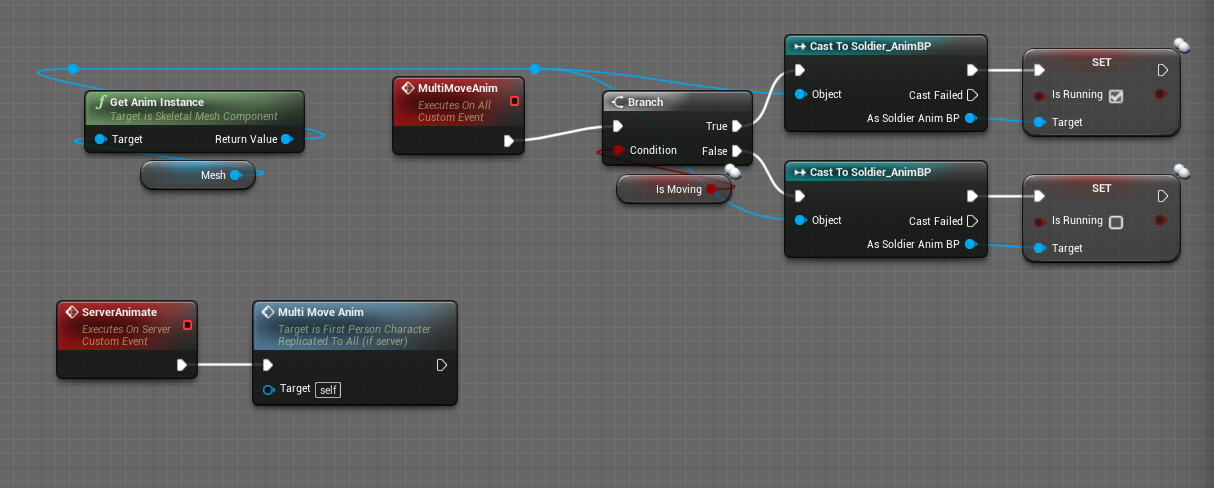
the ServerAnimate RPC is called from an event tick node
meager spade
So you set the book on tick and anumgraph plays the running?
cerulean escarp
yes
cerulean escarp
it plays on the client but not the other players screens
meager spade
You shouldn't need to multicast the bool
Set running bool to replicated
And just tell the server you see running
Other clients will get the replicated value
meager spade
No need for it its redundant rpc
Server will replicate that property to all simulated clients
As long as your animgraph is pulling that value from the player every tick
It will sprint on all clients
cerulean escarp
I took away the multicast and now no animation plays
meager spade
Yeah so you have other logic issues
cerulean escarp
hurray
meager spade
How are you getting the isrunning into animgraph
cerulean escarp
well I'm taking the IsMoving bool from my character and if it's true, I'm casting to the anim bp and setting IsRunning to true, and vis versa
meager spade
Also how are you checking if the player is running ?
cerulean escarp
I'm checking the velocity
if velocity is > 0 then IsMoving is set to true, which should set IsRunning to true
meager spade
so cant you just have the animgraph check for IsMoving bool?
if you don't specifially need IsRunning? or IsRunning togglable?
cerulean escarp
I tried having the animgraph check for IsMoving but it caused the animation to play on all characters
meager spade
o_0
cerulean escarp
yeah ikr
meager spade
thing is
your animation should be decided via your movement speed
using a blendspace
cerulean escarp
when I had the blendspace with the movement and idle and all that, whenever I moved it would copy the animation over every character, so I put in a state in my state machine called Idle that would transition to the movement blendspace when IsRunning was true
so that way the other players wouldn't copy my movement
meager spade
they should not copy your movement
which makes me think you did somehting wrong
in your animbp
and without seeing it
i cant help
cerulean escarp
I'll take a screenshot of it
here's the event graph: https://i.imgur.com/Qlkk8cw.png
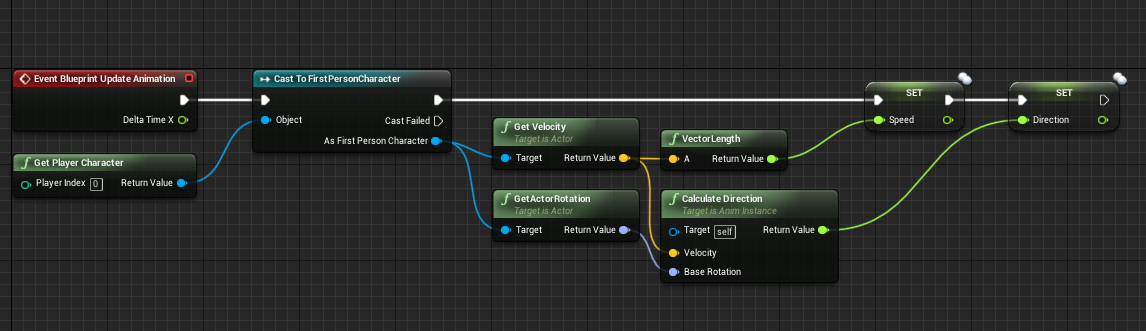 meager spade
dont use
GetPlayerCharacter
use TryGetPawn
i had a feeling about that
thats why i was curious
cerulean escarp
omfg the video lied to me
yeah it works perfectly now
and is replicated
thank you 😄
meager spade
np
 solemn junco
Hey y'all, has anyone tried encrypting their network traffic with something like OpenSSL?
Looks like UE doesn't have "easy" support for it
fleet raven
there is a "packet handler" for encryption, multiple actually
maybe you can make your own also
solemn junco
I wonder what would be the easiest way to encrypt all UDP traffic
fleet raven
probably turning on the packet handler
 terse dawn
I seem to be having some issues that I can't quite figure out how to get around.
When I spawn a pawn from a Pawn (by pressing an input key) using IsLocallyControlled , I check on SwitchHasAuthority, then RPC call (or not if authority) to Spawn the pawn I want. This has the desired affect on the spawned pawn (all UMG widgets work correctly)
When I spawn a pawn from GameMode directly or from the PlayerController using IsLocalController, I can't get the widgets to work correctly at all. Even spawning them in BeginPlay of the new Pawn (using IsLocallyControlled before Creating Widget) doesn't seem to make things work like it used to.
Widgets do spawn correctly. It's the logic inside them that's not working right. What am I missing here? My assumption was that all widgets are client-only, so no matter what method I used to spawn the pawn itself, everything should be fine.
The only way I can seemingly get things working is by Pressing an INPUT button on the new pawn. But I want the widget to spawn and work just like it does without having to press an Input key logic. Even moving the Logic over to PlayerController, I still have to press a button with IsLocallyControlled branch, then spawn the pawn, then I get the widget and the widget logic working correctly.
Obviously (I think), if I am using an Input, that means I am using the client-side pawn. And BeginPlay does two Begin Plays, one for server and one for client-side pawns. So I has assumed that by using IsLocallyControlled would solve this issues in the new pawn. But nope. Any help would be greatly appreciated, thanks!
I should also add. That clients do use the Widget correctly. The Listen Server does not. (unless he spawn the pawn manually)
fleet raven
is there a callback for when a replicated actor is destroyed by replication on the client side?
can't seem to find any other than the normal destroyed
aha UObject::PreDestroyFromReplication
 jade gazelle
Does it generally make more sense to have enemy AIs inherit from pawn as opposed to character? It seems like I’m constantly fighting against the CMC in my characters but I’m not on any position to write my own custom player movement component. I figure for enemies though there is much less need for it?
jade gazelle
Well, I’m fine with using the CMC for now for player characters
Since they are all bipedal and human shaped. Im more thinking about AI, and if there is any benefit to having the CMC or character class at all on AI pawns
It seems like it would be a lot less restrictive to have my enemies inherit from pawn and not be limited by things like the capsule. But I’m wondering if I would be losing anything important that I’m overlooking
The networking aspects of the CMC seem mostly irrelevant for AI pawns, unless I’m not understanding them correctly
winged badger
NavMeshWalking will cut down the CMC performance cost on AI
but its not suited for every camera
since AI then effectively walks on navmesh, which is some 30UU above the floor
doesn't bother you with top down camera, but i wouldn't go that way for an FPS game
jade gazelle
Not sure I’m understanding. If I’m using navigation wouldn’t the AI walk on the navmeah regardless of being a character or a pawn?
winged badger
the difference is on how CMC detects the what it considers to be the floor
winged badger
its a capsule sweep vs project point to nav
first one tends to accumulate on the cost fast, when there are lot of AI around
jade gazelle
Interesting. I’ll have to look into that
I just want to try and get away from the character class wherever I can because I feel like I’m regularly running into instances where I can’t do certain things with it
winter plover
sooo my replicated actor randomly stops ticking and executing NMC RPCs serverside for some reason as soon as I set bAlwaysRelevant to true in the constructor
clientside instances seem to run fine, but dont appear at all if bAlwaysRelevant isnt set
Im kinda stumped as to why this could be
 ember cloak
Has anyone played around with figuring out some sort of host migration? Ive been looking around and haven't really found anything.
 somber glade
I'm going to post this here instead as it's more relevant here: Truly bizarre behaviour here. We have an actor with a widget component that holds the lobby menu for a VR game. Only the person hosting, the server, can see this start button. If you host a match alone, it works fine. But if another person joins, it becomes odd.
the host can click on this button 20 times and it won't work. Until both the host and the client are pointing at the button and clicking together. The actor it's on is replicated (see screenshots) and this widget button calls a function on the game mode that is set to run on server, which calls servertravel.
 glossy wasp
@ember cloak In theory when old host goes through the UI to quit, select a new host then get their IP to send to clients to auto reconnect (with a timeout duration) and save the game state out to a json on the new host to start a new server and restore it?
somber glade
So apparently i had a weird issue with gamemode gamestate type mismatch. That seems to be fixed, and it is sort of working. The only problem now is that when the client joins the lobby, their player controller doesn't work properly. It's not spawning them into an avatar and instead leaves them floating outside the level. But they do show up in the lobby, and on the player list. The host can then start the level, and the host seems fine, but the client's avatars are completely messed up. Previously the client could join the lobby with an avatar just fine, but it would crash on moving to the level on game start
Previously my LobbyGameMode was derived from gamemodebase, and my gamestate was gamestatebase, but my main game mode was gamemode. So i changed everything to gamemode and gamestate.
That seems to have solved the crashing but has left the client avatars messed up
 timber garnet
Question:I'm NOT using Unreal's Replication. I've got my networking in place and two players in a game. But for some reason the client character can't receive controller input (when i run two instances on the machine). Im thinking replication (ie authority) is causing the issue. Any thoughts?
id like to use the easy "2 player mode" without any unreal replication
I think it is because Possess only runs on the server, but that these PIE instances are both running as "non-authority"
winged badger
if you jury-rigged your own networking its hard to guess as to what you modified
but
controller needs to SetPawn, which happens clientside in OnRep_Pawn, and the client also needs a replicated PlayerState
Pawn also has replicated Owner, Controller and PlayerState members
if any of those fail, unreal won't work right in network envinonment
timber garnet
ok thanks this is super helpful
timber garnet
So yeah the issue is when in test mode with multiple PIE running, Unreal wants to force me to use the Authority model. If I build the game as standalone clients (ie singleplayer), Possess works because the client has authority. The ONLY thing I need is to force client-side possession while in Unreal multiplayer test mode
ill probably have to build some listen server replication just for development purposes since building clients takes forever
winged badger
not really convinced that custom networking with unreal is the best way to go
engine will throw bomb at you for the entire development most likely, does that even when you use unreal networking
 gleaming bobcat
Hey, What is the correct way how to replicate larger data then UE supports. Error: Final partial bunch too large. Do I have to manually split data and send them by RPCs ? BTW I need to replicate the data only once
somber glade
So I'm in a situation where clients aren't getting an avatar on join. Avatars are spawned from the player controller. Begin play checks the environment, initiates HMD and then spawns an avatar dependent on those things. As a client I think begin play isn't called. I tried to override postinitializecomponents and call begin play only on clients, but that hasn't worked. Is there a Blueprint function that I can use on a PC that clients can run when they join a level that is set to listen?
 scarlet moat
Can somebody please help me with this quick question? Is there a way to prevent a hud from being created when i use the "create player" node. thanks
thin stratus
Create Player usually spawns a new PlayerController
So if you have the creation code in there, then you need to stop that
@scarlet moat
@somber glade BeginPlay is def called when they connect the first time
somber glade
hmmm... okay I'm adding some debug to be sure. And building another version.
THe host is definitely calling begin play.
but it seems like the clients aren't on join.
thin stratus
What exactly does " Begin play checks the environment, initiates HMD and then spawns an avatar dependent on those things." mean?
VR HMDs are a local thing
somber glade
VR expansion plugin. There isn't a default pawn. So it checks if an HMD is attached, checks tracking, and then inits the HMDthen after that it spawns the appropriate pawn
thin stratus
Not a Multiplayer thing, so whatever is checked has to happen on the Client.
The Avatar is most likely something replicated, a character or so, so that should happen on the Server
Can't you check the Tracking stuff upfront
Before joining?
And simply send a few options to the Server on Join
And then handle spawning the avatar in the gameMode with the given options?
That sounds way cleaner and more logical
scarlet moat
@thin stratus thanks. i'll take a look
somber glade
I could do that I suppose. I've just been following the way this is set up since it's recommended as a starting point for VR in unreal.
But if begin play is being called, then I can't figure out why it's not spawning an avatar and possessing it regardless.
It was actually working earlier, but that was when i had a mistake. Which makes no sense. I accidentally had the game mode set with a parent of AGameModeBase when it should have been AGameMode. When I fixed that, the avatar stopped spawning.
thin stratus
Is your GameState also GameState instead of GameStateBase?
Cause you can't mix that
somber glade
Gamestate is gamestate.
So I fixed the gamemode, because the other gamemode was agamemode
But after fixing it so that both game modes and the gamestate were matching correctly, that's when the client avatar stopped spawning.
when it was not matching the client avatar was spawning and working perfectly fine.
thin stratus
Yeah but it should match either way
At that point you probably have to show the code that takes care of spawning
I'm afk now though for an hour :P
somber glade
okay well I'm running a test right now to see if begin play fires when the client joins or not
I'll report what i find
okay so begin play is running
The begin play just runs some checks to make sure an HMD is present and that tracking is valid. If it is, it runs this other function which is set to run on server and is checked reliable. This is also on the player controller
This function first gets all the playerstarts in the level, and picks one at random
it gets the transform of the playerstart and spawns a pawn at that spot, possess it and then runs some console commands
these are just some graphic related things
If you're curious this is how the lobby level is opened when hosting
somber glade
I just added a ton of these prints to the functions on the player controller. This RPC to the server, never gets called that I can see. Looking at both the host and the client, these print strings never execute after joining the lobby as the client. When the host joins the lobby they get executed.
somber glade
@thin stratus So there may be a timing issue here. I added a 2 second delay before the RPC call, and the avatar spawns, but it's busted. Normally my anim BP attachs the heads and hands to my HMD and motion controllers, but it just sits there like this not getting any tracking coordinates I guess. I do have input though. I can use a button on my motion controller to call up an in-game menu (the event is on the avatar, so I think I'm possessing it).
This is the avatar from the point of view as the host. As the client, I see basically the same thing except it's floating about 60 cm off the floor
thin stratus
So you basically call stuff and hoped that everything comes in timed
:D that's not a thing for Multiplayer
E.g. the RPC you call when spawning the actor
Can totally call before the pawn replicates
If you want to call stuff like that, you want to utilize given OnRep calls
Like OnRep_Pawn in the Controller
If that calls, you know the pawn is replicated
Then you also don't need the rpc
@somber glade
somber glade
I'm somewhat new to this, which is why I was using the VR Expansion plugin because it's reported to be all set up and working for multiplayer.
thin stratus
Wouldn't bet on that if you don't know the person who created it
I'm working day on and day off on this stuff and I still have a lot to learn
But a golden rule is, that if two events cause replication of sorts, you can't bet on them happening in order
E.g. Replicated Variable and RPC
Or Replicated Actor and Variable/RPC etc.
somber glade
Hmm okay. I'll keep digging and see if I can sort out what's out of whack here.
Thanks 😃
thin stratus
If you need two things to be available at once you either send both things in one or you utilize things like OnRep
I would suggest you clear that stuff up
And go step by step and check all replicated parts
And make sure everything happens the way you want it before you add the next step
winged badger
@somber glade what calls ReturnHDMStatus?
somber glade
The player controller calls that.
it gets it's HMD status, makes sure the tracking is valid and returning values, because it needs the offset from those to spawn the avatar. the avatar has to be spawned with an offset from the HMD tracking
once it's got that, it makes the RPC call to the server.
it uses that offset and rotation along with the transform of the randomly selected player start to create a transform for spawning. Without that, it won't spawn in the proper location.
somber glade
Should onposses fire only on the server or both the server and the client?
so as a bit of mystery. The Player controller is reporting that it is controlling the avatar. But nothing on the avatar that should fire when Locally controlled is working.
thin stratus
OnPossess calls on the Server
Client has OnRep_Pawn and OnRep_Controller (depending on what class you are in)
That is C++ only though
somber glade
I have a base C++ class i can use if need be.
somber glade
So.. if I my PC is reporting that it is controlling the character..
thin stratus
And add a second function like this
somber glade
why isn't the tick running?
winter plover
Where's the best place to put a global manager actor reference?
I tried a static pointer first
but that caused issues
because in editor theres only one for all instances
somber glade
tick must not be enabled for some reason
thin stratus
// HEADER
/** Called when Pawn is replicated. */
UFUNCTION(BlueprintImplementableEvent, meta = (DisplayName = "OnRep_Pawn"), Category = "Core")
    void K2_OnRep_Pawn();

virtual void OnRep_Pawn() override;

// CPP
void AHLPlayerController::OnRep_Pawn()
{
    Super::OnRep_Pawn();

    K2_OnRep_Pawn();
}
Same for other OnReps
Not sure why your tick isn't running
@winter plover You have a bunch of static actors like GameMode and GameState
If it needs to replicate, GameState, if it onyl needs to exist on teh Server -> GameMode
somber glade
the tick is set with a bool to only run when locally controlled, so I stuck a print in there to print on the client that it was ticking, but got nothing. That might be why my avatar is all funky
winter plover
it needs to exist both server and clientside
but the reference possibly not
Is there anyway to access the gamemode actor from a static context?
say I have a static function "Make Explosion at X"
I want it to talk to the manager actor and call a bunch of privates
thin stratus
As long as you have a reference to the world, yes
You can always to GetWorld()->GetAuthGameMode()
Which is of course only valid on the Server
But your Static Functions needs the world ref
So whatever uses the function has to provide that or serve as context
winter plover
mhmm k
actually I might be able to hack around this
actually no nevermind
that would be static pointers again
and I think im done with those for now lmao
I spent a whole day wondering why my server side actor would suddenly not respond to anything, but one particular clientside version would
turns out the server was invoking the functions on the clientside actors
because it was running in editor, and thats where my pointer was set to after replicating
timber garnet
Does anyone know if UE4 has any type of built in Protocol Buffer or Flat Buffer. Implementing Protocol Buffer manually has been a huge pain, especially since I'm building for iOS and Windows for development
somber glade
@thin stratus Is there something that would make a possessed pawn not tick? I've checked my code and the only place tick is disabled is for a mesh setup, it's disabled, the correct mesh applied, and then the tick is re-enabled immediately after. Beyond that tick isn't touched on the character. So could something else cause it not to tick?
it is set to start with tick enabled
thin stratus
Something like overriding BeginPlay in c++ and forgetting the Super:: call
somber glade
Nah, I haven't touched the c++ for that at all.
and tick is otherwise working for these characters.
just not in this particular situation.
if I host with this avatar, the tick works just fine
Here is the output when I host a session with this avatar. Only when it's the client is it not ticking
timber garnet
@somber glade i had a similar issue last night, it was related to the possessed pawn not receiving input, i had to activate input after i called Possess. I had been calling it before Possess and it never restarted
thin stratus
@lament cloak Use a fairly small instance on AWS First. Run one Server. Monitor the Server's RAM, CPU and Bandwidth usage when empty and when completely full over multiple minutes of time
Repeat with a stronger instance
Do the math and host x servers on the instance and see if that still fits when all servers are full and used
tada, you know your hardware
timber garnet
@lament cloak this doesn't answer your specific question, but I did as Cedric mentioned just for a mobile game, and to have a single server running 24/7 with an assummed two players at any given time, was $384 a month to start
Its why I moved away from Unreal built-in networking
thin stratus
That sounds wrong
somber glade
@timber garnet Input seems to be working. I have a little pop-up menu set to a key on the motion controller. That event is on the avatar, and if I push it, the menu pops up
thin stratus
Idk what kinda of huge mobile game you have, but our arena shooter can run I assume 6-8 Servers on a 4 core CPU with 6GB RAM
Which costs around 170€ per month iirc and each server has up to 8 players
timber garnet
Well im definitely no expert, but just uploaded the dedicated server to Amazon Gamelift
thin stratus
I hope you used Linux
timber garnet
it was a windows instance
timber garnet
but Unreal replication and dev ops is overly complex. im using Nakama now and it has been a breeeeze
i dont mean client server replciation code, i mean the whole deployment process
thin stratus
Replication has barely anything to do with the Server though
Only Bandwidth
We tried the game with 8 bots
and with 8 players
and only the Bandwidth was different
Yeah I know, but even if you do matchmaking you have to check what instance you need via a static one first
So it's the same process
Matchmaking instances are too hard to access and check
Also the dev process in uploading to GameLift every time you did a change is stupidly long
timber garnet
i wanted to die during that process
thin stratus
Specially if something breaks
And the only instance you are allowed ot use locks up
Yeah we moved from GameSparks to PlayFab
And PlayFab uses Azure
I wouldn't recommend any of them
But GameSparks is too expensive
And I haven't used GameLift alone
So we moved to PlayFab and since Azure comes kinda with it we use that
Yeah, it's a shitty expensive to do that kind of stuff
timber garnet
Again I'm not expert, but i moved REALLY slow with GameLift and dedicated servers. Especially since UE4 has little support/docs for anything besides a Steam game.... Now I'm using Nakama and you get realtime multiplayer, leaderboardss, matchingmaking, etc and its open source
thin stratus
If it would be my game I would never have gone that route
Again, GameLift isn't really for realtime multiplayer, leaderboardss
It has Matchmaking by now iirc
That's why we used GameSparks in combination
timber garnet
@lament cloak https://heroiclabs.com/ worth looking into
Heroic Labs builds Nakama - an open-source social and realtime server for games and apps. It includes a large set of services for users, data storage, and realtime client/server communication; as well as specialized APIs like realtime multiplayer, groups/guilds, and chat.
thin stratus
Depends on if you have the skill and time
You still have to host the Servers somewhere
So you won't get around the costs anyway
If you don't have money on the bank you don't need and are open to waste, don't do something like this
Cause if your game doesn't get enough players, the whole thing was for nothing
thin stratus
Don't get me wrong, Multiplayer is all fine, if you stick to ListenServers or deployable DediServers
So your players host them
You sell the game for a flat price
no hosting costs
tada
timber garnet
haha win win
thin stratus
Yop, just saying it's pricy and a lot of work
timber garnet
we're building a match based game like Clash Royale, and spinning up dedicated servers for each very small 1v1 or 2v2 match just was not realstic for our small team
thin stratus
That's why most studios that do it are bigger than what most people here have available
Well yeah that's what my client will use
GameSparks indie option is garbage by now
somber glade
NVM I just realized that begin play printed on both server and client
so that isn't it
thin stratus
@chrome bay Heeeey, 4.23 Preview with Chaos is there.
somber glade
This seems like a begin play issue. I enabled "tick before begin play" on the character and tick was working this time. It didn't fix the gimped avatar, but it did make him tick
@thin stratus
real yacht
can anyone help here. i'm using gamelift, and creating session, everything is on server (with lambda) on PC build client can openLevel with ip_address:port
but on Android open level with that ip_address:port doesnt work anything
what can be a problem? do i need somehow to verify that player?
timber garnet
doesn't Android require special permissions for internet access
<uses-permission android:name="android.permission.INTERNET"/>
real yacht
i'm not sure, because when game starts, i'm downloading some data from server
so that works fine
somber glade
@chrome bay Was that directed at me?
real yacht
anyone advice?
 glass plaza
What would be the proper way according to the engine to set a player as a spectator?
 split gust
probably done in a custom GameMode code
 high current
@glass plaza player controller
Should do the actual spectating spectating logic, and GM should probably control who gets to spectate and who doesnt
 ebon nimbus
having an issue where my client is getting bumped out into the default map(main menu) instead of the lobby it's trying to load. Big digging into it for about a week now and haven't made much progress in terms of finding out the problem. Here is a snippet from the log that i think is the most descriptive of the issue.

if anyone could help me make sense of it, I'd be grateful. Right now I can't really piece together why it would load my lobby map, just to immediately do a join request for the default map
somber glade
Today on the weird and wonderful: In a lobby (openlevel with listen) a FPS avatar (spawned from the VR player controller when no HMD is attached) hosts a match. a client joins. This Client has a VR headset attached and gets a VRavatar. The FPS Host clicks "leave lobby" and goes back to the menu, kicking the VR client back to its own menu. All is right with the world.
Test 2: The FPS host creates a new match. The client this time, runs with -nohmd and connects to the match using an FPS client. (note that the FPS avatar and VR avatar both derive from the same C++ class and are controlled by the same kind of player controller). This time the FPS host decides to leave lobby. however upon clicking the button. Nothing happens. He clicks it 20 more times and nothing happens. The FPS client decides to leave the lobby because he's had enough of this and is instantly sent back to his menu. After the FPS client leaves the FPS host clicks leave lobby one more time and is instantly sent back to its own menu.
How in god's name is a menu button not responding depending on what type of avatar the client has possessed?
These are the menu buttons. The server start also refuses to run awhile the FPS client is attached. It's like the menu just stops working because the client is using an FPS avatar, which has no bearing on the menu at all
thin stratus
@somber glade Clients also need to clean up their Session
This is not a Server only thing
somber glade
Yes I know that but that's not the issue here the issue here is that when the client has a certain Avatar connected then the host can't use the lobby buttons those FPS avatars have no code in them related to the menu or the lobby or buttons or anything else so as long as that first person Avatar is connected as a client the host can't push any buttons if a VR client is connected the host can use the buttons as as soon as the FPS client leaves the map suddenly the host can push buttons again so that makes no sense
thin stratus
Yes I know that Yet you are filtering the Client :D
Well then put print strings in
Check if the button press fails or if some code after the press fails
somber glade
The client can kill it's session on it's own time
That's there for when the host leaves to kill the session for everyone
thin stratus
That only kills the hosts session
If you don't call DestroySession somewhere else for the client, then their session is still active
So they can leave, but not reconnect
But yeah, it's not the issue, just telling you about it
As said, put print strings in
somber glade
yeah I had to step out for a bit I'm just on my way back now so I had intended to put in strings but I would I was just mystified as to how the presence of a particular Avatar in a level could stop buttons from working when there's no code and it related to it so I'm very interested to find out exactly what it is about this Avatar that could have make a menu button stop working I just you know I just wondered if anybody had ever seen anything like that and what a possible cause of something like that could be
somber glade
@exi well I just tested it. I put print statements on the event on the Avatar. the event is part of a widget interaction. As it is a 3D widget. I put them when the event is called and after the button press executres:
@thin stratus I also put print strings on the lobby widget. As soon as the button is pressed and after the code runs
and it is just as I expected
After the FPS avatar client joins, when the host presses the start button, he gets the print indicating that he's trying to press the widget and that he just did press the widget.
Neither of the prints on the button run.
I tried pressing it as the host 5 times.
The client pressed the "leave lobby" button and he got both prints from the avatar and both prints from the button
thin stratus
So your UI Press are actually not UI presses but Gameplay presses converted to UI via the Widget Pointer
somber glade
after the client disconnected, the host pressed the leave lobby button and he got all prints and left the lobby
thin stratus
Are you using Click or Pressed for the Buttons?
And are you setting the InputMode somewhere?
somber glade
press pointer key
thin stratus
No i mean in the Widget
somber glade
on clicked
somber glade
Yes, but this only happens with 2 FPS avatars. if the client is a VR avatar the host can click leave lobby right away
I'll try pressed though
somber glade
I guess that, but there is really no code anywhere on these avatars that should impact those buttons
both fps and VR have the same base class.
thin stratus
FPS is also using a 3D UI?
somber glade
Yes they have a widget interaction same as the VR avatar does
with the same settings and same code to run it
thin stratus
Yeah I would suggest using Pressed and making sure the InputMode is, I guess Game
Or GameAndUI
And then see if that does something
somber glade
It's a VR project, I don't think input mode has been set anywhere in the game.
Nope there isn't a single set input mode node anywhere in the project.
thin stratus
Well then make sure you set it somewhere so it's under control
somber glade
@thin stratus Good call. Press fixed it
thanks man. That solves one mystery
I still need to figure out why my clients are crashing on servertravel
There is absolutely nothing useful in the log or dmp file except "unhandled exception".
 raven tinsel
Hey guys, I am trying to create a custom network channel to send my own packets directly to the clients to be able to send big chunks of data. I am using FOutBunch to send the packets and it works, however I am only able to send ~200 bytes per tick (20 ticks per second) until the engine just stops sending data to other channels. Also pass a certain point I get overflow errors if for instance I try to send a big array of data (of ~0.5MB). What can I do to overcome those issues? ~200 bytes per tick doesn't seem like much right?
chrome bay
The replication system isn't really designed for sending bulk data, it's more about sending tiny packets often. Might be worth looking at sockets directly
Think the max element count for an array is 2,048 elements on the network. Look at FRepLayout::SerializeProperties_DynamicArray_r
Max memory is 65536 bytes IIRC
raven tinsel
@chrome bay Would you recommend opening my own tcp socket then? I am worried that it might be a pain for players since they will need to open multiple ports in order for the multiplayer to work properly
chrome bay
To be honest for big chunks of data there isn't really any other option. The game-level replication system just isn't designed for it
If the data only needs to be sent once, you could send it at game startup, and break the data into pieces using RPC's to send it.
raven tinsel
Hmm.. would it be possible to use the open connection to send packets through the raw socket (with the send function) without the replication layer?
chrome bay
I don't know to be honest, I've not tried it
somber glade
is there a breakdown anywhere of what runs and in what order when seamlesstravel is called on a server?
winged badger
@somber glade there is a pretty good chance you have some widget or something thats not cleaned up properly geting instantiated on the travel map
somber glade
I'm having some issues finding out what happens on the travel map.
do begin plays or anything like that get called?
winged badger
is it c++ project?
somber glade
Base is C++ yes
[2019.07.11-09.50.55:565][946]LogStats:     SeamlessTravel FlushLevelStreaming  -  0.001 s
[2019.07.11-09.50.55:566][946]LogWorld: Bringing World /Game/Maps/HSTransitionMap.HSTransitionMap up for play (max tick rate 0) at 2019.07.11-18.50.55
[2019.07.11-09.50.56:490][946]LogWindows: Error: === Critical error: ===
[2019.07.11-09.50.56:490][946]LogWindows: Error:
[2019.07.11-09.50.56:490][946]LogWindows: Error: Fatal error!
[2019.07.11-09.50.56:490][946]LogWindows: Error:
[2019.07.11-09.50.56:491][946]LogWindows: Error: Unhandled Exception: EXCEPTION_ACCESS_VIOLATION reading address 0xe31708e0
[2019.07.11-09.50.56:491][946]LogWindows: Error:
[2019.07.11-09.50.56:491][946]LogWindows: Error: [Callstack] 0x00007ff7df5aa967 UnknownFunction []
[2019.07.11-09.50.56:491][946]LogWindows: Error:
[2019.07.11-09.50.56:513][946]LogExit: Executing StaticShutdownAfterError```that's the log
somber glade
only happens to the client.
somber glade
Yes I did that once already. But I'll try it again and see if it gives me anything different.
winged badger
if its a travel map or not, you can see
just get to any component in Locals
expand it to UActorComponent
find WorldPrivate variable
somber glade
I'm just pushing a build to the remote machine so I can attach debug
winged badger
i had some widget components getting instantiated on PlayerStates with no context
in my case, it was crashing the listen server host too
solve was cleaning them up in PreClientTravel override
somber glade
It's VR. So my lobby is a static mesh, 4 player starts, an actor that holds the lobby widget, and that's it at this point.
 covert gorge
Does anyone know if there is anyway to call a server RPC from and actor that is not a pawn being possesed? I have tried binding to a dispatcher defined in the Player Controller, but it didn't work
somber glade
So how can I make sure that actor is destroyed in preclienttravel?
is that on the gamemode?
@winged badger I looked this up. It seems that it's normally used for when widgets are on your viewport. Instead of simply clearing my hud. I should have the PC cast to the widget holder in the level and clear the widget, or should I simply have the gamemode destroy the actor on processclient travel?
somber glade
it's not. the item is already in the level it's not spawned.
winged badger
i assume you didn't manually add it to the list of persistent actors
but thats why you need to hit that breakpoint
somber glade
when the lobby opens the gamemode casts to the instance gets the server info and casts to the holder and sets it on the widget.
winged badger
because im just guessing until VS shows you whats happening
somber glade
I'm thinking it's in BP, so I'm not sure it's going to show me anything.
but I'll try that now
@winged badger pretend i'm an idiot here, I know it'll be hard, but when you say cook it, are you simply referring to building it?
somber glade
oh well yeah that screenshot I gave you above is the output
on a packaged build
other than mentioning uscenecomponent there isn't much there.
okay i got something this time
@winged badger
 graceful cave
@covert gorge have the server set the owner of the actor to the client's player controller
covert gorge
@graceful cave do you mean by possessing it?
covert gorge
the actor i am talking about is a child actor of the character being controlled by the palyer
so i have to call SetOwner on Begin Play
of such child actor
am i wrong?
graceful cave
child actors cant actually replicate
as far as i know they dont get a net ID to associate with the server so only the class can be replicated but not the object
covert gorge
well, i am not sure what do you mean
but it worked perfectly
thank you so much! ❤
now i am able to call a server RPC from that actor
that is a child actor of a character being controlled by the player
graceful cave
really? like from a child actor component?
graceful cave
i wonder if they changed that in a recent engine version because that didnt used to work
winged badger
@somber glade now expand the ChildComp in locals down to UObject
and look at its flags
somber glade
@winged badger The StatID seems to be null
I have no idea what that it is, but it is null
somber glade
so if the component is good, why is it throwing an exception?
winged badger
problem is, its 2 steps into the engine code
is that a source build?
anyways, put a breakpoint to that line
and then step into the UpdateOverlaps with F11
(don't put a breakpoint before you're ready to hit whatever button/command starts the travel)
somber glade
It's not a source build no
it's a plugin
VRExpansion Plugin
engine is stock 4.22.3
winged badger
ah, that explains why its not showing external code
also, check for WorldPrivate on that component
and find the name of PersistantWorld from that entry
somber glade
Okay one moment. I sort of lost my debug path and I need to get back to it. Also trying a quick fix to see if it's really the netsmoother.
somber glade
there was a thought that it might be checking overlap stuff on children that weren't primitivecomponents. So I updated the check to only do it on those. It worked the first time. But when I restarted host and client and tried again, it crashed. So I'm going to debug again
I'm not getting a crash in a different spot @winged badger
twin juniper
hello
somber glade
I think I saw people mention that your player limit is machine/performance limited
bitter oriole
Well yeah
somber glade
I don't think there is any hard number like 100 or 1000
twin juniper
for the players that ue4 can handle?
cuz I saw the maximum was 64 and wanted to see if that was just for testing
somber glade
I mean..fortnite is 100 isn't it?
bitter oriole
@somber glade 100 is basically the engine's limit that you can reach with immense effort
Obviously anything more than 5-6 will need a dedicated server
twin juniper
then do I need to do scripting and replicating without
the engine's help?
I mean the built in service
meager spade
engine has built in support for ListenServer and Dedicated server
real yacht
how to obtain the port that the current server instance is bound to?
bitter oriole
Real peer to peer doesn't exist in UE4
meager spade
UE4 works on a Server Authority system, Server is either a Client acting as a server (Listen Server) or a dedicated server
bitter oriole
"Listen server" means one of the players, while playing, also acts as server
meager spade
no
bitter oriole
No
twin juniper
oh
bitter oriole
You('ll just have the game
meager spade
UE4 runs headless server
bitter oriole
And some players will start the game as "listen server"
Which work out the same for them
Other players will connect to them
meager spade
if its dedicated ^^
twin juniper
then what do I do with the script I have for the server
I have my own logics I have that I need to attach
real yacht
which script?
twin juniper
the server
because I have to export it
and if it runs on one server
I need to edit that
bitter oriole
Using the listen server setup, there is no physical server
One player will be the server
meager spade
http://cedric-neukirchen.net/2017/02/14/multiplayer-network-compendium/ is worth checking out @twin juniper
 bitter oriole
So there is nothing to export other than the game
bitter oriole
We can't explain to you how to use things that you made yourself
We also don't know what you're asking here
real yacht
how to obtain the port that the current server instance is bound to? 😃
meager spade
@real yacht i was actually lookling into that
twin juniper
can you make a cpp file that runs when the game is executed?
real yacht
i'm asking because of gamelift
bitter oriole
If you're using Gamelift, ask the gamelift support or read their doc
I guess this is explained somewhere ?
real yacht
well that doesn't have nothing with gamelift actually
i just need to initialize gamelift with some port 7777
or some other port that instance is bound to
real yacht
so with ue
bitter oriole
@twin juniper There is no such thing as "running a cpp file" - that's not possible anywhere. A C++ file is compiled into the game executable, and then the code inside the file runs whenever you call the methods in it
You should explain what you actually want to do
real yacht
@meager spade thnx
bitter oriole
Asking inaccurate questions that make little sense makes it hard to answer - say what you actually want to happen
"I want to create a multiplayer game" or "I need to work with 30 players" etc
real yacht
@twin juniper do you have game programming experience?
twin juniper
umm
bitter oriole
Let's epxlain the goal first
twin juniper
I learned a couple languages
twin juniper
with a dedicated server
bitter oriole
You say you want a client and server - is there any reason you want to have a dedicated server software ?
Because it's much more complicated
twin juniper
I am trying to send info back and forth
from the game to the server
that takes what it received
and checks everything and sends back info back
bitter oriole
So what is your problem now ?
twin juniper
well, I was just trying to send arrays
in a way hackers can't understand what it's sending
bitter oriole
That's not possible really
twin juniper
so I send an array
bitter oriole
Every platform is open to hackers
twin juniper
for example, the first element of the array is what kind of data it is
in random numbers
and all of them stand for different types of data
real yacht
?
twin juniper
and the server understands that and does what it received
bitter oriole
That's terrible security
Not even security really
Defending against hackers doesn't really work like that
twin juniper
how should I do it?
because it is always decodable and it can be modified
btw I was trying to send this with UDP
fleet raven
what you should be doing is completely forget about that
there is no point worrying about security if you don't have an actual product where it matters
bitter oriole
@stray linden It's basically entire impossible on PC to prevent the client from intercepting the data
Well it's impossible generally, on every platform
Just even easier on PC
 lusty heath
Hey my friends I need some help.
I've been trying to do a VR multiplayer project for a while. A lot of things already working but not others and I can't understand why. For example, the client basically can see almost everything the server does, the server's hands and the server's interaction with some objects. But the server doesn't see anything from the client (can't even see the hands, what is very odd since server can successfully replicate the same hands to the client).
The interactions with objects already have authority switch (multicast and run on server) , but again, just clients can see what server does, server can't see anything.
twin juniper
i have no idea how vr in ue4 works but i do know the client must tell the server what they are doing, and then the server must broadcast what that client is doing to all other clients in order for "multiplayer" to work
bitter oriole
@lusty heath To be clear if that wasn't the case, replication is one way
Client-to-server communications can only happen through RPC
twin juniper
@lusty heath check this out
little more streamlined, you put all logic in pressed thing and it runs on server and clients all the same
if you wanna nit pick logic in pressed thing then just do auth/remote in there too
also!!! unless you are absolutely sure! never use reliable rpc! reliable rpc is SUPER expensive.
also if not clear, SendPressedThing is where the server can say "you cant grab this!" and stops broadcast then and there
somber glade
is there a function that gets called after server travel when you don't use seamless?
thin stratus
Not really as that is handled like a fresh connection
ServerTravel should also always be seamless
Steam for example wouldn't even allow traveling without that
 gloomy sedge
Hey Cedric, im reading up on your Steam Integration, and friends widgets. Has the plugin changed since your video? because i cannot seem to get the friend steam game display name any more
thin stratus
Not sure tbh
somber glade
Well..I can't track down what's causing seamless to crash for me.
so until I can, I can't use seamless
@thin stratus Debug won't give me anything usable so I can't figure out what is causing the exception
gloomy sedge
Not too worry, im sure i can find the right function sooner of later, I can find the Get App Id for the friend, but unsure how to retrieve the name from it
thin stratus
If it crashes while Vs is attached it should give you a break point, a call stack and even an error
somber glade
Yes it is has...
thin stratus
Then fix that?
somber glade
thin stratus
it's trying to clean up an actor
somber glade
yes
thin stratus
Check which one
thin stratus
Just go back in the call stack and check the local/auto values
somber glade
I'll check that and see if it gives anything.
between 3 people we've been looking at this for 4 hours..it just keeps saying source isn't available but symbols are loaded
@thin stratus going back up the call stack locals/autos are empty for all
thin stratus
You seem to look at the crash after it happened or?
This is not a live breakpoint that happened
somber glade
No this is the crash point
thin stratus
Why don't you attach VS to your running game
somber glade
I'm running the game from VS in debug game
this is the only one that has any variables
winged badger
no engine debug symbols
somber glade
I have engine debug symbols
winged badger
you have editor debug symbols
winged badger
i had to cook from a source built editor
fleet raven
huh, so actors that drop out of relevancy for a short time actually get destroyed on the client?
winged badger
that is the client callstack, if you're inferring from it
somber glade
yes, it only crashes on the client.
the host never crashes.
the client crashes about 90% of the time.
well 95
There is basically nothing in the lobby. There is a static mesh floor, 2 pawns, and an actor that holds the lobby widget.
I did cast to the lobby actor and blank the widget before seamless travel
and that did help
I mean, the client crashed later
it still crashed, but it got further.
The target level that we're going to has a single static mesh floor
and 4 player starts.
the transition level has nothing.
There are basically no actors to work with here.
The only other thing I could try would be to delete the lobby actor and just bind a key on the host to launch the level
I've never built from source before. Will I be able to open this project and work with it directly in a built version?
winged badger
yes, but this all seems over the top
somber glade
What else can I do though?
I've stripped the thing down to the bare bones.
i tried depossessing and destroying the pawn to make sure that wasn't causing an issue
I reparented my instance and removed all my vivox code
that didn't help
It's been 3 days straight trying to figure out what the issue is. Tracking down little bugs and things here and there, but this one persists.
This is the closest I've gotten, but without this debug info, there is no way to see what the actual issue is
So i'm going to build a version with the only other thing I can do. I've deleted the lobby menu in the lobby and bound a key for the host to call start game without a menu
At this point there are 4 actors in the game, a floor in the lobby a floor in the target and 2 pawns. They're all essential
..... it looks like it was the lobby holder.
it's the most basic of actors.
an actor with a widget, and it's replicated, and that's it.
nope.
it was just teasing me.
2 successes in a row
then a crash
timber garnet
How do you implement your own online subystem? The documentation bascially only talks about Steam. For instance if I have 4 dedicated servers running on Digital Ocean and each server can host two players, how do i overrideFind Sessions so that I can populate it with server IP addresses? The subsystem design pattern is awesome,but there is no info on how to write your own subystem and tap into the events/apis
I literally have all the matchmaking done, IP addresses,etc. Now I just need to somehow create sessions from that data so Join Session will work.
At this point the only thing I can think to do is override all of those built-in subsystem classes with my own implementation
somber glade
I managed to crash this in editor doing seamless. So I have some more information..except everything is just null there isn't a single name in here to work with
 rain sandal
Wondering if Epic will be allow us to use Easy Anti-cheat as part of online services. I heard they bought the company, but I've not heard anything about wider implications that would be relevant to us.
 crimson fiber
weird... so you can't call server RPC on actor from actor's owner client-side?
crimson fiber
apparently Player Controller client can't call server RPC on Character with AI controller
I suppose because Character isn't locally controlled, so RPC is dropped
server RPC from owner works with actors but not with characters
 night jay
Hey guys, I'm suffering from a weird problem recently
I believe since 4.22 idk
In PIE, the clients take a long time to initialize
Server is fine
But clients can take minutes before I can move them around. Their pawn does spawn, I believe the player controller or playerstate is being stalled somehow
 fluid flower

 crimson fiber
oh I missed replication so much! more ridiculous nodes to the god of nodes
night jay
I'm around 30
 strange igloo
hello
i have big problems concerning multiplayers in my project
i will give you a video that explain you my problems
but it is in french

10 Sub ✔️ ☢️ Road to 1k Sub☢️ 50 Sub ✔️ 100 Sub ✔️ 🎮Discord🎮Brokzn/Makapush 500 Sub ❌ 📷Instagram📷MAKAPUSH 1000 Sub ❌ 👑End of year👑
 wary willow
Alright, ran into a strange issue which probably doesn't happen too often and may be by design?
MP Game.
Pawn A moves. It's a vehicle.
Pawn B is a Pawn, with camera. I am going to use this as a "sensor".
I attach Pawn B to Pawn A successfully (AttachToComponent, SnapTo Loc/Rot).
However, for the life of me, I can't get Pawn B (The Sensor Pawn)'s camera to rotate based off Pawn A's component that is definitely rotating (can see the print string rotation of Pawn A's component). The actor itself is definitely rotating (again, Print String shows both clients rotating).
**I ended up using what I think is a hack, but maybe someone can shed some light on this. **
By using SetControlRotation and ticking UsePawnControlRotation on the camera I was able to get the desired effect. Right now this is on everyone's favorite Event: Event Tick
Normally, rotating the Camera isn't an issue since you usually are using Input to rotate it. Or if you don't want to rotate the camera, you have it fixed. And if you want different views, you blend between them. So maybe this isn't really a MP issue, just how cameras work by design, especially in pawns.
steel cove
In my experience attaching actors to each other never replicates correctly
To be sure I simply use a replicated property to store which Actor something has to be attached to and perform/remove the attachment using the property's OnRep function on clients to match the server
wary willow
Oh, I've actually never had issues attaching regular actors to each other in MP. I think it's simply a "Camera" issue with the very niche use-case I am doing.
 harsh lintel
is there any difference between using GetPlayerCharacter node and using GetControlledPawn node in a multiplayer scenario?
harsh lintel
makes sense thanks, I'll have to change a lot of things lol
winged badger
@harsh lintel a good rule is: if you can use GetControllerPawn
never use GetPlayerCharacter
infact, wouldn't be bad if you designed your code never to have to use GetPlayerCharacter at all
especially if its a learning project and you don't have a deadline looming over your head 😄
harsh lintel
ill keep that in midn
mind
to fix this in a custom blueprint I'm casting to a custom character class and using GetController() node but that doesn't seem to have player controller functions...
do I need to cast the return from GetController() to player controller?
harsh lintel
it works with casting so that's solved
im trying to change max walk speed on the client but it's failing to cast the controlled pawn to a character class
tried replicating movement component, replicating controller, calling the speed change function through a client rpc, calling the previous client rpc through On Possess event with no luck
 indigo robin
is there a properly synced (latency compensated) server simtime available from the client ?
by latecy compensated i mean like it increases on the client but is periodically corrected like ntp
and i dont mean just "make a rpc to get it"
winged badger
the gamestate replicates the server workd time by default
consensus its extremely unreliable
but sending a Server RPC to get it, and sending a Client RPC reply with the both carrying client timestamp at the time of query, and reply also server time
lets you calculate delta within a reasonable margin
then you just cache it and add it to client world time
indigo robin
i guess that only works if you assume roundtrip latency is 2x one-sided latency
and there was no cpu delay processing the rpc
clienttime in rpc -> server sends back server time when it got the rpc (it cant do any compensation here cuz its not synced with the client), client gets back server time from when the server got rpc and client time of the request, it subtracts (currentTime-requestTime)/2 from it
the time will be slightly off depending on the delays in processing the rpc on the server and client though
is it possible for me to change the logic of ReplicatedWorldTimeSeconds and GetServerWorldTimeSeconds ?
why have 2 different time sync going on at the same time
 low pond
With RPCs and replicated properties how does ordering work between them?
indigo robin
theres no ordering between them
properties are replicated whenever they can be, if theyve changed
chrome bay
The point of GetServerWorldTimeSeconds() is to return the estimated current time on the Server, accommodating for latency as best as possible.
But in answer to your question no, there's no accurate version and probably never will be. You can't really ever have a perfectly synced time between two different PC's.
indigo robin
GetServerWorldTimeSeconds doesnt accomodate for latency, it returns lagged-time on clients
twin juniper
Good day. I need to find the index of my own player controller. Does anybody know how to find it? Thanks for attention.
chrome bay
@indigo robin look at OnRep_ReplicatedWorldTimeSeconds()
And the tooltip for GetServerWorldTimeSeconds(), which states /** Returns the simulated TimeSeconds on the server, will be synchronized on client and server */
indigo robin
yes its synchronized
but its behind on the client by that client's latency
which is fine, sometimes you want that
chrome bay
Oh right yeah, my bad. I was using it to sync weapon firing times but I do the lag bit myself
indigo robin
you can do this to get a lot closer to the server's actual time https://medium.com/@invicticide/accurately-syncing-unreals-network-clock-87a3f9262594
Medium
When implementing real-time network multiplayer in a game, one very important tool is a reliable network clock.
chrome bay
Just a basic ping/pong would do it
indigo robin
but thats really something that should be done with the actual raw packets
not RPC
isnt RPC stuff checked in the game thread so it can be behind by an entire frametime ?
chrome bay
I guess it depends how accurate you really need it to be, and where you're accessing it from. If you're getting the time on the game thread anyway it wouldn't matter
indigo robin
ideally it happens internally on net connection establishment and then ocassionaly packets would also have some ping/pong for sync reasons
chrome bay
Yeah.. I guess the other problem is different frame deltas as well
indigo robin
in that article you actually probably dont want the ServerRPC to be reliable either
as reliable resends would copy the original client timestamp in them
while you want latest timestamp in them
winged badger
the proposition there was that you do it once
cache the time delta and call it a day
indigo robin
you cant rely on client CPUs to keep track of time exactly like the server does
it will drift
winged badger
only by a variance in DeltaTime
indigo robin
i would probably want to do this every second, and then use the average (with outliers removed) delta
of last 5 times
winged badger
yeah, i would do it every 10 or so
and just plain discard any samples that have significant deviation
but worrying about the time to process an RPC there is pointless imo
since any network solution will have an error greater then that
indigo robin
i just want the most accurate timestamps for my client's requests to the server
winged badger
the gamestate's default replicated one is just plain terrible
i mean, its fine for syncing a 2 hand clock on the wall
chrome bay
I guess that's what it's meant for really, if you know you need a super-accurate clock you probably know how to implement one
 glad sedge
do we still have to do the whole 'Server_PossessNewAIController_Implementation' thing?
specifically the _Implementation addition
glad sedge
ok cool just checkin
chrome bay
just be sure when you call said function you call the non-implementation version
caught myself out with that plenty of times...
winged badger
so nice its consistent, because if you call something other then _Implementation from an overriden BPNativeEvent, you crash
shrewd frigate
Is voice chat possible with gamelift? Can't seem to find it on their docs.
thin stratus
Doubt that GameLift has that
As this is not really a Feature that GameLift is made for
indigo robin
@chrome bay actually it seems a Reliable RPC writes to the sendbuffer immediately while Unreliable could wait
chrome bay
I got that from an engineer at Epic, but take it with a pinch of salt. According to him unreliable should get to the target "faster" - but probably depends on saturation etc.
indigo robin
also is there a way to specify that a replicated property should only ever be sent alongside another one
chrome bay
It probably becomes an issue when reliable ones aren't getting through and they need to be resent
yeah put them in a struct
indigo robin
aka if one updates i want to make sure the other one's value is correct as well
arent structs replicated memberwise ?
chrome bay
Well.. yes and no. If you implement a custom NetSerialize function for a USTRUCT, it will always use that function for network use and the engine won't generate an FRepLayout
If not, it's based on property changes
I assumed to meant you wanted changes made to arrive at the same time
indigo robin
yes
chrome bay
ie.. float A and float B need to come down together
if they're in a struct, both values will be up-to-date when you use them in game code
indigo robin
but i should still write a NetSerialize for the struct so that it doesnt waste time sending over FNames for the member names ?
chrome bay
It won't do that anyway
Oh unless you have an actual FName being replicated of course
indigo robin
how does it reference replicated vars if not by their fname