#multiplayer
1 messages · Page 471 of 1
 graceful cave
GetGameInstance will only ever get the game instance of on the local machine running that code because thats the only game instance that exists there
 harsh lintel
I think I'm missing something important, the dedicated server (from ue wiki) requires to pass a map/level name/path to either the name of the server executable or to the properties of the executable, which leads me to believe that what the server hosts is a single level is that right?
graceful cave
i havent had to do that
if youre trying to make it start on a specific level you can just use servertravel or open
 grizzled stirrup
Should you store an array of controllers in the GameMode, or is it more wise to just iterate using the FConstControllerIterator instead whenever you need something to happen on all connected players?
harsh lintel
so if I change level the dedicated server will be the same for both levels?
 copper mango
@grizzled stirrup GameState maintains an array of all the PlayerStates, and if you're on the server you can get the controller from a PlayerState by getting the owner of the playerstate
grizzled stirrup
Very true! I for some reason had it in my head that I needed to store the controllers in the GM
However ShooterGame usually does iterate over all controllers instead of get the PS array from the GS
Are there any benefits to either approach or both are valid as usual?
ShooterGame doesn't store them though, just iterates
Which is much more smart than my Array approach
copper mango
oh yeah GetPlayerControllerIterator is good to use also, since the world maintains a list of the player controllers, so it's pretty cheap to use
but just remember that only works on server
since on clients they only have the player controllers for the local clients
grizzled stirrup
Yeah that's fine, I need it to just loop over all controllers for cases like the round ending or to activate all players and AI
Thanks for the help!
In cases where I need something to happen on the player, I call a client RPC on any PC's
Like if some UI has to pop up saying ROUND LOST
 fleet raven
that seems like a more complicated version of multicast on game state
grizzled stirrup
Just following a similar pattern as ShooterGame
If theres 20 bots and 2 players it seems just as efficient
As the bots don't need to ever get the multicast call
For UI stuff
Lol not that they would (waste bandwidth) being on the server
But still
grizzled stirrup
Oh interesting
copper mango
using GameState for things that change the state of the game (like the round is over or whatever) is a more correct way to do stuff like that, sometimes ShooterGame really cuts corners
grizzled stirrup
I thought only the PlayerState was optional but it makes sense, no need for them to have the GS
The GameMode should always actually end the round though right, and be counting down the world time?
copper mango
there's basically only one GameState per process. So the server has one, and each client has one
grizzled stirrup
Then it can tell the GameState- hey the round is over, notify the clients
copper mango
yeah
grizzled stirrup
Ok thanks, I might try and move over that logic
copper mango
sometimes ShooterGame does things in a quick way, they try to balance ease of understanding with it works
With it's correct
grizzled stirrup
I see, will definitely have to have another look
fleet raven
more importantly, shootergame was made like 6 years ago
a lot of the ways they do things are just outdated
grizzled stirrup
They do everything like showing scoreboard in the GM and just update time really in the GS
fleet raven
like using slate ui at all
grizzled stirrup
Ok got to keep that in mind
Yeah haha
That's the most outdated part of SG
I am using it to learn UE4 C++ though so it's tough to know what's outdated and what isn't with very few other complete examples
Just game flow in general
So in the case where you are iterating over all controllers n the GM to deactivate AI at the end of a round you'd still instead call a multicast RPC on the GameState to deliver the end of round status?
Instead of a client RPC since you are already iterating over all controllers anyway?
I've moved my Game timer from GameMode to GameState and back like 3 times, opinions are quite conflicting haha. I've settled on the actual timer going off in the GM and it telling the GS what the current time is
fleet raven
I'd keep track of the ais separately
grizzled stirrup
I'm trying to treat them all as players
Regardless of AI or real
So same pawn and the only difference being the controller
So would like any events like end of round controller iterations to be as similar as possible other than in obvious cases like UI for client or activating / deactivating AI
harsh lintel
so from the test I just did it seems that indeed the dedicated server only hosts a single level, because the game instance doesn't keep state...
so how do I create a server side variable (i need it to be secret) and pass it across levels?
fleet raven
in the game instance
what do you mean by secret
anything on the server that isn't replicated is "secret"
harsh lintel
but changing/opening to another level that isn't the one hosted by the dedicated server resets the game instance
or at least that's what i see in my test
fleet raven
no it doesn't
graceful cave
what do you mean opening another level that isnt hosted by the dedicated server
the server should run servertravel to make clients move with it
if you open another level as a client then of course the server's game instance will change because the client opened up its own level and disconnected from the server
so it becomes its own server
graceful cave
try servertravel testlevel
also
nothing should come after that command
because it loads a new level
harsh lintel
still not werking
graceful cave
what would indicate "working"
testing dedicated server stuff doesnt work in editor btw
harsh lintel
so I need to build in order to actually travel?
graceful cave
yeah
especially if youre testing stuff with the server's game isntance
you need to package the game and build the server
as far as i know theres no shortcut to that
harsh lintel
okay ill test with a packaged version
what I was refering to earlier is that, since Im changing level I will hold a non-replicated variable in game instance in order to pass it across levels, but since there is only one game instance on the server, and I need one of this non-replicated variable that is set at login per player I don't know how to approach that
harsh lintel
idk if this would work but maybe have an array of maps in the server game instance where you somehow get the index/id of the player/client and assign it as a key, and then a custom map value
 real yacht
what is the best way to check that?
this is first time that i see this
you are right, it's in Character
copper mango
those are sent from the autonomous proxies to the server as part of the normal movement flow
 potent prairie
how do i get a bool on an AI animation blueprint to replicate to everybody else? It's only being set on the server so clients arent seeing the updated poses
tried doing RPC's to no success
nvm i got it. brain fart. dont replicate variabled in animbps
grizzled stirrup
@thin stratus sorry for the tag, you mentioned the amazing GM OptionsString property to pass rule changes in to the GM without having to store them in the GI or similar, I'm just have a slight bit of trouble understanding the difference between the key and DefaultValue in the case of setting an int.
Would the correct workflow to pass in a different MaxPlayers value be like so? In the console type open MyMapName?MaxPlayers?MaxPlayers=4 and then at StartPlay() in the GM have this line: MaxPlayers = UGameplayStatics::GetIntOption(OptionsString, "MaxPlayers", MaxPlayers);?
Am I correct in using MaxPlayers as the "DefaultValue" argument in GetIntOption?
It seems to work when I test it so far....
I'm not sure how to convert a float option though, as it seems that only strings and ints have funtions in UGameplayStatics
 thin stratus
open MyMapName?MaxPlayers=4
You don't need UGameplayStatics::GetIntOption(OptionsString, "MaxPlayers", MaxPlayers);
MaxPlayers is a used key word and already handled
grizzled stirrup
So it's set automatically with no calls at all?
thin stratus
It is handled in the engine
grizzled stirrup
Wow that's incredible!
So I guess that means it works for floats etc automatically
Thank you so much!
This is a gamechanger
thin stratus
Only for the ones that are handled by ue4
Your custom key words have to be handled by you
grizzled stirrup
As in any regular properties that you define in your GM (time / score etc.) will be handled automatically?
grizzled stirrup
Oh that's actually a custom one in my case
grizzled stirrup
Defines how many bots are spawnd
So to handle yourself, what is the correct approach? Using that UGameplayStatics call?
thin stratus
Yes
grizzled stirrup
And if so, how do you get floats back if it can only return strings / int32s?
thin stratus
You could pass the float as a string
And then use the String library to convert it to a float
Or you just make sure that you always only pass ints :P
grizzled stirrup
I guess most things are whole numbers even if they are floats like Health
thin stratus
bRequireFull = UGameplayStatics::HasOption(Options, OPTION_REQUIREFULL) || bRequireFull;
bRequireReady = UGameplayStatics::HasOption(Options, OPTION_REQUIREWARMUP) || bRequireReady;
if (UGameplayStatics::HasOption(Options, OPTION_MINPLAYERSTOSTART))
{
    MinNumPlayersToStartMatch = UGameplayStatics::GetIntOption(Options, OPTION_MINPLAYERSTOSTART, MinNumPlayersToStartMatch);
}
bAllowMapVote = UGameplayStatics::HasOption(Options, OPTION_MAPVOTE) || bAllowMapVote;
if (UGameplayStatics::HasOption(Options, OPTION_OVERTIME))
{
    Overtime = UGameplayStatics::GetIntOption(Options, OPTION_OVERTIME, Overtime);
}
bTeamDamageEnabled = UGameplayStatics::HasOption(Options, OPTION_TEAMDAMAGE) || bTeamDamageEnabled;
bBalanceTeams = UGameplayStatics::HasOption(Options, OPTION_AUTOBALANCE) || bBalanceTeams;
bCanRespawnByHand = UGameplayStatics::HasOption(Options, OPTION_RESPAWNBYHAND) || bCanRespawnByHand;
bWaitBeforeRespawn = UGameplayStatics::HasOption(Options, OPTION_RESPAWNWAITTIME) || bWaitBeforeRespawn;
if (bWaitBeforeRespawn)
{
    RespawnWaitTime = UGameplayStatics::GetIntOption(Options, OPTION_RESPAWNWAITTIME, RespawnWaitTime);
}
bForceRespawn = UGameplayStatics::HasOption(Options, OPTION_FORCERESPAWNTIME) || bForceRespawn;
if (bForceRespawn)
{
    ForceRespawnTime = UGameplayStatics::GetIntOption(Options, OPTION_FORCERESPAWNTIME, ForceRespawnTime);
}
bForceWarmup = UGameplayStatics::HasOption(Options, OPTION_FORCEWARMUP) || bForceWarmup;
Few custom examples
grizzled stirrup
Ahhh thank you so much
Your snippet from last time on making your custom OptionsString was v helpful
This is the missing step!
Thank you
grizzled stirrup
I have mine in StartPlay() but I'll probably move it to InitGame then
This is a super useful option, makes custom games so easy 😃
thin stratus
Yop, requires some time to setup but then it works
grizzled stirrup
In the case of the capital letter properties, what are those?
OPTIONS_MINPLAYERSTOSTART
thin stratus
#define OPTION_MATCHTIME FString("MatchTime")
#define OPTION_NUMTEAMS FString("NumTeams")
#define OPTION_BOTCOUNT FString("FillWithBots")
#define OPTION_BOTDIFFICULTY FString("BotDifficultyLevel")
#define OPTION_REQUIREFULL FString("ReqFull")
#define OPTION_REQUIREWARMUP FString("ReqWarmup")
[...]
#define OPTION_AUTOBALANCE FString("AutoBalance")
#define OPTION_RESPAWNBYHAND FString("RespawnByHand")
#define OPTION_RESPAWNWAITTIME FString("RespawnWait")
#define OPTION_FORCERESPAWNTIME FString("ForceRespawn")
#define OPTION_FORCEWARMUP FString("ForceWarmup")
#define OPTION_MAPCYCLE FString("MapCycle")
Sits in our main header that holds or sorts of structs and types
thin stratus
that and you don't have typos :P
could also make them FNames, not sure
this works for us ¯_(ツ)_/¯
grizzled stirrup
Either way it's important to use the FString("thing") or FName("thing") right?
I just used "thing" and it worked but I'm sure it's not the most correct way of doing it
thin stratus
a #define replaces whatever OPTION_XYSDAASD you have with whatever you write after that
#define SEMICOLON ;
tada
grizzled stirrup
Ah ok makes sense! Thanks
Finally, to set a particular key in Options, how do you go about it?
If you weren't going to go the route of the console command opening as I have
?MaxPlayers=4
thin stratus
I thought you have the struct example?
"Your snippet from last time on making your custom OptionsString was v helpful"
It's always ?Key=Value or ?Key
grizzled stirrup
Literally just ``Options += "?" + "MaxPlayers"= "NewMaxPlayers"
Sorry
I will go back and find it, I had though it was more for creating the full OptionsString
As in combining the different possible keys
thin stratus
My struct has a function that just formats all the parameters into a string
grizzled stirrup
I'll try and have a proper look to understand now, apologies!
grizzled stirrup
Ah great yeah that makes sense! Much less scary than originally thought
I'll probably have a nice UI that can set a few params and on hitting "Start Game" it goes through all of them and makes the string nice
Thanks again!
thin stratus
e.g. if (Options.bWaitBeforeRespawnEnabled) OptionsString += "?" + OPTION_RESPAWNWAITTIME + "=" + FString::FromInt(Options.RespawnWaitTime);
grizzled stirrup
Ahh even better
So I can check if it's not default
and if not, add to the string
Thank you for these examples
thin stratus
depends on your game settings of course
grizzled stirrup
Really helpful
grizzled stirrup
Enjoy!
 meager spade
OptionsString += FString::Printf(TEXT("?%s=%d"), OPTION_RESPAWNWAITTIME, Options.RespawnWaitTime);would be cleaner no?
 plush mist
Hi! probably anyone can suggest me how to rotate standard character by actor with rot mov component in multiplayer without "actor like replication", I want to use default out of the box Character network functionality.
Character is staying on the rotating platform for example
 timber tree
Is there a way where I can gracefully shutdown my server
coz GIsRequestingExit = true; this works but its not graceful
 chrome bay
FGenericPlatformMisc::RequestExit()
However it does the same thing, and that is the expected way to shut things down.
 bitter oriole
ConsoleCommand("quit") is a classic too
timber tree
Nice ! let me try
timber tree
ConsoleCommand("quit") Works better 👍
harsh lintel
is player state good enough for server-side non-replicated variables?
 winged badger
why would you use playerstate for that?
harsh lintel
well i need this variable to relate to the player somehow
winged badger
controller is a more natural fit
harsh lintel
ill do it in pc then, why is it better there?
winged badger
because its not the PlayerStates purpose to hold non replicated server only variables
its the opposite, for the most part
so you put stuff where it belongs
makes it easier to remember/find where it is few months down the line
the only reason to put it in PS is if you really need it to survive a player disconnecting
harsh lintel
makes sense thx
grizzled stirrup
Regarding showing a widget on clients at key moments of a match such as at the end of a round, ShooterGame does it by looping over all player controllers and calling a Client RPC in the GameMode, but some here suggested to move this to the GameState instead. If I was to say have a replicated MatchState struct that would trigger an OnRep event when changed (such as at the end of the round), how do I go about calling the UI event only on the current player? Looping over all player controllers and checking if is local controller and calling it there?
graceful cave
OnRep should be enough for that
if the newly replicated value indicates that the game is over, show the widget
grizzled stirrup
Yeah the tricky part is calling it only on the local human player as the gamestate OnRep doesn't have the concept of owning controller etc.
So I'd probably just do what I did in the GM and loop over all PlayerControllers and check if it's the local one, if so call the UI function?
I guess for a local client, he will always be the first controller, so I don't need to iterate actually
grizzled stirrup
I can just GetPlayerController(0) and call it
graceful cave
just dont do it for dedicated server
 onyx gale
Looking for a dev who can help us set up multiplayer for our FPS game
Or at least give us some pointers
 lofty ravine
Hello, beginner question here, anyone got time to help me? 😃
 fossil spoke
Post your question mate, someone will get to you eventually. No point asking for help, just ask the question you need help with.
lofty ravine
Alright sec
So the most important thing of the blueprint is there i think, when my melee character makes a hit , it is a sphere trace that does damage to the enemy, and prints the damage
but when i am playing on the client side it does no damage, and ofcourse the print string says 0 in damage
So i would love some guidance in this, thanks regards
copper mango
You have to resolve damage on the server, and then the server can notify the client when there’s damage so it can show it on the UI
You don’t want to do damage calculations on the client usually
Because the server is authority
copper mango
Did you somehow write a huge amount of data and overflowed the size?
lofty ravine
Yes, im aware that the server does most of the stuff, can you help me where to but the stuff so the client can see it ?
i need a custom event with an authority switch ?
I just don't know when to start call it ;>
fleet raven
but it's not overflowed, it says there's still 7KB remaining
it just died because it tried to write -1 bytes for some reason
oh wait.
alright this is one confusing constructor but here it is adding the -1
I guess I'm sending too many reliable thingies
copper mango
@lofty ravine the simplest way is you make a Server reliable function, and when the client wants to attack, you call that Server function, then everything from the trace onwards is done on the server
harsh lintel
im calling an event defined in a widget blueprint from a client rpc defined inside the player controller blueprint, but it isn't being called
copper mango
you sure the client RPC is being called? and is the owner of the widget set to that player controller?
lofty ravine
im sorry for being slow @copper mango , but we got this working on archer , for both server and client
And it all starts from oncomponenthit
sphere
And we don't even need authorty switches or anything
But now on the warrior when the event starts on a keypress, it doesn't work
copper mango
oh, so if you're doing it off of OnComponentHit, that means it's running both on server and client
however, if you're doing it off of a key press, that's only running on the client, since the server won't know about the key press
but then the client can't actually resolve the damage, which is why it doesn't happen
lofty ravine
Ahhh, okey, an off question, how do i know what event runs on what?
harsh lintel
the client rpc is indeed being called from client
copper mango
in Blueprint, honestly I'm not really sure if there's an easy way to know
lofty ravine
So i should just add an sphere on the warriors sword and start he event on an oncomponenthit and it should be solved ?
copper mango
if you did that then the component hit or overlap would trigger on both server and client, yes
does get all widgets from class only show you the widgets that the player controller "owns"?
I honestly don't know about those blueprint functions, I just nativized most of my user widget updates
harsh lintel
i found that the array im setting in the server isn't replicating to the client
harsh lintel
the widget is created on a client rpc yes
copper mango
so what's the array for?
harsh lintel
a json array, im setting it in a server rpc, and im trying to use it on the client rpc but the array is empty
copper mango
like you passed it as a parameter to the RPC?
harsh lintel
nope, im just getting a reference to it
copper mango
how do you guarantee that the JSON array is replicated before the RPC comes in?
harsh lintel
thats actually a really good point xD
copper mango
one thing you could do is send the JSON array in a client RPC when you set it, rather than replicating it separately as a variable
because it's guaranteed that if you call RPC A and then RPC B on the same object, A will execute before B
at least if they're reliable
assuming that array is changing infrequently at least, that shouldn't be a performance issue
harsh lintel
hmm the array is sent with the correct number of items but the jsons are empty
fleet raven
wtf
how is it possible for UCharacterMovement::ReplicateMoveToServer() to run for a character which fails this: check(!HasAuthority() && IsLocallyControlled());
copper mango
@harsh lintel might be that JSON struct/whatever doesn’t replicate. There are some rules about what TArrays will work in an RPC
Basically everything needs to be a UPROPERTY or you have to override serialize I think
harsh lintel
thanks, Ill just get the data as proper types and send it to the rpc
 twin juniper
Whats the best way to setup random character mesh spawn....i randomly select the character when the game starts in the game instance and then when the player joins the server he then spawns that randomly selected character but the problem is every ones character is the same :/
any reason why i see the same characters for everyone instead of the randomly generated characters for each client?
copper mango
Well game instance exists per process. So if the server game instance selects a random character, that would be used for all clients, since the server is responsible for spawning the pawns in the game mode
You can override SpawnDefaultPawnFor in the game mode, though I dunno about blueprints
winged badger
you should definitely not use GI for choosing random characters, unless you really want the random persisting thru multiple level changes
that is GameMode's job
overriding HandleStartingNewPlayer (possibly in combination with override ChoosePlayerStart)
is the easiest way to make custom spawn logic from BP
 worthy perch
When using FFastArraySerializer, what is the equivalent of OnRep (or should I just use OnRep as I am currently doing)?
I see the PostReplicatedChange/Add stuff, but I'm not entirely sure if that's what I want.
Because, if I use PostReplicatedChange/Add, wouldn't it be hard to get a reference to the actor with the FFastArray array?
 gleaming niche
since you're creating the serializer in your class, you just register the actor with it
or whatever is using it.
in your custom serializer
and then you use the postreplicatedxxx stuff
as you said.
eg:
{
    //a change came through (dirty item) update displayname and stack count.
    if (InArraySerializer.Owner)
    {
        InArraySerializer.Owner->OnReplicatedItemChanged(*this);
    }
}```Ooooh, that makes a lot of sense. Thanks so much!
 rotund sapphire
@white mason c) timing d) incomplete implementation . for instance it may work on server because all characters are always relevant, so your code works as expected, but on client they are streaming in and out, and it matters who does streaming in first (either the weapon or the character). try applying some timers/delays and make sure the character will configure the weapon and iks always, properly.
 white mason
@rotund sapphire If i spawn weapon some time after beginplay, everything works fine so what's the problem?
winged badger
as long as weapon has SetOwner called on server when its spawned
and your OwnerNoSee/OnlyOwnerSee boxes are checked properly
(assuming here weapon itself is replicated)
everything works fine
 magic helm
Hello does anybody have experience with the replay system thats able to help me out with actually renaming a recorded replay? I found the wiki tutorial on replays which brute forces it by modifying the save file but I also found the INetworkReplayStreaming interface which has a function for renaming replays... and I cant seem to find out where to access it
Other than actually creating a replay streamer...
fleet raven
does it generally make sense for players to be the owners of projectiles they fired?
magic helm
Ah ok I found out how to access it, using the DemoNetDriver on world context objects has a shared ptr to the replay streamer so I can call those functions
rotund sapphire
@winged badger i suspect the issue at @white mason is that the character will replicate first, then the weapon later, so the character cannot setup the weapon iks and the code fails somewhere down the line. Znany, just make some logs in these steps and make sure the sequence of events are in correct order, all is running. I think you will find the circumstances are invalid, and so the ik cannot be setup without the weapon being rpesent and available at the right moment. Hence, timing issue (or call it race condition maybe)
winged badger
unless he really went out of his way to mess up the network, weapons spawned in same frame as the Character will come in second, as Actors take a back seat to Pawns in priority
so weapon will have a valid pointer to Owner by the time it calls BeginPlay on client
fleet raven
it's not guaranteed though
rotund sapphire
There is no guaranteed order of replication of individual actors, even if you set the ownership and priority it makes no difference, and the order will be pretty much random. With 4.20 that's what i have found at least.
fleet raven
the bunch with the character could always be dropped
winged badger
...
basically, that can never happen consistently
the packet getting dropped
and never in PIE unless you configure it to do it intentially
rotund sapphire
I dont think it is getting lost, but drop, and the weapon may stream in a second later after the character - or the other way around.
winged badger
not in PIE, which that almost certainly is, Robert
rotund sapphire
I've added defered methods that are waiting for the weapons to arrive, then i execute the operations on them.
winged badger
i spawn my weapons between my SpawnActorDeferred and FinishSpawning call for the character
it has never, once, failed
or arrived out of order
rotund sapphire
It may fail once the character is coming from afar. Also don't forget to check your game with network latency, and other noisy circumstances.
winged badger
like testing over internet with a failing 7 year old wireless card?
i do that all the time
rotund sapphire
Not what i mean. Network latency, packet order errors, randomize latency and so on. You can try packet drop too if you want to torture the code an try all circumstances.
But anyways, i'm happy it works out for you. For many it does not, and the order of replicated actors are never guaranteed, makes any code suspectible of invalid expectations to fail eventually. Both in PIE and cooked game the circumstances are always in motion in this matter.
winged badger
i have growing, altho not yet 100% confidence that this can't fail
my entire object graph is ready before clients call BeginPlay
game has been thru various network tests for over a year now, not one incident
with spawning weapons/characters
in any case, in Znany's scenario, if the mesh has the correct Owner, and its replicated by default
rotund sapphire
You may be spawning the weapon on client side, manually. But if you spawn it on server, then replication will make fun of us.
winged badger
it will adjust its visibility OnRep
fleet raven
how'd you manage that
rotund sapphire
There maybe is more to your solution which sounds intriguing actually.
fleet raven
I always get characters before player/game states
winged badger
i spawn nothing except target markers and such client side
@fleet raven assuming no packet gets lost/stuck, actors will arrive in order of NetPriority
Pawn and Characters have 3
Actors 1
rotund sapphire
So that makes the character arrive before weapon, which is the problem, because character will try to run weapon setup without the weapon actor available at that frame.
Not sure how'd you throttling the character beginplay to wait for the weapon actor to arrive, it may take a second actually.
fleet raven
is it actually necessary to receive characters and weapons in the same frame tho
winged badger
that assumes i have to do more then bind delegates inside OnRep_Owner
fleet raven
well I guess my order being wrong all the time is far better than it not doing that in the long run
because otherwise I wouldn't take care of it and it would randomly crash clients on bad connections
winged badger
i don't really care if Character BeginPlay runs before the weapon arrives
it just needs the controller already there to work
same as weapons just need a valid poitner in onrep_owner to work
one rule i didn't break, never put yourself in situation where a replicated actor has more then 1 actor its dependant upon already there client side to work
rotund sapphire
I'm sure it's avoidable tho the solution might gets too troublesome to maintain.
winged badger
except for if dependancy is loaded from a package, then you just don't care
rotund sapphire
Timing issue however is something you can treat, it just messy a bit.
 slender yarrow
does anyone know of any more detailed guides/information on remote dedicated server networking? Im at the point in the known wiki tutorial on dedicated servers, where I have just typed in my public IP to the travel map BP, but other computers are not able to successfully connect to the server and travel to the playable map. Ive seen this asked on the answerhub and forums but no real solid answers.
rotund sapphire
Open a port on your router so outsiders can connect to your locally run server
slender yarrow
well i did port foward on 7777. But im running the server on 1 computer in my house and trying to play on another. Does this not work if the computers are on the same network?
I guess i need to try and connect from another network to really know its not working 😑
rotund sapphire
If you're using null oss then it should work. Since you're running it locally you can connect to your server using the lan ip, outsiders must use your external ip however
You should be able to connect to your own server using the external ip too
Also check on firewall settings and make sure it is not limiting the process to interact with the internet in any way
There also is one more awkward circumstance when your network is behind multiple NAT, in which case only steam will work. Alternatively you can just upload your server to the cloud and get it shared that way - it's the preferred way actually
slender yarrow
yeah i want to do that eventually but im just testing it right now
i just want to see a client connect
thats all i need
rotund sapphire
then just connect your own client to your local ip of your server and it should work - if everything is good with your cooked game and server
logs can tell you if something is broken and the client gets dropped or something
slender yarrow
well problem is, I have my public IP baked into the entry level bp. Begin Play -> Open Level (public IP), and the game is packaged.
Ive seen it work already using my local ip
rotund sapphire
That's not a problem :) The problem is that it is not connecting for others, but like i said it is possible your ISP is using additional layers of NAT so you wont be able to host p2p games for others. Just upload your server to the cloud it should work. On amazon you can get tiny instances for free for a year, that's a good place to test things i guess.
slender yarrow
Ok ill give it a try. Thanks for the advice
 civic light
Is it possible (without using a custom engine build) to load a random map that isn't the GameDefaultMap when disconnected from a server?
bind to the server error delegate and call UGameMapsSettings::SetGameDefaultMap(MapString);?
twin juniper
@copper mango i tried what you metioned but no luck
the random character selected
 cerulean escarp
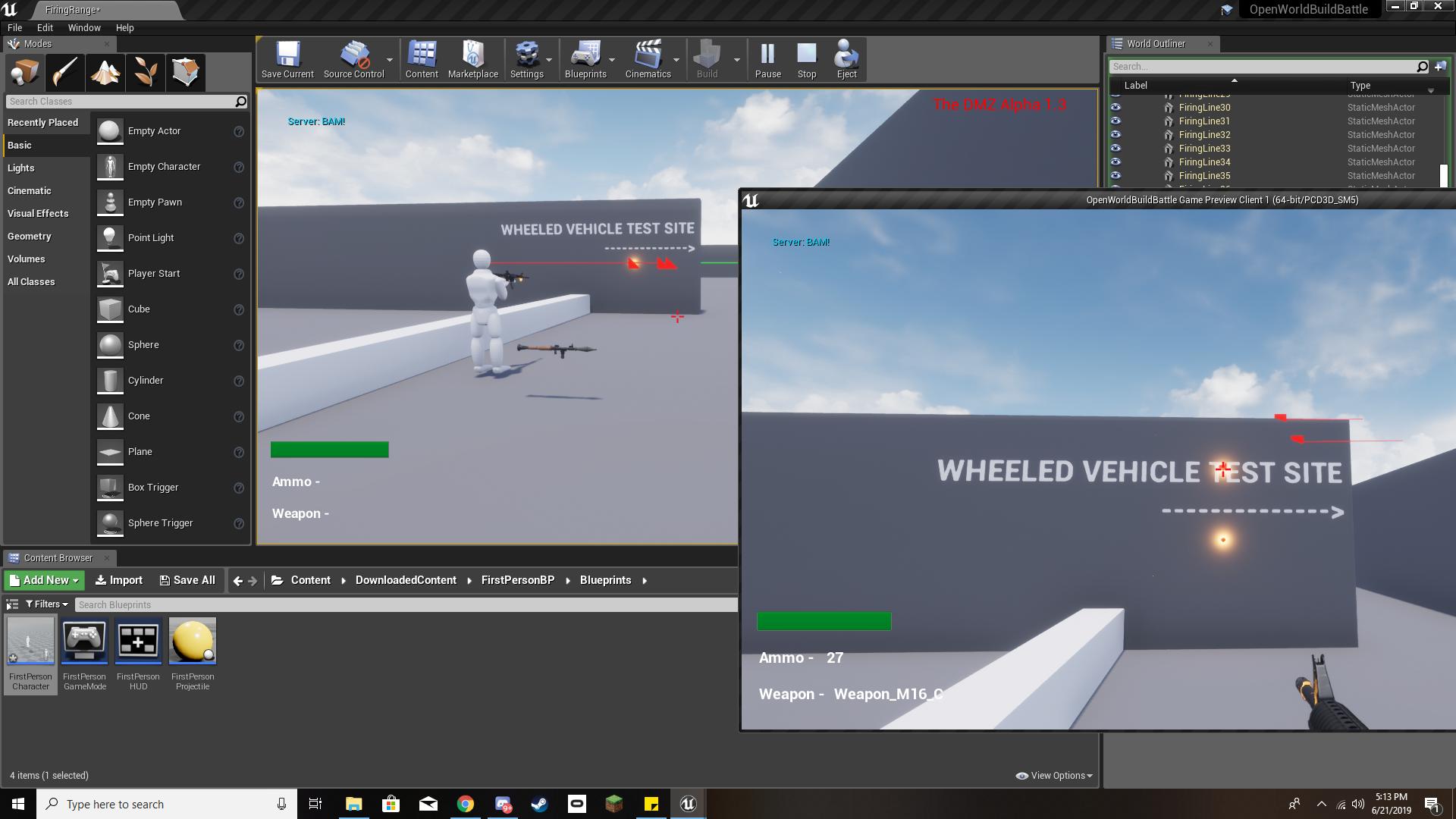
so I'm trying to get my shooting working so clients can actually aim, but I don't know how to have the server see that a client is aiming X degrees up/down, so when I shoot from a client the line trace just goes directly forward out of the client even when aiming up or down, also the server player can shoot in any direction and it works as intended
this is my weapon BP (yes I know the line trace shouldn't be in there please don't murder me for improper organization):
https://i.imgur.com/m5qifJo.png
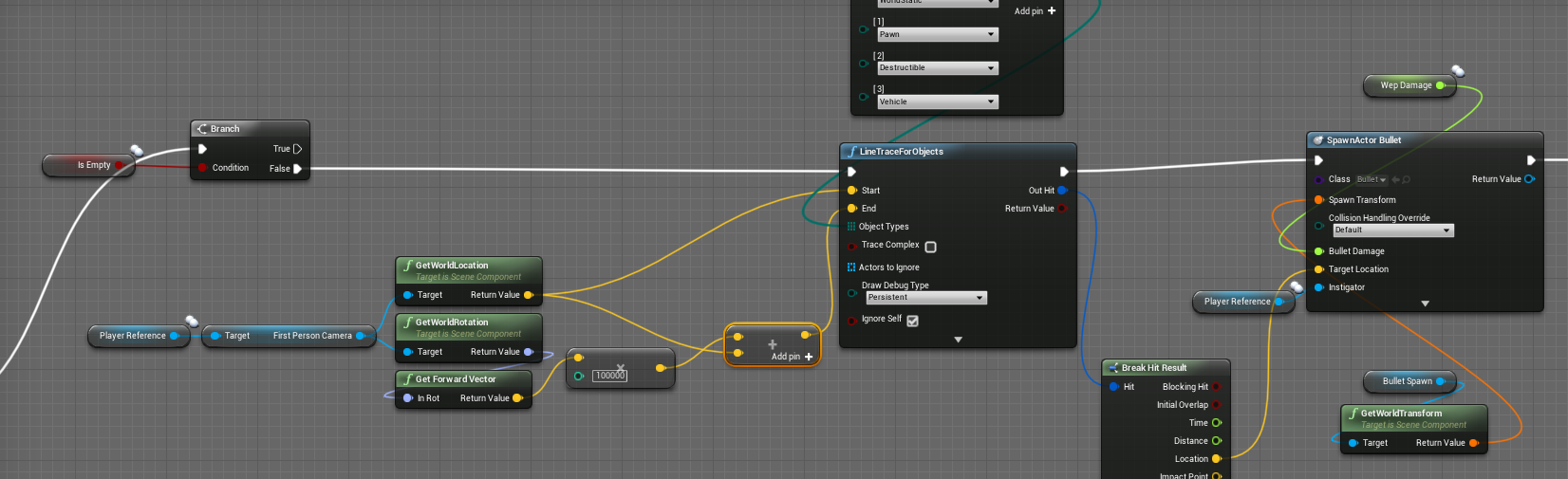
also when I shoot, the client sees the correct bullet impact location with the added straight ahead one, but the server only sees the straight ahead one
here's an example of in game, the client is on the right the server is on the left:
https://i.imgur.com/uugY836.jpg
 copper mango
I believe if you use GetPlayerViewPoint on the player controller, that is replicated client to server
cerulean escarp
I couldn't find that function
cerulean escarp
ah let me see if that's it
it worked! thank you
stupid though that it wouldn't work with the camera's rotation
copper mango
reason is just the camera isn't replicated at all, but that separate actor view thing is
because like the server doesn't really need to know about almost anything camera-related, so it'd be a waste of bandwidth to replicate it
graceful cave
i have a menu ingame to allow admins to configure server settings which are all part of one struct
it keeps track of settings that were changed so only those need to be sent instead of all of the settings
is there a way to send only specific data in a struct in an RPC to reduce the size of the data thats sent to the server
or do i need to have a separate RPC for each setting
using cpp
meager spade
yeah then its up to you how you handle the rpc
i wouldnt have a rpc for each value, i would just be sending a struct, its not like your sending the rpcs all the time
so why be concerned?
graceful cave
i havent checked the actual size but its decently large
not that its anything significant
more so just wondering if i can optimize sending it
 ebon nimbus
Hey all! Having an issues with a shield spawning in 2 different locations. Here is the spawn code:

Currently im getting one spawning on the arm in the correct location and another spawning way off to the size but rotating with the player pawn when i move. I honestly get the feeling im messing up something fundamental as even the projectile im throwing around had issues with hitting itself(or a duplicate)
graceful cave
is the actor set to replicate? spawning it in a multicast would mean the clients are spawning one as well as spawning the server's
ebon nimbus
yes its set to replicate, does doing that along with the multicast cause the duplication?
graceful cave
yes because replicated actors spawned serverside will spawn for clients
so they're spawning the one that's being attached locally and then getting the server's actor that isn't attaching to anything
ebon nimbus
ah that makes all the sense
i was thinking of the replication setting as a requirement for it to be multicasted. Thanks for the clarification!
graceful cave
the actor that spawnactor is being called on needs to be replicated in order to call RPCs
but spawning actors through multicast is bad compared to just having the server spawn it
try that and then call the attach on beginplay
that comes with the benefit of newly joining clients spawning the actor and attaching it too
ebon nimbus
Do you mean the actor in which the SpawnActor resides or the class type specified in SpawnActor?
graceful cave
the actor spawning the actor needs to replicate for an rpc to work
ebon nimbus
makes sense
graceful cave
but instead just replicate the shield actor and spawn it on server only
that will spawn it for everyone
ebon nimbus
Thanks again for the clarification, it really helps! Right now everything is working as intended so im going to go mess some more stuff up!
 elfin veldt
I need a little help with this, I'm trying to get a lock-on system that functions regardless of which player you are, but currently it only locks on to player 2's spawn point. doesn't follow them even if they move, not to mention this is also true for player 2.
Any ideas?
copper mango
@elfin veldt Get Player Pawn doesn't get the player from the PlayerState...it gets the one assigned to the player controller index you pass in
if you're wanting the pawn associated with a PlayerState, I think in Blueprint you just access the PawnPrivate variable off of the player state
elfin veldt
@copper mango what is Pawn Private exactly? nothing seems to have changed though likely because I'm dense.
copper mango
it's the pawn associated with that playerstate
elfin veldt
how would I get the pawn for both players?
copper mango
how do you want your lock on to work? like you press a button then what happens?
elfin veldt
end goal is pretty much make the camera look at the other player.
somehow It's focused on the world origin at the moment
so no matter where I move player 1 or player two, they both look there.
copper mango
what's the intent of your SetPlayerPawn function?
like right now, for each player state you're setting the associated pawn's target location as its own location
I don't think what's what you want
elfin veldt
I'm sure it isn't, I'm just unsure of how to actually do it.
copper mango
so to get Player A to constantly look at Player B, you want to just save Player B and then in tick or whatever you need to update your facing to look at the new Player B position
you have to update it every frame since the player might move
elfin veldt
but how do I decide player a and player b
copper mango
well your InputAction Lock On or whatever is in your controller, yeah? so inside the controller you can use Get Pawn to get the Pawn associated with that player, and that's player A
for player B it depends on how you want to figure that out, like if you know it's only ever two players, then you know the player that's not player A is the one you want...if there's more than that then you'll have to decide however you want to
but I honestly don't really do blueprint stuff at all, so I couldn't tell you like which specific nodes and all that to use
you might have better luck with the folks in #blueprint
 ember needle
All, I'm experiencing something unexpected. I've got a player who controls a character (military). At a given point, this player possesses a Drone, so unpossessing the character.
If the possess happens when the character is moving, GetVelocity in the character's animBP returns the speed that the character had (so > 0) despite the fact that the character is not moving, so this happens:
https://gyazo.com/b9010bcdb689f12250e3da5177177ae4
What you see printed there comes from the animBP:
but as you can see the character is not moving.
ember needle
In MP this is pretty clear:
https://www.youtube.com/watch?v=R58rObo1VT4
 twin juniper
How in CPP replicate override void from interface?
    virtual void InteractWithObject_Implementation() override;``` I need to create 2 functions in interface like this? (above)
```void InteractWithObject();
bool InteractWithObject_Validate();```Not sure unreal will like mixing interfaces and rpcs
And its a dodgy idea to start with, as implementing an unterface doesnt mean the actor has a data channel to sent the rpc through
twin juniper
Shiet, I need use rpc to interact with objects like lamps or gate switch
meager spade
when you interat
interact
simply in your Interact implementation send a RPC
for that object
as long as the object is net name stable and has a owner it will have a data channel
 left atlas
I'm looking for recommendations and opinions for distributing a multiplayer closed, small-scale multiplayer alpha. The game will likely not be released on Steam, but I do have unused game spots available there and I'm not adverse to using it for testing. I need to be able to distribute, update, and allow clients to find and connect to non-dedicated sessions using some sort of existing friend/player system (i.e. Steam, EOS, or other). I'd prefer to use EOS since if the game is released to PC I would likely target the Epic store but I'm not sure what state that is in and how I could distribute the game during closed alpha/beta if using it.
I'm also not adverse to using an online system for testing that would not be used at release.
winged badger
sounds like you need a solution which is primarily not time consuming
steam can do that, using something like advanced sessions you can get basic functionality working inside a day
provided you are somewhat familiar with how it works
twin juniper
{
    GEngine->AddOnScreenDebugMessage(-1, 5.f, FColor::Red, TEXT("Called lamp on off!"));

    if (PointLight->IsVisible())
    {
        PointLight->SetVisibility(false);
    }
    else
    {
        PointLight->SetVisibility(true);
    }
}```ScreenDebug works on server and client but why `SetVisibility` works only on server?it doesnt
you have to multicast it
but i wouldnt do that
i would use a replicated bool you set like UPROPERTY(ReplicatedUsing = OnRep_LampOff) bool bLampOff;
then void AWallLamp::OnRep_LampOff() { PointLight->SetVisibility(!bLampOff); }
then in your server rpc
you do:
{
    GEngine->AddOnScreenDebugMessage(-1, 5.f, FColor::Red, TEXT("Called lamp on off!"));
    bLampOff = !bLampOff;
}```this will create a togglable lamp
and using OnRep will ensure new clients or clients who came into relevancy of the lamp will see the correct state
twin juniper
I will try this @meager spade. But I need declare void OnRep_LampOff, yes?
twin juniper
Thanks for tips 😃
meager spade
{
    Super::GetLifetimeReplicatedProps(OutLifetimeProps);

    DOREPLIFETIME(AWallLamp, bLampOff );
}```dont need to declare that in header file
and you need #include "UnrealNetwork.h" in your cpp file
Detailed information about how Actor properties are replicated.
 twilit swift
Hey All, I'm making a force field actor that has health and can be destroyed by projectile hits. When I run a dedicated server the hits don't seem to register and the actor doesn't get destroyed. Also, the particles don't get spawned on all clients. What am I missing here?
I thought maybe I forgot to set a component to replicated, but I just double checked and all actors/components involved in this mechanic are set to replicate.
twilit swift
to be clear, the process works as expected when I'm the server. Just not when I tick 'run dedicated server'
meager spade
i know in c++ servers dont call OnRep themselves
and you have to manually call it
but what is not working?
the overlap detection?
only thing i can think of is your projectile on server is not going where you think it is
might need to debug where your server thinks the projectile is
 small compass
Does anyone have any experience with the Event CopyProperties in the PlayerState?
I'm trying to keep player state values after changing a level in multiplayer.
theres almost no documentation nor cases online. tried to find everywhere
would this be a good way of keeping player state properties upon level change or are there better ways?
meager spade
its the only way really
small compass
what is?
meager spade
CopyProperties
small compass
how do i use it?
meager spade
NewPlayerState is the new player state
so you just set the properties on it
from your current playerstate
small compass
meager spade
yeah
meager spade
mind you i never done that in bp
i did it in c++, but it should be the exact same
does it hut
hit*
small compass
when i put a print there, it doesnt get called
small compass
where should CopyProperties be called from?
because i'm indeed not calling it
before/after i level change?
meager spade
its called automatically
small compass
thats what i assumed
meager spade
so in code
{
    DispatchCopyProperties(NewPlayerState);
    NewPlayerState->bOnlySpectator = bOnlySpectator;
}```when player seamless travels, it dispatches CopyProperties
which in turn calls CopyProperties
and its called here
OldPlayerState->SeamlessTravelTo(C->PlayerState); inside AGameMode::HandleSeamlessTravelPlayer
so as long as you are Seamless travelling
the properties will be copied
 scarlet osprey
@small compass Multiplayer Network Compendium by Cedric is a good read for that. It helped me a lot. Thanks Cedric! Pdf download here: http://cedric-neukirchen.net Examples in blueprints and c++
small compass
i'm currently not using ANY c++ in my project. but i will definitely bookmark your message @meager spade
meager spade
im just showing that its called when seamless travel happens
so your bp CopyProperties will only fire if you are seamless traveling
small compass
yeah im trying to compare my bps with your c++ to find resemblances
and @scarlet osprey thx for the pdf :)
scarlet osprey
@small compass 👍the author is also frequently in this channel.
small compass
this prints the name correctly. right before it joins the session:
but i change the controller class on level change aswell
the menu, lobby and game have a seperate player controller
could that be a problem?
@meager spade
small compass
@thin stratus is it possible to have a persistent playerstate without using c++ when changing a level in multiplayer?
thin stratus
Well yeah
Mark the GameMode Seamless
It's not 100% persistent
But it gives you the option to pass over data with CopyProperties
small compass
exactly thats what i did
but no success
but the CopyProperties does not get called
i'm also switching gamemodes, is that a problem?
i have a MenuGameMode and a MenuPlayerController, then i enter the lobby and i use a LobbyGameMode and a LobbyPlayerController
rotund sapphire
Valandril the playerstate is tied to the controller, once you get rid of the controller the state will be eaten up by the gc i think. So that maybe one reason the copy never gets called. Not sure tho.
small compass
all i want is to keep the name a player filled in in the main menu when he is joining a session to persist.
Should i be doing this in a different way overall?
like maybe a savegame?
meager spade
PlayerState has a name property by default
which is pulled from the OSS, or a custom one can be provided
small compass
yeah i noticed that it had it by default, i simply wanted to add a "points" variable
every game mode uses the custom one
(i started with ue4 3 weeks ago and trying to score an internship)
twin juniper
Good day everyone. I red some documents about multiplayer, but still don't know in how can I connect to other person through IP or Steam. Anybody can help me with this by providing an example or by showing how to do it?
small compass

In this video we take a look at the finished project and step through each of the features that will be covered in this series. We show our functional Main M...
this guide has steam implementation
from epic games themselves
twin juniper
Valandril Thanks. I already saw it. Will try to understand again
small compass
@rotund sapphire i checked and the player ID in the player State class is different
before changing level it was 499, afterwards it was 500
twin juniper
can someone help me with setting mesh with networking?
im trying to set random character models
 dark edge
@twin juniper do you have component replicates checked?
dark edge
Sure
worthy perch
This is weird. Does a Character's Mesh have to be near the center of the root capsule (in terms of XY) for net rotation smoothing to work?
If I move out from the center (~>10uu), there is a strange out of jittering that I couldn't really get rid of.
twin juniper
got it all figured out
by any chance anyone have any good footstep sounds for outside like grass/dirt/sand/ anything around that nature?
 hollow lance
Hi all, can UObject be replicated as an UPROPERTY?
the simulated proxy version on clients always get my UObject replicated PROPERTY equals NULL when I debug into OnRep_UobjectVar
I did set up ReplicateSubobjects function
winged badger
you want to replicate a reference to it, or the object itself?
hollow lance
the object itself, I'm using it for some data that needs to be sync across clients
winged badger
did you override IsSupportedForNEtworking in the UObject class?
hollow lance
Yes, I did
winged badger
they can be replicated, and you have to keep a pointer to them in an UPROPERTY marked variable, otherwise GC will clean them up
most common use case would be UPROPERTY(Replicated or ReplicatedUsing)
hollow lance
Yes I do have that
I've tried basically everything I found on Google, not sure if I missed something 😄
winged badger
show me the ReplicateSubobjects function?
hollow lance
that's right, I did set up my DOREPLIFETIME macro
winged badger
and your IsSupportedForNetworking implementation in USlotHandlerObject?
hollow lance
yes
winged badger
i mean what is it? just return true;
winged badger
it should work then
winged badger
there are few more functions i implemented, like GetFunctionCallspace and CallRemoteFunction
but those are required only if you're going to send the RPCs through it
winged badger
there is a possibility that it does work, but there is a bug in your test scenario
hollow lance
the idea is to have those actors exist on the server, and have their "mirror" on clients
one of the example I've read has the UObject initialized only on server, with checking on HasAuthority
but in my case it still fails, as OnRep still delivers NULL value
winged badger
so you do SlotStateHandler = NewObject<USlotHandlerObject>(this); from ASlotActor on server at what point?
winged badger
should be from Authority
but the OnRep_ should still fire before BeginPlay client side
hollow lance
yes, I understand the HasAuthority part, but the OnRep_ is still unexplanable for me
winged badger
without authority clients will overwrite the received object with newly created local one
that won't have a matching NetGuid
you put a breakpoint into OnRep_SlotStateHandler?
winged badger
and the object is valid on server when BeginPlay is done?
hollow lance
yes
I debugged in the BeginPlay function as well, and all a server and two clients have the valid value of the object
(currently without HasAuthority checking, if with, then the game can't survive more than one tick, when one of my client Tick function accesses the status of the variable)
winged badger
and the SlotActor itself is spawned at runtime or loaded from package?
hollow lance
it is spawned at runtime
it is server-sided actor
this function is a RPC, server only, and called from authored client owning the player
this is its signature
winged badger
slot actor class is a BP class?
winged badger
try overriding ASlotActor and USlotHandlerObject::PreReplication
also, implementing USlotHandlerObject::GetWorld
my scenario is more complex then this, but it just works
hollow lance
what should I fill into these function?
winged badger
void UAttributeComponent::PreReplication(IRepChangedPropertyTracker & ChangedPropertyTracker)
{
    Super::PreReplication(ChangedPropertyTracker);

    for (USolsticeBuffBase* Buff : ReplicatedBuffs)
    {
        if (IsValid(Buff) && IsValid(GetOwner()))
        {
            Buff->PreReplication(ChangedPropertyTracker);
        }
    }
}
that is mine, mind that i am creating and replicating SubObjects from an ActorComponent
not Actor
so yours in Actor should just call Super, check the pointer for null and call PreReplication
hollow lance
it seems to me that UObject does not have any PreReplication
should I make a new function?
winged badger
    UBlueprintGeneratedClass* BPClass = Cast<UBlueprintGeneratedClass>(GetClass());
    if (BPClass != NULL)
    {
        BPClass->InstancePreReplication(this, ChangedPropertyTracker);
    }
this is mine
the body of it
hollow lance
hmm, I have no such thing for overriding
winged badger
mine apparently isn't an override either, sorry
i did go through UActorComponent source code to see what they did to make it replicate, as it is also a UObject
hollow lance
yeah, so it seems that it's not so applicable in my case 😦
winged badger
both of these are longshots
but i don't really see anything wrong with your code
and my UObjects replicate just fine
winged badger
your case is simpler because you are not creating and replicating objects in a component
i do have a nasty engine caveat to deal with because of this
(when my object replicates, its outer gets ninjaed so its no longer the component, but the actor owner)
winged badger
does it have GetWorld?
hollow lance
what do you mean by it?
winged badger
that is UObject function, did you override it?
i do override it on all my UObject derived classes automatically
hollow lance
no, I didn't overide it
winged badger
so i don't actually know if my UObjects would replicate without it
i assume they would
but can't say i am sure
winged badger
if (HasAnyFlags(RF_ClassDefaultObject))
{
    return nullptr;
}
return GetOuter() ? GetOuter()->GetWorld() : nullptr;
first part is because GetOuter()->GetWorld() is kinda undefined in the editor on the CDO
when you right click on event graph for context
it calls GetWorld()
and if it gets something it understands, even a nullptr
it lets you use functions that require a world context to work
hollow lance
doesn't work though 😦
I'm gonna head off for dinner and get back later
thanks for your support anyways, @winged badger
twin juniper
yes what
i wait for the tick in order to recheck if it can jump
so it doesnt call
retriggerable delay
winged badger
you just need to replicate the user input
as in
is the jump button pressed or not
winged badger
that sets your IsJumping flag
winged badger
you also make a setter function for CanJump
winged badger
that sets IsJumping to false if its false
twin juniper
its frustrating for me
winged badger
and you simulate the rest
server doesn't really need to know anything except if the player is trying to jump
it knows the rules of jumping
winged badger
so it can figure the rest out without getting in more RPCs
twin juniper
the server gets one call everytime i jump
cause i set it that way
what u dont understand
not when i trigger jump
not when is jumping
one when i jump
I don't need help with functions,thats why im in multiplayer,i need help with networking
twin juniper
meager spade
your setup is all wrong
saying that, handling custom jumps in blueprint is a nightmare
you really need to handle it in the cmc
meager spade
yeah so what issue you having?
meager spade
i presonally dislike multicasting things like that
i would handle it inside the cmc via a custom movement
but you need to do that in c++
twin juniper
I never cared for c++
So being that far up in the project,starting to learn c++ while I can do it in bp will set up back a lot
meager spade
all client does is send in he his custom jumping, cmc handles it and replicates it to other clients via the movememnt
yeah, but you will hit many brick walls in blueprint, especially on a big game
twin juniper
Yeah I have noticed some
meager spade
but then again i find blueprints messy and disorganized, i use them only for a few nodes. then again i can do stuff just as quick in c++ as i can in blueprint
but if you never need to use c++ stuff, then its fine, there are many little games out there wrote purely in bp
but the bigger games would be crawling if they did it all in bp
chrome bay
You'll hit multiple brick walls trying to do multiplayer in BP-only. Certainly if you want to modify character movement anyway. Some stuff is just off limits.
Just be sure to test with a real-world connection scenario. Don't assume it'll work unless it does so outside the editor with some lag and packet loss introduced.
 spare glade
For some reason when any player leaves the dedicated server instance the server instantly hits array out of bounds, after adding them to the inactive list it seems
then crashes
spare glade
[2019.06.23-15.53.04:794][374]LogNet: Warning: Network Failure: GameNetDriver[ConnectionTimeout]: UNetConnection::Tick: Connection TIMED OUT. Closing connection.. Elapsed: 0.00, Real: 271.82, Good: 271.82, DriverTime: 7.53, Threshold: 60.00, [UNetConnection] RemoteAddr: 127.0.0.1:17777, Name: IpConnection_0, Driver: GameNetDriver IpNetDriver_0, IsServer: NO, PC: BP_PlayerController_C_0, Owner: BP_PlayerController_C_0, UniqueId: NULL:DESKTOP-VRJ2G1O-A2C50F0643C9616A889006825146B5C5
[2019.06.23-15.53.04:794][374]LogNet: NetworkFailure: ConnectionTimeout, Error: 'UNetConnection::Tick: Connection TIMED OUT. Closing connection.. Elapsed: 0.00, Real: 271.82, Good: 271.82, DriverTime: 7.53, Threshold: 60.00, [UNetConnection] RemoteAddr: 127.0.0.1:17777, Name: IpConnection_0, Driver: GameNetDriver IpNetDriver_0, IsServer: NO, PC: BP_PlayerController_C_0, Owner: BP_PlayerController_C_0, UniqueId: NULL:DESKTOP-VRJ2G1O-A2C50F0643C9616A889006825146B5C5'
[2019.06.23-15.53.04:794][374]LogNet: UNetConnection::Close: [UNetConnection] RemoteAddr: 127.0.0.1:17777, Name: IpConnection_0, Driver: GameNetDriver IpNetDriver_0, IsServer: NO, PC: BP_PlayerController_C_0, Owner: BP_PlayerController_C_0, UniqueId: NULL:DESKTOP-VRJ2G1O-A2C50F0643C9616A889006825146B5C5, Channels: 9, Time: 2019.06.23-15.53.04
[2019.06.23-15.53.04:794][374]LogNet: UChannel::Close: Sending CloseBunch. ChIndex == 0. Name: [UChannel] ChIndex: 0, Closing: 0 [UNetConnection] RemoteAddr: 127.0.0.1:17777, Name: IpConnection_0, Driver: GameNetDriver IpNetDriver_0, IsServer: NO, PC: BP_PlayerController_C_0, Owner: BP_PlayerController_C_0, UniqueId: NULL:DESKTOP-VRJ2G1O-A2C50F0643C9616A889006825146B5C5
the start of the crash then it starts unloading everything ^
 echo pond
hey, is there an easy way to replicate a variable only when a certain condition is met (and if so how expensive is it)?
 severe widget
in C++ yes, cheap
echo pond
how to go about it?
rotund sapphire
@spare glade The error is strange indeed. It may be because the max inactive players is 1 or 0 (for 0 it would not hit error i suppose but perhaps 1 is an ominous number). Check your gamemode settings the value should be 16 by default. maybe it solve the glitch once you set it back to default. Other than that, your game is kinda failing to maintain arrays which is rather strange and i have no idea atm what else could be the source of the error.
meager spade
you can adjust the Replication (ie only replicate) when you like,
DOREPLIFETIME_ACTIVE_OVERRIDE(AAresWeapon_Ranged, CurrentFiringSpread, true);```something like that
can toggle the property replication on/off
meager spade
obvs only the server can do that
echo pond
yea naturally :)
 devout galleon
should i do multiplayer after i finish my game or as im doing my game?
winged badger
multiplayer is not an afterthought
devout galleon
i guess i do it as i do the game
cerulean escarp
I'm new to networking and I can't get my animations to replicate to other clients. I'm using a multicast and it successfully changes the animation from idle without a weapon to idle with a weapon flawlessly across all clients, but for some reason it doesn't do the same for the movement animation.
here's the animation controlling portion of my FPSCharacter BP:
https://i.imgur.com/iie7PIW.png
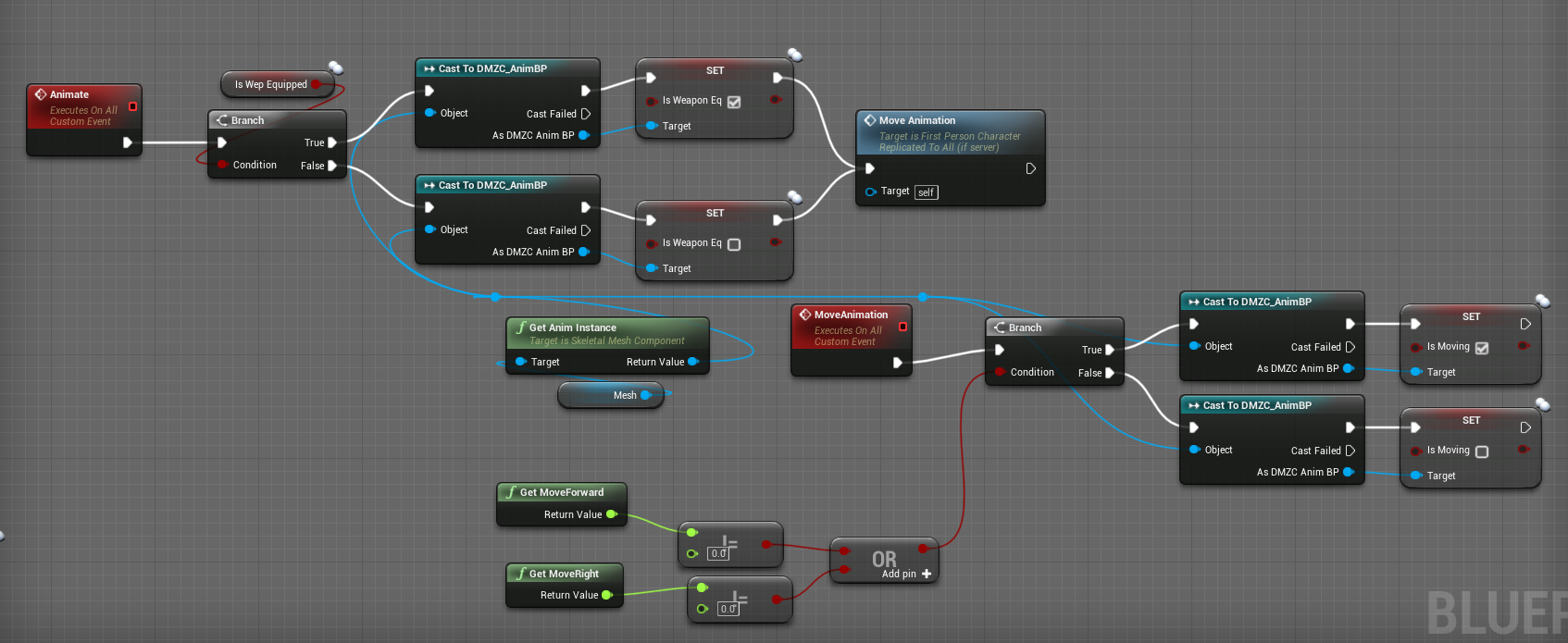 meager spade
only the server can call the multicast
so if they are not running on the server, they will never multicast
also why you sending a movement bool to the animgraph
that is terrible
animbp should NEVER receive values like that
instead it should pull the value
and you can easily just get the actors velocity to tell if they are moving
and that will be on server and client
and all other clients
what you are doing is trying to re-invent the wheel
and using more network resources in the process
 limber mortar
I need some help figuring out why my new helicopter works for a little while and then stops lifting vertically. It works for 4-5 minutes before having problems, due to past experiences I thought it could be a replication issue. But I can't figure it out 😦
I'm a novice
when the elevation impulse fails I can still steer side to side and such, it just starts gradually losing elevation like it is idling while holding throttle input, print screen shows 1.0 as the correct value for the upward input when it fails
limber mortar
if I exit the chopper, my new pawn's actions work just fine
so I don't think the game is messed up
The fire continues to burn, trees still disappear, et cetera
copper mango
anyone have a problem where like an AI character capsule separates/jitters away from the skeletal mesh in dedicated server?
wait it looks like the net smoothing only applies to the meshes and not the capsules?
copper mango
well, I changed it so my WidgetComponent is attached to the mesh instead of the capsule and you can't really notice the jittering anymore, even though it's happening
because the mesh is smoothed
doesn't feel great but I figure I'm probably gonna have to write a custom move component for my AI dudes ultimately anyway
 shut osprey
I'm researching the OnlineSubystem interfaces IOnlineUserCloud and IOnlineSharedCloud, and I am looking for examples of their usage to make sure that I am aligned with the industry. Does anybody know of any public/example projects that use those two interfaces?
Interface links for reference:
https://docs.unrealengine.com/en-US/API/Plugins/OnlineSubsystem/Interfaces/IOnlineUserCloud/index.html
https://docs.unrealengine.com/en-US/API/Plugins/OnlineSubsystem/Interfaces/IOnlineSharedCloud/index.html (edited)
 twin minnow
has anyone seen this kind of log message when trying to call OpenLevel to connect to the server?
Ignoring restart handshake request, due to < 10 seconds since last handshake.
spare glade
@rotund sapphire seems to be good now, i just need to leave it on a higher number for now on or default. thnx
 unique kelp
Do RPCs batch? and would I even want them to?
might be a stupid question
I have read they are sent as soon as you call the function, so I'm assuming no
meager spade
reliables are batched
as they are deemed reliable to, so if they don't get sent through straight away, they will eventually
unreliable will be dropped if they cant get to through
fleet raven
for some reason the engine can decide to not even try to send unreliables
you'd think they are unreliable on the network layer only - as in, not resent when the packet is lost, but it goes much further than that
it can just discard them when it thinks the connection might be busy
twin juniper
I have big problem. How can I add multiplayer to destructible object? Creating custom event for multicast replication or adding replaction for function above?
 modern swift
anyone know how to setup the replication graph to let a specific group of connection sync to each other. I trying to create a UDAReplicationGraphNode_AlwaysRelevant_ForConnection node , but I dont know how to add some group of actors to this node
slender yarrow
So im trying to connect to my dedicated server from another computer in my house. This is what the server log is showing. It does this endlessly and I never fully connect and move to the playable map. Just a black screen on the client. People outside of my house are able to connect successfully though. Anyone know what would cause this?
modern swift
I tried to use RouteAddNetworkActorToNodes , I dont know how to setup FNewReplicatedActorInfo to make it added in UDAReplicationGraphNode_AlwaysRelevant_ForConnection node
 shut gyro
Has anyone played around with the Physic Error Correction settings in the Project Settings with multiplayer testing?
If so, how reliable has it been to see less jitter with PhysX actors and what values are appropriate for fast-moving vehicles?
dark edge
I've messed with it but not much. I'm waiting on Chaos to deal with networked physics.
twin juniper
Why this destructible wall don't replicate to other clients? This is my BP functions:


 worthy perch
Clients shouldn't call Multicast RPCs.
twin juniper
@worthy perch so how can I do this? property replication?
worthy perch
Replicating the health of the destructible would be better, yeah.
And have the clients change the appearance of the destructible via OnRep.
meager spade
tell the server to do the multicast
twin juniper
@meager spade you mean health property?
bitter oriole
Something like health needs to be changed on server only, and replicated to everyone
These two things need to happen, anyway
twin juniper
Okey, I think I understand this. So players shoot on destructible objects, server changes healt and replicate to everyone, I will try do this - thanks for tips
 opaque flicker
Hi, I have a problem that i dunno why it's happening, I have a spectator camera pawn that's os possessed by a specific client -- it's replicated and all fine, this spectator camera follow another player (on server and client for sure as it's replicated), but when this player is beyond certain range all of his child actors disappear and become not replicated anymore (from the spectator camera view), when he's back to the initial area everything appears just fine ,, any clue why this could be happening ?
winged badger
without the spectator pawn being replicated
its net relevancy position doesn't change
opaque flicker
what should happen is that this player and his child actors that the camera pawn is following should be replicated all the time since the spectator camera is in it's relevancy
winged badger
so when you get out of 15k UU range, everything suddenly becomes not net relevant and culled
only exception being the current viewtarget
sorry, you did say it is replicated
opaque flicker
yea
winged badger
its still a distance based net relevancy culling
where is the spectator pawn physically when the observed player gets out of range?
opaque flicker
why this happend lol, the pawn is on the head of the player
opaque flicker
he was actually over his head
winged badger
ok
winged badger
is it there on the server, or are you just teleporting it around locally on tick?
opaque flicker
tick yea
winged badger
because its server position determines net relevancy
doesn't matter where it is on client
opaque flicker
the server is moving then replicates to client
i'm printing postion on server and client and they r both the samew
same*
winged badger
try attaching the specatotor controller to the spectator pawn
you have a checkbox for it in class defaults
 idle blaze
Could I get some clarification on RPCs? https://docs.unrealengine.com/en-US/Gameplay/Networking/Actors/RPCs/index.html This page says that:
They must be called from Actors.
Does that mean that the RPC function itself (e.g., marked UFUNCTION(Server)) must be called by an Actor? What if another object calls an Actor function that calls an RPC?
Designating function replication across the network
To give a more specific use case: let's say I want to call an RPC from an AnimNotify. Can I call a function on the Actor that internally calls the RPC? Or can I call the RPC directly from the AnimNotify?
opaque flicker
@idle blaze you can call RPC from server to clients by anim notify if this server will call this notify too, and call RPC from client to server from anim notify if the owner of the animation blueprint is local
idle blaze
In that case, I'm confused by what it means that "[An RPC] must be called from Actors." Does it just mean the RPCs must be defined in an Actor?
opaque flicker
@idle blaze hold a second then let me check my anim BP, may be i have used some
there u go, and it works fine
idle blaze
Interesting, thank you.
opaque flicker
yw
@winged badger so i have attached the player controller to the pawn and still the child actors of the player i'm spectating disappear
opaque flicker
well the player donesnt disappear cuz i'm setting him always relevant, but when i uncheck this, it disappears too 😄
winged badger
AMyChildActor::IsNetRelevantFor(params)
{
    if (GetAttachParent())
    {
        return GetAttachParent()->IsNetRelevantFor(params);
    }
    else
    {
        return Suoer::IsNetRelevantFor(params):
    }
}
sadly i'm using BP
winged badger
any use of replication graph?
opaque flicker
nop
i'm guessing that the server doesnt know where the client is so it doesn't replicate the player to him
opaque flicker
so as long as the server of the spectator pawn is in the same area of the player, he should be relevant right ?
winged badger
well
it should be enough if you teleport the spectator over players head every 1-2 seconds
and interp only locally on client
you don't even need to replicate its position
and i am pretty sure about that, as i use a similar setup for RTS controls
opaque flicker
in my setup the server is moving the spectator pawn in tick to the player camera location, and since it's replicated the client follows
but still this problem exist frim nowhere lol
the spectator pawn is set only relevant to owner tho
twin juniper
Why projectiles from weapon works only client to server, and client to client but no for server to clients?
I declare this void I character CPP:
void ServerFire();```no clue, you probably did something wrong
but that should work like you said, Client to Server and server to client
as long as you spawn the projectile on the server
and its set to replicate
twin juniper
Why this shoot spawn projectile works only on client -> serwer?
{
    if (ProjectileClass != NULL)
    {
        UWorld* const World = GetWorld();
        if (World != NULL)
        {
            const FRotator SpawnRotation = GetControlRotation();
            const FVector SpawnLocation = ((FP_MuzzleLocation != nullptr) ? FP_MuzzleLocation->GetComponentLocation() : GetActorLocation()) + SpawnRotation.RotateVector(GunOffset);

            //Set Spawn Collision Handling Override
            FActorSpawnParameters ActorSpawnParams;
            ActorSpawnParams.SpawnCollisionHandlingOverride = ESpawnActorCollisionHandlingMethod::AdjustIfPossibleButDontSpawnIfColliding;

            // spawn the projectile at the muzzle
            World->SpawnActor<AFPSGameProjectile>(ProjectileClass, SpawnLocation, SpawnRotation, ActorSpawnParams);
        }
    }
}```
In projectile constructor I have:
```SetReplicates(true);
SetReplicateMovement(true);```if i want to pass a string from the client to the server using OpenLevel, would I pass it in through the Options parameter or would I append to the level name ?StringIWantToPass
meager spade
?Something=Something
fossil spoke
?Key=Value?Key2=Value2?Key3=Value3...
Just to help clarify what @meager spade said.
Thats how the Options string wants to be formatted.
 arctic bone
weird question, is there a way to write totally separate files for server and client?
twin minnow
thanks guys, u guys are life savors as usual
arctic bone
lets say i want a door in my game, i can have the door.cpp and door.h, then in the door implementation i can have something like 'if has authority, open door'
what i want is a completely separate file for door_client and door_server, and only door_server has the function open door
if that even makes sense
@fossil spoke
i might not even necessarily need a door_client if the client can't interact with it, like if its an automatic door for instance
i just dont want to deal with all the if (HasAuthority()) junk to find out my roles
severe widget
Typically this is done all-in-one file
#if WITH_SERVER_CODE
void OpenDoor();
#endif```Yeah use the Preprocessors to block code you want to be separate for which target your building for.
arctic bone
not the cleanest but if it works what the heck
severe widget
You can do the inverse, #if !WITH_SERVER_CODE but nobody does that
arctic bone
im assuming WITH_SERVER_CODE is true for when it is the server running
severe widget
Generally, your server should be doing a superset of what your client does.
Nah, conditional compilation is determined before packaging.
YourGame_Server.exe
YourGame_Shipping_Win64.exe
etc
arctic bone
ah, does it still work on the pie environment?
fossil spoke
Its UE_SERVER though isnt it? @severe widget
arctic bone
guess testing is easy enough
fossil spoke
Never heard of WITH_SERVER_CODE
arctic bone
is there a list of these preprocessor defines?
fossil spoke
Build.h has them.
severe widget
🤔
fossil spoke
/**
 *   Whether compiling for dedicated server or not.
 */
#ifndef UE_SERVER
    #define UE_SERVER                    0
#endif
thanks
arctic bone
my very rudimentary test is telling me that it does not work in pie, ill keep trying
severe widget
PIE won't tell you anything
arctic bone
i guess all i really have to do is just change if UE_SERVER to if true when testing out dedicated server functions in pie
severe widget
It's WITH_EDITOR, UE_SERVER, UE_GAME, etc, etc
all set to 1
PIE is basically most things.
You wanna do a different client and server exe to test compartmentalization of code.
fossil spoke
Yeah PIE isnt where you should be worrying about that
fossil spoke
So its in the GAS plugin?
fossil spoke
So thats why i cant scope to it lol
severe widget
UE_SERVER isn't in here.
fossil spoke
UE_SERVER is in Build.h, its probably just saying that we are building for Dedi
severe widget
TargetRules.cs is where UE_SERVER is added
fossil spoke
Its also defined in Build.h
severe widget
Well, only if it isn't pushed through by UBT
fossil spoke
Yeah
severe widget
Anyway, it appears UE_SERVER, UE_GAME, and UE_EDITOR are mutually exclusive
if you want your code to legit only work in a server, UE_SERVER is your preprocessor macro @arctic bone
arctic bone
thanks homies!
 brittle tulip
hey i want to make a coop multiplayer game in c++ any where i can see a tutorial where to do this ?
bitter oriole
Gonna need a whole lot more details
brittle tulip
like what?
bitter oriole
Like what game is it ? If you're doing multiplayer physics, the tutorial is going to be one word - "no"
Multiplayer is a whole field of work, not a feature
bitter oriole
Is it a shooter ? Vehicle game ?
brittle tulip
shooter
bitter oriole
In that case you basically have multiplayer working already
You want to look at sessions (something like the advanced session plugin is a good start), and any tutorial on multiplayer will explain the concepts you'll need for game features
brittle tulip
I have been looking at some tutorials but the ones on youtube only show blueprints
and one said to replicate a variable inside the game instance
bitter oriole
Of course, the game instance isn't replicated
Dunno how BP gets it to work
So replicate another class
If you're new to networking in UE4, C++ is not where you should start, tbh
 hasty adder
Hey question. I got a level cloud bp that moves around the world. Should I be spawning the cloud bp in from gamestate because the actor dropped in the level with replicate movement doesn’t seem to update its location to a newly joined player . Figured maybe if it’s spawned in it’ll pickup the location data
I tried on begin play for non server to set the bp location to the servers Vector. I have an idea that maybe the vector of location should get stores to a rep vector variable and client side it just continuiouslt keeps current location to that var