#multiplayer
1 messages · Page 464 of 1
 grizzled stirrup
 jolly siren
And it isn't throttled right now
grizzled stirrup
Will disable and see, was really disappointed to see such high bandwidth usage, many thanks for letting me know
Will replicate pitch manually if I have to at a lower rate
jolly siren
If you don't know that you need bUseClientSideCameraUpdates specifically then I highly doubt you need it
The server will just calculate the camera when set to false instead of having the client send it all
 gleaming vector
oh, and it sends every frame?
jolly siren
yes, it's gross
gleaming vector
that's silly
grizzled stirrup
Ok great I just need pitch for the aim offset
jolly siren
grizzled stirrup
Will disable that bool and compare the bandwidth results
Thanks a lot for letting me know
Was thinking something was up as lower frame rates worked perfectly
And NetUpdateRate didn't change much
Profile your game and see if you are hitting caps when you raise to 20 kb/s for clients and 100 kb/s for the overal net bandwidth (you probably shouldn't be hitting any higher than that anyway)
You will see yourself hitting the default limit very quickly especially if clients have a high framerate as discussed just now
jolly siren
Is anyone using a ConnectionTimeout or InitialConnectionTimeout different from default?
gleaming vector
the default is 30s yeah?
jolly siren
60
jolly siren
It looks very strange when someone disconnects right now. They just sit there for 60 seconds in limbo with characters running into walls
Wondering what the negative side effects will be with lowering it tho
gleaming vector
I would put it at 30 personally
depends on what you are doing though
if you have a mobile game, you can get internet blanks for many seconds
gleaming vector
yeah, 60 seems long
initial i would put at 60
because initial timeouts are during the connection process
and there is nothing wrong with waiting for a connection to complete for a minute
but like, in normal gameplay, having a high number there puts you susceptible to "pull out your ethernet cord" exploits
jolly siren
ahh yeah that's true
gleaming vector
which, on an aside, are my favorite type of exploits because who really tests for that shit
i believe one of the community managers at bungie said on reddit that it's part of their testing regimen now because there was a prolific exploit related to it
it's just a funny thing to test for
 manic pine
its been pretty common for games like Diablo/Path of Exile to run into that
gleaming vector
yeah
manic pine
in the hardcore modes especially
on one hand you can infuriate the people who lose connection and die, on the other hand you can let cheap players alt-f4 right before death
gleaming vector
weirdness aside, it's exploitable so you want it as low as possible without dropping real, fixable issues
30 is probably best on PC when you expect good connections
places with poor internet will have issues
jolly siren
We are running into an issue where the first game server started on an AWS/DO box sometimes can't connect to the clients. Get a Socket->SendTo unreachable. So when this happens players are left in limbo for 60 seconds. For some reason there isn't proper retry around this in the engine 😦
gleaming vector
60 for if you expect internet to drop as part of normal usage (ie, cell phones)
that's strange
is it an unreal bug?
or does anything on that server reject the first connection?
jolly siren
I haven't figured it out yet
gleaming vector
that doesn't sound like an unreal bug but i've also seen weirder
jolly siren
It's strange because the instance has already been up for at least 3 minutes before it starts the game server instance. And has done heavy network activities such as downloading our game server
gleaming vector
yeah
jolly siren
So it seems like it should be able to accept connections
gleaming vector
might be a firewall issue maybe?
jolly siren
yeah that's the only thing I can think of. Possibly firewall warmup or something. We have only ever seen it with the first instance
gleaming vector
yeah
I'm not a network engineer so that kind of stuff is somewhat arcane to me
i write code that pushes packets
😛
jolly siren
hahah right 😃
grizzled stirrup
@jolly siren would the correct way to disable that bool in the CameraManager (if you don't have a custom camera manager class) be this in the PlayerController?
PlayerCameraManager->bUserClientSideCameraUpdates = false ?
jolly siren
yeah I guess so
I do mine in the constructor of my custom cam manager class
But as long as your PlayerCameraManager exists when you call that it should do the same thing
jolly siren
👍
grizzled stirrup
Holy shit the difference!!
At default settings (bUseClientSideCameraUpdates = true) , a single client with 500 FPS sends 26 kb/s , with bUseClientSideCameraUpdates = false he only sends 5 kb/s at the same 500FPS
With no visual change whatsoever
Even pitch stays replicated, so the aim offset is untouched
This is incredible thank you so much Ethan!
Now I don't have to cap my games FPS 😄
Do you know if there are any downsides to disabling this bool that might affect something gameplay wise?
grizzled stirrup
I'm amazed
I almost cut the scope of my game to 2 player only because of it 😄
Because 3 high frame rate clients would saturate
grizzled stirrup
Yes
 chrome bay
but it's set to false immediately after, and it's only set to true from MarkForClientCameraUpdate() in UPawnMovementComponent
oh lawl nvm
player controller sets it to true every frame
wtf
grizzled stirrup
Do you know what exactly it's even doing and if it's fine to always be false?
Because it appears to be playing exactly the same
With 5x less bandwidth per client
chrome bay
Looks like you can use ServerUpdateCameraTimeout to clamp the bandwidth
Defaults to zero so it'll send every frame
grizzled stirrup
Pretty insane how much that adds up at higher FPS
 thick shale
@grizzled stirrup at 500 fps, are the clients still able to move around?
grizzled stirrup
Yes it works absolutely great now with that bool set to false
 fleet raven
but 26kbps is like nothing
thick shale
I'm testing on a fresh project and I keep getting LogNetPlayerMovement: Warning: CreateSavedMove: Hit limit of 96 saved moves (timing out or very bad ping?)
clients get stuck
grizzled stirrup
Yeah @fleet raven but you have to realize this is just 2 clients moving
If I can get 5x bandwidth reduction on movement with no visible change, I'm taking it!
The default cap is 10kb/s for clients
chrome bay
@thick shale you need to throttle character movement so it doesn't send too many updates
fleet raven
(I'm definitely looking at what this setting does as we talk tho)
thick shale
where do I set the throttle?
grizzled stirrup
Please let us know your findings, very curious
As said, the pitch of my clients is still being replicated down fine with it set to false
So it's doing something else and I'm not sure if it affects anything in my game
chrome bay
In char movement: NetworkMinTimeBetweenClientAckGoodMoves = 0.10f; NetworkMinTimeBetweenClientAdjustments = 0.10f; NetworkMinTimeBetweenClientAdjustmentsLargeCorrection = 0.05f;
chrome bay
There should be more than that though.. two secs
fleet raven
it just makes it send a ServerUpdateCamera rpc every tick when its on
500 fps = 500 ticks
grizzled stirrup
What does that even update though since the pitch and yaw already are replicated elsewhere?
fleet raven
good question
grizzled stirrup
I'm sure there are use cases but by default I'm confused why that is even on
fleet raven
I seems like something that should be turned off
chrome bay
@thick shale Alright nvm, those settings won't help
If anything they'll make it worse
chrome bay
You'll just have to bump the maximum number of saved moves, but ideally you just want to clamp framerate or tick rate of char movement
It'll save a move by default each tick. If the moves don't get acked before it hits the limit, you'll overflow the saved move buffer
chrome bay
nah it'll still create a new saved move each tick either way
but sending is clamped to 120FPS
thick shale
hmm thats why I was asking how @grizzled stirrup was still having clients move around, cause yeah it hits the limit right away
chrome bay
move combining matters a lot too
fleet raven
@grizzled stirrup so this isn't about your view (affecting control rotation) but about your actual camera position and rotation that the character made from that
it still seems pointless to me as the server will also update that
grizzled stirrup
Ok, since my game does most things clientside (co-op), I'm assuming it's completely fine for me to keep it disabled
fleet raven
in fact, sending this rpc out of sync with the movement would be way worse
grizzled stirrup
An amazing 5x gain in bandwidth reduction thanks to Erebel
fleet raven
I still have to open the network profiler even once
grizzled stirrup
I just did and it's hurting my brain
fleet raven
I imagine this would be immediately obvious in it
grizzled stirrup
Trying to track down why it's still sending 90+ packets with all my actors set to a netupdatefreq of 1.0f
Seems to be the CMC with its own rates
grizzled stirrup
Ah I see that makes sense
chrome bay
But yeah CMC sends regularly, and it has to
grizzled stirrup
I'd like to cap it at 60 RPC's / packets a second if I can
AS increasing the frame rate to 500 does send more often
When it doesn't need to
Past 60
fleet raven
y are you so paranoid about your game exceeding common bandwidth from 2 decades ago
grizzled stirrup
Because I want to understand where things are being sent from, how much is being sent and how often they are sending
So I can then up the rates
chrome bay
char movement should cap-out at 120
fleet raven
reducing the send rate of the cmc will make it worse
grizzled stirrup
If I cap the overall fps of the client to 60, only 60 packets per second are sent and it looks great
I'd like to have that regardless of frame rate
chrome bay
const float NetMoveDelta = FMath::Clamp(GetClientNetSendDeltaTime(PC, ClientData, NewMovePtr), 1.f/120.f, 1.f/5.f);
change 120.f to 60.f
grizzled stirrup
Many thanks!! will try this now
chrome bay
Or just override GetClientNetSendDeltaTime() in your own char movement component
Be aware that the default function scales down the send rate based on netspeed etc. anyway (e.g., lan vs reality)
grizzled stirrup
If I override it should I just set NetMoveDelta to 60.0f?
fleet raven
wait will this combine several moves into one for sending to the server
grizzled stirrup
Or just return 60.0f?
chrome bay
It should do, but if the combined delta gets too large it'll start breaking and sending corrections
Which is more costly
fleet raven
there's no way for it to stay in sync if the delta on the server is different
seems like using this will cause minor corrections all the time
grizzled stirrup
Oh yeah great point!!
chrome bay
well the server breaks down the move into chunks anyway since it usually recieves a way bigger delta
gleaming vector
since that clamp function is clamping between 1/120.0f and 1/5.0f
chrome bay
but if you hit max iterations or max move delta you're screwed
gleaming vector
so return 1/60.0f and you fall within that bound
fleet raven
whose genius idea was it to run the movement at variable tick rate
gleaming vector
i don't recommend doing that for the reasons jamsh is saying
it should be variable
because if you aren't moving much, turn down the rate
if you are moving a lot (and sporadically), you need to be more chatty
what you can do is override that function and cap it further
call Super::ThatFunction() and clamp it between 1/60.0f, 1/5.0f
grizzled stirrup
So the only reason you wouldn't set it to constant is for less sending when you are not moving? I might just copy paste the original function into the override and set the 120.0f cap to 60.0f cap if that also works
gleaming vector
me neither, yeah
gleaming vector
^^
chrome bay
But if you send too infrequently, the server will flag you as lagging behind and send forced updates
movement is probably the area to focus most of the bandwidth on
gleaming vector
unless you are doing something special that can't combine moves (like constantly jumping and crouching every other frame)
you are fine
chrome bay
so if it's available, spam it
grizzled stirrup
Other than losing the optimization of sending less packets when not moving, are there any other downsides of returning 60.0f regardless of state?
gleaming vector
i have a multiplayer VR game and movement is the highest bandwidth
grizzled stirrup
I'll likely revert later , I just want to see where things are coming from
gleaming vector
you will have less accuracy when players are being weird
chrome bay
tbh CMC is so complex it's hard to say where all the cons are, but accuracy of the sim will suffer
gleaming vector
like jumping a lot
chrome bay
not much at 60FPS I imagine, but small differences add up
grizzled stirrup
As in 60 vs 120 if needed?
IT's more that high frame rate clients will send more packets
gleaming vector
like, the default cmc has only two things that break move combining, jumping and crouching
grizzled stirrup
And I'd like all clients to send the same amount
But yeah like you said I can just copy paste the function and set the higher cap a bit lower
gleaming vector
so if a player does that a lot (or rapidly changes direction, like A-D spamming), the accuracy will suffer
grizzled stirrup
Ok that makes sense
gleaming vector
think of it this way
if the player is moving predicably
then the CMC will group those packets and send less frequently
because it doesn't need to be as chatty
however, if the player isn't, then it will be more chatty
the most important thing though, is if the player is moving unpredictably, you absolutely must inform other players of that
because like, in a shooter, players are going to spaz the fuck out when they are shot at
and the shooter doesn't want their target warping around the screen
grizzled stirrup
Makes complete sense. I think I'm still just thrown off since I was hitting the default limit of 10 kb/s per client in 4.21 by default, but now I know that it was because they had high frame rates and bUseClientSideCameraUpdates set to true which sent 5x as much bandwidth as they needed to
But now with that bool sent to false, it's not even near the cap (well around 6 kb/s per client which is far better than the 26 kb/s that it was by default)
So yeah as said I can probably just leave my CMC settings to default and let it work its magic
Also great to understand that RPCs aren't affected by the netupdate rate which explains why I saw more packets being sent
 red musk
Hello friends, I am having an issue where the listen server doesn't possess a pawn correctly when I load into the game with 2 clients
When it is just 1 client it works fine
Anyone experienced that before?
Relying on just default possession of the game mode creating the controller and pawn
Yeah it's weird, it's just the listen server which fails
Or, when using dedicated server, the first client fails if there are multiple clients
it spawns the pawn, as the other clients see it, but that client fails to possess it
Very strange
I do only have 1 player spawn, I'll try adding a couple more
Hmm weird, I added 3 player spawns to test with 3 clients, and the problem still occurs, but it seems potentially related, because it's not spawning them in the 3 discrete positions
Red circles are spawn points
So one of them is breaking and spawning in the wrong spot, even with more than 1 spawn point, hmm
It's set to auto activate
err auto possess
yeah
by player 0, which should be the player for each individual client
hmm, that's the problem I guess! I set that to disabled and now it works fine
interesting, how come auto possessing was messing it up I wonder?
fleet raven
I wonder why we need listen servers
wouldn't it massively simplify the engine code if they didn't exist and it just started a local dedicated server behind the scenes
 echo pond
hey guys I have a weird issue, I'm trying to call play montage from behavior tree in MP game (BT is on server) on server and then as net multicast, and it more or less works fine, but it seems like the first time it's called, the animation is played on server, but it doesn't play on client, anybody encountered something like this?
anim instance sooo
I actually call it from c++ component that access AI anim instance
 winged badger
and it doesn't work just the first time?
except when the thing suddenly becomes relevant
need a timestamp to go along with that to prevent stuff like dead enemies coming back to life so you can watch them play the death montage when you come close enough to be relevant or late join
grizzled stirrup
Does APawn->IsLocallyControlled() only return true if a human player? (human client or human listen server host) Not AI or other server controlled entities?
Debating gating any human player checks with that instead of having to cast to player controller
winged badger
there is a IsPlayerControlled function
return PlayerState && !PlayerState->bIsBot;
grizzled stirrup
Ah I didn't see that one! Thanks
So APawn->IsLocallyControlled() does include AI controllers too?
Have to run some tests if so
winged badger
bool APawn::IsLocallyControlled() const
{
    return ( Controller && Controller->IsLocalController() );
}
bool APawn::IsPlayerControlled() const
{
    return PlayerState && !PlayerState->bIsABot;
}
I'm just a bit confused by the IsLocalController() function body
Not sure if that includes AI or not
Will just log things out and see I guess
Always get confused when it comes to proxy checks
winged badger
it shouldn't return true for AIControllers
echo pond
@woeful anvil @winged badger I'll check it out thanks
grizzled stirrup
Oh great so essentially I can use IsLocallyControlled() as a human player check?
winged badger
it is its most common use
grizzled stirrup
Perfect thanks a lot
winged badger
but
it works only for local pawn on clients and listen server host pawn on server
for other players on client, there is no controller
grizzled stirrup
That's quite alright, I'm using the check here whenever deciding if weapon delegates for firing / updating spread should be broadcast
So the owner's UI stuff will update
Thanks a lot!
Will only use it when I want the actual local owner that is a client
No remote proxies
echo pond
@winged badger yea it seems like it wants to finish playing animation that is currently running and only runs montage one it's done, but it's weird cause it runs on server just fine, I'm getting anim notifs called, even if tha animation is not visually there
winged badger
is that montage run right after the Actor spawns?
echo pond
ok so I narrowed the issue and it could be animation problem from which I'm blending rather than mp problem, anyway thx everyone
red musk
I'm having another strange multiplayer issue:
When I transition from my lobby to game level with servertravel, if I have at least two clients connected, the one functioning as a listen server isn't getting input events - it is correctly spawning the pawn and taking control of it with its player controller, but no input
if I load into the level directly from the editor, it works fine, only when transitioning into it from my lobby under the regular flow it seems
It works fine with only one player, only 2+ does it break too
 chilly mist
If I have an RPC like:
void ABasicPlayerController::MulticastDestroy( AActor* Actor )
The client owns the Player Controller, but doesn't own the Actor. Will the multicast RPC work on server or be dropped?
 timid moss
Assuming that "Actor" is a replicated actor on the server then yes it should work. If it's not replicated then it would be destroyed on server but not on the clients
chilly mist
@timid moss Very strange... The Actor is replicated.
My multicast approach makes the Actor disappear on client, but not server. But if I switch to a Server RPC + RepNotify approach, it works. In my case the Actor gets disabled ( hidden + no tick etc ).
red musk
On begin play for the level I set it to game
If there’s only 1 client works fine, but if there’s 2 the listen server won’t have input
timid moss
@chilly mist Thats weird. I'm pretty sure that should work. Are you running your Multicast function on the server? If you just call a multicast on a client then ther server is has no idea it happened and results wont propigare to everyone. The owning client will be the only one that sees a result
So when running a multicast you have to run it on the server. that waay everyone including the server sees it
chilly mist
@timid moss My multicast function indeed is called from the client. The client player left-click an Actor, which triggers a multicast RPC function on the player's pawn (possessed by the player controller).
That's not intuitive for me. I was assuming multicast is just like server RPC, while server RPC will only run on server, but multicast run on server + everyone?
timid moss
yes. multicast runs on server and all clients. But if you only run it on the client the server doesn't know about it so it wont work. So you need to call your multicast function within a server RPC
chilly mist
@timid moss Oh Server RPC + Multicast RPC will work. But why the server doesn't know about a multicast, but knows about a Server RPC?
I wonder why Unreal makes it that way. I thought Multicast is like convenient :()
timid moss
Its because Multicast rpc assumes you are on the server and Server RPCs don't assume you are on the server. Having this setup can actually be more benificial for more complex events
if u call multicast on client it is confused because it has no reference to the server and the clients. the only reference it has is the current client you are on
therefore that is the only client it is sent to
chilly mist
I believe so. Thanks for clearing it up for me :) <
Now I can use multicast properly.
timid moss
No prob bruh
Hi everyone. I am still trying to understand the whole role concept. So I am trying to understand role_autonommous proxy. From my understanding role_autonomous proxy is the an actor that is being controled by the current client. Tell me if i'm correct. But where I am confused is what If you are on the server (assuming dedicated server setup) and you have a reference to a character actor (which is one of the players) and you ask for the remoteRole of that actor. Will it return Automonous_Proxy or Simulated_Proxy? I would think Autonomous_proxy because a player owns it, but now I am second guessing myself because I remembered that things are autonomous_proxies only if the current client owns it. But in this case, the "current client" is not a client at all, but is the server. So thats when I would think it returns simulated_proxy. Can someone clear this up for me?
 opaque tinsel
I have a Blueprint Actor with a plane and a text. The Plane has a circular material to act as the players health. I made a child actor inside the Character blueprint for the Blueprint Actor. What im having trouble is that they can only see their health value change in their window. For example, my client can see their health value change but cant see any changes in the Server health value and its the same for the opposite. ANy reason as to why this is?
 weak fog
Replication question. If I have an event that has a multicast replication policy, and this event calls an Event Dispatcher which has a replication policy of none, will this dispatcher still get replicated, or vice versa? Or am I misunderstanding this entirely?
Context: I am updating GameState and want to dispatch an event that a UMG Widget will be listening for (something like kills, deaths, etc.)
Edit: It appears if I am inside a multicast event and call an event dispatcher, it will be received by all clients even if the replication policy is none. I think it's safe to say I'm misunderstanding something, just not sure what
winged badger
you are misunderstanding it for the most part
multicast is an event, when called from server it will execute on every machine
whatever is connected to it is not replicated it just executes, on each machine, locally
weak fog
hmm, okay
then what exactly does the replication policy on the event dispatcher determine?
winged badger
event dispatchers do not replicate, they just invoke every function/event bound to them when they are called
weak fog
so is the replication policy on event dispatchers actually in reference to the functions listening to them?
chilly mist
I'm having a tough error.
I have the following logic:
Client calls such a Server RPC: void ABasicCharacter::Process( AActor* Actor ). The Character is possessed by client's Player Controller.
Server RPC executes. Server spawns a clone based on Actor.
Finally, the Server RPC calls a Client RPC: void ABasicCharacter::Return( AActor* Actor ). It passes the clone.
The Client RPC executes. But Actor is NULL.
What can be wrong?
Debugger shows that up until Server RPC executes the Client RPC and pass the Actor, it's still not null.
 meager spade
doesnt the engine automatically do the possessing?
not sure what you are trying to do
 ember needle
Ue4 crashes on me at least 20 times per hour (every 5 minutes). This happens when I work on a rather charged character BP. What can I do to limit this issue? It makes it practically impossible for me to be productive.
I just have to create a variable, a function. It will randomly crash.
meager spade
reduce the amount of stuff in bp and put stuff in code?
ember needle
I see
meager spade
big blueprints always cause issues
ember needle
it's very well organized code though, nothing to do with "messy" things
meager spade
its normally serializing that crashes
ember needle
ok, so no way of fixing this?
meager spade
i mean you could have a slightly corrupt blueprint
chilly mist
Does RPC 100% have to be called on Actor?
I have some RPC on an Actor Component. They work because in the end the component is owned by the client.
But will it cause some un-reported errors?
meager spade
no
as long as the component is owned by an actor
and has a path to something which has a net connection it will work
chilly mist
Okay.
Then this part of the docs is a big confusing?
fleet raven
rpcs are currently implemented on actors and components
you can, theoretically, add support for them on custom objects owned by actors aswell, but there's usually no point
chilly mist
Okay, good to know.
Thank you both!
 reef rune
Guys, could anyone please help me with calling Server function in c++ for the actor that has no Controller? When I call a ServerFunction_Implementation I get a warning "UNetDriver::ProcessRemoteFunction: No owning connection for actor" and the function doesn't run
manic pine
clients can only call RPCs on actors or components that they own(directly or indirectly)
if you want to call a function on the server on an actor you dont own, you'll have to relay it through an actor that you do own
reef rune
@manic pine Yeah, thanks!
 polar wing
hey there! Anyone here an expert on extending UCharacterMovementComponent? I thought I was doing pretty well up until I realised I was getting more server corrections than expected when testing with >100ms ping. In particular, I am setting some pretty important variables for simulation in an overriden PerformMovement function (thought it would be best here as I changed the system quite a bit, requiring simulation to occur on both server and client with these changes set prior to simulation).
However, upon doing some more digging, I stumbled across the OnMovementUpdated function. Documentation claims this is the appropriate spot for anything you added. Would this be a better place to add in the extended functionality, even though it makes some pretty fundamental changes to the direction/speed of the character? Also, if you have some really in-depth knowledge, why would I do this rather than overriding the main PerformMovement function like I've done?
 plain bough
does anyone know any good videos i can watch on making an online game
 twin minnow
I would personally recommend familiarizing yourself with replication
Unreal has a video on it; although it's long and unedited I still recommend it: https://www.youtube.com/watch?v=hlDWovBcu7E

Announce Post: https://forums.unrealengine.com/showthread.php?139935 Ryan Gerleve, Sr Engine Programmer at Epic Games, dropped in to break down and explain U...
 twin vault
Does anyone remember if theres any problem with SteamOSS on 4.20? same code works fine on 4.19 but on 4.20 cant join sessions...
saw some forum posts to include bUseBuildIdOverride=true and BuildIdOverride=1 but that didnt work
grizzled stirrup
@twin minnow Isn't that the stream where they spent an hour to call a single RPC? This training is by far the best I've seen
Unreal Engine
A previous blog post offered a crash course in blueprint networking, but now we’re back with a thrilling six-part mini-series on creating blueprint content that works in a networked game!
Unfortunately Epic have unlisted the videos from public searches but it's the best place to get a great understanding of all things networking in UE4
 solar stirrup
Does HasAuthority() not exist in UActorComponent?
oh, I have to get the component owner's role right? I want to check that the code I'm running is currently running on the authority
I could do GetOwnerRole() == ROLE_Authority but wouldn't that always return false if the client owns the component?
 thin stratus
DedicatedServer StartMap should be whatever the DedicatedServer of your game should start on when starting it.
TransitionMap CAN be blank, but can also have something in it.
However it's supposed to be very light
And you can put a custom GameMode on it, fine I assume
plain bough
cool, thank you
 twin juniper
Hi!
Is there an event that runs when a player logs out of a session?
Specifically need this for when people alt + f4 out of the session
solar stirrup
I did if (GetOwner()->HasAuthority()) in a component to run the code only on the server, that's correct right?
plain bough
does making a game multiplayer change alot of stuff?
 cedar finch
I have a question about testing your multiplayer game using the Steam Subsystem. So I was testing my game with a friend last night and sometimes wierd things would happen that seem to pertain towards my "isDowned" variable that is set to replicated and controls a lot of key events for players such as being able to move, shoot, etc. If your downed you can't do those things. Well last night it's as if that was derping out but I can't seem to recreate it today. I'm testing with two computers right now and everything works fine. So my question is, could it be the steam subsystem and a flukey laggy thing? Or is my replication probably off and with the right scenario it breaks things?
 median elbow
Trying to load stream level instance on server then on clients
Loads fine on server, but clients then cannot find that level instance to load
What do I need to do to have clients be able to load a level instance that's loaded on the server?
solar stirrup
@plain bough yes
timid moss
hi guys. so i know that the playercontroller on the owning client is autonomous proxy, but i also heard that the character class is autonomous proxy. Does that mean that anything that the playercontroller owns is then autonomous proxy as well? So like if I had a player controller that owned a character and the character owns a gun, would the gun be autonomous proxy? Basicly my question is do all of the children in the ownership hierchy of the playercontroller have the Role Autonomous proxy?
meager spade
yes
grizzled stirrup
Just double checking- passing in a full FVector into a server RPC that has the argument as FVector_NetQuantize will automatically quantize the vector before sending, correct?
I don't need to make a new FVector_NetQuantize before passing it in?
meager spade
yes
grizzled stirrup
Thanks!!
chilly mist
Can anyone help me out on this question I posted on Reddit?
https://old.reddit.com/r/unrealengine/comments/bq4l4m/how_can_i_approach_item_duplication_in_multiplayer/

reddit
My inventory system works fine in singleplayer. But to bring it to multiplayer, it's having many challenges. Basically I have a UInventory...
 lament kettle
The server has an array/list of data, with an item ID and the item Amount and possibly an Item Type. When the client interacts with this list of information, it can populate mesh/texture details in the renderer. Thats how I would do it, I'm sure there are better ways.
chilly mist
That sounds better. So the mesh, textures, item icons, they are de-coupled from the item's data?
gleaming vector
so, i have an inventory system
my items are just structs
i do custom struct serialization to send them to clients
i send an "item stack" to the client
which is an item definition (a singleton UObject that has a bunch of item definition information), a size, and a list of modifiers
size being how many items are in that stack
chilly mist
What do the modifiers do?
gleaming vector
a lot of things
replace tagged data in my item def
change attributes for the gameplay ability system
have "perks" which do get instanced if they exist
basically, there isn't a lot you can do with a default item definition
however with modifiers, i can generate unique items by modifying base data
it's a cool system
chilly mist
Indeed. That sounds flexible.
It may be too much right now for me if I'm to go back and restart the whole system.
My immediate problem is that, when the client wants to spawn an Item, it does so with a Server RPC. The Server RPC is called and spawns the Item successfully on the server.
However, the client needs to immediately add the new Item to Inventory, and update UI and so on. So it needs to get the spawned Item from Server.
So the Server calls a Client RPC and passes the spawned Item back. However, when the Client RPC happens on the client, the passed Item is null.
I've researched a little and found that it may be because spawned Item takes more time to be replicated to the client. So when the Client RPC is called, the spawned Item isn't there yet.
What can be a good solution to this?
gleaming vector
use a replicated array
chilly mist
@gleaming vector
That is my second attempt. I have:
protected:
    UPROPERTY( ReplicatedUsing=OnRep_Items )
    TArray<AItem*> Items;

public:
    UFUNCTION()
    void OnRep_Items();

public:
    UFUNCTION( BlueprintCallable )
    void AddItem( AItem* ItemToAdd ); // This adds an Item to the array.

    UFUNCTION( Server, Reliable, WithValidation, BlueprintCallable )
    void Server DuplicateItem( AItem* ItemToDuplicate ); // This calls AddItem and passes an Item.
But strangely, the OnRep function is never called, even when AddItem adds an Item to it.
Is there any obvious error here? Does AddItem need to be an RPC as well?
gleaming vector
do you have a lifetime replicated props function?
GetLifetimeReplicatedProps
you need to have that and the DOREPLIFETIME
otherwise it wont replicate
also, your AItem class needs to be set to replicate
chilly mist
I do.
My files are here:
https://github.com/GlowingUser/E2EE/blob/master/Source/E2EE/Inventory.cpp
https://github.com/GlowingUser/E2EE/blob/master/Source/E2EE/Inventory.h
AItem got these setup in the constructor: https://github.com/GlowingUser/E2EE/blob/master/Source/E2EE/Item.cpp
If it's not obvious error then it may be something else I messed up.

GitHub
Contribute to GlowingUser/E2EE development by creating an account on GitHub.
GitHub
Contribute to GlowingUser/E2EE development by creating an account on GitHub.
GitHub
Contribute to GlowingUser/E2EE development by creating an account on GitHub.
cedar finch
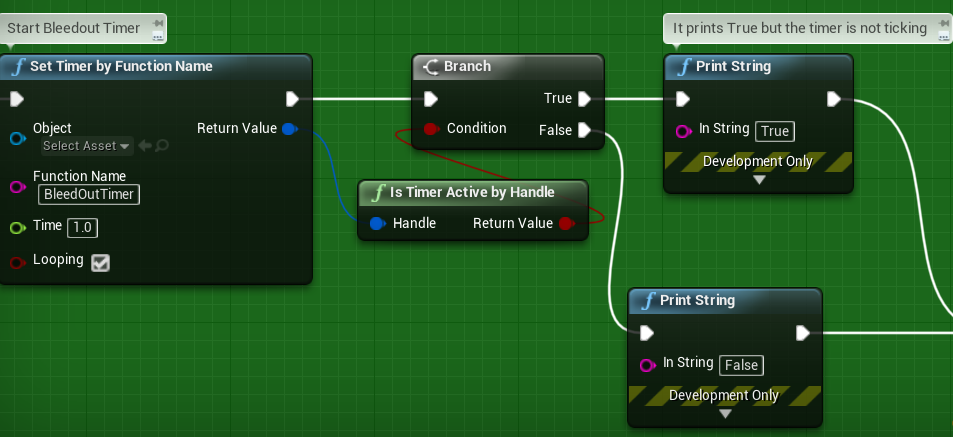
I have a strange thing happening with regards to player damage. If I kill myself with any kind of "Apply Damage", my bleedout timer never starts. Wierd thing is, this only happens for the host player, Clients can kill themselves all day and their timer always starts. Here's a screenshot: https://i.gyazo.com/223984eab08ad93d3c82a73cfd57e3e1.png https://i.gyazo.com/df6cddff10ddaa8f92af74b69953ba93.png

 weak fog
I think I've been learning this the hard way, but could anyone tell me if any of the following are correct for my mental model of the UE4 Framework Components (I worded them all pretty definitively so there wouldn't be any misinterpretation--the phrasing is not in any way an expression of confidence, lmao):
GameModeDOES things: respawn, calculate scores, verify requests (such as "Can I pick this character or has she already been chosen?")GameStateandPlayerStateare de-facto readonly; they are ultimately just the derived state fromGameModeGameStateandPlayerStatecan't call an Event Dispatcher and have it replicated properly on the clients (for, say, a UI element to listen to)- Similarly, all UI elements that want to listen to events that come server-side MUST be routed through
PlayerController - My obsession with abstraction needs to chill out bc no matter how much I want to abstract this eventing process, I can't pass delegates around in Blueprint (which my team works in primarily)
chilly mist
If a Server RPC function calls a normal not replicated function, is the latter function executing on Server only or Server & Client?
solar stirrup
void UInventoryComponent::BeginPlay()
{
    if (GetOwner()->HasAuthority())
    {
        CurrentSlots = DefaultSlots; // CurrentSlots is replicated.
    }
}
Is this the correct way to execute something on the server's instance of the component only?
@chilly mist depends who calls it
runs on the server only anyway, or is dropped if it's called by a client that doesn't own the actor
chilly mist
The server RPC runs on the server. What about the subsequent any function called in the server RPC?
solar stirrup
if they're RPCs they'll be dealt as such. If they're normal functions they'll only run on the server @chilly mist
chilly mist
Got it thanks!
 flint plaza
Hey guys. Wanted to know if pawn sensing component works fine with multiplayer games. I ask because it says "It does nothing on network clients" in its tooltip
 graceful cave
the server should be the one to handle all AI
twin juniper
Does Steam handle UPNP or anything like, that or do I need to get something extra for that?
plain bough
how do I get this node?
thin stratus
Looks a an ActionMapping Struct that is simply split
plain bough
thx
graceful cave
if i use the InitialOnly replication condition for a variable and change it later on after the initial rep, will a newly connecting client get the current value or the originally replicated value?
solar stirrup
Does anyone know if this is the correct way to check if code on a component is currently running on the server's instance and not the client's? https://discordapp.com/channels/187217643009212416/221799385611239424/579601100303237140
I guess so, but I can't really try it out right now
winged badger
yes
solar stirrup
👌 ty
I'm starting to like UE4 over Unity, although I haven't checked the 2D stuff yet
fleet raven
unreals 2d stuff is 💩
solar stirrup
heard as much lul
 past rain
Does anyone have an example on how to move actors/pawns on the server, and move them smoothly on the clients as well? I know this is taken care of behind the scenes using the CPC, But what do we do if its an actor or a pawn?
past rain
Unless you use the CPC the movement will stutter a lot
something with interpolation
from what I know
All of that is taken care of behind the scenes in the CPC
solar stirrup
If I set the value of a replicated property on the server, that has replication notification, will the linked function be called immediately on the server?
past rain
@solar stirrup Pretty sure it will be called on the client not server
solar stirrup
ty
solar stirrup
well that sucks
past rain
what are you trying to do?
past rain
Ive been actually dealing with that the past few days
Making a score board
Are you trying to update UI thats local to the player
like their health
or something like a score board?
past rain
so only hte local player knows about it?
solar stirrup
server and local player yea
solar stirrup
(i actually need to remember how to make it replicate to those two only)
past rain
blueprint or c++?
solar stirrup
C++
solar stirrup
sure
meager spade
the server doesnt need to know the slots displayed on the UI
it just needs to know how many items are in the array
solar stirrup
no, but it does know how many slots the inventory currently has
(if the server is a player, it does need to update their UI too)
meager spade
yes but you need to split that
so basically PlayerState or something holds an Array of all items the player holds in the inventory
the UI is updated via the array
 gaunt magnet
@meager spade thanks for the explanation I think I understand it now, its basically a method of cramming data together to save on memory usage am I right?
solar stirrup
oh yeah it will be, I just want to fire an event in the component
solar stirrup
so that later the UI blueprint can catch that and update itself
past rain
are you using delegates erlite?
solar stirrup
BlueprintNativeEvent
meager spade
32 bitpacked bools inside uint32 will take up 4 bytes
past rain
I dont know about 4.22 brabus, but this should still work I think https://old.reddit.com/r/unrealengine/comments/4ddxsi/building_a_dedicated_server/
reddit
Hi, after several attempts, I succeeded to build a dedicated server for UE4 4.10.4. As the info on the wiki was not working for me, I share here...
Ive had it saved for a while since I'll need it in the future
solar stirrup
@meager spade if the player is also the server, Role and RemoteRole will both be authority right?
solar stirrup
i'll just make that check for now
if it doesn't work when testing i'll work out another solution
winged badger
you don't replicate UI
client gets the inventory slot information replicated
so you already have the information
you just need to propagate it
best way being firing a delegate in the inventory system that UI subscribes to
solar stirrup
that's already what I'm doing
past rain
@solar stirrup can you describe a scenario in which you are not getting intended results?
solar stirrup
I can't test it yet
past rain
Because?
solar stirrup
I'm porting a BP only game to C++
I've started with the inventory
can't really test at this point ^^
solar stirrup
I know the UE4 way of making them
past rain
Okay, then what exactly is the issue?
solar stirrup
I was just asking some questions about replication ^^
solar stirrup
I mean I know that in theory an issue could occur at a certain place so I attempt to fix it
so far it's going good
just needed some answers to ownership related stuff
solar stirrup
ty ^^
cedar finch
Anyone ever had a timer not execute? For some reason it doesn't ever start even though these all return "True" https://i.gyazo.com/ef2593722ef77cfac77af40fa5f29ae2.png
 thin stratus
Make sure you aren't setting that timer on tick or more often at least :P
 thin stratus
And where are you setting the timer?
 thin stratus
Why an Reliable Server RPC in a Server only event?
Peeps, you gotta understand replication before doing such stuff
Timer looks fine though
"ResetDeathCheck" is also redundant
You already have a boolean you set to true
Just check that it's false
If False, allow getting downed and set it to true and to reset you just set it back to false
cedar finch
I don't follow. I have to call the reset event when a player gets revived right?
meager spade
why>?
thin stratus
- The "HealthRegen" RPC is totally not needed. Make it a normal custom event. AnyDamage has to be called on the Server anyway, so you are on the Server. Why RPCing to the Server AGAIN?
- I'm pretty sure "ResetDeathCheck" is supposed to NOT be called by clients, WHY is that a ServerRPC? Make sure to call it from the Server, otherwise have fun with Cheaters.
- Why a DoOnce if you already have a Boolean (bIsDowned) that you can use? "if(Health <= 0.f AND bIsDowned == false)" is already enough.
- Resetting the DeathState is then setting bIsDowned back to false and setting Health back to MaxHealth
cedar finch
Ok I understand. The HealthRegen was from months ago I see my mistake there. The DoOnce was just my paranoia with trying to figure out why the Timer wouldn't start sometimes for the Server player when he damaged himself. I thought maybe it was being called several times or something so I just wanted to add another check. But your right, the isDowned variable can handle that. I still can't figure out why the timer wont run. I'll fix the do once and then see what happens
Here's What I'm struggling with. The first Gif the Server takes damage from the client and bleeds out. The second Gif the Server shoots himself with a rocket launcher and doesn't bleed out. But this happens with any kind of "Apply Damage" https://i.gyazo.com/024a6a41bf33bf350cde7d35ad80e6fb.gif https://i.gyazo.com/3bad84d246a4696c50d7c6dd385068a4.gif


@thin stratus @meager spade Thanks for helping me clean up my RPC and damage event but what in the world would cause my timer to not work for the Server player? I'm scratching my head on this one
thin stratus
Check how often your AnyDamage is called
Also check what you are doing different with the aoe damage
cedar finch
I put a print line in the AnyDamage and it only prints once.
I figured it out. I had left in a Clear Timer event inside a function. Ooops. Now it works. 😃 Thank you guys for your help.
 gloomy sedge
Hey guys, kind of a simple one here, But having problem with my sprinting working on dedi server.
The character jitters when sprinting
chrome bay
You need to set the max speed locally as well, otherwise the local character will be predicting movement incorrectly
chrome bay
yep
jolly siren
Does 15 seconds sound too low for ConnectionTimeout and InitialConnectionTimeout ?
 spring swift
I need some help with dedicated servers. I've been making a multiplayer game for the past few months and I've ran into some Trouble with dedicated servers, pretty much to sum this all up, idk what I'm doing, I've created a advance session with the box dedicated on with all the steam stuff set up "i think" but when i start the game on dedicated server it runs a "is dedicated True?" thing and if it is dedicated it says yes and if not it says no, and so it normally says yes when i start the level straight up, but if i go to my main menu level and start the advance session it doesn't dedicated it 😦 I'm using UE4.19 and a plugin called advance sessions i think its name is.
winged badger
i am assuming your use of dedicated server is limited to PIE?
gloomy sedge
Just counted to 15 in my head and it feeling rather fast for a timeout @jolly siren
maybe bump it up just a littl
winged badger
default is 60
jolly siren
right and that seems incredibly high to me
winged badger
it is when you're debugging
different perspective
more DCs and you have a pretty good idea how it will end
spring swift
@winged badger It could be, when i try it on the Standalone game one it says im playing "Space War" on steam which shows me the game.ini is working, but the dedicated server bit is always tricky
winged badger
did you go through the hoops of building it from source?
jolly siren
I guess I can play Fortnite and pull my ethernet cable to figure out what theirs is set at
spring swift
sorta
i have been semi following a tutorial on YT that shows you how to apply Steam to your game
gloomy sedge
I Woudnt Semi Follow/Watch tutorials/series, i was watching a 2 part series on gamelift, took me about 3 hours to complete a 40 minutes video because so much goes on
winged badger
not steam
engine installed via epic launcher can't build dedicated server binaries
spring swift
ah no i haven't then, I've only added a few lines of C++ that connects it all up too steam, so yeah havent done that 😃
winged badger
plenty of tutorials on that
spring swift
ill check some out
jolly siren
Hm so on Fortnite I get booted from the game after 90 seconds of no internet. But I can only reconnect and keep playing after < 60 seconds of no internet.
Anyone know where the extra 30 seconds is coming from?
winged badger
does it write logs, fortnite?
jolly siren
ah yes it does
LogNet: NetworkFailure: ConnectionTimeout, Error: 'UNetConnection::Tick: Connection TIMED OUT. Closing connection.. Elapsed: 89.98, Real: 90.00, Good: 90.00, DriverTime: 304.70, Threshold: 90.00
winged badger
the connection is unlikely to recover after 15 already
winged badger
i'd give more time for initial timout tho
gleaming vector
in that case, it can recover
grizzled stirrup
@jolly siren Can't thank you enough for the tip on setting PlayerCameraManager->bUseClientSideCameraUpdates = false, you have genuinely reduced bandwidth usage in my game by 20+ kb/s per client
Do you know if it is doing something useful by default or if it's just sucking up bandwidth on every new project?
I haven't noticed any negative or different changes since disabling it
Other than a HUGELY improved amount of bandwidth
Maybe should be pinned as I haven't heard about it other than here and it appears to scale bandwidth usage proportionally with client FPS (due to that RPC being sent every frame)- seems crazy it's true by default unless it's doing something important
As investigated a few days ago, it seems client pitch and yaw are replicated elsewhere which seems to be what the camera updates are trying to do also, except in a different place and on tick
jolly siren
No it isn't needed, definitely turn it off. The server has to use a little more cpu to calculate them instead of being sent them
And no problem, glad I could help
grizzled stirrup
Got it, thanks again. Literally a lifesaver
Was considering having to limit the clients and client FPS to avoid the bandwidth issues!
jolly siren
❤
thin stratus
bUseClientSideCameraUpdates does exactly what it says, it lets the Client send it's camera location and rotation to the Server.
We use it to make sure that Server and Clients have the same Camera location, cause it's based on Input after all.
It leads to bShouldSendClientSideCameraUpdate being true and that will cause the PlayerCameraManager to send a Server RPC with the rebased camera location and a compressed rotation
 urban dew
Currently have working P2P Multiplayer, how "hard" is it to get a server request system from a dedicated server, such as league of legends? where servers are generated when there are enough players
weak fog
kind of a high level architecture question, but in multiplayer games with a lobby, is it considered best practice to have a whole GameMode (+ all Framework Components) for just the lobby, and then a whole GameMode (+ all Framework Components) for the game itself? My instinct says yes, but would this require a lot of complicated payload sending? I'm thinking about all the state we derived via the lobby that then has to come over into the main GameMode
urban dew
as far as I've seen that's been the general practice, seperate game modes/components etc.
my experience is fairly limited however.
weak fog
that's definitely what I want to do instinctively. there's a ton of logic that goes into just a lobby
also, if we make a new game mode, it will likely use the same lobby
urban dew
I've got no experience when it starts coming to dedicated servers and such, but generally, all important information can be transferred across with variables
so i can'
can't see why you'd not do them seperately
weak fog
so long as there's a hand off and I can send a payload, I should be good
 fossil spoke
Yes typically you would separate those into their own GameModes.
Players can send "Options" that can be parsed during Login on the GameMode.
That would be your "payload"
@urban dew Checkout AWS GameLift
It is a backend Server management service.
Also GameSparks is another and PlayFab as well if im not mistaken.
weak fog
Yep, we use GameSparks
fossil spoke
Im currently in the process of implementing GameLift for a client.
weak fog
I'm not our GameSparks guy but I have used it to help create our game launcher, and poked around--I know my team likes it a lot
RE: Changing Gamemodes, thanks a lot. I knew this had to be the way to go. Is there something I could search to learn about handing off those options?
fossil spoke
UGameplayStatics::OpenLevel(GetWorld(), ServerAddressForConnection, true, FinalOptions);
OpenLevel for example takes in Options which are just a string that can be parsed
const FString PlayerSessionIDOption = FString::Printf(TEXT("%s=%s"), *PlayerOptions::OPTION_GameLiftPlayerSessionID, *PlayerSession.PlayerSessionID);
Thats a "option"
weak fog
ahh i see
fossil spoke
static const FString OPTION_GameLiftPlayerSessionID = "GameLiftPlayerSessionID";
That would be the "key" for the option
and the value is whatever you want to set it to.
const FString IncomingPlayerSessionID = UGameplayStatics::ParseOption(Options, PlayerOptions::OPTION_GameLiftPlayerSessionID);
Then in AGameModeBase::Login you have access to the Options
Which you can parse via the UGameplayStatics::ParseOption function
fossil spoke
👍
urban dew
@fossil spoke you said you're implementing gamelift for a client, what does this tend to cost to hire someone to implement
thin stratus
Whatever the person you hire takes as an hourly rate * the hours it takes to implement your scope of work
fossil spoke
^^
 red sand
How to make system decide team for all the players in lobby without player choosing team himself?
 real yacht
depends on your system, but you can assign red/blue team flag when player joins the game, for example.
red sand
@real yacht so do I just add enum variable for team in character or what?
past rain
@red sand How exactly would the character class know what team to be on?
I'd recommend doing it in PlayerState. the game mode is notified when a player joins the game
red sand
Gotcha
past rain
Specifically in the function PostInitializeComponents
which you can override in the player state class
red sand
Which class gets the data of player from server
Do i get that in player state as well or what?
past rain
What kind of data?
red sand
for example: When you play game, you get rank, username, playername, userid and stuff
or when someone views ur profile
all ur info is there
past rain
all player specific info should be set in the player state
red sand
gotcha
past rain
but
Like, all those functions and variables should be in the playerstate
but you might have to actually call and assign them in the game mode
Like for example in the PostLogin function
red sand
got it
grizzled stirrup
bReplicates = true vs SetReplicates(true)
I see that SetReplicates does a lot more than the bool (including setting it), but are there any times where you'd use one or the other?
I see both used often
bReplicates much more than SetReplicates()
For example in ShooterGame: ```
SetRemoteRoleForBackwardsCompat(ROLE_SimulatedProxy);
bReplicates = true;
I notice that SetReplicates() does a lot of Role stuff that also appears to be done in that SetRemoteRoleForBackwardsCompat function in ShooterGame
 wary path
Did someone succeed cross compiling a Linux dedicated server with GameLift on Windows? @fossil spoke maybe?
winged badger
@grizzled stirrup if you use SetReplicates(true); in a constructor though
it will break your Actor
no Roles have been assigned at that point
grizzled stirrup
Oh damn, it's in the Tom looman course
Will keep it at just bReplicates = true for now then
Thanks
twin vault
Does anyone remember if theres any problem with SteamOSS on 4.20? same code works fine on 4.19 but on 4.20 cant join sessions...
saw some forum posts to include bUseBuildIdOverride=true and BuildIdOverride=1 but that didnt work
GetResolvedConnectString is returning false
twin juniper
I have a function on my gamemode which gets called after 5 points for example and when the event fires a actor should change its material how would that work? gamemode->calls actor function->calls client rpc multicast? or is there a better way?
solar stirrup
sounds good @twin juniper
What would be the best way to sort a replicated array, which happens to be an array derived from FFastArraySerializer?
If I sort it, I'd have to make the entire array dirty every time right?
solar stirrup
Scratch that, a more urgent problem
Are pointers in FFastArraySerializerItems replicated?
Okaaaay looks like you can't replicate pointers to a struct
time to get creative
solar stirrup
void FItemSlot::PostReplicatedAdd(const FFastInventoryArray& InArraySerializer)
{
    UpdateReferences(InArraySerializer);
}

void FItemSlot::PostReplicatedChange(const FFastInventoryArray& InArraySerializer)
{
    UpdateReferences(InArraySerializer);
}

void FItemSlot::UpdateReferences(const FFastInventoryArray& InventoryArray)
{
    if (ItemId == NO_ITEM_ID) return;

    if (!ItemManager)
    {
        UInventoryComponent* Component = InventoryArray.GetParentInventory();

        if (Component)
        {
            ItemManager = Component->GetItemManager();
            ItemRef = ItemManager->GetItemFromId(ItemId);
        }
    }
}
Is this good or is it stupid?
thin stratus
Hm, are you replicating the ItemID along that?
solar stirrup
Yes
thin stratus
Why not using replicating a simple StructArray?
You shouldn't need/use pointers to structs anyway
If at all smart pointers
solar stirrup
I was told that a fast array serializer was best for structs
thin stratus
Sure, but you said you struggle replicating pointers to structs
solar stirrup
I don't really need the pointer since I can grab the reference later but it's for ease of use
thin stratus
Arrays with Pointers are a problem anyway, even if you have an array of Actor Pointers
Technically you can sort the Array on the Server and send an updated array once
You can easily sort a placeholder array and then set the normal array with that to trigger the replication
solar stirrup
I was going to do that
But it would seem that fast array serialization doesn't guarantee order
thin stratus
I haven't used that yet
I know that PostReplicatedChange should give you the TArrayView of the changed indices
And that it's called when everything is replicated
Just not sure how that is relevant to your problem.
Technically all elements that you replicate to the client should be UI data
And also only data that is dynamic
Static stuff can be done via a simple dataTable in the back
solar stirrup
That's done already, the pointer points to an item in a data table
So now I just use PostReplicatedX to get the item from the data table using my item manager
thin stratus
So that's the PostReplicated functions of an element in an FFastArray?
Not the PostReplicated functions OF the FFastArray?
thin stratus
I know that an FFastArraySerializer exists
But as said, I haven't touched that stuff yet. I thought you were using these functions for the array, not for the element.
I guess for the element they are fine
solar stirrup
Aight thanks, sorry for the confusion ^^
thin stratus
All good, if that stuff works for you I would keep it for now
solar stirrup
It'll be a while until I can test it, currently converting a BP only project to C++, 2 years into development ;-;
thin stratus
Welp, make sure to keep stuff in BP that doesn't need to be in C++
No need to make it a c++ only project
solar stirrup
Yeah that's planned
red musk
When I load into a level directly from editor everything works fine, but when I load into it from servertravel through regular methods, the listen server doesn't have any input - anyone know the difference between those two paths that could be resulting in the difference in behavior?
twin vault
So my problem was because Session setting's BuildUniqueId is defaulted to 0 while GetBuildUniqueId is a build number, am i expected to set SessionSettings.BuildUniqueId manually? i didnt see that mentioned anywhere
urban dew
is there any obvious reason this wouldnt work
doesnt seem to be changing the value ingame
unsure of why
thin stratus
Is there a reason you are sending an RPC while the variable is already replicated?
Also is that actor marked as replicated?
What is executed before that multicast?
fossil spoke
@wary path No sorry. We dont use Linux so havent tried. Ask me again in a Month lol
urban dew
having some weird issues in my multiplayer testing, whoever hosts the server does everything properly, whoever is in the session, can't spawn anything, none of their changes register. I believe I've replicated everything properly, is this an issue with the server or the replication?
 dense ocean
Hey guys, I've been working on networking and hosted a standalone game with 2 clients to test hosting and joining. I was able to host and join, then switched over to Advanced Sessions for steam, and now when i run this script to find a game no servers pop up in my widget i made to test it.
It could be either a widget error, or an error with the session, im a little lost and would appreciate any ideas
meager spade
why are you handling this inside a widget?
red musk
When I activate touch interface to turn on a virtual stick, it only turns it on pure clients, the listen server doesn't get one, anyone know why that would be?
 limber mortar
Hey everyone
When testing the dedicated server option, is it best to use Standalone game with it, versus in viewport, to best emulate the conditions of what would happen?
I get FPS differences in the modes, which is why I want the most accurate one
My game is pretty much done I just need to work out the kinks. I don't want to do a bunch of testing using dedicated server + standalone mode for example, and then later on down the road figure out or be told that it was a bad idea. Like standalone isn't the best option to test dedicated server, or similar. Does that make sense?
weak fog
In my experience, the nature of the testing is what warrants which mode to test in. If I'm simply testing some replication or something easily confirmable like that, then viewport is fine. If I want to test fine tuned aim mechanics, then I probably want it to be as close to real as possible.
I actually have a similar question:
When using ServerTravel with SeamlessTravel enabled and running dedicated server, does this not work in viewport mode? It seems to be crashing my clients consistently, but then running in standalone does not.
 agile lotus
how do you properly use launch character online
I get alot of jitter/desync when the characters are launched (only appears client side)
weak fog
you mean a physical launch?
fossil spoke
Dont forget to call it on both the Server and Client.
agile lotus
I've been multicasting it
fossil spoke
Actor Location replication should handle it for Simulating Clients, you want to call it locally to make sure its visually synced for the Owning Client.
limber mortar
When I tested standalone option, and dedicated server checked
it doesn't perform the same as my server
When I exit a vehicle on my server widgets appear properly
when I do standalone engine testing on my desktop, the widgets appear for the blink of an eye then disappear
exiting a vehicle
I feel like the standalone option isn't giving me the same experience as when I play the packaged build, and connect my azure server
My client connecting to the dedicated server sees the widget on vehicle exit
Testing standalone in UE4
Testing in viewport works:
Maybe there is something I just don't understand about testing between standalone, viewport, and the modes :/
makes troubleshooting a pain in the %#%
urban dew
having some weird issues in my multiplayer testing, whoever hosts the server does everything properly, whoever is in the session, can't spawn anything, none of their changes register. I believe I've replicated everything properly, is this an issue with the server or the replication?
limber mortar
Based off how you described it, it sounds like replication. I assume when you set number of players to 2, the second window that pops up had the same problem?
Showing some blueprints or code for a specific issue can help too
urban dew
you've got this for example
it all works for the host
and with the 2nd player
it does it, however it doesn't replicate
neverminds seemed to of fixed it
2nd player seems to lag a lot though
really not sure why
 wanton pebble
hey, i was wondering if any of you know where i can find the documentation for the steam sdk
i'd like to make a steam host/join setup
thin stratus
@urban dew Why do you have two reliable Multicasts after each other?
- PCRef and such things aren't valid on the other Clients
Why aren't ships spawned by the Server and marked replicated?
red sand
Anyone knows how to add epic online services to your project?
 bitter oriole
Get the SDK
bitter oriole
There is no specific UE4 support at all
Either BP or C++
It's just a regular C++ SDK
bitter oriole
It's not going to be anywhere that simple
If you're not an experienced C++ programmer, leave it
Right now the EOS SDK only does analytics, and there are actual engine plugins for that
If you want the EOS for stuff like matchmaking or achievements, wait a year, and Epic will probably add UE4 support
red sand
ok
red sand
@bitter oriole are you around, I have 1 small question
bitter oriole
You don't need me specifically to answer, just ask 😛
red sand
I wanna know when to check if player is logged in with steam: On PostLogin or Begin Play?
or is there any other event?
bitter oriole
No idea tbh
winged badger
steam can do its own authorization
and if the steamapi.dll is cracked, whatever you check will return true
urban dew
@thin stratus whats wrong with two reliable multicasts?
what would the correct order be for this?
meager spade
@urban dew why are your multicasting the ship spawns?
the ships should be spawned on server and set to replicated
then they will replicate to all clients
thin stratus
@urban dew You are basically doing things twice?
Multicast would already execute on everyone if called by the Server
And then you call another Multicast from that?
Make 0 sense
And Spawning of something shouldn't happen via Multicast any way
urban dew
has anyone here had experience with non hosts getting extreme lag?
limber mortar
Any ideas on my different test results between standalone and in viewport?
My thought is since viewport produces the same scenario as my dedicated server, I need to be testing/using that instead of standalone
limber mortar
icejaff, I've had problems where my clients appeared to lag due to replication problems
I had to remove and simplify a lot of my switches, multicast functions, et cetera
I had too many calls, and calls in unnecessary places
 halcyon abyss
hey guys I'm trying to add visual smoothing to client correction after replaying the non-acked moves
but I'm confused, why does SmoothCorrection only run on listen server?
manic pine
it's the only one that needs it
client corrections on the client don't have any smoothing
listenserver does interpolation for remote autonomous chars, so when it plays an actual move from the client it needs to 'correct' the interpolation
polar wing
BTW I figured out my UCharacterComponent issues haha. Can't explain why the issue occurred, but I gave it my best guess and it seemed to solve the problem.
 tribal shell
Hey everyone,
my projectil replication is working but not the direction of the bullets.
Where can I fix that?
basicly the character replication isnt working if i look up or down
meager spade
dedicated server?
fleet raven
actually the view pitch is replicated by default
tribal shell
does anybody has a tutorial for "event hit replication"
 elfin veldt
Not sure if this is just impossible or if I'm being blind; but I'm trying to create a lock-on system for a multiplayer game where both players are using the same character blueprint, there are no npc, that being said I can't seem to find a way to do this that doesn't require me to essentially create a second blueprint. Am I just being unreasonable? Should I just make a child blueprint and cast to that?
twin juniper
@elfin veldt what exactly are u having trouble with?
meager spade
anyone had issues loosing attached meshes on clients ?
twin juniper
Like mid game, or in the blueprint editor after compiling?
meager spade
when playing certain montages
i loose any runtime added meshes
but meshes added in the blueprint stay attached
they just stay where the montage last played
twin juniper
I dunno fam, you're always the one helping people, seeing you need help is almost surreal
elfin veldt
@twin juniper I'm uh, pretty much just trying to center my player camera on the other player. I had hoped to accomplish this with both players using one character for both players, I'm just not sure how to go about it
from what I understand I need to get player 2's location but can't without a second blueprint? I have no clue how to if so as every video I've found requires me to cast to an entirely separate blueprint and I've been told that the player index is essentially useless outside of LAN
Tl;dr, I'm just as lost as you my guy
winged badger
add a pointer (weak, if c++) to your PlayerPawn in your PlayerState
make it replicated
set it on server when the Character is possessed
and then use PlayerStates to access the PlayerPawn references
elfin veldt
@winged badger thank you for the reply, but I also neglected to mention that I'm kinda new so 2 of those four line confuse me
namely the bits about "playerpawn" and "playerstate"
winged badger
your GameState has a PlayerArray
it contains a PlayerState for each player
you can't access other player controllers from client
so you can't use them to find other players characters
PlayerPawn is mostly a PlayerCharacter, but it doesn't have to be a Character
*is usually
if your custom PlayerState class has a pointer to your Pawn/Character, you can iterate through GS PlayerArray, cast it to your custom PS, and access PlayerPawns/Characters that way
the other way would be a TActorIterator, or GetAllActorsOfClass in BP
where you find all instances of your player and call IsPlayerControlled to check if its player
pointer to character in PS is handy for a lot of things tho, so i recommend that approach not only for being more performant
elfin veldt
Hm, I'll check that out, thanks for the help.
 fluid flower
@winged badger the playerstate already has a pointer to the pawn since a few versions ago, I had missed it as well for a while 😃
fluid flower
not sure which version it got introduced in, perhaps 4.19
/** The pawn that is controlled by by this player state. /
UPROPERTY(BlueprintReadOnly, Category=PlayerState, meta=(AllowPrivateAccess="true"))
APawn PawnPrivate;
winged badger
love those weird comments
void AGameMode::Tick(float DeltaSeconds)
{
    Super::Tick(DeltaSeconds);

    if (GetMatchState() == MatchState::WaitingToStart)
    {
        // Check to see if we should start the match
        if (ReadyToStartMatch())
        {
            UE_LOG(LogGameMode, Log, TEXT("GameMode returned ReadyToStartMatch"));
            StartMatch();
        }
    }
    if (GetMatchState() == MatchState::InProgress)
    {
        // Check to see if we should start the match
        if (ReadyToEndMatch())
        {
            UE_LOG(LogGameMode, Log, TEXT("GameMode returned ReadyToEndMatch"));
            EndMatch();
        }
    }
}
lol
cedar finch
I got a question. So I made a revive system that works fine. The way I did it was when a player goes down I spawn a "revive trigger" actor and attach it to the downed player. I then use the Overlap event in the revive trigger to set a few variables on the overlapped player character that's reviving. Such as "ShowHint" for telling his hud to show the "Press F to revive player" as well as some key variables such as "DownedPlayer" which he needs to know in order to know who to revive. So it works fine, but I was going to try and simplify it a bit by adding a revive trigger component inside the playercharacter instead of spawning and deleting a separate actor. My problem is that the Overlap event for this new trigger component wont set the variables for the overlapped actor like the other one did. Is there something I'm missing? Clients can't set the variables for the server player when they overlap his trigger. What's the difference in a separate actor with a trigger vs a player character with a trigger? Are their overlap events replicated differently?
limber mortar
couldn't tell ya without lookin at the 2 sets of blueprints, if you're not doing blueprints, I'd let someone else answer as my coding exp is limited
Limited as in try not to do it 😉
Man, I feel so close to finishing my game. I think I am down to using the profiler to troubleshoot the game thread and performance, and adding volume controls
I want to recruit people, lol I decided to do my testing using the viewport for dedicated server
as other options don't act the same when I connect to my actual dedicated server
if I keep my tick time under 30 fps all game, I am golden
but that is hard with what I am doing
I'm generating dynamic fires across my 200k unit map all game
mucho particle + actor instances
 merry pebble
Okay so this works, but the main client, when he runs. All the other characters cant see the running animations... But when they run I can see it on the main client, or host player
Idk, i've been trying to teach myself how to do this multiplayer stuff... Did i even do it right?
oh no
Let me go do that
limber mortar
so it is prob a replication issue
merry pebble
Oh ight
limber mortar
So your first player shows you the server stuff
and its not being replicated right to the clients most likely. I'm a noob but let me look
merry pebble
lol
Hold up
It works with the Host not the clients
Okay
?
So no multicast?
So i do what?
limber mortar
try putting switch has authority after input to run
and skip the calling of the functions after the branch
second branch
merry pebble
But on remote it does
limber mortar
oh wait, animation not movement
sorry
thought it wasn't moving on the clients
like character on same spot on the ground
ugh I am a goof
merry pebble
Alirght
So im trying to get my characters anim to replicate to all the other players...
This isn't working... How do it do this?
Anyone able to help?
limber mortar
people could be afk, I had issues getting a response to a question earlier too
or in another channel
merry pebble
Ah lol
merry pebble
Listen servers aren't dedicated @woeful anvil
I believe, you start session then you can open any level you'd like
I got the flipped
limber mortar
I use console commands to change levels on my dedicated server
its run on server only (Switch has authority, or function type.)
Novato is the level name
 copper portal
@woeful anvil only for listen
thin stratus
@harsh lodge The IOS Subsystem has Session stuff implemented, are you using that or are you using the NullSubsystem?
 lean river
hey Guys, is that normal connected client have two gamestate after server did a seamless travel?
i mean getallactorsofclass returns two gamestate however seems the first one is created when transition map loaded up and do nothing
winged badger
there might be 2 of them at the same time if the GS class changed between maps
one waiting for GC to clean it up
lean river
yeah i had same idea, but seems old gs lives for really long time..
but atleast i figured out it is only on client 😄 and not on server ^^
 harsh lodge
@thin stratus Null subsystem. Find sessions not result in anything.
thin stratus
And you are testing in LAN?
The GameState is actually not added to the SeamlessTravel Actors when going from Transition Map to the new Map. @winged badger @lean river
It is however added to the list when going from Old to Transition
 rose egret
will UE4 automatically copy the UPROPERTIES from the first PlayerState to second PlayerState when I do a seamless travel
lean river
nop im using oculus subsystem.
thin stratus
Means if it's the same class it will just survive, if the Transition one has a different one it might recreate it
@rose egret No, you have to utilize CopyProperties and OverrideWith accordingly
winged badger
transition map doesn't trigger any class instancing iirc
thin stratus
(functions of APlayerState
winged badger
it doesn't have the bFinalDestination = true
lean river
transition map doesnt have anything so far, just default ue4 gamemode, gamestates..
but somehow still creating one of our gamestate class
thin stratus
Yeah last time I looked into it it persisted my GS/GM to Transition map and then got rid of it on the second travel cause it excludes them by default
thin stratus
From A to Transition yes
Not from Transition to B
I literally looked at that last week cause I also thought my GM should survive, but it's filtered.
winged badger
can't say i recall what happens when the GM/GS class is the same vs. when it isn't
thin stratus
T to B, doesn't matter
The list of actors that should persist doesn't even have the GM at that point
So you could see two instances back from A to T somehow, even though that should keep the same classes if you aren't doing anything special
lean river
yup but this is why the situation is weird, because ill see two gs after T to B
relevant log

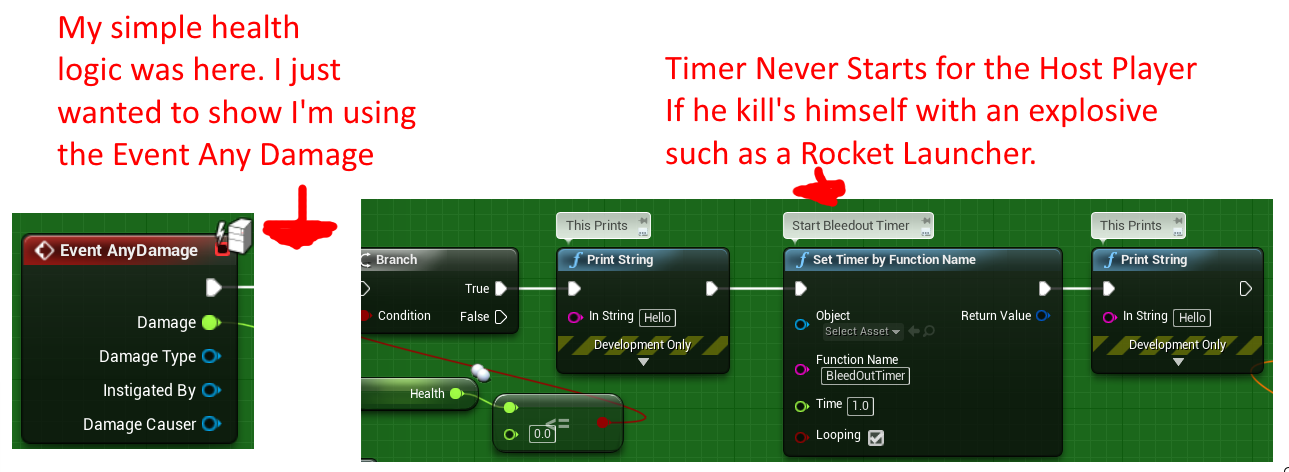
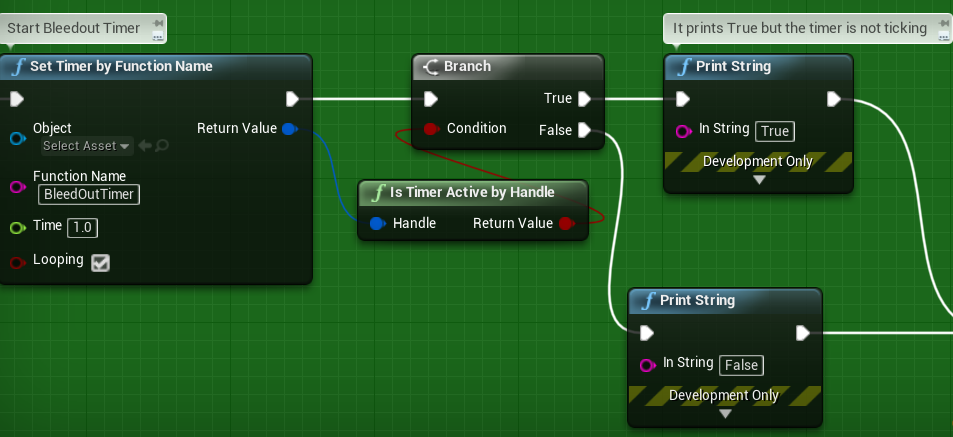
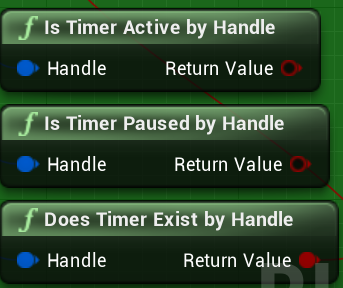
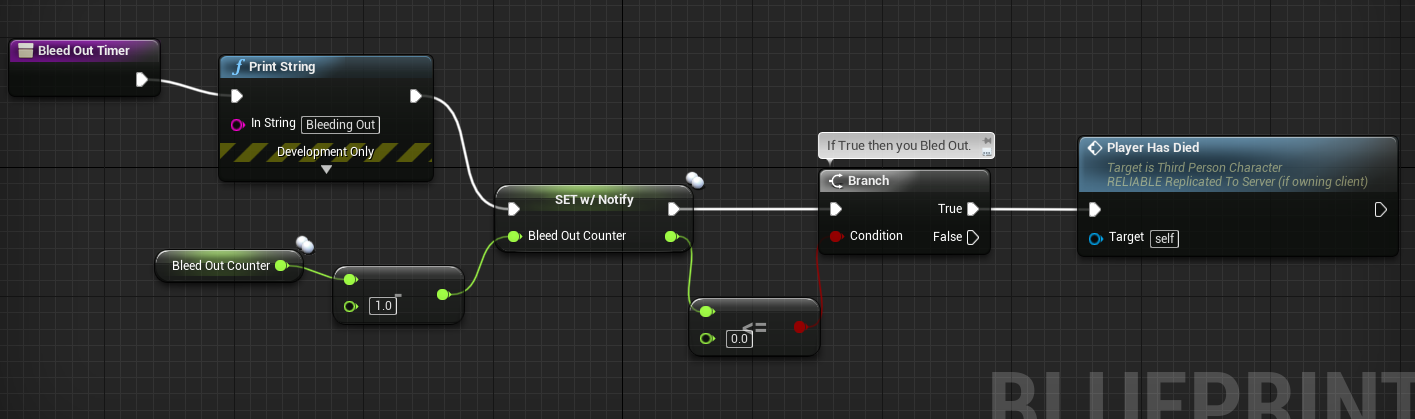

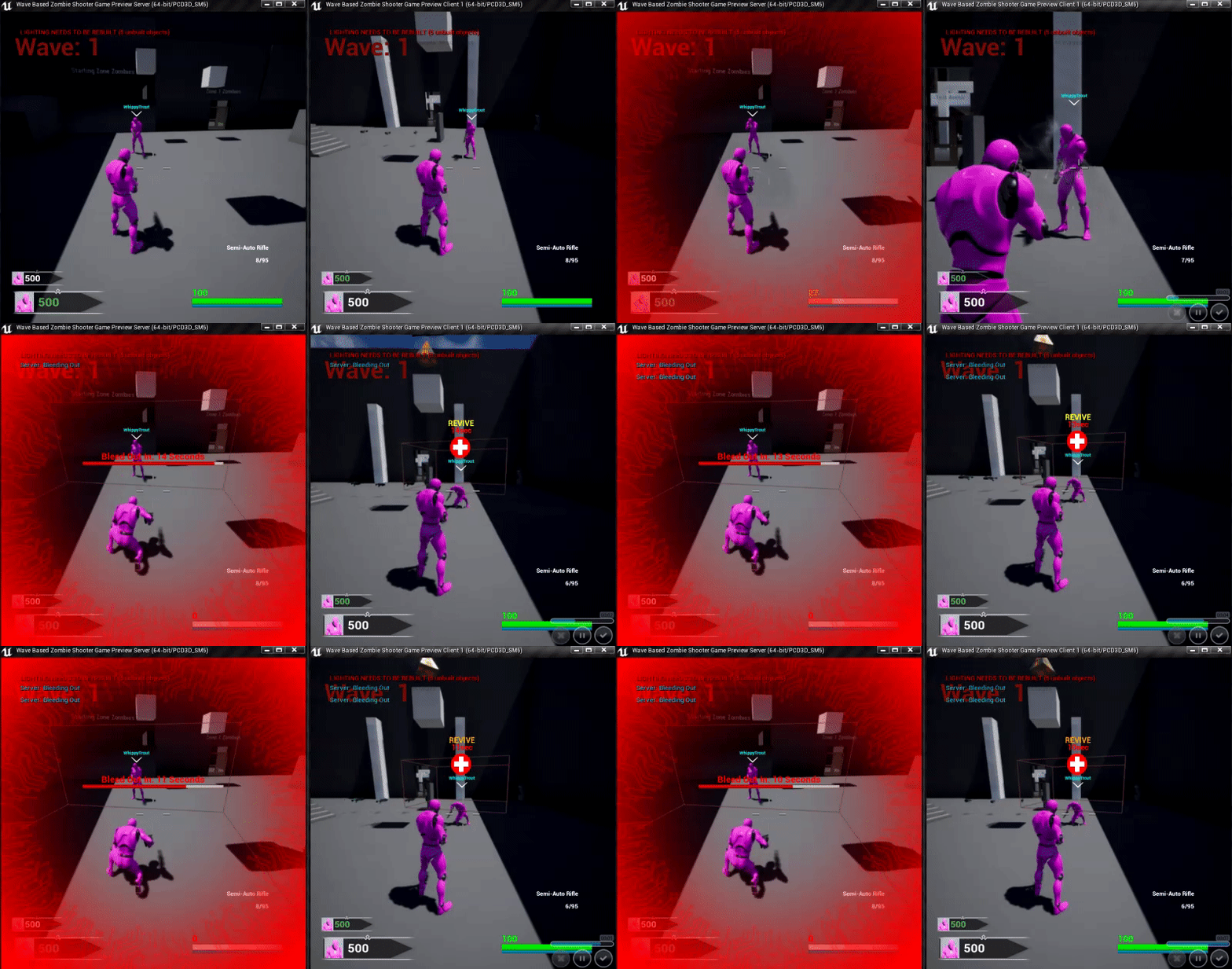
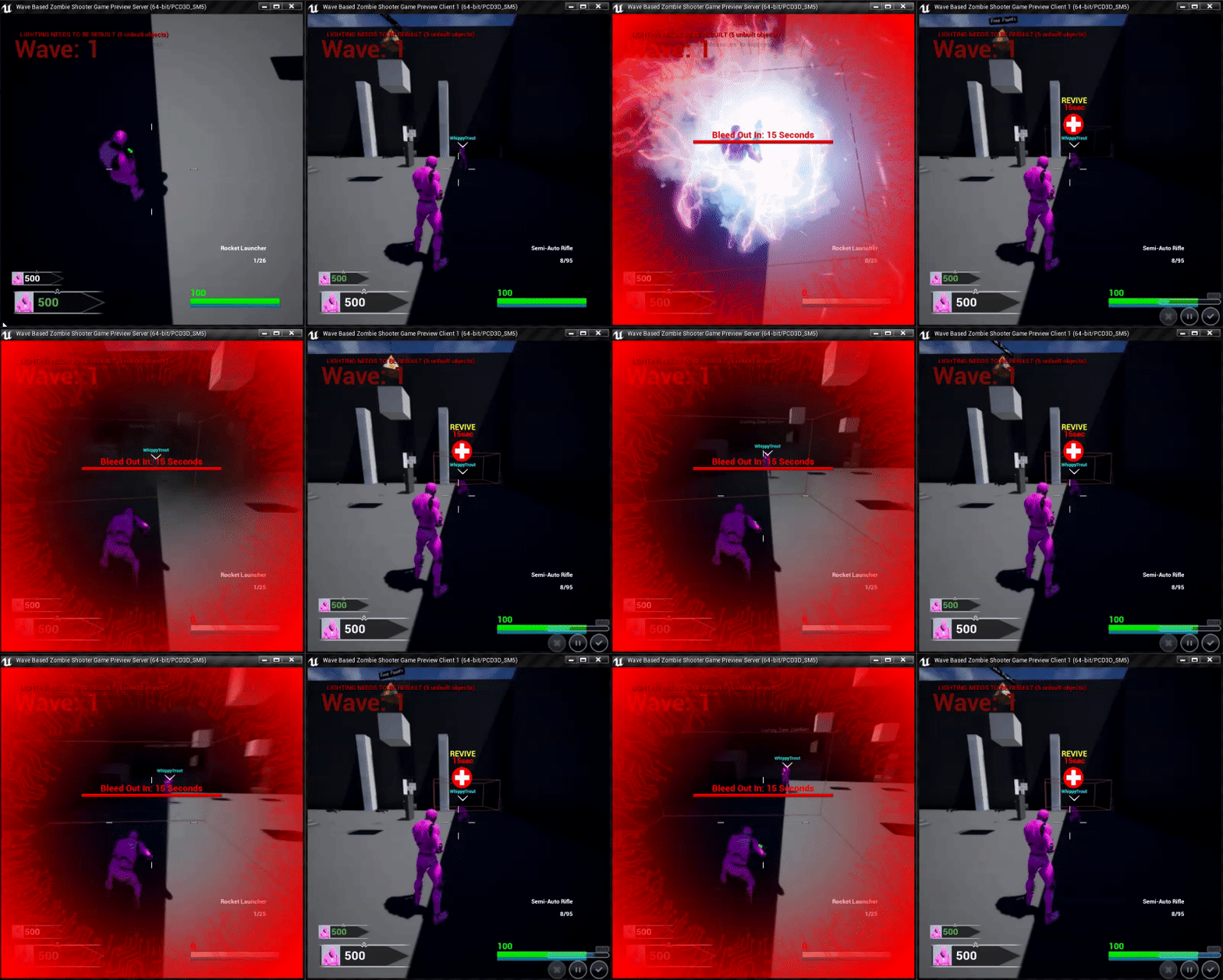 thin stratus
How fast are you traveling?
lean river
like < 1 sec
thin stratus
Cause this could just be the one from A/T that is just hanging in memory waiting for clean up
Wait another 30-60 seconds and check again
It should go away
 karmic briar
hi rn im my team currently wanna start building our mmo server we wanna ask
so we got information that ue4 server isnt build to support mmo so should we build a custom one from ground up or we take the existing one and change it entirely
if we go with route two which part of ue4 handle the networking
bitter oriole
All of it
winged badger
look into SpatialOS
thin stratus
Look into everything that is not the default DedicatedServer of UE4 :D
karmic briar
unfortunately we probably wont use spatial since they mostly developed from our point of view for unity
bitter oriole
Building your own server tech is extremely hard and extremely long, many years of work for great teams of expert programmers. Don't look at that if you're not a network engineer.
thin stratus
Spatial has a full working UE4 project
winged badger
Spatial no longer works with Unity because of licencing, last i heard
karmic briar
i have 2 networking engineer on my team and they have 5 years of experience building the server
thin stratus
Yop, SpatialOS with UE4 is actually quite okay
Unity is the one I wouldn't touch it with
 split gust
because of that license thing that happened not long ago?
bitter oriole
Yup
karmic briar
so any of u guys worked with spatial ?i tried set it up before and the guy from spatial really didnt tell us much for the pricing we need to sign contract and such
bitter oriole
Yeah that's the deal with Spatial
If you're doing a MMO you're swimming in cash already
winged badger
or shouldn't be doing a MMO 😄
karmic briar
well i do have some to build core viable product(as of rn most of the stuff is 65% ready) and rn we wanna start build the server
thin stratus
Kinda normal to sign Contract/NDA before discussing $$
karmic briar
so thats why we wanna ask for you guys opinion on it
thin stratus
All up to you. We can only tell you to either look into SpatialOS or anything else that is not the Default DedicatedServer
karmic briar
yeah
thin stratus
If you have the money and the team/skill to create your own server or use SpatialOS or similar, go for it
Other than that, there isn't much to gain from here
split gust
SpatialOS looks like THE middleware that can make small MMOs possible to small teams
karmic briar
we could go with building a custom one but we lack engineer or we could just improve the existing one but some guy told me thats not a good ide
idea*
thin stratus
The existing one is not meant to work for something like an MMO
They are build around games that either are match based (UT, Fortnite) or only need one at a time (think Surival Games)
I wouldn't even know where to begin with adjusting the existing one for MMOs
SpatialOS would probably be the way to go for me too
bitter oriole
I hate saying this, but if you're a small team, I think it's a terrible idea to attempt MMOs, if only because you can't afford the massive marketing required to have a playerbase going.
karmic briar
i wouldnt say my team is small but we around 20 as of now and most of the rpg aspect is 65% done and rn we tryna figure out the MMO part
we could go with crowdfunding but we dont have a core viable product ready yet
bitter oriole
If you're serious about getting funding etc, go for SpatialOS
split gust
you should consider a GW1 "MMO" format
karmic briar
okay i'll keep spatial
split gust
real MMO is indeed kind of hard
karmic briar
GW1 as in guild wars ?
split gust
yes
karmic briar
okay i'll look into it
split gust
that one should be buildable on the normal multiplayer tech mostly
bitter oriole
Have a plan for your game to work with 3 online players peak, too, since that's a very likely prospect on PC.
split gust
but it's not a real MMO as such, you won't have MANY players interacting
winged badger
yeah, everything is split into small(ish) instances
thin stratus
Man I liked GW1
winged badger
me too
karmic briar
rn using the ue4 server from our last testing we have around 40 stable and max 80 with 30fps
urban dew
is spatial os essentially just a hosting service? it'd work on fps's and all aswell?
winged badger
Spatial did have someone on this discord