#multiplayer
1 messages · Page 463 of 1
 pallid mesa
 thin stratus
They actually just delete it and create a new one
thin stratus
Yeah I already looked through that
pallid mesa
and apparently that makes possible gamemode discovery. IE: change TDM to DM
thin stratus
If they can't find a keptactor of class GameModeBase
They create a new one
Yeah I mean it's also not needed for the GameMode to survive completely
The only thing that bugs me is that I don't get the chance to copy stuff over
Cause the whole thread of a discussion came up cause I want to keep my TeamStates
And they survive and probably even the PlyerState has the correct teamState assigned at the start, but the GameMode has no idea about its TeamState array anymore cause it's literally a freaking fresh GameMode.
And PostSeamlessTravel finds 4 TeamStates instead of two, which means InitGame calls before PostSeamlessTravel
Guess I need to, in InitGame, find all actors of class TeamState and reassign them
thin stratus
Yeah I really would have hoped for a copy properties function for GameModes
It sounds handy and quite surprised it doesn't exist
Cause they have both old and new gameMode at hand
if (bCreateNewGameMode)
{
    LoadedWorld->SetGameMode(PendingTravelURL);
}
Here they could do
const AGameModeBase* LoadedGM = LoadedWorld->GetAuthGameMode();
const AGameModeBase* OldGM = CurrentWorld->GetAuthGameMode();
if(!LoadedGM && !OldGM)
{
    OldGM->CopyProperties(LoadedGM);
}
Maybe it's too dangerous again? But I don't see the difference to PlayerStates at that point
I guess they assume you reinit the gamemode from options every time
But damn what if I want to keep something properly
If I would have a Source Build I would add that and test it
pallid mesa
that copy properties works? seems to be the right place for what you want to do
thin stratus
That's just a made up function atm
pallid mesa
oh hahaha, too good to be real xD
thin stratus
It doesn't exist
Might try it in the future and if it works send a PR
But don't have time to fiddle with the engine atm
pallid mesa
that would defo be useful
 silent sigil
what happens if you just add the game mode to the actor list
of things to survive?
just always have the game mode add itself to that list when the list is requested
thin stratus
I won#t try that
It's not reset at that point
It still has the old MatchState etc.
I feel like that would destroy way more
I think I fixed it now
Before creating TeamStates:
`
// Check if we already have teamstates from a seamless travel
for (TActorIterator<AHLTeamState> It(GetWorld(), AHLTeamState::StaticClass()); It; ++It)
{
    AHLTeamState* TeamState = *It;
    if (!TeamState->IsPendingKill())
    {
        TeamStates.Add(TeamState);
    }
}
And when leaving spectator mode
if (Role == ROLE_Authority)
{
    // We could be coming in from a seamless travel, which already gives us a team
    // So we don't need to move to a team if we still have one
    if (HLPlayerState && !HLPlayerState->GetTeamState())
    {
        if (AHLGameMode* HLGM = Cast<AHLGameMode>(GetWorld()->GetAuthGameMode()))
        {
        HLGM->ChangeTeam(this, 0);
        }
    }
}
Cause leaving spectator mode happens automatically when joining/traveling
That was basically reassigning teams cause if you try to switch to a new team and it's not team 0, then it would change the teams
Think I will leave that for now
Only thing I have to figure out is why the TeamScore is reset even though I don't do that manually
Wait, I do, nvm
 nocturne berry
hey guys, if i am using steam and have a dedicated server, when upload my game to steam and try to connect to the dedicated server, the clients get kicked out immediately.
I am not hosting any sessions on the dedicated server, is that the reason why? and - if that's the case - is there a workaround to using steam without hosting a session on the server?
thin stratus
Well if you only want to connect to the Server directly via IP, then just don't integrate Steam into the DediServer
nocturne berry
is it possible to integrate steam only on the client? i still want to use the friends list and some other features from steam, just don't need it for my dedicated server
thin stratus
No, that's fine
nocturne berry
how to achieve this? is there any guide out there?
thin stratus
Think you just have to mark the Dediservers as not usings team in the target.cs
And then not adding the Steam DLL to it
 twin juniper
I use the plugin advanced sessions,
when I create a session, I see the server in the server list, but the others are not, while they can connect via the "open ip" console
and the same with them when they create a server
why is that?
UE 4.22.0
twin juniper
yes
 tribal shell
where did u downloaded the plugin advanced session?
I am getting errors and cant package project... ffs
twin juniper
Unreal Engine Forums
Advanced Sessions Plugin
Message to users 09/08/2017
I'd like to note that the original intent of this plugin was to shore up blueprint support for sessions
tribal shell
Where do I have to add the code line?
ERROR: Missing precompiled manifest for 'AdvancedSessions'. This module was most likely not flagged for being included in a precompiled build - set 'PrecompileForTargets = PrecompileTargetsType.Any;' in AdvancedSessions.build.cs to override.
using UnrealBuildTool;
using System.IO;
public class AdvancedSessions : ModuleRules
{
public AdvancedSessions(ReadOnlyTargetRules Target) : base(Target)
{
    PrecompileForTargets = PrecompileTargetsType.Any;
    PCHUsage = PCHUsageMode.UseExplicitOrSharedPCHs;
    //bEnforceIWYU = true;

    PublicDefinitions.Add("WITH_ADVANCED_SESSIONS=1");

   // PrivateIncludePaths.AddRange(new string[] { "AdvancedSessions/Private"/, "OnlineSubsystemSteam/Private"/ });
   // PublicIncludePaths.AddRange(new string[] { "AdvancedSessions/Public" });

    PublicDependencyModuleNames.AddRange(new string[] { "Core", "CoreUObject", "Engine", "InputCore", "OnlineSubsystem", "CoreUObject", "OnlineSubsystemUtils", "Networking", "Sockets"/"Voice", "OnlineSubsystemSteam"/ });
    PrivateDependencyModuleNames.AddRange(new string[] { "OnlineSubsystem", "Sockets", "Networking", "OnlineSubsystemUtils" /"Voice", "Steamworks","OnlineSubsystemSteam"/});
}
}
@twin juniper can you help me out?
tribal shell
why am I getting this error.... you installed visual studio 2019?
twin juniper
ye
tribal shell
but u have 4.22.0 not 4.2.2.1?
twin juniper
what to do?
tribal shell
no its okay It was a stupid question
I will try 4.21 maybe this will work
thanks and tebe uda4i)
twin juniper
🐰
thin stratus
@woeful anvil What's the class of that function?
Also isn't that "IsDedicatedServer"?
It returns true if the netmode is DedicatedServer
So no, it won't return true on a Client
It's to differ between Dedi Server and ListenServer
I usually use the switchHasAuthority node
Usually the Server has Authority. I assume for cases where the Client has Authority, IsServer and HasAuthority would return two different things
A Client Spawned, non replicated Actor, should technically return true with Authority boolean
 winged badger
you only need to be careful when doing stuff during construction @woeful anvil
before roles are assigned, there is no authority
then you're better off checking NetMode
yeah
 fluid flower
IsServer and HasAuthority are not entirely the same
IsServer just checks if you are the server, says nothing about the role on that actor, whether you have authority over it or not.
yes both will be true, but they still mean slightly different things
describe what you are trying to do and I'm sure there's tons people here who will check if you're using the right one 😃
in my personal case, its 99.99% HasAuthority
but again, to be correct, we'd have to know your exact use case
I'm not entirely sure what the distinction is you're making unfortunately, I'm sure someone else can chime in 😃 I think an actual concrete example of 'i am trying to give every player 20 health and im calling it from x' would help out. It usually helps us to think along the same problem lines
Ok, and what is its goal
Ok, thats already much better info
which class is it in?
Knowing the class you are calling in will help, but anyways: when you send out that RPC, use HasAuthority ( so only server will send this to everyone ). When receiving that one, use !IsDedicated. Now it will arrive everywhere, called by server, but not acted upon on dedicated.
so when you're sending HasAuthority
when it arrives check to make sure its NOT dedicated
that should do it
in this scenario, yes
if the actor you are in, is spawned by the server, then yes
if the client spawned it, has authority on the client will be true, isServer will be false
np, it can be confusing at times!
I personally almost always use HasAuthority, and one of the cases where I needed to check IsDedicated was exactly your use case 😃 some UI related stuff
that's why it's nice to know an actual concrete example when folks ask questions 😃
 remote lichen
@fluid flower Wouldn't IsLocallyControlled also work in this case?
fluid flower
that function is only available in pawn derrived classes, that's why I asked him/her what he was doing and in which class etc 😃
remote lichen
right ... I think he said pawn ealier 😃
fluid flower
ah! my bad then, missed that part
remote lichen
np, was valuable info thanks ... noting all this stuff down!
 bitter oriole
Pawn might not have a controller.
remote lichen
Ah, good point 😃 If it does then I'd imagine they're the same
thin stratus
Technically no, but you could replicate that if you really wanted
You also have to realize that people can create their own AController children and do stuff with that
 grizzled quartz
hey guys, any ideas why this rotation jittering might be happening?

it only occurs on the clients view, the actual rotation value doesnt change during this glitch
 winter harness
Are you using the CharacterMovementComponent? Sometimes weird stuff happens when you are using that for replication and then also have rotation/movement replicated as well. It fights the server.
grizzled quartz
yeah I am, also i am using mouse cursor to set the rotation and I noticed it only occurs when im not moving the mouse
its strange because the mouse position is being updated on tick, but if I move the mouse in the same example above then the jittering wont occur
thin stratus
is it correct to think that querysettings in a NULL Subsystem LAN setup won't do shit?
grizzled quartz
🤷
 grizzled stirrup
Could anyone help with this error I'm getting when trying to compile a Server RPC with an array of actors and floats being sent? LogCompile: Error: Replicated TArray parameters must be passed by const reference
UFUNCTION(Server, Reliable, WithValidation)
void ServerProcessShotgunImpact(const TArray<AActor*> HitActors, const TArray<float> DamageAmounts, const FVector_NetQuantize ImpactLoc);```That's the function
grizzled stirrup
Oh I have to add & instead of just const? Like so const TArray<AActor*>&
Worked, thanks!!
grizzled quartz
ok I fixed my problem by changing root motion mode to this

if anyone else encounters a similar issue in the future
 thick shale
Do OnRep functions only fire on the client if there's a change?
 gleaming vector
they fire whenever the variable is replicated
in most cases, yes, this means they only fire when there is a change
however, if you set the variable to rep with COND_Always, then they will fire more often
thick shale
so in this case where the variable is being set to lets say the same actor, but I still want the OnRep to fire, i just need that condition flag?
gleaming vector
ya
thick shale
ok sweet, thanks
gleaming vector
im double checking if that's the actual flag
i ran into what is probably the same issue you did recently
my bad, it's REPNOTIFY_Always
example: DOREPLIFETIME_CONDITION_NOTIFY(UArcInventoryComponent_Player, ActiveItemSlot, COND_None, REPNOTIFY_Always);
@thick shale ^^
thick shale
Thanks!, I was just looking to where I could find that flag
 dire pendant
Hi all
How Fortnite vehicles implemented?
Is vehicle movement component used?
In general: how is better way to implement vehicles with MP support?
gleaming vector
I don't think you will find an answer to that question
I used the vehicle movement component when I implemented the vehicles in Squad
it has some significant issues
 timid moss
Guys how do I override an RPC? I have this..........UFUNCTION(Server, Reliable, WithValidation) virtual void ServerUse();And ths compiles successfully. So my question is how would I override it in a child class? This is what I have in my child class so far but im getting an errorvirtual void ServerUse() override;ServerUse() is implemented in the child class cpp so that is not where the error is comming from.
 chilly mist
My multiplayer needs to know which Player Controller can control which Characters.
Should the logic and data be handled in Game Mode?
 verbal wave
is there a paper or video about how Battlefield replicated big water waves?
I saw someone mentioned it a while ago but can't find it
any information on this topic would be much appreciated 😃
 void nest
I have a very strange issue.. I have a repnotify function in which a boolean is set to true. Once the boolean is set to true, the local tick function (is locally controlled check) checks the boolean, if true it does something and sets the boolean to false. This al works perfectly the first time. But when the actor is recreated (it's a a player pawn) so after it is killed and respawned, the repnotify is again triggered (i check this with a print string) the boolean is set to true again, but guess what, the boolean check on tick no longer works. Everything else on tick works fine, but the boolean check doesn't even fire once. This seems like voodoo magic to me, wtf is going on? xD

oh, and don't mind the position of the print string in the second screenshot, I've also placed a print string right after the boolean check and that doesn't fire either
it's like the boolean is still false, yet the print string inside the onrepnotify works perfectly so how can the print string work but the boolean remain false?
the boolean is also nowhere overwriting btw, it's set in two places which you see on the screenshot, nowhere else. I double checked all the references to it. I actually just created it for the purpose of this piece of code so it's definitely nowhere else.
I think I found a glitch in the matrix 😛
Well, I changed it around and turned it into a custom event and a doonce and now it works. I have no friggin idea what the issue was, but let's call it spooky shit. 😂
 soft relic
can someone tell me how to disable async loading on a dedicated server?
 ruby meteor
Are Arrays still replicated non-partially?
twin juniper
can anyone tell me why does the projectile change only if I change my weapon locally?
 chrome bay
'Weapon Selected' doesn't replicate - clients can't know what the value is
just a guess
@ruby meteor they've always sent the full array IIRC
chrome bay
oh yeah lol that too
twin juniper
ok thanks Ill look into that
winged badger
that is a particularly bad use of GetCharacter[0] @twin juniper
one that breaks everything even without dedicated servers
when that Multicast lands, everything connected to it executes locally
so each client will locally evaluate GetPlayerCharacter[0] when exec hits the Cast node, because that is how BPPure nodes work
each client will then execute whatever logic comes after on what they evaluate as PlayerCharacter[0] - which is a Character possessed by the PlayerController[0] which is a local PlayerController
winged badger
i just told you 😄
at this point it would be good to assume that other uses of GetPlayerCharacter/Controller[0] work by accident
twin juniper
umm
winged badger
think of your object graph
and always try to get references relative to the object that is currently executing code, rather then using statics
chrome bay
wait a sec
why would the projectile not just be replicated?
why would you spawn projectiles locally on each client using multicasts
that's definitely asking for trouble
winged badger
im assuming that is a WeaponComponent_BP of some sort, on your PlayerCharacter?
twin juniper
can I automatically run it on the server?
twin juniper
@winged badger nope, Im spawning it, I have a BP for my weapon and a BP for my character
chrome bay
and get rid of the multicast entirely
twin juniper
can I do that?
winged badger
ok, which blueprint is that a screenshot of?
twin juniper
yeah I'll do it
so that's my AK-47 BP
and I have another weapon, RPG
its basically the same, just different projectiles for now
the player has these 2 weapons, and it just doesn't replicate it as a different weapon on the server (it does show its a different weapon, visually)
should I just separate the Fire event into 2 events which will be on the same input key?
winged badger
that violates almost every coding principle i know 😦
twin juniper
I'm sorry, I'm pretty new to this stuff and I don't have a lot of free time :(
winged badger
never ever have same code in 2 different places
twin juniper
so how would I make these 2 separated?
twin juniper
that's right
winged badger
and it has references to both?
twin juniper
pretty sure
winged badger
you make a base class for your weapons, running that code
twin juniper
it does do different stuff like I need it to, but only locally
winged badger
you have an ActiveWeapon pointer in the character, replicated
and when you fire, you call Character->Fire, a function which calls ActiveWeapon->Fire
also, if your weapons are attached to the character, they can get a reference to it by using GetOwner
twin juniper
you're right
ActiveWeapon is some sort of a custom event? should I create it and make it replicated?
winged badger
its AWeaponBase*
when you swap weapons you just set it to the reference to the other weapon, one becoming active
variable, if you will
twin juniper
umm
why should I do this if it already works? how would that replicate?
what's the advantage of it?
winged badger
your code is not maintainable, and it never will be this way
you'll keep doing it until you literally drown in it, then give up
down the line you have 50 weapons
you want to alter something in your firing for all of them
what are you going to do? edit 50 blueprints 1 by 1
?
you'll make a mistake doing it, in say (generously) 2 of them
then 2 of your weapons will be bugged, and you'll have to spend time searching why that is
twin juniper
but I'm not sure its the case
I use a variable already, to check which weapon I use
what's the difference between what you've suggested to mine?
thin stratus
Did anyone ever figure out the 9999 ping fix for Steam?
After a few months I got to fight it yet again :D
winged badger

In this article I’m talking about the Steam Online Subsystem of the Unreal Engine. I’m focusing in particular on some issues with the ping values when searching for a steam session from…
got that from Vlad a couple of months back
chrome bay
yeah it's an issue with steam lobbies really
we just ping servers manually though since even the default returns some questionable results at times..
thin stratus
Oh man
So your only chance is to manually ping the server
After you received the session result
That's fine I guess
Just not sure if I want to do that in the Engine or if I can easily do that without changing the engine
twin juniper
I kind of did what you've said, I get the idea, Zlo
twin juniper
@winged badger alrighty, fully operational, my "weapon selected" var was the same as you suggested, thanks!
pallid mesa
I believe the ping issue has already been solved on recent engine versions
I'm not having it on 4.22
thin stratus
WHAT
twin juniper
oh really?
thin stratus
Good thing we update in the next milestone
 manic pine
wasnt that just a small part of chaos?
twin juniper
Sorry?
manic pine
4.23 is not the full physx replacement is it?
thin stratus
No I think it's preview stuff?
manic pine
yeah, destruction preview i thought
manic pine
yeah but are you sure its in 4.23?
thin stratus
I need this to be fixed -_- https://issues.unrealengine.com/issue/UE-70794
twin juniper
And we'll get the preview as well
Pretty sure
So we are going to get a brand new destruction functions, will be awesome
manic pine
hmm i thought i read 4.23 would be the destruction thingy and that the physx replacement would come later
twin juniper
Pretty sure it will both come
manic pine
on the other hand, can the destruction stuff work without a physics integration
twin juniper
But, you know, destruction uses physics
manic pine
gonna be interesting to see if the physics simulation runs significantly faster
twin juniper
Yeah
I wanted to implement a destruction system in my game but I'll wait for chaos to come out
winged badger
if we take EQS as the reference point, Chaos will be experimental until at least 4.46
twin juniper
cough 5
grizzled stirrup
All I want is EQS to not have that experimental tag 😄
I don't know why it turns me off it so much
Such a good solid system, just needed that last UI brush up
timid moss
Guys I was wondering
Where do I use the SetOwner() function?
Is it supposed to be set on the server or the client? Or both?
 past rain
Depends
Who owns the object?
For example, in my multiplayer game, the gun is spawned on the server, and then replicated to all clients
So I set the owner on the server
timid moss
I have a pistol and its replicated. So I am trying to make the player character own it
so it would be on the server then?
manic pine
yes, with a few tiny exceptions you'll always be setting it on the server
timid moss
when I set it on the server does that call somehow get replicated to the clients? I don't completely get it yet @manic pine
manic pine
its main purpose is to determine if a client can call an RPC on an object
a client has to be the owner of an object to call RPCs on it
timid moss
like does it set the owner on the clients as well
manic pine
yeah, the actual variable is replicated
timid moss
Oh. So I see
manic pine
it's also used for some other stuff, like e.g. "bOwnerNoSee" flags and whatnot
timid moss
I am trying to make it so that when I set the owner of the gun, the gun only is visible for the owner
how do I do that?
timid moss
Ok
manic pine
should be on the mesh component
timid moss
so my guess is I should only call Gun->SetOnlyOwnerSee(); on the server then?
 meager spade
@timid moss the fps gun should be OnlyOwnerSee the TP gun (that other clients see) should be marked OwnerNoSee
that is the way its done in UT4 and ShooterGame
check ShooterGame, it handles that situation
 marble imp
Anyone familiar with VaRest?
marble imp
My question is how can i view the message im sending? I need to see the whole message
 kind wave
Does "Event on Possess" in the player controller not activate on the client?
grizzled stirrup
Are there any downsides / additional costs to calling a client RPC on the owning client?
Or will it run just like a regular function?
@kind wave OnPossess on the pawn is server only at least, not sure about the PC. If you need things to happen on the client, I've found ACharacter::Restart() to be very useful
It is called on possessed on the client
kind wave
I’ll take a look into that thanks
 shut osprey
Is there a way to persist a GameSession through a ServerTravel or am I wrong for even trying?
gleaming vector
use game instance for that
 gaunt steeple
Can someone tell me how to setup a Normal Multiplayer Voice Chat System and a Proximity Voice Chat System too?
thin stratus
@shut osprey GameSession is actively filtered, alongside the GameMode and GameState when traveling from Transition to new map
You can just add it to the classes that should persist, but I would not touch that and just search for an alternative way
shut osprey
Thanks!
chilly mist
Does client RPC run on both server and client?
If yes, why my code doesn't work:
void ABasicPlayerController::ClientRPC()
{
    if ( Role == ROLE_Authority )
    {
        Possess( TargetCharacter );
    }
}
The debugger showed that the Possess function is skipped. The whole thing is only called once, while I was expecting this code to run on server & client, and succeed only on server.
And the client RPC is called from Game Mode.
thin stratus
ClientRPC calls on the Actor owning Client
ClientRPCs are always called by the Server and will end up on a Client.
If the Server is a ListenServer and it calls the ClientRPC on an Actor that it owns themselves, then it will end up on the Server.
But it will never call on both at once
@chilly mist
Means your function that you posted makes no sense
Possess is required to be called on the Server
chilly mist
Hmm, "called by the server" and "end up on a client" mean the server doesn't actually execute the function, on the server's instance of my player controller?
thin stratus
So if at all you'd perform a ServerRPC from the Client to the Server, passing the Pawn it should possess
Correct, it's executed on the instance of the owning Client
e.g. if you play on a DedicatedServer and that Server executes a Client RPC on your PlayerController, it will end up on your PC instance and will not call on the DediServer instance of your PC
chilly mist
Hmm, on reviewing the doc a second time I see the statement:
But I was referring to a table below, and it's confusing me a bit:
Oh now I'm finally figuring out the table...
It means if it's a Server RPC. I thought it means "on the Server" or something.
@thin stratus Thanks for the response, and the network compendium you wrote :) <
thin stratus
The table means (your marked entry):
IF a SERVER RPC is called on a CLIENT-OWNED ACTOR, it will RUN ON THE SERVER version of that actor.
Cause well, it's the Server calling the RPC, so it can't really go to anyone else but the Server :D
chilly mist
"If the server calls the server RPC on a client-owned actor"
yeah
It's a little mind-twisting but I think I'm getting through it.
thin stratus
Don't worry. I had the same problem at the start :P
 grand kestrel
Literally everyone does, then it just clicks and you can make anything you want 🤷
And then you realize you thought you knew everything and still more or less know nothing, then it clicks again, repeat
chilly mist
I'm at the 2nd stage and yeah you are right.
I'm pretty sure at a lot of points I'm gonna discover something entirely new to me.
I'm more and more concerned with the design and structure of my code recently.
I asked a question on Reddit about RPC and return value. I'd appreciate it if you guys are interested to take a look.
https://www.reddit.com/r/unrealengine/comments/bownmr/workaround_for_rpc_with_return_value/
reddit
3 votes and 4 comments so far on Reddit
grand kestrel
It doesn't make sense to return a value with RPC, just send another RPC back in response
(Without reading your link)
chilly mist
That's what I'm doing. So it's basically the right way / only way to go?
grand kestrel
Yes
If you want to ask the client something (you probably should never need to do this) you'd call a Client RPC and the client would respond with a Server RPC
chilly mist
Right!
It was mostly that I have a Widget Blueprint that calls the Server RPC, and will be behaving differently based on the "return value".
Now that the RPC can't have return value and needs an extra Client RPC, I need to setup an event, so the Widget Blueprint can listen to and respond.
But if there's no better option, I'm pretty happy with this one.
grand kestrel
If you need a better option there is probably something inherently wrong with your design. I'd consider UE4's networking pretty flawless
Something no one could ever claim about another engine 😰
chilly mist
Ah, I was mostly asking if I've done it the best way it can be done.
I'm pretty amazed by Unreal's networking part. It doesn't feel difficult.
I haven't tried Unity's. I may do that some day.
 humble comet
Hey guys, does anyone know how to properly disconnect players from online dedicated server
thin stratus
What is perfectly in your eyes?
humble comet
Like kick the player out from server function somewhere inside engine? 😄
thin stratus
Well, you have two levels: One is the actual Connection and one is the Session.
Connection is a simple Disconnect or OpenLevel MainMenu call
Session is via DestroySession
humble comet
How to get session name for destroy session?
thin stratus
That's usually NAME_GameSession
Just check the Proxy nodes for Blueprints for DestroySession
That will show you how they do it
humble comet
Also I am using GIsRequestingExit = 1; to quit server process, is it good way to do it?
thin stratus
I usually just go back to the MainMenu
 final thicket
Should c++ multiplayer questions be in here?
Do you still need to include UnrealNetwork.h when multicasting a function ?
 real yacht
where can i find how to set dedicated server port with argument line?
something like -port 8888
or?
i found it -port=xxxx
final thicket
Nice work 😃
Still not sure where im going wrong with multicast
This is what I have so far

Pastebin
chrome bay
@final thicket you've declared and called it wrong
Should be like this
UFUNCTION(NetMulticast, Unreliable)
void MulticastAction(uint8 ClientCompressedFlags, float ActionGameTime);
void MulticastAction_Implemenation(uint8 ClientCompressedFlags, float ActionGameTime);```Also you're calling MulticastAction_Implementation
You need to call MulticastAction
chrome bay
yeah
final thicket
and then I call MulticastAction on the server
does MulticastAction cpp code not need to point to MulticastAction_Implemenation
?
Is the implemenataion called automaticaly could I leave the C++ of MulticastAction empty?
chrome bay
It does it already, the generated header will contain the body of MulticastAction
But if you call the _Implementation manually, it will just call _Implementation directly and run the body of that code locally
No RPC will be processed.
chrome bay
Also Implementation isn't spelled right in that example btw - it needs to be for the code to work
Just call MulticastAction
not MulticastAction_Implementation
also in C++ Multicast code doesn't run on the server by default
final thicket
To be honist I need it to not run on the server 😃
well kinda
Thats why I added
if ((this->Role == ROLE_Authority) || (this->Role == ROLE_AutonomousProxy))
{
return;
}
chrome bay
yeah the authority check is superflous
unless you call the _Implementation code manually ofc
final thicket
Alright very good to know
chrome bay
even then only if you're using IWYU I find
final thicket
So
Pastebin
Would this be correct
and just call MultiCastAction
Then clients would run the implementation?
I get an error when trying to compile
chrome bay
Remove MulticastAction from the CPP file
you don't need to declare a body for it
UHT does that itself
chrome bay
Clients will run _Implementation yeah
FYI this is the same process for Server and Client functions too
final thicket
Generated body
chrome bay
😄
final thicket
I copy pasted when you said I spelt it wrong
but pasted in an extra _
Im dislexic so I cant spell for shit
It compiled though thanks 😃
chrome bay
np's
final thicket
Your a great person thanks for your time
I hope one day I will be able to provide you with some assistance in return 😃
chrome bay
haha no worries. procrastinating
 twin minnow
has anyone here been able to successfully create a fleet on gamelift for a cross compiled linux server?
getting a Server process exited without calling ProcessEnding(), exitCode(127) error and I believe it has to do with the shell script (install.sh) but im not sure
my install shell script currently looks like
#!/bin/sh
sudo chmod +x "./Game/Binaries/Linux/GameServer"
sudo ln -s "Game/Binaries/Linux/GameServer" "GameServer"
Are there other dependencies that an Unreal linux server has?
may have found an answer
 red musk
Hello everyone, I have a question. I am making a multiplayer game with networking, and when a client joins a session the game mode event OnPostLogin fires correctly, however, when a client leaves a session via DestroySession, the game mode event OnLogout does not fire, anyone know why? This is two clients being run in PIE
twin minnow
nvm I tried adding a sudo yum install ... to my shell script and it still didn't work 😦
wish the docs for gamelift were better, just scrambling to try to find a working install.sh script
twin minnow
hey @thin stratus sorry to bother u, but i remember uve worked with gamelift before, did u ever get it working with a linux build?
timid moss
guys is it bad practice to show an actor's location at one position for all clients except for the client that owns the actor? Basically I have a fps setup where my character's mesh is a full body mesh but the owner doesn't see it and only sees a pair of FPS arms that no one else can see. So when my character picks up a gun should I attach the gun to the hand socket on the FPS arms only for the owning client, but then on other clients attach the gun to the hand socket on the full body mesh they see? This seams like it would work but I am wondering if this can cause problems in the future of development or anything. I am kind of new to multiplayer so idk if this practice is normal or not.
gleaming vector
yes
and yes
well, you don't need replication graph for 100 players
but you are going to have a real bad time achieving it
without repgraph
like, for example, even shootergame can't run 100 players at an acceptable framerate without repgraph
you have to cut out so much gameplay and restrict view distances to be next to nothing to do it
it's a good starting point
but your game may have needs that shootergame doesn't
so it's best to understand what shootergame's repgraph is doing
and go from there
yes, 100% in C++
you can filter by actor class, actor tag, or whatever
it's a very complex system
no
honestly, I haven't used it yet
I plan on implementing one for my project
but i'm not to that point yet
it will likely be hard for you to find help on repgraph... it's relatively new and very complex
manic pine
isnt it just to lessen server cpu burden?
gleaming vector
yes
the issue is that network relevancy checks are O(N^2)
RepGraph reduces N
you can think of it as a broadphase algorithm for network relevancy checks
gleaming vector
rep graph, to my knowledge, replaces dormancy
because you can put "dormant" actors into a bucket that never replicates
or replicates once
and then pull them out at will
gleaming vector
it's a fucking cool system
but like, you need to know what you replicate
and how and when you want to replicate
so you should do it relatively early in your project, but at the same time you need to have a better idea how things work first before you can launch into it
manic pine
yeah sounds like that could get complex very quickly
gleaming vector
you can't configure it in the editor
the complexity of your repgraph spirals out real fast
a simple repgraph may take actors and bucket them by position
but that doesn't work for all actors
manic pine
and youd place e.g. a character's weapon into the graph under teh character itself ye
gleaming vector
yeah
or like
lets say you have a shit ton of trees that you have a simple bool var for whether or not the tree is cut down
they barely ever replicate, so you can bucket them pretty wide
but you dont want to share that bucket with players, who replicate a lot
and probably want to reduce the window in which they replicate
there are a lot of factors that a simple editor configuration system just simply wont cover a tenth of the cases
so, they just make it C++ only so you code it yourself
it's a crazy powerful system. I like it a lot
I've been keeping notes as I work on my project about how to repgraph things
manic pine
yeah, its looking interesting
are you using it for essentially everything?
e.g. would you use it for a spawned projectile from a weapon
gleaming vector
like I said, i'm a bit early in my project and I haven't implemented it yet
but, yes
you would bucket every networked actor
the point of repgraph is to provide a graph-based representation of you networked actors
because the old way, a bag-based representation, is very slow
the graph encodes information that you know already about what can be relevant to something else
manic pine
whats it do with netupdatefrequency though?
gleaming vector
it works hand in hand with the update frequency
I believe you can control update frequency from the graph
or you can sort things by frequency
uh
manic pine
forcenetupdate just sets next net update time to 0
gleaming vector
i wouldn't even attempt that to be honest
winged badger
that sounds like next worst idea to sending reliable RPC on Tick
gleaming vector
it's not worth it
grand kestrel
The replication graph header is loaded with comments. Just read through it. Shooter game also uses it. Anyone who has used rep graph will tell you not to
manic pine
will tell you not to use it?
manic pine
hmm that doesnt sound good
grand kestrel
You can ask jamsh if you want specifics, he's always saying it
gleaming vector
hm
manic pine
they do use it in Fortnite dont they?
grand kestrel
They made the thing
gleaming vector
whats wrong with it?
grand kestrel
@chrome bay
gleaming vector
i haven't heard any complaints, but honestly i don't know who uses it
manic pine
yeah but i mean, do we know if they use it in fortnite or not
or did they just make it and not use it
gleaming vector
@woeful anvil gonna be honest, 100 players is hard
grand kestrel
They use it
gleaming vector
there is no silver bullet to making it work
grand kestrel
Almost impossible more like. And that's with horrible tick rate
manic pine
ark must have been developed long before repgraph
gleaming vector
ark was developed long before repgraph
grand kestrel
Wouldn't know but ark is a buggy poorly made game all over
manic pine
yeah, not the netcode you wanna strive for
gleaming vector
i'm pretty sure they hardcode a lot of the network traffic things
grand kestrel
On all fronts, really
gleaming vector
like what objects are relevant to what other objects
and at what distances
they basically ripped out the unreal networking and built their own
(at least that was my understanding of what one of the engineers who worked on it told me)
i mean, I've done it without repgraph
manic pine
that sounds sensible though
gleaming vector
you just have to be happy with 8 server fps
grand kestrel
I could too. If it was client side with low tick rate
Basically an awful experience for the sake of more players
gleaming vector
spatial could do it, but i'd give them 2 years to be stable
grand kestrel
They've moving fast, actually
manic pine
hmm id imagine the charmovecomp would be the worst offender in these large scale mp scenarios though
gleaming vector
yeah
manic pine
both for cpu and bandwidth
grand kestrel
Yes
gleaming vector
but the only game that shipped using it was a trash fire so there is a lot more than just raw feature support they need to do
grand kestrel
Also Fortnite has servers with powerful cores whereas your hosting options will generally have many weak cores
gleaming vector
they are probably 6 months into my "give it 2 years" belief
manic pine
ye id imagine 4+ghz would be the way to go
grand kestrel
Yeah they're hurting for a good game
Mavericks looks like golden eye graphics without the gameplay
winged badger
dedi with 50k network actors will easily go over 100ms to evaluate single replication if you don't do anything to help it out
manic pine
right, but presumably like 49k of those could be put into dormancy
manic pine
not if theyre part of the map
grand kestrel
Its still gonna iterate all of them when it ticks to see if they need to come out
gleaming vector
if you take ark for an example
the trees aren't static actors
when they get chopped down, you need to replicate that
winged badger
you can even reference actors loaded from package over the network without them being replicated, as well as any component that was packaged with them
manic pine
yeah, then youre at the net relevancy problem
which is n^2
each of them have to check all the others if theyre relevant
manic pine
and supposedly the theory of the netgraph is great, but people who have tried it have come away frustrated
due to issues unknown
 fleet raven
so what are the actual issues with it
"you'll hit problems" is quite worthless statement
manic pine
yeah, would be nice to know the specifics... especially since the problems, if unavoidable, may not be relevant to all game types and whatnot
 quiet wyvern
Why is it that tags on actors dont show up properly. a actor can have some tag but when u check its tags on lets say a hit collision the tags are blank
quiet wyvern
hmm. i see
quiet wyvern
CDO?
grizzled stirrup
Can OnRep functions be virtual?
gleaming vector
yes
grizzled stirrup
Thanks!!
thick shale
As far as having things be Reliable or Unreliable, should things like a player requesting a melee attack be reliable?
winged badger
all direct player input should
gleaming vector
I would argue all local player -> server RPCs should be reliable
since there is never a case where the player informing the server of something can ever be lost
that's how you get mispredicts
thick shale
that makes sense
gleaming vector
because the server state is authoritive, so if the client wants to change that state (ie, through input or whatnot), that should always go to the server
never get lost
server-> client... yeah there are cases where it really doesn't matter
server saying "hey play this particle effect"
thick shale
right cosmetic stuff shouldn't be reliable
grizzled stirrup
What about clients saying "hey I didn't hit anything important (like the sky)", that RPC still can be unreliable right?
gleaming vector
does the server even need to know about it?
if it's not important, then the server can just ignore it
gleaming vector
that should be done for the shot
which is a server->all clients thing
ie
Client shoots, tells the server
server records the shot, multicasts it (owning client ignores it)
client hits something tells the server. if the client hits nothing, doesn't bother
the multicast would handle emitting the particle on remote clients
and when that impacts, it plays effects regardless of what it hits
the effects are all cosmetic, so it doesn't actually matter if the server knows about the impact
grizzled stirrup
Only problem there is that it can lead to client proxies seemingly hitting something else but damaging you (the trail can't be spawned without the end point of what the shooting client hit)
Unless it doesn't matter if the other players don't see what others hit
Unless it's only ignored for complete misses
Like the sky
gleaming vector
well, that's your all
grizzled stirrup
I have something similar to ShooterGame where hits and misses are sent to the server regardless
but I'd be inclined to allow misses to be Unreliable in some cases
Depends on the available bandwidth I guess
winged badger
depending on the environment, fully simulating trail effects and such can work just fine
gleaming vector
if that is the way you want to approach it, sure. I wouldn't though
because technically that information doesn't mutate the authorative game state
winged badger
odds are you already have the information to do it with reasonable accuracy
gleaming vector
so reconstructing it on remote clients is also a valid way to do it
grizzled stirrup
All I ever replicate is one FVector_NetQuantize ImpactPoint
gleaming vector
basically, yeah, what zlo said
grizzled stirrup
The remote clients do all the rest
winged badger
and the more chaos, more players around the less noticeable the occasional error is
grizzled stirrup
They retrace and do the shot themselves
But yeah agreed
Can most likely be fully faked from the shot itself and be fine
I did that up until a few weeks ago, but switched for some reason or another...
Probably due to shots being way off
It's quite easy to be 100% accurate when supplying the confirmed impact point (or if that's not available due to a miss, the FHitResult EndTrace)
winged badger
i have 8 players shooting rapid fire weapons at the same time
i don't even care about syncing weapon spread and impact points, i just sync the target and let clients do their best guess
grizzled stirrup
In that case sure, but what about things like snipers or slower firing rifles
Even shotguns can be widely different, though I'm still only syncing an averaged centerpoint for them
But yeah just depends on how accurate it needs to be
By sync the target what do you send?
Direction?
winged badger
location or target, got different ways to shoot at stuff
target as in actor reference
grizzled stirrup
Oh so like the impact point? Or something else
winged badger
(not an FPS, obviously)
ruby meteor
I am trying to SetActorLocation on the server for a player-controlled character, but it takes quite long (5-10 secs) for the client to teleport to the location (Movement Replicated with normal settings, 30ms lag in PIE). Other clients see the client on the correct position, but the client itself takes some time to teleport.
it seems to happen when the player is only a few meters away from the desired location, any ideas why this is happening? Can I force a movement replication update or something to fix this?
I am getting this warning in the console, not 100% sure if related: ```
LogNetPlayerMovement: Warning: CreateSavedMove: Hit limit of 96 saved moves (timing out or very bad ping?)
Trying to avoid sending different RPCs for hits and misses as the only difference is a single Actor being sent. Does sending a nullptr into a Server RPC input from a client cost the same amount of bandwidth as a full actor?
grand kestrel
Sending an actor sends a uint32
Presumably nullptr is -1 or 0
I usually have unique IDs of my own ideally as uint8 that I use instead
Depending on the system
grizzled stirrup
Ah cool, thanks a lot did not know they were sent as a uint32!
fleet raven
it sends a packed int which means 1-5 bytes depending on the number of netguids registered
a normal server is going to be in the 2-3 byte range
grizzled stirrup
That seems very tiny and reasonable to send even for shots that don't hit an actor and cause damage
Just trying to minimize my headaches and keep things as simple as possible (fire, tell server about the impact, regardless of if it hit an actor, an object or nothing at all)
kind wave
If I have a variable set to "Replicates" is it constantly replicating or does it only replicate when the value changes?
grand kestrel
Only when the value changes
@kind wave
IIRC it means that they can be set to replicate
Oh sorry thats wrong
It means they'll automatically load when the client loads the map
I've never had a reason to disable it, presumably your static object wouldn't show up on clients if you disable it
Yes
gleaming vector
!!!!!!
    ENGINE_API UChannel* CreateChannel( EChannelType Type, bool bOpenedLocally, int32 ChannelIndex=INDEX_NONE );

    /** Create a channel. */
    ENGINE_API UChannel* CreateChannelByName( const FName& ChName, EChannelCreateFlags CreateFlags, int32 ChannelIndex=INDEX_NONE );
that wasn't in the changenotes
can we create actor channels for any purpose now?
!!!!!!!!!!
@kind niche ^^
you simply need to add an actor channel name to a config to create a new actor channel now
you could use that to do voxel networkign
 fossil spoke
Interesting
gleaming vector
yeah, this is fucking huge
fossil spoke
Im surprised it wasnt done like that back when they created OnlineBeacons.
gleaming vector
yes
AND we can do this with beacons
because beacons can open channels
holy fuckballs this is huge
chilly mist
If a client wants to destroy an actor that they don't own, is it always gonna be writing a Server RPC on the Player Controller?
bitter oriole
If they don't own it it should be a server RPC to the PC who would then tell the owning actor or player to destroy it
 kind niche
Ohhhh
chilly mist
@bitter oriole That sounds like it's gonna complicate the code a little. It doesn't make too much sense for a Player Controller to be responsible for other actor's destruction?
bitter oriole
Destroying an actor you don't own is not common and should not be common
The point of ownership is that you shouldn't be able to destroy something you don't own
If you're destroying e.g. world objects, then yeah, you're going to need a server RPC, on your Player Controller if it's where you have the logic, on the player Pawn if it's where you have the logic, etc
Can be on the player pawn's weapon too if that's what you're doing
Like really if you have a weapon blowing up stuff, for example - the weapon needs to RPC the server to fire anyway, so have the destroying world objects happen there.
Both clean code and solid MP design
chilly mist
That is really good point.
Let me see what is the reason I'm not doing that in my case.
Hmm, I'm having a "Pickup" ActorComponent. If it's attached to an actor, then when that actor's PrimitiveComponent is left-clicked, the actor will be disabled in the level.
The Pickup component tries to disable the actor. But I'm guessing the component doesn't own the actor?
Therefore, when the client player left-clicks the actor, the actor disappears on the client side.
But on the server side, it remains.
And if the Pickup component has a Server RPC function, the function will be dropped entirely because it doesn't own the actor.
bitter oriole
The problem here is that remote instances of your pickup are not authoritative
Unreal's model for that is that you would indeed have the player - the one doing the action - RPC'ing the thing, which indeed is weird here
chilly mist
Hmm, I just made that entire Pickup function server RPC, and it got dropped completely.
So it is: Client-side Actor OnClicked is fired, immediately calls the server RPC function Pickup.
I expected the server-side Pickup Component will be executed. But it doesn't.
I don't understand why? Doesn't the Pickup component own itself?
I really thought it'd work.
Oh maybe the client doesn't own that actor & pickup component.
😵
Can client set owner..?
winged badger
yes, but it has no effect on replication or RPCs
bitter oriole
@chilly mist The question that matters is whether the local player controller does own the object or not
If not -> no server RPC
So of course, your pickup actor or any attached components can't RPC the server.
chilly mist
@winged badger By "yes but no effect" basically means it doesn't work?
winged badger
it won't help
you need to send RPCs through something you "own"
and server has to set the owner
chilly mist
@bitter oriole It doesn't own the Actor because it's like a weapon or any other item that can be picked up.
So I guess I need to write a server RPC in player controller. But will it damage safety and allow cheating?
winged badger
why would it?
bitter oriole
For a pick-up mechanism, you really don't need any RPC.
The picking up can happen entirely on the server
Picked up object is set to be owned by the player, and that's it
winged badger
he did say OnClicked there
bitter oriole
Yeah, right.
So RPC the "I want to pick up X" on server through the PC
And do the picking up on server
chilly mist
Okay!!
I'll do that. I was trying to find the best way around.
Thank you both for helping!
thin stratus
Is it normal that RepNotify Variables don't work if set on the SpawnActor node?
I have a simple PawnOwner Variable on the Weapon, marked as RepNotify. If set on the SpawnActor node it only calls on the Client (the RepNotify func). If set post Spawn, directly behind the SpawnActor node, it calls on the Server too.
Bug? >.>
Actually that applies to all my RepNotify vars that I set on the SpawnActor node
fml
ruby meteor
@thin stratus Are Rep_Notifys supposed to be running on the server? Never worked like that for me
thin stratus
In BPs, yes
C++ OnReps run only on Clients.
BP OnReps call on both
@fleet raven @ruby meteor
Only thing I can imagine is that they are handled as C++ OnReps if you set the variable on the SpawnActor node
I would need to test this in a fresh project later
Also 4.20
ruby meteor
Oh you're right, I experience the same behaviour (onRep called on Sv, but only if its not set on Spawn) in bp/4.21
thin stratus
Welp
fleet raven
so all bp onreps are bugged? they shouldn't run on server, that makes no sense
thin stratus
No they aren't bugged. In BPs they run on Server
That's by design
The Bug is that this doesn't work if you set the OnRep variable via the SpawnActor node
fleet raven
the design is bugged then 
thin stratus
Don't shoot the messenger (╯°□°)╯︵ ┻━┻
Unreal Engine Forums
For gameplay programmers writing C++ code.

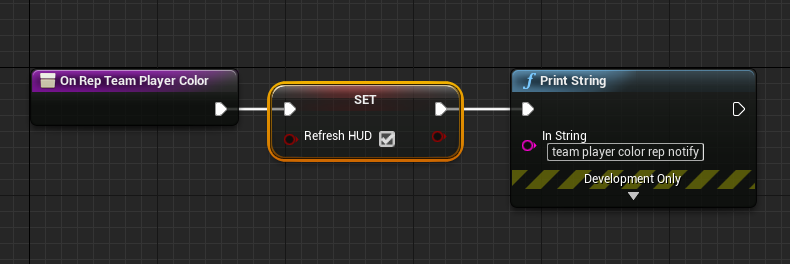
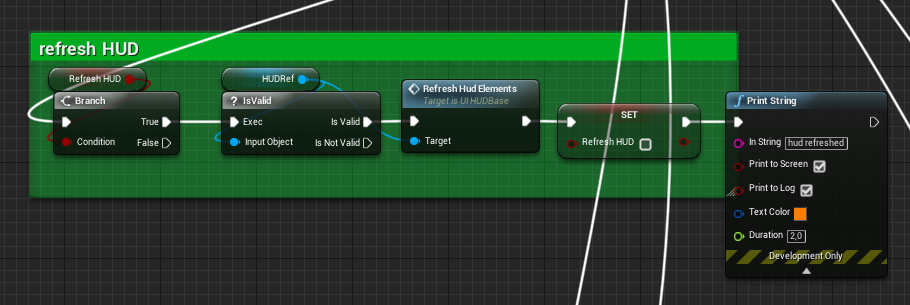 thin stratus
The question that raises in me: How did you not know? :D
Here is the next bummer: You can't manually call OnRep functions in BP
fleet raven
I haven't used bp onrep functions much
thin stratus
Just joking, don't worry
At least it solved a handful of bugs on my end now knowing that SpawnActor is bugged with OnReps
fossil spoke
You should be able to call them manually if you mark them BlueprintCallable.
Ive honestly never tried nor needed that functionality.
But id assume that would be the case.
Since they are just a regular function.
 wary path
@thin stratus If you create the onrep functions before marking the variable replicated (in BP), you can use them as normal BP functions. You can also override them in derived classes, which is not possible with the auto-generated onrep BP functions.
Just use the same name as would be generated when marking the variable as replicated
But speaking of replication: I'm having serious data consistency issues, and I have no idea what to do about it. Setting a replicated variable twice within a short time sometimes leads to the client having an invalid value (forever). If the server sets a variable from 0 to 1 and then back to 0 within e.g. 0.5 seconds, sometimes clients will have the value 1 forever. I know that order is not necessarily maintained, but in this case it simply leads to the client having an invalid value. Does anyone know about this?
ruby meteor
@wary path I was under the impression that while some changes wont be replicated when changing the variable a lot, the last (=correct) value would always eventually make its way to the client
manic pine
yeah, that seems like weird behavior
wary path
Yes I thought that two, but I'm having this issue for the second time now. The first one I solved by using a multicast event instead.
manic pine
what are the updaterate settings like? any dormancy use? any client changing the value?
wary path
I was even able to reproduce this in a small scale 😦
update freq is 100, no dormancy use, actor is always relevant
all set calls are behind switch has authority
manic pine
tearoff?
wary path
what do you mean?
manic pine
does the actor otherwise function fine network-wise
wary path
yup, this happens while movement replication is still active
it's a property telling whether a character is stunned. some stuns are very short
but in this case the character remains stunned on clients
manic pine
you say 'forever', does that mean you tried changing the value after it went wrong
and it still wouldnt update
wary path
I mean if no other stun occurs, server has value 0, clients have value (duration of stun)
manic pine
right, but a new stun does fix it
wary path
yup
manic pine
have you tried giving that var an OnRep to print on the clients
to see if it receives any update at all after being set back to 0 on server
in the cases it fails
winged badger
@thin stratus you set those as ExposeOnSpawn?
wary path
I will recheck
thin stratus
Yop @winged badger
winged badger
pretty sure the blueprint part of the class doesn't exist at the time those variables are set
winged badger
in BP its not so much OnRep as much as variable setter callback
thin stratus
Either way, you'd expect it to call on all of them if set via ExposeOnSpawn or directly
winged badger
just set the variable locally on client and it will call its own OnRep
thin stratus
At least I expected it
I didn't know that, if I spawn a Replicated Actor on the Server, which has an OnRep variable that is set via ExposeOnSpawn, it won't call the OnRep on the Server.
Cause that's against how Blueprints introduce OnReps
winged badger
the entire OnRep in BP is a mess imo
but yeah, it doesn't surprise me one bit
the IPropertyChangedTracker is required to fire BP OnReps, i believe
under the hood
and it probably doesn't exist yet
(not 100% on that part, i am doing quite a few assumptions here)
manic pine
expose on spawn, is that more like the bp equivalent of deferred spawning?
thin stratus
More or less yes
winged badger
you can make a SetPawnOwner function and run it from BeginPlay, setting it to itself
thin stratus
I just set it post spawn now
It's not needed on BeginPlay. It just has to call
When doesn't matter for me atm
winged badger
nod
thin stratus
I do have to double check all my SpawnActor nodes now though
Cause I'm sure that's not the only place where I did that
winged badger
the only downside of post spawn is that its not available on BeginPlay on Server, but is on Client
wary path
@manic pine Thanks for the hint, in onrep things seem to be fine. I'll continue debugging, maybe it is something different after all :-(.
manic pine
so client has to be setting it to the other value again ye
server sets it to 1, client receives it and does some time-delayed action, server sets to 0, client receives 0, client completes time delayed action and sets value to 1
wary path
I'll check, maybe I forgot a HasAuthority somewhere...
 elder ravine
Does Firebase work with UE4?
chrome bay
Someone asked about Rep Graph
It's a pain in the ass
We are using it however
And yes they can exist in more than one node at a time
Rep Graph is extremely "crashy" in 4.21
We've made a bunch of fixes locally and relayed some issues to Epic, but I'm not sure if 4.22 is any better yet
Well one example is it likes to try and replicate actors which are marked for pending kill, which results in a nasty GC-related crash
What we did to fix that I'm not sure
Also worth nothing that any game-code stuff you've done for IsNetRelevant for etc. will no longer work
Only a handful work
or are used by rep graph
Too hard to say. We've changed so much netcode since adopting it we don't know what the difference would be. It's not a night-and-day comparison.
Well we had 100-player dedi servers running without it before
Can't say, the game has changed too much since
Not now we've fixed them
It probably does make some work easier, but to be honest the best way to reduce server time is reduce the net update frequency of actors
The default of 100 is ridiculous IMO
Biggest improvement to server performance we've gained is by dropping all actors to net update frequency 1 (apart from pawns) and using ForceNetUpdate() when changing replicated vars
NetUpdateFreq is used by Rep Graph to determine the update rate for that actor class IIRC
multicast should never be used for state replication anyway
otherwise it breaks when you introduce late join / relevancy
 solar stirrup
What's the best way to check if a method is currently running on the server?
I need the inventory initialization to only occur on the server since it'll be replicated anyway
grizzled stirrup
Is there any way to easily display a similar net debug to the one that Fortnite has? packets up/ down, bandwidth up / down, % loss
stat net has a million things that take up the whole screen
 copper grove
What is a good online services mobile provider for matchmaking that supports blueprints and 4.22 and is free?
Is gamesparks still a thing?
chrome bay
@woeful anvil I think the same rules apply for net dormancy
calling ForceNetUpdate() flushes dormancy also
yeah it should do IIRC
Well actually this part i'm not sure on. Somewhere on UDN it says you should set the var first then flush dormancy
But I'm not actually sure whether the order matters
All I can suggest is have a look at UReplicationDriver::FlushNetDormancy and see what it does
UDN mentioned that the server caches the variables it thinks the client last recieved, so you should change variables then flush - but I never checked up on that
ForceNetUpdate() doesn't matter btw, all it does is set the last updated time, dormancy is the one that matters
ForceNetUpdate() technically just "queues" it, but either way should be good if you're not using dormancy
ummm lemme check what I'm doing atm
I've only used it on one actor type so far
Oh it looks like I'm calling ForceNetUpdate() before, so flushing dormancy, change properties, then set dormancy back later if needs be
I have no clue if it works yet of course 😄
 jolly siren
Does anyone know why this isn't a big deal to Epic? https://issues.unrealengine.com/issue/UE-38897
chrome bay
lol is that a thing? damn...
jolly siren
"The DestroySession node fails each time it is called, and the session is never destroyed."
lol
chrome bay
That's so odd.. are you sure the session is still valid?
DestroySession() would technically fail if the session didn't exist in the first place
Same with EndSession() if it hasn't been 'Started' yet
jolly siren
yeah it should be, I'm playing on the session. This is just for quitting the game and returning back to main menu.
I remember dealing with this before in another project, going back to look at it
lol Cedric ran into last month too
@thin stratus Did you ever get that figured out?
thin stratus
That was because I just a custom node for Creating Sessions while using the default node for destroying
The Default Nodes used a different way of retrieving the SessionInterface
Which ultimately lead to me seeing two different memory addresses when break pointing the session array
So I also did my own DestroySession node and that resolved it
gleaming vector
on an aside
i did some more investigation into custom netchannels
the config you have to add to your engine ini is a map Name, FChannelDefinition
struct ENGINE_API FChannelDefinition
{
    GENERATED_USTRUCT_BODY()

    UPROPERTY()
    FName ChannelName;            // Channel type identifier

    UPROPERTY()
    FName ClassName;            // UClass name used to create the UChannel

    UPROPERTY()
    UClass* ChannelClass;        // UClass used to create the UChannel

    UPROPERTY()
    int32 StaticChannelIndex;    // Channel always uses this index, INDEX_NONE if dynamically chosen

    UPROPERTY()
    bool bTickOnCreate;            // Whether to immediately begin ticking the channel after creation

    UPROPERTY()
    bool bServerOpen;            // Channel opened by the server

    UPROPERTY()
    bool bClientOpen;            // Channel opened by the client

    UPROPERTY()
    bool bInitialServer;        // Channel created on server when connection is established

    UPROPERTY()
bool bInitialClient; // Channel created on client before connecting```that's so easy
we can do custom net channels in plugins now
or well, custom net channels without a stupid engine change
fleet raven
custom channels are very useful
in some way this is worse than previously because now it sends the channel name as a string every time it opens one
gleaming vector
it sends a name
which, i believe, are sent by an id
since you can't open a channel without it being known
the name will exist on client and server
fleet raven
name are only sent by an id if part of UnrealNames.inl
every other name is sent as a string
fleet raven
that's true
it would be cool to have some kind of name network table that is built as you send names
so each is only sent once
gleaming vector
you could send it over a named channel!
fleet raven

gleaming vector
im being funny
fleet raven
well it's not a bad idea
but you'd have to keep sending it as a string until the client confirmed receiving that
gleaming vector
channels have built in acks
fleet raven
your name might be sent on any of the channels even at the same time, making it somewhat hard to make use of that
gleaming vector
yeah
i would, instead, modify the engine and have that info sent over the control channel
 distant talon
Does the net update rate for a replicated actor mean it will update max to min times per second even if there are no changes?
So if you have a replicated lightpost is that going to be wasting 100 updates per second on nothing even if the light doesnt change?
jolly siren
ahh okay cool, thanks Cedric
@distant talon That is how often the server checks replicated properties on the actor to see if they have changed. They will still only be sent when they change. So it is server cpu time.
gleaming vector
the defaults are fine
if you run into them you are doing something horribly wrong
also
on the data channel topic
+ChannelDefinitions=(ChannelName=Control, ClassName=/Script/Engine.ControlChannel, StaticChannelIndex=0, bTickOnCreate=true, bServerOpen=false, bClientOpen=true, bInitialServer=false, bInitialClient=true)
+ChannelDefinitions=(ChannelName=Voice, ClassName=/Script/Engine.VoiceChannel, StaticChannelIndex=1, bTickOnCreate=true, bServerOpen=true, bClientOpen=true, bInitialServer=true, bInitialClient=true)
+ChannelDefinitions=(ChannelName=Actor, ClassName=/Script/Engine.ActorChannel, StaticChannelIndex=-1, bTickOnCreate=false, bServerOpen=true, bClientOpen=false, bInitialServer=false, bInitialClient=false)
RIP file channel
grizzled stirrup
@gleaming vector aren't the defaults like 10kb/s which is very tiny for a modern multiplayer game?
Fortnite for example uses 50kb/s+
grizzled stirrup
Even a few character movement components with clients that have high refresh rates can easily get up near 10 kb/s
grizzled stirrup
Is it opt in?
gleaming vector
no
grizzled stirrup
Because with 240 fps on clients it goes nuts with bandwidth usage
To the point where removing the cap is necessary to not see things dropped
gleaming vector
are you using the default 100 update rate?
grizzled stirrup
It feels like more though somehow
Will move to 30
Just listen server clients get REALLY laggy when viewed from the listen server host at anything under 60
As there is no interp
gleaming vector
oh
you are considering all clients
sorry, the 15kb/s is per-client
per connection rather
grizzled stirrup
I thought it was 10 as I was dropping packets /not allowed go above 10 unless I changed it
At least that's what stat net said
Anyway moving it up to 100 kb/s max for the server and 20 kb/s per client has fixed any issues I had
But it was unplayable before that even with default characters
No extra logic going on
grizzled stirrup
Just to reply to @woeful anvil 's original question- I would say it is necessary to raise those limits of both the TotalNetBandwidth as well as the client limits
As the originals are very low it seems
jolly siren
What values are you guys using for ConnectionTimeout and InitialConnectionTimeout?
@grizzled stirrup There is a bug right now with high client framerate saturating the network
gleaming vector
in 4.22?
jolly siren
In 4.21+
gleaming vector
heh
grizzled stirrup
@jolly siren Oh really! Damn I was thinking I'd have to cap the fps for all just to avoid it
Do you know any workarounds or have a link to the Unreal issues page?
jolly siren
The best thing to do is set bUseClientSideCameraUpdates = false; in your camera manager
unless you specifically need it
grizzled stirrup
Would that stop pitch replicating?
jolly siren
ootb sends an unreliable rpc every tick for it