#multiplayer
1 messages · Page 461 of 1
 thin stratus
If yes then:
Server:
- Whenever you want to actively "host", you have to call the
OpenLevelnode and passlistenas an option in it.
That's basically all, that will move the Server (ListenServer) to a new Map and it will "listen" on port 7777 by default.
Client:
- Have some sort of TextBox in UMG that can take an IP-Address.
- When a button or so is clicked (e.g. Join IP) you take what is in the IP-Address TextBox and use the node
ExecuteConsoleCommand.
-- The command you want to execute is "open" to which you need to append the IP-Addressopen 127.0.0.1
That's basically all
Just requires 2 things: Port Forwarding and sharing the public ip of the server.
But that's enough for simple testing between two devs
(if you want to avoid setting up Steam and Sessions for now)
 bitter oriole
TBH I feel like Steam and sessions is easier.
thin stratus
Technically yes, but if it for whatever reason doesn't find the Sessions cause of 480 id, they have 0 idea how to debug that
Cause as soon as Sessions don't work, it's basically a shit show
bitter oriole
Sure
thin stratus
You can try it of course
bitter oriole
NAT punch though
 twin juniper
This is extremely informative. I will try this now wish me luck guys.
Wait
one tihng
Okay so how will ido the player spawns?
how will they work?
thin stratus
That has nothing to do with the connection process
twin juniper
I understand that this opens a level but where will the player that joins the level spawn?
thin stratus
Whereever you set it up
twin juniper
Player start?
thin stratus
Well you have tested the game with 2 players in the editor already or?
twin juniper
no lol
thin stratus
Then do that first
Next to the PLAY button at the top
There is drop down arrow
At the bottom of that menu you can set the playercount to 2
That will automatically create a ListenServer with joined client (don't do that in the MainMenu!)
Then you can see where they would spawn
twin juniper
this was useful
I will have the open level and listen function on the gamemode or playercontroller or gamecharacter blueprint?
or does it even matter?
thin stratus
Sessions require these steps:
- Enable the Steam Plugin for your Project (in the Plugins section or via uplugin file editing).
-- Edit the DefaultEngine.ini file according to whatever tutorial you find online (don't have the changes in my head).
Server:
- Use the "CreateSession" node which requires some parameters
- Once the CreateSession node returns successful (second exec pin on the node) you call OpenLevel with the listen option again (same as in the other setup).
Client:
- Use the "FindSessions" node. This will return 0 to x Sessions depending on how many hosts are in your near range (Steam basis this on regions with the 480 test id)
- Once you found a session you can either blindly join it via the "JoinSession" node, or iterate over the array of Sessions and display them in a UMG list.
-- If you display them you'd create a new Widget (server entry) per result and save the result in it. When clickign the widget you'd join the result again, but this is more complex and advanced of course.
So just taking the return array and doing "if length == 1 -> Join Element 0" should be enough
twin juniper
Are these two different methods or is this the same mehod?
thin stratus
@twin juniper Technically it doesn't matter.
My connection process is in the GameInstance
That is the Session method
thin stratus
It doesn't require opening ports, but is more complex and for beginners easier to have errors
Please be aware that if the host fails to open the ports in their router and firewall settings, the first method will most likely fail.
So make sure one of you two has that figured out
The default server port is 7777
That's all I can give you for now. Gotta be busy a bit now, cheers
twin juniper
Okay thank you so much brother.
Oh shit
The listen thing
do i put "listen" in the options tab of the open level thing?
twin juniper
@twin juniper
You're using bps right?
thin stratus
Yes @twin juniper
twin juniper
Can anyone tell me how to use LineTraceByChannel to damage another player? I tried so many times and I can't get it to work
Okay so i think it's working but a problem is only the actual characters update on the server. All physics simulating objects are all client sided. So one one client i can have moved a physics object like 100m away but on the other clients screen the object is still in the same place. Any ideas?
Nevermind now for some reason it works
it seems like
Okay in the ue4 editor it works
but if i launch it from the WindowsNoEditor packaged version it doesn't
they are desynced
any ideas?
thin stratus
Physics Simulation is really nothing you want to network
If at all, the Server would simulate it and just send the location updates
Otherwise it will go async
Physics are not deterministic
Two times the same throw can end up on different locations on different clients
twin juniper
How do i make the server simulate physics and not client?
thin stratus
You could set the boolean on BeginPlay and filter with SwitchHasAuthority
 solar stirrup
Do I need to implement NetSerialize() for an FFastArraySerializerItem or is it optional?
twin juniper
Okay so the characters seem like they are lagging on the server?
they seem like they are moving at 10 fps
How can i change this?
And what is responsible for this?
thin stratus
Are the lagging back and forth?
Are you modifying the movement speed runtime somewhere?
If yes, you have to do this properly via a RepNotify variable
Also it seems like you are having problems with the basics, so you should really read over my compendium (pinned to this channel) And just try around in a test project a bit.
bitter oriole
Check the engine setting that lowers performance in background, first. That causes extreme lag when a window isn't focused.
thin stratus
That too, never had such issues so I never think about actual fps problems >.>
 past rain
On dedicated servers, my clients are moving super smooth. Once I switch to server-model, where a player is the server, then the client has jittery movement. I'm failing to understand how client can have smooth movement on a dedicated server, but once a player is a host the client jitters
Does anyone have any clue?
past rain
Only locally
 grizzled stirrup
@past rain It's a BIG issue and seemingly no fix without downloading the source version of the engine and modifying some parts of the CMC
twin juniper
I'm not really lagging. The characters move exactly where they are supposed to but they do it at a very low refresh rate
bitter oriole
Show the framerate
grizzled stirrup
I think you are also having the same issue as Sendach
Basically the listen server only updates client animation frames on net updates
Not sure why it defaults to this behavior but it does
It's not that way on dedicated
Other clients should see each other smooth and should see the sever smooth AFAIK
Try with 3 players or with the dedicated server checkbox ticked
past rain
When you say animation frames, do you mean actual animations? because I have no animations
grizzled stirrup
Yeah the animations getting ticked as well as an interpolation in movement, there's 2 problems with it
Here's a thread with some info: https://www.reddit.com/r/unrealengine/comments/a0n455/listen_server_host_sees_clients_jittering_fix/
reddit
7 votes and 3 comments so far on Reddit
It seems to only affect listen servers which is a shame
past rain
The thread you posted suggests that the listen server will see all clients jitter
correct?
grizzled stirrup
Yep
past rain
Thats not the case with me
The listen servers see the clients move smoothly
Only the clients perspective see themself jitter
grizzled stirrup
Ah then it's a problem with your netcode
past rain
But not on dedicated server
grizzled stirrup
Hmmm
@twin juniper there's more info in general about the listen server jitter here if interested: https://forums.unrealengine.com/unreal-engine/feedback-for-epic/1346282-impossible-use-ue4-for-a-coop-or-mp-listen-server-game-due-the-unfixed-network-errors-since-4-years
Unreal Engine Forums
Take me about one week to find out the problem that I see the clients in my game with teleporting/lag/jitter error. No one know or have clue and there is no docs
past rain
Yeah but I cant wrap my head around what could be causing this on a listen server but not dedicated servers
grizzled stirrup
How many fps are you getting in general?
Probably not the issue but there have been a few weird issues I've encountered with high fps on listen servers lately
past rain
how can I check
grizzled stirrup
stat fps
 bitter oriole
That's one less thing to worry about
solar stirrup
Do I need to implement NetSerialize() for an FFastArraySerializerItem or is it optional?
twin juniper
lol guys
my friend downloaded cheat engine and speedhacked like he was usain bolt
how can i prevent this lol?
thin stratus
By preventing whatever they changed
CheatEngine should only allow you to change local stuff
twin juniper
the only thing he changed was speed
thin stratus
So if you don't allow the client to set the Speed on the Server, they shouldn't be able to do that
twin juniper
how can i do that ?
thin stratus
They will get correct instantly
Well idk how they are setting speed
But if only the local MaxWalkSpeed was changed, then it shouldn't be possible to cheat
Cause the CharacterMovementComponent will reset you
thin stratus
Try it yourself, change the speed locally and walk around
You'll constantly get teleported to where the server moved
Cause the Client performs the move and sends the Server the location they ended up
Then the server does the same move and compares
If they are different the server will override the client
twin juniper
hmm oooh i forgot to mention and i actually forgot the outcome completely
what happened was
thin stratus
Was your friend the host?
Cause you can't stop cheats on ListenServers
The hosting Player has authority
You should also not develop a game that requires players to not cheat
Cause that requires A LOT of knowledge
And in the end even money
Cause you need to host DedicatedServers away from the client
twin juniper
On his screen he was speed hacking like crazy but on my screen he was just staying in the same place and even when he stopped he was completely desynced and he couldn't move at all on my screen but on his screen he was moving like normal?
thin stratus
So whatever game you are working on, change the aspect that requires them to not cheat
Yeah well just don't care about it
Cheating can't be stopped in a listen Server setup anyway
And as just said, don't dev a game that needs players to not cheat
It's too big for a beginner
twin juniper
Understanable
thin stratus
Just sell the game for a flat price if it comes out
And if they cheat -> don't care
Don't make it competitive
And it should be fine
(so don't make Overwatch, PUBG, Apex, LoL, or any MMO)
twin juniper
I honestly don't care about cheating. But if it's a public match then i don't want them to cheat to ruin the experience. But if it's private it's fine. By the way is it possible to make a server list which displays all listen servers that are port forwarded?
thin stratus
ServerLists are done via Sessions. That is done by using Subsystems such as Steam.
Steam does a so called "NAT PunchThrough" which works around the port forwarding.
So if you do have ServerLists, they usually don't need port forwarding
And as mentioned: Preventing cheating is difficult on a programming level (needs a lot of knowledge) and is pricy (servers have to be hosted by you away from players).
Plus it's (sorry to say that) highly unlikely that you produce a game with that knowledge that will have enough players to support such a server setup.
User ListenServers or share the DedicatedServer setup and stop caring about cheats
Don't make competitive games :P trust me here, i do this for 5 years already (with ue4 and multiplayer) and for a living and I can't recommend this at all
grizzled stirrup
Not to mention lag compensation and anticheat which are essentials for competitive games
But don't let all that dissuade you, there's plenty of room for fun multiplayer games that don't need competitive gameplay
co-op being a major one
thin stratus
You can have competitive gameplay, just not based on a skill elo system or so
It's totally fine to havea game between a few friends where you hit each others face in
Give the host kick rights so they can kick cheaters and it's fine
Just don't make something where a "ranked" mode exists
grizzled stirrup
Yep exactly
Just wish they fixed this for listen servers: https://issues.unrealengine.com/issue/UE-32005
It really makes the game feel like it's lagging when in fact it's not
twin juniper
Okay. But does anyone know why the person who uses speedhack get desynced? I just tried it out locally and the player is just frozen if he speedhacks
even if he turns it off
on his own screen he can move
but on the other players screen who is not hacking he is just frozen in time
any explanation lol?
 fleet raven
listen server characters also only tick the animation when they receive an update from the client
that's probably the most visible thing
grizzled stirrup
Yeah it's both that plus not interpolated
fleet raven
the thing is
grizzled stirrup
So it looks extra jittery
fleet raven
the animation on the server side drives things such as weapon positions
so if it was interpolating to look nice to the host it would be wrong
grizzled stirrup
In my case that is completely fine
Is there an easy way to just let the client interpolate fully smoothly?
fleet raven
I'm wondering how to solve that in my case
grizzled stirrup
Also in the case of dedicated servers, it isn't an issue
Which is the same problem (weapon position on the server)
fleet raven
well a dedicated server doesn't need to interpolate anything
grizzled stirrup
Ah yeah sorry this issue is for the listen server viewing clients right?
fleet raven
as it has no visuals
grizzled stirrup
not clients viewing other clients or server
fleet raven
yes
the movement can only update when it receives a move from the client with a new timestamp
grizzled stirrup
Using a source build I managed to get it fixed using these steps: https://www.reddit.com/r/unrealengine/comments/a0n455/listen_server_host_sees_clients_jittering_fix/
reddit
6 votes and 3 comments so far on Reddit
But I'd really like to do it without a source build
twin juniper
How can i add usernames to a listen server guys?
grizzled stirrup
you can store the player name in the player state of each client and have it shown wherever needed
fleet raven
I guess it could be "properly" fixed using some predict/reconcile logic on the server side but that's kinda 
grizzled stirrup
It really did seem to mainly be thebOnlyAllowAutonomouseTickPose line, but setting it in a child class in a binary build didn't seem to work for some reason :/
fleet raven
old engines like torque solved this better by having the server sided game state separate from the visual game state of the listen server
what this change will do is make the animations tick every frame
grizzled stirrup
That's what we want for the animation to not appear choppy though right?
fleet raven
so if I did this my weapons would be positioned incorrectly
as it's no longer in sync with the client timestamp
grizzled stirrup
I thought that it is fine as long as the weapon is attached to the mesh and not outside of the mesh component
Ah you are going pretty hardcore
I just need a smooth update
fleet raven
I want the server to fire from and at exactly the same location the client saw
twin juniper
I know this question is unrelated. But how do i open the default player controller? I am trying to do the thing were you store the username on player controller
grizzled stirrup
Ah yeah that's very tricky, lagcomp stuff
fleet raven
without giving the client authority over either
grizzled stirrup
Speaking of movement, is it possible to cleanly replicate very fast speeds / LaunchCharacter() on the client without getting horrible jittering corrections?
fleet raven
do the launch on the client side too, it adds it as a predicted action to the history
grizzled stirrup
I have to try the implementation again but as soon as I was going over certain speeds, even calling launch on the client first and then on the server (with some latency) caused corrections
fleet raven
hm
grizzled stirrup
I may have just done it wrong but say at 200ms between the client and server, the client is in a greatly different position to the server even though they called the same thing
Maybe I can turn off the correction only while launching
but then when landing the client will snap....
fleet raven
what triggered the launch?
grizzled stirrup
A launch pad or a special rocket jump
It's fine for slower speeds
But fast speeds seem tricky
fleet raven
yeah if these don't run in exactly the same movement tick on client and server, that'll be one
grizzled stirrup
Yeah they do both get called, but latency 😄
fleet raven
if your server is one tick later than the client it will send a correction which messes it all up
grizzled stirrup
I'd love the client to be authoritive over his movement for my game and report his movement back to the server, but it seems the only way to do that smoothly is send MANY RPCs a second to the server which is a waste
Is the CMC sending many RPCs a second anyway?
Behind the scenes
fleet raven
it sends multiple per frame
fleet raven
ends up using something like 5kbps
grizzled stirrup
Wow that's amazing
fleet raven
it actually has a client authoritative mode, did you try that?
grizzled stirrup
No I saw a reddit post mentioning it but not much else
I'll look into it now
That'd be a dream
All I need is the clients location and rotation sent to the server and other remote clients
Doesn't have to be too accurate
Just needs to look smooth
And be correction / lag free on the client
fleet raven
it's not an option in my case so I don't know how it works, I just saw it mentioned somewhere
grizzled stirrup
I'll give it a shot! Is the next best thing to send an FVector_NetQuantize via an RPC on tick?
I know that sounds insane
Or say 100 times a second
If it's not fast it looks really choppy on other clients
fleet raven
doesn't seem insane to me, considering the movement already does this
grizzled stirrup
Ok I really for some reason thought RPCs were only called infrequently like 10 times a second or so
Will try and dig into the CMC code too and try to understand it
My old implementation was in BP
fleet raven
in fact it sends a shitload of stuff all the time
grizzled stirrup
Now I'm in C++ so there's more room to use better methods
Holy shit that's a lot of stuff
fleet raven
PendingFlags is normally a uint8 but I changed it so I can put more flags in it
grizzled stirrup
So if I was to send void ServerSendLoc(FVector_NetQuantize CurrentLoc);
That wouldn't even be so bad
On tick
Then the server would replicate that loc to other clients and they'd set the loc of that client locally
fleet raven
keep in mind clients sometimes run at 200 fps because of course they do
so maybe limit it somehow
grizzled stirrup
Yeah true, will cap it to maybe 60 a second
fleet raven
to not send if the tick was < x ms
grizzled stirrup
Just a timer on begin play
That's pretty eye opening, thank you for sharing!
Kind of explains why the bandwidth usage flys up when there are multiple characters just walking around haha
fleet raven
you should definitely try the client auth mode first tho
grizzled stirrup
Wish there was docs for it but I'm sure the code is commented
fleet raven
it's kinda made for exactly that purpose
grizzled stirrup
They likely do it in a much more clever way
Yeah!
Thanks, will look into it for sure
Between this and the bool that I can override OnPossessed, I think things will be very smooth!
fleet raven
idk about it being commented
solar stirrup
I have a FastArraySerializer array, which will be replicated between client and server
if the client modifies it, it won't do anything right? It'll just grab back the server's value?
twin juniper
On a dedicated server will all physics object always be on the same place for all clients?
 winged badger
@solar stirrup client should not modify it
solar stirrup
Let's say they're a bad meanie and they try to, what happens?
winged badger
server will replicate items only when they are added, removed or marked dirty
it won't check if client pushed his out of sync
solar stirrup
So cheaters would just fuck themselves over right?
winged badger
also, not quite sure what happens if the item client removed gets modified on server
solar stirrup
probs crashes their game
which isn't my problem if they modified it when they shouldn't have

winged badger
just make sure you don't modify it client side
solar stirrup
Yeah I won't
If I need to, I just call an RPC from the PlayerController to the server right?
i.e. moving an item from slot 1 to 2
winged badger
sure, as long as its a component on your PC, PS or Pawn
solar stirrup
What RPC type do I use?
winged badger
PS might be ideal, since it survives the player disconnecting
only thing that does
solar stirrup
If I put it on the pawn and the player disconnects
do I have time to save the inventory?
winged badger
no
solar stirrup
aight I'll put it on the player state then
winged badger
well, you do, but it would require some more complicated overrides
and again, only place you could actually save it at is inactive PS
solar stirrup
thought as much
 tall pine
What's the best way to save / restore Player Info across non-seamless travel?
Right now I'm thinking creating a SaveGameObject, write info to it, then save / load when needed.
My problem is that I do want to save PlayerState, but how do I create a PlayerState inside the SaveGameObject?
I'm doing it in C++
winged badger
you don't, ever thought about doing it the other way around?>
also
hard travel means there is no PS for that player during the travel
and new one is created
which doesn't leave you an overabundance of options
tall pine
yeah it's not up to me. The project is decided to have non-seamless travel.
Anyway, so I can't save the entire PlayerState whatsoever?
winged badger
you would need to associate the save game object with the player
still not sure the PS would survive as an object
and also a fun fact, replicating a UObject doesn't work out of the box
tall pine
So say inside the SaveGameObject, I put a PlayerState* SavedPlayerState;
THen when a player needs to save his player state, he passes his PS into the SaveGameObject, along with his name to it.
Then I save it. THen travel to a new map, load the SaveGameObject for that player, then copy over the PS?
winged badger
seems hacky
tall pine
How else can I do it?
winged badger
would be better to just keep a struct in PS that has all the info that needs to be saved
then carry that over
tall pine
Well again, that's seamless travel right?
grizzled stirrup
With seamless do any PS properties for any players stay between maps?
tall pine
I thought PS won't survive non-seamless travel, so why would anything stored in PS would carry over?
thin stratus
With "carry that over" i think Zlo meant into the SaveGame?
Some of the Properties stay, but your own only if you move them by hand via CopyProperties
tall pine
@grizzled stirrup : yes, and you can use CopyProperties() to copy specific stuff over
thin stratus
Well and OverrideWith
winged badger
CopyProperties won't work with hard travel
grizzled stirrup
Very interesting! I've been storing them in the client GameInstance (since the client can set his own properties), but this is very useful!
tall pine
I know, I'm answering Kylekatarn.
In my case, that's why I'm asking about saving it to a SaveGameObject and then load it after travel
thin stratus
@winged badger I think you confused them by saying "doesn't matter" to SeamlessTravel yes/no and at the same time stating that you can just put a struct into the PS that carries over to the next map
Cause as far as PS stuff carrying over goes, it should be done via SeamlessTravel
winged badger
what i meant is it doesn't matter if travel is seamless or not, method of copying struct into SaveGameObject uniquely keyed to a player, then copying it back after travel would work
thin stratus
Yeah I figured you mean "carry over" in combination with savegames
winged badger
ofc, need a method to persist the SaveGameObject as well
thin stratus
It just read like you meant without
So carry over via SaveGame doesn't need Seamless.
Carry over via surviving in the PlayerState needs Seamless.
(which I know, just making sure peeps are not confused)
tall pine
@winged badger : that only copy over whatever custom stuff you add for the custom PS right? As for the base PS, such as name, score, etc. that wouldn't carry over the struct
thin stratus
You can either save all data in the GI or just save the SaveGame and load it later.
Both require you to pass it to the Server again.
Or you save it directly on the Server's GI
But then you need a unique identifier to grab it posttravel
solar stirrup
I was wondering, do I need to implement NetSerialize() for the FFastArraySerializerItem I'm using or is that optional @winged badger ?
thin stratus
Tricky question @solar stirrup That's why no one is answering it :P
winged badger
you don't, it will work out of the box
thin stratus
I haven't used it otherwise I would have answered it for you already
winged badger
as long as you kept within NetSerialization.h header example confines
solar stirrup
I was wondering if it was required or not ^^ I might implement it later
although I'd assume UE4 already does a good job at serializing
grizzled stirrup
For the identifier there, would you store one per client in the server's GI and one on each client locally in their GI, and have them basically ask for the server to set its PS properties on load of the new map?
grizzled stirrup
Luckily I can for my game
Will use CopyProperties to bring across my current player upgrades struct to the new map
thin stratus
It is recommended by epic to perform all possible travels seamless
grizzled stirrup
So just the initial hard travel (steam listen server), then go seamless while connected?
thin stratus
Obviously not possible are hard connections to servers and back to the mainmenu etc.
winged badger
yes
thin stratus
Yes, as long as you are connected it is adviced to only perform seamless travels
fleet raven
seamless travel crashes my game
thin stratus
Otherwise you are basically kicking everyone and letting the mreconnected
tall pine
Yes, but my senior argues that he faces so many engine problem with seamless travel before, so now he just wants to do hard travel
Anyway, I'll try to use SaveGameObject way
thin stratus
Your Senior does it wrong then
winged badger
i hate to break it to you, but your senior isn't a senior
thin stratus
Seamless Travel is perfectly stable. We use it throughout our full game.
It only breaks if you have no idea what you are doing
(not counting engine bugs which I never had with seamless travel outside of PIE)
winged badger
working around things that work out of the box is usually what people new at unreal do
tall pine
Ha ha, I think it's a collection of people, and problems they created. He probably just got tired of fixing all the seamless traveling crashes
Cause my game does crash when I seamless travel back and forth.
thin stratus
Well, good luck
Hope you aren't gonna use Steam :P
Or any other Subsystem that has issues with reconnecting clients
tall pine
Not my code, and I'll have to track down / fix / convince the entire network team to switch their code to seamless
thin stratus
Cause they require SeamlessTravel
fleet raven
why would steam have issues with players reconnecting
thin stratus
My goodness a complete team of people who have no idea >.>
fleet raven
seems like steam not so good after all
winged badger
it usually goes like this:
1 - person misunderstands something
2 - he implements a workaround the engine
3 - continues to build on the erroneous assumption, making the code more convoluted with each iteration
4 - things finally go back to the drawing board, after everything explodes
thin stratus
Cause if you ServerTravel non-seamless, Clients won't follow @fleet raven
They will get kicked out of the session
fleet raven
so they reconnect and everything is fine
thin stratus
Yeah but they don't do that automatically
fleet raven
but they do
winged badger
you can make them reconnect using lobbies
thin stratus
So a simple map change on a running game is gonna reset them to the main menu
fleet raven
it works just fine by default
thin stratus
It's known that Steam requries Seamless Travel. ¯_(ツ)_/¯
fleet raven
if you aren't using an online sub
grizzled stirrup
By default steam listen server clients can reconnect to the match if they lose connection while playing?
thin stratus
- as already stated, ServerTarvels should if possible be seamless
Makes 0 sense to send connected clients through the whole login process again
fleet raven
that's true
tall pine
My senior mentioned this to me:
in seamless travel, loading screen is processed on main thread, which means you may see the hitch on your animated icon because the level is loaded in time sliced fashion
Is this true? Can this be solved?
thin stratus
@grizzled stirrup By default everyone can just find the Server again and join if it's still online
grizzled stirrup
Using the steam beacon setup, would it be similar?
winged badger
just google unreal loading screen
fleet raven
what's up with this, why would they not just reset the thing that overflows on seamless travel
winged badger
and top result will be a wiki entry with how to use MoviePlayer for loading screen
which runs on its own thread
thin stratus
@fleet raven Because that time persists
fleet raven
but it doesn't have to
thin stratus
They rather reset everything
fleet raven
there's no need for it to persist to a new map
thin stratus
ask epic ¯_(ツ)_/¯
@grizzled stirrup Probably, it's also just sessions
@tall pine Maybe, but that's not a reason to not allow SeamlessTravel.
Sounds more like a weak excuse
winged badger
its for persistant worlds on dedicated servers
which run into that floating point error with time when running over 2 days straight
fleet raven
it can't be for that either
winged badger
lose precision
fleet raven
there would be no reason to not reset it every time
tall pine
ah no, just one example, since I don't know enough about networking to debate with him. I do get seamless traveling to work yesterday, but the game does crash if I travel back and forth a couple times between levels
fleet raven
if you have to reset it eventually anyway
thin stratus
@tall pine If it crashes look at the crashlog and check what you are doing wrong
We are traveling countless times and it's all fine
winged badger
if you look at lot of games using dedicated servers with persistent instances, they tend to have,,, daily maintenance
fleet raven
you probably have to patch more than one usage of it
thin stratus
If it would be easy to solve, it wouldn't exist
 manic pine
its prolly copied over to a lot of floats
e.g. "animationstarttime: worldseconds"
some builtin way of resetting it would be nice though
thin stratus
Everywhere you use it it needs doubles
fleet raven
well a server that stops functioning after 2 days is not an option either
manic pine
without restarting a map
thin stratus
BP would already fail
thin stratus
Most Servers restart during the night yop
fleet raven
well I have a case where people want to run their stuff for weeks and there is no reason it would be changing the map either
:(
manic pine
yeah and what about singleplayer games
fleet raven
do people play those for 2 days at once
thin stratus
It's simply not a thing to have the game run for weeks without restarting the server
fleet raven
but it could be, if it was a double
manic pine
well, its conceivable they might at least tab out and let it run background
thin stratus
Everything that uses them would need to be a double
And BP don't even support double
manic pine
but even if not, there's the saving/loading issue
thin stratus
And even double isn't endless
Restarting the server every night when no one plays is the way to go
Bigger games that have 99.999% online time aren't using one Server
They are also not using DedicatedServers by epic
winged badger
and its not just unreal, the other engines have the same limitation
fleet raven
torque engine servers could run for a whole month before failing
fleet raven
a month is much less inconvenient than every day
thin stratus
As said, persistent worlds aren't using ue4s dedicated servers most likely
UE4s servers are meant for matchbased stuff like UT
They restart every night probably. Ever had a Counter Strike Server back in the days?
Same thing
manic pine
a builtin mechanic would be nice though
e.g. reset worldtime every 24 hours, with corresponding events on actors and components
twin juniper
How do you even tell players apart on a listen server when every single player controller is always zero on each client?
fleet raven
you don't use the index
winged badger
that static accessor for the PC is pretty much terrible for people just starting out with networking
thin stratus
Player's each have a PlayerState.
winged badger
its best not to use it at all unless you understand what it does where
thin stratus
This comes (in C++) with a proper UniqueID.
That UniqueID could even persist between servers if using a subsystem like Steam (steamID)
The PlayerState can be accessed via PlayerController and possess Pawn (Character)
So you have a lot of points to grab the Player
manic pine
or just gamestate
thin stratus
Oh yeah GameState has the PlayerArray
fleet raven
trying to store a custom id in that unique id thing is so overcomplicated lol
thin stratus
However that is not in sync on client and server
winged badger
i lost count on how many people used GetPlayerController[0] to access the controller from its possessed pawn
thin stratus
Is it? Usually you just make your own child of the FUniqueIdRepl and that's it
manic pine
getplayercontroller is the worst function ever created, yes
winged badger
then switched to dedicated servers and everything exploded
thin stratus
Yeah same goes for GetPlayerCharacter
Then again, you need them when doing Splitscreen stuff
It's the only place where I currently use them, to grab the local players
manic pine
ah yeah, that mess
winged badger
i mean, the function itself isn't terrible in what it does
its just that it tends to prevent a lot of people from learning how things work
thin stratus
It's the way it's shared that is wrong
Most tutorials always use it
Never explain it
manic pine
hmm the only time i ever used it was the very first time i made a blueprint
and had no idea how it worked
since then ive never needed it
fleet raven
is it not normal to read the pinned pdf before starting to do anything with mp
manic pine
nah, you start doing stuff first then read when you encounter a problem
winged badger
i did use it with GetGameMode->GetNumPlayers->for(0 to num -1) do something, when prototyping
manic pine
first you ask*
winged badger
its the simplest way to iterate through all PCs from BP
manic pine
well in fairness, the server can and should use it
its the only way of going through the pcs since you cant get pc from playerstate
or is it pawn you cant get?
manic pine
yeah, nasty indirection
winged badger
i tend to have a TWeakObjectPtr for the pawn in the PS
manic pine
i think a pawn reference in ps should be default
i always do that too ye
so other clients can tell which pawn a player(state) controls
tall pine
@winged badger : I'm searching around and see this regards to loading screen:
Hi everyone,
So we are using seamless travel as part of our matchmaking flow (so that we don't drop the connection when traveling from the main menu to the game map). We've noticed that loading screens (which we have implemented using a separate module with the DefaultGameMoviePlayer) don't work properly with seamless travel - PlayMovie() never gets called because the PreLoadMap delegates never get fired from the seamless loading path, and it appears that PostLoadMap fires from the seamless travel handler as soon as the persistent map loads, which is before everything seems to be loaded.
I made our load screen code call PlayMovie for us when seamless travelling instead of relying on PreMapLoad to call it, but the normal EngineLoop::Tick() calls WaitForMovieToFinish() which tears the movie down right away.
My gut feeling is that we're going to have to roll our own solution for this but I thought I'd put it out there in case there's something already in the engine I don't know about...
winged badger
if your PC class changes from PC1 on Level1 to PC2 on Level2
and you travel from Level1 to Level2
NotifyWorldLoaded will fire on PC1, not PC2
as it fires before the GM swaps the controllers
fleet raven
huh so that's what the swap pc functionality is for
winged badger
that would be one of unfortunate caveats i mentioned earlier
so you might want to consider using some other hook to stop the movieplayer
PC fires NotifyLoadedWorld, then ServerNotifyLoadedWorld
after that GM swaps controller to the new class
then calls HandleSeamlessTravelPlayer
which calls either ClientInitializeHUD or GenericPlayerInitialization that calls ClientInitializeHUD, don't remember
when client receives that RPC, it will instantiate a HUD
which is a decent enough hook to get rid of a loading screen
fleet raven
btw what is the point of transition map for seamless travel? why not pop up a load screen, unload the first, load the next? no need for the extra one
winged badger
you have to be on a map afaik
so you're there while loading and unloading is done
its bFinalDestination is false
tall pine
IT's also bad if you have 2 big map in memory. Transition map is small and in between
fleet raven
no don't have both maps at once
winged badger
so it will not trigger any world loaded events, namely not ServerNotifyWorldLoaded
fleet raven
just unload one and load the next as part of the same method
tall pine
you will if you don't have transition map
twin juniper
Do you need to port forward a listen server? Or is it always required unless you use steam etc?
winged badger
@tall pine HUD, not being replicated cannot persist during seamless travel
the ULocalPlayer Viewport is kept alive from GameInstance, so it does
so any widgets you managed to add to the Viewport and failed to remove as you initialized seamless travel
will happily remain there, referenced by the Viewport
tall pine
@winged badger : that's fine, I use a different HUD anyway. Either way, I can't use seamless since it's a team decision.
As for saving PlayerState into a SaveGameObject, how do you copy over the stuff in the PlayerStateBase? Just have to copy it one by one?
winged badger
pretty much, its an exceptionally inelegant approach
and those are the consequences using it
tall pine
<sigh> ok thank you Zlo for your help. I really appreciate it
grizzled stirrup
Is ACharacter::OnPossessed ONLY ever called on the server?
The source says this as a comment /** * Called when this Pawn is possessed. Only called on the server (or in standalone).
or in standalone does that mean single player? Or a listen server host?
winged badger
single player, but applies to listen server host as well
tall pine
In hard-travel, does the client disconnect / reconnect from the server everytime they travel using ClientTravel() ?
I'm asking since I'm unclear when reading the doc about Travelling:
APlayerController::ClientTravel
If called from a client, will travel to a new server
If called from a server, will instruct the particular client to travel to the new map (but stay connected to the current server)
So in case A, the client will disconnect from a server, travel to a new map, and connect to a new server? What if I don't want that to happen? THen I need to somehow request the server to call ClientTravel() on that client?
grizzled stirrup
Thanks Zlo!
 cedar finch
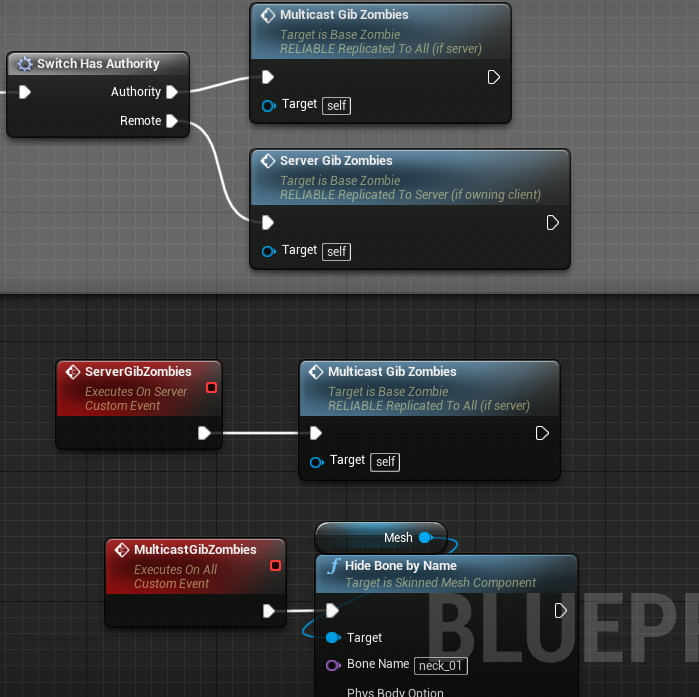
Can somebody please help me with this simple replication? There's gotta be something I'm missing. I put a print string in to test and the client is not even executing the "ServerGibZombies" event. Why? https://i.gyazo.com/0ad84e3ba4070f944d819ed0f5a111fd.png
 tall pine
Why would Remote pin go to Server Gib Zombies? Wouldn't that only be called on Server?
grizzled stirrup
It'd be a server RPC I assume which a client would call to go to the server
winged badger
you do know that Server RPC called from server is just a normal function?
that switch is redundant
cedar finch
I thought the "remote" pin is the non server player
winged badger
as for why its not executing, relevant part is missing
it is, but you can call Server RPC from server just fine
grizzled stirrup
@winged badger is it equally as cheap to call a Server function on the server as it is any other?
I often had branches saying if Role < Role Authority and calling the RPC only there, then calling the function the RPC calls directly if Authority
winged badger
in this case it would be cheaper, very slightly, to call multicast directly, but if you need that blueprint macro to check auth first, then its more expensive, and worse, more verbose
cedar finch
I must be missing what your saing. So I thought that when a client wants to do something and then let everyone else know what he did, he has to call a Server RPC then a Multicast.
winged badger
it could be your mesh is null, you're calling the RPC from an object that can't do it, few other things
can't tell from your screenshot
tall pine
@winged badger : would you mind taking a look at my question above? Thank you
cedar finch
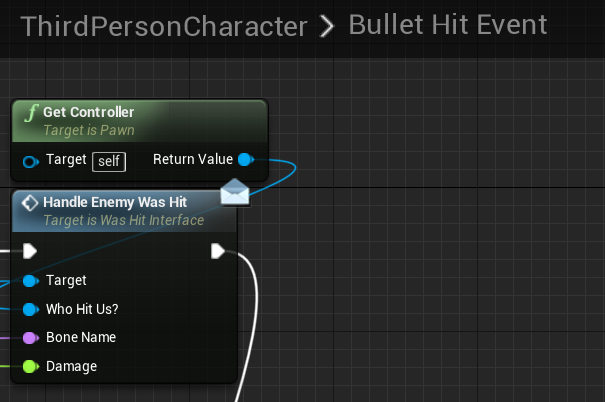
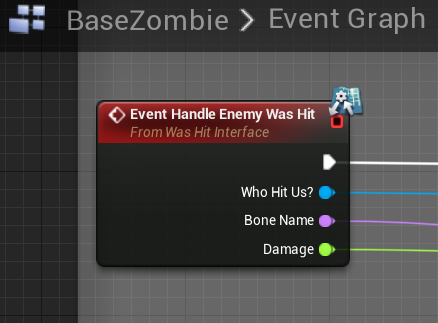
So my character has his "hit" event https://i.gyazo.com/38644c842ceab9ef55f64924e3acbeb5.png Then the zombie recieves the message. https://i.gyazo.com/ead59f4a54a4f0a1342dd524a23a5e30.png and the gibbing stuff above is plugged into that event
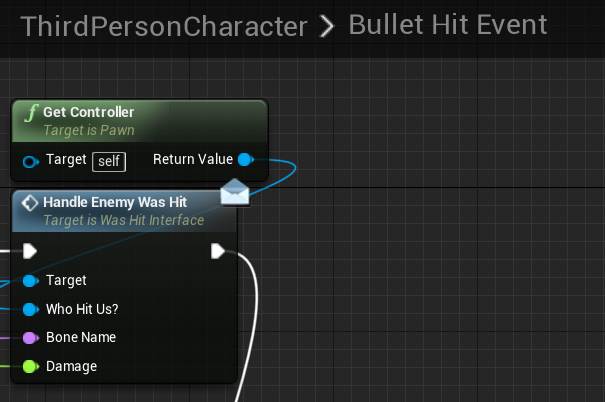
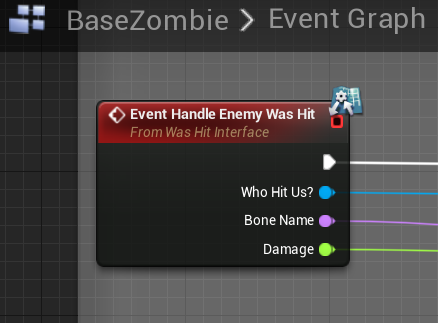 winged badger
zombie can'
can't call a server RPC, it has no DataChannel
you need to RPC in character
@tall pine pretty much, its called Seamless Travel 😛
cedar finch
Ah! Ok I knew I was missing something. Thanks. I thought I was crazy or something
So handeling gibbing for enemies can't be done inside the actual enemy? What's a good place to handle it?
winged badger
it can, server RPC can't
EventHandleEnemyWasHit has to be called on server, not on client
cedar finch
Oh yea. lol Ok I gotcha.
tall pine
@winged badger : ha ha. So that block of text is only true for Seamless travel? this:
APlayerController::ClientTravel
If called from a client, will travel to a new server
If called from a server, will instruct the particular client to travel to the new map (but stay connected to the current server)
I'm trying to find a good place to save / load PlayerState stuff. If the client disconnect everytime they hard-travel, then I can probably hook into login(), logout() ?
winged badger
after calling Super:: in PostLogin
otherwise you won't have a playerstate to load to
and before calling Super:: in ClientTravel
tall pine
I call ClientTravel from APlayerController*. Seems that PostLogin() is called from GameMOde
 grand kestrel
Whats the cost of replicating a UObject pointer?
I assume epic does something so we're not all replicating uin64's?
Think I found the answer myself "if you have a UObject property that is replicated, the reference to that object will be sent over the network as a special ID that is assigned by the server. This special ID is a FNetworkGUID"
So its a uint32
So probably still worth assigning and replicating uint8 IDs manually for things that happen a lot
 wet tangle
Does anyone know af a way to get the cause of join session failure on a packaged project?
thin stratus
Usually in the Logs?
You can also use the TravelFailure node/function to check why it failed by printing the reason
However the log is almost always more informative
wet tangle
ty
 lone vapor
Has anyone seen this before? I can't figure out why the server gets a different socket rotation to the client. Everything is replicated, all of the character components, capsule, meshes, etc.
I'm setting the weapon as a child actor of the player character and setting the "parent socket" as the grip point.
grand kestrel
Getting a bit frustrated. I need to add a tick prerequisite for the world tick, but theres no tick function to bind to.. 😦 Because of this, PostNetReceive is being called randomly before or after (stemming from world tick) my tick function
And I need a tick that ticks after replicated values are received
 slim holly
ticking bones is super duper expensive
create data that drives the bone rotation, replicate the data
lone vapor
what data am i replicating tho? both the server and client are sharing the same player blueprint, the same weapon blueprint and assets, so the socket info should all be the same. Not sure where this slight Z rotation is coming from though :3
slim holly
generally control rotation is used for aiming
but you can create your own form of rotation data and replicate that
remember kids, Meshes and skeletons are only visual presentations of the data
grand kestrel
Wouldn't say 'only'
Root motion is a good example
So is parenting a collider under a bone
Just have to know what you're doing first 🤷
slim holly
true, but the skeleton inside the collider can be anything
you can actually do root motion the other way around, not even that difficult to drive animations based on travel distance
 vernal hollow
anyone have any idea why my RInterpTo would be running slower/taking longer on a client than on the host?
vernal hollow
it's used to set the actors rotation to the direction they're moving and even when it's only running on a client it's way less snappy than on the host client
i thought it was a case of the server trying to set it and the client only rotating based on that value but i'm pretty sure it isnt that
slim holly
that's an authority issue of who gets to set the rotation
if you're seeing stuttering on client, that means server is trying to correct the client based on old information
but, if you must keep it server authorative, you can replicate the interpolation target to server before doing the actual interpolation
instead of sending the interpolated data
that should keep it synced assuming both ends are interpolating at ~same speed
vernal hollow
a quick aside relating to how i was testing everything, if i wrapped my code running in the tick statement with a check to see if it's locally controlled before running it, would that make it exclusively run on the client?
that was one of the ways i've been testing it's behaviour
grizzled stirrup
That would return true if a client OR a listen server host
vernal hollow
but it wouldn't run on a dedicated server right? just the client in that instance
thin stratus
Also, it only returns true on the PlayerController OF the ListenHost.
Given the Server has all Controllers.
Just to make sure that's clear
So it's basically the most effective way of limiting something to the owner of the Pawn/Controller
May it be a client or the host
grizzled stirrup
Question: what is the best way to "reset" RepNotify properties? Say I don't replicate the character movement component and instead send regular RPCs from the client to the server to update position and rotation. Since I don't have the CMC running on remote client proxies, there's no way for them to tell if they have landed, so I can push an OnRep bool bLanded to the server via an RPC whenever the controlling client lands. In order to make the OnRep event trigger on each landing to all other clients, bLanded has to be reset on the server before it can be activated again, which will still replicate down to clients but do nothing (as I have gated the OnRep_Landed event with an if (bLanded) check before doing any land events / anims.
So in short, is it common to reset a RepNotify property on the server using a short timer after setting it?
Even if resetting it wastes some bandwidth to send the false bool down to clients that otherwise runs nothing else?
vernal hollow
this is what my interp issue is doing on a client vs a host with the islocallycontrolled check to try have it only run on the clients

the first one is the host and is how it should be, the second is the client with it's jitter
thin stratus
@grizzled stirrup Why would the CMC not execute the landed on Simulated?
grizzled stirrup
I have the CMC replication fully off, so the proxies are being just interpolated via SetActorLocation / Rotation
thin stratus
Oh
grizzled stirrup
So I don't think the CMC would know about landing
thin stratus
Well the proper way is to check on each client if they landed
When you are interpolating
I mean, turning off the CMC replication is removing a lot of features :D
Also this is better suited for an RPC than an OnRep if you do it like that
No one cares about the landed event 10 seconds later
It's a one time event
grizzled stirrup
Yeah it is removing a lot of features (mainly losing speed and delegates like OnLanded)!
Would you use a multicast RPC in this case then?
When landed
thin stratus
You are losing access to all sorts of information, like the MovementMode etc.
grizzled stirrup
When the controlling client lands, he sends a server RPC to say he landed which sends a multicast RPC to all other clients
thin stratus
The Server should already know if you landed
grizzled stirrup
Yeah that's fine, the other players just need to see them generally where they are in the world
grizzled stirrup
It's fully client authoritive movement
thin stratus
That's delayed as fuck
grizzled stirrup
So the server doesn't know
thin stratus
Yeah you need to do this stuff in the interpolation code
grizzled stirrup
Until he gets a packet from the client with a location / rotation struct
thin stratus
Check if they were falling before
And then if they aren't anymore
You can't time this otherwise
With a higher ping, the OnLanded will come in long after the player actually landed
grizzled stirrup
That's a good point
thin stratus
That's why the CMC performs the movement on all clients
And is only replicating the info for that
You can also turn of the Client correction on the Server in the CMC
grizzled stirrup
I'll have to look into the client authority CMC features
thin stratus
So I don't know why you'd go as far as turning off teh replication
It brings more problems than it solves
grizzled stirrup
If I turn off the client correction, he won't be where he is on the server though would he?
grizzled stirrup
Oh that's exactly what I want
Damn
I thought turning off client correction would just simulate server / client on separate paths
That's great thank you I'll have a look into that noww
thin stratus
Check ::ServerMoveHandleClientError
grizzled stirrup
Hopefully I can then still replicate the client movement as usual from the server to other clients using this method
thin stratus
As well as ::ServerCheckClientError
Line 8501 on 4.20
// Check location difference against global setting
    if (!bIgnoreClientMovementErrorChecksAndCorrection)
    {
Might need a tad additional code
But I would assume inheriting from the CMC and overriding 1-2 function is still better than fighting the non-rep fight
@jolly siren might be able to say something about making it client authoritive
grizzled stirrup
Thank you so much this is really useful
I'd love to use the CMC if possible as it does so many great things
Looking into this code now
thin stratus
Also
Line 8462
if (GetDefault<AGameNetworkManager>()->ClientAuthorativePosition)
So basically if the test passes
Which happens if that boolean from above is true of course
Then it goes into the else of the ServerMoveHandleClientError function
And in there is the line with ClientAuthoritivePosition
If that is true, then it will most likely take all of the client
 jolly siren
Yeah we use bIgnoreClientMovementErrorChecksAndCorrection and ClientAuthorativePosition
grizzled stirrup
Damn this is amazing
So a quick repro for a noob like me:
In the character constructor:
GetCharacterMovement()->bIgnoreClientMovementErrorChecksAndCorrection = true;
Then for the ClientAuthorativePosition boolean, how do I set that?
It's not showing up at least publicly from the GetCharacterMovement() getter in the Character
thin stratus
it's part of the GameNetworkManager
might be a project setting or so
Or not
Guess it's a config variable then
jolly siren
yeah it's in the ini
thin stratus
Do you have the exact lines to paste, Ethan?
grizzled stirrup
Would be extremely helpful, thank you so much!
jolly siren
[/Script/Engine.GameNetworkManager]
MAXPOSITIONERRORSQUARED=1600
ClientAuthorativePosition=true
By just setting these two bools, do we get all the benefits of the CMC while allowing the client to determine position?
jolly siren
In DefaultGame.ini
grizzled stirrup
Thank you so much
thin stratus
"MAXPOSITIONERRORSQUARED" is actually not important if you set the "bIgnoreClientMovementErrorChecksAndCorrection " to true
It's check in the function that doesn't get reached
jolly siren
right, we only set bIgnoreClientMovementErrorChecksAndCorrection to true for short durations though, while performing lunges
thin stratus
Very well
void AGameNetworkManager::StandbyCheatDetected(EStandbyType StandbyType) {}
What is a StandbyCheat?
grizzled stirrup
Got it! Would it work in this case if I want my entire game to allow clientside movement? Testing now
Really appreciate the help
thin stratus
It should
jolly siren
yeah it will
grizzled stirrup
Incredible
thin stratus
It basically 1. cancels the correction and 2. override the location and all important data on the server with what the client has
if (GetDefault<AGameNetworkManager>()->ClientAuthorativePosition)
{
    const FVector LocDiff = UpdatedComponent->GetComponentLocation() - ClientLoc; //-V595
    if (!LocDiff.IsZero() || ClientMovementMode != PackNetworkMovementMode() || GetMovementBase() != ClientMovementBase || (CharacterOwner && CharacterOwner->GetBasedMovement().BoneName != ClientBaseBoneName))
    {
        // Just set the position. On subsequent moves we will resolve initially overlapping conditions.
        UpdatedComponent->SetWorldLocation(ClientLoc, false); //-V595

        // Trust the client's movement mode.
        ApplyNetworkMovementMode(ClientMovementMode);

        // Update base and floor at new location.
        SetBase(ClientMovementBase, ClientBaseBoneName);
        UpdateFloorFromAdjustment();

        // Even if base has not changed, we need to recompute the relative offsets (since we've moved).
        SaveBaseLocation();

        LastUpdateLocation = UpdatedComponent ? UpdatedComponent->GetComponentLocation() : FVector::ZeroVector;
        LastUpdateRotation = UpdatedComponent ? UpdatedComponent->GetComponentQuat() : FQuat::Identity;
        LastUpdateVelocity = Velocity;
    }
}
And still replicates that new location to other clients as usual?
So they simulate etc. locally
thin stratus
Yop
jolly siren
yes, the move system still works the same
grizzled stirrup
This is genuinely so exciting hahah
grizzled stirrup
As long as the land delegate triggers and it still has access to speed, I'm happy
thin stratus
ACharacter::PreNetReceive, ACharacter::PostNetReceive, ACharacter::OnRep_ReplicatedBaseMovement, ACharacter::OnUpdateSimulatedPosition, ACharacter::PostNetReceiveLocationAndRotation
And all kinds of shit
Took me a bit to get my custom movement to do the same
But yeah, Simulated Clients basically get a lot of stuff replicated
And perform the rest themselves
It uses the default Actor Location and Rotation replication
And plugs in the Smoothing Code of the CMC between that
thin stratus
I wonder if you'd see much difference though
Cause in the end, ServerAuthoritive movement also looks good on PIE :D
grizzled stirrup
Yeah in PIE but with net pktlag anywhere over 50 it can fall apart
When launching at high speeds
thin stratus
True
grizzled stirrup
Out of curiosity, how do games like Fortnite handle such a case?
thin stratus
Better netcode than what we get
grizzled stirrup
I assume any kind of client launch that is triggered locally with latency before the server triggers it will create a big difference in server / client and get snapped back
Haha yeah true
thin stratus
Launching the Client is actually not the problem
As long as it's similar to how jumping works
We have an ability that "launches" you downwards
Doesn't lag at all cause it's handled like jumping
Just downwards
It gets a bit tricky if two actors collide
BUT, even for that you have some CMC functions you can override to handle forces applied then
You just can't apply forces outside of that
cause that will indeed correct you
grizzled stirrup
Ah interesting- the main thing that stuck out to me was that the client would be so far apart from the server version if launching rapidly somewhere that the server would erroneously correct it because of the threshold, but I haven't fully understood / looked into it. Using the standard Launch Character
It does works nicely for cases where you are doing a single slowish launch in a single direction, but just gets very frustrating as a client otherwise
Btw just tested the code you and Erebel sent- seems to work amazingly well other than a few camera shakes I have going off at wrong times for some reason
It seems to even work just using the .ini setting (commenting out bIgnoreClientMovementErrorChecksAndCorrection in the Character constructor)
I assume that bool is more used to re-enable server correction in the case where you DO want server authority after a fast launch for example?
So useful though thank you both SO much for this help
vernal hollow
I did some more testing and found out that my rotation is only jittery on the client when Replicate Movement is set to true on my character
grizzled stirrup
Yeah unfortunately clients viewed from the perspective of listen server hosts don't seem to have ANY interpolation AND only update their anim on each network update
It was nice to get rid of it on my hacky send RPC with client loc / rot and interp locally vs using the CMC, but there are a few reasons it appears to be done, mainly to keep things in sync
Unless you mean your client itself experiences the jitter, in that case it may be a mismatch of values from the server to the client
vernal hollow
yeah the client experiences the jitter but i'm not certain why exactly
this is what I have running in my characters tick function
void AHCharacter::Tick(float DeltaTime)
{
    Super::Tick(DeltaTime);

    if (GetCharacterMovement()->Velocity.Size() > 150)
    {
        FRotator VelocityRotation = GetCharacterMovement()->Velocity.Rotation();

        if (bMovingBackwards)
        {
            VelocityRotation.Add(0, -180, 0);
            //RotateSpeed = RotateSpeed * 0.5f;
        }

        FRotator EndRotation = FMath::RInterpTo(GetActorRotation(), VelocityRotation, DeltaTime, RotateSpeed);
        SetActorRotation(FRotator(0, EndRotation.Yaw, 0));
    }
}
I'm assuming the culprit is that the server has a different value to the client and it is constantly being corrected slightly
vernal hollow
that was i was thinking, but i'm not sure how to get the client to ignore the servers value without disabling movement replication entirely
grizzled stirrup
Anyone have tips for testing with latency through steam locally in the same workspace on multiple computers?
I tried connecting with a VPN in Australia and while it does seem to use the australian connection for the steam beacon part (joining the lobby), it weirdly seems to use the real local connection when joining the map
This makes it quite hard to test genuine laggy conditions (excluding Net Pktlag = 200 etc.)
twin juniper
How do i change port on the listen server and port on the join server thing?
Using the "Open level" with "listen" option. And execute console command
bitter oriole
@grizzled stirrup NetPktLag is fine tbh
 worthy perch
You can try using Clumsy to do some network testing.
I don't remember what exactly was said and I can't find the post, but I do recall someone saying that NetPktLag isn't entirely accurate.
bitter oriole
Of course it's not very accurate. It's just a debug tool, and real latency behaves in a more interesting manner
It's still a pretty great tool
The net packet burst is pretty cool too
grizzled stirrup
Ok cool thanks!!
grizzled stirrup
Weird, Clumsy also doesn't have any effect when joining the actual listen server
It does in the lobby
Very confusing how steam bypasses it somehow and knows it's a local connection
 median elbow
i'm having a problem with joining a steam lobby session
the join works just fine after an invite accepted, but its like not joining the server or something
when the lobby host starts a match on another server, they both jump to that server though
so the join lobby session is working, its just like not connecting to the server or something
i'm trying to get onpostlogin, but its not being called after a join session
anybody have any idea why that might be happening?
winged badger
steam lobby has no real relations with sessions or unreal networking
you don't have to be connected via unreal server to be connected via steam lobby
and you can connect to unreal server via steam without being connected to the lobby
im guessing you're mixing up lobby and session
grizzled stirrup
@jolly siren Thank you so much for the client authority movement tips earlier, it's working amazingly well. The only issue I've encountered so far is if a group of enemy characters surround a high ping client on the server, and on his screen he is jumping / running away from them he DOES get corrected back to be trapped between the enemy collision. Is this intended behavior? I guess it makes sense, the server trusts the client authority until it is physically blocked by another networked entity on the serverside
To be clear I have bIgnoreClientMovementErrorChecksAndCorrection set to true always
jolly siren
I found that bIgnoreClientMovementErrorChecksAndCorrection wasn't setup perfectly ootb
And had to do the following
void UFooCharMovementComponent::ClientAdjustPosition_Implementation(float TimeStamp, FVector NewLoc, FVector NewVel, UPrimitiveComponent* NewBase, FName NewBaseBoneName, bool bHasBase, bool bBaseRelativePosition, uint8 ServerMovementMode) {
    if (!bIgnoreClientMovementErrorChecksAndCorrection) {
        Super::ClientAdjustPosition_Implementation(TimeStamp, NewLoc, NewVel, NewBase, NewBaseBoneName, bHasBase, bBaseRelativePosition, ServerMovementMode);
    }
}
I would try something like that and see how it behaves
grizzled stirrup
Perfect thank you so much
I don't need a source build for this correct? I just need to make my own CMC and override that function as shown?
jolly siren
correct
grizzled stirrup
Great will let you know how it goes! This has been a gamechanger for my project
SO much better than interpolating raw position
From the client
Looks 1000x better for other clients
grizzled stirrup
Only competitive in the sense that you and your friend are battling for a higher score against enemies
Not PvP
I want both players to have the same smooth experience regardless of ping
Instead of the host having a big advantage
jolly siren
ahh okay nice, yeah that is a lot easier. Much simpler in non PvP worlds
grizzled stirrup
Cheating would only affect a single listen server lobby as opposed to anything bigger
Yep gave up on my PvP dreams a long while ago 😄
Though this should be still possible to have fun PvP with friends if they want
Just would be a nightmare in any kind of public lobbies
jolly siren
Right, yeah I was just going to give the normal spiel about how this is dangerous in PvP environments
grizzled stirrup
When overriding that function since it's a client RPC, do I only override ClientAdjustPosition_Implementation in the header and not ClientAdjustPosition?
I see the RPCs are set up a bit differently to normal classes
Or should I override both in the header?
/** Replicate position correction to client, associated with a timestamped servermove. Client will replay subsequent moves after applying adjustment. */ virtual void ClientAdjustPosition(float TimeStamp, FVector NewLoc, FVector NewVel, UPrimitiveComponent* NewBase, FName NewBaseBoneName, bool bHasBase, bool bBaseRelativePosition, uint8 ServerMovementMode); virtual void ClientAdjustPosition_Implementation(float TimeStamp, FVector NewLoc, FVector NewVel, UPrimitiveComponent* NewBase, FName NewBaseBoneName, bool bHasBase, bool bBaseRelativePosition, uint8 ServerMovementMode);
jolly siren
Just the implementation
virtual void ClientAdjustPosition_Implementation(float TimeStamp, FVector NewLoc, FVector NewVel, UPrimitiveComponent* NewBase, FName NewBaseBoneName, bool bHasBase, bool bBaseRelativePosition, uint8 ServerMovementMode) override;
grizzled stirrup
Great thanks so much!!
jolly siren
np
grizzled stirrup
@jolly siren Just tested the same scenarios and it appears to work PERFECTLY
Can't thank you enough
I put in a logtemp on that override and it is called exactly when I was noticing the corrections before
Only slight difference from using the stock CMC is that I'm now seeing this LogCharacterMovement spammed in the logs during these events (when many enemies are grouped up around the player and don't have space to move) LogCharacterMovement: BP_EnemyC_C_0 is stuck and failed to move! Velocity: X=514.63... etc
Do you know if deriving from CMC makes certain logs print that normally would be hidden?
jolly siren
Hm I wouldn't expect it to affect logging
grizzled stirrup
Ah yeah scratch that actually it was happening since I started using the setup you mentioned earlier
My bad
Just checked old logs from earlier
Working like a charm now, really appreciate the help
Now to try and give the clients some kind of interpolation when being viewed from the listen server 😄
So I can get away with a lower than usual update rate
jolly siren
Awesome, glad I could help 😃
grizzled stirrup
There would be a ZERO percent chance I could have figured those steps out alone
So little info on these specifics online
grizzled stirrup
Interestingly I have found that when viewing a listen server client as the listen server host with Slomo 0.2 command enabled, while there is NO interpolation of movement between network updates while the client is jumping for example, if I hold input on the client (so holding W while jumping), the interpolation is buttery smooth on the listen server
I wonder if there is a way I can get it to always run that codepath when the client is sending input, to get proper smoothing / interpolation, as the CMC seems to be set up to have correct smoothing, but perhaps it's just a bug that has existed a long time (that listen server hosts see clients with no interp between net updates)
Ah it seems p.NetEnableMoveCombining 0 does exactly this
jolly siren
ah yeah that will be much more expensive on the network
with move combining disabled
grizzled stirrup
Would you say it's acceptable to run only on client characters in a 2-4 player co-op game? It's really only to try and make clients look smooth from the perspective of the listen server
It works fine the other way around or clients seeing other clients
There's just 0 interp on the listen server's view of the client it seems by default
Ah I guess you can't set it individually- since it's a console command it'd affect ALL characters which is a big waste
Unless it doesn't factor in AI character input which is what the other characters would be
jolly siren
AI movement just runs on the server. It doesn't need to be sent from client to server, like with normal players
But yeah with low player count it should be okay
You can also tweak the values if you don't want to turn it completely off
ClientNetSendMoveDeltaTime=0.0333
ClientNetSendMoveDeltaTimeThrottled=0.0444
ClientNetSendMoveDeltaTimeStationary=0.0333
Oh that's amazing
So with p.NetEnableMoveCombining 0 it'd send every frame?
But this allows you to specify the freq
So like 0.01 or whatever
jolly siren
Yeah then you can just tweak them until you get the smoothness you want and still get some savings
grizzled stirrup
That's much cleaner! Plus I can make sure it only affects my human characters
jolly siren
😃
jolly siren
no problem 💪
grizzled stirrup
I feel your pain, it is quite annoying- BP's will register the change to the default value but won't change the value itself
Especially with HotReload you often have to recreate BP's unless closing the editor and making sure you compile without it open
 meager spade
my turn in place causes jitter and i cant work out why 😦
wet tangle
If my project uses steam and hosts lan it can only work on differentr computers right?
bitter oriole
Steam is unrelated to hosting
But yeah, you can't have two Steam users on the same machine
wet tangle
ty
 wanton pebble
quick question
how do i replicate aa variable in C++?
basically i have a crouch variable that i'm trying to replicate
but using DoRepLifetime doesn't help
bitter oriole
Depends on whether you want client to server or server to client
wanton pebble
it's just a crouch... i'm not sure what that would necessitate
bitter oriole
There is no such thing as "just replicate X"
grizzled stirrup
Client to server in that case as you'd want the client to instigate the event.
bitter oriole
Both, really
RPC from client to server, replictaed var from server to other clients, marked as "all but owner"
grizzled stirrup
True!
You'd use RepNotify in this case correct?
Since it'd trigger the crouch on proxies
bitter oriole
Depends on a lot of factors.
wanton pebble
void ASCharacter::ExecCrouch()
{
        if (CrouchToggle == false)
        {
            if (IsSprinting == true)
            {
                IsSprinting = false;
            }
            IsCrouching = true;
            CrouchToggle = true;
            SpeedMultiplier = 3.0f;
        }
        else
        {
            IsCrouching = false;
            CrouchToggle = false;
            SpeedMultiplier = 1.0f;
        }
}```here's my crouch code
    float TargetHalfHeight = IsCrouching? CrouchedCapsuleHalfHeight : DefaultCapsuleHalfHeight;

    float NewHalfHeight = FMath::FInterpTo(GetCapsuleComponent()->GetScaledCapsuleHalfHeight(), TargetHalfHeight, DeltaTime, CrouchSpeed);

    GetCapsuleComponent()->SetCapsuleHalfHeight(NewHalfHeight);
//```and here's the code within tick
currently all i'm doing is this
{
    Super::GetLifetimeReplicatedProps(OutLifetimeProps);

    DOREPLIFETIME(ASCharacter, IsCrouching);
}```You have to send IsCrouching to the server via a Server RPC
Right now it's only local
grizzled stirrup
UFUNCTION(Server, Reliable, WithValidation) void ServerSetIsCrouching();
In the .h
wanton pebble
and then an implementation and validate in the cpp file?
wanton pebble
i didn't know that was called Server RPC, thanks
wanton pebble
so if(Role == ROLE_Authority)
grizzled stirrup
Then make sure you have COND_SkipOwner on IsCrouching so the client won't trigger the crouch twice when the server replicates it
Do this
if (Role < ROLE_Authority) { ServerSetIsCrouching(); }
wanton pebble
roger that, thanks
grizzled stirrup
Ah perfect thanks a lot
wanton pebble
@grizzled stirrup cheers man, that worked!
twin juniper
Hey, anybody knows why Multiplayer won't work sometimes? its just randomly, sometimes it works for me and sometimes it doesn't :/
 grave kayak
use simpler collision shape(s), judging from that profile
bitter oriole
@jolly siren Do you have many components on that pawn ?
jolly siren
Sure, there are a bunch of meshes, spring arm, camera, sound stuff, etc
But yeah it looks like overlaps is the most expensive
I mostly just use overlap events for picking up weapons, items, etc
grave kayak
i dont know how precise your collision has to be, but as a quick test you can disable collision on the skeletal mesh and add a capsule primitive and use that to get the overlap events
jolly siren
oh I thought that is what these overlaps were from. I'll check the mesh now
twin juniper
So from what I noticed, if you launch the MP game on the same computer twice, it will recognize as only one player.
The third launch will work as a second player, and it shouldnt be a problem because nobody runs the game twice on the same PC and plays like that, but for testing purposes, that's the solution.
jolly siren
@grave kayak That helped a ton, thank you 😃
grave kayak
no problem 😃
 worn nymph
anybody here good with collisions? i am trying to spawn an object (in this case a portal) at the end of a line trace where it hits something. The issue is the object is spawning in the ground or in the walls etc
i tried giving it a really big collision shape and setting the spawn setting to adjust location if colliding but that makes no difference
 rotund sapphire
@worn nymph It's not quite a multiplayer related question. You must include the mesh bounds in your calculations when you position the new mesh. The end of the line trace is hitting the object's surface, you obviously can't put an object there, since the new mesh's pivot is not on the 'back' of the new mesh but in the middle of it.
rotund sapphire
Try a sweep trace with the bounds of the mesh, so you can avoid clipping
 twin minnow
I experienced something similar, @worn nymph are you calling spawnactor in a server rpc?
twin juniper
Is all the player controllers the same on a listen server?
the destroy actor when they have 0 health only works on the server character
winged badger
you should really read the compendium (again?)
rotund sapphire
The getplayercontroller(0) is an awful bad practice and i see it blueprints too many time. Instead, Pawn->GetController->Cast to PC-> there is your PC to work with
fleet raven
it could have been so much easier on new users, if that function was get local player controller and simply did nothing on server
winged badger
it is very likely he is trying to destroy the Pawn in that reference chain Robart
twin juniper
Currently i am casting to BP_Character and get controlled pawn then player controller. Then i destroy the bp_character actor if it has below 0 health
problem is
if i shoot enemy
always the server client dies
winged badger
so you start with a reference to a Pawn you want to destroy, then do a Cast you don't need, then do other crazy stuff just to get a reference you started with?
twin juniper
I am doing all of this in player controller blueprint
winged badger
yikes
if you shot it, you have a refence to it
if you modified its health you have a reference to it
why do you need a roundabout way to get it to destroy it?
and worse, triggering the destruction/cleanup should be atomic with modifying health, if it ends up modified to <= 0
twin juniper
Also
i just tested a new game
with friends
my friend tells me i keep teleporting for him around the map
we both have extremely good internet
he has 1gb internet speed
i have 100mb internet speed
bitter oriole
400ms ping
grizzled stirrup
Oh fantastic, was testing with Net PktLag=500 for extreme conditions and it felt way too delayed
Thanks!
Will tone it back to around 100 / 150 for worst case scenarios
fleet raven
it will delay outgoing packets on the side you enter it
so to make 400ms ping, you must type that command on both the client and server
grizzled stirrup
I called it from the level BP so it should affect both
So this delays the client sending the action by 200ms and then the servers response by 200 right?
fleet raven
ye
grizzled stirrup
thanks
fleet raven
having it on both sides is the most realistic way
also turn on the lag variance and packet loss
grizzled stirrup
Net PktLoss is the only one that seems to mess everything up horribly
But it does that too in other games when I play without a modem!
Will do