#multiplayer
1 messages · Page 460 of 1
 bitter oriole
 flint plaza
Ok I will check that out
 twin minnow
actually i am wrong once again, for some reason when spawning an actor on the server it doesn't replicate that actor to the right location on the clients
tried this solution from exi here, but it did not work sadly (turning on physics for the actor's collision component) https://forums.unrealengine.com/development-discussion/blueprint-visual-scripting/1458882-different-location-of-actor-at-server-and-client
Unreal Engine Forums
Hey Guys,
so Iam still working on my GTA2-remake and spent the last time to redo my vehicle setup, as the origial one just became extremely chaotic. All of
setting the static mesh component as the root component kinda works but then my projectile no longer moves 😦
 median elbow
using steamworks (onlinesubsystemsteam for hte most part), you are allowed to be connected to two sessions right?
one "lobby" and one "game"?
twin minnow
very odd, I ran my game as a listen server and the bullet spawns on the muzzle socket on the server but not on the replicated clients
I've also noticed that attachtocomponent also works differently on clients vs server. Same shotgun but on the server, when attached to the player's hand socket, it's rotated.
 gleaming vector
anyone know of a good callback for when an actor becomes relevant on the client?
 winged badger
i do not think there is one, relevancy is evaluated only server side, and per player controller
 manic pine
beginplay?
 cedar finch
I have a variable called "BleedOutTimer" it's inside PlayerState. What is the right way to replicate this value to a widget attached to my player character so everyone can see it?
twin minnow
@cedar finch u should use a server rpc
cedar finch
@twin minnow Where though? I have the BleedOut variable inside a funcion in my playerstate that I Pause and Unpause using a timer. So it's being decremented inside my playerstate function.
twin minnow
in that function u should call hasauthority() and check if you're calling from the server. If not, then call a server rpc that calls ur playerstate function so that the next time the function is called, it'll be from the server
cedar finch
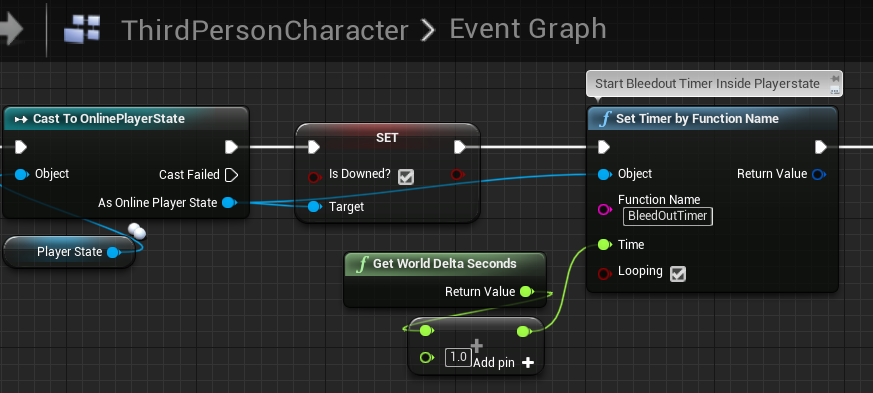
@twin minnow I get what your saying but I'm still confused on the order of where to put it all. So I have 3 actors. my Player, his Widget above his head, and his playerstate. The player tells the playerstate to start the bleedout timer. After that I don't know if I need to make the playerstate tell the widget what the bleedout time is, or if I need to make the widget get the playerstate variable and set it. I don't know the right order.
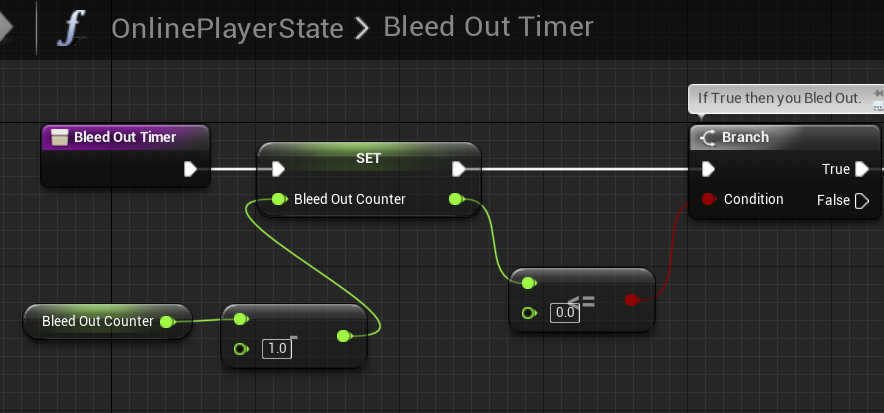
https://i.gyazo.com/c31b26c73536aa06bc98c540829eab11.png https://i.gyazo.com/d551e176ce96275d1e0934e0b735259c.png
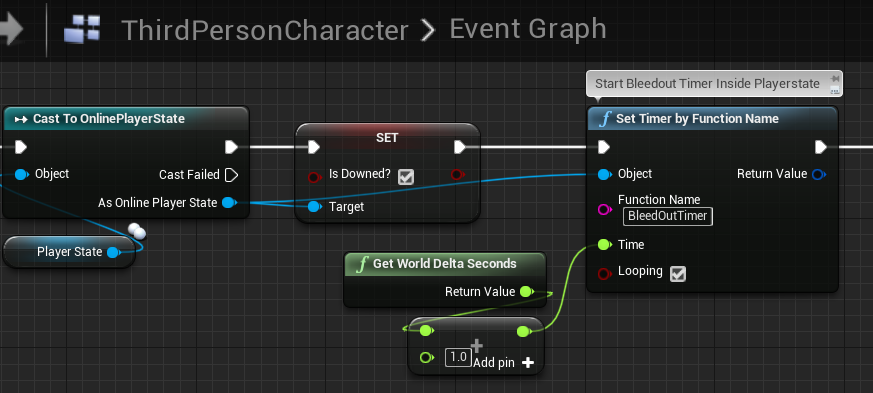
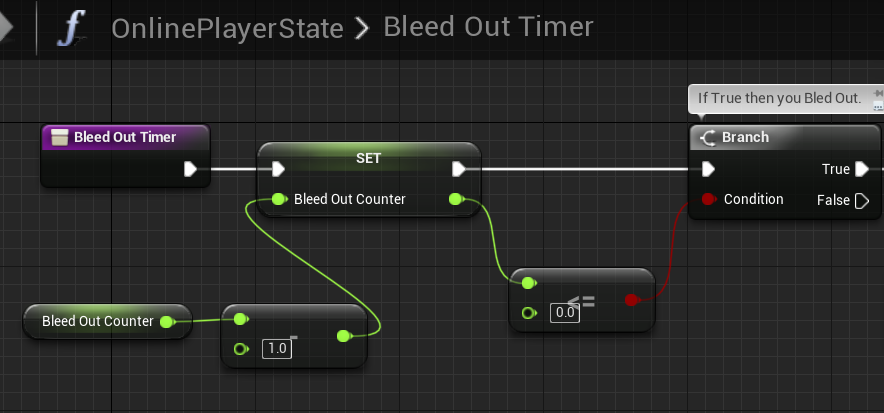 twin minnow
I think either way should be fine
cedar finch
@twin minnow So I should put the switch has authority with the Server RPC in the ThirdpersonCharacter right before the SetTimerByFuncion? Or inside the BleedOutEvent in Playerstate?
twin minnow
bleed out event probably works better
 quiet wyvern
whats best way to handle listen server and dedicated at the same time
i usually have a easy time setting up client players to work good but getting listen server client working is usually troublesum
cedar finch
I must be doing this BleedOutTimer wrong. I don't know how to make it replicate correctly. When a player goes down and wants to start his BleedOutTimer, Where should the timer be and if it's inside Playerstate what kind of RPC should he use to call it?
twin minnow
server rpc
timer should actually also be started in the server my bad
since i just realized u want the bleedout time to replicate
cedar finch
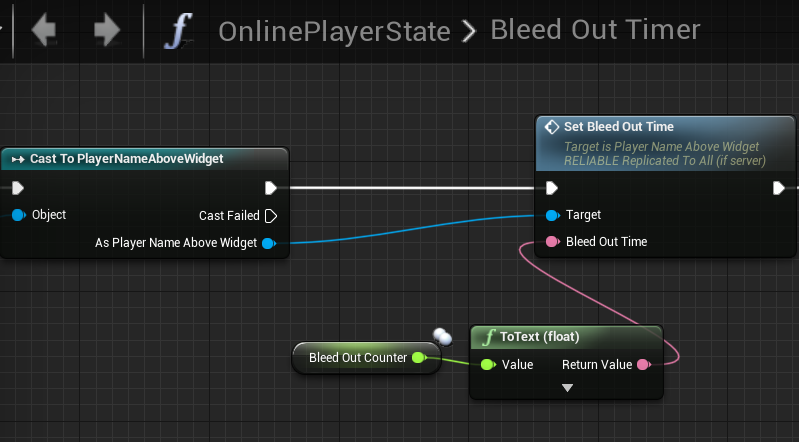
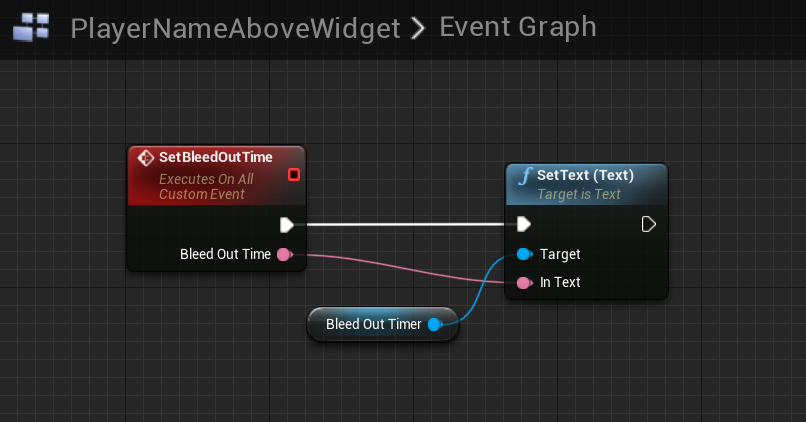
Ok so Let me walk through what I have. So when a player goes "down" he calls a Multicast RPC that starts the Bleedout timer function inside playerstate. In the Bleedout function in playterstate I decrement the BleedTime variable. I then push that variable to my widget and set my widget text to it.
@twin minnow
twin minnow
that sounds like it should be good
cedar finch
The logic works but the timer widget above the players head doesn't show up for clients. Players can go down and bleed out and die correctly
It's like I'm sitting at the finish line but can't figure out why I can't replicated 1 variable inside playerstate to everyone else.
winged badger
stuff like visibility and hiddeningame aren't replicated
you might just need to make your widget visible there
cedar finch
@winged badger That had me worried for a sec I thought it was going to be something simple like visibility but I left it on and it's not updating for clients, only server. So it's a replication issue. Good guess though.
I have it pushing the variable from my playerstate timer to my widget. How can I make that push replicate?
https://i.gyazo.com/0ae541c4afad39191ef36200bc7f95a5.png https://i.gyazo.com/9a1dc7e8349297dffcb0fad281747930.png

 cedar finch
So I know Server has to set the BleedOutTime variable in order for everyone to see it. But if my actual timer that ticks down until you bleed out is inside Playerstate, how do I set the variable? Modifying the variable inside playerstate will only affect that player's playerstate because other clients can't see others playerstate.
median elbow
has anybody had any success with getting the steam user id from LobbyInvite_t from steam?
flint plaza
How can I differentiate between the player playing on the server window and the client window? The player on the server window executes the server code both times whereas the client window player executes the client code once and the server code on the server side
I tried using roles as @bitter oriole suggested but the server window has all the player has authority therefore executes server code twice whereas in the client window, the pawn being controlled is autonomous proxy and others are simulated proxy and therefore the code executes client code once and other as server code
bitter oriole
Use remote role too.
flint plaza
Yes i tried that also. Point I'm trying to say is, server window always executes the same code twice and client window executes both side once
bitter oriole
@flint plaza I still have no idea what your problem is.
What are you trying to do, exactly ?
Usually uou don't need to know if you're server or client, you need to know if you're authoritative, remote simulated, or remotely played (autonomous)
You can get the net mode to check if you're listen server, too, though I've never needed that
So explain what you want to achieve in your game here
And I can point you to a solution
 rough iron
@bitter oriole if you have dedicated and listen servers you do need to know the role, so you can avoid doing a ton of stuff on the dedicated server and on the listen server simulate stuff
 unique patio
Hey people!
Trying to setup a multiscreen solution using networked computers.
Im encountering some latence issues (controls are on a listenserver, and all the screens are clients connected to the server).
Ue4 is just utilising 1.3Mbit of data at max, could this be a source of "latency" i would think that on a local network, i wouldnt have any latency issues inducing motionsickness.
Networkspeeds are gigabit and we have a switch capable of handling all of that gigabit of transfer. Ping between computers are less than 1ms, so im thinking latency issues are tied into either that im using a listenserver or that ue4 replicationsystem is "slow" inducing a 100+ ms lag to the clients compared to the server.
bitter oriole
@rough iron That's only a consideration if your game both supports dedicated and listen servers for the same game which isn't that common a problem
rough iron
Yeah it's quite uncommon actually xD while I always try to have it in mind. Had it quite often when you get to a stage in dev where you want both xD
bitter oriole
But you're right, it's one case where you'd need it
unique patio
we have been looking at ndisplay, but its a pretty uncomplete solution due to the lack of proper replication.
bitter oriole
Net roles are just the primary mechanism
@unique patio Clearly UE4 replication is not going to be ideal here
What kind of latency do you have ?
unique patio
dont have any real numbers, but its physically noticable when adding input to the server and the delay to the clients to respond.. i would guess 200ms+
between computers is 1ms or less
like ping
bitter oriole
Latency between the computers is irrelevant here
unique patio
yeah, kinda figured :/ do you know what makes replication so slow? do you think a dedicated server would help speed that up?
bitter oriole
The first step is to understand what happens exactly. UE4 replication doesn't add 200ms
Depending on how you use it, your game might
unique patio
yeah, the game is pretty heavy (why we have to use networked computers with a projector each to make it run at the resolution we want)
bitter oriole
For example, variables marked as "replicated" do absolutely not replicate at the same frequency as the framerate, so the average latency is somewhat higher
Well they might, just not by default
unique patio
the listen server is a car, each client is just a simple pawn with a camera component.
In the camera manager we get the replicated transform of the car and on tick, set the camera position to the offset needed for each camera.
bitter oriole
Here's what I'd start with : add an echo feature to your game with two RPC - like, a ServerEcho() method called from the client that takes the current time as a parameter and calls a ClientEcho() method with that same time
You can then compare with the current time in ClientEcho and output the actual net ping
That will give you an accurate measure of the net stack latency
unique patio
Hmm thats smart
bitter oriole
PlayerState->ExactPing gives you a measured value for real-life networks, but that might be unreliable here (or not, feel free to compare)
If both stations run at 60fps, I would expect around 50ms
unique patio
okay! ill give it a try and see
bitter oriole
Higher framerate will cut latency, too. 60fps on both devices means 33ms less ping compared to 30, 120fps means 17ms less than 60fps (50ms less than 30)
unique patio
do you think that making the master setting the transform of the (replicated) pawns instead of each pawn getting the cars transform and setting their own transform is better?
bitter oriole
If latency is crucial and bandwidth irrelevant, you might want to check the adaptative net frequency settings in actors to make sure they all run at 60
And yeha, you can try using RPCs instead of replicated vars
median elbow
i've been trying to get the steam invite received working, and i've been able to get the event, the problem though is the callback data LobbyInvite_t. It does not seem to be the correct structure. Steamworks sdk says it's 3 uint64's, for the userid, lobbyid, and gameid, but that does not appear to be correct
does anybody know what the actual data layout of LobbyInvite_t is supposed to be?
i've tried a couple things, but so far no luck. the data i'm getting appears to be junk (steam id is not a real steam id for example, and none of them can be converted to a valid uniquenetid or csteamid)
 covert gorge
has anyone used this plugin? https://www.unrealengine.com/marketplace/en-US/slug/smooth-sync

Smooth Sync will Sync your transforms Smoothly across the network using Unreal's networking.
 twin juniper
Hello there.
I'm having problems with respawning the player.
I want to use DestroyActor and Spawn it again when needed.
I've managed to destroy the player and spawn it, but when the player is spawned, I can't control it and the camera doesnt change to his.
can anybody help?
When I click respawn, it spawns the character itself but stays on this UI and doesn't control the player
 smoky ore
How does it try to respawn it?
smoky ore
Well, if you destroyed the player character, GetPlayerCharacter() would return null if I am not mistaken.
Here's how I generally respawn my characters from a personal project (in the player controller class)
{
    if (GetPawn())
    {
        // Already got a pawn.
        return;
    }

    // TODO: Move this to a gamemode function.
    auto GM = GetWorld()->GetAuthGameMode<AScavengersGameModeBase>();
    if (GM)
    {
        AActor* PlayerStart = GM->ChoosePlayerStart(this);
        if (PlayerStart)
        {
            GM->RestartPlayerAtPlayerStart(this, PlayerStart);
        }
    }
}```game mode has stuff that'll handle all that stuff for you such as possing a spawned player and whatnot.
twin juniper
alright, thanks.
do you know how to do something only if the player died? its showing me on both of the players
smoky ore
Pawn has a function called IsPlayerControlled() which returns true if the character that died was controlled by a human player and not AI.
twin juniper
okay, so I figured out what's my current problem, I need to use "get owning player" but I get an error
so the widget will show only on the dead player
 lean river
hey, pls someone tell the truth and say the thing im not an idiot..
gamestate class / actor created once and replicated down to the remote connected clients right?
bitter oriole
Yes
twin juniper
anyone knows what should I do?
winged badger
refresh node, and if there is still an error, c/p it here
lean river
is there any known bug in 4.22 about gamestate?
because ive run into a strange thing... technically i have two living gamestate on server and on clients anytime player joining in our game
winged badger
as you did not show us what blueprint that is
winged badger
that seems completely irrelevant to your problem
twin juniper
yes
winged badger
so your problem is context
GetOwningPlayer works from HUD or Widgets
because they have that function defined on their base classes
from Character, the owning controller is just GetController
twin juniper
so should I switch it to Get Player Controller?
winged badger
the widget takes a PC reference, so need a Cast there
twin juniper
yes, when I do that its fine, but I just thought to change it to get owning players because it shows the widget on 2 of the players
winged badger
at least i think it does
that is because each overlap runs individually on every machine
twin juniper
winged badger
same as BeginPlay or Tick
twin juniper
any way I can separate it to 2 players?
twin juniper
excuse me, where do I do that?
winged badger
Character, well any Pawn has IsLocallyControlled function
if that returns true, its controlled by a local player controller
so any logic you want to run only on local client, you put behind a Branch with IsLocallyControlled input
twin juniper
so, should I put it on the start of ActorOverlap?
and it will filter all of the other things scripts?
winged badger
@lean river i highly doubt that, new bugs don't often get introduced in core framework
@twin juniper you are pointed in the right direction, experiment a little, its better for retention
lean river
yeah me too and gamestat was stable always... but right now clearly i have two gamestate on client
however i need try this in a fresh project, because im using oculus netdriver right now
can be bug in oculus
winged badger
how do you know there are 2 gamestates, and did you override any of the GM functions?
asking because bugs in debug tools are nasty
also is seamless travel involved, and if it is does gamestate class change?
lean river
well first time i saw weird things, some of our replicated variables inside gamestate was invalid..
i mean i did a new "matchstate" system, handled by gamestate but clients always saw none
that was the first point when i thought something gone wrong..
now im doing breaks and debug logs when new gamestate is created on client also im doing getallactorsofclass checks in every 5 sec
and client has two gamestate
no seamless travel, no overridden gm functions
i mean nothing gamestate related override is there
twin juniper
Thank you very much Zlo, its working!
winged badger
blueprint project?
lean river
nop c++
winged badger
does the gamestate class change when loading the map?
lean river
nop..
winged badger
did you remove the transient flag from the gamestate?
or saved it into the map by any other means?
lean river
ive never touched any core things, just created a new gamestate class and implemented our high level core things, like matchstate, match time, ready states etc..
and was sure gamestate is unique on server
winged badger
you can breakpoint GameState Tick (override if you don't have it)
in c++
see whats going on
expand down to UObjectBase via Locals window
and check the flags on each gamestate it hits
lean river
okay i think this isnt ue4 related problem.. weird. or im total idiot :D
so.. gamemode exist only on server right?
client who joining in the game should not have gamemode and should not initialize gamemode aswell right?
lean river
i did not 😄
but somehow second client is creating a gamemode with auth and create gamestate aswell after join
winged badger
i mean its not terribly difficult thing to do, its just a really bad idea
lean river
yeah i know
winged badger
you'd have to override UWorld::SetGameMode for that
or manually spawn a GM
more likely of 2 scenarios
median elbow
@thin stratus I saw you mentioned LobbyInvite_t some time ago here, i was wondering, were you able to get the steamid of the inviter from the callback?
i'm able to get the event firing just fine, and i'm able to capture it, but the LobbyInvite_t struct is wrong or something, it is not providing valid CSteamID's
 grizzled stirrup
Is there any reason ShooterGame replicates an entire FHitResult struct as a repnotify variable after each impact of each shot?
From what I can tell (being new), it would seem like it is far more efficient to send only a single FVector_NetQuantize that is the impact point
manic pine
the player may want to know more stuff though, like who killed him
grizzled stirrup
As you can recalculate all other information from that (you can find the direction and trace from the client's version of the muzzle etc. using that replicated var as the end point)
@manic pine This is regarding cosmetic impact FX
The entire hitresult is replicated even if the shot hits a wall
As far as I can see, the HitNotify FHitresult is used solely for cosmetics in ShooterGame, but it fetches such things as the spread and random seed for the spread on the client even though there is no need as the client has the impact point?
manic pine
ah, yes it seems excessive for pure cosmetics... though technically there's a chance something else has happened at the player while the server did the shot ye
e.g. lets say you shot then, before you received repnotify about hit, you teleported
grizzled stirrup
So the reason they'd do it this was is so that the client can retrace completely himself using all the same spread values etc. in the case of something moving and therefore preventing an impact floating in mid air?
Still though the client can still retrace from the impact point- just ensuring he traces further and hits whatever is behind it
I'm not sure why the whole hitresult has to be replicated down
manic pine
i suspect they did it that way because it was simple
but yeah, depending on how accurate you want your cosmetics to be you may need a big part of it
grizzled stirrup
I mean they still do the whole retrace 😄 But I just did it with a single FVector and it's equally simple I think. But again yeah I don't need pixel perfect impacts, just a general close match
Thanks!
manic pine
ye close is generally more than enough for cosmetic
not sure how big the hitresult struct is
its kinda hefty isnt it
grizzled stirrup
I mean yeah it holds a lot of stuff
I was surprised because most of ShooterGame is quite lean in terms of this stuff
But I'm happy with the results I'm getting with a single impact loc, seems to work the same
manic pine
is all of it replicated
winged badger
few compressed vectors, couple of bools and 2 GUIDs
grizzled stirrup
Well maybe UE4 only replicates the parts that change
winged badger
its not huge
grizzled stirrup
They only change like 3 properties within it when replicating the impact point
manic pine
ouch, its all replicated, and it is pretty big
grizzled stirrup
It's definitely not huge but in my eyes you can get exactly the same result with a single vector
manic pine
int, float, float, 7 quantized vecs, float, int, 3 weakobjectptr, 2fnames
fnames are replicated as strings too arent they
grizzled stirrup
Yeah I'm very new to networking but this raised a red flag for me as I know you should only replicate the bare essentials
They call this when that var replicates
void AShooterWeapon_Instant::OnRep_HitNotify() { SimulateInstantHit(HitNotify.Origin, HitNotify.RandomSeed, HitNotify.ReticleSpread); }
``void AShooterWeapon_Instant::SimulateInstantHit(const FVector& ShotOrigin, int32 RandomSeed, float ReticleSpread)
{
FRandomStream WeaponRandomStream(RandomSeed);
const float ConeHalfAngle = FMath::DegreesToRadians(ReticleSpread * 0.5f);
const FVector StartTrace = ShotOrigin;
const FVector AimDir = GetAdjustedAim();
const FVector ShootDir = WeaponRandomStream.VRandCone(AimDir, ConeHalfAngle, ConeHalfAngle);
const FVector EndTrace = StartTrace + ShootDir * InstantConfig.WeaponRange;

FHitResult Impact = WeaponTrace(StartTrace, EndTrace);
if (Impact.bBlockingHit)
{
    SpawnImpactEffects(Impact);
    SpawnTrailEffect(Impact.ImpactPoint);
}
else
{
    SpawnTrailEffect(EndTrace);
}
}
``
But you can get the exact same result as far as I can see with just the impact point vector, because you just trace further in the direction of the impact point
And you can derive the direction from the ImpactPoint - MuzzleLoc
So I don't think you are gaining anything by redoing the shot in the same way here other than replicating more data
I guess if the client moves a great distance before the shot can replicate, it could result in wonky looking trails
But in a real life scenario that's quite unlikely I think
manic pine
huh, does HitNotify have a random seed member?
grizzled stirrup
It does
Ohh wait HitNotify is just a custom struct
Duh
Ok only 3 properties
manic pine
yep, its not FHitResult
grizzled stirrup
That makes way more sense
Sorry not sure why I thought it was
Ok that's way more manageable
manic pine
ye, that made a lot more sense
grizzled stirrup
Are there any examples on using NetQuantize for FVectors? They don't seem to use any quantization here even though I'd assume you could easily lose a bunch of precision and not see any difference
Do you need to specifccy FVector_NetQuantize in the function argument or just make sure that the vector you are passing in has been quantized already?
Like FVector_NetQuantize MyQuanizedVec = HitResult.ImpactPoint
manic pine
the netquantize vec would be the one being replicated ye
FHitResult already uses it for all its vecs
grizzled stirrup
Do you need to be explicit in the function argument that it is quantized like void MyFunction(FVector_NetQuantize InVector) ?
manic pine
for RPCs you mean
grizzled stirrup
Yeah
manic pine
i would assume so yeah, it cant just assume that youre okay with having a quantized vec
plenty of cases where the precision isnt good enough
grizzled stirrup
Ok, so if it was just void MyFunction(FVector InVector) but you passed in a quantized vector, I wonder if it'd still get the gains of a quantized one or if the function would add back the 0's
Will try both and try to profile
Thanks for the help!
manic pine
it would run the copyconstructor for FVector(netquantizevec) ye
manic pine
as far as i recall, netquantize vec is just a subclass of fvector
with a custom NetSerialize function
grizzled stirrup
Is the correct way to quantize a vector like so? FVector_NetQuantize MyQuantizedVec = MyNonQuantizedVec;
Can't find examples other than in function inputs
manic pine
it doesnt quantize it, it just assigns it to a an fvector which has the ability to quantize it on netserialization
but other than that its just a regular vec
so it wont appear quantized until you are on the other side of a replication/RPC
grizzled stirrup
Ah I see, are there any examples on how to quantize before sending it into an RPC or does the engine handle this for you automatically as long as it's of type FVector_NetQuantize?
manic pine
if your RPC argument or your replicated var is a _NetQuantize type then it's automatically done for you
grizzled stirrup
Amazing thanks a lot!
Sorry final question- if the repnotify variable is already of type FVector_NetQuantize, does that mean you don't need to create a new FVector_NetQuantize to set it with like in my example above? I can just set it to be a regular vector and it'll be replicated down as a quantized version of that vector?
manic pine
ye, just the type thats being replicated/RPCd matters, not the type you assign to it
manic pine
note there should also be one for normals i think
netquantizenormal or some such, presumably it saves on the exponent to give more precision
grizzled stirrup
Yep there is one for normals going between -1 to 1 I think
manic pine
since normals are normalized ye
grizzled stirrup
Will make sure to use that where it makes sense
 thin stratus
@median elbow Pretty sure I had a valid one
But that's ages ago, don't have that code anymore
median elbow
shoot, ok
thanks exi
i'm going to try to put it in a loop, and each iteration add a byte of padding to the beginning of the pointer and see if i can get a valid steam id out of it
 dark edge
How would you guys recommend tackling this.
In my game you're constantly editing your pawn and respawning it. Basically every life you have a fresh pawn. I have 2 main UI widgets, for when in editor and gameplay modes.
My problem is in syncing the possessed pawn and gameplay state for the UI. I have a state variable in the PlayerController to drive the UI changes, but I need a way to guarantee that the possessed pawn exists clientside before setting up the UI. Any easy ways to do this other than checking on a timer?
manic pine
yeah, you can use a replicated pointer to that pawn with a repnotify that informs the UI
cedar finch
I need some replication help. Seems like I just don't know what i'm doing. So I've been working on a down/revive system for the past few days but I can't wrap my head around how to make it replicate correctly. Can someone explain how they would do it so I can compare it to mine? Just in terms of what type of RPC and stuff. For example in playercharacter when his health is <= 0 what kind of RPC would you use and where would you put it.
winged badger
i wouldn't use a RPC at all
only reason you would ever need to use a RPC with revive system is if the revive is triggered by PlayerInput
dark edge
@manic pine that's what I've been doing, but I've actually encountered instances of the pointer replicating before the actual pawn does. I'll dig around in the possession code some more.
manic pine
shouldnt be possible...
guids cant replicate before theyre instantiated on teh client
sure the repnotify didnt call for pointer being null?
winged badger
first OnRep_PlayerState came as null
manic pine
well yes, it can enter as null
and if you do PlayerState = nullptr; on server, then that will replicate as null to client
but if you do MyPawn = SpawnPawn() on server then that will replicate with a valid reference on client
winged badger
anything set in frame the actor is spawned on Server will be replicated before BeginPlay on client
when i increased PS NetPriority to above 3
then first OnRep had valid PS
manic pine
the only real thing here is to do
void OnRep_MyNewPawn()
{
    if(MyPawn) TellUIIReceivedIt();
}```I'll dig around some more. Does swapping the UI based on a enum in the PC, and binding the UI based on the OnRep of the pawn sound right?
dark edge
I would drive everything based on pawn possession but I have more States like dead, spawning, etc where the pawn doesn't change.
winged badger
so same logic will work both Client and Server side
dark edge
@winged badger thanks for the heads up about SetPawn
manic pine
yeah, that works fine if its a single pawn that you control at the time of doing modifications
cedar finch
@winged badger so If I don't use an RPC then I just put my logic inside the "Event Any Damage"? If so then where would you reccomend putting a BleedOut timer and replicating it and the "isDowned" variable to everyone else?
 finite pumice
Ive got a (potentially stupid) question about replication.
Am I missing something here?
I want the Server to tell all the clients the same number but the Clients do not run the Multicast RPC.
Do I need to spawn the Actor from the server somehow and if I do how do I do that? Replication is confusing me to my core.
 tall pine
Hi guys,
Is there a reason why APlayerState::CopyProperties() doesn't get fired off when travel between levels?
I want to save some properties into PlayerState, so I write into PlayerState in Level A, call ClientTravel() to travel to Level B. I expect at some point CopyProperties() would be triggered, but it never get called when Level B loads
winged badger
@cedar finch pretty much, giving anyone but the server authority over death would be crazy
 rotund sapphire
@finite pumice i dont think you can fire off 100 rpc in one frame, but a few only. Not sure how much is the limit, but it would be low to be expected. At that time the server version of the character comes up it is unlikely the clients are synchronized, so your rpcs likely go to the void, nothing will happen. Try adding a delay 5sec before executing a single Multicast RPC. The Replicate to All option also runs this event on the server as well as on the player's client and all 'simulated proxies' of this character on other player's screen. So the results might be a bit confusing. You can try experimenting with replicated values instead, either w/o notifies. RPCs are kind of expensive to run anyways and synchronization could be an issue. Replicated properties however are arrive just in time.
winged badger
which means server knows when someone drops, knows when it bleeds out and knows when its revived
finite pumice
@rotund sapphire I took out the loop and just had it send one Int and it still only shows up on the Server, if I remove the Authority Switch it runs on Both the client and the Server, but different Ints. I'll try experimenting with a delay, but Im unsure how that will help as it doesnt ever fire the Print String on the Client.
rotund sapphire
It would fire the event on client if the client is there. But it's not. That's the issue.
By adding a delay, it helps with the circumstances to have all clients already in the game when the event happens.
By using replicated values, you can circumvent this problem however. Because, replicated props will be replicated to clients when the character comes alive.
Just don't forget to untick the 'load on client' for your character to make sure it is spawn by the server.
finite pumice
Ok, the delay has opened my eyes as to what my issues have been, thanks!!
rotund sapphire
You don't need that RPC there. Replicated props allows you to use the Onrep notify, which is an event that is fired when the value is changed. But it only fires when the value is different from the default.
So you can set the default to -1, and send a random value between 0...100 that will fire for sure.
cedar finch
I have a question. Sometimes when I make a variable inside my playercharacter and set the default value, it returns 0. For example I set it's default value to 25 but it always returns 0 unless I go into an event such as BeginPlay and manually set it. Why is that?
rotund sapphire
Derived blueprints do things like that. You set the default in the parent blueprint, but the derived has a value different for the default.
Kinda annoying
cedar finch
So there's nothing I can do but just manually set it?
rotund sapphire
If its a derived blueprint, just open up the children and reset the default value (remove the <- back arrow)
cedar finch
It's the ThirdPersonCharacter that I'm using as the parent of all my other characters
rotund sapphire
The you will open up all child bps and make sure the default is not marked as modified
If this is the problem in the first place
cedar finch
Ah!!! I see what you mean. Found it. It was set to 0. I hit the reset arrow and now it's good
That's annoying. Why wouldn't it keep the same value? Oh well. At least now I know
Thank you so much.
rotund sapphire
Blueprints have their own little issues. Lots of
The other day just run into an issue, when i modify the struct, it will reset all properties set in arrays of structs. So i kind of lost 100 hours of work because of that. You can imagine the shock in my eyes.
Backups helped me
cedar finch
Dang! That sucks
rotund sapphire
But at least i figured out how to do this properly. Once i modify the struct, i have to recompile the base blueprints which is where the value is defined, and it will preserve the changes in all derived blueprints just fine.
cedar finch
Ah ok. I'll have to keep that in mind
grizzled stirrup
Is it very expensive to send an Actor via an RPC to deal damage to? (client is allowed tell the server what to deal damage to in my case)
rotund sapphire
Objects (such as actors) are only replicated as a reference, it's probably a little amount of information. But it kinda depends what you actually mean by this, because the actor has to be present on the client side alrady in order to make it a valid reference
Otherwise all you will get on your RPC is a null ref
grizzled stirrup
Great thanks! It'd be a character reference most of the time, so the client would hit a character and tell the server to deal X damage to this character reference
I know the server should always be the one deciding who to deal damage to and by how much etc but this is a co-op game and the client can decide here (since it's easier for him to calculate damage than the server retracing and potentially missing)
rotund sapphire
The RPC itself (without the payload) is kind of expensive however. If you can do this by replicated values (with onrep notify) could be a better choice.
grizzled stirrup
I'm not sure how it'd be possible to do it with onrep since you can't replicate from the client to the server
The client will always hit on his screen and want to tell the server he hit something
rotund sapphire
Oh i see, that would not work indeed. I was thinking the other way.
easier for him to calculate damage than the server retracing and potentially missing you can still run some validations on the server to make sure its not a fake hit generated by a cheater. It depends on the gameplay obviously.
grizzled stirrup
In this case if the client is cheating it's no big deal because the worst he can do is ruin his own pve experience 😄 no public matchmaking or anything like that so client authority isn't a problem
Lesson I've learned, it's essentially impossible to stop cheaters no matter what you do, so may as well focus on a fun game instead 😄 like 90% of my time on previous game efforts were trying to think of ways to prevent cheaters and ultimitely it's a waste of effort and usually degrades the gameplay in many ways
Of course in competitive pvp shooters it's essential but you need proper dedicated servers, anticheat and proper lag compensation to be considered a fair shooter nowadays
rotund sapphire
There is wisdom in these words. What i'd like to add to it, regarding the problem it is the open to all public servers. Whitelisted servers of friends are less suffering of such issues actually.
grizzled stirrup
I'm planning on it being a friend with friend invite game so you play alone or with a friend
So at worst, two friends cheat together- it won't affect anyone else
rotund sapphire
Thats the proper way
cedar finch
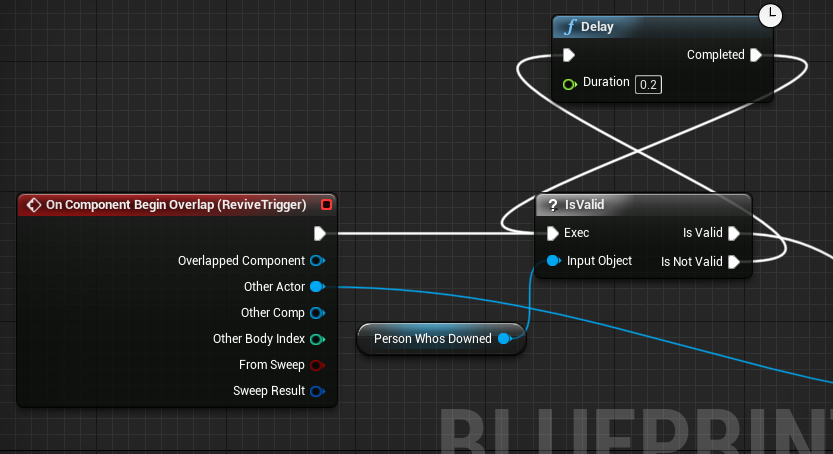
So I've hit a small issue with my revive system. So when a player goes down, I spawn a revive trigger on him. This trigger allows players to revive him. My issue is he can use it to revive himself (which I don't want). So I just put a branch inside the trigger to check if the Overlapped actor "isDowned" if true then he can't use it. My issue is that Clients can still use the trigger. I think it's a timing issue. Because I'm setting the "isDowned" and then spawning the revive trigger immediately after so I'm thinking the Client doesn't know that he's down yet. What should I do? Add a delay? The delay works but I thought that is kind of a No No in multiplayer.
rotund sapphire
issue it he can use it to revive himself (which I don't want) Guess you could check if actor == self, then just skip it.
As for the replicated things and timing issues, you may want to take a peek into gameplay ability system of the engine, and it's gameplay tags that is synchronized.
cedar finch
So I'm not sure if this is the best solution but I got it working I believe. So when the Server sets the "isDowned" variable and then spawns the Revive Trigger, I just set a variable inside the Revive Trigger actor called "DownedPlayer". Then when I do the Overlap event I simply check if there is a valid "DownedPlayer" if so then I can check if the overlapped player is downed or not. It was all a timing issue but I didn't want to use a delay because you never know what could go wrong with that on multiplayer. https://i.gyazo.com/ee003914f69d306dc1ef35a0d988a5ac.png
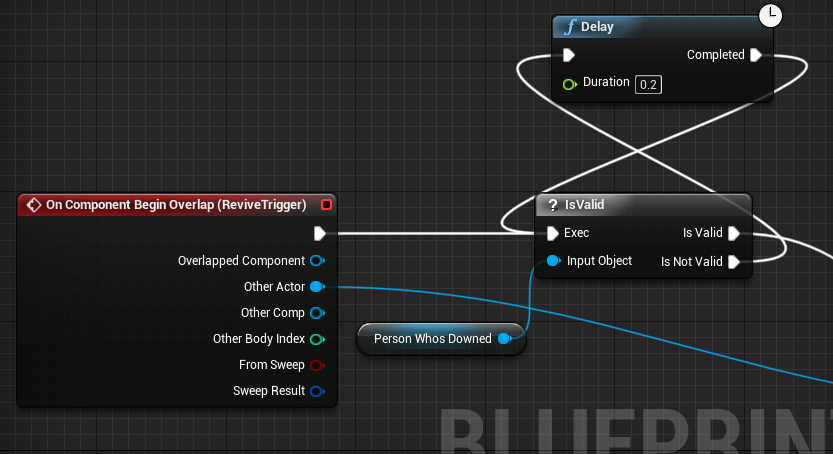 rotund sapphire
Guess you will be more worried about how to solve the problem, when the player rage quits and the overlap spheres remain there. :)
Why don't you just add a replicated sphere component to the player's server version and let other players to interact with that.
cedar finch
Oh yea I forgot about that lol. Hmm So instead of spawning it just add it to my character and put the Overlap logic inside the character. Then just enable/disable collision based on if your downed or not? Or something else?
rotund sapphire
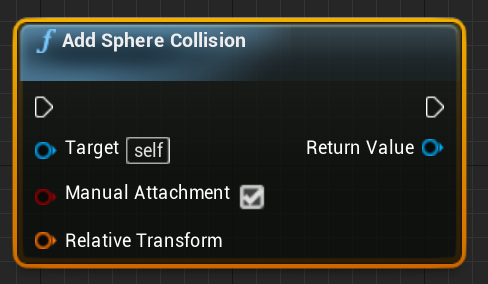
You can spawn this component when the player is actually down, and it will be replicated immediately to everybody. It is way more efficient as well, since replicating an entire actor is more workload, and keeps additional network actor channels open. Components are using the same channel, thus you can use it more for things like this.
You can pull an exec wire and use the 'add sphere comp' node to spawn this comp. Once you click on this node, at the details panel you can enable replication and it will replicate to everybody. You can also attach this comp to the pelvis of the char mesh so it will be in the right spot.
dark edge
I would have a replicated enum on the character the store State like is down is bleeding out etcetera. Set it on the server and you can use repnotify to play animations and such.
I'm assuming you are trying to do something like guild wars 2?
cedar finch
@rotund sapphire https://i.gyazo.com/89c45d805edf079bc781ee0ca59601ee.png This is the correct node right? @dark edge I'm making a revive system similiar to call of duty zombies, l4d2, etc. Right now I don't have downed animations so my character just takes a knee and doesnt move but in the future I might make him move
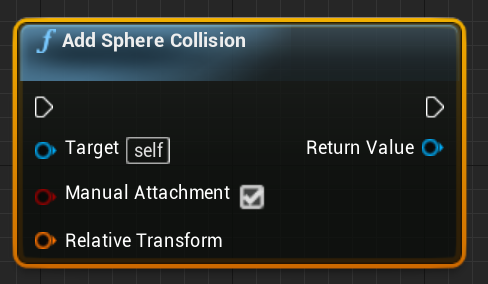 rotund sapphire
Yes it is. And you can click on the node it will open a details panel for you to edit some things about it. But you can set most of the settings via nodes as well if you prefer that.
dark edge
I would drive everything by one single source of State, either a Boolean or an enum if you have more than two states. You can add trigger boxes and such inside the onrep function.
rotund sapphire
Adriel, i'll also recommend you look into the gameplay abilities system, as it will allow you to specify certain character attributes in a well synchronized and replicated way.
For instance, if the player is bleeding, and two people goes there to fix him up, only one of them should execute the animations. But it is getting a bit more complex when everything is implemented this way.
Gameplay abilities can help here too
dark edge
You could easily handle the overlap volume in the reviving player, depending on how your setup is. In that case, I'd have a CharacterState enum with Alive, Down, Reviving, etc. The reviving character can do a check for Characters in the Down state, set the new state to Reviving, and so forth.
cedar finch
I didn't even know about the gameplay abilities system. I'm reading about it now. I wish I knew about this before. 😐 @dark edge Right now I'm just using an isDowned boolean to drive the animations in my animgraph. IDK if that's correct but right now I just want it to work, even if it's ugly lol.
I really do appreaciate you guys help and ideas.
tall pine
Hi guys,
Is there a reason why APlayerState::CopyProperties() doesn't get fired off when travel between levels?
I want to save some properties into PlayerState, so I write into PlayerState in Level A, call ClientTravel() to travel to Level B. I expect at some point CopyProperties() would be triggered, but it never get called when Level B loads
 haughty estuary
I have a simple level with 3 player starts. My pawn is simple has move forward/backwards and strafe left/right logic. The pawn actor is set to replicate and is also replicating movement. However only the servers movement gets replicated to the client, what else do I need?
When moving the pawns possessed by the 2 clients, the server or other clients don't get the new transform.
Ah, got it working, not sure if it's the right way though. I used 2 new custom events and set the Replicates dropdown to Run on server
Is this the way to go?
thin stratus
Yes and no
- Your second function isn't marked as ServerRPC.
- Your first RPC is marked is RELIABLE, which is a really bad thing to do if it's called very often.
Input Axis Events basically call on tick, which means you are adding to the Reliable Buffer on ever Frame.
Never do that, Reliable Events are only meant for one time events that have to reach their target.
Something that calls every frame isn't important enough to be send 100% of the time.
 real yacht
i have question, is it right way connecting from mobile devices on dedicated server with only ip address, without session, creating session, join, etc..
is that right to do in production
?
rough iron
It's up to you, if you just have an IP ensure ports are all set. All other settings are useful for more reliability. If you aim for a small game why not?
If you want instancing, scalable servers, matchmaking and all the fancy stuff it's quite a lot of work, plus if you have no experience in the field it will be very hard to get it right.
flint plaza
Hi guys. I have my game working in a particular level perfectly but when I server travel, the UI, tags and other stuff gets messed up. Why is that and how can I prevent it?
I want the exact state that was in the lobby, into the main map
winged badger
messed up is somewhat board
flint plaza
the client's UI gets drawn on the server as well on the client
so there are 2 UI on the server window
the HUD for the server isn't coming up
winged badger
server travel... seamless or not?
winged badger
tags, ActorTags or GameplayTags?
flint plaza
actor tags
btw, when I use non-seamless travel, it is fine
but that is because the players are properly spawned again
why do the existing things don't carry forward as they are?
thin stratus
Seamless Travel is a lot different from actually joining a game.
Non-Seamless Travel actively disconnects and reconnects, so it basically is a fresh connection.
With SeamlessTravel a lot of stuff survives that you usually think doesn't.
As well as a lot of stuff isn't called. E.g. PostLogin etc. is not called as players are already logged in.
You have to design your game around SeamlessTravel, it's not working out of the box.
 remote lichen
Hi folks, I’m not getting my head round this error message, I have been reading the network compendium, including the part about ownership so I thought this should work (character owned by controller while possessed)
The key press does not generate the warning.
This is a default 3rd person template, 2 players from the editor. What am I missing please? 😃
remote lichen
2, one is already in the level
winged badger
listen server?
remote lichen
yes, just literally set the number of player to two and pressed play
winged badger
on which instances of the character does the Tick normally execute?
all of them, right? both characters on server and both characters on client
so
remote lichen
yep
remote lichen
hmm 😃 ... that's what I can't get my head round I guess
winged badger
its not on server
so its remote
it calls the ServerRPC, but has no PlayerController, since clients only have their own
and then you get your error
remote lichen
ah right, thanks ... let me try and fix it myself!
 dusky light
Hello
Can someone give me a small clarification on something?
Basically lets say I have Player A and B
thin stratus
@remote lichen Also why do you perform the RPC on tick?
dusky light
Player A shooting player B causes a function in Player B to fire
This function being called by Player B himself would be fine
thin stratus
Tick executes on each instance of the Actor. With it being replicated it exists on all players anyway and will call Tick on everyone.
Means the RPC is not needed.
thin stratus
No it's fine, what are you passing that is null?
dusky light
im not passing anything
remote lichen
@thin stratus ... hi, I'm just experimenting with what I'm reading from your compendium ... obviously need to re-read it 😃
thin stratus
Well you say it causes null issues, so you have a log, what is reporting null?
We would also need to see code to know what you are doing
winged badger
from the presentation, player B is null
dusky light
No he is not wait
remote lichen
Right ... that explains it, thanks a lot @thin stratus and @winged badger
 jolly siren
Does anyone know why the first game server instance started on my AWS/DO machines sometimes errors with the following? I have only ever seen it with the first game for some reason.
LogNet: NetworkFailure: ConnectionLost, Error: 'UIpNetConnection::LowLevelSend: Socket->SendTo failed with error 23
thin stratus
What is error 23
jolly siren
It looks like it is ENETUNREACH
thin stratus
Is there a comment with it somewhere?
winged badger
i'd guess NAT punchthrough isn't done yet, is it applicable in this situation?
thin stratus
I mean, it probably means it can't reach whatever it sends the data to
jolly siren
Right, I'm just not sure why it can't reach it. The error codes are in SocketTypes.h
thin stratus
That's the Server reporting it right?
Not a client connecting or?
Or when does that exactly happen?
dusky light
Oke so basically I have these functions within my Character: http://prntscr.com/nm1fvk Which calls this : http://prntscr.com/nm1g7a The problem is that when I call this function DropBall by the character himself forcefully it works fine. But when it is called because another character hits him the variables ballActor and bIsballBeingHeld are nullptr

 thin stratus
Cause a NAT problem might still be a thing
You mean "false" not "null" or?
Oh wait
ballActor is a lowercase pointer nvm
jolly siren
Yes, it is the server reporting it. And then all the clients get disconnected from the server.
thin stratus
Strange, no idea, sorry Ethan
remote lichen
@thin stratus Ok, so if I'm doing something on tick that I don't want the client to 'cheat' I just mark the variable as replicated and if the client does change it locally it'll get corrected by the server when it runs
thin stratus
@dusky light So that's a Multiplayer situation, are you calling this on the correct side (Server)?
winged badger
can you breakpoint the line that outputs the error? see how it got to it in callstack?
thin stratus
You can't call an RPC on another player
dusky light
Oh
thin stratus
You need to call that in a Client owned Actor
The other player is owned by the other client, so it's dropped
Also this whole HIT event should already happen on the Server
So you want to NOT make DropBall an RPC
But rather make the Meele attack an RPC
thin stratus
Cheers
rough iron
@jolly siren what kind of machine do you have in your AWS?
jolly siren
Checking right now
@rough iron Still talking to our backend guys. Is there something specific you were thinking about with that question?
rough iron
Depending on the instance you will have some issues xD
jolly siren
Hm strange for some reason the ue4 log with the error doesn't list the cpu
But one without it does
LogInit: OS: GenericOSVersionLabel (GenericOSSubVersionLabel), CPU: Intel(R) Xeon(R) Platinum 8168 CPU @ 2.70GHz, GPU: GenericGPUBrand
LogInit: OS: GenericOSVersionLabel (GenericOSSubVersionLabel), CPU: , GPU: GenericGPUBrand
jolly siren
Okay, I'll get that information now
rough iron
^^
tall pine
@thin stratus : is that one reason why PlayerState CopyProperties() doesn't get called, sinc the player already login?
thin stratus
CopyProperties should get aclled on SeamlessTravel
On HardTravels it won't
Or at least not first time connection
jolly siren
@rough iron c5d.2xlarge
rough iron
Mhhh curios, a micro would have that effect but a large should not
It could be a warm-up issue
If it's a new instance ans not a reserved one amazon allocates resources gradually
Reaerved instances are way more expensive though
jolly siren
Hmm can you think of anyway to solve this besides adding a delay? We don't want to be slow responding to user spikes
We are seeing it on both AWS: c5d.2xlarge and DO: c-8
rough iron
Backoff and jitter xD would love to see that in the initial connection logic

Amazon Web Services
Introducing OCC Optimistic concurrency control (OCC) is a time-honored way for multiple writers to safely modify a single object without losing writes. OCC has three nice properties: it will always make progress as long as the underlying store is available, it’s easy to und...
I'll have a look if I can make a PR with some low level stuff, I should have an engine mod around with that integrated. Somewhere cD
jolly siren
Wow that would be amazing if you did ❤ 👏
 worthy wasp
Hey guys - got a problem with Peer2Peer physics: I have a VR Project i'm working on - and trying to get RELEASE to throw objects. Before this project was in Dedicated Server - and the pickup/drop events were run as server with 0 problems. Drop event is fired from an interface:
StaticMeshComponent(PickedUpActor)->SetSimulatePhysics(true);
DetachFromActor();
SetActorTransform(DroppedTransform);
This worked fine- velocities were inherited from the throwing velocity of your motioncontroller.
Things changed - model had to be moved to Peer2Peer for whatever reasons, and when the EventDrop() is called - the object simply drops righ tin its place that the event triggers at..... no velocities inherited.
Anything you can think of? I"ve at my witts end with trying to troubleshoot this.....
tall pine
@thin stratus : so I'm seamless travel from level A to B using ClientTravel(). I set some properties in PlayerState, then travel from A to B. However, CopryProperties() doesn't get called when level B loads
thin stratus
@tall pine SeamlessTravel is a ServerTravel usually
Not a ClientTravel
Moving from MainMenu or similar to a Server is always a Hard Travel
tall pine
@thin stratus : Oh so I should use ServerTravel instead?
since I only want that client to travel to a new level, I should use ClientTravel though right?
median elbow
a hard server travel is when you disconnect and then connect right? and a client travel is when you don't have to disconnect?
tall pine
I figured it out. I can do ClientTravel() just fine, but I need to specify it as Travel_Relative. I was using Travel_Absolute before
 past rain
@tall pine see if this helps https://answers.unrealengine.com/questions/101284/what-the-different-between-absolute-travel-and-rel.html
tall pine
Is it possible to do seamless travel, keep PlayerState, but don't keep any of the player stuff, such as HUD ?
jolly siren
You already don't keep HUD
 timber tree
Hey guys, need a little help
My dedicated server crashes 10-12 seconds after successful Servertravel with this error
Signal 11 caught.
Malloc Size=65538 LargeMemoryPoolOffset=65554
CommonUnixCrashHandler: Signal=11
Malloc Size=65535 LargeMemoryPoolOffset=131119
Malloc Size=68112 LargeMemoryPoolOffset=199248
Malloc Size=53392 LargeMemoryPoolOffset=252656
Engine crash handling finished; re-raising signal 11 for the default handler. Good bye.
Segmentation fault (core dumped)```@jolly siren : I check the player->GetSeamlessTravelActorList() and the HUD is there. I also have the HUD from previous level appear in the new level, so it's still there
jolly siren
You have the HUD from the previous level or orphaned widgets?
I just do UWidgetLayoutLibrary::RemoveAllWidgets(this); on HUD creation
to get rid of orphaned widgets
tall pine
@jolly siren : yes that seems like what I need to do: remove all the HUD before seamless travel to new level. Thanks Ethan!
Another question: What's the best way to implement a screen wipe / loading screen before seamless travel? Would that be part of the TransitionMap ?
jolly siren
yeah the transition map
 grand kestrel
I guess this can go here. SpatialOS finally updated their pricing 😉 https://improbable.io/pricing

Improbable
Understand the details of our free and paid tiers including example game costs...
 vernal hollow
Hey, I'm having an issue where setting my actor rotation in my characters Tick function is being slow and jittery on the client, but not on the server. I'm pretty new to UE4, especially when it comes to network stuff, so maybe I'm missing something pretty fundamental here. Does anybody have any idea why it might be behaving this way?
Here's my code:
void AHCharacter::Tick(float DeltaTime)
{
    Super::Tick(DeltaTime);

    if (GetCharacterMovement()->Velocity.Size() > 150)
    {
        FRotator VelocityRotation = GetCharacterMovement()->Velocity.Rotation();
        float RotateSpeed = 15 * 0.85;

        if (bMovingBackwards)
        {
            VelocityRotation.Add(0, -180, 0);
            RotateSpeed = RotateSpeed * 0.5f;
        }

        FRotator EndRotation = FMath::RInterpTo(GetActorRotation(), VelocityRotation, DeltaTime, RotateSpeed);
        SetActorRotation(FRotator(0, EndRotation.Yaw, 0));
    }
}
 spring swift
Hey, i have a question relating too multiplayer again. I need to set the fog density value to a lower one when they enter a temple, so i set up a system where a trigger detects if player overlaps and then change fog density, now what i want it too do is set the density for that client only. not all clients, when i tested this is affected all clients, I've tried messing with has authority but it has no effect, anyone able to help me? its prolly a simple answer but I'm a bit new to multiplayer 😦
just to not confuse you there are 2 triggers
grand kestrel
@vernal hollow try changing network smoothing mode to linear, if it fixes it I can tell you why
Oh actually that's probably a different thing
vernal hollow
I just gave that a go and sadly it didn't fix it
I recorded a little video of my issue to show what I'm talking about https://streamable.com/g2m2d

The bottom right is how it should be (and how it is on the host) and the top left is how it is on the clients
flint plaza
Continuing on my posts here from yesterday, what are the advantages of using seamless travel instead of non-seamless travel apart from players getting disconnecting and reconnecting to the same connection?
and how is the game designed around seamless travel? I mean is there some specifics I can read up on what things survive the connection and what doesn't, what stuff gets called and what doesn't. I know at this point that some things get set to the default value when travelling. Eg:- actor tags for each pawn get reset to default. The HUD gets messed up(meaning that the client's HUD gets drawn on the client screen as well as the server) so there are 2 HUDs on the server instance.
 worthy perch
Well, one thing is that, apparently (from what I've heard) Steam only works well with Seamless Travel.
flint plaza
I am experiencing that right now
I trying to non-seamless travel viasteam and the client does not reconnect
I have a question: In seamless travel, how do the players connected (say, in lobby map) travel from 1 map to the other? I know the connection is not disconnected
but does the pawn get destroyed and then re-spawned?
and if yes, where does that happen?
worthy perch
There's a function somewhere where you can specify actors to carry between seamless travels, I think. Actors not specified will be destroyed.
flint plaza
Which function is that?
worthy perch
Persisting Actors across Seamless Travel
When using seamless travel, it's possible to carry over (persist) actors from the current level to the new one. This is useful for certain actors, like inventory items, players, etc.
By default, these actors will persist automatically:
    The GameMode actor (server only)
        Any actors further added via AGameModeBase::GetSeamlessTravelActorList
    All Controllers that have a valid PlayerState (server only)
    All PlayerControllers (server only)
    All local PlayerControllers (server and client)
        Any actors further added via APlayerController::GetSeamlessTravelActorList called on local PlayerControllers
https://docs.unrealengine.com/en-us/Gameplay/Networking/Travelling
flint plaza
I'm guessing this is not possible via BPs then?
Also, if the actors are destroyed, then how are they respawned? Seamless travel doesn't call postlogin
and that is where I have spawned the pawns, possess them and initialized the properties
worthy perch
You would probably need to move it somewhere else. BeginPlays are called, for instance. And the GameMode still spawns whatever those default classes are.
flint plaza
The game mode is same for both maps. If I place it on begin play, will it not run for the lobby level where everything is fine? what condition should I specify for it to run only after travel? and how can I ensure the default classes don't get spawned?
and what method do you suggest to move the spawning logic to?
worthy perch
There's PostSeamlessTravel or something like that.
If you don't want the default classes, just set them to nullptr.
flint plaza
Okay thank you for all the information. I will try out things with this knowledge first and get back if I have any further questions
 plush wave
How does TActorIterator work on clients?
Does it only get the actors in network relevancy?
flint plaza
Question: if I have c++ gamemode parent class and its child BP is the game mode of a level, does the post login of the BP game mode get called?
 fossil spoke
If you have the PostLogin Event node in the graph.
Sure.
Only if thats the Level being played though.
flint plaza
I have it in the graph
and that is the level being played
but control doesn't come there
fossil spoke
Are you overriding PostLogin in the C++ class?
flint plaza
Nothing fires
the world setting game mode override is none
and the project setting->maps and modes has this game mode by default
this is really unusual
unless I'm missing something
Another thing which I notice is, If i reparent the BP GM to AGameModeBase rather than custom cpp GM, everything works
control comes to game mode post login and begin play as usual
thin stratus
You are mixing GameMode/Base with GameState/Base then
You can only use GameModeBase with GameStateBase and GameMode with GameState
thin stratus
What is the Parent Class of your BP GM
flint plaza
and both cases where Bp has cpp parent, the ultimate parent is ofc AGamemodeBase
right now it is AGamemodeBase
and it works fine
thin stratus
And before?
flint plaza
when I have my own cpp GM (whose parent is AGamemodeBase) control doesn't come to the BP GM
and the GM in project settings is the BP one
and there is no override in world settings
thin stratus
You are 100% sure it's AGameModeBase (Parent of your C++ file)?
If yes, what are you doing in your C++ class code-wise atm?
thin stratus
And you just press play in the Editor, no traveling atm?
Also you should use the AGameMode and AGameState if your game is match based.
(Which having a lobby kinda suggests)
flint plaza
I am testing on single process settings
thin stratus
And you don't have any native functions overridden in your LobbyGameMode?
thin stratus
Then I'm not sure atm either.
flint plaza
wonna see the .h file?
thin stratus
Usually this happens if people mix up the Base classes with the non-Base classes.
The only other reasons I can come up with are BeginPlay or Tick being overridden but Super:: isn't called
flint plaza
even post login doesn't have control coming to it
as if the BP class isn't the GM of the level
thin stratus
PostLogin should def call on HardTravels or level starts. It won't of course call if you ServerTravel Seamless, but since you just press play that can't be it
flint plaza
Correct
thin stratus
But if reparenting it to AGameModeBase works, then something is off with the Cpp Class you made I would assume
flint plaza
does having the constructor for the cpp GM affect anything?
thin stratus
Shouldn't
But I would suggest you comment out all code in the cpp gm
and test again
flint plaza
So I won't be able to server travel that's all
but the control should come to the BP, right?
thin stratus
The Class shouldn't have any variables or functions in it
And the Cpp file should be fully commented out
Then try again
What are you actually referring to with "Control"?
That's not a UE4/Programming term
flint plaza
yes i mean the execution should come to the BP
thin stratus
If you specified the BP as the Maps GameMode, then yeah
flint plaza
There is no override game mode, so it should pick up the default from the project settings (which is the one I'm using
commenting out things works
flint plaza
UCLASS()
class OMNICOMBAT_API ALobbyGameMode : public AGameModeBase
{
    GENERATED_BODY()

public:

    ALobbyGameMode();

    UPROPERTY(EditAnywhere)
    TSubclassOf<APawn> HoverBasedClass;

    UPROPERTY(BlueprintReadWrite, VisibleAnywhere)
    TArray<AActor*> PlayerArray;

    UFUNCTION(BlueprintCallable)
    void ServerTravelToMainMap();
};```Most likely not causing the issue, but why are you defining another APawn class?
flint plaza
ALobbyGameMode::ALobbyGameMode()
{
    DefaultPawnClass = nullptr;
}
void ALobbyGameMode::ServerTravelToMainMap()
{
    UWorld* World = GetWorld();
    if (!ensure(World != nullptr)) return;

    bUseSeamlessTravel = true;
    World->ServerTravel("/Game/Maps/TestMap?listen");
}```I skipped out the commented portions
Because I needed the reference to the BP pawn and I didn't want to hard code the path via constructionhelpers
thin stratus
But your BP GameMode could just use the DefaultPawnClass variable that already exists
I skipped out the commented portions You didn't post the code that you commented out?
Or you removed comments?
flint plaza
I didn't post the commented portions
thin stratus
Right can't see much despite the non-needed pawn class.
So you gotta start uncommenting parts of it until you find the code that breaks it
flint plaza
I can remove that portion. It was needed previously but not now
thin stratus
(Got a problem myself): Why would using the Controller instead of the Pawn as an Owner for a spawned Weapon screw up the bOwnerOnlySee stuff?
It's not even a network situation atm (just offline splitscreen). Pluggin in the Valid PlayerController via GetController shows the bOwnerNoSee mesh.
Using self (Pawn) correctly hides the bOwnerNoSee mesh.
.>
Ah well, guess I can get the controller in the weapon via GetOwner->Cast->GetController -_-
Probably some annyoing ViewTarget bug
flint plaza
@thin stratus Before I server travel, i set seamless bool to true. Shouldn't that be enough to make the travel seamless?
Because when I package this a play in steam, after I servertravel, only the host(server) travels and the client doesn't join
and I was brought to the notice that steam doesn't support non-seamless travel (which is what is happening right now I think(
only when I set the bool in BP does it actually seamless travel
thin stratus
Didn't you say you just press play in the editor and it doesn'T call Postlogin?
Or is this a different issue now?
twin juniper
 thin stratus
Setting the boolean to true beforehand (in default settings) and calling serverTravel should be enough
twin juniper
Anyone know why im getting this error no other error messags or warning messages then those
twin juniper
But then my steam severs arent working
thin stratus
@chrome bay Quick question about LoadingScreens, where can I place the BeginLoadingScreen stuff if I need information about Map and GameMode?
Cause the "PreLoadMap" function only gives me the map.
@twin juniper As long as this doesn't show up in your packaged game's log when playing, it shouldn't be the reason
bitter oriole
@twin juniper Servers not woring is unrelated to this
twin juniper
hmmm
bitter oriole
This is a very normal warning
btw, Steam doesn't work in shipping when the game isn't started from Steam, so check that too.
twin juniper
i packged it in development
thin stratus
@bitter oriole You sure? I thought adding the app id text file by hand also allows it?
bitter oriole
Yes, that also works.
bitter oriole
If it's development that's not needed anyway
bitter oriole
So what happens on the server ? Did you check the log file ? Which part of the session creation fails .
twin juniper
were is that file located
flint plaza
This is a different issue Cedric
twin juniper

Witch file in their
i think i found the error

So it does say Steam API Disabled in my packged game
bitter oriole
That's your cooking log, so no.
twin juniper
oww
bitter oriole
Remove your logs, start your dedicated server, look at the only log file
bitter oriole
If you start a packaged game (server or not) with Development build mode and it actually starts, then the logs will be in Saved/Logs in the package you started
If it doesn't then it's probably not a development build at all
Or it doesn't start at all
twin juniper
Its not a dedicated server its a like a home hoasted
bitter oriole
You said "server" so I assume you've built your game as dedicated server
Is it listen server instead ?
It looks like you're not sure what you're doing, and dedicated servers are not things you should be trying to do if you're new to UE4
twin juniper
How would i setup a button so you press play and everonye joins the 1 server theris no browser i just woont one server
bitter oriole
Is your game ever going to have more than 50 online players ?
thin stratus
He's only asking to join one specific Server. So the options are either that this one specific Server is a Player hosted one (ListenServer) or a DedicatedServer with a fixed IP.
For the DedicaterServer, given you have access to the IP of it and it's static (not resetting every day), you can simply use an ExecuteConsoleCommand node with "open <ipaddress>" and that's it.
You also have to make sure the Server has proper ports (7777 default) forwarded.
With a ListenServer this is a bit trickier
bitter oriole
Looks like he's using Steam so he doesn't need IPs
Whether it's one or more servers
thin stratus
The Dedi Server can just not use Steam and you have the ability to join via ip again
bitter oriole
Sure.
flint plaza
Is the following info correct: Steam and non-seamless travel don't go well. (although in my experience they don't, so I sorta know this but wanted to verify)
bitter oriole
That's entirely unrelated
Seamless travel simply doesn't work when connecting to a server - seamless travel is only relevant for single-player games, or when changing levels while on a server
flint plaza
I have a lobby map where players join. when the number of players reach x, they travel to the actual map(this is where i am using seamless server travel)
this is over steam
bitter oriole
Steam does not interfere here
winged badger
it doesnt matter what service
bitter oriole
Steam does matchmaking basically and that's it
flint plaza
So, I did testing for both seamless and non seamless
during seamless, the lobby players successfully reach the actual map
whereas the non seamless travel only sends the server to the map
and the clients are stuck
and I tried it in NULL subsystem
and everything worked fine for both types of travels
so I assumed it has got to do with steam
bitter oriole
I can at least confidently state that non-seamless-travel works well with Steam
Most games do that
flint plaza
that would be the best case scenario for me if that is true
bitter oriole
Literally playing Mordhau every day, which is a Steam UE4 title that only does regular blocking travel
flint plaza
okay but travelling is super easy. what can i be doing wrong here:-
World->ServerTravel("/Game/Maps/TestMap?listen");
You say they move from lobby to actual game map
That's a ServerTravel
ServerTravel MUST be Seamless on Steam
World->ServerTravel("/Game/Maps/TestMap?listen");
That line makes no sense
?listen isn't needed here
You are already hosting at the point you would call ServerTravel
flint plaza
okay
But with seamless travel, lots of problems come up for me
can I not do seamless travel but get behaviour of non-seamless travel?
thin stratus
No
If you get problems withe SeamlessTravel but not with HardTraveling, then you didn't setup your code correctly.
E.g. you can't rely on PostLogin and such functions
You either need to use PostLogin and the SeamlessTravel version or rely on functions that both call
flint plaza
See, I set up players in the lobby using postLogin. which is working fine
I just want that set up state of players to go to the main map
winged badger
and don't count on Actors persisting to call BeginPlay when they arrive on new map
thin stratus
Well, all I can say is that you need to code this properly.
It's not a problem of UE4 or Steam
flint plaza
what things do I need to handle
and what methods to use
for the state of the players to remain what it was in the lobby
thin stratus
Use Prints to check what's calling and what not and then check the API/Source to see what you can use that calls for both travels
winged badger
reading the source code of AGameMode, AGameState and APlayerController is a good start
there are few... unfortunate caveats with SeamlessTravel
thin stratus
Than again, it allows you to easily move data between maps
flint plaza
https://docs.unrealengine.com/en-us/Gameplay/Networking/Travelling
This link mentions persistence of actors when doing seamless travel
thin stratus
Yop, some actors persist during map change, which (i think) doesn't mean it's the same actor, but at least gives you the option to access new and old at the same time
e.g. OnSwapPlayerControllers in the GameMode gives you teh ability to move data from old to new
Same as OnCopyProperties and OnOverrideWith in the PlayerState class
flint plaza
so I tried to make all the pawns connected in the lobby persistent
void ALobbyGameMode::GetSeamlessTravelActorList(bool bToTransition, TArray<AActor*>& ActorList)
{
    for (int32 i = 0; i < PlayerArray.Num(); i++)
    {
        ActorList.AddUnique(PlayerArray[i]);
    }
    Super::GetSeamlessTravelActorList(bToTransition, ActorList);
}```but when I move to the new map, its like those actors are there + new default ones which are spawned instead of those
flint plaza
so i end up with 2 HUD for each player
thin stratus
That should give you an idea
winged badger
last time i persisted pawns, i didn't have to do anything
they just needed to be owned by the PC
flint plaza
what do you mean @winged badger
winged badger
i mean i didn't need to override GetSeamlessTravelActorList for PlayerPawns to persist
flint plaza
each pawn's owner is the PC and is in the possessed state when the travel happens
in my case
thin stratus
Hm, I think I clean my pawns up before traveling
Then again every map starts without pawns on purpose
Never thought they would persist
thin stratus
Ah yeah we have no lobbies but traveling to the next map (match based)
winged badger
i just carry over a struct from which i can construct a customized Pawn
thin stratus
Yeah we too. We have our customization stuff located in the PlayerState
And simply move it over
Also helps for reconnecting players
flint plaza
So I was able to find a method called PostSeamlessTravel()
which internally calls HandleStartingNewPlayer()
which is blueprintimplementable
and has fixed the actor tag issue correctly
but the problem is the server pawn (which persists by default) and therefore it's HUD and it's previous HUD gets mixed up (i think)
since I don't manually spawn the HUD anywhere, how can I fix this?
winged badger
you don't have 2 HUDs
you might have 2 sets of widgets in viewport
since the viewport didn't go anywhere
grizzled stirrup
Is it common for a listen server with 2 human characters and 30 AI characters to have bandwidth around 40 KB/s?
bitter oriole
It's a bit on the high side, but it's not that shocking either
grizzled stirrup
Ok good to hear, I can definitely tone the update rate of the AI characters way back
Interesting that UE4 still has the hard bandwidth limits in at 10 KB/s unless changing multiple .ini settings
Seems a little small for today's standards
Based on what I've seen, Fortnite (even though it's from a dedicated server) has a DL rate of anywhere between 40 - 60 KB/s, I'm sure it's fine for listen servers to have the same amount as long as there aren't many clients
 distant talon
where do you look for changing that bandwidth limit?
 lyric maple
So anyone know any resources mobile games made with blueprints that have multiplayer on mobile. Is there any ways to make a blueprint project have real time multiplayer on mobile.. or is cpp the only options to make that kind of project happen. So far haven't found any backend services that can talk with blueprint nodes directly.. Anyone?
grizzled stirrup
distant talon
ty
real yacht
@lyric maple we have our custom solution, but basically if you have dedicated server somewhere hosted you can connect from mobile device direct to ded server. so yes, it's possible, same think as other platforms
flint plaza
When I remove all widgets from the player controller's begin play, why does it only remove the server window's widgets and not the client one's?
bitter oriole
Probably because widgets aren't replicated
Why would you even have widgets on the server...
thin stratus
ListenServer?
flint plaza
yes
server window meant player playing on the server as client
widgets shouldn't be replicated because they are unique for each player, right?
flint plaza
and remove widget gets called for each PC which means the widgets it removed existed on the server
or it just didn't remove for the client
only 2 possibilities
grizzled stirrup
If the reference to the widgets you were removing was created on the client (or in the case of a listen server, a locally controlled server host), then they should remove
Maybe you created the actual widgets on the server and therefore the client doesn't know about them?
flint plaza
No there are 2 widgets. 1 is created on the pawn's begin play and the other is the HUD
and the HUD is owned by the PC
so the ownership is definitely of the local player for both of them
grizzled stirrup
Not sure in that case, if they are valid references on the client I'm not sure why they wouldn't get removed!
flint plaza
and the node doesn't even get take a reference of what to remove. It just removes all of them
grizzled stirrup
Speaking of widgets- how can I replicate a hitmarker event that contains damage information (DamageAmount, DamagingCauser) from the TakeDamage event in a Character ONLY to the controller that caused the damage and no one else?
A client RPC seems to only run on the owning client which in the case of the character wouldn't work I'm assuming because he doesn't own the controller that dealt damage
I have it working with a repnotify damage struct but it sends it to everyone
And it's a waste
Since only the damaging PC needs to use it
bitter oriole
RPC on server hit to the firing client
grizzled stirrup
Ah so I call a Client RPC on the EventInstigator?
From the damage event in the damaged character?
bitter oriole
Yeah, on the server run of that
grizzled stirrup
Ah yeah because the server does have a reference / ownership to the correct controller and it'll work
Thanks a lot!
Are RPCs generally more expensive that OnRep properties in cases like this where many damage numbers / hitmarkers may happen in a short space of time?
Perhaps I can have an OnRep struct in the controller itself that is set on the server, with COND_OwnerOnly
That also might work now that I know the server has access to that controller
grizzled stirrup
Makes sense! Plus then no need for a replicated byte to force replication
Most of my weapons deal the same damage per shot so hitting the same actor and doing an OnRep notify meant that nothing got replicated after the first shot
Unless I incremented a uint8 each time
bitter oriole
RPC are best for A) events that you B) want to arrive no matter how many are sent and C) don't care if a newly connecting player doesn't receive them after they've fired
Replication is best for A) data that you B) need to be updated from time to time regardless of how many times it changed and C) that every player will get
thin stratus
Given you mark the reliable, yeah
grizzled stirrup
In this case since it's the owning client only and it only needs these one off events that are irrelevant right after it happens I'll use an RPC
Thank you for that summary
Very helpful
bitter oriole
C) is one that isn't considered a lot but is very important, RPC are single-fire while replication will default to updating new players with the current state
grizzled stirrup
So in a sense for one off events RPCs can be cheaper since they only happen one at a time and that's it?
For things like gunshot FX being replicated with OnRep, how do you prevent an explosion of stale FX playing at once when that actor becomes relevant after firing lots outside of relevancy?
Would be cool to have fire and forget behavior with OnRep vars
thin stratus
@bitter oriole Thanks for the slate stuff. StyleSet + LoadingScreenStyle solved it
bitter oriole
@grizzled stirrup RPC is definitely optimal for anything that is an event, meaning "this specific thing happened"
OnRep works but only works when it is actually replicated, and changing a rep variable does not ensure it is replicated anytime soon
Just that it will be eventually
grizzled stirrup
Great to know thank you!
median elbow
i have a lobby map that runs by default, with the ?listen command. a user can invite a steam friend and it creates a steam party session. The invited person can accept and join the session, but for some reason, the player character does not replicate
but once the host joins a server and a new map loads, both players will jump in and can play in the map and can see each other
the only difference i can think of is that the lobby map creates a party session, while the server has a game session
would that make a difference of what gets replicated?
grizzled stirrup
@bitter oriole Regarding that last bit of advice, for single player UI stuff like this damage notification that needs to be responsive and fast, I think the Client RPC is the way to go, however would you say it's cheaper and more optimal to go with OnRep vars for cosmetic events that frequently happen such as muzzle flashes, beam trails and particle impacts?
Assuming of course it doesn't entirely matter if they appear on screen a bit late, just that the other clients get the sense that other players are firing when they should
Just asking because things like muzzle flashes or impacts do fall under the "this specific thing happened" category but it feels like since they are happening frequently, it'd be a waste to use a multicast RPC as opposed to an OnRep int that'd let the clients work out where to play the FX locally
bitter oriole
@grizzled stirrup If you're being fired upon by another player, yeah a multicast rpc that fires effects on every client is the way
Pretty sure the UE4 weapon class has something to that extent
grizzled stirrup
Referencing things like ShooterGame and other examples, they don't seem to use a single multicast
I had assumed it was just more expensive than a single replicated int
In my game the timing isn't as important, more that it will eventually show to other clients
grizzled stirrup
ShooterGame uses an OnRep int for each muzzle flash and a custom OnRep struct for impact FX
I wonder comparing OnRep vs a Multicast RPC the difference in cost
I had read that RPCs in general are more expensive than a property replicating but I have no real knowledge aside from reading through forum posts / ShooterGame / Tom Looman examples
bitter oriole
RPC is only more expensive if you're changing a counter (for example) once every frame, but don't want a replication for every single change.
Replicated vars will update at a variable rate instead of once per chnage
grizzled stirrup
I thought OnRep vars only update once they have a different value?
Or do they only call the OnRep function when they have a different value?
Also is there a reason ShooterGame / Tom Looman C++ course uses OnRep and not Multicast in these cases?
bitter oriole
The point is that the entire replication process is not triggered every time you change a variable.
Not just Onrep - the actual replication
Every actor has a dynamic replication rate that can be 60fps or 1
You can set the normal and minimum rates for each actor, etc.
So if you're using a replicated variable for health, it's fine, you don't care about every single change, just that it was 100, and then it's 47, and then it's 0
With a RPC you might have 100 RPC calls because the damage is done by 100 individual 1hp hits
This is the core difference between using RPC and using replication, use the one that fits the behavior you need
grizzled stirrup
Great explanation! If they are equally expensive then I may as well do Multicast RPCs for cosmetic FX that I otherwise was doing OnRep because I thought it was cheaper
If it’s simply the same call- an event hook on the client that gets called either via OnRep or Multicast then it seems like a no brainer to always use Multicast for any transient events
I do still wonder why all examples I’ve seen don’t use it
bitter oriole
The point is that one isn't cheaper than the other, it's just different. For example, weapon fire through replication means you can make distant weapons not update at the same frequency
Depends on what you want
grizzled stirrup
Ah yeah because Multicast WILL happen and fast, it might eat up bandwidth when an OnRep event might run enough at distance to provide the same illusion of the gun firing especially when it isn’t essential for every single shot to come through fast
It’s all smoke and mirrors at the end of the day
Thanks for explaining, will use both where it feels necessary
 chrome bay
Yeah rep vars are better for that kind of thing
There's also the advantage the the weapon owner usually doesn't care about the FX since they're already simulating locally. You don't get to control which clients multicast RPC's go to, they just blindly go to all. Vars can be sent only to certain connections based on conditions.
E.g, COND_SkipOwner
grizzled stirrup
Ah yeah if you had the server send a multicast, the owning client would play it twice right which would mean there'd be latency before he got fire feedback!
@chrome bay So you'd recommend OnRep in general for purely cosmetic FX such as muzzle flashes that aren't extremely important to gameplay / timing but should be seen on remote clients?
grizzled stirrup
Ok great, that's likely the reason that ShooterGame / all other examples didn't use Multicast
Regarding tuning would this mean turning down the net update rate?
So if someone shot 500 bullets in one minute , maybe only 50 would go through in OnRep but that's fine since they aren't essential (at least in my game)
chrome bay
Well there's a few different ways - but yeah you can almost always start there.
One thing I do regularly, is drop the NetUpdateFrequency for most objects down to 1 (default is 100, which is insane) - then before changing a replicated var I just call ForceNetUpdate()
It's a nice way to not have to keep processing objects if you don't need to
Can be good for both server performance and bandwidth
grizzled stirrup
Very interesting, so in by doing that ForceNetUpdate() it's almost like doing a once off event since it's only updating once a second anyway, so it only fires when it needs to
chrome bay
Yeah, it's essentially telling the engine to send an update about this object at the next opportunity - but a net update frequency of 1 will update it approx once per second
worthy perch
Huh, calling ForceNetUpdate before changing is a really good idea.
chrome bay
Yeah it's a good way to get a lot of performance back
Just requires a bit more plumbing
grizzled stirrup
Really cool! Thanks a lot for sharing. You were also about to mention something regarding bursts of fire?
chrome bay
yeah so, bursts
lemme grab something real quick
One problem I run into all the time is on remote clients, especially if you're not using looping FX and sounds is that you very often miss bursts - so remote client FX can sound and look strange
In the case of a simple rapid-fire weapon, the best approach is to kick off a timer locally when they detect firing has started, then kill it when firing has stopped
grizzled stirrup
Yeah I often see that actually and without turning the update freq way up it usually misses a few
chrome bay
If the firing rate is fixed that's super-easy to do
grizzled stirrup
Yeah for auto weapons that works great but for semi auto fire weapons that the player spams , it's harder
chrome bay
Yeah for Semi-Auto it's not really possible, but most of the time the update rate for those is few-and-far between enough that it's not a huge problem
grizzled stirrup
Got it. So for a fully auto weapon would you recommend a simple OnRep bool that starts the firing process on remote clients when true and stops when false?
That'd save a lot of bandwidth for very fast firing weapons like miniguns
chrome bay
Well you can be crafty about it and use a burst counter still (which I do)
But yeah a bool will work too
grizzled stirrup
I use an OnRep int currently and it works great but I'm just picturing a really fast firing weapon
My only main question with the OnRep stuff now is how to prevent a horrible spam of FX when a previously not relevant actor comes into relevancy after you have fired many shots?
grizzled stirrup
Thank you very much!
chrome bay
{
    const uint16 NumFired = BurstCounter.NumShotsFired(PreviousValue);
    if (NumFired > 0)
    {
        const bool bCallEvents = !bSkipOpenPacketBursts || GetWorld()->TimeSince(GetWeapon()->CreationTime) > 0.f;
}
}```snippet from my code but you can see what it does, just compare current world time to actor creation time. If they are the same, you know the object was created that same frame so you can skip the updates
grizzled stirrup
Oh damn I haven't seen an OnRep function that takes inputs before, gotta look into how that works!
Many thanks for the example, will try to understand how it works
chrome bay
It is IMO a critically under-appreciated feature of UE4
But yeah if you declare an OnRep function with the variable type as an input parameter, UE4 will automatically pass in the last local value of the variable before it was changed from replication.
There is a bug in 4.21 and previous which means it doesn't work 100% correctly but that's been fixed so I've been told in 4.22
worthy perch
Does it send that value over the net?
chrome bay
No
worthy perch
Ohhhhh... then I should definitely use it.
chrome bay
It's super useful
grizzled stirrup
Would another workaround be to reset the burst counter to 0 on stopped firing and check if BurstCounter > 0 inside the OnRep function before calling FX? Would that also prevent the horrible spam (since the number would always get reset to 0 after firing), or would it still have a cached set of FX events that'd fire all at once?
chrome bay
No the event would only fire once when it comes back into relevancy range, and only if the replicated value is different from the default value
(Unless you mark it with REPNOTIFY_Always, in which case the OnRep event will fire whenever the value replicates, not just when it changes)
grizzled stirrup
Ah cool so then in the worst case scenario a player entering relevancy will falsely fire once but that's it
chrome bay
Yeah exactly, but if you check the world time == actor creation time then you can bypass it also
grizzled stirrup
If not resetting the burst counter, would it be possible for them to fire the FX like 50 times at once if they fired 50 times before?
Ah the weapon gets created when it moves into relevancy, that makes more sense now!
chrome bay
Should be but you'd have to set that up yourself.
Yeah as far as clients are concerned, an actor coming back into relevancy range is a brand-new actor
Clients completely destroy actors which go out of relevancy range
chrome bay
So any state etc. is lost
I might make a forum post called "better burst counters" actually, since the things I've run into when working on shootergame-based projects depress me
It's also quite a good exercise in leveraging some of the lesser-used engine features
grizzled stirrup
So as a simple example, without the argument I could do something like this to avoid firing falsely?
``
void OnRep_BurstCounter()
{
if (BurstCounter > 0 && GetWorld()->TimeSince(GetWeapon()->CreationTime > 0.0f))
{
// Fire FX
}
}
``
And yeah would love to see a forum post like that!!
chrome bay
yeah, that would essentially skip it if the OnRep event is being fired in the same frame the actor is created (e.g coming back into relevancy)
grizzled stirrup
Which it would if the burst counter was say 50 as it came back to relevancy?
Thanks a lot for the help, learning tons!
chrome bay
yeah, any non-default value would trigger the OnRep
so if constructor sets BurstCounter to zero, and the value received at creation time is 50, the OnRep would fire once
And would pass '0' in as the 'Previous Value' if you had that defined too
Since any prior state is lost once the actor is destroyed by the client
grizzled stirrup
Ah cool! So then with this if check, even if it recieves a non default value when entering relevancy, it'll still not play the OnRep as it's most likely stale
Really useful for all kinds of OnRep stuff honestly
chrome bay
yeah exactly
grizzled stirrup
Especially things like crates being opened as well as FX etc.
chrome bay
yeah that's another good use case for it
chrome bay
surprisingly simple workaround 😄
grizzled stirrup
Yeah!!
Really appreciate it, was scratching my head trying to find a workaround
But I love how robust this is for situations you DO want things to replicate
Like changing a material
Even if something went on fire and was blackened while an actor was out of relevancy, it'll update later
When he returns
chrome bay
To be honest, I've very rarely run into a case where a NetMulticast is a better alternative to just standard var replication
I've only ever used it a handful of times
grizzled stirrup
As a noob first starting with UE4 I used to call them everywhere but it seems OnRep does the job just as well with more control in most cases- can you elaborate on cases you needed it over OnRep?
chrome bay
But yeah anything state-based should almost certainly used vars, it handles late-joins, relevancy etc. for free
Hmm I honestly can't think of anywhere I'm using it right now. I have an opt-in net multicast in my weapons for when a shot is successfully fired or fails, but no weapons are actually using it atm
grizzled stirrup
On paper as a beginner it always seemed the better option- one off transient events replicated to everyone
But yeah I fully see how RepNotify affords more control (and potentially can be cheaper since it doesn't HAVE to update every time a bullet hit something)
Many thanks for the chat, learned a lot
chrome bay
np's, I'm procrastinating 😄
twin juniper
anybody knows how to use this to hit another player which uses the same BP? thanks
Quickest and simplest way to setup a server where i can just package the game send to friend, portforward, and join a server together? All the tutorials are all super confusing and contradict eachother and only seem to be for lan. Any ideas?
And using no c++?
bitter oriole
Listen server using Steam and the Blueprint online plugin
You'll still have to compile C++ but not writing it
twin juniper
Any tutorial on that?
I am beginner
I also think it's stupid that everything is plugin etc
shouldn't this be things that should be built into the engine?
bitter oriole
The reality is that multiplayer is not beginner friendly and probably won't ever be
The plugin I mention makes sessions easier
Unreal Engine Forums
Advanced Sessions Plugin
Message to users 09/08/2017
I'd like to note that the original intent of this plugin was to shore up blueprint support for sessions
twin juniper
Shouldn't it just be a simple "Create server" function and a "join server" function where you just put in information etc and done? Just port forward and friend can join
thin stratus
CreateServer and JoinServer via "information" and port forwarding has nothing to do with Sessions
Or at least not how you describe it
You can of course "Create a Server" via either a Dedicated Server (will auto listen) or via listen option when openeing a level (ListenServer).
And then join that Server via "open <ipaddress>" console command
Given the Server has opened Ports
However that's a very manual process
The thing that sessions do is keeping track of the data (e.g. IP Address and more) and return that to users that ask for it (FindSessions).
So the Sessions, in combination with a MasterServer, are basically the good old ServerLists
Without Sessions no ServerList.
And most likely also no easy friend invites and such
@twin juniper
twin juniper
If i want to setup a server the most easiest way and beginner friendly way could you give me the exact steps in order?
thin stratus
Is the Server Host able to properly forward Ports?