#multiplayer
1 messages · Page 459 of 1
 glacial pollen
But I already have another trick up my sleeve for that
(I'll spawn the persistent audio separately, and just use the sequencer for the perfectly timed events)
As of now, the LevelSequence binds onto itself (I made a LevelSequence Actor)
Then it calls its internal events, which calls the LevelSequenceActor event, makes for a nice
All-in-one, seamless travel to any level, LevelSequence xD
 urban dew
I'm so stumped, how do I bug test multiplayer? everything works in standalone and editor
but after i build
it doesnt work.
glacial pollen
@urban dew are you using dedicated?
urban dew
P2P currently
glacial pollen
try this
in the play settings
turn off single process
and open the output window
right click anywhere in there and "clear log"
then
before you play
open your project folder
open saved
open logs
and delete everything there (you can't delete the most recent one)
THEN hit play
and you will see a second log
play until whatever bug happens, and check both the output window and the second log
urban dew
i'll give it a go, will still allow me to actually play multiplayer in the editor? as it doesn't let me do mp
glacial pollen
I use it for multiplayer
In the dedicated server setup, the output log is the client, and the 2nd log file is the dedicated server
not sure how it works p2p
glacial pollen
np
 thin stratus
@stoic acorn What they show in the series is more or less what I sell on the Marketplace
So if I make that tutorial, I could stop selling that item :D
 stoic acorn
Link please
I think I got demotivated by the 15th video when it became apparent that he wasn't teaching best practices
and the fact that he was just rattling through placing nodes and not explaining what he was doing
thin stratus
@stoic acorn You do mean the Lobby video by epic or?
urban dew
in the editor multiplayer lan and internet where working
now ive built the game, my friends wont see the servers at all
tried hamachi same thing
thin stratus
It's "only" a lobby + chat by now. The url name is outdated, can't adjust that.
Just read the description and check if that kit helps you
stoic acorn
Thanks man
 twin minnow
just wondering, how are changes to variables in uaniminstances replicated in nativeupdateanimation? because recently I used a hasauthority check in nativeupdateanimation and the animinstance variables are replicated when the variables are updated client side, not server side.
 plain flume
Hello! I asked this once before but didn't find any answer. Has somebody got idea how to replicate big arrays of data to clients? For example how does the Tilt Brush or other paint programs replicate all the data? I have a painting system that uses Static mesh instances. One painting might have 100-1000 instances per painting, depenging the stroke. What would be correct way to replicate all that data? There is tremendeous amount of lag when sending array that has like 500 elements to all clients.
 bitter oriole
You'll need a non-real-time system for that that replicates asynchronously every 10 second or something
plain flume
Not sure how to start building that. Game also has a drop in and drop out so the painting should be replicated to new players smoothly also
 grizzled stirrup
If you set different properties of an on rep struct on the server one after another (say location and direction), would this result in the onrep function being called twice on the clients, or would the engine know to only call it once if both properties were updated at the same time?
 fleet raven
the onrep function will be called when the struct is replicated
if you change them in the same frame, the update will contain both properties (this appears to always be the case for structs, unless anyone has proof of the contrary) and you'll get one onrep call when it arrives
if you change them in different frames, it may be sent as multiple updates depending on whether it was replicated inbetween
grizzled stirrup
Ok great to hear thanks a lot!
I'm assuming they'd always be in the same frame if called right after each other in the same function
One other thing- in Shootergame SetRemoteRoleForBackwardsCompat(ROLE_SimulatedProxy); is called in the constructor of the projectile. The definition in AActor states that /** This function should only be used in the constructor of classes that need to set the RemoteRole for backwards compatibility purposes */
Can anyone clarify what those backwards compatibility purposes are and if it's necessary to call that function on the constructor of replicated projectiles?
 north swan
Hi guys. Do PlayerState->UniqueIDs stay the same after disconnecting even for LAN games? (Steam)
oh scratch that, I think they should
 plucky wadi
i have a question here.. does anyone have a blueprint multiplayer syncronization video that he/she can recommend? im quite new to this and cant really find any good videos that in the best case show how to do it aswell..
 jolly siren
@thin stratus @chrome bay Have either of you guys upgraded to 4.22 yet?
Running into some issues on it https://udn.unrealengine.com/questions/497363/view.html
grizzled stirrup
@jolly siren What does the issue revolve around?
Just upgraded to 4.22 would be good to know what to look out for
jolly siren
Actor channels and seamless travelling
 [2019.05.01-07.04.54:705][470]LogNetTraffic: Error: ReceivedNextBunch: Reliable bunch before channel was fully open. ChSequence: 1117, OpenPacketId.First: -1, OpenPacketId.Last: -1, bPartial: 0, Actor: None [UChannel] ChIndex: 34, Closing: 0 [UNetConnection] RemoteAddr: 134.209.52.101:7778, Name: IpConnection_0, Driver: GameNetDriver IpNetDriver_0, IsServer: NO, PC: FooPlayerController_BP_C_0, Owner: FooPlayerController_BP_C_0, UniqueId: 1047:76561198055505328
 [2019.05.01-07.04.54:705][470]LogNetTraffic: Error: UChannel::ReceivedRawBunch: Bunch.IsError() after ReceivedNextBunch 1
First spawn doesn't possess character correctly^
fleet raven
does this link mean you have access to udn? 
jolly siren
     [2019.04.30-07.10.10:691][531]LogWorld: Bringing World /Game/Maps/Lobby.Lobby up for play (max tick rate 60) at 2019.04.30-07.10.10
     [2019.04.30-07.10.10:691][531]LogWorld: Bringing up level for play took: 0.000128
     [2019.04.30-07.10.10:691][531]LogWorld: ----SeamlessTravel finished in 0.10 seconds ------
     [2019.04.30-07.10.10:691][531]LogGameMode: Display: Match State Changed from EnteringMap to WaitingToStart
     [2019.04.30-07.10.10:691][531]LogGameState: Match State Changed from EnteringMap to WaitingToStart
     [2019.04.30-07.10.10:692][531]LogGameMode: >> GameMode::HandleSeamlessTravelPlayer: FooPlayerController_BP_C_0
     [2019.04.30-07.10.10:692][531]LogGameMode: << GameMode::HandleSeamlessTravelPlayer: LobbyPlayerController_BP_C_0
     [2019.04.30-07.10.10:692][531]LogNet: Server connection received: ActorChannelFailure
Players don't successfully travel back to lobby sometimes^
Yeah I have UDN access
grizzled stirrup
What FPS are you running at?
Noticed anything over 100 is very inconsistent in terms of possessing and spawning
Might help if you cap at 60 and see if it still happens
fleet raven
unrelated, but could you maybe check if the udn thread linked here contains a solution? https://issues.unrealengine.com/issue/UE-24772
jolly siren
Running over 100 fps for sure
grizzled stirrup
Try the cap- wasted a few days with a similar issue and it was due to high fps and nothing else
fleet raven
it's strange how this bug from 4 years ago still exists
jolly siren
On 4.22 specifically kyle?
grizzled stirrup
I haven't tested in older versions but I definitely noticed it on 4.22
Was wondering why the most basic thing wasn't working even in blank templates
I guess something gets oversaturated with high fps and things don't get called correctly
It worries me a bit as I'll probably have to cap my game FPS to make sure it doesn't happen
Listen server btw not sure if it happens on dedicated too
jolly siren
Yeah we can't cap fps. I mean we could try doing it just at the beginning of the match and end
grizzled stirrup
Yeah that's probably a good workaround if it's the cause of your issue too
jolly siren
But would like to find out how to fix it in the engine
grizzled stirrup
Keep in mind though it also was affecting respawns for me
jolly siren
Were you getting it consistently or rarely?
grizzled stirrup
So sometimes players just never got respawned
Consistently
100% of the time at very high fps
jolly siren
because our issues are rare. But it's a big problem with hundreds of thousands of players
grizzled stirrup
Ah I see
The respawn one happened very rarely
But when it did I was suspecting the same high fps situation
It happened to be oversaturated at the moment of respawning or something similar
But yeah a blank third person template project with 2 player starts running a regular listen server- the server will always spawn but client will often miss the spawn and instead be at the origin
If fps is high
At capped to 60 or even 90, the client spawns 100% of the time
jolly siren
Hmm okay, we are using dedicated servers here. But that is interesting
grizzled stirrup
I mean it might happen on dedi too, I haven't tested
Let me know if your issue is happening for similar reasons, very interested to see why it happens
jolly siren
@fleet raven The UDN thread has a lot of details, but also links an answerhub thread that you have access to https://answers.unrealengine.com/questions/97569/view.html
fleet raven
yeah but the answerhub does not contain a solution to the actual problem (reliable multicast should never be dropped without having to add a workaround)
the way I "fixed" it is to take out the code setting the view target to nullptr after 1.5 seconds, since there was no explanation on why that was even a thing
but I don't know if this breaks something unintentially
jolly siren
Right, Epic said that they will consider removing that code since they aren't sure if it is necessary, they think it may not be. Or at the very least making that timeout configurable
fleet raven
what is setting the view target to nothing even meant to achieve? there's no explanation on why it would do this
it only seems to break everything
 winged badger
it can break net relevancy
IsNetRelevantFor uses the view target to determine relevancy, among other things
fleet raven
why would you want to break relevancy because the client has failed to send a packet in 1 second?
that doesn't make sense
winged badger
i wouldn't
but that is the code setting the viewtarget to null affects
or at least, one part of it
 balmy canopy
Hi everyone
I want to hear if someone here can assist me with advanced session dedicated server and a server browser because I hosted the server but I cant seem to find it in my server browser.
Just tell me if you want to see something so that I know what to screenshot for you.
Regards,
 twilit swift
Hey all, anyone have experience with the network profiler? I'm trying to record a profile using the commands: netprofile enable/netprofile disable. It generates two files and neither has any network data or graph or anything when I open it in the network profiler.
Not sure if this is the right place to post about that.
grizzled stirrup
For a custom game settings menu in the main menu (not already in a lobby), would the way games like COD work is that they'd save a struct of settings and the selected gamemode in the game instance, then travel to the actual map and set the settings / mode before begin play after retrieving them from the game instance?
 spring ore
anyone able to point me in the direction of a good respawn tutorial?
 dusty sleet
@spring ore if you understand how the initial spawn works with player starts.. you should be able to make a respawn easy enough. the multiplayer western shootout project had all the technical stuff for it back when it came out. maybe just look at that bp code .. probably still relevant
 worthy perch
Anyone else think that OnRep()'s not being called on the authority is cumbersome?
winged badger
not at all
 tawny parcel
Is replicating a small struct bad? Small being a bool and a float
winged badger
no
north swan
My PlayerState->UniqueId does not stay the same after reconnecting to a LAN Server. I'm using UWorks and Steam. It worked for my internet server though. Is there a difference or am I missing something else?
 valid frigate
Good Morning
I'm working on a multiplayer stats system. Player information will be saved (Headshots, XP, Gold). The solution should work platform independent.
Does anyone have any tips on the subject or can recommend a plugin?
My approach would be the following:
UE4 Dedicated Game Server sends the data to Python Server. Python Server enters the data into a SQL Server.
thin stratus
@jolly siren Nope, haven't. Kinda need to with Client's project, but I fear all the bugs
 drifting plank
Hey I didn't suceed to connect to the network compendium. Is it normal ?
 real yacht
I have question, is there any case study, tutorial, pdf...anything .. how to support live events in game?
drifting plank
What do you mean by live event ? Stream on twitch ?
real yacht
live events like kill 10 enemies in 30min, and that event is setup on some server dashboard
or destroy boss xyz to win 1000 gold
drifting plank
It's a goal ^^
So you can handle them in GameState or PlayerState depending if it is for all players or only one
Or you can handle it with a manager put in the scene too
It depends of your game
real yacht
one more question, DLC support and loading assets on fly 😃 any guidline for this... is it possible to fetch DLC from server and apply update on game start? android / ios and other platforms
any document about this..etc
and also, is mounting pak supported on android and ios platform?
 cunning stirrup
Spawning actors in multiplayer via cpp on the server doesn't replicate their location on the clients, where as spawning them from BP does -- can anyone confirm that, or find a workaround ?
bReplicateMovement and bReplicates are true, location of the spawn on the clients is always world origin
drifting plank
Maybe they are not relevant due to the distance ?
cunning stirrup
they are relevant and seen by the client
drifting plank
Are you sure that you spawn the actor on the server ?
cunning stirrup
yes
drifting plank
I didn't have any issue with my c++ spawn on my side
cunning stirrup
I'm trying to recreate the issue on a brand new project but it doesn't seem to be there
drifting plank
Anyone has already encountered this error and succeed to solve it ?
CreateNamedDriver failed to create a driver from the definition BeaconNetDriver
I have this in my DefaultEngine.ini
[OnlineSubsystem]
DefaultPlatformService=Null

[/Script/Engine.GameEngine]
!NetDriverDefinitions=ClearArray
+NetDriverDefinitions=(DefName="BeaconNetDriver",DriverClassName="OnlineSubsystemUtils.IpNetDriver",DriverClassNameFallback="OnlineSubsystemUtils.IpNetDriver")

[/Script/OnlineSubsystemUtils.OnlineBeaconHost]
ListenPort=7787
BeaconConnectionInitialTimeout=48.0
BeaconConnectionTimeout=49.0
And all tutorials use the Steam drivers but I didn't want to use Steam!
cunning stirrup
[OnlineSubsystem]
DefaultPlatformService=Null
is not needed as it already defaults to NULL
drifting plank
Ok good to know
cunning stirrup
(you can see that in the log)
drifting plank
So you are wrong beacause it doesn't work :O
cunning stirrup
new project doesn't have that line and multiplayer still works
drifting plank
yeah it was my line ClearArray I think
But I still don't find how to setup the beacon :/
drifting plank
That's strange 🤔
It works for me for my grenades
Check the template of FPS in c++
cunning stirrup
🤔
drifting plank
It spawns a projectile from c++ and it is replicated
cunning stirrup
i'm not able to find steps to reproduce the issue
I've found it
If you call Spawned->AttachToActor(GetOwner(), FAttachmentTransformRules(EAttachmentRule::KeepWorld, false)); then there is a desync
@drifting plank
 flint plaza
Hey guys. I am integrating a plugin originally built for single player into my project. Functionality is working good so far for multiplayer but the UI isn't.
The UI for the plugin is managed by the HUD class which has to be set in the game mode.
The problem that I seem to think is, the UI for all the players gets spawned on to the server window. So if 3 players are playing, everyone's UI is drawn on to the server instance window. Note, this is tested via playing in editor
How can I fix this?
cunning stirrup
add a IsLocallyControlled before spawning the HUD @flint plaza
drifting plank
Logically PlayerHUD exists only on client
cunning stirrup
apprently it doesn't
flint plaza
I actually don't spawn the HUD anywhere
 rose egret
is it possible to launch Stanalone game as server? what the command line?
thin stratus
What's the C++ version of HandleNetworkError and HandleTravelError?
FGameDelegates::Get().GetHandleDisconnectDelegate().Broadcast(InWorld, NetDriver); 🤔
Ah OnTravelFailure().AddUObject(this, &UEngine::HandleTravelFailure); OnNetworkFailure().AddUObject(this, &UEngine::HandleNetworkFailure);
Found it
(Part of UnrealEngine class)
// Listen to network failures
if (GetEngine())
{
    GetEngine()->OnTravelFailure().AddUObject(this, &UHLGameInstance::HandleTravelFailure);
    GetEngine()->OnNetworkFailure().AddUObject(this, &UHLGameInstance::HandleNetworkFailure);
}

void HandleTravelFailure(UWorld* World, ETravelFailure::Type FailureType, const FString& ErrorString);
void HandleNetworkFailure(UWorld* World, UNetDriver* NetDriver, ENetworkFailure::Type FailureType, const FString& ErrorString);
Just in case someone has the same question /shrug
thin stratus
Soooo, at which point is passing data via "ClientTravel" Options "too much"? :D
For Splitscreen we save customizations locally.
For Online we save them on the backend.
For LAN we have nothing to save them at, despite sending them on connecting.
Now we talk about 12 names, maybe even time 4 for splitscreen LAN:
That would be a maximum of 48 values with each having a key and value.
What better options do I have?
thin stratus
Nope, initial connection
winged badger
and even if its not, you can send them via PlayerState / CopyProperties / RPC to server when required
thin stratus
Yeah I know about that path, however I like the option to pass it on connection somehow
winged badger
what kind/amount of data?
thin stratus
Now we talk about 12 names, maybe even times 4 for splitscreen LAN:
That would be a maximum of 48 values with each having a key and value.
Just Strings if that matters
Not sure if I could format them as a json string when passing them
But that's just details
The connection url with 96 values might be a bit too long, idk
it's only for lan games though
winged badger
i really dislike sending something that large in one shot
if its per player, then using PS does save you the trouble of sending keys
and doesn't do it all at the same time
 rough iron
I would not send that much through the options
you could be better of creating your own initial handshake afterwards with replication
in any case if your HAVE to pass that info on the connection your can always pass a compressed string
drifting plank
@rose egret In the editor, you have a server if you set the number of players to 2 or you check "Run Dedicated server"
thin stratus
@winged badger @rough iron I really only need this for LAN. Online uses a PlayerID and is all sorted.
The problem with the PS RPC is that this is currently all setup to access the data after Login, not later (PS doesn't exist that early for replication I assume).
My own handshake is probably a bit too much, as I'm not familiar with where to even start in ue4 for that.
winged badger
no, PS is created during PostLogin
rough iron
Yep after PostLogin you are good to start replication
thin stratus
Correct, however the initial stuff happens on Login atm, not PostLogin.
Guess I have to hack something together for LAN -.-
 rancid lotus
pretty basic question, but I am using the multiplayer ALS demo, and I tried creating a variant of the player character, however the second player does not control it at all. What did I mess up in this process?
rose egret
can we build a dedicated server from the compiled version of engine? or it need to be compiled from source?
thin stratus
Source
rose egret
@thin stratus the source version I compiled can't package the project.
is anyone using UE 4.22 with VS 2019?
I feel like UE doesn't support VS2019 . its crap
winged badger
i generally wait 6-9 months to upgrade VS
thin stratus
Hm, what's the most straight forward way to check if a game is LAN or Online?
winged badger
microsoft rarely releases anything without a few kinks in it
doesn't session have that information?
thin stratus
Good idea and question. Lemme check.
rough iron
Yep the session should have it, if not add it xD
north swan
Hi guys,
does PlayerState->UniqueId behave differently in LAN games? (using UWorks steam integration)
it doesn't seem to persist through reconnects
thin stratus
When connecting to a Server, shouldn't the Client at some point call "ReceivedPlayer"?
Okay it does but the PlayerState isn't valid at that point
.>
 fallow orbit
whats the most efficent way to get data to travel through levels?
I want players to be able to select their team and then thats assigned on spawn in the new level
I'm using blueprint so Seamless Travel isn't viable i don't believe
instances seem to only store information of the main client
drifting plank
Hey !
I have succeed to use the TestBeaconClient and TestBeaconHost with session.
Now I am trying to use the LobbyBeacon but I have this error :
IpConnection_0: Join failure, Couldn't spawn beacon.
I have debug the code of OnlineBeaconHost.cpp (lines 163-168 of UE4.21) and it seems that is due to the variable NewClientActor which still null :
FOnBeaconSpawned* OnBeaconSpawnedDelegate = OnBeaconSpawnedMapping.Find(BeaconType);
                            if (OnBeaconSpawnedDelegate && OnBeaconSpawnedDelegate->IsBound())
                            {
                                NewClientActor = OnBeaconSpawnedDelegate->Execute(Connection);
                            }

                            if (NewClientActor && BeaconType == NewClientActor->GetBeaconType())
Hum i progress, I found that my UniqueID is INVALID. Any idea why ?
stoic acorn
If you were to create an online AND a LAN version of the same game, would it require an immense amount of work?
drifting plank
If you do Online, the lan version will works no ?
thin stratus
Technically online and LAN is the same.
It's a connection to a different PC.
So the Gameplay part should work.
drifting plank
Ok so it works, I have found why. I do the "Init" after the registering of the host. :(
There was a comment // beacon->Init() and I didn't see it 😦
The last issue that I have is that I didn't have a valid UniqueId.
Any idea why ?
 past rain
Should collision events run on the server only? For example the OnActorBeginOverlap, should the function be wrapped inside an authority check?
stoic acorn
Ok thanks again @thin stratus I guess the biggest difference would be between couch co-op and online/LAN
drifting plank
Oh yeah this type of multiplayer sure !
drifting plank
Hey @slate veldt Did you write any documentation about the lobby system ?
I didn't succeed to include any LobbyBeacon files. I have seen that you had the issue before but I didn't find your solution.
Can you help me please ?
 slate veldt
Ah damn, I never got around to it in the end - on the particular project I was on I got asked to shelve the lobby beacon stuff (well, the bits I hadn't done yet) and move onto other stuff.
For that particular error you have, you need to add a module to your include paths...
"Lobby"
Do you know how to do that or do you want a quick how to guide?
@drifting plank
Also make sure to at me so I get the notification
drifting plank
Hey thanks for the reply
First I tried to update the Build.cs of my project to add this PublicDynamicDependencies "Lobby"
Then I tried to include the .h in the required file but the compilaion doesn't work and shows me the error above.
I'm back to home so it's complicated to show you but I will contact you back tommorow if you can
@slate veldt
slate veldt
@drifting plank
I think you really want it in your PublicDependencyModuleNames not the PublicDynamicDependencies.
Example below...
PublicDependencyModuleNames.AddRange(new string[] { "AIModule", "Core", "CoreUObject", "Engine", "InputCore", "HeadMountedDisplay", "Lobby", "NavigationSystem", "UMG" });
As a tip, anytime you're looking through engine code, always take a look at the API before the class. For example, LobbyBeaconClient has LOBBY_API before it, this means that if you want to use that file in your project, you'll need to add the pre-API wording to your PublicDependencyModuleNames list
drifting plank
Yes but when I tried that. The engine can't start because the UE4Editor-lobby.dll is missing
Oh yeah I noticed that, thanks !
slate veldt
Hmm, let me take a look at the code for the old project I was working on....
drifting plank
Sure !
slate veldt
Ahhhhh @drifting plank I remember now. Lobby API is actually part of a larger module PLUGIN (not engine code) called "OnlineFramework" - try that next time you're able to like so.
{
"OnlineFramework"
});```

That just goes in your build.cs file like beforeOh thanks =)
slate veldt
Sorry, totally forgot that it was a plugin until I opened up the old project's Target.cs file lmao
Drop me a mention tomorrow in this channel to let me know if it works or not
drifting plank
Ok thanks for the help 😉
slate veldt
Not a problem, fingers crossed ^_^
spring ore
any idea why this spawns the new player but doesnt give it the controller?
drifting plank
Why did you call respawn at the end ?
Oh to rebind ok
Are you on the server when you use the Posses node ?
 tall pine
Hi guys,
Simple question: if I have a trigger, with a box collision, that can be triggered when a player steps into it and press a button. How do I go about deciding which characters to trigger the event for if there are multiple players inside the trigger zone?
Thanks!
spring ore
I will have to check, honestly I am not sure what I'm doing
past rain
@tall pine you could give a each player a tag name, similar to unities system. Then you could use the actor has tag function. Would that work for you?
past rain
@spring ore did you get it working?
tall pine
@past rain : I'm not sure how that would work, since I've never done that before. It all boils down to reading input from multiple players.
So how do you read input from different players in the game?
spring ore
@past rain @drifting plank the possess is only excuted on the server it seems
past rain
@spring ore not sure if its possible not can you set the note to replicate in its settings?
@tall pine what kind of input?
tall pine
So in my trigger BP I have an event that corresponds to FaceButtonBottom. When a player walks into the trigger, he can press FaceBottom and trigger the event.
Now in MP, the callback doesn't tell me which player trigger that event. Is there a way to find out?
past rain
Sorry what's MP?
tall pine
Multiplayer
past rain
Ah okay so
You got access to all the players right?
Can't you tell the difference by name of the players for Example?
spring ore
@past rain um what?
tall pine
There is no info from the event to tell me who presses it. I can't upload an image here either, since the channel doesn't allow it. Otherwise you'll see what I mean
past rain
Pm me the image
@spring ore google ue4 Possess multiplayer and look around for videos/threads
 grand kestrel
Anyone please confirm for me that CMC with Simulated Proxy in 4.22 has this issue (sliding after movement) - even occurs at 0 latency
https://streamable.com/d39gg

Engine bug for sure
Almost anyone on 4.22 should be able to reproduce this easily if they use ACharacter 😃
50% Found it. Enabling this feature prevents it happening, which means it revolves around a change they did to implement this https://i.imgur.com/aUeWMnB.png
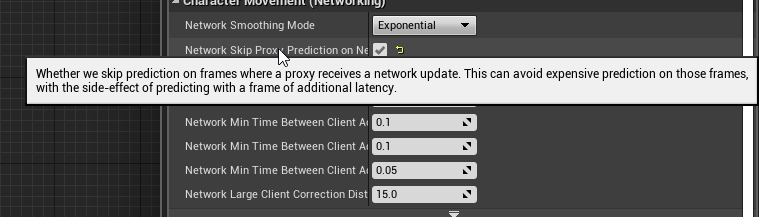
As expected it occurs in SimulateMovement() (CMC)
So.. yeah, this was an oversight on their part
Gonna bug report it
Its coz they put it in for Fortnite and didn't test without it 🤣
Not looking forward to dealing with Epic's bug report support though
🤦 It slides even with it on, just not nearly as bad
I thought it was low friction but the friction isn't low
 desert breach
guys need some guidance . Please tell me what does these logs indicate ?
LogHandshake: SendConnectChallenge. Timestamp: 39.918385, Cookie: 226228085209219088202019254000017215231148189223200193039013 LogNet: Verbose: NotifyAcceptingConnection: Server TestServer accept LogNet: NotifyAcceptingConnection accepted from: 192.168.1.2:59742 LogHandshake: SendConnectChallenge. Timestamp: 40.919239, Cookie: 240152120099208048061034062158161216044128050032009060151153 LogNet: Verbose: NotifyAcceptingConnection: Server TestServer accept LogNet: NotifyAcceptingConnection accepted from: 192.168.1.2:42187 LogHandshake: SendConnectChallenge. Timestamp: 41.367260, Cookie: 236047221057173219106134244139062144055229127059194186233202 LogNet: Verbose: NotifyAcceptingConnection: Server TestServer accept LogNet: NotifyAcceptingConnection accepted from: 192.168.1.2:42187 LogHandshake: SendConnectChallenge. Timestamp: 42.368782, Cookie: 176201224204180011188246054146229253147123155182035240091152 LogNet: Verbose: NotifyAcceptingConnection: Server TestServer accept LogNet: NotifyAcceptingConnection accepted from: 192.168.1.2:42187 LogHandshake: SendConnectChallenge. Timestamp: 43.376808, Cookie: 235225105222115127213115048229008010149118085161045201136220 LogNet: Verbose: NotifyAcceptingConnection: Server TestServer accept LogNet: NotifyAcceptingConnection accepted from: 192.168.1.2:42187
My server is working fine but when I ask a android client to connect it shows me this
I do this to connect for now. Its a direct ip connection. GetWorld()->GetFirstPlayerController()->ClientTravel("192.168.1.5:7777",ETravelType::TRAVEL_Absolute);
drifting plank
Hey @slate veldt I checked the page https://docs.unrealengine.com/en-us/Programming/BuildTools/UnrealBuildTool/ModuleFiles
And I didn't find the variable AdditionalPlugins
So I will search which one to use !
desert breach
guys any help ?
drifting plank
It just accepts the connection for your client but did you do your logic in tick to have all these lines ?
Normally you have only the Send then the Notify once
desert breach
I just added the logic of ClientTravel Method
But in my client (Oculus GO) server level is not loaded
And these log messages I'm getting on server side
slate veldt
@drifting plank Ah damn, my fault again (was tired last night)
This is in Target.cs not Build.cs
        {
            "OnlineFramework"
});```Oh thanks ! 😃
slate veldt
I've just checked build.cs and I can't see anything out the ordinary - just standard multiplayer stuff like "Networking", "OnlineSubsystem", and "OnlineSubsystemUtils" in PublicDependencyModuleNames and "OnlineSubsystemSteam" in DynamicallyLoadedModuleNames
 past bear
hmm, if I add a component in BP, does this only happen on the server?
looks like this is indeed the case
flint plaza
Question:- when I fetch tags from the overlapped actor, the correct tags are returned in the server window but the default value of the tags is returned for the client version. Any idea why?
past bear
variable may well not be replicated
winged badger
if you add it in runtime, you'll need to call SetReplicates(true)
for it to spawn client side
@flint plaza actor/component tags don't replicate by default
look into GameplayTags for that
flint plaza
awesome! Replicating it worked!
fleet raven
@grand kestrel what's the issue exactly? how it slides forward for one frame when you stop moving?
 chrome bay
@jolly siren sorry I'm not on 4.22 yet with a project that has travelling!
But that does look frustrating
@past bear if it's a replicated component IIRC the client will create the component as well
chrome bay
Yeah that sounds like a bug to me then.. a few of my projects rely on that
Though I'm creating in code not BP, but still
Is the CDO of the component replicated?
chrome bay
Hmm.. yeah that definitely should be working
I used to have weapons which were actor components and spawned them server-side
The base class for those was replicated, but otherwise I don't think I had to do anything special for that
winged badger
if the component is on the replicated Actor CDO, or an Actor loaded from package, doesn't matter if its replicated or not, it gets created
if its added at runtime, calling SetReplicates() on it is the only way to get it client side, apart from adding it locally - but then you wouldn't be able to reference it over network
one recent version of unreal did have a bug with that iirc
but i don't recall which one
4.21 i think
chrome bay
Yeah I think that was with Static Mesh Components, I seem to remember there being some issue around it.
But that may not have been with component creation directly.
I've not tried spawning a component then replicating it after it's spawned, but if the CDO is marked as replicated it should definitely work.
flint plaza
Question: I have 2 variable sets. I for the owner and one for the server side. I cycle through available weapons by first changing the local variable (whose variable affects the local HUD) and then call RPC to change value of the server variable. Why does the change in local variable reflect on the server HUD as well?
chrome bay
Why would you have two different sets of variables? That sounds extremely prone to error already
Server should maintain a list of weapons that the player has, which rep's to clients. When a client wants to change weapon they ask the Server to do it. Server changes a single weapon pointer value, and client switches to that weapon when they receive the change.
drifting plank
It works with the dependency added in my Target.cs but the code can't compile due to an another error
@slate veldt Any idea why the code of LobbyBeaconClient has an error ?
2>C:\UE_4.21\Engine\Plugins\Online\OnlineFramework\Source\Lobby\Public\LobbyBeaconClient.h(57): error C2143: syntax error: missing ';' before '<class-head>'
2>C:\UE_4.21\Engine\Plugins\Online\OnlineFramework\Source\Lobby\Public\LobbyBeaconClient.h(57): error C4430: missing type specifier - int assumed. Note: C++ does not support default-int
2>C:\UE_4.21\Engine\Plugins\Online\OnlineFramework\Source\Lobby\Public\LobbyBeaconClient.h(59): error C4430: missing type specifier - int assumed. Note: C++ does not support default-int
Open LobbyBeaconClient.h and see what API the class belongs to, then make sure you include it
class LOBBY_API ALobbyBeaconClient : public AOnlineBeaconClient
You need the 'Lobby' dependency
drifting plank
I include it
chrome bay
Include doesn't matter if the module isn't added as a dependency
drifting plank
PublicDependencyModuleNames.AddRange(new string[] {
            "Core",
            "CoreUObject",
            "Engine",
            "InputCore",
            "UMG",
            "Json",
            "Networking",
            "OnlineSubsystem",
            "OnlineSubsystemUtils",
            "Lobby",
        });

        DynamicallyLoadedModuleNames.AddRange(new string[]
        {
            "OnlineSubsystemNull"
        });
@chrome bay I'm not sure if you need to explicitly include Lobby as it's not an engine module - it's part of a plugin of the engine. Mine worked without it
It's handled rather strangely, because the engine doesn't recognise it as it's own module due to it being part of some larger module
chrome bay
It depends if as another module might be including already too
drifting plank
I put it in the public dependencies of my Build.cs and OnlineFramework for my different Target.cs
chrome bay
Actually that error suggests the issue is in the LobbyBeaconClient.h file
Have you modified it?
drifting plank
No
slate veldt
Oh yeah, it looks like it's got compile errors
chrome bay
syntax error: missing ';' before '<class-head>'
slate veldt
what engine version you using?
drifting plank
4.21.2
slate veldt
Yeah, that's what I used to use on the old project I believe... let me check
chrome bay
Is there a ; after the enum declared above it?
drifting plank
Yes !
chrome bay
post a screen of that file
slate veldt
Ah no, I used 4.20 - I'll check the source file in 4.21 for lobbybeaconclient
 chrome bay
Okay so
AOnlineBeaconClient belongs to ONLINESUBSYSTEMUTILS
But you have that too.. oh christ knows
flint plaza
I had 2 sets because of local implementation for the client which the server replicates to everyone but the owner
drifting plank
Yes it was for the session
chrome bay
Oh it's a plugin right?
drifting plank
It's a plugin of Ue4 yes
chrome bay
In the .uplugin file, add the plugin dependencies too. Just as an example:
        {
            "Name": "OnlineSubsystem",
            "Enabled": true
        }
]```Don't ask me why Epic thought that was a good idea
drifting plank
"Name": "OnlineFramework",
"Enabled": true
It seems good to me
chrome bay
that's the only issue I can think of now
it doesn't seem to know what AOnlineBeaconClient is
drifting plank
I will do a custom one then ..
chrome bay
OnlineFramework isn't OnlineSubsystem
Since they made all the engine modules plugins it's become a pain in the arse
drifting plank
I have that in my module so it seems good too but I will check if I miss other plugins :
"Modules": [
        {
            "Name": "Blackhive",
            "Type": "Runtime",
            "LoadingPhase": "Default",
            "AdditionalDependencies": [
                "Engine",
                "OnlineSubsystemUtils"
            ]
        }
    ],
Does your project have
"OnlineSubsystem",
"OnlineSubsystemUtils"
}```

Might be why it cannot compile if you don't have the online subsystem utils module in your actual game projectYes I have
slate veldt
Hmmm
drifting plank
I post it before
slate veldt
Yeah, wasn't sure if you'd changed it whilst working today 😛
drifting plank
I will check if the current version of my file has not been modified
slate veldt
How about your project's .uplugin?
Does it include:
    {
            "Name": "OnlineSubsystem",
            "Enabled": true
        },
        {
            "Name": "OnlineSubsystemUtils",
            "Enabled": true
        },
        {
            "Name": "OnlineFramework",
            "Enabled": true
        }
]```Ohhhh....
I've just found yet another thing - sorry
Looks like I've also got this in the .uplugin
        {
            "Name": "ProjectName",
            "Type": "Runtime",
            "LoadingPhase": "Default",
            "AdditionalDependencies": [
                "Engine",
                "Lobby"
            ]
        }
],```Oh !
For me I have OnlineSubsystemUtils in the additionalDependencies but I can't find OnlineSubsystem and OnlineSubsystemUtils in the plugins section
slate veldt
So it's some strange hierarchy.
Looks like you need to include the plugin as a plugin in the uproject file (the online framework bit, online subsystem and online subsystem utils), and then also include the specific API name as a additional dependency module in there above it.
and then also in your Build.cs add your "OnlineSubsystem" "OnlineSubsystemUtils" as PublicDependencyModuleNames.
And then in your Target.cs add the bit I mentioned yesterday
        {
            "OnlineFramework"
});```Try implementing all of those at once and then compile 😉
drifting plank
Ok I probably modify the Lobby file, don't know how and when ? 🤔
It compiles now !
Thanks for the help @slate veldt and @chrome bay
slate veldt
Oh perfect 😃 No problem!
thin stratus
I wonder if TMaps will ever be replicated...
Is there any Key,Value container that properly replicates?
bitter oriole
Nah
If you really need key value with keys that aren't static, you'll need to reimplement it
Basically a RPC multicast to add & delete
drifting plank
Where can I override the different parameter like "NAME_BeaconPort" ?
Do I need to change the source engine directly ? Or can I use the config file ?
I have already these lines to override the port but it seems that the NAME_BeaconPort is 15000 and I don't know how to change it :
[/Script/OnlineSubsystemUtils.OnlineBeaconHost]
ListenPort=7787
Oh I found it is in OnlineSessionSettings
It's strange that even with the config file, the port is not override here 😦
slate veldt
@thin stratus Best solution I've seen for replicating TMaps is writing a replicator function that replicates 2 TArrays - one for keys and one for values.
By replicator function, I don't mean an RPC, I'm on about whatever the function is that serializes a type before sending it over the network, and the function that reconstructs on the other end
thin stratus
So basically a struct that has a custom NetSerialize function
That sounds like the dirtiest yet cleanest way
I'm just replicating single values now and keep the majority of map entries server side
slate veldt
That's the one - sorry been a while since I've written network code!
Yeah, it's a horrible solution, but it works from what I hear.... I potentially even used it myself but I can't really remember now
Yeah that seems like a sound idea
thin stratus
I have a component that keeps track of a lot of stats server side
TMap<FName,FHLStat*>
However that sadly can't easily be replicated
So I now keep it like that and additionally replicate and store specific stats in the PlayerState for showing them to the UI
The TMap is more for backend stat tracking
Would be convient if I could replicate that easily but well
slate veldt
Haha yeah, I mean Sweeney himself said he's been meaning to add replication for TMaps since the 90s, since UE1 I think!
So it's either going to happen at some indeterminate point in the future, or never at all because it's become a running joke
 unborn nimbus
Anyone familiar with how to fix LogNet: Warning: Incoming ip address doesn't match expected server address: Actual: 0.0.0.0:0 Expected: 127.0.0.1:7777 or LogWorld:Warning: SetActiveLevelCollection attempted to use an out of date NetDriver: GameNetDriver?
slate veldt
Ah potentially, I remember having that issue a long time ago. Judging from the error itself, have you ensured that both your server and client are running the same compiled version?
unborn nimbus
Yea, I'm just trying to run in editor
slate veldt
Hmm, are you trying to run seamless travel or absolute?
slate veldt
Yeah, sounds like you know Seamless doesn't work in editor 😉
Unfortuantely I cannot remember how I resolved this issue (it was about 14 months ago now!) Hopefully someone else might though - perhaps try right clicking the uproject and launching game and see if you get the same error to check it's not editor specific
unborn nimbus
It was working fine a few weeks ago then now it's not
so I created a fresh project and same error
I'm not sure what else to try since the project is literally empty
When I launch, I don't get the out of date warning, just the ip address warning
 worthy wasp
Would this error line be because i have different engine versions? I'm losing connection when the client connects to server (P2P) - and these remote clients are using BINARY version of UE4 - with compiled binaries from my server (that is on 4.21 source)
LogNet: NotifyControlMessage: Client connecting with invalid version. LocalNetworkVersion: -768981307, RemoteNetworkVersion: 594563605
glacial pollen
I'm trying to create a demo project for the community, but I haven't started from scratch in three years, and I'm having issues I don't remember ever having:
I'm using the default 3rd person project, 4.20
In the game mode : I set the default pawn to none.
I override "Handle starting player" and spawn my own character in, (default 3rd person character), using the player PC as the owner, and then possess it
When I do this the character looses it's mind, its like it's trying to jump (even with EVERY node disconnected in the character BP), and twitches mid air. ALSO the character is distorted from the front/back. I tested with a square cause and it looks like a triangle!!!
What the hell am I forgetting to override?
glacial pollen
ugh
default for the 3rd person project, player start, don't use the transform as-is,
not only did this distort the character (duh) but it caused the weird player glitching/jumping/floating issue....
unborn nimbus
Is there a trick to tracing where RPCs are coming from while debugging?
 slim holly
cunning stirrup
slim holly
cunning stirrup
I'm trying to spawn an actor on the server so that it gets replicated, then send a reference to a client that asked for the actor to spawn via RPC.
Problem is that when I do that, most of the time the client gets the RPC before the actor gets replicated, resulting in a null reference on the client.
So how can I do that correctly ?
Only reference type accepted is direct pointers for RPC, i've tried with weak pointer and it won't let me.
even though internally it's weak pointers
winged badger
Reference to new actor set server side. Replicated. Use OnRep for your logic.
glacial pollen
@cunning stirrup on beginplay of the client side of the spawned actor, you can call another function that's sets the reference
cunning stirrup
ended up doing with OnRep
cunning stirrup
that alternative is much easier to do in BP
glacial pollen
Another way is to ab-use attachments
cunning stirrup
but not in cpp
drifting plank
@slate veldt Hey Do I need to join the session manually after that the player has called the function "JoiningServer".
Then he has recieve the event "OnJoiningGameAck".
glacial pollen
Can you re-word that?
drifting plank
Me ?
glacial pollen
Yes please
There should be events/delegates that are fired after joining the session
drifting plank
No it's when I used the Lobby module 😉
glacial pollen
You could break point those two functions you listed and see which fires first
drifting plank
It's why I ask to AgentMilkShake
glacial pollen
I don't understand, the engine has built in events for successfully joining a session
drifting plank
Yeah
But I'm currently implementing the Lobby in the OnlineFramework module.
And the lobby has a specific logic which permit to reserve a slot.
But I didn't see any "JoinSession" in the code
glacial pollen
Hmm, interesting, of course I'm guessing, what if you did a search for sessions and joined it, the lobby would decide if you belong to the reserved slot. This would be something like OnPreLogin of the gamemode
drifting plank
/** @return delegate fired when the server acknowledges the client request to join the server */
    FOnJoiningGame& OnJoiningGameAck() { return JoiningGameAck; }
It seems that I need to join the session manually ^^
glacial pollen
Yes, only the pie/editor does "auto connect" if you setup the settings for that
But it's only good for in editor testing
As soon as you go standalone/packaged you have to manually find and join a session
slate veldt
@drifting plank Hey, sorry I was away from the PC - what 2 functions were you wondering fire in which order? OnJoiningGameAck and what?
JoiningServer?
drifting plank
No I was just wondering If I needed to join the session manually at the moment the server sends his ack
But it seems that it is the aim of the Ack
slate veldt
Yeah, so Lobby beacons are essentially you joining the session without fully travelling. So if the player is successfully joining, the host will then (once your criteria for min player etc is met) start up the game on the server (travel from main menu to main map for example).
It's been a long while since I've actually looked at all this, but once your client is in, they should be able to access the list of players in the session (via lobby beacon client) and so you can populate UI for example.
You'll also be able to replicate the lobby state across for showing the host's selected map, game mode etc from UI in the main menu. Once you hit start on host, it will then drag all of them into the new level/game mode that the host has setup.
Give me a few minutes to remind myself
So Lobby Beacon Player State - each player should have 1 and it's replicated to all players connected I believe. This is where you store the user display name
Lobby beacon state - similar to a game state or player state, this holds the state of the lobby such as who is party leader, max players, waiting for all players to start etc.
drifting plank
Yeah I understand that I took a lot of time to check the entire code ^^
But thanks for the clear explanation 😉
slate veldt
No problem, I'm kinda jotting it all down both for you (in case you didn't know) and also for myself as a quick recap 😉
drifting plank
I will also use it the beacon to select a character for the player and store the information on the server before the player really join.
So i need to store the net id and which character he has chosen.
slate veldt
Yeah sounds like the best idea - I would store the character selection in the LobbyBeaconPlayerState
Because I cannot 100% remember, once you think a player has joined the lobby, kick off a new open level with ?listen - that should start a multiplayer game. That then potentially drags all of the connected players in too
drifting plank
I already have a spawn manager which store the choice of the player. So i just need to handle it in my beacon host. And then load the choice once the player is connected on the map
slate veldt
👍
 tawny flicker
Hey guys. So i have this macro that Im adding onto a function
This is the Macro blueprint, and also the inputs and outputs of the macro
The first pic (The draw circle macro) in the function doesnt seem to have options for me to set the color and size? I mean, shouldnt there be like a button next to the color option that enables me to set it there?
also values to input in size?
yes i can plug them in, but shouldnt there be something there anyway?
Like a box next to the color option to set the linear color
Im following a tutorial, and this is what the tutors screen looks like
Okay nvm, figured out the error lol
after staring at the screen for like half an hour blankly
I realized I ticked the pass by reference option for EVERY input
not just the Context
gg
urban dew
does anyone know why servers would only appear in the same steam region?
if you host a server, people from different regions can't see?
urban dew
yes
thin stratus
That's how Steam works
The Presence only gives you Servers around you and your friendlist.
thin stratus
Don't think so
 naive crater
the spacewars app id is region locked, but when you get your own it will be global. It does return servers geographically though so the closer servers will show up first.
urban dew
glad to know, thanks so much guys 😃
grizzled stirrup
Does anyone know if SetRemoteRoleForBackwardsCompat(ROLE_SimulatedProxy); is necessary to be included in the constructor of certain replicated actors?
ShooterGame does it with the projectile, weapon and pickup for example
The function definition says /** This function should only be used in the constructor of classes that need to set the RemoteRole for backwards compatibility purposes */
Does anyone know what these "Backwards Compatibility purposes" are?
past rain
@grizzled stirrup why don't you look at the engine code and see what the function does?
grizzled stirrup
@past rain I did, it simply sets RemoteRole
I just am curious if it is necessary, or if it's a legacy thing hence the "Backwards Compatibility" line
past rain
All the threads I found regarding it was at least 4 years old, and I'm using projectile in my multiplayer game and having no problem with replication
Never seen that function
So my recommendation is to forget it exists
 wheat eagle
Hello I have a question: I want to send to clients their steam avatars from the server. For that , I have an array of slate brushes where I keep players' avatars. The thing is that when the client recieves a slate brush from the array and adds it to the viewport, the resulting image is the default image of the array that Im presetting. In case of the server, it sees the image. Also, when testing with clients, I'm using Dedicated Server. Could it be that the dedicated server won't fire this Get Steam Friend Avatar correctly? Here is the bp
winged badger
dedicated server doesn't need steam client running
wheat eagle
sorry, but I don't really understand. How is this rellevant?
urban dew
I've just finished my first multiplayer test and came across a couple issues, for the host, everything worked perfectly, for the other players, they could do everything as well however no one else would see
im guessing this is due to improper replication?
 solar stirrup
So just making sure I'm not doing something stupid
is one actor per item in an inventory bad?
winged badger
it gets expensive
solar stirrup
What are the other solutions?
winged badger
@urban dew clients have to RPC all input to the server
depends what kind of inventory are you using
solar stirrup
Made my own, it contains FItemSlot
winged badger
i mean
solar stirrup
each slot references an actor, the actual item
winged badger
if your inventory requires visible meshes
urban dew
it does replicate as host
winged badger
BP or c++?
solar stirrup
C++
urban dew
how can I make it replicate to everyone regardlesss if they are server or not?
winged badger
no obvious flaw in your screenshot
@solar stirrup your options are Actor, ActorComponent, UObject, or Struct
urban dew
solar stirrup
Item data is already struct
solar stirrup
But you can't replicate structs right
winged badger
as long as you have some kind of InventoryManager that can handle replication
urban dew
it's on multicast already, but I want it to replicate to everyone?
solar stirrup
so the inventory manages replication of structs? could work
each item has a unique item id
winged badger
no, you can replicate structs just fine, any UPROPERTY on replicated struct will replicate
winged badger
but its replication is atomic, which means the entire thing goes no matter how many properties changed
solar stirrup
hmm
winged badger
if your inventory has a potential to be huge
i suggest giving NetSerialization.h a read, its mostly comments
solar stirrup
aight ty
how big would be too big
the replication is mostly place in inventory, durability (when it changes)
and for equipped items the current animation/state/etc
winged badger
i'd be using FFastArraySerializer instead of an Array at 10-12 elements already
solar stirrup
alright guess I need to read up more ^^
what types should I read up that would be useful here?
winged badger
@urban dew if that SpawnShips spawns actual ships, and those are replicated actors
it should work just fine\
urban dew
it does spawn ships, i've tested it in multiplayer listen server
the host spawns them fine
players spawn them
winged badger
provided you did not plug something invalid into one of its pins
winged badger
what is normal player?
step 1, see if they are actually spawned
start a PIE game
switch the world outliner to client1
(illuminati eye bottom right has options for world you're viewing)
and see if those ships actually exist
or are they just sitting at say 0,0,0
urban dew
won't work in editor for me i need to build the game
LogGameMode: Warning: CanServerTravel: Seamless travel currently NOT supported in single process PIE.
all players are normal
however one player hosts the server
winged badger
then start multiprocess PIE
urban dew
the spawning ships only works for them.
winged badger
and play as client in editor
urban dew
like, everything works perfectly, however, if the player isn't the host, other players can't see their stuff
winged badger
uncheck use single process in advanced play settings
there are 3 scenarios here @urban dew
1 - stuff is there in the right place, but invisible
2 - stuff is there, but in the wrong place where you aren't looking
3 - stuff is not there at all
before fixing it you kinda need to know what are you fixing
urban dew
how do i swap world outliner to cliebt 1
winged badger
@solar stirrup the FFastArraySerializer gives you client side callbacks per item when it is Added, Removed or Changed
comes in very handy in situations like this
if you started multi process PIE as client
its already set to client
and can't be set to anything else
worthy perch
I thought only the changed property(ies) of a struct get sent for replication.
winged badger
nope
winged badger
unless you write custom serialization for it
urban dew
it cant see the ships
however is host spawns the ship
it works
so the issue is they aren't spawning at all
however, the client who spawns them can still see
but it doesn't register on server
urban dew
it's saying it replicates to all, if server
so i think that means it only spawns if it's the host.
winged badger
and planet is in what relation to player controller?
urban dew
planet is a bp actor in the world.
winged badger
is it owned by the PC?
urban dew
no it's not.
winged badger
if not you either have to SetOwner of the planet to its PC on server
or
you move the RPC into PlayerController, which then calls a normal event on the Planet
winged badger
make server replicated event with same signature in the PlayerController
instead calling SpawnShips call that event
and from that event (red node) call SpawnShips on Planet referece
also, read your output, as its spamming you with "No owning connection for..." warnings whenever you try to spawn ships atm
winged badger
almost
same signature
percent, faction, planetdestroyer
need all of that
then you connect wires that now go into Spawn Ships into Ship Spawn
and connect wires from red Ship Spawn node into SpawnShips
urban dew
all errors where unrelated to the ship spawnins just checked.
1hmm
okay give me one second
worthy perch
Hmm, I remember I looked a bit for how struct replicate their properties, and all the responses (vaguely) said that only the changed properties are sent but they all reference this post: https://www.reddit.com/r/unrealengine/comments/3d1wfh/replication_of_structs_cant_get_a_confirmed_answer/cxhoobv/?utm_source=share&utm_medium=web2x
reddit
1 vote and 9 comments so far on Reddit
winged badger
the event in planet doesn't have to be replicated now
but it doesn't really matter if it is or not
server RPC called from server is just a normal function/event
ah
problem tho
plain flume
Hi! Is there a delegate or someway for actor to call function when something becomes network relevant?
winged badger
the event in your controller needs to be Replicated to Server
and event in Planet can't be Multicast
urban dew
i made the event in planet not replicate now
winged badger
@plain flume server or client side?
urban dew
plain flume
Server side
urban dew
I really appreciate your help Zlo! 😃
winged badger
now you need to make one in controller Server, not All
urban dew
this is litterally the final thing stopping my game being ready for pre-alpha testing, replication not my strongpoint
winged badger
network relevant to whom? as it is evaluated per PlayerController
winged badger
no, change ShipsSpawns to be Replicated to Server
plain flume
I have an actor that I want to send some stuff for player from non replicated variable. Now I have a collision box that checks overlaps. I was wondering that if I can remove the collision box and use some delegate that launches when that actor becomes relevant to client player
winged badger
otherwise your client will only spawn ships locally again, only the server spawning ships will spawn 2 sets on clients
winged badger
yes
urban dew
ill give it a gander
winged badger
clients handle their collisions separately
if you are using default net relevancy, you can continously check if the player is inside 15000 UU
which will be the same as becoming relevant
overriding IsNetRelevantFor and adding some bool to track if it is inside the Actor is also possible
but you'd better put on your Mad Hacker hat on if you're going to do that @plain flume
grizzled stirrup
Will Character->IsLocallyControlled() only return true if that character is being controlled by a player on this machine?
glacial pollen
yes, including split screen though
grizzled stirrup
Thanks!!
 dusky light
Hello im having a problem with the PlayerCameraManager in MP
Basically when I use GetActorForwardVector on the host I get the proper result
But if I use it on a client one I get a wrong result
APlayerCameraManager* cm = Cast<APlayerCameraManager>(WeaponOwner->GetPlayerController()->PlayerCameraManager);
FVector Impulse = repulsionInstantSpeed * comp->GetMass() * cm->GetActorForwardVector();
Value of FVector Impulse for host : Impulse = {X=0.189690173 Y=0.971476078 Z=93461.0781 }
value of FVector Impulse for client : Impulse = {X=1.00000000 Y=0.000000000 Z=0.000000000 }
Always the same
if anyone has an idea much appreciated
past rain
@dusky light are the variables being replicated?
If you set variables on the server, but dont replicate them to the clients thats an issue
dusky light
You mean through the GetReplicatedLifetimeProps function?
@past rain
I'll try it out
dusky light

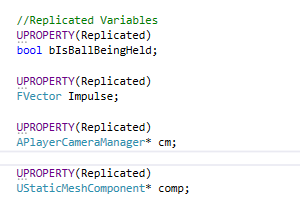

Tried it
Unfortunately doesn't change anything
Impulse = {X=656750.313 Y=0.000000000 Z=0.000000000 }
Something changed tho
past rain
Doesn't look like the calculations are done on the server
Why dont you log each individual component
And narrow it down to the variable that's giving you trouble
Log out every single variable, a.k.a RepulsionInstandSpeed, cm->GetMass etc
See how the values compare on client and on server
@dusky light
dusky light
RepulsionInstandSpeed is a constant
uhm for the rest yeah i'll go through them one by one
ShouldI replicate a constant aswell?
should*
@past rain
dusky light
Alright ^^
 bleak lily
anyone know about replicating a map vote in ue4

it works in the sense where the client can see the vote of the host but the host cant see the clients vote
dusky light
Alright @past rain

Chopped it up as you suggest
Basically all variables are the same for both client and host
except for ActorForwardVector
Host :
ActorForwardVector = {X=0.100177348 Y=0.807002962 Z=0.581988573 }
Client
ActorForwardVector = {X=1.00000000 Y=0.000000000 Z=0.000000000 }
past rain
Might be because actor forward vector is not internally replicated
dusky light
if I get Actor forward from Weaponowner directly
instead of through the cameramanager I get a somewhat better result
atleast I get the same result for the client and host
but I only get thee X and Y axis
Z axis is empty
Ig I have to replicate the APlayerCamerManager somehow?
past rain
Do you simply need
The direction of the player is so you can shoot the bullet that way?
@dusky light
dusky light
Basically I have a
Gravity gun kinda thing
Im holding an object and trying to shoot it away in a certain direction
where im pointing
@past rain
past rain
Are you line tracing?
Try this - and replace cm->getforwardactor with FinalAim
Damn won't let me copy paate
Paste
FVector CamLoc;
FRotator CamRot;
PlayerController->GetPlayerViewPoint(CamLoc, CamRot);
FVector FinalAim = CamRot.Vector();
I'm just spit balling here but try it @dusky light
winged badger
@dusky light blueprints or c++?
winged badger
        ULocalPlayer* LocalPlayer = Cast<ULocalPlayer>(Player);
        FVector2D MouseScreenPosition;

        if (LocalPlayer && LocalPlayer->ViewportClient) { LocalPlayer->ViewportClient->GetMousePosition(MouseScreenPosition); }

        FVector WorldOrigin = FVector::ZeroVector;
        FVector WorldDirection = FVector::ZeroVector;
        UGameplayStatics::DeprojectScreenToWorld(this, MouseScreenPosition, WorldOrigin, WorldDirection);
should get you on the right track (from PlayerController)
you can trace from WorldOrigin to WorldOrigin + WorldDirection * somenumber to get the point where mouse hits the floor if you need it
you will have to RPC the relevant information over to the server
WorldDirection (your camera forward) is a unit vector, so you can send it as FVector_NetQuantizeNormal, its almost half the size but limited to vectors from -1 to 1
if you are sending vectors to server on Tick, and i cannot stress this enough, use UFUNCTION (Server, Unreliable, WithValidation)
dusky light
Alright thanks let me try and work out what you send into my code and i'll see
winged badger
server generally has no idea where your camera is, whats the size of your viewport, where your mouse cursor is
nor does it need to
you need to take that information client side, and pack what you need for server to do its part in most efficient way possible
then send it inside a server rpc
past rain
@dusky light to answer ur question, camloc and camrot gets their value from GetPlayerViewPoint(CamLoc, CamRot)
dusky light
Ah right
past rain
Its an out parameter, meaning they are sent in as reference
The reason I asked u to try that is because GetPlayeraViewapoint is already replicated behind the scenes so u don't need to do shit server and client side
 velvet thistle
Hi, i'm trying to generate map with rooms. I decided to store every room in sublevel, so i can bake light for each of them and then place them in persistent level. While generating i'm creating some copies of each sublevel. In singleplayer it's ok, but in multiplayer players disconnects for some reason. I was using both "Create instance / Load Level Instance" functions to place sublevels, but both of them dont fix it.
As i understand the problem is here:
" LogPlayerController: Warning: ServerUpdateLevelVisibility() ignored non-existant package '/Game/Maps/Medieval/SubLevel_Instance1' "
After which i get:
"LogNet: UNetConnection::Close: ..." "LogNet: NetworkFailure: ConnectionLost, Error: 'Your connection to the host has been lost.'"
Looks like server is trying to find instance of sublevel on disk but of course cant.
Is there a way to fix it, or may be another way to spawn rooms with baked lighting?(I need to bake rooms in unreal, as I am constantly changing something)
plain flume
Hello! Is this Correct way to Quantize vectors?
past rain
@plain flume looks good To me
plain flume
@past rain Thanks. And what about when I have once Quantized it. Can I then pass those values to regular FVector and it has same benefits still?
For example, after quantize, I pass them to server function that takes FVector. Would it still be optimized
past rain
Seeing as how all functions take a vector and non of them take specifically NetQuantize vectors it would make sense that they would remain optimized
Feels kinda pointless otherwise
I'm just using my own logic here don't know the actual answer
But if its your own custom server function
Why not just make the argument into a net quantized vector
@plain flume
plain flume
Yes. That is what I was wondering. I was thinking that if argument itself is NetQuantize, it might work.
That would be logical yeah¨
Thanks alot
past rain
Goodluck :)
 cedar finch
So I'm making a revive system. Where should I put the Bleed Out timer? In the Character actor or in Gamemode? Everyone has to see it so they know how long he's got before he bleeds out.
Or should I put it inside playerstate?
cedar finch
Yea I know, just testin ya. 😉
 meager spade
PlayerState is where it should be
cedar finch
That's what I was thinking too
bleak lily
hey I am having an issue with a map vote system in mp
the client's vote doesnt count for anything but the hosts does
winged badger
@plain flume FVector_NetQuantize are just structs inheriting from FVector with overriden NetSerialize function, you can just assign a FVector to FVector_NetQuantize directly
 safe marsh
anyone know if there is some way to send console commands to a dedicated server instance of a build
 fossil spoke
Just setup a Server RPC which sends along a string of what the console command is you want to execute?
Easier than setting up your own RCON lol
safe marsh
yea
I was gonna set up a RPC, But thought there was some kind of server frontend besides the log
if I want to send commands outside the client, I would need to set up a TCP listener on the server to send the command I guess. There's no application like a server frontend or remote console shipped with the engine I guess
 kindred sandal
Is there any service that provides session support for all Platforms?
(Onlinesubsystem)
past rain
@kindred sandal maybe something like this? https://www.unrealengine.com/marketplace/en-US/slug/matchmaking-server-function

Matchmaking Server Function that makes it possible to match players together and start/stop match servers in the background to flexible host the matches, without the need of 3rd party services like Steam or Gamesparks.
Or maybe this is better https://www.unrealengine.com/marketplace/en-US/slug/uetopia-online-subsystem

OSS features: Identity, Sessions, Matchmaker, Recent players, Friends, Party, and Chat
plain flume
Any idea will the Epics subsystem work with games that arent tied to Epic games account?
past rain
You mean the online subsystem?
Or do you mean their online service that they recently announced, EOS
@plain flume
past rain
Online sub system has nothing to do with epics accounts
It works for steam and such
Its done all that for you behind the scenes
So all you gotta do is work with the online subsystem, and its very easy to switch platform
Whether its ps4, Xbox etc
bleak lily
does anyone know how you could go across doing a map voting system?
or how to get it to properly replicate
I made the votes integers but they do not properly replicate
past rain
Have you replicated them?
bleak lily
Well yeah the variables are set to replicate
past rain
Can you post a screenshot
bleak lily
yeah before I do that, is gamestate fine for doing this type of stuff
I put the points in a gamestate
past rain
Yeah game state sounds good
bleak lily
this is for the UI

for the custom event I just did a get map vote and add it by 1
 past rain
It looks like this is done locally on the client
Think you'll need to then tell the server about it
bleak lily
how would I do that
past rain
I've never really done multiplayer in blueprints I don't think I'm qualified to help :/
bleak lily
yeah basically the host can vote and it shows up for everyone else but if the client does it will show up for them but not the host
past rain
Yeah, the part where you tell the host who you voted for, then the host tells the rest of the clients
Is the missing part
Have you watched tutorial about blueprint multiplayer on YouTube?
There is a shit ton
bleak lily
I mean I tried looking for like a specific video on voting aand stuff but couldn't find any
past rain
Its better to learn the basics and fundamentals, don't gloss over it
Multiplayer is complicated
 vast isle
Hi, can somebody help me on something ? I know to open a door with a collision box and the "Switch has autority", but I can't find a way to check if a button on the gamepad is pressed. how could I send a boolean state (is_button_pressed) from the client to the server ?, thanks 😄 !
 neon violet
Just right click type in your button on the gamepad and it will make an event for you then on pressed run your code @vast isle
vast isle
yes, but it only update from the server side if I do it this way
let's say, I want the door to open when a client click on it
I have acces to this value: is the client is in the collision box, is the client aiming at the door
but I cannot acces to : is the client gamepad button is pressed
kindred sandal

GitHub
OnlineSubsystem interface implementation for GOG Galaxy platform - gogcom/galaxy-ue4-oss-plugin
vast isle
I just found 😄
kindred sandal
GOG Also Provides OSS
For Free
almost most features of upcoming Epic online services
vast isle
using the search fonction in discord lead me to the awnser 😄
solar stirrup
I checked fast array serialization, just something that puts me off, the order in the array is not guaranteed to be the same on server and client @winged badger ?
plain flume
@past rain i mean that for example if you use steams subsystem, game needs to be on steam. If you use Epics subsystem, do you need your game to be on Epics store?
past rain
Yeah
Epics subsystem is for epic
Wouldnt make sense for it to be elsewhere
@plain flume
Any reason you'd wanna use epics subsystem elsewhere?
thin stratus
@past rain @plain flume You don't need to be on Epic's store to use the Subsystem
Epic's store is just a frontend to the subsystem.
You can even write your own if you want
Or sell it on a different store.
 thin stratus
I just based this on the last thing you wrote
past rain
Im not exactly sure what he meant
there is no such thing as steam subsystem
its all called online subsystem
thin stratus
Online Subsystem is just an interface.
past rain
yes
thin stratus
Steam Subsystem implements the SteamSDK via the Interface.
past rain
which works for multiple platforms
thin stratus
To use Steam you need to be on the Steam Store.
past rain
For the interface to call the correct steam functions, you're gonna need to install the steam sdk
I asked him if he meant the newly announed epic games online service
but he didnt
thin stratus
Based on the last question he means exactly that.
past rain
well I asked and he said no 😄
thin stratus
To use Steams SDK which is in UE4 is known as Steam Subsystem, you need to have the game on Steam.
past rain
If thats the case, Epic online service, EOS - is for any platform
thin stratus
And as you state, Epic does not have that limitation.
thin stratus
So I got a bit confused when you said "Epic Subsystem is for Epic" :P sorry
past rain
I do wonder though, whats the pros and cons of using eos over steam online services for a steam game
thin stratus
I read that like "Epic Subsystem only works on Epic Store.". My bad!
Mainly Crossplatform support out of the box.
If you game has Steam fully setup, that doesn't mean that selling it on XBox will directly support the same features.
E.g. phone subsystems usually don't even have a proper session interface implemented.
So it's a lot of work getting you game to work on all platforms if you have to deal with the quriks of every single subsystem
Even if it's an interface that tries to combine them.
past rain
You saying EOS takes care of all of that?
past rain
So all you have to do is write one single system
thin stratus
Correct
thin stratus
The only thing you might need to do is write a different authentication code for each platform
EOS will create a user if you authenticate via Steam.
You can then probably authenticate to the same user via Xbox and PS4.
So you basically use the current subsystem to authenticate with EOS.
Like that all your data stays under one main user on the EOS backend.
Which makes Matchmaking equally straight forward.
Cause all your users are already in one database.
past rain
Yeah that makes things a lot easier
too bad matchmaking wont come out until november at the very least
thin stratus
Yeah, GameSparks offered similar stuff.
But with their recent change in pricing, it got very anti-indie.
past rain
well
teh amount of money epic has made out of fortnite means they can literally do anything they want forever
which is great for us devs, cuz they seem to be doing pro-dev things
If they make some user friendly decisions, and actually makes the epic store into a user friendly platform, that would be great because no one likes to give valve 30% of their income
thin stratus
Looking at the development of #epic-games-store it doesn't seem to be good in gamer's eyes :D
past rain
Its not good in the gamers eyes
they are making poor decisions
And its pretty sad
But we can always hope
Valve wont be threatened until big developers willingly put their games on epic store rather than steam, instead of epic driving a truck full of money to their frontdoor
solar stirrup
Fast Array Serialization question, been thinking about using it for my inventory
however my inventory has slots, so items can be in different slots and it will need to be synchronized between the server and client
is it right that using fast array serialization does not guarantee to give the same order server and client side?
 twin juniper
correct
but in ur item struct why not do ItemSlot = x ?
that way itemslot is not determined by array indice
solar stirrup
Replication is done at the end of the frame right @twin juniper ?
so if I make multiple items in the array dirty
they'll all be replicated at the same time after the frame ends right?
grand kestrel
@solar stirrup Yes, it's not going to replicate several times in a frame if you change several elements, it'll replicate once
As a general rule of thumb you can give UE4's networking/replication the benefit of the doubt when it comes to good practices and working well
Its quite robust
solar stirrup
Damn I love UE4 then
grand kestrel
Ah ex-unity?
grand kestrel
They don't really have anything sufficient in the way of networking, and if they do its third party
solar stirrup
^
grand kestrel
Its the one reason I'll always use UE4 over unity
Even if I make a predominately single player game I don't want to rule out MP
solar stirrup
Also since my items are stored in a data table, should I make a copy of an item when I instantiate it for safety or do I not need to do that?
same
grand kestrel
For safety? You mean you're worried you might end up modifying the data table?
solar stirrup
yep
solar stirrup
I mean the items are created and stored in a data table, if I want to add an item to a player's inventory, editing the item won't edit the datatable right?
grand kestrel
I wouldn't know, I've never been in a situation where I could modify it that way
solar stirrup
yeah
 dull remnant
Can anyone suggest which database should i use in backend for an unreal real time multiplayer game
past rain
@dull remnant see if this is helpful https://answers.unrealengine.com/questions/794721/database-integration.html
Apparently it costs 300 bucks a month now though yikes
There is also this - https://www.unrealengine.com/marketplace/en-US/slug/usqlite-database

This plugin empowers you to save and load data to and from SQLite Databases in Unreal Engine without forcing you to write a single line of SQL Code (or Blueprint Spaghetti).
dull remnant
i am not asking for a backend server
i am implementing my own back end
thank you so much for increasing my knowledge
 dark edge
What's the best way to update stuff locally when possessing a new pawn?
 low pond
whats the best way to copy data between game sessions on a map change?
 mossy sequoia
 twin minnow
is there a way to run two standalone game instances for a dedicated server in the unreal editor?
nvm im dumb
 wary willow
Yeah
They fucked up GameSparks
(Amazon)
But, nothing no one with a brain didn't see coming.
flint plaza
General question: I have a pawn on which I call RPCs if it is locally controlled. While playing in editor for 3 players, if I play in the server instance, the is locally branch goes to the locally controlled part twice (meaning it is locally controlled on the server?) while it only goes to the client part once and the other time to the server part only if you play on the Client window. Can someone explain this?
winged badger
without showing how you call it the question is meaningless @flint plaza
flint plaza
It went to the false logic when I sent input from the client window
flint plaza
How can I differentiate between the player playing on the server window and the client window? The player on the server window executes the server code both times whereas the client window player executes the client code once and the server code on the server side
bitter oriole
Use roles