#multiplayer
1 messages · Page 458 of 1
 bitter oriole
 sharp plover
No worries, but that's awesome. Heard that unreal has most things built in, but really seems like it's everything 😂
Tried to get large terrains going for unity... have to rely on bought assets
instead of native features in the engine
bitter oriole
UE4 has other sins, like being pretty inflexible, and generally poorly documented 😛
sharp plover
We had a embedded server running, but development time will be alot shorter it seems since server and client is coded in one go apart from tags (atleast from what I've seen)
We've had to do 2 seperate unity projects 😂
1 server, 1 client. Took awhile to develop
bitter oriole
Yeah, UE4 is single codebase with role variables to check for what is what.
sharp plover
Yupp, I used a network framework for Unity before called Forged
really sped up development time
although alot of bugs
But thank you stranger, that's awesome
 drifting plank
@sharp plover Maybe you looking for that ?
https://wiki.unrealengine.com/Dedicated_Server_Guide_(Windows_%26_Linux)
sharp plover
That seems alittle bit more like it thank you 😄 I do see some blueprint in cooperation but the general jist of it should do
 jolly siren
I'm awake, yeah I've done replay. @drifting plank What do you mean your third person movements? Normally you only have one character that moves and fp meshes are just attached to that. So when you are in third person the replay doesn't move at all?
 tribal shore
hi i'm trying to make a small mobile Lan multiplayer game and ever since i added a posses character node, join session stopped working
can anyone help?
 solid lake
Hi there :)
when deploying my app (local multiplayer), i have to deactivate the firewall in order to make it run normaly
do i have to authorize some specific port ?
tribal shore
thank you @solid lake !!!!!!
you reminded me of firewalls
i've been trying to fix the problem i have for soooo long!
THANK YOU!!!!!
wait, do phones have firewalls?
if i make my computer a server with firewall disabled, my phone joins
if i make my phone a server, my computer can't join
drifting plank
@jolly siren Yop ! No I have an asymetrical game.
One team plays a first person shooter
And the other team plays a third person (which is derived from the third person template). This one doesn't move in the replay
Else the mesh of the first person team works perfectly. He moves, rotates and do all their actions.
tribal shore
how do you replay it?
drifting plank
How do you mean by that ?
I record with StartRecording in the game instance
I record from one client (the player which play the third person).
I didn't test by recording with the server
jolly siren
The first person shooter isn't derived from the same class?
 grand kestrel
@meager spade Have you dealt with CMC's speed hack detection before? Its actually built in but disabled by default. I did a if Role==ROLE_AutonomousProxy or w/e and increased the delta time on that condition, but it never detected the artificial speed hack
jolly siren
But don't they both use character as a base class? Or pawn?
drifting plank
Oh you're right, yes it's a character that i have created for both
TpsTemplateCharacter -> derived form my Character class
and
FpsTemplateCharacter -> derived from my same character class
jolly siren
So if everything is working in game, it sounds like it is an issue with your tpstemplatecharacter setup
drifting plank
I use the same logic to move them.
Except that I have added a logic for the third person which permit to walk on walls
Yes ! I checked the replication and movement settings but I didn't found anything
jolly siren
Maybe try setting everyone as a fpstemplatecharacter as a test
drifting plank
Hum the child hierarchy is very different but I can try
I will compare both code and BP settings
Did one setting can disable replay capture ?
jolly siren
bRelevantForNetworkReplays and then the replicated movement flags obviously
Also what version are you on?
tribal shore
Q:has anyone tested create session and join session in 4.22?
in 4.21 the mobile phone ip is given wrong in the search results
but if i manually get my phones ip and type "open 192.168.1.3" it works
drifting plank
I'm on the 4.21.2
tribal shore
i'm also on 4.21.2
jolly siren
okay, that's fine. Just wanted to make sure you were recent because replay code has changed a lot
drifting plank
I think the boolean is not in cause because my RPC are replayed but thanks for this information 😉
Ok so I progress
I've found that with a blank TpsTemplateCharacter my character moves 😃
But it's ridiculous to see ah ah it's like 8 months ago
drifting plank
Hum it's very strange, one child of my BP works but the others no 🤔
 glacial pollen
@thin stratus @winged badger Thank you for your thoughtful input. I will attempt to clean up and better explain my post. The basic premise is this: Newb friendly, but you can still open the box and learn from it.
As to how I got the correct role before posses happens: I recursively call get owner -> check if PC -> get local role of PC.
If I cannot find a PC, and I hit a not valid, I assume its simulated
Also, I'm VERY sure the get remote role is wrong in listen server with auto connect. I had immutable look at it.
The clients have the correct local/remote roles. But not the server (during the controllers begin play at least)
Anyways, I abused this to determine, if I, the listen server, was handling one of my own actors (as my own client)
Also, my blue print function does not depend on an actor being possessed, or being possessible.
I can call it anywhere, anytime, and always get the correct answer.
However, I did not think about splitscreen and will have to think about that and add it in to complete the "universal" aspect
With this, I CAN make a complex multiplayer BP, currently have dedicated and listen server working with the same blueprints. I just split up server vs client blueprints and call then according to my made up system. For something like standalone I just connect it to server and client blueprints using sequence node
And if blueprints had a Get Top Owner, I wouldn't need a recursive search
Again, generic actors will ALWAYS be simulated on every client. Whether you own it or not. No way to tell the difference unless you posses it. I have an attached actor system, and I need to know per actor what role I am, I don't like putting on_rep, or storing owners in variables. It's just messy and not needed .
Again, you guys have solutions for various "one off" cases, each with their own way of checking. My blueprint does this without caring about who we are checking, it even allows components as input
I've basically redefined "autonomous" to equal "ANY actor or component that you own, that you can call RPC's on"
I made sure to point that out in my second post where I describe the functions outputs
 neon violet
The on ground event fixed it for me but I still get a weird animation bug
glacial pollen
So this shows single player begin play of the controller, notice the remote role is simulated
(as a listen server, it would make more sense if this was None)
So now we will try with two players
So this is the first player, see its the same as above, but now we are "Server" instead of "simulating" in the top right corner
So here is player 2, on the server side, notice the remote role is None (should be autonomous)
Here is the client's side of begin play of the controller, notice the roles are correct
Here, is an example with my blueprint function that simplifies things:
This is player1, who "happens" to be a server. We will create a menu
Here we are creating the 2nd player controller, and we do not create a menu
Here is player2's begin play, on the client. Now we can create their menu
Notice the remote roles are still wrong on the server side, of begin play of each controller.\
However, they are predictably wrong, so I was able to use it to determine if "As the listen server, is this my own actor, or a remote clients actor"
And here, is a fully populated version, that handles every case:
With some proper separation of code, (ie, don't code with listen server in mind, and then try to switch to dedicated) its easy to switch between network modes (or non network modes). As long as you code in "dedicated / client" way of thinking, this will be a breeze
Just tested with split screen I'm having a hard time figuring out who the server is, I guess we can assume player 1 is always the server. (ie, player two cannot create widgets?)
 winged badger
@glacial pollen if you do not use deferred spawn carefully, server and client side logic will not execute in the same order when constructing an actor
unfortunately, the BPs can only set expose on spawn variables and nothing else to affect this
normal spawn:
server: Spawn Actor (automatically calls OnConstruction and BeginPlay)
client: Spawn Actor (defers BeginPlay until all replicated variables, including those set by the engine under the hood are set), then calls BeginPlay
deferred spawn:
server: Spawn Actor (you can now execute any custom logic) , OnConstruction and BeginPlay are called only when you call actor->FinishSpawning()
note that client side, the construction script will execute before any replicated variables are set either way
glacial pollen
blueprints do not have deferred spawn, so far this system appears to work for me. (I don't use construction, so I cannot comment on that
 hardy crescent
I was wondering how you connect other players in your multiplayer game
How players find eachother?
Is there some kind of relay server with concurrent user limit?
Do you somehow connect to steam and use steam as relay server? (spacewar?)
winged badger
also note that the actor doesn't replicate as soon as its spawned, so anything set server side in the frame its spawned in, including effects of being possessed, will be available client side before it calls BeginPlay
glacial pollen
Again, with the way I check against the owning controller, I don't need to worry about possession role being replicated on either side
winged badger
@hardy crescent look into Advanced Sessions plugin, probably the shortest way to get you started (its free)
that is pretty verbose @glacial pollen
hardy crescent
@winged badger What about unreal's networking system?
Is it bad or difficult?
winged badger
its good, but most people end up faceplanting into a wall for the first few weeks when getting started
 hardy crescent
What about dependencies to external stuff?
Can you easily make your game work trough steam without any concurrent user limit and without paying any money?
glacial pollen
I've now added splitscreen detection as well. The results are perfect
Almost perfect. Tried with two clients, with two split screens each.
I'll have to work that out after lunch
grand kestrel
Holy walls of text Batman
I think it's best if you do your own thing and let some other people post 😉
To be blunt if you need this information prior to role being set I'd question why that is in the first place rather than trying to bandaid what isn't broken
glacial pollen
Deleted. I'm not feeding into this. Goodluck with your battle royal clone.
grand kestrel
You deleted it because you re read what you wrote 🤭
neon violet
Soo I'm a bit confused
I know that you need to run a server instance per game on different ports for the clients to connect to but how would you implement that with a hosting service like digital ocean? Also with matchmaking I understand that the client will click on start a game for example and then the matchmaking will create a server instance on digital ocean and then use the ip and port number to connect the client to the server
But how would you go about implementing a master server/matchmaking server?
Is that something that exists on the hosting service as it's own entity or do you code it in unreal
Sorry I'm a bit new to this if anyone can send me a doc or knows what there doing I'll appreciate it🙂
neon violet
Ok I've done some research
Can someone pls correct if I'm wrong
Client wants to play a game
He clicks create game/server
Ue4 server instance is then created on the hosting service
Session is also created
Player connects to server via the session using the server ip and port
Maps loads
Done
This can be done all in blueprint with the help of the advanced sessions plugin right?
glacial pollen
In order for you to be able to do that, in general:
On the DO server, you would write up an external program that waits for a request from a client
upon that, the program would decide if it needs to spin up an instance or just tell you to join one already created.
if it needs to spin one up, it will do so, and then tell the client to join the new instance
the rest you have right
(again, this is just in general)
I've seen people use VA Rest plugin as the interface between the custom program and UE
If you want a solid example, there is this guy that released a working version of this setup
Its called
I don't have the download link anymore, but google will find it by name
basically MP_SK, was his original version?
and
MSFS is his second version, with an update
I would download both, as he basically re-wrote everything, and the first version may be simpler to understand, while the second one is more complete
@neon violet
You should also read the "UE4 Network Compendium" its pinned I believe
 subtle karma
Hey guys, i don't see a server room so i hope i'm asking this in the right section..
what i'm trying to do is have a mobile game that runs single player missions on a server that rewards the user. For instance, i want it to go to the level select, then launch the level, then the client will attempt to complete the level. if the client wins, the server rewards with random prizes based on what the client did in the level. if the client doesn't win, then the server doesn't reward and the client would have to try again.
Im assuming i will need to do server events but i'm not sure how i can tell the server that the client is starting a level, and then have the server tell the client what it wins if it wins. If this done through server events or is there different, maybe easier methods?
glacial pollen
@subtle karma If you want to involve the server, its best practice to have the client tell the server its "intent" and the server will decide if thats okay, then the server tells the client what to do.
subtle karma
So if i wanted the client to start an event and ping the server, i would have the server see that the client wants to do the event, then have the client also tell the server when its done and the result it had in the event? The server then tells the client what it wins or doesnt win?
glacial pollen
Client : Hey I want to go into this level
Server : Let me check to make sure you have unlocked this level
Server : Okay, looks good
Server : Tell Client to load level
subtle karma
How would i blueprint this?
glacial pollen
Um
subtle karma
With server events?
glacial pollen
So from say a widget
Create a button
On button click:
Get playercontroller (0) -> TellServerToLoadMap (You create this on PC with "Replicated to client") <-Doesn't matter because you are the client, but make it easier to remember
subtle karma
Alright im with you so far 1
glacial pollen
Inside of playercontroller:
TellServerToLoadMap : CallServerLoadMap ( create this function with "Replicated to server"
CallServerLoadMap : Open level (or servertravel or whatever)
So basically, the widget is on the client,
you press the button, which calls the function on the CLIENTS copy of the player controller
This calls a function on the SERVERS copy of the player controller
And then the server does the map load
subtle karma
Im with you, but how do i tell the client then to ping the results and have the server send back what it rewards the client with?
glacial pollen
First, off the client NEVER is supposed to tell the server what happened
They can cheat
You always tell the server "I want to"
glacial pollen
let me explain
Say you want to shoot someone
You DON'T tell the server, you killed thim
you tell the server you shot your weapn
and THATS IT
the server determines, where you were aiming, how much damage was done, how much ammoe you used
EVEN determines if you HAVE ENOUGH AMMO TO EVEN SHOOT
and if you killed them
subtle karma
So in my example then i would tell the server that i started the event, and that i won the event or lost the event
subtle karma
Let me preface this by saying its mobile and i would like the least lag as possible
glacial pollen
What is the win condition?
Unless you are doing serious fast pace shooting or driving, lag is not that big of a deal
subtle karma
Level starts, multiple mobs come out. Player kills x amount of mobs and is then allowed to summon the boss. Once the boss is killed the total time it took and the boss death is recorded and rewarded
subtle karma
I just want this to run smooth is all, i havent really experienced much with servers yet
glacial pollen
Here is all the things the client will EVER say to the server
I want to move (forward, back, left right)
I want to shoot
subtle karma
Ok but cheating aside wouldnt this cause undue stress to the server? Would it not be easier on the server to say if you simply won or not and leave everything else client side?
I dont plan on having a huge server for this
glacial pollen
If you don't care about cheating
like you honestly dont
then you can "tell" the server you won the level
subtle karma
Idk if i can afford to care. I would like to have the least amount of server/ client interaction as possible
glacial pollen
Honestly if you are trying to do it like that
You don't even need a Unreal Server
You just want some c# or c++ custom program that records the results
Look at the VA Rest plugin
subtle karma
Alright, how would it help?
glacial pollen
It allows you to send "arbitrary" data to a server from within unreal
Basically, you would only have this kind of server interaction
subtle karma
And thats what i want yes. A database of sorts, like i picked up x amount of mob drops and beat the main boss is x amount of time, server then rewards
glacial pollen
Client login
Client won level
Send Client reward
However, if you are going to trust the client so much
why bother with client won level or reward
you can do that on the client
Actually, why even bother with login... ?
I'm sure you can do some sort of google games save system if you want them to be able to have progress saved on the cloud
subtle karma
My plan here is a gacha based game
With levels that reward for currency that then are used in gacha
Free to play but i want things to be server side so i can record results and post them to leaderboards, and also to constantly update with new features etc
I also would like the gacha to come straight from the server
So i can have pre determined sets of winnables from a client side event, but i would need the server to be able to take those winnables away in exchange for x thing
glacial pollen
If you trust the client, they will hack it
Apart from that, its still the same
Client tells server what it wants to do
Server does it
Or (possible cheating)
Client tells server what it did
Server records result, and replies
subtle karma
For the small audience that will play this proof of concept i'm not too worried
if it was a bigger show i would care much more
so what would i use to blueprint this? I still dont' know if i should use server events or not :S
glacial pollen
how else would the client tell the server anything?
or how else would the server talk to the client?
Have you read the Network compendium?
subtle karma
I'm just very new to working with networking and trying to figure out how i might approach this is all
not the compendium, though ido have it saved so i can browse at work tomorrow
i have read the documentation though
glacial pollen
you should read that first, its basically the beginners bible for networking
subtle karma
i also have a server set up on AWS that i have succesfully been using for the last week but only on tutorials and not doing my own thing
alright, i will do that
 keen thorn
Ue4 networking only has 2 parts, Replication (server to clients) and RPC (client to server
those are built in for u
 next belfry
i've tried create session by using Advanced Sessions Plugin Plugin
but the problem happen when other network create session it has super high lentacy (Ping)
any can help me about this what do i missed
neon violet
@glacial pollen thanks man I'm gonna check it out
So what would that external program be written in? And could I one made instead of making my own one
And the va rest plugin gives you the necessary components in blueprint to communicate with the custom program?
neon violet
And if I use va rest do I need to use advance sessions?
 vapid egret
with a dedicated server written in c ++ can I have full control over the features?
bitter oriole
What do you mean ?
vapid egret
with this, can I get the control to do anything with multiplayer?
glacial pollen
still there @neon violet ?
anyways, here you go
https://forums.unrealengine.com/community/community-content-tools-and-tutorials/1516717-free-multiplayer-shooter-template-v2-dedicated-servers-manager-5-modes-dm-tdm-classic-br-mbr
Unreal Engine Forums
Hello everyone.
I want to share my second multiplayer shooter template - MSFS.
It's better that my previous one (https://forums.unrealengine.com/community/community
If you follow that link, there is a full example with a c# session manager, php, va rest, mysql
He also, has an other version, in that link. I would use both as a learning tool, because the older one is a bit more organized and simpler, while the newer one is more complete
 vital steeple
does anyone know if there are any future plans to allow dedicated server compiling without a separate source engine build? ive been doing the source build method, which is great, but it'd be nice to just be on the main branch.
winged badger
don't think thats likely to ever happen
 fresh grotto
Hey guys, I'm super close to finishing my multiplayer game, but I've got one bug I've got to iron out. Projectiles do this crazy wobbly thing on clients , presumably because they're updating too slow, is there a suggested way to do slow(ish) moving projectiles on servers/clients?
glacial pollen
Are you using the projectile movement component?
That has built in client prediction like the Character Movement Component does. You should be able to tweak it to your taste, but don't quote me, i've done limited testing with it
fresh grotto
Okay, thanks!
glacial pollen
anytime
 wheat eagle
Hey guys I have a question: Is is possible send an array of images or an array of steam unique IDs as a parameter? I'm trying to send such array from the server to a client. But I would either get an array of white images , or an array of invalid IDs.
grand kestrel
@fresh grotto the projectile movement component has no prediction but it is the right thing to use for projectiles. Only CMC has prediction out of the box
neon violet
@glacial pollen ok so I put his master server on the hosting service as well as the dedicated server exe. When a player wants to start a game a session will request the master server to create a ue4 game server / find one and voila
How would the connection between session and master server happen?
Also I think I found a better solution

GitHub
This is a plugin for Unreal Engine 4 that adds server registration, deregistration etc with a master server. - RyroNZ/UE4MasterServer
Oh wait I think he provides the tools needed in order to retrieve info from and to the master server
glacial pollen
@neon violet Did you just put someone else's compiled binary on your server? You should never trust a stranger. I hope you looked at the code and compiled it yourself
also, just look at his ue4 project and see how he connected them
I hope you also read his description, as he mentions he has a tiny part in c++
Also, that link you posted is a different kind of master server, than the one I posted
The one I gave you, is a single machine, that spins up its own ue4 server instances
The one you just posted, is like a telephone book, and external servers register with this "master" server
To the end user, they wouldn't notice a difference
glacial pollen
Well, how big is this game going to get?
how many players are you expecting?
A medium game, can hold 100 players
neon violet
Yh I'm looking for medium capacity
And hopefully as my game grows I can expand on that
neon violet
Hmm ok
glacial pollen
however, to make this better
mix the two
the first one is the server, all players talk to, to request a session
if it needs to spin up a instance,
instead of spinning up one on its local machine
it would tell the actual work horses (other external servers)
to spin one up
and then tell the player the ip address
and port
neon violet
Soo the player requests a session to the master server
But what do you mean telling the other external servers?
glacial pollen
well, you buy a bunch of servers, install the second link on it, set them up with the ip address of the master server
then they will automatically, tell the master server they are online
if its offline, the server will tell the server to spin one up
Look, let me be blunt
neon violet
Ok so I buy a server on let's say digital ocean. Then I put my second link on that server.
glacial pollen
you will need to know server management, ue4 networking, c++, c#, php, msql
how both of the links work
and then go about creating this
neon violet
I'm pretty familiar with ue4 networking now
glacial pollen
because neither one give you what you wan, pre-made
neon violet
It's just this master server stuff that's annoying
glacial pollen
Well, the clients don't need to know anything but one ip address
neon violet
Yh ik that
glacial pollen
The "master" server, isn't even unreal
neon violet
Yeh it's a third party managing server software
glacial pollen
its going to be php code, mysql, and c++ or c#
glacial pollen
Then on the actual servers themselves, you write some more server management code,
All you want to do, is tell the master, hey bud, im available, let me know if I need to spin up an instance
neon violet
Ahh ok
Lemme try to explain
So to implement both systems you would write some code on I'm presuming a Linux based ue4 dedicated server telling the master server im on now and if a player wants to connect I'll make an instance. Then the player creates a session connecting to the master server and then in return the master server tells the game server to run an instance matching the player criteria or the master server will give an ip and port of an instance that's already going.
But what exactly was the link I sent you?
A ue4 plugin that provides the tools for creating sessions and retrieving Information from the master server?
glacial pollen
Why would the player ever create a session?
I thought the player is connecting to dedicated servers?
neon violet
Yes but isn't a session created first?
glacial pollen
whoever creates the session is the host
so unless you are trying to run a listen server, im not sure what you are doing
glacial pollen
Honestly, you should focus on the game
you can mimic most of this with a single dedicated server
Once you have a complete game, you can work on the server stuff
neon violet
Yh ik I'm always juggling the game with school and I've only got a few weeks of dev left then I'm going to properly focus on the server stuff
glacial pollen
not to mention, that unreal is coming out with their cross platform tools this year
neon violet
Oh really
glacial pollen
yea,
neon violet
I'm definitely going to look into that
Is it going to require the latest version of ue4 though?
glacial pollen
i stopped working on multiplayer stuff because of it, just focus on gameplay
neon violet
I'm on 4.18
glacial pollen
I use the built in server stuff in the editor for testing
im on 4.22
I started in 4.17
neon violet
And my core game is in c++ And if there's any changes in api I'll have t 're write
neon violet
Guess I'll wait for the cross platform then
Yh blueprints are amazing and really give an edge to unreal over other engines but personally i would like my core logic ran in c++ And then do the rest in blueprint
glacial pollen
I'm a strong pusher of blueprints
I have 3 years into my game
and 99.8% of it is in blueprints
It has its quirks, but with experiance you never have an issue again
I can close the game, and walk away for months, come back, and within 24hrs, have my bearings as to what does what, where things are ect
I can glance at a blueprint, and instantly recognize, where I'm at, and what it does
Not only that, but refactoring in blueprints is a cake compared to c++
neon violet
It's looking so promising
neon violet
Yep I'm not gonna stress over c++
Eventually it'll come to blueprint
When's it gonna come out?
neon violet
Haha
Hey maybe I'll get my head down and work at it in c++
But blueprint would be way bettter
When this year?
glacial pollen
Late from what I remember
 lone vapor
Quick question... does anyone happen to know whether the RotatingMovement component works in a networked environment?
I have Auto Activate disabled by default and I enable it in the construction script, based on a switched condition.
This works correctly on the Server, but on a normal Client it automatically activates regardless of the condition met.
Or is the issue more because I'm doing this in the construction script? Doing some debugging and it looks like server and client are calling different things
NVM, managed to fix by authority guarding the construction script condition check 😃
winged badger
@lone vapor constructors/construction scrips should generally not contain any code that reacts to environment
 cunning stirrup
Hello, how can I replicate the location of a newly spawned actor in an elegant manner ? Actors spawned on the server seem to always spawn at world origin, even though replicate and replicateMovement are true.
 worthy perch
Do they have a Scenecomponent?
worthy perch
I actually had that exact same problem today. Didn't "solve" it, but it was really weird since I gave it a Transform in both Deferred and FinishSpawning. *didn't solve it because I was later just attaching it to a component.
worthy perch
I'm on 4.21.
cunning stirrup
seems to be a recurring issue then
Is the actor spawned before theclient joins @worthy perch
worthy perch
Nope, not in my case.
cunning stirrup
I'll investigate then
Do you spawn the actor with the location or do you apply a transform afterwards ?
worthy perch
FTransform MyComponentTransform = GetMyPlayer()->GetMyComponent->GetRelativeTransform();
    SpawnedMyActor = GetWorld()->SpawnActorDeferred<MyActor>(ClassOfMyActor, MyComponentTransform);
    if (IsValid(SpawnedMyActor)) {
        SpawnedMyActor->DoSomething(this);
        SpawnedMyActor->DoSomething1();
        SpawnedMyActor->DoSomething2();
        SpawnedMyActor->FinishSpawning(MyComponentTransform);
    }
That's pretty much it. I do it pretty much everywhere. Really weird behavior.
cunning stirrup
sounds like we need to set actor transform after spawning it
worthy perch
What do you mean?
As far as I know, it only happened with that one class/subclasses. My other classes work fine.
cunning stirrup
See K2Node_SpawnActor.cpp, it's the version that works @worthy perch
now the hard thing is to understand how it even works ...
 balmy canopy
Hi everyone.
I have a question can I do like a browse server to find a dedicated server that I hosted. Im not any good with Cpp Im still really new to Cpp. So any blueprint tutorial or advice will help. I`m using advanced sessions and Source 4.21.2. I saw people said on the forum that you should use Uwork but I dont have that kind of money to send on a plugin.
regards,
neon violet
@glacial pollen I was just checking out the cross platform and they arnt providing a master server setup
Just crops play login etc
So u would still need a master server to make ue4 instances and then use the cross play services on top
cunning stirrup
@worthy perch it calls BeginSpawningActorFromBlueprint then FinishSpawningActor from UGameplayStatics
lone vapor
@winged badger thanks for the tip regarding construction :)
I'm using the construction script to set a mesh. Its an interactable object with a few presets (health, ammo, etc) and I change the model based on what preset is used.
winged badger
its a little bit volatile with blueprints in multiplayer
it will run after all ExposeOnSpawn variables are set on server
but before any replicated variables are set on client
lone vapor
ill keep an eye out for it for sure, appreciate it. So far in local testing with a few clients it all seems to be synching up correctly but I know where to look if things start going spaz 😃
neon violet
can anyone tell me why the crouch works in multiplayer but the camera doesnt go down at all
in single player it did but when i started replicating it just stopped going down with the crouch
nevermind i got it😃
 meager spade
why is the server doing the camera?>
the camera should be local
and the fact your asking the server to crouch
would break gameplay in high ping situations
it should be done locally and then the server informed
if the server disagrees, just for the player back to standing
 twin juniper
@winged badger Continuing from the last convo at #blueprint, how would I go about doing so?
winged badger
don't know what you're using for sessions atm, the engine doesn't have much
you can look into AdvancedSessions plugin, exposes a lot of stuff to BP, and has basic steam interaction (its free)
 winged badger
just google it, you'll end up on forum post with download links
twin juniper
Unreal Engine Forums
Advanced Sessions Plugin
Message to users 09/08/2017
I'd like to note that the original intent of this plugin was to shore up blueprint support for sessions
Downloading now.
twin juniper
@winged badger Alright so, it seems this is actually another C++ plugin and I am trying to avoid using C++ at all for my template. Trying to keep it strictly blueprints. So I will just have to scrap the game mode addon of the server browser listings.
Everything else works at least.
That and I am unsure if Epic will allow me using another's plugin to reference for my commercial template.
 pearl eagle
Bada bing
Okay anyway gonna repost the vod and speak here https://gfycat.com/SpecificCriminalDrever

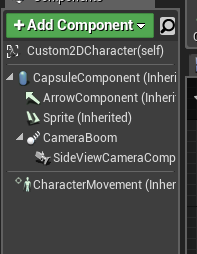
@past bear yeah they're characters
I mean they're just the default Paper2D movement scripts with some light modification
 past bear
that may or may not be the problem - are they moving using character movement?
 past bear
hmm, everything seems in order
pearl eagle
Exactly xD
A friend suggetsed to look into something called dead recknoning
Sadly google doesn't seem to understand that's not the name of a game or something
bitter oriole
Is your session set to LAN ?
Yes ?
Make sure both machines have the firewall OK for the game
Doesn't hurt to check.
Did you start setting things up for Steam ? Setting the net driver to Steam, regardless of the OSS setting might put it off
Weird. Dunno what happens in that case.
No
As to Steam, the larger question isn't what you do in development, but what you want to do once you're shipping the game. You won't be able to use the development SteamID for your game - players invited to a game will be redirected to that "Spacewar" game instead.
If you're going to have Steam at some point, might as well use it today, since it'll work for LAN too, provided you have two accounts
Dunno either, never used it.
pearl eagle
Is this what makes peers jittery to the host? https://i.imgur.com/8rccRl6.png

That's in every character
Is it supposed to be replicating something other than just the sprite?
past bear
should the sprite replicate at all?
pearl eagle
I'm not entirely sure what that means in the first place, tbh. It's in the default character script.
winged badger
@pearl eagle any component that is a part of ClassDefaultObject (like say added via AddComponent button in editor) of a replicated Actor, or an non-replicated Actor loaded from a Package (as in, pre-placed on map) can be referenced over network just fine
it does not need to replicate
unless you have replicated variables in it, or run RPC through it
glacial pollen
I have a weird issue, where collision works if I start in a map, but not with server travel
winged badger
just initial collisions?
pearl eagle
alright
@winged badger Do you have any idea why, then, for some reason the game's host sees peers update less often than peers see anybody else update?
winged badger
you'll have to define "sees <someone> update" for me
pearl eagle
So like when the host moves around, the peers see him moving as if they were moving, perfectly 1:! realistic movement
glacial pollen
Not exactly, if I fly back up, and try to land, the character will "pause" for a second but then keep falling through
pearl eagle
But if you're the host, everyone else appears to jitter/update less often

For instance, the host is top-left and the peer is top-right
winged badger
we are talking about seamless travel?
pearl eagle
It's hard to tell because I believe my gif recorder caps at 30fps for faster upload speeds e.e
glacial pollen
yea
winged badger
because clients don't correct out of sync host, host does correct clients
i've heard of some weird issues with seamless travel
like in editor references getting nulled if you travel back to the map you already visited
as for this, do your collisions depend in any way on BeginPlay being executed?
glacial pollen
no, its all preset
but I have other issue like owner being null depending on if I use seamless and dedicated
This is so frustrating, everything acts different in different network modes
winged badger
i use seamless travel with listen server
glacial pollen
If I turn single process on, it behaves differently than without ect
winged badger
so far, had to make few adjustements
mainly because when you change the PC class, PC that loads the destination map is still a PC from a previous map
makes for some awkward code placement
winged badger
you can see your collision shapes?
glacial pollen
dedicated is turned off, with only a single player
winged badger
that is not a seamless travel log there
winged badger
the printouts
winged badger
ok
winged badger
because you mucked around splitscreen and some setting was not undone?
no idea otherwise 😦
glacial pollen
yea, no. Thats now how split screen works
winged badger
yeah, never used it
altho
looking at it, your setting doesn't seem to make sense
you are starting a listen server game, as a client, with 1 player
glacial pollen
I'm trying different things and getting different issues.
the issue with collision after server travel is another issue
owner being null is a different one
mysterious 2nd player is another one
winged badger
its not mysterious
glacial pollen
yes it is
winged badger
to have listen server client
glacial pollen
i don't have two players
winged badger
you have to have 2 players
glacial pollen
no
thats not how that work
no way in hell
I get one begin play, as a listen server
I had to write a complicated blueprint function just to determine if the client was a listen server or not
winged badger
and the editor makes a viewport for the client because you told it to
and it doesn't make the client because you told it not to
glacial pollen
the listen server IS the client
winged badger
not with PlayAsClient setting
glacial pollen
I see
winged badger
whats your owner supposed to be?
glacial pollen
Char_Base (or child of)
winged badger
owned by the PC?
glacial pollen
yea
winged badger
Only GameMode, GameState, PlayerStates, GameSession, PlayerControllers and things "attached" to them survive seamless travel by default
winged badger
seamless traval actors don't call BeginPlay
if that helps any
that includes your PCs, GM, GS and PS
im going to bed now, starting to doze off
gl
 slender yarrow
Is there a reason a run on client event would not run? Its no different than the other 30 run on client events I have in this blueprint but it just gets skipped? First time ive had this issue and its very strange
glacial pollen
There are a few times things get weird
explain what you are doing
It would help, if you gave us a screen shot of the calling blueprint, the called blueprint. And even better if you could break point the beginning of both, and screen shot who is calling it (in the top right corner : Simulation, Server, Server Simulation, Client)
slender yarrow
well everything is in the same BP im just calling a client event right above the bulk of the code.
the code in between the overlap and the event call is just a bunch of branches and forloops. nothing noteworthy
glacial pollen
First, make it reliable, for testing at least
Second, I know what your issue is
Begin Overlap
How are you setting it?
static or at runtime?
slender yarrow
ThirdPerson is just the third person mesh i have on my character
im using the mesh to trigger overlap events
i assume runtime?
glacial pollen
How are you setting the collision?
slender yarrow
oh
glacial pollen
Are you pre-setting it in the editor
or at runtime?
Do you change it at runtime?
slender yarrow
no sorry not runtime. Its set in details before i run
glacial pollen
Okay, so set a break point on....
where you call "Gun Pickup Text"
on the overlap event
play up to that point, and show me a screen shot of the top right (where it says simulate/server/client/server simulate)
then put another break point on the event "Gun Pickup Text"
and send another screen shot of the breakpoint there
be back in 10 minutes
slender yarrow
wth it works now
doing these break points like magically made it work
😵
that is so wonky and weird
oh no it was the reliable...
neon violet
Ha ha
slender yarrow
still strange that i cant have that event be non reliable
glacial pollen
lol
So reliable makes sure its fired
that was like the first thing I told you to do xD
So non-reliable, means that if the "queue" is full, it gets skipped
you only want reliable turned off for things that happen on somehting like tick
Like turning, or moving
This way, if an event is dropped, its not really noticed
Also, you won't loose important data
Also, the editor treats things differently while you are breakpointing for a simple reason
slender yarrow
Ok i just got paranoid with checking reliable on a lot of events cause people made it seem bad
glacial pollen
break points, give the back end network buffer a chance to clear up the queue before you hit play again
slender yarrow
so eveything but ticking events on server are ok to set to reliable
glacial pollen
For inital gameplay design, and in editor testing, save your sanity
worry about reliable, when you are ready to release, and want to opitimize the network traffic
I wouldn't put movement/turning as reliable
slender yarrow
Ok duly noted. Thanks a lot for the help ✌
glacial pollen
Now if someone could tell me why I can't create a component for an actor at runtime while using seamless travel that would be cool
If I add the component to the character in the editor, all is fine
but during runtime? Nope.
 grand kestrel
Can I ensure that an arbitrary component has fully ticked prior to executing Server RPCs (sent from owning client)
I'll just cache the RPC data and call it from a component if needed but figured there should be a way to ensure the order
grand kestrel
I guess I really just need it to process the RPCs at the end of the frame 😐
Its so extremely inconsistent
Might be an engine bug in recent versions because in 4.15 it was consistent
 fleet raven
aren't rpcs processed at the start of the frame
grand kestrel
There is no order
fleet raven
but there is
grand kestrel
Let me try that again
In CharacterMovementComponent::MoveAutonomous() I'm storing the client timestamp
In the weapon, when it fires, it uses that timestamp
Sometimes its a frame behind, sometimes its not
So sometimes the RPC on the weapon is processed before and sometimes after CMC has ticked
I need CMC to tick first, always
This is a Server RPC from owning client
fleet raven
cmc does not simulate every frame on the server
only when an rpc with client input arrives
grand kestrel
But its only ever 1 frame behind
And I haven't been providing any input
Furthermore if I reduce FPS it is more consistently in sync
Meaning at lower fps it more commonly processes rpc's after CMC ticks
At 30 FPS its very rare that it doesn't (but can happen)
At 60FPS it happens ~50% of the time
15 FPS extremely rare but possible
Its definitely a same frame issue
fleet raven
cmc does not "tick" on the server
it will simulate a frame when the input arrives
(with an rpc)
so if you send your weapon thing as an rpc too, on a different channel, it's possible for them to execute in different order
grand kestrel
I guess with MoveAutonomous thats called from RPC
In ServerMove and ServerMoveOld
And ClientUpdatePositionAfterServerUpdate
Mm
I need to find a solution
fleet raven
what I've been planning for our weapon system is to send the weapon inputs as part of ServerMove and have cmc call it after updating
grand kestrel
Wonder if theres any form of prerequisite/dependancy for RPCs
Similar to how tick does it
twin juniper
what do i do if an On_Rep() depends on a variable that hasn't replicated yet?
is there a way to get On_Rep only to fire during beginplay only if all variables have been initially replicated?
glacial pollen
IsValid (if its an object/actor reference)
= 0 (or whatever the default is) for int /float/bool
grand kestrel
@fleet raven Went through all the net driver and channel stuff and there isn't anywhere that the data is actually sorted 😦 I might have to rework it to send it with ServerMove like you're doing
twin juniper
i did something where each on rep calls a "im here" function then returns out and if enough "im here's" are called then all on_Reps are fired for the clients, and individual onReps after beginplay, during normal gameplay get called normally
grand kestrel
If its all sent together then at least I can be sure its processed in the right order
Whats really annoying though, is the order that I'm calling the RPCs in is consistent, it would be nice if they were also be processed in the same order they're called in
Because any RPCs I call for the weapon I call from the end of ::TickComponent in CMC
In fact.. why do they lose their order?
Something feels very wrong here
If I'm always calling ServerMove and my fire weapon RPC in a consistent order, where is it getting scrambled
glacial pollen
Are we not allows to dynamically add components to actor with servertravel?
Would you look at that, manually adding the component to asset manager in project settings solves that mysterious issue
 thin stratus
Are there any pre-defined querysetting keys for Steam?
Idk if SEARCH_NONEMPTY_SERVERS_ONLY is supported by steam
@rough iron Since you are back, any tips on how to handle query settings for Steam?
 rough iron
You mean within the sessions?
thin stratus
Both, Create and FindSession.
UE4 has some pre#defined keys, but not sure if Steam supports them all.
rough iron
You normally handle it 2 layers, 1 on the backend (steam filters them) and one on the frontend (your self)
Steam has limited support
thin stratus
Correct, however I know Steam has some backend filters
Such as "hasplayers" etc.
But not sure how to utilize them with the Session Interface
rough iron
Yeah I normaly use a single tag to define the state of the sessions
like: Searching for players, or waiting for players, inprogress etc
to make a highlevel filter
plus an open slots property
to define how many players are free on the server
thin stratus
There is no "CurrentPlayers" key yet?
rough iron
No idea xD There was not long time ago xD
thin stratus
I mean there is open slots in the result itself
rough iron
You might have to see what UE translates into Steam stuff
thin stratus
Nearly nothing, they have a custom FName to whatever steam wants function
rough iron
For any extra info that you do not need to handle on the backend I encode it into the mapname key
which UE4 should add automaticallyu
just make a very simple URL Query string enconding xD
thin stratus
I only have a handfull of stuff
NumBots, GameMode, MapName and if full, empty or nothing.
The Bots,GM and Map is easy
Just wondering with the full,empty etc.
Cause I know steam has a backend filter
rough iron
I would add that all into the map name, the GameMode might be one for tyhe search tag I guess
thin stratus
But that's just a plain value, if it's defined they use it. The query filters always want the comparison value
Map, GameMode and Bots can all 3 be filtered
So I leave them in 3 separated settings for now
rough iron
Yeah the less the better
But no idea what UE4 feeds steam, the last time I just did it all custom xD
thin stratus
Gnah, alright
I need to find out if I can filter for NumopenSlots
Then it's easier >.>
rough iron
yep
also you can generate a hash string to search these
so a host could define it as:
TDM::WAITING_FOR_PLAERS:4
thin stratus
Yeah the optimization I can do later
For now I wanna know if I really have to create my own slots stuff
Cause the Result returns the num open slots
So they must be available somehow
rough iron
There should be enough stuff already, and if not an engine modification should be trivial.
Are you about to implement a matchmaking algo?
thin stratus
How can it be that "DestroySession" has an empty Sessions Array and "CreateSession" has a Session Array with one entry? (NULL SubSystem)
DestroySession->OnSuccess/OnFailed->CreateSession
The fuck
So apparently calling Destroy Session is the one that isn't working like it should
The Session Array prints 1 (length) the whole time, but the breakpoint in the GetNameSession returns null
(and the array in that breakpoint is empty too)
I have a custom one and not yet using 4.22
So, it's two different session interfaces
DestroySession calls for a different NullSubsystem instance o.o
 distant talon
Looking for general advice on custom move components for vehicles, is it a good idea to start by inheriting the base movement component or is it better to just go from scratch?
distant talon
Oh, hmm. Did you get AI working with that?
distant talon
gotcha. the chain of inheritences above the pawn movement component can get a little confusing with which features are where
 strong karma
hello guys, i dont come here often but ive had a search through the channel and cant seem to find any info on it.
ive switched my NPCs over to navmesh walking, and since doing so any overlaps are only triggered on the client side, and refuse to trigger server side. not very useful. cant seem to find a way round it. im not knowledgably enough to roll my own CMC though, i am willing to learn if it really is the best solution.
thin stratus
Overlaps shouldn't be affected by NavMesh Walking 🤔
 golden aurora
Quick question: In a multiplayer game, all player data (about his itens, health, etc etc) is saved in DB server, right? Or that content is saved locally in client?
golden aurora
Just because I dont want the players change the content file to get more itens and things like that. In server is more secure I think
And if I want add a new item, I "just need" add a column in DB. If the data is saved in server I think is more easier, right?
Or I'm wrong?
thin stratus
You need a complete DedicatedServer architecture for that
winged badger
it really doesn't matter, difference in difficulty implementing it is trivial
thin stratus
WIth hosting servers away from clients etc.
Also, I just found out that using two different ways of getting the SessionInterface breaks the whole shit
The Default Destroy Session node uses these BP helpers
golden aurora
Idk how server update the client files, I need to verify that
thin stratus
I used Online::GetSessionInterface
Created two different subsystem instances and suddenly I couldn't destroy the session anymore
winged badger
@golden aurora if you don't know how server and client communicate in Unreal, i suggest reading exi's compendium a couple of times, before even thinking about anti-cheat systems
golden aurora
Right, one thing at time. I just wanted do a list with what I need to keep going. Just to organize. Thanks 😉
thin stratus
Just saying, stopping players from cheating is expensive
Cause as just mentioned, you need to have DedicatedServers that are hosted away from the Client. So that the client never can issue any "AddItem" functions.
strong karma
yeah, i figured it shouldnt. heres a gif to show exactly what im running into 😃 i might be being a dofus or something.
https://gfycat.com/FaroffFloweryJumpingbean



 winged badger
and by expensive, he doesn't mean performance, he means money expensive
thin stratus
@strong karma Strange
The CMC calls the SafeUpdateMove in NavWalking too
So Not sure what this is causing
strong karma
i did see someone mention earlier that CMC replication seemed to be "thrashed" in 4.22 maybe a bug on epics side ?
thin stratus
That can always be the case
strong karma
well, i shall report it and work with walking for now. still early in proto typing so its not going to be a big issue. 😃 thanks for just reassuring me im not crazy. lol.
rough iron
@thin stratus OSS needs some love xD
drifting plank
@jolly siren It was a terrible easy solution :
The BP_Parent had the "Replicates" option checked.
And the childs not for any random reason 😦 !
So now the replay works for all !
Thanks in any case 😉
jolly siren
Awesome, glad to hear you got it fixed 👍
fleet raven
an actor that was replicated from the server will always have a netguid, so there's no need to worry about it ever sending a huge string to reference it in an rpc, right?
winged badger
@fleet raven iirc yes, and huge strings will be sent once then converted and saved as GUIDs as well
fleet raven
nice
 ionic mountain
Regarding Multiplayer replication for a peer-to-peer connection as opposed to server based, does the host count as the server? Trying to wrap my head around how I should go about modifying my game to allow for multiplayer before release as I've been told it is a nightmare to back-track and allow replication after the game is done.
worthy perch
You should probably check this out if you haven't: http://cedric-neukirchen.net/2017/02/14/multiplayer-network-compendium/.
grand kestrel
@thin stratus imo the real expense with stopping cheaters is developing prediction etc instead of taking the easy way out
 past rain
@ionic mountain UE4's default multiplayer mode is the Client/Server model. Where the Host is the server, if that is what you're talking about
And depending on the size of your game, it can definitely be a nightmare to back-track and make sure everything functions correctly in multiplayer
 median elbow
is it possible to connect to a session in unreal without connecting to the server, but still receive some kind of event or information from the server?
basically what i'd like to do, is connect to the first session i find, but not connect to the server until the server is ready. in the meantime, continue looking for a server thats going to start sooner, and stay in the menu
 fossil spoke
PartyBeacons should help you there.
median elbow
i mean, i know anything is possible, but just kind of out of box
fossil spoke
Though they are C++ only.
median elbow
ok, partybeacons?
c++ is ok, i come from a c++ background so its all good
thanks! i'll check that out
fossil spoke
No worries
median elbow
ooh, yeah, i think i read something about this or something related to it, about lobbies or something
i thought they were more for like connecting with friends then traveling together though
i'll read more up on it
fossil spoke
Kinda. They can be used to open a channel for connectionless communication with a Server.
There is a bit of documentation and user guides on them.
If you search around.
median elbow
oh yeah, thats perfect
awesome, thanks
oh! they are built into unreal!
i was thinking they were a plugin or something
ok, so this is actually the second time i came to this page:

Easily Create and manage Player Parties for your Steam game. With the Steam Beacons Plugin, parties can be made without loading into a lobby map and can be done from the Main Menu.
and i'm wondering, just from an architectural point of view, if i ever decided to release a game for another platform, like, using another kind of plugin for that platform, in unreal engine what would be the best way to go about it?
is there a macro or something in c++ saying which platform is currently being compiled?
i'm just curious how one might do it in unreal, i'm still learning the engine
or is it something you would create a separate unreal engine project for?
fossil spoke
PartyBeacons arent platform specific if im not mistaken. They are a generic method for communicating with a Server prior to connection.
 plucky horizon
How can I start a listen server & load a map? I posted in #blueprint but I think this is probably the better channel.
 sharp pagoda
@median elbow Here's my stash of beacon-related links which should be useful:
https://docs.unrealengine.com/en-us/Gameplay/Networking/OnlineBeacons
https://forums.unrealengine.com/community/community-content-tools-and-tutorials/1355434-onlinebeacons-tutorial-with-blueprint-access https://answers.unrealengine.com/questions/467973/what-are-online-beacons-and-how-do-they-work.html
https://forums.unrealengine.com/development-discussion/c-gameplay-programming/85348-party-beacon-how-does-it-work-o-o https://github.com/EpicGames/UnrealEngine/blob/release/Engine/Plugins/Online/OnlineFramework/Source/Lobby/Public/LobbyBeaconClient.h
https://github.com/EpicGames/UnrealEngine/blob/release/Engine/Plugins/Online/OnlineSubsystemUtils/Source/OnlineSubsystemUtils/Public/PartyBeaconClient.h
Awesome thanks @sharp pagoda
sharp pagoda
The third link is by the engineer who worked on them, so that's definitely one of the better resources
ionic mountain
@past rain Yeah, that's what I'm referring to - The host being the server as I will only have 3-4 people in a single match at a time. I'm at the point now where I have 26 skills functioning and 4 enemy types so I'll have to back-track and do that if I decide to... But I think being Multiplayer would really bring something awesome to the game and likely be worth it for the player-base to be able to hang out with family and really come up with some complimentary character builds. Still weighing my options, but a strictly single player ARPG (D3/PoE) style game might not be as enticing as a Multiplayer one...
plucky horizon
I finally found the Create Session node, but now I can't figure out how to join the session, I want to be able to manually set the IP and join it. The Join Session node doesn't seem to support such a thing, so.. if somebody can point the way that'd be extremely helpful
 twin minnow
you need to use the Find Sessions node to get a BlueprintSearchResult object that you pass into Join Session, then on the success of Join Session, you call servertravel or openlevel. @plucky horizon
plucky horizon
What if I'm a non-conformist?
twin minnow
wut
plucky horizon
I want to enter the IP to connect to
twin minnow
but to join the session u need to use find session
plucky horizon
How can I create a session server that i can connect to with an Ip then?
twin minnow
have u read up on the dedicated server guide? https://wiki.unrealengine.com/Dedicated_Server_Guide_(Windows_%26_Linux)
plucky horizon
i have not
twin minnow
i would suggest that then first
plucky horizon
Thanks Mr Wiseau.
plucky horizon
@twin minnow do you know if this is only possible with source built projects? my workstations doesn't have enough space for building from source
twin minnow
unfortunately is only with source built projects
really anything involving a server is
plucky horizon
I guess this means I can put this part of the project on hold then
I thought it was weird when my source directory didn't have the Server.Target.cs file, and creating a new project as shown didn't provide one either, but owell
thin stratus
@plucky horizon You can connect to Listen and Dedicated Servers via IP.
So you don't have to build one if that's not what you wanted in the first place.
Listening for incoming connections is always done via "OpenLevel" node with "listen" as an option.
Sessions are an additional layer that would provide your players with an easy lookup via ServerLists
However they require a Subsystem such as Steam to be used.
For a simple connection via IP, you openLevel with listen and the client uses the "ExecuteConsoleCommand" node with "open IPADDRESS"
plucky horizon
Oh okay, OpenLevel cool
thin stratus
The IPADDRESS can be fed via a UMG widget or so
Keep in mind that direct IP connection requires proper ports to be opened (7777 by default)
thin stratus
Might be
Not 100% sure atm
Probably not by default by they probably pull it form there if defined
plucky horizon
I will check tomorrow when I'm at my workstation
thin stratus
Righty
plucky horizon
Thanks for telling me the correct node setup 😃
 pallid mesa
@thin stratus hello cedric, can we please pin this?https://discordapp.com/channels/187217643009212416/221799385611239424/572592952887607308
thin stratus
pallid mesa
thank you! <3
meager spade
we should really have a one stop link page
pinnged
pinned*
for all useful links
pallid mesa
actually, yes.
meager spade
and categorised
thin stratus
Feel free to create a Wiki for the Server and host/manage it ;)
pallid mesa
now that you are speaking, if I find some time, I could do one blog entry on my github.io for this stuff
since I use it myself a lot
thin stratus
Is there a function I can hook into that calls when I move from map to map to clean up my UI?
Cause apparently even the connect to a server keeps my widget alive.
I assume connecting to a server does not kill the LocalPlayer
Hm, I'm already using PreClientTravel I just noticed
Nvm, think I found why it surives the travel
twin minnow
@thin stratus just curious, why does it survive? cuz ive noticed that as well
thin stratus
I have my Menu in the ULocalPlayer
And the Player doesn't seem to be killed and recreated when you join a match
I already had it setup to clear widgets when seamless traveling
In PIE everything worked. Now in standalone (we only had splitscreen until now) it was breaking when joining
@twin minnow
Well in PIE it's probably also breaking but I can't find a session in PIE
.>
twin minnow
makes sense
rough iron
@thin stratus you could register yourself into the map events, there is an OnMapChange or something like that
would have too search for it though.
and yes the LocalPlayer is reused
thin stratus
Already fixed, but thanks!
rough iron
yeah it's an art in it self hehehe
thin stratus
[2019.04.30-13.24.55:940][172]LogNetHoverMovement: Error: CombineMove: add delta 0.016670 + 0.016667 and revert from 2625.896973 5985.262695 to 0.000000 0.000000
(╯°□°)╯︵ ┻━┻
rough iron
xD
thin stratus
The nice thing is: This doesn't happen in PIE
I love debugging stuff with two game instance, on two different pcs
So much joy
rough iron
plus timeouts 😛
thin stratus
LogNet: Warning: UNetConnection::Tick: Connection TIMED OUT. Closing connection.
You mean these?

rough iron
^^
You can also change the engine code and get rid of it, while you do have to send a keep-alive on a different thread though
rough iron
Relevancy? Too many actors might split packages too much adding a lot of latency
thin stratus
It's the only map where a simple jump or drop is causing moves to be combined
And I was returning a wrong value, which I hope I fixed now
twin juniper
when 2 players trying to connect, one of them connects with the right gamemode and model, but the other one connects as a flying camera (like spectator).
it worked for me before and now its ruined, anybody knows how to fix?
Thanks in advance.
twin juniper
nevermind, turns out I just had to restart my PC.
 urban dew
I'm converting my game to multiplayer, I've tested this by spawning 2-4 multiplayer characters
some of them worth randomly
everything works fine
for the others they can't move or do anything
i think it has something to do with this?
im not sure, it's not getting the character pawn
winged badger
@urban dew yikes
hardly know where to begin, like networking the SetInputMode, Multicasting from the PC
urban dew
that's not so much the issue, thats just there as a temp bugfix at the moment
as it was having ussies with ui the other day
winged badger
getting PlayerState via Pawn when controller has direct access to it (in fact it sets the PS on Pawn)
getting PlayerPawn via index from the controller instead of doing GetPawn()
i even have trouble imagining how did you get HUD to not find the controller 😦
this is not meant to discourage you, but to tell you its all wrong
from HUD its controller is GetOwningPlayer
if you really want to avoid continuous casting
then you make a variable of your PC type
make a function that checks if the variable is valid, if it is returns it, if its not then casts getowningplayer, stores it into the variable and returns it
and then it can never fail
 smoky ore
So, I'm trying to figure out what is causing other clients to stutter (from the other players perspective) on a game I am working on, and disabling network smoothing on the character movement component seems to fix the issue, is this a known thing or just a false positive? Because that seems like a weird setting to turn off to actually make the stuttering stop.
 reef tinsel
Does anyone know if it'd be more optimal to use a Vector Net Quantize variable, rather than a normal vector variable? I'm going to be updating on tick the position of all players for a minimap.
though I know the vector net quantize variable has a reach of 2^20
winged badger
@reef tinsel sending that over network is not required
players should be always relevant, and every client has a very good idea where all player pawns are at any moment
so sending the position, on tick no less, is a really bad call
you just need to have each local minimap be aware of all PlayerPawn references locally, nothing more
reef tinsel
🤔 makes a lot of sense
winged badger
to answer your original question, NetQuantize vectors take less space, and there is no need to alter the code to use them
they are basically a struct inheriting from FVector with a different NetSerialize function
see: NetSerialization.h header for details on all options for it
reef tinsel
thing is, I wanted to update the player's controlled pawn representation. E.g. in my minimap
but you're quite right
so, I'd iterate over every actor of class "player character"
and store a reference to them in my minimap
on client side, ofc
winged badger
if you have AI using the same class, there is IsPlayerPawn function you can use to filter them out
reef tinsel
nice nice
winged badger
or IsPlayerControlled
reef tinsel
though player pawns change on runtime
winged badger
something like that, intellisense knows
reef tinsel
like, getting on vehicles and such
I guess I'd need a dispatcher from the controller?
OnPossessed
winged badger
OnPossessed doesn't happen client side
winged badger
use PlayerStates
they don't change as pawns do
you can just have APawn* CurrentPawn; in it
pallid mesa
ps->currentpawn->loc()
then have the local minimap update positions
for (APlayerState* PS : UGameplayStatics::GetGameState()->PlayerArray)
{
    if (ACustomPlayerState* MyPS = Cast<ACustomPlayerState>(PS))
    {
        UpdatePosition(MyPS->CurrentPawn);
    }
}
something along those lines
reef tinsel
so essentially, I'd just need to replicate the pawn's current state, not its location
(by state I mean if it's dead, if it's a vehicle/player, etc)
winged badger
you override AController::SetPawn to set the variable in the PlayerState and have it replicate
pallid mesa
AController::OnPosses from the server if in BP's
reef tinsel
exactly
thanks a lot
makes a lot of sense now, not having to replicate the positions
winged badger
and if your Pawns aren't suited to share the same base class (vehicle, character)
i suggest implementing an interface for the state on all of them
reef tinsel
I was thinking in setting up an enumerator
and just update it based on the controlled pawn type
winged badger
yeah, but without a common base and no interface, you'd have to cast it all the time
makes for some fugly code
winged badger
interface can't have variables in it
but you can have virtual EMyPawnState GetCurrentState(); function in it
and each class overrides it to return the value of that enumerator
jolly siren
Has anyone had issues where quitting players are timed out after 60 seconds instead of logged out immediately? Only happens to a select few players for some reason.
They exit the game clientside. But remain on the server and their character remains until timed out
 twilit swift
I'm doing some optimization and have a question. When I'm dealing with replicated variables, if I select Replicated rather than RepNotify is it replicated every frame by default?
jolly siren
It is replicated when it changes value
twilit swift
I see. So, what's the difference between that and RepNotify? I thought that's what RepNotify does?
 stoic acorn
Would pay good money for a Blueprint Multiplayer series by @thin stratus that fixes all the erroneous info in the official video tutorials.
 twin vault
@twilit swift rep notify also calls a notify function
fossil spoke
ReplicationCondition modifies when and to who the variable is replicated.
Replicated and RepNotify are almost identical, but as Takain mentioned, RepNotify calls a specific function when that variable has its value replicated.
Meaning you can do stuff when a variable is replicated.
twilit swift
Got it. Thanks. 
jolly siren
Has anyone had travel issues on 4.22?
glacial pollen
@jolly siren servertravel + seamless appears to work for me in 4.22 editor (turn off "use single process")
GetSeamlessTravelActorList <- is there a way to mark an actor for seamless travel? (in blueprints?)
stoic acorn
I have just spent the last couple of months following the official BluePrint Multiplayer Tutorial series only to discover that the guy has been teaching incorrect practice. Tutorial 15 is just a mess. What to do? Are there any decent Multiplayer tutorials out there?
 unborn nimbus
So I'm trying to just do OpenLevel(127.0.0.1) and I'm just getting this warning LogNet: Warning: Incoming ip address doesn't match expected server address: Actual: 0.0.0.0:0 Expected: 127.0.0.1:7777
jolly siren
@glacial pollen Intermittent issues. I don't mean completely broken
glacial pollen
Oh okay, yea i'm not using more than one server travel per play.
jolly siren
Right, I mean with thousands of users a small percentage is getting travel issues now. Seems like they might have broken something in 4.22
glacial pollen
c++ or blueprints?
jolly siren
c++
urban dew
im having massive issues with my multiplayer and I have no idea why, everything spawns, however only 1 client can actually move around
anyone experienced this or have any idea what the cause could be
Half of them spawn properly
andwork
the other half dont... im very confused..
wasd movement working on half, not on the others..
justdid some testing, and all the functions for movement and everything
are still firing
from what I can tell, it seems like only two pawns are being possed
twin juniper
Are you using p2p connection?
urban dew
yes, i've done a temp fix on it
only 2 pawns where being possessed
so i just made it so if it fails the cast, it spawns a new pawn and possesses iot
grand kestrel
🤦 🤦 🤦
void AMyActor::PreReplication(IRepChangedPropertyTracker & ChangedPropertyTracker)
{
    DOREPLIFETIME_ACTIVE_OVERRIDE(AMyActor, AttachmentReplication, bWantsReplicatedAttachment);
error C2248: 'AActor::AttachmentReplication': cannot access private member declared in class 'AActor'
I reject your design philosophies, Epic 🤔
🔔 shame 🔔 shame 🔔 shame
(I'm just being annoyed, I don't need help solving anything)
winged badger
@glacial pollen when i was prototyping something with seamless travel actors, i added 2 BlueprintCallable functions to add and remove those from the SeamlessTravelActor list
pretty sure you can't do it with just BP 😦
glacial pollen
I rolled my own in c++ and just made it a part of my base gamemode class
Thank you though @winged badger
Funny how it was only a few lines of code... They could EASILY put this in blueprints....
winged badger
there are quite a few things in core framework that could had been easily added to BP, and should had been, but weren't