#multiplayer
1 messages · Page 457 of 1
 thin stratus
I think Steam also does matchmaking but doesn't do any hosting
Most of the times I strongly advice to NOT build a game that requires dedicated servers and matchmaking if you don't have a few $k to spare
 jolly siren
Ahh okay, just trying to figure out which ones I need to override. ServerMove, ServerMoveDual, ServerMoveOld. I guess those three
thin stratus
Yeah but overriding doesn't let you add parameters
You could create your own functions
And try to override "CallServerMove"
Maybe that works
jolly siren
Ahh right that's what I meant, that's what UT does
 median elbow
so the idea is in fact, that you'd have a "matchmaking" server that everyone connects to?
or should i do this outside of unreal completely?
thin stratus
Technically yes
Really depends.
Is there any relevant data this is based on?
LIke ELO?
If yes, then the ELO should already be stored outside of UE4, somewhere at a save place
ELO/Rank/Level
If it's just about quick matches, then you can directly communicate with the backend vai UE4
and ask for matchmaking
median elbow
ok, there won't be much for the actual matchmaking to decide from. ping i suppose, group people with lower ping to each other, probably not evne that right away
thin stratus
In theory a Client says "Hey backend, I want to matchmake."
median elbow
i just don't want the server to be empty and have someone jump in there and have to wait
thin stratus
The backend grabs all relevant data and adds a new request into the system.
Then it checks if there are other requests that fit some rules.
e.g. Level only 5 away from each other.
Must be 100 people to start. etc.
And if yes, it combines the requests
Until the 100 people are met
Then it tells the second backend to start a server
That one tells the first one the ip
median elbow
i actually don't have levels, i just don't want people to travel to a server until there's enough people to play wit hthem
thin stratus
And the first one tells ue4 clients where to join to
That's all I can really tell you
median elbow
ok, i just want to make sure there isn't anything super simple out of the box that will do this for me
like, no feature of advanced sessions plugin or something, which is really nice btw
thin stratus
Not really, cause UE4 doesn't know about others trying to join the server
thin stratus
Maybe you could hack something together with beacon stuff
But that's c++ and not easy
And might fail the idea
it's usually used for like parties
Where you don't share the level, but just some data
Until everyone joins the server
median elbow
i know ue was built from ut, so i understand the style it was originally "meant" for, i just also know its grown so much and theres a lot of features i don't know about
thin stratus
But beacons are really, really, really, shitty documenteda nd hard to understand
median elbow
a LOT since i basically finally decided to start using it rather than roll my own
beacon?
actually i come from a c++ background, so i don't mind any coding i'll probalby have to do
thin stratus
Yeah Beacons
If you see the normal "JoinServer" stuff as a full blown connection with replication of level and world.
Beacons are the light version
Where you only share some data
You can find and join beacons sessions the same way you do with nomral ones
Just one with a map loading in between it
As said, they are used for Parties
median elbow
ah ok!
median elbow
thats awesome, they are hard to work with though?
median elbow
is this a ue plugin?
 worthy perch
Do you recommend using beacons?
median elbow
are they at least open source?
jolly siren
I guess I could use my custom servermove functions only if meleeing, to avoid the overhead for all other movement 😆
thin stratus
it's build into UE4
You can just use it if you find documentation on it
E.g. UT source code or so
There is a Steam Party plugin
But that is more for inviting friends
It does work with beacons
So if you have $$ to spare, you could grba that to learn from
@jolly siren True
median elbow
i'm willing to throw down some money, probably not many thousands though unless i know its going to be worth it
ok, so beacons, thanks, i'll look into that
i was looking into the replication graph stuff, but there's not too much documentation on that either
not related to matchmaking, but yeah
thin stratus
Cost is relative
median elbow
hey exi, what if i did it so when you begin "matchmaking", you find an open server with the smallest average ping of all currently connected players, and you join that server, and while theres still not enough people to play, you continue looking for other servers?
thin stratus

Easily Create and manage Player Parties for your Steam game. With the Steam Beacons Plugin, parties can be made without loading into a lobby map and can be done from the Main Menu.
median elbow
does that seem weird?
thin stratus
Well
Wait a second
I might just be stupid
Why can't you join a session
And open the level later?
Sessions are just data holders on the backend
I mean, you could just Search For Sessions. Pick the best from the result.
Join the Session.
Every x seconds check the player count
If reach max, join the server beind the session.
median elbow
wait
thin stratus
The default nodes will do the session and server join at the same time
median elbow
ok i'm probably dumb, but i missed that part, you can join a session and prevent it from loading hte level?
thin stratus
Session != Server after all
The Session is some backend data on the MasterServer
The Server is the PC listening to a port
So you can join the session and not join the server if you are lucky
I haven't done that yet cause it was never needed.
And as said the default nodes do both at the same time
The join teh session
and on complete the join the server
median elbow
dude, that actually would work for exactly what i want
thin stratus
Sorry for not thinking about that earlier
median elbow
man, i'm not sure why i didn't look into it further
thin stratus
Head is too full haha
median elbow
i just figured the advanced sessions forced clients to open the level when they join a session
thin stratus
It might
median elbow
well i think that actually answers my question then! thank you!
thin stratus
But you can code that stuff yourself if really needed
median elbow
yeah
thin stratus
The JoinSession stuff is not hard
median elbow
if i have to code it, its not really a problem
median elbow
there seems t obe quite a bit of resources on the internet anyway to help guide me if i have any issues
for the session stuff i mean
thin stratus
You can more or less copy that
And remove thejoining part
And make a function to join late
thin stratus
I made a tutorial about that once
median elbow
got a link?
thin stratus
On UE4's livestream
But it doesn't cover the join function
It covers some code for exposing steams friendlist
But I explain what the proxy code does
thin stratus

Getting your game working with Steam is frequently an important part of one's development cycle. Cedric will begin with a walkthrough on how to integrate the...
I hope that's all cool
Can't listen to my own voice etc haha
median elbow
haha
well, thanks again exi
gotta get back to work, but i feel a lot happier now that i think i have a way forward on this part
thin stratus
Cheers!
 stoic acorn
I have two teams each with their own set of rules. Team A are ghosts and can walk through certain walls and objects. What would be the best way to set that up?
Would you put an Event Hit on the Ghost Character Blueprint and do a check on flagged objects?
or is that not efficient?
 graceful cave
so hit events are generated every frame for the server and owning client when a character is moving along a surface
but other clients only generate a hit event for the initial contact
is there a way to get them generating hit events every frame?
jolly siren
Anyone have a CMC with custom ServerMove functions I could take a peek at? (other than UTs)
jolly siren
@thin stratus For your additional parameters that you pass via ServerMove do you store those in a custom FSavedMove? Trying to figure out the best way to set/get the MeleeDirection once I have the ServerMove functions in place.
Man if I have to store it in the saved move I think there is so much I need to override 😫
 winged badger
@lament cloak SpawnActor is just SuperHeavy, but not particularly so on the network
you can't send just half the transform without overriding half the engine
@stoic acorn its not really a network question, as long as your wall collisions don't stop ghosts you should be just fine
they can still generate overlaps, but not block any collision on ghost
and if you are using pathfinding, you will need nav area other then Null for NavModifiers on those walls
thin stratus
@jolly siren Yes that stuff goes into the saved move
Saved Move is for the Client to know what they did in move XY.
So when they replay it they need all data.
jolly siren
Okay, so I need to override everything that uses FSavedMove_Character? Still banging my head against this
thin stratus
And you do want to make sure that if you send it,e.g., netquantized via ServerMove, you have to use the same rounded value for the client.
Don't think everything, but a good chunk
thin stratus
Fair enough
You have to override the SetMoveFor iirc
To save the value
And then also the function that later sets the value again
And then you might need to do the CanCombine as well as IsImportant
thin stratus
There you have to make sure to return false if the data doesn't match (CanCombine)
Yeah that should be all though
Hm
Lemme check
jolly siren
nvm I already had it changed
winged badger
if your server and client lounge in different directions... how is replay going to help exactly?
thin stratus
The replaying is so you don't get corrected when the Server finally sents the update back
winged badger
they do have to get synced at some point
thin stratus
The Client performs multiple moves before the first one actually arrives back from the Server (ping).
If you don't replay your moves, you'll just get set back to the result of the first move.
winged badger
isn't it, in this case, easier to do the exact came lounge and correct the visual with some animation additive?
thin stratus
He is doing the exact same one now
But you need to pass the Server the AttackDirection
Which means you also need to save it for replaying
This always goes hand in hand.
winged badger
must had missed a part of this story then
thin stratus
Yeah he/we came to the conclusion that you can only make this not correct the client, if you tie it into the CMC as much as jumping is.
Cause then you are sure that both do it in the same timestamp
jolly siren
By the way, I don't think AttackDirection is going to work because the melee lunge ends once your get close enough to the target. But if all the server has is the direction it won't know when to end. Hm unless it uses the location on the server. I'm not sure which would work there.
thin stratus
For that some data has to be send to the Server, in addition to the normal flags: AttackDirection.
Because the Client will see an older version of their enemy and the Direction will be different than what the Server uses.
 distant talon
in rewind/replay systems how many frames of history/buffer typically needs storing?
thin stratus
Just to make sure: The "Replay" I talked about is the Client performing their pervious moves to avoid Server correction. :P
jolly siren
Do you think AttackDirection will work? Or should I be using EnemyLocation? The server needs to know when to stop
winged badger
can that lounge miss Ethan?
thin stratus
@distant talon Yeah I think Epic saves 20 or so by default
jolly siren
No, we are trying to get it 100%
thin stratus
You basically have to see how long ago of moves you still want to accept
winged badger
you can send the Target instead of a vector
thin stratus
If you have a highping of 400ms, you need enough moves saved to replay from whatever the server throws back at you
winged badger
then server has its own context for where that target is exactly
jolly siren
That is what I tried originally
distant talon
makes sense, thanks.
thin stratus
If the TargetActor is replicated, then it would be a GUID of sorts, that might actually be more or less good for bandwidth I assume
Is that actor always alive though?
jolly siren
I thought we determined the server needed the location of the actor on the client tho
thin stratus
Can you query it's location in the replays?
jolly siren
Right, that is the only case where it can fail. If the enemy dies or quits
While you are already lunging towards them
thin stratus
We did indeed, I also didn't say you should go for the Actor route yet :D
winged badger
you're not going to destroy an actor the frame its HP hits 0, are you?
thin stratus
20 Frames Backwards, the SavedMove that is used could grab a nullptr/zerovector then
jolly siren
I'm not sure how to query the location in the replays
thin stratus
I also don't see passing the actor solving this. If at all the location if you need it
I didn't know, yesterday, that the attack has to stop at the enemy
jolly siren
Yeah, it lunges until it reaches the enemy and then applies dmg
thin stratus
Well, I wonder, can the Server keep track of how an actor was at timestamp x?
jolly siren
The velocity follows the enemy on tick
thin stratus
Cause as far as I understand all that movement network stuff, the main problem is, that the Server and the Client have different EnemyLocations
So the Server would technically need to check where the enemy was in timestamp xy
And use that information
So basically recreate the scene
jolly siren
Right, which is the lag compensation stuff I wrote. But it didn't always work because it was lunging towards a location and colliding with the victim if it was moving towards them. It didn't use CMC tho so it wasn't a good solution anyways.
thin stratus
It's sadly going beyond the stuff I did with the CMC
I will run into a similar problem with the colliding that I have
jolly siren
Saved moves have a timestamp
thin stratus
But I doubt it's that important in a fast game
Yeah, if you get access to another actors saved moves, you could check their location at frame xy
even what they did (jump, duck, etc.)
BUT
SavedMoves are local ;)
jolly siren
oh they aren't cached on the server?
jolly siren
😢
jolly siren
I went down the path of creating all the custom functions for it. ReplicateMoveToServer, CallServerMove, ServerMove, ServeMoveDual, ServerMove, ServerMoveOld. I wasn't sure if I needed a custom GetPredictionData_Client_Character, CreateSavedMove, FreeMove, etc.
I'll give it another go
thin stratus
You do need a custom PredictionData
And override the createSavedMove function
Otherwise it creates the old Character move
not your custom one
@jolly siren
thin stratus
I seem to have removed the ability of my pawn to be moved to the Server location
Cool
It works if you move, but if I teleport the pawn on the Server, the client just stays in place
.>
Weirdly enough it doesn't even get corrected in the next frame, wtf
winged badger
it does get corrected if you teleport then move?
thin stratus
I can't test that cause the teleportation is part of a lineup where the player has no input
.>
Welp, guess I have to comment out stuff
winged badger
it has no input, is the pawn possessed?
and you can hack in a AddMovementInput right after teleport for a test
if your pawn is not possessed and is not the viewtarget
it might not be... relevant enough for an update
thin stratus
The system was working before I redid the movement component
- it's more or less UTs stuff
It's also working for the server and in splitscreen
Just the clients aren't receiving the update
I can see the pawns being respawned on the spawn points
But the teleport to the lineup location isn't moving them
So let's see what happens if I move them by hand
 tall raft
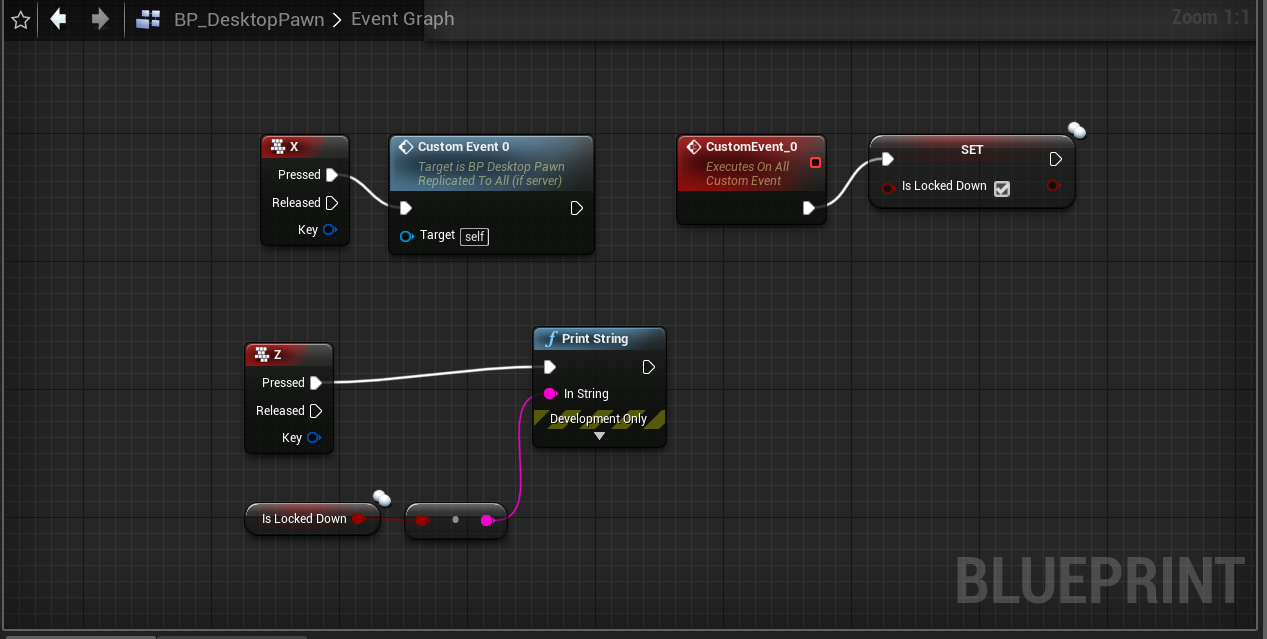
Anyone here who knows things about multiplayer variable replication in ue4 ? I need to set variable from server to all clients but cant do in proper way. What's wrong with that bp? https://i.imgur.com/fa4XUbi.png
 fossil spoke
Change your Custom Event to be Run On Server.
tall raft
Nope, still false on client side.
IsLockedDown is false by default, so if i press X it should set it to true for everyone.
And it does not, as pressing Z shows false in log until i press X on that client.
I want it to be set on client mostly but it's fine if i set it to everyone, so later i can just check authority and ignore server for script i want to do.
I'm struggling with this since few days, i could do a work around by creating object on map and checking if it's there but i cant believe its so hard to do replication of variable between clients
 gusty lily
Hi peeps. I am running into this issue, where specifying the gamemode in the open level node options, is causing clients to not be able to connect to the game. Assuming I’ve set it up correctly (below). I’m using advanced sessions plugin with steam. How else might I be able to swap the gamemode on level launch?
 lone vapor
Just an idea, but what about setting the game mode in the world settings for the level? Or the level blueprint?
Werbel, I think for that you need to run a custom event on the server, then from that event run another event that is multicast. So...
Input > CE server
CE server > CE multicast
CE multicast > set variable
Probably simpler to do via repnotify function
tall raft
By "run a custom event on the server" you mean that it should go... where? I'm pressing X as server, in viewport, so it does not count as running this event as a server?
jolly siren
@thin stratus Thank you. I'm back to it now. I'll let you know how it goes. Current options I see
- Try to get my client authoritative solution working
- CMC + ServerMove
- CMC + saved move caching on the server and get location via timstamp and some ping calculation
tall raft
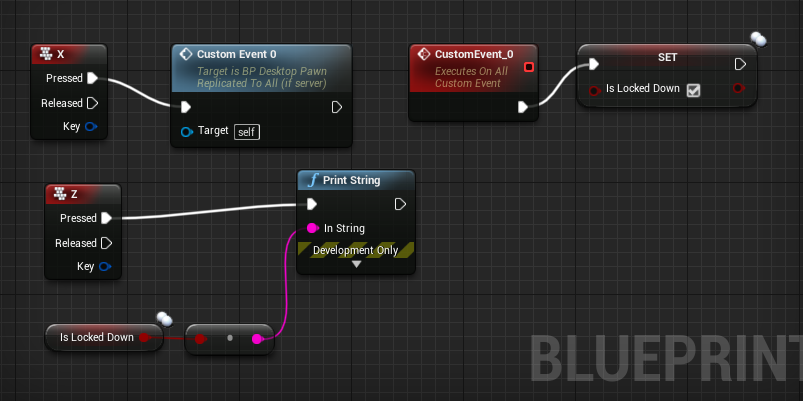
@lone vapor Thanks, but i'm still struggling. I've edited msg above, but i've also checked my bp and it looks just as you described. https://i.imgur.com/uerRgZN.png
X is Input, it asks to fire Custom Event 0 so it's Input > CE server
CE Server > Multicast > set variable is just to the right by 2 nodes (and CustomEvent is set to be multicast)
 thin stratus
@gusty lily You can setup shortcodes for gamemodes
In your Maps And Modes Project Settings
Then you only need to pass ?game=ShortCode
e.g. ?game=DM
gusty lily
ah ok, great. thanks @thin stratus .
hopefully will circumvent that issue
i think the issue was a space after listen. not sure why it worked bnefore and now how tho
jolly siren
@thin stratus So in my custom FNetworkPredictionData_Client_Character I need to create new properties for SavedMoves, FreeMoves, PendingMove, and LastAckedMove? That use my FSavedMove_CustomPtr? Or can I leave those alone?
 civic zenith
Hi, anyone knows how can I get the server address in blueprints???
 bitter oriole
Which address
civic zenith
I have an open level with the dedicated server IP, but I wrote it manually so I want to get it through blueprints if it's possible
thin stratus
You mean the ability to type it in via UMG Widget UI?
bitter oriole
You need some kind of third-party infrastructure that your dedicated servers connect to, to tell it they exist
Then your clients need to connect to that too to get the list of servers
thin stratus
Cause the IP itself is not available without a third-party system like Stranger says.
@jolly siren Eeehm lemme check
Half sure you only need to override the CreateSavedMove function
Cause it's a pointer after all
So they are saved properly anyway
You just need to cast whenever it comes up
To get your own custom struct
civic zenith
Im looking for a way to automatically get my own ip to use in the open level node instead of using 127.0.0.1
jolly siren
Ahh so I don't need to create a custom TSharedPtr?
typedef TSharedPtr<class FSavedMove_Custom> FSavedMove_CustomPtr;
civic zenith
what i want is the 192.168...
jolly siren
That would be good news, because this spider webs out of control
bitter oriole
@civic zenith Is your server going to be somewhere else than your home some day ?
Are you going to have more than one server ?
thin stratus
@jolly siren You might actually need to use AllocateNewMove, not CreateSavedMove, lemme check
civic zenith
yes, it will probably be, but not just yet, the problem is we cant just use localhost becasuse the current network has some weird stuff regarding visibility between machines
jolly siren
ahh okay, and then I cast when things like this come up
if (const FSavedMove_Character* const PendingMove = ClientData->PendingMove.Get())
Instead of changing all the underlying properties to use my custom FSavedMovePtr
thin stratus
FSavedMovePtr FNetworkPredictionData_Client_Character::AllocateNewMove()
{
    return FSavedMovePtr(new FSavedMove_Character());
}
That'S the original function
jolly siren
I'm already overriding AlloCateNewMove
civic zenith
so we have to treat it like it is online
thin stratus
The rest should work the same
Cuase they are pointers
Saving a child pointer into a parent type variable is fine
jolly siren
FSavedMovePtr FNetworkPredictionData_Client_CustomCharacter:AllocateNewMove() {
    return FSavedMovePtr(new FSavedMove_CustomCharacter());
}
Yeah
thin stratus
That should be enough for this
bitter oriole
@civic zenith The generic answer to this is sessions, which (IIRC) work well to discover local games on LAN, though that needs veryfing. You'll need sessions later unless you plan on never using Steam
thin stratus
However if you have custom data in your savedMove, then you might need to cast at some points
To set and get that
@jolly siren
civic zenith
but sessions with dedicated servers get overlycomplicated
jolly siren
Right, that is the part I wasn't sure on. Where I am actually setting and getting my custom data
civic zenith
besides dedicated server sessions are impossible without steam iirc?
thin stratus
The FSavedMove_CustomCharacter class
There you can create new uint8 flags and other variables
And you have to override the Clear, GetCompressedFlags, CanCombineWith, SetMoveFor and PropMoveFor functions
And in the do whatever you need to to save or recreate the state of the movementcomponent
jolly siren
Right, yeah I have all that setup because I've been using custom flags for a while
thin stratus
That's all you need for the local player
And of course make sure that your custom client data is used
But if you use flags already, then ti should be done
jolly siren
I guess I'm just confused on how to tie it into the ServerMove. And where the attach points are for getting my custom data in and out are.
thin stratus
Well, Server by default has no moves
jolly siren
I meant ServerMove. To send my custom property
That is the part that isn't setup already. So I have to override ReplicateMoveToServer and create custom CallServerMove, ServerMove, ServerMoveOld, ServerMoveDual
So you are saying I don't need to change the parameter types for something like CallServerMove
virtual void CallServerMove(const class FSavedMove_Character* NewMove, const class FSavedMove_Character* OldMove);
I can leave those using ootb types
For example, the attach point for getting data in to the ServerMove call would be in CallServerMove
        ServerMove(
            NewMove->TimeStamp,
            NewMove->Acceleration,
            SendLocation,
            NewMove->GetCompressedFlags(),
            ClientRollBYTE,
            ClientYawPitchINT,
            ClientMovementBase,
            ClientBaseBone,
            NewMove->EndPackedMovementMode
            );
So I need a custom function for that with an additional parameter
And the data for that parameter comes from the move?
thin stratus
Does this help a bit?
jolly siren
So I need to cast NewMove?
thin stratus
Wups, typo, wait
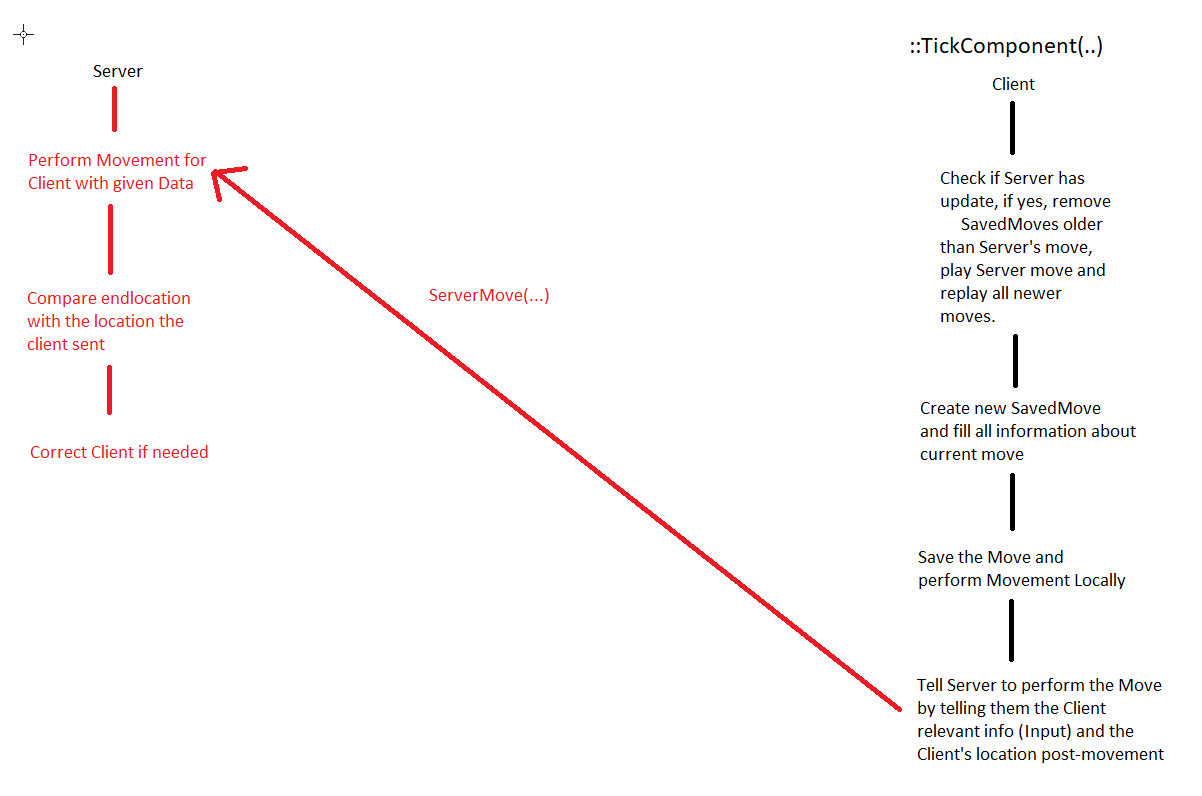
Well, it works like this ^
The Client creates a SavedMove from all the Data they have.
Velocity, Location, etc. etc.
Including input flags, like jumping etc.
So whenever they need they can perform the same exact movement again (replay it)
At the same time, the client uses the saved move to pass the Server all data
"NewMove->Acceleration"
"NewMove->GetCompressFlags()"
Mainly cause it's convinient that all data is already at hand
Now you'll notice that ServerMove only allows passing flags
Which is a problem for you if you need to pass any other data
jolly siren
Right, that makes sense. So how do I get my data in?
I assume in ReplicateMoveToServer
    // Get a SavedMove object to store the movement in.
    FSavedMovePtr NewMovePtr = ClientData->CreateSavedMove();
    FSavedMove_Character* const NewMove = NewMovePtr.Get();
    if (NewMove == nullptr)
    {
        return;
    }
That is where they are creating the new move
thin stratus
ReplicateMoveToServer does the "Create new Move" "PerformMovement" and "FillMoveWithPostData" stuff
And then call "CallServerMove" by passing old and new move
That part can remain unchanged
CallServerMove however calls the important RPCs
If you can override "CallServerMove"
Then do that and perform your own RPCs
Then you can give them more parameters
jolly siren
Doesn't the data I am trying to inject have to be on a saved move tho?
thin stratus
Sorry?
jolly siren
        ServerMove(
            NewMove->TimeStamp,
            NewMove->Acceleration,
            SendLocation,
            NewMove->GetCompressedFlags(),
            ClientRollBYTE,
            ClientYawPitchINT,
            ClientMovementBase,
            ClientBaseBone,
            NewMove->EndPackedMovementMode
            );
Wouldn't I be adding
NewMove->MeleeTargetLocation?
As the last parameter
jolly siren
That is the part I'm confused about. It's passing in a FSavedMove_Character into CallServerMove
Because it created that in ReplicateMoveToServer
thin stratus
It's a pointer
It can hold a child struct
const class FSavedMove_Character* NewMove
You can cast that to your customCharacter one
You should at least be able to
jolly siren
Right, that makes sense. So where do I cast tho?
thin stratus
CallServerMove is virtual
Override it
Put the cast right at the start of the function
Do teh same the original one does
- your custom RPCs
jolly siren
And then fill the value for NewMove at the beginning of that?
thin stratus
jolly siren
After casting
thin stratus
This is the original one
jolly siren
Okay, I'll try it now
bitter oriole
@civic zenith Sessions require an online subsystem - Steam being the most prominent on PC
You'll need something like it anyway at some point, either sessions, or your own equivalent system
Right now you have Steam, GOG has some kind of session support too, Epic is bringing one
thin stratus
@jolly siren https://hastebin.com/ofidukowin.coffeescript
This is somewhat the new version
I added ////// where i changed something
That's just out of my head, can be that stuff is missing
Also the c-style cast might be mäh, but I'm not so good at that stuff
jolly siren
haha that's fine, yeah you missed the * for those. But I'm testing it out now to see if it's working like this.
I was duplicating way more than this when I tried
Where would I actually set the value of TargetLocation though?
thin stratus
When you perform the attack you need to tell the MovementComponent that you want to attack and the TargetLocation
Your SavedMove has a function to be setup
(Not PrepMoveFor but the other one  )
)
There you can grab the TargetLocation of that frame from the movementcomponent
As well as all the booleans/falgs
jolly siren
SetMoveFor
Ahh right, so I have a property on the character movement itself as well
For TargetLocation
thin stratus
Yus
jolly siren
Okay, then I think the last piece of the puzzle is actually using the TargetLocation serverside.
Would I use the CMC::TargetLocation or the SavedMove::TargetLocation?
jolly siren
Ahh right, and then would I cache that in CMC::TargetLocation or something?
thin stratus
That RPC can be used to set the passed Targetlocation to the one the of the Server
Yeah
Server::CMC::TargetLocation = RPC::TargetLocation
Best. Pseudo Code. Ever.
jolly siren
haha 😃
thin stratus
Cause, in your Movement code
jolly siren
Okay that makes sense. And that would be done in each of the ServerMove functions themselves?
thin stratus
The TargetLocation will be used to move to the target
So if you use the CMC::TargetLocation
The Server can call the same movemetn code
You just have to prepare the variables by hand
e.g. Server::CMC::TargetLocation = RPC::TargetLocation
Yeah kinda the SErverMove rpcs are actually simple
Half of them call the ServerMove directly
e.g the Dual one calls 2 times ServerMove
gg
jolly siren
ahh okay awesome, I think I have the entire flow now. I feel dense for having to ask so many questions.
I'll get it implemented now 😃
Thank you so much!
thin stratus
Don't worry
I spend multiple days just reading through it and writing stuff down
At some point I had a full notebook
jolly siren
Yeah I write so much down too. I'm surrounded my loose papers full of it haha
thin stratus
It gets a lot easier if you cut it into 3-4 pieces
starting at TickComponent
And then following each of the net roles
Authority, Local Client and Simulated
Then it starts making more sense
Cause you'll se that they all go through the same function in the end
jolly siren
Right, I was reading through James forum post from a few years ago about how to improve CMC. A lot of good suggestions. This thing is a beast.
Unreal Engine Forums
Tell us how to improve Unreal Engine 4!
civic zenith
@bitter oriole Yes I know I will need an online subsystem like steam in the future, but right now I want to use the default online system that don't use session, so the only way I found to join the server is doing an Open Level with the server IP. My problem right now is that I want to restart the match when I want just for makes me easier to test the game. I don't know witch is the best way to restart the game but what I'm doing is just an open level but it disconnects the clients, so I want the server IP to force the clients to reconnect to the server doing an open to the server IP.
I don't know if i'm explaining my self well, English it's not my first language sorry.
bitter oriole
If you just want to switch levels ion server you just need server travel
Players should be kept
You only need the IP when first connecting (if not using sessions)
jolly siren
@thin stratus Do you think I should set the Server::CMC::TargetLocation in ServerMove or MoveAutonomous?
thin stratus
Not sure that matters much
jolly siren
And do I need to add it to FNetworkPredictionData_Server_Character
civic zenith
@bitter oriole Yes, but I don't want to travel to another level, I just want to restart the same level. So I don't want to keep any client info, just a totally restart like if they were joining again to the server.
jolly siren
I'm looking at what servermove is doing now
    const UWorld* MyWorld = GetWorld();
    ServerData->CurrentClientTimeStamp = TimeStamp;
    ServerData->ServerAccumulatedClientTimeStamp += DeltaTime;
    ServerData->ServerTimeStamp = MyWorld->GetTimeSeconds();
    ServerData->ServerTimeStampLastServerMove = ServerData->ServerTimeStamp;
    FRotator ViewRot;
    ViewRot.Pitch = FRotator::DecompressAxisFromShort(ViewPitch);
    ViewRot.Yaw = FRotator::DecompressAxisFromShort(ViewYaw);
    ViewRot.Roll = FRotator::DecompressAxisFromByte(ClientRoll);

    if (PC)
    {
        PC->SetControlRotation(ViewRot);
    }

    if (!bServerReadyForClient)
    {
        return;
    }

    // Perform actual movement
    if ((MyWorld->GetWorldSettings()->Pauser == NULL) && (DeltaTime > 0.f))
    {
        if (PC)
        {
            PC->UpdateRotation(DeltaTime);
        }

        MoveAutonomous(TimeStamp, DeltaTime, MoveFlags, Accel);
    }
And am wondering if I should be doing ServerData->TargetLocation = TargetLocation;
 twin juniper
Hello again-can you recommend me cheap server for multiplayer-not listened server, for normal multiplayer, not local
thin stratus
There is no "cheap" solution.
@jolly siren They do both
They set it before and inside of MoveAutonomous
Just try and see what works
thin stratus
You can't pass it to MoveAutonomous without making your own anyway @jolly siren
twin juniper
but something that is cheaper than aws 😃
thin stratus
It's all relatively the same price. Hosting Dedicated Servers costs a lot of money.
thin stratus
We use GameLift, which is AWS
twin juniper
ok
jolly siren
Okay, I wasn't sure if MoveAutonomous needed it. Or if I could just do Server::CMC::TargetLocation = TargetLocation within ServerMove itself. I'll test both ways.
twin juniper
you both?
thin stratus
Azure from Microsoft has the same sort of prices.
thin stratus
I can tell you that for multiple Servers, it's quickly in the thousands of €/$
twin juniper
this is cloud service or?
omg
I need to learn on it and to test things
not to earn money with this
jolly siren
You can learn without a hosting provider
thin stratus
Golden Rule: No Dedicated Server Matchmaking stuff for small teams.
jolly siren
Create a dedicated server on your own machine. Or setup a vm.
twin juniper
I setuped already
jolly siren
There is no need for a hosting provider to learn
twin juniper
but now what?
thin stratus
A small team, 1 to x people, that barely has the money to support their game, should NEVER have to rely on third party hosting services.
It costs multiple hundred €
And it's a high chance you will never have players in your game to even use that stuff
Cause believe it or not, a lot of games never make it
thin stratus
So who's gonna pay?
If you all can't provide that money, don't do DedicatedServer Matchmaking stuff
twin juniper
I but if it is cheap but I understood now that it is expensive
thin stratus
Stick to ListenServers or let players host the Dedicated Servers
twin juniper
so can I ask you use these services for what and who pay?-xD
thin stratus
What?
twin juniper
the game won't be with making a host and this
you use this service -aws
soo it is expensive
thin stratus
I'm a contractor. I do what my Clients need.
twin juniper
wht you do with it
thin stratus
I don't pay for that stuff.
thin stratus
It's used to create instances of a DedicatedServer on demand
Like most ranked games do, LoL, Overwatch, CS:GO.
How? The Client pays that stuff.
Or rather their publisher
jolly siren
lol
thin stratus
Yes, I'm contracted to work on their project.
thin stratus
And def not for only 15€ per hour
I think not even when I started as a freelancer I worked for that few
bitter oriole
@twin juniper you still haven't explained why not listen servers instead of hosting
twin juniper
ok
bitter oriole
@civic zenith server travel should work for same level
twin juniper
I don't need listen servers
bitter oriole
Why not
twin juniper
because the game we make will be with server not with making host and invite
thin stratus
@jolly siren Ethan is all like "Damn I'm lucky he's not charging me for all that CMC info. "
And why? @twin juniper
I mean you have to plan the costs upfront
twin juniper
because...
thin stratus
ThirdParty DediServers are shit ton expensive
jolly siren
hahahah I am very lucky 😃
@civic zenith You can use ?Restart in the travel url to restart the level
bitter oriole
@twin juniper You don't need invites to have listen servers.
Listen server brings too serious restrictions : cheating is made easy, and you can't have large player counts.
However, as a new developer with no professional gamedev experience, you're going to fail at cheating and large player counts anyway
So don't design a competitive PVP game with large player counts, because your future probably looks like a lot of work on dedicated servers for 5 total players out-cheating eachother
thin stratus
I feel like this is wasted time explaining this.
bitter oriole
I say this to everyone here, so I feel like a crazy old man yelling at clouds
thin stratus
They never planned for this, they have no idea how all this works. They believe that there is a cheap way of doing this (there is not) and will find out sooner or later that they wasted tons of hours.
¯_(ツ)_/¯
bitter oriole
Is your game a PVP game ? How many players do you want on each session ?
twin juniper
no
thin stratus
Why does it need AWS then?
twin juniper
survival open world multiplayer
thin stratus
Why do you want to host the Servers?
bitter oriole
Just use fucking listen servers
thin stratus
Even if not
At least just hand out the DediServers
To the Players
So they can host
twin juniper
we won't use to make a lobby or host a lobby
thin stratus
If you have an open world survival game
I would want to host my own server
That I can play with friends on
So either ListenServer
Or DedicatedServer that I myself can host wherever i want
AWS or GameLift or not needed at all
You let the Gamers host their own servers
Tada, no costs
Minecraft does it that way and most of the other Survival games too
twin juniper
but we won't make it with host- 😡 or the player to make lobby or to host a lobby
thin stratus
That sentence doesn't make sense
Or DedicatedServer that I myself can host wherever i want
twin juniper
I want totell you this
twin juniper
ok
thin stratus
Now have fun creating your game
bitter oriole
"Cheap hosting" is called listen servers
twin juniper
ok
bitter oriole
aka free hosting
twin juniper
so other?
thin stratus
It's not only ListenServers @bitter oriole
They can just give their players the DediServer
That's also free hosting
Just the developers hosting the DediServers for the players is nonesense
There is no cheap way for them to do that
bitter oriole
That only works if you're paying for an initial batch of dedicated servers
bitter oriole
You've been told.
thin stratus
You are not listening haha
- DedicatedServers hosted by you on AWS, Azure or whever -> Very expensive, doubt you can pay that. Multiple $$$$$k.
- DedicatedServers hosted by the players on their machines or something THEY pay -> You still have the DediServer stuff, but not costs.
- ListenServers -> You don't want that.
bitter oriole
@twin juniper
- Listen friendly servers, best option by far
- Buy one official server on AWS or something and if you have players on your game, which isn't granted, give them the dedicated server software + hosting instructions + matchmaking support
- Just pay for AWS or Gamelift or whatever.
thin stratus
That's all you need to know.
bitter oriole
Well.
civic zenith
@jolly siren i'm don't know how travel server works why i'm doing is this. but it doesn't work
bitter oriole
@twin juniper 2 == pay for one server on AWS, and distribute your dedicated server software to others so that they can host it on their PC
Or their own server
bitter oriole
Hosting is expensive
twin juniper
civic zenith
@thin stratus Yes, i know, this function is on the GameMode and in the player controller i'm doing this:
thin stratus
No, one Virtual Server
twin juniper
ok
thin stratus
That can host something around 10 to 20 Servers.
twin juniper
I need one virtual server
thin stratus
The normal AWS then
twin juniper
uuf
thin stratus
But keep in mind that you might need the r4.xlarge or higher to support your game server.
twin juniper
xD
thin stratus
So if you need more than one instance
twin juniper
at l east this:
bitter oriole
probably c4 tbh
twin juniper
thin stratus
You are quickly in the thousands
You need to test that
Run 20 servers on it
Will full player counts
And see how the virtual server behaves
twin juniper
why 20 servers?
jolly siren
game servers
twin juniper
I need 1 server
bitter oriole
How many players do you target per game ?
twin juniper
idk
thin stratus
Why do you only need one SIngle Server?
twin juniper
it will be open world game
bitter oriole
More than 20 ?
twin juniper
not like fortnite lobby 100 people
bitter oriole
100 is a lot
thin stratus
You need one GameServer for each 30-40 Players.
bitter oriole
More than 100 isn't really possible with UE4
thin stratus
Probably one per 20 players even
bitter oriole
In the beginning it will be 0 to 2
jolly siren
In the beginning you can just host the server on your own machine
twin juniper
so which of the servers I need?
thin stratus
Ah well, have fun. This sounds not planned at all.
Depends on your game.
No one can say that. You have to test it.
twin juniper
for now it will be max 30-40 but in the beginning it will be 0-2 players as he said
jolly siren
You can support 30-40 players on your own computer, assuming you have something with decent specs. Just go learn first, there is a lack of knowledge here that is causing you to ask a lot of questions that can just be answered by experimenting with it.
bitter oriole
Here's my final, and very serious advice @twin juniper . Make your game a game you play with your friends on Steam with one hosting player and like 10 friends who can join you. You're making this much harder than you can support.
Literally just removing 50% of the work here
To focus on the game
bitter oriole
With listen servers you don't have to 🙄
thin stratus
@jolly siren He's asking tons of questions each day. We also all know why.
bitter oriole
Anyway, good luck with your project 😃
twin juniper
ok
ty
I don't walk about listen servers
I won't support these players on my computer
but I will try this with the steam
 red sand
Are there any samples available for dedicated server matchmaking?
thin stratus
That's pretty vague
@red sand
What should that sample do?
There are multiple ways to do matchmaking.
 next belfry
Hey
can we Get Player Controller in Game Instance Class ฦ
?
I've try it and it not valid
thin stratus
Depends on when you are trying to do that
next belfry
try to call function that get player controller in Game Instance from other pawn now it working.
thank you 😄
red sand
@thin stratus I mean, like how you create multiple sessions for matches.
For example: Each match has a player limit of 4 players and there are 40 players searching for game.
How do you create multiple sessions for those 40 player = 10 sessions automatically
civic zenith
Guys I don't know if u read what I just wrote you adove, I'm doing the server travel in the GameMode, but the restart doesn't work. I'm ussing this command "ServerTravel BattleRoyale_Map?Restart"
thin stratus
@red sand That's usually done by the backend
jolly siren
@civic zenith You don't need to supply the map name in that case
thin stratus
Third Party services like GameLift or GameSparks/PlayFAb do that for you.
jolly siren
@civic zenith Just "?Restart" as the travel URL
thin stratus
@next belfry Just so you know, your GameInstance is not supposed to have Gameplay related code in it.
next belfry
Thank for the Info @thin stratus Lovely !
civic zenith
@jolly siren If u mean this, it still doesn't work.
red sand
@thin stratus So that's what I was looking for, is there any simple example sample available with this functionality...
civic zenith
@jolly siren I think so, In the player controller I'm doing a run on server event that call this event on the Game Mode, and the server is executing it for sure.
Adove I posted the photo of the player controller event
jolly siren
Are you testing this in PIE, standalone, or a packaged game?
jolly siren
@thin stratus Hmm I'm still getting rubberbanding and my enemy location isn't matching for all of the moves.
For example,
Client Moves:
- 4788.793, 1659.422 100.920
- 4805.896, 1667.092, 100.920
- 4819.582, 1673.205, 100.920
Server Moves:
- 4775.31, 1653.400, 100.920
- 4788.793, 1659.422, 100.920
- 4805.896, 1667.092, 100.920
I'm wondering if I need to a custom MoveAutonomous and ClientUpdatePositionAfterServerUpdate
Client 1 and 2 match Server 2 and 3
twin juniper
Exi-what is your payment an hour?
jolly siren
That isn't information people normally share publicly Brick.
thin stratus
@red sand Not that I know of, sorry
@jolly siren Weird that looks delayed yeah
You seem to be off by one timestamp o.o how does that work
jolly siren
I'm not sure where that first server move is coming from
I'm setting CMC::MeleeTargetLocation clientside when the melee is started and then in PerformMovement after setting the Velocity
        Velocity = DirectionToEnemy * MeleeSpeed;

        if (PWCharOwner->Role < ROLE_Authority) {
            MeleeTargetLocation = MeleeEnemyLocation;
        }
дн
thin stratus
@jolly siren Hm you should set that with a simple function call
Similar to how Start Jumping works
jolly siren
Hmm
Are you talking about DoJump?
I need to set the value of MeleeTargetLocation on the client so it gets sent with the move to the server.
So I set it at the start of the melee and each time velocity is updated by PerformMovement
thin stratus
Ah the TargetLocation changes each tick, right
I really have no idea how you end up one off
thin stratus
Is 1, 2 ,3 really the same timestamp?
jolly siren
They might not be
I'm outputting them in ServerMove
For the server
I'll verify timestamps, I was just printing the location
And looking at the order they printed
civic zenith
@jolly siren Sorry i was going home. I tried both, PIE and standalone. And if it doesn't work there it shouldn't work on packaged game isn't it?
 shy apex
hey im having problems replicating launch character. when a client calls it, its on the server which makes a delay for the client. i tried having the client launch separately and then replicate that to the server and correct it the end location but it looks very buggy. can someone explain a good way to replicate this ?
jolly siren
shy apex
any way to do this through blueprints? @jolly siren
jolly siren
lol good luck, it's hard enough through c++
jolly siren
np
distant talon
In replay designed systems what happens if some moves the client makes are dropped in transit?
will the replay keep correctly incorrectly
lone vapor
@tall raft I had a crack at it this morning and i'm stuck on it too. I tried in both the character and controller BPs but it only updates for the local machine.
I'm thinking you can't do it this way because it could probably be used easily as a cheat, to have clients be able to set a variable on another client so easily.
I guess it would work if it was a third party object that clients can communicate between, but they can't directly communicate with one another in this way.
That said, I would've thought if the server did the change (even a listen server) then it would propagate to the clients, but maybe in this case its not allowed because its technically also still a client
 stark hull
Hey guys, this might be a trivial problem. I was trying to test for player behavior on disconnection. But for whatever reason when I type 'open 127.0.0.1' I don't have the client reconnection back to the server. Is there some config I'm missing to allow that?
stark hull
Figured it out, needed to add the port as well
thin stratus
@distant talon The whole system is done based on dropping packages.
The RPCs aren't reliable. It would flood the buffer instantly.
So it's pretty much expected that this can happen.
bitter oriole
"Reliable" RPCs are reliable, no ?
thin stratus
Yeah they are made sure to be received.
ServerMove however calls on tick and is unreliable.
If, in the middle of running somwhere, a ServerMove RPC is dropped, without looking into the CMC, I would assume the replay to simply correct the client.
Actually it most likely doesn't correct the client. It might just end up slightly off from where it should be.
And as long as that is less than sqrt(3), it will just continue.
Once it's more than sqrt(3) it will cause a correction anyway
 chrome bay
yeh. net movement is inherently lossy
 dusky light
Hello, I have an inhereted static mesh in my player character. I am capable of changing its visibility when the player is the host (listen server) but on a dedicated server and with clients on a listen server the visibility of the mesh does not change. I am sure that I am calling the right character.
worthy perch
The static mesh visibility of a static mesh component doesn't replicate by default.
dusky light
Thanks, fixed it.
thin stratus
Hm, so the PlayerState has a valid PlayerController as Owner on BeginPlay, but the LocalPlayer in Splitscreen is not yet set on the PlayerController.
Coooooooooooool
Even on BeginPlay of the PlayerController, the splitscreen players have non localPlayer yet
Wtf
Well, found an entry point:
void AHLPlayerController::ReceivedPlayer()
{
    Super::ReceivedPlayer();

    // Give Blueprints an entry point
    OnPlayerReceived();
}
By now it's really just "Pretty important part of this Actor isn't available yet? Let's see if there is a C++ function that calls when it's ready." -> Create BlueprintImplementableEvent. >.>
jolly siren
😛
 rough iron
@thin stratus @jolly siren hey long time no see ^^
thin stratus
Did you get swallowed by a wave while sitting at the beach? :D
rough iron
xD hahaha Just a lot of work xD
Working eager on the next release before I get some rest and can put some effort in some personal projects xD
thin stratus
Sounds familiar
jolly siren
Haha yeah same here
Any specific personal projects?
I just noticed that I recorded 100GB of videos over the past week working on this melee. Been watching them in low motion, frame by frame haha.
thin stratus
Got any further ?
jolly siren
I went back to clientside authoritative. I couldn't get the movement looking perfectly smooth with the CMC move system.
rough iron
Not very specific actually, I would like to go back on writing my own profiler
jolly siren
This was the bit I was missing for clientside authoritative to look smooth.
void UCustomCharMovementComponent::ClientAdjustPosition_Implementation(float TimeStamp, FVector NewLoc, FVector NewVel, UPrimitiveComponent* NewBase, FName NewBaseBoneName, bool bHasBase, bool bBaseRelativePosition, uint8 ServerMovementMode) {
    if (!bIgnoreClientMovementErrorChecksAndCorrection) {
        Super::ClientAdjustPosition_Implementation(TimeStamp, NewLoc, NewVel, NewBase, NewBaseBoneName, bHasBase, bBaseRelativePosition, ServerMovementMode);
    }
}
Profiler for UE4? Network or ?
Does this look correct for dead reckoning? It seems to be giving me much further results than I would expect. At least with bots.
const FVector PredictedPosition = meleeEnemy->GetActorLocation() + meleeEnemy->GetVelocity() * (PS->ExactPing / 2);
rough iron
Any executable basically
jolly siren
Ahh nice 😃
thin stratus
Ah I thought they already do that !bIgnore part
Weird that the boolean isn't filtering that
rough iron
@jolly siren basically using this lib => https://software.intel.com/en-us/articles/pin-a-dynamic-binary-instrumentation-tool


 jolly siren
They use it to block some corrections, but it doesn't seem like all. I need to dig into it deeper.
rough iron
Still struling with the custom server move?
jolly siren
Yeah, I couldn't get it looking as smooth as client authoritative. I was still rubberbanding in some cases.
rough iron
For such a smooth experience it's mainly client side plus an extra verification on the server and of course you have to simulate it accordingly in the correct time window for the others xD
Basically hell hahahaha
jolly siren
Yeah it's been rough. But I think I have the movement looking good now in all cases. Client authoritative gave the best results and I'm glad to hear that some other games do it this way too.
Now I'm working on adding some clientside predictions to bail out before starting it in cases where it predicts failure (collision, enemy velocity, etc.)
So I'm working on some dead reckoning logic.
 neon violet
Ive been working really hard on my game and have made it multiplayer with appropriate replication. I can host a game on my computer and ive enabled portforwarding on my router and it works! But i have no idea how to let players make a server and then this server to pop up on a list of servers. Won't the player need to open a port on their router? Is there a way of opening a port of the router vi unreal? Help is appreciated!
 drifting plank
Hello !
I am currently implementing the replay system in my game.
It works correctly with the editor but strangly without the required lines in the DefaultEngine.ini found in this tutorial https://wiki.unrealengine.com/Replay_System_Tutorial :
[/Script/Engine.GameEngine]
+NetDriverDefinitions=(DefName="DemoNetDriver",DriverClassName="/Script/Engine.DemoNetDriver",DriverClassNameFallback="/Script/Engine.DemoNetDriver")
The first issue is that when I add these lines, the server can't listen for connections and display these errors :
[2019.04.25-15.49.53:004][  0]LogNet: CreateNamedNetDriver failed to create driver from definition GameNetDriver
[2019.04.25-15.49.53:005][  0]LogNet: CreateNamedNetDriver failed to create driver GameNetDriver from definition GameNetDriver
[2019.04.25-15.49.53:005][  0]LogNet: NetworkFailure: NetDriverCreateFailure, Error: ''
[2019.04.25-15.49.53:005][  0]LogNet: Error: LoadMap: failed to Listen(/Game/BlackHive/Maps/LevelDesign/GameTestLD?Name=Player)
Then I have an asymetrical game with a First person character (This one moves correctly and does all their gameplay abilities during the replay).
And a Third person character which can walk in any surfaces (Derived from the Third person template).
This one doesn't move at all but does their gameplay abilities during the replay. Althought it works perfectly in a real game.
Did anyone can help me ? Thanks in advance 😉
 limber mortar
I have it appearing now
for those helping me with my decal problem over the last few weeks, it ended up being a lighting issue
 meager spade
seems rather easy tbh 😄
 glacial pollen
Okay, do "get local role" on begin play, of a character you posses and tell me your result
meager spade
it depends on who calls it
glacial pollen
uh...
I said... of a character you posses, you can assume, its the owning client's begin play we are speaking of
Doesn't matter, you only get two results, Auth and simulated
Autonomous wont be one of them
unless you wait till after begin play
Not only that, but do the same test, on any actor that is not possed
In that case, autonomous will NEVER be the answer
because only on posses, does the server tell the client to change to autonomous for said actor. And only AFTER the begin play of whatever actor
So this works around all that
Now, I can tell the difference between local client owned vs another client owned
worthy perch
Huh, that is an interesting point. Never noticed that before, but that makes sense because the Role has to replicate. However, how did you get around that?
glacial pollen
Follow the get owner chain, in a recursive loop, with an isvalid check
Check against a cast, against player controller
THEN call get local role
I might still need to check how it handles player states an stuff like that
Thanks to @severe widget for slapping me across the head, when he saw me MANUALLY place 4 repeated getowner->check if pc's
Recursive was the answer. (also, better, because you never know how nested someone set's up their owner chain)
So far two things:
I forgot to connect the boolean on the recursive call
Also, I never check the boolean on the output of it
worthy perch
Do you really need to be able to know the Role during BeginPlay? There are simpler workarounds.
APawn::OnRep_Controller() is virtual.
glacial pollen
Blueprint only (I have only .1% of my game in c++)
I'm not against c++, but with navitization, and engine upgradability, fast iteration, fast restructuring, very good "glance" overview ect. I can't see myself staring at code, trying to remember some recursive function I wrote 2 years ago, break pointing and jumping line to line, ect ect
I've figured out all the blueprint quirks, and now that I have those understood, I've never lost a piece of work.
glacial pollen
Revised:
This now checks against player state correctly, then if we can't find a PC as an owner (get owner recursively) , then it must be another players, so simulated.... (could be the servers, but still simulated)
 versed berry
1>------ Build started: Project: RPGTest, Configuration: Development_Server x64 ------
1>Creating makefile for RPGTestServer (no existing makefile)
1>UnrealBuildTool : error : Couldn't find target rules file for target 'UE4Server' in rules assembly 'UE4Rules, Version=0.0.0.0, Culture=neutral, PublicKeyToken=null'.
1> Location: E:\Epic games\Epic Games\Launcher\Engine\UE_4.22\Engine\Intermediate\Build\BuildRules\UE4Rules.dll
1> Target rules found:
1>C:\Program Files (x86)\Microsoft Visual Studio\2017\Community\Common7\IDE\VC\VCTargets\Microsoft.MakeFile.Targets(44,5): error MSB3075: The command ""E:\Epic games\Epic Games\Launcher\Engine\UE_4.22\Engine\Build\BatchFiles\Build.bat" RPGTestServer Win64 Development -Project="E:\RPGTest\RPGTest.uproject" -WaitMutex -FromMsBuild" exited with code 5. Please verify that you have sufficient rights to run this command.
1>Done building project "RPGTest.vcxproj" -- FAILED.
========== Build: 0 succeeded, 1 failed, 0 up-to-date, 0 skipped ==========
help?
worthy perch
You need to download the engine from the Github.
versed berry
I got it, thanks
neon violet
Can I build a Linux dedicated ue4 server and host it on digital ocean?
How would you host the ue4 server on digital ocean
 grand kestrel
Is there a net-synced float/time value between server and client with CMC that I can use as a rand seed
glacial pollen
<@&213101288538374145>
Can we pin this in multiplayer?? (The second post does a lot of explaining, and the first post even describes some gotcha around multiplayer
I made it
https://forums.unrealengine.com/community/community-content-tools-and-tutorials/1612271-asset-tutorial-universal-get-network-local-role
Unreal Engine Forums
Why is this needed?
0: Newb friendly, if that is enough you can stop reading here, and just download it.
Remember : Get your actor, call Universal Get Network /
jolly siren
These are already spelled out in the pinned compendium
 slender yarrow
so i have a GunPickup blueprint that gets spawned on the server. when 1 character overlaps the blueprint, another character on the server nowhere near it is reporting that it is also overlapping??????? how the hell is this possible? And i cant run anything on the client on that blueprint either. What could be going wrong here?
glacial pollen
but, you just gave me a good idea, I need to link to that compendium as a preface.
glacial pollen
Suggestions?
grand kestrel
I don't think anyone would use it
Oh its yours?
Umm
Nope, no suggestions other than redo it so its presentable and written with decent grammar etc
Not sure its really needed though
glacial pollen
There are no blueprints that show how to handle every case. You are left to figure that out. Its nice that the compendium explains stuff in general, but its not enough.
It took me forever to figure out how to differentiate between a simulated proxy and autonomous proxy, because unreal does not set an actor to autonomous unless its possesed, which only happens after begin play. (Thats ONLY if you plan to posses, or can)
Also, the compendium does not clarify how to handle listen server logic. As you have Auth, but need to handle the clients side of things, which would usually be Autonomous
I will try to work on the grammar, I wasn't aware that it was that bad... bad enough that people who are confused about networking (even after reading the compendium, when certain things still don't work), would rather not read it.
glacial pollen
Also, I just figured out how to tell the difference between
Listen Server as Server (Controlling other players stuff)
Listen Server as Server+Client (Controlling your own stuff)
Now I can spawn a menu on Auth, and it wont spawn the menu multiple times on my screen.
grand kestrel
@meager spade Did you ever get the NetSynchRandomSeed() from UT's weapons to ever work in later engine builds without their custom CMC?
I noticed in UT it syncs up at the point they call it from but if you add your own RPC called on input it wont.. so theres something they've done that causes it to sync up there, which is likely related to all the stuff they did with their custom prediction/replication (which is a nightmare to go through)
 ivory portal
Hi everyone, I am testing something out, I do open-level to an outside server but the firewall is blocking this. Now I want to implement an error screen but NetworkError event nor Travelerror is fired. Anyone has an idea how to capture a connection error?
thin stratus
@glacial pollen Idk, while I get your point, I don't see the problem. Some of your problems can easily be solved and don't require any Role to be checked.
There is no easy way to tell the difference betwen ListenServer as the server (traditional dedicated) and ListenServer as the client (traditional client)
On what Actor though?
ListenServer is not split into Server and Client.
Authority + DedicatedServer check tells you exactly if you are on the ListenServer
happens AFTER the character is spawned, so we work around that by doing a recursive "get owner" and looking for a player controller to check against```and in setups like having a PC possess a camera Pawn, then forward orders to AIController that controls the PlayerPawn
thin stratus
That's just wrong, you utilize the "OnPossessed" or in C++ "PossessedBy" function and for the Local Client you use the "OnRep_Controller" function
winged badger
going so deep into Roles will bury you
thin stratus
I have a huge Multiplayer game at hand and never once was I required to do a recursive search for the Owner
winged badger
you can't OnRep_Controller in BP tho :/
thin stratus
You shouldn't try to make a complex Multiplayer game in BP only anyway.
And even if, you can RPC to the Client from the Possessed Event
I did that tons of times in BP only projects
I mean, yeah it's nice to have a common function that executes a pin depending on where you are, but I really didn't miss that function at all
And I'm also not a fan of "Newb friendly"
Shortcuts aren't gonna help you with Multiplayer anyway
I guess the biggest difference and the biggest struggle @glacial pollen seems to have is with ListenServers being Server and Client in one.
Also, a good amount of times, "Roles are wrong" is not correct and just misunderstood
I've seen countless of members here trying to figure out roles and in the end realizing it's all working like it should
winged badger
I use this alongside simple Role Authority check, and so far its been sufficient: (static function)
bool USolsticeObjectLibrary::IsLocallyControlled(AActor* ActorToQuery)
{
    if (!ensure(ActorToQuery))
    {
        return false;
    }

    AActor* TopOwner = NULL;

    for (TopOwner = ActorToQuery; TopOwner->GetOwner(); TopOwner = TopOwner->GetOwner()) { }

    APlayerController* controller = Cast<APlayerController>(TopOwner);
    return controller && controller->IsLocalPlayerController();
}
Right, do you have an example as to when you'd need that?
Cause I never ran into the need of such a function and maybe I do something by default that isn't clear to others?
winged badger
yeah, works for attached actors as well
my weapons are running independent simulation on every machine
so sometimes i have a need to know if i am running the code on OwningClient
or not
thin stratus
Lemme see what I do in that case
winged badger
and i have a RTS setup, so querying Autonomous_Proxy isn't really an option
thin stratus
Right, my Weapon has a Replicated PawnOwner variable
Which allows me to check where I am on
worthy perch
If you're on a pawn, you can just do IsLocallyControlled().
winged badger
mine does too, single static function that works for any situation is much easier to digest for a design team tho 😄
thin stratus
Fair point, I'm pretty focused on the Controller with all that stuff
Might be me being damaged by doing Splitscreen stuff as well ;-;
drifting plank
Hello there ! Did anyone can help me with the replay system for a multiplayer game running on a dedicated server ? 😃
thin stratus
Right, so the Weapon on a Character/Pawn, owned by the Character/Pawn or even PlayerController, should have ROLE_Authority on the LocalRole and ROLE_SimulatedProxy on the RemoteRole or?
drifting plank
I think it's more ROLE_AutonomousProxy if the weapon is replicated and spawned from the server
winged badger
not even my Pawn has ROLE_AutonomousProxy
joys of not possessing a PlayerPawn directly with a PC
and if i change it manually, the AIController tends to break spectacularly
thin stratus
ROLE_AutonomousProxy is really just for ClientOwner and Controlled Actors
Pretty sure all other scenarious where a Client owns an Actor, it's SimulatedProxy and Authority roles being visible
winged badger
yeah, and with my setup, only the PC and the CameraPawn have it
everything else is SimulatedProxy
thin stratus
Right, so I never ran into the recursive function cause I keep a ref to the Owning Pawn, guess that's not always possible
Could make sure the PC is the Owner and check on Valid+Local
winged badger
i still didn't have to use it
but you do get tired after a while answering "how do i check if this is on local client?"
thin stratus
Yeah I guess that can happen
winged badger
with a single function that works for every scenario, the questions stop pretty quick
thin stratus
I do not see how Evo's code solves the "BeginPlay has wrong role."
Cause it's normal that a pawn isn't possessed at beginPlay
It would be better performing a PR to expose the OnRep functions
winged badger
no, and role gets swapped during possess
imo, epic made a mess by not making SetPawn BPNative
you could handle almost any scenario from that function, as it gets called from both Possess and OnRep_Pawn
thin stratus
The most important exposed functions I currently have:
- OnRep_PlayerState in Pawn
- OnRep_Pawn in AIController (or in Controller in general but can't edit Engine for this project atm)
- OnRep_PlayerState in PlayerController
- OnRep_Controller in Pawn
- OnReceivedPlayer in PlayerController (only important if you do Splitscreen stuff)
- Custom "PawnOwner" in PlayerState with OnRep_PawnOwner (but I think they have that by now?)
drifting plank
Wow that can be very usefull thanks !
thin stratus
All these are super useful if you need to time initializing your players
winged badger
did you alter the NetPriority of your PS @thin stratus ?
thin stratus
No, sir!
winged badger
i usually don't have the PlayerState Actor replicated by the time its OnReps are called
winged badger
the variable replicates, but the PS isn't there yet
thin stratus
I never had that
That is also not how OnRep's should work
The only thing I had to filter is OnRep calling for setting the varaible to null
Cause that causes it to call too of course
drifting plank
yeah logicaly the OnRep is called when it's replicated so it needs to be here else it's broken
winged badger
i ended up increasing the PS NetPriority, 1 is not adequate for it anyways
then it worked just fine
thin stratus
I do have a few ForceNetUpdate calls
But that shouldn't have anything to do with the OnRep
winged badger
when the Actor is constructed, client gets a message to spawn an actor of type, at a transform, and receives all its replicated variables in the same bunch
i do have the inventory on PS tho, so i needed the thing right away
thin stratus
@glacial pollen To make sure this doesn't come over wrong: The idea is nice, I just think you should go over a few of your notes again and check if they are really true.
I see the issue with knowing if an Actor is executing locally or not, but a lot of the other stuff (specially Pawn BeginPlay etc.) feels wrong.
drifting plank
I have a question about an another topic if you want to help.
I have implemented the replay system for my game. Basicaly it works, I can replay a match played.
But my game is an asymetrical game. I have one first person versus one third person (which can crawl on wall and any surfaces).
I don't know why the third person don't moves during the replay althought it moves correctly in a regular match.
Maybe you already have this issue ?
thin stratus
You mean like a "Replay the scored goal in Rocket League" system?
drifting plank
The overall replay system of UE4
It can be that but also a replay played after a game like in Fortnite or directly in streaming like Dota/Lol
thin stratus
I thought that System of UE4 doesn't support live replays yet?
Wasn't that still on their roadmap?
I know you can record and later watch it
drifting plank
Not live but stream yes
drifting plank
Yes
thin stratus
Fair enough, sorry, I still wish to get the live replay system hehe
drifting plank
It's the native implementation of Ue4
thin stratus
Wasn't there someone else who had a problem with their meshes in replay?
@jolly siren maybe even?
Probably sleeping atm
drifting plank
But I don't get why my third person movements (RPC works) are not record althought this works perfectly in a real game
And the first person character works correctly (all movements, rotations and actions works)
thin stratus
But I know someone was rampaging about it not working a few months ago
@fossil spoke Did you do any Replay stuff and had problems with parts not recording properly?
I'm pretty sure it was one of the mods
Either Devil or Ethan
fossil spoke
Nar havent done Replay, ive heard its difficult to get working properly though 😛
thin stratus
Fair enough, let's wait for Ethan to wake up. Maybe he can help you if he faced that.
Not a lot of people do the replay stuff, at least based on never having any questions here
drifting plank
Yeah and it's pretty poorly documented 😦
fossil spoke
Never needed to implement it honestly.
thin stratus
All I can come up with is looking at the ShooterGame
Cause they have it iirc
Maybe you can spot something in their code
drifting plank
Yeah maybe, I missed something or I disabled something 🤔
drifting plank
It was hard to do properly but the replication works fine ^^
In replay, only the rotation to the surface is replayed. so it's fun but I will search why ^^'
 sharp plover
Are there any good articles on getting a authorative server setup with c++ (Could only find blueprint examples)
bitter oriole
@sharp plover Well, UE4 only really does authoritative servers - might want to be more specific here.
sharp plover
Oh wow my bad then 😄 Thought there would be more of a specific setup for it, that's awesome. Well, is there a setup with authorative movement (syncing input) for unreal?
bitter oriole
The default character class does it
sharp plover
Seems like everything is done for you already 😂 Coming from unity where we had to write everything from barebones
That's awesome, thank you
bitter oriole
Everything is done for you if you want to make a multiplayer shooter
There's next to nothing for multiplayer vehicles, on the other hand
bitter oriole
And dedicated servers still require building the engine from source, while listen servers (still authoritative) don't