#multiplayer
1 messages · Page 454 of 1
 clear copper
 scenic raven
when is this happening
clear copper
begin play of my HUD class
scenic raven
begin might be too early
just to be sure
you could try moving it in tick
and executing only when length of array is > 1
to debug
clear copper
hmm yea let me give that a shot
scenic raven
then you find the right place for that to live
clear copper
yeah you're right
it's too early -_-
yeah i put in a delay 1s and it worked
thanks for the help
@scenic raven appreciate it
scenic raven
no worries, happy to help
@timid pendant how are you trying to replicate it
from a quick look
I think you are trying to change playername
also from the other clients
PlayerState is replicated
so that code is being run everywhere
(that's just a quick look I'm afraid)
 timid pendant
Im having it run from the playercontroller
scenic raven
ABasePlayerState is a player controller?
timid pendant
But sometimes it does work and other times it doesnt
I call the playerstate function from playercontroller
scenic raven
I am sorry I need to go now can't help you further. I would try and see if the error is random or it happens under specific conditions
timid pendant
@scenic raven Okay thanks for the help
 dull remnant
i need help deciding the back end server for 1) blog 2) multiplayer game backend
 vague veldt
Please can you explain what is the boolean variable "Absolute" on the OpenLevel node ?
documentation : "if true options are reset, if false options are carried over from current level"
Don't understand
 thin stratus
@scenic raven Your issue in the video is not a bug.
It's the time it takes for the client to spawn the Pawn after joining.
The Camera sits at 0,0,0 where the PlayerController sits
Until the Pawn is spawned and possessed
scenic raven
thx but it's not completely correct. You can see the back of the player character there
that character is a secondary pawn that is spawned by the playercontroller after the main pawn is ready
and in the scene there is an extra cameraactor that I am not creating
that remains there after switching cameras
it's puzzling for me but I hope it's obvious for someone else 😃
thin stratus
Well, are you sure the location you are at teh start
when seeing teh character
is not 0,0,0?
Jesus, I hit the e key faster than the h key
scenic raven
I can tell you cause the camera is still there just a sec
thin stratus
I don't get what that has to do with it?
It can totally be that the Possession part of the Pawn also takes a bit
scenic raven
you are correct
but what you see is not a pawn
I mean it's not DefaultPawn
DefaultPawn is a movable camera
that pawn you see there is spawned by player controller, after the movable camera has been possessed
I don't know if I'm making sense 😃
this is my scene before I hit play
this is after
BP_MovableCamera is my camera
CameraActor1 is spawned by someone
and I don't know who 😃
CameraActor1 is the one looking there
at the beginning of the game
(CameraActor and CameraActor1 are there because of Client/Server)
thin stratus
My goodness, PlayFabs stuff is even worse than GameSparks
Why on earth would you return Statistics as a simple JsonObject array
How the f*ck should I know which element has my XP, my Level etc. without looping over the array and checking the StatisticName of each JsonObject
Who designs stuff like that
It would be so easy to put each statistic object behind its name
;-; i hate these third party sdks
 bitter oriole
Do your own !
thin stratus
I would, but not time.
Also not the resources for the backend.
But damn, you would think Microsoft would do this properly.
Also, all their Client API pages are 404.
And the documentation on stuff like "GetPlayerProfile" and "GetUserAccountInfo" says the exact same thing, so you have no idea what either does.
(╯°□°)╯︵ ┻━┻
Turns out, I need to get PlayerStatistics and PlayerInventory. What does PlayerProfile even do, return the username alone?
Uff, I swear one day I get a heartattack cause of stuff like that
bitter oriole
Feels like Steam sessions but worse
thin stratus
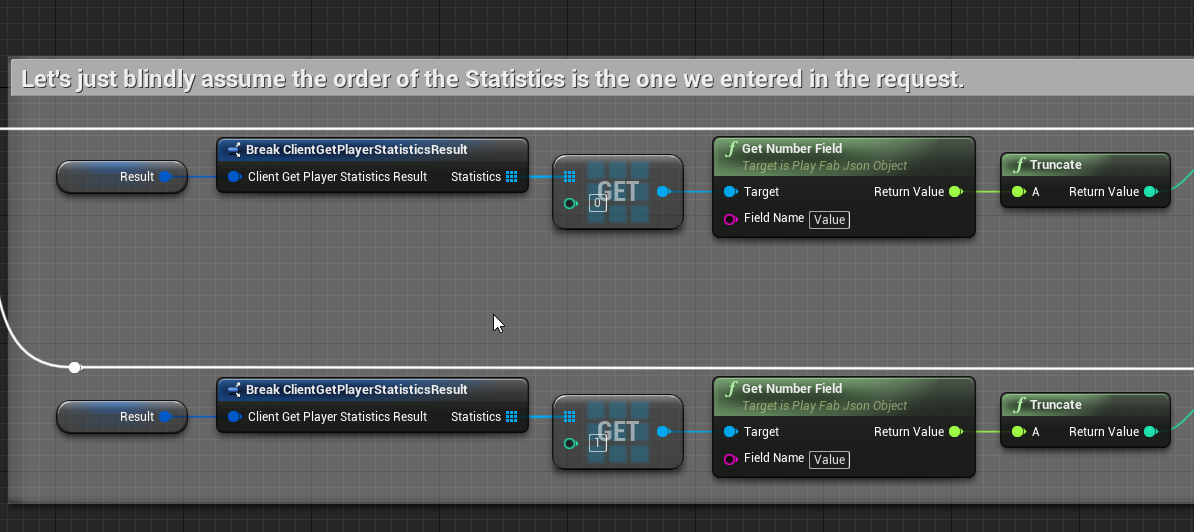
I will just get the values in the same order I requested them
¯_(ツ)_/¯
Ah yeah and in the request needs you to enter the names of the statistics in a comma list
stat1,stat2
And directly below that they use an array
Why not just make an FString Array
 chrome bay
All I can say is, hurry tf up EOS
thin stratus
Stop putting people on plugins for ue4 that have no idea aobut ue4
GameSparks had a fucking sceneComponent for their connection class
Until I told them to make it at least an object ffs
And yes, EOS should really hurry up
As soon as that fully releases
I will see how I can move all users over to EOS
And didge all the rest
chrome bay
Yeah. I mean they've got the backend up it looks like, just not much else. Waiting for Epic to inevitably release a plugin that interfaces with it all
Kind of weird that they haven't yet but i guess it's too early still
thin stratus
Well you can see the API already
Just not with everything
I wanted to try out the Ticket System they offer
Cause that is already available
@chrome bay Did you ever release you code or a blog post or so for your radar?
I wonder if you can pull of something like this with that:
https://assetstorev1-prd-cdn.unity3d.com/key-image/90881939-6551-4635-b732-ca7beea8efe0.jpg

 pallid mesa
It's based on SMeshWidget
and apparently it's complicated to use =/
But maybe if you dig enough that class you can pull something out without waiting too much for James
@thin stratus
here you have an interesting post about the matter https://forums.unrealengine.com/development-discussion/rendering/75779-smeshwidget-hardware-instanced-slate-meshes-thread
Unreal Engine Forums
For discussions about Materials, Textures, Lighting, Particle Systems, and Post Process Effects.
Seems like Jamsh is the only buddy who experimented publicly with SMeshWidget 😄
 glacial pollen
I have my collision capsule "OnLanded" with my attached static meshes when falling....
This only happens when falling for more than say, 10 seconds
its like one part lags over time, until it "thinks" it landed on its OWN ATTACHED mesh....
Any ideas?
(if I manually, reduce speed every 5 seconds or so, this doesn't happen)
I should point out this is for a "sky diving" mechanic, and only happens when the player is facing head down
I assume the lag is still there, but going the opposite way, hence no lag
chrome bay
@thin stratus never released the code as it's pretty unique for my project. but yeah in theory that radar could be done with it
 flint plaza
Hi all. Is it a bad idea to put RPC functions on tick?
chrome bay
generally yes
thin stratus
@chrome bay And what about any hints and insight on how the SMeshWidget thingy works?
Like what it expects in terms of data, how to format that data etc.
chrome bay
Hmm the best example project is the one Nick Darnell released in that mesh widget thread
lemme see if I can find it
thin stratus
That would be a nice start I guess :P
thin stratus
Alright, didn't know there is a test project
chrome bay
I posted some info in that thread but not too much 😄
@flint plaza generally yes. At the very least make them unreliable and throttle them so they aren't being sent at whatever framerate someone has
thin stratus
Any idea how complex the data for these widgets can be?
Yours is pretty "simple" in the sense of the stuff it produces
Like, what if I through in data to draw a sphere
chrome bay
The data side of it isn't too difficult the hard part was largely working out how to give it that data
thin stratus
Instant slate kill? :D
chrome bay
But think of them as sprites really
That you can send very limited amounts of unique data too each one
(via UV's)
thin stratus
Well they are 2D, but your radar suggests it's 3D data?
flint plaza
Well I have a racing game. How else can I inform the server of the whereabouts of the client's car
because the car has to be moved on the server
chrome bay
So the sprites are 2D but you can create them from meshes, so they are like.. projected 3d I guess
flint plaza
and the input is on tick
thin stratus
That's what I thought
You do send Input on Tick, that is correct
The CMC does that too
That and some other highly optimized data
chrome bay
Yeah in that case it is sent on tick, but the data is heavily packed and multiple packets are combined together
outgoing RPC's are also throttled by CMC
in both directions
thin stratus
Yus, to save bandwidth. If you need something like predictive car movement and stuff, you are deff into creating your own c++ movement comp
Cause just with BPs I highly doubt that's possible to even remotely maintain
flint plaza
dumb question, what's CMC 😅
thin stratus
Character Movement Component
There are a few concepts you need to apply to Movement Replication
Cause otherwise, with a slightly higher ping, you'll get corrections and it will be a pretty shitty experience for the client
That is if you are interested in Server Authoritive movement
flint plaza
Is that the correct approach?
Also, for movement, I dont do a addActorWorldOffset
or similar thing for rotation
Instead, I apply calculated forces to a point
 deep beacon
Greetings! Is there something like a guide/documentation/wiki/forum post where I can read about connecting as client to a dedicated server with the same IP and Port, but different GameSessions, like it is the case at AWS, where several instances of your dedicated server are spawned, but only identified via AWS-related GameSessionIds. It feels like a dug through the entire internet without finding something about that besides multiple Ports, which doesn't correlate with GameLift (or I just don't get it). I read through most of the posts here about AWS and came to the point where it seems to be too expensive without proper funding, but nevertheless I got everything working so far, besides that. And I would like to at least finish that pipeline.
chrome bay
Multiple ports is the only way to host multiple dedicated servers at once on the same box. You can't have two different servers communicating via the same port.
thin stratus
GameLift also has multiple ports
You are even specifying the port range when setting up your build.
deep beacon
True, and I did that, but on the Console I see the same port (7777) on each Instance. @chrome bay but thanks already for ruling that out. Still pretty new to the dedicated server business.
And this old forum post brought me to the question on how every server instance is supposed to know which port it would have as they aren't aware of other instances. I guess some kind of master server is needed here which creates those server instances via commands at AWS?
chrome bay
You just tell UE4 which port to use for each instance IIRC
vague veldt
Please, can you help me to override the Local Network Version please ?
I want to disable the verif FNetworkVersion::GetLocalNetworkVersionOverride
Seem to be possible in UnrealEngine.ini, but don't work :
https://answers.unrealengine.com/questions/786955/how-to-set-local-network-version-override.html
thin stratus
@deep beacon That should only be the case if you only launch one DediServer per instance.
UE4 autoincrements the port afaik
 upbeat basin
Hey eXi, I would like to thank you for your responses on my previous question, I didn't had time to say it
And I continue with new questions :D
My current problem is with testing. When I set number of players to 2 and try to Host a game (calling World->ServerTravel(map)) the game I clicked opens the desired map and other one goes to black screen. I don't know if the explanation is enough but basically it feels like my button click from one PIE player also triggers other PIE player
deep beacon
@chrome bay My question is how, when every instance doesn't know of eachother (that's why I'm assuming a master server is needed?)
@thin stratus Is it possible that the autoincrement is stopped somehow if a port is set somewhere? (.ini, or code). The default in AWS is pretty much to start your fleet, which then creates as many server instances with as many concurrent processes as you like, but so far they always had the same port. But I will have another look into it. Thank you for the answers.
thin stratus
Each Instance can be seen as a PC.
And each of these launches X DediServers (depending on how you set it up)
With incrementing ports
At least it should
deep beacon
so there should be nothing, stopping the DediServers from having various ports beside the 'default' 7777?
 worthy perch
So the IP and the port are always the same?
deep beacon
seems like it yes. I have no screenshot at hand, but once I get back to it on the weekend I could deliver them
That's why I am at my wits end, because I have no clue how to join a server without having the unique IP:Port combination (assuming this ONE connection would not be a server specialized in distributing clients somewhere else.. but this is above my paygrade)
worthy perch
I'm not familiar with your problem, but the worst case is you can manually specify what port a new instance should be on.
deep beacon
I considered that, but somehow I get the impression that GameLift/AWS gives you these tools already (like exi mentioned), but so far it seems, that I don't work with them appropriately
scenic raven
When I have a replicated class, are all its properties replicated?
bitter oriole
Nope
Just its existence is replicated
You can then set individual properties to replicated
scenic raven
thx
vague veldt
@chrome bay Ty for response.
I have read this documentation but it's a bit confuse for me.
I use only blueprint in my project.
I just want to be able to join server (build project01) with the client (build project02--> witch is just a duplicate of project01) or better in PIE.
what i need to change ?
scenic raven
Is there some widely used pattern to wait for classes to be propagate before actually start playing?
bitter oriole
Not sure what you're asking here. Client should be pretty autonomous regarding server
scenic raven
I'll give you a small example, but it's wider than that at happens in different ways, hopefully I can make it clear :)
My setup is the following:
- PlayerController possesses a Pawn that is a movable camera
- During initialization PlayerController spawns a Character actor, possessed by an AIController. This is what the player perceives to be the "Player Character"
- PlayerCharacter has a Widget component used to show player name
- PlayerState holds AbilitySystem and relative AttributeSet
- There are a few widgets here and there that show AttributeSet values
The first big problem is that given the importance of PlayerState I have to make sure that is replicated before doing a lot of the Player Character initialization. I solved that with something that makes me feel dirty ```cpp
void AVVPlayerController::WaitForPState()
{
AVVPlayerState *PState = GetPlayerState<AVVPlayerState>();
if (!PState)
{
    FTimerHandle UnusedHandle;
    UE_LOG(LogTemp, Warning, TEXT("Waiting for PlayerState, 1s"));
    GetWorldTimerManager().SetTimer(UnusedHandle, this, &AVVPlayerController::WaitForPState, 1.0f, false);
}
else
{
    OnPlayerStateAvailable.Broadcast(PState);
    OnNamePlateAvailable.AddDynamic(PState, &AVVPlayerState::OnNamePlateAvailable);
    AsyncBeginPlayingState();
}
}
void AVVPlayerController::BeginPlayingState()
{
Super::BeginPlayingState();
WaitForPState();
}
void AVVPlayerController::AsyncBeginPlayingState()
{
// Do stuff here
}
[continues]Now I'm hitting other problems. For example, when trying to replicate the player name across all clients in order to show it in the widget component of the PlayerCharacter I have three potential errors: PlayerCharacter has not replicated yet, PlayerCharacter->WidgetComponent hasn't replicated yet, PlayerCharacter->WidgetComponent->UserWidgetObject hasn't initialized yet
unfortunately the timing for all of this is unpredictable
My thinking is I must not be the only one with problems like this, and I wonder if other people have solved it and how
bitter oriole
No, there isn't some easy way. Netplay is hard.
The way to solve it is to be super careful, test a lot, and make your game as simple as possible
For complex objects you're bound to end with state machines that check what you're doing
vague veldt
😕
I have exactly 2 same project : project01 and project02
project02 is a duplicate of project01
i create a session in project01
i want to join this session from project02
i have an error : NetworkFailure: OutdatedClient, Error: 'The match you are trying to join is running an incompatible version of the game. Please try upgrading your game version.'
That's happen because ue4 check an ID and it didn't correspond.
In the past, we can use : https://answers.unrealengine.com/questions/786955/how-to-set-local-network-version-override.html
Now it's a new method : https://docs.unrealengine.com/en-US/Programming/UnrealArchitecture/Versioning-of-Assets-and-Packages
I don't understand what i need to do :(
Can you help me to make a corresponding between my two project (with a build and if possible in PIE)
scenic raven
@bitter oriole thx I feared there was no easy way out 😃
I meant to have a sad face there 😦
😃
vague veldt
no source control
all my students in my classroom have project02 (a duplicate version of mine project01)
I launch project01 in my teach pc witch create server
My students launch project02 on their pc and try to join my server
Project01 and project02 are not exactly the same due to buildID probably, so that dont work
I try that in PIE and in build project
is it possible to just disable the verif buildID ?
bitter oriole
You need to use source control to replicate copies of the project
And PIE doesn't have sessions, again, so make sure you don't use them and connect by IP
vague veldt
yes i connect by ip with an execute console node open IP
don't want to use source control, because my students make project02 themselve (it's a training), they reproduce what i do in my project01 (videoprojector)
bitter oriole
Dunno then, UE4 isn't meant to work with different projects
vague veldt
ok 😦 what value ue4 check to reject ?
that seem to be possible by overriting the networkVersion in the past : https://answers.unrealengine.com/questions/216374/android-multiplayer-outdated-version-of-the-client.html
bitter oriole
I have no idea
vague veldt
ok thank you for your time Stranger, i will dig it
 fleet raven
you can override the network version by binding something to the delegate from somewhere, like this
but why are you trying to connect between projects with different names ...?
just use a "project02" yourself too
if the two projects you are trying to connect do not have exactly identical content you will experience unpredictable behavior
vague veldt
you think it's just the name of project which reject joining ?
fleet raven
the default network version is generated like this:
vague veldt
i'm noob in c++, just use bp
fleet raven
this is what is causing you to get NetworkFailure: OutdatedClient
but it's questionable what you are trying to achieve
if you or a student make any modification that wasn't made on the other side, you'll experience anything from missing objects to crash
unreal doesn't sync the content from the server when you join
vague veldt
i explain replication in bp, and how to create, search and join server.
there is no achievement, just in a final exemple i want all students join my server (admitting that they all created the project exactly like me)
fleet raven
is there a specific reason why you want to use a different project name though?
with the same name, attempting to connect should work
vague veldt
no reason just for my explication here with simple english words 😉
i will try with same name right now
 gusty lily
I am trying to get a lightning gun (quake) type lazer beam to work (cosmetic for clients other than owning character). i thought the concept was to have a simple replicated variable for the character, like beam on or off, then do some stuff. and because the character is set to 'net load on client' then other clients will detect the on/off change and do the stuff the character says to without needing set the start and end points via RPCs, because each client will do it for the character. Is that how it should work? but it doesnt seem to be. do i need to chagne the on/off state via a RPC call or would setting it to replicate be enough?
clear copper
If you’re moving from a lobby with players to a new level, do you use the open level node or is there another way?
gusty lily
server travel
instead of 'open'
i believe it has to be an execute console command node?
glacial pollen
My character capsule is colliding with attached static meshes when the character is upside down falling from the sky
This technically shouldn't be possible no matter what I am doing....
but I assume we have some sort of de-sync going on....
but even then.... the attached part is assigned to be relative to the character....
If I force the fall speed to be reduced, it doesn't happen
visually, it appears like the character hits an invisible platform mid air, comes to a complete stop, and then continues, until the next "hit"
sometimes the character will "recoil" back up in the air like a bouncy ball
LogBlueprintUserMessages: [OrbitalDropKitController_Actor_C_0] Server: TrainingTorso
LogTick: Warning: While processing prerequisites for
SkeletalMeshComponent Char_Mech_C_0.CharacterMesh0[TickComponent],
could use CharacterMovementComponent Char_Mech_C_0.CharMoveComp[TickComponent]
because it would form a cycle.
 worthy wasp
hello guys - i have a VR Project i'm working on where i've replicated the BP_MotionController (VR Hands) so i can pickup actors and release them and its replicated (Location/Movement).
I'm having a problem on release.... when i pickup an actor its fine - snaps to my hand in the area i want it to just fine. When I release - its sporadic as to where it is in relation to the hand.... sometimes its a inch away - sometimes a few feet!
I've gone through and debugged things - setup a trackinjg DebugSphere on tick that is on multicast.... its spot on in the center of my hand (MotionController::GetWorldLocation FYI the motioncontroller is set to bReplicates.True - wouldnt replicate without it... yes the actor is set to replicated)...... OnRelease - i'm drawing another debug sphere (IN THE SAME CLASS) of its location - same as the tick event debug sphere getter (MotionController::GetWorldLocation) This event is almost never near my hand's location - or that of the tick event...... How can this tick event produce a location that differs SO GREATLY from this OnRelease event? What am I doing wrong to have such a drastic discrepency on its location in a replicated fashion?
 unreal pine
Trying to get Steam OSS working on my project, and I'm getting an API disabled warning. Trying to follow this doc [https://wiki.unrealengine.com/Steam,_Using_the_Steam_SDK_During_Development], but I'm using retail (binary) Unreal 4.21 and can't modify build.cs or target.cs.
and this is my warning
worthy wasp
@visual creek - do you have Steam plugin enabled in project
Do you have DefaultEngine.ini configured right?
Lastly - Binary build you call it - you need to have Source build to do anything with servers - PIE testing in editor only goes so far - and it does NOT support steam integration
unreal pine
yes to both of the first ones
both that wiki I was following and the Unrealengine Page for steam said I could use the binary version of unreal
worthy wasp
howa re you playtesting? Because it DOESTN work in anything but standalone (or packaged)
unreal pine
that I just needed to pull those DLLs from the SDK and load them into the engine binaries folder
worthy wasp
you dont have to do that..... its outdated
unreal pine
Running a standalone process
worthy wasp
ok so you're running LAUNCHER version right? (downloaded from epicgames.com NOT GITHUB)
unreal pine
correct
worthy wasp
your DefaultEngine.ini - can you copy/paste your code for the steam integration?
unreal pine
sure
`[/Script/Engine.GameEngine]
!NetDriverDefinitions=ClearArray
+NetDriverDefinitions=(DefName="GameNetDriver",DriverClassName="/Script/OnlineSubsystemSteam.SteamNetDriver",DriverClassNameFallback="/Script/OnlineSubsystemUtils.IpNetDriver")
[OnlineSubsystem]
DefaultPlatformService=Steam
PollingIntervalInMs=20
bHasVoiceEnabled=false
[OnlineSubsystemSteam]
bEnableSteam=true
bEnabled=true
SteamAppId=480
SteamDevAppId=480
GameServerQueryPort=27015
bRelaunchInSteam=false
P2PConnectionTimeout=90
bAllowP2PPacketRelay=true
bVACEnabled=1
GameVersion=1.0.0.0
[/Script/OnlineSubsystemSteam.SteamNetDriver]
NetConnectionClassName="/Script/OnlineSubsystemSteam.SteamNetConnection"`
unreal pine
yep
worthy wasp
i NEVER had to copy any .dll or anything from anywhere to setup steam ....
unreal pine
worthy wasp
its fully integrated into UE4 by the plugin module
unreal pine
hmm
so I copied the DLLs into the v144 folder
because that's the sdk version I downloaded
but it's still using 139 anyway
so ¯_(ツ)_/¯
worthy wasp
i never once moded any of those files
and steam works religiously for me doing the above setup - 1 sec i'll double check my source files
unreal pine
yea
worthy wasp
epic = epic @ keeping up with changes to documents
in your PRoject.Build.cs - are you having this?
DynamicallyLoadedModuleNames.Add("OnlineSubsystemSteam");
unreal pine
I don't think I have a build.cs file
I thought that's if I had a code project
I'm using BP only
maybe that's the thing... the wiki mentions binary engines, but not BP only projects
worthy wasp
the same page you sent me to (https://docs.unrealengine.com/en-us/Programming/Online/Steam) at the very bottom says you need to edi tthe same file i just mentioned
i am not going to say this with confidence....
but i dont htink you can pull off steam integration in BP only project
unreal pine
yeah, I noticed that they both mentioned build.cs and target.cs
worthy wasp
but i've never tried it before - so again - dont quote me on that
target files - i dont have anything regarding steam OSS in it
sorry
i lied
 worthy wasp
Project.Build.cs: https://puu.sh/DdNJl/6ceed46288.png
 unreal pine
Awesome, thanks @worthy wasp now I'm gonna bump your problem :D
`hello guys - i have a VR Project i'm working on where i've replicated the BP_MotionController (VR Hands) so i can pickup actors and release them and its replicated (Location/Movement).
I'm having a problem on release.... when i pickup an actor its fine - snaps to my hand in the area i want it to just fine. When I release - its sporadic as to where it is in relation to the hand.... sometimes its a inch away - sometimes a few feet!
I've gone through and debugged things - setup a trackinjg DebugSphere on tick that is on multicast.... its spot on in the center of my hand (MotionController::GetWorldLocation FYI the motioncontroller is set to bReplicates.True - wouldnt replicate without it... yes the actor is set to replicated)...... OnRelease - i'm drawing another debug sphere (IN THE SAME CLASS) of its location - same as the tick event debug sphere getter (MotionController::GetWorldLocation) This event is almost never near my hand's location - or that of the tick event...... How can this tick event produce a location that differs SO GREATLY from this OnRelease event? What am I doing wrong to have such a drastic discrepency on its location in a replicated fashion?`
worthy wasp
Confirmed wth a print string of the mere GetWorldLocation() - the server is off nearly 40+ units...... how do i nail this in?

 urban palm
@worthy wasp you may want to take a look at the VR expansion plugin. It has built in network replication. The source code is accessible so you can learn from it.

A plugin for Unreal Engine 4 that adds some additional VR related features / components.
 slender yarrow
what is the proper way to SetActorLocation on a dedicated server? The server registers everything fine, but X and Y come up as 0 on the client so the character glitches before it gets to the destination.
slender yarrow
has to be multicast btw. fixed it
 ember needle
does "attach to component" on a replicated actor need to be called on every client, or does it apply to all clients directly?
 north swan
Hi guys. Has anyone had success in hosting (and connecting to) a dedicated steam server on a ipv6 network? Is there anything specific I have to consider?
 covert garden
How can I create the dedicated server which featuring public and private area in UE4? I have a problem that after I left the public area session to private area, I can't rejoin the public area session again.
 sleek current
How can I make possession work on client?
 tardy cosmos
HI! Do you know if create Session with Lan true works with steam open?
thin stratus
@sleek current Possession is an Authority based system. You can't really.
sleek current
@thin stratus So how can I make a possession on server where the clients possess a certain pawn?
tardy cosmos
can u sent it to do it on the server?
 exotic salmon
I honestly am not sure but to reduce player perception vs real result, maybe you can hit scan on client, send to server, hitscan on server, check if close enough to what the client got and return allow or don'tAllowButUseThisResultInstead
If the client hits a fast moving pawn and on the server it does not but the hit isn't un-believable then you could just allow the client to use its hit.
tardy cosmos
hello, is there anyway where I can change this value bIsLanMatch in an opened level?
 limber mortar
Does anyone have an idea why this decal isn't working? Another actor uses the empty drop decal successfully in a Owning Client only function. I need this instance to be visible to all clients connected to the server.
unreal pine
what's calling that Spawn Decal Function in this graph?
limber mortar
ok I have it running client side and see my print string, just not the decal yet. Checking locations
limber mortar
I made decal size 30000 and still didn't see it
I got an idea
might have fixed it
I made the location a variable, set it on the server, replicated the variable
and spawned the decal based of the location of that variable
somehow my client had a different location
oh I thought I did
unreal pine
Any idea why I can't get my steam overlay to work if I use my actual app ID?
if I use 480 it works no prob, throw my actual assigned app ID, and I get these errors
LogOnline: Display: STEAM: Loading Steam SDK 1.39 LogOnline: Warning: STEAM: Steamworks: SteamUtils() failed! LogOnline: Warning: STEAM: Steamworks: SteamUser() failed! LogOnline: Warning: STEAM: Steamworks: SteamFriends() failed! LogOnline: Warning: STEAM: Steamworks: SteamRemoteStorage() failed! LogOnline: Warning: STEAM: Steamworks: SteamUserStats() failed! LogOnline: Warning: STEAM: Steamworks: SteamMatchmakingServers() failed! LogOnline: Warning: STEAM: Steamworks: SteamApps() failed! LogOnline: Warning: STEAM: Steamworks: SteamNetworking() failed! LogOnline: Warning: STEAM: Steamworks: SteamMatchmaking() failed! LogOnline: STEAM: [AppId: 0] Client API initialized 0 LogOnline: Display: STEAM: OnlineSubsystemSteam::Shutdown() LogOnline: Warning: STEAM: Steam API failed to initialize! LogOnline: Display: STEAM: OnlineSubsystemSteam::Shutdown() LogOnline: OSS: Unable to create OnlineSubsystem module Steam
Updoot: I figured it out - my personal steam account didn't have the game in my library
@limber mortar you should try spawning a particle at that location serverside or something, see if it pops up
or spawn an actor
will probably help you narrow down if it's an issue of the event firing, or the location being wrong
limber mortar
oops wrong channel, I'll try that idea Alex, thanks!
Wish I could help, I'm finishing up my first game and not using steam. So no experience there :/
limber mortar
Thanks, spent 10 months making it
ah
I just need to make the ground dark/burnt
load the game on the server, get people playing, then optimize
depending on how it runs
I think
 twin juniper
so im trying to peek into how replay files are stored, and i wanna know what kinda information is in the string Prop_Rocks_02_C /Temp/Game/Athena/Maps/POI/Athena_POI_Lobby_002_3f5ab45c.Athena_POI_Lobby_002:PersistentLevel.Prop_Rocks_17 if anyone knows so i can look into the source and see where this is read
 raven holly
"You can now set certain required Steam values, such as dedicated server names, or the application ID, in your project's Target.cs file. Making changes to these values will no longer require recompiling the engine."
lets add it, but add no documentation on what those values are
🤔
 grizzled stirrup
Are there any fixes to choppy / low frame rate ANIMATIONS not just position when viewing a client as a listen server host?
Can repro in a default third person template, run around as the server and everything is smooth as butter from the clients point of view, but if you run around as the client, he is extremely choppy from the servers point of view and this is NOT just a movement replication issue as his actual animation seems to tick at a really low rate
You can debug this by increasing the Listen Server Network Simulated Smooth Location / Rotation Time up to large amounts
The replicated position / rotation is now smooth as butter but the animations themselves are running at what looks like about 10 fps or less
worthy perch
Maybe this: https://www.reddit.com/r/unrealengine/comments/a0n455/listen_server_host_sees_clients_jittering_fix/
reddit
8 votes and 3 comments so far on Reddit
grizzled stirrup
Thanks floss have a bunch of these open, it seems like a common issue with few solutions. Will try out the steps here
grizzled stirrup
@worthy perch Looks like this was the one
Amazing
I am VERY confused as to why they have it off by default or at least not easily exposed
I guess an optimization but it's working great now
worthy perch
It works? I haven't tried it out for myself. Let me know if you have any problems with it.
grizzled stirrup
I just set that bool bOnlyAllowAutonomouseTickPose to false (in the reddit post they actually changed the Character.cpp file, but I think overriding PossessedBy and setting the bool again even though it was just set achieves the same thing without needing a source build)
That seems to tell UE4 to allow ticking the anims as usual and not only on a net update
Also another problem I had with pawns not possessing properly was due to my FPS being too high in PIE, another thing I have to remember- capping to 60 for debugging seems to eliminate the problem
Ok actually interestingly I DON'T think bOnlyAllowAutonomousTickPose was the culprit- it was having high FPS
Testing with t.MaxFPS set to 30, both the server and client look smooth regardless of whether that bool is true or false
When I set t.MaxFPS to 240, the client is a slideshow on the server
Only in terms of animation and not his actual position as that is super smooth for debugging
grizzled stirrup
Ok so after some testing, it seems that if the client has a high frame rate (greater than 144 fps), there are MANY issues that can occur-
- The client may not possess the pawn spawned for him
- The server and other clients will see the client with an extremely choppy / low frame rate animation, even if the movement itself is smooth
- The movement itself on the server can become choppy even with high interpolation values and a high update rate and unlocked bandwidth
So I guess as it stands, for a listen server game it's best to manually cap the fps to say 60 or 90?
grizzled stirrup
Testing and it seems the sweet spot is T.MaxFPS 144
Anything above that (especially over 200) and the movement AND animation frames of a client (From the viewpoint of the server) becomes about 1 update a second
This in ONLY for the client FPS, the server can have 240 fps and run smooth on both
 spring swift
Hey(just a heads up I’m not to well know with Unreal yet). I’ve been working on a little project for a days now. I’ve got up a basic Multiplayer system. And I mean very basic. But I seem to be having a issue with replicate I think it’s called. I’ve made a matinee that is played when one of the players is in the trigger box using the “use” Key which is E. But only that player sees the matinee happen. Any thoughts on my problem?
clear copper
Why does this PlayerState return Null on the clients but not the host? It's in a Widget Blueprint if that matters.
i just want to get the player state of the player controller that owns this widget. Works fine on the host but not the clients
 modest hedge
Player controllers only exist on the server and for the player that owns the player controller.
Clients can't access all the player controllers, only the one they own
clear copper
yeah so why can't this client access the one it owns that is holding this widget...?
modest hedge
is the player state in your game mode set to PS_Scenario?
also, you could use the Player Owner variable in HUD instead of GetPlayerController
limber mortar
Does anyone know why spawn decal attach works and spawn decal at location fails? The print string of location is correctly shown on the clients.
when I run the current code I don't get the bright red area decals like I do attaching it to the actor
 old hamlet
i have a pretty simple question that i couldn't find an answer for in the vast spider web we have
so i have an actor that is a template for guns and i made a couple child actors , but when i spawn both guns i can't control them at the same time because they both take the same input from the player so what happen is the last spawned gun takes over and the first spawned gun gets ignored , and i want to be able to activate any one of them when ever i want
limber mortar
you'll probably have to show some blueprint or code
can you create a bool variable to see if a gun is active
and only apply the control set after a branch with the gun being active?
so a bool in the template
and each gun would have an IsActive bool or similar
or wait, you want them both at the same time
well, that could work still with a little more logic
old hamlet
i have to spawn them all first then disable the ones i don't yet need
then when i want to switch i enable one and disable the other
limber mortar
So just to ensure I understand your question properly. Are you saying you want to be able to use any of those 3 activated weapons whenever you want, but the last one is the only one responding to controls
old hamlet
Yes
@limber mortar because these actors you see me spawning are all child actors , and i scripted the parent to take input via custom events after i referenced my player t the parent
limber mortar
ok, I think I understand what you're trying to accomplish. The code you showed just handles the creation though. Does that work how you want? Can you late on unhide and hide those actors as the weapons are pulled out / activated
I'm just talking visibility wise at the moment
If all the weapons take the same controls from the template's input
I'd think you'd need a variable in the template so you could track which are active and which are not
and then do a loop for all active weapons
that's without seeing additional code
old hamlet
yes visibility works okay when i switch between them
because they are all created and they don't cancel each other
but how though they are all made up of the same template and that variable would check for all of them
limber mortar
when you put the variable in the template
each child actor should have their own copy
right?
so each weapon would have an 'IsActive' bool
derived from the template
old hamlet
yes but after i set them to actor variables they don't really allow me to access the variables within them
limber mortar
not sure what you mean
old hamlet
after i promote the spawned gun to a Variable
i can't edit any of it's properties anymore
limber mortar
in your first image you had purple actor classes
bools there
trying to use them all 3 at the same time?
clear copper
@modest hedge my PlayerState is set correctly in my GameMode, and I switched my Get Player Controller to Get Player Owner in my HUD class (which is also set correctly in my GameMode). Everything works fine for the host but clients still returning Null when trying to access their own player state -_-
do clients not have access to their own player state?
modest hedge
when are you doing this, it could potentially be that the player state hasn't replicated yet
maybe try adding a delay of 1 second then setting the player state
old hamlet
@limber mortar do you give up ?! xD
limber mortar
um not necessarily, I have my own problem I am working on
but I've seen how you hide and show the weapons, not how you fire
how is your master class taking the input for firing and using the gun
It sounds like the only place we should need to adjust things
since the weapon changing works
limber mortar
Selected Primary Gun
Selected Secondary Gun
And Selected Trap Tool
are all child actors of this class?
limber mortar
where is Is Gun Enabled being set?
limber mortar
so your parent template class for the guns, has a parent class?
modest hedge
np
limber mortar
yeah, I'm on my first project and while I have found many answers on the web. I've have had 3-4 problems that took weeks to fix
old hamlet
i assume you are more advanced than me so i'm no good to help but i'll try anyways
hit me
 winged badger
@old hamlet if all your guns inherit from the same base class, you make a variable of base class type, say ActiveWeapon in whatever class you use to spawn and/or control weapons, you add functions like Fire, Reload etc... in your WeaponBase, and in your WeaponComponent/Character you handle weapon inputs like so FirePressed->GetActiveWeapon->Fire
 stark hull
Hey guys, I'm trying to destroy an actor that is referenced in the game state. It works if the execution is called from a listen server, but the client can't do it, even if I call an RPC
if (ProgressBar == 100.f)
    {

        if (HasAuthority())
        {
            Server_ScoreFlag();
        }
        else
        {
            RPC_ScoreFlag();
        }
    }
clients do not own the GameState
you'd have to send an RPC in an object owned by the client's PC
then call the Destroy in the GameState from inside that RPC
stark hull
I see, but I have the progress bar runnning on the game state, is there a way to notify the client that the progress bar has reached 100 and then from the client I would make the RPC
winged badger
if you have a progress bar server side
then server can just get rid of the Actor itself, no need for a RPC
if you need to get the progress bar ticking for client, from player input, then you start doing that with the method described above
and you can just run the timer on server and have the client simulate it
as in, start ticking its own version of the timer locally
stark hull
yup, I see, I thought I had the timer ticking server side, but it seems that because I'm using a delegate, it might be doing something funky. Here is the call to "set timer" via delegate:
if (ACaptureTheFlagGameState* const GameState = GetWorld() != nullptr ? GetWorld()->GetGameState<ACaptureTheFlagGameState>() : nullptr)
    {
        if (ACaptureTheFlagPlayerState* CurrentPlayerState = GetPlayerState<ACaptureTheFlagPlayerState>())
        {
            GameState->OnFlagCapture.Broadcast(CurrentPlayerState->GetPlayerId(), StoredFlag);
        }
    }
I make this call inside a Server function
and this is the function that is bound to that delegate
void ACaptureTheFlagGameState::BeginCaptureTimer(FString PlayerName, AFlag* Flag)
{
    StoredFlag = Flag;
    SecondsTillFlagScore = GetDefaultGameMode<ACaptureTheFlagGameMode>()->SecondsTillFlagScore;
    if (FlagCaptureTimer.IsValid())
        return;
    CurrentOwningPlayer.Name = PlayerName;
    if (!PlayerScores.Contains(PlayerName))
    {
        PlayerScores.Add(PlayerName, 0);
    }
    CurrentOwningPlayer.Score = PlayerScores[PlayerName];
    GetWorld()->GetTimerManager().SetTimer(FlagCaptureTimer, this, &ACaptureTheFlagGameState::AddPlayerPoints, 0.1f, true);
}
Once the timer finished, I tried calling the destruction function, but got it to work only on listen server, not on client
winged badger
server should have the sole authority over that
also, for adding player points, really
those just get replicated as a variable
as in, if your capture starts when the player is near the flat
server detects the proximity, starts the progress bar if visible, and starts adding PlayerPoints
when the flag is captured it destroys it
only thing you really need to do is replicate some stuff back to the client, so players know whats going on
if instead, player needs to click the flag, press E key or whatnot
you send a RPC through the PlayerController/PlayerCharactger/PlayerState
that starts the interaction server side
and same as above, you just replicate the stuff you need for visualizing interaction/progress to the client(s)
stark hull
yup, it seems that I do relatively what you're saying in terms interaction (I send the request to the server to start the timer on interaction), but the callback inside game state never seems to replicate the destruction to the other clients, if a client interacted with the flag
winged badger
if DestroyActor is called on the server, and the Actor is replicated
it will go away, on every machine
callback that destroys an Actor doesn't need to run client side at all
winged badger
you don't?
if the Actor persists after interaction
then PlayerState is best used to send the RPCs through
when the interaction is completed server side, you set the ControllingPlayer variable on the flag Actor, and in the OnRep function you handle the client side visualization
of type PlayerState or a class derived from it
so first thing you need to figure out is if you actually started the interaction server-side at all when the client wants to itneract
or you just started a client side simulation of it
stark hull
The interaction is definitely working, since I do an RPC call from a client that attaches the flag to the client mesh. It persists across other machines
The problem could lie within the fact that I pass around a pointer to the Flag, and that property is not marked as replicated (But I do set the AActor defaults to make sure the actor replicated)
winged badger
any Actor loaded from Package, replicated or not, and every replicated Actor can be referenced over the network
winged badger
you may notice that PlayerArray in GameState, for example, isn't marked as replicated either
stark hull
I see what you mean
It's really weird for me because the GameState function that is supposed to destroy the flag, also sets a couple of variables across different machines and are in sync (mostly stuff for UMG)
winged badger
you can reproduce the problem in PIE?
stark hull
yeah
winged badger
then build DebugGameEditor binaries, start the editor from VS with F5 and set a couple of breakpoints
that should clear up whats really happening there
Flag variable not being replicated could cause a problem, or missing DOREPLIFETIME
if the variable is set only server-side
then the Actor can be referenced just fine, only client has no idea what that Actor is
you can open locals when your Breakpoint hits inside PlayerState
and GameState
and add its Role to watch window, that should make it easy to track if your breakpoint hit server or client side in Visual Studio
stark hull
So the function that is supposed to be called from the game state is being called twice
one time the flag is null, the other it is valid
and it does call Destroy() on it, but remains in game
I suppose the timer is being set for both client and listen server, that could be the cause
Ok, found the issue, when the client requests a pickup, the listen server's replicated game state doesn't get a variable to the flag, causing the deletion to only happen on pickup instigator
If the listen server instigated the pickup, both the client and the listen server replicated game states get the variables
interesting
bitter oriole
I'm guessing he meant GameState
 real yacht
is epic online subsystem going to support as steam subsystem nat punch? is there going to be option to play 1vs1 with friend request?
i didn't find that information
bitter oriole
@real yacht No one knows since the Epic OSS isn't out yet
real yacht
one more question, do you think that is overkill to spawn one dedicated server instance for 1vs1
than despawn instance when is finished
thin stratus
It's basically the only thing you can do if you use ue4s servers
Despite ListenServers
But if your game shouldn't allow cheating, that#s not an option
real yacht
yea, make a sense
one thing, in BP we can't have _validate as in c++
so without validate function RPC is valid to use for some calculation on server
my question is, if i'm not using _validate in c++, and only BP implementation, is that correct
?
winged badger
_Validate isn't there to correct client side "mistakes"
its there to boot cheaters out of the game
winged badger
in 1 vs. 1, you would hardly get anythign useful out of it
thin stratus
Sorry?
winged badger
yes, that question didn't make sense
real yacht
okay, my bad... this is question: Doing multiplayer in BP without c++ is correct?
thin stratus
It can be. There is also a lot of stuff not properly exposed to BPs.
real yacht
except that, is correct
thin stratus
But I can't tell you if this will keep your from creating your game.
real yacht
i'm not running from c++, just asking am i doing someething wrong
because for our demo, concept, we have done everything in BP
so i'm starting to ask myself is that correct way
winged badger
personally i dislike doing any networking in Blueprints
thin stratus
As said, you can do Multiplayer in BPs
It's just that there is lots of stuff not exposed to BPs
Which makes Multiplayer trickier in BPs
Variables, Functions, Types. All sorts of stuff not available.
You might never reach it, or maybe you reach the limit tomorrow when asking yourself how to do XY and the answer is: You can only do that in C++ (or via a Plugin).
Really depends on what you are doing ¯_(ツ)_/¯
winged badger
its verbose, hard to read, RepNotify behaves differently then c++, you have limited control over the construction, and you can't use any customo networking solution
thin stratus
Yus
real yacht
everything*
winged badger
one piece of advice: when you spawn an Actor that needs custom initialization, use ExposeOnSpawn variables
its the only way in BP to have same variables ready on client and server by the time BeginPlay is called
(they will be set on server before BeginPlay, and those that are replicated will replicate before client side BeginPlay is called)
real yacht
thnx for advice guys
gusty lily
can anyone tell me what a good inrate our outright might be ? my game is around 3500- 5000 bytes (per second, per packet?) but when at 7-11k things seem to break. is there a limit i need to raise?
worthy perch
The default outrate (or inrate?) limit is 10k, you would want to raise that.
twin juniper
Hey, can anybody help me please?
 median elbow
you should just ask your question rather than asking if you can ask a question
I'm having an issue with network relevancy. I understand the idea, and how replication works, but i'm having trouble figuring out how i would pass events only to a group of people
basically, think of a small multiplayer town. everyone can roam around the town and play with each other. Say there are guilds, and there's one building for guilds to go to. every guild goes to this main building, but when you go inside, its YOUR guilds setup in there. you don't see other guilds inside the same building, you only see members of your own guild. The inside of hte building is the same for all guilds, but they can set it up however they want, and other guilds will not see what they've done with the place
i can't seem to understand how this would be done in replication. If you tell someone to stream that map, thats fine, because everyone gets that same map, but how would you only have actors replicate in that map only for a subset of players?
another example is like a minigame in a large map. maybe a group of people jump in to play the minigame. multiple instances of this minigame might be running. how do we make sure that events and actor replications from one instance does not get to players in another instance?
modest hedge
I haven't used it myself, but I think the replication graph will help you achieve want you want
median elbow
i think replication graph would work for this
yeah
but my problem is i can't seem to find information on how to write a custom replication driver
 fossil spoke
Its called Instancing. UE4 doesnt support this out of the box as its not geared towards MMO style games which make heavy use of that technology.
median elbow
THANK YOU devils
thats basically what i wanted to know
i wasn't able to find a solid answer on that
so replication graph is probably what i need then
from my understanding
fossil spoke
Probably not
fossil spoke
I mean you could try sure. But from what ive heard its not production ready at all and also not really what you would use it for.
median elbow
hmm, ok
i guess the one solution i didn't want to do, but might be ok, is to just launch an instance of that map way off in the world somewhere
just make sure instances of it are far enough so replication doesn't happen for players in another "instance"
i didn't want to do it like this, it feels kind of hacky, but i won't have a large number of actors in the game, so even if everything got replicated its not a big deal
i just don't want one game to affect another
fossil spoke
Look at third party solutions like SpatialOS. That would be geared to help you achieve that.
median elbow
ok thanks devlisd
so just to be sure, how do you send chat to players only in your team for example?
oh wait
no, thats not actor replication, nevermind
fossil spoke
UE4 was designed for single dedicated server instances that have 1 map loaded. IE: FPS games.
median elbow
yeah, was just hoping there was some way still
fossil spoke
Its not tooled for this type of Instancing you want. You would have to setup that yourself.
median elbow
i've always written my own engines, just figured i'd give eu4 a shot so the designers could help build the game
fossil spoke
Pick the right tool for the right job.
median elbow
i might still look into replication graph though. i think even if i were forced to user their spacial partitioning graph, i could still make it work
fossil spoke
Go for it. Ive heard that its a nightmare to work with though at this stage
median elbow
yeah, i haven't heard anybody say that, but from my bit of research into it, it does seem like it
i can't find much on it at all unfortunately
i might just have to go into the source and dig around
fossil spoke
You will have to. No doubt there.
median elbow
haha
ok, well thanks devilsD, i guess i wasn't sure if there was already some solution in ue4 for this or not
looks like not, so thats helpful to know at least
fossil spoke
Not out of the box at least. Third party solutions yes.
median elbow
i'll check out spatialos, thanks for the tip
winged badger
thats a dedicated server setup @median elbow ?
median elbow
yes alo
winged badger
you could try putting several streaming levels in the same place
then make only the relevant one visible
median elbow
thats literally what i want to do actually
i just don't know how you would only have the relevant level stream to the correct players
winged badger
guessing here, but it could be as simple as setting the streaming level visible for a client when it enters a trigger
it is done per controller, so you have access to player state as well
median elbow
that is what i was truly hoping for, i wasn't sure if the level counts as a top level parent or something though
wait, each level has a list of all actors right?
so an actor can see what level hes in?
zlo, i think your right actualy
winged badger
you shouldn't have actors that are not loaded
and those that are not visible shouldn't affect anything iirc
median elbow
although ,i'm confused, i read that if you steam a level, then ALL players have ot stream that level?
maybe thats not a problem?
i don't care if the yall have the instance
winged badger
i am reasonably sure its done per controller
median elbow
i just need to make sure that they do not affect each other
winged badger
and that its just default implementation that will iterate over all of them
you would have to look into source for it
median elbow
thats awesome, i think thats at least a start, i didn't think about how the level might just not have to be visible
but what about other players then?
winged badger
its possible it has to be unloaded as well
median elbow
can you make it so players in one streamed level are not visible to players in another one?
winged badger
net relevancy might do it
RealViewer there is the PC
so you return false if its Pawn is inside the guild and not a member of the same guild
median elbow
whats realviewer?
winged badger
first argument in AActor::IsNetRelevantFor
median elbow
thats perfect i think!
ok, thanks zlo, i'm going to try to do it this way and see where i get
winged badger
there might be several issues to iron out there, even if it works
median elbow
yeah for sure
but could be a good start
i mean, worst case scenario really i'll probably just have to offset the levels so they are not overlapping each other i think
the game itself is not big, and not a ton of players on each server
winged badger
you can have the guild hall entrance teleport them as well
median elbow
yeah exaclty
winged badger
to their guilds guild hall
median elbow
there will be a "transition" zone
the whole guild thing was actually just kind of an example
winged badger
it is a much simpler solution to implement
median elbow
the game itself is a bunch of minigames
which are part of a larger "match"
there are transition zones between each minigame to give hte next level a chance to load and whatnot
so yeah, probably the fallback is to just offset the actual levels
i'm ok with that, was just wondering if there's a better way. i wil ldefinitely try to work with the isrelevant stuff and the map visibility
i hope that works
winged badger
ideally, you wouldn't load other guild hall levels at all
median elbow
yeah, that would definitely be preferred
i mean, in the end if network is slow because everyone is loading everything else or something, i'll just spend some extra time to do some coding. was just wondering if there was something in hte engine itself i could use
thanks Zlo!
 void nest
Is there a way to update session info from within a session? (on a listen host)
I know advancedsessions plugin allows this, but it allows it only on dedicated hosts
I need it to work on listen hosts as well
winged badger
you can update session info just fine with it iirc
void nest
from a listen host?
I've tried that but doesn't seem to work
it works when playing in editor
but on the build it doesn't update
 cinder quartz
Is there easy way to replicate Anim montages triggered by AI behaviour tree? I guess custom Play Anim task that triggers the anim from pawn ?
 celest geyser
Is there a way to access a variable in a PlayerState from a Widget? The Cast To BP_GameplayPlayerState cast here always fails (this is within a text binding in the Widget)
 fluid flower
you can get the gamestate first, then you'll have access to the all playerstates. As to your screenshot, I'd guess the connected controllers is not valid
 quasi scroll
Hello guys, I've a question about Online Beacons : Are they secure ?
I'd like to know if anyone can connect to my beacon using my steam ID
celest geyser
@fluid flower The ConnectedControllers is valid and returns the correct controllers, that's why I'm confused. How do I get the PlayerState from the GameState, I've only every gotten the PlayerState from the PlayerController via 'Get Player State'
 keen thorn
hi guys, anyone know if attaching actor to component automatically replicates if attachment was called and only from server? or do I need to use RPC to trigger across all clients? Thanks in advance
winged badger
it does, as long as whatever you are attaching replicates as well
fluid flower
@celest geyser What I meant was that I don't think controllers exist on every client. So unless that function you're calling is on the server, I don't think it will work.
and as for how to get player states from gamestate, try this: https://api.unrealengine.com/INT/API/Runtime/Engine/GameFramework/AGameStateBase/PlayerArray/index.html
Array of all PlayerStates, maintained on both server and clients (PlayerStates are always relevant)
celest geyser
@fluid flower Aaah, of course, that makes sense! Aaaah and PlayerArray is already an array for the PlayerStates, I thought it was aan array of PlayerControllers, my mistake. Thanks for clearing that up, I'll try and use that. But I still have to match the PlayerState to the correct PlayerController, right?
fluid flower
np 😃 and about matching playerstate to playercontroller, depends on what you want to do
celest geyser
To get the value of a variable of the PlayerState of the owning client
fluid flower
if you want the one from the owning client, you can do that directly from the widget. Call GetOwningClient first, then get playerstate from that value
so againg, it really depends on what this widget does. If the widget displays your own score, then just call GetOwningClient -> PlayerState
if widget is showing score of ALL players, then use GetGameState() -> PlayerArray -> foreach -> PlayerState->getpawn
celest geyser
ah, nvm, it's a bit more complicated than that, it displays the value of the variable of all the connected clients, not only the local one. That's why the Controllers not existing on all clients becomes a problem
yeah, the last one is what I'm building right now, that seems to be the correct path, thanks for you help!
keen thorn
@winged badger thanks for ur answer, do u know if the actor only or both the component and actor need to be replicated?
chrome bay
yeah it's new
winged badger
component doesn't but you need to be able to reference it over the network
so either a replicated component, or a default subobject on replicated Actor/Actor loaded from package @keen thorn
celest geyser
Ok, another weird thing (again, a text binding in a widget):
this code correctly returns all connected player controllers when I open the widget on the server, but not on the client - there it only returns the server's controller
ConnectedControllers is a replicated variable on the GameState which all clients should be able to have access to (as I understand?)
(I'm also clearing the OutputString variable before this runs, forgot to include it in the screenshot)
thin stratus
PlayerControllers only exist for their Local Player
ClientA doesn't have ClientB's PlayerController
Sharing data between Players is done via the PlayerState.
@celest geyser
celest geyser
ah, so I can't even store all PlayerControllers in an array on the GameState?
bitter oriole
Nope
thin stratus
Well you can, but only the Server will have a full array :P
celest geyser
aaaaah
So if I have something that needs to execute on the local client (the Widget, because it only exists on the owning client, if I understand correctly) but that needs to run for each player in the session, what's the smartest way to get that list of players?
Would it be via the PlayerArray from GameState?
thin stratus
Depends from where you call it
Does the Server have to notify everyone?
Is it something that originates already from the client?
celest geyser
It's a text binding in a widget, just a debug window that shows all the relevant info for all connected players on each client and the server.
using it as a bit of a prototype to understand how info gets passed around/replicated
thin stratus
Then the PlayerArray, yes
PlayerState -> Info per Player for everyone
GameState -> Info per Game for everyone
GameMode -> Rules and Server only code
PlayerController -> Server and owning Client code
Also please re-read the compendium
Cause that's all kinda explained there
celest geyser
okay cool, let me give that a try, thanks for the help! 😃
fluid flower
yeah @thin stratus 4.21 they added i think
thin stratus
Coolio
 dusky light
Hello
Can anyone help me with a little question on PlayerControllers in CPP multiplayer?
So basically I have been trying to get the right PlayerController for the right player
I'm trying to make a gravity gun kind of thing work in multiplayer but my problem is that the object being picked up always returns to the first client connecting
My question is what is the best way to make a function that is being executed on the server know which player is picking up the object?
I can send a bit of code..
 past rain
Would anyone know why this would be happening? https://streamable.com/ibrmy Since the player is a pawn simulating physics, and not a character, there is no movement smoothing right? I don't know how I would go about fixing this
 winged badger
@dusky light run the RPC through the PlayerController, and have it send itself as function argument to the gravity gun thingy
fluid flower
@past rain yeah if you don't use the char mov comp you have to do some work yourself. There's a some good information on it on valves wiki https://developer.valvesoftware.com/wiki/Source_Multiplayer_Networking
past rain
First time doing multiplayer and networking, am I better off just using a character component
and learning this at a later stage?
fluid flower
as a basic first step you can store every snapshot you receive from server, then interpolate between them ( for best result interpolate back in time a bit, not with last received )
yes, if your movement is close to something like a character, using the char mov comp will be a huuugeeeeee help
past rain
It is... however
you play as a cube
so now I cant play as a cube anymore
because capsule component cant fit around it
not properly
fluid flower
it doesn't have to be perfectly a cube
just get it close as possible
even if it was a cube, I'd go with a capsule because then sliding along corners will be much smoother
past rain
the issue is, the corners of the cube
will clip
I could potentially remodel the cubes, so the corners are cut
if that makes sense
fluid flower
yep, but in the grand scheme of things thats totally fine I think
I wouldn't worry about it at all yet
past rain
Basically
At a very late stage, like
before the game is gonna get released
I can worry about changing the model slightly
right?
fluid flower
yep
fluid flower
np, good luck!
dusky light
@winged badger im not sure what you mean with run the RPC through the player controller, right now I have a function in the class of the weapon itself. Do you mean to move my code to a custom player controller class?
void ABallCannon::PrimaryFire_Implementation()
{}
.cpp ^
UFUNCTION (Server, Reliable, WithValidation)
virtual void PrimaryFire() override;
.h ^
winged badger
PC handles the input, sends a server RPC, which calls a function to the gun that has the PC as an argument
if that function actually gets to server, and doesn't result in "No owning connection for..." warning in the output log
then you can pull the PC from ABallCannon, since it is its top owner
dusky light
Uhm still not sure what you mean, do you mind if I add you as a friend?
winged badger
i don't like helping over DM
dusky light
no problem
 frank copper
it's better here, others can learn as well
dusky light
Good point
winged badger
so, in order to send a server RPC
the object has to be owned by a PlayerController
winged badger
if its owned by it, you can dig up a reference to it
dusky light
How would I go about fetching the playercontroller from this weapon class?
I have tried to do it through the character which I have declared ownership of the weapon too
winged badger
if Character is the weapons owner
dusky light
Yeah
it is
And it can distinguish between the different characters on the server just fine
winged badger
then Cast<APawn>(GetOwner())->GetController()
dusky light
but the PlayerController is always the first one
Oke but from GetController I am not able to get the CameraManager
winged badger
for that it has to be cast into PlayerController
AController doesn't have a PlayerCameraManager
dusky light
Oke tried that and it ends up with a nullptr
Oke nevermind hold up
it might work
Oke yes it worked!
Thanks
twin juniper
Hey, I've worked on a multiplayer system with blueprints.
When I tried testing it on the same pc with the editor, it worked. When I tried testing that on 2 different PCs on the same house it worked.
Then, after couple of hours, I tried it, and didnt work. However, when I tried on editor it worked.
Can anybody help?
It's with steam subsystem
spring swift
We’re you running it through the dedicated servers?
clear copper
Is the PlayerArray in the GameState in the same order for everybody?
 jolly siren
Has anyone here done much with the spectator system? The view rotation is very far behind when used in a real world system and I'm wondering if anyone has a better system than the current interpolation scheme used.
limber mortar
Anyone have any thoughts why 'spawn decal attached' would work in a multicast function but not 'spawn decal at location'? I verified via print string the location is correct and the created item was valid. I still can't see it though
exotic salmon
My guess would be the rotation. Attached would take on some rotation of its parent while location could not be rotated to overlap its target
limber mortar
thanks, I am going to look at that
I don't think it can be the rotation actually, the spawn decal at location gets it rotation from the attached module that works
still going to look, but I use a rotator from a decal, same class, that works and shows up
unless the rotator is relative to the actor itself
wait, I think I also remember test cases where I adjusted each rotator value a bunch
x,y,&z
 ripe cypress
How could I set sessions to not be found anymore in sessions results using steam subsystem plugin. For instance 2 mins left in the game then don't show on the list?
 modest summit
Hello yall. Digging into Unreal from Unity, and curious; how many players can unreal handle at one time with its built in netcode?
spring swift
Hey is anyone on that happens to know a bit about Matinees and Mulitplayer??? XD ill be in support chat channel and i would like to talk about How Matinees can play on the other clients
stark hull
@winged badger I figured out the problem that we discussed yesterday. Turns out the problem was really simple to fix. (I sorta memed myself)
void ACaptureTheFlagCharacter::Server_PickUpFlag_Implementation(AFlag* Target)
{
    Target->FlagState = EFlagState::Retained;
    UBoxComponent* BoxCollision = Target->FindComponentByClass<UBoxComponent>();
    BoxCollision->SetCollisionEnabled(ECollisionEnabled::NoCollision);
    Target->AttachToComponent
    (
        GetMesh(),
        FAttachmentTransformRules::FAttachmentTransformRules
        (
            EAttachmentRule::SnapToTarget,
            EAttachmentRule::SnapToTarget,
            EAttachmentRule::KeepRelative,
            false
        ),
        TEXT("FlagAttachPoint")
    );
    // start increment timer
    if (ACaptureTheFlagGameState* const GameState = GetWorld() != nullptr ? GetWorld()->GetGameState<ACaptureTheFlagGameState>() : nullptr)
    {
        if (ACaptureTheFlagPlayerState* CurrentPlayerState = GetPlayerState<ACaptureTheFlagPlayerState>())
        {
            //GameState->BeginCaptureTimer(CurrentPlayerState->GetPlayerId(), Target);
            GameState->OnFlagCapture.Broadcast(CurrentPlayerState->GetPlayerId(), Target);
        }
    }
}
See the last line where I call the delegate OnFlagCapture
I basically passed down a nullptr
and that's why it was deleting client side, and not server side

spring swift
hello??
gusty lily
heyas. if you're watching this channel you'll know I've been working on this problem for a while... a LG style lighting beam weapon for a FPS. It's based on a line trace and beam particle. I've got it working OK, the only thing I want to fix up is having to send vectors for the line trace from server to clients for the multicasted cosmetic. This is beacuse I dont know how to reference the imitating players's camera manager data. Ideally, each client will be able to do it's own trace referencing the initating players camera location and rotation, without needing that data sent through . What's I've got is: the "arrow" is where the cosmetic initates from, while it should end at a location in front of camera rotation. My temporary solution is to do this every tenth tick to minimise network data. Ideas welcome, especially if you know how I might reference player camera location and rotation from other clients (I've tried sending through references to controller player controller, camera manager... all with same result which is client's dont know where other client's end poitns are).
this is how I'm doing it locally for clients, would like the multicasted logic to be simialr, without the sent through data
spring swift
ok i cant figure this out, tried so many methods
This works the way i want it too. It plays a matinee to all clients
But THIS button system refuses to play it to all the clients just to the one client that presses the button
please help, its so simple i assume
been at this for 2 days now
modest summit
Is this suitable for a reasonable MMO project? 500-1000 CCU? http://www.sabredartstudios.com/
stark hull
@modest summit https://improbable.io/spatialos

Improbable
With SpatialOS you build any game, with any engine on any platform. Ship it faster and innovate more easily.
I bet ya since you're coming from Unity you're well aware of this service 😉
modest summit
I have. I've heard cautionary tales, too
Looks like they become incredibly expensive to use. But...also very powerful
stark hull
yup, so be careful using it. From what I can tell Epic gives out grants if you use Spatial for your project
modest summit
Do they ALSO own them or what?
stark hull
nope, just a partnership
modest summit
Gotcha. That's neat. It also seems very much like I'm putting a huge amount of control over my project into the hands of Spatial, and by extention, Epic, which by extention, would be Tencent.
 violet notch
I am evaluating the cost of a headless dedicated server with UE4 and comparing the result to that of Unity. So far it seems like unity is more efficient and that too by a very large scale. However, I would like to have more detailed dataset before I conclude. Game is something like Unreal Tournament.
PS: When I say cost, I am not referring to the cost of getting a server on AWS, Google, etc but rather how many server rooms I run on a single system.
Ignore the game complications, I am only considering the engine overhead cost.
Thanks.
spring swift
OK well my question is, I have a Matinee ready to play. how do i Play the Matinee to all Clients in my Multiplayer Game? I have a button that activates the Matinee but the matinee only Plays for that person who presses the button
flint plaza
Hi guys. I have a custom vehicle which is moving using ray trace and hover components I made
bitter oriole
@spring swift Sounds like you need a RPC to trigger it on other clients
flint plaza
I am able to replicate the movement successfully
but when I try to make all components of the actor replicated, the game starts to flicker
any ideas why?
spring swift
@bitter oriole May i ask what a RPC trigger is?? im still a bit noodish on Unreal
bitter oriole
You should read the docs on the UE4 multiplayer framework
Multiplayer is hard enough without knowing which tools are at your disposal 😃
RPC being the only feature to have a client communicate with others
Read all that chapter
spring swift
alright
thin stratus
So I wonder, can I assume that the PlayerState exists on Server and Client when a Pawn gets possessed?
Cause I'm retrieving backend data (skins and stuff) and saving it in the PlayerState for a one-time replication.
Which the Pawn will access when being spawned/respawned
Don't want to run in yet another replication race :D
bitter oriole
That does sound like a safe assumption
thin stratus
Only thing that could happen I guess is that the replicated data is not yet there
bitter oriole
Even that is dubious, because PC needs some playerstate data to actually do stuff
thin stratus
Gotta keep in mind the delay of the backend fetch
Happens on Login
But you never know
But, let's implement and fix later I guess
real yacht
@thin stratus you think that fetching data on login create some problems in future
in gameplay, etc?
thin stratus
It's more like:
- Player Login -> Creates PlayerController
- PC retrieves (ServerSide) backend data. (takes time)
- PC passes data to PlayerState.
- PS replicates the data.
- Pawn spawns and gets possessed
- Pawn receives "OnRepPlayerState"
- Pawn access replicated data from PlayerState.
If that goes wrong somewhere in timing, I need to readd my boolean/delegate system, where it checks if the boolean is true and if not binds to the delegate and waits.
real yacht
why dont you do 1 and 2 in same line and after that create player controller?
login->fetch data..wait->create player controller
spring swift
@bitter oriole Ive messed around and i noticed the custom event needs to be run by the server for the RPC to work. the Event is runned by the Client though so would you know how to make a button that can be used by the player that the server runs?.
bitter oriole
RPCs can be called from clients or servers
Of course, whether the RPC actually works depends on other factors
Like ownership of the actor
spring swift
ok let me see if i can find a way around this
bitter oriole
Read the doc first
Most multiplayer problems are solved on paper
You'll want a graph of your classes, who owns them, where they exist ad how they can replicate
spring swift
dont worry im still reading haha
flint plaza
Anyone who can help with my situation written a bit above?
real yacht
@flint plaza i think that is really specific for your game
and i think that question is really have abstract answer because it depends on lot of things..
winged badger
@flint plaza why would you make all the components replicated?
only reason to make a component replicated is if its a custom component class that contains either replicated variables or RPCs
or it is dynamically spawned
as in, not a default subobject
flint plaza
@winged badger yes I does. I have 4 hover components (1 for each wheel)
movement replication is not a problem. Just finished with it today
but when I was playing with it, I collided with the other players vehicle
and noticed that the same version of the game now had different variations of it running
as it the location and rotation of the vehicle different from the client and server version
So I wanted to make the components replicated
winged badger
they are attached, right?
median elbow
if a sub level is not visible for a player controller, will any of the blueprints or actors for that level be considered relevant still to that player controller?
 twin vault
Any way to get a index for pie sessions on unconnected clients? like i wanna know if its window 1 or 2 or 3 etc
twin vault
GetWorld()->GetGameInstance()->GetWorldContext()->PIEInstance; does the job
celest geyser
OK, it seems like I still don't understand the PlayerState correctly... From the compendium I got that each PlayerController has its own PlayerState. I tried to mimic the example from the compendium to see if it would work correctly, but the result that I'm getting doesn't match my expectations based on my current understanding of the PlayerState class...
I'd expect this code to increase the value of MyVariable by 1 when pressed, on the respective PlayerState of the PlayerController that is associated with the active window (Client or ListenServer)
but that's not what's happening, where's the mistake in my logic here?
cinder quartz
is the variable replicated and server changes the variable? hard to see from that pic
nvm opened it bigger via browser
celest geyser
Yes. If you press the 'Open Original' button under the pic, you dont get the terribly compressed discord one
😃
cinder quartz
have you tried Get Controller instead of Get player control index 0 ? that BP is on your character/pawn right?
celest geyser
Which BP? The one that calls the ServerIncreaseMyVariable? That's the PlayerController.
cinder quartz
then you should not need to Get controller ? could just try Get player state node which doesnt need input if its in controller
Like this
celest geyser
Ah, progress! Here I pressed "I" 3x on the server an once on the Client, which means that it seems to be replicating correctly now! 😄
(server left, client right)
but the Names of the respective PlayerStates are still inconsistent O.o
cinder quartz
hmm, keep in mind that Get player controller index 0 might be different on server and client so it might refuse to do something, if you call the functions on local player controller it should work
client doesnt know about other players controllers, only server has them all
but player state yes, every player should have player state on every machine
celest geyser
Right, and the PlayerStates should be consistently named across every machine, right? As in, if I have 2 connected Controllers, my PlayerArray in the GameState should be for example: [PlayerState], [PlayerState1]
across ALL connected clients, correct?
winged badger
no guarantee of order
celest geyser
Ah!
in the latest screenshot above, they have also switched names apparently O.o
is that not guaranteed either?
Thanks for you help thus far guys! It's really clearing things up for me 😃
winged badger
each machine will call the first object of its class by Name, and append a number for each subsequent one
cinder quartz
maybe you should multicast some values from gamestate ? so server says whats in what order to print ?
winged badger
so order in which your client gets its PlayerStates replicated will determine the name, and the position in the PlayerArray
and that order is not quaranteed
celest geyser
so each machine assigns a different name to each PlayerState based on the order in which they are replicated, did I understand that correctly?
winged badger
pretty much
celest geyser
I see, that's been a major source of confusion for me.... I've been trying to identify each PlayerState by name across machines T.T
winged badger
technically, its the order they are constructed in, but their spawn process starts by receiving a Bunch in NetConnection
note that all Actors that are part of the package have same, stable names on all machines
and therefore do not need to be replicated in order to be referenced over the network
celest geyser
What package are you referring to?
celest geyser
By the way, I was using OnPostLogin to initialize the PlayerController and run a bunch of setup code, but it was giving me problems with not getting for example the correct PlayerState - this was not the case when I put a 1s delay after the OnPostLogin (I guess it needs some time to create the PlayerState for each PlayerController?). How is that usually handled?
 unique thunder
What would happen if I 'paused' a game for a local client while on a server and then unpaused it some time later?
I'm not able to test this out right now so hopefully someone can shed some light.
glacial pollen
If ue4 only allows 1 session per instance, then why bother with creating sessions? Just drop the session nonsense, and give me a list of instances
Or am I not getting it?
 modern token
Is it possible to start multiple clients from the "Play" button without having any "listener" nor "dedicated server"?
modern token
Ah yeah I see.
Oh ok it seems to be doing it, I don't need the dedicated server but it works haha, great thank you!
modern token
Somehow I now have errors in my MainMenu blueprint when I select the dedicated server box
I set "Default server map" to None but it doesn't change anything. I have an error that my Construct Object from class node returns None :/ But I can still see my main menu in my client.
Oh waoh I feel so stupid, for some reason I thought that option was only available when Run Dedicated Server was checked... (Probably Linux UI issue hahaha)
Works fine, thanks again @twin vault 😃
slender yarrow
anyone know of an up to date guide to make a dedicated server? That big one on the wiki only has information from 4.18, im using 4.21. Or does it work with 4.21?
bitter oriole
Try that and follow
slender yarrow
yeah after I follow it and build everything around step 5 I dont get the .exe file in binaries. I feel like its cause in step 3 the code for the Target file only goes up to 4.18 😟
slender yarrow
actually nvm it worked. The building system in VS is a little buggy.
glacial pollen
is servertravel in editor completely broken now? 4.22
NOT using seamless
NOT using AutoConnect
Dedi and player both load a blank map,
dedi is told to create a session
player is told to find and join
dedi then servertravels
player is refused connection 4 times (before dedi can even load the level)
LogNet: NotifyAcceptingConnection: Server DedicatedStartMap refused
player quits attempting to connect
And this is spammed forever:
LogWorld: Warning: SetActiveLevelCollection attempted to use an out of date NetDriver: GameNetDriver
player stays stuck in the DedicatedStartMap
And google search does not help, as everyone is either asking about steam, or the answer was to turn off seamless, or autoconnect, or no answer at all.
OR, the answer is to use StandAlone, but there is no way to debug (dedicated server) blueprints that way
spring swift
@bitter oriole Ive set up a Custom event that is replicated from the server to the and the clients but once i get the player involved at all it only uses the Matinee to the 1 client and i cant figure out the way around...
clear copper
Every player controller should be able to see the PlayerArray in the GameState right?
clear copper
But if I want them to see variables in the playerstates in the player array I need to replicate them?
stark hull
Hey guys, does anyone know why is it that I'm getting an exception when attempting to spawn an actor of type AFlag? (this function is called inside the gamemode)
void SpawnFlag(FVector Location)
{
    const AFlag* Flag = GetWorld()->SpawnActor<AFlag>
    (
        AFlag::StaticClass(),
        Location,
        FRotator::ZeroRotator
    );
}
The error is thrown here:
template< class T >
    T* SpawnActor( UClass* Class, FVector const& Location, FRotator const& Rotation, const FActorSpawnParameters& SpawnParameters = FActorSpawnParameters() )
    {
        return CastChecked<T>(SpawnActor(Class, &Location, &Rotation, SpawnParameters),ECastCheckedType::NullAllowed);
    }
I assume that the Class is null, but it's unclear why
stark hull
hmm, so the call is a ok in begin play, but asking the game mode to spawn an actor from the game state causes an error
FIXED IT. Here is what I switched to make the spawning work
GetDefaultGameMode<ACaptureTheFlagGameMode>()
just don't
(ACaptureTheFlagGameMode*)GetWorld()->GetAuthGameMode();
flint plaza
Hi guys I am sending my position from client to server via RPC every 2 seconds to make it in sync in case the positions are not matching. But it is not working. Can someone check out what is being done wrong and guide me in the right direction as to how to do this. thanks
 ivory portal


