#multiplayer
1 messages · Page 451 of 1
 north dagger
 sonic ice
Yo can someone with experience in steam multiplayer please send me a dm? I'm so close to getting it working I just need that little push
 eager geyser
hey guys as shown in.yeti studios github, the client creates game session but if every client creates game session how will 2 clients join a single match. I had set the code for termination of game session from gamelift server side but that is possible if I create game session manually from cli. Neither in clinetsdk search or join game session is included. Do you have idea that what should be done
 olive pawn
G'day all, im trying to make a ledge grab work in multiplayer but im having an issue where the flags im using dont seem to stick, e.g. my bool WantsToLatch will get set by holding spacebar and uunset when released, this is done via 2 RPC calls that do nothing but change the bool, then in the movement component tick it checks that bool and acts acordingly. this works perfectly in single player without a dedicated host, but with a dedicated server it looks like the flag is constantly being unset so i can never stay latched to the wall, any clues?
i think it has something to do with 'SetMoveFor' but theres very little quality explanation on how that works or how to think about code structure to work with this system
 vagrant osprey
Is there any reason other than port forwarding that my session wouldn’t show up in the steam internet browser (shows up in lan)?
Also I am using the find sessions node temporarily for testing and it doesn’t show any sessions even though I see some in the steam server list
 meager spade
@olive pawn firstly why TWO rpc's?
vagrant osprey
I assume because you can’t parameters to input actions functions
Not saying it’s the right way to go
Just my suspicion
vagrant osprey
yeah i was just saying thats probably the reasoning behind it
 limber mortar
appreciate everyone's help the last couple weeks, I'm uploading the changes to my server and hope to get my game going for people to play today
 tardy cosmos
hello, i was wondering if there is anyway to stop a server from listening...? Rigth now I have a lobby listening and after servertravel i want that if a player leaves, the server stop accepting new players
 thin stratus
You'd simply deny them when they join
Just kick them again :P
Stop listening isn't a thing
 sharp pagoda
"Stop listening isn't a thing" you would just close the listen socket, but yea the ideal solution is to deny join reqs.
tardy cosmos
but if I deny, i will still able to find those sessions when I look for one right?
I am using bp, so my options ara limited Rigth now I just look for a empty session randomly to join the client to any listen server. So if the client disconects after start a matchz and then try to find another one, the client will be able to find the match that left and he will try to reconect. Hiwever, if the server kicks him, the client will never be able to find a new match
that is why I was thinkin if therr is any option to just stop working as a server to not allow new conections
thin stratus
You'd need to have some sort of Flag on the Server entry
That you toggle to true/false
And then filter the queries with that
You can do that with the AdvancedSession Plugin I suppose
But that won't stop people from joining if they still have the session in their list
E.g. ->Refresh->Server is Listed->Players leaves->Player that refreshed list joins 1 minute later
So you gotta do both
tardy cosmos
so i need c++
thin stratus
As said, AdvancedSession Plugin can do that too
tardy cosmos
or pay for the plugin
thin stratus
The plugin is free
tardy cosmos
aah
I thought was premium
I will check it
thanks
Because destroy a session doesnt prevent to reconect right?
eager geyser
@thin stratus
olive pawn
@meager spade because having a single RPC that toggles the flag may accidently be sent twice and flip the flag to an unintended state
meager spade
That should never happen if done properly
olive pawn
and i might need to add additional functionality to one of the calls, not both
i agree it shouldnt, but this way its guaranteed
 gusty lily
weirdest consistent networking bug. When we test a game on my laptop in multiplayer, the client pawn can move around as intended. on my desktop, everything is as shoudl be except on the server player cannt see the client player moving. client projectiles do spawn propperly on server, it's just that client's position never changes. what could be different about the two computers that might affect this? ideas appreciated.
gusty lily
seems to be not firewall related, also not specific to the modem/conection
i find it weird because movement doesnt happen over a specific port right?? also happens whether editor is open or closed
 worthy perch
gusty lily
worthy perch
gusty lily
hmm. it could be similar, however i'm on 4.21 and have also succesfully hosted a game on this computer as a listen server
(with port forwarding). hard to test if I can connect to another (need to forward ports).
 bitter oriole
Do check the firewall
Windows firewall often accepts outbound traffic, denies inbound
 real yacht
can someone help here
both print strings are printed
but timer never
why?
and yes server calls are called also
gusty lily
i turned the firewall off (first thing i thought)
 winged badger
@gusty lily , @bitter oriole if the server spawned the Pawn, traffic works both ways, local PC calls ServerNotifyLoadedWorld when its done loading the package, without it, it would never get constructed server side
gusty lily
oh thanks.
the connection is defiantely made, pawn is spawned and posessed on client end
winged badger
and unreal is either connected or its not
gusty lily
right that's what i thought. i thought it might be steam, but a steam works from my laptop, all other things equal
i thougth it was my desktop until i successfully hosted a listen game (steam had not been working).
i'm suspecting something up with steam being used on multiple computers, even though it was closed on one while the other was being used
real yacht
anyone?
thin stratus
@real yacht Why do you call ServerRPCs on the Server?
Authority Exec on the Switch node already means that you are on the Server
real yacht
solved timer problem..
thin stratus
You still need to resolve your RPCs
real yacht
im not sure that i have understand you right now :/
i have my power up spawned from game mode
and it's replicated
thin stratus
This
Makes no sense
Authority is the Server
Server RPCs on the Server aren't needed
Either this needs to be on Remote (limited to the owning client)
Or you don't need them to be RPCs at all
thin stratus
SwitchHasAuthority means the Authority EXEC PIN calls when this is on the Server.
The Remote EXEC PIN calls when this is on the Client.
real yacht
i want some cosmetics stuff to be on client
thin stratus
EXEC PIN is the white line basically
A ServerRPC is only needed if you want to go from Client to Server
And that also nly works if the Actor you are calling this on is owned by the Client that calls it
So calling a ServerRPC when you are already on the Server makes no sense
real yacht
yes, understand, thnx
so my idea is when player collect pickup
to be collected on server and not on client
so switch on authority is ok?
thin stratus
Yes, if whatever event you are calling there is executed on everyone, then filtering it with the SwitchHasAuthority node is correct
real yacht
okay, so next questioon is
that i have timer in pickup, and that timer tick, is it better to start timer on server
or client?
thin stratus
That depends who should be running that timer
real yacht
pickup self
thin stratus
No I mean
Should Server or Client run it?
That's nothing I can answer
You need to know that :D
Should that Timer execute stuff for the Server or for the Clients?
real yacht
it should execute stuff on client (some ui cosmetics, timer run out, etc)
thin stratus
Yeah then it should run on the Client of course :P
real yacht
okay thnx 😃
real yacht
this will be executed on every client, right? client1, client2, etc...
so my pickup will be invisible
my question is, how can i only display UI on player that have picked up object
in this remote line
thin stratus
Also be aware that a ListenServer does not count as remote
real yacht
and set to invisible, etc
thin stratus
Are you using ListenServers or DedicatedServers?
real yacht
dedicated
thin stratus
Okay then it's fine
Ehm, well if it's not owned by anyone then your best bet is to add a PlayerController reference to the function itself
So you can pass the player who picked it up
real yacht
so i can call on that player
thin stratus
Well idk where you call the Pickup stuff
thin stratus
Right
There you could do "GetController"
Cast it to your custom PlayerController
And pass it into the "PowerUpPickedUp" event
Something like this
Just imagine that event in my screenshot is your interface function
PickingUpPlayer is my custom PlayerController class
thin stratus
That's just very rough code, nothing that will work
Yeah
Cause the Controller won't exist on the other clients
It only exists on the owning client
ANd on the Server
But Server is the Authority pin so we don't care about that
Just make sure that if you pass the PlayerController
Do it somehow like I did above
cause again, GetController isn't valid on other Clients
real yacht
understand, thnx
@thin stratus it works!
i have just passed controller as input in my interface
real yacht
😄
 azure karma
Hello, I have made a door BP wich works fine, Players are able to open and close the door and everything gets synced. Now I would like to use this door and add it to a House BP as a component. What is the best way to do this? 😄 I just dragged the Door into the House BP and it is not even visible 😦
 main spindle
Hello guys, I am working on a card game prototype which I want to be multiplayer, I've played around with the multiplayer blueprints for about two days, and managed to make a game which both players can join. however, when trying to do a super simple replicated function, I simply can't get it to work. I'm trying to make it so that when you press a button on one of the widgets, all the players scores go up. I do this thorugh casting to each player, which server runs it to the game state, where I increase a replicated value, however it only works on the individual clients and doesn't change on any of the other ones? I don't understand what I am doing wrong
I've tried many different configurations of casting directly to and from the game state instead and from the widget and stuff but I can't get it working at all
 dark sandal
I need big help im stuck for a while now :/
so if i play my game directly from the level
everything works fine
but if i use a main menu to open the level and load it like that
i get this error
main spindle
I think it may be some problem with the actual connections or something cuz when printing the player array it only shows one entry
main spindle
it's probably some default spawning issue
dark sandal
wait i fixed it 😛
thin stratus
What's with all the delays?
I really hope you don't use them to fight accessed none errors :D
main spindle
Cedric do you have any idea what I might be doing wrong?
I'm reading through your networkd compendium right now and I thought I did the same thing as you
thin stratus
Well
main spindle
ah never mind I'm an idiot wow
thin stratus
In your Widget -> GetOwningPlayer -> Cast to your PlayerController class -> Call a ServerRPC -> Get the GameState -> Increase the value.
That's it
Given you specified the Owning Player when spawning the widget
main spindle
It's funny you wanna know what it was?
thin stratus
Also please don't use Delays to bypass errors if that's what you are doing in your screenshot
main spindle
I had done everything right, but since it's a card game I wanted each player in a different level, so instead of making a listen level where they are all on the same one, I made each one go to a separate one
completely forgot about that
now it works
thin stratus
but since it's a card game I wanted each player in a different level
main spindle
also, what's callserverRPC?
thin stratus
That's not possible
main spindle
Yeah I noticed lol
thin stratus
Well whatever your ServerRPC is called
main spindle
I don't have one of those lol, is that further down in your documentation?
thin stratus
Well you need a ServerRPC to go from Client to Server
Otherwise you can't modify the Value
Replicated Variables only do that if the Server sets them
If a Client sets a replicated variable, it won't change for anyone but them
main spindle
So it's just a "execute on server" replaicated node then?
thin stratus
Correct
main spindle
ah I understand
thin stratus
CustomEvent set to Execute on Server
main spindle
thank you
thin stratus
And if it's an important one time call, also marked as reliable
Has to be called inside of an Actor that the Client owns
And which is replicated
(Check Ownership in the Compendium)
main spindle
I'm not sure if I wanna make anything reliable here tho since everything needs to go in a precise order in a card game...
thin stratus
That has nothing to do with it
Unreliable or not will not change anything about order
RPCs aren't ordererd anyway
thin stratus
Afaik, no, but even if, you can't rely on that anyway
main spindle
oh ok
thin stratus
And if they are unreliable, they can be dropped
main spindle
so that's for like, particle effects and such
thin stratus
Yop
main spindle
I see
main spindle
okokok
thin stratus
Also the order in your card game should be maintained by the Server anyway
He should know who's turn it is etc.
I don't see the order of RPCs being a thing here
main spindle
Also, whilst you're here and being super helpful (big thanks), when making something like this, what do I do different to make a dedicated server? Right now one of the actual players are hosting, but if I wanna do it dedicated how do I kinda start that server up in blueprints?
thin stratus
You don't
A DedicatedServer, later, is a compiled version of your Game that runs as a standalone.
Usually via console
You need to download the Source Code for UE4 for the engine version you use
And compile it
There are guides for that
In code itself, the only difference is that you need to filter differently
e.g. SwitchHasAuthority has Authority (Server) and Remote (Clients) as options
For a DedicatedServe setup, you can handle all players as Remote
For a ListenServer setup, you need to also handle the Authority as a Player
Cause for the ListenServer, it will still call Authority
If you start a DedicatedServer, it will usually automatically start listening
That's what the "ServerMap" is for in your Project Settings
thin stratus
Your Game Content is cooked. You basically package your Game as you usually would.
Let's say you package it into C:/PackagedGames/YourGame
You can then go into C:/PackagedGames/YourGame/Binaries
And start the "MyGame.exe"
And play your game
For a DedicatedServer
You'd compile a "MyGameServer.exe" (via Guide)
And swap that out
WIth the MyGame.exe
So they both use the same content
main spindle
aaah ok
thin stratus
For C++ projects, you can usually mark things as #SERVER_ONLY code
Which when you compile client and server code
Gets used/stripped out
But well BPs
main spindle
and, do now in the code I'm writing, automatically open a session on beginplay with a "has authority" thingy on it so that the dedicated server will make a new session the second it starts? And then the clients can just connect?
thin stratus
Yeah, usually people with DedicatedServers also have some C++ experience. While you can do that in BPs
C++ offers a "RegisterServer" function
That can be used to create a session
But I guess you can do it in the GameMode
And then just do "IsDedicatedServer" -> TRUE -> CreateSession
GameMode only exists on the Server, so check if Listen or DedicatedServer is enough
main spindle
thanks a fuckton man
there will probably be some more fuckups and questions coming but you really helped me out here in the beginning!
Does the dedicated server have a player controller tho?
thin stratus
Tricky, never really checked that. I would say no
He has all the players' playercontrollers
But doubt he has its own. Wouldn't make sense
main spindle
Then can he create a session himself? since it needs a playercontroller to do via blueprints
thin stratus
Hmmmmmmmmmmmmmmmmmmmmmmm
Well you need AdvancedSession Plugin anyway for this
You can't use the default nodes
main spindle
oh
thin stratus
Default Nodes only work for ListenServers
Cause usually you have more options for the session
like "IsDedicatedServer" (which is false by default)
And "bUsePresence" (which is true by default)
Which you need to swap for a dedi server
Presence is something only a user has. Since a DediServer is not a User, you can't use that
It would actually crash the server iirc
main spindle
You only use C++?
thin stratus
By far not only, but for all kinds of Multiplayer stuff, yeah.
main spindle
uhm it just crashed my whole project lol
phew that was scary
Ok well guess I'm going the player hosted approach, will that still work with over network multiplayer?
meager spade
ofc why wouldnt it?
main spindle
Yeah well do I need a public IP do that then?
bitter oriole
@main spindle Player hosted would typically work with sessions
With Steam for example
main spindle
yeah ok
 gleaming vector
what is the best way from the player controller to detect that you've left a server?
gleaming vector
i need it on the client
 main sentinel
OnLogout*
gleaming vector
so that wont work
I have some stuff I need to clean up whenever the player leaves the server
on the client
so it needs to happen in the player controller or game instance
or i guess it could happen in the local player
main sentinel
maybe you could send a RPC to the other clients when someone disconnects?
gleaming vector
i dont care about other clients
i have a client connected to an outside service
when they leave a server, i need to disconnect from that service
main sentinel
I think there's an event that you can override on your player state or player controller
which detects network errors
gleaming vector
this needs to happen in all cases where there is a disconnect, including network failure
main sentinel
Event NetworkError
gleaming vector
that just covers network errors
never gets called on a valid disconnect
(this is why i'm asking, there has got to be a catch-all event)
main sentinel
I don't know if you can use a single event for that
when you manually disconnect yourself you already know what to do
and also use NetworkError to do the same stuff
wouldn't it work?
gleaming vector
that could, but i'm sure there is something somewhere
that handles all cases
there is a DisconnectDelegate in FGameDelegates
i bet that is what i am looking for
the comment says network failure but it looks like it fires in all situations
 languid sapphire
question for y'all. I am trying to avoid building a dedicated server from source, so i've been using the "-server -log" flag on the project file, however, I'm trying to add a function in my gameinstance to detect if there is a dedicated server running and join to it, however ClientTravel and OpenLevel doesn't allow me to do it because to get a UWorld pointer would always be null due to if the project is running dedicated server it doesn't spawn an actual world. how can i detect dedicated server and host if i'm running a dedicated server and join if not?
i'm using c++ btw
meager spade
why wont you buuild the dedicated server from source?
bitter oriole
@languid sapphire Can't run dedi without source
languid sapphire
okay let me ask a different question then
if i build dedicated from source, is there a way to not have visual studio recompile the entire engine each time i have to clean/rebuild the project or do i just have to wait?
meager spade
build the source
languid sapphire
because i built source, then tried to compile for dedicated, but each time it seemed to rebuild the ENTIRE engine
which seems excessive
bitter oriole
Don't clean your project
 fleet raven
why do you think you have to clean/rebuild
bitter oriole
^
languid sapphire
well i'm using plugins that seem to mess up sometimes if there are intermediate files
languid sapphire
yeah so how do i avoid that?
meager spade
you should be able to delete intermediates, regen soloution and build, it shouldnt build the entire engine
at least it doesnt for me
bitter oriole
Don't do dedicated 😬
languid sapphire
because it's not really reasonable to wait 20+ minutes if i change a few lines of code lol
languid sapphire
should i just delete the intermediate folder in my project instead of cleaning then?
fleet raven
as it will clean everything used by the target (including the engine)
meager spade
yes
fleet raven
instead, manually delete binaries and intermediates
fleet raven
did you report the problem to the plugin developer yet
because that doesn't sound normal
it should just work
languid sapphire
not yet, i will, i've only been using it for a short while
okay but i think that problem will still occur even if i build from source
because the problem i'm having is with UWorld references
fleet raven
I haven't seen any problems with building plugins, but I don't use many either
languid sapphire
i'm trying to have my gameinstance just join from ip, if the dedicated server is running it crashed the whole thing complaining about the UWorld class being null, same with character reference
listen server works fine, but dedicated just crashes
i had built from source before i tried the weird project file command line flag
fleet raven
well
maybe you're doing something wrong
did you forget to set a server startup map
languid sapphire
i definitely have the server startup map set
fleet raven
then you'll need to look at the callstack and figure out what is wrong I guess
languid sapphire
i have a host function i use to trigger the hosting of the map. but if i try to directly do "ServerTravel" or "OpenWorld" it seems to have trouble grabbing a world instance
i'm not using a "GameSession" could that be why?
I'm just doing a basic servertravel with PostSeamlessTravel doing other stuff
but it doesn't even get that far
 twin juniper
Hello everyone I have been wokring on converting my project to multiplayer. Right now I have a problem where the server value only matches clients 1 value. What I'm trying to do is only have collision on the chunks that the players are in. But it only works with client 1. Any tips?
twin juniper
thats the only way
if you notice theres much less that goes into dedicated server target, while full engine is some 1800 pieces the dedicated server is only around 700-800
 unique thunder
If I do this:
Locally cast to GameInstasnce, get Text variable > server RPC passing the value in > set RepNotify Text variable.
Will my client have the correct value for use in a local RPC? For some reason the first player who joins my ded server has access to his own via the client RPC but the second client's is null for himself.
 rare cloud
@unique thunder from where you does this ?
unique thunder
player blueprint @rare cloud
rare cloud
I dont think you need to replicate the whole text since client can get those data
unique thunder
I do need other clients to also know the username value so I figured RepNotify would allow me, the server and everyone else to know it (even if they join late) - no?
 grand kestrel
GameInstance is not replicated, you can't use an RPC
You probably want to be using GameState
 worthy wasp
not understanding how i dont have a valid pointer here - none of the casts fail and the IsValid branch of hte GetAllActorsOfClass IS VALID..... but my gamemode is spitting out "Accessed None while trying to access 'Bridge'"

this object is a statically placed actor in a level.... if i do the GetActorsOfClass() up in the gamemode - the length of hte array is 0 - not sure why that is either.
but her e- i can debug string the length in this actor class - and it returns 1 (as expected)
its definitely losing its value in the RPC.... i print stringed the server RPC displayname of the passed object and it is blank
but if i do it up in the local funct - it returns the proper displayname
unique thunder
if I spawn an actor via local RPC, can't I destroy it via one as well? spawn works, destroy does not
grand kestrel
It should
You can even locally destroy an actor that is spawned via replication
Gonna double check this for you
@worthy wasp That means it doesn't exist where you're sending it, or its not replicated (and thus isn't matched up)
unique thunder
Thankyou. I'm gonna do a Valid check, maybe the var I'm populating on spawn isn't valid for some reason
grand kestrel
@unique thunder To confirm/correct myself: You can destroy any actor you are the authority of
So if you spawn it locally, then you are the authority
unique thunder
Yeah I assign myself as owner on spawn
Then set the return > variable
Then destroy later
grand kestrel
Are you calling destroy on server as well?
It might be replicating (esp. if you have 0ms latency) the destroy before you call it locally
Oh nevermind
Lol
unique thunder
No, but I don't want the actor to exist on the server. I want to spawn and destroy it locally only
grand kestrel
My brain died
Yeah sorry
Anyway yeah, validate it, also validate the role
On the local client it should return ROLE_Authority
If it was spawned on the local client
unique thunder
wait
it looks like the variable I set the spawned actor to is null
when I try to destroy it
but I'm setting it using the return value of the spawn node
🤔
I have a cast between the 'set' and the spawn
unique thunder
Ah, interesting....
wait
It can't be failing the cast because I have an 'attach to component' node afterwards
That does run
grand kestrel
IsValid the GetUserWidget
unique thunder
If it didn't, I would never see the actor. But I do see it
grand kestrel
Ah
unique thunder
yeah, confirmed no cast fail
could the cast be creating enough of a delay to have the return value be null from the spawn node by the time it reaches the set var?
this is trange
strange*
grand kestrel
And if you do a print string right after the 'set' with the display name it prints as expected?
unique thunder
I use the variable for the attach target
so if that works
the var shouldn't be null
ill try a print as well
grand kestrel
Show me the RPC
"if I spawn an actor via local RPC" <- this implies you spawned it after a 'run on owning client' rpc from the server?
There will be a point that isnt visible in your screenshots where the issue occurs
unique thunder
Yes. Server RPC > Client RPC > Function (inside of which spawn occurs)
The print after the var is set is accurate
grand kestrel
Need to see the rest of the graph
unique thunder
Okay sec
Hopefully it's readable with zoom
This all works, for sure
The var is set etc.
Then,
grand kestrel
Everything after the set is what I really need
unique thunder
On damage event, if my health <=0 then I run this local RPC:
This is all that happens after the set
I just attach it to my controller (VR)
I had a print set up before the return node to get the display name of the set variable and it came out right
In the img above with the red, it throws the Invalid
I'm not overriding it anywhere else at any time
unique thunder
No, that's actually the problem. When my player dies, I can see the UI stay behind. in some cases, the player will respawn and find the UI floating where he died
Hahah
grand kestrel
Well, somewhere Wrist3D is being nulled
unique thunder
That's what confuses me
Global search ^
It's only ever set once, where I showed you
🤔
grand kestrel
What else does the InitWidget do thats off-screen
@unique thunder Are you absolutely certain the client never calls this itself https://i.imgur.com/qsJGidH.png
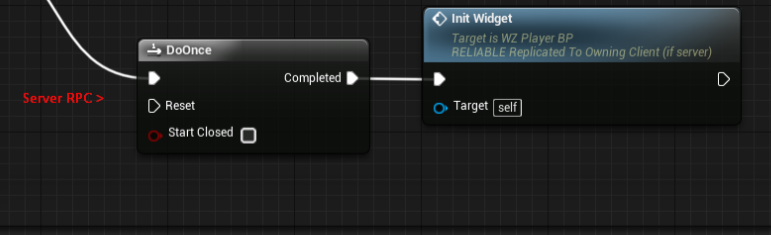 grand kestrel
It will run it as a function
Due to incorrect net role
And whatever is coming last is overwriting it with null
Put a switch has authority -> authority -> before it
You may find it never attaches
unique thunder
On beginplay, I run an event that uses a SwitchHasAuth and continues on Remote. I cast to gameinstance to get some variables and then I run the server RPC that calls that widget event.
grand kestrel
GameInstance can not call RPC
unique thunder
no it's still in the player BP
but I need my local game instance to pull player variables
grand kestrel
Ah
unique thunder
before I run the RPC
I pass the variables in through it
but that same RPC happens to call the local widget event
grand kestrel
But if you do SwitchHasAuthority -> Remote thats never gonna RPC
unique thunder
it's just for timing, I need the widget to initialize after the server RPC is complete (so at the end of it)
oh
grand kestrel
Because a remote client can't call an RPC to another client/itself
It'll just run it locally as if it were a regular function
unique thunder
That's strange.. I have repnotifies set up to that server RPC and they work correctly ...
It replicates the data
It calls a server RPC
grand kestrel
Anyway, I still haven't seen the whole graph, so I can't tell you where to fix
unique thunder
It's on a ded server
grand kestrel
My food arrived, I'll look later if you still need it
 stone narwhal
So i am starting making my first game in unreal, starting small with possibilities of multiplayer in the future, is multiplayer hard to do
twin juniper
multiplayer is easy, efficient multiplayer is where things get tricky
grand kestrel
Adding multiplayer later is a false concept a lot of new devs have, you need to build for it from the start
twin juniper
yea for sure
when making multiplayer you have to keep in mind of the 3 viewers. theres the server, the client, and then the remoteclient (other players). All three of these might have the same copy of an actor on their machine. everything runs in parallel. In the code things like if server/client/LocallyControlled then else are used to determine what code does what.
stone narwhal
@grand kestrel i just dont have much experience
twin juniper
http://cedric-neukirchen.net/Downloads/Compendium/UE4_Network_Compendium_by_Cedric_eXi_Neukirchen.pdf check this out, its an amazing read
stone narwhal
i dont wanna give up cause idk how to do multiplayer
i will soon, im working on level design
or at least ideas
grand kestrel
If you're inexperienced you will hit walls before you finish a game
And start over
Don't worry so much about your final product until you know you can make it
stone narwhal
im just starting with simple stuff and adding as i go
so making guns that shoot
then adding ammo reserves
then health
all that
grand kestrel
Guns that shoot are one of the most advanced things you can do in MP
x100 if its server authoritative
stone narwhal
then i probably wont do multiplayer
@grand kestrel what do you mean by server authoritative
 slender yarrow
Box collision of a bullet isnt working on a dedicated server. I have it set to fire some events on component hit but nothings happening. You can even see the bullet going through every wall off into the void. Anyone experience this?
 harsh lodge
How to forward port when game opens automatically for listen server through internet without manually configuring via router.
For coop multiplayer games we never configure port forwarding manually
Is there any option in ue4 to automatically forward port using third party plugin when game starts?
thin stratus
No
You would achieve this via NAT Punch Through
Which services like Steam do for you
If you don't use this, you need to either open ports by hand or implement your own
harsh lodge
Can u explain me more about NAT Punch through
 molten prism
hello does any has suggested dedicated server management tool solution?
real yacht
@molten prism i have my own solution, so i think that depends what do you need
 wary wyvern
Guys, What is the correct way to move character on server side?
AddLocalOffset isn't good, as it makes client side character look laggy
olive pawn
[HALP PLZ] im trying to work this stuff out aswell, its tricky for custom movement, i need somone to explain when all these fucntions are called and which ones i need and what to put in them :S
ive kinda got something working but theres issues that i dont know how to adress
my movement ability to grab a ledge works flawlessly in solo, and it works mechanicaly in multi, but sometimes in multi it wont grab the ledge or it will say it grabbed but falls down
im sure its got something to do with SetMoveFor() or something along those lines but i dont know how the system works at that level, its not clear in the docs
real yacht
i'm getting network error outdated client while my client is trying to joiin dedicated server
first time that i see this message, few builds earlier i didn't have that message
any suggestion?
 flint plaza
Hi guys. I am hosting a session on a map in a standalone using Null online subsystem
and then joining via editor (tried standalone as well)
I reach the correct map
but the client pawn gets deleted
and get the error in output window of the above picture
can someone tell me what's wrong?
I get reset to 0,0,0 in world as well
 rotund sapphire
@wary wyvern, there is a whole bunch of networking implementation for Character class (in the char move component) that takes care of synchronizing your pawns. If you move your pawn on client side first (like for instance as a local player) then it will replicate this to the server automagically, you don't have to worry about that part actually. Unless you're trying to do something else here.
real yacht
@molten prism well, i jave created my ded.server manager in c# and nodejs. i have my manager in c# who can start dedicated server with specific commands, and i have nodejs server so i can communicate with my c# app and database
flint plaza
Can someone look at my situation? I didn't find the solution throughout this server and all of answerhub.
real yacht
try to set your player controller and not default player controller? you have your pawn, but do you use default player controller or you have your own? @flint plaza
thin stratus
You should def only try Standalone to Standalone
Or inside of one and the same Editor
Not any mix of that
real yacht
i had a same problem, but i forgot how i solved it
i think that maybe you didnt setup correct game mode, default game mode
something like that
flint plaza
No I have my own game mode
thin stratus
And that doesn't happen if oyu just press play with two players in PIE?
flint plaza
having my own empty playercontroller instead of the default PC also doesn't help
Happens in PIE mode too
for the client
thin stratus
Then your setup itself has an issue
flint plaza
How can I figure out what's wrong
I know for sure that the client has travelled to the correct map
because when I F8 and go to the place where the server is
real yacht
which game mode your map is using (where client arrive)
harsh lodge
For using oculus platform SDK should the build be uploaded in the oculus developer dashboard?
real yacht
for distributing you game yes
harsh lodge
No for testimg
real yacht
but for testing, you just need to have oculus gear and sdk
real yacht
im not sure about that
harsh lodge
I just created an app in developer dashboard and copied the appid to use under online subsystem in default engine but it can't find any servers
thin stratus
I worked on a game a few months ago
But I think the client had that setup already
It was def working without the store
We were able to see created sessions in the web interface
real yacht
im calling this on client
what is the best way to replicate this rotation?
if im using rpc, that is using too much of bandwidth
and its getting laggy
real yacht
it's a mistake
just turn
with rpc
1vs1
i got this
i think this is very high number of rpc calls
and after x minuts, its become laggy
at the start everything is smooth
thin stratus
Well, I would do it like this:
Do it on Tick, cause you want to update it smoothly (and is has nothing to do with the Axis Events you are using).
Make an UNRELIABLE ServerRPC that passes a NetQuantized Vector (you can find that type if you look through the available varaible types).
Send the HITLOCATION of the trace via this.
That should be okay
 jolly siren
Replicate less often and smooth more clientside if you want to use less bandwidth and can sacrifice accuracy
thin stratus
Yeah you could setup a Timer
And let that replicate the variable less often
And then just interpolate the current and new value
jolly siren
Exactly 😃
real yacht
that make a sense 😃
molten prism
@real yacht how about the memory cost for each dedicated server instance?is 180mb normal?
real yacht
i didnt measure still testing in team only with one instance
so i dont have that information
rotund sapphire
i think 180mbyte is very narrow. My 4x4 world uses 400-500mbyte. So it is content specific at the end.
molten prism
how many instances is suggested?Should we allow players create dedicated from our vps?
servers like PUBG seems cost lots of server resource
real yacht
well, it depends, but currently im reusing instance, if there is no players, everything is cleaned and waiting for new batch of players
and if is busy, instantiate new one
etc
bitter oriole
180MB is pretty low
@molten prism These are pretty broad questions. If your game requires dedicated servers then it's up to you to handle that infrastructure and spin up instances when it's needed
And shut them down once no one plays on them
How many instances per VPS is purely a function of your game requirements and your VPS capabilities
molten prism
yes i decide to do so
maybe i will let players host game from their machine using steamonlinesubsystem
and mix the servers
to the clients side
bitter oriole
In that case you won't need dedicated servers, yes
Daily reminder than your servers would need steamonlinesubsystem anyway
That doesn't depend on your hosting method at all
molten prism
i just worried about the ping on the servers from players does it lag for other players
real yacht
dude, first start coding, than solve problems 😄
bitter oriole
Ping might be slightly worse, but the bigger issue will be performance, and cheating
Performance = if the hosting player has 20fps, all game updates will run at that for all players
Cheating = hosting player can kick people etc
Generally this is fine if your multiplayer is about playing with friends
It's not fine for any sort of competitive game
molten prism
yes
thin stratus
Bug Fix: Role and RemoteRole now stay in sync on Server and Clients when changing Possession.
They didn't before?
rotund sapphire
Yeah they didn't really, i noticed such problem indeed. In 4.20 at least.
thin stratus
@lament cloak There is some steam stuff in the 2/3 of the page
Under Networking
No idea if it's about dedi servers though
haven't checked yet
Crash Fix: Steam Dedicated Servers no longer crash on LAN due to invalid account information. Servers now send out the correct Steam LAN account identifier. @lament cloak
Crash Fix: Trying to matchmake as a Steam Dedicated Server no longer causes a crash.
New: Added the “-SteamServerName” command-line option to enable developers or server hosting providers to set Steam dedicated server names/titles of up to 63 characters at application launch. The name will appear on the external server browser UI (and in some cases, in game). This also fixes an issue where servers running on a headless Steam instance (not logged into an account) would show up in server browsers as the dedicated server's numeric ID.
Example usage: -SteamServerName=”My Test Server”```Does anyone have an example of a CMC driven ability such as melee that performs a lunge? I'm curious as to how people decouple the movement part of it from the rest of it (damage, sfx ,etc.). I'm talking about an event driven by a custom flag similar to jump, sprint, etc.
thin stratus
I don't have one for CMC, but my HoverComponent basically is a CMC.
rotund sapphire
erebel how about root motion animations? You can perhaps combine it with changing the capsule size either with crouch or manually.
thin stratus
I actually have no root motion at all anymore in the movement comp
But I guess RootMotion could work? If you use the animation itself to drive sfx and damage hit/overlap?
rotund sapphire
Yes with animation based approach, it comes with a useful timeline to implement such effects too
jolly siren
I'm hoping to see how people split a CMC oriented approach across character and CMC. Right now I'm using a custom CMC flag bWantsToMelee and setting this to true on input. Then I check for a change of that bool in PerformMovement and call StartMelee if it turns to true. I then call handleMelee within PerformMovement until the player has finished the lunge and applied damage. StopMelee applies the damage and plays the impact sfx.
The issue is that this damage and sfx gets replayed on corrections since I'm calling it from PerformMovement.
I want the movement part of the melee to get replayed correctly so I don't get any rubberbanding, but not the other aspects of it (dmg, sfx, etc).
But no, I'm not using root motion
My current approach is to check against bClientUpdating and not apply the dmg, play the sfx, etc. if it is true. But I think there is a better way to decouple the lunge from the rest of the melee.
thin stratus
That sounds okay too
That's what Epic suggest afaik
The bClientUpdating
They don't use it by default but they pass in if it's a replay or not
jolly siren
Okay cool, I'll give it some more thought and think about the best way to break this up
Thanks Cedric
thin stratus
I only do fx
and they should be played anyway
So I only do "bIsHoldingSprintKey"
They start sprinting
etc. etc.
Using a RepNotify bIsSprinting and a Delegate to implement the fx outside of the cmc
Which reminds me I'm probably only broadcasting in the onRep :x oops
 unique thunder
If I use my client-controlled pawn, I can get access to the GameMode by going through some hoops, but I have an AI-controlled pawn that also needs to access the GameMode. How do I let him do it?
winged badger
unless you changed AIController replication settings, then you need to be careful about it
 night umbra
Hey folks, I'm repeatedly running into a wall when writing multiplayer code, specifically with RPCs dropped even though all the documentation I've read (Unreal's replication documentation and the Compendium) suggest it should work. Specifically, I have a situation where an actor is owned by the correct pawn, which in turn is owned by the correct player controller, but ClientToServer RPCs are being dropped completely on that actor. At least, the ownership hierarchy APPEARS to be correct..
yup, a test just confirmed it's the local player pawn and the pawn's owner is the local playercontroller. Still drops the reliable ClientToServer rpcs on 4.20
rotund sapphire
You may have to call the SetOwner() specifically on that actor to make sure the pawn owns it. I usually do this when spawning something.
But maybe you can implement this in the pawn's logic to have a replication available for those child actors.
night umbra
does it not get applied correctly if the owner is set as one of the spawn parameters? The owner is set during spawn
But regardless the debug output shows the pawn as being the owner using GetOwner() to get the owner's display name
rotund sapphire
There is a SetOwner node, just call it after that spawn event and let's see it fixes it for you
rotund sapphire
It's unusual, you must be overlooking something i think
night umbra
I think I figured it out. I thought the server was the one actually spawning the actors, but it turns out it wasn't. So the owners were being set as the server's version of the actor, when the local ones are actually different actors with the same name
there are some other things to work out with having the server spawn them but that works now at least
thin stratus
So I wasn't able to pass one ControlQuat FQuat to the Server, because getting the Rotation Around the Current Up (Trace Floor Normal) resulted in non-sense on surfaces with a Y!=0 Normal.
Now I pass the full ControlQuat and a ControlUpQuat, which only holds the rotation around the UpVector...
Probably not the best solution but well
thin stratus
Destroy it on the Server, yeah
bitter oriole
Hey Cedric, just a warning
I found FQuat RPCs to fail
I don't remember the issue but moving to FRotator magically fixed it
Just for the RPC
thin stratus
It's all fine here :x
The main issue I had was
void FQuat::ToSwingTwist(const FVector& InTwistAxis, FQuat& OutSwing, FQuat& OutTwist) const
{
    // Vector part projected onto twist axis
    FVector Projection = FVector::DotProduct(InTwistAxis, FVector(X, Y, Z)) * InTwistAxis;

    // Twist quaternion
    OutTwist = FQuat(Projection.X, Projection.Y, Projection.Z, W);

    // Singularity close to 180deg
    if(OutTwist.SizeSquared() == 0.0f)
    {
        OutTwist = FQuat::Identity;
    }
    else
    {
        OutTwist.Normalize();
    }

    // Set swing
    OutSwing = *this * OutTwist.Inverse();
}
That this was returning shite for OutTwist
But only in the scenario where the Quat in question was oriented on a wall and InTwistAxis was the wall normal with something Y!=0
Maybe I revisist it later again to see if I did something wrong
But now with the second quat that is just there to hold rotation around UpVector. All the rest works
So I can only blame this function
(But thanks, I'll keep it in mind @bitter oriole :P)
bitter oriole
Yeah I'm sure I had something deeper going on but well
real yacht
i have managed to optimize turret rotation from 30k rpc calls to 8k for whole session
i have send only z from net quantize vector
thnx @thin stratus
thin stratus
Cheers
flint plaza
Can someone answer my query I posted about yesterday? I am still stuck on it
no solution on google or elsewhere
real yacht
@thin stratus when im updating speed in game with powerUp, after XY time of gameplay i have jittering
but when i start game with for example 1200 speed, its okay
every time when speed is updated something happens
any idea what can be?
real yacht
the maxwalk speed
is component var
it cant be set on repnotify?
or i'm mistaking
?
thin stratus
CurrentSpeed is a RepNotify variable?
real yacht
yes
thin stratus
Sooooo?
real yacht
when i pickup, my speed is increased and it's okay, but after 5 pickups (that equals speed 1200) it start jittering
thin stratus
Buddy
real yacht
but when i start game with speed 1200
thin stratus
I just told you how to solve it :D
Use the OnRep to set the MaxWalkSpeed
It's not that difficult
real yacht
i know
but max walk speed is variable from character movment component
how can i set to be repnotify?
😄
thin stratus
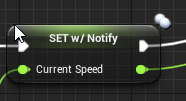


 real yacht
i know that, i was thinking that you are talking about some other var
 gleaming niche
use the notify of that variable
to ALSO set maxspeed on the character
to the new maxspeed
so client and server are in sync
so jitter goes away
so your local client isn't running at slow speed
while server is running at faster speed
i assume that's the problem anyway.
thin stratus
Yeah it is
thin stratus
You'd think I told them the same thing but well
bitter oriole
BTW @thin stratus are you still having issues with MP movement component ?
thin stratus
Less
Right now it's a general issue with Quats
hehe
Replicated Movement is fine by now
bitter oriole
The game I'm making now has MP hovering vehicles too 😛
thin stratus
Gnah, rip
@bitter oriole I mean you can do almost everything the CMC does
And then just add your hover movement calculation for the Velocity
It's not THAT big of a deal
But still annoying
I basically have a CMC clone that has only two MovementModes, no RootMotion code and some additional code for the hover and floor normal logic.
thin stratus
Not using PhysiX at all
So not Simulated Physic stuff
Can't easily do that over the net
thin stratus
Well I had a PID Controller at the Start
I started with Authority only
Then added the local client
And last added the simulated clients
The Authority version was working nice with the PID Controllers
But they caused too many errors if Client and Server had slightly different start values (position)
So my hover code is just one line
And my floor rotation is just a "Interp UpVector to new UpVector"
Works quite well
And makes it more likely to result in the same value for server and client
bitter oriole
How do you compute the ground normal ? Simple trace ?
thin stratus
Right now, a simple trace
But I need to change that
I had a SphereTrace
But that was picking up 90° edges
And the single trace is too.. well unbalanced?
I will most likely go back to x traces
And taking the average
Also felt nicer
bitter oriole
Basically my entire physics simulation is interpolating ground normal when altitude = 0 to vertical when altitude is >= constant
thin stratus
There sphere trace was finding these sides
Which is really shitty cause then it tries to rotate to that
Even if it's only for a frame or two
bitter oriole
I'm doing a trace at each corner of the object and averaging them, but the result can be unpredictable
Less than single trace
But only less so
thin stratus
// f(h) = Max(0, h * (g - f_max) / IDEAL_HEIGHT + f_max)
//
// f(0) = MaxHoverAcceleration = 3000
// f(DesiredHoverHeight) = GravityStrength = 980
// 0 <= f(> DesiredHeight) < g
NewHoverAcceleration = FMath::Max(0.f, HoverInfo.DistanceToFloor * (GravityStrength - MaxHoverAcceleration) / DesiredHoverHeight + MaxHoverAcceleration);
Old code I just noticed
That's the function that makes up the hover acceleration atm
Pretty straight forward
thin stratus
I had that
With 16 Traces
In a circle below the pawn
(can be less of course haha)
I took the Trace Hit
And used the direction towards the center of the pawn
And that 16 times
And then normalize it
That makes sure that the length of each trace is counted into the equations
So if you stand half on a block
And half not
You get moved off the block
Cause realistically the block generates more upmovement cause it's closed
That was one half of the stuff. The other was just adding the floor normals together and normalizing them iirc
It's somewhere in an old revision on perforce
bitter oriole
Problem is, even a median isn't an accurate representation
thin stratus
Correct, but you are only making a game
Not a simulation
Whatever feels the best
Is good
bitter oriole
It doesn't feel that good for now, so I'm still looking at a better surface detection
thin stratus
Hm it was feeling good for us. Maybe a different vehicle?
I mean we have this drone
That is round already
bitter oriole
I think part of my problem is ground clutter that I'd like to keep 😛
thin stratus
Could be(?)
I would suggest getting that feeling right offline
And then stepping into replicating that
Otherwise yo uare adjusting ServerMove etc.
And SavedMove the hwole time
with new info
bitter oriole
I already have a working version with saved moves & rep, and it's resilient to minor difference in simulation so I can change the simulation code without affecting MP already
(making it not actually a #multiplayer issue, I guess)
 ruby meteor
How costly is spawning a replicated actor bandwith-wise? I am spawning around 50-200 per second, stat Net displays only 3 KB/s and it works fine with a simulate PktLag of 40ms, so is it acceptable or will it lead to issues in online play?
bitter oriole
Spawning a replicated actor isn't costly in particular, no
Though it seems a weird process you have here
jolly siren
It depends on the actor. How many replicated properties it has, etc.
What is it you are spawning?
ruby meteor
Bullets/Lasers mostly
They have only 2 replicated bytes, so its not a lot data per actor
how costly is an actor without any replicated property? It needs to replicate location, rotation and scale, so 3 vector of 3*32bit each, so 12 byte per actor?
 knotty frost
don't forget the compression going on under the hood for replicated vectors, rotators
 chrome bay
50-200 per-second? RIP I would say
Spawning that many actors that quickly even outside of multiplayer is probably ill advised anyway tbh
jolly siren
Most of the time you would write a pooling system for that
chrome bay
^
jolly siren
That will help with the network side as well
Depending on how many you really need live at a time
thin stratus
50 to 200 actors per second, on 60 fps means 0.8 to 3.33 actors per frame
That's actually fine depending on the actor
Just to counter the "Spawning that many actors that quickly even outside of multiplayer is probably ill advised anyway tbh"
chrome bay
Yeah it's probably doable for sure, I'd just avoid it in the long run 😛
thin stratus
Yeah haha
chrome bay
But I'm a self-diagnosed premature optimizer
thin stratus
Our prefab system does that
While limiting it via delta seconds
To not cause too much lag
knotty frost
i don't know if this was/still is the case, but awhile back I read somewhere Squad uses replicated actors for projectiles? it seemed like it would be too expensive, curious if that is the case
chrome bay
we do to in HLL but we just don't have that many projectiles
thin stratus
@chrome bay Do you maybe have an idea how to limit a quaternion to an angle?
chrome bay
I imagine squad is probably the same
Hmm convert to rotation around axis and clamp maybe?
Quats are not my strongpoint 😄
knotty frost
we have been debating the issue for Escalation 1985 back and fourth, traces vs projectile actors
chrome bay
@knotty frost you can do travel-time with tracers too
don't necessarily need a physical actor to represent them if it's simple
thin stratus
Yeah idk, I have the Pawn's Quat and a ControlQuat. They have their forwardvector in the same plane.
The angle between them is basically the "Pitch" of the camera and should be limited to e.g. -45 to 45.
Now since we have no fixed up vector, Rotator's Pitch kinda doesn't work for this.
They also don't share any relative rotation to each other.
Both use the same ControlQuat. Just that the Pawn only accesses the RightVector of it.
Welp, tomorrow it is
chrome bay
lol story of my life 😄
 celest hatch
Hey guys will this course help me make my rpg multiplayer? https://www.udemy.com/unrealengine-cpp/
Udemy
Unleash the power of C++ and Blueprint to develop Multiplayer Games with AI in this Epic Games-approved course.
or do i need to look for something else?
 north swan
Hi guys. I'm currently working on a simple reconnect feature. Every player(controller) controls a pawn.
I overrode "PawnLeavingGame()" in the playercontroller to NOT destroy the pawn upon disconnecting.
Now when I reconnect and want to Possess() the Pawn (I saved its pointer on the server) the (dedicated) server crashes. This is the error:
Is that a nullptr? curiously enough, I do check for "nullptr" and it seems that it isn't?!
maybe someone has an example of a working reconnect and repossess feature?
jolly siren
If you show your code it will be easier to help
north swan
ok gimme a sec
this is called from PawnLeavingGame() before Unpossess();
i'm saving some info about players in a struct where everyone has a (i assume) unique network address
(at least it seems to detect a REconnection)
this is what i do on reconnect
curiously enough it says that it's NOT null
but it crashes when I try to possess the pawn
btw if you have any other code critique, lemme have i
t
jolly siren
it says playerController is not null?
north swan
is says playerCameraPawn is not null
jolly siren
playerController is what is null and is causing the crash tho
north swan
oh lemme check
compiling now. PC being null would be weird, since I call "OnPlayerReconnect" from PostLogin in the GameMode
also the line "playerController->GetPlayerNetworkAddress()" works
jolly siren
true
 night jay
So I'm looking at epic onlinr services, specifically metrics system. Is it possible to store session data using that or is it purely to track sesdiond themselves
meager spade
@north swan is that a override?
of a base class?
base function*
if so, your missing a super call
meager spade
also no need to call unpossess
pawn should be unpossessed at that point
{
    if (GetPawn() != NULL)
    {
        GetPawn()->Destroy();
        SetPawn(NULL);
    }
}```the base class destroys the pawn
north swan
yeah but I don't want to destroy the pawn
meager spade
ah
north swan
gotcha
meager spade
cause it will get destroyed
but you do want to set Pawn to null
if its valid
and like i said Unpossess should not be called at that point
even though i doubt it will hurt
north swan
ok I'll apply that and try, thanks for your time btw
welp, still crashing when I try to possess the pawn. I guess I'm missing something essential
north swan
yes, I reconnect (after leaving once) and the server crashes
when trying to access the pawn
north swan
north swan
cant find the crashlog for the dedicated server
celest hatch
Where could I get a tutorial that teaches how to make an rpg multiplayer?
north swan
I'll check line 772
worthy wasp
"No owning connection for actor - server RPC wont be called"
How do you properly call off an event on an actor you dont own (think of interracting with some object in the world - you need it ot replicate to all other players)? The actor is a statically placed object in the world map
I thought that you would run a local function on the interracted actor, which calls a server RPC event - but i'm getting this error above when i do so.
meager spade
well the object needs to be owned by something
with a connection (ie playercontroller)
if its placed on level, it should be owned by the server
worthy wasp
thats cool & all - but how do you own something that is statically placed in the world?
right so...
what would be a proper chain of events to interact with it and have that interraction be replicated?
meager spade
so it wont need to do a rpc call as the server owns it
hmm
these are not spawned but pre-placed right?
and its set to replicates?
north swan
that's line 772 in the PC
worthy wasp
when i do that and test - its only on the local client that interracted with it
all other clients see it still unchanged
and yes - pre-placed..... actor class is set to replicate.true
meager spade
you need to clear the controller
from the pawn
when its being removed
the old pawn still has a pointer to a controller
which is now not really valid i assume
but its not null
worthy wasp
@meager spade - see above?
winged badger
@worthy wasp if you want to send a Server RPC from inside an Actor from the Package
you should call SetOwner on PlayerController of the player doing the interacting
imo, a bad way to go about it
jolly siren
Has anyone written any prediction code for a melee lunge? I'm working on a melee that shouldn't attempt to lunge if it is going to miss (because of collision, the target moving, etc.)
I have went through a few different options for the lunge itself. SetActorLocation with sweep, velocity, teleportto, etc. I guess I should run a simulation right before running the actual melee to see if we reach the target.
north swan
does anyone have a working example of a reconnection to a server with repossession of old pawns? it's driving me nuts. and @meager spade , unfortunately clearing the controller of the pawn (with SetOwner()) didn't help
and it's so weird that
if (playerCameraPawn == nullptr)
equals FALSE but as soon as I call ANY function on playerCameraPawn, it crashes with an access violation
winged badger
that happens only when another thread is involved
did you try to step through it? check the UObject flags and how the Object looks in Locals?
north swan
oh, I think I've never done that before
what do you mean by checking the uobject flags or locals? sorry if it's a dumb question
winged badger
when the thing crashes, when run from VisualStudio
it will hit a breakpoint
which gives you a snapshot of what was going on just before it crashed, as well as additional one for each step backwards in the callstack
if you can't reproduce the crash in editor, i suggest you override the Possess function with exact copy of itself in your custom PC class, cook the project for DebugGame and then just open it in VisualStudio and press F5