#multiplayer
1 messages · Page 449 of 1
 fleet raven
I'm finding conflicting information online, a test seems to show that it's always atomic, and the actual code is hidden so deep in rep layout that I can't find it
 rocky badger
Besides the multiplayer compendium and the Udemy tutorials, are there any other resources anyone would recommend to study good cpp multiplayer practices?
 thin stratus
You could look at the ShooterGame and the UT source code
Not sure how "good" that is, but well
 plucky horizon
Is there anything stopping me from having a client be authoritative and replicate to the server so that it can replicate to other clients? Or something of that sort?
Cheating isn't really a concern for what I'm developing so I'm wondering if there is something else I'd need to worry about.
thin stratus
UE4's default way of replication is Server->Client
That's it
If you want to make the Client Authoritive, you have to use a ServerRPC in a Client owned Actor
plucky horizon
hmm
could you tell me what the RPC is for?
replication protocol component?
found it 😃
 solar stirrup
What exactly should I put in a player's state?
Let's say for an FPS game
Should health go in there?
 oak pond
guys, how is multiplayer testing generally done?
for something like this for example https://youtu.be/0K8q8ud9uOM

and how does the whole connection thing work, does it vary across machines?
as in lag, ping
 winged badger
@fleet raven reading NetSerialization.h might point you in the right direction
fleet raven
I like how these methods don't exist

so if you have a native struct with a operator==, it won't use it for comparing equality for replication unless you manually flag it as WithIdenticalViaEquality
reading into the replayout from inside ReplicateActor, it actually looks like it will always send all modified properties at once if replication is triggered
guess the question then is what happens when this packet is lost and the next one with a different set of modified properties arrives first
 jolly siren
Has anyone seen characters prepended to a string when replicating?
It only looks to happen when the string only has numeric values in it
winged badger
@fleet raven i believe bunches arrive timestamped
so net driver / data channel should just ignore any replicated properties that it already received with a most recent timestamp
oak pond
but I mean how would I even test it out as in even joining the server
I know a thing where you can open multiple viewports but I think I heard that doesn't work for steam
and the thing is a great dev team of three or four guys who made Blood Party had multiplayer in it but even now it's still very laggy based on the distance irl
you have to be at least in the same country for it to be great connection
BP was also made in ue4 btw
 real yacht
epic services will support sessions right? like steam subsystem?
 bitter oriole
In the future yes
bitter oriole
Yeah
 safe marsh
hey, when I select 'run dedicated server' in the launch options, is the editor viewport the dedicated server?
In game mode beginplay, I open a map if it is a dedicated server, but if I try PIE it opens the map on the client instances also
 twin juniper
Hi i have a probleme that when i spawn 2 players that the ui from the other player is displayed on the other player and backwalks also does anyone know how to fix it?
 scenic raven
        if (InputComponent)
        {
            UE_LOG(LogTemp, Warning, TEXT("I have an InputComponent"))

            AbilitySystem->BindAbilityActivationToInputComponent(
                InputComponent, FGameplayAbilityInputBinds("ConfirmInput", "CancelInput", "AbilityInput"));
        }
        else
        {
            UE_LOG(LogTemp, Warning, TEXT("I have no InputComponent, I am sorry."))
        }
``` I have been able to narrow it down a little. No crashes anymore, it was the reference to InputComponent, null on the server. Problem now is that when I run this in the editor and I tick the dedicated server box it doesn't work at all. I expect it to run on the client but instead it doesn't. Any clue?This is an x-post from #gameplay-ability-system but maybe it's more related to networking.
 keen thorn
Hi guys, I think I found a bug for 4.20 as well as 4.21, wondering if this is a bug or intended. I have this blueprint, which basically set velocity of a ACharacter in the level
BP
when i run this on multiplayer PIE, the server version of the character stands still, while the client moves slightly according to the velocity
My expected behaviour is that they both should either stand still or move
safe marsh
is there any way to set the map in an editor dedicated server
it loads the currently open map (as the dedicated server map) when I try to change it in the gamemode, it loads an infinite loop
 soft relic
Hello guys, I was wondering what would my approach be to creating a game with dedicated servers instead of steam. How woulld I do that and what service should I use?
Is there something that can allow me to store user data and create session or would that be 2 seperate things?
 twin vault
to store data you would create your own thing, or the platform storage if it has one, like steam leaderboards
for sessions you can use steam, etc. Or create your own matchmaking
soft relic
Would my own thing be something like gamesparks?
safe marsh
well seems like the PIE multiplayer configuration is completely fucked
soft relic
or a hosting database?
twin vault
both are valid options, gamesparks are supposed to make it easier
but you can create your own database, if you want
soft relic
I've read that using a simple database is bad for lets say getting player position last position whened logged off, xp etc
bitter oriole
@soft relic Steam has nothing to do with dedicated servers or not dedicated
It's a distribution platform, and it can be a matchmaking / session service
It does not do hosting
soft relic
What would I choose if I wanted servers that did not have someone be the server host?
Like steam does
bitter oriole
Steam does not do that.
safe marsh
all I have to type from my entry map is "open [IP]" to connect to my remote server which is on a different map
soft relic
Yes, what should I go for to achieve that?
bitter oriole
Steam does not care or intefere with your multiplayer model
It is absolutely unrelated
safe marsh
when I try it with a local dedicated one, it wont load
"open [IP]:[Port]" loads it if it's the same map
safe marsh
use some cloud VPS
soft relic
Okay cool, I will look into that. And for data what would you guys suggest?
twin vault
depends on how much data you need
in my case i just did a cloud mysql database, cuz its like 10 bucks and i only needed a couple tables
bitter oriole
Realistically, the first question is how many players you think you will have
That will define quite a few things
twin vault
if its not something really important, it can be even local saves
soft relic
Im not really developing a project that will need that, just curious for future projects
Okay, btw does blueprints support getting data from databases?
or is it a code only?
bitter oriole
Code doesn't support it either
twin vault
i think there are plugins for rest requests in bp (you would still have to code rest requests backend tho :P)
bitter oriole
You'll need to integrate some kind of connection service
bitter oriole
Hopefully database singular
Databases support thousands of connections, few games on Earth have that many game servers
soft relic
correct
safe marsh
ok nvm Found a workaround
soft relic
Is SQL Database Communicator plugin a good one to use?
I also saw that it is better to hold information in the dedicated server instead of using an online database and php
twin vault
database is for persistent data
soft relic
yeah i mean having the database
in the dedicated server computer
instead of using php
twin vault
dedicated server probably wont be a single computer, depending on your game
you want to have instances booting each time someones want to play on a server
soft relic
Is there a video or a documentation that can show me a proper way to save data online from UE4?
bitter oriole
No
That's way more advanced that most indies do
It requires lots of infrastructure and different skills
If that's what you want to do, you need to build brick by brick until you have something that works
soft relic
So lets say I want to make a game and have a username password etc. How would I do that simply?
 wary wyvern
Guys, what is the size of UObject pointer, replicated over the network?
soft relic
Well I mean the best way
twin vault
the easiest way to do that would be learning Databases > SQL > PaaS > Python > Rest > C++
and in around 1 year you would make a login system
soft relic
Developing an android add and getting data from firebase is one thing you do in that field
isnt there something equivalent here?
bitter oriole
What i'm saying is that
- Making a game is hard
- Making a multiplayer game is very hard
- Making a multiplayer game with dedicated servers is very very hard
- Making a multiplayer game with dedicated servers with databases and a dedicated login support is basically making a MMO
soft relic
I do know most of those languages
twin vault
if you know python, and SQL, making a rest backend should trivial
no tutorial needed
its just a matter of following small steps, to build whats needed for such a system
soft relic
But I can always go with something like gamesparks for a faster solution right?
twin vault
sure, thats why most people go with Steam, no login, no matchmaking, all built in
(unrelated to your case of servers)
soft relic
I tried making a register/login system with that today and it took me less than 10mins to setup
Could I use steam and gamesparks to get data from?
so a player would use steam to connect to each other but gamespark to get all the neccessary data fom
from*
twin vault
not sure what features gamesparks have but from a quick look yes
it works with steam and has database access so ye
safe marsh
there is a tutorial online with how to setup a dedicated server build of UE4(you need a source version to build the server executable)
the hard part is interfacing with a db and serializing the objects so they can be loaded in when the client reconnects
 astral gust
Hey :), does anyone know if IOnlineFriendsPtr->SendInvite() is working? In our project the async task returns the error "SendInvite() is not supported".
fleet raven
probably depends on which OSS you're using then
astral gust
We're using Steam
fleet raven
does not appear to be a thing steam lets you do
or at least, it is not implemented in unreals OSS
astral gust
Well that sucks.
Will try one of the other delegates then. A bit strange that AdvancedSessionsPlugin seems to use it too.
bitter oriole
It does not exist in Steam
Advanced Sessions has a stub for it
IIRC Steam itself doesn't have the feature
 rain coral
Hey. Got an issue where I send a struct to the server. If I print the values as the client before I send it to the server, they're fine. But they're wiped when the server receives them
rain coral
C++
rain coral
Aaah, I think I didn't. Will do
thin stratus
@astral gust You should be able to invite users
Try
OnlineSessionInterfaceSteam.cpp Line:1105 (4.20)
@fleet raven @bitter oriole Also tagging you two, in case you ever get such as question again
astral gust
Thanks for replying Exi. I've been trying to get SendSessionInviteToFriend working for some time now, but it keeps failing
I'm not sure if there is a way to get the error message using a delegate for example.
There's barely any documentation on this :/
thin stratus
Well they are printing a lot of Verbose warnings
have you enabled them for LogOnline?
Can't remember how you hook into it
but you have to bind to a delegate somewhere
Think I did that in the GameInstance
GameLobbyJoinRequested_t
bitter oriole
Thanks Cedric
thin stratus
Steam Response Delegates DO NOT come in on the GameThread
So if you receive that and you access the GT (e.g. add a UMG widget) you'll crash
make sure you move whatever you want to do to the gameThread first
//Send Blueprints Notification
AsyncTask(ENamedThreads::GameThread, [this, FriendName]() {
    BPEvent_PartyInviteReceived(FriendName);
});
I sadly have 0 idea where the f*ck I added that to
But I still had that laying around
 void nest
Packaged project (shipping) crashes when using steam_appid.txt file with own appid and also 480. Anyone know why?
error message:
LowLevelFatalError [File:Unknown] [Line: 1178]
FMallocBinned2 Attempt to realloc an unrecognized block 00007FF7EA130000 canary == 0x0 != 0xe3
when I remove the steam_appid everything works fine
astral gust
Did you check the config here: https://wiki.unrealengine.com/Steam,_Using_the_Steam_SDK_During_Development ?
void nest
I'll check it again, but yes I have added the required entries into the defaultengine.ini
thanks!
It used to work fine in our previous version of the project (4.18) we migrated to 4.21 and now it gives the crash
astral gust
No problem. It's a bit a vague debug error though. Do all of your maps and BP's compile fine?
void nest
yup, no errors
astral gust
Are you using any plugins like substance by chance?
astral gust
So I am aware of two things that could cause it.
Make sure houdini is recognized and compiled for the project. You can see that by viewing File in the project and see if the Houdini Engine buttons are enabled. You can also see it by building your project from source and looking for the output log messages where the Unreal Build Tool will try to find and link Houdini.
Then for shipping a build you can try to copy the plugin data into your project's plugin/engine/runtime folder
Usually the latter will help when shipping with the Houdini plugin enabled.
So if that helps copy the HoudiniEngine folder from C:\Program Files\Side Effects Software\Houdini XX.Y.ZZZ\engine\unreal\4.XX to X:\Path\To\YourUE4Project\Plugins\Engine\Runtime\
That might work @void nest 😃
void nest
Thanks a lot for the help 😉
I went over the ini file and saw that I forgot to add something
I added it now, recompiling. Hope it works
astral gust
Alright
void nest
forgot to add:
[/Script/Engine.GameEngine]
+NetDriverDefinitions=(DefName="GameNetDriver",DriverClassName="OnlineSubsystemSteam.SteamNetDriver",DriverClassNameFallback="OnlineSubsystemUtils.IpNetDriver")
so fingers crossed that that was the issue 🤞
oak pond
I love scrolling through 167 messages only to find I got no replies
astral gust
@void nest Great to hear!
@oak pond In our case we just test running with 2 instances using the viewports. Then when we think it's stable we request a review with 2 peer programmers from Swarm and test the changes manually. Not sure if online functionality is easy to test automatically. Maybe some Epic devs can answer this instead.
oak pond
ok, thanks
keen thorn
Hi anyone know why a character actor resist setting velocity up to around 30 on server but not client?
is it because the AI controller is doing something to it on the server only?
thin stratus
When a Server corrects the Client. The Client will discard all moves PRE Timestamp of the correction, apply the correction and then replay all POST Timestamp moves, right?
I don't quite get why the CMC shows a capsule on the client on the corrected location and the current location
These are def quite a chunk away from each other
LogNetHoverMovement: Warning: *** Server: Error for BP_Hoverdrone_DEV_C_1 at Time=101.491 is 1.787
LogNetHoverMovement: Warning: *** Client: Error for BP_Hoverdrone_DEV_C_1 at Time=101.491 is 37.326
LogNetHoverMovement: ClientUpdatePositionAfterServerUpdate Replaying 3 Moves, starting at Timestamp 101.507202
LogNetHoverMovement: Warning: *** Server: Error for BP_Hoverdrone_DEV_C_1 at Time=101.524 is 1.917```Also why is the Server always printing another error after it already found one 🤔
keen thorn
Im also confused :(
fleet raven
@winged badger right that makes sense to use the timestamp, but then a situation like this could happen:
frame 1: change property A and B, send bunch containing them
frame 2: change property B, send bunch containing it
client receives only bunch 2, so it updates B, and is now in a state that has never existed on the server
thin stratus
Don't you need to send the Client's EndResult then?
Means in Frame 2, the Server would already notice that the Properties are not synced
The double printing of the Server seems to be normal
Comes from the 50-80 ping
CMC does that too (just tried). Gets a lot worse when you have a higher ping
keen thorn
setting character movement component velocity is so weird, it desync server and client :(
thin stratus
You don't want to just set it
You can use other things, like LaunchCharacter and such
To apply some forces
Just make sure you do that on server and client
That stuff is not replicated by default
keen thorn
when i set velocity on server, the velocity gets replicated correctly. But the server pawn doesnt move for small velocities, while client keep sliding (as it try to simulare)
simulate
setting velocity to like 20 gives this desync
im trying to make a kinda force push field
thats why i set velocity
for smoothness
but then I encounter this issue
 limber mortar
I have a multiplayer blueprint actor with a particle effect. 100 or so of these can be dynamically spawned in game per tick. Is it more efficient to keep the particle effect within the blueprint as a component, or spawn an emitter from the blueprint? This would spawn multiple emitters per tick in my game.
winged badger
the more efficient way is to pool inactive ones, then just Pop the top one and reuse it when needed
solar stirrup
What exactly should I put in a player's state?
Let's say for an FPS game
Should health go in there?
winged badger
Anything that is publicly available to all players can go there
also, everything you need to restore the player after it disconnects, if you are supporting that
as the PS will survive its player disconnecting
solar stirrup
hmm okay
winged badger
health can go there, but it somehow fits on a Pawn more naturally
if you are using any teams/team display widget
PS makes a good context for it
solar stirrup
aight
winged badger
but i think in its original design it was meant to hold stuff like score
limber mortar
oh so I can pool them eh, that is good to know
This is the last actor I need working for my game, so I don't want to make any major changes, but I will look into it
I'm a UE4 noob, first game ever
winged badger
@solar stirrup i am working on a co-op game, my PS mirrors the variables for Health, Armor and Ammo
and i am using that for bindings on a list of widgets, each representing one team member
solar stirrup
Why not have them in the PS and have the Character/Pawn reference them?
unless that's what you do already
winged badger
they just don't belong there
Health and Armor have their own components
on the Pawn
PS just hooks into OnHealthChanged/OnArmorChanged delegates and updates its values as required
i really don't want to make my PlayerState into a GodClass so i can more conveniently display 3 progress bars in the UI 😄
i do keep my inventory on the PS, so i can restore it if a player disconnects then reconnects
solar stirrup
ty
alright so I have an event that happens every X minutes which starts a healing process for all players
what that means is that it should activate a particle effect on a component that exists on all players
- start healing the player server side
how should I do that? I've been thinking about have a NetMulticast RPC called from the server that broadcasts a delegate on all clients to activate the particle effect
and then another to stop it
winged badger
simple bRegenerating with OnRep that triggers a particle effect as well as client side simulation of regeneration
it will give a smoother feel on clients then just relying on health replication updates
 ember needle
all, given the free online services from ue4 i’m thinking to convert to them for matchmaking and chat. i’m currently using steam through advanced sessions. this is probably a noob question but is my understanding correct and if so, where can i get started?
 sharp pagoda
@ember needle https://dev.epicgames.com/en-US/services

Epic Online Services
With Epic Online Services, we're making it easier and faster for developers to successfully manage and scale high-quality games. As a game developer ourselves, we've tackled numerous hard problems over the years. With Epic Online Services, we're sharing the fruits of our labo...
ember needle
yes but what is the subsystem
sharp pagoda
Mmm that's a bit too broad. It's similar to Steam, just an online player management infrastructure
fleet raven
you can't get started yet
unreal integration has not been released yet
and most of the services haven't either
 meager spade
@fleet raven you probably could get started if you read the api and implement it in 😄
fleet raven
yeah but that seems like a lot of work when epic will do that themselves in half a year
man confusion level over 9000 when trying to add new correctly predicted behavior to char movement
solar stirrup
@winged badger hey! above you told me to "predict" the health regen on the client
if I add health on each tick on the clientside, that won't replicate server-side right?
winged badger
no, replication is one way only
solar stirrup
aight great
which order does it happen tho? like if the server modifies the value
and I try to edit
is it:
- Receive value from server
- Edit client side
or
- Edit clientside
- Receive value from server
replication processing happens before actor/component ticks on the client side
so the first
fleet raven
replication will take a while to arrive with a then-already-outdated value
solar stirrup
there's no way the user will have the time to see the health jitter for a single tick
ah
hmm
fleet raven
how much it is outdated depends on your clients latency
solar stirrup
how should I proceed then?
I could change the heal to be by increments of X every Y seconds instead of linear
like 20 every 2 seconds
that way unless the player has a latency of 2000 ms it should be fine 
fleet raven
whether you need to care about this depends on how important it is for the client to not see a value outdated by ~100ms
winged badger
yeah, but the delay from replicating a bool that starts the simulation and first server correction will be minimal
after that simulation is accurate, it won't get corrected
 steep grail
Does anyone know a good tutorial for making a server to run a game I'm trying to make. I want to set the game server up on a spare PC and have it running all the time and then check for updates, update server then send the update to the clients.
astral gust
Hey guys, since I couldn't solve the issue with the session state for Steam last week, and also couldn't find any relevant threads, I made a forum post https://answers.unrealengine.com/questions/884379/view.html.
winged badger
@astral gust, are you calling StartSession synchronously right after CreateSession call?
twin juniper
yea if its got an underscore almost always needs ufunction or uproperty lol
i still cant get over "_Implementation"
jolly siren
Does NetUpdateFrequency affect rpcs or only property replication?
winged badger
i believe RPCs don't wait for Actor's scheduled update
jolly siren
Even unreliable rpcs?
winged badger
i know unreliable multicasts are handled differently from server/client, but don't know how
keen thorn
im having this weird issue with velocity on ACharacter
it behaves different on server and client
astral gust
@winged badger I'm calling it after CreateSession but in the delegate.
twin juniper
Hello guys I have a problem
with switching version when I setup my dedicated server
hmm
{
Running D:/UE 4.18/UnrealEngine-4.18/Engine/Binaries/DotNET/UnrealBuildTool.exe -projectfiles -project="D:/DISK_E/test/test.uproject" -game -engine -progress -log="D:\DISK_E\test/Saved/Logs/UnrealVersionSelector-2019.03.23-11.07.28.log"
ERROR: UnrealBuildTool Exception: System.IO.DirectoryNotFoundException: Could not find a part of the path 'd:\disk_e\test\saved\logs\unrealversionselector-2019.03.23-11.07.28.log'.
at System.IO.__Error.WinIOError(Int32 errorCode, String maybeFullPath)
at System.IO.FileStream.Init(String path, FileMode mode, FileAccess access, Int32 rights, Boolean useRights, FileShare share, Int32 bufferSize, FileOptions options, SECURITY_ATTRIBUTES secAttrs, String msgPath, Boolean bFromProxy, Boolean useLongPath, Boolean checkHost)
at System.IO.FileStream..ctor(String path, FileMode mode, FileAccess access, FileShare share)
at UnrealBuildTool.UnrealBuildTool.GuardedMain(String[] Arguments) in D:\UE 4.18\UnrealEngine-4.18\Engine\Source\Programs\UnrealBuildTool\UnrealBuildTool.cs:line 578
}
this is the error
what to do to fix the problem?
 red sand
Is there a way to check if the player is AFK?
twin juniper
and in the error writes that it can't find the directory "d:\disk_e\test\saved\logs\unrealversionselector-2019.03.23-12.03.36.log'."
after d:\disk_e\test I haven't got folder saved and logs
hmm
anyone to can help?
winged badger
@red sand you could probably hook into input component and keep track of the time since last input was given
its where i's start, anyways
red sand
great, I'll try that..
winged badger
@astral gust iirc you need to create a session and start the server, and everything else is handled automagically
astral gust
@winged badger Yeah the StartSession delegate also returns success, but the SessionState doesn't seem to be updated.
winged badger
did you open a level with ?listen during all that?
astral gust
Yeah I open a level with ?listen and absolute enabled.
astral gust
@winged badger It's also interesting to note that when you start the game the without creating a session yet, Steam will see the game as "Invite to Play". Then when you create a lobby its set to "Invite to Lobby". And after calling StartSession it should set it to "Invite to Play" again like most games, but it doesn't for some reason.
twin juniper
okay
it works ihuu
but I must to have thse files after build but I haven't got them
I have these:
what to do? @meager spade
twin juniper
I have got the servertarget.cs edited it
how to build the server target in vs?
I follow the steps in this tutorial: https://wiki.unrealengine.com/Dedicated_Server_Guide_(Windows_%26_Linux)
@meager spade
I am on the end of 5 step
meager spade
you have VS open?
at the top is a drop down that says Developement Editor, select server
and build
twin juniper
yes
i have open vs
I am idiot
xD
it says Developement Server I made it with Developement Editor and thik why it has errors
xD
 tardy cosmos
hi hi super quick question.
If I have a game mode where I call an event from a controller that is multicast, should I expect to be called on the player controller that is in the server and client ?
winged badger
You should expect all your clients to get disconnected @tardy cosmos
As soon as you call it
tardy cosmos
@winged badger why disconnected?
winged badger
You call a function on clients gamemode, or client version of a controller it doesn't have locally
winged badger
It gets disconnected
tardy cosmos
game mode only works on server
so the gfame mode grab a player controller and call a multicast event from the player controller
winged badger
And if you muliticast from GM
All your clients drop immediately
8f you multicast from PC, all but the client that owns it and listen server host drop imediatelym
Client 1 doesnt have client2s PC
So you effectively call a function on null object
In short, you cant have multicasts in GameMode or in PlayerControllers
tardy cosmos
so the server owns both PC?
winged badger
No
twin juniper
anyone can help me?
tardy cosmos
so if I have 2 players ( one is the server and the other the client), and I sent a multicast from the server grabbing both PC, one of those shouldtn reply on the client side?
winged badger
@twin juniper this is not a payed tech support, zou'll find people more willing to help when you are less insisting on it
winged badger
Client doesnt have an instance of host PC
tardy cosmos
but have an instance of one of the pc
winged badger
So if you tell the client to call a function on it, boom
winged badger
And if you multicast is inside the PC, as soon as its called you tell everyone to execute a function on it
tardy cosmos
mmh I was trying to simplified to uynderstand
so I have made this
on event possessed from a character, it calls a multicast event that is test
so what I expedcts is to see this print on client and server
winged badger
That is Pawn, not PC
tardy cosmos
yes, it is a simplification, the pc is harder to explain
twin juniper
I used ue 4 idk why it makes unityfile-the f**k?
I deleted and try again to see what will happen
winged badger
Possess happens immediately after the pawn is created
winged badger
If you were to set a replicated variable
tardy cosmos
maybe it does not have time to replicate and make whatever I want
tardy cosmos
I was truying onrep, but I wanted to bind an event, and it seems I cannot bind from insdie a onrep
winged badger
You can, if you use CreateEvent and bind it by name
Also, BeginPlay executes on every machine 8ndependently
And all expose on spawn, as well as replicated variables set immediately after server spawns an actor, will be replicated before client calls BeginPlay
tardy cosmos
ooh that is interesting
winged badger
Beg8nPlay is generally a good place for event bindings
tardy cosmos
I will try all that information
I didnt know the order
So prbably the pawn is already setup once the beginplay it is fired?
winged badger
BeginPlay is the last step in setup
Note that on server only expose on spawn variables are set before BeginPlay
tardy cosmos
ahh so not on clients
winged badger
Unless you do deferred spawning and set them before you call FinishSpawning, but i do not think you can do that from blueprints, c++ 9nly
twin juniper
you can help me with the packaging problem or? @winged badger
winged badger
as far as unreal errors come, that one seems pretty clear
i don't know what you did, or how to solve it off the top of my head, and i'm not about to do research for you 😉
twin juniper
okay
I am following this: https://wiki.unrealengine.com/Dedicated_Server_Guide_(Windows_%26_Linux)
@winged badger
winged badger
yeah, im also not reading thru a dedi tutorial for linux in order to help you 😛
twin juniper
it is not only for linux
I make it for windows
it is for linux windows and all the platforms
@winged badger
 ruby meteor
Hey guys I am experiencing a weird issue, I have a dedicated Steam server running on Level1, but every time I "successfully" connect to it, the client just loads the default level (Level0) again, instead of loading the correct level that the server is running on. I am using Advanced Steam Sessions.
Create Session on the dedicated Server (Level1)
Join Session from Level0
This are the relevant logs:
[2019.03.23-20.06.19:987][391]LogOnlineSession: OSS: Join session: traveling to steam.90124105695555592:7777
[2019.03.23-20.06.19:987][391]LogBlueprintUserMessages: [MainMenuHUD_C_0] Session Join Success
[2019.03.23-20.06.20:001][391]LogNet: Browse: steam.90124105695555592//Game/UI/MainMenu/Level0
Zlo, I think yesterday you were saying that 9ms was a high animation time. Is 391 calls high as well?
meager spade
@limber mortar without seeing why your animation time is so high, we cant help. also limit your scope to gamethread, as that is what you need to focus on
but 9ms on AnimGameThreadTime
geeeez
what ARE you doing
limber mortar
Well, actually you did answer part of my question
I wasn't asking why, I was trying to confirm 9 ms was in fact too high
I have about 50 vehicles, 30 animals in idling animations, and 30 NPC in animation
limber mortar
so knowing 9 ms is way high, the next part would be, is it because of 391 calls
meager spade
and only use around 1ms
limber mortar
but that doesn't sound like too many
limber mortar
All vehicles, animals, and NPC are stationary
meager spade
so they should use next to nothing
limber mortar
and have these high times
meager spade
thats what i mean, you are doing something wrong
limber mortar
yeah, idling/breathing anim
meager spade
with your animations
limber mortar
most likely 😄
meager spade
did you get my pm?
meager spade
you might want to use animgraphs
limber mortar
ok
meager spade
rather than playing assets like that
meager spade
yeah its not the animation
limber mortar
but I used adobe fuse on characters
so I didn't make the animals, maybe that is the problem
meager spade
doesnt matter
the animals are probably not the issue
you tried to isolate
ie, remove the animals
and just have npc's
and then profile?
you need to find out what character or animation is causing the high game time
limber mortar
I took the anim out of the actor
disabled playing and looping
and such
but still present
meager spade
for all of them?
meager spade
removed what from ftick?
limber mortar
but I didn't get an answer in the channel
the animal actor, I tried a few different things to get the actor to stop sending animation calls during tick
The enable tick box
and enable for dedicated server
meager spade
why are you sending animation calls during tick?
limber mortar
The actor blueprint tick enabled
limber mortar
thanks
meager spade
i can also explain the profiler better
meager spade
its ok
 tribal solstice
hey ya'll. i'd like to make a spectator mode in multiplayer so someone connected to the server can watch a spectator cam of another play while they're in VR. what's the proper way to 'cast' this spectator view to a player?
is it necessary to create a spectator pawn or can I just place a camera that follow the player in VR and render that to a texture to display to the spectator client?
winged badger
without the Pawn i don't think your NetRelevancy will work properly
but you should be able to SetViewTarget to any camera on the map
tribal solstice
I see. Can it be a custom Pawn or does it have to be a 'Spectator Pawn'?
winged badger
you can set a SpectatorPawn class in the GameMode ^^
i never used them, so i never read thru SpectatorPawn code
but i imagine it will have a few useful functions in it
winged badger
its overriden Pawn
doesn't create a mesh, can't be damaged, always spawns and is on collision profile Spectator
tribal solstice
I still want the 'spectator' to be able to have control input and trigger things in game
ah I see
thank you
probably best for me to just make a custom one
winged badger
its PossessedBy is slightly altered so not to change the NetRole if it doesn't replicate
and thats it
tribal solstice
netrole as in client or server?
winged badger
as in, it doesn't get registered with NetDriver
so basically, nothing exposed to BP there
tribal solstice
I don't know about Netdriver yet
winged badger
just a few convenience/optimizations already done for you
tribal solstice
I'll look into it, thank you
tribal solstice
Copy that, thanks for your help Zlo!
keen thorn
Anyone know why Server and client simulate velocity different for Character class?
or even a pawn
 grand kestrel
In UT they replicate sound + animation for weapon cosmetics, would it make sense to only replicate animations but play the sound on the animation timeline? (Can you also conditionally disable this for animations?)
Would cut down on a multi RPC
tardy cosmos
Hi hi , good morning. Quick question. Is there anyway that the server can know the inputs of a client?
inputs axis*
thin stratus
Only by passing them to the Server
@keen thorn Afaik they don't?
Pawn isn't replicated like a Character. The Character replicates Movement via the CharacterMovementComponent(CMC).
And they both calculate the Velocity the same way. Client just passes InputAcceleration to the Server.
@grand kestrel Sure, if that brings the desired result
grand kestrel
@thin stratus Thought I might be missing something obvious
I wonder why UT opted for the extra replication
thin stratus
UT is far from done
grand kestrel
Well, yeah
thin stratus
Can totally be that this was just the faster way
grand kestrel
I wonder if animations lose attenuation settings
Or can't be conditionally disabled
Etc
Need to research/test
tardy cosmos
my problem is that I am preventing a charcater to go outside of the camera view. So if a character is in the top margin, its movememnt is blocked, except that if the player tries to go down. But this logic only happens on the client. Since the CMC replicates the movement on the server, the character in the server is also blocked but does not have the info of the axis telling that the charcater should go down. So the final result is that the client tries to go down, but server blocks the movmement forever
thin stratus
Either you make it client or server authoritive
tardy cosmos
So or I sent the axis info to the server to unblock the character or I say the server that do not block my movement never ( so I remove the logic of blocking there). But then, the interplation of the movment make that the character on the server moves and the client tries to block
thin stratus
If it's Client Authoritive, then you don't let the Server check anything.
It just walks and you do all the filtering before even calling "AddMovementInput"
tardy cosmos
I am doing the filter after call addMovmementInput
thin stratus
But why
Just filter before giving the movement command
"Can I walk left? No? Okay."
thin stratus
Just be aware that this allows cheating
As Clients can just pass by these checks if wanted
 cerulean acorn
Question: I'm trying to make an actor - an object - "net irrelevent" to some pawns but not others. I'm overriding the actor's IsNetReleventFor() but the break point inside it is never reached. The object is a C++ class but transformed into a blueprint with NetLoadOnClient and Replicates checked. The actor was not spawned on the fly but is set on a map when loaded on the server. Anything I should be looking into - if it is at all possible to achieve ?
tardy cosmos
@thin stratus thanks, it solve my problem. I am so focused on learning the logic behind unreal that I am just losing the capability of make good logic
cerulean acorn
I guess a simpler question would be: can IsNetReleventFor() be overridden for other actors besides APawn and APlayerController and if so, what do I need to enable it ? Because simply overriding it doesn't automatically make it happen as my breakpoint inside it is never reached.
meager spade
@cerulean acorn youi have to turn off use owners relevancy
cerulean acorn
It's already off. My only checks are NetLoadOnClient and Replicates.
winged badger
your breakpoint when you are debugging server?
because that function is never called on clients
also, afaik any use of replication graph will bypass that function entirely
@cerulean acorn
cerulean acorn
Yes, the server.
winged badger
and yes, you can override AActor::IsNetRelevant for, it even has a different implementation then APawn
cerulean acorn
I got it to work, actually, but only on actors spawned deliberately. I guess I'm struggling with NetLoadOnClient at the moment and how I can use that instead of spawns.
So much effort. 😩
But the damn server takes forever to compile. Something forces the recompilation of 412 files even though I touched one.
winged badger
that works only for Actors in the package, bNetLoadOnClient
destroys them if its a client and value is false
cerulean acorn
right, testing this in a few seconds (411/412) ...
Yep, got it now. NetLoadOnClient now works. Probably forgot a flag somewhere.
Thank you all.
keen thorn
@thin stratus I gave tested this, is you get the movenent component of a Character, then use Set Velocity to some lower value like 10 on tick, server wont move the character but client will. More interestingly if u set t.MaxFps to something lower than 30 like 15, at certain fps server will move, and wont on other fps
thin stratus
Are you using deltaseconds when doing that?
Cause tick without deltaseconds makes no sense
keen thorn
deltaseconds only needed when u accumulate
but here i set to fixed 10
or 20
but the weird thing is why server and client behave dufferent
thin stratus
Yeah seems to be weird
Constant 20 on Z
Server only starts "flying" if you jump
Client does if from the start
Could be cause the Client shortly lags and is "in air"
But the Server seems to fly upwards faster
 dusky willow
Hello, I'm doing everything according to this instruction (https://wiki.unrealengine.com/How_To_Use_Sessions_In_C++#Creating_a_Session_.7C_CPP_file), but I just can't connect (#include "Online.h"), which I share wrong
thin stratus
Hm same stuff happens if you AddForce @keen thorn
Strange ¯_(ツ)_/¯
@dusky willow My Wiki post is rather old. Could be that some stuff is included differently by now
wow
They broke it so much that it doesn't show the warnings anymore
Can Epic get that freaking Wiki out
dusky willow
@thin stratus I correctly understood that
tat article is not working at the moment
thin stratus
I don't know if that article is still working
The Wiki is broken since ages
I can't even edit that post
It usually has a warning that it's only working for version 4.Something
But they seem to have broken the Wiki so much that these aren't even shown anymore
The general stuff of how the Sessions work and the functions further below are def working
Or maybe needing 1-2 little changes
But the includes could be different by now
Does it compile for you without the Online.h?
Might also be that "EngineMinimal.h" to "Engine.h" isn't required anymore
I would suggest you code first and then check the includes
dusky willow
I'm going to try now
thin stratus
Anyway, g2g, dinner and stuff. cheers
dusky willow
@thin stratus No, I could not build
keen thorn
@thin stratus i set constant X velocity
this bug is really weird, especially its fps dependent, but client isnt, should I report as hug?
bug
dusky willow
I'm starting to study a dedicated server, but as I understand this article (https://wiki.unrealengine.com/How_To_Use_Sessions_In_C++#Creating_a_Session_.7C_CPP_file) is not up to date. Maybe someone knows more articles which describe about the same, or is it the only article.
steep grail
@twin juniper try this tut
Allar's Blog
This document covers the bare basics on how to get your Unreal Engine 4 game project able to build both Windows and Linux dedicated server builds, using just a Windows machine for compiling. Requirements For 4.9.X or older, you need Visual Studio Community Edition 2013 For 4.10
tribal solstice
Heyo - is it possible to replicate the Audio Capture component's input?
So I'd like to have audio input on a client that transmits to all players
 fringe dove
@tribal solstice you may want to look into voice chat and the in world VoIP thing (UVoipTalker)
tribal solstice
Can't seem to find any docs for how to get that working in Blueprints. You have any insight?
tribal solstice
Gonna pry open the Proteus template and see how they got it done
limber mortar
I'm troubleshooting some animation times and was wondering if anyone knew what could cause the same static mech/animation combination to have such different times in the AnimGameThread
Both Buck and Buck 3 are just 2 static meshes standing still using an idling animation asset
the red is like .059 ms and the greens are ~.25
they use the same actor blueprint, and hence the same mesh/animation settings
grand kestrel
Has anyone looked at UT's sound replication stuff indepth? Is there some reason they went to such lengths? Looks like it wont even use net relevancy.. (Talking about anything stemming from AUTPlayerController::UTPlaySound())
Maybe it made sense for a game with so few players in a small space?
 plush wave
How do I turn off replication for a networked actor? (ie. This actor is a car and should be networked for clients and server to see in the world but I want to spawn one in the "garage" that isn't networked, so clients and server can use the same garage to edit the car)
 cedar finch

 red ledge
what would be the best way to communicate between client and master server?
the communication is just play hits Play, sends a request to server which send back the ip+port of an available server
the server would be just a python script
but with nothing specific inside
I'm just looking for the easiest (secure) way unreal can communicate with another application over the network
plush wave
@cedar finch even setting that to false, the actor still spawns on clients
cedar finch
@plush wave Oh. lol I didn't read it right. So you probably only need to change the event to "run on owning client"
For example when I want to play a sound on every character but I only want the sound to be heard by the player it plays on I use a "run on server" event, I get all the players, run a foreachloop, then call a custom event inside the individual character's BP that is set to "run on owning client"
 heavy marlin
Anyone know how to quickly toggle between networking and not in the editor ?
I don't need it if I'm tweaking animations !
thin stratus
Change the amount of players back to 1?
 thin stratus
So, when sending this struct over the net, how much could one improve that bandwidth wise:
USTRUCT(BlueprintType)
struct FHoverInfo
{
    GENERATED_USTRUCT_BODY()

    UPROPERTY(BlueprintReadOnly, VisibleAnywhere, Category = "Core")
        float DistanceToFloor;
    UPROPERTY(BlueprintReadOnly, VisibleAnywhere, Category = "Core")
        FVector RotationNormal;
    UPROPERTY(BlueprintReadOnly, VisibleAnywhere, Category = "Core")
        FVector HoverNormal;
    UPROPERTY(BlueprintReadOnly, VisibleAnywhere, Category = "Core")
        bool bIsTracingFloor;

    FHoverInfo()
    {
        DistanceToFloor = -1.f;
        RotationNormal = FVector::ZeroVector;
        HoverNormal = FVector::ZeroVector;
        bIsTracingFloor = false;
    }

    // Removed operator== and !=, as well as ToString function for this code paste
};
The whole Struct serialization stuff for Network is something I actually barely/never touched
Doubt that rounding the normals would be good
Could turn the bool into a uint32 or similar, but with a single boolean it won't really make a diff afaik
thin stratus
If I NetSerialize this struct, specially things like the float value, it would lose precision, right?
Now if I fill this struct on Client side and send it via RPC to use the same struct, for the same calculation, the calculation on the client would need to also round the float first or?
 lean river
if you implement netserialization that would be triggered everytime you try to send with rpc, or with replication.
but yeah you would lose precision
also i suggest to serialize fvectors too if you can ^^
thin stratus
Would it make sense to serialize a Normal though?
They are really small already cause of the Length=1
I mean, not small in terms of data
But they require a higher precision behind the comma to even make sense
lean river
well if you handle deserialize it would fit into 1 byte and you can get two point precision
like 0.01 can be 100 = 1 byte
normal fvector use 24 byte or 32 byte i cant remember
thin stratus
32 I think
I will keep it in mind
Right now I'm struggling with movement correction that sometimes happens if you hit a wall -_-
void nest
What is the easiest way to check on client if all child actors of a spawned mesh are spawned and ready on client? Right now I check each individual child actor and see if it returns as valid, if all actors return valid -> I do pseudo beginplay on client using tick. Is this a good approach or am I like John Snow and don't I know anything?
thin stratus
That's tricky. In C++ I would probably spawn them and put them into a RepNotify variable
And use the same RepNotify function for all of them
And in there check if all references are valid
(Yes, in C++ you can use one RepNotify function for all your RepNotify variables)
In BPs you can do it similar
You'd just need to make a second function in which you test all the references
And call that function in every one of the OnRep functions ue4 generates
So each time an Actor replicates to the Client, you can check if the rest is valid
winged badger
@thin stratus you can save a little just by changing those FVectors to FVector_NetQuantizeNormal
winged badger
it inherits from FVector, just serializes differently
in this case, 16 bits per component, but the range is 0-1 inclusive
void nest
@thin stratus Thanks for your advice, I'll have a look 😃
thin stratus
LocDiff(X=-1.864 Y=-0.020 Z=0.001)
So that's the correction I sometimes get when hitting a wall and sliding along it.
-X direction is inside the wall. Based on the location of server and client, the client seems to be the one that goes further into the wall than he should.
Both use the same movement code and the UMovementComponent::SlideAlongWall function.
Is that normal behavior? :<
Both are also blocking the wall, so it's not like the client is ignoring collision
void nest
Is this a good idea? or a terrible idea? 😛 https://i.gyazo.com/2736cb132cae38535e2199b86b858d37.png

I take it this might be dangerous to do should any of the child actors fail to spawn
or am I overreacting?
wait i've got a better idea, I'll just do a non-loop based recheck using tick so the function keeps firing per tick but isn't constrained to an internal loop
void nest


beginplayclient is an overrideable function in all child classes from this blueprint
Hah ok nvm it doesn't work 😂 problem is that because they aren't spawned yet the child actor array returns 0 haha
void nest
Is it normal that when I use "SetActorLocation" on server only the actor also moves on the clients? Even when replicate movement is turned off? I though that actor location is completely local even on server when replicate movement is not checked, but for some reason my actor is moved on clients too when setting it's location on the server only.
How would I be able to treat the listen server completely like another connected client? I don't wan't the listen server to be able to set actor location without calling a rpc (yes In know calling an rpc to itself may be kinda weird, but it's how my system has to be)
real yacht
where can i find all arguments when i'm starting dedicated server for example -log -nosteam, etc...
thin stratus
@void nest You can't
A ListenServer is the Host, has Authority etc.
If you need a standalone Server, that is no client, then only DedicatedServers work
You can send ServerRPCs as the Server to the Server, but they just count as normal events
A ListenServer will still be the authority over all that stuff
void nest
@thin stratus Ok, thanks for the info 😃
Is there a list of functions that are always replicated?
Like for example attaching to component or actor is always replicated if fired from the server
I didn't know set actor location was a similar "forced" replicated function. It'd be nice to see a list of all the functions to be aware about when used on listen servers
fleet raven
it's not a replicated function
but it sets a replicated variable
check out what variables are replicated by default on actors/components
void nest
Ok I was wrong, the set actor location is NOT replicated when fired on server. I was confused because the actor was attached to another actor, and the relative location when changed on server IS replicated down to all other clients.
So I'm guessing there is no way to use the attach to component or actor node on a listen server without it being force replicated?
Any workaround suggestions would be great 😛
thin stratus
    if (StartPackedMovementMode != LastAckedMove->EndPackedMovementMode)
    {
        return true;
    }

    if (EndPackedMovementMode != LastAckedMove->EndPackedMovementMode)
    {
        return true;
    }
IsImportantMove of the Character SaveMove sturct checks if Start != End and End != End
Does that make sense or is that a bug?
I guess it make sense somehow?
plucky horizon
Does somebody have a resource for learning replication on the C++ side?
fleet raven
did you check the pins
plucky horizon
i am now, I assume there is something in there =/
fleet raven
http://cedric-neukirchen.net/2017/02/14/multiplayer-network-compendium/ read this to get started

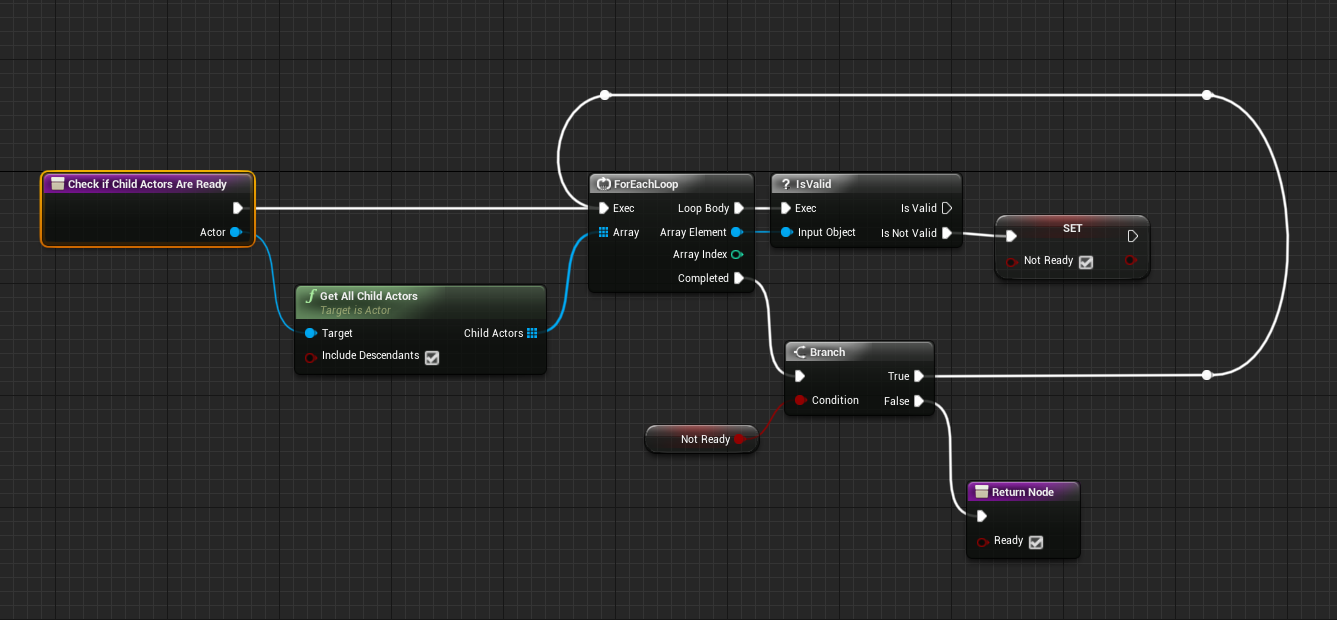
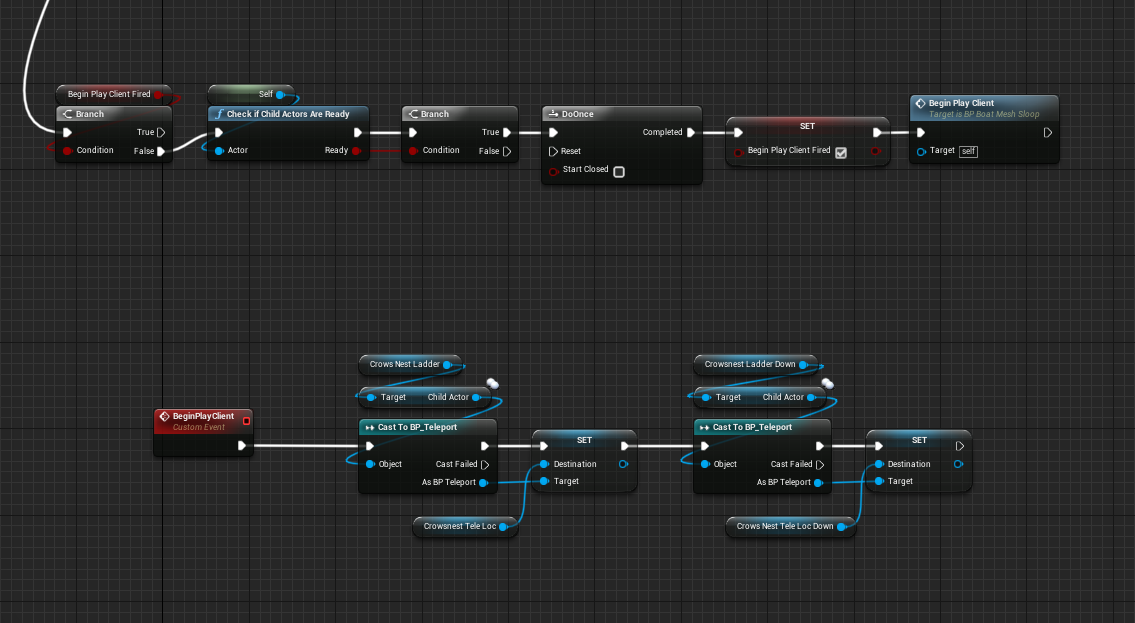
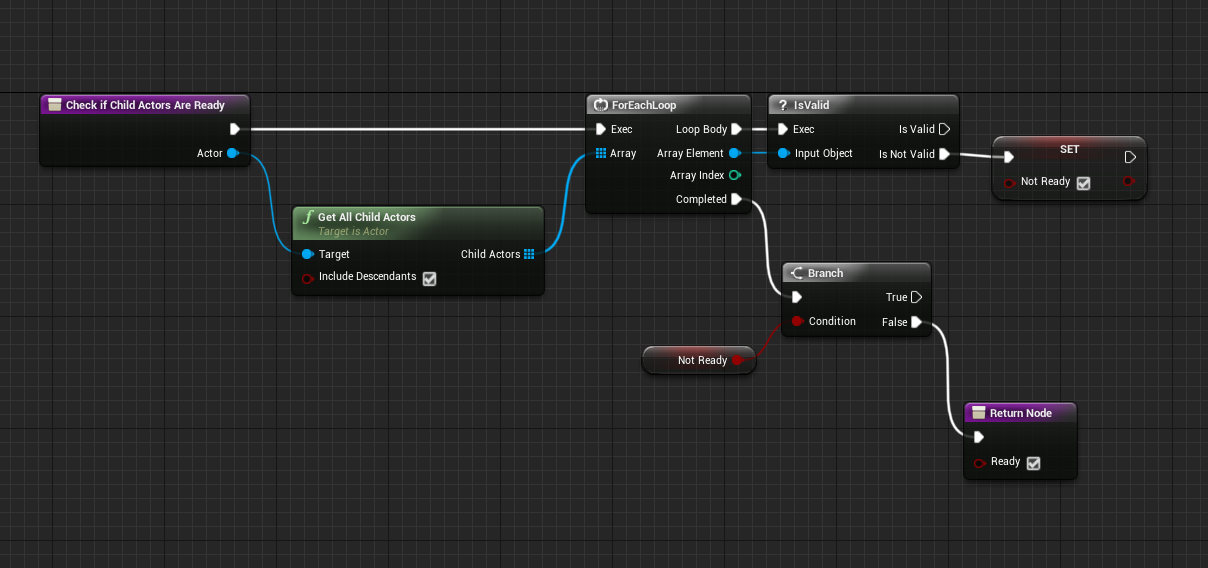 thin stratus
So
If movement gets corrected
it is smoothing that correction or?
And if it smooths it, as far as I understand, it moves the Collision Shape instantly and the Mesh over time
Actually it does not seem to smooth that at all
fleet raven
why isn't there a standard rpc setting for multicast to all except owning player
it seems like a commonly useful path
 pure abyss
is replicating too much data cause lags?
thin stratus
Yop
void nest
Speaking of which, what are recommended ways to replicate movement information such as vectors and rotators?
knowing that the output date will be lerped
data*
pure abyss
does too much RPC also affecting ?
pure abyss
anyway to profile it in engine for dedicated server?
void nest
If you call server RPC and multicast per tick then yes it will floor your bandwith especially when the rpc's are called from a client that has a high framerate, the higher the framerate the more the rpc is called (when set to reliable). Setting it to none reliable and making it update on intervals such as 0.1 seconds is better I guess?
pure abyss
the only way that i know how to profile is using netprofile..which I can't find the network log
pure abyss
in engine?
thin stratus
I think they added that a while ago
Specially for cloud based servers
When fortnite started getting bigger
But no idea how to use it
void nest
when you play in editor or a development build you have to type netprofile enable to start recording and netprofile disable to stop recording
this will generate a profile that you can then open using the network profiler
@pure abyss yes you can record network data in-engine
although it's not recommended
pure abyss
why is that
void nest
as the result is not as reliable as in a packaged version
pure abyss
I see
void nest
with in-engine I mean when you simulate or play
not in the actual editor 😛
also, always record from the server, not the clients
client recording only show the rpc calls from that particular client
what you want is the actual server's data
pure abyss
how do I record from the server? when i ticked "dedicated server"
void nest
hmm no idea haha good question
I only know the command for listen server
but I guess you could probably use a console command node in blueprint using "is dedicated server" and has authority
with a delay node to disable the recording
pure abyss
alright..thanks dude..let me try that out
void nest
yw
thin stratus
Okay so the same corrections I get, the default CMC+Character also gets
Only that their correction seems to be smoothed
.>
@chrome bay Do you happen to know if and where in the CMC corrections are smoothed?
SendClientAdjustment doesn't seem to do any form of smoothing. Or I just can't find it.
With a higher ping, the CMC also doesn't smooth anymore
Is there a max distance for this o.o
pure abyss
how do I know when its too much?
thin stratus
When your lowed end internet players can't play your game anymore
e.g. check what the average or lower internet can do in terms of up and download rate
And make sure your games bandwidth isn#t using that
pure abyss
I recorded the it on the server for 193 frames..so whatever that is replicated on tick i have to remove it?
I tried it with high speed connection with dedicated server hosted in AWS and the game run really really bad..which was not happening with peer to peer.
thin stratus
Excuse my sorta offtopic: IT'S THE FREAKING CAMERA that causes the "lag" when getting corrected. Using a default attached one works fine.
@pure abyss It's really tricky to answer
Server running bad could be cause it's hosted across the sea?
Or because you took a too slow tier
But usually you want to remove all sort of tick based replication if possible
pure abyss
im using free tier for testing
thin stratus
And everything that is send via tick needs to be serialized etc. (if using C++ at least)
pure abyss
serialized meaning? packed into a struct?
and deserialize on the server?
First time making an online game. and I have a 3 days deadline to solve this..pretty much doomed
😦
thin stratus
Uff, ehm yeah it sorta means that
You can NetSerialize structs
And also use shorter, less precise vectors in RPCs
BLueprints also have them
NetQuantized
Something something
Is the vector name
Maybe that helps you already
The other way is finding out if you can't remove some tick rpcs
and simulate that stuff locally
 maiden vine
Anyone know why casting to any blueprint in an event in the Game mode setting a variable that's in game mode would cause a PHP script to give a 404 error in response? It works if I don't set the variable.
thin stratus
I'm a full-time contractor
I work on whatever pays me well
Atm that is a multiplayer game, yes.
@maiden vine Are you doing any shenanigans with the GameMode from ClientSide?
maiden vine
It's just a normal event that bugs out
thin stratus

In Short: Hoverloop is a Multiplayer Arcade Arena Combat game.Access an array of customizable drones with unique abilities. Use teleportation, deathrays, control jammers and super speed to carry your team, or yourself, to victory! Fight against or work together with friends i...
Trailer is outdated. Will be replaced by someone else on the team.
Images are uptodate though
Well the trails is mainly Ui wise outdated
Game is still the same
maiden vine
Funny thing is it use to work fine
Thought might be a workaround I did not know
It's not the casting that fails it is more of game mode is corrupted
Or varest plugin
Guess I'll just keep trying at it
 chrome bay
@thin stratus hey man sorry
It's in SmoothCorrection
SmoothCorrection_Interpolate does the capsule, then SmoothCorrection_Visuals does the mesh
When clients get an update via PostReceiveLocationAndRotation in the Character class, they apply it and notify the movement component it needs to do smoothing for the current frame (you probs know already but rep events/RPC's run before ticks are processed )
SendClientAdjustment is (annoyingly) called from the PlayerController would you believe so that it's sent at the last possible moment that frame
If your hover movement component inherits from PawnMovementComponent and implements the INetworkPredictionInterface you shouldn't have to add that call manually
twin juniper
Hi i have a probleme so that the client health ín the Ui is only changed by getting demage from the server actor does any one know a fix for it
thin stratus
@chrome bay The ClientAdjustment stuff is all from the interface, yeah. I have that already setup
I also now found out that the jitter I saw when getting a correction wasn't the pawn but my camera
Cause it's not attached to the pawn (rather set location)
 charred crane
I'm trying to create a spectator camera for my third person game. I'm using Set View Target With Blend and it works great for the server, but doesn't orient the camera correctly for clients. It does change the view target though. Any ideas?
 amber plover
this might have been asked before, but couldn't find anything online.
I'm semi new, so please keep the explanation grama friendly :P
How can I take all my players from one map into another map and keep them on the server, right now when i change map everyone gets disconnected and you can't host a new map server?
thanks for reading
charred crane
@amber plover You have to use seamless travel. It's an editor setting i believe.
 worthy perch
It's a bool on the GameMode. AGameModeBase ::bUseSeamlessTravel
 hoary spear
How does one normally go about kicking a player from a session? I tried destroy session, but not sure if that should work if you just joined a session?
Originally i dont even wanna kick them, i dont want them to be able to join in the first place
guess i found my answer, there's not really any way of doing it from bp only
ill see if i can just hook up some keys and do it that way
charred crane
@hoary spear Do you not want a specific player to join or do you want to limit the number of people able to join?
hoary spear
I wanna refuse a player who doesnt already exist on the server after creation
so the idea now was using the extra settings
fringe dove
Is it safe to send a reliable RPC from server to client right after spawning an actor?
or does client have to acknowledge the actor channel has opened first with its own RPC? (seem to remember something like that with possessed pawn ack)
fringe dove
on the client side I remember they will fail until after OnActorChannelOpen
 fossil spoke
Yeah you will have to wait for it to be valid on the Client. Can you get away with using a Replicated variable instead?
That way state will be preserved and the Client can receive that state change (OnRep) when its version of the Actor is created.
fringe dove
I was using a replicated variable before but am in the process of changing to a reliable RPC because I need to order this one with other events
so server won't queue it up until the channel opens?
safe marsh
is there some way to test a dedicated server (PIE) using a different map to the client
when I play as a client with dedicated server enabled, the server map is set to the one which is currently loaded in the viewport
If I set some levelBP logic for the dedicated server to load a different map, it loads it up, when the client tries to connect to the server, it loads into the map which was launched
 gleaming vector
you dont have to wait actually
the engine will send the RPC after the spawn
there is just no reason to do it though
you can handle everything related to on-spawn events either as a replicated variable or on BeginPlay
cedar finch
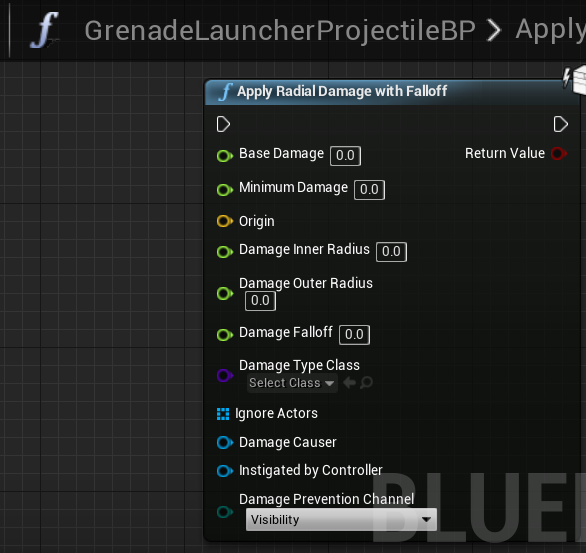
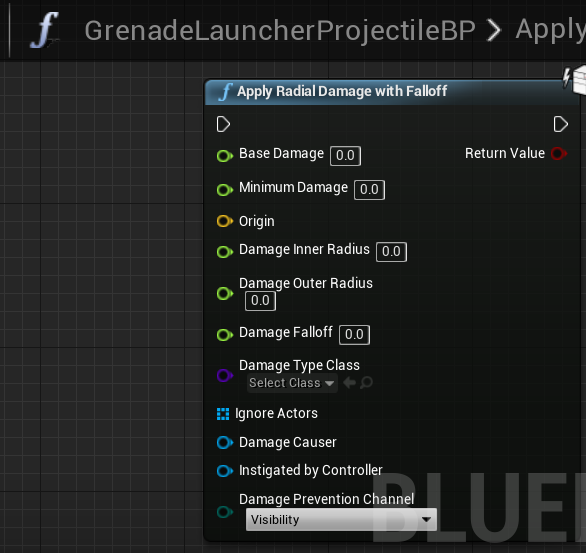
So I have a projectile grenade launcher and I want to deal radial damage when it hits and/or explodes but I want it to ignore friendly teammates and hurt the player who shot it as well as any enemies. nearby. I have the hit and explode logic in my projectile. I know there are a couple ways to do this but what is the best for network optimization. I was worried if somebody started shooting lots of projectiles it could lag up the game if I put a lot of logic and loops. Ideas?
Here is the node if you guys wanna see it. It's harder with this radial damage, usually I can just get the hit actor but that doesn't work in every case with a grenade weapon. https://i.gyazo.com/239bf80775119d791de9ccff4b92240b.png
 cedar finch
The way I did it was I already had all my player controllers stored in an array inside my Gamemode so I just got those and ran a foreach loop that cast to their controlled pawn. I then did a check to see if the pawn was the same pawn that spawned the projectile. If it wasn't then I added them into a new array. I then plugged that array into the ignored actors. It works fine I was just curious if there was another way or if this is optimal for networking?
fringe dove
@gleaming vector I don't particularly need it right after spawn, but it could just happen to get called there. in other cases I do need it via RPC because it needs to be ordered amongst a stream of other events or something bad could happen
gleaming vector
i have a similar situation
i use a replicated variable and call some code on begin play
also, you can't trust the order in which RPCs will play out
fringe dove
for reliable, in a single actor channel, you can can't you?
gleaming vector
if you are changing state, use a variable
no, because they wont play when, for example, an actor becomes relevant after not being relevant
fringe dove
ok yeah that's a case (and I've run into that), but this one will always be relevant
gleaming vector
I also believe that they play in the order they are recieved
not in the order that they are sent
even if they are reliable
fringe dove
reliable is supposed to have an ordering guarantee, but only within a channel
gleaming vector
hmm
fringe dove
and a dedduplication guarantee
fringe dove
the main thing is never trust reliable multicast
gleaming vector
they are often unreliable even when reliable
fringe dove
it doesn't work and isn't reliable
because it has a shorter timeout than client timeout
so you can have gaps with no way to tell unless you do your own sequence number setup within it
it's a disaster..
gleaming vector
well, still... if you can get this bit working with a replicated variable... that variable is guaranteed to be set to that when the actor comes into existance
I've noticed that too with netmulticast
fringe dove
in other cases I get by with a replicated variable in similar situations with a reliable stream
by making the replicated variable a struct and putting a sequence number in it relative to the stream
gleaming vector
for example, the similar thing I have is with my inventory
i replicate down the currently held item index
fringe dove
but here I actually need to get all of the events and replicated stuff can drop out in-betweens
gleaming vector
because I want the character to draw their weapon whenever they switch to a new weapon
on BeginPlay, I check to see if that number is set
if it is, I play the anim
that catches the "spawns with item" case
fringe dove
yeah I'm not doing a typical replicate some stuff about the world, but instead replicate a bunch of exact inputs that must come in order but also must have as little latency as possible
gleaming vector
oh
ok, yeah, well, try the RPC method
I'm not sure if it will work in all cases
fringe dove
so I'm sending both reliable and unreliable and deduplicating the unreliable stream and merging it, and filling in gaps with it if input didn't change during packet loss
gleaming vector
it's very specific cases like that I wish you can open up a data channel for an actor
and push packets yourself
fringe dove
yeah what I really want is to be able to peek reliable messages out of order
if one is dropped, the next one may be able to fill in for it (I have counter telling how many frames back had the same inputs)
on the note of a data channel, I wish you could also open a reliable one that would use tcp-like networking with a scalable window to send large data
gleaming vector
agreed
fringe dove
I think reliable rpcs aren't TCP-like and won't do backoff after packet loss etc.
gleaming vector
i tried to make a voxel world a long time ago
and replicating it was the most annoying process in the entire world
fringe dove
yeah I can imagine that would be pretty brutal to try and do it all in engine without resorting to TCP
gleaming vector
yeah
i think that's why phyronnaz did for his voxel system
which makes total sense
it would take an engine mod to open a data channel for world data
thin stratus
So, what's the general difference between an attached ChildActor and just having an Actor Set its location based on another?
Cause when Corrections for my Pawn come in, my Attached CameraActor (via ChildActor) works fine, while the one that just follows via SetActorLocation freaks out
thin stratus
Ha, found the little difference
// We want to tick after the Pawn
if (PawnOwner)
{
    PrimaryActorTick.AddPrerequisite(PawnOwner, PawnOwner->PrimaryActorTick);
}
Now the custom camera also doesn't hickup anymore when the pawn corrects
thin stratus
Hm, I moved my Speed Boosting code from the BP Pawn to the MovementComponent to have a flag etc. for the SavedMove.
Now I actually wonder how to replicate effects for that. Setting the SpeedBoosting Boolean in BP was done via ServerRPC and the boolean was a RepNotify.
In the MC, the SpeedBoost boolean is a flag that gets ServerRPCd. Is it valid to have a RepNotifiy boolean in a MovementComponent? 🤔
chrome bay
@thin stratus I replicate stuff like that to third-party clients so they can drive FX 😃
thin stratus
Yeah it's mainly for a sound and turning on a particle effect
chrome bay
For my hovertanks I replicated input via the component from the Server so TPP could drive engine sounds/FX etc.
Update rate is usually good enough to match up to movement
thin stratus
I would combine the OnRep with an ImplementableEvent or a Delegate
chrome bay
Yeah
thin stratus
It feels so annoying that the MovementComp ties so much into the pawn
I literlaly have a "canSpeedBoost" function in the Pawn that the MovementComp queries
Cause I don't want Energy in my MovementComp
chrome bay
I know right. I've managed to decouple huge amounts of it in mine but there is some stuff you just can't avoid
thin stratus
I could probably, eventually do that too, but no time. It's working now, despite some minor corrections where I'm really not sure where they come from.
They are also not visible now that the camera is fixed
So /shrug
chrome bay
haha GG
thin stratus
Hm, would I want to make a second variable just for the OnRep >.>
I haven't even coded the non-local simulation for clients
fml
chrome bay
See in mine I've just got it ticking, it just simulates the FX with whatever the latest version of "ReplicatedInput" is
DW that should be fairly straightforward
chrome bay
yeha
thin stratus
I only have the SpeedBoost atm that needs effects
Jumping and Dashing Downwards works without effects
chrome bay
I guess the SpeedBoost is more of a powerup rather than an input thing then?
thin stratus
Na, it is pressing Shift
chrome bay
Ahhhhh well
In that case I pack that into my input struct, it's gathered when I consume the movement then
thin stratus
To be fair, the CMC Jump is an upwards speedboost
chrome bay
yeah that's true
thin stratus
If the max hold time wasn't there, it would keep you floating
Really weird setup
But I guess for differently high jumps depending on hold time it's cool
 gleaming niche
rockman jumping
chrome bay
Thats my hover input struct
thin stratus
Yeah for me the input works kinda like this:
Client wants to do XY -> Sets Boolean.
Move gets if Boolean is true or false and saves that.
XY Boolean is also parsed into a Flag that gets send to the Server.
That's basically it
Ah yeah, it's not all that complicated here
You can really just imagine a CMC with Hover functionality
Which.. well the CMC is probably more complicated haha
chrome bay
I think it's because they're looking at how long you held jump etc.. which I don't really care about for mine
chrome bay
But yeah I just set the raw input flags from input bindings, then copy that to the simulation input
thin stratus
But we only need the default InputVector that the CMC has.
And then a couple of flags, similar to how the CMC handles jumping.
That's all, the movement is quite simple.
chrome bay
I also wanted to share netcode between all my movement components so I kind of had to
thin stratus
The math does the hovering and that's it.
chrome bay
yeah
thin stratus
Only thing, hence the question, was how to actually replicate these states back to the clients
Cause that's nothing the CMC does by default
But as discussed, an OnRep in the CMC should do that
Even if it feels somehow overcomplicated with an ImplementableEvent/Delegate combined
chrome bay
For me when the server receives the latest move from the client, it copies the input to the replicated input
So it just kind of dumbly sends out the latest input (hopefully) around the same time the movement is updated then as well
thin stratus
Yeah in ServerMove or similar I would just use the Uncompressed flag to set the OnRep
Tbh, if the OnRep callback takes longer for a non-local client -> who cares
You can play the effects on the local client on button press anyway
So the delay is kinda unimportant
I do however find it funny that a simple OnRep->SetMovementSpeed is actually breaking a lot.
You never notice that in BPs cause of the smoothing, but you will trigger tons of corrections
Cause the delay at a 50-80 ping
Is high enough for the Server to trigger a correction
When you start and stop sprinting