#multiplayer
1 messages · Page 448 of 1
 winged badger
its just a somewhat easy to spot Actor that doesn't interact with the world in any way
 inner hedge
Yeah*
winged badger
the GameMode implementation of FInd/ChoosePlayerStart takes any Actor
winged badger
if you are using a single PlayerStart
i would add a vector (x,y,0) of 150ish length to it at very least (rotated by say 30 degrees * number of spawned in players around z axis) to the location
inner hedge
Thing is, the default implementation of chooseplayer start should find an empty spot by itself
inner hedge
Oh yeah no, sorry there are 2 starts
 dusty bear
Anyone know a good and easy to use third party software or plug in for bandwidth compression?
 inland pond
I have some PlayerInformation stored inside the game instance. When I am joining a game session I want to copy them into another playerinfo variable which is inside the PlayerState. What is a good way of doing this? I was thinking about:
- call a method inside gamemode on the current joined playercontroller only on client
- then the local called playercontroller method calls a method which runs on server with only the local playerinfo from the game instance  as parameter
- this method sets on the server side from the playercontroller the playerstate's playerinfo to the local playerinfo passed through the parameter
This seems for me a bit uncomfortable and I would like to have some advice 😮
winged badger
you can't access gamemode and client gameinstance from the same machine
you can't use a GI reference in a RPC
its not, and cannot be replicated
in the PC, OnRep_PlayerState, you can access the GI from there and call the ServerRPC inside the PlayerState to set the variable server side
solution won't really work in BP, as you can't override the AController::OnRep_PlayerState without c++
inland pond
Mh I thought about just calling a local method on the PlayerController from the game mode which then itself acessess the game instance. And I just wanted to use the PlayerInfo as parameter not the GI or have I understand you incorrect?
winged badger
you using c++?
inland pond
Just for things which arent exposed on Blueprints yet
winged badger
ok
so
to fetch a value from GameInstance, that has to be done client side
and to set that value into PlayerState, PlayerState has to be ready
controller's OnRep_PlayerState function executes on client only, just after that controller's PlayerState replicated
so, it can access info from its own GameInstance, and it can set it in PlayerState
only thing that remains is a ServerRPC so that the setter runs server side, and the PlayerInfo can be replicated to all clients
and good place for it is AYourPlayerState::ServerSetPlayerInfo(FPlayerInfo NewInfo)
Server, Reliable, WithValidation
you will need to do separate set on listen server, for the host, as that OnRep won't run there
after Super:: call in InitPlayerState override is good
(that function runs server side only)
inland pond
Great thanks for the detailed explanation! So I would expose the OnRep_PlayerState for my Blueprints inside of it I grep the GameInstace's PlayerInfo and call the Server RPC ServerSetPlayerInfo? I havent understand the part with the "replicated to all clients". As of now I have a collection of all PlayerStates inside my GameMode. So do you mean a RPC on the GameMode?
winged badger
//PlayerState
UFUNCTION(Server, Reliable, WithValidation) void ServerSetPlayerInfo(FPlayerInfo NewPlayerInfo);
//implementation
void AMyPlayerState::ServerSetPlayerInfo_Implementation(FPlayerInfo NewPlayerInfo)
{
    PlayerInfo = NewPlayerInfo;
}
bool AMyPlayerState::ServerSetPlayerInfo_Validate(FPlayerInfo NewPlayerInfo)
{
    return true;
}
// PlayerController
UFUNCTION(BlueprintPure)
FPlayerInfo GetPlayerInfo() const;
// implementation
FPlayerInfo GetPlayerInfo() const;
{
    UMyGameInstance* GI = Cast<UMyGameInstance>(UGameplayStatics::GetGameInstance());
    if (GI) { return GI->PlayerInfo; }
    return FPlayerInfo();
}
// PC, continued
virtual void OnRep_PlayerState() override;
virtual void InitPlayerState() override;
// implementation
void AMyPlayerController::OnRep_PlayerState()
{
    Super::OnRep_PlayerState();
    if (PlayerState) { PlayerState->ServerSetPlayerInfo(GetPlayerInfo()); }
}
void AMyPlayerController::InitPlayerState()
{
    Super::InitPlayerState();
    if (PlayerState) { PlayerState->ServerSetPlayerInfo(GetPlayerInfo()); }
}
that should be all you need for that
inland pond
Wow nice thanks!
winged badger
i did write this off the top of my head without intellisense, so minor errors are possible, but should be easy enough to correct
inland pond
Yeah I was thinking that ;P But before I will copy cat I will try to do it just with your explanation text
winged badger
probably better not to expose the GetPlayerInfo to BP and call it GetLocalPlayerInfo
as it can seriously backfire if called on wrong controller on server
those functions are generally better kept c++ only
inland pond
oh good to know. Do you mean in case of cheating or in case of returning false information?
winged badger
no matter on which controller you call it
it will return the local GI
on clients its not a problem, as there is only one controller
on listen server, it will return the hosts PlayerInfo no matter which controller its called on
inland pond
Oh yes thats I have seen today after I tried to copy them from the game mode directly xD
winged badger
on dedicated server, it will return junk, as dedi GI will have invalid PlayerInfo in GI
inland pond
k ill keep this in mind. Again thanks for all the information 😄
 jade gazelle
Does anyone else running 4.21 have the following issue? https://issues.unrealengine.com/issue/UE-66910
Trying to figure out if that’s what’s wrong for me or if it’s something else
Basically trying to pass TSoftObjectPtr through RPC fails
 chrome bay
Says they've fixed it in 4.22. It kind of makes sense really, if the object isn't already loaded on the RPC receiver it would appear as null
https://github.com/EpicGames/UnrealEngine/commit/546c17e147a12ed4ab17d678ed510b9da824ad7b
Add full replication support for TSoftObjectPtr, both ntive and UProperty
 worthy perch
Why would you want to send a TSoftObjectPtr through RPC? Why not just send the asset path?
jade gazelle
That’s what I ended up doing @worthy perch
Just added a step to the process so I was curious about if it was even possible
Obviously the ptr would be null on the opposite side of it wasn’t loaded but the issue was that the path wouldn’t even come through the RPC, it just comes through empty
@chrome bay thanks for the notes, I’ll just mark those areas in my code as temporary until 4.22 is released
 gusty lily
looking for a recommended starter pack to base our respawn system off. i cant get respawn right so am looking to integrate an external system. any suggestions?
gusty lily
i should mention this is an arena fps similar to quake and UT
gusty lily
also, is there a way to see bandwith usage in editor? i'm concerned i'm over replicating the wrong things which is not helping the respawning situation
 safe marsh
stat net
shows in/out?
I need to filter an event so it only fires on the client machine who is posessing the actor
right now every client is firing when the actor is destroyed via killz
is there some node I can use to check if the destroyed actor was possessed by the client?
not sure why this works but it does
 rose egret
is there any config for disconnect detection ? normally if server disconnects clients detect it after several seconds.
?
 drifting plank
Except if the server is shutting down correctly (ctrl+C), it's instaneous
@safe marsh You can check the ENetRole (If it's Authonomous_Proxy you are the owner client).
 spark hemlock
Hi everyone! I am developing a multiplayer game and wondered, if there would be an easy way to add a player while playing in the editor. If I for example start with 3 players is there a way to press a button (or execute a command or whatever) and then have another one join, so i have 4?
or do i have to build it and then try connecting one after the other?
spark hemlock
yeah but there is no "drop in while play" functionality what i want?! So it isn't possible? I have to build it and then open 4 instances and connect one after another?!
chrome bay
Literally the first image shows how you can test multiple players in one session without building
spark hemlock
yeah i know. I think there is a misunderstaning here. I want ot start a round. Play for a while and THEN add another player.
so play one round with 3 players the next with
4
chrome bay
In that case I don't think so
spark hemlock
hmm.. that's painful. Thanks!
rose egret
guys I have written my own back end service for matchmaking and login , ...
now I am using it in my UE4 project. when AGameModeBase::PreLogin is called. I get a const FUniqueNetIdRepl& UniqueId which is unrelated to my system since I am not using any online sub system. is there any way to override its generator or something like that
?
should I write my own online subsytem for UE4
worthy perch
Couldn't you just add another property on your PlayerController/PlayerState class and use that for your service?
rose egret
🤔
 eager geyser
what are your opinion in mmo of maximum 35 people what is more important out of these
1.good gameplay but more ui interaction and what is displayed on screen like who killed whom and who is eliminated like in pubg and gerera game
2.excellent gameplay but less ui interation
3.both should be equal
everyone free to give their opinion
 tranquil thunder
2 all day anyday
gameplay above all else IMHO
MMOs usually have too much screen clutter anyway
 graceful cave
i dont see how having a killfeed means gameplay has to be worse
if ui interaction is part of achieving the game play youre going for then do it that way
or else have less ui interaction
 thin stratus
Excellent gameplay should be your priority either way
If you think that players should see who killed whom, then add a killfeed
If you think it takes away from the immersive part of your game, then don't.
UI interaction would actually mean that you interact with the UI
While stuff that just pops up on the screen isn't really interaction, but information
 plucky jasper
Anyone who knows which delegate that gets fired when you try to join a friend through the steam overlay, without the host sending an invite first?
 slender yarrow
how do you run a check with a branch for the client? I have conditions to check before you can sprint. Arent you supposed to check those variables on the server? The client is showing false which im assuming is cause its checking the speed of the server's char. What is that proper way to branch check on client?
plucky jasper
You probably need to set the variable on both the server and the client.
Otherwise replicate the variable from the server to the client.
Though this will ofc come with a latency delay, so if you want to avoid that, then you need to "predict" it on the client first - in which case you just set the variable on the client first - the server won't allow the client to move too far beyond the location of where the character is on the server anyway
@slender yarrow
slender yarrow
is that normal practice for doing checks in replication?
 meager spade
the idea is to do it predictively like Zoin said
no one wants to sprting and have to wait X amount of time for the server to let them
same as firing
 cedar finch
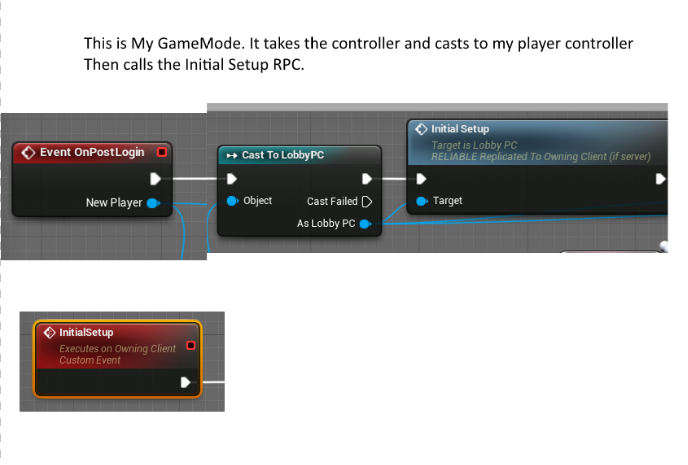
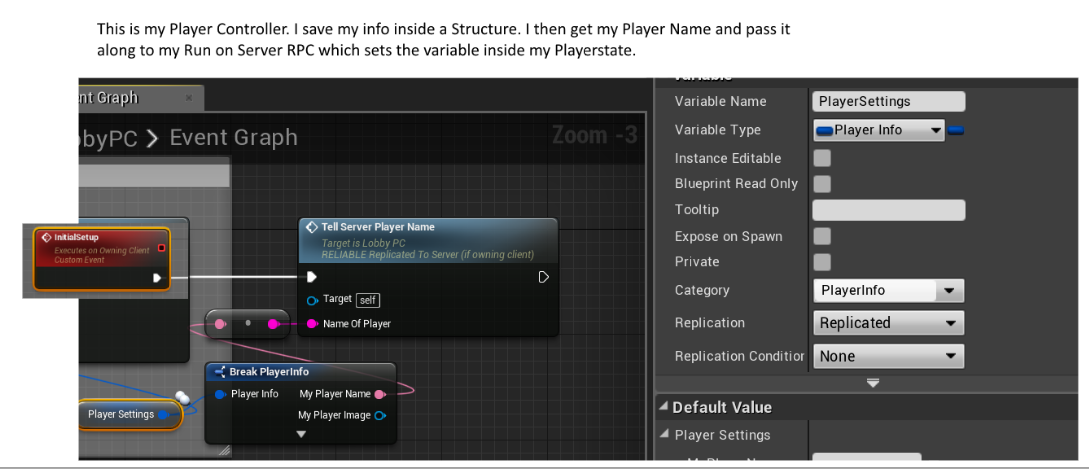
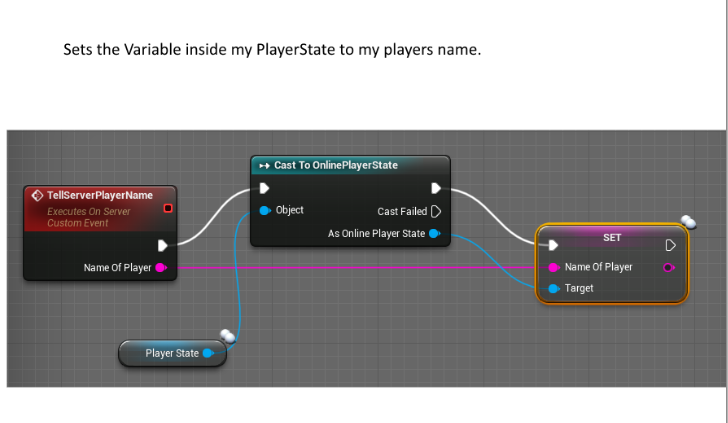
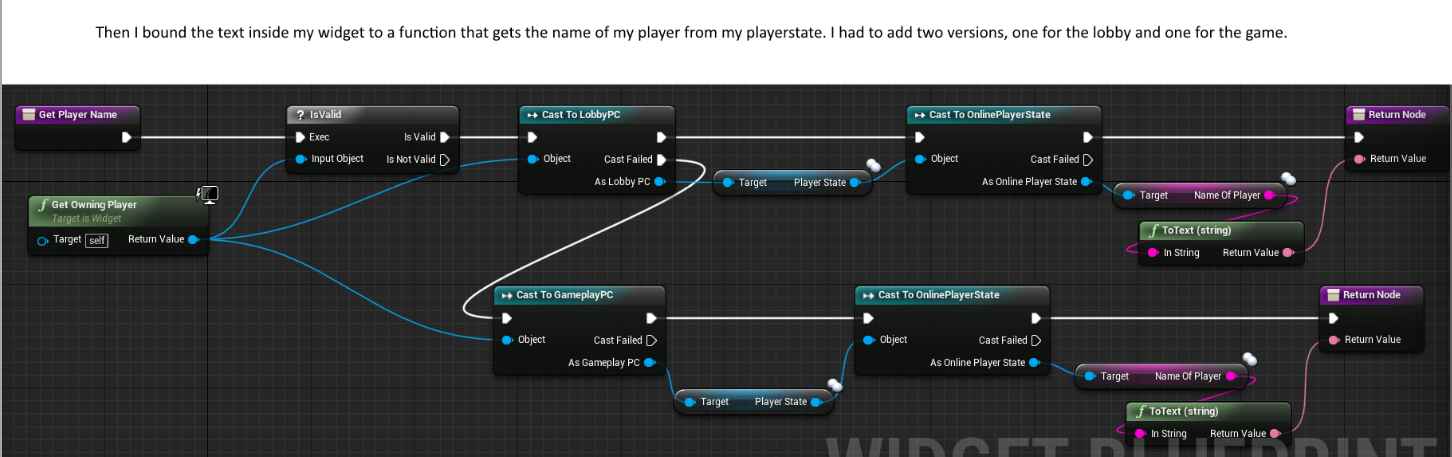
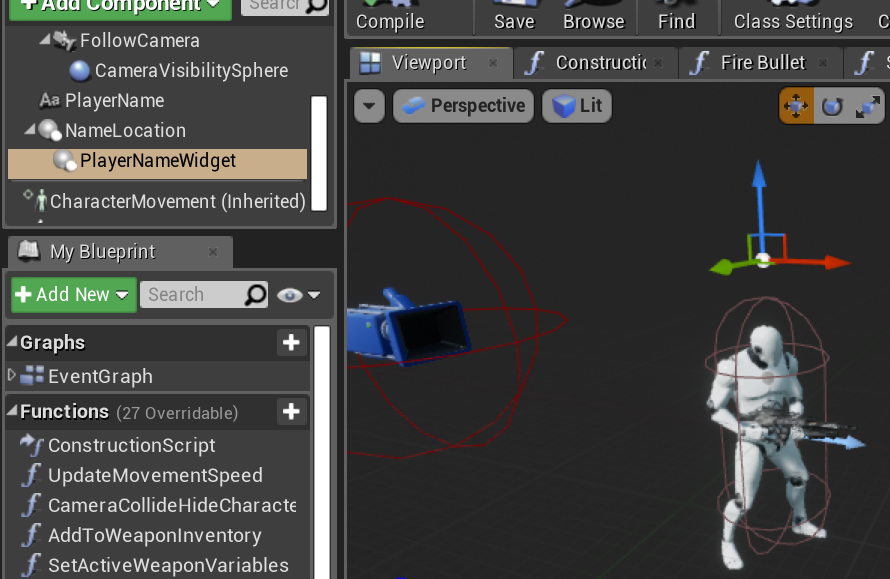
So I made a variable inside my playerstate called "NameOfPlayer" and it gets set from a Run on Server RPC inside my player controller. I then have a widget attached to my pawn character that retrieves that "NameOfPlayer" variable from my playerstate and sets it's text to it. So basically I have a playername above my head. My problem is that it is setting all players in the lobby to that same name. So Player1 sees everyone in the lobby with the name Player1. Player2 sees everyone in the game as Player2. What am I missing in terms of replication? What causes it to set everyones name? https://i.gyazo.com/514671526cd8929fd8155aaec97bcf25.png
 graceful cave
@cedar finch cant determine the problem without seeing the code
is the variable replicated? is the RPC called on begin play?
if its called on begin play then all clients are running that code and calling the RPC
or at least attempting to call it
but if youre getting a locally saved variable from the client calling the run on server rpc, then all clients would be trying to do it if you arent checking that its the local player state
cedar finch
Hold on I'll post what i did.
Well they aren't showing up but the links are there lol.
cedar finch
Yea I didn't know I had this issue until i tested it with some friends yesterday
multiple clients correct.
graceful cave
so everyone is seeing their own name? or everyone sees the same name
this variable might not need to be replicated
but i dont know what else its involved with
cedar finch
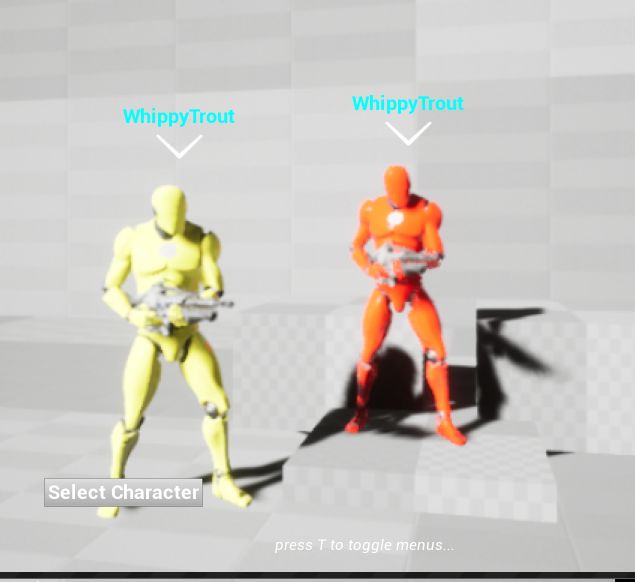
Each player is seeing their own name as everyone else. Does that make sense? It's wierd to explain. So I see everyone as Whippy. You see everyone as satan
graceful cave
yeah i had that problem really early on but my setup was different from yours
where is the playersettings variable set in the player controller?
oh wait
thats always going to return the local palyer
pass the character's player state in the widget
and get the name from that instead
i think the purpose of that node is intended for split screen because thats the only scenario where multiple players could ever see the same widget
since widgets are clientside only
cedar finch
ok so do what now?
graceful cave
create a player state variable on that widget
and set it the player state of the character the widget is attached to
cedar finch
Ok so this is where I get confused because my widget is added to my character inside my character's viewport. So how and where exactly do I do that? It's different from the others i've done
 graceful cave
ok then in the player name function
get parent actor
cast to that character
get player state
and then both of the player states here should just connect to that instead
cedar finch
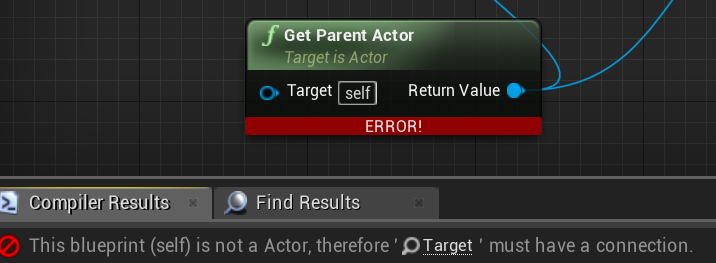
But is the widget considered a child? the get parent actor doesn't show up unless i uncheck contex sensitive
graceful cave
ive never actually used widget components so im not sure
cedar finch
hey I'll give it a try lol
graceful cave
on begin play on the character you can set the player state variable
on the widget
would be the same thing
but that might risk the player state not being set for all clients at the time they run beginplay
cedar finch
Yea that was my issue before with beginplay. Critical info that clients need wasn't set yet
graceful cave
well a dirty but effective solution is to create an onRep player state variable that the server sets to the character's player state
and have clients set the widget's player state variable in the onRep function
cedar finch
I might have to do that because the get parent actor doesn't work. https://i.gyazo.com/399f4581649a22e3cffcdfc3484d55bc.png
 graceful cave
im about to go to bed so i cant open my editor to test but
in the widget
maybe you can cast "self" to "widget component" and maybe that has the proper context to call getparentactor
or in other words find a way to get a widget component from a widget because that cast will probably fail
cedar finch
ok. And if that doesn't work I can try what you said earlier. Which was make a playerstate variable inside my Playerstate. Then in my playercontroller set that variable to my playerstate. Then do the widget setting of the variable inside the RepNotify?
graceful cave
on the character, create a RepNotify player state variable that the server will set to the actual result of GetPlayerState
and in the onRep function, clients can set the value of a PlayerState variable on the widget to the newly replicated player state
and in the GetPlayerName function on the widget, cast that player state to the ones youre using in there
dont use controller at all for it
controllers only exist on the owning client and the server
 digital wigeon
I am trying to build my game's dedicated server following this guide: https://wiki.unrealengine.com/Dedicated_Server_Guide_(Windows_%26_Linux)
but when I get to the part where I need build it for development server, no .exe is generated, and this is the output:
1>------ Skipped Build: Project: ShaderCompileWorker, Configuration: Invalid x64 ------ 1>Project not selected to build for this solution configuration 2>------ Build started: Project: TestGame, Configuration: Invalid Win32 ------ 2>The selected platform/configuration is not valid for this target. ========== Build: 1 succeeded, 0 failed, 2 up-to-date, 1 skipped ==========
worthy perch
I don't recognize that problem, but you sure you properly set your solution configuration?
digital wigeon
In VS: "Development Server" "Win64" "TestGame"
Right clicking on "TestGame" and hitting "build" with that configuration
worthy perch
"Development Server" "Win64" "TestGame"
Is TestGame the Startup Project? If so, can you select UnrealBuildTool?
digital wigeon
Yes I can
worthy perch
Yeah, try that.
digital wigeon
Same error
worthy perch
You have a TestGameServer.Target.cs?
digital wigeon
Yes, in the /Source/ folder, with contents
`// Copyright 1998-2018 Epic Games, Inc. All Rights Reserved.
using UnrealBuildTool;
using System.Collections.Generic;
[SupportedPlatforms(UnrealPlatformClass.Server)]
public class TestGameServerTarget : TargetRules
{
public TestGameServerTarget(TargetInfo Target) : base(Target)
{
Type = TargetType.Server;
ExtraModuleNames.Add("TestGame");
}
}`
worthy perch
Hmm, I searched the 2>The selected platform/configuration is not valid for this target. on this Discord, and someone else had the same problem and he solved it. He didn't say how, though. You could ask him.
safe marsh
doing some debugging using the PIE gamemode
when I launch the game with dedicated server enabled, they both load up the same map
is there some way to get the dedicated server to load into another map? seems like the project settings default maps override doesnt work for the PIE dedicated server
digital wigeon
@timber anchor Saw you had the same issue as me with the dedicated server. What did you do to fix it?
 trail oar
I'm building a client multiplayer game and I am attempting to set a custom depth on an actor. The event is set to replicate on owning clients and all connected clients can set it fine, however when I the server's client triggers the event it triggers for all clients. Is there any way to have it only show for the server and not the connected clients?
cedar finch
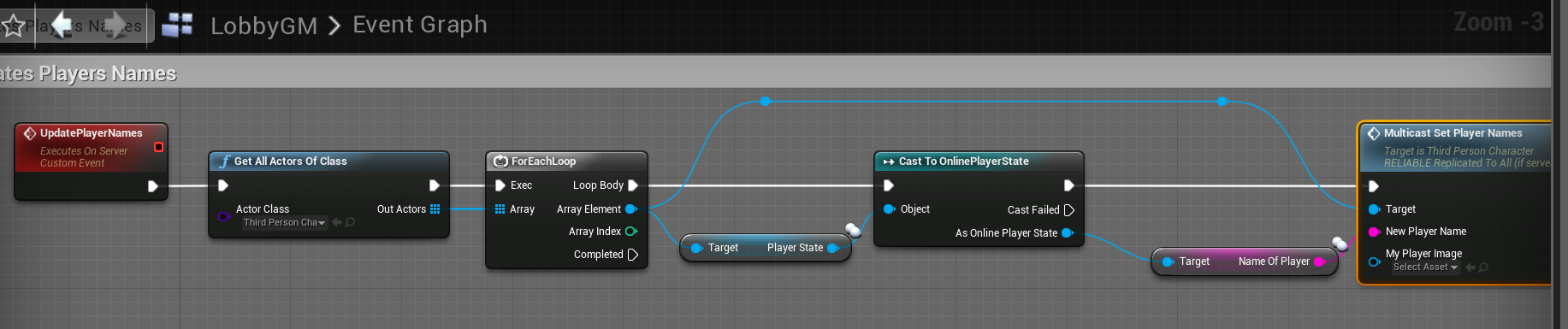
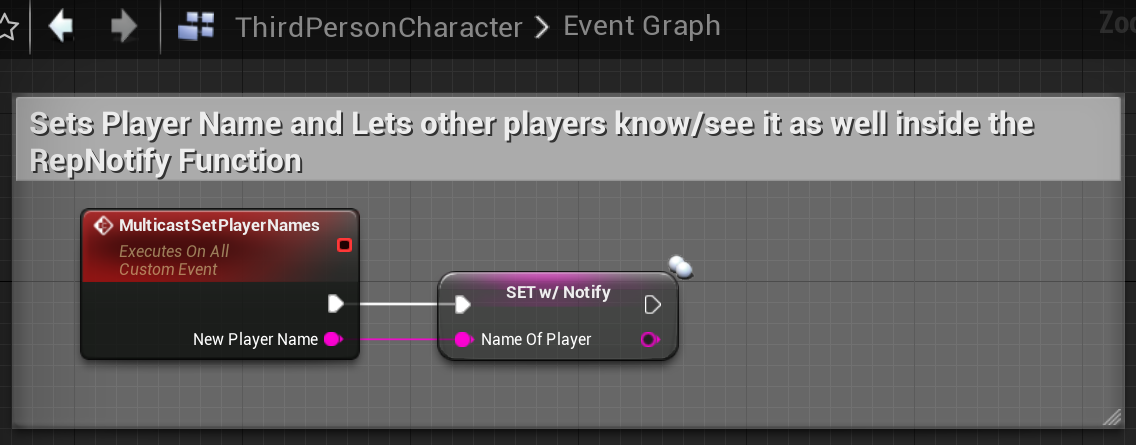
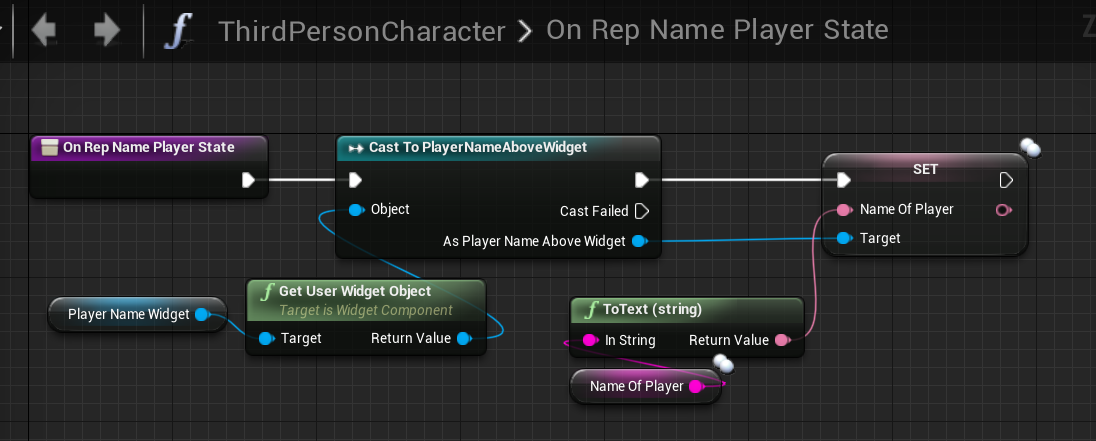
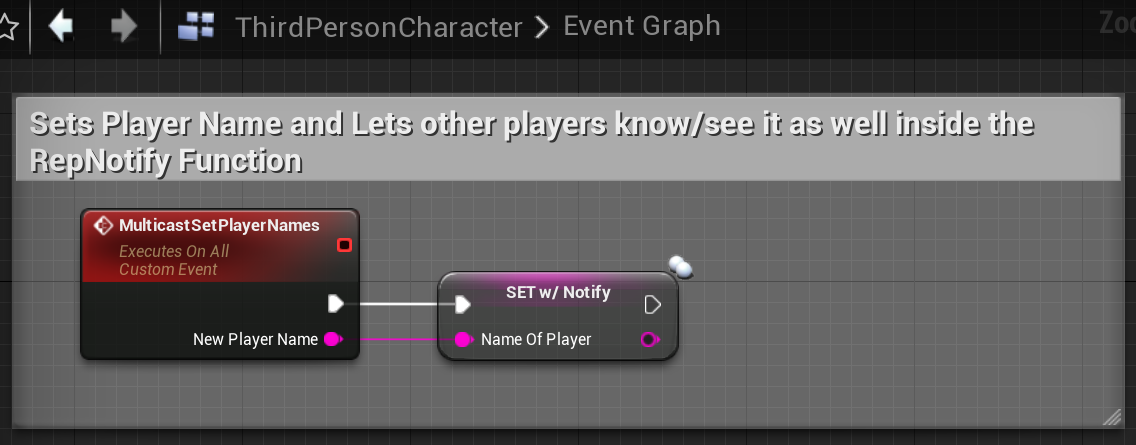
@graceful cave I got it working. 😃 I took your advice and tweaked it. I created a variable inside my ThirdPersonCharacter called "NameOfPlayer" and set it to RepNotify. I then created an event inside my Gamemode that gets the Name from Playerstate and passes it to the ThirdPersonCharacter which then sets the "NameOfPlayer" variable to the same one in Playerstate. Then the Repnotify gets the actual widget and sets the Text inside to the "NameOfPlayer". Then I can just call the UpdatePlayerName event that's inside gamemode whenever/wherever I want if I need to update. I'm sure this probably isn't the best way to do it but It works and It makes sense to me lol. https://i.gyazo.com/c4b303a0e79efaf1312866939416b211.png https://i.gyazo.com/52ae5fafb5d8330847cb0f20cc7d3f26.png https://i.gyazo.com/89e5f9bb8a79c18fe1038cd995d61fff.png


 mild forge
I am confused with bOrientRotationToMovement. If I set it to true, does it mean when I press keys to move my ship character toward right, it'll also turn its direction to face right, and the rotation be replicated to other clients and server?
cedar finch
I use "Set View Target With Blend" for my spectating system to spectate teammates while your dead. My problem is that the rotation is off when I'm spectating. As a spectator I'm locked to one view and don't rotate with the person I'm spectating. Any ideas on how to fix this? https://gyazo.com/c14a763baa4a1d383aa32b37d5f306b3

 hoary spear
maybe attach a springarm and spectatorcam on the players?
thin stratus
The Viewtarget is most likely already that
Problem is most likely that the SpringArm listens to ControlRotation
And that's not given by the player you spectate
You'll have to get their rotation by hand and apply it
 timber anchor
@digital wigeon You've to select the plattform before build it, otherwise i suggest to use Unreal Front End Client that it's easier to use!
 pure abyss
@thin stratus If I have let say a class that inherit from UOnlineBlueprintCallProxyBase, when does the activate going to be called?
thin stratus
When you call the node
 real yacht
is OpenLevel correct way to connect on dedicated server?
open level with ip address as argument
real yacht
yes, i'm just testing some features in team without sessions
should i provide only ip, or ip and port?
 bitter oriole
Haven't used IPs in a while but no port should default to the default port, and you can force a different port
bitter oriole
7777
pure abyss
@thin stratus Have you ever worked with gamesparks? I still can't find anything on their code that call this Activate function
 white fable
Does anyone know how to get voip working online when connecting to a server via IP? From what I understand voip only works for clients that are in a session, so I was wondering if there's an alternative when connecting via IP (no sessions). Thanks
thin stratus
@pure abyss The function is called via the parent class you inherit from
 idle flame
Someone know if we can do template rpc function ?
I've try but I have some compile error
idle flame
The only solution to send a typename over network is to make an enum and a switch case ?
nice xD
 fleet raven
enum is probably best if you can use it
will use less bandwidth
but you can't always do that
chrome bay
yeah you can send a UCLASS class if you like, TSubclassOf is supported
fleet raven
that's going to send the full name though
chrome bay
yeah, definitely unadvisable.
idle flame
I'll try with enum but I'll switch to uclass if needed thx
I have an other question :
I'm trying to send an information from server to client but I don't know how to do it :
My client (in PlayerController) is calling a function (UFUNCTION(Server, Reliable)) executed on the server.
On the server, in this called function I want to execute a netmulticast.
In this netmulticate I would like to send as parameter which playerController has perform the initial call on the server.
Someone know how can I do that ?
What I've got
Controller
void AMazeLegendsPlayerController::AddComponentOwner_Implementation(const uint32 id, AMazeLegendsPlayerController* controller)
{
    // Id is use for something else.

    // how can I know if the controller received is the good one ?
}

void AMazeLegendsPlayerController::LootItem_Implementation(const uint32 id)
{
    if (SOME CHECK) {
        AddComponentOwner(id, this); // the controller sent is the local on on the server ?
    }
}
    // Initial function call from client executed on server
    UFUNCTION(Server, Reliable, WithValidation)
    void LootItem(const uint32 id);

    // Other function call on server but execute by all clients
    UFUNCTION(Netmulticast, Reliable)
    void AddComponentOwner(const uint32 id, AMazeLegendsPlayerController *controller);
There's no point
The clients don't have the controller locally, so the pointer will just resolve to null
idle flame
ah
chrome bay
You want to use a PlayerState pointer if you want to let clients know something about another player
chrome bay
Characters would so long as they are currently relevant
Which ofc you can't garauntee if you're using net relevancy
idle flame
Well I'll use PlayerState thx
but how the client can have the same pointer as the server on a playerState ?
chrome bay
under the hood it's all resolved through an ID that is synced
If it's a dynamically spawned actor they can be resolved by ID, if it's an actor placed in the map it can be resolved by name since the maps are identical both sides
idle flame
So is it better to only send the id ? or is it already done ?
chrome bay
you can't get the ID
It's all hidden away under the networking in UE4
It's the Network ID I should add - which doesn't necessarily match up with any of the other ID's
But when you send a pointer to an object via RPC, the actual RPC unreal sends uses the network ID of the object, then on the client they find their local copy of the object which uses that ID
chrome bay
np's
Have a look at FNetBitReader / FNetBitWriter and you can sort of see how it works
idle flame
I'll check that thx
 tardy cosmos
If I want to change the target view of a player controller in a client, should I change it on the server in order to change the camera on the client?
I am still learning how to use mp bp, so there are some concepts that I am not understanding. Right now I am able to start server/client and a client and run a basic level. However I am trying to use "Set view target with blend" to change the camera for the player that is in the server and for the player in the client.
But I am still confused if I can execute the event on the client and automatically it is going to replicate on the server, or I should make it on the server and automatically it would replicate on the client.
bitter oriole
@heady delta "replicate location" on objects doesn't really work for moving objects, so this adds interpolation
 heady delta
ahh yeah, would be interesting to test with character movement interacting with a physics object replicated using this, since thats where things usually go awry
heady delta
there are some hacky ways to get away with some simple MP physics like barrels etc
bitter oriole
Anything like MP physics in UE4 is going to come with heavy restrictions
Fully client authoritative, for example, or using your own physics
Or very liberal re: server vs client
fleet raven
to be fair, mp physics is a giant hack on every engine
bitter oriole
A deterministic physics engine goes a long way
Look at Source Engine
The MP physics were absolutely stellar
And that was 15 years ago
 pallid mesa
well... well well
if you guys speak about traditional physics of objects falling because the sake of it
or just simulations, that's the hard part, usually as stranger said, deterministic physics
but otherwise, for vehicles and stuff
client auth seems the way to go
trust and verify all the way long
bitter oriole
I'm legit curious as to how physics props were handled in Source
Because you could pick up half the props in levels and throw them around
pallid mesa
what I want to know... is the specific details on the destruction engine they pulled of on R6Siege
those things they didn't say on their GDC presentation
like... all these things implying physics and deterministic graphs are so cool
and the resources online are limited
heady delta
in source engine there were a few different types of physics, but mainly any physics object that was replicated, was not so interactable
pallid mesa
I guess it could be a mixture between traditional techniques (spline calculation given a start and an end point) and client interpretation
heady delta
you could set the physics prop to be client only or server in a way, and a server barrel would push the player away, and you couldn't stand on it, kinda like how I do it apart from having the barel push the player away
so there was some leway there
bitter oriole
Source broke up physics objects by size, replicating only the largest, player collision affecting
However you could still pick up a broken toilet seat and kill a player 50m away with it, accurately
I wish that stuff was possible in UE4
heady delta
at that point the toilet seat becomes a projectile weapon haha
bitter oriole
It wasn't handled as a weapon though
pallid mesa
is the object representation accurate in every client end?
heady delta
I use projectile movement for barrels essentially you can blow them around like projectiles, but you just can't stand on them, and the player has an additional collision capsule just for physics so phsyics objects can't affect the player movement, but the player movement can affect the physics
kinda hacky but it works and its smooth
did source have any prediction on deterministic physics going on? I know the grenades were
but just random objects
bitter oriole
I legit don't know, but my guess is, regular prediction + rollback, for every gameplay affecting physics object
Which isn't that much an issue once you have a A) deteministic physics engine that B) you can step and rollback independently
PhysX having neither of these features
heady delta
yeah thats true
once you run a client on two seperate computers, the simulations almost always return different results
bitter oriole
Yeah. My current project has physics gameplay (somewhat) and i'm sticking with custom physics
Unfortunately that means the physics suck a bit
heady delta
to think when hl2 came out we all though physics everything was just how its going to be haha
bitter oriole
Turns out physics can work in dedicated games but don't bring enjoyment in most games
HL² Deathmatch had me giddy killing my friends with toilet seats, but not every shooter needs or benefits from that
heady delta
well just little stuff, most games seem to be doing things like foliage interaction with shaders, when say crysis was doing skeletal foliage
 ivory portal
I've got a problem I am currently using GameLift. My server standard map is named "GamingField" and the client standard map is MainMenu. In MainMenu the client isn't connected yet to the server but will do an open-level to the server after searching for a game-session and receiving his player-session. In my logs I see the following
LogGameLift: [UGameLiftClientObject::CreateGameLiftObject] CreateGameLiftObject
LogBlueprintUserMessages: [UI_MainMenuLobby_C_0] Search Game Sessions: 1
LogBlueprintUserMessages: [UI_MainMenuLobby_C_0] 18.197.15.16:7777
LogNet: Browse: 18.197.15.16//Game/Maps/MainMenu
So my open-level is trying to open MainMenu on the server (which hasn't been packaged with it because the server doesn't need mainmenu?) while I always thought that the server would tell connecting clients to connect to his map?
so now nothing happens and in gamelift dashboard I see the clients timing out
bitter oriole
@pallid mesa Vehicle.
inland pond
Is there a better way to inform a playercontroller about another playerstate updated a variable? Currently I use a function inside the GameMode which tell every registered playercontroller that the playerstate updated and gets called from the PlayerController who had updateded its PlayerState. For example the GameState does contain all PlayerStates in an array and I was wondering if its a better method to poll this array every 2 or 1 seconds. This would remove the function call trace and would make it less complicated I think.
worthy perch
There's RepNotify/OnRep stuff.
 plucky horizon
Can UE4 launch a standalone server + client pair? Similar to how the New Editor Window (PIE) option does, with it's auto-connect option?
 weary mortar
Hi there... I have an X-File.... I broadcast an event in server and client in the OnRep method of a variable.... and in the AnimBP I use that event to play an Animation Montage. Server plays it OK, but Client doesn't..... but the weirdest thing is that Animation Montage return != 0 in both cases!! is there any known issue about replication+multicast+animation montage??
idle flame
Someone know why a netmulticast function called by server from client-owned actor is not execute on all clients ? Aren't multicast function executed on all clients in my case ?
winged badger
@weary mortar how many times do you call PlayMontage when client side?
@idle flame all Multicasts done Server side will execute on all, as long as the Actor that contains the RPC is replicated
@plucky horizon if you do into settings for Play, and uncheck "Use Single Process" Unreal will launch one of them as standalone and play another from PIE (you can configure which)
plucky horizon
thanks @winged badger
So much better now being able to view logs separately
winged badger
@inland pond an event dispatcher in your GameState the PCs subscribe to, and is broadcast from Setter(OnRep is sufficient for BP) for that PS variable
having PCs subscribe directly to the PS dispatcher would be a abit of a pain, as you'd need to handle new players logging in
it should have the PlayerState reference and the NewValue as payload
plucky horizon
I've been trying to figure out this problem for most of the day. On my client, my PlayerController is totally useless. The Controlled Pawn is null, and I can't understand why. I print logs for possessing and unpossessing, but I only have a possession event.
https://i.imgur.com/8OFzl1i.png
 winged badger
how do you spawn your Pawns?
plucky horizon
Well actually, I can't say that. The Camera Boom is null, but it is set inside the possession event.
winged badger
you can also use the illuminati eye bottom right of the World Outliner to pick which world are you looking at (clientX, Server)
plucky horizon
I spawn my pawns with a player start. Is that what you mean?
winged badger
no, i mean how do you spawn them?
do you leave it to the engine with default pawn class set?
do you spawn them manually?
do you spawn them client side? would be pretty bad if you did
plucky horizon
I have an INA_PawnBase which I inherit into BP_INA_Pawn.
Everything else is left up to the engine (99% sure about that)
I haven't written any code for spawning pawns, all I do is place a player start. Set my pawns to always spawn+adjust position to make it happen. Then I hit play and the engine spawns them.
winged badger
and your DEfaultPawn class in GameMode is set?
plucky horizon
Yep, so is the controller
inland pond
@winged badger thanks thats sound good!
But what about Ping and those stuff which is already there as variable inside the PlayerState?
winged badger
what specifically?
and i don't think you'd have Ping replicated
as its largely useless info, whats the ping for other players
Any LogSpawn entries @plucky horizon ? in your Output, after it fails
plucky horizon
Not sure but I just found something super useful out about the client side
The controller isn't spawning or isn't possessing a pawn.
I didn't realize before because I was still looking at the merged logs.
winged badger
it might be something as simple as Pawn not being replicated
plucky horizon
The pawn is replicated, I can see it
winged badger
so you do have both Pawns client side?
plucky horizon
yep
I don't want the controllers to replicate do I?
I have all my input done on the controller blueprint.
winged badger
you should not touch the replication settings on PlayerControllers at this time 😄
i have not used the default engine handling for spawning players in years
you can try overriding the HandleStartingNewPlayer in your GameMode
it has a PC reference
then SpawnActor of your Pawn class from there (use FindPlayerStart function for location/transform), and Possess it
inland pond
Uhm okay, the docs says that ping is replicated "Replicated compressed ping for this player". I wanted to create a Info about the current connected players which will show a ping bar for each. As far as I have understand you correct I would use rep notify for each variable and this function would emit the dispatcher. I was just wondering about already defined variables inside the BasePlayerState on using the onrep functionality.
winged badger
DOREPLIFETIME_CONDITION( APlayerState, Ping, COND_SkipOwner );
fair enough, it does replicate to other clients
    /**
     * Receives ping updates for the client (both clientside and serverside), from the net driver
     * NOTE: This updates much more frequently clientside, thus the clientside ping will often be different to what the server displays
     */
    virtual void UpdatePing(float InPing);

    /** Recalculates the replicated Ping value once per second (both clientside and serverside), based upon collected ping data */
    virtual void RecalculateAvgPing();
both of these are virtual
so you can override them, call super and Broadcast a delegate
it doesn't have OnRep notifications tho
so you might get stuck with running an update function that queries PlayerArray on timer
inland pond
Yea I think this is the way I will go anyway thanks for the information
plucky horizon
I fixed the issue by tacking on some code in the Controller's blueprint to set the CameraBoom when it is detected to be null. This fixes the client side controller.
However pawn movement isn't being replicated to the server =/
I should note that the server's pawn moment is replicated to the client though
winged badger
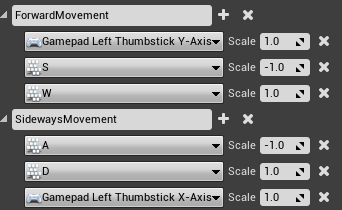
WASD?
 winged badger
the blueprint part?
plucky horizon
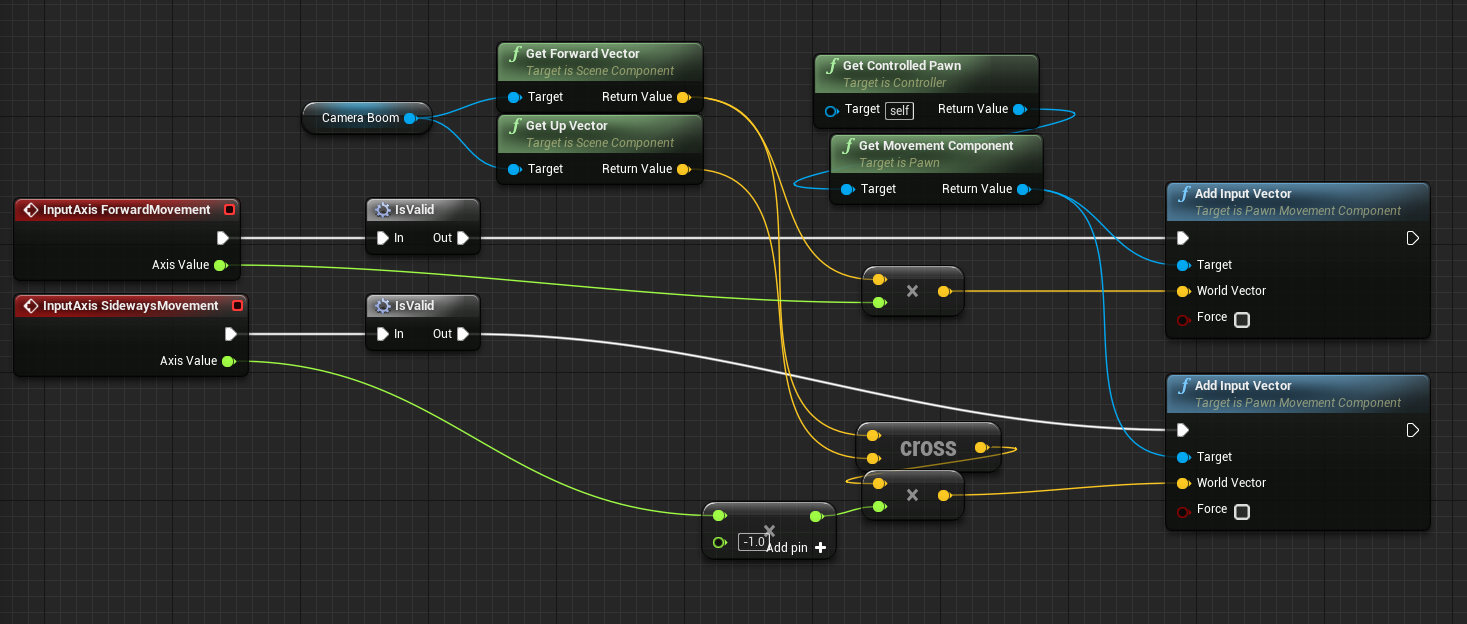 winged badger
and you have GetRightVector, you don't need to cross the Forward and Up
plucky horizon
XD lol awesome
winged badger
what does the IsValid macro do?
plucky horizon
checks if CameraBoom is null, and gets it from the Pawn if it is
need to rename it since it does more than check if it is valid now
It is pretty gross, but it fixes the controller not working on the client.
https://i.imgur.com/CAsAULf.png
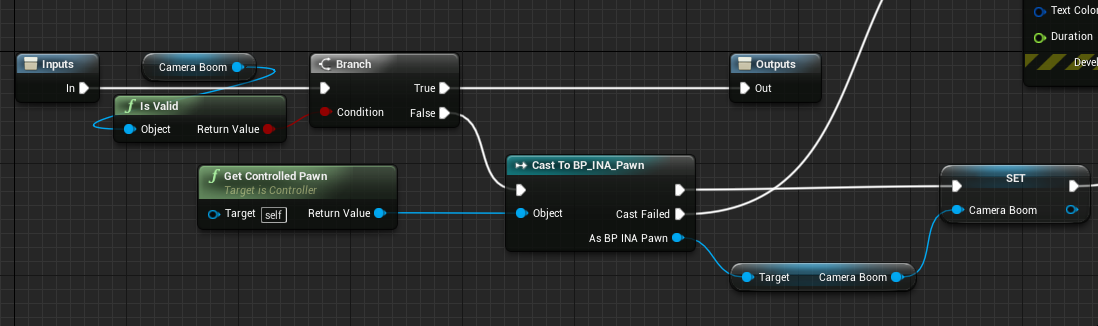
I basically gotta run that first on all of my inputs 🤢
winged badger
or make a camera boom that can't fail
plucky horizon
It isn't the Boom that's failing though
It is the client controller, somehow it is possessing a pawn without calling APlayerController::Possess

Server is on the left, client on the right
The purple line is the possession event
winged badger
Possess only happens on server
plucky horizon
so.. basically I need to set my CameraBoom property to replicated then.
That doesn't resolve the client -> server movement replication though
thin stratus
Why though?
plucky horizon
crap, I got a lab exam in 10 minutes
thin stratus
The CameraBoom is controlled by the Client
The Input stuff comes from the Client
Why would it need to be replicated?
plucky horizon
the server doesn't acknowledge that input
winged badger
also, DefaultSubobjects on replicated Actor do not need to be replicated in general
only if they themselves contain custom network code
thin stratus
The only reason you'd require this to be replicated is if you need a Client, that doesn't have the controller of another client, to see the same camera movement. E.g. when spectating
And for that you have other functions
plucky horizon
UCLASS()
class INDRADESIGN_API AINA_PawnController : public APlayerController
{
    GENERATED_BODY()

private:
    UPROPERTY(Category = ".INA-PawnController", VisibleAnywhere, BlueprintReadWrite, meta = (AllowPrivateAccess = "true"))
    USpringArmComponent* CameraBoom = nullptr;
This though, is what I mean I need to replicate. I didn't know Possess only happens on the server
thin stratus
The PlayerController shouldn't have a SpringArm
plucky horizon
it has a pointer to one
thin stratus
This should sit on the Character
Right
Why though?
You can handle input through the Character directly
Makes a lot more sense
plucky horizon
cause I felt like it, I don't have time to argue minute decisions like this
I gotta go pretty soon
thin stratus
Well then adjust it to what UE4 expects you to have :P
plucky horizon
If you have advice on how to fix the movement issue, that'd be cool. I can't read it right now though
thanks for all the help @winged badger
thin stratus
Yeah handle the movement in the Character, as it's moving the character
That's all :P
plucky horizon
the controller "controls" the character
thin stratus
Yeah, that doesn't mean the Input can't be in the Character
UE4 is designed around having Character specific input and controls in the Character class
And more generic, non-character specific input in the Controller
Such as "open menu"
Not that I wouldn't work from the PlayerController, but with that logic you could control it from the HUD Class too :P
Just to be 100% sure though, you are working with a Character, not a Pawn or?
Cause the Pawn doesn't have replicated movement, despite literally setting the location and rotation to whatever comes in
Without any interpolation and such
plucky horizon
My exam is a bit late starting.
I am working with pawns
I think it makes more sense for my game to not consider implementing input directly on any actors
thin stratus
That's up to you. Can only tell you how the Framework of UE4 is setup
If you don't want to follow that, your choice.
However the problem of the Pawn and the UPawnMovementComponent not providing proper Replication for online movement, is a thing.
You can always tick the "ReplicateMovement" on the Pawn Actor, but it won't compensate any lag.
And I'm also pretty sure it doesn't support any ClientSide "AddInputVector"
Cause that is never replicated in the PawnMovementComponent
You have to do that yourself
To be even more precise about the PawnMovementComponent -> It doesn't even handle movement
All it does is giving you a base to build up on
plucky horizon
I do have that ticked, and movement is not replicated. I guess ill need to disect the movement component later
thin stratus
It is not doing anything with that vector you are adding
It also has no network support
You are adding that Vector and it is never used
plucky horizon
I see.
thin stratus
That stuff only comes with the CharacterMovementComponent
Or if you write your own
And the CMC requires a Character, not a Pawn of course
plucky horizon
Alright at least I know the place to look now. Is there a character move comp? Or is it donedirectly in he character?
Gtg
thin stratus
The Character has a CharacterMovementComponent attached
They only work together
The CMC does not work with a pawn class
 odd scaffold
Hello guys, I am currently following a tutorial that does implementation of multiplayer for steam but I didn't quite understand this:
When a player creates a session and hosts a game through Steam, is it the same as hosting a LAN match through hamachi for example?
thin stratus
No
odd scaffold
I am asking because I am wondering about the performance/latency for fast paced game
thin stratus
In a LAN, if you host a Server you basically wait for people to ask "Hey, do you host a Server?"
It's done like that cause LANs are usually small
An online Session on Steam is register on a central (more or less) Master Server
That Server keeps track of all Sessions of your AppID
And if someone wants a ServerList, they ask the MasterServer and get the List.
Sessions have nothing to do with Performance and Latency
Performance is up to your game
And Latency, partially too
odd scaffold
So it's like a dedicated server but I don't have to make a dedicated server?
thin stratus
And partially based on where Host and Clients are located
:P You are throwing words around
odd scaffold
haha
thin stratus
DedicatedServer != MasterServer
A UE4 game can be hosted in two ways
As a ListenServer
Or as a DedicatedServer
Both can register a Session on the MasterServer
The difference is that a ListenServer is a Client that hosts the game and is basically both, server and client
And a DedicatedServer is a standalone server, that just sits on a some PC, with just a console representing it.
It has no client and it can exist without any client on them
While the ListenServer goes off if the hosting client leaves
odd scaffold
Yeah, got it
So I shouldn't worry about fast moving characters not getting updated frequently enough? It just depends on the hosts internet quality and latency of other players?
If I create a game around ListenServer mechanic
Thank you very much for the answers by the way. This isn't the first time that you are answering my questions
thin stratus
Yop, it's still tricky to get a fast moving character replicated, but that has not a lot to do with the session stuff
If you host has a bad connection then everything is over anyway :D
odd scaffold
Of course
Two more short questions and I won't bore you anymore :). I searched last night all night but couldn't find a proper answer. My question has to do with server tick rate.
I have found some people saying that default server tick rate for Unreal is 40 Hz and some people are saying 60 Hz.
Do you know which one is the default and are there any downsides to running server in more than 60 Hz except more CPU usage?
Can a standard internet connection handle let's say 80 Hz? By standard I mean like 10 Mb/s upload and a decent provider
thin stratus
- Actually not sure, could also be a tick rate of 30. You can adjust that if you need to. Don't have the ini file stuff at hand for that though.
It just means how often your server will send an update. If you can handle more than set it higher, otherwise keep it lower.
Your goal is to save bandwith, not to use as much as possible. - Which brings us to the second question, no idea. It also depends on how much stuff you actually replicate.
10Mb/s is a lot, doubt that a lot of people have that. Wouldn't see that as standard.
odd scaffold
Okay. Once again, thank you very much for taking your time to answer me 😄
 twin minnow
hey yall, I posted this in the work-in-progress, but also wanted to post this here as well. I've seen a lot of questions regarding gamelift and I've had my fair share of roadblocks as well so I made a very simple tutorial on how to integrate unreal with gamelift. here's the link: https://www.youtube.com/watch?v=Iq2LpwXogTw

PART 2: https://youtu.be/2I8JDeMGkgc In this tutorial, we're going to show you how to host a Unreal Engine dedicated server on Amazon Gamelift including all ...
slender yarrow
does anyone know: is it normal for a client character to appear "laggy" to the host character? I have a sprint function on my character. Its smooth from the first person perspective on the client and host, but the 3rd person movement of the client appears laggy from the host first person view. Is this normal or possible incorrect code? By laggy i mean it looks like the character is moving in like 20-30fps not terrible, but noticeable
actually the regular movement of the client looks laggy too. not just the sprint
slender yarrow
my terminology is bad but assuming listen server char is the client? then yes. When im looking at the client character on the host char he looks choppy
so looks like dedicated is really the only way to go now
 fresh saddle
I have a question I was hoping somebody could help me out with. In a typical first person Multiplayer scenario: Would a Pick Up item spawn new items on the owning client for the first person and then spawn on all BUT the owning client for third person when its picked up or would it just do like a set mesh for a third person item thats set to Owner no see and set mesh on a first person item thats set to Owner only see?
Basically what I'm asking, is whats the best way to handle weapon/item pickups in a multiplayer scenario? haha
winged badger
you can do your first approach only if the item once picked up runs no network code whatsoever, and different collisions on owner/others is not an issue (or they have no collisions)
mild forge
If I want to spawn a simple projectile on server but it should be triggered at client side, a simple server rpc is enough to implement it?
winged badger
it is enough, as long as the object that contains the RPC has local PC as NetOwner
mild forge
So I need a condition check? like ROLE == ROLE_Authority?
winged badger
otherwise, only thing you get is "No owning connection for... " warnings from LogNet
no
if its Role_Authority then Server RPC is just a normal function call
you are trying to do this from within a... WeaponActor?
mild forge
No, just a simple ship character
does I need to set the owner of the projectile as the character? I was thinking it's on the server and wont need an owner?
winged badger
no, the Owner of the Ship needs to be your PlayerController
mild forge
Yes, I mean owner of the projectile
winged badger
projectile's owner doesn't matter
its spawned on server
but unless PlayerController is Owner of the ShipCharacter
ShipCharacter cannot send Server RPCs or receive Client RPCs
mild forge
The ShipCharacter is the default pawn class of the game mode, so i was assuming the owner of the ship is the default player controller.
mild forge
Here's the ship character code: https://github.com/devfans/LandMaster/blob/master/Source/LandMaster/ShipCharacter.cpp
GitHub
Contribute to devfans/LandMaster development by creating an account on GitHub.
yes
The flow is Tick -> trigger FireShot Server RPC
mild forge
A projectile should be emitted on server, but it doesn't
winged badger
UE_LOG(LogTemp, Warning, TEXT("FireShot, can %b cached %b"), bCanFire, bCanFireCache);UE_LOG(LogTemp, Warning, TEXT("FireShot, can %b cached %b"), bCanFire, bCanFireCache);
mild forge
Seems this log does's show in message log
But if run PIE in listen mode, the PIE side can spawn projectile and it's replicated to another client, however the other client can not spawn the projectile.
winged badger
then you have lognet warnings
mild forge
If checked the dedicated server, then none of them can spawn the projectile.
The only warning i got in message logs is about AddImpulseAtLocation
winged badger
whats the declaration of FireShot?
mild forge
    UFUNCTION(Reliable, Server, WithValidation)
void FireShot(FVector FireDirection);```it should at very least print the log
mild forge
yeah, it's weird no such a log.
winged badger
SetReplicates(true);
do not use that in constructor
void AActor::SetReplicates(bool bInReplicates)
{
    if (Role == ROLE_Authority)
    {
        if (bReplicates == false && bInReplicates == true)
        {
            if (UWorld* MyWorld = GetWorld())        // GetWorld will return NULL on CDO, FYI
            {
                MyWorld->AddNetworkActor(this);
            }
        }

        RemoteRole = (bInReplicates ? ROLE_SimulatedProxy : ROLE_None);
        bReplicates = bInReplicates;
    }
    else
    {
        UE_LOG(LogActor, Warning, TEXT("SetReplicates called on actor '%s' that is not valid for having its role modified."), *GetName());
    }
}
there is no Role at the time of constnuction
mild forge
yeah, I will try to find the cause, thanks for your help.
winged badger
check if you broke the PlayerController
its replication settings, forgot to call Super::BeginPlay() or some such
mild forge
ok, thanks
It's working now, seems it's the firerate timer is not working somehow with the server.
 halcyon cradle
hello, i have a mobile project and need to use voice, data and images between users, wich server would you recommend ?
cedar finch
I need help. I have a reload system and a sprint system. Right now I have it where you can't sprint while reloading which is fine, but I want to be able to cancel the reload if I start to sprint. How should I implement this? How do you cancel the reload that's already in progress?
halcyon cradle
wrong room but anyway , you could use a flag in your animationBP to stop the reload animation
look at blend animation per bone
cedar finch
Yea the blueprint room is in a full discussion about something else lol. This is being replicated lol so It affects multiplayer. lol But my reload logic is in my character. Won't my gun still reload if I start sprinting even if the anim stops playing?
halcyon cradle
from your character you should have access to your character.animationBP and to your gun.animationBP ,
so you can decide from there what animation to run at any moment by changing vars (flags) example gun.animationBP.gotoAnimationIdle
gun.animationBP.gotoAnimationIdle = true
check out any tutorial about animation blueprints and you will understand
cedar finch
@halcyon cradle Thanks man I got it working. 😃
halcyon cradle
great !
cedar finch
@halcyon cradle Or anyone else. You don't happen to know why in my spectating system using a "setViewTargetWithBlend" the Server player see's the person he's spectatings camera rotation correctly, but the Client when spectating cannot see the person he's spectatings camera rotation. The client simply follows the actors root. I believe Exo replied earlier and said I could get the rotation or something. But I feel like this is a replication issue if the Server player's is working but Clients is not.
cedar finch
See below: Every player is dead, even the server player. So they are all spectating the Top Right player. Notice how only the server can replicate the camera rotation. The others do not. https://i.gyazo.com/90cf13419433887cbe71356f23a2aff4.gif
 fresh saddle
@cedar finch Is the Camera Component set to replicate? 🤔
cedar finch
@fresh saddle No but I just changed it and the springarm to replicate but it still does'nt work
tardy cosmos
I am having also probelams with this "setViewTargetWithBlend"
What I have done, but probably totally unrelated, when I set the camera that I want to target, I add a delay just before the setViewTargetWithBlend
thin stratus
@cedar finch You are using control rotation for the SpringArm
The ControlRotation only exists where Controllers exist
The Character you Spectate has a Controller on the local client and the Server
That's why it works for them
You have to replicate this yourself or use something like "BaseAimRotation" and interp it
(For the other clients)
rose egret
how u guys test your multiplayer game play codes? simulation using NetPktXXX seems not as the same as real internet
bitter oriole
Sorted by how often I use it : no particular setting, NetPktLag etc, real online test with multiple machines.
rose egret
the codes I worte work fine in local or lan cause its too fast and there is no lag and congestion
bitter oriole
People use Clumsy for that too
rose egret
I do have a dedicated machine but my upload speed is not good to upload the dedicated server every time
bitter oriole
In my experience NetPktLag alone is very helpful, but you can use Clumsy to have more advanced configurations. There's no replacement for actually testing online though
rose egret
I got an idea. I install UE4 and VS and sync my project repository with remote server.
bitter oriole
Sure, that's what I do too

Unity has partnered with Microsoft-owned Havok to update its game engine with two new physics systems: one new default option and a 'high-end' option backed by Havok's proprietary physics engine.
Cries in UE4
chrome bay
I really hope UE is moving more towards supporting more physics engines. I guess feature parity is a big problem though.
bitter oriole
I would be so happy if UE4 offered Bullet or even Havok
As part of the engine, I mean. Havok can be used but $$$$$, IIRC
thin stratus
Anyone an idea how to make an Invisibilty effect in Splitscreen?
Online I know enough ways how to hide a player from others
But Splitscreen, where the Mesh and Actor you are seeing is the exact same instance the player is seeing, gives me a headache
I can't hide anything as that hides it for the player itself
I mean, I know that splitscreen would show the player anyway if you look into their side of the screen
But it has to exist anyway
I don't know if "OwnerOnlySee" works in Splitscreen
safe marsh
Hello, I want to create a persistent world. I have a dedicated server set up, I think it needs to interface with a database which will store clients information while they are disconnected. Does anyone know of any good learning resources for creating something like this?
I can setup a database and send/retrieve serialized data through a tcp/udp socket, what kind of systems does ue4 have in place to handle that already?
real yacht
im using nodejs and mongodb
safe marsh
hmm ok
tardy cosmos
quick quick question. If I spawn an actor (with replicate enabled) on client side, it is going to spawn also on the server right?
safe marsh
Replication only works Server->Actor
safe marsh
make an RPC call for the server to spawn the actor on all clients
tardy cosmos
I think my setup is a RPC from the server to owning clients to spawn a camera (with replicate)
And now I am not sure if I also have a copy of this camera on the server
so it would be something like
Server -> client : Spawn camera ---> replicates the spawn on the server
safe marsh
If the camera is part of an actor hierarchy which is owned by a playercontroller, then the client owns it, it also exists on the server, but not other clients
thin stratus
Replication is Authority based
Server spawns it, others spawn it too
Client spawns it, no one else spawns it
tardy cosmos
Okey, i will check my setup then. Thanks a lot
wait, so if I have a replicated variable and I modify it on the client side, it is going to change on server side? or this only works in one direction too?
graceful cave
any actor or component or variable set to replicate will only have changes reflected from server to client
tardy cosmos
I have to write this rule in my skin I guess
safe marsh
spawn things from a playercontroller/pawn/character class and it will only exist in the clients machine
graceful cave
if the server spawns actors from those classes and the spawned actor is set to replicate then it will spawn for everyone
safe marsh
yep, if it's a listen server it spawns a playercontroller, a dedicated server doesn't, right?
graceful cave
listen servers have a local player controller since there is a local player
dedicated servers do not
if a dedicated server tries to get player controller 0 then it will return the first player who joined
safe marsh
if it spawns an actor through that class, will it spawn it on all machines?
graceful cave
if the server spawns a replicated actor from anywhere then yeah it spawns on all machines
safe marsh
if it's non-replicated and it runs the spawn logic , will it only spawn on the server and owning client of the controller?
I am also a networking noob btw 😄
graceful cave
if its not replicated then it wont replicate to anyone
safe marsh
so, is there some way to spawn it on just the server and owner? there is a RPC type called server/owner right, that does it?
graceful cave
im sure there is since player controllers only exist on the server and owning client, but ive never needed to do that so im not sure how you would do it
tardy cosmos
if I spawn an ActorA (replicate enabled) from an ActorB (which is not a playerController, pawn or character) in the server, it is going to replicate on clients?
graceful cave
you can control how variable replicate though
@tardy cosmos right
if server spawns an ActorA (replicate enabled) from anywhere at all, it will replicate to clients
tardy cosmos
and
ActorA (non-replicated enabled) from a PlayerController in the server, it is going to replicate to the clients?
safe marsh
I guess "run on owning client" is the one which runs on both server and client
uh, the (1) client who owns the PC
graceful cave
if the server spawns a non replicated actor, it will not replicate to anyone and RPCs cant be called on it
run on owning client only runs on the owning client
owning client refers to any actor where the client's local player controller is the "Owner" of the actor
so if server calls Run on Owning Client then only the owning client will run that function
safe marsh
if run on owning client spawns an actor, the server is aware of it ?
graceful cave
if client calls Run on Server and the client calling it is the Owner, then the server will run that, else nobody will
the server is not aware of it
if you want to spawn an actor from a client, the client needs to call a Run on Server RPC and have the server spawn it
safe marsh
right
so run on server replicates the event to the server, both the owning client and server run it
tardy cosmos
then, RepNotify only makes sense from server to clients
safe marsh
and only they are aware of the existence of the newly created actor
graceful cave
@safe marsh only the server will run it
safe marsh
smh
graceful cave
and the client will be made aware of the new actor through the new actor's replication setting
safe marsh
how do you make an actor exist on just the PC it was spawned on and the server
graceful cave
@tardy cosmos RepNotify is the same as Replicated for variables but also triggers a function that everyone including the server will run
its really optimized and offers better (but sometimes slower) net performance than RPCs
safe marsh
do you need two event calls?
graceful cave
but the main advantage is that newly connecting clients will receive all replicated variables when they connect and also run all RepNotify functions from them
@safe marsh you could have them each spawn separately but then the server and client have two separate instances of the actor so replicated variables and RPCs wont work
safe marsh
ok thanks @graceful cave
graceful cave
im not sure what your goal is so i cant tell you the best method to do what youre trying to do
tardy cosmos
@graceful cave it feels more a disadvantatge, cozz if u want someone join in the middle of a session, you have to "replay" all the game until that moment
safe marsh
spawn an actor which only the owning client and server are aware of
graceful cave
you dont have to replay anything, they just get the current value of the variable from the server and run the onRep function
so if an item is spawned or has some specific state
like a player holding a specific gun or powerup
they will see it properly even though they werent connected when they entered that state
and RPC would not achieve that
tardy cosmos
so notifications stacks
safe marsh
@graceful cave how do I run an event on the owning client and server
do I need to make two RPC calls?
 astral gust
Hey guys, does anyone know how to get Seamless transitions working for client/server travel? We have enabled it in the game mode and added the transition map, but it isn't used, even when enabling it as a parameter in client travel.
safe marsh
bitter oriole
@astral gust You can't connect to a new server with seamless travel.
safe marsh
so it seems like this works, I just had to press the button twice because the first time it printed out the server hadn't replicated the variable to the owner
but I need two RPC calls?
astral gust
@bitter oriole So it's only used when using Open Level?
bitter oriole
It's only usable when traveling from one level to another while on the same server, or in singleplayer
astral gust
Alright, but is it possible to make joining a session and level appear seamless? Or is simply using client travel the best option to join an existing session?
bitter oriole
Client travel + loading screen
astral gust
Alright that makes a bit more sense for us then. Thanks a lot again!
tardy cosmos
the flow that I am using is:
- Hosting a with open with listen
- Once the client is in the same lobby, travel seamless to another map
my level is still empty , so that is why I expect not see any loading screen there (even if I have setup a treveling map)
bitter oriole
That only works if everyone joins at once though
astral gust
Exactly
It's probably the best one for lobby based match making, but for drop-in/drop-out we will have to use a loading screen widget I guess.
tardy cosmos
seamless only is useful to travel together right?
astral gust
Yeah, but it's also nice to have some sort of transition between the main menu and the server level
thin stratus
Well, either you move together to the next map or you join/disconnect
The later two are HardTravels anyway
astral gust
God has spoken
thin stratus
For the HardTravels (and SeamlessTravels) you can use a simple Loading Screen
The only annoying thing about that is that it has Slate as entry barrier afaik
The code is so easy you can literally copy paste it
But you can't use Widgets for that
At least not animated?
@chrome bay Might know more
astral gust
alright
astral gust
Thanks!
chrome bay
^ what he said
tardy cosmos
using bp, I was thinking that you can use the traveling map to add some widget with an icon there?
so once the seamless travel triggers, loads the transition map ( where I can enable a widget) and then, once the level is fully loaded, I can hide the widget and start the game?
astral gust
Unreal Engine Forums
This is the place to show, share, and link to your stuff!
thin stratus
@tardy cosmos Technically, yes. I don't know how Widgets behave in a Seamless Travel, neither did I ever utilize the transition level
graceful cave
@safe marsh you dont need two RPCs in that situation because its most likely a client already pressing the key
client does not need to call an RPC on itself
it just calls a function
unless its the listen server host, then you would need to call an rpc to the owning client
its not printing the variable value on the client the first time you press it because replication isnt instant
id recommend testing everything with the NetPktLag=X command because lag will always exist in a real packaged game with real players
50 is a reasonable amount but setting it to 300 or so is good for testing
if something works at 300 ping, it will work great at 50
fleet raven
worth noting that setting that to 300 will not replicate a real 300ms ping
instead, it will delay outgoing packets from that side by 300ms
so it's more realistic to set it to 150 on both sides
tardy cosmos
@thin stratus at least this is what I am expecting and I saw in a tutorial, but I didnt try yet. Since my map is empyt, I guess that I am not seeing the traveling map because the loading time is fast enough
thin stratus
Yeah could totally be
ivory portal
I am currently using gamelift to host my dedicated servers, it is working but I am wondering. In my logs I still see the No game present to join for session (GameSession). Anyone know how to fix this?
or what it even really means? Because players can see eachother
 rain coral
The server replicates a variable to the client, from the server's BeginPlay, before the client has even run begin play on their own actor. Thus they are unequipped to deal with the replicated variable. So I have to run a BeginPlayStuff() on the client before BeginPlay has actually run. How do I avoid weird stuff like this?
meager spade
why does the server replicate it from its begin play?
the GameMode runs server only
and has HandlePlayerStarted or something
which is for the purpose of setting stuff on that player when its spawned in
rain coral
Hm I'll check that out, thanks!
So far I've just spawned the player's items from the server, in the item manager class, and tried to replicate it to the client version.
meager spade
when the player connects
you should then spawn the items
for that player
not before they connect
rain coral
Yeah it doesn't happen before they connect.
- Player connects, receives a pawn, possesses it
- Server version of the spawned pawn runs Begin Play
- Spawns items during Begin Play on the server version
- Replicates the item reference from server to client of the spawned pawn
- Replicated value arrives on client before the client version has run BeginPlay. Then it crashes because it needs references to things that aren't set up. Then I have to make up for that by making weird compromises to the execution order.
e.g:
slender yarrow
not sure if im over thinking this: I have bools i want to set after the user has pressed shift to sprint. Should these be "set on the server" as im always hearing? If so, am i doing it properly in this picture? I tried every configuration of setting them after the replicated event and the characters wont sprint properly. But layed out the way it is now, the sprinting works perfectly. Basically: does this picture looks right for a sprinting event with bool states that need to be set?
meager spade
@slender yarrow i didnt look at your spaghetti, but when my character wants to sprint, i set a bool WantsToSprint, this then handles sprinting (in complex cases like disabling sprint when backpeddling, disable sprint whilst aiming etc), once they can sprint, i set sprint locally and then get the server to set the sprint so it can handle animations, etc whatever it needs for sprinting
this is all with the sprint key held down
 hot ridge
I am having a weird problem that I lose my input ability when doing server travel... My server and client show up possessing the correct pawns, but then I can't do any input (using VR controllers, buttons wont work)
I am enabling input from gamemode, but no luck...
slender yarrow
@meager spade appreciate the reply. Im still lost but Ill just have to go back to the drawing board
meager spade
yeah
best is to set a bool, and i check in tick if the player is holding sprint and they are allowed to sprint
cause otherwise player would be annoyed if they were holding sprint, jumped and sprint stopped working when they landed
 shut gyro
How would I disable the replication graph in other maps besides the main ones? For instance, it is active in my lobby, but I don't want it to be active there, only in the main game map
 twilit swift
Hey guys, I'm having a hell of a time debugging an issue in the replay system. Can anyone tell me how PlayReplay spawns in actors for a replay? I can't seem to find the actual place in the code where the actors spawn in /initialize/beginplay, etc...
weary mortar
@winged badger @weary mortar how many times do you call PlayMontage when client side?<--- I'm writting logs when I trigger the event in code, and after the play animation montage in BP....and it appears only one call
cedar finch
@thin stratus Thank you so much for your explanation on my control rotation spectating problem. I didn't know that they only existed on client and server. Once you told me that I was able to fix it. It's working perfect now. Thanks again. Your the best! 😃
 hushed warren
@shut gyro you can use this code to create a ReplicationDriver / ReplicationGraph per map / gamemode
UReplicationDriver::CreateReplicationDriverDelegate().BindLambda([](UNetDriver* ForNetDriver, const FURL& URL, UWorld* World) -> UReplicationDriver*
{
    return NewObject<UMyReplicationDriverClass>(GetTransientPackage());
});
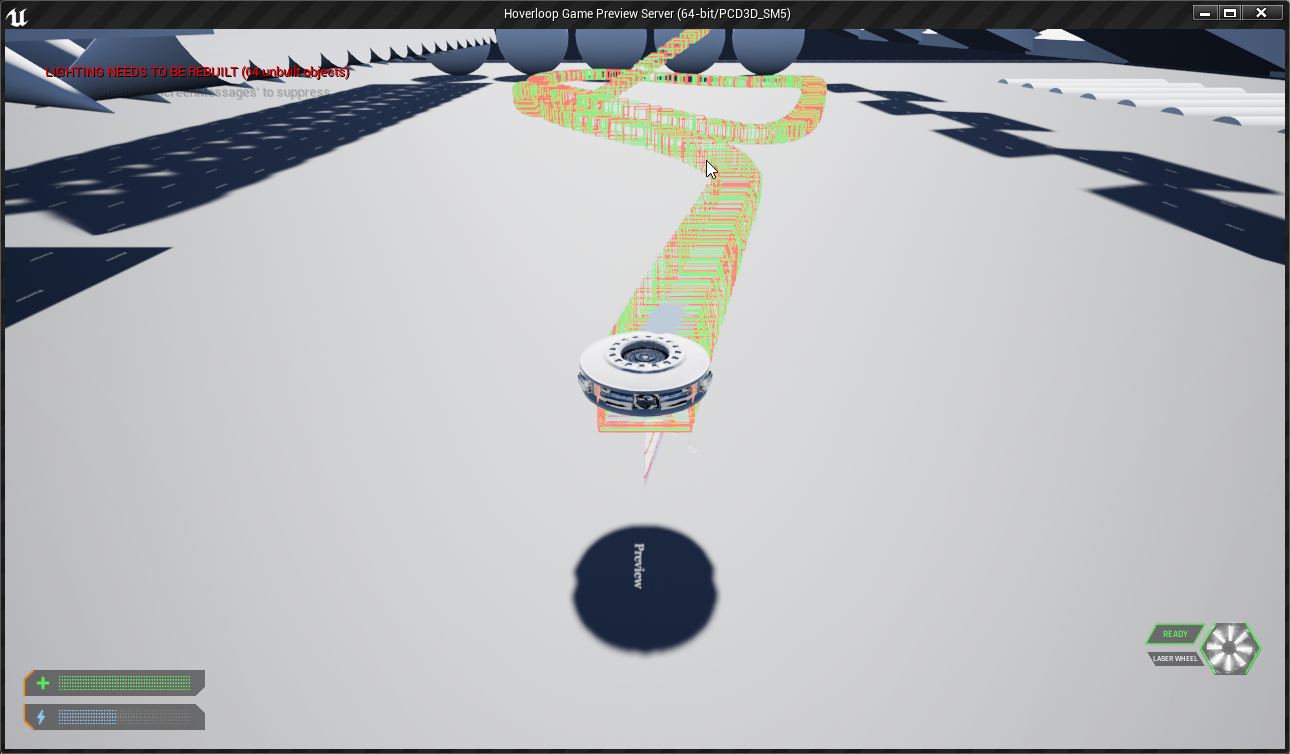
LogNetHoverMovement: *** CLIENT BEFORE MOVE - Timestamp: 146.624985 | Location: X=501.173 Y=-1059.453 Z=1469.956 | Accel: X=0.000 Y=0.000 Z=0.000 | Vel: X=374.782 Y=163.678 Z=0.212 | AngVel: X=0.000 Y=0.000 Z=0.000
LogNetHoverMovement: *** SERVER BEFORE MOVE - Timestamp 146.624985 | Location: X=500.862 Y=-1059.787 Z=1470.116 | Accel: X=0.000 Y=0.000 Z=0.000 | Vel: X=374.810 Y=163.663 Z=0.212 | AngVel: X=0.000 Y=0.000 Z=0.000
Given I don't have any Packet Loss or so enabled and only perform linear 2D movement, no jumping, no gravity, no driving into things.
Is that a normal error in location and Velocity?
(Random Timestamp)
Because technically I would expect these to be closer
fleet raven
that seems to be just below the error threshold for an adjustment, which is sqrt(3) units
thin stratus
Correct
Just wondering if it should be closer
Or if I could assume this is an acceptable result
Trying to get my Hover Movement Replication async sh't fixed by starting at 0
No Gravity, no Hovering, no Collisions with Walls, Floor, Ceiling or other Actors, no Packet Loss etc., no Rotation
I guess having 0.3 difference is "okay" :/
Wait a second
If I send the InputAcceleration to the Server NetQuantized10
Then I need to also use a rounded version for the client, right?
Otherwise they use a different input acceleration which will def result in a wrong velocity
fleet raven
it's not going to be deterministic anyway
like how the character movement does variable tick rate on the client and then combined ticks on the server
cedar finch
How could I tweak this so it replicates my camera location as well? Right now I'm replicating the Swing arm rotation but can't get the camera location to look right: https://i.gyazo.com/12bed6b39d142e057c542c89c81c4ac5.png https://i.gyazo.com/6e26fb17d29f7ed2eb4be02d02d96237.gif

 chrome bay
@thin stratus Yeah you should round the input, definitely helps alleviate some error
Substepping is also important for the server since if combines many delta's into one move (assuming you're following CMC's example)
It's pretty damn close to deterministic then
Also using the timestamp reset system that CMC does helps there too
chrome bay
Also I discovered fairly recently that using a PrimitiveComponents COM for any movement calculations creates insane amounts of jitter for some reason I never bothered to work out.. ended up using a socket location instead.
Yeah similar to what I did. I've since moved to physics because I like to make life hard for myself when it comes to shapes etc...
thin stratus
Yeah not gonna do that haha
chrome bay
Honestly do not blame you 😄
chrome bay
I guess hoverloop ships nicely fit inside simple collision shapes etc..
and don't have articulated parts and the like
FML
thin stratus
@chrome bay Given I fix the rounding (not sure if it's actually broken or printing before rounding), these numbers, in editor, should then not desync in the given test environment of no collision, gravity, hover or angular force?
Cause i want to have a working base before adding more stuff to it - _-
Despite some really small rounding errors if even
 covert ember
I have a question, my respawn BP does not work correctly on the server, but on Clients, it works perfectly fine. The bug is, when the server kills a client, the screen freezes for the server, I am assuming it has something to do with the player controller, but I have been trying to fix this for 2 days now, and its starting to be a big problem. I have created other respawn BP in the past, which all work with no issues, but for some reason I cannot get this to work.
pallid mesa
Is there an easier way to test late joiners on a Multiplayer based project? I tried making net cull super super little and the results aren't the same. I need to open a dc session, join with one player, do something and then join with the other to see if the "late joiners" logic worked, and it's hella slow... Any advice?
Also, side note, I understand Networking. I'm just testing some onrep logic I'm refactoring
real yacht
when i increase movement speed in movement component in third person character, net is clamping speed, trying to correct speed and movement is not smooth
is there something in component that i need to change so i can achieve smooth movement
thin stratus
You have to change the MovementSpeed (if runtime) on everyone via a RepNotify variable
MaxWalkSpeed is not replicated
Right so I double checked my network code and I was printing too early on the Server. The Acceleration is the same on Server and Client.
They both round the vector to 1 decimal place and then make sure to clamp it again ( in case it got rounded upwards).
Timestamp: 13.633297 | Location: X=-5457.979 Y=-740.279 Z=200.000 | Accel: X=0.000 Y=-2500.000 Z=0.000 | Vel: X=-433.512 Y=-421.695 Z=0.000
ClientTimeStamp 13.633297 | Location: X=-5458.041 Y=-740.285 Z=200.000 | Accel: X=0.000 Y=-2500.000 Z=0.000 | Vel: X=-433.542 Y=-421.706 Z=0.000
Now there is still a verrrrry small difference in Location and Velocity
And I have 0 idea if that is normal and expected in this test environment (PIE, no Packet lag stuff, no collision, no gravity or hover acceleration, no angular acceleration)
I guess even with the same start location and the same acceleration, the math code yield some small rounding differences for client and server?
Even though I would assume a number to be rounded the same way in every attempt on the same PC
meager spade
thats just float inprecision
im pretty sure its not guaranteed to be the same everytime even if the same values are fed in
chrome bay
@thin stratus have you checked the simulation delta times as well to make sure they are identical?
chrome bay
It'll be a bit of a trickier test since I guess your combining moves etc together as well?
thin stratus
Yeah, but I don't see this happening too often in this test case
chrome bay
You may know already but when CMC does the move the client doesn't necessarily use the frame delta time, it tries to work out what delta the server would simulate with
thin stratus
CLIENT BEFORE MOVE - Timestamp: 6.150025 | DeltaTime: 0.016667 | Location: X=3142.898 Y=-1569.923 Z=200.000 | Accel: X=-2500.000 Y=0.000 Z=0.000 | Vel: X=-980.509 Y=1282.527 Z=0.000
CLIENT POST MOVE -   TimeStamp 6.150025 | DeltaTime: 0.016667 | Location: X=3125.685 Y=-1548.904 Z=200.000 | Accel: X=-2500.000 Y=0.000 Z=0.000 | Vel: X=-1032.745 Y=1261.148 Z=0.000
SERVER BEFORE MOVE - ClientTimeStamp 6.150025 | DeltaTime: 0.016667  | Location: X=3142.917  Y=-1569.915 Z=200.000 | Accel: X=-2500.000 Y=0.000 Z=0.000 | Vel: X=-980.509 Y=1282.542 Z=0.000
SERVER POST MOVE -   ClientTimeStamp 6.150025 | DeltaTime: 0.016667 | Location: X=3125.704 Y=-1548.896 Z=200.000 | Accel: X=-2500.000 Y=0.000 Z=0.000 | Vel: X=-1032.745 Y=1261.162 Z=0.000
Seems to be the same deltaTime
chrome bay
yeah that doesn't look too bad then
thin stratus
I can live with the numbers being slightly different, but only if no one tells me that this shouldn't happen "already"
chrome bay
I'm not sure how close mine were to each other tbh.. I was doing some pretty heavy throttling and wasn't seeing many if any corrections
Yeah
thin stratus
It's not that big of a diff
Always around 0.0XY
But I would still assume that it shouldn't really happen
chrome bay
Is that on different machines btw or on same machine?
thin stratus
Same
Just PIE
CLIENT BEFORE MOVE - Timestamp: 0.033333 | DeltaTime: 0.016667 | Location: X=4999.306 Y=-4250.000 Z=200.000 | Accel: X=-2500.000 Y=0.000 Z=0.000 | Vel: X=-41.660 Y=0.000 Z=0.000
CLIENT POST MOVE - TimeStamp 0.033333 | DeltaTime: 0.016667 | Location: X=4997.917 Y=-4250.000 Z=200.000 | Accel: X=-2500.000 Y=0.000 Z=0.000 | Vel: X=-83.320 Y=0.000 Z=0.000
SERVER BEFORE MOVE - ClientTimeStamp 0.033333 | DeltaTime: 0.016667 | Location: X=4999.305 Y=-4250.000 Z=200.000 | Accel: X=-2500.000 Y=0.000 Z=0.000 | Vel: X=-41.660 Y=0.000 Z=0.000
SERVER POST MOVE - ClientTimeStamp 0.033333 | DeltaTime: 0.016667 | Location: X=4997.917 Y=-4250.000 Z=200.000 | Accel: X=-2500.000 Y=0.000 Z=0.000 | Vel: X=-83.320 Y=0.000 Z=0.000
yeah. you would think they would be pretty much indistinguishable.. but I can't remember if mine were now...
thin stratus
There is already small differences on the second tick
e.g. Location X is different on the third decimal place
And as we all know, rounding or precision errors pile up pretty fast I guess
chrome bay
yeah for sure
My only other suggestion would be add 'copious logging' to the movement calculation itself to see where precision is lost maybe?
thin stratus
Yeah I'm currently trying to see where the error got bigger
It looks like the error just got bigger over time
0.001 went to 0.002 and 0.003 and then it got exponentially bigger
CLIENT BEFORE MOVE - Timestamp: 0.016667 | DeltaTime: 0.016667 | Location: X=5000.000 Y=-4250.000 Z=200.000
CLIENT POST MOVE - TimeStamp 0.016667 | DeltaTime: 0.016667 | Location: X=4999.306 Y=-4250.000 Z=200.000
SERVER BEFORE MOVE - ClientTimeStamp 0.016667 | DeltaTime: 0.016667 | Location: X=5000.000 Y=-4250.000 Z=200.000
SERVER POST MOVE - ClientTimeStamp 0.016667 | DeltaTime: 0.016667 | Location: X=4999.305 Y=-4250.000 Z=200.000
You might be right though
The error basically comes up after the first tick
Even if just small
I could try to print the location with more decimal places to see if the first ever location of 5000.000 doesn't already have an diff on client and server
ivory portal
When a player does ALT+F4 the OnLogout does not get triggered
how can I catch this?
ivory portal
mmm ok, Ill watch my server logs a bit longer
thin stratus
CLIENT BEFORE MOVE - Timestamp: 0.016667 | DeltaTime: 0.016667 | Location.X: 5000.0000000000 | Location: X=5000.000 Y=-4250.000 Z=200.000
LCLIENT POST MOVE - TimeStamp: 0.016667 | DeltaTime: 0.016667 | Location.X: 5000.0000000000 | Location: X=5000.000 Y=-4250.000 Z=200.000
SERVER BEFORE MOVE - ClientTimeStamp: 0.016667 | DeltaTime: 0.016667 | Location.X: 4999.9995117188 | Location: X=5000.000 Y=-4250.000 Z=200.000
SERVER POST MOVE - ClientTimeStamp: 0.016667 | DeltaTime: 0.016667 | Location.X: 4999.9995117188 | Location: X=5000.000 Y=-4250.000 Z=200.000
@chrome bay Well that explains a bit more
Why spawn a pawn on the same X location if you can fuck it up
Given that, the Server already right at the start has a different location than the client
No wonder this goes async over time
Now is that something I can fix? Idk. This is literally the respawn system of UE4 (RestartPlayer), which gets a SpawnPoint and then Replicates the Pawn Spawning
chrome bay
Ooft yeah that's tricky.. I guess you just have to live with that haha
I figure RepMovement rounds transforms right? That might be it
Mind you if that's the case, I would live with it
thin stratus
It will cause one correction at some point
I can live with that
Just annoys me that this is the reason cause ToString seems to round too
chrome bay
one day everything will be fixed point maybe 😄
thin stratus
I would have thought ToString would print 4999.999
 solar stirrup
Does calling Destroy() on an actor destroy it on every client and the server?
chrome bay
If it's a replicated actor and you call it server-side then yes
The actor channel will be closed and destroy it
rain coral
Got a pickle - let's say I have a replicated item variable. When the listen server throws/drops the item, it gets nulled on server and then on client. However, in order for the client to run the item-dropping code, the item cannot be null until it has been dropped. So the replicated value reaches the client before the command to drop the item does, I suppose. Then the client never understands which item to drop.
thin stratus
So you are calling Destroy as well as an RPC
And the Destroy happens before the RPC?
At least on Client Side?
ivory portal
Someone knows with Gamelift, do you need to call the init sdk every gamemode or?
thin stratus
Probably
@chrome bay https://i.imgur.com/WYQXPZe.png
Turned on GravityAcceleration and HoverAcceleration. Small bumpers on the floor don't cause any correction, but stuff like this does.
Now that's not really the stuff that a player will hover over, but I wonder if that's expected or shouldn't happen :x
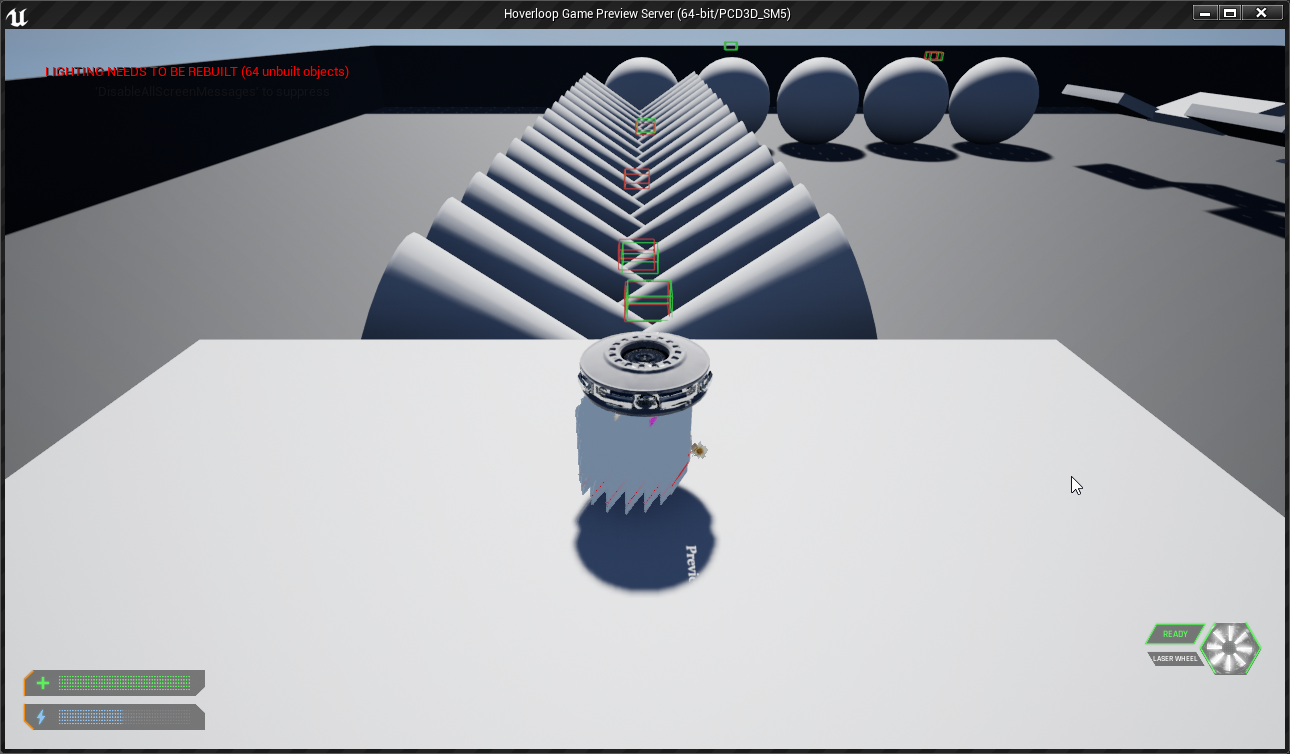
Server View, but Client Drone (spectating)
chrome bay
Hmm. What about smooth-ish bumpy terrain?
thin stratus
I seem to have barely any corrections on the top thing
The one below that, with the little ramp on the right end is also fine
The spheres give corrections just by trying to balance on them
@chrome bay
And the rotated spikes at the bottom also cause them but mostly due to missing hover accleration (not enough "floor") and colliding with them the whole time
But I can for example drive over the ramp at the top right multiple times, glide through the air, drive over the bumpy road at the top and it's all fine
chrome bay
Yeah I guess the ramps would be less susceptible to the normal changing as the location is modified slightly
thin stratus
Yeah so this can only be tested with both gravity and hover acceleration being active.
So I could blame both if it's really a coding issue.
Now Gravity is fairly simple and static so I would say if there really is a problem, aside from just the Server and Client not being able to stay synced in that scenario, then it's the way hovering works
I'll reformat my prints and import all that data so I can easier sort it
 twin juniper
is there any tutorial on how to make multiple lobbys with player created waiting rooms where the host (the player created it) changes the level, max players, rules and can kick certain players.
i cant find any
twin juniper
1>------ Skipped Build: Project: ShaderCompileWorker, Configuration: Invalid x64 ------
1>Project not selected to build for this solution configuration
2>------ Build started: Project: UnrealSandbox, Configuration: Invalid Win32 ------
2>The selected platform/configuration is not valid for this target.
========== Build: 1 succeeded, 0 failed, 2 up-to-date, 1 skipped ==========
this is appear in 4.21.2
worked fine in 4.21.0
dedicated server
rain coral
Is there a way in an OnRep_Function to simply not accept the new value?
Other than making a second variable as a backup that is not replicated..?
I'm aware you can send the previous value through the OnRep function with a parameter, but worried about sending too much info over the net (actor ref)
thin stratus
Well if you set it to a different value it will try to replicate next time the actor replicates
If you don't need that to happen that often, don't set it that often
A second variable is totally valid
rain coral
Guess I'll go with a locally stored Prev_Variable. It's an edge case thing where the server replicates a nulled variable when the client is supposed to null it themselves after doing an action. It just replicates too soon
 unique thunder
Can anyone shed light on the timing of major class initialization on a dedicated server?
For some reason, this fails:
- Game Instance server travels to new map
- Game State casts to Game Instance and retrieves variable
- Player joins server, creates widget. That widget casts to Game State and pulls the variable
What I end up with is the default variable set in the Game State, not the one it pulled from the Game Instance. Maybe I'm not running an event with a specific RPC or something to hold the variable in the right place
The first two occur before a player even joins, so it's the server handling those on its own.
chrome bay
While I remember, because someone twigged me about it yesterday. Replicating a class/tsubclass only uses a string/path the first time
After that, a NetworkGUID is created and they are replicated by number.
twin juniper
Holy Crap!
meager spade
:/
slender yarrow
for an FPS: should something like gun construction (setting gun mesh, sights, tac grip, silencer, etc.) be replicated on server? I dont see how the user on the client could hack that. Maybe change all the meshes but that doesnt really effect other players or the game. Whats the normal practice for this?
 reef tinsel
@slender yarrow generally, you'd want to replicate anything that could affect any other players. In your case, a silencer, for example, may have an effect on the minimap of other players (hiding them). Consider this when replicating equipment specially.
I have a session question:
Whenever a player controller joins a session, and therefore joins a match, do all widgets get destroyed? I'm trying to make a very simple loading screen. The problem is, once the player joins, the widget gets destroyed.
Is there a way to make it persistent? We're already creating and adding it to player screen in the Game Instance
pallid mesa
if you really want something more persistent than the GI and not reliable on the pc, use GameViewportClient
however as your words say... You want to make it simple
you could snap this widget to be active on the hud
as soon your controller gets initialized you can change the alpha of the widget to make it disappear
it's a normal technique to fake world loading
and very simple tho.
meager spade
loading screens are normally handled in slate, as per the loading screen example
meager spade
i am confused right now
LogTemp: Warning: Host? 0, CurrentWeapon: BP_Weapon_AR4_C_0, Pawn: BP_PlayerPawn_C_0
LogTemp: Warning: Host? 0, CurrentWeapon: BP_Weapon_AR4_C_1, Pawn: BP_PlayerPawn_C_1
LogTemp: Warning: Host? 0, CurrentWeapon: BP_Weapon_AR4_C_0, Pawn: BP_PlayerPawn_C_0
LogTemp: Warning: Host? 0, CurrentWeapon: BP_Weapon_AR4_C_0, Pawn: BP_PlayerPawn_C_0
LogTemp: Warning: Host? 1, CurrentWeapon: BP_Weapon_AR4_C_0, Pawn: BP_PlayerPawn_C_0
LogTemp: Warning: Host? 0, CurrentWeapon: BP_Weapon_AR4_C_0, Pawn: BP_PlayerPawn_C_0
LogTemp: Warning: Host? 0, CurrentWeapon: BP_Weapon_AR4_C_0, Pawn: BP_PlayerPawn_C_0```clearly the weapon is being replicated
oh that is odd
 rocky badger
is there a good way of getting the player controller from a character?
I'm trying to just use 'GetController()' with a cast to my custom controller but its giving me errors
solar stirrup
what errors
rocky badger
@solar stirrup I'm getting null pointer errors; i cant log it either since it's saying it doesnt exist unless theres a work around i dont know of
 plush lagoon
Where would i store a Variable, too have it passed too the Server once the client has finished connecting too the Server?
Since Gamemod eis only on the Server, I assume once you join your GameState is also overwritten correct?
From the one from the server?
worthy perch
GameInstance, or your could pass the value to the GameServer when you start travel to it.
 tropic snow
How do I make it so this won't output an error
mild forge
Is it common to call player controller's method from player character or in reverse direction?
plush lagoon
thank you @worthy perch 😉 doing just that, but i'm parsing it in the InitNewPlayer function in the Game Mode, then on player controller creation, assigning the data which is then replicated/sent too the client.
From there the client waits for the onPostLogin, and then checks the data against the server for a validated login.
nods
slender yarrow
@tropic snow possibly do a switch has authority check before you call TPS muzzle flash (server)
real yacht
i have recorded my test.nprof file to see some network statis in NetworkProfiler
is there any document, how to interpret stats
what are the bad stats, what are the good one...etc
are stats here good or bad? two players on dedicated server with bullets and powerups
thin stratus
Check the Actors and RPC tabs
And Properties
Check how often they call
How much data per second they take up on your bandwidth
Look up how much bandwidth is generally expected for games
And chekc if the call counts on some of your rpcs isn't too high for what they are supposed to do
real yacht
what are upper limits bandwidth, call counts, etc..
thin stratus
Idk upper bandwidth limits out of my head. Would need to google that too.
Call counts depend on your game.
Or rather on the function in question
It's not so much a thing that can just be compared to a list of "Max calls"
It's case to case
real yacht
yes i know but there must be some best practices, or something like that
thin stratus
If you call UpdateHealth RPC every frame, then that's maybe bad
Cause health doesn'T always change
And maybe you are constantly replicating a float or integer variable
Which could easily be simulated
real yacht
yes, that okay
thin stratus
And just kept in sync every 10 seconds
Best practices are to keep replication count as low as you can
And bandwidth usage too
inland pond
What can I do when classes which get replicated depend on each other on the client? For instance I call inside the PlayerState OnRep a function which will use the GameState. So then I would first need to get if the GameState is ready. What can I do about it? I had though about a timer which will check the state of GameState's instance every n second to register an event and stops when it was ready.
real yacht
do you think this is correct way for turret rotation (this is happening in tick, when mouse moves)
@thin stratus
and i have
maybe too much rpc calls, so i want to decrease that
thin stratus
Yeah that's something where you can think about it being calculated on the client too
graceful cave
@inland pond you can make two bool variables somewhere that are set when each on rep function runs
and when they do run, check to see if the variable for the other function has been set
real yacht
i have tried with repNotify but i didn't get it work with rotation :/
inland pond
that sound great, thanks for your response!
rain coral
I have a case where some actors that are marked for replication are spawned in BeginPlay and don't get replicated to clients, ever. Under very specific circumstances, it's weird. If I spawn the actors after a small delay, everything is fine.
I feel like there's many situations where it gets overwhelmed and stuff collapses, never recovering. Is this a common thing?
winged badger
are they actually spawned on server?
do you have a monster construction script in the actors doing the spawning?
any LogSpawn messages in OutputLog?
rain coral
@winged badger Yeah, the server spawns them (they appear on clients), but the variables holding references to the active items (which are Replicated) don't always get through to the client, unless I wait something like 1.5 seconds after the game has started. Entry point is BeginPlay.
I'll check the OutputLog!
winged badger
active items are what in this context?
rain coral
It's one item reference for each hand. Items can be thrown (at which point they are nulled) and picked up (at which point they're set to the picked up item).
winged badger
but item is a dynamically spawned actor?
rain coral
Yeah they're spawned dynamically
winged badger
and they also show on clients?
rain coral
Yeah
winged badger
whats the NetPriority Like items/Pawn?
rain coral
I haven't changed any NetPriority (or similar) settings from default
winged badger
how many items are we talking about? do they have lot of custom network code in them?
rain coral
Two items per player that is spawned. They shouldn't have anything going on on initialization that affects the network, but an example is a gun that can send a shoot command to the server
winged badger
increase their network priority to above that of PlayerPawns
they are spawned server side in same frame as players?
rain coral
Changing the priority didn't change anything. The item actors themselves replicate anyway, but the variables referencing the 'current item' in each hand isn't.
I suppose it's the same frame yeah. The server spawns the pawns, the server-side pawns spawn their own loadouts. I've tried waiting 0.5 seconds with the same problems, but something like 1.5 seconds was fine
Even if the priority would be low, it should replicate eventually, right? Even if it takes time
Keep in mind I'm testing this in-editor, so it might not represent reality completely
winged badger
with higher priority it should replicate before the PlayerPawns do
and references should be valid before BeginPlay on clients Pawns
chrome bay
I'd be cautious about assuming that's guaranteed to happen
winged badger
but as long as the references are set server-side
the NetGUID should be valid before they replicate
(server-side after they are spawned, that is)
thin stratus
If I ever figure out this damned hover movement replication I will never touch that stuff again
Simplified the hover acceleration to just one function, no PID controller. So I'm down to just linear acceleration, constant gravity acceleration and one very simple hover acceleration function.
And I allow sqrt(400) as error -> Gets client corrections
I don't want to know how that would look like with hte default sqrt(3)
And also down to one single SphereTrace below the pawn
I mean, maybe allowing 20 units of difference in location is causing more issues than solving them
The correction with 3 units is way less visible, but obviously happens a little bit more oftne
How often does a normal cmc character get correct?
Is that something that happens rather often and one just doesn't notice it or is it only happening in extremer situations?