#multiplayer
1 messages · Page 442 of 1
 gleaming niche
 bold mica
so unreal was just giving shitty advice lmao
 bold mica
ight, thanks bois
gleaming niche
yeah no, it's still right, like for a listen server
but not for other clients.
if you're a remote client you have no gamemode
you'd need to store players some other way
bold mica
no I understood that
 fleet raven
if you want to keep a player list people can access keep it in game state
gleaming niche
which gamestate actually does have
bold mica
the shitty advice was storing the connected players list in game mode
instead of in gamestate
gleaming niche
gamestate DOES have the player list
fleet raven
it probably has one by default yeah
gleaming niche
it does, default implementaion is there for everything you need to look up other players playerstate info
gleaming niche
and is of course replicated
bold mica
thanks again bois
 flint plaza
Hey guys. I have a basic multiplayer game set up. I have a lobby which is a seperate map. I execute a custom console command to host a server of another map using serverTravel in cpp (which is successful partially). The server is successfully reaching the new map but all clients in the same map are not reaching that map and I am no longer able to control the clients as well. What is happening?
 thin stratus
@flint plaza So you press HOST. It opens the LOBBY map as a listen server.
Clients connect to it. The Server then calls "SERVER TRAVEL" to move everyone to the next map and that's when it fails?
 rigid sonnet
@ocean arrow can I dm you?
flint plaza
@thin stratus In Editor, there's this option to spawn multiple players in the same map right?
So I have 1 server and 3 clients in the same Lobby map. Then, using a custom console command, I create a listen server and server travel there. But when the server travel happens, only the person who ran the command(server - authority) reaches the new map and the other clients don't. They remain in the lobby and all client windows loose input control, that is, non of the clients can be any longer controlled using WASD keys
thin stratus
Technically you should use SeamlessTravel with ServerTravel
And that is not even supported in PIE
I would test traveling only in standalone
(e.g. rightclick UPROJECT file and hit "Launch Game" x times)
flint plaza
Will that launch sever instances or client instances?
flint plaza
The launching from uproject did not connect seperate instances to the same lobby.
Although I did get a hint from your suggestions and now it's working thanks
thin stratus
Well launching standalone obivoulsy needs you to connect by yourself
Only the PIE will automatically connected you if enabled
 humble comet
Guys does anyone know why: I built dedicated server and when I connect to it and play from other devices, there are many networking artifacts, stutter etc. At the same time if I launch listen server from any of the mobile devices and connect then everything works much smoother. I have tested it locally and from cloud server, result is the same. My slight guess is It is because game was not designed for dedicated gameplay, cause it still runs most of the logic in both server and clients., but I am not sure. Has anyone had same problems as this?
 stable kindle
'FUniqueNetIdSteam::UniqueNetId': cannot access protected member declared in class 'FUniqueNetIdSteam' has anyone gotten this problem using st
moving from 4.19 to 4.21
 brittle yew
i tried to get voip working in my game. sadly i couldnt find a lot of good documentation that worked for me. im using 4.21 and advanced sessions and my game runs over steam.
i changed all the things i needed in the defaultengine.ini
i added a voiptalker component to my character, assigned it to the owning player state.
if i am the server no voice is recorded or sent to the other player.
if i am the client joining a server with no microphone and i talk as the client i get kicked instantly as soon as i make some sort of noise.
is there any good voip documentation out there that doesnt require an extra "steam voice" plugin? maybe some sort of tutorial?
 knotty frost
anyone have details on the beacon changes in regards to steam with the 4.22 preview? https://i.imgur.com/PpFHxZf.png

 dark edge
Would I encounter a race condition of I spawn a replicated actor and also set a replicated reference to it? Or is the system smart enough to replicate the actor first?
 manic pine
yeah dont worry about it, the uproperty pointer on the client's side wont be non-null until the actor has actually reached the client
 icy nacelle
I followed https://wiki.unrealengine.com/Dedicated_Server_Guide_(Windows_%26_Linux) and I'm having issues - When I create a dedicated server, the clients do not connect to it, they just stay in the entryMap.
I think this is the problem, but I'm not sure how to solve it
(Log)
[2019.02.13-19.05.28:754][  0]LogNet: Browse: 127.0.0.1//Game/Maps/entryMap
[2019.02.13-19.05.28:826][  0]LogOnline: Warning: STEAM: Failed to initialize Steam, this could be due to a Steam server and client running on the same machine. Try running with -NOSTEAM on the cmdline to disable.
[2019.02.13-19.05.28:826][  0]LogOnline: Display: STEAM: OnlineSubsystemSteam::Shutdown()
[2019.02.13-19.05.28:827][  0]LogOnline: Warning: STEAM: Steam API failed to initialize!
[2019.02.13-19.05.28:827][  0]LogOnline: Display: STEAM: OnlineSubsystemSteam::Shutdown()
Anybody have experience with making a dedicated server?
Another point - I cant find in the server command window "I am DESKTOP - XXXXXXX ( IP )" Could this also be a problem?
 vital stag
Does anyone know a way to check if there is a sever set up in a level blueprint? Basically I want to set up my level blueprint to check if there is a server, if there is then I'll execute console command "open 127.0.0.1", else I'll execute console command "open map?listen"
 winged badger
ouch
whatever is in the level its packaged
which means you can't have it have both server and client flags
level blueprint is not the place for almost anything
its fine to show MainMenu from MainMenuLevel on BeginPlay, other then that... its more often a mistake to use LevelBP then not

 bleak lily
I get this in the logs for my game since it wont show the server in my server browser when packaging
Warning: OSS: Ignoring game search request while one is pending
bleak lily
yeah the multiplayer works in the editor but not when I package it
yeah I have that too
 sullen shoal
hm
sullen shoal
What error I had while trying to make it multiplayer is that I had to make a plugins folder inside my games folder and then insert the steam advanced sessions stuff
bleak lily
alright are you using 4.21
bleak lily
lemme check something
sullen shoal
I mean it showed it before for me aswell
but the packaging did not work
so I tried finding my mistake
and while I was checking for a solution
I found someone saying that you gotta add a "plugins" folder to your games folder
I did that and it worked when I selected the projects folder
for packaging it
my friend was able to connect
bleak lily
did you make a folder also called Advanced Sessions
or did you just do plugins and paste the thing in
sullen shoal
wait a sec
I'll check but probably just the "plugins" folder
inside the games folder
bleak lily
alright thank you
sullen shoal
np
It annoyed me so much that it didn't work at first
so I started looking deeper into it
first I had visual studio problems and such
I've been using this program actively for like two weeks now xD
almost two I think
I also watched the blueprint multiplayer video of the official unreal engine youtube channel if you wonder
bleak lily
yeah I really only used blueprints for my project until I needed to make a blank C++ document for advanced sessions
sullen shoal
no
lol
you can do everything inside blueprint
Idk if inviting your friends will work by just using blueprint
via steam
but the player can connect
that's for sure
 vale steeple
Hi guys! I had a problem replicating materials. I´m developing a Boxing Game for Android. Each player has his savegame in his device with a struct of all textures of his clothes. The idea is a LAN fight, each one with his own textures.
The problem I had is I cant replicate the texture. The player 1 create the session and I posses Player 1 when level change, and Player 2 are unposses until the second controlled entered the session, then I posses Player 2. But, the textures are not synced.
I the device 1 I see P1 and P2 with the texture of P1, and in devece 2 I see P1 y P2 with texture of P2.
bleak lily
I made a server browser and it worked for a decent bit but now recently it just hasn't worked outside of the editor
bleak lily
ok
sullen shoal
@vale steeple https://www.youtube.com/watch?v=Stl-clE7JLc maybe this helps idk didn't watch it fully myself

GAME DEVS FIND THE REST OF THE PLAYLIST AND ALL OTHER GAME DEV VIDEOS AT MY GAME DEV CHANNEL http://www.youtube.com/c/unrealteknet www.unrealtek.net We now a...
still gotta do it

@bleak lily
 sullen shoal
I downloaded both
idk and idc it works xD
I edited the config
with the steam stuff
sullen shoal
 bleak lily
do I need those
sullen shoal
yup
vale steeple
@sullen shoal Thanks for the video, but all this is working, I only had problem replicating material.
sullen shoal
otherwise it's not on
bleak lily
I didnt do that I think
sullen shoal
do it haha
bleak lily
shit
sullen shoal
xD
sullen shoal
@vale steeple like when the player presses "c" and an object transforms to another object? weird example and it gets replicated?
@bleak lily now you know ^^
bleak lily
default engine is in my game folder right
vale steeple
@sullen shoal I change the texture with dynamic materials, and there is my problem.
sullen shoal
oh I don't know much about dynamic materials
sullen shoal
xD
Hi guys, welcome to another video about replication, in this one, and by the request of a viewer, im going to show you how to replicate sounds and other effe...
@vale steeple maybe this helps somehow
just use what he says on your dynamic materials
bleak lily
I need to mess around with decals
eventually
idk how this has to do with multiplayer
sullen shoal
if you replicate it on one end you can also transmit it to the server I think
like when you did a function
a custom event
with the running on server setting on
and such
if you get what I mean
I could be wrong though Idk but for me it works so that's that xD
bleak lily
hopefully the server browser works after I am done packaging it
sullen shoal
or maybe you can't see your dynamic materials because of it's set by "owner only" @vale steeple
@bleak lily hope so ^^
bleak lily
yeah that stuff in the config wasnt there so
sullen shoal
If it still doesn't work just watch the tutorial of the blueprint multiplayer series and you get quite a good understanding of how multiplayer works
It should be
wait a sec
bleak lily
its just weird since it used to work before
sullen shoal
hm
bleak lily
but once I added more overtime not to the UI but maps and stuff like that it stopped working
sullen shoal
OH
you need to go to your config of your gamefiles
I forgot
I am stupid haha
so it tells the server to start
sullen shoal
you go to your game>config>Engine.ini
bleak lily
ok
sullen shoal
there should be code for the subnet system of steam
bleak lily
[/Script/OnlineSubsystemSteam.SteamNetDriver]
NetConnectionClassName="OnlineSubsystemSteam.SteamNetConnection" this?
sullen shoal
[/Script/Engine.GameEngine]
+NetDriverDefinitions=(DefName="GameNetDriver",DriverClassName="OnlineSubsystemSteam.SteamNetDriver",DriverClassNameFallback="OnlineSubsystemUtils.IpNetDriver")
[OnlineSubsystem]
DefaultPlatformService=Steam
[OnlineSubsystemSteam]
bEnabled=true
SteamDevAppId=480
[/Script/OnlineSubsystemSteam.SteamNetDriver]
NetConnectionClassName="OnlineSubsystemSteam.SteamNetConnection"
this
you can read more about it over here
I gotta go now
hopefully it works for you
sullen shoal
overwrite it
maybe it's changed idk

In this video we take a look at the finished project and step through each of the features that will be covered in this series. We show our functional Main M...
good tutorial series
bleak lily
yeah I'll look into that
sullen shoal
ok good
I am at part 13 or so
so when you reach this point you can already connect
and see the character after that all he does is adding the chat, lobby system and so on
toggle menu and stuff like that
Well gotta go have fun!
bleak lily
rip it didnt work
still shows the same error
LogOnlineSession: Warning: OSS: Ignoring game search request while one is pending
bold mica
so question, if a client is also acting as a server, like a listen server
will client events also be called there?
or would it only perform the server events
bold mica
alright so you can get around that by using NetMulticast instead of Client as the target right?
bold mica
NetMulticast will go to the server and all clients
 meager spade
yeah but i was specifically pointing out the server
meager spade
cause to counteract that, you have to do an additional check to stop the server from using the multicast
Server owns what actor?
bold mica
will it receive the client event then?
bold mica
yeah but hear me out
the client is running a server
like for instance call of duty has one of the players be the host
and the host is migrated if the host leaves
if a client spawned in a pawn
when it joined
but that client was also the listenserver
winged badger
you can't migrate hosts with UE
bold mica
would it receive client events so it could update it's pawn
meager spade
clients dont spawn the pawn though, server spawns the pawn
bold mica
@winged badger you can but it requires some cpp magic but that wasn't my point
winged badger
cpp magic like rewriting half the engine
meager spade
yeah anything is possible if you write the netcode 😄
but back to the actual pawn, client never spawns the pawn, server spawns the pawn, and its replicated down to the client
bold mica
yeah, but certain pawns can be "owned" by a client
meager spade
thats the local version
bold mica
because client events only go to the client that owns the pawn
meager spade
owned by the client
winged badger
one of your clients in order to become a host has to open a level with ?listen
in order to do that it has to leave the current level
which will break the connection to the server and other clients
bold mica
yeah the NetOwner
meager spade
and the NetOwner is the PlayerController
bold mica
@winged badger that's not what I'm talking about now, I don't know why I included host migration in my example
meager spade
of which a client has his own "local version", server has a copy of it
but a pawn is just a physical representation of that player controller
so back to what you were saying, the server spawns the pawn not the local client
winged badger
listen server is essentially just a server with a local PC
meager spade
a client spawned pawn will only be visible to himself no one else
but i am a little bit lost as to what your aiming for so im going to stop rambling 😄
bold mica
I'm trying to make a game that can be hosted locally but also can connect to dedicated servers
winged badger
Client RPC fired on local controller on server will execute on server
just as if it wasn't a RPC at all
bold mica
okay
thank you zlo
that's what I was asking about
thank you too @meager spade I just don't think you understood what I was asking haha
winged badger
same for Server RPC from local controller, its just a normal non-networked function/event
(when called on server)
bold mica
yeah that much I did know
dark edge
Any of you guys know why "Set Simulate Physics" replicates when setting true, but not when setting false?
bold mica
well the thing is your client shouldn't be simulating physics anyway just the server
and then have the positions replicated to the clients
winged badger
that is... expensive
bold mica
also looking at your blueprint, I'm pretty sure you're creating a blocking thread
it never gets the chance to replicate because youre always in the same thread
what you should have is a delay with a callback not just an infinite loop in the same thread forever
dark edge
Why would it replicate the first flip then?
bold mica
not sure
dark edge
I just did that to test, in actual usage it's driven by an RPC
bold mica
maybe it has some cleanup code to call that never gets called after the first step?
either way that test setup isn't reliable
dark edge
WTF, it works if I turn OFF component replicates
bold mica
lmao rip
anyways replace that delay with a timer
so it calls that function once every set ammount of time and have it loop
because that closed loop prevents a lot of things from happening and will create bad behavior
 turbid robin
@dark edge when you say "Set Simulate Physics replicates"... what exactly do you mean? a property that is getting replicated? or an RPC that gets called?
bold mica
SetSimulatePhysics is an rpc I believe
look at his question in the #legacy-physics he gives a blueprint
dark edge
I'm always calling it from the server, the part that has me scratching my head is that the switch to true replicates out, just not switching back
turbid robin
SetSimulatePhysics isn't an RPC.
    UFUNCTION(BlueprintCallable, Category="Physics")
    virtual void SetSimulatePhysics(bool bSimulate);
Just checked it out.
Ah, but it should set something that gets checked by the "IsSimulatingPhysics" function...
bold mica
yeah I didn't think it was, but I didn't know for sure
so yeah @dark edge just make a clientside function that when called calls SetSimulatePhysics
turbid robin
yeah i agree. i actually don't see any code in that code-path that sets any replicated properties.
which is so weird.
i think i'm too tired. heheh
dark edge
This is so damn weird. The switch to true replicates out, but not the switch back.
I put the authority check in there just to make sure, but that function is only ever called on the server
@bold mica Yeah I'll prolly end up doing that, it's just so damn weird that it only goes the one time.
turbid robin
@dark edge it looks to me like the server is always set to false and the client is always set to true.
as if nothing ever gets replicated.
which matches what i saw in the code.
dark edge
That's just the 2nd time through it. I'm just checking on tick. They both start off false, both go to true, then server flip flops when I hit the change mode button as expected, but client stays stuck true.
turbid robin
ooooh my bad.
dark edge
I'll try just putting it on a RPC for now and call it a day, but damn weird. Maybe something gets broken when the mesh transitions from not simulating to simulating.
bold mica
maybe they both start false, because it hasen't initialized properly yet?
turbid robin
ya, if i wake up in the middle of the night with a eureka, i'll let you know.
dark edge
They default to false. I have a mode change where you swap from driving to construction mode where I need to turn off physics and move all actors back to the initial location.
gleaming niche
iirc a year ago i had a similar problem, and i didn't have time to figure out what was actually causing it, so i just made an RPC to do it
sim wasn't turning off on the client, so i just made an RPC to do it
dark edge
Unreal and the physics quirks.
Last time I messed with it, welding bodies didn't combine their masses and moments of inertia
gleaming niche
iwas simulating on both, for smoothing (didn't care if they went out of sync) but in certain instances i needed to shut it off
and it would turn off on the server, but not the client. so I just made an rpc to force it off, and that solved the issue
dark edge
Yeah I need to simulate on both. Does "Replicate physics on proxy actors" let proxies run physics between updates?
This works. shrug
 marsh gull
UWorld::ServerTravel crashing for anyone else in 4.22 (some assertion in linker.cpp)? worked fine in 4.21
 twin juniper
Hi everyone.
Could someone help me with some multiplayer blueprint?
meager spade
well tell use the problem/issue and we can try to help
no one is going to stand up and say "sure" if they have no idea what the problem or issue is
twin juniper
@meager spade Sure, sorry about that. Just sometimes i describe the problem and no one is on the chat so first I decided to find out if anyone available.
So I got the problem with multiplayer. If i try to run multiplayer and got 2+ players connected, so server player is not working, like you cant controlled your character. Seems that server doesnt posses it. When for joined player it all works fine
Here is my Player Controller BP
And Game Mode BP
I got a Lobby map as well and in the lobby it all works fine, but once you start the game it stops working
meager spade
what stops working?
twin juniper
Player who creates the game Server cant control the character. It appears on the map but you cant move it, nothing. When for joined players it work fine
twin juniper
Yes
I tried to run RespawnPlayer event through GameMode and then controllers work fine, but infromation about selected character from PlayerInfo is not passing and all the players control just a camera without any mesh
meager spade
well normal clients cant access GameMode
only server can
fyi incase that helps anything
but seems like your doing that
so its fine
twin juniper
So any ideas why server is not possessing controller?
meager spade
its strange cause it feels like it should possess the player
winged badger
@twin juniper server won't have a possessed Pawn on BeginPlay
clients will
in the PC
twin juniper
@winged badger so how can I do one for Server?
twin juniper
@winged badger could you explain in a bit more details what are they and how to use them?
 grand kestrel
Don't use OnPossess/OnPossessed, use APawn::Reset()
It will have a valid player controller and playerstate when it calls Reset() and its called both server and client
winged badger
its an event that triggers when controller finishes its Possess Function
winged badger
that has a BP callback?
winged badger
well, no idea if Amozaya is using any c++ here, all the screens are BP 😛
grand kestrel
Its actually really silly that SetPawn and Restart don't have BP callbacks
twin juniper
Yes, sorry guys
I'm a Game Art student and we dont have any programmers have so I have to suffer with this haha
winged badger
funny all convenient functions for network initialization are c++ only
winged badger
SetPawn - called from both Possess and from OnRep_Pawn
grand kestrel
I've added similar things through PRs but don't have an up to date master or any free time to set it up
winged badger
GenericPlayerInitialization - called from both PostLogina nd HandleSeamlessTravel
neither is exposed
grand kestrel
If you PR it they probably wont take long as it changes no functionality and just adds a callback
I don't have any time though
twin juniper
I'm a bit lost now 😂
twin juniper
Okay then haha
grand kestrel
I guess you could override OnPossess/OnPossessed, and call a client RPC notifying that possession has occurred
Thats something you can do from BP
Alternatively, you could store and replicate the current controller
And using RepNotify if you need to do anything when possession occurs on the client
twin juniper
Well as I said I'm not a programmer so I would need a bit more details on it. Is there any tutorials or something how to do it?
grand kestrel
There will be plenty but I don't have any on hand
twin juniper
I event cant find this OnPossess/OnPossessed events
I only got Possessed and UnPossessed
grand kestrel
Oh, yeah, that will do
Doing this would give you a reference to the player controller on both server and client
https://i.imgur.com/TqfhQuu.png
 stable kindle
Guys so i have a question thats been killing me
grand kestrel
Make sure its set to replicated
https://i.imgur.com/ENXdsrX.png
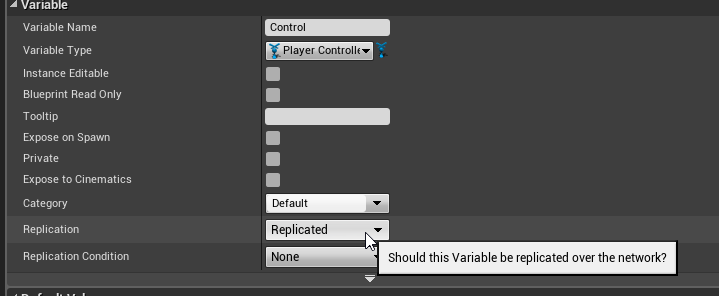
And always null check it (IsValid node)
twin juniper
@grand kestrel Do I need to cast it to PlayerController or to my custom one which is GameplayPC?
stable kindle
having some trouble with source build of a game i recently compiled the ver4.21 of the engine. tried to compile the game project and now it keeps throwing up STEAMSDK_FOUND not defined as a preprocer macro. Any idea what it could. tearing my hair over this one. Was using 4.19 earlier
2>d:\unrealpentum\unrealengine\engine\plugins\online\onlinesubsystemsteam\source\private\OnlineSubsystemSteamPrivate.h(27): error C4668: 'STEAMSDK_FOUND' is not defined as a preprocessor macro, replacing with '0' for '#if/#elif'
grand kestrel
@twin juniper Your custom one, up to you really, but that makes sense
twin juniper
@grand kestrel So then i should use this variable Control to plug it Target reference for Possess node?
grand kestrel
Sorry what are you trying to do
If you're getting it from a Possessed event it makes no sense to use it to call Possess
Because its just been possessed
twin juniper
Okay
Because you promote this Cast to PlayerController to the variable so what should I use this variable for?
Here I got this event and it got Possess in it. Should i delete it, replace or what?
winged badger
you can just override ChoosePlayerStart in GameMode
instead of creating that clutter
grand kestrel
Change it to RepNotify and in the OnRep call your PassCharacterInfoToServer
twin juniper
@winged badger I've tried that before but I didnt know how to pass my PlayerInfo so couldnt make it
@grand kestrel And i dont have event called Event Possesed either
thin stratus
You can just call RestartPlayer
winged badger
that one is in Pawn
thin stratus
That respawns the Player with the DefaultPawn
And if you want the DefaultPawn to be different
You can always override "SpawnDefaultPawnForPlayer" or so
Something along that line
PlayerController should hold the PawnClass for that
So you can grab it from the Player reference
That's all GameMode stuff, UE4 gives you a lot of stuff
twin juniper
Does anyone got some instructions or videos how to do that? It would be really helpful
bleak lily
anyone knows what this means
LogOnlineSession: Warning: OSS: Ignoring game search request while one is pending
I cannot get my multiplayer working when I package my game
and the plugins are packaged with it btw
bold mica
Clients can read the game mode default values right? just changes to the game mode on the server won't be replicated?
nevermind
 jolly siren
The gamemode instance doesn't exist on the client
But the gamemode class does
And you can get the defaults from that
jolly siren
Correct
 twin minnow
how do u guys handle lag/delay in spawn actor?
i was thinking of first spawning an actor client side, then destroying that spawned actor server side and replacing it with a new spawned actor at the same position
but idk would I do this since I cannot pass anything to rpc functions
 topaz agate
How hard is it as a beginner to implement local multiplayer? Is there like a live training?
grand kestrel
@twin minnow We spawn locally & on server, when it replicates from server it hides it on the local client and uses various identifiers to find the matching local version and the replicated version, then interpolates relevant properties on the local version to the replicated version
twin minnow
@grand kestrel may i ask what identifiers you use to find the matching local version?
grand kestrel
Depends on your use case
You'll have to figure that one out yourself I think
For us its things like velocity direction
Anything that differs between each instance but is consistent
If you're spawning on the odd occasion and not many each second then its a bit easier, you can send reliable RPCs and have an actual ID property
twin minnow
hmmm interesting
i guess with my case scenario it's very difficult
im kinda recreating fortnite's building mechanic
but without the automatic grid placement
twin minnow
so it's very hard to predict where the structure will go
grand kestrel
So what you want to do is this
Modify character movement component by overriding the prediction and adding a compressed flag for building any structure
twin minnow
a compressed flag?
grand kestrel
Outside the scope of this, you'll have to research
I'll be here all day otherwise
Just take note for now
 keen thorn
Hi all I need advise from all of you multiplayer gurus
anyone familiar with RPC or sending data from owning client to server?
grand kestrel
Then you'll want to store the character locations over time, and in UCharacterMovement::PerformMovement store the location and pass in the compressed flag, you'll need a struct for saved moves that this system uses (and will have a matching flag)
twin minnow
hmmm
grand kestrel
You'll need to send inputs to the server via RPC
And then in UCharacterMovementComponent::ReplicateMoveToServer set the compressed flag based on the input
So in the character you'll have an array of saved moves, which stores the character's location and rotation as well as a bool for if they spawned an object
performmovement adds to this array
That way you have an array of previous character positions on the server, and always when they spawn an object
grand kestrel
So then you look back in time based on the player's ping to find the location/rotation they were facing ping seconds ago
And use that location/rotation to spawn the object on the server
twin minnow
hmmm very interesting
grand kestrel
This way its fully server authoritative but the client will feel like its client-authoritative purely due to the fact that theres no input delay and very usually no server correction/differences
@keen thorn no ones going to sign up to help with a question they haven't even heard yet, as a rule of thumb asking people about their knowledge instead of asking a specific question is a good way to be greeted with tumbleweed and crickets
twin minnow
thank u Vaei i will look into this and get back to u
grand kestrel
@twin minnow Hold on theres some resources that will make a huge difference
twin minnow
ok
grand kestrel
@twin minnow
- https://wiki.unrealengine.com/Authoritative_Networked_Character_Movement
- UT's source code, specifically: UTCharacter.h FSavedPosition , UTCharacter.h TArray<FSavedPosition> SavedPositions; , and all the functions that are associated with those
keen thorn
Anyone wanna advise me how to send data to server from owning client? I am currently using RPC to send several bones (locations and rotations) to the server, locations and rotations are stored in an array of 64 elements in an ustruct. Every interval/tick I construct the struct, get the bone locations/rotations and then send this struct via RPC. all works fine, but the issue I notice is that this eats lots of bandwidth and lags alot
any advise on how to optimize for this scenario, or alternatives to RPC
I saw tutorial on using UDP socket subsystem, but I'm not sure if I have missed something using the normal replication/RPC system, i.e some settings I have forgotton to optimize all this
grand kestrel
Well first of all, ignore the socket subsystem stuff thats way overkill and pointless
You just need to compress the stuff you're sending
grand kestrel
Are you sending reliable or unreliable btw
keen thorn
unreliable
grand kestrel
Well sure, send uint8's or similar and send relative locations not world locations
keen thorn
I am 😄
grand kestrel
Make a struct with X/Y/Z uint8
keen thorn
sending also the fingers
grand kestrel
🙄
keen thorn
each X Y and Z as uint8?
grand kestrel
GetActorLocation() - HandWorldLocation() (example) -> convert to uint8's
Let me write that a bit clearer
keen thorn
or whole of it
currently I'm sending a struct with array of 64 Quantized10 vectors :/
grand kestrel
HandLocation.X = uint8(GetActorLocation() - Foo->GetSocketLocation("LeftHand"))
So long as the hand is never more than 255 units from it's GetActorLocation()
Oh you'll want to use int8 or offset by 127
But w/e you can figure that much out
keen thorn
hm
grand kestrel
You'll lose some precision
keen thorn
I think I got an idea
grand kestrel
But vast gains in bandwidth
keen thorn
is using FArchive to serialize evething, compress and then send worth it u think?
grand kestrel
There are certainly engine examples of doing that
Maybe look into how its replicating player pitch
I think they do some heavy compression on that
keen thorn
the player pitch I know
I'm using that to replicate some other pitch also
because this game will only run over local network
i didnt think RPC would suffer
player pitch is uint8 pitch = ActualPitchClamped/360 * 255
grand kestrel
Makes sense but I guess that math doesn't help you much
Since its specific to dealing with rotators
keen thorn
its just mapping 360 onto 255
so I could also do something like that, to map certain range onto another range
like 100 onto 50
to reduce the size by half
grand kestrel
Yep
keen thorn
thanks man, guess i gotta do it the cumbersome way
-'-
i thought there was some magic button i forgot
lol
grand kestrel
There is definitely instances of FArchive being used to compress vectors
You could look into it
keen thorn
alright, thanks man, gonna google now
 crude zodiac
@everyone Guys is it free
to make a game multiplayer
like for example if i want to make a multiplayer game can other people join it like in call of duty
or is it already multiplayer and u dont have to do anything
vale steeple
@crude zodiac You need to make a lot of changes in your game to make ir multiplayer. It´s a pretty mess, I don't recommend start developing multiplayer if you don´t have experience in the engine first.
keen thorn
hm
I have failed to replicate bone locations , optimized all vectors to int16
still lag
😦
replicating 16 locations is fine but 32 vectors of in16 components cause lag
😦
aha
turns out i could pump up the bandwith when testing
[/Script/Engine.GameNetworkManager]
TotalNetBandwidth=32000
MaxDynamicBandwidth=7000
MinDynamicBandwidth=4000
 night nebula
Is there anything special that I need to do to make PktDup and PktOrder work? I've set them in DefaultEngine.ini and I'm testing with an incremented int every frame and I never get a duplicate or an out of order.
thin stratus
Check via console if they are really set
Think if you only write "net PktDp" or so, it will print the current setting
fleet raven
is the time on the client and server worlds synchronized somewhere?
manic pine
yeah, gamestate should have a worldtime i believe
bold mica
Ok so I read that a PlayerState isn't generated for an AiController but Looking at PlayerState it has a property bIsABot and the description is that it returns true if it's associated with an AiController
thin stratus
Oh it is
If you use C++ :P
AIController is the base class of controllers for AI-controlled Pawns.
Not available in Blueprints
So you gotta make a C++ parent and set the boolean to true in its constructor
@bold mica
bold mica
Okay cool thank you
that helps alot
cause there's no click to move functionality
for a player controller
so I'm gonna have to do some dumb hacky stuff to use the AI controller if I don't want to recode my own
which I can
but
I don't wanna
vale steeple
Hi! There is a way to obtein the LOCAL IP adress of the device?
 grizzled bay
Where should Inputs be set up when doing multiplayer blueprints, in single player it could be done on the player character, or player controller, so I am wondering what is best when doing multiplayer
 sharp pagoda
@vale steeple Yea you can fetch it through the net driver -> socket subsys
vale steeple
@sharp pagoda I'm not the best C++ developer, if you give something more about that
sharp pagoda
This is the base interface to abstract platform specific sockets API differences.
My messages are not going through
vale steeple
great! GetLocalBindAddr is what I need?
sharp pagoda
Get the net driver ptr through the local player, then GetSocketSubsystem()
Should be
vale steeple
Ok, thanks!
vale steeple
@sharp pagoda Thanks to you I find a post where I find the solution:
#include <SocketSubsystem.h>
#include <IPAddress.h>
bool canBind = false;
TSharedRef<FInternetAddr> localIp = ISocketSubsystem::Get(PLATFORM_SOCKETSUBSYSTEM)->GetLocalHostAddr(*GLog, canBind);
return (localIp->IsValid() ? localIp->ToString(false) : "");
https://answers.unrealengine.com/questions/322236/obtain-local-ip-address.html?sort=oldest
vale steeple
@sharp pagoda sh***t in the PC works fine, but in android give 127.0.0.1 😩
This is in PC, but in Android 127.0.0.1
sharp pagoda
You could try net driver -> net channel -> ip net channel -> socket -> GetAddress() @vale steeple
Also why are you connecting directly via private ip on the lan? Why not search/find instead?
vale steeple
@sharp pagoda if you are connected to one subsystem, you cannot find or create LAN games... it´s a bug. But, using command execute works.
But, it´s a nightmare obtain the local IP in a Android phone for a dummy user
sharp pagoda
SocketSubsystemAndroid.cpp line 104 is where you'll want to go to debug the android issue
@vale steeple check your logs, you're probably getting here
vale steeple
You think is a UE bug?
sharp pagoda
Doubt it, I would dig through that function and see where it goes
They do some nasty stuff in there so wear a hazmat before going in
vale steeple
I´m not to advance to follow you...
night nebula
@thin stratus thanks, but just doing Net PktDup to get the value gives me Command not recognized. I did tried to set the value from console too while testing (Net PktDup=90) but I still do not get duplicated. Tried with a replicated property and with NetMulticast.
I've also tried Clumsy and I have this settings while playing
fleet raven
unreliable rpcs are unreliable-ordered for the same channel
they will not be processed twice or out of order
however, they might not be delivered
night nebula
@fleet raven So a replicated property or a RPC can be lost, but never duplicated or out of order?
fleet raven
correct
however, each actor creates its own channel, so rpcs sent on multiple actors can become out of order
night nebula
Interesting... So I guess it's safe to not check for duplication or out of order for properties on the same actor? I'm trying to do snapshot interpolation for my custom character movement/physics, so I've checked against lag and lag variance, but I thought I also need to check for receiving a value twice or duplicated.
fleet raven
I'm not sure about properties
night nebula
ok, thank you
I've been watching and reading stuff about all that and UDP, and I always saw mentioning out of order and duplication. I guess UE takes care of that for you on actor level.
grand kestrel
Clumsy is awesome for the record, I use it religiously
Much better than using the console commands
night nebula
@grand kestrel I've just started using it today. Can you please tell me if the delay value is the actual ping? A value of 50 it means a ping of 50 or 100?
grand kestrel
Haha nope
If the server is running locally its going to be more like 3x
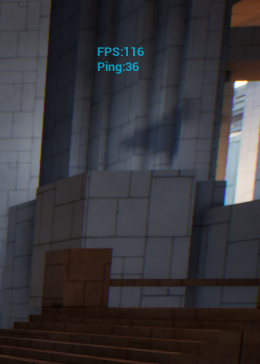
Best thing is to do this https://i.imgur.com/AIuwuhF.png
 fleet raven
it depends if you're applying it to both inbound and outbound packets or only on one side
grand kestrel
And get the player's ping from playerstate and display it
fleet raven
is that a default stat? fps + ping
grand kestrel
Its the HUD
fleet raven
oh so it's manual
fleet raven
yeah but stat net is huge, was wondering if there's a simple one like this
fleet raven
guess I can just make one
night nebula
Just tested PlayerState's Ping. With a value of 100 I get a ping of around 50-55 if I'm using UE's PktLag or the Delay value of Clumsy.
Does that seem right?
I thought it was the other way around: to get a ping of 200 I would use a value of 100
fleet raven
read the comment on the player states ping
it needs to be multiplied by 4 for reasons
night nebula
@fleet raven Sorry, but I'm a little confused. Is the PlayerState's the real ping? Or the value itself needs to be multiplied to get to the real ping?
 fringe dove
@night nebula cpp /** Replicated compressed ping for this player (holds ping in msec divided by 4) */ UPROPERTY(replicated, BlueprintReadOnly, Category=PlayerState) uint8 Ping;
looks like to fit in a byte (uint8) and represent more than 255ms, they divide by 4
night nebula
Oh! Thank you @fringe dove
sharp pagoda
Use RealPing, Ping is a quantized version of that.
night nebula
@sharp pagoda You meant ExactPing, right? It's the only other ping I've found
sharp pagoda
Yea, figured you'd understand what I meant
dark edge
Any danger in replicating a reference or should I always just replicate the function that sets the reference?
sharp pagoda
What's the use case?
dark edge
Controller reference to pawn, pawn reference to other actors. All spawned on server and replicated, I just don't want a reference to ever get clientside before the actual actor does.
Would that just fail an IsValid check even if it did happen?
sharp pagoda
The reference will retry until it is able to reference a valid object
So it will just appear null until it comes over the network
vale steeple
@dark edge and @night nebula do you speak spanish?
night nebula
@vale steeple no, I'm romanian
vale steeple
@night nebula Sorry, it´s a commond name here in LATAM
dark edge
I do not. I'm probably the only white male Adriel in the world lol.
meager spade
so my weapon mesh shows if i set the weapon mesh component to Replicate
but i should not need to as the outer actor replicated
replicates*
 lean river
i think if staticmeshcomponent isnt replicated but actor is replicated component constructed with default values on each client 😃
keen thorn
Hi all, anyone experienced if replicated variables are better than netmulticast (unreliable mode)? im talking about cosmetic stuff
regarding performance, not sure which one is better
lean river
replicated variable with initial replication only
if you wanna be sure every client get that visual and that visual is "important", also you wanna handle players late connection, because rpc is sent out only once.. if player isnt online he would not get that data
but if that cosmetic stuff is not like character customization or important thing
yeah go for netmulticast
keen thorn
so initial means it will be attempted to send once, late comers or people with issues wont see it again right?
will Initial replication keep replicating if i keep changing the variable on the server?
lean river
initial means it would replicate only once but would replicate to late joiners
nop
you cant change that value or i mean you can
but would not replicate
keen thorn
then netmulticast is what i need i think, cus i need the change as well, but dont need it to be reliable, its ok if some are missed
lean river
well in this case i think property (variable) replication is still better btw
ue4 doing property checks before replication happens, so your variable replicates only if changed
keen thorn
hmm
im just thinking if unreliable mode is better than replicated, cus replicated variables are reliable right?
im assuming unreliable is more lightweight.. but not sure
cus this is not super important stuff, but since the value change quite often so some missing information is fine
i know one caveat with multicast is that it sends to everybody
cus i kinda only need for simulated anyway
lean river
well in theory rpc is a expensive thing.. if that rpc is multicast so it "can" impact your iteration and networking bandwith..
property replication also would impact this, but since actor replication can be optimized via distance, replication graph etc..
still thinks property replication is better as multicast if you change your variable often
keen thorn
hm
ok I will try do some profiling and see
thanks man 😃
this game will only run on local network so im not sure if its worth the time to investigate lol
its a multiplayer VR for an exhibition
lean river
all of this depends on the data you try to send over the network :D
like if we talking about only one float variable -> property replication
but if you wanna send like 5 transformation data in every second... well both can cause issues 😃
keen thorn
i am actually sending 32 transformation data every 0.1 seconds
created my own FVectorUin16 which encodes FVector components into int16, and sending only relative positions compressed into a single binary array using FArchive
that was not enough so i had to pump up the DefaultEngine.ini settings for bandwidth
things work fine now, but I'm still thinking which is best, replicated or multicast
to get the most out of it
the game uses leapmotion, and the clients wanna see eachother's hand gesture, so i needed to replicate hand bones :/
lean river
yeah i know, hard thing im working on the same thing almost.. my boss requested a plugin from me which can handle vr multiplayer games
but i need replicate only hmd and motion trackers 😄
lean river
btw you know fvector have serialized versions?
also rotator can be compressed to short or bytes
keen thorn
do you mean net quantized?
lean river
yup
lean river
24
lean river
and would scale exponentially
lean river
so far my results was this with 4 vr players: https://twitter.com/AmphDev/status/1093995467346714635
but as i said i have easier job 😄

Okay, so... i was asked to do networked VR transformations... Thanks @UnrealEngine for the custom struct netserialization and also thanks https://t.co/Dsunj7jmLA for his great networking topics.
this is the result of 4 players, hmd + 2 controller / client data. its somethi...

 Twitter
and this was sent with 110 fps , so i did not locked the rate when i send updates
lean river
everything is unreliable and i did some basic optimizations like null optimization (updates sent only if rot/loc changed)
lean river
also you can try to implement delta networking
keen thorn
hm ye
lean river
that can reduce the data
lean river
ah ok 😄
keen thorn
so glad its at least working
lean river
btw this system using property replication... unreliable server rpcs and property replication 😃 with custom struct, custom serialization
keen thorn
nice
lean river
i have some other ideas how to reduce the bandwith like dont update if other player is not in view ...
keen thorn
dont give me ideas
XD
otherwise i would never finish
lol
and feel like my code is unoptimized and crap lol
lean river
well your case is really hard 😄 you should experiment with different ideas to find the best for your game ^^
ignore replication if player is not visible is a good start in your case i think :)
but it may require deep implementation sigh..
keen thorn
thanks to you now i know gafferongames 😄
lean river
😉 lot of good tips is there 😃
keen thorn
ye, thanks >D
 lethal depot
is it possible that an unreliable function call is executed on client later than a reliable one if it was called sooner in the server? 🤔
lean river
yup, no guaranteed orders if you call rpc's in same frame or even with a small delay.
https://answers.unrealengine.com/questions/395137/reliable-vs-unreliable-rpc-performance-and-orderin.html
lethal depot
I see, thanks
 spiral oar
I'm trying to destroy AmmoPickup actor(bp) but it works only on server side.Actor replicates , here are ss
meager spade
why are you passing in who to destroy seems kind of wasteful
just send a server rpc saying Destroy, and just call destroy on the actor
spiral oar
I tried without input parameter but still doesn't work
meager spade
so its not destroying it on other clients just the server>
spiral oar
Yes
meager spade
and you sure its set to replicated?
and who owns the pickup?
server wont destroy stuff on local clients if he doesnt own it
meager spade
he will destroy his own copy
like pre-placed stuff
is on every client, server wont know or care about clients copy of it as he doesnt know about it
spiral oar
Ammo Pickup is manually placed so i guess server is destroying only his own copy of it?
meager spade
yep
if you spawned it on the server, and destroyed it on the server it will do it for all clients
(as long as its replicated)
spiral oar
So how should i fix this then,i'm still fairly new to multiplayer
Make it run on owning clients?
meager spade
im just testing something gimme 2mins
spiral oar
Sure, thanks for helping
 spiral oar
That was kinda the same thing i tried to do, I've put print string function inside custom event and for some reasons it never gets called
Client side can't call that custom event while serve can
Any idea why?
grizzled bay
how would i go about replicating a function so i can call it as the server and return a value i can pass to the client
winged badger
RPCs can't have return values
you can set a replicated variable or call another RPC from it
turbid robin
@grizzled bay if i'm reading what you wrote correctly, then what you need to do is call a function on the server that sets a replicated property as a result (either by setting a member var within that function or returning a value to set a member var with). then you just need to make sure that member var is set up for replication by flagging it as either Replicated or ReplicatedUsing specifiers.
bleak lily
hey anyone know how to fix this issue
LogOnlineSession: Warning: OSS: Invalid session info for session GameSession in GetResolvedConnectString()
it wont allow me to join the game too
when I package it
bleak lily
can anyone help me I have been stuck getting multiplayer to work for my game
nobody has been able to help yet and I can't really figure out what the issue is rn
I have a server browser which works in the editor but for some reason does not work standalone or packaged
and its not the plugins since it shows they are in the thing
and I did all the shit I needed to do with steam
I just want it to get working again since it used to be able to work
I also used this video for reference

Hello everyone, today we will work on a small and simple server browser. ______________________________________________________________ Plugin: https://forum...
bold mica
so I thought to replicate movement all you had to do was use their movement functions and set bReplicateMovement to true
was I wrong in that assumption?
 glass plaza
I'm having some troubles making the Flying Template work in multiplayer. In pure BP, I can get the movement to be replicated but I still haven't managed to get it to work properly with C++. Anyone tried doing that already?
Uh, I got it to work but I feel like I have an extra step here.
In the .h I have this
In the .cpp
Do I need the two functions or is there a way for it to be done in one?
 obtuse dirge
multicast only runs on server, so if you need to client -> server -> multicast then you need 2 functions
glass plaza
I see. I wasn't sure if I was overdoing it. Surprised that template does not have native replication.
bold mica
no
net multicast is called on all the clients too
it can only be invoked from the server
but if you invoke it on the server it will be called on the server and all clients
sharp pagoda
@glass plaza That system is very easy to cheat and will not work in realistic network scenarios. Read through the character movement component and you'll see how to properly send inputs from client -> server in an efficient and cheat proof way.
glass plaza
@sharp pagoda , if you look at the comments I added to myself in those pictures, I am aware of that. I am currently just testing how to make the system replicating on the clients. I will update it to be validated and carried by the server and not the client.
sharp pagoda
My point is the underlying approach is wrong.
- You want to be sending inputs, not transforms.
- I'm guessing you're firing off this move rpc every frame? That will destroy your channel in seconds.
- All of this code should be in a dedicated component.
I get that you're just testing, but you'll end up having to scrap all of it later so why not do it right from the beginning?
bold mica
he's just trying to experiment
let him figure out how the system works
you always go into a program expecting to scrap it because you learn how to do things better
if you make little changes here and there trying to salvage your initial system you'll get a mess of a program
keen thorn
im actually sending 32 transforms over rpc 20 times a second
thinking to add delta compression to save more bandwidth
grand kestrel
@keen thorn I'd compress the living shit out of them, to the smallest possible value you can, then if the result isn't good enough increase it a bit, repeat
I don't know your specific use case but you've said its cosmetic and sounds like you're syncing bones/transforms, so it should be a visual issue if they aren't accurate
Which makes it easy to know if you need to compress them less
I think 🤷
keen thorn
@grand kestrel i solved my issue already, dont need delta compression, cus it will run in local network
otherwise i would optimize it way more
now it encodes everything into compressed binary array
all vector components are also reduced to 2 bytes
glass plaza
@sharp pagoda , why not do it right? Because I am just building on top of the Flying Template. I will kill the whole movement as soon as I get my bearing with replication anyways so i'm not worried.
bold mica
anyone have an answer to my question?
sharp pagoda
Are you talking about the cmc? @bold mica
sharp pagoda
Can you show your code around that function?
bold mica
void AMobileEntity::DoActorMovement(float delta)
{
    FVector curLoc = GetActorLocation();
    FVector destLoc = FVector(target.X, target.Y, curLoc.Z);
    float dist = (destLoc - curLoc).Size();
    if (dist < 15) return;

    FRotator rotation = UKismetMathLibrary::FindLookAtRotation(curLoc, destLoc); FRotator compRot = rotation;
    compRot.Yaw -= 90;
    USkeletalMeshComponent* comp = FindComponentByClass<USkeletalMeshComponent>();
    comp->SetRelativeRotation(compRot);

    float mv = delta * GetProperty(TEXT("moveSpeed"));
    AddMovementInput(rotation.Vector(), mv < dist ? mv : dist);
}```playet movement is controlled from owning client
sharp pagoda
 USkeletalMeshComponent* comp = FindComponentByClass<USkeletalMeshComponent>();
    comp->SetRelativeRotation(compRot);
``` you don't want this hereEnable OrientToMovement
in the cmc
Also who calls DoActorMovement?
sharp pagoda
Like madlios said, you should be calling AddMovementInput locally
The movement request will get processed by the server and the actual movement will be performed
bold mica
okay
thank you
so is there a way to check if you're a dedicated server or a listen server?
like if you wanna check if you're a server you check for role authority
but is there a way to check if the server is also acting as a client
sharp pagoda
Yea, GetNetMode()
Also if IsLocallyControlled() && Has authority, you are a listen server
bold mica
gotchas
*gotcha
and does IsLocallyControlled() return true if your player controller posses it on a client too?
cause basically I'm just trying to prevent that method from being called twice
sharp pagoda
IsLocallyControlled() is true if you, as a human player, own the controller that is controlling the pawn in question
sharp pagoda
Equip code is always so much... "fun"
I gave up trying to make a realistic equip/unequip system, I got lazy like ubisoft and just teleport the weapons around
 meager spade
not bothered about the teleporting
glass plaza
You barely even notice teleporting usually.
sharp pagoda
Yea, different story when you have a white mannequin + black weapon haha
Wym kaos?
I use those anims without an issue
Anim notifies ftw
meager spade
yeah thats what im usiing
but my weapon system is state driven
so it changes to unequip state which fires the unequip montage
v
 bold mica
okay new question, how do I use crc's orient to movement but also stop one of the components from rotating
sharp pagoda
Enable absolute rotation on the component
meager spade
so i need to sorta split the anim
in to two stages
but first equip (ie no weapon) fires the complete animations
sharp pagoda
Damn why did you split up all the states kaos
I contain all of the state logic in the weapon base
bold mica
@sharp pagoda how do I enable absolute rotation?
sharp pagoda
It's a boolean on scene components or something
sharp pagoda
Also kaos
bold mica
nah it isn't in the details panel
sharp pagoda
Why are you limiting yourself to just one firing state per weapon?
bold mica
I did a quick search for it
meager spade
it is in the details panel
sharp pagoda
A much better design that I like is using firing components
And constructing the weapons out of a collection of firing comps
meager spade
yeah thats what @winged badger did for his weapon system


 meager spade
thing is @sharp pagoda i need it to function with Gameplay Ability System
so i kinda didnt want to wrap too much into components, so the states are pretty basic
as the actual firing is handled by GAS, and is predicted
sharp pagoda
Does fortnite use gas for firing? I know they use it for something just not sure what
meager spade
yes
meager spade
yeah, like you shoot something, locally it will say you hit, but the server confirms it and actually applies the damage globally or it rolls back
one of the guys in the GAS channel sent an email to epic trying to get some information on how things can be handled
as documentation is really lacking
bold mica
thanks @meager spade
sharp pagoda
Oh I would love a breakdown of how they did so much in fn
meager spade
yeah same but doubt they will share too much
but just a general direction on how they handled ranged weapon fire predictively would be nice. Same as projectiles, the UT4 projectile prediction is okay but only upto 120ms ping, else it delays the shot completly for clients
which i kinda want to avoid
my current way is 2 projectiles, one server, one client, and server set to hidden on owner
sharp pagoda
Hmm so I don't know a whole lot about gas, but do you think they use it as a replacement for lag compensation?
grand kestrel
You can set that threshold higher than 120ms though
Though that does give a benefit to laggier players at some point 🤷
meager spade
so other players see the server projectile, client sees his own, but you might see it hit a player, but the server is way off
if that makes sense
like i havent found a solid working predictive projectile
grand kestrel
@meager spade Maybe you'd know then, we used the predictive system UT used similar to how you have, but theres one thing that doesn't make sense with projectiles - with hitscan they actually rewind the player but they never do it with projectiles
So how does their projectile system hit people in the past
meager spade
they store positions of the player
grand kestrel
Yeah
Oh the instigator, right
I know this part, they fire backwards in time
The problem is that who they're firing at isn't being moved back in time
Whereas with hitscan, they are
meager spade
right, but thats the thing, my system is acting the same
grand kestrel
They also move the projectile forward in time
meager spade
but my hitscan shots work fine
grand kestrel
The problem then
Is that unless your projectiles move slowly
Moving them forward in time is completely moot
meager spade
see the UT4 projectile prediction tries to get the server to catch up with the clients projectile iirc
grand kestrel
Yup
meager spade
which i feel is bad
grand kestrel
Especially for the reason I just mentioned, it does nothing for projectiles that collide before the catch up time
meager spade
its like you trust the shooter
grand kestrel
So you think Fortnite uses GAS with their projectiles and that it somehow solves this dilemma?
grand kestrel
It doesn't have the same issue?
meager spade
well i noticed when i lag in fortnite
my projectile will fire, and hit a player
but the rocket will kinda hang around
before exploding
grand kestrel
But you still get hit confirmation/kill?
meager spade
yeah
grand kestrel
So the server is detonating a rocket
meager spade
well not kill
grand kestrel
Not the local client
meager spade
but you get the damage
meager spade
but its only local, so you might hit someone for 100 damage, enough to kill them
but they wont die till the server confirms it
grand kestrel
Thats fine though, its what you want
meager spade
yeah
but its how do they handle it, like you dont see two projectiles as a player
but i know they spawn a dummy projectile
cause i see it hanging around
meager spade
plus i know for definite they spawn a dummy
grand kestrel
We've implemented UT style shooting and found the drawbacks
And it's not good enough, in short
meager spade
no thats why i ripped it out
grand kestrel
So are you experimenting with GAS now?'
meager spade
alot of implementing it was, and it just didnt work
i was using the UT4 system with GAS
but still it was broken
meager spade
so i took a break from it, but i am thinking i need to handle this differentlyt
grand kestrel
Well I'm glad you confirmed what I found because it means I do need to rewrite mine as well
Figure it out myself instead of using UT's
I haven't used GAS yet though
grand kestrel
It's kind of sad they killed it for Fortnite lol
 jade gazelle
Trying to add an Actor Component at runtime. I add it on the server and set to replicate but for some reason it only ticks on server, not client
any thoughts? also getting some weird behavior like if I call a server->client RPC from it it re-fires begin play on the client
even though begin play had already fired on client
dark edge
How are you adding it?
dark edge
Don't know what it's called in CPP but do you happen to have start with tick enabled set to false but tick on dedicated server set to true?
That would cause it to tick only on server
jade gazelle
trying to look everywhere I can for an issue like that but it all seems to be in order
weirder than the tick thing though is the fact that when I call an rpc from server to client on it, it refires Begin Play
that is throwing me off
on the client that is, it refires it
dark edge
I don't know what the difference is but this function seems to work for me. Maybe there's something different
#include "BattlewagonsBPFunctionLibrary.h"
//Adds a UActorComponent Subclass, and adds it to the Outer Actor.
UActorComponent * UBattlewagonsBPFunctionLibrary::AddComponentByClass(TSubclassOf<UActorComponent> Class, AActor* Outer)
{
if (Class != nullptr && Outer != nullptr)
{
UActorComponent* Component = NewObject<UActorComponent>(Outer, Class);
if (Component != nullptr)
{
/*
if (Outer->HasActorBegunPlay())
{
Component->bWantsBeginPlay = true;
}
        Component->RegisterComponent();

        if (!Outer->HasActorBegunPlay())
        {
            Component->BeginPlay();
        }
        **/
        return Component;
    }
    else
    {
        return nullptr;
    }
}

return nullptr;
}
It's a BP callable function so things might be a bit different
The bold stuff is commented out,
jade gazelle
I’ll have to try that tomorrow morning. It definitely has a few flags that I’m missing from my implementation
Thanks!
dark edge
What is your use case?
jade gazelle
It’s basically for like a buff/enhancement system. The server side sets a timer and changes stats and stuff, the client just has some UI stuff happening. I don’t actually need tick for anything but I was troubleshooting another issue and noticed that it wasn’t ticking when I tried to use it for debugging
Then I saw that Begin Play was firing multiple times and I knew something was up
Server side works perfectly, it’s just the client side that is acting up
dark edge
You might have better luck just making buffs as actors. I dont remember the specifics but I ran into all sorts of problems adding/removing components in that fashion for a buff system.
jade gazelle
I might have to look into that it this keeps up
dark edge
Try that function i posted as well. That's what I ended up using for my abilities, just had abilities as actor components and used that function to add/remove them. I did it all from BP though so your mileage may vary.
jade gazelle
Yeah I’ll definitely give that a shot. Should be able to use it regardless of it being BP callable