#multiplayer
1 messages · Page 441 of 1
 urban palm
OK two babies
Just need to adjust the Player Start more up in the air
I also get a funny behavior from the child actors which are attached to the car body
 jade gazelle
Does anyone know if server side networking code (Execute On Server RPCs for example) are compiled out automatically when building client? Or do I need to manually add the WITH_SERVER_CODE flags in order for that to happen.
I’m trying to figure out if I have to redo all my blueprints in C++ just to add that flag
And compile them out of client builds
Just not sure how paranoid I should be about separating client and server code
 dusky flower
almost everything a client changes on his own wont be replicated. i think thats more of a code bloat thing. are you referring to safety?
https://wiki.unrealengine.com/4_13%2B_Network_Guide#Host_vs_Dedicated_Server something like this for example, you can do role and netmode checks
jade gazelle
Right. I have tons of authority checks in pretty much everything I do but this is more about preventing reverse engineering of code
Or seeing how certain systems function
Which I feel like the only way to accomplish is having that code absolutely excluded from client builds and only present on my server instance
I saw this post with a response from an Epic dev; https://forums.unrealengine.com/development-discussion/c-gameplay-programming/10262-dedicated-server-code-split-from-client-code
Unreal Engine Forums
For gameplay programmers writing C++ code.
But I can’t tell if he is saying that networking code is compiled out automatically, or it will be compiled out automatically IF I go through and add those flags
I like the idea of a custom server only module but I’m not sure how simple that would be since I would need it to e able to interact with so many pre-existing classes
urban palm
So the server has its own copy of client car that does not follow the one on the client, supposedly because it doesn't get any info back from the client. The client see the server car moving around and can be pushed around by it with infinite force. The client is unable to push the server car anywhere. This is what happens by default with replication on.
dusky flower
@jade gazelle "What this does is set the WITH_SERVER_CODE define to false." i dont believe its automatic when he says this line. i think you may have to go the hard way on this, but you taught me something haha
jade gazelle
Haha. Well the way I understand it is the server build sets that flag to false for client, then goes through the code and compiles our everything with that flag
dusky flower
you should try it out though, you never know
jade gazelle
But I can’t tell if something like a server RPC has that flag automatically assigned since it will ALWAYS only be needed on server
Or if I still have to manually add the flag, which unfortunately require c++ and can’t be done in BP from what I’ve read
dusky flower
@urban palm your client can move itself though right? just the server doesnt see it
yeah thats what im thinking as well
urban palm
@dusky flower Yes, correct. I also get a weird material effect on the child actors, not sure where that comes from.
jade gazelle
@thin stratus Sorry to ping you but if anyone knows this I thought it would be you, haha
urban palm
But, I am on 4.20.3 which has network replication issues afaik, I am now updating to 4.21.2
dusky flower
so the problem with the client not moving on the server has to do with your movement function not replicating, or bReplicateMovement could be the culprit
urban palm
I am realizing that not only I need to replicate the car body, but also the child actors that are implementing the suspensions and the tire friction model.
I need at least the tire to rotate and turn properly. Right now it seems like a car with a broken steering.
dusky flower
haha. did the child replication make it move though?
urban palm
the wheels are moving with the car, but they are not positioned as expected
Also from the server to the client
Sorry they are not rotate as expected
The position is correct
Really weird bug also. If I spawn the car through Player Start I get a material issue on the wheels. Those are inverted meshes in the Construction Script.
If I place the car in the level directly all looks good.
 thin stratus
@jade gazelle As far as I'm aware, BPs don't have that
Since it's actually a preprocessor define to exclude code.
You could ty and look at the nativized code
But doubt anything useful comes from that
urban palm
Ok making the materials two sided solved it, but that is weird.
jade gazelle
@thin stratus that’s what I figured. Thanks. Looks like it’s going to be either making a custom server module or just slowly transitioning certain blueprints over to code.
The deeper I get into this the more instances I keep running into where BP is not doing what I need it to
urban palm
Sorry very basic question. If I want to spawn the server car and the client car in two different locations, is it correct to place 2 player starts?
jade gazelle
Is it the same car? I’m confused why server and client would have different spawn locations
urban palm
Well if they spawn in the same place, they will be one on top of the other
jade gazelle
So they are 2 separate cars, not a replicated one
jade gazelle
Trying to read through your old comments to understand everything
What is controlling the server car? AI?
urban palm
No, each player
jade gazelle
I don’t think I’m understanding the setup. If a player is controlling the car then the server copy should always theoretically be in the same position as the client
You would spawn the replicated car on the server and then possess it
If the server copy of the player’s car is in a different location than the client copy, something is wrong
urban palm
The scenario is the following: I would like two players to drift together in the same level. One one the server, one on the client.
So each one sees the car from the other with replicated movements.
thin stratus
Yes you can place two playerStarts
To simply answer that question.
Given your Car is the DefaultPawn in the GameMode, that should work
jade gazelle
Ok. So don’t think of it as spawning a server car and spawning a client car. Think of it as spawning server car 1 and server car 2. Those cars are replicated to the clients, which each have control of 1
thin stratus
If not, might need to add an actually spawn them by hand
urban palm
So it works. I get the two cars.
Now, to make them look different, I would like to change the color of the client car.
thin stratus
There is tons of ways to do that
urban palm
I am checking for Has Authority in Begin Play and assign a different color if it has or hasn't authority. But both server cars are one color and both client cars are another color.
thin stratus
That's because HasAuthority is wrong here
Has Authority splits the CarPawn
You have the Client and the Server
Each Car exists on Client and Server twice
Once for the Player
And once the clone of the other player
If you use "HasAuthority" and you use "TRUE" you grab the cars on the Server only
urban palm
Ok got it. So how do I know which car is the original server car?
thin stratus
There are multiple ways, the best one is to check the controller
But the whole color thing needs replication
So you want to do this:
Create a Color Variable and mark it as "RepNotify"
That will automatically create a RepNotify function for that Variable in your Functions tab
In there you can use the color variable to actively change the material or whatever you use to actually show the color.
That's step 1
Step 2 is to set the Color variable to something. That has to happen on the Server, for both cars (Cause replication goes only from server to client).
So on BeginPlay, you can either use "SwitchHasAuthority" or "HasAuthority" with a branch.
In both cases you want to use TRUE/AUTHORITY
And there you do "GetController == GetPlayerController0"
If that is true, it's the Server car. If it's false, it's the client car.
urban palm
And simply checking the Controller ID?
thin stratus
ControllerID is for Splitscreen Players
urban palm
Ah
thin stratus
0 is relative to the player you are calling it on
urban palm
So in replication they are both ID == 0
thin stratus
If we both play and I call "GetPlayerController 0" on my end, may it be in your car bp instance or mine, or a tree or wahtever, i get my controller.
If you call it you get yours.
If the server calls it they get theirs etc.
Server also has access to the other players playerControllers
Client's only to their own
That's also a reason why all of this has to happen on the Server
Cause "GetController" won't return anything on the Client for the Server car.
urban palm
Ok thanks, that makes sense. But then to the original problem.
My car has its own physics, it is not the stock PhysX vehicle. It is a custom physics done with BP.
What would be the best way to implement networked gaming? I believe the physics still needs to be simulated on each client for maximum fidelity.
Server side simulation won't work, too slow and imprecise.
thin stratus
Lots and lots of work tbh
urban palm
Yet each client needs to see al the other cars controlled by the other players.
thin stratus
Also not really something to do in Blueprints
urban palm
Ok, I can do C++ if needed
thin stratus
Networked movement is a lot of work. You have to handle multiple cases: Owner, Server, Simulated Clients
urban palm
There is a didactical purpose behind all these, so BP is easier to explain, but I understand the limitations
thin stratus
And then make sure that if the Owner drives, that the input is not constantly overridden by the server
So you have to save the inputs and replay them if the server sends back stuff
You will need to either get all that info from outside of UE4 (google) or use the CMC as a base for your code.
And with base I mean you learn from it and write your own movement component
urban palm
Yes, got it.
urban palm
Yes, I remember now
thin stratus
Still haven't managed to get that synced
Also haven't had much time to put into
Conference demo (offline) is target atm
urban palm
Ok, if you didn't manage it's definitely a tough cookie
thin stratus
Technically if you follow the CMC code
And you replace all the input stuff with yours
Then it should work automaticlaly
But that thing is like 2k lines or so?
urban palm
Yes, it is massive and not very well commented if you ask me
thin stratus
Yeah I've been through it
Took me a good day or two to understand
I correct myself
Not 2k, but 10,5k lines
including empty and {} of course
urban palm
Yep
thin stratus
But yeah, that's the only advice I can give you
urban palm
Alright thanks. Looks like I have to roll my sleeves up and get into it.
thin stratus

In this post I discuss the challenges of making fast-paced multiplayer network games playable over the Internet and techniques to overcome them. Drawing from how the AAA classics did it and my own experience as an Indie developer making such a game.
That second one has a simple 1D demo to show what that stuff is all about
urban palm
True, otherwise YouTube won't be full of physics quirks from networked games...
Cool, thanks!
thin stratus
Yeah, physics and network is pretty much not what you want to look into haha
urban palm
I like challenges though
thin stratus
I do have to say, this is the authority based solution. Means the Client does its stuff locally and shouldn't notice lag, but the Server will correct if they cheat.
It might get a lot easier if you trust the client
But that means cheating is easy
Not sure how much that matters in your game
urban palm
I could simplify for the moment and assume cheating is no problem
Or that none will cheat anyway
 icy nacelle
Any good tutorials to follow for building a dedicated server?
I'm checking a few of these out and the links at the bottom of the yt videos are mostly 404d :/
urban palm
@thin stratus Ok gonna hit the bed now, thank you very much for your advice. @dusky flower @jade gazelle many thanks for your help as well! Much appreciated.
 halcyon abyss
no for real though... How do I not show anything on a client when it loads before the server? ...
where do I spawn the widget to hide everything?
I'm finding it so hard to polish the level transition, I honestly think this should be a much easier task
thin stratus
In cpp you simply hook into the level loading delegates and spawn a loadingscreen.
So it is simple :p
halcyon abyss
@thin stratus doing that.. .but
that is not enough
cause if he loads before the server
that event will be fired
also...
even when i join the server i still have a moment where it is spawned at 000 with 000 rotation
and the camera is there
so i need something later than that
thin stratus
For camera issues you might want to utilize the CameraManager
We are showing a nice shot of the map if the player has no pawn yet
The only other thing you can do is use Repnotify for all sorts of stuff and only remove the loadingscreen if everything ends up on the client
halcyon abyss
well the loading screen
unfortunately
has to be handled with slate
not UMG
so I'm doing that
using
Unreal Engine Forums
This is the place to show, share, and link to your stuff!
but...
LoadingScreen.bWaitForManualStop = true;
Does not work as intended
I am now updating the camera
but still
there are some places in the process that will override this
cause it now
has the correct view in the beginning
then it goes at 000
and then back again
I want full control over the camera
but the damn thing is doing way too much stuff on its own
it is a headache to keep track of it
(and I have disabled AutoManageCameraTarget on the Player Controller
so yeah... This is too hard to handle
anyone?
halcyon abyss
@outer birch Can you help me here?
LoadingScreen.bWaitForManualStop = true; ... But StopMovie will never be called
#include "MoviePlayer.h"
void UCustomGameInstance::Init()
{
Super::Init();
FCoreUObjectDelegates::PreLoadMap.AddUObject(this, &UCustomGameInstance::OnPreLoadMap);
FCoreUObjectDelegates::PostLoadMapWithWorld.AddUObject(this, &UCustomGameInstance::OnPostLoadMapWithWorld);
}
void UCustomGameInstance::OnPreLoadMap(const FString& InMapName)
{
BeginLoadingScreen();
}
void UCustomGameInstance::OnPostLoadMapWithWorld(UWorld* InLoadedWorld)
{
EndLoadingScreen();
}
void UCustomGameInstance::BeginLoadingScreen()
{
if (!IsRunningDedicatedServer())
{
FLoadingScreenAttributes LoadingScreen;
LoadingScreen.bAutoCompleteWhenLoadingCompletes = true;
LoadingScreen.MinimumLoadingScreenDisplayTime = 3;
LoadingScreen.bMoviesAreSkippable = false;
LoadingScreen.bWaitForManualStop = true;
LoadingScreen.MoviePaths.Init("LoadingScreen", 1);
LoadingScreen.PlaybackType = EMoviePlaybackType::MT_Looped;
//LoadingScreen.WidgetLoadingScreen = FLoadingScreenAttributes::NewTestLoadingScreenWidget();
GetMoviePlayer()->SetupLoadingScreen(LoadingScreen);
}
OnPreLoadMapEvent();
}
void UCustomGameInstance::EndLoadingScreen()
{
GetMoviePlayer()->StopMovie();
OnPostLoadMapWithWorldEvent();
}``` worthy perch
Perhaps your GameMode::PostSeamlessTravel() can call EndLoadingScreen() in your GameInstance.
halcyon abyss
this guy here says:
The problem is, I can't call stopmovie() myself if the game thread is frozen.. AND I need the game thread to set the game up while the loading screen is still on.

Any other work around for this?```Cause if I enable LoadingScreen.bWaitForManualStop = true; it will screw it up for any level transition, even the Open Level one
And with it set to false
everyhting works
{
EndLoadingScreen();
}``` gets called vital steeple
can soemone here tell me why dedicated server doesnt seem to create any of the ini files? it seems to use a baked version of them
i was trying to use the gameusersettings to store server settings and it sees the default ones, but those inis are all empty
furthermore it deletes any content you put into any of the ini files when you start a dedicated server
i guess i just want a text file that will act server settings config file
thin stratus
@vital steeple You could try and use a simple json file
UE4 has some good classes to convert a json to a struct and back
So you could easily load the settings.json and parse it into a struct and instantly use it
 kindred sandal
What is the best way for networking of a Battle Royale game like fortnite ? is it better to use one of services like spatial os or photon or uetopia?
 bitter oriole
No one here has ever worked on a game like Fortnite
Few people here have even worked on games that have hundreds of online players
FWIW I'm pretty sure Fortnite is made with engine tools
kindred sandal
I meant any Battle royale game , not only smt like fortnite
I am working on a new BR game but stuck at networking
bitter oriole
No reason you should need something else than the engine MP support
Also, multiplayer is hard
 twin juniper
Hey there. Could someone help me with some questions about multiplayer? Mainly about character select
@twin juniper hello
Hi. So basically I followed one tutorial on Youtube to create a multiplayer for my game. It includes main menu, lobby and then your game level . So for this game i got 4 different types of characters and each player can choose one being in a lobby. But when the game starts selected character is not applied for the client player. For example lets say by default character is RED. Me, as a server, I selected GREEN character and another player as a client selected BLUE character. When I start the game and we appear on the level I still got my GREEN character that I've selected earlier but client will appear only as default character RED
Hope it makes sense
kindred sandal
@bitter oriole one reason is there, and that's many things will be easier if you use some services like Spatial
twin juniper
check default game character
recheck your code...
good tuts:
https://www.youtube.com/watch?v=abmzWUWxy1U&list=PLZlv_N0_O1gYqSlbGQVKsRg6fpxWndZqZ by epic
https://www.youtube.com/watch?v=rWs6SyyVpTE&list=PL3TrrCsmmxllnBvhucQ4c683a2VltXBx6&index=1 by NiceShadow

In this video we take a look at the finished project and step through each of the features that will be covered in this series. We show our functional Main M...

Setup everything to work with the Advanced Session Plugin: - (Install Visual Studio 2017) - Install Advanced Session Plugin to the Engine (4.18.1) https://fo...
@twin juniper so this first video that you sent from Epic is the one i used to create my game
@twin juniper i need to check your code
if you have screenshots
@twin juniper
yes i can take some screenshots just let me know what you need to check
your default game mode for all levels and the spawn actor node for players for now
bitter oriole
@kindred sandal Which things will be easier for a BR type game ?
twin juniper
battle royal ?
@twin juniper well following that tutorial I had to create custom Gameplay GameMod(GM) and Gameplay Player Controller(PC). All the information such as player info and selected characters stored in a GameInfoInstance blueprint. So then when game starts it refers to this file to get a data about the selected character
I will send you some screenshots
kindred sandal
Do you know about spatial os?
twin juniper
@twin juniper
So here is a blueprint inside PC
@twin juniper
And this is inside GM
When you select character make sure u set the default character to the selected character and also make sure you male the vars in game instanse so it is dosnt reset when u open new level @twin juniper
bitter oriole
@kindred sandal Yeah, I know about it. I'm not sure why you'd need it for a regular shooter type game with 100 players.
twin juniper
@twin juniper it might sound stupid but how do I do that?
kindred sandal
It provides some good tools for debugging and controlling over servers also you can have more stable server by using two server for one map
Also maybe we want to Have more than 100
twin juniper
@twin juniper hmm im at work right now i do my best for you. Sorry😕
C u later.
@twin juniper another thing I've noticed that if I create RespawnPlayers event inside GameplayPC then it works for selected players but server controller is disabled and basically you cant control the character as a server
@twin juniper Okay sorry for distracting and thanks for your help
bitter oriole
@kindred sandal Then you might look into it. TBH, few PC games have more than 100 online players total, so it would depend on your marketing budget too
kindred sandal
I should find a way better than steam
Because it's hard to claim many players in steam
bitter oriole
It's hard to claim players
200 new game release every day, so it's only going to be an uphill battle
Part of why I wouldn't want to enter the BR business myself, no matter the budget
The dat you have less than 100 players is the day the game's dead
kindred sandal
Well that's based on your idea too, many games are almost like pubg and fortnite in mechanic and gameplay , it's not only about gametype
bitter oriole
The player count is still the basic problem - 100 players means you sold 50,000 copies, give or take
 ember needle
So, I'm trying to test multiplayer sessions from editor and things are just not working. When I launch 2 standalone games, one of the two games hangs. If I close the other game, then it suddently "wakes up".
These are my settings:
https://gyazo.com/7e6ec94285972d20faeba35058615d3b
You can see the behavior here:
https://gyazo.com/91d02e698377e6e34014998d719e9f6f

So for some reason even though I am not creating sessions, it seems to me the editor is interfering with the MP sessions.
Hence, I cannot properly test my session logic.
I mean, the EVENT BEGIN PLAY of the menu level does not even get called on the second window
bitter oriole
Editor doesn't support sessions
ember needle
On one I see:
[2019.02.07-10.43.39:535][ 0]LogOnlineSession: Warning: OSS: No game present to join for session (GameSession)
on the other I see:
[2019.02.07-10.43.39:431][ 0]LogNet: Warning: Incoming ip address doesn't match expected server address: Actual: 0.0.0.0:0 Expected: 127.0.0.1:17777
So how can I test it? BTW weird in 4.19 the same untouched code just worked (I only upgraded editor)
bitter oriole
Standalone
ember needle
I am in standalone
"When I launch 2 standalone games"
that's what I am not understanding
bitter oriole
Didn't you say editor ?
Close the editor, compile, launch two standalone
Right click on uprject -> launch
ember needle
So this won't do it?
https://gyazo.com/6960c3a8d2ebd27b9da773f0e2ca3148

ok let me try
bitter oriole
Dunno, never tried that myself.
Are you using advanced sessions ? If not, be sure to look at it to see how the structure for creating the session, traveling to the level, searching and joining should work
ember needle
yes I am
so it works perfectly in a packaged game...
I'm trying to test it locally without having to package everything
that's the thing, it's only the launching from editor that is not working
even though it's in standalone
bitter oriole
Editor does not support sessions so it's not surprising.
 past totem
[reposted below]
 winged badger
you can't see a game hosted by the same machine you are looking for the game from, steam limitation
past totem
@winged badger It doesn't show for other people either
winged badger
as for 2... c++?
past totem
I prefer the blueprint solution :p
winged badger
blueprints can't handle structs properly
past totem
How are structs related?
winged badger
i was about to suggest making a FoliageManager with FFastArraySerializer
using its client side callbacks to sync the foliage
it won't work with blueprints tho
ember needle
@bitter oriole FYI I'm nailing down the issue and it seems not to be MP related... For reasons I can't yet get, sometimes in windowed mode one of my levels does not open up. In full screen I never have this issue.
So if I run the game full screen, all is good. If I run it windowed, sometimes it works, sometimes it doesn't.
past totem
-
Wondering if anyone got a server browser using
Online Subsystem Steamto work and how. I tried so many things and it always just doesn't find any session even tho I created one, doesn't show for other players from other PCs too. (Dedicated server) I asked here a while ago and everyone said it doesn't work and to use a marketplace plugin called UWorks. -
What's the best way to destroy a foliage for all clients + server? At the moment what I do is I line trace on the server, then I multicast with the hit result and destroy the instance by the item index. Works fine in editor but after packaging and playing on an actual server it seems to not always work, and sometimes the foliage will still be there for the clients even tho the server has it destroyed. I also tried to multicast the line trace but that seems to result in the same issue. https://answers.unrealengine.com/questions/872301/destroying-foliage-instances-in-multiplayer-lag-gl.html Screenshots here.
Please @ me if you can help.
 grand kestrel
How do you debug prediction when the issue is simply not working / not working right? There doesn't seem to be any way to actually get relevant information you can use
winged badger
Can you be a little more specific @grand kestrel ?
grand kestrel
Not really
Building custom prediction
Something isn't working right and I don't see any way to actually get meaningful information to locate the issue
Esp. because any prediction system is inherently convoluted by nature
vital steeple
@thin stratus no way to get ini files to work? I already have them implemented. Most of my project is bp, will that be a problem with using a json file approach? I can do some c++...
thin stratus
It's cpp but there might be a simple plugin?
The ini file should work too but i can't help with that
vital steeple
yeah im not sure why its behaving as it is. maybe if i use a custom ini file instead of the gameusersettings derived one.
i guess i could load a text file and parse a string from it
basically the same idea as yours but it looks a little simpler?
icy nacelle
This any good for setting up a dedicated server?
https://www.youtube.com/watch?v=rbrO0Nt0SIY

Detailed steps on how to create a Dedicated Server with UE4. Very minor code involved - simple copy & paste from the below link. Very extensible... future re...
Can anyone recommend it / against it?
kindred sandal
Anyone used photon for ue4 before?
 kind wave
So I’m working on replicating in VR with a go kart game and I was wondering how this approach would be for anti cheat | RPC the transform of the motion controller and headset giving the player the ability to set the location of those but the validation would be comparing the location of the player to the GoKart which they don’t have control of the location over
twin juniper
@kind wave what do u need exacly
grand kestrel
@thin stratus Trying to recall a brief conversation from ages ago here, think it might of been you. Someone was saying you can do bullet drop as well as time to hit with hitscan. Ring a bell?
Actually time to hit is easy with prediction, you just don't rewind their location as far back in time (I think), though not sure about when the latency is extremely low
twin juniper
@twin juniper i need you
past totem
@icy nacelle Use this guide https://wiki.unrealengine.com/Dedicated_Server_Guide_(Windows_%26_Linux)
twin juniper
@twin juniper lol 😂 sup bro
 winter plover
is there a clientside equivalent to APlayerController::Possess() that I can use to handle a couple of HUD related delegate binds?
apparently that one only gets executed on the server
grand kestrel
@winter plover APlayerController::SetPawn()
winter plover
cheers
grand kestrel
I've been making a predicted shooting solution and looked at UT's source to do it. There is one thing I can't figure out. First the things I have figured out are the main aspects to the prediction:
2) Ticking the projectile forward based on latency so it covers the same distance the local projectile would have covered
3) For hitscan but not projectiles the server rewinds the locations of other players so that they are in the same place as when the client fired, however it doesn't do this for projectiles.```
And thats where my problem lies, I don't understand how UT is getting around the issue of the targetted player having moved since the client fired a projectile. I tested it thoroughly both in my implementation and UT's and they don't have the problem. And they don't rewind for projectiles. graceful cave
has anyone had an issue before with dedicated servers not running once the game was downloaded through steam
if i launch from the folder that i uploaded to steam, it works fine
if i download the update from steam on my pc and try to run the server, it gets caught in a loop of trying to load an old map that doesnt exist
if i download from steam on my vds, it just crashes a few seconds after the log starts
deleting and redownloading doesnt seem to fix it
game works fine from the steam download, only the server is broken
kindred sandal
Anyone used one of these services before ? which one do you think works better with UE4 ?
IBM Cloud Gaming VS Google Cloud Gaming VS Amazon GameLift or GameSparks VS Microsoft Azure Gaming
thin stratus
I used GameLift together with GameSparks, where GS was the backend for the users and handled the matchmaking and GL was only used to provide a server isntance for the matched players.
If you figured it out, it worked fine. Not talking about $ here, cause that's totally relative to the user (and I never had to pay for it cause it was for a client's project).
Can't say anything about the other services.
@kindred sandal
 raven holly
states are on all clients right?
thin stratus
Yop
kindred sandal
Do you have any sample for how you used them together?
thin stratus
Sample in form of code or just an example explained? @kindred sandal
kindred sandal
Any but code would be great
thin stratus
Can't share code but the result of the work was:
- Player 1 clicks on "Find Match". GameSparks receives a message to start a MatchmakingRequest for the Player with given ELO.
- Player 2 clicks on "Find Match". GameSparks ...... for the Player with given ELO.
- Both Players are matched and GameSparks contacts GameLift for a Server Instance for the two Players.
- GameLift tells DedicatedServer to get ready and returns the ServerInformation to GameSparks.
- GameSparks gives the information to the Players.
- Players join the DedicatedServer and the Server tells GameLift that the reserved slots were used (blocks after 60 sec otherwise).
@kindred sandal
kindred sandal
Alright , Thanks
 white fable
Has anyone seen this before when joining a game from a client?
LogOnline: Warning: OSS: No game present to join for session (GameSession)
I'm calling PC->ClientTravel() and passing in an IP. It looks like it's coming from the call to GetNamedSession(SessionName) in OnlineSessionInterfaceNull.cpp
Thanks
bitter oriole
If you're passing an IP, you don't care about sessions, @white fable
They're useful for not using IPs
white fable
Some players might be joining via IP some not, so It sounds like I'm OK to ignore this warning if it's coming from a clienttravel call that passes an IP?
bitter oriole
Sure
 twin minnow
has anyone here working amazon gamelift at all?
having issues with creating a fleet
but it's strange because everything works locally
twin minnow
ah
thin stratus
As the Fleet Instances are blank
You need to use the setup file you can specify to install the necesarry stuff and upload that with the build.
twin minnow
setup file as in the install.bat file?
thin stratus
Yeah whatever it was called
If a fleet fails you have to wait till it errors out and then connect to it directly and check why
twin minnow
I think all i had in that was this line
vc_redist.x64.exe /q
i couldn't find an example of install.bat for unreal
thin stratus
That's not enough
But I also don't know out of my head what needs to be in there
Yeah it's not UE4 specific
twin minnow
do you know what i could look up to find out what goes in there?
where they talk about UE4PrereqSetup_x64.exe /q
ill add this line to my install.bat and let u know how it goes
wait...
it worked
without that line
im so confused
wait nvm it did not work lol
twin minnow
yay adding a line to run UE4PrereqSetup_x64.exe worked! Thank you @thin stratus
past totem
best way to remove a foliage instance that's around the player / the player is looking at? multiplayer
 worthy oak
Hey everyone! Running into a bit of a problem here. I have a game using steam multiplayer. AS I understand it, steam requires the use of seamless travel to function correctly. My game however is breaking when this happens as the game states and game mode are being copied over and thus the previous round winner wins again. Is there a way to emulate non-seamless travel in a seamless travel?
or maybe someway to "reset" all BPs when joining the new map?
past totem
Please help me with this foliage destroying multiplayer packaging glitch https://answers.unrealengine.com/questions/872301/destroying-foliage-instances-in-multiplayer-lag-gl.html
Ping me please
worthy perch
Maybe it is incorrect to send the Hit Component* across RPCs.
past totem
@worthy perch wdym?
worthy perch
You're sending the "Hit" as a parameter in your RPC. That contains a pointer to Hit Component.
 plucky jasper
Any idea on how to fix the clients"choppy" or "low frame rate" animations on listen servers ?
worthy perch
@past totem , Is the problem only lagging? Perhaps you could use some profiler.
past totem
No? It's not destroying the foliage for clients and it's and the foliage around it is disappearing at some camera rotations after trying to remove the instance @worthy perch
past totem
https://answers.unrealengine.com/questions/872301/destroying-foliage-instances-in-multiplayer-lag-gl.html
UPDATE: I believe my issue is being caused by the amount of foliage instances that I have, before I added all of the foliage to my level everything worked fine. I have about 10k instances of what I'm trying to destroy. I guess it bugs everything out. Any ideas on how to fix this or a workaround?
 drifting plank
Hey ! I've a strange issue about the destruction of my actor.
When I spawn normally my pawn and I destroy it, it replicates correctly the destruction on all clients.
But when the pawn is already on the map (It is destroyed only on the server and not on clients).
But the replication settings are the same. Do I miss something ?
Thanks in advance 😉
 red ledge
I have a few questions about Battle Royal games
First is the inventory. What would be the best way to make a small replicated inventory for the game session? Something like 30 slots or something.
Would it be done by using a FastArraySerializer or is it too much?
Also if all the items are fixed and have IDs, it would be best for an item be added to the inventory through a setter function using the ID, which get mapped to the corresponding struct, right? Maybe using the Asset Manager or something.
Second is the randomization of loot. Would all items just be replicated actors spawned into the world server-side? Isn't that too much bandwidth? Would there be a way to just pass a random seed and maybe sync the items on the client and server somehow or is not possible?
ember needle
when building a spline mesh, is there a way to mark certain elements as "non strechable"? I have a pole and a net, and don't want the pole to get "scaled"...
winged badger
@red ledge with FFastArraySerialization you get not only DeltaSerialization, which will only send changes to the Items TArray, you also get client side callbacks... PreReplicatedRemove, PostReplicatedAdd, and PostReplicatedChange
for inventory those can be pretty handy, and implementing it is pretty easy, you need to look no further then NetSerialization.h header
any item you make as Dirty on server will get replicated for changes
 magic helm
For the randomization of loot you could try having the server handle spawning all those actors an objects before making the lobby open for any players(so when the spawning is done you could try opening up the lobby to players)
red ledge
@winged badger yeah especially since I would want to cram the largest possible number of players in a session even tho I don't have anything in mind to use the callbacks with
but doesn't normal TArray replication only replicate the delta?
or at least the changed item
winged badger
it doesn't replicate changed item at all
red ledge
@magic helm I have no problem with adding some waiting time tbh I'm just worried about the client suddenly receiving a lag spike when they enter the net relevancy area with a lot of items in it
winged badger
and when it replicates, it replicates as a whole
red ledge
or having to send all this data about spawned actor to the client at once when they respawn
@winged badger oh, TArrays rep the whole array if a slot changed?
twin minnow
@thin stratus hey exi, how did you connect a client to a server on gamelift? I'm currently using this sdk, https://github.com/YetiTech-Studios/UE4GameLiftClientSDK, but was wondering if you used another method
thin stratus
I had GameSparks between client and Gamelift
GS asked GL for a server and GS told the clients the ip. They then simply clientTraveled there
twin minnow
so then how did you create a player session?
or is it automatically made when you clienttravel?
 maiden vine
Can someone tell me when i construct json request if a get and url are correct to recieve string variables? Or am I going about it wrong. Im trying to understand how to get and post or is it put lol thx
 glacial pollen
should owner for actors be player controller?
I have a "chain" of owners that lead to the Character then Player controller
However replication sucks because if you call get owner on a sub actor, it may not have a valid Character yet....
But you 'SHOULD' have a valid PC by then
thin stratus
@twin minnow GS does that for me too.
I mean, GS doesn't do it by itself
It coded it in the Cloud Code
- Players click on Matchmaking.
- GS at some point matches players together (e.g. for a 1vs1 with ~same ELO).
- GS then sends a
CreateGameSessionrequest to GL. - If that returns with success, GS sends a
RequestGameSessionDatarequest to GL. - If that returns with success, GS sends a
CreatePlayerSessionsrequest to GL, passing the GS PlayerIDs along. - And finally, if that returns with success, GS sends each Player a message with the IPAddress and Port, as well as the returned PlayerSessionID (returned by GL in the CreatePlayerSessions response).
- Once the Player receives the GS message, they connect to the Server by IP:Port and pass their PlayerSessionID along.
- Then the Server tells GL that the Player with the given ID properly connected and everything is fine.
@maiden vine It's POST and GET, yes.
GET if you want to receive data.
POST if you want to send data.
Both return a response though, even POST.
twin minnow
i see
thin stratus
@glacial pollen Doesn't have to be the PC, can also be an Actor that is owned by the PC.
twin minnow
how does the server accept the player session?
because now what's happening is my player connects
the session times out
but oddly enough the game continues
thin stratus
I usually pass the PC for most things, but if, e.g., the Character spawns a weapon, then I use the Character as the owner.
@glacial pollen
@twin minnow That's done via the ServerSDK
And is also documented by GameLift
I do this, I think, at PreLogin or so
In C++ of course
twin minnow
oh ic
^i will try to follow this answer
i just find it odd that the player session doesn't need to be accepted to play the game
thin stratus
Make sure to use the SDK though
Eh
I mean the Plugin
So you can work with more familiar types
Well, it needs to be accpted
To keep track of it on GameLift
You have to handle denying players on the Server yourself
twin minnow
oh ic
ive also noticed that the performance isn't the best
but then again im using the cheapest tier
thin stratus
You should also not use Windows tiers
If you really want to use GameLift
Compile the DedicatedServer for Linux
It's a lot more expensive to use Windows Tiers
twin minnow
does it take longer to build for linux?
thin stratus
Nothing. I don't create games that need that stuff.
I can't support that backend anyway.
twin minnow
fair
thin stratus
Or rather, I don't want to support that. Only if I would have a bigger team.
glacial pollen
@thin stratus How do you handle the parent (owner) not being replicated when the sub object's begin play asks for it?
thin stratus
Never had that issue
glacial pollen
Server : Spawn char : Char->Spawn attachment actor
Client : Receive's attachment actor before Char
hmmm
thin stratus
Attachment Actors are done via RepNotify on my end
My Pawn spawns a HatActor
On BeginPlay (serverside)
And that is replicated via a RepNotify
And then attached in that.
I don't call a BeginPlay in the HatActor that requires the pawn though
glacial pollen
hmm okay. I've learned that if I abuse the engine to do things it wasn't meant for, I'll have issues.
Like my skeleton mesh actors with invalid geometry (with static meshes attached), with animation
attached to other skeleton mesh actors with invalid geometry xD
We should have an animated skeleton static mesh actor by default.... for those of use making modular machine like games...
halcyon abyss
Is it fine to use gamesparks for a game with only listen servers?
red ledge
@thin stratus okay excuse me but what exactly has the RepNotify here?
like what variable on the character?
 unborn nimbus
Does anyone use GameLift? Is there a way to only build the needed client SDKs as opposed to all of them?
thin stratus
@red ledge HatActor Reference
red ledge
thanks!
glacial pollen
Overlap triggers for every freaking copy of an actor
 meager spade
@glacial pollen what was you expecting?
thin stratus
It's totally logical :D
 peak sable
Hello everyone, I really need help. I tried to create a dedicated server for my project, but I'm full of error. I am in version 4.21 whereas the tutorials are in 4.18 maximum. Can you help me create it? Thank you for your help
 fossil spoke
Perhaps posting the errors your getting maybe a good idea? We cant help you if you dont explain the issue exactly.
glacial pollen
@thin stratus
There, a fully realistic radar functioning in multiplayer (at least dedicated)
Green is detection of other players radar
Yellow, is your detection range (signal has to bounce, so you only get half of red)
Red, is the range other players can detect that you are using radar (using their green)
This forces players to be careful with using radar, and adds to the gameplay
 worn turret
Is it viable to use a c++ array as a replicated property, instead of implementing it as a TArray?
I know that TArray's are supposed to replicate by only sending info about the changed elements, but I'm wondering if c++ arrays are optimized the same way. I have an actor class that will have a 3 dimensional array of a fixed size, where only one or a few elements will change at once
also notice that trying to declare a bool c++ array with replication will yield an error that "bool arrays are not allowed"
winged badger
@worn turret you can't replicate something thats not a UPROPERTY
and it will not allow you to mark a std::vector as one
TArrays also don't replicate just the changes
i suggest reading the NetSerialization.h header, most of it is actually comments about how net serialization is performed in unreal
worn turret
i see. is there are recommended way to update a multi-dimensional structure like that then? i read on multiple forums/questions that the tarrays were optimized that way. Also I meant as in a normal array, not a vector
winged badger
its all in NetSerialization.h, just few pages worth of reading
worn turret
ok ill check it out
winged badger
it even has an example on how to implement DeltaSerialization
winged badger
where else would you put it? documentation? 😮
grand kestrel
Documentation? Is that a hip new word?
grand kestrel
@fleet raven K I'm sold https://i.imgur.com/JUMv1UD.png
That just saves so much time
Lol
Gonna buy it right away
 fleet raven
ya I'll also buy it right away when the trial ends unless there are some major issues yet to discover
grand kestrel
I'm not sure how much its compatible with but what I'm making now, the fact its compatible with that, means its going to be worth it
fleet raven
the customized display for structs is super useful
grand kestrel
So glad I read chat today 😛
This is next level debugging lol, I could have easily missed that inf https://i.imgur.com/rKrMcSP.png

Yeah this is gonna save serious time
And frustration
worthy perch
How is inf usually handled?
grand kestrel
It means you need to fix your code not handle it
Its a division by 0 more often than not
worthy perch
I was just wondering if it's something I should look out for manually or if the engine will throw a warning.
worthy perch
Well... looks like my todo list grows.
fleet raven
need to make a collection of object display strings for all the basic structs now
grand kestrel
Its better to work out a multiplication variant 😉
Where 0 is the divisor
I try to only use constants as the divisor
Not always possible/easy
But if I don't, I handle it and log any error
winter plover
is there actually a reason why floats have infs as opposed to just causing an exception/interrupt, like integers do?
fleet raven
because the person who designed float wanted them to have it
maiden vine
anyone know how to access mysql from ue4 easily?
i have phpmyadmin working i thought maybe i could use it for persistent data for my dedicated server
varest plugin looks like it could
glacial pollen
It would be nice if you could set OnlyOwnerSee before you spawn the actor....
since you can't change it after you spawn it in blueprints.....
winter plover
should be able to in c++
you could write a blueprint hook to expose it
although the point of the variable is that you only set it once and then forget about it
what are you trying to do?
glacial pollen
I use a "main menu" customization setup that is ran on the server
so multiple players will spawn their char in the same spot
but they don't need to actually see each others char
winter plover
I see
glacial pollen
its done this way to prevent cheating
(you can't use parts you haven't earned ect)
but you can only set the OwnerOnlySee in the blueprint itself
winter plover
you could spawn a dummy character clientside
and have that one just there for the cosmetics
glacial pollen
but you can't change it during runtime (even though the hint points to this)
winter plover
and only spawn the real one the player controls once a round starts
or have a subclass for a preview character
that has only owner see set
glacial pollen
Yea, but lets just say, to do that, in multiplayer, in a way where the users changes would commit on the server side, would require a bunch of dummy code in my char blueprint
hmmm
winter plover
the changes would still go thru the server
you just use the dummy character for preview
you dont care much really if they mess with that
as long as your settings are all verified
glacial pollen
yea that wont work either, i would have to make dummy chars for every type of char
winter plover
how so?
glacial pollen
I have char base
from that is
char mech,tank,plane,suite,human
and from that.... ect
it becomes multiplicative and messy
winter plover
in that case id try spawning the character clientside
that way only the client who spawns it can see it
and the server wont even care about it
glacial pollen
Thank you for your solution. However, I have a very very intricate/modular design. With many skeleton meshes with static meshes attached, with another dummy MeshDataContainer, that all make up a char, that can be changed on the fly in customization.
I would have to write dummy code all over my modular system.
however, I guess I'll just expose that functionality from c++
winter plover
not necessarily
you could just spawn whatever character you want
you just do it clientside
that way owneronlysee kinda becomes irrelevant
glacial pollen
but then the server wont know about the character
any changes I make will stay local
winter plover
the server doesnt need to know about the preview character
glacial pollen
and wont save
glacial pollen
The changes are applied directly to the char
winter plover
its just the preview you keep local
winter plover
well that sounds very messy and bad then
glacial pollen
absolutely not
Everything has a hierarchy
An attached parent or socket
A char owner
and the char owner is player controller
If I change the torso, it will auto re-generate compatible legs, upper body ect
winter plover
even if you dont have a data structure in whcih you serialize your gear/equipment
you should be able to keep stuff in sync
glacial pollen
I only do that when saving
winter plover
you would just duplicate every change you send both to the server aswell as your preview
just move your actual playable character out of the preview zone
to whereever they need to be playable
glacial pollen
hmmm
I could put that into the drag and drop system and change a reference or two
Any idea why both clients register a hit even but the server doesnt?
winter plover
collision events get checked independently iirc
if you want something only registered by the server, or have it be authoritative you'll need to filter it out
or bind your collision delegate only serverside
depending on what you are trying to do again
glacial pollen
The client requests that an actor bullet is spawned
hmmm
I should make sure i'm not hitting myself
I remember somewhere was a bool for something like "don't hit owner"
guess I have to use overlap, since hit blocks
but then I don't get a hit normal ugh. why
maiden vine
can i tell server in dedicated server to save a text file to server computer ?
twin juniper
Yep
peak sable
as they asked me, here is my mistake. When compiling the Target server file to create the dedicated server, it tells me error in the script and I can not fix it. Who knows the solution
and this is tutorial https://wiki.unrealengine.com/Dedicated_Server_Guide_(Windows_%26_Linux)
thin stratus
Can you also scroll to the right in that window?
Cause there is information cut off
thin stratus
Are you trying to connect to the Server from that is hosted somewhere from within your Editor?
peak sable
I can do a screen sharing to show you my error?
thin stratus
Hey buddy, it's sunday so most people are with their families. Simply wait and/or try it again later/tomorrow
maiden vine
I usually put online subsystem line in default file . ini make a server target for server.cs build development editor in vs then development server done unless their were messed up files somewhere it would tell you if you try to build vs files and it spits out errors
Hope that helps
Check out YouTube Daniel Wallace ue4 how to build dedicated server to look at the code
Good luck
peak sable
ok thx
 fluid mica
Sombody know why this isn't working? It gets replicated fine but on the owning client.
Trying to simply rotate the pawn on yaw.
The owning client tries to move but always gets some janky movement back into where it started.
I also deactivated Replicate Movement in the pawn details panel (doing it manually here), that made the owning client rotate partly correct, but jank around even more.
meager spade
the cmc is correcting it
fluid mica
cmc?
fluid mica
This is a pawn tho
meager spade
nevermind
fluid mica
:9
meager spade
so what you mean janky movement
fluid mica
I'll show, one moment


I totally feel like going with Replicate Movement = Off
But yeah, the owning client seems to be told by the server it's not moving or so?
That's what it visually looks like.
thin stratus
Don't maket the RPC reliable
Neither of them
Axis are ticking
You are currently feeding the buffer tons of reliable rpcs
@fluid mica
fluid mica
Doesn't the axis value != 0 take care of that? @thin stratus
fluid mica
Okay, well I turned them off. But unfortunately the owning client behaves the same. Tho I guess that wasn't your point.
thin stratus
Na, I was just generally telling you to not use reliable rpcs there
fluid mica
So I guess reliable you just wanna use for single really important values?
thin stratus
Or on any other ticking thing
fluid mica
Yeah
fluid mica
True.. thanks : )
thin stratus
The other thing: ReplicateMovement on anything but the CMC just sets the Location and Rotation
fluid mica
But with that other problem. I assumed Multicast would take care of all clients :I
thin stratus
So whatever the server has as location/rotation, it overrides the client
fluid mica
Okay yeah, I turned it off to have less random conflict in the background.
thin stratus
Do you have physics enabled on these pawns?
thin stratus
Yeah Network + Physics = Shit
fluid mica
Ha
thin stratus
You have to calculate that part yourself
You'll never be able to get this synced properly
You have to handle it similar to just applying movement input
So basically a Character with MovementMode Flying
fluid mica
Well I did have some other event that syncs up the transform, but that doesnt help either
thin stratus
Network Movement Repliation is complex as hell
As soon as you don't properly implement it, you will always get correction, lags, rubberbending etc.
fluid mica
But it syncs to 2 out of 3 clients nicely doesnt it?
Hmm
Really wanted to avoid using Character
thin stratus
You always have to handle Server, owning client and simulated clients differently
Owning Client moves before sending the stuff to the Server
And keeps a list of what they did
When server sends an update, they use timestamps to replay the moves they already did and try to make sure they end up on the same location.
Simulated clients don't care about that, they just do what they get told from the server
But they have to interpolate that stuff
In case packages are dropped
Server is probably the easiest, as he doesn't need to fight any input lag, but he still needs to interpolate the stuff that comes from clients, for the case a client doesn't send a new update
So this is not easy and also not done with a simple ServerRPC + Multicast
If this is nothing you want to deal with right now, you might want to try work around it with the Character and CMC
fluid mica
Just as a sidenote. Even with a normal and the pawn set to not replicate it janks back into a 0,0,0 position. Could there be something else?
ups, hovered
Thanks for the write up, I'll check out if Character works better. But yeah, something is off here in general?
 swift storm
Hi,
can a Player Set Variables on his own PlayerState?
thin stratus
@swift storm Every replication only goes from Server to Client
They can set variables locally of course, but that won't replicate
So even on their own State, they need to call a ServerRPC to then let the server do it.
swift storm
@thin stratus ok Thank you
swift storm
@thin stratus just another question in a listen server environment will the Host also executes the remote exec on the Switch Has Authority macro?
thin stratus
Nope
swift storm
OK
 tired isle
(noob question) Why is it so difficult to replicate let's say a thousand physics objects? its just 1000 location and rotation variables, seems like so little data to send over a network. Even if its 60 times a second
all these client-side predictions and interpolations, I don't get it
 lean river
seems like so little? this is a really rough calculation but,
1 position is made from 3 float, 1 float = 4 byte so 34 = 12 byte
1260 = 720 byte... with rotation that can be more then 1,5kbyte in a second..
1000 object require 1406 kbyte / sec approx. 1,3 mbyte / sec
and we assume we have only one player online, because this rough calculcation grows exponentially.
if you have 10 player online all of 10 player needs that data, so your server should replicate 13+ mbyte data in each sec..
and we did not talked about reliability or other required data..
this is just rough numbers to your face 😉 😛
of course not how all of this works, but you get the point
bitter oriole
Actually a default FVector is 16 bytes
IIRC
There are some specialized variants that are much better for networking and use half that
As to interpolation, @tired isle no network is ever going to be enough for smooth performance by just transmitting data. Even on a local network, you're going to see network packets arrive in clusters, with missed frames, multiple frames of lag, etc.
Prediction / interpolation, or generally, handling stuff locally in creative ways to account for missing data... is how you build multiplayer
 strong abyss
Hey all!
I have a question about playing effects when I fire a weapon. I want the local player to play the effect immediately. So in my Fire() function, I would play the effect and then tell the server I fired. On the server, I want to call a multicast method to play the fire effect on all the other players right? But wouldn't a multicast method tell my local player to play the effect a SECOND time?
grand kestrel
@strong abyss Just check if its local and don't play them, APawn::IsLocallyControlled() AController::IsLocalController()
strong abyss
Oh okay! That's simple.
 scarlet crest
Saw people talk about networked physics, and that's what I've been working on for the last 2 years
If you wanna accomplish it, you have to throw out PhysX (I only use sweep hitresults), and then compute newtonian physics yourself, or use something like Bullet physics, which lets you run updates in place deterministically
You also need to have fixed update timesteps, and keep frame numbers in sync for all players
Simulated proxies in my case, replay all the moves just like players, as updates come in, while continuing to simulate forward using past input information
This lets collisions between players continue to be registered , and remain accurate for all players, assuming latency is respectable
Its a heck of a lot of work to do this, but this is the technique rocket league uses, and imo it's the only way to get things working well
 hard nymph
Is there any way to have a session begin listening without loading a new map? (ie create/join/leave lobbies without ever leaving the main menu)
worthy perch
Maybe online beacons? https://docs.unrealengine.com/en-us/Gameplay/Networking/OnlineBeacons
@hard nymph
hard nymph
Ooh, brilliant! I'll take a look, thanks 😃
tired isle
@lean river Ok thanks for the answer
 velvet bloom
has anyone here used a third-party server to connect to?
thin stratus
Such as?
kindred sandal
is there anyway to get the ready sessions in gamelift to let players join the game after Session started ?
plucky jasper
How viable is a per-bone type accuracy melee system in multiplayer ?
- Im asking since I noticed that animations seems to be locked to the client network, often resulting in jittering/choppy animations (is a lot worse with package loss).
Is there possibly a way to fix the client to server animation without speeding up the animations on the server from the clients ?
I mean, I tried to set bOnlyAllowAutonomousTickPose to false, but that has just the resulting effect above :/
 manic pine
that sounds very unfeasible
probably best to let your client take care of the per-bone accuracy, and just tell the server what he hit
plucky jasper
Alright thanks
Any idea on the animation thing though, since it does make for a less desirable gameplay experience for listen servers.
In both cases that is
manic pine
animations should run outside of the multiplayer-part
unless youre using root motion, but thats nasty
plucky jasper
All the tests ive done, they automatically seem to be tied directly to the clients. I mean, Server to Client is fine, but as soon as its client to server you'll see that its jittery or choppy - it interlopes just fine on the clients.
And this is with the mannequin
Hold on let me see if can't either record it or find a recording
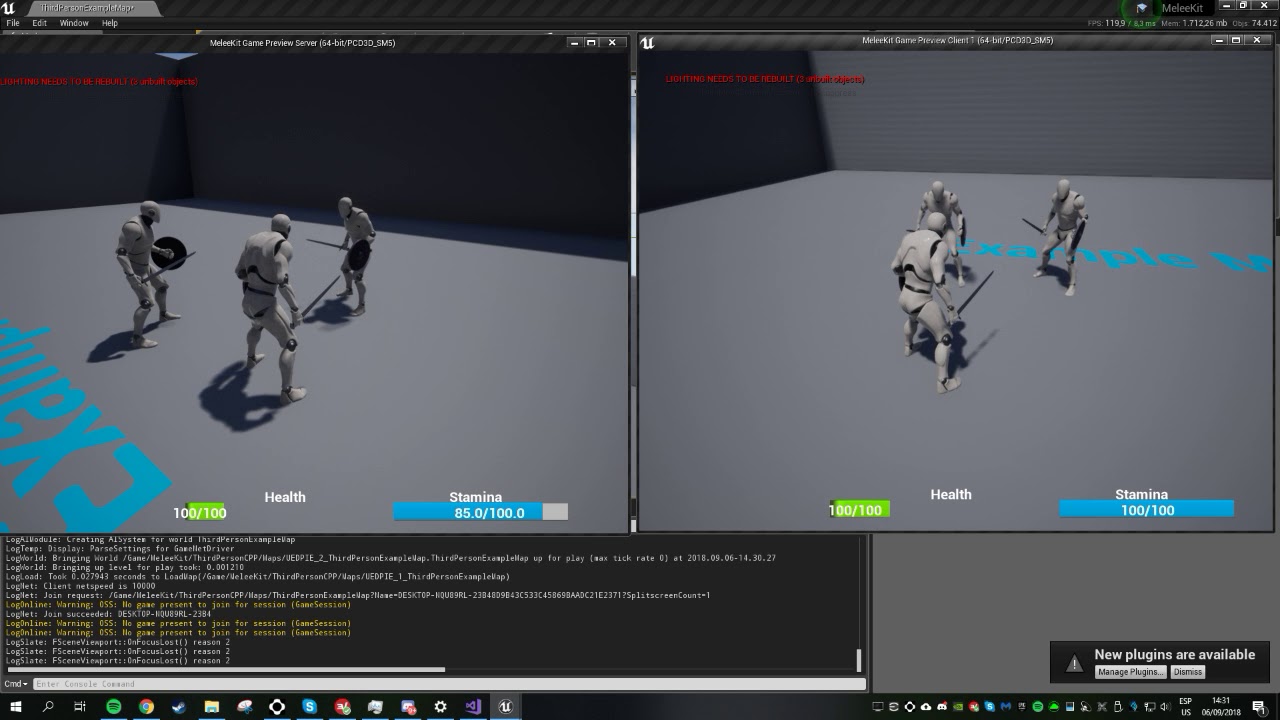
Thats pretty much my issue right there
manic pine
hmm how are you initiating it?
plucky jasper
This isnt mine, but - Its not just montages, its even from the animblueprint - Like moving is stuttery on the server
including all the idle animations and what not that comes from there
Other than that, then I initiate my montages from gameplay abilities.
manic pine
whats your fps on the listenserver?
plucky jasper
Both are running 60
manic pine
the listenserver character himself can move around nicely without issue?
plucky jasper
setting bOnlyAllowAutonomousTickPose to false on posses on the mesh seems to smooth the animation on the listen server, but it speeds them up as well. montages will be played at a far faster rate, while normal run animations will be sped up as well, though its only for client proxies
And yes
manic pine
its just the remote characters that behave weird?
plucky jasper
Server character is just fine
Everything that is being replicated to clients looks just fine as well
Everything that goes FROM the client to the server has this issue though
Ah seems like that the animations will be FPS locked on the server is the bOnlyAllowAutonomousTickPose is turned to false.
Which is why they are being sped up
or down, in case of lower fps I guess
manic pine
hmm well, bOnlyAllowAutonomousTickPose should be false id say
if its true, then animations can tick only when the listenserver receives a movement update from the client
which could be irregularly(and usually is), leading to weird animations
plucky jasper
hm
Actually hold on
Im getting some odd results here, that might be due to some settings I messed with
manic pine
however, your timing issue seems to indicate that its ticking the animation multiple times per frame(assuming you arent messing around with the time somewhere)
plucky jasper
I havent touched anything related to animation replication in that sense, not except for the bOnlyAllowAutonomousTickPose
manic pine
do you have a charmovecomp custom class?
plucky jasper
I have no idea as to why its working now..
But it is
I turned bOnlyAllowAutonomousTickPose to true again
and now its running at its normal rate o.O
And smooth on the server
manic pine
well yes, having it true would run it at a normal rate, but only tick pose when receiving an update
it will be smooth as long as the packets from the client is received regularly
if you add some packetloss it'll mess up the animations again
plucky jasper
WEll thing is, when I set it to true before, it the remote character animations would run at an increased animation rate
oh wait
Right lol
Sorry
one sec
I was messing up my logic for a second
ONe moment xD
Right so
Yeah
From what I can tell
setting bOnlyAllowAutonomousTickPose to false, will lock the animation to the servers framerate
manic pine
not 'lock' the animation
plucky jasper
Running at 30 frames per second will have it be the same on both the server and the client, but if the server runs at 60 frames, then its running twice that speed for client meshes :/
manic pine
false would run it regularly
the problem is, its being run twice when its set to false
once by your regular server tick
and once by server receiving a client move
manic pine
yeah
plucky jasper
Im completely out of ideas no how to fix this.
without setting the server to 30 frames atleast
manic pine
well it can be fixed, but not without modifying the code i think
plucky jasper
Right, guess I'll look into that at a later stage.
Thanks man
manic pine
youll need a custom ucharactermovementcomponent and override MoveAutonomous, essentially copying the original function but removing TickCharacterPose
and keeping bOnlyAllowAutonomousTickPose false
you should be testing if this is actually a problem under normal latency conditions though
plucky jasper
I did
Tried it out with a friend who lives in another country - since his internet werent at his best made it very visible to the server
But thanks, doesnt sounds too complicated to actually fix
manic pine
yeah... not sure how much epic's bothered testing the listenserver implementation for this kind of problem
plucky jasper
Probabloy not much considering that they run dedicated for all their needs I guess xD
manic pine
its not a problem for clients because they run their animations only on regular tick
they dont wait for movement updates
plucky jasper
Yeah
manic pine
which is essentially what youd need to do for listenserver too
plucky jasper
You know if there's a way to check to see if its a dedicated server or a listen server ?
manic pine
yeah, e.g. IsNetMode(NM_ListenServer)
plucky jasper
aaaaah ! - thanks man !
 shy apex
hey guys i have a problem, im using advanced sessions plugin but the multiplayer doesnt work, when a client joins, the pawn doesnt get possessed and the camera just spawns at 0,0,0
im using blueprints
past totem
blueprints not pics of the sky
shy apex
past totem
whats the part after success
past totem
what online subsystem are you using btw?
shy apex
steam


 shy apex
hosted
past totem
ah thats prob why lol, no one seems to get dedicated server to get found in find session lol
plucky jasper
@manic pine Since some C++ is still relatively new to me, I guess I'd ask here - but, copying the CharacterMovementCVars is required as well right ? - I mean I can get it to compile if I do that, can't if I don't - overriding the AutonomousMove function that is.
Or do I just need to include a specific header ?
past totem
can you show the create session part? and the world settings of the server? @shy apex
and pic what happens when you join the session
oh that https://cdn.discordapp.com/attachments/221799385611239424/544544158161829908/Screenshot_23.png


do you have a "player start" actor in your level?
past totem
what have you changed since then?
shy apex
i added spectators
i have a crude method where there are pawns that have a map view and the ygetpossessed when you die
get*
manic pine
@plucky jasper yeah, you prolly need to do that... alternatively remove the parts that use it in the code(its usually just debugging functionality)
plucky jasper
Ah right okay thanks
plucky jasper
Now I just need to figure out how I get to remove the CharacterMovementComponent so I can use the one I just created
manic pine
you need a custom ACharacter class
plucky jasper
Right guess I could set up the constructor in that
Is it possible to simply just override the constructor ?
manic pine
then you just add
Super(ObjectInitializer.SetDefaultSubobjectClass<AMyCustomCharMoveComp>(CharacterMovementComponentName))
in the initializer list
manic pine
yeah, it just tells base class to construct the move comp using your class instead of the default
shy apex
@past totem nope didnt work, i possessed the pawns through the game mode by spawning an actor for each joined player but the results are still the same ):
past totem
Not sure sorry :/
 calm plaza
Yo, friends. Does 'Multiplayer Shootout' project connect properly for anyone? Been trying to troubleshoot my game; so, I decided to check if that was working for me. Both my project and 'Multiplayer Shootout' are having issues connecting client to server. Is it working for anyone else?
past totem
Both my project and 'Multiplayer Shootout' are having issues connecting client to server. details on what the issue is exactly
"issues" is not detailed
@calm plaza
calm plaza
The connection is either timing out or shows closed.
 limber wagon
@calm plaza I tried it last week and it was fine for me
Just fired up the project and it's working fine for me in LAN at least
calm plaza
thanks for checking for me.
limber wagon
No worries am. on UE 4.21.2 if it makes any difference
calm plaza
same. yeah have been trying to get my game to connect properly for months. about to pull my hair out.
since multiplayer shootout isnt working for me either not sure what to do.
lan and wan both.
limber wagon
I've always handled my multiplayer stuff in C++. BP multiplayer confuses the life out of me for some unknown reason
Not sure why your MP shootout is messed though
calm plaza
gotcha. i cant even get these things to connect with out without sessions.
limber wagon
Got any other machine you could test on?
calm plaza
not sure if its port issues or what
yeah.
at least on wan.
need to try lan on 2 of them.
limber wagon
Do you use any sort of external access programs (like netgear router software for accessing home PCs)? I've read that can cause havoc for some UE4 related stuff
calm plaza
i do not.
 vital stag
Hey does anyone know any good documentation for using the unreal executable command line? I'm trying to use the listen and open commands to have a simple local multiplayer but my results thus far have been inconsistent.
worthy perch
vital stag
Thank you very much, this is exactly what I was looking for. Just out of curiosity, is there an easier way to do this? I just need simple multiplayer functionality that supports 6 players that can all be on the same wifi network. From my googling, it looks like packaging an executable and using various commands is a good idea.
worthy perch
I'm not sure, but I think you just have one guy specify his executable with -listen, and then the other's join his IP:port with whatever way you want.
twin minnow
hey guys what would be the best way to set render distance when working with a big map?
so far ive used a cull distance volume for objects/actors within the map
but what about the map in general?
twin juniper
is there anyway to replicate a ownerOnly property to a specific player instead of owner? or are RPC's the only answer here?
im trying to have players "request" to view the contents of a players inventory, of which is only replicated to owner
twin minnow
is there any way to make culling volume distances work for movable objects?
 dark edge
Anyone here know if there's a more elegant way to map player input to the server? Right now I"m just calling an RPC for each input but it feels clunky.
bitter oriole
Store the input, do a RPC call on tick with all the inputs you got
dark edge
Anyone here know how to replicate a scene component that's added at runtime?
bitter oriole
Set it to replicate ?
dark edge
I have ComponentReplicates set to true but I think the problem is in the spawning of it.
bitter oriole
Why do you think that ? Spawn on server, set to replicate, voila.
 hardy dome
Guyz
How can I make Clients travel after Server without sessions(using Direct IP)?
I tried
servertravel console command (didn't test standalone tho)
with/without transition map + seamless travel
firing logic OnLogout (when server logged out)
simply openeing level on server
a bunch of other crazy stuff :D
Nothing worked - Clients kicked out to Lobby level
bitter oriole
What do you want to do here exactly ?
Just keep clients on the server when changing map ?
hardy dome
Not sure, how can I do it?
bitter oriole
I mean is that what you're trying to do ?
hardy dome
Yeah! Say Clients connected to the server using open ip console command. But than after some logic server opens new level with a listen option. How can current Clients follow and not get disconnected?
bitter oriole
ServerTravel on server is supposed to achieve that, IIRC
Regardless of sessions
🤔
manic pine
yeah sessions shouldnt be necessary
hardy dome
You say I check "Seamlesstravel" on, use server travel console command and it should work?
manic pine
dont use the servertravel result in editor as an indicator though, because it doesnt work properly with PIE
hardy dome
@manic pine I've seen in a couple of tutorial videos it worked so I assumed it would work in my case
worthy perch
The console commands for "open IP" and server travel may do some weird stuff that differs from when you would normally call ServerTravel();
hardy dome
So, you are saying servertravel should work regardless sessions?
bitter oriole
Yeah.
worthy perch
Yeah, that's what I do.
worthy perch
Are you using a dedicated server or a listen server?
hardy dome
Listen server, direct IP
worthy perch
Are you targetting PC?
hardy dome
Yep
worthy perch
You might have a problem with NAT traversal without Steam sessions.
bitter oriole
Though apparently clients got to connect in the first place
worthy perch
That was probably on his own machine.
hardy dome
I've done portforwarding actually(is that you are talking about?) and the first connect between server and client works fine, changing map is a problem
worthy perch
Alright, just wanted to let you know in case you didn't.
hardy dome
Yeah, I figured. Thanks man
BTW forgot to mention, maybe it's smth insignificant, but at first connection(I use open level on one PC and open ip command on another) Clients don't follow the Server either. I manually push the button with open ip logic for them to connect
dark edge
Has anyone here figured out how to add a component during runtime and have it replicate out?
Actor replicates, but component does not appear on client
dark edge
What the fuck, adding a component like that doesn't replicate, but adding it through this utility function does.
//Adds a UActorComponent Subclass, and adds it to the Outer Actor.
UActorComponent * UAbilityBlueprintFunctionLibrary::AddComponentByClass(TSubclassOf<UActorComponent> Class, AActor* Outer)
{
if (Class != nullptr && Outer != nullptr)
{
UActorComponent* Component = NewObject<UActorComponent>(Outer, Class);
if (Component != nullptr)
{
/*
if (Outer->HasActorBegunPlay())
{
Component->bWantsBeginPlay = true;
}
        Component->RegisterComponent();

        if (!Outer->HasActorBegunPlay())
        {
            Component->BeginPlay();
        }
        **/
        return Component;
    }
    else
    {
        return nullptr;
    }
}

return nullptr;
}
dark edge
Yeah I've tried that. I've tried setting the boolean, calling setreplicates, everything. It's like it misses the memo to replicate the actual spawning. Maybe something got deprecated, havn't really looked into the component-specific spawn nodes, but it seems like this general spawn component by class function works. shrug
meager spade
maybe you were missing the outer
it wont replicate without a valid Owning Actor as an outer
kindred sandal
I am using gamelift In a battle royale game but i ran into a problem , while player searching for session, how to check if server already started a map ( i am using teleport system with timer)
The only way is get time passed after seesion started?
dark edge
I have a highly modular player pawn which is built at runtime with a ton of actors. I'm currently working on getting my networking set up. Is there an easy way to fire an event once all my variables are replicated out? Right now enabling tick a second after begin play is working, but that's not very robust.
 pastel agate
I currently have problems with the CharacterMovementComponent on 4.21 (did not happen on 4.20)
When the client has very high fps (>200) he receives a lot of server corrections which result in the clients movement stuttering (no problem with a 150 fps lock).
When enabling p.NetShowCorrection I get these logs "Warning: *** Client: Error for P_Terr_Male_Rebel_C_0 at Time=24.999 is 19.855 LocDiff(X=3.339 Y=-19.559 Z=0.725) ClientLoc(X=-5398.356 Y=973.135 Z=335.953) ServerLoc(X=-5401.695 Y=992.694 Z=335.228) NewBase: None NewBone: None ClientVel(X=100.569 Y=-591.511 Z=-8.874) ServerVel(X=102.695 Y=-591.146 Z=52.702) SavedMoves 1"
According to the debug capsules the server positions is lagging behind https://www.dropbox.com/s/u2cjixw5d9xg201/20190212192307_1.jpg?dl=0


Changing the network smoothing mode has no impact; it is on default currently (exponentional)
Anyone else here with similar problems?
kindred sandal
I think i figured it out
hardy dome
@dark edge have you tried to add component using a multicast?
dark edge
That adds it but the component isn't replicated at that point. There's just a component on the server and client side, but they are not the "same" one
I got my hands on a C++ bp callable function that can do what I need tho, or I can wrap it in an actor.
To test, try to add any component to an actor at runtime from the server. No matter what I've tried, it will not replicate to the client with the default add X component nodes in bp.
dark edge
So who here is working on the most ambitious/difficult concept?
grand kestrel
Anyone making an mmo
 jolly siren
Does anyone know why cameras exist on the server? Wondering if they really need to exist there or we can optimize by removing them there somehow.
grand kestrel
I mean, you could construct components on begin play with a role check
Don't know what you'd really be saving though
Server doesn't need camera, no
jolly siren
I'm talking about the default camera setup for a playercontroller/playercameramanger/etc
grand kestrel
It uses control rotation
 sharp pagoda
I don't think there's really a reason to have them... but why spend the effort in removing them? Sounds like a good deal of work for almost no benefit.
grand kestrel
Yeah that
jolly siren
There would be cpu savings on the server. By default bUseClientSideCameraUpdates is set to true, which sends an unreliable server rpc every frame. Which uses a lot of bandwidth. But if you set that to false then it does the camera position calculations serverside in APlayerCameraManager::UpdateCamera
I was just curious if there was a built in flag to flip to have the server not handle cameras at all. I will look over the source more tho.
dark edge
@grand kestrel I've tried that, it doesn't replicate.
dark edge
Construct component on begin play with role check
So far the only way I've got a component to replicate when added at runtime is with this C++ utility function I found, but it doesn't expose fields on spawn.
I'm just wrapping it with an actor for now. I could swear it used to work.
 gleaming niche
well if there is no camera, or at least no representation of angles that are calculated by where a player is looking on the server, then effectively an fps, third person, etc would be broken
you'd have to just let clients tell the server where everything is, there'd be no server authoritive, and be a cheating nightmare.
so i would say that's a really good reason why cameras exist on the server.
pastel agate
I was able to track my problem with the CharacterMovementComponent down in the first person shooter example: https://www.dropbox.com/s/dhejgy63lt65avw/FirstPersonTemplate.rar?dl=0
- Enable dedicated server
- play with one client
- enter cmd stat fps
- t.MaxFPS 300
- p.NetShowCorrections 1
- F11 for fullscreen
Your FPS should be >200 (if not lower quality settings), run and jump around for like 25m, after some time you get the movement glitches (and the capsule shape markers in 3d)
If others are able to reproduce this with this project; did I make a mistake with setting up the movement component? It worked fine in earlier engine versions, maybe a 4.21 bug.. (known?)
edit: okay, tried it on 4.20 and had similar issues, no idea why I never noticed that before
 grand kestrel
@jolly siren I wonder if computing the cameras has CPU performance implications compared to the bandwidth required for the camera RPC
 hushed maple
guys I've got some handmade collectable cards I plan to scan and recreate as digital 3D copies. I would like to allow players to be able to collect these cards but as a dev noob do you think it's out of my scope to create something along these lines with networking? I'm hoping there's a marketplace system that could handle a lot of the more challenging networking code
 fading birch
cross posting from #blueprint since i think this is more of a multiplayer question:
Hi all, i'm running into a strange issue. I'm working on a multiplayer game over a network. When the players travel from the lobby into a game map, the game mode swaps and everything else as well. When the players load in they are unable to look around unless they hold down a mouse button.

A potential solution i found was using Set Input Mode Game Only and tying that to the player controller. That works fine for the server itself, but will not repeat to any clients in the game. I've tried making a custom event that runs on the client that does the same thing and even calling that from another custom event that runs on server and no dice.

Any ideas?```never mind fixed it 😄
 bold mica
so is the game mode initial state replicated? or is it just whatever the defaults are, cause in unreal's description it says the the game mode would be a good place to keep things like the players list, but I feel like that's something the players should know about, unless the game mode is updated once at the beginning of the game
fleet raven
it replicates all the actors and their variables in no particular order when the client joins
fleet raven
only on server side
gleaming niche
yeah on server side.