#multiplayer
1 messages · Page 440 of 1
 glacial pollen
 worn turret
Not sure if this is the best place to ask about this, but I am a bit confused about the project structure of a multiplayer unreal game. If designing a game that is intended to run dedicated servers, is the dedicated server the same "project" as the game client? if so, how do you differentiate the behaviour that the server should do, vs the client? (regarding what authority to give actors etc.)
worn turret
Good call. Ill take a full read through this soon and see if that clears up my questions
 thin stratus
@worn turret could also read my compedium
Pinned to the channel
And yes, the dedicated server is the same project. In cpp you can mark code as server only, so clients won't compile that, but for bp projects I'm pretty sure it packages all code anyway
 foggy hedge
hello, i need to show widget only for players who overlap with trigger , now it shows to everyone ,, can someone help ,, ?
thin stratus
OnOverlap->SwitchHasAuthority->Remote->OtherActor->CastToPlayerCharacter->IsLocallyControlled->TRUE->ShowWidget.
@foggy hedge
foggy hedge
@thin stratus thank you so much i ll try it now
thin stratus
Actually, you can skip the "SwitchHasAuthority->Remote" if you have a ListenServer setup
foggy hedge
@thin stratus it works, but not for server ...((
 lethal depot
what happens with dynamically spawned UObjects with rpc-s? can I pass one as a parameter for an rpc call? What happens in the other side, will it be GC-d randomly, or can I assume that it will be alive during the function call? 🤔
seems like I can't do that
 winged badger
UObjects arent replicated by defaut @lethal depot
If they are, something most likely an Outer Actor will manage its lifetime, and all you will be passing is a NetGUID
In short - you can as long as its replicated, otherwise you will just get a nullptr
lethal depot
I see, my new idea is to pass the UClass and an FArchive as parameter to the rpc call with the necessary data so the object can reconstruct itself
I want to create a command queue
winged badger
It doesn't even matter if its dynamically spawned, with UObject::IsNameStableForNetworking { return false ; }
Implementation you can't reference ones liaded from package directly either
Loaded*
Mightbe easier to just replicate the thing
lethal depot
replicate what exactly? 🤔
lethal depot
I have found a guide for that, yep
winged badger
And Outers ReplicateSubobjects
One bit of trivia, you can instantiate and replicate UObjects with ActorComponent as Outer
But the Replicated UObject will change itd Outer to Owning Actor
Silently and without warning, ofc
Replicating it is easier and saner then hacking in a replication roundabout
lethal depot
yeah but using replication instead of RPCs sounds like a nightmare from my systems point of view
winged badger
You cant RPC something that doesnt exist on both sides
lethal depot
I can RPC primitives and structs and that is enough for me 😄
winged badger
If they are in Array or Queue or some such
You can use FFastArraySerializer to get client side notifications
NetworkSerialization.h has all the info in comments
winged badger
Annoying thing about replicating primitives and reconstructing is that even after you reconstruct it, you still can't reference it over network directly
As far as Unreal cares, its not the same object
@manic pine unordered can be worked around, you have wrak pointer to object and index in your FFastArraySerialiterItem derived struct
And you manage their lifetimes with a TArray
 manic pine
yeah, just a bit of a hassle
 jade gazelle
What would be the best way of implementing a loot system that was somewhat protected from reverse engineering? That is, preventing clients from looking into game files to see what enemies drop what items.
The only thing I can think of is storing everything on an external database and then querying that every time an enemy dies
That seems kind of excessive though
manic pine
WITH_SERVER_CODE perhaps
or just keeping it in a file not distributed with the client
unless you meant just listenserver?
 past totem
Best way to check if the client is the same version as the server before letting him join?
@ me please
Also, cheat wise, if I have a custom event that runs on the server with input values, can a cheat client run it with it's own custom values and use it to cheat?
@ me please
winged badger
@jade gazelle that seems a bit redundant, after a short while just statistics will let them know everything they want to know
jade gazelle
@winged badger probably unnecessary in the grand scheme of things and how quickly information propagates now. Still just trying to maintain some semblance of mystery
I might just handle all of that stuff on the database so changes can easily be made w/o having to modify the game source code
 heavy marlin
Might be auto possess settings?
 twin juniper
Whats the best way to test steamworks integration? I've set up a lobby system etc, should I use a VM to test it on a shipping build?
or is there a better way
thin stratus
2 PCs.
You can also try the VM, but VMs are usually pretty limited in resources.
@twin juniper
twin juniper
Fuuun.. Thanks
Also is there a way to see which player controller is the "host" so to speak?
Also I just realized, you're the absolute MVP who wrote the compendium, thanks for that. 👌
thin stratus
No biggie (:
Well, depends on why you want to know that (PC being host)
There are multiple ways to check who is the server
@twin juniper
twin juniper
@thin stratus well I'm trying to figure out some general things about sessions, I'm using steam in this case.
- By default, are sessions just listen servers on whatever client created them?
- Do these servers require additional setup if you want to test with machines on different networks (port forwarding)
@thin stratus
For context, I have a pre round lobby that only the session creator can start, I'm assuming in this case the listen server is the session creator when using steamworks?
thin stratus
@twin juniper A session is just a set of data/info
Usually the server opens up that session
That can be a Listen Server or also a dedicated server
Other people find the session and use its data to join the server
Steam uses NAT punchthrough so you don't have to port forward, at least as a listenserver
The whole thing about only having the server start a round is pretty much not connected to sessions at all
twin juniper
Right that makes complete sense
I'm going to try out some stuff then, I'm trying to remake a local coop game I made for steam and I'm a bit new to networking still haha
thin stratus
You can use the simple "IsServer" function to hide and show ui elements
A client pressing the button wont do much anyway as the code to travel to a new map is limited to servers only
@twin juniper
twin juniper
That's a fair point
Alright thanks for the tips, I'll post here again if I manage to horrendously mess up
Oh a small inquiry, do I need to pass every widget button event through the PC?
It seems like it'd get messy if you have a lot of UI you need replicated
 meager spade
you can get the pawn from the widget, etc but yeah you have to send replicated stuff out, but not just via the PC, you could do it via anything, playerstate, or whatever
thin stratus
It helps wrapping specific logic into Components that are replicated and sit on the PC
at least organization wise
twin juniper
That makes sense, I'll use components then
twin juniper
Is a player created by using the CreatePlayer node the same as a player that would join through online play?
As in, does it get added to the player array in the gamestate
twin juniper
I seem to be having issues with my player controllers when setting up, it appears that only the first player gets a player controller while the rest doesnt, this happens when testing by selecting to play with 2 players for example
nevermind, I just fucked up my replication, fixed it now 😃
 crystal crag
Hey everyone. I am taking my first stab at the AbilitySystem and I have it pretty close to working (I think). I have a basic ability mapped to the LMB (player swings a sword). When I click LMB with no dedicated server, everything works (even a listen server is working fine). When using a dedicated server I see in the logs the ability being activated but the target's health never gets modified. Does anyone have any general tips are to what to look for?
I'm following a mixture of the ActionRPG template and using this guide: https://wiki.unrealengine.com/GameplayAbilities_and_You#Data-driven_Initialization_of_Attributes
As far as I can tell, UAttributeSet/Attributes are always replicated by default
That might not be enough information, I just don't know how to put in my entire series of classes to where people would care enough to read / analyze them, so I was going for a more generalized approach
winged badger
using an animation to drive the hit logic and dedicated server is not running animations?
crystal crag
Let me double-check. I thought I had the dedicated server running animations but who knows. I've deleted and started over so many times it all is beginning to blur together
@winged badger thank you. In this restart attempt I had forgotten to re-apply that setting
That fixed it 😃
twin juniper
Hi, I can't seem to find sessions I create on my second machine
Using steamworks as subsystem
 grand kestrel
Christ it gets buggy as when you uncheck 'Use Single Process'
Its now ruined the project
Can no longer build server targets
🤷
winged badger
what does?
grand kestrel
Running PIE with 'Use Single Process' unchecked corrupts the project preventing compiling server targets
On 4.20 at least
Oh, sorry, it corrupts the source engine build
Gonna have to delete intermediate, takes hours to rebuild all this crap
Coz I use Debug Editor, DebugGame Editor, DebugGame Server, DevelopmentEditor, DevelopmentServer, so thats 5 engine builds
Guess its time for a break and never using that setting again :/
 worthy perch
May I ask what symptoms your corrupted source engine build exihibit? (I could not phrase this question properly.)
It seems strange that a setting that doesn't affect code, as far as I know, would corrupt source code.
grand kestrel
Sorry I didn't keep the logs, it was all nonsensical stuff related to PIE from the Engine's Intermediate folder, tons of error spam from there
worthy perch
Hmm, alright. Were there any attempts to fix it?
grand kestrel
In what way?
The intermediate folder isn't something you fix, you delete it and rebuild
grand kestrel
For the engine not project..
worthy perch
Oooh.
worthy perch
Damn, that's rough...
grand kestrel
I'll just do the essential ones first and set the others going when I take a break/go to sleep, etc
twin juniper
hello i need help with LAN game
i got this error when create session:
 potent prairie
Hey, does anyone know if there's a way to keep a clients game window "active" even if minimized?
Reason I ask is because when I test multiplayer, if the client minimizes the window, his ping jumps to 1000+ and then the server/client stop registering hits as well
I'm afraid a player could just minimize his game as an exploit, to avoid getting hit, or whatever if that makes sense
Maybe this doesn't happen in shipping builds, but I havent tested that build yet.
grand kestrel
It's weird that you have that issue in the first place
Clients shouldn't be handling that stuff either
potent prairie
well the ping jumps up because when the game loses focus, like minimizing, its like windows stops giving it resources or something so I can see why the ping would jump. Just wondering if there's a way around that
 pallid mesa
Did someone have this issue on UE 4.21.2 where a net multicast marked as unreliable will only fire once in a component? (single proc)
I think I've figured out but I don't understand why it just works once
oka I basically missed a call to AActor::UpdateReplicatedComponent(UActorComponent* Component)
which is handled by SetIsReplicated
grand kestrel
Somehow seem to have permanently corrupted my project. I was doing frequent DebugGame Server builds which worked no problem, and then I changed the option 'use single process' to false in Editor Preferences->Play->Multiplayer Options, so it loads the server externally and connects to that, needed it to test a certain system. I renamed a struct (before ever doing this but within the same editor instance, i.e before closing/reopening) and it results in an error (on the server's side):
[2019.02.04-10.44.33:801][  0]LogClass: Warning: Property GameRules of GameRules has a struct type mismatch (tag STRUCT_REINST_GameRules_0 != prop FallbackStruct) in package:  ../../../../../../Projects/Reliquary/Plugins/VProjectilesProj/Content/Extra/GameInstanceBP.uasset. If that struct got renamed, add an entry to ActiveStructRedirects.
[2019.02.04-10.44.33:803][  0]LogClass: Warning: Property GameRules of GameRules has a struct type mismatch (tag FallbackStruct != prop GameRules) in package:  FObjectReader. If that struct got renamed, add an entry to ActiveStructRedirects.```
And now when I compile ``DebugGame Server`` or ``Development Server`` targets it results in mass irrelevant error spam:
https://pastebin.com/KxCu7Aav
Theres no reason it should need an ActiveStructRedirects entry either
This is on 4.20
And I never hot reload, ever, I'm always running in debugging
Seems like some astronomical engine bug caused this and I'm never going to find what it is or why because its too rare 🤷
But I'm also not going to recreate the project lol
Ah got rid of the server log errors by resaving all the BPs
 fleet raven
that server build is probably fixed by just doing a clean
grand kestrel
I reinstalled the source engine from scratch
Well, deleted it, cloned it, built it, etc
grand kestrel
I haven't touched the dependencies in ages
fleet raven
it seems to be trying to build editor/developer modules for the server
Module.BlueprintGraph.gen.3_of_3.cpp this does not belong on a server
grand kestrel
Oh I see where it might be
I added a plugin that hadn't been tested with a server build and realized it's build.cs didn't have if (Target.Type == TargetRules.TargetType.Editor) for "UnrealEd" include, so maybe its that
Old plugin lol
fleet raven
a lot of plugins are structured incorrectly (doing weird stuff instead of clean runtime/editor module split)
so that could certainly cause it
grand kestrel
Yep that seems to be it
Forever re-learning the lesson of not jumping to conclusions huh
 elfin cliff
Guys, looking for some advice/opinions. In a multiplayer app we've built, we have a server running in India. I am able to connect fine. Another user, who is in germany, is able to connect fine via his mobile hotspot, but not via the company guest network. Another user in UK is not able to connect at all.
What do you think is wrong?
twin juniper
For some reason, when I try to loop through a bunch of values and set their value, the repnotify function is not always being called
But it is setting the value 100% of the time
its only the rep-notify where we have an issue
Anyone have any ideas about this issue?
;-;
 fluid finch
Hey guys. Anyone knows of a good tool/plugin for creating a player-log? Something similar to WoW-combat log or something like that. ?
grand kestrel
@twin juniper You're certain the ones that aren't being called are changing to different values?
 worthy wasp
guys quick Q - DedicatedServer - PIE testing .... how do i get the dedicated server to open up in a new window (like if you put -log at the end of a .exe's shortcut)?
the server runs fine when i launch it on its own.... i've been in teams where when press PLAY in editor - it launches the Dedi seperately before it launches the client... .but for some reaosn this new projec ti'm on it isnt doing it.
winged badger
@twin juniper that blueprint or c++?
twin juniper
@winged badger i figured it out, evidently the TSoftObjectPtr wasn't loading fast enough
 sharp pagoda
@worthy wasp Enable multi process PIE
twin juniper
so it tries to set the mesh to nullptr
winged badger
i liked how TScriptInterface<T> just silently failed to replicate for me the other day
no error, no output, no warning, just a null on the other side
sharp pagoda
mm that's fun
 vale steeple
Hi Guys! I´m making a Android game. In my editor CREATE SESSION and JOIN SESSION works fine, but not in the device. The problems come with DefaultPlatformService=GooglePlay. I use google play and I need can access LAN too.
If I change DefaultPlatformService=LAN, Join Sessioo and Create session works, but I can connect to Google Play.
I need both services. How I can do that?
twin juniper
I faced this problem when i was making multiplayer game using (OnlineSubsystemSteam)
So, if i logged in to my account on steam LAN has no effect
When i logged out from steam and close it
LAN work fine.
@vale steeple
So u should force engine to use LAN..
use this consoloe command on success when u create session:
open LevelName?listen?IsLan=1
vale steeple
ok, then I don´t will use Create and Join Session, and back to the old method with console commands?
Where I have "listen" I put ?listen?IsLan=1?
vale steeple
And for join a game, I need to do something special? I use command "open IP"
twin juniper
For join game just use Join Session
The problem is i dont have computre right now....
Tomorrow i will just show u the right way when i have the computer
vale steeple
ok, but I can start trying all this! thanks so much!!
twin juniper
Wait
@vale steeple dont use the function at the my picture it is wrong
U need to use the normal Excute Consoloe Command and the target is Player Controller
past totem
Anyone able to help. I created a session for my server using the DefaultPlatformService=Steam and it says it's successful. I can also connect via open IP command. But when I search for sessions it doesn't find it (no error, just finds 0 results)
If I change the config to DefaultPlatformService=Null then it finds it on my PC but not for other players (0 results).
twin juniper
Can i have screenshot of ur widget design for founded sessions ? @past totem
past totem
that works I checked
twin juniper
Use normal int var not string
past totem
as I said it works I logged it + if I change the config to DefaultPlatformService=Null it finds the session for me
twin juniper
In find session change server type to All Servers and change the min slots availabe to higher number
past totem
I want it to show full servers too tho?
In find session change server type to All Servers trying
twin juniper
And also u need more then one steam account to test it @past totem
past totem
hmm so I need to try to connect from a diff pc otherwise it won't work?
twin juniper
When u package game it is dosnt work for 1 pc
Try use launch project in ur project folder
past totem
ok I'll try
past totem
that works tho
twin juniper
Ok
past totem
I log the found sessions amount to screen and it says 0 so doesn't really matter if it shows on screen or not
I'm trying what you said
twin juniper
If I want to hold a character over the head of another character, what is the best way to replicate this? the game was originally singleplayer and I just set the actor location on tick to a certain location, but now any way I try to replicate this it seems to result in choppy behavior, is there a good way to implement this?
 digital violet
I'm trying to do a super basic multiplayer game, just to learn how to do MP.
It's a TopDown and each PlayerController is spawning their own camera, but the clients don't change their "view target", and I don't know how to trouble shoot this =<
Any tips?
 limpid notch
how can I create an actor and place it on the map inside bp from a client's perspective (only one client can see,interact with it while the others can't)?
 faint parcel
Hello everyone, I just recently started playing around with Networking in Unreal and I am trying to understand the different use-cases for RPCs and Replicated Properties.
For instance, do I set a replicated property "isShooting" on a player, or do I send an RPC (marked reliable I suppose) to tell the server and later every client to start shooting? (for effects sake).
My gut is telling me to go with a local shooting effect, called immediately as the local player starts shooting, and then send a Server RPC to tell the server that the local client is shooting, the server then tells every client to show shooting effects for the given client.
manic pine
either works, though a property has the advantage of reaching new clients as well
ie player1 starts shooting, player2 joins
with rpc, player2 then doesnt see player1 shooting, with property he does
same issue if player2 becomes net relevant
twin juniper
@faint parcel im pretty sure thats the right way
@limpid notch spawn it from a client instead of the server
limpid notch
@twin juniper thanks im trying to have each client have their own 3d widget actor but it seems that after each client creates his own actor only the first client can interact with it , while the second can't. Do you know why is that happening?
twin juniper
@limpid notch Yes, because UI is client only
You need to pass it through the player controller
Does anyone know if theres an easy way to test bad connection playability? Can I fake ping somehow?
limpid notch
@twin juniper and how can i pass it through the PC?
twin juniper
get player controller
sharp pagoda
@twin juniper Here ya go https://www.unrealengine.com/en-US/blog/finding-network-based-exploits
Unreal Engine
Recently, I had an email conversation with a Gears of War fan about the differences in networking quality between each of the three games in the series. One thing that we can point to in terms of increasing the quality of the networking experience is our use of the Unreal Eng...
twin juniper
cheers
limpid notch
@twin juniper So what you are basically telling me is that the first client that enters the server has authority over all such 3d umgs and that for another client to use the 3d UMG , it has to somehow get permission from the first client thats the "god of umgs"?
twin juniper
I assumed you were playing with a listen server
what are your multiplayer settings right now
limpid notch
the client just enters a session using the online subsystem there are no settings that i assign to the session
twin juniper
who made the session
limpid notch
a dedicated server
potent prairie
have UMG widgets run on Local Controller
limpid notch
how should that work? Currently each client creates its own 3d Widget actor but only the first client(who btw , isn't the server since everything is run on a dedicated server) can interact with its widget , while the other clients can't
faint parcel
Thanks for the answers, btw - I just went afk for a while, appreciated the response!
potent prairie
No, widgets are client only. I have an actual dedicated server and I make sure I load up all widgets locally
The server can send a command to load the widget, but not load the actual widget on server
limpid notch
and doesn't client only mean that every single umg can be assigned to only one client?
potent prairie
you'll get accessed none errors when the server is trying to load the widget itself
Well what I do is when the player joins the server, the PC loads up the class selection widget locally. Whatever the player chooses gets sent to the gamemode, which is server only, and then the gamemode handles the player spawning. The player spawns, and then I run an initialization script on the playercontroller and I locally load the UI there
There's probably a ton of ways to do it, but that;s how I do it and it works
limpid notch
yeah but in my case im trying to assign a 3d Widget actor to each client for itself but it only works for the first client
potent prairie
might mean the server is only assigning it to index 0
which means player 1
so I would check that you're not using Get Player Controller or whatever that is with the index of 0 on it
limpid notch
it shouldn't, since im spawning the actor inside a function thats executed by the client x and this client x can see only its actor and the other clients cannot see his (im spawning them in different locations) so typically it should be assigned to client x
potent prairie
hard to know without going through your scripts haha
sharp pagoda
Wait what are you doing? Just spawn the widget actor if IsLocallyControlled() after being possessed
potent prairie
^
 wary willow
Has anyone ever had any issues with Shipping Builds not working with Steam? 4.21.2
-Plugin enabled
-steam_appid inside the correct folder
Two different PCs, two different Steam Accounts, same network.
One PC I can clearly see the Steam overlay , the other PC... nothing shows up (the pop up in the bottom right doesn't pop up)
I am using MPShootout
past totem
Try using the program thing it worked for me
past totem
sec lemme fidn it
https://forums.unrealengine.com/development-discussion/blueprint-visual-scripting/38640-steam-setup-utility @wary willow that
Unreal Engine Forums
Build powerful visual scripts without code.
 wary willow
hmm, I'll try it. But I don't know/think that's the issue, since it does work on one PC, but I can't for the life of me figure out why the other PC can't get Steam initialized
worthy perch
Is Steam running on the laptop?
wary willow
yeah
past totem
That will install all the Steam related stuff for your project so after that it should work
past totem

wary willow
trying to make sure I didn't have some setting messed up on the other Steam account
worthy perch
You sure SteamAPI_Init() fails? Perhaps just the overlay has a different hotkey?
wary willow
I think I remember something now...
Yeah it fails
I did a dev build
and it said it failed
in the log
ok good. Enable Steam Overlay option was on
I think that was an issue a long time ago
I mean it's literally just Multiplayer Shootout
enabled Steam subsystem on there (because it wasn't)
worthy perch
Did you already check the possible reasons for failure in Steamworks' documentation?
false indicates one of the following conditions:

    The Steam client isn't running. A running Steam client is required to provide implementations of the various Steamworks interfaces.
    The Steam client couldn't determine the App ID of game. If you're running your application from the executable or debugger directly then you must have a steam_appid.txt in your game directory next to the executable, with your app ID in it and nothing else. Steam will look for this file in the current working directory. If you are running your executable from a different directory you may need to relocate the steam_appid.txt file.
    Your application is not running under the same OS user context as the Steam client, such as a different user or administration access level.
    Ensure that you own a license for the App ID on the currently active Steam account. Your game must show up in your Steam library.
    Your App ID is not completely set up, i.e. in Release State: Unavailable, or it's missing default packages.
Yea, the thing is, again. Works on one PC, just doesn't work on the other one
both PCs are admins
past totem
want me to try?
past totem
this steam shit is a nightmare
I'v been trying to fix session not found for the whole day
potent prairie
wait until you start trying to get a dedi server to work with steam xD
past totem
dedicated server is not really related to steam, I got that going
potent prairie
I gave up after a week
potent prairie
steam support is a joke
worthy perch
I just load the Steam dlls on the clients, and not on the dedicated server.
potent prairie
yeah but getting steam to find your server, make it work with a server browser, etc its not easy
worthy perch
I just planned to have a REST server to keep server information.
potent prairie
mine works with the default ipnet driver, but not with the steam driver
past totem
same ^
potent prairie
yeah I'll probably do that Floss
worthy perch
I've seen so many people have problems with Sessions and... things related to dedicated server instances.
And I really don't think it's hard at all to just build your own.
past totem
I guess you'll need a database that stores that IP and server info?
potent prairie
yeah I just direct connect to my ded servers right now
worthy perch
Yeah, pretty much just need to save at least IP:port on the server.
past totem
it will be kind of a pain to do tho, to save players and stuff
I wish this just worked
it's so weird I got everything setup but it's like steam is broken lol
potent prairie
however when enabling steam advanced sessions, I can no longer direct connect so I disabled that
worthy perch
Well, have you checked out UWorks on the Unreal Marketplace?
past totem
hm lemme see
potent prairie
Yes, and that is what I'll probably use
potent prairie
I was getting to that, but I'm not going to do the steam stuff until my store is setup and all that
I'm on steam, but just not publicly
past totem
It's just so annoying that it's already a thing but doesn't work, why do we have to find workarounds... Anyone managed to get find session to work with Steam servers?
potent prairie
UWorks might be the solution to the server browser and such
past totem
https://cdn1.epicgames.com/ue/product/Screenshot/SlidesM1-1-1920x1080-489b258891a1715cd1bb68985fa5cec8.png lol does ARK uses this too?
 wary willow
@worthy perch Actually, one of those listed was the problem. I think I see why I was able to have it work on my PC, but not the other
Since I am the on the Steam Account associated (dev) with the steam_ appid, since it's not release state, public can't use it. But I then tried out 480 on it, and it's working. which is good, that means I can now go back to my other project and figure out the issue. So thanks for CPing that.
past totem
those are ARK map names xD pic from the marketplace
potent prairie
Looks like ARK uses UWorks lol not surprised
you can download a working uworks demo and see
worthy perch
Ragnarok uses UWorks, that's... surprinsing.
wary willow
I've been tempted on using UWorks in my own project
past totem
demo link isn't valid lol
potent prairie
rip
My guess is these games either use UWorks or programmed their own custom way of doing it
past totem
actually why not just use the Null system thing?
DefaultPlatformService=Null
would that not work?
potent prairie
I dont think that works if you want steam to find your server and populate their browser or whatever
potent prairie
if you dont want steam to handle your server browser, then itll work if you set it up your own way
but anyone will see your servers, regardless whether they use steam or not
so thats okay if you sell on multiple marketplaces
maybe I'm wrong i dunno
wary willow
Biggest problem with UWorks...
past totem
my game is gonna be free anyways
wary willow
Is if you don't plan on just launching on Steam 😃
potent prairie
yeah
past totem
I'll try doing the Null thing
I tried it earlier today
But it seems to only work on my PC and not for someone else that tried
the find sessions thing

past totem
hm how to fix then RIp
potent prairie
I thought it was a firewall issue on my server but I fixed all that and still wouldnt find it
potent prairie
bro i spent a week nonstop trying to solve it hahaha
im not doing that again, ill be paying someone smarter than me next time i get back into the steam stuff xD
for now I can test with one server direct connect, thats good enough for beta testing 😛
past totem
Well I'm releasing soon :/
potent prairie
another thing to think about is if you want crossplay, like if you launch on xbox or something. then yeah dont think you would use UWorks or the default steam stuff for the servers
does ARK have crossplay?
past totem
Na ARK doesn't have crossplay and I asked in their support server and they said ARK doesn't use that anyways lol
But yea good point. I guess I don't want to use that or Steam then
potent prairie
its all over my head. When I get closer to launch I'll try to find a programmer who knows this stuff and can get me set up
past totem
It's just a server browser, couldn't imagine it being such a pain in the ass 😂
I hate focusing on these stuff instead of developing the game

potent prairie
focus on the game man
past totem
Lol well this needs to get done at some point
Might as well get it done now, specially if I don't know how long it will take
potent prairie
yeah i know
maybe start a forum thread or answer hub and see what happens there
you can just check it once a day while you develop the game
past totem
Hm good idea
Will try once more with the Null thing then if it doesn't I'll do that

potent prairie
let me know if you do that cause I'll follow the thread as well
past totem
Sure
 spiral oar
[Not sure where to post this] Is it possible to hide certain parts of character from camera,for example i want to move camera little bit more from head and make head hidden somehow so camera can see through it.I can't delete head completely because i'm making multiplayer game so it will look weird to see players without head
wary willow
@spiral oar OwnerNoSee
spiral oar
That disables whole character
wary willow
It's just one whole skeleton?
spiral oar
It has bones if you think about that
wary willow
Hide them then
past totem
Anyone knows how to do voice chat? I want it to be local (so if a player talks from one side of the map the other player on the other side can't hear, only if near)
wary willow
You can Hide by Bone name
spiral oar
But can i use OwnerNoSee on head bone for example?
wary willow
@spiral oar https://api.unrealengine.com/INT/BlueprintAPI/Components/SkinnedMesh/HideBonebyName/index.html
Hide Bone by Name
spiral oar
I can?Well i didn't know that
wary willow
@past totem The new VOIP system should be good enough for you
VOIPTalker, spatialized
wary willow
4.19+
spiral oar
@wary willow So i used Hide Bone by Name and my camera keeps shaking like crazy ,do you know what can cause this?
spiral oar
Okay thanks anyways
past totem
what's the difference? lol @wary willow
wary willow
@past totem 4.19-4.20 doesn't support Steam
Epic is revamping its effort for VOIP now though
Especially since Vivox got bought by Unity
past totem
what does that mean? like lol does it not work without Steam?
past totem
ok so I need 4.21 for local voice chat?
past totem
(so if a player talks from one side of the map the other player on the other side can't hear, only if near)
wary willow
so you want spatialized
If you are using Steam, you need 4.21
if not, you can use 4.19-4.20
past totem
wdym so if I use Steam it doesn't work? lol
 fleet sluice
Just to be clear regarding the UWorks discussion above: I don't know if ARK uses it or not. What can be seen in that screenshot posted above is that, with the help of UWorks, it's possible to have a UMG which interacts with Steam's server browser, the one found in the Steam application, under "View|Servers". I could've shown servers from ARK, CoD and CS:GO in one list if I wanted to.
Failing to grasp this shows beginner-level knowledge of UE4 networking and Steam and would likely translate to a headache for me and a lack of satisfaction for you. Therefore, if you find yourself confused by the above-mentioned, it's best for you to stay away from UWorks until you learn the basics of UE4 networking and Steam.
past totem
@fleet sluice Why not just use the DefaultPlatformService=Steam thing? instead of the plugin
fleet sluice
I don't care what people use, mate
past totem
I'm asking because I'm wondering if it only doesn't work for me or doesn't work for everyone
fleet sluice
I'm not here to offer Steam support
OnlineSubsystemSteam has always had problems. That's why UWorks sells well
past totem
Will UWorks work with crossplatform?
fleet sluice
If I helped everyone fix their OSSteam probems, I might as well make UWorks free and become a volunteer
No. It's just Steam integration
past totem
I see
fleet sluice
I mean, not "no". It just won't do anything for it
It doesn't help with cross-platform, it doesn't hinder it either. It's like an independent library
But it is focused on direct Steam integration
past totem
Can DefaultPlatformService=Null work if we don't care about Steam integration or is that broken too? Only finds server on host pc
thin stratus
Null is the default one that supports LAN Sessions only.
fleet sluice
Null will never be enough for online play. Online games require a master server (backend)
thin stratus
Null only supports online play via direct IP joining
past totem
I see
thin stratus
Which requires the IP to be known and the ports to be opened
past totem
Oh okay that's how I do it too, still can't find the server
fleet sluice
And moving from LAN to online pretty much requires you to read about what's called "NAT traversal" so you know which online solution to choose from
past totem
Unreal Engine Forums
OnlineSubsystemB3atZ Plugin
Update 2018: At the moment this plugin is discontinued with last supported and tested version around 4.17ish. All instructions for
What about this

ah 4.17 rip
potent prairie
I'm pretty sure most online games use UWorks or there own scripts that pretty much does what uworks does
unless they got crossplay then it's more complex I would guess
past totem
How would I make it work with crossplay A database that stores available servers I guess? I don't care to know the ping
grand kestrel
There's no reason to use anything other than uworks as it's cheap, no subscription or royalties
past totem
I wouldn't say $160 is cheap
grand kestrel
You'll never save money making your own
past totem
And it won't work for crossplay
grand kestrel
It's extremely cheap
A dev at vlads level will charge you that for 2-3 hours
Well made plugins are almost always dirt cheap
Because you need to compare it to the cost to make it
past totem
I want it to be crossplay..
thin stratus
Then wait for Epics System
Will release throughout 2019
Free and will feature crossplay
past totem
Waiting is 
thin stratus
Welp, you know your options now
grand kestrel
Is your game finished besides this then
past totem
Mostly
thin stratus
Crossplatform solution would require your own stuff
Your own backend, your own MasterServers, your own everything
Pretty €€€
past totem
I already got a database that I use for saves
grand kestrel
😶
fleet sluice
@grand kestrel Thank you for the very kind words, sir!
grand kestrel
Just stating the facts
fleet sluice
@past totem A database could be somewhat sufficient, though costs and stress have the potential of skyrocketing and require more thorough maintenance. For cross-platform games, you need to add the IP:port combinations of each server to that database, but also remove them when the server ends. This is just a bare minimum. If I tell you my IP:port, where you would find a server, you wouldn't be able to connect to it unless I personally change the settings in my router/NAT (it's called "port forwarding" or "NAT traversal"). If you plan to use dedicated servers, you don't worry about this part because server admins will know how to configure their routers/NATs. But if you aim for listen servers, the database would be almost useless by itself.
past totem
Yep I'm just doing dedicated servers
For cross-platform games, you need to add the IP:port combinations of each server to that database, but also remove them when the server ends. Yep that's what I'll probably do
I wish the Steam thing worked for now..

Is there no way to use the Null network thing with ports?
fleet sluice
I did too, once. But every discussion that starts with "I have a problem with OnlineSubsystemSteam" tends to result in tons of pages of "solutions".
Everything uses ports underneath. "JoinSession" is the same as "ExecuteConsoleCommand("IP:port")". I have no idea what you're trying to achieve with OSNull with this little information
past totem
I'm trying to just have a simple server browser with OSNull for dedicated servers that use ports
fleet sluice
You can't do that with OSNull because OSNull does not communicate with any master server of any sort
past totem
Rip
fleet sluice
Take the following example: is it possible for you to PM me on Discord if you don't know my Discord tag?
past totem
Yea I get it
grand kestrel
I feel like epic will intentionally leave os steam weak so their own solution will be comparatively better 🤭
fleet sluice
OSSteam and UWorks connect to Steam's master server. They both make (A) the server register with Steam and (B) the client query Steam's master server
+1 I expect that as well
past totem
Yea but I don't feel like spending $160 for something that I'll want to change later on for crossplay
And the Steam thing doesn't work 
fleet sluice
I Intend to make one more big update and add parties and other "advanced" examples to UWorks, then probably just maintenance
grand kestrel
That 160 let's you use it for anything you ever make lol
Free heart attack for you Tbjbu2 😛 https://www.unrealengine.com/marketplace/uiws-unified-interactive-water-system
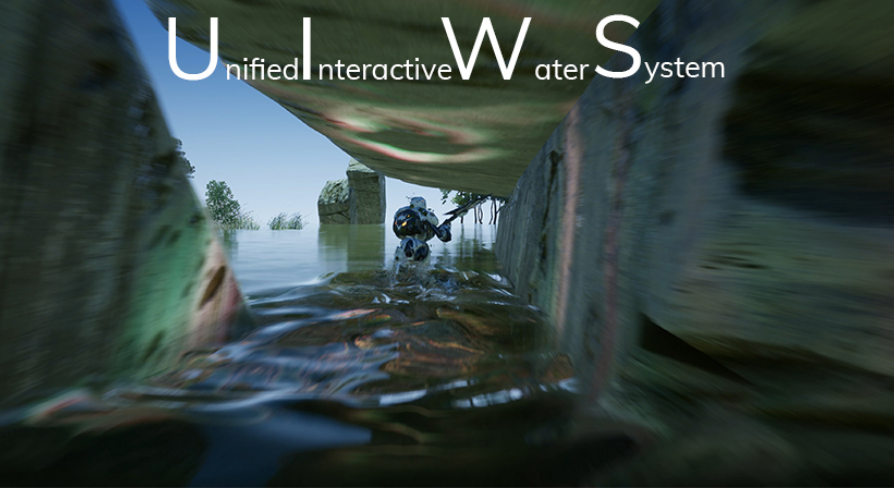
Drag and drop Interactive water bodies that simulate interactive ripples and interactive caustics. Waves interact with foliage. Works with any material.
 fleet sluice
There's a UWorks (Multiplayer) version for $80 by the way. But it's not going to be with "JoinSession" and "CreateSession". It's a much more flexible wrapper so it's naturally a different workflow. The host/join examples are there, but don't expect it to be some 2 min "plug-n-play" stuff.
lmao
I love that pack
And the guy behind it
grand kestrel
We've bought it too
I'll also buy a copy for personal use when it goes on sale even if its just a small % off
Only waiting because I'm too busy to work on personal stuff 😄
fleet sluice
I haven't yet. I'm waiting for a sale and I'm in no rush at the moment. But you can easily tell how well it's made. Plus, since I know the guy, I know his work is good.
worthy perch
Vlad, may I ask, are there large differences between engine versions for UWorks? Particularly for 4.19 to 4.21? I have the 4.19 version and don't know how to get the 4.20 version to check.
past totem
but don't expect it to be some 2 min "plug-n-play" stuff. can I expect that with the full one? 😛
fleet sluice
Yes, there were a few. I had a gentleman ask me the same thing recently. 4.19 and 4.20 had some fundamentally broken stuff which prevented connections with OnlineSubsystemUWorks enabled so I stopped supporting those. What's the particular problem?
No, you can't. Take a look here: https://partner.steamgames.com/doc/api
worthy perch
I'm just asking in prepartion to switching engine versions.
fleet sluice
This is the amount of functions you get with UWorks.
You should get the 4.21 version from the launcher. That's the only version I consider good since 4.18
I wish I could be more helpful with 4.19 and 4.20, but it was one of those "Fornite"-induced changes that screwed some important things
past totem
I hate upgrading versions. Gotta do the engine from source shit again and it takes forever
worthy perch
Alright, thanks. I did see the 4.20 subsystem issues mentioned. Last question, how would I get a previous version of UWorks?
past totem
All of this for a server browser...
fleet sluice
I only kept the latest
I usually keep the last 3, but since in this particular case, the other 2 weren't that usable, I ditched them
I don't know how to help. Maybe send me the .zip'd source, tell me what you need and I'll fix that feature in particular?
worthy perch
Thanks, I currently don't have any issues. I appreciate the support.
fleet sluice
Anytime and sorry I didn't keep the other versions
Gonna learn from this for the future
worthy perch
It's fine. I'll make sure to pick up a copy whenever a new version is released on the marketplace.
 chilly pendant
So I'm currently trying to implement networking in my shooter project that previously was singleplayer only.
I need some advice regarding bullet spawn location & rotation, previously I've just spawned the bullet at a socket located on the weapon which is a child of the player mesh which is driven by animation which is not run on the dedicated server. I would prefer not do run animations on the server I think(?)
I'm guessing that letting the client pass along the transform is a terrible solution...
potent prairie
If its a bullet, why not just use a line trace? It's moving so fast that you might not need it to be a projectile right?
and you're correct in that you do not want the server running the animations and all that
 icy nacelle
How to I increase the session size?
sharp pagoda
@chilly pendant Run animation on the server until you can prove it has a significant performance cost through profiling, don't let the client decide where to shoot from. If you can prove it has high cost I can show you how to setup instantaneous anim evaluation on the server so it doesn't have to tick every frame.
@icy nacelle What do you mean by that? Max player count?
icy nacelle
Yeah
sharp pagoda
It's an option when building the session
sharp pagoda
Yea
sharp pagoda
How are you polling the count in your server browser?
chilly pendant
@potent prairie yea sorry I should have said that I'm going for a realistish approach with the ballistics using ProjectileMovementComponent
icy nacelle
I'm using the example browser from an epic project, let me check
icy nacelle
I had a look in the config ini's too for MaxPlayers but couldnt find anything
DefaultGame?
chilly pendant
@sharp pagoda Alright thanks! I gonna take your advice until I've done some profiling 😃
icy nacelle
@sharp pagoda Looks like it uses FindSessions to collect the array and then loops through the array to create the list
sharp pagoda
Open GetMaxPlayers
icy nacelle
The list uses the struct's current and max players for the list
sharp pagoda
Where is the struct built
sharp pagoda
No find references on SetSearchResult
sharp pagoda
So yea it's either in your settings or the config
Are you really going to have 100+ players though?
icy nacelle
Nah that was just a test number lol
sharp pagoda
It takes a lot of engine work to achieve that, and that's not happening w/ blueprint
icy nacelle
Okay so I cant find it in either the config or project settings
icy nacelle
Figured it out
CreateSessions 'Public Connections' is the same as changing the max players in the config file.
twin juniper
Quick Tip:
To force engine to use LAN just use this command after you create session(On Success):
open LevelName?listen?bIsLanMatch=1
fleet raven
so if a client loses connection to the server while moving forwards,
- the listen server will show the client make 5 large laggy steps and freeze after half a second
- another connected client will show the player walk off to infinity and beyond
why is this?
potent prairie
that happens in every game, who knows
fleet raven
well it's terrible, you'd expect the client to show what the server shows
potent prairie
sorry I'm not sure haha I just can recall all these multiplayer games where a player would d/c and be walking to infinity or sliding or whatever
I've noticed differences between test builds and shipping builds when playing on my ded server, so make sure you run a shipping build from time to time to make sure everything is working
potent prairie
yea the most significant is that if i minimize a test build, it freezes and ping jumps to 1000000
shipping doesnt do that
fleet raven
hm
potent prairie
so testing out 2 clients on one PC with a test build becomes significantly harder
fleet raven
that's not happening for me in development and debug builds
potent prairie
yeah maybe its just the Test build
potent prairie
I mainly test with shipping builds now
fleet raven
I just enabled logging, stats and checks in the shipping build to make it more useful
potent prairie
yeah
worthy perch
Do you guys build for Shipping Server?
fleet raven
yeah I rarely use the dedicated server though
fleet raven
nah we have our own server list
worthy perch
May I ask how you implement NAT punch through?
fleet raven
haven't implemented it yet, isn't necessary for testing
worthy perch
Oh, alright. I only started looking at that today.
fleet raven
there are some blog posts here from someone else implementing nat punch from scratch though https://www.factorio.com/blog/post/fff-139 https://www.factorio.com/blog/post/fff-143
 worthy perch
Thanks, that's exactly the type of information I was looking for.
fleet raven
(it's at the very bottom for the first one)
fleet sluice
@fleet raven Over the network, movement relies on a technique called "prediction" or "extrapolation". To make sure players don't see laggy/jittery movement, their clients use the last information they received from the server to try to predict what the player will do next. So if a player is moving in a straight line before they disconnect, the server will have accurate data and see it's character lagging, but until it "declares" the disconnect, the clients won't have any new data so they just assume the player is still moving along that straight line until they receive the server's "yo, this guy disconnected" notification.
This technique and others are industry standards nowadays, unfortunately.
fleet raven
shouldn't the server be sending regular updates to the clients regardless of whether the player has disconnected?
so it would stop on the client much like it does on the server
fleet sluice
Not sure what happens in UE4 when the "lag out" appears
Maybe they decided it's not worth sending updates at that point
fleet raven
maybe the client should also stop movement then instead of playing the last known move forever
it's very strange how it becomes completely de-sync like that
this also has the effect that if someone lags out and you can see their player walking around somewhere, you can walk through it since it's not there on the server side
fleet sluice
Perhaps it's an attempt to compensate packet loss. The server doesn't expect a disconnect to occur, so it just keeps on hoping it's just rubber banding so it tries to filter out those updates to avoid making the clients simulate a laggy player themselves. In BF1, for example, if someone has 400 ping, all clients see the player lagging.
 storm veldt
I implemented voice chat for steam with the advanced sessions plugin and everything's working alright, but I do not get the right status for players talking. it never works for the local talker and for the remote talker it only toggles the visibility on, but never off.
anyone got a "talking indicator" working in blueprints?
thin stratus
The setup above only works for the Server and Local Player
Not for other players
Cause they don't even have the PlayerController of someone else
storm veldt
it's replicated in this project (don't ask me why, I did not implement that)
thin stratus
Shouldn't matter
The PlayerController is only existing for the Local Player and the Server
Any other weird setup is something I wouldn't support.
storm veldt
it's a custom variable in the blueprint player state, that's set from the player state at begin play
thin stratus
Yeah that won't work
There is no Object on the other players
You can replicate that as much as yo uwant
It only exists on Server and LocalClient
storm veldt
ok I wonder why it's even replicated now ^^
ok so how to best check if the player state is the local one?
btw thanks for your network compendium ^^ helped me quite a lot, as this is the first multiplayer project I'm working on
and I still wonder why it's not working for the server/local player when he's talking? it's always returning false.
the lower part... well I'll see how that works if I got the first check right
 ember needle
All, I'm trying to get a player travel on a moving platform in MP. I attach the player to the platform (attachto), and the platform moves onTick. The issue I have is a little weird. To avoid "jiggling", I SetReplicateMovement to false, however when I do that on the SERVER (and only there) TryGetPawnOwner in the animation BP returns None, hence all animations do not work ON SERVER ONLY. I've tried SetReplicateMovement on server only, on client only, on locally controlled only. Same thing.
Asking gurus here... because I'm not getting it.
This is easily reproducible BTW...
 bitter oriole
@ember needle It's weird if you just toggled movement replication, but to be clear, "owner" is a concept tied to replication
bitter oriole
What do you call TryGetPawnOwner on ?
ember needle
AnimBP
bitter oriole
The anim instance ?
ember needle
I call it in the animation blueprint of the actor
Maybe there's another way to stop movement replication somehow? or make it more loose
I also tried making the character movement component replicated as well but obviously that doesn't change anything
This happens only on the SERVER if a CLIENT gets on a platform
if the server gets on the platform on the server, all ok
clients are always ok
for some reason TryGetPawnOwner returns none on SERVER if replicate movement is dynamically set to off for a client
all other cases are good
CORRECTION
The issue is that when I SetReplicateMovement to false then the animation UPDATE is not called ON SERVER ONLY

"Hello" does not get printed on SERVER for the character for which the SetReplicateMovement is set to false.
bitter oriole
No idea, but generally, I'm not sure character movement comp has support for not replicating anymore
ember needle
and again i'm not taking away movement
ok then why is there such a node 😄
but indeed there's an issue there
bitter oriole
There's such a node because SetReplicateMovement is an AActor method
And most Actor methods are exposed to BP
Doesn't mean every actor can work with or without replication
ember needle
I don't understand what "replicate movement" has to do 1. with character movement component (that I'm not touching) and 2. with the animbp
ember needle
no
sorry, i still don't understand
who cares about the CMC!
i'm not setting it
animbp has nothing to do with CMC
replicated movements has nothing to do with CM
ember needle
why is so, animbp totally works even without CMC
bitter oriole
I'm not saying anim BPs as a concept require CMC, I'm saying CMC specifically affects the animation BP
For example it's responsible for ticking it
bitter oriole
"I'm not saying anim BPs as a concept require CMC, I'm saying CMC specifically affects the animation BP"
ember needle
but only on server.
bitter oriole
"replicates movement" is a server concept
SetReplicateMovement is probably not going to call any code on clients
ember needle
I'm calling it on every client
ember needle
it does affect clients
bitter oriole
Not directly, no.
ember needle
I have tried calling it from clients only, not on server, and I experience the same issue then
bitter oriole
{
    Super::SetReplicateMovement(bInReplicateMovement);

    if (CharacterMovement != nullptr && Role == ROLE_Authority)
    {
        // Set prediction data time stamp to current time to stop extrapolating
        // from time bReplicateMovement was turned off to when it was turned on again
        FNetworkPredictionData_Server* NetworkPrediction = CharacterMovement->HasPredictionData_Server() ? CharacterMovement->GetPredictionData_Server() : nullptr;

        if (NetworkPrediction != nullptr)
        {
            NetworkPrediction->ServerTimeStamp = GetWorld()->GetTimeSeconds();
        }
    }
}```Notice "Role == ROLE_Authority"
ember needle
Super::SetReplicateMovement(bInReplicateMovement);
ok anyway looks like i'm stuck 😃
bitter oriole
Indulge me, what does the Super method do ? 🙄
ember needle
i need to find a way to "unjiggle" movement without stopping replication
So do you agree that this should have no effect?
https://gyazo.com/5b7a07697c14ae310b868950d3aaab0e

(called from a multicast call)
ember needle
ok
bitter oriole
Since you're stopping the CMC, of course, that's going to affect clients
ember needle
i'm not stopping the CMC....
stranger, thank you for trying to help
i don't want to lose any more of your time
will try to find an alternative
bitter oriole
@ember needle Setting SetReplicateMovement() to false will disable most of the CMC
🤷
spiral oar
I'm trying to make camera move along with my mouse but client side is jittering when i try to do it (spine bones are correctly moving and displaying to server but jitter never stops)Also I'm at origin so distance shouldn't be problem
limpid notch
Has anyone worked with 3d widgets before? I'm trying to make each client spawn his own 3d widget actor and interact with it but the problem is that only the first client can interact with his 3d widget actor , while the actors cannot (maybe all the umgs are assigned to that first client and only he can interact with them). I tried creating the widget on client in the PC bp and assigning the widget to the actor componet of the actor newly created , but the same problem happens. Here is the code
also this is how the actor im spawning looks like
Im also using recieve hardware input for the widget component , since its just a normal umg but in 3d
ember needle
@bitter oriole as a feedback, maybe this could be related to my issue:
void ACharacter::PossessedBy(AController* NewController)
{
    Super::PossessedBy(NewController);

    // If we are controlled remotely, set animation timing to be driven by client's network updates. So timing and events remain in sync.
    if (Mesh && bReplicateMovement && (GetRemoteRole() == ROLE_AutonomousProxy && GetNetConnection() != nullptr))
    {
        Mesh->bOnlyAllowAutonomousTickPose = true;
    }
}
 chrome bay
Why are you attaching the player to the platform?
Character Movement already supports walking on a moving platform via the 'Base' system
ember needle
the character is seated
chrome bay
Then you need to disable movement entirely
ember needle
disabling movement still does not solve the issue, since animation bp's update still does not get called on server for the attached actor
chrome bay
Is this a dedicated server?
chrome bay
Oh hang on
Yeah so you need to disable movement, then set bOnlyAllowAutonomousTickPose to false
Because usually, the character mesh animation is ticked by the movement component
ember needle
Sitting in gondola:
https://gyazo.com/3b1941d473e16cc909085144922211c4
 chrome bay
Then when the pawn is unseated, reset it again
ember needle
 chrome bay
Doubt you can do it from Blueprint, unless bOnlyAllowAutonomousTickPose is exposed
ember needle
it's not but I can expose it
ouch not really
well I can add a function
and inherit
chrome bay
You can just use a static BP function to set the flag on an arbitrary mesh
But you'll want to check to see if character movement overrides it anywhere else
Characters are very heavily tied to the movement component, as most of the time animation is driven by movement. Usually animations for characters are ticked by the movement component to keep things in sync
ember needle
is there anyway I can call the animbp directly?
You can just use a static BP function to set the flag on an arbitrary mesh
lost you here
 unique kelp
In the context of using NetSerialize in a struct, is FArchive::Saving preparing the data to be sent, or reading the received data?
chrome bay
@unique kelp sending
unique kelp
thanks @chrome bay
chrome bay
@ember needle - You can't tick the Anim BP directly no, at least definitely not in blueprint
ember needle
ok thanks
so I just need to add a MyCharacter that inherits from Character, and add a function to set bOnlyAllowAutonomousTickPose is that correct?
chrome bay
Yeah you could do that
ember needle
ok
chrome bay
But I'd check to make sure where that flag is used
jade gazelle
Been having a weird issue now for a while that I can’t seem to find the cause of. Thought I’d see it anyone here had any thoughts.
I have a widget component (nameplate) above player characters and NPCs in my game and they work fine, however the longer I am in game, they seem to drift and lose their position
There is no code whatsoever modifying their movement. They are just parented to the character mesh and then within that parented to the head bone
Is this maybe like a server/client desync that is getting exacerbated over time?
That doesn’t seem to make sense to me though because the character locations are obviously replicated so any server corrections should also correct the nameplates
unique kelp
does the FArchive << operator do the inverse operation on saving and on loading? Seems confusing
chrome bay
@unique kelp yeah it does
If you just do Ar << SomeInt
it will be correctly loaded / saved depending on what state the archive is in
ember needle
@chrome bay and @bitter oriole I want to thank you both (great patience with me Stranger... thank you). All is needed to make this work is to expose a function in BP that sets the bOnlyAllowAutonomousTickPose and now everything works.
https://gyazo.com/6650eb1f1ad5a4482b900a31fd013abd

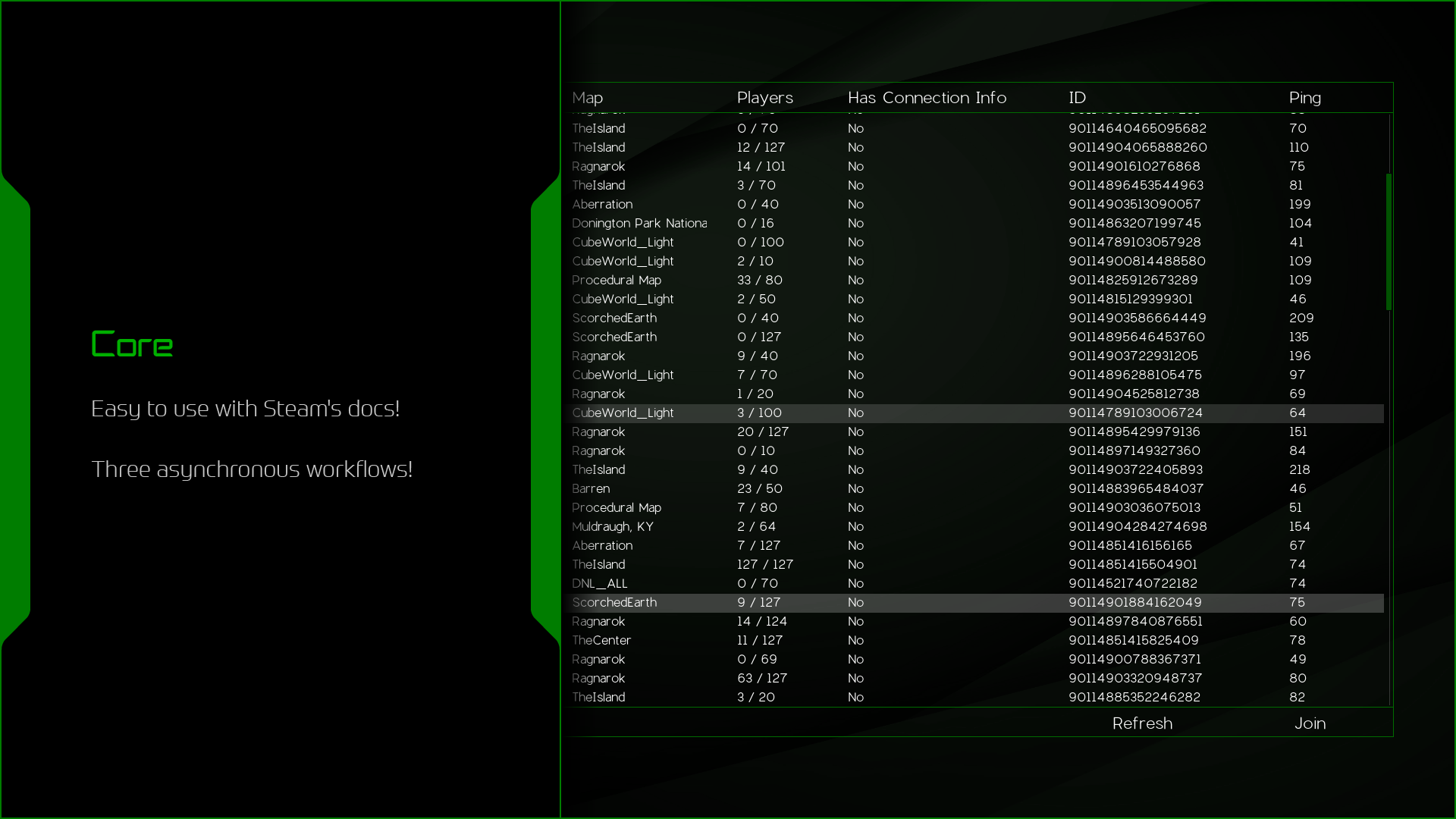
this allows the animation BP to still have a tick called even though the actor does not have movement replicated anymore.
unique kelp
@chrome bay well that seems evil. Thanks mate
 rich vessel
is it easy to make a game to a Multiplayer game like cod zombies ?
bitter oriole
No
Multiplayer is never easy, and any COD title took hundreds of people working full time for years
limpid notch
Im trying to teleport a player and by calling a function executed by the server that teleports the pawn of the PC that called the function , bu the player gets teleported only server side. The pawn of the player also has got Replication. How to solve?
rich vessel
no i just mean these Servers like pear to pear I mean
I am a noob at Unreal engine XD
 dusky flower
its peer to peer. you dont want peer to peer, thats totally different from how unreal's multiplayer features work
you could create it but it will take some time, especially if youre new
rich vessel
Yeah but i need it I though I do this at least
twin juniper
@limpid notch
Make the telepot custom event multicast and raliable
@dusky flower hmmm 😏
rich vessel
I try to make a 4 player Game and I doesent wont to make Server for it so if they want to play together they can if they make ther own Server in the game
dusky flower
if they want to make their own server, then you need to make a server
rich vessel
for steam or something
dusky flower
its possible, peer to peer, its actually what a lot of older games did and rts games still do
but if youve ever played an old RTS game then you know that it lasts about 30 minutes before things start desyncing
thats cuz every client has to run their own code, because no one has authority over what is real
and with non-deterministic physics, things will get completely out of hand cuz physics is random to an extent
rich vessel
is it possibly to host a Server from G-portal or something ?
dusky flower
have you heard of a listen server? a player can make his own server
rich vessel
no...
dusky flower
twin juniper
If u want to update something for all players just use multicast 👀
limpid notch
Hey guys this is a question about multiplayer widget interacting : can I have each client spawn its own 3d widget actor of the same class and interact with it individually using the widgetinteraction component? (by that i mean that client won't share the same 3d widget actor and that this actor won't be replicated)
thin stratus
Widgets are generally not Replicated anyway
So spawning a replicated Actor that has a WidgetComponent in it, will not automatically make the Widget replicate.
So each Player should be able to interact with that on its own.
@limpid notch
limpid notch
ok so should i just place tge actor on the map or spawn it using a server function?
also how can I make each player interact with the widget? It works for 1 client but when i go with more than one it doesn't work for either
@thin stratus
thin stratus
No idea of you issues with the more than 1 player
But technically you can just place it int othe scene
It doesn't evne need to be marked replicated for that
limpid notch
ok , thanks
twin juniper
@limpid notch
Select widget component
Check Component Replicated
U should replicated own actor to make it work.
limpid notch
what do you mean by "U should replicated own actor to make it work."?
twin juniper
@limpid notch
Own actor is
The actor who hold the widget component.
limpid notch
i've replicated the widget component and the actor itself but it still doesn't work
twin juniper
I already make what u want in online multiplayer vr game
Talk to me tomorrow i will be in my office
I can help.
limpid notch
ok
twin juniper
Good night
limpid notch
guys i have a problem that im guessing it has to do with multiplayer. When a new client enters , onpostlogin thats fired in gamemode spawns a character at a constant transform thats being possesed by the new player. The clients have good rotation , as specified in the constant variable , except the first one , who spawns with a different rotation even though when i print its rotation , it is the same with the variable. Why is this happening?
sharp pagoda
@limpid notch Any reason you're avoiding player starts?
limpid notch
i want people to spawn at different locations
and i couldnt do that with player starts since they can spawn people at the same position
sharp pagoda
No, player starts are helpers that mark potential places to spawn. It's up to the gamemode to determine where to actually spawn the player
meager spade
thats not true
sharp pagoda
You provide your own code to determine which player start should be chosen. (Or any actor really)
limpid notch
ok idk why i haven't thought of that let me try it
meager spade
we have a ring of PlayerStarters, and we assign a player to one of them in the gamemode, and we assign to the first one, then the second etc. If your doing it randomly, best to mark if a playerstart is occupied
limpid notch
for some reason i gave up on player starts pretty easily thinking doing the other method was more ok
sharp pagoda
Yea no player starts are usually the way to go
 halcyon abyss
What is the proper way of showing a loading screen that works for both open level and seamless travel?
it's incredible how NOT obvious this is
bitter oriole
There isn't basically
halcyon abyss
really?
meager spade
seamless travel is a pain but openlevel is doable
 vital steeple
@halcyon abyss maybe this is jenky but after open level, if its successful i just have it clear the HUD and load a widget that has an animation and loading text. works fine for the short term to let folks know they successfully connected and are loading
that only works from server join though
halcyon abyss
@vital steeple hey thanks man!
I'm trying this
and also this: https://github.com/ue4plugins/LoadingScreen

GitHub
A plugin for Unreal Engine 4 to expose simple controls for managing load screens. - ue4plugins/LoadingScreen
but I'm having a hard time playing the videos
vital steeple
yeah i just did it with a widget for now so i dont know 😦
how do you guys handle friendly fire filtering? do you filter before you fire the interface or do you catch on the receiving actor?
i have a working system that catches on the sender, before calling the interface, but setting up the casting on everything gets kind of clunky
halcyon abyss
I would use an interface for that
 maiden vine
anyone can help me bypass databases telling the server to save files maybe text of account info to the pc or something like that
I just need an idea
maiden vine
Sorry just got back, I mean in general i don't want to use a database. I want to design a simple way to save txt files from the Dedicated Server to where the server exe and project files are. Its for mobile
twin juniper
@maiden vine
Use Request Content node
worthy perch
Can Shipping Client have logging? I added bUseLoggingInShipping (or w/e it's called) on both my Client and Server targets, but only my Server.exe logs anything.
twin juniper
Quick Tip
To make downloadable content for yoyr project just follow this steps:
1-enable Allow ChunkID Assignment in Editor Prefernces->Experimental
2-enable Generate chunks and build Http chunk install Data in Project settings-> Packaging.
3-right click on content you want it to be downloadable
4-select Asset Actions-> Assign to chunk
5-give it an Index(example: if you assign a cube to index 1 and assign a red material to index 1 too, the cube and material will be on the same chunk)
6-package yoyr peoject from File->Package project.
Note: if you want to download and use the downloaded content just use Request Content Node and Mount (it is work for mobile and pc)node on yoyr project before you package the project
Btw yoyr == your. Sorry
 humble comet
guys i have built dedicated server executable using this tuto https://wiki.unrealengine.com/Dedicated_Server_Guide_(Windows_%26_Linux)
i was able to run server and connect to it locally
and now I have created windows vm in azure and run server exe there, log says that server is running
however when I try to connect to my azure vm public ip from my local computers project exe nothing happens, what could be the problem or did i miss something
I am using open level node with VMs public ip in the level map parameter
twin juniper
Quick tip:
There is three reasons for Lag on online games:
1-your internet speed.
2-(servers speed)the speed of data transfer on servers.
3-the speed of data transfer on your router (on lan games only).
@humble comet
Hello
Which online subsystem you use ?
humble comet
@twin juniper i am not using any(should I? 😅 ), I have added online subsystem null in default engine ini though
twin juniper
@humble comet
If you want your game to be avaliable on the internet you should use steam, or any other online subsystem services.
For lan games you should use Null in .ini
So if you use null on your .ini
First when you open the level
Force engine to use lan by this command after creating the session
open LevelName?listen?bIsLanMatch=1
When you want to join session
Just use the normal join session node
NOT open [ip]
humble comet
so in order to test current setup (Dedicated server on internet ) what options do I have except steam subsystem
winged badger
if you run your dedicated server in a VM on same PC
its unlikely that its exposed directly to the internet
as long as its behind a router, you have to handle that by either using a service that does NAT punchthrough for you, or by setting up port forwarding
humble comet
well I have setup windows azure virtual machine for dedicated server, so its not running on my local pc
humble comet
will try in a sec
twin juniper
This is how to host game for both online +lan
And this how to join
@humble comet
And btw you dont need VM box to test your online game
VM only cause a preference issues.
humble comet
@twin juniper I am not using VM box anyways, I have created cloud virtual machine using microsoft azure
twin juniper
Try what i do up there in pictures
humble comet
LogNet: Browse: 51.heres.my.ip//Game/Maps/entry
LogTemp: Display: ParseSettings for GameNetDriver
LogTemp: Display: ParseSettings for IpNetDriver_1
LogTemp: Display: ParseSettings for PendingNetDriver
LogInit: WinSock: Socket queue 32768 / 32768
PacketHandlerLog: Loaded PacketHandler component: Engine.EngineHandlerComponentFactory (StatelessConnectHandlerComponent)
LogNet: Game client on port 7777, rate 10000
LogSlate: FSceneViewport::OnFocusLost() reason 2
@winged badger heres whats in logs when i do console open ip command
humble comet
@twin juniper ok,will try using sessions
twin juniper
Do the same in this pic
humble comet
@twin juniper your setup is for listen server, with lan or steam. Issue is I have already running headless dedicated server on the internet hosting, so I want clients to connect to that server
jade gazelle
You shouldn’t need sessions or online subsystem for what you are attempting to do @humble comet
It sounds like the issue is what Zlo said, something with port forwarding or NAT punchthrough
humble comet
yeah, maybe azure is blocking some incoming traffic through port
jade gazelle
I haven’t used azure before but it should be basically the same as any other service to set up port forwarding
Online Subsystem is used for just what it says, subsystems. It sounds like you are just trying to directly connect to a master server right?
That’s different than find/join sessions
 night jay
Does anyone know how Epic Games tested Fortnite Battle Royale for performance stuff etc.? Did they actually need 100 people to test at once for it or is it possible to somehow simulate that large amount of players ingame?
bitter oriole
You do need 100 players at some point
night jay
Indeed, but for my game we want to see how performance is before we do anything
bitter oriole
Performance is going to depend on the game
thin stratus
@humble comet @twin juniper Sessions make 0 sense in what they want to do.
Sessions require either LAN or a MasterServer(Steam or similar Subsystem).
Since they said "no steam subsystem", Sessions over the Internet won't work.
You are only left with direct IP Connection.
Which requires the PC (or whatever you host the DedicatedServer on) to have the 7777 port open etc.
@night jay Private Stress Tests.
night jay
It is kinda hard for us to get that amount of people together so I want to make sure the game can run during those circumstances to begin with so we can do proper testing when we get those people together
meager spade
make some stress tests
if your going for a 100 player game, then you must have some people who optimized your networking and could probably make some stress tests
 kindred sandal
Is there any other multiplayer service other than photon and spatial os for ue?
icy nacelle
Whats the appropriate way for a client to leave a dedicated server?
kindred sandal
Steam api?
humble comet
@thin stratus thank you it was all about port
twin juniper
@icy nacelle
Open menu map then destroy session
icy nacelle
This is where I was confused, will destroy session just run on client then?
twin juniper
Owning clint
icy nacelle
sweet, thanks!
 urban palm
Hi! Network replication of a custom made raycast vehicle (BP based). Ideally the physics should run on each client and the respective position / rotation / velocities (linear and angular) replicated to the other clients. Any pointer to where I should start looking? Everything I find talks about server to client. Tnx!
This is the baby I wish to replicate

Playable demo link below. Blueprint based arcade drift physics based on a simple tire model. Includes configurable skidmarks and smoke. May become the basis ...
dusky flower
i dont think you can send things from client to client w/o the server being the middle man first
unless of course you extend the engine one sec i got a link for something though
urban palm
Yes. I am OK with the server being the middle man but I don't think that running the physics on the server is an option.
dusky flower
i believe that this is still relevant, someone can correct me if im wrong
but autonomous proxy would be what you want
which is automatic with pawns
urban palm
Udk as UE3? 🤔
dusky flower
yeah its a generation back but im pretty sure most of it still applies
you just set your role on the client to simulated proxy, or it should be that automatically, and it will do client side physics
urban palm
So how is that supposed to work? Each pawn (car) sends its position / rotation / velocity / angular velocity to the server and the server replicates that to the other clients?
dusky flower
"Pawns are one of the most complex actors in terms of replication, because of their need for client side prediction, yet inherent unpredictability in their movement. There is no way to duplicate this behavior except by subclassing Pawn, so don't expect to achieve it in your Projectile subclass. It gets velocity updates for the client side prediction, while at the same time getting location updates from the server to 'readjust' the player's locations."
that's simulated proxy
"This is used for you. When you play online, you yourself should be treated differently from all other PlayerControllers. You don't want your own self being predicted based upon the server's expectations. Rather, you want to control yourself and tell the server where you are moving. That is the purpose of this role. This is used for things that the client directly control."
thats autonomous
autonomous is for your player controlling the object, so the client isnt extrapolating stuff
urban palm
Ok makes sense. How about collisions?
Between the local client pawn and the replicated ones?
dusky flower
that should be predicted with server correcting the collisions afaik, but if you have faster netplay you might want to update bUpdateNetFrequency
each actor has that bool btw
same with Role and RemoteRole (bitmasks)
like simulated proxies are default for the role of things, and physics and stuff is predicted on the client
urban palm
I think I need to look more into this proxy replication. So the server will keep a proxy of each pawn, run some prediction and then redistribute it to each client.
wary willow
@urban palm TBH, you'll probably need client-side prediction for that
dusky flower
its just the name of each ENetRole
urban palm
So I would need to predict in each client how the other clients are moving?
Based on what I get from the server?
So the collisions would be handled locally in each client.
 unique thunder
Any Gamelift users here?
@urban palm Haven't read through to find the full problem with your case but look into 'Smooth Sync', a plugin on the marketplace. I was having problems with replicating physics and it helps keep clients in sync better than I expected.
I actually got it because my vehicle's rotations were being corrected constantly by the server and they ended up very jittery.
urban palm
Thanks, I will look into it even though I would prefer to solve it without plugins if possible
unique thunder
Stock vehicles in UE aren't very good in networked scenarios -- at least not without modifying it in the backend
Learned the hard way
dusky flower
yeah apparently ue4 only has client side prediction for UCharacterMovementComponent through the INetworkPredictionInterface implementation
and UWheeledVehicleMovementComponent if you are using that
urban palm
@unique thunder I have an own vehicle implementation, it's not the stock one.
Posted a sneak peek above.
unique thunder
Sec
Oh damn that looks like fun. I might loosen the camera up a bit to let the car get away a bit more but that might be cool as an option (personal preference). I don't know anything about physics replication in C++ but it might be worth taking a look at the C++ code in the smooth sync plugin to see how they interpolate the car's transform and keep it in sync across all clients.
urban palm
Tnx! The vehicle is all BP at this point. I was wondering if I could manage the replication without going to C++. Mostly for didactic purpose. But I will if I have too.
unique thunder
The frontend replication settings don't help much with keeping vehicles in sync, that level of precision isn't something I was ever able to achieve at least. Aside from client's vehicles stuttering (though mine was in VR, players were attached to cars and not in control of them as playable vehicles), I also noticed a lot of desync where cars would be seen driving in different directions on different clients, or one client would see it flipped upside down and another client would see it flipped sideways etc.
These might've been problems in my workflow but whenever I tried to find solutions, I was always told that the frontend doesn't offer much for networked vehicles in general.
dusky flower
heres also a neat discussion on it https://forums.unrealengine.com/development-discussion/c-gameplay-programming/9962-video-player-controlled-replicating-physics-movement-simulating-physics?17078-Video-Player-Controlled-Replicating-Physics-Movement-Simulating-Physics=
Unreal Engine Forums
For gameplay programmers writing C++ code.
by the infamous rama
urban palm
@dusky flower Thanks! Will read through it. My idea is to have each client run the physics of its own pawn (car), then send its location / rotation / linear velocity / angular velocity to the server. The server redistribute it to all the other clients and each client creates a local copy of all the other cars which are just rigid bodies with collisions + visual wheels
Not sure that is possible though.
Let alone all the anti-cheating stuff which I don't need anyway at this point.
dusky flower
yeah, ue4 has a way to check for cheating built in, so you have that for later. but client-side physics to server seems possible from this post
would be nice to have staff chime in on this
urban palm
Yes, I would be cool to get some more guidance on this.
Quickly reading through Rama's post above it seems that the proxies are actually on the server.
The server does the prediction and reconciliates it with the actuals from each client, then passes the results back to all the clients.
dusky flower
it would be an "autonomous proxy"
which is like player-controlled
you can run functions on the client
urban palm
So to recap:
- Each client runs its own physics (own car)
- Sends the location / rotation / linear velocity / angular velocity to the server
- The server uses that information to update the prediction on the proxies it is keeping (one for each client)
- The server passes back the information from the proxies to all the clients
- The clients use that information to update the position of each other client's car
- If there is a collision, each client handles it locally and that reflects back to the server when the new location / rotation etc. is passed to it
I need to find a way to test whether this will work before attempting a full implementation...
urban palm
@dusky flower Thanks! Trying few things out at the moment, but the client doesn't show up.
I guess there is a collision on spawn which cannot be resolved
dusky flower
im guessing its the camera?
looks like the camera might be inside of something, try putting the player spawn point up in the air
urban palm
Solved by placing 2 Player Start in two different locations
The server car replicates properly to the client, but not viceversa, as expected
The server has an own copy of the client's car which follows its own logic
dusky flower
your movement code might need to be setup for multiplayer
you could probably just do UFUNCTION(Server) over the functions that do movement
but the function definitions are different, youll end up needing funname_Validate and funname_Implementation as definitions
worthy perch
Why not just copy CMC?
dusky flower
do your actors have isreplicates = true
urban palm
@worthy perch I am looking into a simple implementation from scratch