#multiplayer
1 messages · Page 437 of 1
 bitter oriole
 ocean arrow
Thank you for answering my questions btw. I understand you are probably very busy.
bitter oriole
I would still advise C++ for anything non-trivial that needs many changes over time, because source control. I've done like 100 tweaks to my network movement code because it took that to feel right
ocean arrow
Oh my that sounds brutal.
Have you played smash bros?
I wonder how difficult it would really be to netcode that type of game.
If there are any you know that would not mind answering my noob questions I would be most grateful. Your advice thus far has been valuable indeed.
bitter oriole
Depends a bit on the specifics. For a 2D gameplay that has non-physical movement and quick responses, I would implement my own movement component - not using UE4's built-in character system that has everything working out of the box
The fundamentals of that are outlined in the karting part of the tutorial
But you could start playing with UE4's character and get some results easily
Overall it's reasonable
A smash type game is a very resonable scope in terms of code and art
ocean arrow
I indeed have to make a movement system entirely from scratch. The feel of that movement system is paramount to the game's success. What moves do you think would be the most difficult to get working online?
I would guess that something like Shiek's whip would be about the most difficult move.

She can move a chain around in any direction if you are not familiar.
I assume A attacks as they are know (the basic punches and kicks of the game) would generally be the same code.
known*
bitter oriole
Is it like press A + direction, or like keeping A pressed for a few seconds while moving ?
Basically single action events are easy to handle, no matter if it's 4 buttons to press at the same time with a direction parameter, or just A
You decide locally what action is triggered, and then send something to the server like "Use cut attack", or "use whip attack in direction {A, B}"
What's hard in multiplayer is fluid, constant movement, like player movement
ocean arrow
For A attacks its like a single press + direction
For that B attack (the special moves of the game) you hold B and then your arms moves around with your right stick
And the chain whips around free form like above
bitter oriole
Then it's slightly harder, because you need to send the position constantly - and networks being networks, other devices receive your constant stream at a very irregular rate, like 5 updates in a single frame and then no update for three frames
This is why movement is the hard part
It needs a system to keep objects moving even when you are not receiving data anymore
The Udemy course does talk about that 😉
ocean arrow
Hey 😃
So if I follow the course, I have a good chance of fighting my way through most of what I come across?
How proficient should I be in C++ before I take the course?
bitter oriole
Yeah. None of what you talked about was impossible or particularly hard, though it's probably still weeks of learning & work
If you've never looked at C++ before I would look at a basic tutorial on C++ first, then play a bit with Blueprint to understand how Unreal works, then look at UE4 C++
ocean arrow
So you are saying getting this:

Super Smash Bros. Melee | Melee Grand Finals | Evolution 201 | Day 3 EVO | August 3-5, 2018 | Mandalay Bay, Las Vegas, Nevada, USA The Most Prestigious Fight...
speed and all
is about how difficult out of 10 in terms of netcoding?
if you had to guess
Is speed a major hard part?
bitter oriole
The difficulty is constant, it's just going to work less and less well the faster it goes. In the best conditions, you're still looking at multiple frames of lag between action on client and handling of that action on the server, and that's just physics here - you can't make a game as fast-paced as if it was local multiplayer.
At some point it's going to be a decision on how many players will have the network conditions to make it possible.
ocean arrow
My plan was to make it about local multiplayer if you want the "real" experience and online play is just as fast as I can get it. No input lag to compromise.
Smash Ultimate and Icons Battle arena, both have input lag to make local play feel more consistant with online play
It however sacrifices local play and the game altogether by feeling sluggish.
See any misguided foolery in my assessment?
bitter oriole
I would simply say to prototype your game - learning a great deal along the way, and then try it before doing any art of levels etc, to confirm that it does play well.
At that point you'll be able to decide if it's cool, or if your vision isn't going to work out
ocean arrow
Well, Smash Bros Ultimate is coded in UE4 and has netplay so I know its possible and works out.
I just wonder how likely I may be able to aspire to do it.
bitter oriole
(it's not)
ocean arrow
Its not likely I will be able?
bitter oriole
It's not UE4
But to answer your question, there's no reason you can't do something Smash-like in terms of gameplay.
ocean arrow
Very well. Training begins tomorrow.
I am off to go add a dollar to my card
Thank you for the advice.
bitter oriole
Good luck !
 unique thunder
I have a vehicle BP actor set down in my level that runs some logic on beginplay but I see warnings that he has no owning connection and there might be issues with the functions he's triggering, what is the correct approach to this? Set server as owner?
bitter oriole
No owning connection = you're trying to call RPCs that are not allowed
For example if you have a vehicle that calls server methods from a client, without being owned by the player controller on this client
That's only allowed from the owning client
 meager spade
input lag is a big no-no, why have input lag when you can use prediction
i would hate to player overwatch and have input lag :/
same as fortnite
bitter oriole
It sucks, but it's pretty common as a basic strategy because it's consistent
unique thunder
@bitter oriole So how would I have an instance of a replicated actor call an RPC? It spawns and attaches a few things, etc. When the server boots up, there technically isn't even a player in it yet and I don't want to assign a random owner before this logic can occur
Is a dedicated server not allowed to be an owning connection?
Weird thing is, the RPC does work and everything the chain does I can see has happened when I find the vehicle. Warnings persist
bitter oriole
What you can always do is call functions locally on the server for any actor
If that's what you're doing it shouldn't warn
"No owning actor" on a vehicle is typical of calling RPCs on a vehicle with no PlayerController
unique thunder
One sec let me check my set-up again
This server RPC is triggered on event beginplay
Which goes on to spawn / attach actors etc.
Since this vehicle actor is replicated, if I run the same chain but without an RPC
Would it just run on server and not need an owning connection?
And still work?
bitter oriole
Stuff like creating components should run only on the server
Since they'll be replicated
Creating new components of a replicated actor at runtime is messy
The correct process is to mark all of the new components as replicated, and only create them on server
 knotty sequoia
Stranger, you got any idea why my Find Advanced Sessions peice is failing to find any sessions, even when i know they exist!?
bitter oriole
Hard to say with zero info
knotty sequoia
it was discussed above the convo you had here
essentially, i have done everything yet it still will not work
unique thunder
@knotty sequoia Anything in the output log on attempt?
I haven't used advanced sessions but I'm hoping it has error outputs
If not in BP, at least in output log
 glacial pollen
@knotty sequoia if you are using the play button in editor, make sure you don't have *auto connect clients" enabled
Advanced sessions will NOT list a session you are already connected to
knotty sequoia
mhm
unique thunder
do any of you guys have experience creating dynamic mat instances at runtime in multiplayer clientside?
bitter oriole
@knotty sequoia I can't look at the whole conversation, but if you're using Steam, running from packaged, development builds, it should basically just work
 bitter oriole
Try disabling Steam and running two local builds with the null OSS
knotty sequoia
it works on my Laptop and Desktop here
but my friend running the same client cannot see any servers, public or mine
friend is getting a crap ton of steam errors now
ones i dont get on two different machines with different steam accounts
bitter oriole
That's pretty interesting.
knotty sequoia
indeed
bitter oriole
If you have more friends, be sure to try
Check that your friend's Steam is up to date
glacial pollen
With a dedicated server and 1 client. Why would I have two instances of a widget?
Scrn_techlab
And
Techlab_c0
So scrn_techlab is the widget in another widget (variable name)
And techlab_c0 is the actual widget
However, code is running in scrn_techlab as client
And techlab_c0 never gets the variable I'm trying to send
 lean river
Anybody here played with fast array replication?
Ue4 doesnt do this automatically with array of struçt?
 twin juniper
UGameInstance::NetworkError() fires right before disconnecting the player from the server. So I can't use this to do UMG widgets which tell the player why they were disconnected.
Any ideas?
 sly kernel
what are the biggest differences between making split screen multiplayer and online multiplayer game using Blueprints ?
 limpid comet
Hey everyone. I have a friend that's working on a project and he's having an issue where we can't get two players (locally) to work in the game. It always seems to be receiving just one input or the other with everything we've tried so far. There also might be other stuff involved in the blueprints that might be getting in the way, so if anyone would want to help through a private call I believe that would be the best way to help, which we'd be very thankful for! Otherwise, any other kind of help or advice about this would be very appreciated!
 lament kettle
@limpid comet there's plenty of official ue4 Tut's on YT that cover your issue.
limpid comet
I have tried to look through a few of them so far, and unfortunately the way they are handling multiplayer happens to screw up with how the camera is handled in the project, so from the one's I've looked through so far they don't work in this situation. I am going to keep looking through them but we have been doing this through all of last night without any success
lament kettle
Honestly making two characters work on a local scene is.... Very straight forward.
sly kernel
Lemme try it the way other folks ask questions
lament kettle
I'm not certain anyone here can help with this type of issue.
sly kernel
My friend is trying to make multiplayer game and wondering what are the biggest differences between making split screen multiplayer and online multiplayer game using Blueprints ?
lament kettle
Split screen is basically two cameras projected into the screen.
Do you mean two players sitting beside each other on one machine?
limpid comet
Yes, Doom
It's using one camera and isn't splitscreen
It's a fighting game that is like how Smash bros is
sly kernel
@lament kettle yeah, 2 or 3 or 4 players (2 or 3 or 4 gamepads) play on the same PC (or rather console) with one monitor / TV and screen is split into 2/3/4 screens.
lament kettle
limpid comet
I've followed that
Doesn't work and breaks the camera
The camera relies on both players being in the scene at the start. Spawning one in breaks that connection
sly kernel
@limpid comet https://www.youtube.com/watch?v=VATImPiTj1g

UE4 / Unreal Engine 4 Multiplayer Playlist: In this collection of videos, we will cover setting up a project for both local and networked multiplayer project...
btw, are there any performance issues when running split screen game? I figured there gotta be some screen instancing in UE4 for that
lament kettle
Yes there is.
sly kernel
so it should be no difference, performance wise, with conventional online MP game ?
lament kettle
That is correct. But with mp there will be delay.
limpid comet
In that tutorial they are also using the same way to spawn players in and assigning them to player controller IDs
Is there any way to do that without spawning them in?
sly kernel
not that I am aware of @limpid comet
if you have several players, you gotta have several player controllers
limpid comet
Ahh, alright. This is more complicated than I thought it was going to be. I'll try to figure out how to change the camera part then
Thank you for the help!
sly kernel
@lament kettle what about replication and all that "nice" stuff that has to be done for online MP? Does it also apply to split screen MP ?
lament kettle
As I said earlier. There will be a drop in performance the more cameras. How much depends on implemention and what's shown. in multiplayer there will be a much more significant drop, which again depends on how you've implemented your game.
You can easily test this out.
Keep in mind. Local multiplayer will be much more forgiving for responsiveness in terms of latency.
sly kernel
what I am wondering about is by how much performance drops.. If it's instanced rendering, it should draw all 4 screens in the same pass
lament kettle
I don't have experience with that.
sly kernel
aye, np
 modern dome
How do I declare Replication notification functions?
    UPROPERTY(EditAnywhere, Category = "ARPG|Game", ReplicatedUsing=OnRep_IsRingMenuOpen)
        bool IsRingMenuOpen;

        void OnRep_IsRingMenuOpen();
void AARPGMapStateBase::OnRep_IsRingMenuOpen() {

}


void AARPGMapStateBase::GetLifetimeReplicatedProps(TArray< FLifetimeProperty > & OutLifetimeProps) const
{
    Super::GetLifetimeReplicatedProps(OutLifetimeProps);
    DOREPLIFETIME(AARPGMapStateBase, IsRingMenuOpen);
}
LogCompile: Error: Replication notification function OnRep_IsRingMenuOpen not found
 stuck axle
UFUNCTION()
RepFunction();

UPROPERTY(ReplicatedUsing = RepFunction)
type var;
@modern dome
you have to use UFUNCTION() 😉
modern dome
Ah. Thank you :)
 near knoll
does anyone knows what this warning means ?
this is in a dedicated server built by ue4
It's a door i'm trying to open but it doesn't wanna open and when i'm destroying it it's gone but on the client still exist
 worthy perch
Does the door replicate?
near knoll
it's replicated actor yes but it's set via construction script
the weird thing is that is working fine on the editor when u check a dedicated server option ,, but when building a dedicated server this problem happens
worthy perch
Perhaps test with not spawning the door in the construction script.
near knoll
when i run the editor play on the dedicated server it's fine tho
that means construction script is working fine
but building the server causes the problem
worthy perch
It's just to confirm that the construction script is working fine. If it's easy to test.
near knoll
how how to make sure that the construction script is fine on the dedicated server when building
worthy perch
I don't know about that, sorry. Perhaps just general logging.
modern dome
If I want to do something on the GameState (on the server), I need to call a ServerRPC from the PlayerController first, right?
i.e.
PC (Client) -> ServerRPC -> PC (Server) -> GameState (Server)
since GameState isnt owned by the Client.
worthy perch
Yeah.
glacial pollen
Why would I have two widgets when using a dedicated server?
I call a function from the client side of the controller, but it appears to run the "servers" copy (which shouldn't exist)
So when I run another function from a button press, it calls the correct widget.
lament kettle
Use can run cosmetics when you create the widget
And then figure out where your making a server call
 hard lance
Does anyone know how I can get the Gamemode to subscribe to an event dispatcher on all client players?
hard lance
I'm trying to have the game mode subscribe to an event dispatch on the players. So when a client executes the event it triggers logic in the game mode
But the more I learn and think about it I simply can't do that since the remote client won't be communicating to the server that the event has triggered
Without a client to server call
glacial pollen
Route it through the the player controller
Bind to even on PC client side
Call another even PC server side
That call will call the GM
 cedar finch
What's a good way for giving points to players when shooting enemies? I tried using an interface so the enemy would tell the player how many points the players would recieve but it didn't work out like intended. I need quick responsive points such as +10 for every bullet hit and your spraying full auto into enemies. Should I just run a check in the linetrace for what was hit and give points there? Maybe that would speed up the process and work?
hard lance
@glacial pollen Thanks.I'll give that a try
 autumn dawn
Question, is there a tutorial on how to add voice chat to a project?
 harsh lodge
hello
Can someone help me with replication of textures loaded dynamically at runtime from local storage on server
I'm using Rama's Victory BP to Load Texture from file
But i need to replicate the veriable from server to clients.
 fringe dove
are servers limited in how long they can run? I'm trying to have a long-lived server for VR with a 90hz tick rate, it seems tick may run out of precision after around 25 hours ( (2**23)/90 = 25.8907654 hours before it can't represent a tick step if time is accumulated in a float
 fossil spoke
I doubt that is even an issue.
Ive seen dedicated servers run consistently for days on end.
fringe dove
I'm getting some errors joining a server t hat has been running long, get stuck on waiting to start match even though match is already long since started, but haven't tracked it down to that for sure
I did see one answerhub post that mentioned it
seems to default to 30, so that wouldn't run out of precision for a little over 3 days instead
I've definitely connected after 25 hours without problems, but just saw the stuck joining match thing today ( one of my test had seen it in the past after server had been up for a while, but I'm not sure how long)
seems that at faster tick rates error accumulation in some areas may accelerate too, and not just be about not being able to represent a tick quantum
fossil spoke
Mmm its odd that they wouldn't have foreseen this and accounted for it.
fringe dove
I don't think they've ever made anything with long running servers
some console cert stuff I think requires things to keep working ok after several days though, for single player stuff
glacial pollen
You'd need to create an overflow system. So like when Rick is maxed, you have to reset it, and have a separate tick called days. But then, what if someone wants their server to run for years? (I'm talking out the ass here, just thinking)
fossil spoke
Well thats what i thought they would have ensured that this wouldnt ever be an issue. But i guess not.
glacial pollen
It's not that bad if you restart the server every 3 days, but then you have to build a save system
fringe dove
yeah you'd have to have server migration
and saving/serialization to support that
3 days would be about 1.5 restarts experienced by players every 100 1-hour play sessions
for mine at 90hz, assuming 25hrs is the limit which I'm not 100% positive on, thats 1 in 25 player sessions that experience a restart
glacial pollen
If you ran two servers during the transition
You could reroute players to the new server if they wouldn't have enough time to play a full session on the old server instance
Messy though
fringe dove
yeah, I may do that, or degrade to 60 hz and tell people to move
I'm doing a kind of persistent hub area and with a VR thing it probably won't have a lot of users
so I really wanted to just have one if possible, unless things take off
 kind wave
So when I play in editor window with 2 players, my Authority takes on the remote role of Simulated proxy, but when I host the game through a listen server, the authoritys' remote role is an autonomous proxy?
I'm pretty new to networking, am I doing something wrong here?
 plush wave
How does one detect (server side) when a player improperly disconnects (i.e. a timeout from connection being severed)?
kind wave
Is there away to force set the server hosts remote role to simulated proxy so I don’t get this disconnect between the play in editor window and a packaged game?
 thin stratus
You don't play with the Editor Build and a Packaged Build.
Either only Packaged or within the same Editor.
@plush wave Not sure if that is actually tracked.
It should be though, why would you need to know it?
Simple message somewhere?
plush wave
I want to have a "player left" vs "player timed out" notif
thin stratus
I figured. Hm.
I know it exists the other way round
So that the Client knows why they disconnected
plush wave
Right
But why wouldn't the server know?
In my head, the server should know more about the connections than the client
"I haven't heard from Player X in 30 seconds, I'm moving him to inactive state BECAUSE of that"
Haven't seen anything like that in the engine code yet
But I thought UE4 had a player timeout function
I know UE4 games (like ark) have this
thin stratus
Yeah I'm just not aware of where it's located
You might want to try something simple: Let the Client time out. Check the Server Log. And find where that log happens in the Source.
From there you might find a simple call to some known class
It's probably very simple :P
plush wave
Yeah it may be simple
Just hard to find, like you said
Surprised such a network case isn't documented
bitter oriole
@plush wave Fun question : why would you want to know if the disconnection was improper ?
plush wave
It's an RTS game. If the player leaves willingly, I want to destroy all his stuff. If he is improperly disconnected, I want to hold on to his stuff (maybe even have an AI manage it for him/her for a bit) and give him a chance to regain his work.
Just did a test. Left a server normally and force quit a client. Call stacks are identical on server....
very discouraging
thin stratus
Well, that can be done through a simple button though
You can't differ between willing ALT+F4 anyway
So as long as the player is not going through your menus, it won't be "willing" anyway
So you hook it up to a button press
If I click "Leave Server", you can post the message
If not ,post that I timed out
plush wave
True
Could definitely take that route
Thanks
Just shocked that the server doesn't know how a client disconnected
bitter oriole
@plush wave The problem is, disconnecting cleanly or not is very hard to differenciate
In particular, you can't prove that someone disconnected voluntarily or not
If leaving the game by unplugging your Ethernet cable results in griefing the opponent, for example, it's going to be exploited
plush wave
Not sure I understand how improperly disconnecting yourself would grief your opponent
bitter oriole
I don't know anything about your game, but what i'm saying is, make sure unplugging your network does not result in negative outcomes for other players, compared to cleanly leaving
Basically avoid gameplay changes based on how players disconnect
Unless it doesn't have matchmaking and is played only with friends 😃
meager spade
i can add to that about Call of duty, in Zombie mode, if you pulled the ethernet out or force quit the game (on console), it would not use any of your consumables, so is technically an exploit 😄
plush wave
Hmm gotcha. The intent was not to give players an unfair advantage, but to give players with a poor internet the chance to reconnect
But point taken. Devs gotta plan for fair use in all senarios
bitter oriole
The intent is clearly good - just make sure it can't be gamed.
Two strategies I've seen for competitive games have been :
- Let it be (you're out of the game, voluntary or not, outcome of the game affects your ranking whether you were there or not) like Destiny does
- Give the option to be nice (pause the game on disconnect, offer the option to resume to everyone after a few seconds) like Starcraft does
Obviously if unplugging your network or cutting power to your machine let you annoy another player or prevent a loss to be counted agaisnt you - people will absolutely do it
plush wave
Right but I guess you have to make the "Exit button action" reliable
Don't want someone leaving the game normally and then pausing everyone to "wait for them to reconnect"
bitter oriole
In that case, the exit button would notify the server, wait for an ACK, and then actually exit
twin juniper
Hi everyone
I got a question about setting up the multiplayer in Unreal. I;m at uni and for a group project we have to create a game with multiplayer. We are art students and got no programmers in our class so I used video tutorial on Youtube to create multiplayer (link will be included below). But at the end I ran out into a problem.
My multiplayer works fine for Lobby map, all the players can connect and they work fine. But when I start the game and it transfers into the actual map none of the controllers work. You can see just a camera under the floor and thats it. Please help
Youtube link: https://www.youtube.com/watch?v=abmzWUWxy1U&list=PLZlv_N0_O1gYqSlbGQVKsRg6fpxWndZqZ

In this video we take a look at the finished project and step through each of the features that will be covered in this series. We show our functional Main M...
 sudden stream
Make sure that when your actual map (lets call it "Arena1") begins, each connected player controller possesses a pawn that is either already in the map or spawned by the server
otherwise they may end up simply spawning as a spectator at the map origin
 plain flume
So are you guys excited about todays Networking in UE4: Server Optimizations stream?
sudden stream
Yes! 😃
twin juniper
@sudden stream thank you for your reply
Well all the players select characters in Lobby map and when the game starts it should take the location of existing PlayerStarts and spawn players there
sudden stream
Which object/blueprint do these graphs reside in?
Ah, I assume the top image is in the PlayerController
twin juniper
@sudden stream yes, top one is player controller and bottom one is GameMode
And both Lobby and Map they got each player controller (PC) and Game Mode (GM), so I got LobbyPC/LobbyGM and MapPC/MapGM
worthy perch
Do the player characters Replicate?
twin juniper
@worthy perch yes. I mean they work fine in the Lobby but in the Map it doesnt work
and it uses the same characters
worthy perch
Can you check if the cast to GameplayGM succeeds?
sudden stream
@twin juniper Add some debug output (Print) to check your references along the excecution path.
twin juniper
@worthy perch
Tried this but didnt print anything at all. Maybe i did something wrong?
sudden stream
might be worth throwing a few "isValid" checks in for critical paths
worthy perch
None of them printed?
twin juniper
@sudden stream it might be silly question but how do I add them?
@worthy perch No. none
worthy perch
Perhaps restart the editor.
sudden stream
a macro and a pure function
if no print output is showing after your last screenshot, that suggests your RPC (PassCharacterInfoToServer) isnt being called, or at least isn't making it to the server.
twin juniper
@worthy perch I tried to restart but it didnt work
sudden stream
put one in just before that call on the client side to check your execution is at least making it up to that point.
twin juniper
@sudden stream
I tried to add all these PrintStrings but none of them being printed either
worthy perch
Are you sure the PC class is being used for the map?
worthy perch
Hmm... I'm not really sure what could be the problem then.
This is on a dedicated server or listen server?
twin juniper
@worthy perch What do you mean by that?
worthy perch
When you hit the drop down arrow next to the play button, what settings do you use?
Particularly "number of players" and if Dedicated Server is checked.
twin juniper
@worthy perch It was unchecked. I Checked it but it still didnt work
worthy perch
So, BeginPlay isn't being called on your Player Controllers?
I don't really know how to fix that problem. I did hear of similar stuff recently, but I don't know if a fix was ever discovered.
But, I think you should make sure that the PC class is actually the one you specified.
sudden stream
Expand the dropdown on the PrintString node(s) and double-check that "Print to screen" is true
twin juniper
@sudden stream yeah they are all checked. I even added one PrintString after EventBeginPlay but its not printed either. So seems like my EventBeginPlay is not being called
sudden stream
that or your PIE session is not using your custom player controller
twin juniper
@worthy perch I checked everywhere and it uses the right one
@sudden stream how can i fix that?
sudden stream
check the world settings for both maps, your lobby AND your main level
make sure the settings are what you expect to see
And as @worthy perch suggested, double-check that the PC class you've selected in the world settings dropdown is in fact the one you're editing.
twin juniper
@sudden stream yes I checked and its the right one
sudden stream
Then I'm stumped...
How about BeginPlay in the GM?
(Try a PrintString in there to confirm that the GameMode is actually being used)
plain flume
I really hope we would get more tutorials /documents about NetGraph
fringe dove
networking livestream going on: https://www.youtube.com/watch?v=ASKW9dduFhU

Join us for our weekly Unreal Engine livestream. This week we'll be joined by Ryan Gerleve and Dave Ratti to discuss general server optimization in UE4, as w...
though ironically it just got disconnected and is having networking issues
apparently other people in the chat are running into the same long-running server time precision issues we were talking about in here last night, someone making an MMO
stream back up
at least on twitch:

 prime axle
My PlayerController has no Playerstate associated with it, This is on the server aswell.
How is it possible that a controller on the server has no PlayerState??
thin stratus
Might be too early to access it?
prime axle
Definitely not too early to acces it @thin stratus , Claling it in a custom "DoDamageOnServer" Function on my pawns. so definitely enough time has passed to replicate
And Default Playerstate, idk where to see that? @worthy perch ?
Weirdest thing is, altough this controller (myPlayer) has no state associated with it. my GameState still reports 2 (2?!) connected playerstates, altough I'm only joining with 1 client
thin stratus
Is that an AIController? Or a PlayerController?
And 2 PlayerStates, if you are a ListenServer and a Client, are normal
prime axle
Dedicated Server and PlayerController
worthy perch
Oh, well, it does report two player states.
prime axle
also correct
Also, I believe the root of my issue is with my players not disconnecting properly. In my UI I have a button who just re-opens my MainMenu map,
I tried destroying the session on the client using BP Nodes, but it never seemed to return succesfully.
The base jest is that I'm trying to get Rejoin working. so I want to be able to press leave in the in game menu and return on the same server as a new player (not an old one)
I guess i'm not leaving it correctly?
How would i do that though?
fossil spoke
@fringe dove id be interested to find out if they answer it in the Live stream
fringe dove
@fossil spoke they addressed it a bit towards end, said there was a time variable in the net driver that should be changed to a double. I think that's what that answerhub post tried though and still ran into further issues afterwards
fossil spoke
Yeah it would be a bit more conplicated than that.
fringe dove
people were mentioning character movement degrading performance, I haven't run into that yet but I think that might be an even earlier thing that will happen, because sometimes it breaks movements into substeps for slide-along-surface, etc., depends if it is only breaking a tick delta into substeps or if it has some parts in absolute time
 grizzled bay
hello, I am working on a game where each player can become the server and allow their friends to join their game. I have a webserver and am currently able to connect to it through unreal using the Va Rest plugin.
My issue is that I don't want to use steam api, but instead want my players to be able to connect to eachother using ip, but I am not sure the best way to go about it. Is anyone able to point me in the right direction?
 fleet raven
do you already have the ip of the server? what exactly is the question
when you say "I have a webserver", do you mean you already made a server list and an API for servers to post to it and clients to request it?
grizzled bay
i meant i can connect to a database through my website, which would also grab and store the users latest ip when they log into the game. I will be using a friends list to populate the server list, so if a player hosts their game, only their friends will be able to connect. right now i am just using the default create/join session blueprint functions so it doesn't really work for anything except local.
fleet raven
if you want the session nodes to use your system you need to implement a online subsystem in c++
grizzled bay
my question is how would i go about connecting to the session using an ip instead of setting up steam api
okay, thanks
fleet raven
you could also bypass them and just connect manually
either by passing the ip to SetClientTravel or by using open ip console command
grizzled bay
thanks, will look into that
fleet raven
the open command is quite problematic if trying to make a "connect to ip" dialog
because open MapName will go there in singleplayer mode and similar things
grizzled bay
ah, thanks for the heads up, will have to work out how to handle that
if i do it that way
fleet raven
probably easiest to just validate it's indeed an ip address with a regex
modern dome
How would I create a seamless experience for players when players have a cooldown?
Having the Client to ask "Can I attack" shouldn't be the solution, right?
Should Clients calculate the cooldown on their machine and the server just checks if the Time between attacks is big enough?
would be great if players could just play "independently" with lag (because Mobile) and the Server just "rewinds" and checks if it was possible
 chrome bay
In theory that would be fine if latency was stable, but lag variance creates a few problems there.
E.g, client may well be able to fire - but if they're running a a higher framerate than the server, or the packet arrives sooner than usual, server may still disagree
thin stratus
I wouldn't care THAT much about that. Games like, e.g. WoW or LoL, do the countdown locally
At they same time I'm pretty sure they buffer your attack calls
If you pressed the key x ms before the countdown is done, it will still execute the ability once the server hits 0
Same goes for pressing to attacks in a row
If you really hit a lag, it will most likely not attack anyway
 cosmic star
Could it be, that sometimes the position of an actor is mismatched on the Server and Client?
I placed an actor in my rest level and when I do a linetrace from screen to centre of camera the actor isn't picked up correctly
On the Client it has the correct position, but on the server the actor appears to be moved to the left.
Any idea what the cause might be?
 limber wagon
Not sure whether to put this in the BP channel or here, but as it's networking thought this would be the best place. I'm trying to get a smoke grenade wired up and it either spawns the emitter on all clients but never disappears, or spawns the emitter only on the server and owning client, but no others
Am I missing something really obvious?
The actor itself replicates fine, and the parent actor properly deals damage (etc.) but the emitter is causing problems despite it being a multicast
Edit: Fixed the issue but it's far more strange than I thought, might be a bug. Will try replicate in a blank project and then submit it as a bug if I can
meager spade
is your multicast reliable?
is your server call reliable?
also your killing the actor before stopping the particles
also you shouldnt need to call stop particle emitter
multicast the lifetime and set the lifetime on all clients copy of that actor

something like this would work just fine
altho personally

would be all round better
 tall knot
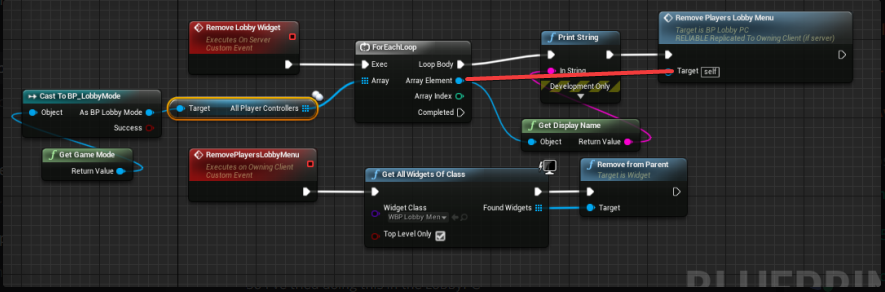
Hey! I have an issue with replicating something. Basically I have a Lobby where all my players wait for the host to start the game, when all players are ready, the host presses the start button, when he does so, I want all the lobby menus to disappear from everybody's screen. Right now only the host manages to remove the lobby menu. Here is the custom event that is supposed to remove them :
I managed to get an array variable that stocks all the player controllers who connect to the session and I'm trying to remove the lobby menu widget from each of them but it doesn't work, any suggestions?
worthy perch
There are several ways you can do this.
- Client RPC to each PlayerC telling them to remove their widget.
- Multicast RPC to every client telling them to remove their widget.
- The better way, have some variable with ReplicatedUsing that when a condition is met, remove their widget.
tall knot
@worthy perch I tried this way, one custom event only runs on clients and the other is called by the host (again only the widget of the host gets removed) I'm sorry if I didn't quiet get what you suggested I should try
worthy perch
You have to call the Client RPC on each invidiaul PC. Your set up is that the client RPC is looping through the AllPlayerControllers array.
So you have your ClientRPC and your ServerRPC. In the ServerRPC, loop through the array of AllPlayerControllers and call the ClientRPC from each reference.
tall knot
so in The ServerRPC I should get AllPlayerControllers>ForEachLoop>CallClientRPC ?
while in the ClientRPC I just get AllWidgetsOfClass>RemoveFromParent ?
worthy perch
Yeah.
Or you could just Multicast that to all clients.
But RPCs can fail, so it is better to use OnRep in this case.
limber wagon
@meager spade Thank you, I wound up with something similar to what you had in your second picture. The issue I was experiencing was actually with the SetActorHidden node, basically the smoke just wouldn't disappear if I used that in the parent
There was a MC in the parent that called it, I'll try repro it in another project though
Why it would make the particles only disappear on the server and the owning client I have no idea, the MC was reliable as well as the server RPC
Edit: Couldn't repro the problem, unhooked all nodes in the child BP, rehooked everything back up and it worked, 0 idea, I must have had a wire somewhere it shouldn't have been
tall knot
@worthy perch Even like this only the host removes the widget
Again I'm sorry to bother
tall knot
Oh yeah yeah I changed it just to try, initially it runs on server.
 potent prairie
What I would try is somewhere in the playercontroller, make a variable to that lobby menu widget. Then in your script here you can pass in that PC array element into the remove lobby menu, then get the reference and remove from parent
I do something similar when the player dies, remove the UI widget and replace with a Dead UI
thin stratus
RemoveLobbyWidget has to be called on the Server. No need for the Multicast. The other Clients can't access all PC anyway
And RemovePlayersLobbyMenu needs to be a ClientRPC
tall knot
Even like this it doesn't work
 frank plover
can anyone help me with replicating equiping weapons?
right now the guns can only be seen other client for some reason and idk why??
this issome of my pictures i took to help
thin stratus
@frank plover Hey, people will help you when they have time. We are only doing this in our free time, so please be patient.
frank plover
okay
 sharp pagoda
@frank plover this won't work for the client, take a look at this article: https://docs.unrealengine.com/en-us/Gameplay/Networking/Actors/RPCs
Also you need to zoom in on this:
sharp pagoda
Yea no that's not going to work
The input has to be managed in the player character, which then either line traces to find which weapon you're looking at or gets all overlapping weapons and calls Pickup() or something on them
frank plover
okay so i have to rewrite the entire system then?
sharp pagoda
If you designed it like that, yes. Iteration is good, each time you learn from your mistakes from the previous iteration
frank plover
if you have a mic it would be easyier to talk and show me whats wrong?
sharp pagoda
this is what's wrong in the switching bit (that I can see, not sure if you posted your whole equipping code
You need to dispatch a server rpc first, then run the multicast rpc
Also I'd recommend reading this http://cedric-neukirchen.net/Downloads/Compendium/UE4_Network_Compendium_by_Cedric_eXi_Neukirchen.pdf
sharp pagoda
Yikes ok you see this?
bad
You are writing for a very rigid set of weapons
You need to be writing more modular code
frank plover
okay
sharp pagoda
For example, you would want to have a generic "EquipItem"/"UnEquipItem" functions
The player should never have to know about every single weapon in the game
frank plover
alright so then i have to redo this aswell?
sharp pagoda
Yep
frank plover
okay well then i better get started then is there any tutorials on multiplayer with this stuff?
that you can recommend
sharp pagoda
Yea, start by reading the compendium I just linked
frank plover
okay i am right now
sharp pagoda
Make sure you understand all of it too, if you don't go here or google. It has some fundamentals for beginners you'll need
frank plover
okay thank you very much
meager spade
@sharp pagoda your good with C++ right?
potent prairie
For some reason I have to make this collision box way bigger in order for the server to register the overlap. Client detects collision immediately, but the server doesnt overlap until client is near the middle of box. Is this normal?
potent prairie
Ok I figured out my problem. Setting the scale in the blueprint isn't being applied on the server side. It's still 1.0. Bug?
fixed by changing scale in construction script. Not sure if this is best practice, I thought just setting the scale in the editor would be fine, but only client picks up that change it seems
 jolly siren
How is that multiplayer related?
meager spade
wrong channel
jolly siren
thanks
Does anyone know the differences between exponential and linear network smoothing with CMC? I see that exponential interpolates fasters if further away from the target. Is that to increase performance?
lament kettle
Anyone know how to do a event from client to EXTERNAL server, without the use of a heart beat system? Or socket.io method?
Eg. Machine 1: Logs into account and sits on the main menu for 5 minutes.
Five minutes later, Machine 2: Logs into the same account, and thus Machine 1 is logged out and is forced to go into the Login screen.
 livid barn
what would the use case be, where the same account/client would be allowed to login twice?
cause thats what I think i understand off what you said?
lament kettle
I don't wish to allow them to.
So I need a way to kick the "older/first" user off.
Currently I have a heart beat system, for every 30s, it checks if their login token is valid.
Later when they go in game, the server will kick the player.
livid barn
ah, so you're getting a case where the client IS able to login twice?
lament kettle
Well, I want to prevent that scenario.
Let's say I login, I minimize and open the game again and login again.
I don't want them to login twice, and be able to matchmake twice, etc.
I'll probably add checks and balances, when they queue up.
And when they're in game as well.
I'm assuming a socket.io method is the only way, while the client is sitting in the main menu and not in a game server.
livid barn
I came across this system today which you may find semi useful as a sort of pre-login check https://docs.unrealengine.com/en-us/Gameplay/Networking/OnlineBeacons
Also, I would have xpected that when you have "Client1" login, it would identify it self through whatever subsystem you're using, ala an account name or something? Thus once the server is happy with their account they then would be given some sort of token?
SO if "Client1" logs in with a second active client connection, the server would see their name again and go 'hey, you're already here, I'ma go boot the older one of you off now'
?
lament kettle
SO if "Client1" logs in with a second active client connection, the server would see their name again and go 'hey, you're already here, I'ma go boot the older one of you off now'
Correct
Also, this online beacon thing is pretty much what I needed.
Thanks @livid barn
cedar finch
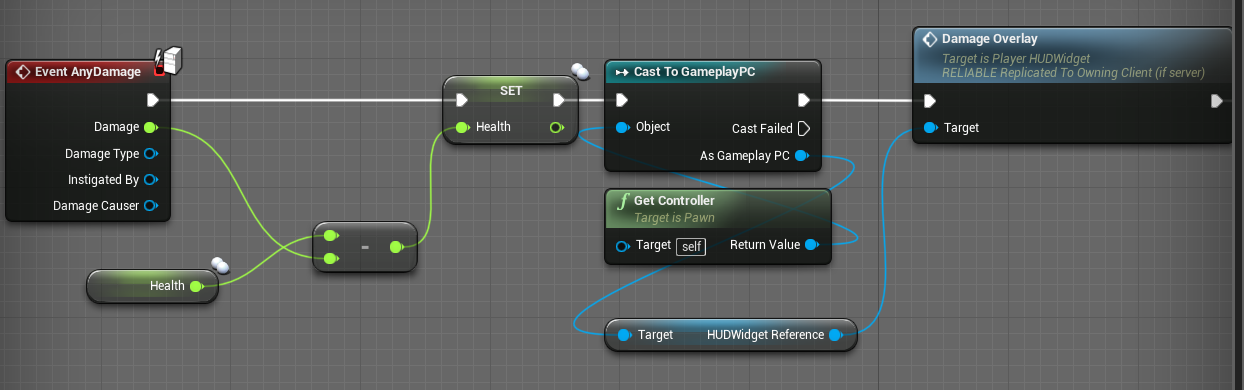
I'm drawing blank on replication for some reason. So on my player damage event I want to call a DamageOverlay event. It works but the overlay only appears on the Server player. Clients don't see the overlay when they take damage. https://i.gyazo.com/f2f7b9e72ab6dc763880b5641552ba88.png
 fossil spoke
See this Icon.
It means that this Event only runs on the Server
@cedar finch
You will need to either use an RepNotify or RPC to get the Client to react to that Event.
cedar finch
Thanks. Idk what i was thinking. I made an RPC and now it works fine. Must be that time of time night where I need to just call it and chill.
 red glade
I'm in need of some C++ networking help getting some foundations set
limber wagon
@red glade Bit of a wide topic, there are tutorials that go over that sort of thing. Is there anything specific you're having issues with?
bitter oriole
Anyone has experience with seamless travel ? I can't seem to get my PlayerController + HUD to not get destroyed when traveling from client to listen server.
Dunno if that's expected.
thin stratus
@bitter oriole What are you expecting?
"Traveling from Client to ListenServer"
I don't fully understand what exact thing you mean with that
A Client connecting?
A Client following?
bitter oriole
🤷 Transition map is used
thin stratus
Ah well, never did it like that. I only ClientTravel with ?listen when hosting.
Anyway, even if you perform a SeamlessTravel
Your HUD is probably not surviving that
As far as I understood and used the system, the Actors will all be destroyed anyway, the only difference is, that during a small period of time, both are alive
So old and new GameMode, PlayerController and PlayerState
And then whatever you declare in C++ as surviving
You can then use functions like "OnSwapPlayerControllers"
or "CopyProperties" (PlayerState) to move data between old and new instance of the specific class
bitter oriole
My understanding is that HUD dos survive (it should, per the PlayerController class)
But only when staying a client
thin stratus
Is it listed in the "SeamlessTravelActor" array?
thin stratus
Fair enough, well I'm still not sure if the hosting process should be a seamless travel
bitter oriole
Seems to work now, FWIW. I've handheld the destruction of HUD nicely and the entire workflow seems to work
bitter oriole
That page it out of date though, at least regarding HUD
At least it should say that HUD is kept too, like PC is
thin stratus
Any actors further added via APlayerController::GetSeamlessTravelActorList called on local PlayerControllers
It's just not directly listing them
It also doesn't list the PlayerState
bitter oriole
Right
thin stratus
Only that Controllers with PlayerStates will survive
void APlayerController::GetSeamlessTravelActorList(bool bToEntry, TArray<AActor*>& ActorList)
{
    if (MyHUD != NULL)
    {
        ActorList.Add(MyHUD);
    }

    // Should player camera persist or just be recreated?  (clients have to recreate on host)
    ActorList.Add(PlayerCameraManager);
}
Even the CameraManager survives
Well, I mean, they all die eventually right?
They just survive long enough to move data from old to new
At least I've never actively had the same PlayerState as in the previous match
I only CopyProperties over from old to new
bitter oriole
Unless you move from client to server, in which case PC & HUD & etc all get actively re-created as new instances, and old versions destroyed (EndPlay etc) immediately
thin stratus
Yeah well, it's stated to do a hardtravel here anyway
void AGameModeBase::GetSeamlessTravelActorList(bool bToTransition, TArray<AActor*>& ActorList)
{
    // Get allocations for the elements we're going to add handled in one go
    const int32 ActorsToAddCount = GameState->PlayerArray.Num() + (bToTransition ? 3 : 0);
    ActorList.Reserve(ActorsToAddCount);

    // Always keep PlayerStates, so that after we restart we can keep players on the same team, etc
    ActorList.Append(GameState->PlayerArray);

    if (bToTransition)
    {
        // Keep ourselves until we transition to the final destination
        ActorList.Add(this);
        // Keep general game state until we transition to the final destination
        ActorList.Add(GameState);
        // Keep the game session state until we transition to the final destination
        ActorList.Add(GameSession);

        // If adding in this section best to increase the literal above for the ActorsToAddCount
    }
}
Here is the GameMode list
It's all actually pretty straight forward. It's only tricky if you are stuck on thinking the way hard travels work (like using PostLogin for everything)
And suddenly you notice "Yo steam needs SeamlessTravel" and your ServerTravels start breaking cause PostLogin etc. isn't called anymore on the second map
bitter oriole
Yeah I've been doing all of this with Steam, ServerTravel and ClientTravel
Just want seamless travel for the better UX
thin stratus
Technically, even without steam, you should use it
It's just that most beginners have 0 idea about it
They put all the stuff into Postlogin
and then it all goes bad
bitter oriole
Thanks for the details ! I'll probably have a few more questions on that, but... breakfast first
thin stratus
Sure. Have a nice breakfast.
prime axle
If I set a Client's replicated variable on the Client , it doesn't get replicated to others, right?
Only if I set that Client's Replicated variable on the server or call a Client to Server RPC from the client, correct?
bitter oriole
Right
bitter oriole
Well, it actually didn't work - ClientTravel() with TRAVEL_Relative doesn't connect to a new server
And TRAVEL_Absolute doesn't work with seamless, apparently
"Unable to perform seamless travel because TravelType was 0, not TRAVEL_Relative"
Calling ClientTravel with TRAVEL_Absolute and Seamless to false is even weirder, does apaprently nothing
Okay, so - it's not actually possible to connect to a new server with seamless travel
So it's completely useless really
 lime skiff
I have an ue server which stores persistent data via save games (as first iteration). To try out things via internet, amazon gamelift was recommended. The gamelift documentation says, it is for session based games. Unfortunately, I didn't found any information if gamelift also provides storage (which the game server instance can access) for cross session, persistent data. Do you know if it does?
near knoll
guys help pls, there's a blocking collision exist on the server that's not exist on the client, when the character jumps on he falls down (in client side) to the ground, however (in server side) the character still on the collision
is there anyway in the character movement component a thing that makes server has authority over the client while falling ?
tall knot
In a multiplayer if I want to remove a widget from the window of every player when the host presses a button, should I handle that in the GameMode or in that particular widget?
red glade
Particular widget is client side, likely.
I'd just send the client data from game state to the client to remove it.
server doesn't really have a call to your client widget
The host can change the game status of the server, so the clients can listen for that change and do it themselves.
tall knot
The players have that particular widget in the lobby map which doesn't have a game state (sorry if my questions sound stupid I'm learning the ropes here), should I create one just to handle that instead of doing that in the lobbymode? if so, why?
red glade
Alternatively, you could just tell the player char itself to open up/close a widget
you'd save umg vars locally, and server just calls saying "remove the lobby menu" so you respond by opening the umg var for the lobby menu, then closing it.
tall knot
I actually have a LobbyController that tells every player to open that lobbyMenu, maybe it would work better there?
red glade
I'd do it there then
How is it telling the players?
Btw this seems more of a #umg topic but its network related umg so 🤷
tall knot
The display is done in the lobbyPC
Yeah I know, I've tried going to the #umg topic but they told me to go here x)
So I've tried doing this in the LobbyPC
I put a print to confirm that AllPlayerControllers holds the correct values and it does
Then I call this in the GameMode
LobbyMode*
Oh also, the host is able to remove its lobbyMenu
But it doesn't suppress the client ones
red glade
uhm, to my knowledge it doesnt seem you are passing a char to the "Remove Players Lobby Name" func
try this
 red glade
might need to cast it
Do you know if that func is called on the player correctly?
I.e its just trying to remove it
No actual indication, maybe that call is failing
tall knot
Yep the AllPlayerControllers gets diplayed twice, doesn't that mean that the client runs it?
unique thunder
I set a component in my character BP to replicate and I'm trying to run a client RPC to cast to another player, get a reference to his component and set visibility to false so that I don't see it but others might. This doesn't work, what's the correct approach?
twin juniper
I've been looking for any tutorials or examples of Proximity Voice chat
Does anyone know of any good resources? I've been unable to really find much on the topic
 winged badger
@unique thunder sounds like s job for OnlyOwnerSee
Alternatively, BeginPlay if Owner cast to Pawn is not LocallyControlled set Visibility to false
winged badger
That is not really surprising @twin juniper
twin juniper
Is there a way to change that?
Because I set a variable for the material in BeginPlay()
So when OnRep is called... That variable is Null
winged badger
How is it set?
twin juniper
So
I spawn my actor in the game mode, and then I create a dynamic material instance based on the 0th index material
then i apply that material instance
does that make sense?
twin juniper
huh?
winged badger
Client*
twin juniper
the ingo?
winged badger
Info, sorry on mobile + large fingers
twin juniper
they get the color variable (which is using ReplicatedUsing) right after i spawn it
So
Spawn Actor => That actor creates the material instance in beginplay() => I have a replicatedusing variable on that actor called "Color" and i set that color from my save data right after we spawn it.
Then once that variable is set, its calling OnRep()
but the dynamic material instance is still nullptr
because beginplay() hasnt been called yet
winged badger
Set function... if dynamic material is null, create it, then set the parameter
Instead of doing it in beginplay
twin juniper
i triied that
winged badger
And drop it from BeginPlay entirely
twin juniper
but then its just empty
winged badger
Or it will override it
winged badger
This is c++?
twin juniper
ya
winged badger
PostNetInitialize?
winged badger
Iirc a function that should fire after Actor gets its replicated variables
Altho, OnRep should work fine as long as BeginPlay doesn't create new instance ontop of thr first one
winged badger
You can also move dynamic material creation to constructor
 hexed cairn
does anyone know why the 'GetGameMode
oops. does anyone know why the 'GetGameMode' node would not work (not return a valid reference) as a client in a NetSession?
 haughty furnace
Good evening, we would need help to create a linux server on UnrealEngine 4. Our game is currently in pear to pear and we need help to use a dedicated server.
hexed cairn
@worthy perch thanks, I guess I was thinking of the wrong class. time to take all the GM references out of the GI
 fleet viper
hey there i want to set a enumeration vaiable in the base player state in my widget via a combo box. But somehow its not working for clients even client to server doesnt work clients just dont display the correct role to the others
fossil spoke
If a Client changes something, they must send an RPC to the Server with the new value so that the Server can verify it and update it either via Replication or an RPC to other Clients.
Replication does not work Client to Server. RPCs are the only method for Clients to talk to the Server.
plush wave
How would one continue a game when the host is disconnected (like in civ 6 or halo reach)
 versed socket
The recent livestream was very informative! One of the big takeaways for me was the comment they made near the end about how Reliable Events should be avoided at all costs. What they said specifically was that instead of replicating event calls you should be replicating property changes (i.e. changing a boolean rather than calling a function).
I'd imagine that in order to do this, you'll need to run some kind of timer function or use Tick in order to process the variable changes and call functions. However, we've also all learned that Tick in general is bad to use.
How do we reconcile this seemingly contradictory difference?
 severe widget
OnRep
fossil spoke
Host Migration does not exist in UE4, you would need to implement that yourself somehow @plush wave
fleet viper
@fossil spoke even if the value is replicated like the player state?
plush wave
@fossil spoke ok thanks for the info. Any suggestions? Serialize the game mode data and send to a client, then have them start a server and reconnect other existing clients?
fossil spoke
@plush wave No idea mate, never tried it, probably never will.
severe widget
@plush wave Basically you'd override the connection lost logic and do something like a beacon that the clients connect to if the host leaves, then a host is chosen and everybody connects.
Never done it before tho
fossil spoke
@fleet viper Your PlayerState is replicated so that all other Clients get it, so that you can share information, your properties inside it still need to be marked as Replicated.
plush wave
Thanks guys. Sounds like uncharted territory. I’ll dive into it some more
fleet viper
@fossil spoke still not working and my enumeration var is replicated and set as replicated in the cpp code
fossil spoke
@fleet viper Widgets cant have Replicated variables nor can they send RPCs, they are Client side only and dont have a NetOwningConnection, you need to use a class like the PlayerController as an intermediary in order to have Widgets send network information.
fleet viper
oh well thanks then
 analog violet
so I have a question for y'all. if any of you guys know Unreal Engine 2 or are familiar with it. First, I am trying to mod a game called Star Wars Republic Commando which is made in UE2. What I'm trying to do is make a Redirection/Download fix/mod for it. What I want to know is what does the Class UWeb do entirely?
Since UT 2003 has it and SWRC doesn't
fossil spoke
Mate i doubt very very much that anyone would know UE2, its nearly 20 years old mate.
This is a UE4 server.
If you want to ask for help with UE2 your going to have to do it in #lounge.
analog violet
big rip to UE2
 knotty frost
anyone know whats up with 4.20 and the -force_steamclient_link change? ever since 4.20 ive been forced to load the steam client dlls on packaged server builds which generate steam client artifacts, without this switch steam fails to initialize for servers
 bleak lily
hey for some reason my player isnt respawning
but its a certain character that doesnt respawn
the other ones do but this one doesnt for some reason
knotty frost
@bleak lily the spawn actor call could be failing, if you have it setup to fail on bad locations
winged badger
@plush wave expect Unreal to fight you every step of the way
its not just the GameMode, its GameSession, all AIControllers
also the clients are connected to the host, directly, and UE doesn't like to have more then one level open at a time
so you'd not only have to serialize everything clients don't know and keep it as a backup on one of the clients, you'd also need to stop the unreal for terminating the backup host's game on connection loss, manually reconnect all the clients to the new host
bleak lily
oh wait I found the issue the actor gets destroyed before he can possess the other actor as a spawn
so the whole event wont go through
winged badger
and seamless travel won't work here, its made for travelling to another map on the same server, not for jumping servers
bleak lily
wait so I have two characters how would I make it so when one gets possessed its nnot named the fps controller
like is possesing the only way to take over an actor
because once he dies he becomes the other character by possessing it
but it still is considered the human
winged badger
also figure out how to make the new host listen to incoming connections while doing it
bleak lily
its hard to explain but I will try to make it more simple to understand
because I made it sound way more complicated than it is I feel like
actually let me do this so how would I possess a character once the actor is destroyed/dead
since wouldnt the event end once the actor is removed
winged badger
what event?
bleak lily
actually its easier for me to screenshot it
winged badger
destroying a possessed pawn does not destroy the player controller
 winged badger
and player controller IS the player, the pawn is just a... puppet
winged badger
ouch
there is a restart player event/function in gamemode, you might want to look into it
EventRadialDamage, i am not sure if it fires on both server and client or just the server
but client does not need to Destroy a replicated Actor, only server should do it
and if its server only, then that Server RPC is redundant
bleak lily
wait if I do the restart player it should be the new one or
winged badger
also, i have no idea what you're pulling in Object in the Cast node from
bleak lily
oh its a get owner
yeah this is the rpc I have


but yeah this is supposed to spawn in a new character somewhere on the map
winged badger
and it does
unless you have a LogSpawn entry in the Output log telling you exactly why it failed
bleak lily
yeah the thing is how do I destroy my old actor and then call this event
since destroy actor gets rid of everything right
winged badger
look, i don't know if EventRadialDamage fires on clients off the top of my head
bleak lily
I mean its able to destroy the actor on the host and client
winged badger
after you Destroy the Actor, its GetOwner and GetController should no longer be valid
and you're using it after Destroy node
bleak lily
yeah thats the thing if I did it before wouldnt it just get rid of the new character I called from the event
winged badger
and both Destroy, Possess and Respawn should be handled on server only
how? its called on an instance of the character that took damage
it can't magically migrate to another
bleak lily
how do I do an instance
twin juniper
Has anyone had trouble with listen servers with steam OSS and UE 4.21.1 ?
Before 4.21.1 in 4.18-4.19 I could create a listen server using steam's oss and see lobbies in my game, and others could see lobbies. I since upgraded my game to 4.21.1 and i can't get others to see lobbies i host and i cant see lobbies they host.
even with ports forwarded
nothing has changed in my code so i'm quite curious. Anyone else had this problem?
glacial pollen
I have a ton of actors that randomly decide if they want to replicate to my single client.
I have tried loading the game and waiting 10 minutes, and when I come back, some of them are still not replicated. However, if THEN put a break point into my "is valid" loop, after a few triggers, they will suddenly replicate
severe widget
Anybody know how typical it is that PostLogin won't have valid net ids?
 misty stirrup
is tmap replication still not supported?
severe widget
nah its not supported
fossil spoke
It probably never will be
 jagged garden
@glacial pollen If you are talking about a significant number of actors that are all replicating that might be why
glacial pollen
We are talking about 20 or so at the same time
jagged garden
hm
glacial pollen
I do the EXACT same thing every time.
Sometimes all load
Sometimes a few load
Sometimes.... NONE load.
When they all load, everything is gravy
When none, or some load, I just drop a debug point into my "IsValid" loop, click play a few times, and remove the break point, and hit play again, and within a few seconds it usually will pop up
If I don't do that I can sit there for 10+ minutes and they wont load. I HAVE to mess with breakpoints.
The client even gets a list of these actors in a replicated array. The count is always correct as well, some of them are "none" but those are the ones that havn't replicated yet


The "No" on the top right, is an example. I force the client to wait for all replicated actors in this "is valid" array.
I've double checked, begin play for each actor is being called on the server
glacial pollen
Just to make sure as you can see above, the server has spawned the actor, its begin play has ran, the correct character owns this actor, and the correct player controller owns the character. And it is running under the server (is server bool)
So.... I'm 100% that as far my setup goes, its correct.
 halcyon abyss
Hey guys,
Does anyone know of a service that I can rely on to advertise a listen server when it's created? I'm looking for something that doesn't rely on steam so that people that buy the game on different stores (Gog, itch, etc) can actually play together and see a server list given by a master server that's not tied to a store.
 pallid mesa
Maybe @potent raven can help you @halcyon abyss
Just in advance, take a look at uetopia
halcyon abyss
@vorixo alright thank you so much! What about gamesparks?
worthy perch
This is a bit vague, but what general stats are the most important when using the NetProfiler? I'm currently primarily targeting Outgoing Bandwidth Avg/s.
pallid mesa
@halcyon abyss yes, just read a lot before you decide on something. Element is the creator of uetopia, that is why I forward you to him since he has a good glance on subsystems in general.
GameSparks might be a good choice however no matter what you choose you'll end up having to deal with pros/cons
The norm usually is hybrid solutions
halcyon abyss
@pallid mesa mmh, i dont understand if I use gamessparks can I just rely in the fact that it advertises the servers I create? Or do I have to use their whole realtime system?
twin juniper
When player connecting to server, disconnect, and connect and again disconnect, and he can't connect again after this, why?
 red sand
How to fix this?
halcyon abyss
@twin juniper are you destroying session on player that is logging out?
twin juniper
@halcyon abyss player logout from dedicated server by open level blueprint
halcyon abyss
It think you need to destroy session from client and then open level on success... And on failure... If I remember correctly when a client quits it should call destroy session... Although it sounds like a server-only thing
tall knot
What is the proper way to restart a game(level) with all the players that are already connected in the session?
twin juniper
im trying to implement multiplayer and im having a hard time wrapping my head around all these concepts so please bear with my super basic questions
i have some actors that in their BeginPlay run some code that changes their material's color based on a random number. as it is right now, it's run on clients separately so each client gets completely different colors
how would i make it so that code runs on the server, and then replicates the actors themselves?
should i instead run this code on the constructor?
worthy perch
You could run it in the constructor, yeah.
But you can send data to other clients through the server.
twin juniper
how would i do that? also should i use UFUNCTION(Server/NetMulticast)?
worthy perch
You can use RPCs or replicated properties.
twin juniper
actually it doesnt seem i can use that on BeginPlay it just gives me a bunch of compile errors
worthy perch
What errors? You should be able to.
 spiral oar
Hello i'm fairly new to multiplayer and i want to know where should i "store" my code (BP) if i want to for example make shooter game,can i put everything in level BP or game instance bp?
twin juniper
if i add WithValidation i havent implemented the Validate thing so that just throws more errors
the other 2 errors dont seem related to that though
worthy perch
bool SomeRPCFunction_Validate( int32 AddHealth )
{
    if ( AddHealth > MAX_ADD_HEALTH )
    {
        return false;                       // This will disconnect the caller
    }
    return true;                              // This will allow the RPC to be called
}

void SomeRPCFunction_Implementation( int32 AddHealth )
{
    Health += AddHealth;
}
wow what a terrible example for the docs page 🤔
worthy perch
What's terrible about it?
fleet raven
that an rpc to increase your health exists at all
worthy perch
Oh, yeah.
fleet raven
making WithValidation required is so silly in general
99% of them in engine and games are just return true
worthy perch
Yup, I've never put any logic in them.
Though, I would like to prevent speed hacking. --but that wouldn't be done with RPCs anyway.
winged badger
i do agree that having that RPC is terrible 😦
you're basically giving the client a license to hack
and you don't get anything for it
worthy perch
Actors that are dormant are no longer destroyed on clients when out of NetCullDistance, is there a way to still have them destroy when out of distance?
Also, does AlwaysReleveant and NetDormant conflict?
twin juniper
so how do i make VS recognize the implementation/validation functions?
ive got this
and this
do i have to define them in the header as well?
because the example only shows this
fleet raven
@lament cloak based on a quick VA search, it looks like unreal will at one point sort pending actors based on the time when an update was last sent, a newly created pending actor will use SpawnPrioritySeconds as a placeholder for this time since last update
 agile lotus
anyone who uses advanced sessions do you know if theres an event like OnRecieve Invite?
bitter oriole
IIRC, there isn't
The OSS interface has such a callback, but Steam doesn't actually call it
There's placeholder code in the session plugin
agile lotus
was trying to use the placeholder realized it wasnt finished
bitter oriole
Yeah, I don't use advanced sessions and tried to get this working myself, but Steam simply doesn't do this, as far as I understand
Looking briefly at the Steam doc, that's still not a thing
Invited player gets a Steam notification, but since he might A) not be playing the game, or B) not even owning the game, Steam doesn't fire any callback
versed socket
I wish there were a sort of overview blog post or video out there that just sort of explained how all of this OnlineSubsystem* stuff works and is used in practice. Nothing in-depth or whatever, but just sort of hand-waving it all for context so that I can have a mental model of how it all fits together. Right now I sort of irrationally feel intimidated by that stuff, and I've probably gone through just about every Unreal Training Livestream ever.
thin stratus
It's actually rather simple. The whole thing uses Interfaces. One Interface for the main Subsystem Class that has functions to return the other interfaces.
The other interfaces are for example the SessionInterface or FriendsInterfaces.
A Subsystem can choose to implement such an interface and then return it.
That's generally all there is.
If you have a Subsystem, e.g. Steam, active and you call "Online::GetSubsystem(FName("Steam"));", then you get the Steam Online Subsystem as an Interface.
You can call "GetSessionInterface" on it to get the Steam version of the SessionInterface.
You never actually touch the Subsystem directly, only the Interfaces and what Epic added to them.
As mentioned, some Subsystems might return null when asking for e.g. the SessionInterface, cause they don't support that.
If there is something not exposed to the these interfaces, cause it's very unique to a subsystem, then you have to use the library directly
e.g. steam_api
I think by now you can also just do Online:: and see all the stuff it returns
versed socket
That's a relly good explanation, Exi. Thanks! I've read the Header files for OnlineSubsystemSteam and OnlineSubsystemNull but the context behind it all and how it all fits in with everything else in practice is where the gap in my knowledge lies.
 wary wyvern
Guys, what is the best way to move character by vector, but save network sync and smoothness? I have a jetpack, which lifts character by using AddImpulse. I add it both on client and server sides, but there are still dyssynchronization and lags.
I've tried using LaunchCharacter. It works better, but not ideal..
versed socket
@wary wyvern The recent Networking Livestream said that the best thing to do for MP stuff in general is to use variable OnRep functions everywhere instead of events. So I'd imagine that the best way to move a character is to create a "Destination" or "DesiredLocation" variable and then have the Server change it and replicate that change to the Clients. Then in the Clients' OnRep functions for those variables, it will actually make the Actor move.
thin stratus
@versed socket Did that answer fill the gap?
wary wyvern
@versed socket I do not use events.. I use OnRep, but my question was about moving character. It does not matter, if there is a destination or not, I'm asking about the way to move it
thin stratus
If you want to use the replication of the CMC; you will have to use that
The CMC uses a few forces that you can adjust
One of htem is the LaunchCharacter velocity
void UCharacterMovementComponent::ApplyAccumulatedForces(float DeltaSeconds)
{
    if (PendingImpulseToApply.Z != 0.f || PendingForceToApply.Z != 0.f)
    {
        // check to see if applied momentum is enough to overcome gravity
        if ( IsMovingOnGround() && (PendingImpulseToApply.Z + (PendingForceToApply.Z * DeltaSeconds) + (GetGravityZ() * DeltaSeconds) > SMALL_NUMBER))
        {
            SetMovementMode(MOVE_Falling);
        }
    }

    Velocity += PendingImpulseToApply + (PendingForceToApply * DeltaSeconds);

    // Don't call ClearAccumulatedForces() because it could affect launch velocity
    PendingImpulseToApply = FVector::ZeroVector;
    PendingForceToApply = FVector::ZeroVector;
}
Thats the forces it uses in the calculation
wary wyvern
I've tried LaunchCharacter, but still had some visual artifacts. I guess the reason is that I apply different force on server and client, due to different start times (server start using force curve earlier, than client).
thin stratus
bool UCharacterMovementComponent::HandlePendingLaunch()
{
    if (!PendingLaunchVelocity.IsZero() && HasValidData())
    {
        Velocity = PendingLaunchVelocity;
        SetMovementMode(MOVE_Falling);
        PendingLaunchVelocity = FVector::ZeroVector;
        bForceNextFloorCheck = true;
        return true;
    }

    return false;
}
I gues I have to replicate jetpack curve's time to sync it
versed socket
@thin stratus Yes, that does fill a lot of the gap and it was very helpful, thank you for writing that wall of text for me!
thin stratus
You def have to send the same velocity over @wary wyvern
worthy perch
How are TArrays replicated? Is the entire TArray serialized and sent if I change a item in the array? Particularly, if the TArray is an array of fairly large structs.
bitter oriole
Replicating large structs is probably a bad idea to begin with, generally speaking you shouldn't need to
worthy perch
Yes, I do realize that it was a mistake. It was for an ingame inventory system.
winged badger
@worthy perch i suggest reading NetSerialization.h header
its comments explain how to implement NetDeltaSerialization, and even provides an example
worthy perch
Alright, I'll do that now.
limber wagon
I'm making a networked grappling hook and while the actual functionality works, I'm having issues with getting the cable to show on other clients
I'm using a replicated cable component on the actor and then setting visibility on/off as needed. Am I correct in saying that a multicast should NOT be used to make the cable show/hide in this case, because the cable would then appear for all actors of that type?
winged badger
if you replicate the target for the hook and RPC the action that causes it to deploy
you'd be fine just simulating the cable component
generally you can't assume that a variable in engine component replicates that way you'd want it to
limber wagon
Yeah I suspect that that might be the problem actually, will take a second pass, thanks 🙂
 pallid token
So, I have Server-owned ships, and they are jittery as hell on the clients. I suppose that's to be expected, and I'm guessing this would be a place for network smoothing. However, I have literally no idea how to use network smoothing. Does anyone have a resource I can use to familiarize myself with it?
 twin vault
i believe "Unreal Multiplayer Master" on udemy have some classes on client prediction
but you can find some stuff on youtube searching "client side prediction"
if you go with the udemy course, the discounted price is permanent dont feel rushed
pallid token
... I actually have that Udemy course, already. I totally forgot I bought it... I'll show myself out 😊
glacial pollen
Spawning actors in a recursive loop is broken
Valid in server, client randomly gets the actors
If I use a regular loop all is fine
twin juniper
so for some reason, my material replication thing works but not when loading in a packaged build\
glacial pollen
If you package your game in Dev mode, you can attach visual studio to it and get the output log live
@twin juniper
Dev mode is on by default I'm pretty sure
So just open your project in visual studio, and in one of the top menus is the "attach to process" option
So run your game, attach to it, and then get to the point where it doesn't work and see if any errors come up
Also, do not ignore warnings in packaging unless you know explicitly that they are useless or not expecting to work correctly anyways
Also check the output log while you open the editor, and also open everyblueprint one by one and check for errors or warnings in the output log
Some errors or warning won't show u til you open the box manually
 strong abyss
I have a button that calls a Server function.
But the server GetGameMode in the Server function returns nullptr so it appears to be running on the client?
Any ideas what I'm doing wrong?
fossil spoke
Is GetGameMode returning nullptr or is the Cast failing?
You maybe using the wrong Gamemode
strong abyss
It is returning nullptr
I even added a HasAuthority() check and it is failing too. But I have the Replicates on the Event set to Run on Server?
fossil spoke
Oh, your in a Widget. Widgets dont have a NetOwningConnection, they are Client side only and cannot send/receive network information.
strong abyss
Ohhh.
fossil spoke
You need to use another class like PlayerController as a means to send any RPCs that a Widget needs
 peak patio
Hey guys, I have a small problem with the "IsLocallyControlled" Blueprint node. It appears that it works as intended, except with listen server : in the listen server, the fonction return false, even if a pawn is controlled locally... Got any idea on why / how to fix it ?
peak patio
ahah, that left me with little solutions 😛
 wary path
@peak patio I had a similar problem some time ago. IsLocallyControlled returns false if PlayerState is still invalid, which might be at the start. So check for valid player state first.
peak patio
well, it runs every tick and is false at every tick :/ ... I expect it to be true at least after a certain amount of time, but no
wary path
@peak patio sorry my call was a different, in my case it was "IsPlayerControlled"
for IsLocallyControlled you can check whether "GetController" is valid, just to debug, and which kind of Controller it returns.
peak patio
thank your for you help lotodore! In fact, I may have a bug somewhere else in my code...
the "Is Locally Controlled" seems to work fine after some debug
 jade gazelle
Does adding an element to an array trigger RepNotify? Or is that only called from a Set variable call
 calm plaza
Destroy Session - Invalid Playerstate. Anyone else had this pop up? Fix?
 grand kestrel
@jade gazelle if the elements change it'll replicate
wary path
@calm plaza https://issues.unrealengine.com/issue/UE-38897
jade gazelle
@grand kestrel thanks!
calm plaza
@wary path It isnt actually happening when i try to destroy sessions. says its happening after opening listen server map
[2019.01.21-22.10.46:969][207]LogNet: Browse: /Game/Maps/Empty?listen
[2019.01.21-22.10.46:969][207]LogLoad: LoadMap: /Game/Maps/Empty?listen
[2019.01.21-22.10.46:969][207]LogScript: Warning: Script Msg: DestroySession - Invalid player state
LAN and WAN arent working....ugh.
can find a lan session but doesnt travel client to server map. cant even find a public session.
bleak lily
I have a server browser that works in ue4 but when I packaged my project it doesnt work
I have no idea why since it used to before
wary path
@calm plaza are you testing "Standalone game" or "PIE" or packaged game?
calm plaza
standalone. on two seperate pc's
wary path
which online subsystem?
if it is "null" (the default), then it generally will only find LAN sessions, but should work with two standalone games.
so you need to debug 😦
wary path
@bleak lily did you also package the server?
wary path
are you running both client and server as packaged projects?
they are not necessarily compatible
if you use server in UE Editor and client packaged
wary path
ok then I have no idea, Firewall, ... the usual
calm plaza
Steam OSS u
wary path
for steam OSS you need to setup app Id etc.
jade gazelle
@grand kestrel hmmm, having some strange behavior. If I add an element to an array, the clients trigger RepNotify but the server does not. The only way to get the server to trigger it is with an explicit Set variable
calm plaza
yead got 480 for app id
jade gazelle
Googled around and this seems to be a bug of some kind
grand kestrel
RepNotify doesn't call on server 😶
jade gazelle
? It does for every other variable I have.
grand kestrel
Just use if Role == ROLE_Authority and call it manually
bleak lily
wait would the server browser I have work if i am on the game with the same computer
in a packaged project
jade gazelle
Well I can get it to work just by setting the array variable. Then the RepNotify function will fire correctly on the server. It’s just odd that array changes like adds/removes only fire on client
winged badger
if the client sets the variable locally, it will get a RepNotify as well
hates network in combination with blueprints
jade gazelle
Well this is the server adding an index to a replicated array, on the server
I put a test print string in the RepNotify and if I Add the element to the array on the server. RepNotify is triggered only locally on clients
But if I add the element and then Set the variable as well, I can get the RepNotify to trigger on the server
calm plaza
I will pay someone a cheeseburger a day to help me get the bugs out of my matchmaking...
not a dollar menu burger either.
gone through every tutorial. read every forum. even stared into the sky. nothing.
worthy perch
@jade gazelle , Is that in PIE? If so, the server calling OnRep might be a "mistake". Try in a packaged build.
jade gazelle
Not packaged but running dedicated server from command line
worthy perch
Did you build for Server?
jade gazelle
Yeah
winged badger
why would you even need a RepNotify on server @jade gazelle
one of the reasons i prefer do to network code in c++ is because there is none there
jade gazelle
Just as a quick way to run logic any time a variable is set?
Isn’t that the whole point of it?
winged badger
thats what the Setter functions are for
not replication callbacks
you can easily wrap a call that adds elements into the array in a function
worthy perch
If you want to support listen servers, calling OnRep on authority is useful. Unless OnRep is already automatically called on a listen server.
winged badger
and run any additional logic you need from that function
jade gazelle
I mean I don’t think what I’m trying to do is that out of the ordinary. The documentation for RepNotify specifically states that it is called on both authority and remote machines
winged badger
in blueprint it is
jade gazelle
It seems to just be a bug/limitation with arrays according to dev notes I can find
winged badger
i create Setters for my variables that need to run additional logic
my OnRep functions add a bReplicatedSet flag to the object, then just call a setter