#multiplayer
1 messages · Page 436 of 1
 agile lotus
Yeah its for gamemode related stuff that I'm having the issue trying to give host the proper HUD when they return to lobby
but it wasnt grabbing the host properly on return so he was stuck with client HUD and couldnt start the next match
 normal girder
@thin stratus THK you a lot. It s Ok now. I still must really undertand clearly what i m wrong, but i on the way to understand now 😃
agile lotus
@worthy wasp What version of engine are you on
I don't have the node GetPlayerControllerID
oh I have it in ramas plugin
NVM i have it built in if I'm grabbing from a PC object
my b
 low pond
For dedicated servers do most people use windows or linux?
 worthy wasp
windows is easiest to build for - linux is 100% compatible for the OS but alot of the Plugins/Tools for UE4 that are out there arent developed for Linux -so you get compilation errors and have to build around it.
the ones i've come across are glamour things that dont even relate to server code anyways - like keyboard lighting effects called 'Heartbeat'
 fringe dove
has anyone else had problems with voice dropouts on recent ue4 versions?
 cedar finch
Does anyone know why spawning a weapon pickup works for both server and client but the mesh doesn't switch? I set several variables such as the weapon name, ammo, mesh, etc. But for some reason the mesh doesn't show up for clients. 😦
 worthy wasp
thats a REALLY loose knit question whippy - tons of reasons why it couldnt work -
A: Is the actor your spawning set to replicate?
B: WHat mode are you doing? DedicatedServer or ListenServer?
cedar finch
The actor is set to replicate and It's a listen server
worthy wasp
SetWeaponInfo - is this being ran AS SERVER - print string inside of this - it'll tell what mode it is (if you see STANDALONE then you arent setup properly for PIE MP Testing)
and what is your MP Testing setup? It should be: https://puu.sh/CtHsZ/fe6cb668c6.png
 cedar finch
Where in project settings is that again? It's been a while
worthy wasp
if you set the variables to EXPOSE ON SPAWN btw - all of these variables can be passed on the SPAWN ACTOR function....
click the EDITOR PREFERENCES - PLAY (or the arrow next to the play button & ADVANCED SETTINGS)
i would try the above first though - passing these variables into the ExposeOnSpawn mode
this maybe have the effect you're looking for.
cedar finch
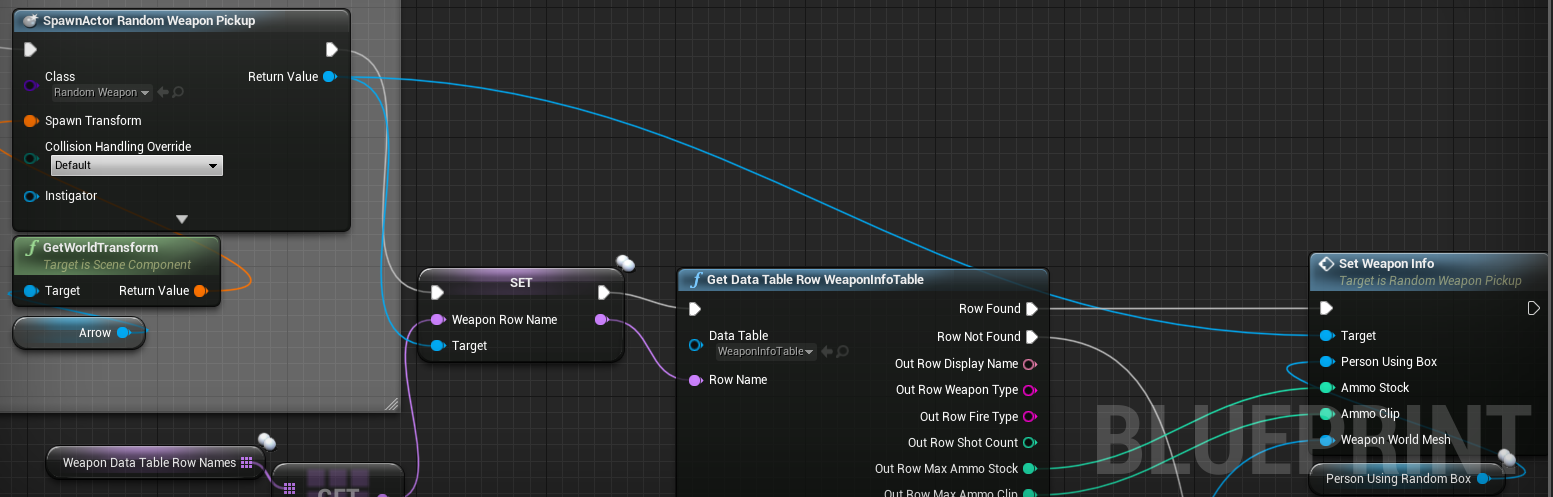
my settings are the same. So how I'm doing it now. I have another blueprint that is set to run on server. It spawns the weapon blueprint I showed you above and passes the info to it. https://i.gyazo.com/1e98a459310ccebeddb6ae48f911211b.png
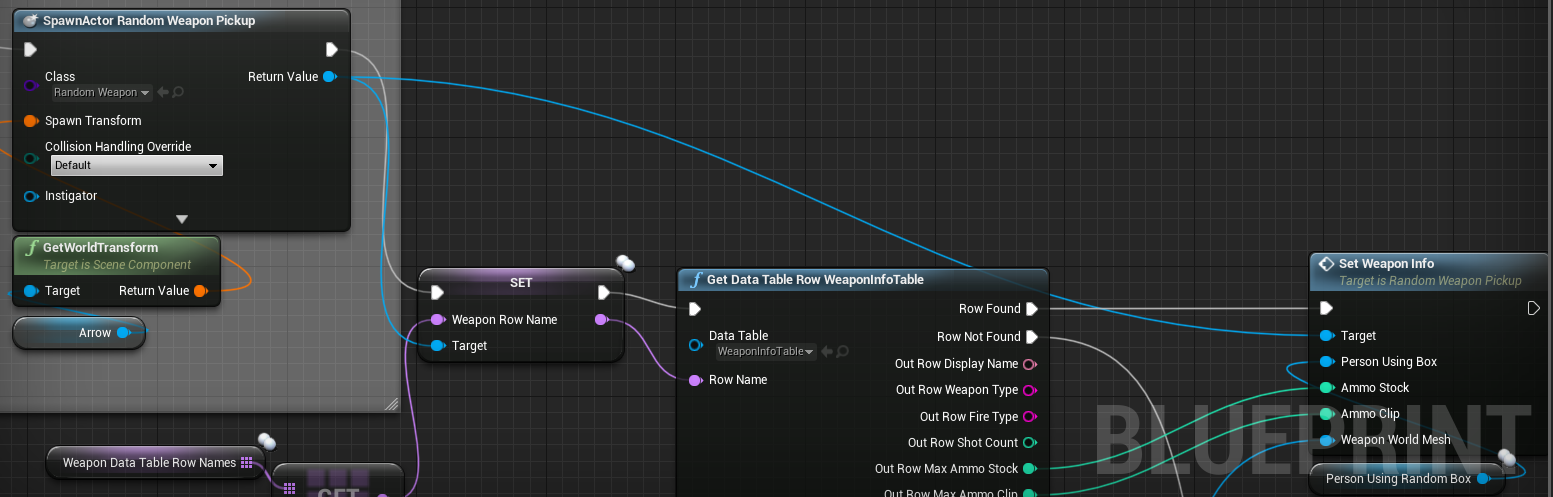
I spawn the weapon then get the info for it and pass it along.
What I'm making is a Random Weapon Box. You use it, then it spawns a random weapon.
I see what you mean though. I can clean it up with the expose on spawn.
worthy wasp
👍
and it acts as a constructor
so it SHOULD set these variabels for everyone to see
cedar finch
Ah nice! 😃 Thanks I'll try it now
@worthy wasp Ok so it works the same way lol. 😦 It cleaned it up and made it super easy to use and look at but the mesh doesn't spawn for either now. Server and client can't see the mesh.
worthy wasp
try setting the StaticMeshComponent to replicate as well
cedar finch
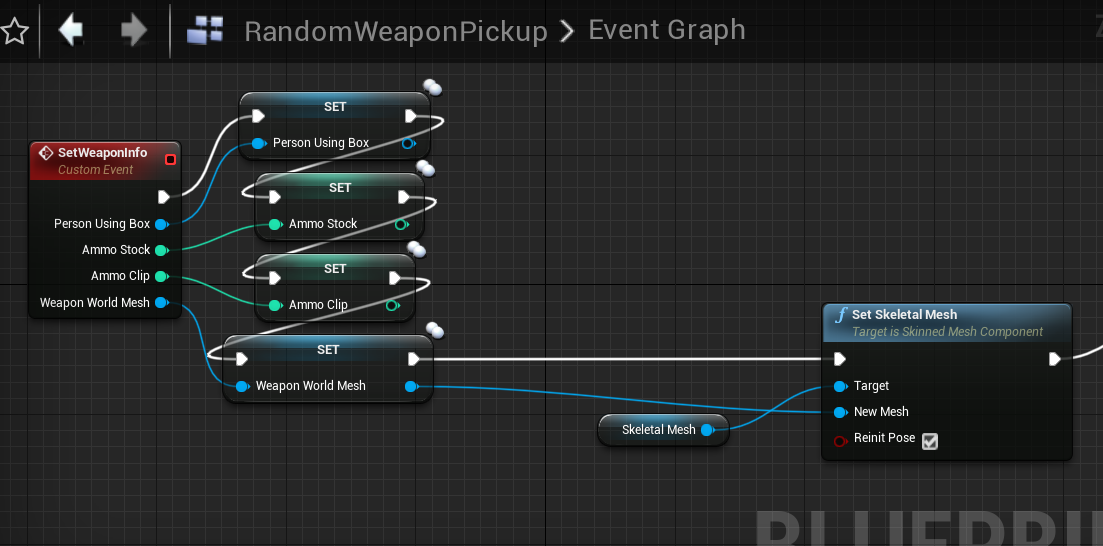
I did that too. Am I not setting the model correctly? https://i.gyazo.com/cf2091f8cca0f265252620e2ef79b53f.png

The mesh should change just like the other variables right?
worthy wasp
so the CLIENT sees the spawn
but the mesh never chnages?
and LISTEN SERVER - sees both?
cedar finch
Correct. Server and Client both see it spawned but no mesh
worthy wasp
server doesnt see mesh either?
 worthy wasp
WHO is spawning it?
cedar finch
The event is run on server. I can activate it as both a server and as a client but still no mesh
worthy wasp
1 min - boss on WoW - almost done ❤
cedar finch
hahahahaha lol ok
cedar finch
Ok whats up?
worthy wasp
your last message - sounds like there is an actor in teh world
that you interract with
and it grants (spawns) a random item?
cedar finch
Correct. So In my ThirdpersonCharacter I send an interface message. The RandomBox blueprint then spawns the weapon blueprint
worthy wasp
ok so hold on
dont go much further....
do you understand the difference between REplication and Ownership in regards to RPC events?
in order for a server RPC to be ran - it must OWN the item its tryign to call an RPC event on (as server)
now this gets REALLY finecky with ListenServer models
because - the listen server runs as both Server AND client
it has authoritation
but it also runs as client...
print stringing almost everything is a good debugging method
to see how events are ran and what level they are ran as....
in your above setup....
i would be running the INTERFACE MESSAGE as a LOCAL FUNCTION (no RPC event)
and have in there a print string directly after the event
to see what level its coming in as
i almost gaurantee the LIstenServer when sending this message will go through as listen server
but there'll be a problem.....
it doesnt own the actor
i THINK (I'm still not the best at replication and fully understand it myself)
you need to have a server RPC event after the local event....
that way the ITEM is running its own RPC (as it owns itself.... technically the server owns it)
and handles the authentication on server side
i'm not 100% on this
and testing with debug strings will help you along the way
 worthy wasp
either way - the ListenServer callign the event will come through as ListenServer - it will have auth
cedar finch

And the TurnOn event is the "Run on Server" event that spawns the weapon
So when I put a print string in that image above Both server and client see it. But If i put it inside the TurnOn event which is set to Run on server then only the server see's it. Which seems correct.
I'm scratching my head on this one.
worthy wasp
it doesnt matter that they see it
it should say LISTEN SERVER or CLIENT at the beginning of it
which is it?
cedar finch
That's what I mean.
lol
inside the Run on server only Server: Hello apears
if i put it after the interface message recieved event i get, "Server: Hello" "Client: Hello"
Because the interface is being sent as multicast
worthy wasp
ok i'm not fully understanding your want here.... i'm sorry
this actor should spawn a random item for ALL TO SEE? correct?
cedar finch
Ok. So have you ever seen or played call of duty zombies? I'm trying to make the Random weapon box that players can use to get a weapon. All players can use it and see it
Does that make sense?
worthy wasp
yes i'm with you
cedar finch
😃
worthy wasp
so the actor should be SPAWNED BY SERVER and the actor set to REPLICATE
tehrefore - all will see it
cedar finch
Correct
worthy wasp
now....
cedar finch
And it works just no mesh
worthy wasp
setting its MESH PROPERTIES via the code you showed above (even after putting it ExposeOnSpawn) doesnt set the mesh
correct?
cedar finch
Correct. I believe
worthy wasp
did you move the SetMesh() function that should be INSIDE THIS SPAWNED ACTOR.... into the CONSTRUCTOR?
cedar finch
No
worthy wasp
with the passed variable
try that
and for sanctity purposes - please make sure hte mesh is set to visible & n ot hidden in game 😛
cedar finch
ok so if i put it in the construction then the Server can see it but the Client cannot
 worthy wasp
is the skelmeshcomponent set to replicate?
i dont think it needs to be....
its hard to say though... re;lication is beign of my existence lol
 cedar finch
It doesn't make any sense
Well I'm fine with redoing the whole thing. If you were to make something like a random weapon box how would you go about it. Maybe there's a better way that will work?
worthy wasp
in a perfect world -
Server Spawns the box with a struct exposed on spawn
Anyone opens the box runs the following:
Character->Box::Interact(InstigatorClient)
Box::Interact returns struct of item to add to inventory
so the character runs a local function (basically a getter) which returns what item it should add to its inventory
you can also take this opportunity to mark the box as LOOTED (boolean) that is LOCAL....
that way - only the instance of this box on the LOOTED CLIENT will know that it has looted it - and it is therefore locked out
you dont want this variable replicated.
you probably dont even need to pass along the InstigatorClient - but if you need to - pass it along for whatever code reasons....
i hate to say it - theres 10 different ways to skin a cat is the old saying - this fits that bill 😭
but ideally would be just a getter funct - returning what item it should give to the player when looted
cedar finch
True. Thanks for helping out I appreciate it man. Even though I didn't fix it I learned some and cleaned up my blueprints. 😃
worthy wasp
i wont even try to say what i told you is the right way
i dont have it in front of me - hard for me to debug it in my head
i'm sorry
cedar finch
Your good. Your idea gave me an idea on how I may be able to get it working.
I'm going to make a mesh inside my
box blueprint and set it there for "looks"
worthy wasp
is this mesh just supposed to be the box?
cedar finch
Then the players can still get their weapon
worthy wasp
or the actual item awarded?
cedar finch
the item awarded
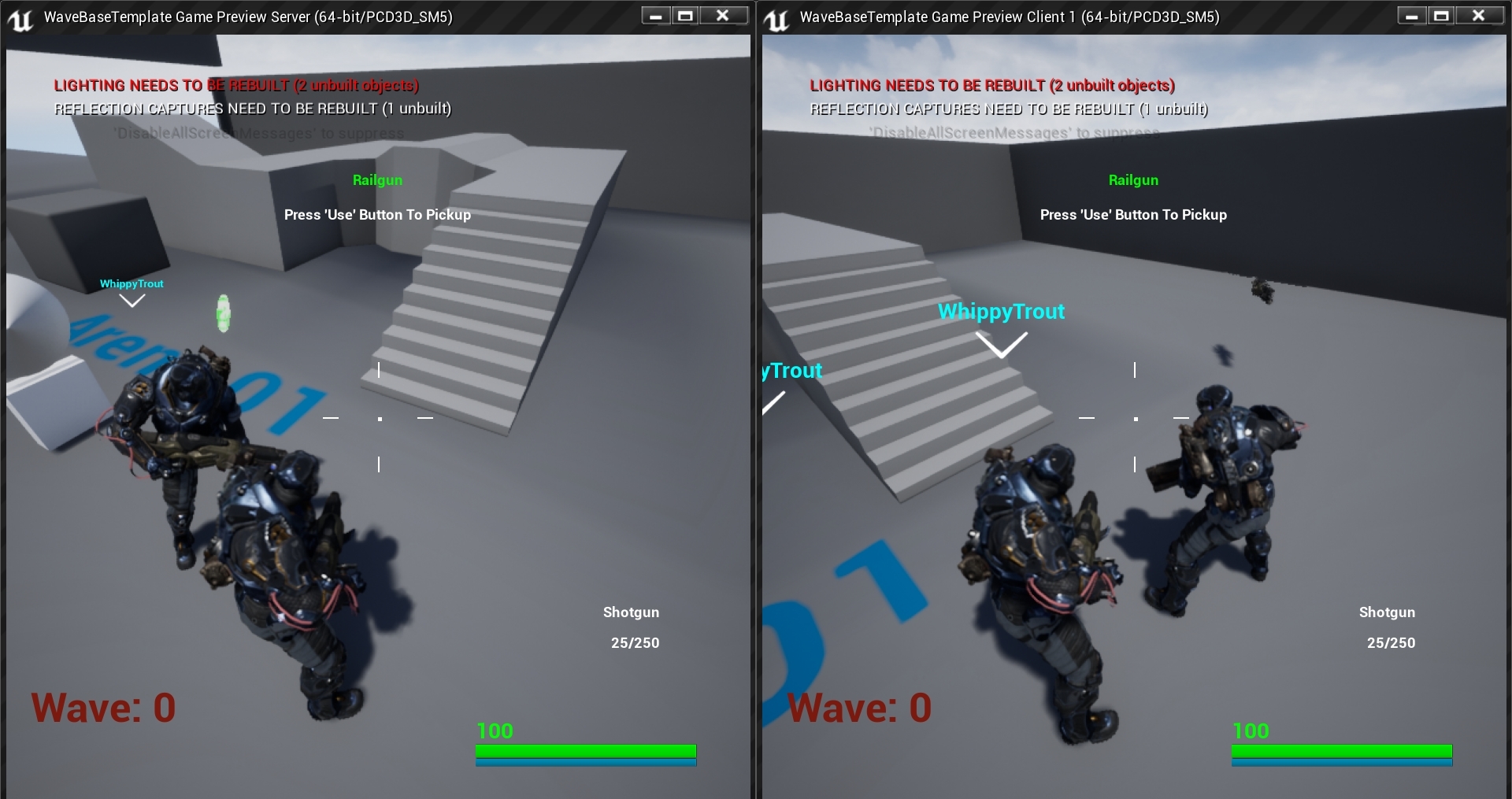
I can get the weapon I just can't see what I'm getting
the mesh for some reason isn't working on the client
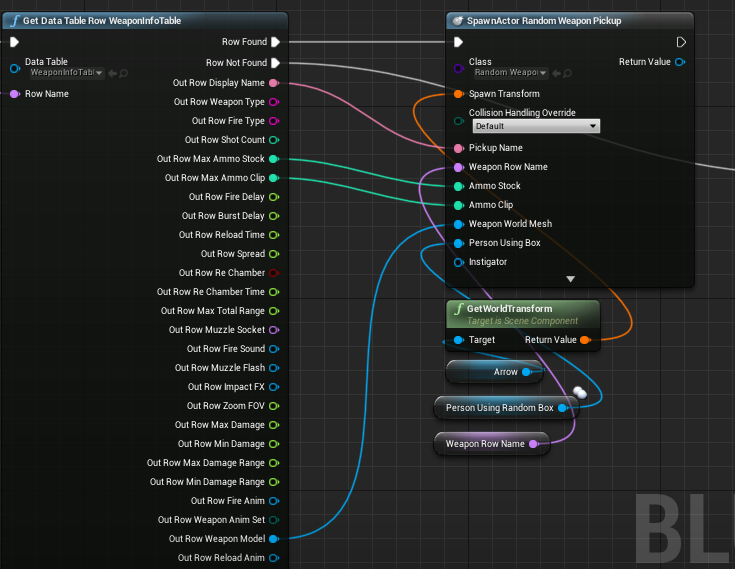
Hmm. So why is it that the weapon model at the bottom of this does not return a mesh for the client? https://i.gyazo.com/873e94e2b11d21e942bf1e6ea7c9453d.png

It gets that value from the data table
worthy wasp
i dunno man... whos running the datatable lookup? is this buried in the RPC events?
cedar finch
the RunOnServer does it
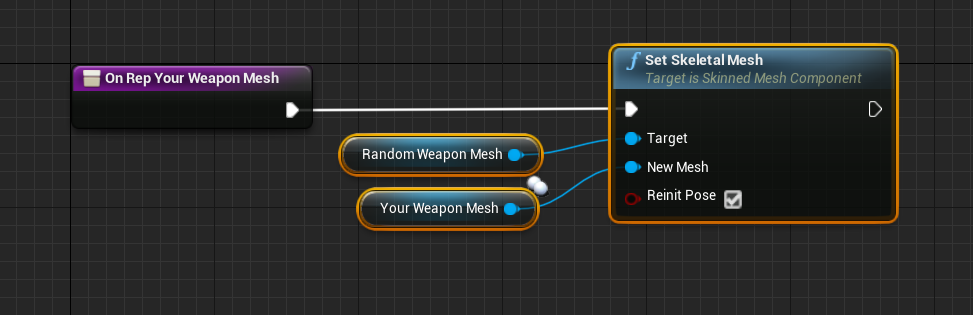
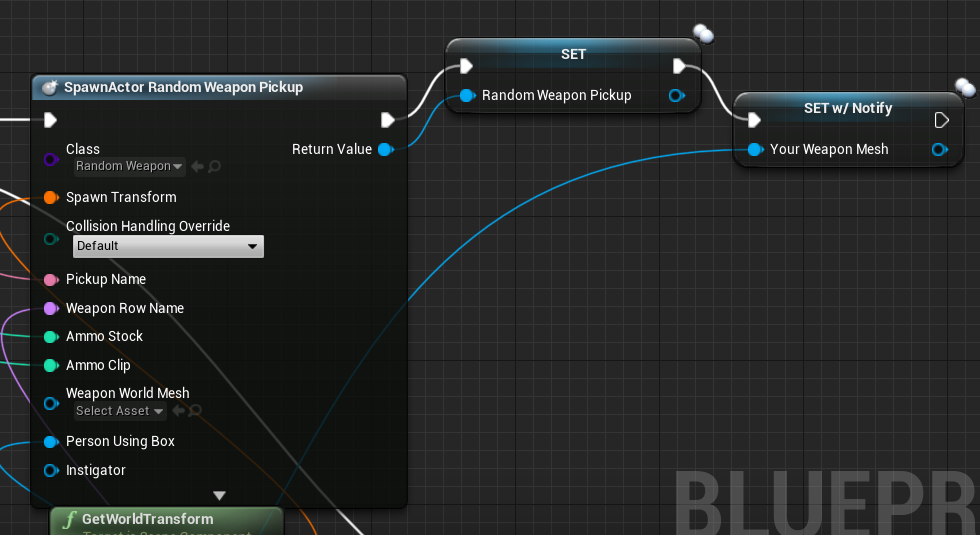
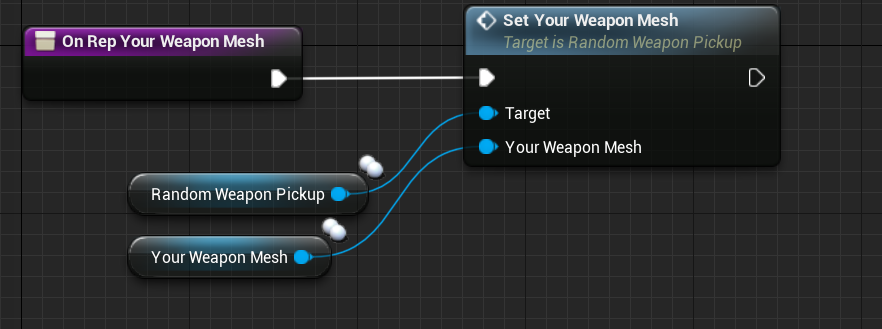
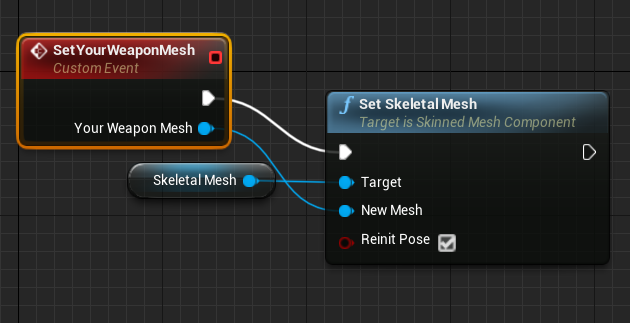
Now if I make a variable and Repnotify I can set it for everyone https://i.gyazo.com/879779d034ed82389854c681bcef60f0.png

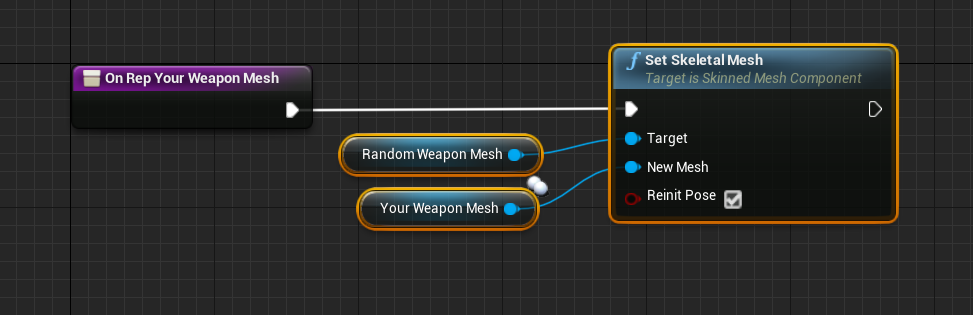 worthy wasp
man....
cedar finch
I feel like I'm going about it a "hacky" way in order to make it work.
worthy wasp
your telling me this whole time that the spawn item - was in the actor acting as your "loot box" ..... lol
i really wish i had read into this
cedar finch
the spawn item is in the lootbox
cedar finch
lol your fine man. It's confusing
Character->LootBox->spawns Item
SpawnedItem gets info from Lootbox
but Mesh doesn't replicate
Me Tarzan, You Jane
😉
hahahahaha
worthy wasp
multiplayer - gives me grey hairs at times 😃 (most of the time)
right now i'm battling LIstenServer - spectating the server as the client.....
cedar finch
I fought that one for months lol. Somehow I got it working though
worthy wasp
iu think my problem is not setting a pawn for the spectator controllers....
but...
when server spectates client in the SAME FASHION.....
shit works just fine.
cedar finch
I'm trying to remember how I set mine up. I did it in playerstate I believe. I can look
worthy wasp
its weird....
    if (ThisPlayer && ThisPlayersPC)
    {
        ThisPlayersPC->Possess(ThisPlayer);
        ThisPlayersPC->Client_YourTurnStarted();

        for (int i = 0; i < ConnectedPlayers.Num(); i++)
        {
            if (ConnectedPlayers[i] != ThisPlayersPC)
            {
                APawn* SpecPawn = SpawnPlayer(SpectatorClass->GetClass(), PlayerTransform);
                ConnectedPlayers[i]->Possess(SpecPawn);
                ConnectedPlayers[i]->SpectatePlayer(ThisPlayer, inPlayerState);
            }
        }
    }
Server runs this - server spawns his own player - and possesses it fine
all things happen fine on the server
however
the COnnectedClient should be passed the servers pawn (ThisPlayer)
its valid....
it isnt being passed.
however - its valid - the damn ThisPlayer is checked, passes and fires into ConnectedPlayer->SpectatePlayer(ThisPlayer, inPlayerState);
but for the net client - ThisPlayer isnt valid....
this is comign from GameMode anyhow - and SpectatePlayer() is a ClientRPC
i wonder if its the RPC event fking things up
cedar finch
So I know Gamemode is Server only
worthy wasp
you are correct
cedar finch
I set who to spectate inside my playerstate. I call that event though from my gamemode
So In my Gamemode I spawn the Spectator then after Possession I call the event inside Playerstate that gets the person I am to spectate
worthy wasp
dude
it was indeed the RPC
i removed the RPC event - and it now spectates just fine
cedar finch
lol I had something like that too
I was scratching my head going, "It should be working" then I change the RPC and it worked
worthy wasp
lemme guess....
removing RPC events 😛
just when i think i got RPC figured out
it throws me a left hook curve ball to the right
cedar finch
Naw I'll show you then explain lol
Lootbox spawns the weapon: https://i.gyazo.com/5040d755d6de93aacb6b487973c7c23a.png

I set the weapon as a varaible and set the mesh as a repnotify
Now in the repNotify I can use that new variable to call an event inside the weapon blueprint: https://i.gyazo.com/a96e605e6827a989b12cbf8eaade2797.png

That event sets the mesh: https://i.gyazo.com/7ef50e66ada2a0962720584e7b449d42.png

BOOM it works perfect now. lol
IDK why i had to do all that crap
cedar finch
🍻
worthy wasp
for me typing beer does nothing....
#beer doesnt bring up anything
/beer doesnt either
cedar finch
click the emoji on the right
cedar finch
Aye!!
cedar finch
We learning like crazy
worthy wasp
📛
so one thing thats fking bothering me the past few days.....
PIE testing with ProjectileMovementComponent
my model is ListenServer
and if i single player test this (it'll be Standalone) - it works just fine.
if i MP test it (settings i showed you earlier)
the ball sits there.....
does nothing
i'm going to finish up a few minor things - package the project and test it across 2 different machines
it might be a fking PIE testing bug
cedar finch
Hmmm. That's a good question. I'll need to know that answer too. I haven't messed with that yet but I'm going to soon.
worthy wasp
anyhow - i'm kicking offf a package - and letting this cook in the background
have a great night man - grats on figuring out your bugs
cedar finch
You to man! Thanks for helping me out. I'm glad you got your's working too
 queen flower
🍺 i found the beer. congrats on the things!
 hasty adder
🍺
 supple musk
Hey guys i'm having trouble figuring out "NetOwner". I want to change the owner of an actor in order to be able to send RPC from my client on an actor that I "grip" ( i'm on VR ).
Can I just create a NetOwner variable on my actor, override GetNetOwner and HasNetOwner and make it work ?
I am able to achieve the desired result by calling SetOwner on the Server, but can I separate Owner and NetOwner ?
And should I even try to separate them ? Is Owner really only there for Replication purpose ?
 chrome bay
Owner is there for replication purposes but a few other things as well. But yeah, you will have to call SetOwner()
Be sure to only call it on the Server of course
Pawns actually do this when they are possessed.
There is an engine bug at the moment, which may affect you if you have some replicated properties using COND_OwnerOnly or COND_InitialOrOwner etc.
https://issues.unrealengine.com/issue/UE-43135
There is however, a PR in progress for it too:
https://github.com/EpicGames/UnrealEngine/pull/5353
@supple musk
chrome bay
I think those properties are only used for the relevancy checks e.g, only relevant to owner)
The but actual actor owner is the only one who can send RPC's and receive OwnerOnly replicated vars
At least that's how it worked last time I looked anyway
 obtuse dirge
Does anyone have experience using unreal frontend over the network?
I wanted to set this up to test steam lobby issues without constantly re-packaging my game and put it on another computer to test (you need to be on 2 different steam accounts..so different computers.. or maybe a VM I guess)
 keen thorn
why dont u test in editor
 past gate
Hi there, having trouble with the simplest thing: Listen-Server, and with this, the Client doesn't seem to possess its pawn. Halp plz
 drifting plank
So you mix client and server nodes that's bad !
Be sure that your Third Person Character is replicated to be spawned
And after that send a Client RPC to use the client-only node "Set Input mode Game only"
I think your actor is spawned but the player controller stills in "UI only"
@past gate
past gate
Probably, the possess event works server side and all, so the Character is spawned and replicated to the Client, but the the rest doesn't follow through. I'll try what you said real quick, thanks 😃
past gate
Yass ! That worked, thanks again 😄
 next falcon
If i replicate a UObject are the BP propertys who are set to replicate actually replicating too?
 winged badger
they are, but you need to do quite a few things to make that work
winged badger
add them to actor bunch, implement prereplication
there are 2 fairly complete articles on it near the top of google search
next falcon
can u give me the link ?
 jolly siren
Does anyone have a good writeup on rpc ordering? If I send a server rpc and then send a client rpc on the same actor, will the server rpc always arrive first? Or is the ordering dependent on where we are sending them? In other words, client rpc execution order is guaranteed. And server rpc execution order is guaranteed. But not the mixing of client and server rpcs?
winged badger
hardware inbetween can break one way only
and you have no ackowledgements
i don't see how it would be possible to guarantee something like that
@next falcon just google replicating subobjects unreal
jolly siren
okay, yeah I'm just trying to understand what ordering is guaranteed with rpcs. Since that is one of the main things people talk about with them
winged badger
you'll find it
next falcon
@winged badger The subobject is replicating and the Cpp propertys are replicating too but what about the Propertys in the BP graph of that Object ?
winged badger
i believe is has something to do with FPropertyChangedTracker
to make it work
but that is just an educated guess
no, its called IRepChangedPropertyTracker
check AActor::ReplicateSubobjects and AActor::PreReplication
UActorComponent also has its own version of those
and disclaimer: ReplicateSubobjects is required for them to replicate at all, but i just assume PreReplication is required for BP variables, it just seems to make sense
i never went to replicate a variable declared in BP, let alone on a subobject
next falcon
Thanks ill take a look at that
winged badger
well, i did and didn't like how RepNotify works there
so i just went full c++
there are 2 more if you actually want to send RPCs through UObjects
again, UActorCOmponent is a good read for that
normal girder
hello
i try to use playerState to save player Team
so when in game mode i spawn my pawn and controller
i set for playerState a variable : Team
next, when controller create
i want on constructor set a Team variable too, for esay acces it next in code
but only thing that i have find is to do this
with
first : is it a bad means to do ?
and, as you can see, i put a delay, else, the player state is at "none"
does i m totaly wrong ?
does it better to do a cast of playerState each time i want the team Value ?
next falcon
I would recommend to Get the Playerstate and cast it every time u nead the Team Variable
normal girder
it not less beautifull as code ?
normal girder
hum
it a other question for me so :
for me constructeur make the object
and must pus all data
Begin play, i believed taht is for 'launch'
i hesitate between two at each time...
and in BeginPlay, same problem, i must put a delay
but, i understand that you advide me to call the cast each time i want use it
(?)
 jagged garden
yeah I usually I have to use a delay as well. The server doesn't connect instantly
jagged garden
but you can't use constructor because that runs even when the game isnt running and there is no server
normal girder
haa ok !
jagged garden
use begin play because it runs after everything is initialized and ready
normal girder
oki
all is ready, but i must wait a few
else, it is at none
but you say that a common mean to do so ?
jagged garden
at least for me, yeah
 worthy perch
What is considered a good NetUpdateFrequency? For some AI, I have it set at 50. If it's too low, the character's rotations are jerky. But 50 seems really high.
 red sand
Is it possible to replicate emitters?
 thin stratus
Everything regarding visualy and sound etc. has to be replicated through RPCs
or RepNotifies at least
red sand
I used multicast event
winged badger
@worthy perch if you are running @60 frames a second, doing 50 net updates a second seems like an odd choice
red sand
It is non reliable, only Multicast
thin stratus
Buddy, where does this event get the Location from?
This is not how networking works
You are grabbing it from something else
You have to pass it with the rpc
red sand
From here
thin stratus
Yeah that's wrong
You have to pass it
The Clients don't have the same info in most cases?
red sand
ok great will do that
worthy perch
@winged badger , I was aiming to reduce net bandwidth. Should I think about FPS with regards to net updates especially since it is server related stuff?
thin stratus
You can only do that if the server and clients have the same info
winged badger
most times you spawn an emitter as a response to some gameplay action taking place
red sand
Thanks Cedric_eXi
winged badger
in those there is no need to separately spawn the emitter, it can be spawned just fine as a part of a replicated action
well, at 60 FPS, you'd get an update 5 frames in a row, then skip 1 frame
red sand
And I was busy creating actors for every particle
winged badger
might as well run 30 updates a second that way
note: there might be, and usually is a difference between servers and clients framerate
so you might want to leave some buffer there, as well
worthy perch
For dedicated servers is frame rate the same as tick rate?
winged badger
if you are interpolating rotations client side
you can get away with less updates
leave to the clients to smooth it out
worthy perch
Yes, I think I will do that. I just hoped that CMC already could do that for rotations.
red sand
@thin stratus is it ok to make event reliable if it's not working out right
thin stratus
Reliable makes sure the event reaches the clients/server/destination
But for effects, that's not needed
You shouldn't care if once in a while of them doesn't reach
red sand
The thing is, it's kinda not replication this one, after the first particle
unless I make it reliable, it doesnt replicate
worthy perch
Is there a reason why the proceeding RPCs would fail? If you really need the particle, you probably want to restructure.
You could also spawn an actor that's replicated with a Emitter component.
red sand
I was replicating actors before with emitters xD.
worthy perch
Reliable calls are really not for aesthetics, and are, in my opinion, pretty dangerous.
red sand
gotcha, I went back with actors, since they seem to do the job
 cosmic yoke
hello, is there a way to connect to a server just to get some information like number of players without entering the actual world?
kinda like what sessions does
but without using it
chrome bay
Unless you use the session system then no
You could use Beacons, but they're not the easiest thing to work with
The idea is that you don't connect to a Server at all, the server just "advertises" some information that can be gathered quickly
thin stratus
Also beacons are still kinda session info?
cosmic yoke
i just a need a simple get number of players and if possible the ping
thin stratus
You will need some place to store the info anyway
chrome bay
Sessions is the way to go IMO
And yeah actually... beacons do require sessions anyway so yolo
cosmic yoke
sessions still work fine with a dedicated server setup right? I can use the null subsystem for local testing, but i would need my own subsystem when i have everything online no? think mmo server list (fixed static ips)
chrome bay
Sessions are pretty much essential for any online game
If you don't use Steam or some other service provider then yeah you need to write your own session interface for a custom subsystem
cosmic yoke
is that hard to do?
chrome bay
well.. depends on your experience
C++ only obviously
It's not straightforward, but if you have your own service provider then you have no other real option
cosmic yoke
ill try to look at some tutorials for that
i just have a list of static ips and i have to get their info, hopefully it wont be too complicated
chrome bay
I doubt there are any tutorials for it to be honest
 night jay
Anyone having worked with replication graph in online games with multiple local players?
cosmic yoke
@chrome bay thnks anyway 😃
 west star
Has anyone played around with custom dedicated servers, bypassing entirely ue4 code?
 bitter oriole
Well, this happened : https://arstechnica.com/gaming/2019/01/unity-engine-tos-change-makes-cloud-based-spatialos-games-illegal/
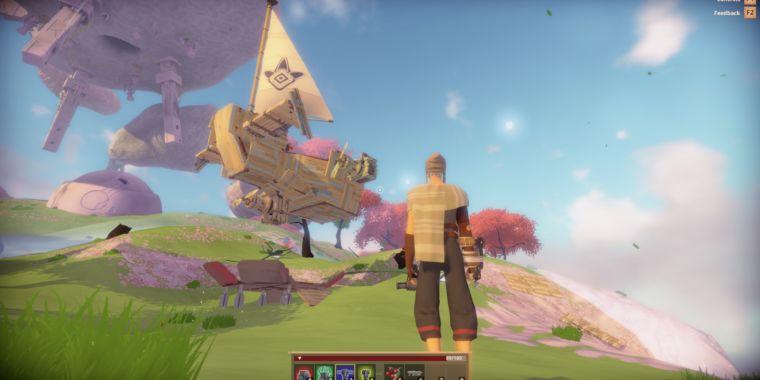
Ars Technica
Bossa Studios MMO Worlds Adrift among games affected.
 blazing finch
The way I'm understanding the ToS, it sounds like they are prohibiting any hosting of Unity game servers, unless it's through there services (or you've paid them lots of money)
That can't be right...
Hosting a Unity game server on an EC2 instance, for example, seems to be against the rules
chrome bay
Yeah it doesn't seem to be 100% clear... but that could be intentional
Apparently they've revoked improbable's license though and clarified it directly with them.
blazing finch
Yeh, probably intentionally ambigious
Hopefully Epic don't go the same route with the whole Epic Store stuff
chrome bay
Epic have done pretty good by most folks so far
But yeah.. you can never be entirely sure
 fleet raven
unity has been evil ever since they hired that new ceo
bitter oriole
I checked and Epic's agreement can technically allow you to refuse such a change
fleet raven
yes, and they can not terminate it without an actual breach from your side either
bitter oriole
Yeah
But I said "technically" for a reason
"By logging in to your Account, using the Marketplace, or downloading or using additional Content or a new Version, you hereby agree to be bound by the amended Agreement then most recently issued by Epic"
Downloading a new engine version or using the marketplace is fine, but logging in to the Epic account will automatically accept the agreement
That's harsh
fleet raven
that isn't how it works though
you can't accept it automatically
the launcher must present it when attempting to log in
I think it actually did that a few times in the past
bitter oriole
That would be reassuring
"Unity reserves the right, at its sole discretion, to modify, discontinue or terminate the Services. Unity may also modify the Agreement at any time and without prior notice"
Right, I'm happy I'm on team UE4 here
 umbral basin
Same
blazing finch
Is there a difference between that and: "bound by the amended Agreement then most recently issued by Epic"?
 jagged stag
Hey guys, I'm making a game that uses only one level and it should be playable in both single player and in co-op (up to 4 players). I'm currently setting up the main blueprints and I can't figure out if I should use GameModeBase and GameStateBase or their non-base variants. Which one should I pick?
bitter oriole
@blazing finch Yes : Epic's version is not automatic
jagged stag
I can add more info if needed
bitter oriole
UE4's EULA states that you can keep using previously downloaded engine versions & marketplace content with the same terms if you don't log in & accept the new terms, or download new stuff
blazing finch
Ah, that's good 😃
@jagged stag Depends what you need your game mode to do. GameMode gives you a bunch of extra stuff over GameModeBase
jagged stag
It's open world
blazing finch
I'd recommend using GameMode, until you want to stop it doing things (in which case, consider switching to GameModeBase)
blazing finch
I would say so, yeh
jagged stag
aight, thanks
chrome bay
Sooo
They disallow people to host themselves, offer a paid alternative instead
Talk about sticking the knife in
fleet raven

guess their solution must be absolute garbage then, if it was a better offer people would have used it on their own
jolly siren
There is no guaranteed rpc ordering for reliable rpcs on separate actors correct?
For example,
Character::ServerManualPickup -> Gun::ClientGivenTo -> Character::ServerEquipWeapon
Character::ServerManualPickup
It isn't guaranteed that Character::ServerEquipWeapon has been called by the time the 2nd Character::ServerManualPickup is called.
jolly siren
Okay, that's what I thought.
I've seen Gun::ClientGivenTo(Pawn) fail because Pawn hasn't been created on the client yet.
And I've seen workarounds that call a client rpc on the pawn before the Gun rpc in order to force the replication of the pawn.
Pawn::ClientForceRep();
Gun::ClientGivenTo(Pawn);
But if the order of these client rpc's can't be guaranteed then that workaround is incorrect
Maybe the server should just reject subsequent pickup attempts if it is still trying to equip the previous weapon
thin stratus
Well, on the Server you can easily lock the state
And wait for it to complete before trying to pickup again
Simple boolean /shrug
jolly siren
Right, yeah I think that makes the most sense 😃
bitter oriole

Unity
Learn how Unity lets designers, engineers and marketing professionals in the automotive and transportation industries create interactive and immersive 3D virtual experiences.
This is getting better
 twin vault
today youre late on your news :p
bitter oriole
I didn't saw that linked here 😃 Follow up on the Unity online disaster
 kindred jungle
Theoretical question: How viable is the scenario of using a dedicated server + client on a local PC instead of a listen server (player hosting the game would basically launch 2 apps). Dedicated server is a primary goal, but player hosting would be a nice addition (but probably not nice enough to deal with listen server and dedicated server at the same time).
twin vault
making it work with both listen and dedicated shouldnt be harder
 unique thunder
From what I understand, changing walk speed (for run / sprint) has to be done on server & client so I set this up:
But, without perfect ping, there's a glitchy lag every time the speed is changed where the server tries to correct or something.
Is there a more reliable set-up?
 halcyon abyss
does anyone know of a function to initialize my Gamemode after a seamless travel.?
i am working with gamemodebase
found it
 peak patio
Hey guys, I have a small problem with my project. When I launch dedicated server (from the editor) with 2-4 players :
- The first player (with the server) always spawn on 0,0,0 with no pawn
- The others sometimes spawn normally, sometimes on 0,0,0 with no pawn
Do you know how to fix that ?
I tried a MWE, but event if sometimes client spawn in 0,0,0 (I mean that the camera is on 0,0,0), it respawn "normally" after a few seconds (and that's not the case on my project, camera stay on 0,0,0)
peak patio
Ok, so I override the ChoosePlayerStart function, as someone suggested me. So every players spawn normaly EXCEPT the first one (the server) that spawn at 0,0,0...
in fact, it's weird because I feel that the pawn spawn, but the first player don't posess it...
 sharp pagoda
@unique thunder The proper approach to that is a bit more complicated due to how the cmc works. Give these two articles a read: https://docs.unrealengine.com/en-us/Gameplay/Networking/CharacterMovementComponent https://wiki.unrealengine.com/Authoritative_Networked_Character_Movement
worthy perch
For CMC changing walk speed, I've just been setting movement speed through OnRep.
unique thunder
@worthy perch Is there noticeable latency when you do it onrep?
worthy perch
@sharp pagoda Hi, would there be any downsides to doing it OnRep/RepUsing?
sharp pagoda
Yes, you're bypassing the cmc infrastructure to manually perform the local additives. CMC has a special move handling system that enables client-side movement with server auth that looks good for other clients as well
worthy perch
Alright, thank you.
 misty stirrup
anyone have anything on the replication graph?
sharp pagoda
@misty stirrup https://www.youtube.com/watch?v=CDnNAAzgltw and Shooter game's replication graph are some pretty nice places to start.

Working on a multiplayer game? Are there many players in-game together? On this livestream, our networking team will demonstrate 4.20's new Replication Graph...
misty stirrup
In 4.21 the ReplicationGraph was released in Unreal Engine as it had been an experimental feature in 4.20. When I first heard about the ReplicationGraph in 4...
found this too
night jay
Question on replication graph though
I've heard it doesn't work well with splitscreen
Do we know more about that?
 ripe folio
Hey ya'll. How does one profile a dedicated server? Can't seem to connect Frontend to it, and stat startfile seems to do nothing (I tried executing the console command on a delay after BeginPlay just to test it).
I can connect a typical C++ profiler but then I can't see Blueprint times etc
Got it... it's -messaging passed on start-up
night jay
What does -messaging do exactly if I may ask?
ripe folio
@night jay it lets you connect the Unreal Frontend to the server, so you can profile it in real time
night jay
Hmm cool, gotta keep that in mind
By the way, I believe there is no way to run commands on a server console no?
 safe marsh
uh
if I build a dedicated server for my project
do the client versions need to be built on the same engine version?
fx if I am using a launcher 4.20, and I then open the project in a source 4.20 will they work together?
 tawdry wing
@misty stirrup it's like a good tutorial on Replication
need to watch that
but it's only CPP not Blueprint
night jay
Pretty sure Replication Graph is not exposed to BPs to begin with
peak patio
I can't find a solution to my problem, I'm pretty sure it's simple, but can't find anything on it...
Where I run multiplayer (with or without dedicaded server), the first player always unpossessed its pawn, and if I force the possession, inputs doesn't work...
(everything else works fine, if I set 4 players, the players 2, 3 and 4 are correctly possessed and can by controlled)
winged badger
just override HandleStartingNewPlayer and spawn+possess from there
peak patio
Ok, I'll try that, thank you!
peak patio
Here's what I did, but same problem, the first player "auto-unpossess" the pawn :/
 vital steeple
@unique thunder I have a buff manager that seems to do it without issue. The server sends a client rpc to set the new speed, then sets it on the server. That seems to avoid hitching. I just modify the client first and the server after. No hitching or anything.
jagged stag
hey guys, I'm trying to figure out the best way to replicate some variables from GameState all connected clients every 0.1 seconds. Is it best if every client has it's own timer that fires off an event that gets the variables from the GameState or should the GameState have the timer instead? I've been looking for this online but couldn't find an answer that's specific enought
P.S. The maximum amount of players in this case is 4
sharp pagoda
@jagged stag Are you changing the value on the server every 0.1 seconds, or are you changing it constantly and only want it to send every interval?
jagged stag
the variable is changing on a timeline (not sure how many times a second it updates), but I need to send it every 0.1 seconds or so
sharp pagoda
@jagged stag A timeline updates every tick, which in your cases is probably every frame. There's no built in way to throttle net update rate per property afaik, so you could move the property to its own actor that you can control with the net update frequency, but that is a pretty hacky solution. You might find a way to throttle it in PreReplication(), but I haven't looked into the replication framework too extensively yet.
sharp pagoda
For what?
jagged stag
nvm
peak patio
Ok, so my problem comes probably from the pawn. I tried a "test" pawn with just a cube and a camera, and it works perfectly.
The pawn from my game is a BP based on custom CPP. I'll investigate. (PS : Even if no one knows here, that actualy help me to write it down ^^'...)
peak patio
Just to illustrate, here is with basic pawn :
and here is with the pawn of my game :
the actor is created, but not possessed (actually, in the log,it's possessed but then unpossessed. and when I force player 1 to possess it, it doesn't respond to input)
kindred jungle
Hi. I'm trying to make a dedicated server with steam, and then connect to it, but apparently I can't have both server and client running at the same time (the second one will fail to initialize steam).
Is there a way to get around that, or is it absolutely necessary to have 2 workstations? 😃 I'm using spacewar app id and Advanced Sessions Plugin.
kindred jungle
😦
bitter oriole
Then again, Steam-specific development shouldn't be that much
You can stick to the null OSS and play locally without Steam
Steam only handles sessions
kindred jungle
yeah, and thats the thing I want to test 😛
bitter oriole
Need two machines then .
misty stirrup
@tawdry wing nah that video is for replication graph not replication in general, replication graph is c++ only atm
 proven turret
Someone can help me? Im doing a multiplayer game and only server is spawning with the correct pawn, the client is not spawning pawn
The client cant move or shoot, only look at skybox
peak patio
@proven turret Do you have several "player start" ?
proven turret
Yes
peak patio
The clients never spawn, or they sometimes spawn ?
proven turret
They spawn
peak patio
You need to overide the "Choose Player Start" function in you game mode
with something like that :
vital steeple
@jagged stag maybe use the timeline to update variable X, then use a timer to set variable Y to X, and have Y be replicated, then force net update
proven turret
I do this, and not working...
 calm plaza
super generic quesiton: im having trouble getting clients to find a created session. Set up through Steam OSS. Slots avialable 1. Have tried with the standard nodes and advanced session version. "Find Session" never returns any results. Ideas on where i could troubleshoot?
 edgy galleon
port forwarding?
calm plaza
@edgy galleon is this in response to me? if so, could you explain?
peak patio
Found out my problem : "Auto Possess Player" should be set at "Disabled"
(24h of debugging)
(I'm so stupid)
cedar finch
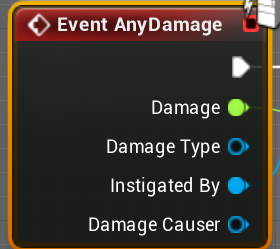
Can the Event AnyDamage be used to send Score info back to the Instigator? https://i.gyazo.com/b7639669f4fcca41980164ec660466b5.png

So far it works for the Server player but not for clients. (Yes I know this is a server only node) Just curious if anyone knew a way to make it work. If not I'll use an interface
 meager spade
why would you want to send score back via that? make a custom interface and apply that, you can even call damage from inside that interface aswell
worthy perch
@kindred jungle, you could probably get an EC2.
cedar finch
@meager spade Yea that's what I was going to do. Thanks.
worthy wasp
@cedar finch - just FYI - if you're going a C++ route - both ApplyDamage and TakeDamage return floats of the damage applied - though i have NOT played around with this in the past.
https://api.unrealengine.com/INT/API/Runtime/Engine/GameFramework/AActor/TakeDamage/index.html
https://api.unrealengine.com/INT/API/Runtime/Engine/Kismet/UGameplayStatics/ApplyDamage/index.html
Apply damage to this actor. The amount of damage actually applied.
Hurts the specified actor with generic damage.
i'm unsure how the BP implementations of these are wrapped up - but they have to be there somewhere as they virtually call the same functions as I just listed.
cedar finch
@worthy wasp The blueprint nodes have the same. Thanks man
That's why I was going to use those becuase I already had them in place with my enemies and player. I thought why make an interface that does the exact thing those events do. But they are server only
worthy wasp
they are server only for a reason - these events should be affecting 100% replicated variables.... UE4 did hte legwork for you in replication on these events :P
But in the meantime - if you're looking to store scores - drop these into a TMap onto the gamestate. While TMaps arent replicateable - you can create a local function that gets this information on the Gamestate - that tears it apart for whatever reasons you can think of and hten has out functions that are either multicast (sent to others) or just simply pump replicated variables that are retrievable by others.
thin stratus
One diff between C++ and BP part of that is the "DamageEvent" struct
C++ passes that and it's super useful
BP only passes the UDamageType class/object
We extended the struct to pass info about what the player was doing when the shot happened
worthy wasp
#StrugglesAreRealToday lol.
I have a listen server mode that i'm trying to setup (A golf game)
I have everything up to the point of hitting the golf ball - which is spawned on server for the owning player (the one its turn is).
I for the life of me cannot get my ListenServer to see the ball being hit... (ProjectileMovementComponent) - yet on my clients they see everything (i've tried more than 2+ players). All clients see everything fine - even when the ListenServer hits the ball - but the LIstenServer's viewport shows the ball sitting still.
The HitBall() is done as calculations on server (SuggestProjectileVelocity_CustomArc()) and then goes to a Multicast to 1:SetVelocityInLocalSpace() & 2: ProjectileMovementComponent->Activate() & 3: DebugSphere @ the location the ball should land.
Again this works fine for all net clients - even they see when the server hits... but my ListenServer viewport does nothing..... it does however print string all events and even draws the debug sphere on its own window.
ProjectileMovementComponent is set to Replicate - and the ball actor is set to replicate as well.
Anything i'm not thinking of here?
worthy perch
@worthy wasp Are you on 4.20?
This might affect you: https://issues.unrealengine.com/issue/UE-62714.
worthy wasp
4.21 inffact
i'm going to do a new project - test this again - just basic beginplay->ActivateProjectileCOmponent
thanks @worthy perch
worthy perch
Just btw, someone had a problem with BeginPlay not being called on the ListenServer in PIE. I'm not sure if this is a because he tested it in PIE, but nontheless. Perhaps, if you have really strange results in PIE regarding server stuff, test in a packaged build.
worthy wasp
yes we were discussing tha tthe other day
i see that issue in my game - and packaged too behaves the same way
 lime skiff
Hey guys, maybe you can answer: Why GIsServer is true on client and why GIsClient is true on dedicated server? Maybe I did something wrong ... see https://stackoverflow.com/questions/54160088/why-gisserver-is-true-on-client-and-why-gisclient-is-true-on-dedicated-server

Stack Overflow
In UnrealEngine, I get the following results when calling bool UWorld::IsServer()/bool UWorld::IsClient() and checking bool GIsServer/bool GIsClient:
┌──────────────────┬─────────────────────...
worthy perch
@lime skiff Is that in PIE? Try in a packaged build.
lime skiff
@worthy perch Yes, it was a PIE build. Single instance launched without editor printed that:
red sand
Can anyone tell me, when I go to targeting mode, the targeting Idle works in local but doesn't replicate
worthy perch
@lime skiff , Without editor? Is the target build Server? If you really want to run the Editor builds, I think you can add the -server command arg.
@red sand Is that in an AnimBP? I don't think it's possible (out of the box) for anAnimBP to replicate. Perhaps you want to replicate whatever IsTargeting is derived from.
red sand
Yeah I did it with Custom Multicast Event in Gameplay Ability BP
lime skiff
@worthy perch I got that output on a packaged build of a minimal example (https://github.com/roidanton/ue_isserver_isclient) and also on ue4editor.exe IsServer_IsClient.uproject -game. The option -server didn't gave me a gui. Guess I'd have to write to log then.
worthy perch
Hmm, well, perhaps there's something wrong with how IsTargeting is getting set from the AnimBP.
@lime skiff , This is for dedicated servers, yeah? The way I've been doing it is : https://wiki.unrealengine.com/Dedicated_Server_Guide_(Windows_%26_Linux).
That's more or less the only way I know of.
But just to confirm, you have a MyProjectServer.exe?
You could also run with -log. But yeah, you should write to log.
I just took a look at your project, and you're missing a Server.target.cs, so you probably didn't build for Server.
lime skiff
@worthy perch You're right, I have no server/server target. Thanks for your help, I'll have a look into this (don't have experience with packaging and the possibilities of the CLI of ue4/packaged games).
worthy perch
Yeah, just follow that wiki. It's pretty good.
But I'm pretty sure the reason why IsServer() is return false is because that function relies on some macro that is only true when the build target is Server.
red sand
It's working @worthy perch
lime skiff
@worthy perch IsServer() and GIsServer are correct for the client in that scenario
ue4editor.exe IsServer_IsClient.uproject -server -log
ue4editor.exe IsServer_IsClient.uproject -game 127.0.0.1
😃
 cyan fox
Hello I need help. How to work with two on a project ?
calm plaza
@cyan fox use perforce. its easy to set up and free. P4D for server and P4V for connecting.
Helix Core (P4D) is a free version control platform that stores and manages access to versioned files, tracks user operations, and records all activity in a centralized database. Download P4D now to get started.
Helix Visual Client gives you visibility and control over your assets. Use the P4V download for time-lapse and revision views, insight into your project metadata, and a powerful GUI.
cyan fox
It's a other game developement app ?
calm plaza
Ever wanted to work with friends on an Unreal Engine 4 project but just couldn't figure out source control? Look no further! Collaborate with your friends, w...
calm plaza
Yeah. Check out this youtube series. it will walk you through it.
Question fine people: is it possible to change the currently loaded map to a listen server using only blueprints? Asking for a friend....myself.
fleet raven
reload the map in server mode
cyan fox
Just my friend can join, or other guy can join ?
calm plaza
@fleet raven is there way to do it with "Open Level"?
without*
@cyan fox i think up to 5 people is free. check the perforce site. it says.
cyan fox
Ok, thank you, it was to know if people could bother us or not
calm plaza
They would have to know the IP and Port to connect to. i believe you also can control who can setup an account under your server.
its not made public.
cyan fox
Ok thank you
calm plaza
no problem.
 dawn summit
@calm plaza @cyan fox it also password protected obviously, so no...
cyan fox
okay thank you
 twin juniper
Anyone here with some knowledge of UDP and C#? Got a few questions :p
sharp pagoda
Yep, fire away @twin juniper
twin juniper
Been trying to make a game server recently (unity using C# and, sadly, TCP - but that worked fairly well - was able to run around and see each other ) now I wanna re do that using UDP (cuz UDP and games).
Since TCP is connection orientated and UDP is connectionless, I am having some trouble with that.
Do you have some help with that? Perhaps a good tutorial on making a server with multiple clients using UDP C# or something like that?
sharp pagoda
Oh I have the perfect article for you hang on
twin juniper
That would probably help me a lot
sharp pagoda
twin juniper
as I said, I did that in TCP. That worked fairly well but was easier, I would assume
sharp pagoda
He uses c++ in his code samples, but the concept is the same
Read all his articles on game networking
The connection oriented udp article in particular is what you'd want
twin juniper
ye that sounds good. connection oriented. cheers
calm plaza
anyone ever have issues with "Join Session" not traveling client to server map?
 plain flume
When using OnlineSubsysten=Null. Can we use Session that isnt using LAN?
Will other players find servers over the network?
sharp pagoda
@plain flume Nope, the null subsystem does not have a master server for advertising game servers.
plain flume
@sharp pagoda Thank you. I just read about the master server. How does one create one? Could something like this be used with Subsystem NULL : https://forums.unrealengine.com/community/community-content-tools-and-tutorials/44960-master-server-with-unreal-engine-4-plugin
Unreal Engine Forums
This is the place to show, share, and link to your stuff!
sharp pagoda
You have to write your own custom subsystem for that, which is a quite a bit of work. I would either wait for MMT or use steam
worthy perch
What's MMT?
sharp pagoda
Epic's internal name for their subsystem
worthy perch
Hmm, interesting.
plain flume
In our project, steam is out of the picture, unfortunately. Is there any info page about the MMT?
sharp pagoda

Unreal Engine
Throughout 2019, we’ll be launching cross-platform game services originally built for Fortnite, and battle-tested with 200,000,000 players across 7 platforms. These services will be free for all developers on all engines, all platforms, and all stores. Developers can choose...
plain flume
@sharp pagoda thanks for help
cedar finch
I'm trying to make my HUD widget display all 4 players names and scores. I have the variables set in playerstate and can retrieve them using the playerArray in Gamestate, but I'm not sure how exactly I should handle it. The HUD is the players hud. I want him to be able to see the other players scores that are in the game. Kinda like Call of duty zombies. Should I make a specific player score widget that holds a players info and then just add it to my hud as a child and set the info?
sharp pagoda
@cedar finch Yes, use a vertical box (in your case), iterate through the player list, and for each make a new widget for the row, fill in the info, and add it to the box.
cedar finch
@sharp pagoda Thanks. I think this is how to do it but I'm not sure where I need to call this function in order for it to work properly. https://i.gyazo.com/4995e27d841c830e0452d3a76e76bf49.png
 sharp pagoda
Gamemode's player join/left -> Dispatch event to all player controllers updatescoreboard() -> myhud->updatescoreboard() -> clear children and build the list again
cedar finch
Ah! ok so use this https://i.gyazo.com/b2a5bf4a74e9a49696672f8bd5ed7b41.png
 sharp pagoda
And Logout()
cedar finch
So I need to store the NewPlayer controller in an array?
sharp pagoda
No, it will replicate
cedar finch
Ok I'll give it a try
sharp pagoda
You could also leverage gamestate::Add/RemovePlayerState
That might be a better solution
cedar finch
Hmm so using the gamemode it seems my HUD is not created yet so the values don't get set
So this is what I tried but It never returns a valid HUD reference https://i.gyazo.com/a3c019dbc5eb0cb1512b41ad4430a558.png
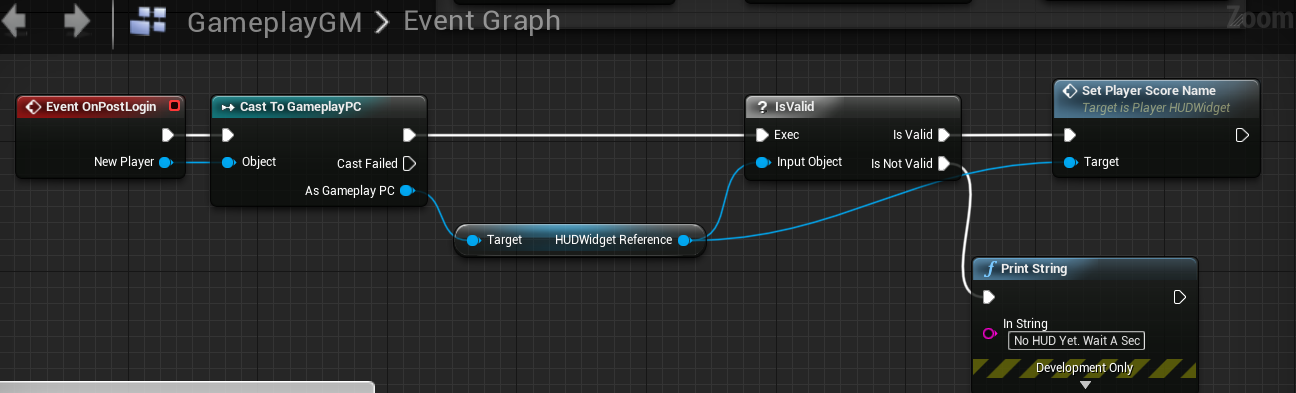 sharp pagoda
Yea because that makes no sense
cedar finch
I guess becuase it's server and doesn't have created hud
sharp pagoda
Remember, the hud is local
sharp pagoda
You're missing this step
cedar finch
So can I just get all actors of class?
cedar finch
So something like this? https://i.gyazo.com/d194446f4d81ee512e2a63a2d7fead4b.png
 sharp pagoda
Nope, you're doing the same thing
"Remember, the hud is local"
You can access it from the game mode
cant*
You have to dispatch a client RPC
Then the client can do it locally
cedar finch
Hahaha Dang it! Sorry i understand IDK what's wrong with me
Ok I got my name working correctly now I'm going to try adding in the scores and see what happens. So far so good. Fingers crossed. Thanks for that help too by they way. 😃
Oh lord lol. It looks like it may be adding some extra stuff for the server. Clients look ok though: https://i.gyazo.com/7e0ccb330bd65815882e09cbb1d57177.jpg

The Colon doesn't get set it's just part of the child widget. So that has to mean that it's creating blank child widgets maybe due to existing PlayerState in the array. IDK
 edgy galleon
is your door set to replicate?
calm plaza
"Join Session" isnt traveling client to listen server. Tried on Lan and internet. Set up through Steam OSS. Any ideas what could be up?
Also, Join Session is showing successful. Just not traveling.
 hard lance
Hey all. In Blueprints im trying to have my GameMode bind to event dispatchers on my player character actors. Ive overridden the GM's OnRestartPlayer event and am trying to bind to each spawned actors event dispatcher. The event dispatcher only works on the server's player character though. The event will never trigger on a client. Any ideas on what I'm missing?
worthy perch
@calm plaza I think Steam requires Seamless Travel. Are you using Seamless Travel?
thin stratus
 wise depot
if anyone has any experience with PS4 dedicated server and unreal please send me a PM, i'm struggling with something and can't quite figure out what to do and can't see a solution on the forum.
 lament kettle
Hey @thin stratus I know you worked on this amazing PDF about multiplayer. I haven't really been doing ue4 in the last few months. I was wondering if you've updated or added on to the PDF?
 versed socket
fwiw afaik the PDF hasn't been updated in like a year or two... but its stuff hasn't really changed very much I think?
 sly kernel
is there any difference between making MP game for PC and Android ? (talking about multiplayer specifics, not the game/mechanics overall)
versed socket
Is a server capable of managing players in multiple Worlds? (i.e. if I enter a building in an MMO from the overworld, will the server manage both the overworld and the world I just entered?) If so, I imagine that must really tax servers when it comes to replication. Much more so then with all Clients in a single World.
lament kettle
Ah okay. Thanks for the info guys.
thin stratus
@sly kernel Replication-wise? No. It's all the same. Just the Subsystem is different (and supports different stuff).
@versed socket One Server, One World.
sly kernel
@thin stratus so if I don't use Steam or Google specific online stuff, multiplayer is pretty much the same on any platform? (except for consoles maybe?)
thin stratus
Usually yes.
sly kernel
aye, thanks
 bleak lily
yeah here is my blueprints for the door opening

I replicated the meshes too
it doesnt work anymore lol
bleak lily
can anyone help me my door doesnt open for clients
I tried a different video but it doesnt work for clients
I even did rpc's
bleak lily
is executes on all multicast
edgy galleon
yeah
 mild jungle
Can anyone explain why SpatialOS is or isn't a huge deal? They show players shooting eachother across server boundaries but what are the real limitations of something like this? Taking PUBG as an example what issues would result from scaling up to 1000 players using this tech? Appreciate any help understanding this!
twin juniper
Is there such thing as your character catching objects/items and keeping them in your character inventory or ewuipment for UE4? Say in a multiplayer Game, an enemy throws a grenade and I want to catch it, but I also have a spare pin to disable it, I can then have it to use for later?
 fossil spoke
Check the Marketplace for Inventory packs. There is plenty of that type of stuff around.
twin juniper
@mild jungle my generic knowledge of Spatial is that it optimizes the server-client for better performance and workload so you can have bigger maps and more players. So it's a pretty big deal. Your main concern is just like any other networked Game, you want to make sure you have enough bandwidth to handle all data.
@fossil spoke Oh for real? I wasn't aware. Do you know of the top of your head which ones?
fossil spoke
No mate, it takes 2 minutes to search
twin juniper
@fossil spoke I don't think any pack has that?
 severe widget
well ofc not
fossil spoke
It wont have it exactly, you have to do some of the work mate.
severe widget
but you can make that mechanic
twin juniper
So just BP a mesh and say is thrown by player, is in air, can be caught, player catch, player interact (pin grenade), place in inventory?
Is it that simple?
severe widget
If we did it in our game, maybe, for you probably not.
Like Devils says, try it out
twin juniper
Hm. Would I need to get world location of object?
Or is that automatic, sort of just like dropping your weapon on the ground?
severe widget
Sounds like you're just starting out. I'd honestly just start trying to make the mechanic work.
You can ask specific questions throughout slackers, but I've no idea if your grenade pin idea would technically require either object's location in that sense.
worthy wasp
not to resurrect a dead horse - byut i'm coming up on what i think to be an engine bug and lookign to get some eyes on this - anyone else experiencing this?
I have a project - i made the project GameMode & GameState (NOT BASE) - and its a golf game. I'm utilizing UProjectileMovementComponent - and have soem very odd things happening in the GameMode & GameState setup..... My replication of physics is boinked!
I did a test with GameModeBase & GameStateBase - and its the SAME EXACT CODE for the ProjectileMovementComponent - and they work JUST FINE!!!!
I'm trying to understand where things are going wrong - if i can pin this down to a engine bug (4.21) or my own errors with coding..... Is anyone else experiencing this with GameMode & GameState in 4.21 (or even earlier)? Physics in a ListenServer or DedicatedServer are just falling to the ground and not replicating (Dedicated) or in ListenServer - physics works only on the clients.
This topic has been brought up several times the last couple of days (by myself and others) and i'm just tryign to help the engine out if it indeed is an engine glitch.
fossil spoke
@worthy wasp Can you reproduce it on a blank project?
thin stratus
@edgy galleon @bleak lily I'm pretty sure that is wrong though :P
You can't call that ServerRPC on the door
winged badger
he doesn't have to
its triggered from overlap
so technically doesn't need RPCs at all
thin stratus
Correct, however the Setup is still wrong, at least if this should show a correct one
It's working cause of all the double and tripple execution
edgy galleon
Seemed way overkill for a door but wouldn't just setting a replicated bool and checking if it's open or not in the rep notify work
unique thunder
A log on my dedicated server. When I try to join it, I get sent to an offline version of the map and my connection is never established or something. I highlighted areas of interest but I don't fully understand what went wrong -- the callstack just says "UnknownFunction". If anyone can tell from that image, much appreciated !
wise depot
well your server is crashing
run it with a debugger attached and see what's causing it
thin stratus
@edgy galleon Yeah, but only if you are somehow on the Server.
And overlap is fine, but if you want to do it via Input, none of the images showed the proper solution
wise depot
@unique thunder also, in WS_PlayerBP you have a function for replicating the username, however the property PUI_Username is invalid when you're trying to use it. same goes for OnRep_Team
inside of SetPlayerData
unique thunder
@wise depot PUI_Username is a TextRender component that exists inside that blueprint so it can't be invalid. The component is set to Replicate though so that I can access other player's TextRenders and change visibility on my own client. OnRep_Team simply takes a variable from the GameInstance and sets it locally via OnRep which just changes the color of the TextRender.
How could these be null or fail? 🤔
 wary wyvern
Guys, how do you make load tests on your servers ? I want to test, how many players server can connect, but making >200 clients is pretty heavy 😃
unique thunder
@wary wyvern Test it with a limit of 2 and if you can't pass it, your cap works :👌
Or are you trying to see when the server can't handle them anymore
wary wyvern
Yeah, I want to know, how many players can handle
wise depot
"Accessed none trying to read PUI_Username"
it almost certainly is invalid
its possible that it just doesn't exist on a server
because it makes no sense for a text renderer to exist on a server
that aside, your crash will probably be unrelated. you need to attach a debugger to see what's going on
also, how are you packaging your server? for it to say unknown function implies it doesn't have any debug symbols
bleak lily
Yeah i want it so when I press the interact button the door opens
I would do that through my actual player?
thin stratus
You have to
Cause you can't call the ServerRPC inside of the Door
Cause it's not owned by the client
wise depot
@thin stratus do you have any ps4 experience at all?
bleak lily
wait so the box overlay part is fine but I have to change the interact and put that in the playercontroller?
edgy galleon
Yeah I wouldn't check for input on the door if that's what you were doing
bleak lily
yeah I am trying to do this I will screenshot it

I casted it
in my player controller
but I dont know what to make the object wildcard
edgy galleon
Have you looked at any interaction tutorials, usually you'd either check for interaction with line trace or add the actor to your interaction on overlap, if there are any interactions when you press a key you'd call the interact event on the object
bleak lily
yeah its a key press
thin stratus
Input Interact -> ServerRPC -> LineTrace -> CastHitActor to Door (or InteractInterface which would be better) -> Call Interact function
edgy galleon
You can set the length
In your example you're trying to cast nothing to a door
Need to get the door somewhere
There's some nice and easy interaction tutorials you should look at, you'd be able to set anything up for interaction with your player with just an interface
bleak lily
I did the line trace and such but its kinda weird
it works but when I look at the trace it hits something
Ill screenshot it
like it almost collides with the actor
I moved so you can see it but thats where I was originally
misty stirrup
does anyone have docs/tuts on creating two player/skeletal meshes montages? i want to make a grapple system using animations but im not sure if best practice is lining up actors by hand and firing two seperate montages
 knotty sequoia
Any simple reason why when i request for (attached image) it always returns with no values?!?
 swift topaz
Simple reason: You might not be set to use an online subsystem and you might be using the null online subsystem.
Simpler reason: You're not connecting your logic to "OnSuccess".
knotty sequoia
oh right
it was on "OnSuccess"
it's like the array returns with no values
even though it should
@swift topaz when i do this the output Results seems to contain no values as the forEachLoop does not fire off
knotty sequoia
yes
swift topaz
Are any sessions created on a separate machine?
knotty sequoia
i have a friend running the same game but hosting the advanced sessions game on his steam account, so yes
plus it's the Spacewar Steamappid so im pretty sure there would be others anyway
swift topaz
Check logs, might have some debugging information in there.
knotty sequoia
nothing in the Message and Output logs that shouldnt be
swift topaz
¯_(ツ)_/¯
as long as you're both running the same build of the game, there should be no issues
Could be that the creation of the session is failing
knotty sequoia
correct me if i'm wrong, but if it did. wouldnt i still see other Spacewar games?
and as far as i know, its working
swift topaz
Back when I tested out the steam spacewar steamappid, I only got my own sessions, never anyone else.
knotty sequoia
Alright
swift topaz
Maybe it was a fluke, maybe it's how it is intended.
¯_(ツ)_/¯
Didn't spend too much time on sessions to be honest.
knotty sequoia
I remember reading that people would use one of the filters to specify what game it is to stop the thousands of other dev servers from appearing
wise depot
you also have to have the same version number
different version number will filter it out
knotty sequoia
I know there was a place to set it 8n the project settings, but does it update itself each time i rebuild it?
knotty sequoia
Yeah, in that case i havent changed it ever
edgy galleon
Try setting max results to like 10000
Worked for some people, depending on how many people are playing on spacewar now
Which is always thousands

 robust wind
Hey quick question how would I go about setting up a static camera for the players?
The way I did it stops working after server traveling from. Lobby to game using seamless travel 😅😬
knotty sequoia
uuuuuuurgh... Find Sessions Advanced is still not working!
 modern dome
How would I Identify "others" on a client?
I want to replicate who paused the Game.
Since PlayerControllers do not exist on clients, I am unsure how I would identify who actually paused it. (so Others cannot unpause for example)
sharp pagoda
The playerstate would work
modern dome
So in my GameState I would have something like this?
UPROPERTY(EditAnywhere, Category = "ARPG|Game", ReplicatedUsing = OnRep_IsRingMenuOpen)
        bool IsRingMenuOpen;
    UPROPERTY(EditAnywhere, Category = "ARPG|Game", ReplicatedUsing = OnRep_PlayerWhoPaused)
        APlayerState PlayerWhoPaused;
And then I use PC->GetPlayerState() to check if PlayerWhoPaused and GetPlayerState are equal?
sharp pagoda
Ehhhh, no. So you have a system where clients can pause and unpause the game, right? But only one person can "lock out" the pause at any given time?
modern dome
only the one who paused the game can unpause it
sharp pagoda
Alright so the clients should not need to know who actually locked out the pause, they just need to know that the game was paused by someone. Instead I would set it up to have clients send pause/unpause requests to the server, where the server can then determine whether or not to actually forward the request in the game mode.
knotty sequoia
Xenonic any idea with my issue?
knotty sequoia
yes and yes
sharp pagoda
When you shift tab does the steam overlay come up?
knotty sequoia
yes
sharp pagoda
CreateSession is probably failing, debug output for the failed pin of that
jolly siren
Is it easy to send a UObject via a rpc parameter? Debating on whether to use a ustruct or uobject to store my player stats that are different per gamemode. I want to replicate them to all clients post-game to show on a full carnage report.
fossil spoke
Just use a Struct, are they short lived data?
If they are just being displayed at the end of the round then use a Struct.
sharp pagoda
Yea I would use a struct in your case
knotty sequoia
Yeah, its not the create session
sharp pagoda
Success on that?
sharp pagoda
Ok so open up your steam client on the computer that made the session
Click uh Settings?
In the toolbar up top
Find Download Region and make sure you are both in the same region
jolly siren
Okay, yeah that is what I would naturally use too. Just wasn't sure if replicating a UObject like that via rpc was doable
sharp pagoda
It's do-able, you just have to write a bit of boilerplate to replicate it before it can be net addressable
fossil spoke
Your almost always better off using an AInfo Actor anyway.
Actors were meant for replication.
If you need Replication, use an Actor
jolly siren
Right, yeah I've setup UObjects to replicate. Wasn't sure if that was all that is necessary to send them via rpc tho
fossil spoke
Im pretty sure there is a tutorial that outlines the basics of UObject replication. Its pretty straight forward once you understand whats happening.
But again, its much easier to just use an Actor.
sharp pagoda
@knotty sequoia Going to run for a bit, ping me when you get back
jolly siren
Yeah, I know how to replicate UObjects; that is simple and I definitely wouldn't use an Actor if all I want is replication. But I don't think that is all that is necessary for them to be rpc parameters. Don't I need to serialize them like this? https://forums.unrealengine.com/development-discussion/c-gameplay-programming/111612-serialize-a-uobject-so-it-can-be-sent-via-an-rpc-over-the-network
If the standard UObject replication setup is all that is necessary to send them via rpc then that is easy.
Unreal Engine Forums
For gameplay programmers writing C++ code.
robust wind
@knotty sequoia you will Only get results from. Internet when steam is running and the steam overlay appears in the game and you are playing on 2 different machines with different accounts
edgy galleon
I couldn't get advanced sessions with steam to find sessions either, only worked on lan
I'm guessing it was my router
 sudden stream
I've never seen it work over the internet for Spacewar (the dev appID)
worked fine once I applied for(purchased) my own app
edgy galleon
Other people claim it does though, which is frustrating lol
Does your app have to be live to test it?
Cause I have a few of my own app ids
sudden stream
Yeah, I think so
Quick question, can Owner or Instigator be replicated to clients for actors spawned by the server at runtime?
knotty sequoia
@robust wind but you see... all of those were true!
worthy wasp
@sudden stream - Instigator is a controller - no? Other players have 0 ability to get the other players controllers.
As for Owner - if its a AACTOR - i dont see why not - AActor::GetOwner() is a public function - you obviously have to cast to whatever your intending it to be - unless you use an interface.
sudden stream
Using blueprints, both inputs on the Spawn() node seem to accept an Actor ref, in testing both GetOwner() and GetInstigator() return the correct reference when run serverside
but client consistently returns null
worthy wasp
i'm sorry
you are correct - it is an APawn* object
however the tooltip - i dont know that it should even be used for SpawnActor().....
"Pawn Responsible for Damage caused by this actor." - i suppose for things like a weapon or projectile - sure
but i dont know how that differs from get owner
sudden stream
ye, Owner is an AActor* / Instigator is an APawn* but they don't appear to be replicated, which is a bit of bummer, suppose I'm going to have to add loads of boilerplate initialisation methods to my component blueprints
worthy wasp
the reason i mistook instigator for a controller is the direct function GetInstigatorController() -
i just haphazzardly put 2 & 2 together
are you doign this on a TakeDamage (AnyDamage) function?
sudden stream
Yeah, that appears to just be a shortcut to calling GetInstigator(GetController())
Nah, just being a bit hacky, I'm spawning lots of attachments at runtime for turrets and such on a large vehicle
wanted a shorthand method to get a reference from the turret to the parent vehicle
Seemed a bit silly to replicate an additional variable if I could simply have used the Owner reference to get back to the parent vehicle
meager spade
if they are spawned on the server (which they should be) then the Owner will be the truck
is not sure what the issue is
and if GetOwner() returns a PlayerController then client will see null
what does GetOwner return on the server?
sudden stream
The server returns a valid reference to the Owner(Vehicle) correctly, the client returns null unfortunately
Not the end of the world
sudden stream
Spawning is done on the serverside via a custom SceneComponent
meager spade
and the actor is set to replicate aswell as the scenecomponent?
sudden stream
The SceneComponent isn't set to replicate but the Vehicle and Turret both are
Just found the issue
I was calling GetOwner / Get Instigator in the Construct graph


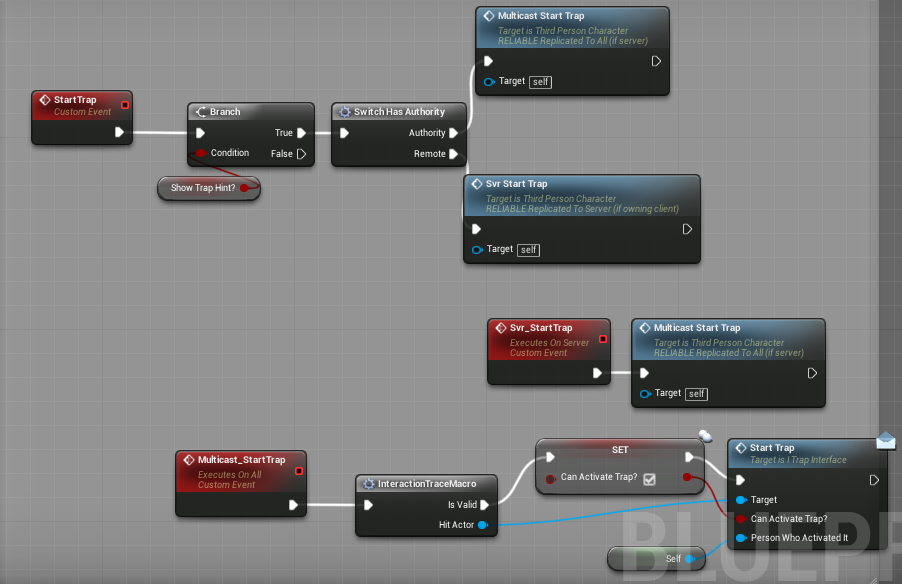
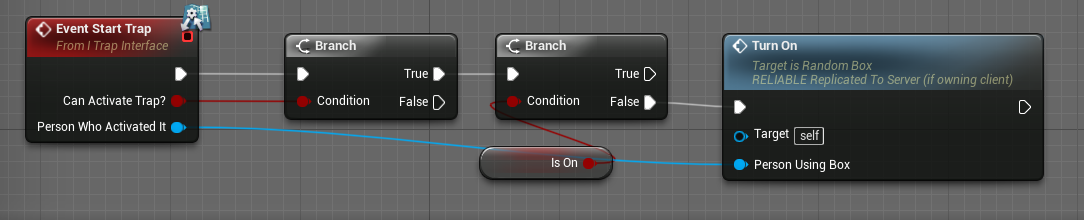
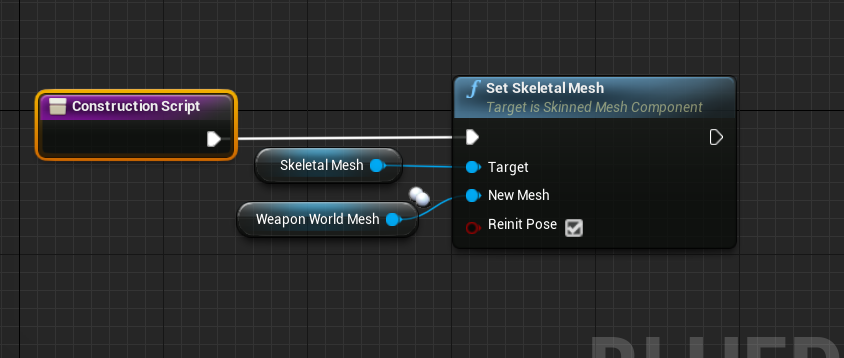
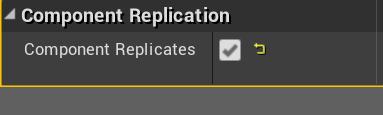
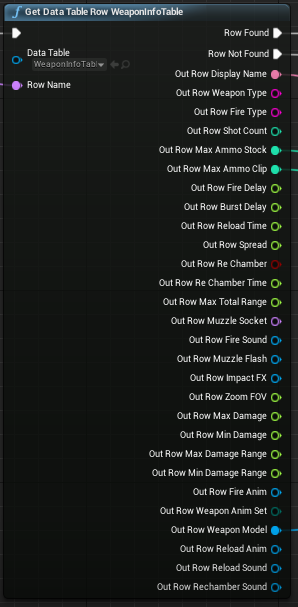
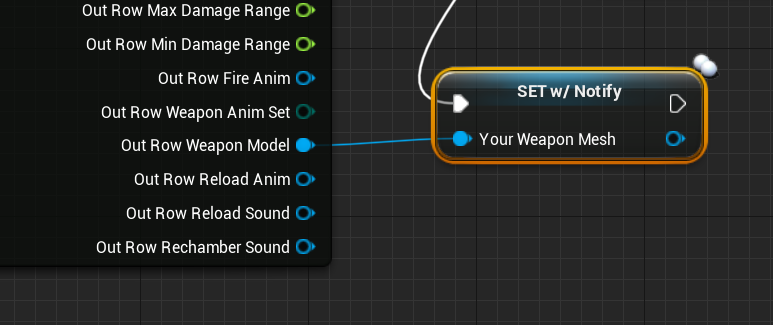

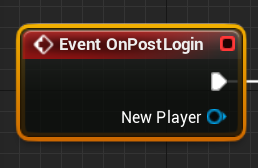
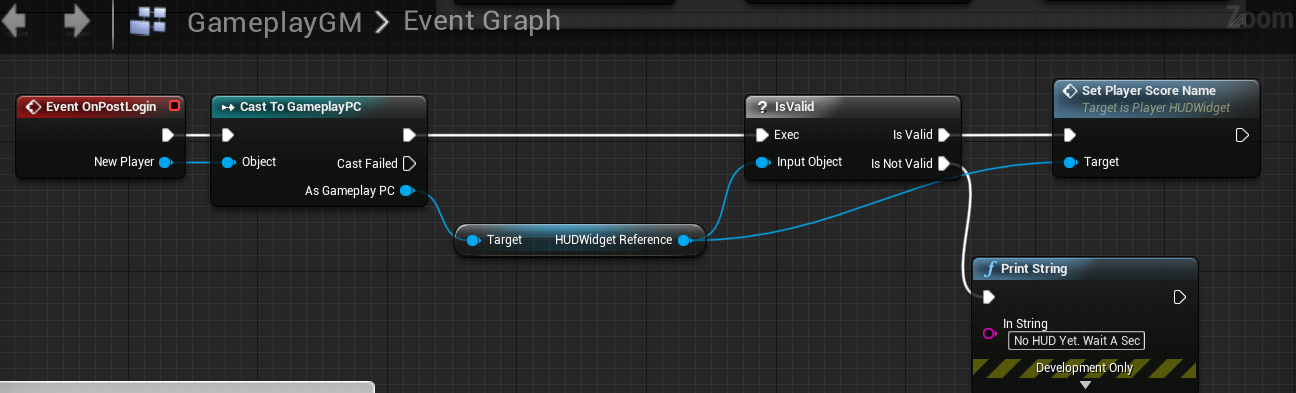

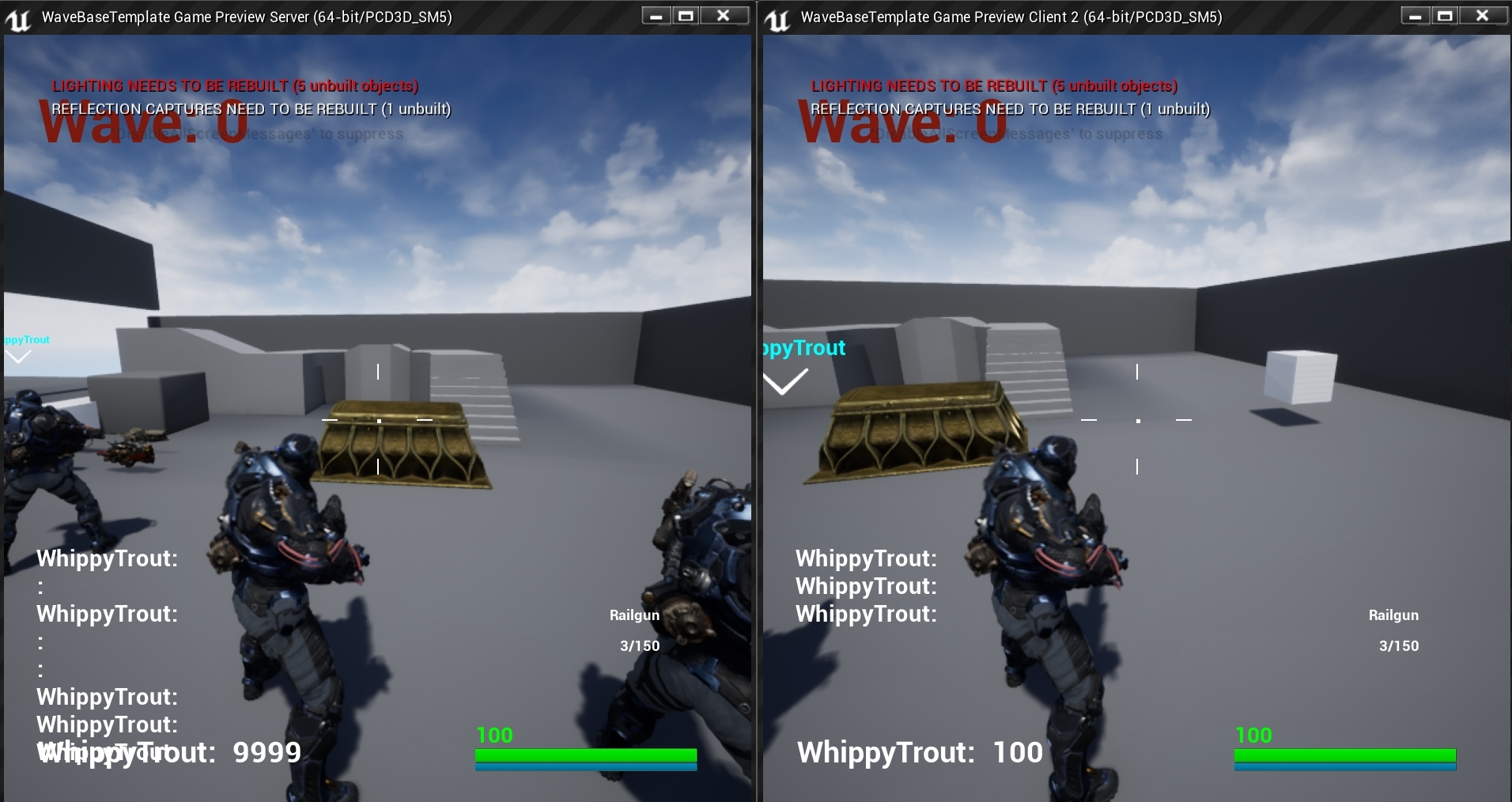
Feel like a right twat now.
bleak lily
hey I have a question my client's movement is really jittery
and it looks less smooth than the host
calm plaza
Anyone else have the Destroy Session - Invalid Player State issue? I'm having connectivity issues and wondering if this is the cause.
[2019.01.14-23.14.55:332][452]LogNet: Browse: /Game/Maps/Lobby?listen
[2019.01.14-23.14.55:332][452]LogLoad: LoadMap: /Game/Maps/Lobby?listen
[2019.01.14-23.14.55:333][452]LogScript: Warning: Script Msg: DestroySession - Invalid player state
hard lance
Hey all. In Blueprints im trying to have my GameMode bind to event dispatchers on my player character actors. Ive overridden the GM's OnRestartPlayer event and am trying to bind to each spawned actors event dispatcher. The event dispatcher only works on the server's player character though. The event will never trigger on a client controlled player. Any ideas on what I'm missing?
fossil spoke
@hard lance The GameMode only exists on the Server, Clients do not have a GameMode so therefore they will never have those Events called.
hard lance
@fossil spoke Yeah. What I am trying to do is have the GameMode subscribe to an Event Dispatcher for each spawned player. But it only works for one player (the server)
 earnest moss
Hi, I'm trying to work out multiplayer with Advanced Sessions. And it all works in the editor, but once I launch steam I'm no longer 'spacewar' but I become 'projectname' and I don't have the spacewar achievements or the invite/join friends, and am unable to find any hosted sessions. What step/steps have I missed?
 glacial pollen
I wish there was an on rep for actors spawned
Widget->PC(client)request->PC(server)request->GMspawn->PC(Client)NotifyWidget does not work
The initial reference will be valid in the widget, only for that call
After that the widget looses the reference. And let's not talk about the characters beginplay that hasn't executed yet
glacial pollen
OMG unreal, fix your freaking engine. (not saving editor settings)
robust wind
@knotty sequoia I struggled as well setting it up what worked for me was to raise the max results to something like 1.000 or 10.000 that resulted in a result and works only in standalone or packaged
cedar finch
So I made an interface for my scoring system. It kinda works but I'm having issues with it too. So when I kill an enemy I want to get points for every bullet hit as well as the enemies death. My problem is that it only gives points for the first bullet hit, then waits until it's finished executing (i guess) then will give you more score if you shoot the enemy again.
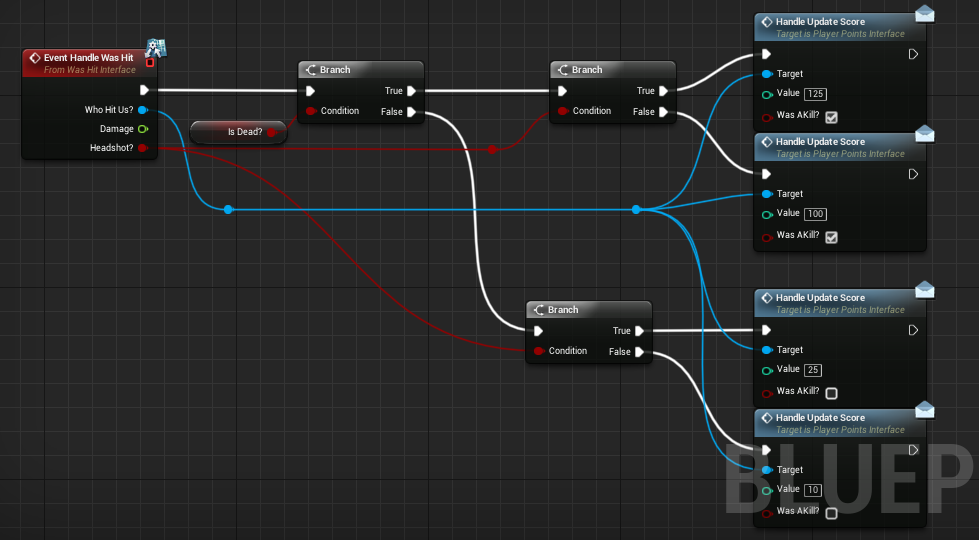

So If I shoot the enemy in the chest I get 10 points, then immediatly right after I shoot him in the head and kill him. I still only got the first 10 points because It happened so fast. Where I should have recieved an additional 125 points.
knotty sequoia
@robust wind you have pointed out all the things i have already done!
robust wind
Ok haven't read that
earnest moss
I found my issue, Advanced Sessions Plugin is broken for the current engine. Any attempt to package will stop your game from using the spacewars appid
 ocean arrow
What is the best direction to fuck off to if I wanted to find tutorials on net coding? (Unreal fighting game btw)
C++
bitter oriole
There's a great UE4 MP tutorial on Udemy
ocean arrow
It would show me the ropes for coding a C++ net code that would perhaps meet the demands of a fighting game?
bitter oriole
ocean arrow
^^ my guy
bitter oriole
It's pretty great, as someone who isn't new to this
ocean arrow
Nice!
bitter oriole
It goes beyond what UE4 does
bitter oriole
Udemy is always at 94% off
That's the real price here
People will give me shit for linking Udemy because their sales tactics are basically illegal
This particular course is just good
ocean arrow
Oh so I don't have to rush to the bank and buy it right now?
ocean arrow
I am a few cents short of 11.99
Curious, have you ever net coded a fighting game?
I am making a smash bros style platform fighter
bitter oriole
Nope, never done a fighting game.
ocean arrow
Was wondering a ball park on what a pro would charge for net coding one such game with 12 characters.
I understand each facet of it needs to be coded with net play in mind.
bitter oriole
Netcode is effectively going to be your code, it's very intrusive. I wouldn't let a third-party do it for you, because it's a lot of work that creeps everywhere, and needs to be very good to feel decent.
ocean arrow
Is learning it from scratch somewhat of a fool's undertaking if I want this game out within a year or 2 wtih decent net code?
My C++ knowledge is.... weak
I understand this is the hardest piece of the puzzle to find in terms of building a studio
I have noticed net code guys are the most rare and expensive. It keeps me up at night.
bitter oriole
UE4 netcode is far from unapproachable technically
Actually the concepts are somewhat simple
ocean arrow
Is that hope I hear?
bitter oriole
Yeah, don't get me wrong here
The hard part is designing your code to work with netplay, and that's where it gets hairy
There is never any universal solution that works across games
Some games accept that a remote player who shot something that was already gone on the server still shot it anyway
Some games will play very cleanly with shit networking because it's fine if the same thing isn't actually happening for everyone exactly the same
Some games will visually lag all the time because they're extremely fast paced