#multiplayer
1 messages · Page 432 of 1
 prime axle
 fossil spoke
Are you using Blueprint?
prime axle
c++
fossil spoke
Ah ok
prime axle
Dedi Server aswell
fossil spoke
Well you can go a few routes, you can pass the choice as an Option to the Server upon connecting.
An Option is a String which can hold "settings" for example
prime axle
Where would I pass it through though? GameInstance/GameState/GameMode will al be reset
fossil spoke
You would then parse that Options string and react to it based on the information
However your OSS handles the connection of a local Player to the Server
prime axle
currently a console command of "Open XX.XX.XX.XX"
fossil spoke
Usually ClientTravel() would be your most common way.
Travel to a different map or IP address.
The URL param is where you build the connection information + the Options
prime axle
Does the PlayerController "Stay Alive" when going from MainMenu to Gameplay?
fossil spoke
"127.0.0.1?Character=MyAwsomeCharacter"
No it doesnt
A new PlayerController will be created and assigned to the incoming player once they connect to the Server
prime axle
Just wondering then how ClientTravel() will keep my choices alive if it's part of the PlayerController
fossil spoke
But it will have its Options appended once its created
Its sending the choice as part of the connection request
prime axle
Just trying to wrap my head around all of it, just so I get a good understanding, sorry for all the questions, Appreciate you trying to help me
prime axle
oh that's actually really cool, thanks!
so I'll have my Gamemode to a custom one with None on my Pawn
When joining I'll pass whatever parameters I need
And in the InitNewPlayer function i'll override it, parse my paramaters and spawn the correct character based on those paramaters
Yea; I get it now. Huge thanks man! Appreciate the help!
fossil spoke
Yep exactly
👍
No worries.
Good luck.
Your not limited to what you can pass via this method, use your imagination.
prime axle
is there a difference between the console command "Open IP" and ClientTravel("IP", TRAVEL_ABSOLUTE)?
fossil spoke
Honestly not sure, i rarely use the Console command.
Search for it in the codebase and take a look
prime axle
I assume they're similair to what I intend to use them as. Just wanted to be sure 😉
Alright, I'll leave you to your peace now! Again, thanks! 😄
fossil spoke
It may do different stuff depending on whos calling the console command.
For example if its the Server calling it instead it might do a hard travel or something
 rain coral
Is it possible to spawn something only on the server without automatically spawning it on the clients as well?
I need to let clients spawn their own local versions of this object (an item they spawn with), otherwise when clients call functions on the item, it has server authority, which is a no-go
rain coral
So, to put it short, the problem is that this runs on the client:
It doesn't spawn the shot on the server, but it executes on client (for some reason) then a couple of ms later on server (like it should)
 manic pine
authority identifies the one who made the object
 mighty schooner
Hi @rain coral Out of curiosity would you mind showing the code behind PRINT1
manic pine
if its a server-made object that is replicated to clients, then HasAuthority should return false on all clients
rain coral
@mighty schooner
@manic pine Hmm yeah okay. the challenge is that the clients should initialize some stuff on the weapons when spawned. but if the code to spawn the guns only runs on server, they are still replicated to the clients. so the server must spawn the guns, then.. pass a reference to it to each client so they can interact with it? Doesn't sound right
mighty schooner
Thank you @rain coral I was trying to automate FString::Printf to try and avoid typing it all the time with Args
rain coral
@mighty schooner Ah, yeah, my method has worked nicely so far =]
manic pine
are you trying to do something original, or are we just talking about regular carried/equipped weapons
rain coral
It's like a load-out, just something each client spawns with at the start
so yeah, carried weapons
manic pine
and you wanna change the weapon from the client?
if this was about selecting a weapon at start, then client should start with no weapon then RPC server to request a selected weapon... if this was about modifying an existing weapon, the server should spawn it and then client uses rpc on the weapon to change it after its been received(and owned) by client
either way im not sure i see the problem, unless one of us has misunderstood something
rain coral
Yeah, I have some trouble explaining my thoughts in simple enough terms sometimes. the core of the issue is that spawning a bullet should only be done by the server, but instead it happens on the client (because they spawned and own the gun), then later on the server as well, which is replicated to the clients. so the clients fire twice
manic pine
right, thats a simple matter of having a hasauthority check, or only firing bullets from a function thats part of a server RPC chain
rain coral
I suppose a harmless approach would be to check if the owner of the gun has authority, not the gun itself
manic pine
while the client function only does visual stuff
if your HasAuthority is returning true on the client, then you've done something wrong
rain coral
the HasAuthority check is on the gun itself at the moment, which returns true for clients as well
rain coral
yeah. so gotta.. I guess, call a server command to spawn the gun for them
manic pine
depends, not if the server can already know which weapon theyre supposed to have
but if its a selection screen or something, then yeah
rain coral
the server decides the loadout, so it's not the clients' choice
manic pine
right, in that case the client doesnt need to tell the server which weapon to select
since server already knows
rain coral
I'm just confused about how to let the clients have a reference to this weapon. they don't spawn it themselves, but they've gotta register it so the rest of the game-code works
manic pine
yeah, the standard way of doing that is that your character has a
AWeapon* EquippedWeapon field
thats replicated
with a repnotify so the client can tell when his weapon changed
rain coral
yeah, I think I already do that
 wary wyvern
Guys, is it possible to make Mobile HDR be a bit faster?) I try to launch very simple scene on Snapdragon 625 with 30 fps only.. There are just 15 meshes and baked lighting.
It looks like Unreal becomes more heavier each version, there are no optimizations (
rain coral
@manic pine Trying to get this working now (it works.. 10% of the time?), but running into a problem. when I start the game, 9 / 10 times or so, the clients just freeze in air, and nothing gets replicated from the server. I did a 'netprofile' and looking through the Network Profiler, no properties get replicated. sometimes one of the clients function correctly, though without getting the weapon callback, and sometimes (rarely) both clients spawn, get the weapon callback, and everything works as it should, with no issues 🤔
seems to have a lot to do with whether the editor is maximized or in a smaller window
it pretty much always works if the editor is maximized and covering the whole screen, and pretty much never works if the editor is a floating window
 cedar finch
@winged badger @sharp pagoda So you guys I wanted to thank you for helping me with my Player HUD and Name questions. You guys taught me a lot and with that knowledge believe it or not I actually found out how to make it all work without using an override or the Event Possessed node. I took a break yesterday from UE4 and just thought over my issue of having to use delays in order to get my HUD stuff to show up correctly with clients and then it hit me. What I did was create an event inside my PlayerController that updates the players HUD with correct health values etc. I then call that event inside my Gamemode right after I spawn and possess the Pawn. It seems to work for both server and client perfect and got rid of all my delays. 😃
That's why i love this discord. I can discuss issues with people who are knowledgeable and then learn from those discussions. I hope I wasn't too annoying with all my questions I just love soaking up as much useful information as possible. You guys are great. Thanks again.
manic pine
@rain coral that does indeed sound weird... first confirm you dont have any error logs, then check server hasnt frozen, then confirm the clients actually receive their pawns, then find out if beginplay is being called on both server and clients
unless you can just look at your code and find something obviously wrong
 chrome bay
Well this is utterly incredible:
https://www.unrealengine.com/en-US/blog/epic-2019-cross-platform-online-services-roadmap?utm_campaign=Oktopost-2018-12 General Campaign&utm_content=Oktopost-twitter&utm_medium=social&utm_source=twitter&sessionInvalidated=true

Unreal Engine
Throughout 2019, we’ll be launching cross-platform game services originally built for Fortnite, and battle-tested with 200,000,000 players across 7 platforms. These services will be free for all developers on all engines, all platforms, and all stores. Developers can choose...
dat link tho
cedar finch
Anyone read about SpacialOS? Sounds cool but I have no clue if it really can work

SpatialOS GDK for Unreal Engine: a hosted service that allows you to go beyond a single dedicated server instance whilst using the Unreal Engine’s networking API.
 twin juniper
If I make a session, and save the session info thing, can I use it to feed the join session node? Without online subsystem. I got the discord plugin to work and it has a join game functionality, but it says that you have to figure out how to match them using the match ID string. And idk how to make it work
 hasty adder
Dumb question maybe. Maxplayers on ossnull, does this auto refuse new connections/spec connections or would I need to do some legwork ?
twin juniper
Ok I will rephrase my question to be more understandable, I know I'm bad at explaining.
Can I make a player connect to other by ip without port forwarding
hasty adder
Port forwarding is a required aspect of networking. You can only from outside the other clients network find there public router IP. This needs to then figure out how to known who on the local area gets the connection
 sharp pagoda
Your question is confusing but no you don't need port forwarding to open a connection between two sockets. You're not specifying your NAT requirements, but in the case of non-symmetric NAT you can use STUN protocol to link two endpoints through a middleman server already on the public internet. In the case of you as a client behind a NAT connecting to a server without a NAT, you don't need portforwarding. @twin juniper
 jagged garden
@cedar finch I've done research on it and it looks alright but really expensive
cedar finch
@jagged garden Oh I couldn't ever find a price. That should have been a warning sign lol
jagged garden
haha yeah i had to look for a while and when I found it it never actually gave a number price
 twin sorrel
Is there a way to replicate an event to the server and have it run on the client, without having to create 2 events?
Here's an example of what i am doing right now, someone let me know if there's a better way to do it. Thanks 😃
jagged garden
thats pretty much as simple as it gets
 meager spade
well you can kinda make it less blockyu
 quasi quail
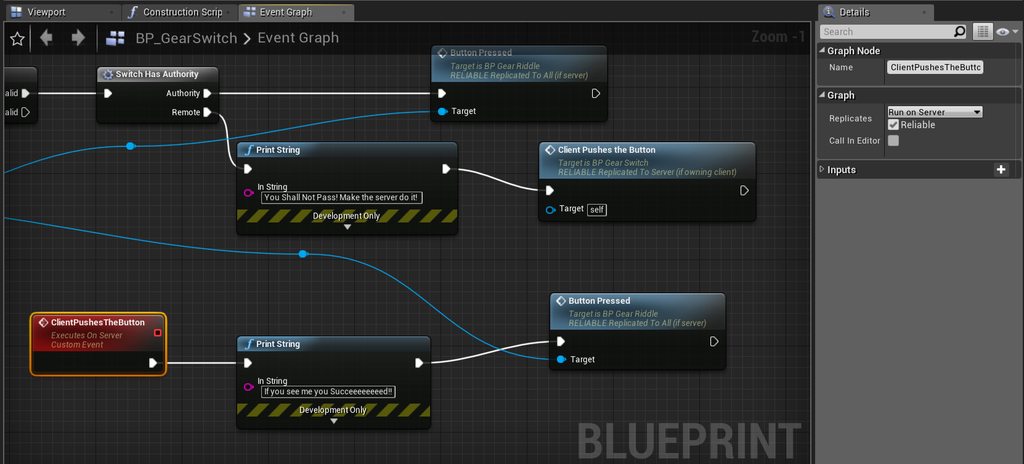
Sorry guys....noob 5000 here, cant seem to get this custom event to fire. It fires fine if I dont replicate it but when I change it to run on server it does not fire anymore. https://imgur.com/a/rru7WYZ
 sharp pagoda
@quasi quail Assuming this actor is properly replicated and what not, you're dealing with roles. If you take a look at this graph, you know it's one of the three "Dropped" situations.
Have you taken a look at exi's network compendium? If not, I would highly recommend it for learning about these things.
quasi quail
I shall google that now, for this I was following a simple tutorial and it seemed easy peasy for him.
sharp pagoda
quasi quail
ohh wow you gave me a complete network bible here??? hahahaha this requires a weekend and a lot of coffee
sharp pagoda
Yea, but it is absolutely worth the read though. Once you're done you'll have a fairly strong understanding of what you're doing.
quasi quail
thanks a lot friend!
twin sorrel
Hey guys! Does anyone have any idea why updating the relative transform of my mesh seems to be delayed to other players?
 next warren
For multiplayer shooting using projectile is best or line trace is best
And also for network bandwidth which is best or both use same amount of bandwidth
Thanks in advance
twin sorrel
AFAIK line trace is less expensive
Projectiles essentially perform multiple line traces throughout the flight to 'sweep' the path as far as i'm aware
 lean river
obviously projectile movement using more bandwith when you replicate all the movement
but i think no games using traditional "replicated projectile movement" where you spawn projectile on server and replicate them down because latency will make that really unresponsive 😃
next warren

Work in progress for bullet tracers particle effects for Switch. Grey Games - Mitch Manders & Tom Looman More info & dev updates: http://tomlooman.com Twitte...
In this video whether he is using line trace particle effects or projectile effects
chrome bay
Impossible to know
Willing to bet it's hitscan weapons, just shooting particles in the same direction. Common trick.
next warren
Can u give some tutorials link like this method of using
 lament bobcat

 pallid mesa
@next warren that's a linetrace with a cool tracer (trace particle effect). It is not perfect, but in some scenarios can trick the player to think that it's a projectile, specially with fast rate of fire weapons. However forget about having bullet decay or something similar. Basically linetraces are cheaper however you are limited by the fact that they are just that, a line.
also if you want to know how to do it, you just had to scroll down to the comments
he is using this method on this project https://github.com/tomlooman/EpicSurvivalGameSeries

GitHub
Third person survival game (tutorial) series for Unreal Engine 4. - tomlooman/EpicSurvivalGameSeries
pallid mesa
well a particle effect is not made on Blueprints, it is made on Cascade or on its deffect on Niagara
just download the project, open it on ue 4.20
and open and study how the particle effect is made
plain and simple
next warren
particle which is made in maya and imported to ue4..from how can i do using blueprint
Can u give some overall procedure or tutorial link
I tried using projectile but it takes lot of network bandwidth and gets lag
How to make particle travel from start of line trace to end
pallid mesa
maya? lol no, the particle is done on ue4
I'm telling you fetch the files of the project and look at how the particle is setted up
next warren
K bro i will see...
twin juniper
@sharp pagoda sorry for response so late, continuing the IP talk, so I have to use STUN so i can join through non port forwarded routers? Or do I need to just use an external IP address with a port?
sharp pagoda
@twin juniper if you're trying to connect two peers behind routers together STUN should be your first and hopefully final attempt. In the event that it fails (one peer is behind a symmetric NAT, a very rare occurance these days, so you probably dont have to worry about it) you use TURN.
twin juniper
and how do i implement it in ue4?
sharp pagoda
You need to read through the net framework to understand how the netdriver works with sockets and how unetconnection's are established
next warren
@pallid mesa thanks bro now only i learnt particles in ue4 i got the concept thankzzz bro
pallid mesa
😄 👍
next warren
😀
 unique thunder
I don't understand the documentation on Replicate Physics to Autonomous Proxy -- should essential physics (like vehicles) be True but other visual-only items be False (like empty shells ejecting out of a gun)?
 broken heart
Does anyone know of a good tutorial/course/article about making a ue4 matchmaking system with many game instances on the same server?
The idea is kind of like hearthstone or clash royale -you press “search” and are put into a game with another person who searched. I’m quite new to replication so I’m not sure where to start and I don’t really want to watch a half hour video that isn’t useful. Thanks 😃
 thin stratus
Doubt there are any tutorials
This isn't possible with UE4 alone
You need a backend service that does the matchmaking
As well as a service that hosts, launches and kills the Server Instances
Each Server in UE4 can only hold one World
So you need one server per match
@broken heart
Maybe if Epic releases their Subsystem during 2019, it'll get more straight forward
But I think for the servers on demand even they use a third party service
broken heart
Oh damn
thanks for the advice though 😃
Do you have any names for such backend services?
Or would I just have to get a web hosting plan that has servers for me to run the game on?
thin stratus
GameLift
Stuff like that is pretty expensive
So be sure that you can pay for this service and that you will actually have the playerbase to support it
thin stratus
Then forget about matchmaking like this
Singleplayer or ListenServer base games are already pretty expensive to create.
With barely a budget you should rather focus on that
Even if the DedicatedServers are Linux based, it'll still cost multiple hundreds to have multiple servers running
thin stratus
That's one way. But even then you should be aware of these systems requiring a big player base
broken heart
Yep
thin stratus
Otherwise getting matchmaked won't work
It might be worth rethinking your project and situation.
It's not the worst move to focus on something cheaper and doable and revisit this project once you can realize it
broken heart
Need a fairly big discord server beforehand
I've got a gam eon the store already but I don't see how continuing developing it is going to help me in the long run, it simply can't raise those funds
But thanks for all the help
I'll go rethink
twin sorrel
Hey guys and gals! I'm not sure if this is where i should ask this, however i am attempting to set the relative rotation and location of my mesh in my Character blueprint whilst the character movement mode is set to custom. The owning client shows this change, however the other clients only see the change when the player is at a stop.
I have a feeling that the CharacterMovementComponent is setting the relative rotation itself when the player moves, and is overriding.
PS: i have set orient rotation to movement to false, and even use controller desired rotation to false aswell, however the problem still occurs
Any help would be appreciated 😄
 jade gazelle
Is it possible to multicast only to a specific group of clients? Like say those within a specific radius from a location vector?
 ember needle
This happens only after I had an editor crash. No code change.
lean river
@jade gazelle
no way to do this with multicast i guess..
you need iterate over on the player controller and send client event instead of multicast if condition passed
jade gazelle
@lean river yeah I was thinking about that last night. Seems like I would have to get a list of actors/controllers and then do a “run on owning client” for each of them
Not sure if that is more efficient than just doing a multicast to everyone though
It’s for particle system replication
lean river
well if you wanna simplify the system and skip controller iteration and code implementation into controller
you can do a multicast then atleast you can check if player is close enough to spawn particle or not 😃
both solution has pro and con
con: iterating over player controller need code implementation in pawn or controller because only they have owned connection to send "run on owning client" event
pro: you save some network bandwith and rpc processing since you send only a few if players are far away
pro: using multicast is super simple and also you can do clean code because you can implement where you want
con: rpc's will be processed everytime and you need decide on client side if you wanna spawn particle..
 gilded olive
hi guys quick question, there is any channel or forum were we can specifically talk about the replication graph/nodes?
jade gazelle
@lean river right. Thanks for the detailed response. My main concern was/is minimizing server bandwidth whenever possible so I may go the iteration route. I don’t mind writing the additional logic in the player controller if it will help reduce overhead
 junior tree
so is it possible to run the same game on android and pc?
like, I create a session from PC and connect with a mobile phone via LAN running the same project
lean river
@jade gazelle glad to help 😉
thin stratus
@junior tree On LAN, yes.
junior tree
Nice! Thanks
 wary willow
It's how that PS4 PlayLink thing works also (but in this case, PS4 + Mobile)
Which is pretty cool actually. Just played my first game "Hidden Agenda" on it a few weeks back
ember needle
Good evening everyone! So, I spawn a spectator class, and then blend the view target on BeginPlay to the first player already in the level. This works only if I put a delay node before this... any ideas why? https://gyazo.com/467616f8092bec064fa67e08e139b1b9

GET does return a valid player
and so does Get Player Controller
thin stratus
Because your PlayerController is set to auto manage the viewtarget
Open your custom PlayerController class
And check the Class Defaults
There is a boolean with "AutoManage..."
@ember needle
ember needle
oh interesting
let me try disabling it
AH you can't disable it at runtime
hmmm
i need a different controller for a spectator I guess?
not sure how to do that since it is specified from the GameMode
ember needle
You're on the spot though if I disable it at least the spectating works
so what is a good practice there?
thin stratus
How are you spectating?
Giving them a Spectator Pawn?
Some fixed Camera?
Another Player?
ember needle
if you join a game in progress, I randomly choose one player, the GameMode spawns a spectator class instead of a player class
and then i blend the view mode of the spectactor to the player
thin stratus
No
ember needle
oh
thin stratus
You can just spawn nothing
The ViewTarget doesn't require you to have a pawn
Only a PlayerController
ember needle
that's indeed true
thin stratus
And if you want to do it really super duper properly, read yourself into the CameraManager class
ember needle
so best bet is to put this in the controller
thin stratus
Cause that's the one actually doing all the work
ember needle
let me try first this quick thing
ember needle
But I still need to disable the AutoManage though...
and I don't seem to be able to have different controllers on a level
thin stratus
Usually, no. Because if your PC doesn't possess anything, it won't auto manage
thin stratus
And if it still does, then just handle the ViewTarget yourself
The proper way would be:
- Make your own PlayerCameraManager Class Child Blueprint.
- Set that in your own PlayerController.
- In the PCM Class, override the "BlueprintUpdateCamera" function.
Here you can return a CameraTarget, Location, Rotation and even FOV - Determine by code if your Player is a Spectator or not and if he has a Pawn or is Spectating one.
Either way, get a ref to either the Players Pawn or the Spectators Pawn and return it.
With that you can do a lot more. E.g. focus the person who killed you and what not
ember needle
So: first of all thank you, this works
thin stratus
-_- How can it be that my Pawn is off in Location and Rotation on the first freaking tick, even though Velocity, Acceleration for Linear and Angular stuff is the same:
https://puu.sh/ChFlw/cff7d5de24.png

I dislike networked movement so much
I mean, I get it, floating point shit, but still...
ember needle
...
 winged badger
floating point precision 😄
ember needle
don't think I can help besides the floating point
thin stratus
No worries, just venting
ember needle
😄
thin stratus
Have to get this drone synced over net, but getting corrections even with an 8ms ping
I kinda know what I all need to send to the server, but they still go offsync
(╯°□°)╯︵ ┻━┻
winged badger
at least that should be well within tolerance
ember needle
Hey Cedric, just one question before I dive in your advanced suggestion.. In the Spawn Default Pawn for I set a replicated variable
https://gyazo.com/94a105da8e0cbb5005e13331c5664b1d
 thin stratus
It is, but it snowballs @winged badger
thin stratus
Yeah, you can do that
ember needle
I cannot multicast it...
thin stratus
Might be worth maybe setting it on the PlayerState though
thin stratus
Do it in PostLogin
That's the first point at which you are allowed to use RPCs
But a Replicated Boolean should be enough
ember needle
yeah good point
thin stratus
You can use that in the PCM
ember needle
ok thanks
thin stratus
Or in your own setup of course
ember needle
ok really last one for tonight...
IsLocallyControlled works only on pawns
is there a similar function for controllers?
sharp pagoda
IsLocalController() @ember needle
thin stratus
Or IsLocalPlayerController works too
ember needle
isn't that true also for server? IsLocalController
sharp pagoda
Wow that does spiral out of control fast
If you're a listen server and are the auth, yea
thin stratus
Seems to be only the rotation though
Thing is, I don't know if it's AngVelocity that kills rotation
Or Rotation that kills AngVelocity
kills = makes it offsync
thin stratus
Velocity z should have gravity already in it
winged badger
and that it dropping relatively fast, 200UU/sec
thin stratus
Yeah it also hits the floor at some point
Rotation completely flips it's shizzle
Also not 100% sure where I lose that
CMC doesn't save rotation
I do though, cause mine can rotate compared to the character
winged badger
how fast are your updates relative to the printouts?
because there are minor offsets everywhere
except Velocity Z
thin stratus
The Print out is exactly before I apply the change
winged badger
which makes me suspect your client isn't simulating that
and any jerkiness is due to server having to force new, very different speed on client each update
thin stratus
Hm, the client doesn't have to simulate though
The data above is from a Client that controls its own movement
Which means it passes InputVelocity, InputRotationVector ClientLocation and flags etc.
winged badger
still, your velocity Z is the exact same, every entry down to 6th decimal
thin stratus
ClientLocation is the result of the clients move
winged badger
and only velocity Z
thin stratus
Hm
Thing is, idk why, otherwise I wouldn't bang my head against it
// Owning Client and Server
if (PawnOwner->Role > ROLE_SimulatedProxy)
{
    const bool bIsClient = (PawnOwner->Role == ROLE_AutonomousProxy && (IsNetMode(NM_Client)));
    if (bIsClient)
    {
        ClientUpdatePositionAfterServerUpdate();
    }
    // Client and Server
    if (PawnOwner->IsLocallyControlled())
    {
        // Check if we want to jump
        CheckJumpInput(DeltaTime);

        // @TODO: Scoped?
        // All Movement Modes use Input for Acceleration
        InputAcceleration = GetAccelerationFromInputVector(InputVector);
        AnalogInputModifier = GetAnalogInputModifier();

        // Server
        if (PawnOwner->Role == ROLE_Authority)
        {
            PerformMovement(DeltaTime);
        }
        // Client
        else if (bIsClient)
        {
            ReplicateMoveToServer(DeltaTime, InputAcceleration, RotationInputVector);
        }
    }// Server Ticking for Remote Client
    else if (PawnOwner->GetRemoteRole() == ROLE_AutonomousProxy)
    {
        // @TODO: Smooth Movement for ListenServer
    }
}
// Simulating Clients only
else if(PawnOwner->Role == ROLE_SimulatedProxy)
{
    // @TODO: Simulate Tick
}
These parts are implemented
PerformMovement for the Server and ReplicateMovetoServer for the Client
The other two TODOs aren't relevant yet
thin stratus
No
If it would only be an initial error, then the client correction would fix it after the first time
But even after a correction it goes offsync again
winged badger
odds are it would get worse if server had enough load not to be able to pull 60 FPS
thin stratus
I don't expect anyone to know the issue at that point haha
DeltaTime should compensate for that though
Even if it only runs on 30 frames
It's the same code that the CMC uses
Just in addition with a Rotation passed over
winged badger
hmmm
thin stratus
Well and the Pawn being able to hover, but the hover is turned off atm
So it only has gravity
winged badger
CMC doesn't replicate velocity to wning client
which would account for Z velocity not having discrepancies
 opal dock
I would like to make an online system with 5 different characters, but would you suggest a video tutorial for me
winged badger
i heard only terrible stuff about Virtus, never looked at it though
the part of the CMC where server accepts the clients location info if within tolerance
do you still have that in @thin stratus
and did you expand it for rotators if you do?
thin stratus
It only checks for Location error
Means if the rotation causes the location to go offsync, it wouldn't clearly show
(so I get why you ask)
That's any entry (sadly not so well formatted, takes too much time)
That happend without any gravity or hover acceleration enabled
Only thing happend is that I actively drove against a ramp
And that's far after that
The Vel for example has the 0.21 and 0.22 in flipflop the whole time
Cause well it never corrected the client
Acceleration (linear) and RotVector (angular) seem to be correct
winged badger
out of ideas, for now 😦
winged badger
because its almost always something stupid
thin stratus
One thing is
The Location X always has the same offset
So that basically changes properly and keeps the initial offset
Which for now is fine, cause that will never cause an issue
The rotation though has a changing offset
The YAW value doesn't change the same on Server and client
at least i think so
Actually, barely different
(╯°□°)╯︵ ┻━┻
All of them have like tiny little different numbers
Wait a second
Why is the sign of my Angular Velocity wrong
🤔
ember needle
this doesn’t look like a float issue though
thin stratus
Ah, it might be cause of the -180 and 180 thing
With most things I instantly have an idea what could be wrong, but not here.
The initial rotation is already not the same (-179.xxxx to 179).
That causes the PID controller to have a different error and the Angular Velocity that results from that is opposite (-)
Should I maybe force one initial replication so they start with the same numbers?
If I'm unlucky even setting 179.999802 to a variable will result in a differnet number xD
Ah well enough spamming. It's something for another day.
ember needle
eheh
sometimes sleep gives the answer.
i’m trying to understand the differences between detach from controller pending destroy and unposses. Anyone has good resources for this?
 lethal oracle
Any tips on setting up movement for a ski-lift (cart/train thingy)? Tried a few quick ones: Sequencer animation and "regular" lerping..choppy as hell when playing as client (shakes the view like a maracas..). Testing 2 players on dedicated server. The only one providing smooth movement to clients so far is the InterpToMC, although I need more control over initial accel, etc. What I would like to know however, is why is InterpToMC giving a smoother, networked experience, than a simple, custom setup with lerping between points?
thin stratus
@ember needle Doubt there are any resources
In most cases you are fine with Unpossess
If you really want to know what they do, read the source code
lethal oracle
void APawn::DetachFromControllerPendingDestroy()
{
if ( Controller != nullptr && Controller->GetPawn() == this )
{
Controller->PawnPendingDestroy(this);
if (Controller != nullptr)
{
Controller->UnPossess();
Controller = nullptr;
}
}
}
ember needle
ok so it’s only if pawn is pending destroy
thank you, i’ll be good with unpossess indeed
lethal oracle
Yeah, seems like it's generally called when you need the pawn to be removed from the world, entirely (EndPlay, OutsideWorldBounds etc) 👌
 ocean dust
Do I need to open a session before ServerTravel <MapName> works?
I switched all of my GameModes over to Seamless Travel and am now calling Execute Console Command("ServerTravel <MyMapNameHere>") and it's still not working in a launched build (not PIE)
ocean dust
Ah! I had an invalid TransitionMap in the .ini file. Didn't show in the Project Settings panel, but found it in the .ini itself
Not sure how that happened, but should be fixed
thin stratus
👍
lethal oracle
Ah, ofc. Playing a sequencer via multicast so it sim'd on client was smooth and nice. A few corrections during the "trip" though, which makes for a few stutters..
jagged garden
damn @high current nice job on the game jam
 high current
cedar finch
high current
cedar finch
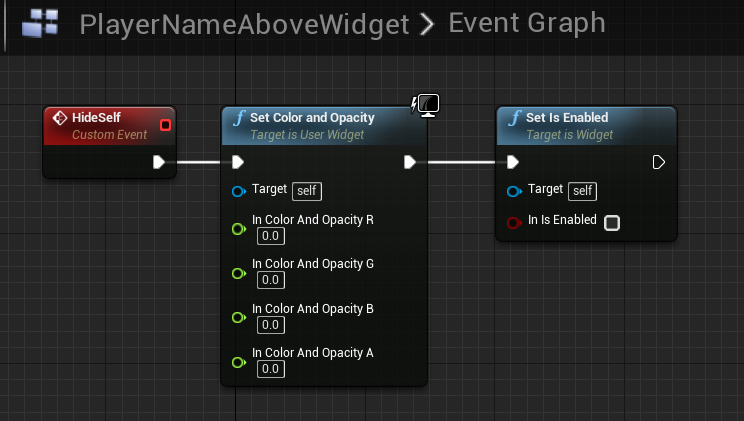
I've asked this before but thought I had it figured out. Now I realized it's not exactly working. So my game is a Listen Server so the Server is an actual player and then clients connect. My issue is I want to hide my owning players name widget from himself but still let everyone else see it. I've tried running the logic after event begin play as well as in Event Possessed but it either works for client or works for server. I can't make them both work. The following works for client but not for server. https://i.gyazo.com/f5ef9ea27c7ac4c64d7107e57f3f61df.png
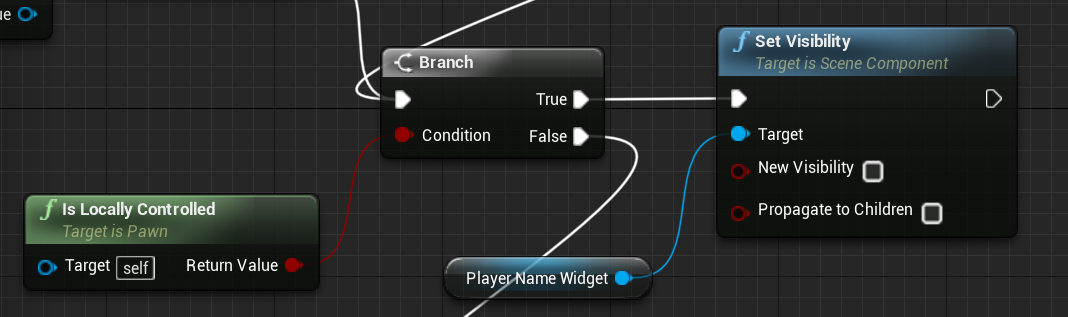
But if i put that inside Event Possessed it does work for server but replicated to client so the client can't see the servers name either, and the client doesn't run the logic to hide their widget because Event Possessed is server only.
Basically I'm asking how to not replicate my logic and how to allow the server player and client to both run said logic?
cedar finch
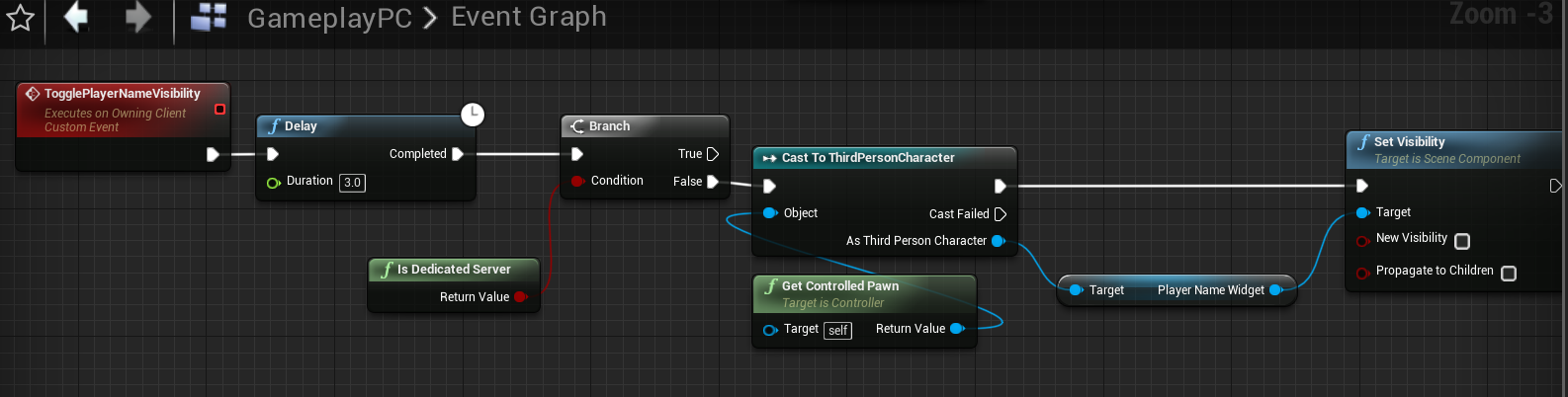
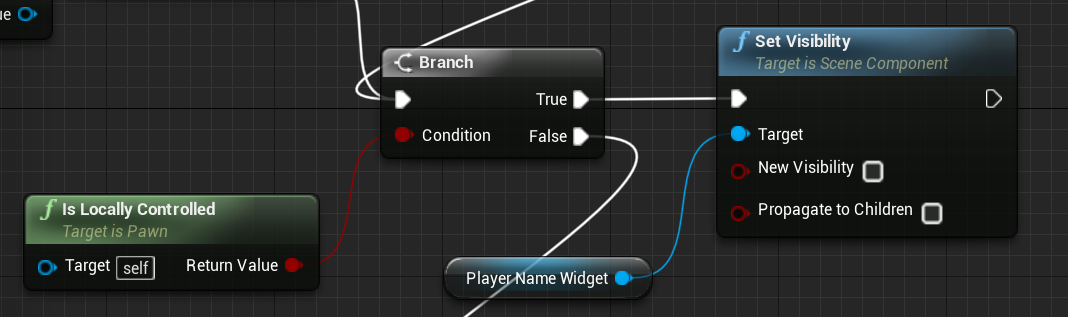
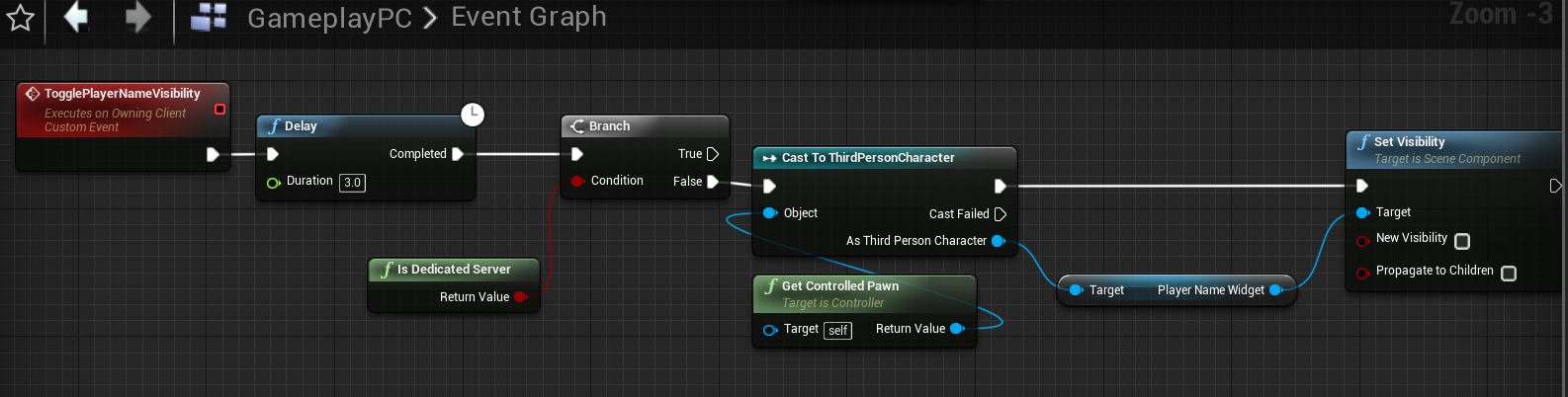
Ok so I changed it up and call an RPC inside my Gamemode right after I spawn and possess my pawn. This RPC checks if the game is a dedicated server then sets the visibility of the owning players Name Widget. It works perfect for dedicated servers but I can't make it work right for listen servers. https://i.gyazo.com/416b50f16d7a15cc2e8c21b65808d972.png
I even tried using player controller 0 thinking maybe it would work. https://i.gyazo.com/64e3627a089c325c0cba4e6ea19c16e2.png
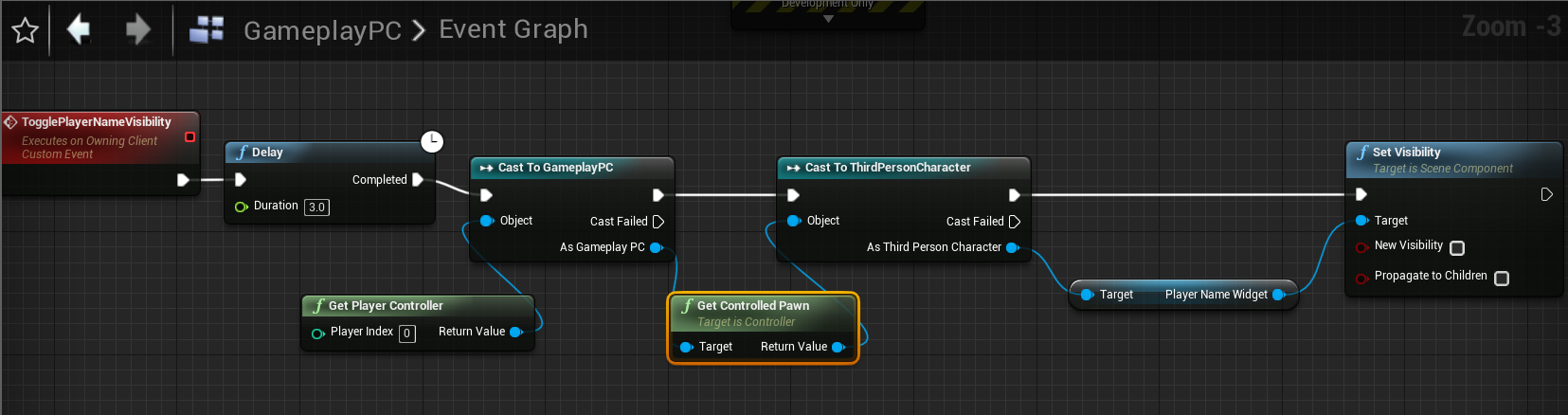
Note the delay is merely for testing purposes. It allows me to see both screens before the logic runs. What is happening is the server's widget is set to hidden, but the client see's the servers disapear as well as their own widget dissapears
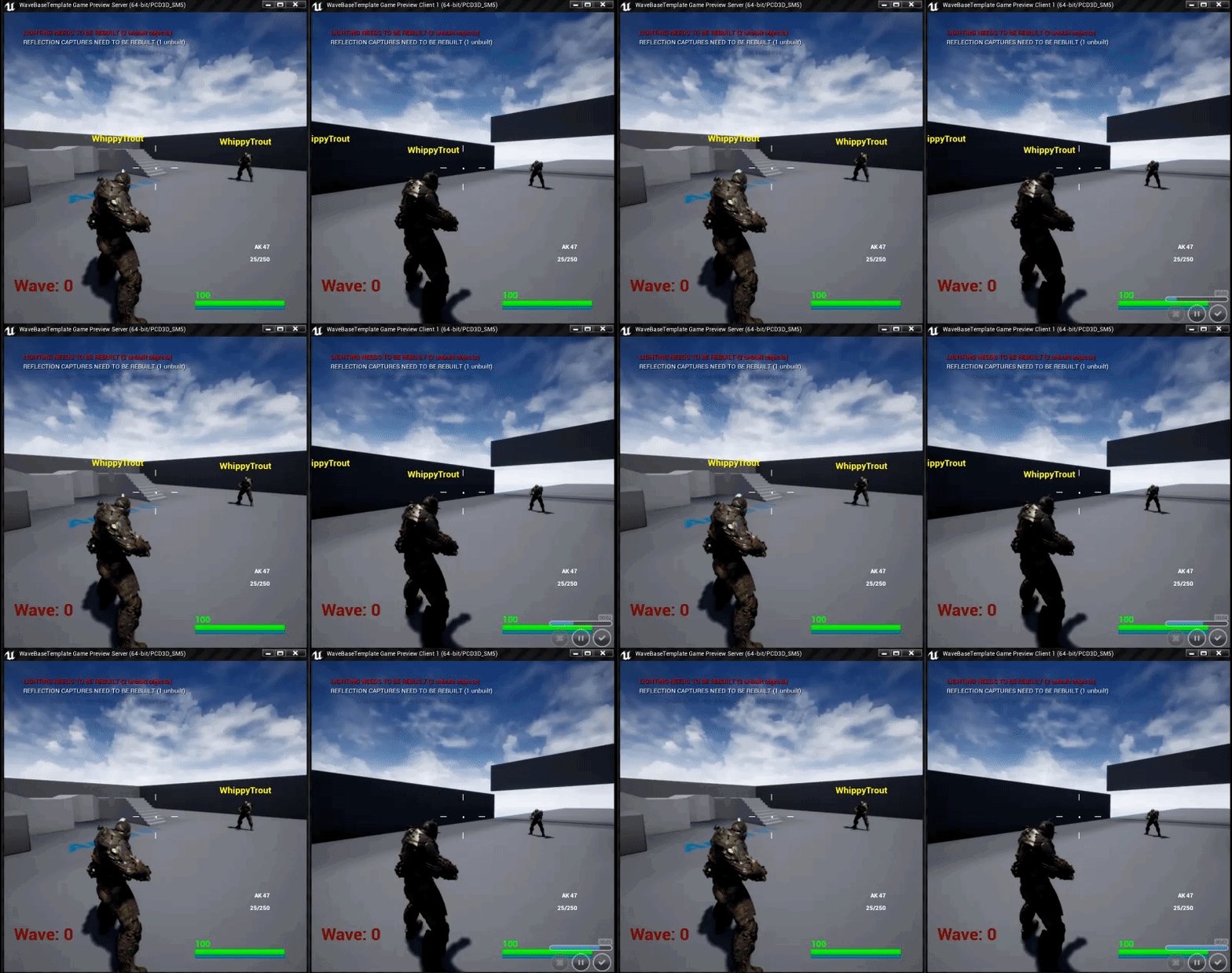
Due to my resizing of my windows to make them fit the names look a bit off. But you can see how they both dissapear on the clients screen on the right.
cedar finch
@jagged garden when I use IsServer It works for the client but not for the server. https://i.gyazo.com/d9ba6cf125ff990ece6cb60a19f7eddf.png
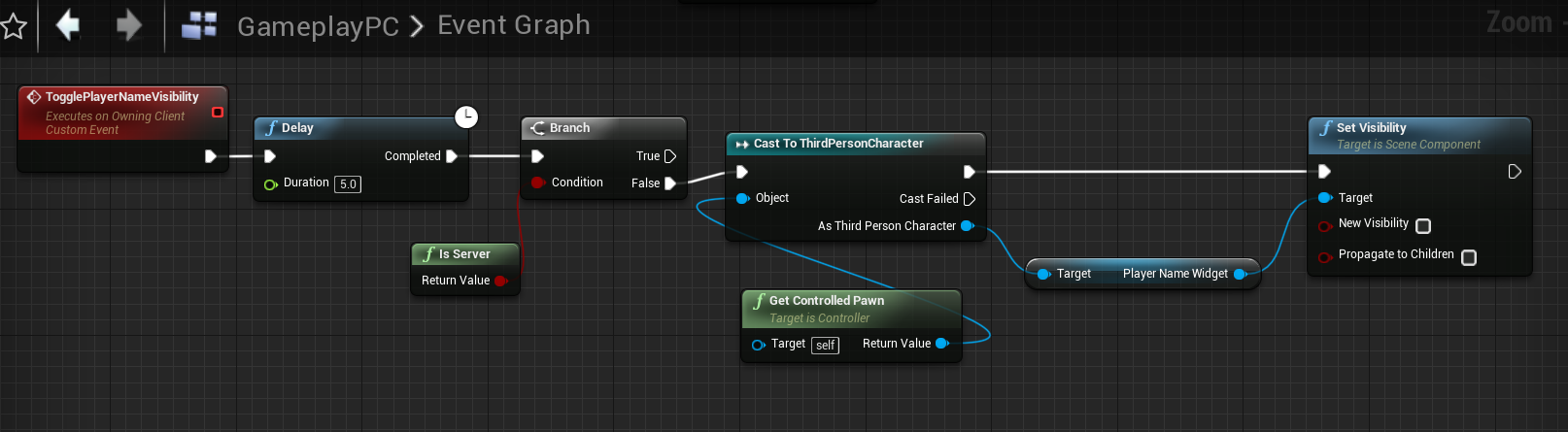
And if I do anything from the True branch then It replicates to the clients. 😦 I can't figure out how to make the Listen server player's name hidden only to himself.
 wary cedar
What will happen if I create an object on the server (that should be replicated to the clients), and then immediately call an RPC on this object?
Will the RPC wait until the object created and then be executed on the clients or will it be skipped in the case it come to the client before the replication data?
cedar finch
Ok so I can get my playername to hide for the owning player if I use a key bind and then call an event in the widget itself. https://i.gyazo.com/4163094e6b0bf910ca6faddbc69a1b44.png


But I don't want to have to press a button. I just want it to happen everytime you spawn the pawn. But if I put that logic above inside BeginPlay or Event Tick it doesn't work right, things replicate
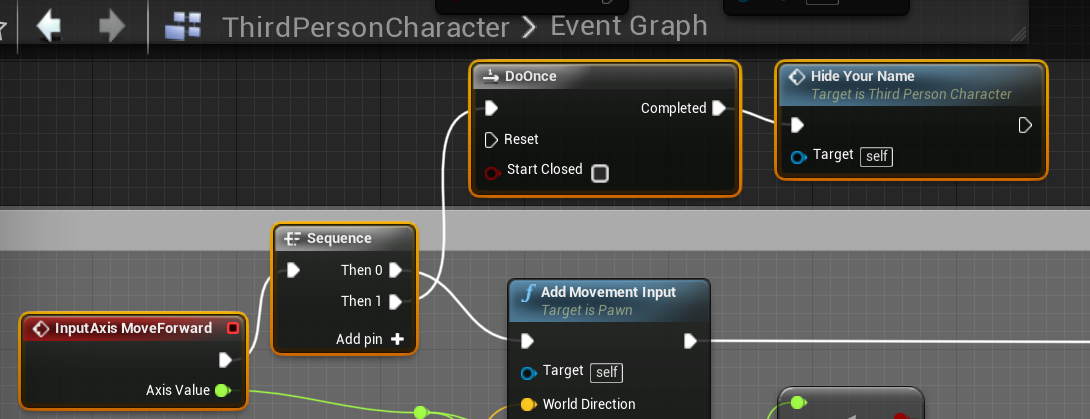
Well I know this isn't the most ellegant or proper way to do it but I stuck it inside the movement logic and it works perfect. If anyone can tell me another event that isn't replicated that would work at the beginning of the pawn's life where I could put this logic I'd be curious to know. https://i.gyazo.com/48ac1ccbf457c8fd13d6f6cc499e57be.png

 drifting plank
Try using GetNetMode or GetRole
It returns the type of processus (no network, client, listen or dedicated server) and if you are an autonomous or a simulated actor
You can put the logic in the OnPossess event
Possessed*
 bitter oriole
So I'm spawning a static mesh on the client-side in C++. Not replicated, purely client stuff. I keep getting warnings from FNetGUIDCache::SupportsObject saying the object is not supported
Which is kind of the point - no networking at all.
How can I silence these ?
I've looked here https://answers.unrealengine.com/questions/140212/fnetguidcachesupportsobject-not-supported.html but I fear it might trigger more stuff I don't want
prime axle
could somebody give me the pseudo code behind respawning your players in a multiplayer game?
C++ btw
 calm plaza
So, I'm trying to make this Ouija board interactable. Each of 4 players can place their hands on it and collectively move it around. Currently, I'm using axis input from mouse to drive and impulse on the planchet. Works ok for server player but client input never replicates. Thoughts on using axis input for replication or other creative way to move this planchet with mouse input? Thanks!
twin juniper
if i call an event that's in Game Instance from client, is that event ran on client or server?
 torn canyon
It will be on server I think
twin juniper
so client-side stuff should i do where
i would like to know a persistent client side class
that doesnt fire beginplay when a map is loaded
torn canyon
Playercontroller / game state / player state are availlable to clients
twin juniper
gamestate and playerstate run beginplay on map open
torn canyon
Have anybody ever encountered the following problem ? To do a run on server method on a replicated actor on client side.
twin juniper
ok if I have a GameInstance (because thats only class i know is persistent between levels), how can i make events that dont interfere between server and client?
could this work?
nope, it doesnt work
meager spade
GameInstance is local only
No one else, including the server can access anyone else GameInstance
 hexed cairn
does anyone know how to spawn a nonlocal PlayerController in a net session?
I would like for clients to have drop in/drop out options even after joining a session while in the lobby
broken heart
As a general rule of thumb is it ok if my game doesn't work properly on a non=dedicated server if I plan on always using a dedicated server?
 twin vault
sure
meager spade
why do you need a another PlayerController for?
you should be able to handle that with the current PC
set them to spectating
when not in the game
hexed cairn
@meager spade I have (or want to have, not sure honestly) multiple players to be able to join from one client, a la Rocket League
are you saying every client should just join with 4 PCs, and just have the inactive ones set to spectating?
meager spade
every client has 4 PC's?
hexed cairn
no. I'm just wondering if it's possible for PlayerControllers to drop in and out in the lobby
upon seeking sessions, a client has a number of PCs = to the number of active human players
meager spade
only the server will have more than 1 player controller
not client
client will only have one player controller
hexed cairn
what about a game like Rocket League, with local multiplayer available on a netsession?
meager spade
thats handled probably via ListenServer
not sure, but on local one client will be the server
thats what ListenServer is
unless they spool up a dedicated server instance
and connect to that
cederic might know more about it
but i know with more than 1 PC per player will be a lot of logistical issues
hexed cairn
what kind of issues should I be worried about? drop in/drop out is optional, but sending multiple players to netsessions is a must for me
is this cedric_exi you speak of? would it be cool to @ him?
meager spade
all im saying is i dont think you want to handle it with multiple player controllers
and yes it is, but its on you to @ him lol
hexed cairn
ok. @pale turtle can you chime in on this? looking to make a game where multiple players on one client machine can join a listen server. also interested in spawning nonlocal PCs after a client is already connected
@thin stratus rather


 twin vault
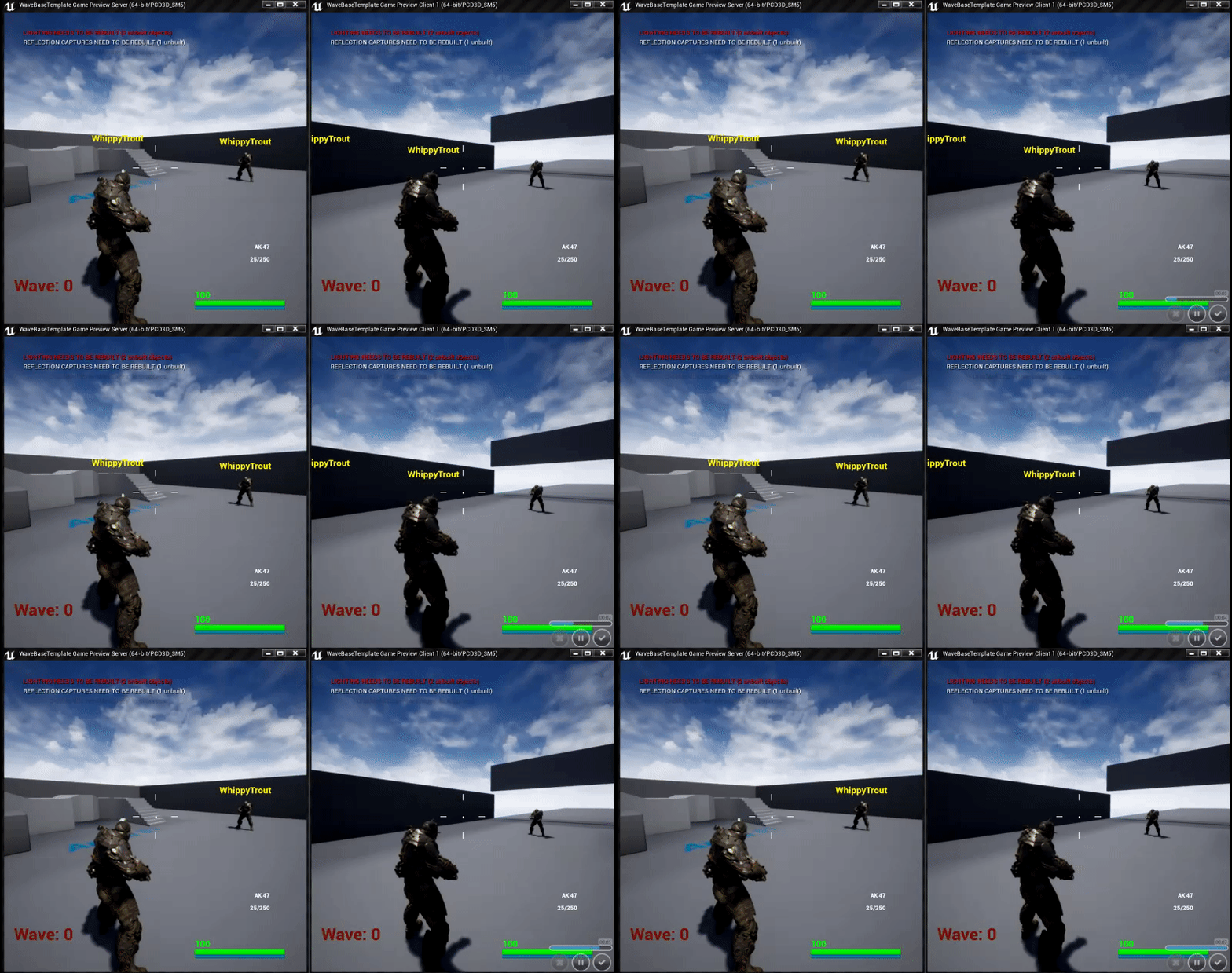
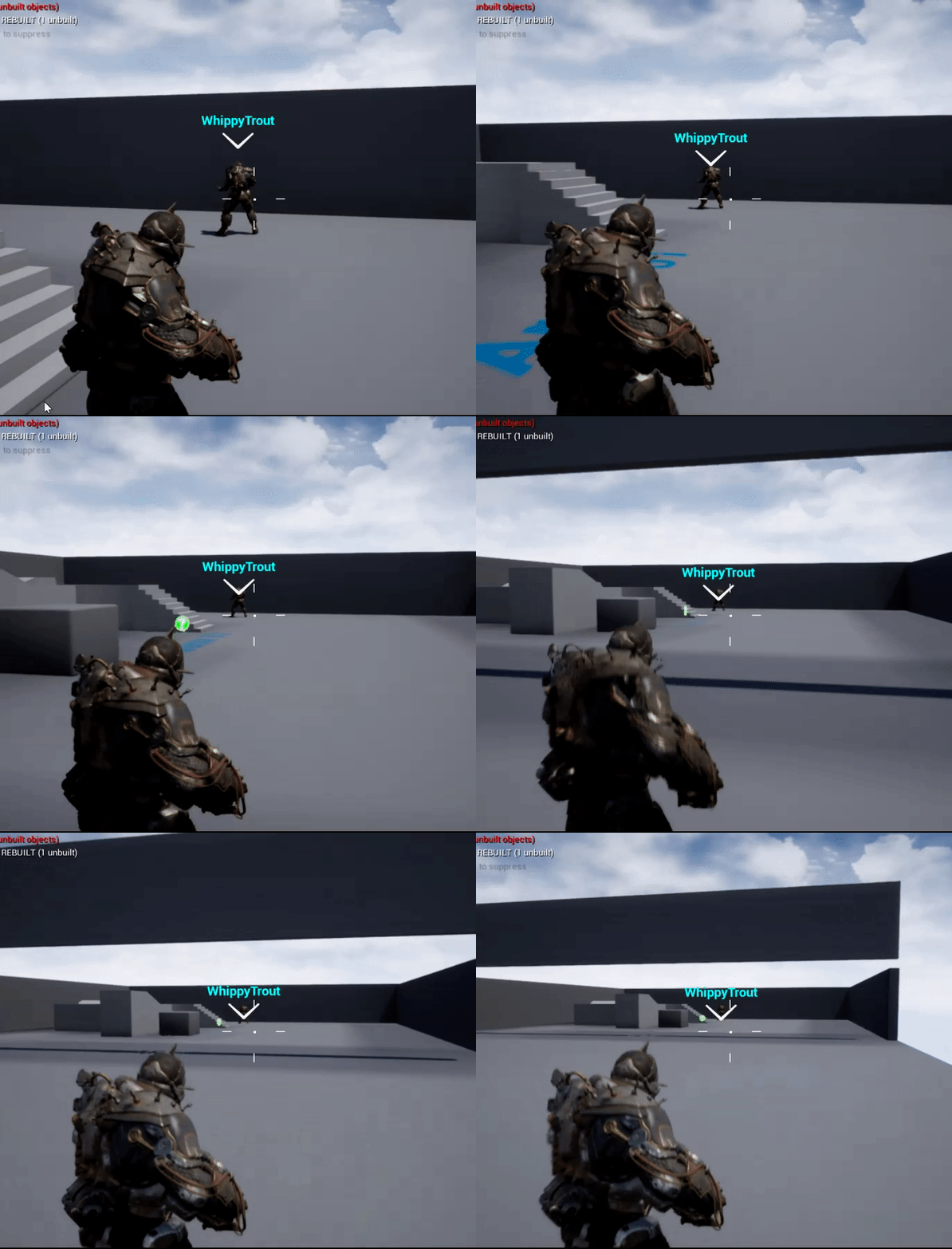
its not resizing 🤔
cedar finch
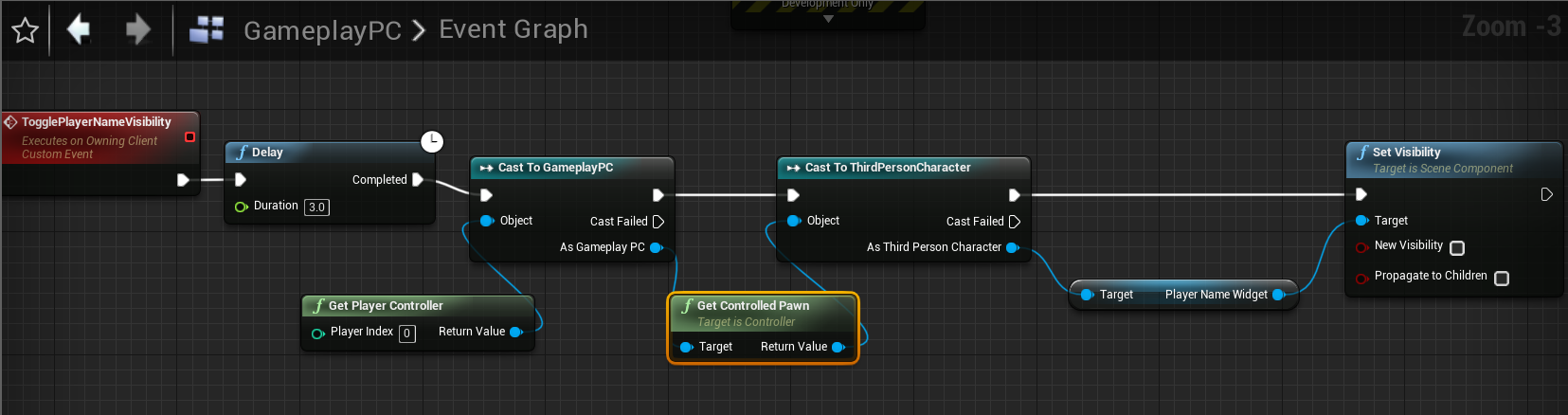
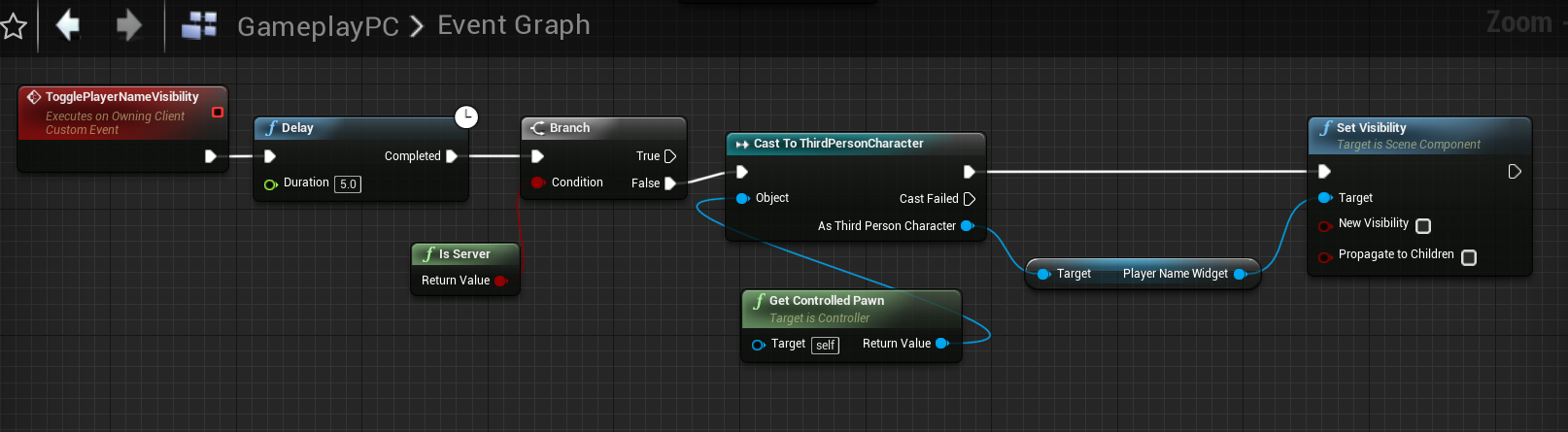
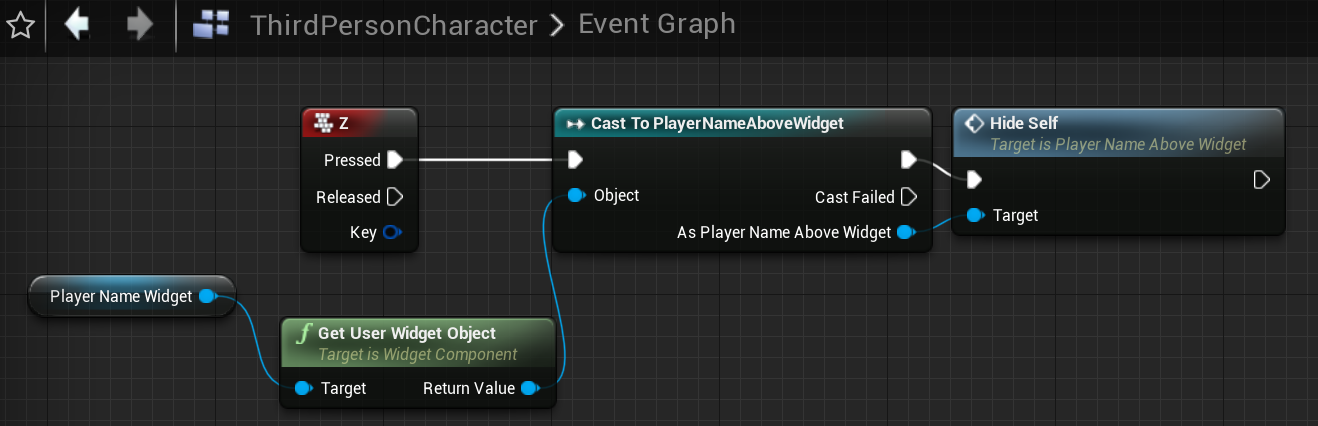
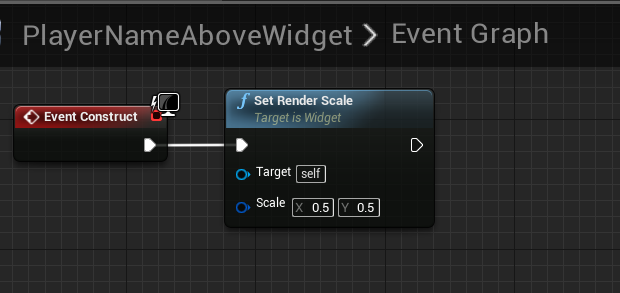
Oh... lol well darn. I feel stupid. Ok how can I make it stay above the players head? I tried resizing inside my event tick and it looks better. How do most games do it? Like Call fo duty, Fortnite, PUBG, etc. https://i.gyazo.com/ad7649d5451aa7a390da6422247a7231.png
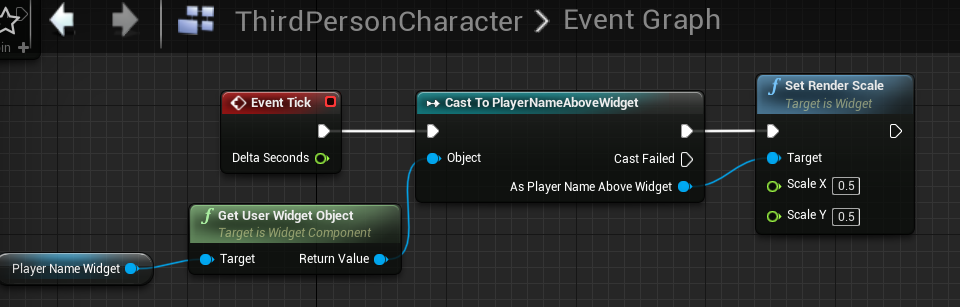

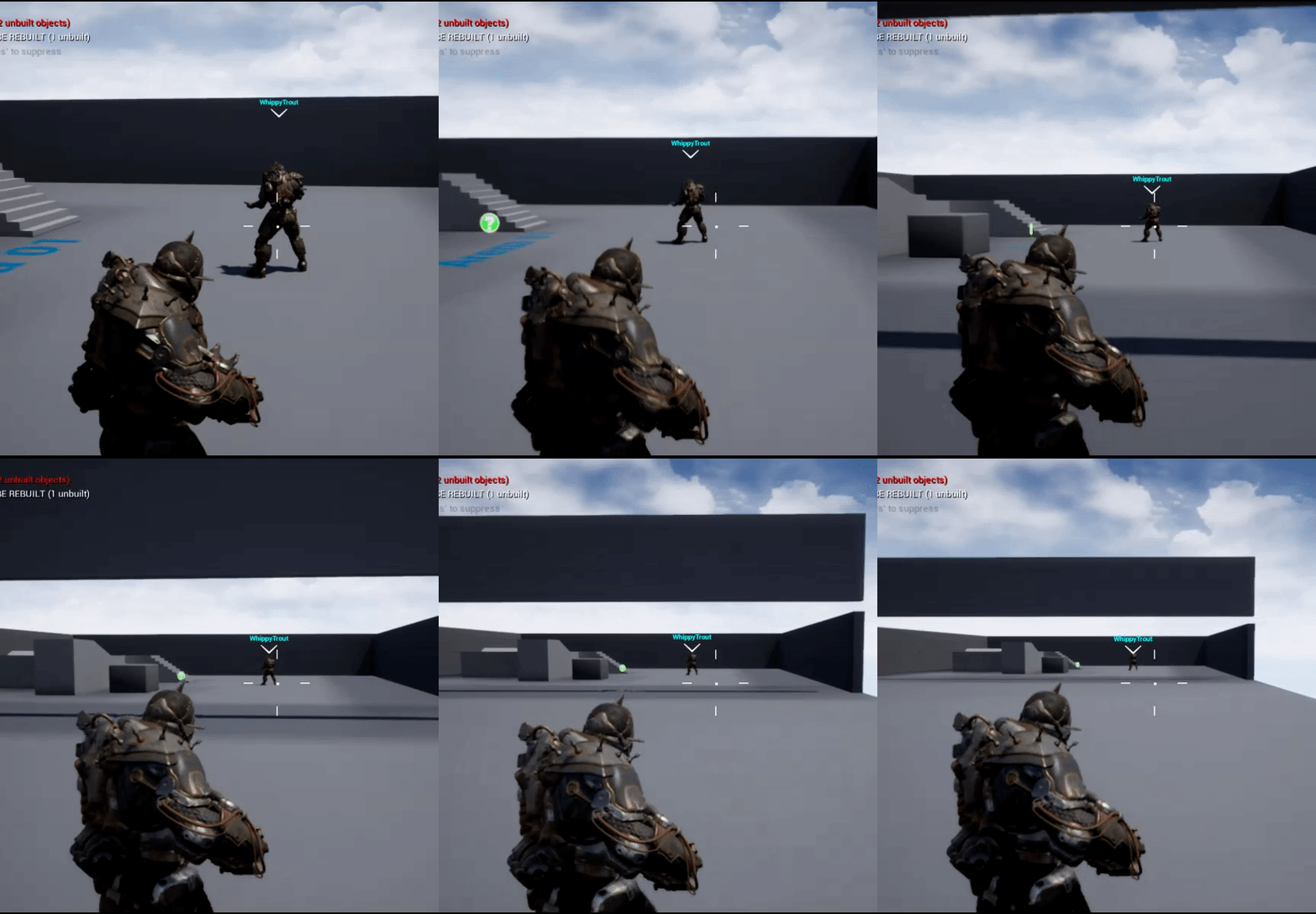

This looks pretty decent my opinion lol. IDK if I should change it https://i.gyazo.com/5ca32685c0453e56b8127d1725dd0a18.png

 copper portal
how can I show my lobby widget with all the server information when I press a button ex ESC?
cedar finch
@copper portal Do you have an event for that key? If so just create the widget and add it to the viewport. Is it just for the 1 person or you want everyone to see that widget?
copper portal
I dont have anything yet
I want the person that pressed the key to see it
creating the widget is easy but getting all the information is the hard part
its from another level
and gamemode
and pc
so yeah
cedar finch
So your wanting a widget that has Stats and stuff from every player from previous games. Kinda like in PUBG or COD where you can check your stats in the lobby?
copper portal
naw
it has player list, chat, couple buttons based on if ur host or not, map name, server name, gamemode and other stuff
so I need to transfer that from levels
cedar finch
Hmmm. So I'm not sure if this works 100% or if this is what your wanting. But I followed Unreals multiplayer tutorials and created a Lobby that had all that info you mentioned and then from there the game would start. When the game was over (everyone died) I just opened back up the Lobby map and everyone was back in the lobby. I still haven't tested it on two machines but I believe it works.
copper portal
I have the return to lobby
but in game, I want the person to be able to see the lobby widget
cedar finch
Ah! Ok so you go from Lobby -->> to Game and inside the game you want to be able to "pause" the game and see all the settings for the match?
copper portal
yeah
cedar finch
Oh ok gotcha. Sorry
Let me think a sec. So you have the widget ready right?
just no logic in it yet
copper portal
no im starting from nothing
cedar finch
I actually want the same thing now that I think about it. Wanna make it together? I can PM you.
copper portal
ok
 spare glade
How would i go About Starting a Backend Service Based on the Already Existing Online Subsystem. as it interfaces The connection to the backend, there must be a good way to build a backend intended for it 🤔 , Is there a place for documentation on this?
I currently have gamesparks which is nice and all but wanting to start my own backend
twin vault
@cedar finch if youre resizing every frame, check the IsVolatile box
If true prevents the widget or its child's geometry or layout information from being cached.
im not umg expert but i think you should check this if you update every frame
calm plaza
SMART PEOPLE, and ideas as to get input axis values from client to server? trying to take mouse/stick input to drive variables and physics. HELP!
meager spade
mark them replicated and send to the server?
or just set them on the server
using a RPC
calm plaza
input axis values from the client are apparently not visible from the server. I'm trying to find a work around. trying to drive force input on an actor via the input axis value from mouse/controller.
twin juniper
So in GameInstance, this will run individually for every player? Because i dont want server to set these variables for clients
thin stratus
@twin juniper Yes
The server will also do this. GameInstance exist per instance of the game (hence the name)
Also, you sure the Application ID in your screenshot should be openly visible?
twin juniper
oh
time to regenerate the app id
oh wait. no one can do anything if they dont have the client secret
twin juniper
and thanks @thin stratus
and if i want to have a replicated variable in game instance (for example number of players in game), how can i achieve it
have a multicast event that sets the num of players?
thin stratus
GameInstance is not replicated
You can't replicate variables there
@twin juniper
Neither can you do RPCs in that
Number of Players would belong into the GameState
And technically, the length of the PlayerArray is already giving you that
twin juniper
i have this in GameMode now, could this work? i need the player count to be in gameinstance
or should i do a multicast event and run this part off that
 brave solar
what is the "component replicates" tag for? I'm trying to replicate character scale and it only works if I check that box on my mesh component, but doing so messes up my movement replication. I don't understand what it does exactly
thin stratus
@brave solar It allows the component to replicate
Similar to an actor
Actor drives that thougj
@twin juniper GameMode only exists on the Server. So what you are doing there would only execute on the server
twin juniper
aw
brave solar
why would it cause my character to stutter?
twin juniper
maybe i could set player number in all player controllers from game mode (or get player num from game mode in playercontroller), and then from there it sets player num individually for their own game instance?
thin stratus
@twin juniper Just get the PlayerArray from the GameState and get the length of it
@brave solar No idea, if you only want to change scale do it with a repnotify vector variable
No need to replicate the mesh component
brave solar
alright thanks
 jagged goblet
Anyone here know of a guide on just replicating velocity from char movement component? I don't want to use addmovementinput for example as it doesn't work great for my game
and using basic rpc's results in choppy movement
 full bane
simulate on the client, the server should already automatically adjust location if your simulation is off by too much.
jagged goblet
velocity isn't replicated tho is the issue
jagged goblet
er I see what you mean tho it'll make server one choppy and game prone to cheating no?
full bane
no to both
server simualtes all things anyway, and if the client moves too far away from the server version, server will update location of the player
jagged goblet
right ive already simulated on client and having server correct the client is what is causing
the choppy movement
full bane
there is a console command to visualize whenever the server updates client locations
jagged goblet
because there is no prediction etc.
full bane
then you are not accurate enough
jagged goblet
I will update velocity both on client and server results in choppy movement with high ping
or even 30-50ms ping
full bane
if server and client simualte with the same accel levels, only edge cases would need to be corrected
like high velocity impulses
calm plaza
@thin stratus so, is there any way that you know if to get the axis values from client to server in order to replicate? Just want to move an object with the mouse and have all players moving it simultaneously.
thin stratus
As said, ServerRPC
calm plaza
Right. But I can’t get the values visible to the server. Always comes up as zero.
(When playing as client)
thin stratus
Well then you probably do something wrong :P
There isn't much to do: ServerRPC, not reliable, float parameter.
calm plaza
Works perfectly as listen server.
thin stratus
All I can say is that you do something wrong. I can't see your code right now
jagged goblet
Denny, what im doing is setting velocity on the client then rpc to server and set the velocity there as well
this works with 0 ping but not with 30+ ping
not without stutters
thin stratus
If you still use the CMC, you should be able to set the Velocity without caring about anything else
Cause in the end, the CMC uses the Velocity to move the RootComponent (the capsule)
Actually, I think if you really just change the velocity, the cmc will correct you 🤔
jagged goblet
well setting velocity alone won't even replicate
thin stratus
Of course not. Replication in the CMC is an RPC
Client tells the Server it's InputAcceleration and where it ended up (Location)
Server uses the InputAcceleration, does the move itself and checks if the Location is the same as the one from the client
If not you get corrected
So velocity gets calculated on both ends
And is then used to perform the move
If you adjust velocity like that, it could very much be that the Client modifies a different move than the server
jagged goblet
so what if we want custom acceleration?
thin stratus
Well, the CMC kinda requires you to work with the InputVector stuff
jagged goblet
you can't just update velocity to server after doing your own calculation?
thin stratus
If you can't use that, you have to write your own component
No I doubt you can
Cause the Client never sends the Velocity to the Server. Neither does it send the resulting Location from your velocity to it
full bane
then you need the same accel oon both client and server
thin stratus
So they will always be offsync
twin juniper
Oh so variables in gamestate are replicated?
thin stratus
The Velocity is the result of InputAcceleration and the different force vectors
It's only used to perform the move at the end of the frame
jagged goblet
well I am sending the velocity to the server as it changes
thin stratus
So what happens is that the Client sets Velocity locally to 1000,0,0. Sends the Server also to set it to 1000,0,0.
But the Server performs the move based on the InputAcceleration past
jagged goblet
hm
calm plaza
input.
thin stratus
Doesn't have to be lined up with your RPC to change the velocity
calm plaza
adding force
jagged goblet
Epic Games Forums
Game programming using the Unreal Development Kit.
full bane
yes, using inputs is the best way to do it
thin stratus
Means if you change Velocity in Frame 1. And you send the RPC which the server receives in Frame 10.
Then it can also be that the ServerMove that got send in Frame 1 already ended up in frame 5 on the Server.
full bane
if you need better prediction, you can buffer moves
thin stratus
@calm plaza Don't mark RPCs reliable if you call them on tick
jagged goblet
would that guide get me anywhere, it's still basically the same code correct?
thin stratus
@twin juniper Yes? How about your learn the framework first, before diving into it ;)?
twin juniper
Well I'm learning now
Now I know game instance is for each player and there you can get variables from gamstate
calm plaza
@thin stratus I'll give that a try.
thin stratus
Read my compendium please @twin juniper
twin juniper
K thanks
thin stratus
@jagged goblet You can try that
But that would require you to either use your own MovementComp
Or change source
jagged goblet
I am using a child of CMC already
thin stratus
I also don't fully get why you need to set velocity directly
Velocity is equal to Acceleration * DeltaTime
full bane
he might want to make an arcadey platformer
thin stratus
So if you need a specific Velocity, you could math it out
full bane
but you could just use super high accel values
thin stratus
Each frame, Acceleration * DeltaTime is added to Velocity
Until Velocity.Length reaches MaxSpeed
jagged goblet
you mean I should be setting acceleration instead?
thin stratus
If you put Acceleration high enough, you can reach MaxSpeed pretty quickly
full bane
is there actually a reason you can't just use the movementInput stuff that is already in place?
jagged goblet
well it's a space game I want to have custom accel
thin stratus
And?
What does custom mean here?
You can change how much Acceleration the CMC allows etc.
full bane
and why would you want a cmc for a space game?
jagged goblet
well I was wanting to take advantage of the networking code on it
also you can only set "Max acceleration" on CMC right?
thin stratus
@full bane Only the CMC has proper network replication :P
@jagged goblet Yeah, but Input Acceleration is basically that
full bane
yeah, but he bypasses most of it with the custom code
calm plaza
making the RPC's unreliable doesnt seem to be making a difference. ugh.
thin stratus
They should still not be reliable


You can't call RPCs on non owned Actors
HitActor is probably not owned by the Player who wants to move it
The RPC will be dropped
You need to RPC in a Player owned Actor, such as the PlayerController, PlayerState, Character, Pawn
jagged goblet
cedric for example my game will have custom accel rates for each axis
twin juniper
Heya, I'm using blueprints to work with networking, and I'm not entirely sure how much of my gameplay I should be doing serverside, the general idea I have is that things such as linetraces for lets say aiming, or requesting I try to upgrade a building would be serverside, but I'm noticing that that means that most things except visuals are serverside, is this the correct way of doing things or am I misinterpreting how networking should be done?
 humble zealot
Could anyone help me with door replication please
jagged garden
@twin juniper Generally for a multiplayer game you want basically nothing done on the client that could affect the gameplay
unless you are doing something like me where the game is co-op and there really isnt an issue with cheating
twin juniper
Right, well its mostly co-op for now but if design suddenly decides competitive is a good idea I'll want to be on the safe side of things for now haha
thanks!
calm plaza
@humble zealot Replicating open and closing doors?
 past totem
How do I set the level of the server without repackaging?
Like, via the shortcut or something
humble zealot
server default map in project settings?
jagged garden
name should work
past totem
@humble zealot u didnt read what I wrote

well anyways my issue was that I didnt build the level so it didnt package for some reason
lol
jagged garden
oh lol
hexed cairn
@thin stratus do you have input on my ? from yesterday? where should a sequential PlayerController be created in a multiplayer game for a 2nd, 3rd or 4th player on a client machine?
how does the player controller get assigned to nonlocal control input? this was yesterday at 4:13pm.
 hazy herald
anyone know how to set variables inside a database from ue4 with vaRest, i know how to get them just not set them
please help
jade gazelle
What is the best way to address a noticeable lag between the server equipping a static mesh to a player and it replicating down to the client? Should I add an owning client RPC that runs simultaneously and equips the item visual on the client side to avoid the lag?
That’s how I solved the problem so far and it seems to work fine, but not sure if there is a better way
jade gazelle
I just tested with 2 clients and the delay is only on the initial client which seems very weird to me. If I equip a weapon on client 1, client 2 sees the change instantly but client 1 has a 1 second or so lag
Before the mesh gets added
 dusty sleet
is there a way when launching a dedicated server from the command line, to set a variable in the game mode?
 grand kestrel
I just really want to bitch about the fact I don't want to call Super::GetLifetimeReplicatedProps() and I want to replicate the owner but I can't because its private.. (don't need a solution)
 old hamlet
hello , i'm running into this problem and i hope someone can help me , when i try to package my game , it says unknown error , and i have online supsystem Steam enabled , but when i disable it the Game Packages Okay But it Doesn't Run okay
 plain flume
Hi! I am trying to replicate painting. Basically with every tick we run Update function. Adding instances works without multiplayer. However, I want to replicate drawing to clients also. I created OnRep Transform array that will run OnRep_AddStrokeAndJoint. Idea was to go through array when new instance is added and update drawing to client. However, client is not updated and server doesn't seem to update drawing correctly.
Any idea how should I even replicate this instanced static mesh thingy? Average there are maybe 300-400 instances in drawing in this project
*per drawing
Ah sorry, Client is drawing too, of course
but both seem to miss quite few strokes, even if I seemingly go through whole array
thin stratus
Where are you even using that boolean?
You set it to true
Where are you checking it?
And where are you setting it to false?
In addition, you are always just adding to the array
So you kinda already know what the new mesh to spawn is
The last element
So the only thing you'd need to do is check the length of the current meshes
And the length of the replicated array
And then add the difference
plain flume
Aah, that boolean was not used in this scenario. I once tried that if we are looping array, On_Rep function would not run while doing it, but the results were exactly same. Just a second, i'm gonna process what you just wrote
hmm, So I should get number of the Instance count and lenght of currentStrokeTransforms. How would I go about adding the missing differences
I guess something like this maybe
thin stratus
@plain flume If one array is .e.g 8 and the other 10, then you have 2 missing instances
So you go from 7 to 9 (index) and add them
for(int32 i = CurrentNumOfMeshes; i < ReplicatedArrayLength; i++)
{
    // ADD
}
Actually without the minus 1
Not sure if OnRep can call while another OnRep is calling
So you should technically be safe without any locks
plain flume
And I found an errors in my code. Now the system fully replicates to client and server and both sees the paintings as should. But oh my god there is log when drawing bigger pictures.
*lag
thin stratus
Yeah it might be worth not sending every update
But rather reduce it to once every second or so
And then sending a bulk
You can always have some sort of Buffer Array that you add new stuff in
And every x seconds you move the difference over to the OnRep array
plain flume
Yes. This is getting interesting
 supple musk
Hey guys,
I choose my mesh in the construction script based on a random value, so server and client can have different meshes ( and i don't want that ). How would you go about replicating what goes on in Construction Script ?
 maiden nymph
small question for an upcoming gamejam : I want a multiplayer game (2 players) in a ship. The first one controls the ship, the second one controls a turret of the ship. what is the easies? Have 2 different pawns created (one being the character with the ship as a mesh, and the character movement component, the other one being invisible) or the same pawn, with branching in the input functions, which I would both attach to a third actor (the ship)
Thanks !
meager spade
the controller will control the ship
your ship will be a pawn
you possess the ship and control the ship
the person controlling the turrent would be a pawn attached to the ship
chrome bay
Y'all
There's a pretty serious bug with RepNotify functions and USTRUCTS. I'm flagging Epic for support on it, but there is a known workaround. Posting here for visibility:
thin stratus
@chrome bay I doubt a lot of people even use the Previous value
Or know about it
At least by what I've seen during the last years
chrome bay
Yeah probably right, I think that's why it hasn't been flagged up until now
thin stratus
How dare you trying to use a feature!
chrome bay
IKR!
I have lost a lot of hair and some of my lifespan trying to find out what this was today
 elfin garnet
If I have a reference to a remote PlayerState stored locally and that player disconnects, does that reference become nullptr? or does it stay valid?
chrome bay
It could still be "destroyed" in the actor-sense elsewhere, but GC won't fully destroy it if the reference to it is a UPROPERTY
IIRC player states are given a 300 second lifespan by default when a player disconnects
thin stratus
Yop, they are marked inActive iirc
So you can "OnOverrideWith" them to restore score etc.
elfin garnet
sweet! thanks yo!!
maiden nymph
@meager spade that was my plan 😃 is there a way to detect that a controller is the second to be used; and use a special pawn for it?
meager spade
hmm not really, you would want to just assign what the controller is doing in GameMode, if there is a ship pawn already, then make the second one a turret
if there is no ship pawn, just assign that controller the ship, the second one will be a turret
 lethal depot
what is the proper way to match player controllers and player states on server? 🤔
I think I want to get the player state from the player controllers
oh it's in AController 🤦
was looking for it in APlayerController
 vital steeple
is there a way to have a dedicated server load a different game instance?
fossil spoke
No
The GameInstance is an intrinsic class to the entire process
Why would you need to have a Dedi Server change its GameInstance?
What are you trying to achieve?
There is always a better way.
vital steeple
Ok! I am using uworks and it runs a bunch of stuff in the game instance. I can find a work around or ask the uworks folks about it. I was mostly just curious because it loads so early in the engine I figured it would be a useful thing to learn
I just need a place to load the save game that I store user settings in, and game instance seemed like a good place to do that
How do you guys load your user settings save games?
 severe widget
I tend to just use UGameUserSettings and it loads from config.
vital steeple
Hrm I thought the standard was to use a save game for stuff like sensitivity and audio volume.
I thought ugameusersettings was for default graphics settings etc
 fleet sluice
@vital steeple The stuff I put in the UW-GameInstance BP doesn't "have to" be there. It was simply convenient. For all it matters, you can register your server in the level BP. UWorks is independent in that sense.
vital steeple
Oh hey! Rad! Thanks for being so proactive Vlad
I figured I was just curious. I can probably find another solution that works. Maybe in the server game mode or something
I think game mode gets reloaded every time the server changes map but that's ok. A few seconds of downtime for server visibility during refreshes is probably not end of the world
Unless there's a more stable place to run the logic...
fleet sluice
Yes, the GameMode does get reloaded on every map change. Since we're talking about dedicated servers, I think they should register/unregister themselves only once, in the GameInstance. Then you can call the other functions to change various bits of information about it (i.e. SetGameTags("MatchEnded")).
The best UX you can design for a player is to have some low-level communication with the server before they actually try to connect (after browsing, use the ISteamNetworking interface to "ask" the server stuff, authenticate the player etc.). Therefore it would be kind of redundant to have servers constantly register/unregister themselves (if you put that logic in the GameMode) since you can script them to reply with whatever you want to the users who are "pending connection"
thin stratus
In C++ there is actually a function you can override for that
But as always, neither the function nor the class are exposed to BPs
Allow a dedicated server a chance to register itself with an online service
@fleet sluice @vital steeple
fleet sluice
Yea, I came across that while digging through OSSteam a year ago
I vaguely remember it was responsible (or related) to an issue I encountered
prime axle
Is anyone familiar with overriding the InitNewPlayer() method from AGameModeBase? I'm trying to call the Super:: on it from a custom GameMode derived from GameMode (who in turn derives from AGameModeBase), But GameMode doesn't have the class InitNewPlayer() overriden, so I'm trying to call AGameModeBase::InitNewPLayer() as a substitute to the Super:: call, but then it gives me an error that "InitNewPlayer() is not a member of AGameModeBase, any direction to the solution would be appreciated.
thin stratus
You should still be able to call super
Even if 2000 classes in between don't have it overridden
prime axle
the InitNewPlayer() method in AGameModeBase is protected. That shouldn't affect it, right?
thin stratus
No, protected allows it to be used in child classes
prime axle
class CustomGameMode : public AGameMode
{
GENERATED_BODY()
public:
virtual FString InitNewPlayer((APlayerController* NewPlayerController, const FUniqueNetIdRepl& UniqueId, const FString& Options, const FString& Portal = TEXT("")) override;
}

FString CustomGameMode::InitNewPLayer(APlayerController* NewPlayerController, const FUniqueNetIdRepl& UniqueId, const FString& Options, const FString& Portal)
{
Super::InitNewPlayer(NewPLayerController,UniqueId,Options,Portal);
}
That should work, right??
chrome bay
Assuming FString is the return type of InitNewPlayer and InitNewPlayer isn't const, yes
chrome bay
Looks right!
prime axle
And yet....
prime axle
just a discord typo, my bad. not in the original cpp
chrome bay
And here too NewPLayerController
You've just posted a screenshot of the error list and the capital is there too
thin stratus
xD
fleet sluice
Also you should just compile and post that error, from the "Output" window and generally ignore the "Error" window (I always do)
"Error" often complains about stuff that isn't going to produce compilation errors
chrome bay
yeah disable that shizzzzzzz
prime axle
Oh god; Can you believe i've been stuck on this for like an hour
chrome bay
Lol.. we've all been there 😄
prime axle
🤦
chrome bay
Mixing 'I' and 'l' is my favourite one
prime axle
Sometimes you just need a 2nd pair of eyes. Haha
Quite embarresed, but thank you nonetheless! 😄
chrome bay
np's 😄
thin stratus
Called at creation time for internal setup
Not calling. GG
Let's compile for DebugGame then -.-
chrome bay
Oo isn't that called really early on? Like game instance init time?
thin stratus
Yeah idk. I do my player login in the LocalPlayer class
I have the strange feeling UE4 reset my LocalPlayer class
thin stratus
Ah well, I shouldn't tick "offlineBuild" in the project settings if I want to connect to stuff, right?
∉捀慬獳㨢∉䄮瑵敨瑮捩瑡潩剮獥潰獮≥ਬ∉畡桴潔敫≮ऺ愢㕤愴ㅢⴲ㥣㈳㐭扣ⴸ㥡搰愭慢愰㤰搳搶∷ਬ∉楤灳慬乹浡≥ऺ䌢摥楲彣塥≩ਬ∉敮偷慬敹≲ऺ慦獬ⱥऊ爢煥敵瑳摉㨢∉㔱㔴㈱㐷㐵たⰢऊ產敳䥲≤ऺ㔢㑡㉥ち昳㕦㡢〳〵㈱㠴㠵∲紊
Also, nice log message -.-
mighty schooner
Is there a way to get stat net data to display on UMG? I'm specifically looking for the Max value of Out Rate (bytes). I've looked into NetDriver.cpp and used GetNetDriver()->OutBytes from my custom player controller but the result doesnt seem quite right.
vital steeple
@thin stratus @fleet sluice thanks guys! I can leave it in game instance as well. Also not afraid of c++. Been moving stuff over to c++ when necessary. Always good to learn more about the framework of ue4. I can always just test if dedicated server then load the save game for user settings
Side question. Is it possible to setup custom variables in the game user settings ini and then pull during runtime? I wouldn't mind dumping things like audio levels and sensitivity in there. It would be nice to have single solutions for stuff
thin stratus
That's what you usually do, yes
Create your own child class of it
And then put your own stuff into it
vital steeple
Oh... Cool. Somehow I haven't run across that. I will poke around for tutorials on it
Thank you guys!
thin stratus
UHLGameUserSettings::UHLGameUserSettings(const FObjectInitializer& ObjectInitializer)
    : Super(ObjectInitializer)
{
    SetToDefaults();
}

UHLGameUserSettings* UHLGameUserSettings::GetHLGameUserSettings()
{
    return Cast<UHLGameUserSettings>(GEngine->GetGameUserSettings());
}

void UHLGameUserSettings::SetToDefaults()
{
    bInvertYAxis = bTempInvertYAxis = false;

    Super::SetToDefaults();
}

void UHLGameUserSettings::ApplySettings(bool bCheckForCommandLineOverrides)
{
    bInvertYAxis = bTempInvertYAxis;

    Super::ApplySettings(bCheckForCommandLineOverrides);
}

void UHLGameUserSettings::ResetToCurrentSettings()
{
    bTempInvertYAxis = bInvertYAxis;

    Super::ResetToCurrentSettings();
}
Something like that
vital steeple
Super close to testing my game publicly then remembered I don't have some essential settings exposed. Which turned into this chain of questions
Do I need to create it in c++?
thin stratus
Yes
And if there is no setting in the project settings
then you need to do this in the DefaultEngine.ini
[/Script/Engine.Engine]
GameUserSettingsClassName=/Script/Hoverloop.HLGameUserSettings
Can't recall if there was a setting
Hoverloop is the game name/projectname
UCLASS(config = GameUserSettings, configdonotcheckdefaults, BlueprintType)
class HOVERLOOP_API UHLGameUserSettings : public UGameUserSettings
{
    GENERATED_UCLASS_BODY()

    /// VARIABLES ///

private:

    /** Temp versions, in case the user resets their choices. */
    UPROPERTY(Transient)
        bool bTempInvertYAxis;

    /** Actual version which is saved to the config. */
    UPROPERTY(config)
        bool bInvertYAxis;


    /// FUNCTIONS ///

public:

    UFUNCTION(BlueprintCallable, Category = Settings)
        static UHLGameUserSettings* GetHLGameUserSettings();

    UFUNCTION(BlueprintCallable, Category = "HL|CameraSettings")
        void SetInvertYAxis(bool bNewInvertYAxis) {
        bTempInvertYAxis = bNewInvertYAxis;
    }
    UFUNCTION(BlueprintCallable, BlueprintPure, Category = "HL|CameraSettings")
        bool GetInvertYAxis() const { return bInvertYAxis; }

    /************************************************************************/
    /* UGameUserSettins Interface                                           */
    /************************************************************************/

    virtual void SetToDefaults() override;
    virtual void ApplySettings(bool bCheckForCommandLineOverrides) override;
    virtual void ResetToCurrentSettings() override;
};
Header would be something like this
g2g to the store
vital steeple
Perfect! Thank you sir!
vital steeple
if i create a custom one do i have to add entries for all the other graphics settings that the default one has? in other words am i completely overriding the previous gameusersettings that stores graphics settings etc?
 magic helm
If it's inherited from Game User Settings, then there's no need.
 rocky badger
I have a widget that is created in the level BP using a cpp function but when I try and 'remove the widget from viewport' in c++, it only removes it from the server
does anyone know how to go about this? I apologize for the poor explanation
sharp pagoda
@rocky badger That's some poor design, you rarely, if ever, want to use the level BP. UI widgets should be managed by your hud class 99% of the time.
rocky badger
@sharp pagoda ah alright thank you. I'll see what that does for it
 rare cloud
I recently discovered ATLAS (https://store.steampowered.com/app/834910/ATLAS/) did someone have some informations about the network technology behind this game ?

From the creators of ARK: Survival Evolved comes ATLAS - a massively multiplayer first-and-third-person fantasy pirate adventure. ATLAS will host up to 40,000 players exploring the same Globe simultaneously, with an unprecedented scale of cooperation and conflict! Stake your ...
Release Date
Dec 19, 2018
it can normally handle 40k players
I don't think it use SpatialOS, so I think about Photon or a custom technology
fossil spoke
Mmmm i think they are extending the truth there a little. Id say its heavily instanced. You wont ever see 40k players.
grand kestrel
Its not spatial and the solution is hacky, you will definitely feel it as a player
If there are too many players in one "grid" they can't enter and have to wait
World is split into these grids
With a server handling a grid
I'd expect hitching and vanishing players where grid lines meet
@rare cloud
Remind me to let you know later, my team will definitely look into it but we're expecting to shrug or roll our eyes when we realize what they did 😆
Their coding on ark was really poor, that's why
 small temple
any replication experts here who can help me decipher this arcane assertion? LogWindows: Error: Assertion failed: CmdIndexIterator->ChangelistIterator.ChangedIndex - OldChangedIndex <= ArrayChangedCount [File:D:\Build\++UE4\Sync\Engine\Source\Runtime\Engine\Private\RepLayout.cpp] [Line: 1062]
could it happen because i'm trying to replicate some big-ish structs?
small temple
yep, looks like that was it
meager spade
thx
 next falcon
Does anyone know a way to load level instances in multiplayer who are also replicated?
what i tried:
- Load level instance On server. Result: not replicated clients can't see.
- Load level instance on server and seperatly on client too. Result: clients get disconnected
what else could i try ?
also i tried it with Ramas Victory plugin "add streaming levels" but still not working
twin vault
hey, still having that problem i posted here other day, if anyone has an idea...
trying to find a session with those settings:
    OnlineSessionSettings.bShouldAdvertise = true;
    OnlineSessionSettings.bIsDedicated = false;
    OnlineSessionSettings.bUsesStats = true;
    OnlineSessionSettings.bAllowInvites = true;
    OnlineSessionSettings.bAllowJoinInProgress = true;
    OnlineSessionSettings.bAllowJoinViaPresence = true;
    OnlineSessionSettings.bAllowJoinViaPresenceFriendsOnly = false;
    OnlineSessionSettings.bAntiCheatProtected = false;
    OnlineSessionSettings.bIsLANMatch = false;
    OnlineSessionSettings.bUsesPresence = true;
    OnlineSessionSettings.NumPublicConnections = 5;

    search:
    SessionSearch->bIsLanQuery = false;
    SessionSearch->MaxSearchResults = 20;
    SessionSearch->QuerySettings.Set(SEARCH_PRESENCE, true, EOnlineComparisonOp::Equals);
on a packaged game, different computers, different accounts, my own APPID
Joining through presence and through invites works fine
but searching will return bWasSuccessful == true and 0 sessions on the array
Using steam
rare cloud
@fossil spoke @grand kestrel ok thanks 😄
 light tiger
Hi devs!
Very tricky question for you today 😋 !
Looking for safety solution for dedicated server.
There is a need to have a backup server running in the background to supply players with seamless travel to it when the main dedicated server crashes.
What might be a solution in this case?
I know, not trivial)
lethal depot
if I call a NetMulticast RPC function on playerstate from server (game mode) it should be called on the clients as well, right?
and btw, if I print string in BP, it prints which server/client the message comes for if I use more client on same machine for debug
what is the way to do that in c++? 🤔
talking about this client 2, client 1, server thing
ok, so I start a game project with 3 players, and one of the controllers does not have player state on the local player controller, any idea why? 🤔
thin stratus
Most likely timing issue
lethal depot
I initialized my UI in playercontroller::beginplay, and it seems that the playerstate variable might or might not be initialized at that point
all my problems are fixed for now, but the question still stands about logging in c++ like that ^
lean river
Macro :)
small temple
guys, did they change it so RepNotify functions now get called on the server?
winged badger
it was always called on server
as well as on client if client sets the value locally
small temple
huh? i always had to call the OnRep function manually on the server
small temple
wait, so BP OnRep functions are not called on the server, but CPP OnRep functions are?
winged badger
the other way around
small temple
yeah so in cpp you would have to call the OnRep function yourself?
winged badger
server side, yes
small temple
ok, but that's not what's happening for me right now
maybe i have a rogue function call somewhere
oh, this is really weird
the OnRep function is being called on my server but not on my client
i suppose that's a different issue though
bitter oriole
My advice : put logs in your methods that print the Role value, to confirm what happens.
small temple
could it be that it's not being called on the client because the variables are already identical?
but yeah, that's right @bitter oriole
i think i just realized what's happening and it's just me being dumb
small temple
do you guys know who has authority over a playerstate? is it always the server or is it the owning client?
lethal depot
server
small temple
ah, yeah then i see what's happening
and it's nothing special, everybody move along 😛
bitter oriole
The notions of authority and the different roles are fairly intricate
My favorite one is how an unpossessed remote pawn changes role
From "Autonomous" to "simulated"
Losing access to server RPC in the process
Fun stuff
 severe nymph
Anyone having issues with the listen server client not registering overlaps in 4.21.1 release branch. Clients are generating the event properly and the logic is firing and even has authority spawning an actor. The listen server client however does not perform the logic or spawn the actor
Which is really confusing to me because you would figure the server would need to register the overlap events to has authority spawn actors in the world
prime axle
Just a sanity check -
When a player joins a server; both the client and server have a playercontroller associated with this player. But this player only has 1 PlayerState right?
So technically for every player there exists 2 playercontrollers (one on client, one on server) but they both share the same PlayerState,, riight?
bitter oriole
Yes
Though PC only exists on the client if the client owns it
Its not replicated to other clients
For example a peer to peer game with two players has three instances of PC
The hosting PC doesn't need to exist on client
thin stratus
No idea what you mean with "Share the same PlayerState"
Makes it sound like you have trouble understanding what it even means that there are 2+ instances of an actor.
prime axle
Right so say you connect to a server , somewhere.
You'll have your game running with and on your screen you see your player, your player is a pawn and has a playercontroller.
The server in his turn creates the same pawn and controller on the server (withouth the visuals) Right?
Now do these 2 instances of player + controller share the same PlayerState?
If I were to call GetController on server and client; it'd return 2 different things. but if I were to then call ->PlayerState() on both of them, would it be the same?
So 2 PC exists, one on your client, one on the server
If I called PlayerState on either one, would they share the same one?
also @bitter oriole I don't quite understand that. If you have a peer to peer game running, wouldn't there be 4 instances of PC?
2 on Server for Player1 and Player 2
1 on Client1 for Player1
1 on Client2 for Player2
???
bitter oriole
In UE4, you would have listen server (player that hosts) + client
You'd have two PCs on the listen server, and only one on the client
bitter oriole
My case was for a listen server
If you have 2 clients and a dedicated server, you have the situation you described
thin stratus
-
BLUE BORDER: Client 1 and Server
-
RED BORDER: Client 2 and Server
-
GREEN BORDER: Client 1, Client 2 and Server
-
BLUE UNDERLINE: Client 1 owns Actor
-
RED UNDERLINE: Client 2 owns Actor
prime axle
So if I understand the image correctly,
You make it seem like Client1 and Dedicated server only use 1 PlayerController, which If i'm not mistaken isn't the case. They both have their own PlayerController. no?
thin stratus
The image pretty clearly shows that both Client 1 and the Dedicated Server have an ainstance of PC_Client 1
Obviously that's not the exact same memory. That's impossible
prime axle
right but they each have a different instance
do both also have a different instance of PlayerState or do they share it?
thin stratus
They never "share"
Every player and the server always have their own instance
They are connected via a net id
PC_Client 1 on Client 1 and PC_Client 1 on Dedicated Server are two different instances
They just share whatever you marked as replicated in them
If you have 2 Clients and one DediServer
Each Client has two PlayerState instances
Their own and the one from the other client
And the Server has an instance of each
So basically if you throw them all into the same pot, you have 6 instances
prime axle
And does the PlayerState also only "share" whatever I marked as replicated in them?
thin stratus
Yes
prime axle
Then what is the difference between PS and PC o_O
thin stratus
PS exists on the other client too
PC only on Server and owning Client
Which is also visible in the image
prime axle
I guess I was looking at it with the wrong thought process all along, thank you.
So basically the PlayerState only exists to hold stuff that you want "other players to know about"
prime axle
so if I wanted to say, display the health over players' heads, i'd hhave to put health in the playerstate
thin stratus
Not directly
The Pawn also exists on everyone
At that point, due to the way objective programming is meant to work, the Pawn has to handle its own health
But things like Name, Ping, Score, Deaths, Kills, Assists etc.
Go into the PlayerState
prime axle
i don't see the difference in variables like health and deaths and kills to be handled so differently.
If the pawn should be responsible for it's own health, why not be responsible for it's own deaths and kills?
thin stratus
Cause the lifetime of the variable dies with the pawn
Health is only relevant as long as the pawn is alive
If it dies you could technically destroy the pawn actor
Kills on the other hand should persist if the pawn dies
You don't want them to reset to 0
prime axle
oh right
Thanks for clearing it up man!
Appreciate everything from the explanation to the nice visuals 😄
thin stratus
No biggie
elfin garnet
If an actor is placed in the world, does it get an owning connection? I want to call a multicast RPC on an actor that i put in a level and got by reference and it isn't seeming to work... I've tried SetOwner with the local player controller and that didn't work either...
 jolly siren
Can I run into issues when calling a client rpc on a replicated actor that was just spawned, where the rpc beats the actor replication?
// Spawn weapon on server
AGun* NewWeapon = GetWorld()->SpawnActor<AGun>(WeaponClass, SpawnInfo);
NewWeapon->ClientGivenTo(Instigator, bAutoEquip);
sure
RPCs don't wait for NetUpdate for the Actor
but looking at that signature, you can get away with replicating bAutoEquip
and handling client side on BeginPlay
Instigator Pawn reference is replicated by default
any replicated variables will be replicated along with instructions to spawn the actor
in same bunch
jolly siren
clientside in BeginPlay? I can't rely on bAutoEquip in beginplay can I?
winged badger
if its replicated, you can
jolly siren
What? Are you sure?