#multiplayer
1 messages · Page 429 of 1
 winged badger
 umbral adder
bool UDHealthComponent::IsFriendly(AActor* ActorA, AActor* ActorB)
from this how to get playerstate?
umbral adder
it checks if they are in same team
winged badger
or PlayerControllers
umbral adder
meaning?
winged badger
meaning what is the relationship between ActorA
and a PlayerPawn
except the team ID
winged badger
why are you using PlayerStates then?
since you have no idea which PlayerState you need to access?
umbral adder
it stores each players TeamNum
UPROPERTY(EditDefaultsOnly, Replicated, Category = "Team")
uint8 TeamNum;
i need to access DPlayerState
winged badger
Actors can't have their own PlayerState, only Pawns can
umbral adder
pawns and player controllers right?
so, it it possiable to cast to it from actor
@thin stratus
winged badger
Pawn shares its PlayerState with its Controller, be it a PlayerController or AIController
if those Actors are PlayerPawns in that function
casting them to APawn and accessing PlayerState is enough
but then you might want to rewrite your function signature to take 2 APawn pointers, not 2 AActor pointers
unless that Actor can be something like say a turret spawned by your Player
umbral adder
is there a better way to do this team and friendly fire and damage?
winged badger
then you can access the Insitigator (APawn*)
as long as you either connected the pin in BP, or set the instigator in FActorSpawnParameters
and the Instigator would be your PlayerCharacter, which has a valid PlayerState, that you'd only need to cast to get the TeamID
umbral adder
void UDHealthComponent::DamageTaken(AActor* DamagedActor, float Damage, const class UDamageType* DamageType, class AController* InstigatedBy, AActor* DamageCauser)
{
    if (Damage <= 0 || isDead)
    {
        return;
    }

    if (IsFriendly(DamagedActor, DamageCauser))
    {
        return;
    }
}
error: ```cpp
'bool UDHealthComponent::IsFriendly(APawn *,APawn *)': cannot convert argument 1 from 'AActor *' to 'APawn *'
can your non-Pawns take damage?
winged badger
and it belongs to a Team?
winged badger
but that Team would not have a PlayerState in any way related to it
it would be "the EnvironmentObjects Team"
correct?
umbral adder
correct
winged badger
then you can't use the PlayerStates to drive a TeamID for doing damage
winged badger
i suggest adding a IMyGameNameTeam interface
single function bool GetTeamID()
you can expand it later if needed
you inherit from that interface and override the GetTeamID function to return the value of TeamID variable you add to each Actor class for which team matters
then you can treat all those actors as IMyGameNameTeam objects and call the GetTeamID, without even knowing what type of object it is
if you want to be able to use it in blueprints as well, then it would look like this
UFUNCTION(BlueprintNativeEvent, BlueprintCallable, Category = "Team")
bool GetTeamID();
virtual bool GetTeamID_Implementation() = 0;
(in the interface class)
winged badger
and in inherited classes it would just be virtual bool GetTeamID_Implementation() override { return TeamID; }
i don't know
and i have to go now, so gl
 thin stratus
If you want resources, check the Unreal Tournament code
umbral adder
ok thx
@thin stratus what do u think is a good way to apply damage to pawns and non-pawns with teams
thin stratus
Every Actor has the "TakeDamage" function
That's how you apply damage
In that you can check if the enemy that wants to damage you is on your team or not
thin stratus
And what difference does that make?
thin stratus
I don't have the time to fully explain this to you
If you need the PlayerState in your Component, then get it?
The Component sits on the PlayerPawn
So get the PlayerPawn and from that the PlayerState
umbral adder
but how to get the Other Instigator's Pawn?
thin stratus
The TakeDamage passes that
At least the one that AActor has
No idea if you have some custom implementation
I don't follow Tom's tutorials
umbral adder
k
 meager spade
every good Damage implementation will pass the instigator
thin stratus
The default Function does already
Just have to grab the EventInstigator and grab the pawn
meager spade
yeah but im on about Tom Loomans version should have an instigator
 fleet sluice
@fierce birch That link was awesome! Thank you for sharing!
 fierce birch
np 😃
 slim holly
<@&213101288538374145> spam
 north stone
teehee
 neon mango
For the net profiler https://docs.unrealengine.com/en-us/Gameplay/Tools/NetworkProfiler the Total Size / Count should give me how much one call cost me for that RPC right?
neon mango
Another thing that is confusing me is if I set the RPC to get called once with a timer 60 seconds in (not set to loop) the count for that Unreliable RPC is 130? Shouldn't it be one?
neon mango
Multicast RPC runs on server
 limber plaza
Happy Thanksgiving Everyone. I'm having an issue with a mac dedicated steam server. When I launch it, it says:
LogOnline: Verbose: STEAM: Initializing Steam Game Server IP: 0x00000000 Port: 7777 SteamPort: 7778 QueryPort: 27015
LogOnline: STEAM: [AppId: 0] Game Server API initialized 0
LogOnline: Warning: STEAM: Failed to initialize Steam, this could be due to a Steam server and client running on the same machine. Try running with -NOSTEAM on the cmdline to disable.
LogOnline: Display: STEAM: OnlineSubsystemSteam::Shutdown()
LogOnline: Warning: STEAM: Steam API failed to initialize!
LogOnline: Display: STEAM: OnlineSubsystemSteam::Shutdown()
AppId is 0? What the hell. I then made an > steam_appid.txt and put it in my dedicated server build's binaries/mac/ ... and launched the app. it gobbled up the appId (I tried this with app id 480, and rebuilding the app with 480 in the config) and same result. I tried building dedicated on PC and no such issue, all the app ids come through correctly. What exactly is going on??
I've also tried moving that port around, 27016...etc
neon mango
Ok so perusing the "impossible" / "difficult" here and trying to replicate ragdolls. Here is what I have so far with method 1 of 2 using a poseable mesh. I've had to to reduce the bones I replicate from the full 65 to 18 for bandwidth reasons and this leads to artifacts with the poseable mesh which should be apparent in the video. https://streamable.com/2jog9
For clarity, method 1 has clients doing no physics (as one cannot using a poseable mesh) but method 2 would uses client side physics to help things look smooth and apply force to try and move the bones where they should be. Method 2 doesn't seem to work well yet and I haven't figured out why my applying forces isn't really moving the bones well even if set the ignore mass to true. So I'm leaning towards method 1 here.
Ideally I would like to have the kind of bone control I have with a poseable mesh on a skeletal mesh and maintain physics but IDK if that is allowed? I know the AnimBP for a SKMesh has Modify Bones but I guess I have to make 18 of those for each main bone? Something I'll have to look into.
The question is with method 1 as shown, what can I do to fix those artifacts if anything to get the remaining bones to follow the replicated main ones? I think it looks pretty good aside from those artifacts and I can tweak some thing to make it look better. How it scales remains to be seen but I'm looking at 5 players maybe 8 max connected at a time.

 winter plover
Is it possible to retrieve the index of a replicated array that has been modified?
so that I dont have to iterate thru the entire thing to apply any updates?
 ornate crescent
Hi, i'm still having problem with the Actor Rotation with Server-Client.
I make SetActorRotation in Server logic and the rotation for the actor, in server and other clients are replicated well, but in the owning client the character rotate don't work
i make RPC to send actor rotation in the client, but nothing, it does not work perfect
any way to make the rotation in server and force to the client to update the character rotation?
 worn nymph
@limber plaza look what the error is saying and try that first. either steam wasnt enabled when you tried running the server or you are trying to run steam client and server on same computer which wont work as they cant share steam.
try adding -NOSTEAM in the server launch options or upload your server exe to a seperate host from your network make sure steam is setup and runnimg on both.
if that doesnt work then it may be a issue with how you have steam setup
 chilly mason
Having a hard time wrapping my head around on how to prevent "fog of war" cheating in multiplayer games, i.e. where a client has all the enemy unit positions and just shows the units to the player
being a multiplayer game I can't just simulate what's happening on a far side of the map, as there might be other human players there
how does one typically tackle this?
thin stratus
You tackle it by not thinking of it as Fog of War
If you know a Player can't see an enemy unit, stop replicating it
IsNetRelevantFor would be the thing to override I assume
AActor function
chilly mason
you're right, thanks
neon mango
@winter plover what do you mean exactly by getting an index? An element?
thin stratus
He basically wants to get what has changed
E.g. if you add an element, you get the last index.
If you modify element 0, you get index 0
And no, afaik that's now possible
In C++ you can get the previous version of whatever variable in the OnRep function
Then you would have old and new array
but that doesn't help that much either I guess
winter plover
ahh shame, well I guess I could just quickly compare against the old array to determine which index has changed
neon mango
On that note if only one element changes in a replicated array does it send over the entire array again or just index/value that's changed?
winter plover
I read that it only sends that one element somewhere
which made me think "great, could that mean I could retrieve the index somewhere?"
neon mango
Oh I see now. In that context what Cedric says makes it sound like it resends the entire tarray and I have to wonder what is cheaper?
Perhaps I should make an rpc call that sends just an element that should be added instead of the entire tarray?
winter plover
obviously if you just change the changed element 😛
the problem with RPCs is that they might not fire for actors that are not loaded on a client
(I heard)
neon mango
So keep the tarray local and just make a few tarray function calls rpc?
winter plover
nah gotta have it be in the replication system somewhere atleast
now that I think about it
maybe it isnt quite technically possible anyhow
if you think about it, what if an actor stops being relevant for updates for a while
and multiple values change
if you then receive an update, you cant just hack it with only one index anymore
besides I dont know if the server can keep track over which values are relevant for any particular client
so perhaps it's just generally impractical
winter plover
I dunno, sounds like too much work for something that is basically just a convenience :v
I trust the epic engineers to know what they are doing
neon mango
I'm wondering if it would be cheaper is my concern
winter plover
iterating thru an array to detect which fields have changed isnt exactly super expensive
neon mango
No bandwidth wise
limber plaza
@worn nymph Hey thanks for the response. So when you say "steam wasn't enabled" do you mean, steam isn't setup right in the ue4 project? Because when I switch to my windows computer, and do a dedicated build, it all works well! I thought adding -NOSTEAM would launch my server without steam, I do want to have a steam build. I'm convinced my setup is correct because all works well on another computer (same network). I'm just trying to get the steam dedicated server to work on my mac...
I made sure the client is not running on the same port, I tried changing ports, I also scanned the ports to make sure no process was happening. Also based on the logs, I think the problem is related to AppId: 0, it should not be 0! right?
 hasty adder
anyone familiar with advanced sessions plugin to know if you can a bool or something that the user is a developer of said game? 😃
ehh actuall easy enough to just compair uid with an array of uid's since there is a handful so prob not important
 brittle tulip
hey can someone help me, wanna make a multiplayer game (never done it before) is there any good tutorials that will enable me to create a great gameplay experience?
limber plaza
Lots of good youtube resources out there. I'd say just get to understand the authoritative server model, get an idea for that in your head. Understand how repilcation fits into that, and also RPC's, then experiment from there.
brittle tulip
so i need to know
1. Authoritative Server Model
2. Replication
3. RPC's
@limber plaza is the authoritative server model "Client-Server"
meager spade
@brittle tulip yes, Server has authority over clients. Clients can ask the server to do stuff but only the server can do stuff on other clients on the game. Client can not access another client. Basically, Server can access every player controller in the game, a client can only access his own player controller.
brittle tulip
ok , i understand that is this what i need https://docs.unrealengine.com/en-us/Gameplay/Networking/Server
 reef ingot
Has there been any significant improvements from 4.18 => 4.21 on the multiplayer side?
meager spade
Replications graphs are a thing

Working on a multiplayer game? Are there many players in-game together? On this livestream, our networking team will demonstrate 4.20's new Replication Graph...
thin stratus
@brittle tulip There is a document pinned to this channel
It's meant as an introduction to most of the basic UE4 multiplayer stuff
Network Compendium
That should get you started
brittle tulip
ok thank you
neon mango
@brittle tulip I'd look at the shooter game example especially if you want to do more with C++
brittle tulip
so let me see if i got this right, is the GameMode things like the "game mode" ie team deathmatch, or free for all, or domination. Then the game state is if one team has won and if the other has lost
so also if i had two teams i could at the start of a match add them to one team or another in the game mode
meager spade
GameMode is the logic for the game, if the game is completed, if one team has enough kills, end the game, etc. GameState is for all stats of the game like Team1 Score, Team2 score, etc. PlayerState is the individual players stuff, like How many kills, how many headshots, etc. (in simple terms) but how you use them is down to you. GameMode can only be accessed via the Server, GameState can be accessed by anyone, PlayerState can only be accessed by player whos PlayerState it is and Server.
brittle tulip
ohhhhh ok
so the GameState say to the GameMode wait Team1's score is 100 end the game
wait for this type of multiplayer will i need an actual server, or can it be hosted by someone?
meager spade
works fine with non dedicated and dedicated servers
one player will always be the server on a ListenServer type game
 tranquil tulip
Hi guys, how do you debug multiplayer? got a map here that disconnects every client who enters a very specific zone
thin stratus
Mostly with the Log
You can toggle verbosity levels by using the ini files
Don't know the line out of my head
but basically something like
[Core/Engine]
LogOnline=VeryVerbose
LogNet=VeryVerbose
something like that
A quick google should help you
Which logs is up to you to find out in the source
brittle tulip
ok so, im trying to make a multiplayer game. Where do i start? I believe its with a game mode but there was something with the gameinstace
thin stratus
Did you already make a Singleplayer Game?
brittle tulip
yeah i have
thin stratus
You don't want to start learning the Engine with a Multiplayer Game
brittle tulip
but i have never used a game instanc
thin stratus
Well was that a Singleplayer Game with UE4?
brittle tulip
yeah
thin stratus
The GameInstance is just a singleton instance that exists throughout the whole game
It's not affected by map changes
It gets created when you start the game process
and destroyed when you close the game
It's only rarely used with Multiplayer
Specific usecases, most stuff doesn't and shouldn't go in there
brittle tulip
i mean i followed a tutorial from UE4 and they used a game instance
thin stratus
The Youtube Tutorial with the Lobby?
brittle tulip
yeha
brittle tulip
i know thats why i stopped
thin stratus
They aren't doing much to change it
brittle tulip
what so i should just use game modes
brittle tulip
i read up to the GameMode
thin stratus
Read it completely
You'll need all classes
Multiplayer is a huge concept
Singleplaye doesn't care much what you put where
brittle tulip
yeah i understand that but i wanted to get something done
thin stratus
Multiplayer on the other hand needs you to understand what each calss does
brittle tulip
so i was just gonna go through it stage by stage
thin stratus
If you want to learn something basic first, start with replication
Replication of Variables, Functions and what Ownership is
It's further down in the compendium
brittle tulip
isn't replicatinon where it is shown for every user
so like if an object falls its not gonna desync
thin stratus
Kinda yes. An easy example is replicating a boolean from Server to Client
If a Variable is marked as Replicated and the server sets it, the client will receive that update
GIven the Actor also exists on that client
e.g. Replication in the GameMode doesn'T work cause that only exists on the server
(One of the things that the lobby tutorial did wrong)
brittle tulip
but on a GameState replication does?
thin stratus
Yes
That exists on everyone
The main point is however that Replication only goes one way
Server to Clients
If a Client wants a Value to be changed, it needs to ask the Server to do so
Here is where the RPCs come in
brittle tulip
i didnt get to RPCs
thin stratus
If the Client wants the boolean to be change,d it needs to call a ServerRPC.
That only works if the client owns the Actor that hte function is in
Which leads to Ownership
Most common client owned classes are PlayerController, PlayerState and the possessed Pawn/Character
GameState on the otherhand is Server owned. So you can't call a ServerRPC in that
brittle tulip
yeah i was gonna say that
thin stratus
So I would suggest you start a frehs project
brittle tulip
i understand
thin stratus
And try to do things like replicating the opening of a door
That's not easy as you can't call an RPC on the door directly
brittle tulip
the compendium have all the stuff i need for C++
thin stratus
If you solve that issue you usually have a good understnading of the replication stuff
Partially yes.
thin stratus
As said, get the Door State to replicate
Let a Client open the Door
And Server and a second Client need to see the change
If you get that done, then you can try to understand how to utilize GameState and PlayerState
Cause they are mainly data holding classes
Where the Server sets a variable and everyone can read it
e.g. score of the player
And if that is fully in your head, then you can start with the GameMode
Which is basically where all the heavy lifting happens
All Settings and Rules are defined here
As well as things like processing a kill or so should happen here
And if all of that is in your head
You can either go through the API of each class
And check what else they can do
 ember needle
what can cause heavy fps drops (60 to 24)?
thin stratus
Or check things like the Unreal Tournament source on GitHub if you can read and udnerstand C++
That's all I can give oyu for now @brittle tulip
@ember needle A lot of things
UE4 has a Profiler for this
ember needle
let me be more specific
thin stratus
Google is your friend
ember needle
i don’t know but i’ve seen it tonight for the first time
i’m wandering if it might be some kind of cpu-intensive bug
it happened randomly at the beginning of a game
not during a game
brittle tulip
@thin stratus is this compendium still good in 4.21?
 fossil spoke
His compendium has the fundamentals of networking explained, those fundamentals shouldnt change much if at all across editor versions.
brittle tulip
ok so this shouldn't go out of date anytime soon?
fossil spoke
No
brittle tulip
ok good good
tranquil tulip
@thin stratus thanks! The very verbose log setting works very well. It seems that I need to set all the controlled pawns (AI pawns controlled by clients) to replication "always relevant" or they just randomly disappear.
thin stratus
I wouldn't do that
AlwaysRelevant means they replicate even if they don't need to
That costs bandwidth
And would also break the "IsNetRelevantFor" stuff
So it replicates behind some mountains, miles away from you
tranquil tulip
Mm I guess this AI pawns are always relevant for the listen server and for the client who sends commands to it, but not relevant for another players
Anyway, its just a lan game
I will check some docs for network relevancy later
 grand kestrel
Does APlayerState::ExactPing not report properly during PIE?
 hardy ferry
Any chance anyone has experience trying to make emitters play on everyone but the client's side?
For background, I'm spawning weapons on the server, and I need muzzle flashes to spawn on both the client and the server.
Given that this is an FPS, there's a mesh for the client, and there's a mesh for everyone else, so different points where the flash should play from.
My goal is to ideally play the client version only on the client (working)
and call the multicast function should run for everyone but the owning player (currently runs for everyone)
running this on blueprint btw
May have figured it out, guess I forgot how to google for a sec, turned here cause I couldn't find anything on google before XD
Seems like this is working so far
 lament gull
just realized theres a multiplayer area so double posting from the blueprint channel...
any idea why in a networked game w a dedicated server, the camera zoom bp i made works for all chars, but only the first player on the server can use camera rotation?
 ruby wraith
Any one having this problem LogNet: PreLogin failure: incompatible_unique_net_id - I just changed to UE4 21.1 source build and no my client refuses to join server
searched the net and only 1 other is having the same issue and no one has been able to give him a fix either
fleet sluice
@ruby wraith I came across that log with this issue: https://answers.unrealengine.com/questions/815780/typehash-invalid-with-a-custom-online-subsystem.html?sort=oldest
Check my solution from 1 day ago.
ruby wraith
@fleet sluice Sorry i should of explained a little more as that was not very clear, im using steam for the subsystem. i found a thread on the interenet, it apparently has something to do with using Open:IP when connecting to server, it throw this error because UE4 as of 4.20 use steam auth
 jolly siren
@ruby wraith I'm running into this right now too actually
Can you link the thread you found?
meager spade
    if (bUniqueIdCheckOk)
    {
        ErrorMessage = GameSession->ApproveLogin(Options);
    }
    else
    {
        ErrorMessage = TEXT("incompatible_unique_net_id");
}```which gets called by
                    {
                        GameMode->PreLogin(Tmp, Connection->LowLevelGetRemoteAddress(), Connection->PlayerId, ErrorMsg);
}``` Connection->PlayerId = UniqueIdRepl;```o_0 fornite addition // Expand the maximum string serialization size, to accommodate extremely large Fortnite join URL's. Bunch.ArMaxSerializeSize += (16 * 1024 * 1024);
jolly siren
Yeah I see where it is erroring, I'm just not sure why yet. I'm wondering if 4.20+ requires steam auth when using the steam subsystem
meager spade
thats where im digging into
is there a way i can quickly slap up a project to test it
so i can step through#
jolly siren
I don't have one ready, no
meager spade
can you put a breakpoint on the void AGameModeBase::PreLogin(const FString& Options, const FString& Address, const FUniqueNetIdRepl& UniqueId, FString& ErrorMessage) and show the locals for FUniqueNetIdRepli ?
jolly siren
I have to run right now unfortunately, but I hope to hear something from @ruby wraith
 jagged garden
quick question -
does calling a server rpc on the server have any unnecessary network impact?
ruby wraith
@jolly siren @meager spade okay so these are the threads Ive come across, apparently the problem lays within connecting to server using Open:IP. but I don't know how else i would connect to the server since there is no actual session on the server side because creating a session requires a player controller....https://forums.unrealengine.com/community/community-content-tools-and-tutorials/41043-advanced-sessions-plugin/page129 ... https://answers.unrealengine.com/questions/815780/typehash-invalid-with-a-custom-online-subsystem.html?sort=newest .. https://forums.unrealengine.com/unreal-engine/feedback-for-epic/1518161-fix-incoming-seriously-damaging-change-to-online-subsystems-in-4-20/page2
Unreal Engine Forums
Advanced Sessions Plugin
Message to users 09/08/2017
I'd like to note that the original intent of this plugin was to shore up blueprint support for sessions
Unreal Engine Forums
[Fix Incoming] Seriously damaging change to Online Subsystems in 4.20
Apparently with the new 4.21 it uses steam auth or some shit and its really annoying
 main sentinel
@wanton pebble try adding this line [SupportedPlatforms(UnrealPlatformClass.Server)] before your class
 wanton pebble
spits out this error :
ERROR: UnrealBuildTool Exception: Expecting to find a type to be declared in a target rules named 'Dedicated_ServerTestEditorTarget'. This type must derive from the 'TargetRules' type defined by Unreal Build Tool.
main sentinel
Oh just realized
your file is not named correctly
it has to be: ProjectNameServer.Target.cs
you need to change Editor for Server in your file name
@wanton pebble
wanton pebble
i think i have a file called that
lemme check
huh, no
and it worked
you sir, are a genius
thanks so much @main sentinel 😅
main sentinel
no problem!
 fleet viper
hey there im having trouble with steam. I cant find my friends in the server list I've read somewhere in the forums that it maybe has to do with the steam app id or the regional filter from steam. I cant even find myself
and if i tried lan with steam in the background it fails to join
 fluid flower
yeah make sure you check if you're using the right appid first
i think it lists the appid in the log when you launch the game
run the game with -log to see if gives you more info
 twin juniper
Hey folks! I'm having an issue where I spawn a single pawn everything is fine however when spawning 2 pawns into the world. They are set as delete in the hierarchy panel but persists in the world?
 granite jolt
nobody saw anything ¬_¬
twin juniper
lol
ember needle
All, I'm seeing something weird that I cannot pinpoint. I've got a river spline which adds point with AddSplineMeshComponent (rather usual stuff). The spline is in the level, it is not replicated. When I shoot at it with a gun, I try to spawn a decal on it on every machine. I get this error: https://gyazo.com/173ed0883412dd65e388f9bd20479c30

Can someone help me understand what this means?
this error is in the clients, not on server
thin stratus
Well it says that you don't have an attachComponent specified
So the Decale can't attach to anything
In addition it tells you that the "AddSplineMeshComponent" node seems to be not supported where you are using it
hasty adder
Curious if i'm on the right track here, seems the steam avatar will get grabbed correctly by other clients however. mid game joiners while they saw everyone elses avatar ok - on they also saw there local PC friendly name instead of the steamname of the player
ember needle
In addition it tells you that the "AddSplineMeshComponent" node seems to be not supported where you are using it
Yes, but I do see it in all clients, and it appears ONLY when I shoot at it, not during construction, so it's rather a confusing message
hasty adder
such a pain to test being my second computer crashed
does your projectile leave behind some kinda decal?
ember needle
yes, and I see it.
that's kind of the point: visually I see everything, but I get this warning (on every client)
hasty adder
check if the spline component has receive decals turned on, and humor the thought turning it off if it does and see if the error goes away
dunno if it would have the option tho tbh
ember needle
@thin stratus and... https://gyazo.com/b3181a4e84dc3d7b7e4990253e83e4c1


so it DOES have a component
check if the spline component has receive decals
where?
thin stratus
The SplineMeshComponent I assume
So tha AddSplineMeshComponent node would have that somewhere
Or the mesh itself
ember needle
yep that is turned on
thin stratus
Quick tip: Don't split your custom Blueprint Structs.
BP Structs are easy to break (corrupt) and splitting them seems to increase the risk.
Use the break node or define your Structs in C++.
And use Source Control, as always.
Unrelated to your issue of course.
ember needle
yes unfortunately I know that the hard way
but my issue has been going on for a long time and I'm getting nuts on this one
only happens in MP
hasty adder
i'm still going on assumptions but the component itself isnt physical thing to attach a decal to and render on it.
thin stratus
How is that code even called?
Just on everyone that the projectile overlaps on?
Or are you using any RPC for that?
 hasty adder
impact component is null?
ember needle
hum
thin stratus
Wait, you pass the HitResult via the Multicast?
I thought the Actor is not Replicated
ember needle
let me check
thin stratus
Well if your HitActor is not Replicated, then passing the HitResult via RPC will usually NOT pass the Actor over
ember needle
ok so the actor is replicated, not the spline, nor the added splines
thin stratus
That also counts for the HitComponent
ember needle
HOWEVER if I do replicate, then I get AttachTo: '/Game/Maps/Levels/UEDPIE_2_OSA_Level_Test.OSA_Level_Test:PersistentLevel.BP_OSA_RiverWater_2.Spline' is not static (in blueprint "BP_OSA_RiverWater"), cannot attach '/Game/Maps/Levels/UEDPIE_2_OSA_Level_Test.OSA_Level_Test:PersistentLevel.BP_OSA_RiverWater_2.SplineMeshComponent_0' which is static to it. Aborting.
thin stratus
Everything you send over the net needs to be replicated
otherwise the Client/Server can't match the instances
thin stratus
Make sure they are both static or not static?
ember needle
i'm trying all possible combinations 😄
ok this is a silly question but: if I create meshes on a construction script of a replicated actor, do I need to ensure that this happens only on server?
because now I'm getting: LogNetPackageMap: Warning: FNetGUIDCache::SupportsObject: DecalComponent /Game/Maps/Levels/UEDPIE_1_OSA_Level_Test.OSA_Level_Test:PersistentLevel.BP_OSA_RiverWater_2.DecalComponent_6 NOT Supported.
(before you ask: https://gyazo.com/6dfbc3da3d239e8e7f760de64744629a)
and I see it on all clients....
thin stratus
Well the thing is
You are handling this kinda wrong.
Instead of only Executing the LineTrace on the Server, you should execute it on Everyone
Local Client does it instantly, together with the ServerRPC.
And the other Clients do it after you either tell them via RPC or RepNotify.
The difference is that the Server LineTrace also handles Damage etc
While the Client ones only show FX
That way you don't need your Spline Actor or any of its Components to be replicated
ember needle
OK, I'm using a purchased component which handles the decals and that takes a HIT RESULT in
thin stratus
- Your local Client has Instant feedback
ember needle
I'll go and modify that
thin stratus
Well, that can still be used
You can still ad the Decals that way
But instead of doing
ServerRPC->LineTrace->Multicast(HitResult)->AddDecal(HitResult)
ember needle
I'll check why the plugin needs a hit result, what it uses it for
thin stratus
You do:
OwningClient: ServerRPC()->LineTraceOnOwningClient->AddDecal(HitResult)
Server: ReceivesServerRPC->MulticastPerformLineTrace()->IfListenServer->AddDecal(HitResult)
OtherClients: ReceivesMulticast->IfNotServerNorOwningClient->LineTrace->AddDecal(HitResult)
ember needle
yes that's what I do for all gun shooting events
ok will dig into this
still I don't understand what the message above means.
thin stratus
Me neither :P
ember needle
lol 😄
hasty adder
to me it sounds like your trying to attach to a ref of a location and not a thing in worldspace
ember needle
this plugin that generates decals
takes in HIT results, that are computed on server
and that I multicast over replicated actors
for some reason all of it works EXCEPT this warning on SPLINE components
it looks like I've hit the same thing as here: https://answers.unrealengine.com/questions/337046/dynamicmaterial-breaks-decalcomponent.html
hasty adder
this decal anywho out of curiosity. reason it is attached to a spline is to animate water movement or something?
kinda curious of the context of all this
hasty adder
hmmm
ember needle
I FUCKING GOT IT
hasty adder
🐛 🚫
ember needle
i can explain if anyone curious but I don't think that is going to help anyone
guys, thank you for your help.
 proper olive
Anyone have experience where they try to save world data mid-game and new players logging in can only load the save game the way it was at server start?
Like Server logs in, there's 15 trees saved in an array - knock down a couple more trees, Save Game to Slot, it should be 17 now - new player logs in, hits Load Game from Slot, and it still only has 15 in it
Shut down and load up again, Server sees 17
thin stratus
You create a SaveGame on the Server
And you expect a Client to load that?
That's all sorts of wrong.
proper olive
nah it runs on server
when they log in
but it's still only getting the old data
it works for the 15 trees
but the new ones that have been added since the game starts just don't get recognized, I put a print string to count the array and it's def short
proper olive
it's an array of static meshes which is replicated, and the array works fine for those 15 that were saved during the last game
it works properly, it's just not saving the data mid game
using 15 as an arbitrary #
for example purposes
nothin rings a bell as for save games not saving/loading in the middle of a game and not updating from their start game state?
thin stratus
Well, the chance that this is an error in your logic is as high as it being an engine bug for me atm
Cause I don't really know what you do and what your setup is
I also don't know why something needs to save and load midgame
For InProgress Joining Players you use OnRep functions
proper olive
I'm removing an instance from an instanced static mesh
Ok so when I knock down the tree on server and check the length of the array, it's properly added to, but when the client logs in, they're only loading the pre-updated amount
Alright I think I got a finger on it finally... I'm doing this loading from the Game State, so instead of saving the save game, I'm just adding to the arrays on the Game State
saving on the Game Mode
so those aren't lining up
ember needle
sorry not sure I understand enough what you are trying to do to help
game mode obviously does not rep
i usually use OnRep events on game state
proper olive
yeah that's why I put it on the game state
looks like everything was working fine
my dumbass forgot another array of component references 😄
they're both blue, ok! I thought I had it! 😄
thanks for the help @thin stratus @ember needle it helps me narrow down my own logic error to know that it's not a known problem with the engine or anything 😃
ember needle
😃
 zinc pasture
I'm trying to spawn an actor from my client but it wont spawn if it is a Server RPC
does this look ok or no?
and if it is a owning client RPC the actor spawns but it doesnt run the behaviour tree
proper olive
is it reliable?
zinc pasture
yes
proper olive
from the player controller?
zinc pasture
ive tried from the player BP too
proper olive
Player Controllers don't replicate to other clients (only exist on server and owning client) but that shouldn't stop you from casting to server to spawn something
zinc pasture
at first it was in my player blueprint
proper olive
so does it not spawn at all as a server RPC?
zinc pasture
but same issue, no wont spawn
proper olive
maybe Player variable as Owner isn't replicated to Server
so it doesn't recognize who to assign as Owner?
zinc pasture
the only way i can get it to spawn is changing it to an multicast or owning client but then it doesnt run the behaviour tree
proper olive
try passing the Player variable through the RPC
zinc pasture
ok
proper olive
if you don't know you can just drag from the Spawn node, the blue wire, right onto the RPC to add the custom variable input
proper olive
it sounds like it should go on the player bp
zinc pasture
it wont spawn if its set to a server rpc
proper olive
is the actor you're spawning set to replicate in its default settings?
zinc pasture
yes , i even recreated a test pawn
proper olive
where are you calling the event itself from?
zinc pasture
player bp
ok well thats strange, i have a cast to player in the controller , but it seems to work if i drag the pins onto the function and set it to self in the player bp
but the cast doesnt fail
let me try moving it back to the player bp
proper olive
not sure whatchu mean without a pic but it sounds like progress?
zinc pasture
well on begin play in the controller i have a cast to player bp set variable
with object ref being "get controlled pawn"
but anyway
proper olive
yeah you gotta be careful with stuff like that, if you ever change controlled pawn, that won't be valid any more
zinc pasture
but strange if i set the owner/actor variable (exposed on spawn)/actor location to self in the player bp it doesnt work, but if i connect them up as pins to the server rpc and set them the self off the that it does
all in the player bp
works now
ty ty 😄
proper olive
yeah you should only be able to spawn actors from the server
zinc pasture
yes
proper olive
self references are wonky cause yaknow a copy exists on the client and on the server
I'm still a little fuzzy on that
zinc pasture
its just on the spawn actor node i cant set the variables directly
i have to connect them to pins on the server rpc
proper olive
yeah the variable needs to come through the RPC
zinc pasture
ahh ok , that's what i was missing
proper olive
cause it doesn't know which self you mean on the server
I think
basically a variable can be set on the client but left blank on server
or set to one thing on server and set to another on client
zinc pasture
mhm
zinc pasture
well im still learning multiplayer coding
been less than a month haha
first i found it wasnt set to "auto posses placed and spawned"
but cool
ty for the help
zinc pasture
i guess 1 last question, how would i get a radial force to run on a client?
proper olive
that I don't know yet
only client?
physics replication in network is complicated
technically if you have a replicated actor and it's set up properly with its root components (I forget if it: needs no scene component? I think), then you just run the physics on server and it should replicate
proper olive
😄 yess
if you're trying on a skeletal mesh then godspeed
static meshes are easier
proper olive
for skeletal meshes yeah there's a plugin out there for $25... couldn't figure it out myself trying to multicast a pose variable, but I do have a system where the owning client and server can get ragdoll physics, and then once it's finished, I multicast a pose variable for everybody to see the end state
zinc pasture
well without simulate physics on , just on the server it pulls and pushes the class i have selected
proper olive
not sure personally
 karmic briar
yo anyone here can help me setup steam multiplayer
zinc pasture
theres a tutorial , 1s
karmic briar
ok
zinc pasture
and you need to go into plugins and enable the steam subsystem
zinc pasture

In this video, we create our project and go through the process of importing the characters that we will be using for the series. We set up our folder struct...
this series
involves setting up the steam subsystem
karmic briar
ouh okay what episode should i start
zinc pasture
depends how much you know
karmic briar
ok
zinc pasture
you could always just skim over them to see
but unless you know c++ you cant setup invite a friend to your game via blueprints
it doesnt cover that part anyway
zinc pasture
most likely , just google "steam subsytem invite a friend c++" xD something like that 😛
 ocean dust
Hello, all. I'm having troubles with multiplayer yet again. I cannot get a call to ServerTravel MyMapName to work when using seamless travel. Can anyone provide insight to things I should check? Thanks!
Do I have to have a session created for ServerTravel to work?
Some context: I have Use Seamless Travel = true on my GameMode, I'm using the Execute Console Command node in BP to run ServerTravel <MyMapName>, and my session creation is failing before all of this happens
hasty adder
in shipping version does execute console command work for a widget based open IP address? seems to always bring me back to main menu
 lilac anvil
I’m trying to figure out if Unreal has opinions/built-in mechanisms to handle the data layer and/or server topology/configuration. This is mostly in regards to if Unreal has mechanisms to handle server failure. From what I can glean from documentation, it seems that there’s a 1:1 or Many:1 relationship between clients and servers; however, I want to make a game that can handle disconnects and server failures. I have two specific questions in mind:
(1) If a client loses connection to a server, be it a client side or server side issue, is there a trivial way to connect to a different backend server (assuming that we can recreate game state and continue from there)? Is there an opinionated unreal way or built in libraries to facilitate this or is this solely handled via server configuration/topology and merely pointing the client to the appropriate gateway that can eventually point the client to a different server?
(2) If I’m maintaining game state (for an instance of a card game) in memory, but I want to account for server failure, does unreal have a built-in data stores/interfaces to stores or persistence mechanisms to account for something like this or is this burden completely left to the developer?
I have programming experience across different layers in the stack, but I haven’t done much, if any, game progrogramming and I’m very new to Unreal.
It’s difficult to tell if an MVC-like paradigm applies and if it does, where exactly unreal fits in there? Is unreal just the view?
Does it create a client binary and a server binary?
Do I need to develop my server code in unreal? If so, why, does it provide convenient code to interface with whatever protocol(s) unreal uses.
Is unreal just the application layer or does it also deal with the data layer?
How much, if at all does it interact with a distributed system’s architecture?
Forgive me if I asked too many questions at once. I’ve read quite a bit, but I’m still a bit confused.
fossil spoke
@lilac anvil The types of systems you are describing do not exist in Unreal. An automated failsafe Server "Migration" system does not exist for Unreal and would be completely up to you to implement yourself.
GameState exists for the life of the session it was created in, if that session is unexpectedly closed or lost, the GameState is lost with it.
You would need to track the GameState most likely externally in order to have that information available to rebuild at a later point.
"Externally" meaning not in the same process as the Unreal Server.
Unreal uses the Authoritative Server architecture, meaning that Clients connect to the Server and the Server determines the state of the game. Unreal does not support Peer to Peer, therefore it has no need for Server Migration feature set.
lilac anvil
@fossil spoke Okay, that explains a lot. Thank you!
 low obsidian
I plan to have multiple dedicated servers for my game and I am trying to figure out the best way to spread the load across the servers. I am thinking of making my own session with a struct for settings such as Server Name, Player Count etc... and when a player searches for a server to play on, filter the search results with the server closest to them. Is this a solid way to do this or do is there a better approach to this?
hasty adder
Every server likely needs some maintenance I’d say to plan for uptime no more then 1 week before a restart just for cleanup. Patches etc
 rose egret
@the game I am R&Ding about is different. there is a big world that players join or leave at any time and there is no end at all.
I don't know whether its possible to handle it using UE4 default networking or not.
timer and buffer overflow surely happens. 😦
hasty adder
I dunno tbh. Doesn’t sound like something out of the box it’s designed for. Ue4 feels more made outa the box for rounds levels and loading and in loading. Not one giant session that lasts a year 😉
I got a question, again, is there a problem@with execute console command on a shipping build? Having issues with open ip. Just returns me to the main menu. I know you can connect to these dedicated servers in dev build of the same thing
jolly siren
Does anyone know how to debug specific clients quitting without using standalone? I used to be able to do open MainMenu to have an individual client quit out in PIE, however that doesn't seem to work anymore.
thin stratus
Not quite sure that your issue is :D
rose egret
u mean debugging by Debugger ?
thin stratus
Calling Open (MainMenu) should def work for each client
jolly siren
@rose egret You may run into traveling issues after > 48 hours https://github.com/EpicGames/UnrealEngine/blob/f509bb2d6c62806882d9a10476f3654cf1ee0634/Engine/Source/Runtime/Engine/Private/GameModeBase.cpp#L442
rose egret
launch your standalone or dedicated server . open visual studio and then Debug->Attach To Process ->Select Your Process 😃
jolly siren
Yeah I'm trying to not use standalone since I need to debug some blueprints.
rose egret
@jolly siren
oh man UE4 stucks after 48 hours and I was asking how many years dedicated server can live 😦
jolly siren
okay yeah it looks like open MainMenu is working when I use a single process
So I'll just use that, thanks Cedric
 chrome bay
While people are here and I remember... Steam only works with Seamless travel right?
rose egret
is there anything like reference relevancy in UE4
given the assumption that server dose as follow:
creates object A
creates object B , C, D
sets object A, B* property to object B
will client receive the initial replication of A before B arrives?
chrome bay
Not necessarily, reflection will handle setting the references if object A comes through later than Object B though
But unfortunately you can't guarantee object B will be received after object A, even if they are created in the same frame
jolly siren
Yeah steam only works with seamless travel
rose egret
@chrome bay but is it guaranteed that object B will be received before A because A need him ?
chrome bay
@rose egret nah it's not garaunteed
rose egret
so a client may receive object A alone. ? then OnRep is called for B* property with null value ? or it will not fire OnRep of the B* property ?
I got confused. isn't there any doc or comment for such little stuff?
chrome bay
What might happen is that Object A is received first.
Then Object B will be received later
Object A's pointer to Object B will be set to Object B as soon as it replicates (that's handled by reflection / engine)
Then when the Object B pointer is set, a change will be detected and the OnRep will fire
(Since the default value of that pointer is null)
@jolly siren Have you found that some things aren't fully cleaned up when using seamless travel?
I've got an issue with UI from the previous level coming along for the ride.. although it should be being destroyed along with the HUD.. unless the HUD isn't destroyed
Also got cameras in the wrong positions too.. very bizarre
jolly siren
Yeah, I call RemoveAllViewportWidgets in PC::PreClientTravel
The HUD shouldn't persist. However, widgets can get orphaned and left on screen
Not sure what you mean by cameras. But I don't really use them besides the player ones
@chrome bay ^
chrome bay
Yeah that's what mine should be doing.. but for some reason it's crying about it
jolly siren
You are calling RemoveAllViewportWidgets in your custom PC's PreClientTravel?
chrome bay
I'm not as all my widgets are managed by the HUD and should be being removed there... but I'll give that a go.
I actually seem to get a lot of crashes in slate when moving levels.. maybe it is widgets being left on screen
jolly siren
Yeah they are most likely getting orphaned
 lean river
is there any known limit in the engine code which may block incomming connections at dedicated server if server uptime > 1 week?
chrome bay
After a week it could be something as simple as overflow
After a week of uptime lots of timers will start to loose precision
lean river
i guess that too, but i saw nothing in error.. timestamp still not overflowed so dont know whats happening really
lean river
yeah i think every normal dev do some restart cycle if no player there to avoid overflow and prec loss 😃
just refactoring a game server which crashed a lot before.. but now its running more then one week..
and logging, connection accept.. everything works properly, even my inventory related debug logs are in the log..
but player stuck in 0,0,0 with camera, without player or controller 😄
weird
anyway thx..
jolly siren
yeah I'm working on the same. Automatically restarting the dedicated server service after a day if no one is connected
rose egret
@chrome bay so it means that FNetworkGUID of the all spawned actors must be available on client side. (they come first) .
then engine serialize the A actor and wait for B* to come. when It comes it adjust the B* property and ..
😐
I have to test it someday 😃
thanks ❤
ocean dust
Under what conditions does a Execute Console Command("ServerTravel MyMapName") node fail? It has never worked for me. Does this node only work on Dedicated Servers?
 sharp pagoda
Check the output log, are you trying to seamless travel in PIE?
ocean dust
I already learned that doesn't work
Which increases my iteration time for testing changes by 4x
😦
hasty adder
By reset server is it enough to restart the level? Or does the processes need a total kill and restart?
Servertravel I though was a server ie host only command. Ie run on server
 frosty crag
Hi guys I have a little question, I know that for multiplayer game spawn a lot of projectiles it's not really good to simulate hit it is making lag the server I think the best is to make ray trace but if in my actual game my projectile doesn't have a hight speed if I do ray trace the hit will be instant and the other player will be touch before the real projectile will touch the player so how I can do to not overload the server but have someting realistic ?
main sentinel
@frosty crag I'm not sure whether it's a good idea but I remember seeing a video about a game that uses a hybrid system. They use both projectiles for long distances and ray tracing for short ones. I'll try to remember which one it is
This is not a game dev channel but this video might give you some ideas: https://www.youtube.com/watch?v=o7HwGDT-RwI
Is Insurgency Sandstorm Hitscan like Counter-Strike, or a Projectile system like PUBG? In this video, we investigate a new trend in FPS shooting mechanics, t...
frosty crag
But for projectile which are slow what is the best t hing to do because spawn 10 projectile / sec is a lot for the server :/
Because in my project projectile are really slow I really cannot use ray trace or the player I will hit will be damage and the projectile I just fire will always be next to me ^^'
main sentinel
I believe that ray tracing is useless to you then. I dont know how you could optimize that tho... Maybe you don't need CCD or could get away with a bigger physics substep time?
is it more of a physics issue or networking load on the server side?
frosty crag
not physic its more for the networking actually I spawn arround 20 projectile a sec and it doing well but I see some little lags for example when I fire a lot of projectile when the other player move it's less smooth than there are no projectile spawn
I mean it's ok I was wondering what is the best way to do it
 unique thunder
Should these casts work correctly if run inside the PlayerState?
GameInstance & PlayerController.
winged badger
not if it runs on dedicated server
otherwise, yes
on dedicated server its a really bad practice to call GetPlayerController[index]
and from PS, you could just do GetOwner and be sure you got the right one, not the first player that logged in
sharp pagoda
This is a client RPC
winged badger
true, haven't noticed that
sharp pagoda
It should work fine with or without a dedi server, but yea using GetOwner would be better practice.
unique thunder
GetOwner for the PC cast, but keep Get GI for the GI cast?
sharp pagoda
Yep
unique thunder
Thankyou
main sentinel
Does anyone know why ping is worse when connected to a server using Steam sessions?
I managed to make a dedicated server running on a Google Cloud Linux machine using the advanced sessions plugin with Steam
but i usually get 30-35 ping without sessions and 40-45 with it
sharp pagoda
How are you defining ping? Through the ExactPing on the player state?
main sentinel
Session result and also the info on player state
should the ping be the same when using steam sessions?
main sentinel
I suspect this is somehow related to NAT Punch-through
can I disable it for dedicated servers?
sharp pagoda
The only way that could cause an overhead that large would be by using Steam p2p proxies
This is one of those things that you shouldn't worry about, not until you can prove it's an actual issue in production.
libCurl can (AFAIK) route through a steam proxy if both connections are behind NATs, but if you were to disable that you're also disabling P2P behind NATs. Proxies aren't deployed in port-forwarded situations, which is what your dedi server should be using.
main sentinel
I'll look into it. But what will happen if I disable steam p2p? And could I disable it only on dedicated servers as I probably need it for players being able to create rooms
sharp pagoda
Steam p2p is peer to peer. Whole different thing from dedicated server.
main sentinel
But I take it that in Unreal everything is a listen server
isn't p2p a different thing in this context?
or it just means that a player could host a match
main sentinel
ok, got it
sharp pagoda
UE doesn't natively support true peer to peer, someone has to be the authority
Or something, in the event of a dedi server
main sentinel
got it
one more question
Is p2p enabled required to use Steam Sessions?
I mean.. of course players wouldn't be able to host games because of port forwarding and etc
but is it required for sessions to work?
sharp pagoda
Shouldn't, but again, why disable it? If you're not using it then it won't do anything, it won't cause any harm.
No need to expend energy on doing something that will have zero impact.
 cedar finch
So in my multiplayer game I seem to always need to use "getAllActorsOfClass" to get all players in my game and don't want to use it a lot. So can I just use it once inside my Gamemode and then use the remove and/or add from my array? That way I can reference it from my other blueprints easily?
main sentinel
Understood! Thanks a lot @sharp pagoda !!
sharp pagoda
@cedar finch Yes you can, but remember that the game mode is only accessible from the server. No clients will be able to access it.
Can you provide more details about your situation? Maybe there's a better way to do what you're doing
cedar finch
Ok. So right now I'm making my player names above players heads rotate towards the other players. "Like Call of duty" So I set up a function that only runs on Owning client and then runs a timer with a function that sets the rotation
This is all done in my ThirdpersonCharacter blueprint. My issue is I don't want to put "GetAllActorsOfClass" inside that timer
sharp pagoda
Have you considered a 3d widget component with screenspace projection?
cedar finch
I've asked about how I should do it and never get a specific answer lol. I get "its your game do whatever" I'm using a text component right now but it does look kinda ugly. So a screenspace projection? Never heard of it
sharp pagoda
Oh yea, you want a widget component for sure.
So the concept is you add a widget component to your player character that just sits right above their head, probably attached to the capsule. This widget component contains a widget that, for example, just has a text box to display the username. In the settings of the widget component you'll find Projection Type or something like that, this controls how the widget is rendered. By default, it's set to world space, which means the widget will draw like a floating 3d text render, but what you want is a screenspace projection, which will project the render into 2d space, meaning the text will always be facing the camera essentially.
cedar finch
Ah!!!! That's exactly what I need!!
Thanks! I'll start working on that now. 😃 I knew what I was doing felt kinda hacky for something so simple
@sharp pagoda is this what your talking about? https://i.gyazo.com/3443a2c33717139a28ce5d203390e023.png
 cedar finch
Gotcha. Thanks this is perfect
@sharp pagoda Do i still have to rotate the widget like before? I probably did something wrong lol
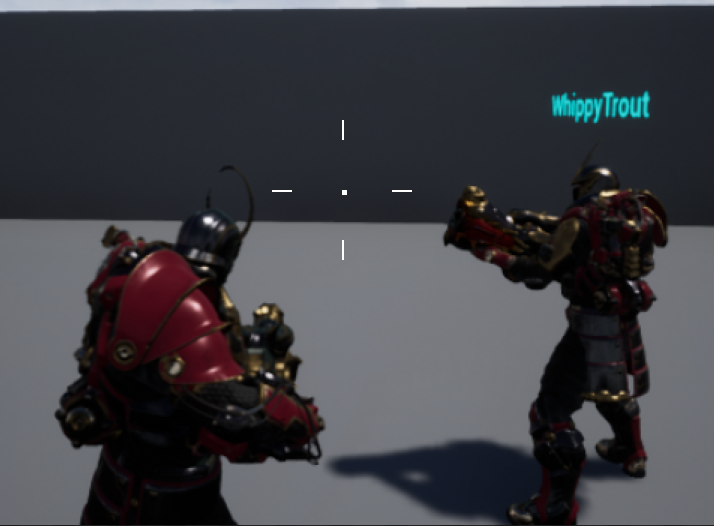 cedar finch
I found the setting inside my playercharacter when I select the widget. (thats the image i posted above) I'm not seeing it in the actual widget itself
sharp pagoda
Yea the widget doesn't control how it's container renders it, the setting is on the container
Can you post a picture of your settings in the user interface category of the widget component?
cedar finch
I got it. It didn't set. That picture above was the correct spot. I must have missed the click. Lol whoops. Works perfect now
sharp pagoda
👍
cedar finch
So do I adjust the text size and stuff in the player character too? It's kinda small lol https://i.gyazo.com/816385c8aefd6fc0e563d42005fea52f.png
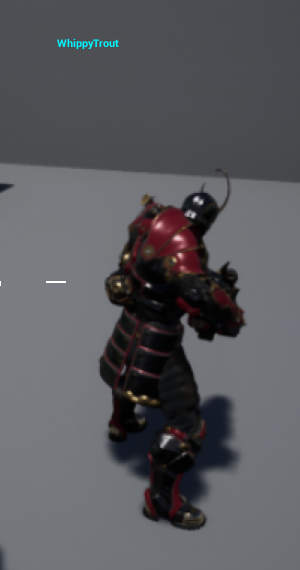 sharp pagoda
You could change the draw size by distance yea
cedar finch
Isn't that what most games do? Make the widget bigger when far away then small when close?
sharp pagoda
Depends on the style of the game, some do, some don't
cedar finch
@sharp pagoda This is exactly what I wanted. Thank you so much. 😃 I wish I knew this a long time ago lol
sharp pagoda
You're welcome
 summer rivet
say I have 100 blueprints that are all containing unique data inside of them and I want all clients to be able to interact with them and do stuff with them. Is is reasonable to manage this by having them all spawned on the server and replicated over to the clients and if the clients interact with them have the server do any changes then have those changes replicated out to the clients? is this is the expected route to take?
jagged garden
it depends on what it is
summer rivet
a farming game, say 100 tiles that contain info such as time left till complete and other properties.
should all of the tiles be replicated out to all of the clients completely or should the clients just have the visual data and the rest is handled on the server only
chrome bay
Any properties that clients don't need to know about can just exist on the Server
No point replicating redundant data
But it sounds like the tiles form part of the gameplay, so I imagine they'll need to be replicated
summer rivet
yeah that's where my brain is not getting in the right state of mind lol
I figure somehow I could do a pure visual model on the client side and just query the server for info as needed but does this seem like "too much" engineering?
I guess basically just have a local simulation with all the data from the server and whenever I do anything the server validates it and pushes out the changes to all other clients thru replication is the expected route?
chrome bay
Honestly hard to say what the best approach is without knowing about the desired result
But yeah generally, server will just replicate info about the tile state and run the simulation there
If it's game-critical
summer rivet
yeah gotcha. I think I am just overthinking the amount of data being a problem
jagged garden
or maybe have the server store an array and such and have an unreliable request to get that data
if it isn't important that it constantly updates
summer rivet
That was my first thoughts but the amount of data for all of that seemed like it might be prohibitive
Honestly Multiplayer breaks my head when I try to think it thru, whenever I think I get it I end up wrong lol
jagged garden
lol i feel that
it takes a while
the max array size that can be sent over the network is 65535 bytes
do you think you'd go over that
summer rivet
nah but the amount of data over time is the worry
jagged garden
thats why unreliable is good
if it's too much to handle it'll just drop the function
summer rivet
gotcha
cedar finch
@sharp pagoda So apparently there is a bug in UE4 that's been around for a while where widgets set to screen space can't be hidden. They just stay visible. I've been trying to hide my owning players name so it's not in your face when playing but can't get it to hide. Here is the discussion that has apparently been going on for years lol https://answers.unrealengine.com/questions/196384/472-3d-widgets-not-respecting-only-owner-see.html
If you or anyone else knows how to hide a widget for the owning player please let me know.
cedar finch
I'm not spawning it. I have it as a widget component inside my thirdpersoncharacter
I guess that would be the only way to do it though.
meager spade
i create my widgets during spawn time
cedar finch
@meager spade How do you keep the playername widget right above the players head. Mine likes to get higher and higher as I move further away. I like that the letters increase and stay big I just don't like how high it moves. https://i.gyazo.com/9c925e94354e3bac32bb9cbc3171c070.gif
 hasty adder
It is, in a sense but you have to keep in mind the direction the font is and what the widget anchor is
It’s prob anchored to bottom right of the canvas which is in a way it’s origin point if it was a plane
cedar finch
So I need to set the anchor of the widget to center?
hasty adder
You want the font to be centered and yeah put it .5 .5 with center origin see how that looks
cedar finch
Hmm I though I had that all set but it still looks like above. https://i.gyazo.com/ac663c6ca55718da8dfea0de9467b0c9.png https://i.gyazo.com/360814138e61ab98e501ebf8b39c834d.png
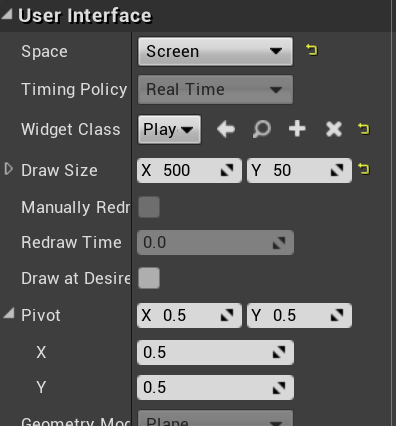
 cedar finch
ok that got it closer. it's still off and moves like above.
hasty adder
Mine is setup a lil different the actual canvas is square
cedar finch
I'm not picky i'll set mine up square too lol
cedar finch
Setting it square worked! 😃 Thank you so much!! That was bothering me so bad
hasty adder
No probs
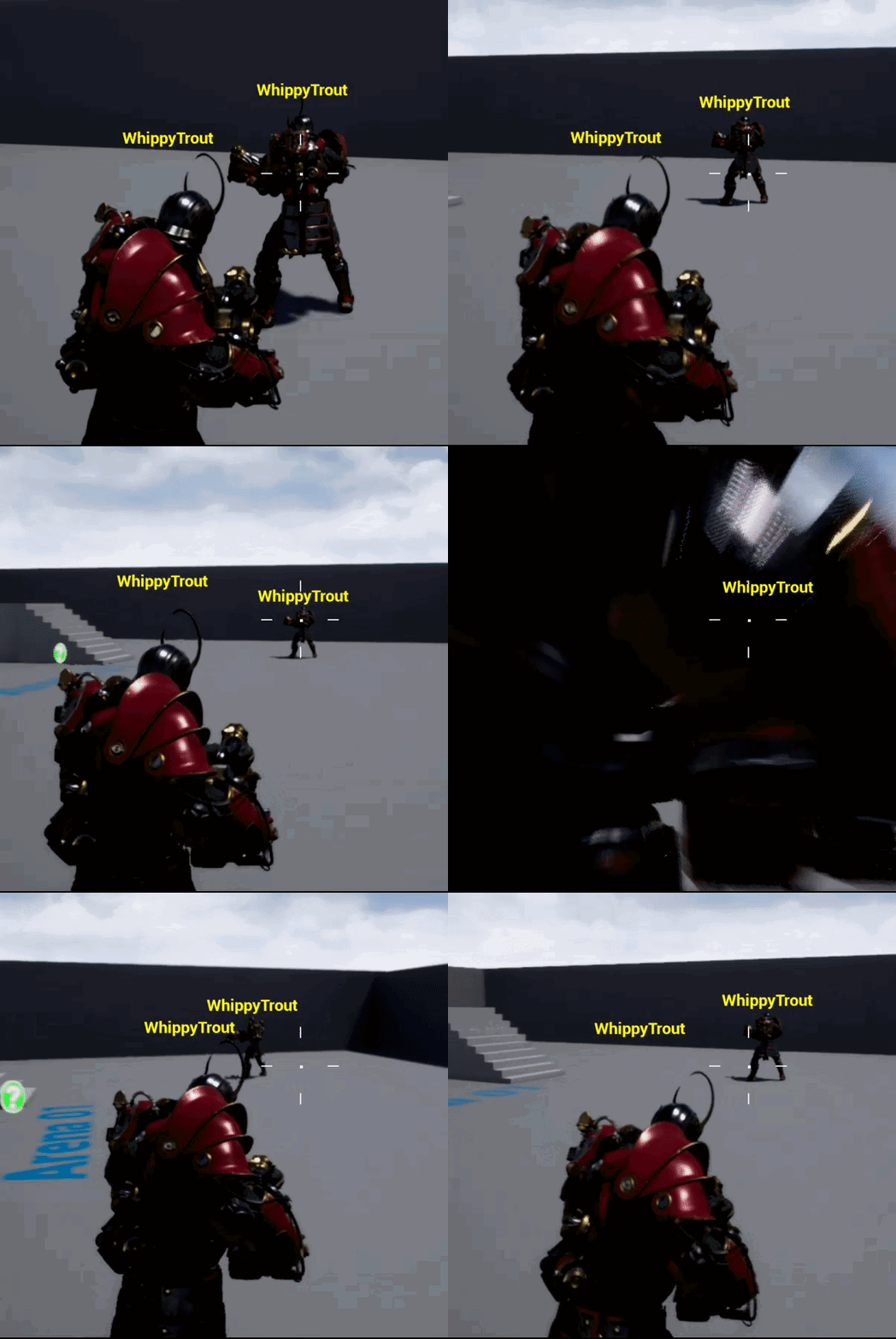 hasty adder
Next step is in the widget, and remember these might be on a character but visually speaking they are local to the viewer. You can decide on distance at which they collapse and from that distance to when they’re far away scale them smaller
I’m sure you prob at distance thing wtf I can’t even see the guy because he’s smaller then the text
I think to partially prevent the overlap you can align the text in the widget to bottom middle
cedar finch
So I handle all of the scaling and distances inside the widget itself?
hasty adder
Yeah the widget is being drawn in screen space so it’s Ike a sticker on the windshield
cedar finch
Oh ok. lol
I'm still not sure how to go about adding these widgets for multiplayer now because the way I had them isn't going to work. I was going to add a widget to every player. Then set the name to their name as a multicast so everyone could see and then hide the owning player's. But UE4 won't let me hide a screen space widget.
So now I'm trying to figure out how to spawn them. Kinda stumped
Once I get that I guess I can try the player distance and resizing stuff. IDK
summer rivet
now do you mean you cant set the visibility to disabled or you cant set the owner see/no see flags properly?
because hiding a widget should work fine by setting the visibility
cedar finch
I can't set the Owner no see. Is there a way to set the visiblity for just the owning player somehow? Somekind of workaround?
summer rivet
check if its the local player and then set visibility?
hasty adder
Here’s my usecase
Basically shows the other players name and if far away max amount of characters so it’s smaller text wise
ok sorry bout the terrible screen shots was on my phone
hasty adder
it gets part of the string
so if name is WhippyTrout and you get substring starting at 0 and max of 4 its Whip
i've seen some crazy steam names so good to decide where to limit things 😃
cedar finch
Ahhh I gotcha! Good to know. Thanks
meager spade
or just make it smaller or ... the rest of the name
to look more intuitive 😄
oh thats what Inphidel did 😄
cedar finch
So the only workaround I found to "hide" the owning players name is by going into the PlayerNameWidget and setting the Color and Opacity. But I don't know how to set just the owners and not everyones. https://i.gyazo.com/282c8a0aabfd79d96522e51cd2bf906f.png
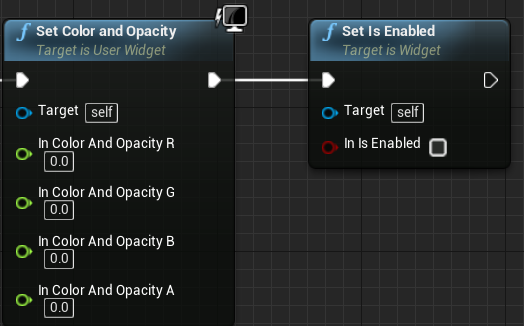
I found the official post here: https://answers.unrealengine.com/questions/222787/3d-widget-not-hiding-bug.html
It has this workaround I think from somebody at unreal
Help me please Tom Cruise I need some guidance hahahaha 🤣
I'm so close
summer rivet
Why can you not set the visibility on it?
You can also use the is local controlled pawn node to determine if the code is running on a local client and then act accordingly
cedar finch
I did that and it makes all the names disappear
summer rivet
Aw, sounds weird. Worked here when I tried it.
 summer rivet
You want to hide the name on the local player above their head but not on anyone else they see right?
cedar finch
Yes correct
summer rivet
And every pawn is creating this widget ? In their code
If so you want to do the check on every version and not replicated so it affects them all.
 summer rivet
Ah your doing this in the widget. You would do the check in the player that had this widget so you hide it on the local player and not the rest.
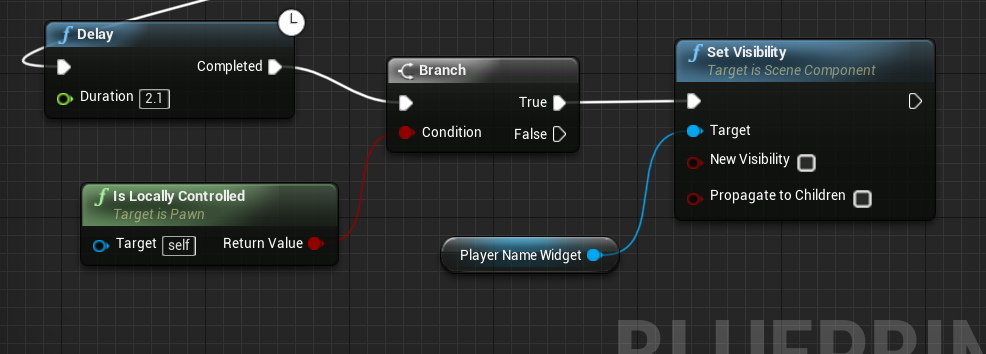
Do on the begin play the check for local pawn then do your code to hide the widget component
cedar finch
So I've been working in the BeginPlay and can't get anything to happen. Is this what you mean? https://i.gyazo.com/0c1643a83cc0813e4aacc28a1944888c.png

Oh My GOD!!!! Its a stupid delay!!!!!!
Why!!!!
Everytime I waste hours in UE4 it comes down to adding in a delay. 😐
Well It works now..... Thanks for helping me get it though I'm relieved now.
Is there a more proper way instead of adding small delays?
I had added a small delay inside the widget because my 2nd player wasn't getting his name set sometimes. So I had to add another delay in the Character. https://i.gyazo.com/8439ad5bcc72a35b608e50072d20902c.png https://i.gyazo.com/0a3df2e4d40c43b1b10fc1fa68b96855.png

 hasty adder
the pawn is spawned beginplay starts (server spawns the pawn.) then puts the controller in it
so the logic is likely being run before pawn is possessed
to remove the delay on possess i would do a run on client to do that logic i think
cedar finch
@hasty adder You are right. It works perfect now. Thank you so much for your help. I really do appreciate it. @summer rivet You too man. I wouldn't have got it fully working if not for yall's help
sharp pagoda
@cedar finch Don't use a delay there, that's bad design. Instead, use OnRep for the controller and Event Possessed to run that code.
cedar finch
I put the code in the OnPossessed and it works. What would i use the OnRep for?
sharp pagoda
In C++, OnPossessed is only called on the server, OnRep is called on the client.
Not sure if it's the same for bp
cedar finch
I have a few places where I had to add small delays in order for things to work. For example in my player controller I create my HUD for my player and spectator but have to update them when I die/respawn. https://i.gyazo.com/e5aae419bbc02b51b8ce6acae0fa3ae7.png
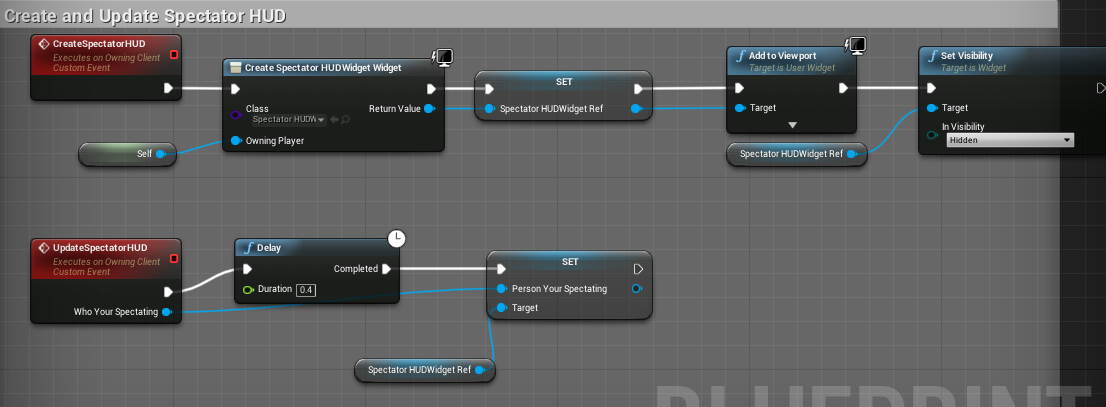 hasty adder
should keep the hud in the player controller / hud class
you can get controlling pawn from that
cedar finch
It's inside my player controller
I was just showing you guys some examples of where i have to use small delays to see If I'm doing things incorrectly. I'm always willing to learn better ways. 😉

When I get possessed I call the update hud in order to get the correct values for my new players health etc. But I have to put a delay. So @sharp pagoda is probably right. Onposessed might only be server
sharp pagoda
With proper design you never need to use any delays for networking workarounds, everything can be and should be done through events.
cedar finch
Ok I'll research OnReps and when to use them and then replace my delays. 😃
I've only used them for variables
sharp pagoda
OnReps are used for variables
cedar finch
lol well you see how much i know.
hasty adder
onrep has option to run logic when the variable changes ie. on possess you could set bPossessed var which is set to onrep to then run logic to do that other stuff you wanted it to
because the on rep iset local the logic is fired
so the var gets set server side sends it to client who then does its thing
cedar finch
Ohhh yea! I remember that now. That makes sense
Thanks for sharing your wisdom. 😉
That cat picture is awesome! lol
sharp pagoda
No don't introduce another variable for possessed
OnRep controller and OnPossessed is all you need.
cedar finch
Ok so if i understand correctly I promote the controller input on Onpossessed to a variable and set to OnRep?
sharp pagoda
No
OnPossessed is the server-side callback for when a pawn has received a controller. OnRep_Controller is the client-side callback for the same thing.
sharp pagoda
It's a function you can override.
 digital violet
Hi, I'm trying to learn network code and I can't get a component to replicate over network. All I want to do atm is to rotate an arrow showing what angle players are looking.
I first tried checking the box for Replicate component on the arrow but saw no result. Now I'm trying to use RepNotify on a Rotator Variable to send notifications over the network to update the component, but still no result. Plz, if someone know what to do, I would be immensely grateful.
I'm following a tutorial on Youtube who does a similar thing, but his old version has no Replication Condition, so I'm wondering if I'm screwing up there somewhere
winter plover
It looks like currently you are only updating the arrow locally
replication only happens from server to clients
not the other way around
so you basically have to send the server a message that you have changed the rotation on your arrow
here's a good resource for some basics on how ue4 does networking
@digital violet
also if you already have a component marked to replicate, you shouldnt have to apply the rotation again after replication
what you specifically will need is an RPC (Remote Procedure Call)
basically a function that a client tell the server to run
digital violet
So, what I should do is keep the component on replicate and the client to tell the server to send out the replicate to other clients?
like, first do this on you self localy, then tell server to tell others?
digital violet
k, I'll search the resource for Remote Procedure Call 😃
winter plover
good luck
ocean dust
Hi, all. When Use Seamless Travel = true, all of the sublevels for the destination map that are set as "Always Loaded" spawn everything at 0,0,0. This is not the behavior when Use Seamless Travel = false, where these same sublevels spawn at their correct position offsets. Am I missing something here?
digital violet
Super yay, I got it to work and it all made sense. Super thanks @winter plover ^^
winter plover
you're welcome :v
hasty adder
@digital violet basically make a custom event make that custom event a run on server and have that event update the rotation value that’s mark replicated
Oh gg phone discord way to update late
 pseudo iris
Hey, I can't get a second vehicle in the Vehicle example to work? Trying to create some mechanics but I can't test them due to two player not working
I want to attach a cable to a player 2 object (when I set the number of players to 2), but I can't figure out how to do it
 tawny parcel
Any thoughts on an approach to buff/debuffs for multiplayer? If you have 20+ players in a game, each with a potential 10 debuffs/buffs, would timers be too intensive?
jagged garden
is it on a dedi server
tawny parcel
@jagged garden Yes
jagged garden
you might just want to do things via tick
and decrement the time of things based on the delta time
 dark edge
Hey guys, what's the best way to handle RNG stuff when networked? Things like weapon accuracy, etc?
sharp pagoda
Generate seeds on the clients and pass those to the server @dark edge
 cursive shard
Hello, everybody. I've noticed sometimes the Role of an Actor can be ROLE_None but its RemoteRole is ROLE_Authority.
Q1 Does this still mean that this Actor is on client?
Q2 When the network role of an actor is set?
Thanks in advance!
 solemn pendant
How'd be the best way to query every client's perspective from the server? I.e. I have save data on every client and I want to know how many of the current clients has completed a given level
hasty adder
Woah
twin juniper
i found something interesting but i think this is wrong
sharp pagoda
That's for source control @twin juniper
twin juniper
ye i see
sharp pagoda
You'll need c++ to work with config files
twin juniper
of course but how
sharp pagoda
I haven't looked at that directly, but you should take a look at how GConfig works and it shouldn't be too troublesome.
digital violet
I'm trying to read servers DataTable from client. Right now server don't even say Hello =/
any tips?
Printing after Remote in BeginPlay does cause the clients to print in game, so at least that works as I expected =d
server did say hello now, so ignore that, I have a new hot trail I'm gonna try to follow =d
ok, so it was the row handle that was off
 hushed garnet
what BP is this? i have had an issue before where on a begin play the player does not actually own the actor yet, so it fails to do anything
as a quick test, put in a small 0.5 delay and then see what happends
if that works then make a small macro that waits untill you own the the BP before trying to send a request @digital violet
digital violet
I finally found that I just didn't replicate ClassName which was the Row Name for the Data table. The variable is exposed on spawning the actor so after replicating it the clients got the right Row name with the newly spawned actor 😃
hushed garnet
you shouldnt need to replicate it when your passing it to the server like you are
hushed garnet
are you still getting the hello print from the server?
digital violet
Now I don't do anything like on the screen shot. I don't have to make the actor talk to the server and back to the client
hushed garnet
so your server always decides what the clients are spawning with
digital violet
yes 😃
hushed garnet
fair enough then
but if you set anything else up like that and get the same issue again, add a small delay and test again
digital violet
in the game you pick a class, the game state checks if server says it's acceptable, if it is the server spawns the actor and makes the controller possess it 😃
hushed garnet
fair enough, if the way you have done it now works then all good 😛
digital violet
network coding is difficult, but I'm starting to wrap my head around it. I want to keep pushing it until it comes natural.
I'm gonna have to start alot of different projects and keep doing this over and over again haha
Grind to git good 😛
hushed garnet
yeah it took me a while and you will always find different and better ways of doing stuff each time you do it
i start unreal using BP's and networking, been doing it for about 4 years now and still learning loads
digital violet
Yes, that's the best part, when you know how to do it, so it's not a problem, but then you figure out a better way, and you feel like you level up ^^
hushed garnet
also one good tip, dont rely on marketplace assets for replication, even when they say multiplayer ready ! what happends in the editor is not 100% what happends out of the editor when you introduce latency ect, plus not alot of creators build stuff to work with dedicated servers, which is just a industry standard when building a multiplayer game
digital violet
yes, at the time I try to avoid using actors I didn't make from the ground up. I do use unreals Character actor, but I don't like that it does things I don't know about and thus don't know how to Fix/Tweak
hushed garnet
yeah, marketplace BP's are good to learn from., but better building your own
digital violet
But in one project I made my own pawn class, it was super weird to make the hit collision work, and it was just top down so no height, just 2D game play. But still it was hard, I'm not sure if I would survive making a 3D character movement work correctly <.<
oh yes definitely, it's nice to by cool things just to look at the blue print, tough I've mostly looked at shaders and learned a lot from market assets
hushed garnet
😃 thats it
jolly siren
Dormancy never comes into play unless enabled on the actor correct?
 solar flower
I've already asked in #cpp but didn't get the technical info I was looking for. My goal right now is to set up cross-platform matchmaking, i'm assuming I'll need to specify an IP to request to in order to get the active server list from a SQL server? If anyone has some direction I'd be very appreciative
 sacred nest
Hello! Im testing around making a multiplayer game. I have a GhostTrail thats is an "actor" BP that copies pose from a Reference Variable "ThirdpersonCharacterRef". But no one sees the pose on other players just ur self. Any one got any idé what could be wrong?
winged badger
Its tied to input action which is always local and is either not replicated or you are using a dedicated server
Most likely
sacred nest
how do i fix?
winged badger

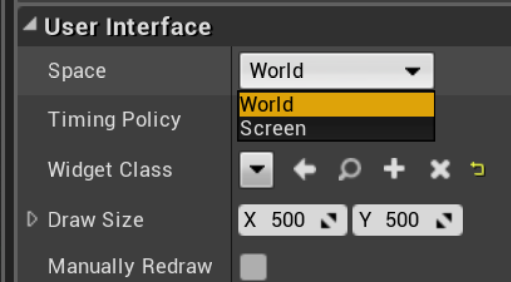
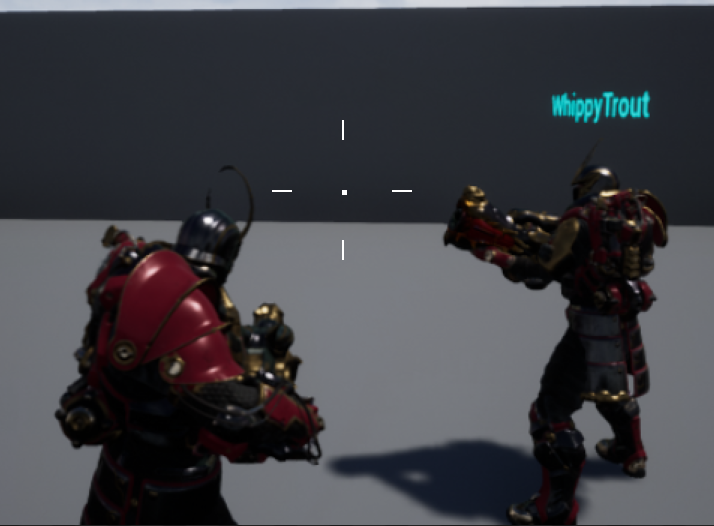
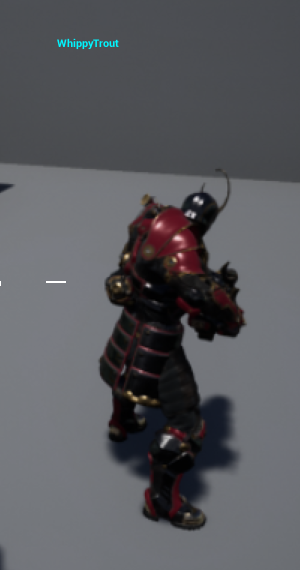
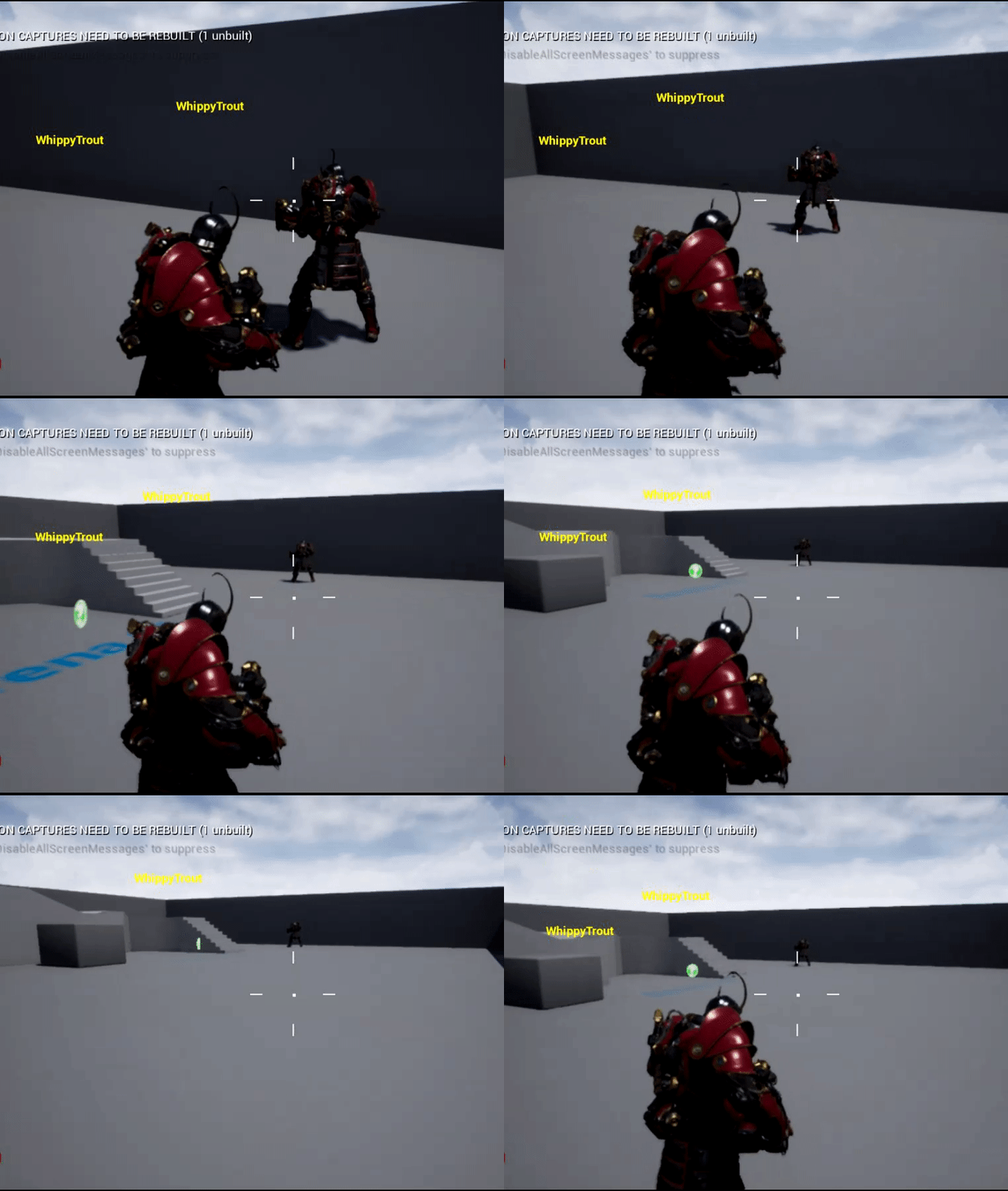
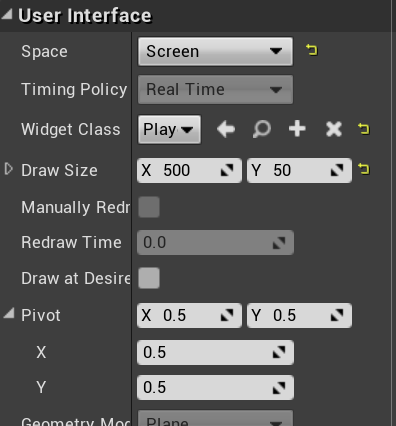
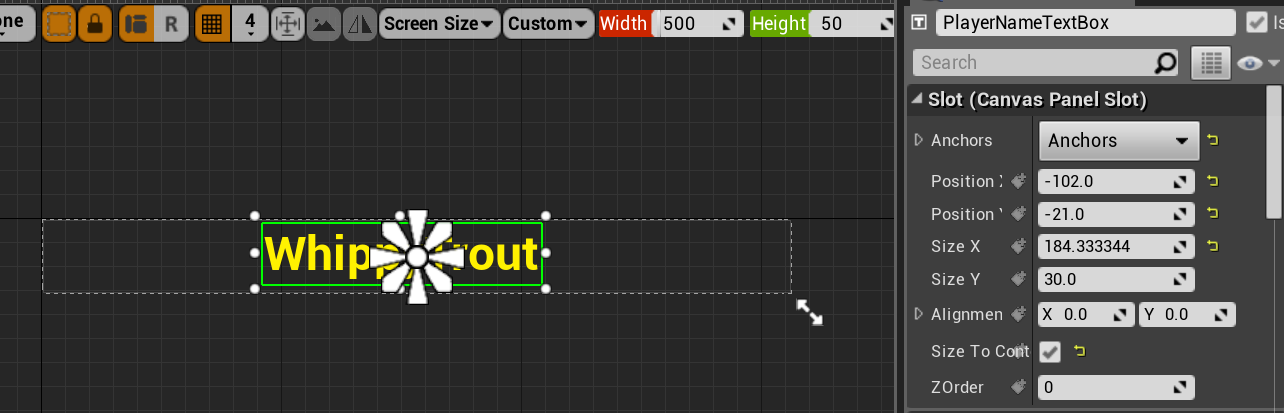
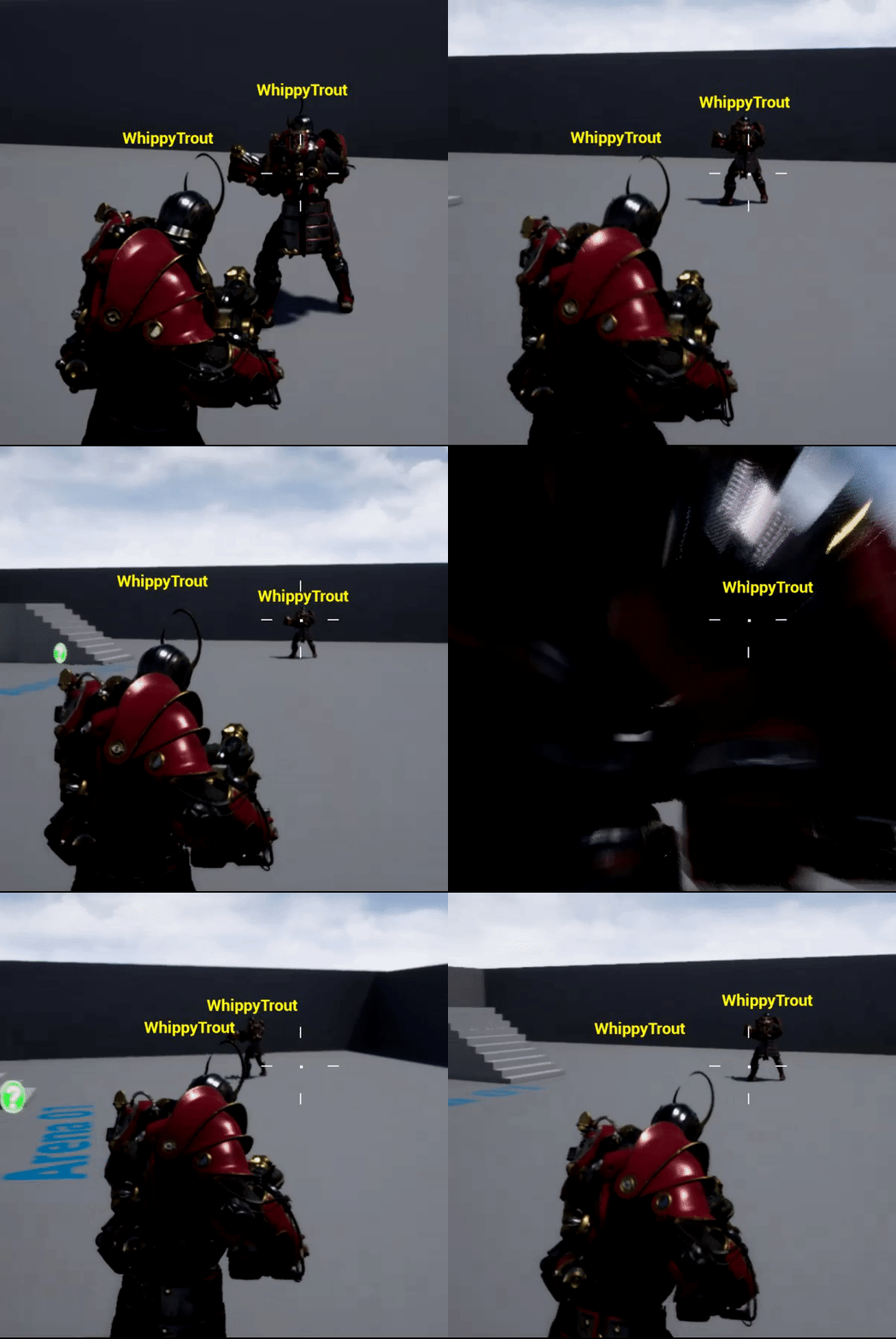
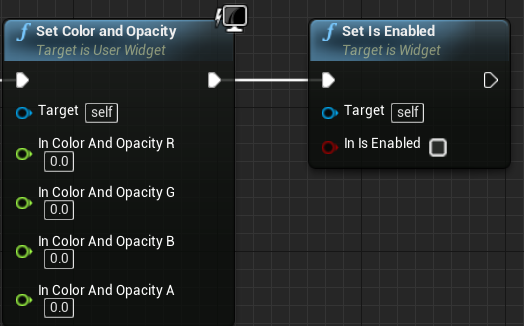
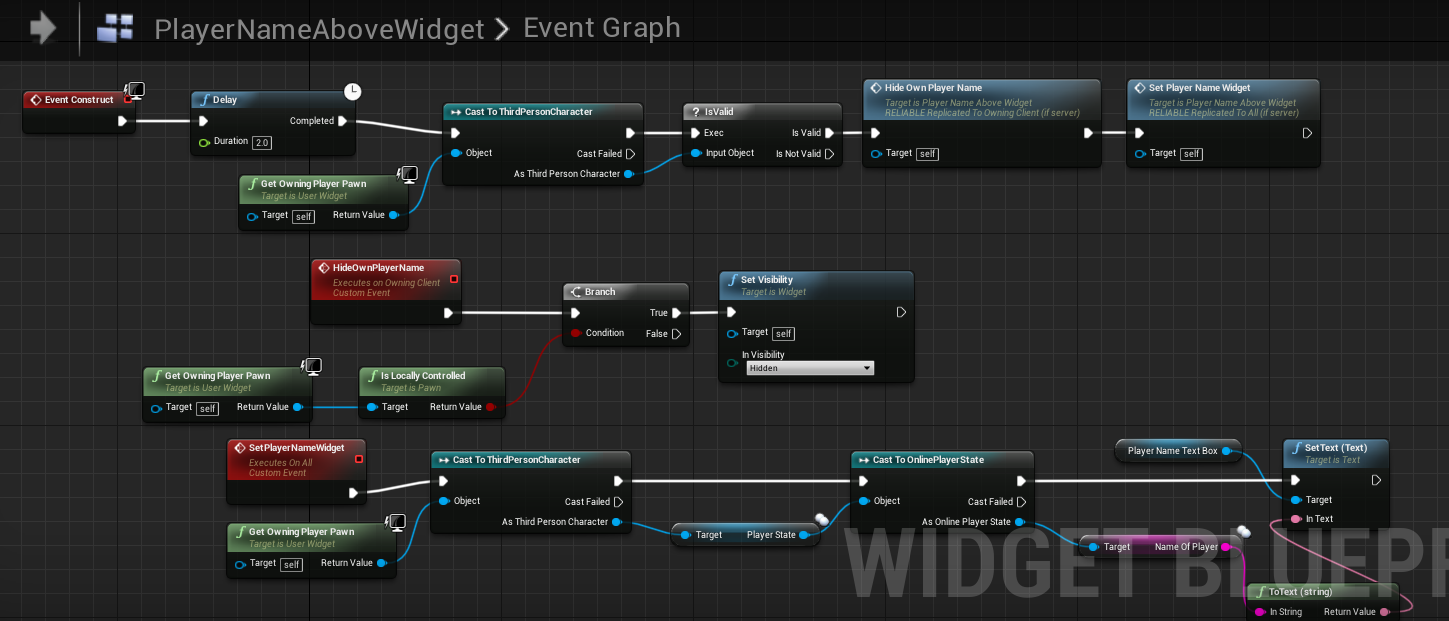
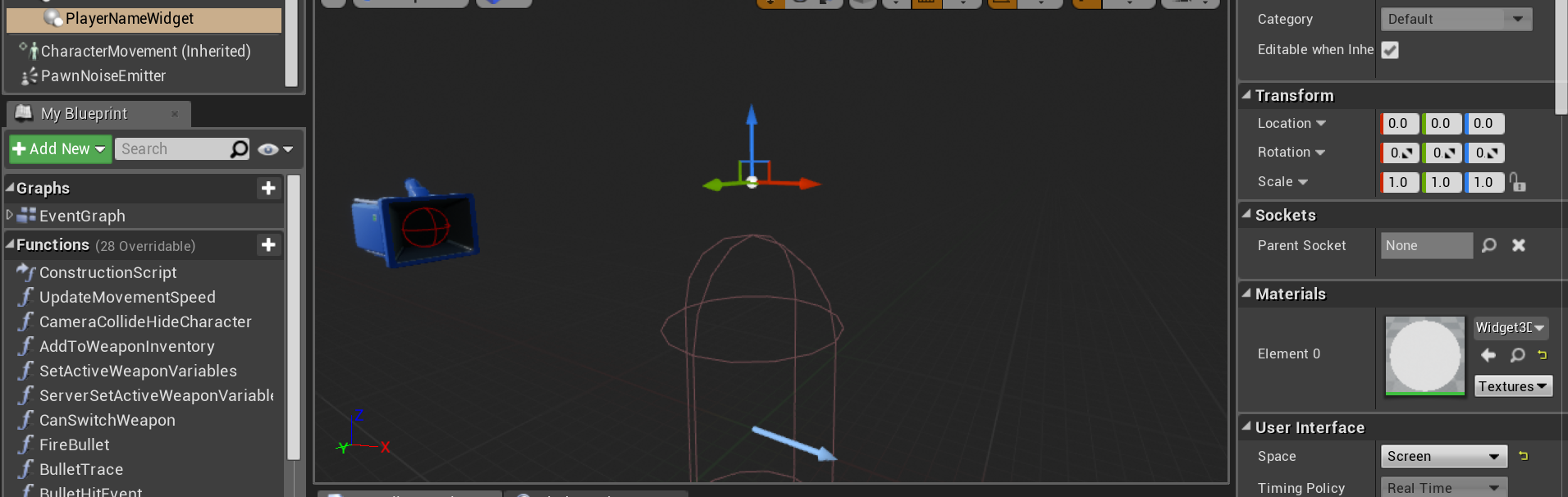
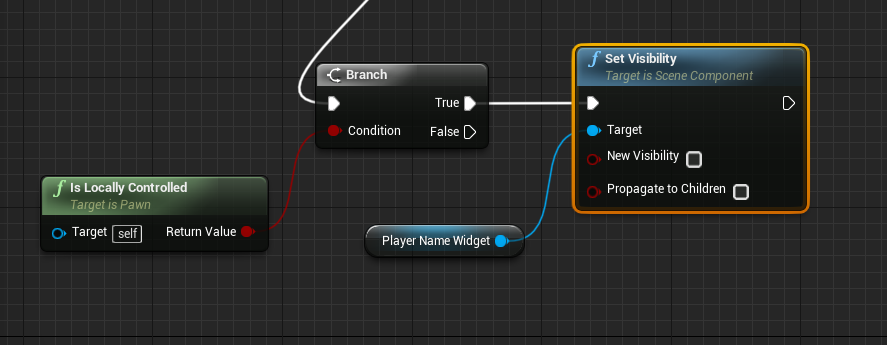
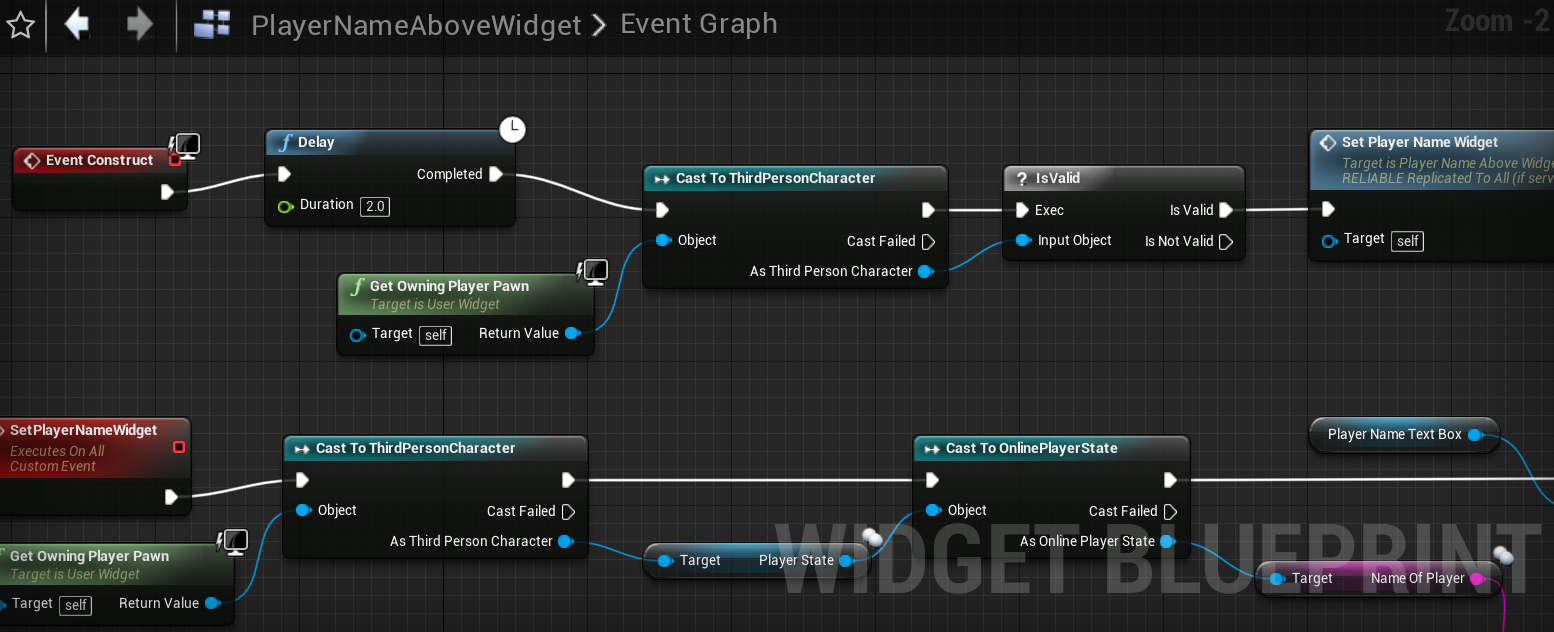
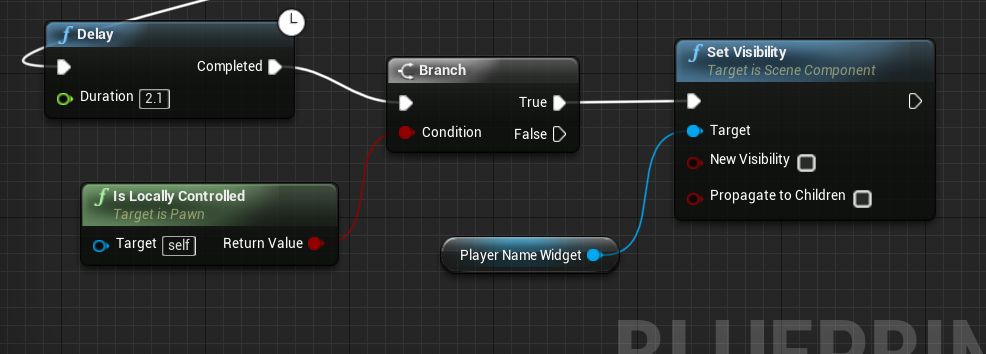
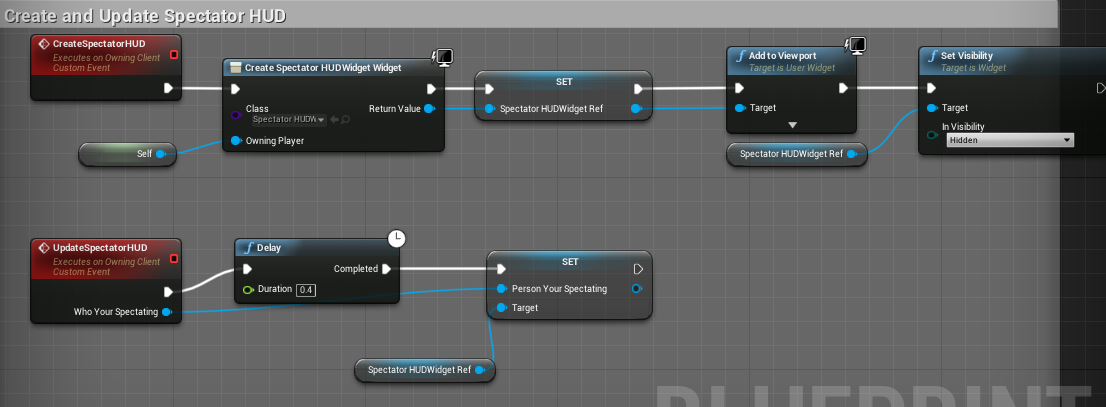
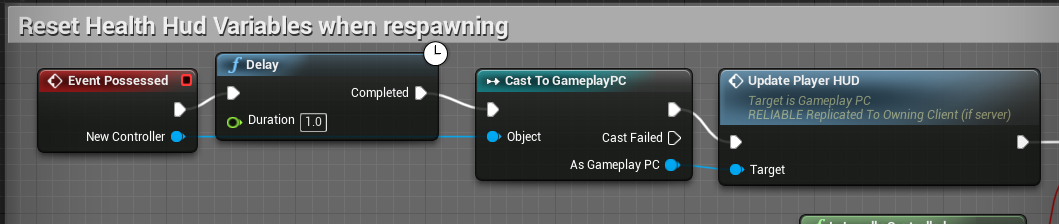 sacred nest
@winged badger thank you for your guidance! hive tried to fix it for a few hours now . But ill read in to this!
twin juniper
I wonder this setting does something? Like server and client will have different project version so they cant connect each other
thin stratus
Quite sure it does
umbral adder


only the server can spectate, when client dies server spectates
this is my version
both only server can spectate why?
umbral adder
i know the die function gets only called on server by in another project the client works fine the so
ok
hmm..
it works
thanks
jolly siren
Does anyone here have experience with implementing NAT punchthrough/STUN and TURN for UE4 with a custom online subsystem?
chrome bay
@jolly siren I believe whoever made the UWorks plugin has looked into that at great length
Not sure how successful they were though
jolly siren
Vlad, okay yeah I was going to check if UWorks supported it
@fleet sluice Did you succeed in implementing NAT punchthrough for UWorks? Did you use STUN and TURN?
sharp pagoda
If you can get your hands on libjingle, it can handle punching and proxies for you @jolly siren
jolly siren
ahh okay, that is what steam uses right?
sharp pagoda
Yep
fleet sluice
@jolly siren Only STUN. Then I implemented Steam's NAT punch-through library which uses their own TURNs.They uploaded the library separately a while ago: https://github.com/ValveSoftware/GameNetworkingSockets

GitHub
Reliable & unreliable messages over UDP. Robust message fragmentation & reassembly. Encryption. - ValveSoftware/GameNetworkingSockets
jolly siren
Thank you Vlad. So that library will only work if we are using steam?
fleet sluice
@jolly siren It says somewhere in there that it works without Steam, but I haven't worked with it yet. I've only worked with the SDK version which seems to be pretty much the same in terms of API, with the only exception being that the SDK library requires the "steam_api64.dll" to be loaded since that's what's using.
So I don't know about this standalone version.
I'd turn it into a standalone punch-through plugin in the long-term
I don't see where's the catch though. TURN can potentially use huge amounts of bandwidth and the SDK library definitely has TURN servers to fallback to. If it's a 1-1 copy from the SDK, this sounds almost too good to be true
Either that or this one doesn't have TURN, though that wouldn't make it that impressive. STUN is already too "outdated"
jolly siren
Hmm it looks like NAT piercing isn't implemented within the GameNetworkingSockets repo tho
fleet sluice
And actually, now that I think about it. It should be possible to use the GameServer version of the SDK library, since that one won't require the Steam client to be running. However, it would force you to link your app as a GameServer lmao
fleet sluice
"You'd still be responsible for running the STUN/TURN"
Too good to be true otherwise :/
You could look into UPnP as an alternative, though. Will fail sometimes but at least you won't bother with hosting TURNs
Sorry, wish I could be more helpful :/
twin juniper
What the Dedicated server port number?
jolly siren
This is helpful Vlad. Does GameNetworkingSockets have any of the STUN/TURN functionality tho? From that snippet it sounds like it is all in the SDK only.