#multiplayer
1 messages · Page 428 of 1
 steady tendon
 fossil spoke
👍
 high current
Ok, I have been stuck at this for more than 12 hours, so I will ask for help here, hoping someone can solve this with me
I am creating a multiplayer game for this Epic Mega Jam, and currently doing the hud. I need all connected players to be listed in the hud, with their associated colors, as their health bars
Currently I am trying with an array in game mode, that has all the colors
high current
yeah, but I need somewhere where I can keep the same color, and basically set it to when a new client connects
 thin stratus
Player Information goes into the PlayerState
Definining these colors in the GameMode is totally fine
Doing the same for TeamNames and TeamColors
GameMode creates them, fills them in and passes them on to the GameState
So for you that's the PlayerState
@high current
high current
yeah tahts what I have been trying to get all night
and I should do anything on player state directly right?
its only for storing things
 desert breach
@thin stratus Hey! Any idea how to connect Oculus GO and PC through online subsystem ? I tried connecting both of the devices. I hosted listen server on PC successfully and then in Oculus Go I looked for FindingSessions, in which I get a message of Finding Session Failure.
thin stratus
@high current You can do things inside of the PlayerState, but usually it's used to keep track of things
The "STATE" of the Player
It's shouldn't do any gameplay related actions
But it can keep score, team, respawn time, etc.
@desert breach Nope, never worked with Oculus GO, sorry
high current
So here is my game Mode
player state just has the variables, no code there
And this is the character
and then the widget is
it has more to it of course but right now I would like to get just the colors working, when I spawn 4 clients in the editor, on a dedi server
thin stratus
Well, variables that everyone should see need to be replicated
Instead of passing the Color additionally, just mark your PlayerState variable in your widget as "Editable" and "Expose on Spawn" and pass it via the CreateWidget node
(might have to refresh the node so you can see the new pin)
Then use the PlayerState directly
In addition, you need to mark the PlayerColor variable inside your PlayerState as Replicated
Otherwise others don't get the update
high current
damn it, it works now. argh, I am mad at my self, I read something in the wiki that player state is always replicated, and assumed any variable within will be
but thanks, I will try to go on from here
👌
thin stratus
Na, while the PlayerState is always relevant (so no distance check etc. it will always replicate), the veriables in it won't
Otherwise you'd send tons of unneeded data
You need to mark the as replicated, similar to all other classes and their variables
high current
what condition should I use
is Initial only good enough?
And if i expose the variables on spawn as you suggested, the widget cant be added to the viewport
thin stratus
InitialOnly should be okay
if you never plan on changing the value during runtime after that
But then it also doesn't matter if you limit it
So I would just not use a condition for now
And why can't it be added to the viewport?
high current
I have no idea, its weird, no compile errors or anything, no errors during gameplay
its just thta the hud never gets displayed to the viewport, if it has any values set as expose on spawn
high current
I did that
 tranquil basalt
How do i increase and replicate a simple float on the server? Game State = Team Points <- Player controller cast to Game State even Increase Points <- Widget casts to Player controller
I can't cast to the Increase Variable in the player controller, i can't connect the target
 hasty adder
Playerstates i find best to hold player stats and game state for team oriented stats
For mp anyways
 tropic snow
Why wont this work for the server in the player controller BP?
Just works on clients.
tropic snow
what should I use?
 slim holly
is that a widget graph?
tropic snow
playercontroller
slim holly
then use self
tropic snow
pick character is a widget
slim holly
self reference inside controller, or climb up the ownership chain to find the player controller
every ownership-chain should end up to playercontroller eventually
for example, getting a playercontroller inside weapon that pawn is holding should be following; GetOwner->GetOwner->Cast to playercontroller
tropic snow
Yeah I think I get that part. for some reason I believe the widget is just working for the client.
This is the begining of the function call .
That's the beginning of the function call. Wondering if I'm doing anything wrong?
 jagged garden
Widgets are client only
The clients widget doesn’t exist on the server and vice versa
So there should never be rpc calls inside of a widget
If that is a widget graph
But if you need to create the widget from the server and get it on the client you can pass a reference to the controller you want to add it to through the rpc
Instead of get player controller
slim holly
there it is again, GetPlayerController[0]
 open gazelle
tropic snow
open gazelle
tropic snow
Thanks ctzn
 vale mauve
So figured out how to replicate console commands cleanly. Is there a good place to post that info for the community since the wiki is down?
fossil spoke
Make a blog?
vale mauve
Eh, it's probably about time to do that in general
 nocturne berry
i'm experiencing something very weird with possession
i have 2 clients
client 1 is possessed to Character 1
client 2 is possessed to Character 2
Character 3 is not possessed by anyone
when client 1 possesses Character 3, the controller of Character 3 is Controller of client 1 on the client 1 and on the server
when client 1 repossesses Character 1, the controller of Character 3 is Controller of client 1 on the client 1 and is still Controller of client 1 on the server
now when client 2 possesses Character 3, the controller of Character 3 is Controller of client 2 on client 2 and on the server, but Character 1 on client 1 does not have a controller anymore but he still has it on the server, so i cannot control him anymore
what might be happening?
 winged badger
step 2 doesn't fit how unreal works
controller to pawn is strict 1:1 mapping
so it it re-possessed character 1, it is not controller of Character 3
also if you equate the client 1 with PC 1
it makes that presentation much much easier to digest
nocturne berry
yea i've been trying to make the presentation better, but that was the best i could do :p
well when PC1 is possessed to Character 3, he needs to possess Character 1 again, so the controller should move from Character 3 to Character 1
but seems that it's stuck somehow
might it be a bug?
 tawny parcel
Was reading through this article and it mentions bNetTemporary for projectile replication for "bullet hell" type games. Is bNetTemporary exposed to blueprints in anyway? https://www.epicgames.com/unrealtournament/forums/unreal-tournament-development/ut-development-programming/6403-about-the-optimized-projectile-replication
 gleaming vector
bNetTemporary is something they introduced in UT
tawny parcel
Ahh I see, I'm trying to find ways to optimize my projectiles for high volume... any thoughts? This is the issue (with dedicated server checked):
But should look like:
high current
Can a dedicated server be started from within a game
tropic snow
I have the camera attached to a mesh where the owner can't see it. Crouching works for server, but not for client in fps. (cam attach to mesh). Any one know why crouching in fps doesn't work on client?
 dark edge
Is Pawn Control Rotation treated in any special way WRT networking or is it just like any other old rotation?
fossil spoke
Pawns dont have a Control Rotation, Controllers have a Control Rotation, hence why its called Control Rotation.
Rotation replication is handled automatically for you if the Actor is setup to bReplicateMovement and bReplicates.
tropic snow
Hmm movement is being replicated for the character in blueprint.
It's when I make "owner no see the mesh" is when the client stops crouching
This mesh is the third person model by the way.
 unique thunder
Switch has Authority > (On Remote) > Cast to Player Controller (with a Get Player Controller object) > Server RPC with a controller input.
Server RPC: Spawns actor and assigns the passed-in player controller reference as the Owner.
This seems to break things. Actors not spawning, spawning but not having the correct owner (tested with 'owner only see visibility and the player that triggers this can't see the components marked as such'). Not sure if I'm understanding how it works.
high current
this only seems to work on two instances on the same pc, not on two pc's on a lan network
tranquil basalt
Can i change GameModes on the fly, for example someone is walking around with his character and then suddenly there is an Event next to him "BOSS has arrived...". I would like to set then a rule, if the boss dies, it will show who killed the boss. Do i need to create a separate Mode for that or it needs to be all done in the current mode that is loaded ?
This will happen on the server not locally.
 stable arch
how can i get a created widget to be referenced by a Client character bp, it seems to only be working on the sever ,but both the client and sever widgets get created only the sever get refences and dose logic when i want the client Character bp to also do this
Character BP
Player Controller
fossil spoke
That background is horrible, cant even read whats going on.
tranquil basalt
@stable arch Wonder if someone is going to help you, when you act like this.
stable arch
??
i only asked a question for answer to a problem didn't know i was going to get feedback on visual tastes
tranquil basalt
I want to show how many players are currently in the game. I have problems showing the number inside my widget. When i try "Cast to GameMode" inside "myHud" widget, i can't get the "PlayersOnline" variable.
 hoary spear
The gamemode only exist on the server
tranquil basalt
But how should i get the number of players then? I replicate the variable.. that should fix it right ?
hoary spear
There's afaik little point in replicating anything in the gamemode, if I've understood cedrix work correctly
it will never be replicated to anyone since it only exist on the server anyway
I dont know the best method for fetching current amount,
but one way would be that when a player logs in, you'd update the informatin on the clients
So with something like a custom event in gamestate or gameinstance which is replicated
tranquil basalt
So i would need a boolean that is set to false and when someone logs in, it adds +1 to PlayersOnline and when it's false, it subtracts 1 from PlayersOnline?
hoary spear
"The Game State is responsible for enabling the clients to monitor the state of the game. Conceptually, the Game State should manage information that is meant to be known to all connected clients and is specific to the Game Mode but is not specific to any individual player. It can keep track of game-wide properties such as the list of connected players, team score in Capture The Flag, missions that been completed in an open world game, and so on."
tranquil basalt
But what happens when someone closes the game.
hoary spear
OnPostLogin would count upward,
OnPostLogout would count downward
via appropriate functions i suppose
Ill PM you in a sec
thin stratus
It's really just that:
GameMode does not exist on Clients. Replicating Variables or performing RPCs in it makes no sense.
If you want to share an overall number of players, then forward the number to the GameState.
The GameState exists on Clients too. There you can set the variable to replicate.
E.g. Your GameMode, on PostLogin, increments the variable inside of the GameState.
on Logout it can be decremented again.
It would also be possible to simply use the PlayerArray to get the num of players.
An easy function in the GameState could filter bots and inactive players.
That way you don't even need to use the GameMode.
stable arch
Trying to get the Widget to be reference from the client Character blueprint , its only working server wise, but the widget dose get added to both the client and sever but its not each being created as their own Hud
high current
So I have some events I need to execute on clients
look at the last then\
if i dont use is locally controlled, then the event fires client side, even though its triggered from another player
if I use is locally controlled, then the particles I spawn with Niagara,(ik its ticked false) will only be visible client side
thin stratus
BeginPlay calls for every instance of the spawned actor
If it's a replicated actor it will call on server and all clients
If you want to limit this, use "SwitchHasAuthority" to cut off clients from server and "IsLocallyControlled" to cut off the local client from the rest
high current
ok I have set to remote
not on the client side it handles ok, but to other players
its not
were do you imagine the is locally controlled comes in
I am a bit slow in figuring ovbs stuff out these days
 vapid mortar
does the dedicated server can return value to the client?
thin stratus
Yes.
@high current IsLocalControlled is only needed if you wish to limit the call to ONLY the Local Client
Local = The one sitting in front of his screen, owning the Actor (e.g. the Character)
high current
yeah, that past I know, but I cant figure out my issue even with that information at hand
vapid mortar
in my case i have one function in game state(server) to generate random integer
and then the client need to retrieve the integer in the server's game state
how can i retrieve the integer?
high current
I have replicated in currently holding, to autonomous proxies, and even that doesn't work
@vapid mortar the player state is created for every player, in your character BP you can just get player state
vapid mortar
@high current still can't get the value integer from dedicated server's game state
😫
high current
if you are using a custom player state, make sure you cast to it
@thin stratus I still have some logical thinking left, as it seems
it works with rep notfy
on a dummy variable
thin stratus
The ServerRPC is wrong
Also why do you call a Multicast in an OnRep
OnRep already calls on everyone
thin stratus
No.
You are basically sending it back to the server again
While it just came from the Server
- this would only work on the local client
All others would drop that call
hoary spear
If mine sends it back to the server, then my concept of replication is totally wrong xD
thin stratus
Calling an RPC in an OnRep is def weird
There are very limited times where that would make sense
hoary spear
That part i got, since i wasnt sure how OnRep worked
but it makes sense the way you said it
thin stratus
OnRep is very simple. You have a variable, e.g. MyInteger.
If that Variable is marked as Replicated, the Server can change it and the Clients receive the change.
If that Variable is marked as RepNotify, the Server can change it and the Clients receive the change. In addition, Server and Clients call the linked OnRep function when the update comes in.
This gives you the ability to react to a replicated variable being changed
hoary spear
Perfect , thanks
unique thunder
Is it incorrect to spawn an actor via server RPC and to hook up a player reference into the Owner slot of the spawn node? The player reference being passed into the RPC via input
slim holly
mmm, you should use self
as in client just sends the rpc to spawn the actor, but you use the server side player as an owner
unique thunder
This is the blueprint sequence:
- Player BP triggers server RPC, passing 'Self' as input.
- Server RPC triggers function, passing input.
- Function casts to another actor, triggers a local event there, passing input.
- This new actor uses a Spawn Actor from Class node and takes the input, uses it as owner.
(ded server)
thin stratus
ServerRPC will call on the ServerSide of the given Actor
Passing self is not needed
slim holly
sure you can send the player reference with the RPC but it will just convert on server side anyway
unique thunder
Yeah that seems to be happening because I'm debugging by setting a component inside the spawned actor to 'only owner see' and the owner I'm passing in does not see it.
slim holly
actor and component replication should handle the rest
unique thunder
When I pass in the player as an owner through the RPC all the way down the chain, printing display name only prints on Server
Which makes sense because it's run on server
But I don't think the owner is set locally
Since he can't see the owner-only item
Actually, passing in 'Self' instead of a player controller doesn't even spawn and attach the item client-side. (If its hooked up as Owner to the spawn node itself)
thin stratus
- Your ServerRPC does not need to pass self. It gets execute on the ServerSide of the same Actor.
You can grab "self" in the ServerRPC. No need to pass it. - You will want to use the PlayerController of the given Player as owner.
While you can always chain the owner by using another actor that is owned by the playercontroller, it might be better to take the controller if you are in reach of it
high current
Dunno if I should ask this here, but when a client joins a server, it takes a while to "initiate" the world, and have control over the character, but since the character is well already in the world, the hud is cast, and unless I put a huge delay on the hud getting values, it wont be set up properly, as it cant get the values it needs
how do I force the client to load everything and then initiate a PC>character and whatnot
hasty adder
Three days and going
 gloomy rose
Hello, have a quick question about replication a top down mouse look. so far I have the logic for the server to rotate but as far as the clients rotating and the server able to see, not so much...
any help will be amazing and id be greatly appreciative
 unborn nimbus
Do multicast RPCs follow net relevancy?
stable arch
I need help Trying to get the Widget to be reference from the client Character blueprint , its only working server wise, but the widget dose get added to both the client and sever but its not each being created as their own Hud and only being refenced by the sever widget when i want it be separate for each player.
Player controller
thin stratus
Possessed only calls on the server
HUDs of Clients are only valid on the local client
Not on the server and not on other clients
So Possessed can logically only get a valid reference to the Server HUD
stable arch
i see so i should run that through another event then or else it will always get called through server.
thin stratus
Yeah idk what you are trying to do
But Possessed always calls on the Server
You can call a ClientRPC at that point
if you wish to target the local client
stable arch
all right thanks
tropic snow
When I put "owner no see" on a mesh the server still knows it's there, while the client doesn't. Why?
hasty adder
Who's the owner of the mesh?
hasty adder
Ok you have a first person and third person model? For persevtive view local and 3re for everyone else right?
tropic snow
I'm using third person template with first person meshes.
third person mesh from what I see is inherited not sure if that is causing the problem.
hasty adder
What's the intention of hiding the mesh. Are you changing this at runtime? Example player is going first person and then 3rd and back?
tropic snow
not changing it on run time.
Intentions are is that I don't want the owner to see the third person mesh much have the camera attached to it.
 grave heath
oh boy, i took a deep breath and i started looking for help, so i decided to come here. right now, i have a procedural generated map from tiles. It is using the level instances, and I create them using the Create Instance node. First problem found, if I tried to open the game with two clients (PIE and normal), the clients are always kicked. Turns out it is an anti-cheat thing and the server has to load the level first. OK, I generate the map then I send an array with the level instances' location and stuff to the clients, so they can load that too. Not so easy.. Got lots of null variables, but I somehow managed to do that. Right now I am stuck at this: Server generates level, then waits for it to load. After it loads, it passes it to the clients so they can load it too, and then the server generates a new level, etc. It is slow, but surely reliable. This doesn't work. As soon as the client wants to load a level, it appears for 1 seconds, the whole process freezes, and then the client is kicked. This doesn't work even if I generate all levels, wait for them to load, and then send them to clients.... What can I do? I am reaaaally stuck here
hasty adder
BP should be owner no see on 3rd person and owner only see on fps mesh
tropic snow
Found a fix. I duplicated the 3rd person mesh since it was inherited and made the inherited invisible. The duplication gives me no replication crouching problem.
Had to do this since I couldn't move the mesh(inherited) to the root for client for some reason.
unique thunder
This event is triggered by the player BP and 'Owner' passed through is 'Self', which works. But if I set the reference as a variable, every time this event is re-triggered locally inside this actor, the variable is null on the server. It only works the first time when the player calls the event.
Note: this event is not inside the player BP, the player casts to this actor and runs it so the first execution recognizes Owner. The re-triggers are done by the actor and the player has nothing to do with it.
Why?
tranquil basalt
GameModeBase runs on the Server, but i can only create widgets on the client side. So how should i pass the "login data" to the server ?
Does GameMode overwrite GameModeBase?
slim holly
obviously you encrypt the input and send it as such
tranquil basalt
I'm a hobby webdev and UE4 is bit confusing to me. I don't want to let the client connect to the database, from Cedrics Multiplayer Sheet, the gamemode runs on the server. So my logic tells me, that i need to move from Widget -> PlayerState then to the GameMode -> Database.
 cobalt steeple
Hey guys, does anyone know any good documentation for the Online Voice system ? There's this but it seriously lacks practical usage information. I'm struggling on things that should be easy like muting specific players on specific devices.
http://api.unrealengine.com/INT/API/Plugins/OnlineSubsystem/Interfaces/IOnlineVoice/index.html
This interface is an abstract mechanism for managing voice data.
 lost inlet
@tranquil basalt client->server RPC using the player controller
you don't have to use the player state for this
 glacial lotus
When one of my players crouch it does crouch but keeps flying for some (a bit random) amount of time before it goes down to the floor. Does this ring any bells? I saw one property on the movement component that I suspect could be related but I'm not sure. Talking about "Net Proxy Shrink Half Height". The tooltip says "Shrink simulated proxy capsule half height by this amount, to account for network rounding that may cause encroachment. Changing during gameplay is not allowed. see AdjustProxyCapsuleSize" but I don't get it and I cannot change anything in the player if I don't know what it's doing.
slim holly
movement component handles it
reason it's flying up is to correct the correction and physics don't like when shapes change size suddenly
tranquil basalt
I did a simple start screen, username input. After clicking the button and the username isn't empty, it opens a new level. Problem is that before making the "start menu" the two players where on the same map, now the two clients don't see each other
glacial lotus
@slim holly so, if I get it right... Do I need to disable physics for a bit?
glacial lotus
Also it works fine in local (dedicated server and normal) , even with lag=500, lagvariance=25 and loss=25. So I don't get why it only occurs in the cooked version. The only difference is that version is actually using the real server...
jagged garden
@tranquil basalt do you have it open the level again when they enter their username
glacial lotus
and don't really get " is to correct the correction"...
slim holly
means, client tries to change the size, server tries to correct it, then gets the message that client wants to change the size and changes it back
 cedar finch
I'm using my gamemode to respawn players. My problem is I want to respawn the players at the same spots everytime but I wind up having all 4 players spawning at the same PlayerStart. How can I assign a PlayerStart to a player?
fossil spoke
Override the FindPlayerStart function and then store a reference to the PlayerStart on each players PlayerController or something. Then just return the PlayerStart ref that was stored from the FindPlayerStart function.
thin stratus
fyi, UE4 already has a StartSpot implementation
iirc, if you override ChoosePlayerStart, it will set that the first time and reuse it next time you restart the player
You'll want to check the Source and see what Find and ChoosePlayerStart is actively doing
fossil spoke
Or that ^^
cedar finch
I'm just using this for my Lobby map when I am selecting characters. I need them to destroy and respawn in the same spot over and over when players choose their character
dark edge
What's the best way to set a reference to possessed character in a PlayerController? Can't do it on begin play because the character doesn't necessarily exist clientside. Is there an equivalent of OnPossessed?
thin stratus
GetControlledPawn
That's already the reference
@cedar finch Make a fixed size array of PlayerControllers.
When a player connects, loop over the array and find the first empty slot.
When a player leaves, clear the entry, but don'T resize (so it stays at 4 entries).
When a Player gets an entry, pass the index of it to the PlayerController, the controller knows what slot he has
Then use the same index for a fixed size array of spawn points
And spawn the Character of PlayerController with index 2 at spawn point with index 2
cedar finch
Ok so I kinda have something like that already. I think maybe i can figure it outhttps://i.gyazo.com/3af7d3998f03992f8fbef40f237f35a0.png
 thin stratus
You don't want to add and remove
Cause that way your controller array gets async
E.g. if you have 3 players, and player 2 leaves, player 3 slips into player 2's slot
You need to loop over the array, find the first empty entry (not valid) and SET the entry
cedar finch
So since i'm using the AllPlayerControllers array for a lot of my other blueprints should I make a new array
I guess thats a dumb question isnt it lol
thin stratus
That's up to you
cedar finch
I see what your saying though. Thanks I'll start working on it now and let you know how it goes
dark edge
@thin stratus I was talking about being able to save it as a type vs casting every time I want to do something, but I sorted out a way to do it via the PostPossess event on the pawn.
thin stratus
In C++
You have the OnRep Pawn function
In BPs you'll have to refer to the posses function
dark edge
Ooh yeah nice, prolly gonna go that route down the road.
tranquil basalt
I'm trying to join a existing level. The level should be open the whole time so people can join it. But when i open the same level the two clients somehow don't connect
I open the level from a widget.
what the hell, when i open the ThirdPersonExampleMap in the editor and then start the game with two clients, they are next to each other. But when i start it from the StartMenu it doesn't work
jagged garden
thats because when you start it from the editor they auto connect to each o ther
you need to add listen to the options string in open level
and you also need some way to connect the client to that server
which you can do open 127.0.0.1 in the console
 umbral adder
hey i dont know why but when i FOREACH LOOP from gamemode with pc array it doesn't execute on client
 fleet sluice
 limber plaza
Hey, I'm setting up steam sessions. I'm pretty confused about this step where I have to modify the ue4 source. Everything I have read says modify "OnlineSessionAsyncServerSteam.cpp", change STEAMPRODUCTNAME, STEAMGAMEDIR, STEAMGAMEDESC. Well that sucks because it is in the ue4 source. What if I want to switch between projects that are both on steam? Am I supposed to have a different ue4 source for that? Is there some better way of maybe overriding this method w/ my own FOnlineAsyncTaskSteamCreateServer::Tick() !bInit setup? Or... any way of doing this w/out having to modify ue4 source?
The variables seem very deeply buried to me, it feels wrong.
umbral adder
@limber plaza its very safe
limber plaza
Sry. My concern isn't really safety. It just feels wrong in terms of having to rebuild the ue4 source when switching between different steam projects, (or having 1 ue4 source per project)
Like, can't these strings be variables provided by my game to the compiled ue4? or ... is this just the way things are.
(ps ty rize)
umbral adder
i dont think there's an alternative, its pretty quick changing these and it feels right for me
limber plaza
Hrmmm k
umbral adder
i did it recently
limber plaza
HmMMMMMMMMM ok thanks v much my friendo
cedar finch
@fossil spoke @thin stratus So yesterday you guys helped me figure out how to spawn players at one location and stay spawning at that location. Both of your answers were correct and I kinda combined both to accomplish what I wanted. I got it working and just wanted to thank you both. Here's how I did it if your interested. I used a function to set a "PersonalPlayerStart" variable inside the PlayerController. Then just spawn them at that location everytime. https://i.gyazo.com/806612259ad71b1e61d7e6130191ec11.png
fossil spoke
👍
 meager spade
@limber plaza could write a script to change them for you
based on the project you want
 dire temple
Does anyone know how to sync variable per character on Dedicated Server?
I am trying to set a bool based on the device being used, and it works per client instance, but all characters on screen follow suit, instead of their own device, however on their screens everyone follow
Pretty much each client tells every player to do what their machine is supposed to, opposed to everyone individually. I tried replicating the variables, didn't work. However, doing RPC events to run on Server and then Multicast causes an Accessed None and from there the client disconnects from server on error
high current
try putting a branch, with is locally controlled as its condition
winged badger
@dire temple multicasting from a PlayerController is not advisable - it will try to execute a function on each machine on their instance of the PlayerController that did the multicast, and they don't have that instance
so they disconnect
cedar finch
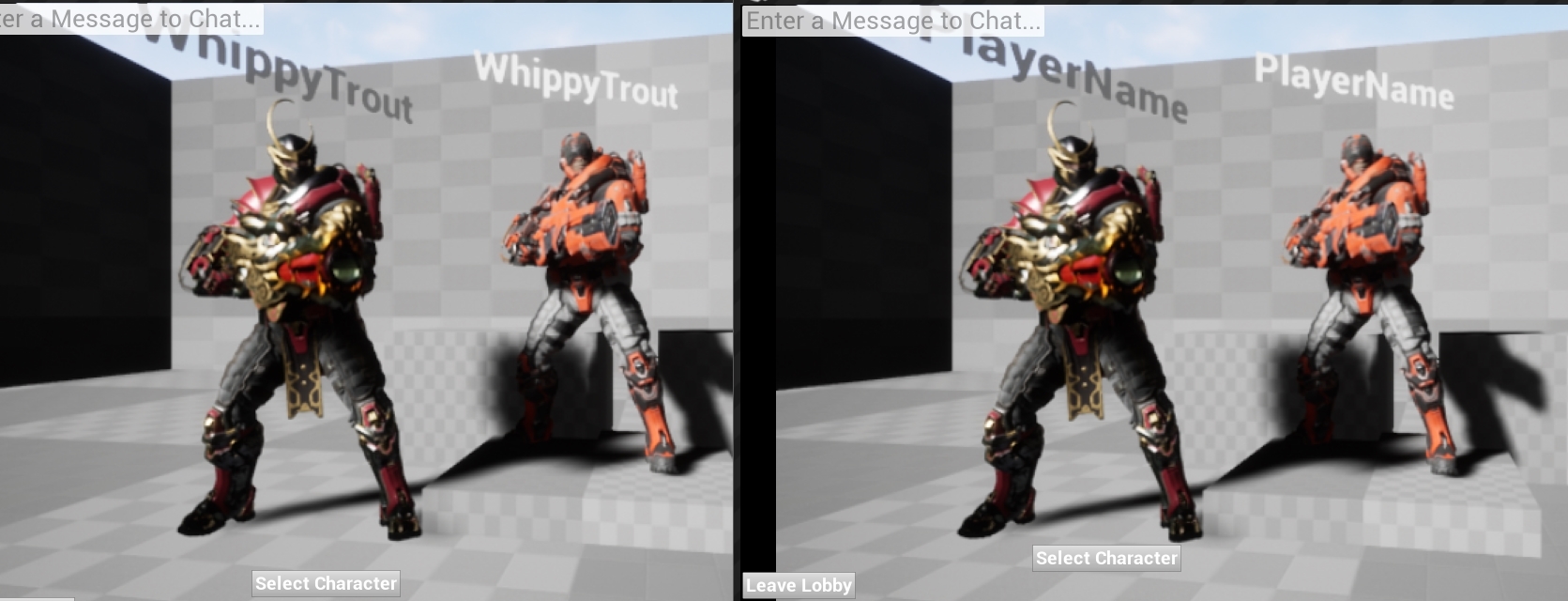
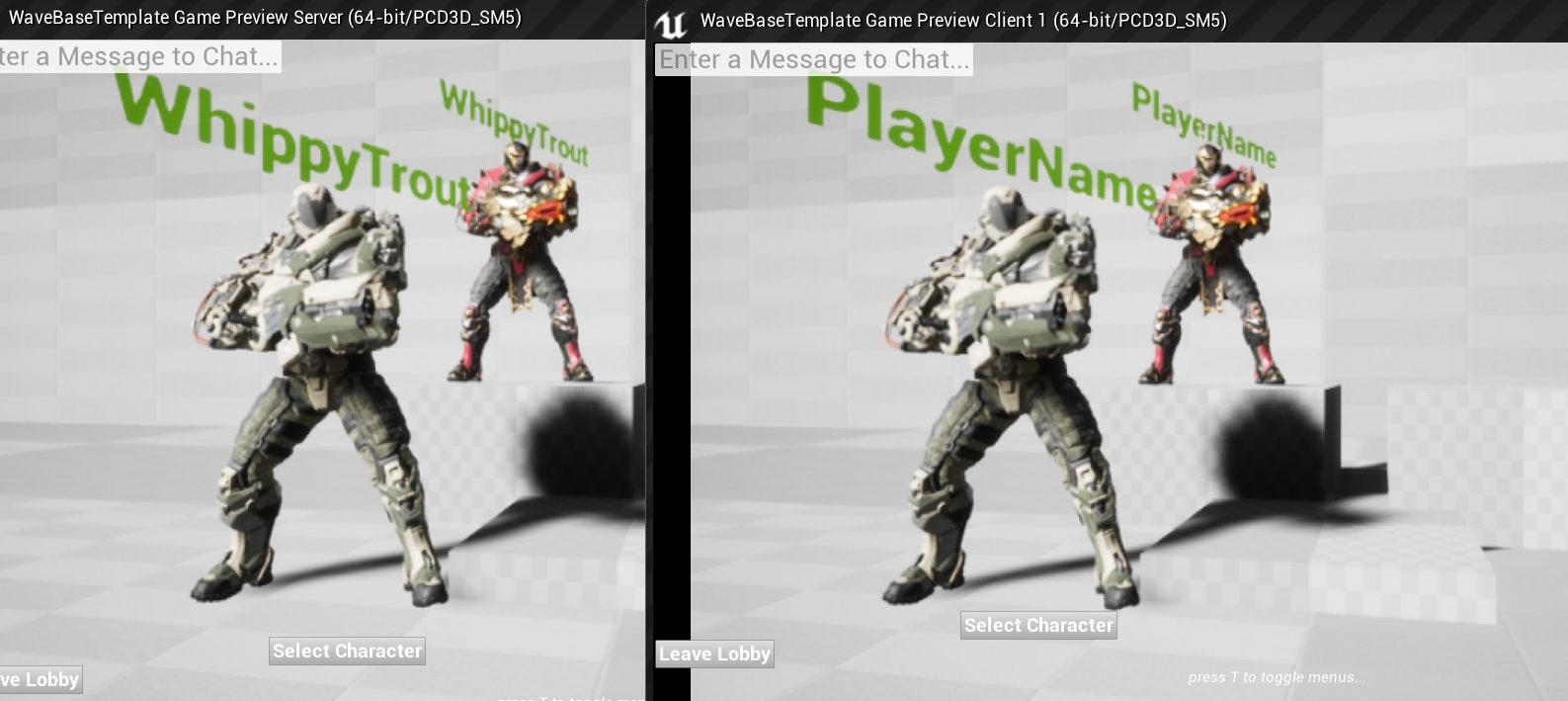
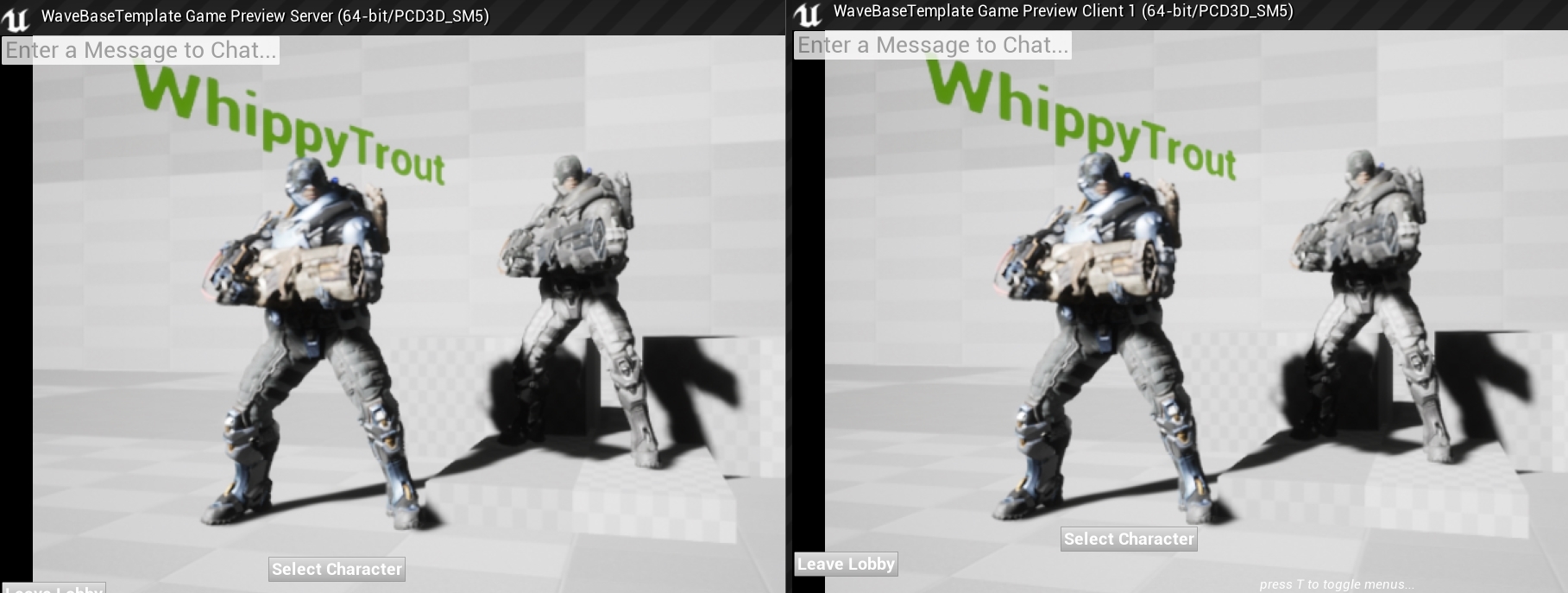
So I'm trying to add PlayerNames above my characters head and am not sure if I can properly test it in the editor. Right now I only see my playername on the Server and just the default text on the client. It could be a replication issue but I just wanted to check and see if you guys knew anything.
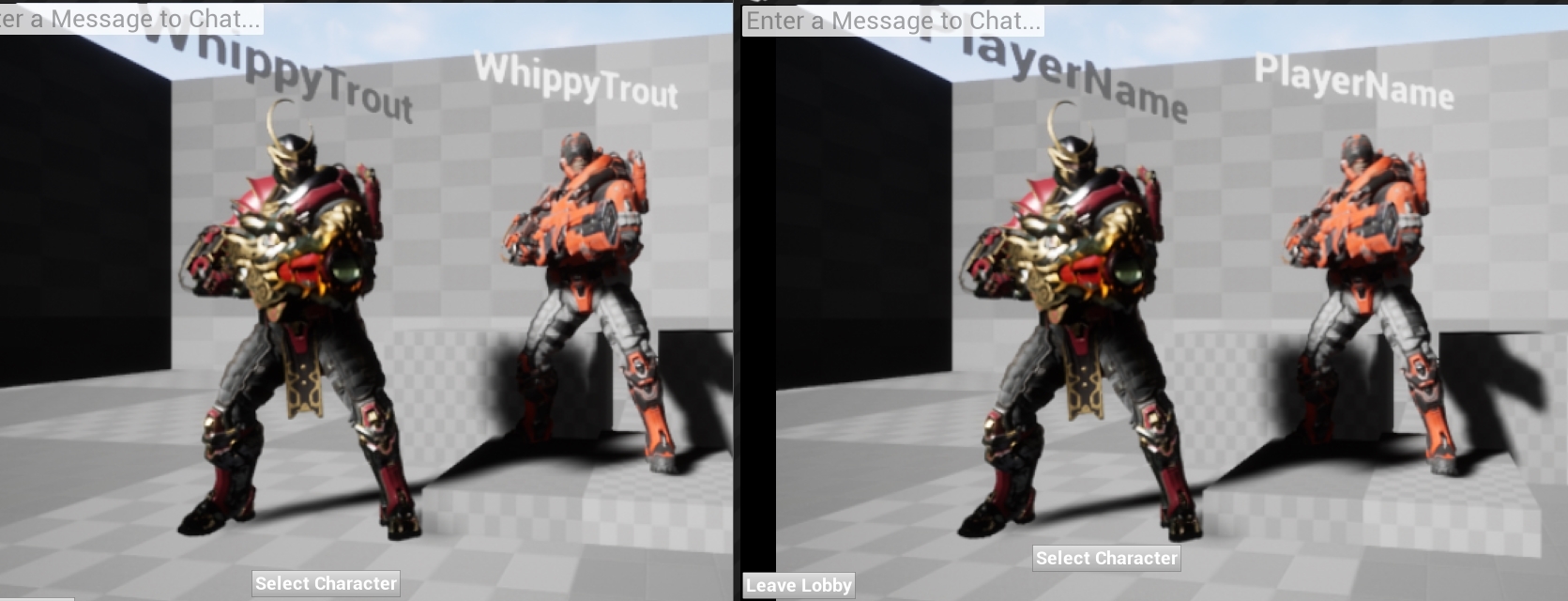
 loud mountain
player names are usually automatically replicated inside the playerstate
these are also automatically set by the onlinesubsystem (if there is one)
here:
cedar finch
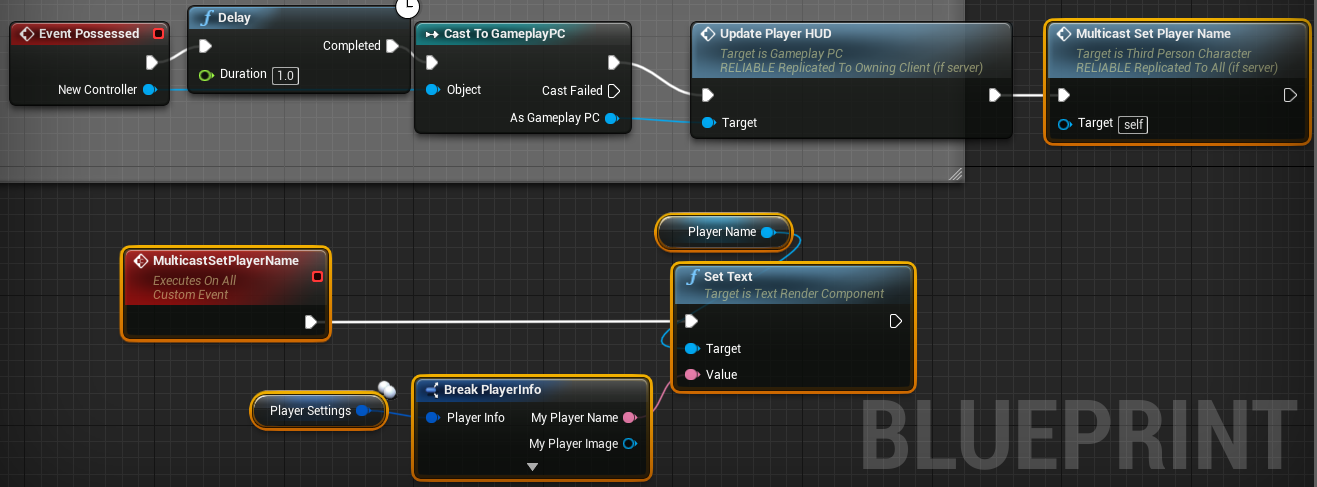
@loud mountain I know but I didn't set my game up using that. Instead I made an info structure to store all my player info such as Playername and other values. I then can get and update those variables. I did that because SetPlayerName is not exposed to blueprint.
Maybe I'm putting my logic in the wrong place. Right now I'm setting the playername inside my playercontroller. Should I put it somewhere else?
cedar finch
Does anyone know how to Replicate Text? I have a "TextRenderComponent" That is inside my ThirdPersonCharacter blueprint. It displays the players name above their head. When the character calls the "OnPossesed" event I run a Multicast event that sets the "TextRenderComponent" to the players name. My problem is that It only show the names for the Server, Clients just see the default value for the text. Anyone know what I'm doing wrong?

 dark edge
Do you guys know if I can build a dedicated server from my project without requiring the rest of the team to use a source-built engine?
thin stratus
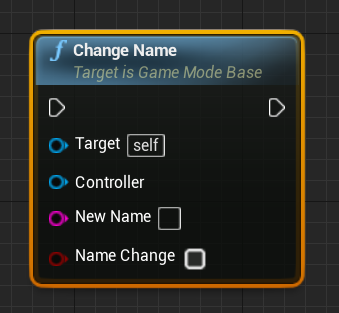
SetPlayerName is exposed
@cedar finch
It's called "ChangeName" or so and is a GameMode function
unique thunder
I spawn this actor and assign it an owner through the spawn node, then I trigger this event
Hoping to enable overlaps locally only
But it still detects overlaps for all clients
(By default, the mesh is set to not generate overlaps)
 cunning stirrup
Hello, i'm having issues with the Widget Components placed in world, they don't seem to be interactable in multiplayer whereas they work completely fine in singleplayer
thin stratus
@unique thunder Why not just filter the Overlap event?
cunning stirrup
I'm using the Press Pointer Key to interact with them
thin stratus
Or why not filtering the BeginPlay for the local player and enabling it then
unique thunder
@thin stratus The act of constantly detecting overlaps is causing some performance issues. I have 30 players each with about 6-7 actors attached to them (VR) that generate overlaps. Would be much cheaper if they only detected their own attachments / items.
I could do it on BeginPlay for local player
Just not 100% sure on it
thin stratus
That's for Pawns
unique thunder
unique thunder
Yes
cunning stirrup
reparent it to a pawn
thin stratus
Then compare to the player blueprint
unique thunder
Via spawn exposed var, maybe?
I can pass in the specific player bp
Then run this on beginplay
thin stratus
Why would you need to do that?
Either pass the PlayerController as Owner to begin with
Or compare the owner to whatever owner you passed
If you passed a Character, then compare it to GetPlayerCharacter
jagged garden
You shouldn’t run rpcs on other actors
Only ones the player owns like state/controller/character
Because if they aren’t the owner the rpc won’t run
So maybe have a function in your controller that you call on the server and in that function you call the function in the build manager
 twin juniper
omg why
thin stratus
Or just don't make "BuildManager" an actor in your scene
But rather a Component on your PlayerController
Replicated Components on owned Actors can also call RPCs
- You don't have to use "getAllActorsOfClass
twin juniper
Hello
i'm using character movement component, for a rts style movement
in a client/server environment
so naturally , for rotation i'm using "Orient roation to movement" checkbox
my problem is that for some reason, this rotation ain't smooth enough on the client, as smooth as i would like it to be
my theory is that this rotation value is getting replicated from server to client, and default code doesn't have any bulitin smoothing
i would like to write my own client side code to setup the rotation, but it seems that whatever i do, the default code is fighting with my client side code,
so does anyone know how to turn of all rotation settings on the charactermovement component
basically i would like the rotation completely ignored by the charactermovement component
but still use charactermovement component for other things
cedar finch
@thin stratus So I found the "change name" inside gamemode but am not sure how and where you get that name in order to display it on my text above my head.
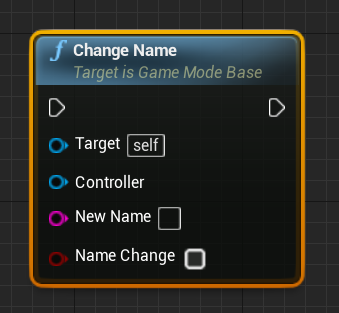
I'm used to Getters and Setters so I'm struggling to find how to get this name I changed
thin stratus
ChangeName changes the Name for the given controller
That is GetPlayerName of PlayerState
cedar finch
Ahh ok so that's why there is only getPlayerName in playerstate. Ok thanks. That clears everything up
 zinc pasture
ok so i posted in blueprints
basically trying to get a variable to set true, i got some really good help and links
but if i change it to server only the bool set from widget returns false now
the rpc
so i have a branch which checks "is bool true or false"
and if true sets another bool to true based on a widget button click
i was doing - server rpc -> owning client
but that seems to be wrong (im quite new to replicated blueprints)
but if i remove the owning client rpc and just set the bool through a server rpc now the first bool which is set returns false
which was working fine in how i had it before
the bool condition returns false always now
if i follow what cedric said about removing the owning client rpc
where as before it would set true or false like i wanted i just couldnt set the bool to true off the true path of the branch
 zinc pasture
at that speed you can def see little jitters
its not that bad
but you can see them
zinc pasture
i feel your pain except mine was another issue
does it get worse if the pawn moves faster?
or is that the intended speed
i mean i do notice in replicated actors there are little jitters with movement, even player controlled pawns
twin juniper
it's the same, it depends on the rotation speed i guess
zinc pasture
it seems to happen on clients at least from what i notice
the server seems to run fine
twin juniper
slow rotation speed, more visible because the rotation lasts longer
yeah, makes sense... i have dedicated server so i don't see that
but i guess the rotation gets replicated to clients, but there is no builtin smoothing mechanism
or it's not as good as i would like it to be
zinc pasture
i came across some posts when i was googling about animations a while back, so youre not the only one, although i wasnt looking into that issue so never really paid any attention to if there was a work around
twin juniper
if i could disable rotation handling by the movement component. i'd write my own code.... but it seems it can't be disabled (atleast not via bp)
zinc pasture
yeah bp can be limited in some regards
can you set the rotation to a custom bp config?
overwrite it
twin juniper
i don't follow
zinc pasture
sorry i mean "Set rotation handling" -> custom rotation settings
twin juniper
i can set the rotation on client, but the movement component will set it back to whatever server tells it
zinc pasture
ahh
twin juniper
so in the end i get even more jitter
and that's something i cannot turn off(or atleast i don't know how)
zinc pasture
can you run it on server as authority?
sorry im not really the best at replication , just trying to throw some suggestions
twin juniper
i'm actually in a dedicated server setup
zinc pasture
yeah you did say
im not 100% on how dedicated handles things but you cant create a custom event run on server -> then set it? im sure you know a lot more than me and if it was that simple you would have done it
or after it sets it it overwrites?
twin juniper
the solution would be to smooth it on client
or just have it set on client. i dont even care for rotation on the server side
cedar finch
I'm struggling with setting players names above thier head. Cedric_exi told me I can use Gamemode to change the players name inside of Playerstate. What I don't know is where to put the "change name" node and where to set the text of my ThirdPersonCharacter's Text component above his head. I've put it everywhere and tried everything I know.
steady tendon
Im reading the excellent network compendium that eXi did and i have a question. As dedicated servers doesnt have a player controller, what happens when the client creates an RPC to run on server from its local player controller? Does the dedicated server already has an instance of a player controller as the client has or its not like listen servers?
I think that he tried to say that dedicated servers also have a player controller but its not used as the listen servers because they have no game client
But just to clarify if someone could answer me it would be perfect!
 jade gazelle
The server still has its own copy of each clients controller
It just doesn’t have its own personal controller
So a run on server RPC called from a clients player controller would run on the servers copy of that players controller
steady tendon
Perfect, so its what i thought. Thank you dude!
jade gazelle
No problem. That’s my understanding at least, I’m far from an expert so maybe someone else will step in and correct me. I use run on server RPCs fairly extensively from my clients player controller though and they seem to work as I described above
steady tendon
Im sure thats what he wanted to say in the document
 neon mango
I have an int32 variable set as UPROPERTY(Transient, Replicated, BlueprintReadOnly) and I have it inside DOREPLIFETIME as I've done with a few other variables but it doesn't seem to replicate. Inside my game mode I change the variable in the game state (which game mode is server side only) but even though all clients are told to read from that var in the gamestate, only server seems to see the correct value while all the clients do not.
limber plaza
Maybe make sure your component replicates,
that's all I can think of off the top of my head.
.oO(Or is this a property of your game state?)
cedar finch
Ok so I used my Gamemode to set the PlayerName inside of PlayerState as soon as the player controller connects, AKA "EventOnPostLogin". Then inside my ThirdPersonCharacter I set the text of my "text component" that is above my players head by getting my playerstate and then getting the playersName variable. My problem is that only the Server's name gets set. The clients names just get set to nothing. At least I've halfway got it. Can anyone tell me why the Clients name is not being set and how to fix it?
 limber plaza
Sounds like you're pulling the value of the text too soon, like... before it is available.
Like, the player name may still be replicating to all clients at the time the ThirdPersonCharacter is created
so maybe you want to use an onRep on that PlayerName,
then push the value from there.
Or broadcast it, and whoever cares to listen updates.
Or, ...alternatively, ... you can have you widget (I'm assuming the overhead thing is a wigget) get initialized w/ your character,
then bind your text to character->playerstate->name
or something like that.
cedar finch
I have no clue what to do. I don't know what the right thing to do is. This is my lobby where players get to select their characters. I have it where I just destroy the current actor and spawn the one they selected. So that kinda messes up stuff with player names. I'm not using a widget at the moment. I tried earlier but couldn't get it to work right because I didn't know what I was doing or if it was even right. So to display player names like Call of duty and other games is a widget used?
limber plaza
Uh no I have no clue whether a widget is used or not.
a ui widget is just some way of showing ui.
Ok well whippy I'd recommend testing out the hypothesis that is, "It hasn't replicated yet by the time you're assigning player name to the text"
cedar finch
I put a 5 sec delay inside my playercharacter where the actual text is set. I also put a printstring inside my gamemode to see what names were being set inside my playerstate. It prints my name for the server and nothing for the client
limber plaza
Gotcha that's good to kno.
cedar finch
What does that mean?
limber plaza
It means it's not a race condition on teh player name reaching the client
Is PlayerName a custom variable you are using?
cedar finch
Yes it is i actually call it NameOfPlayer but didn't want to confuse anyone on here lol
limber plaza
Gotcha.
cedar finch
Playerstate has a variable called PlayerName but I couldn't get it to change. It just displays my PC name
So I decided to make my own
limber plaza
yea that might be readonly from BP
since it comes from your online subsystem usually
are you using BP only?
cedar finch
Yea BP only
limber plaza
ok
what if you make a onRep funciton for this variable
sorry I forget what onRep is called in blueprints...
but the function that executes when the property replicates
cedar finch
repNotify?
cedar finch
It is set to replicated and editable. So change it to repNotify inside my PlayerState?
I've never done a repNotify
limber plaza
yea repNotify is the same as replicate, except a function will execute when it is set
and put a print in there so you kno it replicated
sorry what I mean is, do a Print in that rep notify!
and let's see what happens
 limber plaza
err put the value of what the string is in there too!
like let's make sure it's not an empty string !
 limber plaza
Ehhhh... heheh.
wtf mmm.
Sorry... like... the order is confusing to me
I usually look at the logs in the console.
mmm
is that log happening bottom to top?
bottom being the first thing? top being the last thing?
cedar finch
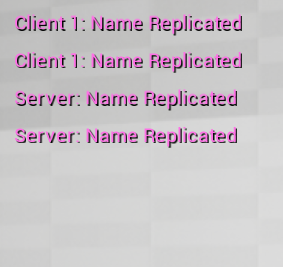
I think it basically says the Server sets his name to WhippyTrout then tell Client. Then the Server sets Client as blank and tells client
limber plaza
(you can open up your console from the developer window)
ehh can we double check & look at the console?
I don't trust you whippy.
cedar finch
hahahahaha how do i get to the developer window what am i looking for?
limber plaza
1sec
Windows > Developer Tools > output log
you'll have to make sure your blueprint's Print node has "output to log" or something like that checked (expand print)
you did it?
cedar finch
Hmmm I did but I don't see it in the log
cedar finch
ok i see it now
limber plaza
Ooo oo
cedar finch
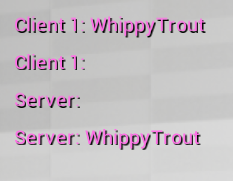
Yea it says: Server: WhippyTrout then below it Server: then below it Client 1: then below it Client 1: WhippyTrout
limber plaza
But that's weird
Right? I mean wouldn't we expect it to say:
Server: WhippyTrout
Server:
Client 1: WhippyTrout
Client 1:
Oh well!
Not arguing w/ yoru computer but... still
So who is setting your player name to nothing?
cedar finch
https://i.gyazo.com/a4beb16d9be41ad65239d74b91eae427.png https://i.gyazo.com/0f53f8fae85d58401d0123b1f6e040af.png https://i.gyazo.com/da34b2670099e53b9844a87865b4b03f.png https://i.gyazo.com/1f9c2e1d109c4f6395ad94a6b720b587.png



 limber plaza
lol you goof why did you did it in 4 images
cedar finch
hahaha there was a bunch of crap about my players arm tag or something inbetween
limber plaza
oh what you think i can't handle some logs!?
cedar finch
It was hard to read i had to scroll to get through it all. Probably a problem for another day lol
limber plaza
haha ok
Hmmm
So yea you need to maybe find all the places you are setting player name
cedar finch
So my playername is set when the player starts the game for the first time. I allow them to set their own Name. I then save it and load it if they play again so they don't have to type it everytime. I store the value inside an Info Structure
limber plaza
Yea I would say double check this hypothesis by making clear logs about when you set the variable
cedar finch
OH! So I'm getting my playername from the PlayerController. Does that break it?
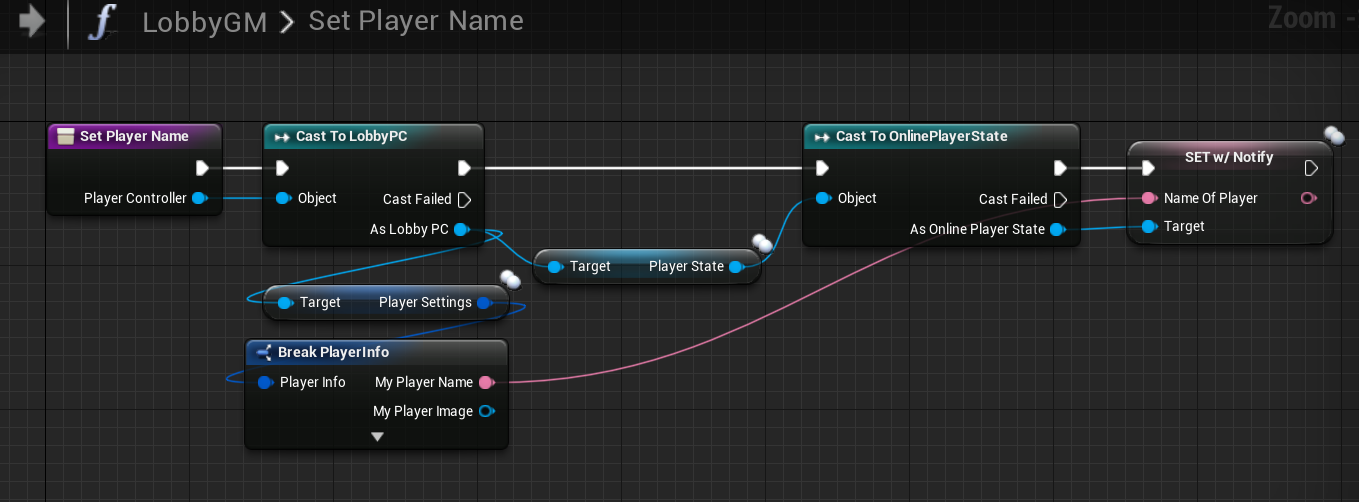
Here is where I set my playername inside my gamemode: https://i.gyazo.com/96697ed2ee62df9fcddbd201b3d4f959.png

I take the controller from EventPostLogin and cast to the LobbyPlayerController and then get the PlayerName that was stored inside the InfoStruct
limber plaza
Yea like, my question here would be -- what's going on w/ PlayerSettings?
when you get it from your lobbypc,
how did the server ever learn about that knowledge/ because this is the first time the client is connected.
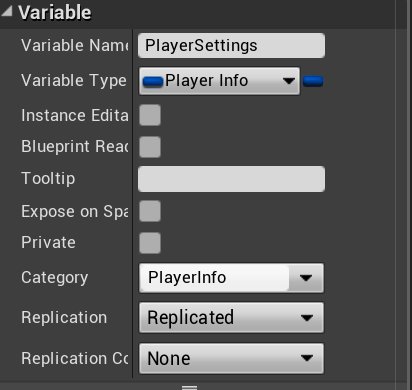
I see the "replciated" thing on the PlayerSettings, but...
properties don't replicate from client to server...
they replicate from server to client.
So something is definitely not well about this.
It smells fishy, trout.
cedar finch
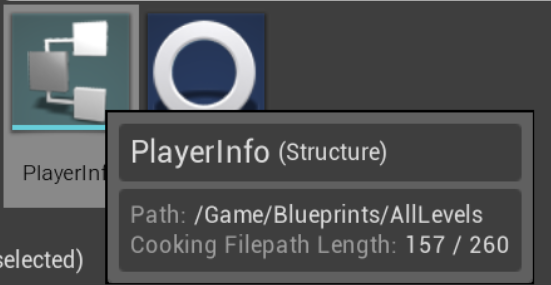
Hahahaha Na it's not I'm just stupid and can't figure out how to use what I already have setup. So in my PlayerController I made a variable called PlayerSettings. It is of type PlayerInfo which is the InfoStruc that stores my players info such as name. I can then reference it. https://i.gyazo.com/9b12a1e7b2a4d67ee2e6b6f722f2bb3f.png https://i.gyazo.com/be7a5a13d91cf1987abe7076802d36f6.png
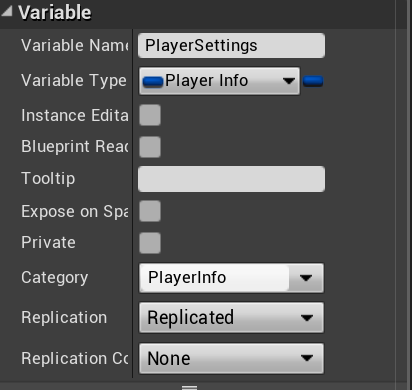
 limber plaza
Hmm ok
OH oops ok I understand the logs now
Server: WhippyTrout // the PC of the server
Server: //the pc of the client
Client 1: //the pc of the client
Client 1: WhippyTrout //the pc of the server
cedar finch
Yea
cedar finch
That's the part that confuses me. So gamemode is server only right? Someone told me Playercontroller is server only or can't replicate to others or something. So where do I set names? Gamestate?
limber plaza
yea want to take this out of here for now? just so we don't spam too much
cedar finch
sure
 versed socket
Structs can't replicate though, right?
limber plaza
Pretty sure they can
neon mango
@limber plaza It is a property of my game state.
void AShooterGameState::GetLifetimeReplicatedProps( TArray< FLifetimeProperty > & OutLifetimeProps ) const
{
    Super::GetLifetimeReplicatedProps( OutLifetimeProps );

    DOREPLIFETIME( AShooterGameState, NumTeams );
    DOREPLIFETIME( AShooterGameState, RemainingTime );
    DOREPLIFETIME( AShooterGameState, bTimerPaused );
    DOREPLIFETIME( AShooterGameState, TeamScores );
    DOREPLIFETIME( AShooterGameState, CurrentMatch);
}``` UPROPERTY(Transient, Replicated, BlueprintReadOnly)
int32 CurrentMatch;```Oh... It might be because the game mode isn't valid for the clients
So the logic I have to display the value isn't getting set.
Indeed that was it.
I thought the GameMode would at least be valid for clients still?
In that I could get the GameMode on client even though its the server that runs it
But my Is Valid for GameMode was failing on the client and never set, it was being replicated the whole time though
dark edge
Gamemode only exists on server.
 whole urchin
Hi, im new here anyway im having some weird issue literally been up all night stuck on this and im not sure if its lack of sleep or me just being a mupppet...
i have this issue with multiplayer where clients join server however some client's duplicate their characters on the server, i thought it was a issue with my project, setup a third person example done the usual networking stuff and its still the same can anyone point me in the right direction of what might be going on?
here is a video of the issue: https://streamable.com/z39ri
anyone have any idea's?
 thin stratus
Anyone ever used the "ULocalMessage" stuff?
glacial lotus
Playing with a real server when a player crouches you can see them flying and eventually they go down. And if you headshot them there is no collision, like the collision volume actually when down but the graphics are still floating. Doesn't happen in the editor, just in the builds with the real server. Any ideas what this could be and how to solve it?
 winter plover
does it happen if you check the dedicated server tickbox in the editor?
or is the editor set to run as listen server?
whole urchin
i run the dedicated server separately on a different port which the editors connect to
 rose egret
on listen server will GetWorld()->GetFirstPlayerController() return the player who is listen server?
whole urchin
does dedicated servers need its own player controller?
 bitter oriole
Player controller exists on the owning client + server (dedicated or not) for each player
whole urchin
ok that would make sense
sorry not had much sleep brain not functioning well 😢
when i tick dedicated server in unreal and launch 2 clients and connect the 2 clients to my own server instance i now have these errors appear in the log:
[2018.11.19-12.29.30:538][474]LogNet: NotifyAcceptedConnection: Name: newmap, TimeStamp: 11/19/18 12:29:30, [UNetConnection] RemoteAddr: 127.0.0.1:54830, Name: IpConnection_1, Driver: GameNetDriver IpNetDriver_0, IsServer: YES, PC: NULL, Owner: NULL, UniqueId: INVALID
[2018.11.19-12.29.30:538][474]LogNet: AddClientConnection: Added client connection: [UNetConnection] RemoteAddr: 127.0.0.1:54830, Name: IpConnection_1, Driver: GameNetDriver IpNetDriver_0, IsServer: YES, PC: NULL, Owner: NULL, UniqueId: INVALID
[2018.11.19-12.29.30:568][475]LogNet: NotifyAcceptingChannel Control 0 server World /Game/Maps/newmap.newmap: Accepted
[2018.11.19-12.29.30:569][475]LogNet: Remote platform little endian=1
[2018.11.19-12.29.30:570][475]LogNet: This platform little endian=1
[2018.11.19-12.29.30:601][476]LogNet: Login request: /Game/Maps/newmap?Name=Website-Guard-J-7B9F3670495C941AAC8CDC8B33A2F4B6 userId: Website-Guard-J-7B9F3670495C941AAC8CDC8B33A2F4B6
[2018.11.19-12.29.30:635][477]LogNet: Client netspeed is 10000
[2018.11.19-12.29.30:733][480]LogNet: Join request: /Game/Maps/newmap?Name=Website-Guard-J-7B9F3670495C941AAC8CDC8B33A2F4B6?SplitscreenCount=1
[2018.11.19-12.29.30:734][480]LogOnline: Warning: OSS: No game present to join for session (GameSession)
[2018.11.19-12.29.30:736][480]LogNet: Join succeeded: Website-Guard-J-7B9F
[2018.11.19-12.29.30:867][484]LogNet: Server connection received: ActorChannelFailure
however when dedicated is not selected within the editor i dont get any errors on join
[2018.11.19-12.36.27:359][483]LogNet: Login request: /Game/Maps/newmap?Name=Website-Guard-J-328C23B4453E880FE6A1C9BA69AB4259 userId: Website-Guard-J-328C23B4453E880FE6A1C9BA69AB4259
[2018.11.19-12.36.27:392][484]LogNet: Client netspeed is 10000
[2018.11.19-12.36.27:523][488]LogNet: Join request: /Game/Maps/newmap?Name=Website-Guard-J-328C23B4453E880FE6A1C9BA69AB4259?SplitscreenCount=1
[2018.11.19-12.36.27:528][488]LogNet: Join succeeded: Website-Guard-J-328C
im so confused right now :S
glacial lotus
@winter plover if you were answering me then no, the floating guy doesn't happens when in editor, no matter if I'm using dedicated server or not.
rose egret
@bitter oriole I want to get the active player controller (the player who is playing and viewport belongs to him)
on client its GetFirtstPlayerController() since I only have one player per client; but what about the listen server ?
bitter oriole
There's a "GetFirstLocalPlayer" method somewhere
I'm pretty sure the HUD class is owned by the correct playercontroller, too
hasty adder
Anyone familiar with steam advanced sessions? It has a setname from controller I believe and I can’t tell if it feeds down to update playerstate. Basically been working to if steam is active cool use the name of not use local friendly os name. Seems
My concern is when joining dedicated server if the ps will still have this set name from ps now to show other peeps
winter plover
@glacial lotus ye question was aimed at you, but yea if it wasnt that, then the only thing I can imagine is maybe some unexpected latency that has to be dealt with somehow
do you run the editor with simulated latency?
glacial lotus
you mean using simulated lag and loss packets and that?
winter plover
yea
glacial lotus
yep, I tried with no difference
glacial lotus
being part of the same character actor, the collision and the skeletal mesh should never be treated separatedly, right?
winter plover
afaik only the root components collision gets considered for movement and stuff
but for stuff like linetraces it should be distinct yea
glacial lotus
@winter plover ok, ok. Thank you.
 calm plaza
Anyone have experience replicating textures or an array of textures? Specifically through Texture Render Target 2D?
 warm summit
Any Idea why this happens/what that means? It only happens when I spawn a Client onto the Server, not with the Host.
thin stratus
@warm summit AccessedNone means that you are accessing a Pointer/References that is not valid.
It tells you exactly where and what is accessed
Make sure to check your pointers properly with "IsValid" nodes.
These errors will otherwise crash your packaged game
@calm plaza Textures are Assets, they are most likely just replicated by sending some sort of unique ID that is used on the other side to load the same asset.
If you modified an Asset on PlayerA, then replicating this Asset to PlayerB won't work.
You need to actively let PlayerB do what PlayerA did to achieve the changes.
warm summit
@thin stratus thanks so much, works now
hasty adder
Well maybe it works.. the error is still there it's just not firing the logic to try and work with it. The underlying code may just be that client logic is firing for bother server and and neither can access each other's reference
I dunno the cost of such checks but I imagine if you have them all over the place it could be one of those death from@a million cuts 😃 I'd investigate it more to know why it's there only for client on host
If not for performance but to truly understand why
thin stratus
Is Valid is basically a simple if(Actor != nullptr && Actor->IsValidLowLevel())
You do it a thousand times in code and it's good, cause even if everything should be valid, it could happen that it's not valid
Rather gracefully handle nullptrs than having the game crash
hasty adder
True I just see HUD stuff and worry it's calling controllers wronf
thin stratus
Oh he's def doing something wrong :P
 sweet spire
Does rep notify fire in single player?
thin stratus
Yes
sweet spire
Thanks 😃
thin stratus
In BPs at least
thin stratus
yes
sweet spire
gotcha thanks
Is there a sort of check i can do to make sure i dont end up firing it twice? say for multiplayer vs non multiplayer
thin stratus
In Singleplayer you are a server that isn't accepting clients
At least that's how you can see it
sweet spire
I mean, how can i check if im networking at all as the server, or just on my own, single play authority sort of thing
I think maybe just checking for controller might do it
But trying to add Single / local / listen / dedicated support
So i need a robust way to check
thin stratus
Pretty sure the netmode is for that
The network mode the game is currently running.
sweet spire
Ah okay awesome, thank you very much
thin stratus
No biggie
neon mango
I'm wanting to try and store the bone transform from the server for all the bones in a skeletal mesh to try and sync them over to the clients, just to give it a shot. I'm wondering though what would be the best way to set the transform back to the bones?
I know there is a Posable Mesh Component so IDK if I need to have that on top of my original skeletal mesh component and swap when I need to or if it can all be done with a Skeletal Mesh Component.
I also know there is GetBodyInstance and SetBodyTransform.
I'm about to dive into it and learn through trial and error but seeing if anyone has any insight before I do.
jade gazelle
Had a question about character mesh replication. If I call an event from the server to change the skeletal mesh of a player, and that player is set to replicate, I don’t need to also call a multicast for the other players to see that skeletal mesh change, correct?
What happens to players that are outside of the net cull distance? Will they receive that update once they enter range or will that update have never happened for them?
jagged garden
from my experience you need to multicast for stuff like that
at least, for static mesh
jade gazelle
Hmmm, that doesn’t make sense to me but I have a feeling you are right. I guess I’ll just have to test it out and see what happens
Trying to have as few multicasts as possible
I guess using a rep notify for the skeletal mesh would accomplish the same thing though?
jagged garden
@jade gazelle you could try repnotify but idk if it would trigger
actually you know what that might be a good idea
jade gazelle
Just treated run on server and multicast. Run on server doesn’t trigger the mesh change on client, multicast does
Had to step away for a sec but will try rep notify next
jade gazelle
@jagged garden RepNotify works and seems like the way to go.
Just set the mesh variable to the new mesh and then in the function have it propagate to everyone
 hoary lark
I've been hunting around the internet for this for a while. ever since UE 4.12 or earlier, listen servers see clients as "jerky" while clients see server and all other clients smoothly. https://issues.unrealengine.com/issue/UE-32005 ... i've seen one suggestion that the best way to do a listen server in unreal is to simply run a dedicated server in the background on the host PC. has anyone tackled this properly and solved it somehow any better way?
 gaunt crown
Replicating Physics is easily done with a few ticks in a SM placed in the world. I was hoping it would be the same if it were in an Actor BP. And it seems that the ticks I did to make Replicate Physics doesn't work. Desyncs between all Clients etc. Anyone know how to replicate Physics on an Actor BP Mesh ?
neon mango
@gaunt crown The actor has a couple more Replication options, like Replicate Movement and Always Relevant to check out, the the Component can be set to Replicate as well but will do so only if the actor is first.
gaunt crown
Is there a way to ensure Simulated Physic Actors never get desynced?
Through no C++ just BP
I've ticked multiple things in the Actor to ensure it acts like just a Mesh placed in the world that gets literally desync but no luck @neon mango ?
neon mango
@gaunt crown What are you trying to sync exactly? A Skeletal Mesh ? or?
gaunt crown
Just a Static Mesh in an Actor BP
I might be able to skip past an Actor BP and just use as Static Mesh all g.
Ty anyway!
neon mango
@gaunt crown This works for me https://gyazo.com/366479829cf4289085868c5ee2e2a715

And it is simulating physics

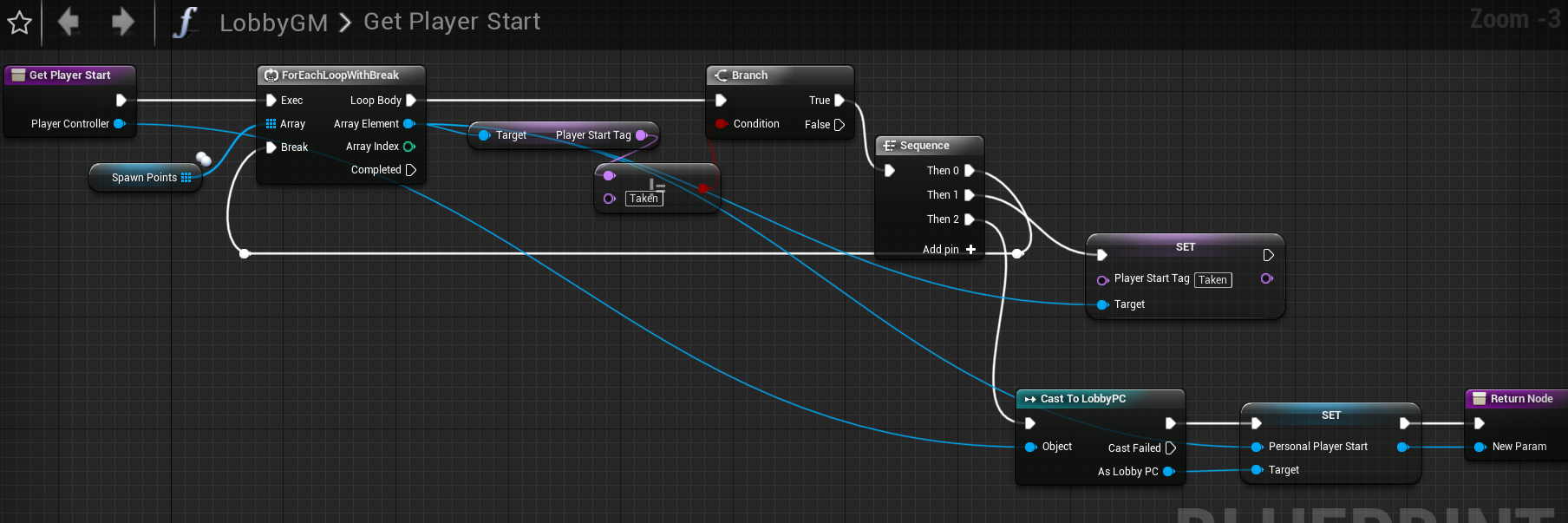




 neon mango
oh, I used static mesh actor works for me :/ IDK if that makes much of a difference t hough
neon mango
it shouldn't matter I think
I'm about to go to sleep otherwise I'd run some tests for ya
gaunt crown
Its g man ty
 modern basin
Hi all,
Quick question :
Can I hard-set constants value in GameInstance ? Those values are set before shipping, I got the Idea that it would work as every instance (server or client) will have them in their own GameInstance. Is that correct ?
Hard-set -> Hard-coded*
fossil spoke
Yes a constant will be exactly that... constant
modern basin
The question is : Will it be avaible for all (Server and/or client) if stored in GameInstance ?!
versed socket
@modern basin No -- GameInstance exists only for you and if you put a variable there it will only ever exist for you personally.
If you want to ask another client or the server what their GameInstance's variable is equal to, you have to do it indirectly. There's no replicating there.
modern basin
But since Server and Client all play the same game, they all start the same gameInstance ?
I see
versed socket
@modern basin They all share the same GameState and they all share the same PlayerState, at least.
modern basin
but they will all have the exact same hard-coded value.
versed socket
The GameMode, GameState, PlayerController, and PlayerState will all exist in the server. So you want to ask one of those classes for the variable information you want. The GameInstance only exists for you and it's not possible to see into another person's GameInstance unless you do it indirectly through one of the other classes I mentioned.
modern basin
I think Im not asking clearly, let me try again 😄
I need some hard-coded value for my game. Online game.
If I store those hard-coded value in the GameInstance, then I ship the game.
I can always access those value by "GetGameInstance" from anywhere ? (and yes, I understand it will be the local GameInstance only)
or let's ask this way :
Server and Clients all have their own GameInstance, which is (at the lauch of the game) exactly the same for everyone ?!
bitter oriole
If they're hardcoded they can be constants anywhere in your code
as in, const int CONST_VALUE = 42;
modern basin
So GameInstance is as good as anywhere ?
bitter oriole
Any header file that's relevant to the code that uses it I guess
You could have a "gameplayconstants.h" header for that
modern basin
... I'm using BP 😅
modern basin
Thanks anyway, will keep that info in mind for the day I switch over to C++
thin stratus
If it's a value that is relevant for the whole game
So every menu, every gamemode, etc. all needs that same value
then you can put it into the GameInstance
In C++ you have a lot more choices
modern basin
Oh
thin stratus
Unreal Tournament for example even extends the UEngine to put some static stuff into it
modern basin
Thanks everyone
thin stratus
So I see the RconPassword defined in there. A question comes to mind: Did anyone ever document how to control a dedicated server via console?
I know that CounterStrike has the Rcon password for clients to perform changes on the server remotely
Never really looked into how UE4 handles that
bitter oriole
Probably the easiest for that is to handle your own console
fossil spoke
Console will be disabled in shipping builds for the client. I do know that Squad have their own Rcon program which enables users to interface with dedicated servers remotely.
Not sure how they implemented it though
bitter oriole
The console UI is disabled, but the console functionality isn't
As in ConsoleCommand() works fine
So you 'just' need your own console UI, login system, and network tunnel
fossil spoke
Yeah. I assumed he meant the default ui.
thin stratus
I mean any sort of UI
May it be directly if the Server is hosted on your PC or through a Website Service
bitter oriole
Yeah you need your on console UI
rose egret
can I exclude cosmetic actor subobject on dedicated server build?
 chrome bay
Not easily. If it's already been created and serialized into a blueprint it's hard to get rid of
If it's a default subobject created by a constructor, probably best to just leave it there. If it's created at runtime, should be easy to wrap it with #if !UE_SERVER
rose egret
my actor has 3 particle system component, which are used only on client side. if I don't create them when UE_SERVER is 1 will my actor be serialized and replicated on de server correctly?
I feel UE4 is very memory-hungry 😃
winged badger
if you want to replicate it, it has to exist on dedi
 red ledge
@chrome bay so can I just leave the creation of those cosmetic objects to something like beginplay and make them not appear on server?
chrome bay
Well you could do if you really wanted to, but you have to make sure any code that uses them is guarded too
Particle simulation doesn't run on dedicated servers anyway IIRC
But it can be handy for things like bullet impact effects, you can just bypass spawning them altogether if they have no gameplay effect etc.
Can potentially bypass a lot of code on the server which is good sometimes
hasty adder
Maybe the rep frequency of location?
red ledge
@chrome bay ah okay so particle spawns etc instead of particle and sound components, thanks!
chrome bay
By spawning I mean creating the components
You can do anything with preprocessor macros 😄
red ledge
thank you!
hoary lark
@lament cloak haven't really found anything useful aside from the hack suggestion of never using UE4 as a listen server 😦 i can't believe more people don't complain about it
but I guess none of the AAA titles these days ever have listen servers anymore, it's all dedicated hosts
right - epic themselves claim to have fixed it in 4.12 IIRC. obviously not
in any case the big "backlogged" stamp on it isn't very inspiring 😄 😦
sure same, thx
glacial lotus
My grenades are working fine on the editor but on cooked, with a real server, some pass through enemies without colliding. How to solve this? Enabling CCD in the grenade collision volume? multicomponent collision?
Projectile ForceSubstepping?
desert breach
guys some confusion here I have this level which I want to host as a server. So I check if that's a standalone device and execute this blueprint node
When I use this node I'm not able to connect to server. Why so ?
But if I start the game with 2 clients and UE makes one of them listen server automatically, I'm able to use open command and it connects fabulously
can someone tell me what wrong i'm doing ?
red ledge
try to execute console command open cargoVR?listen instead of using Open Level
desert breach
okay
 proper olive
heya guys, I've been reading a lot of old threads about Skeletal Mesh Physics Replication.... the good old Ragdoll... using Blueprints only, it seems there was a fix way back in 4.7 but it's not working for me, wondering if anyone has it figured it out and can throw me some tips? I know it's possible cause there's a marketplace plugin for it 😄 The trick of destroying the movement component and setting not to replicate before simulating physics doesn't work, but I do have the character standing in the right place by multicasting the mesh transform, it's just going to its idle state. I've tried just setting physics + transform, and I also tried multicasting a pose structure for the anim state, which is working for me when I finish ragdolling and want to set a static pose on all characters, but won't seem to work while physics is enabled on the server... which as I said doesn't replicate, but if I can just get the physics to replicate, I can multicast the pose when it's over just once
versed socket
Something VBlanco said in the #career-chat channel recently made me wonder: how do we know if we know enough about Unreal Networking to be able to actually release a public game that uses that networking?
proper olive
how do you know if you know enough about walking to walk? O.o playtest playtest playtest and fix fix fix before you release
I think once you know enough, you know that you know enough? I'm obviously not there yet but I don't look at it as some agnostic impossibility
neon mango
I'm having issues replicating this ```USTRUCT()
struct FBoneSyncData
{
GENERATED_USTRUCT_BODY()
FBoneSyncData() {}
UPROPERTY()
FTransform BoneTransform;
UPROPERTY()
FName BoneName;
};
TArray<FBoneSyncData> BonesData;``` DOREPLIFETIME( AShooterCharacter, BonesData);
That should do the trick yes?
Then I proceed to empty/add to my array
Clients seem to get nothing, my OnRep never fires
Other vars replicate just fine in the same pawn
jagged garden
what is the FBoneSyncData() doing in the struct
i might just be dumb
or is that the constructor
neon mango
Currently not needed, just was making sure it was happy in case that wasn't meeting UE4's internal replication needs.
jagged garden
ah I see
i personally don't use it for any of my structs
maybe try creating an empty struct and see if that replicates
neon mango
I wasn't planning to have it , will take it out
jagged garden
so you can narrow the issue
neon mango
hmmm I suppose so
fossil spoke
@neon mango You havent marked the Array as Replicated
Unless ReplicatedUsing assumes Replicated.
I cant remember
neon mango
@fossil spoke Yea I tried using it even though I've read ReplicatedUsing assumes Replicated
neon mango
I think it may come down to a class that inherits from the base class that has this logic but isn't calling the base classes GetLifetimeReplicatedProps
So I'm adding the DOREPLIFETIME to the child class as well to make sure
fossil spoke
Did you call Super??
neon mango
I don't I will probably clean that up and call super eventually
fossil spoke
Uhh you should always call Super
neon mango
I was thinking I wanted this to be a bit more modular
But I can do it with super as well
It calls the ACharacters Super version of it
but not the custom base classes Super
so its ACharacter->MybaseChar->MyParticularChar
With MyParticularChar calling AChar super
That didn't help
I don't think it really matters now that I think about it again
fossil spoke
Just double checking, you have set the Actor to Replicate?
neon mango
Yea, if I didn't no other vars would replicate, I'm about to scale back starting with replacing all refs of my Tarray<struct> with an int32 seeing if that calls the onrep function
then moving up in complexity
Ok so not even my int32 replicates
I'm calling TestInt = FMath::Rand() inside tick
and while it changes, it never fires the OnRep Function
I suppose then this might be because every tick it changes and it internally sets it to dirty all the time and never gets a chance to send it off? But that doesn't seem like proper behavior, I'd like to think it would send off something .
Will try in BeginPlay
mhmm issues seems to be calling it in tick
going to go back to array and call it in begin play,
fossil spoke
Is OnRep marked UFUNCTION()?
neon mango
correct
It worked when I moved the change out of tick, which I know is crazy to rep something every tick so that might be their way of telling me NO.
Yes, that was my problem
Doing it inside tick
I'll make my own timer and do it every x seconds or something
to test it out
neon mango
Yea I know just learning the hard way
neon mango
Hmm looks like doing it via a timer doesn't work either even if I set it to like 5 seconds to call the method to update it. I guess I have to use an RPC.
 opaque forge
What's the best way to transfer user made assets over the network?
glacial lotus
Transfer the final asset seems like a bad idea. Depending on your needs, if the creation process is deterministic then probably you should send the log of instructions to recreate the asset instead of actually send the asset. Specially with heavy assets.
 tall knot
Hi! Any good ressources on how to create a local multiplayer FPS (apart from the UE documentation cuz I already tried it)
versed socket
@tall knot "local multiplayer" is kind of an oxymoron, isn't it?
 ornate crescent
Hi, i have problems to replicate rotation in character. I make the SetActorRotation in the Server Logic with this
        FRotator NewRotation = UKismetMathLibrary::FindLookAtRotation(GetActorLocation(), Target->GetActorLocation());
        SetActorRotation(FRotator(GetControlRotation().Pitch, NewRotation.Yaw, GetControlRotation().Roll));
In the server the character rotation is well, in others clients the rotation is well but in the client of this character doesn't replicate the rotation
 severe widget
@versed socket Sadly its becoming one
winged badger
CMC generally avoids replicating stuff it assumes you're simulating client side
ornate crescent
so what i can do for replicate the rotation
winged badger
send a client RPC
tall knot
@versed socket Sorry if I made a mistake, I'm pretty new to networking stuff in games, I meant it in the same way CS do it, like there's a "main" computer that hosts the game and the other players can load the same game by using an address like 192.168.1.1
versed socket
That's just called multiplayer
winged badger
download a shooter game project and study it @tall knot
tall knot
@winged badger thanks I guess?
 swift topaz
There's a Shooter Game project in the Learn tab for Epic. There's no tutorial about it, but you can dissect it and see how it works piece by piece.
neon mango
Would it be wiser if I know my range doesn't need to be very large and I don't need the precision of floats to replicate a struct of 3 16 bit ints vs an FVector?
winter plover
I think FVectors might automatically get compressed on the way
I dont think you have to optimize them much yourself
and for a one-off it might not really be worth trying to
looks like you gotta opt into using them tho
neon mango
@winter plover oh good to know, what do you mean by opt into using them?
winter plover
well as in you gotta make a type use them
otherwise it just keeps using full precision vectors
atleast thats how I am understanding it
neon mango
ohh, never done that before
winter plover
what do you need the vector for anyway?
neon mango
so I have to do like : FVector to make a special tweakable FVector?
Position
But it doesn't have to be super accurate
winter plover
are you trying to sync ragdolls?
neon mango
Yes 😛
winter plover
aight :v
yea using lower precision vectors makes sense for that
because they kinda add up fast
however I have a suggestion
are you currently planning to sync all the bones?
because if you are smart about it you might get away with only a few
in my own project I only update a couple of "key" bones and pull them in place with physics handle
and let the physics do the rest
neon mango
so I currently have two methods in mind. and have code to test both out. I have a physics version using a SkeletalMesh where I add the force required to get a bone into the proper rotation/rotation but was pretty good tweaking with the scaling of the forces but I realized that it can't know how to get to where it needs to get so the collision of the bones with themselves would prevent on occasion body parts from going where they needed to go. That was method 2.
Method 1 and I'm back to exploring this one is using a posable mesh. Have the clients do no physics on the body, let the server to all the physics and tell the clients. I found an article where this guy got 900 cubes simulating physics on a client with an intial bandwidth requiremtn of 17MB/ down to ~500kb/s and that has me motivated.
winter plover
ahh so you wanna capture the pose, send it over the net and apply it clientside?
neon mango
that is what I'm doing, but it bandwidth seems to be to high as sending the RPC every tick would be I suppose
winter plover
yup
neon mango
trying to find ways to optimzie
winter plover
you could try to gate it
as in, only send updates if the position significantly changed
altho I'd say it's okay to sacrifice some accuracy
with ragdolls you want them to be roughly in place for all players
neon mango
oh I do that
winter plover
but it's not like anyone will go inspect it with a microscope
neon mango
it helps until a body moves
winter plover
thats why I only replicate leaf limbs
all a body is good for in gameplay is having the inventory there for my project
so as long as the body is in the same place for everyone im good
even if the pose might be slightly off
neon mango
in my game the player picks up bodies and uses them to taunt the other player as well as can feed on the body by attacking it
winter plover
sounds very the hidden esque
neon mango
I want it to be as close as accurate as I can but trying to be realistc here. It is @winter plover
Project Void
Is a Hidden Souce inspired game
winter plover
ohhh what a funny coincidence
thats actually an inspiration for my game aswell
altho more indirectly
neon mango
glad to see that game lives in the spirits of many 😄
winter plover
it's still 1 vs a whole bunch, but without the invisibility
and more of a thief-ish kinda stealth
well atleast it's supposed to become that one day
right now it's alot of prototype systems Im slowly building up
neon mango
solo or multi?
winter plover
multiplayer
neon mango
I do I'll PM you it
winter plover
I used to binge the hidden quite a bit back in the day
but valve kinda killed it with a bunch of bad source sdk updates
made all the servers die for a good month or so
killed the playerbase dead :/
neon mango
I've got a lot of fans in the discord but not many test
In any case if I go the posable mesh rout I'm pretty sure I have to do all the bones
 sharp arrow
can someone help me im making a multiplayer game and i wana make something visible only to the player ho spawn it
 sharp pagoda
Spawn it locally without replication
sharp arrow
if i do that than it appears only in server
and what im doing is a buiulding system so when it spawns is set by default in hidden and i wana make that it gets ho is building it and make it visible only for him
sharp pagoda
You're not spawning it locally then. You're probably spawning a non-replicating "building" through a server RPC.
@sharp arrow
sharp arrow
im replicating it but i wana make so the mesh sets from hidden to visible on the player ho si building it
sharp pagoda
Why are you replicating it if it's invisible to everyone but the local player?
 unreal bison
Does anyone know a way to use 2 subsystems both at the same time and seperate?
Ie: uworks and an API one like gamesparks or whatever.
Also @sharp arrow He didn't tell you to replicate it. He said that you don't replicate it so it's only visible on the client. And you said it only shows on the server so he said then you are spawning it on the server not on the client, is it's on a authority node maybe? If so make it spawn in the remote pin only.....
I could be wrong about the last part
 summer tide
Is it possible to replicate root motions for a player character? Any examples or reference...
unreal bison
Maybe some more info will help these guys fix your issue @summer tide as your questions a little vague.....?
summer tide
I'm using root motion animations to create my character's movements.
unreal bison
Right?
unreal bison
Wierd. I'm doing the same and as long as I replicate the player and the vars for things like crouching and such mine does it
Unreal Engine Forums
Animation discussion, including Animation Blueprint, Persona, Skeletal Meshes, and more.
Try this?
summer tide
For example, the default 3rd person project works in multiplayer mode. I took that I clamped the moveForward to 1. So idle is 0, jog is 1, 2 is sprint.
I made blendspaces based on that.
I enabled rootmotion to all the RM anims.
I also changed to Root Motion to Everything mode.
umbral adder
hey when i try to download ue4.21 i get failed to download network error
anyone know why?
or can anyone send a mediafire link?
summer tide
@unreal bison Good discussion took place there. But I needed more info for implementation.
unreal bison
@umbral adder This is mutiplayer goto the #engine-source also ue4.21 is from github not media fire. I wouldn't touch media fire too many viruses and dud repos
@summer tide Yeah sorry I didn't read it I was driving haha
umbral adder
@unreal bison I tried downloading from github releases but it fails
i tried 10 times
different days also
but it keeps failing
after 50%
anyways thx for the channel
summer tide
If you are curious for root motion on multiplayer, read this: https://forums.unrealengine.com/development-discussion/animation/45155-root-motion-replication/page2
Unreal Engine Forums
Animation discussion, including Animation Blueprint, Persona, Skeletal Meshes, and more.
It has somewhat a solution.
neon mango
Would it be wiser to send 1 small Struct every 1 second or let that struct build up in an Array and then send it when it has reached a certain size some time later? Or does this not really matter?
umbral adder
ADPlayerState* PSB = Cast<ADPlayerState>(ActorB->GetNetOwningPlayer()->GetPlayerController(GetWorld())->PlayerState);
i am trying to get my playerstate from my HealthComponent for my team setup
but i cant get the playerstate where the UTeamNum is located
winged badger
your PlayerPawn, if possessed by a PlayerController directly, has a replicated PlayerState variable
winged badger
If you have so many hoops to jump through, it might be berrter to inject the playerstate into it, as TWeakObjectPtr
 fierce birch
this is unity but I'll link it here as these concepts apply to other engines as well (there are limited resources that actually explain this stuff so specifically): https://www.youtube.com/watch?v=k6JTaFE7SYI

Take an in-depth look at how the netcode of a fast-paced multiplayer shooter like Unity's FPS Sample works. Learn about snapshot generation and compression, ...
umbral adder
ok thx
umbral adder
@winged badger i have a c++ actor comp and a character
how do i get player state?
ADPlayerState* PSA = Cast<ADPlayerState>(ActorA->GetOwner()->);
same problem
winged badger
depends what its relationship is to the player pawn and the controller
at some point, something probably had a reference to your ActorA
and easy access to PC/PS
from there you can set a TWeakObjectPtr to PlayerState inside ActorA
and your problem becomes simple
thin stratus
I usually make sure that my owner is in fact the PlayerController
As long as I can set it by hand
Everything else will be handled additionally.
winged badger
i don't if its attached to the PlayerPawn
thin stratus
Component is obviously relative to what actor it sits on
If it's attached to the PlayerPawn and I need the PlayerPawn, "OwningPawn" is usually an extra variable I create
winged badger
feels more natural Pawn being the owner then
winged badger
nod
thin stratus
It's totally valid to make the pawn the owner
winged badger
if i do have to dereference something more then twice to get a pointer i need tho
i will either inject the pointer "closer" into a variable, usually a weak pointer to make it obvious its lifetime is not controlled from that object
thin stratus
Yeah if you do it in C++, that's a good approach