#multiplayer
1 messages · Page 425 of 1
 thin stratus
 left marsh
ATM I am attempting a fresh package on a fresh project to see what happens
left marsh
Running my server executable from the packaged folder caused the same issue to occur.
I will try with a fresh project. I am running out of space on this drive.
 wary wyvern
Hey guys, why AddPlayerState(APlayerState* Player) in GameState gets called even when client disconnects?
 drifting plank
When you spawn a replicated actor on the server, it will be automatically spawned on all clients
 solar flower
thanks @drifting plank
 slim holly
oof, custom movement replication takes a hella lot of work
now I just need error correction for server side
 twin juniper
@gleaming vector hey, I was speaking to you yesterday about ULocalPlayer::GetGameLoginOptions(). I was thinking, I could have a button on my UI for selecting a race, or hero, and then add an if statement to check that bool in GetGameLoginOptions(). However, when we pass this to the server and we call "GetGameLoginOptions" that bool wouldn't be set anymore. Is there a better way of doing this? Should we just simply return an FString variable, and set that variable when we set our race via a button?
I think it would need to be stored like so: race=human
I'm simply wondering how to convert the GetGameLoginOptions() into a usable method. When reading the source code comments, it states that it's a key=value pair concatenated with & between each key/value pair.
Is there a method to convert this to a TMap?
 cedar finch
Hey guys. I'm trying to learn how to use Player States. I keep finding explanations on what they are for but does anyone know where I can find someone using them? I'm wanting to use my Playerstate for spectating players and seeing there health.
 gleaming vector
@twin juniper that's up to you bud, how you want to convert the string into something you can use on the server
the obvious simple one is to have some enum
for like, Human, Orc, Undead
then just do a check if(option == "Human") Race = EPlayerRace::Human
personally, when I used it, I had a DataAsset that had a PrimaryAssetId set, and used the AssetManager to load it
but that's outside the scope of this channel
 north ibex
I am having an issue with multiplayer animation that I've been unable to track down via google, answer hub, etc. I'd be ever grateful for some help here.
I have a multiplayer game that has multiple skeletal meshes that are used for clothing on characters. They use set master pose component to follow the main mesh animation. This works fine for the local player. Non-local players see the animation and clothing while the other character is not moving. If the other character moves, the clothing is rendered slightly out of position. It looks like the clothes are a frame behind because of the base mesh showing through. When the character stops moving, the clothes are perfectly lined up again. This causes a strange flickering effect when characters are moving.
Is there something that could be causing this? A boolean flag I missed somewhere? Or maybe I need to set up my component attachments in a different hierarchy?
I've come up with a few workarounds in case this is working as intended, but all of them require some refactoring, but I hope you guys might have a solution to just fix this. I know a full base mesh is not the preferred approach for modular characters, but it was working so well locally I thought I'd try it out and optimize later if needed.
Thanks for any hints.
 swift topaz
During multiplayer, there comes a point where if you try spawning too many actors on a dedicated server, it eventually stops replicating them. This seems to happen when the number of actors you try to replicate exceeds 40,000 (rough estimate, not exact numbers).
Any idea what can cause replication to stop?
These actors exist on the server just fine, they just don't replicate to clients completely.
 vagrant falcon
hi, does uworks conflict with gamesparks ? cause both use own online subsystem
thin stratus
Shouldn't, as they aren't fully added as Subsystem iirc
I'm using GameSparks with Steam and UWorks is not even using the Subsystem yet or?
vagrant falcon
i though uworks has own subsystem, but idk
but if it works for you then i shouldnt have issues. thx
left marsh
@pale turtle How frustrating. Creating a brand new project and server causes the same issue.
I even cooked content.
thin stratus
You are tagging the wrong person :D
left marsh
lol
How should I proceed?
I'm out of ideas.
And I can't just exclude the asset in question because it's a class default. It's a question of how the engine handles missing assets
Loading the editor or standalone game also says the asset is missing but doesn't hit the check when trying to hide it.
Oh! I think I got it.
I had to move it to a different location
There were two versions of the base game .exe in two places.
Seems to be working now. Awesome.
Is there a tutorial for how to operate a dedicated server? Stuff like sending commands?
twin juniper
@gleaming vector i was primarily just trying to figure out how we access GetGameLoginOptions on the server side
do we just call it?
or do we get it from GetWorld()->GetAddressURL()
gleaming vector
no
it'll be in the gamemode
any of the fuctions that come with an options string
like PreLogin
twin juniper
Do you know the specific method?
gleaming vector
yep
twin juniper
Okay, I see.
gleaming vector
that is where it will be
twin juniper
So it's simply passed upon login
gleaming vector
there is a UGameplayStatics function to parse out options in that string
twin juniper
Okay, that makes sense.
gleaming vector
mmhmm
GameState also has a few functions
or maybe it was GameSession
yeah, GameSession, my bad
it also has a few functions that take the options string
InitNewPlayer might be the one you want
since it's after the PlayerController is constructed
twin juniper
`Customize incoming player based on URL options
`
The comment on InitNewPlayer, it sounds perfect.
gleaming vector
yep
that's what you want to do
player joins with a specific race, so you set it there
gleaming vector
👍🏽
twin juniper
@gleaming vector https://i.imgur.com/uDF8407.png

Looks like you were correct by the way about UGameplayStatics
gleaming vector
yeah there are a few functions there for parsing options
thin stratus
If only they would expose ClientTravel to BPs...
twin juniper
Cedric, you can call Exec Console Command blueprint node though, and type "open IP"
thin stratus
Does that allow passing options for the client?
Problem is that "JoinSession" is required if you use Sessions
And that calls ClientTravel directly, so no way to jump inbetween and pass stuff to the server :/
twin juniper
Oh, I'm not sure. I do know that if you are using steam, they have a parameter you can put to pass a string over as binary data. I'm not sure if that helps though. I don't think the "open" console command can do what you are looking for. It might be best to just create a blueprintcallable ufunction.
thin stratus
I'm not "looking" for anything. I was only stating a "fact" or rather "wish"
The Options that you get in Login and PreLogin have to be passed
Afaik that's done via "ClientTravel"
Nodes like "JoinSession" do ClientTravel internally, so I would just wish for Epic to split that and give access to the ClientTravel function, so you can pass options from client to server on login in blueprints
With that, the wish for Login and PreLogin to be exposed ;-;
gleaming vector
they are also passed from ULocalPlayer
virtual FString GetGameLoginOptions() const { return TEXT(""); }
they are appended right before the game connects to a server
in PendingNetGame.cpp
thin stratus
Yeah only that ULocalPlayer as a class doesn't even exist in BPs. So sad.
gleaming vector
yeah
🤷🏽
imo, if you aren't doing multiplayer stuff in C++ you are making a huge mistake
thin stratus
Yeah, you run into a wall pretty fast
gleaming vector
mmhmmm
slim holly
I wish there was a non-babyproofed version of BP
 slim holly
yea well that doesn't help much
gleaming vector
i mean like, you can only do so much
advanced networking involves a lot of non-UObject objects, plain data types, pointers to data, and serialization functions
none of those can be exposed to blueprint due to the Blueprint VM's constraints
slim holly
well that's understandable limitation
gleaming vector
blueprint is an excellent tool, but just like a really good screwdriver it's completely useless when you need to hammer some nails
thin stratus
Currently I feel like there are these 3 forms
- Blueprints: Limit Babyproof
- Exposing all functions that have supported types: Wishful
- C++
There are a lot of function and classes that wouldn't hurt to be exposed
They are also not hard to expose as they only have parameters
If Epic would do that, it would of course still not be enough if you need non-uobject etc stuff
but you would atleast have a more complete BP system
Things like "bWantsPlayerState" in the AIController etc.
gleaming vector
sure
but like, the LocalPlayer stuff should probably stay in C++ because of how the engine handles players
 fossil spoke
Exposing to much "lower level" stuff to Blueprint is the wrong way to go. People should move towards C++ if they want more complex features.
IMO
fossil spoke
I agree though that there is stuff that should be exposed but isnt
😃
Yeah
lol
Infractions for all of us. Sorry guys
gleaming vector
damn you stole my joke
fossil spoke
Haha
 winged badger
problem is that c++ networking code relies on a ton of structs
gleaming vector
just like you stole my ban the other week
gleaming vector
well nick did it a few days later sooo
winged badger
and i'd be happier hammering nails with a screwdriver then working with structs in BP
fossil spoke
Your getting slow old man 😛
gleaming vector
yeah, i mentioned that before, networking has a lot of POD types
i was on my tablet yo
travelling
and im not even 30 yet #getoffmylawn
fossil spoke
Heh
gleaming vector
POD = plain old data
basically, structs
although a class also counts in some cases
winged badger
you can't send RPCs in a non replicated Actor
solar flower
WorldGen is replicated
winged badger
hmm, you didn't
solar flower
Or are you saying I can't call them from Tile?
winged badger
no, thats fine
solar flower
Any suggestions for improvements on this?
winged badger
FFastArraySerializer for the tile array?
solar flower
I have @fossil spoke to thank for the better WorldGen foundation
I'm not replicating the tiles anymore
I only send the seed
Went from 70 seconds to 2.5
fossil spoke
Sorry?
winged badger
fair enough
solar flower
whoops
solar flower
Yea, feels way cleaner for sure
fossil spoke
More efficient to by the sounds of it?
solar flower
can load 65,000 tiles on every client in like 6 seconds
fossil spoke
👍
winged badger
any upgrades i can think of atm would be purely cosmetic
solar flower
like reroute nodes?
winged badger
like putting SpawnBuilding, SetBuilding and SetHasBuilding inside a function
since they are atomic
solar flower
Ah yea, good point
Man if that's the only critique I feel like I have some sort of grasp on multiplayer
thanks guys
gleaming vector
the fun part is going from "how do i replicate one thing" to "how do i replicate thousands of things"
and by fun i mean you want to bash your skull in
😛
solar flower
I kinda went from the latter to the former in this case
fossil spoke
The solution is to ask nicely
Yeah you were trying to replicate many things to only replicating 1 thing lol
fossil spoke
Good design is extremely important man.
Like i said to you before, just because something looks easy doesnt mean its right.
Or efficient
solar flower
yea, you're totally right
In this case i finished most of the game in single player, so decided to throw in multiplayer
left marsh
Out of curiosity, after you spawn the tiles from the seed, how do you ensure they stay in sync across clients?
Do you just send deltas?
solar flower
They don't move, for their properties i handle them by the index (like i sent in my screenshot)
since they array positions will be the same
Everything but the Seed is local to clients
solar flower
Good point!
not sure what all needs to be reliable yet so i've been keeping it all udp
winged badger
this is i take something that happens at most once every 10 seconds with multiple players
solar flower
yea, if not less
fossil spoke
Cosmetics should be unreliable. Like playing a sound or particle effect. Otherwise generally keep it Reliable.
winged badger
so Reliable is perfectly fine performance wise, and its is kinda gameplay critical in this example
fossil spoke
A Seed for terrain gen is defs critical so that should be reliable
solar flower
That's a replicated variable with a repnotify
thought all variable replication was tcp
fossil spoke
Oh i couldnt remember how you were sending it
solar flower
It is though, right?
fossil spoke
Yes
gleaming vector
unreal is udp
left marsh
Good idea.
gleaming vector
but they have some stuff to simulate tcp
doing acks and stuff for really reliable stuff
because it's still faster to do it that way
left marsh
Is there a built-in system for replicating objects but not doing so every frame?
winged badger
you don't do it every frame by default
left marsh
Like one of them per frame in a queue?
gleaming vector
it depends on what you mean by that
because "replicating" is many systems working together
and not all of them happen every frame
winged badger
NetUpdateFrequency is basically how often it updates in Hertz
gleaming vector
^^
for example, checking to see if a value has changed? that happens every frame
packing it into a packet and sending it? that can be batched
solar flower
Seems Epic changed priorities and Replication defaults for a lot of classes
gleaming vector
checking to see if an object is relevant to a connection? a lot of code to determine when to do stuff like that
all of that is "replication"
solar flower
When i read about priorities it seemed like something that would be 1 unless the user changed it
winged badger
@left marsh in my experience, best insights are gained by reading heavily commented source headers
like for example, NetSerialization.h
(aside from actually reading the source code itself, ofc)
twin juniper
@gleaming vector Thanks for the PendingNetGame file info
gleaming vector
no problem
that stuff is not really modifyable unless you want to modify the engine
but it's good to know how a client and server communicate
the server side counterpart is in UWorld
left marsh
I wish there was a way to record all the QnA done in these channels
gleaming vector
void UWorld::NotifyControlMessage(UNetConnection* Connection, uint8 MessageType, class FInBunch& Bunch)
is where the server side is
fun fact, one of these days I want to experiment with Destiny-style Join In Progress
and there is some code in that function that I know that if I change I could probably do it
gleaming vector
basically, the map is a series of zones
no loading screen between them
when you enter a zone, you are placed into a game instance
and there are other people doing things in that instance
and you can just leave the zone, go into a new one, and get a new instance
fossil spoke
Sounds interesting
solar flower
Journey does matchmaking based on location in the world and proximity
You just run away from the other player to kick, then get placed right back in matchmaking
 amber yew
Gentlemen, how to serve RESTful requests to RESTful server from UE4 blueprint?
 timid pendant
@amber yew You can use the free varest plugin for blueprints
amber yew
varest works great for me , I just wonder if there is any other way.. maybe Epic have already implemented sending jsons
 polar sun
I have a blueprint that teleports, halts the player for a frame, and then rotates the player facing the right direction. I have the first two parts working in multiplayer, but I can't get the third to happen:
The player just doesn't rotate. I'm assuming because the cast from Actor to Player Controller does not work.
polar sun
Oooh.
It still doesn't work, though. I did some moving around to make it readable to post a picture and forgot to reconnect.
fossil spoke
Are you passing it a PlayerController?
polar sun
I'm passing it an actor, from the OnActorBeginOverlap TriggerBox
That actor will be the player controller
fossil spoke
Well i doubt the overlapped Actor will be a PlayerController, PlayerControllers are not "interactable"
polar sun
Oh. I guess that makes sense. The FirstPersonCharacter is the actor.
fossil spoke
Well if its a Character, cast OtherActor to Character, then do an GetController node to pass to RotatePlayer
polar sun
Damn. Thank you my good sir. Works like a charm.
I have a Blueprint Runtime Error now.
When player 1 teleports: Accessed None trying to read property CallFunc_GetController_ReturnValue
north ibex
Thanks guys. It works. For anyone that runs into a similar issue. The problem was the hierarchy.
polar sun
I'm able to rotate my my character after converting it from an actor to a pawn and getting its controller, but it gives me an error in the output log:
PIE: Error: Blueprint Runtime Error: Accessed None trying to read property CallFunc_GetController_ReturnValue from function: 'ExecuteUbergraph_FirstPersonExampleMap' from node: Set Control Rotation in graph: EventGraph in object: FirstPersonExampleMap with description: Accessed None trying to read property CallFunc_GetController_ReturnValue
Is there a better way I can do this?
 worthy wasp
Not sure what i'm doing wrong - i can no longer get Steam Overlay/Integration to work on my newly formatted PC - worked fine before on Windows7, Win10 reimage ... and it doesnt work. My source engine build was on a seperate DATA drive - so it wasnt affected by the windows versioning..... What am I doing wrong? This same project works fine on other team members machines - so the .ini and project settings are setup correctly... this has to be a local setting on my PC somewhere?
https://answers.unrealengine.com/questions/840468/unable-to-use-steam-in-projects.html
 versed socket
@left marsh You can use the search bar in the top right of the Discord window to search explicitly in this channel for what you need
 neon mango
So digging into some changes with Multiplayer in 4.20, the shooter game uses DefaultPlatformService=Null but that seems to disable Steam and if you set it = to steam you can't LAN?
In the shooter game 4.20 trying to connect via direct IP 127.0.0.1 causes a Fatal Error
 charred crane
Probably a dumb question but I need to ask it - would the number of replicated variables inside of an object increase latency when spawning that object for a client?
thin stratus
I would say you should simply check your Network Profiler
When you spawn an Actor, it has defaul values applied.
So I doubt any further replication happens at that point
However the next frame it could (depending on what you do) already send massive amount of data due to all the variables that might change
winged badger
@polar sun Overlaps happen on both client and server, so when the execution is client side that code runs for the other clients and for the listen server host as well
and you do not have their PlayerController locally, only your own as a client
thin stratus
I'm confused. I got a small function in C++ on a Component that gets the PlayerArray from the GameState it sits on.
But even 10 seconds after BeginPlay (and me controlling a pawn), the PlayerArray is empty :/
That must be something obvious >.>
I have the slight feeling that this is not the GameState that the game actually uses o.o
Yeah well that goes on the list of things I don't get.
I'm retrieving the owner of that component in PostInitProperties.
Breakpoint shows it being the right class.
2 Seconds later, in that function, I use the same variable and suddenly it's a different class in there (some distant bp parent).
Now I moved the same code from PostInit into the function itself and the GameState is correct
(the pointer is UPROPERTY, so no GC)
slim holly
I've had weird episodes with checking ownership too
but I had a design question: for RPG game, would it be more feasible to replicate cursor, and trigger events on server based on that input. or do custom cursor data transfer for each specific event
and by cursor, I mean mouse hit results
slim holly
oh this is a new one
OnRep print says only False states of replicated boolean come from client
that's pretty thick considering it's flagged reliable
winged badger
@thin stratus i don't think PostInitProperties is soon enough for BPs to get initialized
PostRegisterAllComponents would probably be better
and if the Owner is wrong, the World might be as well
thin stratus
Thing is PostInit has the right owner
It shows the correct GameState Class etc.
But afterwards it's wrong
If I access it later
And I'm only setting it at that point
I swapped it with a simple BeginPlay now
slim holly
(╯°□°)╯︵ ┻━┻
pawn spawn weapon on beginplay, saves ref. Animbp checks is the ref valid and plays animations for it
according to server, client ref is not valid, and client says server ref is not valid
even tho the weapon shows on the screen
wary wyvern
Guys, when I connect to a server, and then quit and reconnect, there are two PlayerStates gets created and added. Why this might happen?
I mean two states create on my reconnect.
thin stratus
@wary wyvern Might be the inactive one
That gets created when you leave
It's for getting data back if you had a dc and reconnected fast enough
wary wyvern
@thin stratus How do I make it spawn just one player? Because now AGameState::AddPlayerState() calls twice per player join.
thin stratus
Well you can deactivate the inactive stuff if you don't need it
There should be a lifetime setting for them in the gamemode
wary wyvern
Yep, I've set it, but what if player crashes and gets in game in 10-15 seconds? Or quits and wanted to return back
By the way, it looks like it creates new state, but not using last one
thin stratus
I'm pretty sure it creates a new state and the last one is just there for you to use "OnOverrideWith"
You need to manually get the data back
wary wyvern
// Connect
Player connected DinoTeamTokenPlayerState_10
Player connected DinoTeamTokenPlayerState_11
//Dissconnect
//Connect
Player connected DinoTeamTokenPlayerState_12
Player connected DinoTeamTokenPlayerState_13
Hm not sure
wary wyvern
I do not need to get data back, I just want unreal not to add this player state again in player list twice
Both of them have controller, by the way
slim holly
why do I feel like that's a toggleable option 🤔
 next warren
slim holly
next warren
slim holly
playerstate creation that is
next warren
Which method is correct screenshot 41 or 42 to call an event which is in player pawn screenshot 40 (pick up an item to store in inventory)
Thanks in advance
slim holly
Multicast call rate is capped by NetUpdateFrequency?
 karmic briar
thin stratus
karmic briar
thin stratus
SpatialOS can probably help you there :D
twin juniper
@gleaming vector https://i.imgur.com/o8nlUqX.png

Hey when I print out "Race" using GLog->Log() it prints out an empty string.
Also, is there a way to find out what is going on here? [2018.10.25-14.50.36:191][362]LogNet: Warning: Actor: 譈䠰쒃张쳃쳌쳌䃌噓荈磬譈䣚蕈痒䠑䦋䠈Ƌ荈磄孞h譈䰁蒍ꀤ is bOnlyRelevantToOwner but does not have an owning Netconnection. It will not be replicated
I don't know what the Chinese means.
winged badger
doesn't matter what it means
it means it has bOnlyRelevantToOwner set to true, but it is not in PlayerController's ownership tree
so it has no NetOwner
and thus, it can't replicate
twin juniper
@winged badger Yeah, but how do we find out which actor it is, so that we can turn it off?
winged badger
Getallactorsofclass, check for onlyrelevanttoowner
And print then check manually
Or learn chinese
thin stratus
 Might both take the same time.
swift topaz
Any clue where there would be a hard cap for replicated actors?
Running a dedicated server with over 10,300 actors and clients will only receive replicated actors up to 10,309 nothing more.
Deleting actors to get it below 10,309 will allow for new actors to replicate.
 solar lynx
hi
 modern dome
I want my Character to not be able to attack until the cooldown is vanished. Is a RepNotify (boolean) sufficient here?
I would simply start a Timer on the Server that sets the boolean to true...
thin stratus
There are multiple ways
You could set a Boolean to true/false and use a Timer. Doing that on both ends would remove the lag the client feels.
Or you could simply get the game seconds and save them as "LastTimeAttacked"
And if "GetGameSeconds - LastTimeAttacked" is >= to "TimeBetweenAttacks" you can attack again
No real need for a RepNotify
@modern dome
slim holly
I think WoW started using queued casts for that reason
ie. lets you queue up spell a certain time before client cooldown is finished
modern dome
I am not really sure how to start with the whole thing anyway.
Yeah, But I'm not working on a game alá WoW. It's less complex.
slim holly
it's not complex system, it just accepts the skill activation but delays it until cooldown is finished on server side
modern dome
If a player (or enemy) attacks and hits, he gets a cooldown and cannot attack any further until the cooldown is "done"
thin stratus
Well I just told you how to do it :X
slim holly
yes, but you're looking at timespan in this case
which is a difference, not a total value
modern dome
so Client and Server do this calculation separately?
and if server says "Ok" I can attack?
thin stratus
Yeah, I mean, if you really want it lagfree you need to perform everything properly on the client first anyway
Well, the Client will be able to send the command to the Server earlier
That's what the queuing is for
It basically means "The client's cooldown is done, the actual one isn't, let's queue this attack and execute it once the cooldown is through"
If you don't do that, then you only need to track time on the server and maybe replicate that time somehow
thin stratus
Yeah well, not saying it is a good idea
Just saying that if he doesn't want the queueing, then he would need to keep the timing on the server.
That will in result make the client only be able to execute an attack if the server's countdown is done.
WIth a high/er ping it would mean you can spam your attack key as much as you want, if the server's cooldown isn't done, you have to wait
The queueing is also not that easy though, cause you need to have a threshold in form of the average ping. You can't just queue every key press.
slim holly
I'd say fixed 200ms queue is reasonable, it's not like you should try to make it work on every potato connection
modern dome
Thanks guys. I hope I can find a fitting solution with the given information :D
polar sun
Thank you for the response Zlo! The below text block is in regards to this screenshot: https://cdn.discordapp.com/attachments/221799385611239424/504818989780828170/unknown.png
[2:32 AM] Zlo: and you do not have their PlayerController locally, only your own as a client```
Is there a way to fix this error? Since it works, do I need to worry about it? I would feel better if there were no errors. I tried different replications but I think not replicating is the way to do this. I also looked into other ways to Rotate a player but it looks like the only way to do that is to Set Control Rotation. thin stratus
You need to worry about every AccessedNone error
They crash package games
Which kinda counts for all errors
It's pretty simple, the PlayerControllger (Your GetController would retrieve one) is only aviable on the Server and the owning client.
That means the Server always has valid reference while each client can only get their own
If you try to getController on Pawn2 while being the Client1, you would get nothing/null
Which causes your issue
You can either use an "IsValid" node
That would make sure it's not accessing it if it's not valid
Or you properly filter out the non-local clients
@polar sun
swift topaz
When you set a "NetCullDistanceSquared" for an actor, what does it calculate it off of? PlayerController? Pawn?
thin stratus
The other way is to filter properly and understand what's happening
The Actor you are overlapping with exists on all Players
So one instance per player
That isn't directly related to replication. A non replicated actor might do the same
Since it exists on everyone, everyone will cause the overlap
So your BeginOverlap calls on teh Server, the owning client and all other clients
You have to filter the Server and owning client
polar sun
So filtering non-localclients is the better option?
thin stratus
At least for that specific GetController part
It works both, it would just be good for you to understand the general concept
Cause there are parts where you might not be able to solve it with an is valid in teh future
For Server or Client you can always use "SwitchHasAuthority"
Server will call the Authority pin, all clients will call the Remote pin
So you would need to filter the owning client from the REmote pin
If you have access to the Pawn, you could try to get the Controller and do "IsValid" as we just discussed
There are also functions like "IsLocallyControlled" for the pawn
Or "IsLocalPlayerController" for the PlayerController. That for example would returns false on the Server if it's not his own PC
thin stratus
Yus, that would work!
That might filter the Server side of the Player though
So make sure it still works properly on all players
polar sun
It does in dev, I'll have to build it later and see if that will work. I'm gonna wait for my brother to get home so we can use his computer. You're off duty 😉
swift topaz
Turns out the correct answer to my question is neither, netculldistancesquared requires a character as it uses the movement component to calculate.
neon mango
ragdoll replication woes https://gyazo.com/0576288f4e943580d0eaca80aaabbce4
 neon mango
I never take no as answer
gleaming vector
i do not recommend replicating the pose
neon mango
I just need general position, I don't need every limb to be accurate
gleaming vector
keep track of the location and then put the ragdoll into that spot
and rather than pin the ragdoll to the spot
just kinda... move them there and let them lie
but for real, if the position matters, don't ragdoll
neon mango
well noted
gleaming vector
there is a physics based animation controller (that I don't know how to use) that could work well to achieve a "ragdoll" without actually ragdolling
it might be best to just play an animation, then let physics take over certain elements
neon mango
Would it not be enough to just replicate one bones position?
so if that bone moves the entire body moves?
Source engine had no issue with rag doll replication, I wonder how they pulled it off :/ Every body part seemed to be replicated.
 knotty kelp
Speaking of player controllers, I need some help. I need a way for the client, in split screen multiplayer, to be able to see the player controller ID
 sharp pagoda
@knotty kelp Is this what you're looking for? https://api.unrealengine.com/INT/BlueprintAPI/Game/GetPlayerControllerID/index.html
Get Player Controller ID
worthy wasp
I'm having issues getting steam to work on my PC for UE4 integration. Same project works fine for others on my team on their PC's.... What am I doing wrong?
https://answers.unrealengine.com/questions/840468/unable-to-use-steam-in-projects.html
freshly imaged Windows10 PC - 8.1 & 10 SDKs installed
winged badger
still no luck with that? tried steam support?
worthy wasp
i thought this to be a UE4 thing
winged badger
its basically their API that is failing
worthy wasp
i dont know why i would go to Steam
its not therir API - several thousand developers in teh world have working fine in UE4 - its something on MY pc - u gaurantee it 😭 I just dont knwo what
I Gaurantee* sorry
winged badger
sure, but chances are about the same of it having steam or ue as a root cause
without knowing anything else about the problem
worthy wasp
i'll just try to reinstall steam
see if theres an option i missed
ooof yah there was lityerally ONE option (language) when installing steam lmfao
oh well - reinstalling now - seeing if htis fixes it
 grand kestrel
What would be the right way to stop an actor replicating, with the ability to restart (can't tear off) -- except for a single property (enables/disables replication)
I'm thinking using COND_Custom on everything would probably be best
Would mean not calling super on GetLifetimeReplicatedProps and working around the privatized variables
It's a bit tedious/hacky but should do it, if no one knows a better way?
worthy wasp
the practice of using the conditional replication method is a bit out of my knowledge - but i do wonder why you would want to stop replicating?
neon mango
Should steam still work with DefaultPlatformService = null?
worthy wasp
no? DefaultPlatformService needs to be set to steam to work
neon mango
@worthy wasp Shooter Game 4.20 has it set to Null and Steam's Shift + Tab works
However, when I try it for my game, steam's shift + tab does not work
If I do set it = to Steam I can get my Steam Shift + Tab to work
meaning it's live with steam
worthy wasp
can or cant?
Mike Allar even says in his tech document to setup steam....
DefaultPlatformService=Steam```I'm confused how the Shooter game 4.20 has steam work with it set to null
also if set to Steam I get a crash when attempting LAN because it isn't = to Null
worthy wasp
i stand corrected
Allar's Blog
This is the first step in a series of guides that will show you how to enable the OnlineSubsystemSteam module for your project. It does not cover session creation, session management, app id association, or anything specific to OnlineSubsystemSteam. These steps are the first ...
no
sorry
i misread the commented out line
it IS set to Steam
neon mango
the config for the latest shooter game looks like this ```[OnlineSubsystem]
DefaultPlatformService=Null
PollingIntervalInMs=20
bHasVoiceEnabled=true
[OnlineSubsystemSteam]
bEnabled=true
SteamDevAppId=480
GameServerQueryPort=27015
bRelaunchInSteam=false
GameVersion=1.0.0.0
bVACEnabled=1
bAllowP2PPacketRelay=true
P2PConnectionTimeout=90``` with steam working
sorry edited, I showed mine
that is the exact .ini config for shooter game .420
well I changed the AppID to 480
They also do not do any NetDriverDefinitions
 copper portal
@fossil spoke I put my code in the onswapplayercontrollers in my lobby gamemode and everything works but the player list doesnt show. I copy the same code from the onpostlogin and it doesnt work. Here is my code for the update server event: (supposed to show the player list) https://gyazo.com/fc32262ce02f631f273cf1e093dc0da0 https://gyazo.com/c76a810dc56388ae0aeb17f97cf56ed3 https://gyazo.com/aa7daf016da0a3ffb9097b029b64fc5a and this is the code that I used in the postlogin event: https://gyazo.com/98a6dbf8c258beea15bd4db7666a97fb https://gyazo.com/8c13ed8955508420aad6eac32fff8896 https://gyazo.com/ab04a564168fedcfa2f8f1ff82422439 https://gyazo.com/c9d542fd81aea2df115465ce66ba77bf


 fossil spoke
Try debugging it with some PrintStrings?
neon mango
@worthy wasp Looks like they set their config stuff in WindowsEngine.ini
that is why I was confused
neon mango
How does one handle both steam and LAN in the same build without having to edit a .ini? or in what way does the .ini need to be setup to allow both?
worthy wasp
@neon mango - you would make the lobby private - and instead of opening a remote IP address as the destination server to connect to (or if you're doing P2P connections) - you would use your default gateway (your routers IP address - make sure you have PORT FORWARDIGN set for port 7777) This is also a bit wonky - because port forwarding is only allowed to be declared once on most routers - which means you're going to have to circumvent who is host with some logic.... or work on mroe networking level things (higher end switch/router that supports multiple forwarding points look up VLAN)
neon mango
@worthy wasp seemss I just need to exit steam for LAN to work
thanks for the tips though!
worthy wasp
the kicker is going to be port forwarding
worthy wasp
my shit linksys router @ home is only capable to port forward 1 time for a mapping
so - in my network - i would have to be the host EVERY TIME
because the game wont see it any other way
sorry... the router
slim holly
man I need more coffee
so server is actually replicating a lower value than client has
even tho client should be using the same value 🤔
 opaque flicker
can i exclude some clients from Multicast RPC ? if yes, how?
i'm trying to set visiblility of a player so his team can see him but the other team can't
what's the optimal way to do so
slim holly
you can't do it with multicast
slim holly
well it really depends do you want it cheat proofed
on client side it's a simple check is the team same as local player has
but on server you would also have to prevent replication, as if it really isn't there
cedar finch
Do Event Dispatchers Replicate? Because I'm tryint to use one when my player dies and only the Server player executes the event that is binded to the Dispatcher. 😦
slim holly
pretty sure they don't
gleaming vector
they do not
cedar finch
Thanks, So how would I go about making them replicate? Do I replicate the Call? The Binding? The Binded Event? Or all? lol
 bitter oriole
Call a client RPC from the server in the binded event
cedar finch
@bitter oriole It still doesn't work. I must have something wrong. https://i.gyazo.com/1f015efbc08f4848c2df98320e1889d9.png
 cedar finch
Heavy Sigh...... Why can't I make it replicate. 😦
OH! Maybe becaue I'm calling the Event Dispatcher from my EventAnyDamage which is allways Server right?
cedar finch
I got no clue. Well If anyone knows how to make an Event Dispatcher replicate when a player dies please let me know. I just want it to run when a player dies but it only works for the Server.
thin stratus
You should only execute any form of "Died" event on the Server
Then all you have to do is to set a simple RepNotify marked boolean "bIsDead" to true
and do wahtever you need to do inside of the RepNotify functioon
@cedar finch
slim holly
you could probably do the whole event on repnotify since it triggers on all
not sure did they change it at some point, but I was surprised it triggered even on client who tried to set it
modern dome
The PlayerState contains a Player ID which is meant to be unique. Is there a Value that represents Null/None?
I am talking about this one
thin stratus
Isn't that wrongly named?
The actual NetID is in C++ and I think there is no BP function to get it
That number you have there is in fact unique, but only during the map you play
modern dome
fuck
thin stratus
Not even sure if it stays the same after a seamlesstravel
The number is like 123 or so
:P Def not unique among all games
twin juniper
What determines NetCullDistance?
Is there a way to link netculldistance to AI that we "own?" For reference, this is for a RTS game.
modern dome
@thin stratus Any advice to uniquely identify players by their Net ID?
thin stratus
Adding C++ to your game
exposing the FUniqueNetIdRepl to BPs
It's already BP readable, even though you can't see what's in there
You just have to create a PlayerStateC++ class and write that BP Callable function
And Maaaaaaybe a second one in a BP function library that is static to compare two to be equal
Cause I think that's also missing
modern dome
I see. I guess Some Plugin already handles shit like this :D
 jolly siren
Does anyone know if it is possible to combine a DOREPLIFETIME condition such as COND_OwnerOnly and a COND_Custom condition defined with DOREPLIFETIME_ACTIVE_OVERRIDE? Or can you only use one at a time? Trying to only replicate a property to Owner but based on another condition.
twin juniper
I think I figured it out, I need to override IsNetRelevantFor()
winged badger
@jolly siren i don't think it is
jolly siren
Okay, yeah I didn't think so either
winged badger
COND_ are enumeration members
so you could write in your own
but it would require editing the enum class = editing the engine
jolly siren
Right, yeah don't want to do that
I guess you aren't supposed to use Role in DOREPLIFETIME_ACTIVE_OVERRIDE
winged badger
is it something huge or are you trying to save a few bits of bandwidth?
jolly siren
Just trying to save bandwidth. Gameplay only requires COND_OwnerOnly for certain things, but my instant replay feature requires it to be sent to the simulated clients too if enabled.
But that's okay, was just checking to see if it was possible
winged badger
    RepState->ConditionMap[COND_None]                        = true;
    RepState->ConditionMap[COND_InitialOnly]                = bIsInitial;

    RepState->ConditionMap[COND_OwnerOnly] = bIsOwner;
    RepState->ConditionMap[COND_SkipOwner] = !bIsOwner;

    RepState->ConditionMap[COND_SimulatedOnly] = bIsSimulated;
    RepState->ConditionMap[COND_SimulatedOnlyNoReplay] = bIsSimulated && !bIsReplay;
    RepState->ConditionMap[COND_AutonomousOnly] = !bIsSimulated;

    RepState->ConditionMap[COND_SimulatedOrPhysics] = bIsSimulated || bIsPhysics;
    RepState->ConditionMap[COND_SimulatedOrPhysicsNoReplay] = (bIsSimulated || bIsPhysics) && !bIsReplay;

    RepState->ConditionMap[COND_InitialOrOwner] = bIsInitial || bIsOwner;
    RepState->ConditionMap[COND_ReplayOrOwner] = bIsReplay || bIsOwner;
    RepState->ConditionMap[COND_ReplayOnly] = bIsReplay;
    RepState->ConditionMap[COND_SkipReplay] = !bIsReplay;

    RepState->ConditionMap[COND_Custom] = true;

    RepState->RepFlags = RepFlags;
maybe you can hack into some of that
jolly siren
I'll take a look. Thank you Zlo
winged badger
its in RepLayout.cpp
 strong abyss
Not sure if this is the correct place. But I have a multiplayer FPS game and I am getting an error in an animation blueprint. The players and weapons each ahve a 3rd person mesh and a first person mesh. The first and third person meshes for the players each have their own anim blueprint and the first person mesh for the weapon also has an animation blueprint.
The Animation blueprint for the weapon is crashing the game with the error
Assertion failed: Index >= 0 [File:D:\Build\++UE4+Release-4.19+Compile\Sync\Engine\Source\Runtime\CoreUObject\Public\UObject/UObjectArray.h] [Line: 445]
It only happens on clients as far as I have been able to tell.
Here is the animation Blueprint. As you can see, I am checking IsValid on all relevant data, but looking at the call stack, it looks like the IsValid node is what ends up crashing the game.
It appears to only be happening when a player dies and not every time.
thin stratus
Wasn't casting a nullptr in BP already bad?
So "GetOwningActor" should already have an IsValid
Despite that, it's not an access none error, but an assertion
Small tip for cleaner code: Set the "Something is not valid" result BEFORE doing your code.
E.g. "Set ADS false" before even checking the WeaponRef. That causes the same result and you don't have these ugly wires everywhere
strong abyss
Cool thanks! Still learning blueprints!
thin stratus
In addition, are you properly cleaning up the Weapon when the Player dies?
strong abyss
I am looking into that now, the idea is to spawn a weapon drop and pass the weapon along to teh weapon drop.
So that others can pick it up.
I'm not sure what you mean by the first part. I thought casting a nullptr (say if GetOwningActor is returned a nullptr), then the cast would simply just fail like if it was trying to cast anything else?
thin stratus
Yeah thing is, in C++ it would probably just fail
In BPs I'm not sure
I think it actually causes AccessedNone if it tries to cast a nullptr
strong abyss
okay. I will check that out.
grand kestrel
@jolly siren if you figure it out I'd be interested in seeing what you find
 heady epoch
Our dedicated server when connected to slowly increases the ping of players over time. As high as over 800. What could be causing something like that?
 rose egret
whats the proper why to add computer played team and player to the multiplayer game?
actually my prototype game is like RTS and I use PlayerState for a online connected player. player state is used as reference for owner and many things. can I create PlayerState for CPU played teams?
winged badger
you can create a PlayerState for any Pawn/Controller
it should just have bIsBot flag set to true (think it does it automatically)
so you don't mess up with functionality of some engine functions like IsPlayerPawn()
polar sun
If I call GetCharacterMovement() in a custom characters cpp class, will it only get the first players character movement?
I have a problem where the second player to join the game has different movement. And I did a bunch of editing to the character class in order to get the specific movement I wanted.
i.e. void AMyCharacter::SetGroundFriction() { // Friction will be higher when the player is moving if (GetMovementComponent()->IsMovingOnGround()) { if (GetCharacterMovement()->GroundFriction < MaxGroundFriction) { GetCharacterMovement()->GroundFriction += .2f; } } else { if (GetCharacterMovement()->GroundFriction > OriginalGroundFriction) { GetCharacterMovement()->GroundFriction -= .2f; } } }
 fluid flower
it depends on where you're calling that function. You need to call it on an instance of a character
polar sun
    Super::Tick(DeltaTime);

    SetGroundFriction();
    SetAirFriction();
...```It's all being called from within MyCharacter.cpp
cedar finch
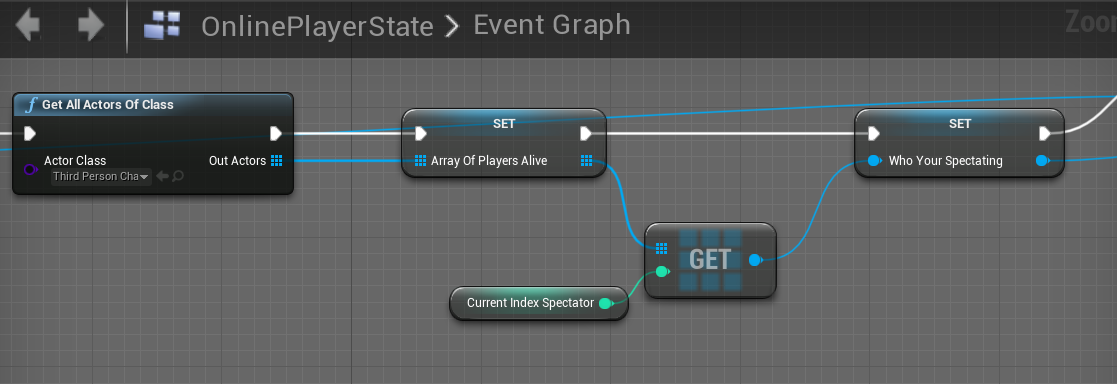
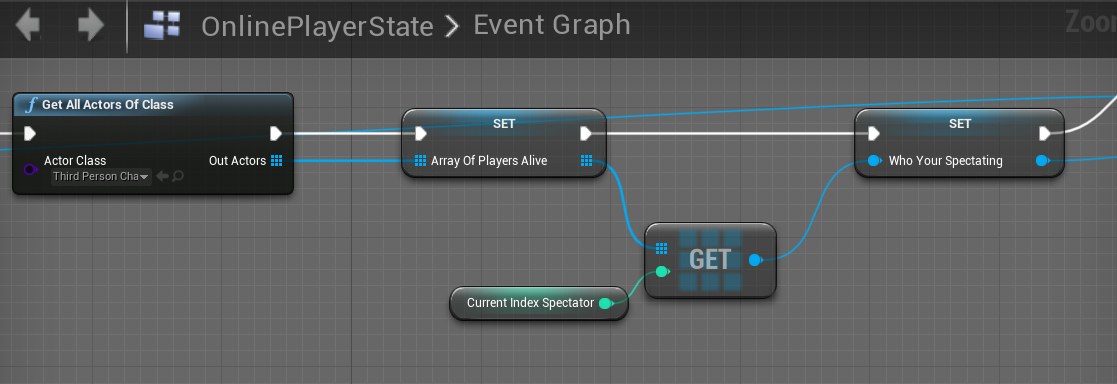
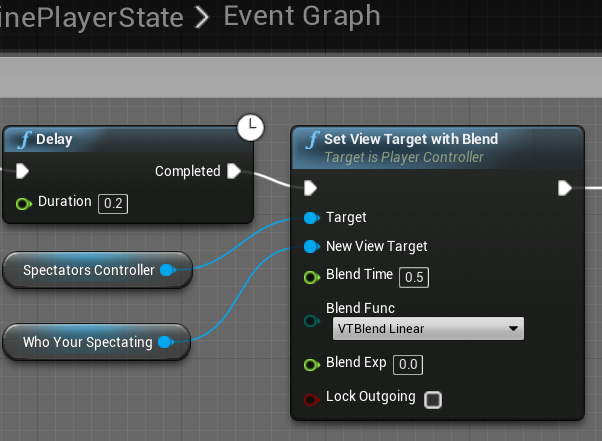
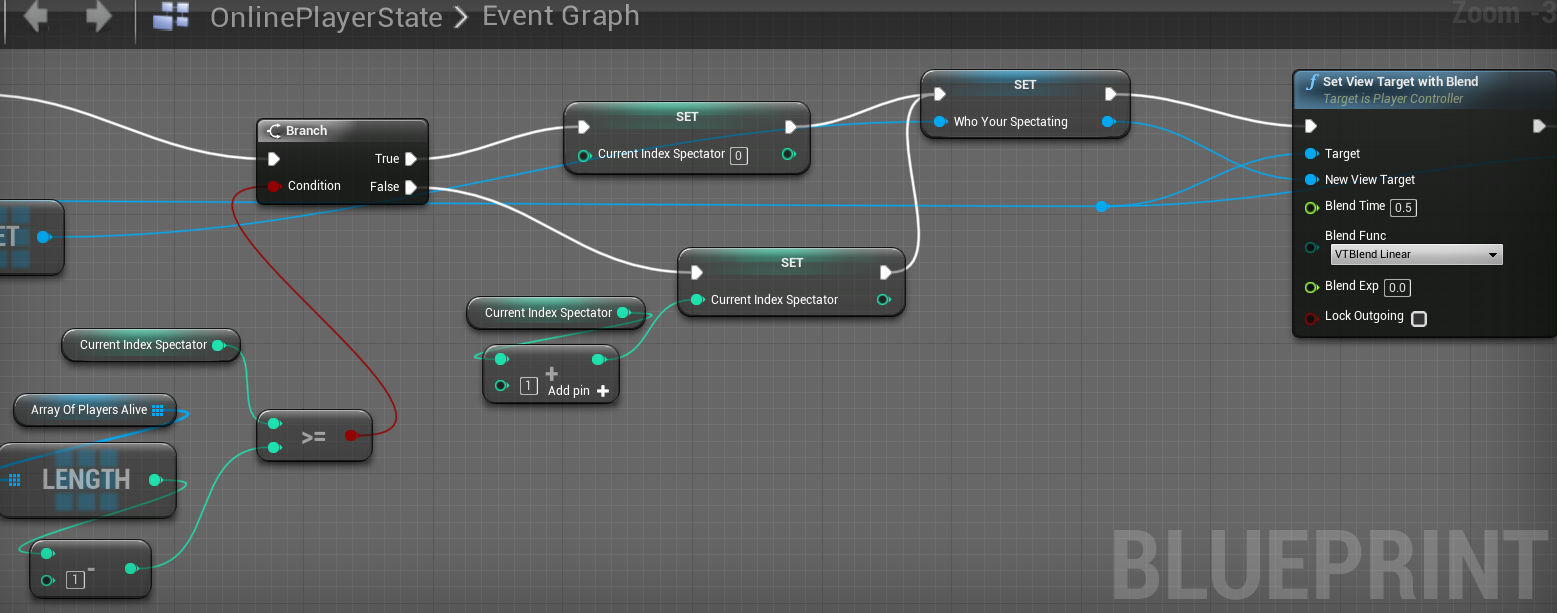
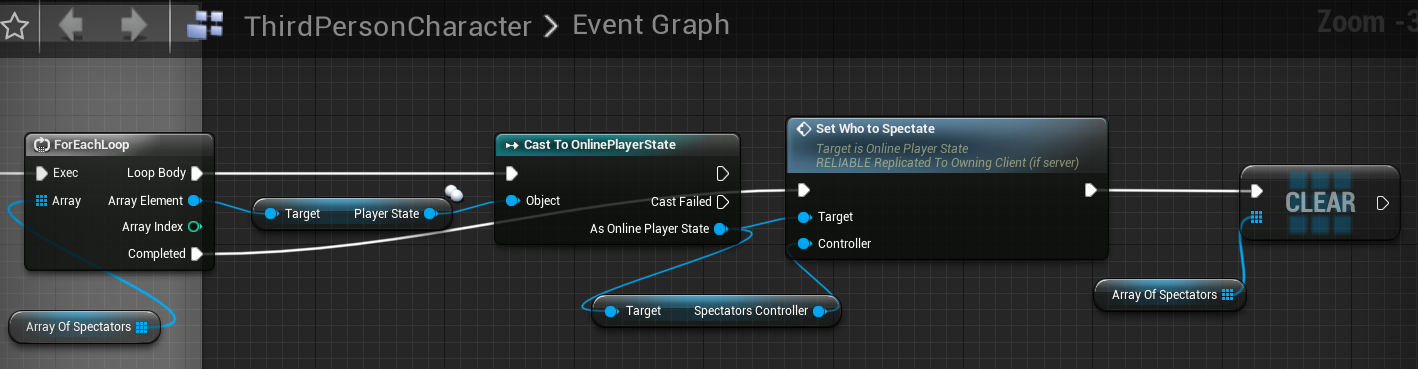
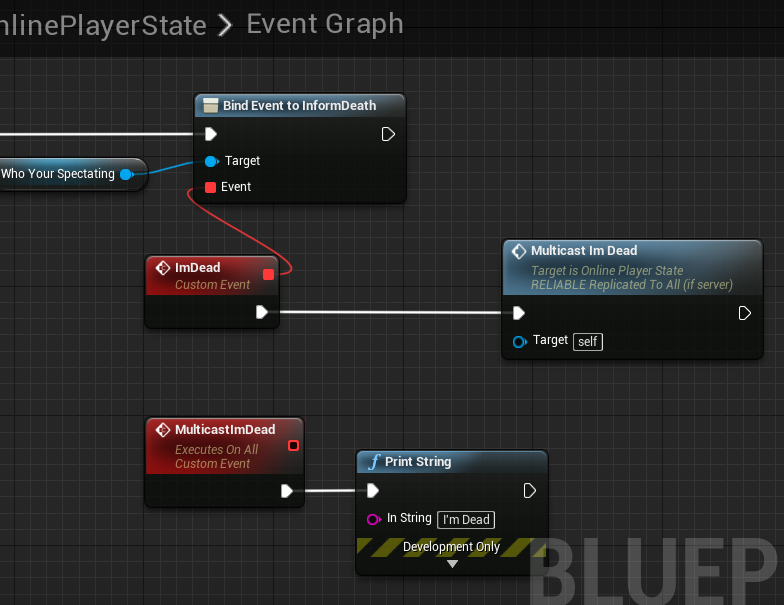
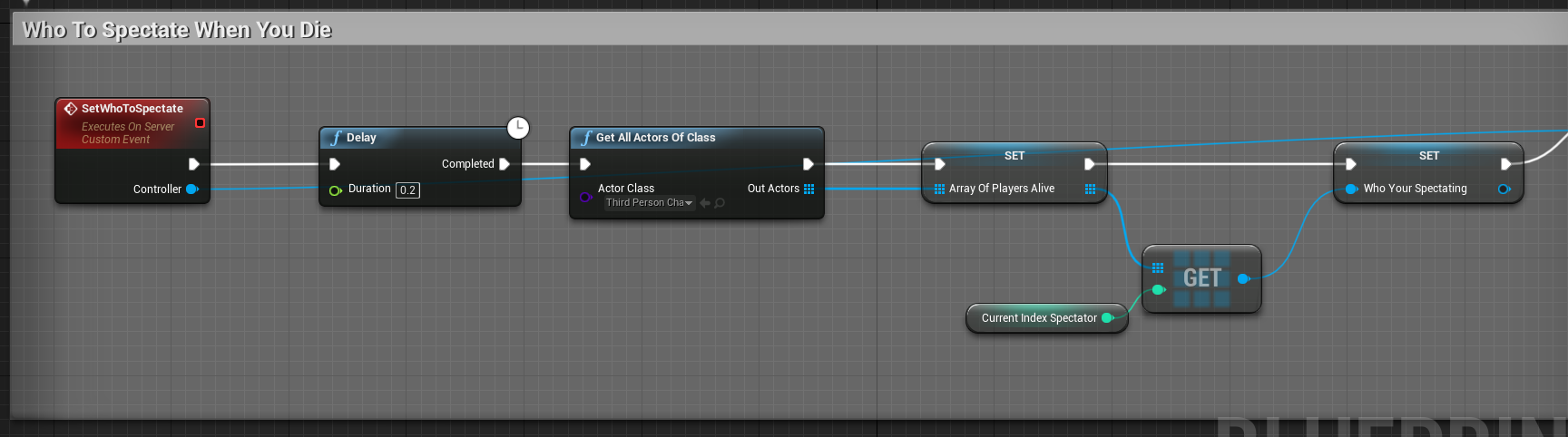
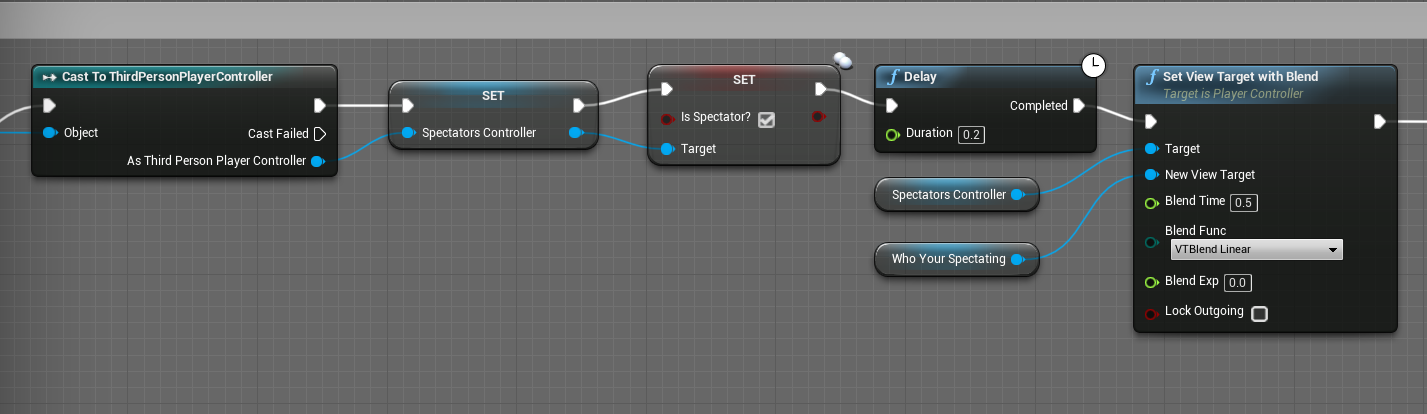
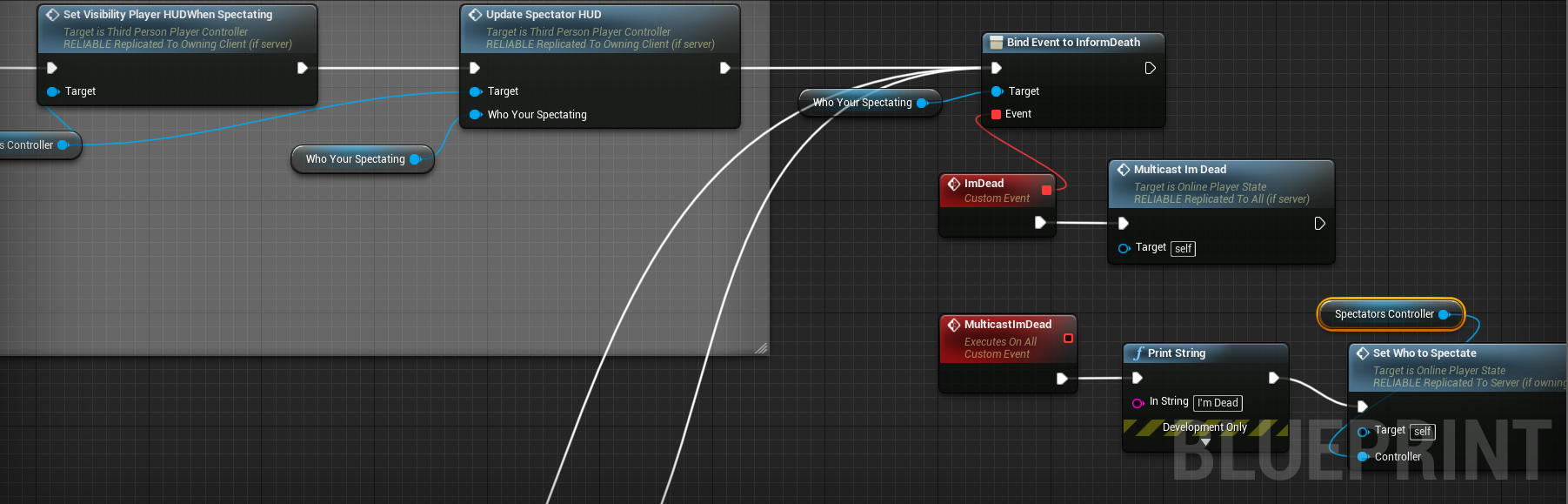
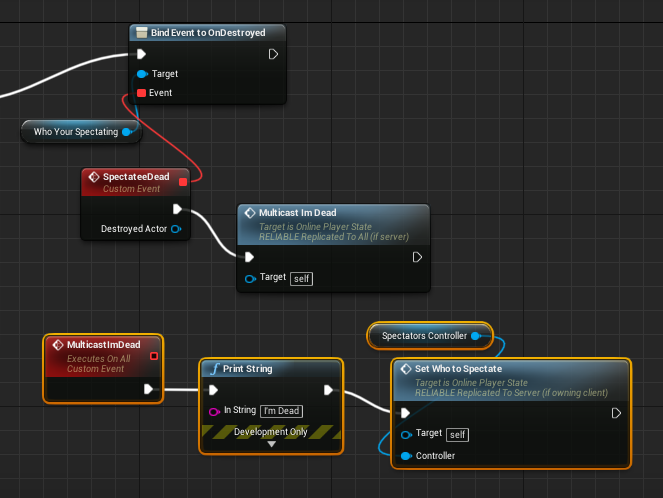
@thin stratus I know you told me to use Repnotify last night in order to let other players know that someone died but I don't know if it works for my situation. I'm trying to make an event or something else run for the Spectator of the person who died. So for example Me and you are playing. I'm dead and am spectating You playing. Then while I'm spectating You, you die. My spectator character is left sitting there able to fly around the map. What I want to happen is for it find another alive player to spectate if there are any. You get what I'm saying? I set my spectating system up inside PlayerState. I just get an array of all ThirdPersonCharacters then set an index of which one I'm spectating, Then blend to their camera. I also have two more events for switching to Next or Previous Player. So my issue is when the alive player dies, he doesn't know how to communicate his death to the person who is spectating him because He doesn't even know who's spectating him. https://i.gyazo.com/49012facae3689241ff64032977c2766.png https://i.gyazo.com/210398005b7d5abacd5f7d4bac648663.png https://i.gyazo.com/a8a3a684fb82bac66f810bb94858ee36.png

 thin stratus
Keep a list of Spectators on the Character
If he dies, iterate over that array and tell everyone that he died
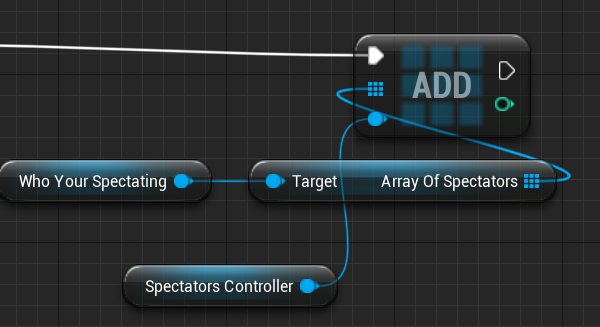
So basically whenever someone is spectating a Player, you tell the Player BP that there is a Spectator by putting that someone into the Array.
fluid flower
yeah or perhaps the other way around, the spectator responds to when the character he spectates is gone, and tries to find another one
grand kestrel
How often is GetLifetimeReplicatedProps called -- only once? Or does it keep checking it? I assume only once but want to confirm
thin stratus
@fluid flower Well that way he would either need to poll the state (which is bad) or use the EventDispatcher again.
The EventDispatcher should work though. Idk what he tried back then. Didn't know he wanted to tell a different class about it as the screenshot didn't show that
fluid flower
yeah I personally wouldn't poll
thin stratus
The Array i suggested is basically the same thing
fluid flower
also depends on his implementation, if the character actually gets destroyed, it's even easier, but I've seen games not actually Destroy() actors when they die, but set intermediate 'death' states
but yeah, just listening on the OnCharKilled or whatever should work if set-up right
@thin stratus the array way certainly works 😃 I just somehow feel the Character class should not care who's spectating it, would be a nice place for the spectator class itself to handle all that
just my own OCD 😃
thin stratus
Sure sure, it's late. The Dispatcher is def the better way
cedar finch
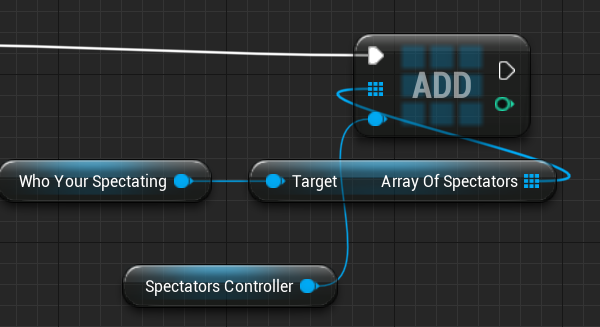
@fluid flower My players are destroyed when they die. @thin stratus Ok so I made a variable inside my playercharacter called "ArrayOfSpectators" Then I add my Spectators PlayerController to the array and once the PlayerCharacter dies I run the event to find a new spectator in my playerstate. But its not working. https://i.gyazo.com/b6fa6cdbd4308122c6037a13db03313b.png https://i.gyazo.com/547afcf92b3b6f0f2b88cfb0339003dd.png
 cedar finch
The Event Dispatcher works only for Server player
fluid flower
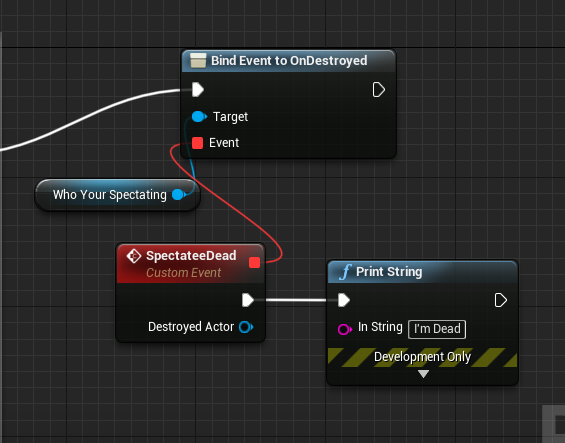
@cedar finch when you START spectating an actor, just bind on it OnDestroyed event, and when it fires, find a new target to spectate
thin stratus
Where are you even starting that
On the Server?
On the Client?
This seems to be a replication issue
cedar finch
@fluid flower I did and it only works for the Server Player
fluid flower
then as @thin stratus said, probably a replication issue
thin stratus

Let's say this is the setup okay?
This is called on the Server
In the Character, when they die
So at that point, whoever is listening to that call, is on the Server end
grand kestrel
Answered my own question internally Unreal only ever calls GetLifetimeReplicatedProps() on the first instance of an object of a given class and it expects to be given the replication layout for that class, not for an instance of that class
thin stratus
Let's further say you have some function to start Spectating, that one is ALSO called on the Server.
In that you bind to the OnDied event: https://puu.sh/BRXL9/8b541c16a7.png

"SpectatePawn" should that be
Can't type
So "OnPawnDied" calls in, for example, your PlayerState
On the serverSide of things
From there on you can call a ClientRPC for example
To shift the View to a new player
fluid flower
@grand kestrel yeah it just calls it once and generates the needed data format to then always replicate actors of that class properly
so you can't do crazy runtime changes to the conditions etc:)
grand kestrel
Yeah, well, that is what COND_Custom is for at least
cedar finch
@thin stratus Ok so I have my health with the dispatcher. then I set the Bind right after the setting of the spectators new person to spectate. https://i.gyazo.com/bf8aec061c1dd914f8cdc6ce9965d713.png https://i.gyazo.com/6fc59fa49c3f6e1ae70f48ffaefcfd1a.png

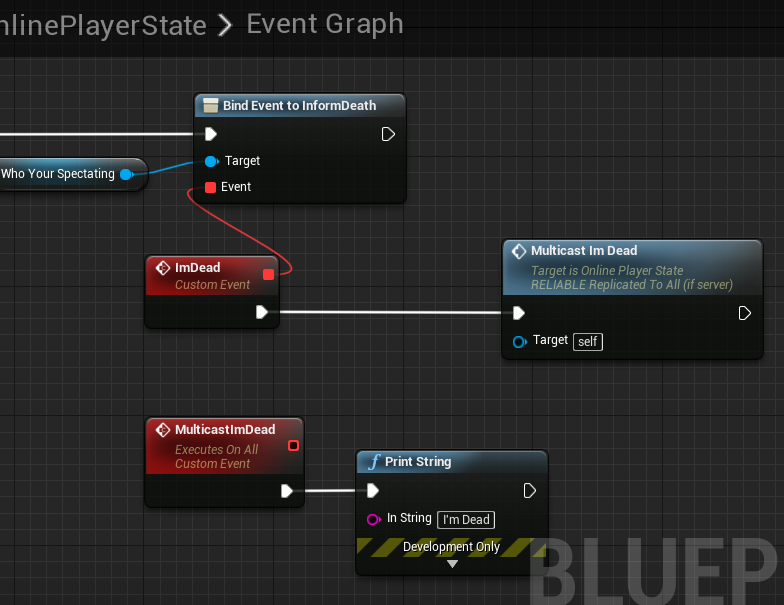
I have to be missing something because that print string only prints when the Server player dies. Never works for clients
fluid flower
Are you managing to get any kind of spectating working? The first time perhaps?
cedar finch
@fluid flower It all works I believe I just cant get clients to switch to another player when the person they are spectating dies.
fluid flower
@cedar finch How I would do it is: You have 2 classes, Character and Spectator ( I assume). When you possess a spectator, you immediately start looking for a Character to spectate ( FindNewCharToSpectator() for example ). In that function you when you find a Character, you bind to its OnDestroyed event and now you wait for it to die. Eventually, that Char will die and the server will call Destroy() on it. Since that character is replicated, the OnDestroyed you bound will be called on both Server and Client. So now you can choose whatever you want to do from there, call FindNewCharToSpectator again perhaps.
cedar finch
That's what I thought I did lol
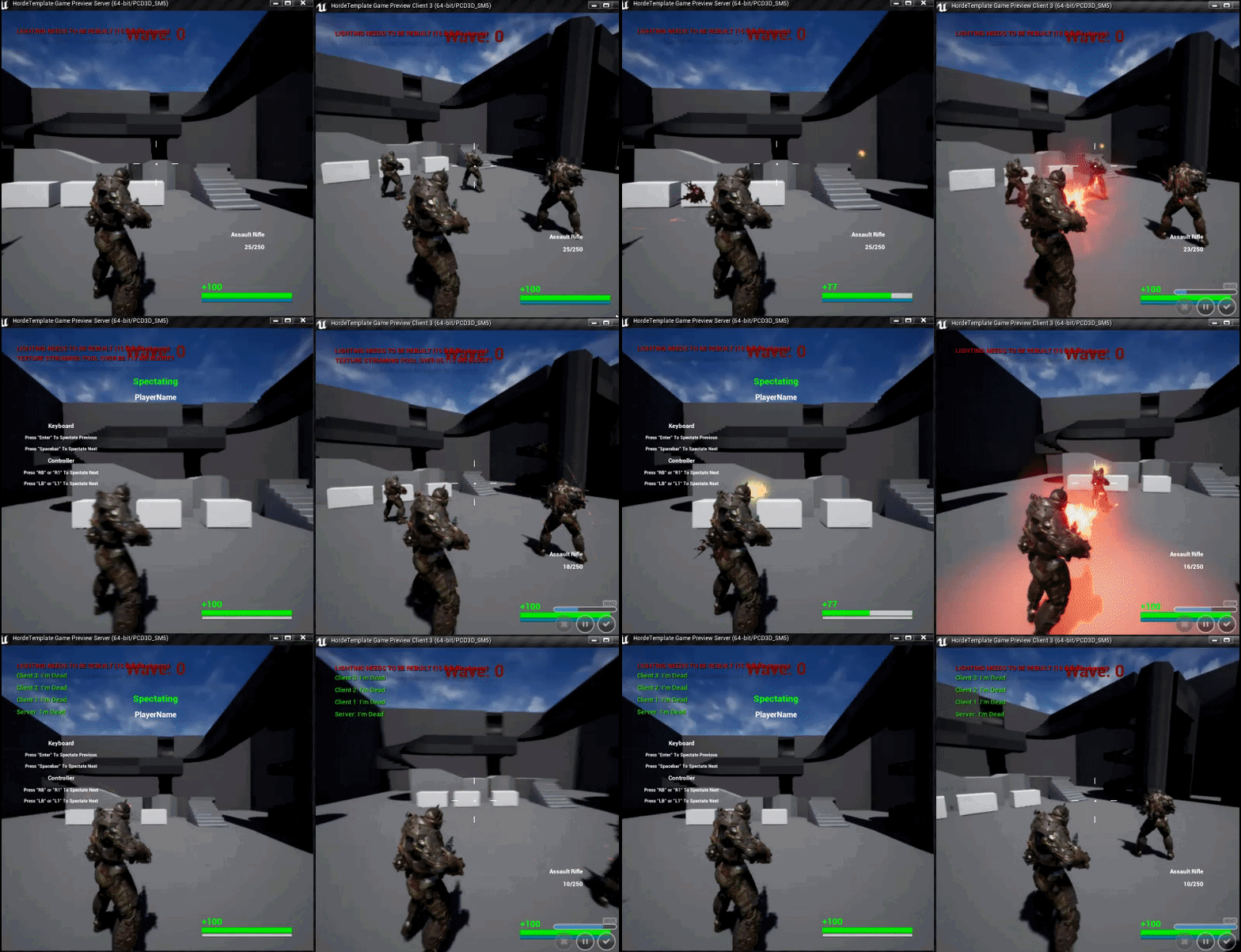
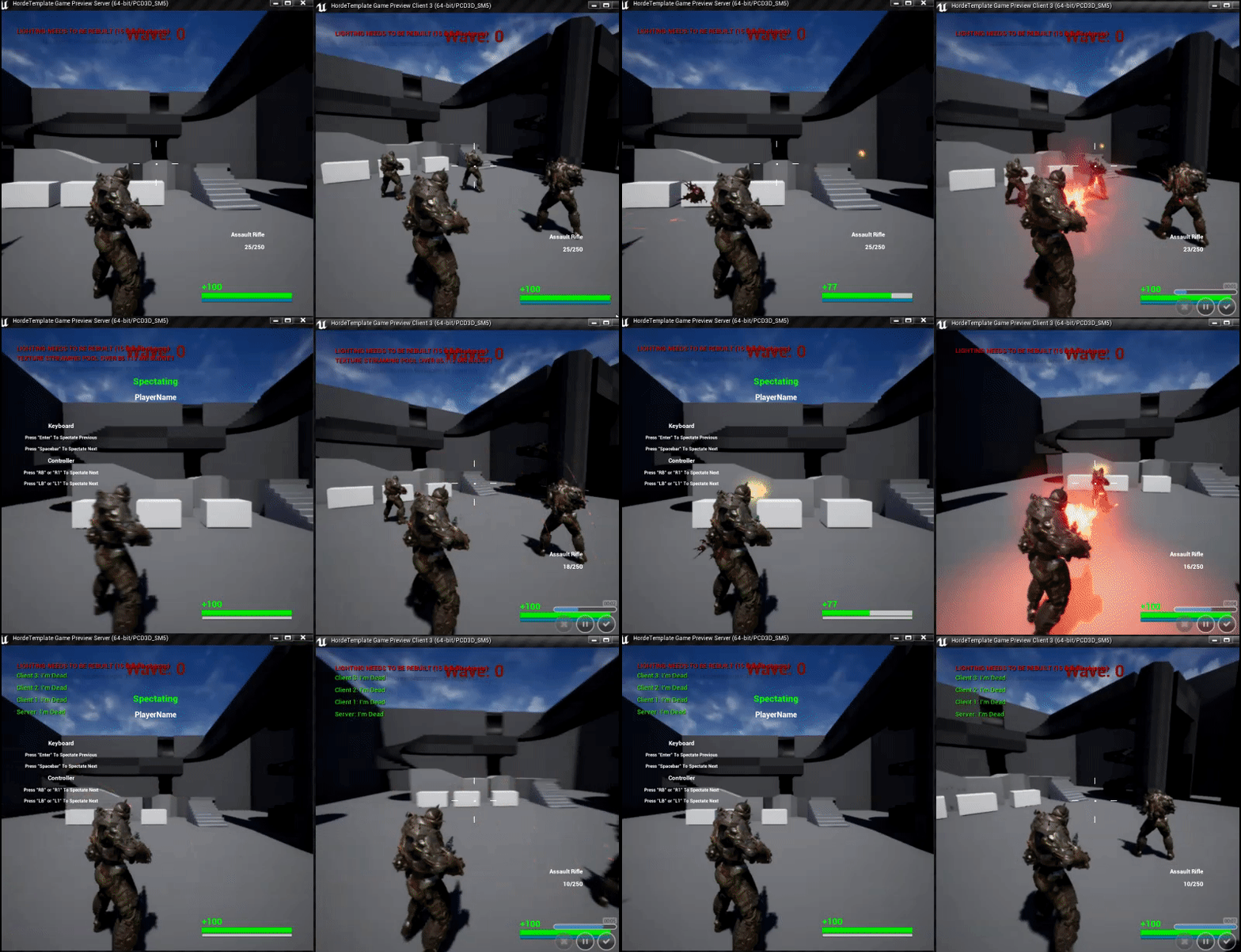
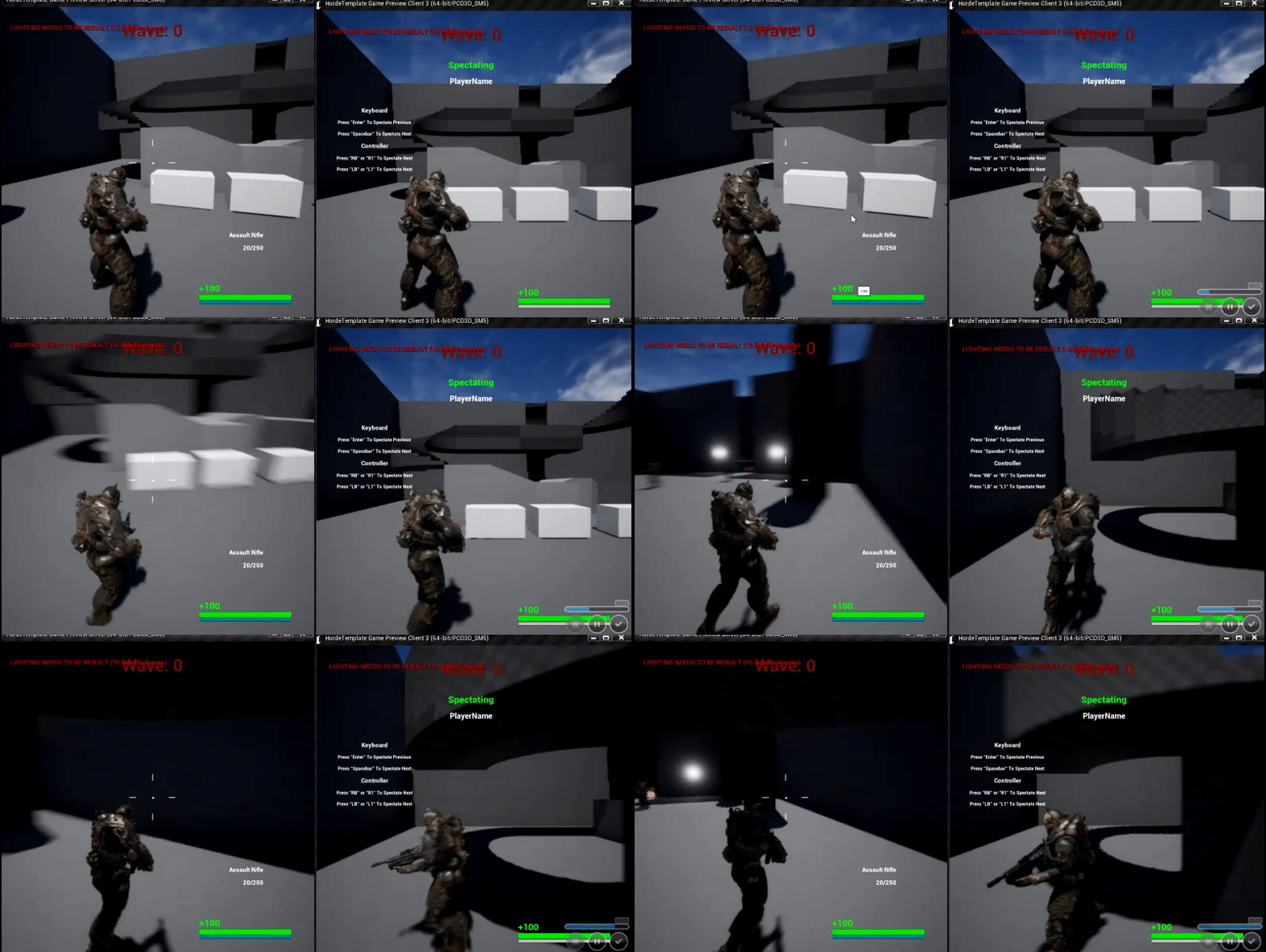
Here is it working for the server player. https://i.gyazo.com/585df5fc571dac8bd0b95dfc9fc11f7c.gif
 fluid flower
can you show the bit of blueprint where you select a character to spectate and bind to its OnDestroyed?
perhaps we missed something 😃
cedar finch
https://i.gyazo.com/14ac70bd08d0831eabd45d5beb7b01f1.png https://i.gyazo.com/c4f682b914fb841efb544a62838e17a0.png https://i.gyazo.com/1e18f0fea3ea0b512ea35ed6dd20b2a0.png


I'm not sure if it's right but I connected my "spectateNextPlayer" and "spectatePrevPlayer" Events to the OnDestroyedBind too.
fluid flower
can you try the OnDestroyed please, so not your own dispatcher
but the built-in Destroyed event
and we debug from there
and just print a text on when it gets fired, so we see where/when it gets fired
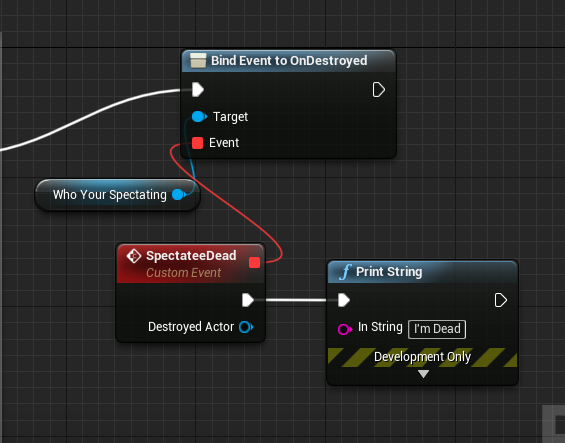 fluid flower
yeah, lets try that next
i personally use a custom spectator system, can you check if the default spectator class is even replicated lol
cedar finch
How do i check that lol?
fluid flower
open the spectator blueprint
then click the class info or details etc
one sec lol, I'll launch my editor
i forget the real terms haha
cedar finch
I'm just using the default spectatorPawn
in c++ it says //bReplicates = true;
idk if that means anything
I made a custom spectator and it's defaulted to replicate I believe so maybe the built in one does too?
cedar finch
Yea
fluid flower
ok so it replicates
and ondestroyed gets called on server
so now try the RPC
create a new RPC and set it to reliable, and lets start with Multicast and then call it
cedar finch
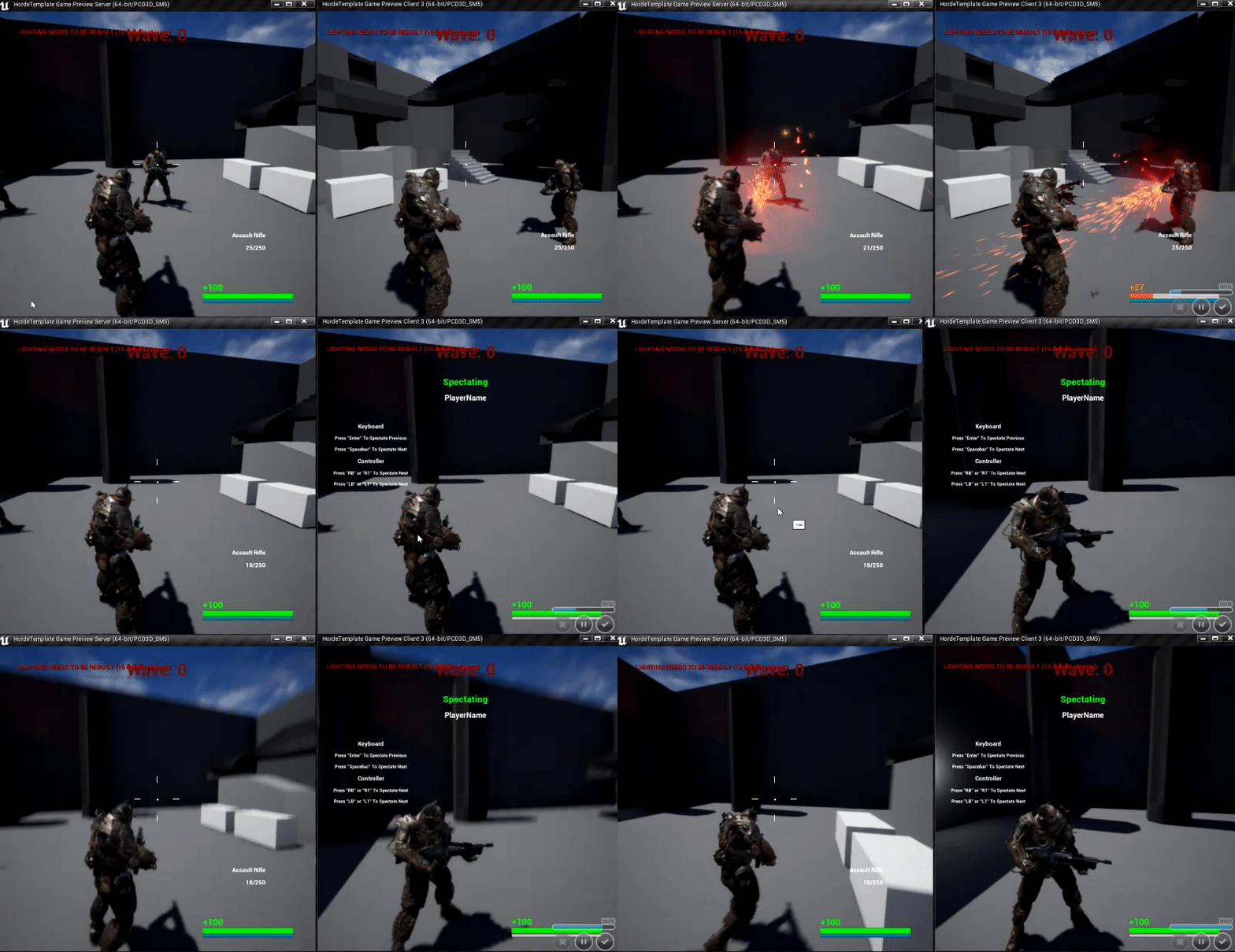
Ok I did it and now it's acting weird. So the Client always spectates the Server when they first die. Also when the Dead Client switches to the next player to spectate they still are seeing the camera rotation from the server player they were spectating before.
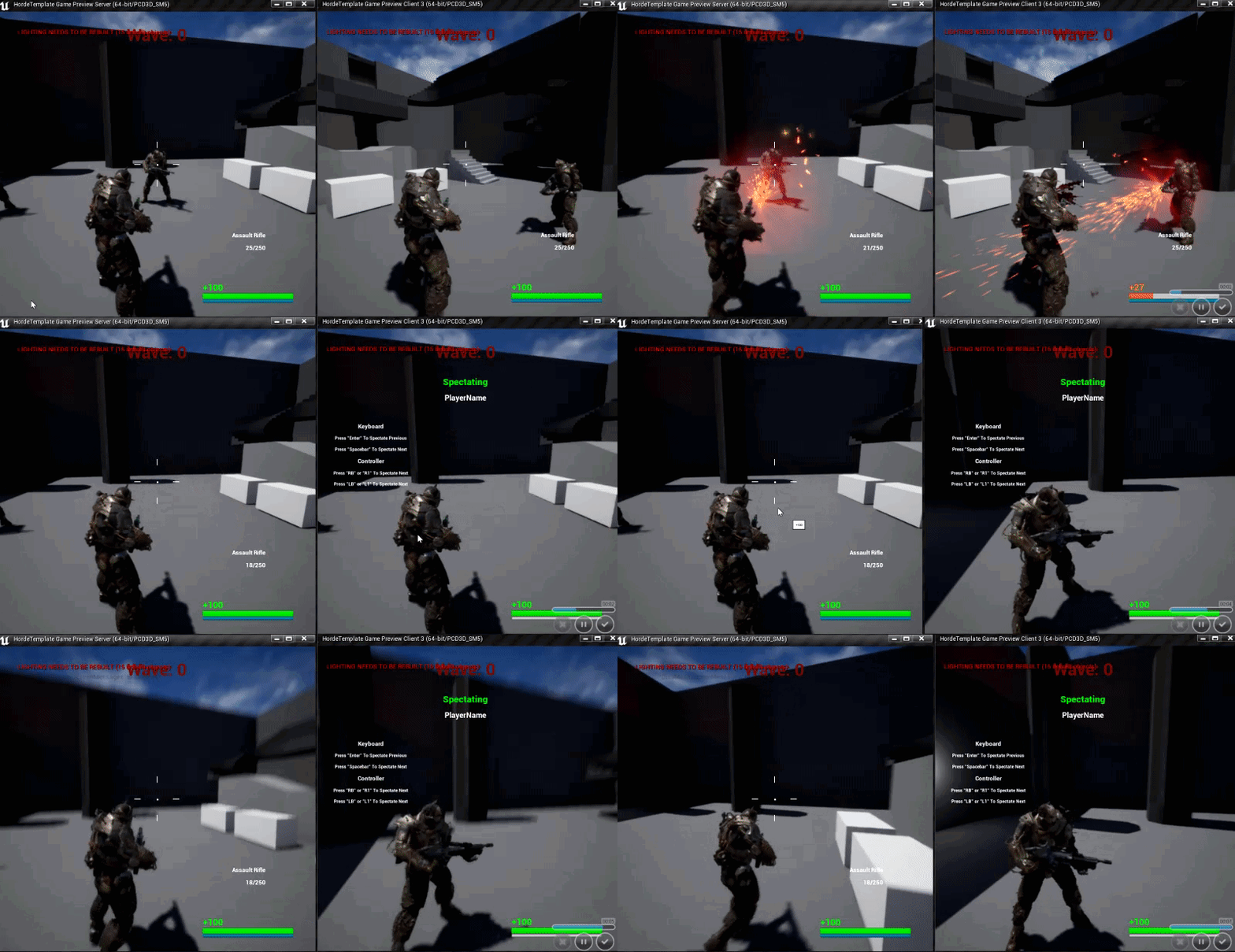
Server is on left, client on right. Huh..... why me lol
 fluid flower
does the function run on client at least?
cedar finch
Ok so it has to be a replication issue with how I set my "SetWhoToSpectate" event. If I set it to run on owning client I dont get that.
fluid flower
yeah, once you get that function to run on client, your next task is to figure out what the spectator system prefers: should it be called on server, should it be called on owning client etc
that I can't help you with because I skipped unreals built-in spectator stuff, but I can help you with general replicatoin stuff, so I hope that function arrived on the client haha
cedar finch
I haven't found anything anywhere on spectating systems. lol
So now that the event runs on owning client if the Client player spectates the Server player the camera rotation doesn't work for the spectator. https://i.gyazo.com/1e72968be042f8102e4084aafaaf26f9.gif
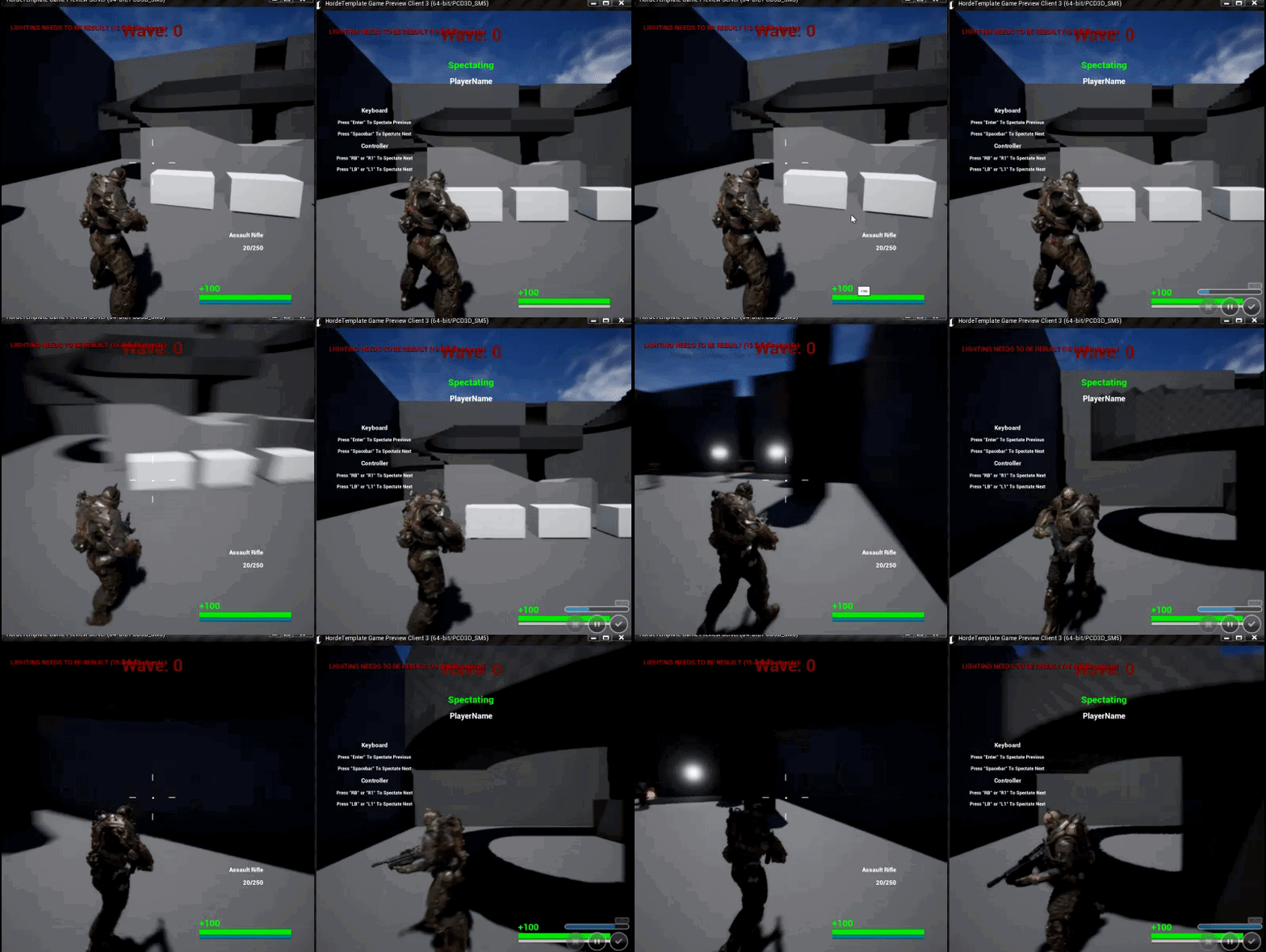
Client on right doesnt update the rotation of the camera
fluid flower
yeah, that stuff is a hell of checkboxes etc
i skipped it for a much simpler custom system for that reason haha
cedar finch
If you know how to make an easier spectator system i'm all ears. This is ridiculous lol
I've been struggling to find anything online
I'm going to go grab something to eat and will be right back.
My guess is its an event somewhere in this mess of a chain of events that's set to the wrong replication type
@fluid flower Can I walk through my event and you help me see If I set one wrong?
fluid flower
i doubt I'll be able to help you with spectator stuff, it's old nasty code imo
but in case you're curious how I did it, what I do is I just do it in PlayerCameraManager
in there, if I have a live pawn that I'm controlling, I just follow the normal camera code, but if my ViewTarget is another pawn, I set the camera location/rotation based on that viewtargets orbit
super basic, gets the job done for my projects
and I've got 1 function that tells the camera manger to start spectating any actor, even a random prop
having said that, I DID get the built-in spectator stuff working when I was working for Epic, cus...it'd be weird if I discarded our own code haha
so its definitely possible, I just don't remember the nuances anymore
cedar finch
What built in spectator stuff? lol The only thing I used from the engine was the spawning of the SpectatorPawn. lol
When a player dies I tell the Gamemode to spawn a SpectatorPawn and Possess it, then I tell the PlayerState to get who to spectate and set view target with blend
That's it
PlayerCharacter -->> Calls Gamemode -->> PlayerState
fluid flower
i think you're very close haha, my brain is just fried atm, time for bed soonish 😃
Let me know if you need help once im online tomorrow if you haven't solved it yet, happy to help out
cedar finch
Ok cool. Thanks for your help. I take it your not on Eastern Time USA? lol
I have a friend who helps me sometimes from the Netherlands and man its like a 6hr difference
@fluid flower You'll never believe it.... I fixed it.! It was in the Gamemode. I set the event to OwningPlayer and now it works.
cedar finch
Wow far away! lol
fluid flower
😄
 solar halo
I'm using GetPlayerName to get the players name from Steam. This works fine when the game is launched PIE Standalone, but when launched from Steam client it shows my desktop name. Ideas?
I've used this method before and it's worked fine, but now it doesn't.
 warm summit
Hey guys, so i made a pickup system that changes a variable in the character. On the serverside it works perfectly fine, but when I try it on the client side it only gets to the print String: "interact exec" any ideas why it doesnt work?
winged badger
the pickup doesn't have a PC as a netowner
so it can't send ServerRPCs
also whatever Object pin is, it might not be valid on both client and server, can't tell from the screenshots
the TypeGun integer is also an unfortunate choice, but in this case it won't break what you're trying to do
you should at least rethink the name
winged badger
you got any "No owning connection for.. " in the OutputLog?
winged badger
i think you do, only objects in PlayerControllers ownership chain can send Server RPC or receive Client RPCs
which is unlikely to be the case for a PickupActor
and when you try to send a Server RPC from an object that doesn't have a PlayerController as ultimate owner, then you get "No owning connection for... " log entries, warning category
warm summit
ok, so what's your advise?
winged badger
on server exec, the Server RPC isn't an RPC, its just a normal event/function
warm summit
ah ok
warm summit
yes
winged badger
it can send a Server RPC
so make an event that handles pickup inside of it instead
warm summit
inside of the controller or the pawn (character)
winged badger
basically, the PlayerController, PlayerState, PlayerPawn, any of their Components, any Actors attached to any of them, and any Actors that have PlayerController explicitly set as the owner via SetOwner (on server) can send RPCs
winged badger
yeah, instead of calling GunEquip on the PickupActor
handle entire pickup logic right there on InputAction
if it makes too much mess in the PlayerCharacterBP
you can always make a Pickup/InteractionComponent and put the logic in there instead
warm summit
haha yes
dude thanks so much 😛 now everything works 😃 I'll remember the RPC shenanigan 😉 @winged badger
one more question, what di you mean with integer isn't a good choice?
winged badger
i said unfortunate, as it is now
if its supposed to be a number to identify a weapon type
you should really have ID in the name
even ones own code can be confusing after just a few weeks, if not written with readability in mind
fluid flower
what else does it say?
 humble zealot
anyone can help me with port forwarding port 7777, i have it done just doesnt say its open for some reason
 thorn crescent
could someone help me with a dedicated server build. Ive been trying multiple different ways I just can't seem to find one that works like it's intent
twin juniper
{
    // We want to see if any of the Units or Structures that our PlayerController owns are within the net relevancy distance

    const AInGameDeathAlleyPlayerController* PC = Cast<AInGameDeathAlleyPlayerController>(RealViewer);
    if (PC->UnitsWeOwn.Contains(this))
    {
        return true;
    }
    for (AUnit* MyUnit : PC->UnitsWeOwn)
    {
        if (IsWithinNetRelevancyDistance(MyUnit->GetActorLocation()))
        {
            return true;
        }
    }

    if (IsWithinNetRelevancyDistance(PC->BaseActor->GetActorLocation()))
    {
        return true;
    }

    return Super::IsNetRelevantFor(RealViewer, ViewTarget, SrcLocation);
}```Does this make sense?
How often is "IsNetRelevantFor" called though?
What if we want to do a fog of war setup where units become net relevant only when we have a unit within a radius around them?
twin juniper
Is there a way to speed it up? Do we just increase "NetUpdateFrequencyh?"
I kind of want an instant update.
modern dome
I have a Shared Camera Blueprint which is set to Replicate and NetLoadOnClient.
When a Second Player joins, it says the Camera is not Valid though.
this is within GameMode
this is within my PC
this is the Camera Actor's Settings
fluid flower
perhaps it hasnt been replicated yet in begin play
sometimes beginplay is too soon, so as a test, try a quick delay to see if that might be the issue
slim holly
true, replicating gamestate takes few seconds
no you should not be saving cameras to gamestate
fastest way to send the camera reference to new players is through PostLogin event in gamemode
or OnPlayerRestart
modern dome
Doesn't Net Load On Clients mean it is replicated immediately when a player joins?
humble zealot
anyone can help me with port forwarding port 7777, i have it done just doesnt say its open for some reason
fluid flower
@modern dome yes, as fast as it can, but thats not on frame 0
worthy wasp
anyone experienced with Playfab in here?
having some hiccups understaind custom cloud code return values - i'm trying to make some custom stuff and doing cloud code execution - but my return values arent happening.
 maiden vine
what's the best way to set an enemy index of the order they were placed in the level?
get all actors of class and for each loop are giving different results
maiden vine
never mind i put get length - 1 in construction script it does it for me
thorn crescent
Hey does anyone know how to fix the "Server Target is required with -cook or -cookonthefly"
drifting plank
Hey !
Is that a good place to put my "match max duration" in my GameState class to access it easily on my clients ?
versed socket
@drifting plank Yup!
drifting plank
Thanks 😃
modern dome
@fluid flower Net Load on Client -> Actor is considered for immediate Replication when it is spawned just like the rest of the map.
If this isn't guaranteed, then this flag is useless
I wait a few seconds before Player 2 joins. that should be enough time to make it replicate
 rare yoke
Hey guys, I'm working on server-wide questing (Where everyone on the server shares the quests) - which class would I be best off using to run all the events on? I'm going to make a BP Component for the code, but I was wondering where the best place to use it would be?
I was initially thinking GameMode/GameState/PlayerState but unsure which is best
modern dome
Dedicated or Listen Server?
winged badger
GameState is the only of the 3 that lets you use the component as a context for the UMG
and letting players know what state the quest is in is the only thing you really need to do outside the server
i mean, PlayerStates are replicated, but which PlayerState? you have at least as many as you have players
rare yoke
@modern dome Listen server
@winged badger Thanks for the reply, definitely sounds like GameState is the one to go for from what you've said.
 hasty adder
@humble zealot check your firewall
Probably need to open it on the computer to accept tcpip/udp
 austere rock
any one know how to remove widgets from client players? also where would be best place to create widget (gi,gm,gs,pc,ps,etc) mine only removes from the server
this is player controller and is called when a launch game from lobby
hasty adder
Is local controller
hasty adder
That too
austere rock
not sure what to put here i tried doing for each loop with all saved player controllers
would it be better to put in player state?
cedar finch
Do I need to destroy Spectator actors when they respawn and possess a new actor?
austere rock
dont believe so
cedar finch
Do they go away themselves or just don't even take up any resources to matter?
austere rock
well id imagine its only very small recource hit
but i may not be best person to answer since i havent really dabbled much into spectator yet
cedar finch
lol Its all good. I was just curious. I have a coop game I'm working on and players are probably going to be dieing and respawning alot so I didn't know if I need to clean up the spectator actors I spawned
I'll just destroy them just in case lol. 😉 no harm in that
austere rock
yea better be safe than lagy
copper portal
@fossil spoke @thin stratus I fixed all the issues with my return to lobby issue. Thanks for your help!
fossil spoke
Is that a type that Advanced Sessions introduced im assuming?
Are you using Steam?
Caching the SteamID if that is available would be a better method i assume.
Not sure if they expose that.
Never used Advanced Sessions plugin.
fossil spoke
Steam isnt available in PIE, it will only show the actual ID with Standalone
253 is probably the ID from PIE
 sharp arrow
can someone help me im wana replicate this so ti gets the owners weapon to show the data of lets say fi iuts a gun the buillets coutner etc
because if i play now in the screen of one of them works but in the other it says its 0
the top one is the server the bottom one si the client
strong abyss
Are the variables marked as replicated?
You can also print something if the cast fails or the IsValid fails to see if one of those is the problem.
sharp arrow
it is replicated but is not getting it for the ui
 thorn yarrow
weapon reference
sharp arrow
i got it by casting my character to here so i can get that variable reference that is in the char
thorn yarrow
the variable is an actor or component
main hand weapon
its valid, and not a replicated variable, so presumably, its a component, like you weapon attachment component which informs you what weapon you have equiped, right?
sharp arrow
actor
thorn yarrow
if thats the case, seems like the client and server are using different references to the actor
sharp arrow
sharp arrow
yup
thorn yarrow
because what we should see in your first screenshot with the UI, like the two dots on the inventory reference, we should see two dots on the main hand reference, in addition to that, only the server should spawn the actor and assign the player spawning it, as the owner, in the spawn actor on spawn properties
sharp arrow
inside the actor im getting the name of the row in the data table to set it
thorn yarrow
because whats happening now from what I understand is that, the server has its own actor, which is likely replicating to everyone, the clients each, have their own actor, which no one including the server sees.
sharp arrow
thorn yarrow
but simply because the variable [main hand] isn't replicated, the client's ref to main hand on them, isn't being forcibly replaced by the servers ref which is actually being replicated and seen as in the top of the screenshot
sharp arrow
for what i reading i can be wrong since my main language is spanish not english your saying that replicate the variable of the main hand weapon actor isnt necesary
but what i want it to do is in each one show the bullets eahc one has in their weapons
but if i replicate the variable its gona work whats down there but everything else i have there is gona get ruined
thorn yarrow
if you replicate the variable now, it'll just work
the main hand ref
but you'll end up with multiple actors not being used
you can go both ways, to replicate or not to replicate is up to answer
 ocean dust
Hello, all. I'm trying to set up my game for Steam integration. I have changed my DefaultEngine.ini, set up my Build.cs file, and all that stuff. The Steam integration works ONLY if I launch the game Standalone from the editor, but DOESN'T integrate with steam if I cook a build. What am I missing? Thanks!
thorn yarrow
If you replicate main hand ref, you need to only spawn it on the server
If you don't replicate main hand ref, you need to replicate to your character to update the main hanf ref on the individual clients spawned actors that way
I personally go the latter route because I don't like spawning actors and replicating them to everyone
I just give everyone with the actors, and update them through RPCs as necessary.
at least in this specific case
thorn yarrow
this is all related to your game player and main hand reference
what I said
MainHandWeaponReference needs to be set to replicate OR you need to RPC your main player pawn. These rpcs will then update the MainHandWeaponReference.
copper portal
When the host of a match starts the game, they can't see the nametags or score tags of any player including themselves in the first round. After everyone respawns, they can see it. I have printed string to check if the nametag has a null input and it doesnt. This is what I do for my score and nametag: https://gyazo.com/96e41d371c837ff73786594776de8689 and I set the var in event possessed: https://gyazo.com/9c477a04e5c06c3bef79629ccd5b24c4 All that code is done in my character bp and in the widgets, I do this: https://gyazo.com/e066db9c2a7f83706a4bc5008638f60d (the variable is replicated). What should I do to make the host see tags in the first round?


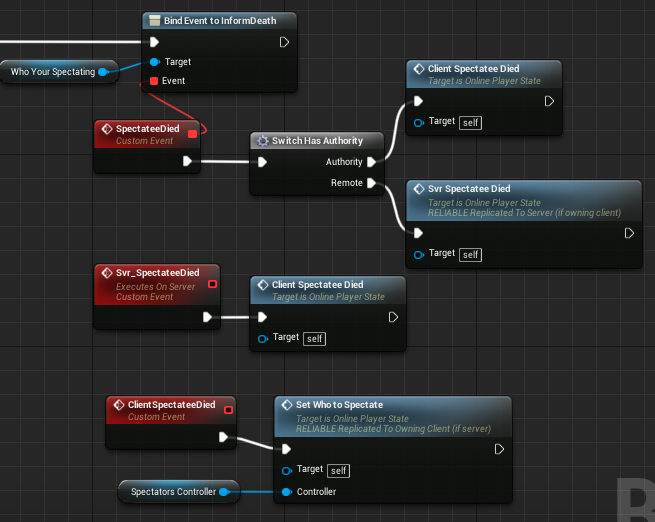



 sharp arrow
the thing is that in mine if i replicate it than is gona screw the equip/unequip completly
thorn yarrow
try and set MainHandWeaponReference to replicated in the details panel, let know what happens
@sharp arrow
 fleet raven
oh wtf, it's possible to spawn on a server and receiving a character before having replicated the player state
this is kinda annoying how all the replication stuff is so non-deterministic and eventually happens but you can't know when or control the order
winged badger
you do have some common points where all execution passes though
like SetPawn being called from both Possess and OnRep_Pawn
 slow dew
Hello guys. I'm beginner, and i have a question. please don't laugh at me.
How to make a aim down sight like this


for first person
not true first person
should i move the weapon or an animation to move it?
if you have a template, please share that
tnx
 full bane
depends on your setup, but easiest way to do it is to author your animations to be perfectly aligned with the center of the screen
then you can assemble everythign inside of a first person animation blueprint
but you can also do it procedurally by just moving the weapon in code
twin juniper
How often is Network Relevancy updated?
I want to create custom relevancy rules by overriding IsNetRelevantFor(). However, I am not sure how often it will update.
 faint pelican
I don't know the answer to Nonono's question, but for Predator, wouldn't the easiest way to at least set up a prototype is to just child the gun / sight transform to the camera's transform? Depends of course how you set it up whether that's viable, but that should make it always centered (although it'll need some nice animations for it not too look awkward)
 tender gale
quick question: property/state replication in unreal, is that 100% reliable ordered? or is it reliable un-ordered? etc.
basically what happens if a packet with say health=100 is dropped
will it resend the same update for health=100, or will it take the current value of health and resend that
contrived example, sure
bitter oriole
I don't believe it's reliable
Though something like health doesn't really need to be reliable
Reliable means your game can't work if you don't get the information. Health updates, you're bound to get another one later on
tender gale
@bitter oriole yeah sure, im more thinking about how it actually works basically. Maybe reading the source code is better.
Like how it tracks what data needs to be sent to each client, etc.
bitter oriole
Yeah, can't say I've ever cared about how it works internally
tender gale
I design/build networking systems for games for a living and realized i had never dug into what unreal does, so wanted to well... understand what it does
bitter oriole
Feel free to share your findings, I think the inner workings of the multiplayer code are pretty mysterious to most of us
 stable arch
can i get some help please for some reason the rotation of the spring arm component is only working client side but not replicated from sever to client , I've check replicate box as well as adding a new spring arm nothing seems to be working right for me any suggestions?
twin juniper
{
    // We want to see if any of the Units or Structures that our PlayerController owns are within the net relevancy distance

    GLog->Log("Number of Units we own: " + FString::FromInt(PC->UnitsWeOwn.Num()));```
This function is never called. Is there a way to create custom network relevancy that is dependent on the location of an actor that we own, instead of just the player controller and default pawn's location? I thought this would be the function. Is this incorrect?I basically am doing a simple check to see if "this" actor, is in an array of actors we own, if it is, we return true.
twin juniper
yes
@thorn yarrow bReplicates = true; bReplicateMovement = true; bOnlyRelevantToOwner = false;
This is what i have
twin juniper
@thorn yarrow Inside of InitNewPlayer
thorn yarrow
Okay, so only the server has [spawned] it. The owner isn't set to anything?
thorn yarrow
Are you spawning to it next to the player?
twin juniper
Well, the DefaultPawn is just a camera (its an rts game)
So I want my AI Units to be controlling relevance. For example, when a unit or structure enters range, I want that actor to become relevant
thorn yarrow
Right, they basically just need to act like any other actor would. Shouldn't have to do anything special to bring them in relevancy except distance.
Which is why I asked where you spawned them.
I have to open up ue4 rq
oh
Okay -- not the right direction. One other thing to verify. The AUnit, does it have collision? @twin juniper
twin juniper
well whats happening
yes it does lol
whats happening though is that a unit we own is still going out of relevancy, AND it isn't making other structures relevant when that unit enters range.
thorn yarrow
if you set the structures (other actors presumably) owner to the main unit, it should bring those in with it
Do you have visual studio running, and can attach to the editor?
also your structures (presumably actors) would need bNetUseOwnerRelevancy set to true
so then if the 'main' unit comes into relevancy, all of its followers should.
but from what I understand, I am not sure you need to override the relevancy. What I'd do is spawn the AI units like you are, but you want to ensure no owner is being assigned to them. So by default, each unit will be distance checked from the clients viewpoint. Then, if there is any groups of AI, their leader becomes their owner, and they use the owners net relevancy distance check to control their relevancy to the client. You have the player controller send PRCs to the server then to the AI units [on the server] through some AI unit manager which can reference the units the player controller commanded to move because you can't send an RPC through the AI units from the player controllers client of course [the server owns them]. But you can do client side things like showing a UMG widget when selecting them of course.
twin juniper
well there is
there is like 50 though
well we don't want to have it use the owner's relevancy though @thorn yarrow
why would we want that?
you ever played league of legends or dota 2? When you are not within a certain range, the other unit literally does not exist
thorn yarrow
I didn't mean that. I'm saying if AI units, work in a group, such as, lets imagine, a Leader of a gang, has 4 other followers with him. For a total of 5 units. The followers would have the Leader of the gang set as its owner.
twin juniper
yeah
thorn yarrow
But otherwise, every unit is owned by the server
twin juniper
is there a way though
to likke
have each individual unit check relevancy
i think by default its based on the default pawn
thorn yarrow
Yes, its the Player Controller and Pawn which checks against every other actor.
for a connection
afaik
twin juniper
So I am overriding this on my AUnit class.
    const AInGameDeathAlleyPlayerController* PC = Cast<AInGameDeathAlleyPlayerController>(RealViewer);
    if (PC->UnitsWeOwn.Contains(this))
    {
        return true;
    }
    for (AUnit* MyUnit : PC->UnitsWeOwn)
    {
        if (IsWithinNetRelevancyDistance(MyUnit->GetActorLocation()))
        {
            return true;
        }
    }

    if (IsWithinNetRelevancyDistance(PC->BaseActor->GetActorLocation()))
    {
        return true;
    }

    return Super::IsNetRelevantFor(RealViewer, ViewTarget, SrcLocation);
This is what I'm doing essentially. Does this make sense to you?
thorn yarrow
yes
twin juniper
It doesn't seem to work though.
thorn yarrow
but you said its not being called
twin juniper
From what I can tell, yes.
thorn yarrow
Have you tried break pointing in there?
twin juniper
I was going to try that next. I just wanted to verify that this is the correct method to be overriding.
Do you know how often network relevancy is checked? Is there some sort of timer?
thorn yarrow
every second
Called on the actor right before replication occurs.
if you override this too, it'll inform you if its being replicated at all
if this doesn't happen, it won't call IsNetRelevantFor
 fleet viper
Hey there got some replication issues here in the images you can see how ive done it. I want to show the marker only to the members of the the team from the player who spotted/spawned the actor. On the client side its good, its replicated however when the host/listen server wants to spawn its not replicated any idea why its like that and how i can fix it?
winged badger
if you have any c++ in your project, overriding the AActor::IsNetRelevantFor and just spawning it on server is the simplest way to go
Realviewer is the PC, so as long as you have the team ID on controller or pawn, you can compare it with teamID on the Actor, set when its spawned
and it wouldn't just be hidden for the other team, it would not exist
twin juniper
@thorn yarrow How do I use that?
 hoary spear
Am i mistaken to think RepNotify triggers when a clients specific repnotify variable has been updated/replicated ?
Atm i'm using a delay node to make sure the variable on the clientside has been properly updated, but I think it could be replaced with a repnotify instead..
thorn yarrow
@twin juniper PreReplication?
twin juniper
Yeah
thorn yarrow
you can override it to see if it hits in your AUnit
hey @winged badger, any reason IsNetRelevantFor would not be called on an actor? other than dormacy, frequency, or deletion?
winged badger
not being set to replicate
frequency wouldn't affect it
nor would any relevancy booleans
twin juniper
@winged badger How do we RTS-style relevancy
So units load in when another unit is in range, but is always relevant to the owner (the player who spawned the unit).
winged badger
how many units are we talking about?
twin juniper
One for now... I am simply trying to get core functionality working, not working on large numbers yet.