#multiplayer
1 messages · Page 422 of 1
 next falcon
next falcon
next falcon
what
 cloud ledge
The problem is that your task is conceptually bad
You shouldn't have the need to sync arrays that large
What is contained in them that you need to send to clients?
next falcon
Example: Minecraft sends full chunks from server to client
I want that too
its mainly just a int array
 meager spade
minecraft chunks don't get sent in one go, it sends packets of the chunk and the client puts them together
 subtle peak
Why does this event fail to get the controller of the AI? It works for the host but not for the connected client..
next falcon
@meager spade jeah i know but i don't know how i get that into UE4
@winged badger Never give up xD
meager spade
well, you would probably need a nested array with part of the chunk in each one, and rpc the parts of the chunk over and let the client load them parts of the chunk once the checksum is valid for the parts
next falcon
well i tried that with packets of 2000 and a delay of 0.1 and that works.. BUT if i would test it with chunks from 101010 it would still not work i think
But jeah thats a way i thaught of
meager spade
@subtle peak clients don't know about any controller except there own
even ai controllers
next falcon
ill keep testing tomorrow
I need some sleep now :)
Good night
subtle peak
@meager spade Ok I see. What can I do instead then?
meager spade
well your asking the server to move you, on the client right?
 winged badger
it wouldn't fail to get the controller
not if it executed on server, anyhow
you do have a "No owning connection for..." log entries in your Output when you call that
you also don't need to get a Pawn's Controller from the Pawn to get itself
just use Self node
(i am assuming here that the controller is AAIController derived, not a PlayerController)
you can't send a Server RPC from an object not owned by your PlayerController @subtle peak
 grand kestrel
That's a bit misleading. You can't send a server RPC from an object not owned by your player controller in the parent hierarchy
winged badger
its not
if you go up the chain of owners until the next owner is NULL
if that last object is the PlayerController
then its owned by a PlayerController
grand kestrel
I'm aware
winged badger
bool AActor::HasNetOwner() const
{
    if (Owner == NULL)
    {
        // all basic AActors are unable to call RPCs without special AActors as their owners (ie APlayerController)
        return false;
    }

    // Find the topmost actor in this owner chain
    AActor* TopOwner = NULL;
    for (TopOwner = Owner; TopOwner->Owner; TopOwner = TopOwner->Owner)
    {
    }

    return TopOwner->HasNetOwner();
}
Except you're confusing owner and net owner
winged badger
this, and PC overrides the function to return true
winged badger
its both
grand kestrel
😒 no
winged badger
technically
grand kestrel
The reason I said it was misleading is because a beginner would think you're implying the player controller needs to be the owner
And it doesn't
It just has to lead up the chain to it
winged badger
fair enough
i've said it enough times here by now that i am lazy typing the longer version
the net owner concept generates as much confusion though
a few tried to SetNetOwner
grand kestrel
Ah
 rose egret
Global Time Dilation effects Replication of actors or not?
 ember needle
All, I'm getting a LogNetPackageMap: Warning: FNetGUIDCache::SupportsObject: DecalComponent /Game/Maps/Levels/UEDPIE_1_OSA_Level_Test.OSA_Level_Test:PersistentLevel.BP_OSA_PlayerChaser_Military_C_1.DecalComponent_0 NOT Supported. when I spawn a decal attached to a component of a replicated character in MP. Can anyone tell me where I can start looking? I am not performing any replication operations on the decals, using only BP. https://gyazo.com/f6488ba8905be446ac816a716975a62a
 rose egret
@rose egret yes it effects on replication 😦
so how do we use real timer for replication instead of dilatated time ? is there any option ?
ember needle
I cannot find GenericPlayerInitialization or PostSeamlessTravel in overrideable functions in GameMode
is this normal?
meager spade
blueprint ?
 north trout
are there resources on how to do lobby/char select/ correctly?
meager spade
seems they aint blueprint exposed
north trout
why the f*** is my server (its a listen server) when joining keeping the player controller for the lobby instead of switching to the game player controllers like all the other clients
this also only happens when using steam, works fine in PIE
 cyan bane
Does anyone know anything about NetSerialization? I've been trying to optimize my replicated structs, but I'm not making the expected bit gains I thought I would, relative to just using FVector_NetQuantize and FRotator_NetQuantize
north trout
if everybody has the same problem, dont be like me read the damn documentation
 copper portal
hi I need some quick help. I have this respawn system where it add score but I use get 0 and it only adds the score to 1 person. The score is in the player state so I am wondering how I can give the score to the right person instead of only 1 person

 opaque flicker
guys question please ! do (PlayerState) variables that i set in the previous level continue to be next map which has the same playerstate class in the world settings ?
in multiplayer game for sure
grand kestrel
@opaque flicker no
opaque flicker
@grand kestrel so how can i make it presist to all levels that i load ?
do i need to use save game BP ?
 thin stratus
@opaque flicker @grand kestrel @meager spade
Mark the GameMode as "SeamlessTravel".
Then use the "CopyProperties" event in the PlayerState to receive the Variables from the OLD PlayerState.
 nocturne berry
hey guys, i am having a problem with the player start rotation in multiplayer. My character is set to rotate with the controller, so he's always facing to where the camera is looking it. When the character spawns he is rotating to 0,0,0. But if i print string in the event begin play, the actor rotation is correct (same as the player start) but the 2nd print string with a delay of - lets say - 1 second prints the rotation 0,0,0. Any idea how to fix this? I want the character to rotate to the player start's rotation
meager spade
does CopyProperties still have the BlueprintReadWrite issue?
iirc it wouldn't copy BRW but only BR properties
thin stratus
@meager spade Well I'm only talking BPs right now.
The event is just a Implementable event forwarded iirc.
I exposed it but can't remember what I did exactly.
meager spade
ok
thin stratus
@nocturne berry Sounds like an Actor vs Control Rotation
Try to set the Control Rotation too
thin stratus
Yeah can't remember when, but PR that in cause I needed that for future BP Client projects.
 severe widget
That's one way around the adamant bp only crowd :P
thin stratus
I still think there is A LOT more that could easily be exposed.
Thinks like the AI Controller bWantsPlayerState boolean
I get that a lot of games have AI that doesn't need to have a PlayerState
But if you want to fill up slots in a game like UT (or any other game where you have teams etc.)
you kinda need that boolean, so that your AI can also have stats properly
meager spade
my AI uses PlayerStates, but thats because the AI are basically players
they keep scores and damage dealt etc
opaque flicker
@thin stratus hey, it's actually the same PlayerState blueprint for both maps how do i do that ?
thin stratus
I doesn't even need to be the same BP
meager spade
copy properties with seamless traveln enabled
thin stratus
But yeah I already said how to do it
- GameMode - Class Defaults - Enable SeamlessTravel
- PlayerState - EventGraph - Add "CopyProperties" Event
2.1. Get Data from old State and set the Variables of the new State with that
However be aware that "SeamlessTravel" will cause other events not to call anymore
Such as PostLogin won't call on ServerTravels anymore then
Cause PostLogin is only for hardtravels
You'd need to replace that (if you use it) with similar events, such as HandleStartingNewPlayer
Or whatever you can find
opaque flicker
hmmm thank you alot for helping 😃
nocturne berry
@thin stratus yes u were right, i've set the control rotation to the actor rotation and that worked. thank you!
north trout
GameInstance only gets destroyed when you shut down the game right?
north trout
ok what i dont get is why does Get Player Id changes in PIE? probably wont using steam but still
i thought thats supposed to be unique 😦 when i switch gamemode it changes
i want to save the players character using his ID so then i dont have to use names since their could be multiple players with the same name in the lobby
 fossil spoke
Player ID is unique to that session.
north trout
ah shit i dont use seamless travel
fossil spoke
You can override the function CopyProperties to help with "saving" or "transfering" existing variable values across to the new Session
On the PlayerState
north trout
still would be problematic if players crash or restart, right? they would get a new ID
north trout
btw if somebody wonders. GetPlayerId does not represent the steam id when the module is loaded. Hit me up if you want some c++ code
 opaque tinsel
im curious, would anyone know how to replicate a fx like ghost trail? Currently i have it setup as this
 umbral adder
 vivid siren
Sorry to interrupt, but is this correct procedure to do something for multiplayer? I've been making this chain of events for everything I need to replicate and seems very tedious and hacky. It works, but I feel like there's a better way:
copper portal
hi when I do destroy actor in a multiplayer game, what gets destroyed?
winged badger
@regal storm setting the variable on server is sufficient
(since it is replicated in your example)
vivid siren
Very true, I didn't know I could skip the multicast when it comes to variables, thanks! @winged badger
 somber oxide
@copper portal When u do Destroy Actor on Server, Both side got destroyed if it's Replicated Actor.
If you Want to Force Destroy what's Not Replicated but NetLoadOnClient(AKA::Placed In World on Editor) stuff. U have to go C++ to Force Destroy on Client as well
@umbral adder Party form comes in Many Forms and shapes on doing it.(I am only capable of sharing the Limited Knowledge I have)
- You can always creates a session and Add your friends in Then pull all the people in your session to the real game.
- U can make a sessionless Lobby by holding them on Backend. Then only pull everyone according to your MatchMaking Beacon.
@opaque tinsel Normally FX is done Locally. But if you are force To Do FX through Networking, you can always Multicast it but make sure that it's not Reliable.
thin stratus
@north trout The Event "OverrideWith" in PlayerState is for retrieving data from an Idling PlayerState
Inactive PlayerStates are created for Players that leave and maybe reconnect
So when they crash for example
And yes, the PlayerID that you can grab in Blueprints changes.
You need an actually UniqueNetID (think that requires small amount of C++ to expose) to have a proper unique ID
And not sure if that works in SubsystemNull
@umbral adder It's done via Beacons. A Beacon allows you to hold a connection (which even allows RPCs), without joining the Hosts world.
For Steam you can use the Party Session to Create a Beacon and let people join/host. This is C++ stuff though.
north trout
@thin stratus thanks ❤
copper portal
@somber oxide but does character bp get destroyed or the player state
somber oxide
@copper portal Depend on what u destroy is what u destroy?
copper portal
I just do destroy actor inside my character bp
 mild hull
pinned messages has a nice picture with all relevant classes on them
copper portal
I have a small problem. I have this system in my respawn system that is supposed to add a point to the last player standing but it adds a point to 2/4 people. Also if you score on with the 4th player, the game will add a point for the other half of players. When a person gets destroyed, I set is dead in my player state to true. Then I use this code: https://gyazo.com/f94186d038f6c48bf2f2895031eb6c94 to add the score (where the problem is). And after that I call a respawn event which sets is dead to false. What should I do to solve this problem so that only 1 player gets a point that they won for?
 north trout
does anybody know what this error means?
SetActiveLevelCollection attempted to use an out of date NetDriver: GameNetDriver
 severe nymph
@copper portal why are you adding scores for all players?
copper portal
im not
copper portal
is loops through every player and checks if they are dead. if they aren't it adds 1 point to the last player standing
severe nymph
Hmm
copper portal
so it isnt supposed to add the score to every personj
but it for some reason adds it to 2 people
but not all
its an odd problem
severe nymph
This is happening before your setting the dead var
Are you setting the dead var and destroying the player pawn before this logic?
severe nymph
It will 👍🏼
copper portal
bet
im testing it rn
loading...
getting all my players to join...
hmmm
okay
it doesnt completly work
heres the problem now. It only adds it to the first player
when the first player wins
when someone else wins, no one gets a point
atleast other people arent getting points they shouldnt be getting
@severe nymph
nvm
I just fixed it
the branch for is dead had the true part connected to the next part of the code
so I just removed that
and it works
thanks for your help
severe nymph
No problem
copper portal
does anyone know how to display a widget for everyone? I am currently looping through the player array from get game state and creating widget that way
thin stratus
I usually do GetAllActorsOfClass for PlayerControllers and call a ClientRPC on each.
Can also keep a list of PCs managed through PostLogin and Logout
copper portal
ok I will try that
meager spade
show the code
and you are calling the clientrpc from the server and getting the controllers from the server?
copper portal
oh wait
ok so it was my problem
I did something wrong with the branch
but
I have the text binded to a var that doesnt show on other players screen and also only 2 people see it
aha
now
everyone sees it
but 3/4 people dont see the text that is binded
meager spade
how you getting the text?
copper portal
when I add the score, I get the player's name from a cast to player state: https://gyazo.com/897971749df65ee55d37ece67751f454

then in my widget https://gyazo.com/ce8ff45f95c26994a843d3d2a781ea32
 meager spade
you do know normal clients cant access gamemode?
copper portal
only server?
meager spade
yes
copper portal
ah that explains why only host sees it
so what should I do?
move the variable to playerstate?
meager spade
yes
copper portal
ok im testing it rn
it should work
wow I didnt connect the cast in the widget bind
lol
ok it doesnt show the widget for everyone
meager spade
show your calls for the widget
copper portal

 meager spade
that get all players is ran on the server right?
meager spade
hnn
copper portal
what do you think
I should do
I print string and the get all player controllers does have 4, 1 for each character
so thats weird
meager spade
unless its not reliable
meager spade
and the widget ref is valid on all clients
copper portal
widget ref is not replicated
and I set the ref in begin play of player controller
does the ref need to be rep
?
meager spade
no if the client has it set locally
copper portal
ooo this is something
I disconnect from completed to delay and it showed for all 4 people https://gyazo.com/2f5f34ad0b7913648b4ded9d127e0014

so the loop is completing too early
1 person too early
meager spade
ok
copper portal
have u had such a problem before?
meager spade
no
copper portal
o wait
I think that was a fluke
I just tested it again and it showed for 2 people
nvm
it got 4 again
copper portal
@meager spade i added this: https://gyazo.com/8f43d63ac5c6c5aa3cf156a01335d189 and it shows for everyone but on the second round it does this: https://gyazo.com/14be4c791149e474f6032ae27f4383fd and the players dont respawn and the widget doesnt disappear. This is my new code in its total: https://gyazo.com/423a8ad72f9498e0dde9b97a9cfb3eb3
winged badger
do not use ForLoops with Delay
they are supposed to execute synchronously
use SetTimerByEvent or SetTimerByFunction name
keep track of index manually, and invalidate the timer when you're through the array
copper portal
@winged badger I updated my code: https://gyazo.com/8603cd3dbe50e30f468600adbe9aa061 and now it just repeats the respawn system and breaks the game
 copper portal
but at the start, it shows the widget for everyone
vivid siren
Hey, is it alright to update the player's aim pitch and yaw through a server RPC event on the tick?
fossil spoke
Yep
vivid siren
Awesome thanks
 cerulean temple
Hey guys,
I ran into a problem, where I attach a gun to a player, it's rotation is not replicated and while on server everything looks just fine, but on clients it is rotated in a strange way. If anyone had such issue could you please tell me what you did to fix it. Thank you
opaque flicker
guys how to make seamless travel work in my game ?!
 fluid prawn
this looks like a rust remake in third person for UE4
thin stratus
@cerulean temple Are you sure you process of attaching is properly replicated?
Also, Fortnite Icons? :D Really?
 twin juniper
Anyone have any idea why the ViewportSize() is returning 0 on the client
it works with no dedicated server
but with the tick box, it breaks
and returns 0
thin stratus
In Editor?
Are you sure this isn't ticking on the DedicatedServer?
Cause the DedicatedServer has no visuals
So also no Viewport
twin juniper
I found the issue out.
My PlayerController reference was nullptr. When calling PlayerController->GetViewportSize()
twin juniper
Are AIControllers visible to other players?
Can players call methods on them? Or would they need to call a Server RPC to call a method on an AIController?
thin stratus
AIControllers are ServerOnly
They don't exist on Clients
ServerRPCs can be used to reach them of course, but you need an owned actor to perform the ServerRPC, as always
north trout
does steam servertravel have to be seamless?
 jolly siren
@north trout yes, ever since 4.15
 warm summit
Hey Guys, so im making a Steam-integrated Multiplayer game. For the Replications I need proper testing. Until now I always used the In-Engine Multiwindow Preview but I think I need to test it somehow different, because of the Steam IDs and stuff. Any suggestions how I could test my project with 2 different Steam accounts?
thin stratus
2 PCs. 2 Steam Accounts.
Steam only allows one Account and one Game to be run at the same time.
Only halfway solution is using a Virtual Machine, but I haven't really had luck with that.
@warm summit
warm summit
ok thanks @thin stratus
 trim dirge
What is the best way to transfer data from one level to another ?
 balmy kindle
store it in the game instance, or make a savegame
thin stratus
@trim dirge @balmy kindle Depending on the Data you can also use Seamless ServerTravel and move Data between PlayerStates with "CopyProperties" event or PlayerControllers with "OnSwapPlayerControllers (GameMode)" event.
trim dirge
my question is if u join a session u r considered a client,however the one who create a session is a host
so as a client if u set ur name of class in the lobby they won't be visible to other players
how do you change that? or "Where you store your data"
copper portal
@thin stratus I did what you said to do for showing a widget to everyone but when I export and test with a friend, no one sees the widget. What should I do?
 slender yarrow
has anyone ever experienced an event networkerror node getting called for no reason when dealing with the steam subsystem? I followed and created that lobby menu project from the UE youtube and got it working perfectly in its own project. The second I migrate it to another project it doesnt work. the LAN option works but when you try to make a Steam lobby "Event NetworkError" gets called
this is the menu proj i was referring to https://www.youtube.com/playlist?list=PLZlv_N0_O1gYqSlbGQVKsRg6fpxWndZqZ

YouTube
Video Tutorial Series In this video series, Wes Bunn from Epic Games walks you through creating a networked game with Steam integration entirely through Blue...
 raven rapids
Is there such a thing as "infinity" net cull distance squared, or do I just use a very high number?
winged badger
you can override AActor::IsNetRelevantFor
AActor::IsWithinNetRelevancyDistance is not virtual
raven rapids
Unfortunately I'm restricted to blueprints (modding).
fossil spoke
You mean bAlwaysRelevant?
 kindred jungle
Anyone knows of any good materials about replicating non standard movement?
I have a pawn that has a very complex movement mechanic. Ideally, local client would do all the traces and math to calculate next position while server would just check if that move is valid (cheaper to do). Everybody would just interpolate the pawn from current position to new position.
I tried different approaches but I still get some jitter and it doesn't look very smooth.
In current version I move the pawn locally immediately and everybody just gets new positions and lerps to that.. But it doesn't look good.
copper portal
I used cedric_eXi advice to show a widget to every player but it doesnt work. I have created 2 custom events that that are reliable and run on owning client and they show the widget and hide the widget. The widget shows when I run locally in ue4 but when I export and play the game through steam, the widget doesnt show. This is what I did: https://gyazo.com/96f5f9ebdba104d37b337d15e38e1b69 and this is how I call it: https://gyazo.com/5c0402571500ed19e4f4491fc42c5ecc

 kindred jungle
Side question... If I play in editor and have multiple clients open.. Can I somehow simulate network latency? Basically give myself a ping of 100ms for example 😃
Nvm: found this, for anyone interested: https://www.unrealengine.com/en-US/blog/finding-network-based-exploits
thin stratus
@copper portal This is probably due to the way you call this
Cause this will def call the RPC on each ClientController
And since you say you use Steam, are you using Seamless Travel somewhere?
Cause that won't call PostLogin
copper portal
I use server travel @thin stratus
thin stratus
Yeah but that's a Seamless Travel
cause you use Steam
And Seamless Travel aren't calling PostLogin
So if that code from above is called in PostLogin, it won't work
copper portal
So I have to call the events on post login?
Because I'm not
I'm calling it in a custom event that gets called in my character bp
I want the widget to show at a certain time not instantly
thin stratus
Well if it works in PIE but not in Steam/packaged, then I would try to start using some print strings and checking why your event isn't calling
I assumed you did that on PostLogin
 wise depot
does anyone know the correct way to get a pointer to the FOnlineSubsystemModule that's in use?
copper portal
I didnt do anything on post login
thin stratus
You mean the specific Subsystem, not the Interface? @wise depot
Afaik, that's not possible.
wise depot
nah, there's a class, FOnlineSubsystemModule, that contains DefaultPlatformService, looking for access to that
copper portal
I have stuff printed too yet it shows in the packaged version but the widget doesn show
thin stratus
@wise depot Well at that point you only have the "GetOnlineSubsystem" function
Which returns the interface
@copper portal Then add more print strings and check where the whole chain of calls breaks
wise depot
what do i need to include to get that function?
isn't that the one that requires a subsystem name?
copper portal
ok I will do that when I am home after school
thin stratus
Yeah it requires the name @wise depot
wise depot
ah yeah that's the problem, i'm looking for a way of getting hte default interface's name as specified in the configs
the project i'm working on uses multiple online systems, atleast that's the plan, just looking into cleaning up session data now across multiple
thin stratus
So you just want the config variable name?`
Hm
Can you even have more than one active?
Wasn't that system designed to only have one active at a time
wise depot
aye, all you need to do is call Online::GetSubsystem(World, Name) to load multiple in
it was with UE3, it looks like it was changed up for UE4
thin stratus
// Load the platform defined "default" online services module
    if (GConfig->GetString(TEXT("OnlineSubsystem"), TEXT("DefaultPlatformService"), InterfaceString, GEngineIni) &&
        InterfaceString.Len() > 0)
    {
        FName InterfaceName = FName(*InterfaceString);
        // A module loaded with its factory method set for creation and a default instance of the online subsystem is required
        if (LoadSubsystemModule(InterfaceString) &&
            OnlineFactories.Contains(InterfaceName) &&
            GetOnlineSubsystem(InterfaceName) != NULL)
        {
            DefaultPlatformService = InterfaceName;
        }
Well that's how they get the Default one to load
That's line 85 and ongoing, function void FOnlineSubsystemModule::LoadDefaultSubsystem()
wise depot
atleast that's what this guy says:
https://forums.unrealengine.com/unreal-engine/marketplace/64606-social-network-plugin-facebook?92912-Social-Network-Plugin-(Facebook)=&viewfull=1
Unreal Engine Forums
All Things Related to the Unreal Engine Marketplace. Discuss Marketplace Offerings, Request New Content, Promote Your Work.
not using that plugin, just pointing out the comment that its doable to have more than one
i'll just use the gconfig line i guess
see the end plan is, cross play using the Null system for servers and default system for platforms for p2p
opaque flicker
Only Local Player Controllers can be assigned to widgets. LobbyPC_C_1 is not a Local Player Controller.
i'm using listen server and client
what's the problem then ?
thin stratus
That you are assigning non-local player controllers
PostLogin calls on the Server
The first PlayerController you get is from the ListenHost, which is Local to the Server.
The second one is from the Client, which is not local from that perspective
So the second one causes your error
You need to call a ClientRPC on the PlayerController and create teh widget in that
Or just use BeginPlay in the PlayerController and filter with "isLocalPlayerController"
@opaque flicker
opaque flicker
i have another question reharding this issue, how to make the server set the client data like his name so it can be replicated
i tried to use repnotify and serverRPC but whatever what the client still only sets on client even if i use serverRPC
PostLogIn on gamemode calls player controller clientRPC
client RPC
still shows only on the host player and doesn't show in the client
winged badger
RPC might land before the PC replicates
probably does
it doesn't wait for NetUpdate
putting that in BeginPlay on your AHUD derived class will be fine though
its what its for
winged badger
doesn't really matter what it is
if a PC can make it, HUD can make it just the same
only difference is, its the HUDs purpose to do so
opaque flicker
quick question, can normal functions that u create in the BP access server or has authority ?
opaque flicker
can i make this function say hello world as a SERVER, without calling it in (RunOnServer) Event?
 sharp pagoda
@opaque flicker Of course, RPCs (like RunOnServer events) are used to change the context of where the code is running. For example if you're a client without authority and want to change your context to have authority you need to use a server RPC to tell the server to run that block of code. If the server initiates the code in the beginning, then it will run as the authority.
 potent prairie
Got this issue during multiplayer where Hit Results are only detected while I'm moving and using my weapon. If I stand still, the LineTrace still works, but the Hit Result doesn't detect any hit actors lol. No idea why it works while moving but not standing still :/
Works fine if I host the server though
sharp pagoda
I'm guessing you're using OnRep for a hit result?
sharp pagoda
So the trace is just not returning any hit actors if you don't have a velocity?
Show me your implementation
potent prairie
it detects hits fine if i host the server, but anyone joining/clients its very inconsistent
or if i test as ded server its bad too
sharp pagoda
Enable debug draw and see if the traces are firing off properly
potent prairie
yeah they are it gets that green line
100% of the time
thats mainly why im so confused
cause the hit actor isnt being detected
but if i'm moving and swinging around, it starts to detect it better. not 100% but not 0% like if im standing still
but if i'm the host, it detects 100% of the time regardless
sharp pagoda
Where is it failing? Are you at least seeing all the display names being printed or does that come up empty when it shouldn't?
potent prairie
yeah it comes up empty, that print string just doesn't display any hit actors. When it hits an actor, it fires correctly and says the name of the actor
but yeah sometimes it fires lol
sharp pagoda
Add some debug messages to the false of can hit actor
potent prairie
its very inconsistent which is why i dont get it
sharp pagoda
There must be something strange in there you're doing
twin juniper
do you guys have any recommended reading for mp and networking?
potent prairie
i guess but I can't see where its breaking
if it wasnt inconsistent and just didnt work 0% of the time, it would make sense
but it works like 20-30% of the time
sharp pagoda
Can I see your implementation of canhitactor?
potent prairie
sure
sharp pagoda
 sharp pagoda
That's all local, so it shouldn't affect whether you're server or not 🤔
twin juniper
thankd @sharp pagoda
sharp pagoda
I'm not sure, but try printing something if that returns false
potent prairie
okay ill work around a bit
copper portal
@thin stratus nothing is not printing
 vital steeple
I just moved to 4.20 and my dedicated server pops tons of umg related errors then crashes. It was fine in 4.18. anyone else run into this?
copper portal
Go back to 4.18
 timid pendant
Hello is it possible to use switches to join a dedicated server from the game executable
sharp pagoda
"switches" ?
And yes you can join a dedicated server just like any other server, through a join session call
copper portal
@thin stratus I did what you said to add more print strings and everything prints but still, players can't see the widget.
thin stratus
Any warnings or errors in the log or when packaging?
wise depot
hey guys, does anyone know how to create session search results?
I'm using the null system for our dedicated server and using "open IP" does fill in session information, i have another service that i can dump information on from the server and the client can request information from so if i can construct the search result data i can dump that on the middle service
I can't include OnlineSubsystemNullTypes.h though so it looks like i can't just construct the search result manually and upload the whole result
or if someone knows some other way i can fill in session data once connected via "open" command
it sure would be great if epic released information on how they got cross play working with fornite with UE4
sharp pagoda
They use their own subsystem
sharp pagoda
Pretty sure it's going to be made available to all at some point, it's closed to epic only right now since they're not ready to go public with it.
wise depot
is there any public information on this at all or it is just rumors about making it public?
sharp pagoda
Crzyhomer (a networking dev for epic) said this in 2014: "The short answer is that this is not ready for public consumption. That module is meant for some current internal initiatives and was not written with "cross platform" online services in mind."
That's the only statement I've seen from epic themselves though
wise depot
only thing i can see that relating to is someone asking about friends and chat interfaces
sharp pagoda
Yea, rama was trying to use mcp's friend module and got that response.
wise depot
mcp?
severe widget
that's epic's subsystem/backend IIRC
sharp pagoda
Surprised they didn't go public with it since it has held up so well through fortnite
Wonder what they're waiting for
wise depot
yeah its a bit ridiculous how little information there is about cross-play with UE4
sharp pagoda
Few choose to take that scary path. Rocket league is the only one that comes to mind
So uncommon since you have to write your own subsystem backend
sharp pagoda
Because there's no universal subsystem available
wise depot
well the Null one will work just for the basic functionality
but what i mean is i don't get why epic haven't released the things they've done for it
sharp pagoda
I'm guessing not many people have the need? Supply and demand :p
wise depot
if they did suddenly drop it though the demand would increase, the lack of demand is probably because every forum post and answer hub post asking about how to do cross play is left unanswered
there is obviously a demand out there, i imagine most developers making titles across multiple platforms would prefer them to be able to play together
making multiplayer games*
sharp pagoda
In a perfect world we wouldn't have like 5 different subsystems
wise depot
also zero documentation around for even getting started creating a custom online subsystem
sharp pagoda
There's an open source subsystem built for ranked FPS games you might be interested in, I'll find it hang on
wise depot
that would be great
sharp pagoda
Getting it to be friendly with xbox/playstation/etc. is the real challenge in this, you have to be pretty fluent in all of the subsystems at once
Which means basically reading books worth of docs
wise depot
where there's a will there's a way!
sharp pagoda

GitHub
Online Subsystem plugin for Unreal Engine 4. Contribute to uetopia/uetopia-online-subsystem development by creating an account on GitHub.
That's it
Master branch is empty no idea why, go to the marketplace branch for a stable build
vital steeple
@thin stratus me? no, no packaging warnings or errors regarding that. though i have 2 packaging warnings about materials not being sm4 compatible. i think thats unrelated though. 😃
thin stratus
:P No, not you. But well
vital steeple
lol 😃
sharp pagoda
?
I was just linking the guy to the source code, I wasn't seeking help
I don't think he planned on using it, just wanted to read it
 subtle nymph
i'm having trouble getting the default first person projectile to replicate across clients
and i'm unsure where to start providing info, so please ask questions
i do have the "replicates" box checked
winged badger
@subtle nymph first step is making sure it doesn't replicate at all
and its not just the mesh not being replicated
if it doesn't, then whats the difference when listen server host fires or when a client fires?
if client can see server's projectiles but not the other way around, you're spawning them only locally on client
subtle nymph
neither viewing window can see the other's projectiles
so client and server cannot see the other's projectiles
winged badger
and those are? server + client or 2 clients?
subtle nymph
okay
winged badger
(what's really going on)
winged badger
then client is shooting only locally
which means you should make a ServerFire (Server, Reliable) RPC
and execute the firing logic there
subtle nymph
okay, will do
winged badger
people who don't usually end up hitting the wall trying to get the basics to work for weeks
subtle nymph
thanks for all your help
copper portal
I dont know if you guys can help but I used all of @thin stratus advice for showing a widget for everyone which didnt work. I then used more of his advice of printing more strings which they all printed. I made 2 run on owning client rpcs that get called in an event which gets called in my character bp. The widget shows for some of the players when I run 4 standalones, not all 4/4 people can see the widget. But when I package the game and test with my friends using steam (I have setup a steam game key and steam multiplayer so people can test through steam), no one sees the widget, yet all the strings get printed. If you have any idea on what I can do to solve this problem, please @ me.
meager spade
@copper portal what have you got so far
copper portal

 copper portal
@meager spade a quick side question, is it possible to use a gif in ue4 to say set it as an image using the image component in a widget?
 knotty frost
has anyone else ran into an issue where movement modes are not replicating or updating for simulated characters on dedicated servers in 4.20.3? only really related thing ive found is https://issues.unrealengine.com/issue/UE-62345
 wary wyvern
Hey guys, how to destroy a level actor on client side only?
 scenic tangle
does anyone use this plugin with 4.20? https://github.com/yas-online/UE4-DedicatedServer

GitHub
A UE4 plugin which adds proper console support (input) and RCon - yas-online/UE4-DedicatedServer
 bitter lintel
Syncing 16 spheres rolling at 4 NetFrequencyUpdate. It's very jumpy, is this normal? Just blank Rolling ball project.
thin stratus
Well default stuff has not interpolation etc.
At a ping of 0ms it should all be fine
Higher pings will make it more and more jumpy
bitter lintel
Thanks! It's default same computer PIE stuff though.
Would think it would be less jumpy. Most people just make their own interpolation solution?
thin stratus
Even that has a ping. Was NetFrequencyUpdate better on higher or lower numbers?
Well, the CMC for Characters is the only component that interpolates
bitter lintel
Smoother at higher numbers.
thin stratus
If you just use bReplicateMovement, all it does it tell the Client the new Location and that one sets it
Without any interpolation
If the update is from 5 seconds ago, it just jumps to the new location
knotty frost
so it looks like ClientAuthorativePosition being true breaks GetVelocity in 4.20
bitter lintel
Ok, sweet, thanks!
 open cape
hey guys, is there some way to run a different level on the dedicated server and clients when using PIE? i want to test ClientTravel from the Main Menu level to a level on the dedicated server without having to build the game every time.
 slate veldt
Hey all, I've got a fairly complex networking question for you all:
Our game is current using a get around connection method. It's based around shooter game, but for some reason the client cannot connect to the host unless the host first types in "open LevelURL?game=gamemode?listen"
Going further into it, it appears that when we host normally (using our shootergame based networking logic) the UPendingNetGame never receives a welcome message (or any kind of message for that matter) in the NotifyControlMessage function.
When we run the console command on the host and then try joining via client, we can see it run through as expected, receiving the welcome message as expected during that function.
Does anyone know why this would occur?
rose egret
Do RPCs use NetworkRelevancy?
subtle peak
Does anyone here have any good tutorials or resources for fog of war in BP? That works in multiplayer?
rose egret
@subtle peak un-cheatable fog of war ? normal fog of war could be done by replication. just replicate the cell states
subtle peak
@rose egret Well I have no clue where to start if I were to make Fog of War. I'm wondering of anyone has found any good tutorials on it. I've not found any good ones that does not require C++.
 chrome bay
@rose egret Net Relevancy only affects multicast RPC's of course - I believe they bypass relevancy, but I also believe that was a bug that may have since been fixed.
Obviously, don't use multicast RPC's to set persistent states etc, otherwise if that get's fixed then changes won't propagate when actors come back into range etc.
 manic pine
think it was fixed with 4.20
chrome bay
Ah yeah, there ya go then. I remember seeing a talk on some optimization stuff that one of the MS studios did and they brought that up
Dreadnought I believe
 graceful cave
does anyone know how the NetPktLag command works?
in some cases it seems like its only outbound
on some functions it seems like its also inbound
for example, while simulating 300 ping, other characters' movements are still only delayed by their ping
despite viewing it from the high ping client
but if the server calls LaunchCharacter on a high ping client, there is a delay before they receive it and then theyre abruptly corrected to their new location
when i run this:
with NetPktLag=100
i get that
and that is the reported ping in the player state as well
so is ping in UE4 equal to RTT? or does it only simulate outbound?
manic pine
each client has their own ping even in pie
sharp pagoda
Ping is RTT yes
graceful cave
because that exists with real networking
ok good
id hope thats the case here
but some things seem a little off
like high ping client not seeing movements delayed of characters on a low ping client
at least in editor
graceful cave
right but thats not what im seeing
and if the other guy is the server and not just a client, theres 0 delay
manic pine
hmm im pretty sure its working
sharp pagoda
0 second delay for client observing server player, while the client has simulated lag?
graceful cave
yes
graceful cave
but in a packaged game youre saying ping is RTT?
sharp pagoda
Yes
sharp pagoda
Nothing's stopping you from testing with a packaged game + icmp :p
graceful cave
i just packaged the project with that BP i just posted and im gonna upload it to my server to make sure
the reason it concerns me is because i made a whole ping compensation system for projectiles where it spawns the projectile ahead of where it normally spawns
if their ping is within the allowed compensated amount
and while it waits, it spawns a dummy clientside for show
everything lines up perfectly in editor
sharp pagoda
Don't use timestamps for measuring ping, I've done that in the past and ran into lots of time sync issues
graceful cave
sync between client and server?
graceful cave
well its just on the client in my case
client gets time before sending and after receiving
 winter plover
hey, so I got a bit of a tricky problem
I have a system in place, which has some items players can pick up take form on characters as meshes, such as clothing and picked up weapons
now I faced the problem that when a new player would join in, that I would have to re-attach all those
but I have items and their mesh representations in different actors
and when I try to check either actor at beginplay, it appears that the other might not be replicated yet
is there a better place than BeginPlay to do these checks, when all actors have fully replicated?
or will I likely have to re-do the way I handle these things?
winter plover
yea
thin stratus
Usually you use OnRep variables for events that LateJoiners have to care about
Are all these items Actors?
Or are they only used as meshes once picked up?
winter plover
the items themselves are actors, but their physical manifestations are different ones
thin stratus
So you use one base actor with different meshes you assign?
winter plover
yea basically
thin stratus
And if you CharacterA picks up a Backpack, it attaches the whole actor to the player?
winter plover
the abstract item actor gets added to an inventory, the static mesh gets newly spawned and attached
thin stratus
Right, then make the newly spawn Mesh a RepNotify variable
And in the RepNotify function you attach
Are youa ctively creating the StaticMeshComponent?
Or just setting the StaticMesh?
thin stratus
So the StaticMeshActor already exists?
winter plover
yea
thin stratus
It's important to know what is going on so I can tell you what to do :D
winter plover
ye sure, ask away :v
thin stratus
Right, so you have AYourCharacter AYourItem and AYourStaticMeshComp
winter plover
yea
thin stratus
Where AYourCharacter has an AYourStaticMeshComp already attached to the back when being spawned, but no Mesh set.
And when picking up AYourItem you take the data from it and set the mesh on AYourStaticMeshComp?
winter plover
not quite
when AYourCharacter picks up AYourItem, a new AYourStaticMeshActor gets spawned, whose staticmesh gets set by the data from AYourItem
and then Attached to AYourCharacter
AYourStaticMeshActor and AYourItem get pointers to each other
thin stratus
Is your System so dynamic that you can't have the StaticMeshComponents already attached at the start?
thin stratus
Alright, are these StaticMeshComps set to replicate?
winter plover
maybe I could get away with just an already attached one
thin stratus
Well if you know you have 10 different slots on your Character
Such as Chest, Back, Legs, etc.
Then it makes no sense to not just add these right at the start
winter plover
I actually do that for most other items, EXCEPT the hat and weapons
those can be taken away by other players
thin stratus
In either case, how are you currently telling everything about the newly attached item?
winter plover
and is why I had them be separate actors
actually lemme check
just to be sure
after the pointer to the item gets replicated, a func is called that updates the mesh
thin stratus
Can you show me that
Cause technically you only need to make sure that you aren't using an RPC
Because Replicated Actors get replicated for new Players anyway
winter plover
oops wait
wrong class
it's a NMC RPC
for some reason I did it different for that one
thin stratus
Yeah so you need to replace these
RPCs are fire and forget in the sense that anyone who wasn't there when they were called won't receive them anymore
That's not only a problem for new player
winter plover
yea makes sense
thin stratus
but also for players that are just out of range
Your test levels are probably small enough so you didn't notice yet
winter plover
yea
thin stratus
If you have something that needs to be replicated to new players or players that get relevant you should use a RepNotify variable
I'm not 100% sure how you set the data yet
But as an example:
Let's say your Character has a StaticMeshComp
Just a plain simple one
Attach to its back
Now you pick up an item that has a MeshVariable filled
The Server does the picking up of course, cause no cheating allowed
Now instead of Multicasting the Mesh to everyone
You set a RepNotify Mesh Variables
And in the RepNotify function you assign the mesh
That way late joiners will get the replicated mesh variable
winter plover
yea I did that for my standalone item representing actors
thin stratus
and the repnotify functio ncalls
thin stratus
(: Then you should know now what to do right?
winter plover
yup
thin stratus
Cheers
thin stratus
(: Glad it helps
 velvet fox
has anyone made an local multiplayer widget?
What I'm trying to do is make a character select for a fighting game.
sharp pagoda
Double posting + question makes no sense, all widgets are local :p
copper portal
how can I make a shared camera for my paper2d camera?
twin juniper
@gleaming vector You said a while ago
which is the p2p sockets
you can just use the built in unreal networking
and not worry about that
What do you mean?
 gleaming vector
do you know how the unreal networking stack works at a high level?
twin juniper
Possibly? I don't know if I'm understanding the question
gleaming vector
like, you know what actor channels are and netdrivers yes?
twin juniper
Not really yet. Very low knowledge. Best I've done is client-server networking in BP.
Only thing I know about netdrivers is looking into the UWorks plugin a little.
But this is helpful. I had no idea where to start.
gleaming vector
ok
yeah, well, NetDriver is the high level class for organizing how packets are created and sent to remotes
they make use of a NetConnection object, which actually does the transmission
through sockets
er, kinda the other way around
regardless, the sockets are implemented in an abstract way
you have IPNetSockets which use the system's sockets
but then in the case of Steam, you have the SteamNetSockets
which make use of steam's p2p networking lib
Epic implemented sockets that make use of it
so if you activate the steam online subsystem, one of the things it does is makes the Engine use Steam's network sockets
rather than the system ones
however, even though you are using the p2p netsockets, you cannot make a p2p game in Unreal Engine
at it's core, Unreal uses a Server/Client model
you can't change that without a lot of effort on your part
Steam's sockets are really useful because they route differently and do NAT punchthrough and all those fun things you need to have a well working networking game
you just... have to use steam
twin juniper
That's what I'm seeing as trying to attempt it.
It's a casual VR game so I'm not too worried about cheaters atm (but we are making ways of detecting...etc..)
Client server would obviously be better for scripting and cheat prevention, etc...
But we'd like some way to allow anyone to connect and leave a server
Is host migration at all possible using listen servers?
I don't know too much about OSS Steam. I was just told to use UWorks instead.
Ahh I read into OSS Steam. Yeah I'm using UWorks instead.
If I'm being dumb on something lmk. I don't know a lot about this yet
twin juniper
It's the SDK and webapi (and probably more) accessible in blueprints and c++
I'm sure I butchered explaining it.
gleaming vector
yea, i know what it is
gleaming vector
i've just never used it so I have no idea if it implements stuff
I've shipped a game using the steam online subsystem (as bad as it is)
so I know very well how it works
twin juniper
Do you know any possible way to run servers cheaply where a host doesn't have to stay in the server?
Or am I stuck between dedicated servers or listen servers.
gleaming vector
you are stuck with dedicated servers or listen servers with Unreal
i know there was a time when Epic considered doing Host Migration
but I have no idea what happened to it
twin juniper
Ughh okay. Thanks a shit ton for the info, though!
I was able to send a lot of data through steam's p2p system using UWorks. Made my own protocol and stuff to read it.
But there's just so much data that UE4 sends that I don't know about
I had motioncontrollers and headset replicating perfectly.
But I had no idea how to do character movement
Im sure my system was probably ghetto af and wouldn't work.
I started a steam lobby for the world you were in.
To join, you'd download the world from the steam workshop, then join the steam lobby.
Each player would get a notifcation you joined the lobby, verify and auth you, and spawn a character using your steam id
Then I sent needed replicated data to each lobby member using steam P2P.
But it's SO different than how UE4 works, I've been having to rethink everything I know about networking
ember needle
can someone explain to me the replication of a custom "always relevant" actor and rep notify?
what I'd like to know is, given that I set all replicated variables server side in the construction script
is the event begin play called on the client only after the variables have been replicated?
is the on rep notify event always called, or is there some timeout that if the client connects too late won't be called?
right now i'm basically keeping track of both events and ensuring it gets called only once
winged badger
client will exec the construction script too
when it constructs the actor on its end
ember needle
of course but in the script i randomize only on who has authority and set vars only server side
trim dirge
Begin Play Event doesn't work when i change the game mode of the level, what is that?
 flint star
can I get a notification on client when it recieves new variable value via replication?
jolly siren
@flint star Of course. That is what OnRep (RepNotify in BP) is for
Does anyone with experience with the replay system understand what this strange movement with my first person mesh could be? It's like it is leaning in the direction of my movement. Is there something I need to smooth out? https://youtu.be/i6-aymiQcjY?t=39
 flint star
@jolly siren and does UE replicate the value every tick, or only when it changes?
I want to replicate player customization options, but they won't change very often
and I would rather not use RPC for that
thin stratus
:O Instant replay
For real, if you get that to work, you need to tell me how
I always thought the replay system is for recording and later watching the recorded file
jolly siren
Yeah, I've got most of it working. This strange mesh movement is a pain tho
They have multiple streamers
thin stratus
BLOG POST
jolly siren
See InMemoryNetworkReplayStreaming
thin stratus
It's only the MeshMovement of the FP mesh doing that?
Or do you see the same if the guy who got killed moved?
So basically do the same you did, but move the person who's killed a bit left and right before killing them
To see if their mesh also lags
jolly siren
okay will do. I'm pretty sure that theirs doesn't lag like that
CMC has this strange "smoothing" code for playing back replays that sets the third person mesh's relativelocation to a constant value. I don't understand how that could be smoothing anything tho. It is just setting it to the offset that was cached when the character was created
The relative location of the first person mesh doesn't change in the replay when I just move forwards and backwards
okay going to record what you asked now
I also tested setting the viewtarget to the simulated character in normal gameplay to see if I would see this strange movement with the first person mesh and it doesn't happen in normal gameplay; it only happens in the replay
@flint star only when it changes
flint star
sweet thanks
i was afraid I needed to use RPC multicast for low frequency game state changes
 thin stratus
Looks like only the Player Owned Mesh doesn't update properly
Is there maybe some silly boolean not ticked?
jolly siren
None that I have found. The player owned third person mesh looks okay tho when I play the killcam in third person instead of first
CMC is a monstrosity, been digging through it for a while. The replay portions aren't very large tho
Basically everything that is wrapped in if (NetworkSmoothingMode == ENetworkSmoothingMode::Replay)
The main 2 functions are SmoothClientPosition_Interpolate and SmoothClientPosition_UpdateVisuals
It doesn't really make sense tho becaue the first and third person meshes are both attached to the capsule component
The capsule and camera movement all looks smooth
The only third person mesh smoothing stuff I can find is this https://github.com/EpicGames/UnrealEngine/blob/5e997dc7b5a4efb7f1be22fa8c4875c9c0034394/Engine/Source/Runtime/Engine/Private/Components/CharacterMovementComponent.cpp#L7188
I tried doing that for the first person mesh in tick but that didn't fix it
Also, this is testing without any network lag
subtle peak
Hey this crashes my project when spawned. It worked before I tried replicating it, but only on the server of course. Am I doing anything wrong here? Using 4.20.3
slate veldt
Hey all, still struggling with getting out multiplayer working without typing in the console command.
After some more investigation recently, it would appear that the client send a connection request via the UPendingNetGame class, and then is expecting to receive a reply to begin handshake and also for the host to being challenging it (during which time it receives information on the map etc)
Our host is receiving the client connection request, but appears to be doing nothing with it.
Any help would be appreciated:
https://answers.unrealengine.com/questions/824573/view.html
 charred crane
Anyone have experience with converting to dedicated server architecture? I've got a few questions.
winged badger
@subtle peak the actual error would be helpful
also accessing the UI directly from RPCs is not likely to work as expected
 strong abyss
Hey all, I'm working on a multiplayer FPS and have a 3rd person mesh and a first person mesh on my player character. At BeginPlay, I spawn the correct weapon and need to attach it to the correct socket. If it is a local player, I want to attach it to the fpp mesh, if it is not a local player, I want toattach it to the tpp mesh. But I have to spawn the weapon on the server correct? So I'm not sure where the logic for this local/notlocal check and attachment should be?
Right now it looks like
If (hasauthority) spawn and attach weapon to third person
}```is that a dedicated server @strong abyss ?
strong abyss
Nope.
winged badger
then the above code won't work for the host
if that BeginPlay is inside your PlayerCharacter you want to check IsLocallyControlled() instead
also, the attachments replicate out of the box
so if you slap a weapon to 3rd person mesh on server, you will do it for the owner as well
like with the meshes themselves, you will need the separate physical representation of the weapon for the 1st person one
and adjust their visibility with OwnerNoSee/OnlyOwnerSee
adjusting the local attachment after the weapon is spawned and attached might work
i never did any FPS, so not sure
strong abyss
Dang okay. Just having two weapon models for the weapon and syncing up all the effects and stuff between the two seems like a lot of work. I am trying to adjust the local attacment after the weapon is spawned right now to hopefully save some work.
 wide chasm
How would I speed up the player, but delay the camera for the sped up player so for the other player they look fast but for the player that is sped up it would look like they are moving at normal speed and the world is slow?
Kinda complicated question
vivid siren
Hey, I haven't tested yet, just wondering what the deal is with multiplayer vehicles. Is vehicle movement already replicated nicely like player movement? Thanks.
grand kestrel
Their physics are utterly terrible and they have no prediction, you will feel the latency
Currently there are no good solutions for MP vehicles, Blue Man's is closest, and has nice physics, but wouldn't hold your breath for client-side prediction
@vivid siren
twin juniper
Hey guys, I am kinda noob to UE4 and trying my best to learn it and I want to create a game with MMO elements.I was wondering if I can create the game as single-player like then make it MMO... Is it possible to do it this way and would it be easy for me to switch when the game is ready-ish?
 fallen oracle
no, you need to build your game for multiplayer in mind
I have a problem. I have a character, which has skill which are different actors. the Owner of the skills is the Character. When replicating it, sometimes the Owner pointer of the skill is null at beginPlay. after some debugging, I found out that the skill was replicated before the owner, which is kinda strange... Is there any way to force the owner to replicate before the owned item?
Or am I wrong thinking that the owner should always replicate before the owned actors? I thought thats exactly what owner is for
Why I need this is to be able to call functions of the actor without checking if its valid in every possible function
winged badger
the NetDriver doesn't sort the Actors that need replicating by Ownership
you can be sure that the pointer is valid after OnRep_SkillRef
but there is no way to avoid nullchecks
copper portal
@thin stratus that problem with the widget not showing for everyone is still there. I have done everything you asked me to do
thin stratus
Yeah not sure right now. You'll have to keep debugging
twin juniper
Is there ant way to get the data that unreal is about to send oger the network?
Looking for an easy way to capture it and send it p2p
 dusky willow
hello to everyone who can know how to make multiplayer only through the server without creating hosts
 slim holly

Network topology is the arrangement of the elements (links, nodes, etc.) of a communication network. Network topology can be used to define or describe the arrangement of various types of telecommunication networks, including command and control radio networks, industrial fie...
make a ring or mesh. Generally avoided in multiplayer due to increased bandwidth usage and lack of authority in network
 fair oak
Hey, I have been given a test from a company I would like to work at, so far I have done all of the tasks except one - include multiplayer to my actors, so far I have tried to make it work by searching the internet, and after 20 hours trying It still doesn't work, It would really help me if anyone can tell me what I'm doing wrong with this example code I have provided
UFUNCTION(Server, Reliable, WithValidation)
void Server_DestroyActor();
bool Server_DestroyActor_Validate();


// MyActor.cpp
#include "UnrealNetwork.h"

void AMyActor::Server_DestroyActor()
{
    Destroy();
}

bool AMyActor::Server_DestroyActor_Validate()
{
    return true;
} ```I would like to make a function that when an actor is destroyed on the client, it is destroyed on the server as well
My code is a lot more complex so to make it easier i just created one example function, and If I can get it to work I will be able to figure out everything else
winged badger
the Server functions require 1 declaration and 2 definitions
/.h
UFUNCTION(Server, Reliable, WithValidation)
void Server_DestroyActor();
/.cpp
void AMyActor::Server_DestroyActor_Implementation() {}
bool AMyActor::Server_DestroyActor_Validate() { return true; }
declaring the _Implementation and _Validate explicitly is not required since 4.15, unless you want to make them virtual
fair oak
I see, thank you I will definitely try your solution!
winged badger
it is an awkward solution
which might cause troubles down the road
like disconnecting your client completely
the MyActor in question also needs to be Owned (directly or indirectly) by your PlayerController
for that to work
otherwise "No owning connection for..."
@fair oak
fair oak
Okay I will try updating my code then
winged badger
i do suggest reading the Networking Compendium, link pinned on this channel
fair oak
Thank you for your help I will see if I can get it to work now
@winged badger
I really appreciate it
chrome bay
You should only destroy actors from the Server
I can't see any situation where a client should be in charge of destroying actors
fair oak
So let's say I have 1 client who is shooting at a box, I should replicate box health, and make a server check if health <=0 Destroy it?
chrome bay
Yeah
fair oak
Oh I see, thank you!
chrome bay
Otherwise it's all too easy for a client to cheat by saying "I did 1 million damage to this player, kill them pls"
Client would just tell the Server it's firing, and probably the direction/location of the shot etc - Server handles the effects of the shot
I recommend studying ShooterGame if possible
fair oak
Yes I see your point, at the moment I need to make anything multiplayer related work, and then i will modify things more to make more sense
What do you mean by studying ShooterGame? @chrome bay
thin stratus
The C++ Shooter Project of Epic Games
Which you can download and study from the Launcher
In addition you can also study Unreal Tournament, as long as you already have setup your Account for GitHub
(Also C++)
fair oak
You mean this one?
Twin Stick Shooter?
nevermind i have found it
but I have also found this game
which I think will be more helpful for me to study the code
 chrome bay
Yeah both will be pretty useful. The examples themselves are pretty dated now but the same concepts still apply
fair oak
Yes, they will almost definitely help me
I'm pretty new to unreal engine, I was programming in Unity before, and I'm 100% self taught programmer
I didn't know there were projects to study
which for me is the most efficient way of studying
chrome bay
Yeah it's definitely the best way, you can step through it and work out how/why it works the way it does etc.
MP isn't easy though by any means
fair oak
Exactly, and You have a working code instead of trying to figure out what is wrong
Yes, basically I have never done multiplayer, so I was given a test
in which i have 1 more week to make it work haha 😄
I will do my best to succeed though
rose egret
how the movement of ACharacter controlled by AI is handled? on clients their position jumps when they are not following a straight path
chrome bay
AI sets the "velocity" to the next path point, movement component just follows it
copper portal
How can I display a widget for everyone?
knotty frost
Since upgrading to 4.20.3 from 4.19.2, OnlineSubsystemSteam is no longer dynamically loaded by dedicated server builds despite still being specified in DynamicallyLoadedModuleNames. The quick fix is to copy everything inside of WindowsServer\Engine\Binaries\ThirdParty\Steamworks\Steamv139\Win64 to WindowsServer\Game\Binaries\Win64 during the packaging process, but this is obviously not desired, does anyone have a solution? Issue does not affect client builds.
 left marsh
Is there a way to identify which "Instance" of the game a Log is coming from? I am using PIE with multiple players and am getting several duplicate messages.
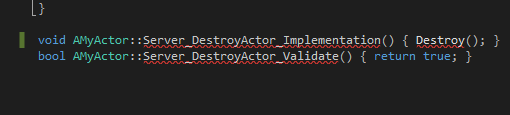 cloud ledge
Yes
Those functions are generated and Intellisense/VAX don't always pick them up correctly
 unique thunder
if I run a replicated timeline with a transform lerp on RepNotify, will new joiners get the correct alpha or will it run the event from 0?
fair oak
God Damn! I was thinking something was wrong all this time, and kept looking for fixes
wasted 5 hours trying to fix it, without trying to compile
haha 😄
fluid prawn
I have a random question regarding tick rate for Unreal engine. For a large scale multiplayer server, at what point does the Engine break down tick rate wise. For example Fornite runs at 30 hz which is as far as I'm concerned is the best there is for BR level scale. Why haven't they brought it up to 60 hz? can you just throw more bare metal at it and get those update rates?
cloud ledge
You can
cloud ledge
They made a choice to go down to 30 Hz, but it's kinda an arbitrary choice
fluid prawn
So basically they made an economical choice
I mean every single BR game is in the sub 30hz range
so I am thinking that its a engine limitation
at certain scale
cloud ledge
They foresaw possible issues from 60 Hz (more networked traffic, more calculations for large number of players, more precision in bad or good context, etc) and decided to pick 30 Hz
fluid prawn
So let me as you this then would a large scale melee game require more update than an fps game?
at the same scale
cloud ledge
Hmm
It's kinda hard to make a generic suggestion here, it all heavily depends on what happens in the game 😄
fluid prawn
well
cloud ledge
Better to just test it at different rates yourself and see when it starts to break down
fluid prawn
lets say you made dark souls at BR Scale
100 people
but ya i suppose most people that play a melee game would want something at min under 100 ms
which is
cloud ledge
Dark souls, BR scale... I'd go with like 16 Hz haha
fluid prawn
im sure if it got to that scale
i would start calling up Epic games to get involved
haha
cloud ledge
Even if all players are moving and attacking all the time, at 16 Hz you won't be doing that much
And yes, you are surprisingly making a good point haha
If your game manages to attract 100 people on a single server, you probably should call up Epic Games 😄
fluid prawn
yeah they have an army working on the netcode
you know I was thinking for the predictive part of the net code
to insert machine learning
to determine if a hit was done
i think that would work well
cloud ledge
It's an interesting idea certainly
fluid prawn
you probe it in your netcode to run in parallel get the client data position etc on both sides and what the server decided as inputs to the model
and train that bad boy hard
and then you just slide it in later
anyway I'm talking like im gonna do this haha but perhaps when im start on my game I'll test this theory
shit dude i did a google search and nobody has done this idea
 astral gust
Hi guys, would you mind sharing some experience and tips in this thread: https://forums.unrealengine.com/community/general-discussion/1537016-unreal-engine-network-engineering-case-studies-and-experiences ? Thanks for the pinned messages as well, they are a good read! 😃
Unreal Engine Forums
Hi all,
As a team of game development students we're currently in pre-production of a survival game using Unreal Engine 4. Since Epic Games has gone quite open
north trout
yeah in 4.20 they introduced a new feature for handling a lot of actors

Working on a multiplayer game? Are there many players in-game together? On this livestream, our networking team will demonstrate 4.20's new Replication Graph...
@astral gust
astral gust
Thank you!
How do you feel about this structure? I haven't been able to add the delegates and player controllers, but it should describe the hierarchy of the UClasses/Instances.
north trout
uh not really qualified^^
astral gust
Alright, no worries.
 meager mirage
i'm getting a bit stuck trying to get a bool array representing a visibility mask replicated initially, depending on the map size being used it can be big or small. replication is exploding when it gets a 40k array is thrown at it, 20k worked fine. everything afterwards is just tiny bits updating as needed.
fair oak
I can't seem to figure out why projectile isn't replicating, so when I shoot it on the clinet it should show up on the server
but it doesn't
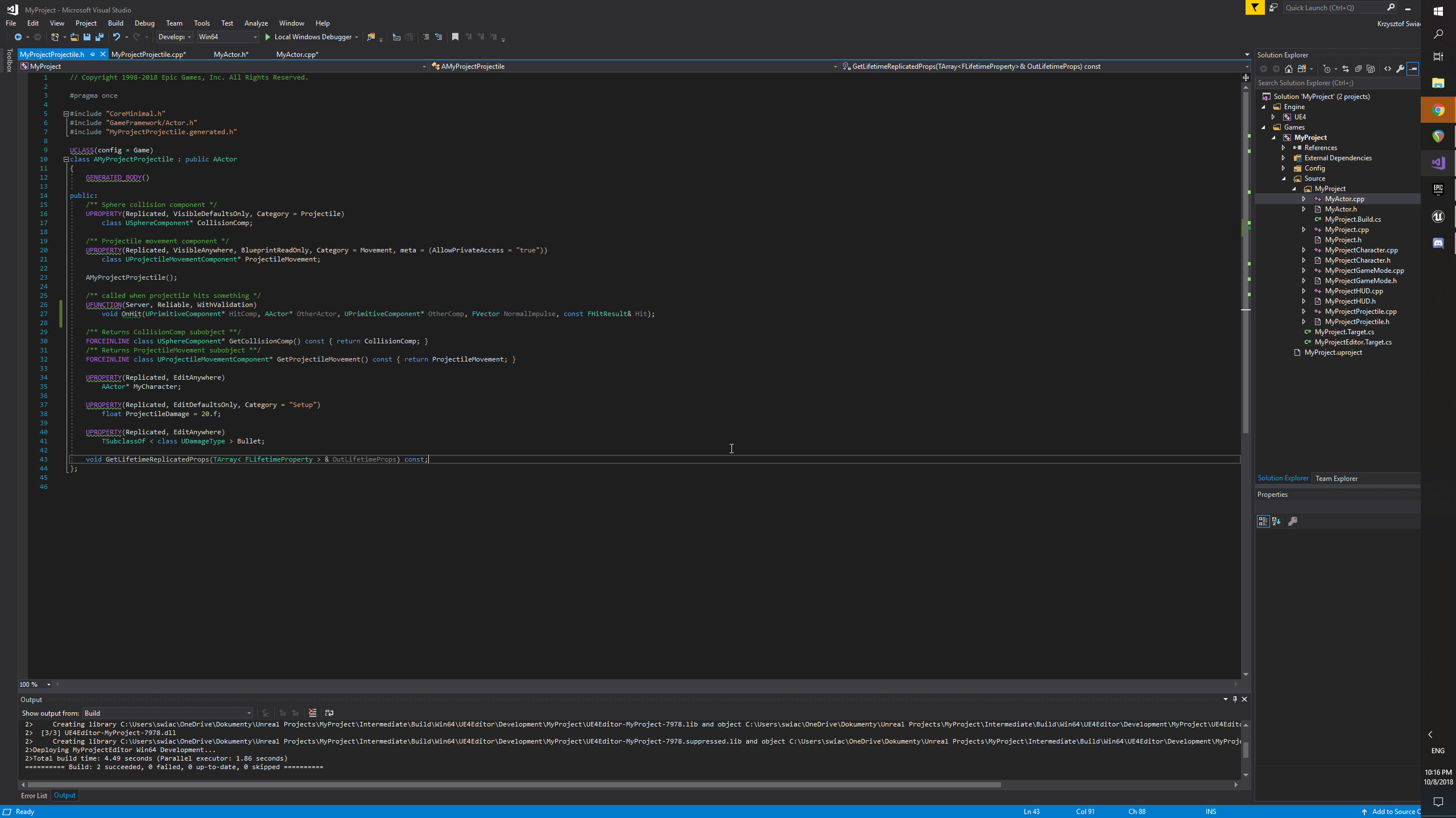
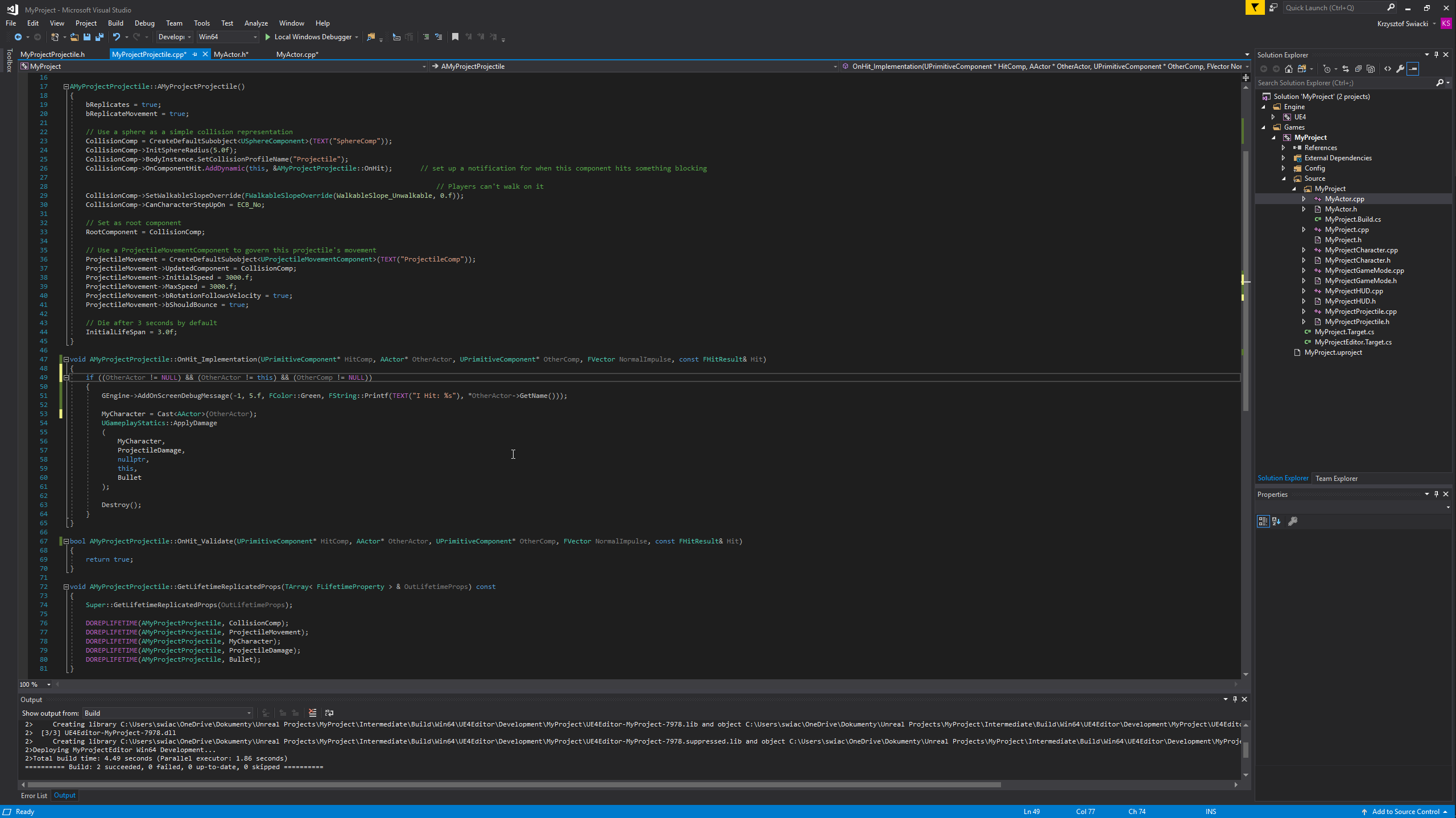
I can copy paste code if you need
fair oak
Thank you, I'm a new programmer
thin stratus
Or any other bin you know
thin stratus
Also Replication is only Server to Client
You can't spawn something on the Client to make it show up on the Server
It has to be Spawned by the Server in the first place
fair oak
EDIT: I possibly made a huge mistake, no need to help anymore 😃
 versed rock
Hey everyone, I'm learning multiplayer and just trying to wrap my head around widget creation multiplayer. on the client, there is 2 widgets created, and on the server its 1
winged badger
widgets are created locally
use the HUD to do it, as its unique to each playercontroller and not shared
versed rock
Ahh i see, got it now thanks heaps!
Got another issue here, not too sure what's happening. server only detects 1 player and client has 2 players
I'm using Get Game State then the Player Array off that
copper portal
I have a wall sliding function and I want the player to have the ability to double jump each time the player touches the wall. I tried setting the jump count to 0 but that doesnt work, for some odd reason. I am setting this https://gyazo.com/208169b01543efa7cde13cef8a898bf1 variable to 2 in my character bp. I am using paper2d btw. The jumpcount that I set to 0 is a custom var. This is how I make the player stop jumping in my tick event: https://gyazo.com/fc1b356d4d162b2fe84d66b72da18eee and this is how I handle jumping when the player press the jump button: https://gyazo.com/faa4946c570fdd53ca56cd23c7c13464


 next falcon
if i start a multiplayer with 2 players and print for both the object name
it should be like:
ThirdPersonCharacter.C_0
ThirdPersonCharacter.C_1
Right?
copper portal
looks right
next falcon
jeah i expected that but both of my characters print
ThirdPersonCharacter.C_0
ThirdPersonCharacter.C_0
copper portal
why do you need this information?
cuz if you are trying to do something with names of characters then there is probably a more efficient way of doing it
next falcon
i use the Get controller on it and gives me ONE controller for two characters for diffrent players
oh okay nvm
the server knows diffrent controllers
the clients are the same
wait no
in one of my project its like that
in the other it doesn'T
ill watch it
its a component on the character..
its seems like the component is shared by all characters..
Okay i found my fail
i used Get Player Pawn instead of Get Controlled Pawn As Server..
subtle nymph
I cannot get the first person template projectile to replicate on the Z axis for clients
It only fires at one vertical angle, but still moves with the player and the horizontal angle that they are looking in
thin stratus
@versed rock Most likely because you never tell the Server to Refresh the List
The same will happen if you join with a 3rd Player, where the 2nd Player will only see two and the 3rd sees all three.
To make it easier for yourself, use the Tick event in your Widget.
Create a Variable called "LastNumPlayers". In tick, Compare "LastNumPlayers" with the Length of the PlayerArray.
If they are unequal it means that the number of Players changed.
So Refresh the List and set the "LastNumPlayers" to the new value (Length of the Array).
While I hate doing polling (so checking a value on tick), it has proven to cause much less headache in terms of syncing up the PlayerList.
The only other way I found was using a custom PlayerState Array (so not PlayerArray), which is marked as RepNotify.
And then updating the Array from ServerSIde and telling everyone to Refresh the List in the RepNotify funciton
But even that had problems iirc.
 gusty lily
Looking for some advice on creating Multiplayer potential for a simple pvp platformer. What would be the best way to allow players to hook up to each other via a user interface. Also, do you need to be port forwarding for remote a listen server setup?
thin stratus
- Easiest solution is always using a Subystem that provides a MasterServer and then letting users Host Sessions and using a simple ServerList that retrieves and shows the Sessions.
- Port Forwarding should be required as long as you aren't doing any NAT PunchThrough.
ListenServers are however the Authority, so this is not save agianst cheating. If you don't care about cheating then that's fine.
Subsystem that supports Sessions (Online) and even has NatPunchThrough is for example Steam.
@gusty lily
 warm meadow
Hi, I have finaly build a dedicated server but I want to run it on different port (multiple instance on one machine that run on different port). I'm running the server with these command server.exe -log -port 7778 but port is always 7777 😦
ok, found the problem. Right command is:
server.exe -log -port=7778
gusty lily
@thin stratus thanks for that. Using a subsystem may be easier to achieve than setting up nat punchthrouh I gather? Most people seem to recommend steam, is that a good way to go or is there a simpler way? Cheers again
 celest falcon
So I'm working on a multiplayer project, and it's gonna be turn based. This is the first time I'm doing something turn-based in Unreal, but I can hardly find any documentation/tutorials on this (and what's out there mostly covers grid-based movement turns with custom node functions, which my game does not use). Any good tutorials out there on the turn-based nodes and project setup?
cloud ledge
There are general tutorials on multiplayer networking for turn based games, that are not UE4 specific
thin stratus
@gusty lily It basically the way to go if you want online Sessions.
I mean sure you can do that yourself or find another sort of subsystem, but in terms of easy and features, steam is the best I guess
Not sure if the Turnbased Nodes even work out the box? @cloud ledge @celest falcon I've never seen one using them
Seems like the Turnbased nodes are Subsystem nodes
So I assume they only make sense if the Subsystem supports turn based stuff?
Might be better to code your own TurnBased solution
celest falcon
Yeah, pretty much all I could find was https://api.unrealengine.com/INT/BlueprintAPI/Online/TurnBased/index.html
Turn Based
But I couldn't find a thing on how to use them/how they should work
thin stratus
IOnlineTurnBasedPtr FOnlineSubsystemSteam::GetTurnBasedInterface() const
{
    return nullptr;
}