#multiplayer
1 messages · Page 416 of 1
 manic pine
you need to sort out whats gonna run on the server and whats gonna run on the clients
manic pine
very hard to say with those bps... poor variable and function names, no comments, etc.
i already explained why its printing 6 pcs didnt i?
 zinc zealot
im accessing a nullptr ?
manic pine
no, youre printing all PCs in the list every time someone joins
zinc zealot
ah...
thanks
the thing is its weird
Blueprint Runtime Error: Accessed None trying to read property CallFunc_Array_Get_Item from function: 'ExecuteUbergraph_GameState1' from node: Murder in graph: EventGraph in object: GameState1 with description: Accessed None trying to read property CallFunc_Array_Get_Item
it says this is the problem right
but its just accessing the list and an index
im gonna go search more
manic pine
do you know playersON has element 0 in it?
the only place i see you setting it is in Tick2
but that only succeeds if it finds GameMode
which will only happen on server
if your Redy event fires on clients, that would explain why its crashing
zinc zealot
what do you mean playersON has element 0 if its an array and it succeeds making the list it has the element 0
manic pine
where does gamestate get the list from?
manic pine
that cast wont succeed on clients
zinc zealot
manic pine
where do the clients gamestate get the list from?
manic pine
yes, gamestate exists on both client and server, but they only share what you explicitly tell them to share
zinc zealot
well im replicating the variable... doesnt that do the job ?
manic pine
if youre replicating it then yes, that should do the job, but its not foolproof
for instance, its possible you are trying to access the list before it has been replicated
zinc zealot
hmmm
zinc zealot
but the redy
like takes what 20 secs
for every player to ready up
do you rly think thats the problem ?
zinc zealot
is that wrong ?
manic pine
do you know how they work?
zinc zealot
each player has one
manic pine
the server creates all the playercontrollers, so it has access to each one
then, every player has access to his own playercontroller
zinc zealot
but if also tested with out replicating it
manic pine
but doesnt know about any other players' controllers
manic pine
yes, youre replicating an array with references to player controllers, but the controllers themselves arent replicated
so on the client they become 'null'
zinc zealot
ok im not replicating anymore and ive set redy to run on server
now
it always gets the same controller xd
manic pine
because youre saying getcontroller#0
zinc zealot
wait a sec...
ok im pretty sure its working
changing the index
gets different player controllers
so im pretty sure its good now 😄
gonna test
nice!!!
thx man 😄
im so dumb
manic pine
great!
zinc zealot
since redy wasnt replicated
manic pine
keep trying, gets easier when you start to understand it
zinc zealot
it wasnt getting the player controllers since they only All exist on server
thx
😃
im making this to play with my friends :p
murder mystery know about it ?
manic pine
ive heard about it, not played it
 ember needle
Is it normal that I cannot multicast from a game state?
I read from Cedric's compendium that the Game State is replicated
zinc zealot
what are you trying to do ?
ember needle
I have a list of players set in slots.
zinc zealot
im not too experienced
ember needle
I want to periodically multicast those
zinc zealot
but ye
ember needle
...ye what
ember needle
simple question: can you yes or no multicast from Game State.
zinc zealot
in my gamestate
ember needle
multicasts work from Player States, Player Controllers, Pawn etc but NOT from Game State
ember needle
simple multicast. just PRINT HELLO on multicast
so "RUN ON SERVER" -> "MULTICAST" -> print HELLO
zinc zealot
something like this ?
it printed that in all clients
and server
since mine is a listen server
ember needle
@zinc zealot thanks but this is not helping 😃
manic pine
you'd need a switch on authority to actually test it
ember needle
thank you anyway 😃
manic pine
but yes, multicast on gamestate is fine
ember needle
well raap
manic pine
likely reason if its not working is youre doing it before its replicated to clients
ember needle
if i call it from a listening server it workd
if i call it from a client then the run on server -> multicast does not work
manic pine
yeah, theres your problem, the client->server call
ember needle
likely reason if its not working is youre doing it before its replicated to clients
no, this is a custom click event on clients
what is my problem?
manic pine
you cant call server functions on an object you(the player/client) dont own
do it through your pawn/playerstate/controller instead
zinc zealot
he needs the switch authority right
 zinc zealot
manic pine
zinc zealot
manic pine
right, your SendServer will never be sent to server
zinc zealot
if its run on client
manic pine
because you dont own gamestate
manic pine
gamestate is server's, not yours
you only own your controller, your playerstate and your pawn, if any
ember needle
ok so for multicast to work you need to own it, like playuer state, controller, pawn?
(on top of being replicated)
manic pine
no, for Server RPC to work
ember needle
yeah sure that's what I'm talking about
manic pine
then yes
ember needle
so how would you go in sending periodically from a server to all clients
from a DEDICATED server
manic pine
hmm you may have misunderstood, or im poor at explaining, or i misunderstood the problem...
the way i understood it, your client is sending a server rpc which in turn does a multicast
manic pine
right, im saying youre not allowed to do a server rpc on gamestate
ember needle
ok no worries i've seen the issue
manic pine
(the multicast works fine on gamestate, if sent from the server)
ember needle
i need to refactor some stuff into controlled elements
manic pine
so you can do your request through for instance your controller
manic pine
👍
ember needle
one question more: is possible to send a RPC to a client only from a server?
client ask servers, get reponse
manic pine
yeah, server can send client RPC on an object that client owns
manic pine
how do you know its the same player
manic pine
how many times are you calling Redy
manic pine
are you sure the answer isnt 3?
manic pine
^___^
manic pine
youre calling it on each client
so each client asks the server to run the Redy function
zinc zealot
but
manic pine
or wait
zinc zealot
no
manic pine
oh, no its in gamestate
zinc zealot
its the gamestate im on
manic pine
my mistake
zinc zealot
xD
zinc zealot
ye
but it should spawn on different players
Since
the index is different and its the same list
manic pine
im not sure what that means, the "but it should spawn on different players" part
manic pine
right, murder and detective
zinc zealot
wich spawns an actor at the player location (supposedly im pretty sure thats the mistake)
But
what defines at wich player it spawns
The Get
its using a player controller from the list
manic pine
do you understand what Spawn does?
manic pine
so all you should expect is that a character appears in the world
zinc zealot
yee
but i set the transform the actor location you see
but maybe its not getting the owning actor
so it just spawns in like 0 0 0
thats what im thinking
manic pine
it would, because youre in the character controller
character controller doesnt have a location
zinc zealot
but can i get the actor its currently controlling ?
zinc zealot
xD
ye im stupid
gonna test it
for some reason when i did this
like 4 days ago
i dint find this
manic pine
in that case, youll be spawning a new character on top of the old pawn
zinc zealot
get controlled pawn
ye
😃
its working
thankz u 😄
omg im so dumb
ahahahaah
thx alot @manic pine
if you need help PM me and i can try
the least i can do 😃
manic pine
great, good luck!
 worthy wasp
Does anyone have experience with ASpectatorPawn - specifically with why the rotations arent being applied when you SwitchToNextPlayer() ?
The spectatorpawn rotation stays at 0.0.0
ember needle
probably because the controller knows the rotation and the clients that switch there doesn't?
raap knows it better 😃
worthy wasp
if i look at this theoretically - the clients are attaching to the ASpectatorPawn.... the SwitchToNextPlayer() isnt described very well at all in the API and theres no docs.... how is it the pawn is glued to the SPECTATED? Via controller? If thats the case - then there would obviously be no rotations.....
as the controller never rotates - only the pawn its controlling
manic pine
switchtonextplayer is afaik meant for the SetViewTarget stuff
i.e. spectate next player
worthy wasp
i'll try to debug string what the pawn is attached to (ASpectatorPawn)...... GetOwner probably returns controller i assume.... i'll try to debug out the GetOUter & GetAttachParent() to see where its connected at
manic pine
unrelated to spectator pawn, which is for flying around in the world with
manic pine
afaik you dont need a spectator pawn to view other players
worthy wasp
ServerViewNextPlayer()
manic pine
yeah, that'll just switch your view target
worthy wasp
Move camera to next player on round ended or spectating
manic pine
your view target need not be the same as your possessed pawn
worthy wasp
well thats opbvious - but that function does that automatically
so firstly - to do this you have to BE IN SPECTATING
ChangeState(NAME_Spectating)
then simply - its running ViewPlayer(+1)
which is SetViewTarget(Playerstate)
but why then arent rotations applied? Any other actor you do SetViewTarget on.... will inherit its rotations
its not even inherit at that point....
you're LOOKING THROUGH ITS CAMERA
manic pine
youre trying to look through the camera of another character ye
worthy wasp
i'm not doing anything other than ServerViewNextPlayer()
manic pine
right, same thing
worthy wasp
yes i agree 😃
i'm trying to understand where the disconnect is happening?
so i can fix it
manic pine
well, its a problem with the way theyve done rotation and stuff
ie clients are not normally informed about the Pitch of another client's camera
however, ServerViewNextPlayer(more specifically, ServerSetViewTarget) will replicate those to you
but for some reason, camera manager on your local client will use the wrong way to get them
try this on your Character blueprint class equivalent
switch NOT locally controlled - firstpersoncamera->setworldrotation(getactoreyesveiwpoint)
worthy wasp
ok by switch you mean IF/BRANCH ?
manic pine
ah yes
worthy wasp
❤
i'm in middle of a deep compile - i'll try this here when done
i would assume this needs to go on TICK?
manic pine
sadly yes... there might be some stuff in CameraManager you can override
worthy wasp
i'll peek into camera manager too
i know were using default engine class - nothign custom overriden
manic pine
the GetActorEyesViewPoint is the key function, because it checks if player is locally controlled and if not, tries to use replicated camera values
i think its a bug that camera manager doesnt get its rotation from GetActorEyesViewPoint by default
worthy wasp
so weird this spectator pawn
manic pine
spectator pawn should be unnecessary for this stuff though
worthy wasp
i ASSUMED ServerSwitchToNextPlayer() simply attached to the spectator pawn
but i didnt look until just now what it was doing in code
only through the web page API
manic pine
yeah, it just does the set view target stuff, which replicates to client and then goes Cameramanager->setviewtarget
spectator pawn is exclusively for actually flying around freely with, afaik
worthy wasp
how NOT intuitive....
manic pine
yep
worthy wasp
i wonder who does these framework designs @ epic lol
manic pine
randomly generated i think
 jolly siren
Has anyone had issues with steam and seamless ServerTravel in 4.19? Sometimes my clients get stuck and don't reconnect to the server. The client logs get spammed with
LogWorld: Warning: SetActiveLevelCollection attempted to use an out of date NetDriver: GameNetDriver
Hm so when it works correctly the client browses to the transition map
LogNet: Browse: /Game/Maps/MainMenu
And when it breaks the client tries to skip the transition map for some reason
LogNet: Browse: steam.90116905833024518:7789//Game/Maps/Foo?game=HardcoreFFA
 elfin shard
Can someone help me? Im trying to spawn an actor (building system), it works on the Server (it's replicated on the client) but the client is not able to replicate the actor on the server. Any good idea?
 winged badger
@elfin shard when you call that the BuildActor event executes on server
it reads the variables: Object, IsBuilding, BuildLocation and ObjectRotation from server
and you should not Multicast that, if the Actor is replicated then all the clients will have a pair of them
one they spawned, and one that server replicated
also, please read this:

@jolly siren i have seen that warning prior, in 4.15 and 4.18
for me it was just a couple of lines of spam, then it connected properly
jolly siren
Okay, yeah I thought maybe it wasn't the root cause. It only looks to happen when it doesn't connect tho. It's almost like sometimes the clients want to use non-seamless travel
I guess it's probably caused by this https://github.com/EpicGames/UnrealEngine/blob/f509bb2d6c62806882d9a10476f3654cf1ee0634/Engine/Source/Runtime/Engine/Private/GameModeBase.cpp#L442
Because my servers are up for long amounts of time
bool bSeamless = (bUseSeamlessTravel && GetWorld()->TimeSeconds < 172800.0f); // 172800 seconds == 48 hours```i got it on a listen server
jolly siren
Right, I'm working with dedicated servers. I think the warning is just a side effect tho
As that bool states, it is going to try and use non-seamless travel if the server is up for more than 48 hours
even if you want seamless
winged badger
from what i've seen about dedicated servers, best to have "daily maintenance"
a quick reboot
a week in they come to a point when connection is not possible, because of error in the floating point in accumulated DeltaTime
jolly siren
Agreed, yeah I've ran into those issues as well
 runic cairn
Hey guys, I just updated my engine from 4.17.2 -> 4.20.2 and my output log for our project is now littered with PostReceivedBunch: Object == NULL messages. Is this a good/bad/normal thing?
winged badger
bad, especially if its in red
winged badger
go to code for NetDriver classes, search for the log string
see what condition outputs it
zinc zealot
how is it possible
that one character sometimes is both detective and murder?
integers go 0 to 2 right ?
wait
if i set an integer max 2
and connect to random integer
he will have 0 1 and 2 ?
damn
 pallid mesa
@jolly siren I am having exactly the same issue rn. However It appeared when I tried to manually "open" to a recently created dc server.
The server doesn't even appear for me when I refresh the list, the query port fails straight away even tho everything seems configured correctly
(ports open, firewall exceptions on point and so on...)
nmap succeds btw.
 rose egret
how do I execute dedicated servers by my master server?
 umbral adder
@thin stratus i am trying to make a store system in ue4
i made the php stuff and login in ue4
i made it display but how do i check if i bought it or not?
 meager spade
get a response from the website or query the website asking if the item is indeed owned by the player and then enable it>
?
 wintry ruin
Hi, I'm trying to set a different material on the sword of the player character with code like this:
UMaterial* MaterialAsset2 = Cast<UMaterial>(StaticLoadObject(UMaterial::StaticClass(), NULL, TEXT("Material'/Game/Weapons/staff_wands/staff03a_Mat.staff03a_Mat'")));
MyMeshComponent->SetMaterial(0, MaterialAsset2);
but it's not showing up, I still see the old material set
I do the switch of material server side, is there any problem with that? Isn't that replicated automatically to the clients?
I have a loop at game start server side which reads all NPCs and their items from the database
and uses SpawnActor to prepare the world
in that piece of code I also swap materials as needed (example golden sword vs steel sword)
with SetMaterial
client side everything looks fine, except the SetMaterial call
zinc zealot
@lilac gazelle doing what you said
did this
working gud
but for some reason only happens on 2 ppl
when i set current players to 2
when i set current players to 3
works for 3 ppl but one error
i know the problem now
anyone knows a way to get 2 random different numbers
 bleak lily
so my characters animation blueprint is weird
it registers the idle animation
but it wont replicate the walking one
I made an rpc and stuff like that
the mesh itself replicates
and all the variables with it do too

 bleak lily
idk
I thought I had to
I just made an rpc after since i didnt do most of the stuff I am doing with replication in mind
jolly siren
Yeah it's much better to design with multiplayer in mind
Something like this should help you https://www.youtube.com/watch?v=z7DI17JAGQM

Hey guys, this time we will: - replicate animations to clients and server ___________________________ As always leave a comment if anything is unclear ______...
jolly siren
np, good luck 😃
ember needle
I have a replicated actor (helicopter), with a replicated variable on it which is an actor that mainly contain the helicopter path (spline). The spline itself is replicated. If I change the spline to a newly spawned actor on the server, then the clients do NOT see it (it's none). Why is that?
 gleaming bobcat
Is TMap arelady replicable ?
gleaming bobcat
sad face then
 twin juniper
Hey guys in terms of network profiling for making the game have less latency- i tried using this tool here https://docs.unrealengine.com/en-us/Engine/Performance/Profiler and was able to find the "net" group of information in each frame (connected from standalone and typed in "stat startfile" in the console and to stop "stat stopfile". seemed to create the profile that i could launch in the session front end, and that opens properly. When I look at the "net group" as in the image, i don't really think i fully understand what is going on here in terms of where the latency is and what is happening exactly, i know i can search for "net" in the search for filter events textbox in the bottom right, but is this the proper way to do it? I'm basically just trying to get my game network optimized for multiplayer, and trying to find areas in RPC code and any replicated variables and/or actors that should be set differently or in another way to make the game still play great but have as little packet loss as possible over the network. In addition to the above, if it's possible to add a stat to a blueprint node such that it can later display in the profiler, does anyone know the process for this?
zinc zealot
hey devs
does having to many event ticks lag lots ?
like make the game considerably slower
twin juniper
@zinc zealot i rarely use tick, usually timelines / timers. you can profile it in game by opening the console with '~' and typing stat game to see world tick time, and tick time
 crimson notch
does anybody know why my character lags backwards? i dont have much/any code for replication, just the checkboxes
dont mind the graphics not replicating, i pritty much removed all replication code to try debug
crimson notch
does multiplayer always have lag for sprites?
 wild aurora
Do you guys know if replication changes drastically if you use a custom player controller for a character? I have a projected originally started from a 3rd person C++ template, and it crashes immediately with two players or if set to dedicated server mode
Trying to figure out what it could be
Wondering if there's something on a controller I've messed up
I wasn't really replicating anything specifically, I tried replicating health to see if that chanted anything, but I still get crashes
 scenic tangle
have you checked the stack trace when it crashes?
bleak lily
oh so I followed the one tutorial by pyrodev and I can see the character do the running animation but when you see it in the first person view he doesnt do the animation\
the animation replication
It shows it for the 1st person playing but when someone else joins they cant see their own person running in firstperson
but everyone else can see it
bleak lily
well another issue is when I make my character mesh replicate it gets really choppy and somewhat delayed for the clients
bleak lily

any idea how I could replicate this
it shows for the characters in the actor thing but when they see each other they dont run
twin juniper
Have any of you had this issue with dedicated servers?
"Notify Accepted Connection: IP_ADDR"
It just spams it but never connects
twin juniper
anyone know how to make a networked custom event like an RPC show up in the session frontend profiler tool in UE ?
 gusty spire
why is seamless travel so bad?
its like many of my events aren't executed on the player controller
and its like the server recognizes the player controller exist but when i cast to it it fails meaning it doesn't exist
its soo bad and i don't understand whyy
winged badger
check if the map you're travelling to has the correct GameMode set
gusty spire
yes it does
 celest sigil
Hey guys, I'm having a brain fart. I've made a shield system, and the shield will have different attributes depending on what spell you have enabled.
For instance, I'm having problems right now with one of the spells.
While Fire is Enabled, if the enemy player (client) shoots a Fireball at the Server that has a fireshield turned on, I want the Server to receive 10 magic power by absorbing the attack. The problem is it's updating the Magic for both the server and the client.
Nevermind. Fixed it. I'm dumb and tired.
wild aurora
I seem to be getting access code violations with my game (it's CPP project) when I make a game go from 1 player to 2 player
I use player controllers to handle input and everything instead of directly on the pawn

 green cedar
Can child actors not call replicated events?
 cursive shard
Hi everybody, can I ask what rewind hit detection is and why we need it?
From my searches it's related to handling network delay but I am not sure how it works. Can someone please explain it to me? Thanks in advance.
green cedar
basically the server state (authoritative) and the client state are never in sync
green cedar
ya I gathered and rewrote it. Kinda dumb, but 😛
Was hoping I could just stick the child actors on and let them do whatever they wanted with message inputs
 wise depot
hey guys, just wondering if anyone may know anything on this issue?
Having multiple online subsystems active in ue4?
 thin stratus
@cursive shard It is not that straight forward, so I doubt people can explain this
@wise depot For one instance of the game you only can have one subsystem
Your server could have a different one I assume but not sure
green cedar
@cursive shard I won't be able to do a great job explaining....steam has docs somewhere describing it. but basically it's the client saying what it saw, the server determining if that was possible, then correcting it's own (future from the perspective of the client) state
thin stratus
The idea is that the client sees what's already happened
Rather than guessing what will happen
So the client always sees the past
When the client shoots an enemy, the server would already have a version where the enemy is one net update further
Which possibly means the client misses
So the server needs to recreate the past state in which the client is
green cedar
In not so recent developments, lag has taken the number one spot as a scapegoat for a lot of players' deaths. So much so that people completely made up explanations as to how "lag comp screws you
thin stratus
If you ever played counterstrike you would know what it means
Cause there you can be shot in the second you go behind a wall
green cedar
there's a big post on it that (on cursory review) looks pretty legit
thin stratus
Cause the person shooting you sees you in the past, in front of the wall
twin juniper
Hey - eXi can I ask you a quick question if you don't mind? when you aren't busy.
thin stratus
Just ask here instead of asking if you can ask
twin juniper
all right
Trying to get a networked custom event like an RPC show up in the session frontend profiler tool in UE. do you know how i can do something like that?
thin stratus
The session frontend is more for draw time right?
The rpcs show up in the netprofiler
Well the bandwidth part
The code your rpc executes will show in the session frontend as it counts as frame time
Or whatever the correct word is
twin juniper
are you talking about the network profiler with this chart?
thin stratus
Yeah that's where your rpcs show up
twin juniper
i investigated it briefly. still studying it. i thought maybe the session frontend might have the net class stuff.
all right thanks. will try to record some stuff into there.
thin stratus
Will Yuchen ever finish writing? :D
twin juniper
I think I might have to enable this thing on my dedicated server binary itself. :X
thin stratus
Well 4.20 should be better to check on dedi servers
twin juniper
thin stratus
Cause epic put their cloud debugging stuff in there
twin juniper
yeah i am on 4.20.2
works good, fast. good stuff really happy with it
just trying to do the due diligence of makign sure i have no bad rpc code
cursive shard
Thank you very much guys. @thin stratus @green cedar
So the problem I am trying to solve is when the player does a melee attack, there could be a big delay between the attack and the knockback/damage of the ememy.
In the code it disables rewind for a server based hit detector which I guess it's WRONG? 😅
Becasue the character on the server side is further than the client so we should do the rewind on the server side character then it will be the same as the client side character...
thin stratus
Yeah well the server needs to "rewind time" to check whatever the client say happened is actually true
green cedar
if you aren't necessarily needing pinpoint accuracy, pick your battles with it
 unique thunder
when I spawn into my ded server (I think it usually happens with more players in it), I'm stuck in mid-air floating for like 5 seconds before I properly spawn into the PlayerStart and can play - why is that? How do I transition the player more smoothly into the map?
green cedar
the network latency solutions are almost 20 years old and they still are convoluted messes to implement.
green cedar
Was quake dedicated servers? I thought it was still trying to do shell terminals?
manic pine
lockstep would be completely unacceptable these days
green cedar
Or is that UT?
manic pine
hmm i think quake had dedis
but thats not really relevant for the latency solution anyway
green cedar
Yeah, you are right
manic pine
unless we suddenly discover FTL communications, id expect we'll be stuck with it
 bitter oriole
We're not going to
Eventually, we'll all have sub-10ms latency with people in the same region, and networking will be more accurate than today when 100ms is still a common situation
Even in a small country, physics will constrain latency to at least a few ms, not to mention how prevalent wireless will be even a decade from now
manic pine
yeah, at least for short distances hop overhead is the bigger issue
much thanks to ISPs that dont really care about ping times for gaming
routing the stuff all over the place
still, though 10-20 ms ping might be good enough that you wont bother with UI client prediction and such, it wont be good enough for shooting
bitter oriole
Even prediction is always going to be a thing imho
My guess is that game engines will make it easier and easier by providing built-in replication models for common problems - weapons, characters, moving objects in the world, etc
At least it's more likely to have UE5 providing a UWeaponReplicationComponent, than it is to not need prediction 😃
manic pine
yeah, automated paths for client prediction, with callbacks for when client predicted wrong, would certainly make it less work to do properly
 chrome bay
(working on a plugin to help solve that issue atm)
I think the biggest barrier atm for UE4, is that all it's good prediction stuff is encapsulated inside CMC. Once you start breaking it out into more generic types it makes life a lot easier.
UT has a few nice toys that can be broken out too
Also CMC's netcode is heavily coupled with it's simulation. Once they are split apart it's more useful too
winged badger
there is the prediction system in GAS as well
there are about 300 lines of comments in GameplayPrediction.h in which they sum up what they are doing there
chrome bay
I'm still curious as to why Epic don't use GAS for both UT and Fortnite weapons
I guess it's not performant enough for that amount of stuff going on
winged badger
it doesn't seem entirely completed from the comments, either
jolly siren
UT was in the works before GAS existed tho right?
I think GAS was created for Paragon
chrome bay
I think GAS was usable by the time they started UT
But Fortnite uses GAS in some areas, but again not for weapons
At least not shooty-shooty pew pew weapons
jolly siren
Ahh makes me wonder how fragmented their teams are
chrome bay
Well UT team took over battle royale
I don't think GAS is necessarily performant enough for standard gun-like weapons, at least not in great volumes
Also UT was targeting 120Hz I believe, so they wanted really good hit detection
Responsiveness was probably the biggest barrier I guess
jolly siren
Right, yeah that makes sense
 dusty halo
How do games with a lot of player make their lobby? Example Fortnite?
YOu
You have joined server, with all other players, but how can you set up, that you can see only your self? And that when team players join, they are on side, but you always in the middle
chrome bay
if player = me (PutInMiddle())
In all seriousness, there's no way for us to answer that
how you handle the lobby is entirely up to you
jolly siren
Unreal Engine Forums
General discussion about the game industry and the Unreal Engine community.
dusty halo
@jolly siren Good link, thank you. @chrome bay Nice answer. But That's why I ask for simple answers, no super detailed needed. That is my part and how I gonna handle yes. But question more is. How they manage to show you only your player. Do they set that only owner can see your character, or there is different solutions for that
chrome bay
Judging by that lobby there is nobody else in it, it's just you
Other characters will show when other players join
dusty halo
Server gives everyone their own lobby on the server?
bitter oriole
It's up to you
dusty halo
So basically it makes 1000nds of maps on same server?
dusty halo
But then it's not getting server info, like money, exp etc. Otherwise players can cheat
dusty halo
Run local lobby even if I', on server?
bitter oriole
This is just a menu with a 3D background, it can happen independently on all clients, whether you're connected to a server or not
Servers don't dictate everything
Clients in UE4 still run the full game, they're not just displaying stuff from a server.
dusty halo
I more talk about charachter it self
bitter oriole
The character is just a 3D mesh displayed behind a menu. You could have that while offline, online, in a loading menu, doesn't matter.
dusty halo
I just try to find solution how to make these thing for my game - after player join server, he should create / customize his character. So I want it to see only his character. Pretty basic thing, but confused how to actually do it
bitter oriole
Just spawn a local version of your character
On the client
@dusty halo If this is confusing, you should probably avoid multiplayer for now. You're going to have this kind of server-client decision literally all the time
Any object that is on the network will need different code while on server, on a client, etc
dusty halo
I'm doing MP since first day I started to use UE4, haven't made anything Sp oriented. Confusing part is, that I have never done map travel etc. So now lobby is something new for me.
bitter oriole
SP is an important first step
dusty halo
I know, but I never can push my self to do something if I don't see a reason why. I started to use UE4, because I want to make MP game. Probably will stay as a dream, what at least I can play with my friends but still 😄 So I started with MP right a way. Couldn't just fallow tutorials to learn ue4 basic. What actually I should do for better understanding, but I can't push my self 😄
bitter oriole
Just warning you here
 lost inlet
anyone ever run into weird reliability issues when sending a client->server RPC on a dormant actor?
for me it only sometimes sends
and it's annoying
lost inlet
we have dormant item actors, they don't need their replication updating when inactive so they're marked dormant
there's an interact RPC, this has reliability issues and i'm wondering if net dormancy is the culprit
i can work around it though
winged badger
so the server RPC is not within the item itself?
lost inlet
it's within the item itself (the item that's dormant) but the alternative is to put the interaction RPC on the pawn instead
winged badger
might be a race condition, does it stop being dormant before the RPC lands or not
doing the log LogNet veryverbose in the console then sifting through all that spam might give a clue
lost inlet
well the server sets the dormancy but the RPC is never hit, but i think i'm just going to move it to the pawn instead and see if it changes anything
manic pine
you sure dormancy affects rpcs?
i didnt think that was the case
afaik it just stops actors from doing their netupdatetime check
winged badger
i am not sure
i never used dormancy, and if i did it would be mostly for scenarios like: i have Actors placed in the level that are not relevant for the first stage of the game, i might even have a cutscene play out while they come out of dormancy
manic pine
dormancy is kinda great actually, since with flush dormancy its essentially like manual-replication
lost inlet
i can't see what else it'd be at this stage, i've moving my interaction RPC to the pawn which is always relevant and seeing if my luck changes
manic pine
it only works intermittently?
if it never worked i'd have guessed you just didnt set the net owner on the items properly
lost inlet
yeah which is the weird bit, the RPC is reliable too
manic pine
but intermittent does sound weird
lost inlet
it doesn't seem to be a net ownership issue either because it worked the first time but not the second, on the same actor
manic pine
yeah, doesnt fit with intermittent
i know dormancy still allows server to do multicast on an object
but its possible it stops client->server RPCs?
hmm yeah, just did a quick test
server multicast or server->client go through on dormant actors
client->server does not
lost inlet
yeah i ended up moving my interaction RPC to the pawn instead and it worked fine
mystery solved i guess
wise depot
so prelogin is for authenticating a player, if i'm using an external service for handling stuff like that which requires async functions, what's the best way to handle this in prelogin?
do i need to butcher the engine somewhat to have it wait for my callback or is there something else already existing i can use?
Basically what the flow will be like that i'm aiming for is:
Server:
Prelogin(){
   authenticateUser(authToken);
}

authCallback(){
   success ? AllowLogin() : RejectLogin();
}
in a nutshell anyway
manic pine
yeah, i think youd need to butcher the UWorld class
uworld is what calls prelogin when it receives a join request... if prelogin returns with no error message, it does WelcomePlayer
otherwise it kicks him out
you could handle the authentication in the game mode though... let player join but not play until authenticated
wise depot
yeah i was thinking of doing that and just calling kickplayer if it rejects the authentication
manic pine
its probably the simplest solution... messing around with that uworld stuff could get ugly fast
winged badger
some services like steam will do it for you
wise depot
yeah we're not using steam, its another service which will allow open crossplay
winged badger
you can take a peek at their solution tho
manic pine
yeah some sort of session thing might do the trick
twin juniper
I have 4 questions :
- is the console command "open <ip>" the only way of connecting via ip?
- How can I check if an ip is available to connect without connecting to it?
- How can I limit how many players are in the game when they connect by ip?
- Does Lan find and create session work without steam?
twin juniper
So afaik sessions need online subsystem and there's Lan and steam
 ancient dew
Sessions
1 - AFIK yes
2 - You need to find or create a matchmaking system to manage your sessions
twin juniper
I know how to use sessions
twin juniper
And do all of that with sessions
But only with steam I can make sessions actually work
ancient dew
Probably u are having a lan issue
twin juniper
But I need online
ancient dew
ok, so you will need to use a third party service (and setup a online subsystem)
You can use GameSparks
to create and manage your game sessions
twin juniper
Free?
twin juniper
What if it does, I can't pay anything
twin juniper
Cuz I have to pay 100 eur to add it there
And it doesn't work without being on steam when packaged
ancient dew
100 usd *
ancient dew
well, you need to think that a matchmaking requires a server, it is a computer 24/7 online
twin juniper
Yeah
ancient dew
You can use steam test id, and if you see your game is working well you can create a kickstarter
raise money and pay for the server costs
twin juniper
But I was asking those 3 first questions about the "open <ip>" way because I knew I need money to get normal matchmaking
ancient dew
talk to your parents about your idea and that you will need to deal with money in the case it goes well
Even with direct IP, you will have to store the sessions in somewhere. You will need a database. If you know how to code servers, you can host a PHP + Mysql server for free in somewhere, and save/load data from there
but it is pretty hard to do
twin juniper
Then I can only join servers and nothing else with ip at the moment
ancient dew
yes
twin juniper
Well it's not that bad
I wanted the checking if ip is available to just save ip of the server you join so you don't have to type it again and just join ir from saved ips list
But I can still do in the text box a thing that you can autofill it with some ip that you joined before
ancient dew
use savegames
twin juniper
Sorry for my very bad explanation skills, not my primary lang
Yes I was planning to use savegame
I already use it for sensitivity and motion blur setting, can just add an ip string variable
And every time you press join and ip box is valid it saves that to array, if it fails (by delay because if it works then nothing will happen because level changes) it will just delete the ip if it wasn't already in the array
Anyways thanks for clearing things up 😄
Oh 1 more thing, does ip connect need a port in the string?
ancient dew
I'm not sure, but if it does the default port is 7777
 cloud ledge
It does not need a port, but it can accept a port
gusty spire
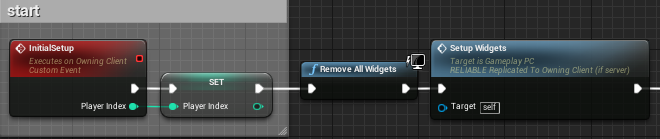
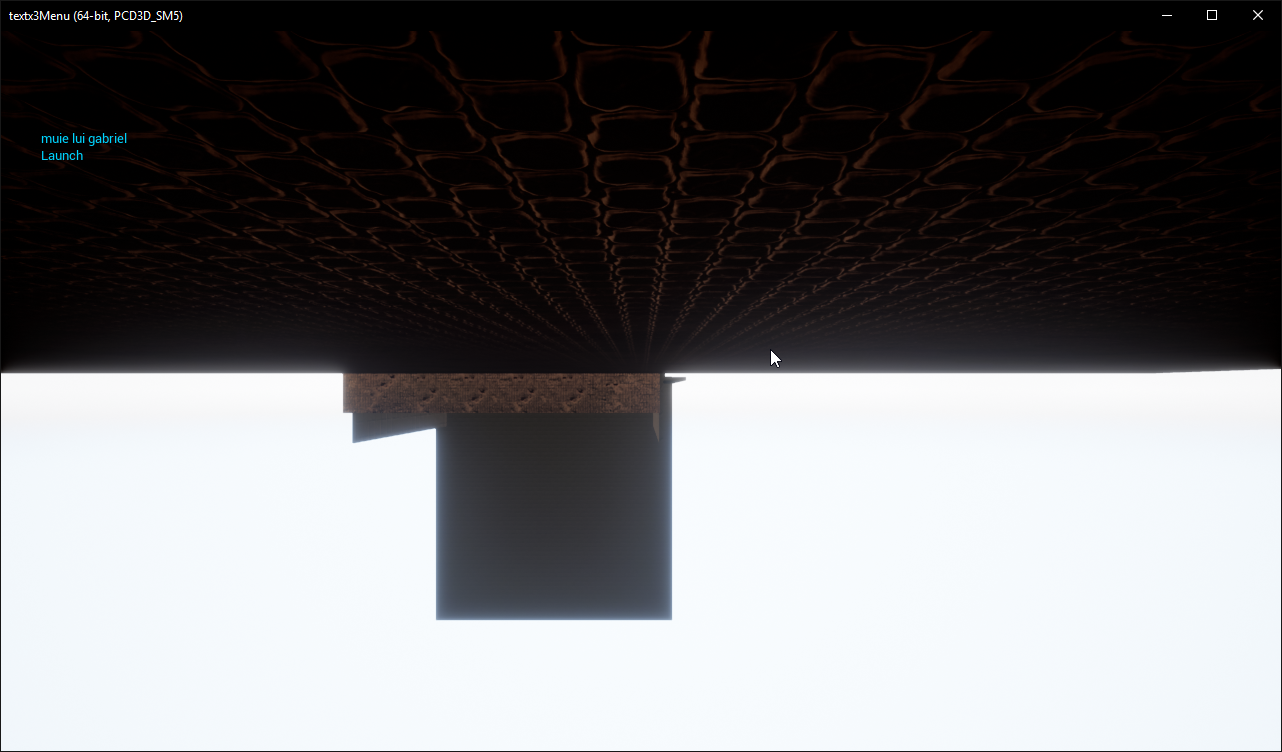
Hello guys so I'm having trouble with seamless travel. So the players join some lobby and at some point the server launches the game map using the command servertravel <path>. The players successfully connect to the map , but here is the problem: none of the functions work! it just seems like the player controllers are inexistent. Here are some screenshots of how the events are being executed. https://i.imgur.com/enpfOns.png -> https://i.imgur.com/q1602bq.png , https://i.imgur.com/gZOXDUp.png. So the "initialsetup" event is called from the OnSwapCharacters event in the Gamemode by casting to the PC. So the function SetupWidgets should show some UIs on the viewport , something which doesn't happen. Still, the function is being executed since the player sees the debug on its client ( https://i.imgur.com/DfqJ7yT.png ). Also , here is the log on the server with the seamless travel part (Im using dedicated server) : https://i.imgur.com/o4CKEJb.png . I would really appreciate a solution to the problem.



 sonic frigate
hey, has anyone here experience with gamespark ? I have a multiplayer project(unreal networking) i have made the a working login with gamespark , but i do not know how should i set up a basic deathmatch work with gamesaprk real time matchmaking , anyone made something similiar ( bluerpint project )
 slate veldt
@gusty spire Do you have a player start in your level?
If you do, check it isn't marked as BAD
Seems like your game mode is struggling to select a suitable Start Point for your player, if you've written some custom code for selecting a spawn point - that's failing. If not, then it should return true by default for any spawn point you feed into the query
Also, more specifically to your problem, it looks like you add SCRef to viewport, but not SBRef? Is that what you want to be doing?
 grand kestrel
@sonic frigate Personally myself and many others would avoid using gamesparks realtime because it doesn't use UE4 networking, which means you're missing out (it's very powerful) and your game will be tied to a service which could die, change ownership, change direction, etc without warning, just use the other services and host the game yourself
wintry ruin
do you know why changing a material server side is not replicated to clients? I dont see a case where you want this to not replicate, but seems to be the default behaviour
I had to manually replicate myself the material changes on meshes
but I still feel im missing something
is there another way?
grand kestrel
Mildly aggravated right now. Specifically want to not call super on AActor::GetLifetimeReplicatedProps while still replicating bTearOff but they made the damn thing deprecated and added getter/setters
Bit of an oversight on their part.. I think?
Where do I go to complain to ensure this deprecation never actually happens
unique thunder
im trying to trigger a respawn sequence that checks the playerstate for a Name value and then spawn & possess a character through a Switch on Name but it isn't working. should I be accessing the playerstate locally then executing on server? I don't know why it won't work (ded servers, but im testing in local PIE with server / client)
(Respawn sequence = server RPC)
 topaz agate
How do you generally go about making a game multiplayer? @topaz agate
 digital yacht
u know u pinged yourself there right? @topaz agate
 sharp pagoda
@unique thunder You're trying to possess/unpossess as the client, not going to work. Also a much better and cleaner approach to that would be to have the player controller -> on death -> set server sided timer to call gamemode -> OnRespawn(AController* c) -> which does the team specifics and what not
topaz agate
Yeah. It’s so I can search it in case the channel turns out to be active and then see any responses @digital yacht
sharp pagoda
Also don't tell the server what team you're on, that's a vector for cheating. The server already knows what team the dead player is on
unique thunder
@sharp pagoda When a player dies I spawn a "ghost pawn" and possess that, no one can see them and they can't move etc. In the ghost pawn, I trigger a delay OnPossessed and then execute the logic to transfer the player back into a playable pawn depending on which team they have set in their playerstate. When I execute possess/unpossess logic on server, nothing happens
digital yacht
oh u smart @topaz agate
 severe widget
sharp pagoda
severe widget
sharp pagoda
@unique thunder 1. Still run the respawning code in the gamemode, that's the place to do it. 2. Run the unpossess from the server only, don't even bother running it on the client. Controller is replicated, thus OnRep_Controller(), so you don't have to worry about the client receiving the update to possess the ghost pawn
unique thunder
@sharp pagoda im just learning to use the gamemode now, im not entirely sure how to communicate with it and how the gamemode should be made aware of things. For example, on death > cast to gamemode > execute server logic to unpossess the dead player and give them the ghost pawn with a delay to bring them back? What if 2 players die in a row, will the gamemode execute the logic separately and at the same time via one event sequence?
sharp pagoda
No, have the timers run in the player controller
Each pc should manage it's own respawn, but the game mode should run the actual code to respawn
Note that the server should only be made in charge of telling the game mode to respawn, (timer handle on the server only)
unique thunder
so the PC would tell the gamemode when to spawn and possess a player but their delays etc. would still be in the PC
sharp pagoda
I'll give you an example in the game I'm working on. MyCharacter.OnDeath() -> GetController.OnDeath -> If (server), set timer to call Controller::Respawn -> Controller::Respawn() does gamemode.RequestRespawn(this)
PC doesn't tell the game mode "when", it tells it to respawn me when I'm ready
unique thunder
I can somewhat understand that but it's a BP-only project. So when the PC decides you're ready to respawn and it tells the gamemode to do it, how exactly does it tell the gamemode which player its respawning? I imagine that a respawn event is triggered inside the gamemode but it has to be fed a playercontroller, yeah?
sharp pagoda
Pass in a pointer to the controller requesting respawn
unique thunder
Makes sense. What happens if 2 players die in the same frame? 😜
Game mode is triggered twice in one tick, two PCs trying to tell it to respawn them
I know it's very unlikely but what would happen?
unique thunder
cool - I'll give this a shot, thank you
sonic frigate
@grand kestrel Actually i want to create a multiplayer co op game ( like warframe. as a match) , but basic unreal engien cannot handle if the host quit from the game, or just lost his connetion.)
rose egret
how do I know my game mode created for a dedicated server. is there any event to inform us we are listening for connection?
 slim holly
@sonic frigate it's not rocket science tho, you can make the system that can resume session from snapshot if host disconnects
and not like warframes system is perfect either, it often fails to transfer session ownership
unique thunder
cast to game mode > set score
cast to widget > set score
Only server sees the widget update, everyone sees the game mode update - why?
slate veldt
Has anyone here worked with the Lobby system?
Whilst it all seems to be going through the motions correctly in terms of setting up the client beacon and ports etc, for some reason I never get the OnConnected delegate
It seems like the server isn't correctly setting PlayerState in the LobbyBeaconClient as it's Null when I try to access it (through a child class, it's a protected member but the child class obviously has access to it)
unique thunder
@slate veldt There's no guarantee that the playerstate will have replicated when the client loads up, sometimes it takes a small amount of time.
You can use this on beginplay to only execute your logic when the PS is confirmed replicated and usable
In my case:
I only bind the OnRep event if the PS is confirmed invalid, otherwise proceed. Should be bug-free
slate veldt
Hey, thanks for this, I'll take a look after, but I think I might have found the problem. Online there is someone who has a similar issue, and it looks like you need to create an AOnlineBeaconHost first, InitHost() on that, then Init the LobbyBeacon, and then register it to the AOnlineBeaconHost, and then SetupLobbyState on the Lobby beacon
I hadn't created an AOnlineBeaconHost or called the named functions on it as in this guide here...
slate veldt
@unique thunder I've just properly read your reply, it's not what I'm looking for at all. There is a PlayerState in LobbyBeaconClient which is of type ALobbyBeaconPlayerState
The LobbyBeaconClient calls "ConnectToLobby", and the should eventually result in the OnConnected function being called.
Despite the handshake taking place between the Lobby and Client beacons, something clearly doesn't follow through as it's never fully setup which should finish in the "OnConnected" function call
ConnectToLobby executes, and passes through with bSuccess set to true
slate veldt
If anyone here has used LobbyBeacons I would very much appreciate a few minutes of your time to ask you some questions - Getting some interesting log print outs that I'm not sure are the desired effect
 red ledge
@slate veldt sorry but can I ask where is this system and what are you using it for exactly? I saw some users talking about Beacons here maybe a year ago but I never got what it's usually used for
I think for setting up players with other players when you have a listen server before they actually connect?
slate veldt
@red ledge
Yes sort of, so basically the beacon system allows for users to communicate data without travelling to servers or fully connecting. For instance, you could host a lobby on the main menu (without travelling to a lobby map or game mode) and then other players can find the session that has been hosted, startup communication, and associate their ClientBeacon with the Host player's HostBeacon.
This is the sort of functionality that allows for things such as gameplay parties to take place in the main menu in games such as Player Unknown's BattleGrounds (PUBG), Overwatch, and many many others.
A brilliant advantage is that you can connect players quickly without Server Travel, allowing them to reserve their slot in a session (and see other connected players, current game settings etc). You then perform the sever travel for ALL players once the host hits "Start" which then fully connects all the Beacon players into the game and they will load up the map, game mode etc.
The functionality is in the Engine Plugin OnlineFramework (in the Lobby Module) and it is based upon the Online Beacon system (Which has many uses).
The idea is that when you Host a new session, you create a LobbyHostBeacon, and register that with your OnlineBeaconHost.
When a player chooses to join your advertised Session (through Find Sessions then JoinSession) you can create a LobbyBeaconClient, and provide the session information. It will then use this information to establish a connection with the Host's LobbyBeaconHost so they can share information such as their player name, avatar, player level, anything that you want to communicate on a game's "Lobby" screen.
Currently, my ClientBeacon is using session information to begin connecting to a HostLobby, which all begins and does network handshakes etc. however, somewhere along the line (which I've been investigating most the day) something fails which results in the final stages of connection not taking place (part of which is the PlayerLogin, and the OnConnected delegate function)
Also, additional point to link back around to what you said - Yes, the Host doesn't actually great a listen server quite yet, this would happen after all the players are connected in the "Lobby" and the host presses the games "start" logic. This would then Host a Listen server and tell all connected players in the Lobby system that a game is beginning and they are going to travel to it
It also has built in functionality to allow for kicking of players, promoting another player to host. and you can easily build more functionality in such as PlayerReadyUp (which you would add into the LobbyBeaconPlayerState class override) etc
red ledge
ah okay got it thank you so much for this write up!
I would be working on a game that is like a paragon demo and I think this would be useful
slate veldt
No problem, the unfortunate thing is, there isn't a lot of Documentation online about it all, and I've pieced most of it together, but there are clearly a few final steps that are preventing the whole thing from working properly
Once I'm done, I think I'll write up a tutorial for the community
red ledge
I thought that it only worked with listen servers but I think that it would work nicely with dedicated servers as well
that would be nice
if you could remember, tag me in that
sharp pagoda
Wow discord did not format that well
slate veldt
Yes, as I said, you just need to host a session, not a server - the server part comes afterwards, which is the beauty of it, you could take the lobby into a dedicated server matchmaking, or their own custom listen servers with funky game modes
sharp pagoda
slate veldt
@sharp pagoda Thanks for the information, any chance I could DM you to ask some questions about it all? Would be good to give you a proper insight of my understanding thus far then you might be able to fill in the blanks for me
Or even hopping into a channel to chat
sharp pagoda
DEFINE_CONTROL_CHANNEL_MESSAGE_ZEROPARAM(BeaconWelcome, 25);
DEFINE_CONTROL_CHANNEL_MESSAGE_TWOPARAM(BeaconJoin, 26, FString, FUniqueNetIdRepl);
DEFINE_CONTROL_CHANNEL_MESSAGE_ONEPARAM(BeaconAssignGUID, 27, FNetworkGUID);
DEFINE_CONTROL_CHANNEL_MESSAGE_ONEPARAM(BeaconNetGUIDAck, 28, FString);
Hook into those delegates and you should be able to find the issue pretty easily
Can't call right now, but feel free to dm me your questions
slate veldt
Fantastic, thank you so much. I'll DM you now
meager spade
i have a FGameplayContainer which contains my AI's tags, what is the best way to replicate said container
 mighty quarry
hi all, first time here!
By anychance does anyone have experience with Dynamic Combat System off the Marketplace?
I ask cuz I really love it but have no clue how to replicated it properly to allow mulitplayer, any suggestions would be awesome!
 twin vault
how do i know if the code is executing on client or server while debugging C++
 vagrant falcon
hi, what is best performance based decision for world composition tiled build size if whole world is 8x8km
253 or 505 or should i cut to bigger pieces like 1k or 2k
celest sigil
Ok....I thought I had this figured out the other day but it's still not working as intended. I'll repost what I asked yesterday. I know it's simple but it's giving me fits.
Hey guys, I'm having a brain fart. I've made a shield system, and the shield will have different attributes depending on what spell you have enabled.
For instance, I'm having problems right now with one of the spells.
While Fire is Enabled, if the enemy player (client) shoots a Fireball at the Server that has a fireshield turned on, I want the Server to receive 10 magic power by absorbing the attack. The problem is it's updating the Magic for both the server and the client.
winged badger
overlap executes on both client and server, and GetPlayerController[0] has different context on them
doing 2 Casts in a row is also nonsensical
using GetPlayerController[index] and GetPlayerCharacter[index] outside of scope where you use them to grab the players in local non-networked coop requires you to know what you are actually doing, its not a magic bullet
on Client, GetPlayerController[0] is always the first local controller, as there are only local controllers present
on ListenServer, its usually the host machines first local controller
on Dedicated Sever, its the controller of whichever player logged in first
if i had any idea what BP_Fire_Def_01 actually is, i could tell you how to fix it, but as it is not enough information @celest sigil
celest sigil
Fire def is the shield, and on the hit event I'm casting to the fire attack to know if the attack is fire based.
winged badger
it is what? an actor component?
attached to what? target of the attack?
and as long as BP_Fire_Atk_01 inherits from Lous_BaseProjectile, the first cast is redundant
if it does not inherit from it, then one of the Casts will always fail
so, 2 in a row make no sense
celest sigil
The shield is an actor, I'm not sure if I understand the other questions.
winged badger
that is... unfortunate
celest sigil
When I spawn the shield I attach it to the player character
winged badger
does it at least know who its owner is?
yeah, you could do the same with a component, avoiding a lot of problems along the way
anyways, you want to get the target of the attack from the context of shield
not via gameplay statics
celest sigil
Ok I thunk I know what you mean now.
winged badger
if you type in "attach" into context you'll have GetAttachedParent or some such
celest sigil
Think*
winged badger
that would be your PlayerCharacter, which is the target
you'll have an actor reference, so you will need to Cast it to Pawn, then access PlayerState
from that reference
celest sigil
Awesome, that put me on the right track. Thank you.
 fringe dove
is this for real? https://issues.unrealengine.com/issue/UE-24772
I've written a ton of stuff around reliable multicast being reliable...
that isn't safe to assume?
is it reliable for regular non-multicast reliable? (I can manually do the fan out if I have to through that)
I ran into this while paused in the debugger long enough to get 'UNetDriver::TickDispatch: Very long time between ticks.', but not long enough to get disconnected due to time out
twin juniper
how to make servertravel work with multiplayer?
 rotund wedge
oh oh
 rotund whale
are there any known bugs with RPC and instanced static meshes?
I'm experiencing constant crashes with RPC to client -> Clear ISM / Add Instance
 plain flume
When does the actor doesn't have the owning connection? I have some actors where Replicated functions works fine and some actors there is notify that owning connection is missing?
winged badger
@plain flume not owned by a PlayerController
plain flume
I was just reading about that. So if I would manually call function SetOwner and pass my character for example. It would work then?
winged badger
normally its the PlayerControlled, possessed Pawn, PlayerState, any of their Components and Actors attached to them and their Components
that can use Server or receive Client RPCs
calling SetOwner just to push one would likely break something along the way
plain flume
Hmm. In my case I had a level that had a pickUp item. I wanted to server set FVector variable that has OnRep flag. So when server moves it, Clients move it also. So the RPC call didn't work. What I did was to circle the reference through my Pawn and called server function from there. Just wondered if that is the right way, or should I set PC as owner to actor in somewhere.
winged badger
that is ok
 hardy dome
Hey there bros
Anybody used Ultimate VoiceChat plugin (https://www.unrealengine.com/marketplace/ultimate-voicechat-for-blueprints)? Does it work without sessions (Direct IP connection) on 4.18?
 drifting plank
Hello there :)
I'm wonder what is a good average of the bandwith use per client per second ?
Also did you know a good documentation to how to use the netprofiler of Ue4 or if you know some useful tools to profile the netstats.
Thanks in advance 😉
fringe dove
@drifting plank heavily depends on dedicated server vs client hosted
drifting plank
We use a dedicated server =)
unique thunder
i have an actor that sends a float to the gamestate which then sends the float to a widget. for some reason the float doesn't update on clients or server (in the widget) but if I die and respawn, I see the correct score (because the event construct in the widget casts to the GS and gets the updated score) - why can't I update the Text in the widget via events in real-time?
drifting plank
"Update Red Score" or "Update Blue Score" are never called
 modest dock
On the custom events named “UpdateScore - Red” and “UpdateScore - Blue” set the replication to multicast
Also that ^
unique thunder
@drifting plank They're called in the repnotify in that same BP
drifting plank
Yep but where is these functions ?
unique thunder
@modest dock The events you mentioned are in the widget, isn't that local-only anyway?
drifting plank
You didn't show them to us
unique thunder
@drifting plank "BattleUI" is a reference to the widget and those events there are triggered in the widget (last screenshot)
drifting plank
So the OnRep Red Score calls the custom event "Update Red Score" ?
unique thunder
Yes
Which then triggers an event in the widget to locally update the score there (textrender)
drifting plank
Use some print to debug or directly with the Unreal Blueprint Debuguer
Proceed step by step 😉
unique thunder
this system worked when there was only 1 widget in the level itself, now im trying to add the widget to each player
But
the way the GameState knows the widget reference
is the widget casts to it and sets itself as the variable
drifting plank
Where is stored the widget ?
unique thunder
so if multiple players have widgets overriding the variable in GameState, could be the reason?
widget is stored in GameState
drifting plank
Do you init the widget in all client ?
unique thunder
every client creates and sets the widget local in the player BP
then that widget casts to gamestate and sets itself as the gamestate's variable for the widget
seems off
modest dock
Maybe do an event tick with a node and that node connects to the ones you have so it always updates
drifting plank
And you set correctly the reference of it in gamestate for each client ?
unique thunder
yeah, it works if there's only 1 widget in the level.
modest dock
I’m just trying to throw in ideas I’m usually the one that needs help
unique thunder
naw, could definitely avoid event tick on this
drifting plank
Yup
Can you use this to help me to understand ?
https://blueprintue.com/
BlueprintUE
BlueprintUE.com is a tool for sharing, rendering and rating blueprints for Unreal Engine 4. UE4 is a game engine which use visual scripting called blueprint.
drifting plank
Paste all your blueprints 😉
unique thunder
1 sec
drifting plank
No problem
unique thunder
In order:
- PlayerBP creates widget
- Widget beginplay
- Actor determines that Red has scored, repnotify
- Repnotify calls event
Inside gamestate ^
- Gamestate takes score and then runs a repnotify
- Gamestate repnotify calls event inside gamestate
- That event calls the widget and triggers an event inside it
- Widget updates score.
That's it
drifting plank
You didn't need to write some text on your screens, you can add some comment on your nodes ^^
Ok I will try to find what is wrong
unique thunder
Note: this works with 1 widget available. when more than one widget exists, i think they're overriding the gamestate's widget reference
drifting plank
Except the boolean "Scoring Red" witht the OnRep Red Owned.
All seems to be fine 😮
Oh
So you need to check if the player is the local player
It works for one client, no ?
unique thunder
yes
drifting plank
And all others are bugged ?
unique thunder
there's only 1 gamestate thats persistent in a server right?
(and no, its bugged for everyone if more than one player exists)
drifting plank
Yep
drifting plank
Hum
unique thunder
maybe i need to multicast from the gamestate to tell every widget to update their score
just not sure how to reference the widgets then
drifting plank
I think the widget is probably created for each replicated actors of your clients
For all clients
unique thunder
it is, yes
drifting plank
So you need to spawn the widget only for the local client
unique thunder
hmm
drifting plank
I will retrieve you the nodes that I used to do that
unique thunder
well
yes but,
im still using the widget to set the widget reference in the gamestate as itself
drifting plank
Yep
unique thunder
so the gamestate will track multiple references in a single variable if its local?
drifting plank
GameState is an actor replicated on all clients
No
Each client will reference their own widget (The local gamestate will contains only one reference)
Actually the reference is override each time a new widget is created
unique thunder
but the gamestate tells the widget to update the score, which widget will it talk to?
yeah
drifting plank
The last reference stored
unique thunder
wait, maybe i can multicast with "get all widgets of class" ?
drifting plank
So logically the n-th widget
of your n-th client
So try to check your client N and check if the widget works. I think that It works on it
You just have to set the property in the gamestate only once (for the local client).
unique thunder
yup, works now
drifting plank
Cool 😃
drifting plank
Oh it's a tricky hack x)
unique thunder
its just telling all the widgets haha
drifting plank
But is that work for all of your clients 😮 ?
unique thunder
yeah, all clients + server
im just hoping the repnotify will still update late joins properly, will test
drifting plank
Hum it will be better to just check if the widget is owned by the locally controlled player but if that works. It's fine !
I've done that in an old project
But it works not for a client which host a game.
In C++ I know how to do that but in Bp, it seems that the Role isn't available 😦
I repeat my questions because I didn't find any good solutions for the moment :
I'm wonder what is a good average of the bandwith use per client per second (for a dedicated server) ?
Did you know a good documentation to how to use the netprofiler of UE4 ?
Also did you know a good tutorial to create a dedicated server with the OnlineSubsystem linked to steam ?
We have an error with the steam_client64.dll, after this error, Steam is correctly initialized but we don't detect the server on the steam server list in the tab "internet", however "lan" tab works.
Finally when we try to connect to the server, we have a bunch of the same error "Unkown or unsupported data type". it seems that an issue with the appId but we didn't have a steam dev account for the moment ? is that a problem with that ? Is that another solution to test without that ?
Thanks in advance 😉
rose egret
can someone help me with some questions about steam and mutiplayer :(
I want to use some of steam APIs which are not available through OnlineSubsystem. my first question is can I use steam callbacks and interfaces along with OnlineSubsystemSteam? what if the callback that I want to register is registered by OnlineSubsystem somewhere else?
if I just use steam APIs directly how should I handle steam overlay rendering ?
zinc zealot
if someone could help me
i even made some animations for it
when the server has the pistol
(lower part)
you see the animation and the pistol
when a client has the pistol
other client doesnt see the pistol nor the animation
and the server sees the pistol but not the animation
idk what im doing wrong
fringe dove
what are all the scenarios where reliable RPCs can get dropped without the client timing out? I ran into it with reliable multicast rpcs but am wondering about others
manic pine
short of the actor being destroyed on the same tick as the RPC was sent/received, i dont think there are any
fringe dove
@manic pine I'm not sure exactly what it does yet and implications to reliable RPCs, but there is a 'RelevantTimeout=5.0' variable by default that is lower than connection timeout
manic pine
yeah, though id say chances are pretty good that if client loses connection for 5 seconds its kinda over and out anyway
connection timeout is 20 or so?
fringe dove
@still kite I think so, but if I ever drop reliable rpcs I'd rather the client be disconnected than see the drops happen
manic pine
hmm, the only reference in the code i find to RelevantTimeout is for determining actor relevancy
not relevant rpc timeout
fringe dove
ok, that should be good, I'll do some testing with non-multicast reliable rpcs
I think I'm going to have to manually fan things out to each client instead of using multicast
manic pine
yeah, if relevant rpcs failed and you depend on them it could cause quite the mess
i always thought they'd just keep sending until successful
but then i prefer using replicated vars for important client information anyway
fringe dove
yeah this is for player input to a networked emulator thing, has to be reliable to stay deterministic
I also send duplicate input packets over unreliable to keep latency down if there is packet loss that requires full RTT for the reliable channel
manic pine
hmm sounds like a lot of work to keep in sync
not sure how often the reliable RPCs retry though, so maybe its worth it
fringe dove
does the engine have any bandwidth detection features?
I thought AGameNetworkManager did it with MaxDynamicBandwidth, but just looked and all that does is:
int32 AGameNetworkManager::CalculatedNetSpeed()
{
    int32 NumPlayers = 1;
    AGameModeBase* GameMode = GetWorld()->GetAuthGameMode();

    if (GameMode)
    {
        NumPlayers = FMath::Max(GameMode->GetNumPlayers(), 1);
    }

    return FMath::Clamp(TotalNetBandwidth/NumPlayers, MinDynamicBandwidth, MaxDynamicBandwidth);
}```raises bandwidth on listen servers based on how many players are connected
manic pine
yeah, TotalNetBandwidth is just an ini setting
calculatenetspeed then returns max bandwidth to use for a single player
i guess the point is more to force the game to use the least amount of bandwidth
not sure how much the bandwidth cap matters for (reliable) replication though
fringe dove
yeah I'm not needing it for the reliable thing
bleak lily
https://www.youtube.com/watch?v=DTNO4kULts4 anyone know how to replicate this properly

In this tutorial we are going to edit the default weapon from the blueprint fps project and turn it into a line trace weapon that spawns explosions upon hitt...
I tried making it an RPC but that doesnt do much
sharp pagoda
@bleak lily Run the trace on the server (and the client locally as well if you need to), and then from the server call a multicast RPC to spawn the emitter at some parameterized location
 hardy cape
So I made a "sticky grenade" type projectile where after you shoot it, it stops moving on its first hit. I did this by setting the velocity of the projectile to 0 and the gravity scale to 0 as well. When run normally in the editor this works, but when i check the box for "dedicated server" it does stop moving, but it still falls from gravity. Anyone know why?
 sleek dove
Anyone knows when I am on the client it spawns two static meshes?
https://blueprintue.com/blueprint/2-5qcsa4/
https://youtu.be/MmrOUw4-ZGs ??
The custom event Build is set to Run only on Server, the BP for the static mesh that gets spawned has the following settings :


 sleek dove
ah got it had to do an authority check
red ledge
@hardy cape do you set the movement and gravity on authority?
@sleek dove most multiplayer problems are related to auth check haha
sleek dove
😄
winged badger
my vote goes to misuse of GetPlayerController[index] ^
hardy cape
@red ledge didnt help
red ledge
if it doesn't work on dedicated server, it's most like an authority problem
can I see your code?