#multiplayer
1 messages · Page 414 of 1
 thin stratus
At some point you will either need cpp or plugins
Which point that is is obv depending on your game
 livid barn
Yeah fairynuff. Its already looking like I'll need to roll a custom CharacterMovementComponent and such so position updates correctly without constant position resets
thin stratus
The CMC is something I dont touch any time soon
Too many nightmare stories
But yeah if you need movement stuff in multiplayer you probably want to extend the cmc or roll your own solution
 winged badger
@unique thunder that approach will read the username from PlayerState on the server (which was never set) and then set it on server
add an input of type Text to that SetUsername event
and pass the name you have in your PlayerState at the time you call it
 unique thunder
@livid barn @thin stratus I'm executing that server event inside my character BP, I tried doing it on beginplay and on possessed. I don't think it's a replication issue because I'm not seeing it myself either. Seems excessive to have to re-authenticate the player or to try and get the data from the database every time they join a session, no?
thin stratus
BeginPlay is too early for a ServerRPC i assume
As the player isn't onwing the character yet
Possessed is already called only on the server, so not need for an RPC
@unique thunder Well if you let the Player pass the name to the Server, you allow cheating
So if you don't want players to chcange their name on their own, then you need to retrieve it from the database
It's called Username though, so not sure if you are trying to pass the Username or PlayerName
unique thunder
@thin stratus Username, it's a custom Name variable. Basically, on log in (offline) I get access to it and was hoping to set it locally for use anywhere (offline and online). For now at least
Might have to re-authenticate if I can't do that
@winged badger As soon as this event is called, I'm casting to the playerstate and setting the variable locally in the player with a repnotify, setting it to a textrender above his head (prototype)
I should be able to reach out to the database, get the username again and set it there while on the server but if there's a way I can carry that over from the offline lobby to the ded server session, that would be even better
winged badger
Login string
haven't used it myself, and not sure you can BP your way through
and its a ServerEvent, which means its not executing locally
unique thunder
hmm, if it's a server event and it's trying to access the playerstate
winged badger
add input to it
unique thunder
might that be why? should I try running it locally and then only run it on server once I get the username?
you mean trigger it on input?
winged badger
no, click on the red event node
in details panel you can add input variables
add one of type text
it is literally the only way to transfer data to server with unreal networking
unique thunder
should i be running the logic locally to get the username from playerstate and then feeding that into an input on the server event to set it via repnotify, or
winged badger
when you have the input added
you just connect the nodes you used above into the Text pin when you call the event
and the ServerEvent (red node) will have a Text output, which you just connect to setter
livid barn
What would be a good approach to setting a character's skin material in multiplayer?
Player gets to choose their character material. Bots spawn with a random material.
Initally used a bunch of RPC events to make sure the skin material matches across everyone's client. BUT After a character moved out of network range their pawn is destroyed. When they come back in range they are using the default skin.
Have also started toying with setting the skin on Construction; but thats not copying over correctly to the clients, short of once again making a bunch of RPC calls.
What approaches have people taken in the past?
winged badger
you could make a Map with enums to Material
and have a replicated variable for the enum
when its reconstructed, it would replicate the enum variable, OnRep would read the matching material from the Map and set it
livid barn
forgot about OnRep. Yeah might give that a go
winged badger
Map itself would be const, it would never change, so it doesn't need to be replicated as its loaded directly from package
livid barn
currently using a DataTable with all the available materials
livid barn
Yep, OnRepNotify saves the day 😄
I was previously just replicating the saved chosen skin value
which would be Null (i think) when the character is reconstructed again
winged badger
it behaves a little bit strange from BP
as in, when the server changes the value, it will also have its OnRep executed
which is not the case if you use the OnRep in code
even if client changes the value locally, the OnRep will execute on that client
doesn't matter most of the time, but good to keep it in mind
 ember needle
Still having the issue where when blending to the camera of another player the whole thing is rotated... https://gyazo.com/d0c776cb58cb24c6a92f2c4f0326546d

any ideas of things I could try?
winged badger
is it constant, the rotation offset?
ember needle
yes
i really don't understand
everything is working including the aim down sight, except that it is rotated...
winged badger
do you set that camera's relative transform from anywhere inside the playercontroller?
ember needle
no
winged badger
or playercameramanager
ember needle
it is set in the editor viewport only, never set again.
i also try setting it again, no change
ember needle
i don't know what you're talking about
you don't even know the approach. what is wrong with it. 😃
ember needle
ah sure thing i'm using it
ember needle
me? no i didn't
 manic pine
the remote clients dont know, by default, the pitch and roll of the character of another client
ember needle
watch the video. you'll see that pitch and roll are applied just fine.
except that there's a delta translation applied.
winged badger
roll is off
 mellow cipher
The owning playing is using the control rotation
Other clients cant see the player's control rotation
ember needle
yes they can see it. it's replicated
otherwise you wouldn't even see it moving once dead
winged badger
controller is not replicated
 mellow cipher
Do you have a custom playercameramanager?
ember needle
no
mellow cipher
Is use pawn control rotation ticked on your camera?
ember needle
yes
again, otherwise you wouldn't see it rotate in the example above 😃
BTW thanks for trying to help... appreciate it
mellow cipher
Untick that and see if the top looks the same as the bottem
ember needle
I don't even have a playercameramanager set in playercontroller, i've tried both setting it or resetting it to none, same thing
Untick that and see if the top looks the same as the bottem
yes they do!
however it is all unuseable now
mellow cipher
You ever used playercameramanager before?
mellow cipher
Thats where I put my camera update stuff
Theres an override function called BlueprintUpdateCamera which runs every frame
ember needle
and what should i do in there to fix this issue?
mellow cipher
Have you tried to see what its like with those values instead?
Actually you dont need to replicate the Yaw since the actor has that
And if you want theres actually already a replicated pitch called RemoteViewPitch
You need to expose it to BP tho
ember needle
so, if i do what you suggest then the replication of the other characters is off
i mean, they do not look in the proper direction
and i still have to keep use pawn control rotation on
mellow cipher
Cause the only data you really need is the pawn yaw rotation and the view pitch
mellow cipher
Who do you delta it?
ember needle
because it's the value I use just to display the aimoffset
mellow cipher
Ahh
ember needle
so that other clients see the proper pitch
mellow cipher
I just slap that baby in raw
ember needle
so you exposed this getremoteviewpitch
mellow cipher
That RemoteViewPitch if you divide it by 255 and times by 360 its gives ya the pitch
Yea
mellow cipher
Because use control rotation only works for the owner
mellow cipher
So you can leave the setting on the camera as it is
Your problem is the data you are feeding the camera
Can you do cpp?
ember needle
here's what it looks like if i turn it off https://gyazo.com/57ca4e18255d760c16f67a0307cdf7ed
mellow cipher
Keep it on for the player
ember needle
ok
mellow cipher
Make a character cpp if you dont have one and add this to it
float GetRemoteViewPitch() const;```{
return RemoteViewPitch;
}```You could replicated it yourself but UE already does it so might as well use theirs
ember needle
ok and then I use your pitch function?
mellow cipher
Yea use that
ember needle
how is that going to solve it though if I have to keep "use control rotation" on
oh fuck
lost
ember needle
but it won't work on clients, that much i got 😃
so how clients are going to be seeing the correct thing then
mellow cipher
If you manually set the camera roation based off that it will
Use the actor yaw and the remote pitch
ember needle
ok
mellow cipher
That'll give you values equal to the control rotation
ember needle
so you mean setting camera rotation onTick?
mellow cipher
If you want yea
mellow cipher
On tick
ember needle
now hopefully i can switch to the character class in C++ all the code I have from a standard character
mellow cipher
If its not valid then its a client watching
ember needle
ok... will try
having issues with C++ so it'd be fun, just updated from 4.19.2 to 4.20.1
thanks abxyxx
mellow cipher
np
 rotund wedge
i have started working on multiplayer
with steamworks
right now trying to get physics from my actors to work
i decided to do a test with the third person project
i will try to replicate my case there
i found out 2 things
i need the physics mesh to be a root
and i need to have 2 bools on: replicates and replicate movement.
Also i created an actor just like i did in my game
It works
ember needle
@mellow cipher unfortunately this is not working, maybe i've missed some points?

then ontick: https://gyazo.com/4783166d167e3612c9c065d84db2dd36
 manic pine
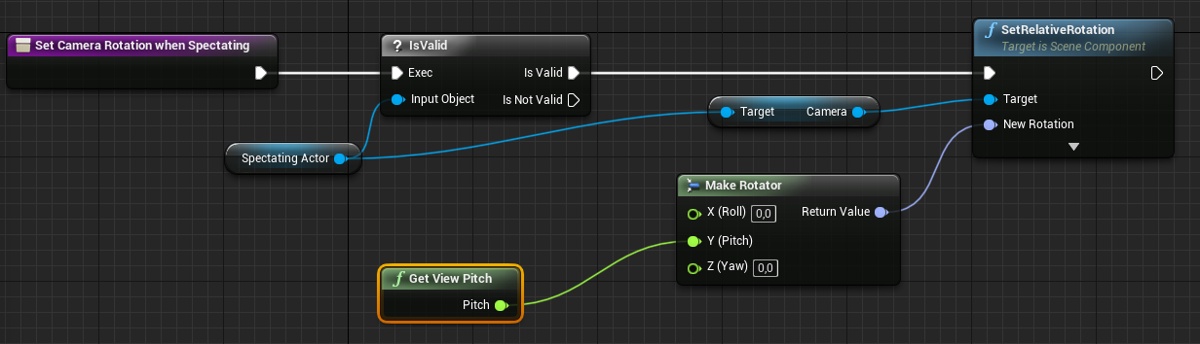
instead of getviewpitch, switch it to getbaseaimrotation instead, and set camera world rotation to that
disable camera replication if its on so it doesnt override
its not gonna be good though
 fleet viper
Hello a while ago ive bought the first person shooter kit which is for multiplayer (https://www.unrealengine.com/marketplace/multiplayer-first-person-shooter-kit) after a while i figured out that i can only find sessions in my network and that the steam subsystem isnt enabled in plugins. If anyone could help me with making this to a real steam based server then i would be glad to meet him :). Its because i want to make a game for me and my friends
ember needle
@manic pine you are right, but with some rinterp it does work 😃


thank you 😃
except that now it doesn't work with the aim down sight camera
😐
manic pine
ah, you need camera replication for that?
 manic pine
try turning it on again and see if it helps with ADS
ember needle
it may but the issue is that it's really laggy obviously
manic pine
yeah, but just confirm that thats the issue
ember needle
ah i think i might know
basically i need to ensure that even when the player enters ADS the spectator also goes there
manic pine
right, other clients need to know that that client is in ADS
ember needle
they do know
because ADS is a replicated variable
but i also need to blend
lemme try
(thanks BTW) 😃
manic pine
yeah, you need to do on the spectating clients whatever youre doing to the camera on the playing client
ember needle
one question though
Set View With Blend target takes an actor, not the camera. So shouldn't the view already change if the camera changes?
 humble zealot
Hey so after 2-3 days of errors etc. I now have a LAN dedicated server
For some reason its not showing on the internet tab
ember needle
@manic pine forget it I will investigate
unique thunder
Has anyone else used GameLift with GameSparks together?
manic pine
@ember needle this is interesting, it looks like there's actually support for this already, but for some reason it's not used by default
ember needle
yeah
now I have a very weird thing. I have a variable SpectatingPlayer that gets set when a player starts spectating another player. If I print out the value of SpectatingPlayer on the tick event, it is correct. If I print out the value of this variable on an RepNotify of a variable ADS change event, then the value of SpectatingPlayer is not set. ...wut?
so... this is called on tick
 manic pine
hmm forget about that for a minute
ember needle
 manic pine
try activating the builtin system for this stuff first
manic pine
you'll need to call setviewtarget from the server, not the client
so e.g. when client's character dies on server, fire controller->setviewtargetblend
in addition, since they've for some reason not done this properly, you'll need a tick event on character
if not locally controlled, set camera world rotation to GetActorEyesViewPoint.OutRotation
ember needle
yes
it's the same as with the other method
called on client
so I am near to closing this but there's this weird thing I was talking about
 zinc zealot
Guys, i want to make like a lobby setup in wich when three or more players ready up the game starts
where should i put the counter ?
like for the "readys"
 manic pine
alright
you shouldnt have to replicate view target yourself
it'll already be on the client
thats how it knows which characte rto follow
ember needle
i don't follow
manic pine
so all you need is the ADS rep
manic pine
yes
all you need to do is to respond to RepNotify by applying the applicable changes to the camera on the other clients, ye?
ember needle
ye not really
that's the issue i'm having
I need to know whether I'm spectating
and I do so by setting a variable, however in the repnotify this variable is NOT the one I save
SO: when I start spectating, I save the variable LOCALLY on the client only https://gyazo.com/6ab3d302101d76c930e90f8d6a37ab2e

If I print this value OnTick, it returns MyPlayer1
manic pine
your controller has GetViewTarget
ember needle
However, if I print it out in OnRep_IsAimingDownSight this variable is None
WTF?
I still need a way to distinguish whether I am in spectator or not
manic pine
getviewtarget->casttopawn->islocallycontrolled
if its not, youre spectating
there's eeven a pawn event
OnBecomeViewTarget
 bleak lily
so I have an issue where my character does not get their input disabled or gets a certain component destroyed
oh wait I fixed the disable input but how do I get rid of the component
 icy nacelle
Having some problems trying to get my players aim offset to replicate.
Here's the function that's running on tick. I'm not sure I quite understand how to do this but this is my guess as to what I need to do. Inside the function it just calculates the two aiming vectors.
(Aim angle is the function I'm trying to replicate)
manic pine
you may have remote and authority mixed up there
zinc zealot
whats an UMG widget ?
icy nacelle
@manic pine still doesn't work 😦
zinc zealot
i think i know.
icy nacelle
@zinc zealot Wrong section bud.
https://docs.unrealengine.com/en-us/Engine/UMG/UserGuide
zinc zealot
ye forget that...
i just wanted a hint but im pretty sure im supposed to use game state right ?
i checked out the compendium a bit
manic pine
UMG is for UI, it's not network related
zinc zealot
Gamestate is only between one client and the server right ?
manic pine
gamestate is for server and all clients
same with PlayerState(but one for each player)
controller is for a specific client adn the server
zinc zealot
doesnt make sense...
cause
i did like
a widget
where you press ready
and it triggers an event in Game state
wich adds +1
and when i do it in the different clients and print a string
it only adds one in each client
doesnt sum up
manic pine
replication only happens from server to clients
not from clients to server to other clients
manic pine
then you'll need to use a Server RPC
zinc zealot
thats game state right ?
manic pine
but you can only call those on actors that you, the client, 'owns'
which by default is your PlayerController, PlayerState and Pawn(if you have one)
zinc zealot
hmm
manic pine
i think you need to read up on the compendium some more
it should all be in there i think
zinc zealot
but somethings i dont understand to well... or maybe i just need to dwell on it good xD
manic pine
yeah, hard to get understanding without using it(and failing a lot)
the general idea is that to get a message to the server, you need to use an object that the server says you own
zinc zealot
hmm
manic pine
you dont own GameState, the server owns that
zinc zealot
so i need to get a way to define a player controller
ahh forget it
ill think about it later i gotta go now xD
thx 😃
manic pine
sure
zinc zealot
wait
rotund wedge
Is there a way i can check if a player is a pawn or possesed?
zinc zealot
technically if i use a widget and click it thats a signalright ?
manic pine
if you click a widget, the widget blueprint will fire a onclicked signal
just on that widget though, it doesnt travel to the server or anything like that
your question is a bit vague OvO
rotund wedge
i have 2 players
and i can see them replicated
all fine
but these clones i see do begin play too...
and they try to create a widget...
and that always fails
So i thought i could prevent them from doing mean stuff
manic pine
what clones?
rotund wedge
the ones you see on each others screen
there are 2 worlds
4 pawns
but only 2 players ofc
manic pine
so, the other client
you have some stuff you want to run on your pawn, but not on his pawn
rotund wedge
yee
they dont need widget
what for
it works fine on the players
hng
well thats a workaround...
i shoved a isvalid node between
manic pine
you can do a check on IsLocallyControlled
rotund wedge
mh
manic pine
it assumes the server calls Possess on that pawn the instant its spawned though
which is the default
rotund wedge
i still have weeks to learn...
look at dis for example
its called always when the player turns mouse
its for look up and down
what ever i do... everyone has the stutter movement
its totally chaos
 thin stratus
Is the Component actually replicated?
Cause you are passing it to the server
and that only works if it' sreplicated
winged badger
@bleak lily pinned on this channel is Cedric's Network Compendium, please read it
bleak lily
what would my thing be tied to
rotund wedge
Is a big problem if i set all my replicated funcs to reliable?
winged badger
it will become a problem at some point
bleak lily
I cant make it replicated
winged badger
@rotund wedge
some engine functions are unreliable, like ServerMoveTo in CMC
so its good to use that as a point of reference when deciding what to make reliable/unreliable
rotund wedge
i am going to flip here
winged badger
there were plenty of people here that had problems because they made everything reliable
bleak lily
yeah I dont see anything in it that has anything to do with destroy component
I have the actor already replicated
winged badger
from what i glimpsed earlier you're in for quite a ride
unreal networking generally works fine out of the box, until you add physics to it
rotund wedge
well the physics so far just want to be replicated
i try dis
crouching
but with dis only i can crouch
not client 2
thin stratus
That only works on the Server
winged badger
and Multicast doesn't Multicast unless you run it on Server
winged badger
and InputAction is always local
i agree, without reading the compendium you're just wasting your time, and ours
bleak lily
my component is a static mesh component
does this mean anything
wait
nvm
I got it to replicate the component
thin stratus
Doesn't matter what type it is. But if you pass it through an RPC it needs to be replicated
Otherwise the Server can't connect the stuff you passed to something on his end
bleak lily
yeah I found the replicate check
I checked it
yeah it still doesnt get destroyed for some reason
oh I found an error
in the logs
LogActorComponent: Error: May not destroy component StaticMeshComponent /Game/Levels/UEDPIE_1_FirstTestLevel.FirstTestLevel:PersistentLevel.TPSController_C_0.Barrel owned by TPSController_C /Game/Levels/UEDPIE_1_FirstTestLevel.FirstTestLevel:PersistentLevel.TPSController_C_0.
oh I figured it out
I have another issue
LogPawn: Error: DisableInput can only be specified on a Pawn for its Controller
LogNetTraffic: Error: ReadContentBlockHeader: Stably named sub-object not found. Component: [26]TPSController_C_0.[42]NODE_AddChildActorComponent-2_0, Actor: TPSController_C_0
LogNet: Error: UActorChannel::ReadContentBlockPayload: ReadContentBlockHeader FAILED. Bunch.IsError() == TRUE. Closing connection. RepObj: NULL, Channel: 12
LogNet: Error: UActorChannel::ReceivedBunch: ReadContentBlockPayload FAILED. Bunch.IsError() == TRUE. Closing connection. RepObj: NULL, Channel: 12
the second player leaves the session
when an explosion happens
thin stratus
You are disable input for the Server pawn here
based on the passed controller
But you can only disable input for the pawn thats controller you passed
They need to match basically
bleak lily
so they should both be the same thing plugged in
thin stratus
Not the same
A possessed pawn has a specific controller
You can't plugin a pawn for Target and some random controller for PlayerController
You need to get the mathcing one
e.g. by doing "GetController" on the pawn reference
bleak lily
how would I do that
oh
I think I got it

would I plug the target here
or keep it at self
I was able to disable input before but now it doesnt work again
icy nacelle
I'm trying to work on a system that'll be a radio system that plays various tracks on a loop, which is synchronised for all players. How would I go about doing this? I'm thinking of having actors in the world to act as radios and they're getting told to change track from the game state? Just trying to plan it all in my head first at how this system should work before I try to implement. Any tips?
winged badger
make a component for it, in GameState is fine
icy nacelle
Now that I come to think about it, lets say I have a very basic system where a track plays, has a delay for the track length, then plays another track.
If a client joins the game, would the client start from the actors begin play or would it find out what the actor is doing (lets say its in the middle of a loop / track) and play from there?
winged badger
if you have a unique key for each track, you can just replicate that and OnRep play
you can also have all the radio actors register with it, or its event dispatcher, so you can just call the event dispatcher with track key OnRep and you're all set
icy nacelle
Yeah I was thinking of creating a struct for each track, with an ID, name, length and track
Would I need to create something that finds the current track and time when the player is near the radio?
winged badger
you'd have to replicate the track key and the timestamp actually
in case the radio actor becomes net relevant
winged badger
just the key won't sync it if its playing for 2 minutes already
it would start from the beginning of the track
icy nacelle
Alright I'll give this a go, thanks 😃
@winged badger Thanks for your help so far, I've made this system that uses rep notify on the actor, so far it worked perfectly in game! I just did a quick test with one client.
Will tidy this up later into functions and stuff but how does it look to you, anything wildly horrible? I've never done this kinda loop before and it feels a bit hacky.
winged badger
yeah, that's pretty bad
and it doesn't allow you to change tracks
i would put it into a component to reduce clutter, but that is secondary issue here
make an event dispatcher in the GameState
add inputs of TrackIndex(int) and Timestamp(float) to it
in the GramophoneBP, on BeginPlay, GetGameState->CastToYourGameState->BindEventTo<YourDispatcher>
make a struct containing an int and a float in GramophoneBP
TrackIndex and TimeStamp
make it replicated with RepNotify
in the event handline the dispatcher, just set the struct members by ref
and in OnRep function play the track (with offset for any difference between timestamp and whatever time is now)
in the GameState, whenever you want to change/play the track, just call that event dispatcher with TrackIndex and GetCurrentServerTime, or w/e its called
TrackList should also be a member of GramophoneBP, GameState doesn't need to know it exists, as long as it knows how to provide a valid index
icy nacelle
Thanks a lot dude I'll make some changes!!
winged badger
(this setup is made to account for your player walking into net relevancy range of a Gramophone, and having the Gramophone play the track from server offset, not from the beginning)
when that happens
ofc, you need to add the logic into OnRep so it doesn't play anything if the difference CurrentTime - Timestamp is greater then track length
humble zealot
Has anyone got dedicated servers done with onlinesubsystem ?
zinc zealot
Guys
I want the clients to communicate with the server
In a way that when they click a button it adds +1 in a variable
i've been looking in to this and i still dont know what to do
winged badger
did you read the Compendium? answers are in there
zinc zealot
i looked at gamemode and game instance
winged badger
well, what you're trying to do is pretty basic, so read the entire thing 😛
 zinc zealot
Game instance isnt connected to the server nor the players ?
shared*
what does that mean
i just saw a tutorial and im pretty sure the guy is using the game instance
winged badger
it means each machine has its own, its not replicated, it can't even be hacked to replicate
zinc zealot
hmm
thin stratus
It's not really for multiplayer
zinc zealot
:-:
thin stratus
It lives from when you start your game to when it ends
So it survives level changes
zinc zealot
hmmm
zinc zealot
Im pretty sure that what i want is to send the information to the server
So i want game state ?!?!
zinc zealot
in that "diagram"
nothing says client to server..
i want a place where
clients can sent an output i think ?
thats it..
thin stratus
Output?
thin stratus
You can call ServerRPCs in Client owned actors
If that doesn't tell you anything, read the compendium again
thin stratus
You don't need switch has authority "and all"
That's really depending on what you do
zinc zealot
the thing is
winged badger
in fact, connecting HasAuthority>Authority to InputAction ensures no client can ever crouch
thin stratus
What kind of information
zinc zealot
Its rly simple im pretty sure i did most of it
its when a player clicks the widget
Somewhere! it adds +1 to a variable
i dont know where somewhere is ::)
thin stratus
Why so cryptic? What is "a variable"
zinc zealot
Interger
thin stratus
Yeah sure but it is some sort of score
Deaths
Kills. Gold,
What are you trying to achieve?
thin stratus
Well if it's something that is only relevant to the Player himself, then PlayerController
If you in addition want to share that state wit hothers
zinc zealot
But
thin stratus
e.g. show an icon when you are ready, then PlayerState
zinc zealot
i need the variables from each one to add up
like
when a player sets ready
it sets +1 to the variable
therefore its now 1
if another one readys
its now 2
isnt player state like between player 1 and server
thin stratus
No
PlayerController is LocalClient and Server
PlayerState is everyone
And one per Player
zinc zealot
D:
thin stratus
GameState is everyone, but one per game
Read the compendium
It's all explained
It's wasting time repeating it again
I wrote it for a reason
zinc zealot
im pretty sure ive read that
thin stratus
Then you wouldn't need to ask that
zinc zealot
thats why i tried to use game state
thin stratus
You can let the GameState go over the PlayerArray
So when you set Ready to true on the PlayerState
you tell the GameState to loop over the PlayerArray
and check if everyone is ready
Or just count how many are ready
whatever yo uwant to do
zinc zealot
so i should communicate the ready to player state and have gamestate see if theyre all ready ?
thin stratus
That would be the way, yes
thin stratus
More than 4 years
zinc zealot
O-O damn xD
question how do i cast to player state ?
i think i got a reference but now
its like
theyre not communicating
winged badger
if the server is on the machine you're searching from
nothing you can do about that, steam API limitation
zinc zealot
Guys
if people join a server
what defines theyre pawn or is there a way to call a random pawn / player controller
thin stratus
Every player goes through a "login" phase
Where PreLogin, Login, PostLogin
Login creates a PlayerController for them
If the GameMode you use has a Pawn/Character class as defaults assigned, it will spawn that for the Player.
I think that heppens on InitNewPlayer.
Only PostLogin is exposed to Blueprints
So each player always has a Controller and a PlayerState
But Pawn/Character depends on you either setting the default class in the GameMode or (if you set that to none) spawning a pawn/character and possessing it yourself
bleak lily


so my character wont show that he is running
any idea why
the boolean in the animation BP is replicated
and the event is called to server
zinc zealot
@thin stratus what i mean is if there's a way to call a client
like
if for example
i wanted to spawn an actor on a client
what way would i have to choose the client
is it trough player state ?
but how do i know wich player state to use or ye ???
unique thunder
@zinc zealot Depends on what triggers the spawn, if the player themselves can trigger it then you should be able to spawn it locally by not letting the server spawn it.
For example, using a 'Switch has Authority' node, you would only allow the spawn to happen on Remote. This is a guess 👌
zinc zealot
ye i think i understand what you mean
basically let the server spawn the char and so i can "name" it
but what can i make it so it doesnt spawn
unique thunder
@zinc zealot If you use the 'switch has authority' node right before the spawn happens and only pull out from the Remote pin to spawn it, then it should spawn it on that client that's executing it only.
unique thunder
I managed to get my username to show up in-game but everyone has my username and on their clients, everyone has their username, too - any ideas?
This is how I'm setting it on beginplay.
mellow cipher
Would it matter what netdriver the server is runing when it comes to clients connecting behind firewalls?
humble zealot
For my game to appear on "Internet" do I need to upload the game to steam?
As it's just not showing
I've got a friend to try look but doesn't come up
mellow cipher
Whats your appid and product name
 open gazelle
Hey there. I am using steam to invite friends. All seems to work fine and the client joins the map. Problem is the client is not able to steer his pawn. Normal joining via a server list works fine. Any idea where to start looking?
winged badger
steam lobby != game session
open gazelle
with lobby i mean the first map
winged badger
check if the Pawn is possessed
 twin juniper
hello
can someone tell mr why all the event ovrrlap are casted also in multiplayer?
i mean, why they are replicated on server and client
and only in owning machine
manic pine
theyre not replicated
each connected computer runs its own world simulation
the only part thats "multiplayer" is replicated actors and RPCs
 hazy herald
When I try to use server travel it gets weird error saying that it can not load package. Plz message me
open gazelle
does a client usually only hold one controller instance (its own)?
 meager spade
@open gazelle yes
server has a copy of all controllers, but clients only get there controller and can't access anyone else's controller
humble zealot
I'm getting these 2 problems. They are saying they can't open them
Any ideas why
meager spade
have you tried right clicking and selecting open include?
sometimes intellisense derps
meager spade
probably wrong location for
humble zealot
theyre in source in the same place i downloaded them
winged badger
did you add Steamworks or w/e the module is called in your build.cs?
humble zealot
@winged badger which build.cs
winged badger
there is only one... YouProjectName.build.cs
it has a list of dependencies (modules)
if you are using something in a separate module, you need to add it there
unique thunder
Inside character BP: On possessed > cast to game instance > get Name value > set locally inside character BP > repnotify set a textrender above player's head to the Name value retrieved.
This works but everyone has my username above their heads on my client and on their clients, everyone has their username. Where did I mess up the replication?
humble zealot
@winged badger I'm on my build.cs (.sln file) where is the dependencies
 sharp pagoda
It's literally called "PublicDependencyModuleNames" and "PrivateDependencyModuleNames"
zinc zealot
how do i call the integer from a player controller
and then send an output to the owning client ?
sharp pagoda
"call the integer" ? The integer is simply the index of the newly added element into the array, it doesn't represent the actual controller directly. @zinc zealot
 mystic field
What would be the best way to differentiate a dedicated server build from a client build? Understandably, the server code must never be included in public clients, yet I don't see how creating a separate project would also work as all relevant game data needs to be loaded in the memory as well (collision meshes, maps, etc)
sharp pagoda
#if UE_SERVER is what I use for determining if the current build is a dedicated server
mystic field
That would be considering the project is purely based on C++ though, correct?
sharp pagoda
Not purely, but for c++ that is one way. Not sure if GetNetMode() is exposed to bp
humble zealot
No matter which way I put the / or \ it still says its not linking, or have i done it completely wrong
mystic field
That was also what I was thinking, I'm afraid there's no cleaner way than this. On an other topic, how viable would you say it is to link the UE4 game state with a websocket server? Specifically, what I'm looking at is a dual system between UE4 based movement & combat system and a websocket server for other actions such as item/currency/etc storage using a memory based database
Obvious part would be that the dedicated server would also have an open WS connection, although the authoritative figure should remain present
unique thunder
@mystic field Gamesparks is a good solution for storing that kind of player data
mystic field
Gamesparks also got my attention, although I am not completely sure what the product fully offers
unique thunder
I think it offers ded servers but we're using GameLift for that. Gamesparks has been good so far to let players register accounts that are stored on the database and can be used to authenticate them (good for cross-play), etc. instead of using their default platform login. You can also store player currency, items and pretty much any other variable. You can also modify players' variables through the Gamesparks portal (give them items, for example)
It goes heavy on analytics as well, a lot of it is in real-time. You can track almost anything players do.
mystic field
@unique thunder Looks very promising, it does make multiplayer backend seem like a piece of cake although it's not exactly what I'm looking for. Currently I am already able to set up the backend from scratch, what really holds me back though is the dedicated server/client build process, it's very easy to get tangled
(the backend being non-UE4 related infrastructure)
unique thunder
With gamelift, I have to build the server first and then package the client version separately (it needs a reference in the project linking it to the correct fleet that handles the whole process) - so it depends on the provider, if you're running your own, etc.
You can build the ded server & the client build simultaneously to be identical through command prompt alone.
mystic field
I'm aiming at self hosting so it seems dealing with the dedicated/client discrepancies in unavoidable. Thanks for the info regardless, I learned a bunch of stuff about gamesparks & gamelift
zinc zealot
Guys im pretty sure this is simple
im spawning an actor in player controller and its called from an event ran on the server
only the host (server) can see
do i have to... multicast ?
zinc zealot
anyway
question
is there something wrong here
i want to give a random player an item for example
shoudlnt i use it that way ?
same as the compendium
For some reason im getting tons of errors and i dont know what is it
for some reason it cant acess the player controller list
but in the compendium dint it say that the gamemode and game state can communicate ?
unique thunder
Why is this causing every player to have the same username as me? On their client, everyone has their username.
 brittle sinew
Having a replicated variable on the GameInstance doesn't really make sense, and I think it might be where some of the confusion is coming from.
The GameInstance is local to each instance of the game running; the server only has one GameInstance, and each client only knows about their own.
unique thunder
Ah, so not replicating that username variable should show separate usernames since it'll check local instances?
brittle sinew
How are you planning on letting other clients know about your name?
Usually you would do that in the PlayerState.
unique thunder
I tried that but it always comes up null when I set and use it from PlayerState
I'm 'setting' the username outside of the multiplayer session, on the login screen.
So when I enter the session, I seem to lose the value (but gameinstance still has it)
Right now I'm just setting a textrender above players' heads on repnotify
brittle sinew
Okay, then once you connect you would probably call down to the client, have them get their local name from the game instance, and send that back up to the server.
unique thunder
This is a ded server by the way, does that change anything?
brittle sinew
Not really.
unique thunder
So to clarifyh,
On join (let's say, on possessed for example) > Get username from game instance locally on client > repnotify to set username above head?
brittle sinew
No.
You cannot set replicated variables on the client.
You would have to call a server RPC on the PlayerState, sending the name as a parameter, then set that variable on the server side.
unique thunder
So I call a server RPC on the playerstate, setting the variable in the playerstate (but getting it from the gameinstance) ?
brittle sinew
Yes, but you need to retrieve the name on the client, since only it knows about its game instance.
unique thunder
So get username on the client, call a server RPC on the playerstate, set the variable there - then I can access it from the player BP and set it?
brittle sinew
Sure, once you're on the server you can set it wherever you want. I just suggested the PlayerState because it's more inclined to represent players than a pawn is. (a pawn is more about what a physical player is currently using.)
There's already APlayerState::PlayerName.
unique thunder
Inside the player (character actor), when I want to retrieve the username, how exactly should I be setting it so it shows up on everyone's clients above my head? Currently I'm doing it on repnotify after getting the value, is that enough?
brittle sinew
That should work, yeah.
unique thunder
What's confusing is, when I run the server RPC inside the playerstate - would the server know by default which client called it and then set it for that client's playerstate alone?
brittle sinew
Each player has a PlayerState.
unique thunder
So if a client runs a server RPC inside their own playerstate, the server handles that client's playerstate alone
I'm probably getting confused with a listen-server scenario where the server has his own playerstate, sorry.
brittle sinew
Yes.
That's how replication works in UE4—it refers to the same object on both ends.
brittle sinew
Sure. You just need to call Get Username at some point on the client, whether it's from a local event or a client RPC.
unique thunder
At the end of that 'Get Username' chain, right after the playerstate server RPC is called
I follow up with a local event
Getting it from the playerstate > repnotify
If this works, I just need to set up a bool to check if the playerstate already has the username and if yes, to just use it - if not, to set it then use it so it's not resetting it every respawn
 strong abyss
I have a strange problem concerning hosting a game on Steam with more than 2 players.
The host and first player can always join the game. But any players after that cannot join unless we coordinate and click join at the same time, then all players can join fine.
When I refresh my server list after a first player joins, the server is no longer found, even though my SessionSettings.NumPublicConnections is always > 2.
When 2 or more joining players can see the game on the server list and the first one joins, then (without refreshing) the 2nd player tries to join shortly afterwards, the Adress returned by SessionInterface->GetResolvedConnectString(SessionName, Address) returns an empty string, which results in a failed attempt to join a game.
When I use the Null Online Subsystem over LAN, things are working as expected.
Does anyone have any ideas what I could be doing wrong?
twin juniper
can someone tell mr why all the event ovrrlap are casted also in multiplayer? And not on owning machine by default
unique thunder
@brittle sinew Not sure which yet (takes like 45 minutes to deploy a build for testing) but something here might be failing to cast. The name above the player's head stays at its default text value 🤔
Oh am I supposed to do 'Get Controller' > 'Get Player State' > 'Cast to Player State' (whoops) 😂
brittle sinew
What is this BP?
brittle sinew
Like I said above, you can't set replicated variables on the client.
You need to call to the server to do that.
brittle sinew
No, in the character.
unique thunder
the local / repnotify username variable?
brittle sinew
Yeah.
unique thunder
Ah, I thought repnotify was by default exec on server for some reason
So call a server RPC to repnotify at that point?
brittle sinew
Yeah, but it might just make sense to set it in the PlayerState's set username function since you're already on the server.
unique thunder
Yeah I did,
I'm new to networking tbh - I think I read that RepNotify was to tell new joining players that this update occurred
Rather than running it on server once and newcomers not seeing the change
brittle sinew
All a RepNotify variable does is to run a function on clients when the value of the variable changes.
There's nothing special about how it replicates—you still need to set it on the server and let it propagate to clients.
unique thunder
Ah, so is 'always relevant' how new joiners see changes as they are then
brittle sinew
The impact of relevancy more has to do with RPCs than replicated variables.
If something goes non-relevant but then goes relevant again, it will have the new values of any replicated variables (and will fire RepNotifys if applicable), but it will have missed any RPCs called in that timespan.
 gleaming vector
it's best to set client state with replicated variables
and only use client RPCs with stuff that doesn't actually matter
like, telling the client to play a particle effect
 rose egret
is there anyway to override movement replication for ACharacter ? my units only have Yaw Rotation and 2D position I just want to save a little bandwidth
manic pine
not easily, no, it'd require remaking a lot of functionality
you can mess around with quantization levels and net update rates, but not much more
 bitter oriole
I would need to have really really bad bandwidth issues to go looking into that
@rose egret Sure you need to optimize that ?
winged badger
yeah, it would have to be life or death for me to go messing with the CMC
rose egret
@bitter oriole not that much. if it was easy (simply overriding a function) I could test that.
bitter oriole
Na, it's not going to be anywhere that simple 😃
Basically swapping out all the types in the class and all the associated handling
rose egret
@bitter oriole no I don't need to change the types. FVector and FRotator stay but In serialization I just serialize Yaw and XY. I don't know where and how ACharacter replicates its transform. actors use Actor.ReplicatedMovement
bitter oriole
Serialization in UE4 is automatically handled based on the types
So yes you do
It's also textbook premature optimization - until you know for sure that the performance hit is relevant to your game, don't spend time on it that you could spend on making your game happen
manic pine
its done in FRepMove struct in a custom serialization function to deal with the quantization settings
shouldnt be too bad if youre building from source anyway
but thats only a tiny part of it, since youd ideally change the actual ServerMove functions as well
to limit client->server traffic
rose egret
UE4 handles playing animation itself? I played an animation montage on my AnimInstance but clients are not playing it
bitter oriole
You need clients to handle animation themselves based on the replicated state
mellow cipher
Anyone having issues with phyiscs in 4.20?
Seems like it isnt server auth anymore
Wait no its just this
Ironic thing is that this "bug" was the thing I was trying to pay people to make for me
 hot ridge
Havent really posted yet, but glad this community exist ❤
wanted to ask something Im having a problem with
I have a Server player able to pickup objects and move them around
The problem is that the Client sees the object offset in a different location
any workaround or reason for this?
 static lynx
For MySQL functions, I imagine the best place to keep those would be in the game mode, instead of the player controller, that way the client doesn't ever see any data if they read memory, correct?
 chrome bay
@hot ridge the pickups probably aren't replicating their position
Make sure they replicate movement
hot ridge
i have replicate movement enabled
chrome bay
are they being spawned on the server or pre-placed in level etc?
and are the actors themselves replicated?
hot ridge
i dont know where.... >_<
kinda going crazy with it
I have this for my replicating actors:
chrome bay
I have no idea what that's trying to do
It looks however, like you're calling a NetMulticast and changing the transform of something, but only on the server (authority)
If the object your modifying the transform of isn't the root component, it won't be replicated
Movement replication only cares about the root component (aka the actor transform, not individual component transforms)
manic pine
your multicast is telling clients to place the Tub where it already is
settransform(gettransform)
chrome bay
Also, since that's a multicast, the clients won't do anything
the authority switch bypasses that code on the client side
hot ridge
lol ok
manic pine
if you use replicate actor and replicate movement then its also not necessary
chrome bay
What are you trying to do exactly @hot ridge ?
hot ridge
I have the server grab an object, and I need that object's location and rotation to reflect on the client
chrome bay
If you have replicated movement, it will do that automatically
hot ridge
when the server moves the object the client's should also
chrome bay
But the component you move has to be the root component of the actor
manic pine
on your object, activate replicated and replicatemovement
hot ridge
ok, I had it enabled before and no luck -_- even with root componets set properly
i have it enabled now too
let me run a test after deleting this mess
chrome bay
Does Move Notify get called on the Server?
hot ridge
hmmm... I need to look at that
chrome bay
Yeah I'm very confused haha
manic pine
what is your object
chrome bay
If you want to just attach the object to the player, just attach it server-side
hot ridge
sorry i brought a mess and should epect a mess
my object is a static mesh set to movable
manic pine
a static mesh actor?
chrome bay
Doesn't look like it's the root
hot ridge
ok taht looks like the culprit. How can I change to root? it wont let me
chrome bay
IIRC in Blueprint you just drag it to the top of the components list
hot ridge
I did and it dosn't allowme
chrome bay
Sounds like the root is inherited from somewhere else
chrome bay
same
hot ridge
the parent class is "Actor"
hot ridge
and the class is "SupplyTub_Grabbable_BP_C"
sorry I brought a brain musher
im sure there's a simplesolution
chrome bay
Ok. drag that onto Supply Tub
hot ridge
my bad it isn't
chrome bay
Oh kk
hot ridge
it's a custom component
chrome bay
Is that custom component just an Actor Component?
I swear they used to have a divider between scene and actor components...
manic pine
it has to be an actor component
hot ridge
they did i dont know what happened to it
chrome bay
manic pine
a scenecomponent would create a hierarchy
chrome bay
That's what mine looks like in 4.20
The scene components in the middle, the actor components at the bottom
manic pine
which means grabable cant be root, it has to be the mesh component
so the problem is elsewhere
chrome bay
If you want the "grabable" object to just attach to the player pawn, you should be able to just attach it
Attachments are replicated
But ofc, you only do so on the server
manic pine
can you select your SupplyTub_Grabbable_BP and show the details window, specifically Replication
chrome bay
That's fine
Try just getting the root component and printing it to screen
btw this doesn't matter unless you rework what you were doing initially anyway haha, as that doesn't work either way
manic pine
i dont think you can have a BP class without root
it makes one by default if it isnt there doesnt it
BP Actor class*
chrome bay
Yeah I believe so
bitter oriole
The actor transform methods just redirect to root, so yes
 jolly siren
Has anyone figured out how to use the 4.20 steam auth stuff yet?
chrome bay
@jolly siren have a look at shootergames config files
hot ridge
so does the problem seem to be the root? I dont' have the option to change it
chrome bay
they've got some setup items in there
manic pine
try to brute force it a bit rolento, set your static mesh to replicate component
jolly siren
Thank you James 😃
hot ridge
I've been brute forcing it for a few days off and on lol
 merry pebble
lol
twin juniper
@jolly siren I think there is a component which does it
merry pebble
So could someone help me wiht, or lead me in the right direction of setting up a listen server, and being able to have people join
chrome bay
+Components=OnlineSubsystemSteam.SteamAuthComponentModuleInterface```In WindowsEngine.ini in my project (or defaultengine.ini depending)
bitter oriole
So, an Actor without an Owner can't fire RPCs from client to server
Can a server-side Actor without an owner fire client RPCs on another class ?
manic pine
on another object?
bitter oriole
Yeah. Like, a player controller.
manic pine
anyone can call a function, its just a function call after all
but whether it goes through or not depends on the network owner of the object that owns the function
controllers that belong to players are always owned of course, so that'll always be accepted
bitter oriole
My understanding was that the owner requirement only applies to server RPC
manic pine
no, also client rpc
after all, if an object is without an owner, which client does the server call it on?
bitter oriole
Yeah, that makes sense
Basically I'm checking if my pawn server code can call PlayerController::ClientSetViewTarget, sounds like it can
manic pine
yeah, its not about which object is calling the RPC, its about which object the RPC is being called on
bitter oriole
👍 Thanks again
manic pine
for controller on server you prolly just wanna use SetViewTarget though
it'll automagically call ClientSetViewTarget for you
it also does some other stuff to facilitate smooth spectating
hot ridge
@manic pine or @chrome bay if I PM you the project (roughly 3 gigs) could you look at it and see if you have the same problem on your end?
it's setup for VR though so i am unsure if it is testable
since I'm running it on 2 seperate computers
its all good if not since I'll just keep brunting it thorugh till I find a solution
chrome bay
I'm about to go offline I'm afraid
 mild zodiac
is there any way to have replication condition per connection? for example replicate certain properties only to certain clients
chrome bay
Unfortuantely not
though the new Replication Graph system might expose some more control, but it's pretty advanced
merry pebble
Okay i need help, my Steam API keeps disabling while packaging the project and idk why!
unique thunder
@merry pebble That's a normal warning, I think it should always fail to use the Steam API during the packaging process. You can still use it after
^
merry pebble
Well the steam intergration works in the standalone while in project, but when it's packaged the steam intergration doesn't work
idk
unique thunder
What specifically are you trying to do with Steam that fails?
bitter oriole
@merry pebble If you packaged in shipping, you need to launch the game from Steam
merry pebble
well when you open the project the steam overlay doesnt pop up
Shift + Tab
Doesnt work
bitter oriole
The packaging log about the API being disabled is normal however
@merry pebble Is it a shipping build ?
merry pebble
indeed
bitter oriole
Start the game from Steam, then
unique thunder
I'm casting to my game instance to get the player's username and applying it properly, this works but everyone has my username above their heads. How do I make it so that only I have it above my head for everyone and they have their own? I didn't multicast the set text
Wait.. will the 'Event Possessed' trigger if the character is the default pawn in the game mode on level load?
merry pebble
Okay so i have the steam working but i cant join my friend and they cant join me
bitter oriole
Have you implemented sessions ?
merry pebble
Indeed i have
I have followed along with Unreal Engines youtube series of multiplayer
i can give you a copy of the file if you would like to look at it
bitter oriole
So using the advanced session plugin etc ?
merry pebble
na
I followed along with this series

YouTube
Video Tutorial Series In this video series, Wes Bunn from Epic Games walks you through creating a networked game with Steam integration entirely through Blue...
idk what to do lol
 main sentinel
Hey guys. I have a custom player movement on my game where the clients sends the input to the server via an RPC (unreliable) on every tick.
The game works fine when only 1-2 players are connected. The problem is that when more players connect to the server (5-10), it starts to get really laggy and I'm believe it's not a connection issue because I get an average of 8kb/s in/out data per player
Am I sending the input the right way to the server?
I believe it's worth noting that this project is entirely in Blueprints. Can it be a performance issue?
thin stratus
Well he can easily check if that fills the bandwidth
main sentinel
I thought Unreal was able to manage it smartly for me
static lynx
^
thin stratus
UE4 doesn't do much, they just send the stuff
Also you could check if it still lags if you disconnect your code
or call it less often
There are also ways of using NetQuantized Vectors
even in Blueprints
it's an extra variable type
main sentinel
I'll search about that. But how can see if it fills the bandwidth?
And how often should I send the input to the server?
main sentinel
Yeah, I know. But i couldn't get much info looking at it
Do you know any good articles about the network profiler?
thin stratus
Not out of my head
main sentinel
Actually, don't mind that. I know that each player is sending input 120 times per second
And I believe that is very high
How often would you send the input to the server?
thin stratus
Hm no idea right now
I know that the CMC calls tries to every tick
But they probably have some sort of stop for not sending it too often
const bool bCanDelayMove = (CharacterMovementCVars::NetEnableMoveCombining != 0) && CanDelaySendingMove(NewMovePtr);

        if (bCanDelayMove && ClientData->PendingMove.IsValid() == false)
        {
            // Decide whether to hold off on move
            const float NetMoveDelta = FMath::Clamp(GetClientNetSendDeltaTime(PC, ClientData, NewMovePtr), 1.f/120.f, 1.f/5.f);

            if ((MyWorld->TimeSeconds - ClientData->ClientUpdateTime) * MyWorld->GetWorldSettings()->GetEffectiveTimeDilation() < NetMoveDelta)
            {
                // Delay sending this move.
                ClientData->PendingMove = NewMovePtr;
                return;
            }
        }
Could be that part
But not sure. I'm staying away from the CMC atm
Everything before that seems to be local
And the Actual RPC comes after it
ClientData->ClientUpdateTime is basically MyWorld->TimeSeconds from the last time the rpc was sent
EffectiveTimeDilation isn't that important atm
And NetMoveDelta would be something between 1/120 and 1/5
GetClientNetSendDeltaTime is pretty much depending on the situation
manic pine
yeah, CmC checks every move if it can be delayed... moves that automatically delay is stuff like if velocity == zero
thin stratus
So I guess if they can delay it they do that between every 1/120 and 1/5 second
manic pine
if a move is delayed, the next move on next tick will check if it can combine with the delayed move
and then turn them into a single move
thin stratus
Pure magic