#multiplayer
1 messages · Page 408 of 1
 drifting plank
This will work !
I did the server call on the player and not on the actor itself ... Sorry
It was that
You are forced to have an owner to call a server event so. You need to call the server event on your player before to do anything else.
And not directly on the interacted actor.
 winged badger
@steady briar Input action -> ServerRPC to let the server know about it -> Handle interaction on server side -> replicate results back to clients
 steady briar
ok what is "ServerRPC" i know it as a term just not as what to do with nodes
drifting plank
It's what I called a server event 😉
winged badger
Custom event replicated to server, reliable is good for this
steady briar
which is.... a custom event that is run on server?
winged badger
also, read Cedric's compendium
drifting plank
yes
steady briar
i have read it
drifting plank
Sorry I miss that part...
steady briar
and trying to figure out the docs
its easy to say things like "server needs to do this" but actually doing it isnt easy for me
and im not just trying to hack something in to work, im trying to understand it. the compendium is good and all but i still get lost by it
winged badger
as long as you can track your execution, its almost straightforward
steady briar
well i thought it was straightforward except it absolutely didnt work T_T
winged badger
so, server and client have the "same" actor
steady briar
now i have a spider web of functions that i cut out but didnt want to delete incase i go back to trying that. might just delete and start over again
winged badger
say its your PlayerPawn, and its replicating
each of those actors is largely independent
steady briar
the entire thing worked if i changed 1 part to an overlap event instead of a custom event. thats what confuses me
winged badger
meaning aside from server being able to replicate the variables set to replicate and both being able to send to exec to the other one via network events
they are independent
drifting plank
Event 1 : Input (Calls event2) --> Event2 ServerRPC (Calls event3) (On player pawn)
Event 3 : Custom event (Do some logic and call event4) -> event4 Call MulticastRPC to feedback all clients (On your interactable actor)
Event 4 : Do some feedback
That's the right workflow
drifting plank
@steady briar The overlap is called both on client and server
steady briar
ya i know that part. cedric explained that to me a while ago.
drifting plank
So the server calls correctly your logic on your rock
drifting plank
So what is wrong ?
drifting plank
If the actor is not replicated
winged badger
you can
steady briar
winged badger
@steady briar
steady briar
i dont get the print so it is not even getting that far
i dont know what u mean by reference is null
winged badger
you can't juggle references like that
steady briar
what reference?
drifting plank
From where come the blue pin in your first image ?
winged badger
the one plugged into the Cast object pin
steady briar
blue pin is for a function that isnt being used
winged badger
that one is invalid
steady briar
the cast to object is so that it casts to the correct object
drifting plank
Your object you cast
winged badger
you need to add an input of type Actor i'm guessing
to your server event
connect the pin going to the cast node into the node that calls the server event
and connect the cast to the pin coming out of it
steady briar
brainsplosion right there....... wut
winged badger
the only way to send information to the server
like an actor reference
is to push it as an input on the Server Replicated Event
anything else will fail
steady briar
so the cast to pin isnt actually used?
drifting plank
winged badger
what comes into it is atm NULL
steady briar
it works fine when using overlap, it handles everything that differently?
comes from this
drifting plank
Overlap is called on client AND Server !
steady briar
yes i know its called on both
winged badger
because with overlap client and server independently of each other use a reference to whatever is on the other side of that blue wire
steady briar
but that wouldnt change how i get that blue pin
winged badger
how you get it is irrelevant
steady briar
right it just needs to be passed through
winged badger
step 1 - click on your red node SRV_InteractionStart
steady briar
to the server event directly, the cast to doesnt do it, right?
winged badger
step 2 - in details panel add an input of type actor
step 3 - connect that blue wire coming into the cast node into the blue SRC_InteractionStart node instead
and then step 4 will become obvious
winged badger
yes
drifting plank
If it's an input you reference on client will be set but not on server
winged badger
you connect the cast to the new pin on red SRV_InteractionStart you'll get
what happens then is Client calls SRV_InteractionStart
steady briar
ok i think its working... but... so................................ was 99% of my problem that i plugged into the cast and not the server node?
winged badger
and tells the server "I want to interact with this actor (valid NetGUID provided)
drifting plank
You set the object only on client
steady briar
i was really unable to test why things went wrong. did a lot of prints (between almost every node) and never figured out why it wasnt still going through
drifting plank
So the server doesn't know him
steady briar
well i thought if i had the server run the function it would have the info
steady briar
ya my biggest mistake was thinking the cast would carry that into the server node
drifting plank
Zlo So it's basicaly a passing of a memory address through the network, right ?
winged badger
server will try to run whatever is connected to the cast input
drifting plank
Or it's abstracted to an ue4 reference to a similar object ?
winged badger
but if its an exec chain it will return null
RPCs pass NetGUIDs to reference objects
steady briar
so i wouldnt need any switch has authority in this would i?
winged badger
as memory address would be more then a little useless
any input whatsoever
happens only on the machine your player is playing from
server can't magically know you hit your E key unless you tell it "hey i pressed E (Standard binding for interaction), now interact!"
winged badger
anything replicated or loaded from a package
can be referenced over network
you can pass a reference to a non-replicated actor as long as it was part of the level
and not spawned during play
so anything connected to an InputAction happens client only @steady briar
(unless you happen to be listen server host, in which case its server only)
steady briar
hmm.... well it hurts my brain and im still figuring some stuff out but thanks for the help ppl~ much appreciated.
winged badger
at one point, it will just click in place
drifting plank
While you are here Zlo, I have an issue with relevancy 😦
I have a map generated procedurally and in my hierarchy I have some objects which are parented.
All these actors are replicated to be relevant only when the players is near.
The first time, all works. But when I move to an another location and back to the first place, some objects are detached on the client. But the server doesn't have the issue.
have i missed something with the relevancy ? Is that work for children actors ?
winged badger
those objects are set to replicate, yes?
winged badger
how do you know they are detached?
drifting plank
I see them on the client hierarchy
winged badger
check their NetOwner
from the start, they might had never been attached in the first place
you can try force the issue with bUseNetOwnerRelevancy, if the NetOwner's good
drifting plank
In the c++ the attach function is called. But i will check that
steady briar
ok so can i post what i have now (i think its working properly) and see if im doing something wrong?
drifting plank
Of course
steady briar
ok so this is my char (not showing how i get the object from the array its huge and posted earlier)
the animation stuff is placeholder til i set up an anim blueprint
this is the rock
definitely more organized than my usual splattering of nodes
well everything is placeholder but its about the flow that matters. i can do visual stuff later
steady briar
at the bottom of character
drifting plank
Oh yes I did'nt see that
steady briar
this is the basic overview of how mining interaction will go, so ya unfortunately a bit of back and forth. as long as all interactable objects have a start and finish, i can fill in the middle with other nodes
so if i go up to a tree that is choppable, InteractionStart will be there. it can bring the rest of the functionality specific to the tree
drifting plank
So you just need a stop interaction to cancel the rock destroying
steady briar
ya im going to work on that when i figure out the animation thing
because movement/getting hit will interrupt the gathering and the animation is actually the entire length of the interaction
i have a crappy "play animation" spliced in there but its not what i want. i think ill need to make something in the anim blueprint to cycle an animation X amount of times
and adjust the play rate of the anim
thats where Number Of Hits comes from, it gets that variable from the rock so it eventually will know how many cycles to do. couldnt get a loop to work but i feel like setting anims like that isnt the right way anyway
drifting plank
But I think you need to put the delay before destroying on the server.
Rock need to call the startMining.
Rock know his state along the time.
if time is reached rock call stopMining to the client and explodes
steady briar
also going to have to set a lot of bools in places
well mining speed will be variable based on the player and number of hits, so theres no exact amount of time the rock will know. i figured i would just tell the rock to "Complete" when the animation is completed without interruption
drifting plank
I correct !
Client needs to start to mine.
The rock start to be mining. A timer is start with a specific time. And rock call startMining to the player.
If client decide to stop to mine. All is canceled. And rock call stopMining.
If delay is reached. rock call stopMining and feedback that it is destroyed.
You just have your mining delay at the wrong place.
steady briar
i cant just set a delay in the rock though, it wont know how long it needs to be mined
drifting plank
Hum it's the player which know that ? It's strange 🤔
steady briar
the players mining speed can change, or something like critical hits might count as 2 hits. hard to predict all that
drifting plank
It's more the rock which have a specific value
steady briar
the amount of hits needed will be in the rock. how fast the player can swing the mining pick is in the player. change for double hit etc...
drifting plank
Oh so you need to pass some informations to your rock like
miningSpeed and miningDamage
steady briar
i was just going to use it like a simple health system.
drifting plank
And in your rock, you called a timer which loop and handle each hit.
yes so your rock just have to know his durability or life if you prefer.
But in your example you have set the delay at the wrong place ^^
steady briar
either way, complexity can come later. im happy with a simple replicated explosion for now 😃
the whole animation thing is placeholder. ive been struggling with this for quite some time... it doesnt always occur to me to make a function that pretty much just switches whos running it
drifting plank
For the moment put your delay on the rock and replace it later by a timer function which loop 😉
steady briar
ok i need a break <_< got a headache from this. i can play a game all day no problem, but the text and the flat screen kills my brain
drifting plank
Ah ah I do c++ me Do the same 😛
steady briar
ya i will tinker with it. its a good template. thanks ppl who helped~
 spare lynx
I basically built my client .exe now but how can I connect the client to the server?
drifting plank
You can create a shortcut with some option to put the ip of the server 😉
If you haven't a menu or a session system implemented
spare lynx
ye need the shortcut
drifting plank
You can also type command line to connect to the server
spare lynx
I am searching for the start parameters at the moment
drifting plank
spare lynx
ty
drifting plank
Hum maybe not
Wait
It's for a UE4Editor exe you have a build
Do you have a dedicated or a hosted server ?
spare lynx
dedicated
 icy nacelle
I'm still having problems replicating an item being equipped when the bot is spawned in the server - This does work in singleplayer.
I've made sure that everything is ticked to replicate.
drifting plank
the actor which have this begin play is a player actor or a server actor ?
AiParent hum what is this class ?
Is the ServerSpawnWeapon function called or not ? If not, check if you are the server or if the caller is an owning actor.
drifting plank
Ok so logically there are bots spawned on server and owned by an ai controller
drifting plank
The weapon are spawned correctly ?
They just are not attached or something else ?
You maybe need to call attach on server and multicast that they are also attach on client ?
Hum logically, the parenting on server works on client too. What's the problem ?
icy nacelle
In singleplayer its spawned just fine
Ah, you think maybe it spawned at the location of the transform I inputted?
hmm nah its not that
drifting plank
I didn't understand the problem
icy nacelle
?
drifting plank
They are not spawned ? bad located ? anything else ?
icy nacelle
The problem is, when this runs, it doesnt spawn the actor in the world
Not about its location - It literally does not appear when I'm playing as a client
drifting plank
You have check if it appears on the server side?
drifting plank
you have said that the Weapon is set replicated so it's very strange
drifting plank
Weapon is a variable or the actor is set to replicated ?
The actor needs to be set replicated
Not the variable of the class
icy nacelle
Yes, you can see it is because it has the two balls
The actor is also set as replicated
drifting plank
This variable doesn't need to be replicated. Only the server need to know the class reference
But it's strange that it appears on server and not on clients if the weapon actor is set to replicated ... 🤔
icy nacelle
Whats weird is if I put a print after the spawn and find out the current weapon display name, it'll be the weapon from that class
So its literally being set, its just not appearing on the server
drifting plank
So weapon need to be set to : not replicated (Just for initial spawn)
Equipped weapon can be replicated if you want that the client know him.
Check that your weapon blueprint (Not the variable in your aiParent is set to replicated
icy nacelle
hm?
Why would I set the weapon to not replicated? surely thats the opposite of what I need?
drifting plank
weapon is a variable of AIParent right ?
not your blueprint so you didn't need to replicates it
icy nacelle
Ah, you mean the weapon variable?
icy nacelle
Yeah, thats not replicated anymore
drifting plank
equippedWeapon variable, you can if you need 😉
but the problem is surely always here
😦
Why your weapon doesn't spawn on clients 🤔
 unborn nimbus
Any idea what would cause a c++ rep notify to not get called on the client? I'm using them in a ton of different places in the project and they all work fine but this one just doesn't want to work.
icy nacelle
This print string always prints the weapon that I'm trying to equip
also AI is functioning as if it has that weapon equipped
drifting plank
@unborn nimbus Repnotify is not called automatically when the variable changes. You need to call OnRepYourFunction() manually when you change the variable.
Or you have maybe missed the DoRepLifetime ?
unborn nimbus
Since when? All the other rep notifies are called automatically
unborn nimbus
no, in c++
drifting plank
Never 😮
I see that on the official documentation and in the network compendium of Cedric
unborn nimbus
Would you mind linking? I'm looking at Cedric's compendium and I don't see it
drifting plank
Hum where have I see that ...
I'm sure that I need OnRep after a change. In my code it was the issue
unborn nimbus
I know you have to call it manually on the server but not on the clients
otherwise, that defeats the whole purpose of the rep notify
drifting plank
Oh you change the variable on the client 😮 ?
drifting plank
yeah
Oh so the OnRep is not called ok
Hum so check your replicates, doreplifetime
icy nacelle
barely changed anything and now I'm getting this error
unborn nimbus
Correct. I'm loading the engine again to check for sure but it works in editor but not once packaged. The other rep notifies work in the packaged version
drifting plank
Oh 😮
Strange
@icy nacelle weapon variable is maybe invalid because you change it to unreplicated ?
icy nacelle
no its not that
drifting plank
So always check if you have spawn something
yes I see this is a problem with the spawnActor function but I didn't understand what is the issue :/
Type that on google ?
drifting plank
Always the same problem with the spawn on clients :/ ?
icy nacelle
Yeah
doesnt spawn, but AI acts like it has a gun
ah fuck it - i'll try and do it on a repnotify
actually no that wont work
because if a player joins later, it wont run for him
drifting plank
That's very strange 😦
Yeah you can call Repnotify for the weapon ^^
But it doesn't change the weapon spawn :/
icy nacelle
Well this is bloody strange - I've got it to work
instead of casting it to server then multicasting, I just directly multicasted and it worked
Although thats stupid as it should have worked even if it was run on server whilst already running on server.
unborn nimbus
@drifting plank I just confirmed it is working correctly in editor.
drifting plank
You have multicast the spawn so It creates different instances of the weapon on each clients. 😉
But if you want to have the same actor linked to all clients* you need to spawn it on the server
It's strange that it doesn't work for you
@unborn nimbus So the build don't work :/
unborn nimbus
Correct
drifting plank
I didn't used many OnRep on my code for the moment. But all of them works on build...
i'm sorry to not help =/
Try to debug with visual studio attached ?
I didn't know if we can't do that with a server build
unborn nimbus
Yea I've done that. It's called on the server for sure
drifting plank
and on client ?
unborn nimbus
no the client doesn't receive the replication
unborn nimbus
I've packaged like 10 times in the past 24 hours haha
drifting plank
outch 😦
drifting plank
🤞
It's midnight here ! i hope you will find the solution !
Tomorrow is the playtest time ! 😃
8 bugs to solve before 😅
winged badger
@unborn nimbus by packaged version you mean shipping binaries?
unborn nimbus
No Development and DebugGame
winged badger
there is Debug info at least then
try entering log lognet veryverbose
into your console
and then read a massive amount of logs?
unborn nimbus
I'll see if it adds anything. It's about finished packaging
winged badger
i take it there is no chance your DebugGame and Development binaries were compiled before you added ReplicatedUsing specifier in the editor version?
unborn nimbus
you are correct
winged badger
and the offending actor, does it just not call OnRep or does it not replicate the variable at all?
unborn nimbus
Doesn't replicate
winged badger
is there a variable with the same name in one of the base classes?
there should be at least a compiler warning about hiding an inherited member if there is
unborn nimbus
No there isn't
winged badger
i'm out of ideas, sorry, hopefully the LogNet provides a clue
its really a lot of spam tho
unborn nimbus
Thanks for the ideas. I hope it does too haha
unborn nimbus
Yea it's worth a shot. If this doesn't add anything. I'll clear everything again and repackage
winged badger
90% of impossible errors are solved by deleting Intermediate
unborn nimbus
agreed haha
 graceful cave
is there something specific that needs to be done to replicate player states to newly joining clients? not all replicated variables are being replicated and instead its showing their own
like showing your own name on the scoreboard for everyone who joined before you
this wasnt an issue with my last project and im pretty sure i did everything the same
winged badger
sounds like you are pulling the name locally from the client
and assigning it locally for everyone
that, or just have the wrong bindings / playerstate context
graceful cave
well other things like kills/deaths/total damage are shown properly because theyre updated by the server after the client joins
so they then receive the new one
winged badger
you are using PlayerStates?
graceful cave
yeah
 polar portal
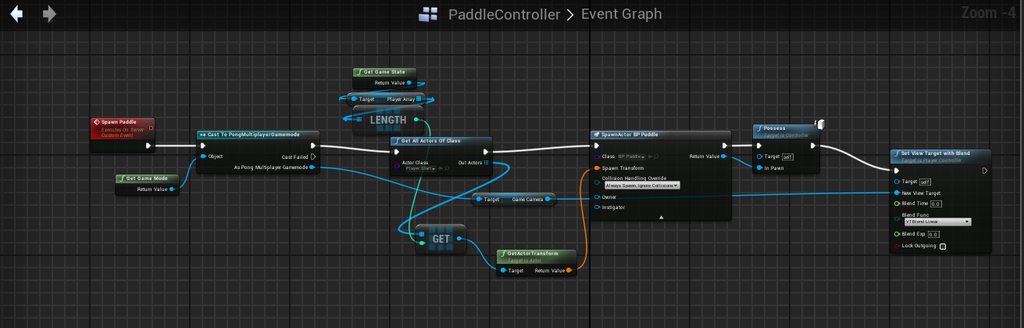
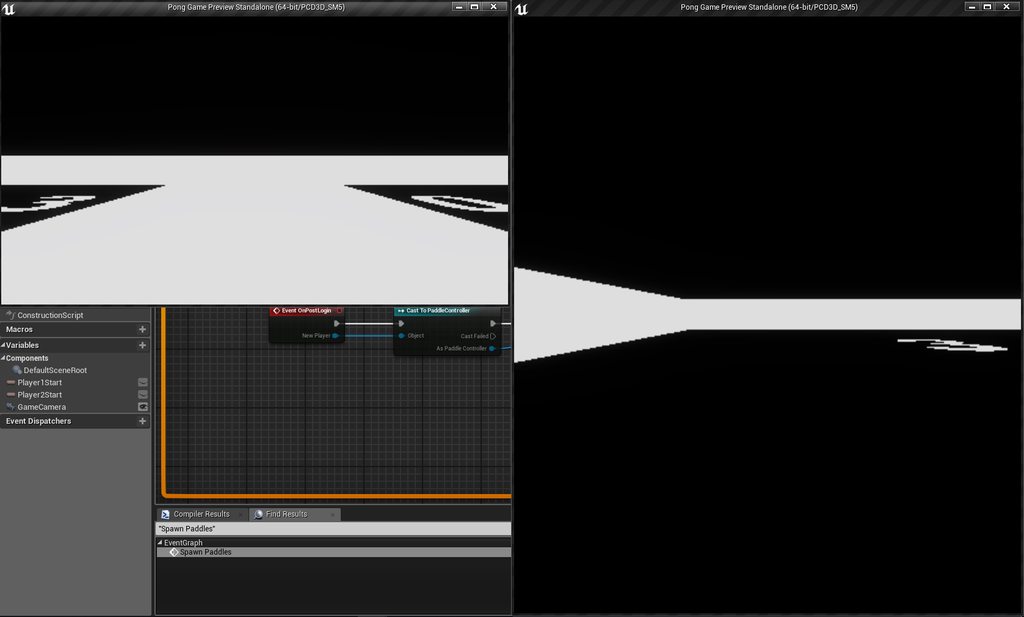
Okay, okay, so I changed the movement, it's better now. BUT! there's still a spawning and controlling problem.
This is my paddle controller: https://imgur.com/a/5Jw0JHk
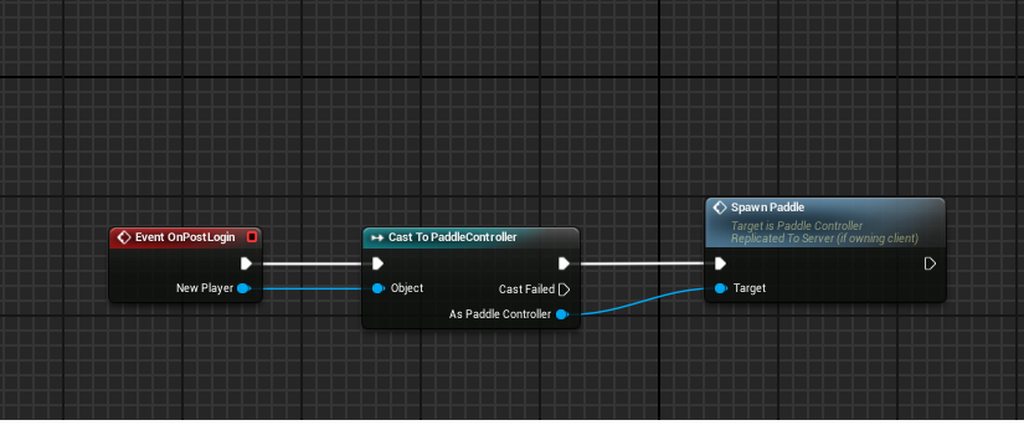
My multiplayer game mode: https://imgur.com/a/vjtFQD8
 winged badger
so you either overwrite the names when you join
 winged badger
server doesn't check if your information is correct, it just replicates anything that changes, and name doesn't
or your binding for the textblock showing the name is wrong
graceful cave
right, and im trying to figure out how it worked in my last project even though i dont think anything was done differently
everything shows properly for people who joined after you
but i know its the variable because its used in more than one widget and its wrong in all of them except ones that have text sent by the server
like dying/killing
winged badger
what does that macro do?
graceful cave
displays a chat message
winged badger
well, i see one fluke in this
altho i am not sure it can cause quite the effect you described
you need SwitchHasAuthority > Remote on BeginPlay
or it will run on both client and server
and it will also pull and broadcast the name from servers GI
well, not even that
graceful cave
oh man i completely let that slip by
winged badger
since that will break the listen server host
winged badger
ok, otherwise you'd need to call the InitPlayerState from the Controller or Pawn where you can filter exec with IsLocallyControlled / IsLocalController
graceful cave
yeah the client is just running begin play on everyone's state when he joins
didnt even realize i left that out there, every other actor has that lol
graceful cave
winged badger
because just the dedi not running BeginPlay won't cut it
graceful cave
that seems to work properly
unborn nimbus
@winged badger maybe I'm doing something wrong but adding lognet and veryverbose didn't seem to add anything to the log
graceful cave
everyone only runs it on their own
winged badger
its a console command log lognet veryverbose
graceful cave
i cant know for sure until i package and test again but this makes each client only print once
winged badger
the output should respond immediately
winged badger
i don't remember how verbose LogNet entries look like off the top of my head
but certainly worth a shot
unborn nimbus
yea it doesn't exist in the log
graceful cave
ok yeah mine definitely works now, names go from default blank string to default name in the settings
over the course of a few seconds
winged badger
i think deleting Intermediate is by far less painful choice then sifting through LogNet btw
unborn nimbus
ctrl+f
winged badger
searching for a replicated variable by name in the same actor that replicates at the same time
should provide something close to the target
unborn nimbus
The variable and OnRep don't show up on the client
winged badger
it should be in the same bunch
unborn nimbus
Yea, I'm repackaging fresh
 glacial lotus
Is a Hit Struct too much for being sent during replication in a 4 player cooperative shooter? using listen server
glacial lotus
ok, I workarounded that but now back to my recurring problem. How the hell does the Server custom event know which player has invoked it? Using the player controller?
polar portal
Could someone help me with my issue here please?
Currently I'm running a dedicated server with 2 clients connecting, but both are outputting the server string, I can move each one individually but their movement isn't replicated to the other:
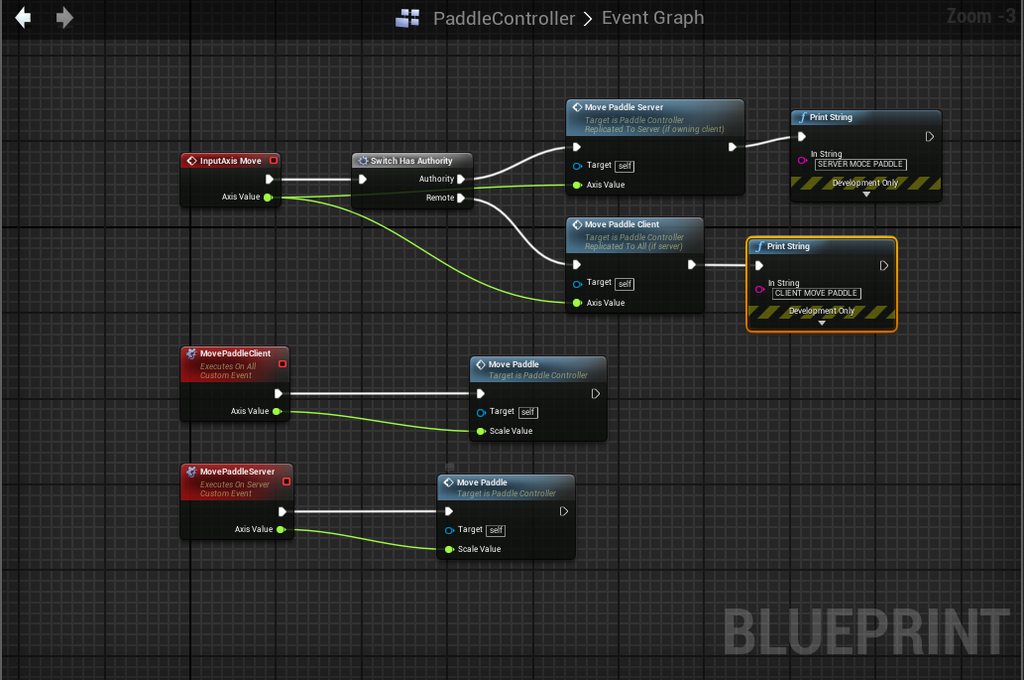
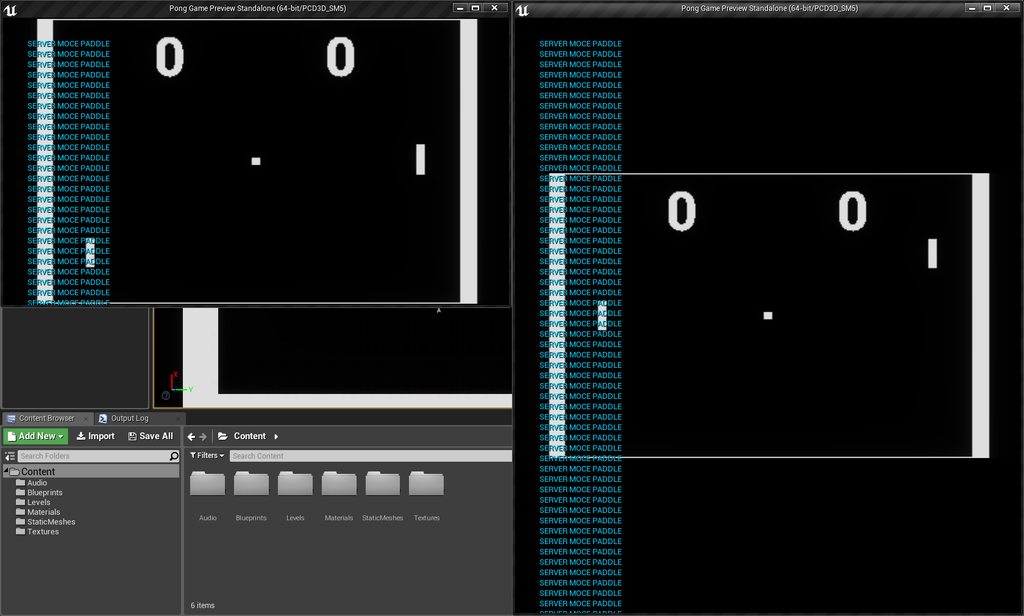
anyone?
glacial lotus
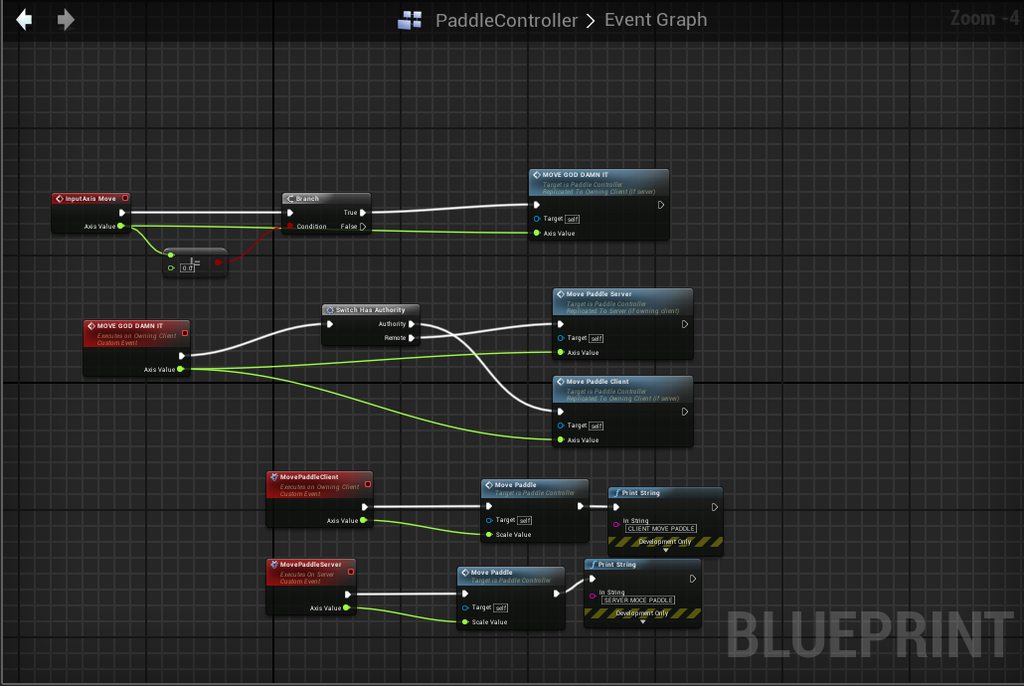
@polar portal Newbie, but I think the issue is because that is being executed in clients and the server "copies" of the players. I guess you want to encapsulate all the event into a Owning Client custom event and call that one from the input event
So Input Axis Move connected to the new custom event. And that custom event is a "Owning client" one with all the stuff that you had previously connected to Move
 glacial lotus
too compressed , I can not see the text
Anyway I would put the condition within the new custom event GODDAMIT, not there.
When a SERVER custom event is called from an owning client, does the Server knows automatically the player controller of the owning client or does that need to be passed as a variable somehow?
@polar portal the latest qustion is not for you, I'm just asking in general
 strong abyss
Does anyone know how to get a steam avatar?
 worn nymph
yes 2 options as far as i know. use advanced sessions plugin or do it yourself via c++. i have made a bp function that can get the avatar. i can show you the code later if you remind me as im afk right now
@strong abyss
 native axle
@worn nymph Can u call get avatar from the clientside? I was using adv session and couldn't get it to work. Was going to try to replicate it from the server.
worn nymph
@native axle not sure i dont use the plugin. i did it myself with c++ and exposed it to BP and made my own BP nodes. yeah i do it client side after the player has authenticated with steam doesnt make any sense really for the server to be doing it
native axle
@worn nymph I think there was a problem with replicating one of the structs adv session used to ID players. Will shoot you a message about ur code later 😀
worn nymph
ok np i should be home at around 3:30pm GMT time
 tawny parcel
What is the proper way to replicate construction script variables? The actor spawns just not with any exposed variables set properly.
 twin juniper
@tawny parcel Mark your Vars with UPROPERTY(Replicated) or ReplicatedUsing=OnRep_Function.
If you want to expose the properties to the editor add the macro EditAnwyhere or VisibleAnywhere in your UPROPERTY().
Example,
UPROPERTY(Replicated, EditAnywhere, Category = "Player")
int MyVar;
tawny parcel
Sorry - blueprint coder here 😛
I know onrep functions but that would be an additonal call on the network, I'd rather it be in the initial actor replication
And all of those exposed variables are set to replicate
twin juniper
Oh I see now. So they are replicated, there just not initiallzing correctly? Try setting the variables defaults on BeginPlay function.
tawny parcel
Yea the actor itself spawns and is replicated. Can be hit and everything. But the expose on spawn variables dont take effect. Such as monster type / size / color ect
twin juniper
I see, make sure you have Switch Is Authoriy and set these vars on BeginPlay. Im not 100% why they wouldnt replicate on construction, I mainly work in C++ for the networking.
@tawny parcel yeah cant you set them as default vars or on beginplay if construct doesnt work?
tawny parcel
Yea very strange, I did a print string on all the exposed variables - the print shows them as all correct. So I just ran the construction script locally on begin play as well and it seems to be good
twin juniper
😃 nice!
 wintry ruin
I'm facing a problem with my melee weapon where I want to check the overlap with enemy during the attack animation, but my weapon is never generating collision events. If I place the same static mesh on the ground it has collision and blocks my character, I cannot walk through it. The weapon is attached to a socket with "Create static Mesh"
I tried to add every possible bind event:
still its not generting any event when I play my animation or when I just walk near to a wall and my weapon collides with it
or character
glacial lotus
When a SERVER custom event is called from an owning client, does the Server knows automatically the player controller of the owning client or does that need to be passed as a variable somehow?
 bitter oriole
The event will be called on the replicated instance of the class it was called upon on the client
If you call event DoStuff on your local PlayerController, then yeah, it will trigger DoStuff for the matching PC on the server
glacial lotus
@bitter oriole So if my player 3 triggers an input event ("shooting" let's say) and that event has a SERVERDoShooting custom event, when that SERVERDoShooting event is executed on the server does a "player controller" node match the original player 3 player controller?
bitter oriole
If you called SERVERDoShooting on the local PC, it will be executed on the server for the remote PC matching that player
glacial lotus
@bitter oriole Great thanks. That solves a doubt that I was dragging since I started with all the network stuff
drifting plank
Question I didn't find the answer : The net cull distance is based on the actor root location or the actor camera location ?
I've very strange behaviour with a unzoomed camera and I change the net cull distance to higher and higher value and the actors still doesn't appear when I have near them
Target arm length : 900 -> All is fine !
1200 -> It begins to be strange (Pawn appears when we are very near)
1500 -> Pawns are totally invisible but present
twin juniper
Details > Render > Bounds Scale
On your mesh
Could also be camera near clipping setting.. maybe.
Anything close will be clipped, culled.
drifting plank
I have tried to change the near clip to some values. Nothing changed
twin juniper
Did adjusting Bounds Scale do anything for you?
drifting plank
Nothing too 😦
It's just a relevancy issue. I have unzoomed very high and my ground disappear too
twin juniper
So playing single player works ?
drifting plank
But changing the cull distance doesn't change anything. It's understandable
twin juniper
No culling when your just playing as Server?
drifting plank
Yep
twin juniper
Okay well atleast we know where to look! 😃 Im thinking I know what it is.
Sec have to find the check box!
drifting plank
Ok I need a good explanation about relevancy. I didn't find a good documentation about it
twin juniper
@drifting plank Theres this brief summary on Relevancy from the docs. https://docs.unrealengine.com/en-US/Gameplay/Networking/Actors/Relevancy
drifting plank
Yeah but it say nothing about origin of the relevancy
And why the camera has this behaviour 😦
twin juniper
Heres another breakdown on relvancy and replication, its also breif.
https://wiki.unrealengine.com/Network_Replication_Events_And_Relevance_Table
So the issue is, the clients will dissapear and reappear when you zoom in and out?
@drifting plank Maybe take a look through this as well, see if it could help you diagnose your issue. http://timhobsonue4.snappages.com/culling-visibilityculling.htm
Unreal Engine 4 tutorials, Tips & Tricks, and other curiosities!
If its a clipping / culling issue, it will be in here somwehere.
drifting plank
But it's only an issue in network
With a huge distance on single player all works fine
But thanks for the link 😉
i will try to implement manually IsNetRelevantFor
Ow just found the solution ... it was a old variable which override the net cull distance 😦
twin juniper
Ah, its always some odd checkbox or variable! Glad you got it solved!
for multiplayer game need I a server?
I want to make a survival multiplayer game with chat an at least 2 people to play together-is this a hard to make?
drifting plank
You need a hosted server or a dedicated server
twin juniper
I know from Microsoft there are free servers but I don't know they do work or not?
this is useful or not for multiplayer game?
@twin juniper try t2.micro . free for a year
 fluid adder
anyone know why my OnPostLogin event isnt firing?
i have a print string right after it and its not printing
ok never mind i found my problem
twin juniper
can you send me a link to it @twin juniper
fluid adder
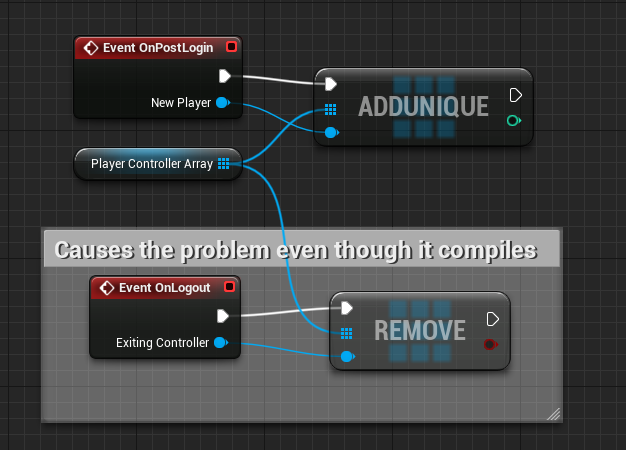 twin juniper
@twin juniper here's my pipeline for it. you just have to spin up the instance. it's free for a year if you do it right. make sure to get free tier server.
fluid adder
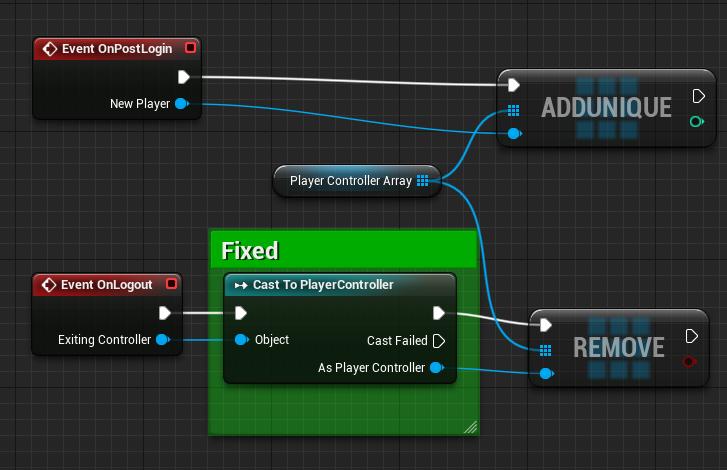
it seems even though it compiles properly it still has issues with removing a <controller> from a <playerController> array
https://i.imgur.com/ftDa9Wn.png
 twin juniper
@twin juniper YOINK! Thank you sir...
haha
welcome
Going to using that as refrence for sure. Thank you!
@twin juniper this that you send from which site is-can you send me a link to it please??
i was just updating my ded server to 4.20 😃 getting some logging issues but ram appears okay serverside
Noob lmk if you have any questions or concerns along the way, i'm usually here 24/7, just ping me
I just did my first local multiplayer test today, went very well. Do I have to build from source to have a dedicated server in the end? Binary wont cut it?
pic of my dedicated server remote dekstop. fun stuff
yep i source build to have development editor / development server builds
then you use project launcher to build out the Server in stagedbuilds
after that, the ram is optimzed
KK so to test a dedicated server I have to build from srouce?
yes, as far as i am aware - haven't tried it without.
you can possibly try to avoid source building if you use the project launcher
Yeah thats what most of what I read pointed too, is that binary wont cut it. Thank you ! 😃
in windows -> project launcher. look at allars post on dedicated servers on his blog
Yah I have, hes great.
dedicated servers unreal allar
yeah
I basically just suck down every resource I can about UE4.
Allar, Orfeaus, Tom Looman , Ray wanderliech, Rama, these guys have some really helpful content.
I plan on making some tuts at some point too. Just to give back to the community.
yeah the udemy cpp ones that ben tristem did is pretty good
guy used to be a fireman lol. 🚒
smart cookie
There are alot of "Gotchas" in the engine, a simple hidden checkbox can send you in a demotivating spiral because you had no idea of its existence! 😃
@twin juniper I wrote you in DM
Yah I plan on buying his course next, I bought the Tom Looman Multiplayer, cant recommend it enough!
@twin juniper just tested it on 4.20. works good 😃
only problem is now i have minor net lag in my ded server. gotta literally go thru and optimize all RPCs
less reliable calls / try to reduce all replicated vars
i can safely say though that t2.micro is a great option, especially if you are based in the u.s. since you can easily find a location close to you
And get rid of all visual fxs too, Ded server doesnt care about those things! :0
yep its basically a build of the game in server mode, and you connect using exec console command open x.x.x.x - thats what i do
I was wondering about horizontal scaling, since EC2 all have instances, is this handled all through amazon or node.js ? I have a ways before I get to these questions really, but I have so many! 😃
lol
very direct, no custom RPCs like in gamesparks
oh, i only have one test instance
and direct ip connection, i dont even use the API to get IP
not sure on multiple instances or scaling
you might need to look into if its still free as well
Oh Im sure it wont be! 😃
i know its free for one year if you're ram use is low
Yah I set up EC2 and S3 Buckets all the time 😃 I love amazon!
one thing i can say that helpe dme is this - might help you too if you get to that point
my ram was thru the roof for a while
when i used project launcher, it optimized it a lot
i went from 1 gb ram to 150 MB
I see good to know wow.
yeah
so follow allar's post on ded servers to the letter.
he goes thru the project launcher in there
do NOT use vs 2017 -> development server -> take exe and put on aws
build it out once in vs 2017 for a ded server local binary, and let the project launcher do the optim for you
then take it from staged builds
Yah so far, Im using this guys method i found on the forum. Perfect for me to test locally atm.
Build project, litterally type in console "Open MapName?listen"
The client just types in Open LocalIP
Unreal Engine Forums
Build powerful visual scripts without code.
Fastest way I have found without doing any batch files or making the clients do anything crazy. Just type open and my ip! 😃
they just open the cooked build and so do I 😃 either one of us can act as listen server
Ofcourse doesnt help me testing ded tho...so thatll come later, im wayyy too lazy to do all that stuff atm lol.
i use a static IP that amazon provides once the instance is spun up, it's always the same for me
but thats good for local testing
cool
😃
if you can get it working in 2x pie windows you're pretty much good.. as far as testing goes
that worked for me more or less
then of course i had to get steam working
Yah I just kept searching a way to test locally until I found the fastest simple way, lol
so i had to test on two machines for that
Had to go through tons of posts about making batch files or doing this or that, ehh.. nah. lol Glad I found this post!
Part of the reason I want to make tuts, just encompass all this information in one place.
i literally only use batch files for steam builds, and drm wrapping
Yah there nice when you wanna get to real testing.
i need to make a batch file for UAT / unreal building too
Batch files I mean.
i havent looked into batch uat yet or any kinda building templates
would save me a ton of tiem tho
Yah it all addds up!
What type of game you working on?
a 6dof game
its on steam now
pre early access
degrees of freedom?
Or..
yeah like descent
from the 90s
or descent underground, or forsaken, or overload
Ohh cool, id love to check it out, whats the name?
ill dm u holdon
twin juniper
okay
thank you(редактирано)
but I want to make my game with Blueprint not C++ is this problem for the server? @twin juniper
twin juniper
@twin juniper you can make the game in BP and still build out the server using development server option in vs 2017. once you do that, use the project launcher like allar says in his dedicated server guide on the blog. it still works. just make sure to use execute console command open x.x.x.x from the client, and the server must have a static IP. that's how i do it. easiest if you always know the IP And if you have a dediacted instance it automatically generates it. stays the same. just follow the guide I DMed you and it should work. it might take you a few weeks to figure everything out. good luck to you.
thank you
if I need help can you help me?
yep but only when i am on here. i am usually developing my game and need to focus on that. if i don't answer right away i'll get back to you in a few days maybe, unless you ask on here or on the unreal answerhub.
strong abyss
@worn nymph Sorry I was sleeping. I would love to see how you did it if that is alright. 😛
glacial lotus
Offtopic: In english if I want to say that the internet speed is slow as the ones from 20 years ago, Is this right "20-years-ago internet speed"? "20-years-old"?
twin juniper
I'm using a timeline/curve to change the values of acceleration and ground friction over time. This desyncs very easily and at relatively low latencies, and the client gets constantly corrected because the timeline starts later in the server. What do?
@glacial lotus "20 year old" probably works better
glacial lotus
@twin juniper Thanks
worn nymph
@native axle @strong abyss @thin stratus
sorry was busy here you go.
cedric tagged you because i used a small portion of your code as mentioned in the pastebin comments

Pastebin
strong abyss
@worn nymph Thank you! That is very clean and easy to read. You're awesome!
 potent raven
Anyone else having issues connecting to dedicated server on 4.20? https://answers.unrealengine.com/questions/810378/420-dedicated-server-login-failure.html
 halcyon cradle
hello how can i spawn an object in the server and avoid its replication?
halcyon cradle
i use a custom event with no replication and the spawned actor is also not using replication
tawny parcel
I'm having issues getting the correct branch statement for showing/hiding nameplates in a multiplayer settings. I use a collision sphere overlap event to generate the show/hide on the nameplate - this part works fine. However all collision sphere's in game are triggering the show/hide and not just the owning players sphere. This is only a locally run event and not replicated however
twin juniper
@tawny parcel I would usually check if owner is = for such things
tawny parcel
Yeap, trying that but for some reason it is still triggering. My example would be three players in the game. One is outside range of the other two for the nameplate to not show. However as the other two get in range of each other the nameplates hide/show for everyone, not just those two players.
tawny parcel
I even have the sphere as only owner see, which i guess is purely a visibility statement?
 ripe stratus
Ok - been a bit over a week since my last question and I've been continously banging my head on yet another replication question.
Chess game - game pieces created by server. So therefore they are "owned" by the server. Playercontrollers interact with them and can select them, move them.
In their Tick methods they slowly Lerp their way to to their destination. If they collide with another piece ( PieceMesh->OnComponentHit.AddDynamic(this, &AGamePiece_Base::OnCompHit); ) they call my own function SendEventToPlayer(EPieceEventType::VE_Killed);
void AGamePiece_Base::SendEventToPlayer(EPieceEventType EventType)
{
ASC_PlayerController* PlayerController = Cast<ASC_PlayerController>(UGameplayStatics::GetPlayerController(GetWorld(), 0));
PlayerController->GamePieceEvent(this, EventType, GetActorLocation());
}
on my player controller
UFUNCTION(BlueprintImplementableEvent)
void GamePieceEvent(AGamePiece_Base* GamePiece, EPieceEventType EventType, FVector Location);
This event only happens on server and I've tried every which way I can think of to make it transfer ownership to owning playercontroler on client
winged badger
there is no networking code there
at all
you just sent the event to your PC blueprint
on server
ripe stratus
My question is at that point is what is the best way to send the message to the client - I'd happily do it in code or blueprint if I could figure out which one would get it to work. I'll get a screenshot of the blueprint in a second
( I hit enter before intended - was still trying to type )
winged badger
// ASC_PlayerController.h
UFUNCTION(Client, Reliable)
void GamePieceEvent(AGamePiece_Base* sender, EpieceEventType eventType);

// ASC_PlayerController.cpp
void ASC_PlayerController::GamePieceEvent_Implementation(AGamePiece_Base* sender, EpieceEventType eventType)
{
    ...
}
also, if you are using listen server
that SendEventToPlayer function will only send it to itself
ripe stratus
I've tried with listen server and with dedicated server
I'll give your suggestion a shot - I apparently am in a noncompilable state right now - can't get the blueprint screenshot at this moment
winged badger
it won't work as intended with dedicated either
but at least one client would get all the notifications
ripe stratus
hah that is true so far
winged badger
i strongly suggest looking at pinned resources on this channel and reading thru Cedric's compendium first
ripe stratus
I've been looking it over but feel like I must be misunderstanding some vital piece. I have made it past more than a few hurdles with that priceless resource.
winged badger
i'd never go for collisions to signify "kills" in chess either
ripe stratus
I'll look it over again. Been looking at that and Tom Loomans udemy course.
winged badger
you have A-H, 1-8
and pieces moving is just an eye candy, for the game to function they might as well teleport
the collision event will also fire on both client and server
ripe stratus
It isn't exactly a standard style of chess. There is no concept of turns and all pieces could be moving at once. Perhaps not the best idea to go with on the first networked game
there is a large amount of logic that I was dropping out here - I understand that for a standard game of chess your comment there is completely valid
not all collisions result in a death - some result in a deflection. All the game logic works out fine - I'm just trying to get the nice pretty fx and sounds to work at this point
winged badger
you can stick your sound and fx asset references into your piece actors themselves
have them play when they detect a collision
tawny parcel
This is the issue - far left player is out of range yet still receiving hide/show when other players get close to each other. I have a sphere collision executing hide/show of the nameplate.
winged badger
it will work without network
that would be UMG displayed on some collision trigger @tawny parcel ?
ripe stratus
thank you Zio - I will give that a shot later tonight - sadly I don't have time to give it a spin just now.
tawny parcel
Yes, yet for some reason I can't turn off other players sphere collision or get the right branch to only execute on your own collision's
winged badger
for every player (and +1 for dedicated server) there is an instance of your Character
each has one
each reacts to collisions
and each executes the code to show the widget
you need to filter it with IsLocallyControlled (for Pawn) or IsLocalController (for PC reference)
if you are making your trigger call whatever is displaying the widget, and are using OnBeginOverlap, you will have to Cast OtherActor reference to Pawn first
or to Character, or your specific Character class doesn't matter, as long as its derived from APawn
tawny parcel
I have this right now, I see the islocallycontrolled node trying that out !
@winged badger worked like a charm man - thanks a ton. I was trying to find that type of node forever!
Result:
winged badger
that is inside your ThirdPersonCharacter blueprint?
if so you can lose the GetOwner and the Cast node, it will work just as well without them
tawny parcel
Tried - it wont connect!
winged badger
you don't need to connect anything into the IsLocallyControlled
it will default to self
and that self is same as the Component's Owner
just the exec into the Branch
again, only if that is inside your ThirdPersonCharacter BP
tawny parcel
@winged badger Sweet deal, all setup!
 autumn dawn
Anyone recommend a video for learning how to add multiplayer?
twin juniper
@autumn dawn If you are using C++ I would buy Tom Loomans course for Mutliplayer on Udemy. Very informative. You should have a bit of experience using C++ and UE4 tho.
@autumn dawn If you are looking for something free, he also has free resources on his site. http://www.tomlooman.com/survival-sample-game-for-ue4/

C++ Survival game covering common gameplay concepts packed in an open-source project. Series includes C++, AI and Networking.
It is multiplayer.
autumn dawn
How about using Blueprints?
 crude lion
https://www.youtube.com/playlist?list=PLZlv_N0_O1gYqSlbGQVKsRg6fpxWndZqZ
https://www.youtube.com/watch?v=uCjXJD9AhqY

YouTube
Video Tutorial Series In this video series, Wes Bunn from Epic Games walks you through creating a networked game with Steam integration entirely through Blue...

Developer Relations Technical Artist Alan Noon and Engine Programmer Ryan Gerleve walk us through the creation of the Multiplayer Shootout game. Learn about ...
 rose egret
hi. can someone send fake or corrupt UDP packets to UE4 dedicated server? I heard it crashes the server ! does UE4 authenticate packets?
 wet oriole
Hello guys, I've a problem with creating onlinesessions using steam, when i use the default 480 app id i can create a session but when i use my app id i can't create a session and i've this error : Warning: Async task 'FOnlineAsyncTaskSteamCreateLobby bWasSuccessful: 0 LobbyId: 0 LobbyType: 2 Result: '15' k_EResultAccessDenied (access denied)' failed in 0.405532 seconds
I didn't add any exe to steam partner page and i'm running as standalone version not packaged project
 charred crane
I've been digging trying to find a way for my client to destroy session so he can join a new lobby but I can't figure anything out. On my main menu begin play I call Destroy Session but I never get a successful destruction. I did manage to get the player to leave a game in progress with a successful DestroySession call, but he's still unable to re-find and join that session. I've searched back through this chat to december of last year and tried all of it. Can anyone help?
charred crane
I didn't see that it was fixed in the 4.20 notes either 😦
I also removed the destroy session call when leaving the game and still can't find any sessions.
 arctic willow
Why does the steam overlay pop up when testing within the editor and not show up when i start in shipped version? I use the Steam sdk version 142 and think that i followed the Unreal Documention correctly
 mild geyser
I'm trying to call server function with uobject parameter but it's never called. Instead, I get this:
Warning: UPackageMapClient::InternalLoadObject: Unable to resolve default guid from client
Has anyone experienced the same? If so, what seems to be the issue here?
native axle
@charred crane There maybe a better way but what I found was the easiest way for the client to disconnect is to move to another map. So I have a MainMenuMap -> LobbyMap -> GameMap. And if the client ever wants to disconnect, just open the menu map. Inside the menu map GameMode you can call destroy session.
winged badger
@mild geyser i'm gussing the class the function is a member of is not set to replicate, or you have an actor the client spawned itself, and there is no corresponding version on the server
@wet oriole iirc steam lobby system will check for game ownership before letting you join
so the steam client account your machine is running must have the game in the library
 keen halo
What would be a good way of setting up character sounds in multiplayer?
Like for example the sound of casting a spell.
Having a audio component would be one way and multicast ”spawn sound on location” would be another.
Any pro / cons or other suggestions?
twin juniper
@keen halo I would use Audio Component for ambient sounds that need to loop. Like a camp fire crackling. You can also just use Anim Notifys which I found to be super easy to implement. Probally the best way to get sounds implemented fast.
Another method is to add a SoundBase* SoundEffect; to your .H file. Then in the editor you are able to choose the SoundEffect. Ofcourse you have to code where to use it, like when the player shoots, or casts a fireball.
I would personally avoid having AudioComp on your player, weapons, for multiplayer, every Component adds more overhead.
keen halo
@twin juniper Thanks! Yeah I would not consider an audio component for sounds that only play occasionally.
But since sounds that are used when doing attacks play very frequently I thought it might be worth it.
But I might be wrong 😃
twin juniper
Try Anim Notifys, very very intuitve. Especially for stuff like Foot Steps or mutliple sound FX in a combo. Like a charging sound then an actual fireball sound could happen right in your animation, so you can time it really well visually. Makes having multiple sounds for a single action easy to implement.
keen halo
@twin juniper I will try that! Thanks!
@twin juniper Just one concern... by using anim notify to play sounds.
Can I have different sounds playing with the same animation? That is if I am reusing the same animation for multiple spells.
twin juniper
@keen halo You can call an event (function), instead of a sound, and then choose what sound to play in the function instead.
 finite bison
where do i have to look to get the server or client name (as shown in the pie windows when running multiple pie's)?
 compact gulch
is FloatingPawnMovement suitable for network game?
does anyone know if they're usable?
it seems that this movement component will jitter a lot
 slim holly
iirc floating pawn movement does not have networking
^ not a multiplayer issue, and you probably ran out of ram
yea filling 16GB is no problem with big projects
crude lion
Hey TheCruSheR, please don't post your problem in so many threads here on this discord. Find the one that relates to your issue and use that
I don't mind, but other people might consider it spam 😉
https://www.twitch.tv/videos/122529021?t=18m00s
https://conanexiles.gamepedia.com/Modding
Maybe you can find what you need here


Conan Exiles Wiki
Sorry I haven't had experience with the Conan Dev Kit, but I'm not sure if you can just look at the files that THEY made. I think it's only for creating new stuff.
What is your actual goal? Do you want to make a game that is like Conan?
I would recommend that you look at tutorials, and not a finished AAA project.
Tutorials will give you a better way of understanding the engine.
If you look at their code you will just see a lot of things that are too complicated and that you don't need at all.
Try something like this: https://www.youtube.com/playlist?list=PLgyA4MNDbNLlXTBpZAx0GlWCzQbIQ9EaA

We should also stop posting here, because this is the "multiplayer" thread
I don't know much about Conan Exiles Mod Kit, but in my experience it's easier to start making a veeeeery basic game first to learn your way around the Engine.
Try making a very simple Pong or Asteroid game, then package that game and try to run it.
You will learn so much. I tried making a multiplayer shooter game as my first project, and after 2 weeks of struggling, I found out that I had 1001 things I still needed to learn.
I get that you want to make an awesome game, but you need to learn how to make a simple game first if you want to not have simple issues while you are developing 😛
Ok, you can DM me the link and I will give you feedback! 😃
 hybrid cypress
Ahoy! I'm trying to update my capsule size for different sized player races on login, and am using SetRelativeLocation on the player mesh to adjust it to fit in the newly sized capsule. This is working locally but when viewing another client the mesh offset is not being applied. Turning off Network Smoothing Mode in my CharacterMovement component fixes this and properly replicated the mesh on other clients, however this makes client movement way too choppy. Does anyone have any ideas on achieving this without disabling network smoothing mode?
wet oriole
@winged badger Of course the ownership is important and I've it
 severe berry
Movement replication replicates the movement to everyone except itself.
It used to be different, is this normal?
charred crane
@native axle that’s exactly what I do. I send them back to the main menu with OpenLevel and then when they get to it, on the level bps begin play I call destroy session but it says there are no sessions. That client is never able to find/rejoin the existing session. I haven’t tried it in game mode but I can’t see why that would make a difference.
 unique thunder
If I have these two scenarios:
- Event Beginplay > Spawn Actor
- Event Beginplay > Switch has authority > Spawn Actor
Will the actor spawn in both cases but in case #2, it just prevents cheating? Or does case #2 somehow tell the server to spawn it whereas in #1 it doesn't spawn (on the server, client-side only) because it didn't have the switch?
winged badger
scenario 1 will spawn actor on both client and server
the one that client spawned will not match the server actor's NetGUID
unique thunder
So as long as the action is replicated, it'll spawn regardless but the switch ensures the client isn't the one doing it
winged badger
so replication and RPCs will not be possible
 thin stratus
1.1. (Actor non-replicated) - Actor Spawns on Everyone
1.2. (Actor replicated) - Actor Spawns on Everyone and a second Copy gets created from the Replication
2.1. (Actor non-replicated) - Actor only spawns on Server
2.2. (Actor replicated) - Actor spawns for everyone
And well, non-replicated doesn't allow RPCs etc. as Zlo says
If you don't use the Switch and the Actor is replicated, you'll end up with 2 Actors on the Clients
The Replicated one, connected to the one the Server spawned
And a Client one
So you want to always only spawn Replicated Actors on the Server
winged badger
the important thing to understand, that aside from a replicated Actor having a matching NetGUID on client and server (which allows server to "overwrite" client Actors variables, and for RPCs to be sent)
the server's and client's versions of the Actor are independent
each will fire its own BeginPlay, its own Tick, its own OnBegin/EndOverlap
unique thunder
So if the server spawns it on authority, I get one spawn but on each client including mine which is what i want
thin stratus
If you spawn a Replicated Actor on the Server, you end up with a copy of it on the Server and each Client, while these "copies" are connected via the NetGUID (allowing RPCs etc.).
The SwitchHasAuthority is really just limiting the call
Your BeginPlay calls on Clients and Server (IF the Actor exists on everyone)
So you need to filter the clients
They shouldn't spawn the Actor themselves
winged badger
alternate way of filtering (which comes to play when you only want something done on a local machine, like show a widget when a player enters overlap) is to filter the action by IsLocallyControlled (from Pawn/PlayerCharacter reference) or IsLocalController (from a PlayerController ref)
severe berry
thin stratus
Mark the Cube Component as Replicating
severe berry
I tried, it works but it's very bad, it jerks
thin stratus
Well yeah, you aren't doin any form of Interpolation etc.
All that UE4 does for you when you use something else than a character is setting the location
Server says: "Here is new location." And Client applies it
Even if that's 10 minutes ago and you suddenly teleport to the new location
severe berry
yes I know that
in 4.18.3 everything worked fine, with no cube component replication enabled
severe berry
and here at 4.20 it just stopped replicating on the client who owns the pawn
thin stratus
But you just said it works if you mark it as ReplicateComponent
And I'm kinda sure that it always required that, even pre 4.20
severe berry
 unique thunder
any of you guys using 4.18+? I can't get number of players to be 2 or higher whilst seeing all of my windows at the same time, they overlap in the center. And because I'm doing VR, I don't have my cursor, it takes a while to tab in and out to align them and their positions reset after each play
severe berry
@thin stratus no, it was not required before
 elder crypt
Does anyone know of any multiplayer scoreboard tutorial?
One kind of like CSGO, Overwatch, and all that?
Thanks!
severe berry
elder crypt
I've google searched that but most aren't for multiplayer or aren't updated properly :P
 wide parcel
Do you want a step-by-step walkthrough or just a general idea? Cause I can do the latter. 😛
elder crypt
A general idea would be good, yeah :) @wide parcel
wide parcel
So it depends on whether you're interested in team scores or indivduals. Team Scores can be kept in GameState and just queried anytime. For individual players you're going to use a thing called PlayerState to keep track of their scores. When the level ends look through all your ACharacter classes and check their player state and pipe it through UMG or slate depending on your preference.
And actually GameState has a member PlayerArray which holds all PlayerState
*s
So you would just loop through PlayerArray for individual scores.
elder crypt
Okay :) I sorta want a tab menu that constantly updates all of the players' scores. What I've done is have the scores inside of the playerstate
How would I show all the player's scores on a UMG?
That's kinda where I'm stuck on
wide parcel
Are you using blueprints or c++?
elder crypt
blueprints
wide parcel
Hm alright, lemme think for a sec.
elder crypt
Okay :)
wide parcel
I think you would just cast your character reference to a PlayerState: CastToPlayerState->Get Score, send it to the server and have the server collect all the scores and names, send that data back to the client and have bindings in the UI for that data.
And for the constant effect have it on eventtick (both the client and server) with maybe a small delay so you're not going crazy with all the back and forth.
elder crypt
Where should I store all of the scores?
Which blueprint should I store it in, rather*
wide parcel
Really up to you honestly as long as you know it's accessible during the match. Could put it in the level blueprint.
elder crypt
Alright :) I can get it so the server can see all the scores for each player
But the other clients can't
wide parcel
Well half the battle. I've not done multiplayer code before so I'm shooting blind here. 😛 You've collected all the data on the server and it looks good. Is anything showing up on the UI?
elder crypt
Yeah 😂 The clients can only see their own score
 sharp pagoda
A trap store scores In the player state
elder crypt
I'm doing that :)
wide parcel
Sounds like something isn't working in the UI EventGraph.
sharp pagoda
The player state is replicated to all clients, so if you setup your netcode correctly it will work
wide parcel
Oh hey, that would make life easier. ^
sharp pagoda
Lane never ever do what you just said
The level bp is literally the last place to put it
wide parcel
I was just thinking it was no good. You'd probably want it to persist after. 😛
elder crypt
@sharp pagoda The score variable is replicating between the players (inside the playerstate)
I just don't really know how to gather all of the scores and list them on a UMG
sharp pagoda
Iterate through the player states and read the values of the scores?
wide parcel
ForEach loop inside the UI blueprint. Make a function that draws a row, and yeah just grab the scores out of PlayerState.
elder crypt
I don't know what that stands for :(
sharp pagoda
Object oriented programming. UE is impossible to use without having a good understanding of it
You should reaf up on the subject before you go any further
hybrid cypress
Anyone else ever have an issue with adjusting capsule half-height and then trying to set relative location on the mesh not replicating for multiplayer? Clients see themselves fine, but see other players' meshes not correctly adjusted within their capsules. Turning off network smoothing in the movement mode fixes it but then makes movement sucky. 😦
winged badger
then push it another way
if you're adjusting capsule at runtime
you can put a FTransform CapsuleOffset variable
replicate it
and then have the clients locally adjust theirs OnRep
but why are you adjusting it at runtime? can you switch race mid-play?
because if one client knows how to adjust the capsule, everyone does
@hybrid cypress
 tranquil flint
Ello ello! Does anyone know how long it might take to set up a very simple multiplayer movement + chat session? Like a blank default area, with only two people playing(hosted on one machine), with simply the ability to see eachother move around and employs the most basic of chat messages. I'd take two answers if needed, based on:
- How long to set up for you or an experienced-ish Unreal-er-maker-doer-crafter.
- A newcomer, perhaps via some tutorial(s) (you can use the video-length of the tutorials total, here).
 severe widget
1. < 1hr
2. ??? (depends massively on the person)
hybrid cypress
Thanks for the idea Zlo, I'll try that! Well I have some illusions and animal form abilities that should really have unique capsule sizes, apart from those right now I'm simply trying to initialize the capsule sizes based on race when players log in.
tranquil flint
Thaank youuuu @severe widget the < 1hr is massively useful to know. I'll just round up to 6 hr then xP but I won't be surprised by 10+!
 toxic seal
Is it possible to create and join LAN session with the running steam?
twin juniper
anyone know why the log in my dedicated server is empty? everything works (clients can connect), i just get no log. i enabled -log in the dedicated server binary shortcut.
thin stratus
Hm, Shipping or Dev?
twin juniper
sorry for delay - i am using shipping. i am using a shipping build, and i built out the dedicated server using the unreal project launcher (as how allar stated in his dedicated server blog)
these are my settings
get a decent sized ram footprint too, everything works as in 4.19.2R (ram footprint is similar in this build too, maybe a bit less with their 4.20 optimizations) i just get no log :X
rose egret
how to I connect to dedicated server with specified port
this one dosen't work
UE4Editor.exe "C:\Unreal Projects\TPBP\TPBP.uproject" "127.0.0.1:3434" -game -log
I also tried adding -port=3434
the server is listening on 3434
glacial lotus
When I spawn an actor from the server it should be spawned in all the clients too and also with the same transform, right? Because it's appearing at random places...
my actors are not characters, just in case
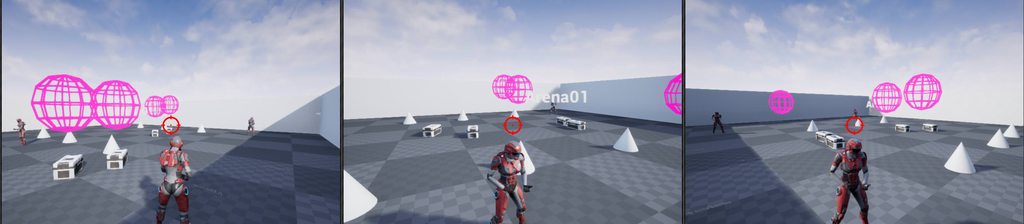
The left picture is the listen server, the other 2 clients 1 and 2. I noticed that the listen server has correct locations, since the rewards(crates) appear where the enemies died (the spheres). The clients have incorrect locations for the rewards however they are consistent. If you take a look you can see the rewards have been spawned in the same positions (incorrect, but consistent between remote clients)
well, turns out the locations in the clients are not consistant. I just got a few impressive coincidences... I should play lotery today 😃
icy nacelle
I've got a quite large problem here that I cannot figure out.
(This is all on a dedicated server with two clients)
When client 1 shoots client 2, the player controllers inputted into the functions (circled) come out as the same player controller.
When client 2 shoots client 1, the player controllers inputted into the functions are different (as they should be)
Any idea why this is happening? This is definitely running on a dedicated server.
unique thunder
@icy nacelle Are you testing in the editor or packaged build? I could be wrong but running with 2 players locally only gives you one client and one server, not two clients. That might be why you see those results.
Anyone know why this causes me to hear the sound effect (inside the function) play twice?
Is it because I have server and client open at the same time in preview?
icy nacelle
I am playing in editor, but I dont think its this problem as I'm grabbing multiple controllers
And yeah as for your problem, it probably is.
 wispy silo
anyone here familiar with Advanced Sessions? I am trying to create a session and each time it gets executed it first fails then succeeds
and im not sure why it does both rather than one or the other
actually, it isn't the plugin. The vanilla node Create Session does it too
the node is Latent so i guess this is intentional?
nvm im dumb, found a bug on my end
winged badger
@icy nacelle what do you suppose GetPlayerController[0] does on dedicated server?
 chrome bay
Anybody else run into the issue with listen servers not being found through Steam in 4.20?
Code worked prior to 4.20, doesn't anymore. I know they added Steam Auth, trying to work out what's actually changed.
icy nacelle
I'm trying to get the controller of the player - I know that the Event AnyDamage runs on the server but I figured this will get the controller anyway.
winged badger
yes, and it will always get the same controller
dedicated server won't reshuffle its list of playercontrollers based on your context
winged badger
use GetController instead
i assume that is inside the PlayerCharacter
with current solution the player that logged in first would be the victim every single time that runs
no matter who shot whom
winged badger
GetPlayerController[0] gets the local controller, except on dedicated server - where there is none
GetController gets the Controller possessing the Pawn
icy nacelle
ahhh
chrome bay
Dedicated Server's have Player Controllers, just not one for themselves (since there's no 'local' player)
Just the PC's of the clients
icy nacelle
So when doing anything on a server event that requires getting the controller, I should use 'getController' and not 'getPlayerController'?
yeah @chrome bay that much is obvious enough 😛
winged badger
GetController requires a Pawn reference
from inside your ThirdPersonCharacterBP that should be "self"
winged badger
@chrome bay what are you using to connect?
chrome bay
How you mean?
winged badger
the built in engine code, or some plugin?
winged badger
is your server on the same machine as the client?
and do both steam clients own the game?
chrome bay
It's a listen server in this case
In 4.19/below - I could use another machine with another steam account and find that session
but now, nothing shows up
Seems the session is created properly though
chrome bay
yeah
winged badger
no idea then, i'm still at 4.18
chrome bay
they're both running the game, one is searching in-game at the time
They must have changed something for 4.20
Gonna dig through shootergame to see if anything has changed in regards to creating/finding a session but doubt it'll have been updated properly if that is the case
winged badger
maybe check advanced sessions if 4.20 version is already out as well
not a lot of code to go through there
chrome bay
I'll have a look, someone else was having the same issue in both Adv Sessions and default OSS. No replies to their post yet though 😦
Sigh
Multiplayer
the joys
winged badger
i am waiting for UWorks to catch up to 4,20 before upgrade
chrome bay
Have they finished their OSS replacement yet? Trouble I've got it that plugin is great if you're only shipping to steam
If you're multiplatform it's a bit of a pain
winged badger
when i was first wiring it up
i had troubles with NAT punchtrhouugh
so i wired 2 OSS in it
just needed to change few lines in DefaultEngine.ini to swap
chrome bay
yeah
I grabbed it when it came out because I was so sick of the native OSS having so many issues and being old.
But without all the code being behind the OSS wrapper it means I've got to do all the online stuff twice over for the other platforms
severe berry
winged badger
Vlad did alot of improvements, but i haven't kept up to date
glacial lotus
I need an example of how to span an actor (not character) in the same location for all the clients
winged badger
if you spawn it on server and its replicated, and relevant it should just work
 deft plaza
When I spawn an actor from the client replicated to the server it crashes my game, anyone experience that? But it works fine when I spawn on the dedicated server
chrome bay
Aha. This looks interesting.
+Components=OnlineSubsystemSteam.SteamAuthComponentModuleInterface```you can't repllicate anything from client to server
glacial lotus
@winged badger Hmm, I'm going to delete all the extra stuff I have and try just the spawning
deft plaza
then do i have to do something like server->multicast?
winged badger
you can send a ServerRPC which spawns a replicated actor
if the object you are sending the RPC from has the PlayerController as the NetOwner
deft plaza
I think thats what I am doing, the client is calling a server rcp to spawn an actor
winged badger
there are also likely LogSpawn entries in your OutputLog
and if you only think that's what you're doing, paste the code
deft plaza
winged badger
and the crash report/log?
glacial lotus
Found my issue! the spawned actor has physics enabled and that seems to be a problem. If I disable the physics it works but the actor is floating in the air... I just need to make it fall... somehow
winged badger
popular methods are linetrace in 0,0,-1 direction until you hit the floot
or ProjectPointToNavigation
you might have to offset the location by half Extent.Z in positive direction after, too
deft plaza
the log is empty
winged badger
if you crashed there is a log in Saved/Logs
deft plaza
oh wow theres different logs, unreal kept opening the console logs. I'm reading through it now. Thanks for the help.
 marsh gate
Would it make sense to seamless travel players from the multiplayer match back to the pre-game lobby after it has finished? Or should it be a non-seamless travel?
twin juniper
Can anyone help me with something related to advanced sessions?
winged badger
non-seamless will disconnect and then reconnect them
twin juniper
does anybody know how to call an event on a character bp when the character connects / spawns in, for advanced sessions?
glacial lotus
@winged badger Thanks. I'll try that
winged badger
you have a valid PlayerController there, but nothing else
OnPossessed in the Character, but works only on server side
overriding AGameMode::HandleStartingNewPlayer also works, but you will have to Spawn the Character Pawn manually if you do that, or call a Parent function first
AdvancedSessions don't have anything to do with it tho, @twin juniper
the plugin's work is done before the Character is created
note that both the GameMode options are also server-side only, as there is no GameMode on clients
twin juniper
well im currently working with a survival game kit
and they said they don't have much experience with it but they believe I should replace the event begin play in the character with some kind of event that works like that
to fix my problems
winged badger
what are you trying to accomplish?
twin juniper
I have a multiplayer system with a survival game kit
and there is parts not working
winged badger
let me rephrase: what do you want to run from the Event when CharacterBP is spawned?
 winged badger
that doesn't tell me anything
twin juniper
I just want to know how to do that
winged badger
why is it not working? what reference is invalid? client or server?
twin juniper
I don't know i've tried to find it
winged badger
and you can't, not without editing and recompiling the engine
twin juniper
all I can find is I am pretty sure most likely server
I just need to run that begin play
winged badger
that BeginPlay in BP is actually AActor::ReceiveBeginPlay which is called from AActor::BeginPlay
twin juniper
or just print string
winged badger
in c++
twin juniper
sorry I am new to ue4
winged badger
i can see that


 winged badger
yeah. that guy has little to no idea what's he talking about
if that collapsed graph on BeginPlay depends on PlayerController reference being Valid tho
twin juniper
one second
winged badger
it won't be
twin juniper
can I give you my old error
winged badger
not safe to access Pawn/Character from PlayerController or vice versa on BeginPlay
try EventOnPossessed
twin juniper
Blueprint Runtime Error: Accessed None trying to read property Player Building Component from function: 'ExecuteUbergraph_BP_Blueprint' from node: Client Toggle Build Menu in graph: EventGraph in object: BP_Blueprint with description: Accessed None trying to read property Player Building Component
I keep getting this
basically I have a item and I press a button to open a ui
winged badger
hah, there could be literally a hundred reasons for that
winged badger
is your PlayerBuildingComponent replicated?
does it exist on CharacterBP when you view the client's world in the outliner?
also, strongly suggesting you go to the pinned resources on this channel and read Cedric's Compendium a couple of times if you're going to do any networking
glacial lotus
Newbie here but @twin juniper maybe you can do whatever you want to do from GameMode overriding "Ready to Start Match", perhaps?
winged badger
ReadyToStartMatch will call BeginPlay on clients, indirecly
if it doesn't work on BeginPlay, that won't help him
twin juniper
wait how do you make it so you can put a target on a get
so it looks something like this
 umbral terrace
Im very new to multiplayer and just wondering how it all works
Is there any good links to learn how it works?
 rocky badger
@umbral terrace I suggest one of the Udemy courses. There are two really good ones; one from Tom Looman and another from Sam Pattuzzi or GameDev.tv
umbral terrace
ah okay thanks
rocky badger
In a multiplayer setting, do all players share ONE game instance? Or is it that each player gets their own?
sharp pagoda
@rocky badger The game instance is not replicated, so every physical client gets their own.
rocky badger
@sharp pagoda Gotcha. Thanks!
charred crane
does seamless travel do something to a session? I servertravel from a lobby into a game, then back to the lobby, and that lobby session doesn't seem to exist.
umbral terrace
Can anyone just look at this quickly and see if im doing this correctly it works for the clients and everything but i just want to make sure that im doing it correctly, and this wouldnt let any cheat without memory injection.
winged badger
it lets only server set MaxHealth
but if the idea was to only increase Health by 5% each level, it won't work
winged badger
lets say your MaxHealth is 100 on level 1, this would put it to 210 at level 2, 315 at level 3 and so on
actually even worse, and you would have a large difference in health if you skipped a level, like went from 1 to 3 directly
for example, if you started with 100 HP at level 1 and went level by level till level 8 you would end up with 5857100 HP
umbral terrace
well than
i think ill think about that when i get to it since it doesnt even work rn
winged badger
you need a HealthBase variable, which doesn't have to be replicated
and use that in that multiply node instead of CurrentMax
umbral terrace
ah okay