#multiplayer
1 messages · Page 405 of 1
 dull stream
 thin stratus
The classes arent much different from the normsl ones
Just the whole "has to be actively on the server" stuff is gone
You have the Lobby or PartyState which is the GameState
That thing replicates irrc and exists once
Then you can have a PlayerState like object per Player
And the Host and Client stuff is just for connecting
You should try a minimum setup first, before going to use the lobby and Party stuff
dull stream
The PartyBeaconState is a member in the PartyBeaconHost class. I dont see it in PartyBeaconClient.
it gets created in InitHostBeacon function in PartyBeaconHost.cpp
I do not see it being created Client side
assuming "host" means server side only
its actually kinda weird because PartyBeaconState is being included in the client header file, but its not being used. I also dont see a CPP file for PartyBeaconClient
thin stratus
See the Host as a GameMode
Thats server only
The State gets created in it
Isnt it flagged as replicated?
dull stream
Starting to think this is a bug with the editor, I dont see anything wrong with it, its just not behaving like it should

 dull stream
hmm
 umbral adder
Unreal Engine Forums
Hey everyone,
I noticed that this is covered very little in the official docs and around the web. You can find tidbits here and there, but not a full example that
is for hostobject
but i am using partyhostoject
/** State of beacon */
    EBeaconState::Type BeaconState;
Im really not sure hahah. You probably know more than me. I was reading source earlier to try to figure out where PartyBeaconState was being used... all I really know is that in the PartyBeaconHost object there exists a "State"
I see.
Okay so thats not anything to do with the party beacon you were talking about before
party beacon state I mean
Where is InitHost defined
or declared rather
dull stream
is your class derived from that? PartyBeaconHost derives from OnlineBeaconHostObject
and
OnlineBeaconHostObject derives from AActor
I dont think InitHost is a valid function in your class, and thats why its having trouble compiling
that tutorial is from sept 2017, the architecture might have changed?
umbral adder
hm..
dull stream
this does seem bleeding edge so it could be going through a lot of changes
I think you want InitHostBeacon()
maybe?
does that sound relevant
umbral adder
1sec
dull stream
sure thing
umbral adder
bool APartyBeaconHost::InitFromBeaconState(UPartyBeaconState* PrevState)
{
    if (!State && PrevState)
    {
        UE_LOG(LogBeacon, Verbose, TEXT("InitFromBeaconState TeamCount:%d TeamSize:%d MaxSize:%d"), PrevState->NumTeams, PrevState->NumPlayersPerTeam, PrevState->MaxReservations);
        State = PrevState;
        return true;
    }

    return false;
}
i see this
do i have to spawn the beacon state?
dull stream
ooo yeah
umbral adder
@thin stratus tells it's like a game state but i cant select it in my gamestate
dull stream
Im not sure where this BeaconState is, I dont see it anywhere. So that might also be deprecated. It seems to me like PartyBeaconState is the cool new hip thing now but idk. I would be using that, its called "State" in the ParyBeaconHost and it gets created in InitHostBeacon function
umbral adder
ok
i am a noob to cpp
so, just wanted to ask how would i set the feilds in the function
ASPartyHostObject::InitHostBeacon(int32 InTeamCount, int32 InTeamSize, int32 InMaxReservations, FName InSessionName, int32 InForceTeamNum)
{
    InTeamCount =
    return;
}
after the =?
dull stream
Dunno. Maybe its something you decide in your gamemode. 🤔
Im kinda guessing though
I have no clue how to use this stuff. Im just using Agent Ransack to search the engine source, and then reading it. I dont understand the architecture at all.
I wanna try to help though just to be exposed to this stuff
thin stratus
It's LIKE a GameState
Just so you can wrap your head around it
Beacons have nothing to do with GamePlay
umbral adder
ok
thin stratus
They aren't used in the game
umbral adder
so just Spawn actor like usual?
thin stratus
They are connections for lobbies or parties that exist outside of the game. In the Menu for example.
umbral adder
yes , i want it for menu
thin stratus
Just look at how the Lobby or Party Beacons are done in the Source
umbral adder
ok thanks
ASPartyHostObject::InitHostBeacon(int32 InTeamCount, int32 InTeamSize, int32 InMaxReservations, FName InSessionName, int32 InForceTeamNum)
{
    InTeamCount =
    return;
}
how do i hard code the values?
dull stream
what are you doing there with "InTeamCount =" ?
dull stream
I think InitHostBeacon is a function you want to call when you spawn the actor.
so lets say you are in your menu or whatever, you spawn your beacon. Then you call myBeacon->InitHostBeacon(teamcount, teamsize, reservations, sessionName, forceTEamNum);
but again, Im not really sure how to USE beacons because Ive never used them myself
so i could be totally wrong
however, I will say, I dont think manually assigning InTeamCount like that in an overridden function is the right way
umbral adder
i am not overriding
thin stratus
InitHostBeacon is from the APartyBeaconHost
And it's virtual, so yes
The default impl just creates the BeaconState
And calls InitState on it
umbral adder
Night!
 wary wyvern
Hey guys! I have OnRep pointer variable, and I want to set it to nullptr (server side), but OnRep does not get called on clientside.. If I change the value to another object, OnRep fires as expected..
void UTargetingComponent::ClearTarget()
{
    RepCurrentTarget = nullptr;
    UE_LOG(LogTemp, Log, TEXT("Target cleared!")); // Called on SERVER
}
void UTargetingComponent::OnRep_CurrentTarget()
{
    UE_LOG(LogTemp, Log, TEXT("Rep target!")); // Does NOT get called on CLIENT
}
You can try to force a net update
Not sure right now why that wouldn't call the OnRep
wary wyvern
Hmm, it's get called, if I manually call ClearTarget() after a delay..
Ok, it was my mistake. I set this variable to same value later this tick.
 bronze arch
Hello everyone. How i can, not destroy character after leave game?
i did to gamemode in image code but not work :/
i doing separate controller and the character when out character still ingame
 summer nova
@thin stratus i was planning something, and wanted your opinion
my game has missions that can go through multiple maps, and im also using seamless when i can
for that reason, the game mode essentially becomes completely worthless
bronze arch
yeah @thin stratus did read my mind 😄
summer nova
i was planinng on making my own version of game mode, but that goes through levels and can be switched directly, to control that flow better
thin stratus
Shouldn*t the GameMode come with ways to react to Seamless Travel?
summer nova
as an uobject stored in the game instance
thin stratus
You can also always put actors into the SeamlessTravel list
To make them survive
You could use AGameModeBase::GetSeamlessTravelActorList
summer nova
my main issue is the part where i need to switch gamemode
how do i switch gamemode in seamless
thats why i was thinking on my own Mission Manager separated from gamemode
thin stratus
That happens automatically
summer nova
and gamemode essentially being dummy
gamemode doesnt switch in seamless, it keeps being there
thin stratus
Not if the class is different
And what's the problem with it staying?
If you want to keep your Mission data
thin stratus
If your new Map has a different GameMode,. it will change
summer nova
i have a lobby (wich would be MP), and then a mission is selected
then the mission goes to its map, it has its own gameplay and rules, and can be multiple levels (for example, multiple floors in a dungeon)
thin stratus
I have a setup with a lobby map "BP_GM_Lobby" and then different GameModes, e.g. "BP_GM_DM" or "BP_GM_TDM"
Seamless Travel properly changes the GM
summer nova
uhm.. will look into it
i also will need some minor match recovery
if the host leaves
i was thinking on keeping some of the game data in the game state, to get replicated. Including a list of the different IP/connection of the players. When the host leaves, the next player in the list will try to host a match, and the other players will try to connect to him
going down the list with timeouts if there are issues
thin stratus
Yeah you can try that. It's not easy, specially since UE4 has no HostMigration feature
thin stratus
Hm?
summer nova
hosting the servers needs money and knowledge of cloud infraestructure
i have none
i still plan to host the servers for the lobby
becouse the lobby would need to be a lot more stable as people is logging in/out constantly
 bitter oriole
Be sure to stick to cooperative play if you're going with listen servers
summer nova
yes
its cooperative
its a vr action rpg
there is no way in hell that can be PvP
swordfight straight up does not work in VR PvP
by the laws of physics
thin stratus
Why would you host the lobbies?
Let the Host be the Lobby. It's stable enough if coded correctly.
summer nova
becouse i want to do something like echo arena
where there is a lobby where you log-in by default
thin stratus
But in any case, if the Host dies, Clients get send back to the MainMenu.
So you'd need to catch that and make sure to show them a "Finding new Host" screen.
summer nova
when you start the game you go straight into a matchmaking lobby
thin stratus
So where you can see other players?
thin stratus
How much intereaction?
summer nova
not much more than something like echo arena or rec room
thin stratus
Well RecRoom the players are actually playing with each other
summer nova
will include a way to "post" a mission, and other players to join to it
or just trigger matchmaking
thin stratus
So not like RawData, where you see other "ghosts" around you?
thin stratus
Never played EchoArena
summer nova
i was planning around 8 to 16 players per lobby of that kind
games are exclusively 3 people
i dont think i can have more than 3 people without it being a hosting clusterfuck
with the p2p
thin stratus
I haven't attempted to create P2P stuff in UE4
I usually just use the Host/Client stuff from UE4
summer nova
with p2p i mostly mean "listen server, one player hosts"
bitter oriole
That does work
summer nova
this project really is horribly complex
i do think the multiplayer part is crucial for its success, tho
bitter oriole
Multiplayer always has interesting value
(though I do think it's overrated today as a feature)
bitter oriole
If it's VR, make sure MP is just a side part of the game rather than integral to it
Well that goes for everyone
But VR is a small enough market, you might not have a VR-enabled friend to play with
(Or make sure VR is optional, dunno)
 full bane
VR is a very small market, if you want to go multiplayer, probably smart to go the journey route (random pairing).
I personally don't even know anyone that owns a VR headset I could play multiplayer games with
so co-op seems like a huge gamble
thin stratus
I know quite a bunch
But most of them don't really play VR anymore
VR was fun at the start, but the 10.000 experience killed it for me.
bitter oriole
Borderlands-style coop where you can play the game alone just fine is the best
FWIW, friends of mine literally killed their game at launched by being co-op only with no matchmaking
Outright unplayable
summer nova
@bitter oriole thats why i will matchmake
thats what the lobbies are for
even if i have only 3 players in the whole world, the 3 players will automatically meet at the lobby
i will also have the option for a general "join me to some random mission" matchmaking
bitter oriole
Well, yeah. Just do understand it's not a light decision to make. Even 3 players at all times, not counting players already in a game, some months or years after launch, isn't obligatory easy
Maybe it is on PSVR, dunno
Just saying that player count is huge for MP games, and VR isn't the biggest market 😃
summer nova
of course, the game will be playable solo just fine
thats also why i limit to 3 players max
if i have things like maps prepared for 5-6 players, then it will be hard to find a match, and it will also have to be a HUGE map
and when the player plays solo, it will be empty as fuck
 gusty spire
hello i've got a multiplayer question: when making a multiplayer game , is it better to operate player variables such as HP and XP in server ? Does it help with the security of the game ?
bitter oriole
@gusty spire Generally speaking, everything related to a player needs to happen on both the server and the owning client
Data that's relevant to other players need to be replicated also to other clients
In UE4's model, there is usually an authoritative server, which is an essential part of preventing cheating, yes
gusty spire
i know about replicating the data and that it needs to happen on both the server and the client , what I'm asking about is the things that happen behind what it can be seen. For instance , if I have a player that shoots another player and deals him 50 damage , should the HP of the hit player be changed on the server and updated on the client or just changed on the client?
bitter oriole
Nothing can ever be "just on the client", because clients don't replicate to other clients
Anything relevant to gameplay is always on the server
gusty spire
ok i think i found the right question , should , for instance , the variable that makes up the HP of a player be stocked in its Player controller , or should it be stocked in an array of HP variables thats in the server?
 steady briar
so i must be stupid but i cant stop something from replicating. i have an object that i want to activate a particle when the player overlaps it and then deactivate the particle when the player stops overlapping. i only want that player to see it. seems like anything i try either has everyone see it or nobody sees it. using bp... if anyone knows anything that might help it would be greatly appreciated
steady briar
well ya i guess im trying to make it not replicate
thin stratus
If an Instance of an Actor exists on one of the Players (may it be through replication spawned or placed upfront, even without the Replicate box ticked), it will call an overlap.
It exists in front of the player, so if you run into it overlaps, makes sense?
So since your object exists for all players (I assume so at least), you need to filter the overlap.
Cause it happens on everyone if you don't do that.
If you only want the code to execute for the player who overlapped it, you can do a simple test.
- In the Object that you want to overlap, you add the Begin and End Overlap event to
- Connect a branch to each exec pin of both nodes
- Get the Overlapping Actor from each and use an "EQUAL (Object)" node
- GetPlayerCharacter (or Pawn if you have pawns) and put that into the other pin of the equal node
So basically: Test if the overlapping actor is the local Character.
@steady briar
steady briar
sorry i have been scrambling everything around in my bp so im trying to recreate what you said
steady briar
ya but i had to move all my garbage out of the way. its... not pretty T_T
thin stratus
steady briar
it does seem to work though o__O
i believe i read a good portion of a document of yours, people recommended it
i guess i was too stupid to figure it out.
thin stratus
DetectionSphere is on your Player?
steady briar
ya this is what i ended up with, but i need to do a lot more down the line to fix things. server and player2 are still popping up a lot of strings, but the same method should work for the rest
thin stratus
Looks okay to me
steady briar
yes it is
thin stratus
Yeah, that def filters the other non-local player
steady briar
i wanted an adjustable sphere for detecting objects nearby, without having to have the player step directly on it (defeats the purpose)
thin stratus
Well instead of using Tag, you can also use proper Collision Types
Create a new one in your ProjectSettings and call it "Objects" or so
Then set the collision of the object to that type
And make sure when creating the type that you set it to IGNORE by default
The collision in your player then just needs to "Overlap" the type
steady briar
oh so just a custom collision type?
thin stratus
Yeah
steady briar
would that be more performant?
thin stratus
I assume so
Don't actually know what the engine does with them
But it's also easier for you
Saves nodes and removes the tags
steady briar
well the detection sphere and harvestable objects in the world/tree chopping etc was my BP learning project. so i assume its garbage overall, not very good with it yet
the emitter thing was my intro to replication, which i was starting to think was the wrong way to go
but i guess this works and is cleaner o.O
thin stratus
Yeah it's not really replication hehe
Replication usually is about having variables replicate and using RPCs
But yeah, it's multiplayer though
steady briar
ya, there is a stage2 to this too
its a rock/resource. when gathered it disappears. i need to do a.... RepNotify (?) so if someone walks up and it is already gathered, they shouldnt see it. but when it respawns everyone should see it again.
 meager spade
yes
steady briar
i dont spawn/destroy, i just have all the pieces reset to their original location and reset the bool saying its available again
steady briar
i dont see a node for anything called notify though
thin stratus
and in there disable overlaps and hide the mesh
steady briar
oh right right... i watched the livestream video its a bool
thin stratus
RepNotify is something you set on a Variable
If you create it and check hte details panel
It's the second option in the Replication dropdown
steady briar
i have the mesh fade out and set a timer until it resets its location, re-enable collision and then allow the emitter to activate on overlap again and be gathered
thin stratus
Selecting that will automatically create the OnRep function
Yop
Sounds good
Also good you use a RepNotify and not a Multicast
steady briar
i have a bool called HasBeenUsed, so i would set it to RepNotify and then... id have to make a new custom event so that when it is notified to an approaching player, it defaults it to the not-available state or something right?
thin stratus
Na
steady briar
i may have said that all wrong
i watched the livestream a while back my brain is not so good in this heat T_T
thin stratus
Replicated Variables send their state from Server to Client, okay?
So if the Server sets bHasBeenUsed to true (and it was false before), the clients will receive that value at some point.
It's not instantly of course
Now, if you want to react to that, you can go one step further
RepNotify still does the same in terms of replication
But it also calls the "RepNotity_bHasBeenUsed" function, which gets automiacally created when you set a variable to RepNotify, when the value reaches the client
That gives you a clean way of reacting to a replicated variable being changed
steady briar
hmm...
thin stratus
In addition, since the value of the Variable will also reach new joining players as well as players who come in range of the actor, the RepNotify will also call for them
Compared to a Multicast, which only calls for everyone in range and then not again
steady briar
right, i think the example was a treasure chest opening
thin stratus
Variable Replication:
- Replicated: Replicates the value of the Variabel to the Client if the Server changes it
- RepNotify: Same as Replicated, but calls "OnRep_VariableName" when the value reaches the Client (also calls for the Server in BP)
Yeah
The chest is Epic example
steady briar
so how do new players know that its not there anymore? the RepNotify will say its used, but that doesnt set the mesh etc
thin stratus
The RepNotify is a function
In there you want to use the Boolean variable to hide or unhide etc.
So if a new player joins, the resource will replicate the boolean
Which calls the RepNotify on the new player
Which will hide the mesh etc.
steady briar
so a new function that checks the bool when it is notified?
thin stratus
Just so we get that right: Create a new Boolean variable (now) and set it to RepNotify.
So you notice that this function gets created for you.
thin stratus
Yeah, so if you now set the bHasBeenUsedvariable on the Server
The variable will replicate to the client
And the OnRep_HasBeenUsed will call automatically for you
You don't have to do anything for that
In that function you can use the variable to adjust you mesh etc.
Okay? (:
steady briar
yes i believe so. thanks, this has been possible the best 45 minutes of learning in the last few months 😃
dull stream
so Im still a bit unsure when its best to use an RPC vs replicated variable. Ive been using mostly RPCs but that might not be correct
when would you say its best to use an RPC vs a replicated variable?
thin stratus
If you only need the value to be replicated and then to be used in multiple different cases, you just replicate it
Like a TeamNumber
Or the health of a player
If you need something to happen when the value changes, you use RepNotify
And if you just need to send some random data, which isn't important for late joiners etc. you use an RPC
dull stream
hm I see. I definitely need to go back and changes some of my code then
thin stratus
- Replicated Variable: Value needs to reach the Client. Not important what happens afterwards with it and doesn't need anyone to react to the change. (E.g. Health of a Player).
- RepNotify Variable: Similar to Replicated Variable, but used if player should directly react to the Variable being changed. Also used when Late Joiners and Players who come into Relevance (via range for example) need to know about the variable too. (E.g. If a Door is open or closed. bDoorOpen and then changing the door based on that in the RepNotify function).
- Multicast (And other RPCs): Used kinda like a Fire and Forget Method (Can use Reliable to make sure it reaches the target) to send Data or to make target do something. (E.g. Spawn a Gun Sound. Late joiners don't care that a gun sound has been played before they joined)
@dull stream
Maybe that helps a bit more
One could now say "But if my Player has <= 0.0 health, I want to spawn a particle on him, so OnRep would make sure that happens!" Or what ever other thing.
If that's the case, you either use a Multicast (cause who cares about a particle effect when joining late) or use an additional variable "bIsDead" as OnRep to adjust meshes (ragdoll?)
However wouldn't use bIsDead to spawn a particle, cause still no one cares about that.
If I come in 5 minutes late and see the player dead, I don't need to see the particle suddenly firing
steady briar
@thin stratus should i be using any Replication Condition? im having a few issues with it. the emitter works for the correct person, but its not turning off when the object is used/disabled. tried to have it re-check the bool and set the emitter accordingly, but doesnt seem to work
thin stratus
Replication conditions are a bit tricky
Don't think you need them here though
If your emitter doesn't turn off, are you sure it's the replication or just the code and it doesn't turn off cause of that?
Print something or add a breakpoint (select node and press F9)
steady briar
ya ive been printing, not sure what the issue is. it used to work (but for all, so was still broken)
like i have the emitter check if it has been used. if its has been used, deactivate. but it doesnt seem to be working. i only have 2 spots where i set the Used bool and it should be pretty clean between em... not sure
 deft plaza
what are the best options for server hosting, just for development testing?
deft plaza
something for multiple computers on different connections to be ablt ot join on
thin stratus
Well, guess most people host on Amazons Linux Servers
deft plaza
Amazon gamelift or just regular server?
thin stratus
GameLift is a bit too much, just for deving
Takes ages to upload new builds
So regular, yeah
dull stream
@thin stratus thanks, that does help 😃
hm, so for health though, shouldnt rep notify be used to update things like UI?
thin stratus
Ah well yeah, you could do that
Haven't encountered any performance issues with polling it
So stopped caring
dull stream
ah I see
dull stream
I see, okay.
 scarlet moat
help! i'm really struggling getting many aspects of split screen working, theres obviously things i'm struggling to understand. Does anybody know if there ae any good examples out there of projects that i could take a look at. One thing i'm trying to do is create a spheretrace by channel but i cant seem to find a way to get it to start from any other screen apart from player 1's. Any help would be greatly appreciated.
thin stratus
Splitscreen uses the Index on the "GetPlayerCharacter"
So if you put in 1 instead of 0, you'll get the second player
If your weapon is spawned through your character, it might be better to pass it a reference to the character
And using that
Instead of GetPlayerCharacter
@scarlet moat
scarlet moat
@thin stratus OK thankyou, ill take a look tomorrow and let u know how it goes
dull stream
I could have sworn there was something for setting a default player name
does anyone know where that is
I swear I set it to David Wong earlier but now I cant find it and the player names are blank
😐
dull stream
its in gamemode. no idea why its not being set in my player state anymore. oh well.
thin stratus
@dull stream Make sure to use the actual GetPlayerName function
They seem to have changed that in 4.19 or so
If you use the plain variable it will just be empty
I had that cause I updated my lobby system and suddenly had no names anymore
dull stream
I'll give that a shot. Thanks.
 strong breach
I got steam multiplayer working for my game but if I want to get my game working on mobile can I just use the unreal online subsystem or do I have to use some other service?
steady briar
if im simulating a dedicated server, why does 1 window have the server AND client1 print, but the other window is just client2. isnt that a listen server type thing?
 dense badge
(Repost from #blueprint as this might be more appropriate place to ask this question) I'm trying to switch from calling animation montage directly from Task blueprint into using the animgraph's sequencer. The question is what is the standard path to establish communication between ABP and BTT? I think my only option is to use the BTT to update the controller BP value, then on update in the ABP, grab the new value and use that for the animgraph, however it seems over complicated to me?
My goal is to make sure my AI animation can be replicated. From my research, BB are local memcache and is not propagate and only stay within client. The only source of data that is true is the server's running controller BP. Is this assumption correct?
Would love to see if there is any tutorial out there talking about the standard way in UE4 of doing AI animation. I have seen people calling the montage directly in BTT, which makes the purpose of the ABP seems useless beside the locomotion. There's also people using the AIC to propagate BB data into the controller BP, which seems backward to me?
I kinda understand that, when the BB call a BTT and update the BB, the BP then need to query the AIC to grab the updated BB value when needed. However if the controller BP is the source of truth, shouldn't the flow be, that a BTT calls the BP to update data, and the BP tell the AIC to mirror that data into the BB if needed. This ensure that BP has the value before BB, which allows the AI to be replicate successfully in server and client.
Thanks in advance 😃
The assumption I'm making above is related to this post: https://answers.unrealengine.com/questions/221987/how-to-activate-animation-state-from-a-task-in-beh.html
 fossil spoke
@dense badge Please dont post the same message in multiple channels. Please read the #old-rules
dense badge
Totally forgot to delete the other one. Sorry about that @fossil spoke .
 hazy herald
steady briar
hazy herald
steady briar
so in multiplayer/dedicated server... is player 0 always self? so like everyones non-replicated stuff is for player 0
 agile lotus
I'm having an issue with a timeline not stopping properly on listen servers pawn in clients world
what would likely cause that
thin stratus
@strong breach Yeah. Your phone doesnt use Steam :P
@steady briar 0 is always the first local player
steady briar
ok ty
thin stratus
Since you can also have splitscreen online, the other indices arent limited to local mp
But i general, 0,depending on who calls GetPlayerController, is the local one
steady briar
my current issue is the overlap start/end spamming, which may be related to dedicated server but i dunno. different issue =/
ya it sounds like 0 should always work for what i need
thin stratus
Yes
It could be that more than one collision overlaps
Make sure only one does
The other way would be a combination of DoOnce and Sequence
strong breach
@thin stratus lmao fair enough. is it as simple as changing the default sub system from steam to google play/ios (just need matchmaking really)
thin stratus
Just be aware that you can play against steam users
Crossplay needs your own subsystem
strong breach
yeah i expect them to be seperate
thin stratus
Also not all subsystems expose a session interface
steady briar
my overlap is just 1 sphere overlapping another sphere, checks for tags and its the only thing with the tag too so i dunno
thin stratus
So could be that one of them cant do online sessions @strong breach
strong breach
@thin stratus damn. alright ill check the google play docs then
thin stratus
@steady briar Hm then try to limit it via Sequence and DoOnce
steady briar
well the player should be able to enter and leave the volume repeatedly
thin stratus
@strong breach Yeah, could be that they have session support but dont have it exposed to the subsystem. So if you find info, double check the subsystem plugin
Otherwise you need to manually include their sdk
strong breach
docs say "Specifically, this is the system that allows you to write a project that can access the online features of Steam, Game Center, Google Play, etc. without having to write specific code for each of those platforms."
so other than changing the defaultengine file to whatever service im using i think i should be fine
gonna test it now to be sure though. thanks
agile lotus
Everything after Finished on the timeline is delayed on listen server's pawn but only on clients screen/world. When the server pawn finishes timeline it appears to jump/correct its position on client screen
thin stratus
@strong breach As said, not all subsystem actually implement all Interfaces
It is true that, in case ios and android support the same stuff as steam AND implemented it, that you can simply use the same code
I just want to make you aware that you COULD get problems and if you do, you have an idea where they could come from
@agile lotus Why a timeline that doesnt use Update?
If you just want to delay stuff, then use a delay node or a proper timer
agile lotus
was trying to use a timer originally but had the same problem
thin stratus
Then your code has an issue i guess. Lets see
Could be that you need to set velocity and the movement Mode via RepNotify
So everyone Updates it
thin stratus
Hm
Well you are trying to multicast on remote
Isnt that supposed to ve a server rpc? And if yes, youd need to limit it to the owning Client. Others cant call server rpcs
@agile lotus
 twin juniper
you can only call multicast from server.
agile lotus
so having it there under remote is doing nothing with it?
twin juniper
that's code i use to fire my laser in multi. works.
have remote -> client freezeframes -> custom SERVER RPC that points to the multicast one
try that
thin stratus
Well it might call it locally
But def won't multicast#
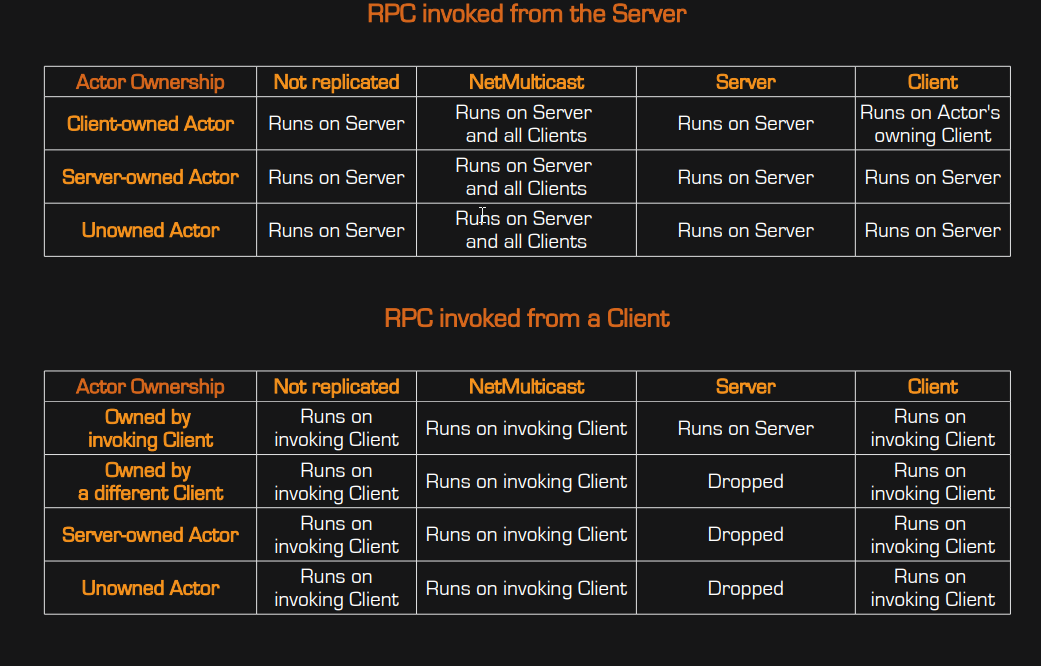


So yeah, a multicast simply runs it on the invoking client
So like a normal event/function
agile lotus
Yeah
thin stratus
Can you show the whole FreezeFrames function?
I assume there is something simply wrong
Also what is calling FreeFrames1
twin juniper
yeah. you may need to f9 and debug the exec flow . for suspicious nodes.
agile lotus
FreezeFrames1 is called on a collision event that is server auth only
thin stratus
If it's ServerAuth only, why needing the additional SwitchhasAuthority
Then it will never call the Client version anyway
So the error is probably in your mutlicast after all
agile lotus
is an event already replicated if called from a server event
Inside CollisionEvent is where freezeframes1 is called
thin stratus
Ehm nooo
Remove the Server RPC
And move the Switch and the CollisionEvent down
There is no need to ServerRPC
agile lotus
Gotcha so this is okay
thin stratus
yeah
The Actor exists on everyone
So beginOverlap is also called on everyone
So just limiting it to the Authority is enough
agile lotus
Okay that makes sense
so because it's a server authority ->multicast collision event
I can't multicast the freezeframes from within the collision event
correct?
thin stratus
Well your Collision Event is already Multicasting
Multicasting in that again would be bad
Cause everyone calls that
Resulting in the Server calling the Multicast again
And each client calling it locally
So overall you would have 1 call for the server and 2 for each client
agile lotus
But I do have to RPC the freezeframes event when calling it within that multicast?
freezeframes needs to be called on both the attacking pawn and the pawn being hit, so it needs to call on both client and server side pawns
thin stratus
Ehm
What you should do then is:
BeginOverlap -> SwitchHasAuthroity -> CollisionEvent (No RPC at all).
Then in there, calling the same function on the Pawn that overlapped and the one that was overlapped.
And that function should be a Multicast
umbral adder
Unreal Engine Forums
Things i would like:
- Lobby Beacon vs Party Beacon
- Party System Tutorial Creation, and explanation of these classes
Thanks -Decode
agile lotus
Alrighty I've done all that now but I still get the same problem
wait so when you say "BeginOverlap -> SwitchHasAuthroity -> CollisionEvent (No RPC at all)." do you mean CollisionEvent should not be multicasted
so instead of having that extra event just have BeginOverlap -> SwitchHasAuthroity -> the logic for collisions
thin stratus
Yeah the CollisionEvent should not be a multicast
Cause you said that you want to call the event on each pawn
Ah actually
Gimme a sec, what is actually colliding?
Two pawns with each other or two pawns with something?
thin stratus
So this calls inside of a Pawn?
agile lotus
yeah
agile lotus
only one pawn
but I check the owner of the hitbox
and call freezeframes from that on the hitbox owner
agile lotus
PawnB calls the overlap
thin stratus
Or htat, so HitBox overlaps and PawnB calls the overlap
agile lotus
correct
thin stratus
Okay, then yeah, don't make it a Multicast#
You want to make the event that is called on the pawn a multicast
thin stratus
Cause CollisionEvent only calls once on PawnB. From there you want to call FreezeFrame on PawnB and PawnA, right?
agile lotus
exactly
agile lotus
is it okay to have Collision event as its own event like that? without any replication
thin stratus
Sure, why not
agile lotus
just wanted to make sure
thin stratus
Can you show what happens in there?
agile lotus
I know I can definitley show you just a fair warning 😛
thin stratus
Well, I assume the math is correct?
And from there you call the Multicast FreezeFrames on each pawn?
If that's all, then it's fine
agile lotus
yes
I'll test now that collision isnt multicast
looks like it works!
😄
Can I ask you, should I be spawning hitboxes only on server auth?
to prevent any discrepancies between client and server screens
answered that question myself by trying it
the answer is yes
thin stratus
If you spawn the HitBox only on the Server, you can be sure that it also only overlaps on the Server
so yeah
 boreal vine
Hi, im having a problem. In the standard fps template the gun is not replicating movement on the client
i can see the gun move up and down on server but not the client
 shy idol
If I have a function that will only ever be called from within a Server function, is there any need to set that as a server function itself?
scarlet moat
@thin stratus Sorry i'm still only learning and passing information to and from different blueprints is something i still haven't got my head around. I understand that i can change the index to change which screen the trace is drawn from but i'm not sure how i'd pass the weapon blueprint a reference to the character?
scarlet moat
yes
thin stratus
Then create a Variable in your Weapon called "PawnOwner" or something like that
The type should be the one of your Character
Ping me once that is done
scarlet moat
@thin stratus done.
thin stratus
Alright, now you have two ways of setting this.
- On your "SpawnActor" Node, that spawns you Weapon (In your Character) you drag off the ReturnValue (that's the ref to your weapon) and call "Set PawnOwner"
The value you want to set this to is "Self", which refers to the very instance of your Character who calls that.
So if you have two characters (or more) self always refers to the one who actually calls self. Just like you saying "self" an instance of hte class "Human", refering to you, while I saying "self" refers to me.
Hope that makes sense
The second method is a bit cleaner and allows the variable to be valid in your weapon a bit earlier:
- Select your new variable and check the details panel of it. In there, select "Instance Editable" and "Exposed on Spawn".
Now, your SpawnActor node should actually show that very variable
If not, try to rightclick the spawn actor node and hit "RefreshNodes"
Here you can again set the variable to "self"
Let me know once you implemented one of the two ways and show me what you did @scarlet moat
scarlet moat
@thin stratus thanks again really appreciate this i've been stuck for days. this is what i have, its not correct tho, i dont think
wait, just realised i made a mistake . lol
still doesnt work. haha. i really am still new at this
 next falcon
is it possible to stream a level for all players at the same time?
Like if i load a level instance everybody can see it ?
thin stratus
@scarlet moat Reread what I wrote
The second image was correct in terms of the connection of the Target pin
But you need to use "Self" for the actual PawnOwner
scarlet moat
@thin stratus Wow! Thank you so much it works, your a legend.😘
thin stratus
@scarlet moat No biggie
You did both ways at once though
As you might see, your SpawnActor node on the left has a PawnOwner pin
You can directly connect the Self to that
Then you don't need to do it after spawning
scarlet moat
@thin stratus thats sounds like me alright, i have never been very good at following instructions 😂
twin juniper
Hello, I am new here. Is there a way to do some sort of netcode analysis on your net code? Also, when would it be a good idea to use Sockets instead of RPCs?
thin stratus
Well you can capture your net stuff and then view it later
Cant come up with the keywords right now but a Quick google will help you
 mild geyser
If I wanna generate levels procedurally in multiplayer game, how should I do it? Spawn the rooms and replicate their position to all the clients and the client clone the layout based on the coordinates?
 deep island
hi, is there any way to reset the PlayerControllers on seamless travel?
I tried using Reset() on HandleSeamlessTravelPlayer event, but it's not working
 worthy wasp
@deep island - by reset - you mean ReInitialize? Because i thought even with seamless travel - all classes EXCEPT GameInstance re-initialize..... all their variables should go back to defaults?
GameInstance class is the only class that handles a load-state persistance (IE: MapChange/ServerTravel)
deep island
@worthy wasp yes, I need all variables to set to default values
I'm trying now to edit HandleSeamlessTravelPlayer inside my GameMode
removing SwapPlayerControllers function should do what I want
thin stratus
@mild geyser well youd only need to spawn the replicated actors on the Server
All the rest can be handled via an easy seed of a stream
If all your generation uses the same stream and seed, you can tell the client the seed and thats it
For your random stuff it is
Youd skip spawning replicated actors on the client of course
mild geyser
Let's say I have a listen server so it's enough to spawn the actors on host player and the rest is handled by UE?
thin stratus
@deep island @worthy wasp Afaik they reset by default. Youd need OnSwapPlayerControllers to actually keep data or?
@mild geyser You select a seed on the server
And tell that to your clients
Then ALL run the Generation script with the same seed
However the spawning of replicated actors, such as doors, should only happen on the server
As that results in them spawning on the client anyway
Everything non replicated, such as walls, can be created through the Generation algorithm with proper seed.
mild geyser
Thx, I think I got the idea
Can I basically do the seed selection / replicated actor spawning anywhere as long as I just check that the role is ROLE_Authority?
Or what's the proper approach to do the serverside stuff
 hasty adder
Quicky here. If I have a modular character and I have the server spawn it with its “parts” exposed at spawn how much more would one need to ensure it’s replicated right both currently on server and new comers
 timid pendant
Hi are the beacon drivers only limited to steam? Would i need to enable steam to have them working
worthy wasp
@timid pendant - i was on a nintendo switch project not long ago... the BeaconDrivers are global to the OnlineSubsystem.... not a particular SDK..... Steam implements the OSS Beacon utility.
FWIW - i had to purchase the SteamParty plugin to study from for the OSS's Beacon utility & useability.... it was a pain in the ass but we pulled it off.
timid pendant
Thanks I will try to find if the NULL implements it also or try to make a netdriver definition
worthy wasp
you simply need to include the appropriate headers & utilize their funcitonalities..... again - it was a pain in the ass .... because go figure: UE4 doesnt have updated documentation/wiki or API docs for certain things like the beacon system or HTNPlanner (my latest AI Endeavors)
#WhodaThunkToUpdateDocs?
timid pendant
Yeah I see many complaining of the lack in documentation on beacons and the whole subsystem thing
worthy wasp
cuz were only 4 years in teh making.... right?
at least we have it 10x better than Cryengine.....
deep island
there's one thing I don't understand
in the engine code, where does the new PlayerController copy properties of the old with Seamless Travel?
worthy wasp
uh.... properties like deafult properties of the class - connection type ones
not custom stuff you put into it.
so if you were to change ANY of the NATIVE variables to the class - those would OF COURSE copy over
anything you put in custom added to the class - will be defaulted
so any changes you have to them at runtime - get re-inited
again - UGameInstance is the ONLY class tha tdoesnt reinitialize with a LoadState event
deep island
yeah, I've already seen that
the problem is that I can't find where the variables are copied
I found this: NewPC->SetPlayer(Player);
or CopyRemoteRole
but CopyRemoteRole doesn't copy variables
 winged badger
you get say, OldPlayerController->SelectedIndex and store it in NewPlayerController->CharacterIndex
or whatever you need
it won't do it for you
worthy wasp
this would be editing engine source for something as simple as copying it to the gameinstance class (a struct will work) and then copying it back to the new controller on Controller::BeginPlay()
winged badger
no editing required
worthy wasp
those events arent exposed to BP?
worthy wasp
at work so i dont have the editor open on my end... one sec while i check API docs
winged badger
not at work so i don't have editor open 😄
worthy wasp
APlayerController::PendingSwapConnection() is hte ONLY swap method i see in both that class & AController
hard to tell from APIDocs if its exposed to BP's or not....
worthy wasp
again i was checking APIDocs - dont have my dev PC with me 😛
winged badger
same^^
worthy wasp
so this is a function that is delegate binded i'll assume on the event ServerTravel
winged badger
its just the consistent naming, anything starting with K2 is blueprint exposed
always
worthy wasp
that doesnt do anything automatically - you'd still have to swap information.
understood
i knew that in the BACK of my mind lol
but you're still tasked with exchanging the information
twin juniper
Hello, has anyone here used Sockets? What were they used for?
steady briar
sockets like... the thing u can add to a bone or something?
thin stratus
I would say Sockets that you connect to
I'm pretty sure you can simply find everything out about them on the net
UE4 isn't reinventing them
steady briar
i wasnt sure if socket was some networking term or if it was the thing u can snap weapons to etc
thin stratus
It's both, if that makes sense to you
And if people ask in Multiplayer I would go for network
But well
steady briar
most things dont, but i am having some issues with my repnotify again
does a variable with repnotify work for people who are within range when it changes? or is it purely for people who show up later
 distant wave
Hello, there!
If I look for my dedicated server I get these warnings (in client log):
[2018.07.03-18.45.17:926][229]LogNetVersion: StandYourGround 1.0.0.0, NetCL: 0, EngineNetVer: 2, GameNetVer: 0 (Checksum: 2374043608)
[2018.07.03-18.45.18:087][239]LogOnline: Warning: STEAM: Rules response NUMOPENPRIVCONN 0
[2018.07.03-18.45.18:088][239]LogOnline: Warning: STEAM: Rules response NUMOPENPUBCONN 100
[2018.07.03-18.45.18:088][239]LogOnline: Warning: STEAM: Rules response OWNINGID 90115716982511623
[2018.07.03-18.45.18:088][239]LogOnline: Warning: STEAM: Rules response OWNINGNAME SYG
[2018.07.03-18.45.18:088][239]LogOnline: Warning: STEAM: Rules response P2PADDR 90115716982511623
[2018.07.03-18.45.18:088][239]LogOnline: Warning: STEAM: Rules response P2PPORT 7777
[2018.07.03-18.45.18:089][239]LogOnline: Warning: STEAM: Rules response SESSIONFLAGS 683
[2018.07.03-18.45.18:089][239]LogOnline: Warning: STEAM: Rules response SYGServerName_s EU StandYourGround Game
[2018.07.03-18.45.18:089][239]LogOnline: Warning: STEAM: Rules refresh complete
[2018.07.03-18.45.18:089][239]LogOnline: Warning: Unknown or unsupported data type from Steam key data NUMOPENPRIVCONN 0
[2018.07.03-18.45.18:089][239]LogOnline: Warning: STEAM: Failed to parse setting from key NUMOPENPRIVCONN value 0
[2018.07.03-18.45.18:089][239]LogOnline: Warning: Unknown or unsupported data type from Steam key data NUMOPENPUBCONN 100
[2018.07.03-18.45.18:089][239]LogOnline: Warning: STEAM: Failed to parse setting from key NUMOPENPUBCONN value 100```

And my server cannot be found. Any solution would be appreciated.also I am using my own Steam AppID
twin juniper
I understand what sockets are. However, I'm trying to understand when to use this feature instead of passing data via RPCs
Are there any specific use cases for when to use Sockets vs. RPCs?
 fleet sluice
@twin juniper The most common use case for sockets is for whatever traffic needs to happen regardless of level transitions and/or connections (i.e. voice chat, parties, DLC downloads before actually joining servers, querying servers for particular information before actually joining etc.). Once the connection is established, there is no real benefit of using sockets over replication (RPCs/replications have some overhead, but it's in no way noticeable).
twin juniper
Thank you, much appreciated
agile lotus
Is there anyway to reduce server position corrections on listen servers?
Or do I just need to get dedicated servers up and running for best performance
deft plaza
Does creating a session automatically join the creator of that session to the session?
deft plaza
Has anyone received this error before?
LogScriptCore: Warning: Script Msg: CreateSession - Invalid or uninitialized OnlineSubsystem
LogScriptCore: Warning: Script Msg: CreateSession - Cannot map local player to unique net ID
dull stream
so, if I have an actor thats client side only... and i want the server to modify or call a function on that client side actor... the only way to do that is to communicate with an intermediate actor that exists on both the server and client?
for example, say you had some manager class that is replicated on server and client. it keeps track of both versions of the non-replicated actor. something like that would be the solution?
you cant just like, pass a pointer to the actor to the server from the client, because the server wouldnt have the actor correct?
also if i wasnt clear, Im not replicating this actor which is why I have two of them (one on client and one on server).
I have no intention on replicating it
winged badger
if its stably named, you can reference it over network even if its not replicated
that would mean its loaded from a package (pre-placed in level) and not spawned at runtime
in that case its name is unique and same on both client and server, allowing it to be referenced by it
dull stream
whaaat really
oh wait no im spawning it dynamically so it wouldnt work
still, thats good to know
winged badger
but imo - server having to modify the non-replicated actor on a client is working around the engine
dull stream
well the thing is, Im doing projectiles
when the client clicks, it needs to spawn immediately, i dont want to wait to hear back from the server
so i need the client to have a local simulated version of the projectile before the server spawns its own version
this is how Unreal Tournament does it from what I have read, and then they somehow sync it up to match. Im less worried about syncing it up right now, I mostly just want to make sure the explosion effect only plays on clients if the servers version hit the target
client version wouldnt worry about hitting characters really
winged badger
so - spawn your projectiles like you're doing now
spawn a replicated explosion actor on server if it hits
its a minimal package really - just the Actor's type and location
dull stream
hm, didnt think about that. I have the projectile contain the particle component
currently
winged badger
it spawns a particle effect on BeginPlay, and destroys itself when its done
dull stream
yeah hm, need to consider my options there. I could do it that way you're right.
though I do think i will try to sync up the server and client actor positions at some point, so I might should have an actor that manages the two of them anyway
I dunno. im not sure how important it is to make sure the client simulation is accurate.... during my play testing it was kinda odd because there were points the projectile clearly wasnt hitting me but i took damage
it was close to hitting me, but not exactly
that may just be impossible to realy fix though 🤔
always gonna be latency
or vice versa, where it looks like im hitting him a bunch of time, but im not
winged badger
the explosion actor approach might not make it perfect, but it should make it clear if there was a hit or not
also, decals
dull stream
yeah, i should probably do that way and see if it helps
winged badger
on the target that was hit
dull stream
but theres also the fact that i need the projectile client side to be destroyed when that replicated explosion from server triggers. so i would still need to communicate with the client side projectile
winged badger
accidentally disconnected mine the other day and i didn't even feel like i was hitting anymore, even if i obviously was
dull stream
because what if the client misses, but on server it actually landed a hit. the client wouldnt know and the projectile would shoot off right through
despite the explosion playing
dull stream
hm you think? maybe thats true
winged badger
especially if we're talking firearms here
dull stream
well, its not really firearms. and my characters fly, so they move pretty quick.
winged badger
i mean, lots of projectiles flying around
not just an occasional spear toss, for example
while you are happy to obsess about how your simulation might be imperfect
if you have 20 projectiles shot by a player each minute, and plenty of other stuff for a player to do
its not what the player will focus on
dull stream
that is a very fair point, and there will be lots of projectiles flying around
umbral adder
what is DeltaTime?
 teal crest
Lol, what the heck?
thin stratus
So I wonder, we have a VR setup with Steam, where hosting, finding and joining sessions works just fine.
Now we want to add one of the Vive Trackers (or multiple ones later) to the whole setup, together with an Android device.
I had a setup for LAN Projects, where I could join the Host (Vive PC) and retrieve the Tracker Data from Network Data.
Not optimal, but working, as I can't send the data from the tracker to the Phone directly.
Now, with Steam and Online Multiplayer in the mix, I sense that this is pretty much impossible, at least without any custom solution.
Did anyone ever dive into this? I thought about multiple ways, but most of them have the problem of not being able to connect to Steam Sessions via Android.
bitter oriole
Well, Steam sessions are user-based anyway
You wouldn't be able to join a session with the same user on two devices
You'll need to create a separate Steam account for your phone to access Steam, even if Steam was available on the phone
thin stratus
Yeah, I probably need my own backend
Which is annoying, given that a simple ServerList for all Devices needs me to add NAT Punch Through stuff
 vivid siren
Can I just think out loud and maybe someone can confirm whether this approach is correct?
I need multiplayer compatible inventory, locomotion, and weapon systems. I'm going to make a standalone blueprint component for each one of those systems and then drop them all onto a simple character with an interface to tie it all together.
All three of these components will regularly update the player's PlayerState, which should keep all other players updated.
Does this sound reasonable?
I intend on using one large level with only a few players, perhaps I'll need some level streaming? I heard that might not work with multiplayer, so I don't know
 chrome bay
All three of these components will regularly update the player's PlayerState, which should keep all other players updated.
Nooooooo
Handle replication locally in the components themselves
Otherwise you're just adding unnecessary complexity
Also, with player states being always relevant you'll be wasting a lot of bandwidth when players are far away from each other
meager spade
what would be the sanest way to get the local player controller in AHUD?
bitter oriole
GetOwner() ?
meager spade
didn't even think of that, what a numpty
bitter oriole
It's the PC, not LocalPlayer - there's a small difference, not sure which you wanted
distant wave
@teal crest penis-kun uwu :3 What are you making a porn game or what?? 😂
teal crest
As lucrative as that would probably be, no. Someone's steam lobby name for the test app id 😛
distant wave
lol
distant wave
I read eXI's guide on the Wiki on how to create custom C++ sessions
and when I write this line here
TSharedRef<FOnlineSessionSearch> SearchSettingsRef = SessionSearch.ToSharedRef();
It says ToSharedRef() is not a member of FOnlineSessionSearch
any idea why this occurs?
 vocal dagger
well it looks like SessionSearch is not a shared pointer, could you show us what is the type of SessionSearch?
vocal dagger
well it has to be TSharedPtr<class FOnlineSessionSearch> SearchSettings;
I guess you didn't declare it like that on the header
distant wave
oh
I declared it
@vocal dagger Look, this is how I declared it. TSharedPtr<class FOnlineSessionSearch> SessionSearch;
vocal dagger
then maybe it's a missing include?
vocal dagger
#include "OnlineSubsystem.h"
#include "OnlineSubsystemUtils.h"
distant wave
where in cpp or h?
vocal dagger
that's on the .cpp
vocal dagger
yeah that works for any subsystem
distant wave
ok
vocal dagger
I'm sure you can find that code in ShooterGame
if you need to find out what you are missing
vocal dagger
sure
distant wave
included those still not working gonna take a look at shooter game
distant wave
@vocal dagger it is so strange
I am not missing anything
checked shootergame
what could be wrong
can I send you the whole function?
{
    IOnlineSubsystem* OnlineSub = IOnlineSubsystem::Get();

    if (OnlineSub)
    {
        UWorld* World = GetWorld();
        IOnlineSessionPtr Sessions = Online::GetSessionInterface(World);
        bIsLAN = false;
        bIsPresence = false;

        if (Sessions.IsValid() && UserId.IsValid())
        {
            FOnlineSessionSearch SessionSearch;

            SessionSearch.bIsLanQuery = bIsLAN;
            SessionSearch.MaxSearchResults = 500;
            SessionSearch.PingBucketSize = 50;

            if (bIsPresence)
            {
                SessionSearch.QuerySettings.Set(SEARCH_PRESENCE, bIsPresence, EOnlineComparisonOp::Equals);
            }

            TSharedRef<FOnlineSessionSearch> SearchSettingsRef = SessionSearch.ToSharedRef();

            OnFindSessionsCompleteDelegateHandle = Sessions->AddOnFindSessionsCompleteDelegate_Handle(OnFindSessionsCompleteDelegate);

            Sessions->FindSessions(*UserId, SearchSettingsRef);
        }
    }
    else
    {
        OnFindSessionsComplete(false);
    }
}```@distant wave have you added the modules "OnlineSubsystem", "OnlineSubsystemUtils" into your Build.cs?
actually you might only need to include the module "OnlineSubsystem" since the FOnlineSessionSearch is part of that module
distant wave
lemme check
yes
@vocal dagger
PublicDependencyModuleNames.AddRange(new string[] { "Core", "CoreUObject", "Engine", "InputCore", "OnlineSubsystem", "OnlineSubsystemUtils" });
vocal dagger
well I don't know exactly if there is a difference there but I've them included under PrivateDependencyModuleNames
vocal dagger
hmm
include Engine.h in your .cpp and the maybe the Engine and EngineSettings module?
it's for sure an include or module you are missing, where do you have this code? does your class have a parent?
 rose egret
hi guys 😐 how do I manage UE4 dedicated server instances ? has Steam dedicated servers or we should buy from other companies ..?
 past totem
How to "open menu level" when the server is closed (Blueprints)? @ me please
vocal dagger
nice, good that you fixed it 😃
deft plaza
has anyone gotten LogOnline: Warning: STEAM: Steam API disabled! error before?
winged badger
if you have trouble figuring out why its happening
i find searching for the log string in source code, then reading what triggers it helps
 twin vault
I never play on consoles, are games with listen servers common there? do PSN/live have something like steam so its not needed to open ports?
cant find info about that anywhere :|
 gilded olive
Hi guys, I just tired to have the same problem in all the multiplayers project that I work in unreal. I wanted to know if anyway to know if all the variables of my actor are already replicated in my local client for initialization proposes. For example, when I spawn a character, I want to assign a team id to that character but in the begin play of mi local client it is possible that the property is not replicated already. So there is anyway to proper handle this problem?
vocal dagger
you could replicate using a rep notify and once the var replicates you know it's available
winged badger
you can have an "illegal" value set by default
and set it at runtime on server
teamID = -1
and as long as it is -1 it hasn't been replicated yet
vocal dagger
When using online beacons, can someone tell me if I need to manually open a voice channel on the NetConnection for every beacon client or if by adding the configuration on the Engine.ini file is enough? I see the logs from LogVoice come as LogVoice: Starting networked voice for user: 0
teal crest
Hey folks, I'm having some difficulty joining a session using the null OSS. I'm able to host a session with one client who then server travels to the lobby via World->ServerTravel("/Game/Levels/Lobby?listen"); When I open another client, I'm able to see the lobby. When I click and join the session, my on session join complete delegate is called, which then gets the address via SessionInterface->GetResolvedConnectString(SessionName, Address) . The returned address is logged as "Warning: Got the address, 192.168.56.1:0" -- he then proceeds to client travel via PlayerController->ClientTravel(Address, ETravelType::TRAVEL_Absolute); At this point, the log for this client stops at LogNet: Game client on port 0, rate 10000 for a minute until it eventually times out and initializes a local game mode (as shown by the Warning: Player Joined) in the attached screenshot log of the client.
Hah... of course. I always figure it out 5 minutes after asking. Turns out specifying ?listen in the World->ServerTravel is not enough. You have to actually launch the game with ?listen in the initial connection url as well.
I wonder if ETravelType::TravelPartial would work for that use case
No effect
teal crest
Can you set the transition map on a per game-mode basis? I can't find which function would set it in the docs
Seems like only a global config.
gilded olive
@vocal dagger yep, I already do that, but it is a pain in the ass track all the variables in every on rep, lets assume that I need team ID and squad ID to set some things in the localclient, In the two on rep methods I should check that the other one is replicated too, scale quickly this approach.
@winged badger Yes, i usually use "INDEX_NONE" for that. Well I guess there isnt a making way to handle this
Thanks guys!
teal crest
Is there a simple way to add a delay to a transition map during seamless travel so I can visualize how it looks in testing?
umbral adder
@deft plaza its a false positive
deft plaza
@umbral adder thanks
 jade patrol
Hey guys, I'm trying to replicate a cube which works good, but on client it appears with an offset, why and how can I fix this ??? physics and collisions are sync, but it just appears in wrong place
jade patrol
the weird thing is that if I don't set simulate physics, it appears in right place
 icy nacelle
@jade patrol This is probably because that event begin play would only run on the servers version - so the cube is having its physics simulated on his version of the game - the other client has no indication that this is happening.
(My guess anyway - I'm not expert at networking)
I'm trying to prototype a mining resource for my game, I'm using a byte to control which state the node is in - Currently trying to spawn the resource node when the destructible mesh is opened up. The wood does spawn for the clients but when its picked up, the wood doesnt go into the player's inventory - instead its just destroyed and not added to his array. I dont have any problems elsewhere with picking up items that are spawned / dropped. Any ideas?
(Works just fine on singleplayer)
distant wave
after following the tutorial here: https://wiki.unrealengine.com/How_To_Use_Sessions_In_C%2B%2B
I kinda changed the code a bit so it works for dedicated servers
The server crashes as soon as it starts
DM me for code files
winged badger
dedicated servers don't have local players
distant wave
ah that must be it then
but how do I get a player that isn't local?
@winged badger
winged badger
you get some when they connect to the dedi
but yea, local player, means local player controller which in turn means that its not a dedicated server
distant wave
can you give me an example of code
of how would I get a player
cuz im pretty basic to cpp
winged badger
i can't, i just know in general on how they work
haven't used them
and until someone connects to your dedi server there is no player
distant wave
ah should I use the post login function?
winged badger
you should have a valid PC at that time, yes
distant wave
ok
 drifting plank
Hello here ! I'm in trouble with the network relevancy. I don't found any good document about it and I didn't understand how it works exactly.
I have changed the netCullDistanceSquared in my player blueprints, they are correctly replicated until they are too far.
But when an actor come back inside the net radius, he doesn't reappeared. Do I have to do a specific action (I've tried FlushNetDormancy but It doesn't seems to do anything).
Thanks in advance for any tips 😃
distant wave
@winged badger but can I do the Local Player thing for the clients
when they are joining the server
for example, when they are searching for servers
distant wave
@winged badger I am still getting the error
it didn't work
I tried getting PlayerController unique ID
alright I will try one more thing and that's it
distant wave
solved it @winged badger
distant wave
Hey everybody
do you have any idea why I get these warnings for when I am searching my dedicated server?
I am using my own appid
[2018.07.03-18.45.17:926][229]LogNetVersion: StandYourGround 1.0.0.0, NetCL: 0, EngineNetVer: 2, GameNetVer: 0 (Checksum: 2374043608)
[2018.07.03-18.45.18:087][239]LogOnline: Warning: STEAM: Rules response NUMOPENPRIVCONN 0
[2018.07.03-18.45.18:088][239]LogOnline: Warning: STEAM: Rules response NUMOPENPUBCONN 100
[2018.07.03-18.45.18:088][239]LogOnline: Warning: STEAM: Rules response OWNINGID 90115716982511623
[2018.07.03-18.45.18:088][239]LogOnline: Warning: STEAM: Rules response OWNINGNAME SYG
[2018.07.03-18.45.18:088][239]LogOnline: Warning: STEAM: Rules response P2PADDR 90115716982511623
[2018.07.03-18.45.18:088][239]LogOnline: Warning: STEAM: Rules response P2PPORT 7777
[2018.07.03-18.45.18:089][239]LogOnline: Warning: STEAM: Rules response SESSIONFLAGS 683
[2018.07.03-18.45.18:089][239]LogOnline: Warning: STEAM: Rules response SYGServerName_s EU StandYourGround Game
[2018.07.03-18.45.18:089][239]LogOnline: Warning: STEAM: Rules refresh complete
[2018.07.03-18.45.18:089][239]LogOnline: Warning: Unknown or unsupported data type from Steam key data NUMOPENPRIVCONN 0
[2018.07.03-18.45.18:089][239]LogOnline: Warning: STEAM: Failed to parse setting from key NUMOPENPRIVCONN value 0
[2018.07.03-18.45.18:089][239]LogOnline: Warning: Unknown or unsupported data type from Steam key data NUMOPENPUBCONN 100
[2018.07.03-18.45.18:089][239]LogOnline: Warning: STEAM: Failed to parse setting from key NUMOPENPUBCONN value 100```i saw something exactly like that few days ago
someone with exact same problem
no idea what it was about, or what and if there was a solution, but you can try searching for it
 pale thorn
Hey folks! Maybe some of you can tell me if this is bad or is there another way to solve this?
This example is working. But I'm not happy with the way from the Server back to the Client and back to the Server again to call the Multicast.
If I take the Location/Rotation from Arrow1 on the Server, I've a completly off Projectile Spawn on the Client.
I thought that the Server is always aware of the Client-data. But it seems the server just don't know the correct informations.
This example would calculate the correct Rotation for the Server however the Client is totally off.
So.. do I've to roundtrip over the Client or is there a smarter solution?
pale thorn
Okay checked net stat and it looks fine (as I only have max 4 people shooting).
Going to sleep now. If someone has still an hint, please send me a PM :-) Thanks!
icy nacelle
@pale thorn You're calling a RPC twice, might be best to only do it on the second event and not the first
Its probably getting the wrong instance of 'Arrow 1'
 hot robin
anyone awake here? 😃
Client 1 sees Client 2 walking fine || Client 2 sees Client 1 walking fine || BUT Client 1 sees Client 2 Jitter/twitch when Client 1 is moving || Client 2 sees Client 1 Jitter/twitch when Client 2 is moving
drifting plank
I think it's connected on a server which handle all lobbies ! We have some events which can be triggered like "skin change", "emote", "mode selection", ...
NetPeggle Do you update the movement of each client in the server only or do you work the logic on clients ?
Any answers for my question ? I didn't find a good document about it on internet :/ ?
I talk about "Relevancy and dormant actor"
 red ledge
hey guys
I wanted to make a small matchmaking system, something like overwatch or league of legends where you press play and you're matched with other players but can also go with your squad
I want it to work on dedicated servers so I already know that I can start multiple instances on different ports but how do I manage that? is there anything in the engine that supports that or do I have to use some external master server and communicate with the client through it?
full bane
you'd want to use third-party thing for that
so having the players stay in their own local instances of the lobby/main-menu.
Then call a third party match-making thing like steam, gamesparks or even a custom thing running on another server.
Then as soon as a match is found, send all players to the same server
For the dedicated servers, you either need a master server list or something that starts servers everytime you need another instance - like gamelift
red ledge
I was thinking of something that starts a server every time I need one to save on resources
so with dedicated servers I can't use steam?
full bane
are you only talking about the server structure?
or the matchmakign process
or both
gamelift has everyting integrated
matchmakign and launching dedicated server instances whenever you need them
and taking care of ports and stuff like that
you can use steam and gamelift
red ledge
both in a way
sorry can you explain more about steam? what can I use it for for a system like this?
I didn't want to have to deal with the login and friendlist etc
so I was thinking of using it
full bane
Well, it has integrated matchmaking, friendlists, lobbies etc.
you have to handle your own serverinstances with it though
so thats a huge downside
red ledge
so if I got greenlit I can customize that matchmaking?
full bane
greenlight is dead 😃
red ledge
oh
red ledge
I have been out of the pic for a while haha
gotcha
and gamelift is for managing dedicated servers
right?
full bane
ya
you can basically dynamically add and remove instances whenever you need them
but it also has matchmaking for you
afaik a fully integrated solution with matchmaking and enabling server instances for those matches
red ledge
that's really useful
tho I wanted to make most of it from scratch kinda
since it's for a graduation project
so making network stuff = more points haha
but I'll see about that
full bane
oh
red ledge
thank you that was very helpful
full bane
well then, it is probably a good idea to write everything from scratch then
there only a couple of moving parts involved when you don't have to take scale into account
red ledge
yeah I will try node.js or something
to make something very simple
just that I wanted to have the game future proof
if we wanted to try and make it into a product
hot robin
@drifting plank its 3rd person template + replication activated wich should handle movement and even sprinting looks fine if other people see them sprinting or walking but the person who is walking or sprinting sees everyone else as soon as the person moves "jitter"
 gusty raptor
Hi, anyone knows how to get a clean player id (0,1,2,3) inside anything like pawn/playerstate etc.?
vocal dagger
for any local players you can find the player id in by getting the LocalPlayer::GetControllerID(), for networked players you could find their IDs in their respective player state
 verbal wave
can someone confirm if OnRep function works for an vector array?
My OnRep_GreenLocations never executes. Not sure if it's fault on my end.
Huh. So it executes on client 1, but not the server. Same as C++ OnRep functions.
(BP OnRep functions usually always execute on both server & clients)
So weird.
vocal dagger
does anyone have an idea of how to setup voice communication when using Online Beacons?
 glossy vessel
i successfully integrated gamelift to run my dedicated servers. the next step would be to have matchmaking and a friendlist. since amazon doesn't support that i have to roll my own system. i saw that ut uses a onlinesubsystemmcp for that, has anyone any information on that? i can't seem to find anything
worthy wasp
@glossy vessel - you're wrong. https://docs.aws.amazon.com/gamelift/latest/developerguide/match-intro.html
Set up your game to use Amazon GameLifts FlexMatch feature to match players into games.
glossy vessel
@worthy wasp doesn't say anything about a friends feature
worthy wasp
Friendslist - https://serverfault.com/questions/470486/amazon-simpledb-architecture-for-an-user-with-a-friends-list

Server Fault
I am relatively new to database designing. I am currently using amazon SimpleDB to provide my application with information, so far its been relatively good and efficient until just now.
Basically, ...
allow me to do your reserach for you please....
glossy vessel
thats a basic database, there is no chat etc
worthy wasp
did you come here for a quick tutorial on "HowToProgram-101" ?
cuz thats nto so quick
glossy vessel
did you even read my original comment?
worthy wasp
This one?
i successfully integrated gamelift to run my dedicated servers. the next step would be to have matchmaking and a friendlist. since amazon doesn't support that i have to roll my own system. i saw that ut uses a onlinesubsystemmcp for that, has anyone any information on that? i can't seem to find anything
cuz within 2 minutes i found google searches relevant
glossy vessel
whatever
glossy vessel
yh, but i still have no clue what onlinesubsystemmcp.h is, there is no file in the engine
runtime, or plugin folder
worthy wasp
did you google search that too?
glossy vessel
ofc
worthy wasp
cuz again - pulled up a website with that error top link
glossy vessel
that is again not relevant to my question
glossy vessel
i asked what the onlinesubsystemmcp is
worthy wasp
its a file in the engines source.
if you were to search the UE4 source files - it does exist.... and need to include a module to have it findable
otherwise - you get that error.
worthy wasp
try enabling the OnlineSubSystem module in your projects build.cs file..... i'm not at my dev computer (at work atm) and that should unlock the OSSMCP.h file for you
glossy vessel
it doesnt
worthy wasp
then unfortunately i'm not much help to you for the next 5 hours 😦
glossy vessel
onlinesubsystem and onlinesubsystemutils aren't related to this subsystem as far as i can see
glossy vessel
well they work, but they are not related to the subsystemMCP