#multiplayer
1 messages · Page 403 of 1
 glacial lotus
 teal crest
We'd need more information to help you. Who triggers the weapon change initially, the client? The authority? How is your weapon state stored?
glacial lotus
Yes it woould be the client the one that triggers the change. Authority I don't know... playre are clients so I guess they don't have auth. And the weapon stuff is stored in a struct that's part of a component into the characters.
teal crest
Again I'm not an expert, but I'd read the part about Player state and how it's replicated in the compendium. That seems like a good place to store player specific replication state. Otherwise you could just replicate pieces of the pawn.
glacial lotus
ok, thanks
teal crest
Cedric did an amazing job piecing that thing together. I plan on reading it 3-4 times 😄
 sacred spire
Have you guys saw the Unreal's main page displaying the MMO for mobile?
i always wondered whether these MMO's character are all basically tiny sized in the first place?
Like basically smaller than typical PC's character size
I mean I don't get how they make it work on mobile lol
 copper portal
I need some help with a respawn system. pm me
sacred spire
aye I messaged wrong channel lmao
 umbral adder
@thin stratus u cant add a timeline in widgets
 fringe dove
anyone know why UGameInstance::GetPrimaryPlayerController checks PlayerState->UniqueId.IsValid()? It makes it return null during demo replays because demo controllers won't have a valid uniqueid
I'm trying to work around it, but I don't know what the rationale of it is
I don't want to break some other feature by using a version without the check
 fickle stump
Question does setting up an online game affect the c++ in game like if im setting up zoning in a game do i have to do it differently cause its an online game
 sharp arrow
guys does someone know how can i make this to be multiplayer? so it can show only the character of the player?
 thin stratus
@sharp arrow Try the "OwnerOnly" boolean on the mesh component
thin stratus
Maybe I got the question wrong. If he only wants the Charakter to be visible to their own player, the boolean would solve it
thin stratus
Not even in the event graph of it?
umbral adder
no
thin stratus
My god Epic, why so random
thin stratus
Tricky
umbral adder
so any suggestions as to how to solve it?
thin stratus
Yeah well, for a Lerp youd need a Timeline, so you have to interp I guess
Put the interp into your tick
And toggle it with a boolean
umbral adder
ok
thin stratus
Which you can set in the hit event
umbral adder
that seems a bit bad practise 😮
thin stratus
You could also try to set up the timeline in your Character
umbral adder
np ill make a bool
thin stratus
Not bad practice if epic doesnt allow the timelines
thin stratus
If you want to interp a float, yes
umbral adder
k
umbral adder
Hey guys,
how would i go about making a secure store/player data with dedicated servers (can be anything even php)
-Decode
 tender gale
Anyone have any information on how to add client side prediction to custom values on objects? I.e. say I have an in world object which represents a weapon and it has an ammo count and I want to predict that ammo count going down when firing the weapon. Is this something that the default networking system will be able to do for me or does it require a custom solution?
I know for example the CharacterMoveController can do client side prediction by default on the players movement, and that's great. But usually you end up wanting to predict more data for your player than just that.
And even predicting other objects in the world, like picking up a weapon and predicting it's ammo when firing it.
 keen halo
Maybe I missunderstand you, but you are not confusing prediction with replication are you?
Why would need to "predict" ammo going down when you can just reduce the ammo count server-side , and replicate the new ammo count down to clients?
tender gale
@keen halo Well, sure. But that creates a significant (ping-dependant) delay on the ammo going down
I am not confusing prediction and replication 😃
You could say, okey but that's just a UI thing for one player, you could 'predict' that locally in the UI and then patch it up when you get the updates, etc.
I'm using the 'weapon with ammo' as an example of course, there's more complex prediction scenarios you might want to do.
keen halo
@tender gale Have you considered using delegates for letting the client know about changed variables instead of replication?
tender gale
Sure, but that adds significant overhead in terms of bandwidth for something as small as updating an ammo counter
 fleet sluice
@tender gale There was a rather lengthy conversation in this channel yesterday, where 2 guys and I wrote our approaches. Scroll up a bit or search for "prediction".
tender gale
@fleet sluice thanks, but the idea of using RPCs/etc. to do this seems like a huge work around which complicates the code base massively
fleet sluice
A workaround to what? You don't have a built-in solution for anything apart from the CMC class, which is, more or less, based on a similar approach.
tender gale
A work around to being able to have the clients automatically predict local values of actors
And then have it automatically reconcile with the server
For something like movement yeah you usually need a custom solution due to it needing to be aboslutely 100% smooth for the playing client
fleet sluice
Replication isn't a solution for anything, anywhere at any times. Treat it as such and you end up with PUBG/ARK/CE-type of networking. You can't have your cake and it too.
You should Google prediction and read the PDFs you find and you'll end up with the same approach.
tender gale
I'm a very well experienced networking engineer, I've implemented networking for a lot of games, and built whole networking libraries from scratch. I've just never done it in Unreal, which is why I asked.
fleet sluice
(I read tens, if not hundreds of pages on the subject, most not even UE4-related)
tender gale
And being able to locally predict 'replicate' values is something I've used to great effect before, since it simplifies so much code around stuff like this and lets the networking subsytem handle it for you automatically
fleet sluice
Then I guess it won't take you long to realize the ups and downs of replication.
tender gale
So I simply asked if it's possible to do this in Unreal, since I've built and used system like that before. So it's not, I'll have to come up with a custom solution.
 bitter oriole
@tender gale The UE replication treats replicated variable as a server-to-clients mechanism, and RPC as a client-to-server mechanism, basically
tender gale
@bitter oriole Yeah that's pretty standard I would say, whoever 'owns' the actor is allowed to replicate it
bitter oriole
For client-triggered actions it's common to process stuff locally, fire the RPC and reconcile server replication later
But you'll need to implement prediction yourself
thin stratus
@tender gale Just call your fire code locally first
bitter oriole
There is no built-in mechanism except for character movement
tender gale
Okey, cool... that's all I wanted to know 😃
bitter oriole
The typical approach for that like cedric said is, just call stuff locally immediately, and fire it up on the server too
Like you'd update the ammo count immediately when firing, server does too, and when the server replicates down, you'd reconcile the different values with a history
Like you do for movement
 twin juniper
About the Use Single Process option when using multiplayer, when or why should one test it with that option disabled?
tender gale
@bitter oriole thanks for your insight here, I'm just not used to unreals networking system which is why I have all these noob questions :p
 strong breach
Does anyone know how to fix the multiplayer spawning issue where sometimes your character doesnt spawn
ive been stuck on this for a while now 😦
 calm hound
You're going to have to be a lot more specific than that.
strong breach
@calm hound im getting the Character cant spawn because of collision error sometimes because two characters are spawning at the same place
calm hound
Why are you trying to spawn two characters in the same place?
The game automatically tries to move the actor a bit to avoid collision during spawning, if it's a tight spot it'll fail and not find an alternative place to put the other player. So you need to have a separate player start for the other player
keen halo
@strong breach You can check your SpawnCollisionHandlingMethod in your actor properties - but as @calm hound said, it is probably better to spawn them on different places.
calm hound
I believe in SpawnActor() you can also set bForceSpawn or something, but I imagine overlapping collision will cause a lot of issues
strong breach
i tried moving the spawns before but ill do it again just to be sure
and I changed the spawncolhandlingmethod to adjust location but always spawn and it still doesnt work 😦
 ripe raptor
Would someone be so kind as to help me diagnose why Steam is not working in my game?
It's always the same damn thing, I forget to copy something over or change some line of configuration and spend hours hunting down what I've missed on every new project
bitter oriole
What's the problem
ripe raptor
well, it compiles properly, the plugin is enabled, the appid is set up, the sdk binaries are in their proper position, but the damn overlay is not showing up
strong breach
what overlay?
ripe raptor
The Steam overlay
strong breach
and is steam open when you start the game
strong breach
ok thats bad lol
try adding the appid and subsystem again
recompile maybe?
usually you should test that first before continuing
bitter oriole
@ripe raptor Is it a shipping build ?
ripe raptor
It's just "run as standalone" from the editor
bitter oriole
My take is that on shipping you need to start it from Steam
Still no idea on which build type is used when you launch
From editor, I guess it's the "package type" setting
From the .uproject, dunno
ripe raptor
let's see if it works from a build
strong breach
i knowit wont work from the editor
so im guessing standalone counts as the editor ?
ripe raptor
It always worked in standalone
but I am compiling a release build just because
will check it through that as well
strong breach
SpawnActor failed because of collision at the spawn location [X=-950.000 Y=-333.000 Z=4712.001] this is the network player start error im getting if anyone is familiar with it
calm hound
It's just telling you where in the world the collision check failed to find a proper place to spawn
what's your spawn area look like? Is it crowded?
strong breach
nope
i put it high up (the z value is 4700) and its still not working
and i set it to always spawn
calm hound
are you spawning both players at the same time in the same function?
What's your spawning code/blueprint look like
strong breach
its the default code
is there a way i can override it
i only added the player start
calm hound
You can, but if you're using the default it should work unless the character you're trying to spawn is way bigger than a default character is?
do you have a 2nd player start? If you add 2, it'll try to move to the next one if the first doesn't work
strong breach
its twice as big as a regular player
and i put like 8 player starts
im using network player start if that changes anything
calm hound
It's probably the size difference that's failing
the code only extends so far X and Y when trying to find a collision spot, by default that X and Y extension is based on their default scaling. Scaling things up twice as much, means your collision expands twice as much as they're expecting. So they're running into the other player's bounds because they don't extend that far out
calm hound
Can you send a screen?
strong breach
LogSpawn: Warning: SpawnActor failed because of collision at the spawn location [X=-460.000 Y=-1300.000 Z=580.000]
LogGameMode: Warning: SpawnDefaultPawnAtTransform: Couldn't spawn Pawn of type SumoBall at Rotation: Pitch 0.000000 Yaw 0.000000 Roll 0.000000
Translation: -460.000000 -1300.000000 580.000000
calm hound
of the spawn area
sharp arrow
@umbral adder i mean that when i open my inventory it appears the other character not the character if the player since idk what to do so its shows only yours
 ruby meteor
Is there any way to register if the client stops sending movement replication updates to the server? The pawn that the client controls sometimes stops replicating its movement to the server, while the client can move without any issues, the server doesn't update his position, and it is pretty game-breaking for me
 dull stream
i need expert help, anyone who knows a lot about character movement component
 toxic meteor
How would you go about setting up a multiplayer main menu (I already know how to do game replication etc) but What I'm a bit lost on is how I can have everyone in say a region (NA or whatever) is connected to when they launch the game, then from the main menu they can see their in game currency, profile data & stats (kills deaths etc).
In simpler terms I'm trying to create a 'launcher/menu' similar to that of league of legends so your connected to a server and then when you join a match you connect to a different server
sharp arrow
guys in here im getting a capture so it becomes a texture and make it a material so i can place it in my inventory but idk how to make this to be more multiplayer so it only shows your character
 frail pond
Is it possible to get multiplayer working over Bluetooth?
 proper olive
@toxic meteor I think what you're asking is pretty broad, but the general answer is, you need to look up the requirements for dedicated servers for that approach
 cyan bane
Is there a FVector_NetQuantize type structure for Quats? I'm replicating quats a lot and would like to shave off some size.
toxic meteor
@proper olive From what I understand I need to create a back-end that users connect to when the game is launched and then from that they can connect to the dedicated servers that host the actual matches. Do you know of any good resources I can use to start learning on how to develop a back-end like I described earlier?
 ancient ruin
hmm is there a proper way to reconnect to a session ? i save it within the gameinstance but for some weird reason i can't reconnect ... if i do a new search and connect to that same session it does work 😦
steam and editor btw aand the join session function returns with success
ancient ruin
ok .. with the saved session it connects to port 17777 and with a new one it uses 7777
weird
twin juniper
@ancient ruin execute console command open x.x.x.x defaults to 7777 if you don't specify it
frail pond
soooooooo does UE work with bluetooth for local multiplayer?
dull stream
I dont think so @frail pond
you're probably better off using a different engine if you want something like that
frail pond
sad about it
dull stream
find something else
ue4 isnt the end all be all
there are some things its not well designed for, and bluetooth multiplayer is probably one of those things
frail pond
ill orobably just make it work over wifi if it gets to that
if i even make it that far before losing interest lol this is going to take forever
copper portal
I need help with a respawn system. pm me for more info
dull stream
holy crap I think my issue this whole time was my random replicated buildings, not my movement component. dies
client correction only happens when i land on my buildings, not on my static objects
I feel so dumb
glacial lotus
Newbie here. So how of a bad idea is this? https://blueprintue.com/blueprint/ec5ei17p/
It's the event to physically change the weapon and update the HUD (after the logic is done, temporarily, in the client. I'll move the logic to the server soon)
oh, in blueprintue.com the "run on server" info and similar don't appear 😦 Not cool
Well, the Server event is "run on server" and the "multicast" is .... multicasting 😃
glacial lotus
If I create my own PlayerState Class. Will that behave by default exactly the same as the default PlayerState class that comes builtin?
 brittle sinew
In terms of default functionality, as long as you call your supers and don't mess with internal stuff (if you're in BP that'd probably be hard to pull off even if you tried), it will stay the same.
sharp arrow
guys in here im getting a capture so it becomes a texture and make it a material so i can place it in my inventory but idk how to make this to be more multiplayer so it only shows your character
sharp arrow
but have it for multiplayer
because i already have it but idk how to make it multiplayer
 jolly berry
is there a proper way to have the instigator that assigned in SpawnActor replicate with the rest of the Actor to simulated clients?
nvm found it
just had to add it to the GetLifetimeReplicatedProps
twin juniper
I'm having an issue where whenever the non server host stops sprinting the editor stops playing and gives me the error message "Infinite Loop detected in ThirdPersonCharacter, asserted during stop sprint" Here is my sprint blueprint
And here is my stop sprint blueprint
does anyone here know what my issue is?
ripe raptor
So anyone got an idea how to even begin debugging the reason why Steam is not loading correctly?
ripe raptor
nope, I'm copying the damn thing another project into a new engine installation, it's identical across the board and it's not showing up
no overlay, no nothing
ripe raptor
Tried shippin, nothing. Tried running in editor as standalone, nothing.
I get this in Standalone:
LogOnline: Warning: STEAM: Steamworks: SteamUtils() failed!
LogOnline: Warning: STEAM: Steamworks: SteamUser() failed!
LogOnline: Warning: STEAM: Steamworks: SteamFriends() failed!
LogOnline: Warning: STEAM: Steamworks: SteamRemoteStorage() failed!
LogOnline: Warning: STEAM: Steamworks: SteamUserStats() failed!
LogOnline: Warning: STEAM: Steamworks: SteamMatchmakingServers() failed!
LogOnline: Warning: STEAM: Steamworks: SteamApps() failed!
LogOnline: Warning: STEAM: Steamworks: SteamNetworking() failed!
LogOnline: Warning: STEAM: Steamworks: SteamMatchmaking() failed!
LogOnline: Display: STEAM: OnlineSubsystemSteam::Shutdown()
LogOnline: Warning: STEAM: Steam API failed to initialize!
LogOnline: Display: STEAM: OnlineSubsystemSteam::Shutdown()```Can you add the following to your Engine ini:
[Core.Log]
LogOnline=VeryVerbose
LogNet=VeryVerbose
Let me actually check if that's the right thing
Yeah that's it
That should show more log entries
ripe raptor
LogOnline: Warning: STEAM: Steamworks: SteamUtils() failed!
LogOnline: Warning: STEAM: Steamworks: SteamUser() failed!
LogOnline: Warning: STEAM: Steamworks: SteamFriends() failed!
LogOnline: Warning: STEAM: Steamworks: SteamRemoteStorage() failed!
LogOnline: Warning: STEAM: Steamworks: SteamUserStats() failed!
LogOnline: Warning: STEAM: Steamworks: SteamMatchmakingServers() failed!
LogOnline: Warning: STEAM: Steamworks: SteamApps() failed!
LogOnline: Warning: STEAM: Steamworks: SteamNetworking() failed!
LogOnline: Warning: STEAM: Steamworks: SteamMatchmaking() failed!
LogOnline: STEAM: [AppId: 0] Client API initialized 0
LogOnline: Display: STEAM: OnlineSubsystemSteam::Shutdown()
LogOnline: Warning: STEAM: Steam API failed to initialize!
LogOnline: Display: STEAM: OnlineSubsystemSteam::Shutdown()
LogOnline: Unable to create OnlineSubsystem module Steam
LogOnline: Unable to load default OnlineSubsystem module Steam, using NULL interface
LogOnline: Verbose: OSS: Created thread (ID:23480).```Unfortunately it doesn't say much more
ripe raptor
I've updated steamworks to 141 and I've edited the Steamworks plugin to use that
thin stratus
Alright and the other project worked?
ripe raptor
yup
ripe raptor
I've placed the steam sdk into the thirdparty binaries... but that's about it.
thin stratus
Hmm
So:
- Plugin Enabled
- Plugin Updated
- Steamworks files added
- DefaultEngine.ini updated fully
ripe raptor
hm, just to check - the plugin I am looking for is OnlineSubsystemSteam, correct?
If yes then yes on first one
it's up-to-date with my engine installation
;+NetDriverDefinitions=(DefName="GameNetDriver",DriverClassName="OnlineSubsystemSteam.SteamNetDriver",DriverClassNameFallback="OnlineSubsystemUtils.IpNetDriver")
+NetDriverDefinitions=(DefName="GameNetDriver",DriverClassName="/Script/OnlineSubsystemSteam.SteamNetDriver",DriverClassNameFallback="/Script/OnlineSubsystemUtils.IpNetDriver")
[OnlineSubsystem]
DefaultPlatformService=Steam


[OnlineSubsystemSteam]
bEnabled=true
SteamAppId=877330
SteamDevAppId=877330
GameServerQueryPort=27015
bRelaunchInSteam=false
GameVersion=1.0
bVACEnabled=1
bAllowP2PPacketRelay=true
P2PConnectionTimeout=90

[/Script/OnlineSubsystemSteam.SteamNetDriver]
NetConnectionClassName="OnlineSubsystemSteam.SteamNetConnection"```That's the config stuff
thin stratus
!NetDriverDefinitions=ClearArray
Can you put that before your +NetDriverDefinitions
Also +NetDriverDefinitions=(DefName="GameNetDriver",DriverClassName="OnlineSubsystemSteam.SteamNetDriver",DriverClassNameFallback="OnlineSubsystemUtils.IpNetDriver")
That's what I have in a 4.19 project
So without the /Script
Cause you define the netConnectionClassName without /Script too
ripe raptor
That's what I had previously, but I was missing the cleararray line. Let me try with that
Unfortunately no difference
This is an engine source build if it makes any difference
I'm looking at the Steamworks.build.cs tryin to find any irregularities
fleet sluice
That error comes from a failed initialization which is done in the OSSteam module interface. The NetDriver has nothing to do with it. I vaguely remember the path to the SDk was hard-coded in 2 places and I think the 2nd was in the OnlineSubsystemSteam.build.cs file or in the module interface's .cpp.
ripe raptor
It's in OnlineSubsystemSteam.Build.cs and I've already changed it to Steamv141
fleet sluice
What about Steamworks.build.cs? Doesn't that also link to the SDK? I'm not at my PC at the moment.
fleet sluice
You could do a full project search for "139” just to make sure you're not missing it anywhere.
ripe raptor
Just added a console write to OSSSteam.build.cs and yes, it finds the directory
fleet sluice
Is the log you posted above complete? Nothing extra before that?
Also, did you create the `steam_appid.txt' file in your packaged projects?
ripe raptor
yup
as for the log
I can see that the OSSSteam is being mounted by the plugin manager
I see that the module manager loads it
There are these, but they don't seem to be steam related:
LogWindows: File 'aqProf.dll' does not exist
LogWindows: Failed to load 'VtuneApi.dll' (GetLastError=126)
LogWindows: File 'VtuneApi.dll' does not exist
LogWindows: Failed to load 'VtuneApi32e.dll' (GetLastError=126)
LogWindows: File 'VtuneApi32e.dll' does not exist```And the account you are testing with has ownership of your particular AppID?
(480 is owned by everyone, but custom AppIDs are not, for obvious reasons; this was a relatively common accident among my customers)
ripe raptor
oooooooooooooh
fleet sluice
lmao
ripe raptor
Excuse me while I go cry for a bit
twin juniper
Is there any problem in testing multiplayer with the Use Single Process option checked?
fleet sluice
I may be wrong, but I don't remember that setting having any effect a looong time ago...?
twin juniper
@fleet sluice Is that in response to my question?
 stable kindle
Hey guys so have a weird problem that i believe could be something simple
I have a Replicated component that i have on my Pawn. I use said component on other actors that follow the pawn. This component sets the location and does a few movement calculations. The problem is On the client i can see the other actors that are dependent on the said component move correctly but no the pawn itself. The Pawn moves as expected on the server.
I feel like i've mucked up something very basic....
The other actors also use the same component to move as the pawn
fleet sluice
@twin juniper Yea. I'm not sure if it does anything, but probably better for someome else to confirm/deny it.
twin juniper
@fleet sluice Well, it does do things. Not sure if it is relevant though to testing lag compensation techniques or not...
fleet sluice
Use the net stats commands to test those. One sec.
Unreal Engine
Recently, I had an email conversation with a Gears of War fan about the differences in networking quality between each of the three games in the series. One thing that we can point to in terms of increasing the quality of the networking experience is our use of the Unreal Eng...
These work in PIE.
twin juniper
Yeah, I know that. What I meant was, if I'm testing my algorithms for replay/rewind, for example, if it would matter to test with Single Process or not
umbral adder
does anyone know as to how would i go about making a death replay?
thin stratus
Ue4 has a replay system, but I dont think that allows instant replays already
 final thicket
Hey I have been strugling to replicate the movement of a ball that players hit smoothly any advice, the ball is a physics object and the players hit it with collision detection in an animation I heard that you can make a Child class of the character movement component but am struggling to find any information how :?
twin juniper
I have an issue. I have it to where whenever a player sprints/Aims down sights it speeds them up and slows them down. When I test multiplayer, only the host's movement speed is changed while off host is not. What's strange is, I also have the same script adjusting camera boom & the animation that the player is using and that one seems to work just fine on or off host.
Here is my sprint blueprint
and here is the "start sprint" blueprint
My aim down sights blueprint is the exact same
twin juniper
if there is any other information you need let me know.
 sly basin
because without server setting max speed it doesn't register. if you were to set it on server it would work in multiplayer. One way around this is to set the max speed to the highest possible and then use a multiplier to change speeds instead of tryign to change the max. there could be a more elegant solution but it will work
sly basin
ran into the same thing a while back. I didn't want to wait for the server rpc for him to start sprinting locally so I just set it at the max and multiplied the scale on add movement input by a variable. x 1 for max and .5 for half. etc, gets the job done for now.
calm hound
Yeah, that's a hard-coded replicated variable. Try to adjust it locally results in rubberbanding quickly.
movement speed is controlled by Server
twin juniper
Okay, so wait, could you post a picture of what the blueprint would look like? Sorry, I'm really new to this.
@sly basin
I mainly just need to know the nodes involved in multiplying movement speed
From there I can get it set up on my own
twin juniper
I spawn two players through custom game mode and I am using DrawDebugString to print visually their role. It is only showing their own role, and on the other pawns it doesn't show SimulatedProxy. Any idea why?
Yeah, no pawn has the role of simulated proxy... How can this be? If it is spawned on the server and replicated, it should have simulated versions of it, right?
 winged badger
and you print from inside the GameMode?
twin juniper
@winged badger No, I print on the Pawn tick
On the server side I get Authority for both pawns, on the client side only get Autonomous Proxy for the local one, the other pawn doesn't even show role
winged badger
those are Player controlled Pawns?
twin juniper
Yes
winged badger
and if you just drop one of those in the level instead of spawning them, it shows the correct role?
not possessed by a PC
twin juniper
I run a server function on GameMode and on that function, after spawning the pawn I use the Posess function
winged badger
i wasn't ever really interesting to know if something is a Role == Simulated_Proxy so i never tried what you're doing now
i am assuming the problem is with your client not having the host's PC around
twin juniper
Yeah, probably is that, but I always did this this way, and it's the way shown in tutorials and it doesn't work now...
winged badger
well, it has an int8 value
the enumerator
so you could do if Role < ROLE_Authority checks
i do think if you took your PlayerPawn and just dragged it into the level, unpossessed from the content browser
it would show the role correctly, that its just limited to displaying role on actors owned by other players
twin juniper
This is way too weird...
I mean, this code worked previously...
I mean, this code worked previously...
 icy nacelle
If I set a timer by running on server, will it do all the functionality on the timer on the server, or should I put in RPC into the timer instead?
(Hope that makes sense lol)
 neon mango
Hey guys I'm overwhelemd with options for starting a VR multiplayer shooter game. Should I start with the Shooter Game example, should I start with Proteus VR, should I just start from scratch? Any advice?
twin juniper
How is it possible that I get owner role as Authority and the owner remote role as AutonomousProxy...?
bitter oriole
That's expected for a pawn
autonomous = basically a player-copntrolled pawn
on the client
calm hound
@icy nacelle Same logic applies to any other code. If you start a timer on the server, only the server will run the timer, but if your timer calls a NetMulticast or Client function for example, the server will still call it to clients
twin juniper
@bitter oriole No, the owner remote role should be Simulated Proxy...
bitter oriole
Depends on the actor
For a pawn it should be AutonomousProxy remote, Authority on server
twin juniper
If I am testing on the server own pawn, its remote role should be SimulatedProxy
icy nacelle
@calm hound Thanks mate
bitter oriole
@twin juniper If you have a listen server, then yeah.
calm hound
But you're playing as the server when you run a listen server
so your Role would be Authority because you're technically the server
where all other clients, their Role (from their perspective) would be Autonomous, because they're actual clients
bitter oriole
@twin juniper I know there's something fishy on that if you use GameModeBase
icy nacelle
So that seemed to work, although when the timer is finished, it starts a new timer. That seems to not be working. Surely this is already running on a multicast?
bitter oriole
I actually have this in my pawn class to fix something related : if (GetNetMode() != NM_Standalone && Cast<APlayerController>(Controller)) { if (Cast<APlayerController>(Controller)->GetRemoteRole() == ROLE_AutonomousProxy) { SetAutonomousProxy(true); } else { SetAutonomousProxy(false); } }
Basically copy the proxy setting from the PC
That's in PossessedBy
calm hound
you mean it doesn't loop?
icy nacelle
The second timer doesn't start
The loop works fine, but you see the second timer gets started in the second screenshot?
icy nacelle
np
😉
So for some reason, it just doesnt like that, but surely its still being multicasted?
icy nacelle
Yeah, singleplayer this stuff works perfectly
calm hound
I don't see anything wrong wtih the call
might be something inside the RetractTimer
but
one thing to keep in mind with Multicast
is that it's based on Relevancy. If the actor isn't relevant it won't replicate
bReplicates need to be turned on, relevancy distance needs to be good, etc
also
your BeginPlay may be the issue
BeginPlay() is usually a bad place to call any sort of replicated call to be honest, things are still syncing
 hollow patrol
Anyone run into this error when building dedicated server for the first time? https://cdn.discordapp.com/attachments/409225917530112010/459757323771183114/unknown.png
Cant find any info on it.

Completely fresh 4.19 project
icy nacelle
hmm, not sure where else to do it, as its a projectile class
Timer is relatively the same as the first one
All my replication boxes are ticked
calm hound
you're spawning a projectile class?
icy nacelle
Yeah
calm hound
is the server spawning it?
icy nacelle
Yeah
calm hound
are you setting the client as the owner?
icy nacelle
Ah, no I'm not..
calm hound
The client can't call Server functions unless some where in it's Owner chain is a Player Controller
icy nacelle
hmmm
But the projectile is spawned on the controller
The weapon runs an event on the controller which spawns the projectile
calm hound
I believe you have to specify the owner still
Either
A. You're calling the SpawnProjectile from the client, and it's all local and the server never spawns an object
or
B. You're calling a RPC to spawn it on the Server, and the Server owns it
be my guess
icy nacelle
Maybe I should better explain what I'm doing and the problems that I'm having. When I spawn the projectile on a client, the projectile's first timer works perfectly, but the second timer does not work, it kinda flings the player about (it should be moving just the projectile not the player)
calm hound
Log it
add a Print Screen node to various parts in your code, especially the functions that get called by the Timers, and see who's calling what
it should tell you if the function is being called by the Server, or the Client, or both
icy nacelle
Okay, and I assume I want it to be printing on both server and client(s)?
calm hound
mmm
I don't think so
well
with what you're currently trying to do
yes
it should be called on both
icy nacelle
Okay, both timers get called on the client and server
calm hound
so then your problem sits with your RetractTimer function probably
icy nacelle
Strange, because the whole thing works perfectly on singleplayer - and RetractTimer is almost the same as the first timer
calm hound
well typically server controls location of things
so you're probably having the client and the server trying to move the same thing, and the server is replicating the movement back and it's causing the client to have issues
I dunno
icy nacelle
Alright, thanks for the help. I think I'll just have an intense look deep down into every node and have a good pick at it. Cheers.
calm hound
👌
fringe dove
when you first join a server, you get only a local player controller until the main one is replicated from the server right? and then it does some kind of weird object swap?
so if you call a server RPC on that local controller before it has been swapped with the replicated one, it just gets dropped? or not?
 worn nymph
@hollow patrol your starting it in the wrong place it has to be in the binaries folder
hollow patrol
http://puu.sh/AK7aH/b1ec4d958d.png
Im guessing this will run fine on a windows server then?
 hollow patrol
Im on win64, build was done for win64
not sure what else it could be, other devs on the project getting the same thing when running.
bitter oriole
So how did you package it ?
calm hound
@fringe dove if you call an RPC on a local controller, that the server doesn't know about. It just gets ignored
PostLogin() I believe is the first safe place to call replicated functions for a joining player
fringe dove
@calm hound how about on the client though? postlogin is only on the server right?
calm hound
depends entirely on what you're trying to do.
If the player hasn't joined yet, don't call RPCs
typically control isn't available to the player until they're actually connected?
fringe dove
@calm hound I'm not sure if control is available in that temporary player controller or not
but in my case, I get an event (VR enabled), and try to tell the server about it when it happens
I'll have to look into it more, but I guess I'll have to defer sending that event until the player controller has been swapped with the replicated one
I'm not quite sure that's what's going on, I just remember seeing that swap in the code somewhere
calm hound
so what are you trying to do?
PostLogin() only gets called on the server, BeginPlay() gets called on both, but BeginPlay() doesn't mean it's replicated fully yet. Typically if you're trying to do logic during connection like that
you call a Client function via PostLogin() that activates whatever you need for the client when they first join
fringe dove
Any time I put on or take off a VR headset, I send a vrenabled rpc
and also when the game first starts up I think I send one pretty early
maybe before the PC has replicated
I'll try that client rpc thing with postlogin
and move some of my startup logic that sends server RPCs into there
calm hound
so then you probably would want to check their VR status after PostLogin VIA a Client RPC
hollow patrol
@bitter oriole Just through Project launcher in editor
fringe dove
yeah looks like I always had an initial vr state changed event with the current status inside PostInitializeComponents; I'm pretty sure it was happening with the dummy PC, RPC dropped, then that PC got swapped out with the real one, and that swap operation probably doesn't call PostInitializeComponents again
I'm not sure though, looks like swap player controller may only be used on seamless travel and not initial conneection
calm hound
That's a bit beyond me. Player Controllers are one of those magical things 😛
but I believe 2 things always need to be present, a Map and a Controller
so how they handle the swapping of a controller during connection is beyond me
I believe you can mark certain variables Transient, which means it stays the same while you're changing/loading/switching maps, dunno about connection though
ancient ruin
hmm is there an easy obvious way to replicate a new session to clients?
 gleaming bobcat
Anybody knows which functions are called for CMC replication ?. My client is corrected by server not only by "ClientAdjustPosition_Implementation"...
gleaming bobcat
?
gleaming bobcat
that's fine. But do you know by which functions ?
winged badger
there is a block of replicated functions near the bottom of the header
all are clumped together
gleaming bobcat
I thoughts only by ClientAdjustPosition_Implementation
winged badger
search for "ServerMove"
gleaming bobcat
but Server_ it's called on server side no ?
winged badger
all networking functions will be right above or below it
gleaming bobcat
I see only ClientAdjustPosition_Implementation and ClientVeryShortAdjustPosition_Implementation nothing else
and still something else is called to adjust client postion to server position
sharp arrow
does someone know how can i make this work for multiplayer becaus ehow you can see in both screens its showing the character of only one of them and i want them to see their own character
 tawny parcel
When I have dedicated server checked, line trace debugs don't show up, is there an option to show these somewhere?
 hazy herald
WHEN UPDATING SESSION I GET ERROR NO SEASSION REGISTERED(edited)
https://media.discordapp.net/attachments/455173573275942913/459865305389465611/unknown.png?width=1157&height=677
 fleet sluice
Has anyone here implemented seamless travel between different servers? Imagine World of Warcraft questing zones, not dungeons!
Not to be confused with seamless travel between different levels on the same server!
tawny parcel
@fleet sluice World composition, you can youtube some battleroyale tutorials and it should come up
fleet sluice
@tawny parcel Thanks, but that'a not relevant for multiplayer.
tawny parcel
@fleet sluice Its is actually, atleast its working for me
@fleet sluice I would find it odd that several battle royale tutorials would utilize if it didnt work too
fleet sluice
Yea, but it's based on the premise that you want a single server to manage the entire world. It's not what I want. I want totally different levels, on totally different servers, with a synchronized "border".
tawny parcel
I see, hmm, thats clearly a bit different
fleet sluice
I've seen most multiplayer/networking tutorials and my opinion is that they are shit and based on a "minimum viable product" mentality, which I don't adhere to (yes, I am aware the whole phrase sounded arrogant).
And I did search again before replying, just to make sure I wasn't missing anything.
tawny parcel
I feel ya man, its been tough getting in to the networking side but I went the same path
fleet sluice
With a single map on a single server, you can't distribute loads, no matter how much something like world composition helps.
tawny parcel
Pays off tho, made a fun multiplayer game for the last game jam
Yea I totally get all that I'm tossing the idea in my head on how it might be doable
fleet sluice
Ideally, your huge ass map (WoW style) would be hosted by several servers, at least 2 per zone/server, on different VMs, in case on crashes.
bitter oriole
@fleet sluice Seamlessly migrating players from servers without a loading menu inbetween is going to be a tough job
fleet sluice
Yea, I get that feeling as well.
I've been thinking about various ways to implement my own solution, but I thought it would be wiser to ask first, in case someone else had done it before.
bitter oriole
The usual question here is, does your editor has a marketing budget large enough that you'll need load balancing on multiple servers ?
fleet sluice
I'm a loner ✅ I'm thinking of Marketplace opportunities.
I've seen various MMO "solutions", which don't really quality as solution, in my vision. I think there's room for someone to jump to the next level.
tawny parcel
It might be tough for a system complex like that, isnt there a rule for the UE4 marketplace that your code has to work with a flat install? Just curious tbh
thin stratus
It is a hardtravel to new servers
fleet sluice
After all, I think UX should be the end-goal, not minizing costs. And by forcing people to hard travel between zones, you're sacrifing UX for "ease" of work.
Theoretically, it could work with a flat install.
bitter oriole
Well if the plan is to sell a MMO kit to beginners who think they're going to have more than two players some day, sure, that might work
fleet sluice
It's the synchronization part ("border") that needs to be designed in a generic and easy to use way.
thin stratus
As long as you have a backend that provides you with a server instance of your level you want to play, it shouldnt matter much what ue4 does
fleet sluice
I'm not thinking about beginners.
bitter oriole
If you're doing an MMO, you're either not using UE4, or a beginner
thin stratus
Or ue4 without the server part
tawny parcel
Not sure if its possible to edit the source code to have multiple connections open at once?
fleet sluice
I'm currently only doing MP products, that I may one day use myself.
thin stratus
The thing is, MMO with instances on ue4 servers is more pain than anything else
It is a lot easier to forget about the ue4 servers and grap something like smartfox and tie that into ue4
fleet sluice
But if I'm going to work on something, I'd either strive for a breakthrough or not work on it at all. I don't need to work on average since I can find and buy average.
I read about SpatialOS, but some things weren't good about it.
I'm definitely trying that soon either way.
thin stratus
Big mmos run their own solutions
So you are usually targeting small Studios that cant afford that
Or dont want to
fleet sluice
Yea, that's the "hard-to-guess" aspect of the Marketplace.
thin stratus
And then you get to smartfox, raknet, spatialos etx
tawny parcel
Even a simple MMO product that is high quality and utilizes zoning would still be a good product people would go for
fleet sluice
I have to brb.
thin stratus
Also, lets say you manage to get the travel working
bitter oriole
IMHO the main issue is that real MMOs (those who actually have players) have their own engine. Anyone who's looking at marketplace items doesn't have the financial means to get players on the game.
thin stratus
Through a plugin
You need something to boot up the servers
There is no way to sell an mmo all in one solution
tawny parcel
The other elephant in the room is... would it be worthwhile doing an MMO system in the current state of game genres? They are more small niche competitive maps popping up all over.
thin stratus
You can make plugins to expose smartfox, etc. To blueprints and cpp
So you dont have to fight with their api
But anything more might be a waste of time, like @tawny parcel says
bitter oriole
Yeah, "MMO lite" like Destiny does is definitely something that players are fine with
Basically regular MP with matchmaking
Except the "matches" can be simple exploration on levels
bitter oriole
UE4 gives you that out of the box and you don't need anything else - and it scales very much better
Easy to setup for 4 online players (what most people here, including me, will ever see)
Still working for 4000 (if you've got the servers behind that)
umbral adder
how would i go about making a online store like in fortnite
and do u connect to the forntie server when u launch battle royale?
bitter oriole
You need to have a player account system where your players log in to the game, have a database on your servers with their character data
You put a shop in the game and do transactions on the database server, through the game server to avoid hacking
When loading a game the server connects to the database server to get your stuff
umbral adder
ok
now what is the best way to load the players unlocked items
meaning i have a shop widget which shows items the are locked
like should i make the item's unlocked an array?
i have a working login system with my database
bitter oriole
Well, your game would have a local list of stuff that is available in the game. The database server doesn't really need to know about the items, just which items you've bought
On login you get the list of stuff you've bought and you're good
umbral adder
yes @bitter oriole how would i store that an int? or what?
bitter oriole
FGuid works well for identifiers
umbral adder
but thats only for the player right?
i dont think u understand what i am saying
in the database how would i store each players unlocked/bought items
bitter oriole
List of FGuid that the player bought
bitter oriole
YOu'd store the FGuid as a string
tawny parcel
What is the proper way to replicate a beam sfx? Rep notify?
bitter oriole
I don't do UMG
umbral adder
k
hollow patrol
Anyone know why I might be able to join using localhost just fine, but not using my public IP?
All my ports are forwarded, using a dedicated server
Is there any additional config stuff that has to be set?
umbral adder
no
check if ports are open
using a minecraft server to test
Google Docs
i made a small testing tool
u can use it
umbral adder
Do game instance's exist on a dedicated server?
thin stratus
Yes
@tawny parcel Depends, do late joiners need to know about the beam?
If it is a fire and forget sfx, simply multicast
umbral adder
@hollow patrol
twin juniper
@bitter oriole Sorry for the late reply. That seems an interesting solution. That would probably set the other one to SimulatedProxy, right?
Also, if I change the base class to GameMode, it could fix it too?
bitter oriole
Dunno, I don't use game mode
hollow patrol
@umbral adder Yea, tried checking with some other tools, says the ports are closed - been looking into that
umbral adder
1 main reason for me is that my isp was blocking my port so i had to buy a static ip

Find No-IP here: Website: http://noip.com Create a Free Dynamic DNS Account: http://www.noip.com/sign-up No-IP Knowledge Base http://noip.com/support Open a ...
@hollow patrol
proper olive
Still having difficulty disabling a blocking volume on server only... since the blocking volume is placed in the map, it seems to exist on both server and client and they're interfering with each other
does this mean I have to spawn it at runtime like around beginplay on a client RPC?
client-only isn't even working in this case as the server's volume is blocking it... when the server disables it, client can still walk through it tho choppily and it's triggering overlaps
thin stratus
What is your goal?`
If you want to replicate the disabling act, you have to mark the actor replicated and do it via a Multicast
@proper olive
proper olive
I want to not replicate it, same problem as before basically but this time it's an actor placed in the map in the editor, not something spawned at runtime
so only run on server, or only run on client, depending on who runs it.... problem is, there's no "replicate" checkbox on them to even enable or disable :/
I'm using a dispatcher to fire a Run on Client RPC on the map, with a reference to the player's controller passed through
when the server disables the box, everything is peachy for him, but clients who haven't disabled it can walk through choppy and triggering overlaps on the blocking volume
when the client disables the box, it's like nothing happened for them, and nothing happens on the server either which is correct
here's muh code:
now from my experience the other day, I think I could get away with spawning these blocking volumes at run-time on client-only, but I'd like to be able to know I can do this with volumes in the level itself without having to program every single blocking volume to spawn at runtime :/
of course, if that's the only way to have an object on client-only, then I guess that's what I gotta do, but this seems like it should be a common enough thing, right? is that how it goes?
thin stratus
OwningClient doesn't exist on preplaced actors
Cause no one is owning them
Well the Server is
thin stratus
And needs to happen on the Server
proper olive
but it would only be one instance of it right
so if the client disabled it, it would still disable for all?
thin stratus
No, it counts for the replicated actor
proper olive
only one what at a time?
proper olive
if there are 3 players, 1 exit, with a blocking volume placed in level and a trigger back at the beginning of the hallway..... when a player runs into the blocking volume, it tells them to go back to the trigger (basically a way to prevent players from passing without checking out this cool thing)
so if a client walks into the blocking volume, and I tell it to set owner, then the client walks around a while without hitting the trigger, and another client comes over and bumps into the blocking volume, will that still hold up for both of them?
the trigger disables the blocking volume
sorry there's also a trigger on top of the blocking volume that I'm enabling/disabling as well, to send a message to the player, same behavior
thin stratus
As said, owner can be one person at a time
Not two
Not three
One
If you need to filter them, set the response to the blocking volume to IGNORE on the player itself
proper olive
you can ignore specific players?
and that's what I thought you meant above, hence the clarification
there's only one instance of the blocking volume when placed in the map is the probloem
but I want one client-side only for each player
thin stratus
No, you just give the blocking volume a specific collision object
proper olive
but the ignore specific players sounds like it'd work
thin stratus
And set the character that should pass it to ignore that one
you don't touch the blocking volume itself
proper olive
would have to do a custom collision object for each type of blocking volume then yea?
proper olive
hmm
sounding like spawning at runtime is the best way to go :[
you're the man tho, any other ideas?
thin stratus
What does spawning at runtime do here though
You need to block the player on Server, Owning Client and other clients
Otherwise he will run through it on at least one instance
proper olive
I would do it on beginplay, client only, is owning player, so a separate copy exists on each client's computer
then that way it's exclusive to each player
thin stratus
That doesn't work
proper olive
oh
thin stratus
The Blocking volume would exist x times on the Server
He still wouldn't let playerA through playerB's volume
proper olive
if I spawned something on client only, it wouldn't exist on the server
proper olive
isn't there a limit or nah?
proper olive
nah just thinking if I used it as a system
generally speaking tho, blocking volumes are bad design yaknow, so I'm thinking I'll just figure a way to keep the door itself locked for each client
I'll figure it out but basically gonna ditch the whole thing 😂
that really helped explain it tho, one more process of the whole thing understood ☑
easy enough to set a variable on player state and not allow door opening until it's done
 pseudo sand
hello
On the left is server code...on the right is Client Unreal
When I start Unreal..It cannot connect to server
cyan bane
Where is character movement replication done when the server updates positions of players that the client isn't controlling?
CharacterMovementComponent only seems to deal with the controlling client
Unless I'm just missing it.
Because I'm having an issue where I'm seeing other players meshes decouple from their capsule components.
thin stratus
@cyan bane You mean any sort of actor?
cyan bane
No, just characters.
 summer nova
now i remember, server travel does not change the gamemode
well, shit, now i gotta implement my own actual gamemode uobject inside gamemode
becouse im using server travel for stuff
cyan bane
@thin stratus I know regular actors replicate in the Actor class, but Characters must do something interesting with replication elsewhere, so that it can deal with animations and I assume cause my issue as well.
thin stratus
So you want to know about the non-owning clients?
cyan bane
Yes
pseudo sand
I connected to own server (c# code) but when send message from client to Server..Server didn't receive that mess
Connected to Server success
Send Message success but on server side didn't receive it
 distant wave
What ports do I need to port forward for dedicated servers?
And do they need to be for both TCP and UDP?
Also I am port forwarding using Firewall for a server I bought. So please tell me if I need to set them for both Inbound and Outbound.
 uncut pivot
yikes
so i have this actor that destroys itself and goes back to its origin when it gets too far away
uncut pivot
lol
its a lot of code
i have an item spawn class
to handle spawning 1000's of items
we spawn them locally and give them this id
when someone picks them up we destroy the local client item then spawn in a "real" item on the server
we let others know that item has been picked up by a fast array in the gamestate
when that gets replicated we just destroy the client items on all other clients
that works perfectly
kinda janky
but until 4.20
not much we can do
the real issue is
when i take that real item
and drop it somewhere
it destroys itself
and spawns back at the item spawn
but heres the thing its a real replicated actor
distant wave
there must be a problem with the spawn code
the spawn transform probally
Also
on short, you destroy the local actor and u expect that the real actor will spawn at the local actor’s transform?
uncut pivot
the actor is being destroyed on UActorChannel::CleanUp
well no
we destroy it
and it gets picked up and put in someones inventory
distant wave
ah...
shouldn’t you kinda pick it up and then destroy it?
that’s what I would do
with a little delay
uncut pivot
welp
the inventory is replicated
so i need the replicated one
so we just destroy it and add it
that works perfectly fine
distant wave
okay, I can’t think of anything right now, probally if someone else will wanna help u they will ask for the project which I doubt you will give them 😂
distant wave
i figured that out by the complexity
 distant wave
will u use dedicated server or listen?
uncut pivot
dedicated server
uncut pivot
fuck man idk
the standard ue4 ports
we have a company that does all our server hosting
distant wave
ah ok
uncut pivot
when we drop an item
winged badger
also, client authoritative looting?
uncut pivot
its owner is nullptr yada yada
it goes back to its origin location
if its so far away
winged badger
so far away wouldn't be around 15000 unreal units, would it?
i suggest you tick AlwaysRelevant on the items (just to make sure if NetRelevancy is the culprit)
uncut pivot
maybe like 500 unreal units
winged badger
and test it like that
uncut pivot
i mean
why would net relevancy look at its original location?
welp
actually i can see that
oof yeah i think i got it
uncut pivot
yeah because we're just attaching on client
so when the item moves far away
the server is gonna be like youre dumb
winged badger
then it uses Owner's Transform instead, until you detach
uncut pivot
well it only goes back when detached
winged badger
just curious if client tells the server what it needs to spawn because it was looted on the client
what's stopping someone to hack your game and trick the server into spawning whatever he/she wants?
uncut pivot
that still isnt how it works
the item spawner can only spawn what its supposed to
which essentially means you cant be like AItemSpawn->Spawn(ABestGun::StaticClass());
you just tell the item spawn to spawn its item
now there is definitely some things that are very non hacker proof
 gusty spire
Hello guys I have a problem and need help. I'm trying to make a dedicated server for my game on steam and I've watched and followed this tutorial https://www.youtube.com/watch?v=iMNjp5L7_oA . Everything worked well until at final phase, when he checked if the server he opened was on Steam, my server wasn't on LAN or internet , while his was. The ports are 100% opened as I've checked it and so I suspect that the server doesn't listen for incoming clients. Can someone help me find a solution for this problem ?

This video shows you how I got a dedicated server working on Steam with UE4 4.18.3 using the Advanced Sessions Plugin. Please use these below jump points to ...
 crimson notch
does anybody know how to fix the lag on my multiplayer leaderboard? once a character changes model (by clicking on a widget), it takes 2-3 seconds for everybody to know
distant wave
@gusty spire dar de ce e o injuratura in numele tau ha?
si citeste comentarile, foloseste Zap Hosting
cyan bane
Any idea on where i can find non-owner client replication @thin stratus ?
gusty spire
Ok so I've compared my logs to the ones of the guy in the video and it seems like my server doesn't execute some final lines that are being executed in the guy's video: https://i.imgur.com/54hVbDd.png (this is my cmd) ; https://i.imgur.com/TJEEX0m.png (his cmd). Apparently my server doesn't listen as I had suspected + his server does some things with SteamNetDriver_1 and his SteamNetDriver_0 shuts down, while my SteamNetDriver_0 doesn't.

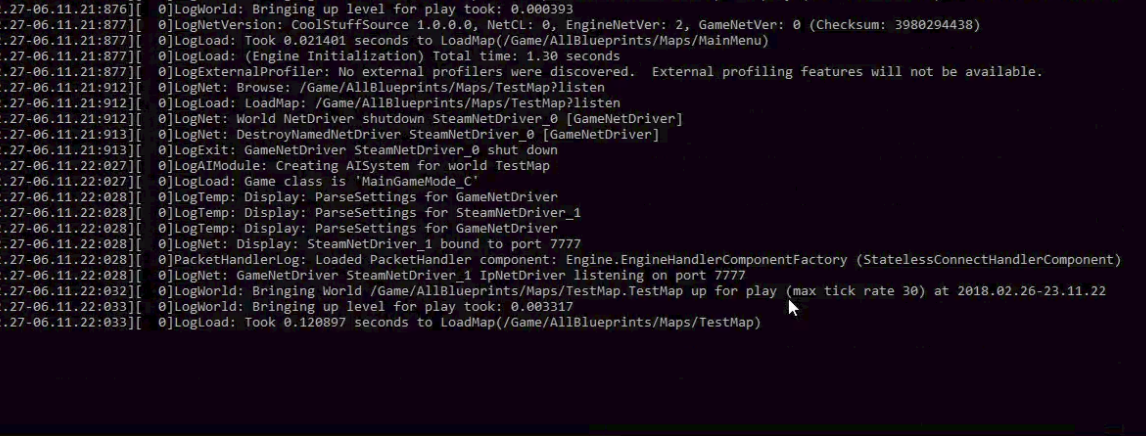
What can I do about it?
 meager spade
@cyan bane what you mean non-owner client replication?
all replication must have an owning controller
cyan bane
Sorry, by non-owning i mean controlling
meager spade
as far as i know anyway
meager spade
NPC are owned by the server, other players you don't control the server sends the details of them clients to you
cyan bane
Yeah, but where?
As far as i can tell your characters movement replicates in CharacterMovementComponent, but not other players you see
glacial lotus
When I set an event as multicast, will it be ran in all the player including the "fake" ones in the server? or only on real players?
 magic helm
It runs on all instances including the no player controlled versions, if you wanna filter for only player controlled versions then use the function Is locally controlled, as a check
crimson notch
get all actors of class, then check which 1 has the same name is my workaround 😛
same tag*
glacial lotus
ok 😃 Thanks
crimson notch
my custom event "IsVampire?" returns false on everything but the server, is there a fix?
https://gyazo.com/919638e4ef737eabefd3e1b3f17ffdc7



 fringe dove
@crimson notch probably need to turn off adaptive update rate on property replication if it is on
crimson notch
i think i should store variables that are needed to be seen by all players in the player controller, instead of the player state?
 distant talon
the player state is fully replicated and should replicate to all clients (unlike the game mode)
er wait
Yeah, the player state is in the game state
crimson notch
im telling the server to update every player state, but it only updates the server one for some reason 😦
winged badger
there is plenty wrong with that
you don't need custom logic to get controllers from GameMode (GetGameMode->GetNumPlayers->For(0 to NumPlayers-1)->GetPlayerController(index)
you don't need to send a ServerRPC from a ServerRPC, execution is already on Server
as for why it doesn't work, you haven't shown the relevant part @crimson notch
for variables in PlayerState to propagate, each of them has to be set to replicate, for example
i strongly suggest reading thru Cedric's Compendium (its pinned on this channel)
crimson notch
i thought that too zlo, but i have two other variables that work without replicate, i got it to work anyway, i replicated the variable i needed 😃
i think the reason my variables worked before without replicating, is that i had them incrementing each time the event was called, but thanks for the information, il use it next time!
glacial lotus
How to get the player controller having the Player ID(from the Player State->Get Player ID)?
umbral adder
@gusty spire if the cmd doesnt ask u for firewall access the first time u open it, it means you havent setup the steam part properly
also do a log verbose
u SHOULD NOT have any warnings or errors
even if it doesnt seem steam related
i have a lot of trouble doing this the first 3-4 times
but then i got it
anyways here are the ports i am using
also check if u have allowed the firewall access or even temporarily disable it.
also test if ur port are open with this small testing tool I made
it is for port 25565
Google Docs
u might wanna buy a static ip for ur isp
- Decode
@distant wave
anyone know's any good and CHEAP VIRTUAL SERVER for my game?
i am looking at GCP vs Azure vs AWS
twin juniper
@umbral adder mine is free currently, t2.micro instances under 750h and 30 gb-mo use. just gotta make sure to use the project launcher to create your ded server isntances so the ram use isn't too high. my ram was really high at 4 gb but when i built the ded server from the project launcher it greatly reduced ram util
twin juniper
the bandwidth is good yep.
umbral adder
can it handle 10players? and after usage is it gonna be cheap
umbral adder
would u recommend Google cloud or aws?
twin juniper
i can only speak from experience, i say t2 is good. but you gotta make sure to select free teir in settings when you start the instance.
umbral adder
ok
twin juniper
@umbral adder that is a guide i made with my friend jtxp. should help you. you wanna make sure to open the ports in the instance once you create it.
and keep in mind it's free.. so you really have nothing to lose. you can just start it up.
create an account and launch the instance thru the ec2 dashboard
you also gotta use remote dekstop to connect to it, and create a key pair to login (first) before you makea password as admin which you login with later.
once you got it setup you just disable the firewall and windows defender and stuff like that on the instance so the ram use is lowerered, to make way for the ram your game will take up. keep in mind 1 gb is max ram so you really need to optimize everything.
and do not forget to install the ue prereqs .. i forgot that for a bit.
glacial lotus
I'm using BPs. In a multicasted event how do I get all the players pawns? I get the player states from the game mode, but I can't find a way to get the related pawns.
 sharp pagoda
FindAllActorsOfClass
glacial lotus
@sharp pagoda Hmmm.... Thanks I'll give it a try.
 worthy iron
I am trying to implement multiplayer in UE4 so that it connects to steam so I can try out what I have so far. I have tried the webpage that describes how to do it and watched numerous videos. I did what it said but I obviously am missing something. Please Help!!
glacial lotus
Is a bad idea to send a Player State to a "Run on SERVER" event? What does it really send? An int? a pointer? a blob with the whole thing?
sharp pagoda
Sending object references over the network is quite a bit more complex than a simple pointer. If you think about it, how would another computer receive a pointer to a location in memory on machine A? It would be garbage. So instead, sending a reference over the network is resolved in the low level net handler to refer to something like an object UUID which can then be resolved on the receiving machine, mapped to a pointer in the new client's memory, then manipulated there. @glacial lotus
@worthy iron DefaultEngine.ini
[/Script/Engine.GameEngine]
+NetDriverDefinitions=(DefName="GameNetDriver",DriverClassName="OnlineSubsystemSteam.SteamNetDriver",DriverClassNameFallback="OnlineSubsystemUtils.IpNetDriver")

[OnlineSubsystem]
DefaultPlatformService=Steam

[OnlineSubsystemSteam]
bEnabled=true
SteamDevAppId=480

[/Script/OnlineSubsystemSteam.SteamNetDriver]
NetConnectionClassName="OnlineSubsystemSteam.SteamNetConnection"
Build cs
DynamicallyLoadedModuleNames.Add("OnlineSubsystemSteam");
Enable the plugin, run in standalone, and you should be good. Prob missing something but those are the main steps since of the docs are outdated and binaries/steamappid is automatically managed
glacial lotus
@sharp pagoda ok, I understand. So this uuid is small enough to still be a good idea? Or should I try something else?
sharp pagoda
Yes it's a fairly lightweight procedure to refer to actors over the network
glacial lotus
great 😃
sharp pagoda
I would guess it's 64 bits per reference, don't quote me on that though
glacial lotus
I'm going to use it for changin weapon, so it will not be used very often. I guess that will be fine.
glacial lotus
I guess I'm missing something obvious but how Do I get the player state for the current player?
found it
 marble depot
@umbral adder take a look at OVH for cheap and reliable servers.
umbral adder
thanks but already got into AWS
marble depot
that's a great option too, only thing would be you have to manually set up your anti ddos bullshit protection because aws doesn't have great protection by default
umbral adder
thanks i dont really mind ddos since its just an hobby
marble depot
alright, then you chose the all around best option for your needs
gusty spire
@umbral adder Hi thanks for responding to my issue. How am I supposed to do a log verbose?
umbral adder
gusty spire
ah so i need to write those lines thanks
do i need to rebuild the server too after this change or just package ?
glacial lotus
How to check if a PC is a real player and no one of the fake ones in the server?
Is Local Player Controller?
umbral adder
fake?
glacial lotus
the ones in the server
winged badger
all player controllers on the server belong to players
but IsLocalController will return true only for player hosting the game when used on listen server
glacial lotus
oh...
Well I want to know the PC on the clients that can actually give input to the PC.
glacial lotus
Ok, I think I need an example (with BPs) of changing weapons in multiplayer. Any idea where can I find one?
 slim holly
it's basically picking up and dropping items
except instead of dropping you attach it to character somewhere
glacial lotus
ok, I'll take a look into that. Thanks
 trim frigate
Hello, I wondered if there are some people willing to share a server project. I mean a special server project. Some thing like a cloud/master server. If 50 players are waiting for example for joining a server, that the master server starts up a gaming server
Sry for bad explanation
thin stratus
You mean a Service that launches Servers on demand and closes them again, like GameLift.
 unreal adder
How big is too big of a level for online realtime play? If anyone can answer, please elaborate on what it'd be like for both listen-servers and server-client ecosystems
I'd like to make a moderately large world
cyan bane
Ah i found my issue. It was character network smoothing that was causing the jitter.
Which is in CharacterMovementComponent
umbral adder
i have an instance running on ec2 but how do i know what is my ip so that i can connect to itue4
umbral adder
i cant connect to my public ip in aws
i have no server errors
or warnings
i have added outbound all traffic rules and inbound to all tcp and udp
umbral adder
ANY IDEAS?
thin stratus
Each instance shows their ip in the list of instances
@unreal adder Well, that is really not something we can answer :P
You will simply notice when it is too big
And then you have to optimize it
For meshes, i would maybe already optimize with some LODs
Later you can also devide the world with streaming levels
Really depends on the level of Detail you are going for
unreal adder
Hm
Do you start to get packet loss or bad latency when it becomes too expansive?
Yeah, LOD is a given
glacial lotus
My "Run on owning client" event is working in all my clients except the client sit on the server. What's the most common cause for that?
 hot robin
Hi, I have a Idea of Multiplayer that is based on "Listen-Server" but when on a Listen Server the host leaves normaly the game for example would end wich can be realy punishing for everybody else if the Person has to go or even Rage Quiets. So this is an Idea maybe im on a completly wrong direction and there is already something to fix that and so im asking here if this could be a solution.
ok we can all agree im crazy im fine with that
glacial lotus
I'm interested @hot robin Can you explain the graph? And are you trying to do "host migration"?
hot robin
kind of
glacial lotus
so your idea is everybody is a listen server, disabled by default except the real host. If this guy leaves then the next one in the list will be the host. Right?
hot robin
because i want to make a Multi Player game but i cant start without choosing between listen vs dedicated there are pros and cons like dedicated being able to operate ob more people better with maybe even a better connection but also server cost and the risk of ddos and all these things listen server however would be depending on the people and all players but with a "Standard" Ue4 Listen Server like with Steam it would be 1 will be the host the rest have to join via Steam or a server list buuut if the host leaves the game has to stop for everyone wich kind of sucks
then there is the problem wich may some people expierenced with host migration in games like CoD that it was kind of "anoying" if the game started to search for a new host "mid game"
fleet sluice
You can't achieve that with a standard UE4 build. There is a concept of "ownership" which dictates the replication flow from server to all clients. What you need is to transfer that ownership to a new client, which will become the next server. You need heavy C++ for that and there isn't a single example of a successful implementation on the web.
A much better bet would be to not use any sort of "real" UE4 servers and instead use a networking library (low-level sockets stuff; i.e. Steam's networking interface https://partner.steamgames.com/doc/features/multiplayer/networking ) to sync the properties you need to sync between the actors that need to be synced.
At least that way you won't have to worry about running into hard-coded engine stuff. In this context, a lot of the networking code will seem "hard-coded" because it was never designed for host migration. It was based exclusively on a client-server architecture.
hot robin
This API works best when used with Steam Matchmaking & Lobbies, depending on the types of packets you could route everything through one player that is acting as the host (typically the lobby owner) or game server, or send everything out directly to each player.
twin juniper
@hot robin dedicated is the way to go. it's basically easier for players to join in on a massive server, and players that lag that create listen servers always bog down the connection for everyone. if you're serious about your game, and have some capital saved, you can easily afford dedicated. plus there are some free annual options for dedicated hosting out there. just look at any good example out there. swbf2 has dedicated and the game is pretty cool.
and yeah for listen servers , the host leaves, everyone gets disced, as you said.
hot robin
if i go with dedicated i have to use the c++ from the github and can i go with the normal way of blue print replication with dedicated?
twin juniper
you have to sourcebuild, yes.
and in visual studio, you have to run a development editor and development server build, although you can use the unreal engine project launcher to build the server binary which is much better since it lowers RAM.
want a guide i wrote on the subject? i can DM it to you.
its like 3 pages long. details every step.
hot robin
sure sounds good its always better to follow a written tutorial instead of a video like youtube wich often is either to fast to slow or has noise or music in it
twin juniper
and by the way you are really better off using CPP in your game anyway.. i added cPP to late in mine. my game has very minor netlag in my dedicated server builds. simpoly because i added cpp too late 😦 95% blueprint code right now.
migrating as much as i can to CPP as we speak. all right ill DM it.
hot robin
i have a bit of a problem with cpp tho
twin juniper
as in knowledge of it?
udemy cpp tutorials then. best there is
the unreal syntax is a bit confusing. those tuts help a lot.
look for "udemy cpp unreal" on google and look for ben's stuff.
im actually in the process of going thru the tut now - and i can assure you it's really well done. really informative and thorough.
hot robin
i can read the code and can kind of see what it is doing but i can write it i know what a bool is i know integer , floats , loops , string and stuff like that but its pretty basic
oh i have the udemy course of the 2 british guys right
twin juniper
yep. one with ben and the other assistant guy.
hot robin
yeah i got it for 10€ or something on a super discount
twin juniper
they always have that discount lol
its still on right now
😛
its sort of a ploy really.
but tahts okay, the content is good lol
hot robin
but for all the "HOURS" of material its totaly worth it
they start pretty simple on the bull and cow game then go on and waaaaaay later its about UE4
but im aware of the BP vs C++ thing
dull stream
I want to make sure I understand something.. on the client's machine, if i see another player character, that character has the role simulated_proxy right? and I would have autonomous proxy?
on the server, the role would be Authority for all player characters, and remote role would be autonomous proxy?
is this correct?
I must have some misunderstanding, I thought that was the case but perhaps not
 vocal dagger
If I get that right you set the role and remote role on the server, if the role is Authority and the remote role simulated proxy then all clients will be simulated proxy. Unless you specify on a client that it's role is autonomous proxy it will have the simulated by default because the server said so?
dull stream
from what i understand, you dont set the role at all, its just a matter of does your controller own this and you control it... if so, then its autonomous. If its some other players character, and the server is dictating how it moves, then its simulated
dull stream
that might be true, Im not sure. still learning.
vocal dagger
yeah, I haven't gotten to test that part yet
dull stream
what i dont get is that in my tick, im printing things out depending on if its simulated or autonomous... and only autonomous prints out. and not only that, but its also printing out the info from the other client it seems? I have no idea, its weird. what makes it stranger is that it seems to be behaving correctly aside from that
I damage the player and when they get damaged enough, they cant shoot. this behavior seems to be working correctly. but when i print the health of the players, its like they are both getting damaged rofl
I'll look more into it
vocal dagger
how are you getting the info from the other clients?
you should be doing that using the player states right?
and the game state should have those in an array
dull stream
the way im getting the info from the other clients is that im expecting the simulated proxy character to tick, and during tick it prints out a statement. but maybe its incorrect to assume its ticking
the info should be updated because the server does a multicast
vocal dagger
but you cannot get info from other clients like that unless you are the server (I guess)
dull stream
hmm
that makes it difficult if you want to display another players health
i guess i would have to request it from the server
that makes sense though because it would be a security risk to allow you to just look at anyones data
vocal dagger
oh but wait, you could get the replicated info on the pawn from the server
I was checking it out from Cedric's guide http://cedric-neukirchen.net/Downloads/Compendium/UE4_Network_Compendium_by_Cedric_eXi_Neukirchen_BW.pdf
dull stream
Im super confused rofl. Its behaving in such a weird way.
its definitely printing the health values from both characters on my screen, despite having an AutonomousProxy check
could this be an editor bug?
like its printing debug statements on screen from both clients
because that would explain it I suppose, and also explain why functionally it seems to be behaving correctly
dull stream
Unreal Engine Forums
Talk about Level Design, Static Meshes, Physics, and more.
yup, thats the case. so strange. I would have expected this to behave differently
like each window gets its own on screen debug messages
but its shared
glacial lotus
Cannot change HUD/widgets stuff in the client+server while in the normal clients works fine. What am I missing?
copper portal
Need help with a respawn system. pm me for more info
umbral adder
@copper portal if u need help just ask
umbral adder
Hey guys i have bought a server on AWS (EC2
I have setup my dedicated server but i am unable to join it and the **ports ** are closed also
the funny part is that i see my server in steam internet tab


i have setup the security rules propery
and disable firewall
but port's are not opening
now,i dont know what is the problem.. Steam or ports or firewall or game