#multiplayer
1 messages · Page 396 of 1
 severe nymph
The client and server will be so close it won’t matter
For bouncing grenades
From the listen server you simply multicast on switch authority with replicated actor
From the client you branch from remote and call the event from rep to server
There is another way to handle though it takes a little more work
But the results are more responsive for the clients
 dark edge
I think I'm gonna try the approach of replicating the event, and using OnBounce on the server-side projectile to update state for the client side ones
basically replicating state only when things change in a drastic way
severe nymph
Alternative: create a rep-notify variable bool called fired bouncing grenade. Perform the spawn in the rep notify function and on rep notify options choose all but calling client. Call a local fire event that does the same logic as the function and switch authority rep event at the end and var to true. In the function have the switch authority on the end set the var back to false. @dark edge
 meager spade
got this weird bug :/
oh nvm
me being stupid
i think anyway, just gonna try it before i post the problem
nope didn't fix it
severe nymph
@dark edge that will work but you will see strange jiggle after bouncing and warping under stress with that method. Leaving the work to the server for all but calling client is usually best because the server will be closest to understanding the client call. If the other clients interjected their own location data into the mix they can be really off at times.
A bouncer is always best to be server replicated actors
Or a very small rep notify variable that can get out to all clients very very quickly
The damage call will still be authorized by where the server thinks the grenade should be.
You may be able to multicast an event that fires then destroys on bounce but passes the velocity and direction into a server spawned replicated projectile
dark edge
I would prefer everything to be a server replicated actor except I'm not sure how to handle the calling client latency.
If there was a "Relevant to all but owner" setting I think I'd be all set.
severe nymph
On second thought I think the last idea would be the best one
Call a local fire event not replicated
dark edge
But then when the server spawns a replicated projectile you get 2 on the calling client's end
the local and the one from the server
severe nymph
Rep to server multicast that out for all but locally controlled
On locally controlled and on multicast hide on bounce but spawn on authority the replicated actor
Everyone should only see the replicated actor after bounce
You won’t get 2 on calling client
The starter projectile isn’t replicating
It’s the client dummy
And the multicast client dummy
On bounce authority destroys that dummy and spawns the replicating actor passing in the velocity and direction
Server takes over from there
Clients shouldn’t see it flicker if you do it .5 delay after the bounce
It will be like a single little jitter
Vs unpredictable grenades lol
@dark edge
Ok I just read up on the most accurate application possible for what your trying to do. It should work without issues. First spawn the projectile locally and rep server and multicast that calls the local spawn for all but owner. Replicate a transform, location and velocity variable and get that on bounce switch authority and set. Do not replicate the actor.
@dark edge
In the example it says you can rep notify these variables as well and simply have the function call set them on clients
They may warp on first bounce but all other bounces will be in sync
I will admit. It seems bouncing projectiles are a little more painful to sync
 molten tinsel
Working on setting up a dedicated server for this game and no matter what I do I can't seem to figure out how to solve this...
C:\Program Files (x86)\Microsoft Visual Studio\2017\Community\MSBuild\15.0\bin\Microsoft.Common.CurrentVersion.targets(
1126,5): error MSB3644: The reference assemblies for framework ".NETFramework,Version=v4.5" were not found. To resolve
this, install the SDK or Targeting Pack for this framework version or retarget your application to a version of the fra
mework for which you have the SDK or Targeting Pack installed. Note that assemblies will be resolved from the Global As
sembly Cache (GAC) and will be used in place of reference assemblies. Therefore your assembly may not be correctly targ
eted for the framework you intend. [D:\UE4 Source\UnrealEngine-4.19\Engine\Source\Programs\UnrealBuildTool\UnrealBuildT
ool.csproj]
GenerateProjectFiles ERROR: UnrealBuildTool failed to compile.```
This error appears whenever I run `GenerateProjectFiles.bat -2017`.
I've installed .NET Framework 4.5.2 Developer pack, Windows 10 SDK, .NET Framework 4.5.2... I just can't seem to understand what this error is trying to tell me. fossil spoke
Try updating Windows if you havent already
If you have another version of VS installed (something older than 2017) it maybe causing an conflict.
Uninstall previous versions
molten tinsel
Windows is up to date. No other VS versions installed. Gonna try reinstalling.
This wouldn't mess with anything, would it?
molten tinsel
Alright so reinstalling helped. Now it's asking for SDK v8.1 but the only one I can find is SDK for windows 8.1 or above which I feel like isn't what I need.
Okay that is what I wanted. Got it figured out. Why they would make the version number sound like it belonged to windows 8, I have no clue
 viral raft
I try to teleport a actor when the bool: iscriminal? is true
But in my case it looks like it grabs the bool from the server player and not the player its overlapping with, can someone help me?
When the client is police and the server criminal it works fine.
 loud mountain
hey @viral raft already fixed or still need help? if so, what are you running, my guess would be listen server.
loud mountain
well if you haven't checked "run dedicated server" and only changed the number of players to two then you are running a listen server
severe nymph
@Mr. Proper#0273 Hey man the overlaps and hit events are hell. They will fire on the listen server no matter what.
@viral raft you need to rep the overlap to the server from the switch remote if you want it to come from the client and create an input to pass the other actor pin into
viral raft
Ah okay
I will try. Am new to replication :D
@loud mountain I havent checked dedicated when testing
loud mountain
nah its fine
viral raft
Oh okay
severe nymph
The server can authorize the overlap too but you still need a reference to the other actor. Switch authority pull the pin from other actor and print to see if it references who you need
loud mountain
If you need some useful learning ressource I'll point you to this: (in case you have not yet found it ^^) http://cedric-neukirchen.net/Downloads/Compendium/UE4_Network_Compendium_by_Cedric_eXi_Neukirchen.pdf
severe nymph
I’ll jump on in a minute and give you an example but honestly this is pretty easy to test. The server and client movement replicated actors can be a little different as far as location so I usually let the server authority all overlaps and ignore the remote branch
So immediately after the overlap events switch has authority-> on authority branch print string-> pull pin from other actor
See if that gets you the actor your needing
@viral raft
viral raft
Whats pull pin?
severe nymph
Even if it’s two clients overlapping each other the listen server will fire the event also passing in the client actor
severe nymph
Oh from the overlap event there is a other pin
severe nymph
For networking you have to think about your game logic from the perspective of authority and remote
Switch has authority needs to be called and all hits and overlaps logic need to be ran on authority
Clients can’t handle it cause they can’t talk to each other. The server detects their events then send it out to everyone
Even if you tell a client to spawn something it won’t be seen by anyone but the client spawning it
severe nymph
Yea instances of loot per client is kinda popular
Only problem is once obtained you need to rep to server as owner with rpc
Then multicast to other clients so gamestate is consistent
viral raft
Huh whut?
severe nymph
So say you have client instances of loot spawning
loud mountain
other people don't necessary need to know what I have in my inventory 😉
severe nymph
Your client has an inventory of that stuff
The server will need to know if that object can affect the gamestate
Meaning if it can shoot or modify others health
viral raft
Oh
severe nymph
At the point of equip or use
viral raft
I dont have weapons etc
loud mountain
I was thinking more like a diablo style inventory where I'll just pick it up
and have it in my Inventory
but that's just me imagining then ^^
severe nymph
If it’s gear the other players need to see it
loud mountain
Only if I'll equip it tho
severe nymph
So once used or equipped you rpc as owner to server
viral raft
@severe nymph Am at the part So immediately after the overlap events switch has authority-> on authority branch print string-> pull pin from other actor See if that gets you the actor your needing
severe nymph
Then multicast that local equip or use logic
severe nymph
The server will be aware and if that actor is replicated so will other clients
severe nymph
How are you setting who the criminals are
severe nymph
So clients pick
loud mountain
then make sure your RPC is set to Execute on Server and Reliable
somewhat like this
 severe nymph
Ok 👍🏼 so when the client sets them the server should know as long as authority is used
Yup that’s good
The clients own themselves so that will fire
loud mountain
always remember that replication only works from server to client but not vice versa
so If your other client wants to know about which team he is in you need to set the variable on the server
severe nymph
Yea he needs an event to call that rep event on remote
loud mountain
because of the "replication" flag of the variable it is then automatically being broadcasted to the other clients
severe nymph
So when they click the button switch has authority on remote branch call the rep server event that sets it
viral raft
Ah okay
loud mountain
please do never use switch has authority in a blueprint widget
viral raft
So when i set my team to criminal i need to replicate it to the server?
viral raft
Okay
severe nymph
If it’s a hit or overlap the server will fire it and you can just use authority and set it
viral raft
Wait a moment
severe nymph
If it’s a client event that the server isn’t aware of then u need to call a rep event to set
 viral raft
Ah okay thx
I am playing my game will test it withing 5 mins
@severe nymph Okay i did what Markus send 😃
Lets see
Looks like it works now :0
WOW Thxx @severe nymph and @loud mountain
❤
loud mountain
you're welcome
viral raft
It works like a charm :0
@sweet sphinx Hey Tim 😃
@loud mountain @severe nymph Packiging a test right now 😃 You are invite to test it 😉
viral raft
Nah then its not ready 😄
I dont have that fast pc and internet
Should be done in 30 mins i hope
uploading takes long...
I will post the link here ^^
So other people in here can take a look too
loud mountain
Im on ma way home then I’ll join 😃
viral raft
yeey 😃
severe nymph
@viral raft I’m currently knee deep in my VR game or I would
I’ll dm u guys my discord
Working on weapons replication right now
I got keys too if u guys have hmds
Oculus and rift support is in
 sweet sphinx
@viral raft Hey there
meager spade
i am replicating a bool bInUltimate, but the animation is not playing in the animgraph
am i missing something stupidly obvious?
nvm think i got it
forgot i need to pass it to the server to be set, duh! 😄
 viral raft
@sweet sphinx Just released a test version :)
I mailed you about my low poly cops and robbers game ;)
molten tinsel
So why do I need to recompile the entire engine in order to make a dedicated server of my project?
 twin juniper
you need to compile a dedicated server version in VS studio like this. there will be a separate dedicated server binary you will run on the host machine that has the dedicated server binary up and running, and from any other pc you can use the other pc as client to connect to your server. you do not need to recompile the game engine for dedicated server builds - you'll only need to go into your game project sln and work from there.
molten tinsel
https://wiki.unrealengine.com/Dedicated_Server_Guide_(Windows_%26_Linux)
So this guide here which is making me do a bunch of extra stuff probably shouldn't be trusted?
twin juniper
i used that guide when i first tried to make a dedicated server for my game - it includes extra steps about how to have the dedicated servers in blueprints working without using too much cpp code. you can try it. it actually worked for me in the end, but there was some lag for my client pc so i switched back to listen servers for my game.
molten tinsel
I've honestly been getting nothing but errors following that guide.
twin juniper
did you get the game working properly in a listen server build first using create / join session?
molten tinsel
I couldn't even package my project.
twin juniper
i mean before trying dedicated
molten tinsel
How do you mean?
twin juniper
about the .lib error, here's a site i found for you on that: https://answers.unrealengine.com/questions/790824/wafmedia-dont-let-me-to-package-my-game.html
molten tinsel
twin juniper
refresh
molten tinsel
I did flag -2017 though.
twin juniper
anyway, what i did for my game was use the unreal multiplayer tutorial series to get multiplayer working for listen servers using create join session
dedicated is more advanced and you shouldn't try that until you have listen servers working first imo
think i found a fix for it actually
molten tinsel
Oh?
twin juniper
look at this thread too https://answers.unrealengine.com/questions/400620/video-file-extensions-not-recognized.html - might need to check "media players" "media player editor" and finally check to see if windows media player latest version downloaded to your windows pc. hope this helps. again try to use the listen servers and then move to dedicated after you have basic functionality. if you search you tube for "unreal multiplayer", the first result is unreal engine tutorial on it i used that's very useful. so please use that. hope that helps out.
molten tinsel
My worry with following the peer-to-peer tutorial is that transitioning from that to dedicated is going to be super difficult.
Like I would basically have to start over, is my worry.
Thanks for your help, though. ^.^
twin juniper
not so
listen servers just use create and join session nodes, and you use open level with the ip address of the dedicated server machine instead of join session for dedicated server clients, like in the dedicated server guide example you sent me. hope you figure it out.
molten tinsel
Thanks. I'll work on a p2p thing for now, then.
dark edge
Anyone got a slick way to override a local actor with the server-replicated one when it arrives?
 versed rock
Does anyone know how to fix this issue?

 agile lotus
Is it bad to multicast with movement if i'm using addmovementinput and the default character movement component
 sharp spire
@thin stratus have you checked out spatialOS for ue? if so could you tell me why this isnt becoming huge?
@versed rock the server sees it as still simulating physics
i would have the server stop all movement when it switches turns to just verify. and also mc for visuals
i assume
i havent played with physics
 steady briar
if im testing dedicated with 2 clients and i have Client2 print something... but it says Client2 printed it on both windows, does that mean its replicating or is it just a general thing
 grand kestrel
@sharp spire SpatialOS uses it's own networking layer, when you make a game that runs on SpatialOS you're at their mercy - they could sell their service or start charging high prices. Also it's pretty unintuitive to use. Finally most games simply don't need it
All those things add up to it not being popular
viral raft
@sweet sphinx Ah no problem, i thaught there was something like a presentation where you were going to show off some games 😃
I thaught thats perfect to let people know my game is here
 thin stratus
@Pierce#8582 I assume cause by far not everyone needs this
And the pricing is maybe not that friendly
And what Vaei said. Haven't seen their response until now
 modern dome
When my Weapon is owned by my Pawn. Is it owned by the PlayerController, too? I.e. Can i call RPCs etc?
 crimson lily
Hi all. i'm started to make a game based Gamesparks multiplayer.Have any tutorial about it?
GameSparks plugin already enabled in my project
meager spade
GameSparks has lots of information and i think it comes with a sample project
thin stratus
@modern dome Yes
@crimson lily GameSparks has Documentation on their website. Please refer to that.
 safe scroll
Hi guys...I have Problem to find Host with Steam or NormalNull. Before it was work Probably just like the usual but something wrong hapen to my PC i think but I don't know what going on ?and I really need to fix this Problem pls 😦
 full scaffold
Hello everyone!
I am looking through the ShooterGame sample project for learning about multiplayer.
I know it is pretty standard practice to do the hitscan calculations on the client, so when the client shoots someone on their screen, it registers as a hit. The server may validate this hit, but basically the client tells the server what it hit.
In the ShooterGame example this seems to be the case. If I turn my ping very high on client #1 (eg. 3000 milliseconds), and shoot client #2 who is standing still, even if i switch screens and make client #2 run away before client #1 actually shoots it still hurts client #2. I can make a video to show this if it didn't make sense.
Basically high ping players can shoot other people and do damage even if the other play has run away on their screen. Not only does this favor high-ping players, but also I feel like letting the client tell the server if it hit would open the door to cheaters.
What is the best way to solve this issue?
My current idea is this: when the client fires his weapon, it sends the server a start and end point for the hitscan, but the server actually does the hitscan trace. This would mean better ping = more responsive shooting, and the server determines if you hit. The problem with this is that its possible to look like you shot someone but really you missed.
Any ideas would be much appreciated, thanks!
PS. If I am not understanding how the ShooterGame is coded, or if this issues is editor specific, then please elaborate, I'm always looking to learn! 😃
loud mountain
the Problem you
're facing is that you have a ping of 3 seconds (simulated) which is nothing one should play at
in the time you sent the "hey go forward event" eventually 3 seconds have passed until you move (on server)
its always a tradeoff
battlefield for example uses a client authoritative(is it spelled that way?) system
which basically means your first system
but in reality you should just kick players with a ping higher than 500 - 700msecs (if not further)
just ruines the experience for all players - they should play on available servers near their region where they're ping is approx < 100
full scaffold
Thank you for the reply! Obviously 3 seconds of ping is ridiculous for gameplay, but setting it that high simply makes it easy for me to test.
Awesome fact about Battlefield! This system seems like it makes a good trade-off: client authoritative shooting, but kick high ping players. I like that! Any advice or ideas about addressing potential cheaters?
Would it not be possible for someone to tell the server they successfully hit someone across the map or through walls?
full scaffold
Now what about this system I've seen where when a client fires the server goes back in time a bit and checks the position of all players to see if there was a hit?
Any examples of that system I could dive into? If not, what is the best validation method?
loud mountain
AFAIK (but don't quote me on that) In Battlefield they use validations on this stuff (taking lag into account) the server checks if you could have hit, and if you could have done X damage. I don't know their maths
pulling back the game X seconds (basically recording all players and moving objects) to check for lets say 70 hits every frame by 20 players or so could be kinda burning the CPU but thats just what I am thinking ^^
full scaffold
Yeah that is a good point, I would rather something like Valve does with counter-strike
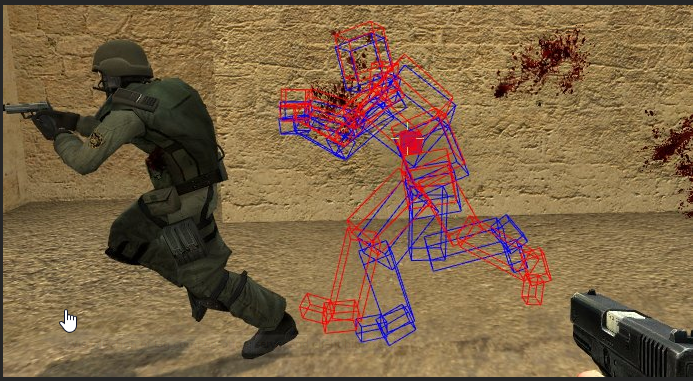
The hitbox just trails the player the same amount as their ping, so it lines up with what other players see as the actual position, just not sure how I would implement this
 summer nova
@full scaffold counter strike does client side hit detection
but when the player hits, the server gets "hey, player 3 shot player 2 from coords X-Y-Z
the server then rewinds player 2 by the ping of player 3, and compares hitboxes to see if he did, in fact, shoot him
meager spade
how would you rewind to get the value?
 sterile pebble
by storing moves that player making
and playing them back
or just by looking at saved data. It's depends on actual implementation of you multiplayer system
meager spade
so store the previous so many movements in the playerstate
and use that as a refrence, ie some sort of struct
sterile pebble
actualy UCharacterMovementComponent is doing this for character movement already. Take a look at SavedMoves array and where it's used
 sharp pagoda
Funny you ask, I just wrote a server auth lag compensation system that is just like CS:GO's system
I used the game mode to keep a history of records for each player with a timestamp, then when the player thinks they hit another player, the gamemode looks into the logs and finds the timestamp that matches the player's current timestamp + the RTT, then rolls back the hit player to that timestamp and reruns the hit logic
 potent raven
Could the replay system be modified to provide this logic?
sterile pebble
You can do everything you want with open source code that unreal provides, but I dont feel that this will be the easy way. Basically, ue replay system works throught fake client that recording network traffic
 gleaming bobcat
What is the best technique which will do same like root motion in single player. (in multiplayer root motion does not work properly unfortunately) ?
 fringe dove
is there a way to send an RPC only to the demo driver without creating a separate actor that is only relevant to it? (I'd like it to go over the same actor channel as some other stuff that is being reliably multicast to all clients, to keep it in order)
meager spade
if i set a collisionbox on an actor to Inactive, will that automatically get replicated?
meager spade
ShieldParticleComp = UGameplayStatics::SpawnEmitterAttached(GunShieldFX, GetMesh(), FName(TEXT("Shield")));
ShieldParticleComp->SetIsReplicated(true);
doesn't replicate?
do i really need to do a server call even if it is a component?
grand kestrel
Replication only has to be set on server if that's what you mean
Because only the server replicates
meager spade
i thought if i set the ShieldParticleComp to replicated it wold automatically replicate, but then again i am setting the replicated on the client
 grand kestrel
Yeah, your client shouldn't be notifying the server either, that's how you get hackers
meager spade
so what would you suggest?
loud mountain
well at some point you want to notify your server that you want to use the shield
meager spade
yeah, so they press X it runs OnGunShield, which checks to see if gunshield is already active or not, if it is not active calls AddShield

i mean the shield works but doesn't work if i am the server
loud mountain
you're running listen server?
 loud mountain
well then you need to check if its local too
because you're running on server with Role_Authority
and your if is not going through
theres a function for that in pawn and controller I believe
IsLocallyControlled() on pawn
and IsLocalController() on Controller
I don't know about components etc tho
meager spade
@grand kestrel you said let the server add the shield, can you explain, i am a bit lost, i was just going to multicast the particle effect but i need to destroy it after a set time which is what the timer is for
molten tinsel
Is there a way to do ServerTravel without having to take all the clients with you? Like say player 1 wants to go to place B. Player 2 wants to stay in place A. How do I make it so that player 1 gets to go to place B without dragging player 2 along? (Dedicated server.)
molten tinsel
Is that the same as servertravel where I need to call it from the console?
twin juniper
what do you mean with call from the console?
you can call that from anywhere, gamemode, triggerbox etc
molten tinsel
From what I've been reading you have to use ServerTravel as Execute Console Command. I'm asking if it's the same for ClientTravel.
twin juniper
You dont have to use ServerTravel from console. I for example use it from my lobbyGamemode etc.
molten tinsel
Well right now I'm trying to get it so if you walk through a doorway, you get into another level. I'm talking about BP something like this...
Since I can't find a ClientTravel BP.
twin juniper
Might be that this isnt exposed to blueprint idk
But you should be able to call clienttravel in the console too, if that works for servertravel
fringe dove
does unreal do bandwidth estimation and is it possible to query? everything seems to be based on hardcoded limits?
 slim holly
well yea, most of the replication is automated
if you try to replicate more than limit allows, it sorts out the important ones first
 gleaming vector
holy crap guys
Steam Authentication has been added! Games can now add a packet handler component that interfaces with the Steam authentication APIs, allowing them to advertise their servers properly, handle VAC/publisher bans, and provide better validation of c...
Labels
Networking
wowowowow
it only took them 3 years
to support the very basic functionality of steam online subsystem
gleaming vector
they implemented it with a unique packet and packet handler
fascinating
UReplicationDriver is a base class that can be used for implementing custom server replication logic. That is, determining which actors replicate to which client connections, as well as how RPCs are routed. See ReplicationDriver.h for more inform...
Labels
Networking
😮
holy crap
fortnite coming in and saving the day yo
gleaming vector
this is sick
i think I can finally implement distance based replication rates with this system
or like
instancing regions
man, this is cool
 humble zealot
Okay so I have my "Multiplayer Screen" done ish, and wondering if there is documentation on how to setup server join through steam if possible
fringe dove
@heady merlin ^ lots of nice new multiplayer features
 heady merlin
they finally added auth? not sure whether to rejoice or be depressed
that took forever
fringe dove
@heady merlin hah yeah.. the replication graph stuff looks nice though
fossil spoke
@gleaming vector Holy shit it just keeps getting better lol
meager spade
did anyone look over my pastebin code?
 brittle sinew
This page is no longer available. It has either expired, been removed by its creator, or removed by one of the Pastebin staff.
:p
meager spade
brittle sinew
Alright, but when you're dumping 90 lines of code you're going to have to be a bit more specific than "is that the best way to handle that?"
There are plenty of thats in this code.
meager spade
well like is multicast the best way to handle the shield effect?
or is there a better more efficient way
brittle sinew
I might consider doing it via a replicated "is shielding" property and on OnRep.
"More efficient" is really hard to quantify in this sense.
meager spade
well bHasGunShield has a OnRep for when it is set
brittle sinew
There are plenty of parameters that affect what you might call efficient in networking.
meager spade
well it's more is that the way to do it or am i over complicating it
meager spade
@brittle sinew i managed to put it into a OnRep
works fine
{
    if (!HasAuthority())
    {
        ServerSetHasGunShield(HasGunShield);
    }
    else
    {
        bHasGunShield = HasGunShield;
        OnRep_HasGunShield();
    }
}```Is it possible to call ClientTravel with blueprints? If so, how?
So I misunderstood what ClientTravel is. Is there any way to move one player to another map without taking the rest of the players with them?
humble zealot
Guys, so I'm ready to start multiplayer stuff, however I'm only wanting to use BP's. I've seen it done in asset packs. However I'd like to create my own
Is there any tutorials online or anyone that could guide me
 burnt meteor
Yes @humble zealot what are you looking for?
Shooter, or just connecting players chat steam?
humble zealot
I'm creating a survival game @burnt meteor so yeah a shooter, and looking to connect it to steam servers with also a chat system
humble zealot
Okay thanks
I'm almost done with my game and multiplayer is the biggest part of it
Well done to a point of basic gameplay
burnt meteor
If you wanna learn how networking works then read this document
humble zealot
I'm looking to do it in BPs only if that is possible
burnt meteor
'Unreal Engine 4' Network Compendium Made by: Cedric 'eXi' Neukirchen ...
PDFcedric-neukirchen.net › Downloads › UE...
Google that
 severe widget
Its also in the pins
humble zealot
Is there no BP only guides

NEW! - Download the entire project http://www.unrealtek.net/unrealengine4_downloads/ In this long session we setup multiplayer 100% to get clients to connect...
Would this be it?
humble zealot
Ahh, i might have to pay for someone then
burnt meteor
1 for getting steam up and running and setting up match making
@humble zealot that PDF is network ing basics on ue4
The epic games series is broken
Google advanced sessions tutorial by nice shadow

YouTube
NiceShadow: - Unreal Engine 4 Tutorials - ue4 (international) - Blender Tutorials (Deutsch/German)

YouTube
This is a youtube channel for my journey into the unreal 4 engine. I make tutorial videos, create assets, and templates for my personal game projects as well...
Goto the playlist and click the shooter series 1
@humble zealot
humble zealot
Okay thanks
burnt meteor
@humble zealot np
viral raft
Is it possible to make host migration?
slim holly
sure, but it probably requires lots of client authoritative code
 potent prairie
@burnt meteor I want to set up a dedicated server but not use steam (no need for testing). Should I still follow that tutorial series and just ignore the steam stuff?
slim holly
afaik if you don't include steam it will just fallback to default subsystem, which supports lan testing
but it doesn't really harm to make it steam compatible
potent prairie
I wanted to try playfab or gamelift or something, is that much different than the steam setup?
slim holly
no idea, probably very similar url based system
burnt meteor
@potent prairie which series i sent 2
@potent prairie also no they are using listen server not dedicated server so u will have to modify only a few things
and they dont talk about dedicated server's so theirs no use in following that tutorial series
viral raft
Is it easy to make a dedicated server thats based on listen code?
Or do i need to recode alot
burnt meteor
@viral raft its easy
u just need switch has auth, is locally controleld and is dedicated server nodes and pretty much ur done
viral raft
@burnt meteor Has auth is already been used here :)
viral raft


Ik keep getting this error when i try to destroy the lootdrop actor ;/
Someone who can help?
The player variable is set to the overlapping actor on overlap
loud mountain
usually u only destroy an actor on server
if its replicated it does that for you
"IsPendingKill" describes the actor already being "destroyed" so it cannot (or at least should not) call Destroy on it again
,or better being in the "destroy-phase"
loud mountain
well you do switch has authority
but server is already authority
this should be on remote then
loud mountain
well possibly yes
 red ledge
hey guys
anyone knows if there is a hard limit to the number of players on an unreal engine server?
like how realistic is it to make a small MMO RPG?
loud mountain
hmmm I believe that is more up to what and when you want to replicate certain things
on a large map, one does not need to know what happens presumably 5km away (if he cannot see it by far)
viral raft
@sweet sphinx Already checked out my game? 😉
loud mountain
but I am not aware of any hard limit
 loud mountain
whats the event that triggers it?
viral raft
But if i only connect destroy server it wont destroy on the client 😉
I tested it
On overlap
viral raft
You mean the BP actor @loud mountain ?
loud mountain
the one you want to destroy
red ledge
@loud mountain thanks
I'm thinking of making a small MMO RPG as my graduation project tho I know that Unreal is much better with session based shooter games
or maybe MOBAs
 unborn nimbus
Ok, I'm having an issue where I spawn a replicated actor on the server and try to call a function on the client after but the actor hasn't finished replicating yet. Is there a way to tell when the actor has finished replicating?
red ledge
any other things to consider making an MMO RPG on unreal?
it's just a proof on concept you can say, a few hundred players and working logic
loud mountain
MMO Is always hard to judge, I am thinking about stuff like WoW, but just thinking about it, can't PUBG or Fortnite BR not be MMO too? 100 Players on that map is a massive amount of people in my opinion
unborn nimbus
Yea I guess I could have it loop on the client if the objects aren't available yet and if it fails X times, log an error
@red ledge how long do you have to complete it?
red ledge
@loud mountain yeah I agree but i'm not going anywhere near that scale of WoW, just a city, a few dungeons and a server that can handle maybe 500 players
@unborn nimbus an entire school year (8 months?) and I have a friend with me (maybe more people idk yet)
also would steam be viable for this? just for login and achievements etc
since it has all that built in
unborn nimbus
I feel like you're going to be hard pressed to get something you'd be proud to show off in 8 months.
red ledge
yeah I agree
I can work in the summer too
so I can push it to be an entire year
I'm not looking for any sort of market targeting, just a working prototype
hardly gonna try to create special artwork or anything
doesn't have to be an MMO but any sort of a multiplayer game with a lot of players and some RPG elements
unborn nimbus
If that's the case, your top end should be 100 players. There's a reason why that's the max on pubg and fortnite
red ledge
like teams, quests, a simple story line, something like dungeons etc
I was thinking of a bit more
something a bit open world
at least one map that is open world
loud mountain
well that already sounds like much more than "just" 8 months of work
unborn nimbus
^^^
red ledge
yeah I know
I wasn't planning on making anything too fancy just the basics of everything
the base systems and showing them off in a game
I would be graded on the system not the actual game
at least mostly
as long as the game is working
burnt meteor
@viral raft the way your doing your networking is bad practise and outdated method
potent prairie
@burnt meteor do you know of any guides/videos for setting up dedicated servers?
burnt meteor
steam?
@potent prairie google it my friend usally read wiki's and docs its how i started
this is without steam
its better explained than videos
4.19 server target is 18's code
potent prairie
okay cool. Not interested in steam atm, I just want to get it running on a private server
burnt meteor
ok
thats good then it covers everthing
@ PrintStringFTW#6597 created it btw so yea credit goes to him
potent prairie
also my game keeps launching full screen 1080 and I cant figure out how to make it window mode. Changing the settings ini file hasnt fixed it, adding a console command to the level blueprint did nothing.
any ideas?
packaged build btw
burnt meteor
u wanna make it default or changable?
like hard coded?
if u wanan hard code it to be windowed check ur ini
sometimes the file doesnt update
potent prairie
yeah I changed the ini but its still full screen
potent prairie
ok
burnt meteor
😃
potent prairie
thx haha
burnt meteor
google is friend
first google then ask i found the answer here
Unreal Engine Forums
Build powerful visual scripts without code.
 worn nymph
did someone @ me i got a notification but cant see where ?
worn nymph
oh np whats up?
potent prairie
I googled a lot but I forgot t hat damn w lol
worn nymph
oh it must be somewhere else then lol my discord always plays up
burnt meteor
@burnt meteor do you know of any guides/videos for setting up dedicated servers?
@potent prairie google it my friend usally read wiki's and docs its how i started
https://wiki.unrealengine.com/Dedicated_Server_Guide_(Windows_%26_Linux)
@ PrintStringFTW#6597 created it btw so yea credit goes to him
[REPOST]
this is what happened lol
i dint @ u
worn nymph
ah yeah its a little outdated but epic have turned off editing so i cant update it at the moment
worn nymph
yeah been on there a while now wish they would put an eta of how long their update will take lol
burnt meteor
lol 😃
unborn nimbus
Is there a way to get variables to only exist on client or server?
 craggy sable
Hi, i want to set up a "teleporter" that transports a player from one dedicated server to another. I've done it but for some reason after several server switches one of the servers is stuck trying to connect the player. It happens after 2-10 reconnections to the server, seems to be random, it happens if i switch with an specific player, if i just connect several users to the server from the same ip it doesn't fail.
do anyone know how can i accomplish what i want? I've tried with console command "open ip:port" and open level but same err on both
 calm hound
@unborn nimbus Yes/no. The variables are pre-defined in the compiled code when you create your class. But you can control who gets the values
or who gets the updates
unborn nimbus
i'm thinking more of a memory optimization so the other isn't storing information that isn't relevent
calm hound
Well the server is always relevant, for anti-cheating and quality control reasons
unborn nimbus
I'm talking about client-only logic or server-only logic
unborn nimbus
I don't think you're understanding my question
calm hound
I'm not sure I am either. What are you trying to achieve?
unborn nimbus
Say I have some boolean that is tied to a UI element being open or closed for example. There is no reason for that variable to exist on the server, but I would imagine that it will even though the server will never touch it.
calm hound
Well, your basically given the choice of just having that actor not exist on the server (IE: UI Widget), or having it exist on the server with all the default values
But you can't have an actor exist on the server, missing half the variables. It still knows there is a bool there
unborn nimbus
So the answer is no. Ok, thanks
calm hound
yup, yup
viral raft
@burnt meteor whats new then?
craggy sable
I've been days with the dual standalone server setup and allowing users to switch server (see my comment) And google doesn't have the answer. I've found the solution right now, I had to put HasAuthority and only allow server switch on remote.
just is anyone is interested.
if*
 bitter oriole
So, I'd love some input from more experienced MP programmers. I've got a vehicle game working reliably, but I'd love some projectile-ish parts. Like, dropping something or throwing it, not sure yet.
I'm not sure about how to handle the replication on this. Server-side physics + interpolation would work but probably not well.
I'm thinking of client physics with some server feedback, to correct physics discrepancies
Or faked physics with classic prediction/rollback
meager spade
@thin stratus is this fine for what i am doing? https://pastebin.com/44RxDHZs
thin stratus
Hm
Why does the ParticleComp needs to replicate
The OnRep should already call on everyone but the Server, or?
And why are you returning if a simple particle comp doesn't work, or is that very important to the ability?
Despite that it seems okay
No idea though if you are aware GetWorldTimerManager().SetTimer(TimerHandle_GunShield, this, &AUWMurdockCharacter::OnRemoveShield, 0.1f, false, ShieldDuration);
This starts delayed by 0.1 second or?
Not 100% sure what the params of that timer are again.
For the false part (else), I would maybe not put the "if(TimerActive)" around everything
You never know if that timer is not active but you still want to deactivate the rest
Would only call Clear if timer active and do the rest anyway
@meager spade
meager spade
if i don't replicate the particle comp it never shows on other clients, and its a looped particle which i need to disable once they remove the shield
and your right about the timer is active check
thin stratus
Hm weird with the particle though
OnRep calls on everyone but the server
so all clients
(excluding ListenServers too)
So it should Spawn the emitter on everyone
meager spade
oh your on about the SetIsReplicated call?
thin stratus
Yeah
meager spade
yeah i can remove that, that was from me testing other stuff
thin stratus
Ah alright. Then the rest looks clean to me
meager spade
okay, you should have seen the mess i was getting myself into last night
😄
{
    if (!HasAuthority())
    {
        ServerSetHasGunShield(HasGunShield);
    }
    else
    {
        bHasGunShield = HasGunShield;
        OnRep_HasGunShield();
    }
}```and thats the proper way to call it right?
thin stratus
Yeah
Is that a ListenServer game
Or Dedicated
Cause for Dedicated you might want to filter the whole Emitter spawning in the OnRep
meager spade
ListenServer atm, would it be a lot of work to change it to dedicated?
yeah thats what i was going to do check for NetMode
thin stratus
Well it's a good thing to just filter out VFX
Doesn't hurt you and you have it ready in case a Dedi server comes in later
meager spade
if(GetNetMode() != NM_DedicatedServer) right?
thin stratus
Should be
There are multiple checks one can do
Use the one that works for you
Others check if the Character is locally controlled and such things
meager spade
i could disable the whole OnRep call for the server?
thin stratus
You want Collision to be toggled though
Otherwise it won't register that on the Dedicated server
So just filter the VFX :P
 languid plume
Okay guys, I'm super confused right now. This is my config in Visual Studio 2017
However, when building my project, it doesn't generate a server.exe
It just compiles regular Development_Game config
meager spade
you using the source build?
languid plume
Yep
And I already have a compiled server.exe, so it worked before, I just need to update it
meager spade
no idea then it should work if that is your target
languid plume
And I mean, it compiles me a working game.exe without errors. This is really confusing :D
Yeah it looks more like an issue with VS itself, really weird. Was just wondering if anyone had this before as well
Okay, I fixed it by deleting all intermediate files etc and then generating project files again
So if you ever have that issue, probably just do that!
 broken parrot
I have a quick question. I'm following this guide about setting up UE4 dedicated servers. We have them working on Windows, and now we want to set up Linux servers. I've never used Linux before. What version of Linux would be good to install on my Windows PC if I wanted to test hosting a Linux dedi server? ((The guide: https://wiki.unrealengine.com/Dedicated_Server_Guide_(Windows_%26_Linux)))
meager spade
CentOS or Fedora
broken parrot
Fedora looks like what I’m looking for. Thanks!
potent prairie
why isn't my server log displaying my local ip? there's no ip listened for that winsock line
listed*
nvm I'm able to connect but have a different problem now
burnt meteor
Did anyone mention me?
potent prairie
my dedicated server is getting stuck in the transitionmap. It isn't transitioning to the actual map I want players to play on. I'm probably using the wrong code
this is the level blueprint for the travelmap. Am I doing this wrong?
fossil spoke
Dont think you add the path onto it? Isnt it just the Level name? I cant remember
potent prairie
Not sure. I'm gonna see what happens with a completely blank travelmap and just going straight to the main map
I havent found a lot of info online about travelmaps
just gets annoying having to package every change haha
okay that worked, just loading the map directly. sweet
i think i was trying too much lol
@fossil spoke any idea why my server won't spit out its winsock IP?
 wary willow
From what I've heard but haven't tested yet (because I also had an issue with ServerTravel) , you need to package shipping build, and use seamless travel in GameMode @potent prairie
potent prairie
ah okay
wary willow
I was trying to restart a gamemode after gameover but it kept stalling out, eventually just crashing
potent prairie
how do i run my packaged game as just a server? I put -server in the shortcut but its still launching the game on my computer
twin juniper
@potent prairie D:\UnrealEngine-4.19\Engine\Binaries\Win64\UE4Editor.exe "U:\UnrealProjects\MyProject\MyProject.uproject" -server -game -log should run it as a dedicated server, where the first path is to the engine ue4editor.exe and the second path is to the game uproject root folder. I'm getting this after I run it. should work! just don't forget to put double quotes around the uproject path.
potent prairie
I'm trying to run the packaged .exe game, not the uproject
everything works great with uproject doing what you said though
now I'm trying to carry that over to the exe build
I've also run into a snag building my project though, visual c++ won't compile it
keep getting this error: Please verify that you have sufficient rights to run this command.
twin juniper
oh, if you do that, don't you need to set it in vs as development server
potent prairie
I'm following this guide https://wiki.unrealengine.com/Dedicated_Server_Guide_(Windows_%26_Linux)
but getting that error
potent prairie
if you want, but I'm getting a c++ error, it won't build
unless the guide is wrong
twin juniper
ok look at these steps. try to see if there are similarities or diferences to your setup. if there are differences, redo step.
guide works.
i just had some latency issues so i ended up switching back to listen servers.
using steam appid testing
i had to switch to create / join session using the advanced sessions plugin instead.
potent prairie
ok ill try
twin juniper
@potent prairie you can try
to delete the .sln file in the game project directory
and right click uproject -> genrate project files again, try rebuilding server from that new .sln file
potent prairie
ok
yeah ill try that cause i keep getting this error
error CS0122: 'UnrealBuildTool.UEBuildBinaryConfiguration' is inaccessible due to its protection level
protection error?
is there something I need to disable?
or enable rather
potent prairie
its closed
twin juniper
and close vs
potent prairie
everything is closed
twin juniper
when u try to delete .sln file that error comes?
potent prairie
im deleting it now, that was the error before
twin juniper
ok
potent prairie
still getting error
twin juniper
if u have any custom code or anything might wana save .sln file btw
potent prairie
so it wont generate the sln file
twin juniper
ok undelete it for now
hmm
u might want to make sure ur privs are set right
u have admin?
on the machine ur working on?
potent prairie
yeah of course
twin juniper
did you right clck the folder and make sure you have read write permissions on entire dir structure
potent prairie
yeah I have full control according to permissions
twin juniper
what version of unreal u using
potent prairie
19.2
twin juniper
is it src
potent prairie
i have the source and the regular
twin juniper
so the engine compiled and everything right?
potent prairie
yeah
twin juniper
you could try going to the unreal src folder, opening up the sln for unreal 4.19.2-release
and try rebuild all
with dev editor
potent prairie
ok
twin juniper
try opening up the uproject as well to make sure it all opens and everything.. make sure there no error..
because gen project files work fo rme..
twin juniper
when you installed unreal src did you run setup.bat and generateprojectfiles.bat
potent prairie
i did whatever that wiki said
gonna relaunch the ue4 sln
yeah i think the cource is fine
potent prairie
the error is just something about permissions
twin juniper
Run GenerateProjectFiles.bat to create project files for the engine. It should take less than a minute to complete.```you can try something else
make a clone of the project
to new folder
maybe folder has bad data
potent prairie
ok
twin juniper
using this method
i am not sure if simply copying folder and renaming will do it
and by the way your issue is very odd. i never see it before 😮
potent prairie
man if its because i have both vs 2015 and 2017 conflicting again im gonna be pissed lol
twin juniper
you have both? :X
twin juniper
do aforce delete of 2015 and install 2017 vs studio community
if u can
after u try the cloning
potent prairie
ok
twin juniper
if that doesnt work then try to do that way
potent prairie
when i clone do I need to rebuild the project?
twin juniper
choose the same .uproject name when claning, make sure to choose different root directory name. then you will need to go into that cloned project folder, delete any SLN if it exist, and gen project file from uproject. then you will go to sln, build for editor, then build for server. editor first. then if all that does not work for generate project file, you will need to delete vs 2015, and possibly 2017 as well, and try reinstall vs 2017 and go into the options make sure they are set properly.
potent prairie
yeah i think its the vs issue
i think i built in 2017 and then tried to do another build in 2015 so it gave that permission error
so yea just gonna focus on removing 2015 and then ill be back if i have problems again haha
typical microsoft its taking forever to uninstall
twin juniper
you have to build with same vs version yep.
without microsoft i would be in big trouble. lol
i dont know if i could work the same way in linux or mac
maybe - somehow. but it would be very difficult to set it up.
i hope you fix your issue - like you said, must be vs. 2017 is better anyway 😃
 high heart
is there an established way to create a server browser without steam? ie: setting up my own server to keep track of lobbies and using OnlineSubsystemNull?
was just thinking about how I'd do oculus/steam cross play. Or multiplayer between two steam appid's. Seems like the best bet is to just do lobby tracking myself. Wondering if there's an open source project out there somewhere
potent prairie
@twin juniper I think I figured it out. The Server.Target.cs code in that wiki obviously is bad because it wouldn't compile
deleted file and its working again
do you know the code for 4.19.2 for the server.target.cs?
twin juniper
using UnrealBuildTool;
using System.Collections.Generic;

[SupportedPlatforms(UnrealPlatformClass.Server)]
public class ShooterGameServerTarget : TargetRules   // Change this line as shown previously
{
       public ShooterGameServerTarget(TargetInfo Target) : base(Target)  // Change this line as shown previously
       {
        Type = TargetType.Server;
        ExtraModuleNames.Add("ShooterGame");    // Change this line as shown previously
       }
}``` replace ShooterGame with your Game Namemake sure to do these steps before that ```Go to SourceGameFolder\Source
Copy gameEditor.Target.cs to gameServer.Target.cs
not sure if server target.cs is created automatically by dev server vs build
so you might have to create file manually
via copy
potent prairie
yeah I did all that. I think I copied the wrong course
typical mistake
brain fried xD
wrong code*
seems to be working now, thanks man!
twin juniper
cool!
@potent prairie did you reinstall vs 2017?
or just delete 2015
cuz i wana know in case vs updates versions later 😛
potent prairie
i just deleted 2015
twin juniper
ah ok
twin juniper
yea
potent prairie
dumb me oh well
twin juniper
i should have thought of that actually
i didnt think to bring up the .cs file mb lol
you know, if you are doing dedicated servers from your home PC - you really don't have to go through all the trouble. just the ue4editor will be fine 😃
once you start deploying dedicated servers around places though it will be good to do that
potent prairie
Error Unable to find plugin 'AdvancedSessions' (referenced via Yeeeeep.uproject). Install it and try again, or
the errors never stop man
god
not sure why, its definitely installed.
ah its not installed in the source, duh
another error solved lol
twin juniper
oh
i use that
yep, gotta move the advanced sessions plugin to ur plugins folder, generate project files, and re-build the targets
good news, now that ur servertarget.cs file are written, you will never need to re-write them again. i have successfully migrated those target files over from several generations of projects. i had 4.18 until 4.19.2 lol. so many migrations 😛
twin juniper
gen project files to make a new sln and then rebuild because the sln wont recognize a new plugin in the folder until it has the proper makefile / deps
and that file i screated from gen project files
potent prairie
ok
twin juniper
sorry, eyes blurred, can barely see what im typing. so if i make typos my bad lol
 past bear
got a fun one this morning - I'm looking at a blueprint that's been spamming our logs, specifically a component that handles things like footprints
now the component isn't replicated, so there's no concept of networking in there
however it is using 'spawn sound attached' on the player mesh, which in turn is generating the following;
LogNetPackageMap: Warning: FNetGUIDCache::SupportsObject: AudioComponent SNIPPED:PersistentLevel.BP_Characterr_C_0.AudioComponent_0 NOT Supported.
it's like something is trying to replicate the audio component
(the one created by PlaySoundAttached)
fossil spoke
@past bear Dedicated or Listen Server?
past bear
dedicated
fossil spoke
Make sure that the dedi server isnt trying to create that sound
past bear
I'm guessing I can do a simple 'is server check', and that should be enough?
fossil spoke
Mmm
 ruby meteor
Why does "get steam avatar" (advanced sessions) only works for your own avatar, and not for everyone elses? I am using this blueprint part: https://blueprintue.com/blueprint/ym-okyfr/, and it only shows my own avatar on a dedicated server, and not everyone elses. I use it in a Get_Brush function in my UI
fossil spoke
Widgets are ClientSide only, so if your accessing an Controller to get the UniqueID its most certainly just your own controller
Try getting the UniqueID replicated in the PlayerState. That way you can get all PlayerStates in the GameState and then request their Avatars via their UniqueID
potent prairie
when I build a project in Development Server, do I need to rebuild it in Development Editor if I wish to continue designing the game?
potent prairie
what services do some of you use to run your dedicated server?
I'm trying EC2 but uploading is so slow lmao
 daring arch
Yo, quick question
lets say I made a custom VR PlayerController.
I want to send input (my right hand's position) to a pawn over the network.
How should I send input?
Should I use regular events for that?
potent prairie
just got my dedicated server working on an ec2 instance. feelsgoodman
bed time xD
twin juniper
Hello guys I have a simple question about the multiplayer games-is there a way to create a multiplayer game with Unreal only with Blueprint??
With internet, Lan and similar connections each other to play together
 twin vault
yep
twin juniper
Can you send me a link to tutorial or steps or something on this theme?
bitter oriole
Though Blueprint only isn't what I'd do, and you're bound to hit some roadblocks and use some C++ code at some point
Managing sessions is pretty much only doable in C++ IIRC, even though there's a plugin for exposing it to BP
If you're afraid of C++, multiplayer is going to be a bit rough
 errant vapor
how is a uclass property replicated? is it a unique integer or some such?
twin juniper
Okay I understood but How to create plugin and for what is it?
bitter oriole
Why do you want to create a plugin ?
twin juniper
I ask for information because I don't know for what is use the plugin?
bitter oriole
Plugins are for adding engine features
calm hound
the Spawning apparently...
daring arch
Solved it. the player spawn's collision setting was wrong.
 ember needle
All, I have a question and I don't mean in any way to be provocative.
I'm building a simple FPS multiplayer game with Steam, using the advanced sessions plugin. The players are mainly only able to shoot, launch grenades, and control K-9 units. Up until now I've had no reason whatsoever to use C++ and since all the veterans here keep on saying that you simply cannot build a MP without C++ I'm getting scared that it'll bite me in the ass regarding things that I haven't thought of. Am I completely missing many points?
 gloomy tiger
@ember needle nope.
You'll def need C++ here and there, but worry not because it's nothing complex.
Am just curious how you integrated Steam with your game without C++ 🤔
 jolly siren
With the advanced sessions plugin
gloomy tiger
Yea, right, but AFAIK AdvancedSessions uses OnlineSubsystemSteam and one has to at least link the depedency in the Build.cs file. Not C++, yea, but I'm assuming what Scar meant by touching C++ was code in general.
Am I daydreaming @ember needle?
Also, side question --
How do you guys test your Steam Integration?
PIE? Standalone? Virtual Machine?
ember needle
yes as anticipated i'm using the advanced sessions plugin, and no I meant actually coding C++ myself
when you test Steam you have to use the standalone mode, because otherwise it simply won't work.
I am yet to test the voice, not sure on how to do that by myself in development
Well.. thank you @gloomy tiger for reassuring me a little. I mean, I am testing the game with friends online at regular intervals, but I hope I don't encounter weird things once I launch it (will still take some time though)
gloomy tiger
gotcha 😃
ember needle
(game in question is http://www.misultin.com/)
 balmy kindle
anyone knows where the problem may be if i can host a steam session but not join?
ember needle
lan or internet
balmy kindle
internet
steam
i can host and others can join
but if others host i cannot join their session
calm hound
can others join that person when they host?
balmy kindle
yes, its only me who cannot join but host^^
calm hound
sounds like you have a firewall blocking you
balmy kindle
its not the firewall, i just looked it up
ember needle
Question on replication. I am spawning a grenade BP on server. The BP contains only the static mesh. It is replicated and has movement replicated. However, when I spawn on server and apply an impulse on server, the impulse will be applied only on server. On clients, the grenade just drops down where it got spawned.
If I set the impulse to be applied on Event BeginPlay on the grenade, it is applied also on clients.
However in this case I see something weird: if I set a timer after the impulse on BeginPlay, this timer gets only called on server?!...
sharp pagoda
Set the grenade to simulate physics and hit the checkbox called "Replicate Static Mesh Physics" (or something like that I can't recall exactly)
sharp pagoda
I'm not referring to Replicate Movement, I'm referring to the mesh specific physics replication
ember needle
i don’t see this option
sharp pagoda
Should be a member of the static mesh comp
sharp pagoda
I don't have access to the editor right now, but I'll see if I can find the name online
ember needle
thank you
by any chance have you seen the other behavior?
the fact that the timer on beginplay gets only called on server?
beginplay gets called on all clients
but for some reason the timer function only on server
sharp pagoda
You're not seeing begin play getting called on the clients at all?
ember needle
yes
sharp pagoda
Of the grenade class?
ember needle
so
- on the server i spawn a bp actor, set to replicate
- the event beginplay of the actor is called on every client
- if i set a timer to call a function in the event, the function in only called on the server. very weird
sharp pagoda
So begin play should always be called when the item is spawned in assuming it's replicating
Is that the issue or is the timer not working as you would expect
ember needle
yes it is so
the issue is that the function specified on the timer is only called on the server
even though the beginplay is called on every client
sharp pagoda
Can you show me where you set the timer?
ember needle
BeginPlay -> Print “hello” -> Set Timer By Function Name (“Test”)
“hello” is printed for every client
“test” only on server
sharp pagoda
Maybe the function you're calling is an RPC by accident?
Maybe you left a if (Role...) in there?
sharp pagoda
Save the handle to the timer and test if it's valid or not
ember needle
this made me wander if my setup is correct
hold on
- i spawn the actor on the server, providing the impulse computed from the position of the player: https://gyazo.com/adefee4d780f8445090575d22403a512

- I add the impulse on the spawned actor, and add a timer: https://gyazo.com/82d9bf04f0cab13d2e78ed54a098fa54

function "test" only prints "test"
RESULT: 1. impulse is added to all clients, but "test" is printed only on server
sharp pagoda
I don't see anything wrong
ember needle
so if I add a print "HELLO" after the event begin play
that gets printed on all clients
"TEST", only on server
so weird
sharp pagoda
Also @ember needle found out the name of the static mesh physics variable, it's Static Mesh Replicate Movement under the Actor category
ember needle
so I have to do this: https://gyazo.com/1e5ac2481cc2e8879f95cc4e686a763c

I don't see "Static Mesh Replicate Movement" in the BP...
you are talking about a static mesh
but I'm talking about a BP
sharp pagoda
Well yes if you want the function to control something like exploding the actor it has to be done in the authority anyways, so that would be the way to go
 sharp pagoda
Found this on the forums https://gyazo.com/3a054112a984724a43f2a6e5fe948778
 ember needle
Well yes if you want the function to control something like exploding the actor it has to be done in the authority anyways, so that would be the way to go
Yes but it still doesn't explain why the timer is called only on server
that is only for static meshes in the world
sharp pagoda
Yea I can't say, I'm guessing it's ownership related but I can't really see how
ember needle
not in a BP
sharp pagoda
Ugh, I swear I thought it was for the component


 sharp pagoda
You would have to use a multicast on the impulse then to simulate it on all instances not the authority