#multiplayer
1 messages · Page 389 of 1
 verbal wave
btw why did you say "we all have been waiting for". Is there a place where you just sit and wait for awesome tutorials making their annoucement?
I want in
 slender cloud
Anyone know the right way to setup server travel in 4.19 to test (not seamless)? It was all working fine in 4.17, but broke in .18 and .19. In game mode all im calling is console command for server travel but only host moves
verbal wave
@chrome bay Hi it's me again 😃
I've been thinking and researching. Basically I have similar needs as human fall flat MP (https://www.youtube.com/watch?v=jNV4lCNEp_0)
I think this game does send entire physX scene because:
The developer mentioned in a interview that the game uses non-deterministic physics.
According to my test. The delay between pressing key and character moving is RTT*2. There is no autonomous sim.
When playing MP. Data receive of this game is around 300KB/s, sent is <5KB/s.
My game has very messed physical interactions too. I don't think prediction will work for me. Taking the can kicking exmple, what if there are always multiple players reaching for the same can? And there are multiple cans connected by a string?

Human:Fall Flat is a quirky, open-ended physics-based puzzle and exploration game set in floating dreamscapes. Pre-order now on PlayStation and get a FREE co...
Another example: https://gafferongames.com/post/state_synchronization/
(scroll down there are videos of the cube interaction scene)
To summarize, I need non-deterministic physX as a way to extrapolate for ~100ms. There is no replay & rollback. My scene is fairly small (~20 active objects)
Does this sound alright?
 meager spade
how do i get anim blueprint to be replicated?
nvm it's the variables that are not being replicated.. even though they should be
 thin stratus
Well you don't replicate the AnimBP
You replicated the variables that you use in it
meager spade
yeah, that's what i did, but i don't think they are replicating
i am using a custom AnimInstance, ```void UZAIAnimInstance::GetLifetimeReplicatedProps(TArray<FLifetimeProperty>& OutLifetimeProps) const
{
Super::GetLifetimeReplicatedProps(OutLifetimeProps);
DOREPLIFETIME(UZAIAnimInstance, bDead);
DOREPLIFETIME(UZAIAnimInstance, bAttacking);
DOREPLIFETIME(UZAIAnimInstance, AttackType);
DOREPLIFETIME(UZAIAnimInstance, AlphaAttackBlend);
DOREPLIFETIME(UZAIAnimInstance, FwdAxisValue);
}```
thin stratus
Reread what I wrote
You DON'T replicate the AnimBP
You rep the varaibles that you need
That means NOT inside of your AnimBP
You replicate them on your Character
meager spade
them variables are repped aswell.
thin stratus
And take them
AnimBPs aren't replicate by default
And there is also no need to
Just grab the replicated vaars from the player
meager spade
DOREPLIFETIME(AZAIBaseCharacter, bAttacking);
DOREPLIFETIME(AZAIBaseCharacter, AttackType);
DOREPLIFETIME(AZAIBaseCharacter, bDead);
so they are replicated
thin stratus
Yeah then just get them
meager spade
that's what i do
thin stratus
So what the problem? :D
meager spade
the animation doesnt run on the client..
    {
        FwdAxisValue = MyPawn->GetVelocity().Size();
        AttackType = MyPawn->AttackType;
        bAttacking = MyPawn->bAttacking;
        bDead = MyPawn->bDead;
        AlphaAttackBlend = AttackBlendAlpha();
}```runs on the server ok though
thin stratus
Are you sure the values are okay?
Did you print them?
Are you properly setting them on the Server so they can replicate?
Is the Pawn marked as replicate?
Where are you accessing them?
Please start debugging your code
 misty stirrup
My whole issue with pawns being destroy when no longer net relevant and base actors not has gone super shit. I’ve used breakpoints to learn the obvious; it is indeed a packet being sent to the client telling it to be destroyed client side.
But in the end it doesn’t reeally matter I guess. Does anyone know any good tutorials on profling/debugging net and replication
meager spade
yes, they are replicating on the client, character says 3 for attack type, but the anim instance says 0 for attack type
 winged badger
you running that code inside OnRep?
misty stirrup
How are you setting the attack type on anim instance?
meager spade
 misty stirrup
Also bp or. C++
meager spade
C++
{
    if (!MyPawn)
    {
        MyPawn = Cast<AZAIBaseCharacter>(TryGetPawnOwner());
    }

    if (MyPawn && !MyController)
    {
        MyController = Cast<AZAIBaseController>(MyPawn->GetController());
    }

    if (MyPawn && MyController)
    {
        FwdAxisValue = MyPawn->GetVelocity().Size();
        AttackType = MyPawn->AttackType;
        bAttacking = MyPawn->bAttacking;
        bDead = MyPawn->bDead;
        AlphaAttackBlend = AttackBlendAlpha();
    }
}```and what calls that on client?
 winged badger
and how does it know when to call it?
@misty stirrup you are absolutely sure your Pawns get destroyed on client when not net relevant?
misty stirrup
Yes 100% and it’s an acharacter
 lost inlet
where is MyController being set? and why are you using the controller in the anim instance in a networked game anyway?
misty stirrup
It’s something I want to apply to other actors or to disable
lost inlet
player controllers only exist on server & owning client
meager spade
i don't actually the controller anyway, that can go.
misty stirrup
No it is straight up destroyed, ondestroy is fired
meager spade
probably why it isnt playing on the client, duh 😄
winged badger
and there is nothing in your code that could trigger that?
well, for anim blueprint to fire on client @meager spade server had to tell it its attacking somehow
meager spade
thanks sswires, i don't know why i had Controller in there anyway, it wasn't needed.
misty stirrup
Yep. It only happens on playercontrolled characters too
meager spade
@winged badger issue was it was checking for MyController, but that was null on the client. so it was never getting the values.
winged badger
what happens to the PCs Soren?
meager spade
working fine now, i don't even know why i had a refrence to the controller cause i never intended using it.
misty stirrup
I haven’t tested that yet I just remembered that when I have characters that aren’t spawned by player start they don’t get destroyed when no longer net relevant
winged badger
well, multicast from a PlayerController would accomplish what you just described
knock out all the clients off
except the one doing the multicast
misty stirrup
Uhhhhh I don’t think I’m tracking you here, I just want to know why my characters get destroyed clientside
Or how to destroy actors clientside and have them restart clientside
winged badger
if you were to Multicast from inside the PlayerController
only that player and listen server host would actually stay connected to the server
nobody else would have the reference to the PC doing the multicast
misty stirrup
I’m trying to do some replication of variables and setup of some visual stuff using beginplay
The more I think about it the more weird it is to do so
winged badger
and you had a piece of code that removes the Pawns if their controllers disconnected
misty stirrup
Okay wait are you saying there’s something in my player controller causing this behavior of destroying the controlled pawn?
winged badger
i don't know your code, so i'm speculating
winged badger
but that is one theory that would fit the description
misty stirrup
Maybe I’ll take a look at the ue4 source for player controller I guess
winged badger
check if the PlayerControllers of the players that got destroyed still exist on server
misty stirrup
they do this is happening when they’re outside the net cull relevancy range
Like the server is still got the actor and all that it’s only on the clients when they’re outside the net cull distance squares
winged badger
that is odd
makign the PlayerCharacter class AlwaysRelevant would bypass the issue tho
 sharp pagoda
How can I replicate the positions of actors with skeletal meshes that simulate physics?
misty stirrup
Yeaaaah idk I like the fact it’s removed from clients memory and would like to recreate it for all actors
winged badger
dedicated server?
misty stirrup
Ye dedicated server planning to have like a lot of replicated actors
Trying to plan some what into the future, I don’t really mind the fact that the variables are funky but it’s confusing me on the part of like let’s say I have a variable that when true it makes the actor blue. If this variable that is true to make blue is on, and it becomes net relevant, does it run the onrep again?
winged badger
server doesn't have any idea what variables on the clients are set to
misty stirrup
Ik
winged badger
or if the value was changed while it was not relevant for a particular client
misty stirrup
Server sets an onrep Boolean to true on an actor that is not net relevant to client 1, client 1 now has that actors Boolean replicated by server due to source code magic, will client execute onrep?
winged badger
if it receives the new value from the server, it will
misty stirrup
aaaaaaaa but what if it’s the clients first time seeing this actor, my brain is melting lmao I’m sure it’ll run the onrep I’m just gonna wait until I get home to try it
winged badger
there is actually a decent document on replication in unreal docs
misty stirrup
I’m pretty sure it doesn’t explain the stuff I’ve been asking about or maybe I’ve been reading a different doc
I’ve read the whole life cycle stuff, nothing on characters being destroyed. I kinda wanna just email someone on the ue4 net team lol
 wary willow
damn
I figured something like this would be trivial, got caught up in it just now...I was like...why isn't my Incremented RepNotfiy doing what I am telling it to do 😦
+1 it is
winged badger
makes sense, variable is directly modified instead of passing thru a setter
winged badger
you can call the OnRep directly from where you are setting it by ref
wary willow
I just added and then set it
winged badger
its a bit inelegant but works
 bold heron
Anyone here use Gamelift before?
sharp pagoda
I'm calling an execute on owning client RPC from an actor that I, in theory, own, yet when testing the RPC only goes through on the server? Is making a call to SetOwner() not enough?
wary willow
@sharp pagoda show what you're doing
And just because you setowner, doesn't mean it's the right one
sharp pagoda
@wary willow I spawn in an actor, then set it's owner immediately after: https://gyazo.com/6cf094fb1bec0984f0039008d92e8d23 and then later on I call into the spawned actor, which calls the RPC internally
 wary willow
?
you showed me nothing
show me the rest
why aren't you setting owner when you spawn anyway?
(before, in SpawnActor node)
sharp pagoda
It's a long chain of function calls so I can't easily show you the entire makeup of owning client -> the actor in question
wary willow
k
well, no one's going to really be able to help you
Look at that doc I posted
Make sure you really own that actor
sharp pagoda
Ah so I think the issue is the actor is owned by the server
misty stirrup
okay like what do i do if i have an actor that is not net relevant and then becomes net relevant isn't replicating?
 mint umbra
hey guys.. im trying to have a widget spawn on overlap. so when an actor walks over a weapon, it says "press f to pickup".. but for some reason its displaying on all other clients as well. any thoughts? This blueprint is on the playercharacter
 fossil spoke
@mint umbra You should change your design so that the Weapon manages itself
Currently you have the Player managing the UI state for the Weapon, the Weapon should do that.
When the Weapon detects an Overlap
It should filter out anything that isnt the Player
And then call to spawn the Widget for that Player
mint umbra
ok gotcha. i had that at first but thought because the weapon was replicated across the server it was replicating the widget.. ill change it back
is it maybe because im using playercontroller index 0?
fossil spoke
Not an good idea to use that in an MP scenario
Get used to grabbing actual references to actual players and using them correctly
Dont rely on an simple cheap and nasty solution like that
mint umbra
gotcha. ok ill do some research on that, thank you very much 😃
 glad lintel
Hey, I'm trying to get my custom movement component to work and look smooth over network.
When I launch a level ("lobby") in editor, I correctly get GetOwnerRole() = ROLE_Authority and GetRemoteRole() = ROLE_SimulatedProxy from my host-controlled actor, and my character moves fine; but when I launch into that level from my "main menu" level (which then server travels to my "lobby" level), I then get GetOwnerRole() = ROLE_Authority but GetRemoteRole() = ROLE_AutonomousProxy !
This results in my custom movement component not moving the (supposed to be) host-controlled pawn because my code thinks it is being remotely controlled. This happens even with just 1 player in the game. Anyone have an idea what the problem here is?
 plain flume
Any idea why two characters are spawned when joining dedicated server game? My main character spawns and then there is other character under it already. I added two player starts but same thing happens again
 twin juniper
Still a bit new to ue4 multiplayer. The wiki says that " prediction just work out of the box." I've read somewhere that this is only true if you use the standard movement component, if i use a custom movement component i guess i have to code my on prediction. Is that correct?
thin stratus
Correct. Only the Character and the Character Movement Component have that by default
plain flume
Hmm, I have another question. Why does this happen? If I print names of the Teleport Controller as a client. I get them Correctly. Now I wan't to get some data out of em in server. So I pass all the values and run it as server. Server always gets the same teleport controller. BP_TeleportController_3. Client sees it As BP_Teleport_Controller_2
I lost my mind because I tried to get hit results out of them and it didn't work. Workaround was get the results out and then pas them to server as you see in image
And not i'm not sure if there is a bug if the calling hands etc ain't working correctly
thin stratus
You can't pass references between client and server if the actor behind it isn't replicated
And the DisplayName is also nothing you can use to determine if it's the same actor
As the Name is different on everyone
plain flume
hmm. Interesting
Thanks
I thourght Passing reference was fine even without replication. Now I know better 😃
winged badger
it is for actors that are not spawned in runtime
 hasty adder
Steam oss match making really just looks for other hosts with a free spot and close by right?
Nearby/ping I mean
sharp pagoda
Design question: In the case of a item pickup system (in this case weapons), on pickup request I RPC to the server which will setup the weapon, set it's owner to the server version of the player, attach it to the socket via multicast, etc, as well as RPC back to the client so he can make a local representation (a 1P mesh). Is this a good ownership model, or should the client own an entire replicated version of the picked up item as well? With this model I'm using I'm running into the issue of getting the weapon to play local effects on the owning client, since the server ultimately is the owner. (Client RPCs are being dropped when called from the weapon)
 high nebula
lol, ok my client window can toggle a door to open close, but it only activates on the main window, not the client window 😠
set the door actor to replicate. works now 😃
 shy idol
Does anyone know a reason that possessing a pawn in a listen server works for all player controllers, but on a dedicated server it only seems to work on the first controller
verbal wave
@shy idol that shouldn't be the case. Possessing pawn works as long as the execution has authority
shy idol
That's what I thought, It only seems to be the case when running a dedicated server though
thin stratus
My random guess: You are doing it wrong :D
Please post your code if you need this fixed
twin juniper
@hasty adder "FindSessions" will return the best scoring (ping) session at index 0
shy idol
So I found out that the issue comes down dynamically referencing a class (In this case Blueprint instance), am I setting up the Class reference property wrong?
/*MrGameMode.h , Blueprint Class Reference*/
UPROPERTY(EditDefaultsOnly)
        TSubclassOf<ACharacter> CharTest;

/*MyGameMode.cpp , Spawn actor from chosen class reference, Spawns valid pawn for 1st controller, invalid thereon*/
    ACharacter* Character = GetWorld()->SpawnActor<ACharacter>(CharTest, FVector(0,0,0), FRotator(0,0,0) , SpawnInfo);
As said post your code
That code is not the reason
At least I never seen it being a problem
Where are you calling that
 gloomy tiger
hey guys! i've built a Dedicated Server to our game successfully, but it doesn't actually... initiailze.
it stops on that and i have no clue on what's going on
no errors, no logs, nothing. and this is the Debug Server
ideas?
if I open the server using the Editor, it works properly:
"C:\UE4\Engine\Binaries\Win64\UE4Editor.exe" "%CD%\Project.uproject" -server -log
(is this the best place to post this question?)
 gleaming bobcat
What is the best place where I can AddToViewport initial widget ?
Is it GameState ?
gloomy tiger
controller +1
your controller is a representation of your player and widgets are visuals that you want to show to her/him
hasty adder
Make a function for what you want like showloadingscreen() or whatever
gleaming bobcat
in what function ?
hasty adder
And then have whatever else call to the controller to execute that
gleaming bobcat
I mean where is the best place to add it
gleaming bobcat
no loading screen
thin stratus
Loading screens aren't really a thing in UMG
Widgets are cleared on map change afaik
hasty adder
Yup
gleaming bobcat
before everything is initialized
thin stratus
Well, the earliest you can create a Widget for a Player would be in the PlayerController, in PostInitializePropertize I guess
Something along that line
Or simply BeginPlay
thin stratus
I just told you when you can create it
If this is too late, then you need to use a proper loading screen
Via C++ or Plugin
gleaming bobcat
I did follow this
but it works only in SP
Where the widget is sitting in game mode. but in MP game mode is only on server side so it does not make a sense
but in SP it works nicely
twin juniper
@gleaming bobcat Use the HUD
thin stratus
#include "MoviePlayer.h"

void UMyGameInstance::Init()
{
    Super::Init();

    FCoreUObjectDelegates::PreLoadMap.AddUObject(this, &UMyGameInstance::BeginLoadingScreen);
    FCoreUObjectDelegates::PostLoadMapWithWorld.AddUObject(this, &UMyGameInstance::EndLoadingScreen);
}

void UMyGameInstance::BeginLoadingScreen(const FString& InMapName)
{
        if (!IsRunningDedicatedServer())
    {
         FLoadingScreenAttributes LoadingScreen;
         LoadingScreen.bAutoCompleteWhenLoadingCompletes = false;
         LoadingScreen.WidgetLoadingScreen = FLoadingScreenAttributes::NewTestLoadingScreenWidget();

         GetMoviePlayer()->SetupLoadingScreen(LoadingScreen);
        }
}

void UMyGameInstance::EndLoadingScreen(UWorld* InLoadedWorld)
{

}
If you set LoadingScreen.bAutoCompleteWhenLoadingCompletes to false, you should be able to end the loading screen by hand
gleaming bobcat
Thank you very much. I will follow this
gleaming bobcat
ok thanks
 swift topaz
Does anyone know if spinning up a headless server will automatically pick a new port if the default one is in use?
 jolly siren
I've heard that before. But in practice I've had to specify the new port as an arg to avoid port already in use errors
fossil spoke
Ive always specified an port
 sharp spire
Question: switching controllers is never a good idea in MP right?
wary willow
How do you do that in SP?
fossil spoke
@sharp spire You cant switch PlayerControllers during an match
The only way to have different PlayerControllers is if the GameMode specifies an different PC
sharp spire
thank you
hasty adder
Doesn’t the engine already pick a new port if it’s used by incrementing it by 1
 dim eagle
network logic question: if I have a weapon that is owned by the client, should both the 1) detection of doing damage (like if the weapon overlaps an enemy) and 2) following calculation of the damage (i.e. how much damage to do to health) be done on the server? Or should the 1) detection be done on the client who rpcs server to do 2)? I guess i'm just wondering the pros and cons, or if there's a definitive way of doing this
fossil spoke
@dim eagle Detection and Calculation should always be done on the Server.
The Client can also do these but they would only be used cosmetically (to hide any latency)
dim eagle
I see, thanks so much @fossil spoke
high nebula
I'm still unable to get NPCs to change their material on the client window
on my AI controller, I call a function that casts to the controlled pawn and calls function on the NPC pawn, which calls a multicast function to change the material
the AI controllers are only on the server right? so I shouldnt need RPCs that are server only?
ChangeSkin gets called from AI_CON during the beginplay
wary willow
@high nebula Use a RepNotify
Good question about AI Controllers, I never have given it any thought. I would assume it wouldn't be needed on Client side, like Player Controllers
But all our AI is basically Server-side logic
high nebula
a repNotify on which? the Default skin? I havent used one yet
wary willow
So
I would probably do the call on the AI itself
But anyway
Get Controlled Pawn
Or whatever the AI equiv is
I think it's just Fet AIControlled Pawn
Set the new skin
high nebula
a view of my AI_CON right now
wary willow
The thing about this is. If this is an unowned pawn or not
How are you doing the spawning?
high nebula
Current ones are placed in the world, possessed by AICON on spawn
wary willow
so unowned
 glacial pollen
using advanced sessions, spawned characters, that are owned by client PC and possesed, no longer respond to input? I am using the input in the characterBP not controllerBP
wary willow
Take a look at that table after reading the first link and through until the second
Find out simply who the owner is by print stringing on tick
Get Owner
If it's blank, well, there you go
high nebula
no owner is bad?
high nebula
😳
wary willow
¯_(ツ)_/¯
There's no point in helping anyone who doesn't want to learn for themselves or listen to advice.
My current advice is to read through those two links.
glacial pollen
Well in my case, owner is correct, Dedicated and client both have a copy of the character.
The event simply does not fire
Nevermind, it would appear that some of my input settings got cleared out
high nebula
so the pawns have no ownership. which means the multicast isnt casting out to the clients.
glacial pollen
Thats what I get for even looking at an input managing plugin
high nebula
Still having a brain fart as to why its not working, but I'll keep poking at it
high nebula
trying to change the mat by setting a material variable on the pawn, with a repnotify
 mellow cipher
If the variable is changed, all clients should recieve the repnotify call
high nebula
yay! it works

 wary willow
It was supposed to be GGWP
high nebula
I'm still regretting making this project multiplayer :p
my brain doesnt like lurning
 vivid fjord
lurn yu some DISCIPLINE
you got it, don't give up

1/1/18 EDIT: Shuzo Matsuoka is a retired Japanese professional tennis player who does motivational speeches like this as a career and is a well known meme in...
watch that
wary willow
Play a few games of fortnite when you are brain farting or pissed off at the world
Take it out on the teenagers
high nebula
I give up too easy 😄 like a video game character at a knee-high wall
no, if I start playing fortnite my account will get hacked
mellow cipher
2FA always
wary willow
With all the haters
high nebula
naw. My game of choice right now is Streets of Rogue 😄
 vivid fjord
hah that look silly Interitus
vivid fjord
not silly in a bad way
high nebula
Its one of those games where I start a "quick game" before going to bed, and sleep 2hrs later
which is unlike those other games where I start a "quick game" and fall asleep instantly.
misty stirrup
this pawn/character getting destroyed issue when they're not relevant is now offically an actual issue
like because of the fact they get destroyed when no longer relevant, it causes all of the attachments to get broken
onrep doesn't seem to work because of the fact pawn/character is destroyed
 slim holly
you need valid checks
misty stirrup
that isn't going to fix anything like
the componets are attached to the pawn, it desyncs the meshes due to the fact it gets destroyed for a moment leaving the attached actors in the error
i just need to figure out how to stop having the character be destroyed pointlessly
twin juniper
@misty stirrup Just set it to be always relevant
sharp spire


 severe widget
you're wanting to create a match, yea
sharp spire
yes just a simple session :b
severe widget
so you start out, not on a server
sharp spire
not sure what im doing wrong lol
wary willow
Almost everything
sharp spire
i watched a terrible guide that didnt make much sense lol
wary willow
Are you trying to create a session in the middle of a game?
severe widget
Victor'll explain
wary willow
Or are you trying to start one from nothing?
sharp spire
i have a map with a dummy pawn with a ui for creating a session, that opens map2 (mobilemap)
sharp spire
let me find this terrible video i watched.. lol
sharp spire

Download Tutorial Project: https://goo.gl/QkFYqk
creating sessions seemed easy tbh, not sure why i even bothered with a tutorial.. but that video is also 3 years old.
wary willow
/sht
I'm not going to watch any videos you're following
But at the very least, don't follow old ones
You don't need a tutorial to start a session
sharp spire
im not a complete noom victor lol you don't have to baby me. i understand there is no server for the listenhost to send that rpc to, so that was ridiculous lol
but even without the rpc, it fails
even without the gameinstance, creating a session from my pc fails
wary willow
Not sure what a noom is
sharp spire
noob*
wary willow
But, I am not trying to baby you
sharp spire
okay aside from my point lol
wary willow
K, well, obviously you don't need help then
sharp spire
he asked you to let him handle it. you said wait, i asked for his advice.
why is everyone in here so uptight? sheesh...
its a chatroom. not a test.
sharp spire
im not in a rush lol. thank you.
sorry i didnt give just you the spotlight. lol
anyone in here want to give advice on creating sessions?
you literally took that to heart and now you will not be helpful. ridiculous.
ah. he said victor'll explain it. not victor ill explain it. sorry.
I’m clearly cranky and need to goto bed.. lol sorry @wary willow especially. Goodnight 😃
 burnt meteor
.. @Pierce#8582
thin stratus

You want to destroy the Controller of an AI or of a Player in BPs?
Na, not allowed. "By Design"
So lemme just keep 100+ AIControllers spawned
Now I need to start pooling them or actively destroy them via C++
 inner iris
@thin stratus I noticed that too- what do you think their reasoning is to not allow it?
If you destroy as usual in C++, they no longer exist in the outliner as expected?
 full bane
because controllers are handled pretty low level
from joining a server in a multiplayer game on
if you just delete it, shit can hit the fan pretty much everywhere
thin stratus
It's basically the same with everything in Bp, they limit you cause they think you might use it wrong
thin stratus
COOL
OnRep functions not overrideable in child BPs -> Unresolved
(╯°□°)╯︵ ┻━┻
(╯°□°)╯︵ ┻━┻
hasty adder
I make my ai unpossess and have them possess same as real ppl. Makes them feel like real people 😉
sharp spire
Do you need an onlinesubsystem setup to run a listenserver? Seems silly.. but my session is failing every time and is just simply the player controller running an event to start a session
hasty adder
Do you have online sub system null enabled?
 pallid mesa
┬──┬◡ノ(° -° )╯◡ ┬──┬
yeah... sometimes is a bit annoying the "baby proof" barrier they have for BP's...
had to fix the tables sry
 sterile plaza
https://forums.unrealengine.com/unreal-engine/announcements-and-releases/1812-new-blog-post-network-tips-and-tricks
This talks about bNetOwner. If that's set and as a client you lose possession of a pawn, you still retain ROLE_AutonomousProxy instead of being downgraded to ROLE_SimulatedProxy.
Unreal Engine Forums
Official Unreal Engine news and release information from Epic Games.
high nebula
I made doors that can be interacted with, and show up properly in MP.. but they're not blocking anything.. not even the navmesh or line traces
not sure if this is a MP replication thing, or something else
oh, other problem. starter content mesh doesnt have collision 😠
sterile plaza
Sorry, got distracted by a bug. Is there a way I can force bNetOwner to true so that when a client possesses a different pawn they still maintain network ownership of the old pawn? I still need to update stuff on that pawn, but can't because it's been downgraded to SimulatedProxy.
gloomy tiger
Guys, am not sure where is the proper place to post my question, so I'm replicating what I've posted on #engine-source:
To zoom-in the prompt: https://media.discordapp.net/attachments/375021179075035147/436938856076673024/unknown.png
 twin juniper
@gloomy tiger Did you open up your ports?
sharp spire
@hasty adder I do not haha. Do I add that manually still through the engine.ini or is there a toggle now? Sorry delayed response as I’m at work lol (related to the listenserver and subsystem )
hasty adder
No worries same here. It should be listed in the project settings as a plugin
gloomy tiger
@twin juniper hey
thank you for your response, but it's not regarding open ports. if you look at the logs, the server isn't even listening to incoming connections
twin juniper
I don't really see anything regarding connections in your screenshots
gloomy tiger
also, i was using the editor dedicated server to run online playtests with friends, and i opened these ports in order to allow them to connect and we had success so far
yes, there's nothing. absolutely nothing. it's not listening.
twin juniper
Well, it doesn't even look like you're creating a session on the server?
gloomy tiger
should I?
twin juniper
TBH I haven't worked much with dedicated, but yes just running the server .exe won't automatically set it up as something that clients can connect to
Which OnlineSubsystem are you using?
gloomy tiger
the built-in one
but yes just running the server .exe won't automatically set it up as something that clients can connect to
🤔
you sure about it?
twin juniper
gloomy tiger
log into your virtual server, open up the internet and download the game package. unzip it and then launch the server shortcut as normal.
exactly what i'm doing
gloomy tiger
oh, that's a different thing
twin juniper
Same documentation
gloomy tiger
yes, but that's a different thing
that's something to make players connect to the server
twin juniper
Mm you're right
sharp spire
Thank you @hasty adder I’ll check when I get home shortly
twin juniper
so i have this dedicated server setup
and had this small map that'd would load when the client connected
and then it would spawn some gui
now, i changed this small map with a 3rd party big map
the map loads, but gui never shows up
what could it be?
twin juniper
i see some difference here
[2018.04.20-22.15.51:403][265]LogLoad: LoadMap: 192.168.0.15//Game/Maps/MyMap1?game=/Game/MyCharacter/MyGameMode.MyGameMode_C
the problematic map is using some default game mode:
[2018.04.20-22.22.27:576][262]LogLoad: LoadMap: 192.168.0.15//Game/Maps/MyMap2?game=/Script/Engine.GameModeBase
anyone remembers where do i set this?
winged badger
world settings when the level is loaded in the editor
sharp spire
is there anything wrong with having multiple subsystem plugins enabled? is there a further step to deciding which is active?
@hasty adder
hasty adder
Not sure I justbuse steam and null
Steam will only activate if steam is on and then defaults to null if not
 sharp spire
no it always fails :\
both on server PIE and client PIE
(led to believe itll always fail on client?)
hasty adder
Well usually you kick off hosting in the gameinstance and pass what controller is doing the hosting which should only be the local controller index 0
sharp spire
ooo so an event on the gameinstance with an input of the controller from the UI owner?
calling getPlayerController(0) in the GameInstanceBP wouldnt work would it?
(sort of makes sense if it does, considering there are no other controllers anyway)
hasty adder
One sec I’ll show you a few screens there’s a buncha extra stuff but it boils down to the same simple thing
 hasty adder
This is in my ui
don't majority of whats here its just how i pass info
the bool there is just if this is supposed to be on steam (which uses sessions) or am i just opening a map for listen
 dusty mirage
Anyone use the DemoReplay system before in multiplayer?
I'm having issues with Multicast RPC's not being fired in playback
sharp spire
so i basically have the same setup already dont i? what am i missing D:
hasty adder
so now that i look at this again if you just open <mapname>?listen
it will work for null OSS
if your using steam by chance and its not the dev appid
like your own
it will probably fail
by default new steam appid's do not allow clients to start sessions
and youll have to open a ticket to steam to enable it
sharp spire
i just want to host a null session if thats possible? just lan testing purposes
hasty adder
use the get player controler index 0 for starting the session
don't pass it from the ui
 hasty adder
if that fails try it with use lan checked.
sharp spire
both fail :\
hasty adder
I haveOnline framework plugin on oneline subsystem on and online subsystem null on and online subsystem steam
sharp spire
i have OnlineSubsystem, OnlineSubsystemUtils, iOS, GooglePlay, and Null
framework isnt enabled
hold on lol
meh still failed
ill try building real quick, not sure if that helps?
still failing :\
disabling iOS and Google for now
still failing lol
my DefaultEngine.ini doesnt have anything about onlinesubsystems in it.. have they changed its location since the past?
hasty adder
https://m.youtube.com/watch?v=abmzWUWxy1U this is a good tutorial for hosting a match

In this video we take a look at the finished project and step through each of the features that will be covered in this series. We show our functional Main M...
sharp spire
I have followed that guide before and just watched four parts to it, it’s so much extra than what I need.. lol. Basically all I’ve seen him do differently is promote the create session pins to variables and set them to replicate.. im not sure that’ll solve my problems :/ I feel as if I am just running into a bug rather than a code issue but I could be wrong
To my knowledge, to create a session you must: create a custom gameinstance, add all the logic of handling the sessions through there using your default getPlayerController(0), correct?
glacial pollen
@sharp spire As much as I hate adding plugins to what should be default behavior, I have to suggest adding AdvancedSessions plugin, not only do they have a link to another project fully using their plugin (so you can see how its done) but they fix issues that you are going to run into sooner or later, my particular issue, was the fact that UE4 demands to run dedicated servers a certain way, forcing auto join in certain cases, and overall just give you no control (using the editor)
With this I was able to nearly swap out a few nodes for the advanced version and solved ALL my problems. I don't need a batch file to run dedicated (the way I want), and everything is working. Dedicated servers now advertise, and clients can join after the fact. And I was able to get the unchecked "clients auto join" to behave finally. (unchecking single process still causes the editor to ignore the uncheck auto join, but it works plenty for testing in single process mode)
As for the project they link to, its called cardinal menu, and they have just about everything you can imaging to get networking up and running. (Think of everything you would need to setup a lobby, a real one, not some dumbed down one, or insta-begin-match)
thin stratus
@sharp spire You DefaultEngine.ini needs the subsystem stuff. It's not in there by default
And yes for blueprints it's fine to use the GameInstance for the hosting code
meager spade
where do i wire onrep notify, just using blueprints for prototyping

after i set it?
fossil spoke
@meager spade You dont call OnRep functions, they are called automatically by Clients when they have an variables value replicated to them.
meager spade
ah okay, i never used onrep in blueprints, just c++
fossil spoke
Yeah OnRep is handled automatically in BP
meager spade
wouldn't the server need to call it though if it needs to keep in sync?
or does it get called on server aswell?
i fixed that board tear down btw
 fossil spoke
@meager spade Yes its also called automatically by the Server
C++ needs to be done manually though
meager spade
good to know, thanks
sharp spire
Thanks guys! @glacial pollen @thin stratus even with the advanced session plugin I still need to add the tidbit into my DefaultEngine.ini right?
sharp spire
Using null for testing purposes only right? Also I see the AdvancedSessionPlugin has two node types now, one basic and the other steam relevant. Using the advanced basic plugin should work for most subsystems right? (iOS and Android is my goal)
thin stratus
Do iOS and Android give you a MasterServer?
Is their Subsystem properly integrated into UE4?
You can't just blindly assume that these two work the same as Steam
thin stratus
It seems like IOS has a SessionInterface
So they should work if you use the OnlineSubsystemIOS
sharp spire
iOS has a subsystem plugin that I have enabled. Wasn’t sure about it’s usage. Same with google
Google has two
thin stratus
As said, OnlineSubsystemIOS implements sessions as far as I see
So if you enable IOS and also set that up in the config, then it should work
sharp spire
I’ll look into it thank you @thin stratus
thin stratus
OnlineSubsystemNULL might work with IOS too, but only in LAN of course
thin stratus
The other one is google?
@sharp spire
Both OnlineSubsystemGoogle and OnlineSubsystemGooglePlay do not have the SessionInterface implemented
So I assume they either don't have one or just not exposed
So you'd need to do that by hand
sharp spire
Ah alright thank you @thin stratus , luckily I’m focusing on iOS and GooglePlay was an afterthought 😃
And by interface, are you referring to it being exposed in blueprint?
thin stratus
No
I refer to it being integrating the Subsystem Interface
Epic has one single Interface for all subsystems
And then subinterfaces for each service, e.g. Friends, Indenity, Session, Achievements etc.
If there is a Subsystem, such as Steam, they just implement their functions based on that interface
Then, when steam is active, you call the default Session Nodes or c++ functions and it executes the ones from steam
Same for the other subsystems
However for that to work, a subsystem needs to implement given interface
Google does not do that with the Session interface
So it's basically non existent
@sharp spire
sharp spire
Ah alright thank you, sorry I am at work for another 5 hours haha @thin stratus
That cleared up a lot
hasty adder
Woo Cedric to the rescue 😃
Been awhile since I setup a oss so good refresher.
@rancid idol one thing Incase you look at that video I sent you. The series eventually makes a big flaw in the error handling
They make a branch for isserver and hook both true and false to the next. Node and never come back to it. Which results in if a player disconnects the server kills its session it should be only false is server
Don’t need the server to have a mental breakdown because a player broke up with them
 rancid idol
@hasty adder wrong pierce xd
rancid idol
xD
 brittle sinew
sharp spire
brittle sinew
sharp spire
@hasty adder haha I saw that his macro was hooked up to true and false and was actually wondering if the network error handling could be used to switch hosts? Or is there WAY more to it than that?
hasty adder
Lol you only want client to error handle on that otherwise a client disconnects the server closes down its session ppl already connected are fine. No one else can join
sharp spire
When a listenserver disconnects, what happens to the session? Could I have it transfer controllers? Or is that a big process
That’s where I’m a little lost
hasty adder
I’ve seen many ppl come through here wondering why the stuff fails “randomly” maybe an email should go out to correct this official tutorial
Can’t transfer it I know of everyone would disconnect if host closes
Maybe some c++ stuff but way more in depth then I’d want to do. And most others as you see many games close down if host disconnects
sharp spire
There isn’t a way to throw players into a loading screen and transfer hosts?
hasty adder
I’m not gonna even want to imagine thenwork involved. You’d be transferring level data and states etc oy
sharp spire
Alright that’s what I thought, don’t try haha I understand it’s depth
hasty adder
Think of it this way, to have a stable platform that does this it’d have to be ideal. Host clicks quit. Then runs routines.
What if power goes out no routine is getting run. What’s that do to everyone else, how do you error handle
Is all clients storing the replicated data just Incase eating up bandwidth?
Nightmare imo
sharp spire
Aah I see the issue there too.. thank you 😃 very insightful
I’m sure this isn’t ideal, and I promise I’m not trying to make room for my plans.. lol. But if cheating isn’t a GREAT concern for my concept, could I have it so that clients save their own personal information, and the listen host saves his own, then when the listen host comes back online and the use logs in, compare stats to validate “no-cheating”?
Sorry the server saves all player info, and clients save all info aswell (for error handling) and then when the server is back online, it compares stats upon login
 high heart
So I'm trying to get Steam leaderboards working quick before I do a release, at the very least just leaderboard writes so that I can personally track user progress. Tried using the blueprint node for this action and it doesn't seem to be working. Any tips? Is there a plugin out there that everybody's using?
I'm currently in the process of wrapping it into a static library but I don't want to reinvent the wheel
sharp spire
AdvancedSessions Plugin has dedicated nodes for steam
but im not very good at multiplayer stuff, i just read a little of their documentation last night
Can anyone give me advice on how to posses a new pawn when creating a session? this is what i tried but it didnt work

that is in the Controller Class
should i have an RPC for possession?
oh, probably for the spawn.. lol
sharp spire
i think it is being spawned in the other map, is that possible?
high heart
@sharp spire I think you're thinking about this slightly wrong. Pawn possession is already handled in gamemode
like, the default AGameMode class
you just need to set the default pawn correctly
 flat mirage
I am trying to test the multiplayer mode when pressing "start" - my game is an RTS so when the mouse is on the edge of the window it scrolls. It seems that the "client" windows all have an issue that the mouse location is defaulting to the corner and causing all clients to just edge scroll to the edge of the map
does anyone know how to deal with this? Should I rethink my approach to controlling the possessed camera pawn or do I need to change the way the mouse input goes to the client or something>
flat mirage
pressing play from editor yes
my other controls seem to work
I can pan the camera and zoom in but its like it isnt picking up my mouse position
winged badger
and does it happen if you're not doing a single process test?
flat mirage
so when i do it with 1 player it works fine, in fact the "server" works fine it is the client... If i run on dedicated server option all clients have this issue
winged badger
go to advanced options under play
uncheck single process checkbox
and set the editor to simulate the listen server
that will start a standalone for the client and connect it to the listen server inside the editor
flat mirage
okay by "and set the editor to simulate the listen server" do you mean set multiplayer mode to "Play As Listen Server"?
winged badger
yes
flat mirage
okay when i do that now I dont have multiple windows pop up to test other players
winged badger
this is a lot more reliable way to test stuff, even if it takes a bit extra time to start
it will load clients as if you started a standalone
give it a sec
flat mirage
looked like it did launch some
hrmm so the client windows still seem to have the same issue, must be my code but it is strange because the main window that shows up first still operates correctly
sharp spire
so ive tried out the advancedsessions plugin and i like the options they expose, although should i have added something into my subsystem in my engine.ini? i cant seem to find any results..
@glacial pollen


and ticking lan for find sessions doesnt change things either :\
sharp spire
Also does this allow me to change my session name? Is it just setting the player name via advanced session node section
sharp spire
should advertise toggle.
sharp spire
https://gyazo.com/a7c456e5ea778a38cfb41c0576728eb4 thank you for all your help 😃

advanced sessions is very useful thank you again @glacial pollen
 wicked spade
hey can anyone tell me how i can check if i'm currently connected to a session or hosting one? in c++
ive tried using GetNetMode but it always returns ListenServer, even when you're not hosting one
thin stratus
Check if the Session is valid
That should tell you if you are hosting or connecting
It should be invalid if you aren't doing either
 slow lodge
I've completed a wiki tutorial ( https://wiki.unrealengine.com/Dedicated_Server_Guide_(Windows_%26_Linux) ) and when I try to start the server on LINUX/Windows I got this error. Some help please?
thin stratus
You are calling the "open IP" stuff on the Server
slow lodge
https://imgur.com/a/HiP3U1L that's all code that i have
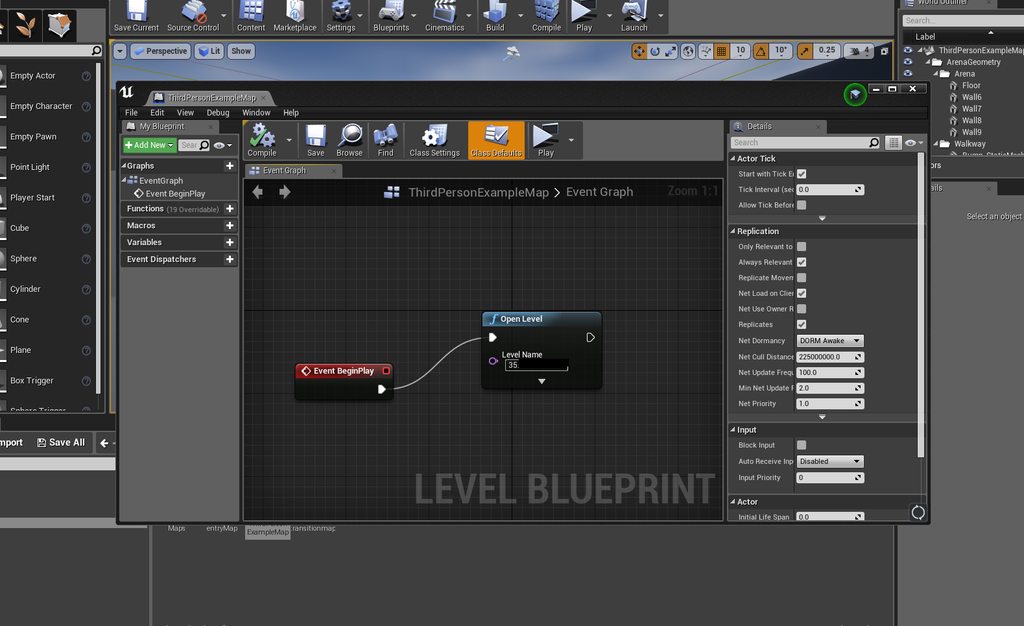 thin stratus
Yeah, that executes on the server too
Not allowed to
Use a Branch and "IsDedicatedServer"
And make sure it only calls on false
slow lodge
@thin stratus Now the servers is working but The client loads even if the server is closed.
this is bp\
thin stratus
Well yeah, you are calling this on BeginPlay of the Map
That will always call
It doesn't know if the Server is up or not
slow lodge
[2018.04.22-12.36.55:943][ 0]LogInit: Display: Starting Game.
[2018.04.22-12.36.55:944][ 0]LogNet: Browse: /Game/Maps/ThirdPersonExampleMap?Name=Player
[2018.04.22-12.36.55:944][ 0]LogLoad: LoadMap: /Game/Maps/ThirdPersonExampleMap?Name=Player
[2018.04.22-12.36.55:975][ 0]LogStreaming: Warning: Preache request should have been hot ../../../MultiplayerTesting/Content/Maps/ThirdPersonExampleMap.umap.
[2018.04.22-12.36.56:012][ 0]LogAIModule: Creating AISystem for world ThirdPersonExampleMap
[2018.04.22-12.36.56:013][ 0]LogLoad: Game class is 'MultiplayerTestingGameMode'
[2018.04.22-12.36.56:013][ 0]LogTemp: Display: ParseSettings for GameNetDriver
[2018.04.22-12.36.56:013][ 0]LogTemp: Display: ParseSettings for IpNetDriver_0
[2018.04.22-12.36.56:013][ 0]LogTemp: Display: ParseSettings for GameNetDriver
[2018.04.22-12.36.56:014][ 0]LogInit: BSD: Socket queue 262144 / 262144
[2018.04.22-12.36.56:043][ 0]LogInit: BSD: I am zabodan (10.132.0.2:0)
[2018.04.22-12.36.56:043][ 0]PacketHandlerLog: Loaded PacketHandler component: Engine.EngineHandlerComponentFactory (StatelessConnectHandlerComponent)
[2018.04.22-12.36.56:043][ 0]LogNet: GameNetDriver IpNetDriver_0 IpNetDriver listening on port 7777
[2018.04.22-12.36.56:046][ 0]LogWorld: Bringing World /Game/Maps/ThirdPersonExampleMap.ThirdPersonExampleMap up for play (max tick rate 30) at 2018.04.22-12.36.56
[2018.04.22-12.36.56:047][ 0]LogWorld: Bringing up level for play took: 0.002867
[2018.04.22-12.36.56:047][ 0]LogLoad: Took 0.103371 seconds to LoadMap(/Game/Maps/ThirdPersonExampleMap)
[2018.04.22-12.36.56:047][ 0]LogLoad: (Engine Initialization) Total time: 0.68 seconds
[2018.04.22-12.36.56:047][ 0]LogExternalProfiler: No external profilers were discovered. External profiling features will not be available.
should I make another brench to check is server is online?
thin stratus
You can't easily check that
For that you'd need to use a Subsystem that tracks the Session
As long as you just connect directly via IP, you can't know if it's online* unless you try and either connect or timeout
thin stratus
Have you read through my Compendium?
It does have a section about connecting
A tl;dr would be:
UE4 uses Subsystems. By default that is NULL, which allows LAN connection or direct IP connection.
Other Subsystems would be Steam, Oculus, IOS, GooglePlay, etc. or something that you implement on your own.
Depending on which Subsystem is active, UE4 will use its implemented functions.
That means call "CreateSession" calls the implementation of that function of the underlying subsystem.
Now for your issue: You need a Subsystem that has a MasterServer., such as Steam. A MasterServer keeps track of running Servers and allows returning a list to the clients that want to connect to one.
You'd use the SessionCreation Functions for that, HOWEVER, the default nodes don't work with DedicatedServers and Steam.
Means you'd need to use the AdvancedSessionPlugin or C++.
Given you have Steam enabled and the SessionPlugin installed, you can then let the Server create a Session and the Clients Find these.
slow lodge
You just gave me mindfuck. Thanks =)))))))
thin stratus
np. Multiplayer is not easy, specially if you enter Subsystems and DedicatedServers
slow lodge
When I think I just need to make a coop game =)))))
 unkempt moth
I'm doing a split screen game with game pads and ideally the user could select p1 keyboard p2 gamepad or p1 and p2 on game pads. Right now I have to manually edit the "skip assigning gamepad to player 1" option in the project settings but does anyone know how to edit that setting during runtime so a user can select which control scheme they want?
thin stratus
Hm, not sure if there is a function to do so
It's a public variable
So if you get access to the GameMapsSettings object in C++, you could change it
unkempt moth
Ah ok thanks I'll take a look
unkempt moth
Just looked through the docs. According to the docs it's not a parameter 😦 any other ideas?
thin stratus
Yeah seems like they only consturct use the defaults of the object
Never instanciat it
Well you could just edit the config file from c++
high nebula
switched to server only, still works. ?
winged badger
as you have to be on Server exec to do a Multicast in the first place
high nebula
I'm calling the Unlock function from antother BP, which is a function that executes on server
winged badger
point is, if you did SetIsLocaked directly instead of Multicasting that
same effect, just without sending any RPCs
you basically instruct the server to tell every connected machine to check if its server, and if it is to Set IsLocked here
high nebula
Yeah, I took replication off the function, as IsLocked is replicated, and it still works
lol, Yeah I may have overdone the RPCs. Was trying to get a security system running, and was trying everything
A door would need a multicast for the opening of it right? to make the change on all clients right?
winged badger
replication works just fine there, with RepNotify
high nebula
ah, not setting a IsOpen bool or anything, just setting the relative rotation of the door, and playing an opening sound
so I have it as a multicast function
winged badger
trouble with Multicast is, players that connect after it happens won't get it
high nebula
excellent point
winged badger
you can have a float for door's yaw, RepNotify it
and OnRep animates the door moving from current to target rotation while making a sound
high nebula
right, ok
winged badger
altho, that can still cause some issues 😃
like player running towards an already opened door from outside the NetRelevancy range
and receiving the replicated float, causing him to see door opening
high nebula
my fancy doors dont have any animations 😄
winged badger
hear the door opening then
high nebula
dangit
Well unless there's an easy solution, I'll deal with that later once I have more of a game
btw @winged badger , thanks for all the help 😄
winged badger
np
 toxic meteor
@high nebula check out this playlist on blueprint networking; it helped me out quite a bit. https://www.youtube.com/playlist?list=PL56pcT0mYsOgFmbwukjKppPI_Q7E89jTK

 timid pendant
Hi I have been getting this setoverflowed rpc error in a built dedicated server. I have looked if the RPC being sent is too big of a string. Everything is here at this post of all the code im using https://forums.unrealengine.com/development-discussion/c-gameplay-programming/1456556-rpc-error-4-19-1-lognetserialization-error-fbitreader-setoverflowed
Unreal Engine Forums
Hello I am getting an rpc error here using this RPC code
LogNetSerialization: Hello I am getting an rpc error here using this RPC code LogNetSerialization: Error:
Could the problem just be because I upgraded the project from 4.15 to 4.18 and now 4.19 without starting a new project and just transfer my code there
thin stratus
@timid pendant You are using C++ for your game?
If yes, why are you saving the PlayerName in the GameInstance?
You can simply pass it via ?name=USERNAME in the connection string
You'd only need the GameInstance "hack" in BPs
timid pendant
Yeah and the gameinstance just grabs the playername from a json request I have to fetch the playerdata
thin stratus
Yeah but the JSON request happens on the Client, right?
timid pendant
Yeah
thin stratus
Yeah, and the code you show in that forum post is handing it to the Server, right?
timid pendant
Yeah so it can be replicated to all clients
thin stratus
Yeah, as said, pass it via the option when you join
timid pendant
I have tried using a test string for the name without the gameinstance but still get the same rpc error
thin stratus
Well first: Remove these "Get/Set" RPCs
They aren't needed in C++
For the initial connect you are calling a "ClientTravel" to connect to the Server
In BPs, that's done via the JoinSession node, and can't be altered
Since you are using C++ you can do that yourself and alter teh connection string
Which allows you to add ?name=PLAYERNAME
The engine will do the rest for you
If the RPC error still comes up, then it's not caused by these RPCs
// Client travel to the server
FString ConnectString;
if (SessionInterface->GetResolvedConnectString(GameSessionName, ConnectString) )
{
    UBaseGameInstance* GameInstance = Cast<UBaseGameInstance>(GetGameInstance());
    ConnectString += FString("?name=") + GameInstance->playerusername;
    ClientTravel(ConnectString, TRAVEL_Absolute);
}
Something like that
I call that when I found a session
And joined it
I added your GameInstance stuff to it
timid pendant
Okay thanks I will remove those get/set rpcs and function. Will this work for a null subsystem with a server browser type of system
thin stratus
It's using the subsystem stuff yes
toxic meteor
Anyone know how to fix this error:
I got it after moving the character to another folder; its an error recieved on the dedicated server
I fixed the client side error of it by fixing the path in :
thin stratus
Fixed up redirectors?
toxic meteor
How do I do that for the server?
thin stratus
You do that for the project
timid pendant
Shouldnt the path be ThirdPersonCharacter.ThirdPersonCharacter_C?
thin stratus
Rightclick Content folder
toxic meteor
@timid pendant I moved it out of that folder to have one less folder in the root directory.
timid pendant
No I mean the code you sent above. In that Text string
thin stratus
Anyway, if you move or rename classes you have to fix up the redirctors the engine creates
toxic meteor
I fixed up the redirectors & am still getting the error; its not the biggest deal as its just a warning
thin stratus
Well did you try fixing your name?
It's still missing the _C compared to the text you posted
timid pendant
Did you change your code to PlayerPawnBPClass(TEXT("/Game/Blueprints/ThirdPersonCharacter.ThirdPersonCharacter_C"));
toxic meteor
I'll try that aswell
timid pendant
@thin stratus can that session code you sent above be used in that PlayerController possess function I had before or does it have to be in gamemode?
toxic meteor
I fixed the ThirdPersonCharacter.ThirdPersonCharacter_C & still get the warning
weird part is I'm not even using the gamemode that is throwing the error
 untold sun
OnPostLogin in the GameMode is called immediately after the game starts up. No login ever happens. Any idea why that might happen?
I read that even in a single player game there exists a server (and therefore probably a GameMode)
thin stratus
@timid pendant No
That session code is used when joining the session
Not when login in nor when possessing
@untold sun Well the Server logs in
untold sun
@thin stratus the server makes a login in ... the server?
thin stratus
ListenServer, of course
thin stratus
No
You can either have a ListenServer or a Dedicated one
A ListenServer is a Client that hosts
And for him you also get the Login call
Otherwise it makes it hard to properly handle your clients
untold sun
my expectation was that an OnPostLogin in the GameMode is being triggered from a "Join Session" node
that seems not to be the case
untold sun
Thanks again, @thin stratus !
thin stratus
:D We log messages
untold sun
😉
thin stratus
Are you coming from C++ or BP background?
thin stratus
Here is some knowledge:
In C++, the GameMode has 3 events for Login.
PreLogin: No PlayerController. Options of Client are available, as well as ID etc. Allows rejecting the Player.
Login: Process of creating the PlayerController. No RPCs allowed yet. Options of Client are available. Allows setting up the PlayerController.
PostLogin: Client properly logged in. No options available anymore. Passes the newly created PlayerController. RPCs are allowed at this point.
untold sun
but both not 100 % in depth
thin stratus
In BPs you only get your hands on the PostLogin event
untold sun
I am a bit confused with the word "login" here - "login" in this context means more or less "stuff that happens immediately after a socket connection" to me.
I re-read about that stuff again, thank you @thin stratus - helps a lot! I think I read about what you wrote somewhere before also.
thin stratus
Wording can be confusing hehe
But you are kinda right, it happens after the connection stuff is done already
So you already have a connection with the Client
It's just the "login" process that he actually joins the server
toxic meteor
I'm interested in making a persistent inventory for my game (i'm using a dedicated server) & I'm not quite sure where to start with the blueprint scripting for it. Is the player state the best place to store the inventory variable/array & where should the actual blueprints for the inventory functionality be? Any pointers on where to get started would be very appreciated 😃
 jovial arrow
i tried to setup LAN ,multiplayer over the session function but it isn't working. what am i doing wrong? (it goes to the oops when executed)
toxic meteor
It might be because your owning player is a user widget not a user itself
high nebula
the widget only exists on the client, and has no power to do anything. Either need to do that on player controller, or game state or something (not sure where, but not the widget)
@toxic meteor Thanks for the link, will add to videos I should watch 😄
toxic meteor
No problem 😃
high nebula
In the past I've put my inventory on the player controller, but for MP, I'm not sure
jovial arrow
player controller did not work
toxic meteor
Yeah I'm currently reading the Network Compendium; hopefully I'll understand where to store the inventory after that
@jovial arrow I'm not too familiar with creating a lan session, but for dedicated I used the level blueprint
jovial arrow
if it has to be it can be dedicated, i just want to get the multiplayer woprking
toxic meteor
Check out this playlist on YouTube, It's a good place to start when learning how to setup multiplayer. https://www.youtube.com/playlist?list=PLwmGmCVti_dDl8CMa_91FdwgZ0W010d5v

YouTube
hasty adder
Depends on the inventory and your worry about hacking it. It’s one thing to have a sql database on the server but if you want diablo style inventory crossing servers you’d need a centralized server for player inventory
toxic meteor
I plan on making a 'group inventory' such as a guild bank or something along those lines
And the inventory would only be on one server
winged badger
@toxic meteor APlayerState is an actor, it can have components just like any other actor
toxic meteor
Okay thanks
twin juniper
Hey guys, I've got a situation where I'm dealing with a a setup that involves a chunk-based world, and I was clear with pretty much everything up until now, but I'm starting to go into a bit of a hazy area for me personally regarding replication of actors.
So, naturally when I'm loading in a chunk, the server has a version of that chunk. However, not all pawns should have it. This leads me to a few confusing situations. It's pretty clear that when an actor spawns and is set to replicate, it will replicate to actors, but if an actor is already spawned, what do I do if I suddenly another actor needs to see it as well? Say, if the chunk is already loaded and all the actors are spawned and a pawn walks into the loaded area. I know about replication conditions, but is there functionality to specify a list of connections that actors should replicate to? Thanks in advance.
winged badger
it sounds like a job for streaming levels @twin juniper
iirc, you would only need to set its Visibility related to the particular client to true
twin juniper
well, I've got my own version of that already set up, i just gotta figure out the replication for it now.
Visibility? Wouldn't it still be spawned on the clients that don't need it, taking up memory?
 winged badger
i never handled them personally, so can't give you much detail
but its definetely first thing i'd look into if i had your conondrum
and yes, as far as i know, setting the Visibility to false would leave the level loaded, but it would stop replication
twin juniper
Depends on what you're doing
Vanilla CMC?
Yeah well are you using the UE4 character movement controller?
If it looks like its skipping you might not be replicating things properly
winged badger
the MaxWalkSpeed doesn't seem to be replicated
burnt meteor
u need a multicast
wary willow
Or just not rpc that at all
Get a replicated bool, see if player can spring
sprint
Only replicate (or even repnotify if you need visual)
burnt meteor
basically u can do it in many ways 😉
wary willow
I do all my movement logic locally
Since I want to make sure client will be able to do this immediately
Due to lag
I'm actually redoing my Weapon Firing logic now because there's too much latency
sharp spire
When equipping a skeletal mesh to a socket, I setup an rpc, which didn’t do the trick. So I looked at the component and it wasn’t ticked to replicate, once ticked; my client can’t connect to any listen hosts. It starts, then boots me out. Anyone know why?
All I’m doing is setting my controlled pawns component to replicate
wary willow
uh
That's not doing what you think it's doing
But, at the very least use a SwitchHasAuthority
Then put the Non-RPC on Authority and RPC on Remote
Maybe you set it right somewhere else
wary willow
@placid sparrow You tell me what you're doing
Write to me what you're doing there please
dim eagle
if I have a child actor attached to another actor, and that actor as its owner set to be which ever player is grabbing that actor, what is the owner of the child actor? is the grabbing player the owner of the actor's child actor?
glacial pollen
Attached child actors are usually owned by the parent actor, And the Top most parent actor is owned by the player
dim eagle
is it set by default if i haven't manually done so (e.g. via blueprint or cpp with setowner())? Or do I have to initialize it?
glacial pollen
usually with this:
you can specify the parent
eh, it appears the get owner does not work, use get parent in this case
Actually!
If you click the drop down here:
You see that you can set the owner
sharp spire
Hey does anyone know why component replication toggle attached to a pawn causes the clients to drop the session? Even skipping the session and starting on the main map causes me somehow to transition to the menu map...
 boreal vine
yooooo, Im spawning an actor on server with replication and replicate movement checked but when I "addActorWorldRotation" it only rotats on the client that has posesd the pawn
any ideas?
 winter plover
Are you executing it serverside?
changes instigated clientside usually only stay clientside unless you specifically tell the server to execute something aswell
which then replicates the change to everyone else
If you're trying to do what I think you are, you could try making the pawn inherit rotation from the controller
sharp spire
Movement doesn’t count for rotation, you’ll have to set it up manually aswell
I had to set it up manually on my topdown project anyway
boreal vine
yeah that seams to be the case
so if im adding a rot from axis input withn the actor its not going to pass through an rpc called form the same actor right?
winter plover
I think you could just tell the server to apply controller rotation to the pawn
boreal vine
I'm getting the same result no matter what I do. its so weird
omg so for a test I just created an rpc to set actors rot to actors rot + 1 on tick and now its rotating on the 2nd client but not the one that posses the actor
 light tiger
Hi guys. Sorry for disturbing you. I've been googling it for awhile...
I just need multiplayer with leaderboards and personal progress for 2-5 players action game in VR.
There are some options here:
With dedicated servers and without. This game probably will not be MMO at the beggining. So what should I choose first?
There are Steam Online Subsystem (Steam OSS) with UWorks plugin for ue4.
There is Gamesparks - can be used as database for leaderboards and matchmaking system.
But i belieive steam is capable of that too.
So should I use OSS of gamesparks or both?
Thare is also gamelift, wich can do matchmaking and hosting dedicated servers with load regulation.
What should I use?
boreal vine
im gonna have a break i think
twin juniper
Question real quick
if I type open MyMapName
does that mean im a listen server?
or a client?
When using IsNetMode(NM_listenServer)
sharp spire
@boreal vine your client is already creating a rotation of your pawn isn’t it? Simply get pawn actor rotation, promote to a replicated variable, and modify it by rpc
You can either set that through event tick (probably not preferred unless you add a gate) or you can find where your character is getting rotated and at the end add the rpc. The base character rotation isn’t replicated
Also for my question, does component replication cause issue when running in single thread?
toxic meteor
Is it possible to get a players steam group? I'm using advanced subsystem & am hoping to be able to integrate steam groups into a guild system.
 ocean dust
Hello all. I have set up a custom replicated object following this article: https://wiki.unrealengine.com/Replication#Advanced:_Generic_replication_of_Actor_Subobjects
This approach does not work when the custom replicated object is added to a replicated array. Has anyone tackled this before? Thanks!
 hidden thorn
If I call a ServerRPC inside another ServerRPC is it a problem? I know it's pointless but just asking
winter plover
nah it should work fine
altho I personally like to keep RPCs strictly for client->server stuff
and delegate everything else to normal funcs
which then get called by RPCs
helps keeps the headers a bit more readable when things get more complex
sharp spire
You’re alllwed to call a normal function during an rpc? 😮 I always thought you had to rewrite it as its own event xD fail...
@winter plover
winter plover
nah
all an RPC does is remotely call a func
once it starts executing you can do whatever
sharp spire
So it could be an rpc straight to another function?
winter plover
depends, what do you wanna know
sharp spire
Causes some weird things to happen when toggled On... so if I start two clients (either one server one client, or even two clients and not touching the server window) and I host a session, the second client can join but immediately gets booted out..
If I load it up on the map without the menu map, it forces the client window to the menu map and does the same process
winter plover
Are you using RPC validates alot?
sharp spire
I just have rotation and movement replicated, it’s a very blank project
winter plover
the only case I know of the server booting a client off is when a server RPC validate fails
idk what else could cause it in your case
sharp spire
It’s only when that component is toggled to replicate
Hmm
Single thread has nothing to do with it?
sharp spire
I’m sorry I’m actually at work for another 5 hours lol I’ll try and catch you then but I’ll definitely tag you in the snippet when I get a chance. It doesn’t run any events or functions whatsoever regarding the component.. which is weird.. but there is an rpc setup to equip something but it doesn’t get run unless I hit the 2 key (testing purposes)
Basically i have a pawn that has a skeletal mesh attached to the base mesh set to empty, but replicated. Could it be because it’s empty?..
winter plover
kinda hard to tell without code to look at
jovial arrow
i created multiplayer now, but it only works over lan. if i try to use it over steam it does say server does not respond. how do i fix that
winter plover
port forwarding
ie. you have to tell your router to relay any traffic on port 7777 to your computer
well and 27015 if you're also using steam stuff
(iirc)
slim holly
ipv6 when
 lean hornet
Soo question. I want to change my characters max movement speed on the fly (because of a Gameplay system. I'm using). What is the best way to do it?
sharp pagoda
@lean hornet The character movement comp has a member variable MaxWalkMovementSpeed (or something similar). You can modify this from the server to change how fast your player moves.
slim holly
but it's gonna have the network delay before it takes effect
sharp pagoda
Then you can predict it on the client by changing the client's version too?
slim holly
you can change it but I'm not sure does it accept it
sharp pagoda
It will accept it, but you might snap back a little bit when the update from the server comes in
winter plover
generally not from my experience
sharp pagoda
It depends on how quickly you want to change it
winter plover
depends on how drastic the difference is I guess
sharp pagoda
Yep
winter plover
but yea movement is usually already client predicted
so its not like you will be getting all too many desyncs
slim holly
I would actually do something like this: client +100, RPC server +200, delay, server set +100
so the prediction can catch up
sharp pagoda
I'd just fully predict it
winter plover
its actually the server who is catching up with you
sharp pagoda
In most cases the CMC will predict well enough that you won't experience rubber banding
slim holly
yea I meant setting the server value temporarily higher to give leeway to the network prediction
winter plover
nooo
do not
do that
it will not work the way you imagine it to
it will probably actually introduce rubber banding
sharp pagoda
I agree, just let the prediction work its magic
sharp spire
@winter plover I’ll post it in 3.5 hours sorry about the delay lol. I’m not having any RPCS run without input first, so I don’t understand why it would cause any problems. Is there some type of prerequisite to making a component replicate? I could try changing it to replicate only when there is a skeletal mesh to see if NONE is causing the problem
Has anyone else gotten a skeletalmesh attached to a base mesh socket to replicate?
Basically trying to understand the general workflow behind equipping a weapon or piece of gear that’s visual to other players
sharp pagoda
@sharp spire In my equip system I used a multicast to notify other players of the attachment. Basically called the attachment code there.
sharp spire
But newly joined players won’t see his gear
Just simply toggling “Replicate Component” On my skeletal mesh component causes the clients to automatically get booted from a session upon joining. And I have NO rpcs being called at all..
Turning that toggle off fixed every problem but obviously no replicated component lol
sharp spire
Sorry I should have put a question mark at the end of the first statement lol. Using a multicast won’t update newly connected clients, will it?
@Xenonic#3674
hasty adder
Remember begin play will fire on the newly joined players version of the pawn that others are controlling
sharp spire
There’s nothing in my begin play that is network related, just a personal hud :/
winter plover
So I just made myself a projectile and I was wondering if there's a way to manually simulate it having moved forward by an arbitrary amount of time in one func for syncing purposes
Is it possible to just invoke the tick func of the movement component?
or how should I go on about this?
sharp pagoda
@twin juniper you're right, it wont. You can get around this by adding a function to begin play, which fetches all the players and their inventory layout
Sorry, wrong mention
@sharp spire
hasty adder
I use a on rep var in my game for team numver
This sounds weird. It on possessed function I am setting the pawn team enum which is on_rep which then updates materials and such for the team
hidden thorn
So I have an issue where I call a ClientRPC inside a ServerRPC but the log is never printed on the client
And I am just wondering if you guys have some ideas what I should look for.
The server RPC works just fine
sharp pagoda
@hidden thorn this should help https://docs.unrealengine.com/en-us/Gameplay/Networking/Actors/RPCs
hidden thorn
Yeah looked at that before, is there something I should look at specifically?
glacial pollen
How would someone send a COPY of a savegame to the server?
I guess I'd have to manually send the variables in the savegame by hand inside of the PC
sharp spire
@sharp pagoda you have gotten your socketed skeletal meshes to show for all clients you said? Did you have premade sockets attached to the mesh in the pawn class too?
@glacial pollen do you know how to replicate socketed skeletal meshes? (Sword in hand etc)
sharp pagoda
I haven't personally done it, just thinking through possible solutions
sharp spire
I guess I’ll just wait 30 minutes until I get home and post what I’ve got going on
It’s a very simple setup, it really shouldn’t be kicking me out. It’s also very confusing because normally I’d start on another map for the menu and when the session loads, it will load the map I’m testing on. But to avoid creating a session, I often just open the map generally used in my session and hit play. Somehow, when component replicate is ticked on for my socketed skeletal mesh, it forced the client to the other map...
Forces the client to the menu map*
glacial pollen
Yes its doing that when there is a mismatch between replicated components between server and client
I also experienced the kick to default map issue. (my personal bug, was actually a bug, where I would set a setting in bp's (replication in this case) and it would reset itself upon editor restart)
I fixed this by making a MANUAL (right click duplicate characterbp did not work) variable by variable, component by component recreation of the bugged character
You should make sure that you're client isn't setting the replicated mesh.
Especially if you are spawning these meshes, and only the client knows, and tries to talk to the server about the spawned mesh, and the server is like, Hey buddy... Are you tryin' to hacking me? Bye!
Read the logs, I would set a break point to right before the kick (trial and error) then when the breakpoint hits, I would go back to the log, clear it, and then hit resume, that way you have a clearer idea of what log input is relevant
sharp spire
That makes so much sense! Now I just have to figure out how to get around that as I’m not spawning it :/ I have the attached socket component already attached in the preview window(not added by attach node) so it’s a pre existing component. How would one replicate that? :/
Could it be advancedsession’s anti-cheat?
sharp spire
wow...
it was a VERY simple mistake...
@sharp pagoda @glacial pollen

having a period in the name...
which makes sense.. lol
sharp pagoda
Ahha, glad you caught that
sharp spire
thanks for letting me waste your time all day 😃 lol
are there any symbols i can use as a divider that doesnt disrupt code?
maybe _ ?
sharp pagoda
Underscores work
sharp spire
thank you lol
sharp spire
okay still not replicating lol


how should this be setup?
only the listenhost seems to see it equipped
i also added selection into the pin just to make sure that its sent over, but that wasnt the issue as it was 1 by default anyway
0 by default *
@sharp pagoda any suggestions? i tried multicast but it causes weird issues
is this where hasAuthority becomes handy?
sharp pagoda
So that's not doing anything as a client?
sharp spire
yea and its also not sending that data to other clients