#multiplayer
1 messages · Page 388 of 1
 thin stratus
 misty stirrup
lol
 twin juniper
if it's null it's not even going to enter it
 glacial pollen
Yes, the issue appears that DefaultImpactSound does not seem to be even valid enough to do a nullptr check against it. As in, it doesn't appear to have a valid address to check against?
thin stratus
Why don't you just wait for the callstack and stuff
misty stirrup
ReplicatedUsing = OnRep_Foo
thin stratus
Before arguing
misty stirrup
needs to be in there
if you send me your full header
i can send back what you need to change
the variable doesn't exist in onrep due to ReplicatedUsing = OnRep_Foo
missing
twin juniper
Waiting for it to open up, but why would I want to replicate it... even if it's not replicated and it's null (it's not) it shouldn't crash it since I'm not doing anything
thin stratus
He doesn't want to replicate it
misty stirrup
am i wrong about replicatedusing?
thin stratus
Idk why this is relevant here. Idk what his stuff is doing atm
misty stirrup
what does replicatedusing
he's calling an editanywhere variable in a function that's called from an onrep function
thin stratus
It calls the mentioned function when the variable is replicated on each entity
thin stratus
OnRep = OnReplicated
misty stirrup
wait what i thought
he's trying to basically replicate his impact function
from server
to client
i think
thin stratus
Can we just wait for his debugging
Im not gonna put my sunday into guessing what it could be
glacial pollen
Yes please, I've been waiting 2 hours now, for chat in here to die down...
While we wait. My clients can't find a session when using dedicated server. Are there some goto things to note?
glacial pollen
no, nullsubsystem
thin stratus
So he's hosting it on the same PC?
misty stirrup
on the note of dedicated servers what's the terminology for that so i can look that up im getting close to having to actually package and test
thin stratus
@misty stirrup Just Dedicated Server
glacial pollen
All from within editor
not packaged
Also, dedicated loads the wrong map, ignores the DefaultServerMap setting
thin stratus
Does your DedicatedServer even create a Session?
And DedicatedServer in PIE etc. isn't proper.
You want to launch the Server outside of the Engine
And then connect to it
glacial pollen
There is no way to use:
thin stratus
You can adjust this file to do that without packaging a Server
twin juniper
it's frozen and wont close
glacial pollen
k
twin juniper
lovely stuff
thin stratus
You launched it through VS?
thin stratus
Yes, but why does your PC take so long to restart?
twin juniper
It took few mins, but I've been waiting for UE4 to open up for 10-15 mins until I realized it froze
won't even let me close it
twin juniper
Tried it
glacial pollen
I opens the correct map now, but I do not see it creating a session, which is hard to do in dedicated without a PlayerController (ie createsession)
twin juniper
Waiting for VS to load now. You sure you don't want to look at the logs?
thin stratus
@glacial pollen Well you can add LogOnline and LogNet to your DefaultEngine.ini
As VeryVerbose
And see what happens
Where are you calling the session creation code for the DediServer?
@Itsco#6231 You can also send me a crashlog in the mean time
glacial pollen
I'm not, I cant without a PC
 thin stratus
@glacial pollen Well BP session creation nodes aren't used for DedicatedServers anyway
You have to use C++ or a Plugin
glacial pollen
To find a dedicated server's session?
thin stratus
To host them in the first place
The default CreateSession Node is for ListenServers
@Itsco#6231 That's only showing a portion
Can you link a hastebin to your gun.h and gun.cpp?
glacial pollen
I was told on here, that dedicated automatically creates a session
thin stratus
That's wrong
glacial pollen
Welp. Thanks
thin stratus
There is an extra function in C++, called RegisterServer, that you usually override to implement a SessionCreation
I think it's in AGameSession
You don't have to use that
But you do have to code the SEssionCreation
Or use the advanced session plugin
glacial pollen
Its okay
I've been sticking with vanilla UE4.... I'll just ... figure something... rethink...
but thank you
twin juniper
@thin stratus it loaded, do you still want me to debug it, or was it enough?
thin stratus
If you loaded it through VS
Cause the crash
I want to see where it breaks in code and what the callstack and the variables say
twin juniper
Ok, just a sec
for now
the realted things from the header file:
from cpp
There is more to show, but I'll debug first
it hit a breakpoint right here
that's from the OnRep function
thin stratus
Yeah can you show a bit more please
Not only one line at a atime
Show the whole call stack
And also the variables on the left
twin juniper
It's just a linetrace so I can pass the HitResult to the PlayImpactEffects, but I'll send ti anyway
thin stratus
:P
thin stratus
Also the variables please
On the left side you should see a list of local variables
Depending on what element of the callstack you are viewing
twin juniper
Ok, the thing is that I'm calling the function from different places
it never crashes
only from that cursed OnRep function
I thought for a second that might be because Gun is null
glacial pollen
@twin juniper Dude, if cedric asks for a screenshot of your background you give it to him. He is your ONLY hope right now. Do exactly what he wants. He knows more than you can imagine
twin juniper
but it calls PlayImpactEffects, so that's not it too.... I'm hopeless
@glacial pollen It's loading up
glacial pollen
k
thin stratus
Your callstack seems to enter the PlayImpactEffects
Also your Local Variables will show if the Gun is null
That's why I want to have a look at that
thin stratus
Can you go one back
Where the Play stuff is called
And see if the gun is valid
Bizarre
twin juniper
it's not
I'm setting it up on PostInitComps
Spawning the projectile on the server
Gun = Cast<AGun_Ranged_Projectile>(GetOwner());
Is Owner null for remote clients?
twin juniper
It's the gun
thin stratus
Is the gun Replicated?
thin stratus
Can you try to put a simple "if(Gun)" in front of that call
And see if it still crashes
So we are sure that the gun is really causing it
Well for an Actor to be moved across the net, it needs to be marked repliacted
If you set teh Owner of the Bullet to the Gun, and the Gun is not replicated, then the owner won't be valid on clients
twin juniper
Right, the projectile is replicated
PostInitComps should be called on any client, doesnt it?
thin stratus
It's an Actor thing. Doesn't have to anythin with replication.
It calls on an instance of an actor. If a Client has that actor, it calls that function.
twin juniper
@thin stratus Ok, it's not crashing
thin stratus
Can you check the gun for being valid
Welp
The GunActor, is that set to replicate?
Like in the Class
thin stratus
So how do you want to reference the same gun over the net?
Or are you doing something majorly differnet than most people do?
Gun should be spawned on the Server
Marked as replicated
twin juniper
I'm setting it up on PostInitializeComponents, spawning the projectile on the server
Doesn't PostInit get's called on any instance?
thin stratus
Yeah, but what do you mean with Setting it up
twin juniper
Gun = ...
thin stratus
I mean the actor, not the GunVariable
Your actual Gun Class
Is that marked as Replicated
twin juniper
obv
thin stratus
:D Ah well you never know
And you pass the Gun to the ProjectileActor as its owner?
thin stratus
SpawnParams
thin stratus
Can you double check, with a break point, that your PostInit actually has a valid Owner and Gun?
twin juniper
if (Role == ROLE_Authority)
{
FActorSpawnParameters SpawnParams;
SpawnParams.Owner = this;
I think that's why it's null
Gun = Cast<AGun_Ranged_Projectile>(GetOwner());
thin stratus
Not 100% sure right now. I would guess the owner replicates to the Clients if available
thin stratus
The Projectile is also marked as replicate?
twin juniper
yes
thin stratus
Hm
thin stratus
I would say you pass the gun differently and spawn the actor deferred
Or what ever that word is
twin juniper
The projectile deferred?
thin stratus
Yeah
So Spawn, set an actual custom Gun Variable that is marked replicated, and the finish the spawning
And leave the owner as a netconnection
thin stratus
Well that's also okay
twin juniper
yeah alright
thin stratus
Just be aware that if the Projectile hits the wall direclty, the gun variable could still be null
twin juniper
Why did it stop crashing then when I commented the IF checks then?
thin stratus
No idea
twin juniper
If it's null, how did it even gets to PlayImpactEffects?
that's weird... wasted so much hours into it. Thanks a lot man
Just be aware that if the Projectile hits the wall direclty, the gun variable could still be null
What do you mean?
thin stratus
No biggie. Always debug C++ with VS callstack and variable list
Yeah well replication takes time
twin juniper
oh, that's what you mean
thin stratus
If you do "SetGun" AFTER you spawn it (without the delayed spawning)
twin juniper
right, so what do I do in that case?
thin stratus
It could already have hit the wall
twin juniper
deferred?
twin juniper
yeah, that's the name. I'll use it. Thanks a lot again
thin stratus
I'm halfsure that it should replicate the variable with it when spawning the actor on the client
Checking the gun pointer might still be worth it
 hidden thorn
When I spawn an actor using a server RPC is there any way to do something with it when it arrives/spawns on client ??
thin stratus
BeginPlay, filtered for remote?
hidden thorn
I will explain my case, I am spawning some actors when I interact with an NPC,
The method simply spawns some actors like so AItemBase* tempItem = GetWorld()->SpawnActor<AItemBase>(Item, spawnLocation, FRotator(0.0f, 0.0f, 0.0f), spawnParams);
and then I do ```cpp
if (ensure(tempItem))
{
InventoryList.Add(tempItem);
// I thought of sending a client RPC here with the item info but the item is null
}
 loud mountain
you made sure that AItemBase is replicated, so it spawns on clients and server
hidden thorn
yea
It does spawn on the client
but it obviously is a different item (id, pointer)
loud mountain
the above code runs after you spawned that item, right?
hidden thorn
yea
loud mountain
InventoryList is an array?
hidden thorn
void URPGPlayerInventory::SpawnItem(ANPC* NPC, TSubclassOf<AItemBase> Item)
{
    UE_LOG(LogTemp, Warning, TEXT("SpawnItem - RPGPlayerInventory"));

    FActorSpawnParameters spawnParams;
    spawnParams.Owner = Player;

    FVector spawnLocation = Player->GetTransform().GetLocation();

    AItemBase* tempItem = GetWorld()->SpawnActor<AItemBase>(Item, spawnLocation, FRotator(0.0f, 0.0f, 0.0f), spawnParams);

    if (ensure(tempItem))
    {
        InventoryList.Add(tempItem);
        Client_GiveNPCEquipmentID(NPC, tempItem->GetUniqueID());
    }
}
This is what I was doing
tempItem ID will return a different one from the one on the client
and InventoryList is replicated
loud mountain
URPGPlayerInventory is some component I guess
hidden thorn
Yeah on the character
loud mountain
the actor spawns everywhere but the variable is null on clients, hmmpfh
hidden thorn
yea
I guess it could be because it's too early
and it didn't had time to spawn it on the client
loud mountain
is your component replicating?
hidden thorn
yeah
loud mountain
thinking
you could try printing out strings to the console - one on begin play in item base and one on your client RPC
hidden thorn
That would work but the problem is that I can't change any values on the clients object before I spawn it
What I was doing before was
AItemBase* tempItem = GetWorld()->SpawnActor<AItemBase>(Item, spawnLocation, FRotator(0.0f, 0.0f, 0.0f), spawnParams);
tempItem->HideItem();
Hide item would disable collision, set visibility to hidden etc
It would work on the server but not on the clients
loud mountain
HideItem then would have to be NetMulticast so it executes on all clients
hidden thorn
Oh ok
Hmm, do you have an idea of a how I could get this working...
When I spawn an item I want to pass the UniqueID of the item to the NPC so it doesn't have to spawn it everytime it interacts with it by checking the ID of stored and the item that was spawned a while back.
The problem is that when I pass tempItem->GetUniqueID(), that will be different from the one that was spawned on the client.
loud mountain
I never used UniqueID that way, but you may try to add "YourComponent->SetNetAdressable();" after you spawned it
hidden thorn
True bad use of UniqueID
is there a version of SetNetAdressable for the actor I spawned?
loud mountain
hmm this is a actor component function, I dont know about actors
loud mountain
I've tried to recreate your function to some extent but It works fine on my side
hidden thorn
Can you send me the project so I don't have to re-create myself
I could try a blank project but it might take some time
loud mountain
yeah just gimme a sec
hidden thorn
Thanks
 untold sun
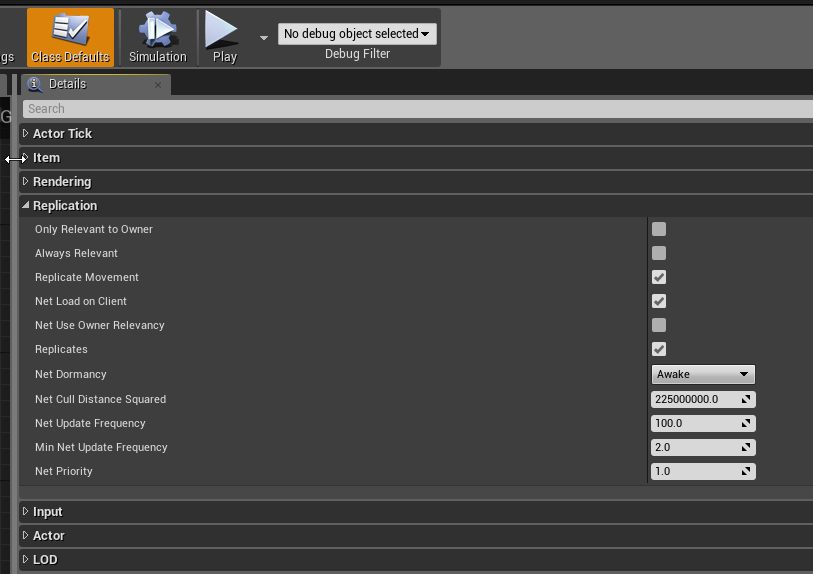
how is your experience replicating dynamically created components? for me it does not work - maybe because of using blueprint? I read about that SetIsReplicated needs to be set in the constructor of the component. Using blueprint I can only call that method after object creation.
 untold sun
I do that alreacy: I have replication on in the actor itself and set it at runtime on the created component. Anything else besides that?
already
the component is a simple particle system
I look again on my code, probably I overlook something
thin stratus
Any idea what UT wins by doing this when incrementing deaths in the playerstate?
SetNetUpdateTime(FMath::Min(NetUpdateTime, GetWorld()->TimeSeconds + 0.3f * FMath::FRand()));
Only place where they do that in the PlayerState.
 fleet sluice
This doesn't technically answer your question, but if you knew how regular outrageous bugs have been in UT (and how outrageous they were), you'd incline to think this may simply be some leftover.
 pallid mesa
SetNetUpdateTime(FMath::Min(NetUpdateTime, GetWorld()->TimeSeconds + 0.3f * FMath::FRand()));
what? XD
why are they 0.3... I mean, what's the context
 halcyon abyss
Hey guys there is a bug with bOffsetPlayerGamepadIds
it onl works for game input
not UI input
the bOffsetPlayerGamepadIds is a project setting named Skip Assigning Gamepad to Player 1
I'm trying to understand how UI input is handled in the Viewport Game Client
thin stratus
Iirc, that is a setting added via PR to allow you to play with the first player as keyboard and second as GamePad.
Iirc it's mainly to allow easier testing, so you don't need two gampads
Doubt it has any other use so far
halcyon abyss
I actually need this feature for my local multiplayer game
and I'm changing this setting dynamically
halcyon abyss
Thank you 😃
 sterile pebble
how Unreal will handle RPC with const and (or) parameter passed by reference?
is this safe to do?
 winter plover
Actor pointers get properly translated on the fly
do you have any specific example of what you are trying to do?
twin juniper
Hey guys. Any chance to see the UnrealTournament code, or any tips, to get the idea how make any more complex stuff with custom CharacterMovement networking? I acquainted with tutorials but they are not enough.
As far as I understand, character movement component handles the queue of movements in appropriate order on both client/server. It does it using compressed flags. No idea how to add more than 4 flags tough (8bit - 4 bits of reserved). Anyone?
 slim holly
I really don't understand how the input queue would work
relative movement queue maybe, but direct input queue doesn't make sense
twin juniper
I'm just not sure how to implement more complex character movement component, really. What if the character has more abilities than 4?
 high nebula
I finally got the HUD working on the main window AND client1. Main window can damage client1, but client1 isnt damaging main window tho
 winged badger
the clients input actions should be forwarded to the server
and then the server should figure out what happened and replicate the results back to the client
high nebula
based on the twinstick base, the pawn spawns a projectile, and on event hit it applies damage to the other actor
winged badger
but the server's copy of your client's pawn needs to spawn a projectile in order to affect the server's world in any way
high nebula
The firing is in a function that has the spawn projectile node.. how do I make that happen on the server?
winged badger
you have an input action that fires
from there send a server RPC
and connect the firing logic to it
high nebula
like this?
winged badger
what does the branch do?
connect the input directly onto the ServerRPC
but otherwise, yes
high nebula
theres an input node that determines the firing mode (different abilities), and that branch says if the pawn has enough mana to fire
winged badger
that also needs to be checked by the server
high nebula
it shows the pawn firing in my main window, but not in the client
winged badger
ok, but now you have it working in the world that matters
now its a matter of either replicating the projectile
or simulating it on client
(it is not supposed to do damage, just provide a visual cue that you're firing when client)
high nebula
k, turned on replicates for the projectile, solved that problem
now I'm getting a reference error in my mana spending node. but I think I know why that is
winged badger
the reason why you want to check mana on server, not client
is because client player could, say turn on the cheat engine, find the mana variable's address, lock it at 100% and then fire forever
twin juniper
have you guys ever seen this whole FetchResult (sync) bullshit
high nebula
yeah. as for the reference error, I added a IsValid node. So it fails and ignores on the server client copy
twin juniper
you have?
high nebula
er no, previous conversation, sorry Bdoom
high nebula
Now to figure out why I'm not getting the mouse position on the client. he's firing towards world center instead of mouse position
ah, how do I get the proper controller on my pawn again?
ah, get controller
hm, that doesnt connect to "GetHitresult under cursor by channel"
winged badger
you will have to send it thru the RPC
only client can get that information
so you add a vector input to ServerFire
high nebula
I stored the hit result in a variable, and turned on replication
high nebula
I thought I read RPCs couldnt take oh, they cant pass info back... whoops ok
winged badger
only way to push info to server is a ServerRPC
high nebula
yup! ok that works. awesome
I'm gonna be facing these issues with every. single. thing. i do. gonna take a while for it to click in 😦
Hm. I have a timer for mana regen. its on owning client only right now, I suppose that should be server only
slim holly
yes, server handle stat changes
tho, like projectile spawning and such, you probably need to do it on both client and server
for the instant player feedback
but only server projectiles deal damage
net.pktlag is your friend when testing
high nebula
ok, so I changed the function that fires the shot to multicast?
hm, client cant damage main window again
No sound with multicast or server only.
oh duhh. didnt set the sound file.
still cant damage main window tho
 tall grove
Hi , quick question : i want to do a f2p multiplayer game and i need to have DB to store things like x player bougth a skin . If there any service or plugin for backend to connect game logic?
twin juniper
uhm
just use postgres
or some other sort of database
you can build your own plugins that can use native c++ sourcecode
im sure there is probably some sort of wrapper or binding for whatever database you want to use
high nebula
K my client is firing the projectile on his end, but not on the server.
k,m changed from multicast back to server only and works. Also have Reliable ticked
twin juniper
I'm not sure why but when I run my game without "Run with Dedi" server enabled
my char pawn won't rotate at all
like it just sits
rotated at 0,0,0
and wont move
D:
tall grove
thanks
misty stirrup
has something to do with how your logic is setup
id take a look at whatever rotates your characters
 elfin shard
Who can advise me a good Tutorial for a Multiplayer Blueprint? To host a game among friends, inserting only the IP and the Port
misty stirrup
does anyone know how to replicate only the Vector and not the full transform? im trying to not do it in a janky way via blueprint tick
high nebula
@twin juniper Any luck fixing that? I just added a skel mesh to mine and its not rotating either
high nebula
mine rotates a little when I turned on Orient roation to movement
having other wierd issues. Camera on boom is facing the back of my player's head in the viewport. But ingame its facing the front
player wont even move in the right direction 🤔
wierd ok, now it works... but player still faces the wrong way
ah , ok, Orient to movement checked, unchecked use controller yaw on the character. now works.
mines top down tho, so need to rotate to movement
twin juniper
@high nebula but in single player it works?
and what about with dedi server mode enabled
high nebula
the fact that it does for me is a miracle probably.
I'm not doing anything fancy with movement or rotation, just "add movement input" and then orient to movement enabled
twin juniper
mhm
 dull saddle
Hey guys, I replicated all my events (crouch, sprint etc) but if the client moves to the left or right the whole player model and everything attached to it (e.g. weapon) gets a really annoying "fade" effect. Do you guys know how I can properly replicate the movement of my player?
If the host moves everything looks just fine
twin juniper
Does this error sound familiar to anyone here?
Warning: Travel Failure: [InvalidURL]: Invalid URL:
[2018.04.15-20.36.40:384][570]LogNet: Browse: /Game/Maps/MyClientEntryMap
[2018.04.15-20.36.40:386][570]LogNet: Warning: Travel Failure: [InvalidURL]: Invalid URL: /Game/Maps/MyClientEntryMap
[2018.04.15-20.36.40:386][570]LogNet: TravelFailure: InvalidURL, Reason for Failure: 'Invalid URL: /Game/Maps/MyClientEntryMap'
[2018.04.15-20.36.40:386][570]LogNet: Warning: Travel Failure: [ClientTravelFailure]: Invalid URL: /Game/Maps/MyClientEntryMap
[2018.04.15-20.36.40:387][570]LogNet: TravelFailure: ClientTravelFailure, Reason for Failure: 'Invalid URL: /Game/Maps/MyClientEntryMap'
winged badger
iirc you don't need a path for the level, just the name
twin juniper
i think something could be messed up with the way my server registers to steam
thin stratus
Please stick to english (:
 azure slate
Hey guys, I want to associate colors to players whenever a new one connect to the server, so far I figured out that I could use the players array in the gamemode, but now I'm trying to understand which blueprint should keep the value and how to display it to every player and make it so new players also see the colors of the players who joined previously
(by how to display it I mean how to replicate it)
high nebula
from what I've read of Cedric's network compedium, it looks like playerstate will be your best bet
azure slate
Yeah that's what I thought, do you have link of that btw?
high nebula
 azure slate
Thanks 😃
high nebula
np 😃 there's some other stuff in the pinned messages as well
azure slate
Thanks!
high nebula
While I'm thinking of it, when I start doing AI, is there special stuff to be done to get the AI networked properly?
high nebula
ok, so server spawns the AI pawn/controller/behaviour tree. everything they do will automatically be on the server?
then I just replicate a pawn to show up on client?
winged badger
exactly
high nebula
ok good. all the RPC push to server/ check if this is the client copy, etc is annoying :p
twin juniper
d_____d
so the rotation of my pawn
works in dedi servers
but not listen server
but if i add a second player it works fine
im just trying to make it rotate to wherever my camera is
D:
thin stratus
If you want help, you'd need to post your code
high nebula
My AI is going to have different guilds they belong to, different tasks, set in the AI controller? to be able to access by player and other NPCs?
so if NPC1 meets NPC2, same guild, leave alone., different guild, attack.
thin stratus
You can give your AIControllers PlayerStates
It's a boolean that's only available in c++ though
Then you can easily save that info similar to how you save Playerinfo
IF wanted
high nebula
easy is good, c++ is bad 😐
thin stratus
You you'd only need to make an AIController in C++
Set that boolean to true in the contructor
And Inherit from it
That's all
:D You can't dodge c++ forever
It's bad to do so
high nebula
I can try!
 grand kestrel
C++ is easy after a while though
high nebula
so is avoiding it 😄
thin stratus
Sooner than later :D
high nebula
I abandon projects for other reasons long before I hit any walls 😃
winter plover
C++ might be a bit intimidating at first, but it makes stuff generally easier to do
even if it seems less intuitive than BP
BP stops being intuitive after your code grows over a certain size
high nebula
all hail the flying spaghetti monster 😃
azure slate
@thin stratus Thanks for the amazing compendium, I finally figured out how to do this player color thing
high nebula
nice 😄
azure slate
@high nebula Thanks for the heads up 😃
high nebula
ey, @thin stratus is the one that wrote it 😄
azure slate
Yeah but I wouldn't know about the doc without you, you did your part plus the playerstate was actually the correct answer
high nebula
oh, sweet 😄
 sharp spire
Very nice @azure slate 😃
azure slate
@sharp spire Thanks! Now I need to make the cannons work 😃
 icy nacelle
Quick question... if I use Apply Damage, do I have to run it on server, or does it do it automatically? The tooltip says "This function will only execute on server", I was wondering if it does this itself?
azure slate
I believe it will do it if your component is replicated
So I'm not sure how to approach this, I have an aiming system that uses the rotation of my camera to know whether to aim on the left or the right of the boat. I don't want the camera position to be replicated for obvious reasons (and I'm using the input events but instead get mouse X/Y), so I tried sending on a Server RPC only the Yaw rotation and then use that variable replicated for the aiming system but couldn't make it work. The server receives 0 instead of the expected rotation. What would be the best way to know the camera position without replicating its position?
azure slate
It's a pawn but the camera is an orbit camera, I just want to know whether it's looking to the right or the left
grand kestrel
Ok that doesn't change anything did you at least try it
azure slate
I just did same issue :/
The function that checks the position is also run on server
grand kestrel
Are you setting camera rotation through control rotation?
azure slate
I'm using AddWorldRotation and AddRelativeRotation
 bleak cloud
In blueprints, if I spawn an actor and set the owner to the player controller, when I try to getOwner later, it's returning null.. Anyone have any suggestions what I'm doing wrong?
This is in a run on server event. My guess is the owner is not replicated to the server?
 fossil spoke
@azure slate The PCM exists for every PlayerController on the Server as well
The PCM holds the Location and Rotation of the Camera
@bleak cloud You should set the Owner on the Server.
azure slate
@fossil spoke What does PCM stands for?
azure slate
And does it work with the AddRotation nodes or should I use something else?
fossil spoke
No im just saying you dont need to send your Cameras Transform to the Server as the Server (via the PCM) already has relatively accurate Location/Rotation information on it.
bleak cloud
@fossil spoke If I'm doing this from the event BeginPlay, should I have a switch has a authority on there?
fossil spoke
You will want to update the Owner for both the Client and Server so having no SwitchHasAuthority would be best.
grand kestrel
Owner is replicated
fossil spoke
When you Spawn the Actor you should be setting the Owner on the SpawnActor node.
grand kestrel
So long as the actor itself replicates
fossil spoke
Ohhh also @bleak cloud If your setting the Owner to an PlayerController and then trying to access the Owner from ANOTHER client then it will be NULL because Clients only have their own PC
bleak cloud
Whats the preferred method of uploading blueprint screenshots on here? Just drag and drop or upload to a third party site?
grand kestrel
ShareX
fossil spoke
Screenies are ok, there is an website that can render an BP Graph but i dunno what its called
azure slate
@fossil spoke Still returns 0 do I have to tell the camera manager which camera to use or something like that?
fossil spoke
No, the PCM always uses the currently active camera
azure slate
Yeah that's why I'm asking for help
grand kestrel
But you're not supplying enough info
azure slate
Here's the graph it's called on server
sharp spire
uh.. running into quite an issue out of no where...
fossil spoke
You cant access another Players PCM (Because of what i explained to @bleak cloud where the PC only exists for your own Client)
sharp spire
i've done nothing to my project, and when loading it up today my characters stutter on the clients...
fossil spoke
@azure slate Are you sure its being called on the server, also what exactly is the issue?
grand kestrel
Just use control rotation to rotate your camera so you can use base aim rotation
bleak cloud
First one is the player controller, second is the character, third is the weapon
fossil spoke
@bleak cloud What class is that first screenshot in?
Ok so your PC is spawning the Character?
bleak cloud
Yes
fossil spoke
Right well id put an HasAuth node there
The Server should only be spawning it.
Same for the Weapon
Also the Weapon should be Owned by the Character, not the PC
Dont pass down the Owner
bleak cloud
Whats the purpose of instigator?
fossil spoke
Instigator is handy for determining what was responsible for an event
bleak cloud
Which in this case would be the same as owner
fossil spoke
Instigator on an Projectile would be the Weapon
Yes
Owner and Instigator can be the same.
Sometimes it shouldnt
azure slate
@fossil spoke Yes the print string are printed with a Server prefix, my issue is that I have an aim system that check the camera rotation and choose whether to put a target on the right or the left depending on the yaw value. I'm using this to determine if the shot is going to be fired towards the left or right side so I need this value to be replicated otherwise it will always fire on the same side. I can't just change the camera rotation on server and replicate it because obviously I want the camera to be smooth so that's why I was trying to send over the angle via an RPC on server but didn't manage to make it work either. So far the only solution I found is to run the code that update the camera twice, once on the replicated server actor and once on the owning client without replicating the camera. But obviously I'm pretty sure there is an easier way to do this
bleak cloud
So then in my fire function, I want to get the clients camera rotation for spawning the projectile (Unless theres a better way to do this), Do I need to make a loop that goes up the owning chain until it can successfully cast to the player controller?
fossil spoke
@azure slate When you say Target? What does that mean exactly, is it like an UI element or something?
@bleak cloud Spawn the Projectile on the Server as well, you should always be spawning authoritative actors
azure slate
Just a plane like that
bleak cloud
@fossil spoke The issue I ran into with that, was it was using the rotation of the listen server instead of the owning client
Do I need to just manually pass in the rotation when the user input is fired?
fossil spoke
Sure
bleak cloud
I feel like getting the transform information should be something done on the server though, to prevent any bamboozles
fossil spoke
The issue you get is that the Client will be infront of the server from their perspective
The PCM and the PC all have the relevant info you need Server Side
bleak cloud
How should I be getting the proper PCM server side? Get owner -> get pcm?
fossil spoke
If the Owner is the PlayerController that could work but i wouldnt rely on that.
If you have the Clients Character, you can access their PC, thus you have access to their PCM
bleak cloud
And I'm assuming using getOwner to get the character is ok?
fossil spoke
Sure i guess if you know thats what your going to always have.
bleak cloud
What other options are there? Sorry if these are silly questions, still trying to figure out UE4
It worked either way. Thank you for the help!
azure slate
This is supposed to run only on the server right?
(input event is triggered by a right click)
fossil spoke
Yeah but ToggleAim never sets the value for CurrentCameraAngle....
grand kestrel
Still don't get why you'd want to replicate the camera angle.. which is already replicated and in a much more optimized manner.. if you just use set control rotation / inherit control rotation on camera / get base aim rotation for the value
fossil spoke
^^
grand kestrel
You can also do Add Control Rotation on the controller if you want something closer to add rotation
Instead of set control rotation from pawn
azure slate
It's the same pawn why would it need to be set on toggle aim as well? I'll do what you suggested @grand kestrel but clearly there is something that I don't understand with replication and I'd like to know what before doing something else
grand kestrel
You don't set it
fossil spoke
Where is UpdateCameraAngle called from?
grand kestrel
It's already done for you
 severe widget
I'm confused as to wht you're confused about
azure slate
I just want to replicate a camera angle without it having its value set by the server. So a copy of an angle if you will
sharp spire
Question: can savegame be used in multiplayer if cheating isn’t an issue?
And another question, can listen server hosts be transferred to another client?
Migrating hosts basically
sharp spire
Googles results are saying no
Different question: what is the general workflow for saving character information on a dedicated server ?
Are the saved files stored on the dedicated machine and accessed with permission by the client?
I understand how to make a login system reading UE savegame files with passwords, but is that the best way?
fossil spoke
Generally Player Persistent Data is sent/received by a Database somewhere
slim holly
can you do steam cloud saving without ever handling local files?
I guess you could get away with hash check to make tampering save files hard
 bitter oriole
You can probably look into that using the Steam API directly
But generally speaking you can't prevent modification of saves
@sharp spire If you're doing a MMO-style game with online saves, then you need a data server to that purpose. Dedicated servers connect to the data server and save the player progress.
You can't have any data coming directly from the client, since it's very easy to intercept, change, or directly send false data
bitter oriole
Which isn't really an issue
Both because MMO-style games can work with 20 players on a level like Destiny or Sea of Thieves, and because extremely few indie game can get 100 players at the same time anyway
Basically, 1% of players online is a good approximation of what a successful AAA title brings in
If you're planning for 250 players on your indie game with less retention options, that'd take 50,000 sales
Which is a solid 50 times what an indie title is likely to sell today
 summer nova
thats why my next game is coop for 3 players
designed so you bring friends or similar
and even if i do matchmaking, finding 2 extra randoms is very easy
bitter oriole
By the way, does anyone know what happens if you start your Steam-achievements-enabled game without Steam ?
Will achievements just fail, are they stored ?
summer nova
@bitter oriole depends on your implementation
if you use online subsystem and its not steam, Online Subsystem Null gets opened
if you do achievements there, i think nothing happens
bitter oriole
Yeah okay
 plain flume
Hello. Has there been some change or something. I remember reading, that when using the RepNotify, the function only runs on clients. Now that I have been testing and using. It seems that server will run the function also when the replicated value is changed..
Or has it always been that way? I remember Tom Loomans tutorials where he always runs functions again as server, because he says function isn't run on server but needs to launch seperately
summer nova
@thin stratus im having BeginPlay not really getting called on clients, do you know an alternative?
object gets spawn-d in server, client doesnt get a beginplay
thin stratus
That is weird
Are you sure you aren't doing any bad things in C++?
Like not calling super or so?
Also, own question: Does anyone know how to get the actual Subsystem and not just IOnlineSubsystem ?
Had to basically recreate the Oculus Message Handler so I can get messages cause I can call their own Delegate functions cause I can't get a hold of the actual FOnlineSubsystemOculus
summer nova
man, the multiplayer is complicating this game so damn much
VR + multiplayer + rng rooms and stuff is a killer combination
but its my main selling point after all...
sharp spire
@bitter oriole thank you so much that helped 😃
How would a game like clash royals work in UE? They seem like listen servers, but are they actually connected to a dedicated server somewhere?
also how does Lineage 2 get away with making an mmo that style? Multiple servers for each region?
bitter oriole
Dunno about these games, but classic MMOs with high player counts on the same instances work fairly differently than UE4, which is geared toward traditional multiplayer games.
The UE4 network model is one of equality - server & client run the same code with different permissions, and UE4 games are usually fairly high-end, making high player count a potential performance issue
The typical UE4 way would be smaller instance servers with like 20 or 30 players, which in turn connect to a master data server
sharp spire
Well lineage 2 is made in unreal engine and supports tons of players, so they must have smaller instances with 20-30 players and connect like you said. But what exactly would he master data server be? Would it just be data sent from the server to store character information?
thin stratus
Unreal Engine 2.5
You can't compare that
It's not the default engine
Neither is it UE4
They heavily modified the Engine
UE4, by default, doesn't support more than 100 Players per Server. maybe a bit more, but most is limited to what Epic managed to get with Fortnite
After that you have to get your own ServerBackend to do all the Replication etc.
sharp spire
I was thinking about 50 players with a couple of servers to start. Would that be fine?
Could I also have a master database with character info shared between servers?
summer nova
database is outside of a game server
thin stratus
Yes, as said, starting 4.19/4.20 UE4 has the new stuff from Fortnite
sharp spire
Ah so yes?
summer nova
50 players in a server is 100% possible and not hard to do with default unreal replication
sharp spire
I didn’t know PUBG was unreal haha
thin stratus
And even they modified the Engine
sharp spire
So what I want to accomplish, is multple serves running the same game but with different players and allowing them to switch freely (reloading is fine). Also can I host multiple servers with different ports on the same machine and support 50+ players on each ? Let’s say 5 servers
thin stratus
- Different Ports Yes
- 50+ Player on each Server Yes
- Multiple DediServers per Server Yes, but keep in mind that this is hardware specific and game specific
bitter oriole
@sharp spire I have to say it again because this is very relevant unless you're working at a large-ish company, even though I sound like an ass
But planning for high player counts as part of the game design is a bad idea for an indie game, imho
It's part of the technical considerations
Like, Divinity Original Sin which is a very successful game and sold a million copies has a lifetime average of 1,000 online players, you can scale it down for your own game based on sales expectation
sharp spire
Right right, you don’t sound like an ass at all. There are plenty of people who cannot seem to word things right without sounding like an ass, and you’re not one of them lol. But you’re very right, my only concern is I plan on releasing on iPhone and POSSIBLY android. I’m buying my developer account for testing purposes today or tomorrow as it’s only 99$. But I’d imagine a large amount of players would try playing at some point right?
I was considering opening up a couple small dedicated servers and allowing for a listen host option that isn’t connected to the dedicated server player database to allow players to continue playing if the servers are full (in the beginning of release) but I may still be ahead of myself with that assumption
I’m very open to the truth, but I’m also one who doesn’t give up no matter how much work is involved
twin juniper
Anyone know why rotation on my single player mode would not work but works with dedi server checked? And if I turn on (2) players the server wont rotate, but the client will?
Anyone had this before D:
its really annoying me
and its the only thing stopping me from having a single player mode for my game
bitter oriole
@sharp spire I don't know much of the mobile market but my guess would be that it's a very competitive one where successful titles rake in millions of downloads, and most titles get a hundred downloads. It's fairly random and part of why developers tend to go with small games on mobile - it's hard to jsutify working years on something that might get ignored. But I'm a PC person myself, so I might be in the wrong here
What I'm saying is, be sure to have a plan if your game has 3 online players rather than 300.
misty stirrup
Does anyone know if characters are destroyed client side if they’re no longer net relevant
sharp spire
I’ve always been a PC guy myself, but with the advancement in mobile technology I feel it may be time to start opening some doors in the field. The type of game I’m making is very “user-created” so it doesn’t take much on my end to make the game an enjoyable and long experience without taking years for me to develop. And I’ve already created a lot of my assets that can be interchanged between my projects because none of them have been released yet lol. That’s off discussion though, maybe what I need to do is focus on listen server development and let the players decide after it’s released if there should be dedicated aswell
Basically to see if there are even players to decide.. lol. But I’ve played so many RPGs and created a few off-brand servers of some games and had a huge amount of player interest. So I think recreating those game types and adding what players suggested in the past might bring some light to the end of my tunnel lol
also does UE4 support dedicated servers on mobile devices? does a computer run these servers ?
bitter oriole
@rancid idol You'd want a regular online server for mobile
sharp spire
So an iOS device of some sort doesn’t have to be the server right?.. haha. A simple PC server would work? I have so much research, sorry if this isn’t your field lol. Don’t feel obligated. I’m sure it’s a very straightforward process
bitter oriole
Yeah, regular server on a virtual server like you'd do for PC
Rent a VPS for a few bucks a month etc
sharp spire
Right right, or port forward my own pc for testing purposes should work right?
bitter oriole
Sure
sharp spire
Does that make it cross compatible with a few settings set right? Or is the subsystem stopping that from happening by default
Android to iPhone servers
bitter oriole
No idea 😉
sharp spire
Fair enough 😃 I can’t imagine it is, most games find it hard to implement. And I haven’t heard of any cross compatible ue games
 meager spade
i tried adding in the GameSparks module, but i can't seem to get the header files to be found
nvm, restarted pc, and it worked
twin juniper
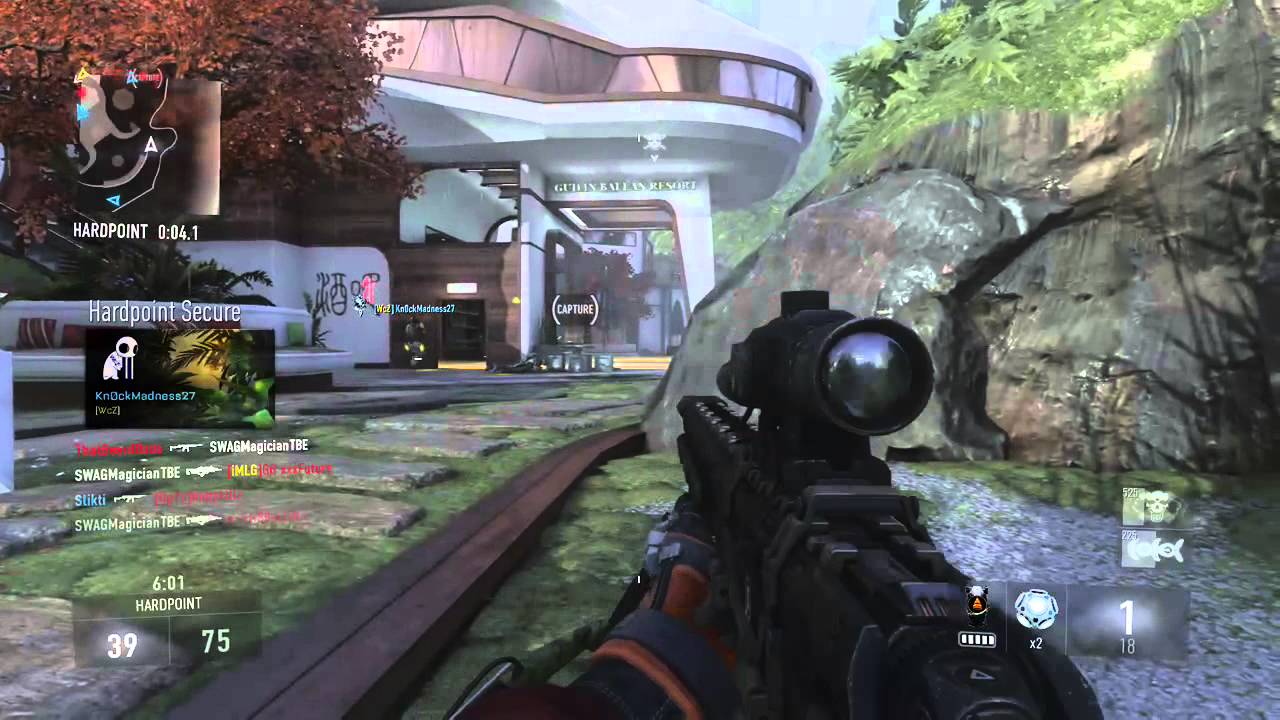
Where would the best place to implement a hitmarker event be? (visual notification that a shot landed)
Doing it in the gun works but the final shot that kills the enemy doesn't cause a hitmarker to be called as his health is 0
Doing it in the character works but then you don't get the bone name to play a special hitmarker if a headshot was hit
More importantly, I'd like there to be some artificial delay if you are not playing online, so that there is a bit of spacing between the shot and the hit, even at 0ms ping
So that introduced timers which I couldn't get to pass through parameters, which meant I had to make 3 separate hitmarker functions (regular hit, headshot hit, and death hit) and now things are pretty messy
 hasty adder
I like to put events in PlayerState. To call its own pc to call a umg. So you can on hit in say a bullet call the event on ps. With th data it needs to make a umg appear
twin juniper
@hasty adder That still has the problem of not having bone names (unless you pass it directly), and either will trigger hitmarkers on dead bodies, or else the final killing hit won't trigger any hitmarker
Which is why I had to split them up so that the killing hitmarker is done in the character and the other ones are done from the weapon
But they all just call a client event on the PlayerController which then calls an event on the HUD which calls it on the widget
hasty adder
Hmm wonder if I know what you mean by hit marker. Visual@example?
twin juniper
@twin juniper It depends how you're calling the rotation?
A confirmed hit from the server
It is trivial to implement if you just let the server call a generic hitmarker on each hit, but with an artificial delay (timer) and different hitmarkers for different bones, it gets harder to keep track of
@twin juniper im not doing anything special
lol
no but what are you doing
its using the same stuff basically
nothing
absolutely nothing
I can't help you debug unless you're not letting me know what logic you're doing :b
hasty adder
Maybe something on damaged sent a call back to the damage caused?
twin juniper
That's what I have for the death hitmarker but I don't send specific hit info like bone names when causing damage
So it is a confirmed hit, but no info on whether it's a headshot or not, and that actually does seem to make the difference in terms of what sounds and visuals play
i am doing nothing
Actually all good I think I figured it out
Thanks @hasty adder
its using third person template settings
that i never really changed
from a year ago
twin juniper
@hasty adder you talking to me?
this issue only occurs
on listen servers
but not clients
hasty adder
You use player controller 0 ? I believe if your testing local it will be consumed by one of the clients
And listen is -1
meager spade
@twin juniper when a hit gets registered on the enemy/player, show the hitmark before you kill them/take health away.
twin juniper
@meager spade working on that now, hadn't used delegates to call timers so I thought it wasn't possible to call functions from timers with arguments
meager spade
that is how i did it, and i don't use delegates etc for it
twin juniper
Even with an artificial delay?
I want say 200ms before applying the damage / hitmarker
On a local client
Maybe not 200ms but a certain delay to space out the shot and the hitmarker
meager spade
ah then yeah you need to use a timer for that, or check to see if a hitmark is already displayed to avoid showing another, what kind of hitmark you talking about?
twin juniper
I want a hitmarker for each shot
So there has to be a new one
It's very quick but has to click and show a moving mark for each hit
@hasty adder no where in my code do i directly set rotation of pawn
its all handled by the default settings in unreal
from 3rd person template
meager spade
@twin juniper i remember moving it to the raycast for my instant weapons,
    {
        SpawnImpactEffects(Impact);
        SpawnTrailEffects(Impact.ImpactPoint);
    }
    else
    {
        SpawnTrailEffects(EndTrace);
}```SpawnImpactEffects is the hitmarker when i hit someone
twin juniper
That actually makes way more sense
Then I just have to delay the damage event itself
And the hitmarker will automatically be delayed
Thanks a lot
hasty adder
If I recall@default 3rd person template is set to orient rotation by velocity until you check the box use controller rotation in the springs arm for the camera
But yeah weirdnit only affects the listen
Makes me wonder if that is called somewhere and it’s not for listen
A authority switch or something
twin juniper
@hasty adder yes, it is very weird!
hidden thorn
If I have a multicast rpc on an actor I don't own but I set the owner to be myself, can I call it inside a server rpc on my character ?
 sweet spire
I dont think so? That sounds like a recipie for disastee
hidden thorn
Oh ok, I just wanted to check
sweet spire
I cant say for 100% it does not work, but u prob wann take a look at your framework as that sounds messy
hasty adder
@twin juniper so same problem in our with no dedicated and just one client?
hasty adder
Standalone works then?
 neon mango
I have a question regarding these settings. https://gyazo.com/a300acc730064523b9183e5873e6deef Would it potentially be wise to alter these values for moments where I know the player is going to be moving faster than usual? And then revert them back ? Like if the player could run super fast, I tweak those values then when they walk I revert. Or is that not needed and I should just find values that work with all speeds?
 twin juniper
@hasty adder i think it all doesnt work if not a client
hidden thorn
With OnRep Notify, if a replicated variable is false and then I do variable = false; OnRep_Example, this won't work as the value hasn't changed, but if I do variable = true, OnRep_Example this will work and take effect.
Just want to confirm
winged badger
as in you tested it and it works that way, or you want confirmation that it works that way?
winged badger
something like if (myVar == value) return; makes sense
pretty common if you don't want to execute a setter if the value hasn't changed
hidden thorn
This is what I did
//.h
UPROPERTY(EditAnywhere, BlueprintReadWrite, ReplicatedUsing = OnRep_ItemVisibility, Category = Item)
bool bShowItem;

UFUNCTION()
void OnRep_ItemVisibility();

//.cpp
tempItem->bShowItem = false;
tempItem->OnRep_ItemVisibility();
by default bShowItem is false
and nothing changed
after I put into the constructor bShowItem = true it worked
so I assume unless there is a change to the value the OnRep won't be executed
winged badger
i always assumed as much
anything else would be a waste of bandwidth 😄
now wondering about BP RepNotify.... hmmm
never trust BP
 fringe dove
is order guaranteed between a reliable to client RPC and a reliable multicast RPC as long as they go over the same actor channel?
or are singlecast/multicast separate with respect to ordering
 dim eagle
Hi, I was wondering how you can have a player that is server pass the server or role AUTHORITY to another player? This would be needed if say the hosting person crashed or had to leave
misty stirrup
@fossil spoke hey man, i have a question for you. do you know what exactly is happening when a player is outside of the net relavancy cull squared thing? is it destroying the actor clientside, no longer replicating it, then recreating it clientside when it is relevant again? from my testing it seems that's what's going on. but it seems like it's only doing it for Character. i also can't find where in the code it's doing this either, ive been digging around the git for the past few days finding nothing
fossil spoke
You may find more information on Actor Replication and Net Relevancy in the documentation
As for exactly where in Code relevancy is managed you can try looking at AActor::IsNetRelevantFor() and AActor::GetNetPriority()
misty stirrup
this is the thing that's messing with me though
i can't seem what's hiding the ACharacter when it's no longer relevant for the client
fossil spoke
You cant find the settings?
misty stirrup
no like the actual code
i want to understand exactly what it's doing so i can apply it to my items as well
fossil spoke
All Actors have relevancy
misty stirrup
yeah, i know, but like when my items aren't net relevant they still draw their static meshes
fossil spoke
Your Item actors will be culled if they fall out of relevancy
misty stirrup
that's 100% not happening
like they're beign culled network wise but not rendering wise
fossil spoke
Arent they just not considered replicated, dont think they actually get destroyed
When i said culled i meant from an network perspective
misty stirrup
ACharacter gets culled graphics wise, and im pretty sure actually gets destroyed
but i can't find any code proof of this happening? that's the thing thats fucking w/ me
fossil spoke
Ive never delved to deep into the system so im not sure of its specifics.
The Character itself maybe doing that
misty stirrup
this is legit bonkers
i can't find where it's telling it to be hidden
or to be destroyed() because i know for a fact that beginplay starts again when it becomes net relevant again
misty stirrup
IsNetRelevantFor isn't the actual actor.cpp in the same way it's in pawn/character?
misty stirrup
OKAY WELL im done trying to figure this out for the night, but i found out something new. if the character is placed down from the editor instead of spawned, they'll render no matter what.
so yeah. i have literally no idea.
 boreal vine
Hi,
Im spawning an actor on the server from the third person bp then possessing. it works fine but it is not spawning at the given transform. any ideas?
winged badger
is the actor replicating movement?
 mellow cipher
What role does the client have on their player?
Is it ROLE_SimulatedProxy or ROLE_AutonomousProxy?
winged badger
AutonomousProxy
meager spade
@winged badger how can i make a AI Move To search for a new target even if the old target is set and valid?
winged badger
not really a channel for that, but you put a service in the root of your BT that re-evaluates the target and sets the BB value
they are also the root of your client's hierarchy
meager spade
oh damn thought i was in AI, my bad
neon mango
Hey would anyone know if I should dynamically vary these network settings on the character movement component depending on how fast I have the player moving? https://gyazo.com/a300acc730064523b9183e5873e6deef
hidden thorn
When testing a game is there a difference between having Single Process on/off ?
neon mango
@hidden thorn what do you mean exactly?
hidden thorn
Would I get different results?
if I have Single Process off the other clients are still part of the editor
untold sun
is setting a replicated variable on the GameState a synchronous operation? e.g. I have a blueprint node that sets a replicated variable - when the next node starts execution, can I assume that all clients have the new value for the replicated variable?
oh... NetUpdateFrequence seems to define the timing... ok!
@hidden thorn I would assume that you only get stable testing results if you simulate using separate processes. Simulating all using a single process speeds things up, but probably messes things up as far as I have read about that.
neon mango
@untold sun that should be the case, see http://cedric-neukirchen.net/Downloads/Compendium/UE4_Network_Compendium_by_Cedric_eXi_Neukirchen.pdf page 9
meager spade
need some help,
        bool bDead;```

```void AZAIBaseCharacter::Server_SetDead_Implementation(bool InBool)
{
    bDead = InBool;
    OnRep_AIDead();
}

bool AZAIBaseCharacter::Server_SetDead_Validate(bool InBool)
{
    return true;
}

bool AZAIBaseCharacter::IsAIDead()
{
    return bDead;
}```bDead is returning false in anim blueprint


no idea why it is false in anim blueprint
 untold fox
yo guys! quick question
anyone had a problem with multiplayer projects where the server spawns pawns correctly for the host but not the clients?
the clients join without a problem, but seem to be spawned as spectator pawns rather than the game mode default
hidden thorn
@meager spade Did you put bDead inside GetLifetimeReplicatedProps ??
grand kestrel
I'm trying to spawn a bunch of components in PostInitProperties before runtime, these components are set to replicate, the problem is that server then replicates it's components to the client and the client doesn't use the ones that were created on construction
void UVESEquipmentComponent::PostInitProperties()
{
    Super::PostInitProperties();

    if (!GetWorld() || !GetWorld()->IsGameWorld())
    {
        ConstructSlots();
    }
}```
```cpp
void UVESEquipmentComponent::ConstructSlots()
{
    if (GetEnum())
    {
        for (auto& Slot : Slots)
        {
            if (Slot.Value)
            {
                Slot.Value->DestroyComponent();
            }
        }
        Slots.Empty();

        const uint8 MaxValue = GetEnum()->GetMaxEnumValue();

        for (uint8 i = 0; i < MaxValue; i++)
        {
            if (GetEnum()->IsValidEnumValue(i))
            {
                if (StartIgnoreIndex > INDEX_NONE && i >= StartIgnoreIndex)
                {
                    break;
                }

                const uint8 EnumIndex = GetEnum()->GetValueByIndex(i);
                const FString EnumName = EnumToString(GetEnum(), EnumIndex);

                if (!IgnoredNames.Contains(EnumName))
                {
                    const FString SlotName = FString::Printf(TEXT("SLOT_%s"), *EnumName);
                    if (UVESSlot* NewSlot = NewObject<UVESSlot>(GetOuter(), FName(*SlotName)))
                    {
                        if (EquippableSlots.Contains(EnumName))
                        {
                            NewSlot->bIsDrawerSlot = true;
                        }
                        NewSlot->RegisterComponent();
                        LOGVES_WARNING("Created slot %s", *GetNameSafe(NewSlot));
                        Slots.Add(EnumName, NewSlot);
                    }
                }
            }
        }
    }
}```Is there an object flag or something thats required here?
I don't get it
Why doesn't UE4 know that these objects are one in the same
Why is it recreating them after replication?
high nebula
cant seem to update the material of the mesh on my client's screen
During the begin play of my ai controller I get all my variables and such from a data table, then set the data on the pawn
setting the health variables works
Do I need to set the mesh to replicate?
 spare glade
how do i take what actor is being damaged from this, in my gamemode? or am i just misreading the pins?
 brittle sinew
This node would be for when your GameMode gets damaged, which doesn't make much sense
brittle sinew
"Any damage" just means any type of damage, not any damage that occurs in the game
spare glade
ill just do it properly then for what i wantXD
misty stirrup
does anybody know why characters when they're no longer netrelevant will get destroyed but normal actors won't?
i've been digging around in the source and have been unable to locate the line that does this, and i've also experimented a bit and confirmed it doesn't happen for characters that are placed into the game world via the editor
misty stirrup
okay you know what
100% fuck that question it won't help my game at all
is there an event that is fired when an actor becomes relevant again?
fossil spoke
BeginPlay?
misty stirrup
not for the default actor i think i might have to set up uhhh
IsNetRelevantFor in the actor ive made
further bug testing has found that getting in range of the item after it's been out of the 'net relevant cull distance squared' range and moved causes it to not be updated automatically meaning im pretty sure there's some funky behavior default actors are simply missing compared to the pawn/character actors
misty stirrup
and like the worst part is that netculldistancesquared IS netculling the actor
it's just not render culling/destroying the actor
which like, would be PERFECT if it was destroyed
glacial pollen
It really sucks to have to use a plugin for this, but I would like to thank @thin stratus for pointing me to AdvancedSessions plugin!
 shadow lichen
Attempting to setup Networking for Animations, is it possible to compact Server or Client Events for multiple variables?
Like say a variable changes, and Event Tick just constantly sends the Clients what the variables are Server side?
misty stirrup
yes that is possible i don't believe it's recommended though
shadow lichen
Okay thanks
slim holly
yup, ideal situation to send variable changes only, for the sake of saving bandwidth
shadow lichen
Okay, seems like when I do a preview with what I got, it works
With 2 players
But when I use the Dedicated Servers check my AI tree doesn't do anything
Does Dedicated Servers register players differently or something?
slim holly
there are some differences what dedicated handles
shadow lichen
Hmm is there something that I need to change to make things work on a dedicated server?
Related to Multiplayer, like controls, AI behavior, animations?
Or is that all something that should be done in code/blueprint?
slim holly
well, dedicated doesn't load assets
so animations aren't played for example
therefor your gameplay can't rely on socket locations on server side
Im sure there are other limitations, but I haven't looked into that too much
thin stratus
You can tick animations on Dedi Servers
To update the Bones and thus the sockets
Otherwise every game that uses Dedi SErverse and sockst in character hands would not work
summer nova
@thin stratus what would be the easiest way to send a chunk of binary data from PC to PC in unreal?
client->server, server->specific client, server->everyone
turns out the ECS library i was using to do stupid shit now supports serialization, wich i plan to use to actually do network events
by just sending specific entities from one pc to other
 cedar mural
So currently for p2p networked play the "host" is required to go into their router settings and forward their 7777 port (default port UE4 uses). What can I do to automate this step so my users don't have to do this manually?
summer nova
@cedar mural use Steam
cedar mural
Oh, is it really that simple? lol
Currently I've been testing with direct IP connections and it requires port forwarding. I guess steam's online subsystem will handle all that for you?
summer nova
yes
 wintry steppe
@summer nova earlier you said to download the Shooter Game sample the problem is that i cant acess the code and i wanted to make my game in blueprints
bitter oriole
@wintry steppe Doing a serious multiplayer game is going to require C++ at some point, or at least it's going to be a much safer route
You can get some of it to work in pure Blueprints but if you're going for multiplayer you should really spend some time looking into code
wintry steppe
@bitter oriole Im not really looking to do a multiplayer in a near future , Im new to unreal i just wanted some help on some simple things for example i wanted to download some texture and models (Gun,Player,Zombie) and then implement it to the game but i cant do it
 wary wyvern
Is it possible to override OnRep functions? I did it somehow, but now I don't see events or function in override list..
bitter oriole
@wintry steppe This is the multiplayer channel so I'm guessing you need help on multiplayer
wintry steppe
@bitter oriole I missclicked the channel thats why xD
wary wyvern
@sterile pebble Yeah, but now I'm trying to override it inside blueprint.
Btw parent class os also BP.
summer nova
Does unreal engine expose a game time that is coherent on both server and clients?
i would like to use something like that to replicate stuff, in a way that it works against latency
wary wyvern
@sterile pebble Hmm.. I created OnRep and I can override it. But it's not possible to override old function I made in previous versions
 verbal wave
why is unreal's native static mesh physics replication so bad? Stacked boxes jitter like crazy. I'm trying to get my hands dirty on networked physics. Apparently SM already have basic simulated extrapolation.
Is it because SM only replicate their movement individually, not as a whole physics state?
bitter oriole
Physics in UE4 aren't deterministic
So there's no easy way to build reliable networking on top of that
You are correct that just toggling "replicate movement" only replicates location
I believe people have worked on full-physics-scene synchronization to account for this issue
Not easy at all though
verbal wave
https://gafferongames.com/post/state_synchronization/
I'm reading this. I can understand most of it and think given time I'd be able to make it work.
of course it's not gonna be easy 😃
bitter oriole
The basic problem here is that you can't assume that synchronized players with identical source data will simulate physics the same way
So anything you do here is bound to have some amount of rollbacks & jitter
Even in ideal conditions
verbal wave
I'm probably thinking of the same thing as you mentioned as 'full-phyics-scene', which is basically sending whole scene snapshot at like 20 fps on top of clients simuating physics on their own, right?
bitter oriole
Basically get the PhysX scene and send it to clients
verbal wave
I understand it's not deterministic
bitter oriole
The option I went with myself for multiplayer physics is to ignore engine physics alltogether and reimplement a deterministic, controlled subset
verbal wave
noob question: "Simulate Physics" in unreal is powered by PhysX?
verbal wave
oh so that's like super-NOT-determinstic ?
bitter oriole
Dunno exactly how much not 😃 Ask @chrome bay , sorry for the tag
 chrome bay
Yep, totally not deterministic at all
Even non-physX movement isn't entirely deterministic
verbal wave
I'm thinking sending the whole scene state @20 fps and interpolate it with physX
will that work?
chrome bay
nope
Sorry I've not been following the conversation, but i think I know what's being asked
verbal wave
aww
I don't understand. It's only 2 frames' extrapolation. how can it be that bad?
physX still visually makes sense
chrome bay
Unreal relies on PhysX for all it's collision queries
So things will start inexplicably failing
Also since we have no control over when the physics scene simulates in Unreal, that's easier said than done
Also, if you're talking about a player controlling a PhysX object - then sending the entire physX state from the server still won't solve the problem
verbal wave
then my only easy option without implementing my own physics engine is do everything on the server, and send the snapshots?
oh yea the delay
chrome bay
Sending the state for the entire PhysX simulation just isn't feasible
verbal wave
my physX sim scene is very small
think Gang Beast, or Humans fall flat
I do understand simulate entirely from server comes with bad delay
chrome bay
I haven't seen those - but in all cases it sounds like a custom solution that doesn't use physX at all is what you want
It's not just that - when the client gets a correct, they need to rollback the physics scene to a previous timestamp and re-simulate with the update
While you can apply a scene state, you can't re-simulate individual objects in a scene
either the whole scene is simulated or nothing is
Character Movement works because you can simulate just the movement of that one object whenever you like
PhysX doesn't work that way unfortunately
verbal wave
makes sense. Character Movement has that saved moveset thing
chrome bay
If you want PhysX Controlled pawns for the time being, the best approach right now is to make them client-authoritative and just do some basic sanity checks on the server to prevent cheating
It's not perfect but it just about does the job. You could also implement some custom smoothing if you wanted to
Personally I just avoid physX like the plague and write my own movement comps like Character Movement - but that's a big task in itself
If Character Movement wasn't such a horrendously monolithic class, it would make life a lot easier
bitter oriole
^ also my approach here.
verbal wave
Yea I'm still researching for valid options.. I'm the only programmer & designer in my team. Barely have time to eat 😐
client-authoritative seemed to work but it has a lot of limites
bitter oriole
I've got a similar approach for a MP vehicle game where physics are entirely simulated in code. Though i don't know for sure, I also strongly suspect this is what a game like Sea of Thieves does
(UE4 MP game with ships)
chrome bay
Yeah I'm willing to bet it does for sure
bitter oriole
It's fairly certain since many edge-cases, including de-penetration, showcase wholly un-physical behavior
chrome bay
I guess they probably have some kind of bouyancy thing that reads from the waves as well
So must be something very bespoke
I remember the Battlefield team talking about having to have a network syncronised wave simulation for their boats in BF4, it was crazy
verbal wave
sounds like pain..
chrome bay
MP is pain 😄
bitter oriole
Nothing in MP is anywhere near easy yeah
bitter oriole
Something like kicking a can on the floor and have it bounce around is entirely trivial in single player, and basically two weeks of C++ work in MP
chrome bay
one day someone will release a sweet open-source deterministic physics library... but alas it is not this day
or century
verbal wave
I'm slowly getting used to thinking about things in five different ways..
chrome bay
probably
Mind you Epic have only just made is possible to cleanly compile the engine with WITH_PHYSX 0
bitter oriole
Simple example like that can shooting still requires autonomous sim on the client (moves immediately locally), a server RPC, server-side simulation, replication with replay & rollback on that same client, + basic inteprlated replication on other clients
Three code paths and your own physics in the code
bitter oriole
To be fair, once you have written that once, you can probably use it for most objects with ease
chrome bay
That's pretty much where I'm getting to now, having some reusable basic classes that I can adapt for most kinds of movement
I really want to get it to a state where anyone can use it
verbal wave
have you guys played Stick Fight? it seems to be a great example of no fucks given client authoritative physics
bitter oriole
eXi used to have a sample project with that for ball-type pawns, I asked him if it's still online somewhere
verbal wave
if replicated physics is off the table, designing around it would be my only sane option
stick fight got away with it because it's fast loop-based and everything just falls down
https://github.com/TheJamsh/UE4-Networked-PhysX-Component
have this in my bookmarks

GitHub
UE4-Networked-PhysX-Component - A solution for PhysX Pawns with Prediction and Reconciliation in Unreal Engine 4.
bitter oriole
Depending on the gameplay you want you can still do your own physics, too
verbal wave
oh hey it's @chrome bay himself lol. what a pleasure
chrome bay
Yeah that one has some problems unfortunately 😦
I was still learning as I was writing it, and it has one massive flaw which is that between updates the server is of course still simlating the physics scene
And I hadn't worked around that part
verbal wave
@bitter oriole that actually doesn't sound impossible since our game is cube based. Thanks for all the info and knawwledge
why can't we just have nice things without overcoming mountians😐
chrome bay
welcome to video games 😄
verbal wave
love that mindset
bitter oriole
@verbal wave More like welcome to multiplayer games. You'll enjoy the part where you get to cheating, too
verbal wave
I simply can't wait! The ultimate motivation to make a great MP game
 burnt meteor
===
Announcement what we all have been waiting for: https://www.youtube.com/watch?v=iMNjp5L7_oA

This video shows you how I got a dedicated server working on Steam with UE4 4.18.3 using the Advanced Sessions Plugin. Please use these below jump points to ...