#multiplayer
1 messages · Page 386 of 1
 wary willow
 heady scroll
Figuring out how to put this
Basically, I've got usernames people can enter when joining a server
And when they do the server sets a text above their head to the username they just entered
Now, when someone joins the game after someone set their username
That ends up with them not seeing that username
Is there any easy or 'correct' way to get that synced?
(I really don't know anything about 'correct' ways in regards to networking :P)
(I can come up with some bruteforce-ish stuff for this, but I'm wondering how others would do this)
 thorny kelp
The correct way in Unreal is to use replicated variables for state
You can actually use 'player name' from 'player state'
wary willow
@heady scroll Are you using RepNotify?
thorny kelp
its already replicated
wary willow
You should be using that if you want them to persist
If you are doing it via MultiCast, they won't
Typically
heady scroll
RepNotify being? (Take that as a no)
😛
I've sort of been bruteforcing my way through networking
thorny kelp
@heady scroll You can set your variables to replicate, this way it will always pass the value from server to clients.
You will still need Custom Events to pass data from client to server
 modern dome
@thin stratus but PlayerState exists on all clients, or what do you mean?
heady scroll
WHat's the difference between RepNotify and Replicated in replication settings for vars?
thorny kelp
@heady scroll You will notice that with RepNotify, engine will create an additional function Rep_VariableName, this function will be called automatically each time value is updated, on both client and server
heady scroll
That just replicates the var and does nothing else?
thorny kelp
Yes
@heady scroll note that variable replication works only in one direction. From server to clients
thorny kelp
yes
wary willow
What's the best way to replicate Animation Blueprints currently?
heady scroll
That'll make MP-dev way easier
wary willow
thorny kelp
@heady scroll you misunderstood I think
 winged badger
as with most things, replicate state and use RepNotify
wary willow
This is a snippet that's being done by someone else right now, but I need to know the better way.
thorny kelp
@heady scroll RepNotify wont replicate from clients to server
wary willow
I don't know crap about animations bps
winged badger
you do know there is an event that triggers an animation
 thin stratus
Use them like Widgets
wary willow
I just said that..
thin stratus
Replicate the Data in the Character and grab it in the animBP
 solar halo
@fleet sluice just curious.
modern dome
@thin stratus but GetPlayerPawn(0) returns the local Pawn. all player states would accumulate the local pawn's location, not the onne of the owning PlayerController
thin stratus
GetPlayerPawn(0) gets the pawn relative to who calls that
If ClientA calls it, it's ClientA's Pawn
etc.
 untold sun
when I test a multiplayer game from the editor, why is the purpose of the window showing the title "Game Preview Server"? To me, that shows the world´s state as it exists on the server, not any client replication.
- what, not why
I thought when I start with 2 players it actually shows 2 clients
 severe widget
listen servers are also effectively the network authority
You need to use the checkbox emulate dedicated server or w/e
untold sun
that means I always have to code two "versions" of my gameplay - one for any client and one for the server
severe widget
Eh?
modern dome
@thin stratus PlayerState exists on all Clients.
Client A: PlayerStateA getPlayerPawn(0) -> Client A Pawn
Cliebt B: PlayerStateA getPlayerPawn(0) -> Client B Pawn
untold sun
when I spawn an actor on keypress I have to handle the case when a) keypress happens on the client -> I need a serverRPC b) keypress on the server, no server rpc
severe widget
You can prolly check if the pawn's PS is self
Well yeah, but that's not two versions of the game. That's handling special case stuff so that the rest can be more or less the same version.
Don't like that one client is special? Plan for dedicated servers.
untold sun
this is what @thin stratus wrote me yesterday - I am just surprised. Bare with me, I am bloody beginner in networking.
yes, not two versions of all the game...
thin stratus
Well you can also directly call the RPC
ServerRPC called on server will just result in a normal event
But using switch has authority is cleaner
untold sun
actually very simple, but it took me really long to figure it out.
@thin stratus how about adding this as "networking hello world" to your guide?
I am sure many people would profit from that
but your decision of course
 meager spade
@untold sun tbh, it's quite easy to understand (well i think so...) maybe i just understand things quicker/easier than some people
cederic's guide was so useful how it is
untold sun
Things usually always are easy as soon as you know how they work 😉 I have to learn about networking besides my day job and other "distracting" things. So for me it would have been helpful to have an immediate "hello world". And yes, of course his guide is very helpful.
@meager spade Actually it took me hours to find it out 😉 hahaha
besides reading a lot in the ue4 docs and distilling what is important for a simple helloworld
thin stratus
It helps a lot more if you find that one out yourself
untold sun
that is definately true also
 sharp spire
Sorry, read something a few posts up about animationBP and replication. If a variable is replicated in say; the pawn; and sent over to the animation, then it is automatically still replicated? For some reason to me it sounds like that would have a tiny delay if it came down to the details
If not then what is the soul purpose of replicated variables in animationBPs?
thin stratus
You don't have replicated vars in animBPs
You have them in the Character/Pawn
it's the same idea has having a Widget and a replicated health variable in the pawn
And the widget grabs that and displays it
sharp spire
But the animationBP actually has a replicated toggle for all variables and allows custom events sent through the server
thin stratus
Why would you need an animation notify to be replicated
sharp spire
To cause a replicated event from the animation graph instead of sending it back. Idk lol
thin stratus
Stop forcing a reason :D
sharp spire
I don’t understand why epic has it D; lol but fair enough. I’ll ignore it :b
severe widget
Not removing useless functionality when re-using a system (bp graph) is easier than removing it.
sharp spire
Also, is the best way of replicating speed by making a custom variable and setting it based on pawn velocity? Just making sure I did that right
Fair enough @severe widget
 hidden thorn
When I run this on the client it crashes with the error code c0000005 (first/second chance not available), I know the objects are spawned on both the server and client but I assume It's because I am trying to pass a null Item since they are 2 different items.
The error line is inventory.cpp:25 which is basically the bracket.
This is the first time I used a Client RPC and I understand how it works but in this case I don't really see a workaround.
void UInventory::AddNewSlot(AItemBase* Item)
{ // <- Line 25
    ...
}
// This is called inside a ServerRPC
void URPGPlayerInventory::SpawnItem(TSubclassOf<AItemBase> Item)
{
    FActorSpawnParameters spawnParams;
    spawnParams.Owner = Player;

    FVector spawnLocation = Player->GetTransform().GetLocation();

    AItemBase* tempItem = GetWorld()->SpawnActor<AItemBase>(Item, spawnLocation, FRotator(0.0f, 0.0f, 0.0f), spawnParams);
    tempItem->HideItem();

    Client_AddNewWidgetSlot(tempItem);
    InventoryList.Add(tempItem);
}

void URPGPlayerInventory::Client_AddNewWidgetSlot_Implementation(AItemBase* Item)
{
    Player->PlayerHUD->GetInventoryWidget()->AddNewSlot(Item);
}
should always be checking for null pointers, btw, if (ensure(tempItem)) { tempItem->HideItem(); } else { UE_LOG(LogTemp, Warning, TEXT("tempItem is nullptr") }
tempItem->HideItem();
   Client_AddNewWidgetSlot(tempItem);
    InventoryList.Add(tempItem);
} else {
UE_LOG(LogTemp, Warning, TEXT("tempItem is nullptr")
}```you should always check for nullptrs
reason it's null, well not sure about that, maybe step through the code in vs to find out
hidden thorn
Well I checked from the clients perspective and it isn't null it does show up, and the item is being added to the inventorylist
show up as in spawns on their end
Also it seems tempItem-HideItem() is only called on the server it doesn't affect the clients.
winged badger
so you have AItemBase, which is replicated
and you have a TArray<AItemBase> which is also replicated
and AItemBase object is created at roughly the same time its added to the server's array
unless the AItemBase object replicated already and is constructed on client
whatever reference TArray replicated for it is nonsense to the client
hidden thorn
Everything you said is true and yeah you might be right about this whatever reference TArray replicated for it is nonsense to the client
hidden thorn
yes
winged badger
so you might try and add the item on its construction on the client into the GetOwner()-><get to the required reference to TArray from there> on the client
not a great solution either, ignore
sorry, brain fried by now, long day
hidden thorn
No worries, I had a long and busy day working on this (got loads of things working)
winged badger
(destroying the item on server with this approach would leave you with TArray containing some nullpointers)
on the client
 twin juniper
is there anyway to stop a multicast from running on actors that aren't even network relevant ? the actor calling the multicast is the weapon.
example: 2 players across the map, they know nothing of each-other (they are outside of relevancy range)
player1 attacks with their weapon which is also outside of relevancy range
player2 still receives data about the attack
switching to the tried and true "burstfire" onrep method works but i don't know if that reliability bug has been fixed yet. it was game crippling last time 4.16~.
hidden thorn
Everything works just fine except Client_AddNewWidgetSlot(tempItem);, TArray is updated on both server and client and the items are spawned but if I want to use tempItem or call anything on it will have no effect on clients.
winged badger
reliability bug?
tempItem is a local variable
you are passing it by constant reference?
hidden thorn
i am not sure
winged badger
show me the declaration of Client_AddNewWidgetSlot
hidden thorn
// I assume this is the definition
UFUNCTION(Client, Reliable, WithValidation)
void Client_AddNewWidgetSlot(class AItemBase* Item);

// And this is the declaration
void URPGPlayerInventory::Client_AddNewWidgetSlot_Implementation(AItemBase* Item)
{
    Player->PlayerHUD->GetInventoryWidget()->AddNewSlot(Item);
}
try Client_AddNewWidgetSlot(const AItemBase*& Item);
not sure where class fits there exactly, but you can forward declare it above the class declaration if it doens't
hidden thorn
I've never seen that before, so how do I pass a pointer to the method?
winged badger
i am half guessing here
hidden thorn
 winged badger
but if you were to pass a temporary variable as a pointer argument to the delegate, compiler would throw a fit
can't imagine networking being more lenient
did you change the method signature in both .h and .cpp?
hidden thorn
yea
twin juniper
PLS
THE MILITARY ARE ABOUT TO DESTROY MOLES GROUP!!!
WE NEED HELP!!!!
DAMMIT REPNOTIFIES ARE NOT RELIABLE!!!!
winged badger
overdoing the reliable bit usually ends badly
with things like "reliable buffer overflow"
and jerky movement
twin juniper
this is not tick or on frame this is every 2-3 seconds
repnotify would not fire sometimes but multicast 100% reliable
winged badger
multicast has its own problems
twin juniper
increasing network tickrate to some stupid number like 200 added more reliability for repnotify but thats just not a solution
and i am facing multicast's problems now... how to save myself from destruction?
winged badger
my replicated variables work just fine
twin juniper
wat engine version ?
twin juniper
GET EM OUTA HERE BULLSHTT I AINT SOME KIND OF WIPPERSNAPPER THAT AINT KNOW JACK I PRESS F7 TO COMPILE CODE I KNOW EVERYTHING!!!! NOTHING IS WRONG WITH MY CODE!!!!!!
😢
winged badger
there is a RepRetry specifier for larger objects that might fail to be sent in their entirety
but for firing state a byte is sufficient
and if that was supposed to be funny, it really wasn't
😦
 glacial pollen
Okay guys. Lets start with something simple.... Does this look right?
 jolly siren
You shouldn't be setting replicated variables on the client.
 flat bison
So this at the end should set DodgeLeftB to false and does but then changed back into true
glacial pollen
@jolly siren You just indirectly solved roughly 12 different issues, thanks!
winged badger
when an actor is replicated, it is constructed on server first, then client is instructed to construct its own version, and all the replicated values are... copied over from server to client
client is also informed of the netID of the actor required to reference it over the network, and sets it
after that, aside from RPCs and replicated values those actors function independently
which means both the client's and server's actors will call Tick(), BeginPlay() and similar functions on their own
when GameMode sets the MatchState, the GameState replicates it, and from there clients are notified they should BeginPlay
client doesn't need to notify server of anything aside from InputActions and Movement, and Movement works out of the box in CharacterMovementComponent
flat bison
ok so i set run on own client and it works
custom event set DodgeLeftB to false
Zlo thats great info ty
winged badger
@flat bison server is the authoritative entity
glacial pollen
While the information is great, I already understood all this. That doesn't explain the nuances like, when server constructs actor, do you set the owner to client, or leave blank?
Why, does the server construct the actor, and in the server begin play, I call add child actor, and the child actor calls begin play on the client?
winged badger
so you shouldn't determine if something happened on a client machine and notify server, with exception of user input
server owns all actors not otherwise attached to a PlayerController
flat bison
Yea still learning the nuances of server/client interaction Zlo, there's a lot of info out there but sometimes you cannot learn till you do it
winged badger
on the server, every actor has the NetRole ROLE_Authority
which lets it freely interact with other ROLE_Authority actors
on the client, PlayerController, its controlled Pawn, any components and/or actors attached to it in any way are owned by the PC
and have the ROLE_AutonomousProxy
glacial pollen
Are you talking to Trinatis?
winged badger
that allows you to send server RPCs from inside them
both i think
i might had misinterpreted your level of familiarity with networking, but that BeginPlay up there looks extremely weird
flat bison
well whatever zlo said helped me immensely rofl
glacial pollen
The beginplay was the result of frustration, not the source of the problem
winged badger
any other actors on client have ROLE_SimulatedProxy
they can receive information from the server, but cannot send a RPC
flat bison
@winged badger would you know were i could get some good info on jitteriness client side but not thru server
winged badger
good place to start with networking are pinned resources on this channel
apparently, CMC does poor job of simulating movement when physics gets involved, but i haven't dealt with that
flat bison
well i am getting it in basic sprinting could be just my poor animation setup or my char setup
ill take a look at the pinned topics tho
winged badger
what do you mean by "do you set the owner to client, or leave it blank" @glacial pollen ?
glacial pollen
If I do this, char-server-beginplay wont run, only client:
If I remove the ownership, then server will run on both chars, but client will not begin play
I get either or, never both
winged badger
that is inside the PlayerController BP?
glacial pollen
gamemode
winged badger
does that TMap have valid info when you breakpoint, say DestroyPawn?
winged badger
TMap, not the input?
and do you have any LogSpawn warnings in the output log?
(ConnectedPlayers variable)
winged badger
Possess does assign the ownership to the possessing PC
any attachments and ownerships are replicated by default
so if actor replicates, so will its relationships to whatever its attached to
with child actor, if its set to replicate, constructing it on server means it will exist on client and be attached to the "same" parent, provided the parent replicates as well
you do want to be careful with components/child actors that have a physical representation, as if you are creating them in the constructor, both client and server will create their own separately
then server will replicate its components/child actors
and client will end up with 2 sets
in case of child/attached actors in particular this can really mess your collisions as your client percieves them
glacial pollen
thats a golden nugget
winged badger
(example would be client having a rifle it created and a rifle server replicated - causing client to appear to shoot into the rifle that exists only locally, would pretty much look like its shooting itself)
while on listen server, from host's perspective everything would look fine
glacial pollen
but as long as I do has authority on construction I should be just fine right?
winged badger
there might be some components that you want only on client
glacial pollen
like the HUD
winged badger
for example, if you made a component that does a forward linetrace, and if that hits an item of interest, make that item display a widget with info locally
(that example works fine with dedicated servers, but not so well with listen server host, as its only pawn has authority)
but yes, for components that replicate, you generally want to construct them with authority only
glacial pollen
actor component does not offer Has Auth?
winged badger
solve for the above example is to use branch with checking if Pawn is a LocallyControlledPawn
glacial pollen
k
winged badger
it should be able to figure it out
never tried it in BP
but in code it can do GetOwner->Role to get the network role of the owner (and therefore its own)
so i'd be surprised if it didn't exist in BP
glacial pollen
It does. I'm going through everything and adding has auth as needed
winged badger
you can choose world in world outliner when playing in editor
from the illuminati icon
if you choose client, you will see actors/components that exist on client
and you will also see if you have any doubles you shouldn't
glacial pollen
I appreciate your time. Things are starting to work and I think I'm not seeing red anymore..
If the actor meshes are set to replicate, and I run this:
shouldn't the client meshes also change to that material?
winged badger
material is not replicated like that iirc
they will set the defaul material in the StaticMeshComponent
but afterwards, i think DynamicMaterialInstance, replicated variable which is a parameter for the material and a RepNotify function is the way to go
 grand kestrel
If I wanted to do something similar to net frequency but for an external service (UE4 sending info out), what would be a good way to do this? FTimerHandle?
It'd run at about 200hz
I.e every 0.005 seconds
(Data is local)
 fleet sluice
I'd use a tick and a variable to measure time, with an if to reset that variable when needed instead of FTimerHandle
I think timers don't work outside of UWorlds (or when they're transitioning)
grand kestrel
Hmm do you know if replication is also tied to tick?
I might just see where it's sending replicated cars
fleet sluice
More specifically? Replication is done inside UNetDriver::TickDispatch (or UIpNetDriver). You can inherit FObjectTickerBase or FTickable (or others; there are quite a few) and they will tick forever, regardless of UWorlds, replication and anything else
I made a tickable class IMyModule: public IModuleInterface, public FTickerObjectBase class, for example
grand kestrel
Wait your interface can tick? 😛
grand kestrel
That's neat
grand kestrel
Strange, I can't find the initial declaration of TickDispatch
The only one that isn't an override isn't virtual either and it's private
Oh there it is
Didn't show up in find references
UNetDriver - ENGINE_API virtual void TickDispatch( float DeltaTime );
thin stratus
I wonder if there are any cool things someone would want in inside the editor in terms of Multiplayer
Helpful Editor Extensions
Or maybe something for coorperation, e.g. a synced log that shows who's doing what
Or a chat
idk
grand kestrel
I can't think of anything abstract enough that I wouldn't have to resort to writing it myself
Ahh I see what you mean
thin stratus
Yeah can be very different what I mean
Either actual cooperation stuff inside the editor
grand kestrel
I'm already passing info between UE4 instances, wouldn't be hard
thin stratus
Or just usefull stuff for a single user to handle multiplayer better
Yeah well it's just sending data
and receiving it
grand kestrel
Have a look at the live link stuff
The way they use sockets is helpful
I think Apple AR kit has a livelink too
Used it for UDP socket connection reference
thin stratus
That's LAN stuff or ?
grand kestrel
Any
thin stratus
Well for in-house communication you could probably just use the message bus system
grand kestrel
You'll have to open ports I think if you go online
grand kestrel
Well
thin stratus
Had clients who couldn't use the system cause their routers simply didn't keep a list of connections gg
grand kestrel
Wanna test it right now? I'll send you a package that connects to my home PC
thin stratus
Na, wanted to put my Saturday into refactoring stuff
grand kestrel
Fair enough
thin stratus
The thought of extending the editor just hit my head, that's why I posted
One thing is: Is there something already to properly adjust x windows across the screen?
grand kestrel
All you'd have to do is download a UE4 project and run it with -log -nullrhi
And if you get errors in the log or actual messages it'll be obvious
thin stratus
E.g. Press Play with 4 players and all 4 windwos get properly placed and sized
grand kestrel
If you're busy I'll get someone else to, I'm curious now
thin stratus
Do you need someone to test it or why asking?
grand kestrel
I'm actively working with this stuff atm which is why I have it setup
Nah
I don't need to do it outside of LAN
thin stratus
What is it using though?
grand kestrel
But your editor plugins got me curious
thin stratus
Are you actively connecting to your public IP?
thin stratus
Welp, just PM me with a download link
grand kestrel
Well, that would be
thin stratus
Can start it while coding on something else
The coolest thing that someone created was a live map editor
Don't know what happened with that
It basically synced live what you did in the Map with another person
Allowing you two work on it with multiple people
grand kestrel
I'm sure I'll need to forward the port but I'll try without first
It'll take a few to package, I removed the saved folder since last time
grand kestrel
Yeah package
grand kestrel
Will do
As for editor tools though
Any project I've worked on everyones been doing their own thing
Though that might stem from the fact that it's hard to work on the same thing together (due to all the reasons checking out exists in source control)
And between Discord in general and it's screen sharing we haven't been wanting for much
thin stratus
Yeah the "work together on a map" would mainly be for showcasing
If I would create/use that, I would assume it's a temporary map file, that can be saved if wanted.
So not actually editing the actual map
grand kestrel
Actually though.. our map is ENORMOUS so we could actually benefit from it with multiple level designers
grand kestrel
Yeah, we do have that
We struggle to find one good level designer 😄
Let alone two+
thin stratus
I would've thought the multiplayer map working is like showing what you want to do and the other person/s can look around it themselves and correct it or so
grand kestrel
Ahh
thin stratus
Cause it think it's easier to just look at it in your own viewport
grand kestrel
Oh, that's an idea
thin stratus
than screensharing
grand kestrel
Think of it in terms of previz in film
You could have proxy objects that stream over the socket
thin stratus
I know someone already created something like this
But for actually working together on it
Yeah it's just sending simple commands
"Spawn object"
"Change Location"
"Change Rotation"
grand kestrel
Like imagine a transparent mesh that acts as a layout for something, like a village or w/e, then the level designer can fill it in
fleet sluice
@grand kestrel Also check UIpNetDriver::LowLevelSend (the other end of replication)
thin stratus
Na it would be a fun little editor plugin
To see what one ca do
I would probably create a second viewport for that
With it's own world and temp map
So you can edit it with x people and if you like what you discussed yo ucan save it and work on it
Idk, random thoughts
Probably no one will buy that haha
grand kestrel
I remember someone made something similar to postit notes

FixIt improves project workflow by allowing developers to visually post notes in-engine.
4.12 though
thin stratus
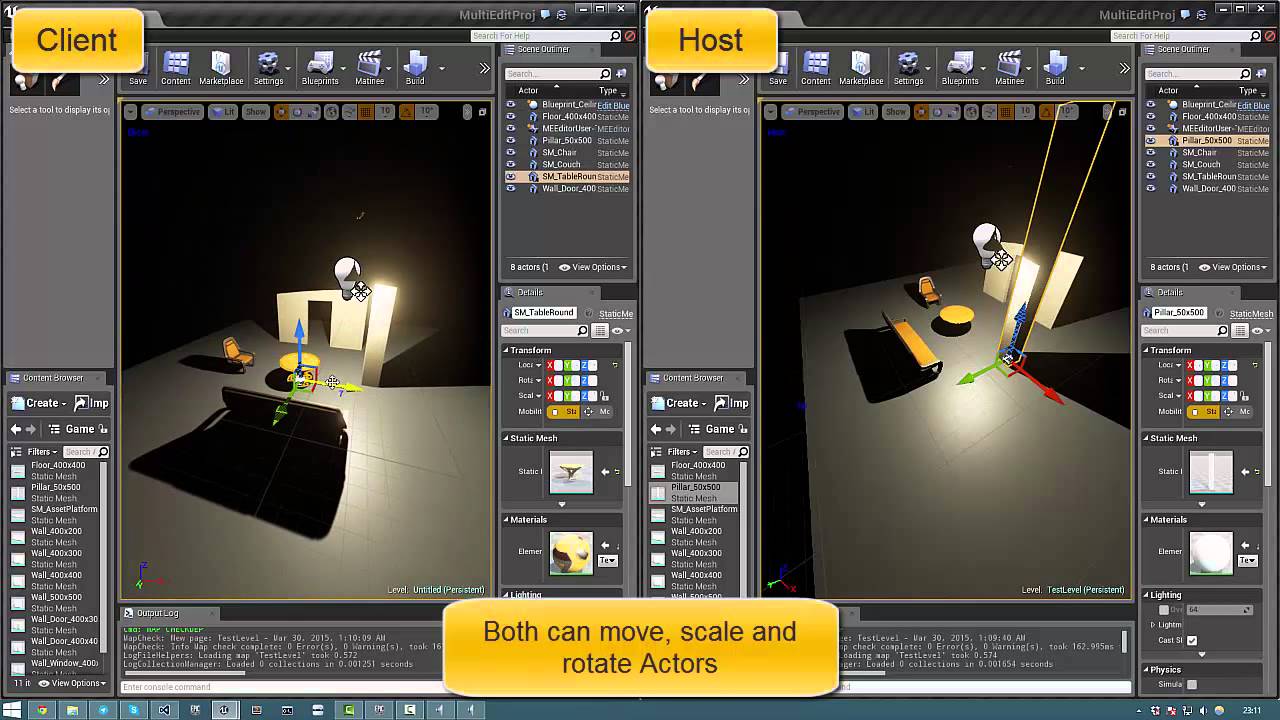
Collaborative level editing in UE4 editor version 0.2. Check out this thread for more information (https://forums.unrealengine.com/showthread.php?50688-Multi...
grand kestrel
This thing is still packaging
thin stratus
Would want to ask Yannick what he ended up doing with that project
thin stratus
I wrote yannick a message
 errant vapor
im replicating an actor with a static mesh component that has simple collision. as it's replicated, the visual mesh ends up in the correct place on client, and if i turn on show collision it appears as if the collider is in the right place too. however, that collider doesn't work, and the 'actual' collider is invisible at location world (0,0,0). if i run as the standalone/listenserver, there's no problem.
any ideas whats going on?
errant vapor
the actor is not being moved on client. ive tried both with repmovement on and off
its also not being moved on server except for the initial spawn
 plain flume
Hello. Anybody can tell what is the correct way to create a replication when using the Dedicated server? For example, even if the actor is replicated and the server changes some material, that isn't replicated until it is multicasted to clients. What about if client joins in midgame, how would the new material is passed to player? Do I just create a replicated material variable and set that in BeginPlay or what? Thank you.
thin stratus
That's what RepNotify is for
Don't use Multicast for things that late joiners need
Multicast is fire and forget
You fire it and if someone didn't get that call, then you don't care
plain flume
Aah! Hey, so if I ust RepNotify does that run the function automatically when later joining the game?
thin stratus
If you want others, that come in late or get relevant later (e.g. they were too far away) need to get the call too, then you use RepNotify
Yes
plain flume
Great!!
thin stratus
It runs when the variable gets replicated
plain flume
Thank you
thin stratus
No biggie
plain flume
@It runs when the variable gets replicated , Yes, I have been using it for that, but didn't know it will run the function when people are joining the game. So just to be clear. At 11:30, server changes bVariable to True and It will run function X. At 12:40, new player joins game and it will automatically run Function X, even if server changed it beforehand
thin stratus
To make this clear
The function calls on the entity that receives the replicated value
E.g. 11:30:00: Server sets bVariable to TRUE. -> 11:30:01 (Ping): Client1 receives value and calls OnRep. -> 11:45:00: Client2 joins late, receives the value and calls OnRep
 verbal wave
Actor.h
    UFUNCTION(BlueprintAuthorityOnly, BlueprintCallable, Category="Networking")
    virtual void ForceNetUpdate();```
So.. Is there a similar function for client to force send update to server?@thin stratus Yes. Thanks. Just tested it in action. Works perfectly. That was much easier than I thought!
fleet sluice
@verbal wave The networking model used by UE4 is designed to explicitly forbid client-to-server updates, with the exception of RPCs.
verbal wave
@fleet sluice oh.. right.. duh
fleet sluice
If it allowed client-to-server updates, everyone could cheat in any game, very easily.
verbal wave
@fleet sluice I think I had a brain fart 🐸
so is this used for replicated UPROPERTY update only?
fleet sluice
I don't remember ever using it so I can only assume it gathers all the replicated UPROPERTYs and updates the clients for which the said actor is relevant. I'm guessing @thin stratus knows for sure.
verbal wave
I'm digging into the source but it's getting too lowlevel for me :]
fleet sluice
I think it could also be forcing RPCs to be dispatched when the said function is called, but again, it's just a guess.
What are you trying to achieve?
verbal wave
had a problem where an OnRep function has delay on client. Solved it by turning up min net update frequency in the BP options
fleet sluice
I've worked with the low level networking code a lot (lower than your function example) and I think it's unlikely you'll need any significant change in it, for general purposes
verbal wave
saw ForceNetUpdate() just now and think it could be a better solution. Just call it when I need OnRep excuted immediately
fleet sluice
Ah I see
verbal wave
Just trying to have a glimpse of how things should be. Do I sound sane to you?
winged badger
i think it will just put the actor onto the "stack" for replication regardless of the NetUpdateFrequency
question is: why do you have to force replication?
verbal wave
for example if I need a holograph turned on when player holds trigger so everyone can see it.
UPROPERTY(ReplicatedUsing=OnRep_bIsHoldingTrigger)
bool bIsHoldingTrigger;
And this holograph is very important and I need it to be as responsive as possible
I think setting both min and max net update frequency to 100 is gonna tank the pipe?
 winter plover
you want it to be displayed as soon as someone fires the trigger right?
verbal wave
so calling ForceNetUpdate() everytime the trigger is changed seems to be the most resonable
winter plover
for the player who does it?
winter plover
I'd just already start updating the variable clientside as soon as it happens
so the triggering player gets an immediate response
everyone else has it slightly delayed
not really any other way around it
verbal wave
I need everyone else to see it SUPER FAST
winter plover
no point in bruteforcing higher priorities
thats not gonna help with latency
you gotta design around it so it's the least noticable
verbal wave
this is the core mechanism. I'm just using this holograph thing for example
winter plover
is your trigger a button or a zone?
verbal wave
actually it's a magic circle that players can draw spells in it
fleet sluice
Player A activates the hologram and B, C, D etc. need to see it as soon as possible?
verbal wave
and it's made to be manipulated very fast, twitch-like
yea a 20ms more delay affects the game feel negatively
winter plover
as a rule of thumb, delays are usually already as short as they can possibly be, and latency is just an unfortunate reality you have to deal with
really the best you can do is to try and make these unnoticable
you cannot break the laws of physics
verbal wave
that's why I'm calling ForceNetUpdate() ..
verbal wave
{
    AController* const OldController = Controller;

    ForceNetUpdate();
Then:
1 - Player A sends and RPC to the server (reliable, RunOnServer)
2 - Servers calls another RPC (reliable, Multicast; this will update all other clients)
winter plover
what I personally would try is to just to predict the trigger on the client who causes it
so that theres atleast a quick response to the input
fleet sluice
And that's all you need to do. Don't try to force things
winter plover
but everyone else has to wait for the update
they probably wont notice anyhow
cuz they arent pressing the button
verbal wave
same thing. I need it to happen fast, similar to when you get killed and set to observer mode
winter plover
or w/e it is
verbal wave
real situation is a little more complicated. I'm actually using a OnRep function to initialize the spell actor spawned by player (via server RPC)
this OnRep function replicates a USTRUCT which contains necesary information to represent the spell
fleet sluice
It will happen in a matter of X+Y (or X+Z) ms, where X is the latency between A and the server and Y/Z are the latencies between the server and clients B, C. If you really really really want something extra, the server needs to be the one to call ForceNetUpdate, which may lower Y/Z latencies by a few more ms, but ultimately, this won't be noticeable.
verbal wave
since actor pointer can't be send directly via RPC, replicatd uproperty is the only way to do it
winter plover
wait what
im p sure you can send actor pointers over the net
they get translated on the fly by ue4
interface pointers you cant, but actors definitely
(and even getting around that is trivial)
winged badger
you can reference actors over the network
there is a section in unreal networking docs about it that explains the limitations, but they aren't many
verbal wave
wait what really. That was a lot of the time in the drain. I double confirmed that I couldn't
winged badger
when an actor is replicated
it has the same netid on client and server
that is what RPC sends as an argument instead of the pointer
in addition you can reference non-replicated actors that are stably named
as in loaded from the package, not spawned in runtime
fleet sluice
This may sound like a dumb observation, but maybe you tried to replicate a pointer on a non-replicated actor...? +1 to Zlo, they can be replicated.
verbal wave
@winged badger that sounds like a lot of sense.. thanks
@fleet sluice I'm not that dumb lol.. (or am I?) now I think of it maybe it's because I send the RPC immediately after the new replicated actor is spawned and it's not property setup yet
winged badger
if you send it from inside the actor that can't happen
fleet sluice
It's not about dumbness. Just rare slips in anyone's life
verbal wave
basically this. When a new player enters, because he never cast a spell yet, the update rate is 2 times / second
fleet sluice
Try to mark it as "Reliable"
verbal wave
after the first cast it becomes responsive
fleet sluice
If you send a "Reliable" RPC, even on server's BeginPlay, it will still reach the client. If I remember correctly, the RPC can fire on the client even before the client's own BeginPlay, but that's just a subtlety from ages ago
verbal wave
I can just set this to 10 or something but think ForceNetUpdate() is a better solution (since it has a cooldown - can't be spammed)
winged badger
reliable is for stuff that has to get there, even if late
good point of reference there is that all ServerMove functions in CMC are unrealiable
verbal wave
Okay just to confirm.. there is no problem to send this struct as RPC parameter. SpellBoard will actually be the reference to a replicated ANyxSpellBoard for all clients?
Alright thanks guys for answering here's a photo of my cat
winged badger
it looks ready to pounce
and if that struct is a replicated UPROPERTY, it should replicate just fine
enum for ElementType would be cheaper tho
any text is massive compared to a byte
fleet sluice
I love cats ✅
verbal wave
ElementType is only used once per round so not really worth it 😃
thin stratus
@verbal wave @Vlad#1167 It basically forces an update, even if it's not yet time
void APBGameState_Base::SetMatchTime(int32 NewMatchTime)
{
    MatchTime = NewMatchTime;
    RemainingTime = MatchTime;
    ReplicatedRemainingTime = MatchTime;
    ForceNetUpdate();
}
 halcyon abyss
Does anyone know where I can go and controler the Gamepad to player controller assignment?
Does anyone know where I can go and change the Gamepad to player controller assignment?
 fallen oracle
Hello.
I've been trying to implement a dodge move, which overwrites the current velocity while it's in effect. My game is multiplayer, so I need to do it with a replicable manner.
I implemented my own CharacterMovementComponent. The main part of my code is this:
{
    Super::OnMovementUpdated( DeltaSeconds, OldLocation, OldVelocity );
       if( bWantsToDodge )
    {
        bWantsToDodge = false;

        MoveDirection.Normalize();
        DodgeDirection = MoveDirection;
        DodgeRemainingTime = DodgeLength;
    }

    if( bWantsInterruptDodge )
    {
        bWantsInterruptDodge = false;
        DodgeRemainingTime = 0.0f;

        Velocity.X = Velocity.Y = 0.0f;
    }

    if( DodgeRemainingTime > 0.0f )
    {
        DodgeVelocity = CharacterOwner->GetControlRotation().RotateVector( DodgeDirection );
        DodgeVelocity.Normalize();

        const float fOrigZVel = Velocity.Z;
        Velocity = DodgeVelocity * DodgeForce;
        Velocity.Z = fOrigZVel;

        DodgeRemainingTime -= DeltaSeconds;
    }
}```
My problem is, that when the server does it, it works correcly, but when the client, its moving much slower, and the movement is jittering. Probably because the client moves slower than the server wants and its adjusting its position.
However the strange thing is, if the client is in air( after jump ), its working as intended. Can make a video about it, if it's not clear.I checked and all the variables are replicated correclty( DodgeDirection and control rotation )
DodgeForce is a constant, DodgeLength too
It's almost as if the control on the client tries to move into the ground, and that slows down the movement
 tawdry goblet
@fallen oracle Use launch it's a way to change the velocity that is replicated and marked as a pending move.
The reason why it jittering it's because the server can't replicate the velocity change and it send some message to correct the position of the client character.
fallen oracle
Server should be having the same information about the dodge
Launch is just a one time fire, cant effect its duration
tawdry goblet
you can use it to hard set to the desired velocity at each frame it's not perfect but it will work fine
fallen oracle
thats what im doing at the above code
but its not working
it's as if the ground friction on client is calculated differently, or i dont know..
tawdry goblet
velocity is not replicated and if you just replicate bWantsToDoge it may feel wrong also (sometimes)
hum
Velocity = DodgeVelocity * DodgeForce;
Velocity.Z = fOrigZVel;
This can be easily change for a launch XD
 vivid siren
hey could someone direct me to a decent learning resource for understanding networking? i've gone through exi's pdf and asked many questions but I still have trouble doing things that seem like they should be simple.
exi's stuff was great but i just suck, lol
fallen oracle
Can be changed yes, but the result wont be the same, at all
I'm using the exactly the same method you linked
tawdry goblet
What launch do by default is appending a vector to the velocity. But there is some Boolean parameters that you can mark to true and it will set the velocity
fallen oracle
There is no parameter for launch
For the sake of test i tried to replace the velocity change with launch
now it moves the same distance, but still jittering
tawdry goblet
hum your right (look's like there is no parameter in c++)
fallen oracle
And launch changes the movement mode to falling, which is not intended
fallen oracle
Hmm, seems like the jittering was because of the server calling "UFoobarCharacterMovementComponent::OnMovementUpdated" much less times than the control, it's skipping frames so the dodge was "longer" on server side than on client side
but still, if the client does the dodge, the movement is slower
fallen oracle
Maybe my whole approach is bad. Anyone have experience with dodge moves?
trying to implement a dodge system like this: https://www.youtube.com/watch?v=I2Q0wsZeURo
this video contains tutorial about, Dodge Cancel, Hyper Dodge, Mix Dodge, Dodge Sprint, Air Sprint.. the major thing is : Sorry for my bad english lol..
 runic hamlet
does anyone have experience with multiplayer vehicles? is vehicle movement replication on par with character movement?
hidden thorn
Would this call make sense?
On the client call a Server RPC, inside it call a ClientRPC and inside this call a ServerRPC
the reason why I need the client rpc call is because there is a value only updated on the client
jolly siren
why not send the value in the first server rpc then?
winged badger
or replicate OWNER_ONLY?
hidden thorn
If you look at This Line, that is different on each client/server so calling that in a ServerRPC I would get different results.
GetLoadoutIDs is populated somewhere else inside a ClientRPC. Player inventory is replicated but the NPC is just one on the server that's why it will have different LoadoutIDs
void ARPGPlayerState::Server_NPC_Implementation(ANPC* NPC)
{
    if (Player->GetPlayerInventory() != nullptr)
    {
        for (int i = 0; i < NPC->GetLoadoutIDs().Num(); i++) // <- This line
        {
            UE_LOG(LogTemp, Display, TEXT("NPC->GetLoadoutIDs()"));

            for (int j = 0; j < Player->GetPlayerInventory()->GetInventoryList().Num(); j++)
            {
                if (NPC->GetLoadoutIDs()[i] == Player->GetPlayerInventory()->GetInventoryList()[j]->GetUniqueID())
                {
                    Player->GetPlayerInventory()->RemoveItem(...);
                    break;
                }
            }
        }
    }
}
I know I could pass the array as a parameter @jolly siren and I will prob to that as it seems like the most sensible thing to do
 random verge
What do you guys think about the idea of having a "replication component" to be the primary replication manager for all replicated actors/pawns rather than typical replication/RPCs?
I think while it would make things tightly coupled to the component, centralizing all replication into a single component would make managing replication easier. Being able to optimize bandwidth usage, control exactly when replication happens etc.
and also, aware of anyone doing this already?
thin stratus
:P I dislike it
Classes should manage their own Replication
You have actors that should be non-relevant etc.
random verge
I'm looking at it as a way to sort of emulate your own packet management
relevancy could still be managed, unless I'm misunderstanding what you mean
thin stratus
Well you already have a strong base where Actors can be relevant, have owners, etc etc.
Managing all network data through one Component wouldn't even work with that
I also don't see any gain from doing that
It would all clutter up in one single class
random verge
The way I'm envisioning it, it would be possible to manage prioritization of replicated data, set net update frequency for specific types of data, queuing data when needed. True bandwith management. I'm not sure how well it could actually work but it's definitely peaked my curiosity.
Its just theoretic. I'm sure it would be a real mofo to do, and to do right
because honestly, UE4s networking is super chatty. I really don't think its very efficient
winged badger
you do have a UActorChannel
that mosly does that already
its 1 per PC
it figures out what to send to its associated client
it also handles prirotizing if the network is congested
 high nebula
My current project will likely be co-op, is there a FAQ of things to consider when doing multiplayer?
winged badger
there are some pinned resources on this channel that most find useful
if you're just startng i recommend Cedric's bible
high nebula
awesome, thanks 😃
winged badger
and if you get stuck, just ask here 😃
high nebula
I just started my project, so I plan to get a SP experience going before implementing MP, but I think I heard someone say you should plan for networking right from the start
winged badger
speaking from experience, that someone was right
thin stratus
You don't want to do SP and then MP
You want to do both at once
SP is usually just MP without clients
So MP -> SP is easy
SP -> MP not
winged badger
the basic stuff like movement works out of the box with CharacterMovementComponent
high nebula
ok. hmm
winged badger
so yeah, it will be a bit more learning at first
but in the long run, well worth it
high nebula
heh, yeah thats why I always stuck to SP, the learning. 😃 my current project would be more fun with MP
kinda a Streets of Rogue clone. as the base idea
Am I going to be really limited sticking to blueprints? in ways other than performance?
winged badger
what is your programming background?
high nebula
blueprints :/ I learned basic C, php years go, but only the basics of C
winged badger
then you're likely to be stuck with blueprints for a while
thin stratus
Welp, then do what you think is best for yourself in terms of learning
But I can kinda guarantee you that the code you create needs a few refactors
Like bigger ones
Cause it takes a while until you get how all of the classes really work together
winged badger
blueprints do have some limitations that c++ doesn't share
rule of thumb: when those start to annoy you its time to start swithing to c++
thin stratus
Last few days I'm looking throw the UT Source Code
And C++ has tons of nice functions that BPs don't have
Just the GameMode alone
*.*
high nebula
right now my project is basically the twinstick example, but with an extra attack, and some changes, so it'll be a good place to start learning MP
winged badger
that it will
thin stratus
BeginPlay is too early
glacial pollen
This illogical shit is driving me nuts. How can begin play be early? Like how does someone begin play if they don't own anything! ugh
hidden thorn
I guess you can add a delay node in there
thin stratus
No you don't
You use the EventPossessed
At which point it has a Valid Controller and Owner
glacial pollen
oh
thin stratus
It's not "illogical shit"
glacial pollen
Yes it is. First, begin play should mean exactly that. Shouldn't be "to early" if it has an owner. I may not want controller input to run, but everything else should still work. Second, I shouldn'
t need to posses to put a widget on their screen
thin stratus
¯_(ツ)_/¯
glacial pollen
Also, I don't see how player 1 can own the character during begin play, but the server still owns the components
And if begin play is too early, then why bother letting the local owner have a begin play if it doesnt even own it
severe widget
Play has started for the locally present actor, however not all of the networking/possession stuff has been set up
glacial pollen
I dont want networking
I just want to add to the local viewport
this is before possession
severe widget
¯_(ツ)_/¯
thin stratus
Then use the PlayerController
glacial pollen
That makes even less sense...
thin stratus
You can argue as much as you want, but the proper way is to use the Possess Event
severe widget
You're asking how things work, then when people who know how they work tell you how it works, you throw your hands up and go but that's dumb
glacial pollen
Yea.. I know..
winged badger
btw, in most cases PlayerController won't have a valid Pawn possessed on BeginPlay yet
just figured i should mention that, too
high nebula
thats burned me so many times even in my SP games
meager spade
LogNet: Warning: UIpNetDriver::ProcessRemoteFunction: No owning connection for actor BP_Player_C_1. Function ServerSetIsJumping will not be processed.
{
    // Go to standing pose if trying to jump while crouched
    if (bIsCrouched && NewJumping)
    {
        UnCrouch();
    }
    else if (NewJumping != bIsJumping)
    {
        bIsJumping = NewJumping;

        if (bIsJumping)
        {
            /* Perform the built-in Jump on the character */
            Jump();
        }
    }

    if (Role < ROLE_Authority)
    {
        ServerSetIsJumping(NewJumping);
    }
}
am i doing something wrong?
meager spade
BP_Player_C_1 is the listen server
winged badger
the call to ServerSetIsJumping shold not had been triggered then
the listen server host does not have a net connection
unless some client erroneously called the ServerSetIsJumping on host's player
meager spade
it happens when i jump on the listen server, doesn't show up when i do it on the client
i will run it through debugger and fin d out
no idea why that is happening
 gleaming bobcat
Hello. I have some issue when my AnimNotify (NotifyBegin) is sometimes not called.
On server side
Anybody can help ?
meager spade
that doesn't really help though, it's just a notify. what is the notify doing?
doe's it ever get triggered?
gleaming bobcat
Spawning projectile
usually it's triggered but sometimes not
the animation is played but notify not trigered
sometimes
Quite frustrating
On client side it's always triggered
winter plover
did you make sure the animation actually runs on the server?
ie. by running as a listen server?
or other checks
gleaming bobcat
Well I need to test it. I have suspicion that this only one explanation
winter plover
running as a listen server is usually a pretty quick and dirty way of finding out
gleaming bobcat
it's possible to see in animation blueprint debugging but only in single process
winter plover
otherwise I just do a debug print around the command that was supposed to do it
see if it ever gets reached
gleaming bobcat
this is happening only in not single process
winter plover
huh
winter plover
did you check whether or not your transition condition behaves properly?
gleaming bobcat
but debug this for dedicated server with
does not work
the values are set correctly to enter the animation
winter plover
mhmm, I'm out of ideas then
gleaming bobcat
Can't reproduce the issue without dedicated server
sharp spire
can someone explain PlayerState a little more to me? i understand that it exists on each client for every player in game, so how would you handle using PlayerState? Begin play -> Print string simply plays * the amount of times of clients connected
winter plover
The playerstate is basically a representation of your player's info to everyone
This can include stuff like a playername
or a score
sharp spire
would you keep an inventory in there?
 loud mountain
depends if you want to have your inventory cleared on player death
sharp spire
i do not
loud mountain
then you could do that inside a playerstate
winter plover
then you would put it in the character
anything else that persists usually goes in the playerstate
it basically exists until you disconnect
loud mountain
not all info always persists
Playerstates are being saved for reconnects
up to 600 seconds by default I believe
sharp spire
using the playerstate, correct?
loud mountain
its 300 seconds by default ^^
sharp spire
how does the playerstate get referenced/reference its controller?
winter plover
playerstates are attached to the controller yea
which on the server you can fetch from the gamestate player table
iirc
winter plover
if I remember correctly
sharp spire
so you wouldnt necessarily run any script through the playerstate, correct?
winter plover
but yea in geeeneral you dont wanna keep gameplay critical stuff there unless you wanna have it persist between character deaths
also what do you mean by script?
do you mean if a playerstate can have functions?
sharp spire
any functions or nodes*
winter plover
p sure you can yea
winter plover
depends on what you are trying to do
loud mountain
you shouldn't spawn your items and stuff
winter plover
it's mostly useful for storing stuff
loud mountain
but you can keep the references to them
sharp spire
oh so like a savegame function?
can you access the playercontroller from within the playerstateBP?
loud mountain
yes
loud mountain
which (usually) is the (player) controller
sharp spire
aaah yes it did return my topdown controller 😃
so would you say; health would be a playerstate item?
variable* not itrem
winter plover
put your gameplay stuff in the character/pawn
sharp spire
ooh ok
winter plover
the state is for everything specific to the actual player
such as a username
or a score
loud mountain
playerstate is stuff like (persistent) inventory or scores for example
sharp spire
why would the health be persistent?
loud mountain
in a moba you would store the kills, deaths, assists and stuff
sharp spire
wouldnt*
sharp spire
but if you bswitch maps where does it keep in mind what your health was before?
sharp spire
oh the pawn carries over between levels?
thin stratus
You could make the Pawn to be seamless
loud mountain
you could mark it for the seamless travel actors
thin stratus
Yeah, however that's not exposed to BPs
You should use the PlayerState to handle taking over data
That has "CopyProperties"
Which gives you new and hold state
sharp spire
so setting up the playerstate to handle the majority of player variables seems like the best option. what player related things wouldnt need to be travelled?
thats what gets me with playerstate
thin stratus
Everything you don't need in the next level
Usually this whole thing is for taking over score and such stuff
sharp spire
making an openworld mmorpg with instances occasionally
thin stratus
Öhm
loud mountain
hah
thin stratus
UE4 is not really build for that out of the box :D
It's more for games like Unreal Tournament
So don't expect any functions to be helpfull for you there
sharp spire
like ark for example, sorry not massive scaled
thin stratus
ARK is only one map
high nebula
When I hit play with 2 players, I'm getting two huds on the main client/listen server, nothign in the second window...
loud mountain
so more like skyrim but with multiplayer?
sharp spire
yes i guess lol
thin stratus
UE4 can't easily have instances
At least not without some service properly setting up servers
Each server can only hold one world
loud mountain
yeah having two maps loaded is an issue
sharp spire
well thats quite the limitation now isnt it...
sharp spire
hmm.. shocking tbh
thin stratus
The only way you could do the instance thing is by writing/using another service that dynamically creates servers
e.g. your instances
sharp spire
is there a way of teleporting to custom built instance coordinates and spawning level segments client sided?
thin stratus
But yeah that's a bigger story
glacial pollen
@high nebula I feel for you. I even tried the Event Posses, and it still adds it to the wrong viewport
thin stratus
Well you can teleport someone to 200,200,200
But if a second person goes there they will see each other
It needs to be the same map
sharp spire
for instance i use to code Runescape private servers, and they would use the playerID*#### as coordinates
thin stratus
You can't* compare two game engines like that
Thing is, UE4 allows one world and one map per server
sharp spire
can a player exist in an instanced version of the same map?
thin stratus
There is no "instance"
loud mountain
you could (in theory) load your instance as a streaming level to some ridiculous position and have it spawned multiple times for each "instance group" AFAIK
thin stratus
That's more hacky than anything else
loud mountain
yeah
thin stratus
The only two proper ways to add instances are:
- Have a Backend that handles your player data and move players between dedicated servers that are dynamically created etc.
or - Use a different server system than UE4
thin stratus
No
With different server system I mean things like SmartFox
Or what ever they are all called
Raknet?
idk
 night jay
Question, any reason why dedicated servers aren't executing console commands at all?
high nebula
Hm. Ok I switched the "Add to viewport" command to my pawn, but now its only showing up on my main window, nothing on the second.
sharp spire
what are you using as the target @high nebula
high nebula
the reference to my HUD widget
I've always created the widget on my player controller and added to viewport there, in begin play.
 high nebula
calling that on pawn?
loud mountain
if you do this in your player controller check if it is a local controller
on listen server it tries to execute this too but widgets dont exist on servers
sharp spire
maybe thats your issue @high nebula
loud mountain
shouldn't fix your problem but I thought I throw this in here
high nebula
I get a HUD on my main window, and a message from server from a print node on the cast failed for getting my controlled pawn
loud mountain
do you have a screenshot of said beginplay function?
loud mountain
try instead of get player controller (0)
get owning controller
its named something like that
sorry
get owning player controller
sharp spire
thats what i was suggesting
glacial pollen
high nebula
I'm not finding a get owning player controller for anything but the hud
and camera manager
sharp spire
get controller cast to player controller
high nebula
ok, Hud now working on main screen.
just noticed the error " Only Local Player Controllers can be assigned to widgets. TwinController_C_1 is not a Local Player Controller."
sharp spire
😃


 high nebula
no HUD on second screen, and all the related errors of not having a HUD widget reference in the output
loud mountain
that error is in your character, right?
high nebula
doesnt say in the message log
creating the widget on the pawn now, not in controller
sharp spire
the controller cant find its controller...
it is the controller...
so you could have spawned your widget without a target
i think
ignore me nvm
high nebula
ok, I'm getting a print from three controllers. Client1, local true. Server, local false, server local true
random verge
just on that stuff above: You wouldn't want to be dynamically creating and tearing down instances. The way that gets handled in real world is the instance is just another world whose state gets reset at the beginning of an instance
thin stratus
@random verge Well, as said, one world per Server. So you kinda have to create and destroy them
random verge
so in UE4, sure you could do it but it does mean having a separate server instance for each world. When they call them instances in games like WoW, the instance is the server. The world just gets state reset at start or end
yeah
sharp spire
@random verge so i think i have an idea
thin stratus
For something like this you just shouldn't use UE4s backend
sharp spire
could you switch from playing on a dedicated server, to being a listen server for another map?
thin stratus
Yes, you could make a client a host , but that allows cheating
random verge
and you have to consider if its feasible because holy shit servers are expensive. If you manage your own servers you can have several "server" instances on a single physical machine but you need to know how to manage your own VMs etc
sharp spire
right..
thin stratus
Buddy, just try to build your game around the idea of not having instances
sharp spire
lol
thin stratus
Or think about using a different backend
Hacking your way through UE4 with that won't work
And hosting DedicatedServers per instance etc is freaking expensive
random verge
for sure
thin stratus
Have clients who do that for simple matchmaking
It's fast in the thousands for a few servers
sharp spire
so how does listenservers prevent cheating, they cant? just curious
random verge
wait till they start putting in dynamic proxy nodes lol #pricetag
winter plover
it all comes down to how well you check your RPCs
both listen and dedicated servers check those
thin stratus
Only thing yo ucan do is moving all data away from the ListenServer
random verge
if the listen server cheats I kind of look at that as: if it matters, you shouldnt have clients hosting
thin stratus
But then we are at hacky solutions again and you could just use a diff server backend
Anyway, 00:32. Good night peeps!
sharp spire
you have mentioned server backend a few times, what exactly does this mean?
mer
goodnight cedric thank you as always 😃
sharp spire
Yea seriously lol
is ue4 the only engine that uses node based scripting?
as a complete game engine
high nebula
Ok. On my controller, I check if local controller. If true, create the widget and store in variable. On pawn, onPossess, get the hud reference. Never returns valid
random verge
@sharp spire Blueprints is just an option, not a requirement. Well... not a complete requirement lol it is required to an extent
sharp spire
i know its just an option,. but its so much easier to manage than actual languages
random verge
Its really just a scripting interface with a pretty visual display
mmm, depends on your background. As a programmer, BP messes with my head.
sharp spire
im used to javascript so this feels nice
winter plover
yea I do prefer C++ for actually getting stuff done
but its cool for hacking up quick stuff I guess
winter plover
its not that hard once you wrap your head around it
especially in ue4
where all the icky stuff is abstracted away
imo just dive into it and give it a shot, could end up being the better choice in the long run
sharp spire
but my biggest concern is unreal engines way of MP now
random verge
I know its off topic for this channel so I won't dwell on it but the best way I can describe it is: Blueprints and C++ can and should compliment each other well, where c++ is used to define most of your logic, and blueprints is used to contain asset data (meshes, anims, etc)
sharp spire
i didnt realize it was built for lobby based games
i really wanted to make a mobile mmorpg lol
random verge
well, think outside of the box. A lobby doesn't have to be a dumbed down menu screen with buttons. A lobby can be whatever you choose to show the player. Maybe they spawn up a small local map where they can chill and mess around and stuff while a match is being formed in the background
lots of fun ideas you can go with
random verge
Something I've noticed about some of the greatest games out there: If you do things right visually, a player won't even notice 80% of what is even going on in the screen
sharp spire
i want to make a game like Runescape, WoW, Etc
winter plover
whether or not you want a "jump in and out whenever you want" kinda thing
random verge
World of Warcraft: ever see the character actually climb on to their mount? or off?
Or did you just see that puff of magic dust and BAM you're on a mount
sharp spire
yea there is definitely a lot of trickery
random verge
Use things to distract the player 😃 A lobby can be the same smoke and mirrors
winter plover
netcode is like 90% bullshit art
random verge
heh
winter plover
all about "how do I hide latency"
random verge
yessir
winter plover
because
you aint gettin rid of it
as much as you want to
and over time theres prolly been like a million ways to netcode firearms
sharp spire
Can ue4 handle more than 64 players?
 fossil spoke
Both PUBG and Fortnite support 100 players
random verge
I think I see where you're going though Pierce, you won't be hosting 3000 players on a single UE4 server instance if thats what you thinking 😛
sharp spire
i used to run one
winter plover
just in infrastructure alone
random verge
you spelled creating wrong. All that damn art content omg
winter plover
well ontop of that
fossil spoke
Just because you write an MMO in Java doesnt mean its in conflict with Runescape lol
sharp spire
that wasnt the case Devils lol, theres a whole community of players who use their assets to recreate their own versions
random verge
@fossil spoke Is there a hardcoded max limit for UE4? I heard before 256 was hard limit but I always figured it was if your server can take the punishment, UE4 can dish it out
fossil spoke
Theres no hard limit im aware of
winter plover
honestly that would be rather surprising
UE4 strikes me as a "do w/e you think you can make it do" kinda engine
sharp spire
So my final impression is ue4 cant be used for an mmorpg with its backend server system. basic SOL?
fossil spoke
UE4 is open source and written in C++, you can make it do anything with enough time and knowledge
winter plover
yea
high nebula
I've got my HUD working on the main window, but Client1 cant seem to get the HUD reference, but it does have its own widget
fossil spoke
@sharp spire Its not designed for that no, but again like i said, you CAN do it.
UE4 was designed for fast paced FPS games
Anything that doesnt support that directly is due to popular demand
At least so far as before Fortnite
winter plover
well I'd word it more like games that follow a round structure
as in, you play it over and over
random verge
when you see massive mmo games like WoW, theres liek 30 servers just to make a single world function. They've got the "world" broken up into several actual worlds, physics running on their own VMs, like TONS and tons of stuff to be able to handle all those players.
winter plover
rather than one continuous simulation
for multiplayer that is
how good is UE4s GC actually?
Could it even run continuously for days and reliably?
fossil spoke
@winter plover Ive had dedi servers up for more than 4000 minutes
fossil spoke
Yeah same level
winter plover
mhmm
fossil spoke
They werent meant to be up that long, just doing stress tests
Max play time was meant to be 1 hour
With no level changes
For an MOBA
sharp spire
So based on assumption, UE4 is the only game engine with Node based scripting as an option? My best bet is to relearn the ways of coding huh?
fossil spoke
Node based scripting is no just for UE4
sharp spire
i know world machine and other programs use nodes
winter plover
like coding is the bread and butter of anything software
sharp spire
but i dont know of any entire game engines
winter plover
if you wanna actually get stuff done, you better make friends with it