#multiplayer
1 messages · Page 384 of 1
 west rapids
 severe widget
Yeah, that's understandable.
 winged badger
there are only 2 copies of any PC (1 if its a listen server's own)
west rapids
aye
severe widget
So the object that contains the MC function is the same type that the MC will attempt to be called on.
A cooresponding object on the other machine.
winged badger
Multicast fires a function on every client on that PC, which they don't have
west rapids
aye it loops in on itself
 icy nacelle
@winged badger Thanks for the above help, do you mind explaining it a bit further? "OnBeginOverlap (for the trigger volume) -> if OtherActor is a Pawn and a LocallyControlledPawn -> Get the OtherActors HUD and display a widget"
west rapids
this happened cuz i tried doing something archaic...like 2 player 1 keyboard coop
severe widget
So what you really wanna do is have state on the pawn, and replicate that.
Or state on the uh... PlayerState
winged badger
@icy nacelle when you OnBeginOverlap fires, it will fire on both client and the server
west rapids
you mean have all the input movement logic in PS?
west rapids
yeah i meant the functions
severe widget
But the pawn ultimately hosts that state
icy nacelle
Ah
winged badger
you cast the OtherActor to Pawn, and pull the IsLocallyControlled from the As Pawn
west rapids
ooooh i get it @severe widget
winged badger
if that is true, the exec is on the client machine where that Pawn is the LocalPlayer
and only there
icy nacelle
Ahhh, I see where I'm going wrong! In my BPs for my triggers, I'm casting to everyones player controllers
winged badger
so the entire widget displaying gets executed only on client machine when the player is in overlap with the trigger
icy nacelle
This is probably where I am going wrong...
winged badger
and uses no network bandwidth, which is exactly what you want
and that gets the PlayerController[0] on every client
which happens to be their local PC
and they all display the widget
west rapids
Wouldn't HasAuth and execute on Remote do the same? Does it use bandwidth?
icy nacelle
Yep
winged badger
that would screw either all clients, or only the listen server player
respectively
icy nacelle
So instead I need to get the actor that just entered?
winged badger
yes, cast it to Pawn, check if the Pawn IsLocallyControlled
and if it is, display the widget
icy nacelle
Cast it to my character pawn? Or pawn?
winged badger
Pawn is good enough
it contains the IsLocallyControlled function
which is the only reason to Cast in the first place
you don't want references to your CharacterPawn if not absolutely needed
and casting to it would create one
you can also grab the HUD from Pawn without casting it any further iirc
winged badger
Getting PlayerCharacter[0] is GetPlayerController(0)->GetPawn()
you can add an input of type Actor to your EnterLand
and connect it when you call it
icy nacelle
Thanks for your help 😃
 sharp spire
I have a basic question about multiplayer
How does the replication toggle work? For example, if I toggle on replication on a socketed skeletal mesh (sheathed item) does it then show for all players in multiplayer ?
I’m at work so if someone would like to PM me about it that would be great. I could help in other fields
winged badger
all its by default replicated values would replicate
and you would be able to reference it over the network
sharp spire
I don’t understand the replication process at all
sharp spire
Cedric’s ?
winged badger
yep, its pinned to the channel
west rapids
iz awesomesauce
sharp spire
How do I view pinned items? I’m on my iPhone
west rapids
ouch, cant help u there apple guy
sharp spire
I’ve got a decent project put together just thinking about working with multiplayer before I get too far into details
west rapids
😄
winged badger
 west rapids
just whatever u do, Don't multicast in your Player Controller, learned it the hard way minutes ago.
sharp spire
Oh?
sharp spire
So keep it to pawn classes and actors?
west rapids
well yeah that too 😄 but at least that dont exist anywhere so it wouldnt be that ez to perceive
winged badger
he's joking about his mistake
sharp spire
Oh jeez don’t joke to a multiplayer noob ._.
winged badger
you'll probably still have some questions after the compendium
takes a few days for entire unreal networking to settle in one's brain
sharp spire
I’ve been working with unreal engine for less than two years, so I probably will.. but I understand almost every other pipeline lol
I’ve watched some videos and read some guides but none shed enough light
west rapids
Ive got Niagara and AI left
sharp spire
I understand spawning actors on a server. But vaguely lol
west rapids
but then i know maya and painter too 😛
sharp spire
AI isn’t too bad
west rapids
aye ive watched some
west rapids
EQS and the library
sharp spire
Oh haha
west rapids
aye
sharp spire
So are the majority of people in here indie developers?
winged badger
i just read thru a couple of EQS generators...
first pass tho, i'm sure they will make more sense next time
west rapids
I havent needed AI yet so I haven't bothered with it
i mean, "smart" AI 😛
but FML UE4 is huge
sharp spire
I have deer and my last project that I restarted on had AIs that could train and collect items improving their loot
winged badger
i am trying to figure out if AISense_Touch works at all atm
sharp spire
Alright back to work. Ttyl guys.
west rapids
same here.
 hidden thorn
Does anyone who used Advanced Sessions/Advanced Steam Sessions know how to access them via c++
winged badger
same way you do with blueprints pretty much
those are just BlueprintCallable UFUNCTIONs
as for the CreateAdvancedSession()
that is a static function returning an instance of its containing class
UCreateSessionCallbackProxyAdvanced* session = UCreateSessionCallbackProxyAdvanced::CreateAdvancedSession(params);
session->OnSuccess.AddDynamic(this, MyClass::HandleSessionCreated);
session->OnFailure.AddDynamic(this, MyClass::HandleSessionCreationFailed);
session->Activate();
should be the gist of it
behaves pretty much the same as UBlueprintAsyncAction derived classes
hidden thorn
What I mean is I have the plugins folder in here and I can access the files: https://i.imgur.com/FP3NBo6.png
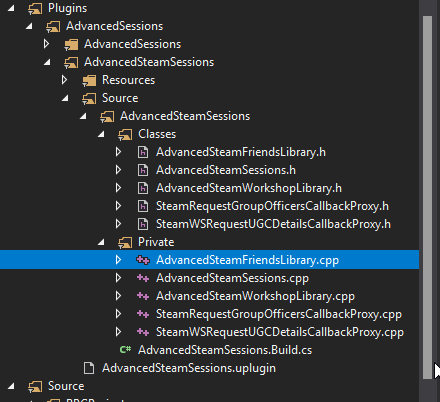
But I am not sure how to access the static Methods inside
I included the h file but nothing comes up
winged badger
UAdvancedSteamFriendsLibrary::FunctionName
is how you access the static method in that class
hidden thorn
Is there a reason why GetUniqueNetID is missing from AdvancedSessionLibrary in the c++ files?

or actually is there but it is different
UFUNCTION(BlueprintPure, Category = "Online|AdvancedSessions|PlayerInfo|PlayerID")
static void GetUniqueNetID(APlayerController *PlayerController, FBPUniqueNetId &UniqueNetId);
 brittle sinew
It looks the same to me...?
I mean, the name has spaces in BP, but that's automatic
If you're talking about the return value, that's because any reference parameters are treated as output values in BP (unless you mark them as UPARAM(ref))
hidden thorn
How come it also takes a second parameter?
severe widget
literally just explained it to you
winged badger
its the output, sortof
severe widget
you call it like
FBPUniqueNetId MyId;
MyLib::GetUniqueNetID(Controller, MyId);```where MyLib is the right class name
cause I'm not gonna dig it up
hidden thorn
I see
severe widget
Or you can just get the id from the controller directly
winged badger
it is on the tooltip of his screenshot 😄
hidden thorn
Am I missing something here: https://i.imgur.com/9iG3il7.png

I looked around on google but I can't find anything about FBPUniqueNetId
winged badger
an include
winged badger
you open the AdvancedSessionLibrary.h
you find the function where its a parameter
you click on the type and do, for example, Peek Definition
and then you can read its in the BlueprintDataDefinitions.h
hidden thorn
This is what I am doing but it keeps saying "No such file or directory" -> #include "AdvancedSessions/Classes/BlueprintDataDefinitions.h"
winged badger
its in the same folder
so you don't need the AdvancedSessions/Classes/ part
or you need the full path including the Plugins/
hidden thorn
I am accessing it from a class I created
winged badger
well
AdvancedSessionsLibrary already includes it
so if you are including AdvancedSessionsLibrary.h you shoudl be fine already
winged badger
you do
hidden thorn
good to know
 gloomy tiger
Hey mates,
I'd like to know your approach to create 'replicated widgets' out and about
Basically I do have a widget to indicate a player is casting a skill, but I'd like others to see that same widget
I thought to create an RPC from Server to Multicast, passing the character that is casting a certain skill as an argument. From the Multicast and on, I get all player controllers and make them render the progress bar on the top of that certain character
Is this a smart approach or am I daydreaming? hehe
This approach of mine has two issues:
- I don't know how to get the controllers of all other players;
- I don't necessarily would like to render this widget to everyone. Maybe a certain character is far from where the skill is being casted, then I would like to skip rendering the widget for this specific character.
hidden thorn
Well if you have the widget on the character but hidden, you could have a bool to display the skill widget using OnRep_Notify
gloomy tiger
Well, I do actually have the widget on the character. But you know, it's a progress bar.
winged badger
that way widget is attached to the character
gloomy tiger
I need to update it for other players as well. 🤔
hidden thorn
Well have a bool turn true when it has to update (progress bar starts increasing locally) and if the player stops set it to false and so the progress bar incrementation stops.
winged badger
you replicate the component
winged badger
this is not a UMG widget
gloomy tiger
Wait.
winged badger
this is a part of the character
gloomy tiger
I created a Widget Blueprint.
Designed it there. Attached to the character.
Will this Widget replicate? 🤔
winged badger
so, provided the clients know the activation time
you just need to let them know the cast started
and handle the widget locally, each client on its own copy of the character
so each of them has its own widget mounted on a replicated component
they don't share it
hidden thorn
@gloomy tiger When you add a widget component on your client, you can replicated that
winged badger
each of them knows how much time/required time has passed because you either notified them or replicated progress
each of them turns on the widget on their own copy of the casting cahracter
and display the progress until its done, then remove it
gloomy tiger
But I understood. Exactly what you guys said: the progress will run on the copy the clients have about that specific character.
It makes sense. 😄
Thank you so much you two! ❤
winged badger
ideally, if they know how long it will take
you only need to replicate bool/state IsCasting
gloomy tiger
An RPC wouldn't be better?
gloomy tiger
When the skill starts casting -> communicate to everyone, passing the character who started the skill casting.
(This is what I'm doing and it's working.)
Am just not sure about performance issues tho
winged badger
you basically want to avoid replicating progress each Tick
gloomy tiger
Oh, nope.
winged badger
good
gloomy tiger
I just pass the Casting Time and the clients handle that.
If someone 'hacks' the progress bar, doesn't matter, because the skill is still casting on the serevr.
I have 0 events on every tick running on the server. 😛
(Maybe movement replication, but the engine is handling this for me and I can't speak on their behalf but -shrug-)
gloomy tiger
'those' who?
winged badger
ServerMove and the rest of the bunch
gloomy tiger
oh, gotcha
well, i really have no idea what's happening under the hood regarding movement replication
but it's working, so it's fine 😛
winged badger
few do, very vague one myself
hidden thorn
@winged badger Is this right?
winged badger
yw
hidden thorn
FText UMainMenu::MM_GetSteamName()
{
    APlayerController* PlayerController = GetWorld()->GetFirstPlayerController();

    FBPUniqueNetId MyID;
    UAdvancedSessionsLibrary::GetUniqueNetID(PlayerController, MyID);

    return FText::FromString(UAdvancedSteamFriendsLibrary::GetSteamPersonaName(MyID));
}
you want to get the name from local steam client?
hidden thorn
yea
I know I can do it via BP, but I want to use the plugin through c++ and I am starting simple
winged badger
i'd go for GameIntance::GetFirstLocalPlayerController()
but i'm guessing yours will work fine
hidden thorn
it's just cause I am getting this error, and I've been staring at it for like 10-15 min and I just don't understand what is wrong
winged badger
i think when using seamless travel and listen server that the host can end up with Controller[0] not being the local one
which error?
 winged badger
you didn't add the AdvancedSessions as a dependency in your build.cs?
hidden thorn
PublicDependencyModuleNames.AddRange(new string[] {
    "Core", "CoreUObject",
    "Engine", "InputCore",
    "HeadMountedDisplay",
    "UMG", "OnlineSubsystem",
    "OnlineSubsystemUtils",
    "AdvancedSessions",
    "AdvancedSteamSessions" }
);

PrivateDependencyModuleNames.AddRange(new string[] { "Slate", "SlateCore" });

DynamicallyLoadedModuleNames.Add("OnlineSubsystemSteam");
Private?
winged badger
no harm in trying
hidden thorn
Ok, but does that error tell you anything?
winged badger
that the linker can't find the function in external module
 frank copper
yeah, you need to declare API for you class. like: class YOURMODULE_API blabla
for the classes that interact with external modules
winged badger
the problematic class is in AdvancedSessions plugin
hidden thorn
Huh, well I've been looking around and nothing seems to work.
winged badger
do you have what Yaki suggested in your class declaration?
UMainMenu class declaration
hidden thorn
No I do not
winged badger
add it
hidden thorn
I think that is the issue because I do remember reading about it a loooooong time ago
for some reason 😃
So like this -> UCLASS() class RPGPROJECT_API UMainMenu : public UUserWidget
winged badger
sounds about right
hidden thorn
Well in that case it didn't helped as it was like that already, all the classes that derive from UUserWidget (at least mine) have _API added
 wicked spade
I have a projectile using projectilemovementcomponent, the actor is replicating movement and the projectilemovementcomponent is also replicated as a component. When I fire the projectile on the server it fires straight for the client, but if I change the velocity of the projectile after firing it doesnt update on the client (it still just flies straight). what am I missing?
winged badger
changing the speed of the projectile on the client.
wicked spade
replicate movement isnt enough?
winged badger
for that component, apparently not
wicked spade
hmm okay
winged badger
never worked with it
sharp spire
is it a fairly long process setting up a steam server ?
wicked spade
but the root component also has have component replicated set to true
because that's what the projectile movement component is acting on
sharp spire
@wicked spade are you good with multiplayer?
wicked spade
depends on the area
im not so good with setting up servers etc
im more of a second to second gameplay guy
sharp spire
any light would help, i understand almost all pipelines except mutliplayer, and havent looked into audio
multiplayer*
winged badger
if you're able to cash out 100 or so euro, check UWorks
sharp spire
so what is the general purpose of the replication toggle? say i had a skeletal mesh socketed to my character as a sheath of a weapon in his hand, would that only show if that is toggled ON? (show to other players)
winged badger
its a huge plugin wrapping pretty much the entire Steam API
and i think most of the documentation for it is finished now
sharp spire
ill look into it, but id like to try and learn it manually first if possible
then i wouldnt need to spend any money haha
winged badger
replication "synces" the server actor with its client equivalent
allows you to reference it over network
and allows the server to update the client whenever any of the actors/replicated actor components variables change
sharp spire
so in theory, yes?
winged badger
that would be relplicated veriables
sharp spire
or would it require presetup work?
winged badger
you'd have a say, boolean bWeaponOn
you set it to replicate
with RepNotify / ReplicatedUsing
which is a function called after client receives the replicated variable
and inside of that you could do logic to show/hide the thing
pretty much replicate actor, replicate the component, set up a state variable that is also replicated
and do the RepNofity function for what you described
read Cedric's bible 😛
most of replication for an actor usually takes only a few minutes once you know what you're doing
sharp spire
replication for my characters gear/weapons. how would that work? the repnotify would contain the script of switching skeletal meshes? or can that repnotify run another function inside of it
winged badger
its a function that gets called when "its" variable is replicated
each replicated variable can have its own, or they can share
but otherwise, its a normal function that has void return and takes no arguments
(needs to be a UFUNCTION() )
sharp spire
so that function would take care of some custom server executed events?
https://www.youtube.com/watch?v=5mEmisqfy7w this video is shedding some light

A little experiment to show how variable replication works.
sharp spire
is this the general workflow behind replication?


with equipment set to replicated/or no?
 fossil spoke
You would generally also add in this line so that you are making the changes Locally as well.
@sharp spire
Without having to wait for the replication state to come through from the server
sharp spire
See, I have a transform bone node in my animation graph that works well when the variables are replicated but when I have that pin connected my mesh goes haywire when I move. Why is that?
The locally affected pin
fossil spoke
Couldnt answer that without seeing the graph
sharp spire
It’s the same concept i believe. Sorry I’d post a photo but I shut down for the night lol. It’s the same concept, so I’ll try connecting the pin in the image I sent you and see if that helps with local transforms. Also when I have that setup, I enter fly mode and I can longer move. My momentum slows down to a halt and I can no longer move further without leaving fly mode
Is fly mode not replicated ?
@fossil spoke
fossil spoke
I cant imagine it wouldnt be, ive never used it. Depends on how your trying to move the Character while in that mode i guess.
Difficult to say without seeing any code.
sharp spire
Basically using its built in settings for fly mode with modified damping to slow down and come to a stop without input. It uses the same input though so I don’t understand why it wouldn’t continue to move
I’m trying to convert my project to multiplayer. I have 14,000 errors to go through lol
fossil spoke
....
sharp spire
Sounds worst than it is >.>
fossil spoke
You dont just convert an game to multiplayer....
Multiplayer is not an afterthought lol
fossil spoke
You would be better off rebuilding the game from the ground up with multiplayer in mind
sharp spire
I’m not at end content creation, I wouldn’t even say halfway. Just finished up it’s design
Hmm
fossil spoke
Seriously, multiplayer should be like the second question you ask yourself before you make an game.
sharp spire
I knew it was going to be multiplayer but I thought it would be simpler converting lol
It’s definitely possibly rewriting functions to be server ran
Atleast so far it doesn’t seem crazy to implement
What’re the key reasons you should have it in mind from the ground up?
I’m also led to believe a lot of my code shouldn’t be in the third person character bp if that’s the case then I can see where you’re coming from
Does the player controller hold most of the code so it can transition from map to map?
fossil spoke
You are going to fight replication issues all the way if you attempt to convert to MP
Replication is an difficult subject to wrap your head around.
Starting from the ground up ensures that your base is solid
sharp spire
Do you have a strong understanding? I’m very smart and have an easy time learning everything so far except multiplayer and a couple minor aspects. Maybe you could find a way to explain it or possibly with an example? I don’t understand playerstate, gamestate, and playercontroller and their key roles rather than using a pawn class. (Besides that playercontroller is persistent between maps?)
fossil spoke
Check the Pinned messages in this channel, there are ALOT of resources that explain Replication, including the official documentation and user guides from Epic.
sharp spire
I’ve read them and Cedric’s guide too, it still confuses me for some reason. I can’t be the only one who thinks it can be summed up in a nutshell a lot easier
fossil spoke
GameState is used to commonly share information about the state of the game to all connections.
PlayerState functions the same except you would only use it to hold info about players.
sharp spire
What would the gamestate serve in a normal mmorpg like ARK or survival style open world
If you could give an example of what would be stored in both of those in a game like ark
 spare glade
tribe for one i believe
sharp spire
Gamestate would keep track of tribes? That still seems confusing to grasp
Is playerstate the current player? Or rather a structure for all players
fossil spoke
PlayerState may hold an reference to your Tribe but the GameState would hold all references to all Tribes
spare glade
oof sorry misreadXD
fossil spoke
There is an PlayerState for every Player
The GameState holds an list of all PlayerStates
sharp spire
Is the playerstate an actual bp, or keeping track of the controller
sharp spire
Should that contain things such as max health and current health? (Playerstate)
Or just max health and current health on controller
fossil spoke
No health is specific to an Character
sharp spire
Hm
fossil spoke
No
spare glade
http://cedric-neukirchen.net/Downloads/Compendium/UE4_Network_Compendium_by_Cedric_eXi_Neukirchen.pdf this would also be good for you to read if you havnt already
fossil spoke
PlayerState holds common shared info
Probably the Character customisation options would be on PlayerState
sharp spire
Not player name or game settings( such as gfx)
fossil spoke
PlayerName is yes
Graphics options no
Remember
Common Shared info
Your graphics options dont have any meaning to other players
So they dont belong on PlayerState
spare glade
so in call of duty(lul) what info you get out of the leaderboard is what would be playerstate
sharp spire
I actually don’t play cod lol
Always been an open world mmorpg fan, mainly Runescape
spare glade
player state is keeping individual stats and info about the player that you would want others to know about, Like what ur username is, what you look like, so all the variables that make up the common knowledge about you from another players perspective. now stuff that doesnt need to be shared shouldnt be put in the player state, like say in a mmo u dont need all ur stats lined up usually for all the others to see (unless you needed that feature)
fossil spoke
Your Level would be in PlayerState but your Skill Levels wouldnt because they arent relevant for other Players to know.
sharp spire
Got it so my level may be in playerstate but not the exp? If that makes sense
spare glade
mhm
sharp spire
Also I have to goto bed if you don’t mind PM me its 01:17
Just so I can possibly ask some questions tomorrow for a better understanding. I appreciate both of your help you guys are amazing
 queen bay
Hi guys, I have a problem with steam and wonder if you can help me.
Pic 1: I created an advanced session and jump into my new map with "listen".
(dont care about "allow invites = false", this will be updated with an "update session" later)
Pic 2: Now I'm going to invite friends and open the steam invite-ui.
Pic 3: Until this point, all is working fine, I can send invites to my friends and they get them via steam.
But when the steam friend is trying to accept the invite, following is happen:
Pic 4. My Steam friend accept the invite and get a message: "There are no available servers for the game Space War". (I dont get the String of Pic 4)
I'm pretty sure, that I'm not be able to invite friends with an unregistered steam app ID.
But I wonder if there is a way to avoid the step, because I have to test many things before registering our app id.
Is there any way to listen to this steam internal callback to get an event in the unreal which catch this Invite-Accept ??
And wherever applicable with blueprinting methods?
Hope you can help me.
Thanks 😃
 slate veldt
Here's a fun one! If I had 2 pawns (1 pawn 1 character) that I wanted to control on a client with a single player controller, is it somewhat simple to configure? For example, I know that clients often have the role ROLE_AutonomousProxy over their pawn, but is it possible to set it up so they have 2 pawns with that role? Currently the second pawn (character) is set to SimulatedProxy which is preventing movement added via AddMovementInput from being executed
I notice that the AController class actually has 2 references I could potentially use - Pawn and Character
slate veldt
Might have come up with a solution - found that the character movement component "ReplicateMoveToServer" function can be overridden, the first check in it checks if it's our AcknowledgedPawn. In this case, the Character (Pawn B) stores a reference to Pawn A, so just changed the check in the overridden version to see if the acknowledged pawn is the one referenced by our character. Fingers crossed
winged badger
what are you actually trying to accomplish @slate veldt ?
attaching your pawn to your character seems like a much simpler solution
slate veldt
I cannot just attach the pawn to the character because of mechanics that I cannot disclose unfortunately, attaching/parenting them would cause problems.
I've just figured out I can scrap part of the solution I found before and just replace some of it by overridding the Characters "IsLocallyControlled" to instead check for whether the linked Pawn is locally controlled, should fix the locations where it is checked, plus I can use it elsewhere instead of checking the linked pawn's local control status each time
hidden thorn
One thing to note in case anyone ever has this problem, when testing steam in your project make sure you are not playing any games through steam otherwise it will fail.
winged badger
you sure managed to slam facefirst into every possible problem in the last day @hidden thorn 😄
hidden thorn
Well luckily everything works just fine now thanks to everyone's help.
winged badger
i did not know that about steam, makes sense tho
hidden thorn
Yep, since you can't open multiple games through steam at the same time. I just wasn't expecting it.
 buoyant hollow
Any reason why most games are 4 player coop and more? Like 8 player coop game
why most games are 4 player coop and NOT more*
sharp spire
Screen size limitations
Controller inputs
Those are my two guesses @Josh#8722
Or do you mean lobby multiplayer ?
@spare glade are you still up?
buoyant hollow
Thanks @sharp spire , definitely lobby multiplayer
sharp spire
I like my English when I first wake up... haha bare with me
I’m not sure why it’s most commonly four player teams lol
Sorry if I’m misunderstanding your question
buoyant hollow
no, that's great, i dont understand why it's commonly 4 players either
i guess im wondering if there's performance issues or something? not sure
anyway, thanks @sharp spire
sharp spire
I can’t imagine there are considering siege and some modern games have 8+
WoW allows quite a lobby
Aswell as various other mmos so it’s definitely possible. Maybe just needs extra optimizing, or they got lazy haha
Archeage allows 64 man raids or something aswell
sharp spire
Is anyone in here that can answer a few more questions of mine about ue4 multiplayer?
Cedric’s guide doesn’t really help me for some reason
hidden thorn
Go for it
gloomy tiger
Hey guys, question about Update Frequency.
By default, it is 100. I'm unsure about how much I should use to the characters controlled by players.
west rapids
You could always lower it by 10, test, and see if u get problems
when u see teleportations then ur too low
its primitive but cold/hot game will works
gloomy tiger
Thank you for the answer @west rapids. Gonna tweak with it.
Another question regarding NCDS.
Who is the reference for it?
The player's character? The player's controller position?
west rapids
probably character
player controllers dont replicate, so I don't see a point in having a cull distance on it
gloomy tiger
Mhm. That's weird.
I have quite a big map here and my characters were always relevant, but that was causing an insane lag.
I'm trying to set Always Relevant by default and when the character got spawned, I was setting it to false
But with NCDS, when I was getting closer to another character, it was invisible 🤔
west rapids
have you been tweaking priorities?
iirc char priority is 3 by default
if u lowered it ull get the lag
gloomy tiger
Nope. I haven't touched them.
It's important to note that my characters aren't possessed by the controller.
They're owned by it.
Does this mean something relevant?
west rapids
take a look at this
according to it the relevancy goes up the chain if the bool is flipped
also how did u manage to own a char ur not posessing?
gloomy tiger
I'm working on a point-and-click third-person game.
My Character is possessed by an AI
And owned by the Player Controller
I couldn't manage to move it around if not using this approach 🤔
Well, @west rapids, I have the impression I'm misusing NCDS.
The NCDS for Characters are low. And they're Always Relevant just for spawning purposes.
But seems that even having them to be Always Relevant on spawn, they're not actually being spawned.
west rapids
if its possessed by an AI then its owned by the server
gloomy tiger
But NCDS shouldn't use the character's position to determine who is relevant and who is not?
west rapids
AFAIK relevancy comes into play when replicated actors exit the range.
so the cull distance is ur relevancy range
gloomy tiger
Mhm. Not when they enter...
west rapids
there was a good example
with a chest
in Epics example maps
take a look at it and disect the logic for the chest
it shows when the chest is opened outside the relevancy range, how it will be shown as already open when u enter
whereas otherwise it would open again with the other case
or not be open at all
depending on the setup
winged badger
@gloomy tiger you can override AActor::IsNetRelevantFor
if the default implementation doesn't work for you
west rapids
wow they had a video too 😄
no im talkin bout the project itself
u can download it for free and open it
gloomy tiger
@winged badger I don't know whether the default implementation works for me yet lol
But will consider it once I'm sure it doesn't work
Ok, gonna take a look at it @west rapids, thanks!
west rapids

in the Learn tab of the launcher
heres the accompanying doc
altho Part4 is what u need to look at
gloomy tiger
By part 4 you mean https://docs.unrealengine.com/en-US/Resources/ContentExamples/Networking/4 ?
west rapids
gloomy tiger
+?
west rapids
laziest way to write yes
gloomy tiger
i always see/read people using repnotify
my project is quite big and doesn't have even 1
west rapids
well it depends on what ur doing, open up the content example, good info there
 thin stratus
RepNotify is needed if you want late joiners or people that get relevant to also retrieve the change
Otherwise, if you just want to fire and forget, you'd use a Multicast
 timid pendant
Hello I am getting an rpc error here using this RPC code LogNetSerialization: Error: FBitReader::SetOverflowed() called! (ReadLen: 2266, Remaining: 44, Max: 67)
LogNet: Error: ReadFieldHeaderAndPayload: Error reading payload. Object: BasePlayerController 1:PersistentLevel.BasePlayerController_0, OutField: ClientReceiveLocalizedMessage
gloomy tiger
@thin stratus hmm
it makes sense
well, @west rapids, I've looked into the content examples
and it has nothing different from what I'm doing
it uses NCDS
what I just want is that a character becomes visible when it enters a given area of a player
winged badger
the easiest way to test it i can think of right now
make a boolean in that character, representing its netrelevancy state
nvm, not that easy
gloomy tiger
I thought NCDS would resolve these problems 🤔
winged badger
unless you call the IsNetRelevantFor(yourPlayer) all the time
and if the result differs from the backup variable, print it, or show it
so you can basically know the NetRelevant state each time it changes
and be sure what's actually going on there
gloomy tiger
Not achievable through blueprints, right?
winged badger
default Pawn implementation is pretty much:
if its AlwaysRelevant, if its a ViewTarget, or any in combination attached to ViewTarget, its relevant
else if its Hidden, OwnerOnly or has no collision its not relevant
else if its attached to an actor, uses that actor's relevancy
and if none of that
then uses distance based relevancy
icy nacelle
Where am I going wrong here for network replication?
When a player is pickpocketed, this event executes.
It removes the amount from the player who's been robbed, refreshes their inventory UI, and then prints out to the player's UI that they've been robbed.
Both of these functions that are broken do work when called on the owning clients. I feel this error is down to the server telling the client to do something with their UI.
winged badger
refresh inventory should be handled thru replication not RPC
and GetGameHUD should be called on client exec
frank copper
plus the target player is not the owning client
winged badger
if you don't want to get server's own hud
timid pendant
Guys any idea on the rpc error i posted above
winged badger
never saw anything like it :S
looks like it tried to send more then max buffer size
but you shouldn't be able to accidentally break that
did you replicate a large array of not too small objects?
icy nacelle
But I'm using the target player through the event's input though?
winged badger
yes
but you should call the client RPC inside the target player
to notify target's UI
and get HUD only inside that RPC function
so add Replicated, Client function inside the whatever target player's class is
and inside it get HUD and show widget
and then just drag from TargetPlayer pin and call that function
 wary willow
@icy nacelle Where is the BP at?
gloomy tiger
My characters are becoming visible/invisible
icy nacelle
Thats in the controller
gloomy tiger
But they go invisible if they don't move
icy nacelle
So I should just do this instead? call a function on the character?
winged badger
BeenPickpocketed should be the client replicated event
then you can just call it from ServerPickpocketSuccess directly
timid pendant
It wasnt replicating an array at all just a simple string
icy nacelle
Yeah, that's what I've been trying to do
winged badger
how long?
icy nacelle
So all I need to do is run this on owning client?
timid pendant
How long is the FString? It should only be 7 letters
icy nacelle
Thanks for the help @winged badger. Its all good now 😃 Starting to understand networking a lot more
Baby steps.
gloomy tiger
@winged badger sorry pinging you again.
NCDS is making players go invisible, but not visible. The point here is: even when the characters are invisible, the collision exists.
🤔
Mhmm. after further investigation
Noticed something.
winged badger
any level streaming in the mix?
gloomy tiger
Nope.
I've set a very low NCDS.
And I noticed it doesn't move.
I mean, I've started the game with 2 player characters.
winged badger
i just love how they decided to put distance squared there
i understand comparing squared vector distances
gloomy tiger
One very close to the other. When one leaves the spawn point, it becomes invisible. Once it gets back, it becomes visible. (From the other character's perspective.)
winged badger
but making you input by default a 9 digit number is bound to cause mistakes
gloomy tiger
Yeah, it's insane 🤦
winged badger
and squaring 15000 would cost nothing
gloomy tiger
Well, but that's what I diagnosed. The NCDS doesn't move with the character.
It is static and relative to the spawn point.
I don't know if this is its behavior by nature or my game is doing something wrong.
Do you have an idea?
What's also bugging me is that the actor is invisible but the collision still exists. 🤦
The first link I got regarding the documentation of NCDS is this post -> https://forums.unrealengine.com/development-discussion/blueprint-visual-scripting/87160-net-cull-distance-squared-how-does-it-work
Build powerful visual scripts without code.
Can't find anything on official docs
What does mean client's viewpoint?
winged badger
you aren't hiding them manually?
gloomy tiger
No-no.
If I don't have NCDS, they don't get invisible.
I mean, if the NCDS is higher.
If I was spawned at 0, 0, 0 and the other character was spawned at 100, 100, 0
the character spawned at 0,0,0 must go near to 100, 100, 0 to make the character spawned at 100, 100, 0 get noticed of it
one thing that is true is that I'm changing the camera in runtime
i mean, the player's camera
winged badger
changing it how?
gloomy tiger
Grrr, the collision is there!!!
Yeah, that's it.
When a player connects to the server, it is given to him the opportunity to choose a character to play with. During this time, the player has a specific camera. Once the character is chosen, then I spawn that character, make the player controller owns it and Set View Target With Blend to the camera of that character (it's a topdown game).
sharp spire
@icy nacelle maybe you can teach me a few things I’m in dire need of help with understand multiplayer. I understand nearly every part of UE4 except that
I sort of understand the concept of authority switching and server executed events to replicate certain features but I cannot understand why that process is needed and how exactly to go about fully implementing multiplayer
west rapids
The process is needed cuz u don't want Player A moving his pawn, resulting him moving everyone's pawn.
its also there to sync states
sharp spire
But why would you need a separation for that? Wouldn’t the client always send the server info?
west rapids
u dont want Player A dictating everyone what their health is
You want the server to handle these things
like setting health
or applying damage
west rapids
look, think of it this way, the ONLY thing a client can do in order to affect gameplay, is to request the server to do it for him
so the only hook you have is running an RPC on the server
from a client
sharp spire
I have skeletal meshes attached to sockets for gear (common I assume ) how would I go about replicating that?
west rapids
replicate the gear variable and then set it on the server
i assume ur talking about gear ID
not sending the mesh through
sharp spire
So having the skeletal mesh set to replicate won’t do all the work, I need to add an rpc before my equip function? (Entire functions can be replicated by just calling the whole function via rpc right?
Not the gear ID, just the mesh to be viewable
west rapids
depends on how ur run it
like, if u equip ur gear on the client, nobody will see it
u gotta ask the server to equip it
cuz u can imagine a client saying "I will equip Sword of Destruction +999999"
and then wreck everyone
sharp spire
Alright so I have an enum in my item struct that decides where my gear goes and just simply has an input of masterItem_class, that entire function can be called through an rpc and it’ll solve it?
west rapids
technically yes
sharp spire
Or do I need to make the rpc integrated into the function not just calling the function by rpc
west rapids
ull probably be replicating the struct too, but then theres net optimization to consider
sharp spire
Just a portion of it
west rapids
cant have an RPC with an output
sharp spire
I can’t run an event to call a function ?
west rapids
u can, but what im saying is u can only have inputs on ur RPC
and generally if u wana do that
ud be better off with a RepNotify
sharp spire
Rep notify can have an output?
I believe my equipitem doesn’t need an output it could be a pure function
west rapids
i mean instead of RPC into a function, just RepNotify a variable and have the logic then and there
sharp spire
So a repnotify on my equipment array to set my mesh?
That would handle the heavy lifting?
west rapids
Zlo would be able to explain it much better than I can
Yeah u could, but RepNotify runs when u update a value
so ud be replicating the whole array
sharp spire
Is replicating an array a bad thing? It’s only a length of 14 or so
west rapids
Im not sure what will happen if u have 1000 items and change 1, if only that one will be sent across or if its gonna be the entire array
sharp spire
I can’t imagine it’ll ever pass 20
west rapids
i couldnt tell u, should really ask Zlo, the guy is a ninja
sharp spire
I will when I get out of work thank you so much for your help
west rapids
Look, if I were to do something like that, I'd have my gear in a Datatable
based on a struct that has an ID
I would replicate the ID and then equip that, since it would only use up an int instead of a mesh
as long as everyone has the same ID, then you handle equipment clientside
Then again, im not the best source of advice on this topic, i recommend asking someone more experienced
But at the end of the day, get it to work first
optimize/refactor later
sharp spire
So you’re saying having each item on an ID list and displaying your gear based on ID would be the smartest method? I don’t even know how to go about doing that, right now I have a masterItem class that handles both equipment and items and had a master function for equipping gear if it’s of type equipment. There isn’t a way of having the server know of these meshes already and display them? In the long run I’d like to add vertex paint to paint your gear and items; would that still work on a database system?
west rapids
Probably would work, if you can store the color there, which im pretty sure u can.
And there is a way, u can always replicate the mesh
i dont know how uve structured ur inventory system so im talking blind here, but if u have a master equip function on every item, fire that on the server and then multicast. it should work.
sharp spire
Multicast the the equipment variable, or something in my inventory?
I’m not actually familiar with multicast, what is it’s main purpose?
west rapids
read cedric's network compendium, its pinned here. it explains it well.
sharp spire
I have it read it, it was a few months back when I wasn’t so handy with unreal so rereading it may serve some justice but it’s still hard to see his point of view in my games perspective
 sharp spire
So much to learn.. I’ve seen everything in there but entirely confident in any part of it ._. Thank you for your help 😃 I’ll reread Cedric’s guide
thin stratus
Print it. Pin it. Read it on your toilet, in the bed, while you walk the dog, when you are supposed to work on your boring actual job.
You need to know it so good that I could wake you in the middle of the night and you could read every page backwards.
Mostly because I forgot what I put into it
sharp spire
Alright I will, and just to clarify, an rpc is simply an auth check and running it through the server, right?
west rapids
Look, just think the server as the Master, and the client as the filthy Slave.
the only thing the Slave can do is ask permission
The auth check is not an rpc
because you have copies of things on the server
the check is there to figure out where ur running
Like lets say u got a pawn, theres a copy of it on the sever, and a copy on each client.
just print some strings and ull figure out out
sharp spire
Why would anything ever run on the server to begin with though? Wouldn’t the client always ask the server?
thin stratus
Cause every executes on all of them
If a class exists on Server and Client
Then Tick and BeginPlay call on them too
That's not even replication
That's just because the instance exists on all of them
An RPC is just to tell Server, Client or Everyone to do something
Your TV REMOTE
Is doing RPCs
To tell the TV that it should do something
RPCs can go from Client to Server, Server to Client and Server to Everyone
While Client related things need the client to be an owner
(otherwise the server wouldn't really know who to send the RPC to)
west rapids
There's only one thing I'm not clear about when it comes to Multicasting
If you have MC event from server that moves an object, it should it for all clients
right?
thin stratus
All that are relevant
 thin stratus
AddMovement is already replicated
west rapids
hah, didn't know
either way it only moves it for 1 client
and its set to always relevant
so i dont know where to debug this
west rapids
I can get it work if I just set actor location on the server, but i know thats not very healthy since the client will dictate it
thin stratus
Well AddMovementInput is something you call locally
Or on the ListenServer
For a playerOwned Character
CharacterMovementComponent does the rest
west rapids
yeah this is a player owned pan with a movement component
thin stratus
Pawns don't move with that
west rapids
not charachter move
west rapids
and its not like im doing something fancy, an Input on the controller does this on the pawn
thin stratus
Which movementComp do you use?
west rapids
FloatingPawnn
thin stratus
I just see that I'm only settings and replicating location for pawns
west rapids
yeah but that dont happen on my end, location doesn't get replicated

with this it does
dont even have to multicast or anything
thin stratus
Well AddMovement seems to def not work with a standard floatingpawnmovement
west rapids
ok so im not crazy
west rapids
i distinctly remember it replicating position b4
on default pawn
ok, i know at least its not designed for that
thanks
thin stratus
That setup works to move them
But you have 0 prediction or interpolation in there
The only "Proper" component is the CharacterMovementComponent
west rapids
aye with locations
thin stratus
And even that doesn't work properly for Server when viewing clients
west rapids
well theres an interesting sideffect tho
I noticed that the higher the NetUpdateSpeed, the slower the object moves
and i mean its very notice-able, at least with AddMovement
It seems like that whole component is kinda useless for network
and a character movement is xclusive
thin stratus

Can't fully see it, cause of the shitty framerate
Controller Client 2
And Server ins't interpolating him
So Client one looks smooth (obviously delays cause of the highping)
While the Server sees client two lagging
Or at least stuttering
Cause no interp
west rapids
whats the console command for that window?
thin stratus
Custom made
west rapids
ic, would be awesome if there was one 😄
well, imma stick to AddMovement, cuz im doing some idiotic shit like 2 players on 1 keyboard
thin stratus
rip
west rapids
and imma just replicate the position
though the movement speed dropping inverse to the netupdate is puzzling to me
but man thats a neat setup, gotta make meself one of those as well
And another thing, I find it strange that the Pawn class has a RelicateMovement bool available. If you gotta replicate position by hand, why would it even be available as an option.
thin stratus
Cause enabling that makes sure that it's replicated for the other clients too
You don't have to replicate the position further than the server
So only local client and server need to set it
RepMovement takes care of the other clients
(given the root component replicates i think)
west rapids
i see, i was under the impression that checkbox was replicating across the whole range of machines
@thin stratus thanks.
west rapids
nope
so just setting it on server should reflect it for all
without any multis or loops
 full bane
can I replicate TQueue?
fossil spoke
Not out of the box no
 neon mango
Is a fixed substep better for multiplayer physics based games?
 cloud ledge
I mean, it depends, but "yes" is a good answer. There's a little bit more to it than just fixed timestep
(substepping is not a form of fixed timestep by default btw)
 tulip creek
How would you guys store player information for future use? In-game currency system or level progression without losing data upon uninstall
 grand kestrel
@cloud ledge As far as a non-physics channel goes I'll stand by my 'yes' as I pointed him to the right place 😉
Hehe
cloud ledge
@tulip creek steam cloud
Like
You can store a very small amount of data per-account through steam achievments, but you can also store it in the steam cloud itself
tulip creek
@cloud ledge Any suggestions on a service we could use if we mainly build with BP and want to enable Steam users to play with users from other platforms?
cloud ledge
Not really, sorry. I could suggest running a custom server that tracks this stuff or doing same in the cloud, but I can't really help 😄
For our game we are planning to keep a limited database for some stats of some players, but it will be a very small database that can be handled by any modern server
 floral ingot
Using a custom movement component on a pawn, trying to network it. I've got it so that the pawn will send its movement to the server, but the autonomous proxy isn't being updated. I can move the server server and it updates all clients, using input on the client works, and updates its position on the server, but it isn't filtering back down to the clients.
Can anyone offer an insight?
https://pastebin.com/v8xr7Q2d
Pastebin
[C++] MovementUE4 - Pastebin.com
Also is there a way to use the AddInputVector() instead of SetActorLocation()? SetActor just ignores any collision

Pastebin
 slim holly
SetLocation does't ignore collision if you sweep
hidden thorn
I just realized that when I join a server I always join the first one because I loop through my search results and get the first one available.
I found this ```cpp
// Once we found a Session that is not ours, just join it. Instead of using a for loop, you could
// use a widget where you click on and have a reference for the GameSession it represents which you can use
// here
But I just can't seem to find a way of doing it
I thought I could create a variable of FOnlineSessionSearchResult SearchResult on the widget and when I search for a server I assign the result to each widget, but I keep getting an error.
grand kestrel
I'm creating spline mesh components procedurally in editor, but they spam warnings when stood on:
LogNetPackageMap: Warning: FNetGUIDCache::SupportsObject: SplineMeshComponent /Game/Maps/UEDPIE_2_DevMap.DevMap:PersistentLevel.BWPath_3.BWPath_3_Tile1_0 NOT Supported.
Why is it trying to replicate components that are not set to replicate?
slim holly
@hidden thorn as long as game instance handles the session finding and joining, you shouldn't get any errors. I've never had issues saving session results to child widgets
hidden thorn
It is my bad as I didn't mention where the error is coming from
As a parameter where I pass the SearchResult I am doing this const FOnlineSessionSearchResult& SV_SearchResult
void UpdateWidget(FString Name,int MaxPlayers, int Ping, const FOnlineSessionSearchResult& SearchResult);



Obviously I am not doing correctly but online all I found was BP versions which isn't helpful
slim holly
well I'd say this is probably done easier in BP
ok so once findsessions returns the array of sessions, you generate the child widgets for each session found
are you sure the session struct is passed correctly?
thin stratus
That sounds strickly like you trying to use a C++ struct in BPs
Without marking it USTRUCT
hidden thorn
@thin stratus I am not trying to use BPs at all, I was just saying that all i found was BP related.
//GameInstance.cpp
void UNWGameInstance::OnFindSessionsComplete(bool bWasSuccessful)
{
    IOnlineSubsystem* const OnlineSub = IOnlineSubsystem::Get();
    if (OnlineSub)
    {
        IOnlineSessionPtr Sessions = OnlineSub->GetSessionInterface();
        if (Sessions.IsValid())
        {
            GEngine->AddOnScreenDebugMessage(-1, 5.0f, FColor::Red, FString::Printf(TEXT("Num Search Results: %d"), SessionSearch->SearchResults.Num()));

            Sessions->ClearOnFindSessionsCompleteDelegate_Handle(OnFindSessionsCompleteDelegateHandle);

            if (SessionSearch->SearchResults.Num() > 0)
            {
                for (int32 SearchIdx = 0; SearchIdx < SessionSearch->SearchResults.Num(); SearchIdx++)
                {
                    UpdateWidget(ServerName, MaxPlayers, SessionSearch->SearchResults[SearchIdx].PingInMs, SessionSearch->SearchResults[SearchIdx]);
                }
            }
        }
    }
}

//WidgetRow.h
void UpdateWidget(FString Name, int MaxPlayers, int Ping, const FOnlineSessionSearchResult& SearchResult);
its from code
thin stratus
Well what is UpdateWidget doing?
winged badger
soo its an unssuported specifier i think
thin stratus
Usually you create a widget per result
hidden thorn
void UWidgetRow::UpdateWidget(FString Name, int MaxPlayers, int SV_Ping, const FOnlineSessionSearchResult& SearchResult)
{
    this->SetVisibility(ESlateVisibility::Visible);

    SV_Name            = Name;
    SV_Players        = FString::FromInt(MaxPlayers);
    SVPing            = FString::FromInt(Ping);

    SV_SearchResult    = SearchResult;

    bIsAvailable = false;
}
But that's a blueprint thing
Yeah the line 37, you are probably exposing it via UPROPERTY
even though this is not a BP type
Or something like that at least
hidden thorn
Ah I see
UFUNCTION(BlueprintCallable, Category = "ServerList")
void RefreshServersList(FString Name, FString Mode, FString Map, int CurrentPlayer, int MaxPlayers, int Ping, const FOnlineSessionSearchResult& SearchResult);
yep
thin stratus
Yeah you can't pass that parameter
hidden thorn
Oh ok
thin stratus
You need either your own struct, or use Epic's BlueprintSessionResult
And make sure it's exposed to BPs via USTRUCT etc
hidden thorn
Oh ok, i will keep that in mind, I don't actually want to expose it to BP as there is not need for that
thin stratus
Also don't get how update widget is supposed to create a serverlist for you, or is that not what you want?
winged badger
its UWidgetRow::UpdateWidget
hidden thorn
It does but there is a lot more code that was unnecessary
hidden thorn
in GameInstance I actually call RefreshServersList(...); that loops through ```cpp
void UServerList::RefreshServersList(...)
{
for (int i = 0; i < ServerListRows.Num(); i++)
{
if (ServerListRows[i]->bIsAvailable == true)
{
ServerListRows[i]->UpdateRow(...);
break;
}
}
}
I get that its better to post all the code but it was just a lot of it that didn't mean anything really
thin stratus
Hm okay
I usually just regenerate the list
So removing the widget in the ServerList and spawning a new entry per result
Could reuse old ones but well
Anyway, do you still have any errors or is everything fixed now?
hidden thorn
I recompiled and the error is gone, thank you.
What I do is in my widget server list I created like 50 rows all hidden, then I call RefreshServersList and check if it's available or not and if it is I set it to visible
winged badger
the overhead of creating a widget is tiny
and insignificant while you're in a menu
hidden thorn
So what if you have 1000s of servers
thin stratus
First off, you probably wouldn't ever query so many servers
But let's say you do, as said, I create the widget on the fly.
my ServerList is empty
And per SearchResult, I create a new widget of "ServerEntry" type and add it to the ServerList
Well and clearing the list when refreshing
Might be not the best in performance, but it's in the main menu and people usually don't refresh THAT often
Other way would be a page system
Where you have x results per page
Then you just use some simple math to divide the 1000 server array into sub pages of 50 entries
e.g. 0-49 Page 1, 50 to 99 page 2 etc.
hidden thorn
I remember you mentioned this before, also what do you mean by query so many servers
 versed socket
Have you guys ever had any trouble using a Client->Server RPC to update a Struct variable?
My Client is sending a RunOnServer RPC to Set a struct variable in the PlayerController, but even though the client says that the PlayerController assigned it correctly... the Server says that nothing happened.
Here's a demonstration of what I mean
These are the only places where Structs are ever manually assigned, which makes this even weirder.
Even if I set the Struct to be Replicated, it has no effect on the issue.
I've never seen this before -- assigning something on the server-side is supposed to assign it on the server... but for some reason the server reads the struct as if it had all default values.
Maybe I just need to send the classnames and then manually assign each one in the struct on the server itself, rather than build it on the client and send the packaged thing to the server.
Ah, well I'll be damned -- Blueprint Events are not capable of moving Structs!
Yup! Turns out, you can't pass a Struct through an RPC event in Blueprints. You have to pass the components of the Struct through and then manually build the Struct after the event is called!
thin stratus
@hidden thorn Most people only query about 20-40 Servers and making sure they are already filtered
hidden thorn
Is this what you query is SessionSearch->MaxSearchResults = 20;
thin stratus
Yeah
versed socket
@slim holly I've also tried unchecking that box so that it's not just a ref but it still didn't seem to work
I had actually set it that way as a sort of exasperated attempt at making it work
versed socket
You're right
hidden thorn
@thin stratus So if for example there are 100 servers available but the MaxSearchResult is only 20, how are you gonna access the other 80?
thin stratus
Well 20 is quite the low number, but 1000 is also quite high
I guess querying 100 servers is fine
I doubt any player would even go through that many
hidden thorn
I just looked at gmod because there are usually thousands of servers online, when I clicked on a category that had over 1000 of servers only about 100 were displayed.
The question still remains, how do you access them?
Or is there no way?
thin stratus
Well you'd need to actually query them all
hidden thorn
oh damn
I did a for loop to create 100 widgets (server rows) to check the fps.
1: No rows about 400+ fps
2: 100 rows max 120fps
3: 1000 rows max 20fps if I scroll through the list, if I drag the scrollbar it goes down to 5fps
icy nacelle
Trying to get my head around network replication once again, and I'm looking at an error that keeps popping up with my 'Add to Inventory' function.
Right now, it puts in a struct which gets added to an array of structs, 'inventory'.
If I'm running 'Add to Inventory' on server, should I be inputting the array into this function?
As a side note, 'Add to inventory' basically just finds the first empty index in the array and puts it there.
icy nacelle
Oh? I thought if its running on server, its getting the server's inventory array and not the players? I'm getting a weird error pop up in my function as the array length isnt what the game thinks it is
(Please excuse my spaghetti)
Right here, this branch is pulling up weird errors. I know that obviously I'm looping for one more index than I need to be, as I'm looping by length of the array, but if I do a for each loop, the item doesn't go into the inventory correctly.
Any idea @wary willow?
 boreal vine
Hi, has any one made a multiplayer sports ball game? i.e golf, soccer, pool?
I'm making a golf game and struggling to accurately replicate the balls location. I'm running the physics on the ball on the server but it ends up in deferent locations on both clients (I'm using dedicated server)
I'm new to replication so please be as descriptive as possible with any feedback. Thanks
icy nacelle
@boreal vine If you're new to networking, I highly reccomend you read through the Network Compendium by Cedric
boreal vine
@icy nacelle thanx for that
icy nacelle
np
boreal vine
@icy nacelle wow this is amazing but do i have enough printer paper 😃
thin stratus
Take the white version if you print it
Is linked on the page it self (outside the pdf)
boreal vine
@thin stratus yup, thats the one I used
sharp spire
hey everyone im back, i re-read Cedrics Bible. On page 108; (https://gyazo.com/ac645ff27f865b6f47d6c0ccc241cfe5) are these ran in windows cmd? or ue console
@thin stratus
thin stratus
Windows
sharp spire
aah 😄
thank you
im going to re-read it again, as i found it hard to understand the beginning until i finished (as for most new things lol) thank you for the helpful guide. i still have similar questions to yesterday but maybe i wont after i re-read it again
thin stratus
Edit that bat file to start a ListenServer with it
YOu can modify it to support the other things, like DedicatedServer etc.
sharp spire
thank you very much 😃
 marsh shadow
does anyone use multiple gamemodes using open level game="Game/.../Gamemode.Gamemode"
cause if i make a game like that
it creates the game
and the gamemode is correct
but it's like the listen server isn't innitiating
sharp spire
im considering making a side game to learn this multiplayer process, is making a top down style game difficult to replicate? not sure if its just thirdperson template thats replicated by default; and if its just the simple replicate toggle in the default settings
also is multiplayer all that more difficult on a mobile device? or is it simply just setting up the subsystem correctly?\
severe widget
You gotta make sure you handle network compensation more, I'd imagine, vs a platform where most will have wired.
Other than that, its mostly OSS stuff to get the session started.
sharp spire
alright awesome thank you very much @severe widget 😃
what about replicating racing games? sorry for such ridiculous questions.. is it as simple as replicating its location and car animation/tires?
severe widget
I mean. TECHNICALLY it can be as simple as replicating state.
Normally you wouldn't replicate animations, or even tires.
You'd replicate the position, and then continuously update everything else
Its a deep topic and many people far more qualified than me have probably explained.
sharp spire
haha its alright i know more about open world 3rd person games ill stick with that for my multiplayer project
im going to try making a top down survival multiplayer game
i got a decent amount done in my 3rd person pc project but wasnt coded for multiplayer from the ground up so im taking this as a way to learn
boreal vine
waht does the reliable check box actualy do?
winged badger
"makes sure" the function will get executed
unreliable functions can be droppd due to network congestion, but reliable ones will retry until they make it
point of reference for reliable/unreliable: all functions replicating the movement to server in the CMC are unreliable
marsh shadow
for anyone wondering what how to setup the options in open level to a game mode
you do listen?Game="Game/.../GM.GM"
thin stratus
You actually do ?game=GAMEMODESHORTCODE
While setting up GAMEMODESHORTCODE in your project settings
:P
@marsh shadow
thin stratus
It does, but the shortcode way is a bit easier :P
marsh shadow
in 4.9
it was full ref
- _C
i' started working on an old project again
and i was like WTH isn't it making a listen server
spare glade
So i recently did something to cause this following error on my dedicated server instance: LogOnline: Warning: OSS: No game present to join for session (GameSession)| I get this error for Every client Join Request then the error, then join succeeded | im currently just running our code through blueprints, but i cant seem to find the root of the problem, if i were to start a new project and start dedicated and 2 clients in standalone it would work fine, ive tried using the nodes of Create session and Create Advanced Session through Advanced sessions plugin, so was wondering if theres anything specific i need in the game mode at game state: entering map to create the session needed properly?
versed socket
@spare glade If I remember right, that log message only happens when you try to join a session in the PIE?
spare glade
i have it in standalone launch which is wierd
floral ingot
MP Pawn Movement:
Just wondering if I'm doing this correctly (noob to multiplayer). Seems to be working even with lag set to 500+
Location and rotation is being updated on all clients/server
floral ingot
Using it to move pawn on clients/server then update everyone else to the new position
frank copper
is that character movement?
if so, movement it's already replicated by character movement component
including the corrections and so on
floral ingot
nah using floatingpawnmovement, i tried character movement but it was such a pita to work with the collision on my pawn mesh i went back to it
another issue is the clients 'jerky' movement to the new positions, but i think its because im doing it independent of the frame rate perhaps
frank copper
you're getting jittery movement because server is receiving a location at the same time your client changed it so it tries to set your client
and i don't think it's easy to fix that
floral ingot
hmm
frank copper
if you would do it in c++ and modify an existing component that handles this network corrections
you could get over it
floral ingot
i started in C++ but decided to prototype it in BP, so it is a possibility
but wether its out of my skill set is another issue haah
frank copper
like character movement component, you won't see jittery movement even if you set lag
floral ingot
i did start with the character movement component, but had issues with changing the static mesh to my pawn and then having collisions never work unless it was the capsule component that was the root of the character
frank copper
with your setup if you set lag or even run client and server on different machines, you're prone to jittery movement
floral ingot
from what ive read it seems character needs the capsule for its movement stuff to work
if i could ignore collisions on the capsule, and then use the static mesh's collision it might work
frank copper
you can set the capsule to ignore certain collision channels
floral ingot
but it had probs with it falling through floors, never registering blocks etc no matter the collision settings
frank copper
so won't interfere with specific world objects
floral ingot
would you still be able to use the collision from the static mesh though? the way i tried it, it would never work, and always result in it hitting the capsule regardless (unless turning it off)
i might build a new project from scratch and muck around it with it again, see where it gets me
floral ingot
yeah, i had it set to no collision on the capsule, and tried to use a static mesh instead of the default skeletal one that character gives you, but it would ignore the static mesh's collision regardless
frank copper
probably would be best to find a way with collisions setup rather than using this movement setup