#multiplayer
1 messages · Page 382 of 1
 fluid mica
Found a solution to my problem, if somebody is interested:
@lean hornet Sorry, Ill check it out on my way home or at home in like 2-3 hours, currently still pretty busy
 lean hornet
Kk have a nice time at work ^~^
 vocal dagger
but @fluid mica doesn't the InputTouch callback come to a different ControllerID when another player interacts with the screen? or is there just one mouse attached to the default player controller 0?
my guess was that when a player clicks on the screen, the Local Player for that Controller fires the event, and you can just use the corresponding ControllerID for that check
what happens if you print the ControllerID when the Input Touch event fires?
fluid mica
@vocal dagger There is just one mouse, yes. There is just one player with three split screens. The whole problem was that the mouse belonged to player 0 and therefore the mouse wouldn't respect the other screens.
So to get the content of the other screens I have to switch to the other player controllers that belong to the other "players".
vocal dagger
I thought the whole purpose of splitscreen was to have other players handling the screen with their own devices, so player 0 can control all players?
fluid mica
Well, not for me xD
vocal dagger
he is "God" xD
fluid mica
I need ot have a menu on the left and then two cameras on the right side of it to compare animations
The one and only player needs to be able to interact with screen 2 and 3 as if those were his, thats why Im now switching to the other 2 player controllers to grab the info on the click
vocal dagger
uhm ok I get what you are doing
fluid mica
Epic didn't intend it that way, but that's what my company needs it to do xD
lean hornet
lol
fluid mica
@lean hornet what is the server slot widget?
lean hornet
need a screenshot ?
fluid mica
Yeah
fluid mica
But isn't that lobby player? The error said W_Server_Slot
fluid mica
I wonder if remove from parent would help
Instead of just clear
Also that one set variable after possess looked odd, could be wrong there. But it takes the pawn and sets it to the controller or something. On a bus, so I can't test anything xD
lean hornet
yes it sets the variable the issue it only happens when the client joins
i somehow fixed it for the host without doing anything
fluid mica
I'm pretty sure that variable is the problem
lean hornet
found my issue with the error still doesnt fix showing ui for client
 copper sparrow
If I decide to make a session that when the owner(someone who made the session as host) leaves the game, session stays alive I must use steam as Onlinesubsystem?
Now when I make a session and other clients join the game everything is ok but if I close my game other clients move to Main menu. How can I solve this?
sorry for my english
fluid mica
How did you fix the error?
lean hornet
I had an add to viewport node .... after add child
fluid mica
And is that main menu reference taking the correct player controller? In server slot
Ah
lean hornet
it should it fires the event every time a new player comes in to update the server list for all players
Aparently none of the events go trough to my client from the event post login
fluid mica
Just to clean it up, I would take out that update lobby foreachloop
Out of post login
And put the new player stuff in something called "PlayerJoinPost" or so.
Cause it's two different things and a bit less to worry about
lean hornet
RoS ? or ROC ?
fluid mica
But it doesn't know that. 0 is 0
lean hornet
im now so confused.
fluid mica
You're doing your update lobby
And you even give it the player
But you don't use the player variable to ads the widget to it
lean hornet
fluid mica
Uhm
Wait
Just unplug that and put 1 in there
And see if that works for the second player
Also in ddd.png that's not quite what I meant, but I'll write that at home then
lean hornet
wait isnt the get player controller node only used for local usage ?
atleast thats what i learned from the official ue4 multiplayer session tutorial thing
fluid mica
You could be right yeah, but have you tried?
lean hornet
event post login is a inengine event that gets called when the player joins and i would guess so
because it posses the player controller with the pawn
fluid mica
Ah, I didn't know that
I mean. Just print string and see if that happens on the client properly. Maybe you've done that already?
lean hornet
it doesnt fire the event custom test and player joint post in the client but on the server wich is just confusing at this point
could go trough the pawn or gamestate to the player controller
im makeing a new version of the project redong preatty much everything and testing it again and come back with my results
 thin stratus
Are you ever doing a Client RPC to actually go to a Client?
Cause PostLogin calls on the Server
And if you want everyone to update their widgets you'd need to actually call ClientRPCs or at least work with RepNotify variables
I usually have a custom PlayerArray in the GameState that is set to RepNotify
And in the RepNotify I call "GetPlayerController" and access my Lobby widget from it
@lean hornet
Also your Screenshot shows that are have Variables marked "Replicated" in your GameMode
GameMode doesn't exist on Clients
No need to replicate
In additional it seems like you are using an Array of PlayerController to update the Widgets
PlayerControllers only exists once on the Client (his own PlayerController)
lean hornet
hmmm~ i redid the whole part in blueprints and now am redoing it properly. Im also following a tutorial for the goal i actually want to achive now i dont want to just blindly do it from past experience again
thin stratus
A client doesn't have the PlayerControllers of the other clients
lean hornet
so i shouldnt try to forward all player controllers rather the connection info (im sorry if im getting that wrong)
thin stratus
The image from my compendium clearly shows that PlayerControllers only exist on Server and owning client
If you want to show data of one client to all others you need to work with PlayerStates
The GameState has a PlayerArray
lean hornet
yes and im currently working on changeing what i done before so it will work
ahhhhhh~
thin stratus
:/
lean hornet
im trying to go your way and report back if i have any major questions if not it went splendid
so one question tho what is the best way to update the player class to the player state will i just have a array of player states or can i also do it with the player array and then just cast to the player state ?
thin stratus
Well, the PlayerController Array you have is really only interesting to the Server
Not usable for any UI.
The GameState has a PlayerArray, but it's not replicated. IT IS filled on clients too, but order could differ. And you have no way of reacting to a change.
I would recommend creating a second PlayerState Array in the GameState
And setting it to RepNotify
Then in BeginPlay of your PlayerState
Use a Switch Has Authority, to filter out the clients
And let the PlayerState add itself to that array
(So on Authority -> GetGameState -> Cast To Your GameState Class -> Get Array -> Add self to Array)
@lean hornet :D Does that answer the question? Sorry!
lean hornet
kinda but wait i have a visual example i did i want to know if that would work
because how else would i update the variable when a new player joins
sorry if im really stupid at the moment...
lean hornet
But i just forward it to the Player state to use the repnotify function to go from there
How else would i get all the palyers in the first playce inside the player state am i missing something ?
lean hornet
got it to work with the way i used
i dont need the game state i forwarded the info from the gamemode to the player state and used the info from there to forward it to the clients
fluid mica
reading this, im done xD
 hidden thorn
if I have a variable set to Replicate, does it replicated on the server as well? (C++)
I checked with the server being the Editor and the value didn't changed, then with the client being the editor and the values do change.
 winged badger
hidden thorn
winged badger
hidden thorn
oh ok
So if the replicated value is set in my constructor locally, it should change on all the clients or do I have to call in in a Server or NetMulticast RPC?
 peak hinge
Hello there! :)
Are there any detailed info about using AOnlineBeacons? Party Beacons? Do anyone used that?
 tawny rivet
i have a character set up like this so it can easily drop a ragdoll
and have the camera follow it
but there's a problem in networked games where the camera for whatever reason will break and the origin will be moved far behind where the player was
this only happens when the player ragdolls
https://dl.dropbox.com/s/7x1je4mf86fm3nn/2018-03-29_20-31-34.mp4?dl=0 here's a video of what happens (the first fall, despite being a fling, is actually the camera orbiting as expected)
i was told in #legacy-physics it might be due to some things the character controller does?
it also only happens in laggy conditions
and even then is sparse
takes usually 2 attempts
begin moving then ragdoll and the camera origin is left behind, but still attached to the mesh
kind of causes a "second camera arm" effect
solutions i've tried
im kind of confused, that one seemed to work for a moment
i've tried branching so it only disables ignore on clients too
while this happens there's nothing strange about the component offset
both camera and spring arm are at 0 xyz
 slim holly
have you tried tearing off the actor on ragdoll?
tawny rivet
what's tearing off
slim holly
Networking - Server - TearOff this actor to stop replication to clients. Will set bTearOff to true.
 faint fjord
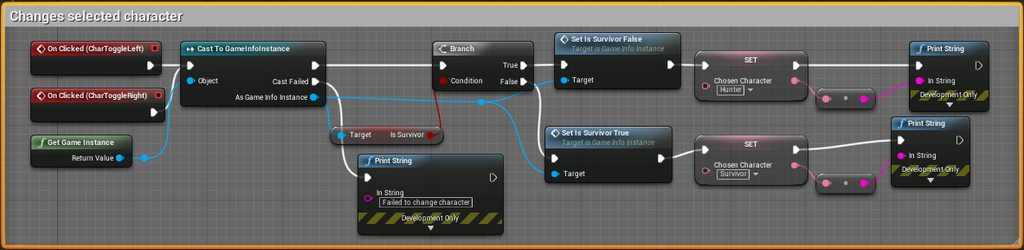
I have an issue where there is an issue stored in the GameInstance which chooses whether the player spawns as Hunter or survivor. But whichever character the host chooses, the client is forced to spawn as
 coarse kettle
I see that beacons are exposed to blueprints but does anyone have any working examples/tutorials on how to get them to work?
<edit> I'm not looking to buy anything
vocal dagger
is it true that UE4 doesn't have an implementation to get things like the Steam avatar for my user or my friends?, I'm reading that I need to download the Advanced Sessions Plugin or write it all myself...
vocal dagger
all right, I just find it weird since all of that is really something you usually use for any game on Steam. I can already do something by reading the Advanced Sessions Plugin but if you know about any resources I'd be grateful ^^
 fossil spoke
Try the Steam SDK docs
 grand kestrel
~~Need some help, I'm generating a UObject derived class in a loop on a UActorComponent and filling a TMap's values with the resulting objects (from NewObject function), and I'm doing it on the server, when it then replicates the TMap I hit a fatal error ~~
Oh is TMap still not replicated?
Like.. was really sure it is 😐
Wait.. I don't need a TMap if I generate it like that
Because I can access by MyArray[(uint8)EnumValue]
In lieu of a key
Yep, problem solved, ignore me 😊

1998
fossil spoke
Haha thats gold.
 wary willow
ouch
grand kestrel
Evidently its extremely complex, not just replicating it in the first place but optimizing it to an adequate point, I only skimmed the thread though
wary willow
Ah
Well, tbh, I wish they would just wrap it up
Even if it's unoptimized
I had thought about using TMaps/Sets in my project
 toxic grove
They should optimize it
wary willow
and then just getting and sending/repping just what I need
toxic grove
IMO
grand kestrel
Apparently even the TArray replication is a beast according to that thread
Gonna get you a proper link sec
Tell us how to improve Unreal Engine 4!
Starts in 2014 but sure doesn't stop there!
 tawny raven
How would I go about displaying a widget to all clients that connect and allow them to pick a side?
wary willow
TBH, type in UE4 Multiplayer Lobby into your favorite search engine
Otherwise, what's the exact issue you're having?
wary willow
I was wondering why my sessions weren't always being destroyed. Anyone know a valid workaround?
Not sure I can wait for 4.20
wary willow
@thin stratus Steam
But seeing how a million others would be crying about it. I am assuming it's a "rare" bug
thin stratus
Yeah I never faced that
wary willow
I just destroy my sessions before the creation, as per one workaround, supposedly that helps. We will see tomorrow I guess.
thin stratus
I usually have one single destroy node
And if that wouldn't work then people wouldn't be able to leave and join or host without closing the game
Kinda surprised that there is a bug
wary willow
Yeah, that's what is happening
The original host can't create a new game
And no one can join a session
And there's this "ghost session" appearing (the one the og host left, but is still there)
I mean, it will work itself out once I get proper server lists. But it was a small headache today.
@thin stratus do you know the timeout for steam prescense ?
thin stratus
No :/
wary willow
It's a shame there's no way to reset and/or clear out sessions from Steamworks.
 dense trench
can anyone help me with this problem
This is a graph of code I am using to change slots in a mod I have made, unfortunately while it works fine in single player mode it does not in multi player, in single player mode the slots show up correctly i.e 0/900 if ini settings show =900 but in multiplayer it shows as 0/450 (default) even though I can add item over this number.
I am sure the code is correct but obviously something is different for multiplayer
 thorny kelp
Is it supposed to run only on server?
 frank copper
@dense trench i believe game mode doesn't replicate
 cinder hearth
Hello guys, i really need your help, do you know a good Voice chat Plugin for Windows and Mac please ?
thorny kelp
@frank copper yup, it exists only on server
dense trench
@frank copper I am not sure what you mean by that
 ember needle
GameMode does not replicate
frank copper
@thorny kelp used the better words. game mode doesn't exist on clients. It's only on server. It's working in singleplayer because you have authority, otherwise, in multiplayer you'll have to push stuff from server to clients
ember needle
neither GameInstance
GameState does replicate on all clients, so does PlayerState
PlayerController only on owning client and server
dense trench
so the code above will not work on a server then
ember needle
beware though that they all reset on level change, except GameInstance
frank copper
it will only work on server, not on clients @dense trench
ember needle
GameMode only exists on server
dense trench
ok
dense trench
so hpw would I get slot changing to work on the server
frank copper
you send the request from client to server through RPC, and the server handles the stuff in game mode and etc
ember needle
Widget click -> PlayerState -> Server event (run on server) -> eventually multicast (or onrep notify).
You need the player state to ensure that replication works. When the server receives the event, you probably want to store the info on GameState
 errant vapor
should i prefer actor or actorcomponents for wielded items/weapons in a mp game?
dense trench
sounds too complicated for me I will just scrap the idea
ember needle
multiplayer takes some patience
dense trench
and tutorials which are thin on the ground
thanks for all you help anyway guys I appreciate it
frank copper
don't scrap the idea man, just work it out and once you get the grasp of it, you'll think to replication by default
dense trench
That's the rub right there, I am VERY new to visual scripting and know next to nothing about it
if there were more tutorials I think I would pursue it but without knowledge you are screwed
thanks anyway though
 river canyon
I have a fairly random question. If i'm using git, and i'm trying to compile a dedicated server via source. Do i need to copy a project every time a push is made
or can i pull over the overridden project?
does anyone have any experience
frank copper
youtube it's full of them, and you can always check unreal's wiki with a lot of examples and tutorials from community or staff
dense trench
Just scrapping the idea until I can learn a bit more about it
lean hornet
Hey everyone,
ive been trying lately to get properly back into Network work and now tried to communicate From (UI) -> (Playercontrolle) -> (Gamestate) But i ran into the issue that it doesnt work the way i have it setup
PC
WIDGET
GAMESTATE
 bitter oriole
So what's wrong ?
lean hornet
So it works for setting the variable on the server without issues and also forwarding it but if i want to change a variable as the client it doesnt work (sorry i forgot to add that above)
thin stratus
As far as I see, you are changing Team or Ready State in the UI
And then calling a ServerRPC
But where are you passing the data?
@lean hornet
Your "Set bReady" is called locally on the Client
Then you directly go to the Server and grab the Data from the Server Version
But you never passed the Server that change
Changing it on the Client doesn't magically set the same value on the Server version
lean hornet
so i would need to pass the value trough the function to the server right ?
also i changed it to how you said to do it yesterday.
 meager spade
@thin stratus is it sane to send Animation play and particle spawning via Multicast?
{
    if (MagicParticles)
    {
        UGameplayStatics::SpawnEmitterAtLocation(GetWorld(), MagicParticles, Loc, Rot);
    }
    if (MagicAnim)
    {
        USkeletalMeshComponent* MyMesh = GetMesh();
        if (MyMesh)
        MyMesh->GetAnimInstance()->Montage_Play(MagicAnim);
    }
}```Make a function for setting the ready state
And one for the team data
ServerRPC "SetReadyState" and pass a boolean
Same with the Team but passing the team
And in that function, you set the variable on the Server
Then you can push it to the other clients
I would also put this onto the PlayerState of the Player
And not the PlayerController
Not idea why you are hugging the PlayerController so much
lean hornet
It is in the player state im forwarding from the ui to the playercontroller to the playerstate
its how i learned this crap if its wrong please tel me
thin stratus
Well, place the Boolean and Team Info (and what ever other info you have) into the PlayerState
If you modify it via UI, pass the Info via ServerRPC (in the PlayerState)
You don't need the PlayerController at all
thin stratus
You can easily just make the bIsReady boolean a RepNotify
When the Local Player changes the state in UI
you set it locally first ( cause that prevents the lag from Client to Server and back to client for the local client)
And then ServerRPC, passing true/false to the Server
He stets the RepNotify boolean
And in the RepNotify variable you simply tell players to update the UI part that is responsible for the showing ready or not
lean hornet
Ahhh yeah that makes more sense
i will update it to what you said
It makes sense for me now thank you
if i run into issues i will forward them
ember needle
Player Controller are usually needed to get the nickname...
ember needle
I would love to use the PlayerArray variable however it contains PlayerStates, and never got how to retrieve the nicknames from there
lean hornet
@ember needle what exactly do you want to achive ?
ember needle
Basically I have a slotting system where players can decide the role they want to play in. When they click on it, then the slot gets filled with their name & avatar and all clients can see that the slot gets occupied. In order to do that, at first I just used PlayerArray on GameState, but unfortunately that gives only States, and getting from States to PlayerController is not trivial (at least, to me), because the Pawns are not yet spawned (only the controllers and the states).
So: I use the OnPostLogin event in GameMode and, from there, populate a PlayerControllers variable from which I can get and multicast the nicknames
For your issue: I think you need to go through PlayerState for a server event to be really propagated. It looks like your UpdateTeamSlot event is called on a GameState, which is why a client event is not propagated to the server
lean hornet
ohh so make the setting logic i currently have in the Playerstate and then forward to servertate to set the array element
playerstate will move to the palyerstate and stay stays inside serverstate
right ?
ember needle
I am far from being an expert since I'm learning too. But my experience has been that with PlayerState everything works properly as they are replicated across all clients. PlayerController is only replicated on the owning and server. GameState is on all clients too, but the replication there is a little different for some reason and I could not get events to get replicated to a server form there.
I don't have my code here unfortunately, otherwise I'd be more precise.
lean hornet
hmm imma try and set it up like you said
ember needle
I'd suggest that as a first try: have a simple Print "Hello" coming out of your "Run on Server" event to ensure that the server really receives it.
I wouldn't be surprised if the one here above does not work
ember needle
exactly
your event "Run on server" should not be in a GameState
but in the PlayerState
my $0.02
lean hornet
i could just do the var in server state and then just play the event in player state
ember needle
that's what I do
ember needle
I have the RPC on the PlayerState, which then calls GameInstance or GameMode depending on what I need. Remember that GameInstance is the only one that "naturally" persists (and is not replicated). The other ones are regenerated and there are various conditions if you change levels (seamless travel, etc)
lean hornet
hmm i see
ember needle
again, no expert here but my slotting mechanism works.
Another thing that I'd recommend, if you are not doing so already
Do not store the slots on the server's game instance or mode.
the PlayerStates / Controllers will be reset anyways, and I don't know if their unique ID changes or not
rather, save every player's slot information on PlayerState
so from the server you can always retrieve this information
lean hornet
hmm i seee can you give me a minute i test it out really quickly
ember needle
first things first: try the simple print "hello" to ensure that the event is called from clients too
if you have it on PlayerState it will work
You might want to check Cedric's guide: http://cedric-neukirchen.net/Downloads/Compendium/UE4_Network_Compendium_by_Cedric_eXi_Neukirchen.pdf
lean hornet
i already looked trough it but i always have issues with it
ember needle
give it time, it's normal, i am having issues too (other ones)
lean hornet
doesnt work yet
im just doing this part atm have a missed something ?
its just for testing
ember needle
target is still ServerState
lean hornet
yes but i have to forward the info to the server state (the snppet is in player state)
ember needle
I don't know how else to tell you 😃 that event must run on PlayerState.
You are calling an RPC, you need to have the event set on a replicated BP that also meets certain conditions (unsure which ones, but GameState isn't it 😃 )
lean hornet
Nope now nothing works anymore great.
 fiery sorrel
so really simple question. How would I go about getting a variable from one player to another?
lean hornet
@ember needle I dont know what you did but its defently not working for me luckly i backed everything up
or am i blatenly doing something wrong
ember needle
what i did?
ember needle
@fiery sorrel yes it is indeed simple, did you even google? 😃 anyway: https://www.unrealengine.com/en-US/blog/blueprint-networking-tutorials
Unreal Engine
A previous blog post offered a crash course in blueprint networking, but now we’re back with a thrilling six-part mini-series on creating blueprint content that works in a networked game!
no you didn't do what i told you
that event is "execute on owning client"
and i told you to first check that if a client clicks on a button, then you can see a printscreen called on the server
lean hornet
The events in the player state need to be ROS right ?
Also the info does come trough but it doesnt set anything @ember needle
i think i know now how to fix it
It worked @ember needle Thank you so much and sorry again for being a complete doofus
ember needle
👍
 summer nova
do you know the weird shit of play in editor World pointer?
becouse i have some weird shit
when doing multiplayer single process
does it use the same world pointer on both screens?
thin stratus
@lean hornet The screenshots you've sent are not showing what I told you
lean hornet
i updated it and now its workign properly and i did some reasearch
slim holly
¯_(ツ)_/¯
 fierce birch
I'll drop this here too as it covers physics netcode: https://youtu.be/ueEmiDM94IE?t=1413

In this 2018 GDC talk, Psyonix's Jared Cone takes viewers through an inside look at the specific game design decisions and implementation details that made t...
thin stratus
grand kestrel
@fierce birch Networking starts at 23:30 if you think it's worth adding to your comment (as it's now pinned)
fierce birch
@grand kestrel wonder why they don't have the shortcuts in the vault, they usually have them on the side
maybe they'll add them later
grand kestrel
Yeah hopefully
fierce birch
@grand kestrel edited, thanks
grand kestrel
😄
Hmm I have an RPC
    UFUNCTION(Reliable, Client)
    void ClientSwitch(ARSItem* NextItem);
    virtual void ClientSwitch_Implementation(ARSItem* NextItem);
But the server is running the code instead of sending it to the client
I am not doing the obvious checklist item of calling the implementation 😄
Is it something to do with adding the implementation to the header? I find it's convenient for looking up the definition with VAX
Maybe it's interferring with generation
Because I took it out and it errors saying the implementation isn't in header
Gonna try and regenerate files, VAX can lookup from a commented line anyway if I really need
meager spade
you don't want the server running the code?
grand kestrel
If the server calls ClientSwitch is should run on the client
Something really messed up is going on
error C2039: 'ClientSwitch_Implementation': is not a member of 'URSCharacterEquipmentSlot'
virtual void ClientSwitch(ARSItem* NextItem);```It should be generating those itself...
It's including the generated.h and GENERATED_BODY() is in there
wary willow
@fierce birch was it a good watch?
grand kestrel
I got up to the networking part, found it interesting
grand kestrel
They implemented their own open source physics and made some pretty practical approaches to common issues
I mean, they implemented a different open source physics
Not their own 😛 But it let them modify it when problems occurred
Anyway why wouldn't UHT generate the _implementation
It's doing the _Validate
fierce birch
@wary willow it was well structured for the parts I saw, didn't watch it fully through
fierce birch
well, they didn't implement their own physics as open source
thin stratus
Still something to learn
wary willow
Yeah
fierce birch
but used bullet physics
thin stratus
UE4 is pretty shitty outside of CMC
wary willow
Definitely wanna watch it
thin stratus
and even CMC is shitty
fierce birch
which itself is open source
wary willow
lol, yeah CMC is pretty shitty @thin stratus
grand kestrel
Its a damn cobweb
wary willow
Would definitely love to see someone come up with a Client-Side predication plugin/addition
$500
I'd buy
grand kestrel
Yeah, for pawn, easily extendable
@chrome bay Are you still working towards something?
wary willow
BTW, has anyone ever had an issue where after creating a session (hosting), you crash the game ONLY ON STEAM ?
grand kestrel
4.19 didn't like.. change anything for RPCs.. with the _implementation ? 😐
wary willow
It only happens on one map. But outside of Steam (packaged still) it works just fine
4.18.3
grand kestrel
Something is royally messed up with this file
fierce birch

Network latency is an ever present hurdle to overcome when trying to create a compelling multiplayer experience in any game, but can be especially difficult for fighting games. Rollback/re-simulate networking models remove the (often infuriating)...
sadly, only slides
grand kestrel
How can I make UHT generate the _Implementation for RPCs
It's not doing it automatically
The header itself is erroring on the GENERATED_BODY()
RSCharacterEquipmentSlot.h(17): error C2039: 'ServerDrop_Implementation': is not a member of 'URSCharacterEquipmentSlot'
For every RPC
fierce birch

GitHub
GameNetworkingSockets - Reliable & unreliable messages over UDP. Message fragmentation & reassembly, bandwidth estimation, encryption.

GamingOnLinux
In a rather helpful move for developers, Valve is about to open source 'GameNetworkingSockets' and it won't require Steam.
grand kestrel
Yeah, linux support is rarely more than a gesture than anything else
 torpid girder
i am trying to replicate my aim offset, so i thought i would replicate the pitch and the yaw, i set replicated to replicated and now condition isn't doing what i thought it would as i set it to skip owner
could it be that i need a conditional to say if owner in the aim blueprint
grand kestrel
Don't replicate either, just use GetBaseAimRotation
Coz it's already done, you're replicating it 2x 😛
torpid girder
maybe i am doing aim offset wrong
Build powerful visual scripts without code.
weird as when i pull out get base aim rotation i don't get floats, i get a rotator of vectors
oh well it works, just need to ignore half of the code in the tutorial
grand kestrel
Aw man epic's own tutorial tell you to do it wrong lol
frank copper
:))
grand kestrel
Is there a problem with RPCs on subobjects?
My server just runs the client RPC, doesn't call it on the client
Runs it as a function
Ah crap a google search answered that
That's fine, I'll route it through an AActor 😦
At this point though maybe I should just use components
Which can do RPC calls
grand kestrel
OK seriously why does it run a function marked clearly as an RPC instead of.. sending an RPC
Like there's nothing to fix
It just isn't doing what it should do
Everything else works
 wide iris
the rpc is only going to be call if it is called from the server or a owning client
if the client doesnt own that actor , it wont runs as rpc
grand kestrel
It's a UActorComponent
From the player's character
Meaning it should run
Maybe it's something to do with how I create them
wide iris
idk if the owner is set by default in a uactorcomponent
fossil spoke
An Component needs an NetOwningConnection, it gets that by having an Owner hierarchy that goes back to an Player Controller.
grand kestrel
Gimme a sec
I just noticed that the UObject that I changed to a UActorComponent had.. reverted (might have used undo and went too far idk)
Because that would certainly do that 😄
Make the RPC not run as RPC, I mean
..Yup haha
 severe widget
Ay, de waddup
 hollow pulsar
@fossil spoke Hey I got a slight issue Im trying to repspawn my player to the playerstart but it keeps spawning at 0,0,0 here is the code https://blueprintue.com/blueprint/opnx9--a/
meager spade
MakeTransform is being linked to the spawn, so of course its going to spawn at 0,0,0
hollow pulsar
Can you suggest a way to spawn at the playerstarts Im pretty confused
meager spade
well in c++ i just search for all player starts, let me see how to do that in blueprint, you using multiple playstart or just 1?
hollow pulsar
multiple starts
meager spade
https://blueprintue.com/blueprint/zgfwve49/ something like that you could use
how you handle the array, is your choice
hollow pulsar
ok ty fam
fossil spoke
@Olin3D#0001 Your code literally says your spawning it at FVector::Zero() lol
 silent sigil
I have a steam multiplayer question if anyone has a moment
fossil spoke
The GameMode has an FindPlayerStart() function
@silent sigil Just ask the question, someone who can answer will
silent sigil
kk
I am using unreal 4.19, i enabled the steam plugin and i did the ini changes that various examples showed me. I still don't see friend list or steam drop downs in my blueprints though, I'm not married to blueprints but I assume it stuff isnt showing there then it wouldnt show in cpp either
When I launch the game as a stand alone it does show that im playing space war on steam
so some parts seem to be working
hollow pulsar
So what exactly are you trying to do?
wide iris
@silent sigil have you tried this guide
https://wiki.unrealengine.com/Steam,_Using_the_Steam_SDK_During_Development
silent sigil
looking
the frustrating thing is its not obvious how much of this is out of date or done already for me by the plugin bit and ue4.19
maybe the build.cs step i missed doing
wide iris
yeah maybe xD i never had to use the steam sdk but i used steam networking for thd connections for a lot of games
silent sigil
i dont have build.cs files because the project i started was the vr example is is a blueprint project -.-
yeah, i was halfway through writing a wrapper for the steam sdk for unity and decided to do unreal cause the plugin checkmark gave me a false sense of simplicity
wide iris
according to what you said you did the right step for the steam connection but nothing for getting the sdk
silent sigil
kk
wide iris
i think xD i cant help you more than that
but i think it is worth taking a look at setting steam sdk for unreal
silent sigil
I appreciate the link, it looks like a good direction
 versed socket
It looks like multiplayer in my dumb UE4 project is causing some crashing. The .log file doesn't show anything that stands out as an error, and the .dmp file looks like a binarized mess of ASCII. How do I properly debug this?
severe widget
how are you viewing the dmp?
 fluid moon
if I set a blueprint to replicate, do I still need to set its variables and components to replicate too?
fossil spoke
If an Actor is set to Replicate, only variables that are also set to Replicate will be Replicated.
fluid moon
if an actor is set not to replicate, will variables set to replicate still replicate?
fossil spoke
No
Variable Replication can only occur from the Server to Clients, meaning an Client cannot set the value of an Replicated Variable and have it Replicate, only setting an Replicated Variable on the Server will cause its value to propagate to other connections.
fluid moon
Cool, thanks.
If I set an actor to replicate movement, will it replicate the movement of component meshes? IE a turret rotating
fossil spoke
Component Transforms should replicate if they are modified on the Server when ReplicateMovement is true from memory.
fluid moon
Oh, okay. So when "replicate movement" is checked for an actor, I don't need to check replicate for its mesh components?
grand kestrel
Is there an actual use case for Replicate Movement when you care about the game looking/being good given that it has no prediction or interpolation?
versed socket
@severe widget Via notepad -- am I supposed to open it in the Editor or something in particular?
 twin sorrel
Hey guys! i'm trying to limit the velocity of an individual pawn in a multiplayer game.. does anyone know why this isn't working? https://gyazo.com/cc16664dc82c17a43f1d33d3316f54ea

i've tried running it on the server, multicast.. run out of ideas
when i try set velocity to 0, nothing happens also
"Limiting speed!" is printed
if i print the length of the vector after i set it, it is 1300 but it seems to be getting set back to original next tick
frank copper
does it have a character movement component your pawn @twin sorrel ?
twin sorrel
yeah
frank copper
why don't you set in the character movement component the max walk speed?
twin sorrel
it's for falling
i'm trying to implement a parahute system
but parachute's don't pick up speed
right now, i'm just thinking of setting charater comp to custom movement
then add offset every tick
twin sorrel
oh shit that's probs what i have to do
twin sorrel
i did scale the gravity, but yeah picks up speed
wow, settign character movement velocity works
how did i overlook that
frank copper
it happens, no worries
twin sorrel
thanks so much 😃
frank copper
no problem
silent sigil
Answering my own question from earlier. I didn't know this plugin existed which is what all examples and everyone was using
Advanced Sessions Plugin
Message to users 09/08/2017
I'd like to note that the original intent of this plugin was to shore up blueprint support for sessions
cinder hearth
Hello guys, I have a question. I'm trying to connect a Mac on a Windows server. But it doesn't work
It say that the version is different but I copy the content and config project to the mac version
the only difference is that 1 is cpp and not the other
I'll try to create a cpp project too on the Mac side
silent sigil
are the unreal engine versions the same?
cinder hearth
well not really, one is custom for the dedicated server
but it's 4.18.3 for the both
Mac has the official version and the PC has the custom server one
i will try to change the custom to official, now that the server is created
 neon otter
Hey guys , how to save data retrieved from mysql server into variable in ue4?
copper sparrow
Hi, follwing the tutorial on Unreal Engine WIKI I made a dedicated server and client so every thing is ok on lan but when I run my server game on the Network and want to connect to via internet it doesn't connect.
how can I fix this?
 fleet raven
does anyone know an up to date example for how to extend the movement component with custom abilities that have proper prediction? things like being able to toggle walking/flying with a key, sprinting, etc
faint fjord
I have an issue where there is an variable stored in the GameInstance which decides whether the player spawns as Hunter or survivor. But whichever character the host chooses, the client is forced to spawn as
meager spade
without the code or whatever we have no idea why
faint fjord
@meager spade
cinder hearth
Some update for the Mac dedicated server : I copy the entier project from the pc to the Mac and it's not working ...
Do you know if i can transfer an entier compiled Engine from PC to Mac ?
wide iris
@faint fjord you know gameinstance isnt replicated right? i dont know how you did your stuff but if you server modify the gameinstance , it wont modify for the client
 wide iris
he can
faint fjord
if u click on the link
wide iris
okok i got it so whatever the client choose he always spawn as the same ?
faint fjord
SO whichever character the host joins as, the client is forced to spawn as (Which is not intended)
wide iris
oh i know
meager spade
they always spawning as a hunter right?
wide iris
it is bbecause onPostLogin is run on server only
so he cant access the client game instance
faint fjord
do i need to use Switch has autority?
wide iris
no on post login wont trigger on client
faint fjord
i thought it is because it is spawning them in
Well what should i be using them
then*
wide iris
hum i dont know unreal well enough to give you a good working solution without trying xD
i think your gamemode could ask for the character using the client controller
and in your controller class you could get the variable in the game instancr and return it
faint fjord
i can try tha
wide iris
but idk if it would work
because i think it might run the controller function on the server as well
you might find what you want on this
@faint fjord
faint fjord
@wide iris where is the playerstate bp
wide iris
there is one by default but you have to make a custom one because you cant modify the default one
ember needle
I am still working on a MP slotting system where players see a menu to choose their slot when they join a server. Where is a good place to open the slot selection widget in MP when a level is opened / player joins session?
is it better to have the server to issue the “open widget” command on a gamemode postlogin event through the playercontroller that just joined, or have it on beginplay in the level BP?
right now i am doing the latter, but am wandering what the good practice is. I have been on this system for a week now and the learning curve is relatively steep, not so much to make things “work” as to make things clean
 fossil veldt
Why does UE4's Server completely shit its pants when you send more than 10kbps of network traffic through the pipe, I don't understand
wary willow
Anyone got any links to MP Optimization in UE4?
fossil spoke
Optimisation is an pretty broad topic lol
Start by identifying the bottlenecks and target those.
severe widget
I normally opt for the -OptimizeMyLogicAndBandwidth flag on the command line
fossil spoke
^^ That helps. It was added today i think.
 neon mango
Will OnRep work fine if the method is virtual?
What would happen? Dose the overwritten method get used on rep?
 lost inlet
They can be virtual, yeah
grand kestrel
@wary willow Most of our optimization was from CPU usage on dedi server and not actual net bandwidth, as such many common optimization techniques apply regardless of MP
Why can't I @slate obsidianBurgos#0001
Well
Discord @ is broken
Anyway, some helpful stuff I have in my cliff notes for optimization
- Stat SceneRendering
- Stat Memory
- Stat Game
- Stat RHI (Shows how many triangles are being drawn)
- Stat None clears all stats
- GPU Visualizer ctrl+shift+comma
- Freeze Rendering to see what is being culled
- Alt+8 to check shader complexity and instruction count``` copper thistle
It's <@!ID>
grand kestrel
<@!VictorBurgos#0001 > ?
copper thistle
No
grand kestrel
@!VictorBurgos#0001 ?
copper thistle
The ID
grand kestrel
Whot
grand kestrel
Ehhh
copper thistle
lol
grand kestrel
Why can't I just shift+click like I've always done anymore
copper thistle
Need to have developer mode on
Oh idk
I just type @name and let it auto-complete
On pc
At phone that bug been always there
grand kestrel
So it's broken
Coz shift+click does the same thing
Left is from letting it autocomplete, right is from shift clicking, left works, right doesn't
https://i.imgur.com/WNjsebG.png

What the shit, discord
severe widget
there's always irc
twin sorrel
Hey guys! does anyone know why, when i deploy my parachute (Parachuting = true), the descent is jittery? Using just gravity multipliers replicates flawlessly, althought the player will constantly accelerate. Does anyone know what i am doing wrong in terms of replication? or does anyone have an alternative solution? https://gyazo.com/ee0a2176c96cc6f689163e0dc0d20c08

i initially thought that the movement mode was diff on server and client, but replicating the movement component did nothing
severe widget
gotta give us more than that, I think.
Also you could maybe try bringing the gravity multiplier to 0
to stop accel
twin sorrel
i must be doing something blatantly wrong, because i can never get smooth custom movement (using add offset)
grand kestrel
Thats because CMC doesn't move that way, it uses Velocity
Also there's no need to update the movement mode on every tick
And sending that RPC is inherently wrong
You can't realistically modify movement systems like that, it's gotta be done in CMC's physics loop which can't be done from BP
twin sorrel
is there a way i can disable cmc whilst i am performing the custom movement? @grand kestrel
grand kestrel
You should not do that
twin sorrel
ok
grand kestrel
Movement systems need to be integrated into CMC
Not bypassing it
I wrote a tutorial for creating a wing suit from BP and some minimal C++ code to add the BP entry points
https://wiki.unrealengine.com/Character_Wing_Suit_Controller
That might give you some ideas
twin sorrel
hmm ok, thanks 😃
grand kestrel
That uses the flying mode instead of custom
I wrote it because there's a metric shit ton of incorrect tutorials for movement systems where someone thought they found a way that appears to work and then wrote a tutorial on it 🙄
twin sorrel
lol, is the coding advanced?
twin sorrel
i haven't done any UE4 c++
grand kestrel
Honestly you could just do the tutorial specifically
Even though its a parachute not a wing suit
It's got a high level of control over the result
The same code would work with some tweaks on a design level
twin sorrel
yeah, a parachute is mucch easier than a wingsuit
grand kestrel
There are three curves that control how it flies
Very easy to get a parachute effect
Just by pulling on them
twin sorrel
oh wow, alot of it is BP 😃
grand kestrel
Yeah, the only C++ is there to expose the bare minimum you need to continue in BP
It's meant to be newbie friendly
As much as is possible with character movement
twin sorrel
oh, so i can actually make my own movement in BP
the c++ is just for exposing the tick and stuff?
grand kestrel
Doing a custom mode that can't take advantage of the flying but might a little more involvement
And impact events
Keep in mind thats a substepped tick, it occurs many times per frame instead of only one time per frame like tick
It means its very accurate
twin sorrel
yep
grand kestrel
So if you hit a wall while on low frame rate the collision will register consistently and correctly
twin sorrel
substep fixes everything 😄
grand kestrel
Yep
You could do the same thing in BP but it would be more disconnected from CMC, whereas this plugs directly into it as if epic made it themselves for you to use
 graceful cave
how can i prevent a client from connecting to a server running a different version?
is changing the project version in project settings sufficient?
grand kestrel
And as such it always works as you expect
twin sorrel
@grand kestrel i copied everything in the tutorial into my classes and i get so many errors
 neon mango
So when you OnRep a virtual function and use that function in derived classes, what gets called? The base OnRep Method or the derived?
fossil spoke
The derived method will always be called. Normal virtual function inheritance with calls to Super apply as normal.
meager spade
@twin sorrel that error list is huge, but i take it you don't know much about c++, andwe need to see the output log not the error
 meager spade
yeah and pastebin the code aswell cause it will be easier for me to see where its broken
grand kestrel
@twin sorrel First thing you need to do is to change WINGSUIT_API to your own project's export macro
meager spade
^^ beat me to it
twin sorrel
so, is that something to do with project name or?
grand kestrel
Look at the classes
they're defined as
class MYPROJECT_API UMyObjectClass : public UObject
For example
The MYPROJECT_API is specific to your own project
As your project isn't named WingSuit it wont be WINGSUIT_API
twin sorrel
oh
grand kestrel
Likely it'll be FORTNITEPROJECT_API
meager spade
what tutorial you following anyway?
grand kestrel
The wing suit tutorial I wrote a while ago, should work for his parachute
 grand kestrel
Seems like the .cpp is missing the definition for FlyingTick_Implementation
In WSCharacter.cpp
Oh, thats a mistake in my own tutorial lol, my bad
Change BlueprintNativeEvent to BlueprintImplementableEvent
    UFUNCTION(BlueprintNativeEvent, Category = "Character Movement: Flying")
    void FlyingTick(float DeltaTime);
never seen that tutorial, i will take a look
meager spade
only if your copying the entire file from somewhere
grand kestrel
I can't login to the wiki to update my code lol
twin sorrel
yeah
meager spade
any generated c++ will have it
grand kestrel
The reason given by Crowl is Autoblocked because your IP address has been recently used by "Jonnysmith232323". The reason given for Jonnysmith232323's block is "Spamming links to external sites"
meager spade
:/
twin sorrel
Thanks so much @grand kestrel and @meager spade
grand kestrel
@remote sage can you fix this wiki login again? :D
Account creation from this IP address (127.0.0.1) has been blocked by Crowl.
The reason given by Crowl is Autoblocked because your IP address has been recently used by "Jonnysmith232323". The reason given for Jonnysmith232323's block is "Spamming links to external sites"```Also maaaybe the two factor sign in is affecting logins for the wiki? 😐
twin sorrel
@grand kestrel are these overridden events run on the server?
grand kestrel
Don't do any replication
It's already done in CMC for you
The code in the tutorial works in MP
Along with all the correction/prediction/etc
twin sorrel
yep
the problem is, the tutorial set's the flying mode via the walk off edge
what if i want to set via button
nvm i got it 😃
fluid moon
I'm getting this error:
LogNet: Warning: UIpNetDriver::ProcessRemoteFunction: No owning connection for actor u3. Function Give Order (Server) will not be processed.
When trying to call a server replicated event on an actor that spawns in the map, anybody know why?
fossil spoke
An RPC can only be called by an Actor that has an Owner Heirarchy which goes back to an PlayerController.
PlayerControllers have an NetOwningConnection.
@fluid moon
 tiny scaffold
Does anyone know how to use advanced sessions and advanced steam sessions with unreal engine? Ive tried to make a advanced session with the the dedicated server but cannot find it when i go to look for the server?
fossil spoke
I would assume the Plugin comes with plenty of documentation and tutorials.
tiny scaffold
yeah ive googled for it but nothing really
fluid moon
@fossil spoke thanks, I figured it out!
twin sorrel
@grand kestrel what's the difference between 'UpdateCustomMovement' and the custom FlyingTick node that you implemented?
neon mango
@fossil spoke What if the OnRep is defined only in the base class?
fossil spoke
Well if your not overriding it in an derived class then of course the base class will be called.
versed socket
@neon mango You could make the OnRep just call a virtual function in the base class or call a Dispatcher event if you want to make the child class react to a thing. Sorry if this is dumb and irrelevant, I'm a bit lost in this convo
wide iris
I have a game where the client can move an actor using the directional keys, What I am doing right know is calling a RPC that request to move the action with the vector movement . The server calculates the velocity and put it in a replicated variable, then I'm moving the actor on the server and client . This work kinda well but when the client stop moving the actor, it always rollback a little bit behind(depending of the lag). How could I make it move without lag on client?
fossil spoke
@DarkMatriac#0666 Allow the Client to also calculate its own Velocity, the Server will send the correct value via replication but the Client will have smooth movement because its also calculating its movement locally.
wide iris
actually the server is calculating it for client and it feels really smooth on client as long as he doesnt stop moving
its only when he stops moving or change direction brutally (ex: going left than going right) at this precise moment he can notice the lag
I guess when he stops moving he tell the server that he stop but the server might be a bit behind or maybe a bit ahead so it less/more than it was on the server. so he teleports to the real location
should i notify the server when the input is vector Zero and send it the final position?
grand kestrel
You're simulating latency right?
wide iris
I'm not
grand kestrel
Thats why it feels smooth
Always use a tool like Clumsy when making networked gameplay
Otherwise you'll find yourself believing something works for a long time, then find it doesn't soon as latency is introduced
wide iris
okok im really unfamiliar with networking but i want to become good in it xD ill take a look into clumsy
fossil spoke
Use the ‘Netxxx’ family of commands to help simulate latency.
wide iris
should i use one over the other? or both are good to simulate latency?
grand kestrel
IMO Clumsy is far better
And convenient
I used to use the net commands before I tried it, never going back
wide iris
👍
 fringe dove
does PostNetReceived guarantee all properties have been replicated over, or just some? And is it all properties that were set on the same tick as the spawn, or is it only properties that were set after deferred spawn prior to calling FinishSpawning?
twin sorrel
Hey guys, how do i make my sessions so friends over the internet can join them?
this is my create session : https://gyazo.com/a21ca51c0fbea38836d6c360c8ec369b


and then i just join using join session
thin stratus
No, you need a MasterServer that registers the sessions and gives them back to the user
You can use Steam for example
twin sorrel
would that be the easiest to implement?
thin stratus
You'd still use the same nodes (as long as it's a ListenServer approach)
tiny scaffold
Anyone know if there are any tutorials for dedicated servers with advanced session?
thin stratus
I would say so
twin sorrel
a listen server approach? does that mean non-dedicated?
thin stratus
Correct
twin sorrel
dam,
thin stratus
The default UE4 nodes don't work for Dedicated Servers
You'd need the Advanced Session Plugin I guess
thin stratus
Your Server is a DedicatedServer if you make it one
That has nothing to do with the Session Nodes
It's only that the default SessionNodes have settings that don't work with DedicatedServers
So you'd need to use the AdvancedSession Plugin to adjust these
twin sorrel
oh
tiny scaffold
Hey Cedric you seem to know what's going on you wouldn't happen to know how to get steam advanced session to host a session off a dedicated server? I've got the server exe and the create advanced session hooked up but nothing shows up.works between clients like laptop and pc but not if I host the dedicated off the pc
thin stratus
You want to check your logs that steam is actually enabled on that server
tiny scaffold
yeah it shows up on the steam server list on both lan and the internet @thin stratus
unless there's something i probably havent done
thin stratus
Well, usually you need to obviously build the Server using Source
Then package the game etc.
tiny scaffold
yeah ive done that
thin stratus
Then make sure that the Binaries folder has the Steam dll files
Then you'd make sure that the appID file is available
Shipping builds don't have them, cause they are meant to be uploaded on Steam (which would take care of it)
If that's all given
Then you'd usually use the RegisterServer function in the GameSession class, but since you are using BPs, you'd probably use BeginPlay of the GameMode(?) to call "CreateSession"
tiny scaffold
yeah so i went into the packaged folder into engine > binaries > Thirdpary > Steamworks > Steamv139 >win64 and it has steam_api64.dll
thin stratus
And the only really important thing for the session is "Don't use Presence!"
Rest should work out of the box, given you have a custom appID
thin stratus
Cause 480 tends to give a few hundred results not related to your game, as everyone is using it
tiny scaffold
well whenever i search for session using the find sessions node it only brings up mine if i am using the laptop and pc to play together
thin stratus
Well, no idea then. The Logs should tell you if the session is properly registered to Steam
You'd need to enable verbose logging on LogOnline iirc
tiny scaffold
i do get 2 warnings in the server logs
[2018.04.01-09.56.10:410][ 43]LogOnline: Warning: STEAM: Server setting ,SESSIONFLAGS:683 overflows Steam SetGameTags call
[2018.04.01-09.56.10:411][ 43]LogOnline: Warning: STEAM: Server setting ,ServerName_s:Test overflows Steam SetGameTags call
thin stratus
Should be able to ignore that for now
tiny scaffold
i can paste the entire log if thats ok?
slim holly
each logging player requests the list
however, you should really do a RepNotify system to get updates as soon as the list updates
and
tiny scaffold
so @thin stratus i found this while packaging
LogOnline: Display: STEAM: Loading Steam SDK 1.39
LogOnline: Warning: STEAM: Steam API disabled!
LogOnline: Display: STEAM: OnlineSubsystemSteam::Shutdown()
any fix?
slim holly
it's a common error
thin stratus
Packaging it doesn't matter
tiny scaffold
ah ok
thin stratus
But the log you've sent doesn't show any session creation stuff
Mayb LogNet would show that idk
slim holly
@ember needle you also might note that only local controller is available for client, all the others are present only on server
tiny scaffold
Hmm well this is what i have on my level bp
ember needle
that’s why i’m using playerstate instead
slim holly
I mean, client can only ever access to 1 controller, his own
ember needle
understood
thin stratus
Not sure if you need to OpenLevel with Listen as a DedicatedServer
I think that listens by default @tiny scaffold
tiny scaffold
ok ill try package without ?listen
ember needle
my issue though is at that time the PlayerState in None on the client!
thin stratus
Well also without the OpenLevel
Your Server starts on the correct map already
That's what the MapSettings for Levels are for
tiny scaffold
ah well i had it set to mainmenumap because then i was going to try make a way to change map without goign into the engine
can server and client be on the same pc? or nah
tiny scaffold
ok
thin stratus
As it's not using the same account
tiny scaffold
well nothing found so far
my find sessions button is just a find sessions advanced
thin stratus
Tbh, I wouldn't try too much without your own AppID
tiny scaffold
maybe it actually isnt creating a session
thin stratus
It's not worth the headache if caused by 480
tiny scaffold
true
thin stratus
I would say it doesn't create the session properly
Usually if you create a session for steam
And you logVerbose LogOnline and LogNet
You should see a long list of Session stuff in your log
slim holly
480 just randomly doesn't work, and the log is a nightmare
tiny scaffold
how do i do logverbose logonline and lognet?
hmm idk maybe it is worth getting an app id but i mean dont i need a working prototype for that lol
thin stratus
No, you only need 100$ or € or whatever
tiny scaffold
Ohh
tiny scaffold
so its gotta be the session then
thin stratus
Try to find a few more results
Like 100 or so
And see if that shows the server
Also make sure that you are searching with the right settings
Not that you are filtering for Presence or something like that
tiny scaffold
This is the search button
thin stratus
You should always only use the Results array if Success if triggered
tiny scaffold
ah ok
thin stratus
Also, small addition: You aren't removing your Server Entries atm
tiny scaffold
ill also add a print string to the create session to see if it actually creates it
thin stratus
If you search more than once, you'll have duplicated results
tiny scaffold
what do u mean?
thin stratus
You are adding Widgets to some other widget
On the right
But you are never removing them
If you search again, it just adds the same results to the already added widget
tiny scaffold
ah how do i fix that just clear children when the button is pressed?
thin stratus
Yus
tiny scaffold
alrighty im packaging
ok so its creating session because i put another print string in and it pritns it to log
could it be the Shutdown steamnetdriver_0
thin stratus
Well you are still doing the OpenLevel stuff
I can see that in your log
Set your Server map to the Playmap
And remove the open level things for him
tiny scaffold
nah didnt work
im going to try watch a 1hr video on it sooo yeah rip
Thanks for your help though
 gloomy tiger
Hey everyone. Happy easter!
How do you deal with movement replication in a third-person game?
AI Move To?
gloomy tiger
Well, I do have a very annoying problem with it. Am using AI Move To to move my character in a multiplayer environment and, well, when the caracter is in idle for a while, if I try to move it with AI Move To, it'll have some delay before the character actually start moving.
Maybe a replication setting?
ember needle
Everyone, can someone tell me when the ‘GameState’ gets created upon a level change? Because I’m calling it from the ‘BeginPlay’ event in the level BP for clients that join a server, but at that moment the ‘GameState’ is NONE
Same for ‘PlayerState’
Do I’d like to know what to do in order to wait calling a function on them until they become available
thin stratus
If you need the GameState to be ready, then use its BeginPlay
Same goes for the PlayerState
PlayerState is created inside of the Controller class
(not valid on BeginPlay of the controller)
GameState idk right now. Probably GameMode
wide iris
is the onpost login called before the begin play @thin stratus ?
thin stratus
OnPostLogin is called when a Player connects and successfully passes the Login
That can be directly at the start of a game or whenever a user connects
wide iris
okok i got it
thin stratus
So all but the ListenServer def call it post BeginPlay
Not 100% sure about the ListenServer
wide iris
alright
ember needle
@thin stratus I need both the GameState and my widget to be ready.
Is there an order or can there be a race condition
ember needle
basically i need to show the list of connected players in a widget when a player joins.
thin stratus
There is no guarantee that it's all valid after x seconds
How about using a RepNotify Array of PlayerStates in the GameState?
That would call when a player connects
And you could modify your Widget if it's valid
And if the Widget, at that point isn't valid, then your Widget can grab the Data when it gets created
That together would make sure that you always have the widget properly filled
ember needle
i need the controllers though so i am getting those from the gamemode
thin stratus
Controllers aren't replicated
ember needle
ok will try that
thin stratus
You can't use them to display Players to clients
ember needle
yes but it’s the only way to get the nickname
thin stratus
PlayerState has the Nickname :x
thin stratus
It literally has a PlayerName variable
ember needle
oh FUCK
ember needle
facepalm
thin stratus
And you can also fill it by hand by several ways (or just create your own)
Player Data that should be available to everyone should always go into the PlayerState
ember needle
thank you
thin stratus
No biggie
ember needle
to me it is.
i was first told to get controllers
how can i add the onrep notify for playerarray since the variable is already there?
thin stratus
Create your own
:P
And to answer the probably upcoming question "How would I fill it?":
BeginPlay of PlayerState -> SwitchHas Authority -> GetOwner -> IsValid -> GetGameState -> AddToArray
The "GetOwner -> IsValid" part is to filter out PlayerStates that get created when someone disconnects.
They are used in case you have a crash or internet outage and want to rejoin keeping your stats
Not 100% needed I guess