#multiplayer
1 messages · Page 381 of 1
 winged badger
 meager spade
Decode: you trying to compile the engine?
winged badger
you might have better luck in #engine-source
 gusty raptor
Hi, anyone could help me with replicating attachment/detach components?
meager spade
Do you need to compile the engine source code? you modifying the engine in anyway? if you are then sorry can't help, never built the engine before
 thin stratus
@gusty raptor Call it on the Server?
If that doesn't already work, make an OnRep Variable and Attach and Detach in that Function
 burnt meteor
@meager spade yes i am building the engine in vs
winged badger
and make sure the component replicates
gusty raptor
@thin stratus im with c++ u mean a OnRep function?
thin stratus
Yeah
Usually marking the component to replicate and just attaching it on the server is enough
If not, then apply that attach/Detach on everyone
There is no magic to this
burnt meteor
@thin stratus do u need the engine source from github to make a dedicated server?
can anyone help me to use ue4.19 from github 😦
thin stratus
meager spade
No you dont Decode
gusty raptor
@thin stratus actually everything so far was crashing the engine 😃 seems like i need a little bit of magic
im actually attaching and deataching the capsule component of character
with all of its child components
 twin juniper
Um, does HasAuthority always return true if "I am" the server? I'm trying to figure out why my game keeps crashing and I think I narrowed it down to this:
if (HasAuthority())
    {
        GamemodeReference = Cast<ASaeglopurGameMode>(GetWorld()->GetAuthGameMode());

        if (GamemodeReference->IsValidLowLevel())
        GamemodeReference->ServerBroadcastPublicMessage.AddDynamic(this, &ASaeglopurPawn::OnReceivePublicChatMessage);
        else UKismetSystemLibrary::PrintString(GetWorld(), "GamemodeReference is null!", true, true, FLinearColor::Red);
    }
HasAuthority() should always be true on the server
twin juniper
Wait I mean does it never return false on client?
Wait hang on im tired
Is there a chance that it may return true on client?
meager spade
no
meager spade
also put a check in there
twin juniper
What kind of check?
meager spade
if (!GamemodeReference) { if (GEngine) GEngine->AddOnScreenDebugMessage(-1, 5.f, FColor::Red, TEXT("No Gamemode found")); }
kinda thing, i just slapped that up lol
twin juniper
What's GEngine?
meager spade
Its a pointer to the Engine
{
    GamemodeReference = Cast<ASaeglopurGameMode>(GetWorld()->GetAuthGameMode());

    if (GamemodeReference)
    {
        if (GamemodeReference->IsValidLowLevel())
            GamemodeReference->ServerBroadcastPublicMessage.AddDynamic(this, &ASaeglopurPawn::OnReceivePublicChatMessage);
    }else{
        if (GEngine) GEngine->AddOnScreenDebugMessage(-1, 5.f, FColor::Red, TEXT("No Gamemode found"));
    }
}```should always check to see if a pointer actually points somewhere, unless you know for sure that pointer is always going to be pointing somewhere.
twin juniper
Thanks!
 slate veldt
Is it possible to have a game mode with a delayed start when using seamless travel?
slate veldt
Yeah I noticed that one, it's called ReadyToStartMatch I think,
I assumed that with bDelayedStart it ran through that virtual function and just didn't start the match, then I could call StartMatch whenever I wanted, but with seamless travel it seemed to go straight into "LoadedWorld->BeginPlay()" Line 5627 of World.cpp (4.18), which then steps into GameMode->StartPlay(), calling GameState->HandleBeginPlay(), and then into GameMode->StartMatch which I notice calls a HandleStartMatchRequest which just returns false therefore passing over the if statement and Setting the match state as in progress
Do I need to override HandleStartMatchRequest?
Looks like I may have to
I did just step through the code and it does indeed step through the ReadyToStartMatch_Implementation() but it has bDelayedStart as false (0) despite setting it to true in the constructor of my game mode. I'm guessing it's because the constructor hasn't run yet perhaps? Perhaps it will have constructed by the time it hits an override of that ReadyToStartMatch function
Can I override it despite the fact it isn't virtual?
Ah, just done a quick google, turns out you have to override HandleMatchIsWaitingToStart instead (which by default calls ReadyToStartMatch() )
Saying that, I'm going to try and override "ReadyToStartMatch" by implementing a ReadyToStartMatch_Implementation without a ReadyToStartMatch function declaration in the header, in the hope that the nature of the _Implementation ending treats this as an override
winged badger
its a BlueprintNativeEvent
so you can override it in Blueprint easily
and since it feels weird to force you into BP for this
there is probably a function that calls the ReadyToStartMatch() and that one should be virtual
slate veldt
I'm a fool, I think I just found the issue, I had a timer in postinitialize components of the game mode that called start match automatically
Just recompiling with that timer set commented out to check if bDelayedStart works as expected
Clearly something left over from when I was taking pieces of code from Shootergame
 rancid current
Ey guys! I would like a quick suggestion to my issue lol so finally starting to do tests on dedicated servers and sht, and ah I've got a problem with my movement component for my character, because of the lag its making the character jitter A LOT x.x honestly i still remember a long time ago this didn't use to happen when i was simulating lag haha but now it does so I would like to know what are the options to get rid of this? Im using unreal's movement component btw ^^
slate veldt
I've had that same issue, still have it to a certain degree but one thing that I did accidentally is replicate my characters mesh component
make sure you aren't replicating it, otherwise the sync makes it jitter a lot
but I'm still getting a slight bit of jitter on clients from the server too, to a much smaller degree but it still exists
rancid current
eh tried that too but its still just as bad ;-; really dk wtf to do with that anymore Q_Q
slate veldt
How extreme is it? Mine is still mainly on the same spot, but the animation can be a little jittery (haven't looked at it a lot as been working on other parts of the networking)
When I was replicating the mesh, the character was all over the shop, flying left to right about 20 meters haha
 slate veldt
Oh wow, I mean, it definitely shouldn't be that jittery, are you replicating the capsule component or mesh? both shouldn't be replicating
I could see how if they are replicating their movement for example, it could cause something like this
rancid current
wait i went through all my stuff and disabled replication on the player meshes and now its not lagging anymore o.O but thing is not its really not being updated anymore either XD
is that how its supposed to work? lol
tested with 1000 ping lol no more updates the player just goes weeeeeeeeeeeeeeeeeeee lol
thin stratus
That looks like the Server applies a different Location and corrects you
Usually you just have to set Replicated and ReplicateMovement to true, have a Character and a CharacterMovementComponent
ListenServers seem to not interp the client location, but you are viewing a client anyway
So if you still experience this, even with a new Character, it's kinda weird.
If it's only your character, then you might be setting the WalkSpeed or something only on the Client or Server
Check that these settings are RepNotified!
@rancid current
rancid current
Ey @thin stratus yep I do have Set replicated on actor on and same for replicate movement, does character movement component need to be replicated o.O?
Thanks lots for the info tho! ^^
thin stratus
Don't think so, but you need to replicate changes to non replicated values
So if you set MaxWalkSpeed, you need to do that on everyone
slate veldt
@winged badger Worked out what half the issue was with the bDelayedStart - because I hot reloaded when I added the bDelayedStart = true, the engine still considered the default object as the version it loaded upon editor start (bDelayedStart = false) and was overriding the current changes with what it considered default when it created the game mode actor
rancid current
@thin stratus Okeh I see! Thank you I will make sure everything is done as you said 😄 tyyyyyy!!
 indigo nacelle
Dedicated Server checked in PIE produces a black window, while unchecked it works as normal. What might be the issue? :x
 rough aspen
Hello guys, I have a very strange bug.
In my game I have two projectiles for weapons. It's exact copy of each one.
When I create a game and play, (I have listen server), server game can damage all players with all weapons, client can also damage with one weapon, but second weapon is not damaging which is strange.
With debug I've found that problem is in event "Apply Damage" it's just not firing on server player, when client tries to damage server player with second weapon while first one is working fine.
Damage is hardcoded to prevent any bugs.
Here is first version of projectile:
https://i.gyazo.com/f8d9a6b932e77d61c1368a05decee50f.png
Here is second one:
https://i.gyazo.com/fd7cef6f5ea1e7989f151ef2994c589b.png
This is a very stange bug and I don't know how to fix it. Maybe my explanation was bad and I can clarify any things.

 meager spade
client's cant and should not be able to apply damage to anything, only servers should be able to apply damage
rough aspen
yeah and I've tried to do that too
it's still not working
even if I create my own event which calls on server and then goes to Apply Damage
meager spade
so you did somehting like https://blueprintue.com/blueprint/6zgkaaca/
rough aspen
yes

Server window, weapon 1, damage is working: https://gyazo.com/d793e7c1e8029bd5edce520c39e38d6d
Client window, weapon 1, damage is working: https://gyazo.com/d16eb97e48792da67ba780a340b23387

Server window, weapon 2, damage is NOT working: https://gyazo.com/8f0ecc9292a0d89c27e2ebadfd5248d5
Client window, weapon 2, damage is working: https://gyazo.com/3eefad6ba23f0688db03015eb135b686

projectiles for weapon 1 and weapon 2 is the same
same code, same logic, all the difference is just the speed
all collision is working
just in one particular case for uknown reason event "apply damage" is not working
twin juniper
looks familiar. is this a game with "something roads" in the title?
rough aspen
nah, it's a game I'm developing for a few weeks from scratch
name is TRITOR, and idea behind the game is fast-paced multiplayer shooter, like Quake 3, but on the cars
Still, this bug is strange and I wasn't able to solve it, now I'm thinking to get to line trace instead of projectiles because of this bug
 manic agate
Guys, got a question. I'm replicating some properties of an object at each Tick, but the very first times the client receives a few packets (even though the variable changes at each tick on the server). After a while (like 5-6 seconds) the changes are all sent immediately.
Why does it happen? How can I fix it?
rough aspen
@manic agate this is happening because network updates like 1 time per second you need to update your network data more frequently
manic agate
You mean update the replicated variable more frequently? If so, how can I do it more than once at each Tick of the server?
rough aspen
well for example look for the player state
and find this settings https://i.gyazo.com/bb5d478fe77395897ba1be06567938b4.png

Set Net Update Frequency like here
for about 10 or 20
and test it
should fix it but keep in mind not to flood network data with garbage since you are sending data more frequently
manic agate
Thanks a lot! The Net Update Frequency was already set to 100, but the "Min ..." was set to 2. I changed it to look like your image and it works great!
If in the future I'll see network problems, I'll tweak these properties 😃
rough aspen
you welcome 😃
yeah if I recall correctly min is for case when network is slow and lagging so if you are testing your game on your PC server can sometime lag because of too much PC load with editor, game instances and so on
manic agate
Got it, thanks 😄
gusty raptor
Im still looking for someone who knows about attach / detach root components in c++ and replicate
anyone knows about it?
slate veldt
@gusty raptor I've been working on attach/detach components in a replicated game, what's your question?
gusty raptor
im trying to make a physics actor work as rootcomponent and be replicated
but whatever i try even the attachments are not being processed well
think ill just put some code on pastebin or so
ive tried running on client / server and tried multicast, but cant get it to work in anyway
afaik it seems the server is putting back the components

this is the function that switches from character to physics root
slate veldt
I see, does it all work server side?
gusty raptor
its working serverside, but not replicated to clients
slate veldt
Is the skateboard component marked as Replicate
gusty raptor
there's a comment on the local location add, i can actually see it change and set back by the server i quess
its marked as replicate yeah
but i doubt its really replicating
actually i set it to replicate near the physics enable aswell
slate veldt
I notice that your attaching it then instantly detaching it
gusty raptor
indeed yeah
slate veldt
is it still a part of the actor when you detach it?
gusty raptor
yeah, i can still see it in world outliner, however sometimes it disappears to
slate veldt
Ohhhhh
I see that you're adding the relative location to the capsule component, which is driven by the character movement generally speaking, so it always results in funny behaviour when you try and add location, I know you're setting the character movement as inactive above, but it could still be causing problems
Why do you need to offset the capsule component?
Could you not just make sure the skateboard is offset correctly before making it the root component?
Then ensure the whole actor is above ground after that
gusty raptor
hhm, actually i rather need a way to completely disable the character move comp? (as it might influence my physics?)
i might need the offset as i would like to use the capsule as collision aswell
however the offset issnt my biggest concern 😛
@slate veldt actually the hand attachment does work and is replicated well
slate veldt
Sorry was head deep in work, hand attachment?
gusty raptor
the second part (else)
so i think actually that character.cpp is still doing something with the character :S
slate veldt
Sounds like it could be the case, I'm also not sure how much the engine likes you changing the base component to not be capsule, especially with the character capsule and movement
Also, you might want to check and see if the movement component is still active on the client, seeing as you said it works on the server
might be that the active status is not being replicated
thin stratus
Are there any resources on VOIP with Steam or in general?
 slim holly
can't say I've bumped into any
thin stratus
Anyone then implemented it and could quickly summarize what functions to use for Start/Stop talking and Mute/Unmuting?
I think the PC had these, could it?
slim holly
but is steam voip hosted on game server?
since they have their own friend voip system too
thin stratus
It's just ListenServer
VR ListenServer/Client.
Just a simple system for Talking and Muting
I do know that I can mute players via the PlayerController
However just wondering if there is anything more to it
Cause there are multiple functions, like StartTalking StopTalking ToggleSpeaking
Also wondering if there is anything straight forward for PushToTalk On/Off
 midnight sluice
Hi everyone :)
If I want to have more informations in my server browser (list of players, current map...), should I use sessions or online beacons ?
slim holly
iirc there's a string option for sessions to pass extra information
midnight sluice
ok so I just have to update it after the travel for the current map
thin stratus
Beacons are for something else
Sessions can have SessionSettings in C++ (or BP Plugin)
They usually have a Key and Value
You can query that Key then in your search results
slim holly
advanced sessions plugin has that, but it's not documented
or, at least when I last checked it
thin stratus
My C++ code in the wiki has it too
SessionSettings->Set(SETTING_MAPNAME, FString("NewMap"), EOnlineDataAdvertisementType::ViaOnlineService);
Missing the FindSession part though I jus see
thin stratus
So VoiceChat seems to straight forward work
At least in Steam
Minus the RequiresPushToTalk stuff
As that seems to be simply ignored
 halcyon abyss
Guys I have the weirdest issue!
is somebody here ?
I'd really like to share this thing and maybe get some help from you guys
 hidden thorn
Is there a way to get the players ping? Player state has a variable for ping but I can't access it because it's private.
 brittle sinew
Is it? The docs say it's public
hidden thorn
I am looking at that and the only public thing is UpdatePing and Recalculate
unless I am looking in the wrong place
brittle sinew
I believe GENERATED_UCLASS_BODY defaults to things under it being public.
Have you actually tried accessing it?
hidden thorn
This is inside a custom PlayerState class -> https://i.imgur.com/B2GiIFR.png
 hidden thorn
trying it now
it compiled
so GENERATED_UCLASS_BODY makes variables public by default?
what about GENERATED_BODY
thin stratus
Remember to multiply the ping by 4
hidden thorn
Oh ok, how come though?
 jolly siren
Because it is divided by 4 in order to fit in a smaller data structure for optimized replication
hidden thorn
oh ok
 finite bison
does the playercontroller get destroyed and newly constructed on seamless travel? my guess is: no?
ah, this doc page answers it right at the end: https://docs.unrealengine.com/en-us/Gameplay/Networking/Travelling
midnight sluice
Can I use the FOnlineSessionSetting::Set template with any type ? Like an array of PlayerState or an array of FUniqueNetId
thin stratus
Array of PlayerStates wouldn't work
These are objects, that don't live outside of the Session
You could pack the NetIDs into it I assume, but not sure how much information yo ucan truly store in sessionsettings
hidden thorn
@thin stratus You prob don't remember but a while back you told me that MaxWalkSpeed is not set to Replicate so changing that using a Server RPC will make the movement look jittery. Could you tell me again the solution of what I can do so it doesn't look jittery anymore?
What I currently have is Client Calls->Server Update Speed->NetMulticast Method Updates MaxWalkSpeed = XX
thin stratus
Multicast is technically okay but won't effect people coming in relevancy range or connecting
Try using a Repnotify float
Set that in the server rpc
And use the repnotify function to set the maxspeed with the float
hidden thorn
Ok I will try that
slim holly
cedric you know any resources on how to manually replicate movement?
like, for character movement
jolly siren
Does anyone know if voip setup has changed in 4.19? My previous setup isn't working anymore. voip isn't working at all and there is no LogVoice messages being logged.
DefaultEngine.ini
[Core.Log]
LogVoice=verbose

[Voice]
bEnabled=true

[OnlineSubsystem]
bHasVoiceEnabled=true```

*DefaultGame.ini*
```[/Script/Engine.GameSession]
bRequiresPushToTalk=false```I have the same
Just set that up today
Worked for me in 4.19 + Steam
2 PCs
@jolly siren
winged badger
any voice-related logs in OnlineSubsystem?
 mild hull
New: Made improvements to Unreal Engine 4's native VOIP implementation. Spatialization, Distance Attenuation, Reverb, and custom effects for a player's voice can now be controlled using the UVoipTalker Scene Component. maybe that changed something?
jolly siren
Yeah, I know there have been improvements to voip and they fixed a bug I have been waiting for on it. That is why I'm turning it back on. Hmm okay, I'll keep digging. I'm surprised I didn't get any LogVoice in the log
jolly siren
oh you have to set VoipTalker up in code? I'm just trying to enable default voip
jolly siren
ahh okay, that's what I thought
thin stratus
All I setup was the ini file
Well and Muting/Unmuting
But that's unrelated
One thing I can't get to work is PTT
twin juniper
So I'm a bit curious. How safe is it to be relying on the USaveGame class for saving game data? I know there are some production games using this in ACTUAL studios for multiplayer games.
thin stratus
Cause even with the boolean set to true it's not doing that
twin juniper
I feel like it could be very bad in terms of data integrity (easily corrupted).
jolly siren
ahh I was expecting to see some LogVoice messages in the server logs. Looks like they are only in the client logs. It must be p2p for voip
That is good news at least
 timid pendant
Hello using the SetPlayerName function in ue4 4.19 causes this error. Line 62 is PS->SetPlayerName(PlayerName);
Full code is
UBaseGameInstance * GameInstance = UStaticFunctionLibrary::GetBaseGameInstance(this);
FString PlayerName = GameInstance->playerusername;
ABasePlayerState * PS = Cast<ABasePlayerState>(PlayerState);
PS->SetPlayerName(PlayerName);
The game just crashes when that line 62 is executed
winged badger
can't access the pawn from BeginPlay on the controller
its not ready yet
Try OnPossess
timid pendant
Alright thank you will try
It doesnt crash anymore but that setplayername function is not replicating
timid pendant
Oh okay I thought the setplayername function would do it since its replicated
winged badger
i mean
if the name is stored locally
you will have to do a Server RPC to set it on server
after that you can let replication do the rest
but for that to happen you have to be ClientSide when you Get the name
and then RPC from there
thin stratus
Are we talking about the native SetPlayerName function
Or some custom that you created?
timid pendant
The native function in playerstate
thin stratus
BP has a function there?
timid pendant
playerusername = JsonObject->GetStringField("username"); and UPROPERTY(BlueprintReadOnly, Category = Player)
FString playerusername; is the variable im using
Im using c++ for it
Im assuming I can just set UPROPERTY as Replicated
winged badger
if you're calling that from constructor, BeginPlay or Tick
it will exec on both server and client
so you need if (Role != ROLE_Authority) or if (Role < Role_Authority) to make sure you're getting the property Client Side
timid pendant
Okay I will do this in that onpossess function
timid pendant
@winged badger Hey would this be correct. I set the UFUNCTION to (Server) for this function
void ABasePlayerController::SetPlayerName()
{
ABasePlayerState * PS = Cast<ABasePlayerState>(PlayerState);
if (PS) {
if (Role != ROLE_Authority)
{
UBaseGameInstance * GameInstance = UStaticFunctionLibrary::GetBaseGameInstance(this);
FString PlayerName = GameInstance->playerusername;
PS->SetPlayerName(PlayerName);
}
}
}
winged badger
just to make sure
the name is stored locally on client?
and that function won't do anything
timid pendant
I want the name to be replicated to all players since its a multiplayer game. The *playerusername variable is recieved from a json request and saved in the basegameinstance as UPROPERTY(BlueprintReadOnly, Category = Player)
FString playerusername;
winged badger
you first send the execution on Server then make sure the function doens't execute on server
UFUNCTION(Server, Reliable, WithValidation)
void SetPlayerName(const FString& playerName);

// in .cpp
void ABasePlayerController::SetPlayerName_Implementation(const FString& playerName)
{
    <get PlayerState and set playerName in it>
}
bool ABasePlayerController::SetPlayerName_Validate(const FString& playerName)
{
    return true;
}
only way to push data to the server is as a ServerRPC function argument
timid pendant
Thanks so if (Role != ROLE_Authority) isnt needed right
winged badger
if you called that from BeginPlay for example
then inside it:
if (Role == ROLE_AutonomousProxy)
{
    <get name from GameInstance>
    SetPlayerName(name);
}
would execute only on client, would fetch the name from correct GameInstance (client's) and would call the ServerRPC to set in in PlayerState Server-Side
!= ROLE_Authority works for PlayerController
timid pendant
Okay thanks got it and thats more convenient but the beginplay would crash for me. I will use the SetPlayerName functions
winged badger
the Role check makes sense only from inside the functions that will execute on both client and server
 native moth
Hey guys, question here. I'm playing with using a mobilephone with ARCore as a virtual camera to help me make more realistic camera motions. I have the sessions connected and the mobilephone can sync its camera to my desktop. Now, heres my question: is it possible to render an image on my desktop and sync that back to the mobile? So I use my desktop to render high-end geometry while the phone only has an empty scene
timid pendant
Alright one last question. From your code above showing how I should do the implementation and reliable part. Is the original function empty? Which is the
void ABasePlayerController::SetPlayerName()
{
ABasePlayerState * PS = Cast<ABasePlayerState>(PlayerState);
if (PS) {
if (Role != ROLE_Authority)
{
UBaseGameInstance * GameInstance = UStaticFunctionLibrary::GetBaseGameInstance(this);
FString PlayerName = GameInstance->playerusername;
PS->SetPlayerName(PlayerName);
}
}
}
winged badger
if you are implementing a client function that calls the server RPC
it only needs to get the name
and call the RPC with name as argument
timid pendant
Alright thanks man
 fleet raven
why does attempting to connect to a server, and failing (for example because it does not exist) reload the main menu map instead of doing nothing?
 glacial hamlet
because you probably connected but were immediately disconnected for whatever reason is my guess
or the failure is triggering a delegate that says go to default map
hidden thorn
@thin stratus Hi, I set the MaxWalkSpeed using RepNotify or atleast I hope I did it right since I've never used it before.
//.h
UPROPERTY(EditAnywhere, ReplicatedUsing = OnRep_MovementSpeed, BlueprintReadOnly, Category = PlayerMovement)
float MovingForwBack;

UFUNCTION()
void OnRep_MovementSpeed();

//.cpp
void ARPGPlayer::GetLifetimeReplicatedProps(TArray<FLifetimeProperty>& OutLifetimeProps) const
{
    Super::GetLifetimeReplicatedProps(OutLifetimeProps);

    DOREPLIFETIME(ARPGPlayer, MovingForwBack);
}

void ARPGPlayer::Tick(float DeltaTime)
{
    Super::Tick(DeltaTime); // Call parent class tick function

    if (HasAuthority())
    {
        MovingForwBack += MovementScale;
        OnRep_MovementSpeed();
    }
}

void ARPGPlayer::OnRep_MovementSpeed()
{
    UE_LOG(LogTemp, Warning, TEXT("OnRep_MovementSpeed"));
    GetCharacterMovement()->MaxWalkSpeed = MovingForwBack;
}
And I have the same issue as if I would use NetMulticast
That is using NetMulticast and it looks the same using RepNotify
hidden thorn
I was going to show a quick video but I have to record it, the issue is that the movement is jittery on clients.
But just the animation
 fossil spoke
Have you tried applying the Movement adjustment locally as well? The client will get the Authority value once it replicates but it assumes that its going to be the correct value anyway.
 heavy marlin
i'd wang it in an RPC and use a timestamp so you're only applying relevant adjustments
hidden thorn
@fossil spoke So you're saying to call GetCharacterMovement()->MaxWalkSpeed = MovingForwBack; locally, outside HasAuthority()?
fossil spoke
Yes, the Server will give the client the correct value once it replicates, so any discrepancies will be rectified then, as George suggested, also using Timestamped values will help as well.
heavy marlin
someone posted this the other day, its worth looking at: https://github.com/Acren/ue4-client-prediction
 hidden thorn
@heavy marlin So have OnRep_MovementSpeed inside a Server RPC and apply TimeStamp, I will prob have to look into TimeStamp as I am not sure what it is used for.
And here is the video of the outcome: https://www.youtube.com/watch?v=2AiQ536dC1s&feature=youtu.be

The server moving is fine but when the client movs I have the issue, I will look at that @heavy marlin thanks.
heavy marlin
the feet slide a bit but thats an animation issue i think
on that note, i solve that by looking at each one and storing asset metadata called "MovementSpeed" which is a units moved per second
which i then use as a multiplier in my animation BP
hidden thorn
Other than the animation not being synced with the speed, if you look at the feet of the client on the server window and then look at the server character on the clients window
you can on the server the clients feet are moving so fast that they are a bit blurry
fossil spoke
Ok i see it now.
heavy marlin
it must be like a magic picture, i dont see it
hidden thorn
Only the clients have that, when I move around as the player I don't feel anything it's all normal but just the animation looks weird.
heavy marlin
but what you're describing could be due to flickering values
you need to be lerpier about it
fossil spoke
I had to watch it on Youtube to get the first part of the video to render in high quality to see it
@hidden thorn Does it do this when you use an Dedicated Server?
Im assuming your game will be with Dedi Servers?
fossil spoke
If so your better off checking out the Client to Client relationship since the Dedi Server wont even care about Anims
hidden thorn
But prob not this version as it is a prototype
So ListenServer care about animations?
And what exactly you mean by "wont even care about Anims"
fossil spoke
Well an Dedicated Server has no visual representation
If all Clients see an smooth animation and it remains synchronized with the Server, no body will care if the Server may have jittery animations because no body will see the Server because the Server has no visual representation
heavy marlin
what you need (but dont have) is a little line graph plotting the values
if they're all spikey you know something is off
actually you could debug it with this: https://forums.unrealengine.com/unreal-engine/marketplace/86597-kantan-charts-free-umg-chart-graph-plugin
All Things Related to the Unreal Engine Marketplace. Discuss Marketplace Offerings, Request New Content, Promote Your Work.
also yeah i wouldnt care what the server sees visually
heavy marlin
yeah me either
hidden thorn
@fossil spoke Yeah just had a look with 1 Server, 2 Clients and the Jittery movement only happens on the Server
fossil spoke
Ok well considering its an prototype, id ignore it and move forward.
Its an small detail that may or maynot become an issue, not worth the time when its just an prototype.
fossil spoke
Good luck
 copper sparrow
When we must use dedicatedserver? or why we must use dedicated server?
thin stratus
When you want to have a server that runs without a client being connected.
And if you want to host server logic away from the clients to deny cheating
twin juniper
Hey guys! I'm implementing my own character movement, and I was wondering what the standard practice is for the client to be able to move around on the serverside. Should I just be using simple RPCs to send desired acceleration to the server?
slim holly
I doubt physics sim would be very accurate approach
glacial hamlet
is there a reason not to use character movement component and create a custom mode?
slim holly
1000 reasons to create your own character movement
twin juniper
I guess I just want control from the bottom up
slim holly
I was just looking into this earlier
and found this: http://www.gabrielgambetta.com/entity-interpolation.html
twin juniper
I don't feel comfortable using complex assets that are already set up. I'd rather understand this and do it myself
oh
Okay I'm gonna read this
slim holly
stare at the first graph a while, it will start to make sense eventually
twin juniper
Okay, thanks!
glacial hamlet
you can create your own implementation of a "mode" and leverage a lot of existing architectural patterns such as prediction and correction, again, it all comes down to your desired movement type.
 grand kestrel
There's not many people who need a custom character movement made from scratch. Prediction is a complex topic and when learning it should start with something far simpler than a character
slim holly
well, it's a moving object as any other
copper sparrow
@thin stratus Thanks.
thin stratus
Everyone who moves a non Character needs a custom MC
Cause only the CMC has the Prediction in it
And even that sucks at it, cause the Server doesn't interp the Client
Means on a ListenServer, when having a Highping to a client, the client character snaps
gg
Well let me reword that: Everyone who moves a non Character and wants interpolation etc. needs a custom MC
slim holly
yup, I couldn't get default CMC to do doublejump without spazzing out
 west nymph
Hey guys, sorry for bothering but im kinda stuck on this error havent been able to figure it out. I am currently using VS 2015 v3 and UE4.19 the error apears once I try to generate visual studio files, I am folowing a tutorial for dedicated servers.
The error codes;
error CS0122: 'UnrealBuildTool.UEBuildBinaryConfiguration' is inaccessible due to its protection level
error CS0051: Inconsistent accessibility: parameter type 'ref System.Collections.Generic.List<UnrealBuildTool.UEBuildBinaryConfiguration>' is less accessible than method 'projectkaaServerTarget.SetupBinaries(UnrealBuildTool.TargetInfo, ref System.Collections.Generic.List<UnrealBuildTool.UEBuildBinaryConfiguration>, ref System.Collections.Generic.List<string>)'
If anyone could point me in the right direction I would be quite happy 😃 thanks in advance
thin stratus
The Target files have to be a bit different
Check how the Editor Target file looks like
west nymph
thin stratus
Yeah and show me the Server one
west nymph
server
west nymph
ehh. sorry i dont see the difference, but if you would let me know it would help me a lot. Just started messing around with all this, wanted to tr and complete this tutorial
thin stratus
Simply said, make them equal
The public projectkaaServerTarget(TargetInfo target)
Needs the : base(Target)
The SetupBinaries function isn't a thing in 4.19 anymore
At least not like this
So you need to grab the OutExtraModuleNames... and put it below bUsesSteam
And remove the Out in front of it
And then get rid of Everything below TargetRules Interface
west nymph
Thank you so much!
west nymph
Hey after fixing the issue above, I ran into another problem;
"ERROR: UnrealBuildTool Exception: Not expecting project Unreal Projects\projectkaa\Intermediate\ProjectFiles\projectkaa.vcxproj to already have a target rules of with configuration name Server (projectkaaTarget) while trying to add: projectkaaServerTarget"
I read online that I should delete the Intermediate file and generate visual studio files however It only generates the build file inside it and shoots of another error. I was thinking would it help if I deleted the Intermediate file and build it inside from VS?
Again sorry to bother, I am dabbling in all of this trying to figure it out. Thanks!
west nymph
The re-building didnt work. Hmm
thin stratus
You can delete Intermediate and Binaries, rightclick the UPROJECT file, hit REGENERATE VISUAL STUDIO PROJECT FILES and open the sln file
Then in VS (opens through the sln file), make sure you select either DevelopmentEditor or DevelopmentServer and rightclick you project in the solution browser
Then hit "Build"
@west nymph
west nymph
@thin stratus I can only see Generate Visual Studio Project Files and Switch Unreal Engine Version
is it the same thing generate and regenerate ?
west nymph
I get the same error, when I check the files, I can see Intermediate file has been generated and In it there is only Build file.
Im curious why it gives the same error when this doesnt even exist in the file "Intermediate\ProjectFiles\projectkaa.vcx"
could it be trying to generate it from a different location ?
west nymph
Damn.. still not working I am not sure what to do from this point
thin stratus
Well the error states that you have the projectkaaServerTarget already
Means you either have the file twice
Or one of the other targets has the same class name
west nymph
I created it manually following the guide
the prokectKaaServerTarget
there isnt another copy of it in the files however
thin stratus
Not even inside of one of the files ?
Maybe something that you renamed by mistake?
Maybe some where else in the project foldesr of /Source?
west nymph
I added projectkaaServerTarget manually into the source folder next to target.cs
that step was correct right?
west nymph
when i move the ServerTarget out of the source file
it is able to generate the vs project files
but it hasnt generated the ServerTarger by itself
west nymph
i did that before all this
thin stratus
?
west nymph
i chaned to devServer and hit build before creating the servertarget
thin stratus
The process is:
- Get Source of UE4 4.x
- Change the Engine Version of your Project to that Source Version
- Add the ServerTarget file to your project
- Build for DevServer
west nymph
so is it a possibilie i messed the project up by doing it wrong by building the devserver on vs
thin stratus
Shouldn't
You can't build DevServer for your project before you set that file up
Are you sure that you are building your project and not the engine?
west nymph
i think i understand i built the engine in devserver then tried to add servertarget
so basicaly i didnt build the project with devserver
 lament kettle
Is there a way to pass mouse position from the client, without passing a variable using a RPC command?
The server can not obtain the mouse position of the client.
thin stratus
No, you have to pass a variable to the Server
At least if you want that mouse Rotation
lament kettle
Ah thanks.
Is there anything wrong with this?
I want to handle all inputs on the controller, and then set variables on the pawn if needed.
In this case, for jumping, I call an RPC.
thin stratus
Well despite that not being a good way of handling input, yes
PlayerController should only get input that is not tied to a pawn
Like opening UI and what not
lament kettle
The reason why the inputs have to be on the controller, is because I plan to use differnt types of character types.
thin stratus
Your character should handle jumping itself
thin stratus
Different Characters can implement the Input themselves
It makes zero sense to use an interface for that
lament kettle
Nah, interfaces > one by one, inplementing the same code.
ATM i'm not using them, but I plan to do so soon enough.
thin stratus
Welp, I'm just telling you it's not the proper way
lament kettle
Why?
thin stratus
Cause the Pawns/Characters are meant to hold the logic.
lament kettle
So, you want me to shift all player inputs, to the pawn?
thin stratus
No, I want you to shift the input that affects the pawn into the pawn
Your Pawn jumps, so let him implement the jumping
thin stratus
You are grabbing the input in the Controller
And then sending it to the Pawn
So no
He's not
Put the Jump input into the Pawn/Character
And depending on what you are doing with that boolean, you might want to set it locally too
Cause otherwise the local player has to wait for that boolean to replicate
Giving him a slight feeling of input lag
thin stratus
Better
If you have different input in different characters (like different types)
Then create a Base Class
And make children
And override the behavior in teh children
lament kettle
Should I shift my player rotation methods to the pawn then? (I dont know if you remember)
thin stratus
E.g. for PlayerController Input: Open Inventory, Open MenuUI, etc.
Well if they only affect the Pawn
Yeah
thin stratus
Despite that, as I said
Do the Boolean on the Client too
Input -> SwitchHasAuthority
-> Authority -> Set Boolean
-> Remote -> Set Boolean -> ServerRPC -> Set Boolean
thin stratus
Yus
twin juniper
Hey Cedric
I'm having an issue with this function "TermBody" when I update my Instances it just seems to lag the shit out of my server when I call it on a multicast. However, I'm wondering if I can call Multicast functions asynchronously
Do you know if this is possible?
Because it seems to be causing some MAJOR problems

I get these hitches
whenever I call UInstancedStaticMeshComponent::UpdateInstanceTransform()
If you don't know that's fine
 torpid girder
what is the best way to replicate aim offset?
 hasty adder
@torpid girder off hand I can say you typically use an animation blue print value for pitch right. I find setting this on the input of it != 0 be best for me anywho
hasty adder
Hmm i couldn’t speak to performance. But it’s on tick many frown on that 😉 one sec I’ll post what I use
lament kettle
Is there an event function when the mouse moves?
oh crap, there is!
Mouse X, Mouse Y
torpid girder
i never thought about doing the replication in the animation blueprint
lament kettle
I wouldn't either.
ABP should only obtain, not have setters...
At least thats what I think.
torpid girder
i had some clunking code that made some weird suffering effects
hasty adder
hasty adder
That’s my mouse events there’s bunch a extra junk in there. But it’s where I pass my pitch to server if it’s not zero to update everyone else
Oh wait lol excuse me I have the flu
That’s my key inputs
Was wondering why my dash books were there hah
Bools
hasty adder
They’re actually coming from player controller. It’s key rebind system.
 wary willow
Ah, interesting
 gloomy tiger
Hey there! Yet another question.
I've just built a Server for our game and when running the .exe, this is the output:
Pure, shiny blank terminal.
Ideas?
hasty adder
Shipping version?
hasty adder
assuming yes youll need to set your server build target to allow logging to display for shipping
bUseLoggingInShipping = true;
@gloomy tiger this is somewhere after your add extra module that’s your game
gloomy tiger
Shipping Version, @hasty adder. Sorry.
hasty adder
Should then show the console log like t did in non shipping versions
I’m on version 4.18.2 btw bot sure if anything changed yet in 19 😃
west nymph
@thin stratus BTW i started a new project, and I was able do the 4 steps you told me.
gloomy tiger
@hasty adder Okay. Gonna try it as soon as the build finishes here. Thank you advance!
hasty adder
Np o/
timid pendant
Hello would a APlayerState::CopyProperties work for a hard travel?
 versed socket
@timid pendant First impression is that since level streaming specifically exists for that reason, if you still don't want to take advantage of that then you'd probably have to store it in GameInstance and go around it that way?
timid pendant
Would using BEnableSeamlessTravel have the playerstate copy properties to the next level?
 faint fjord
For some reason this only works for the Server. When the client trys to spawn in, they are sent under the map and cant move or look around
versed socket
@timid pendant There's another step that you have to do -- you have to add the PlayerState to the list of actors to transfer over -- I think it's in the World settings or the Project settings? It's somewhere in the Docs
timid pendant
Alright thank you
gloomy tiger
Hey @hasty adder. It worked, heh. Thank you! 😄
 frozen plinth
hi masters, i make a steam project , but i can't find match game . ( i followed UE4 official teach)
is steam api still work on 4.18.3?
hasty adder
Excellent 😃
 tawny raven
So I'm currently having an issue where my user interfaces on one character is appearing on other client's viewports. Does anyone know a fix for it?
meager spade
just a quick question, would i use player controller to handle all the widgets for pre-game stuff, then when the level loads, use the player controller for that level?
ie, Menu level, use its own controller
fossil spoke
@meager spade Yes its common to have an seperate set of classes that handle an traditional menu level that is seperate to actual gameplay level classes
gloomy tiger
People, another question (geez!)
I've successfully built my Server (thanks to @hasty adder and @potent raven) and deployed it into a test, Windows Server 2016 virtual machine. There's one thing that is driving me crazy tho: The map specified on the commandline "/Engine/Maps/Entry" could not be found. Exiting.
Problems:
- The map my server is set to initialise on
DefaultEngine.iniisTestand notEntry. - When running the exact same
Server.exeon my actual machine (not the VM), it works like a charm--no errors, no nothing.
My attempts:
- https://answers.unrealengine.com/questions/14288/startup-map-settings.html#answer-container-16913 - the
Save/Set as Defaultbutton is disabled to me. - https://answers.unrealengine.com/questions/434795/dedicated-server-default-map.html#answer-container-436982 - tried all the listed steps. No success. Makes the server keep attempting to open
/Engine/Maps/Entry/. - Deleted
Binaries/,Saved/,Intermediate/.
An image of my problem:
 eternal fulcrum
And youve set the serverdefaultmap to your entry as well?
twin juniper
I'm having an issue with this function "TermBody" when I update my Instances it just seems to lag the shit out of my server when I call it on a multicast. However, I'm wondering if I can call Multicast functions asynchronously
Do you know if this is possible?
Because it seems to be causing some MAJOR problems
https://i.imgur.com/ISGLMPl.png
I get these hitches
whenever I call UInstancedStaticMeshComponent::UpdateInstanceTransform()(edited)
If you don't know that's fine
wary willow
@gloomy tiger if you moved your map and didn't change it in project settings at Maps/Mode and/or Packaging prior to building, you will get that error.
eternal fulcrum
Yeah and it should definitely cook in. And youre saying you can take the exact same packaged build and it works on one machine but not a vm?
gloomy tiger
Correct. @eternal fulcrum
Not sure if this is a vm-related-problem (I'm 99% sure that's not), but the output is different on a different machine.
eternal fulcrum
Are you running the server exe in the binaries/win64 folder or the one created at root?
eternal fulcrum
Ive had some weird issues with the root one. Shot in the dark, try the binaries folder one
I know aws gamelift hated me using the root one
gloomy tiger
Yes, I've tried it, hehe.
 tulip creek
First time doing MP, if I have an in-game currency that a player earns in online matches; is there any way to prevent them losing their progress if they uninstall their game (and thus their local savegame)?
gloomy tiger
@tulip creek well, you shouldn't store their progress on their local machine, because at the same time they can uninstall, they can hijack. 😛
tulip creek
If I'm doing p2p, where would I store it? @gloomy tiger 🙄
gloomy tiger
Are you distributing your game on Steam? Because if so, Steam Cloud would be an easy option for you.
Otherwise, if you're building your installer for your own, maybe you have an option to prevent a file to be deleted when your game is uninstalled.
tulip creek
Steam, yes. But also Oculus and PS4
gloomy tiger
In this case, @tulip creek, I'd say for you to have a server where you send their progress and keep this information stored there.
@eternal fulcrum @potent raven look this:
On WindowsServer/Engine/Config, I do have BaseEditor.ini with the following configs:
GameDefaultMap=/Engine/Maps/Entry
ServerDefaultMap=/Engine/Maps/Entry
I have the impression that my VM is considering this BaseEditor.ini instead of the configs I've stablished for my project through DefaultEditor.ini.
Because on WindowsServer/MyGame/Config/DefaultEditor.ini I have the correct default maps.
As seen here:
ServerDefaultMap=/Game/Levels/Test/Test.Test
Hmmmm odd. I cant say ive ever seen anything like that
gloomy tiger
Yea, odd.
I'm making some progress. I was right -- the Server on my VM is taking into account BaseEngine.ini rather than my game's. Also: https://docs.unrealengine.com/en-us/Programming/Basics/ConfigurationFiles#filehierarchy
I just can't understand exactly... why. 🤔
hasty adder
Just a wild guess fix up directors on your maps folder ?
hasty adder
Not adding the file in the compile? 😉
gloomy tiger
Nope. Haha. Not THAT stupid.
Basically, it was a lack of attention on writing my .bat that'd lift the server up.
hasty adder
Oh lol
gloomy tiger
SET location=%~dp0Packages\WindowsServer\
SET fileName=Server.exe

start %location%\%filename% -log
This is what I had.
This is what I have now:
SET location=%~dp0Packages\WindowsServer\
SET fileName=Server.exe

"%location%\%filename%" /Game/Levels/Test -log
 hasty adder
\o/
thin stratus
Still not sure how to handle a GameMode being able to be FFA and Teambased. My Hierarchy is usually "Base" - > "FFA" - > "Team", where a specific gamemode either inherits from FFA or teambased. However we have a mode now that should be both, though I kinda refuse to code it twice.
I do need two gamemode classes for it, as the resulting classes (character, UI, etc.) need to fit FFA and teambased too.
If only we could have multiple parents per class :/
thin stratus
Hm yeah, so plugging the component on an FFA class to make it teambased
Don't know if that works in all cases. Nearly all classes need a different implementation for teambased
Would you then actively modify the base values of the class through the component? @winged badger
winged badger
you could do something like
if (bTeamBased)
{
    return SomeBaseFunction();
}
else
{
    return TeamComponent->SomeFunction();
}
where needed, but i wouldn't directly modify the Actor from a Component if at all possible
thin stratus
Yeah that's okayish, i could check if the component is available
However I have cases where the class gets additional components and different values based on the mode
Like the character receiving additional mesh, other widgets etc. Feels hacky with components
Also thought about having ffa and teambased in one game mode and using a boolean to switch between them
But that feels even more hacky
Hm
winged badger
this is baslcally using a Component as an Interface, hacky is not really avoidable
and if a standard Interface could do the job, you wouldn't have the dilemma in the first place
thin stratus
That's true. Guess I'll have to draw some class diagrams and see what really needs to go into a team-component.
Thanks so far
thin stratus
Not at the same time
fossil spoke
Ohh
thin stratus
But we want a GameMode to be playable in FFA or TDM
fossil spoke
I suggested component based to you ages ago. I found it worked well, though it is alot of work.
thin stratus
Yeah I know, still kinda needing a proper overview
Cause it goes from choosing SpawnPoints, to Showing different UI, to adding and modifying classes.
And that whole thing needs to be able to work with future other game modes
winged badger
alternative is to make FFA teambased with default team size of 1
but that could get messy fast
thin stratus
That is basically the same as using a boolean
I would need to have both FFA and TeamBased things in the same class
I already had the Team "None" to use as FFA, but that's only really working for Spawnpoints and Damage stuff
winged badger
yep, messy
thin stratus
Other thing is that I could change the way I inherit.
Currently it's GameMode_FFA and GameMode_Team
And each of them results in XY_FFA and XY_Team
Meaning I need to implement each mode twice.
Otherway round I cound have XY_Base and making XY_FFA and XY_Team, resulting in keeping the overall GameMode stuff ONCE in Base,
but always reimplementing FFA and Team stuff into each new GameMode
winged badger
Component based approach opens one more option: slap it into the Pawns and just route SpawnPoints thru the boolean
winged badger
well, depending on your current code, ofc
thin stratus
Still worried about "Needing to modify the Actor from the Component"
Other game I worked on added a colored Cube to the Character for Teambased.
And other things.
winged badger
by "slap it into the pawns" i meant the PawnTeamComponent
maybe its easier that way
thin stratus
I will test a bit. g2g, thanks for your time so far!
 lean hornet
Trying to posess actor after joining works on Host player (testing it locally pie)
Am i doing something directly wrong or it it just the issue with PIE ?
winged badger
and what's not working?
lean hornet
Well when player joins session (other then host) it doesnt posess nor spawn (could be a issue tho with pie (running it with 2 clients because i dont have any friends online at this time lol)
winged badger
it is connected tho?
and that is inside your GameMode?
logs should tell you if the client connected or not
also LogSpawn entry will tell you if your spawn failed because it collided with host's pawn
with SpawnActor node configured like that, its more then likely
(exact same location and undefined CollisionHandlingOverride)
 balmy kindle
i just heard that instanced static meshes do not work properly in multiplayer... is that correct?
hidden thorn
Is ChildActorClass (Property of ChildActorComponent) supposed to reset on clients?
Setup: Blueprint -> Manually placed ChildActorComponent -> Manually selected the component to use
twin juniper
How do you guys save player data in your games?
meager spade
i use a online database
 fiery sorrel
so I have weird thing happening to me, I have player1 calling a function on player2 that is supposed to spawn a widget on player2 but whenever I call the function it spawns the widget on player1 instead of player2... I know that the function is running on player2 cause I can do other things with it, just not this. Any one have any ideas?
thin stratus
Without code, no
fiery sorrel
@thin stratus sooo its not possible?
fiery sorrel
lol okay I'm using blueprints and they're not in front of me atm I'll try and get them soon
meager spade
Can you not put blueprints into GameMode?
lean hornet
so, i tried using Advanced session locally it kinda worked but it took ages to even find a local session and when i tried with a freind it diddnt work at all
My bp : https://blueprintue.com/blueprint/myh8cqpb/
Any direct ideas ?
 loud sage
Has anyone here experienced any issues with the wrong steam version being installed/detected by UE 4.19? Looks like it's trying to find v139, though the one installed by the engine (in /ThirdParty) is v142 🤔 k
@lean hornet Your server slot widget creation code seems to be connected to the regular output, and not the On Success. This means that the results array won't be properly set yet, and it won't actually have searched for sessions. Could be an issue with BlueprintUE.com, but if you have the same in your actual blueprint, then please try and connect that chunk of code (starting with the ForEachLoop) to the On Success pin instead 😃
lean hornet
why is it always when i ask something stupid like that thanks @loud sage
loud sage
Everyone makes mistakes like that, and sometimes you just keep missing them....I have the same 😉 Anyway, no problem....hope it fixes your issue 😃
loud sage
No problem 😃 Glad it worked!
 languid plume
Heya guys, quick question or rather a sanity check on what I'm doing for my prototype:
- I have a quasi-persistent server that everyone connects to. People socialize there and have a chat and form parties.
- These parties can put themselves into a queue by command
- Once two parties have a match, they join a server together.
How these parties join the server is where I need the sanity check:
I have a list of "game-ready" servers that listen on different ports. Two parties that have a match get one of those ports assigned, get an "open level" command over there and then have their match.
Info on the respective players(accountid etc) is saved in the gameinstance, all information the "game-ready" servers need is queud from a DB using this info.
During their match, the server-port is listed as blocked and can't be assigned to other parties. Once their match is done, they are thrown back into the social level and the port is freed for other parties to use.
Does this make sense at all to you? Is there an easier way to do this that I haven't considered?
 uncut pivot
playerstates kept on the server after the client leaves?
languid plume
Nope, the network flow of Unreal is pretty much untouched. I just fake the persistency by saving/loading the player-defined data from a DB whenver it's changed, and cache that in the unreal server for faster usage. When players leave a game-server, that is all gone.
It's not a lot of data, basically just a simple loadout-configuration and social stuff (such as party), so a couple of IDs at most. Also this is all for a prototype, so I'm just looking for the most-simple solution first and foremost.
uncut pivot
oh i was asking for myself but yeah
languid plume
Oh :D
uncut pivot
oh wait let me read your question
thats what we do
essentiaally we just have a master server
thats written in python that just handles a redis db
we use socket io and stuff just for basic events and such
languid plume
(PlayerState is destroyed on disconnect btw!)
languid plume
Stuff like that is why I'm fiddling with a REST-backend as well
Everytime a player connects I gather all the important data and throw it at the player
It's probably not the best solution but...it works atm :D
uncut pivot
its that or have an actor only on the server that just stores player data
and is never destroyed
but thats not good for server restarts and such
languid plume
Yup
fiery sorrel
so I have weird thing happening to me, I have player1 calling a function on player2 that is supposed to spawn a widget on player2 but whenever I call the function it spawns the widget on player1 instead of player2... I know that the function is running on player2 cause I can do other things with it, just not this. Any one have any ideas? I posted this above but I didn't have any pictures, I'll post some pictures now
thin stratus
@uncut pivot PlayerState is NOT destroyed on Disconnect afaik
It goes into a x second inactive mode
And if you reconnect you can have your stuff back
The function "OnOverrideWith" is used for that iirc
fiery sorrel
oh those are really hard to read one sec
Thats how I get the character reference with a line trace
thin stratus
Did you make sure that you are not, by any mistake, trying yourself?
Also can you please show all the pictures in proper resolution
fiery sorrel
This is how I call the function from player1 to player2, Locked Onto is the character reference
is that one okay? I'm sure its calling to the right character since I can make it die and all that cool stuff
thin stratus
Not entirely sure. It's quite hard to see what exactly is going on
But in general you are Tracing someone. Does that trace happen on the Server?
fiery sorrel
nope that happens on the client
twin juniper
Hey guys! If I pass a pointer to UObject I got from a raytrace on clientside and then pass it in an RPC to the server, will it refer to the server's version of the object when the RPC goes through?
thin stratus
@fiery sorrel So you are setting the Replicated Variable on the Client that traced
As well as calling the ClientRPC from the Client that called the Trace?
You do realize that, if that's the case, that you are completely ignoring the fact, that a ClientRPC needs to happen on the Server
@twin juniper No, as UObject, by default, aren't replicated
First class to replicate are AActors
fiery sorrel
No I'm setting the replicated variable on the client that called the trace, I don't think I ever set that to the other client . What is the ClientRPC?
thin stratus
Replication only works from Server to Client
Clients can't talk to each other directly
This is your ClientRPC
And you need to call that from the Server
Otherwise it won't work
So make sure you execute the Trace on the Server
brb
fiery sorrel
Okay I'll try that
twin juniper
Hm. I'm asking because I'm writing item interaction for my pawn. So I can't use pointers then? Should I be giving the item itself a function to make itself be "picked up"? And if so, how do I specify the pawn?
thin stratus
That's a lot of questions :D
twin juniper
Okay, nevermind. I'm sorry, my original problem was caused by something unrelated. It seems I can actually use pointers from client->server to refer to world actors
Well it was all referring to a single question really
thin stratus
Correct, as long as they are replicated
twin juniper
Oh, that's good to know!
Hey I was meaning to ask - why do you help newcomers?
I mean surely you got plenty of things to do
wary willow
Cause he is a boss
thin stratus
Replicated Actors are created on the Server and that replicates them to the Clients
Cause I like teaching
wary willow
Why do people need reasons to help others?
Also very glad he does, I am always learning something new or refreshing myself in things I forget/haven't done in awhile.
twin juniper
I mean it's by no means a bad thing in any way, it's just unusual to me to see a community where people help each other to this degree. I'm almost waiting for there to be a catch 😄
wary willow
TBH, wish people would ask more advanced questions
Stuff not related to actual replicationor or the usual "Oh, I forgot to replicate a variable, oh I tried calling a server RPC from unowned actor"
Because I can't ever think of any
fiery sorrel
@thin stratus okay I think I get it but just some clarification... so I can't call a function from a client to another client? Thats what I was doing and some things actually worked, the ClientRPC was definitely getting called on the right player. so is it just that certain things don't work that way? also I changed the DefendClient to run on server it just didn't run so I'm assuming I'm missing something really obvious XD... Thank you so much for the help btw!
thin stratus
Well, there is no catch.
mild hull
@twin juniper any noob could become a expert and help you later, in the end if you have the time to anwser question than it can never hurt to do so
thin stratus
Epic doesn't have a lot of documentation and even with the existing one, documentation never really helps a complete beginner.
At some point everyone starts googling for something that doesn't work.
Usually for stuff that others already fought with
So I started 3 years ago to answer AnswerHUB questions. As much as I can
wary willow
Oh, actually, I do have a legit question for the "Networking Master" @thin stratus . When are you going to update your NetworkComp with Best Practices?
thin stratus
Some point Epic picked me up as a moderator
wary willow
😭
thin stratus
And later invited me, along with 9 other people to GDC (2016).
We, and a lot of other users (e.g. previous GDC and more) like to help people.
Mathew for example has a huge collection of Youtube Videos.
Others hold Meetups or make Livestream content.
And again others do the Reddit, or Forum
Idk, it's just people liking to help each other.
thin stratus
And Epic supports us in that, so it even makes a bit more fun
wary willow
Gimme
thin stratus
@wary willow Buddy, I would update it, but I have 0 time. We are moving from Belgium to Germany in ~1 month and I have to do all the paper works and keep track of my clients atm
twin juniper
@wary willow For most intermediate stuff I usually find a tutorial or an article. I don't think anyone's going to write an article about silly simple mistakes beginners make. That's why people ask those here, I think.
@thin stratus I've not really been active creatively on the internet until I started having to learn things to work on my game. I guess I'm not used to productive community hubs 😃 I don't think I'd be even 30% of where I'm now if it wasn't for the help from this Discord.
wary willow
It's just always a pain to google it and then find relevant info
wary willow
@twin juniper Hmm, I don't about that... You should check out Goggle
thin stratus
To be fair, we are quite unique in terms of helping
wary willow
plenty of stuff for beginners
thin stratus
Also, just as a side note: Check the pinned messages of this channel.
wary willow
It's usually Intermediate/Advanced stuff that people keep hidden
meager spade
how can i get a refrence to my AI actor blueprint in GameMode
thin stratus
There is my 100+ pages Network Guide
In case you haven't read that yet
@meager spade For example by letting your AI register itself in the GameMode
As "GetGameMode", as long as called on the Server, is available in all your blueprints
twin juniper
I scanned google for a full hour trying to solve the problem I had yesterday until I realized I didn't specify my class in the function implementation and thats why the compiler told me the delegate I was trying to use wasn't declared.
I mean these kinds of mistakes
meager spade
let me rephrase slightly, its so i can spawn the AI from the GameMode
wary willow
@meager spade Do you have a spawner?
meager spade
unless that is not the best place to do it
wary willow
Or you just want to use GM as the spawner?
thin stratus
Is it an AI that functions as a player?
Like bots in Counter Strike?`
Or what is your AI about
meager spade
its a mindless enemy that chases the player down
thin stratus
Cause usually people spawn these in Spawner Volumes
But despite that, your AI is just a Character Class
Or Pawn Class
That should have an AIController specified
And set to possess when Spawning
Then you can just Spawn it via SpawnActor
After Spawning, the SpawnNode will give you a reference to your spawned actor
meager spade
i have lots of spawn points, like 60 of them, and depending where the player is, it only spawns in spawners near the player. I could just get the gamemode to send the spawn command to the spawner itself, and let the spawner handle it like @wary willow was hinting at
wary willow
Yeah
We just did that for our game
We let the Spawn Manager handle the pooling
The spawn points handle the spawning as long as there is an AI available
We just drop in a the Spawn Manager and Spawn Points, that's it
meager spade
Spawn Manager... that's an idea, will take alot of code out of the GameMode
wary willow
From the GM, you can then grab the SM and adjust its logic (spawn faster, spawn more) as necessary
Or GS, guess it depends what you plan on doing with it
thin stratus
You could also manage it in the GameMode but just shove it into an ActorComponent
I usually have my Managers as Components on the GameState or GameMode
thin stratus
In the end you'll have to decide what you want to use for your system
meager spade
plus i will want to use pooling as i will be spawning some stupid number of enemies, like 30 plus at one time, i don't want to destroy them, just hide and deactivate them ready for the next time
timid pendant
Hey I have a question about this SetPlayerName function new in ue4 4.19. Why isnt it supported to be used with a dedicated server? Would adding Netmode == NM_Dedicatedserver to the engine source fix that issue
thin stratus
Standalone is DedicatedServer afaik
In C++, RepNotify functions don't automatically call on the Server
That's why they call it by hand
@timid pendant
timid pendant
Alright because that function only works when I use a listen server or when im on LAN. Doesnt work for the dedicated server
 summer nova
seamless travel is some of the most annoying shit ever created
thin stratus
Why
@timid pendant Hm, that's weird, as the If really just covers the OnRep
@summer nova What is bugging you?
summer nova
@thin stratus the way it doesnt reset stuff (even if thats the point), and the way maps are loaded in a different way than usual. Its given me a bit of trouble
thin stratus
Hm, despite it calling OnSwapPlayerControllers and OnCopyProperties, as well as not calling OnPostLogin, what else is going wrong?
I found it quite straight forward to use and actually usefull to keep data between map changes
summer nova
mostly that BeginPlay is not being called on stuff. Wich is something i would like to happen. But ill find an alternative
does GameState get reset?
and thats the "GetWorld()" on the gamemode?
thin stratus
As far as I saw, GameState did get reset last time I checked
There is only a specific list of Actors actually persisting
Think GameMode, PlayerController and PlayerState?
summer nova
even with some bugs, today i was able to do a full playtest of my cooperative dungeon crawl vr game
thin stratus
Uh nice!
summer nova
3 separate dungeons + a final boss
thin stratus
Is it "just" a crawler or more like a rogue like?
summer nova
rogelike-ish
thin stratus
Vive or Oculus?
summer nova
more like diablo
Oculus atm, should run on vive but havent tried to test it
also PSVR
but of course cant do multiplayer tests in PSVR with 1 devkit
im doing the vertical slice with full multiplayer, so i can pitch it to sony
beg for some extra devkits
thin stratus
Multiplayer in VR in general is annoying
thin stratus
dev
summer nova
imagine my case where im basically lone dev
my artist has an oculus so we test from time to time, but thats about it
other tests are done locally with simulation
also
what a goddamn shame i cant bake lights on blueprints
my shadows need to be dynamic
and thats costly
real costly
im going to see if i can hook into the shadow caching system
and call the caching manually
or something of the sort
meager spade
@thin stratus can you access properties to modify them on a component added to the GameMode?
because i just got a blank page
thin stratus
A blank page?
meager spade
blank details tab
thin stratus
@summer nova Well i'm doing a lot of Multiplayer VR for clients
I tend to implement and test the VR controls and from that point on create a non vr player and do the rest with that
meager spade
 thin stratus
@meager spade What are you UPROPERTY settings?
meager spade
UPROPERTY(EditDefaultsOnly, Category="AI")
class ASAICharacter* ZombieChar;
thin stratus
Because they are in fact editable
Try VisibleAnywhere
In addition
What what
I mean of the Component
meager spade
oh i am an idiot
also UPROPERTY(EditDefaultsOnly, Category="AI")
class ASAICharacter* ZombieChar;
is only letting me pick objects in World Outliner of that type
lean hornet
so~ ive been trying all day to make people connect to my local client (Advanced session) it works perfectly local but i couldnt have any of my friends or connect to them (are there any requirements port wise ?)
thin stratus
@meager spade WEll yeah
That's a Pointer to the class
If you want to select the class you need to use TSubclassOf<ASAICharacter> ClassVariable
@lean hornet Are you trying to use Sessions Online?
Are you actually finding Sessions?
If not, are you even using a Subsystem that supports that?
meager spade
thanks, that was a noob move, i should have known that, been a long day, thanks @thin stratus
lean hornet
@thin stratus I using the advanced session plugin wich uses the steam online subsystem wich is active. what my goal is to connect to the session i can provide the bp : https://blueprintue.com/blueprint/myh8cqpb/
I hope i make more sense now.
thin stratus
So you are getting what result?
Did you try to remove the ServerTypeToSearch?
What exactly is that?
I never used that Plugin
lean hornet
So locally with two clients i get the server displayed and can join when i try to host doesnt work if somebody else hosts it doesnt work (and no im not hosting it lan) that is what kind of servers you can find you can either set it to all lan or steam only
Wait 1 ;
thin stratus
I really don't know
I would recommend setting up the Native Nodes first
And ruling out a general issue with your project
lean hornet
hmmm im going to look something up really quickly
(also if you ever work with multiplayer games i highly reccomend the plugin it makes things like voice chat and actually giving your sever details hecka easy)
thin stratus
Well yes, if you don't know C++, it's okay
lean hornet
it was a stamapi issue i fixed it with including a simple text document with the app id
hidden thorn
Does anyone know ChildActorClass resets to null but only on the client, on the server is fine: https://i.imgur.com/lMYP03m.png
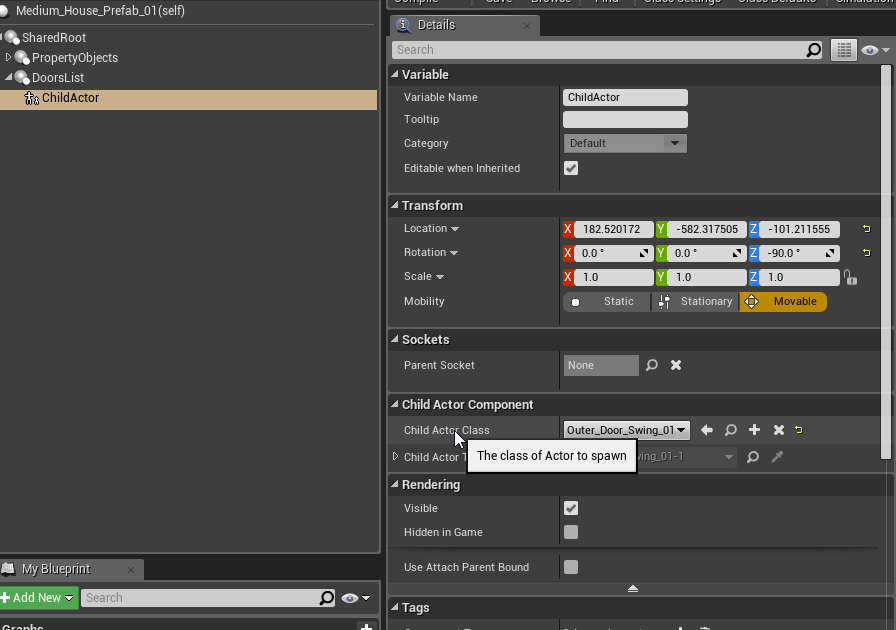 gloomy tiger
Hey guys--what usually happens after a MatchmakingRequest? I mean, regardless of the Game Service that's bridging this for us.
The Player X sends a request and what? He/she has to listen to a response when another player matched with him/she, right?
thin stratus
Yop
thin stratus
And why exactly can't I do this right now?
thin stratus
What keeps me from ticking DedicatedServer?
wary willow
Try it
thin stratus
No engine open. What happens?
wary willow
Nothing
thin stratus
Well that's unexpected
meager spade
wrong channel :/
versed socket
@meager spade It's possible to delete the stuff you post fyi
summer nova
@wary willow its been like that forever 😦
such a massive pain
the dedicated server gets the "vr input", and the PIE client cant do shit
when i want to test actual mp, i open a dedicated server through commandline
and then do a "launch game" option from the project file
 vocal dagger
Hi, I believe this goes in here, I have followed the guides to setup Steam on my project and I got it running, the only problem is that I cannot see some properties on runtime because no symbols loaded for steamclient64.dll, according to the guide I have to place the symbols in Engine/Binaries/ThirdParty/Steamworks/Win64 and Win32 (as I did), but I still wonder, should I tell Visual Studio to load those symbols manually as well? maybe someone here has run into the same issue
this is what I mean
 graceful cave
i just noticed something new in 4.19
this is in 4.18
this is in 4.19
seems like playername no longer replicates
faint fjord
This works to spawn the server, but when client trys to spawn they are spawned under the map...
timid pendant
@graceful cave Yeah PlayerName is Deprecated
vocal dagger
Looks like the Steam setup guides available online (Rama's and the Official UE4 guide) needs some updating, I still cannot find how to load the steam symbols properly 'UE4Editor.exe' (Win32): Loaded '[MySteamLocaton]\Steam\steamclient64.dll'. Cannot find or open the PDB file. and UE_4.19\Engine\Binaries\ThirdParty\Steamworks\Steamv139\Win64\steam_api64.dll'. Cannot find or open the PDB file.. Both files are right there.
 sly basin
@vocal dagger just went through that a couple months ago with 4.18.3, you're right it needs a bit of updating but it will work if you track down the errors one by one.
I don't know why your dlls aren't being loaded however, didn't run into that specific issue
I wish that Rama guy was on discord 😛
one thing you might want to look at - i notice in your code there Win32 and steamclient64.dll that seems to be a mismatch. There is a steamclient.dll (no 64)
vocal dagger
@sly basin yeah I did notice that as well, weird because I'm running the Win64 solution
 wary cedar
Is it specified that Reliable RPCs called on the remote machine in the same order they was invoked on the local machine?
grand kestrel
TCP is guaranteed reliable and ordered, yes
Unless you're sending them from different threads
Which likely doesn't apply to UE4, so yes
wary cedar
Do Reliable RPCs use TCP in UE4? I thought they use custom implementation over UDP (as more common approach for games)
grand kestrel
Oh, yeah, I'm half asleep
Quick google answers your question anyway
https://answers.unrealengine.com/questions/56017/is-the-order-of-execution-respected-on-reliable-rp.html
 fluid mica
Anybody know how I can have one mouse cursor in split screen that reacts to each screen properly? Currently if I get hit result it will use the viewport of player 1, even in the places where that viewport is covered by player 2 and 3 in the bottom.
vocal dagger
when you get a hit result from another player and you check GetOwningPlayer() on that widget it returns the player1?, what do you mean by HitResult?
fluid mica
Just an image from Google I wrote some stuff on.
Get Hit Result under Cursor by Object would return the floor of player 1 here and not the sky visible on player 2s screen
I'm sure that's intentional, because Mouse is part of the player controller for player 1. But what I would need is to have all split screens react to the mouse as if the mouse was a controller for all of them equally
@vocal dagger
Maybe if I change the Player Controller depending on screen position...?
vocal dagger
but GetHitResultUnderCursor() is a method from a PlayerController
are you calling this method from the correct PC?
fluid mica
Yeah, its local. That's why I'm saying that it might help to change the player controller depending on where the mouse is on the screen. Unfortunately can't test right now, cause source is building.
Didn't think of that tho when just asking this :9
I'm basically trying to emulate a software with multiple cameras/views
vocal dagger
nice, I have been playing around with the UI a lot lately and I know how weird it can get to achieve some very simple things, especially in local multiplayer
lean hornet
Issues with forwarding info and creating widget https://www.youtube.com/watch?v=7AHjCJUqGoo&feature=youtu.be

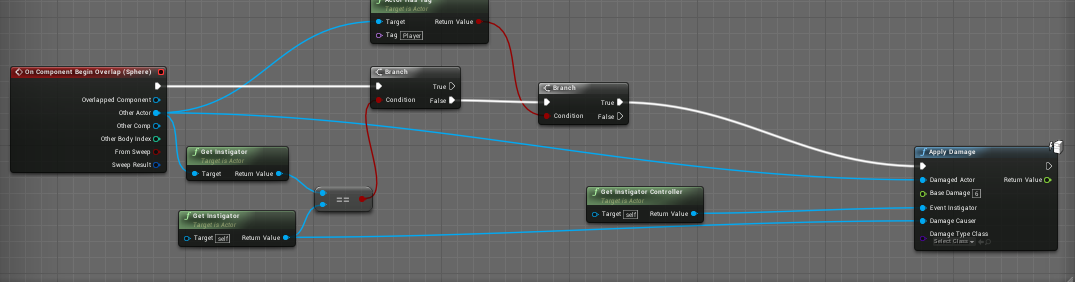
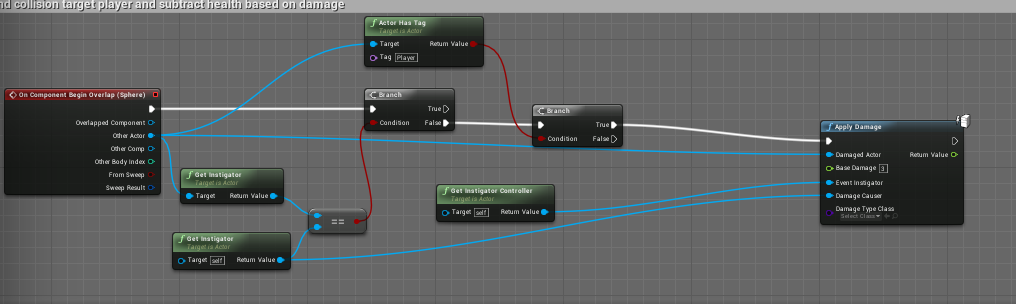
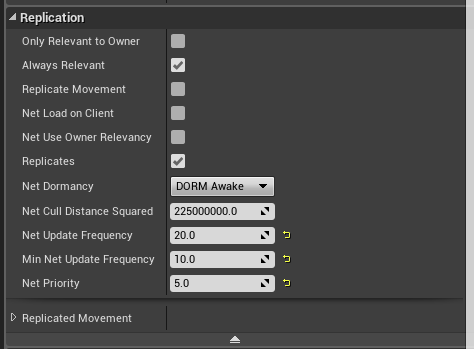


 fluid mica
Can't really check since at work (and need to get this stuff working before eastern :9), but your widget is not something you could show and hide in another widget? What I like to do is having widgets that contain many other widgets. And then I change the content of the the big widget. @lean hornet
So like 1 main menu widget with added child menus (in designer view), 1 HUD with single parts etc