#multiplayer
1 messages · Page 373 of 1
 mellow cipher
 pallid mesa
Yep, just on your RPC Multicast have a boolean input bSkipOwner and on remote you need to check if(!(IsLocallyControlled() || bSkipOwner)) {DoStuffSkippingOwner()}
So instead using variable replication condition, you just do it yourself
 ripe raptor
Welp, it's not BP specific, a TArray<TSubClassOf<SomeUObjectClass>> in code isn't initially replicating either.
 twin juniper
i want to make a game online MP. giving the other person the packaged game and then he starts t he game immediately connecting with my server.
i just want to share the pawn character
ripe raptor
Where can I override the default "destroy the pawn if the client disconnects" behavior?
 bitter oriole
@twin juniper What's your question ?
twin juniper
😦 replicating the pawn character. how?
i don't want to watch 20 videos of networking
can't find a single youtube tutorial max. 20 minutes
bitter oriole
Don't expect anything on a network to not take hours of work
twin juniper
as i said, i don't want to create warcraft!
just sharing data of pawn char.
and auto. connecting when starting .exe
bitter oriole
It's still going to take time and effort
twin juniper
omg :/
bitter oriole
People here can help but you can't start out saying you only have 20 minutes
twin juniper
it doesn't take more than 20 minutes. that's the joke
bitter oriole
There is no single tutorial because multiplayer is huge, it covers every aspect of your game. You might think you just want to share a pawn but you still said "server" (so you need a dedicated server), and you said "auto connect" (so you need to work on a way to connect to something)
It's the simplest case but it's still far from trivial
bitter oriole
Well, you need a way for your friends to know which IP address to connect to
That's what matchmaking does
Unless you are making a game specifically for you and your friend only and you have a static IP address that you hardcode into the game
bitter oriole
And this game is only for the two of you ?
bitter oriole
Then you have one less thing to worry about
twin juniper
or just connect 4 other players with my static ip. (for the future)
bitter oriole
So what have you tried for now ?
twin juniper
nothing.
bitter oriole
You don't have a game ?
twin juniper
i have
bitter oriole
So have you tried starting it with two players locally to see what happens ?
twin juniper
no?
bitter oriole
Then do that 😉
There are a few introduction videos here : https://www.unrealengine.com/en-US/blog/blueprint-networking-tutorials
Unreal Engine
A previous blog post offered a crash course in blueprint networking, but now we’re back with a thrilling six-part mini-series on creating blueprint content that works in a networked game!
2 hours overall, with basic functionality in 30minutes
I suggest you start here
twin juniper
i saw this one few months ago.
wasn't that much of a help.
just showed examples.
when i start 2 players now, one player starts with a fixed camera. no character
bitter oriole
Examples are what you're going to get
People don't do tutorials specifically for your own game
Watch, understand, and adapt
twin juniper
sigh okey
bitter oriole
I mean, adding multiplayer to my game prototype took me a week, and I've done multiplayer games before
For most games you're going to work on mutliplayer from day 1 to the last day you work on it
It's not just a game feature, it defines entirely how your game works
You really shouldn't expect it to just work, even with UE4
twin juniper
😦
@bitter oriole make a video what you learned and upload it on youtube ;D
... wtf
@twin juniper
opps i thought this was #lounge
i can't control the second player when setting field to 2 in number of players @bitter oriole
 zenith yarrow
@ripe raptor override PawnLeavingGame() in your controller, do not call super, simply call UnPosses()...
that should do it, you may have to test it out though...
ripe raptor
Yeah I figured it out in the meantime, thanks
bitter oriole
@twin juniper Take it slow and test everything super carefully
I log stuff on screen myself to check what happens
GEngine->AddOnScreenDebugMessage(-1, 10.f, FColor::Red, TEXT("Something happened"));
Make sure your input bindings work, make sure the output log doesn't say anything strange
 worn nymph
why i changed my name to this i print string on everything lol
bitter oriole
Your dev chain should be to test locally with one player, then move on to 2p in editor, then work with two computers locally, and then test on network
Take it slow
Networking is hard
worn nymph
programming is 10% making a sytem 90% debugging it
bitter oriole
Multiplayer programming is 10% making it work for one player, 70% making it work for two players locally, and 20% making it work in the real world, in my humble experience
At least with UE4+Steam, since they make the real-world part way easier
bitter oriole
Log it just like you log the first player
If you want to be sure about how it works, don't work with the editor
Launch the game by rightclicking the project file and clicking "launch", twice
Launch one as a listen server and do "open localhost" on the other
twin juniper
how do I do all of these things? 😄
i should open 2 unreal engine editors?
right click what project file? oO
bitter oriole
Your .uproject file.
twin juniper
i dont even log the first player....
bitter oriole
Multiplayer requires
- experience with making games with UE4
- experience with command lines, building code, hosting servers
- patience and time
Like I said earlier, it's hard
twin juniper
in a later stage it does require that, but not in the beginning?
bitter oriole
Multiplayer is hard from the beginning to the end
Because you can't do only half of it
Not to mention that you're going to need / want to be writing code at some point
Make sure you fully understand how everything you currently have works, to start with. Don't use marketplace Blueprints or funny plugins, if you have some
twin juniper
i am sure you don't understand me. can't be so hard regarding other youtubers .)
bitter oriole
Well, I'm a C++ programmer on my 2nd MP game, third game overall, and I find it hard 😃
I'm not the brightest person though
 mild hull
its not hard to get something simple going but its better to build your game while knowing the limitations you have to avoid than to run into them and than replan
twin juniper
i am just testing. i dont want to build anything upon that
 jolly siren
Latency is what makes everything fun 🙂
bitter oriole
My first game was a multiplayer one, a simple multiplayer shooter. Well, it took me a year and a half, and I never really got it working well
twin juniper
@bitter oriole in the past, when i read you, i find that you do stuff very complex 😄 and you explain things very complicated.. sooo 😛
bitter oriole
So @twin juniper back to how to get it to work : you know command lines ?
bitter oriole
I mean, the "cmd" tool in Windows
twin juniper
oh ya
bitter oriole
Right now you're playing from editor, but in the editor, multiplayer is kind of strange
it works differently, doesn't have all features, it's just weird
twin juniper
you mean output log in UE is important?
when 2nd player doesnt move etc?
i am reading it now
LogSpawn: Warning: SpawnActor failed because of collision at the spawn location [X=94.991 Y=1970.000 Z=2502.200] for [PhysicsBallBP_C]
LogGameMode: Warning: SpawnDefaultPawnAtTransform: Couldn't spawn Pawn of type PhysicsBallBP_C at Rotation: Pitch 0.000000 Yaw 0.000251 Roll 0.000000
bitter oriole
Well, that's a good start. No second player because, probably, you have only one player start
twin juniper
i tried with 2 player starts..
bitter oriole
See, this is part of why in-editor sucks for multiplayer
Your two players are spawning at the same time
They might be competing for the spawn point
twin juniper
o.ö
bitter oriole
You'll need to handle that by changing the spawn logic, but that's for later
For now you can work outside editor, start one game in listen server, move away from spawn, start another game, connect to server, and it will spawn
To start without editor, go to your project root directory, right click the blue .uproject file, hit launch.
Then open the console (²), and you can start a listen server, or connect to one
twin juniper
oh its working now... i gave spawns more space to breath... cough
it didnt even say bad size
ah
bitter oriole
Well, you'll need to work with the standalone (no-editor) modes at some point anyway
So it's okay
twin juniper
isnt standalone the one which makes the pc laggy?
😡
start one game in listen server.. oh .... so what is that?
bitter oriole
Listen server = server where you also play the game
As opposed to dedicated server (people connect to it, but it doesn't show anything or has inputs, and is usually in a datacenter without a screen or keyboard)
twin juniper
standalone is now loading
² is console? XD
ok i press ² but nothing happens
again, i am german.
bitter oriole
Might look at the editor options to check the console key
mild hull
below Esc if its default key
twin juniper
i am looking for hotkeys now... where they are
 bitter oriole
Does it work when you play in-editor ?
twin juniper
works as a key. in-editor ya.
bitter oriole
So you can open the console ?
mild hull
while opening console is important for starting listen server/ client i would create bat files
listen.bat
"EnginePath\Engine\Binaries\Win64\UE4Editor.exe" "ProjectPath\ProjectName.uproject" /Game/PathInContentFolder/MapName?listen -game -log
client.bat
"EnginePath\Engine\Binaries\Win64\UE4Editor.exe" "ProjectPath\ProjectName.uproject" 127.0.0.1 -game - log
twin juniper
what nex t stranger?
twin juniper
@bitter oriole
how to start a listen server
@Mizuki#7413 oh you meanme?
i didn't see that... thought you're asking a question
bitter oriole
Well, you had an answer
Do the two .bat scripts with the command line above and you're good to go
 hidden thorn
Is there a way of checking if a variable is updated across the network without displaying it on the UI (e.g. Overhead UI)
 tall grove
someone can recommend me a book/website/video.... to learn how to manage AI Multiplayer? Things like strategies , algorithms to select target .....
 winged badger
there are some resources pinned on this channel
as for AI multiplayer, the AIControllers do not exist on clients
so its not really a multiplayer issue
as for AI, the example docs on epic site should get you started (Bahviour Trees and Envirnonment Querry System)
 tawny parcel
Anyone know why dedicated server log files are not adding the .log extention when created?
 carmine frost
are you overriding the log filename via the command-line? 😃
twin juniper
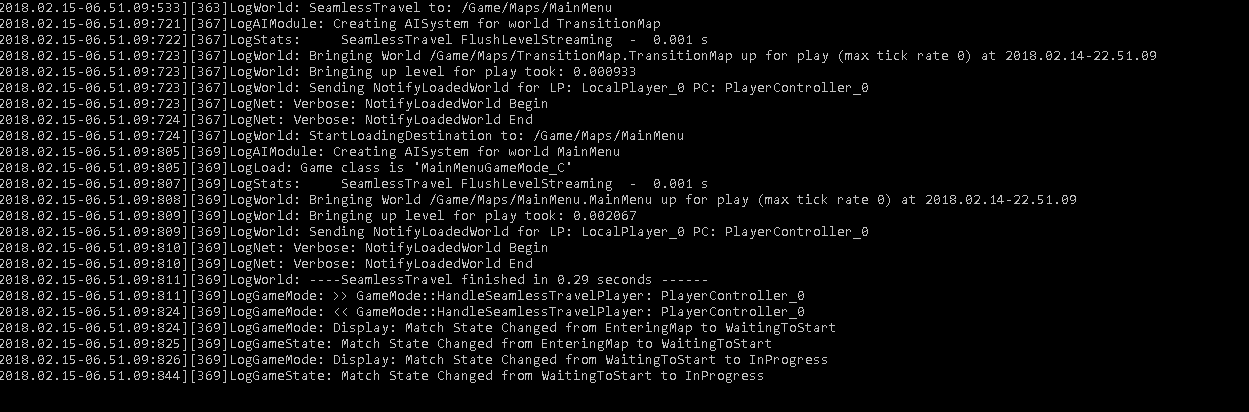
alright guys i finally figured out how to use seamless travel
but for some reason
it keeps loading my main menu
it just refreshes the main menu
when i write in the IP
PC->ClientTravel(IP, ETravelType::TRAVEL_Relative, true);
is there something wrong here?
the ip address is on an external serverr
 opaque seal
Damn replication/server/client stuff. While I got most of it working, it's really killing the fun (came back after a 4 day break of no interest).
 limber bluff
quick question; is it possible to hav mobile/vr players play with people playing on pc?
 thin stratus
Technically yes
As long as you find a way to connect them
Aka your own backend
In LAN it should work right away
Same for direct ip connection
@twin juniper Are you using Seamless Travel from MainMenu to Server?
@limber bluff
See a bit further up. Didn't see how old the message was so guess i ping you
@opaque seal Yeah, singleplayer gives you a lot more freedom as not wonder when what is replicated or connected. :P
thin stratus
Anyone did LevelStreaming with Multiplayer yet?
I'm trying to make sure that doors on a client won't open until the level is loaded.
Level Loading is replicated as far as I understood and I make sure to not call the ClientRPC until the "Loading Complete" executes.
However is that also making sure that the level loaded on the client?
@mystic pilot Do you have a minute for me?
Actually, I think you did something a bit different. You wanted to load levels that aren't in the levels tab
Nvm then. Hm
My main problem is, is the loading replicated or not and if not, does the Server need to load the level too or would it be enough to load it on the client (collision tracing etc would fail without server version)
twin juniper
@thin stratus yeah
ClientTravel(FString("108.22.33.44", ETravelMode::Relative, true);
thin stratus
So my testing for now gives: Load Level on Server -> Loads on everyone
I tested that on 2 Instances on the same PC. Will still have to check it on a package game on two different PCs.
twin juniper
Collision is server sided
load all of your levels on the server
and let clients stream them in and out
thin stratus
Loading a Level on the Server loads the level on the clients
At least in what I just debugged
Which is not bad, it's fine, as long as this is actually working when I package next time
limber bluff
@thin stratus thank you, sorry it took so long to notice
winged badger
might had multicasted one too many times there
twin juniper
@thin stratus did u figure it out?
thin stratus
@ripe raptor Don't put reliable on everything :P specially tick
@twin juniper Not more than I wrote
ripe raptor
This isn't Tick, it's a character's melee attack... the fast ones 😦
twin juniper
@thin stratus you have to enable "Client Sided Level Streaming" in AWorldSettings
It's a simple boolean toggle
twin juniper
@thin stratus It makes it so that you can load a level on the client side
thin stratus
So only on the Client?
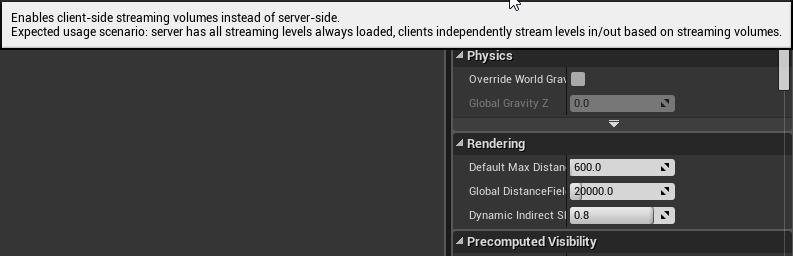 thin stratus
But I would still need to also load it on the Server to make sure that the client has no replication issues
Ah
Server has them all loaded
Is that default then or do I need to do something for that
twin juniper
It is default if youn are using world composition
but you can set it up however you want
thin stratus
So:
Server-Side:
- Server and Clients share loading
- Maps get loaded by Server
- Replicated to Clients
- Clients don't call the load function manually
Client-Side
- Server always has all Maps loaded
- Clients can locally decide if they want to load a map
@twin juniper
Just wanting to make sure I get exactly how this works
twin juniper
Using world composition? Or Manually?
If manually, you could load the map in gamemode begin play function if(HasAuthority()) {} and then, when a client connects they can just call Load Stream Level whenever they need to load a new section, or Unload Level when the yneed to unload.
But I do not believe maps loaded on the server get lreplicated to clients, only the collision will be replicated I believe (so you dont fall through the world)
Clients should be able to call Load Level manually
Does that make sense?
@thin stratus
Server:
Holds all levels, repllicates collison to clients
Maps loaded by server
Client:
Clients can call load on a specific section or use a level streaming volume
Clients can also unload a map as well
tall grove
@twin juniper do you know if this is posible with load level instance instead level streaming?
this = Server:
Holds all levels, repllicates collison to clients
Maps loaded by server
Client:
Clients can call load on a specific section or use a level streaming volume
Clients can also unload a map as well
twin juniper
I believe it's possible for all of the loading functions
Though I have not tested it
So I cannot say for sure.
But what I do know is that you are able to load and unload levels on the client side
tall grove
When i unload a map from server , client unloads too
i will test again cause i dont remember rigth now , but i think client cant load map without load on server
maybe loading map wiyhout rendering....
i will test all of this next day
tall grove
no , cause is not level streaming i use load level instance node...
thin stratus
Okay thing is
tall grove
i dont use volumes , should i use?
thin stratus
In the Server-Side thing
It def loads the Level for Clients if LoadLevel is called on Server
(Streaming, not instance!)
I have the Persistent level and 3 sublevels
Server Loads Sublevel -> all Clients load it
That's not ideal, cause the other clients don't need the level to be loaded
When you enable Client-Side, it would load only for the local Client
But for moving, trace checks etc, it still needs to be loaded on the Server
 summer nova
@thin stratus there is something that im doing right now about MP, that im not very sure about
summer nova
i have an enemy that can perform CombatActions (basically an anim with some extra logic). Right now its a multicast to sync it
thin stratus
Like, if all players are in the persistent level
Why would I load all maps on the Server
summer nova
but im thinking, could it be a repnotify?
thin stratus
@twin juniper
So either the Server has them all loaded already in Client-Side mode and I just have to deal with that
Or Loading on client will load on Server
summer nova
instead of doing a reliable multicast of "PlayCombatAnim()", it sets the replicated "CurrentCombatAnim" variable to something
thin stratus
Or Server has a way of only loading collision
summer nova
and it repnotifies
thin stratus
Or I need to load on client and on server
@summer nova technically a RepNotify isn't really needed here
The RPC should be enough
The Anim is Fire and Forget
twin juniper
Oh wow
thin stratus
If someone else comes in after it was fired, they don't need to get that state update
twin juniper
That doesn't sound normal.
summer nova
good enough then
tall grove
RepNotify only if you want let clients reconnect if they lost conexion and not for sync anim
summer nova
thanks, ill just use multicast
thin stratus
RepNotifies is always good to sync up late joiners and people coming into range
Like a Chest opening
Shouldn't be RPC
summer nova
another thing. What is the overhead of having replicated components
thin stratus
Cause if someone comes in later, the RPC won't call anymore
And the chest stays closed
thin stratus
Not much I assume
Check the component in c++
And see if they replicate something
If not, then no real overhead I would say
summer nova
thin stratus
@twin juniper I'll play around with the Client-Side stuff
After all I can print if a level is loaded or not
So I'll just see what happens if I tick the bool :D
twin juniper
Cedric
thin stratus
Thanks for the info though, didn't know about the bool
twin juniper
I really don't think it should be loading on clients if you load on the server
Otherwise, it would mean that the "bUseClientSidedLevelStreaming" would not be working as intended
Unless I am misunderstanding something?
twin juniper
Oh
twin juniper
Oh okay
thin stratus
Now I just want to know what I have to do with the server in the Client-Side approach
winged badger
as far as i know server needs to set the levels visible to client as well at some point
twin juniper
@thin stratus if you load all maps on the server though
Does it work?
With that boolean enabled
thin stratus
Idk that's my question
thin stratus
I mean, Client-Side approach
Local Client Loads -> Only Local Client gets map
twin juniper
back in 4.16 lol
thin stratus
But do I have to do something for hte Server
twin juniper
mhm
So here's how it works though
Collision is always server authoritative
So if you load that map on the client, the client walks i nto it, they will fall through the world if the server hasnt loaded that map as well
Make sense?
thin stratus
Lemme give you small portion of info then
It's a VR Project where you TP through the loaded levels
So no Physics/Gravity/Falling
Only thing that could be is that there is an actor in the scene
That needs to be tracable by Client and Server
To replicate
So I 100% need to be sure that if I have Server, ClientA and ClientB, that if either of the two Clients load the level, it is loaded on the server too
thin stratus
And the question persists -> Do I have to manually load on the Server too
In Client-Side
twin juniper
Yeah I believe so
I know that even with world composition, when I load a server I get this log
one sec
thin stratus
I'll probably just have to print "IsLevelLoaded"
On Server and Clients
And see what is true and what not
twin juniper
I really wish that unreal had an "IsAnyLevelLoading" function lol
thin stratus
Well I currently only have 3 levels
So I have the "LoadLevel->IsLevelLoaded" or what ever it is 3 times
(To debug)
twin juniper
yea
winged badger
if you're loading them manually, you can just make one @twin juniper
thin stratus
Well yeah, add them to an array when loading and remove when unloading
winged badger
set bIsAnyLevelLoading to true when you start a load and false it on completed
twin juniper
@winged badger true
thin stratus
Yeah we are having an Elevator that is closed when loading
And only opens the doors when loading is finished
twin juniper
So here's the thing though
- Why not load all levels on the server just to be 100% safe?
- If you cannot, just load on client, then call the same on the server
twin juniper
Not talking about always loaded lol
thin stratus
- The whole idea of LevelStreaming in my case is performance. We are talking about ArcViz Levels which are more and more to come.
twin juniper
you can set a level to be loaded via "Blueprint" (really just means, as defined by any code, blueprint,C++...etc)
thin stratus
- Currently I call load on Server and afterwards tell the Client to open the Elevator doors. I have no problem just placing another load for the client before opening the doors
So I would route for 2) anyway
twin juniper
You have to realize though that the server doesn't render graphics
So what would be the performance loss on the server?
twin juniper
oh
Okay that makes sense then
I hate listen servers lol
AHH
Honestly, though, I would simply just mess around with the client sided level streaming
I can't really say sadly.
thin stratus
All fine. The discussion helped a lot
Gonna implement that next time I work on the project
Cheers!
 thorn arrow
Hello, do you have good tutorial to know how to start replication for dedicated server and how handle MMO?
what engine is the most optimised, and easy to use for small team? UE4? or anything else?
thin stratus
UE4 is pretty optimized for small teams and big teams (GameJams show that)
There are no tutorials on Replication for Dedicated Servers. General replication applies to this.
UE4 can't handle MMOs by default.
Latest 4.19 changes will make it possible to have multiple players on the same server (100 people battle royal)
But I don't think the default UE4 servers can handle a few thousand people
So if at all, you'd need to work with small groups of players and move them around between servers
And then it might be easier to setup your own backend
instead of ue4 servers
@thorn arrow
But this is just my 2cents
Can totally be that someone already managed to get MMO working with pre 4.19 and more than 100 players
Probably with engine changes or own code though
thorn arrow
Yhea, ok i'm looking for custom engine, like panda3D, but if another framework or engine is made for make easier the creation of mmo, that would be great
thin stratus
There are a few systems that integrate into any sort of engine
So you might actually be better with chosing the engine NOT on the base of "mmo or not"
And rather check if you can find a thirdparty service
that you can integrate into the engine
Obv if there is an engine for MMOs and you are fine with what they offer, then take it
 graceful lynx
I agree with @thin stratus he's 100% right. If you're chosing an engine for an MMO, look at it's adaptability to put in your own third party networking that allows you the greatest control over your packets. The engine will likely be handling local physics collisions, as well as rendering etc. But something like Smartfox Server 2x, or better yet something like RakNet is highly recommended but you'll need to modify it to a instanced based room MMO system. With a larger overworld chat system and a decently fast DB handling. You'll also need to figure out scaling deployments so that you can scale out laterally rather than horizontally.
It's all quite do-able at this point, but expect a ton of challenges. I got help from some heavyweights when I was starting on mine
@thorn arrow expect to need to modify even the third party software like RakNet as it's behind on security updates and has at least one memory leak I'm pretty sure
We chose UE4 for our MMO because having the ability to peer into the source made us not hate life.
@thin stratus Do you happen to know if there's any notes on the IHTTP module? I've been having some significant issues with it on only OSX, it seems like it's doing some weird shit and automatically redicting the response and clearing the redirect-response header and therefore making me lose that information (which I need for a new auth setup to be CAS compliant)
I haven't found anything on it on google, unreal's answer board, or in source that's relatively useful
graceful lynx
alright :/ I've got windows working at the moment, so it's really OSX that's the issue
but I guess I'll just dig through source more and try to figure it out haha
graceful lynx
It can't lol, you need to use a third party library
RakNet works out pretty well in my experience if you modify it quite a bit
twin juniper
im not sure why though
is it literally just
bandwidth?
or is it an engine issue
like ticking too much, (this also could be using too much bandwidth if we are sending stuff to often)
lol
graceful lynx
There's a few reasons why it doesn't work out too well. The first is how Unreal's server needs an unreal server build, which is heavier generally than a third party server library. The second, yes is bandwidth, Unreal is an FPS engine slightly. It does very well for high frequency check in games that need frequent check ins. The third major thing is that it's not really optimized to work too well with giant worlds while networked, and I don't believe it has a system to LOD in and out players into different tick serialization groups depending on location within a larger map. On top of this it would take quite abit of work to add that in. When all's said and done, you can get something done in a much easier way by using a third party networking library for this stuff
that said, there are always exceptions to rules, and if you were to dig into unreal source and begin to tweak it, you may be able to get it to do what you want.
I'd really recommend that you do some reading first on what classic MMO Architecture looks like before you chose and engine, I highly recommend this book by the IT Hare. http://ithare.com/contents-of-development-and-deployment-of-massively-multiplayer-games-from-social-games-to-mmofps-with-stock-exchanges-in-between/

Table of Contents of the upcoming book on various aspects of game development and deployment, from business requirements to bot fighting
this book is super old but good in some of it's content: https://www.amazon.com/Massively-Multiplayer-Game-Development-v/dp/1584503904/ref=sr_1_2?s=books&ie=UTF8&qid=1518721463&sr=1-2&keywords=Massively+Multiplayer+Game+Development I really recommend looking at the "Big Brother Server" chapter
Keep in mind, that the amazon book I mentioned above, is 13 years old... So do not take it as gospel, you should definitely run it through a lens of "this is what used to be done". What's done now is far more distributed.
On another note, if anyone know what the heck is going on with the http module on OSX, please let me know, because I've been staring at the objective c wrapper for the http handling for applehttp so much for any clue of why it's clearing my redirection packet that contains the header content I need that my eyes are getting blurry.
 dull tapir
soo... trying to get into multiplayer once again and I still can't really get my head around it the whole replication thing. Dunno why I struggle so much with it. I created a game mode and a player controller. Inside the game mode I am using OnPostLogin to call an event inside the player controller, which I have set to Run on owning Client. Right now the event just prints a string, but when I test there is no string being printed? What am I doing wrong? 😦 I made sure both actors have Replicates set to true and also made sure it's using the correct game mode in my level and that I've set the correct player controller inside the game mode.
 stark dome
is there a delegate that gets called when the gamestate is valid
 zenith wyvern
whats a good place to store account level data that's not replicated around to other clients?
playercontroller?
stark dome
its up to you really, localplayer/playerstate/playercontroller
 lost tinsel
 hollow wraith
hiyas, quick question, do you have to call OnlineSubsystem's Init() yourself or does that get called automatically? asking because by just including the plugin Steam Overlay works, but I am not sure if it's fully initted for standalone client and standalone dedicated
winged badger
@stark dome its valid as soon as its construction script is done
you can put your own
stark dome
@winged badger theres nothing in engine for it?
takes a while for it be valid on clients
winged badger
damn, multiplayer channel
stark dome
yeah other variables are sometimes replicated before it which is a pita
winged badger
its valid when it starts replicating MatchState
if you're using GameMode/StateBase
altho, its cunstruction script is run on client as well, after its replicated
if you fire the event from the very end of it, it should be valid at that point
or from PostInitializeComponent() override, which comes right after
 untold sun
Hey guys I'm having an issue with multiplayer.
My friend and I are trying to test our game outside the editor using Hamachii (the ip is appended at the end of our game shortcut) and it's not connecting. The error we're getting is that the game can't join the session, however it seems to find it just fine. Does this BP look okay?
Could our issue be unforwarded ports?
 livid ruin
@everyone
winged badger
theoretically, yes
untold sun
I'll let you know if it does momentarily
winged badger
you'll also need to set it in CreateSession node
untold sun
Gotcha
untold sun
Alright I turned LAN on and we tested it and still no luck. We tried multiple times, one with a public IP address (with forwarded ports 7777 and 7778) and that got us nowhere, and hamachi got us nowhere as well. Even with LAN
You seem to know what you're talking about - would you be able to call or something to help us sort this out faster?
livid ruin
@winged badger Im in this project as well with Aaron. Any help you could give us would be greatly appreciated
 worthy wasp
am i supposed to do anything else after OnlineSub->GetSessionInterface()->UpdateSession(GameSessionName, MySessSettings, true) ?? It is returning true and when i set a CUSTOMSEARCHINT1 setting as the SessionSettings... FindSessions isnt finding this session that SHOULD be updated....
            MySessSettings.Set(SETTING_CUSTOMSEARCHINT1, FString("PrivateMatch"), EOnlineDataAdvertisementType::ViaOnlineService);
        else
            MySessSettings.Set(SETTING_CUSTOMSEARCHINT1, FString("PublicMatch"), EOnlineDataAdvertisementType::ViaOnlineService);
Is there a followup procedure that needs to be ran after UpdateSession() ?
the session is Findable before running this UpdateSession function.... afterwards - its undetectable
 dull jasper
@livid ruin why are u using hamachi?
any1 know if the items that drop from crates and players in fortnite are physics with replicated location or some custom system?
opaque seal
Is there any decent guides on making backend servers? Dedicated servers that start/stop when new sessions are formed. A cloud/master server kind of setup, where you start to manage things like persistant statistics, and not having player-hosted servers.
Garden wall.
livid ruin
@dull jasper we have stopped using it now. But we are unsure as to why the non-host client cannot find the host game.
thin stratus
@opaque seal One way is using cloudhosting like gamelift
And gamesparks for the stats and matchmaking
worthy wasp
@opaque seal - coming from a bachelors in computer networking and a 10 year higher-end sales & technical setup/support position for IT... i'm going to say that all of that stuff is pretty advanced. if you're not an above intermediate level of programming, and understand more than just code syntax - but server technologies, TCP/IP stack + above all else - communication standards for FullStack development - then you're in over your head already.
I dont even pretend to know much about the DEVELOPMENT side of backend servers, but i do understand their functionality and communications methods. To be honest - what Cedric just said is the best option - using a Backend as a Service (BAAS) cloud solution. Photon, Amazon Web Services, Gamesparks, SpatialOS
thin stratus
Both have plugins for ue4
opaque seal
I have servers at home I can utilise for this for now, forcing the gvame to use them.
Yeah these things don't scare me away, I'm ready.
livid ruin
Is anyone familiar with how to do multiplayer outside of the editor with clients?
thin stratus
If you want to do it at home then you'd need to write your own backend
opaque seal
cedric, yes. And that was the capacity of my question. Any half decent guides around on the fundamentals?
thin stratus
@livid ruin Host and Connect
Enough tutorials about that out there
@opaque seal doubt
worthy wasp
you can ge tby pretty far with PHP & scripting - but when you come to more robust & heavier traffic solutions - look up Mike Allar's stuff on youtube
thin stratus
Most things are basic server and database tutorials
You have to utilize these to code your backend
worthy wasp
he does alot of Jersey backend stuff in a few of his videos
livid ruin
@thin stratus we have tried everything, and cannot seem to get the non-host client to connect with our host. Could you assist us I hook you up with our main dev?
worthy wasp
@thin stratus - can you check out my above message? having an issue with UpdateSession().... the once-browsable session when updated becomes no longer browseable from FindSessions
thin stratus
Eeehm
Last time i used that i didn't have any problems like that
Are you pasting in all old settings with the change
opaque seal
I'm familiar with SQL coding (been running gmod servers for years) and added my own stuff to them over time. But with those setups, it's still very local, a server only runs so many dedi's, and they run 24/7 and available through a server browser. It's been a while since I've written anything heavy in PHP though. Where in this instance I want to have it more like, when you start a session/join a lobby, the backend(cloud) creates the dedi instance to which the clients are told to connect. Probably very much like Fortnite. Keeps players from running the servers.
It would allow persistance too without players being able to crack locally stored information on which they can then host a game.
thin stratus
That's what gamelift does for you
opaque seal
Obviously not an overnight solution and would expect it to take a fair amount of effort to do.
thin stratus
Costs money of course
opaque seal
I'll check it out.
worthy wasp
@pale turtle - yes i've tried even doing the old settings
goes from browseable to nothing
thin stratus
If you want that to code that yourself you'd need a service that can launch new servers on demand and talk with the person who requested that etc
opaque seal
Doesn't that sound fun?
thin stratus
@worthy wasp hmpf
thin stratus
@opaque seal well i guess a basic windows hosted web service can do that
The net stuff of vs in c# is quite a thing
worthy wasp
but when i FindSessions from the remote client - it no longer has entries
i debug stepped through the UpdateSession() function - everything is valid & good 😦
thin stratus
@worthy wasp no idea here, sorry. As said i didn't have problems. No idea what's going wrong
worthy wasp
all good
livid ruin
@thin stratus this is our current system
thin stratus
I simply changed a boolean or so when i used it
livid ruin
opaque seal
Are you traveling maps at the same time as updating the session?
worthy wasp
no ph33x
staying in same lobby UI with some updates due to the boolean return from UpdateSession()
opaque seal
wow, gamelift looks sick on paper, I just want to give them money even if I dont use it.
thin stratus
@opaque seal It works quite well
I combined it with gamesparks
Gamesparks does the matchmaking and asks gamelift via http request for a server
Etc.
But yeah. Money
livid ruin
@thin stratus We can launch our game, and hit "host" and it will create a new game. Then on a separate client on the same computer we hit join and it will join into the same instance. But, if I hit "host" then my friend on another computer hits "join" with the same IP inputted into our target on the shortcut. It will not connect us.
dull jasper
@livid ruin one starts the game as listen, and the other opens the IP
kinda have to go afk now tho sry
dull jasper
if u do a dev build u can join over console
thin stratus
So what are you using?
untold sun
Hey cedric im in the project with advection
we're currently using a blueprint
Multiplayer functionality works fine in our game, we just cant do it over a network. Currently we just have a system where we take the executable and run it through an ip like so: "game.exe 192.168.x.y IP"
thin stratus
Well let me just give you some info as most people here can help you anyway
Same computer:
- Session Joining
- IP Joining 127.0.0.1
Same LAN:
- Session Joining
- IP Joining 192.168....
Internet:
- Session Joining only via Subsystem like steam cause of missing masterserver
- IP Joining via public IP
For ip joining you need port 7777 to be opened
That's all info I can give right now. Gf forces me to put phone away
All others here can probably help you the same though!
opaque seal
If you can connect on the same system with connect 127.0.0.1:7777 (assuming 7777 is port)
But, it won't work between 2 systems, tells me your firewall may not have picked up the new game, which I've had from time to time. Eg: On my windows server system, the firewall won't pick up the new game till I do a LAN search (Steam search does not seem to kick the firewall off) and once I allow it, it can connect either way.
livid ruin
So how would you go about doing a LAN search?
opaque seal
Well for me that was a find session using bLANTrue or w/e it was. But that was already in my game. It would be best to allow the port through the firewall

I add UDP as well cause I can't be stuffed working out which protocol was bring used.
untold sun
are these inbount rules or outbound
livid ruin
@opaque seal
opaque seal
Inbound
Firewalls don't normally block outbound traffic by default, at least not in the scope of that we're talking about, but you can always add the port to both if you want.
untold sun
Okay we forwarded out ports through the firewall. How do we connect to each other now? Our game works locally just fine, so now we need to connect multiple computers. Should we enable LAN even though we aren't in a local network? @opaque seal
opaque seal
Well I thought you were on a local network.
untold sun
We arent :/
livid ruin
We are trying to connect over the internet
opaque seal
Is there a reason you aren't using the Steam subsystem?
Which does all the magic connecting of clients without this manual work?
From here, the host will need to forward port 7777 in their router as well.
untold sun
We looked into it and it seemed more complicated
untold sun
Okay that works. 7777 is forwarded in both of our routers
opaque seal
Connects n shit?
untold sun
Nope.. were looking into steamworks now
dull tapir
having a bit of a weird issue myself, maybe someone can help. Got one PC hosting a session in LAN and another PC joining session. It finds the session alright and joins alright, but then it just gets stuck. It never actually connects to the server or loads the level. Reading through the logs on the host PC it never actually detects any incoming connections. The last line on the client log is just "LogNet: Game client on port 7777, rate 10000"
if I test within the editor it works fine - this only happens when using a packaged project on 2 different PCs
 graceful cave
i noticed when testing a new map that was all BSP that the tickrate on a listen server is identical to the server framerate
so my friends were getting insane lag until i manually capped it
is there a way to override that and set a tickrate while still having a high framerate?
opaque seal
graceful cave
not sure its that
its as if a dedicated server was running with a tickrate of 400
ive added this to my engine ini
would that effectively set it to 50 regardless of my framerate as the host?
opaque seal
NetServerMaxTickRate=nn
graceful cave
would i enter that in the same place?
assuming im using null as the subsystem
couldnt get direct ip connect working with steam
opaque seal
DefaultEngine.ini
Direct IP connect doesn't use Steam as far as I know. You use the Steam subsystem and it kind if sits on top of your Session. When you create a session while running Steam subsystem, you find your Host using the Find Sessions BP node, for example.
graceful cave
yeah i have that set up but it didnt work
direct ip actually worked with steam one day but never after that
opaque seal
A test Steam project that I used to help me find a fault in my current project: https://answers.unrealengine.com/storage/attachments/132195-steamproject.zip
graceful cave
it says im playing spacewar when i launch the game when its enabled
opaque seal
Are you doing the MP shooter tutorial?
opaque seal
See if the above project works first, that will tell you connectivity is all good.
graceful cave
should i package it so a friend can help test?
dull tapir
Found a solution to my problem earlier. Apparently there's another variable you need to set on the listen server to actually tell it that it's a LAN server... gotta love those non-existent checkboxes which you need to spend hours searching on Google for
opaque seal
Yeah, or he can download it and run it in UE, and both play standalone, should also work
 dull tapir
No, after create session when you open level you use option listen, but if it's LAN you also need to add ?bIsLanMatch=1 - took me bloody ages to find that
graceful cave
ok that worked
he could connect to me
is there a way to get that functionality with a server browser?
opaque seal
yes, there are tutorials that explain that. essentially you're just getting the first available session, where instead of joining, you can add it to a list using widgets etc. And in the widget you can have a join button
opaque seal
Hi guys, this is my last multiplayer tutorial :) Add "set game input only". For mouse function. Sorry for bad graphics and pixels. // Project download: https...
That video isn't the best (no voice) but it's got the process. Or just search around, there are better ones, I just can't seem to find one right now.
 random hazel
hey guys, i am having trouble with linetrace not getting any collision results on listen server. works fine on dedicated and local. i am doing it in c++ with visibility flag.
any initial thoughts on why only listen server?
a side note as well. when i switch the editor dedicated flag on, the linetrace doesn't work until i reset the editor
 slim holly
what does the debug say
dedicated server has some limitations for sure, it doesn't have anything visual
for example, it does not know what animation pose player might have but it sees the variables that drive the poses
-> you cannot get socket position on dedicated server
random hazel
there is no debug. i have a bulletmanager in c++. on server side gun BP it calls AddBullet if it is the server.
when i breakpoint on the LineTrace call in c++ as a dedicated server it the collision succeeds and everything works fine. when I am a listen server, it goes to the same path, the bullet manager tick shows there's a bullet being calculated, but the LineTrace always fails
i am line tracing the ECC_Visibility channel and testing against static meshes
 solar flower
They're gonna tell you to read the pinned messages
 muted sigil
Me or Juan?
solar flower
You, the one from Victor
muted sigil
Oh yeah. I was told that before and didn't find anything relevant in the pinned messages
solar flower
The networking intro
muted sigil
I've watched all the networking videos and stuff
I just have no idea how to use gamemodes/gamestates to make a deathmatch game mode
solar flower
I definitely don't have the most experience with this, but i did get steam multiplayer working over a couple months last year. Get the Multiplayer Shootout example project and pull it all apart
Then also go through the networking tutorial put out by epic
You'll understand the different classes after that
muted sigil
Alright, will do, thanks
solar flower
The comendium is great too, it's in the pinned msgs
solar flower
You trying to do it in blueprints or code?
If you're using blueprints, you should follow along with this before asking where to begin https://docs.unrealengine.com/latest/INT/Videos/PLZlv_N0_O1gYqSlbGQVKsRg6fpxWndZqZ/abmzWUWxy1U/index.html

In this video we take a look at the finished project and step through each of the features that will be covered in this series. We show our functional Main Menu and its options, a lobby where players can chat with one another and select their characters for the game, some server options such as changing the map or match time as well as the ability to kick players from the lobby, all of this working with Steam integration. So if you are wondering how to build a networked game through Blueprints with Steam, this is the series for you!
@fossil spoke Shouldn't this be pinned?
muted sigil
My bad, didn't see the messages
 fossil spoke
muted sigil
fossil spoke
muted sigil
Blueprint
fossil spoke
Sure, but it shouldnt be that difficult for others to find. Like seriously if you cant go through the UE4 docs looking for resources then your not really having an go.
solar flower
It's slightly dated, but 90% accurate and way better than most.
Totally agree, but if we keep telling everyone to go through the pinned msgs...might as well put the best stuff in there?
The majority of questions in this server are answered by the first google result lol
 stray harbor
Hey does anyone know how to know when a player finishes a seamless load? on the client side. I was trying with APlayerController::PostSeamlessTravel, but it's server side only. 😦
I'm throwing in an RPC to call a function on the client for now, but there's got to be a better way
mellow cipher
Are there any guides/examples/blog posts/papers on client auth pawns in ue4?
twin juniper
Hi, I'm trying to make an MMO game and I need help with a thing. In a MMO game that has a Lobby, what is the correct way to manage the connections? using UE dedicated server or websockets? (for chat, friend list, users in lobby, buy items in the shop, add friends and of course interact with a database). I found an answer in this post: https://answers.unrealengine.com/questions/738404/chat-system-shouldnt-chat-system-have-a-dedicated.html, but I don't know if It's correct.
thin stratus
@solar flower @fossil spoke Can we not pin this?
It's really bad
Nothing against them creating a Tutorial. I'm happy they did. But it's FULL of errors and mistakes.
They simply teach a lot of wrong knowledge.
They rather read my compendium to get a good grasp of the basics and THEN watch the tutorial to hopefully spot all the mistakes and correct them while working on it.
@stray harbor That does sound like the way though
You can check the API of AActor, APlayerController or GameMode etc. and see if something sticks out
@abxyxx#1337 Not 100% sure but there was a MovementComponent blog post
Lemme check if that was client auth
Probably just normal authoritive networking
But maybe it helps as a start
There should also be some variables for the ini files that let you specify how much of an offset the client is allowed to have before the server corrects stuff
@twin juniper You might want to use different connection layers for the different options.
A Chat, if it's only that in that lobby, can be with RPCs
Friends, Friendlist etc. needs to be connected to your Database
So that is Client (Programm) -> Database
Outside chatting to friends would ran over a Chat server
Which you could also handle your session chats with if wanted
Main problem you'll run into is taht UE4's servers don't support MMO class amounts of players
Battle Royal games with 100 players already make UE4 look "not so good"
They stripped down so much data, that sometimes doors don't open properly cause they don't replicate it with a high priority
If you implement your own movement and collision stuff, that is more lightweight than the character movement component, then you could maybe have more players
stray harbor
@thin stratus Yeah there's actually a GameSession version of that call which is what I would have ended up using if we were using Game Sessions 😃 I actually ended up overloading AGameMode::HandleSeamlessTravelPlayer and just made it always recreate the player controller, which solved the original issue I was having (Basically trying to seamless travel, but don't actually want to keep playercontroller state)
thin stratus
Isn't GameSession class also only Server side?
stray harbor
Mmmm maybe, I'm not sure, we stubbed it out and don't use it at all
Anything with Session in the name I've found to be pretty bad
Tons of state duplication. Like I just rewrote our LAN 'session' beacon stuff, everything's been so much smoother
Like: The host gets a server query, just send the number of players from the GameState back.
No need to jump through a dozen hoops setting up an FNamedOnlineSession and all of that in our case
thin stratus
Well, I'm pretty sure that Clients don't have access to AGameSession
So well, I think in general Epic didn't add much for Clients to know when something happens.
Despite BeginPlay maybe
And that's sometimes too early
OnPossessed -> ClientRPC
Is kinda similar to your problem
Also, isn't OnSwapPlayerControllers a bit early for an RPC?
Or is that already allowed to RPC on the new Controller?
I know that I'm not allowed to spawn and possess at that stage
stray harbor
Possibly... we'll see heh
I'm off, thanks for the networking guide cedric! I started this job like 6 months ago with basically no unreal experience and now people come to me because "I seem to know the most about unreal" largely thanks to stuff like your guide \o/
thin stratus
@stray harbor (: No biggie. Glad it helps!
twin juniper
@thin stratus My idea is after login into the server, the player is sent to the main menu, this main menu has a chat and a window with the players list
connected to the server (maybe separated with channels), also main menu has a shop where the user can buy items, and a room list.
In that rooms is where the gameplay is (the map, gamemode, players characters, etc).
I'm confussed because I think I should use a different connection for the main menu and for keeping the chat in every part of the game (including when playing), maybe Websockets or similar, and the Unreal dedicated server only for these rooms.
I think each room can handle 12 max players amount, but I don't know the max rooms allowed for each server.
(Sorry for the bad english)
thin stratus
Well yes, you need to have a second layer of connection
Number 1. handles your game session. PlayerLocation, etc.
Number2. handles everything outside a session. So Friends, Chat, Login, Shop, etc.
Game Session is what you call Room
UE4's Dedicated Servers can be the Rooms with a Game Session
However they don't support THAT many players.
So if you want something like Orgrimmar in WoW where multiple hundred players stand around, you might want to use something else for the rooms and replication
Like RakNet or so
In general, Dedicated Servers aren't really meant for MMOs anyway
UE4 is a Shooter engine that builds up on old classics like Unreal Tournament
So 16 vs 16
And when the game is over you'll leave and search a new server (well or stay and play another round)
For Number 2, the chat and stuff, you don't really want to look at UE4
But rather at what services, databases, etc. you want to integrate
Cause with c++, ue4 can basically make use of everything that has a c++ SDK
twin juniper
then there is no problem if each room (session game) handles a max of 12 players? I only want 12 or 16 players for each room, It's a shooter with gamemodes like DM or TDM
Is not it a problem if I have 100 of those rooms, for example?
slim holly
that's a lot of data tho
100 rooms * 12 players * bytes every player transfers back AND forth
vector3 is... 12 bytes iirc
oh and then you multiply all of it with updaterate
which is usually minimum of 30 for shooter game
thin stratus
well each server could hold 12 players, yes
twin juniper
So, would it be to have more than one dedicated server per region? p2p?
thin stratus
One per 12 players
:P
You for 120 players you need to host 10 servers
Depending on your game, that would need 1-2 physical servers
If not more
For 1200 players you are at 100 servers
So 10-20 physical serverse
It gets expensive fast
So you might want to look into a more lightweight system
like smartfox or raknet i guess
twin juniper
Ok, thanks!
twin juniper
is replicating in Pawn blueprint same as in Character?
jolly siren
Any one know of a good way to smooth out network spikes in character movement for yourself? When I get network spikes the movement jerks you to a new position. I'm talking about the local player, not other players.
winged badger
you sure its the network?
bitter oriole
Rollback/Replay
jolly siren
yes, I'm sure it's the network
Only really happens for me on my US west coast server (I'm located in eastern US and I get more frequent network spikes to west servers)
winged badger
the only way i can think of server can jerk the client to a new position is if it doesn't receive the input
it pulls you "back"?
jolly siren
No, the client misses some position updates and it gives a jerky/teleport feel
It's fairly rare, but the network spikes do happen like 5-10 times per match
winged badger
this might be the service provider's fault
it jerks only the owning client? other players appear smooth?
jolly siren
It's more noticeable with the owning client at least
winged badger
when you provide the input owning client simulates it locally, and forwards the input to server
jolly siren
I've been waiting for 4.19 to see if it helps at all since it fixes various networking bugs I've been waiting on
winged badger
server then "corrects" the clients positions based on what it got
if you have another way that doesn't use unreal to test how stable your network connection is to the west coast server
i'd go for it
since you might lose a week trying to fix this only to realize there is nothing you could had done
jolly siren
right, yeah I'm going to document the exact symptoms a bit better and also see if 4.19 helps. Then I'll profile the network more.
winged badger
but if nothing except player movement is affected
odds are the server doesn't get all the input data
and it would be felt more for locally controller characters
bitter oriole
If you're already doing rollback & replay, you might want a smooth interpolation rather than a reset
Dunno anything about the game but well
 gleaming bobcat
On client side I am calling SetActorRotation(...). Why it work on 50% ? Sometimes it works sometimes not
jolly siren
Server is correcting it before you can see it? Need more info, what are you calling SetActorRotation on?
gleaming bobcat
one sec please
SetActorRotation on Actor
ACharacter
he is not using controller roation
jolly siren
So why aren't you rotating it on the server?
gleaming bobcat
On server side the rotation is correct on owning player not
jolly siren
ah
gleaming bobcat
It does not help me
Owning player is still not rotated only sometimes
If set SetActor player on client side and then call RPC (server) and on server side A call SetActorRotation() replication works to all other clients but not on Owning player client
gleaming bobcat
Really don't know
I created new template top down. Just calling SetActorRotation in player controller on Character and you have 50% chance it will happen
twin juniper
Is it just me or is the UT weapon codebase extremely difficult to follow? From button press to weapon firing a bullet there are about a million lines of code
It seems as though instead of having a master weapon class for each kind of weapon like shootergame does (instant / projectile), they have one gigantic master weapon class that can do instant, cone and projectile fires
but it's all squeezed into the same class with loads of checks everywhere. I guess this is what a pro multiplayer game actually looks like!
 cloud ledge
@twin juniper it's the same problem that plagues charactermovementcomponent
slim holly
different projectile types require different type of replication in order to save bandwidth
and ofc, to actually function properly
for example, flak cannon: it's cheaper to send the RPC with seed number byte or int for the projectile pattern, than sending transform for each pellet
but that doesn't work with assault rifles
gleaming bobcat
Anybody experienced with SetActorRotation ?
twin juniper
@slim holly exactly which makes even more complexity since they have all of the base logic in one huge master file
gleaming bobcat
Nobody ...
slim holly
what about rotation
gleaming bobcat
How I can spend so many hours on something so trivial 😦
slim holly
I assume the script size is merely to reduce input lag
gleaming bobcat
let' say
you will create C++ topdown template
then you will override OnSetDestinationPressed by this
and this works for other clients but you have 50% chance it works on Role == AutonomousProxy
twin juniper
@slim holly is that replying to me? Fewer very large classes has less input lag than more smaller classes??
All of the weaps have their own child cpp class for very specific stuff and then child bps from that
slim holly
or it could be internal working method, who knows
gleaming bobcat
I am looking for anybody who have experience with SetActorRotation in multiplayer. I am going to pay a money for proper solution 😃
winged badger
what did you mean by it has 50% chance of working?
what happens when it does and doesn't work, and did you guesstimate the 50%, or does it fail exacly every 2nd time
gleaming bobcat
It's very random based 😦
Look what I want to achive is : Set rotation straight on client side. Because player in this case should not be affected by latency
then you will send RPC to server : "Hey I m going to set rotation to something" and the server will let other clients about my rotation change
pallid mesa
answer is by Zak M, so you can take it happily
and obv, location or rotation
it really doesn't matter, you would do it the same way
winged badger
and what happens when it fails?
gleaming bobcat
@ Zlo wht you mean ?
winged badger
i mean server sees your clients pawn looking straight up or w/e
what does the owning client see?
gleaming bobcat
The thing is
thin stratus
It would help everyone if you'd just list what should happen and what does happen.
And that for Owning Client, Server and Other Clients.
Then people can way better understand what is "Doesn't work"
gleaming bobcat
winged badger
you pasted the code above
gleaming bobcat
ah sorry then
gleaming bobcat
On all other clients it works on 100%
thin stratus
You are currently doing this:
"My light in my room doesn't turn on. I'm using the light switch. Sometimes it works, sometimes not."
gleaming bobcat
but the Autonomous_Proxy works on 50%
thin stratus
Now tell me why my light doesn't work.
Also you are repeating yourself. We already understood that something doesn't work all the time
you need to present information :D
thin stratus
We got that already
Don't repeat yourself again
I want to know WHAT exactly happens
Does it turn to 85°
Does it make a back flip
gleaming bobcat
I did not tell you ?
thin stratus
You say, it works 50% of the time on the local client.
But not what exactly happens if it doesn't work
Does the character not turn at all?
gleaming bobcat
the character on Role == AutonomosProxy is rotated on 50%
gleaming bobcat
Sometimes it's works sometimes not
thin stratus
I give up
gleaming bobcat
sometimes is rotated sometimes not at all
thin stratus
Ah, "not at all" is already more information than before
Now show people what how your character is setup.
Maybe share some screenshots or gifs.
Non of us has the topdown template installed and most people also won't do that to debug your issue
winged badger
for example: When that code runs, everyone should see your character facing up. Server and other clients see your character facing up, while owning client sees it,,, ?
thin stratus
I'm simply trying to get more information out of you
Cause right now, no one here knows why it doesn't work
gleaming bobcat
Ok so
this is my setup aboput replication :
I don;t know what else I need to say
to don't repeat my words
gleaming bobcat
I have a custom movement component
thin stratus
Replication looks fine
gleaming bobcat
but in this case is not relevant
thin stratus
So it also fails if you use the native one
thin stratus
Don't have the template at hand, how are the settings in that
winged badger
and if that part was the problem, someone would already have pointed it out
so, move on from code
and try to explain what is happening as if we never coded a line in our lives
thin stratus
I also don't know why you post the code when i ask for movement comp settings
Something is setup wrong, cause i can set rotation just fine
gleaming bobcat
In this case it's c++ top down template with no modification
The other clients works fine
but Autonomous_Proxy is rotated correctlu on 50%
pallid mesa
SimpleMoveToLocation is not meant to be used on a networked environment
and.... afaik that's used on top down template
gleaming bobcat
I am not talking about simple move to location
Just from the code above (what you can simply reproduce) what is wrong ?
pallid mesa
Just show exi what he is asking about
gleaming bobcat
what you mean ?
pallid mesa
show your movement component settings
post a screenshot
and then we will be able to determine if there is something wrong on your movement component settings
:)
gleaming bobcat
In this case I am working with template top down C++
pallid mesa
and? xD
we don't have it by hand
just show to us said settings
and we will be able to say something
pallid mesa
yes you do
gleaming bobcat
so what ?
pallid mesa
you have the whole project on your computer
open the character click on the cmc (if its not customed)
gleaming bobcat
Look. Let's crate top down C++
pallid mesa
and show us the settings
winged badger
doesn't matter
i don't want to clutter my computer with another example project
you still haven't told us HOW is it failing
pallid mesa
me neither 😅
winged badger
what happens that is not expected?
gleaming bobcat
How tou can say that 😃
winged badger
how can you see that it is not working?
gleaming bobcat
WTF the server correclty replicate the rotation to other clients
winged badger
and you can tell that because?
gleaming bobcat
but Role == Autonomous_Proxy is rotated on 50%
which menas
sometimes is rotated sometimes not
winged badger
under which conditions is it rotated and under which its not?
gleaming bobcat
I told you everything what I am doing
winged badger
i am at this point interested only in what you see on screen
gleaming bobcat
From my point of view
winged badger
because you pasted a piece of code that should work
and told us pretty much "something about rotation bugs out randomly"
gleaming bobcat
It looks like : Im setting the rotation on Role -- AutonomousProxy
then I am calling RPC to server (hey I want the rotation fo me to something) and the server will replicate my new rotation to all other clients
but the server override my rotatation before my RPC will come
As I said it's very easy to reproduce with steps what I provided early
Just tell me a solution and I will pay you a money straight a way
Just stop talking about that on theory side just make a project and try it
pallid mesa
Just fyi I downloaded the top down because I was so curious about why that wouldn't work, and yep, the rotation replicates correctly but doesnt update properly on the local client. However, It does after a couple clicks. Didn't check further and I don't know if I will, the guy left the discord and it seems to be something project specific ~
winged badger
i wasn't that curious
pallid mesa
XD
winged badger
and honestly, when someone is asking for help here, i prefer they do answer questions instead of repeatedly insisting that we re-create their project and see for ourselves
pallid mesa
Indeed, but being curious isn't bad
winged badger
never said it was 😃
pallid mesa
Nah, just saying.
winged badger
nods
 tidal jungle
https://puu.sh/zq7aV.mp4 whilst unreal networking is deactivated, im trying to implement an own server structure because i want to have more clients connected and as far as reading goes unreal does not really like masses of players connected
 ruby totem
Is there a problem with Steam intergration and 4.18?
 twin sorrel
Hey guys, does anyone know how i would attach a weapon to first person model for own client, but attach it to third person model for other clients?
ive got this but it obviously attaches to the one mesh for all: https://gyazo.com/356f823c31098a668b1d814bcbc44be0


i tried using run on own client and it didnt attach for the owning client at all
twin sorrel
well.. it isn't executing on client at all when i use multicast
 nova ermine
@twin sorrel what I did, was make 2 actors one for fps gun, other for tps gun. Then I have it spawn with run on server, and multicast events. What I do to make them visible/invisible was setting the owner of each gun, then putting "set owner only see" nodes
twin juniper
how can i replicate looking around with a Pawn that is not character
twin sorrel
@twin juniper can you elaborate more?
how are you going to control the looking around?
or will it be automated (no input from player)?
twin sorrel
what's preventing you from using a character?
twin juniper
i need the players to not be affected by gravity
twin sorrel
you can make a ccharacter thatisn't affected by gravity...
do u want flying like movement?
twin sorrel
you can achieve that by using custom movement in a character
twin juniper
ok
thin stratus
@pallid mesa @winged badger Thanks for handling that yesterday. I didn't have the nerve
pallid mesa
No problem cedric, I've spoken with the guy because he PM'ed about it, and now he has a lot more clear the objective of this discord
thin stratus
Alright (:
mellow cipher
Hey friendos
I got a questiono
My current vehicle setup is the driver sends everyone a location/rotation every x seconds for clients to correct their version of the vehicle with. Currently I just teleport to that location/rotation when I get it, but I would like to lerp it
thin stratus
And further? :D
mellow cipher
Making gif to explain better
This is whats happening when I try interp to the location every tick
Im thinking would I need to add like a timestamp to the correction var to check if its out of date or?
thin stratus
Are you using anything by UE4?
Like, ReplicateMovement ?
In the Replication settings?
mellow cipher
Noe
zenith wyvern
I want my server to save player data every X minutes. Is anything retained about disconnected players?
I don't want to save them individually on dc in case the server doesn't save and they end up saved when no one else was
was thinking ideally we could 'on server save -> all active and recently dc players -> loop ->
 finite bison
using a listen server (vs. e.g. a dedicated server) for a game like Journey with cooperative multiplayer should be fine, right?
also NAT punch through shouldn't be a problem when using steam works, right?
(using journey only as an example for a serene, not necessarily super exact multiplayer experience)
winged badger
haven't had any problems with punchthru using AdvancedSessions
and as long as there is little to no gain in hacking your game, listen server will be fine too imo
finite bison
just what i was hoping for! thanks 😃
thin stratus
@zenith wyvern DCed players leave a temporary PlayerState behind
In case they reconnect
They should be saved in same inactive playerstate array iirc
zenith wyvern
@thin stratus awesome, thanks ill try to hit that
zenith wyvern
my login system seems to keep modifying the same player state, so if a player logs into a different char, ill only have the most recent character he played's data. how can i create a new player state from the connection?
i could... create my own array of character data and update each login, but wondering what the 'right unreal way' to do this is
 frank tinsel
Question: I have functionality attached to my master character BP that says, when in range and when looking at object, display object name
When server owner looks at item, everything is fine
When player client looks at item, it also shows the item name to the server player. And regardless of distance
those two things, I don't want to happen. Any help would be appreciated
winged badger
you need to send a client RPC for setting Hidden
and that will only work if you're doing it from a PlayerController, or an object attached to it
basically
EventTick executes on both client and server
so everything you just pasted executes on both client and server version of the object
you can't do SwitchHasAuthority, because it would disable the exec for either clients or server completely
you can, alternatively, do (if you can get relevant Pawn from there), put a branch to see if the Pawn is locally controlled