#multiplayer
1 messages · Page 370 of 1
 thin stratus
 ripe raptor
ripe raptor
ripe raptor
Same
And that was the fix that did it for me
I'm not sure if it's "Game", if I go to the variable definition in VAX it doesn't lead me anywhere sensible
UnrealNames.h
Oh wait, that leads to UnrealNames.inl
Which defines the NAME_GameSession as 287
Well, the FName index 287
I doubt hard-coding "Game" would result in that same FName index
So you probably ought to try with NAME_GameSession
thin stratus
Well
Usually you use "GameSessionName"
Steam only works with two different ones
Game and Party
You can't put anything else in there
ripe raptor
Well yeah, but whatever the case might be, I tried "Game" and I tried GameSessionName, neither worked
NAME_GameSession worked for me
thin stratus
So I'm searching for a way to bypass the Server for a local client
Currently my customization data is set and replicated on Possessed
But the local client already knows its customization, however I'm missing an entry point to set that
BeginPlay can't be used, as the Pawn isn't possessed yet at that point
Like, a ClientRPC on Possessed is not what I want
I want the Client to know when he has the pawn
And instantly grab his local customization info
I COULD poll the stuff via Tick and check once the controller is valid
Buuuut, that's ugly
thin stratus
That's already the case
ripe raptor
and have the local pawn grab it from there once it starts
thin stratus
But WHEN is the local pawn ready
BeginPlay, local, calls on everyone
I can't be sure that's the local players pawn
Only if I can compare it with controller or PlayerPawn, but BeginPlay is too early for that
ripe raptor
Well actually
thin stratus
Someone points this out
Called when the Pawn is being restarted (usually by being possessed by a Controller).
ripe raptor
I was gonna suggest your controller's BeginPlay bu that won't work either...
If not Restart, then I'm sure the game state has some sort of callback when all players have pawns assigned.
thin stratus
Hm, only need the local one to have that
I guess "Pawn" in the PlayerController might have an OnRep
But hm
Question is, how much faster is that than doing a ClientRPC
ripe raptor
Do both and check logs
a few dozen times 😛
A small digression but, how does a client leave a Steam session?
Caling DestroySession has Steam bitch at me that I'm trying to destroy a null session
thin stratus
Usually exactly that, destroy session
I have that in my MainMenu LevelBlueprint
As I know that there, no session should be available
At least no game session
ripe raptor
I'm trying to debug to see why it's not finding a session on the client but I have no idea how to attach my debugger to my build and actually have the necesary debug symbols load to break in OnlineSEssionInterfaceSteam.cpp
thin stratus
ListenServer?
thin stratus
Well, as said, you need to use GameSessionName
ripe raptor
well, I have the listen server make the game and I'm trying to leave from a client
ripe raptor
Hosting works, the client connects fine, it's just leaving that's the issue
ripe raptor
hm, the IOnlineSessionPtr doesn't seem to have a way to iterate over all sessions
Alright, last question from me... if I dump session info I get this:
[2018.01.31-13.32.49:973][ 26]LogOnline: Verbose: STEAM: Member of 1 lobbies
[2018.01.31-13.32.49:973][ 26]LogOnline: Verbose: dumping NamedSession:
[2018.01.31-13.32.49:973][ 26]LogOnline: Verbose: SessionName: anDRey
[2018.01.31-13.32.49:973][ 26]LogOnline: Verbose: HostingPlayerNum: 0
[2018.01.31-13.32.49:973][ 26]LogOnline: Verbose: SessionState: Pending
[2018.01.31-13.32.49:974][ 26]LogOnline: Verbose: RegisteredPlayers:
[2018.01.31-13.32.49:974][ 26]LogOnline: Verbose: 0 registered players
Are the registered players significant and do I have to manually transition the SessionState once the game starts?
also @thin stratus - GameSessionName is literally just #define GameSessionName NAME_GameSession
thin stratus
Then it's "Game"
 mild zodiac
Is it possible to destroy actor only on client that was on map from the beginning?
thin stratus
Yeah, let the client call destroy
mild zodiac
Should this work?
https://i.imgur.com/P1wZsSd.png
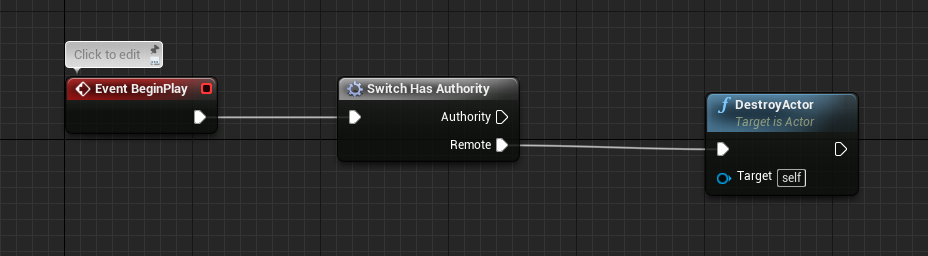 ripe raptor
I'm surprised that my session dump shows the session name as anDRey then, since I used GameSessionName for CreateSession...
ripe raptor
Hey cedric, have you ever used SteamNetworking()->SendP2PPacket and ReadP2PPacket?
thin stratus
Nope
mild zodiac
If I am reading source code correctly, it's impossible to locally destroy actor that was in the world since level creation.
// Can't kill if wrong role.
if( ThisActor->Role!=ROLE_Authority && !bNetForce && !ThisActor->bNetTemporary )
{
    return false;
}
such actors are most likely under server's authority
 verbal wave
Can confirm. In blueprint I couldn't destroy level stuff from a client even they were not replicated
some guy told me it used to work in 4.8 (BP)
 twin juniper
yep
u can only destroy it on the client
if it was spawned on the client
its very strange tbh
verbal wave
how difficult is it to implement an 'official' dedicated server that host multiple session instances, with steam OSS?
I'm using steam oss listen server right now, which is pretty straight forward
Unreal provides a very user friendly framework I can understand. That is, after I learn A, B and C I'll be able to create the design I planned.
But I can't really estimate the compexity for game server backend. Is two weeks enough to setup a very basic dedicated multi-session server on something like amazon gamelift? I have sufficient skills for web hosting and stuff.
It's adding to my anxiety pool :x
 pastel elm
Hey there. I'm about to work on a Network system that need to be online so i would guess using the steam server would be simpler. Do i need to go through this ? (Using the Steam Work)
https://docs.unrealengine.com/latest/INT/Programming/Online/Steam/
Is there any documentation that could help me to go through this process ? It would be the first time i'll work on Networking on C++, not on BP.
An overview of Online Subsystem Steam, including how to set up your project for distribution on Valve's Steam platform.
 full scaffold
Hey how can i resolve this error?
Error C2084 function 'UMyCharacterMovementComponent::UMyCharacterMovementComponent(const FObjectInitializer &)' already has a body
It says it "already has a body" but this function isn't duplicated anywhere, been trying to fix this for a while

here is a paste of the file
 winged badger
did you put {} at the end of the declaration in the header?
twin juniper
can´t make work when i pickup a item the item its destroy only the server
how i put work the item its destroy when i use the cliente and server
 fierce oriole
Anyone familiar with Multiplayer in Blueprints? I'm trying to make a Item Pickup Actor but I dont know how to give the Actor Remote Authority. I tried copying the functionality from a working Weapon pickup. I manually dragged in my new Item pickup into the Level but I am stuck because I dont know how to give it Remote Authority
twin juniper
Anyone had tutorials for Gamesparks?
 soft hamlet
@worthy wasp hey man just getting back to this after winter break. So you mentioned you resolved it by not using AGameMode, what does your solution look like? what other way could I manage player controllers and pawns with a dedicated server?
thin stratus
What got resolved?
@Slayder#0513 There isn't much to tell about UE4 and GameSparks. Check the GameSparks docs.
Their UE4 plugin comes with the same functions/nodes.
@fierce oriole You need to call "SetOwner" on the ServerSide and pass it the specifics client PlayerController/Character
@full scaffold How does the Header file look like?
full scaffold
@thin stratus I think I got it fixed!
It had to do with constructors, had to create my own constructor for a class
I'm about to do some more tests, if it still is giving me trouble I'll post back here. Big thanks to #cpp for helping me out!
fierce oriole
@thin stratus Thank you. I would declare that inside the pickup actor correct? Oddly the other existing and working pickups (from Generic Shooter) arent doing SetOwner that I can see.
thin stratus
Well, why do you need the Client being the owner?
You usually only need that to call RPCs on that from Client to Server or Server to specific (owning) Client
And that's usually not what you do. When you create a pickup system, you want to make sure that you call a ServerRPC in your Character/Controller, right after pressing the PickUp key
and then from within the serverRPC you perform your pickup code
fierce oriole
Tbh Im trying to replicate the existing Weapon pickup behavior to my new Items, so I'm not sure why lol becuase Im barely learning Network stuff. This is the part in question, which fires when trying to pickup a focused item, which works on the existing weapon pickups
soft hamlet
@thin stratus it's regarding game mode and client pawn possesion in dedicated servers. my clients can't process input when running a dedicated server to host them. a listen server will allow input to clients just fine. very weird. I asked walldiv a while ago but he said he moved on from this problem.
thin stratus
@soft hamlet That is indeed weird. There shouldn't be a difference in DedicatedServer or ListenServer
soft hamlet
@thin stratus yeah i tried many combination, packaged games, editor games, listen and dedicated servers for both of those. same outcome apparently, but my game was using the generic gamemode class with super::postlogin, i also changed it and added my own client restart RPCS there, nothing seems to enable input to get through to the pawns. they're static if dedicated server is hosting. tried looking player controller uniqueIDs on console and they keep changing all the time on both dedicated and listen server so that didn't tell me anything.
 wide chasm
Can someone help me with making a multiplayer resource gathering system?
 unborn nimbus
Anyone dealt with old rep notifies being called when an actor gets loaded on a client when you move close enough to it?
unborn nimbus
Or even happening if you disconnect and reconnect. the rep notifies that were being sent as you disconnected all fire when you reconnect
 opaque tinsel
does anyone know how to display players name that they saved to show on widget?
 worn nymph
@unborn nimbus that is how repnotifies are supposed to work or im misunderstanding your problem lol
calibur . you need to save the name into the player state or another class . then set the variable on the server . make it repnotify and have each client set the playername
@opaque tinsel
im afk but if you're still stuck tonight i can send you screenshots
 small temple
hey i shouldn't have to define _Validate and _Implementation versions of replicated ufunctions in my header files, should i?
because the compiler thinks i should
but then when i add it, it complains about that too
 bitter oriole
No, you don't need to have them
And the compiler shouldn't say anything
What's the error log from the compiler output ?
small temple
@bitter oriole if i don't include them, i get a whole bunch of errors about the Validate and Implementation functions not being a member of my class
that's if i don't include them anywhere, even in the cpp file (which is wrong, yeah)
but i still get them even if i do include them, and more (along the same lines)
and by "include" i mean define or declare in this case, just to be clear
because i also #include net/unrealnetwork.h
i'm guessing i'm either doing something really dumb, or it's because i'm doing it on an ActorComponent
bitter oriole
@small temple Can you quote the compiler output ?
To be clear, you need to declare the method in the header (without _Validate/ _Implementation)
And you need to implement both _Validate and _Implementation variants in cpp
bitter oriole
@small temple Intellisense is likely to complain that the methods are undefined, too, so do compile to check
small temple
@bitter oriole https://hastebin.com/raw/asahitagix
bitter oriole
Move the body of both methods to the cpp
bitter oriole
Yes, with "```" around it
twin juniper
what i doing wrong
bitter oriole
Three ` symbols
small temple
dun dun dun
bitter oriole
BTW, just copy what's at the very bottom here : https://docs.unrealengine.com/latest/INT/Gameplay/Networking/Actors/RPCs/
Designating function replication across the network
small temple
ahh
bitter oriole
The two last code blocks are what you need to have
small temple
so i've got this in my header: UFUNCTION(Reliable, Server, WithValidation) void SetServerPosition(FVector Location, FRotator Rotation);
and this in my cpp: ```void UPhysicsReplicationComponent::SetServerPosition(FVector Location, FRotator Rotation)
{
GEngine->AddOnScreenDebugMessage(0, RepToServerRate, FColor::Green, TEXT("Server position updated"));
GEngine->AddOnScreenDebugMessage(1, RepToServerRate, FColor::Yellow, Location.ToString());
GEngine->AddOnScreenDebugMessage(2, RepToServerRate, FColor::Blue, Rotation.ToString());
}
bool UPhysicsReplicationComponent::SetServerPosition_Validate(FVector Location, FRotator Rotation)
{
return true;
}
void UPhysicsReplicationComponent::SetServerPosition_Implementation(FVector Location, FRotator Rotation)
{
}```
small temple
ah?
bitter oriole
UPhysicsReplicationComponent::SetServerPosition shouldn't exist
Move its content to SetServerPosition_Implementation
small temple
hmmm
bitter oriole
SetServerPosition_Implementation is the method itself
SetServerPosition_Validate is the checker
SetServerPosition itself is not really defined
Well, really, it's defined as "if validate() then implementation()"
bitter oriole
So you did remove ```void UPhysicsReplicationComponent::SetServerPosition(FVector Location, FRotator Rotation)
{
GEngine->AddOnScreenDebugMessage(0, RepToServerRate, FColor::Green, TEXT("Server position updated"));
GEngine->AddOnScreenDebugMessage(1, RepToServerRate, FColor::Yellow, Location.ToString());
GEngine->AddOnScreenDebugMessage(2, RepToServerRate, FColor::Blue, Rotation.ToString());
}
GENERATED_BODY()
small temple
i'll try
without Reliable i get an error saying i need to have Reliable or Unreliable so i'll try that now
bitter oriole
Yeah I was confused because I write Server, Reliable, WithValidation but that's exactly the same, sorry
bitter oriole
You do include the .generated.h file too I guess
small temple
in the header, yep
bitter oriole
Can you share the header ?
small temple
bitter oriole
Looks fine ¯_(ツ)_/¯
bitter oriole
And the error is still on the GENERATED_BODY ?
At that point I'd remove the intermediate folder, the .sln, re-generate project files and do a clean rebuild. Kind of nuclear solution but it looks like you have a problem with the generated code
small temple
k
wait because that is pretty nuclear, lol
but yeah i'll give it a try
meanwhile, are you sure it has nothing to do with this being an ActorComponent? @bitter oriole
bitter oriole
I am, since I have basically exactly what you're doing myself
small temple
ah
bitter oriole
Network physics component
small temple
nifty
bitter oriole
Well, fake physics, anyway
small temple
yeah i did it in blueprint before so it's a silly question actually
bitter oriole
One thing I don't have is a server method with two parameters but surely UE4 isn't that broken
small temple
i guess i should build my project without the server function first yeah?
actually, no
never mind that
the point is, it fails to compile
bitter oriole
Again ? Same issue ?
small temple
seems like it
it's hard to tell because c++ error logs are fucking incomprehensible but the first error in the output log is this so... PhysicsReplicationComponent.h(14): error C2039: 'SetServerPosition_Validate': is not a member of 'UPhysicsReplicationComponent'
bitter oriole
Try with one parameter ?
small temple
alright
should work with 2 though, since it works in bp
but maybe some other magic is required
bitter oriole
Dunno, I usually pass structs myself
small temple
doesn't work with one parameter
bitter oriole
Yeah, I figured... Can you share the cpp too ?
Sounds like you did it well but I don't know anymore 😛
small temple
bitter oriole
You'll want SetIsReplicated(true); in the constructor I guess
small temple
i'll be damned if that's it
bitter oriole
I wouldn't expect it
small temple
nope, that's not it
 regal hazel
Why does the header require two params but the validate and impl only have one?
(sorry coming in late)
small temple
the header is old
bitter oriole
He tried changing to one since that yeah
small temple
i removed the second param since then
regal hazel
Ah, I see!
bitter oriole
I'm super confused here, it all looks correct
small temple
yeah 🤷
bitter oriole
That's super maybe territory
regal hazel
haha absolutely
small temple
doesn't look like it matters in other examples
regal hazel
But, alas i've seen stranger things
bitter oriole
I'd just comment out all the code and paste the doc example
regal hazel
(good show)
bitter oriole
void SomeRPCFunction( int32 AddHealth );```i'll try that
bitter oriole
{
    if ( AddHealth > MAX_ADD_HEALTH )
    {
        return false;                       // This will disconnect the caller
    }
    return true;                              // This will allow the RPC to be called
}

void SomeRPCFunction_Implementation( int32 AddHealth )
{
    Health += AddHealth;
}```Well, you're going to need Reliable, so even that doc is out of date
small temple
i'll build first, might take a minute
oh it was fast actually
it's weird how it doesn't define (?) the namespace
bitter oriole
So move back to your code bit by bit ? Start with one int32 parameter , etc
small temple
will do
i bet that'll be it
nope
oh hold on, made a mistake
mmmm, interesting
so i kinda messed up in my test here but i changed the parameter to an int32 and also commented out one of the prints in the implementation function
then i compiled, and it worked
now the weird thing is, i reverted those changes and it still works
so it was either the print function that was causing a problem, or the parameter type
i guess they were somehow stopping the compiler from generating the generated.h
and declaring the Validated and Implementation functions
and now that they're generated, it doesn't matter anymore
bitter oriole
Strange
small temple
very
someone ought to file a bug report
someone who knows more about this stuff than me 😏
 wary wyvern
Hey guys. Is it possible to destroy actor on server, but keep it in the world on clientside?
Trying to make this, but Actor still destroys on client.
small temple
try disabling replication on the client as well? @wary wyvern
btw @bitter oriole do i call this function with SetServerPosition() or SetServerPosition_Implementation() now?
bitter oriole
SetServerPosition()
small temple
great, thanks
wary wyvern
@small temple It is a server function. It wont execute, i guess
wary wyvern
What do u mean?
small temple
right-click > custom event > set it to Run on server
in that event, disable replication and destroy the actor
then call it after your delay
also tick the Reliable box
small temple
the authority check can be a bit finicky iirc @wary wyvern
i'm not sure though
it shouldn't really matter because SetReplicates executes on the server anyway, but you never know
 grand kestrel
The authority check isn't finicky in the slightest
small temple
@grand kestrel you're not finicky in the slightest ❤
ripe raptor
Anyone know of a good resource for inviting friends and / or joining a friend via Steam without them having invited me?
thin stratus
Hm, given you have the Friendlist ingame
You should be able to do "JoinSessionViaFriendID" or so
ripe raptor
So when I am in my game, and I turn on the steam overlay, right click on a friend and do "invite", their game gets a delegate fired for that?
ripe raptor
Does that delegate get fired even if their game was turned off at the time of accepting the invite (i.e. after Steam automatically launches the game?)
ripe raptor
right-o
thin stratus
Ehm
I should be things like these
SessionInterface->AddOnSessionUserInviteAcceptedDelegate_Handle
SessionInterface->SendSessionInviteToFriend
Not 100% sure anymore what is all involved
But as seen above, the SessionInterface has delegates and functions for that
They all work similar to the normal Create/JoinSession stuff
ripe raptor
The first step is getting the friend list in-game, after that I'll poke around and see what's there. I doubt there are many pitfalls in there.
thin stratus
There I have a tutorial for
Check UE4s official Streams
I was hosted once for that
ripe raptor
oh neat

Getting your game working with Steam is frequently an important part of one's development cycle. Cedric will begin with a walkthrough on how to integrate the...
That one?
thin stratus
Yus
ripe raptor
Thanks
ripe raptor
The best advice I ever got regarding any sort of video tutorial is to watch it at 1.5x speed
or 2x
ripe raptor
Yeah, I'm generally not a fan of video tutorials 😛
small temple
yikes
i'm trying to replicate a property and i'm getting this error: error C2065: 'OutLifetimeProps': undeclared identifier
along with more errors after that as usual
i've got #include "Net/UnrealNetwork.h" in my header as well as this UPROPERTY(Replicated) int32 Doinks;
and this in my cpp ```void UPhysicsReplicationComponent::GetLifetimeReplicatedProps(TArray<FLifetimeProperty> &OutLifeTimeProps) const
{
Super::GetLifetimeReplicatedProps(OutLifeTimeProps);
DOREPLIFETIME(UPhysicsReplicationComponent, Doinks);
}```
anyone got any idea why?
ripe raptor
OutLifeTime
small temple
oh, GetLifeTimeReplicatedProps is also declared in my header of course
ripe raptor
capital T
thin stratus
I still struggle on finding a proper way to setup data before a player joins
ripe raptor
The stuff from yesterday?
thin stratus
On GameMode::Login I get a PlayerID. I used that instantly to retrieve customization data on the Server for that Player.
In the Character Possessed, I used that Data, stored in the PC, and set that on an RepNotify
But race condition between Possessed nad the data retrieve event
I hope possessed would be later, but it seems it calls in between
-.-
Now I moved all the "get customization" stuff to each instance
ripe raptor
damn
thin stratus
And replicate the ID to the players instead of hte customizations
I don't know what class I can use to properly set this up
I grab the ID as soon as the player logs in and gets a PlayerController
So that's already the soonest
ripe raptor
Well, the way I do it, and the way it works for me, is that I have my loadout and customization inside my player state. In my Pawn's OnPossessed I fetch that from my playerstate and send it across with a multicast to everyone. Each client then just instantiates all the cosmetic items, abilities etc.
ripe raptor
oh
thin stratus
Cause sometimes the PlayerState didn't get the stuff before Possessed called
 next falcon
How do i remove instanced static meshes for all players ?
thin stratus
@ripe raptor But that isn't optimal either
As I don't want to do that every time the drone gets respawned/possessed
I might just offsync the possess
And let it wait till gamesparks returns data?
ripe raptor
Well, it is optimal if it's the only option 😛
That being said, and this is a silly suggestion probably, but what's stopping you from doing this:
ripe raptor
Your game mode gets the ID, fetches the customisation, assigns it to your player state. Your Possessed event reads the player state, gets the customization from the player state and stores it in a class variable of its own which is then replicated and should be usable in OnRep on all clients?
thin stratus
I can already store it in the PlayerController
Since I replicated on the drone, I don't need the PlayerState
But yeah
I currently use the native ue4 spawn system
That's why I didn't want to do that yet
ripe raptor
Well, can't you do a combination of RPC-ing the customisation in OnPossessed with late-joining clients using BeginPlay and reading the data from there (It seems that all replicated data is available at this stage in pawns)
thin stratus
Why would I. OnRep is totally fine for that
It's more about the time between GameSparks callback and possession
Server asks GameSparks for data but the Client already gets his drone before he gets the customization data
ripe raptor
Ooooh, now I get it, sorry, all this time I've been wondering where the delay comes from
next falcon
How do i remove instanced static meshes for all players ?
worn nymph
@thin stratus I had this problem so I set a timer by event on my event OnPostlogin with a branch . It grabs the joining controller casts to playerstate and just checks if the data is valid yet if so it breaks out of the loop. Clears the timer and carries on as normal . During this time I just show loading screen .
thin stratus
Yeah I do it with a boolean and a dispatcher
worn nymph
What about overriding prelogin?
thin stratus
Yeah that too
Will show the system once working
Idea is basically this
With this in the Controller for loading the data
worn nymph
The thing I find hardest is knowing when to use what. I swear nearly everything is an interface/dispatcher or repnotify but I fear I'm overusing stuff maybe or doing things wrong . But as long as it all works for now I'm happy lol
thin stratus
So if the boolean isn't true yet, I just subscribe to the Dispatcher
And wait with the spawning
Also enabled "spawn Player as spectator" in the defaults of the GameMode
Let's see if that works
unborn nimbus
@worn nymph I think you misunderstand what's happening. The player stands in a group of enemies and takes enough damage to be killed. OnDeathEvent gets called and replicates to all clients through the rep notify. Player clicks respawn and respawns at the respawn point. Player moves back to the enemies that landed the killing blow causing the OnDeathEvent to be called. When that actor the landed the killing blow loads on the player's client, the rep notify gets called again.
thin stratus
Whats the proper way of turning a specator into a normal player?
Cause Spawning an pawn and possessing it doesn't work
@unborn nimbus OnReps always fire if you get into the distance
That's what OnReps are for
C++ has an "OldValue" to compare to
In case you re facing double OnRep
BP though not
unborn nimbus
Yes I understand that, but there should be no old value
everything should fire and succeed and be done when the player dies
there shouldn't be waiting rep notifies when the player returns
 manic pine
i think changing from spectator to normal player is just ChangeState(NAME_Playing), then spawn and possess as usual
it calls EndSpectatingState, which destroys spectator pawn, sets bIsWaiting to false and bisspectator on playerstate to false
thin stratus
Yeah, currently BP only GameMode :/
Guess I could expose that
It will spawn the default pawn then?
manic pine
dont think it will spawn anything, just set player state to playing
after which you can spawn/possess like normal
thin stratus
Hm will test! Thanks!
manic pine
yeah ive been struggling with the whole spectator/inactive stuff myself
it seems very messy
trying to replace it with my own spectator system where gamemode handles it instead
more convenient with collections of activeplayers and spectators
thin stratus
Everything works so far with specatating
Just going to playing again didn#t out of the box
Will expose the Change event to BPs
And test
manic pine
aplyercontroller's BeginPlayingState is empty
thin stratus
Yeah it's okay, will just call RespawnPlayer
manic pine
ye, should do it
there's also the pc's inactive state, which starts a timer that calls UnFreeze after minrespawndelay
kind of a hassle reworking all of this into a round-based system
thin stratus
For now it would be enough to revoke the spectating
I only need that whole thing to delay spawning
Shouldn't last longer than a few ms anyway
But cleaner to handle longer outage
ripe raptor
Is there a pre-processor macro to know if Steam is actually enabled in a project?
twin juniper
hello
how i put when i pickup a item the item its remove from level
i only can put work if its the server
and not the client
this channel here is so bizarr ._.
thin stratus
@manic pine Any idea what "Name_Playing" is actually?
Na, will just make two functions /shrug
Still can't spawn. My goodness
"Start Player As Spectator" and "MustSpectate" setup.
Then, when it's time to spawn, MustSpectate is false, State is schanged to Playing. Still not possessing
Let's delay a frame
Well, Spectator Pawn gets properly despawned. My possess stuff doesn't work though. Hmpf
ripe raptor
I can't believe there is no paltform independent system for getting friend avatars, meh.
@thin stratus - Hey, I know you're busy with your customization thing, but I have just one small question regarding the stuff from your video
thin stratus
yo
ripe raptor
Just the #include <steam/steam_api.h> bit
I suppose I need to use the same steam SDK that my UE4 installation is using?
and I suppoes I need to add that sdk folder to my VC include directories?
thin stratus
All steps for making steam work are in the video though
thin stratus
Okay, so one thing I noticed is, that "NumPlayers" and "NumSpectators" never got reduced/incremented
So I did that now and it properly starts the match
But I still can't possess the damn pawn
 raven holly
you asking to posses on the client or server?
thin stratus
All Server
raven holly
put a onpossed on the pawn and see if its ever triggered
maybe its being kicked out straight away
thin stratus
Already have a print for Possessed and Unpossessed
Both not happening
The Pawn itself spawns though
raven holly
is the actor replicating ?
raven holly
It must be some kind of protection
thin stratus
raven holly
is there a bool on state or something that specifies if its a spectator
maybe you need to turn that off first
or the player controller
there you go
you probably want to set this to false before trying to posses a player pawn
thin stratus
Already doing that
void AHLPlayerController::K2_ChangeStateToPlaying()
{
    if (GetStateName() == NAME_Spectating)
    {
        AGameMode* GameMode = Cast<AGameMode>(UGameplayStatics::GetGameMode(this));
        GameMode->NumSpectators--;
        GameMode->NumPlayers++;
        ChangeState(NAME_Playing);
    }
}
void APlayerController::ChangeState(FName NewState)
{
    if(NewState != StateName)
    {
        // end current state
        if(StateName == NAME_Spectating)
        {
            EndSpectatingState();
        }
        else if(StateName == NAME_Playing)
        {
            EndPlayingState();
        }

        Super::ChangeState(NewState); // Will set StateName, also handles EndInactiveState/BeginInactiveState

        // start new state
        if(StateName == NAME_Playing)
        {
            BeginPlayingState();
        }
        else if (StateName == NAME_Spectating)
        {
            BeginSpectatingState();
        }

        UpdateStateInputComponents();
    }
}
void APlayerController::EndSpectatingState()
{
    if ( PlayerState != NULL )
    {
        if ( PlayerState->bOnlySpectator )
        {
            UE_LOG(LogPlayerController, Warning, TEXT("Spectator only UPlayer* leaving spectating state"));
        }
        PlayerState->bIsSpectator = false;
    }

    bPlayerIsWaiting = false;

    DestroySpectatorPawn();
}
BeginPlayingState does nothing
thin stratus
Yeah well
I don't know what that should be :/
PlayerState->bOnlySpectator = false;
bPlayerIsWaiting = true;
Guess there were more booleans epic didn't reset
...
 arctic hazel
bit of question, im trying to get my gun module to replicate the data table of sounds/names etc across all clients, i've got a custom event for the "fire" in the componment thats on the MasterCharacter leading into https://gyazo.com/2f9c2e8afa78fa1f474d091148470f9a

yet when gun fires client returns the printstring empty.
nvm im a dummy,
needed to pass Weapon data thru the multi cast 😄
manic pine
@thin stratus hmm, looking at playerController::possess, it actually does a ChangeState( NAME_Playing ) itself
the checks i can see that can fail a possess are: !HasAuthority() or !( PawnToPossess != NULL && (PlayerState == NULL || !PlayerState->bOnlySpectator) )
so not authority, null pawn, or a playerstate with bonlyspectator true are the three conditions that can fail a possess call
manic pine
i think bonlyspectator is only meant to be used for players joining purely as spectators
e.g. spectators at pro matches, who can never actually join the active game
thin stratus
Well that's the thing though. It only works if I set "MustSpawnAsSpectator"
Setting the boolean for "Spawn is spectator first", it doesn't actually do that
Only with the MustSpawn it properly not spawns the Player
And then it flags him as "Only Spectator"
manic pine
ah yes, the silly default implementation of HandleMatchStarted asks CanRestartPlayer on every player controller in the world(including spectators)
which in turn asks PC if he can restart, which says yes unless bOnlySpectator is set
if you were to override APlayerController::CanRestartPlayer with a condition that checked spectator state instead of bonlyspectator, that should do the trick
raven holly
@thin stratus so you sorted it?
thin stratus
It's in testing now
raven holly
ok
i am currently figuring out why UE adds like 30ms to my dedicated servers ping, testing different net tick configs atm 😐
Didnt get a reply from epic about it https://forums.unrealengine.com/unreal-engine/feedback-for-epic/1414496-example-networking-config-from-epic-games
"NetClientTicksPerSecond is used to throttle how many clients are updated each frame, hoping to avoid saturating the server's upstream bandwidth, although"
Documentation in source isn't really detailed
it's used here though: float ClientUpdatesThisFrame = GEngine->NetClientTicksPerSecond * ( DeltaSeconds + DeltaTimeOverflow ) * ( LanPlay ? 2.f : 1.f );
Ok seems like NetServerMaxTickRate clamps the servers tick rate on everything
Ok then it's used 'ActorInfo->NextUpdateTime = World->TimeSeconds + FMath::SRand() * ServerTickTime + NextUpdateDelta;'
ServerTickTime is NetClientTicksPerSecond
"This also means all other connections will force an update (even if they just updated, we should look into this"
raven holly
It is at 30 tickrate, when i ping the server directly with cmd i get like 50ms, ingame i get 85-90ms
it's not saturated in any way
ive done netprofiles etc
just seems like UE adds ~30ms onto the actual ping, i am wondering if i should just offset peoples pings to show a more realistic number
manic pine
well 40ms would be worst case if running at 25 fps ye
in addition to travel distance ping
so if you up server tick rate(and it can actually manage higher fps), you'd lower added ping
manic pine
im doing mine at 100, but im building a fast paced mp fps
which just feels much much better with high server fps
raven holly
im doing open world 50 player server
manic pine
yeah, wouldnt go too high with that amount of players
fortnite is at 30fps i think
maybe even lower
raven holly
yeah i hit some issues with CPU at ~40 players, so i have been rewriting a lot of my code
as there's AI in the world too
And i have like 3000 replicated actors spawning / despawning constantly
manic pine
that does sound heavy
raven holly
yeah haha
manic pine
its possible youre simply cpu limited and not actually reaching the 30 tick rate
raven holly
i've done profiles, but you know what they're like.. cpu stalls throw it all off
manic pine
guess you could do a print from the server to tell you the deltatime
manic pine
yeah, the ping should really just be regular network ping + whatever deltatime is
manic pine
no, cuz players are interested in the effective ping ye
raven holly
hmm
manic pine
doesnt matter if you have 10 ping but the server uses 100 ms to respond to commands
thats the same as 110 effective ping
manic pine
youre using the regular playerstate ping ye
manic pine
yeah, it can lag behind for a few seconds if ping changes abruptly
5 seconds to catch up entirely
it messes up my lag compensation ;|
oh well, player's fault if they have unstable connection
raven holly
lol :p
I tried in blank project and i still get like 20ms added
i guess default server tick is 20
manic pine
hmm that seems excessive though... are you doing pie?
raven holly
nope built
i built the server, put it on a VPS
blank third person project
all default
i ping with cmd, get 50, net stat get 70-80
manic pine
could the vps be adding too?
raven holly
i have a local linux box which i want to try
manic pine
yeah, i think trying different hosting would be a good idea, just to rule it out if nothing else
raven holly
actually no i tried amazon ec2 and it was the same ping
ooh
increasing tick to 45 reduced it
its spiking around a lot though
but overall is lower
raven holly
yeah working on stabilising it
manic pine
ideally it would be able to keep the same fps constantly
better with stable ping than lower ping
so if it cant run 45fps smoothly, 30fps would be preferrable despite the higher ping i'd say
manic pine
reduced? you mean it was higher?
raven holly
ill turn off AI and see
but it was interesting when i was doing stress tests, the more players the higher the ping got. But I assume that would be because of the CPU bottleneck
manic pine
yeah, lower fps for every player it has to service
raven holly
Seems like AI wasnt the cause of the spiking of ping
so ill turn AI and item spawning off
see if it becomes stable
manic pine
items are spawning just like that? e.g. no detecting player presence or stuff?
raven holly
the AI have radius checks, but items no
it constantly keeps 3000 items around the world
manic pine
ah right, but it doesnt keep spawning after 3000 has been reached
so there should just be an initial spike
raven holly
yeah and my math for spawning is pretty optmised atm
alright so i turned item spawning off and no major spikes
sitting around 68 ping
64-68
manic pine
so thats 18 ms~
raven holly
servers at 40tick
going to turn graphics up and see ping impact now..
ok 30 fps on client = 80-84 ping
manic pine
yeah but thats to be expected
keep in mind most games will just show you the network ping
raven holly
yeah but im not sure showing them actual ping is a good idea, because you know what people are like lol
raven holly
bar?
manic pine
like call of duty did
raven holly
oh true
manic pine
like those cell phone bars ye
raven holly
yeah lol signal
 pallid mesa
just define a playable ping by yourself testing with someone
who knows, maybe in your game 95 ms is 4 bars 🤷
manic pine
ye, depends very much on the game and lag compensation etc.
raven holly
yeah well i have my net code pretty good, like i do stuff on client for reponsiveness etc
so player doesnt feel the ping
i can play with 300ms and still play alright
apart from some very little rubberbanding due to movementcomp speed changes
pallid mesa
If you have time or want to expand your netcode of this project on a future
I would suggest double approach for certain ping thresolds
server side/client side as BF1 did
manic pine
you mean like both delay and compensation?
ive seen some games if ping > X, delay shot by 100ms then do regular compensation
pallid mesa
yes, at high ping, I believe it was around 110 or 120
pallid mesa
why do it that way if you can do it in the server straight away 😄
raven holly
i still verify bullet traces on the server
but i use the clients trace if the server completes the verification
manic pine
so much can happen if the shoot command is still in transit to server
anyway, at a certain ping point it becomes impossible to make it good for all clients
pallid mesa
thats the thing, If you have high ping, you should deal with it, not others.
manic pine
best to punish the high pingers
manic pine
yeah, i know this other game which has some kind of...weird compensation ping
if a single bad ping guy joins the game, everyone has to deal with absurd lag compensation
raven holly
lmao
manic pine
as a result, brazilians and north americans are hated in the entire player base
raven holly
you can always ping lock, but me being in new zealand, i know what it's like being locked out from playing with international friends
and actually games like PUBG, most of their playerbase are chinese
manic pine
ye, better to just delay the shots from the highest ping players
raven holly
but a lof of their chinese playerbase play on US and UE servers
pallid mesa
and indeed, this is a problem
 manic pine
or you'll have good-ping players running behind a wall and getting shot a full second later
raven holly
So i changed the config on the server to 20 tickrate, getting 84 ping now
manic pine
anyway you'll have to experiment to find a solution that makes good sense
pallid mesa
UT is at 60
manic pine
30 should be fine unless youre doing high paced fps
pallid mesa
yes
raven holly
yeah true
manic pine
that will mess up your lag compensation
raven holly
all my players are like "where are you servers, i get such high ping"
and im like.. well uhh UE adds it's share + network time
i think it might be better to just show them the net ping
raven holly
LOL
pallid mesa
thats why I wouldn't manual compensation for high pingers
pallid mesa
tsk tsk I'll screenshot 😂
manic pine
thats a 10ms add ye?
raven holly
pallid mesa
thing is that you are alone in the server
raven holly
true
manic pine
very nice
pallid mesa
the more peeps you get into it, the more you will notice how 120 will ☠
raven holly
but these investigations will help others too
pallid mesa
yes for sure!
manic pine
at least now you know everything is working correctly
pallid mesa
as I say always, write about it!
raven holly
lmao
pallid mesa
write your findings somewhere and documment them
pallid mesa
are you using assets for things like decals and footsteps?
raven holly
huh?
manic pine
hes just spawning player items i think
raven holly
every 0.25 seconds an item spawns
pallid mesa
oh ITEMS!
raven holly
up to 3000
pallid mesa
i though players haha
raven holly
yeah lol
manic pine
huh that shouldnt cause an issue
should be able to do a dozen spawns every tick without much fps impact on server
pallid mesa
well that depends what is the item doing
raven holly
well items have a mesh
manic pine
yeah, if it has to load assets and stuff as well i guess it could hurt a bit
pallid mesa
nah for an item is fine since it just holds some materials
in the case of a character with footsteps and everything going on is a bit more harshing
raven holly
footsteps are easy
pallid mesa
items have a mesh, but do they have any code?
raven holly
yes items do
manic pine
is there any reason not to just spawn them all immediately though?
pallid mesa
separate the "usable item" from the "world item"
manic pine
at a rate of 1 per 0.25, players can search through an area, not find anything, then have it spawn as they leave
manic pine
oh
pallid mesa
can't you pool it somehow?
raven holly
not a BR game where u can just spawn and be done with it
pallid mesa
instead of destroy it and spawn it?
pallid mesa
pool it then
raven holly
on construct of the items they create a shape based off the meshes bounds
manic pine
hmm this is still not sounding very intensive though, unless that item logic is insanely complex
raven holly
so they can use unreal's 'try adjust location if overlapping'
pallid mesa
construction and destruction are expensive operations, if you spam the hell out of them of several Actors (idk which is the rate @raven holly 's working but have that in mind)
manic pine
yeah but one item per 0.25 seconds
raven holly
yeah i've been profiling etc, all that is causing hitches now is some physx sync
manic pine
4 a second shouldnt be noticeable
pallid mesa
ok, now I understand more
pallid mesa
do you rely a lot of physics on your game?
raven holly
the items simulate physics
but only on the clients
they used to simulate on the server, but yeah it caused server crashes
pallid mesa
that could give you offset problems
manic pine
hmm then why is item spawning causing physx problems on server?
raven holly
it's called 'sync' hold on ill find it
pallid mesa
that could happen
raven holly
yeah it's an .. what do you call
pallid mesa
I call it a bug
raven holly
compromise
pallid mesa
hehehe
raven holly
whats the word
manic pine
haha
raven holly
lol
manic pine
compromise is good ye
pallid mesa
ayee I guess it is
raven holly
like if it's in 2 different places but not by much its ok
manic pine
i dont know, it could get annoying in some cases, but for 99% of cases the items will be almost at the same place
the fringe cases will be weird though
one client sees the item at the base of the cliff, the other sees it at the top
raven holly
yeah has happend on top of buildings
pallid mesa
it could go even worse, if the item has bounciness each client will simulate their bounciness version
projectile + physics
raven holly
so 120 tick, with item spawning 60-80 ping
pallid mesa
I had to totally disable physics on a multiplayer project I'm on, people were like "BUT WHYY" - I reprogrammed a light version of faked physics under the premise that clients cannot kick an ammo pack 🃏
manic pine
poor ammo packs
manic pine
ye
pallid mesa
I gave them an oportunity
manic pine
automatic ban on kicking an ammo pack
pallid mesa
but it's sad anyways, they live only for 30 seconds
manic pine
a short life ye
raven holly
when you forget item code for water and you need to try survive when testing 
pallid mesa
ayyyyy
raven holly
ok doing some profiling
manic pine
i rarely understand this profiler
sometimes its obvious, but more often than not it just tells me "something is wrong"
which i already knew
what did you call this physics thing it was doing again?
manic pine
but you didnt have physics on the items on the dedi ye?


 manic pine
thats a large amount of physx going on
raven holly
manic pine
this is an average frame?
raven holly
im doing a few profiles to see
im pretty sure it did this even without anything running
like no ai or items spawning
manic pine
hmm youre sure the items youre spawning have SimulatePhysics turned off?
raven holly
yep
manic pine
how are you turning it on on clients?
manic pine
with autothority ye
raven holly
ofc 😛
manic pine
without**
manic pine
if!hasauthority -> turn on
right
could it be affecting path finding
e.g. you spawn object, it recrates nav map or some such
caneveraffectnavigation i think its called
raven holly
pretty sure i disabled that
i do use realtime nav
Thats basically all the logic it has
ok thats with no items or AI
average
with items
but its not simulating 🤔
manic pine
i havent tried it myself, but isnt that something you additionally have to activate per actor
 valid python
I've got a simple setup where I shoot a projectile and then have the ability to pick it up. It works great about 60% of the time. The remainings times the projectile either stops too early or goes too far on the client resulting in the object not actually being where its supposed to be. I have bReplicates and bRepilccateMoevemtn set to true but I think i'm missing something more or do I need to aggressively combat desync in some way? I'll need the position to be as accurate as possible later on in order to dodge the projectiles
valid python
I believe I am
from what i can see it looks like the client is incorreclty assuming physics
 fossil spoke
Try using the ProjectileMovementComponent instead
twin juniper
what do you need to do when making a online game?
what are the steps
first, make.....?
hiiiii
is that a question?
 oblique mountain
jep
@twin juniper https://docs.unrealengine.com/latest/INT/Engine/Blueprints/UserGuide/OnlineNodes/ maybe that will help you?
Describes the different kinds of Online and Error Related Blueprint Nodes.
twin juniper
correct the "hi I....." sentence. letters missing
oblique mountain
Problem solved 😄
valid python
For testing purposes can I disable client prediction for the projectile movement component?
Or any thoughts on making it more accurate in general
it seems to be predicitng stuff that isn't accurate, when my projectile hits a wall sometimes the client think it bounces further than it actually does
worn nymph
dang the amount of times friggen begin play trips me up on a replication issue. i always forget it gets called for both server and client lol
 icy nacelle
This is my functionality for dropping an item in my game (Dedicated server)
The system works perfectly fine when the delay is removed, when playing as server.
The system does not work without the delay when playing as a client as the items only refresh after an item is dropped (So effectively you can spawn two items before the node is removed from the inventory)
If the player drops the item, then closes and opens the inventory, the inventory will show that item has been removed.
I've added the delay and its fixed the problem - Its hacky, but its a temporary solution.
Does anyone know why this error is persisting? I spent about an hour today with my lecturer and he couldn't figure it out either.
fossil spoke
@icy nacelle You need the Client to remove the item from the inventory locally before you send the RPC to the server
icy nacelle
I've tried to cast it to the client on the second sequence pin, and it still doesn't work.
fossil spoke
The RPC should also return to the client an verification step that lets the client know that the operationwas successful
icy nacelle
Also tried to cast it straight after the 'Remove from Inventory'
icy nacelle
RPC it to the client***
fossil spoke
Your client needs to "assume" that the Server will eventually remove the Item
So the Client does it in advance
Locally
This removes the perceived effect of lag
 mild hull
why is your create inventory a rpc to server?
icy nacelle
@mild hull I just noticed that, probably did that a couple months ago when I first created the inventory, and didn't know as much about RPC...
Okay @fossil spoke, so
pin 0 - server rpc for dropping item + remove from inventory
pin 1 - Remove from inventory
pin 2 - refresh inventory panel
???
fossil spoke
Sure sounds right, you will need the Server to RPC back to the Client to tell it whether or not the Item was dropped, because if it wasnt then you need to readd that item back to the inventory.
You dont want players to lose items 😃
icy nacelle
Okay, but if I'm removing the item from inventory twice, doesn't this mean the second time its just removing it from an empty array?
fossil spoke
So your Inventory is completely Server side?
icy nacelle
Nope, inventory is client side
fossil spoke
Then how/why are you removing items from your inventory on the Server then?
icy nacelle
I think I sometimes confuse myself with RPC. God knows why I'm making a multiplayer game aha.
I thought that when you remove the item while RPC server, it removes it from the player, but does this with the server's knowledge to prevent any cheating?
fossil spoke
Not exactly lol
So the idea of an Server Authoritative architecture is that there is an single governing body (the Server, can be another Player which is an Listen Server or it can be an Machine which is an Dedicated Server it has no GUI at all) and then other bodies connect to it and attempt to "Simulate" whats happening on the Server as best they can.
Each Player in an Dedicated Server is Simulating what the Server is doing, this is what Replication is.
The Server is telling each Client, "Hey something changed, this is what it is, update this on your end please"
This means that the Clients have an copy of everything (almost) that is on the Server
icy nacelle
Yep, I understand that part
fossil spoke
Clients can modify their version of the Simulation as much as they like, but the Server has Authority over them if something changes on the Server.
This is how Clients cant cheat an effect the gameplay experience for other users.
Because they can only modify their own Simulation
They need to ask special permission of the Server in order to change something (Client to Server RPC)
This is also why variable replication is an waterfall, only the Server can cause an variable to replicate down to clients, clients CANNOT replicate up to the Server.
So if Clients are simulating whats on the Server then that means they have an copy of whats on the Server.
If you have an Inventory for each Player on the Server Side version of the Player, then the Client should also have that same Inventory locally.
Because they need to Simulate it themselves in order to see whats going on.
If an Client wants to drop an Item
He needs to do the Drop locally and then tell the Server "Hey i just attempted to Drop this Item out of my Inventory, can you please do that for me and send me back the result" (Client to Server RPC, then an Server to Client RPC reply with verification)
If the Server sends back an negative result, as in the Drop operation was denied by the Server, then the Client can safely go ahead and update their Simulation again by adding the Item back to their local inventory.
If the Server accepted the operation, then all is good as the Client had already removed it locally and the Server has updated its Inventory.
Does that make sense?
icy nacelle
crystal clear.
fossil spoke
The hardest thing for most people to grasp is the concept that both the Server and the Client have the same "version" of the game running. As in that both the Server and the Client has the same version of each Actor etc etc
icy nacelle
I am with them on that one 😃
fossil spoke
Good. Its tough if your new to this type of concept as it can be pretty abstract
icy nacelle
Thanks for the help, I've saved everything you said so I can re-read it until I fully understand!
fossil spoke
Another bit of advice. If i was you, i would build your Inventory as an Actor Component.
And attach it to your Player Controller
icy nacelle
Yeah, I think I stumble a lot on replication. Cedriks compendium is good, but its sometimes difficult to get specific things right.
Yeah, I have been thinking about moving the inventory system somewhere that isnt the character.
fossil spoke
Modular code is much much easier to maintain
Seperating specific functionality out into an Component is an ideal solution
opaque tinsel
how would i add a kill score?
fossil spoke
Probably add an Integer to the PlayerState would be the most ideal solution.
Kills
Deaths
Points
PlayerState already has an inbuilt Score variable
raven holly
@fossil spoke you really do that with replicated vars?
i just tell the server to remove the index and wait for replication to update the inv
fossil spoke
Huh?
raven holly
lol the inv stuff
 severe widget
that's a common thing
raven holly
really? strange
raven holly
i thought if you modify it on the client its overwritten by the server anyway
opaque tinsel
I currently have it as what you said. When the actor dies, i cast it to the PlayerState, get the kill variable and + 1 to it. However its saying both players got the kill.
severe widget
Same thing. You gotta clean up if it doesn't get removed either way, or have a laggy update on your UI
fossil spoke
The Client always bases its assumption on the fact that the Server will return with an correct result for that operation.
9 times out of 10 it will be correct
Its all about maintaining the illusion 😃
Or you can just deal with having an laggy UI
severe widget
you wouldn't do that for everything
fossil spoke
No of course not
raven holly
i never change any replicated vars on the client
manic pine
with some things its worth the effort
severe widget
but doing stuff clientside and letting the server correct it if need be is definitely a thing
manic pine
or you end up with lots of laggy actions in a game that will annoy players
raven holly
hm maybe
fierce oriole
Anyone know why I cannot change this Array Element? Is it the Constructor?
I call AddItem from the pickup actor after the Player does the Interact event
If I run AddItem on the Pickup Actor it works but then I have to bypass functionality:
 dull stream
anyone have a clue why local multiplayer might not work properly in standalone
but be fine in editor >_>
 opaque seal
When sessions just stop working after working for ages, for no reason, both LAN and Steam, yet "open 127.0.0.1" works fine.
3 weeks chasing this down, literally killing the enjoyment of all the work prior.
Read at least 30-40 google page results that all my links are purple, many of those threads never being solved either. Why are sessions so damn fickle? Why after 3 years of random issues people have, are they still this fickle? #funkiller
When logging, I see the broadcast happen, and I see the 16 bytes both sent and read, but after that, nothing happens anymore. What's crap is, all of this worked and one day just stopped working but nothing in relation to sessions has been changed or edited in that epriod of time. Literally had the rug pulled out, and others have had the same problem, made threads, not had it solved and given up on their project. I don't really want to dot hat.
This was copying the MP Shooter tutorial. I also see many complains focus on the same tutorial. Is that tutorial inherently bad these days and should be avoided?
twin juniper
@dull stream You need to be more specific "works" and "doesn't work" is too vague
what is not working
hosting sessions, joining sessions
It's generally better to play by right clicking the .uproject and do "launch game", it's required for steam services to work
dull stream
its fine, I fixed it for now.
but while i have your attention
when you set up local multiplayer, aka CreatePlayer, spawn a controller and pawn... you typically do that in gamemode? or do you create a playerManager class of sorts
whats the "best" way to handle this sort of thing
from like a design perspective
twin juniper
in the game mode or server side player controller
but usually game mode since it can be different
dull stream
alright, yeah i was doing it in gamemode
thanks I think Im good now for the most part
twin juniper
I decide which pawn to spawn in player controller, but I tell game mode to do the actual spawn (find player starts, spawn and possess)
dull stream
ahh right
yeah i think thats what i did
do you typically use playerStart actor for spawning?
In my particular situation I threw my pawns in the map rather than using playerStart. I guess it just depends on the game eh?
twin juniper
for multiplayer I would always use player starts
 cobalt whale
When I use net PktLag=200 there is high chance of stucking in aimed state after aim button is released. Why is this happens and how to fix it?
twin juniper
@cobalt whale Show us what's going on in there
cobalt whale