#multiplayer
1 messages · Page 369 of 1
 grand kestrel
Very lightweight, you just hit start and set any of the options you want, no setup needed
Works with editor as you'd expect
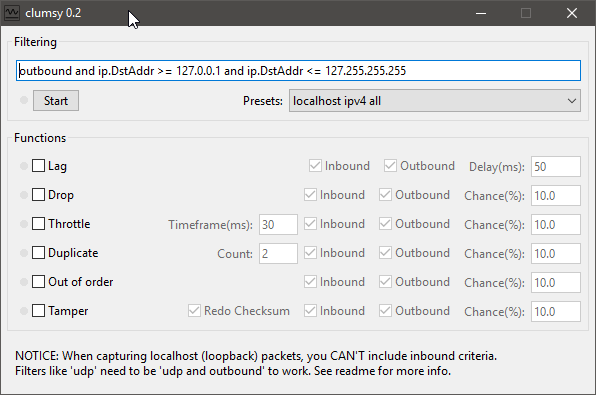
You just download it, open it up, and you're good to go
On another topic, linux dedicated server wont use more than 1 core
https://i.imgur.com/61W4Emo.png
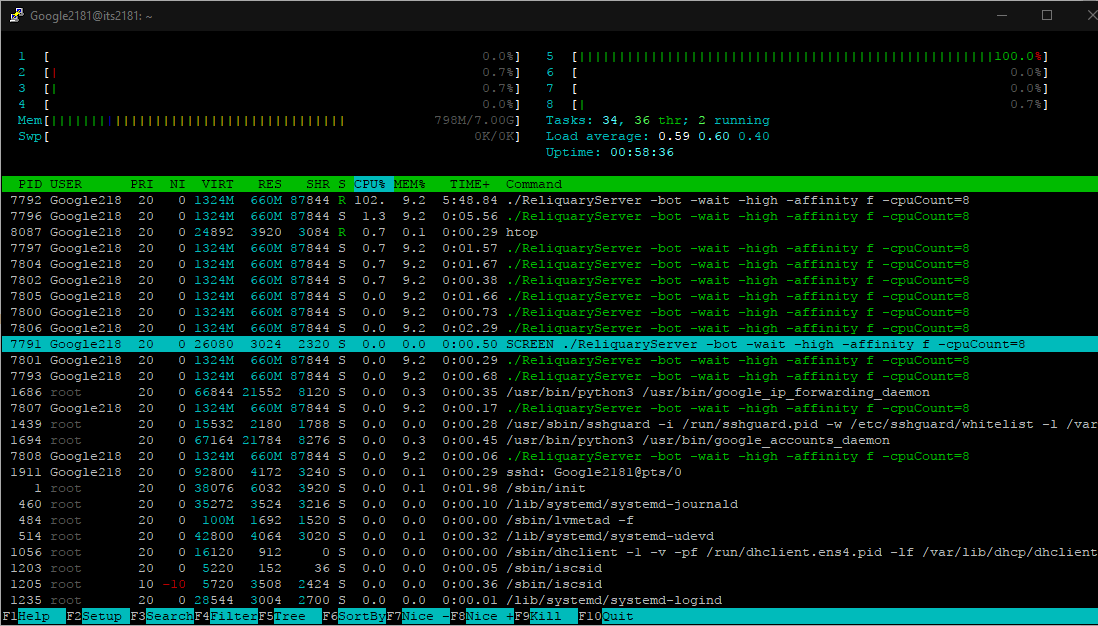
Regardless of how I try to force it
Well that makes sense actually
Most games don't need a massive amount of players on one server, and everything running on the game thread means its logical
 bitter oriole
UE4 sucks at threading
grand kestrel
Tell me about it
The majority of the work comes from the character movement component
I guess I can offload the shooting logic to a worker thread?
And physics?
bitter oriole
Doubtful, because you can do much less stuff in threads due to nothing in UE4 being threadsafe
grand kestrel
...Yeah
bitter oriole
And you're going to need plenty of locking
Have you profiled and determined that it was the movement component ?
grand kestrel
Let me load the profile back up and double check, but I think that was it
Coz before i was looking at other possibilities
 twin juniper
some reason
i left my server on overnight
and a few people logged in
but now when u walk
it like jitters back
._.
very weird
twin juniper
hmmmm
doesnt look like it too me
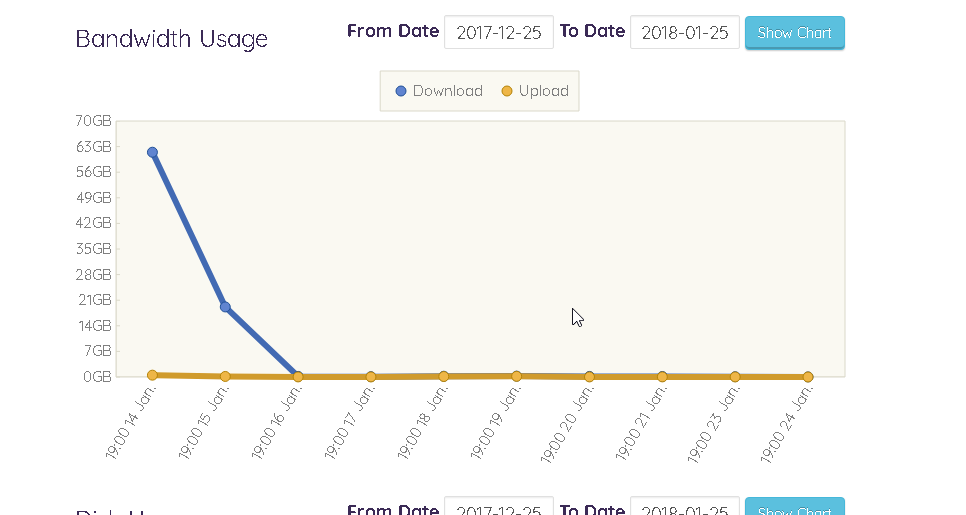
bandwidth isnt very high either lol
just looking at the graphs only half of the cpu is being used lol
and only 5gb out of 16 gb of the memory is being used
so i think this is an unreal thing
sometyhing in my code probably
 manic pine
half of the cpu could mean its doing 100% on half the cores no?
 pallid mesa
his server is hosted on a virtual machine
grand kestrel
Like raap says
twin juniper
virtual private server
grand kestrel
You can see it runs mostly on a single core
If I looked at it from a dashboardl ike that it would show the averaged usage
Even though the core the main thread runs on is maxed out
twin juniper
@grand kestrel lol what command is that
i like the highlighting
@grand kestrel https://i.imgur.com/EZbn3jP.png
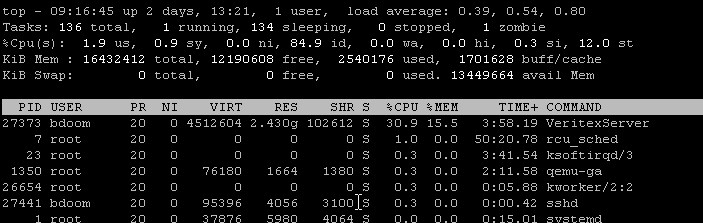
mine looks like this lol
 jolly siren
looks like htop
 hasty adder
Zombie
twin juniper
Lol
hasty adder
Never noticed that before
twin juniper
im using the same exact settings
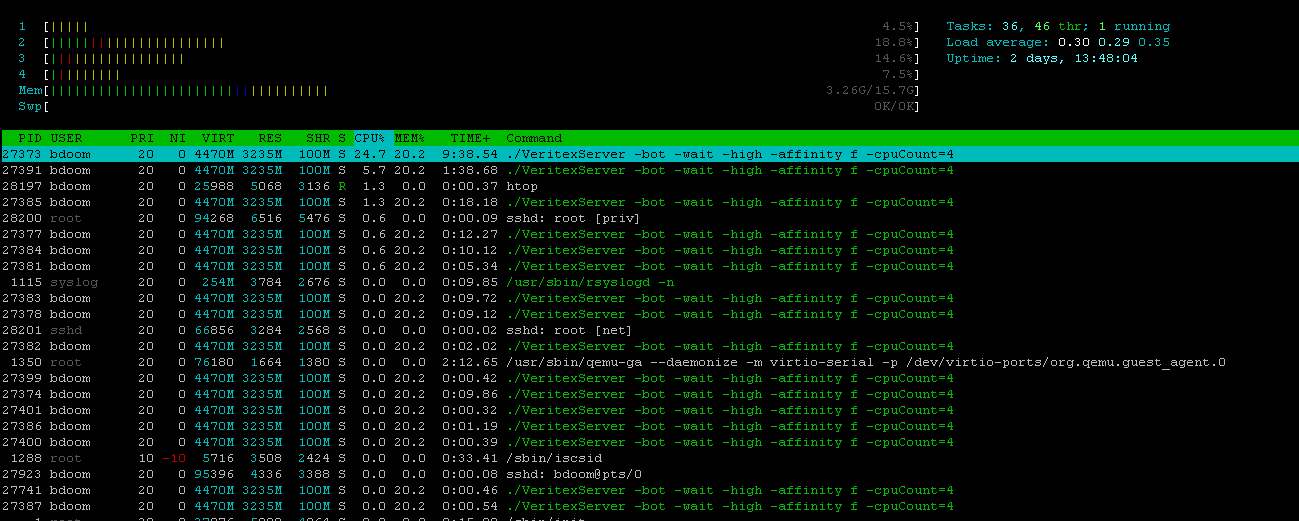
mine isnt ever maxed tho lol
it goes up to 15-18% cpu usage
its a quad core processor
in that image its at 24%
@jolly siren u are right
it is
twin juniper
lol
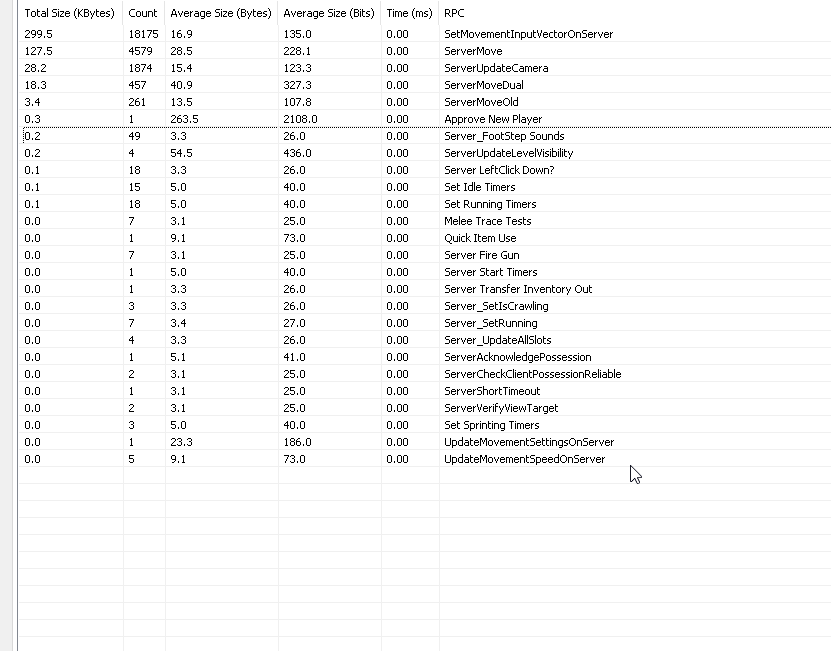
 opaque tinsel
can server travel only be played once?
 thin stratus
No, why?
opaque tinsel
im having trouble with servertravel, it seems like its not being played when i call it
well it is being play but its not recognizing my map name
 fossil spoke
Is your map packaged with the game? In other words the map may not actually exist?
opaque tinsel
yes the map is packaged with the game
fossil spoke
Are you using Seamless Travel?
fossil spoke
How are you calling ServerTravel?
opaque tinsel
i do an execute console command and ServerTravel/Game/Map/TestLevel
TestLevel is the name of the level
fossil spoke
Where are you calling it?
opaque tinsel
i have a custom event that runs in on game mode and im calling the custom event in the widget
fossil spoke
Can you post screenies of that please. Attempting to access and use the GameMode from an Widget is not an ideal setup
Also with ServerTravel command you shouldnt need to specify the full path to the level
ServerTravel MapName
Should be sufficient
 inner iris
@fossil spoke what would be a more ideal method to pass info from the UI to the GM? For example if you opened the custom game menu and set various parameters in the UI, which then could be sent as a struct to the GM before starting the match
fossil spoke
Using GameState as an bridge between ClientSide only stuff (UI) is more ideal in my experience.
Ok @opaque tinsel your command structure is wrong
 winged badger
@inner iris access your controller from the UI, put a server event on it and push the struct thru it as an input works for me
hasty adder
Is t there a node for server travel?
fossil spoke
No it is exposed as an command
inner iris
Is there any practical difference in sending the info to GameState and then to GameMode vs directly casting to GameMode from the UI?
An explicit cast is necessary either way so you’ll be getting GS or GM
winged badger
clients can't access the GameMode directly
inner iris
Ah yeah damn, gotta re-read my code and see how it was setup before because I have working custom games
That makes sense
Most likely did send it to the Gs then
Thanks!
fossil spoke
@inner iris Is your game MP or SP?
winged badger
you can call a server RPC only from PC or something attached to it
inner iris
It’s MP, I just blanked for a sec about GM being serverside only
winged badger
GameState isn't on the list
opaque tinsel
what would be the right way to do so?
fossil spoke
You need an space between the actual command and its params
It seems like your calling it as one big command
So its really got no idea what your calling
At least it looks like theres no space
Also remove the Game/Maps/ part
Just have the Mapname
winged badger
@inner iris i recommend (from UI) -> GetOwner (returns the PC) -> call event on the PC (server, reliable, struct you want to push as input) -> (you are now on your PlayerController on the server) -> access GameMode and set what you need
opaque tinsel
so you mean like this? ServerTravel /TestLevel
fossil spoke
No ///// just ServerTravel Mapname
opaque tinsel
oh i see
winged badger
and if you need that struct to be accessible elsewhere (other clients), setting in in GameState or PlayerState, not GameMode might be a better solution
fossil spoke
Also i dont think ServerTravel command works in PIE so you will have to package or run standalone.
inner iris
@winged badger In this case I actually used the GameInstance to store the struct in between map travel and then have the GM get the info when the chosen map is loaded- this of course however would just be for a listen server host, not a client setting parameters for a dedicated server game.
So in that case, it's ok for the host client to store those values in his GI, as that is the one that'll be retrieved
winged badger
true
when you access GameInstance from a widget you don't really have a chance to get them mixed either
 next falcon
Guys how can i make Session Settings?
like i set a Test String in a widget than create a session and than everybody can use the Test String?
grand kestrel
@twin juniper htop , you don't get it for the highlighting lol, just more info esp. for multicores, if you're on google cloud you'll need to sudo apt-get install htop (or most linux boxes running ubuntu)
twin juniper
i got it lol
grand kestrel
@thin stratus Have you looked at DUET at all? We might need to make a similar solution at some point
The authors off his rocker so no chance of licensing it
 versed socket
Anyone know of an issue (4.16) where Overlapping happens twice on the server as opposed to just once? Happens both with PIE and Standalone
The icons at the bottom of the screen are added OnBeginOverlap and is run only with Authority, but for some reason it seems that the overlap is called twice... and so there are 4 icons when there should be only 2.
This happens in all multiplayer contexts: listen, dedicated, and single player.
versed socket
Took me a couple of hours but I figured out the issue -- even though I wanted to filter by actor, it seems that multiple components were triggering the collision channel. When I set everything to "No Collision" except for the capsule component, we were all good.
 shadow lichen
Looking into Multiplayer, what parts of the player needs to have networking a part of it? For example, if I have a Pawn and a player controller, do both parts need to have networking or can the Pawn send all the information to the server?
fossil spoke
Depends on the needs of your game and its mechanics.
shadow lichen
VR Multiplayer game that utilizes teleporting for movement and motion controllers
Where a player will only take control of one pawn at a time. I suppose there's a respawn mechanic so they'd take control of another instance of the same pawn at some point.
fossil spoke
You will need to consider each class when it comes to Networking.
They all have different capabilities and restrictions.
They all play an particular roll.
shadow lichen
Okay so I should probably make both Player Controllers and the Pawns they control have a part for Networking. Thank you!
 ripe raptor
Is it normal for BeginPlay to not be called on Clients?
thin stratus
No
BeginPlay has nothing to do with multiplayer anyway. It calls on each instance. If the Actor exists on Server and Clients, replicated or not, he will call BeginPlay on everyone.
ripe raptor
That's what I know too, but it ain't getting called... Meaning I am missing a Super:: call somewhere probably
winged badger
GetLifeTimeReplicatedProps in GameState?
if MatchReadyToStart doesn't replicate
then BeingPlay won't be called on clients
ripe raptor
Checked all of those, but I think it's something else
Or rather, I think BeginPlay does get called... but a montage is screwing it up
Because I have this:
and I feel that that fucks up badly on clients due to montage synchronisation, namely the OnCompleted never gets called
especially since it's a short montage
ripe raptor
Ok so this might sound silly but
has anyone experienced BlueprintImplementableEvents not working on Clients?
 worn nymph
@eoinobroin there are also other options like using the options string and sending information into the gamemode that way . also not many people use this but you can store information in one playerstate and then retrieve this data in the new playerstate or even retrieve data from a disconected player.
event copy properties and event override with
@inner iris
inner iris
Good to know! I think in this case it’s easier to do it via a struct vs through an options string as there are loads of variables (max bots, time limit, damage options, map choice etc)
And also probably easier to store it in the GameInstance just because it’s a few less steps when retrieving it in the GameMode and you can’t pick the wrong GameInstance by accident
Do playerstate variables persist through level changes?
worn nymph
yeah most people use game instance because its easier. not exactly one sec ill post the article .
https://www.google.co.uk/amp/s/blog.maide.ca/2016/02/26/ue4-persisting-users-across-disconnects/amp/

Maide's Blog
How to restore a player's PlayerState after they reconnect having left for a short time.
its c++ example but the functions are also exposed as blueprint events now
 verbal wave
engine is really unhappy with me standing on a physical object
get net corrected every time
I've tried ClientAuthorativePosition=true or false, makes no difference
what do?
inner iris
@worn nymph very cool feature of the engine, didn’t know it existed. Will be really useful to restore players progress if they disconnect temporarily! Thanks for sharing. I’m not sure it would work in the case we are taking about though as it goes from MainMenu_GM to whatever GM was specified in the menu by the player so in this case wouldn’t the InactivePlayerState array be lost?
GameInstance seems to be the most reliable way to transfer this info over map and GM changes
worn nymph
because the same functions can be used to persist data across map/level changes
so lets say i have my character struct stored in the playerstate . when i travel to new map this playerstate geats destroyed and a new one created then the other side i retrieve the old playerstate data and put it back into the new one
oldplayerstate data >load new level> new playerstate
inner iris
Is this not assuming the GameMode hasn’t changed? I thought in the article it said the old PlayerState info gets stored in the GM when disconnected?
In this particular case depending on which map the player chooses in the UI, the GameMode will change, so I’m assuming that array doesn’t get copied over to a new GameMode?
worn nymph
hmm well spotted . not sure as usual documentation is very lacking . will have a play around tonight and do some tests and see.
inner iris
Nice! I think this is still super powerful to handle reconnecting players if they drop out temporarily due to network issues. Really nice feature
 gilded olive
hi everyone! quick question someone knows why I could have 2 pawn that has role autonomous proxy on my client? When I Posses a new pawn the one that I was controling should not change to simulated proxy automatically?
next falcon
Guys how can i make Session Settings?
like i set a Test String in a widget than create a session and than everybody can use the Test String?
thin stratus
Sessions have SessionSettings. My outdated wiki entry still shows how to do that. Google "Sessions in c++ ue4"
That should bring you to it
next falcon
can you pls explain it very quick ?
or someone else i never see sessionsettings in my project
oh jeah and i don't mean maxPlayers or so i mean some other values
oh jeah and Bp only pls is that even possible ?
thin stratus
Not possible
It's a c++ feature
It's something you can specify in the create session code
Use Advanced Session Plugin to do it in BP
@next falcon
next falcon
i already using it but the Get session settings node doesn't work
thin stratus
Welp, tell the creator
 smoky ore
so question: Why are vehicle inputs laggy on high ping with dedicated server? It feels like I have to pre-input my turns sometimes with high ping.
seems to be a problem even with the template projects
gilded olive
@smoky ore indeed is how it works right now with high ping. Because the OnRep_Movement is applying the server snapshots, with high lattency and high speed those snapshots will have more delta from your predictive movement so you will notice the correction. That leave you with 2 choices, 1 Make the movement local client authority, 2 Dont apply the snapshot of the server inmediatly, smooth the correction instead.
smoky ore
so there is no client side prediction built in? we have to code it?
smoky ore
yea, i'll probably have to create a custom vehicle movement component and hope I can make one with client side prediction
 cursive herald
open source it 😛
think about how many different implementations of predicted VMCs there are
smoky ore
wonder why epic didnt put client side prediction in their vehicles by default though
twin juniper
@cursive herald i finally got nativization to work btw
but it actually causes a crash with Destructible Meshes
they dont work l ol
grand kestrel
Epic vehicles don't need client-side prediction, they need someone who knows how to make vehicles 😉
That, and a predicted pawn
cursive herald
@twin juniper lol nice
worn nymph
@twin juniper 018.01.27-12.31.18:222][503]LogNetPlayerMovement: Warning: CreateSavedMove: Hit limit of 96 saved moves (timing out or very bad ping?)
[2018.01.27-12.31.21:286][693]LogNetPlayerMovement: Warning: CreateSavedMove: Hit limit of 96 saved moves (timing out or very bad ping?)
[2018.01.27-12.31.24:351][883]LogNetPlayerMovement: Warning: CreateSavedMove: Hit limit of 96 saved moves (timing out or very bad ping?)
im just using standard thirdperson char on a dedicated server . havnt touched any movement related code so its very strange
i remember you had a similar error before do you know how to fix it?
twin juniper
@worn nymph I believe it just has to do with the server ping
I still have this issue though.
It causes small hitches
grand kestrel
@smoky ore btw no one has solved client side prediction for vehicles yet because no one has solved the last issue; client and server will never match perfectly and a difference in even the 7th digit of the position can result in a wildly different deflection vector, so when two players collide..
worn nymph
anyone had a bug with set skeletal mesh not working ?
worn nymph
when i spawn my character i check if its male or female and then set the mesh accordingly
as you can see from debugs
the node is called . the sex is female but in game the character is still male
grand kestrel
Is it a single player game or
No lol it's in this channel nm
Question is then where are you calling it from
worn nymph
those are server logs. its called from server. only server can spawn in multiplayer or it wont replicate
grand kestrel
Right so you need to set the mesh on client
Instead of calling set skeletal mesh, set a repnotify var that calls it
worn nymph
oh yeah der im such an idiot
grand kestrel
Benefit of this is that late joiners will call the repnotify when they join for non local players
No manual initialization required
worn nymph
so it is being set i just cant see it because only the server set it lol
grand kestrel
Yup
worn nymph
thanks
worn nymph
hmm because character is spawned on server and reference set on server the onRep is failing for the client with accessed none error, guess i need to set a ref to the mesh client side too
 dull stream
what can cause CreatePlayer() to not create a controller
frustrating the hell out of me
smoky ore
https://www.youtube.com/watch?v=ubfKOZvaqBg&t=78s looks like someone already made one with client side prediction, though from what i've read, it seems to completely replace PhyX

Blue man Vehicle Physics | Client Side Prediction 2.0
thin stratus
@dull stream not ticking the boolean on the node
dull stream
?
Im using C++
I think it was the lack of a player start
thats less of an issue now, trying to get it to spawn different pawns is the issue atm
im overriding choose default pawn class right now
thin stratus
Ah well. The node has a boolean that says create pawn. That is mislabeled and actually creates the controller afaik
 rare cloud
makes sense haha
thin stratus
But if you're doing cpp then nvm
thin stratus
If you follow the boolean from the node
 mild hull
what does createPlayer when it doesnt create a controller?
thin stratus
It goes into creating a controller
rare cloud
but @dull stream, compile using debug configuration and add a breakpoint inside the CreatePlayer you will see why your controller isn't created
dull stream
its definitely the mislabeled function parameter honestly
very frustrating
its called bSpawnPawn in CPP too
the issue now is overriding GetDefaultPawnClassForController_Implementation
because it doesnt seem to work. Im doing a check to see if hte controller == player1Controller
or player2Controller
and choosing the pawn class that way
but it hates me apparently
this is local mp also
and its restricted to 2 players so i dont really care if its nasty way to do it lol
 feral valve
out of curosity, has anyone here ever suffered from inconsistency when testing?
At times when you run ur game in editor, sometimes it works, some times it doesnt.
thin stratus
Not really. If something like this came up, enough debugging often showed an error in the my own code that only appeared in very specific situations
feral valve
cool, yea iv decided to clean up my project a little and fix any warnings created in the output log. As well as revising on my event calls
rare cloud
Currently thinking about the backend of my project, a third party like PlayFab and GameSparks is really necessary actually for an indie team or our own solution can be enough good or using a low level solution like Firebase. I weigh the pros and cons ^^
Any advice will be nice !
thin stratus
If you have the time and resources -> Own Solution.
- More control
- You can extend it to your liking
- No overhead (features no one needs)
- Time consuming
- Needs specific know-how
- Still needs to be hosted somewhere (costs)
If you don't have the time or resources -> Thirdparty service.
Can't compare the services but in general you'll want to use what fits your game the most in terms of features.
- Less time needed, cause most is already done
- No knowledge about the actual backend, only API needs to be learned
- Backend is sometimes (gamesparks) already hosted in their databases
- UE4 might even have a plugin for it already
- Might cost a lot more in the long run
- Overhead, some features aren't wanted
- Can't easily extend without feature requests
- Can't easily be fixed if bugs come up without bug reports
- Needs some time to learn the actual API
rare cloud
wow thanks @thin stratus !
twin juniper
quick question
how do you guys effectively test Steamworks in your game?
do you build it everytime you make a change?
thin stratus
Depends. If you have the project on two pcs, then a simple "Launch Game" is enough
If the project only exists on one pc, then you'd have to package
grand kestrel
I think if you are reasonably successful Gamesparks fees will really add up
It's not a bad deal for Indies regardless though
 wary willow
@rare cloud just do GameSparks and be happy :)
rare cloud
GameSparks is the more expensive solution if you have plenty of players
Firebase seem really cool
cursive herald
honestly I'd fairly easy to roll your own lightweight backend. At least enough to cover about 100k CAU
typically could cost you up to 5 dollars a month if you grab a VPS and ruby
twin juniper
Question about something I need to figure out how to resolve.
When a player chops down an instance (trees, rocks) and logs out, then logs bac k in again it shows that instance as still being there but on the server its not (so you can just walk through it)
is there anything I can do to resolve this?
I thought about using an OnRep and having an array of my structures which has a boolean called "bIsDespawned" however, as Property replication is reliable... the reliable buffer was getting overflowed
So using an OnRep variable would not be valid
I also have tried using a sweep but this is also fairly expensive
everything ive tried seems very expensive
 twin sorrel
I'm not sure where to post this but: does anyone know how i can control 1 client with my keyboard, one with my controller to test interactions and stuff?
twin juniper
lol
its a large landscape
dont think that should matter tho
its tens of thousands of instances
winged badger
so the problem is basically you have 100kish variables to replicate when the client logs in, for each client?
also, structs are not reliable by default
you need to add RepRetry
twin juniper
No
i need the instances to be deleted on late connecting clients
or clients where it was not net relavant
if that makes sense
winged badger
it does
clients can freely chop down a tree and see the tree chopped down/deleted, until they relog?
twin juniper
yep
and then the ones that were c hopped down
are respawned
(Obviously only on cclient side)
on the server they are still deleted
and u can walk through them lol
because collision is server sided
@winged badger Do you have any ideas of how I could resolve this issue?
I'm actually out of ideas right now lol
winged badger
i had a somewhat similar issue, my clients could see server actors, but couldn't see themselves intaracting with them
server failing to set streaming levels visible properly for clients
but for me, that happened only during server travel and only when client loaded before the host on listen server
twin juniper
Well it's not an actor lol
It's the same thing like
If you open a door, on one client, then another player logs in late
they still see it as closed
but usually this is resolved using "RepNotify" variables
winged badger
that is using multicast instead or repnotify
twin juniper
but i cant do this with 1000s of variables
lol
like the engine actually just says "Cannot replicate this much data "
or something like that lol
xD
winged badger
well, i am not sure how the server knows to replicate an actor that has been destroyed
twin juniper
its not an actor
its an instance
and its not destroyed
its scale is set to 0,0,0 on the server
but for late connecting clients its still 1,1,1
what needs to happen is late connecting clients need to be notified of the change
winged badger
you replicating their movement?
twin juniper
u cant
on instances lol
they arent like regular actors
Im using UInstancedStaticMeshComponent
lol
winged badger
and scale is part of the FTransform
winged badger
ok ok 😛
twin juniper
like u really cant lol
twin juniper
nope
the component
has 1000s of instances
lol
its a very complex issue really
winged badger
and they all share properties?
twin juniper
what do u mean
winged badger
i mean only reason to do that would be to save memory
never worked with instanced meshes
winged badger
because scale is 3 floats = 12 bytes
you can just as easily replicate a bool or an enum if there are more then 2 states
= 1 byte
and then handle the setting of the scale in OnRep
and if you're convinced its the bandwidth issue, this will take some load off it
winged badger
you just have to replicate a struct and have the bool marked as UPROPERTY
winged badger
ok, so split them
twin juniper
Not a good solution either
winged badger
why not
winged badger
if you have an array of str ucts paired with array of booleans or enums in the same order
twin juniper
u know what i could do
i just had an idea
create a separate array of integers which has the instance id of the instances which are despawned
lol
so the list could be fairly small really
but im not sure how well that will scale
because more players = more potential instances despawned = more in that array to replicate
winged badger
you do have those structs in an array, right?
winged badger
what is the string array's purpose?
winged badger
string is expensive for that
and its the only thing preventing you from replicating the entire array
twin juniper
oh and
i have three voids
"TakeResource" "AddResource" "SetResource"
lol
in the struct
twin juniper
i mean like
replicating an array tho
with 5000 things
isnt actually possible lol
winged badger
without the string array
winged badger
hmm
winged badger
give me an example oor two of a string in the array
twin juniper
actually i realized
i dont need it
in the struct
the array of strings i mean
i need it on the component
not the struct
winged badger
thats a step in right direction
so what's preventing you from splitting your foliage in 5x 1000 instances?
twin juniper
I actually have an idea i think might work
winged badger
because without those strings you can replicate that array, 2 ints + bool is 9 bytes per element
twin juniper
    UPROPERTY(ReplicatedUsing=OnRep_UpdateInstances, Category = Foliage)
TArray<int32> InstancesDespawned;```just have a replicated array of the instance id's
that are despawned
and when they respawn (from my timer)
just remove them frrom that array
i highly doubt players will be able to chop down 2048 trees
lol
in 20 minutes
xD
twin juniper
well thats handled elsewhere
in a timer
i just need them to be despawned for late connecting clients
winged badger
i mean that OnRep wouldn't work
because client would get a replicated array, this time without the ID of the instance that respawned
winged badger
not when its removed from the array
twin juniper
well if its been removed
it will be already respawned
by my timer
does that make sense?
twin juniper
repnotify is called
whenever a client becomes net relavant
lol
btw
i think the only issue with my solution is if a player somehow manages to breach the cap of 2048 on the array
winged badger
repnotify is called after a variable has been replicated
twin juniper
yep
winged badger
and client has the new value
twin juniper
what do u mean
winged badger
you are playing your game
and server decides that tree next to you should respawn, now
twin juniper
yep
the timer is not client sided
its on the server
and by default all trees are spawned
winged badger
lets say timer is 5 minutes
you chop down a tree and remain on the spot
5 minutes later, what happens?
twin juniper
it spawns and pushes the player out lol
winged badger
but its also invisible to the player
twin juniper
i have just learned
NEVER pass FText into network rpc's
40 bytes
thats a LOT
ok i got a lot of work to do then
grand kestrel
Yeah convert to FName
bitter oriole
FText is purely client-side stuff in spirit, like sound, or 3D meshes
Imagine your text has voice-over, you're not sending that over a network, ever
Rather, you should have a "playText" event with some identifier, and fetch the FText from that
ripe raptor
OnPossessed is called on the owning client and the server, yes?
 pine kindle
I've got a complex (I think) problem with server / client sync
I'm building a game involving 3D spacecraft
I've got the movement system all nicely set up
but I'm unsure of how I would go about implementing multiplayer
I've tried running 2 instances of the game using this option:
it worked, 2 ships spawned
both the host and the client could move around with no errors
the client would see the host moving around
but the host (serevr) is not getting the client's movement input
I tried running a dedicated server, same problem except with 2 client viewports
I tried messing around with the replication settings on the movement event. It certainly improved things, the clients can now move, but it's incredibly rough
I understand that stuff like interpolation helps, but idk how to implement that
any help would be appreciated!
bitter oriole
@pine kindle Simply put, yes you're going interpolation
pine kindle
hey stranger
bitter oriole
If you're familiar with 3D animation, it works by setting keyframes (manual data points) and generating smooth curves between keyframes
pine kindle
ahh
bitter oriole
In networking, data that comes to/from the server is just like keyframes
You're going to have some, but they're never going to work alone
Additionally, remote players are painful because if you just tick the replication boxes, your player will move, send a movement request to the server, which will also move, and the updated movement will come back to you - "resetting" you in the past
Are you planning on a listen server, or a dedicated one ?
bitter oriole
Well, do you want to maintain a fleet of online servers for your game, preventing cheating & enabling large player counts, or is it more like playing with a friend ?
pine kindle
more for playing with friends, no point setting something up for mass produce if I'm probably not going to do that
bitter oriole
Listen server it is then
bitter oriole
Well, you don't need a separate server software and a private server and Steam / your own master server
So yes
pine kindle
ok cool
bitter oriole
In this case, you have a "listen" server on the hosting player. You basically have three cases to handle : the client-side remote player, the client-side simulated version of the server's player, and the server-side version of the remote player
"Client" here means the remote player that joined the hosts's game
Really, you have four situations : both player characters on both machines
pine kindle
yep, making sense
bitter oriole
But one of them is trivial (server player on server)
Let's start with the most tricky one
For the "remote player on remote side" : your remote client should move locally with input, immediately, and send "move data" to the server. The server uses the move data to update your position, send it back. That's the tricky part : when your remote player gets the replicated server state, it can't just use it, because the data is old. It is based on your move from (2 * ping) time ago.
So you need an archive of moves that you sent, with a time stamp, and when you get a new server state, the server should tell you what time it updated it - so you can remove older moves, reset to the server state, and replay more recent moves on top
That's the hardest part
There is an Udemy course that explains all of this pretty well (UE4 multiplayer), when it's in the $10 range you should definitely get it
pine kindle
so, the client has it's own version of "reality" that it simulates locally. It then constantly checks with the server to see if they match up
is that roughly how it works?
also, how would I store the old location data?
bitter oriole
That's exactly that, yeah
pine kindle
would an array suffice?
bitter oriole
I use an array of structures that contain the input data + the frame time for every frame + time
pine kindle
ok
bitter oriole
Basically a snapshot of client state for one frame
pine kindle
where do I make the blueprints for stuff that happens on the server?
bitter oriole
The pawn blueprint, probably.
I'm a c++ person, so I do that in a custom C++ component
bitter oriole
The second case (server player on remote client) is easier, you need to calculate the average time between replications of the server state, and interpolate location & rotation all the time, based on that average update frequency. Every time you get an update, reset the inteprolation alpha to 0, use the current location as start, the server location as end, and for the next frames until a new replication, you just increment the alpha with time
pine kindle
bitter oriole
Finally, for the remote player on the server, you'll need some kind of smoothing. Like the second case, but different, it depends more on your game there
You can probably use the same logic in most cases
pine kindle
so that the server owner can see the other player's movements nice and smoothly?
bitter oriole
Yeah
Again, the Udemy "UE4 multiplayer" has a full C++ example with the 2 first cases implemented for a simple example (car moving on ground)
It's the best reference I found, since most people use character-type player pawns, which have all that logic baked in UE4
bitter oriole
Good luck
pine kindle
thanks!
 rancid current
Ey guys! I've got any issue, I'm trying to spawn an object owned by a client, the problem is after I turn on REPLICATES for that object when it spawns it would spawn 2 objects instead of 1 for some reason :/ any ideas why?
here's what I mean btw: https://gyazo.com/0aec187292c264f94eaa28ba63eda17e it should only be one, and no im not spawning it twice lol
 ripe raptor
Anyone had issues of montages not playing on clients properly?
My server would play the montage but the client just wouldn't, even though the multicast fired off properly
 long hollow
not that specific issue but ive had delayed montages which was weird
winged badger
you spawned the object on both client and server and the server one replicated @rancid current
rancid current
@winged badger how should I replicate it then? Turning off REPLICATES disables some networking codes inside it
winged badger
first tell me what you meant by "owned by a client"
if its an object that doesn't need to exist on the server at all, like an actor driving some cosmetics
then only client should spawn it and it should not replicate
if you meant attached to client's player controller, then you spawn the object on the server ONLY, attach it to your player and replicate it
 valid python
anyone here messed around with Epics Ability System in multiplayer? I'm having an issue because it takes input binding to use abilities but then the abilities only work on the server and not the client. I thought it might work similar to movement where you don't have to manually call RPCs but i'm not sure
i guess i should mention the ability DOES activate on the client but only for the client. it's not getting passed onto the server
rancid current
@winged badger I'm spawning a Grenade x.x but it's getting dublicated
winged badger
from blueprint?
winged badger
do a switch has authority
and spawn it only if it has authority
or a server RPC(just server, no multicasts)
depending on what you did one of those will work
rancid current
okay gimme a while
same result
2 of them on both ServerRPC or Switch
even with both xd
actually wait i did something wrong gimme a bit
okay nop not working with either server RPC or on switch
@winged badger with server RPG for the owner it looks good but not for the other clients and with Switch is same story as before
https://gyazo.com/7503dadf8646e8163f123b3fbbd255ba with switch and with SERVER RPC https://gyazo.com/fd47b02d44d43e792aed50e452af6e76


 light grove
Hey guys, I'm having an issue with some UMG stuff in a multiplayer context. I know that UMG is local-only, so I have the server copy of the character call a client function to set an internal variable in the widget but for some reason it just refuses to work properly on non-server-owning clients.
 lost fulcrum
are TMaps still not networkable ?
light grove
Ah shit, I found my problem... "No owning connection for actor"
winged badger
best to grab a playercontroller in widget
and do a server RPC from there
as long as you set the owner when creating it, its easily accessible
light grove
The RPC is being made by an actorcomponent attached to the character.
I guess I could move the actorcomponent into the player controller?
winged badger
no
if its an input action or a UMG event that requires you to call a server RPC
its best to use playercontroller only because you will know where to find all of them
you lose track fast as project grows
but as far as functionality goes
getting to actorcomponent via PC -> Pawn -> ActorComponent - Server RPC or path PC -> Server RPC -> Pawn -> ActorComponent
are identical
either way it gets to the ActorComponent on the server
light grove
The way I have it set up is the client performs an action, makes a request to the actor component, the actor component then makes a server RPC to effect the desired change.
winged badger
the path 2 is more flexible if the actor grows in complexity and components change
as you could have UMG (Button Press) -> call server RPC on PlayerController -> access Controlled Pawn (on server here) -> call an interface function/send interface message on the Pawn -> depending on the interface implementation in the Pawn you can access different components or perform different actions here, all from the same input
(the button in UMG and your PlayerController don't have to know anything about that ActorComponent this way)
= more flexible
light grove
Would that solve the problem regarding something like this: "No owning connection for actor BP_ContainerTest2. Function Server_RequestInventoryAction will not be processed."
winged badger
yes
anything called from PlayerController, or anything attached to it has an owning connection
(UMG does not count)
light grove
The whole ownership thing kinda breaks down for me at this point.
winged badger
there is no server copy of your UMG widget on the server
so you can't RPC from inside the widget
for PlayerController, its a different story
sever has its own copy so you can RPC
light grove
Right - the umg is sending requests back to the actor component in the character which is then calling the server functions.
winged badger
if the Server RPC was inside the ActorComponent and failed
then its not attached or registered right
light grove
It is only failing when I'm trying to access an external inventory.
winged badger
or not replicated
light grove
So PlayerA has an inventory component, and server objectB has an inventory component - the "Server-client" can interact with it without issue, but the non-server client throws that error.
winged badger
so you are in essence clicking a button to loot something out of a chest equivalent?
light grove
Pretty much. I'm adding items into the container.
winged badger
your client version of Player, or his inventory component cannot interact with the server objectB
your server version of Player and his component can
so you have to do an RPC inside the PlayerController, PlayerCharacter or Player's inventory component
you can't do it on the client version of objectB
because your controller does not own that object
light grove
Aha! So the problem is that the server RPC needs to come from the player.
winged badger
anything owned by client's PlayerController, including the PC itself will do
light grove
And the way I have it set up is that it attempts to run it on the server component.
server object component*
winged badger
nod
you will also need to replicate the inventory contents
so the client gets the feedback that something changed containers
do not multicast here, use Replicated with RepNotify
with Multicast only the clients that are relevant at the moment of multicast would be notified of the change in server's inventory
with RepNotify they get the update as soon as they are relevant
so clients that were too far off for server to bother notifying them, or clients that joined after you looted your server inventory box would be up to date
light grove
If the thing being replicated is a TArray, is it overkill to call the UMG update for all elements of the array OnRep?
twin juniper
@worthy wasp When I delete the selected location with blue, I connect with IP Dedicated server but the steam does not work such blue place is not connected with IP but how to fix the steam active problem

Does anyone know why in ShooterGame the replicated "bIsTargeting" isn't a bool but a uint8?
twin juniper
Actually seeing lots of this in CharacterMovementComponent.h too
bWantsToCrouch, bJustTeleported etc
All uint32 and not bool
light grove
I haven't looked but it might be related to optimization of state replication.
 full scaffold
Does anyone have a working example of a custom CharacterMovementComponent in version 4.18? All of the tutorials are outdated and example projects wont even open in the current version. I beleive when they switched to Include What You Need it broke a lot of header files from old tutorials. Thanks!
winged badger
there is one hidden in the unreal docs
Learn how Components can enable Pawns to interact with physics, use particle effects, and more.
it has a section with movement component in c++
@full scaffold
opaque tinsel
I have 2 map, a lobby and a test level, both of them have different Game Mode. I'm trying to cast my lobby game mode to my test level Game Mode to get the variable of the game time that was set in the lobby. However im always getting 0. Would anyone know why?
 carmine frost
casting only works if one inherits from the other
winged badger
@opaque tinsel save your variable in the GameInstance, then pull it in the second GameMode
cast doesn't magically transform an object of one type into another type
nor does anything else, for that matter
opaque tinsel
thank you
twin juniper
Hi!!
When Steam is enabled it is not connected to Ip but when steam is disabled it is connected to IP
Dedicated server 4.17
opaque tinsel
im having issues with getting the connected players to add a player card widget onto the scoreboard widget
full scaffold
@winged badger Thanks for the resource! I'll check it out!
 gaunt kestrel
Can I load a save on my client and then replicate it to the server?
or like how does all that go down
I would want them to join the server, then load my player save structure
thin stratus
@Ahmet Yıldırım#1167 What?
@Calibur#9286 What issues exactly?
Discord. I start disliking you a lot lately.
gaunt kestrel
yeah why didnt that tag?
gaunt kestrel
(╯°□°)╯︵ ┻━┻
thin stratus
┬─┬ ノ( ゜-゜ノ)
And loading/sending savegame depends
On the data you load/save and how much it is
You can always send a struct of data to the Server with an RPC
Given the variables in there can properly replicate
Reference of a non-replicated actor for example wouldn't
But integers, text, names, floats, bools, arrays of them, vectors, etc. etc. should work
Just keep in mind that you'll have to send the whole thing over network
gaunt kestrel
I wrote all that good stuff down as notes
especially referencing replicating actors properly and that makes sense
If the save is held on the server tho the player could have different characters for different servers
I would want to use their like Unique Net ID or steam id right to authenticate that?
thin stratus
If you save it on the Server, you'd want to save that yes
And you'd need Steam or your own login system for that
Or gameSparks or so
Just something that authenticates players basically
Steam with the ID would be enough
But you'd need a central place to store the character
So every server can access that
And load the Player
Otherwise, players have different characters per server, yes
If you don't care about the cheating aspect, you could just save it on the player
gaunt kestrel
We have Steam as our online subsystem
we coullld save them in the steam cloud thing right?
Or if it's a dedicated server could it just be an array? and each player would "know " their own spot?
bitter oriole
Steam has a cloud save feature, but it's extremely limited in scope
And it's always user-editable
If you want the server to load the client save, you need to implement that in your game
bitter oriole
If you just want to play with a friend and load your save, then just have a ServerSendSaveData RPC that takes your game save as a parameter
If you're doing a MO, obviously you need a wildly different approach
Cheating is a big consideration
gaunt kestrel
mmo* ?
bitter oriole
Yeah, sorry
bitter oriole
I would tell you not to try doing one
gaunt kestrel
its a SMALL mmo
bitter oriole
But forgetting about the MMO part, if you're doing anything that's player vs player, cheating prevention becomes a very large part of your game, so your game save design should probably be entirely on a custom server that you develop and host yourself.
gaunt kestrel
... I just realized I said Small Massively Multiplayer
bitter oriole
As soon as your game save affects gameplay, that is - you can't have it on the player side anymore
gaunt kestrel
Do you know of any documentation that i can read up on for mmo save style in ue4?
winged badger
i doubt anything that specific exists
bitter oriole
There isn't one, because games like that are either failed amateur projects, or giant undertakings by massive companies
Simply put, you need a separate project that is an always-available online service, with an IT team to ensure the server is up to date, isn't being hacked, has timely backups, etc
winged badger
but generally, player has an account, there are saves associated with that account, and only thing player can do is choose which one to load
gaunt kestrel
I mean I would wanna keep it open as crap
If I could save on server
and anyone can host a custom server
then its whatever
so @winged badger if we tie that to the Unique Player ID (Steam) that would be effective
bitter oriole
Online multiplayer with an account system that affects gameplay is very much not indie dev stuff for many reasons
Basically because A) you need many sales to have a decent user base and B) you need lots of money to run the servers
winged badger
i do not know how limited steam storage is
but if you can keep everything you need for a save under few hundred kilobytes, you should be fine
bitter oriole
Steam storage isn't accessible to servers
gaunt kestrel
I can run a seperate server through AWS if I would need to but
bitter oriole
@gaunt kestrel Let's start over : if you have a multiplayer game that offers PVP, you need online dedicated servers for the game already
gaunt kestrel
I think if I use the unique player ID I can make something work
bitter oriole
If you add saves, then you also need a game save server
winged badger
i agree with Stranger on this
bitter oriole
With a login system
I dunno if Steam offers a third-party authentication API
But really, Steam itself does not provide the features you need
gaunt kestrel
I mean I hear you, its not an undoable task
but for our size I don't see the point rn?
We have PVP but its only in a certain zone
bitter oriole
PVP = cheats
cheats = require dedicated server
And I can tell you, cheaters start with a player base of 10
gaunt kestrel
Right but the PVP is the same exact combat system, but with a boolean checked when you're "in the pit"
winged badger
doesn't matter, however you organize your save file
if it exists on a players hard drive, it can be altered
and easily
gaunt kestrel
I compltely understand, but for 80% of our gameplay the combat is pve
bitter oriole
Then drop PVP from the game
winged badger
and remaining 20% will be broken
mild hull
even there you have cheaters
gaunt kestrel
and if we do competative off that then we can do that
@Mizuki#7413 I mean thats true
but there are cheaters everywhere
bitter oriole
The simple story is that MMO-style = game save on remote servers
Whether it's PVP or PVE
That starts with 10 players
And there is no silver bullet for that - you need your own server
gaunt kestrel
Well I mean
A: VR Game
B: If you're spending time hacking my game just come help me develop it lol
I agree that a server is wassup
and I could do something with AWS
bitter oriole
People will hack your game
That is as certain as water's wet
My first game had a grand total of like, 50 players
We did have cheaters, plural
And it was an open-source, collaborative game everyone could contribute to
If you have any kind of multiplayer that's not playing with your best friend over the network, then you need to consider all players as hostile entities
winged badger
and even then, your best friend might be having a bad day
gaunt kestrel
a server isnt out of the question
im just wondering if I totally need it
RIGHT NOW
bitter oriole
You do
gaunt kestrel
I have like 6 other things on my board rn
https://aws.amazon.com/gamelift/
would be a cool solution

Amazon Web Services, Inc.
Amazon GameLift is a managed service for deploying, operating, and scaling dedicated game servers for session-based multiplayer games.
anyone reccomend that or use it?
bitter oriole
Any VPS works for your game save server
A simple website hosting works
Hell, free website hosting could work initially
You just need a simple service to access a database with a login system
That could be 100 lines of PHP and MySQL
It can also be a dedicated C++ program that's replicated over a backbone of distributed databases across the world, if you're working on Destiny, but I mean that's probably not the case
gaunt kestrel
u dont know my life
and were working on something better
Bestiny
the best Destiny game ever
bitter oriole
Well, if you only need the current Destiny player base, the free-hosting PHP version will be fine 😃
gaunt kestrel
S H A D E
bitter oriole
Seriously though, what I'm saying is, at least start with a serious approach that you don't already know won't be enough
Using regular game saves that you send to the server when joining isn't going to be enough for basically any player base, short of zero
So don't even try, and go for the simplest thing that could be enough, like if you have 50 online players all the time (that's 10 times what my own game does 😉 )
gaunt kestrel
Well Ced says "Steam with the ID would be enough"
and like it does seem like it would work
winged badger
it would be beyond the skills of most people to hack
gaunt kestrel
yeah yeah but for authentication
winged badger
but once one does and makes a forum post somewhere, you're done
bitter oriole
Well sure you can use Steam to do the login on your new game save server
gaunt kestrel
the server is like yeah i can do that
bitter oriole
If you don't have a server, the only way to have your save on the server is if the client sends the data
That's obvious since only the client has it
winged badger
and even if you code your game so that when player logs in, client fetches the save from steam online storage and sends that to server, without it ever being on player's HDD
it can still be hacked
bitter oriole
^ which is harder than using a server
gaunt kestrel
Well the steams online cloud storage sounds harder than aws
bitter oriole
You can't access Steam online cloud from your game server
So just forget about that
It's 100% irrelevant
gaunt kestrel
Fr?
bitter oriole
The online cloud save feature is a tool for players to share save across their two computers
That's all it does
There is no API for a game server to get data from people
Like I said, the only way without a save server is for your game to read the client's save data, and send it to the game server
thin stratus
Didn't Steam have two cloud storages
One for Players, one for the Game
(Random question)
Afaik, each Player has a Cloud for sharing between two PCs
Like saves, controlls etc.
And each Game also has one
Which some people use for simply uploading some JSON stuff to post news or so
(Game loads it to display news ingame)
bitter oriole
Not that I know of
The Steam Cloud documentation doesn't talk about anything else that the "get your saves on your other PC" thing
bitter oriole
There is a leaderboard feature, achievements, cloud save, but I don't know of a general-purpose data service
@gaunt kestrel Really, what we're talking about isn't anything complex in terms of software engineering. It just adds onto other stuff, and the difficulty of keeping the complexity of the entire project to a manageable level is a big reason why you don't see indie MMOs
It's just one step above regular PVP, which is one step above regular multiplayer, which is one step above doing a working game in the first place
verbal wave
@bitter oriole I'm amazed by your patience to explain basic stuff to us. Thank you
bitter oriole
Well, people also explain it to me
long hollow
Can anyone help me with this error ? Steam is enabled everywhere it should be yet it still doesn't load, I cant find anything wrong with it.
LogOnline: Warning: STEAM: Steamworks: SteamUtils() failed!
LogOnline: Warning: STEAM: Steamworks: SteamUser() failed!
LogOnline: Warning: STEAM: Steamworks: SteamFriends() failed!
LogOnline: Warning: STEAM: Steamworks: SteamRemoteStorage() failed!
LogOnline: Warning: STEAM: Steamworks: SteamUserStats() failed!
LogOnline: Warning: STEAM: Steamworks: SteamMatchmakingServers() failed!
LogOnline: Warning: STEAM: Steamworks: SteamApps() failed!
LogOnline: Warning: STEAM: Steamworks: SteamNetworking() failed!
LogOnline: Warning: STEAM: Steamworks: SteamMatchmaking() failed!
LogOnline: STEAM: [AppId: 0] Client API initialized 0```oops 2 lines below it also says this
LogOnline: Warning: STEAM: Steam API failed to initialize!
bitter oriole
Are you running the game from Steam ? Is that release ? Development ? Standalone or editor ?
long hollow
it does it from dev builds, standalone, editor ..
ini is correct, target and build.cs are correct ... just makes no sense why it's failing
bitter oriole
I think Steam can never work in editor whatsoever so that's one less thing
long hollow
thats a good point, but yeah, everything else.. nada
bitter oriole
It also doesn't work in shipping/test standalone, unless started from Steam
And it does work in development standalone
So that's what you need to test
long hollow
oki, ill run a cooked build, thankoo!
 zenith yarrow
Any idea how frequent the check for a d/c'd player is, before the d/c'd playerstate is moved to the InactivePlayerArray in gamemode, assuming that the player was d/c'd abnormally (restart, network error, etc.) ?
Or does this happen immediatly on the listen server ?
long hollow
@bitter oriole Same error on cooked dev build, hmmm
bitter oriole
So, do you have all the settings in the DefaultEngine.ini file ?
net driver, appid, online sub etc
long hollow
yup all there
only weird thing i just saw was the log says the AppId is 0 .. when its not
zenith yarrow
@long hollow you are running it on a machine with a logged-in steam account right ?
zenith yarrow
I know the feeling, was trying to get lan sessions and seamless travel working with steam, nothing worked, finally updated to 4.18.3 and tried again, then it worked...
lets go though the check list again you have these settings in the ini
[/Script/Engine.GameEngine]
+NetDriverDefinitions=(DefName="GameNetDriver",DriverClassName="OnlineSubsystemSteam.SteamNetDriver",DriverClassNameFallback="OnlineSubsystemUtils.IpNetDriver")

[OnlineSubsystem]
DefaultPlatformService=Steam

[OnlineSubsystemSteam]
bEnabled=true
SteamDevAppId=480

[/Script/OnlineSubsystemSteam.SteamNetDriver]
NetConnectionClassName="OnlineSubsystemSteam.SteamNetConnection"
!NetDriverDefinitions=ClearArray
+NetDriverDefinitions=(DefName="GameNetDriver",DriverClassName="/Script/OnlineSubsystemSteam.SteamNetDriver",DriverClassNameFallback="/Script/OnlineSubsystemUtils.IpNetDriver")

[OnlineSubsystem]
DefaultPlatformService=Steam
PollingIntervalInMs=20
VoiceNotificationDelta=0.2

[OnlineSubsystemSteam]
bEnabled=true
SteamDevAppId=701240
SteamAppId=701240
GameServerQueryPort=27015
bRelaunchInSteam=false
GameVersion=1.0.0.0
bVACEnabled=1
bAllowP2PPacketRelay=true
P2PConnectionTimeout=90
; This is to prevent subsystem from reading other achievements that may be defined in parent .ini
Achievement_0_Id=""

[/Script/OnlineSubsystemSteam.SteamNetDriver]
NetConnectionClassName="/Script/OnlineSubsystemSteam.SteamNetConnection"```- You have enabled the steam oss plugin from settings -> plugins, its called
Online Subsystem Steam
yup thats loaded up
and the target.cs file
    {

        Type = TargetType.Game;
        bUsesSteam = true;

        ExtraModuleNames.AddRange( new string[] { "KotH", "OnlineSubsystem", "OnlineSubsystemUtils", "OnlineSubsystemSteam" } );
}```- You have "Steamworks","OnlineSubsystem", "OnlineSubsystemUtils" in your public dependancy in build.cs ?
I dont have them added in extramoudulenames, you sure you have to add them there ?
i think you have to add them in build.cs
long hollow
PublicDependencyModuleNames.AddRange(new string[] { "Core", "CoreUObject", "Engine", "InputCore", "OnlineSubsystem", "OnlineSubsystemUtils" });
bitter oriole
You need OnlineSubsystemSteam in DynamicallyLoadedModules or something
long hollow
// Uncomment if you are using online features
PrivateDependencyModuleNames.Add("OnlineSubsystem");
PrivateDependencyModuleNames.Add("OnlineSubsystemNull");
bitter oriole
That too, but the dynamic module thing
long hollow
        {
          //  if (UEBuildConfiguration.bUsesSteam == true) //Not working UEBuildConfiguration alias is deprecated in 4.18
          //  {
                DynamicallyLoadedModuleNames.Add("OnlineSubsystemSteam");
          //  }
}```Yeah
zenith yarrow
@bitter oriole I dont have it in dynamicallyloadedmodulenames...
long hollow
now ya see why im puzzled? lol
bitter oriole
We do have DynamicallyLoadedModuleNames.Add("OnlineSubsystemSteam"); here, it was required for matchmaking features
zenith yarrow
I enabled the steam plugin instead of adding it in dynamically loaded modules names as was suggested in the build.cs comments...
zenith yarrow
btw, steam is working fine for me, although I havent used the matchmaking features yet...
bitter oriole
@long hollow Do you have the Steam plugin in .uproject ?
        {
            "Name": "OnlineSubsystemSteam",
            "Enabled": true
        }
    ],
{
"Name": "OnlineSubsystemSteam",
"Enabled": true
},
zenith yarrow
is the PlayerController on a listen server destroyed immediatly, on a client disconnection ? even if it is a abnormal disconnection ( restart, crash, etc.) ?
@long hollow try using the 480 appid...
long hollow
will do
that fixed it
😐
now ill go find out why the other id breaks it, thanks very much for helping, really appreciated 😃
seems it was this issue
zenith yarrow
@long hollow you're welcome, but it seems your issue has also helped me avoid a potential headache in future, so thanks for following through and pasting the relevant forum link...
long hollow
np 😃
next falcon
Can i replicate a instanced staticmesh component? and if how can I do that ?
Like i a have a tree as instanced static mesh and i would like to remove that tree for all clients at runtime
 pine forge
Anyone here happen to work with user connection validation via JWT?
and have any advice going into it before I do it all "the hard way"? From what I see there's no built in crypto support
twin juniper
If spawning a weapon on server that replicates down to the client, but has 2 vars that are set on the server character when spawning (AimFOV and AimSpeed) but not the client, would it be more efficient to send a single client RPC with those two floats, or have those floats replicated to owner only?
 eternal fulcrum
owner only replication
avoid rpcs unless absolutely necessary
rpcs bump data replication off the frames so large amounts of rpcs can be extreme destructive to data transmission
twin juniper
Thanks so much I had no ideaa
I thought it would be similar in footprint
I guess the floats only will replicate when changed anyway, correct?
In which case they won't change at all
And will stop cheating clients from setting zoomed FOVs when aiming
This RPC would only be called once per weapon spawn, so very rarely, trying to figure out when it's best to replicate properties for the entire playtime vs a single RPC that sets values on the client initially
eternal fulcrum
well there is nothing to prevent someone from changing the value after the fact regardless of replication method
twin juniper
Well cheating aside, it's still more efficient to replicate variables for the length of a match that only are set once on the client vs a single client RPC?
eternal fulcrum
no bc again RPCs have their own inherent cost
also a pain to write
flagging a UPROPERTY(replicated) and setting the appropriate replication condition is easy
and yes its not going to replicate if it doesnt change
eternal fulcrum
keep in mind that floats are packed into ints for replication, so you are subject to clamping and floating precision
if its something like fov thats a whole number, use an int
twin juniper
That is fine, doesn't need to be accurate!
eternal fulcrum
use an int then
twin juniper
Will do thanks!
eternal fulcrum
yep
twin juniper
Turns out I can just poll if the equipped weapon is valid and the FOVs match on tick, and if not set the value there and not on server when spawning, saves 2 floats to be replicated
Learned a lot in that process though thanks!
eternal fulcrum
technically thats still easily hackable but i wont get into the mechanics of that, but for most intents and purposes, sure, saving replication is always good
twin juniper
Do most games replicate their camera FOVs for aiming?
I am thinking of just not manipulating the camera FOV at all and simply moving the camera position to fixed points at either side of the char instead
eternal fulcrum
thats an entirely per project answer
twin juniper
Well I guess in any shooter game that allows aiming it's a bit of a disaster if the client can set the FOV to something much lower than intended
So I guess even though it can be done locally, it's probably better to go with the original solution and have the server replicate down the FOV when spawning
Then at least if someone changed their FOV they'd be snapped back, or else kicked
 magic helm
Hey does the player state variable score, only increase? Because I'm trying to subtract that score variable by a specific amount and set it to that but its not seeming to decrease but it will only increase when its suppose to
Nevermind found the solution
fossil spoke
@magic helm Your better off implementing your own Score variable instead of using the inbuilt one. Remember that even though the PlayerState is replicated to all Clients you cannot forget that only the Server can cause an variable to replicate and update its value across all Clients.
magic helm
Yeah I forgot to make it a server function for what I was doing.... 🤦
 ornate copper
Can you test steam conenction with running one client in virtual machine?
 arctic hazel
i am going to guess mouse tracing does not work on multiplayer?
 wide chasm
Can anyone help me with this, I'm trying to get the event to trigger on both game instances whether or not it is triggered by the client or server? This is my code
And heres the event
arctic hazel
ok so how do i tell a client to move a ai,
wide chasm
Anyone???
carmine frost
@wide chasm you haven't really asked a question. you've just told us that you're trying to get an event to trigger and posted a screenshot. What isn't working? What IS working? What have you tried? What are you seeing ?
wide chasm
If I send the event from the server, it works, but if I send it from the cliet it doesnt, this is nomral but how would I make it so the client can trigger the event on both the client and the server @carmine frost
carmine frost
have you checked out this page: https://docs.unrealengine.com/latest/INT/Gameplay/HowTo/Networking/ReplicateFunction/Blueprints/index.html ?
Guide to Replicating Functions in multiplayer games with Blueprints.
sounds like you need to replicate a function call to the server
wide chasm
@carmine frost you there?
 strong garden
Hi can some one help me. I need character to stealth on enemy screen but not on mine. using simple set actor to hidden in game but don't know how to apply this to there screen only.
light grove
Isn't there an option for "Only Owner See"?
strong garden
Sweet thx for info im currently using same character for player one and two one works one does not
twin sorrel
Does anyone know why this code is executing only on the server? https://gyazo.com/d31d96c75d6614018c07743d64635d5c

i am referring to the AddWidget custom event
when i try execute on owning client, nothing is printed
wheras, when on multicast this is printed (printed twice due to 2 players)https://gyazo.com/d03115045a59554de64299fa924b9bef

PlayerSpawned is being executed from the GameMode class upon PostLogin
winged badger
UI isn't shared, and exists only locally
you should not be making it from a server RPC
so when the host is also the local client it works, otherwise it doesn't
twin sorrel
i simply use the server RPC to trigger when to construct it @winged badger
is there a way i can get around this? in one of my other projects, i was able to do this, but only if i called the server event from PlayerController
It seems as though, calling it from a GameMode class is ccausing some problems
ripe raptor
Has anyone seen / experienced this? https://answers.unrealengine.com/questions/713191/fonlinesessionnullregisterplayers-fails-to-update.html
winged badger
it should, clients have no GameMode
rancid current
Ey guys! could anybody tell me why does this code not work? https://gyazo.com/f55c90097f4456236c972d8c24fa1c05 so I'm just spawning my projectile with it via linetrace result and Im using a socket from my weapon's skeleton to get it's location and spawn the projectile, but the projectile spawns but its no where to be seen even tho it's location is the same as the muzzle socket's location lol If I use linetrace's start point it works well spawns with no issue and if I use a weapon's bone instead of socket it works too :/ so why won't it work with sockets as well? Replicating this Via a SERVER RPC


 thin stratus
Is the current weapon mesh variable valid on all instances?
rancid current
yep it is
if I try to use a bone from that mesh instead it works haha but with socket nop ;-; i cri
@thin stratus here's the funny thing tho, if I play without dedicated server and use listen server instead EVERYTHING WORKS FOR ALL CLIENTS! if I switch back to dedicated server with 2 clients... NOP xd
rancid current
nvm solved it xd
What I did in case anyone looks for this : First I got my muzzle socket's location on client (in bp without any replication) and then i passed it to server via the SERVER RPC to spawn projectile and it works nicely ;3
ripe raptor
So, there's most definitely an issue with FOnlineSession::NumOpenPublicConnections
It never updates after the initial session creation
I have one PC create a game, a second one joining, and the third one still seeing a 1/4 player count on the lobby
thin stratus
@rancid current I'm pretty sure your Server doesn't have the correct mesh
Or it's not properly attached
Because there is no need to pass that to the server
It even allows cheating, cause now I could shoot from everywhere by just passing a different value
e.g. location of a player -> always hit
@ripe raptor Correct
Having the same issue atm
ripe raptor
I solved it
The session namre has to be the default one from APlayerState
Look at what the default SessionName value in the playerstate is, there is a define, maybe GAME_SESSIONNAME or something similar
bitter oriole
GameSessionName, from what I recall
thin stratus
I use that already though