#multiplayer
1 messages · Page 368 of 1
 thin stratus
 past bear
it's too reliable an issue for it to be a network data corruption issue
so it's got to be a bug
at this point, I'm leaning heavily towards 'Epic's bug'
because this should be impossible in blueprints
thin stratus
Do you have a callstack?
 ripe raptor
Ok, stupid suggestion
thin stratus
Probably also not
past bear
no, no call stack because it doesn't crash or anything, just boots the client
I do have the entire log
thin stratus
Yeah okay, so for debugging, please hook the process of the game up to VS next time
And break point the if
Only thing you can do
That should give you a callstack
and show the flags
Given you used the right symbols
ripe raptor
There was a critical navmesh bug some weeks ago that was caused by the VS compiler fucking up a single bit operation or some such. Maybe it's a similar thing?
 pallid mesa
is there any stat command equivalent for network profiling in real time?
thin stratus
netprofile?
past bear
Ergh, I'll need to talk to QA and see if they even have anyone who can debug that
ripe raptor
is QA in the same building as you?
past bear
nope 😄
ripe raptor
can you go and hook up a second PC next to your PC and debug like that? 😄
thin stratus
Can't you just debug with a friend?
Or NDA?
Or is that still the project with that weird backend?
past bear
I've got a whole office full of people, but I'll need a copy of the server build
and yeah, we have a horrifying server backend
thin stratus
Hmpf, you COULD start a listen server :D
past bear
fortunately that has gotten simpler due to budget constraints
nothing like trying to locally debug a game that runs on sharded network infrastructure 😄
pallid mesa
mh I see the network profiler but I cannot see the widget with green numbers I could output on screen
I cannot remember the dang command ay :(
pallid mesa
yesh
pallid mesa
true!
it doesn't show up in this contextual menu
even threading is there, nothing about net
thin stratus
thin stratus
Can't guarantee it's complete
pallid mesa
what I saw aswell is that the net profile docu on the epic's side is a bit obsolete
this web doesn't show up composed commands
like "stat fps"
or "stat unit" even "stat unitgraph"
thin stratus
Well did you find the button?
pallid mesa
yes I did but nothing about network shows up here 🤷
thin stratus
dumpconsolecommands maybe?
Idk if that's already doing that anyway
Maybe there is no network realtime graph :x
pallid mesa
but there was, I mean, I used it x_o
with a friend of mine in front of me
I'll ask my friend maybe he remembers the command
I'll post it here afterwards If i find it out
as easy as stat net
xD
 rain coral
when using a Replicated variable for replicating movement to other clients, it really only updates fast enough if the client keeps moving all the time. if they stand still for a bit or the game is just starting, it becomes super choppy and no interpolation can save it.
is there something that can be done or are we not supposed to use replicated variables for constantly updating things like movement?
past bear
you need to look into client-side simulation with server-side correction, I suspect
rain coral
oh I should specify, this is for updating the other clients, not yourself
past bear
same deal
rain coral
are you suggesting that the server multicasts their inputs to all clients, and let them simulate them?
past bear
not necessarily inputs, but you'll want something along those lines
rain coral
any recommended reading/videos for this? it feels like everyone suggests different approaches.
past bear
unfortunately I don't know enough about the topic to recommend any particular material
@sterile pebble , @thin stratus , @ripe raptor - digging into the new logs I have from last night's failed tests, I think the client has the bIsServer flag
this would explain a lot.
pallid mesa
@rain coral check this answer my Zak M, It's all you need to know https://answers.unrealengine.com/questions/479211/what-is-the-best-way-to-smooth-player-movement-for.html
rain coral
thanks!
pallid mesa
Also I have a BP version of client side movement smoothing
So if you have any question about a BP approach just ask. I didnt need to do it on C++ but would be a bit different as the post tells
rain coral
that's alright, using C++, just gonna read through and see if it clears some things up
I see, that makes sense, that the gameplay related volume is updated instantly while the mesh is offsetting and moving towards its root. sounds like something I might try. out of curiosity, since this is using the 'Replicate movement' flag, is that a reliable multicast under the hood, do you think?
in which case, is there a performance implication of updating it that often?
 manic pine
you can raise MinNetUpdateRate
dynamic update rate will turn down the rate if no updates have been necessary for a little while
its probably not-reliable because old movement updates are pointless
rain coral
I see.
hmm, seems this won't work for me, as 'Replicate movement' only works on the root, and I'm moving only a sub object of the root for technical reasons
manic pine
the subobject is replicated and has replicated movement too?
rain coral
it's a BoxComponent. it doesn't ahve the Replicate Movement flag, only the Pawn itself does
seems like raising MinNetUpdateRate from 2 to something like 20 works well when doing my own smoothing though. not sure what that means for performance. at the very least the movement itself can't throttle down so low every time there is no movement for a bit
manic pine
it makes no change for actors which were moving/being replicated normally, but it increases cpu and bandwidth requirements for idle actors
ripe raptor
@past bear - Don't you have a way to definitely ensure that the code path is only activated on the server? I mean other than the IsServer check. Does the "HasAuthority" macro also use the IsServer check?
past bear
I believe it does, under the hood
ripe raptor
I suppose
You could do it the hacky way and do GetGameMode -> Is Valid
Now if your clients have game modes then you have bigger problems 😄
pallid mesa
IsServer && IsLocallyControlled ensures that only the server client will execute the piece of code
ripe raptor
A bit unrelated but has anyone here used the new-ish AssetManager to load stuff?
primary assets and stuff
past bear
I changed the chain of execution, so we'll see what happens
so it's now GameState(server) -> GameState(client) -> PC(client)
ripe raptor
If that fails too I strongly suggest just doing that hacky server check (See if the game mode exists)
That can't fail theoretically
past bear
yeah, I can give it a go
I wouldn't be surprised if that also fails xD
it's a mystery to me how this game even runs at all
ripe raptor
Held together by prayer
 twin juniper
@thin stratus morning
pallid mesa
heh' i feel dumbie now, how much of a big deal is that this is called on tick? The RPC only updates position on the server and refreshes an on rep notify variable that does the smoothing
that only happens if the object is flying btw
but a reliable RPC called on the tick... 😓 😅 💦
I could create something like: C if(GetTime() >= LastNetUpdate + DeltaTimeBetweenNetUpdates){ DoThings(); LastNetUpdate = GetTime(); } If someone could input something on this would be so sweet
ripe raptor
If it's calledevery tick there is no reason for it to be reliable.
You can do a reliable one every ~0.5 seconds or whatever to ensure nothing goes wrong
just to validate the position
ripe raptor
ServerSetLocation and a separate ServerSetLocationReliable. Fire the former one whenever you need it and the latter on a timer every 0.X seconds if you want to be 100% sure that it goes through.
pallid mesa
if(GetTime() >= LastNetUpdate + DeltaTimeBetweenNetUpdates){
    DoThingsReliable();
    LastNetUpdate = GetTime();
} else {
    DoThings();
}``` Like thisYeah
ripe raptor
That being said, don't quote me on any of that, there might be better methods to approach that. Your best bet is to wait on someone with more MP experience.
pallid mesa
no, but your approach makes sense, but if anything, if someone has something in mind I'm open to suggestions, I don't ask for implementations but for ideas
manic pine
reliable shouldnt be necessary at all.. keep in mind what reliable actually does; if it doesnt receive confirmation for the RPC, it will send it again
but are you really interested in receiving an old position update?
by the time the reliable has been re-sent, you'll already have sent multiple more unreliable ones with newer positions
 bitter oriole
Reliable is only useful if you want to be absolutely sure that the message is received, even late
manic pine
yeah, great for references and more permanent stuff, but not stuff that changes constantly
pallid mesa
thing is that when the vehicle doesn't move
it doesnt tick
It's a vehicle so could happen
manic pine
well if there's a temporary connection/packet loss then neither reliable nor unreliable RPCs will get through
pallid mesa
wouldn't that induce a little offset
if a player is constantly forcing and stopping movement?
and for whatever reason the rpc gets missed
bitter oriole
The thing is, your game should keep working after heavy connection issues, and solving that (with movement replay, interpolation etc) pretty much solves every movement discrepancy you could have
manic pine
that, and i still dont see how a 'reliable' RPC would fix anything
bitter oriole
If some movement inputs arrive out of order and delayed, or never, the next updates should fix that, no matter how wrong the previous ones 😃
bitter oriole
"reliable" only means "make sure the message is received one day"
pallid mesa
yeah yeah thats why I stopped thinking about the stop situation
because my vehicle doesnt replicate anything when its not moving
only updates things when player does input or whenever gravity acts in place
faked gravity btw 😅
manic pine
all the movement components use fake gravity ^__^
pallid mesa
more complex that the one I implemented by myself for sure
bitter oriole
For what it's worth, the UE4 multiplayer course on udemy covers a mostly complete simulated vehicle movement component
pallid mesa
non wheeled? pawn driven?
bitter oriole
It's a "car" pawn that's really just a block turning and moving, with no engine physics. Would be trivial to add gravity to that
pallid mesa
I mean, I have smooth net interpolation on clients based on MaxSmoothNetUpdateDistance, I know the ABC and further, just looking forward good practices
I don't use physics at all here, I only use the PHYSx for collisions without simulation turned off
bitter oriole
I do exactly what you're doing - vehicle movement component with simulated physics
One thing I did that was super helpful was setting every value in the packet lag simulation to extreme ones
Like 200 ping (400rtt), 10% loss, etc
When the game is smooth in these conditions, chances are you're on to something
pallid mesa
thing is that I'm doing it on BP's so I rely on rep notifies to do the smoothing
So I cannot use net update to do it
pallid mesa
as me, basically
which leads me to ask, tick rpcing, I've been scared to use it, because I mean everyone says "hey don't"
but in this case...
bitter oriole
I'm doing it myself, though I'm confident I could easily move RPCs out of the tick.
pallid mesa
I have ticked RPC's for gravity that acts only when the vehicle is floating
the other ones are on the axis inputs directly plugged in
manic pine
even regular movement comp does rpc on tick
though it sometimes stores up to two different moves before sending them
pallid mesa
how could you "easily" move out of the tick something that needs constant updating?
bitter oriole
Very easily
pallid mesa
like, doing a looping timer is... the same (with a thresold)
bitter oriole
Basically, I have a listen server + another client, and I have two implementations of smoothing. one for remote pawns, one for server pawns controlled by a remote player
The remote pawn smoothing is just cubic interp between server keyframes, so that can work with one update per frame or 50
The server-side smoothing of a remote-controlled pawn is more complicated
Basically, I de-queue moves that were sent from a RPC, but with a time regulation. If my tick is 16ms and the move was sent for 30ms, I will keep it in the queue, reduce its timing by 16ms, and process movement for 16ms. next frame, iif I also have 16ms tick, I will dequeue the move, and since i'll have 2ms left, i'll start processing the next one
The cool thing with that is, I could fire up movement RPC at any framerate, provided I know the time since the last one
pallid mesa
that requieres tick, doesnt it?
 undone girder
Which db is the best for multiplayer games?
thin stratus
The one that works best for your game
undone girder
Hmm... What's depends on?
thin stratus
Well we have 0 idea what you game is about
How it should work
What data needs to be saved
Also you could technically just google "Database", which will bring you to things like MySQL etc
 torn gust
Hey there, I want to show a message containing the player name with UMG when he joins a game ( BP code) . I am stuck at the the game mode modes On Post Login. Whatever i tried, i can´t get it right. Do you know a good tutorial on this one ? All i get is lobby systems or simliar but no direkt tutorial on this one ( might search for the wrong stuff).
undone girder
@thin stratus it's role-play multiplayer for 200/300 person maximum.
thin stratus
UE4s default Server can't even handle that I guess
They got recently reworked a bit for Fornite and that has maximum of 100 Players
But yeah, despite that, just check the general database stuff on google.
There is nothing UE4 specific
undone girder
Oh shiet. So even I can use MongoDB?
thin stratus
If MongoDB is proper for such game, yes
It's a C++ Engine
So get the C++ Libs for MongoDB and you should be fine
undone girder
Okey, thanks for help.
 jolly siren
Has anyone gotten NumOpenPublicConnections to work with steam and dedicated servers? It always shows 0 for me. I thought it was an issue with app id 480, but I'm not on that anymore and it's still always reporting 0.
This says "won't fix" but also has a target fix of 4.19, so not really sure what to make of that
 valid python
I'm trying to override SeamlessTravelTo so that I can copy over things from the previous player state. For some reason my overriden method isn't getting called, it's only calling the base method.
 grand kestrel
@thin stratus there isn't an actual cap fyi, gotta optimize better
But yeah >100 is pretty intense
thin stratus
There is a limit of optimization
grand kestrel
Yep
thin stratus
Which can only be extended by rewriting epics classes
grand kestrel
Btw did you hear something about epic acquiring the crackdown developer and bringing in the large world work they did
I saw someone mention it but haven't looked myself
At least if that happened it could be helpful
bitter oriole
So many people planning for 300 online players, and Lawbreakers currently has 17 online
Maybe aim a bit lower than that
grand kestrel
Dead game is dead 😛
grand kestrel
Has anyone used Spatial OS for UE4? I have one major question, they do their own replication/networking layer instead of using UE4's , so if I use Spatial OS to handle physics, is it only the physics code that I have to do with their networking or does the whole project need to be converted?
twin juniper
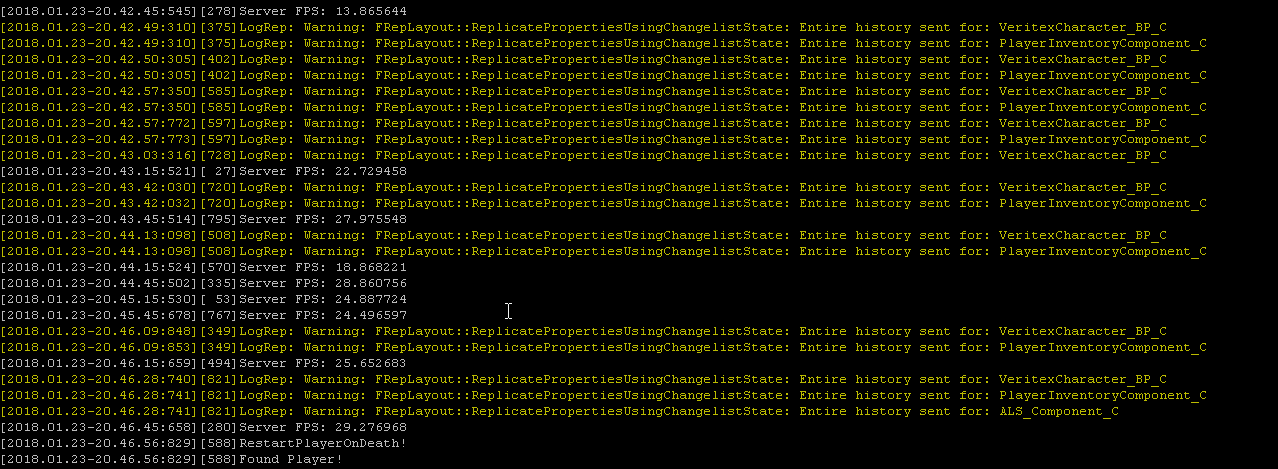
anyone know how to resolve this
i found some info saying it has to do with changing a replicated variable on tick
but i dont believe im doing this..
torn gust
Hey again. So i have found some solutions and broke them right afterwards. I ask again, is there a dokumentation on how to announce a Player when joining to all other clients ? I tried to save new Players to the Game Instance and then send the Player names to the UMG but i can´t find the best way its verry buggy and just not right
As if nobody is doing it. I tried to search every term that coul match this question and used site:forums.unrealengine.com + question and still found no thread about it. Why is that ?
grand kestrel
@torn gust OnPostLogin in GameMode, just keep in mind clients can't see the game mode so you'll have to send the notification elsewhere
 charred tulip
So hidden and collision disabled characters get destroyed on the client's side but stick around on the server's side. anyway to stop that behavior?
torn gust
@grand kestrel i tried that at first, it never replicated well. So the game instance worked once - hm. Gamemode -> OnPostLogin -> Send new player controller to game instance and game instance replicates to all ?
grand kestrel
@torn gust Create an RPC in the player controller set as 'run on owning client' and reliable, have the game mode call it from OnPostLogin
Or better yet
Have the game state with the RPC
The game state is accessible to players
Which means all of them can be notified of a player joining
charred tulip
yeah that's what I was about to say
I use the game state alot to replicate stuff all in one central place
torn gust
Ah nice. I´ll try that ! Thanks i will check that
grand kestrel
Yeah and its easily accessible from anywhere
charred tulip
yeah just get game state -> Cast to your game state
isnt the game instance used to travel across levels?
yeah just looked it up. that's what I thought
torn gust
The thing is, i kinda unlearn every step that worked because new things break the learning progress. Sometimes i think, yeah it should work like that. But then it just stopped working. Gets worse with every try that fails. Well i never heard or used the game state. But that is worth a try.
Do i need to set vars on replicated inside this game state or not ? I am so uncertain when to do that. I do understand OnRep Notify though that was kinda easy.
 fossil spoke
You set an Variable to be Replicated if you want its value to be updated to all Clients if the Server changes its value.
torn gust
And this is also true for the game state ? ( If true, i can see a pattern and understand)
fossil spoke
Its true across all Actors
torn gust
Thanks @fossil spoke 😃
torn gust
Hm seems to work now. Big thanks to you @grand kestrel @charred tulip and @fossil spoke
charred tulip
yay!
fossil spoke
Awesome
torn gust
But i have to delay it a tiny amount. IF two Player join to close to another in time, it can´t do it right. So you Spawn, Gamestate register the player controller and after a small delay the controller announces to the world its name to all controller that have the announce widget
Hm. It got the feeling it could be done better but i have no comparision. The Widget also loops through an array, so that it displays one announced player name at a time ( client based but the name var comes from server)
Looks smooth. Don´t know if its stable enough.
fossil spoke
Why dont you just call an Multicast RPC in the GameState from OnPostLogin and pass the PlayersName?
The Multicast could call an function that handles displaying an new UI element with that Players name.
torn gust
Hm i tried that before. Would be great. But how do i sort these Ui elements ? The older ones need to sort further down and fade out and newer ones need to slide in from above
fossil spoke
Well thats something for you to work out. You will need to Queue them
torn gust
I guess grid panel could be used. It has rows and colums and i could switch them right ?
fossil spoke
Pretty simple really. Its just adding an element to an list and removing the older ones after a period of time
torn gust
Or reorder to be specific
grand kestrel
How often do you guys rebuild the server binaries
After every change that you deploy to your server? Or major changes?
fossil spoke
My build server runs an full rebuild every night. I usually wait to the next day.
torn gust
@fossil spoke so i should clear them all and then rebuild them ? There is not insert at index option so i guess it has to be rebuild to reorder
fossil spoke
Yes
torn gust
Its working. I add childs ( max 4 ) for each feed update and if there is an update to the feed it just reorders the text. After a while they fade out if they aren´t updated
It looks ok but i guess i have to polish it . Thanks again.
fossil spoke
No worries.
twin juniper
Hey, anyone here who's gone through Amazon Gamelift integration? Or familiar with cmake?
thin stratus
Doesn't GameLift provide a ready Plugin?
past bear
heh, so my RPC issue has come back to me again
GameState(server) is tripping calling a function on GameState(client)
shit's fucked, yo.
if I can't do that, what the heck can I do?
bitter oriole
That's messed
thin stratus
@past bear You mean Multicast?
past bear
it's not multicast
thin stratus
A ClientRPC on the GameState makes no sense
At least that's what "Server calling function on Client" tells me :x
past bear
it is a client RPC and I don't see why it makes no sense
thin stratus
Because the GameState is not owned by any client
 severe widget
thin stratus
severe widget
thin stratus
You are reaching the Server again basically
ClientRPCs only work if a Client owns the actor, otherwise the Server has no idea what client it should call that rpc on
ripe raptor
Anyone here know if there are any issues with replicating nested structs?
or rather, nested arrays of structs
I have something not replicating properly on the initial join. Meaning the client joins the server and gets the wrong info until the server updates it again
pallid mesa
btw @bitter oriole I took your advice and tested on lag situations up to 300 ms, smooth as butter and I'm happy lol
thanks to that I noticed my Blueprint resetted its defaults because I had a replication turned on I didn't need
bitter oriole
Cool !
twin juniper
@thin stratus GameLift SDK needs to be compiled using CMake which I have no experience with and I honestly can't find online how to set it up properly running those commands. Really need some help as I can't even start testing it :/
 zenith yarrow
Any idea why I can connect to a lan session using STEAM onlinesubsystem, but cannot switch to the correct map in the server listen url on connection ? instead the client transfers to the default map ?
past bear
okay, so after a fair bit of rummaging in the depths of the Internet, I have concluded that our multiplayer problem is an issue specific to 4.18.1
ripe raptor
So upgrade / downgrade the engine and it's gone? 😛
past bear
hopefully
pushing for an upgrade to 4.18.2
from what I could gather from the AH posts to do with recent replication errors, there's a problem with something like a pointer mismatch
thin stratus
@twin juniper But only if you use the client sdk in UE4
The serversdk is given as a plugin
past bear
so server and client are pointing at different things - and as a result the returned error message is a bit of a red herring
twin juniper
@thin stratus It is, but I need to compile the C++ SDK file to get .dll and .lib files generated and this CMake thing is making everything so complicated for me 😦
twin juniper
the one that is uploaded on git?
thin stratus
As said, there is a Server and a Client SDK
twin juniper
I already tried the unoficcial plugin with the .dll and .lib files generated but UE4 editor won't open after I import it saying the version is not compatible, etc
Yeah, I'm setting up the Server SDK for now
thin stratus
And you need the Libs of the SDK
Not the ones for UE4, right?
These
Because the UE4 ones don't need cmake
twin juniper
Yeah, these should be generated if you can compile to files with CMake. But I already have those from the unofficial plugin from here https://github.com/davevill/UE4-GameLift

And then I try to put the supposedly compiled plugin into my Plugin's folder, then generate Virtual Studio files and update the build.cs and .uproject files but when I try to compile it, it cannot locate the Gamelift SDK
I don't know, I'm sitting on this for the third day straight, maybe I should give up and cry for a bit 😄
thin stratus
The error would be nice
That you get when compiling
Also did you regenerate project files after adding the plugin?
twin juniper
Yeah, I did everything as said in the tutorial. So you would confirm that the unofficial plugin should allow me to use it even without cmake shenanigans?
Give me a sec, I'll try to to reproduce the errors
zenith yarrow
I have tried adding ?bIsLanMatch to the serverURL, also tried chaning the source and destination to maps to use bUseSeamlessTravel = true, the connecting client still does not switch to the correct server url and loads the default map seamlessly , I am having trouble understanding why this happens with steam onlinesubsystem for lan matches ?
ripe raptor
So
no matter what I do, I can't get my array of structs to replicate
or rather, it replicates if I change it after the client connects
but when the client connets they get an empty array initially
twin juniper
@thin stratus I'm getting
"requires the 'GameLiftServerSDK' plugin. Install it and try again, or remove it from the required plugin list.1"
twin juniper
All source files in module "Project" must include the same precompiled header first. Currently "C:\Users\PC\Desktop\Project\Source\Project\Project.h" is included by most of the source files. The following source files are not including "
This as well
I get different errors if I use "GameLift" instead of "GameLiftServerSDK" as described in some blogs
thin stratus
The "Must include same header" is easy to solve
Your cpp files
need #include "Project.h" at the top
All of them
Which engine version are you using?
@twin juniper
twin juniper
4.17, I'll repeat everything again just to be sure
another thing in the tutorial it has this line:
using UnrealBuildTool;
public class MyAwesomeGame : ModuleRules
{
public MyAwesomeGame(TargetInfo Target)
and by default, I have:
public MyAwesomeGame(ReadOnlyRules Target) Base: Target
So I was wondering whether this is causing problems in my build.cs
zenith yarrow
Has anyone here used steam onlinesubsystem successfully for lan matches ?
twin juniper
i got a ton of these little warnings
anyone know what they mean/what i should do to f ix this issue
past bear
it means bad things are happening
I can only tell you what the error message is saying though, I don't have your project
whatever you're doing, it's trying to resynch whole actors every tick it seems
past bear
you're doing something
past bear
you'd be better off looking up reasons why it would replicate an entire actor history
twin juniper
it also doesnt seem to be doing it
all the time
lol
@past bear have u had this before
ripe raptor
Is there an easy way to distinguish whether or not I'm currently hosting a session?
IsAuthority will return true even if it's a single player game so...
thin stratus
IsServer?
ripe raptor
THat doesn't return true when offline?
thin stratus
Idk, try it :D
Usually you are kinda aware if you are online or not
Cause it's your game after all
 agile crane
Hey guys, I'm sorry for asking this once again but can anyone here help me setup a server for my multiplayer game being able to find server online? A lot of stuff are done and working in my game but I'm searching and searching how to setup a server and all I see is dedicated server and its c++ and Idk how to c++...
Can anyone here setup a server and a hosting site for me? I mean, I will buy the hosting site myself but Idk how to setup and I don't know which hosting site I should use. If anyone can setup and make a working server for me I will PAY YOU. I'm excited asf to release my multiplayer game and c++ for me is not possible.
PLEASE SOMEONE HELP. IM ABOUT TO GIVE UP FOR MY MULTIPLAYER GAME. I have no experience in c++ and I need someone else help please thanks 😄
ripe raptor
Well yeah but I thought I'd avoid adding flags for that if there are built in ones already
bitter oriole
@ripe raptor GetNetMode()
agile crane
If anyone can help me setup a server I could pay you.
ripe raptor
@bitter oriole - Yea the IsServer BP node uses GetNetMode, neat
@agile crane - A few things... first of all, you are way over your head if you don't know C++ and want to set up dedicated servers. If you want to do listen servers, that's a different thing but also not quite for beginners. "Setting up a site" won't cut it if you can't maintain it, no matter how much you pay. You'd have to have someone on payroll to maintain it for you.
agile crane
Yeah but... is it at least possible for me to buy a hosting site and works in blueprint and or at least a hosting site tutorial how to setup it for any UE4 multiplayer game? Cause if there is a tutorial how to setup it even in c++ I could try doing it since it will be a tutorial, ot myself doing the c++ thing.
thin stratus
Idk what you want with the hosting site
agile crane
Like
I don't really know about multiplayer server thing
Idk how to play online with other
everything works lan for me.
thin stratus
Two things
- Direct IP connection
- MasterServer
Master Server would give you a ServerList
Either you code that thing yourself (which I doubt you can without C++ experience), or you use a Subsystem that gives you one
Steam would be one
(takes a cut of your earnings of course)
So if you want online Multiplayer with Listen or Dedicated Servers appearing in a ServerList, implement Steam OnlineSubsystem
There are tutorials about that
bitter oriole
@agile crane You need a private server, meaning a computer hosted on the Internet, for your dedicated esrver software
Not just a website hosting
A full Linux / Windows machine, even if a virtual one
thin stratus
After you've done that, it doesn'T matter if you host the Server executable on your PC, a Friends PC, your calculator with wifi or some server on the web
agile crane
Thanks for the info. But Idk how to setup all of these things myself sadly.
thin stratus
Then you should stop right here and learn it
No one of us can magically give you all of that
agile crane
If anyone can link me a tutorial or help me please
thin stratus
There is no overall tutorial
There are tutorials to create Dedicated Servers
Well enough written to blindly follow
And there are tutorials for Steam Subsystem too
bitter oriole
@agile crane Online server cost money, too - something like $20 a month for something that can host UE4 games, I'd guess.
agile crane
I tried adding Steam subsystem and such but I cannot join online or find server
ripe raptor
I think the first thing you need to really decide is whether you really need a dedicated server, or will a master server + listen servers suffice.
thin stratus
@bitter oriole Wouldn't throw prices in
bitter oriole
Just saying it's also a consideration
agile crane
What about master server? Can someone explain to me more in detail?
bitter oriole
Might be double that, or half
thin stratus
GameLift for example host you with a free tier server around 10 instances i would say
bitter oriole
@agile crane For Steam you need your game to be sold on Steam
agile crane
My game is a fan game. I cannot sold it on Steam.
bitter oriole
Then you can't use Steam for online stuff
agile crane
Yeah rip
thin stratus
You can't sell your game at all then
agile crane
I will not
thin stratus
But I think even free stuff with copyright isn't allowed on Steam
agile crane
yeah, but I don't really want to do it on steam anyway
thin stratus
Well getting a MasterServer to work requires knowledge about programming, databases etc.
agile crane
So for setup a server I need to make a dedicated server first, and which site I should get for host the game forever?
bitter oriole
@agile crane Basically, online multiplayer game are extremely hard to pull off successfully, especially if you're new to game development. It's very hard to do, you need to master many different fields, it costs money, etc.
(you don't host a game on a site)
agile crane
I have 2 years of UE4 experience
bitter oriole
(you host games on a private server)
agile crane
yeah but, which site I should get?
bitter oriole
You rent them, based on what hardware you need for your game, install your server remotely, and then create another server software that people connect to to find the IP address of an available game server (that's called a master server)
thin stratus
So might want to compare prizes
bitter oriole
This is pretty fucking hard, having done all of that myself once
thin stratus
You code your software in your wanted language
c++, c#, node etc
Which is connected to a local database
bitter oriole
@agile crane Completely indepent project you'll take a few months to create
thin stratus
That database holds information about the serveres
And should sit on a static ip that never changes
well that static ip belongs to the server you host it on
bitter oriole
I wrote my master server in Python, and I wrote another one in C++
thin stratus
e.g. aws server instance
agile crane
But I'm confused since Idk how to c++ nor setup any site nor c++ unless a dedicated server since its on youtube.
thin stratus
Then you perform HTTP calls from GameServer to MasterServer for adding, updating and removing entries
And use HTTP calls from client to retrieve a list of servers
Yeah well, it's too much for you atm
bitter oriole
@agile crane Master server development isn't Youtube tutorial level
It's actually fairly easy, but no one has a tutorial for that
People use Steam for that, most of the time
agile crane
And its c++ I guess?
thin stratus
It's hard to suggest anything at this point
You need to learn a programming language if you want to do that
bitter oriole
C++, Python, PHP...
ripe raptor
You can code it any programming language.
agile crane
not blueprint tho?
bitter oriole
Not UE4
ripe raptor
It's not even connected to UE4
It's just a stand-alone application that will handle HTTP requests
bitter oriole
Your master server would be a 100% independent program that doesn't have any UE4 in it
You need to learn sockets, databases and wrap that together
agile crane
alright
Is gamesparks can work too?
I heard gamesparks is for multiplayer but matchmaking only
agile crane
I don't want to do matchmaking.
ripe raptor
Although I only used it with Unity.
agile crane
Only server browser
bitter oriole
That's what a master server does
ripe raptor
Server browser is manual matchmaking.
bitter oriole
Your master server is the software that gives players a list of games in the server browser
ripe raptor
The underlying principle is the same. Get a bunch of users together and create a game instance for them.
agile crane
alright, I don't know where I should learn for setup a master server tho, that's the problem for me.
Master server sounds like the thing I really need
bitter oriole
@agile crane Learn Python, learn sockets
Then learn MySQL
Then you can create a master server
Easiest way
agile crane
For indie game dev its pretty much
i really need someone to make it for me
If someone can do that I will pay.
bitter oriole
No one's going to make it for you
agile crane
yeah rip
bitter oriole
FWIW I've been in a lot of indie projects
The number 1 rule is do it yourself
No one's going to do it for you
agile crane
Yea pretty much
bitter oriole
Even when you get a team of 15 like I did once
Or 30 like another time
The guy who's driving everyone is the one who's doing half of everything alone
bitter oriole
Sure, but it will take just as much work compared to doing it yourself in Python or something
And money
agile crane
Yeah
thin stratus
GameSparks has "Collections" that could be used to save a JSON of ServerData
But yeah, also not directly straight forward to implement.
bitter oriole
Get a Python tutorial, it's easy, it's beginner-friendly, and as someone who did create a Python master server once, it's a great tool for the job
agile crane
Sounds hard.
ripe raptor
MP is hard
bitter oriole
Hell, PHP on a website hosting service would also work
agile crane
Also, is there anything on the marketplace that can be useful?
bitter oriole
You're not going to find a Youtube tutorial, marketplace asset for everything
You need patience and time
Just learn
agile crane
Learn but Idk where that's the problem and it must take like multiple years for learn c++ and know what I'm doing for create a master server.
bitter oriole
Any multiplayer game takes multiple years
And again, C++ isn't what I suggested 😉
Though you'll need C++ on the UE4 side, but that's another concern
agile crane
python or smth but I'm not a coder
thin stratus
Well the problem is that you are looking at learning how to do a MasterServer
While you need to look at "How to learn XY programming language" first
You need to start with small steps
bitter oriole
@agile crane The only thing that can prevent you from doing what you want is not wanting to learn what you need
You've been told what you need
I wish I had people to tell me that a decade ago
agile crane
Why can the game works lan and not online tho? Its what I don't understand, why can't the game find server anywhere?
bitter oriole
@agile crane Because the Internet doesn't work that way
You can't look up every computer to ask if there's a server
thin stratus
LAN just spams the "HERE IS MY SERVER" to all people in your LAN
ripe raptor
You have a wooden stick at best and you're asking for instant instructions on how to move a mountain. Unfortunately as hard as this sounds this is way out of your league at this point, find some Python 101 tutorials, learn the basics of code, once you got the basics down focus on ports, SQL and databases. THEN you will not only have the knowledge for the master server but also good fundamentals to actually develop your multiplayer game.
thin stratus
For Internet, you need the MasterServer that saves the Server information of each server of your game that is up and running
And the client can ask that
agile crane
It might take a few years right?
thin stratus
It took me 3-4 :P
thin stratus
Yeah I would start smaller and learn programming in general first (written not BPs)
You can always continue it
Once you learned more
agile crane
like not really, my game is a fan game and soon the fan base of the game will die and it will be too late
ripe raptor
Everyone congratulates you but no one knows how many times you got fucked before you got there.
thin stratus
@agile crane Well that's sad, but the truth is that "just" creating your multiplayer fan game is not easiyl possible without knowledge and training
ripe raptor
You need to do your time in the trenches like everyone else.
bitter oriole
@agile crane You can also give up, sure. Or you can take a few years of hard work to do it. But there isn't a third way.
thin stratus
Even if UE4 makes it easy for beginners
agile crane
But thanks for the info
thin stratus
Well it's less few years, it's probably weeks/months to learn that
It depends on how fast you learn
agile crane
Also
If I make a dedicated server right now, could it work?
Like, if I open the server on my pc
and hosting the server myself
in certain time, since I'm using my pc everyday
thin stratus
If you make a Dedicated Server now, and you would start that on your PC without any subsystem (SubsystemNULL), and you would properly create and search sessions, yes
agile crane
cool
ripe raptor
Oh shit Hamachi... how long has it been since I've used that hah
agile crane
Can't I just create a dedicated server and host the server on my pc when its opened and people online can find my server?
bitter oriole
@agile crane Sure
ripe raptor
Actually you hit the nail on the head, just not sure when and which game it was 😄
bitter oriole
You'll just need to tell people your IP address
ripe raptor
At least 15 years ago, probably more
bitter oriole
So that they can connect
thin stratus
@agile crane "Find" no. But they can connect via IP directly
ripe raptor
Mind you, you'd need to make sure you have a static IP
thin stratus
@agile crane You need to send them the IP of the Person who hosts the Server
ripe raptor
You can just hard-code it directly into your game
ripe raptor
but again, it'd have to be a static IP
thin stratus
Which needs to be opened on the router and firewall
bitter oriole
@agile crane The core purpose of a master server is to tell everyone what's the IP to connect to for a given server
agile crane
Can't they just download my game and find my server without needing to send them the Ip or smth?
ripe raptor
if your IP changes every time you reset your modem, no dice.
thin stratus
@ripe raptor Only if he doesn'T want to upade the up daily :D
thin stratus
A MasterServer is basically saving the IP of each server that is up
And sends these infos to the client on demand
ripe raptor
@thin stratus - I think it was probably AvP2, but that had LAN support, right?
agile crane
I throught if I make a dedicated server when its on on my pc people could join my game online without me giving them my private info or IP
thin stratus
@ripe raptor Buh, idk. I can't recall when I last used Hamachi
ripe raptor
Your IP isn't private info.
bitter oriole
@agile crane You thought wrong
And your IP will always be public, if you're using it to host game servers.
Whether you have a master server or not
People need to know your IP to connect to it
ripe raptor
Anyhow, gotta run, take care guys.
bitter oriole
That's how Internet works
That's why people use private servers (that and many other reasons like network speed, uptime, electricity cost)
agile crane
yeah, so rip my game
thin stratus
@agile crane
Two types of connection:
- Direct IP
- ServerList (MasterServer that tells the Client the IPs)
LAN supports both, as LAN doesn't need a MasterServer. It just asks all PCs if they are hosting.
INTERNET only supports Direct IP by default. ServerList needs the MasterServer.
Doesn't matter if DedicatedServer or ListenServer
bitter oriole
@agile crane For what it's worth, I did exactly all that years ago, before UE4. It's not impossibly hard. You just need time, patience, learning.
agile crane
Yeah but as I said I don't code nor I will. Or at least I need an exact tutorial on learning the basic coding for setup a server.
But thanks guys for the info, I learned something. And my game is now canceled.
bitter oriole
You're never doing any real game without coding. Even with UE4 and Blueprints, you're always going to need some features that use C++
Code is a core game development skill
bitter oriole
A production-quality game with a full settings menu, display settings, audio settings, key bindings... ?
I mean, it's not impossible, but C++ is pretty handy for that kind of stuff.
agile crane
Yeah, I'm sure in the future we won't need to do any of these thing for a mp game, we could just find server anywhere, which would be the future.
thin stratus
Multiplayer in UE4 requires C++ at some point
agile crane
that make me sad, its a fan game I cannot sell the game, nor make it free
thin stratus
Blueprints only allow you to do as much as Epic exposes by default
agile crane
My game are uploaded on a indie game site
thin stratus
So yeah, Multiplayer will force you to use C++ or a Plugin at some point
agile crane
but if I upload the game in steam the server could work fine auto?
bitter oriole
You could implement a server browser without creating a master server, yes
agile crane
yeah, that make me depressed sooo much
cause its a fan game, I cannot add it on steam
like for real
that's sad
bitter oriole
Fan games are just a bad idea anyway
Best case scenario, no one plays it ; worst case, you end up fined to death
agile crane
What if steam allows me to upload the game? For free.
I need to ask the original game creator first
agile crane
Yeah ikr
pallid mesa
didn't it... increase?
pallid mesa
mh 🤔 i might read something wrong
bitter oriole
@agile crane My advice would be to do a singleplayer game
pallid mesa
multiple or multiplayer?
bitter oriole
I mean a great singleplayer game that peopke talk about, that a few thousand people play
agile crane
I did multiple free games
some are complete and playable
since 2 years I'm making games
And ik alot in UE4 blueprint
So I think the only way for make my multiplayer game is to probably ask Steam or the original creator if they allow it for free on steam
Or make a matchmaking with gamesparks
pallid mesa
there are always things to learn mean, don't be so "I know everything" xD
bitter oriole
Steam won't allow it for free ot not
agile crane
yeah
bitter oriole
Anyway, if you want to get into multiplayer, Steam is a pretty good idea because no one will know about your game if it's not there. You'll need money, you'll need your game to not be a fan game
If you really want to do a fan game then sure
Just learn how to create a master server
If you're all "I give up it's too hard" then okay, but whining about it won't help
agile crane
Yeah that's the truth.
I wonder if this can really make a working matchmaking.. https://www.unrealengine.com/marketplace/fps-battle-royale-template

With this template, create your own Battle Royale game using Gamesparks Realtime BaaS.
If it can works I could try at least adding a matchmaking
could be one step
I just bought it, never tried it anyway
I will try if the matchmaking works.
bitter oriole
It won't
Online matchmaking requires a master server
There is just no going around this simple fact
bitter oriole
He's not, he's telling you that you'll need a Gamespark plugin, which will require a Gamesparks server, that you used to create a master server
Or he's using Steam
agile crane
But can it works if I package the project and send it to someone and we could find each other in the matchmaking?
oh yeah that could be true..
bitter oriole
Matchmaking simply does not happen in UE4, so no UE4 plugin can do it
It does not happen on the server
It does not happen on the client
 worn nymph
yes gamesparks can do that using the realtime api but its limited to 50 players
bitter oriole
It happens on a master server, somewhere, either a Steam one, or a PlayStation Network one
Or yours
agile crane
I already created my gamesparks account and code and matchmaking node thing and I already downloaded the plugin
Idk if it could work anyway
I will try it now
bitter oriole
Don't know anything about Gamesparks, so I dunno, maybe they provide master server features out of the box
Good luck
agile crane
Thanks so much, and thanks everyone for your info. I will try the best I can.
Even inside the game project it doesn't seems to want to make the matchmaking working, I cannot create one nor find one, well rip. I guess I need a master server
Thanks for the info.
bitter oriole
@agile crane For what it's worth, with the right pointers, you can get a master server running in a week
PHP server with MySQL on any website hosting service, and basic HTTP requests from UE4
agile crane
Alright, do you have anywhere I could learn how to setup that or learn the good code? Cause I don't want to learn every code for few years just for make that.
bitter oriole
Start with a PHP tutorial that tells you how to create a website with databases
Once you've got that, you'll just need to tell UE4 to "go to http://mymasterserver.com/register-game.php" or "go to http://mymasterserver.com/get-server-list.php"
Probably need C++ for that last part 😃
bitter oriole
sigh
It's just an example
When you rent website hosting, you either get a domain name, or at least a static IP address
pallid mesa
the mmorpg kit contains good examples for php communication with a masterserver iirc
so you need to talk with your website and then handle things with your back-end
For example, Player Pepito buys a gun with an in game in-come, you will make then a call to your API to refresh Pepito's purchased items
bitter oriole
Perks of using PHP for your master server :
- easiest, most documented language there is
- you can do a real website on the side (that shows the server list too)
- super high-level approach without technical details
- no private server needed for that, regular web hosting works
pallid mesa
yeah php is nice, but is not the only approach, you could build your own API with node, golang, js... up to you actually, but php is easy for the facts stranger posted
bitter oriole
I've actually had a C++ matchmaking server as a side project, didn't keep working on it since Steam is closer to what I really want (play with friends)
manic pine
so many bad memories from matchmaking call of duty
bitter oriole
Was pretty much a C++11 exercise, no database on disk, everything in memory
 next falcon
Hey Guys can i make a function only executed by server ?
if a widget calls a function in playerstate it will only for the player not for the server how can i call the function as server from a widget without a custom event i need that end values of the function in the widget
worn nymph
@next falcon only ways to do it are Function call Event or Event call a Function both can be passed parameters. maybe explain in more detail what it is youre trying to do and people can assist you further
next falcon
I have a Inventory Array in my playerstate which is displayed as a widget if i dragdrop a item from my hotbar to my inventory which is in playerstate too. in my playerstate i have a function to add that item and returns a bool which displays if it worked and a "Rest" int what can't be added. if the bool is true it was added and with a branch i execute another function which removes a item from the hotbar if it is false it doesn't remove the item
twin juniper
NetServerMaxTickRate=30
is there anything wrong
with changing this
to something higher?
by default dedi servers are set to 30
pallid mesa
you can do it, but under the expense that the server tick rate will be higher meaning thatif you do server side simulated physics or something similar that relies on tick, it will be updated more often which means more bandwidth usage
@twin juniper
I didn't explain myself very good but I think you'll get it
in UT that's set to 60
twin juniper
@pallid mesa is it really?
so would 60 be a fair value to use?
or is that too high lol
pallid mesa
yes, it was at 30 before
twin juniper
like im just wondering
pallid mesa
for an MMO like in your case I would default it to 30
twin juniper
hm
I'm trying to figure out how to get it to be at 30 fps stably
But It seems to be lagging down to 20~ from NPCs
and AI stuff
character movement component mostly
pallid mesa
server tick rate is more related to networking, not refresh rate
client side simulations will run with the local delta
for cmc what you do is basically update positions on the server and interpolate on the clients those lil offsets between updates
so 30 or 60, is kinda noticeable for a game that requieres precission
twin juniper
@pallid mesa my issue is that fps goes down to as low as 6
but i profile it
and its all char move comp
twin juniper
@pallid mesa yeah its from char move comp
pallid mesa
are you doing custom?
twin juniper
@pallid mesa yeah but im only overriding GetMaxSpeed()
So this happens every 15 seconds btw

I have it print stringing the server fps to log
u see how it goes down to 9??
its ridiculous
pallid mesa
yeah I see, but I can't tell what it could be without more information, try to up it to 60' server side ~ dunno if that would help btw
twin juniper
yea
but what would be the side affects
of boosting to 60 fps
is there any harm to it
is my worry
manic pine
and cpu
its just more frequent tick functions
with no limit, the server will run as fast as the cpu allows
you usually limit it to save on server costs, or to run multiple servers on one machine, or whatever
but it doesnt 'boost' your fps... if you already have < 30 fps, removing the cap wont do anything
twin juniper
ok
pallid mesa
yes thats why I said that shouldn't be the main root of your problem
and for a game like yours 30 should be more than enough
twin juniper
ok
i need to figure this out tho coz
its on a VM lol
its running on a ubuntu machine
so i wont be able to profile it from there
pallid mesa
oh. That explains a lot. The server uses CPU and RAM
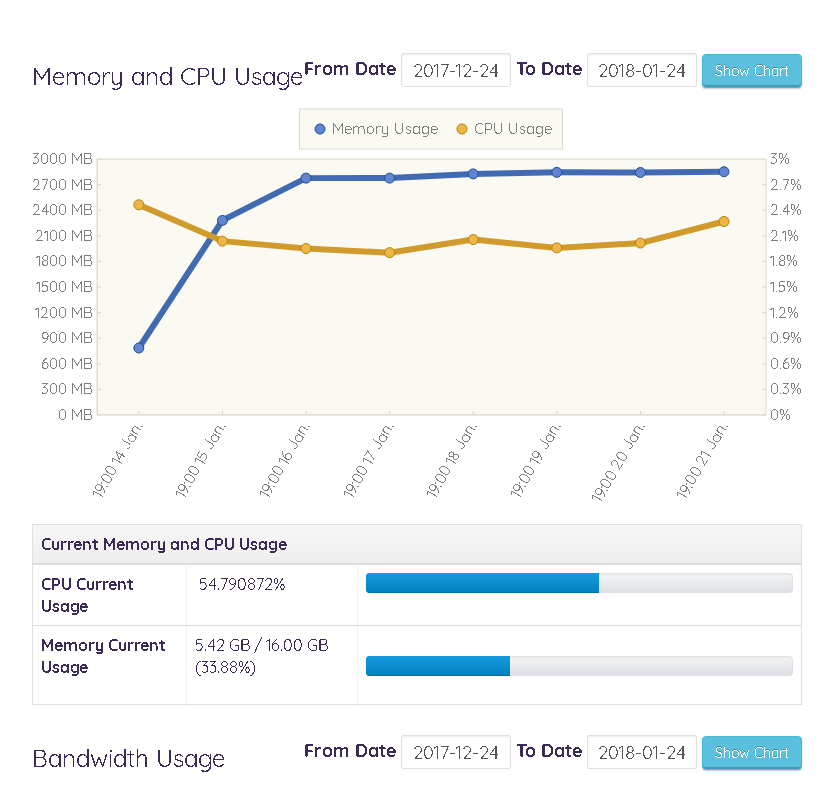
check out your ram usage server side
pallid mesa
not sure how good would be employ virtualisation for a server environment, never did it before
only on native systems
 pallid mesa
yeah looks reasonable to me
pallid mesa
I would need to research about VM's on the topic and how common that is.
twin juniper
weird thing is
on average when the server is idle
its at about 20-30 fps
and i had 3 players on yestrerday
and it was still stable
but it would sometimes dip
to 6 fps
but then 15 seconds later it would be fine
pallid mesa
no reason?, something triggered it?
twin juniper
i mean none that i know of lol
when i do profiling
all i see is
"CharacterMovementComponent"
Lol
pallid mesa
yeah the cmc takes a good chunk of it, but shouldn't cause you those hiccups with 3 clients
3 clients is like nothing
pallid mesa
I runned 40 clients on a windows server no problems at all in a blueprint only project
twin juniper
lol
pallid mesa
so there should be something else
keep posting your problem and maybe tomorrow or tonight someone could hop in and help you a little bit more, there is nothing I can say right now with the current data I have =/
twin juniper
:p
i really cant wait until 4.19
because evidently they added features
to profile on cloud platforms
pallid mesa
yes, 4.19 is already a sweet version on its preview
I wouldn't recommend you to update to the preview
because of stability and things like that
pallid mesa
so yeah... good luck with it, keep profiling and instead looking at cmc as the main problem take an overall look on any ticking code you could be doing
twin juniper
once i got the performance working lol
pallid mesa
mh... take a look at the pricing
twin juniper
its not too bad
but this current server
i think i could run three servers on it
maybe 4?
because one is only taking a small amount of RAM
 versed socket
Am struggling with how to implement an interaction system. My first impression was to create a TriggerBox volume component on the Character that allows the player to call an OnInteract interface function whenever an actor that implements the interface overlaps with the trigger box. However, the problem with doing it this way is that it only works for one interaction per interactable object (i.e. turning a light on and off). What if I want an actor to have more than one interaction?
I'm thinking that I would need to create some kind of interaction enum so that I can switch off of it to decide how to react and then make this into a "CanInteract" actor component that somehow binds itself to the player's input... but then binding it to a player input directly would only work for single player...
manic pine
probably better to do a raycast than a triggerbox
manic pine
interface or component?
thin stratus
That's up to him how he wants to interact (linetrace or overlap)
manic pine
well with line trace you can have it when youre looking at it, instead of standing close to it but looking away
but yeah
maybe have interface return a list of possible interactions
thin stratus
@versed socket variable number of interactions can be done by passing a simple integer
But maybe i didn't understand what you exactly want
versed socket
I agree that LineTrace makes a lot of sense for this, but it'd have to be OnTick or on a timer... and the first thing I ever learned about Unreal was "never use Tick"
manic pine
everything uses tick
thin stratus
You can linetrace on tick
versed socket
Well obviously, yeah
thin stratus
That's not what never use tick is about
manic pine
its just to prevent newbies from using tick for everything
including stuff that only needs to be done once per minute
versed socket
I don't know, I've gotten pretty far using events and timers everywhere and avoiding tick at all costs based on the advice I've always heard on the official UE4 live streams
versed socket
I know
manic pine
well youre free to use a timer for your linetrace as well
thin stratus
You are free to use tick, timer, overlap, input event
manic pine
and overlap volume runs every tick
thin stratus
Whatever suits your needs for your game
Question is what you mean with multiple interactions
manic pine
i assumed multiple things like you can pick up the tv or turn it on/off
versed socket
Yeah of course
versed socket
If an interactable actor overlaps with my trigger volume, I will figure out what kind of interactions are available from that actor and display it on the UI. Question is, how to actually implement that.
thin stratus
For example strings
versed socket
That's a good idea!
thin stratus
And then pass the string via the onInteract
versed socket
That's a very good idea, @thin stratus
thin stratus
And switch on string in the actor to then react to it
Array can be used to populate a widget, like a list or so
versed socket
So I would do, OnBeginOverlap, a call to an interface function like fn_GetInteractions(), which gives me an enum array. I pass that enum array to the HUD, which will make my UI update with the possible interactions. OnEndOverlap, I will simply tell the HUD to remove the child components or to just itself from parent altogether.
This is great! Thanks so much @thin stratus
versed socket
Is the reason because we would use the string as what we actually display on the UI as the interaction option itself?
thin stratus
Thaz enum would otherwise constantly need to be extended and would contain all different options even if only the tv can change channels
 opaque tinsel
has anyone work with execute console command server travel? because im having problems where i would load into a black screen which isnt the map that i chose
versed socket
@opaque tinsel I've had that issue in the past as well. I think that it only has to do with the PIE thing. Try seeing if it still happens when you run it in Standalone!
opaque tinsel
i've package the game however im still having issues
it seems like the server travel isnt being called because im not loading to the next map
 vivid fjord
hello, does anyone know of a good database integration tutorial?
grand kestrel
Has anyone worked with SpatialOS? Looking for some feedback and results and thoughts on it
 hasty orchid
Hi, I have a player start object that spawn a player, but in a multiplayer game, when a player move, the other player don't see him move. The replicate box is check on the player, do I need something else ?
fossil spoke
You should also check Replicate Movement @hasty orchid
hasty orchid
@fossil spoke It's already check
fossil spoke
How are you moving the Player?
hasty orchid
With a controller, I'm adding forces to it and rotate it
My object is like that
I'm moving the sphere
I tried to check the Component Replication of the Sphere but it's doing weird things and it's not working anyway
fossil spoke
Physics replication is difficult.
The amount of information required for it to be accurate is difficult to condense in order to send it across the network.
hasty orchid
Erf :/ What do you think is the best thing to do ?
grand kestrel
Would it seem reasonable for rubber banding to occur when outgoing bandwidth is averaging 460KB/s
fossil spoke
Send location information more periodically instead of on tick and constantly adjust clients position as the new location arrives. Not really put much thought towards Physics replication. Ive got no need for it.
fossil spoke
@grand kestrel Are you sure packets arent being dropped?
grand kestrel
How can I tell in the network profiler
fossil spoke
Make sure you dont accidentally have the NetPkt family of debug commands enabled.
grand kestrel
Definitely don't lol
So here's what I'm really trying to ask
We have players running with -nullrhi and our custom parameter -bot which means they pick an arbitrary direction to move in and hold down the fire button, they fire network replicated projectiles (not hitscan), they have 600RPM assault rifles and infinite ammo/clip size
So it's basically a bunch of terminals connecting to our google cloud server and running around shooting
At a player count of 40 it's fine
Around 70 they start to rubber band
Perhaps around 50/60 projectiles don't consistently spawn
fossil spoke
Sounds like an bottleneck
grand kestrel
Yeah very likely, but this is just my lack of understanding here, what causes a bottleneck with UE4's networking? When averaging 560KB/s that's nowhere near the limit for any of our connections upload or download
What is it that needs to be increased to let the data get where its going
I can't see dropped packets on this network profiler as far as I can see 😦
Server's CPU usage sits around 13%
fossil spoke
What version of the engine are you on?
grand kestrel
4.18
fossil spoke
Have you tried changing the rate at which projectiles are considered for replication? Little bit intoxicated atm so having trouble coming up with possible issues
grand kestrel
Ahh I'm not trying to resolve the bottleneck, I want to identify it
I'd like to know how to see how many players were connected at any point in the profiler and how many packets were dropped
But I'm not seeing the info
I also want to understand why a bottleneck occurs on a server not using much CPU or it's connection capacity
fossil spoke
Divide and Conquer? Do they rubber band at that capacity without firing any shots? Does an connected client with an RHI also feel the effects?
grand kestrel
Mm yeah will have to
ripe raptor
Did anyone here have th e pleasure of having the editor crash during multiplayer with some BP replicated variables?
fossil spoke
Id say alot of people have. That question is pretty broad haha.
ripe raptor
Well this is actually quite a specific error that's been around a while
A variable made in BP crashes the editor when it tries to replicate
it's an engine issue and I wonder if there are workarounds
 manic agate
Did anyone try using VR in multiplayer in version 4.18?
I've got 2 PCs. One acts like the server, and opens alright. When the client tries to connect it always crashes for something related to the HMD. Here's the relevant part of the log:
Assertion failed: Component != nullptr [File:D:\Build++UE4+Release-4.18+Compile\Sync\Engine\Source\Runtime\HeadMountedDisplay\Private\LateUpdateManager.cpp] [Line: 75]
UE4Editor_Core!FDebug::AssertFailed() [d:\build++ue4+release-4.18+compile\sync\engine\source\runtime\core\private\misc\assertionmacros.cpp:414]
UE4Editor_HeadMountedDisplay!FLateUpdateManager::GatherLateUpdatePrimitives() [d:\build++ue4+release-4.18+compile\sync\engine\source\runtime\headmounteddisplay\private\lateupdatemanager.cpp:76]
UE4Editor_HeadMountedDisplay!FLateUpdateManager::Setup() [d:\build++ue4+release-4.18+compile\sync\engine\source\runtime\headmounteddisplay\private\lateupdatemanager.cpp:20]
UE4Editor_Engine!UCameraComponent::GetCameraView() [d:\build++ue4+release-4.18+compile\sync\engine\source\runtime\engine\private\camera\cameracomponent.cpp:252]
Googling I've found another with the same error: https://answers.unrealengine.com/questions/732550/assertion-failed-component-nullptr-filedbuildue4re.html
Apparently it's an engine related issue, which (it was said) will be fixxed in later releases. In the hotfixes that came out it didn't happen, but still, it's a big issue that clients can't connect in VR, so I'm guessing that others might have found a workaround... do you guys know any?
 elfin solstice
Hello guys! I need to create an engagement screen in which I can recieve input from any controller connected to my device. The controller that press "A" (for example), will become the controller that actually controls the pawn and the game. Does anyone know how to achieve this? PM me if you want!
Any help will be useful, thank you!
pallid mesa
@twin juniper found out something?
thin stratus
@manic agate Had a VR project in 4.18 with two pcs, packaged. That works
Starting it with 2 players in VR on the same pc (which works but has the obvious camera problem) crashes similar to yours
So try to package?
ripe raptor
am I right to assume that you can't have RPCs in the game instance?
I answered my own question... oh well
 winged badger
I have a problem with actor placed in level that is supposed to do an EQS query and draw a procedural mesh around my player pawns. Its NetLoadOnClient is true, and its not set to replicate, as i want it to happen locally on each machine, it affects only visibility. It works fine in 2 window PIE, but when i run two standalones it doesn't work at all.
By doesn't work at all i mean it doesn't work on clients.
thin stratus
@winged badger Code needed. Otherwise hard to debug
@ripe raptor Correct, you can't. Only exists once per game and is not replicated
ripe raptor
I assume the most convenient path is through the game state if I need "global" RPCs
thin stratus
GameState only allows Multicast
thin stratus
For Server or Client rpc inside the gamestate it woulf need to be owned by a client
But it's owned by the server
manic pine
should there be anything inherently wrong with using RestartMap on a PIE dedicated server instance(1 client) ?
manic agate
@thin stratus Regarding the problem with the app crashing in VR, I've actually seen that it happens even if I play without VR (with 2 players in the same PC, in PIE). Did that also happen to you?
worn nymph
@grand kestrel may sound silly but you are destroying the projectiles otherwise they will just disapear from soght but still actually exist ? also for fast fireing weapons you can object pool which might help
manic agate
You're probably right cedric, I'll look into that, thanks!
 cursive shard
Hello, Can I ask if we can pass a parameter to the ReplicatedUsing function?
twin juniper
u shouldnt need to
grand kestrel
Created a program for launching bots lol
https://i.imgur.com/sc82xNV.png


Surprising how easy C# makes async tasks
manic agate
I've got another problem. In version 4.14 I replicated pawn's movements "manually", with a replicated variable that whenever is modified from the server updates the position of the pawn on the client:
// In my Pawn.h
UPROPERTY(ReplicatedUsing = OnRep_UpdateActorLocation)
FVector R_ActorLocation;

UFUNCTION()
void OnRep_UpdateActorLocation();


// In my Pawn.cpp
void AUserPawn::Tick(float DeltaSeconds)
{
    if(IsLocallyControlled())
        {
                if(Role == ROLE_Authority)
                {
                   R_ActorLocation =  GetActorLocation();
                }
                else
                {
                       // I'll omit the client case
             }
    }
}

void AUserPawn::OnRep_UpdateActorLocation()
{
    if(!IsLocallyControlled())
        SetActorLocation(R_ActorLocation);
}
This worked well. Now in 4.18 it's super laggy, or at least the it is from the client perspective: the server pawn's movements are laggy on the client, but the opposite is not true (the server sees the client move smoothly).
What changed?
Even on the same pc every multiplayer action is extremely laggy... I don't get it, it worked fine before
manic agate
I'm trying the network profiler, but I don't understand a thing! If I post here the comparison between what happens in 4.14 and what happens in 4.18 would anyone here be able to understand anything? I can't see any meaningful difference myself...
bitter oriole
@manic agate You'll need much more work than this to cleanly replicate location
Even locally, and especially over a network
It might have worked before, but without any prediction, it's going to break down in every non-trivial setup
manic agate
I get that, but why isn't working anymore like it used too?
Also, how would you suggest doing it?
bitter oriole
The problem with replicated movement is that it can't be interrupted, if you draw a frame with no update to a character or vehicle, it will show up as laggy and irregular
And on any real network, you're looking at frames with no data pretty much half the time, because packets tend to arrive in groups
You're also looking at framerate issues, because the server might run at 30fps, but you want the client to run at any speed it can
On the client side, you'll need to interpolate the transform between server updates (which might be 20 times a second, or just once) ; on the server side you'll also need some kind of smoothing
For characters, UE4 does all of this automatically, but for non-character pawns you'll need your own movement setup.
The Udemy course on UE4 multiplayer touches on all of this
manic agate
Thanks for the tips, I'll check that out then 😃
About the big difference between 4.14 and 4.18 do you have any ideas?
next falcon
Hey Guys can i make a function only executed by server ?
if a widget calls a function in playerstate it will only for the player not for the server how can i call the function as server from a widget without a custom event i need that end values of the function in the widget
Example: I have a Inventory Array in my playerstate which is displayed as a widget if i dragdrop a item from my hotbar to my inventory which is in playerstate too. in my playerstate i have a function to add that item and returns a bool which displays if it worked and a "Rest" int what can't be added. if the bool is true it was added and with a branch i execute another function which removes a item from the hotbar if it is false it doesn't remove the item
bitter oriole
Not at all, except I think 4.18 optimized lots of networking stuff after BR
manic agate
@bitter oriole I assumed that too. That's actually the main reason I switched to 4.18. This is very weird...
bitter oriole
An important good practice is to setup your editor to simulate lag

Unreal Engine
Recently, I had an email conversation with a Gears of War fan about the differences in networking quality between each of the three games in the series. One thing that we can point to in terms of increasing the quality of the networking experience is our use of the Unreal Engine’s built in network simulation features.
manic agate
Oh nice link. I wanted to look into that in the next days but you beat me to it
Thanks!
bitter oriole
Good luck
grand kestrel
@bitter oriole Clumsy is the better way (imo)