#multiplayer
1 messages · Page 367 of 1
 rain coral
yeah I probably should. sometimes the way to the discord is a bit too short
 brittle sinew
Check if it's ROLE_None?
 grand kestrel
I have a UGameplayStatics derived class that checks if they started the game with a -bot command line flag, if it does it spawns them a controller and pawn that controls their character for them (for stress testing), but when spawned in the packaged game they're having the regular player controller and pawn spawned instead, I have checked (with logging) that the flag is recognized, it just seems that after server travel it's spawning them from somewhere else? Because the way I'm doing it is in the game mode base and selecting a different class to spawn in GetDefaultPawnClassForController_Implementation and SpawnPlayerController - anyone know?
I also have another flag -localhost which is working as intended and using the exact same logic (other than what it does if set) just in case of uncertainty
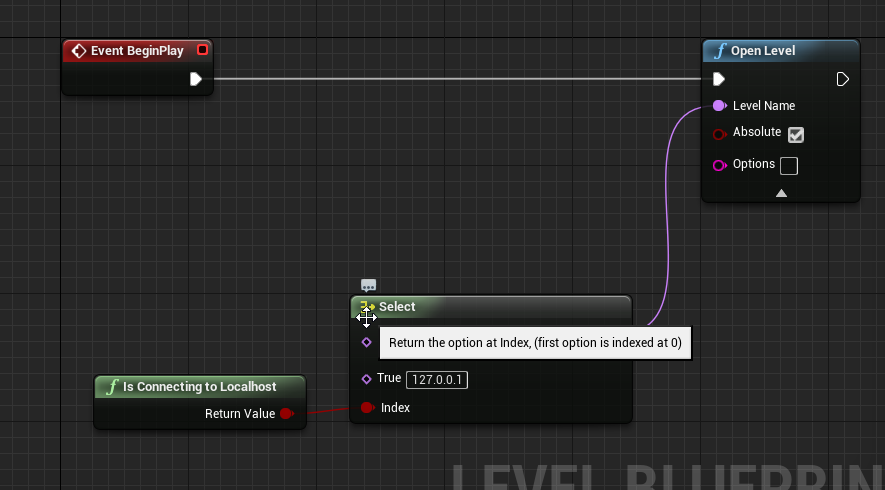
They open an entry map and in blueprint on begin play they do Open Level and pass the IP
In the entry map they have the bot controller/pawn
So it seems when joining through Open Level its using a different path for spawning the character and controller?
 grand kestrel
Oh, I'm dumb, the server spawns the player so if the server isn't using the flag..
Yeah
 burnt meteor
hey guys @here can anyone give me ue4's multiplayer series download?
i used to be there but now it gone
DM me
 long hollow
maybe he means the series they did on setting up MP with steam ?
@thin stratus can i pinch your brain for 2 minutes ?
 thin stratus
As always, post your question and I'll see if I have time
currently working on Mobile Patching
(╯°□°)╯︵ ┻━┻
long hollow
oo i bet that's fun hehe
ok, so we're having a really hard time trying to connect to the dedicated server, it registers the session properly, no obvious errors, we just can't connect, could this be a thing with steam's test app id ?
thin stratus
Connect via IP or Session?
long hollow
session
thin stratus
Any errors in the log?
long hollow
nope, there were at first, but we hammered through them for a few hours, now everything looks normal and clean, client, and server side
thin stratus
So there is not even an attempt?
Cause usually it should say if it tries and fails joining
If not, try to add the LogOnline=VeryVerbose to the engine.ini
And see if that gives more info
long hollow
ahh that might help, thanks i'll give that a shot, and double check the attempts
 past bear
I'm having a brainfart
I'm in the character class and I have a function I only want to run on other player's machines locally
how to set up that code?
 manic pine
you want a function that only runs on clients who don't own the character?
past bear
correct
manic pine
could do a multicast with a iflocallycontrolled->return
could iterate all controllers and skip owning controller
past bear
I shouldn't need to have any replication here at all
the code should be running 100% locally
manic pine
then just use iflocallycontrolled->return ye
past bear
cheers
that func / flag lives on which class?
aha, found it
context sensitivity doesn't find it when you search for local -_-
it does when you search for 'control'
ffs
past bear
yeah, it's a pawn function
it's exactly what I was looking for but couldn't find it
(I did even search for 'local' in context sensitivity before asking xD
and it works, so thanks 😃
next step is fixing my tracing and I'm all done here for today
manic pine
nice
multiplayer is like magic, you never know quite how its gonna behave
so many pitfalls
past bear
oh interesting, semi-transparent character mesh isn't casting a shadow either when opacity != 1
will need to fix that too, heh
 feral valve
lol, i only just noticed the Holy Bible of network development on Unreal (so my friends tell me) is written by cedric >.<
 twin juniper
Hey, does anyone have experience with GameSparks? 😃
rain coral
can someone guide me a bit through smoothing other clients position updates?
I've tried lerping between their current position and the newest server position, but that makes them floaty obviously. how does the lerp look like when smoothing between their old server position and their new one? I'm unsure how to handle the alpha value. if it's a constant, it will not really smooth out anything.
 full scaffold
Can anyone help with this? I have been working on it for a whole week and I still can't figure it out, I made a post here and formatted as best I could.
I'm really just looking for the best way to get reliable and smooth networked movement. I'm surprised at how hard that is in Unreal honestly.
 wide chasm
When I cut the tree down on client 2(the session host, but i'm running a dedicated server) it falls down on client 1, but when I cutit down on client1, it doesn't fall on client2
how do i fix this?
@wide chasm
full scaffold
@wide chasm Probably with somesort of multicast from the server
wide chasm
How do I multicast?
full scaffold
Create a custom event, called something like MulticastTreeDestroy
wide chasm
Ok, what should I do next
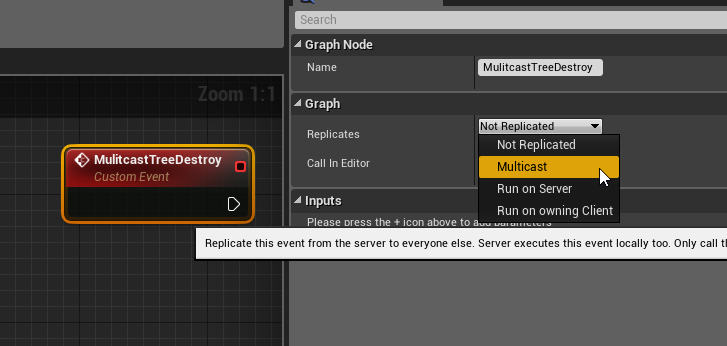 wide chasm
OHHH
full scaffold
You can't do Client -> client
wide chasm
Thanks so much thats what I was looking for
full scaffold
No problem
wide chasm
How would I do this, the client send the trigger the server and the server sends it back to both the clients
ignore the picture
there
full scaffold
You have to make two custom events, one that is run on server and one that is multicast
I'll get a picture hold on
wide chasm
Ok, thanks
full scaffold
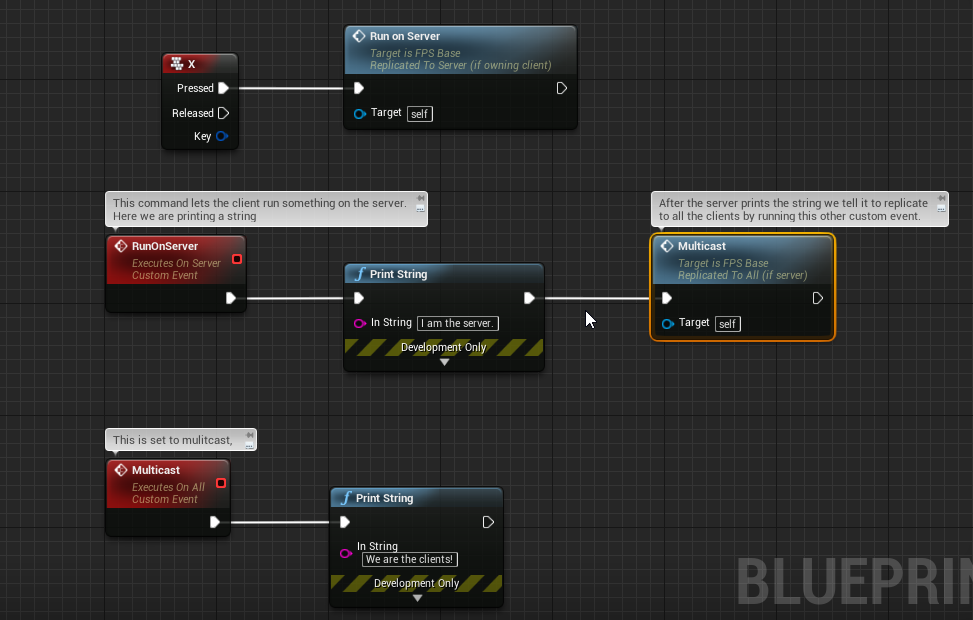
This is about what you have to do
Idealy you would also want to run it on the client if it involved them seeing something instantly
wide chasm
Ok, let me try it out
full scaffold
If you play that on a dedicated server with 2 players all the players will see the text
wide chasm
Doesn't work :/
The tree only falls for both if it is cut on the host, not the dedicated server
wait
Imess up
Fixed, but it still doesn't work
wide chasm
Physics is a bool, and it determines if physics is on, if physics is on the tree falls
full scaffold
Physics is hard to replicate across a network, use multicast to set the bool to true
wide chasm
I did, look at the image
grand kestrel
Have a dedicated server running on linux, appears to function fine, when using open <ip> from a client it tries to load the entry map while connecting to the server which is retarded and it shouldn't be doing that, it should load the map the server is running
full scaffold
Sorry it's late here my brain is mush
I'll think about it tomorrow and let you know if something comes to mind
full scaffold
He was just using to send a bool
grand kestrel
Why not just replicate the bool
full scaffold
hopefully
grand kestrel
Then why multicast it at all
If you're already replicating it you don't need to multicast it
wide chasm
It doesn't work
grand kestrel
Just make sure you're setting it on server not client
Sure it does, it's a bool, so long as the value changes it will be replicated
wide chasm
Only replicates on the host not the client, and yes i'm running a dedicated server
grand kestrel
Unless you've set a condition that causes it to bypass others then everyone will get the replicated var if it's set on server
Why are you sure that it's not replicating to others
 grand kestrel
That doesn't tell anything
wide chasm
I'll explain
physics causes the tree to fall,
https://cdn.discordapp.com/attachments/221799385611239424/404850799223767052/unknown.png physics doesn't get enabled on the host when the client cuts the tree, but when the host cuts it, it falls on both
 grand kestrel
When you say host are you meaning local player
Well, I'll say it again, that doesn't tell anything
wide chasm
Yes thats what I mean local player, sorry.
grand kestrel
What you want to do is use a repnotify, when a client cuts down a tree, send a server RPC that sets the bool, the RPC will replicate as it's set on the server, and in the repnotify have it enable physics
So.. how can I make my client load the map the server is running? It just loads the entry when I do open <ip> even though the server isn't running the entry, problem only exists with linux server
wide chasm
@grand kestrel Testing if what you said works
grand kestrel
Keep in mind that it will only be replicated (and call repnotify) if the value changes, not just because you're setting it, you can force it by calling the OnRep function manually after setting it if needed
wide chasm
grand kestrel
Use the context menu @wide chasm
wide chasm
How?, sorry i'm new
grand kestrel
@wide chasm
https://streamable.com/tm16y

Only need to do it that way for OnRep, it's weird, but thats how it is
grand kestrel
Then you need to set the boolean variable to RepNotify instead of Replicated
 worn nymph
hi guys can anyone talk me through how to make a replicated widget component.
everything i have tried so far only displays the name correctly on the owning client.
so lets say i want to display the players name above his head visible to all other connected clients
the name is stored in the owning players playerstate
so i get the server to set the name with a server rpc and if the variable is replicated it will update for the clients or do i need a multicast or something ? thanks
thin stratus
@worn nymph Well you won't replicate the component itself
What I would do is this
Create a Repnotify variable of your playstate type
On Possessed, which happens on the server, get the player state of the controller that the event gives you, cast it and set the repnotify variable
In the repnotify function , that calls on everyone, get the playername and pass it to the widget
worn nymph
that makes sense . thanks ill give it a shot later . the other problem i have is there is a bug in 4.18 where owner no see bool doesnt work. so i was thinking if i set the visibility to visible then use is local and set the visibilty to false this should turn off my own name ?
thin stratus
Owner no see shouldn't be bugged. Is that official?
worn nymph
yeah i found it backlogged in bugs still no fix its been broken since about 4.15
one sec ill find link
thin stratus
You can set visibility to true and in the possess do ClientRPC (or check in the Onrep if you are on the local client) to set the visibility to false then
worn nymph
thin stratus
Ah specific to screenspace widgets
worn nymph
yeah its easier to use it and work around the bug it takes more time and nodes to do the calculations for rotation etc . easier just to set visibility. thanks for the help
grand kestrel
Man all this drama with PUBG, it's like they're blaming flies for wallowing in garbage
They made their game fully client authoratitive
Then blamed the hackers when their game got hacked
 bitter oriole
@grand kestrel No idea about PUBG specifically, but every game has cheats, and you can't prevent them all
grand kestrel
...Uh-huh
bitter oriole
If players are using speedhacks, sure, the game just sucks
grand kestrel
Did you miss what I said
bitter oriole
Aimbots and wallhacks though, good luck with that
grand kestrel
Their game is fully client authoratitive
They asked to be hacked then cried when it happened
bitter oriole
Then the game sucks, sure
grand kestrel
Yeah, and all their patch notes are a massive whinge about hackers, and news articles are saying that they pay off the chinese police to arrest people who create cheats
If I buy a house in south auckland, leave every door and window open, and go out then call the police when my stuff is inevtiably stolen they're going to laugh at me and not bother
Coz thats equivelant to making a client authorative competitive game
bitter oriole
MP games are always going to get hacks though, regardless how secure
grand kestrel
So
Hows that relevant
Like what point are you making
That PUBG is fine making a client authorative competitive game and their whining about hackers is quantified?
bitter oriole
The point i'm making is that hackers are always going to hack, so I'm completely fine with moving to get them out of the business
Every game that cares about cheating will end up doing that
bitter oriole
We agree, really. They should fix their netcode. And they should throw cheat-makers in jail
grand kestrel
Yeah lol
bitter oriole
Both aren't mutually exclusive
grand kestrel
I was trying to figure out what you were meaning, like it came across as if you were defending them, but I know you aren't
It is good to get rid of the cheat makers but the ones who make cheats for PUBG aren't even a concern
Most of them probably couldn't touch a properly designed game
bitter oriole
I just don't know anything about PUBG, so I have no idea whether their code is any good. I just know I'm 100% behind legal action on those who build the cheats.
grand kestrel
Fair enough
Everything in PUBG is client authorative, server doesn't validate anything
It's the biggest example of everything you should never do, I don't know how bluehole managed to ruin it that bad
Either management screwed them / ignored the devs or the devs oversell themselves to management types
bitter oriole
Probably they didn't care, didn't expect success, didn't care about PC and planned to work with consoles
grand kestrel
True that
And now their foundation is bad
They'd have to remake the entire game
Definitely have the $ to
I mostly just rag on them for their immature publicity
bitter oriole
I would never ever want to work on a PC competitive game in my life, not if I can avoid it. Cooperative MP, sure ; competitive on console, sure
bitter oriole
But I wouldn't want half my game to be cheat detection
The problem with PC is that you're always going to have a way to create an aimbot, regardless of the game. You can make it more and more difficult, but it's completely impossible to entirely prevent.
So you need to do what Punkbuster does, rootkit the PC and look at processes, etc
grand kestrel
Yeah, will be using a solution, gonna look into EAC, punkbuster, etc
See what's best
bitter oriole
Kind of not my thing 😃
grand kestrel
At least I can confidently say they're not gonna be able to hack the spread lol
But yeah, aimbots are the big one
 inner iris
@grand kestrel even with a spread that they don’t know of, couldn’t they adjust the pitch and yaw of the camera to always point at a head bone on tick, pretty much removing the effects of spread?
grand kestrel
That's recoil
grand kestrel
The recoil is a concern yeah
inner iris
I wonder if it’s possible for them to still reverse it, if it goes in a fixed pattern per gun
Or is the spread rng?
grand kestrel
Spread is rng
inner iris
Hopefully isn’t too high as it’s frustrating to lose bloom fights- definitely a good option vs very jerky recoil
It’s a pretty hard thing to get right it seems
I wonder if a viable solution to validate against some types of aimbots would be to trace on tick on a pawn only channel and add up the number of hits a bone gets in a row. If the same bone is hit for say 2 seconds straight and either player is in motion, it’s a cheater as it would be impossible to do otherwise.
I guess in general though the answer is “get anti cheat” or just accept that the people will cheat in this way and try to make the game work around it if possible.
inner iris
Potentially it could even check if you hit the pawn a certain amount of time through objects that wouldn’t make the pawn visible normally something but yeah if they knew the validation technique, they could easily offset it
rain coral
is NetUpdateFrequency very high by default, when set to 100? in what case would one actor replicate at best 100 times per second?
manic pine
maybe you could inspect the pitch/yaw every now and then to see if outside code has modified it
100 is very high yeah
but keep in mind there's dynamic update frequency these days
rain coral
hm. well I'm trying to find out how quickly to interpolate between position updates for other clients. so far I'm trying to use the time difference between the two most recent updates. but if it was a long time since the last update, that becomes a very long lerp, which will be interrupted by the next update.
so instead I'm trying to use the smallest possible time difference to avoid glitchy movement
if it's 100, then I don't really know what that value is
 mild hull
why not cap it, if the delay becomes to much your prediction will be off anyway
rain coral
so basically cap it to the server's DeltaTime?
manic pine
it already is
netupdatefrequency means how often should server consider doing a netupdate
if serverfps < 100, it will consider one every frame
but of course that doesnt take into account dynamic update frequency
as an experiment, try setting MinNetUpdateFrequency to 100 too
rain coral
hmm. well, if I'm going to lerp at the smallest possible time an update could travel from the server to me, wouldn't that be my ping / 2?
manic pine
no
consider that you have 1000ms ping
server runs at 10 fps
at any one point, there's 5 updates on their way to you
rain coral
ah, right. it doesn't wait until I've received updates before it sends more, necessarily
bitter oriole
You need to process your movement as a series of individual time slices. Every time your client send a move request to the server, store them locally ; when the server tells you the authoritative position & speed, use that data then replay the most recent moves
The Udemy course about UE4 multiplayer is pretty great for that
manic pine
you'll find the epic team's implementation in UCharacterMovementComponent::SmoothClientPosition_Interpolate
its quite complex
well actually, a lot of it has to do with replays
so maybe its not too bad
rain coral
@bitter oriole this was about smoothing the other clients though. but I'll try to look into this for smoothing my own client.
@manic pine I looked through the CharacterMovementComponent, it was just too hard to read and overwhelming.
bitter oriole
For other clients, you want to establish a moving average of time between updates
Every time you get a server update, you define that as your target location, and interpolate toward that based on current time since update /average update time
A simple lerp should work-ish, and a cubic lerp works best
rain coral
how many samples would you use for the average?
bitter oriole
I think I use around a second's worth
rain coral
I'm just thinking, if the client stands still for 20 seconds, and halts any updates for that time, wouldn't that mess it up?
you'd get a huge time since update for the lerp
bitter oriole
I'm talking about server updates - replicated location & speed to your local, simulated client
For the player-owned client, do what I described above - moves, reset + replay on server update
Not sure which you want help with
rain coral
I'm on the topic of smoothing the other clients (not your own) right now
bitter oriole
Then you're always going to get updates, no matter how still you are
You only stop getting updates if the networking is cut
rain coral
not if using a Replicated variable instead of multicasts though, right?
bitter oriole
Don't see why not. I'm doing this myself, and I don't see any issues when stopping movement for a few seconds
rain coral
the replicated variable only gets sent by the server if it changes, so if a client stands still, there is no update on their position until they've moved again
bitter oriole
In any case, the smoothing is here for that
If you stop getting updates for some time, no matter why, you'll get a smooth result
rain coral
but to get a consistent form of movement, I was wondering why not to use a 'sort of' consistent duration for the lerp. even if they stand still for 20 seconds and then move, the duration that they should move to their next position would be the same as if they were moving continuously.
otherwise you'd get a 20 second long travel from point A to B and would get the next server update long before it reached B
bitter oriole
You can definitely experiment with different techniques, but if you average over half a second, when the player starts moving after 10 minutes idling, you'll have the correct network frequency the next second
Updates should be pretty high frequency when you're not suffering from terrible network conditions - much more than one per second
So this isn't really an issue
rain coral
I suppose I could clamp the average to avoid such things..
still, with an averaged duration for the lerp, you'd risk getting a new position update before the client has reached B. do you queue up the next position in this case, or accept a small teleport when using the next positions?
bitter oriole
You never teleport.
When you receive a new position , it doesn't matter if it's before reaching the current target, which always happens 50% of updates (since you're using an average and frequency is very unstable), or not (the other 50% is after)
You just use your current position as a start, new position as end, and reset the interpolation
At worst, your character speeds up unrealistically, for example if plenty of moves were received "packed" after a few seconds of lost connection
(In that case you might want to teleport anyway, but that's moving into "damage control" territory)
There isn't one way to handle every situation cleanly, anyway. It depends on your game
rain coral
ah. in my case I've done the lerp between previous server pos and next server pos. if I use the current pos instead, I agree there will be no teleport, but won't that make very ease out-sort of movement? unless that's what cubic interpolation is for, which you mentioned
bitter oriole
With a basic lerp, it's unnatural, with a bicubic that uses the speed too, it works well
(basically interpolate both speed and location)
rain coral
okay, that's good to know! =)
bonus question before I have to go for a bit, is there any bicubic lerp built in that I could use?
bitter oriole
There is
I use FMath::CubicInterpDerivative(StartLocation, StartDerivative, TargetLocation, TargetDerivative, LerpRatio);
Derivative is velocity * Time
rain coral
what would 'Time' be? 🤔
bitter oriole
Average network update time
The expected length of interpolation
(ratio would be time since update / average update time)
rain coral
ok I see!
thanks a lot =] has been very helpful, I'll get into this in a little bit
bitter oriole
You're welcome
 ripe raptor
Is there any period of time during which a controller's playerstate is null on a client?
past bear
Oh boy do I have a fun error to solve today
in our packaged builds only, the game is kicking players out shortly after joining
the error message is: "Error: Rejected RPC function due to access rights."
it can't be reproduced outside of a packaged build
it looks like some kind of security feature
 sterile pebble
could it be due to the windows security?
past bear
don't think so
it also logs: "Error: UActorChannel::ProcessBunch: Replicator.ReceivedBunch failed. Closing connection."
not a single hit when googling the error :/
now that you mention it, some other application does come up and it refers to access rights of some description
ripe raptor
That sounds like one of those bugs that turns people into alcoholics
past bear
as far as I can tell it is an Unreal specific problem, but the error message is a bit too vague for me to get what's going on
(it does specify which function is responsible, I snipped that out of the above)
sterile pebble
did you try to debug PIE without "run single process" checkbox?
past bear
well, tracked down the error log in code, it's an Unreal thing:
if ((Function->FunctionFlags & (bIsServer ? FUNC_NetServer : (FUNC_NetClient | FUNC_NetMulticast))) == 0)
{
UE_LOG(LogRep, Error, TEXT("Rejected RPC function due to access rights. Object: %s, Function: %s"), *Object->GetFullName(), *FunctionName.ToString());
HANDLE_INCOMPATIBLE_RPC
}
you can't hit it in PIE, or even in development build
has to be packaged
C++ question now, but what is the apparently bitwise operator : doing?
FUNC_Netserver : XYZ ?
sterile pebble
its a short IF operator
ripe raptor
From what I can tell it says "If it's a server the function has to have the NetServer flag, if it's a client it has to have the Client or Multicast flag, otherwise it crashes"
past bear
yeah, something like that
grand kestrel
Seems it's checking that the flag FUNC_NetServer is set (if it's a server), otherwise it checks if the flag FUNC_NetClient or FUNC_NetMulticast are set
past bear
now how the feck do you trip that from a blueprint 0_o?
grand kestrel
Same as DamirH said then
ripe raptor
so you're somehow RPC'ing a function that's just a plain ol' function
past bear
function is 'Run on Owning Client' and Reliable :/
call comes from Server
Game mode -> Player controller
so it's perfectly valid as far as I can tell
ripe raptor
Is "Run on Owning Client" a separate flag other than FUNC_NetServer ?
grand kestrel
Run on Owning Client would be FUNC_NetClient wouldn't it
past bear
BP has four options - 'Not Replicated', 'Run on owning client', 'Run on server', and 'multicast'
and yeah, my assumption would be that it's FUNC_NetClient
grand kestrel
Maybe recreate it in case it had some rare/odd bug
ripe raptor
It would seem that you can't call "Run on Owning Client" from the Server.
past bear
that's the only time you would call it though
grand kestrel
That's it's job
past bear
that's the whole point, heh
ripe raptor
Because if you look at that if statement above, it'll trip on FUNC_NetClient
Well yeah, but the if statement says otherwise :p
grand kestrel
If it's not the server, it'll trip on FUNC_NetClient
Meaning if you call a 'Run on Owning Client' from something that isn't a server
Which makes sense
past bear
aha, so something other than the server might be trying to call it
but that also makes no sense
the game doesn't exist anywhere but the server
ripe raptor
Hold on
If called from the server, that if statement would look like
if (Function->FunctionFlags & FUNC_NetServer == 0)
So "if the function doesn't have the NetServer flag"
or am I just derping out on bitwise operators?
past bear
bitwise & only returns true when both conditions are true
ripe raptor
Exactly
So if the function doesn't have the NetServer flag, it'll trip the if statement
 grand kestrel
If it's a client and it has client/netmulticast is trips it
Thats how it reads to me
past bear
the fail occurs inside FObjectReplicator::ReceivedRPC(
so this check is when a given machine recieves that RPC
there is already a check to see if the function is an RPC and we don't trip that, so it is an RPC, we can rule out that error
ripe raptor
if ((Function->FunctionFlags & (bIsServer ? FUNC_NetServer : (FUNC_NetClient | FUNC_NetMulticast))) == 0)
If it's a client the shorthand if will use FUNC_NetClient | FUNC_NetMulticast. If you bitwise that with FunctionFlags it will return 0 only if the flags don't have those 2 flags. So it will trip it if it's a client and doesn't have those two flags, right?
past bear
so it is indeed the flags
I have a really hard time reading that check, it's horrifying xD
need to reformat it
one sec
ripe raptor
Let's reformat
int32 FlagsToCheck = bIsServer ? FUNC_NetServer : (FUNC_NetClient | FUNC_NetMulticast);
if(Function->FunctionFlags & FlagsToCheck == 0)
{
....
}
grand kestrel
True = Flags & CheckedFlag != 0
False = Flags & CheckedFlags == 0
bitter oriole
This is a bitmask comparison, testing that FunctionFlags are exactly FUNC_NetClient or FUNC_NetMulticast
past bear
thanks
bitter oriole
Well, testing that they are not
ripe raptor
@grand kestrel - True if it weren't for that == 0 check at the end. The bitwise itself is false, but you're checking that it's false.
past bear
and it is net client, so it does indeed fail
past bear
the question therefore, is how the heck are we getting to this point?
grand kestrel
I meant checking that it's false, not it is false
ripe raptor
No worries, it's a really fucky if statement
It seems backward to me
Like, an engine bug
grand kestrel
Likely calling a run on owning client from somewhere that isn't a server
past bear
^
this seems to be the case, though it is coming from the game mode, so that should actually be impossible
grand kestrel
I did tell you what it meant before any of this breakdown though 😛
past bear
hehe
grand kestrel
Have some experience due to prediction stuff
Really dislike bitwise
Yeah, it should be
Definitely a bug
past bear
I can deal with bitwise, and ternary conditionals, but when you start slapping them together in larger statements D:
grand kestrel
You didn't like.. try to spawn a game mode on a client? 😛
past bear
I didn't, but it's possible someone else has done something horrible elsewhere
I won't rule out that possibility
grand kestrel
Yeah, readability falls apart really fast with bitwise, that should have failed standards
ripe raptor
I don't mind bitwise or any of that, but I never really do it "by hand", I create a few simple utility functions for it and then call those.
grand kestrel
Indeed
ripe raptor
A quick question now though
when a client joins a game, and the world spawns the pawns of the players already there
Do they already come with replicated data?
grand kestrel
Yeah
past bear
they get spawned first, and subsequently recieve replicated vars, IIRC
grand kestrel
^
ripe raptor
So it's not safe to check for replicated vars in BeginPlay?
grand kestrel
Thats why doing stuff like attaching equipment is best done on repnotify
grand kestrel
BeginPlay should be safe but don't quote me on that
past bear
I wouldn't trust it, personally
past bear
UE4's initialisation isn't safe anywhere
ripe raptor
Thanks, I'll check it out
grand kestrel
Like if you join and lag out, begin play will be called and lag will prevent the replication and things go south fast
ripe raptor
Right-o
grand kestrel
Those are them niggly things that go wrong and leave you scratching your head if you aren't aware
ripe raptor
One last question, if a variable is marked as Replicated in C++, can I hook into the RepNotify via BP or do I have to manually create a delegate?
grand kestrel
Best to use.. best practices from the start
You'd mark it with ReplicatedUsing in C++
ripe raptor
Oh I'm in hell right now, I'm retroactively adding multiplayer to an otherwise singleplayer game. Best practices are a thing of the past for a long time now.
grand kestrel
ReplicatedUsing=OnRep_Var
Yeah stuff that
I'd just start over
I dislike joining single player projects because my brain goes numb from all the bad practices devs who don't have multiplayer experience do
I like things to be squeeky clean
past bear
don't work here
it's like singleplayer bad practices define multiplayer practices
you see some real nightmares here
grand kestrel
😢
ripe raptor
Well I got no choice right now
and I'm actually rather close to having it work
The only thing really giving me issues isn't the game itself ironically enough
but the hero picker menu
I came to the conclusion that UMG is a product of hell and should be burned to the ground
just start over
grand kestrel
Howcome
I mean whats the trouble
I like UMG because I've used Slate
I even figured out how to use UMG with my plugins just to avoid Slate
ripe raptor
Well, and this is in large to my own mistake, I did a rather convoluted method of creating the hero picker, where you have a pawn which forwards its input to a "BP_HeroPicker" actor, which in turns updates a UMG widget showing the data. The picker actor was a sort of 3D pedestal with a scene capture that would feed the image of the hero to the UMG widget.
grand kestrel
See this, all UMG driven, would be a nightmare in Slate
https://streamable.com/vsriy
 ripe raptor
That, did not quite work that well because the initial offline picker (local multiplayer) assumed that you'd have 4 player controllers fro mthe get-go, so it would easily assign them to the proper pickers and widgets at the start
grand kestrel
You probably just want to pass it to the game instance and retrieve it on level load
Just pass the class through
And then game mode retrieves it in SpawnDefaultPawnFor_Implementation
ripe raptor
No no, the actual picking is fine, I save the class in the player state together with the equipment loadout, that bit is fine
grand kestrel
Ahh
ripe raptor
It's just the actual visual picker, having the widgets control properly and whatnot
grand kestrel
OIC
ripe raptor
Of those I made a royally mess
grand kestrel
If you don't keep to proper practices, maintain cleanliness and readability, anything can go to shit really fast, not just UMG 😄
ripe raptor
True, but I personally have had it happen with UMG much easier than anything else.
grand kestrel
I've been called a perfectionist, but hey my shit works and other people don't want to jump off a cliff when they have to work with it :/
Good for longevity of a product at least
Lol
ripe raptor
true
grand kestrel
To be fair I've never really made anything with complex UIs
bitter oriole
A third of our code is Slate UI 😛
grand kestrel
You masochist 😛
bitter oriole
So many menus, can't really avoid it
grand kestrel
Howcome you can't use UMG
bitter oriole
UMG didn't exist when we started
grand kestrel
Ahh
ripe raptor
OnRep_ functions aren't called on the server, right?
grand kestrel
I don't envy anyone who has to update that UI 😛
ripe raptor
From C++
bitter oriole
And to be honest, for something that's basically two years of work, I would never put it in Blueprint
Too easy to loose
grand kestrel
Think they are? Can't remember..
I usually call them manually when I need them to update
past bear
okay cool, so a fun little update for you
I may have solved our problem and I'll find out as soon as QA have tested a new build
grand kestrel
Yeah they are called on server
past bear
the function is actually coming from game state, and I think the function is actually being called on clients
grand kestrel
Haha
past bear
this annoys me, because the description on the node says otherwise
grand kestrel
Maybe tell them to preceed an RPC with a switch has authority just to prevent that in the future
 ripe raptor
@grand kestrel - That's relatively recent though, no? I remember before in C++ I had to always do if(HasAuthority()) { OnRep_MyVar(); }
grand kestrel
Yeah the comment does say (if server)
past bear
however that function, as per it's description, should only be replicated to the owning client, if it is called from the server :/
yeah
grand kestrel
If it doesn't check for you, should file a bug report if only for that comment
past bear
well, we'll see what comes back from QA
but I have a hunch this is exactly the problem
grand kestrel
@ripe raptor Not sure how recent, think its awlays this way for me
Though I have the memory of a wrinkly old man so who knows
Zzz pushing server package update
Takes so long
twin juniper
Hello guys, can someone just clarify something for me, if I have my networking done using UE4 dedicated server and I want to integrate it with Steam, would I have to rewrite all the logic using Steam API? Not sure how difficult it's going to be and whether I should be trying alternative back end solutions..
bitter oriole
Networking and Steam are almost independent
Steam only does matchmaking, it isn't active while you're playing online
You need to look at the Online Subsystem
twin juniper
The Online Subsystem Steam API enables you to ship Unreal Engine 4 (UE4) applications to Valve's Steam platform.
Wouln't this be it? I though that with Steam API I could sort everything out but I'm obviously not sure
bitter oriole
The OSS is your interface for the Steam API, yes
You shouldn't need to use the Steam API directly, except for some edge things like getting the user's avatar, etc
twin juniper
My main concern is setting up the matchmaking and login systems for starters. As far as I can understand, UE4 dedicated server is not going to be useful for a turn based multiplayer game, so I was looking into GameSparks but then I read someone saying that Steam should be supported out of the box once you enable it in your project using the multiplayer networking done with UE4 blueprints, using dedicated server, etc. I'm pretty confused, apologies for not being able to find clearer answers online myself
bitter oriole
The first thing to understand is that gameplay and matchmaking are separated. Steam does not host your servers.
Steam only offers matchmaking
grand kestrel
Haven't used this myself, but hear good things https://www.unrealengine.com/marketplace/uworks

A plugin which provides complete Steamworks integration for both C++ and BP.
twin juniper
Riight, thanks a lot mr Stranger! Then I don't get why people are comparing Steamworks v.s. GameSparks :/
bitter oriole
The second thing is dedicated servers. You're going to need to pay for hosting them, so be sure that you really need dedicated servers
If you're doing cooperative games with three players, you probably couldn't care less about dedicated servers
If you're doing a competitive game with many players, you should have them
As to GameSparks, it can do a lot of stuff, but I think with UE4 you'd only use it for matchmaking (outside Steam)
If you plan on shipping on Steam, you probably don't care about it
twin juniper
@grand kestrel thanks a lot, I'll look into it!
@bitter oriole Many thanks, this is super helpful. If I may ask for advice given my experience only using blueprints, what would be some choices for me to set up dedicated servers? From GameSparks I understood that you won't ever need to set up any servers because they are handling everything on Cloud, etc but the drawback is that I'm having to rewrite for their integration all of my networking, server replication stuff,etc. set out in blueprints .
I'm happy to use third party service providers but I thought renting a server wouldn't cover anti-cheating and other things I might not be able to take care of.
So again, I have my dedicated server on UE4, two players can connect just fine but how do I go from there? If I rent a server, how does it replace (or get connected to) the UE4 dedicated server that's in place? And maybe there is another way of integrating the dedicated server with a BaaS provider such as GameSparks without having to rewrite all the logic again?
bitter oriole
I'm not sure what exactly GameSparks offers. Can't really help with these questions.
What I know is that anti-cheat is firmly UE4 stuff - your cloud provider can't help with that.
If GameSparks does cheat detection, that would be with their game server framework, which you're not going to use with UE4 since you already have your game server
I'm fairly sure you don't want to rewrite your game server for GameSparks - it would be a daunting task, larger than your game's development.
IMHO, the easiest route is to find a server provider, and make sure you have a reliable process for creating new server nodes
If you have a simple procedure to load up a VPS with your dedicated server, you can pick whatever provider there is.
The online matchmaking API you use is a separate concern, you can pick Steam, do your own, maybe even use GameSparks for that
ripe raptor
Does the PlayerState exist on both the server and Clients?
twin juniper
@bitter oriole you singlehandedly cleared up so many things for me, I can't thank you enough!
 wary willow
@ripe raptor ???
Some random dude made something to help out with all these newb questions
All 112 pages
I wonder who that was...
@thin stratus repin it to the top so it's not getting lost
ripe raptor
Yeah that's what I thought but I keep getting a nullptr on my client's playerstate...
Ayup, definitely nullptr on PlayerState... does it take a bit to replicate?
sterile pebble
could be
thin stratus
Yes, it takes time to replicate
ripe raptor
Well
It's nullptr 30 seconds later
That seems wrong.
Well, gotta make sure to call all Super:: functions next time
 worthy wasp
question - if i have a REPLICATED value in my Playerstate class - and i make a change to that value via server RPC.... is this change then SENT to everyone in the game over the network? or only when it is accessed by others on demand?
i was under the assu;mption that a NETMULTICAST was required to send across the network....
and a server RPC would only be between client -> server
 magic helm
If you change the replicated value on the server, depending on the settings for the replication. It will update that value on the client versions. But if you change it on the client, it won't change to everybody else. So change on the server to update everybody else
worthy wasp
the reason i ask - is a discrepancy amongst co workers
theyre concerned that its doubling up efforts
i disagree
theyre afraid i'm sending network data needlessly by writing to this replicated variable setting it as Server with ServerRPC
they claim - doing so sends data cross the network to everyone
word for word
i'm about to do an OnRep to prove it doesnt
magic helm
OnRep will only update to the clients, excluding the server and it only should fire that code if there is a change otherwise nothing gets sent, unless I'm wrong that's how I've seen it.
manic pine
the only way to change server data from a client is through serverrpc, yes
worthy wasp
right - but thats not what thyere saying
theyre saying that this data is sent over the wire - to everyone
which i am saying is false - thats ONLY with a multicast
manic pine
a replicated var will replicate from server to clients depending on its rep settings
which can be any number of things, e.g. owner only, not-owners only, initial replication only, etc.
worthy wasp
what "rep settings" are there?
and where do i set these
is this to the whole class?
or just the variable?
worthy wasp
@manic pine This?
COND_InitialOnly - This property will only attempt to send on the initial bunch
COND_OwnerOnly - This property will only send to the actor's owner
COND_SkipOwner - This property send to every connection EXCEPT the owner
COND_SimulatedOnly - This property will only send to simulated actors
COND_AutonomousOnly - This property will only send to autonomous actors
COND_SimulatedOrPhysics- This property will send to simulated OR bRepPhysics actors
COND_InitialOrOwner - This property will send on the initial packet, or to the actors owner
COND_Custom - This property has no particular condition, but wants the ability to toggle on/off via SetCustomIsActiveOverride```lets say you have a stamina variable that your character uses
the other clients also have your character, but they dont need to know about your stamina
so you can use owner only
and save network bandwidth
worthy wasp
ok so.... say at the end of amatch - i want to show some stats that ARE replicated - but i dont want to share them throughout the match.....
rather - i dont want to SEND the packets throughout the match
would the variable then still be accessible by others?
manic pine
couple of ways to solve that
one is the COND_Custom that you see up there
but that turns it on/off completely mind you; replicates to everyone or no one
an alternative would be to, when you want to share them, copy the values into some replicated vars in e.g. gamestate
manic pine
no, tmap doesnt replicate ^___^
worthy wasp
i know this....
i didnt mean that negatively sorry
i'm just trying to think this out
worthy wasp
so the BULLETS that the client fires only ever does this once per match - at the end
everytime a client dies ... deaths + kills are updated
theres anothe rtracked stat that ONLY happens at the ned of match
so its deaths/kills tha tare really the repetitive ones.
i REALLY dont see a problem here
manic pine
those are int32?
manic pine
ue4 is quite clever with its replication now
it has dynamic net update rate
and lots of other functionality to try and limit bandwidth use
if a replicated value is rarely/never changed, then its not gonna keep sending it dozens of times a second
worthy wasp
a replicated value is only ever sent when its changed - no?
manic pine
well, its kinda hard to say
if that was true then, if you make a function that changes a var on the client that is replicated from the server
it would mean the server should never change it back
since server wouldnt know it changed
worthy wasp
i'm unsure how you mean
manic pine
well the server doesnt know what the client is doing with his vars
worthy wasp
Server->SetReplicatedVariable = 10.f;
manic pine
right, now imagine the server doesnt touch replicated variable ever again
that should mean it never sends it again, rigth?
worthy wasp
cuz if it was designed right - it never changes again (according to your statement)
if it changes - Server->SetReplicatedVariable = change.f;
if you do it any othe rway
you did it wrong...
your not following replication workflow at that point - am i correct?
manic pine
i havent tested it thoroughly so exactly what the trigger is i dont know
but i do think it will overwrite the clients var even if no changes happen on server
i believe it does something like sendreplicatedvalue->waitforclienttoack
and then if client acks and says 'value didnt change', server will lower netupdaterate
anyway you'll have to experiment to find out the details i suspect
or dig into the code
but you have a lot of control over how replication is done, how often it's done, etc.
worthy wasp
Detailed information about how Actor properties are replicated.
good read here
btw thanks for opening my eyes
👍
manic pine
right, so for your kill/death count stats, you could e.g. have them on an actor that only updates a couple of times a second
not sure what the default for the APlayerState is
seems to be 1 update per sec
 onyx totem
Guys
I replicated a projectile on the server
But somehow when I shot on the server I cant see it with the client
So
I srsly got not idea why its not getting replicated on the clients :=
Well nvm
Seems like somewhy in the child blueprint, the actor didnt been set to be replicated
sterile pebble
chance to solve a problem after you post a question by you self is something around 90%
the bigger the question the bigger chances to solve it right after you write question lol
onyx totem
Hmm quite right
By the way
Usually what do you want to be replicated?
I just started networking about 2 hours ago
And still a little confussed
So like
When I want to spawn smthing
I spawn it on the "server" and request on the client to be able to spawn there as well?
And if I replicate the whole actor, then all property of it will be replicated?
Sorry if I talking bullshit lol
sterile pebble
it's really depends on you requirements
mild hull
client and server both know what actor you are spawning, so you only send the changed values
onyx totem
How do you mean changed values?
@mild hull
So like
Health?
Aww I feel myself so stupid now, never done any multiplayer stuff
before
mild hull
lets say you have a actor with a mesh and max health 200 in the default settings
if you spawn that actor and change nothing all the server would tell the client is to spawn the actor
if the mesh never changes than you dont need to replicate it
since health is likely to change you would replicate it and than when it change on server, it will get update on client
onyx totem
@mild hull
Just 1-2 questions
So lets use the example from before
So would I need just replicate the variable, or the entrie actor?
Or I just can replicate the Whole actor
mild hull
the actor needs to be replicated since otherwise he would only exist on the server, but that doesnt mean that you have to replicate every variable
onyx totem
Ahhh, I thought if you set an actor to be replicated
Its will replicate every property of the actor
Or the object*
So If something is static I shouldnt replicate it
But if something is changing and want ALL clients to know it I should replicate it right?
mild hull
static as part of the map will always be there, if you spawn something but nothing will change the actor along is enough
and only because its changing doesnt mean that all clients should know about it, there are some options and you should look into them
onyx totem
Hmm I see, well I think I just have to stop being lazy and read some article in this matter 😄
@mild hull
Thanks man! 😃
I hope its will be more comfortable to work with multiplayer when I get used to it
 opaque tinsel
i'm trying to get a simple multiplayer to work and i've been following the tutorial on the unreal engine youtube page. However when i try joining the session with my other computer, i get a black screen. Anyone know why?
grand kestrel
@wide chasm Enable context sensitive, if it's still not there then set it back to replicate, then back to repnotify, then compile, then check again - maybe it's being finnicky
grand kestrel
Great
grand kestrel
?
Erm
Thats not right lol
You want to set the Physics bool through a server RPC
And call On Rep Physics following that
The On Rep Physics call shouldn't be necessary but will ensure it's called even if it doesn't change value
wide chasm
Like this?
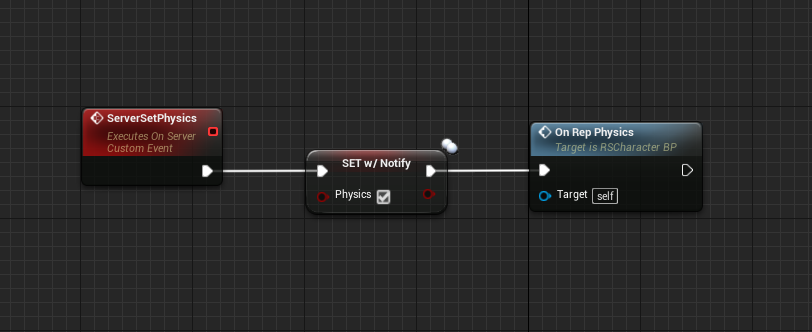
 wide chasm
Thats exactly what I sent
Wait
I changed it
To what you sent
still doesn't work :/
grand kestrel
It does work, you just need to find where it's not doing what you're wanting it to do
By it's very design, it works
wide chasm
Where do I set it?
grand kestrel
You're still not setting it through a server RPC
I'll give you a working example hold on
wide chasm
Ok
grand kestrel
Here try this, I haven't tested it because I don't have the time to
https://i.imgur.com/cA6MilC.png
https://i.imgur.com/kWLQtjh.png
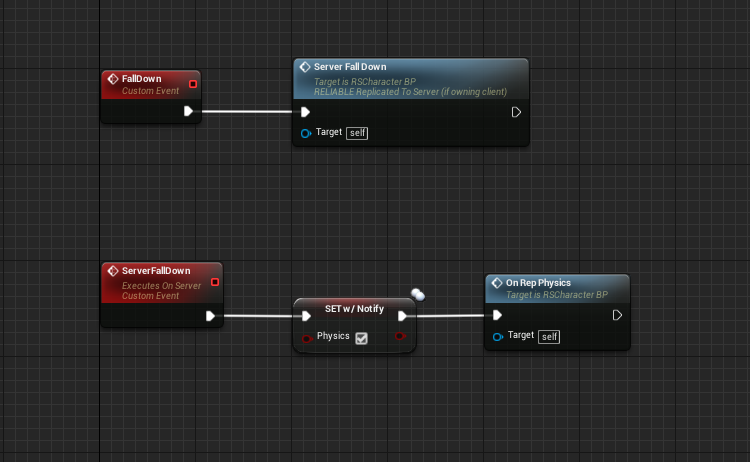
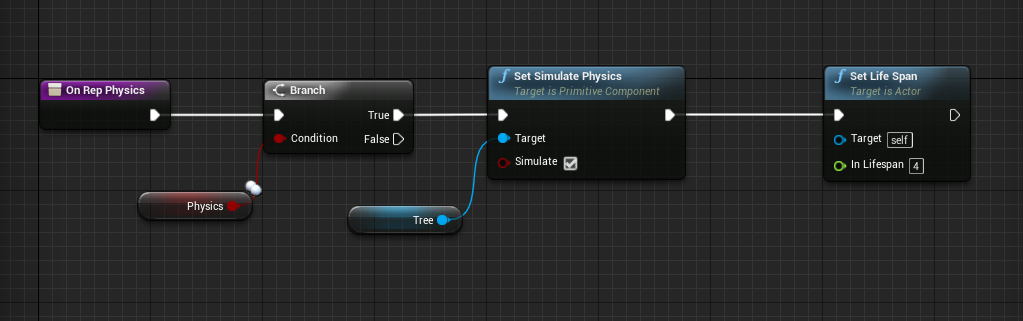
To reiterate, the On Rep Physics call in this case should be unnecessary, it's just to ensure it's called
The only time where it wouldn't be called, is if it was already true
Doesn't hurt to be safe
Set Life Span to 4 means that in 4 seconds DestroyActor will be called on it
Just a nicer way than using a delay
wide chasm
Ohh, thanks let me try it out
slight problem, the tree only can get cut if the host is the one that cuts it down, if the client tries the tree doresn't even register it on both sides
grand kestrel
Where are you calling fall down from
wide chasm
casting to the tree
grand kestrel
Try calling the server RPC directly instead of Fall Down
wide chasm
Got it
grand kestrel
You can't call that from a non-local player btw
Only the owning client can call a server RPC
wide chasm
Same result :/
grand kestrel
So debug it lol
The code I gave you will work, so somewhere leading up to it you're doing something that doesn't work
wide chasm
Ok, so I debuged it the rpc only gets called when its from the local player. I have a idea
grand kestrel
Thats correct
You can't call an RPC from anything other than the owning client (who is the local player in this context)
wide chasm
How would I make the tree fall if either the local player cuts it or the non local player
and it would be replicated
grand kestrel
I think you need to brush up on your networking instead of trying to make a game that uses networking without knowing it tbh
You would never want a 'non local player' to cut it
The player that cuts it tells the server that it's been cut and the server tells everyone else
wide chasm
Thats what I meant
grand kestrel
Have you read Cedric's compendium
grand kestrel
You should probably start there
wide chasm
Ok
grand kestrel
 twin juniper
has anyone succesfully gotten a linux server to package and run properly?
grand kestrel
Yeah
Plenty of us have i'm sure, including me 😛
I have a linux server running on google cloud atm
https://wiki.unrealengine.com/Dedicated_Server_Guide_(Windows_%26_Linux)
https://docs.unrealengine.com/latest/INT/Platforms/Linux/GettingStarted/index.html
https://wiki.unrealengine.com/Compiling_For_Linux
Learn how to set up a cross-compilation toolchain in Windows, targeting the Linux platform.
Those are the resources I used
twin juniper
like the shaders wont compile
grand kestrel
Mine compile just takes forever
grand kestrel
Like first packaging took 2 hours, no joke
Well
When you package the game you aren't packaging the server, you're including the server and you can delete the binary for the client
Maybe you can exclude shaders from a packaged build?
grand kestrel
Maybe it's including engine shaders too
That would be nasty
Gotta be a way to not compile shaders tho
And exclude them
Without blacklisting each one
wide chasm
@grand kestrel I have a question, why wouldn't I want a non local player to cut it
grand kestrel
Because from a networking perspective it's entirely illogical
If a player cuts it, that player cuts it
You don't let player B tell player A what he did
Player A knows what he did
There's no reason to allow RPCs to be called from a non owning actor
Goes against UE4s networking practices entirely
wide chasm
Okay, but would play to server to player work?
player*
because that is what I was thinking of
grand kestrel
You really need to focus on learning about networking
Rather than how to do this specific thing
wide chasm
hmmm


 grand kestrel
Nope
wide chasm
@grand kestrel I know but, do you know how to even do it? is it possible to cut down a tree from a non local client and have it replicate to all the other clients and the server
twin juniper
ok so thats weird
i got it to run but
as soon as the player gets in
it just DC's you lel
grand kestrel
@wide chasm I'm just repeating myself: You don't want there to be a way to do it, there is no way to do it, there should never be a way to do it and never will be a way to do it and there doesn't need to be
It is beyond illogical to suggest that one player should notify the server of what the other player did as opposed to that player notifying the server themselves
Since we're now on broken record: You need to learn networking, you can't just start making stuff like with most of game dev
 severe widget
why are you even cutting down a tree on a "non local client"? Like surely if the tree is being cut down, that's on a "local client".
grand kestrel
I think he just has an incorrect image of networking in his head
Thats why its important to learn about networking instead of trying to make stuff with it
Need to be able to visualize it to work with it
grand kestrel
Cough, an owning client can be simulated
severe widget
if your simulated client is doing anything that isn't replicated from the server, you've done something wrong
severe widget
k
 calm plaza
So, I've got some meshes that server applies force to for x amount of time. They float in the air as they should. Whats the best way to replicate this simulation? I've tried updating the transform on tick to the clients. Choppy. Also, even the simple collision doesnt seem to replicate well as the objects are appearing in entirely different locations. Thoughts?
 green cedar
What would cause a listen host client's input events to fire on all connected clients?
Figured it out. the client's apparently were getting message delegates from the host due to hwo they pulled the controller? I guess?
Not sure, really
past bear
@grand kestrel , @ripe raptor - so regarding the mystery problem yesterday, it's come back from QA and it would seem it hasn't been solved :/
clients are still getting booted because something is wrong with those function replication flags
ripe raptor
Stupid suggestion but did you try recreating the functions?
past bear
yeah
sterile pebble
did you figured out yesterday what methods caused this?
did you try to package game with clean rebuild? Just, in case...
grand kestrel
Anyone know how to use stat startfile etc on a dedicated server? seems like it's unavailable
past bear
@sterile pebble - I know precisely which function causes it, and the game gets rebuilt / repackaged several times per day
the problem is I don't know why it's triggering
sterile pebble
can you show this funtion? I cant find it in chat history
past bear
it's nothing exciting - GameState (on server) is calling an RPC on PlayerController (on clients)
clients are getting kicked with: "Error: Rejected RPC function due to access rights."
ripe raptor
Just for the sake of testing, did you try doing a roundabout way? Have the clients call an RPC on the GameState, which wil lthen call the RPCs on the controllers on the server side?
ripe raptor
(Also, I assume it's normal that my game crashes when I call an RPC with a TMap as a parameter?)
Same issue as this, apparently that's just how it is now
past bear
@sterile pebble - it happens during gameplay
clients can't call an RPC on the game state though
they shouldn't be aware which gamestate they are using
and yeah, don't think you can replicate TMaps
ripe raptor
Oh yeah, can't call stuff on the game state... hmpf... are you 100% certain that it's the right function you got? Meaning if you just disable the call, the error is gone?
past bear
it's client
past bear
reliable


not the clearest read, but it's not exactly complicated
I wrapped it in an 'IsServer' check yesterday to hopefully make the problem go away, but it persists
it's tripping the following in Data Replication (which should be impossible from BP to my knowledge):
if ((Function->FunctionFlags & (bIsServer ? FUNC_NetServer : (FUNC_NetClient | FUNC_NetMulticast))) == 0)
{
UE_LOG(LogRep, Error, TEXT("Rejected RPC function due to access rights. Object: %s, Function: %s"), *Object->GetFullName(), *FunctionName.ToString());
HANDLE_INCOMPATIBLE_RPC
}
ripe raptor
Well, I'm sure you'll be delighted to know that there are 0 search results regarding that error on UDN
past bear
yeah :/
zero results on the Internet I could find full stop
impossible to debug too since it only occurs in packaged, and only across a proper network setup
mild hull
cant that only fail if client believes he is server or flag on server use different enum?
past bear
it could fail if a client tries to RPC to a client, I think, but that shouldn't be possible either
manic pine
and what if you change the function argument, e.g. to a nullpointer if possible
past bear
bear in mind that there's a 24 hour turnaround between trying a fix and knowing if it works, so I'd rather not guess
manic pine
thats insane
past bear
that's normal
manic pine
how can you debug like that
past bear
it's impossible to test locally, I have to send it to QA
manic pine
can you recreate it in a new local project?
past bear
also, since it only happens in packaged builds, I'd have to go through the entire packaging process even if it were local
I can't recreate it at all
the bug cannot be reproduced locally
it literally needs two different machines (server / client) to even get it to reproduce
ripe raptor
Well, again, are you 1000% positive that it's that function call that's causing it?
manic pine
even standalone processes dont work? i.e. run server executable then client executable
thin stratus
Bit-wise & would be 0 if the flags mismatch, right?
past bear
standalone does not work, it requires two different machines and they must be packaged builds
thin stratus
Shipping and/or Dev build?
past bear
I don't know, I can't test it locally
thin stratus
You'll want to start the game and hook it up to VS with proper symboles
And break point the if
To see what is in these values
That should give more hints
ripe raptor
Do both builds have to be shipping builds though?
Maybe the server can be a shipping build and the client can be a dev build you can hook into with VS
thin stratus
Also, where is that line you've posted
ripe raptor
or vice versa
thin stratus
File/Line
past bear
DataReplication.cpp
manic pine
DataReplication.cpp(797
past bear
function is FObjectReplicator::ReceivedRPC
manic pine
thats on 4.19 though
thin stratus
Did it change ?
past bear
slightly different line number locally
thin stratus
Alright, found it
So, that's on the receiving end
So the Client gets it and boots itself i assume?
past bear
yeah, client is being kicked shortly after loading the level
past bear
I'd certainly hope so xD
thin stratus
Object and Function are valid and found.
past bear
yeah, they are because the output log makes sense
thin stratus
Alright, function at that point is flagged RPC at least
past bear
our guess yesterday was that the flags suggested client to client RPC attempt
thin stratus
Otherwise it would fail one step before
past bear
yup
thin stratus
Yeah well wouldn't the if statement mean
That this is only 0 if it's FUNC_NetServer
(if that exists)
Cause if the FunctionFlags have nothing in common with NetClient or NetMulticast
It can kinda only be a ServerRPC
mild hull
or the flag of the function is something completely off
thin stratus
Yeah which would make more sense
ripe raptor
I read it as "if it's NOT FUNC_Server it will return 0, hence be equal to 0, hence the if will trip"
past bear
yeah, I think the wrong RPC flags may be coming through
thin stratus
@ripe raptor No?
mild hull
when you cant debug can you atleast change the log function to include the flags?
manic pine
FUNC_NetClient seems to be bit #24 is that right
ripe raptor
Hold on I can't remember from yesterday, let me look up the line again
manic pine
not sure which function flag that corresponds to
thin stratus
It simply says "FunctionFlags & (NetClient | NetMulticast) == 0"
ripe raptor
That's not the one we looked at yesterday
thin stratus
It's the one he posted though
ripe raptor
it was bIsServer ? NetServer : (NetClient | NetMulticast) == 0
past bear
"if ((Function->FunctionFlags & (bIsServer ? FUNC_NetServer : (FUNC_NetClient | FUNC_NetMulticast))) == 0)"
thin stratus
I cut out the NetServer
ripe raptor
Something like that
thin stratus
Yeah but bIsServer
past bear
bIsServer is false, so yeah
thin stratus
Is false, so I removed that state
ripe raptor
Oh
thin stratus
If that is true then flip table
ripe raptor
Yeah yeah I was under the impression that this is called on the server, but that's the receiving end, so that's false
My bad
past bear
it means the function flags coming through must be FUNC_NetServer, or something else
ripe raptor
So... the if trips if the function is not marked client or multicast?
thin stratus
Yes @ripe raptor
But we have 0 idea how the flags look like in the functionFlags
Because there are a lot more flags in there
That even have 0 todo with networking
Like Exec etc.
ripe raptor
Got it, does that means that, since your function is marked as NetOwner iirc, the server receives it, marks it as Client then forwards it to the client?
past bear
it only has to contain one of those two flags to pass test
so we can surmise that it does not
thin stratus
Yeah, one single 1 at either of two places
We assume, yes. You'd need to breakpoint it
ripe raptor
Yeah I mean, in the proper case that's how it works
past bear
the blueprint function however is FUNC_NetClient
past bear
unfortunately no