#multiplayer
1 messages · Page 366 of 1
 quartz vector
 brittle sinew
AFAIK, struct pointers don't mix with UPROPERTY/UFUNCTION at all
quartz vector
That was my findings from research and trying stuff myself
but he says they have an FShip of TArray<FShip*> and I would much rather go that route
 bitter oriole
Anyway, you can fix that trivially by moving to an ID system
quartz vector
you're using SaveGameObjects?
bitter oriole
No
quartz vector
what are you using to save all of that
I was going to do essentially that in a MySQl db but decided against that
quartz vector
basically just storing "ParentItemID, ChildItemID"
but I didn't want to be too dependent on webrequests to populate game data
want to use it more for validation and intial generation
 inland sun
Take it as a NO, they need to be in a private DM since they are ignoring everyone else who asks questions.
quartz vector
And another thing about my items, is that not every 'AK47' is the same
it depends what parts are making up that AK47
which is basically just an inventory
which is fine
if u spawn an AK47 u just have to spawn all of the correct parts
and initialize it
bitter oriole
The important point I'm trying to make is that
- you don't want the same object to do both data storage AND data display, because once day you might move to a fully 2D menu with UMG & Slate - your actor-based system would have to go away
- you want to replicate the least amount of data, definitely not your inventory display objects
I see zero difficulty with your concept, like I said multiple times
quartz vector
I'm using UMG now actually...but i agree about replicating the least amount of data possible
and Actors are not as light weight as a Struct or even UObject obviously
So you would have something stored that stores this nested structure... like a TArray with a KeyOwner an KeyChild?
and you can recursively iterate the TArray to get the content held by any "thing"
which could be a Struct or whatever
as long as it has an ID
bitter oriole
You need
- a "part description" struct with a "part description ID"
- a "part instance" struct for every part in your weapon, that has a "part instance ID", stores a part description ID plus dynamic data like how much it's been used or what the level is, and a TArray of other "part instance IDs" that it depends on
- and a "weapon" struct that has a flat Tarray of "part instance ID"
brittle sinew
@inland sun I mean, when you asked about it yesterday there was plenty of open space to ask a question, but if you ask in the middle of somebody else's conversation don't expect everybody to drop everything and focus on your question
bitter oriole
Your weapon just need a "part instance ID" for the root part and you're done
Infinite recursion with structs, and a clean content vs data separation
quartz vector
right im not concerned specifically with weapons more general purpose so it works with anything:
"So you would have something stored that stores this nested structure... like a TArray with a KeyOwner an KeyChild?
and you can recursively iterate the TArray to get the content held by any "thing"
which could be a Struct or whatever
as long as it has an ID"
is this what you are saying in summary?
the struct itself doesn't need to hold anything
you look in the TArray and find it's key
and get all things that this Struct "owns"
bitter oriole
Something like that, yeah. You could also use a TMap<FName, YourStruct> if you want crazy fast search
Not sure about replication etc
 manic pine
you could have an array that replicates, and update the map onrep
manic pine
well, another alternative would be to make a class function to add/remove stuff from the tmap, and have that call a corresponding Client function
could potentially be nasty though, since packets could arrive out of order... one packet adds, next removes... remove arrives first, then add
result is client has an extra object in there
ye prolly not a good idea
quartz vector
in TMap, you need to store Key and Info like spawn class
and another TMap has OwnerKey and ChildKey
or TArray or whatever
brittle sinew
@halcyon abyss ask your question, and someone might be able to help.
quartz vector
or FInventoryItem FName SomeID TArray<FName> ChildIDs
 green cedar
For anyone who has used Steam lobbies, do you normally leave the lobby when the game starts or do you use the lobby throughout the game?
Trying to figure out if I should have clients leave the lobby when the game starts
I can't find a downside to clients staying in the lobby other than perhaps resources on Steam's side
 lost fulcrum
Isnt replication made with constant checking variables for updates? so replicating requires to store delta or hash somewhere and compare that so it takes alot of cpu time
so replicating large maps or arrays must be pain
quartz vector
can't replicate TMaps directly
but you can maintain copies so to speak
like if Client added something, then Server adds the same data or vice versa
or do like above mentioned and replicate a TArray that mirrors your TMap
and build a new TMap from that
inland sun
I have a central Lobby Map where players move around and do things. I need to get players to be able to leave to another map and then return to the existing lobby session they left from. So I need A a way to store that info so a teleporter (open level) can get the player to the origin lobby
lost fulcrum
hm.. or also just have a flag that makes it dirty and sendsout though rpc
manic pine
best approach would probably be to keep one replicated tarray and one local version
quartz vector
Yeah...you just couldn't do things with references like Actors
manic pine
after onrep, see how they differs, then add/remove from tmap as necessary
quartz vector
well you could perhaps
if you go through a "Controller" of sorts
otherwise Ownership issues will drop the RCps
brittle sinew
@inland sun if you're trying to connect to different sessions across the internet, you probably won't be using open level; you'll want to look into sessions
quartz vector
don't you have to do ClientTravel also
brittle sinew
They're a generic session system that can be implemented by subsystems, like Steam
quartz vector
oh steam
brittle sinew
Yeah, and you can also write your own subsystem if you don't want to use third-party solutions
I can imagine that's not a small task, however
inland sun
I want a single main session, and when the player returns to the lobby map, they are going to join session using the data I already have for the initial session they joined.
Im using a Steam advanced session for creating and joining the session
quartz vector
Is there a way to generate a Unique ID that can be used to identify Structs

I want to generate UUID for my application to distinguish each installation of my application. I want to generate this UUID using C++ without boost library support. How can I generate UUID using some
something like this
 halcyon abyss
Hello
Is there a way to do cross platform multiplayer keeping ue4s networking?
I don't want to rely on the steam OnlineSubSystem
quartz vector
what is FGuid
 inner iris
@halcyon abyss well it’s possible to play Fortnite on PC with a party of PS4 players, however I’m sure Epic’s implementation is very custom with their account systems
halcyon abyss
@inner iris thanks for replying 😃 ... Besides going cross platform... I wanted to have two separate steam appid's one VR client and one desktop client to play together
 quiet raptor
Do actors placed in level get spawned on server and client or just server?
 winged badger
depends on if they are set to replicate or not
quiet raptor
@winged badger I have set them to be replicated, however they don't spawn on client for some reason.
could it be that the client loads in not at the same time as the "server/client"?
winged badger
are the parts of the actor you can see also replicated?
quiet raptor
Yeah, I've done some printing on the actor begin play and it only is printing stuff on the server.
 native moth
Quick question regarding multiplayer. When having attacks(like a heavy attack) that takes time to finish, I guess its not safe to rely on anim BP notifies for when to check for hits, is it?
winged badger
its as safe as in singleplayer, as long you check for hits on server side only then notify the client of the result
native moth
Cool! Was worried that since anim notifies relies on the animation being played correctly... but comming to think of it, the server should always play all animations perfectly
winged badger
@quiet raptor net dormancy awake?
quiet raptor
@winged badger huh, what is that?
winged badger
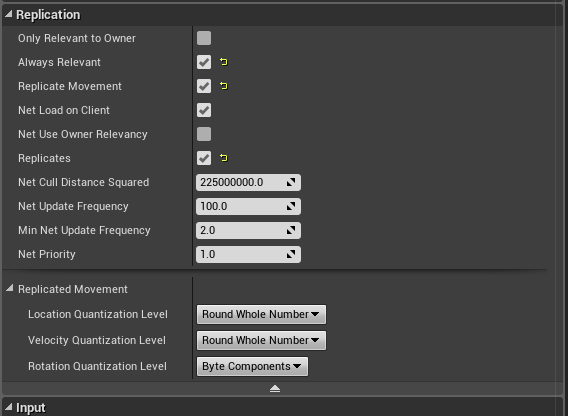
its also in replication section on class defaults
you should also have NetLoadOnClient checked
quiet raptor
@winged badger https://i.imgur.com/qm0nlB9.png
 winged badger
ah not the last engine version
they added the dormancy dropdown recently
but if you can't see it should be good
quiet raptor
this is on 4.17.2
quiet raptor
@winged badger it does actually create the actor, (did some printing in constructor) but doesn't call begin play on the client.
winged badger
just on the client?
quiet raptor
yeah, server creates and calls begin play and client only creates the actor.
created new blueprint based on same class, same issue with it as well.
@winged badger found the issue. I did not call base class function for "GetLifetimeReplicatedProps" on my GameState class. 🤦
winged badger
you have blueprints only, or is code involved?
quiet raptor
@winged badger c++ project with some blueprints.
winged badger
ah, was just going that way
quiet raptor
I need to get some post it notes on my monitor
winged badger
one funny thing about BeginPlay()
whatever is in code in BeginPlay() before the Super::BeingPlay() call will execute before the blueprint event
quiet raptor
@winged badger in this order:
Derived::BeginPlay
Super::BeginPlay
BP::BeginPlay
?
winged badger
(so don't develop a habit of slapping Super call ontop of every function without considering this implication, it goes for every overriden function that triggers a blueprint event)
Super::BeginPlay() calls its Super::BeingPlay() and so on until it hits AActor::BeingPlay() which calls RecieveBeingPlay() or something similarly named which is a BlueprintImplementableEvent that has a display name "BeginPlay" for blueprints
and only after all Super calls are executed in full does the code continue to the next line
quiet raptor
Ah, so it's Super::BeginPlay that actually executes the BP BeginPlay?
 polar bridge
i am trying to fix some network lag here and wondering if anyone can confirm what i'm trying to do makes sense. i have a projectile being spawned individually on server and each client. if i want to move it ahead a bit to compensate for lag, does it makes sense to do ping / 1000 * velocity?
for the most part that seems to work, but sometimes things are just off
 opaque tinsel
Does anyone know a good way to change the mesh color according to the right enum mode in multiplayer
currently i have it setup as this but it doesnt work correctly
winged badger
@quiet raptor yes
@opaque tinsel don't multicast, just replicate the enum with RepNotify and setup your color inside the OnRep function
if someone connects after the color was changed they would have no way of knowing multicast was fired before they connected
but the enum would still replicate and trigger OnRep
opaque tinsel
sorry, but where would i find the OnRep Function
polar bridge
you would setup rep notify on your variable
opaque tinsel
i did
 mild hull
than implement the new function
opaque tinsel
oh sorry, didnt realize that a new function appear when i change the variable to repnotify
so im running into a new problem where when the server changes color, the client sees it however when the client changes color, the server doesnt see it
also theres a second delay when changing color
 thin stratus
Replication is one way only
Client can't change replicated variables
ServerRPC to the Server first
Read my Compendium, it's all explained.
(pinned to this channel)
opaque tinsel
thanks
quartz vector
how does Unreal repliate TArrays
i know TArray.h has a ton of lines of code in it
compared to a basic implementation of an Array
i mean if your custom TContainer is just data and replicated things
it should be easy enough to replicate
but it would have be done manually and not as a replicated property
inland sun
Noob Question: Im trying to retreive session info to store in a location where I can get that info from any game mode.
How can I get the session info from a session already created.
 upbeat jungle
Anyone know why I can no longer connect to my dedicated server in the editor? I changed all the blueprints to the basics but it still wont transition to the main map.
inland sun
other than suggesting play in standalone instead of normal viewport
I have been letting this simple thing beat me for 2 days
thin stratus
@inland sun session info is saved in the Subsystem. Maybe even in the GameSession class. It's not really accessible from BP
 ripe raptor
Guys, is it possible to get a users current country via the OnlineSubsystem?
for the purposes of matchmaking of course
thin stratus
Depends on the Subsystem
And if there is a function for it
You could just check the OnlineSubsystemInterface
And check if there is a function that gives you that
Or, if you use steam, check the steam api and see if that even has such a function
(Online in their documentation)
ripe raptor
Yeah just checked, there is "loccountrycode" described as "If set on the user's Steam Community profile, The user's country of residence, 2-character ISO country code" but it's under Private Data
I am not sure if games even have access to that
thin stratus
Probably not. I know that GameSparks, for example, saves the location via the provider or so
at least I can query the location in that
ripe raptor
The online subsystem interface has nothing along those lines either
thin stratus
Might need you to acces the api directly?
ripe raptor
Huh, according to UDN, UE4 has nothing, they suggest using external IP geolocation libraries.
thin stratus
But what does it help if the Player disables it
What about the download region
Can yo uget that from Steam
ripe raptor
surprisingly there's nothing mentioning that in the API docs that I can find on a glance
bitter oriole
Maybe because checking the country isn't such a great tool for matchmaking
You'd probably rather want to work based on lag
I'm confident you can get a faster london - paris networking rather than between random points inside UK, for example
ripe raptor
Of course, the idea was just to show country flags next to lobbies
bitter oriole
Generally speaking, I know people are sensitive about that issue
I'd much rather let them pick their own flag
/ country
People who study or work abroad could want to show their country flag, not their current location
Not to mention geolocation isn't always accurate
ripe raptor
True, I'll just live without it
inland sun
For all the information out there on Steam online subsystems there sure isn't much information on how to use it or access it properly.
bitter oriole
Yeah, the documentation on the OSS is abysmal
And ShooterGame is unusable as a learning resource, it's way too complicated
I took a week to learn the OSS and deconstruct ShooterGame, to create my own session tools, but getting the advanced session plugin works too
The session plugin is actually a more useful learning resource than SG, even if you end up rewriting it
 past bear
bah, ActorComponent on GameMode on server apparently cannot call a client event on a Player Controller
any suggestions on neatly reorganising that?
bitter oriole
@past bear Do the calling from the server Player Controller ?
past bear
yeah, might work
just seems a bit silly to do Component(Server) -> PC (Server) -> PC (Client)
bitter oriole
I'm actually curious as to why the call from the component wouldn't work.
I suspect it's because GameMode is such a specific actor ?
Another option would be to move the component to another actor ?
Designating function replication across the network
"Actor must be replicated" -> guessing that is why.
So, I'd go for moving the component to a replicated actor.
past bear
the component belongs to the game mode, so that's where it lives
bitter oriole
Yeah, but obviously that component does networking, so maybe it would be more meaningful if it was moved to a replicated actor
past bear
there isn't a suitable replicated actor though, it's part of the game mode, heh
I mean, it defines game rules, this is what the component does
(not my architecture, for the record, but this is how our game modes work)
bitter oriole
Sounds like calling a ServerDoStuff on the PC is the way to go, then.
You could also try using GameState ?
past bear
yeah
we have a single generic game state class
so I don't want to put specific things in there
bitter oriole
GameState is supposed to be a replicated actor, so probably that one would work
Okay
past bear
hmm, still isn't working, will need to debug more
manic pine
theres no reason it shouldnt be able to
past bear
I thought it should work, but replication channels can be mysterious sometimes
anyway, time to print string all the things
manic pine
yeah but the replication is done via pc
bitter oriole
@manic pine there is : GameMode isn't replicated, so no RPCs.
manic pine
not via the component
bitter oriole
(From the UE doc I linked above)
manic pine
i know, but the way i understood it he was trying to call a function on client's PC
bitter oriole
Yes
manic pine
which you can do from anywhere on the server
past bear
okay, got it
manic pine
the function is on the PC which is replicated
past bear
when I checked by printing everything PC Server -> PC Client was also failing
made the RPC reliable
seems to work
bitter oriole
@manic pine GameState isn't replicated, so GameState can't call RPC. That's it.
past bear
and can now go direct from Component Server -> PC Client
manic pine
gamestate is replicated
past bear
why it needs to be reliable, I have no idea, but tbh it should have been reliable anyway
bitter oriole
Sorry, I meant GameMode
manic pine
ye, and gamemode has always been able to call rpcs on PCs
bitter oriole
Well, the doc says otherwise, but I'll trust you
manic pine
the only condition is that the object that has the RPC is actually replicated
but you can call the rpc from anywhere on the server
bitter oriole
So the condition on replication is for the callee, not the caller ? Got it.
manic pine
otherwise the GameMode class would be fairly pointless ye
since it couldnt interact with any replicated actors
the whole reliable thing is a bit weird, it seems to behave differently for multicasts
past bear
WHARGARBL
function still doesn't work, hahaha
in the component I get all PCs with a valid pawn, then call a function on them, then on the client the PC doesn't have a valid pawn yet
fml
manic pine
yeah nasty timing issues... maybe have client inform server when he's received pawn
past bear
plenty of timing issues (timing drives me nuts in this engine, so much of the initialisation functions seem to happen in the wrong order)
amusingly, not only is the pawn not created yet, but BeginPlay on the associated actor that triggers the whole sequence gets it's being play after that
bitter oriole
Initialization is definitely a black hole in this engine
past bear
gonna have to put in a little code to here and there to defer things until vars are intialised properly
inner iris
@past bear how do you typically defer for small amounts of time like this? I find the delay node in BP works great to offset things just enough, but I guess in CPP the only option is to create a new timer for the small delay?
past bear
delay is unreliable
I wait until the variable I want has a value
polling is one way of doing it
inner iris
So you poll at a fixed interval and when set stop polling and call the function?
past bear
that is one option yes
the other is using something like a bool to mark the state of certain information
i.e you can have a whole pile of parameters and when you update one of them, use a flag to mark the state as changed, then run whatever update code is necessary
inner iris
That’s a good idea too, thanks!
Need to fully understand the order that things are called, usually just needs 200ms more time to ensure everything is set, either due to latency or order, I’m not sure
I guess polling on tick wouldn’t even matter performance wise as it’s only for the first few frames of a game
past bear
for now I'm just using a 2 second delay, but once I've got it all working I'll replace the delay with a simple polling check on the relevant data, I think
inner iris
Nice yeah that makes sense. And for that delay you just create a simple timer on begin play?
Just making sure there is no other delay equivalent in c++
inner iris
Thanks for the info 😃
 reef tinsel
Hello, has anybody been able to use level streaming in listen servers? I've run into an issue with the "server" side
Clients work fine, they stream the level as they should and only for themselves, but as soon as the server triggers the streaming volume, it appears for everybody
I've tried using the "is local controller" node, but without success
In dedicated server there is no issue because everyone is a client, but I need to set up the level streaming for both kinds of servers
 sterile pebble
AutonomousProxy is always pawn or other character or something other possesed by player controller? Is there a way to make simple actor an autonomousProxy?
or they will always be simulatedProxy?
I mean, even when I set owner of actor to the player they still remains as simulatedProxy
 gleaming bobcat
Hey guys. I really need a help. I have some issue with top down multiplayer template in C++. I used this template as a starting point:
https://github.com/Megachill/UE4TopDownMultiplayerTemplate/tree/master/Source/TDMP which support multiplayer walking. That's only one in C++ what I found.
The walking is smooth in editor if I use Single Process like this :

GitHub
UE4TopDownMultiplayerTemplate - The standard EPIC top down template but with Multiplayer functionality - this is build with 4.14.1
but if I uncheck Single Process then the dedicated server is running in separated window and client is connected from the editor window and the walking
is jerky like hell. Like in this video -> https://www.youtube.com/watch?v=PuZkTyst2bM&feature=youtu.be. Especially if a character is rotated.
It's also jerky if I run a server and client as WindowsNoEditor.

Multiplayer topdown template - choppy movement... Need to fix it somehow.
 left marsh
Can anyone here answer some basic networking questions?
mild hull
there are some pinned resources maybe read them?
winged badger
was just about to suggest that
left marsh
- How do you set an actor to be replicated via C++ header.
- Does it replicate every property and function, or just UFUNCTION and UPROPERTY? or Only UFUNCTION and UPROPERTY with the Replicated tags?
mild hull
- see link 2) see link http://cedric-neukirchen.net/2017/02/14/multiplayer-network-compendium/
 left marsh
Good document. I'll read it.
 light bronze
Hi, I implemented an inventory as component, which handles item stacks as UObjects (so I can derive them in BP and customize Icon, Text, etc.). Now I need to replicate this with the clients.
- Full UObject Replication by Owning Actor
- Just RPC inventory actions to the server (which wraps UObject logic) and wraps the UI Important things in a struct for the clients
Which would you choose?
upbeat jungle
I am no longer able to get from my entrylevel to my mainlevel, i was following the dedicated server tutorial on wiki. I set it back up the way it used to be. Still wont load. Any ideas?
 tidal venture
Some one know what is the best way to use «add movement input» with a custom server (out of ue4)?
brittle sinew
You could look at Unreal Web Server (I hear it's fairly easy to get working, but it's paid), or simply listen on a socket
(or set up an HTTP listener, but that's a bit higher-level and wouldn't support continuous connections)
upbeat jungle
when I run my dedicated server and use -log it opens for a few seconds and then closes. How can I make it print the log so i can see the error. Shit closes too fast.
 versed socket
There are a lot of ways on the AnswerHub to implement a countdown timer in multiplayer, but the most reasonable way as far as I can tell is to use a Timer Handle. Unfortunately, though, it doesn't look like Timer Handles replicate their remaining time properly. Because of that, players who join the server after the timer has started will never know about the timer's status if I multicast the initialization of the timer at the beginning of a round.
What I'm thinking is to just make a manual timer on the server-side that updates a new replicated variable... then using that new replicated variable as the client's reference for the time remaining in the round. Is this the best way that you guys do it in your projects as well?
tidal venture
BEST WAY to move character pawn on a custom server (out of ue4)?
brittle sinew
Define what you mean by 'best'.
😃
There's no simple answer to the question; there are multiple ways to do it, each with their pros and cons
I already offered a few...could you elaborate on why you might not like those?
tidal venture
Wasn't sure if you talk to me because it's only a plugins that offer me to send data over network
I already can do this
I search how should I move a character pawn
Because from this -> http://www.gabrielgambetta.com/client-side-prediction-server-reconciliation.html
I should have a default position and update the position according to input, but I move my character with addMovementInput which doesn't let me choose any coordnate
brittle sinew
Sorry if I misunderstood your question, but I interpreted it as taking data from an outside source and feeding it into UE4 for simple movement
I don't really see where client-side prediction fits into that
tidal venture
No worries I understand
what do you mean by you don't see where client-side prediction fits into that ?
What I find hard is that from what I understand, the pawn coordinate need to be calculated in the server, but the movement only happen on the client since my server is not a unreal engine client
does it make more sens ?
 fresh saddle
Is there any reason why the Listen server wouldn't be transmitting its own voice data to users?
Client > Listen Client works
Client > Client works
Listen Client > Client doesn't
Using the Native VOIP in 4.18.2
gleaming bobcat
Is anybody experienced with top down multiplayer walking in C++ ?
thin stratus
@raven holly Usually, each setting is somewhere to be found in the Source
If you want to know what it does, you can just search source for the variable
There should be a comment next to it
sometimes even with example values
 raven holly
Yes but it would be good to get example values from fortnite and paragon
And a proper explanation, not a programslanation
lol
thin stratus
Sure, just saying
raven holly
Haha yeah i thought about that
But epic arent great at their source commenting
a lot of from udk
 manic agate
Guys, I've got a question. Suppose I'm making a MMORPG, which has a NPC that is placed somewhere. A player interacts with it and receives something (money, or whatever). On the Unreal Engine side, how could I code it?
The NPC would be a replicated actor. I can imagine that there would be something like an RPC method "ServerOnPlayerInteracting" that would execute on the server and which would give the player the money, or whatever, server side. The problem is, a client can't call that method, since the actor isn't owned by the player. What workaround is usually used when dealing with these kind of situations?
thin stratus
Doing the ServerRPC already on the Player
And splitting the interaction into Client and Server
As well as rooting UI interactions through the PlayerController
ripe raptor
Hey guys, quick question
Even though I am using the steam OnlineSubsystem, I can only find games on the same PC
If I create a session on another PC it won't find it
Anything obvious I might've missed?
manic agate
@thin stratus If I do that then don't I need to implement each ServerRPC on the player class? I mean, if there is another NPC that needs a similar RPC, I would need to implement that too on the player. There would be a lot of code that shouldn't really be there... or maybe I misunderstood what you said 😅
ripe raptor
I have my own AppID, session count is set to 20 (Shouldn't matter if not using ID 480 I believe though) and I got my DefaultEngine.ini configured properly (I believe)
manic agate
@ripe raptor I didn't mess around with the Steam OnlineSubsystem, but I remember I was having problem because I was using PIE instead of Standalone. How are you playing your game?
ripe raptor
Two packaged builds on two PCs
manic agate
Then I'm at a loss, sorry 😅 are you sure Steam starts up ok in both PCs? Do you see the steam overlay?
manic agate
No idea then 😦
thin stratus
@manic agate that's why you use interfaces
Generic use interface function
Which each different actor can implement on its own
manic pine
the server rpc thing could even just be a generic response handler...i.e. Server_ClientDialogResponse(uint8 DialogOptionIndex) called when player selects a dialog option
which in turn could fire an event on server that you handle however you want
manic agate
Mmm thanks guys, but I'm still not sure I get it. It's hard to grasp for me without seeing code
Can you maybe point me to an example code somewhere?
manic pine
not sure there are any multiplayer npc dialog/interaction examples around...
i'd say its not the code you have to worry about(yet) though, but rather the design of the system
id say document your expected use cases then try to design the actual server-client responsibilities and interactions based on that
manic agate
I'm actually doing that and came up with a way, but it's not pretty. I wanted to see code because for me it's easier to understand in these cases
The way I'm doing it now involves making another class that inherits from UActorComponent that works as a manager. The manager is spawned and replicated by the server for each client, so that it's able to make RPC calls. That manager contains methods that forward certain events to the server or to the clients, and does only that.
When the replicated actor needs to make a server call because of a client input, it calls the respective method in that manager class, which then makes the Server RPC call, and so on
ripe raptor
I am guessing my inability to find sessions is due to some local network port shenanigans...
manic agate
As I said, it's not pretty. But at least it lets me separate the code well
manic pine
well you'd need that anyway, either in a component as youve chosen or on the character itself
but the RPCs can be specific or general
are you handling the actual dialog part purely on client?
manic agate
Well actually the dialog thing was just an example. I'm actually doing a whole other thing, which is too long to explain, but the concept is similar 😅
But yeah, let's say I do handle things locally
Glad to see that it's not a completely bad approach anyway 😅 I just wish it could be done without adding a lot of boilerplate code!
manic pine
what exactly is the boilerplate part?
in my mind it should pretty much be doable with a single server RPC, where client simply tells server which option he picked in which conversation
server would need to verify etc of course
manic agate
Well, I'll explain what I'm doing with a different example, just to be clear. Suppose I've got a replicated actor, not owned by anyone (as the NPC in the previous example). It implements an interface with a method called "OnTriggerPressed", which can be called by the player's pawn from time to time. I want that event to be processed on the server, but since the actor isn't owned by the client, it can't make RPC calls.
// Inside my player's pawn class
void AMyPawn::Tick(float delta)
{
    // ... code here

        if(somethingHappens)
              ReplicatedActor->OnTriggerPressed();
}

// Inside my replicated actor class
void AMyReplicatedActor::OnTriggerPressed()
{
       // I would like to process this code on the server
}
The way I'm doing this now is this: I created a "UMyReplicatedActorManager", which implements these methods:
// RPC server method
void UMyReplicatedActorManager::ServerOnTriggerPressed()
{
         // I need to broadcast this on every client
         MulticastOnTriggerPressed();
}

// RPC NetMulticast method
void UMyReplicatedActorManager::MulticastOnTriggerPressed()
{
        ReplicatedActorReference->ExecuteOnTriggerPressed();
}

// While inside my replicated actor class, I added this:
void AMyReplicatedActor::ExecuteOnTriggerPressed()
{
        // Here the actual code is executed
}
Ok, stupid question
Since I can't port-forward to two PCs on the same network, is there anything hacky I can do to forward the proper ports for hosting on one PC, and for joining on another?
manic pine
you have a keybinding on client that's bound to PressTrigger which in turn calls ServerPressTrigger(on client's character) which then takes care of it
PressTrigger being a character function(for the player, not the NPC)
its teh same with e.g. opening a door
you cant let the client do it, you instead let the client tell the server to attempt to do it
so for the regular 'interact' stuff i'd generally just use a serverrpc that says interact(objectwewanttointeractwith), then server does a raycast or something to determine if we're close enough to interact with that thing etc.
for collider triggers, the server handles it on its own
manic agate
Mmm I get it, of course makes sense
So the usual approach is always to make the server do the computation behind that given action. I mean, if the user wants to open the door and the client thinks he can because of some raycasting for example, it "waits" for the server to do the same computation and check if it can indeed open the door, and then opens it. Is that right?
manic pine
exactly, server is authoritative on everything
client just makes 'requests'
and sometimes client will simulate results to make the game seem more responsive
manic agate
Well, I was doing that, but had some problems with UMG
Basically I'm developing a VR application, in which there are 3D menus placed in the world, "powered" by UMG. It happened that if the server's pawn wasn't looking at a menu spawned by a client, it was like it wasn't there for the server. So if for example the client pressed a button on that menu, the server wouldn't becuase it was like the UI wasn't there.
manic pine
a menu spawned by the client?
manic agate
So to overcome that I moved the logic to the client, and now I'm only telling the server "hey, client has pressed that button, do something" (in my case cheating is not a problem, so I don't have to worry about the client doing weird stuff; I'm not developing a game actually)
Well not exactly spawned, more like owned by the client
ripe raptor
Ok so apparently, IOnlineSubsystem* const OnlineSub = IOnlineSubsystem::Get(); returns the NullSubsystem for me.
manic agate
The UI window is replicated, but the UMG that's in there is not
ripe raptor
NOW I'm lost. >_>
manic pine
right, umg doesnt replicate
to work with your current system i'd just do a server rpc with command(command index)
manic agate
It's kind of a mess dealing with these 3D menus, because they have a lot of stuff going on. I've got a 3D window that is an Actor, which contains a UMG C++ class, which is overridden by a Blueprint that actually builds the UMG. Kind of a headache. So, because the server somehow doesn't see the UMG window until it's shown (it needs to be shown at least once; after the first time, it will be always shown even if the menu is actually far away from the server's pawn) I was forced to move the logic away, hence all my questions today 😄
manic pine
and handle it in a switch or something on the server i think
ye, sounds like its gotten a bit messy
manic agate
Yeah that's a solution. But since I have a lot of different menus, I'm trying to separate them, otherwise I would have a very big switch or something
manic agate
Thanks a lot for the help raap! See you 😄
manic pine
later
ripe raptor
I went from "can't find games on different PCs" to "not even the 2-clients-on-same-PC works anymore" without making any actual changes to anything.
Go me.
manic agate
@ripe raptor Probably the Steam OnlineSubsystem isn't properly setup, if it returns the NullSubsystem
Hows your build.cs file?
ripe raptor
Includes the OnlineSubsystem and OnlineSubsystemUtils
Target specifies bUsesSteam = true;
manic agate
Added "DynamicallyLoadedModuleNames.Add("OnlineSubsystemSteam");"?
Not sure how it works now, but in 4.14 I used that I think
ripe raptor
// To include OnlineSubsystemSteam, add it to the plugins section in your uproject file with the Enabled attribute set to true
manic agate
Also, checked from the plugin section in the editor if it's activated? I remember that for me it was disabled by default
manic agate
You didn't tell me if you've added the DynamicallyLoadedModuleNames.Add("OnlineSubsystemSteam"); part to the build.cs
ripe raptor
I already told you, that comment line I pasted comes directly from the build.cs file.
Implying that the dynamically loaded modules isn't necesary anymore
manic agate
Well, it doesn't say it's not necessary anymore... I mean, even in the past you needed to manually activate the plugin. It's worth a try anyway
ripe raptor
Well, the Steam part was apparently me being an idiot, because I was running from PIE and wondering why I'm getting OSS Null
manic agate
Thought you said you were trying on packaged builds 😅
ripe raptor
I was, but realized I don't have debugging in a release build so I thought "hey, why not try PIE"
but in any case, this is where things get interesting... I now run my build, and run a standalone game from PIE. The build hasn't even done anything, and yet the standalone game from PIE finds a session.
manic agate
That is weird... the 2 packaged builds where exactly the same, right? You didn't change anything now in the code, excepted your playing in standalone?
ripe raptor
Of course not
manic agate
Mmm I've no idea!
ripe raptor
Ok I seem to be making some headway...
WHen I try to look for lobbies and do a find session command
on one client it prints out this:
Verbose: STEAM: Server query complete '2' eNoServersListedOnMasterServer (No servers match)
Along with a few other STEAM lines
The other client though spits out
LogOnline: Verbose: Sending 16 bytes to 255.255.255.255:14001
[2018.01.17-15.21.41:986][406]LogOnline: Verbose: Sent query packet...
Is it possible that two instances of the same game run different OSS's?
light bronze
Hi, I have a problem that after going prone and stand up (AI Character), the character is bugging in the floor but only on the client (still moving but sometimes in the floor). Any idea why?
nvm, I accidentially set movement mode back to navwalking after standing up, which does not simulate well on client
thin stratus
@ripe raptor ListenServers?
ripe raptor
Hey @thin stratus - yeah, listen servers. I just found a UDN post that might be helpful so I'm trying that to see if it works
thin stratus
Own AppID?
ini file properly setup (if not sure, check it again)?
If Shipping build, steam_appid.txt properly added?
Hosting with bPresence on?
Download region of both PCs similar?
Proper settings used to create the session?
ripe raptor
Hosting with bPresence on? <-----This one was false.
About to test with it set to true
thin stratus
NoServersListedOnMasterServer technically means the FindSession call is okay but CreateSession is wrong
ripe raptor
Hm, still nothing even with bPresence true.
thin stratus
Have you tried using the native nodes from epic?
ripe raptor
There is one weird thing in the CreateSession log
thin stratus
There is not much magic to hosting with steam using listenservers

 jolly siren
Is there anything I need to do to get my steam app id working? Do I use the overarching app id that it gives me or the "developer comp" id? I've tried both and neither are connecting to steam properly like 480 did in standalone.
ripe raptor
@thin stratus - not using the vanilla nodes, using your approach actually from the wiki.
 valid python
Hey guys! So I was reading about seamless travel and how certain actors are persisted to the new level. How does this affect custom actors in the new level. For example if the new level has a custom player state is the data from the old player state somewhow used to create the new custom one or something else? I want to persist some things like player name and stuff to the new level even though I'll be using a different player state and gamemode
thin stratus
There is a function in the PlayerState that should be called iirc
There are acutally two, but I can never recall which does what
OnOverrideWith could be it
OnCopyProperties is the other one I think
valid python
Alright thanks I'll look at those two!
 worthy wasp
i just got baffled..... TMaps are declared to be NON-REPLICATEABLE.
Tested & proved - i can access TMap values that are set via server (ClientRPC) to a NON-REPLICATED TMap variable - and access them accross the network....
#Stumped
winged badger
i crashed trying to replicate TMap only few versions ago
manic pine
youre just sending them as an argument?
winged badger
i have an odd problem with seamless travel - if faster PC is hosting everything is fine, but if a slower one is the client shows map loaded before the server, it doesn't get notification for changes in MatchState, and best i can tell, none of the Actors placed in the Level seem to be affected at all on the client-side (supply crates show wrong content, they don't change visual state when used, etc...), while everything works just fine server-side
and i did not forget to call Super::GetLifeTimeReplicatedProps() in the GameState
manic pine
do you have a transition map?
winged badger
yes
client also has no trouble with actors that spawn after the match starts
and if someone does a late join, they are fine as well
jolly siren
When building with steampipe should I be using the same sdk version as ue4 is using?
jolly siren
ahh okay cool, thank you 😃
bitter oriole
Well, SteamPipe updates itself, really
jolly siren
ahh I just got my app id, so learning. My app id doesn't work in standalone until I upload a build?
jolly siren
hm it's not working for me. 480 was working fine in standalone, but mine isn't
winged badger
it activates the steam overlay?
jolly siren
480 did, but not mine
winged badger
did you copy the files from steam client dir to Engine/Binaries/Steam/ThirdParty/x664/v139 ?
bitter oriole
This isn't needed
jolly siren
I copied the dll files from Engine/Binaries/ThirdParty/Steamworks/SteamvXXX/Win64 into my projects Binaries\Win64 if that is what you mean
But that's all been setup for forever
and working with 480
All I've done since I got my id was update the SteamDevAppId in DefeaultEngine.ini
winged badger
nod you're not the only person i heard this from today
bitter oriole
We've never copied DLLs in our game. We don't use Steam sessions or matchmaking, but we do get the Steam player name, and we have the overlay, screenshots, etc
I'm very confident no manual operation is required
winged badger
very possible, unreal docs are rarely timestamped
jolly siren
The dll copying is for dedicated servers
bitter oriole
That might make sense.
jolly siren
But yeah overlay isn't working in standalone when I switch SteamDevAppId from 480 to my app id. I've tried both the overarching app ID and also the ones that are listed under "promotional or special-use packages"
I've also tried using SteamAppId instead of SteamDevAppId
bitter oriole
Let me try something
@jolly siren So yeah, my game also doesn't get Steam stuff in standalone here.
Only when launched through Steam
But I think that's an option
jolly siren
Oh that's interesting. 480 works fine in standalone if you have the steam client running
bitter oriole
It does, I've tested that a week ago
What does bRelaunchInSteam do ?
@jolly siren I figure Steam might deny your game if it's a real Steam game that isn't launched from Steam itself
jolly siren
hmm okay yeah bRelaunchInSteam is set to false for me. I'll flip it and see what happens
Do you guys still use 480 when you are testing steam things in the editor then?
winged badger
i use my own
the very top of the logs should show you the steam initialization when you start the game
jolly siren
okay, I'll check the logs
bitter oriole
You don't have logs in standalone though
And I don't believe the OSS works in editor at all
@jolly siren I currently don't need to test Steam stuff with a real game that has its appId, my released game is SP. But I definitely see the same issue - no overlay in standalone unless started from Steam.
I'll definitely need standalone to work when I have an appid for the MP game I'm planning
jolly siren
you still have logs in standalone. They are written to Saved/Logs
LogOnline: Warning: STEAM: Steamworks: SteamUtils() failed!
LogOnline: Warning: STEAM: Steamworks: SteamUser() failed!
LogOnline: Warning: STEAM: Steamworks: SteamFriends() failed!
LogOnline: Warning: STEAM: Steamworks: SteamRemoteStorage() failed!
LogOnline: Warning: STEAM: Steamworks: SteamUserStats() failed!
LogOnline: Warning: STEAM: Steamworks: SteamMatchmakingServers() failed!
LogOnline: Warning: STEAM: Steamworks: SteamApps() failed!
LogOnline: Warning: STEAM: Steamworks: SteamNetworking() failed!
LogOnline: Warning: STEAM: Steamworks: SteamMatchmaking() failed!
LogOnline: STEAM: [AppId: 0] Client API initialized 0
LogOnline: Display: STEAM: OnlineSubsystemSteam::Shutdown()
LogOnline: Warning: STEAM: Steam API failed to initialize!
LogOnline: Display: STEAM: OnlineSubsystemSteam::Shutdown()
LogOnline: Unable to create OnlineSubsystem module Steam
LogOnline: Unable to load default OnlineSubsystem module Steam, using NULL interface```Right, I had that confused with "Shipping"' 😃
jolly siren
ahh
Here is 480
LogOnline: STEAM: Steam User is subscribed 1
LogOnline: STEAM: [AppId: 480] Client API initialized 1
LogOnline: STEAM: [AppId: 480] Game Server API initialized 1```For some reason it thinks my app id is 0 when I enter my own 🤔
winged badger
steam does have some policy of not activating something app-ID related if its a free game until explicitly requested i think
jolly siren
okay, I'll submit a ticket with them
bitter oriole
Our game is paid, and it's been shipped for some time
We have exactly the same behaviour
winged badger
then i have no idea 😦
bitter oriole
People on the UE forums talked about this happening if you don't have packages created but we very much do 😃
jolly siren
hm in my case this isn't a shipping build. I'm running as standalone from the editor and it works with 480
winged badger
mine worked just fine, both with OnlineSubsystemSteam and OnlineSubsystemUWorks
jolly siren
ahh okay cool then it must be something with my app id
bitter oriole
@jolly siren Do you have packages set up in Steam ?
jolly siren
I haven't uploaded a build to steam yet
jolly siren
I have those two entries under "Promotional or special-use packages" tho
bitter oriole
My "issue", which isn't really one, is that Shipping builds need to be launched from Steam in order to get Steam features. This sounds like a feature more than a bug, and it doesn't impact Development Standalone builds.
jolly siren
but yeah I opened a ticket with steam support
bitter oriole
I'd go for setting up all the Steam stuff right away, since it takes time, needs testing, and is pretty great for private betas, etc before launch
jolly siren
Yeah I agree
 wary willow
@worn nymph unpossed pawn?
use player controller
you just use the player array also given after postlogin
(create one in gm, match is gs)
or ps
winged badger
this is for storing the ID in the PlayerContoller, but you can just as easily grab GameMode, or PlayerState if you add an extra PlayerControler input and feed a reference to self into it, then pull and cast the PlayerState from the red node
as for GameInstance, it will persist, but you have to store info into it on Client side, retreive it Client side and then send it to server like this
and i assume this is a character select level then you move to a new one to play?
that makes it abit more complicated
when i saw that server event trying to set a variable in GameInstance i just tunnel visioned on that part
you can OnClicked -> GetGameInstance -> SetID
(no server events here!)
then
something like that
inside PlayerController
with ID input being GetGameInstancec->GetID
sorry, made an error, new pic coming
and PlayerPawn input being GetControlledPawn
now the lower part executes on server, so it will push the ID from your GameInstance to the server copy of your PlayerController
and invoke a function in your character class/blueprint that takes an integer ID parameter and runs the setup
well, a function that can call it, or run the setup on the character from PlayerController in this case
but the networking part is good
(i didn't set this up in the controller, so my options were somewhat limited)
ok
and on PostLogin in new level you push the variable to server and setup your character server side
no server events ever with the GameInstance as the target
you can call them FROM GameInstance tho
the input pin in the top node
is GetGameInstance->GetPlayerToSoawnID
you do the getter and connect it
 worn nymph
pretty sure i already did it all like this and it didnt work
winged badger
no you tried to set the variable on a Server copy of your GameInstance
which does not exist
you can do it directly from PostLogin
cast the player controller which is provided there
and plug it to target
ripe raptor
[ 79]LogOnline: Warning: STEAM: You must be logged in to an online profile to search for internet games
Why can't anything ever be simple
 rare cloud
Because Steam
upbeat jungle
Anyone wana shoot me a DM and help me out. I'm using this guide to create my dedicated server. https://wiki.unrealengine.com/Dedicated_Server_Guide_(Windows_%26_Linux)#Section_2_setting_up_a_dedicated_server_on_windows But all of the sudden I can't connect to my damn server anymore. And the compile button on my editor doesnt do anything. I think they both might be the error hand in hand
ripe raptor
So apparently
Two PCs on the same network = can't see steam session
Two PCs on separate networks = works just fine
 drowsy notch
Anybody had trouble with replicated actor spawns being seemingly delayed vs regular RPCs?
If I send an RPC and spawn a replicated actor on the same frame, the actor seems to appear on the client 30-100ms later than the RPC
worn nymph
@upbeat jungle start youre game and server with logs and see what is happening
in the exe shortcut of the server and the game add this -log LOG=MyGameLog.txt MyGameLog.txt can be named anything you want and it will save the log into a txt file
so you can see any errors it will also let you see any print strings set in the editor for easier debugging
once i have more information i can try and help .
ripe raptor
Is it possible to run steam matchmaking on a single PC for testing purposes or will I have to fall back to null?
Alternatively, can I directly "connect to the local session", skipping the steam lobby stuff entirely?
thin stratus
Steam only runs once per pc
Second instance of the game will error out on steam load usually
 twin juniper
Do you need to init all camera settings from server when spawning new pawns? things like spring arm length, FOV etc. Just thinking of the case where a cheater sets unfair values that allow him to see more than other players can
manic pine
you cant really prevent that anyway though
light bronze
Hey, when using OnlineSubsystemSteam, do the Steam Servers only list and find sessions, or do they additionally act as passive server in the game, so that no port forwarding is necessary for listen servers?
manic pine
it uses UPnP doesnt it...nvm, it doesnt
light bronze
yeah but does it work without the need to forward ports (e.g. I cannot do that bc of Dual Stack Lite, where I only virtually have an IPv4 Address and ports are useless)
So like the Listen Server actually does the calculations but the Steam servers forward the network communication.
thin stratus
Steam should work without port forwarding
bitter oriole
Is that only required for dedicated servers, or listen servers need it too ?
manic pine
if steam servers acted like messengers for data packets, the added latency would be very nasty no?
bitter oriole
They don't.
light bronze
I think I will just test it later, best way to find it out ^^
bitter oriole
@manic pine Correction to my latest post : you can use Steam as a packet relay
For when a direct connection fails
Not sure if you want to, though
manic pine
ah... yeah, sounds like a bad idea for most games
bitter oriole
There is paid UPNP plugin for UE4
I'd love some feedback from our experienced MP guys here. I won't have dedicated servers, so I guess i'll need this
manic pine
well, most routers ship with upnp turned off, and if the user is competent enough to turn it on then he's probably competent enough to do port forwarding
i think upnp is considered a security risk today
bitter oriole
It looks like options are
- NAT punch
- UPNP
- Packet relay
- Dedicated servers
- Telling your users to open up ports on their router, 1998 style
UPNP is a plugin, packet relay can be done with Steam but doesn't sound good
Does UE4 do nat punch ?
manic pine
looks like the onlinesubsystem should take care of it
potentially by using steam's nat punch
light bronze
Am I actually allowed to use Steamworks during Development? So I am in a really early phase but I want to set it up to work with steam (Test App ID) early.
bitter oriole
Of course
light bronze
Because on the official doc of UE4 is stated that I have to contact Valve and read the SDK Doc etc. to determine if I fulfill the requirements. Or does that only apply to publishing?
light bronze
Ok, thats awesome! Thanks
 boreal mountain
Hey guys, if a server is running locally to the game venue (ie LAN with 0 packet loss or lag) is it possible to keep everything in frame sync between clients? Assuming your players are on Quadro cards and taking a genlock house sync signal into the cards to keep them in time with each other, does the engine keep itself in time as well with the server? Would physics stay in time across the network?
thin stratus
Pretty specific question :D No idea if that would work
You can always sync physics by syncing the location and rotation
manic pine
doubt it, due to different tick times
boreal mountain
Specific indeed, not intended for true multiplayer though. Essentially I need to spit out multiple camera angles from the same scene that are in lock-step, and my required resolutions I cant do it from a single machine. I'm looking at 16k total of camera resolution from 4x cameras
I figured if I could split the scene between machine's I'd have a solid way forward, but I cant have any drift between them
mild hull
cant you simple run physics on server and make frequent updates to all clients?
boreal mountain
Well physics was my poor example, I'm really just running a level and letting it sit there with some baked lighting maps and wind animations. No true physics, but for example will the sway of my trees in the wind match across 4 different machines?
Or the movement of clouds over head? I've been requested to essentially spit a 360 camera view out to the real world
mild hull
if you sync the clock it will be close, but you cant be truly equal
manic pine
cant you use frame buffers or some such?
to do it from one
like its done with e.g. cube mapping
boreal mountain
my thought was to either use a Scene Capture Cube or 4x Scene Capture 2d's, I'm not sure how frame buffers apply to that though?
a 8k or 16k feed from a scene capture cube will throw a wrench in performance for sure, thus I thought of breaking it apart
manic pine
well yeah, but does performance matter?
boreal mountain
mizuki did you mean unix time sync?
Raap yes? Unless you're talking about letting it buffer like 5 minutes worth of frames and then playing all that back, in which case thats a novel idea I hadn't thought of but doesn't lend itself well to trying to adjust anything in the scene very quickly
manic pine
yeah i was thinking you'd do video capture or some such
but if you need it to actually be interactiblle then i guess thats out of the question
mild hull
you can also use your own time sync at start of server, but as long as you make everything advance with time it should look the same
boreal mountain
well its definitely an approach
manic pine
even a perfect time sync wont really help, since clients will be running different deltatimes in ticks
mild hull
a cloud that moves 1m/s will still move the same speed
manic pine
but i guess its a question of how accurate you really need it to be
it might be able to fool casual observers
mild hull
i dont think that he need 100% at all times mathematical identical worlds
boreal mountain
Well I'm trying to project the UE camera's into the real world with actual projectors
so if my timings are off considerably there will be taring between the edges of the cameras when my clouds or trees dont line up
I come from a majority broadcast television video world, so i'm accustomed to working in video line-offset
but working in 24fps I'm not entirely sure how much leeway I have in this scenario
manic pine
adding some blur to the scene might help
boreal mountain
fair. How much delta do you think you're talking about between ticks here though?
It may be within tolerance?
manic pine
impossible to say without knowing how fast objects can be moving and at what distance
whether its within tolerance i mean
imagine a fast moving large'ish object being shared between two of the clients
a tiny offset would make it look very skewed
boreal mountain
yeah suppose it's a bit of both really, with trees in the background but some client animation moving in the foreground
its all a predetermined animation, I guess the only way forward is to see how it looks
manic pine
yeah, i think youre heading into new territory with this one
boreal mountain
well, I'll come back in 6 months after banging my head against a wall and let you all know
manic pine
though hmm i was thinking
game can record yeah... in game recording
so technically you could record the scene and play the recording
in-game
thus avoiding network latency stuff
boreal mountain
I think I push the limits of performance though, even with a Quadro p6000
manic pine
no i mean play it on multiple
manic pine
well not frames per se, this would be an in-game recording
like the one they do in fps games
boreal mountain
oh sure, then I supposed 4x machines are just playing the animation in time thus eliminating the math of any of the animations
manic pine
yeah, depending on how the playback and recording actually works
youd still have potential deltatime issues though eh
boreal mountain
yeah I basically fall apart when I have to depend on UE to be in framesync across machines
though its another thought I didnt have before so I appreciate it
manic pine
yeah, best of luck. sounds like an interesting idea, though probably way outside the design scope of the engine
boreal mountain
👌
upbeat jungle
@worn nymph sorry was asleep when you sent that. The errors I get is something about editor only assets or something like that. I'll send the log when I get back on the computer
manic pine
another idea would be to disable tick on everything
and only tick on a netmulticast which contains deltatime
worn nymph
no need i know the problem
you havnt put the server files in the packaged game folder
you take them from the project and copy it to the packaged game binaries folder
@upbeat jungle
boreal mountain
@manic pine raap can you explain that further?
manic pine
well, its possible to manually call an objects tick function, and have it do all the stuff it normally does in tick
same with components
if you call all ticks functions on all clients with the same deltatime
you should get the same results
upbeat jungle
So once I package once and change things, I from then on out have to build in VS, and go move the server in there?
Cause I have packaged like 4 times before, and then moved the folder to another location.
boreal mountain
so I guess the hard part is defining the respective offset for each server?
upbeat jungle
And I think moving the folder might have messed me up
worn nymph
yeah
upbeat jungle
I need to go to the packing settings and choose the location dont I, now that I moved it
worn nymph
so find youre server.exe file . copy it and put it in youre packaged game binaries folder. "windows no editor >youre game name>binaries . paste server.exe .
then right click server.exe and create shortcut
manic pine
actually, you'd prolly get as good results by replicating all positions/rotations and turning off all kinds of client smoothing
worn nymph
@upbeat jungle
boreal mountain
@manic pine ...you'd have to expand on that one for me too. I am not a multiplayer systems eng so I'm sure I'm coming at this a bit obtuse
manic pine
well, normally stuff like positions and rotation of objects is only replicated a few times a second
then the client smooths it out to make it look good
boreal mountain
If I took your earlier idea and recorded the animation, would that still apply?
upbeat jungle
boreal mountain
since they're all just playing back?
upbeat jungle
So this is the error @worn nymph
manic pine
possible, but its also possible the playback will start at slightly different 'world times' in each case
thus having a slight offset with everything
mild hull
you can sync the start the same way you sync time, it will become to close to tell
boreal mountain
mhh. I guess that goes back to setting the same time on startup as @mild hull mentioned
ah yes, this sounds promising
worn nymph
yes because youre launching the server in the wrong place so its trying to use engine/editor assets and not youre cooked ones
manic pine
yeah, you should with some experimentation get close enough
mild hull
and if you sync the game clocks, than timestamp all change from server and stream them to the clients and they execute them 10ms later than the timestamp, you should see no diference for the human eye
boreal mountain
@mild hull good thing I'm designing to a camera hahaha
worn nymph
@upbeat jungle scroll up i told you how to fix
upbeat jungle
Yea threw it into the BuiltProject now. Server running
worn nymph
lol cool
boreal mountain
appreciate the help guys, really
upbeat jungle
Waiting on Editor now. My main issue was that I never even had to open the serve before and could hit play in the editor and it would load the world for me
green cedar
Has anyone implemented NAT punchthrough on a client hosted listen server?
upbeat jungle
With LoadLevel BP and IP address
worn nymph
not sure how . maybe it was just connecting to the map but not the server .
if you wanna do testing from the editor you can launch only the server . then click play in the editor and it will work. faster than having to package to test
upbeat jungle
How do I know when to go into VS and Build the DevServer again?
worn nymph
i always rebuild both whenever i make any significant changes. just to be on the safe side
upbeat jungle
And im not sure either, but i was in the entry map, and it would go to the transition map and connect me to my serverdefault. Never had to laod the server.
Was really useful. Now it wont work.
And the compile button in my editor seems to be broke too. Doesn't do anything.
worn nymph
what do you mean by load the sever . like you want it to join automatically im confuesd lol
upbeat jungle
I never had to open GameServer.exe while testing in the editor. It would just go straight to the correct map.
While on the Entry map
worn nymph
then you most probably was testing as a listen server . no way to join a dedicated server without it running lol
upbeat jungle
Hmmm possibly. Not sure how tho. I guess it defaulted without me touching it.
worn nymph
if you put -log in the server.exe file you will see a join succeded 256
then join succeded 257 etc for each player so you know when they have successfully connected
upbeat jungle
Another question tho. If im trying to set someones name in the Entry map, that should be a variable saved into the GameInstance correct?
worn nymph
im just on bus home . then ill boot up my pc and can pm you
upbeat jungle
No worries, going to grab lunch ill be back in a few.
Thanks for all the help tho!
twin juniper
Hello friends I set up DEDICATED SERVER but I do login only as IP but I want to select as a list how to do so i want to make a list of how many people i have received ping but i can not find the room in '' Find session ''
thin stratus
You need to have a Subsystem enabled
Like Steam
so you get MasterServer that stores and sends the server sessions
twin juniper
I set up the Dedicated server, activated the steam and it seems to find the room but it does not find it, it does not set up the room, it says it only found the room on the search part.
Dedicated server create sessions need to get error when setting up
valid python
What is the best way to test multiplayer stuff? I'm trying to test out seamless travel but I got an error saying "Seamless travel currently NOT supported in single process PIE" I tried unchecking use single process but then the editor only launches one window instead of multiple like before. I've tried looking on the web but couclnd't find anything
sterile pebble
@valid python from my experience server travel does not work in PIE
for me it worked only in packaged game
valid python
hmm alright i was afraid of that. I think i've run multiple instances of debug client before so i might try that as an alternative to packaging the game to test stuff. Kind of a pain either way but oh well
winged badger
you can do 2 standalones
valid python
really? It only ever launches one standalone from the editor even if i select to hvae multiple clients unless i'm missing something
mild hull
you can start more directly
winged badger
make a shortcut "<full path to your engine's UE4Editor.exe file in double quotes>" "<full path to your project's .uproject file in double quotes>" -game -log
you will be able to launch it from desktop without launching the editor
valid python
ohhh ok
winged badger
and you will have a command prompt window printing logs in real time
alongside the game one
valid python
alright awesome thanks!
twin juniper
I added a Dedicated server project (Online Subsystem Steam) and gave me such an error I can not open server.exe file and it gives an error
LogInit: Display: LogOnline: Warning: STEAM: Steam API disabled!
worthy wasp
@rough iron @twin juniper - https://www.youtube.com/watch?v=rbrO0Nt0SIY&list=PLY09rqamTMqeyRIUU2kFlZL7TYlMnWRAT

Detailed steps on how to create a Dedicated Server with UE4. Very minor code involved - simple copy & paste from the below link. Very extensible... future re...
Anyone here experienced with the APartyBeaconHost & Client seup? Looking to extend into this funcitonality and have some questions.
twin juniper
[2018.01.19-02.07.42:680][784]LogNet: UChannel::ReceivedSequencedBunch: Bunch.bClose == true. ChIndex == 0. Calling ConditionalCleanUp.
[2018.01.19-02.07.42:680][784]LogNet: UChannel::CleanUp: ChIndex == 0. Closing connection. [UChannel] ChIndex: 0, Closing: 0 [UNetConnection] RemoteAddr: 127.0.0.1:49480, Name: IpConnection_0, Driver: GameNetDriver IpNetDriverUWorks_0, IsServer: YES, PC: VeritexPlayerController_BP_C_0, Owner: VeritexPlayerController_BP_C_0
[2018.01.19-02.07.42:681][784]LogNet: UNetConnection::Close: [UNetConnection] RemoteAddr: 127.0.0.1:49480, Name: IpConnection_0, Driver: GameNetDriver IpNetDriverUWorks_0, IsServer: YES, PC: VeritexPlayerController_BP_C_0, Owner: VeritexPlayerController_BP_C_0, Channels: 22, Time: 2018.01.19-02.07.42
[2018.01.19-02.07.42:681][784]LogNet: UChannel::Close: Sending CloseBunch. ChIndex == 0. Name: [UChannel] ChIndex: 0, Closing: 0 [UNetConnection] RemoteAddr: 127.0.0.1:49480, Name: IpConnection_0, Driver: GameNetDriver IpNetDriverUWorks_0, IsServer: YES, PC: VeritexPlayerController_BP_C_0, Owner: VeritexPlayerController_BP_C_0```i keep getting this issue
where the character connects
and is then instantly disconnected
and im not sure why
very strange...
winged badger
do you do any unsanctioned replication?
like multicast from your gamemode or playercontrollers?
twin juniper
i dont think so lol
winged badger
asking because if you tell the client to run a function on its copy of gamemode, or something else the clients do not have
it would result in that
also
that looks like computers self IP (127.0.0.1)
so are you trying to run UWorks inside PIE?
winged badger
that address looks like "connect to self"
and i had a local IP used (192.168.x.x) when i tested 2 games from the same computer
manic pine
do you have anything but return true in server rpc verification implementations?
twin juniper
all the connection issues are in BP
so yeah
What I mean is, all the connection code is done via blueprint
twin juniper
@manic pine @winged badger seems like its happening
right after calling Possess()
Do you know if there's a way to get a callstack for this?
Because it's not really crashing, it's just rejecting the connecrtion
winged badger
share the entire log file?
winged badger
[2018.01.19-02.58.44:946][863]LogNet: Login request: /Game/Maps/MainMenu userId: Invalid
winged badger
that is dedicated server and client?
twin juniper
yea
winged badger
just blueprints, no code?
at this point i'd bet either on calling a client/multicast from server on an object the client doesn't have
twin juniper
im about to package again with TravelError and NetworkError on UGameInstance
printing ount
so i can see whats happening
winged badger
or as raap suggested, a failed validation, so that would be _Validate() function in code returning false
in any case, im off to bed, work tomorrow
twin juniper
night
Has anyone else noticed when creating a session in 4.18.2 (have yet to try 4.18.3) it will crash the editor if you have two or more players in the play drop down menu? It also crashes games launched from the right click menu on uproject. J/W if this was a known issue or should i report
inland sun
Im using 4.18.3 but Im using Advanced Steam Sessions and Advanced Sessions. No issues with players finding my lobby and joining. Had 5 of us in one map testing level streaming last night with no issues. We are about to do another test on a deathmatch arena in 30 mins though we still have a minor aiming bug.
twin juniper
When I connect to my server I get "Net GUID Mismatch Error" and then it disconnects
anyone heard of this?
inland sun
not I, sorry. I made a base steam multiplayer project template and thats all my team uses now. its been bulletproof.
twin juniper
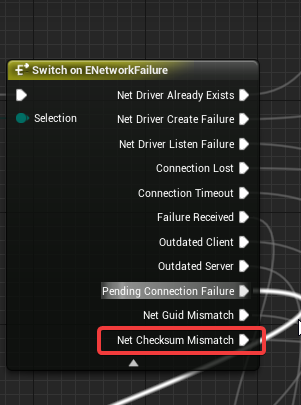
hey guys i literally am having this error occur whenever i try to login to my game with using blueprint nativization (login to my server)
however, it works when i turn off nativization
i was wondering if anyone has had this issue before
im going to bed now so if u dont mind direct messaging me or @ me so i can see responses
night!
winged badger
@twin juniper one of the classes it not the same on host and the server
ripe raptor
So when exactly are new controllers given their controller ID? I checked in my game mode's OnPostLogin and on PlayerStart and in both cases my remote controller's ID was -1 (the server's local one was 0)
manic agate
Guys, I have a replicated Actor which is attached to a client and it follows it around. At some point I need to detach it, and since attachments are replicated, I call DetachFromActor() from the server. This works, but the detached actor is brought to position (0, 0, 0) in the client, even though I use "FDetachmentTransformRules::KeepWorldTransform"
Why is that?
Am I missing something?
PS: I'm NOT replicating movement
thin stratus
Attachment is not replicated
You attach the Server version
Which replicates its position to the client
But it got never attached on the client
So when you remove it, the client resets it finally
Probably updating it next time it's moved on the Server
Replicate the attach and detach and it should fix itself
@manic agate
twin juniper
@winged badger how would i find out which one
also it wasn't "Checksum mismatch"
my mistake
it was "Net Guid mismatch"
winged badger
logs usually accompany that with the blueprint path/name
twin juniper
yeah it doesnt
It's really lame ;X
I really just need to figure out this last thing
No idea where to start though
manic agate
@thin stratus Actually attachment is replicated. There is a OnRep_AttachmentReplication() inside AActor which is called whenever the attactor is attached/detached from something. That's why attaching it from the server only worked for me (and I'm not replicating movements); also tried to print out the parent of the actor inside the client's instance and it's consistent.
As a workaround, I've looked at the implementation of OnRep_AttachmentReplication() inside AActor and copied and pasted it in my actor class. I then commented a line of code that called OnRep_ReplicatedMovement() when the actor is being detached. Apparently it assumes that the actor is replicating movements too, which is not my case
thin stratus
Hm, I only had success using Attach on all instances
rather than server only
But good to know
 rain coral
when a client calls an RPC on the server, is there a way the server can call a function on all other clients to give them the updated state?
I realize variable replication has a workflow for this, but I feel like functions are a better fit in my case.
just moving a pawn, and letting other clients know and interpolate the results
manic agate
@thin stratus That's weird, because I had problems do it that way. I actually wanted to use "attach" on each client, but it wouldn't let me, and there is no way to disable replication on attachment, as far as I could see...
@rain coral If you want to execute some code from the server to all clients you need to use NetMulticast, like this:
// Inside .h
UFUNCTION(NetMulticast, Reliable)   // Either Reliable or Unreliable
void MulticastTest();

// Inside .cpp
void MulticastTest_Implementation()   // It's important to add _Implementation!
{
    UE_LOG(LogTemp, Warning, TEXT("This is a method that when it's called from the server is executed in every client (and in the server too)");
}
thanks! had misunderstood that functionality then =)
 loud sage
So....something I'm trying to figure out: Is the + before NetConnectionClassName in the configuration file really required? Most steam/subsystem things appear to use it, but there are also subsystems where the official documentation ommits it. It doesn't appear to be too essentiall looking at Epic's definition for the + for configuration files. I've done some testing, and it appears I can still create/find sessions. So is it just an optional thing, or is it required for everything to work properly?
mild hull
-
- Adds a line if that property does not exist yet (from a previous configuration file or earlier in the same configuration file).
-
- Removes a line (but it has to be an exact match).
. - Adds a new property.
! - Removes a property; but you do not have to have an exact match, just the name of the property.
- Removes a line (but it has to be an exact match).
-
- Adds a line if that property does not exist yet (from a previous configuration file or earlier in the same configuration file).
without + you will always override the config, its more a feature to allow better management of multiple lvl of config files
loud sage
Ah, I guess that makes sense
I read the same, but I guess I had a different interpretation. So if I understand you correctly, ommiting it works, but it's best not done right?
mild hull
when you have some that would expect that he can change the config on a higher lvl and you set that he no longer could, so if thats not the case for you it doesnt matter
for example you could set a different config in Engine/Config/[Platform]/[Platform]Engine.ini on a test system to set something for the test and if you add all config without + you would need to change the config file each time for that test
loud sage
Ah got it, that system makes sense I'd suppose 🤔
rain coral
can someone point out how I misunderstand this functionality? https://hastebin.com/atirikehef.php
I want to let the player call a server function to move, and then the server should let all clients set the new position of that client, apart from the player (frog) who made the call.
where I check if the player reference sent by the server is not us, is where it fails. it's always 'us'
mild hull
you are always in the same object, the original on server and each client has a copy, but you can check owner
rain coral
do you mean to check the incoming Frog's GetNetOwner() against the current Frog's GetNetOwner()?
my confusion is why they are the same object. the function is called on all clients from the server, with the same parameters, right?
twin juniper
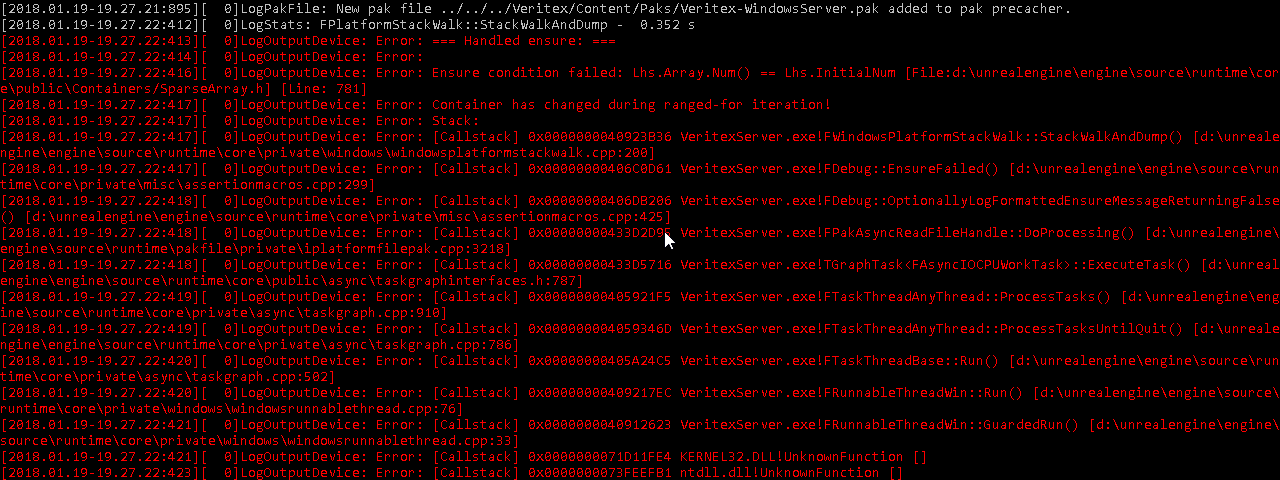 manic pine
cant modify a collection while looping through it
 unborn nimbus
Ok so I have a spawn particle that's playing when my enemies get spawned and I call destroy component after 5 seconds but if I move far enough away to trigger the net cull distance, the particles show back up. Any idea what would cause this?
twin juniper
@manic pine im not tho lol
it doesnt even crash haha
it just keeps fgoing and everytthing is fine
i think its an engine bug tbh
rain coral
is there a good variable I can use to compare the time difference between the client and the server? I want to know how far to rewind the player locally if the player's server position is too different, after taking the time difference into account
winged badger
its not, it can recover from that @twin juniper
it is horrid for performance tho, so don't do it
your game can easily freeze for upward of 30 sec
twin juniper
@winged badger its happening
when booting the server
and thats it
never does it again lol
i dont really understand it tbh
 next falcon
Hey is someone here from germany who makes a survival Game?
 stuck pilot


 vital steeple
do you guys use the normal damage events or make your own BPI's for damage?
 fossil spoke
Depends on the needs of the system. Sometimes its useful to create your own Damage function that will call specific damage events depending on some criteria.
Using the built in damage events is convenient
vital steeple
Yeah i was just having problems becuase it didnt work directly with my health component, so i had to bind damage effects to the owner of the health components "on any damage" event
so i started having timing issues with reference replication and reporting (for kill feed etc)
i think im just going to use a BPI or direct BP/custom event and casting ahead of time instead of the built in damage event
i think the built in damage event would be perfect if the health was part of the character itself and not a component. im just using a component because i have several other types of actors in the game that have health and its easier to use a component to handle damage events.
though honestly at this point... i think it would have been faster to just avoid the component and just do the built in damage event and just use some pre built functions
fossil spoke
Why would the KillFeed need an reference to be replicated? KillFeed is generally just printing text (unless your doing something more complex), sounds like you have an bigger issue.
vital steeple
game state gets sent a message with a reference to the killer and killed, then pulls info from there. i could just feed it a string, but i used a reference because game state also handles rewards
so its simpler to just have one event being fired on the gamestate with the reference to the killer and killed and pull playerstate and then team/name etc from there
actually worked fine until i started using projectile weapons 😦
so every time a player damages something, the health component tracks the last actor to do damage to it. when it dies, the last actor and controller is ssent to the gamestate. the gamestate then pulls the player name/team from the playerstate (from the controller), then sends the reward to the playerstate (where the money is tracked)
 zenith yarrow
Is there a specific way to use FUDPPing::UDPEcho() ? because while FIcmp::IcmpEcho() works perfectly for me UDP Echo always timesout ?
rain coral
what's a good way to compare timestamps between client and server? is there some variable which will be ahead on the client and behind on the server?
brittle sinew
You're basically looking for a replicated current time between the server and clients? It's not necessarily "ahead on the client", but you can probably make use of one of or both AGameStateBase::ReplicatedWorldTimeSeconds and AGameStateBase::ServerWorldTimeSecondsDelta
rain coral
I see, hmm! my goal is to know how far to rewind the player on the client, based on a list of previously stored positions and times
The difference from the local world's TimeSeconds and the server world's TimeSeconds. sounds correct though
manic pine
what youre probably looking for is PlayerState->ExactPing
rain coral
isn't the ping both directions though? and I'm not sure if the time between server and client is equal both ways? (in which case you could divide ExactPing by two)
manic pine
exact ping is calculated on server and replicated to client
and yeah, multiply by 0.5
and by 0.001
rain coral
I'll try and see if that looks correct then. ServerWorldTimeSecondsDelta is protected, couldn't use it from outside of the GameState
manic pine
im not sure how accurate that one is anyhow
dont think its actually intended for that use
in the Unreal code itself they just use exact ping, from what i recall
brittle sinew
Shoot sorry @rain coral didn't notice that, but there's AGameStateBase:GetServerWorldTimeSeconds
manic pine
keep in mind though, exact ping is an average... if you e.g. use console command to increase ping from 100 to 400, it's gonna take 5-10 seconds before it has fully caught up
rain coral
ah
brittle sinew
(it does specifically say it's useful for syncing animations though)
rain coral
would be useful if it was not averaged
otherwise someone with unstable ping might constantly be jumping around, if I've thought this out right
manic pine
hmm ive only seen it used for hitscan lag compensation
what exactly are you planning on using it for?
rain coral
syncing movement
since the client will move ahead of the server version, I wanna compare the timestamps between the two and correct the player only if a previous location of the player was out of sync with the server's current one
manic pine
isnt that identical to what charmovecomp does?
rain coral
hopefully :D I haven't looked into it, I'm using my own movement code
rain coral
yeah I'll check that out
manic pine
client performs move then sends input and results to server... server runs it and if result diverges beyond a set point, tells client to make a correction
otherwise the server acks the client's move and client removes it from its history
rain coral
hmmf.. feel pretty silly for not trying that out first. that sounds like a lot less headache.
rain coral
seems to work pretty well!
 icy nacelle
I've been struggling with this problem for the past few days.
I moved my entire inventory system from PlayerCharacter to PlayerController after realising it should be there.
Let me start by saying: This system worked perfectly before migrating the files over. I've saved a backup and have cross referenced EVERYTHING. And its a carbon copy.
Currently, when I try to pick up an item (dedicated server, playing as client 1), the pring string in 'Add to Inventory' is called when the inventory widget reference is not valid.
I've noticed when an actor is spawned in game and is tried to be picked up, the inventory reference variable IS valid, but it does not appear in the inventory.
(I was told this may be a multiplayer issue so I'm dropping my question here.) Thanks for all the help. Please let me know if I can do better to describe my problem.
 feral valve
Hey, looking for some guidance here. Can anyone suggest the best way to implement an inventory system in multiplayer? ATM i have a component that attaches to the player character that handles the inventory logic however im not sure if its possible to get it to work across network (to replicate whilst picking/dropping is dealt server side to prevent exploit). Thanks
thin stratus
I can only give you the idea
InventoryComponent: Component put onto Player, Actors, etc. | Holds Items and has function to generall manage ITSELF
ManagerComponent: Deals with moving Items, adding new items, removing items. Basically gets 1-2 Inventories passed in and then calls their functions for adding and removing items.
E.g. Move Item from Inventory1 to Inventory2, where they could be the same inventory if you moving the item withing the same, or different once, if you move from one to another
aka Source Component and Target Component
Together with Source Index and Target Index (given the Inventory is an array)
@feral valve
Manager should always sit on the PlayerController
That way you can always root ServerRPCs through it
E.g. wenn you use a Chest with an Inventory COmponent
You get PlayerController, ServerRPC in the Manager and pass the Player and chest inventory
feral valve
@thin stratus thx, il give that a shot :3
next falcon
guys how can i create session settings ?
like i set a value 2 in a widget and create a session and than open a level but how can i get the Value 2 now ? where do i need to store this so every player can use them ?
rain coral
should variables marked for replication only be used where they don't need an update every tick?
I notice that Replicated variables update a lot slower than multicast functions
 calm hound
Variable replication is guaranteed. Multicast functions have the ability not to be, if you're updating every Tick (which, you honestly should not replicate anything every Tick) you can set it to Unreliable
whatever you're doing, it definitely shouldn't be replicated every tick
rain coral
hmm, I'll do all the multicasts on tick unreliable then.
but let's say I receive updates only 2-3 times a second, for another client moving. in order for it not to look choppy, we gotta interpolate. so we should interpolate this other player's position on tick, using the latest position we received every now and then - how do I know which client to interpolate? I'd basically need a dynamic list of positions for every player that plays, and send their ID from the server's multicast?
is that way off?
manic pine
careful with unreliable multicasts
their timing is unpredictable
you should be able to control update frequency of replicated vars
have a look at the object's net settings
rain coral
I'll experiment with both - but regardless, how is smoothing typically solved? there's no use lerping positions if it's done only when receiving them from the server. and if it's to be done on Tick, is there a standard way of handling who is who? (see my text above)
manic pine
who is who is not a problem
anyone who is not the client would need to be interpolated ye
rain coral
it's not a problem if the interpolation happens in the multicast function. but that function runs relatively rarely. if we wanna run a lerp every tick, then we need to know which player to do it on, and which server locations to lerp to
manic pine
you wouldnt do it on a multicast
youd have e.g.
UPROPERTY(Replicated, usenotify=OnRep_NextDestination(FVector olddestination)
FVector NextDestination
and use condition not-owner
and record the time when replication was received
rain coral
but isn't the OnRep function running as rarely as we get server updates? doing the lerp in there wouldn't provide the smooth result you'd get from Tick
manic pine
yeah tick would do the actual lerp
in your onrep you'd set:
OldDestination = olddestination
RepTime = now
then in tick you'd lerp between old and next
based on time since rep and your desired interpolation time
e.g. if you receive 10 updates a sec, youd want desired interp time to be 0.1sec
what do you mean 'as rarely as we get server updates' though
you control the update rate
rain coral
but my issue is like.. say there is 20 players on a server. one of these players must interpolate 19 other players' positions on Tick. so when we set NextDestination, that is set to be the next position of the player we last received an update from. so, what I'm thinking is that you'd have to iterate through all 19 players in a loop, and interpolate there between their old and new position. and that's a lot of variables. and this is because Tick is tied to your own player and hmm I think I just realized my mistake. damn. you're already running Tick on all players.
my mistake :D I've had the same realization a couple of times before
I was thinking the player is oblivious to the other ones. but of course they aren't >.<
manic pine
yes, this is per character
the code is runnning on the clients version of every single character
rain coral
yeah, makes sense now. gotta get used to thinking that way properly
manic pine
im still confused by your rare updates comment though
you control update rate through NetUpdateFrequency on each character
also MinNetUpdateFrequency when adaptive net frequency is in use
rain coral
ah, I mean, like you said, you don't wanna replicate on every Tick, so compared to doing a reliable multicast every Tick, an unreliable multicast or OnRep is rare (though still frequent enough)
manic pine
onrep happens whenever replication changes something
i believe the default update rate for the charmovecomp's client prediction stuff is 10 per sec
with interpolation between those
not entirely sure on that though
unreliable multicast is very nasty in my experience... it can sometimes be held for hundreds of milliseconds, think ive seen over a full second once
rain coral
hmm. do you think that's because it updates regardless of whether something has changed? like it's overloading the network?
manic pine
no its an artificial delay they introduce
hmm struggling to think of where i read it
"It is intentional that unreliable multicast events get queued up an processed on the next net update for the actor. However, unreliable unicast events should be getting sent immediately. I guess the thinking was that part of being "unreliable" also meant that the event wasn't time-critical either."
rain coral
I'd have to introduce some otherwise needless variables if I switch to OnRep
manic pine
manic pine
remember you could always have a look through existing classes