#multiplayer
1 messages · Page 362 of 1
 agile crane
agile crane
agile crane
The box for watching tv and stuff?
 mild hull
search router port forwarding
 pallid mesa
^
agile crane
sure
pallid mesa
Some companies dont want you to modify manually the router so you might want to call your company
agile crane
But I cannot touch the router thing in my house for internet and such, its for my parent and if I touch it they will kill me. I'm a kid.
pallid mesa
If you cannot open that port you wont be able to have people joining your hosted server (your own ip)
If your parents dont allow you to do that just forget about it temporally
agile crane
Is there a way to edit where does the advanced session search search? Like, it seems to find session in my internet only not outside of my internet.
pallid mesa
You can look for subsystem solutions but they are way more advanced and not worth to explain over here
pallid mesa
Anyways glitch there is still a lot you have to read
agile crane
Tru, bruh
pallid mesa
We are trying to help you for sure, but your questions are very open
agile crane
yeah true but I'm just so confused
pallid mesa
So you have learned something at least
agile crane
not really..
agile crane
oh okay but if I do that, will everyone be able to join me?
or other people will need to do the same?
pallid mesa
I think its the 777 but im not sure at all rn id have to look at it
Joiners wont need to open anything
Only the hosters
pallid mesa
I dont know
agile crane
okay
mild hull
maybe search for VPN there a some simple ones that all your friends can install and they get trough most router
 twin juniper
@pallid mesa could I just make it start a dedicated server locally before we connect
And use that for the client
pallid mesa
If it works for you it works for you 🤷
twin juniper
how to make a function happen only to owner
pallid mesa
Check "IsLocallyControlled"
pallid mesa
Np :)
 bleak cloud
Anyone suggest some blueprint examples of a player performing an action with server checks? Perhaps a player shooting a gun or something similar?
 sterile pebble
are OnRep variables using tcp or udp ?
 late sundial
@agile crane using advanced sessions + steam configurator (from marketplace) it makes online working perfectly. no need for opening ports. default spacewar appid has probably somekind of regionblock, all players within same steam region can connect/host servers.
agile crane
Oh hell no. I tried it with steam and I can't find people online, and it uses spacewar. I've heard it works only if your game is on steam, NOT if your game is not on steam then it will use spacewar.
My game is a fan game, I cannot add it on steam.
late sundial
i installed "steam configurator" from marketplace and it started working. before that i was struggling with same issue. it definetly works if everyone just uses steam.
late sundial
spacewar appid works over online, it just has regionblock, getting own appid from steam i think you can change that
agile crane
Oh its cheap af, lemme get it fast af
NOO CMON EPIC DONT DO THAT https://gyazo.com/dba05b9373bd0d2bb541363d7cdf8c0e

well rip me.
I cannot seem to buy it
I had hope
late sundial
daymn
agile crane
rip me. Epic is drunk again
late sundial
just to remind region must be same for all players. example us players cant see eu servers and other ways
agile crane
okay
 polar bridge
does net pktlag= only set the lag for calls from client to server? seems like server->client updates immediately still
any setting that will also add delay from server->client?
 signal sand
@polar bridge pktlag works both ways
 worthy wasp
question - i'm doing a meelee attack sequence in a mp game.... my ranged attacks i do a linetrace -> Server RPC lineTrace (ForAuthentication) to apply damage......
Can I safely rely on the meelee weapons Overlap functionality for applying weapon damage to the attacked target? Or should I need to somehow server authenticate this too?
twin juniper
@worthy wasp OnComponentBeginOverlap and OnComponentEndOverlap are called on both the server an d client
you can do if (HasAuthority()) {}
polar bridge
@signal sand maybe i'm misunderstanding something but i noticed when i use net pktlag=... that there's only a delay going to the server. if i have two clients, and i set the pktlag on client 1 to say 250, then move on client 2, client 1 actually updates immediately
if i shoot on client 2, it shoots immediately also on client 1
worthy wasp
@twin juniper - thanks - i woulda found that out with my print string eventually but i did NOT know that. thanks again!
 burnt meteor
 jolly siren
@burnt meteor It's on the PlayerState
A PlayerState is created for every player on a server (or in a standalone game).
Ping and ExactPing
burnt meteor
ok
 thin stratus
@DecodeStudios#9604 Please be aware, that the PING (not exactPing) is a byte and was divided by 4.
So if you display it, multiply it by 4 first
twin juniper
In packaged project the steam is disables, maybe because the app ID 480?
 wary willow
Hmm
What are some causes that wouldn't allow players to join a Steam Multiplayer Host's game, if they have each a unique Steam account, same download servers, steam_appid the same, same build.
But players are able to join in the same network
networks (Mine and theirs physical locations)
 hasty adder
Ho hum. Steam hosts. Punch should work without any kind port forwarding that said if port forwarding is on for 22115 or whatever wouldn't that mess it up?
Can't recall if you have to port forward for steam now
Oh one dumb question. Create session use LAN true or false
wary willow
Nah, it's false
It's just very strange, never ran into this
But it's my first MP in 4.18.2
But can't find anyone else running into this issue, so no clue
hasty adder
Is it your own appid or 480?
if it's your own appid I had to open a ticket to value to allow users to open up hosting sessions as its not enabled by default - then again never mind that actually meant host couldn't even start..
wary willow
I used both
But the other party is behind some serious corp firewalls
Although I thought Steam punched through it, I'll keep at it, and see if it's an issue on their end or not. Going to try to recreate something simple in another version also just in case.
hasty adder
Hmm still could be company firewall blocking the 27015
burnt meteor
@thin stratus ok thx
 mighty schooner
What is the proper way of using RepNotify in a struct? I have a replicated struct like this
FPawnEnterInventory PawnStruct;```
and this function
```UFUNCTION()
void OnRep_PawnInventory();```
The struct looks like this:
```USTRUCT()
struct FPawnEnterInventory
{
    GENERATED_USTRUCT_BODY()

    UPROPERTY()
    FName ForceToSlotName;

    UPROPERTY()
    class APlayerCharacter* MyPawn;

    FPawnEnterInventory()
    {
        ForceToSlotName = NAME_None;
        MyPawn = nullptr;
    }
};```
Now if I set `PawnStruct.MyPawn == SomethingValid` on the server the `OnRep_PawnInventory` function gets called on client as expected. Problem is if I set `PawnStruct.MyPawn == nullptr` then the `OnRep_PawnInventory` is not called on clients. I tried using `DOREPLIFETIME_CONDITION_NOTIFY(ABaseWeapon, PawnStruct, COND_None, REPNOTIFY_Always);` too but still no use.Is it a bug or am I missing something?
worthy wasp
@mighty schooner - RepNotify is not picked up by SERVER as the server doesnt participate in replication events..... when you set a variable as server - you are forced to also run the OnRep_PawnInventory() method manually as server in order to ensure the rep notify is ran.
see section SERVER REP - but its pretty much verbatim of what i said here.
https://wiki.unrealengine.com/Network_Replication,_Using_ReplicatedUsing_/_RepNotify_vars
mighty schooner
@worthy wasp I'm aware of that but problem is OnRep_PawnInventory is not called on clients.
worthy wasp
could that be something to do with the VisibleInstanceOnly property? I've not ever seen or used that in any of my code
it clearly says - the property "cannot be edited"
mighty schooner
Its only used so that I can see what values are while selecting the actor from the world. Cannot be edited means those are greyed out in the details panel so user cannot edit it by hand.
Here is the comment from ObjectMacros.h
/// Indicates that this property is only visible in property windows for instances, not for archetypes, and cannot be edited
worthy wasp
yes thats waht that wiki doc states at the top - and i'm no expert but i'll take that as a black and white literal meaning.... you cant edit the property
again i have NO experience at all with that property specifier
why not just put it - EditAnywhere?
same difference - but now it can be edited properly
and seen from the world when you select the actor - which is your goal n- right?
mighty schooner
EditAnywhere, EditInstanceOnly, VisibleAnywhere, VisibleInstanceOnly etc only makes a difference in the details panel. It doesnt mean you can't edit the values at runtime. I use Visible* specifiers to debug the values and its easier to distinguish them from the editable values.
worthy wasp
sorry i wish i was of more help - i mean its worth a try just to try change out the property specifier.... if that works you know it was your culprit. if not - at least we tried 1 debug method ❤
mighty schooner
@worthy wasp Figured out the problem. After calling the function that sets PawnStruct.MyPawn == nullptr I was calling Destroy() also. Calling SetLifeSpan fixed it.
worthy wasp
ah man i wouldnt have thought of that... so the OnRep was tryin to fire but the actor itself was dead - this was throwing a crash?
was the Destroy() done at SERVER level?
it seems like if the actor was destroyed - all funcitonality would therefore be terminated - i would assume
mighty schooner
There was no crash at all. Just the OnRep was not calling on clients.
twin juniper
UATHelper: Packaging (Windows (64-bit)):   LogInit: Display: LogModuleManager: Warning: No filename provided for module OnlineSubsystemSteam
UATHelper: Packaging (Windows (64-bit)):   LogInit: Display: LogModuleManager: Warning: ModuleManager: Unable to load module 'OnlineSubsystemSteam' because the file 'C:/Program Files/Epic Games/UE_4.18/Engine/Binaries/Win64/' was not found.
ok that I fixed by enabling the "Online SubSystem Steam" in plugins 😅
But now there is another problem
LogOnline: Warning: STEAM: Steam API disabled!

LogInit: Display: LogOnline: Warning: STEAM: Steam API disabled!
That is normal. I've always gotten that.
twin juniper
and then steam doesnt work on packaged game
i followed a guide on forums for steam integration, with all those target.cs, build.cs and after i added a blank c++ class for the build and target to appear, the project broke and cant be opened anymore
twin juniper
@jolly siren ☝
hasty adder
Is it shipping or development build?
twin juniper
shipping
hasty adder
Are you actually putting it on steam?
hasty adder
Shipping build if I recall will not include the appid textp
thin stratus
You have to add the AppId text yourself in shipping builds
hasty adder
This is included when you used the steam sdk and upload it to a repo on steam
twin juniper
how do I add that appid text? in DefaultEngine.ini?
twin juniper
binaries of engine/project?
thin stratus
Binaries of packaged game?
twin juniper
oh k
thin stratus
Where your exe file is located
twin juniper
ok
?
Tried putting it into WindowsNoEditor, Engine, Binaries, ThirdParty, Steamworks forlders, none of these enable Steam Overlay
hasty adder
no editor/project name/binaries/windows64?
twin juniper
@hasty adder and then package after that?
because just putting it there didnt change anything
nope... doesn't work
hasty adder
Steams running right?
hasty adder
Is this the server your messing with?
twin juniper
?
hasty adder
Where are you seeing steam api disabled?
twin juniper
I dont get the overlay which should be enabled if steam is on
That error is in package output log
hasty adder
Which is normal
twin juniper
but then there is no steam overlay in packaged game
hasty adder
Would have to do with that text, but why are you so concerned with steam overlay and a shipping build if you don't have your own app if yet?
It builds shipping which is good. The overlap problem will be resolved when your able to use the steam sdk to upload to your repo with your appid as it automates that whole process. Dev build with appid should work with steam overlay for testing 😃
thin stratus
That's also not the correct name for that steam app id file :D
How about you put some effort into checking what the name is
hasty adder
😖
 thorny fiber
Hello, i have a problem for find an sessions with Advanced Sessions plugin, i can't get number of players (current and max) and i can't get my extra settings.
worthy wasp
are you pulling these from the valid session that you're connected to (or finding) ?
can you throw out any screenshots of your code?
thorny fiber
yes
worthy wasp
why are you doing it in PreConstruct?
thorny fiber
hum i don't know 😄 i have failed
worthy wasp
i'm uncertaain what PreConstruct is - try putting it into OnConstruct
thorny fiber
with construct is a same problem
worthy wasp
ok well.....
i'm uncertain with the ExtraSettings - never used that node before..... and havent touched AdvancedSessions in quite a while.... (like over a year).
are you CERTAIN the session information is valid?
have you tried breaking the struct and printing off any info from it?
thorny fiber
yes the extra settings when find sessions is empty
and when i get session (on hosted session (in client after create session)
worthy wasp
i'm unfamiliar with what your doing - in the past i did everything off of a STORED RESULT variable i made from the session i was joining/creating.
which you're obviously passing through to your widget
but i'm unfamiliar with this Extra Settings node. sorry
hasty adder
Should probably seek out author of the plugin
thorny fiber
ok
thorny fiber
this problem is caused because your door is created with "close" parameter
because player don't receive information for say this door is open
 cedar galleon
no! the player host, open the door and replicate all client...when connect the other player see the door closed
thorny fiber
because the door is not replicated to new player
twin juniper
is client side prediction a feature of the built in ue4 networking tools?
@twin juniper afaik no
ahh darn 😦
polar bridge
is it normal to see the positions on different clients off by a bit even when standing still?
twin juniper
@polar bridge what's "a bit"
polar bridge
LogWeapons: Warning: Player position: X=-7877.118 Y=-17642.953 Z=102.275, Muzzle location: X=-7897.118 Y=-17591.953 Z=142.275, Projectile location: X=-7897.118 Y=-17591.953 Z=142.275
LogWeapons: Warning: Player position: X=-7877.120 Y=-17642.949 Z=102.280, Muzzle location: X=-7897.120 Y=-17591.949 Z=142.280, Projectile location: X=-7897.120 Y=-17591.949 Z=142.280```first is shooting client, second is server, third is other client
 cloud ledge
@polar bridge Clientside position will not be equal to serverside position with CharacterMovementComponent
polar bridge
i know it's a tiny bit, but it does affect projectiles hitting each other a bit
cloud ledge
It only performs active position correction when player is moving IIRC
And whenever player changes floor (walks off an edge etc)
polar bridge
hmm ok
it just seems odd that when i first spawn it, it's even off a bit
i would say it's acceptable, but i'm not a huge fan of having a hit on one client and not on another
twin juniper
could anyone comment on this platform: https://www.unrealengine.com/marketplace/gportal-connector

GPORTAL offers free dedicated test server in all global locations. Apply with this plugin.
polar bridge
already compensating for lag which was a challenge to say the least haha
cloud ledge
@polar bridge well it should not matter for you
When you make a shot, server should tell your client where to spawn blood decals (hit feedback) and client will fire along the local ray (prediction on client)
twin juniper
@polar bridge how are you spawning the "projectile"
cloud ledge
In other words, when you fire a gun, client does prediction and server provides hit feedback
polar bridge
each client spawns the projectile since it's slow moving bullet physics
and i can't use replication it's way too much
but, the server still determines the hit in the end
twin juniper
sure, but then pass the transform of where it spawns on the multicast
don't just "get actor location" each time it's run
polar bridge
right, i could do that. but in order for it to be response on the client whose shooting, i need to spawn it immediately
and ofc i can't send the transform from the shooting client
twin juniper
mhm, then spawn it immediately locally, and not when the multicast is run
polar bridge
though i could still have the multicast rpc from server send the transform
and maybe even adjust it on the shooting client to match if it doesn't look weird
cloud ledge
Btw
You can send correction data from server
After shot was made, the new transform arrives after bullet has already fired off on client
polar bridge
i was mostly wondering about the positioning, just making sure it wasn't something i was missing 😃
yeah, that's what i mean by adjusting it
cloud ledge
And in the timeframe between bullet being fired and hit, its position is updated to reflect real position where it was shot
polar bridge
that's probably what i'll do. thanks guys
twin juniper
@cloud ledge seems as if the speed of the projectile would matter then
does epic plan on implimenting some client prediction tools in the future?
or are they known for not having the best networking support
cloud ledge
@twin juniper Once particle is shot and flies using deterministic physics (and btw @polar bridge you better have deterministic physics for them) it's hit position is only determined by firing position
So updating it mid-flight would make it hit same location
polar bridge
can you elaborate on deterministic physics? this isn't your typical shooter
bullets are very clearly seen in my game
not like cs:go or pubg or something
i am spawning an actual actor of a projectile which moves in the world
cloud ledge
Deterministic physics is when your end result is entirely determined by initial conditions
If you're propagating bullet state based on "delta time", it's not deterministic physics
Since delta times are random on server and client and never the same
For starters, deterministic physics would be fixed time step
polar bridge
gotcha
cloud ledge
The bullet must take same number of physics frames (ticks) to hit target on client and server (including mid-flight correction), at each tick the calculation on server and client must be the same
twin juniper
@cloud ledge I've only had to pass the exact spawn transform... but I'm thinking this might only be important if there are plenty of bounce events/custom ricochet movement, not if the projectile stops on impact
cloud ledge
He reports that there is a noticeable divergence just from 0.1 units difference in player positions apparently
polar bridge
there is quite a bit of bouncing off walls and floors in the game for the projectiles
similar to a game called infantry online from ages ago
twin juniper
Hrmm, are the position of dynamic ragdolls inside an authoratative server fairly accurate?
 celest mural
The fact you are asking. ;) On " squad " we have pretty constant discontinuities between ragdolls on client and server
 fossil spoke
Can you fix medics not being able to res soldiers from their bodies, thanks mate. Love you.
twin juniper
hmm
do they use interpolation for replication?
Ive been reading into it and not many have made a smooth multiplayer experience with physics sync'd other than RAMA of course lol
fossil spoke
Physics is an pain to replicate. Unless your game mechanics actually require it to be accurate, i wouldnt even bother.
cloud ledge
We have physics syncing
It's a custom algorithm that provides prediction and correction and is tailored to a very very specific physics situation we have 😄
twin juniper
i making the unreal engine multiplayers curse i want corvert my peer to peer server to dedicated server i don´t want the player host the serve
twin juniper
the project https://github.com/Kammikazy/3_Steam_Multiplayer

GitHub
3_Steam_Multiplayer - Connect your games P2P over steam. This game introduces Unreal's Online Sub-System (OSS) and shows you how to use it with the Steamworks API. By the end of the section, yo...
 arctic glade
I'm having some problems with my dedicated servers to show up in-game servre browser. My friend can see server in steam browser. Anyone got idea whats wrong?
Using own app id for game and toolappid for dedicated server
twin juniper
can someone help-me
thin stratus
Sorry no idea right now
Also, SpawnActor node on a Replicated Actor
Scale set to 1.0, 1.0, 1.0
Actor itself has a StaticMeshComp with Scale.Z = 3.5
Server Spawns the Actor with 1,1,1 scale, clients with 1,1, 3.5
How in the world do you notice that if you use a Dedicated Server
Freacking bugs
twin juniper
ok
thin stratus
Buddy, stop pinging me the whole time :D
I already said that I have no idea atm
twin juniper
sorry
wary willow
@twin juniper If you want him to help you 1on1, pay him?
twin juniper
ok
 inner iris
@twin juniper using dedicated servers with steam is basically not documented at all and there’s very little info on the subject. Hopefully will be tackled by the Ben Tristem Udemy course in the next few weeks- the author said it’s planned.
In the meantime, there is a big forum post that has lots of info on what you need to do if you have the ability to make the changes yourself: https://forums.unrealengine.com/development-discussion/c-gameplay-programming/69281-dedicated-server-with-steam-is-a-joke
It seems the latest post there actually has steps to set it up in 4.18.1 - might be worth a look
twin juniper
ok thanks
@inner iris do know if is gonna be a new coure our its gonna be unreal engine multiplayer course
inner iris
It’s going to be part of the same course you linked
arctic glade
@inner iris do you have source where Ben says that?
inner iris
@arctic glade from Sam the author: “I would love to add a section on dedicated servers, potentially with the added benefit of hosting them on GameLift. The only thing holding me back at the moment is other commitments that have not yet been fullfilled. I am likely to circle back round to this course in the new year to top it up with extra dedicated server content, so watch this space.”
That was a few weeks ago so hopefully it does end up happening!
arctic glade
thanks
 languid plume
Hey guys,
I've got a weird issue I can't seem to get my head around:
I'm using both axis-based WASD movement and Click-To-Move(with SimpleMoveToLocation) in some of my networked projects. This has been working greatly so far, and still does even on the newest engine version. However in a brand new project I've setup, the client and server get conflicting velocities when using SimpleMoveToLocation. MaxWalkSpeed is 500, and the resulting client speed is around that, but servers' is around half of that.
I know SimpleMoveToLocation is not supposed to be networked, but it's currently the only way I know of getting both keyboard and mouse movement working together quickly. Anyone have an idea why the velocity is different like that? Or have an easy alternative to this? It's just for prototyping anyway, so any quick & dirty solution will do.
languid plume
Okay, I found the issue myself. :D For anyone wondering:
Use acceleration for paths wasn't checked, but it's required here to get this to work.
twin juniper
LogRep: FRepLayout::UpdateChangelistHistory: History overflow, forcing history dump Chicken_NPC_BP_C, [UNetConnection] RemoteAddr: 127.0.0.1:50549, Name: IpConnection_15, Driver: GameNetDriver IpNetDriver_14, IsServer: YES, PC: VeritexPlayerController_BP_C_0, Owner: VeritexPlayerController_BP_C_0
anyone know what this is?
jolly siren
Are you updating a chicken's replicated property on tick?
twin juniper
19 properties actually
jolly siren
for a chicken?
twin juniper
yeah i saw that one
ya
well
all NPCs
lol
but i could probably make some of these not replicated
and make them server sided only i bet
twin juniper
yea
I agree
i think i only need 4 to be replicated
Health
TribeOwnerID
AnimalName
Level
i dont think i need anything else but those four actually
@jolly siren lol that seemed to fix it 😄
I just hadn't gotten around to cleaning that up
jolly siren
awesome 🙂
 livid aspen
Hello, I'm totally stuck on why I'm getting a link issue when trying to use FOnlineSessionSettings
I have all the modules included
And nothing else has this dependency issue
I'm really at a loss here
wary willow
@livid aspen Steam?
livid aspen
Yeah
wary willow
@livid aspen Steam Plugin enabled?
livid aspen
Yep
wary willow
Steam open?
livid aspen
I'll post the actual link error
wary willow
k
livid aspen
I think I can get around it by subclassing it
Error LNK2019 unresolved external symbol "public: __cdecl FOnlineGameSessionSettings::FOnlineGameSessionSettings(bool,bool,int)" (??0FOnlineGameSessionSettings@@QEAA@_N0H@Z) referenced in function "public: bool __cdecl AOnlineGameSession::HostSession(class TSharedPtr<class FUniqueNetId const ,0>,class FName,class FString const &,class FString const &,bool,bool,int)" (?HostSession@AOnlineGameSession@@QEAA_NV?$TSharedPtr@$$CBVFUniqueNetId@@$0A@@@VFName@@AEBVFString@@2_N3H@Z) Carcosa C:\Users\alexa\wkspaces\Carcosa\Intermediate\ProjectFiles\OnlineGameSession.cpp.obj 1
I'll try and clean this up
wary willow
@livid aspen you'll have to show us your code actually
check includes and modules again
livid aspen
Yeah no worries
livid aspen
Oh man,
I think I figured it out and I'm an idiot
Yeah, I'll move over there if this desn't fix it
Thanks man
Appreciate the help
wary willow
@livid aspen kk, what was the issue, out of curiousity?
livid aspen
I think the issue is not that the module wasn't linked but that I was trying to call a set function for it with arguments that didn't match
I was passing the ValueType as an Fname
It's because it's a template function and I wasn't setting the template type when calling it
 cunning wasp
Can someone explain why the laggy player (on the left) is able to see everything in real-time making the lag free player lag, and is also able to kill the lag free player around corners? https://www.youtube.com/watch?v=xRG1EnTfzNo&feature=youtu.be
 pallid mesa
hello
just out of curiosity
why is UT applying the deferred shootings input on the character movement component tick?
UTCharacterMovement.cpp
line 658
thorny fiber
hello, i have a problem, i create an sessions with more settings (like server name, game mode) but when find the sessions i don't have informations (in C++ and lan because when use Steam i can't find sessions with 2 instance of the game)
thorny fiber
Ok i have probably find cause of my problem but i dont know to fix that. When find sessions my session is invalid, now my problem is probably here, how to make valid session
 grand kestrel
@pallid mesa look at the header declaration for the inputs variable, it explains why
 desert breach
Hi guys ! Need some information on how to package modules for your dedicated server.
My modules are not gettting packaged in the build, as a result the servers aren't running as expected.
I've checked adding the macro IMPLEMENT_GAME_MODULE(FVizServerModule, VizServer);
for both of my plugins but nothing changed.
I've also added modules in the build.cs file
fossil spoke
@fieol#4977 Make sure your Plugins arent set to be Editor Only in the Plugin .uplugin
How to create Unreal Engine plugins.
This may affect how the Plugins content is dealt with during Packaging.
pallid mesa
@Vaei#5603 sorry, which class, controller?
grand kestrel
@pallid mesa player controller, where it stores the deferred inputs
pallid mesa
Ah okay, ill definitively check it out
What i was wondering aswell, given the situation of UT3, would they still bind inputs on the controller? Since they have vehicles
desert breach
@fossil spoke my module is not a plugin. Its basically contains services of creating lobby and game server in a container for ex: "MainGameNetwork" module name, and client code is written in "MainGame" module
@fossil spoke with the link you have provided , if it works with normal modules which are added into the project (not as plugins) I will try out with PostConfigInit option
I will revert back
thorny fiber
My problem is here (this is IsValid session on OnlineSessionSettings::FOnlineSessionSearchResult) but i don't found reason for why this value is false. I don't found implementation of this function
twin juniper
Is there any online subsystems that allow for hosting and joining a game besides steam cuz I can't use their shit cuz I'm 14 and don't have an app ID
thorny fiber
for development you can use steam with dev app id (480)
thorny fiber
Hum, if you want client host you probably need create your OnlineSubSystem (i am not sure)
For my problem, i have make question here : https://answers.unrealengine.com/questions/741159/session-is-invalid.html
twin juniper
in my game only find the session if the player host the game
but i want to find the session when i run cmd"F:\UnrealEngine-4.18.1-release\Engine\Binaries\Win64\UE4Editor.exe" "F:\Unreal ProjectsServer\TheLegendsOfArthur\TheLegendsOfArthur.uproject" -server-log
i want client find the session it not player hosting the game
the peer to peer to dedicaded server
 soft hamlet
@worthy wasp "Anyone elese than myself & @bitter oriole getting these issues with AGameMode not possessing remote client pawns properly? Exact same code works FLAWLESS for AGameModeBase.
https://answers.unrealengine.com/questions/738978/agamemode-spawnactor.html "
did you continue working on this discrepancy? I'm thinking of redoing my gamemode entirely if I can't fix the possession problems
twin juniper
this my gamode code https://pastebin.com/vRNWstcq

what i doing wrong
i don´t have any error but the cliente don´t show the server
thorny fiber
Ok my problem is strange, i have problem only when use steam subsystem and 2 instances on the same computer
worthy wasp
@soft hamlet - no i've not resolved it - and have since moved on from trying to use AGameMode.... i hands down cannot get AGameMode to possess a REMOTE client pawn correctly.
 bitter oriole
@soft hamlet No, I didn't work on it more.
I'm more of a purist, if I can not use a complicated base class from the game framework, use a simpler one and rewrite the functionality I need, then I do that
worthy wasp
sucks too - my entire focus was to utilize the GameMode's MatchState properties & methods.
bitter oriole
Copy them
Or just override the method in GameMode that changes the replication setup
thorny fiber
We can't get created session (with OnlineSubSystemNull) in PIE ? i have create my session but when get the Session state this return "No Session"
bitter oriole
PIE is offline, AFAIK
cloud ledge
I think online subsystem doesn't even start in editor?
bitter oriole
That's what I thought too, yeah. Test in standalone builds
cloud ledge
Well, you don't need to package the game, you can just run your project with "-game" flag
thorny fiber
i need build my game every time for test in 2 instances ?
cloud ledge
It'll start it up as if it was standalone, without the need to rebuild the game
In fact
We have two batch files specifically for that purpose, they just start editor in game mode, one as server, one as client
thorny fiber
Thanks for that !
 inland sun
Can someone tell me where to put the SDK files I have the latest and already have the advancedSessions and advancedSteamSessions installed but keep getting this error
I found the Steamworks folder in the following location. C:\Program Files\Epic Games\UE_4.18\Engine\Binaries\ThirdParty\Steamworks\Steamv139
do I need to delete the Steamv139 folder and its contents and drop in the "steamworks_sdk_141" folder into either the "Steamworks" folder or "ThirdParty" folder
 urban trout
starting a project in Q1 2018.. MMO genre. trying to determine project limitations in terms of replication efficiency vs scope of replication (player movement, vehicle movement, vehicle combat? etc.). Given what Epic have said about fortnite / UE4.20 can anyone have a stab at what would be "realistic" to aim for? Project to go public by 2019.
by "realistic" i'm asking for a ballpark "20 players with basic movement, collision, 4 vehicles, 1v1 combat accurate to 30fps" or something
fossil spoke
That will fix everything
 versed socket
Is it normal for PIE multiplayer testing, even for simulating dedicated servers, only adds a single PlayerController to the world to represent all of the players?
For some reason when I change it so that the PlayerController will spawn a new Character for itself at the start of a round, it looks like only the first Client will actually spawn a new Character for itself because when testing in PIE there is only a single PlayerController.
Is this bad design on my part? Should I be doing this in some other way?
fossil spoke
The Server should always have an PlayerController for each Player connected to the Server. Even in PIE.
If your running an Dedicated Server in PIE with single instance turned on (meaning the first Client is the Editor and Server runs background) you will only see that Clients PlayerController.
@versed socket
versed socket
@fossil spoke Thanks for getting back to me -- I'm using the "New Editor Window" option, actually, where I have the two external windows. When I alt-tab back into the Editor, there is only one instance of a PlayerController for some reason in the World Actor List.
fossil spoke
Server holds all instances of PlayerControllers, Clients only hold their own instance.
versed socket
^ That actually probably explains it, thank you. I forgot that when I alt tab and look at the world list, I'm probably only looking from one client's perspective.
fossil spoke
I cant imagine any scenario where an Player wouldnt have an PlayerController
versed socket
You're right @fossil spoke -- I suppose I'm just misdiagnosing a symptom of another problem. Namely that when I call my project's PC::OnStartMatch method, which is triggered by a multicasted Event Dispatcher, I tell the server via HasAuthority to spawn a new Character for the given PC. Yet for some reason, seemingly at random, the pawn does.... god damnit
Thank you for helping me do the Rubber Ducky method
fossil spoke
Whats rubber ducky method? lol
versed socket
@fossil spoke https://en.wikipedia.org/wiki/Rubber_duck_debugging
In software engineering, rubber duck debugging or rubber ducking is a method of debugging code. The name is a reference to a story in the book The Pragmatic Programmer in which a programmer would carry around a rubber duck and debug their code by...
fossil spoke
Anyone here used Gamesparks?
Been looking at some Youtube videos on it, holy shit does it change how you got to do stuff....
thin stratus
Using it for customizations and matchmaking
Could use a tiny bit more documentation
But in general it's nice
fossil spoke
Your still using UE4 Replication for gameplay though?
thin stratus
Yes
Their realtime code is for engines/games that don't have that
I mean, you can also replace it, but damn, why :D
fossil spoke
Yeah my thoughts exactly.
thin stratus
Na, I would only use it for what I listed
They allow you to create a small "website" in the website to maintain the metacollections (basicaly non-runtime databases).
We use this to setup customizables etc
And in the runtime collection we save which player has which customization unlocked
And then in the scriptdata we save what they currently have selected
fossil spoke
I meant, why would you not use Replication lol
thin stratus
Referenced via DataTableRow names in UE4. So the Server can get the data, set a replicated name variable and then everyone sees the correct item
Yeah I know
fossil spoke
😃
fossil spoke
Yeah ive been looking at it and it seems ludicrous to move away from Replication, for whatever reason some Devs did so... not sure why though.
Thanks for the viewpoint 😃
twin juniper
using gamasparks to
grand kestrel
Wouldn't ever use gs realtime tbh
Ue4 networking is a beautiful thing
Gs good for the other features if it's worth the cost for you or small enough not to incur one
twin juniper
i only use the gamepasrks for store data
grand kestrel
Gamesparks is a decent option for those who can afford to avoid steam
twin juniper
i have try convert my peer to peer server to dedicaded server
no luck
i can´t put client showing the server
only show if the player host the server
 faint fable
My multiplayer game stopped finding servers this week. Was fully functional 1-2 weeks ago, haven't changed any of the code. Using steam subsystem, their base app id. Got a new router when the internet provider changed in the building im living in, could that be a problem ?
thin stratus
Could be
480 is also known to not always find sessions
Due to all other devs using it
worthy wasp
https://steamcommunity.com/sharedfiles/filedetails/?id=364144095
Says to have 2300 & 2400 (TCP/UDP) as well TCP: 47624 open

This guide will explain how to join and host games with your friends using TCP/IP!
...
faint fable
cant remember i had a problem before with the 480. hmm, anyone know what it takes to get a uniqe ID from steam ?
worthy wasp
the NOW version of GREENLIT
which is a 100$ payment to steam
this is for EACH project you have hosted on steam
faint fable
@worthy wasp hmm, seems like alot of hazzel for just keep bug testing.
Gonna look into the router settings. (Not an area that i have knowlegde of). Anyone with experience in this please share your wisdom.
worthy wasp
ensure thosee ports above i mentioned + port 480 are open
also ensure there is no FIREWALL software on the new router you have mentioned - some come with it.
lastly - you never mentioned..... is your server a LISTEN server or DEDICATED server connection method?
faint fable
listen
worthy wasp
either way - ports 7777 need to be forwarded for correct connection to your servers
i forward range 7777 - 7779
faint fable
thx, will look into this
worthy wasp
👍
thin stratus
For Steam the nat punch through should already deal with that though
worthy wasp
i didnt know they override TCP for sessions .... sorry if that is the truth
i thought their services were tied to their backend matchmaking & OSS features - didnt know they went as far as the TCP/IP stack too
thin stratus
I never had to open a port for that
Only for IP connection to UE4 (7777)
Steam is P2P
worthy wasp
understood
 grim olive
endpoint ports
twin juniper
the null substem sport dedicaded servers
worthy wasp
if thats a question - yes it does
twin juniper
thanks
sorry for asking help again
i trying solve the problem but no luck
i new using unreal engine
worthy wasp
dont be sorry - its the full intention of a support group like this 😃
(at least it should be lol)
twin juniper
ok
"F:\UnrealEngine-4.18.1-release\Engine\Binaries\Win64\UE4Editor.exe" "F:\Unreal ProjectsServer\TheLegendsOfArthur\TheLegendsOfArthur.uproject" -game -log
"F:\UnrealEngine-4.18.1-release\Engine\Binaries\Win64\UE4Editor.exe" "F:\Unreal ProjectsServer\TheLegendsOfArthur\TheLegendsOfArthur.uproject" /Game/Assets/Maps/Lobby?listen -server -log
the result
worthy wasp
I assume your question is "why dont i see any hosts hosting?"
thin stratus
Dedicated Server hosting isn't that straight forward or not?
No one ever properly wrote down how to get Dedicated Server completely working with steam
worthy wasp
UNFORTUNATELY - you have to be SteamDirect - in order to setup your APP with dedicated server listings
twin juniper
i using nullsubystem
worthy wasp
you can ONLY TEST P2P with Steam OSS
using 480 ID
anything dedicated - has to be SteamDirect (Old Greenlit system)
thats the game setup
1 sec on the actual DEVELOPER stuff
twin juniper
my logs [2017.12.30-15.17.10:448][ 0]LogTemp: Warning: Found Substem NULL
[2017.12.30-15.17.10:448][ 0]LogInit: Display: Game Engine Initialized.
[2017.12.30-15.17.10:449][ 0]LogGameplayTags: Display: UGameplayTagsManager::DoneAddingNativeTags. DelegateIsBound: 0
[2017.12.30-15.17.10:658][ 0]LogInit: Display: Starting Game.
[2017.12.30-15.17.10:658][ 0]LogNet: Browse: /Game/Assets/Maps/Lobby?Name=Player?listen
[2017.12.30-15.17.10:659][ 0]LogLoad: LoadMap: /Game/Assets/Maps/Lobby?Name=Player?listen
[2017.12.30-15.17.10:896][ 0]LogAIModule: Creating AISystem for world Lobby
[2017.12.30-15.17.10:897][ 0]LogLoad: Game class is 'CharactersSelectionGameMode'
[2017.12.30-15.17.10:898][ 0]LogOnline: Warning: STEAM: Steam API disabled!
twin juniper
i have the steam disable
worthy wasp
@twin juniper - what exactly is your problem - 1 image shows 0 games hosts..... the other shows 1. ?
worthy wasp
i dont understand sorry - (bad english)
twin juniper
when i run this cmd "F:\UnrealEngine-4.18.1-release\Engine\Binaries\Win64\UE4Editor.exe" "F:\Unreal ProjectsServer\TheLegendsOfArthur\TheLegendsOfArthur.uproject" -game -log
"F:\UnrealEngine-4.18.1-release\Engine\Binaries\Win64\UE4Editor.exe" "F:\Unreal ProjectsServer\TheLegendsOfArthur\TheLegendsOfArthur.uproject" /Game/Assets/Maps/Lobby?listen -server -log i want show the host in client
only works one client host the game
worthy wasp
are you testing over LAN?
worthy wasp
not at all thanks
thin stratus
LAN should not give any problems though
 thin stratus
What I don#t get is
If you use SubsystemNULL
You don't get any online ServerLists


 thin stratus
Are you sure that you host the Dedicated Server in the same Lan?
worthy wasp
hes using listen server
twin juniper
its in same pc
thin stratus
He says that ListenServer works
Just Dedicated Server isn't
Or not?
And using SubsystemNULL, it can't be an online-Server problem
worthy wasp
i may have missed that - sorry
thin stratus
Is your Dedicated Server creating a session at all? @twin juniper
worthy wasp
you dont even use sessions with dedicated servers - do you?
you straight up connecte directly to the server via IP
and rely on GameSettings - Maps & Modes
to join the appropriate map
thin stratus
No
You can use Sessions
Otherwise it wouldn't list in the ServeRList anyway
If you don't use sessions, then you can only connect blindly via IP
What you don't use is "Precense" when creating the session
worthy wasp
ah yes i remember that!
now that you mention it
Presence - will block showing hosts
in fact - you helped me with that same exact issue a few years ago ❤
thin stratus
I'm not even sure he creates a session at this point :D
twin juniper
this is my code https://pastebin.com/QjhSNu6M
in editor project setting maps and nod i like gamemode for server i put the name of class of servergamemode
thin stratus
SessionSettings.bUsesPresence = true;
You can't do that for Dedicated Servers
Also you shouldn't use BeginPlay for hosting a Dedicated Server
use the RegisterServer function
And limit it to the DedicatedServer
ListenServer would also call what you have there
twin juniper
can´t make example if possibel with the changes i have to make
thin stratus
Nope, no time :P
Also pretty straight forward
Set presence to false for dedicated
twin juniper
ok
i gonna try
not work
SessionSettings.bUsesPresence = false;
Is anyone familiar with getting an AI to move in multiplayer? I am trying to have a remote client press T and have an AI follow them.
thin stratus
AI Controller only exists on server
So you'll have to perform an RPC in your Character first
twin juniper
i have change the function of begin to play to RegisterServer
and in create the session i put like this void AServerGameMode::CreateSession()
{
if (SessionInterface.IsValid()) {
FOnlineSessionSettings SessionSettings;
    if (IOnlineSubsystem::Get()->GetSubsystemName() == "NULL") {
        SessionSettings.bIsLANMatch = true;
    }
    else {
        SessionSettings.bIsLANMatch = false;
    }

    SessionSettings.NumPublicConnections = 2;
    SessionSettings.bShouldAdvertise = true;
    SessionSettings.bUsesPresence = false;
    SessionSettings.bIsDedicated = true;
    SessionSettings.Set(SERVER_NAME_SETTINGS_KEY, DiresedServername, EOnlineDataAdvertisementType::ViaOnlineServiceAndPing);

    SessionInterface->CreateSession(0, SESSION_NAME, SessionSettings);

}
return;
}
but no luck
@thin stratus I just got it to work in preview by doing this
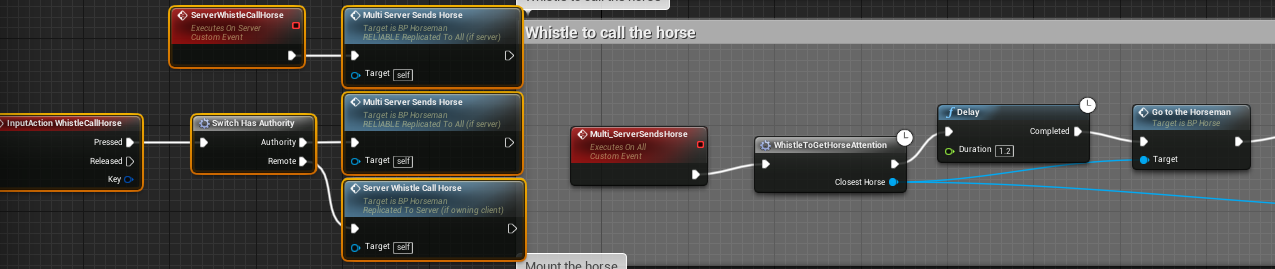

Is there anything wrong with this approach?
where can be the problem
thorny fiber
Hello, it's possible to define OSS dynamics for testing because OSS steam I can't find Lan sessions because the sessions is invalid on the second launched client in same pc
worthy wasp
echo?
twin juniper
game instance code pastbean https://pastebin.com/MX1xnrnN
worthy wasp
lol
thorny fiber
Probably because steam is not initialized
twin juniper
the problem can be i compiling using desolvement editor and not server
worthy wasp
it may have been desolved 😭
anythign with DedicatedServer needs to be compiled for both Editor & Server
how are you testing - packaged project?
@twin juniper
twin juniper
no
worthy wasp
Standalone (InEditor) ?
twin juniper
"F:\UnrealEngine-4.18.1-release\Engine\Binaries\Win64\UE4Editor.exe" "F:\Unreal ProjectsServer\TheLegendsOfArthur\TheLegendsOfArthur.uproject" -game -log
"F:\UnrealEngine-4.18.1-release\Engine\Binaries\Win64\UE4Editor.exe" "F:\Unreal ProjectsServer\TheLegendsOfArthur\TheLegendsOfArthur.uproject" /Game/Assets/Maps/Lobby?listen -server -log
in cmd
worthy wasp
do this for shits & giggles -
Delete your Binaries & Intermediates
regenerate VS Project Files
compile both Editor & Server (DEVELOPMENT)
then give this a try
dont think this will work for you....
but taking wha tyou just said a few ago "Should i build for server too?" i'll assume you havent

Detailed steps on how to create a Dedicated Server with UE4. Very minor code involved - simple copy & paste from the below link. Very extensible... future re...
twin juniper
i was build itDEVELOPMENT Server and editor my game project and not the ue4 project can be the problem
 frank quartz
Anyone have a work around for running more than 2 PIE instances in 4.18? Something is causing a 30 second timeout to occur if you create a new blank project and set "Number of Players" to 3 and press play. The windows spawn but everything is locked up for 30 seconds and you see this in the log.
LogNet: UNetDriver::TickDispatch: Very long time between ticks. DeltaTime: 30.19, Realtime: 30.34. IpNetDriver_5```works fine for me
frank quartz
yeah, it seems it's something that affects some people but not others. https://answers.unrealengine.com/questions/582790/lognet-unetdrivertickdispatch-very-long-time-betwe.html
@jolly siren try going up to 4 clients. that work too?
twin juniper
@worthy wasp i gonna try
if i run the server and run cmd with ip;7777 the client go to the map the server is listing
but i want when i run the server and client
in cliente show the name of host
i only works if a client host the game
frank quartz
@jolly siren hmm it must just be something machine specific (like network drivers or something)
can you do dedicated server with multiple clients?
jolly siren
yes, that works fine too
frank quartz
and this was all with brand new project in 4.18.2?
(and thanks for trying btw 😃 )
jolly siren
yes
twin juniper
@worthy wasp don´t work
i think the problem its in my ServerGame class
or in my gameinstance
 thorn mauve
No me quiere enviar la factura
frank quartz
hmm 4.15.3 doesn't lock up :\ these are the worst kind of bugs to get fixed because they are hard to reproduce.
worthy wasp
you WANT it to lock up?
frank quartz
hmm 4.18.2 pie seems to have a lot of issues (at least on my machine) vs 4.15.3
faint fable
when you create a session and then open a level "lobby" do you write "?listen" after the map name of just listen under the option varible ?
thin stratus
Is basically the same afaik
twin juniper
i run in command line "F:\UnrealEngine-4.18.1-release\Engine\Binaries\Win64\UE4Editor.exe" "F:\Unreal ProjectsServer\TheLegendsOfArthur\TheLegendsOfArthur.uproject" -server -log
and i put "F:\UnrealEngine-4.18.1-release\Engine\Binaries\Win64\UE4Editor.exe" "F:\Unreal ProjectsServer\TheLegendsOfArthur\TheLegendsOfArthur.uproject" ip:7777 -game -log
the client its send to map its listing
sorry i have leave the discord
sorry
twin juniper
my project settings
what i doing wrong
this the code to create the host https://pastebin.com/fB1FJWhK
this code its the same i have in gameinstance
i don´t know why its not working
"F:\UnrealEngine-4.18.1-release\Engine\Binaries\Win64\UE4Editor.exe" "F:\Unreal ProjectsServer\TheLegendsOfArthur\TheLegendsOfArthur.uproject" ip:7777 -game -log and "F:\UnrealEngine-4.18.1-release\Engine\Binaries\Win64\UE4Editor.exe" "F:\Unreal ProjectsServer\TheLegendsOfArthur\TheLegendsOfArthur.uproject" -server -log
i have this logs
[2017.12.30-19.31.11:711][240]LogNet: NotifyAcceptedConnection: Name: Lobby, TimeStamp: 12/30/17 19:31:11, [UNetConnection] RemoteAddr: ip, Name: IpConnection_0, Driver: GameNetDriver IpNetDriver_0, IsServer: YES, PC: NULL, Owner: NULL
[2017.12.30-19.31.11:711][240]LogNet: AddClientConnection: Added client connection: [UNetConnection] RemoteAddr: ip:53340, Name: IpConnection_0, Driver: GameNetDriver IpNetDriver_0, IsServer: YES, PC: NULL, Owner: NULL
[2017.12.30-19.31.12:002][249]LogNet: NotifyAcceptingChannel Control 0 server World /Game/Assets/Maps/Lobby.Lobby: Accepted
[2017.12.30-19.31.12:002][249]LogNet: Remote platform little endian=1
[2017.12.30-19.31.12:004][249]LogNet: This platform little endian=1
[2017.12.30-19.31.12:004][249]LogNetVersion: TheLegendsOfArthur 1.0.0.0, NetCL: 0, EngineNetVer: 2, GameNetVer: 0 (Checksum: 2216784039)
[2017.12.30-19.31.12:036][250]LogNet: Login request: /Game/Assets/Maps/MainMenu?Name=cvxcv88E5BF374711F8D6F6153F803C011B88 userId: cvxcv88E5BF374711F8D6F6153F803C011B88
[2017.12.30-19.31.12:069][251]LogNet: Client netspeed is 10000
[2017.12.30-19.31.12:299][258]LogNet: Join request: /Game/Assets/Maps/MainMenu?Name=cvxcv88E5BF374711F8D6F6153F803C011B88?SplitscreenCount=1
[2017.12.30-19.31.12:301][258]LogOnline: Warning: OSS: No game present to join for session (GameSession)
[2017.12.30-19.31.12:304][258]LogNet: Join succeeded: cvxcv88E5BF374711F8D6F6153F803C011B88
what can be the problem
twin juniper
can be the problem this two function SessionInterface->OnCreateSessionCompleteDelegates.AddUObject(this, &UPuzzlePlatformsGameInstance::OnCreateSessionComplete); in gameinstance
SessionInterface->OnDestroySessionCompleteDelegates.AddUObject(this, &UPuzzlePlatformsGameInstance::OnCreateSessionComplete);in gameinstance
twin juniper
maybe when i run cmd with game -log and "F:\UnrealEngine-4.18.1-release\Engine\Binaries\Win64\UE4Editor.exe" "F:\Unreal ProjectsServer\TheLegendsOfArthur\TheLegendsOfArthur.uproject" -server -log the session is not create
i think my server its not create a session
bitter oriole
Hey @thin stratus , how up to date is this https://wiki.unrealengine.com/How_To_Use_Sessions_In_C%2B%2B ?
inland sun
With Advanced Sessions, on the Find Sessions Advanced do I need anything hooked to LAN if Im not using LAN at all?
Nothing is making it thru the "For Each Loop" node at all. I plugged in "Print Text" down the line to find where it stops and its right there, data goes in but nothing comes out of that "For Each Loop" Also found a pin in the wrong place on the "Create Session Advanced" node it was on top not on sucsess 😩
 dusty sleet
@inland sun you put a print text before the loop or in the loop? hit f9 on the for each loop and when it stops there,hover the mouse over the sessions array and see if its empty
inland sun
with the BP open and game running I assume?
dusty sleet
yeah..
inland sun
will try that, I know I found a problem with the create session lol
Google Docs
thats the dev build if you want to test it, I have a server up now while Im talking to a half dozen folks
its a major stripped down project
I threw out anything that wasn't nailed down lol
dusty sleet
well if you determine that the find sessions array is empty, there's eithe rno sessions available or your searching criteria is not matching what is avail. so check your create session function and make sure its a success... and if youre confident thats making sessions.. then check any of the adv sessions filters you need to search for them if you're creating with them
well technically you havent.. you can test this without adv sessions 😛 first
inland sun
I had the pin on the Create Session Advanced wrong, I had it link from the top pin not from sucsess
dusty sleet
that would prevent the create.. but it would prevent the open levelname?listen command you're probably running on success
inland sun
yeah nothing was coming from sucsess at all, and it just went from the top pin to open level
dusty sleet
well put a print string or something after the success and make sure its successfully creating the session
inland sun
I could, lol I use that print text quite a bit when trying to fgure things out. My team is small with only 4 of us and nobody is online. How dare they have a life....
inland sun
lol
I put a print text off the sucsess pin going into Open level, and it showed the text.
swapped the pin from sucsess to the top pin going into the same print text leading to load level and it showed up.
dusty sleet
yeah you dont really need to use the top one. not really sure what its for... but you should put a permanent print string on the fail option and just put "failed to create session" that way from this point on if you see that message when things dont work you'll know why
inland sun
good point.
so clicking on the for each loop and hitting F9 sets an active break point
dusty sleet
yep. when it stops there and you hover over the array in the previous node it should show all the sessions it found if any
inland sun
I double clicked on the node and got the macro displayed also
dusty sleet
yea dont edit the macro. just check the array
inland sun
kind of hard to click the button and swap back over to the bp to see it
dusty sleet
try this instead... drag out from for loop the element and choose "is valid" then print true or false
yeah.. the game should freeze when you click the button at that spot
thne if you just hover the mouse over the "Results square" it should pop up a list in there
inland sun
shows nothing when I mouse over the squares of the results pin
game is still running, but its only in the menu. It isn't frozen
dusty sleet
then the break point isnt catching
just do the print tring on is valid for each sesssion element found in the for loop
inland sun
but if its getting nothing to the for each loop aray it won't have anything to show
dusty sleet
well you can troubleshoot however you want. but you have more things going on then you need right now.
youre trying to use advanced sessions which adds more options and more failure points, you're trying to populate a widget list of found sessions which even if a session is found it wont show up there if the widget is broken so you're spreading out where the error could even more. if I were you I'd simplify it to printing a "session found" strng before you do all the rest
righ tnow it sounds like a networking/steam/online issue. the session is being made but the client cant find it.. if the widget IS broken theres really no way for you to know if the widget is the problem or if your sessions arent being found since you have no prints or breaks there
yes you did one once. but as you test new things....
inland sun
thats what Im thinking also, And I don't see much of anyting going into the data to retrieve lol
I will keep poking around, I thank you for the assist
inland sun
got a team member online and it worked just fine minus me forgetting to set input back to game only for the connecting player lol
 verbal wave
So when I start the game singleplayer mode. RemoteRole==ROLE_SimulatedProxy
but when I launch the map through Create Session, my RemoteRole==ROLE_AutonomousProxy
still single player, still only one instance of this pawn. why is this happening?
@gleaming vector I need your power :>
verbal wave
        || Role == ROLE_AutonomousProxy)
return true;```I'm doing this to determine if the actor is owned by current machine
 gleaming vector
uhm
what are you trying to do?
actors are not owned by machines
so I think you are approaching this from the wrong direction
verbal wave
e.g. when player fires the gun. It plays the muzzle flash VFX locally first if GetThisIsOwner()==true, then calls the Server to send a Multicast to all clients, other clients with GetThisIsOwner()==false will play the VFX
gleaming vector
ok
verbal wave
minimize the delay of the client who owns the gun
gleaming vector
iirc, there is a function for that
like CanPlayCosmeticEvents or something like that
lemme look for it
but, one way to approach that
verbal wave
that macro is literally !IsDedicatedServer()
verbal wave
I'm using listening server so it's a bit tricky to do this
gleaming vector
because like
no, it's not really
so, lets say you shoot your gun
it doesn't matter a whole lot if you are authority or not if it's a local server
because if I'm hosting and I shoot my gun, I want to see the effects
(obviously)
verbal wave
sure yea
gleaming vector
if I'm not hosting and I shoot my gun, I also want to see the effects
the only time I don't want to see my effects is if I don't have a viewport, in which case then I am a dedicated server
what you should do
is that when the gun fires on Authority
fire off a NetMulticast for playing the effects
and in that multicast, just check for !IsRunningDedicatedServer)(
Mulitcasts run on the server and all clients
so it naturally handles the case where the host is shooting
verbal wave
but I want the "local" player to see his effects instantly
gleaming vector
ShooterGame does this exact behavior
they will
there is no delay between same-machine RPCs
verbal wave
but it's a multicast called by server
gleaming vector
sure
if it's a local server
some NetMulticast_PlayEffects() will run the same frame on the locally hosted server
it will only be delayed for the clients, because internet
verbal wave
so the client need to wait for the latency. otherwise the client would fire the vfx twice (once when fired, once when recieved the multicast)
gleaming vector
are you talking about prediction now?
i thought we were talking about playing the effects for a local host
with prediction, just check to see if it's our gun that is playing the effects
and don't play them when they come through the multicast
so you have two checks in the RPC
verbal wave
it's a little more complex than that. I'm actually writing something to show every player where their cursor(mouse) is in a topdown environment
verbal wave
so the cursor is set every tick for local player, then every 100ms it's sent to the server
twin juniper
anyone have any good examples of some succesfull multiplayer games made in unreal?
excluding fortnight* 😃
verbal wave
replicated variable can only be modified by server
gleaming vector
uhm
yeah
what you can do on the client is collect inputs though
and send the delta every 100ms or so
twin juniper
you talking about player mouse replication?
verbal wave
you were in Squad? cool!
bitter oriole
@twin juniper Well, there is PUBG
twin juniper
that was unreal?
bitter oriole
Yes
gleaming vector
mmhmm
twin juniper
hmm
gleaming vector
just about every major multiplayer UE4 game started with shootergame #funfact
twin juniper
I was just wondering because I get alot of stuttering problems with rplication :/
verbal wave
anyway I need to keep two instance of the same variable. Server trusts the client to some degree, which is the only way it can be playable.
So I need a robust way to tell if current executing machine's player controller is the owner of this actor
bitter oriole
That's what Role does
verbal wave
        || Role == ROLE_AutonomousProxy)
        return true;```
this seems pretty good but when I enter the map via CreateSession GetRemoteRole() will return ROLE_AutonomousProxy for no good reason I can think ofI need it to work on both listening server and clients
bitter oriole
Are you inheriting from GameMode?
verbal wave
yes
bitter oriole
There seems to be a super strange thing in AGameMode about how it sets the client-side role - to autonomousproxy, rather than simulated
AGameModeBase doesn't do that
Probably someone should enter a bug, at this point
verbal wave
sorry just checked I am inheriting from AGameModeBase
twin juniper
oo
inland sun
Quick question: I got my multiplayer host/join working. When host ends the game it kicks everyone back to the menu, but does not destroy the session for the people who joined. How can I automatically end session for those people?
bitter oriole
@verbal wave So the way things should work is, your hosting player has role = authority locally, and simulatedproxy on the client - that doesn't work ?
To be clear
(and remoterole the opposite of each)
verbal wave
It doesn't work. Single player, create session, one pawn one instance. Role==Authority and RemoteRole==AutonomousProxy
gleaming vector
@verbal wave I've never had a reason to use RemoteRole
verbal wave
I just need to know if there're other players who owns this pawn
gleaming vector
no
only one client will ever get SimulatedProxy
but the owner is always the server
or was it AutonomousProxy
i dont remember
only one client will get the proxy that lets you send RPCs to the server directly
bitter oriole
Basically, two players in MP should be both Authority on the server
gleaming vector
yep
bitter oriole
The client will have autonomous for his character
gleaming vector
server will always have authority over any networked actor
bitter oriole
and simulated for the server character
gleaming vector
if you have authority on an actor and are not the server, that means the actor is client only
verbal wave
authority == I'm the server, from my understanding
autonomous == client who owns the actor
inland sun
how does the client destroy session when the host leaves
gleaming vector
the client shouldn't have a session
also, there is one case (and one case only) where a non-server has authority
and it's for non-networked actors spawned on clients
things like gibs
inland sun
they join session. but whats going on is when the host leaves, anyone else gets kicked to the main menu as they should
but then they cannot create session of their own
gleaming vector
the answer to that question is dependent on the online subsystem
verbal wave
I just want to do a very simple thing.. Check if current executing actor is playered by this machine, on a listening server. Why is this so difficult ;_;
gleaming vector
as far as the game framework is concerned (AGameSession), players get added to the host's session, and hwen it dies the host session unregisteres everyone
verbal wave
return GetController() == GetWorld()->GetFirstPlayerController();
I'm reverting to this.. works fine now. but it's really inconsistant.
gleaming vector
you can also use IsLocallyControlled
if Role > ROLE_Authority || IsLocallyControlled()
verbal wave
{
    const ENetMode NetMode = GetNetMode();

    if (NetMode == NM_Standalone)
    {
        // Not networked.
        return true;
    }

    if (NetMode == NM_Client && Role == ROLE_AutonomousProxy)
    {
        // Networked client in control.
        return true;
    }

    if (GetRemoteRole() != ROLE_AutonomousProxy && Role == ROLE_Authority)
    {
        // Local authority in control.
        return true;
    }

    return false;
}```
whoa actually this worksalthough.. it's exactly the same thing I did
verbal wave
but my version buggs out..
gleaming vector
it did do that
well, it does a lot more
maybe it handles that case
honestly, I dont use RemoteRole
verbal wave
    if (NetMode == NM_Standalone)
    {
        // Not networked.
        return true;
}``` oh thisoh, yeah
verbal wave
they know for whatever reason ROLE_Autonomous could be randomly assigned so they made sure to consider it
verbal wave
can't believe I spend almost two days on this.. l learned a shit ton though so not too bad
I'm happy now 😄
inland sun
Could I put a destroy session node inside my main menu map so no matter how you get there, if there is a session it destroys it?
my host session is created going into the lobby map from the main menu map.
verbal wave
thanks @gleaming vector @bitter oriole
gleaming vector
the joys of networking in UE4 is knowing which random function does what you want it to do
inland sun
sorry for trying to butt in but this one lil bug is keeping me from moving forward with this project
verbal wave
also applies to real life..
@inland sun it's okay I'm not replying only because I have no idea 😃
inland sun
lol its just killing me that when the host leaves, the clients get kicked to the main menu, then those clients can no longer join or host a game due to them being stuck in a session
gleaming vector
what is your online subsystem?
steam?
cause steam doesn't have auth ticketing implemented by default (it's really annoying)
inland sun
steam
verbal wave
I'm using steam oss and this works for me. not sure if it will help but anyway
inland sun
Im using the advanced sessions and steam advanced sessions
for now Im going to test having in the "EventBeginPlay" a destroy session node. So no matter how you get there it kills the session. I know there is a method to do transitions but Im not thre yet lol
gleaming vector
i believe there is a engine delegate for when you get disconnected from a multiplayer game
inland sun
has to be an easy way. For now we are about to test my current theory. I put on the "EventBeginPlay" inside the level BP for the main menu a "Destroy Session" node. This should end any session for anyone going into the main menu.
twin juniper
gl!
inland sun
what if I were to use the destroy session to create a variable which can be replicated. Then would that work if the player_base detects it from that to destroy it for all
we are about to test the main menu destroy actor lol if it works there will be much rejoicing. If not then back to the drawing board.
IT WORKS that way lol may not be the best but having the main menu destroy session did it for now
twin juniper
the dedicaded server with null subsystem can run the same machine its running the server
bitter oriole
Can you find / join sessions with null ?
twin juniper
no
i can´t find session but i put the ip address of server when i run the client the player its send to the map is listing
only can find the session if one the players its hosting the game
i don´t want peer to peer system
twin juniper
yes
bitter oriole
And you have your server + clients on a local machine ?
bitter oriole
I don't know much about the null OSS, I thought it couldn't even list sessions etc
But yeah it should work
twin juniper
i try convert using the null the peer to peer gamesystem to dedicaded server
only find the session if run two game clients i click the button to host the game
and the other game clients find the session
i can´t fix the problem
bitter oriole
Sorry, I don't know enough about dedicated servers
Does anyone know about the remote role a player should have in a listen server while playing alone ? Shouldn't it be ROLE_SimulatedProxy ?
twin juniper
ok
grand kestrel
So.. stress testing. I need to simulate a few hundred players, any starting point for me?
From my research it seems like SoftLayer hourly servers each running a client that connects to the server and has some basic AI is the way to go
twin juniper
how can I make online sessions without OnlineSubsystemSteam?
bitter oriole
@twin juniper What do you mean exactly by online session ?
twin juniper
to use "create session" node
bitter oriole
Okay, but what I mean is, a session is a Steam session, PSN session, etc
If you're on Steam, you want OnlineSubsystemSteam
If you're on PS4, you want the PSN analog
bitter oriole
@twin juniper On the same PC ? On different PCs across a local network ?
bitter oriole
If it's over the Internet, you need a dedicated service
(like Steam, or your own)
UE4 doesn't provide that kind of feature
twin juniper
but if the player hosts it?
bitter oriole
Online subsystem = online service
It's not about hosting
It's about listing network games, players, friends, etc
bitter oriole
UE4 provide functionality to create a game client, a listen server that's playable and accepts other clients, or a dedicated server that you host somewhere and yourt players connect to
If you want a way for players to find themselves, or find games, you need to
A) use Steam
B) create your own Steam-like service
bitter oriole
That's what UE4 does out of the box, but hosting alone isn't enough - you need a way to tell other players that this server exist
A friend list, a match browser
twin juniper
the steam is not a way of doing it, i wont be able to publish on steam
bitter oriole
Then you need to re-create what Steam does
Have an always-online server that everyone connects to, tells him "I've got 2 players at IP x.x.x.x"
And a search feature, etc
twin juniper
i use this toturial to make the game https://wiki.unrealengine.com/Dedicated_Server_Guide_(Windows_%26_Linux)#6.a_Video_Guide
i dont have tax and 100$, because im 14
and i cant legaly publish there
and parents dont agree of uploading thrue them
i only can connect the server if i put the ip of server
bitter oriole
@twin juniper Then the only thing you can do is have a window to enter an IP address, and have players send their IP to their friends
@twin juniper To be clear, using your own service is going to take time, and money too
If you can't use Steam, just forget about finding games automatically
twin juniper
i can use the the steam
i wouldnt be able to release it with steam
because i need appID for it
but for now i want test in local network
wait steam with 480 appid works on Development build?
bitter oriole
Yes, but you won't be able to release your game with that
bitter oriole
If you want to use Steam for your game you need to pay the $100 at some point
(And do a store page, and have them review it etc)
twin juniper
yes i know that
but i need tax too
that i can have only if im 18
3 and a half years to go
but thats not cool that you have to pay 100$ for even a free game
bitter oriole
So you can't do Steam, I get that
You can release your game on a free platform like itch.io
bitter oriole
But if you want a, like, list online games you can connect to
You'll need to create your own system for that, and host in on a server somewhere that you'll pay for too
Same for a friend system
twin juniper
would like if fre- oh
where is fortnite hosting? Did Epic make their own subsystem and use/host that themselves
 severe widget
So that sort of thing would be like amazon aws or something
bitter oriole
Epic has that infrastructure for themselves, yes
That's how they have a friend system
You need a server for that
severe widget
Just for like, friends lists and stuff.
You could run that on a PC at your house, technically.
severe widget
I mean. something. lol
Anyway you could do the same with a list of IPs to join.
COULD
probably shouldn't though
bitter oriole
You'd need a house that doesn't get power outages, has good network connectivity, and then you'd spend a lot of time creating that service but sure
twin juniper
cant i then use Raspberry to host everything
severe widget
and if you try, be sure and ask your parents.
twin juniper
I have good connection, but power outages are rare, but exist
severe widget
You've got limited options if you can't afford the direct fee though.
twin juniper
like 1 a half year or quarter