#multiplayer
1 messages · Page 358 of 1
 twin juniper
 burnt meteor
yes
 jolly siren
Active NPC and Hibernated NPC is the key there
twin juniper
Yeah
burnt meteor
yes
burnt meteor
yes
twin juniper
Self?
 manic pine
from what i can see, the most expensive part of all that is UpdateOverlapsTime
jolly siren
Do you need overlaps on for the ai capsule/mesh?
manic pine
fox movement
performmovement
its using 8ms out of the total 11ms that the foxes use
twin juniper
GT Tick Time Takes like a little more
 dusty sleet
@twin juniper you're not spawning a thousand+ actors and then "getting all actors of class" on tick or something right?
manic pine
yeah normal tick time, prephysics
bodyinstanceoverlapmulti is taking by far the most times in the frames ive examined
twin juniper
Would that be because of the Capsule Component on ACharacter?
 lost fulcrum
Is player input through ACharacter::SetupPlayerInputComponent done on server or on client ?
twin juniper
@lost fulcrum client
manic pine
and looking at the whole, the sense system is taking most overall
lost fulcrum
thankie
twin juniper
Yeah. I know about the AISensing system
manic pine
thats the one in gf tickable
twin juniper
honestly... it seems really really poorly optimized
Maybe I'm completely wrong but it just seems bad lol
might have to just not use it
@manic pine Is there a way for me to find out what's causing the UpdateOverlaps time? Its from CharacterMovement component?
manic pine
its from charactermovement yeah
twin juniper
hm
manic pine
you need to have senses turned off by default
then turn them on when player is in vicinity
and you must do it with stimuli from the player, cant have the creatures check if player is nearby, thats much too expensive
manic pine
id suggest a spherecast on the player every 1 second... put the animals found into an array... and activate their senses... on next sphere cast, check which animals have disappered(i.e. moved out of range) and disable those, enable any new ones
twin juniper
@manic pine what if another player is still in the area tho
why should we disable for other players
manic pine
each player will do the same
manic pine
im not sure whats causing it, are you using overlaps anywhere? is it part of the movement system?
manic pine
i know the basic movement system does a floor check, but thats a separate function
twin juniper
I know my ABiomeSpawner has collision set to APawn
GetBrushComponent()->GetOverlappingActors(OverlappingActors, AVeritexCharacter::StaticClass());
thne it does this
to decide whether or not we should spawn a NPC
manic pine
right, and thats expensive, but right now its only happening once per second yeah
manic pine
no wait, its updating that constantly
twin juniper
SetSenseEnabled() to my character class tho
manic pine
oh my
manic pine
yeah it is, thats why the movement system is doing so many overlap updates
youre only using the results once per sec, but its keeping it up to date with every tick
manic pine
no, you should change the entire way your biome thing works
keep a list of actors this biome has spawned.. check that list for the amount of creatures spawned, instead of any overlap thing
and remove that nasty brush which keeps overlap
twin juniper
instead of doing AVolume i could change it to an Actor and create a sphere component
lol
manic pine
alternatively, if you dont want to keep a list, you could do a single getworld->spherecast
every x seconds
keep in mind though, this biome stuff could be very dangerous if creatures have the ability to move outside it
twin juniper
why is that?
inside of ABiomeSpawner, when they are spawned, we add that ANPC to an array
manic pine
they move outside, biome spawns new ones, they move outside, biom spawns new ones, etc.
twin juniper
and if the player leaves the bimoe
it deletes all
so its always linked to the biome
that its spawned from
if that makes sense?
manic pine
yeah if you do the array
twin juniper
i already did that
manic pine
if you already have an array, why are you doing the volume thing to check how many you have?
twin juniper
You mean
GetBrushComponent()->GetOverlappingActors?
thats just to check if a player is in the biome still
manic pine
yes, if you can just do CreaturesInBiome->Num()
twin juniper
Not to check the number of NPCs
twin juniper
😛
manic pine
right, in that case you might be okay by switching channel like you proposed
for npcs
instead of deleting volume entirely
twin juniper
yeah
im thinking i could change my NPCs to use a different Collision Channel from ECC_Pawn
and use ECC_Pawn just for finding players
because im assuming what s happening
is its firing overlap events
for every single NPC in the biome
right? lol
and essentially... the more we spawn, the more overlaps we are getting generated.
manic pine
yah
make two channels, one for players one for npcs
that should take care of one of the two major problems you have, the other one being the sense thing
twin juniper
i find it strange though
that it would be coming from UCharacterMovementComponent though
lol
manic pine
makes sense, movecomp is what moves non-physics objects
so its what needs to update overlaps
twin juniper
@manic pine how could i do a spheretrace on my player, and compare it to the last actors returned though
because every time u do a sphere trace it does TArray::empty() then repopuhlates it
lol
manic pine
imagine its the first time its doing the spheretrace... you copy the results array into your own array, e.g. CreaturesInVicinity, then iterate it and activate ai
twin juniper
yeah i just was thinking this
before i call sphere trace, create a local tarray and do an if so like
if (OldArray.NUm() > 0)
{
copyToarray = OldArray;
}
Then call trace
Then do check on OldArray
make sense?
manic pine
not a local array
it'll need to be a class member
because you'll use it on next spherecast
manic pine
the only 'local' array would be the results array from sphere cast
even that one would be better as a class member, so you dont have to reallocate memory for it every time
twin juniper
@manic pine finally got this sorted lol
sorry it took so long lol
im about to try it again.. with these changes
twin juniper
yeah so
I decided to do it how u said a few days ago
Add a big ass sphere component on the player
and have it enable on beginoverlap, and end overlap
so it starts the behavior tree, enables the movement component tick, and also enables the mesh visibility... as well as a few other things
I haven't touched the spawner actor yet though.
What do you think about these changes? @manic pine
manic pine
sounds good, youve disabled the biome volume then?
and made sure the sphere component only triggers with the animals, so it doesnt capture all world statics and stuff too
 small temple
whatcha makin? @twin juniper
twin juniper
@small temple what do u mean
lol
Like what's the game? Or what's this snippet of the game
twin juniper
It's supposed to be a multiplayer survival game, but I'm trying to be able to load in large numbers of AI without performance issues and @manic pine his helping me figure out some of the performance issues.
small temple
ah
small temple
guys, how do i deal with listen servers in my networking? it's like everything i do works fine on clients/dedicated servers but messes up when i run it on a listen server
obviously because the listen server is also a client or something
do i really have to do an extra check to see if i'm running on a listen server every time?
or am i doing something else wrong?
manic pine
you could do if client or listenserver
small temple
yeah but every time?
what if i just let servers run stuff as well? it works fine that way
but i'm guessing there's a caveat
manic pine
sorry mode
small temple
?
manic pine
have you looked at the ENetMode enum
small temple
doesn't seem to be accessible in blueprint
small temple
but yeah you can use an Is Server/Is Dedicated Server node
manic pine
right, but more, you can use is > listenserver
=
to check if its listen or client
in one fell swoop
or just if !dedicated
small temple
mmm can't find it in bp
but that's fine, like i said, there are nodes i can use to check
manic pine
hmm thats sad, though you could always implement it in your base class for blueprint as a simple return getnetmode
small temple
but it seems a little silly to do that check every single time i want to run something from the client
so i'm wondering if it even matters
manic pine
huh, you dont have to do it every time, in general you just want to prevent dedicated server from doing purely client stuff
manic pine
like a multicast to display a graphical effect on all clients; no point running the contents of the multicast on the server(which is the default behavior)
small temple
i'm running a really basic tutorial setup for killing your character
you do the input event, and then i do a switch has authority, and if remote, i request suicide and so on
would it really hurt to just run that on the server as well?
manic pine
hmm that doesnt make sense to me... i would have done that by simply calling a server rpc to suicide
i.e. on OnInput -> ServerSuicide()
no checks required
manic pine
haha well there are always many ways to do things, each with advantages and disadvantages
but there are some givens; server will never have input for one
the server rpc will never run on the client, for another
small temple
yeh i figured
manic pine
well, server rpc will run on client if he's also the listenserver, but yeah
this setup you can see would work naturally on both dedicated with client and pure listenserver
and standalone
without any checks
take advantage of the way the RPCs are designed, in that table on what gets called where in which mode
small temple
so right now i'm doing this
but do i really need that RequestSuicide event?
or can i just skip straight to calling the multicast DestroyPlayer event?
with an authority check in between of course
manic pine
couple of unnecessary things at least
first, you dont need authority check on something that runs purely on server
small temple
second, i don't need to check validity of the gamemode if i'm going to cast to it right after? 😃
twice, no less
manic pine
right, one validity check should be fine, and even that could be consdiered excessive
small temple
cool
small temple
yeah
doesn't a cast in itself act as a validity check though?
if the cast fails, that must mean the object isn't valid
i guess?
manic pine
if the cast fails it means either the pointer was already null, or it wasnt an object of that type
but IsValid checks both for null and !bIsPendingKill
manic pine
though one could argue ispendingkill is highly unlikely to ever occur on gamemode
small temple
i was thinking the same
so what about leaving out the RequestSuicide event and jumping straight to the multicast?
manic pine
which class are you in?
manic pine
hmm im a bit rusty on this whole blueprint stuff and how you make RPCs in it
small temple
but well, i guess it's good form to have a request event in between that determines whether it's actually good to go ahead or not
small temple
oh i forgot to get rid of the call to RequestSuicide in there
manic pine
huh no
small temple
that's probably why you're confused?
manic pine
the way i see it, that blueprint should end at request suicide
and the request suicide function should take over
small temple
yeah
i actually forgot to remove the call as well as the function lol
what i meant was this:
manic pine
no i mean im confused about all of this
right, but thats wrong
because the server will never receive input
so you'll never get past the hasauthority check
small temple
it works on the listen server, i bet it won't work on the client
manic pine
its quite simple; input->getcontrolledpawn->ServerRequestSuicide on that pawn
manic pine
the serverrequestsuicide then calls DestroyActor and maybe notifies clients somehow
manic pine
right, you dont need that
actors are replicated so it takes care of destroying them there too
small temple
i don't need the multicast?
manic pine
no multicast for destroying things no
manic pine
yeah, on server you just do actor.Destroy(), clients will be notified automatically by replication
manic pine
i think yes and no, its confusing at first, then the pieces suddenly fall together
its quite elegant when you start to get it
things you thought would be hard to do are suddenly very simple
small temple
heh, i'll see about that 😛
the thing is, i get most of it, i think
i get all the basic networking principles, i understand what clients and servers are and what all the different methods of replication are and so on
but heck
it's still the most complicated thing i've done
small temple
also the shitty tutorial really put me off
manic pine
hasauthority doesnt tell you if its a server or a client
it only tells you who originally spawned that particular actor
small temple
oh
manic pine
if you do a pure client-side spawn, the client will have authority over it
small temple
hmmm that's easier to understand actually
manic pine
if your client receives a replication command for a server-spawned object, it doesnt have authority over it
the client can still mess around with it, i.e. change mesh and whatnot, but none of it will be updated to the server
so any changes to it remain purely local
and may be overriden by future replications from server
small temple
@manic pine i got another question if you're willing to answer
and it might be a big one
manic pine
i can try
small temple
okay, so i have this kind of custom client-authoritative replication system set up
for the player pawns and their physics-based movement
so the player pawns send their position to the server on an interval
and every tick, they get that position from the server and set themselves to it
if they're remote, that is
so client sends position to server sends position to client
anyway, it works fine
the weird thing is, clients replicate really smoothly, but listen servers start off really laggy and gradually get better but never seem to smooth out completely
and i'm just wondering if you can think of a reason for that
manic pine
right so, client tells server where he is, server tells other clients where that client is
manic pine
so youre not using ucharmovecomp at all
small temple
no, they're pawns
with physics-based movement
to be more specific by the way, clients send their position to the server, server puts the position in a replicated variable, then the clients set their position again based on that variable
so it's not 100% correct to say the server tells other clients where they are
manic pine
right, and this is performed how many times a sec?
small temple
the position is sent from client to server every 10 times a second right now
manic pine
which shouldnt be smooth at all
small temple
it's good enough for now
it looks surprisingly smooth when it's a client flying around
manic pine
and on dedicated it appears fine, on listenserver it does not
does it go both ways on listenserver?
small temple
yes, it's only the listenserver pawn who jitters
and yes, i'm guessing that might be the problem actually
but it doesn't really make sense because if it were, the listenserver shouldn't be able to move at all
manic pine
so clients of the listenserver, as seen from the server pawn, look smooth
but not vice versa
small temple
yes
and clients on a dedicated server look smooth to each other
this is all in editor btw, i haven't tested with any real remote clients or servers yet
manic pine
yeah, im wondering if this could be fps related
small temple
@twin juniper it depends on how much experience you have with ue4, but the engine supports playercounts of 30-40 and all you really have to worry about it optimizing your game for it as far as i know
@manic pine how so?
manic pine
the dedicated server runs smoother right, because it doesnt handle graphics
lots more cpu power available
the listenserver has to do both graphics and server'stuff
small temple
well, my game is so barebones right now i doubt it's an issue @manic pine
manic pine
right
manic pine
it actually jitters? not just teleports?
small temple
nah you're right, it teleports
but uhm, this is really weird
so, it gets progressively smoother as i move
and i mean, it doesn't improve if i sit still
manic pine
on the client, can you try doing NET pktlag=300 or some such
and immediately try moving
see how it reacts over time too
small temple
uhh yeah but i'll have to set up my console first
azerty keyboard can't open console by default 🙄
small temple
heh
oh hey, looks like it can
so you want me to run net pktlag=300 on the client and see if the listen server still lags?
manic pine
specifically what kind of effect it has, and if it improves over time... but do it after its gotten 'as smooth as it again'
 thin stratus
I think these commands need to be active on server and client
So basically beginplay of the level blueprint would work
No idea if the work when only used on the client
small temple
well, there's 300ms of lag, lol
oh hey @thin stratus
nothing else seems different
manic pine
its not more teleport-y than usual? and doesnt get better over time?
small temple
everything is the same except there's 300ms lag on the client
manic pine
alright so its definitely the server updates that are coming in slower to the client
thin stratus
Cause he gets more relevant maybe?
manic pine
yeah id assume simple relevancy checks.. it tries to turn down updates when nothing's actually being updated
small temple
then why does that only happen for the server though?
manic pine
i.e. when value remains the same
thin stratus
UE4 works with net priority. Low priority, less often updated
Hm should be a client thing
manic pine
client doesnt replicate
youre manually sending the updates
thats why the listenserver sees your client moving 'smooth'
small temple
but the listenserver is also sending updates, or else it wouldn't replicate to the other clients
thin stratus
Wasnt there a reported bug for listenserver and smoothing
manic pine
listenserver is sending replication, which uses net relevancy
your client is sending manually, which doesnt care about net relevancy
the question is why it doesnt affect dedicated server too
small temple
because the dedicated server isn't also a client
manic pine
dont think hes using any smoothing stuff ced
right apst, but why does that matter
you dont have any conditions on your location replication setup do you?
small temple
no
manic pine
just a simple DOREPLIFETIME(MyClass, Location);
small temple
blueprint 😁
manic pine
ah right
could you try just for the fun of it to mess with replication settings on your pawn
small temple
with the conditions? @manic pine
manic pine
hes using a custom movement system where client tells server where he is, server tells other clients... 10 times per sec
small temple
@thin stratus you helped me set this up yesterday 😃
manic pine
it looks smooth when running dedicated server, but the listenserver pawn looks stuttery/teleporting when in that mode
small temple
more specifically, clients look smooth, listen server does not
replicate movement is off
thin stratus
Hmpf. You shared your code again?
small temple
nah it's bigger now
small temple
well evidently there is a bug
lol
but i don't think something is wrong so much as that i'm missing something
thin stratus
Well did you post your code or not? If not, please do
small temple
sure but it's too big for a screenie
manic pine
seems to be the replication rate is slowing down on listenserver but not on dedi hmm
you could test it with a repnotify
see how often client is updated on listen vs on dedi
thin stratus
Limit the server update rate on dedicated
There is a console/ini command
Iirc
Might need to ping devero
I know he listed that comment last time. You want to make sure everyone runs on the same fps
small temple
aw heck, tried pasting my bp on blueprintue.com but it's not working
thin stratus
@clever peak buddy,didn't you have a console or ini command to limit update rate for dedicated server?
thin stratus
So that it's like 60fps for everyone including server
That could also help
Anyway, sure devero can shed some light if he has time. For me it's too late. Already 00:40. Gn8 and good luck
manic pine
he claims it gets smoother as the listenserver pawn moves around, suggesting update frequency is increasing
small temple
nighty night @thin stratus
manic pine
nite
small temple
yeah hold on a sec i'm testing that command
is that command persistent?
between PIE sessions
manic pine
no dont think so, think it resets just like net pktlag
nvm, the others seem to be persistent
so this one prolly is too
small temple
btw i totally forgot but i actually set my tickrate to 100 times a second
not that it solves the problem...
i'm testing this so hold on
what's the default for Net.UseAdaptiveNetUpdateFrequency?
manic pine
well it pretty much has to be
its the only thing that explains why it would get smoother as it moves
small temple
well it is buttery smooth if i leave it off, yeah
the question is, why does this only happen to the listen server though?
manic pine
not sure, could be something in your code triggering it, could be something in the bowels of the engine
another way to 'fix' it would be turn up the pawn's
MinUpdateFrequency
small temple
right
well now i'm worried it's something in my code lol
can i differentiate between the listen server and the listen server's client somehow?
manic pine
theyre the same
small temple
like with client pawns, you have the client version and the server version
but yeah, i suppose i can't do that with the listen server pawn
manic pine
there's no 'fake' pawn on listenserver
small temple
ok
well i guess i can just check if the pawn is owned by a listen server on beginplay and turn up its min update frequency if so
manic pine
yeah give it a try, might work decently
small temple
i assume this is ok when i'm only doing it for one pawn?
manic pine
yeah though the best overall would probably be to find some way of excluding your position updates from the adaptive net stuff
small temple
yeah but i'll worry about that later i guess
small temple
multiplayer is an afterthought in my game anyway so it doesn't matter that much
small temple
it's a zero gravity racing game
manic pine
hmm interesting
small temple
yeeeessss 😏
manic pine
why not use regular charmovecomp?
manic pine
indeed
the only reason i really like it is because it makes networking(with instant client response) so easy
small temple
first of all, because i wanted to get things working quickly and physics were the fastest way i could think of
manic pine
the regular charmovecomp does have regular 'physics' if you just turn off inertia and braking
small temple
also i believe i've tried doing it with the charmovecomp before and ran into a bunch of issues
because it isn't made for 6dof flying
manic pine
ah
small temple
yeah, forgot to mention it's 6dof
by zero gravity racing game i don't mean wipeout
i mean actual zero gravity, in space
small temple
oh, another reason i use physics sim is because of collisions
and yeah, it doesn't like rolling and cameras pitching and all that
manic pine
ye collisions are must have in that case, and would be much work to build around in charmovecomp
so yeah, seems like a decent decision
small temple
😃
manic pine
though it makes networking hard
small temple
yeah but luckily i can halfass the networking
i don't need any interaction between players
no collisions, no shooting
manic pine
ah, that definitely helps a lot
so you dont need any prediction or anything, can just do clientside stuff
small temple
yep
i'm only adding multiplayer because you HAVE to be able to play with your friends
manic pine
though score tables might be messed up if you ever go big due to all the cheaters ^____^
small temple
yeah but well, it's understandable
manic pine
been a long time since i played a decent racing game too, still fond memories of star wars PodRacer
manic pine
ye usually give up due to lack of motivation, then get bored and start thinking of something new, rinse and repeat
oh well
small temple
same
i've only gotten this far with this project because it was basically a game within the first two days
manic pine
always help when you can work for an hour or two and see instant results
small temple
yep
manic pine
but when it takes a week without any noticeable change in the game, its hell
small temple
doing networking for the past two days has not been fun >_>
manic pine
ye networking is just one of those things you want to work and not spend time on
small temple
wish epic would work on that...
manic pine
some more pre-made solutions maybe yeah
small temple
i just want to tick a box and have a nice decentralized P2P network architecture with physics replication 😢
manic pine
indeed
small temple
so what are you working on?
manic pine
right now im trying my hands on a mp arena shooter with a different movement system
and in the planning stages i have a 2d version of the X-series in mind
manic pine
right
small temple
urgh
manic pine
that whole living breathing universe thing
small temple
i'm permanently dying to make a spacesim dude
manic pine
hah, i have the basics of another spacesim in unity too
based on Escape velocity nova
manic pine
yeah im thinking of combining that with X's living universe
small temple
oh you know what
i started working on a spacesim at some point and got pretty far, but i stopped when i ran into the 32 bit coordinate system in ue4
how are you dealing with that?
manic pine
ah, i was just planning on 'jumping' to new sectors
ie making sure no solar system was larger than 20km2
or whatever the limit is
small temple
yeah i was using level streaming but still, i didn't want to deal with physics messing up past 5km or whatever
to be fair, i never really tested it so i don't know how big of an issue it would've been
and yeah, i didn't want to do the AI lol
manic pine
yeah probably best to keep the playable area small
small temple
yeah but you can't have a small playable area in a proper space sim, can you
i mean, you gotta have those 2km long ships...
manic pine
haha true, it does make things more fun
small temple
lol
2km is exaggerating a bit maybe
especially because they probably wouldn't move much so they don't need physics
a la Elite Dangerous
manic pine
freespace capital ships, now that was a sight
manic pine
5km is quite flow yeah, but thats assuming centimeter accuracy on the physics right
small temple
yeah
manic pine
oh well, i think you can zero-base streamed levels and stuff too if it becomes an issue
which i guess they do for large mp worlds
small temple
you mean move the world origin?
manic pine
yeah, have multiple essentially
small temple
yeah and that's fine for the player but it won't work for AI
that's really the reason i stopped
because regardless of ship size, you can't have a space game where enemies disappear off your radar after 5km
or other ships for that matter
in general
small temple
hehe yeah
but i didn't want to deal with that either
sounds really really confusing
manic pine
have you checked out helium rain?
small temple
no, never heard of it
small temple
yeah i'm there
manic pine
hmm even open source
manic pine
yeah, you cant compile and sell, prolly just meant as modding tool
like spaceengineers and some others do
small temple
does UE4 have any mod support yet?
i know about a few games that are doing it, like Squad
manic pine
no more than you make yourself i guess
twin juniper
@manic pine i think ive fully implemented all this stuff now
ima test it out soon
maybe 30~ mins
i hope it rreally works lol
small temple
🙌
twin juniper
xd
yeah coz i really need to be able to have more than just like
100 AI
Loll
for a 10 km by 10 km map
u know?
manic pine
from what i can see, your performance problems were all caused by trying to prevent performance problems
twin juniper
🤣
manic pine
delightful irony
small temple
100 AI all together or spread out over a 10x10km map?
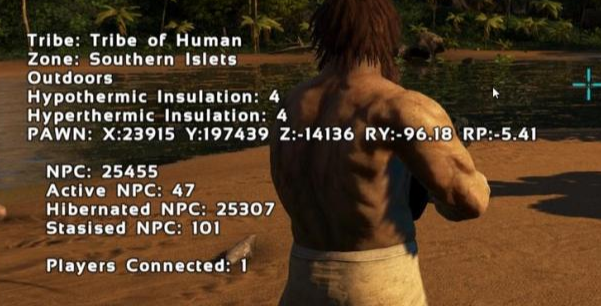
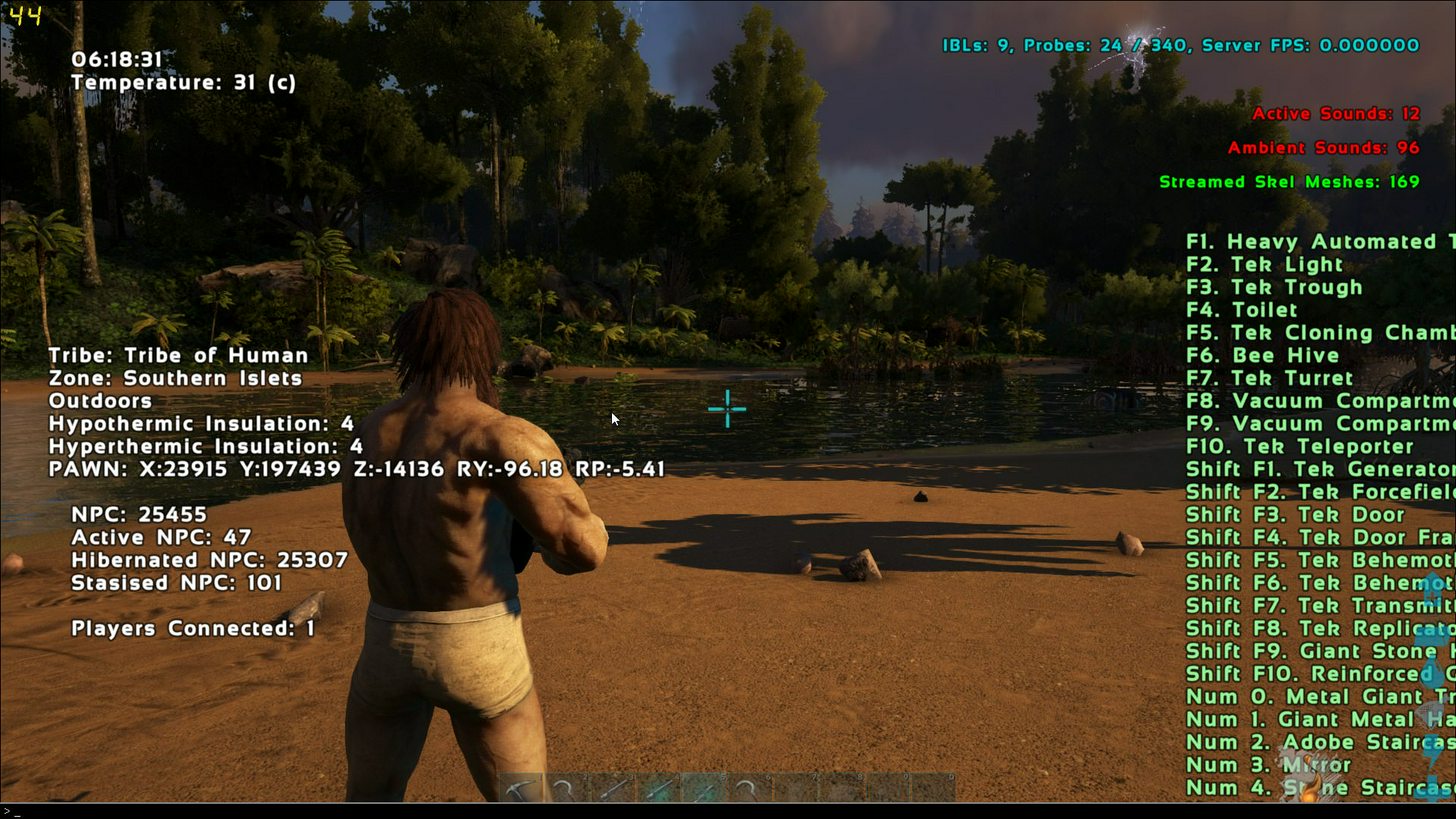 manic pine
whats the ram usage for that do you know?
small temple
nice veggies btw
manic pine
are you playing on a dedicated server in that screen?
small temple
vegetation, lol
twin juniper
but i think its about the same
in a dedi
@manic pine can't really check unless i host a dedi or get someone to give me admin access on a private server lol
because i need to type in SetCheatPlayer true
to get those stats
manic pine
ye
oh well, if a full-fledged game can do it then you certainly can with a much more basic project
twin juniper
its gonna probably be me doing a ton of profiling
and asking people questions (peopl,e who know more than me lol)
manic pine
that stat thing they've made is quite nice though, and would be helpful for you if you implemented it
twin juniper
true
manic pine
telling you how many actors, how many asleep, how many active, etc.
nice for debugging what youre working on now
manic pine
atm just a boring multiplayer arena shooter, i'll prolly drop it in a month or so
just wanted to try how all this movement and lag compensation stuff works in multi
learn a bit more about methods commonly used
twin juniper
Isee
manic pine
im always hating on other mp shooters for bad lag compensation
manic pine
so i have to try to do it better myself ^___^
manic pine
8 months is decent, still going strong?
manic pine
hardest part is keeping motivated i think
its certainly an ambitious project youve picked
how many players?
manic pine
how many players in a session ar eyou planning?
small temple
you're not doing this solo are you? @twin juniper
small temple
but not before?
small temple
i've been working non stop on one project for like 4 days and i already feel like i'm pushing my limits lol
can't imagine doing 8 months
i assume it wasn't 8 months of full time work?
small temple
right
twin juniper
mostly held back by those performance issues and lackm of artist
small temple
scope 😃
welp, i broke my replication
by removing an insignificant thing and then putting it back... hmmmm
twin juniper
lol.
small temple
seriously what the hell
twin juniper
what is it
small temple
it's complicated but basically everything worked fine, i removed something from my code, and then i had to manually put it back because i ran out of undo states
and now it doesn't work anymore
even though it was like 3 nodes
actually 2...
god i can't type tonight
twin juniper
If fixed framerate is enabled, and a client lags, what happens? Likewise, if the server lags? Does everyone slow down? Thanks
small temple
🐸
twin juniper
@twin juniper if the server lag, all players have hitches lol
essentially..
like u teleport backwards
and stuff
because its the server correcting you
That sounds odd, so if you're running at 55 fps and the server is at 60fps fixed it's going to feel like a teleportation-fest right?
small temple
oh no i just put my stuff in the wrong order 🤣
it just took me like an hour to figure out i put 3 nodes in the wrong order
burnt meteor
.
small temple
.
 hazy haven
@twin juniper shouldnt happen like that as long as you factored deltatime in
but if the server locks up while processing, then everyone will "rubberband" back to where they were before due to CMC correcting them
twin juniper
@hazy haven ahh I see. I'm just having trouble wrapping my head around the concept of time slowing down for one person and everyone else running it at the same time and no teleportation occuring hahah

 hazy haven
@twin juniper if you did all your math on frames that have passed - then the speed of the game will be frame-dependant. this is fine for e.g. older console dev, or homebrew using specific hardware (e.g. games on an ATMEGA 328) as everyone will get the same fps as you during dev. but with PCs, everyone will get different fps. so unless you want one person with a fast pc to be able to reload, shoot, run faster than with slower pc, you cant use frames as a way of measuring time. you need to work in the delta-time of each tick, so you can correct the code. A lot of this is already done for you with the character movement component, and its a good example of how to make robust netcode using saved moves
burnt meteor
help me please anyone
 lost inlet
 merry hemlock
What do I want to use so that all players can access a variable (this is a two player, very specific tech demo, so no hacking to worry about whatsover, I just need good blueprint communication across local network....I want to use game mode or game instance???
hazy haven
gamemode doesnt replicate
merry hemlock
I mean gameSTATE
hazy haven
then yeah, state is great
merry hemlock
is that the one I want, or do I want game mode?
When I was learning Unreal, I made the mistake of putting too much on the level BP
so I'm trying to find a safe place to store most of the game logic other than the actors
hazy haven
gamemode = server only. gamestate = exists on all, one instance. playerstate = exists on all, instance for each player
so choose your location based on what type of data it is you need to rep
merry hemlock
thus, gamestate is great when you want all data to match
hazy haven
exactly
merry hemlock
perfect, thank you
hazy haven
np
merry hemlock
Do I want to make a GameStateBase or GameState? @hazy haven?
burnt meteor
@lost inlet its doesnt work
merry hemlock
@burnt meteor Is your main drive C: or D:?
burnt meteor
c:
twin juniper
@hazy haven thanks for the explanation, I'm just struggling to make my collision frame-rate independent so I'm trying to see what I can do about it. I know fixed fps is probably not the best solution, but as of right now at 20FPS it sucks
merry hemlock
@burnt meteor check what @lost inlet told you...the clue was there, you are making this all end up on the D: drive
hazy haven
@twin juniper https://www.youtube.com/watch?v=GyJVYB3IzGA

What is the Delta Time in Unreal Engine 4 . Source Files: https://github.com/MWadstein/wtf-hdi-files
burnt meteor
@merry hemlock when i click it it doenst open cmd
merry hemlock
No idea, I'm simply saying, check in the correct folder
@hazy haven Can I add a widget from a gamestate? or does it always have to be through level bp
hazy haven
@merry hemlock dont see why not
merry hemlock
LogGameState: Error: Mixing AGameState with AGameModeBase is not compatible. Change AGameModeBase subclass (BenchMarkGameMode_C) to derive from AGameMode, or make both derive from Base
must have implemented incorrectly
hazy haven
ouch. try reparent it
merry hemlock
Parent class is GameState
hazy haven
as long as it works ^^
twin juniper
@hazy haven ah that's not what I mean, I'm referring to the collision itself. I made my own system to run line traces between frames but it's still messed up. Here's what it looks like at 60FPS:
and 20FPS
hazy haven
ahhh
twin juniper
the animation is too fast for it to keep up with simple fps
hazy haven
only thing i can think of is to record the points of each trace on one good high fps pass, then script it to just trace along those paths relative to the players location when you do an attack
then it will be independant of animation frames rendered
or do it on the server and replicate the points
but then youd have more latency
twin juniper
yeah I thought about doing it that way, "recording" the points of each trace, I'm not sure how I would implement that however... An array of vectors and then sweep between them or something? That would also mean I'd need to hard-code every animation which seems kind of off, but if it's the only way then not much I can do haha. Thanks!
hazy haven
add 6 components to your sword, then each X frames get thier location and dump it into the log is an easy way. I agree its not ideal, but I can't think of a better way 😛 no worries
burnt meteor
hey @everyone, why is it that over here the {Game}Server.Target.cs is different from here:


 burnt meteor
// Copyright 1998-2017 Epic Games, Inc. All Rights Reserved.
using UnrealBuildTool;
using System.Collections.Generic;
[SupportedPlatforms(UnrealPlatformClass.Server)]
public class ShooterGameServerTarget : TargetRules // Change this line as shown previously
{
public ShooterGameServerTarget(TargetInfo Target) : base(Target) // Change this line as shown previously
{
Type = TargetType.Server;
ExtraModuleNames.Add("ShooterGame"); // Change this line as shown previously
}
}
can i use this for ue41.7?
twin juniper
Does anyone know how I might get Apply Radial Damage to replicate to all clients? Pepe and I were working on it.
https://i.gyazo.com/25558198cc96e75282863ce11e2edb9a.png
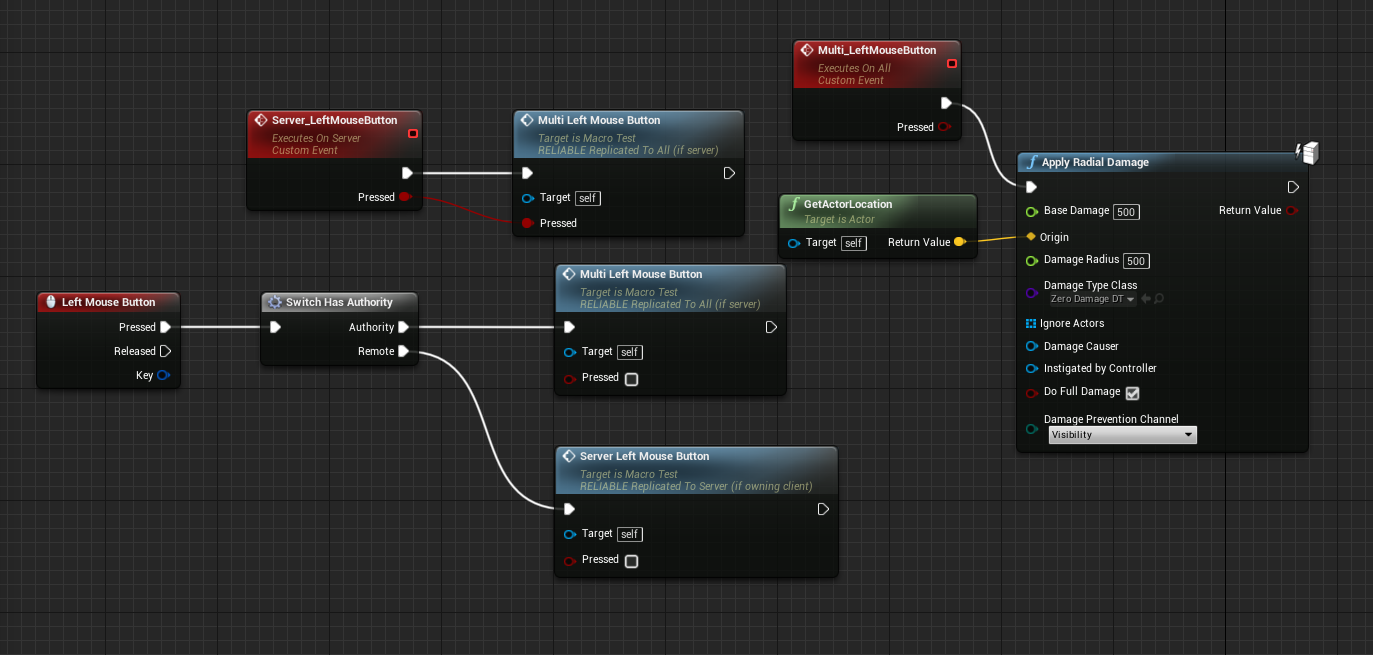
This works to damage destructibles with all values for the Server. However, the client only sees destructibles damaged to a radius of 500 or lower. Damage Type Class also only showes for the Server, so no impulse force can be seen applied by clients.
 twin juniper
I was able to apply impulse forces by creating a collision sphere around the character and making it gather info for an array, then feeding that info to the impulse. Oddly, the impulse will not fire after even with a delay. I have to click twice to apply the impulse damage. First time breaks the destructible and second time sends the debris flying.
https://i.gyazo.com/a63e3078e423ae59b65e6ae3b0a4a49c.png
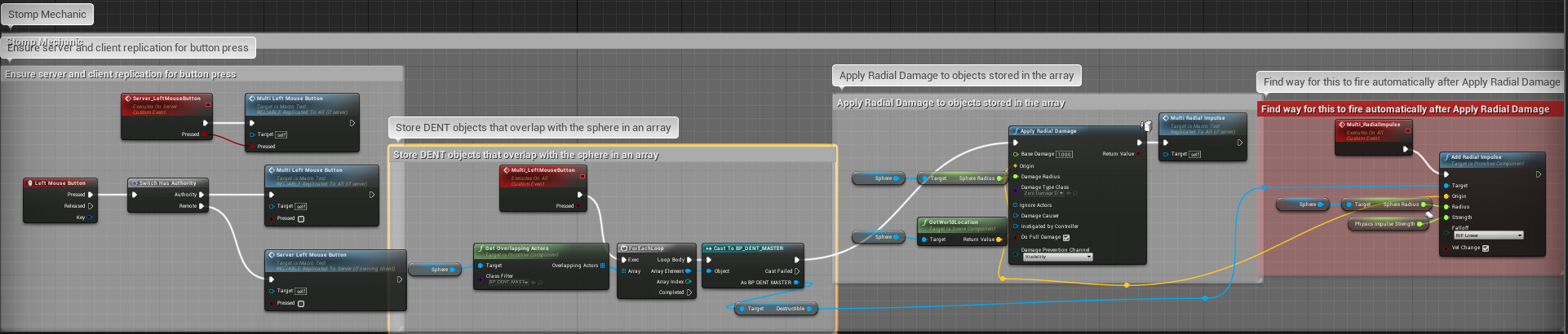
Anyone know how I could get it to fire automatically?
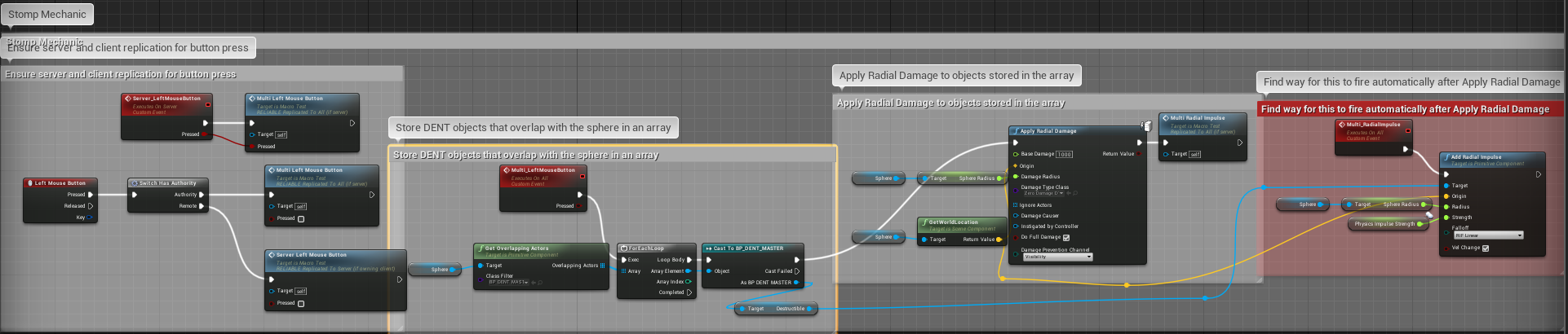 thin stratus
Why calling a multicast in a multicast
Just connect the Impulse directly
@twin juniper
twin juniper
Because I have only been using UE4 for a week and IDk what I'm doin :D
It does not fire when directly connected. Still have to click again. I tried making it multicast to see if that would help.
thin stratus
Well it is already multicasted
Is the Impulse node even causing the move?
Try a simply delay node with 0 in it
That skips a frame
Might not move casue the destruction happens the same frame
@twin juniper
twin juniper
Has anyone done any measurements to see if RPC or Replication is faster? I just read this forum topic and got a bit confused as i learned that replicated vars are better. https://forums.unrealengine.com/development-discussion/blueprint-visual-scripting/1397002-replicating-transform-from-client-to-server-without-rpc
 mild geyser
Any idea why game session doesn't bind port to 7777 if I have bUseSeamlessTravel enabled in game mode?
If I have bUseSeamlessTravel, console prints out:
GameNetDriver IpNetDriver_0 IpNetDriver listening on port 7777
And I can join to the session
With bUseSeamlessTravel = true, joining timeouts because there's no port binded
twin juniper
Thanks @thin stratus. I tried that and it didn't work. I know that the impulse is causing the move because the force changes as I adjust the impulse node.
thin stratus
@mild geyser Outsode of PIE?
mild geyser
Yes
I can find the hosted session but Sessions->GetResolvedConnectString() returns me my-ip:0 because HostGame didn't bind the port
And without the port, join also fails
Works fine if I don't set bUseSeamlessTravel
 hidden thorn
@thin stratus In your example you used this to set the map name I assume cpp SessionSettings->Set(SETTING_MAPNAME, FString("FirstPersonExampleMap"), EOnlineDataAdvertisementType::ViaOnlineService); , and if I were to get the value so I can display it in my ui would I do cpp SessionSearch->SearchResults[SearchIdx].Session.SessionSettings.Get(SETTING_MAPNAME, FString("FirstPersonExampleMap")) ??
thin stratus
Not exactly
The FString("FirstPersonExampleMap")
In the Get function
Needs to be an actual FString variable
That is not filled yet
So
FString MapName;

SessionSearch->SearchResults[SearchIdx].Session.SessionSettings.Get(SETTING_MAPNAME, MapName);

// Now we have the MapName in the MapName variable
 regal shore
Hello 😃 Someone can help me to setup the subsystem with Steam? I can't make it work 😦
lost fulcrum
What is the correct way to serialize an array of UObjects and send them to client ? Should I use FObjectWriter/FObjectReader or FArchive ?
twin juniper
camera attached to springarm doesnt replicate 😦
oh wait no, nothing replicates if attached to springarm
here are the components and blueprint (that replicate rot cuztom event)
and here client cant see server look down
if i use just camera instead of springarm then everything is fine
small temple
🍝
twin juniper
hi
small temple
👋 @twin juniper
twin juniper
sup
small temple
well i'm finding out it's hard to do gamedev with buckets of snot leaking out of my nose
 night jay
So I have a dedicated server, is there a way for me to send console commands to it?
 glad thorn
Man, I've just jumped back into UE4 after a couple years.
I can't remember anything. 😂
twin juniper
@night jay yes
lost fulcrum
I have some problems with game architecture... Is it okay to create dedicated ActorComponent for every player's interaction task that is more complex than simple Use ? Like opening chest and managing items in it, crafting on crafttable or talking to NPC ?
just because I can't do RPC on world objects from client to server without owning them
and I don't want monolitic player architecture
night jay
@twin juniper how exactly?
lost fulcrum
It feels like im always asking either too stupid or too complex questions D:
twin juniper
@lost fulcrum you can do the RPC on your pawn, and then server side set rep_notify variable "bChestOpen" to true, and perform the animation/particles etc on the repnotify function
That way, if a player joins after the opening event happened, he will also see it as opened
small temple
@twin juniper nice 👍
small temple
meanwhile i'm trying to do multiplayer for the first time 🙆
 fathom musk
when I should worry about cheating in multiple games ?
I working on distributed server and lately this question popups in my mind a lot
google is not giving me answer I am looking for 😃
fathom musk
I mean network design
fathom musk
I am design it from transport protocol and up to unreal engine
small temple
well i can't help you with the technical side but i'm pretty sure the answer still stands
twin juniper
Anyone know how to setup the NAV_MOVING mode to not make it so the character flys in the air
because my navmesh height has to be set pretty high
because i have large slopes on my terrain
but unless i use MOVEMENTMODE_WALKING it just floats
with the nav mesh walking mode
fathom musk
bdoom, you want to use navmesh for flying ?
twin juniper
No
NAV_WALKING is a movement mode on UCharacterMovementComponent
but when i set my AI to use NAV_WALKING movement mode... they kind of fly b ecause my nav mesh height is set to like 65 which i need to have a sloped navmesh
if i set it to MOVEMENT MODE = Walking (normal walking)
its fine
but supposedly, nav_walking is better performance
I just tested my game with 10,000 NPCs
zero lag now lol
small temple
i don't know but increasing the navmesh height to have sloped navmeshes sounds wrong
isn't there a max slope angle you can change for the navmesh or something?
twin juniper
NAV_WALKING essentially makes the AI walk in the Nav mesh geometry instead of using the default character movement physics/gravity..etc
thats why u float lol
walk on the nav mesh geometry*
twin juniper
I have ffound this to be the only way
to allow me to get a large nav mesh
on an entire 10km x 10km map
small temple
you have a single navmesh on the entire map?
small temple
regal shore
Hello 😃 Someone can help me to setup the subsystem with Steam? I can't make it work 😦
small temple
so that doesn't help?
i mean i guess you can't just try it out real quick if you have to regenerate your entire navmesh every time 😉
twin juniper
@manic pine yeah
gotta figure out some more issues but
ima leave it for tomorrow i think
gonna relax for now
small temple
yeah so i got a checkpoint system in my game, right
but i don't want those checkpoints to be shared between players
so basically, it's a racing game but everybody will do their own races individually, even if they're on the same server
and at the end the server lists everyone's times and all that
like trackmania, if you ever played that
aaand i'm just not sure what is the best way to handle that
the problem being i wanted to handle a lot of the logic in the gamemode but that's server only
i'm wondering if i should just handle it all client-side and only pass a few things to the server when relevant
since i have client-authoritative movement anyway so it doesn't really matter and players can cheat anyway
but then i'm again not sure where to handle the logic, if not in the gamemode
manic pine
are you planning on multiple game modes?
small temple
not really but yeah, if you know what i mean
not explicitly planning, but i like to keep my options open
if i handle checkpoints server-side i'm also not sure how it'll affect timers and stuff
manic pine
right.. but youre already handling stuff like respawning on the server, yes?
small temple
yeah
manic pine
i think it makes sense then to do it in server's game
the client wont really have to do anything at all, cept drive
small temple
well, i handle respawning server-side because it's a replicated thing anyway
whereas checkpoints don't have to (and shouldn't be) replicated between players
small temple
yes but different players have different checkpoints active
manic pine
right, but the checkpoints themselves are part of the map
small temple
yes
now that i think about it though, if i ever want to do something like randomize the order of the checkpoints, that would have to be done server-side
manic pine
and checkpoints have to be completed in-order i assume, and the 'active' one is the next in list
small temple
yes
manic pine
right so my thinkign would be to on the server have the actual overlap areas or whatever for the checkpoints
the server activates next checkpoint if previous one is complete
tells client the next active cp
small temple
yeah
but then i potentially have to deal with lag
but yes it's probably the best option
manic pine
there could end up a small delay yeah, depending on ping
noticeable at 150++ latency prolly
before next cp pops up
you could also do it on the client though, as in both
manic pine
but server tracksit
small temple
what i could also do is just handle the checkpoint order on the server but not the activation
manic pine
yeah, both client and server does an onoverlap for the cp
server registers time or whatever, client activates next
small temple
was that in response to splitting it or what i said after?
manic pine
for splitting
manic pine
comparisons?
small temple
i don't see a reason in handling checkpoint clearing server-side since players can just teleport between them anyway if they're so inclined
same with timers
manic pine
yeah i dont mean as cheat prevention, youve kinda jumped over that anyway with client-authoritative move
small temple
yeah
manic pine
i mean as logging times and whatnot
small temple
well, what does it matter if i log times server-side when the client can just cheat them anyway?
well i suppose it would be a little harder to cheat
you couldn't just send a 00:00:00 timer to the server lol
manic pine
right but the times should go to the sever eventually anyway shouldnt they?
manic pine
it might be a bit quicker yeah
small temple
what annoys me is not being able to do gamemode stuff in the gamemode class, lol
feels dirty
manic pine
you could always just spawn something in your player controller
small temple
already have one just so i can manually enter the array of checkpoints
yeah true, playercontroller might work too
manic pine
but youll need something for the checkpoints to trigger
which is why i was thinking the pawn
small temple
the actor that holds the checkpoint array would do pretty well
that's actually where i did it initially
before i moved it to the gamemode
now i guess i'll move it back...
manic pine
right, you'll wanna store active cp and checkpoint times i guess
and reset them on respawn, transfer to server if last cp is reached successfully
small temple
yeah i had the system set up and working, more or less
manic pine
and your cps are just overlap colliders?