#multiplayer
1 messages · Page 355 of 1
 hexed rose
 thin stratus
Not the OR at the bottom left
Only the one at the top right
Sorry if I wasn't clear enough about that
@hexed rose
hexed rose
same issue
it initially works... then just stops working after i use the middle click :/
thats the bugg 😐
middle click continues to work after <.<
ok <.< i think i fixed it 😐
disabled the Curson in the Controls and it works <.<
thin stratus
Yeah it sounds like an Input problem
Do you set the InputMode to GameOnly somewhere?
If not, might be worth doing in your game levels @hexed rose
hexed rose
no <.< it was the "Show Mouse Cursor" in the Player Controller causing the issue :/
 bold cedar
I have several dedicated servers setup, and I need players to be able to message each other regardless of the server that they are connected to. When player A sends player B a message, I need to notify player B's server of the message. I could make an http request every few seconds from each server to my database, and check if any messages are new, but that doesn't seem too efficient. What is usually done in this instance?
 brittle sinew
Usually, if you have a persistent connection and message alerts like that, you would use something like a protobuf implementation like gRPC or a websocket connection
Discord runs their events on a websocket :)
 twin juniper
Oo
thin stratus
Actually, things like these are handled outside of the Servers
It's a second service the Player connects to for the chat
brittle sinew
Yeah, that's what I meant
I don't believe either are available in UE4 OOTB (I know gRPC isn't; not sure about websockets)
thin stratus
Ue4 use it for fortnite i think
To connect it to the launcher chat too
Guess it's somewhere, like all things :P
 tawny parcel
Has anyone found a class to expose HTTP downloads in blueprints?
thin stratus
What do you want to download?
General http stuff is already exposed in some plugins
 cloud ore
what kind of info should I search for Z axis calculations for isometric style mmo game?
tawny parcel
@thin stratus Will be a pak file more than likely, could be a mixture of game files
I found this so far, but it doesnt seem to be exposed in blueprints, or perhaps for a blueprint based project? https://answers.unrealengine.com/questions/352833/download-a-file-to-hard-drive-blueprints-or-c.html
cloud ore
something like alibon online's level designs where you can see character interactions happening in stairs ( Z axis )
sorry I'm having language barrier 😃 I cant explain any different
for example one player casting spell to another player who is standing downstairs or down the hill,
should one think about multiplayer side of those systems, is it possible via blueprint?
are there any specific kind of approaches for designing levels for that matter?
thin stratus
@tawny parcel generally everything more complex is not bp exposed
@cloud ore images would help? I mean technically that sounds like a math issue?
tawny parcel
@thin stratus You mentioned some plugins, can you name a few I can look in to?
twin juniper
I want to have a test server, or test map to interact with other pc's in a basic multiplayer match. is it possible to make one of these so steam users can join?
thin stratus
@tawny parcel for http requests you might just want to check the marketplace
But i don't know if they allow downloading a pak file
You might really need cpp? Not sure
 rare cloud
client side inside the tick function of an actor I execute this code :
APlayerController* PlayerController = UGameplayStatics::GetPlayerController(GetWorld(), 0);
APlayerState* PlayerState = PlayerController ? PlayerController->PlayerState : nullptr;
And PlayerState is always nullptr 😢
maybe a PIE issue
rare cloud
ok it works now 🤔
 grand kestrel
Haven't built an inventory before, not expecting any troubles, but since I want something well optimized for a large multiplayer game, if anyone has any resources I should read it would be greatly appreciated
thin stratus
@grand kestrel Generally advising to use Components for the Inventory and making sure to think about specific inventory cases upfront
Such as Chests or Hotbar
So you can properly plan the base class and create children for the other actors (chests, workbench, etc.)
grand kestrel
Sounds good 😃
I guess there's nothing fancy required with storing it, just a struct array containing each item and the data they use
thin stratus
Then your Inventory Component should also handle its Widget
Fancy part about storing is that the Struct should only contain data that changes
Everything that never changes, (name, description, level requirement etc.) should stay in a DataTable
Only things that might change (stack size, damage to the item aka can break, if items can waste how far the process is etc)
And then have the DataTable row as a variable
Then local Clients can pull the data for displaying the item (image, name, level, descirption etc) from the datatable
Second thing is maybe having a second struct that is only for the visual aspect, so only the data the player really needs for displaying the item in it's UI
 stark dome
You also may need different structs for different types of items
Can make replicating the info messy
You'll need multiple arrays in that case
grand kestrel
@thin stratus Thanks so much! That info will save a ton of time
Yeah, there are certainly different types of items
thin stratus
For different type of items you would want to maybe use cpp for the structs
That way you can inherit from a base struct
stark dome
Still are issues with replicating an array with struct inheritance though
You can't have an array of the base struct type because struct pointers can't be replicated
grand kestrel
Ah.. does it not replicate properties from the derived struct?
Should I use a UObject in lieu of a struct then?
stark dome
I personally use multiple arrays but a uobject sounds cleaner
I wonder what the overhead is like
grand kestrel
That was my next question
I know the difference between a C++ class and struct is very minimal
Almost un-noteworthy
But of course there is a lot more to a UObject
stark dome
Yeah big difference
But if you have lots of different properties required by different items you'll need a new array for each with structs
grand kestrel
Which is a likely case tbh
stark dome
Not sure if there is an alternative to the two methods
grand kestrel
@thin stratus Can I impose on you for your thoughts regarding using a UObject in lieu of a struct for replication reasons?
thin stratus
Yeah but that's more like subobject replication
Generally, UObjects aren't meant for replication
The Actor is taking care of replicating it
So he can stick to the Struct i guess
rare cloud
you can replicate an UObject but you always need an actor to replicate it
twin juniper
i'm still having an issue where i'm possesing my charcater with an ai controller, and after that i no longer can call a rpc from client. anyone here has expirience with that? maybe someone who is making a dota like game
this is my possesion script
from the post login event
twin juniper
the problem i'm having in this setup is that a RPC from client to character BP is not working
while for example a RPC from client to controller BP is working
and my complete game logic is in the character BP
thin stratus
Characters can only receive RPCs if possessed/owned
If you have logic that should work even if the AI is possessing the Character, you'll want to move that into the PlayerController
thin stratus
Ownership would be enough I guess
But not sure if that's working with an AI Controller possessing the Pawn
Also, why are you getting the AI Controller from the Spawned Pawn an possess him again?
thin stratus
Characters have default values for AI Controller and if they should be possessed when Spawned, Placed or both
twin juniper
ah, ok, so you're saying that what i'm doing is redundant
thin stratus
Correct
If setup correctly, the newly spawned Character should be auto possessed by the AI
twin juniper
ok, but that doesn't slve my problem 😦
thin stratus
Well, as said, technically you should be able to perform an RPC to a Client Owned Actor
If you have a reference
How are you accessing the Character after the AI posessed it?
"MyOwnedCharacter" I assume?
twin juniper
yea
it's a valid variable on client
properly replicated
i don't get any null references, it just silently fails
thin stratus
Sounds like it gets dropped
(the RPC)
Well, the clean solution would be doing the RPC in the Controller
twin juniper
if i don't give ownership back to player controller with "set owner"
than it complains that the client has no owner over the character
which is expected
but otherwise i get a silent drop... it does seem as a bug
but anyways, it seems i'll have to move all my logic to controller
like you said
thanks for the assisstance
if you by any chance think of some workaround, please do share
twin juniper
100% sure, i've tried mutiple times
with different tracing
err, what do you mean by breakpoint?
thin stratus
@twin juniper Simple break point or Print String to comfirm
Can always be that the code that you call inside of the RPC is not working
twin juniper
nah, checked that multiple times with a printout
this really sucks
i'd have to completely rewrite my game in order to place logic in the controller
twin juniper
and all i want is to use AI move to, instead of simple move to, to control my character
that's basically it
epic screwup
 shy nymph
Does someone know if i have my game compiled as a dedicated server and running steam substeam do i have to have steam open for the dedicated server to host in the steam subsystem. And if yes, do i need to create a "steam server account" thats just there to host dedicated servers?
thin stratus
You don't
You only need to copy the steam binaries from the engine third party folder over to the servers binary directory
 next falcon
Is there any Pro with sessions who can help me with my sessions problems ?
twin juniper
this is the link to my code https://pastebin.com/uwFG7Q3V
https://pastebin.com/H7x4dGZ6
https://pastebin.com/Rzc04XFC
https://pastebin.com/BLgiw2Br

i using gamesparks i only can make work using bp
and i want to make in c++
tawny parcel
Is anyone able to try and build the class listed by RVillani in this post? https://answers.unrealengine.com/questions/352833/download-a-file-to-hard-drive-blueprints-or-c.html
I'm using 4.17.2 built from source, blueprint project with C++ classes and I can't get it to work even after following his intructions. Curious if I am doing something wrong...
thin stratus
@twin juniper And the problem is?
THe code looks like it would work
@next falcon Posting your actual issue would help instead of asking for someone
 tropic moat
works for me @tawny parcel
thin stratus
@tawny parcel Can you tell us what your issue with that is?
Ah, nvm, @tropic moat your turn
next falcon
if i create a session in editor it works fine but if i package in every way it keeps crashing.. any help ?
thin stratus
Post information about your crash
tawny parcel
@tropic moat Hrm... I wonder what I am doing wrong
thin stratus
In general, PLEASE post all the information you can get @next falcon
There are logs that you can view
Build for Developer not Shipping and check those
twin juniper
when i try start the game from standlone the game crash
tropic moat
any compilation errors ? @tawny parcel i had to add few includes
thin stratus
@twin juniper What's the call stack. Same goes for you
We can't debug your issues if you don't give us information.
That's like asking "Why is my oven not working?"
You would have 0 idea
tawny parcel
@tropic moat I'm getting a bunch, which includes did you do? I had added #include PlatformFileManager but thats it
next falcon
]LogWindows: Error: Assertion failed: NewWorld [File:D:\Build++UE4+Release-4.18+Compile\Sync\Engine\Source\Runtime\Engine\Private\UnrealEngine.cpp] [Line: 10494]
thin stratus
@next falcon Can you maybe post the whole crash log into http://hastebin.com ?
tropic moat
#include "Misc/Paths.h"
#include "HAL/PlatformFilemanager.h"
@tawny parcel
you can see what you are missing by reading compiler errors
#include "HAL/PlatformFile.h"
may also be required
twin juniper
this is error https://pastebin.com/uvKdqFh3
next falcon
thin stratus
@twin juniper Hm, that's a weird empty log. You don't have editor symbols installed, do you?
(have to select that when installing an engine through the launcher)
@next falcon This looks like a problem with your map names
You have one and the same map name in 2 different locations
Maybe a redirector?
LogPackageName: Warning: Found ambiguous long package name for 'TestMap.umap'. Returning '/Game/MyContent/Maps/TestMap', but could also be '/Game/ThirdPersonBP/Maps/TestMap'.
If you actively moved it (or in general move files) make sure to rightclick the content folter (top most one) and click "Fix up redirectors"
Because UE4 is not direclty applying changes, but saves them as redirectors as a linker between old and new file
twin juniper
nop my engine is compiled by the source
next falcon
ill try that thanks
Another problem with my sessions:
If i package everything and try to start a session and enable lan it creates a session but my other PC can't join because the ping is over 9999 but its Lan ? Whats the problem here ?
and if i don't use lan and use Steam instead i can't find it with my other PC.. How to fix that?
twin juniper
the only error i have its game crash
i think i doing something wrong
i try pass i have in bluprints to c++
my gamespark connection works in blueprints when i try in c++ my game crash
i using gamespark Ubject
and the ducomentation is litly confuse
next falcon
@thin stratus doesn't help 😦
twin juniper
can someone help-me
the link for documentation https://docs.gamesparks.com/tutorials/game-engine-integrations/unreal-cpp-quick-start.html
i want use the GameSparks Object
 cerulean rapids
Hey guys n galls, just a quick question: What would be the best way to save numbers in players on a multiplayer sever that will persist through levels. example: I have players join a multiplayer lobby, they are given a number based on their slot, i then want to use that number when the game starts on the new level to spawn and possess these players into their correct characters using post-login. I cant just store it in their player controllers because as you know controllers are changes cross level. :p cheers in advance.
twin juniper
can someone help-me
@thin stratus can see my code to try find what i doing wrong
@thin stratus the problem the game crash
in stanlone
twin juniper
how do i attach a camera to a spawnd pawn?
a newly spawned pawn, and gain control over that camera
this is the error
great error
did anyone manage to figure out why does the camera stop following the character when it is possessed by an AI Controller?
or stops reacting to input
the bp works great but in c++ the game crash
no logs only this error
twin juniper
does anyone know what this error means?
EnableInput can only be specified on a Pawn for its Controller
@cerulean rapids OnPostLogin is not called after a seamless server travel
cerulean rapids
Yeh i just solved it using some event i cant remember its name, like, controller swap
Im in bed on my ipad now :p
twin juniper
In blueprints the way to "hack" it is to have an event on the players HUD blueprint that calls a "FakeLogin" event and you should do all your logic thete
cerulean rapids
The event i used referenced the the controller he switched from when joining the new level, so then i just cast to it and boom
twin juniper
The player Controller Array within your game mode doesn't change after a travel, so you can use the pcs index in that array as your "ID"
cerulean rapids
On the next level. Command, i set each controllers id variable from the controller index in the gm array, yeh
 nova thistle
I'm struggling with replication. I'm using the 'owner no see' and 'owner only see' flags to have a different component shown for the player's local weapon vs. remote players' weapons
but for some reason, the client can still see his own 'remote' weapon
I think I'm not setting the owner correctly when I spawn it on the server, but I'm not sure what to set it to
twin juniper
heyo, is there any resources out there that explain how to impliment a dedicated server multiplayer gamemode. Thanks!
thin stratus
@twin juniper What would that be?
There are resources about gamemode and dedicated server
twin juniper
Im sorry I should have been more clear. Resources about how dedicated servers are used in unreal engine. I have been doing a tutorial series about replication and multiplayer via server hosting by a player but I cant find anything about how dedicated servers work
 rancid current
ey all got a problem o.O I'm trying to trigger an event as a client, and Im replicating it with Run On Server but the server ignores all clients, if the server triggers the events it works and clients can see it, but clients are totally ignored when going though Run On Server event

@thin stratus ideas? thx
and if I run it on multicast , the event trigger just for the owning client not for others too lel
 dusty sleet
@rancid current maybe try adding a multicast event and have the mc event do the logic.. but keep your server event and have IT run the mc event
dusty sleet
you tried E press > Server event > MC event
 lean river
@rancid current is this some kind of actor?
rancid current
that is a door BP actor yes
lean river
Actors cant send rpcs unless he have valid owner with netchannel
rancid current
oh now that u mention earlier i tried to print out its owner and it came out null
lean river
Yeah you need valid owner which exist on server and client too like player
Or gamestate
rancid current
and how would I go about fixing that then? The Door actor is simple, and when the player actor overlaps with it, it gives it the input to use when input is pressed a timeline fires off and updates the rotation of the door
how to give it owner? o.O
thin stratus
@twin juniper You simply build one with the source version of your engine version
@rancid current You don't do the E press in the door
You do it in the controller or character
And then directly rpc
rancid current
so i need to run the E input from the player and run a function on the door then?
rancid current
okii got it
thin stratus
You can also set the owner on overlap of the door (server only with authority switch) but that only allows one user at a time
twin juniper
Thanks ❤
rancid current
I tried on event beingplay but guess not?
thin stratus
Na players probably aren't connected then anyway
lean river
Yup and really bad design. Most case really unsecure to allow rpcs to any actor.
So just do interaction in pc or char like Exi mentioned
thin stratus
And owner can only be one at a time
rancid current
true that okii thx guys got enough info will see what i can do 😃 thx lots!
thin stratus
We have them enabled in the ball the player can shoot. But that can only be carried by one person at a time
rancid current
worked nicely 😄 thanks all 😃
Also if someone knows since im here, i deleted some of my blendspaces by accident while mass deleting xd anybody knows how to restore them ?
thin stratus
Use source control in the future? :P
shy nymph
@thin stratus on topic for dedicated servers and steam subsystem you told my couple of days ago to just copy the binaries from engine to the server, but im not sure i'm quite doing this right, still getting onlinesubsystemshutdown
is this even the correct location?
thin stratus
I meant the STEAM binaries
That are somewhere in Steamworks in the ThirdParty folder of the engine
@shy nymph
Not the game libs from the editor
shy nymph
oh okay that makes sense, but the location is correct?
yea okay that worked xD
but im still getting this weird " Server Setting ,SESSIONFLAGS:683 overflows steam SetGameTags call" warning im sure has nothing really todo with that but don't quite know what to make of it either
cerulean rapids
Any1 have an idea why this is causing all players to bug out and unpossess everything, (and just float in the middle of the map) instead of taking controll of their characters when some1 joins and is told to possess their character? The variables being set from the OnSwapPlayerControllers event and its cast are all working. 2nd player logs in and it prints Slot 2 ArcheryController1 and then breaks every1.
the host logs in and controlls his character fine, but as soon as another player connects, it breaks.
https://i.imgur.com/hSgnTSC.png imgur link if image is too small
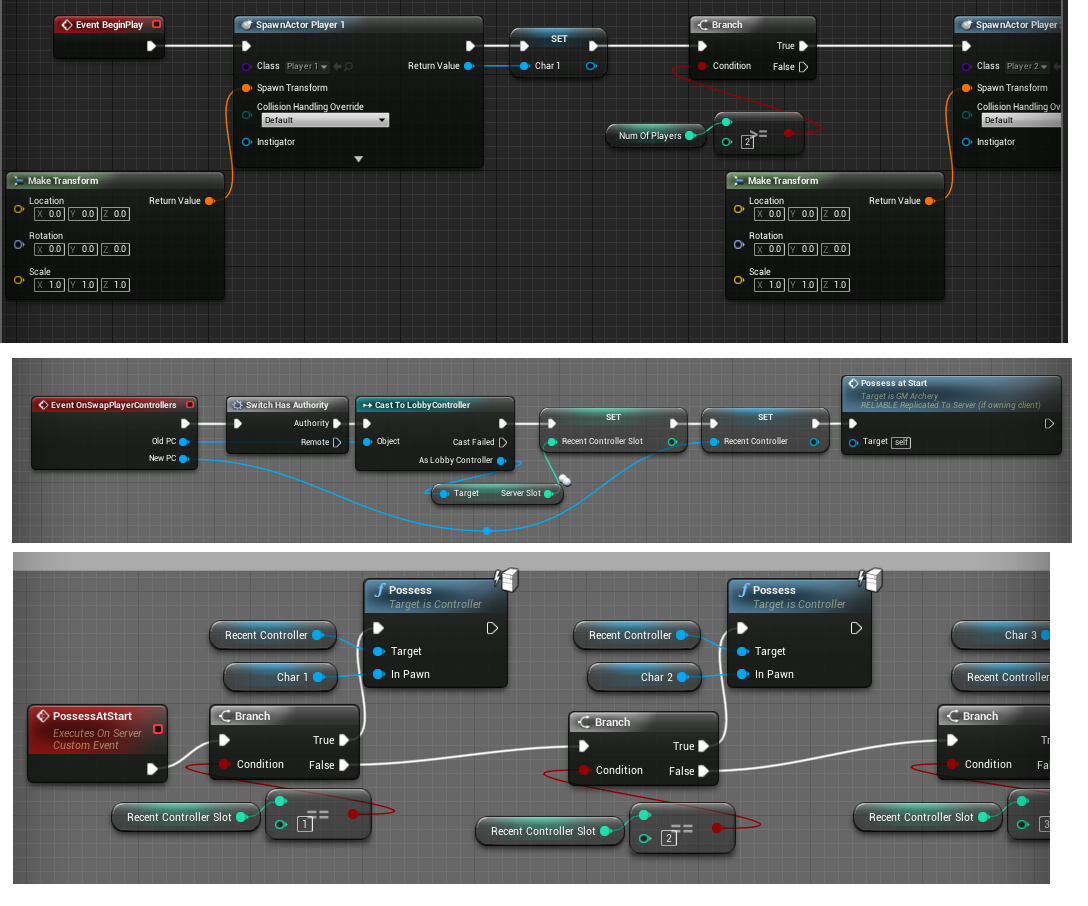
Mainly i just don't understand why the last section isnt working. I Have a working reference to player 2's slot. his controller, and the pawn that he should possess. but when it gets triggered, everything breaks.
thin stratus
Few things I don#t get
ServerRPC in the GameMode?
GameMode has only a Server Version
No RPC required (wouldn't work anyway)
Then why are you doing it so complicated to spawn two players?
Add the new Controller to a PlayerController Array on SwapPlayerController
And iterate over this once everyone has joined to spawn their characters
Also, instad of Branch on Branch, simply use "SwitchOnInt" on the Index of the for each loop for that array
or "Select" with the integer as variable
Then you only need one possess node
cerulean rapids
some interesting points thankyou, i am doing it this way because i needed to remember the character slots from the previous level, assign the player who was in slot 3 to character 3, not just assign the third person to connect to the level to character 3
thin stratus
Well then make a TMap
Or just an array actually again
And insert the New Controller into the index that you saved in the old one
thin stratus
So you got an SkyDome Actor that has a float which is set to Replicate + Actor being replicated?
And it's placed in the level?
twin juniper
so this is strange
I changed it to RepNotify just now
and its working?
the repnmotify function... all its doing is print string
Is that... normal? lol
now its working right
thin stratus
It should work without repnotify too
twin juniper
I think so too
im going to change it back and try again
@thin stratus ok thats weird
its almost as if doing that
like got rid of whatever was there
lol
just switching to rep notif, aand back again
just fixed it
thin stratus
Engine bug maybe
twin juniper
yeah idk
cerulean rapids
@thin stratus im just playing around to figure things out 1 at a time and i am truly perplexed by this...
what should be happening is: Player1 aka Char1 being spammed in chat every 0.2 for 0.1 seconds, which works
but
thin stratus
two different exec lines
cerulean rapids
the green text should only happen once
thin stratus
What ever you call there
cerulean rapids
and also why is Player1 missing from it
thin stratus
Is calling before the Char is spawned
Yeah the Char is not spawned yet
It's null and so the name is empty
cerulean rapids
but characters are set to spawn on begin play, that happens before login - no?
thin stratus
Not before SwapPlayerControllers
That's why I told you to save the controllers
And spawn their chars later
cerulean rapids
hmm ok, however post login happens just after a player joins right
 worthy wasp
hey guys - happy monday!
I have an ATTACHED UParticleSystemComponent on my character class. I am having the HARDEST TIME getting it to play on networked clients (Dedicated Server) ....
I'm turning it on locally, and then a server RPC to Component->Activate()
It plays locally no problems - i cant see it on clients.
I have the Component itself set to replicate
I'm replicating the Beam start/end points on tick when this component is activated with Replicated FVectors - thats not an issue.
I've troubleshot the locations that they SHOULD be at - and they spawn on networked clients with DebugSpheres at the replicated locations i'm setting....
I cant get this beam to activate 😦
thin stratus
Usually you don't need to have the comp to replicate
As you already say, two FVectors with RepNotify to set the start and end (maybe a struct to only have one variable) is enough
And activating should happen through repnotify or RPC
worthy wasp
i would have though i would need tha treplicated - as i'm changing the TEMPLATE out with a few different "weapons" that are the particle system itself
thin stratus
If you change the template you need to replicate the change
thin stratus
So if you do anything to it, just keep in mind you have to replicate changes as well as values and activation
By hand
thin stratus
So Start/End, Activate/Deactivate, Changing Template
Same goes for Meshes for example
No biggie
worthy wasp
@thin stratus - i was using a SWITCH statement in my funciton that changes the template - based on an array in the Character class that houses the different particles to use for the component.
I've replicated this array - and the uint8 that is switching it is passed through as arg.... but i still have no particle showing up 😦
i'm going to debug string the template that SHOULD be playing - see if its actually setting - but does this switch statement work in ar eplicated funciton with the arg passed through?
maybe i have to switch locally - and pass in the actual particle system as an arg - to correctly set it on server
twin juniper
@thin stratus cedric... maybe you might know why this does this or maybe how i could cover it up? Is there some sort of delegate function for when its loading those tiles? https://drive.google.com/file/d/18vq0PhyZxIYbSYC-S864tGjopNU7F3y1/view?usp=drivesdk

Google Drive
Also
maybe somoene lese knows
tried to google it lol
worthy wasp
@thin stratus - i switched this up so it doesnt use a switch statement anymore..... but it has 0 effect.
EVery RPC is a passed arg setting the settings on the ParticleSystemComponent..... eveyrthing plays fine locallly but not on the other clients - they have 0 display of the particle beam.
can you take a look at this code that sets up the beam's settings and see if something is out of whack? My DebugSpheres are showing up perfect on the network clients - the beam doesnt display.
{
    UKismetSystemLibrary::DrawDebugSphere(GetWorld(), StartPoint, 32.f, 8, FColor::Green, 2.f, 1.33f);
    UKismetSystemLibrary::DrawDebugSphere(GetWorld(), ImpactPoint, 32.f, 8, FColor::Blue, 2.f, 1.33f);

    QBeamComponent->SetVectorParameter("beamEnd", TargetPoint);
    TArray<FParticleEmitterInstance*> QBeamEmitters = QBeamComponent->EmitterInstances;
    for (int32 i = 0; i < QBeamEmitters.Num(); i++)
    {
        if (QBeamComponent->IsActive() && QBeamEmitters[i])
        {
            if (QBeamEmitters[i]->bIsBeam)
            {
                SetBeamPoints(i, SourcePoint, TargetPoint);
            }
        }
    }
}

void ACharacterBase::SetBeamPoints(int32 Index, FVector SourcePoint, FVector TargetPoint)
{
    QBeamComponent->SetBeamSourcePoint(Index, SourcePoint, 0);
    QBeamComponent->SetBeamTargetPoint(Index, TargetPoint, 0);
}
Update beam is done both locally as well from server - from my FVector's onRep function
i think ij ust found it
my debugstirng is saying CLIENT inside of the for loop (i added it after posting this code)
which tells me my server isnt either seeing if QBeam is Active, or cant recognize the QBeamEmitters array there
twin juniper
LolL
 tacit hazel
does UE4 only transmit data for Replicated objects when they are changed? I am wondering for performance reasons
 fossil spoke
@tacit hazel Yes the engine optimises it for you in that way. Only when an Replicated variable is changed does it get replicated.
 unborn nimbus
If you change a replicated variable on the client, I know it does not update to the server and other clients but does it stay on that client?
tacit hazel
I beleive it stays until overwritten by the server, but someoe feel free to correct me if im wrong
@unborn nimbus
unborn nimbus
That's what I thought
twin juniper
is it possible to get a reference to a controller of the character that represents a remote player
i can get a reference to a character, but all the important i need to access is in his controller
and "GetOwner" returns null
fossil spoke
The Server has access to all Controllers.
If you want Clients to be able to share information about eachother, use the PlayerState instead.
You may need to rethink your design. Utilise the classes for their intended purposes.
twin juniper
so remote controller is not possible to reference, but i would be able to refence remote player state
fossil spoke
All Players have access to every other Players PlayerState
PlayerControllers only exist on the Server and the Player that owns that Controller
twin juniper
ok, i understand... thanks for the explaination
could i share this info through game state?
fossil spoke
The GameState holds an list of all PlayerStates connected to the Server
PlayerArray
twin juniper
heh, yeah, i didn't know about the player state, so i made a sperate list....but it's ok...will do
😃
fossil spoke
Good luck 😃
shy nymph
hey everyone, i feel like what i am trying to do is like crazy complicated cause i can't find any good materials on how to do it online 😦
i created a dedicated server running in the steam subsystem, but i have the problem of after acutally joining the session my server created to travel to the correct map
since i can't have the map "listen" it does not autmaically travel to the correct map
and all tutorials speak of "open level" with the IP Adress of the server as level name, but since i'm trying to join the blueprint session result of an remote server i don't know the ip of i don't know how to correctly travel to the servers map
thin stratus
It should travel to the Server with the JoinSession node
If you use c++, then you need to call ClientTravel on the URL that you can get from the SessionResult
In both cases, you would connect to the server and travel to the map
@shy nymph
shy nymph
hm well at the moment it doesn't, it behaves like creating a session open level without "listen", on the "Join session" it connects successfully but then does nothing , and if i open level just the same map the client is there alone (was sure about that not working anyway but though i give it a try) :(
i'll get back to you on that, right now i can't even connect to my own dedicated server with steam integrated, starting a dedicated server project from scratch now since it worked at somepoint but steam integration seemed to make it stop working
i guess steam dedicated server and client on one machine isn't that test friendly
shy nymph
Yeaa.... so following this tutorial
https://wiki.unrealengine.com/Dedicated_Server_Guide_(Windows_%26_Linux)
i created a dedicated server, starting the server on the same machine as the client works fine, clients can connect. I Put the dedicated server on another machine in my local network changed the ip to connect and it works as well
as soon as activating the steam subsystem i can't connect anymore either way u.u
rebuilded everything, no steam on the second pc but steam dlls copied in the binaries folder, either server nor client throw any warnings nor errors -.-
cerulean rapids
Hey guys, quickly; PlayerState's exist through levels right? so if i cast to each playerstate and give them all a number in one level, when i try to retrieve those numbers in another level it would work? 😃
thin stratus
No
In an normal environment, only the GameInstance survives Level Changes
You can however perform SeamlessTravel and use the PlayerController to save that number
The PlayerController will be valid in the GameMode for "OnSwapPlayerController"
and that gives you new and old one
cerulean rapids
ah yes, i had that working last night, although i cocked some things up, thought id have another look at playerstate's Thanks friend.
Also, the host never triggers eventlog in correct? only his friends travelling.
shy nymph
i mean... common... am i the first person to want a dedicated server over the steam subsystem? 😦 why is there like no information out there about that u.u
 bitter oriole
I think some people here have done it
Though dedicated servers indeed are something many games don't bother doing anymore
You should try setting up a real Steam account on both machines
shy nymph
yea and scking cause of it, peer to peer when you want a competetive game is garbage
hmm maybe... i dunno, that doenst seem to be the error, no message about this
bitter oriole
Might as well get that out of the way
I'm not sure how Steam can even handle matchmaking with a non-user
shy nymph
well im not using the steam matchmaking, im connecting right through ip atm
bitter oriole
Just doing "open ip" in console ?
 jolly siren
most people use sessions with steam dedicated server
shy nymph
@jolly siren i tried to as well but then got stuck with the fact that after joining the session im not been taking to the server map and how to solve that again like no information out there -.-
@bitter oriole yes for now, just to see if i can get any connection
jolly siren
plenty of info out there. Look at ShooterGame
shy nymph
shootergame is no dedicated server project is it?`
jolly siren
void AShooterGameSession::RegisterServer()
{
    IOnlineSubsystem* OnlineSub = IOnlineSubsystem::Get();
    if (OnlineSub)
    {
        IOnlineSessionPtr SessionInt = Online::GetSessionInterface();
        if (SessionInt.IsValid())
        {
            TSharedPtr<class FShooterOnlineSessionSettings> ShooterHostSettings = MakeShareable(new FShooterOnlineSessionSettings(false, false, 16));
            ShooterHostSettings->Set(SETTING_MATCHING_HOPPER, FString("TeamDeathmatch"), EOnlineDataAdvertisementType::DontAdvertise);
            ShooterHostSettings->Set(SETTING_MATCHING_TIMEOUT, 120.0f, EOnlineDataAdvertisementType::ViaOnlineService);
            ShooterHostSettings->Set(SETTING_SESSION_TEMPLATE_NAME, FString("GameSession"), EOnlineDataAdvertisementType::DontAdvertise);
            ShooterHostSettings->Set(SETTING_MAPNAME, GetWorld()->GetMapName(), EOnlineDataAdvertisementType::ViaOnlineService);
            ShooterHostSettings->bAllowInvites = true;
            ShooterHostSettings->bIsDedicated = true;
            HostSettings = ShooterHostSettings;
            OnCreateSessionCompleteDelegateHandle = SessionInt->AddOnCreateSessionCompleteDelegate_Handle(OnCreateSessionCompleteDelegate);
            SessionInt->CreateSession(0, NAME_GameSession, *HostSettings);
        }
    }
}```straight from shootergame
shy nymph
kk maybe i should check that out
is this subsystem independent or is this already steam subsystem?
thin stratus
Not 100% independent, but it's very similar in all cases as the Subsystems all use the same interface
shy nymph
So i opened the "shootergame" sample project, when a player in the menu hosts a game, thoose are dedicated servers? nah @jolly siren
shy nymph
yea but wheres the information now? if i have to add dedicated to this and steam then im adding exactly the two parts that are not working for me right now
thin stratus
Well, Steam in general doesn't work straight forward with dedicated servers
Mainly due to Epic not properly setting things up
The warning about overflowing settings seems to not matter i think (at least we host even with it)
But for example authentication doesn't work
And direct connection via IP also not
As the Server only works over the steam sockets
twin juniper
@thin stratus steam works but the authentication doesnt
@thin stratus also i think all u have to do is include steam/steam_api.h or whatever the header is
and you can request a session ticket directly in that header
and submit it to the server
to do authentication
i did it once lol
shy nymph
what exactly you mean by authentication? and so created sessions should be joinable with join session the ya? and it should travel me automatically to the server map? cause thats what is was strugeling with
it worked to join sessions but i couldnt get to the server map and the i tried ip direct connect to see if i can get at all on the server
*then ya?
jolly siren
You had it setup incorrectly then. Which is why I suggested looking at shootergame. It has all of the session stuff setup correctly.
Steam authentication is for ensuring that only steam users can get on the game.
twin juniper
@thin stratus hey cedric i got a question
I've been wondering how to handle this:
Player A connects, chips down a tree (Its an ISM)
PLayer B connects later, he still sees the tree (Client sided, but when he walks into it theres no collision because collision is 100% server sided)
SO the question is:
How does Player B login and get the changes?
Same thing with things like character customization... If player A created a blue character with blue skin, but the default is just plain white, when player b connects he will see white skin
So the question is how do we take into account late blooming players...?
jolly siren
replicate the skin color
twin juniper
@jolly siren yeah you could replicate it but it still would need to be set or bound
like the FLinearColor would need to be bound to that materials parameter
shy nymph
@jolly siren yea i will try to figure it out then, joining worked but i wasn't been transportet to the server on join, any idea why that could be?
jolly siren
because you didn't set it up correctly
check the URL your ClientTravel is traveling to
shy nymph
well i did it completly in blueprint so there was no clienttravel
jolly siren
yeah I don't really use bp for anything of importance. Especially not the foundation of my multiplayer
Regardless, there is still a travel happening under the covers. If not then you are doing it wrong
@twin juniper so do that in OnRep
shy nymph
@jolly siren well probably xD yea ill check out the shootergame
twin juniper
@jolly siren i thougt onrep is only calledf when that variable is set
on the server
if its just being replicated from server to client
is that still the same thing?
would it still call OnRep
jolly siren
OnRep is called when the replicated variable arrives to the client
twin juniper
hmm
okk
So essentially if i become net relavant to your character
it will call that ONRep
and there i could set the material info
on the client
right?
jolly siren
yes, on the client
twin juniper
ok
So heres a question tho
ACharacter => Player A and Player B both have a replicated FLinearColor called "SkinColor"
Player A logs in later, walks over to Player B, and OnRep is called... Is this being called on Player A's character? Or on Player B's character? And If we call from OnRep, SetSkinColor(SkinColor); would it be setting it on Player A or Player B
jolly siren
Client A and B's version of Player B's character
assuming you replicate the property to all clients
jolly siren
np
 solemn holly
hi. when i try to launch my project having the steam plugin enabled i get an Unknown Error. Does someone know how to fix it? Thank you a lot!
 pallid mesa
solemn holly
pallid mesa
solemn holly
LogPlayLevel:   Total build time: 2,20 seconds (Local executor: 0,00 seconds)
LogPlayLevel: Took 2,3322047s to run UnrealBuildTool.exe, ExitCode=5
LogPlayLevel: ERROR: Command failed (Result:5): E:\Archivos de programa\Unreal Engine\UE_4.18\Engine\Binaries\DotNET\UnrealBuildTool.exe SteamMPTutorial Win64 Development -Project="E:\Programación\Unreal Projects\SteamMPTutorial\SteamMPTutorial.uproject"  "E:\Programación\Unreal Projects\SteamMPTutorial\SteamMPTutorial.uproject" -NoUBTMakefiles  -remoteini="
E:\Programación\Unreal Projects\SteamMPTutorial" -skipdeploy -ini:Game:[/Script/UnrealEd.ProjectPackagingSettings]:BlueprintNativizationMethod=Disabled -noxge -NoHotReload -ignorejunk. See logfile for details: 'UnrealBuildTool-2017.11.28-20.14.46.txt'
LogPlayLevel:        (see C:\Users\PcCom\AppData\Roaming\Unreal Engine\AutomationTool\Logs\E+Archivos+de+programa+Unreal+Engine+UE_4.18\UAT_Log.txt for full exception trace)
LogPlayLevel: AutomationTool exiting with ExitCode=5 (5)
LogPlayLevel: Completed Launch On Stage: Build Task, Time: 2.501648
LogPlayLevel: BUILD FAILED
PackagingResults: Error: Launch failed! Unknown Error```uh
did someone ping me?
=.=
Anyone know if htere is a event which is called while tiles are loading? For world composition
cerulean rapids
hey guys, is there an event that calls when all the clients have loaded in from seamless travel are are ready to recieve replication? if not, what's the best way to check?
twin juniper
does anyone know if move to location can be called from client?
or it is server only
simple move to location can be called from client
Uhm
but it seems when i try to get a reference of the ai controller on client. it returns null
If you are moving it from the AI behavior tree
the behavior tree is what u should be using
because its all server authoritative
i'm using an ai controller on a player character
for point and click movement
brittle sinew
AIControllers only exist on the server.
twin juniper
christ
this is impossible
not really lol
i setup an entire AI system on my own, then scrapped it because i realized i dont have the networking skills to replicate as many actors as i wanted with AI on them
all u need is these 3 things
AI Controller, Behavior Tree, and a Blackboard
i just want to use "move to location" on a player character
Blackboard is essentially a TMap it seems like
i'm not even doing ai
dont use that
its really really bad habit imo
what is?
everyone says "use move to" or "Simple move to location"
but i honestly think u should be using the 3 things i listed
because those other functions... in my opinion... should be depcrecated
they are very misleading
the move to location is all i need honestly
but now i find out that it can only be called server side, which is kinda disturbing
why should aclient be able
to move a replicated actor
?
it shouldnt
that would be incredibly broken
and overpowered
imagine if u could go into cs go and just move other playuers
as a client
then they should have made "move to location" available to player control,ler
why?
it's a shitty thing that it doesn't exist
Player controller
is only on a local client and the server
it is not shared between other clients
honestly its a good way to hide ur data
imo
if u dont want other players to know certain things
because you have "simple move to" and all i need is a "simple move to" which gives a feedback if it succeeded or not
in what world would u only need to just move to a location though
i mean unless ur doing #aec-visualization
bitter oriole
@twin juniper Multiplayer development is very hard, as most people will usually tell you. If you're unfamiliar with UE4 it's better to start with something simpler to learn the concepts first.
bitter oriole
An important concept is that "player controller" represents the player itself (typically, its inputs) while the character represents the moving object
twin juniper
ok stop here
there "simple move to location"
and there is "move to location"
simple move can be called ona player controller
move can be called ona ai controller
simple move doesn't give feedback if the path to destination exist
move does give feedback if the path to destination exist
Can we please
conclusion: i want to use move instead of simple move on a player controller, why can't i iuse that?
deprecate those nodes
lel
those things are like... so misleading for AI
Ok @twin juniper lets talk about
what ur actually trying to do
and then find ount the correct way of doing it
You aren't JUST trying to move something
because if u were
i need help to convert a bp to c++
u would just use SetActorLocation()
its gamespark object

i only can make work with b+
bp
okay yeah i see
I guess that is literally the only time you would ever need to use SimpleMove or MoveTo location
point and click
is in a RTS style top down click to move game
yeah
Then all u need to do is call that function on an RPC
i need to know if i can reach some part of the map
thats a pathfinding issue
that's why i need move to location, not simple move
i think there is a method for it in UNavigationSystem
i think u can pass a FVector into it
and it returns whether or not its navigable
i forgot the function name though
that prolly wouldn't work
even if it existed
how would it know the setting on my movement component?
like max walkable slope
ah nevermind
it does exist
also i gtg
food
dinner
lel
cerulean rapids
what's a quick way of taking info from client side to server, just want send a ready check to the gamemode from client after its repnotify triggers.
fossil spoke
RPC?
cerulean rapids
so if a client runs a -run on server event, it will simply work?
if it helps, what i am trying to do is detect when all players have loaded in after a seamless travel and are ready to replicate/do work.
fossil spoke
Yes Run On Server events are an RPC from Client to Server. So long as they are called from an Actor that has an NetOwningConnection (the clients locally owned PlayerController for example) it will work fine.
 junior tree
any talk on fortnite and how to build/manage large scale dynamic environments+netcode for 100 players and stuff?
 wary willow
@junior tree There will be plenty of that when 4.19 comes out
junior tree
great! Thanks
 long wharf
Hey guys quick quistion is the server target the same in 4.18 as in 4.17, Cannot find a updated posts
twin juniper
How do people deal with the fact that reverb gets applied to VOIP chat by default and no way to change it since the class isn't exposed to BP
Anything solid on making VOIP an actual sound component in the world would be great
tawny parcel
Anyone know how to run frontend profiles with different folder excludes?
 worn nymph
@long wharf yes it is
twin juniper
when i try launch my game spark api by the code i have this error Dump File: UE4Minidump.dmp : F:\Unreal Projects\TheLegendsOfArthur\Saved\Crashes\UE4CC-Windows-5A4E0BCB48E722F301143A97F6441855_0000\UE4Minidump.dmp
Last Write Time: 29/11/2017 12:30:21
Process Name: UE4Editor.exe : F:\UnrealEngine-4.18.1-release\Engine\Binaries\Win64\UE4Editor.exe
Process Architecture: x64
Exception Code: 0xC0000005
Exception Information: The thread tried to read from or write to a virtual address for which it does not have the appropriate access.
Heap Information: Not Present
my code https://pastebin.com/uwFG7Q3V
https://pastebin.com/H7x4dGZ6
https://pastebin.com/Rzc04XFC
https://pastebin.com/BLgiw2Br
bitter oriole
Have you tried debugging ?
bitter oriole
What's the call stack ? You have a UE4Minidump.dmp file ready to go
twin juniper
yes a have the UE4Minidump.dmp
bitter oriole
So have you tried debugging it ?
twin juniper
this is the log when i run the dump file in visual studio
UE4Editor-TheLegendsOfArthur-1331.dll!TArray<TScriptDelegate<FWeakObjectPtr>,FDefaultAllocator>::RemoveAllSwap<<lambda_91e272c2e6003ae2685cd0d06095ff3e> >(const TMulticastScriptDelegate<FWeakObjectPtr>::CompactInvocationList::l2::<lambda_91e272c2e6003ae2685cd0d06095ff3e> & Predicate, bool bAllowShrinking) Line 1983 C++
UE4Editor-TheLegendsOfArthur-1331.dll!TBaseDynamicMulticastDelegate<FWeakObjectPtr,void,bool>::Internal_AddDynamic<ATheLegendsOfArthurGameMode>(ATheLegendsOfArthurGameMode * InUserObject, void(ATheLegendsOfArthurGameMode::*)(bool) InMethodPtr, FName InFunctionName) Line 1140 C++
UE4Editor-TheLegendsOfArthur-1331.dll!ATheLegendsOfArthurGameMode::BeginPlay() Line 30 C++
UE4Editor-Engine.dll!AActor::DispatchBeginPlay() Line 3160 C++
UE4Editor-Engine.dll!AWorldSettings::NotifyBeginPlay() Line 187 C++
UE4Editor-Engine.dll!AGameStateBase::HandleBeginPlay() Line 177 C++
UE4Editor-Engine.dll!UWorld::BeginPlay() Line 3505 C++
UE4Editor-Engine.dll!UEngine::LoadMap(FWorldContext & WorldContext, FURL URL, UPendingNetGame * Pending, FString & Error) Line 10679 C++
UE4Editor-Engine.dll!UEngine::Browse(FWorldContext & WorldContext, FURL URL, FString & Error) Line 9948 C++
UE4Editor-Engine.dll!UGameInstance::StartGameInstance() Line 438 C++
UE4Editor.exe!FEngineLoop::Init() Line 2726 C++
UE4Editor.exe!GuardedMain(const wchar_t * CmdLine, HINSTANCE * hInInstance, HINSTANCE * hPrevInstance, int nCmdShow) Line 153 C++
UE4Editor.exe!GuardedMainWrapper(const wchar_t * CmdLine, HINSTANCE__ * hInInstance, HINSTANCE__ * hPrevInstance, int nCmdShow) Line 134 C++
UE4Editor.exe!WinMain(HINSTANCE__ * hInInstance, HINSTANCE__ * hPrevInstance, char * __formal, int nCmdShow) Line 210 C++
UE4Editor.exe!__scrt_common_main_seh() Line 253 C++
kernel32.dll!00007ff841471fe4() Unknown
ntdll.dll!00007ff843eaef91() Unknown
this is in stack of my visual studio
bitter oriole
So what are you doing in ATheLegendsOfArthurGameMode::BeginPlay line 30 ? That line crashes the game
Well that line or the few lines around it
grand kestrel
Please apologize to your game mode for giving it that prefix 😐
twin juniper
i can´t find why is crashing
twin juniper
ok
void ATheLegendsOfArthurGameMode::BeginPlay()
{
UTheLegendsOfArthurInstance* GSI = Cast<UTheLegendsOfArthurInstance>(GetGameInstance());
if (!ensure(GSI != nullptr)) return;
//Set the OnAvailable delegate
if (!UGameSparksModule::GetModulePtr()->IsInitialized()) {
GSI->GSObj->OnGameSparksAvailableDelegate.AddDynamic(this, &ATheLegendsOfArthurGameMode::OnGameSparksAvailable);
//Disconnected the module just incase it's connected (Refresh)
GSI->GSObj->Disconnect();
//Connect module
GSI->GSObj->Connect("","");
    /*gameSparks = NewObject<UGameSparksComponent>(this, FName("GameSparksComponent"));
    if (!UGameSparksModule::GetModulePtr()->IsInitialized()) {
        gameSparks->OnGameSparksAvailableDelegate.AddDynamic(this, &ATheLegendsOfArthurGameMode::OnGameSparksAvailable);
        gameSparks->Disconnect();
        gameSparks->Connect();
    }
*/

}
}
this i do in line 30 GSI->GSObj->Connect("","");
thin stratus
Well easy
You are binding the delegate too late
When you call connect, it's async. IT probably calls back before you bound the delegate
Resulting in a crash
Sadly GameSparks only recently fixed the crash
Actually, why are you doing it again
I only now see that you do it twice
You should do the Disconnect/Connect stuff ONCE in your GameInstance
Instead of getting the GI inside the GameMode
That's kinda weird
        GSI->GSObj->OnGameSparksAvailableDelegate.AddDynamic(this, &ATheLegendsOfArthurGameMode::OnGameSparksAvailable);
        //Disconnected the module just incase it's connected (Refresh)
        GSI->GSObj->Disconnect();
        //Connect module
        GSI->GSObj->Connect("","");
Move that stuff to your gameinstance
twin juniper
@thin stratus thanks bro
unborn nimbus
Can you not call RPC's from an interface?
thin stratus
Could be a bug?
unborn nimbus
that's what I'm thinking. I cannot get this object to call a server function
thin stratus
Only by manually setting the owner from Server side
So what ever Interface you call there
Make sure to call it on teh server already
Then you don't need the RPC on the actor
Usually, if you do it via Linetrace or what ever setup you have there, you would make sure that you already call the rpc on input in the controller/character
unborn nimbus
ah ok
worthy wasp
@distant wave - what sort of issues you having?
thin stratus
Is that somebody else still me?
junior tree
would anyone know how big is Fortnite's map in kilometers?
 haughty star
What would be the new improvements in UE 4.19
junior tree
I home something to handle a massive landscape
stark dome
They already have that with world composition
But there are further networking improvements coming
And updates to world composition I believe
 distant wave
@worthy wasp @thin stratus It sounded a little weird when I said "I asked somebody else to help me". I am sorry for that. I meant I already talked to someone about this issue in private. Again, sorry for the misunderstanding. 😃
worthy wasp
ah gotchya - i thought like - you didnt want my help and only cedrics lol ❤
all good - hopefully you got it figured out!
 manic pine
anyone know when initial actor replication occurs for something spawned on server?
 vital steeple
anyone know why sequence may cause problems with RPCs?
sequence node*
respawn timer client RPC fails

but works if i snip second exec line
seems liek if i connect a server RPC to that sequence, it forces everything connected to it to run as Server RPC
 obsidian kelp
So I've got a bug
On dedicated servers when a foliage is fully harvested instead of destroying itself it stays there. You can hit it but you also pass through it
This affects every type of foliage in my devkit, on every level I place the foliage, and persists even if I reinstall the devkit
What do?
fossil spoke
Sounds like the Client isnt being told to destroy their version of the foliage. Is the foliage an Actor or is it part of an ISMC or something?
obsidian kelp
It's a custom foliage thing in the ark devkit
The best and brightest couldn't figure this at the ark modding discord so I had to go here
fossil spoke
Check that whatever call is being made to "destroy" that instance or whatever it is, is actually being replicated to the Client.
To me it sounds like the Client isnt being told to destroy it
Or remove it. Whatever.
If its an custom object then there is little we can do to help other than simple debugging tips since there would be limited knowledge of it here.
fossil spoke
Create an topic in the ARK Subforum
obsidian kelp
I mean I've already PMed the people that would reply there
wary willow
@thin stratus Yo, when you do updated versions of your Network Comp, any chance you could add a section at the end of any changes? (changelist)
thin stratus
Yeah however i currently didn't add anything new
The base stuff is kinda the same
Despite the conditions that were exposed to BPs
Maybe i missed something?
@wary willow
wary willow
@thin stratus Oh, no idea. I just noticed it was updated for 4.17
But there was no changelog, so didn't know if you added/changed anything
thin stratus
It wasn't updated directly. Just marked as compatible
wary willow
ah
thin stratus
So people that open it don't think it's outdated
:P
Luis also wanted the file again as he wants to print it
wary willow
makes sense then, but for those of us that use it as a reference it would have looked otherwise
thin stratus
Will add the changelist next time with "No changes - all uptodate"
wary willow
I won't ever remember version numbers
thin stratus
So no one wonders
thin stratus
I wish I would've more time to actually do something on it
Yeah, IF I have time ffs... so annoying atm
wary willow
With all the goodies for MP
thin stratus
2018 will be better
wary willow
haha
wary willow
What's your thesis on?
thin stratus
Strategy for the Game Halma
wary willow
?
wary willow
Looking it up now
thin stratus
in a 1vs1 situation
You probably know it. It was always in the boxes with all the other board games
thin stratus
Ah yeah, that's its other name
The AI still has small minor flaws
But the overall algorithm is in place
NEed to write everything down (which I already did in once, but usually refactoring text 10 times before happy)
wary willow
That's cool. I am assuming this is all in UE4?
thin stratus
Yes
thin stratus
Not networked
wary willow
Ah
thin stratus
My thesis is about 3 month of time
And I need to concentrate on the actual topic
Which was the AI
wary willow
Ah
thin stratus
You can play it locally with 6 players though :D
But yeah, actual thesis is just about 1vs1
So the AI Algorithm is also only for 1vs1
wary willow
Easily expandable up to 5AI or no?
thin stratus
Na, if you play halma with 2 people you got a null-sum game
Means either player wins or draw
The algorithm takes that into account and allows the AI to calculate future moves
To make sure they pick the best move considering the enemy (you) also pick the best move
If you increase that to 2+ players, you run into the problem of not having that null-sum scenario anymore
You would need to see it as 1 vs 5, which is not true
wary willow
Ah, makes sense
thin stratus
If you are interested in that stuff, check out "Minimax with Alpha Beta Pruning"
Basically builds a tree of future game states (here boards) and evaluates them based on a value you define, for me it's distance of your pins to their home fields
Then you can run the minimax algorithm and get the best board, so also the best next move
Alpha Beta Pruning is optimization where it doesn't look into all paths of the tree if a branch is not relevant
wary willow

Prerequisites: Minimax Algorithm in Game Theory, Evaluation Function in Game Theory Alpha-Beta pruning is not actually a new algorithm, rather an optimization technique for minimax… Read More »
Hmm, looks pretty interesting
wary willow
We learned about zero-sum games in school
thin stratus
there you can build the whole tree
wary willow
But nothing about using algorithms sadly
thin stratus
Ah that's sad. I enjoy this actually cause it gets me into actually optimizing something that ue4 doesn'T do oob
wary willow
Exactly
thin stratus
Like, the first tree for Halma (first move) with depth 3, so AI move -> Player move -> AI move is about ~43.000 boards
wary willow
This is the kind of stuff that interests me greatly actually
thin stratus
Now imaging if they actually meet in the middle and jumps come in
That number skyrockets
I was building the tree fully first and then analyzing it. Took ~7 seconds at some point. Way too long
wary willow
Are you using blackboard for this?
thin stratus
No
wary willow
ah
thin stratus
And then tells the board it wants to move
I actually asynced all of that
Cause even with only depth 3 and building only the part of the tree that is currently checked by the algorithm (so alpha beta pruning also removes the need to build the whole tree), it still took ~1-2 seconds somethimes for the AI
And that froze the gamethread
wary willow
heh
manic pine
anyone know when exactly first time replication occurs for newly spawned stuff? is it part of World->SpawnActor ?
 cursive shard
Can I ask how to handle client end rotation smoothing in UE4?
 slim holly
lean river
slim holly
lean river
@manic pine
After actor fully spawned initial replication happens almost "immediatly" in next networking update cycle i guess
But why you need that time?
manic pine
well not 'time' but more like sequence... i.e. i would like to set some information on that actor that's carried with the initial replication
lean river
Deferred spawn is your friend then :
manic pine
so deferred spawn delays replication too?
lean river
Nop
manic pine
until finish spawn i mean
manic pine
thanks, just what im looking for; i was doing World->Spawn then setting a field on the object, but it was never set in client's spawn of the replicated object
in client's beginplay*
lean river
Yeah thats why deferred is good. Actor lifecycle will be started if you finish spawn, but same time you have valid object to edit default things
manic pine
right, though it seems a bit weird given that client runs the other stages too, which is why i thought that couldnt work
 raven viper
Anyone has proper writeups on Net Update Frequency, actor reliability, etc? ( @thin stratus maybe?)
worthy wasp
I have an AActor based class that has bReplicates turned on. I need to run server side RPC's to pull off some functionality against UHierarchicalInstancedStaticMeshComponent in the world (Procedural foliage tool instances). When i setup this RPC chain - i'm getting this in the OutputLog - my RPC never runs:
LogNet:Warning: UIpNetDriver::ProcesRemoteFunction: No owning connection for actor BP_LeyLine_110. Function SRV_SpawnTree will not be processed.
How is this happpening and why? its a statically placed item in the world.... it should be its own owner no?
brittle sinew
What do you mean 'it should be its own owner'?
Actors don't need owners, and even if it were its own owner, so what?
The requirement to run a server RPC is an owning connection—an object owned by your PlayerController
(directly or indirectly)
worthy wasp
see that part i didnt know - and now understand
so with that said.... how can i manage UHierarchicalInstancedStaticMeshComponent of the foliage actor in the scene when i'm not a server auth?
i do it fine in my character class (harvesting these nodes) but i have to use a server RPC to pull this off
brittle sinew
Unless you dynamically change the owner, you don't.
worthy wasp
is there a way to have the SERVER own this actor?
brittle sinew
You would call up to the server on an object which you own, then do what you need to from that context
worthy wasp
a player should NEVER own it
this is dedicated server config btw
all players = clients
otherwise durp i'm sorry.....
i can makge a GameMode function
call up to the GM
and have hte GM process this event
brittle sinew
Well, no, not really
worthy wasp
why not?
brittle sinew
The GameMode doesn't exist on clients
worthy wasp
this is a static placed actor
has 0 interraction with clients
i need it to process events in the map
so eithe rthe LevelBlueprint does this
or the GMode
?
brittle sinew
At this point, I'm kinda confused as to why you need an RPC then
 severe widget
OR I dunno maybe the pawn tells the server its trying to do the thing and the logic runs serverside?
I mean, there's always that
worthy wasp
thats my ultimate question to be honest....
brittle sinew
If it's only happening on the server, you wouldn't need an RPC...or are you trying to call things on it from the clients?
severe widget
Or maybe both autonomous and authority do it
brittle sinew
(given you said there's 0 interaction with clients)
worthy wasp
@severe widget - i've tried HasAuthority()
it wont edit the instances of the UHierarchicalInstancedStaticMeshComponent
severe widget
and besides if you want the change to be visible on clients you gotta have them know the change occured.
worthy wasp
UHierarchicalInstancedStaticMeshComponent->RemoveInstance(InstanceIndex); ultimately is what i'm t rying to do
i'm pulling this off no problem when i harvest these trees at runtime with clients
now....
i have an actor that is trying to change the mesh of these trees (a seperate event)
i need this actor to be able to do the above code
it can only be run FROM SERVER
if(HasAuthority()) will not pull this off
the instances still stay around
and i fully understand the need for a NetMulticast function to do this for each connected client
its the way i'm doing it for the harvesting action
@brittle sinew - this is the overflow of this design:
1: Actor is statically placed into the world
2: SphereComponent->GetOverlappingActors() returns all actors in overlap that have component: UHierarchicalInstancedStaticMeshComponent
3: Each actor is then iterated, and ran (Server->NetMulticastRPC) UHierarchicalInstancedStaticMeshComponent->RemoveInstance(iteratorIndex)
the problem is - i have no way to pull this off server side on this actor. YES i can do this @ begin play on my actor with HasAuthority() check..... but it wont for the life of me remove the instances
manic pine
so client performs action, sends rpc to server, server sends rpc to all clients to remove static mesh instance?
worthy wasp
i cant do an RPC for the above reason - "No Owning Connection"
no playercontroller owns this
as it rightfully shouldnt....
if i think about this logically - the SERVER should own this object. perhaps instead of statically placing this - i should do an event @ Server-BeginPlay - to spawn this object and apply owneership to the server (somehow?)
severe widget
Presumably your actor is spawned on the server when placed (assuming by a player) right?
worthy wasp
to kick the dead horse - no player owns this - and NEVER SHOULD
manic pine
huh the server needs owning connection for sending client rpcs?
brittle sinew
HasAuthority doesn't return true on non-replicated objects.
worthy wasp
bReplicates = true;
brittle sinew
Is that possibly where the misunderstanding is occurring?
worthy wasp
i think it smy lack of ownership that is killing my funcitonality
i think i need to spawn this from the server (how though?) to pull off correct ownership
manic pine
can you be more specific about the steps taken on the client?
worthy wasp
ok @ raap -
the client - has 0 to do with this
this is a game event
never spawned by client
never interracted with by client
never anything - client
brittle sinew
You don't need ownership if you're only worrying about it on the server...?
The server doesn't need ownership to call things on the server :p
manic pine
okay so some event happens on the server... and when it does, you want to send a multicast?
worthy wasp
correct @manic pine
manic pine
right, and which class has your multicast function
worthy wasp
the actor i'm trying to run this on (it is a staticly placed actor atm in the level)
FUNCTIONALLY - this will move around - when it moves i need to run this code to alter TREES around its vacinity (SphereCOmponent->GetOverlappingActors())
if i run this with HasAuthority() from BeginPlay - you can see here that the tree spawns (grey tree) but the tree it should be removing is never removed..... the removal is done NetMulticast RPC
 manic pine
according to the documentation, all netmulticast functions called from server should run on clients and server, regardless of ownership
worthy wasp
if i try this as a local version RPC chain - start off @BeginPlay with !HasAuthority()..... the tree never spawns and I have a "No Owning Connection" error on the actor
now.... in my CharacterClass when i'm HARVESTING theese same trees...... I have an RPC chain that goes from Client -> Server (Spawn new tree in place) -> NetMulticast (RemoveInstance(Index) )
the characte rclass pulls htis off just fine
no problems like this guy has....
sorry if this is confusing - i'm not understanding it myself
i'm still trying to make a full wrap understanding of Replication
i feel like i'm 3/4 of hte way there on some days
and other days - MEH lol
manic pine
yeah, it's a bit confusing, and im not entirely sure how replication works for stuff that's loaded with the actual map
worthy wasp
so a long time ago - someone here (cant remember who it was) itnroduced me to LOGGING a NETMODE_WORLD funcitnality ... where i can see the AUTHORITY role in my debug strings i print out with C++
when i do this... the NetMulticast string is coming in as DEDICATED SERVER
i would expect it to be CLIENT
which tells me - the NMC function isnt runnign on the client?
manic pine
netmulticast is executed on both server and clients
manic pine
but yes, if its not also showing client, then its not running on client
worthy wasp
i'm retarded
hold on
i shuold PROBABLY have a local fucnntion in the character class
that removes this instance of the tree
worthy wasp
god damnit
i dont knwo why ididnt think of that
i was trying to - but was doing from WITHIN THIS ACTOR
not the character class
which is whats viewing everything
see - talk my way through this I will (Yoda)
 opal thorn
Nice
worthy wasp
hopefully - bout to test out now
distant wave
Hey guys
I have a oroblem with replication
basically, I need to replicate a player destruction and possession of other player, but it is mesed up. the client sees when the server does that, but the client cannot do that. when the client tries to do that, the server is doing that
I can show a vid if u want
Ok
here is the video
Hopefully someone here can help me
 worthy wasp
beautiful - this did work @manic pine @brittle sinew - thanks for helping my mind think 😃
severe widget
literally wtf - minim
also
literally wtf - me
I found his problem, it's called the whole damn project. - Also Minim
severe widget
@distant wave why are you using the first player controller as the controller to posses the horse? You should use the controller that is actually trying to possess it.
GetPlayerController returns the PC at a index, you are getting the PC at index 0, meaning no matter who you try to mount the horse with, only the player with PC 0 will mount.


My roommate also wants me to tell you, that he's been to nuclear power plants and never got cancer. But this, this gave him cancer
severe widget
👌🏻
 heady delta
using a guy who is asking for help as a chance to stroke your own ego is pathetic
just my 2 bob
severe widget
that's a cool story man
heady delta
yerp
severe widget
Sorry to rain on your helping parade.
heady delta
np
severe widget
You know cause I saw you helping him
💯
gives the guy the answer to the problem
gets called a massive tool
slackers in a nut shell
heady delta
I don't have time, but I'm not just gonna sit here and talk about how me and my roomie are shitting on him
severe widget
you've spent more time already than just closing the channel and being productive
¯_(ツ)_/¯
heady delta
so
severe widget
also not interested in your op. of me, you've called me a tool for having an opinion I explained fairly politely
heady delta
dude was asking to be helped, not to be shat on by some tool
but you can't always get what ye want
severe widget
I did help him
heady delta
yerp I feel you man
severe widget
Sweet, so we're on the same page. If you want, there is a spot with me on the tool train if you wanna hop on. Some people on the train are offering free fucks to give, but I'm out.
worthy wasp
My Playerstates (when game launches) shows the correct teams... but my players are spawning in the same location.... this code seems sound/logic but its not happening for some reason. Any thoughts?
{
    ATeamStart* TeamStartSelected = NULL;
    if (Player)
    {
        AAvantGardePlayerState* PState = Cast<AAvantGardePlayerState>(Player->PlayerState);
        if (PState)
        {
            TArray<ATeamStart*> TeamStartsA, TeamStartsB;
            for (TActorIterator<ATeamStart> StartItr(GetWorld()); StartItr; ++StartItr)
            {
                if (StartItr->TeamB == PState->TeamB)
                    TeamStartsB.Add(*StartItr);
                else
                    TeamStartsA.Add(*StartItr);
            }

            if(PState->GetTeamB())
                TeamStartSelected = TeamStartsB[FMath::RandRange(0, TeamStartsB.Num() - 1)];
            else
                TeamStartSelected = TeamStartsA[FMath::RandRange(0, TeamStartsA.Num() - 1)];
        }
    }

    return TeamStartSelected;
}```this is called form PlayerController after PostLogin(From GMode)
    APawn* NewPawn = GameMode->SpawnDefaultPawnFor(this, GameMode->ChoosePlayerStart(this));
    Possess(NewPawn);
When you say same location does that mean they spawn at World Origin?
If so then i would dare say that the PlayerState isnt valid when your calling this.
@worthy wasp
worthy wasp
no Devils - theyre spawning at the TeamStartB @fossil spoke
sorry - was making some food
it has to be valid (playerstate) cuz otherwise this funciton wouldnt even run
and debug breaking it - it breaks inside the for loop
at the if/else statement
fossil spoke
Is that spawnpoint the only one being put into the array?
fossil spoke
Well then thats your problem isnt it?