#multiplayer
1 messages · Page 353 of 1
 worthy wasp
when i try this on my window that says CLIENT on top of it..... it does NOT set the variable
 stark dome
Did you set the variable in begin play to test that
worthy wasp
i'm doing it via LMB click
void AAvantGardeCharacter::FireWeapon_Pressed()
{
if (Role == ROLE_Authority)
IsFiringWeapon = true;
}
stark dome
That code will never run on the server
It will only run on your client and the if statement will be false
worthy wasp
because BeginPlay runs both server & client - so does tick
so this brings me back to the point i was trying to make
i need an RPC chain to pull this off
right?
INPUT is only local - never run as server
with the exception of Momvement Component
stark dome
You would just need the one rpc to send the state to the server
stark dome
But all I'm suggesting right now is a simple test to figure out what the issue is
worthy wasp
my client sets teh variabel on his screen
server sees it
ITSELF sees it
any othe rclient DOES NOT SEE IT
stark dome
When only setting it in begin play?
worthy wasp
man
i'm not about to do every bit of my code in begin play
i knwo that begin play runs as server AND as client
same with tick
stark dome
I'm just helping you figure out what the issue is
But if you don't want to try what I suggest I won't bother
worthy wasp
i'm sorry for my attitude
i'm highly frustrated with this atm
if i'm doing it wrong - i dont understand how to do it different
stark dome
How are you checking the values of your replicated variable. Maybe just toss up your .h and .cpp files
Might see the issue
worthy wasp
i'm print stringing on tick th value
 void canopy
Hi guys! I have a issue here, have a look at the screenshot
This piece of code is running fine from the editor. But if I build the package. Line of code at ** m_pLobbyServer = NetworkModule.GetNetwork()->CreateLobbyServer();** is crashing as NetworkModule is unable to give the value here.
/help
Let me share you what NetworkModule is having
/ FVizNetworkModule & NetworkModule = FModuleManager::LoadModuleChecked<FVizNetworkModule>("VizNetwork"); /
I'm trying to create a gameserver and a lobby server, under the server packaging field. Server is packaged successfully, but I can't run the code shared in the screenshot which differntiates my server in lobbyserver specific
 civic belfry
Did 4.16 have some kind of issue with replicating variables? I've been fighting this issue where my rooms will generate a random color on the server then replicate it down to the client for ages - clients always ended up with different colors
upgraded to 4.17 and started playing around and was shocked to see my windows all syncing up perfectly with the server
😄
 past bear
Any suggestions as to why the first breakpoint is always hit for all players, but the second is not (and how to actually get around it)?
https://snag.gy/n2F0ax.jpg

 jolly siren
The PlayerController hasn't been replicated to the client yet?
So the RPC won't be received
past bear
seems unlikely?
if the PC doesn't exist on the client yet, why are we choosing a player start?
I mean I guess it's possible :/
 thin stratus
You can't call an RPC there usually
RPCs are only allowed AFTER OnPostLogin
I assume ChoosePlayerStart happens earlier
jolly siren
Yeah, I've never used an RPC that early
thin stratus
Epic says, RPCs only after OnPostLogin
You can set the value on the PlayerController Server Version
And replicate it
but RPCs can't be called earlier
past bear
aye, calling that one function after 'match has started' (game state change)
....but that's somehow screwed up allocating spawn points for reasons I am not yet sure
this game mode will be the death of me, lol
thin stratus
Why does allocating spawn points need Client data?
Shouldn't the server be totally fine?
After all he spawns
past bear
it's unrelated
client should however get a notification based on where they spawned
it seems player state is 'none' at the point of the game state changing to 'in progress'
ffs
thin stratus
"Spawned" means they are already spawned?
You should try setting a replicated variable inside of the PlayerController
Or not even replicated
And having the same variable in the Character
The in the Character, you use "Event Possessed"
which calls on the Server if the character got possessed
- giving you its controller
thin stratus
PlayerController should have that too
It's the only actor that the client 100% has control over OnPostLogin
What I do is setting the PlayerState and PlayerController variable for "Team" when choosing a PlayerState
And in the Character I have another Team Variable with RepNotify
Which I set on Possessed
Then in RepNotify I can react to it on the client
past bear
only player state has a team variable, which up until now has not been a problem
thin stratus
That's fair, however the "Spawned" event happens in combination with the character
You can get the PlayerState from the passed Controller
If you want that
(in possessed event)
You can also use the BeginPlay of the Character, limit it to local client
get playerstate
and react to the variable
if it's been replicated until then (not 100% save i guess)
past bear
I'm not sure why this is proving so difficult, tbh - the player state should really exist at the point of spawning the default pawn
(but it doesn't)
it exists on the server only
thin stratus
On the Server it might even do
Yeah because replication is not predictable
If you put a delay there, it works
But that's not a solution
You might really just store the data in Controller Character and PlayerState.
And use the Possessed Event with a RepNotify variable
Cleanest setup that won't break
past bear
I have to do it from the game mode though
the PC is game agnostic
There are generic functions to create various UI popups for the player, so I'm trying to use those
thin stratus
Whatever GameMode your are in
You are setting it already to the PlayerState
in ChoosePlayerStart
past bear
correct
past bear
it's not on the player controller
thin stratus
I just told you it's cleaner and better to have it there too
past bear
I'm telling you I can't modify the PC because it needs to be 100% game mode agnostic
stark dome
Can you run your logic in begin play of the PlayerState
past bear
no, PlayerState is also game mode agnostic - it just happens to have the variable I want to use
thin stratus
May you tell me what agnostic here means?
past bear
PlayerState holds a number of generic vars that I can use
thin stratus
Dependend?
past bear
it means it's entirely separated from the game mode, logically
cannot contain any game mode specific logic
thin stratus
How does that remotely make sense.
The GameMode defines what PlayerController is used
past bear
the same player controller is used in every game mode, singleplayer and multiplayer
past bear
no, we have one player controller class, no inheritance
thin stratus
Well, I would call "no inheritance" the main issue here
That limits you to a really bad setup
past bear
well that's how it is, and I need to work with it that way
thin stratus
Then every PlayerState, no matter what GameMode, will have the logic for that specific gamemode
You can't really change that if that's setup to not use inheritance
Only other thing you can do is saving the PlayerController and it's data in a TMap on the GameMode
But that would kinda kill your replication
stark dome
Where do you intend to put the game mode specific logic for clients?
thin stratus
Well that's the thing right? If he can't use inheritance he has to put it into the Character/State/Controller that is used for all modes
Who ever set that up, flip their table
stark dome
Yeah I have to agree
past bear
in theory, all the logic I need is there, but the damned player state doesn't exist on the client at the point of any overrideable game mode event :/
thin stratus
Yeah, but "in theory" this is not how the engine is supposed to be used.
The PlayerState needs time to replicate.
If you want to execute something when the playerstate is active on the client, you'll have to use the BeginPlay of the PlayerState and limit it to that local player
It's not meant to execute any gamemode event when the local PlayerState is replicated
Especially since players can join later
The only other way is having the Data on the PlayerState begin RepNotify
Then it will call that function on the PlayerState if the data reached the client
stark dome
What are you trying to accomplish exactly. Maybe there's a workaround. Are your characters game mode agnostic as well or your gamestate
past bear
game state would be game specific in theory, but I don't think we actually have classes for those
Character is also agnostic
the problem is that our players can literally walk out of one server and into another one, running a different game mode - how that all works behind the scenes, I couldn't say
so a lot of the match-based stuff is dictated to me to start with
and some of it may or may not work 'the Unreal way'
stark dome
So what are you trying to do with the client PlayerState on spawn
past bear
hilariously, all I want to do is call a generic messaging function using a variable already set in player state
trouble is, there's no entry point from the game mode that I can see
thin stratus
@past bear Thing is, even that model can totally work with inheritance.
Epic has functions in the PlayerState that allow specific values to be copied.
And what ever the other GameModes all share would go into the base class
past bear
latest called function would be RestartPlayer, but at this point, when on first spawn into the world, PlayerState isn't there
I would assume it does not work with inheritence due to how travelling is handled
but that's not up to me, so I'm working with what I've got
thin stratus
Traveling from Server to Server is a hard travel anyway. It will need you to save data between the travel somewhere.
That doesn't even deny inheritance
The problem here is that they want to have all data in one class, to be able to recreate it on the new server.
What I don't understand is, why they need the data for the specific gamemode in other gamemodes.
You simply want to spawn players based on some variables you set. Why are they important if they swap the server?
And if they need to persist (the data from that sepcific gamemode) then it should save that in a database, outside of ue4
But yeah, I get, not in your hands
stark dome
@thin stratus it sounds like amber doesn't have control over any of this anyways
thin stratus
Makes me a bit sad >.>
stark dome
Yeah lol
thin stratus
Yeah I know, I only want him to see that it would work differently.
That's like telling someone to use a vacuum cleaner to blow away leafes
 inner iris
Is it smarter to always call interface functions regarding anything to do with GameModes/State as opposed to directly casting to a particular GameMode? Just realized I have a bunch of team specific Gamemode/State casts, which means if I changed the GameMode, they'd fail. I'm thinking either a master GameMode or else Interfaces that any GameMode can implement would solve this.
thin stratus
I use a master gamemode

If I work in "GameMode_TeamBased" or children of it, I do know everything is Teambased
inner iris
So a game like COD for example- you'd have a master gamemode with all generic stuff like rules / spawning etc, then make children as you make new modes?
Ok gotcha
thin stratus
Yeah, BP_GameMode_Base takes care of spawning, respawning etc.
inner iris
If you wanted a non team mode, would you simply have both team and non team logic in the master?
thin stratus
BP_GameState_Base takes care of overall Match state
No, my master is not doing any ffa or teambased logic
BP_GameMode_TeamBased and BP_GameMode_FFA do that
Well actually
In this example
BP_GameMode_Base is the FFA one
And the TeamBase one adds the team stuff to it
inner iris
Ok so in that case, for a generic thing like dying, do you call an interface in order to access something that might be specific to the team mode only?
That wouldn't be available from the base
thin stratus
I have functions in the base modes that I override
inner iris
Or do you have separate pawns for each mode?
inner iris
Ok interesting. So you'd have separate PC/Pawn/GS/PS/GM for each different GameMode?
thin stratus
Gives me most freedom in defining what each gamemode does
Yes
As you can see in the image above
inner iris
Cool that makes sense. Oh sorry didn't see that until now
inner iris
Do you have a master pawn that all child pawns derive from? Just thinking it'd be a nightmare to change core logic otherwise
Say you change how death is handled in one pawn, you'd have to copy that logic to the others without a master
Ah I see the "base" classes in the screenshot- I assume that's it?
thin stratus
Of course, the children sometimes have nearly 0 logic in them
Everything that all share is in the base
for example dying
inner iris
Would base have the notion of teams at all, since that can be fairly deep into damage / core systems?
thin stratus
As soon as you need something to be slightly different in the child, you will put it into a function
and then override the function in the child
That way, when you call the parent function, the child implementation is called
No, Base just has "AnyDamage -> HandleDamage"
and handles damage in there
In "HandleDamage" it has a function called "CanBeDamage"
Which the Team version overrides
and checks if the attacker was a teammate
(actually i do that a bit different, but above idea applies)
inner iris
Ok cool, this works really nicely. So then on death, instead of handling the specific death details in the base, you can do any generic stuff and have the child do anything else that needs to be done.
Will definitely work this way, thank you 😃
Just hope that bug where BP child vars randomly get reset has been ironed out
thin stratus
I never had the problem with non placed actors
It only happened when I had these in the level
(pre runtime)
inner iris
Had it happen to all of my child weapons multiple times after painstakingly entering in recoil array values and loads of other vars...
Have them all hardcoded in the construction script now haha
thin stratus
Engine Version?
Might also been a circular dependency
Need to make sure that no child references its own parent i think
inner iris
It was a good few versions back- 4.11 maybe
Might have done that, will try it again now with fingers crossed 😃
thin stratus
:D always keep your code clean
 next falcon
When i start in standalone game inside the editor steam overlay works perfectly but if i package it and start it steam overlay doesn't work..
how can i fix that ?
inner iris
As far as I remember I literally had no logic in the child- just was tweaking defaults!
thin stratus
@next falcon Packaging for Development or Shipping?
next falcon
shipping
thin stratus
Shipping needs you to place the steam_appid.txt file by hand
or however that file is called
just a textfile with the appid in it
and correct filename of course
inside the binaries folder of the packaged project
that should solve it
thin stratus
As said
create it yourself
Dev builds add it when you start the game
Shipping needs you to add it
simple text file
all your steam games have it
and then inside just the appid that you use for the project
inner iris
@thin stratus Sorry one last question- you said spawning and respawning is handled in the GM base- do you mean some very generic initial spawn setup is done there, and the rest is done by the child, since team and non team modes have very different spawn / respawn implementations usually.
thin stratus
In that project I did use the default system of ue4 for the initial spawn
And my own respawn code then
(as ue4 respawning takes the initial spawn you found)
And in that respawn and spawn function (ue4's "ChoosePlayerState") i have my own function
that does "FindSpawnpoint"
that is overriden in the TeamBased GameMode
@inner iris
inner iris
Ok cool so team filling and balancing is taken into consideration initially through the respawn logic? Not too sure if I should be handling that kind of thing (assigning players to teams based on the current amount joined and then spawning after) in the base GM before spawn or simply spawn everyone and then assign after with the child GM.
Thanks for the info! @thin stratus
thin stratus
I assign teams in the GameMode currently just by keeping the teams equal
(before spawning)
inner iris
Ok cool, I guess the base will need a bit of a notion that teams can exist but nothing too specific. Probably a simple bool can break up the initial spawn (team based or not), then handle all the specifics in the child
Thanks for the details- it’s becoming obvious to me now that a good clean architecture is essential in order to add new modes easily and maintain a lean core
 vital steeple
the server can see the player controller, right?
so if i have an overlap (from an unowned/level actor) get the owner of the other component, cast to character, get controller
that should work...
i thought only other players couldnt see each other's controllers, but the server could see any player's controller
thin stratus
That's how it is
PlayerController exists locally and on the server @vital steeple
So yes, if you overlap with a Actor that is not owned
And you manually ,on the server, get the controller of the player that overlapped this actor
you could set the owner and perform rpcs on it
(that specific player only as long as he owns it)
I do that in protoball with the ball
Player who has it has ownership
vital steeple
ok coool
for some reason the reference isnt valid, so i'll need to figure out why
just wanted to make sure what i was tryign to do is possible
somehow this doesnt work...
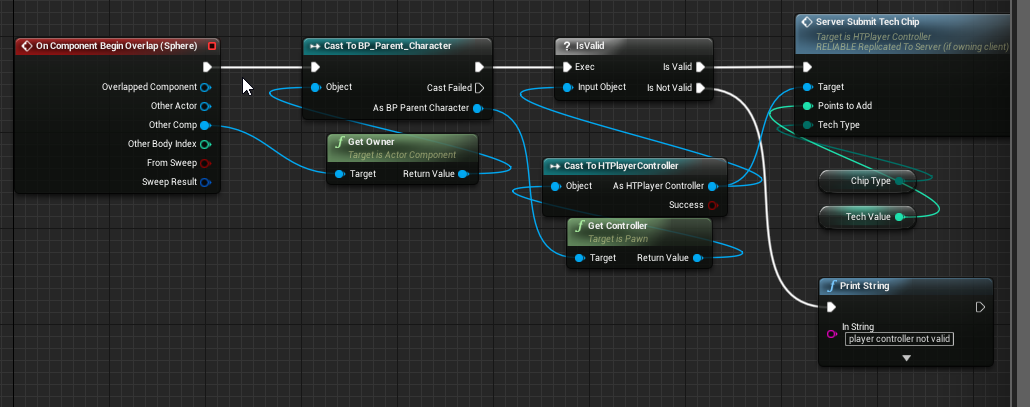
ill figure it out, since i know thats my player controller for sure
ah i see
if you run something on an unowned actor, it tries to run on the server and client. i just put it behind and authority switch and it only runs on the server now 😃
thin stratus
Why are you not getting the Actor
Instead of the component?
:D
@vital steeple
And Overlap always calls on Server and Clients
after all, all of them have instances of the actor and the player
and all of them overlap
That's not even replacition involved
Just the fact that each instance overlaps
vital steeple
makes sense when i sit down and think about it for a moment 😃
as far as the actor/component, not sure, i guess i've always just thought it was more flexible to get component
not sure if its something that i started doing a year ago when i first started working in ue regularly
 tacit hazel
turned off replicated on the item and it still only spawns on clients due to back magic @unborn nimbus
 unborn nimbus
Ok well now we can narrow down why that is happening
This is still pointing back to the component not being replicated
How are you setting it to replicate
tacit hazel
the inventory UActorComponent?
unborn nimbus
Yea
tacit hazel
in the constructor of its owner
SetupInventory(); and PlayerInventory->SetIsReplicated(true); are called in the constructor
unborn nimbus
You said before it's a C++ class but you're actually using a child of that class in BP correct?
tacit hazel
Item is a C++ class, that has instances of it yes
unborn nimbus
ok show me the constructor of the component
tacit hazel
Item.cpp's constructor?
unborn nimbus
No the constructor of where the RPC is defined
tacit hazel
unborn nimbus
The Drop Item RPC since that's where the issue is
unborn nimbus
The constructor for UInventory
tacit hazel
https://hastebin.com/elipigiwuy.php added it
unborn nimbus
add bReplicates = true; to it
tacit hazel
same results
unborn nimbus
No idea then
unborn nimbus
hmmmm
tacit hazel
ok with the item apearing in the world outlier I changed the staic mesh and it chagnes for one client, but not the other, and the server still does not see it
just trying to help because I have no idea why the server cant see the item
clients cant even pick it up as the server doesnt seem to believe it exists
ok hang on, if a function is called in the construcotr, is that the same as just calling the stuff in the constructor
@unborn nimbus
unborn nimbus
Depends. I don't put any logic inside the constructor other than setting defaults
tacit hazel
im gonna try creating the inventory in the constructor
same results ffs
even when I take away the two clients and just play as the sevrer it still shows up in the world outlier
tacit hazel
...
well
found out the problem @unborn nimbus I recompiled the blueprint that calls the function
I don't know whether to be extremly angry or extrmly happy
tacit hazel
lowkey extremely pissed off
tacit hazel
where would I go to see about getting support for the steam overlay when it is on your D drive? I moved my steam.exe to my C drive to fix the issue, but the overlay does not apear if steam is not on your c drive.
void canopy
Here is the situation! **I have a custom module added in the Unreal Project ("VizNetwork") . ** Module is not a plugin Its just few classes and interfaces which I'm using to differentiate my server into a lobby and game server. So the Bug is : VizNetwork module is not getting loaded properly in the package build. But it works nicely when I run with a batch file which uses project Uproject file. I went into the FModuleManager file to find out what's going behind, got to know that in Uproject file its loading dll of the modules which gives the access to the object pointers, whereas in Package, its not showing any value there, hence in package functionality breaks I'm missing something for sure, but where ? I need pointers!
Its working fine here. You can see Module Manager is loading the custom module.dll and getting object references from there.
Here you can see its not able to get any imformation there. Why its the case in package file
 using UnrealBuildTool;
using System.Collections.Generic;

public class VizGameTarget : TargetRules
{
    public VizGameTarget(TargetInfo Target)
    {
        Type = TargetType.Game;
        bUsesSteam = true;
    }
    public override void SetupBinaries(
        TargetInfo Target,
        ref List<UEBuildBinaryConfiguration> OutBuildBinaryConfigurations,
        ref List<string> OutExtraModuleNames
        )
    {
        OutExtraModuleNames.Add("VizGame");
        OutExtraModuleNames.Add("VizNetwork");
        OutExtraModuleNames.Add("VizServerNull");
    }
    public override void SetupGlobalEnvironment(
            TargetInfo Target,
            ref LinkEnvironmentConfiguration OutLinkEnvironmentConfiguration,
            ref CPPEnvironmentConfiguration OutCPPEnvironmentConfiguration
            )


    }
}
// Copyright 1998-2016 Epic Games, Inc. All Rights Reserved.

using UnrealBuildTool;
using System.Collections.Generic;

public class VizGameServerTarget : TargetRules
{
    public VizGameServerTarget(TargetInfo Target)
    {
        Type = TargetType.Server;
        //bUsesSteam = true;
    }

    //
    // TargetRules interface.
    //

    public override bool GetSupportedPlatforms(ref List<UnrealTargetPlatform> OutPlatforms)
    {
        // It is valid for only server platforms
        return UnrealBuildTool.UnrealBuildTool.GetAllServerPlatforms(ref OutPlatforms, false);
    }

    public override void SetupBinaries(
        TargetInfo Target,
        ref List<UEBuildBinaryConfiguration> OutBuildBinaryConfigurations,
        ref List<string> OutExtraModuleNames
        )
    {
        OutExtraModuleNames.Add("VizGame");
        OutExtraModuleNames.Add("VizServer");
        OutExtraModuleNames.Add("VizServerNull");
        OutExtraModuleNames.Add("VizNetwork");
    }
}
In Target.cs files I've added the module references
past bear
@thin stratus - following on from yesterday, I have decided that it is in fact impossible to call a function and use something from the player state from any of the game mode events
essentially, the result is always one of the following:
A) Function gets called, but player state does not yet exist.
B) Function will only get called on one client.
B) is interesting and suggests that delays are broken
(not that I want to use one anyway)
but yeah, delaying the function call means that only the last connecting client will have said function called
thin stratus
Yeah so early in the game you sadly can't be sure that everything already replicated
 twin juniper
How to replicate simulated physics static mesh location?
thin stratus
I only access server versions on the gamemode and let replication later kick in
void canopy
#multiplayer anyone have any idea ? @thin stratus I've built both of the sides (client and server) however I'm not able to find module files in the development build. p.s I've formatted my code and text separately.
 quiet dirge
@everyone 100$ for anyone who can replicate my small project (if interested message me)
thin stratus
@quiet dirge First of all, @ everyone is deactivated.
Second of all, we have #looking-for-talent where you can post your offer.
 stable kindle
Hi just a quick question. How would i identify a pawn to the server if i'm trying to let the server know that it should possess it
via an rpc
thin stratus
If possible, the Server should already know that you want to possess that pawn
How are you getting the reference to the pawn on the client? @stable kindle
stable kindle
@thin stratus i have multiple pawns since i'm making an rts. I get a pawn through a gethitresultundercursor. I just want to possess it from the client on the server
thin stratus
Well, if the Pawn is replicated, you can just pass it via the ServerRPC
Usually you would also perform the trace on the server
So he also gets the pawn
Just to make sure that the server position of that pawn is the one that counts
However, GetHitResultUnderCursor is local, so it might be worth recreating the trace by hand
stable kindle
ahh gotcha is there a way to identify specific actors in a level like an id. That way i could send the id to the server and make it possess it using the right player controller on the server was my first thought but i can't seem to find much on that front.
 lean river
If pawn is replicated like mentioned before you can pass pawn pointer as input to rpc.
Ue networking will get that pawn from netguid
stable kindle
@lean river @thin stratus thank you for your time and patience. Still very very new to networking.
thin stratus
Yeah replicated actors already are connected through the netguid
Also if you perform the ServerRPC on the PlayerController that performed the click mouse check, you already are on the correct playercontroller (just on his serverside)
stable kindle
Awesome.
 zinc loom
Spent the last few months trying to figure out why I couldnt treat get CharacterMovementComponent to work in my hovertank game to try and get some easier lag compensation for movement (Had it all working as a Actor / AddForce instead of AddMovementInput).
Didn't count on the fact that it completely doesnt work with SimulatePhysics turned on (which my hover components do with AddForce / Line Traces to hold the object above the ground, but let it fall in on start). Has anybody got some pointers around this tricky mess?
thin stratus
afaik, you would use the default movementcomponent
Use a lot of the existing character code (copypaste) and add your movement code without physics
At least that's what I#ve been told
- that it's a tour of headache and pain
zinc loom
and here I thought I picked a "simple" idea for my first project, heh
 elder sable
Hi, i have 2 maps lvl_login (default game map) and lvl_world (default server map) but when i connect to the server, lvl_wolrd is not loaded, what did i miss ?
but lvl_travel is working
elder sable
it load the lvl_login
 raven holly
Gauging interest.. would anyone pay to use a UE dedicated server management system?
I'm custom building this sytem and may make a standalone version to make a SaaS.
You can start, destroy, reboot all from the panel. And choose about 15 different server locations around the world
elder sable
LogWorld: SeamlessTravel to: /Game/nebula/blueprint/lvl_login
does that mean the client is loading lvl_login map ?
elder sable
i use it yep
thin stratus
@raven holly Generally yes, but make sure it's a really easy setup.
elder sable
i saw it was recommended to use it
thin stratus
Seamless is recommended for travels of the server
so if he changes the map for example
But the connection is a hardtravel
Could also be not related to your issue though
but a start
elder sable
i have only 1 game mode, i should have 2 ?
thin stratus
Well, technically the GameMode describes the classes being used
So you should have at least one for MainMenu and one for GamePlay
elder sable
i have just 2 levels
i saw gamemode was running only on server
it s working when i put default map on server to login, and on client to world
 wintry cove
IOnlineSubsystem::Get("Oculus");
Oculus subsystem should be that right?
LogModuleManager: Warning: ModuleManager: Unable to load module 'OnlineSubsystemOculus' because the file 'C:/Program Files/Epic Games/UE_4.17/Engine/Binaries/Win64/' was not found.
well alright
wat
Build.cs is missing the modules but I typed them in earlier today >.>
elder sable
is there cache somewhere i have to delete ? my server is not loading the right map
jolly siren
@elder sable I've ran into that before https://answers.unrealengine.com/questions/434795/dedicated-server-default-map.html
elder sable
i look, thanks
jolly siren
np
 quasi matrix
Can you save player info/location to the server so when they rejoin it will connect them to where they last where with exact stats?
in BP's, not DB
 brittle sinew
You could probably save it in memory or manually write it to disk, but using a database would probably be a much easier solution 😃
There are a few BP wrappers for DB interaction out there
One example: https://github.com/KhArtNJava/SQLite3UE4
 elder sable
Is everything normal in those logs ? https://pastebin.com/xP2N6M6G

LogNet: Join request: /Game/nebula/blueprint/lvl_login?SplitscreenCount=1
Does that mean the server map is lvl_login ?
worthy wasp
@elder sable yes
elder sable
i don't understand, i put lvl_world as default map server
is there something else to do in the code ?
 sand juniper
 worthy orchid
This may be a stupid question but how do I change the default port from 7777 to lets say 7778 for example?
elder sable
project settings
worthy orchid
Ah makes sense thanks. Is there a way to do it in launch params?
Or would I have to make a variable for it?
elder sable
dunno maybe in server launch options
worthy orchid
Ah simple just add -Port=xxxx and it sets it to that port
jolly siren
yep
worthy orchid
Do you think it's possible to make a savegame for multiplayer through blueprints alone?
For the savegame to be server side that is and called from the client.
 pine forge
Hey guys, So... do local multiplayer games run two instances of the game via a server, or a single game instance? We're building a local-multiplayer-only game and trying to figure if we need to use RPCs or if we can skip that in favour of low latency?
 turbid sentinel
Anyone used/using VMWare workstation to run a second steam client for testing steam integration functionality? Supposedly newest workstation supports DX10 (not expecting anything performant, just testing steam session stuff)
 regal hazel
@pine forge When you say local multiplayer do you mean split screen?
turbid sentinel
welp that answers it 😃 https://media.discordapp.net/attachments/122467523185606656/380914741159395328/VMSteam-2.PNG

 gaunt kestrel
Hey everyone, I could use some help on a small buggy bug buggerson.
I made this: https://i.imgur.com/u56rL0V.gifv based on this video tutorial: https://youtu.be/2CIzFMQFt78
I made it work both on client and server but the damage appears in the top left hand corner of both the server and the client.
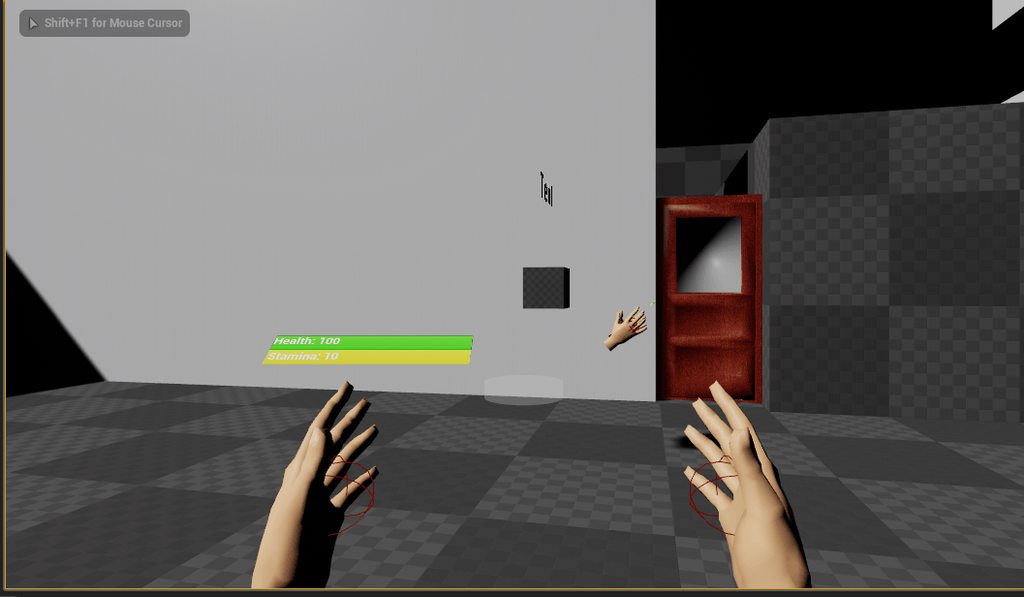
A simple way to add floating combat text to your project. NOTE: If your text is not centered on your object check your setting, inside engine scalability set...
I multicasted the FX to everyone to make client see as well as server but it made that weird bug appear
pine forge
@regal hazel Yes, I mean split screen
regal hazel
As everyone is in the same world you don't need to replicate anything unless you are actually wanting to support actual online play as well
 ripe folio
Currently playing around with something super simple but haven't done networking in a while. When I'm running a multiplayer game in PIE and called AGameMode::RestartGame, the (listen) server restarts fine, but the client doesn't come with it. There's a lot of [2017.11.17-03.21.13:576][505]LogWorld: Warning: SetActiveLevelCollection attempted to use an out of date NetDriver: GameNetDriver log spam
I swear RestartGame worked in Shootergame in PIE, but I don't have it in front of me.
worthy wasp
@ripe folio - whats your GameMode ServerTravel setting? Seamless or non?
ripe folio
@worthy wasp Whatever the default is
worthy wasp
i would assume RestartGame would need a NON seamless travel - as when that funciton is called - i'm certian it drops PlayerControllers
ripe folio
Another question - I'm trying to go from my override of APlayerController::ClientGameEnded(AActor* EndGameFocus, bool bIsWinner) to showing the winner's name on screen. Can I extract the PlayerState somehow from an actor without having the PlayerController?
This will be on clients, so they don't have controllers for other clients/players
Ahh can cast to Pawn it seems
pine forge
@regal hazel that was my assumption, thanks 😄 (I had a minor worry though that the implementation of split screen would actually use multiple game instances)
@ripe folio The GameState object is a child of the world, and should have access to all player states
and yes, a pawn has a function for getting the state of its owning player.
 regal hazel
that truly is an awful class tree diagram
regal hazel
You're supposed to hate dread not me!
ripe folio
😛
Had a few people read it as hated-read recently, even with capitalization
I thought it was obvious!
pine forge
@regal hazel go complain on the IRC XD
ripe folio
@pine forge Oh man, I remember that. Still active?
These days I only go there if shit really hits the fan
pine forge
yes
 wary wyvern
Hey guys! Is there any way to send player to another server and save its controller?
Like Seamless ClientTravel, but from server?
 junior tree
if an actor does not replicate movement but is still replicated, what else is being replicated aside from custom events and replicated variables? Is it heavy on netcode to have 50 actors replicating like this?
lean river
I think not.. if you do not change million variables in each 50 actor in every frame
 umbral basin
Do the actors that are being replicated have the ability to move freely?
@junior tree
umbral basin
Well, they only need to be replicated if all clients need to see dynamic changes.
junior tree
those actors would only fire events and have replicate movement toggled one by one
umbral basin
Ah, okay.
junior tree
actually not even replicate movement will be toggled
only some events
good to know
umbral basin
👍
umbral basin
Can anyone direct me to a good tutorial for doing a multiplayer login type system with unreal?
 rare cloud
there is no way to have a custom net relevancy by actor component instead of actor
jolly siren
Only spawn the actor on the server and replicate the actor itself
 late sundial
anyone knows where to find tutorials for networking + widgets? how to do properly casting a widget for all players/specific player, cant find any good tutorial series..
thin stratus
Well, there is a reason why not
Widgets are Client only
There is no networking involved into them
Each Client has its own Widgets and you can't perform any network code in them or with them
Whenever you want to display something, you have to grab it from a class that actually replicates, like PlayerState or GameState
And whenever you want to execute something replicated through e.g. a button press, you have to use your PlayerController and use an RPC in there
So if you understand normal networking, you will understand how to use widget with it
@late sundial
late sundial
hmm
okok so widgets are not replicated. right now im casting from game mode to player characters, player character has create widget stuff.
it just feels buggy sometimes, widgets are not shown always and stuff
where should i put "create widget" and "add to viewport" stuff, game mode, game state, player state or player characters?
i have all those in use so shouldnt be problem to use any of them
there are some stuff i just dont understand in networking still learning
thin stratus
GameMode exists only on the SErver, so no
GameState exists once on each of the player, so also not the best place
PlayerState exists per player on everyone
"okayish" but needs filtering
PlayerController exist per player on Server and the specific player
So there it would be best
"IsDedicatedServer" + Branch and then create it on the false exec
Have you read my compendium? (pinned to this channel)
that should answer a lot
late sundial
ok ill put it on character because i have now only 1 controller for each different characters.
i will check that compendium out definetly! forgot the whole pin system here 😄
thanks
twin juniper
How to spawn an actor from client and server (I want to make weapon drop) so everyone can see that a player dropped the weapon
 fossil spoke
Spawn the Weapon Actor on the Server, make sure that its set to Replicate.
An Actor spawned on the Server that is replicating will also be spawned on all Clients.
twin juniper
So I don't need a has authority I need only a multicast event to spawn it?
fossil spoke
You dont need an Multicast, so long as you Spawn the Actor on the Server Side and it is set to Replicate, it will be automatically spawned on all Clients as well.
twin juniper
@fossil spoke like this?
fossil spoke
Remote doesnt need to do anything.
Your not reading (or understanding) what im saying above.
Actor spawning is AUTOMATIC for Clients if the actor is spawned on the Server and it is set to Replicate.
twin juniper
I did this following 2 tutorials, where they saidd its automaticly replicated to clients
but client doesnt see the weapon spawned still
fossil spoke
Is the Weapon Actor set to Replicate?
wintry cove
Where's the SessionId stored? FOnlineSessionSettings doesn't have it, and once I create a session I can't seem to find the unique ID. This might be something Oculus specific, but to join a specific room I need an ID, but can't seem to get that somehow.
oh, maybe I need to make an invite
 digital tinsel
Does anyone now an easy way to use Gamesparks as an onlinesubsytem?
thin stratus
Use their plugin? :P @clear kilnstian#7715
And wrong person tagges cause of discord
digital tinsel
@thin stratus Yes i do. I wan to use their system only as a serverbrowser and than connect over the ip. But i am not sure how to make this... Cant find any good documenation.
digital tinsel
Is the actor set to replicate? And in which BP do you execute that?
twin juniper
in character, weapon BP is replicated
next falcon
How do i replicate a destroy actor ?
brittle sinew
If the actor is replicated, destroying it on the server will also destroy it on clients
twin juniper
anyone knows why the client cant see spawned actors? Blueprint above
rare cloud
@twin juniper, check the replicated flag of your Weapon BP, and spawn your actor from server side
twin juniper
its replicated already and i do spawn from server, i think
digital tinsel
@twin juniper perhabs try it in the player controller
rare cloud
no
digital tinsel
Is the character also replicated?
digital tinsel
Try to debug
twin juniper
ok
brittle sinew
Have you confirmed that it is spawning on the server?
Not that the code seems like it would, but that it is :p
twin juniper
it is, I now added print string at the end, on both players it prints "Server : Dropping Debug"
(if anyone of them drops then on both screens it prints)
twin juniper
rare cloud
collision handling
change it
to always spawn and adjust if collide
the weapon certaily collide with your character and spawn is cancel
twin juniper
works on other actor
doesnt on weapon for whatever reason
maybe cuz its setting the mesh on construction script?
digital tinsel
disconnect perhabs the spawn vars and try again
twin juniper
OH NOW WORKS
it was cuz I set the mesh on construct script
maybe it just didnt show the mesh cuz construct is before variable set 🤔
digital tinsel
where do you set the mesh on construct script?
twin juniper
i had a static mesh that in construct function set mesh from weapondata variable
moved that to beginplay, it worked
 cerulean rapids
Guys, i have some widgets which all works fine, however, on the server the bound text is greyed out yet fine on servers.
on the clients*
twin juniper
How could i replicate static mesh with simulated physics?
nvm checked component replicates and it works now
elder sable
Hi, i generate a token when a player connect to my login server, then i would like to pass this token to preLogin to check if the token is valid then accept or reject the connection
How could i pass a token to preLogin when i connect to the game server ?
next falcon
This Function is not replicating can someone tell me why ??
brittle sinew
Looking in your logs, do you see any mention of "no owning connection"?
It could be an ownership issue, where you're trying to call a server RPC on an unowned actor
next falcon
i already fixed it
the actor wasn't able to do it so i put the function into my character so it work
brittle sinew
I'm guessing ownership was the issue then 😃
Since your pawn is owned by your PlayerController, you can call server RPCs on it
In the future, make sure anything you're trying to call server RPCs on is owned by your PlayerController
stark dome
@next falcon what isn't working properly for you
next falcon
i did the function in an actor with no permissions
@brittle sinew so i only can cast to the server when it is or has player controller ?
brittle sinew
"Cast to the server"?
Guessing you mean call a server RPC, but 'cast' is a very specifically used word, and isn't used in this context 😃
But no, you can call a server RPC on any actor that's owned by your PlayerController. When you spawn an actor, you can set its owner
next falcon
cast to server = function on server xD sry
brittle sinew
(well, you can set its owner anytime)
If you set an actor's owner to your PlayerController, you now have an owning connection on that actor, and can call server RPCs on it
twin juniper
Just use multicast, I use has authority, on authority multicast event, on remote run on server event and from remote as well just to that logic what goes after
Sorry can't explain very well
😄
next falcon
ah okay thank you 😄 i learned something new
twin juniper
It's late now, tomorrow I will post here the blueprint example if I don't forget
elder sable
How could i pass a token to preLogin when i connect to the game server ?
inner iris
Does it make sense to have some "empty" RPCs in the master / base Gamemode that all children will use but all have specific logic that will be overridden? Eg. each gamemode handles round end differently, but in this case each gamemode handles increment players alive the same, so the logic can go there
 slim holly
sure, tho it might be bit hard to keep track of them
inner iris
Well just so that I can call a generic function to the base GM like when damaged in the character for example, and I know it'd run no matter what GM is currently active
slim holly
but you could do a very basic one in the parent, then overwrite it in the children for the sake of future you who will have to figure out how it works in like 3 months
cerulean rapids
any1 know an answer for why my server host has everthing that changes greyed out, when im not activating/deactivating or changing the opacity of any of them?
stark dome
@cerulean rapids they look disabled can you click the buttons
cerulean rapids
the button activates and deactivates and works fine, its everything else :/
stark dome
Hmmm you have no logic that could affect the appearance?
cerulean rapids
no, just changing the text/image
stark dome
I'm not sure sorry
cerulean rapids
:/
stark dome
It's gotta be something in your logic. Only some of the text is being darkened as well
 fringe dove
anyone know much about NetClientTicksPerSecond? what does ticking a client mean?
it defaults to 200, but the default server tick rate is much lower anyway right?
next falcon
How Can i get an array from the server ? or the server is the owner of it ?
cerulean rapids
Hey guys, im using the advanced sessions plugin to pull steam data such as names and profile avatar's. so far its working perfectly for the host, even got people who joins avatars displaying for the host. however clients who join cant see any of the avatars, when i stored them as a replicating texture 2d. any1 have any experience with this?
cerulean rapids
i thought of that as a possibility but had no idea :/
thin stratus
You need to issue the Avatar stuff for each Player
thin stratus
Not the biggest pain. Idk how the session plugin works, but it should be possible to get each players SteamID
My own code has that in the PlayerState
So I can simply get the ID from the PlayerState (which I get from the PlayerArray) and then load the Avatar for that player
The ID in the native PlayerState is something else though, before you try that
cerulean rapids
yeh id imagine so, but im fairly new to unreal, learnt all this stuff as i was implementing it, so my setup is not ideal. :p
gone hard, non stop for about 3 weeks with no prior knowledge of unreal, into networking and steam connectivity which has just been a complete headache to try and implement as i learn it
but thanks for the info friend
thin stratus
:P That's why you should start with Singleplayer
until you understood the gameframework
and work yourself up to multiplayer
and then steam
cerulean rapids
yeh, im working with a friend to make a game in a month or 2. we were pretty set on multiplayer. didnt realise quite how big a challenge it would be
it's working.. just slowly. :p
my biggest issue atm is understanding the controllers, the playerinfos' the gamemodes. the gameinstance... all that jazz and how what and when they communicate
cerulean rapids
uhh probably not, where is it?
thin stratus
Pinned to this channel
cerulean rapids
ahah, i will have a gander, friend
thin stratus
Sure :P
cerulean rapids
how long did it take you to write this o_O
thin stratus
Week or two iirc
It's also containing a lot of docs material. Not all by me
Stated at the start
cerulean rapids
it's nice. 😃
this would of been so helpful if i read this 2 weeks ago before i built all the framework XD
 cold sparrow
I ran network profile, and I see ServerUpdateCamera being called all the time
for top-down style multiplayer, do I need camera being synchronized?
I'm trying to understand if I want to disable it to save on bandwidth or just leave it
next falcon
I have a Chest in my world with an inventory Array.. if i would like to open inventory of the actor it create a widget with for each array element a ItemWidget in it
the Array is Replicated the Chest is replicated and the inventory component is also replicated
if i add something to the array it cast it to the server array
and when i play as server i can see all item in there
but if i play as client it can't see the right InventoryArray..
can someone help me ?
next falcon
U have no idea ? :/
cerulean rapids
I still have the issue of every editable textbox/texture2d being greyed out for the host, it looks disabled but i have tried force enabling it. no idea what is going on :s.
next falcon
Meine frage zusammengefasst: Wie bekomme ich den array vom server und nicht den vom client ?
 glossy jacinth
@next falcon ein event als server ausführen oder switch has autohority?
next falcon
er führt es zwar als server aus aber das selbe ergebnis wie zuvor
glossy jacinth
kannst du screenshots zeigen oder sind die weiter oben schon?
next falcon
was musst du denn sehen ?
glossy jacinth
wo is denn das array
next falcon
Der Array ist in einem Actor mit einer Inventory Componente Array ist also in der componente
besser zu lesen
glossy jacinth
führst du das als client aus und willst dann die variable vom serverß
next falcon
ich möchte die varieable vom server bekomme aber momentan nur die vom client
und ja ich führe das als client aus da ja der array schon replicated ist oder nicht ?
glossy jacinth
bekommst du gar kein inventory bis jetzt?
next falcon
ja
glossy jacinth
also wenn du lokal bist kriegt der client nichtmal sein eigenes?
next falcon
hab ich noch nicht getestet aber wahrscheinlich kriegt er sein eigenes
glossy jacinth
also du musst primär die inventory der anderen bekommen
next falcon
ja also nur vom server das inventar damit ich sozusagen ein array für alle habe worauf alle zugriff haben und es änden können
glossy jacinth
hab grad was ausprobiert aber funktioniert nicht richtig. muesste selber nochma gucken. muss aber auch jetzt weg. ich empfehle dir dieses minibuch falls du bei server zu client kommunikation nicht so fit bist. half mir auch schon öfters. http://cedric-neukirchen.net/2017/02/14/multiplayer-network-compendium/


 next falcon
könntest du mir dann vlt nochmal helfen wenn du mal wieder zeit hast bitte ?
next falcon
ja okay können wir dann morgen machen danke dir
glossy jacinth
np. bin erst abends da. kann nicht genau sagen wann. frühstens 7 uhr
next falcon
okay ich schreib dir dann so gegen 7 uhr
glossy jacinth
jo
 snow cliff
anybody experience with evolve here?
or more general running a unreal engine local game over any lan network simulator, like hamachi, or gameranger, or whatever?
inner iris
Is it best to implement any changes to movement (even like sprinting or crouching) in the character movement component itself as opposed to setting speeds via RPCs in BP?
Just reading this example: https://wiki.unrealengine.com/Authoritative_Networked_Character_Movement
I remember seeing it written somewhere that while setting speeds for movement via BP RPCs is fine, it’s best to do it with flags like this tutorial shows
 ionic comet
hey everyone just wondering if the easiest way to test dedicated server type multiplayer game would be to join using open ipaddress method with the port forwarding to 7777?
brittle sinew
Just for testing? Probably, yeah
Once you get closer to release you'll probably want to implement some sort of subsystem, but just for testing the core mechanics of the game itself that's probably fine
ionic comet
Do I need listen option for the Open level if I'm hosting from dedicated server or is that just for Listen-Servers?
 wise depot
Hey guys, so i've got a bit of a strange issue going on, wondering if any of you have run into anything similar? I'm on 4.14.3, in multiplayer we have two 'states', the Lobby and the Game, when returning to a lobby after a game players seem to lose all ambient audio in the level. The lobby doesn't have a pawn but they do in the game. Any ideas?
Also @sharp arrow i've used it quite a bit
 night tusk
Hey guys
So, is it possible to create a mod for a game, so that it tracks the path of the projectile? Say I have a cannon ball fired with an angle of 65 degrees, is it possible to create a mod so that it would show the path of the cannon ball, but in a server? Talking about like, I connect to a server in the game and do that in there
So that the mod connects to the server, retrieves the information of the projectile, and start tracking its paths using projectiles dynamics and math formulas
thin stratus
@night tusk doubt that's how "mods" work
But i guess you can extend the game like that
Not well documented though
But why not doing that from the beginning
Why modding a game?
night tusk
Lemme just send a link
 chrome bay
This should be suitably discoruing for anybody (like me) thinking about doing an indie multiplayer-only game...
https://www.gamasutra.com/view/news/309408/Bossa_Studios_cans_Decksplash_after_open_beta_experiment.php

The Surgeon Simulator dev previously said it would cancel its in-development skateboarding game if it did not attract 100,000 players during an open beta week.
Even more so if you're thinking about paying for dedicated servers :/
night tusk
I want to know if it is possible to create something like that ^^^
And if it is then how
thin stratus
You serioulsy ask how to create hacks for games?
night tusk
Kind of, is that really supposed to be a hack? I mean it is client side isn't it?
That site there had that, and it has been running for years
Developers said nothing about it.
It stopped because lack of time for work or whatever, and I want to recreate it
thin stratus
It's giving you an additional help that the game does not add by default
So yeah, it's basically a third party cheat
Didn't you see what Epic did with the last person that created a hack for Fortnite?
I would not go down that path. Put your time into something else
 mellow cipher
Do bools have much of a network impact?
twin juniper
Epic likes to do this uint8 bHidden:1; instead of bool bHidden;
thin stratus
I think they mostly use uint32
twin juniper
something to do with byte packing but I don't know if it does that for networking
thin stratus
But same idea of using bitfields
twin juniper
yeah it's usually uint32 but that var is the first one declared in Actor.h 
thin stratus
Idk if it matters much if you only have one boolean
vs one uintX : 1
But if you send a lot of booleans together
it makes sense to just put them into a bitfield
Where the binary version of the number shows the actual bool values
twin juniper
it's automatically handled too right?
thin stratus
Don't think so? if you save multiple bools in an int
You kinda have to recreate the bools from it by hand
With some simple shifting
twin juniper
weird
wise depot
@thin stratus what happened with epic and a fortnite hacker?
wise depot
ah, same question but with the creator?
 wary willow
hackerz
thin stratus
Pretty sure a quick google with "Epic Games Fortnite sues hack creators" will give you enough to read
wise depot
also @night tusk if you're really wanting to do things like that then resources do exist online, but i'm not going to discuss where to find or how to use those kinds of resources on here. I would suggest you begin by reading into reverse engineering, decompiling and SDK dumping.
yeah probably but i'm all for derailing channels for chit chat haha
to google!
huh, turns out they sued some guy last year too for wirting a hack for Paragon
haha as if, bit coin miners
thin stratus
- Epic is probably pretty much aware of how to create hacks for their own Engine.
- Of course the hack creators can't pay that.
- Yes it does scare of future hack creators, because even if you can't pay that, it's a really shitty situation you will be in.
thin stratus
Either you simply go to jail, cause you apparently can't pay.
Or you "lift your finger" which basically means you declare yourself broke, which limits your income so much that life isn't worth living
thin stratus
Most people obvioulsy lift the finger
wary willow
Basically, I can run my LLC and be protected
Although doing a solo-LLC, some judges will try to still go after the individual in that case
Not all, depends on the state
If you have multi-person LLC
let's say, you "partner" up with mom
90% of judges won't go after you now
They'll hit the LLC
Which usually, you would buy some sort of insurance in cases like that. But sometimes you don't.
If not, you'
You will just hope your lawyer is good enough.
Regardless, you'll need a lawyer really.
TBH, in this business.
You should get legal advice or have one on retainer
Even if it's just to take care of paperwork
You don't want to mess that up at all
Spend a few hundred, thousands now...to be saved for paying 100's of thousands, millions later.
Essentially shutting you down for good.
 worn nymph
I do all my paperwork on rice paper so if anything goes wrong I can just eat the evidence 😆 (joke)
 timid pendant
Hello I made a launcher with a login system for my game. How would I be able to send player info such as player name or player id to the game. Would I have to use custom command switches?
thin stratus
You'd do that in the Response of the LoginRequest
Or in the Response of a "AccountDetails" Request
given the user is Authenticated
timid pendant
Okay thanks
 sharp arrow
does someone ever saw pyro dev?
next falcon
Guys how can i save on a multiplayergame my player data ?
like if they leave the health and stats and so are saved and if they join again they get the data again ?
 grizzled quartz
if u want to save on server this should work. http://prntscr.com/hd0bxu

@next falcon
next falcon
okay that is the event but where to save it?
i already tested alot with save games but i see no way to save health for just one player and not for all..
everytime i load the savegame it applies to all players..
grizzled quartz
it depends if you want to save on players computer then it should be enough to run on client event only
if you want to save on server then you would need to create an ID for that specific player
and when he connects he should have the same ID
next falcon
how to do that ??
grizzled quartz
which way
next falcon
with the ID for the player
grizzled quartz
you would have to make a save blueprint first, then add an array there.
sharp arrow
well ik how to but cant tell ya now im busy with school sorry
grizzled quartz
gamer, you couldnt do that in a month
dont lie pls
i had enough time to understand what you know
sharp arrow
i finished the inventory boom
grizzled quartz
das, its basiclly the same as with singleplayer
grizzled quartz
if you are saving info for a single person, it means you would need to have same structure but with an array
each player would add their info to the array
next falcon
so they get all the same savegame but only use their info out of it ?
grizzled quartz
so when player leaves, you add his info to the array and on login you c heck if his ID or name exists in array
if it does set his info
ye imagine like a database with a table
which add a new row for new player
similar how you would save different playable character in singleplayer
but this should be done on the server side
next falcon
okay got it
but how can i set a ID for every player which they have when they leave or join ?
grizzled quartz
just to test the concept i would save their ID as name in game
but its possible to get PC name
just dont remember how
like on login if their current name exists in the save game ARRAY
you can set their last settings/info
next falcon
if i use steam can i get the steam64id ?
next falcon
Nice okay ill try that 😄 thanks buddy
grizzled quartz
np. i only played with mp for a few months, but in general this theory should apply
the most important part is to understand how server/client sides work
then apply same ue logic
cerulean rapids
Still having this issue with text greying out on the host :/ it seems to be on everything that is bound. as soon as i bound the "Players" text to something, that also became grey on the host. really frustrating me. :/
thin stratus
That looks like a UMG issue though
If things appear darker they are usually disabled
OR tinted
But that looks more like disabled
You would want to check the hierarchy of your widgets if you bound any "IsServer" things
cerulean rapids
i put a simple bind on the "The Players" text to just the name variable, and it also became greyed out
not touching enable/disable
a slightly lighter grey too
im never changing anything about the text other than contents, not colour, tint or enabled/disabled
stark dome
Maybe share some more screens of your setup
What happens if you add a new text box with a bind to a new function @cerulean rapids
grizzled quartz
is there a difference if you create new bindings for them instead of setting the property directly?
stark dome
@cerulean rapids can you show more detail of the bp
cerulean rapids
creating a function to call the variable still greys it out :/
and i can share the blueprint if you want, but there is quite a lot, and there should be nothing that effects the text. :/ if you would still like to see i'll message u a few screenshots
here i disabled the server name top left
and it correctly tinted it for both host and client
but server is still tinted more.
so that checks out enabled/disabled.
a test with pink text, still grey
i set opacity to 0.2, server still greyer
ahh this is so frustrating 😠
been stuck on this for 3 days now
what else could possibly grey something out?
brittle sinew
Does the same thing occur when you run the game outside of PIE? (packaged)
Otherwise, we don't really have any real information to go off of here 😐
cerulean rapids
yes, same issue as standalone game 😒
it's so frutrating
i honestly have no god damn idea.
i'll sell my kidney to solve this stupid little silly thing at this point
brittle sinew
Well, the best I can say is it still appears the widgets are disabled, even if you've attempted to rule that out. Can you check if the widgets are enabled at runtime on the server?
I'm not saying that you need to know exactly why they're disabled at this point or anything like that, but figuring out exactly what's causing the grey itself is an important step
cerulean rapids
yeh, well i tried making them disabled
but
they just became even more grey than that
and it cant be double disabled :p
brittle sinew
I would just confirm they're enabled at this point.
Sometimes things are missed in reasoning; you're probably right, but ruling it out for sure is better :p
brittle sinew
Okay, cool, just wanted to confirm that before proceeding
Without the project though, I'm not really sure how much further I can proceed, if you've confirmed you're not accidentally doing some opacity changing in some spot you forgot about or something of the sorts
What type of widget is the text?
Is it text or text box?
cerulean rapids
it happens to the widgets that i spawn in aswell, such as the players names and their colour, and the chat.
the StartGame button works fine however
also, i appreciate your time man, any help with this is super appreciated. I just don't even have a lead for what the possibly issue is, so i have no idea what to do to fix it.
i imagine it being one of those issues that get fixed by completely rebuilding the widget from scratch, but it's so deep thats kind of out of the question
brittle sinew
Hmmph, at this point I think I'm about as stumped as you, unfortunately
Possibly one of the widgets higher up in the hierarchy is disabled?
cerulean rapids
server name is part of the main widget, the players and text are spawned
and only things that are bound
have the issue
when unbound servername works fine
and that is all im changing
which is weird in itself, but also only effecting server and not clients
:S
stark dome
Can you show the properties of the text block
Is it an editable text block. That could be why
@cerulean rapids
stark dome
Very weird. Have you tried in a new widget
cerulean rapids
i just made that text new there, and it has the same issue with being bound
and ill try 1 sec
no issue on main menu
hmm
progress at least
 vocal dagger
hey IDK have you made sure your hierarchy is setup correctly for the textbox? maybe you have some overlay on top of the text
but it's indeed weird since the others don't have that
cerulean rapids
but if the text is not bound to something, it is white and not faded
vocal dagger
my initial guess is that the transparent canvas is somehow getting in the way
it's the only element that could cause that
I know because I also went through that MP tutorial many times
(event though you modified it seems like you still keep the same old format for now)
cerulean rapids
aye, the core is identical
im quite new to multiplayer, this was a stable crutch for me
considering this is like the first thing i am making in unreal. if i could go back now and restart, id wait for a few months before i tried to tackle multiplayer XD
vocal dagger
yeah sure man no worries, but really, I'd check that canvas, maybe for the other players you are spawning the UI element on that and that's why you don't have the issue
vocal dagger
it takes time to understand all that crap, even more if you dive into C++ so hang in there. If you feel like you are lacking some skills in UI just try to make some tutorials, there is a cool one for Inventory in the official page
vocal dagger
nice, yes you are getting there
cerulean rapids
so these alpha 0.5 panels are covering things up
is there an equivelent of "send to back" in microsoft word? XD
i have not fixed it yet, but im pretty sure that is the issue, and god damn. i am eternally greatful.
vocal dagger
hehe great! hmm
yes there is something, I just can't remember
and be careful with sending it all the way to the back btw, I think it's best if you keep your layers in the left panel ordered already
if not you will have a mess with the indexes
cerulean rapids
it's strange that it overlaps only on host
vocal dagger
maybe you are spawning things only on the host on top of those UI elements when you should just update the data?
wild guess, but cool that you found a way already
cerulean rapids
im pretty sure i followed the tutorial pretty religiously, i imagine the issue lies in unreal versions
vocal dagger
I think you may have missed a very tiny thing, I have that same tutorial running on 4.18 and the UI has no issues
I also ran into a very stupid issue at some point, following tutorials is a bit annoying sometimes
cerulean rapids
😦
cerulean rapids
@vocal dagger this is embarrassing :p. but can u remember how i might of given these objects a block colour background? XD
vocal dagger
I'm not sure I understand the question, you want to have a transparent background on those objects?
vocal dagger
oh ok xD all right
I'm trying to remember
I think it was the border element or the canvas panel
the Brush color, you can give it a dark color and adjust the alpha channel to something like 0.5
oh it's the border, there is no Brush color on the canvas
vocal dagger
hehe sure ^^
cerulean rapids
vocal dagger
great! woot woot
regal hazel
Does anyone know the base cost of replicating a string in bytes? Is it your typical Length + data scenario or does epic do something else?
thin stratus
Not out of my head, but you could really quickly make an empty scene, put a string variable in an actor, starting netprofiler, set the string on the server, wait a bit and stop the profiler
Then you should be bale to see how much that takes
@regal hazel
chrome bay
I believe every character in FString costs 16 bytes to replicate (IIRC the FString class is just a wrapper for a Tarray of uint8)
Wait no.. I think it's 16 bytes plus a byte for each character... maybe
Not sure now...
regal hazel
Yeah I'd be confused if it was a fixed cost, figured it would have a minimum cost then the actual data itself.
And good shout @thin stratus, thought about doing that but was just trying to avoid any noise. But should still get semi decent results
 lime rover
Hi folks .. I am new to multiplayer and I have a pretty basic question.. When I increase the number of players and hit play on the editor, generally, I should be getting multiple player controllers which spawn a pawn as set in default pawn under project settings, right?
thin stratus
Yes
lime rover
it seems my controller is unable to get a pawn and crashes
thin stratus
Even if no pawn gets spawned due, for example, collision, it won't crash
so that sounds like an issue that you caused
(the crash)
thin stratus
You want to make sure that you have enough spawn points for the default pawns
lime rover
oh...
thin stratus
If you don't handle finding one yourself
lime rover
where do we define that?