#multiplayer
1 messages · Page 352 of 1
 warped hull
 thin stratus
Well, fornite manages 100 players
 viral mason
Open world maps don't really work, but I've been told a 10k by 10k large scale limit works pretty good
 pallid mesa
@thin stratus yesterday we spoke about a problem i had based on local player allies/enemies
imagine like drawing a red outline on enemies and a blue outline on allies
similar stuff
thin stratus
So what I do is the follow.
On ChoosePlayerState (or PostLogin, depending on you spawning the Pawn yourself or not), I assign the PlayerController as well as the PlayerState to a team.
In the PlayerCharacters "Possessed" event, I get the PlayerController var and set it on the PlayerCharacter.
Means i have the variable in 3 locations.
PlayerCharacter is OnRep variable which sets team colors on the character when replicated.
@pallid mesa
pallid mesa
but a team colour is not the same than the colour of you as a player should percieve of the others, because wether if you are on team A or B your allies will be always blue and your enemies always red (outline)
i have another system built in to tint the material of the mesh according the team, but this one is one that will outline enemies red
no matter in what teaam you are
your enemies will have a red outline
and your allies a blue one
if i would do that what you are suggesting i would make something like the colour team tint
thin stratus
Well that's fairly easy, isn't it
On the Character
When the OnRep Happens
You are on the client. So you do "GetPlayerController->GetTeam" and check if your team is equal theirs
TInt them blue if yes, otherwise red
(For outline)
@pallid mesa
pallid mesa
how do i get theirs team, that would indeed imply run through playerarray, right?
like, i only have information of Self when possession occours
i need somehow to have information about my team mates
and the only way i had in mind about how to do that is... welp runing through the playerarray
thin stratus
No, why?
Each Character that gets possessed calls "Possessed" on the Server side, right? @pallid mesa
@pallid mesa
(let's go through it step by step)
pallid mesa
yeah but each individual character doesnt have information of other peeps
thin stratus
Yeah wait
That would set the TeamVariable, that is already saved in the PlayerController
(you need to set the variable in the PlayerController when they join, before they possess a character)
That Variable should also be replicated, so the local client knows his team based on his PlayerController
Now, when you set the TeamVariable in the Possess event (so get the PlayerControler one and set it on the Character)
You set that variable to OnRep. Means it calls the OnRep function on everyone
So every other client in your game will execute that once for you.
Means in the OnRep you can get your own PlayerController
And compare their team with yours
pallid mesa
comparing controller team with character team you mean
owning controller
if(PC->Team == CachedTeam) { blue } else { red }
something like this on a rep notify variable, right? @thin stratus
thin stratus
Yeah
Not owning controller. Just PlayerController 0
We are on the client anyway
That OnRep calls on all characters, your own and the puppet once
And comparing your team with theirs wil tells you if they are enemies or not
pallid mesa
PC 0 doesnt work the same on listen and dc?
thin stratus
DedicatedServer doesn't need to execute that
It's not a player
ListenServer behaves like a client when calling playercontroller0
pallid mesa
i'd need something compatible for both dc and listen
that's why i always avoid using pc0
thin stratus
makes no sense here though
You are adding an outline
DedicatedServer don't need that
Just filter him
Keep in mind, if you code in c++: OnRep is not called for servers automatically
However no idea if that counts for listenserver right now
pallid mesa
it was driving me crazy, cause such an easy problem couldn't have a complex solution
but you say
even though i need outlines for enemies on both contexts
thats why i got all actorsm from class and loop through them locally
it would give me the same result
thin stratus
I don't get what you want to loop for
OnRep calls for all the puppets
You are the local player, right?
You have 3 enemies. All of them have a Character.
These CharacterInstances on your end, which you visually see, fire the OnRep event.
Means it'll call 3 times + for you
And that goes for your enemies too
pallid mesa
what i don't fully get yet
is the "how to compare team" properly
since its a tdm
2 teams
i think would be better if i implement what you said straight away and i wait to think a bit on what we spoke about
thank you a lot cedric
 cerulean rapids
any1 got a quick blueprint to reset level in multiplayer, doesnt have to be perfect, just for a test build?
 jolly siren
Any steam dedicated server users on 4.18 yet? Getting a crash on startup. Thinking that I might need to regenerate my steamclient.so file
going to give that a go and report back
 dense citrus
@jolly siren my server is starting 4.18 up to this point [ 0]LogOnline: Warning: STEAM: Failed to initialize Steam, this could be due to a Steam server and client running on the same machine. Try running with -NOSTEAM on the cmdline to disable.
[2017.11.09-18.07.04:560][ 0]LogOnline: Display: STEAM: OnlineSubsystemSteam::Shutdown()
[2017.11.09-18.07.04:563][ 0]LogOnline: Warning: STEAM: Steam API failed to initialize!
jolly siren
okay, I'm doing a full rebuild after cleaning jenkins out to see if it helps
if that doesn't work, I'm going to regenerate the steamclient.so file
not sure how often that has to be done. normally I just copy the one I generated before from version to version
thin stratus
Had some hickups earlier
but full rebuild helped
not the same as your crash log though
cerulean rapids
hello friends, i am building a game that revolves around many arrows bouncing around a room, perhaps up to about 20 at maximum. I was wondering what would be the best way to sync their positions to the clients as accurately as possible, i have it working fairly well so far, however arrows can often turn bad for the clients, and completely lose their rotation, as well as the ocasional location stutters. They are replicated arrow meshes, with the projectile movement component. Any advice appreciated. 😃
jolly siren
Hmm cleaned everything on my build server, did a full rebuild, regenerated the steamclient.so file in case that ever changes and I'm still getting the same crash :/
different stack tho hm
cerulean rapids
Im nagging i know, but; for my archery game mentioned above. im somewhat new to this... and i would like to get a multiplayer working with optimal sync between server and clients.
I was thinking about it, and would: checking when they spawn with authority, to make sure that the server tells them to spawn at once, and then multicast the actual spawn event so that each client spawns their own arrow, and then let replication keep them sycned? would this work well?
I have the whole arrow situation running on server atm, with some bad desync issues.
i think that one of my biggest issues (big think) is that the server will update the location of the arrow to the clients, just before it triggers its bounce event, so it updates its position but does not update its own information that it would of done through the bounce? perhaps.
Any comments at all would help me out big time here, a little out of my depth i know, but i am determined to get these arrows synced.
 quasi matrix
So i've got a working MP spawn system etc
But
When the player joins
the host looses control
And can't move
I think its something to do with the chat bp
I'll have a look i guess
think it was because the setinput game was a get owning player in the chat widget
 shy nymph
Someone worked with SteamAdvancedSessions having the issue of not finding a server due to "STEAM: Removed incompatible build"?
jolly siren
I lied, updating my steamclient.so did fix the issue. Apparently it just didn't copy correctly the first time. All goooood now 😄
warped hull
how should i go about verifying that the user isnt teleporting and hacking and stuff server side
 sweet spire
@warped hull its called Authorative servers, the basis of how ue4 multiplayer works
warped hull
@sweet spire so just a server?
how would I go about actually doing it is what I'm asking
 agile pumice
Hello, hopefully some one here might be able to help me out.
I'm working on some multiplayer with VR, (LAN at the moment) and I've run into a problem where If I'm on the client and I'm looking at the server player, the replication of it's head is nice and smooth and works how you'd expect it to work. But when I'm on the server and look at the client, it's movement is really jumpy, almost as if it's being updated once every second.
Any one have any idea how I might fix this? I've tried using a VInterp to smooth out the movement, but this didn't change anything.
 trail dragon
Do InputAxis events fire only on pawns that are locally controlled?
The information on building multiplayer characters who don't use the CMC is a little sparse at best 😦
 heady delta
Timer handle is not terrible to replicate? (owner only)
 merry elk
Hi guys! I have been asked to do some multiplayer optimising and I know I am looking into it right now but I was wondering if you guys had any advice 🙂? This is my first time doing this btw XD
thin stratus
@merry elk NetProfiler. Reduce number of calls and size.
Check where a lot of stuff gets send and see if you can resolve that
 twin juniper
if I place a structure inside a structure... will this structure get replicated correctly?
jolly siren
yes, if it's a uproperty
 next falcon
That is a custom event to refresh the inventory. how can i make that it refreshes for all guys who are lookin in this inventory (its a widget btw)
thin stratus
My Inventory is a Component that replicates. I assume you have some sort of Chest or so that you are looking into with multiple people?
I call a Multicast on the Component which sits on the replicated Chest Actor
Then the multicast calls on all instances of the chest and updates the UI of that instance IF it's valid and open
next falcon
i already tried that but it wont work.. it just don't refresh other actors inventorys
 grand kestrel
@thin stratus would it be more efficient to use a repnotify instead of a multicast rpc? My limited understanding is that multicast is best avoided where possible
jolly siren
yes, if it doesn't have to happen right away use repnotify
 azure tinsel
I'm hoping somebody could help me with this; I'm trying to set up a mounted weapon in BP that the player can use in a multiplayer environment. However, when I switch the player's possession to the mounted weapon pawn, I can't tie it to the control rotation it no matter what I seem to do (tried checking Use Controller Rotation boxes, tried multicasting SetActorRelativeRotation, neither seems to work.) Might anyone have any inkling what I'm doing wrong? I can provide screenshots if necessary
jolly siren
@grand kestrel it all depends how saturated the network is. RPCs are prioritized before variable replication.
grand kestrel
Ah I see. Isn't it possible that a reliable rpc may be slower due to the tcp buffer?
 tall mirage
is it possible to save inputed data (from a ue4 save file) to github and allow other users clients to download this data to their PC when they open the program
Like a SQL database but with github
jolly siren
@grand kestrel it is possible. In most cases rpc will arrive first, but not all. Replicated variables are queued and batch replicated at the end of tick. RPCs are replicated the moment they are called.
tall mirage
please help 😦
 brittle sinew
Yes, you can export and import save files, if that's really what you're asking.
In terms of its feasibility in what you're going for though, I would probably look to use some more expandable and automated solutions 😃
grand kestrel
@jolly siren thanks for the info
jolly siren
no problemo
trail dragon
I'm a little confused by Switch Has Authority in BP. My understanding is the server instance is always the one with authority, so is that macro just a way to say 'Only run this code on the server'?
 fossil spoke
Yeah basically.
trail dragon
If I wanted to see if the object (say the pawn instance) belonged to the local player what would the way to go about doing that
Need to initialize some local-client only stuff on my pawn, like a first person view model.
fossil spoke
IsLocallyControlled
trail dragon
Well, things are going well... clients just don't simulate my movement component at all so they get to fly around while the server is stuck on the ground hah
is aware of why that happens
 gaunt kestrel
Any reason that this event would fire as a client?
My debug filter is on client and it wont flow on server
trail dragon
I don't know if I'd trust the blueprint execution pins as gospel @gaunt kestrel - add a print statement and see where that's called.
gaunt kestrel
I already did check with a string just right after the Custom Event
but it is indeed firing on client, not server 🤷
trail dragon
I don't know if I'd do this stuff from inside of widgets tbh
"Widgets are only available locally on client/listen server. They are not replicated and you always need a separate replicated class to perform replicated actions; for example button presses"
gaunt kestrel
Okay so I can probably do it on the player controller interacting with the widget?
trail dragon
Yeah
gaunt kestrel
I put the function on a third external object
but I guess I should have used the Player Controller since its easily acsessabile from there
 dusty sleet
anyone seen this error before? happens to the HOST only and only when a client joins their game through steam. using advanced sessions. The player joining ends up in the hosts game then gets booted cuz the host crashes, on 417
dusty sleet
any idea where that crash log would be when runnning a packaged build from steam?
appdata somewhere or in the steamapps game folder?
ill try it running the host from the editor in standalone. just takes like 10 mins to load :/
@thin stratus so... it doesnt crash when the host is running standalone mode from the editor 😦
thin stratus
Well the Game is running on a PC right?
Steam is just backend and not hosting
So if it's a Development build
then the log is in Saved/Logs
as always
@dusty sleet
dusty sleet
its a shipping build. was hoping that would still produce a crash log
guess ill make a dev build then to get logs.
dusty sleet
@thin stratus well in the dev build the host didnt crash on join ... but the client crashed on server travel this time when leaving the lobby.
hmm... Warning: SetActiveLevelCollection attempted to use an out of date NetDriver: GameNetDriver
this worked in previous engine versions.
thin stratus
What engine version again?
4.17?
Did you just update or are you working for a longer time on that version
dusty sleet
yeah now.. last successful run was on 415.
thin stratus
Skip 4.17 then
Update your project to 4.18 straight
4.17 is shite
Client's project totally broke cause of 4.17
dusty sleet
really? dammit..
thin stratus
Not that it's a reason for your crash, but then again, could be
dusty sleet
been on 417 for about a month.. 416 was working. but UMG in VR broke so i went to 417 where it was fixed
but now this.
thin stratus
Hm, but you compiled a few times since that month or?
Or did you only just test the server/game packaged?
dusty sleet
only started testing MP stuff this week. well... "real" mp stuff as in two different pcs connecting over the internet. everything ELSE in the game works fine when tested in the packaged game
i didnt upgrade from 415. I pretty much rebuilt the whole game from scratch... just better in 416. but the game config files are the same so, the steam config should be fine in the DefaultEngine whatevers
 lean river
@dusty sleet
are you try replicating non networked object? or serialize for save / networking maybe?
any struct where you do not added UPROPERTY?
jolly siren
wohoo they fixed it https://issues.unrealengine.com/issue/UE-45681
Lots of good fixes coming in 4.19 😃
dusty sleet
@lean river hmm replicating a save?..... whats serialize for a save? there are stats per session i have the server save
i hav ea few structs... what do you mean by "not added uproperty" ?
lean river
i hope once on_rep function will be called on listen server too \o/ and i do not need workaround everything on listen server
@dusty sleet
if you made custom structs with lot of variable and you replicate them, every variable in struct must have UPROPERTY for replication
dusty sleet
i have very few structs that are replicated but there are maybe two.. i dont know what "has UPROPERTY" means though
like a shot thats taken.. all the results of the hit, who, what , where when, bone etc. are all set to a struct that is replicated to the servr to deal damage etc
lean river
USTRUCT(BlueprintType)
struct FInventoryDatabaseWidget : public FTableRowBase
{
    GENERATED_BODY()

    UPROPERTY(EditAnywhere, BlueprintReadWrite, Category = "Inventory Database")
    int32 ItemSizeX;

    UPROPERTY(EditAnywhere, BlueprintReadWrite, Category = "Inventory Database")
    int32 ItemSizeY;

    UPROPERTY(EditAnywhere, BlueprintReadWrite, Category = "Inventory Database")
    UTexture2D* ItemIcon;

    UPROPERTY(EditAnywhere, BlueprintReadWrite, Category = "Inventory Database")
    TArray<E_RightContextType> RightMenuTypes;
};
that means UPROPERTY
if this struct replicated over the wire if you do not add empty UPROPERTY below the variable
engine cant replicate them
    UPROPERTY()
    bool isReserved;

    UPROPERTY(BlueprintReadWrite, Category = "Inventory Table")
    bool isSlotDisabled;

    UPROPERTY()
    class UOGWBaseItem* RealItemRef;
better example
because first one is datatable struct but anyway
you need add UPROPERTY() in struct to your variables
dusty sleet
ive only started using structs this build as they crashed my previous attempts in earlier versions all the time and ive only used structs in blueprint interactions/ I dont think you can have much control over them other than whats available in the point click UI. so not sure what else I could do with them.
thin stratus
You mean you don't know what to use structs for?
lean river
ahh so you made structs in bp thats fine
dusty sleet
no no. i know what to use them for. I dont know what I could do to the ones im using that might be dfiferent than what im doing
cuz i dont use structs in C++.. just in BP . so theres not a lot to do with them other than their base purpose
thin stratus
Well, in general I would avoid Blueprint Structs, especially if you modify them later and have struct in struct.
But despite that, the BP ones replicate by default
dusty sleet
yeah i agree. ill never use them again in bp.. they STILL crash the editor often...
dusty sleet
but this game is actually "finished" if i can get this damn network stuff to work like it was in 415..
thin stratus
But data driven games should create the structs in c++
lean river
anyway your crash callstack is clear and only can caused by this:
- struct missing uproperty
- non supported variable replication (like tmap or something)
- something directly call netserialize function which is deprecated
dusty sleet
i converted a copy of the project to 418 just to try out of the box . and see if it works.. its "compiling shaders" for the last few hours still
dusty sleet
what else would constitute a non supported variable replication?
thin stratus
4.17 is the b*tch though
lean river
when one programmer missed this uproperty thing in struct
@dusty sleet you said crashing when player join through steam?
dusty sleet
for sure all my structs are in bp only.. there isnt many... i avoided them like crazy when they crashed my project every 20 mins
lean river
so i assume you have steam plugin or something
dusty sleet
in shipping build when player joins game. HOST crashes game.. player gets booted back to main menu
when dev build player joins fine.... when they select map... and server travel happens PLAYER crashes and server makes it to the map
yea.. using steam for the matchmaking but its still player hosted.
the ONLY difference in this part beteween the 415 version whcih still works today and this one for the networking part. is in 415. i used seamless travel... this time I made things in such a way I don't need seamless
i havent tested it with seamless travel yet just to see
thin stratus
Oh..
You need seamless travel for steam
Otherwise it kicks your players when you server travel
jolly siren
Yeah that changes around 4.15
It used to work with non-seamless, but I had to migrate to seamless as well
dusty sleet
oh you STILL need to do that in current versions?
jolly siren
yes
thin stratus
it's a steam thing
dusty sleet
shit
wel that might be part of it i guess... tho it doesnt explain why the server crashes on firs tplayer join. theres no server travel there. but the game mode is set to non-seamless by default.. i donno if that would matter
i had a bunch of code i hated that i hoped i could get rid of to "fake server travel" back then. it was a lot of timers and crap i didnt want to use anymore. that kinda sucks
guess ill test some basic seamless travel tests then. and if its stable. thats the issue.
well thanks for the heads up....... guess i have tomorrow to spend re-re-writing all my matchmaking shit AGAIN then.
jolly siren
good luck 👍
dusty sleet
@jolly siren 😪 🔫
twin juniper
Hey
I have this issue for a while now and I've been unable to fix it. Essentially, if I am dragging an item (which is a UMG widget) and the server lags, sometimes it will create two copies of my item. Is there a way to essentially... Delete the "dragged" item if lag occurs? Or, does anyone know another solution to this issue?
twin juniper
@jolly siren It's drag and drop
It only really happens when moving an item though
And of course when the server is lagging
 polar bridge
is there a way to get the users current latency in C++?
 timid pendant
A PlayerState is created for every player on a server (or in a standalone game).
You can get it from the playerstate as ping
polar bridge
thank you
 wind vale
is it possible to replicate movement related animation if i'm controlling the movement directly on player controller bps?
 severe badger
hey guys ,o/
I have a little problem: when I call a function from the player who's the server, it works. But not when I call it when the player is a client...
I'm calling the event from the player controller to the game state
where is the problem? 😕
 kind niche
Designating function replication across the network
The actor where the rpc is called (GameState here) must be owned by the player
severe badger
I'm sorry I've read the doc but still don't understand what you mean by "the rpc is called (GameState here) must be owned by the player"
is it related to this picture where the controller is not a father of the game state?
fossil spoke
To call an RPC from an Object, that Object must have an NetOwningConnection, which means that it must be Owned by an Object that has an NetOwningConnection such as the Players Controller or Character. The PlayerStatehas an NetOwningConnection as well however GameStatedoes not.
severe badger
so here my playerController my gameState have a NetOwningConnection so it should work no?
I also tried to go through the GameMode but it still doesn't work
uh, I tried this and now it works...
is it what you tried to explain me? If so then I'm sorry, I'm not english 😣
but I still don't understand: why does the GameState (wich exist and the server and the client) can't call an event from a client to itself on the server?
kind niche
Here you are calling Controller Play Final Animation on the BPController, which is a player controller, so it works.
Because the only thing that can send the server commands is a player - by design
brittle sinew
Well, anything with an owning connection, as discussed above
If your PlayerController owns an actor, you can send server RPCs on it.
(or if an owned actor owns something, and infinitely down the chain)
You don't have an owning connection on the GameState, as your PlayerController doesn't own the GameState.
The PlayerController doesn't need to be owned by anything, because it's the thing that owns things to begin with 😛
Think of the PlayerController as your "ticket to the server"—you have the ability to call server RPCs on anything directly connected to it (owned by it)
@fossil spoke I think you got the GameState and PlayerState backwards there
That might have caused some of the confusion
fossil spoke
Ah yep apologies
severe badger
Okay I think I understand it now 😃
So every call to "PlayFinalAnimation" is useless? I always have to directly call "Server_PlayerFinalAnimation" from the server version of my controller?
Thanks a lot @fossil spoke @brittle sinew @kind niche , you helped me so much 😄
 stark dome
Has anyone attempted to use net multicasts with net relevancy. Multicasts are still being called on simulated actors that aren't relevant to the owner
Kind of making relevancy useless
polar bridge
anyone play around with this yet? https://discordapp.com/rich-presence seems like a neat idea 😄
Discord
 stark dome
That mobile site is painful
 sand juniper
@polar bridge What is rich presence?
fossil spoke
Like SteamOverlay but for Discord
sand juniper
ah ok
 viral raft
Which version do i need to for the dicord ue4 plugin?
I use 4.17.2 and it says the .dll is made for a other version
thin stratus
 viral raft
Thx
 raven holly
Found a weird issue with replicated children
another issue that epic will never look at
😢
raven holly
huh
i could spawn them individually
but still it should work
no matter the heiarchy
cerulean rapids
Hey guys, just a quick question, do player character references not replicate? The character that is being stored and replcated is a replicating object.
returns an empty string on clients when i try to print it
cerulean rapids
nevermind, i fixed it. 😃

 distant wave
{
    if (I_Cannot_Fix == true)
    {
        // I have a replication problem with UE4 in C++.
        // My Client cannot call a function, but the server can and the server's actions are replicated to the client.
    }
    else
    {
        // Any solution will be appreciated and you can get 20 euros if you can fix my problem.
    }
}```Can't show the code here? If not, then feel free to
distant wave
ok
viral raft
@jolly siren can you help me
jolly siren
It looks like there is an issue with your include order
viral raft
yeah but i followed a tut
that one
i did the tut 3 tims, always same error @jolly siren
jolly siren
open DiscordRpcBlueprint.h and paste the include lines at the top in here
jolly siren
the lines that start with #include at the top
 jolly siren
in DiscordRpcBlueprint.h, not DiscordRpcBlueprint.cpp
 jolly siren
switch the order of line 6 and 7
jolly siren
yep
viral raft
it works 😃
jolly siren
awesome, have fun
twin juniper
how can i replicate a count of enemies remaining to all players in user widget (I know how to get the value, but i dont know how to get it to players)
 jolly siren
no idea what that popup is. Did you get actual compile errors? Or was this at runtime?
Anyways this should be in #cpp now
brittle sinew
@twin juniper I would either have the clients calculate it themselves in order to save bandwidth or, if that's not feasible for some reason, put it some place like the GameState
 loud sage
So....I'm trying to build a dedicated server (first trying Windows, but want to build for Linux too), using the following guide: https://wiki.unrealengine.com/Dedicated_Server_Guide_(Windows_%26_Linux). I followed the steps but I keep getting a crash with the following error in the dump: the thread tried to read from or write to a virtual address for which it does not have the appropriate access. The only answerhub entry I could find on this is this one: https://answers.unrealengine.com/questions/415952/packaged-dedicated-server-crashes-on-launch.html but I can't see anything in my log hinting an issue like that 🤔
jolly siren
you are getting that on windows?
loud sage
Yup, trying a Linux build right now
I've been having it since yesterday, and it isn't even opening the cmd prompt (using the -log flag)
jolly siren
you are running as admin?
loud sage
Tried that (I first suspected it may be a socket issue), but with no avail
I also tried rebooting just incase there was a background instance I couldn't find - but that didn't help either
Running a 4.18 release (as of yesterday) source build of the editor, with a pretty basic project which allows me to test the compatibility of my plugin. Just incase it could be something like that post suggested, but I couldn't find it in the logs - what should I do to allow a dedicated server build to work with my plugin as long? (as long as the platform I'm building for is whitelisted). Or is there no real special procedure?
Oh wait.....could the fact that my plugins contains a line stating it's compatible with UE4.18 be an issue? As in - it isn't getting packaged or something wierd like that?
loud sage
Linux build appears to be complaining about it missing libopenvr_api.so 🤔
raven holly
@loud sage yo what's the issue
Server not running on Linux?
Or unable to build for Linux?
loud sage
I can build for both Windows & Linux, however, it's failing to run with the thread tried to read from or write to a virtual address for which it does not have the appropriate access and libvrapi.so not found respectively 🤔
raven holly
Ok that means the Linux permissions are wrong
You trying to run the server from root?
Or a user
Oh wait you get that error on Windows?
Oh ere asked that lol
Fml it's 7am I need to sleep
Do you need VR crap enabled? UE enables it by default just to piss everyone off

cerulean rapids
Game was working fine earlier, now as soon as a BP_Arrow is created, the network craps out and everything lags for clients, as soon as the arrow stops it all works fine again. Is this represented well by this network profile? im not too sure about it, if so, any ideas? is there something just going wrong inside my BP_Arrow
Some more info if any1 know's exactly what they are looking at.
loud sage
It appears your arrow is replicating every tick @cerulean rapids. Mind sharing your replication settings?
(also, I managed to get the Linux server to start up.....I just got an issue that may be related to a font not being packaged, so trying to exclude all of my UI levels (as they shouldn't be required for a server anyway), hope this fixes it 🤔)
cerulean rapids
i just figured the source of the lag, the unreal replication wasnt cutting it for my game, so i programmed my own rep-notify style replication that worked much better, however it was running like 120 times a seconds, so i need to bring that down to like 10 or so. if i still get issues then, then we are in trouble.
loud sage
Hm, hope that works 👍 😃
cerulean rapids
@loud sage yes, i was updating at 60 times a second for about 20 objects... no idea why. now its like 1-2 a sec.. works like a dream.
loud sage
Awesome!
cerulean rapids
this week has been a rollercoaster
loud sage
So when starting my Windows dedicated server, with a debugger attached, I get the following output: https://pastebin.com/HcL3GcEB

DebugBreaking on the checkf here:
                {
                    GDefaultMaterials[Domain] = LoadObject<UMaterial>(nullptr, *ResolvedPath, nullptr, LOAD_DisableDependencyPreloading, nullptr);
                    checkf(GDefaultMaterials[Domain] != nullptr, TEXT("Cannot load default material '%s'"), GDefaultMaterialNames[Domain]);
                }
``` (Material.cpp; 435). Any tips? It appears like it isn't packaging some of the engine's content (which I use in the default game map). I have no clue how to fix this though 🤔Hi guys! In the network profiler, there is a collumn in some tables called Waste. We are unsure if the value should be high or low? We looked at the source and we have no idea. Asking you guys to see if you have any ideas 🙂
grand kestrel
I'd like to know too
raven holly
@loud sage you must have disabled include engine content
 worn nymph
@loud sage you sure you have the server binaries in the packaged game folder when launching? That error is normally caused because you are launching the server in the wrong place and it's trying to use the editor files rather than you're cooked ones
Which is why it is saying "contains editor only data"
You copy the server binaries to the windows no editor game folder binaries .(packaged game folder) Then create a shortcut. Then launch it from within the packaged game binaries
If you launch it outside of the folder it won't work
 civic belfry
I've been looking around and I'm not seeing much documentation./tutorials on the ins-and-outs of multiplayer vehicles. does anyone know what the best resource would be for that? Even on the marketplace things are pretty lacking. Nothing that I can really take apart and see how it works
ahhh might have answered my own question. Found this - https://www.youtube.com/watch?v=J0bLy3AVJt4
The last video didnt upload to youtube properly, the video is fine, i re-encoded anyway. Please dont downvote if it errors again :( We make a simple vehicle ...
If anyone else has a good resource, I'd be grateful!
grand kestrel
There are no good solutions for vehicles because no one has a prediction solution for physx that solves the collision problem; a miniscule difference in transform position creates a notably different deflection vector
@civic belfry
civic belfry
interesting
that would explain the lack of decent vehicles in UE4 games lol
PUBG seems to have OK vehicles, though they get wonkey sometimes
grand kestrel
And existing solutions will be replicated and not predicted and therefore feel unresponsive with any latency
Theirs really aren't ok
civic belfry
lol yeah
grand kestrel
Even UT still has no vehicles
civic belfry
I can't think of anything by Epic that includes vehicles. I downloaded Fortnight recently and tried to get into a car for way too long
they must know better
would the same problems exist for hovering/flying vehicles that move at relatively low speed?
no wheels
civic belfry
interesting, I might play around with it for a bit but not going to count on it working lol
grand kestrel
You'll need to think about how you'll handle prediction
It's built into cmc but it's hard coded to a vertical capsule
civic belfry
seeing as how jetpacks blew my mind until I got them working, it's probably something I should leave out for now
ended up with booster packs more than jet packs, works better if you don't let people change direction mid flight
grand kestrel
Sounds like you're not hooking it into the existing cmc code
Should be doing it in the substep loop for physfalling or the same in physflying
And only with predicted vars or the methods that modify them
civic belfry
lol what I did is likely horribly bad
in BP, adding velocity on both the client and server at the same time with a gate driven by a timer
grand kestrel
That's the case with the vast vast majority of character code I come across
Velocity is predicted but
civic belfry
when I had the jetpacks running constantly, like y you could hold it down and add more and more force - it was bad news
grand kestrel
Depending on how that code is accessed
civic belfry
but turning it into short bursts each time you press the jetpack button helped a lot
more like air-jumping I guess
titanfall style
grand kestrel
It'll likely desync with any latency
grand kestrel
Also did you test are varying frame rates
grand kestrel
If you're not in the substep loop then the reduced accuracy at lower fps could change the behavior
Yeah character work should be c++
Can't work with cmc in blueprint
civic belfry
now you've got me googling lol
substepping is disabled in my project entirely it seems
grand kestrel
That's unrelated
Cmc uses a fake substep via while loop
To increase iterations based on framerate
Look at physwalking method for an example in Charactermovementcomponent.cpp
civic belfry
I think you've lined me up with a few days worth of reading lol
looking at that now
civic belfry
this is opening a whole can of worms of things to learn... so if I look at my player pawn and his movement controller is "ShooterCharacterMovement.h" and I look at that file and the .cpp in visual studio - I'm not seeing any reference to the bigger CharacterMovementCompnent.cpp that's in the engine - and its really stripped down
I'm using Epics ShooterGame project for learning
would that mean they're using a custom character movement controller that doesn't have all of the meat and potatoes in it? or am I missing where its referenced? It's pretty much empty
I'm assuming these are just extending the base charactermovementcontroller and I'm too noob to see where it references the main componant
hah nevermind I see it
twin juniper
How do you smooth replicated movement for other clients?
If 2 clients play on a dedicated server, it looks like they're teleporting between spots per network update.
Anyway to get the network update event and smooth movement with a lerp between delta seconds, or something like that?
civic belfry
Vaei will probably have a better answer for you, but just to be certain are you using the regular character movement componant and is walking/jumping jittering/teleporting on you?
walking and running should replicate smoothly out of the box, unless you have a resource bottleneck when you're testing everything on your machine
twin juniper
I'm testing a pretty empty map with a gtx 1070 and a 6700k. Hopefully it's not a resource bottleneck.
When I run a dedicated server both seem choppy.
If not, the server sees the client as choppy, and the client sees the server as smooth
Also I'm in 4.17
@grand kestrel Do you have any idea what might be wrong?
And it's not really bad. The "choppiness" looks about 30 tps, and the smoothness only looks about 60tps
Side by side it's a huge difference though. Hoping to get all clients smooth
 zenith yarrow
Is it better to do movement and other calulations on the client and then send the data to the server through a RPC and have it replicate to other clients?
Or is it better to do all gameplay related tasks on the listen server or dedicated game server, like sending in only input from the client, does this have any bandwidth implications ?
lean river
Of course they have implications (everythig have) but if you compress your movement data should be okay
Sending movement data from client to server accepted solution if you validate everything on server.
Most of networked movements predict movement on client but server calculate and validate that move
Input replication one of the easiest solution, but can be very glitchy and cause unrealistic movement behaviors
Because of latency and other problems like movement instantly stop when input not pressed etc. :)
zenith yarrow
Yes it is causing jerky movement, as I suppose it takes time for the movement data to go to the server and then come back
*Input data
lean river
Yep. You can do workarounds but client side prediction, state replication etc techniques definitly "born" to handle this problems ;)
worn nymph
@twin juniper from what I can remember at the launch of 4.17 i think they ballsed up the replication in 4.17 . Try switching to 4.18 and see if it makes any difference .
zenith yarrow
So accept input -> immediatly perform it on client -> send delta change to server -> validate if delta is accurate... this is the current solution for the delayed movement effect right?
And how is client side prediction handled in this case, calculate movent based on a velocity value sent in an earlier update ?
lean river
Well i cant simplify for you how prediction works. i suggest to read articles about this theme.
But in theory yes. Client side prediction is based on state which mostly contains velocity and other forces, inputs etc
Hard thing to add network latency to this formula because server always behind of client in time
And you need deal with other clients (where player is simulated), smooth movement if packet does not arrive in time
So its quite complex to explain here :)
zenith yarrow
Thanks!, I'll try to look for more articles or books that explain this stuff...
twin juniper
@worn nymph Running in 4.18 fixed it
worn nymph
Cool
loud sage
@raven holly @worn nymph Thanks for your guys' replies <3
Joshua ☕ - Today at 6:44 AM
@HowToCompute you must have disabled include engine content
R3KLESSS - Today at 8:48 AM
@HowToCompute you sure you have the server binaries in the packaged game folder when launching? That error is normally caused because you are launching the server in the wrong place and it's trying to use the editor files rather than you're cooked ones
Which is why it is saying "contains editor only data"(edited)
You copy the server binaries to the windows no editor game folder binaries .(packaged game folder) Then create a shortcut.  Then launch it from within the packaged game binaries(edited)
If you launch it outside of the folder it won't work
``` So, I'll first address the first point, I believe I have packaged the engine content. The only relevant configuration file property I could find was `bSkipEditorContent=False`, which as you can see, has been set to `False` meaning the content should be packaged right? And as for the second reply, I'm packaging a WindowsNoEditor game right now to verify that 👍 😃 Thanks again for the help!Hm, the build process can't open BuildGraph.Automation.dll because it's in use by another process. Any way to ommit this? The answerhub post on this isn't really that clear (https://answers.unrealengine.com/questions/572453/automation-tools-errorexit-code1.html)
Oh wait.....just found RunUAT BuildCookRun -project="full_project_path_and_project_name.uproject" -noP4 -platform=Win64 -clientconfig=Development -serverconfig=Development -cook -server -serverplatform=Win64 -noclient -NoCompile -stage -pak -archive -archivedirectory="Output Directory" (source: https://wiki.unrealengine.com/How_to_package_your_game_with_commands). This should force a cook/etc. & should probably avoid the in use error 😃
loud sage
😮 It appears to have worked too! Thanks everyone for your guys' help, now to test the Linux server ^^
LogLoad: Took 0.023406 seconds to LoadMap(/Game/GameLevel)
LogBlueprintUserMessages: [GamePlayerController_C_0] Client -1: Unique ID: 0
MOTD: Default MOTD
``` it workz! I'm so happy now lol. The only caveat of being able to do this is me wanting to build an *actual* (multiplayer) game though 😐RunUAT BuildCookRun -project="D:\SomePath\ConfigBPDedicated.uproject" -platform=Win64 -clientconfig=Development -serverconfig=Development -cook -server -serverplatform=Win64 -noclient -stage -pak -archive -build -archivedirectory=d:/ConfigBPDedicatedServer
``` I had to make a few minor tweaks to that command, but the above appears to be working a treat for meAn unironic emoji after every sentence...
loud sage
I know, I try and avoid it at much as I can, but it's a legitemate issue I'm struggling with @twin juniper. Please ignore it ^^
loud sage
Project Launcher Tool? Mind defining that? ^^
 pale thorn
Anyone has the issue that the PIEs in 4.18 always spawn in the middle on top of each other? It's not saving the position anymore. Worked fine in 4.17.2
 wraith hornet
hey Guys I have a quick ( hopefully ) question, I am in the process of implementing root motion through a blend space such that I can have multi directional movement via the animations. In my poking around through the documentation it appears that "root motion from everything" does not work nicely with network code and the recommended approach is to push root motion from montages only. My question is will a blendspace cause me issues and do I need to come up with ways of pushing my animations via a montage and notifiers ?
or is it easier to scrap root motion all together and figure out how to do all my movement via in place animations / capsule movement
 calm plaza
replication is the bane of my existance. why isnt there a make this work button
twin juniper
Is there a way to make it so that an Actor stops all events, tick, etc until it becomes network relavant to a player, and then turns off again when players leave?
stark dome
Pretty sure net dormancy is supposed to handle that
twin juniper
@stark dome But does it also stop running its functionality on the server?
Net relavancy makes it so it stops running on that client
but what about making it stop ruinning on th e server
i couldn't find much information about it on the docs, only a few snippits
polar bridge
don't consume it by the player who spawns it
or at least, not on that specific pawn
you could disable overlaps on EndPlay, and then drop the health pack
polar bridge
glad to help 😃
stark dome
@twin juniper I think you can check against dormancy
Not 100% sure how it's supposed to be used. Intend on doing some research on it in the coming weeks
merry elk
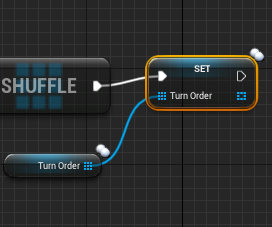
I'm trying to shuffle an array of content on the server (which is a replicated list)
But everytime I do, all clients will always have a different order to the server and each other.
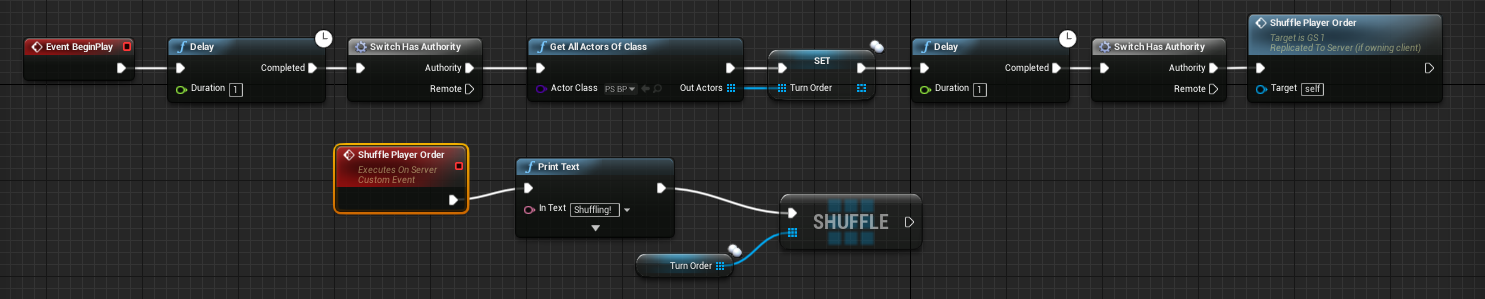
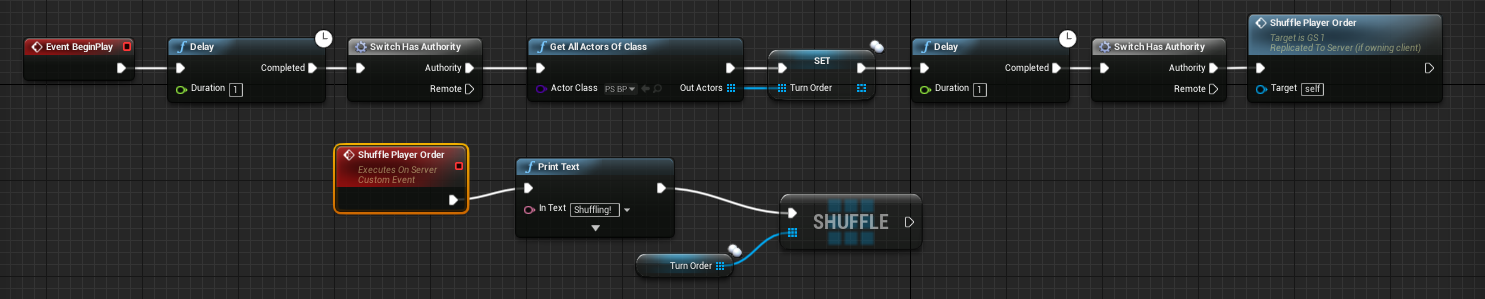 thin stratus
Set the array with itself after that
And let it replicate
instead of doing that everywhere
merry elk
https://i.gyazo.com/631c8427f7e0401f60802ae2e6ce6c39.png @thin stratus is this what you mean?
 twin juniper
@stark dome ok, if u find info tell me
twin juniper
@merry elk is there a point behind hdaving two switch has authority
lol?
it seems redundant
also why all the delay nodes
delete that shit
thin stratus
@merry elk The whole "GetAllActorsOf" should also happen onthe Server
And yes, remove the delays, as well as limiting it to one switch node
warped hull
What's the best language for dedicated servers
warped hull
Is nodejs bad? I can scale it for web very well
and this doesn't seem that different
 bitter oriole
Dedicated servers for UE4 are going to be made with UE4 in C++
Unless you want to remake your own networking from scratch, or if your servers are just used to store an inventory
bitter oriole
Steam is for matchmaking, not for servers.
What are you doing ? Wjat's your game like ?
bitter oriole
Joining friends in a game, for example
warped hull
ya but what part of that does steam handle
thin stratus
Steam basically gives you a backend for Friends, achievements etc
They also provide a MasterServer
That gives you serverlists if your Server registers at them
thin stratus
You still need to build and host your own game servers
bitter oriole
@warped hull What is your game like ? What kind of multiplayer are you considering ?
thin stratus
UE4 gives you Dedicated Servers
thin stratus
You can compile them if you download the Source of your engine version
There are guides
warped hull
not new to programming, just unreal
bitter oriole
Multiplayer is not something you just do, you have to carefully consider how you're going to do it
warped hull
Not publishing this game
I just wanna see how it works
also in the comments of the unreal video ppl are saying it's bad
their multiplayer playlist
is it?
bitter oriole
You're not making much sense.
Multiplayer is not an engine feature you toggle on or off, it's something you have to work hard to architecture and implement
bitter oriole
Depending on the kind of game you're doing, and how well you implement networking, it can be good or bad
Step 1 is really to know how your game works
warped hull
All I'm asking is if unreal is good for server side
or if I should just use what I know and do networking myself
bitter oriole
That's a super wide question that depends a lot on what kind of game you are doing
bitter oriole
Then I literally can't tell you
bitter oriole
What kind of shooter ? Playing with friends ? PVP ?
I mean OK, you don't want to release the game ever
In that case you probably don't care about cheaters, right ?
warped hull
yeah
I do
I wanna learn how to make a good server for this need
I'm just not gonna publish it
bitter oriole
Many shooters don't have servers, because you only really need dedicated servers if you're doing competitive esport
That's why I'm asking
bitter oriole
Either peer-to-peer, or someone hosts the game and plays at the same time (which is what you'd do with UE4)
warped hull
then how do you handle cheaters lol
bitter oriole
Dedicated servers are more complicated because you need to set them up, pay for the hosting costs, make sure you have a matchmaking service to link players to them, etc
You need to understand that multiplayer is really fucking hard to do, so it's strange to not have any idea of the game and want to start with the highest difficulty
If you want to know about how to do a competitive esport-type game then yeah, look up on UE4's dedicated servers
Definitely not node.js
bitter oriole
Because a competitive shooter will require extreme performance on the server, as much as the game itself basically
Because you'd need to rewrite networking from scratch
That'd be the two biggest reasons why
bitter oriole
i'm just saying, it's like someone asking to be taught how to drive and saying he wants to start with a Formula 1 😃
worn nymph
Can anyone clear up some confusion . I know the game instance class only exists on the server but for server and each client. To set variables on the game instance you have to RPC and get server to set it right?
warped hull
also it's codes in c# it looks like? @bitter oriole
worn nymph
But thing that is confusing me is why are there two game instances in the debugger when there is only one player ?
jolly siren
Game instance exists on client and server, but they aren't replicated
So two different instances
worn nymph
Yeah so 2 instances one is server and one is client
jolly siren
correct
worn nymph
OK so I'm doing menu stuff and I cast to game instance to set variable in my mind this should set the clients version of the gaminstance?
jolly siren
yes, if you are driving from ui it will be client
worn nymph
OK but when I do that all values in client game instance are null and any logic using the variables fail .
Yet if I do exactly same logic but swap it to RPC run on server it all works
but isnt that setting the servers version of the game instance?
And i don't want to have to replicate the values as no one else needs to know about it or use it which is why I wanted to use clients version of the game instance.
So I'm confused why my client variables always return null on clients version of game instance.
Or maybe better way to describe it . Is how to get the variables from client Into client version of game instance?
bitter oriole
@warped hull pure C++
worn nymph
@jolly siren
twin juniper
@thin stratus do you understand how net dormancy works
trying to find a simple explanation and i cant seem to find one
Anyone else feel free to answer
google search gives really no information
bitter oriole
It's about making an actor "non-networked"
twin juniper
@bitter oriole Yeah I got that much
But, how does it work, are there any hooks where we can check if a player is within a radius of the actor, start replicating again, else stop ALL functionality, components..etc?
I cant find any examples of usage
bitter oriole
It's an optimization method
You probably don't want to worry about it until your game is in beta
Simply put it's really about making an actor non-networked, like if a physics object is sleeping for most of the game and it can be woken up
You make it initially dormant, it doesn't update until you want it active, then you wake it up on the server
twin juniper
My game has had over 50+ players playing. However, the issue is that i have a ton of AI which are spawned in and shouldnt be replicating if rthere is no player in the area
the AI are taking up all the bandwidth
but how do you detect "shouldbe active?"
bitter oriole
Well, on the server you can make every AI search for local players and set itself to awake once a player comes near
twin juniper
But why not use dormancy which is the intended purpose of dormancy (to enable or disable replication on a per actor basis)
https://support.steampowered.com/downloads/7017-UJBN-6785/SteamSourceDedicatedServer.jpg in counterstrike source i always thought that dedicated server means that MY pc is the server, because if I leave the game, every player leaves the game, the game is done.


@bitter oriole
bitter oriole
"Dedicated server" means "server that doesn't do display"
You can start a dedicated server on your own PC and then start the game too
But usually you run the dedicated server on, well, a dedicated server that only does that
twin juniper
perhap sthat is what the person meant with dedicate
bitter oriole
That's not what it means
worn nymph
@twin juniper what about making ai spawner volumes and only spawning the ai when it detects a player then you won't have to worry about it
twin juniper
and css is competitive. and dedicating worked perfect. no lags. normal pc is enough for hosting a game. you dont need servers
bitter oriole
Hosting on a PC completely defeats the entire point of a dedicated server
twin juniper
what is the point? and who should care?
@worn nymph its not the spawning volume itself, its the AI which are spawned from it
because what happens if a player is in the area for one hour, leaves, then the AI would simply still be there?
bitter oriole
Perks of dedicated servers are :
- server can be known safe, and prevent cheating
- server has dedicated hardware and solid performance
- server doesn't need a home router workaround like NAT punch
twin juniper
they would be sitting there lol
bitter oriole
Dedicated servers are a must for competitive play if only for the first reason - cheating can be made way harder.
The second reason is also pretty important, network performance can be really bad when a player hosts the game because most home network has shit upload.
Reasons not to have dedicated servers include the high cost for the developer (if he's doing the hosting), difficulty of setup for players (if self-hosted), and no real use if you're doing cooperative play, or only 2/3 players in the game.
 wintry cove
Warning: STEAM: Invalid session info on search result What does that mean?
It's a custom app id
twin juniper
@bitter oriole https://issues.unrealengine.com/issue/UE-45681
you know it might not be the actors causing delay on my servers
it might be this bug lol
bitter oriole
@twin juniper Uh, I mean, you did profile first before looking at how to optimize the networking, right ?
worn nymph
@twin juniper think like mmo . Let's say on map I go to point A because my quest needs me to kill 5 spiders and spiders are found there.
I have a spider spawn volume which can just be a simple sphere /box collision whatever you want.
On trigger enter if other actor is player spawn 5 spiders. On trigger exit destroy 5 spiders. Or what I do is pool hem so deactivate them . Stop tick
. Hide them . Etc .
bitter oriole
Did you use this ? https://docs.unrealengine.com/latest/INT/Gameplay/Tools/NetworkProfiler/
Tool for displaying network traffic and performance information captured at runtime.
worn nymph
So if no players are in the area no spiders exist so no problem
twin juniper
@worn nymph yeah but then what if someone findds a high level thing, but they dont have the equipment to kill it but want to come back and get that exp...
its not very realistic haha
@bitter oriole yeah
worn nymph
High level thing ? You mean like a boss enemy
Not very realistic ? It's how nearly every mmo works. Even games like day z use this technique. Zombies don't exist all game hey only spawning when a player enters a town
You can even scale number of monsters based on how many players are nearby or within range
twin juniper
It's not realistic for what i'm doing
lol
I need everything to be persistant
same levels, same stats, so long as the server does not reboot, and the AI is not killed, it shouhld stay the same level
Essentially my spawner is pretty complex, it picks a set of stats based on a rnadom range, and then spawns it and the spawner keeps track of it
bdoom do you have images or so :3
Huh?
of your sexy game
Kind of off topic, right?
xD
worn nymph
Same level ? Not really sure what you on about you talking about stopping network dormancy when an ai is not needed so what I'm suggesting is just deactivate them completely when a player is out of range. Stop them moving stop them ticking stop them rendering
Etc
twin juniper
Dormancy is literally
SetReplicates(true) or SetRedplicates(false) from what i understand
it lets you decide if an actor should replicate
or not
but what i dont understand... is How does it work?
How can I make a check
"Should we repllicate?"
There's no hook for it
is it possible that each player is its own server? like player a hosts enemys in "munich area", player b hosts the 10 vehicles which can be controlled by players, player f hosts xyz. and the main game is hosted by the main server.
Thats not what im doing
lol
worn nymph
You can create your own hook . If player is within range dormancy (should replicate true) if out if range dormancy Should replicate false.
How you determine that range is up to you . You could use the net cull distance . Use trigger volumes there are lots of ways
twin juniper
y ea
well net cull distance has to do with relavancy
and its client sided
i want to stop ALL on both the server and the clients
without destroying it obviously
I feel like im missing something with network dormancy... It can't simply be if dormant, setreplicates(false) else setrplicates(true)
like if its only that... then why even call it dormancy at all
bitter oriole
Some tips for optimizing the performance and bandwidth usage of Actor replication.
dormancy != setreplicates
twin juniper
ya
bitter oriole
twin juniper
sec
 enum ENetDormancy
: {
// This actor can never go network dormant
 DORM_Never,
// This actor can go dormant, but is not currently dormant. Game code will tell it when it go dormant
DORM_Awake,
// This actor wants to go fully dormant for all connections
DORM_DormantAll,
// This actor may want to go dormant for some connections, GetNetDormancy() will be called to find out which
DORM_DormantPartial,
 // This actor is initially dormant for all connection if it was placed in map.
DORM_Initial,
DORN_MAX,
};```the word "Dormant" is constantly used
but never defined
bitter oriole
Dormant = doesn't replicates
twin juniper
ya
bitter oriole
You supposedly have a SetDormant method somewhere
twin juniper
So If SetNetDormancy(DORM_AWAKE) == SetReplicates(true)
lol
but
how does
SetNetDormancy() differ
from SetReplicates
bitter oriole
Dunno. When dormancy was announced, it was described as something most games would never need
twin juniper
its used in fortnite
i know that much
they said its used due to the large number of "Structures" and such
which is kind of how my game is
base building, as well as large number of AI
bitter oriole
You can probably keep using setreplicates for now and see how far you go
twin juniper
Yeah but it still leaves me with the question of wtf is dormancy, and why is it so poorly documented lol
like why even mentionn it if theres no documentation
xd
bitter oriole
Because it's something they did specifically for one case and presumably, they don't feel like it's useful to others
It's a common thing with Epic, they mostly do stuff for their own games
worn nymph
They use it on fortnight to load all the buildings in a dormant state
For fast map loading
twin juniper
Ya thats what i read
but it doesnt explain how to set dormancy on or off
nor does it explain how the sysstem CHECKS if it should be or not
"Here's dormancy, but we wont tell u how to turn it on or off"
worn nymph
OMG there is no checks you decide what you want to be dormant or not
He tells you how to set it
Either put it in yhe actors constructor or call the function provided and change the enum value
twin juniper
yea
thats what i mean though
NetDormancy = ENetDormancy::DORM_Initial
But then... if we want it to be Awake we just set NetDormancy = ENetDormancy::DORM_Awake?
is that it?
lol
because
ENetDormancy::Initial wouldnt make sense.. lit says "Goes dormant for things placed into level"
so that would mean you would have to use DormAll?
lol
i think i understand it now
after looking through this file
sort of...
stark dome
What did you learn
twin juniper
i lelooka t line 1545
if checks the Actor's NetDormancy state
thats just one section when it closes connection tho
what im looking for is to see if there is a place
where it checks this value, either on a tick basis, or on some sort of event basis where it is checkinng it
{
    UE_LOG(LogNetDormancy, Verbose, TEXT("BecomeDormant: %s"), *Describe() );
    bPendingDormancy = false;
    Dormant = true;
    Close();
}```Not sure how to access UActorChannel on a per actor basis
not sure if it is correlated to each actor having an "Actor Channel"
bitter oriole
I just don't get it
stark dome
It checks for it in the tick
bitter oriole
Set dormancy on every actor, that's it
merry elk
@thin stratus I remove most of the delay nodes except 1 as if I remove that one, it iwll only find one of the player states I am trying to look for. I am running the code in my Game State.
thin stratus
Network code should not have delays
You are just playing with luck
If something causes a lag spike, you still won't get the other playerstates
Make sure you call logic when you 100% know a class is replicated and available
merry elk
Okay
merry elk
https://i.gyazo.com/44599ffb07db48a968dc97affe31c590.png <- GameState Class.
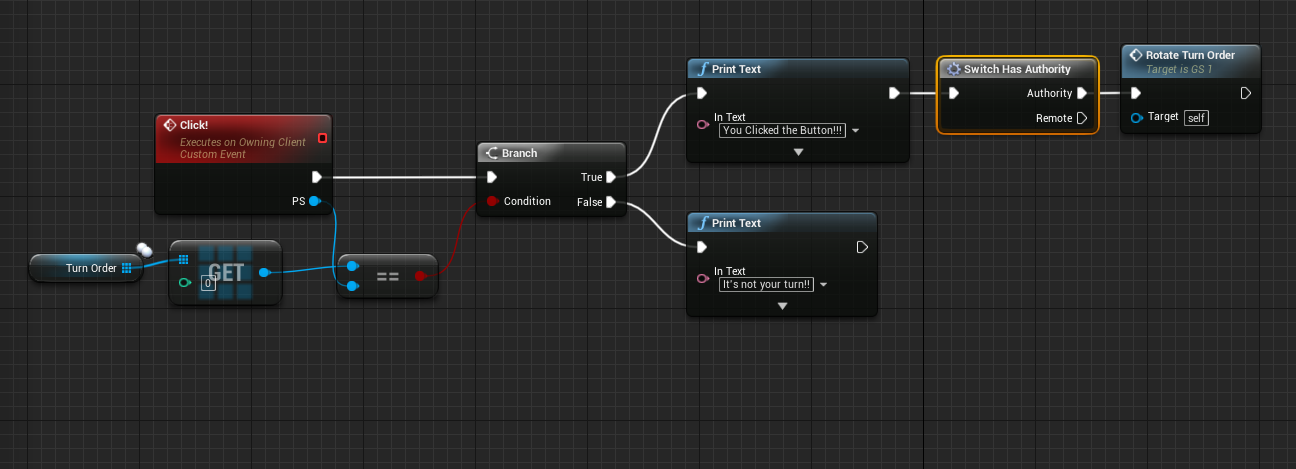
In my game state, I am trying to run a function that basically occurs when a player clicks a button on their screen (through a HUD) This code is called through the hud when that occurs.
The shuffling on the other hand doesn't seem to give the same order to each client.

https://i.gyazo.com/11e33ede65ae554b6efac8693479c922.png <- HUD Class
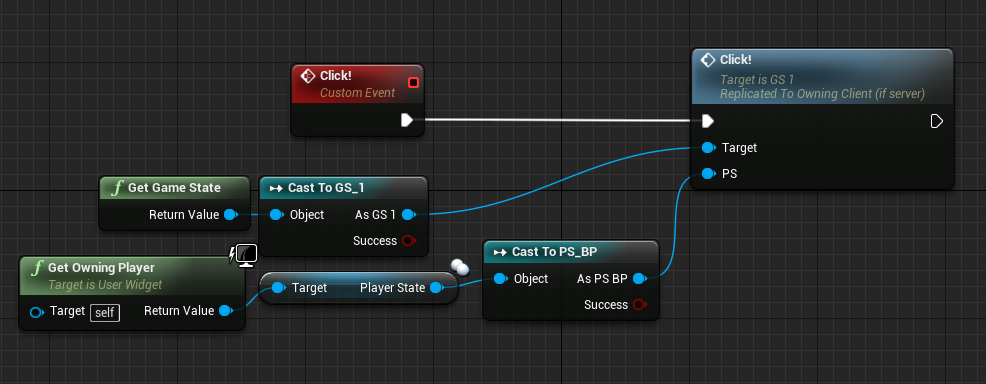
This is where the function gets called (in a widget class)

 inner iris
Is it possible to override the "PlayerName" value for AI Player States? All AI share the same name.
Also AI Player States seem to have a "Player Id" of 0
I can make my own ID and Name variables, but would be nice to use the built in ones
I guess they are more set up for human players
stark dome
@inner iris you can set the built in ones
I wouldn't touch the player ID
But you can set the name for AI I believe
inner iris
@stark dome in BP? Doesn't look like it can be set there.
As for the ID, I need to at least give all players their own ID for certain things
All AI currently have the same ID so they can't be identified when running certain logic
Also not sure how I can make the AI retain their Playerstate when being respawned after a new round, seems to create a new PS every time they respawn.
Probably shouldn't try to learn networking with AI also involved, makes it needlessly more complex
Much nicer to test game scenarios though
 worthy wasp
its been quite a while since i've done things OUTSIDE of DedicatedServer - i have a Peer2Peer game i'm building - and the model is ClientAuth (NON-Dedicated) and my clients behavior is working great with the auth model i'm doing .... but my server - when he does the same actions the client doesnt see it.... Animations this is.
Any/all variables that should change animation states/anims I have as replicated and are being set by server... but the servers animations arent showing up on my networked clients - what am I missing?
so through testing - i've found that my variables when i set them as Server - arent being replicated to the clients..... i assume i need to multicast if i'm the server
this is only on the server role - the clients replicate fine to the server
ah yes - my other clients dont see eachother as well - soooo different than Dedicated Server lol.
stark dome
It should be the same general concept just a bit different
Variables set on the server should replicate to clients
worthy wasp
@stark dome - that wasnt the case at all - in order to get other clients to see other clients animations - i had to SetAsServer - then MCast set the same variable.
Only the server would see the animations before - now after doing this they all see animations appropriately
stark dome
You don't need to multicast to replicate a simple variable
@worthy wasp what are you trying to replicate
worthy wasp
bools for animations choices
in the character class
if i set them as server - theyre not showing up to othe rclients - tested with PIE x clients
x3
when i multicast them after setting as server - t hey show up to othe rclients
stark dome
Did you set the bools to replicate
stark dome
That will replicate to clients. It sounds like theres an issue with your setup
worthy wasp
how?
stark dome
Hard to say without seeing your code
worthy wasp
i dont understand - isnt this the normal chain of replication?
If you set replicated variable value as server - only the server sees it
if you set NetMulticast - it is replicated to all
am i wrong?
stark dome
Oh are you saying you are using a server rpc
stark dome
Yep but instead of using a net multicast it's better to set a boolean on the server and have that variable replicate
But it depends on the situation
worthy wasp
ok so hold up
when i set a variable - should i be doing :
if(HasAuthority())
Value = true;
for ar eplicated variable
INSTEAD of an RPC chain?
worthy wasp
ok thats what i thought
and in that case -
NetMulticast is required
otherwise - none of the other clients would see it
stark dome
You don't need a net multicast. You just need to set the boolean variable on the character to be replicated
worthy wasp
wowsa - it is set to replicated
and i'm telling you
i can print string it
its nto being set on othe rclients connected
UPROPERTY(EditDefaultsOnly, BlueprintReadWrite, Replicated)
FRotator ControlRot;
UFUNCTION(Server, Reliable, WithValidation)
void Server_SetFRotator(const FString &VarToSet, FRotator Value);
UFUNCTION(NetMulticast, Reliable)
void MC_SetFRotator(const FString &VarToSet, FRotator Value);
Server_SetFRotator("ControlRot", GetControlRotation());
{
    if (VarToSet.ToLower() == "controlrot")
        ControlRot = Value;
    if (VarToSet.ToLower() == "actorrot")
        ActorRot = Value;

    MC_SetFRotator(VarToSet, Value);
}
bool AAvantGardeCharacter::Server_SetFRotator_Validate(const FString &VarToSet, FRotator Value)
{
    return true;
}
void AAvantGardeCharacter::MC_SetFRotator_Implementation(const FString &VarToSet, FRotator Value)
{
    if (VarToSet.ToLower() == "controlrot")
        ControlRot = Value;
    if (VarToSet.ToLower() == "actorrot")
        ActorRot = Value;
}
not to forget:
DOREPLIFETIME(AAvantGardeCharacter, ControlRot);
if i just set it as server - takign out the MCast functionality....
it is NOT replicated to other clients connected
stark dome
Are you printing the value somewhere to check?
worthy wasp
yes
tick value on characte rclass
for 3 connected clients - 2 clients 1-listenserver shows up
when i do JUST AS SERVER
only the server sees values from clients
when i do it my way....
ALL see the value on all clients
stark dome
Hmmm where is your Doreplifetime
worthy wasp
void AAvantGardeCharacter::GetLifetimeReplicatedProps(TArray< FLifetimeProperty > & OutLifetimeProps) const
{
Super::GetLifetimeReplicatedProps(OutLifetimeProps);
DOREPLIFETIME(AAvantGardeCharacter, IsFiringWeapon);
DOREPLIFETIME(AAvantGardeCharacter, isAiming);
DOREPLIFETIME(AAvantGardeCharacter, PrimGunType);
DOREPLIFETIME(AAvantGardeCharacter, ControlRot);
DOREPLIFETIME(AAvantGardeCharacter, ActorRot);
}
#include "UnrealNetwork.h"
stark dome
Maybe it has to do with the UPROPERTY specifiers on controlrot
Do your booleans replicate properly
worthy wasp
again - nothing replicates to other clients unless i multicast it
grand kestrel
FYI CMC already replicates control rotation through it's prediction system
Do you have SetReplicates(true) set
worthy wasp
and @grand kestrel - control rotation when used in AnimationBlueprint - does not replicate animations
grand kestrel
Use GetBaseAimRotation
worthy wasp
of character class?
grand kestrel
Yeah
grand kestrel
Oh, right
So are you setting those variables on the server?
Replication only happens from the server
worthy wasp
all my functions are listed above
its working now - i have no issues
i talked myself through the problem
i still think that NetMulticast is required for all to see a variable's replicated value
if you were to spawn something only on server in the world.....
it wouldnt show up to all
thast in the WIKI & Tutorials
grand kestrel
You can build a multiplayer game without any multicast if you so desire
worthy wasp
i wish i could find out how....
it doesnt work the way you guys say it is (not for me anyways)
grand kestrel
In fact, more often than not, you should avoid multicast
Unless you need it immediately
stark dome
Yeah multicast has some overhead
worthy wasp
i dont understand what i'm doing wrong
stark dome
And it also ignores relevancy which is fun
worthy wasp
i set the value as server (as you gusy state)
at this point - it should be done according to you guys
but its not
grand kestrel
So you do if (Role == ROLE_Authority) { MyVar = X; } from an entry point that executes server-side or you use a Server RPC to set it?
worthy wasp
so let me ask you this before we go deeper into this convo
for a NETWORK CLIENT - someheone who IS NOT server role....
can i run functions ROLE_Authority ??
grand kestrel
That's not a function
grand kestrel
You're checking the net role of the actor
worthy wasp
can i do that ON A CLIENT ?
grand kestrel
You can do it from anywhere, it's a conditional
The entire point is that the code will only run on the server
If it doesn't run at all then the server isn't setting the variable
worthy wasp
now if it were a CLIENT - that if statement would fail?
stark dome
Not always
worthy wasp
going to test this - i dont use Role == ROLE_Authority never have
stark dome
But for the character case yes
worthy wasp
so let em test this and see it with my won eyes
grand kestrel
It would succeed if it's a listen server
worthy wasp
thast the problem
hwo the F do i set a variable's value
as a client?
i need to set a boolean - IsFiring when i press the LMB
i'm a client (NOT SERVER)
grand kestrel
There is GetNetMode() == NM_ListenServer
worthy wasp
k go....
grand kestrel
There is IsLocallyControlled()
The host on a listen server is always going to say it's the server
Because it is
worthy wasp
man i wish i had voice
typing is so stupid
seriously - i need to set this on the client - and have it replicated to othe rplayers so that they see th eanimations & ultimately the values of the replicated variable my CLIENT is trying to set
i understand that it has to have AUTHORITY to set a replicated variable
because setting it as a client does nothing except for the local player
so now....
my quesiton (kicking this dead horse)
grand kestrel
It doesn't need authority, it just wont replicate without it, you can still overwrite a replicated variable from anywhere
worthy wasp
wow
i'm sorry - i'm done here. its working the way i have it
i dont understand you guys - and its vice versa
i'm not explaining myself good i guess
stark dome
Are you setting controlrot anywhere else
worthy wasp
of course not
stark dome
Or just in those rpcs
worthy wasp
just those RPCs
grand kestrel
And are you using if (IsLocallyControlled())
worthy wasp
no
grand kestrel
Well there you go then
grand kestrel
If you call an RPC from a simulated proxy it'll just run it locally as a function
Overwriting the value
worthy wasp
when Duetoxplode started asking about the way i was doing this
so
i want to set a bool
a replicated bool
to set this....
i would do:
Var = value;
No
If you wanted to call an RPC to set the bool
if (IsLocallyControlled()) { ServerSetBool(bInBool); }
worthy wasp
is calling an RPC the ONLY way to set a replicated value?
grand kestrel
If it's something that the server is already aware of such as your velocity then you'd do if (Role == ROLE_Authority) { ReplicatedVelocity = GetVelocity(); }
(Which would be entirely redundant as CMC predicts it)
worthy wasp
is calling an RPC the ONLY way to set a replicated value?
grand kestrel
Replication only goes server -> client(s)
worthy wasp
man
is it too much to ask to answer th question? i'm tyring to understand your way here
worthy wasp
and instead of direct communications - you go sideways
grand kestrel
How the server knows what that value is is up to you
worthy wasp
right so
is there ANY OTHER WAY to set a value on the server when you DO NOT HAVE AUTHORIZATION (IE: You are a client)
i hope thats as clear as I think i put it.
because i'm really not undestanding your guys angle at this....
you say the same thing i'm doing already
and you say that "it should work just setting it on server"
i'm telling you - it doesnt.
worthy wasp
well i ask you direct questions
and you go sideways with topics
then you give up on me like that
no i dont know better
never said i did
i'm telling you my direct vision of the problem i'm experiencing
in as detailed as possible explenation
trust me when i say - i appreciate the offer of help - and trying to get me through this.... i'm just not understanding you guys clearly
stark dome
What if you start with a simpler test to make sure that replication is setup properly
worthy wasp
i'm doing tha tnow